Product User Manual
Headphones Mode No.:WH���A
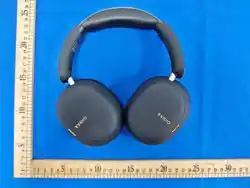
ANC Headphones Pro
Product User Manual
Headphones Mode No.:WH���A
Pro Noise Cancelling Headphones
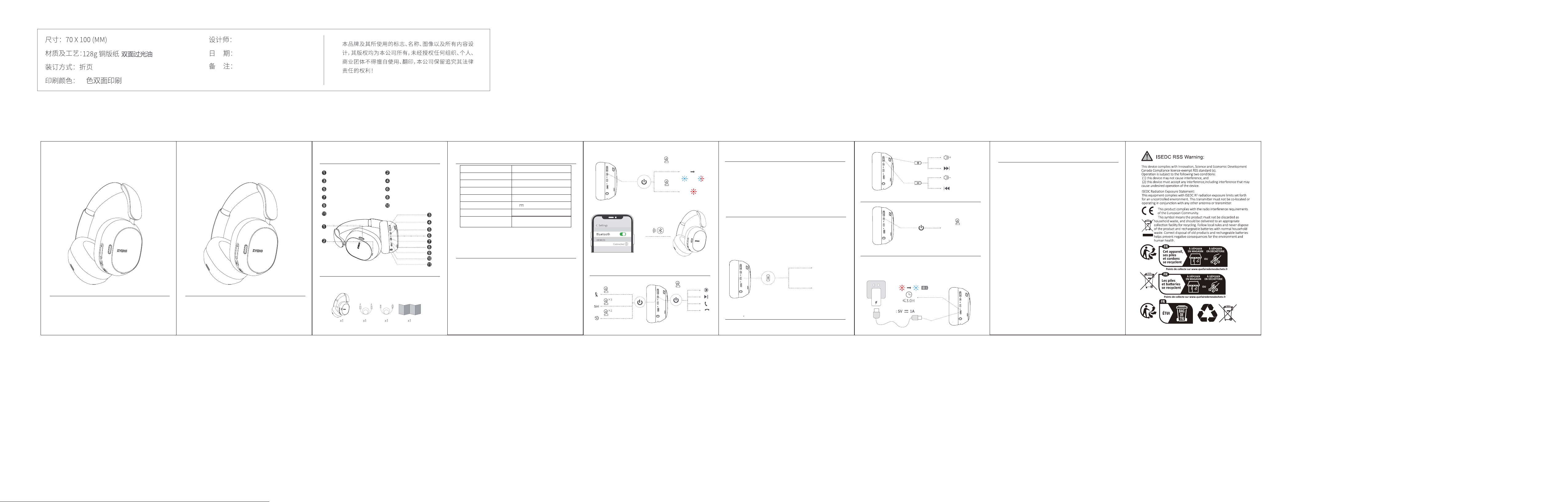
Diagram
How to Pair via Bluetooth
Note:
Packing List
Vent
Volume + / Next Track
Power Button
ANC Button
USB-C Charging Port
Microphone
Wireless Headphones x �
Model No.
Wireless Version
Wireless Profile
Transmission Distance
Battery Capacity
Voltage
Charging Time
Playtime
Up to ���H (ANC Off)
Up to ��H (ANC On)
*Note: Use at a moderate volume
WH���A
V�.�
HSP/ HEP/ A�DP/ AVRCP/ BLE
�� meters
����mAh/�.�Wh
�V �A
≤� hours
�.�mm Audio Cable x �
USB-C Charging Cable x � User Manual x �
ANC Microphone
Volume - / Previous Track
ANC Indicator
LED Indicator
�.�mm Audio Jack
�.For first-time pairing, ensure the headphones are turned off.
Press and hold the Power Button for � seconds to turn them on.
When the red and blue lights flash alternately, the
headphones enter Bluetooth pairing mode.
�.Make sure the headphones are powered off. Press and hold the
Power Button until the indicator light flashes red and blue
alternately, indicating pairing mode. Turn on Bluetooth on your
phone and select “WH���A” to connect.
�. If the headphones have a pairing history, they will automatically
reconnect to the last paired device when powered on. If
reconnection does not occur within � seconds, press the Power
Button once to reconnect to the last paired device.
�.While connected to a device and playing music, press and hold
the ANC Button for � seconds to enable Head Tracking (disabled
by default when powered on).
Experience ���° head tracking with immersive �D spatial audio.
�.While connected to a device and playing music, press and hold
the ANC Button for � seconds again to disable Head Tracking.
Q: Can not connect?
A: When the headphones are powered off, press and hold the
multifunction button for �� seconds, then search for the
Bluetooth device and connect.
Q: Which devices are compatible?
Q: How to connect two devices at the same time?
A: �. Pair with your first device.
�. Turn off Bluetooth on the first device and pair with the second
device.
�.Turn Bluetooth back on the first device to reconnect.
�.The headphones will now be connected to two devices
simultaneously.
A: �. Devices with Bluetooth functionality.
�.Devices with a �.�mm audio jack.
�.For TVs/PCs without wireless function, a Bluetooth
transmitter is required.
(Note: This product does not include a Bluetooth transmitter.)
Q: No sound from the other side?
A: Make sure both the headphones and your Bluetooth device are
turned on. Check that they are properly connected, and ensure
the audio output is set to these headphones.
Do not use the headphones while charging, as audio playback and
other functions will be unavailable.
Step �:
Hold on �s
Hold on �s
PairingON
OFF
Specification
Step�:
Bluetooth
WH306A
<�m(�.�ft)
Pairing range
Play / Pause / Answer / End / Reject / Redial
Volume Control / Previous & Next Track Control
Charging Instructions
Frequently Asked Questions
Clear Pairing
Head Tracking Instructions
ANC Mode and Transparency Mode are only available when the
headphones are powered on.
By default, ANC is enabled when the headphones are turned on
(reduces ambient noise). Press the ANC Button once to switch to
Transparency Mode (amplifies surrounding sound). Press again to
turn ANC off, and the ANC indicator light will turn off.
ANC Button Instructions
Hold on �s
Triple-click
Double-click
Single-click
Click Once
ANC On
(Default)
Transparency
Mode ON
Transparency
Mode Off
Click
Hold on �-�s
Long press ��s
(Power Off)
Click
Hold on �-�s
Click again
Output
四
2026.06.11

This equipment has been tested and found to comply with the limits for a Class B digital device,
pursuant to part 15 of the FCC Rules. These limits are designed to provide reasonable protection
against harmful interference in a residential installation. This equipment generates, uses and can
radiate radio frequency energy and, if not installed and used in accordance with the instructions, may
cause harmful interference to radio communications. However, there is no guarantee that interference
will not occur in a particular installation. If this equipment does cause harmful interference to radio or
television reception, which can be determined by turning the equipment off and on, the user is
encouraged to try to correct the interference by one or more of the following measures:
•Reorient or relocate the receiving antenna.
•Increase the separation between the equipment and receiver.
•Connect the equipment into an outlet on a circuit different from that to which the receiver is
connected.
•Consult the dealer or an experienced radio/TV technician for help.
Caution: Any changes or modifications to this device not explicitly approved by manufacturer could
void your authority to operate this equipment.
This device complies with part 15 of the FCC Rules. Operation is subject to the following two
conditions: (1) This device may not cause harmful interference, and (2) this device must accept any
interference received, including interference that may cause undesired operation.
RF Exposure Information
The device has been evaluated to meet general RF exposure requirement. The device can be used in
portable exposure condition without restriction.
FCC Statement

