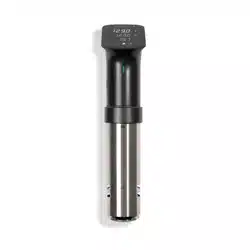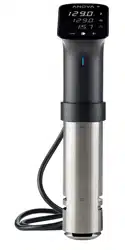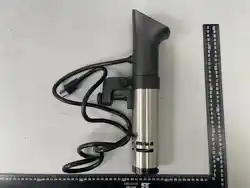

User Manual
PRECISION
®
COOKER PRO 3.0
Weasel User manual - Master v2.indd 1Weasel User manual - Master v2.indd 1 22/05/2026 2:37:29 PM22/05/2026 2:37:29 PM

2
CONTENTS
WARNING AND SAFETY INFORMATION ........................................4
SPECIFICATIONS.............................................................8
SETTING UP.................................................................9
GET CONNECTED...........................................................10
USING THE DISPLAY .........................................................11
CARE AND CLEANING .......................................................14
TROUBLESHOOTING........................................................16
WARRANTY ................................................................17
FCC/IC COMPLIANCE .......................................................18
Weasel User manual - Master v2.indd 2Weasel User manual - Master v2.indd 2 22/05/2026 2:37:29 PM22/05/2026 2:37:29 PM

3
Weasel User manual - Master v2.indd 3Weasel User manual - Master v2.indd 3 22/05/2026 2:37:29 PM22/05/2026 2:37:29 PM

4
WARNING AND SAFETY INFORMATION
TO REDUCE THE RISK OF FIRE, ELECTRIC SHOCK, OR INJURY:
⊲
Household Use Only
⊲
CAUTION: DO NOT IMMERSE BEYOND MAX POINT
⊲
Do not use with a damaged cord or plug.
⊲
If the appliance is not working as it should, has been dropped, damaged, left
outdoors, or dropped into water, do not attempt to use it again. Contact Anova
Support for assistance.
⊲
Do not use outdoors.
⊲
Unplug the electrical cord when not in use and before servicing.
⊲
Do not allow to be used as a toy. Close attention is necessary when used by or near
children.
⊲
Use only as described in this manual. Use only manufacturer’s recommended
attachments.
⊲
Do not pull or carry by cord or use cord as a handle.
⊲
Do not use extension cords or outlets with inadequate current-carrying capacity.
⊲
Do not unplug by pulling on the cord. To unplug, grasp the plug.
⊲
Do not handle the plug or appliance with wet hands.
⊲
Do not put any object into openings. Do not use with any opening blocked; keep
free of dust, lint, hair, and anything that may reduce water flow.
⊲
Do not use the appliance in flammable or combustible liquids such as gasoline, or
use in areas where they may be present.
⊲
Store your appliance indoors in a cool, dry area.
⊲
Do not use a voltage converter or adapter, or plug the device into an outlet with
unmatched voltage.
Weasel User manual - Master v2.indd 4Weasel User manual - Master v2.indd 4 22/05/2026 2:37:29 PM22/05/2026 2:37:29 PM

5
ALWAYS EXERCISE BASIC SAFETY PRECAUTIONS WHEN OPERATING
ELECTRICAL APPLIANCES, INCLUDING THE FOLLOWING:
⊲
Read all instructions, including the instructions you are reading now.
⊲
Do not touch hot surfaces.
⊲
To protect against electrical shock, do not immerse cord, plugs, or the device’s
electrical components in water or other liquid.
⊲
Close supervision is necessary when the appliance is used by or near children.
⊲
Unplug from outlet when not in use and before cleaning. Allow the device to cool
before assembling or disassembling.
⊲
Do not operate any appliance with a damaged cord or plug. Do not operate the
appliance if it has malfunctioned or been damaged in any manner. Contact Anova
Support for assistance.
⊲
The use of accessory attachments not recommended by the manufacturer may
cause injuries.
⊲
Do not let the cord hang over the edge of a table or counter. Do not let the cord
come in contact with hot surfaces.
⊲
Do not place the device on or near a hot gas or electric burner, or in a heated oven.
⊲
Use extreme caution when moving an appliance containing hot liquids.
⊲
Do not unplug while the device is running.
⊲
Do not use the appliance for anything other than its intended use.
⊲
Do not open the bottom enclosure while the device is plugged in or operating — it
contains heating elements and moving parts.
⊲
Do not use directly on a granite or marble surface. Always place an insulating
surface between the hot pot and granite or marble.
SERVICE
Contact Anova customer service:
support@anovaculinary.com https://support.anovaculinary.com
Weasel User manual - Master v2.indd 5Weasel User manual - Master v2.indd 5 22/05/2026 2:37:29 PM22/05/2026 2:37:29 PM
6
RENSEIGNEMENTS SUR LA SÉCURITÉ ET MISES EN
GARDE
POUR RÉDUIRE LE RISQUE D’INCENDIE, DE CHOC ÉLECTRIQUE OU DE
BLESSURE :
⊲
Réservé à un usage domestique uniquement
⊲
ATTENTION : NE PAS IMMERGER AU-DELÀ DU POINT MAX
⊲
Ne pas utiliser avec un cordon ou une fiche endommagée.
⊲
Si l’appareil ne fonctionne pas correctement, a été échappé, endommagé, laissé à
l’extérieur ou tombé dans l’eau, ne tentez pas de l’utiliser à nouveau. Contactez le
soutien Anova pour obtenir de l’aide.
⊲
Ne pas utiliser à l’extérieur.
⊲
Débrancher le cordon électrique lorsqu’il n’est pas utilisé et avant l’entretien.
⊲
Ne pas laisser utiliser comme jouet. Une surveillance étroite est nécessaire lorsqu’il
est utilisé par des enfants ou près d’eux.
⊲
Utiliser uniquement tel que décrit dans ce manuel. Utiliser uniquement les
accessoires recommandés par le fabricant.
⊲
Ne pas tirer ni transporter par le cordon ni utiliser le cordon comme poignée.
⊲
Ne pas utiliser de rallonges électriques ni de prises avec une capacité de courant
inadéquate.
⊲
Ne pas débrancher en tirant sur le cordon. Pour débrancher, saisir la fiche.
⊲
Ne pas manipuler la fiche ou l’appareil avec les mains mouillées.
⊲
Ne pas introduire d’objets dans les ouvertures. Ne pas utiliser avec une ouverture
obstruée; garder libre de poussière, peluche, cheveux et de tout ce qui pourrait
réduire le débit d’eau.
⊲
Ne pas utiliser l’appareil dans des liquides inflammables ou combustibles tels que
l’essence, ni dans des zones où ils pourraient être présents.
⊲
Ranger votre appareil à l’intérieur dans un endroit frais et sec.
⊲
Ne pas utiliser de convertisseur ou d’adaptateur de tension, ni brancher l’appareil
dans une prise avec une tension non correspondante.
Weasel User manual - Master v2.indd 6Weasel User manual - Master v2.indd 6 22/05/2026 2:37:29 PM22/05/2026 2:37:29 PM

7
TOUJOURS RESPECTER LES PRÉCAUTIONS DE SÉCURITÉ DE BASE
LORS DE L’UTILISATION D’APPAREILS ÉLECTRIQUES, Y COMPRIS LES
SUIVANTES :
⊲
Lire toutes les instructions, y compris les instructions que vous lisez en ce moment.
⊲
Ne pas toucher les surfaces chaudes.
⊲
Pour se protéger contre les chocs électriques, ne pas immerger le cordon, les
fiches ou les composants électriques de l’appareil dans l’eau ou tout autre liquide.
⊲
Une surveillance étroite est nécessaire lorsque l’appareil est utilisé par des enfants
ou près d’eux.
⊲
Débrancher de la prise lorsqu’il n’est pas utilisé et avant le nettoyage. Laisser
refroidir l’appareil avant de le monter ou de le démonter.
⊲
Ne pas utiliser un appareil avec un cordon ou une fiche endommagée. Ne pas
utiliser l’appareil s’il a mal fonctionné ou a été endommagé de quelque façon que
ce soit. Contactez le soutien Anova pour obtenir de l’aide.
⊲
L’utilisation d’accessoires non recommandés par le fabricant peut causer des
blessures.
⊲
Ne pas laisser le cordon pendre sur le bord d’une table ou d’un comptoir. Ne pas
laisser le cordon entrer en contact avec des surfaces chaudes.
⊲
Ne pas placer l’appareil sur ou près d’un brûleur à gaz ou électrique chaud, ni dans
un four chaué.
⊲
Faire preuve d’une extrême prudence lors du déplacement d’un appareil contenant
des liquides chauds.
⊲
Ne pas débrancher pendant que l’appareil fonctionne.
⊲
Ne pas utiliser l’appareil à d’autres fins que son utilisation prévue.
⊲
Ne pas ouvrir le boîtier inférieur lorsque l’appareil est branché ou en
fonctionnement — il contient des éléments chauants et des pièces mobiles.
⊲
Ne pas utiliser directement sur une surface en granit ou en marbre. Toujours placer
une surface isolante entre la casserole chaude et le granit ou le marbre.
SERVICE
Contacter le service client Anova : support@anovaculinary.com
https://support.anovaculinary.com
Weasel User manual - Master v2.indd 7Weasel User manual - Master v2.indd 7 22/05/2026 2:37:29 PM22/05/2026 2:37:29 PM
8
SPECIFICATIONS
DIMENSIONS
88mm D x 60mm W x 350mm H
3.46” D x 2.6” W x 13.78” H
WEIGHT
1.29 kg
2.85 lbs
POWER
120 V / 60 Hz / 1600 W
TEMPERATURE
0˚-92˚C (32˚-197˚F) | +/- 0.05˚C (0.09˚F) accuracy
CONTAINER SIZE
Up to 60 L
15 gal
FLOW RATE
12 Liters/min
CONNECTIVITY
WiFi 2.4 & 5 GHz
DISPLAY
2.8 inch TFT
Weasel User manual - Master v2.indd 8Weasel User manual - Master v2.indd 8 22/05/2026 2:37:29 PM22/05/2026 2:37:29 PM

9
SETTING UP
adjust
the height of the clamp by loosening and tightening the side screw
attach
the clamp over the edge of your pot or container and tighten the rear
screw until snug. Tighten with finger pressure only — do not over-tighten either
screw
fill
your container with water between the minimum and maximum line on the
stainless steel skirt
plug
in your Pro and place your sealed food in the water bath when you are ready
to cook
1
2
3
4
heat safety
Keep your pot or container away from counter edges and place it on a heat-safe
flat surface, such as a butcher block or trivet to protect countertops.
Weasel User manual - Master v2.indd 9Weasel User manual - Master v2.indd 9 22/05/2026 2:37:29 PM22/05/2026 2:37:29 PM
10
GET CONNECTED
The Anova Precision™ Cooker Pro 3.0 requires a WiFi connection to receive software up-
dates. An optional active subscription is required to access the latest guides and recipes
and to track your cook history on your cooker.
Follow the instructions on the screen and in the app to set up your Pro.
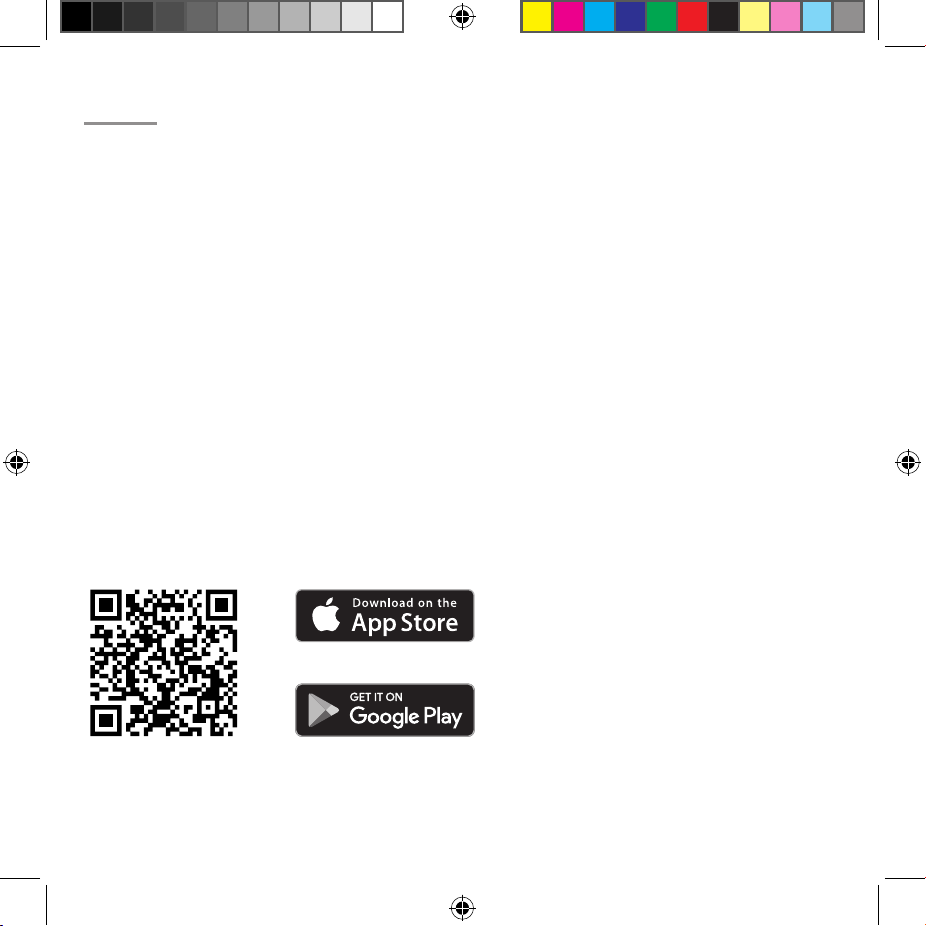
To download the Anova Culinary app and subscribe, please scan the QR code.
NOTE: Wi-Fi connection, app, and subscription are not required to use the cooker. However, some functions
may not be available with manual use.
Weasel User manual - Master v2.indd 10Weasel User manual - Master v2.indd 10 22/05/2026 2:37:31 PM22/05/2026 2:37:31 PM
11
USING THE DISPLAY
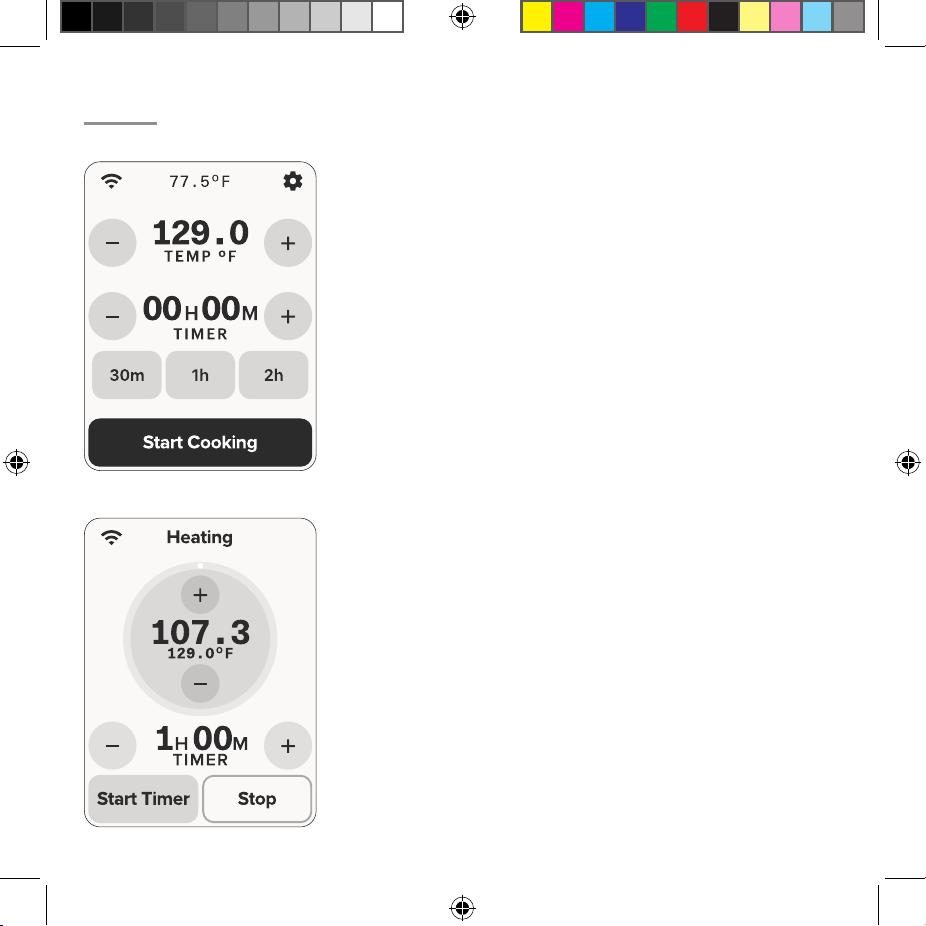
navigation bar
- On the home screen, the navigation
bar will show connection status, current temperature and
access to the settings menu.
navigation bar
- During cooking, the title will change to
represent the current status of the cook.
primary controls
- For both temperature and timer
input, you can increase/decrease using the plus and minus
buttons. For a faster entry, you can tap the center value to
open a number pad for direct time or temperature input.
status dial
- During heating, the status dial will show the
current temperature in large bold text with the target below
it.
shortcuts
- Three timer shortcut options are provided
on the home screen to allow faster input for common times.
timer
- If you have set a time before starting the cooker, it
will not start until the target temperature is reached.
control
- If you want the timer to start immediately/
before temp is reached, you can start it manually.
HOME
HEATING
Weasel User manual - Master v2.indd 11Weasel User manual - Master v2.indd 11 22/05/2026 2:37:31 PM22/05/2026 2:37:31 PM
12
USING THE DISPLAY
CONTINUED
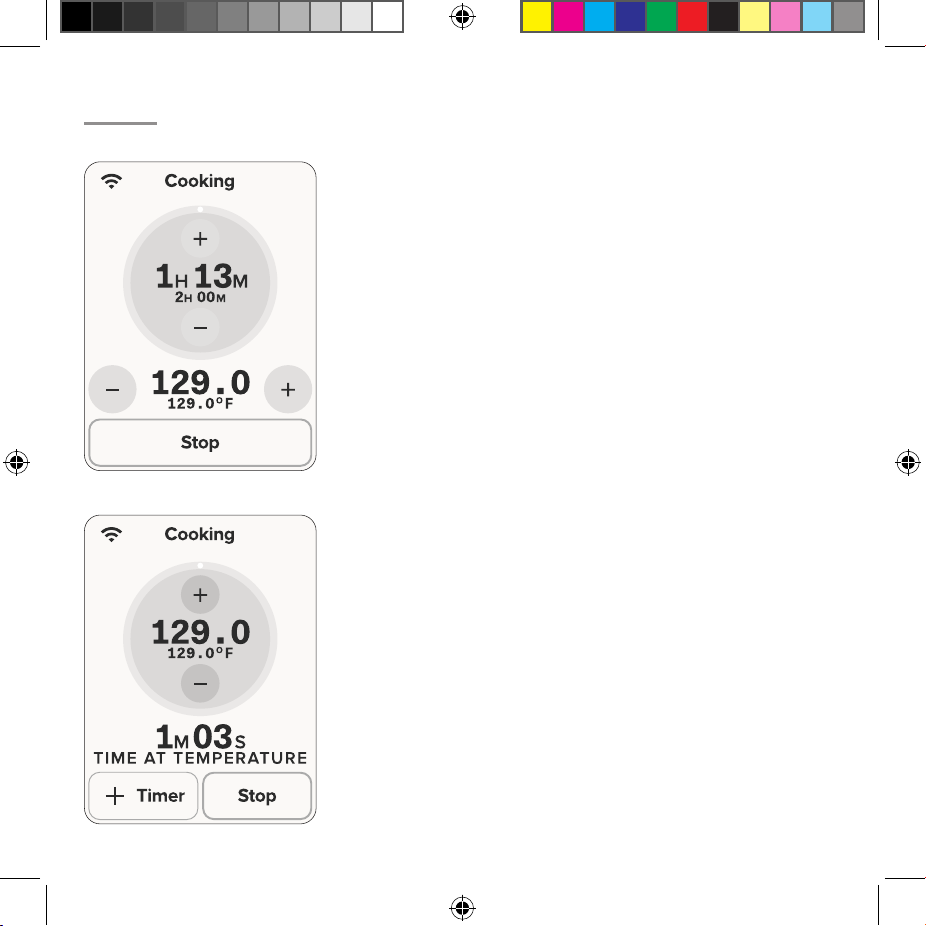
status dial
- Once the timer starts, the status dial will
change from showing temperature to time, providing a
clear view on progress.
status dial
- When cooking without a timer, the status
dial continues to show the current temperature and target
temperature.
temperature
- Tempearture control remains present and
is moved below the status dial.
add timer
- If at any time during a cook you wish to add
a timer, you can press the ‘add timer’ button. This will open
the numpad to enter a timer directly.
time at tempearture
- With no timer set, when the
cooker reaches temperature, a new timer counting up will
appear to represent total time at temperature.
cooking w/timer
cooking no timer
Weasel User manual - Master v2.indd 12Weasel User manual - Master v2.indd 12 22/05/2026 2:37:31 PM22/05/2026 2:37:31 PM
13
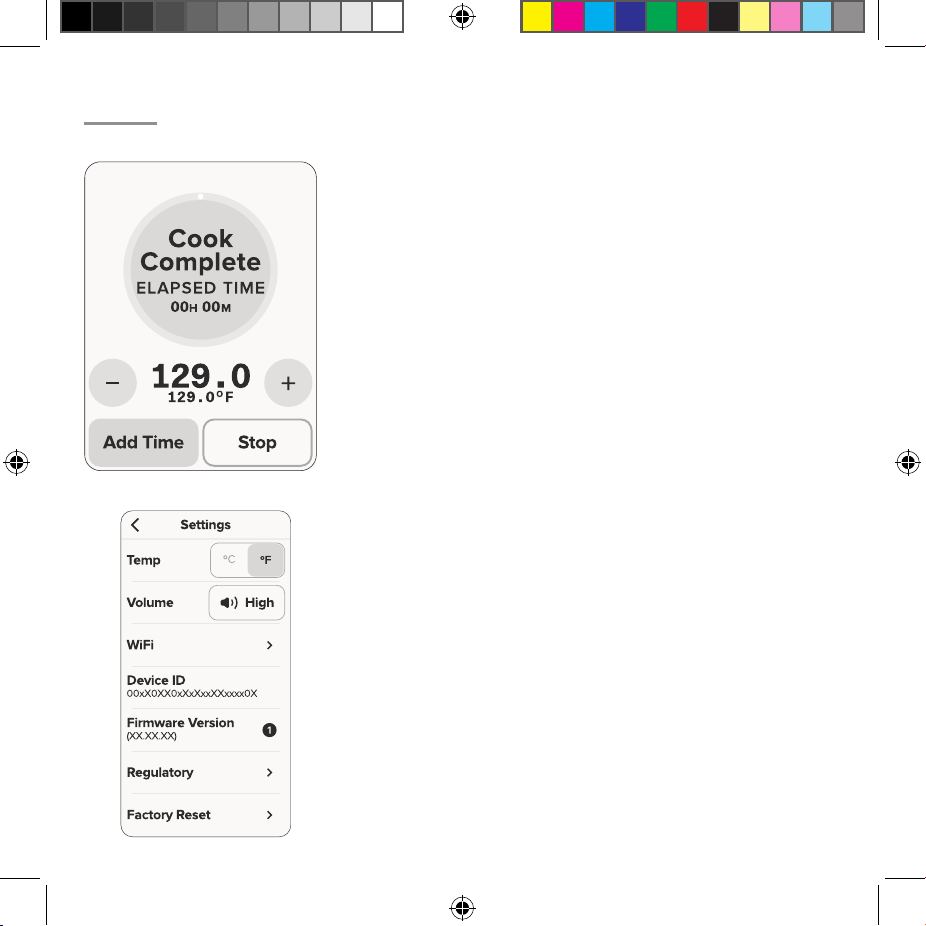
status dial
- When your timer finishes, the status dial
will change to have a green dial and show the words ‘Cook
Complete’. Under this, an elapsed timer will appear that will
count up, showing the total time since the timer finished.
menu
- In the settings menu, you can control if the cooker
is in celcius or fahrenheit, adjust the volume, connect/
disconnect WiFi and find other device specific information.
temperature
- Tempearture control remains present and
is moved below the status dial.
add time
- After a timer has finished, if you wish to add
more time you can do so by tapping the ‘Add Time’ button.
cooking complete
settings
Weasel User manual - Master v2.indd 13Weasel User manual - Master v2.indd 13 22/05/2026 2:37:31 PM22/05/2026 2:37:31 PM

14
CARE AND CLEANING
Unplug your Anova Precision Cooker Pro before disassembling or cleanin.g
CLEANING WITH A VINEGAR BATH
⊲
Mineral build-up from tap water is normal and may appear white, brown, black, or
green depending on your water source. To clean:
⊲
Mix equal parts water and white vinegar (5–7% acetic acid) in a small pot and attach
your cooker.
⊲
Set the temperature to 140°F (60°C) and press Start.
⊲
Once the cooker reaches temperature, run for 30 minutes, then switch o.
⊲
Allow the cooker to dry completely before storage.
CLEANING INTERNAL COMPONENTS
⊲
Remove the clamp by loosening the side knob and sliding it down.
⊲
Remove the skirt by grasping it and gently twisting clockwise to unlock, then
carefully pulling it downward.
⊲
Wash the skirt with mild dish soap or place it in the dishwasher.
⊲
Use a soft toothbrush with mild dish soap to gently scrub the exposed metal and
plastic components. Do not bend or displace any exposed components.
⊲
Rinse with a damp cloth and allow to dry.
⊲
Reassemble by sliding the skirt over the device, aligning the dots on the skirt with
the grooves in the upper housing, then gently twisting counter-clockwise to lock in
place.
Weasel User manual - Master v2.indd 14Weasel User manual - Master v2.indd 14 22/05/2026 2:37:31 PM22/05/2026 2:37:31 PM

15
CLEANING THE DISPLAY
⊲
Gently wipe with a lightly damp microfiber cloth.
⊲
Dry with a dry microfiber cloth.
For more information, visit anovaculinary.com/procare.
STORAGE
Before storing, ensure the cooker is fully cleaned and dried. Store indoors in a cool, dry
location. Protect the display from contact with other equipment or objects that could
cause damage.
LOSS OF POWER
If electrical power is interrupted during a cook, the Anova Precision Cooker Pro will
resume operating automatically once power is restored, returning to the previously set
temperature.
Weasel User manual - Master v2.indd 15Weasel User manual - Master v2.indd 15 22/05/2026 2:37:31 PM22/05/2026 2:37:31 PM

16
TROUBLESHOOTING
ALERT/ERROR RESOLUTION
Low Water -
Fill Now
The first water level sensor has been triggered. Add water
above the Min line to clear the alert and continue cooking.
Low Water!
The second water level sensor has been triggered and a
countdown is displayed. Add water immediately to continue
the cook. If the timer expires the cook will stop automatically as
a safety measure.
Device Failure
A device fault has been detected. The unit will remain locked
on this screen even after unplugging and reconnecting. Do not
attempt to continue use. Contact Anova customer service at
support@anovaculinary.com or https://support.anovaculinary.
com.
Motor Stuck
The impeller has become stuck, possibly due to debris. Press
Close to dismiss the alert and try again. If the error returns,
contact Anova customer service for further instructions.
High
Temperature
The device temperature has exceeded the safe operating limit.
The current temperature is shown on screen. Press Stop to end
the cook, or wait for the device to return to the set temperature
before resuming. If this occurs repeatedly, contact Anova
customer service.
Weasel User manual - Master v2.indd 16Weasel User manual - Master v2.indd 16 22/05/2026 2:37:31 PM22/05/2026 2:37:31 PM

17
WARRANTY
Limited Warranty. Full details available at anovaculinary.com/warranty.
Anova®, Precision®, Precision® Cooker, and HemiFlow™ are trademarks or registered
trademarks of Anova Applied Electronics, Inc. ©2026 Anova Applied Electronics, Inc. San
Francisco, CA, US | Stockholm, SE. All Rights Reserved.
Apple, the Apple logo and iPhone are trademarks of Apple Inc., registered in the U.S. and
other countries. App Store is a service mark of Apple Inc. Android, Google Play, and the
Google Play logo are trademarks of Google Inc. The Bluetooth® word mark and logos
are registered trademarks owned by the Bluetooth SIG, Inc. and any use of such marks
is under license. All other trademarks and trade names are properties of their respective
owners.
Weasel User manual - Master v2.indd 17Weasel User manual - Master v2.indd 17 22/05/2026 2:37:31 PM22/05/2026 2:37:31 PM

18
FCC/IC COMPLIANCE
This device complies with Part 15 of the FCC Rules / Innovation, Science and Economic
Development Canada’s licence-exempt RSS(s). Operation is subject to the following two
conditions: (1) this device may not cause harmful interference. (2) this device must accept
any interference received, including interference that may cause undesired operation.
Changes or modifications not expressly approved by the party responsible for compli-
ance could void the user’s authority to operate the equipment.
This equipment has been tested and found to comply with the limits for a Class B digital
device, pursuant to Part 15 of the FCC Rules. These limits are designed to provide
reasonable protection against harmful interference in a residential installation. This
equipment generates, uses, and can radiate radio frequency energy and, if not installed
and used in accordance with the instructions, may cause harmful interference to radio
communications. However, there is no guarantee that interference will not occur in a
particular installation. If this equipment does cause harmful interference to radio or
television reception, which can be determined by turning the equipment o and on, the
user is encouraged to try to correct the interference by one or more of the following
measures:
⊲
Reorient or relocate the receiving antenna.
⊲
Increase the separation between the equipment and receiver.
⊲
Connect the equipment into an outlet on a circuit dierent from that to which the
receiver is connected.
⊲
Consult the dealer or an experienced radio/TV technician for help.
i. The device for operation in the band 5150–5250 MHz is only for indoor use to reduce
Weasel User manual - Master v2.indd 18Weasel User manual - Master v2.indd 18 22/05/2026 2:37:31 PM22/05/2026 2:37:31 PM

19
the potential for harmful interference to co-channel mobile satellite systems.
MPE REMINDER
To satisfy FCC/IC RF exposure requirements, a separation distance of 20 cm or more
should be maintained between the antenna of this device and persons during device
operation. To ensure compliance, operations at closer than this distance are not recom-
mended.
La FCC des états-unis stipule que cet appareil doit être en tout temps éloigné d’au
moins 20 cm des personnes pendant son fonctionnement. Installer l’antenne de façon
à ce que le personnel ne puisse approcher à 20 cm ou moins de la position centrale de
l’antenne.
Weasel User manual - Master v2.indd 19Weasel User manual - Master v2.indd 19 22/05/2026 2:37:31 PM22/05/2026 2:37:31 PM

20
CONFORMITÉ FCC/IC
Cet appareil est conforme à la partie 15 des CNR exempts de licence de FCC/Innovation,
Sciences et Développement économique Canada. L’exploitation est soumise aux deux
conditions suivantes : (1) ce dispositif ne doit pas causer d’interférences nuisibles. (2) ce
dispositif doit accepter toute interférence reçue, y compris toute interférence suscepti-
ble de provoquer un fonctionnement indésirable.
L’émetteur/récepteur exempt de licence contenu dans le présent appareil est conforme
aux CNR d’Innovation, Sciences et Développement économique Canada applicables
aux appareils radio exempts de licence. L’exploitation est autorisée aux deux conditions
suivantes : (1) L’appareil ne doit pas produire de brouillage; (2) L’appareil doit accepter
tout brouillage radioélectrique subi, même si le brouillage est susceptible d’en compro-
mettre le fonctionnement.
Les changements ou modifications non expressément approuvés par la partie respons-
able de la conformité pourraient annuler le pouvoir de l’utilisateur d’utiliser l’équipe-
ment.
Cet équipement a été testé et jugé conforme aux limites d’un appareil numérique de
classe B, conformément à la partie 15 des règles de la FCC. Ces limites sont conçues
pour fournir une protection raisonnable contre les interférences nuisibles dans une in-
stallation résidentielle. Cet équipement génère des utilisations et peut émettre de l’éner-
gie de radiofréquence et, s’il n’est pas installé et utilisé conformément aux instructions,
peut causer des interférences nuisibles aux communications radio. Cependant, il n’y a
aucune garantie que l’interférence ne se produira pas dans une installation particulière.
Si cet équipement provoque des interférences nuisibles à la réception de la radio ou de
la télévision, l’utilisateur est prié d’essayer de corriger l’interférence par une ou plu-
sieurs des mesures suivantes :
Weasel User manual - Master v2.indd 20Weasel User manual - Master v2.indd 20 22/05/2026 2:37:31 PM22/05/2026 2:37:31 PM

21
⊲
Réorienter ou déplacer l’antenne réceptrice.
⊲
Augmenter la séparation entre l’équipement et le récepteur.
⊲
Connecter l’équipement à une prise sur un circuit diérent de celui auquel le
récepteur est connecté.
⊲
Consulter le concessionnaire ou un technicien radio/TV expérimenté pour obtenir
de l’aide.
i. Le dispositif fonctionnant dans la bande 5150–5250 MHz est uniquement destiné à
une utilisation en intérieur afin de réduire le risque d’interférences nuisibles avec les
systèmes mobiles satellites partageant le même canal.
Weasel User manual - Master v2.indd 21Weasel User manual - Master v2.indd 21 22/05/2026 2:37:31 PM22/05/2026 2:37:31 PM

Weasel User manual - Master v2.indd 22Weasel User manual - Master v2.indd 22 22/05/2026 2:37:31 PM22/05/2026 2:37:31 PM

Weasel User manual - Master v2.indd 23Weasel User manual - Master v2.indd 23 22/05/2026 2:37:31 PM22/05/2026 2:37:31 PM

ANOVACULINARY.COM
SUPPORT@ANOVACULINARY.COM
Weasel User manual - Master v2.indd 24Weasel User manual - Master v2.indd 24 22/05/2026 2:37:31 PM22/05/2026 2:37:31 PM