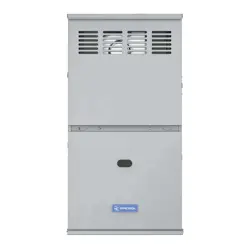
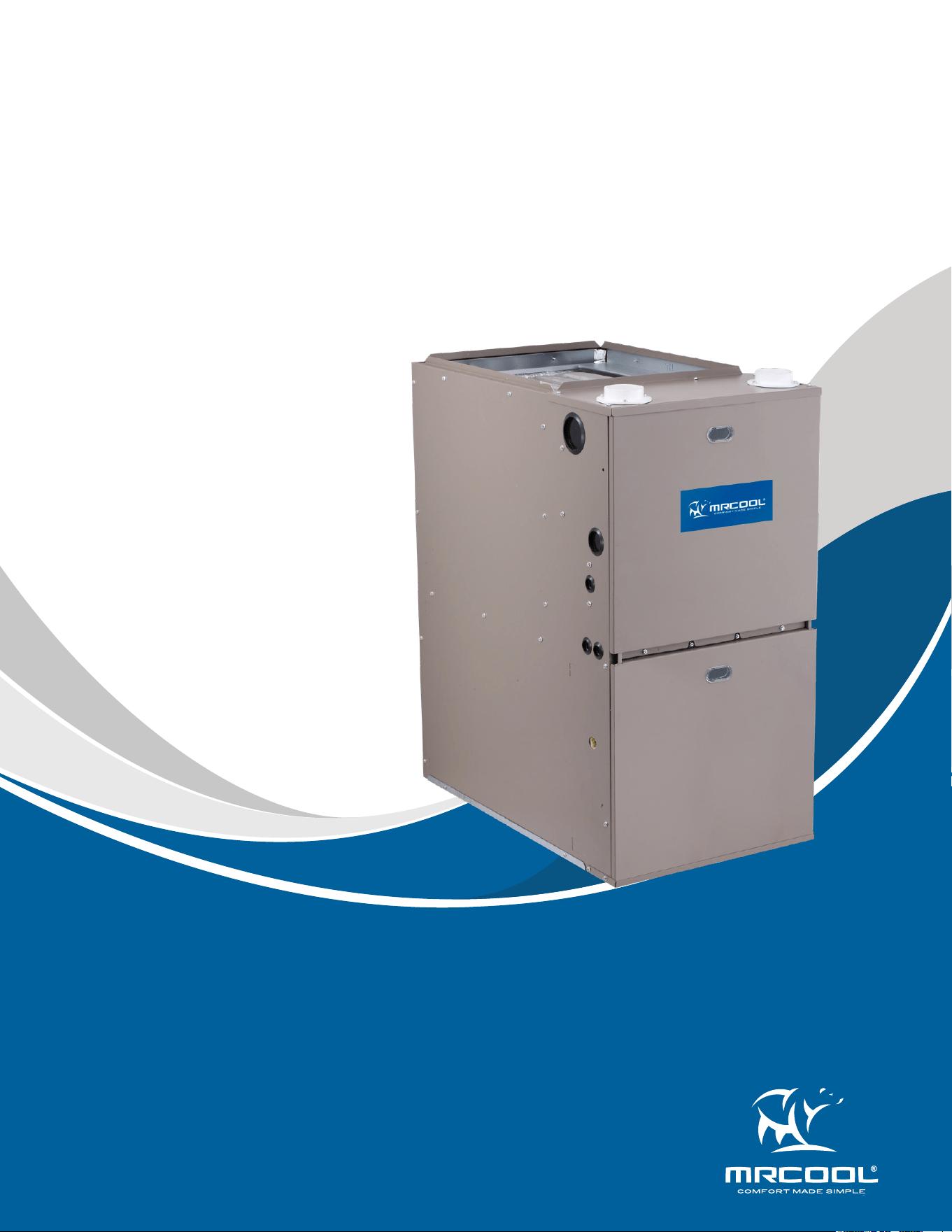
VersaPro
TM
96% Gas Furnace
Service Manual
MODELS:
Read this manual carefully before installation and keep it where
the operator can easily nd it for future reference.
Due to updates and constantly improving performance, the
information and instructions within this manual are subject to
change without notice.
Version Date: 05/30/24
Please visit www.mrcool.com/documentation
to ensure you have the latest version of this manual.
• MGM96EE060B3NB
• MGM96EE080B3NB
• MGM96EE080C4NB
• MGM96EE100C5NB
• MGM96EE120D5NB

mrcool.com1
Contents
CONTENTS
SAFETY PRECAUTIONS ......................................................................................... 2
TROUBLESHOOTING ............................................................................................ 3
2.1 Electrostatic Discharge (ESD) Precautions ............................................ 3
2.2 Resetting from Lockout ........................................................................... 4
ERROR CODES ....................................................................................................... 4
3.1 No Light & No Fan ..................................................................................... 4
3.2 E7 System Lockout-Failed Ignition
E8 System Lockout-Too Many Flame Dropouts .................................... 7
3.3 E1 Low Fire Pressure Switch Stuck Closed ............................................. 9
3.4 E2 Low Pressure Switch Stuck Open
E4 Pressure Switch Cycle Lockout
E3 High Pressure Switch Stuck Open ................................................... 10
3.5 E5 Limit/Rollout Switch Open <> 5 minutes ........................................ 12
3.6 Pr Incorrect Polarity of L1/L2 ................................................................. 16
3.7 FL Low Flame ........................................................................................... 16
APPENDIX ............................................................................................................ 17
4.1 Two-Stage Controller Logic ................................................................... 17
4.2 Ignition Failure & Re-Ignition Sequence .............................................. 19
4.3 Requirements for Refrigerant Leakage Sensors ................................ 20
1
2
4
3
mrcool.com 2 2
Incorrect usage may cause serious damage or injury.
The symbols below are used throughout this manual to indicate instructions that should be
followed closely or actions that should be avoided to prevent death, injury, and/or property
damage.
Safety Precautions
CAUTION
Indicates the possibility of personal injury or loss of life.
Indicates the possibility of property damage or serious
consequences.
Read Before Using
WARNING
SAFETY
1
NOTICE
Used to address practices not related to personal injury.
WARNING: FIRE OR EXPLOSION HAZARD
1. Do not store or use gasoline or other ammable vapors and liquids in the vicinity of this or any other
appliance.
2. If you smell gas:
• Do not try to light any appliance.
• Do not touch any electrical switch; do not use any phone in the building.
• Leave the building immediately.
• Immediately call your gas supplier from a neighbor's phone. Follow the gas supplier's instructions.
• If you cannot reach your gas supplier, call the re department.\
3. Installation and service must be performed by a qualied installer, service agency, or the gas supplier.
4. The furnace is designed and approved for use with Natural Gas and Propane (LP) Gas ONLY.
5. DO NOT BURN ANY LIQUID FUEL OR SOLID FUEL IN THIS FURNACE.
6. Burning any unapproved fuel will result in damage to the furnace's heat exchanger, which could result in
Fire, Personal Injury, and/or Property Damage.
7. Improper installation, adjustment, alteration, maintenance, or use could cause carbon monoxide
poisoning, explosion, re, electrical shock, or other conditions which may cause personal injury or damage.
Consult a qualied service agency, local gas supplier, or your distributor for information or assistance.
8. The furnace must be kept free and clear of insulating materials. Inspect surrounding area to ensure
insulation material is at a safe distance when installing furnaces or adding insulation materials. Insulation
materials ma be combustible. Maintain a 1 inch clearance from combustible materials to supply air
ductwork for a distance of 36 inches horizontally from the furnace. See NFPA 90B or local code for further
requirements.
9. The furnace SHOULD NOT be installed directly on carpeting, tile, or any other combustible material other
than wood ooring. In downow installations, a eld supplied oor base MUST be used when installed on
combustible materials and wood ooring. A special base is not required when this furnace is installed on
industry-standard coil assembly matching correct furnace width.
10. Check entire gas assembly for leaks after lighting this appliance.
11. Never test for gas leaks with an open ame. Use a commercially available soap solution made specically
for the detection of leaks to check all connections, as specied in the installation and owner's manual.
12. See instructions for lighting/shutdown operation (as shown on a sticker directly on the inside of the
furnace panel). Should the gas supply fail to shut o or if overheating occurs, shut o the gas valve to the
furnace before shutting o the electrical supply.
mrcool.com3
TROUBLESHOOTING
2
CAUTION: CUT HAZARD
Failure to follow this caution may result in personal injury. Sheet metal parts may have sharp edges or burrs.
Use care and wear appropriate protective clothing, safety glasses, and gloves when handling parts and
servicing the furnace.
WARNING
1. Untrained personnel (homeowners) may only clean and replace lters and fuses as required for basic
maintenance. All other operations, including installation, repair, and service must be performed by a
qualied installer, service agency, or the gas supplier.
2. Do not use this furnace if any part has been under water. A ood-damaged furnace is extremely
dangerous. Attempts to use the furnace can result in re or explosion. A qualied service agent must
inspect the furnace and replace all gas controls, control system parts, and electrical parts that have been
wet, or the furnace if deemed necessary.
3. Wear safety glasses, protective clothing, and work gloves. Have a re extinguisher available.
4. Read these instructions thoroughly and follow all warnings or cautions included in literature attached to
the unit.
5. Consult local building codes as well as the current editions of the National Fuel Gas Code (NFGC) NFPA 54/
ANSI Z223.1 and the National Electrical Code (NEC) NFPA 70.
6. This product can expose you to chemicals including lead and lead components, which are known to the
State of California to cause cancer and birth defects or other reproductive harm. Fore more information, go
to www.P65Warnings.ca.gov.
2.1 Electrostatic Discharge (ESD) Precautions
Use the following precautions during furnace installation and servicing to protect the integrated control module
from damage. By putting the furnace control and the person at the same electrostatic potential these steps will
help avoid exposing the integrated control module to electrostatic discharge. This procedure is applicable to both
installed and uninstalled (ungrounded) furnaces.
1. Disconnect all power to the furnace. Do not touch the integrated control module or any wire connected to the
control prior to discharging your body's electrostatic charge to ground.
2. Firmly touch a clean unpainted metal surface of the furnace away from the control. Any tools held in a person's
hand during grounding will be discharged.
3. Service integrated control module or connecting wiring following the discharge process in step 2. Use
caution not to recharge your body with static electricity; (i.e. do not move or shue e your feet, do not touch
ungrounded objects, etc.). If you come in contact with an ungrounded object, repeat step 2 before touching
control or wires.
4. Discharge your body to ground before removing a new control from its container. Follow steps 1 through 3
if installing the control on a furnace. Return any old or new controls to their containers before touching any
ungrounded object.
NOTE
Discharge body's static electricity before touching unit. An electrostatic discharge can adversely aect electrical
components.
mrcool.com 4
4
2.2 Resetting from Lockout
Furnace lockout results when a furnace is unable to achieve ignition after three attempts. Refer to the troubleshooting
chart on the following pages for assistance in determining the source of unit operational problems.
The red diagnostic LED blinks to assist in troubleshooting the unit. If the furnace is in "lockout" it will (or can be)
reset in any of the following ways.
1. Automatic reset. The integrated control module will automatically reset itself and attempt to resume normal
operations following a one hour lockout period.
2. Manual power interruption. Interrupt 115 volt power to the furnace for 1 - 20 seconds.
3. Manual thermostat cycle. Lower the thermostat so that there is no longer a call for heat for 1 - 20 sec.
ERROR CODES
3
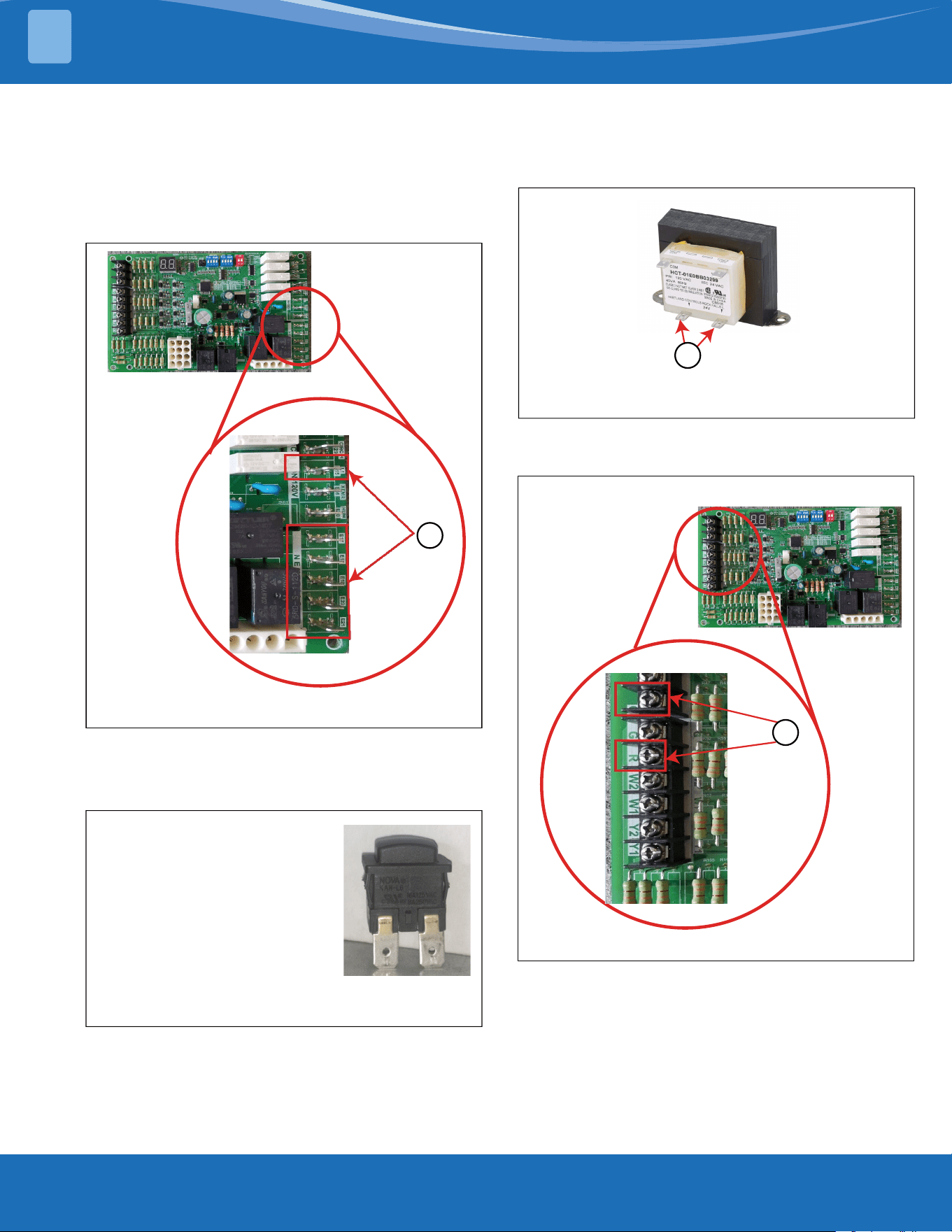
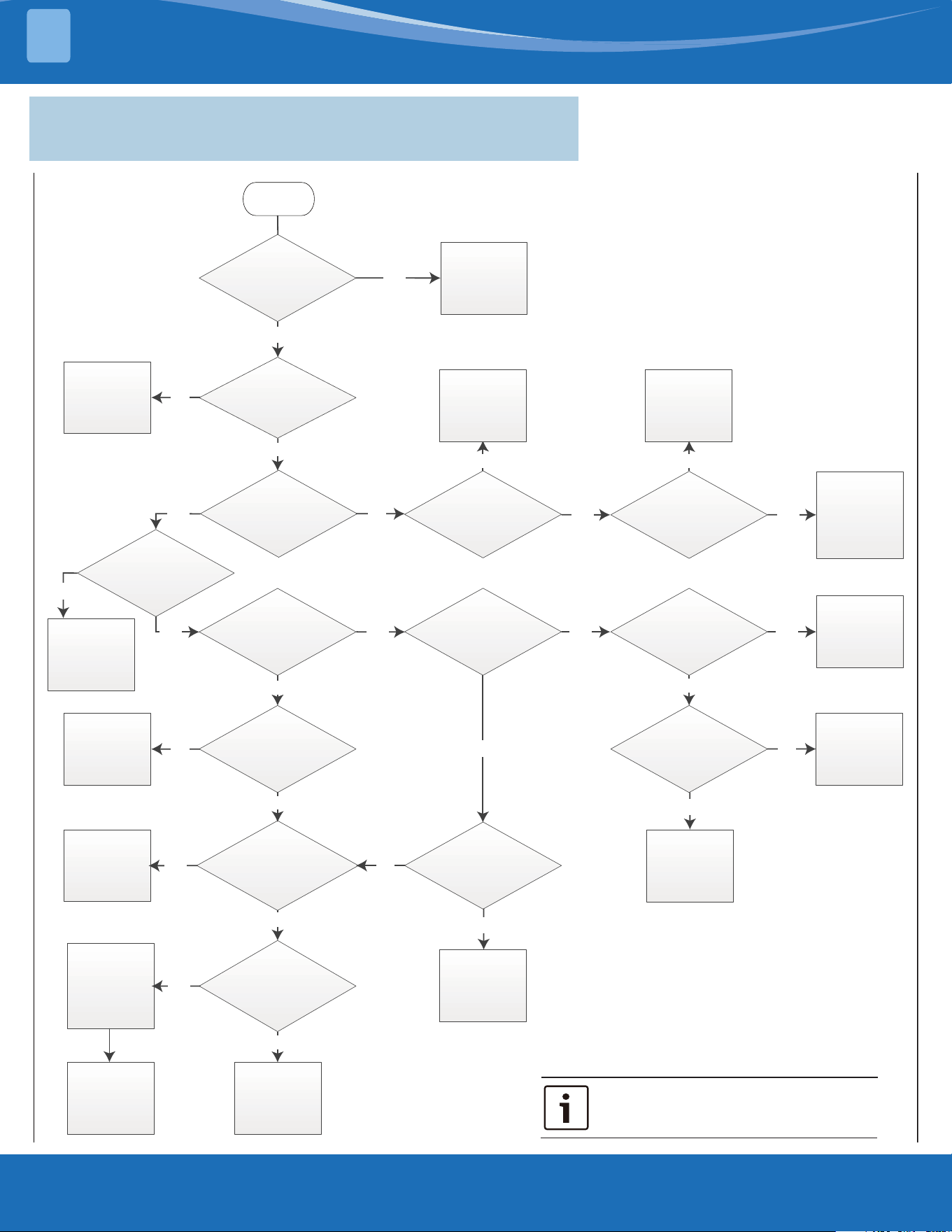
3.1 No Light & No Fan
Leave "Park" terminal unused.
mrcool.com5
8
|
96% AFUE Gas Furnace
Troubleshooting Guide
Data subject to change
No Light and No Fan (System Does Not Start Normally)
Figures & Tables
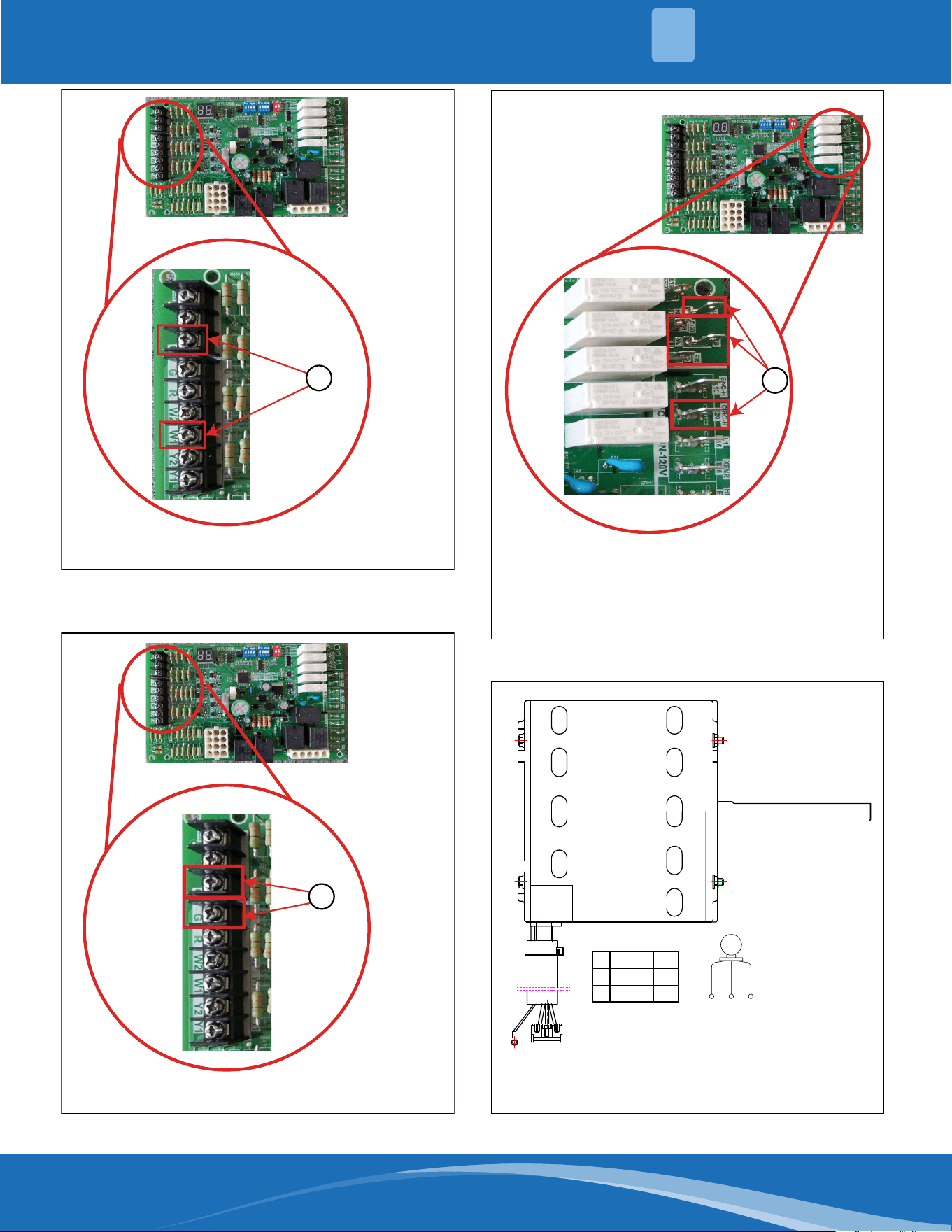
Figure 1
1. Check for 115Vac power supply between L1 and common terminal
Figure 2
1. Power off.
2. Press in the door switch.
3. Use a multi-meter to measure the resistance.
If it is 0 Ω, then the door switch is ok.
Figure 3
1. Check for 18-31Vac power between these 2 terminals with multi-meter.
1
Figure 4
1. Check for 18-31Vac power between “R” & “C” terminals with multi-meter.
1
1
ERROR CODES
3
mrcool.com 6
6
Troubleshooting Guide 96% AFUE Gas Furnace | 9
Data subject to change
Figure 5
1. Check for 18-31Vac power between “W/W1” & “C” terminals with multi-meter
Figure 6
1. Check for 18-31Vac power between “G” & “C” terminals with multi-meter
Figure 7
Figure 8
1. Check for 18-31Vac power between Hi-heat/lo-heat/hi-cool/lo-cool
and COM with multi-meter
2. Check for 115Vac power supply between CIRC-H and N with
multi-meter
1
1
1
5 3 1
QCPASS
M
BK WH RD
W V U
1
3
5
W
V
U
BLACK
WHITE
RED
The resistance between motor U, V and W wires is 2~10 ohms
ERROR CODES
3
mrcool.com7
1 0
|
96% AFUE Gas Furnace
Troubleshooting Guide
Data subject to change
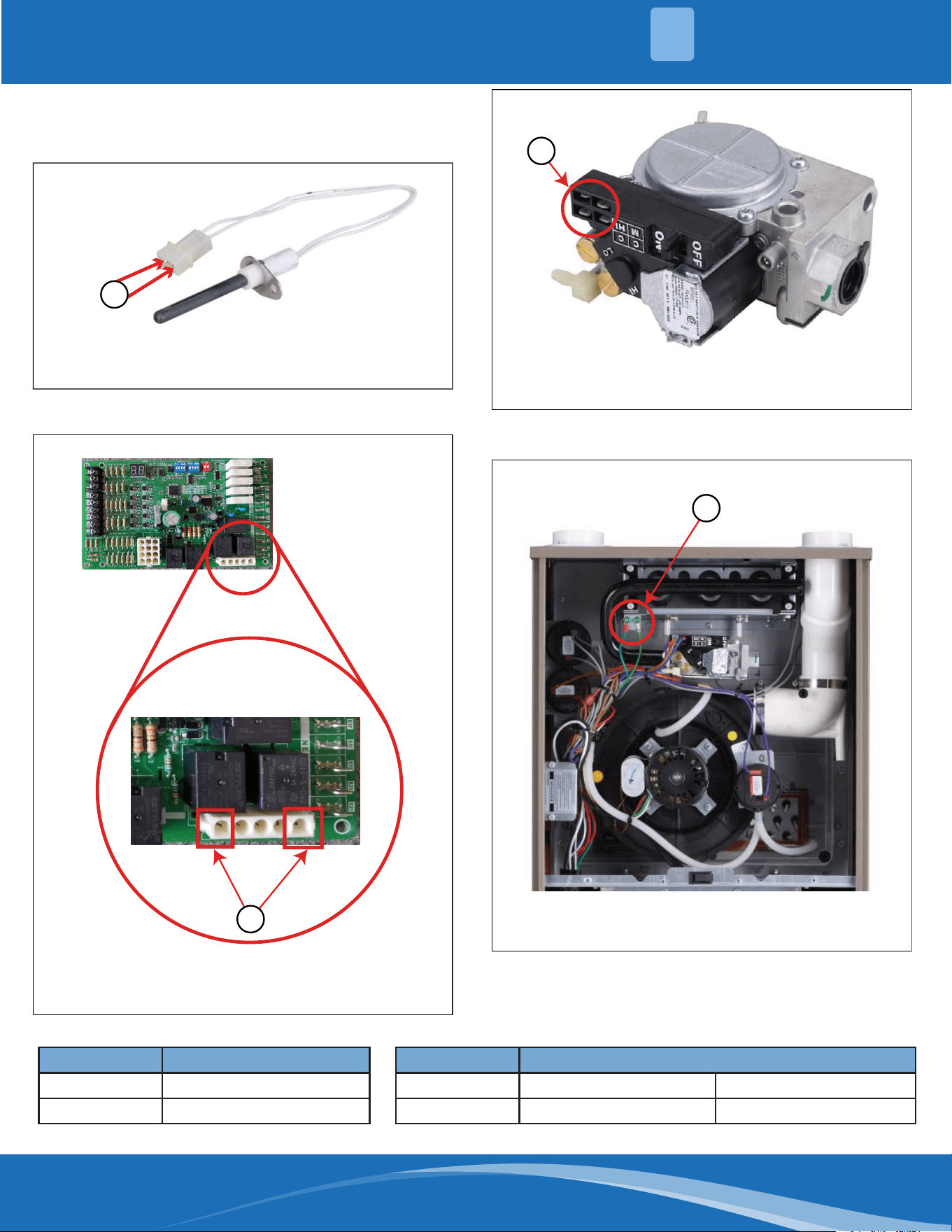
3.2 E7 (System Lock-Out due to Failed Ignition)
E8 (System Lock-Out due to too Many Flame Dropouts)
Troubleshooting Chart
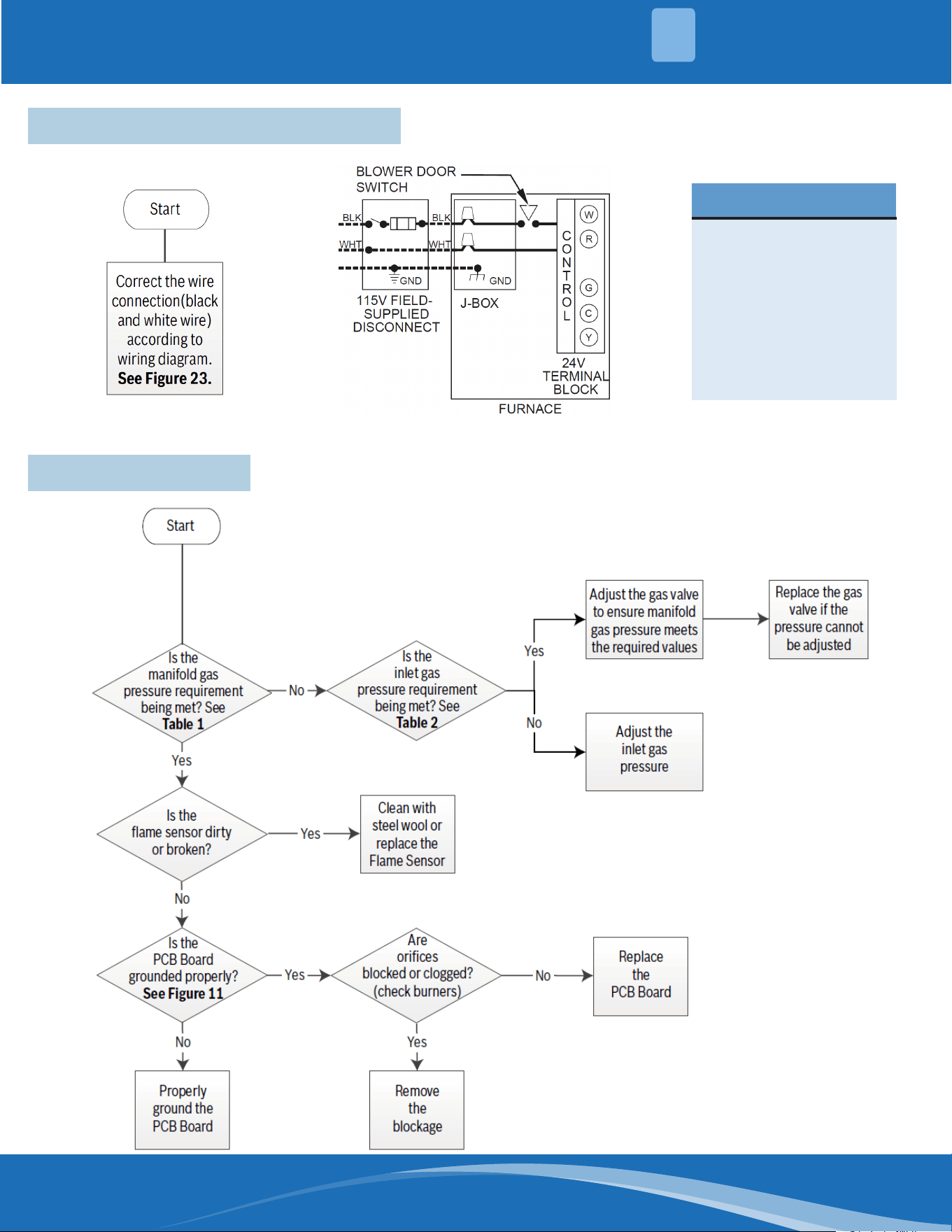
Start
Are there any
loose wires or wrong
connections?
Correct wiring
according to
wiring diagram
Yes
No
Does the
unit show 1 LED flash
after restart?
No
Is the
ignitor “glowing”
red/orange?
Replace the
PCB Board
Is the
ignitor working
properly? See
Figure 8
Is the flame
sensor dirty or
broken?
Clean with
steel wool or
replace the
flame sensor
Properly
ground the
wire
Is flame
reaching the flame
sensor? (visual
check)
Replace the
ignitor
Is there a flame?
(visual check)
No
Replace the
PCB
board
Is there a
signal to the gas valve?
See Figure 10
Is the wire
grounded properly?
See Figure 11
Replace the gas
valve if the
pressure cannot
be adjusted
Check
incoming gas
supply
quality
Does the
manifold gas pressure
meet the requirement?
See Table 1
Adjust the
inlet gas
pressure
Is there
power to the ignitor?
See Figure 9
Check the wire
connections
between
ignitor and
PCB Board
Yes
Yes
Yes
Yes
Yes
No
Replace the
PCB
board
No
Yes
Is the inlet gas
pressure meeting the
requirement? See
Table 2
Adjust gas valve
to ensure it
meets gas
pressure
requirement
Yes
No
Unit should
work
normally
Is gas valve
switched to
“On” position?
Yes
Yes
Turn the gas
valve switch
to “On”
No
The flame sense signal should be 1-6 microamps.
No No
Yes
No
No
Yes
No
No
Remove
the
blockage
Are orifices
blocked or clogged?
(check burner)
Yes
Yes
No
3.2 E7 System Lock-Out - Failed Ignition
E8 System Lock-out - Too Many Flame Dropouts
ERROR CODES
3
mrcool.com 8
8
Troubleshooting Guide 96% AFUE Gas Furnace | 11
Data subject to change
E7 (System Lock-Out due to Failed Ignition)
E8 (System Lock-Out due to too Many Flame Dropouts)
Figures & Tables
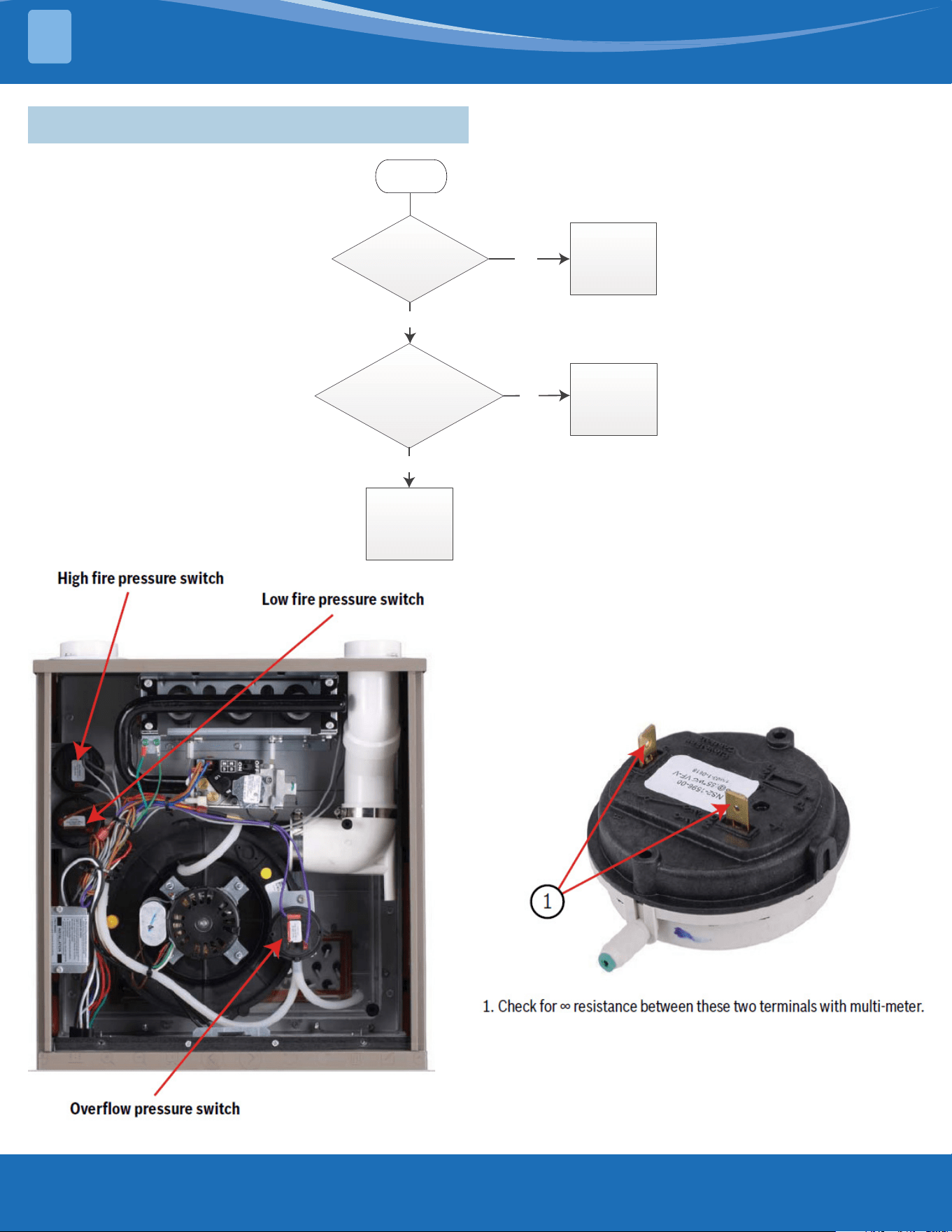
Figure 9
1. Check for 9-17Ω between these two terminals with multi-meter.
1
Figure 10
1. Check for 115Vac power supply between IG and IGN with
multi-meter during preheating sequence.
1
Manifold Gas Pressure
.C.W.n i5.3s aGl a r u t aN
.C.W.n i01saGenaporP
Table 1
Manifold Gas Pressure
Figure 11
1. Check for 18-31Vac power between “M/HI”&”C” terminals with a
multi-meter
1
Figure 12
1. Check for proper grounding (green wire).
1
Inlet Gas Supply Pressure
Natural Gas Minimum: 4.5 in. W.C. Maximum: 10.5 in. W.C.
Propane Gas Minimum: 11.0 in. W.C. Maximum: 13.0 in. W.C.
Table 2
Inlet Gas Supply Pressure
Manifold Gas Pressure
Natural Gas 3.5 in. W.C.
Propane Gas 10 in. W.C.
Inlet Gas Supply Pressure
Natural Gas Minimum: 4.5 in. W.C. Maximum: 10.5 in. W.C.
Propane Gas Minimum: 11.0 in W.C. Maximum: 13.0 in. W.C.
Table 1 Manifold Gas Pressure Table 2 Inlet Gas Supply Pressure
ERROR CODES
3
mrcool.com9
ERROR CODES
3
3.3 E1 Low Fire Pressure Switch Stuck Closed
1 2
|
96% AFUE Gas Furnace
Troubleshooting Guide
Data subject to change
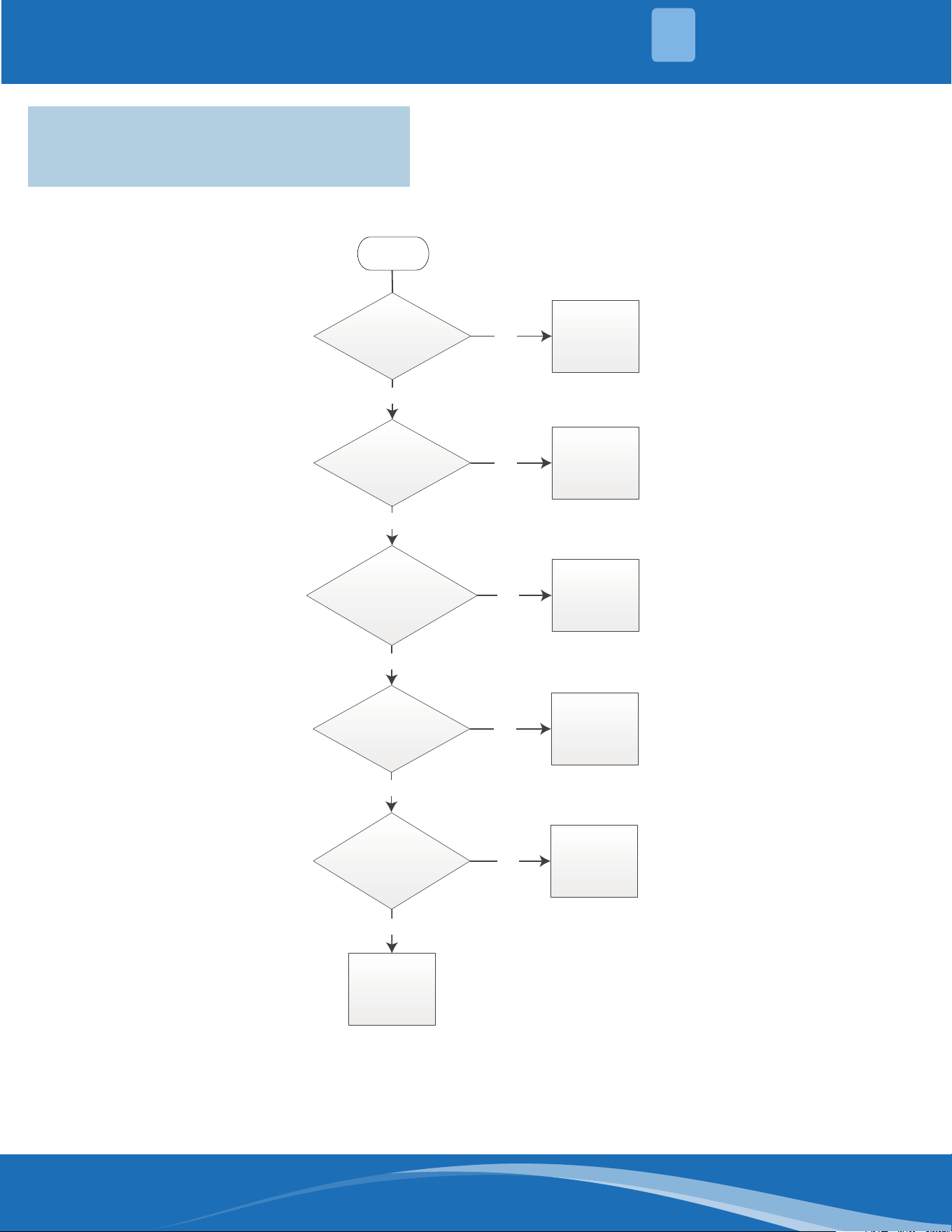
3.3 E1 (Low Fire Pressure Switch Stuck Closed)
Troubleshooting Chart
This error could also be caused by a blocked vent.
Check vent for obstructions. If a vent is blocked,
unit's safety protection logic will turn off unit.
Start
Are there any
loose wires or wrong
connections?
Correct wiring
according to
the wiring
diagram
Yes
No
Does the
resistance of low fire
pressure
switch show
as “∞ ” ? See Figure
12 & 13
No
Replace the
pressure
switch
Yes
Replace the
PCB Board
This error could also be caused by a blocked vent.
Check vent for obstructions. If a vent is blocked, the
unit's safety protection logic will turn o the unit.
Figure 13
Figure 14
mrcool.com 10
10
ERROR CODES
3
3.4 E2 Low Pressure Switch Stuck Open
E4 Pressure Switch Cycle Lockout
E3 High Pressure Switch Stuck Open
1 4
|
96% AFUE Gas Furnace
Troubleshooting Guide
Data subject to change
3.4 E2 (Low Pressure Switch Stuck Open)
E4 (Pressure Switch Cycle Lockout)
E3 (High Pressure Switch Stuck Open)
Troubleshooting Chart
Start
Yes
Is
the pressure
switch closed?
See Figure 14
& 15.
Is
there blockage
in the pressure hose or
is the hose loose?
See Figure 16.
Are there any
loose wires or wrong
connections?
Correct wiring
according to
the wiring
diagram
Yes
Replace
the
PCB Board
Yes
Remove
blockage or fix
the pressure
hose
No
No
Is there
blockage in the
exhaust pipe?
Yes
Remove
blockage in the
exhaust pipe
No
No
Replace
the
inducer
No
Yes
Replace
the
pressure
switch
Is the
pressure at the
pressure switch correct?
See Figure 17.
mrcool.com11
ERROR CODES
3
Troubleshooting Guide 96% AFUE Gas Furnace | 15
Data subject to change
E2 (Low Pressure Switch Stuck Open)
E4 (Pressure Switch Cycle Lockout)
E3 (High Pressure Switch Stuck Open)
Figures
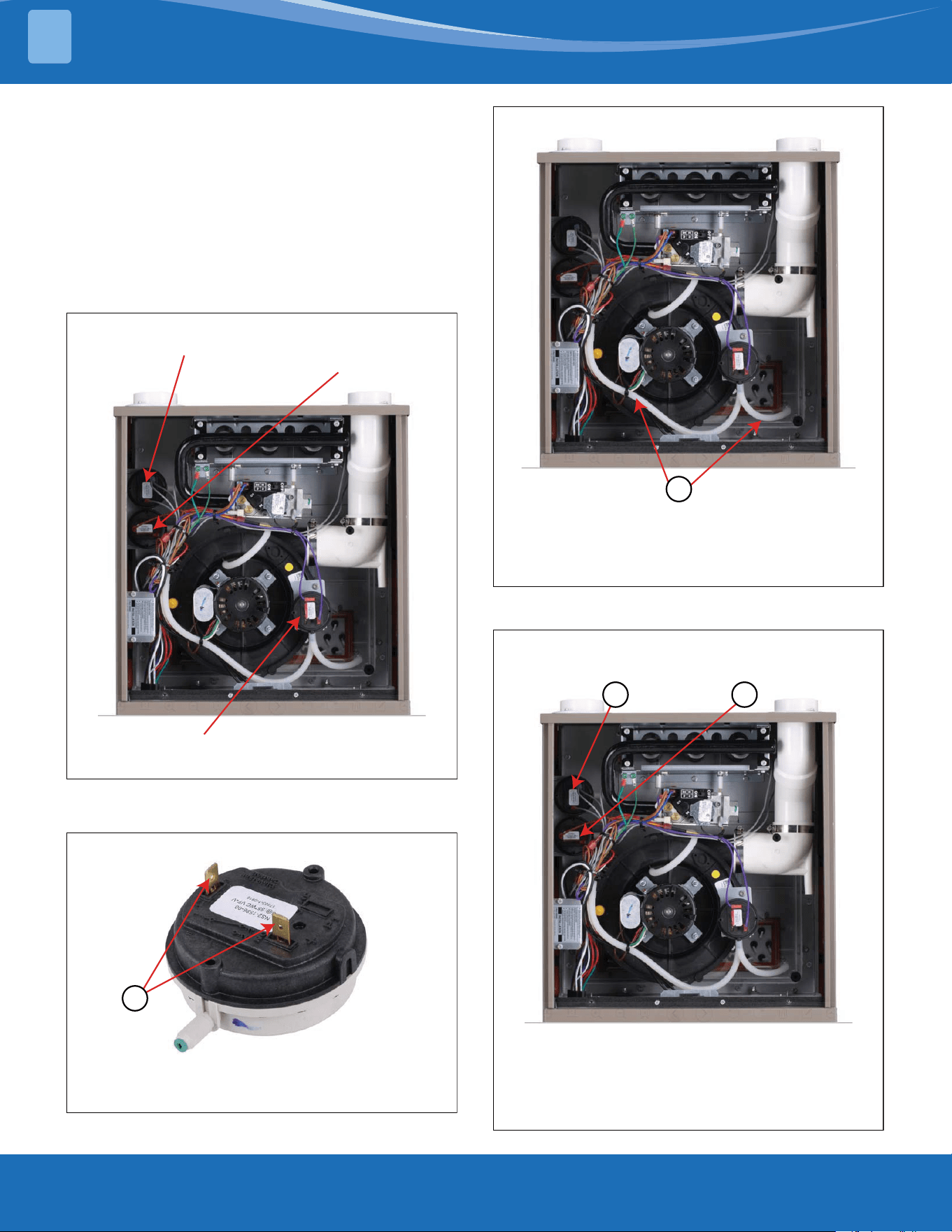
The pressure switch that you are checking in this step depends
on the number of LED fl ashes. Refer to the specifi c fl ashes and
their descriptions above.
Figure 15
High fire pressure switch
Low fire pressure switch
Overflow pressure switch
Figure 16
1. Check for 0Vac between these two terminals with multi-meter.
1
Figure 17
1. Check pressure hose for proper operating condition.
Check for proper hose connections.
Check and remove any blockages in the hose.
1
Figure 18
High fire
pressure switch
Low fire
pressure switch
1 2
Check to see if the pressure at pressure switch is correct by
removing the hose and measuring with a manometer.
(1) Low Pressure Switch Set Point: 0.55 in. WC
(2) High Pressure Switch Set Point: 1.1 in. WC
The pressure switch that you are checking in this step
depends on the number of LED ashes. Refer to the
specic ashes and their descriptions.
mrcool.com 12
12
ERROR CODES
3
1 6
|
96% AFUE Gas Furnace
Troubleshooting Guide
Data subject to change
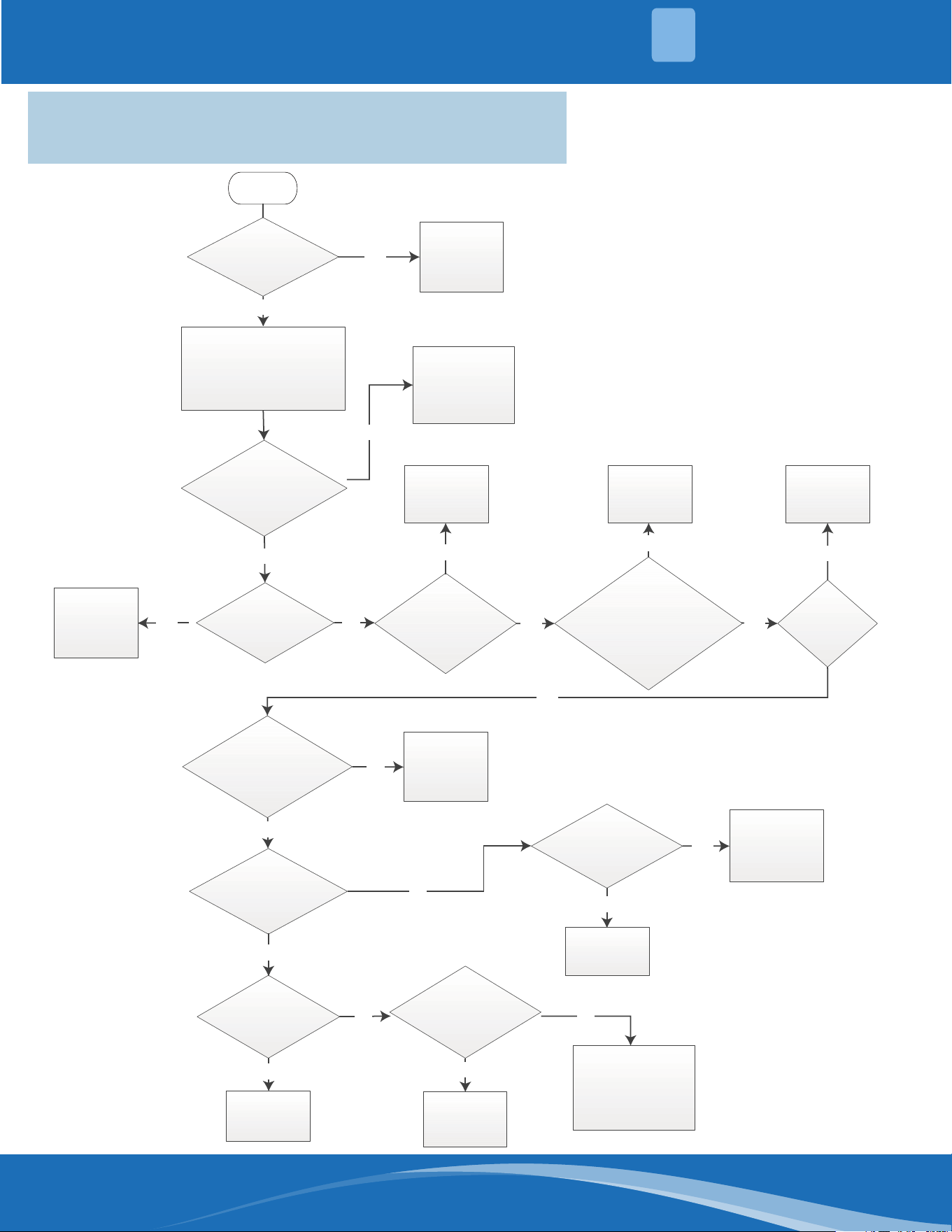
3.5 E5 (Limit/Rollout Switch Open Less than 5 Mins)
E6 (Limit/Rollout Switch Open More than 5 Mins)
Troubleshooting Chart
Start
Are there any
loose wires or wrong
connections?
Correct wiring
according to
wiring diagram
Yes
No
No
Are the limit
switches working
properly? See
Figure 18 & 19.
Replace the
Limit
Switch
Replace the
(chamber/fan
mounted) Limit
Switch
Is there
blockage in the exhaust
pipe?
Are
(chamber/fan
mounted) limited switches
in right models?
See Table 3
Is the
circulating fan
motor turning on after
30s delay?
Clean/Replace
the filter
Yes
Is there
blockage on the
filter?
“SW2” is used for the fan delay after burner starts.
Replace the
PCB Board
Is the
circulating fan motor
speed correctly set?
See Tables 4
&5
Correct the circulating
fan motor speed or
replace the motor if
necessary.
Check the
airflow duct
for blockage
Yes
No
No
Yes
Yes
Turn off the equipment for 10
minutes to ensure sufficient
cooling off period.Measure the
resistance between two leads
on the limit switches
Verify that the temperature rise is between 40-55°F.
Remove
blockage in
the exhaust
pipe
Yes
Is the
rollout limit switch
showing resistance of
“0”? See Figure
20 & 21.
Yes
Yes
No
Replace the
Rollout
Switch
After
manual reset of the
limit switch(by pressing the
button on switch),is the
error still present
once the system
starts up?
Is the
inducer
working
properly?
Yes
Yes
Replace the
inducer
Yes
No
No
Yes
Is
there power to
the circulating fan motor?
See Figure 7
Replace the
circulating fan
motor
Yes
Replace the
PCB Board
No
No
3.5 E5 Limit/Rollout Switch Open Less than 5 Minutes
E6 Limit/Rollout Switch Open More than 5 Minutes
• "SW2" is used for the fan delay after burner
starts.
• Verify that the temperature rise is between 40-
55°F.
mrcool.com13
ERROR CODES
3
Model
MGM96EE060B3NB MGM96EE080B3NB MGM96EE080C4NB MGM96EE100C5NB MGM96EE120D5NB
Rollout Switch -
Resettable
-- °F 300
Inlet High Temp.
Limit Switch - Fixed
O/
On
°F 150 / 120 150 / 120 150 / 120 150 / 120 150 / 120
Troubleshooting Guide 96% AFUE Gas Furnace | 17
Data subject to change
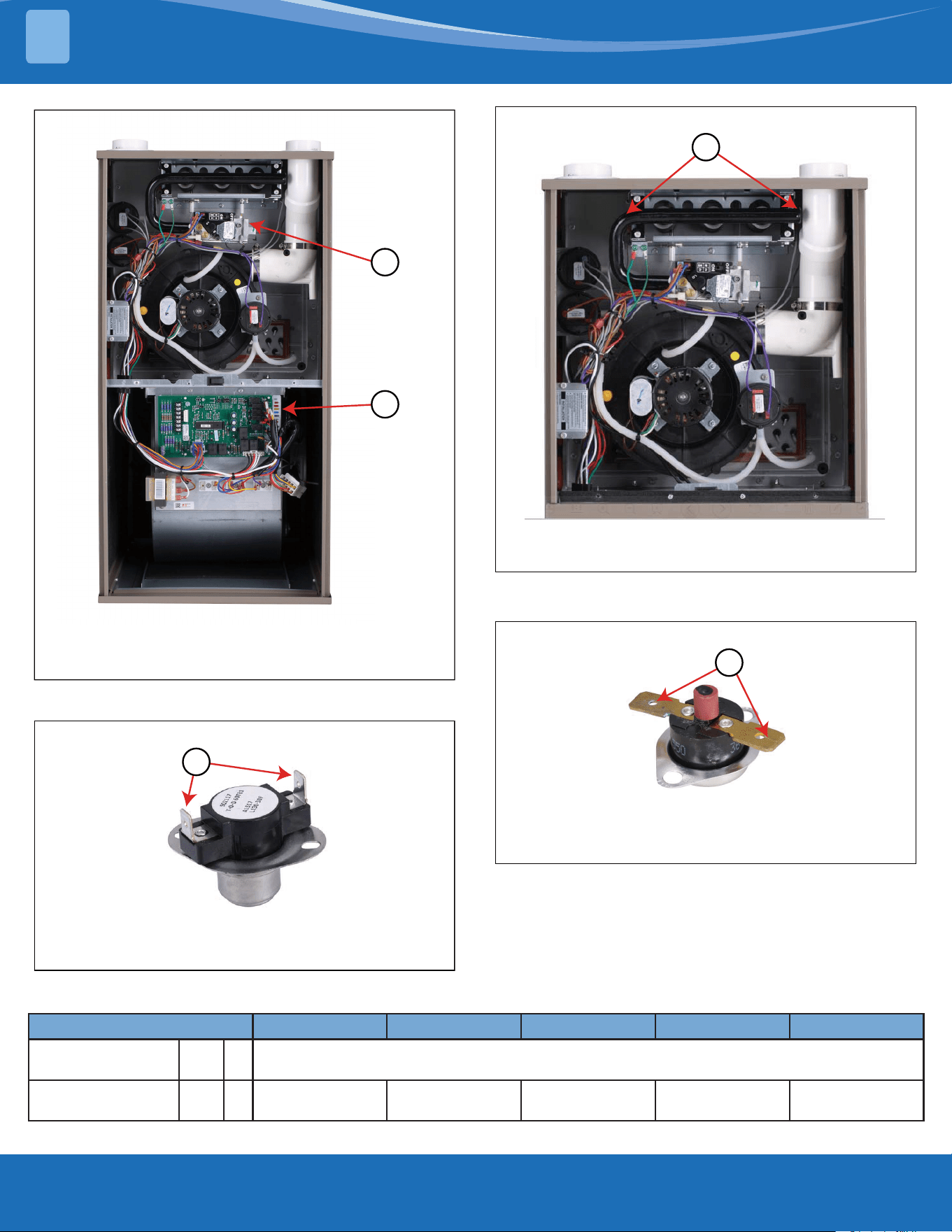
Figure 19
1. Chamber mounted limit switch (behind the gas valve)
2. Fan mounted limit switch (side of blower fan, behind PCB board)
1 Chamber mounted limit switch (behind the gas valve)
1
2
Figure 20
1. Check for 0 resistance between these two terminals with multi-meter.
Make sure to do this check on both chamber and fan mounted limit switches.
1
Model MGH96M060B3A MGH96M080B3A MGH96M080C4A MGH96M100C5A MGH96M100D5A MGH96M120D5A
003F°—e l ba t tese r-hc t iwstuo l l oR
Inlet High Temperature Limit
switch - fi xed
Off /On °F 150/120 150/120 150/120 150/120 150/120 150/120
Table 3
Figure 21
1. Rollout limit switch locations.
1
Figure 22
1. Power off and check for 0 resistance between these two terminals with
multimeter.
1
mrcool.com 14
14
ERROR CODES
3
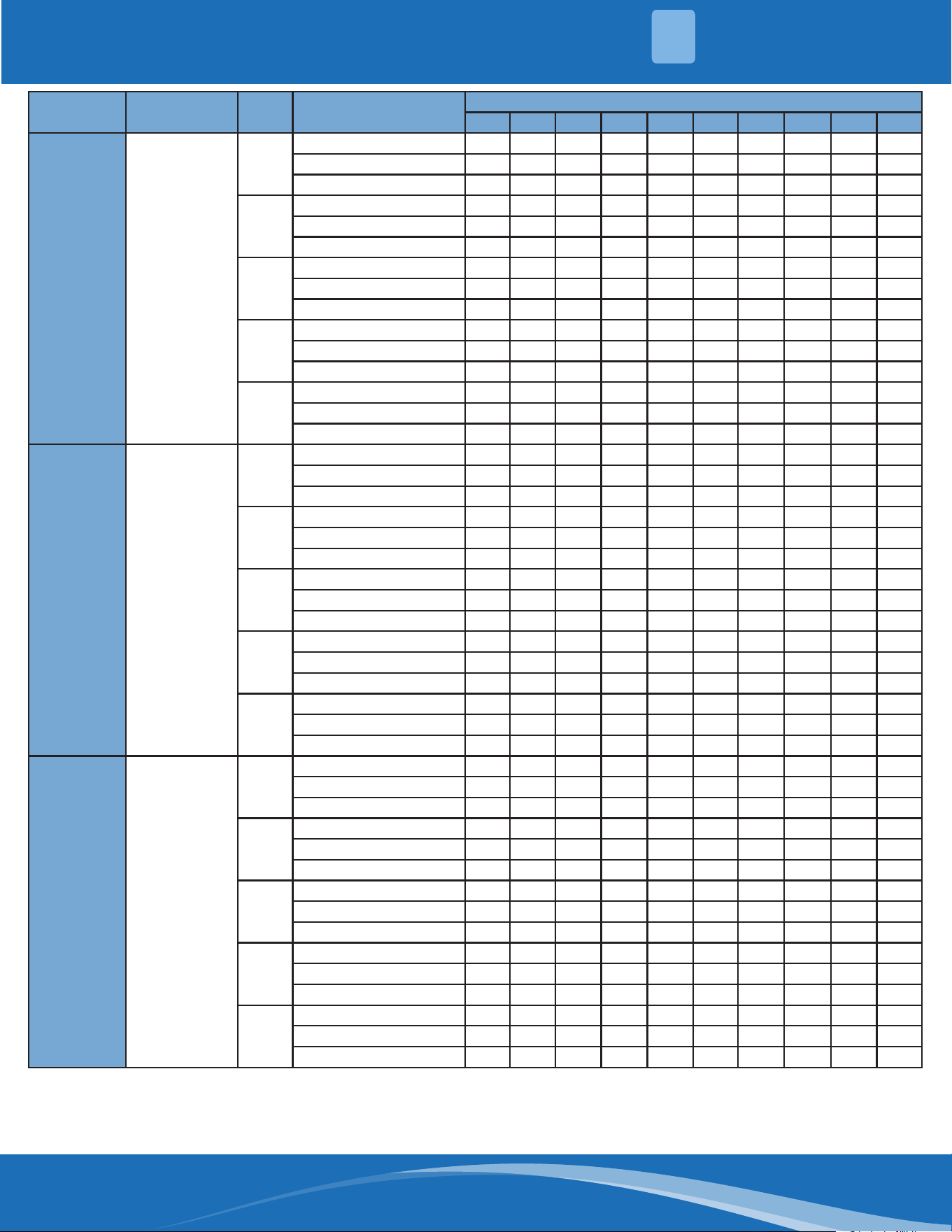
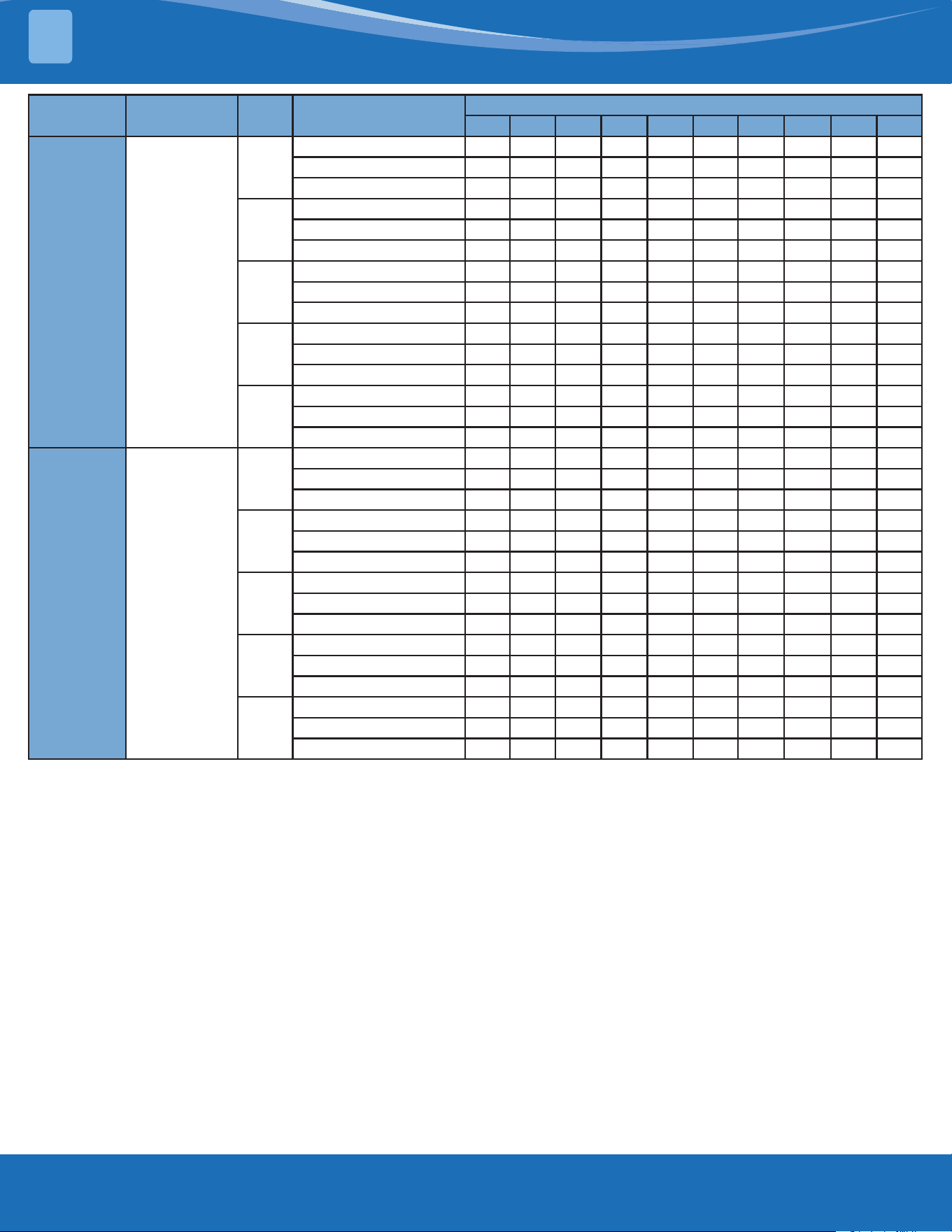
Furnace Size Return-Air Inlet Speed
External Static Pressure (in. W.C.)
0.1 0.2 0.3 0.4 0.5 0.6 0.7 0.8 0.9 1.0
60B Bottom or Sides
H
CFM 1339 1327 1338 1309 1321 1320 1342 1334 1316 1335
Temp. Rise-1st Stage °F -- -- -- -- -- -- -- -- -- --
Temp. Ride-2nd Stage °F 37.3 37.7 37.5 38.3 38.1 38.1 37.6 37.9 38.5 38.0
Mid-H
CFM 1124 1118 1102 1106 1096 1099 1102 1109 1089 1105
Temp. Rise-1st Stage °F -- -- -- -- -- -- -- -- -- --
Temp. Ride-2nd Stage °F 44.2 44.5 45.2 45.1 45.6 45.5 45.5 45.3 46.2 45.6
Mid
CFM 880 870 853 858 865 858 854 866 871 839
Temp. Rise-1st Stage °F 36.7 37.2 37.9 37.8 37.6 38.0 38.2 37.8 37.6 39.1
Temp. Ride-2nd Stage °F 56.3 57.0 58.1 57.9 57.5 58.0 58.4 57.7 57.4 59.7
Mid-L
CFM 779 768 762 756 740 753 757 747 785 766
Temp. Rise-1st Stage °F 41.4 42.0 42.4 42.8 43.8 43.1 43.0 43.6 41.6 42.7
Temp. Ride-2nd Stage °F -- -- -- -- -- -- -- -- -- --
Low
CFM 553 586 543 569 552 562 584 572 575 567
Temp. Rise-1st Stage °F 58.1 54.9 59.3 56.74 58.5 57.6 55.5 56.8 56.5 57.4
Temp. Ride-2nd Stage °F -- -- -- -- -- -- -- -- -- --
80B Bottom or Sides
H
CFM 1230 1233 1222 1226 1214 1236 1255 1244 1249 1251
Temp. Rise-1st Stage °F -- -- -- -- -- -- -- -- -- --
Temp. Ride-2nd Stage °F 53.9 53.8 54.4 54.3 54.8 53.9 53.2 53.7 53.6 53.6
Mid-H
CFM 1052 1052 1041 1044 1037 1034 1048 1046 1024 1076
Temp. Rise-1st Stage °F 41.0 41.0 41.5 41.5 41.8 42.1 41.5 41.7 42.7 40.7
Temp. Ride-2nd Stage °F 62.8 62.8 63.6 63.5 64.0 64.3 63.4 63.7 65.1 62.1
Mid
CFM 849 861 854 853 855 844 855 848 834 859
Temp. Rise-1st Stage °F 50.6 50.0 50.4 50.5 50.5 51.2 50.6 51.2 52.1 50.7
Temp. Ride-2nd Stage °F -- -- -- -- -- -- -- -- -- --
Mid-L
CFM 754 771 765 764 728 761 782 739 758 758
Temp. Rise-1st Stage °F 56.9 55.7 56.2 56.3 59.2 56.8 55.3 58.5 57.2 57.3
Temp. Ride-2nd Stage °F -- -- -- -- -- -- -- -- -- --
Low
CFM 569 554 571 572 568 572 598 594 572 548
Temp. Rise-1st Stage °F -- -- -- -- -- -- -- -- -- --
Temp. Ride-2nd Stage °F -- -- -- -- -- -- -- -- -- --
80C Bottom or Sides
H
CFM 1303 1301 1281 1291 1289 1291 1290 1295 1298 1253
Temp. Rise-1st Stage °F -- -- -- -- -- -- -- -- -- --
Temp. Ride-2nd Stage °F 50.8 50.9 51.8 51.5 51.6 51.6 51.7 51.6 51.6 53.5
Mid-H
CFM 1120 1127 1134 1130 1135 1138 1132 1143 1107 1112
Temp. Rise-1st Stage °F 38.5 38.3 38.1 38.3 38.2 38.2 38.5 38.2 39.5 39.4
Temp. Ride-2nd Stage °F 59.0 58.7 58.4 58.7 58.5 58.4 58.8 58.3 60.3 60.1
Mid
CFM 908 894 896 902 896 894 864 891 935 880
Temp. Rise-1st Stage °F 47.3 48.1 48.0 47.8 48.2 48.4 50.1 48.7 46.5 49.5
Temp. Ride-2nd Stage °F -- -- -- -- -- -- -- -- -- --
Mid-L
CFM 818 819 825 800 813 803 831 838 791 802
Temp. Rise-1st Stage °F 52.4 52.4 52.1 53.8 53.1 53.8 52.1 51.8 54.9 54.2
Temp. Ride-2nd Stage °F -- -- -- -- -- -- -- -- -- --
Low
CFM 577 628 605 624 615 601 628 573 590 588
Temp. Rise-1st Stage °F -- -- -- -- -- -- -- -- -- --
Temp. Ride-2nd Stage °F -- -- -- -- -- -- -- -- -- --
Table 4 - Air Delivery CFM (Without Filter) * **
* A lter is required for each return air inlet. This table shows the airow performance without a lter. To determine airow performance with a lter, if a 3/4 inch (19mm)
washable media lter is used, assume an additional 0.1 in. W.C. available external static pressure.
** The manufacturer default fan settings are based on model, refer to Table 24.
mrcool.com15
ERROR CODES
3
Furnace Size Return-Air Inlet Speed
External Static Pressure (in. W.C.)
0.1 0.2 0.3 0.4 0.5 0.6 0.7 0.8 0.9 1.0
100C Bottom or Sides
H
CFM 1752 1764 1768 1781 1774 1786 1762 1802 1792 1786
Temp. Rise-1st Stage °F -- -- -- -- -- -- -- -- -- --
Temp. Ride-2nd Stage °F 47.5 47.3 47.3 47.0 47.3 47.0 47.7 46.8 47.2 47.4
Mid-H
CFM 1512 1506 1536 1523 1514 1509 1529 1551 1565 1532
Temp. Rise-1st Stage °F 38.6 38.8 38.1 38.5 38.8 39.0 38.6 38.1 37.9 38.8
Temp. Ride-2nd Stage °F 54.8 55.1 54.1 54.6 55.1 55.3 54.7 54.0 53.6 54.8
Mid
CFM 1354 1354 1362 1370 1357 1381 1389 1394 1416 1383
Temp. Rise-1st Stage °F 42.9 43.0 42.8 42.6 43.1 42.4 42.3 42.2 41.7 42.7
Temp. Ride-2nd Stage °F 61.1 61.1 60.8 60.6 61.2 60.3 60.0 59.9 59.0 60.5
Mid-L
CFM 1165 1165 1176 1164 1185 1190 1186 1205 1174 1199
Temp. Rise-1st Stage °F 49.7 49.7 49.3 49.9 49.2 49.0 49.2 48.6 49.9 49.0
Temp. Ride-2nd Stage °F -- -- -- -- -- -- -- -- -- --
Low
CFM 994 1025 1018 1024 1032 1026 1035 988 1005 1041
Temp. Rise-1st Stage °F 58.1 56.4 56.9 56.6 56.3 56.7 56.3 59.0 58.1 56.2
Temp. Ride-2nd Stage °F -- -- -- -- -- -- -- -- -- --
120D Bottom or Sides
H
CFM 1926 1933 1915 1923 1916 1929 1971 1941 2036 1998
Temp. Rise-1st Stage °F -- -- -- -- -- -- -- -- -- --
Temp. Ride-2nd Stage °F 51.8 51.7 52.2 52.1 52.4 52.1 51.1 52.0 49.8 50.7
Mid-H
CFM 1721 1747 1716 1749 1760 1768 1778 1783 1747 1788
Temp. Rise-1st Stage °F -- -- -- -- -- -- -- -- -- --
Temp. Ride-2nd Stage °F 57.8 57.0 58.1 57.1 56.8 56.6 56.4 56.3 57.5 56.4
Mid
CFM 1489 1497 1503 1504 1507 1488 1496 1518 1519 1568
Temp. Rise-1st Stage °F 46.7 46.6 46.4 465 46.5 47.1 47.0 46.4 46.4 45.1
Temp. Ride-2nd Stage °F 66.5 66.3 66.1 66.1 66.1 67.0 66.7 65.8 65.9 64.0
Mid-L
CFM 1384 1360 1365 1384 1382 1383 1379 1401 1421 1414
Temp. Rise-1st Stage °F 50.2 51.1 51.0 50.4 50.6 50.6 50.8 50.1 49.5 49.9
Temp. Ride-2nd Stage °F -- -- -- -- -- -- -- -- -- --
Low
CFM 1165 1175 1162 1158 1158 1184 1186 1204 1201 1185
Temp. Rise-1st Stage °F 59.5 59.0 59.8 60.0 60.1 58.9 58.9 58.1 58.4 59.2
Temp. Ride-2nd Stage °F -- -- -- -- -- -- -- -- -- --
Table 5 - Air Delivery CFM (Without Filter) * **
* A lter is required for each return air inlet. This table shows the airow performance without a lter. To determine airow performance with a lter, if a 3/4 inch (19mm)
washable media lter is used, assume an additional 0.1 in. W.C. available external static pressure.
** The manufacturer default fan settings are based on model, refer to Table 24.
mrcool.com 16
16
ERROR CODES
3
3.6 Pr (Incorrect Polarity of L1/L2)
Figure 23
NOTE
Please refer to the
wiring diagram to
conrm whether the
connection is normal.
Please check whether
the input power ground
wire is correctly and
reliably connected to
the machine.
3.7 FL (Low Flame)
mrcool.com17
APPENDIX
4
4.1 Two-Stage Controller Logic
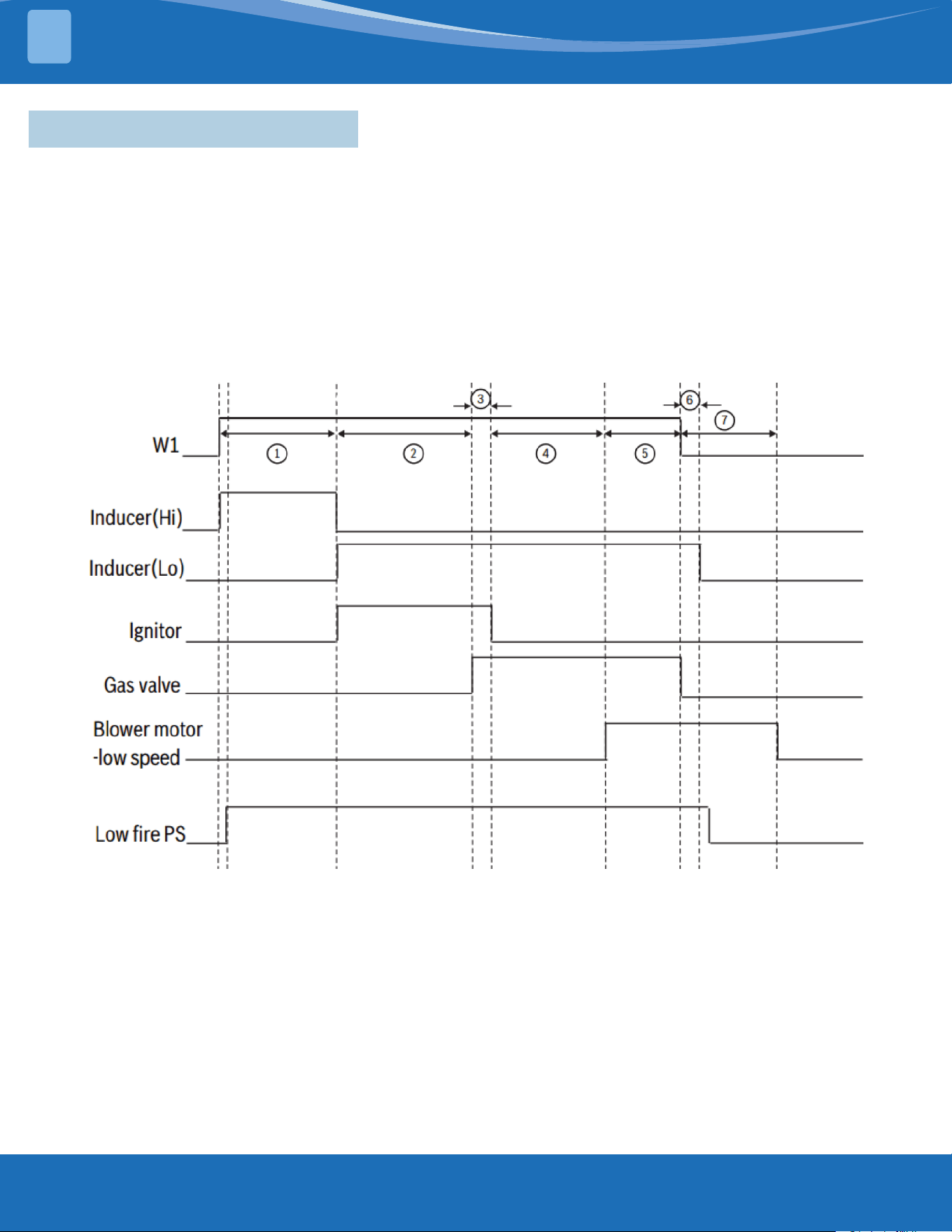
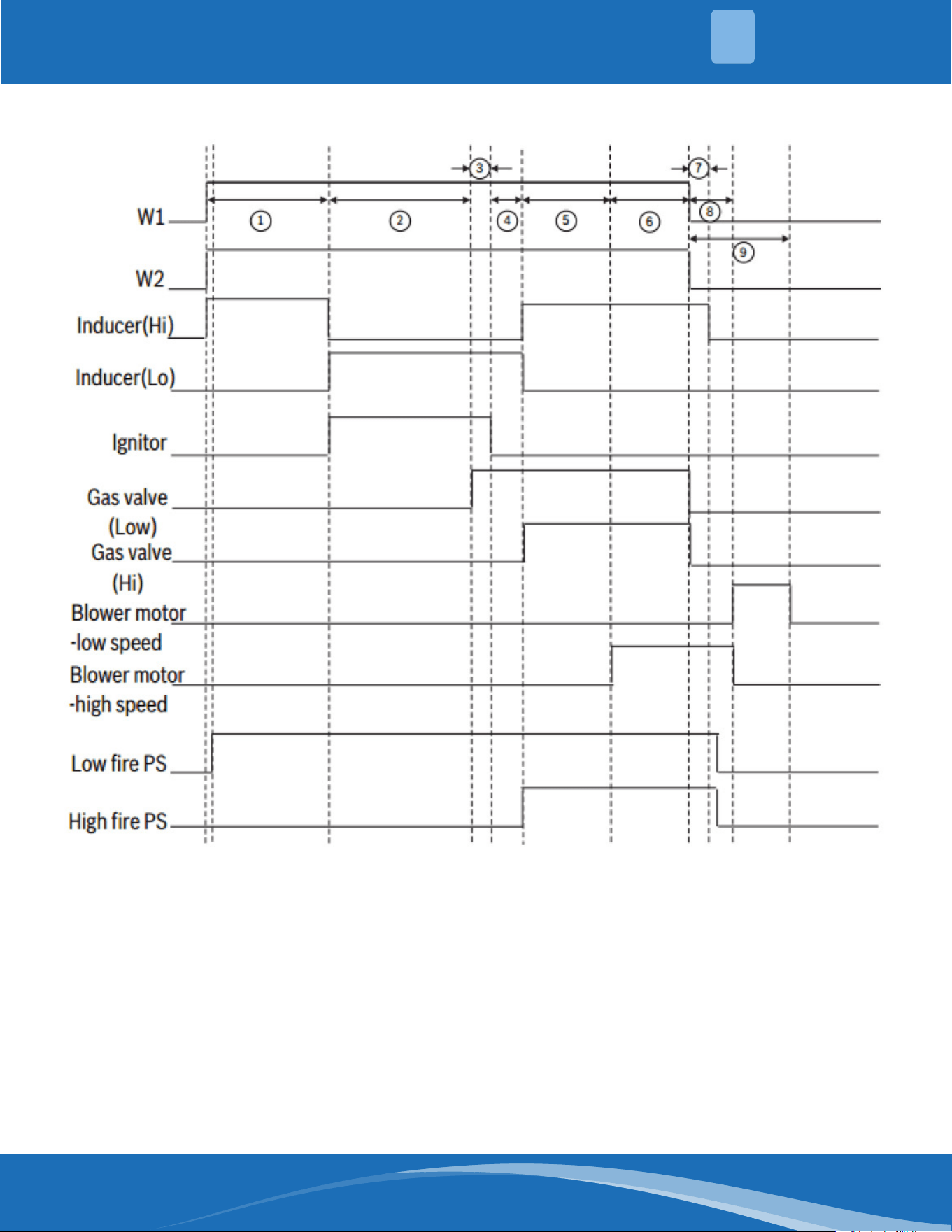
There are two heating modes:
1. Low Fire Heating Mode: Only W1 signal
2. High Fire Heating Mode: Both W1 and W2 signal
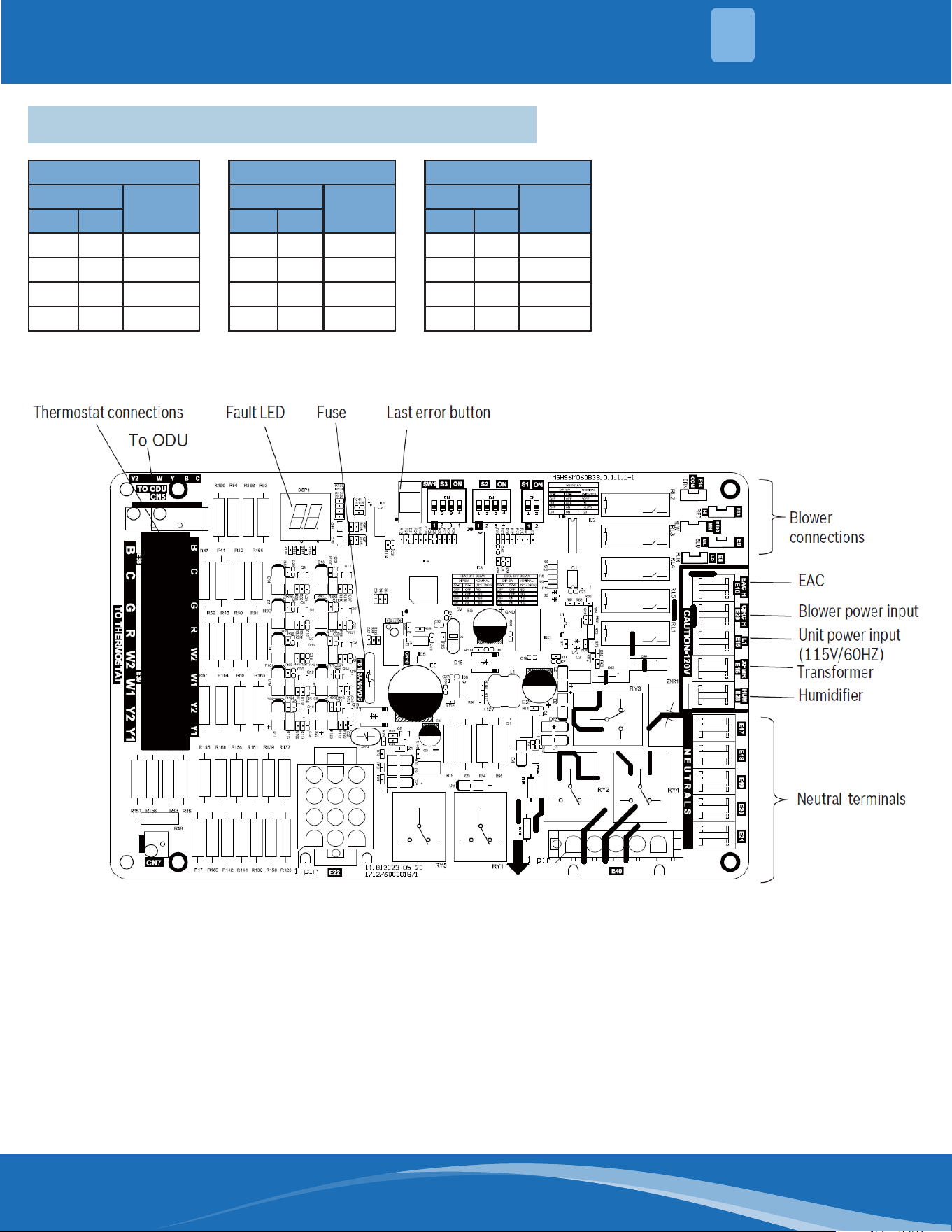
If you are using a single-stage thermostat, only a W1 signal will be sent. in this scenario, the furnace will upstage
from low to high re via a timing sequence. The time delay is set via the S1-1 and S1-2 dip switches on the control
board.
If the furnace fails to ignite, there is a separate logic for the re-ignition sequence.
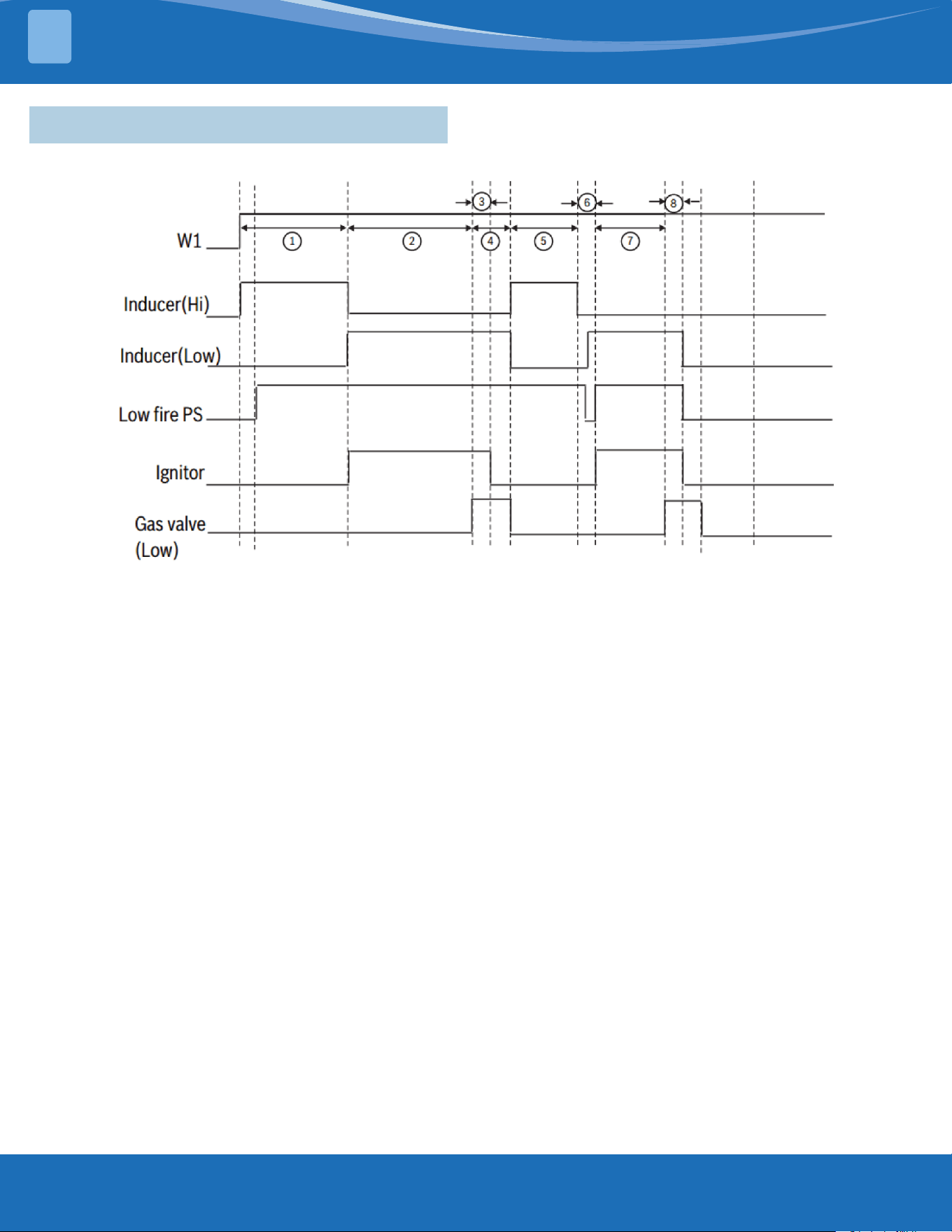
Low Fire Heating Mode Logic (only W1 signal):
1. When there is a call for heat (W1), the inducer will start on high speed and the low pressure switch closes. This
will last for 15 seconds.
2. Inducer will turn to low speed and the igniter will energize. This preheating sequences lasts for 17 seconds.
3. After preheating, the gas valve opens and the burners light. The igniter will turn o after 3 seconds.
4. There is a 30 second time delay before the blower motor starts.
5. The system is working properly.
6. When there is no call for heat (no W1 call) and no ame is sensed, post-purge begins. This will last for 15
seconds.
7. There is a fan delay to dissipate heat in the system. This time depends on the dip switch S1-3 and S1-4. The
default time is 180 seconds.
Figure 24
mrcool.com 18
18
APPENDIX
4
High Fire Heating Mode (W1+W2 Signal):
1. When there is a call for heat (W1), the inducer will start on high speed and the low pressure switch closes. This
will last for 15 seconds.
2. Inducer will turn to low speed and the igniter will energize. This preheating sequences lasts for 17 seconds.
3. After preheating, the gas valve opens and the burners light. The igniter will turn o after 3 seconds.
4. Before the gas valve, inducer, and pressure switch turn to high stage, there is a 5 second delay.
5. There is a time delay of 30 seconds before the blower motor starts.
6. The system is working properly in high stage.
7. When there is no call for heat, there is a time delay before the inducer shuts down. This will last for 15 seconds.
8. The blower motor will run at high speed for 30 seconds for fan delay.
9. There is a fan delay to dissipate heat in the system. This time depends on the dip switch S1-3 and S1-4. The
default time is 180 seconds.
Figure 25
mrcool.com19
APPENDIX
4
If the furnace fails to ignite, there is a separate logic for the re-ignition sequence:
1. When there is a call for heat (W1), the inducer will start on high speed and the low pressure switch closes. This
will last for 15 seconds.
2. Inducer will turn to low speed and the igniter will energize. This preheating sequence lasts for 17 seconds.
3. After preheating, the gas valve opens and the burners light. The igniter will turn o after 3 seconds.
4. The gas valve will open for 4 seconds if there is no ame.
5. The inducer will run at high speed for 60 seconds.
6. Test of low pressure switch
7. Preheating occurs for 27 seconds.
8. After preheating, the gas valve opens. The igniter will turn o after 3 seconds. After two failed ignition attempts,
the system will lock out.
Figure 26
4.2 Ignition Failure & Re-ignition Sequence
mrcool.com 20
20
APPENDIX
4
4.3 Requirements for Refrigerant Leakage Sensors
W2 Delay
DIP SW
Nominal
(Minutes)
S1-1 S1-2
*OFF OFF OFF
ON OFF 10
OFF ON AUTO
ON ON 20
Heat O Delay
DIP SW
Nominal
(Minutes)
S2-1 S2-2
*OFF OFF 90
ON OFF 120
OFF ON 150
ON ON 180
Cool O Delay
DIP SW
Nominal
(Minutes)
S2-3 S2-4
*OFF OFF 60
ON OFF 90
OFF ON 120
ON ON 150
Option Switch Positions
mrcool.com21
APPENDIX
4
WARNING
According to the safety requirements of UL 60335-2-40 on combustible refrigerant A2L, when the gas furnace
is used with coil and the new type of combustible refrigerant is used in the coil, the unit must be equipped
with the refrigerant gas detection sensor to monitor the refrigerant concentration around the unit in real time
to prevent the danger of abnormal refrigerant leakage.
Refrigerant gas detection sensors are manufactured under the coil manufacturing label and must be installed
by a qualied local gas supplier, distributor or service organization.
If the refrigerant gas detection sensor is not installed or is incorrectly installed, it does not meet the
requirements of current regulations and cannot eectively warn of an emergency, which may cause personal
injury. Therefore, follow the instructions provided in the manual.
Series of Products
SW2-4
OFF 80% Gas Furnace
ON 96% Gas Furnace
Fan Speed
SW1-1
OFF Normal Speed
ON Slow Speed
SW1-2
OFF W/O Refrigerant Sensor
ON W/ Refrigerant Sensor
96% Machine Type
DIP SW
Type
SW2-1 SW2-2 SW2-3
OFF OFF OFF *
OFF OFF ON *
OFF ON OFF 60B, 80B
OFF ON ON 80C
ON OFF OFF 100C
ON OFF ON 120D
A B
A B
mrcool.com 22
22
APPENDIX
4
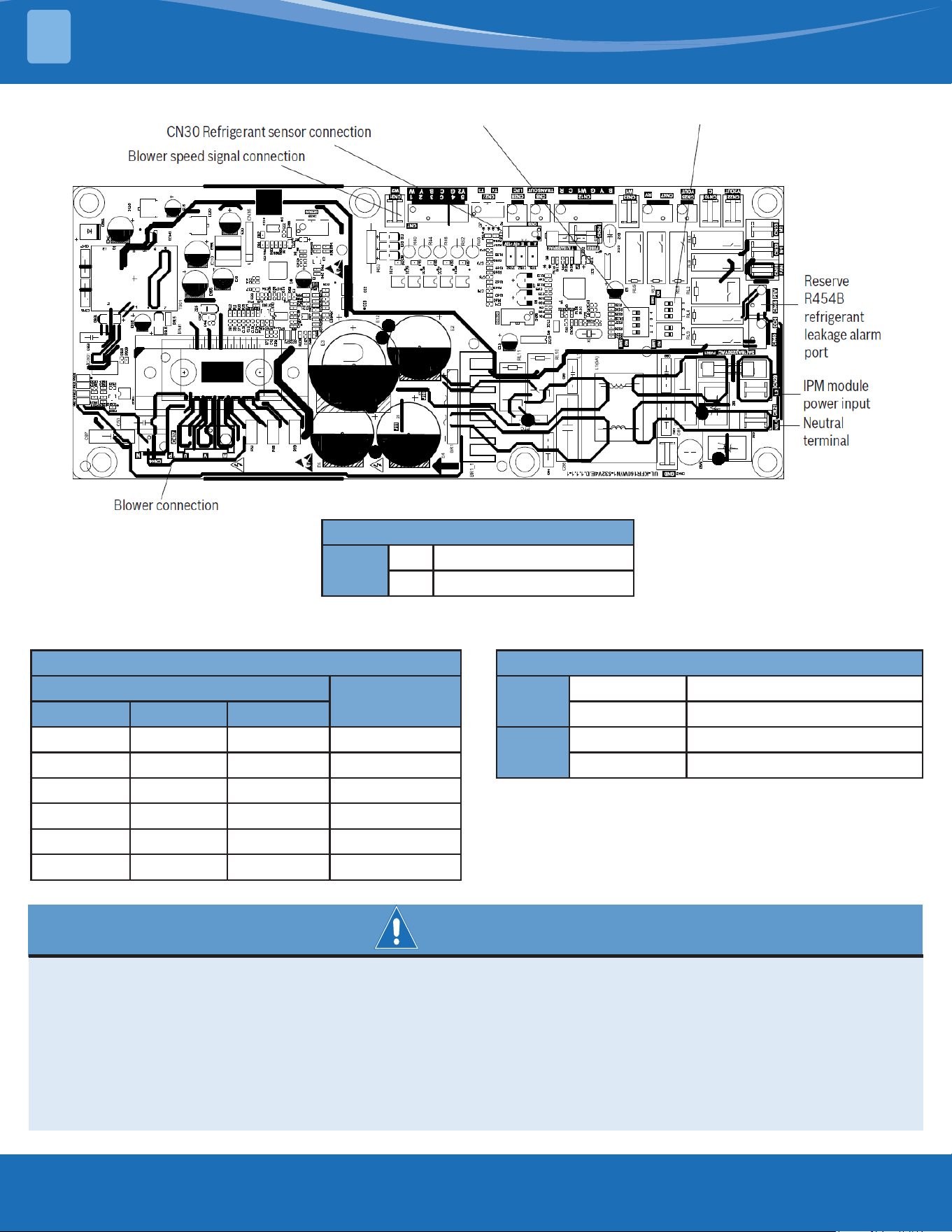
Installation of refrigerant gas detection sensor:
For the use of a coil unit, connect the refrigerant gas sensor cable terminal to the CN30 Interface, as shown in
"Gas Furnace Control Module" and move the drive plate SW1-2 to the "ON" position. Refer to the coil manual for
installation locations of refrigerant gas sensors.
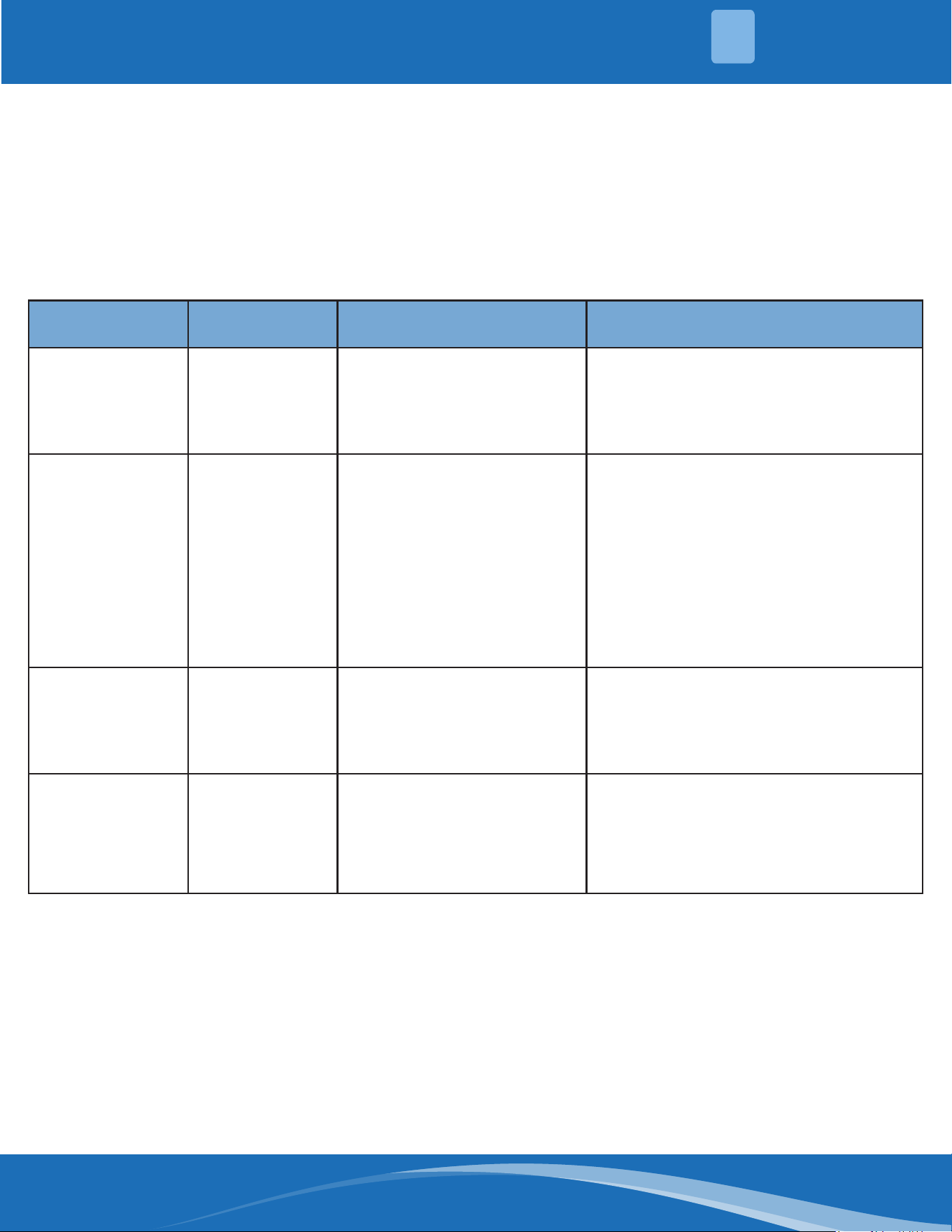
Operation Indication of Refrigerant Gas Sensor:
When the sensor detects a refrigerant leak, the unit will respond according to the following rules.
LED2 Number of
Green Flashes
Fault Location Fault Cause Unit Response & Handling Method
1
The refrigerant
sensor
communication
fails
The communication with the
refrigerant sensor fails for
2 minutes or the refrigerant
sensor is faulty.
The LED2 indicator of the driver board
blinks green once, and the Y signal is
disconnected to stop cooling.
Contact MRCOOL to check the sensor.
2
Refrigerant
concentration
exceeds the limit
alarm value
The pipe is damaged or the
refrigerant leaks.
The green light of the drive board LED2
ashes twice, disconnect the Y signal,
stop the refrigeration, and the fan in
the unit will continue to run until the
refrigerant concentration is detected to
decrease to a safe value.
Maintain ventilation and avoid open
ames.
Contact MRCOOL to check the unit.
3
Forget the dip
reminder
The sensor is connected and
communication is normal,
but SW1-2 is in the "OFF"
position.
LED2 of the driver board blinks green
three times.
Check whether SW1-2 is in the ON
position.
4
Expiration
reminder
The sensor expired or is
faulty.
The LED2 indicator of the driver board
blinks green four times to turn o the Y
signal and stop cooling.
Contact MRCOOL for a new refrigerant
detection sensor.

VersaPro
TM
96% Gas Furnace
Service Manual
The design and specications of this product and/or manual are subject to change without prior notice.
Consult with the sales agency or manufacturer for details.