Smart Siren Alarm
-
User Manual
-
Please read the manual carefully and use the
product correctly
Product description
Thank you for purchasing and using this product.
Before using the product, please read the manual
carefully and use the product correctly. In order to
avoid damage to the equipment, such as all
consequences caused by abnormal operation, The
company will not bear any responsibility. The
pictures in this manual are used to guide the user's
operation and are for reference only. Please refer to
the actual product for details.
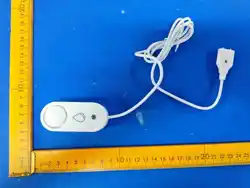
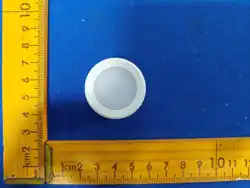
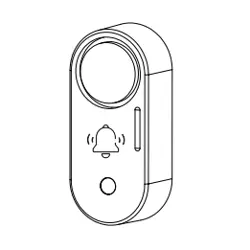
Siren
Indicator light
&flashing light
Operating instructions
1.Installing the battery
Pull down the backcover,open the backcover,and install
2 LR03 batteries.
1
Please pay special attention!The positive and
negative poles of the battery are in the correct
direction!
After installing the battery,snap the backcover into
the main body and push it upwards to secure the
back cover.
2.Binding device description
Long press and hold the SET button for 3 seconds,the
indicator light quickly flashes, and the device has
entered the configuration network mode (Discovered
mode).
SET button
*This device communicates via ZigBee,it must have
a Zigbee gateway.And select Zigbee gateway.
When the APP finds the device,click the device icon
and follow the APP prompts tocomplete the
operation Bind.
Installation method
2
Attach the included double-sided adhesive film to the
back cover of the product and then affix it to the object
that needs to be tested (ensure the wall surface is
clean and dry, and avoid mounting it on an object that
constantly produces vibrations). If the product only has
a siren function, it can be placed and installed as
desired
Product parameter
5
Product Name
Smart Siren Alarm
Operating Current ≤200mA
Battery Type LR03 /DC 3V
Standby Current ≤15uA
Standby Time ≥12 Months
Built-in Siren ≥110dB
Operating Temperature -10℃~55℃
Operating Humidity 0%~99% RH
Product Size 72×32×24mm
Vibration detection 1~50x (only for vibration alarms)
Long press 3
seconds Reset
智能警报器
-
使用说明书
-
使用本产品前,请仔细阅读本产品说明书
产品介绍
感谢您购买和使用本产品。在使用产品前,请您认真
阅读产品说明书,并正确使用产品,以免造成设备损
坏,如因非正常操作导致的一切后果,本公司将不承
担任何责任。
本说明书中的图片用于指导用户操作,仅供参考,具
体请以实物为准。
蜂鸣器
指示灯&警灯
操作说明
1.电池安装
将后盖往下推,取出后盖,装入2节 AAA 7号碱性电池.
1
注意电池的正负极不要装反了,会烧坏主板,需要使用
7号碱性电池,不要使用碳性电池。
装好后电池后,盖上后盖,向上推平即可。
2. 设备配网绑定
长按 SET 键 约 3 秒不放开,直到指示灯快速闪烁后放开,
设备将恢复出厂设置并进入配网模式 ( 被发现模式 ).
SET 键
*Zigbee 产品必须要有 Zigbee 网关才能联网使用
不同生态的 Zigbee 设备,对应的 APP 上的功能不一
样,有些 APP 上没有设置参数功能,属于正常的。
安装说明
2
1. 将配套的双面胶片贴到产品后盖上,并贴在需要检测
的物体上(注意墙面要干净干燥,不要安装在一直会产生
震动的物体上) , 如果只有警笛功有的产品可随意摆放安
装 .
震动报警功能说明
(
仅有震动检测功能的产品ZG-228Z有此功能)
3
1. 设备上电后,30 秒后 B,B 两声后,才会进入震动检测
功能,并每 5 秒会闪烁一次指示灯,表示设备已入设防
模式 .
2. 在 APP 可以设置设备状态为 设防 / 撤防,只有在设防
模式下,当设备震动后才会响警笛 .
3. 设备设防后 指示灯 每 5 秒会闪烁一次 .
4. 该设备具备实时在线功能,用户可实时远程向传感器
发出指令,如鸣响警报器以消除警报声,可设置自动化
场景进行联动。
产品参数
5
产品名称
智能警报器
工作电流 ≤200mA
电池类型 LR03 /DC 3V
静态电流 ≤15uA
待机时长 ≥12 个月
警笛音量 ≥110dB
工作温度 -10℃~55℃
工作湿度 0%~99% RH
产品尺寸 72×32×24mm
震动检测灵敏度 1~50x (仅震动报警器)
长按3秒复位
5. 设备震动后,将产生报警,出厂默认报警鸣响时长为
60 秒钟,可以在 APP 上进行设置 .
6. 单击 SET 键可以切换报警音为 “ 警报音 ”,“ 音乐 ”,
“静音”
QUALITY
CERTIFICATE
MODEL:
INSPECTORS:
DATE:
QC
PASS
检12
产品保修说明
保修政策
�.产品自售出之日起�日内,发生性能故障,消费者可以
选择退货、换货或修理。
�.产品自售出之日起��日内,发生性能故障,消费者可以
选择换货或修理。
�.产品自售出之日起��个月内,出现产品质量问题,可为
您提供保修服务。
非保修政策
�.无“三包”凭证或超过“三包”有效期。
�.未按产品说明要求使用、维护和保管而造成的损坏。
�.未经我司授权拆修造成的损坏。
�.因不可抗力造成的损坏。
�.产品在使用过程中正常的褪色和损耗不在保修范围之中。
合格证
QUALITY CERTIFICATE
型号:
检验员:
出厂日期:
( MODEL)
( INSPECTORS)
( DATE)
QC
PASS
检12
声光报警功能说明(仅声光报警器产品ZG-229Z)
4
1. 设备具备实时在线功能,用户可设置自动化场景进行
联动,例如响警号,响门铃等。
2. 出厂默认报警鸣响时间为 60 秒,可以在 APP 上进行
设置。
3. 单击 SET 键 可调节报警音量,档位为 最高,中档,低
档,静音 .
4. 通过 APP 或场景可单独控制声音报警,灯光报警,声
光报警模式。
Function description of vibration
detection alarm
(only available for product
ZG-228Z with vibration detection function)
3
1.After the device is powered on, it will enter the
vibration detection function only after 30 seconds
and two beeps. The indicator light will flash once
every 5 seconds, indicating that the device has
entered the armed mode
2.In the app, you can set the device status to
armed/disarmed. Only when in armed mode, the
siren will sound when the device vibrates.
3. After the device is armed, the indicator light will
flash once every 5 seconds
4. This device features real-time online functionality,
allowing users to remotely issue commands to the
sensor in real time, such as sounding the alarm to
eliminate the alarm sound, and setting up automat-
ed scenarios for linkage.
5. After the equipment vibrates, an alarm will be
triggered. The factory default alarm duration is 60
seconds, which can be adjusted on the APP
6. Clicking the "SET" button can switch the alarm
sound to "Siren" or "Music", "Mute".
Function description of sound and light
alarm (
only applicable to sound and light alarm
product ZG-229Z
)
4
1. The device features real-time online functionality,
allowing users to set up automated scenarios for
interconnection, such as sounding an alarm or
ringing a doorbell.
2. The factory default alarm sounding time is 60
seconds, which can be set on the APP.
3. Click the "SET" button to adjust the alarm volume,
with options including "highest", "medium", "low",
and "mute".
4. Through the app or specific scenarios, you can
individually control the “sound alarm”,” light alarm”,
and “sound-light alarm” modes.

FCC Caution.
This device complies with part 15 of the FCC Rules. Operation is subject to the following two
conditions:
(1) This device may not cause harmful interference, and
(2) this device must accept any interference received, including interference that may cause
undesired operation.
Any Changes or modifications not expressly approved by the party responsible for compliance
could void the user's authority to operate the equipment.
Note: This equipment has been tested and found to comply with the limits for a Class B digital
device, pursuant to part 15 of the FCC Rules. These limits are designed to provide reasonable
protection against harmful interference in a residential installation. This equipment generates
uses and can radiate radio frequency energy and, if not installed and used in accordance with the
instructions, may cause harmful interference to radio communications. However, there is no
guarantee that interference will not occur in a particular installation. If this equipment does
cause harmful interference to radio or television reception, which can be determined by turning
the equipment off and on, the user is encouraged to try to correct the interference by one or
more of the following measures:
-Reorient or relocate the receiving antenna.
-Increase the separation between the equipment and receiver.
-Connect the equipment into an outlet on a circuit different from that to which the receiver is
connected.
-Consult the dealer or an experienced radio/TV technician for help.
* RF warning for Portable device:
The device has been evaluated to meet general RF exposure requirement. The device can be used
in portable exposure condition without restriction.