EPIC PARTY
BLUETOOTH
SPEAKER
We love that you are rocking JLab!
We take pride in our products and fully stand behind them.
YOUR WARRANTY
All warranty claims are subject to JLab authorization
and at our sole discretion. Retain your proof of
purchase to ensure warranty coverage.
CONTACT US
Reach out to us at [email protected]
or visit jlab.com/contact
REGISTER TODAY
jlab.com/register
Product updates | How-to tips
FAQs & more
L
I
M
I
T
E
D
T
W
O
Y
E
A
R
W
A
R
R
A
N
T
Y
S
U
P
P
O
R
T
T
E
A
M
#
T
E
A
M
J
L
A
B
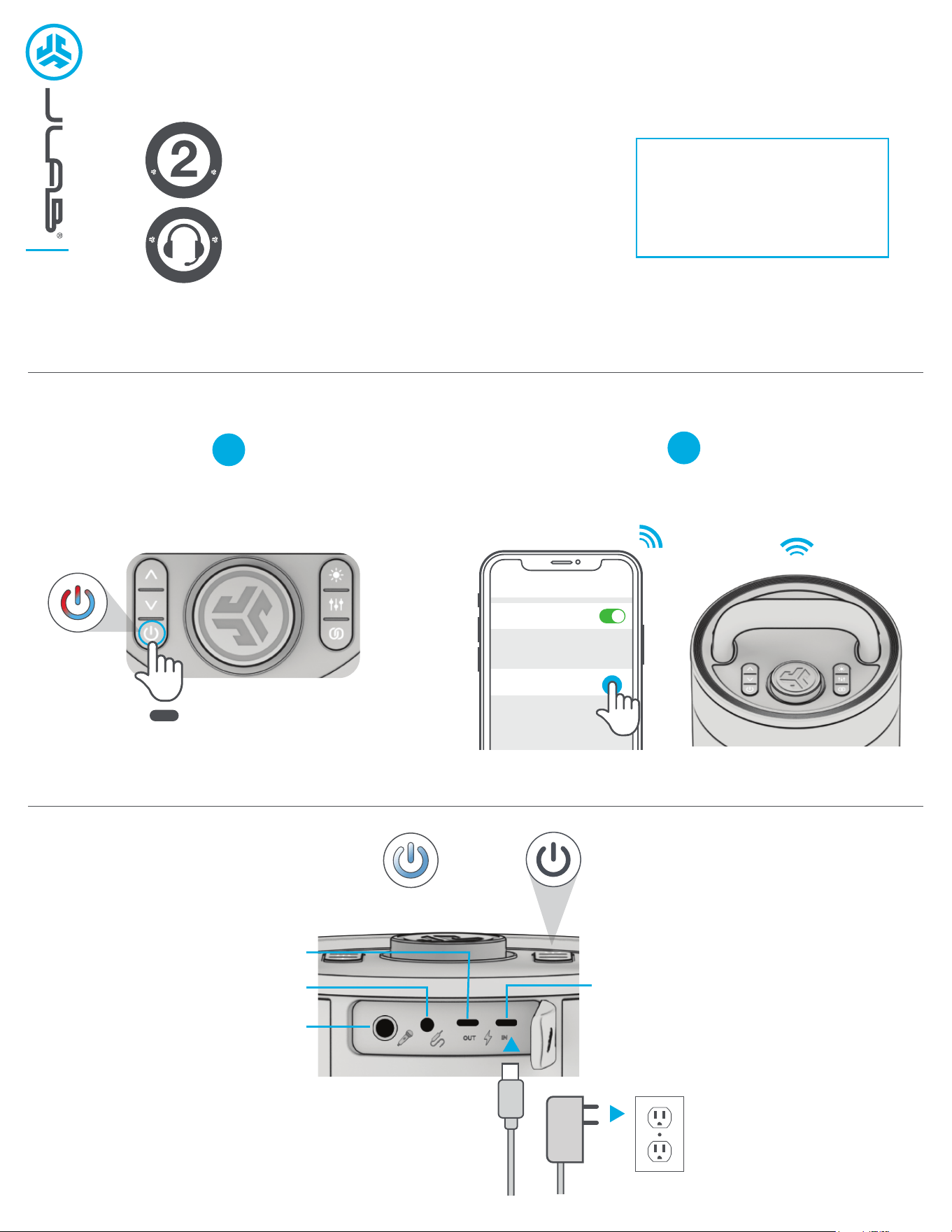
PAIR UP
GET CHARGED
1
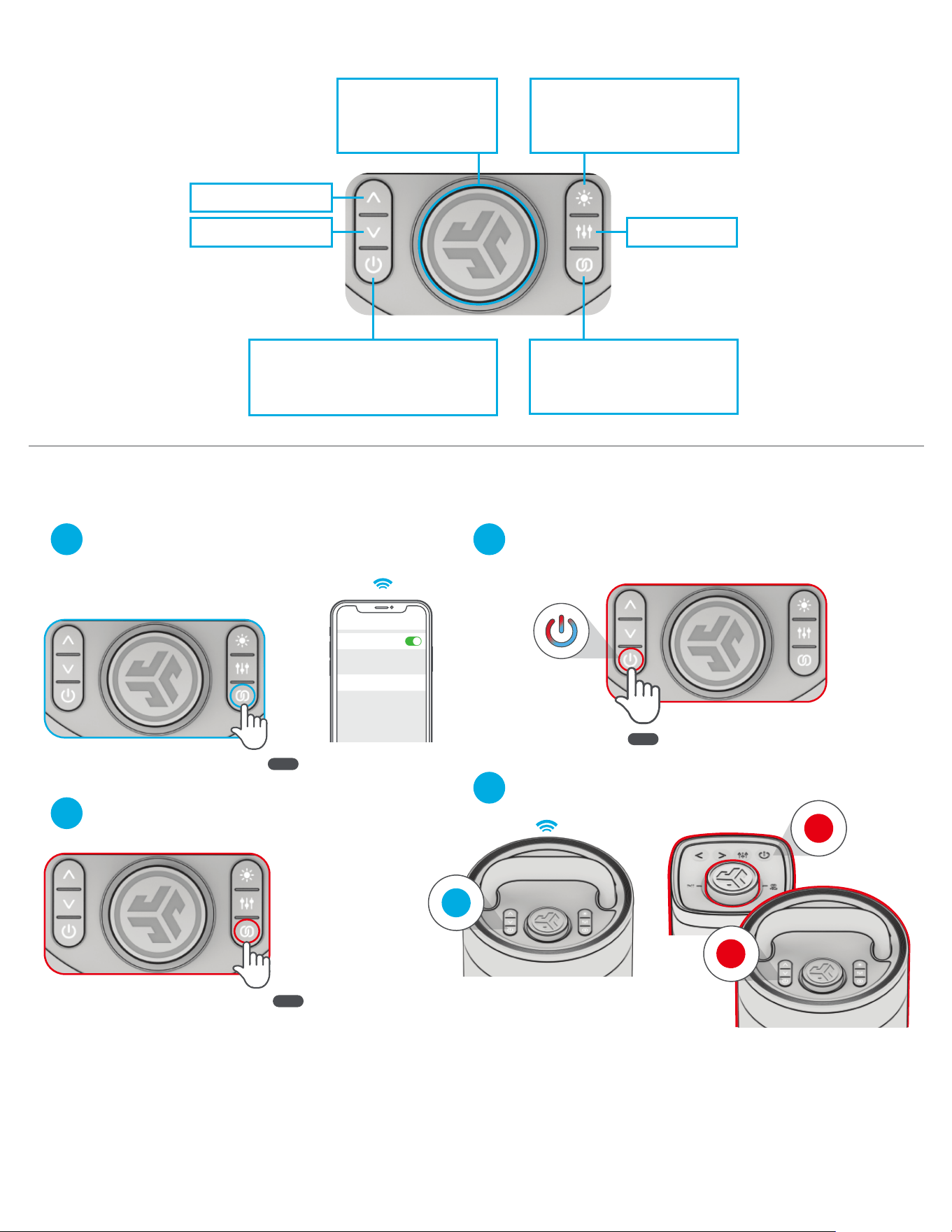
Select JLab Epic Party in your
device settings to connect.
Press and hold button. Lights will flash
blue/red to indicate pairing mode.
2
8 sec
PULSES:
CHARGING
LIGHTS OFF:
CHARGED
Connect 30w charger to USB-C IN
and wall outlet to charge.
1/4” INPUT
AUX INPUT
USB-C CHARGE OUT
(charge other devices)
USB-C CHARGE IN
(charge Epic Party)
Bluetooth
Settings
JLab Epic Party
GO AHEAD, PRESS THE BUTTON
With your other JLab Party Speaker(s) turned off,
Press hold power button until LEDs flash blue/red.
2
Followed by entering LabSync
on your other speaker(s).
3
4
LabSync (CAST TO OTHER JLAB PARTY SPEAKERS)
Connect Epic Party to your device.
Press Hold to enter LabSync.
Epic Party will say “LabSync”
1
QUICK TIPS:
• Epic Party is set to Eco-Mode by default. Lights will turn off when battery is less than 25% to conserve power.
• Turning off the lights will significantly improve playtime.
• Epic Party will auto power off if no media is playing for 30 minutes.
• Download the JLab App to adjust the default settings.
• LabSync works with all JLab Pop Party, GO Party, JBuds Party, and Epic Party speakers.
TRACK FORWARD: 1x
EQ CHANGE: 1x
CYCLE LEDs: 1x
(cycles 6 LED Animations)
LEDs ON/OFF: PRESS HOLD
LabSync: PRESS HOLD
(see LabSync page to
connect JLab Party Speakers)
TRACK BACK: 1x
POWER ON/OFF: PRESS HOLD 2s
PAIR NEW DEVICE: When powered off
PRESS HOLD 8s
VOLUME: ROTATE
PLAY/PAUSE: 1x
Press Hold
2 sec
Press Hold
2 sec
8 sec
Receiving
Casting
Bluetooth
Settings
Connected
JLAB.COM
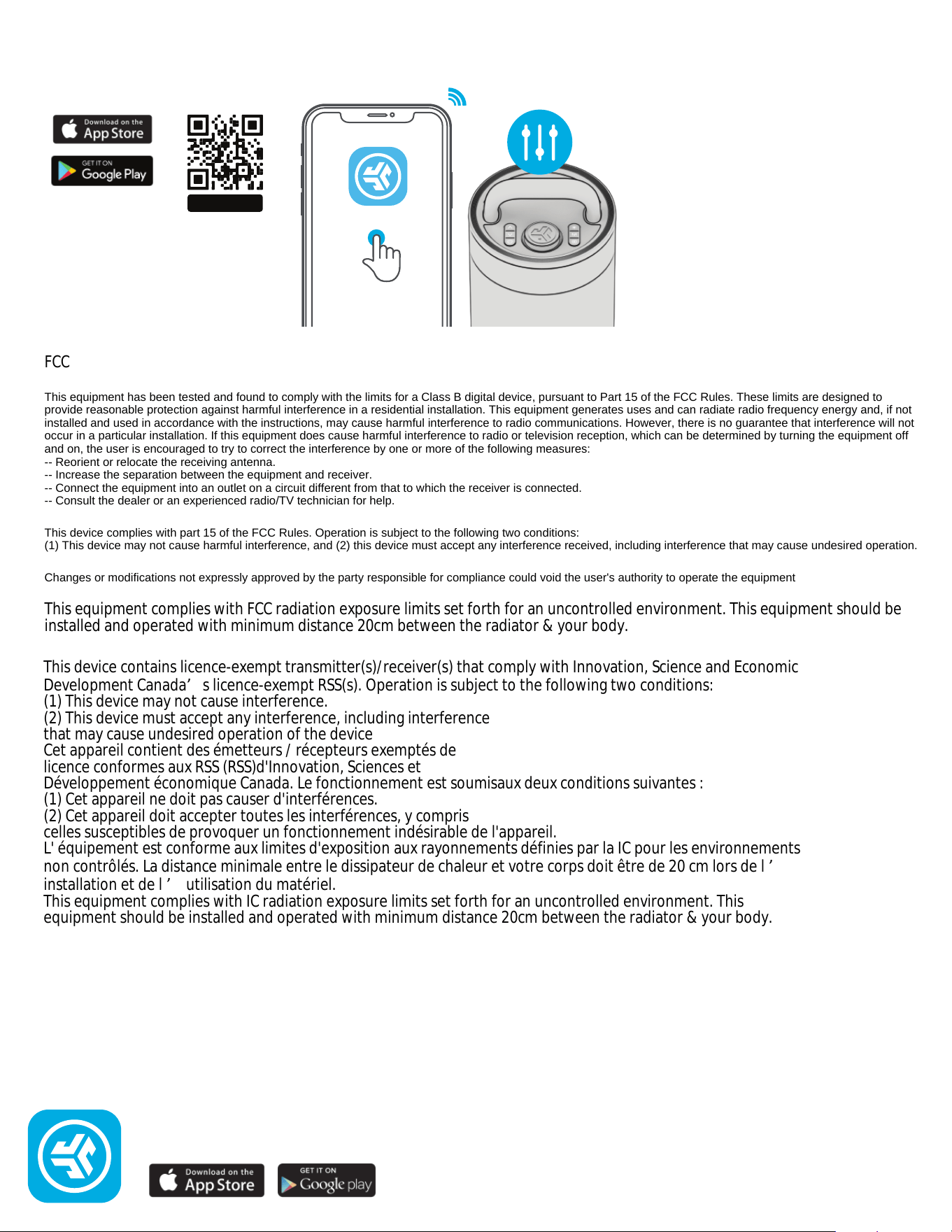
DOWNLOAD THE APP
Customize the Sound, Lights, and Features.
SCAN ME
Shop products | Product alerts | Burn-in your headphones
JLab Store + Burn-in Tool
JLab
FCC
This equipment has been tested and found to comply with the limits for a Class B digital device, pursuant to Part 15 of the FCC Rules. These limits are designed to
provide reasonable protection against harmful interference in a residential installation. This equipment generates uses and can radiate radio frequency energy and, if not
installed and used in accordance with the instructions, may cause harmful interference to radio communications. However, there is no guarantee that interference will not
occur in a particular installation. If this equipment does cause harmful interference to radio or television reception, which can be determined by turning the equipment off
and on, the user is encouraged to try to correct the interference by one or more of the following measures:
-- Reorient or relocate the receiving antenna.
-- Increase the separation between the equipment and receiver.
-- Connect the equipment into an outlet on a circuit different from that to which the receiver is connected.
-- Consult the dealer or an experienced radio/TV technician for help.
This device complies with part 15 of the FCC Rules. Operation is subject to the following two conditions:
(1) This device may not cause harmful interference, and (2) this device must accept any interference received, including interference that may cause undesired operation.
Changes or modifications not expressly approved by the party responsible for compliance could void the user's authority to operate the equipment
This equipment complies with FCC radiation exposure limits set forth for an uncontrolled environment. This equipment should be
installed and operated with minimum distance 20cm between the radiator & your body.
This device contains licence-exempt transmitter(s)/receiver(s) that comply with Innovation, Science and Economic
Development Canada’s licence-exempt RSS(s). Operation is subject to the following two conditions:
(1) This device may not cause interference.
(2) This device must accept any interference, including interference
that may cause undesired operation of the device
Cet appareil contient des émetteurs / récepteurs exemptés de
licence conformes aux RSS (RSS)d'Innovation, Sciences et
Développement économique Canada. Le fonctionnement est soumisaux deux conditions suivantes :
(1) Cet appareil ne doit pas causer d'interférences.
(2) Cet appareil doit accepter toutes les interférences, y compris
celles susceptibles de provoquer un fonctionnement indésirable de l'appareil.
L' équipement est conforme aux limites d'exposition aux rayonnements définies par la IC pour les environnements
non contrôlés. La distance minimale entre le dissipateur de chaleur et votre corps doit être de 20 cm lors de l ’
installation et de l ’ utilisation du matériel.
This equipment complies with IC radiation exposure limits set forth for an uncontrolled environment. This
equipment should be installed and operated with minimum distance 20cm between the radiator & your body.