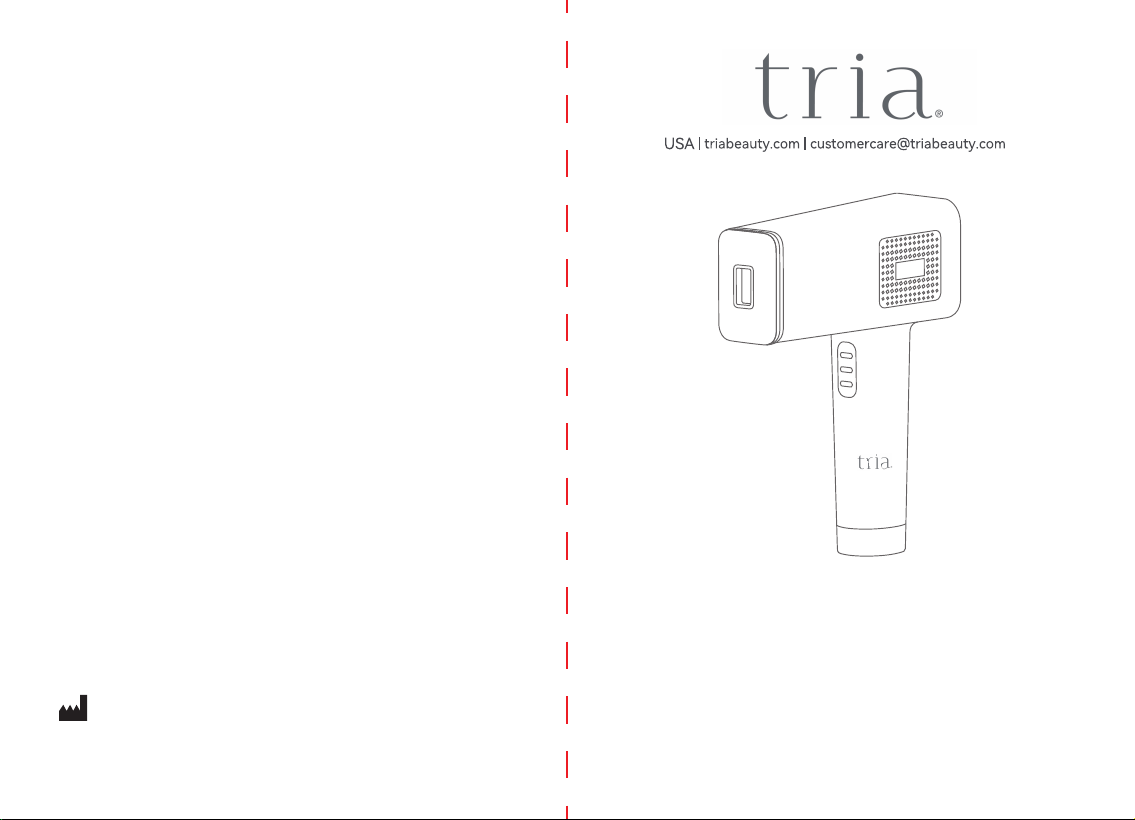
User Manual
Device Name: Intense Pulsed Light (IPL) System
Model: T012C
Version: V1.4 Date: Aug. 23, 2023
17703A
Manufactured for Tria Beauty by
Shenzhen Fansizhe Science And Technology Co., Ltd.
2nd, 3rd, and 4th floors, No.11, Henggangxia Industrial Zone, Xiangshan
Community, Xinqiao Street, Bao’an District , Shenzhen, Guangdong, China. (Zip
code 518125)
01
1. Safety Instruction ..................................................................................................02
2. Symbols.................................................................................................................05
3. Device Description...........................................................................................06
3.1. General introduction ....................................................................................07
3.2. Indications for Use .......................................................................................07
3.3. Introduction of Device ..................................................................................07
3.3.1. Device Picture............................................................................................07
3.3.2. Configuration of Main Unit........................................................................08
3.3.3. Introduction of Display Screen................................................................. 09
4. How to Use...................................
.........................................................................10
4.1. Device Operation Introduction......................................................................10
4.2. Skin Test Patch
.............................................................................................14
4.3. Suggestions for Use.....................................................................................14
4.4. Usage Steps..................................................................................................17
5. Rare Side Effects...................................................................................................19
6. Cleaning & Maintenance........................................................................................20
6.1. Cleaning........................................................................................................20
6.2. Maintenance..................................................................................................21
7. Storage........................
...........................................................................................21
8. Recycling................................................................................................................21
9. Warranty&Support..................................................................................................21
10. Packing List..........................................................................................................23
11. Specification Parameters.....................................................................................23
12. Frequently Asked Questions...............................................................................25
13. Important Information Regardin Electromagnetic Compatibility (EMC)...................27
Table of Contents
02 03
Warning
1. Safety Instructions
Before using the Intense Pulsed Light (IPL) System for the first time, please
read the user manual carefully.
•This device is not a toy, keep out of reach of children.
• Please check the device before you start using it. DO NOT use it if there
is any damage.
• Keep the device and power adapter dry.
• Make sure the device operating voltage complies with the rated voltage
of the power source.
Caution:
The Intense Pulsed Light (IPL) System is an electrical
device. As such, it should be used with special attention to safety. Please
read all warnings before use, and strictly follow them when using the device.
Warning:
Warning
•
•
The following persons should not use this device:
•
•
•
•
•
•
•
•
•
•
•
DO NOT use this device on the following areas:
Areas with hyperpigmentation or hypopigmentation, intense redness,or burns.
Areas where you have surgery.
Around the eyes and eyebrows to avoid eye injury.
On the nipples, areolas, labia minora, vagina, anus, inside the nostril, or ears.
.ecaf ro , mutorcs eht no ecived siht esu ton dluohs neM
Near silicone implants, pacemakers, subcutaneous injection ports (such as
insulin dispensers),or body piercings. Any artificial surface should be avoided.
On moles, freckles, large veins, darker pigmented areas, scars, or skin
abnormalities without doctor supervision.
On tattoos or permanent makeup, as it can cause burns to the skin and
change its pigmentation.
On areas where you use long-lasting deodorants, as it may cause skin
irritation.
Do not use this device on skin with sunburns, that has been recently tanned,
or has a fake tan.
•
•
•
•
•
•
•
Pregnant or nursing women.
If your skin is sensitive to light and/or is prone to developing a rash or
allergic reaction.
If you have type V or type VI skin (your skin rarely or never burns in the
sun and/or tans profusely) because you run a high risk of developing
skin reactions like hyperpigmentation and hypopigmentation, intense
redness or burns.
If you have a history of skin diseases or are currently being treated for
one.
If you have precancerous lesions or multiple birthmarks or moles on the
area(s) you want to treat.
If the area you want to treat has an infection, burn, eczema, hair follicle
inflammation, scratches, open wounds, herpes simplex, lacerations or
hematomas.
If you have a history of collagen disorder, keloid scar formation and/or
poor wound healing.
If you have a history of vascular diseases like varicose veins etc.
If you have diabetes, lupus erythematosus, porphyria, congestive heart
disease and/or bleeding disorders.
If you have a history of immunosuppressive disease (including HIV or AIDS).
If you are undergoing or have received radiotherapy or chemotherapy within
the last two months.
04 05
DO NOT
touch any internal components of the device that might be exposed as a
result of damage to the device in order to avoid electric shock.
DO NOT insert any objec
The adapter contains a transformer, DO NOT use a power supply other than the
one provided, as it is dangerous.
ts into the device.
DO NOT use the device if the filter of the light exit window is damaged.
This device cannot be washed. DO NOT immerse the device or wash it under
running water.
This device is not suitable to use on
children. Keep it out of reach of children.
Regularly clean the device surface to extend its lifetime.
DO NOT attempt to disassemble, repair or modify the device by yourself.
DO NOT place or store the device for a long period in a hot or humid environment
(e.g. bathroom or swimming pool etc.). If you do not intend to use the device for a
long time, store it in a dry place at room temperature.
DO NOT use this device in an environment with flammable materials, solutions,
gases, or in an oxygen-rich environment, to avoid fire risk.
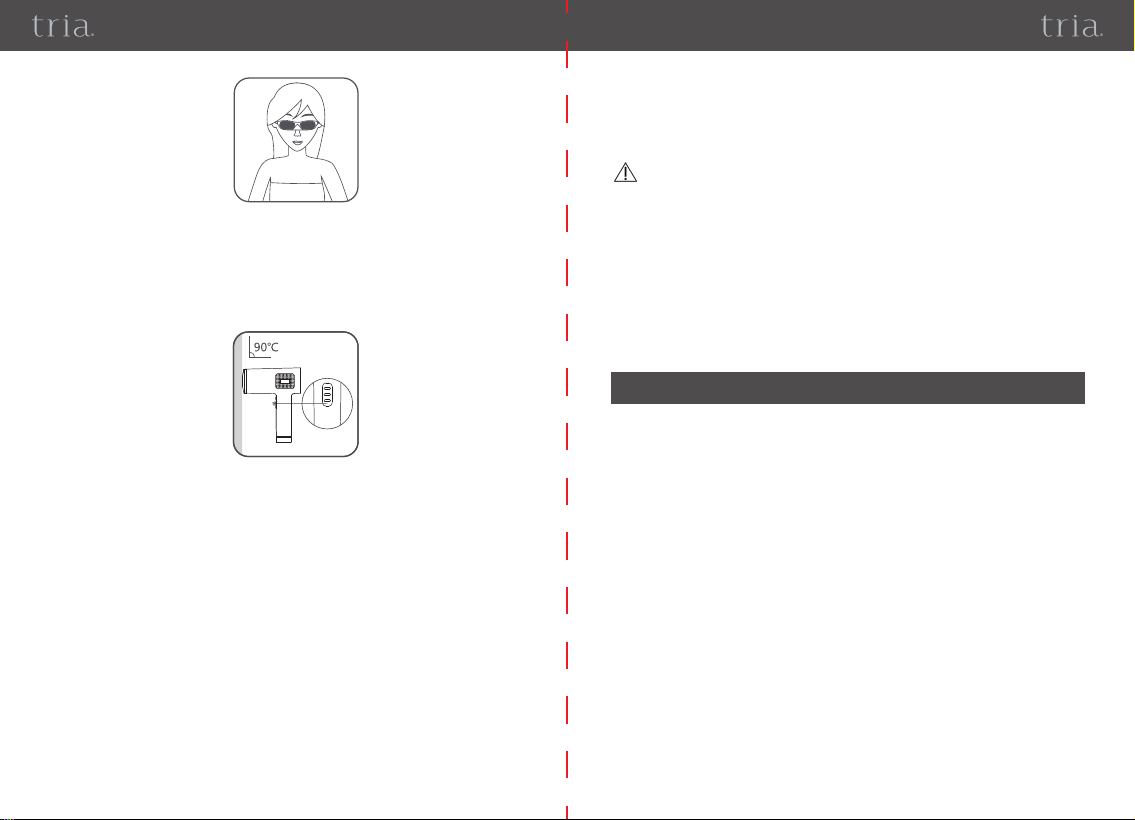
To avoid eye discomfort when using this device, ensure you (and other people in
the same room) do not look directly into the light exit window of the device. ALWAYS
use protective goggles (included) when using the device.
DO NOT cover the device’s vents during use.
DO NOT wrap the cable of the power supply around the neck.
DO NOT use any power adapter other than the one provided by the manufacturer.
This device is for single patient use.
DO NOT use the device after sunbathing.
Please do a cutaneous sensitivity test and wait for 24 hours, if you are not sure
whether your skin has been tanned or burned.
Please unplug the adapter after use.
The warning list is not exhaustive. If you are not sure whether you can or cannot
use this device, please consult a doctor.
Caution:
•
•
DO NOT
u
se this device if you take the following medications or treatments:
If your skin is being treated or has recently been treated with alpha-hydroxy acids
(AHAs), beta hydroxide acids (BHAs), topical isotretinoin, or azelaic acid.
•
If you have taken oral or topical Accutane or Roaccutane acid in the past six
months. This treatment makes skin more susceptible to lacerati
ons, trauma, and
irritation.
If you are taking any kind of photosensitizing agent or medication. Always verify
the patient package inserts for the medicine, and do not use the device if it is
specified that it can cause light allergy reactions, photo toxic reactions, or if you
should avoid sun exposure while taking the medicine.
•
If you are taking anticoagulant medicines, including the use of large quantities of
aspirin and cannot stop at
least one week before each treatment.
Only Adults over 18 years old can use this device.
ALWAYS
follow the warnings and use recommendations of this instruction manual.
Immediately STOP using the device and consult a doctor if you feel any
discomfort.
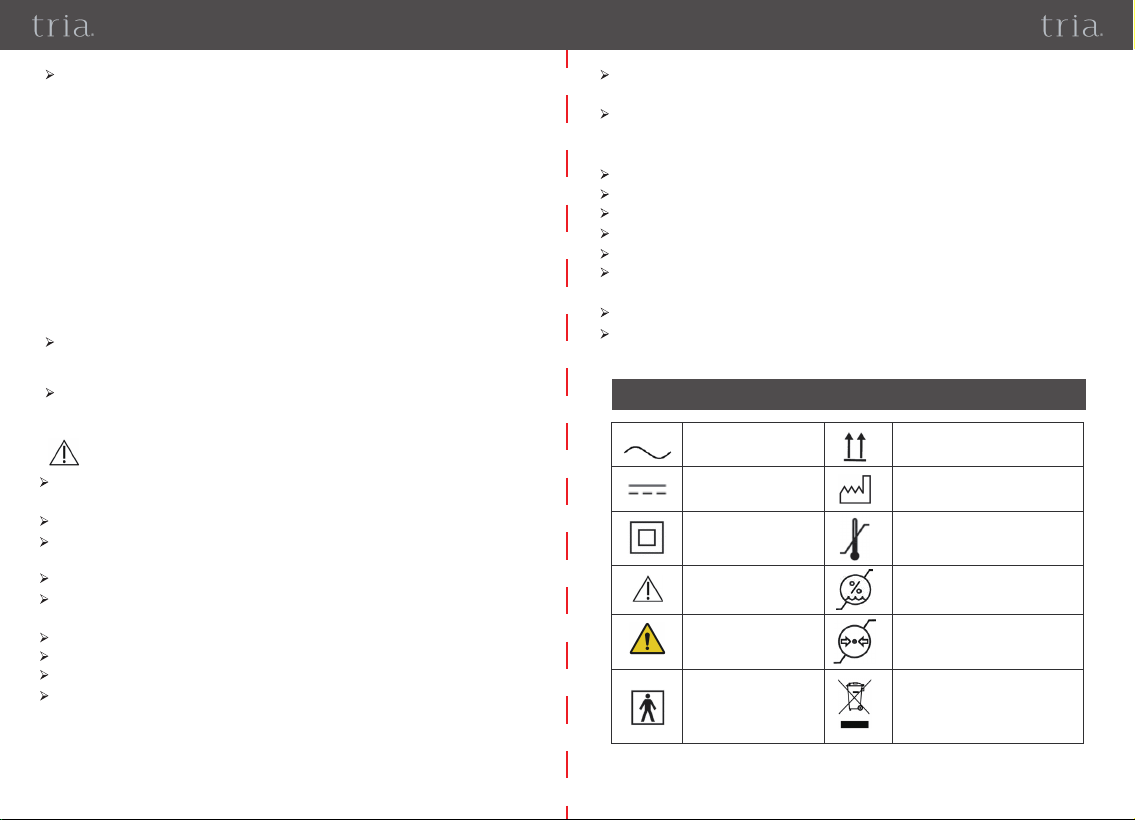
Alternating current This way up
Date of manufacture
Temperature limit
Humidity limitation
Atmospheric pressure
limitation
Direct current
CLASS II equipment
Caution
Warning
Type BF applied part
Product should not be discarded
as unsorted waste but must be
sent to separate collection fac-
ilities for recovery and recycling.
2. Symbols
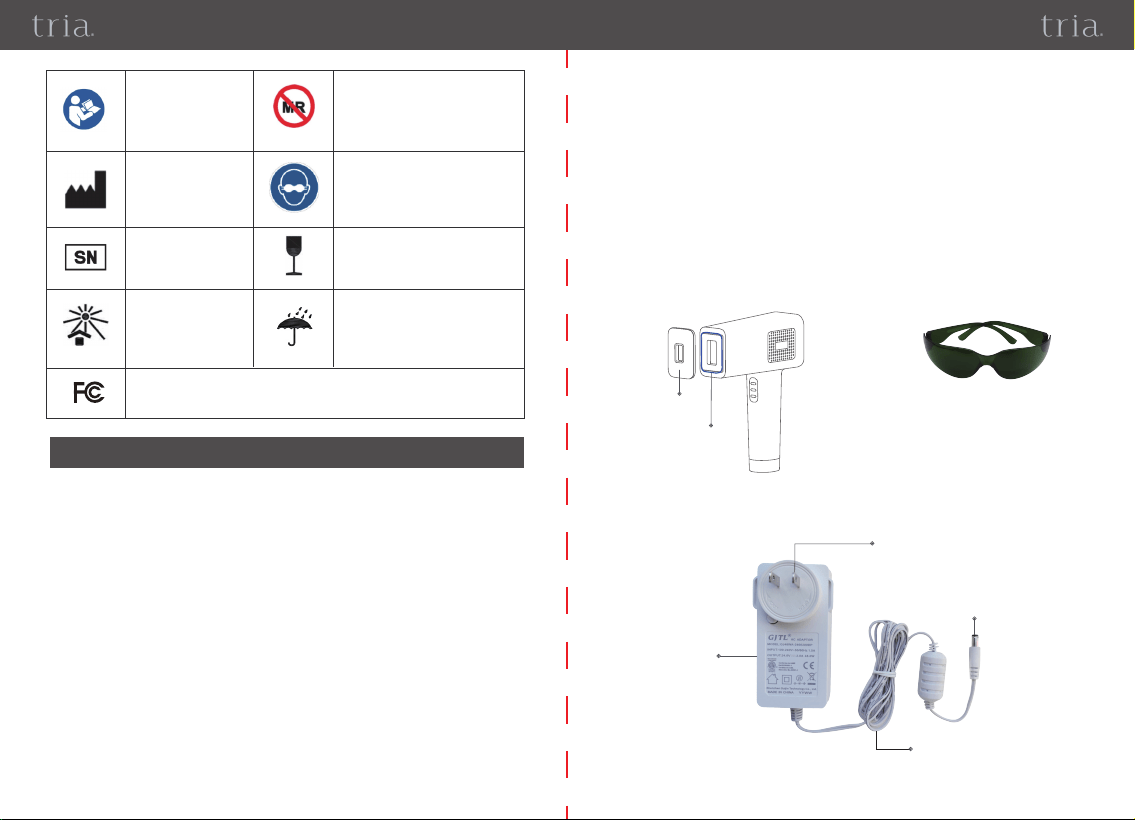
Device
Probe
Probe
Cover
Power Adaptor (picture 2):
Plug
Adaptor
DC output
connector
cable
0706
3.1. General Information
3.2. Indications for use
3.3. Introduction of device
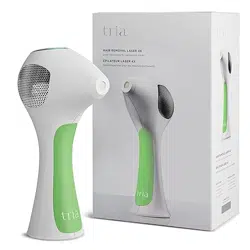
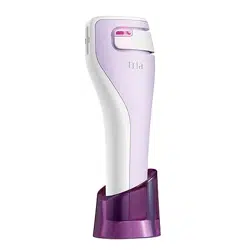
3.3.1. Device picture
The Intense Pulsed Light (IPL) System is a device for hair removal based on
Intense Pulsed Light (IPL). The purpose of the IPL light is to heat the root
where the hair grows. It works below the skin's surface. The device is powered
solely by the external power adapter and its IPL emission activation is
controlled by pressing a switch.
Device Name: Intense Pulsed Light (IPL) System
Model: T012C
The Intense Pulsed Light (IPL) System is an over-the-counter device intended
for the removal of unwanted body hair.
The Intense Pulsed Light (IPL) System features an ice-cold care function which is
realized though a semiconductor cooling plate. This function starts automatically when
the device is powered on and turns off automatically when device is powered off. The
cold side of semiconductor cooling plate is attached with a Metal Cooling Plate which
encircles the Light Exit Window as part of the device surface. Since the temperature of
the Metal Cooling Plate is red
uced by semiconductor cooling plate and thus is lower
than temperature of skin surface, it generates an ice-cold feeling when device contacts
with skin surface while it is on. This is a physical heat transfer process.
Main unit (picture 1):
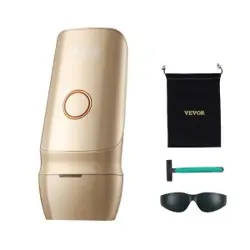
Goggles (picture 3):
3. Device Description
This device has not been tested for use
in an MR environment and should not
be used exposed to MR environments
while patients are wearing the device.
Keep it outside the MRI scanner room.
Wear eye protection
Indicates a medical device that
can be broken or damaged if
not handled carefully.
Indicates a medical device that
needs to be protected from
moisture.
Refer to instruction
manual
Manufacturer
Serial number
Indicates a medical
device that needs
protection from light
sources.
Federal Communications Commission
09
08
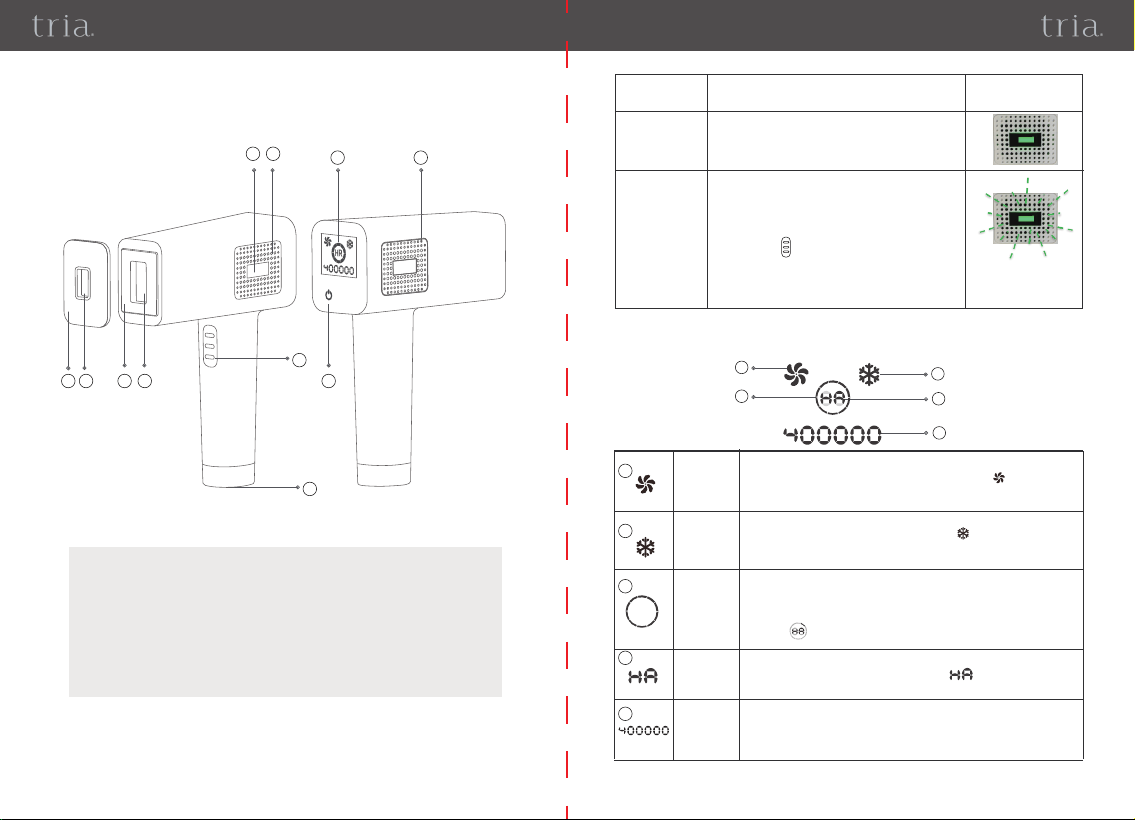
3.3.2. Configuration of Main unit
①Probe Cover
②Light Exit Window of Probe
Cover(1.85cm²)
③Metal Cooling Plate
④Light Exit Window (4cm²)
⑤Flash Ready Light
⑥Air Vents (Air inlet)
1
2
3
11
4
5
6
7
8
10
9
⑦Flash Button
⑧DC Plug-in Port
⑨Display screen
⑩Air Vents (Air outlet)
⑪On/Off / Level adjustment button
Status of Flash
Ready Light
Light on
Steady
When in “Manual Emit Flash mode”, this ind-
icated that the device probe is not in full contact
with the skin.
Light Blinking
Graphical
representation
When
3.3.3. Introduction of Display screen
The following items are shown on the display after the device is turned on:
1. When in “Manual Emit Flash mode”, this
indicates that the device probe is making full
contact with the skin and device is ready to
trigger a flash, but you have not pressed the
Flash Button yet .
2. When in “Auto Emit Flash mode”, this
indicates that the device probe is not in full
contact with the skin.
Intensity
level
Hair
removal
Number of
remaining
flashes
Indicates the intensity level which is adjustable from level 1 to 10.
This circle is divided into ten parts, representing the ten Inte-
nsity levels. While the device is on, the number of parts light-
ing up is the intensity level. For example, when one part of
the sign is lit up, but the other 9 are off, the intensity is at
level 1.
Sign of Hair removal.
When device is powered on, the sign lights up until the
device is powered off.
The number of remaining flash times de
creases by 1 if flash
emits once,This number will gradually decrease to 0 as
the
device is used. Once it reaches 0, the device will cease fun-
ctioning.
1
3
4
2
5
1
2
3
4
5
Fan
Cooling the internal parts of the main unit while the device is on.
When device is powered on,two blades of sign will light up
as the fan begins working, it will continue working for
30 seconds after device is powered off.
Ice-cold
care
function
Generating an ice-cold feeling.
When device is powered on, the sign lights up an eht d
device
generates an ice-cold feeling at the Metal Cooling Pl
ate continuously, until the device is powered off.
and rotate
-
10 11
To ensure the correct operation of this device, please read the instructions
carefully before use.
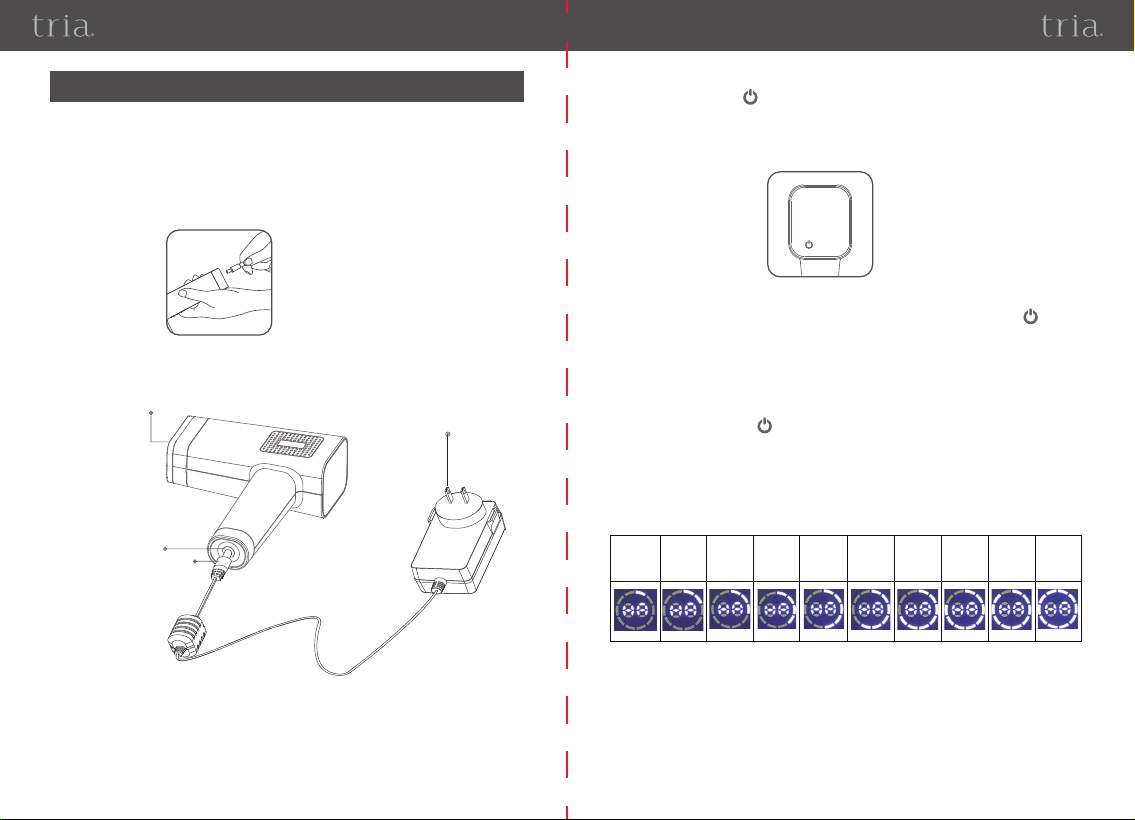
• Preparation: Connect the power adaptor and main unit as shown in picture 4:
4. How to Use
4.1. Device Operation Introduction
Picture 4
Picture 5
Insert the plug into a power socket and the device will enter Standby Mode with
about a one-second-long continuous beeping sound.
•Powering On: With the device in Standby Mode, press and hold the “On/Off/Lev-
el adjustment button” for about 2 seconds. The device will be powered on at
the first intensity level setting with two short beeping sounds. At the same time, the
fan and Ice-cold Care functions will begin working. (Picture 5)
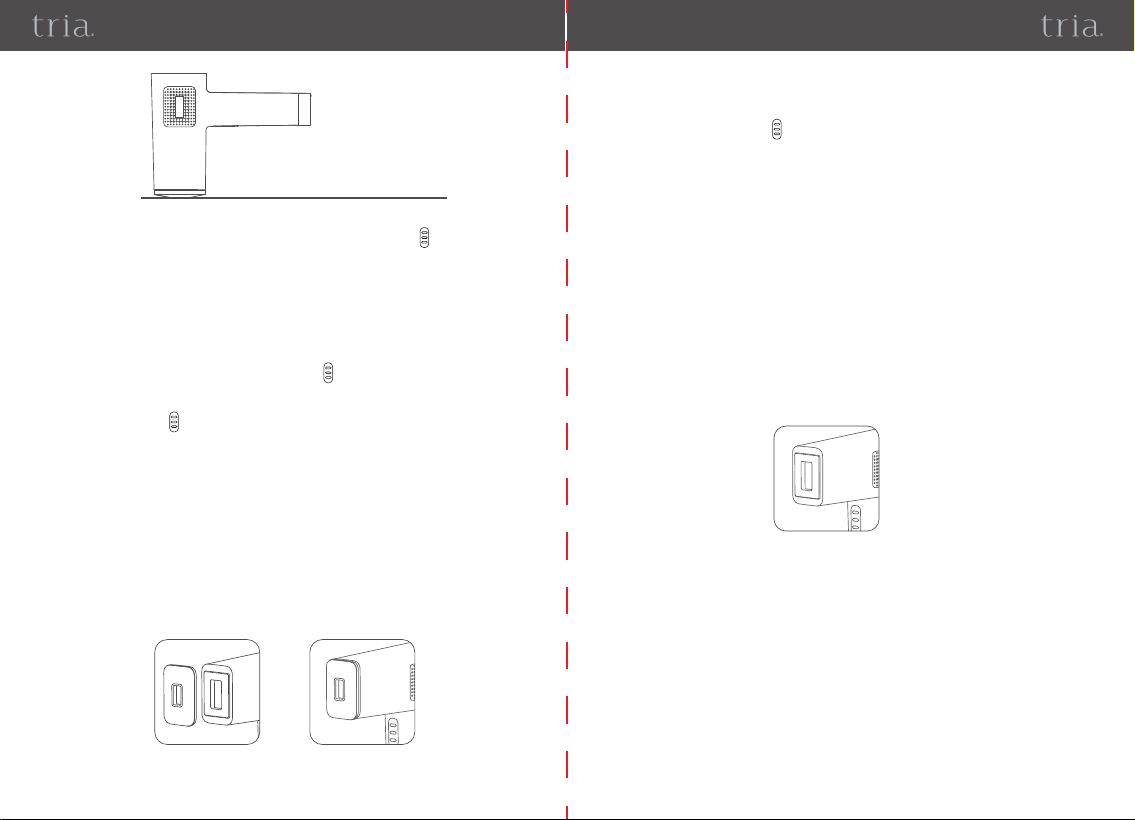
• Manual Emit Flash mode:
1) When the device is initially powered on, the device automatically enters
“Manual Emit Flash mode”.
2) Put the Device probe against the area to be treated and press (Picture 7)
• Intensity Level Adjustment: With the device powered on, press the “On/Off
/Level adjustment button” to adjust the treatment intensity level in a cycle with
a total of 10 levels. First-time users should start the first session at the lowest
intensity level. You can gradually increase the intensity level. (Picture 6)
Level 1 Level 2 Level 3 Level 4 Level 5 Level 6 Level 7 Level 8 Level 9 Level 10
• Powering OFF: Press and hold the “On/Off/Level adjustment button” for
about 2 seconds. The display screen will stop lighting, and the device will power
off after two short beeping sounds. The fan will continue working for another 30
seconds after device is powered off.
DC plug-in port
Device probe
DC output connector
Picture 6
Plug
12 13
Picture 7
3) When Flash Ready Light is blinking, press the Flash Button to trigger a
flash.
Notes:
1) In “Manual Emit Flash mode”, if the device probe is not in full contact with the
skin, the Flash Ready Light will light up without blinking and the device will not
emit the flash when pressing the Flash Button .
2) In “Manual Emit Flash mode”, if the device probe in full contact with the skin
but the Flash Button has not been pressed to trigger a flash, the Flash Ready
Light will blink.
3) “Manual Emit Flash mode” is recommended for hair removal in smaller areas.
When removing hair in a small area, you can place the probe cover on device
probe. The probe cover is the same size as the device probe and covers it
completely. However, the exit window of the probe cover is smaller than that of
the device probe. When shaking the device, the probe cover will not fall off.
(Picture 8)
Picture 8- Attach Probe cover on Probe
Picture 9
•Auto Emit Flash mode: With the device in “Manual Emit Flash mode,” press
and hold the Flash Button for about 2 seconds. The device will enter “Auto
Emit Flash mode” with eight short beeping sounds” bi-bi--bi-bi--bi-bi--bi-bi” and
the Flash Ready Light will begin blinking. Press the device probe against the
area to be treated and the device will emit the flash automatically, without pressing
the Flash Button.
• Mode switch: While the device is on, ensure that the device is not pressed
against the skin and then press and hold the Flash Button for about 2 seconds.
If there are eight short beeping sounds “bi-bi--bi-bi--bi-bi--bi-bi” and Flash Ready
Light begins blinking, the device is switched into “Auto Emit Flash mode.” If
there are two short beeping sounds “bi-bi” and Flash Ready Light lighting on, but
not blinking, then the device is switched into “Manual Emit Flash mode”.
Notes:
1) In “Auto Emit Flash mode”, if the device probe is not in full contact with the
skin, the Flash Ready Light will blink and the device will not emit the flash.
2) “Auto Emit Flash mode” is recommended for larger areas of hair removal.
(Picture 9)
Cheek
Bearded lip
Back
Armpit
Chest
Arm
Bikini line
Thigh
Calf
Belly
1514
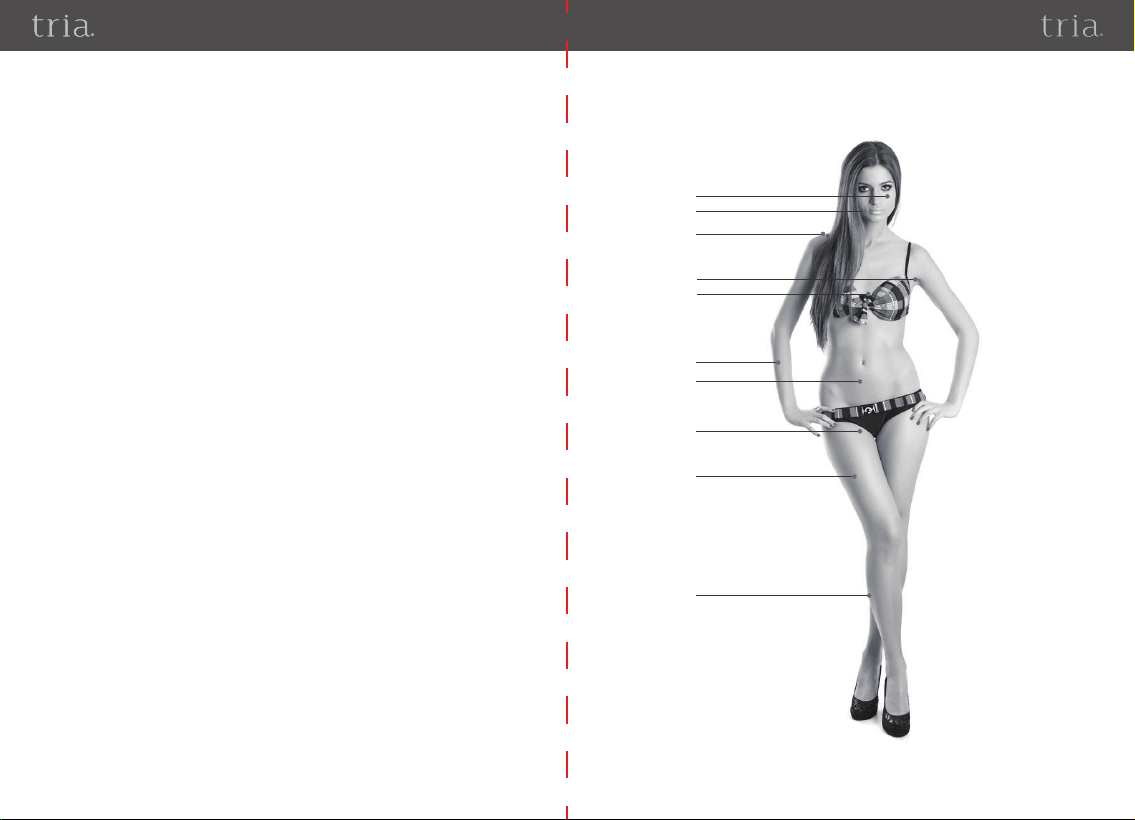
•
Treatment areas
4.2. Skin Test Patch
※For first-time users, we recommend that you test the device on the arm for
reactions with following skin test patch:
a) Turn on the device and select intensity level 1. Press the device probe agai-
nst the skin and apply one flash.
b) Increase the intensity by one level and repeat the test in a slightly different
spot (do not trigger the flash multiple times on the same area). Stop increasing
the intensity level and stop the testing if the device causes any discomfort (or
pain).
c) Wait for 24 hours and then check the skin for any reaction such as
discomfort, rash, or pain.
d) If the skin on the test site is normal (no discomfort or pain), you can continue
to use it at the level used there. If it is abnormal, please stop using it at that level.
※After you test the skin, choose the intensity levels that did not cause a
reaction on your skin.
4.3. Suggestions for Use
※ If you have recently removed hairs by using a long-lasting removing method,
such as plucking, waxing, etc., wait until hairs start growing again before using
the device.
1716
• Treatment time
Because of the natural hair growth cycle, it is recommended to use the IPL Hair
Removal Device once every two weeks for the first 3-4 treatments and gradually
reduce the use based on the desired and observed status of hair regrowth.
•
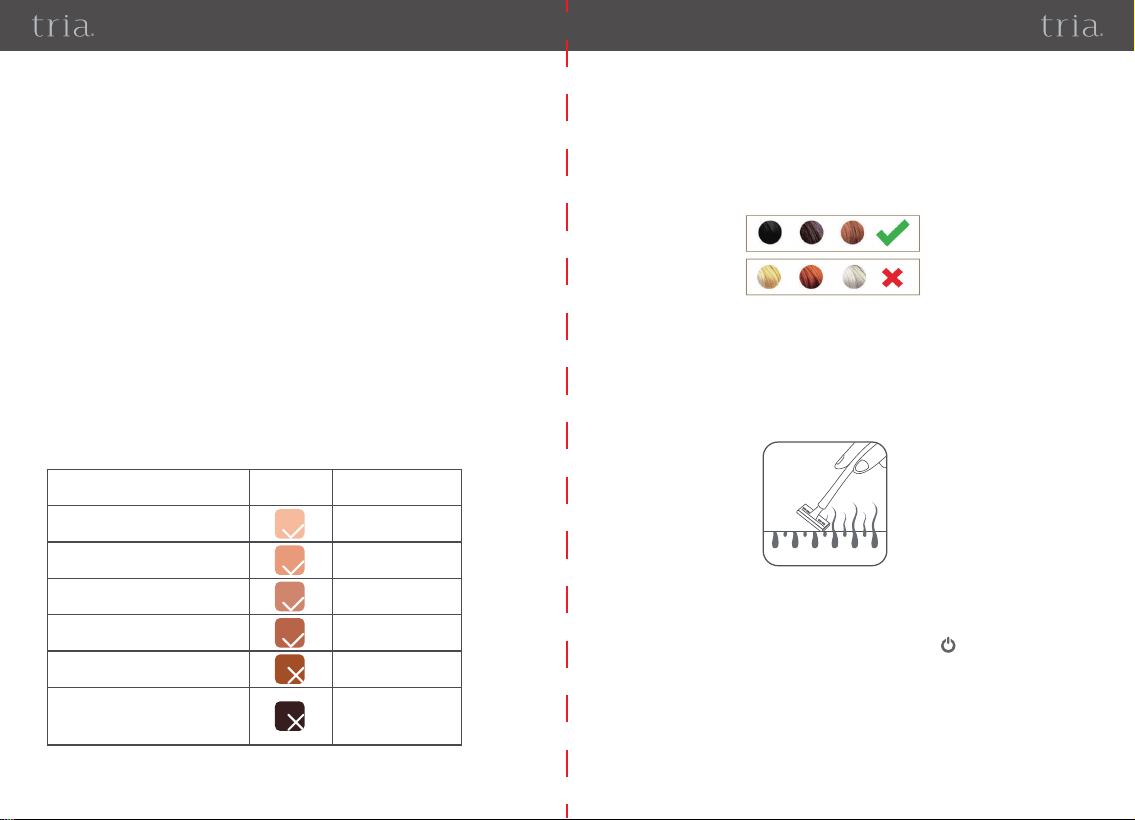
Skin tone/hair color reference chart
Please refer to the chart below before you start using the device to determine if
your skin tone and hair color are suitable for use with the various intensity levels
(“√” means the device is suitable for you; “X” means the device is not suitable for
you, 1-10 refers to the flash intensity levels).
If this device is suitable for you, please refer to below chart to select an
appropriate light intensity. The device is more effective at higher intensity levels.
However, if you feel any pain or discomfort, please reduce the intensity.
Darker skin tones absorb more light, which can cause skin irritation more readily.
Therefore, persons with darker skin tones are recommended to use a lower
intensity setting for the flash. For brown skin tone, please start from the lowest
intensity mode and adjust the level setting according to your pain sensation.
4.4. Steps for Use
• Before you start using the device, use a razor or trimmer to shave all hair on
the surface of the skin, but do not pluck or use chemical hair removal products
(figure 10). Completely dry the skin and remove any oily substances (such as
body fragrance, lotion, perfume, sunscreen, or other cosmetics).
• Connect the power adaptor and the main unit and then plug the power adapter
into a power socket.
• Press and hold the “On/Off/Level adjustment button” to turn on the device.
• Select the appropriate flash intensity for your skin tone and hair color (for
first-time users, use the lowest light intensity recommended and adjust it
gradually).
• Wear protective goggles to avoid looking into the light (figure 11).
Figure 10
Skin type/tone*
Type I
Pale white
Type II
White to light beige
Type III
Beige
Type IV
Light brown
Type V
Moderate brown
Type VI
Dark brown or black
Tone
Safety grade
Applicable
Applicable
Applicable
Applicable
Not Applicable
Not Applicable
*Skin type/tone descriptions source: https://www.fda.gov/radiation-emitting-
products/tanning/your-skin
HAIR COLOUR:
Tria IPL is suitable for use on naturally black or brown hair. It may not be as
effective on white, grey, blond or red hair.
Women can treat facial hair up to the top of the cheekbone, avoiding the eye
and eyebrow areas. Men can treat up to the top of the shoulder.
18 19
3) Clean the device according to chapter 6 of this manual, only after unplugging the
power adapter and for waiting 20 minutes.
4) After cleaning, put the device and adaptor back into the box it came in and store it
according to specified storage conditions.
Caution
1) After using the device, DO NOT apply any fragrant skincare or cosmetic
product on your skin.
2) DO NOT use deodorant immediately after using the device on the armpits. Wait
until your skin's redness completely disappears to start using deodorant.
3) After each treatment, make sure your skin does not show any signs of redness
after 24 hours.
4) Keep the treated area covered and away from direct sunlight two weeks after
the treatment or use sunscreen (SPF30+) on the treated area.
• Burns, abnormal redness and swelling
These reactions are very rare, they may be caused by using a high flash
intensity. If these adverse reactions continue for 3 days or more, immediately
consult a doctor. Only start the next treatment if the skin is clear of any problem,
and ensure you use a lower flash intensity.
• Skin discoloration
This is normal but very rare. When using the device, the skin may suffer from
discoloration, this may happen because you are using a high-intensity flash.
When the discoloration disappears, reduce the flash intensity during the next
treatments. If the skin discoloration does not disappear after two weeks, please
consult a doctor.
• Skin infections and inflammation
These are rare.If the device is used in existing wounds and cuts (might happen when
shaving the area) it can cause the aforementioned side effects.
• Possible causes of excessive pain during and after the treatment
If you used the device on an area that was not shaved before you started the
treatment; the flash intensity is too high for your skin tone and hair color;
5. Rare Side Effects
• Press the device probe against the skin, ensuring the device probe is in full
contact with the skin (Figure 12). Wait for a few seconds. When the Flash Ready
Light begins blinking, press the Flash Button to trigger the flash. You will feel a
slight burning sensation (IPL energy is being absorbed). If you want to
reduce the burning sensation, adjust the intensity level.
• After use, turn off the device, unplug the power adapter, and clean the device.
Note:
1) This device features an Ice-cold care function, this function starts
automatically when the device is powered on and turns off automatically when
device is powered off. The cold side of semiconductor cooling plate is attached
with a metal cooling plate which encircles the Light Exit Window as part of the
device surface. Since the temperature of the Metal Cooling Plate is reduced by
semiconductor cooling plate and thus is lower than temperature of skin surface,
it generates an ice-cold feeling when device contacts with skin surface while
when device contacts with skin surface while it is on.
2) The device is equipped with a fan in the main unit which is used to cool the
internal parts of the main unit while the device is on. When the device is
powered on, the fan can be heard as it begins working. It will remain on
constantly, until 30 seconds after device has been powered off .
Figure 11
Figure 12
20
21
6. 2. Maintenance
7. Storage
6.1. Cleaning
you used the device in the same exact area more than once; you used the device
on an open wound; the area you are treating has any sort of infl
ammation or
infection or you are using the device in areas with tattoos or sunburns, excessive
pain during and after the treatment could result.
• The Light Exit Window is very delicate. It is very important to protect the Light
Exit Window from dirt and damage. Do not touch it or use tools to press it. Must
be carefully protected.
•This device is not waterproof. DO NOT immerse it or wash it under running water.
•DO NOT use steel wool, abrasive cleanser, chemicals, or corrosive liquids to
clean the device.
DO NOT place or store the device for long periods in a hot or humid environment.
Storage this device in following conditions:
Storage
environment
Temperature: -20 ~ 55℃ (-4 ~ 131°F)
Relative humidity: 5 ~ 95%, without condensation
Atmospheric Pressure:70 kPa ~ 106 kPa
8. Recycling
•
Troubleshooting
9. Warranty&Support
At the end of its life, do not dispose of this device with household waste.
Please take this device to a local recycling point for proper disposal. Proper
disposal and recycling practices contribute to environmental protection.
Problem Possible Cause Solution
Display
Screen not
Lighting
The power cable is not
properly connected.
Check the connection of the power
supply and adjust the cable.
Press and hold the “On/Off/Level
adjustment button” for about 2
seconds to turn on the device.
The “On/Off/Level adjust-
ment button” was pressed
but not held, failing to turn
on the device.
After each use, clean this device using the following tips:
Purpose: This device is intended to be used multiple times by the same
user to remove unwanted hair. The device’s surface can be contaminated
during use with organic soil and microorganisms carried by human hands.
You may clean the device after 20 minutes cooling down, after each use.
Cleaning Agent: 70% isopropyl alcohol wipe.
Method of Cleaning: To thoroughly clean the device, immediately after each
use, rub the device, the Light Exit Window, the shell, and button by hand with
70% isopropyl alcohol wipes for 15s and Light Exit Window for 3s. Do not use
undue pressure.
Note:
a) Ensure that no liquid enter the interior of the device.
b) NEVER use abrasive cleaning agents, thinners or benzene for cleaning.
c) NEVER immerse the instrument in water or other cleaning liquids.
d) Wait 10 minutes after cleaning, to allow the device to air-dry.
Visual Inspection: After cleaning, there should be no visible blotches or soil
stains on the device under nature light. If there are still blotches and/or soil
stains, repeat the cleaning steps mentioned above until there are no visible
blotches or soil stains.
Dispose of the device if there is corrosion, discoloration, pitting, or cracked
seals after cleaning. Enquire about the options for environmentally-friendly
and appropriate disposal. Take local regulations into account.
Reuse Life: 400,000 flashes
6. Cleaning & Maintenance
Main unit 1PC
1PC
1PC
1PC
Instruction book
Power adaptor
Safety goggles
23
22
The device does
not emit the flash
The Flash Ready
Light does not
light up
During use the
device has enters
standby mode.
The device
produces an odd
smell
You feel pain
when using the
device.
After using the
device, the treated
area shows signs
of redness.
The power cable is not
correctly connected.
Check the connection of the
power supply and adjust the
cable.
Re-adjust the position of the
Device Probe on your skin
until the Flash Ready Light
lights with blinking.
Press and hold the “On/Off/
Level adjustment button”
for about 2 seconds to turn
on the device.
Re-adjust the position of the
device probe on your skin un-
til the Flash Ready Light beg-
ins blinking.
The Device probe is not close
enough to the skin.
The power cable is not
correctly connected.
The device probe is not close
enough to the skin in “Auto
Emit Flash mode”
Check the connection of the
power supply and adjust the
cable.
The device powers off auto-
matically if no light is emitted
after 5 minutes.
The light exit window
filter is dirty
The flash intensity is too high.
Mild redness is a normal and
harmless reaction to hair
removal.
Do not take any action,this is
a normal reaction.
To keep the skin smooth
and hair-free, it’s recommended
to use the device once every
two weeks. Treatment intervals
depend on each person’s perso-
nal hair growth cycle. Do not use
The flash intensity used is
too low.
The frequency of use is lower
than recommended.
Next treatment, adjust the
flash’s intensity
The filter of the light exit
window is damaged.
You are using the device in a
non-applicable area.
Verify the flash intensity and
reduce it
Existing hair was not properly
removed before the treatment.
The flash burns the surface hair,
causing an odd smell.
Carefully clean the light exit
window filter with 70%
isopropyl alcohol wipe.
Before you start using the
device,shave to remove the
hairs from the skin area you
wish to treat.
Please stop using the device
and contact Tria Beauty Cust-
omer Services for assistance.
Please read the instruction
manual. Warnings and
prohibited use are mentioned.
The treatment
results are not
satisfactory.
The treatment
results are not
as expected.
Other problems.
Note: If the device still does not work properly after using the above solutions,
please stop using the device and contact Tria Beauty Customer Services.
Contact your local dealer.
If your hair is blond, red, gray ,
or white, or if your skin tone
is very dark, do not use this
device.
the device more than once every
two weeks. Overusing the device
increases the risk of adverse skin
reactions.
Your skin tone or hair color
are not suitable for use with
this device.
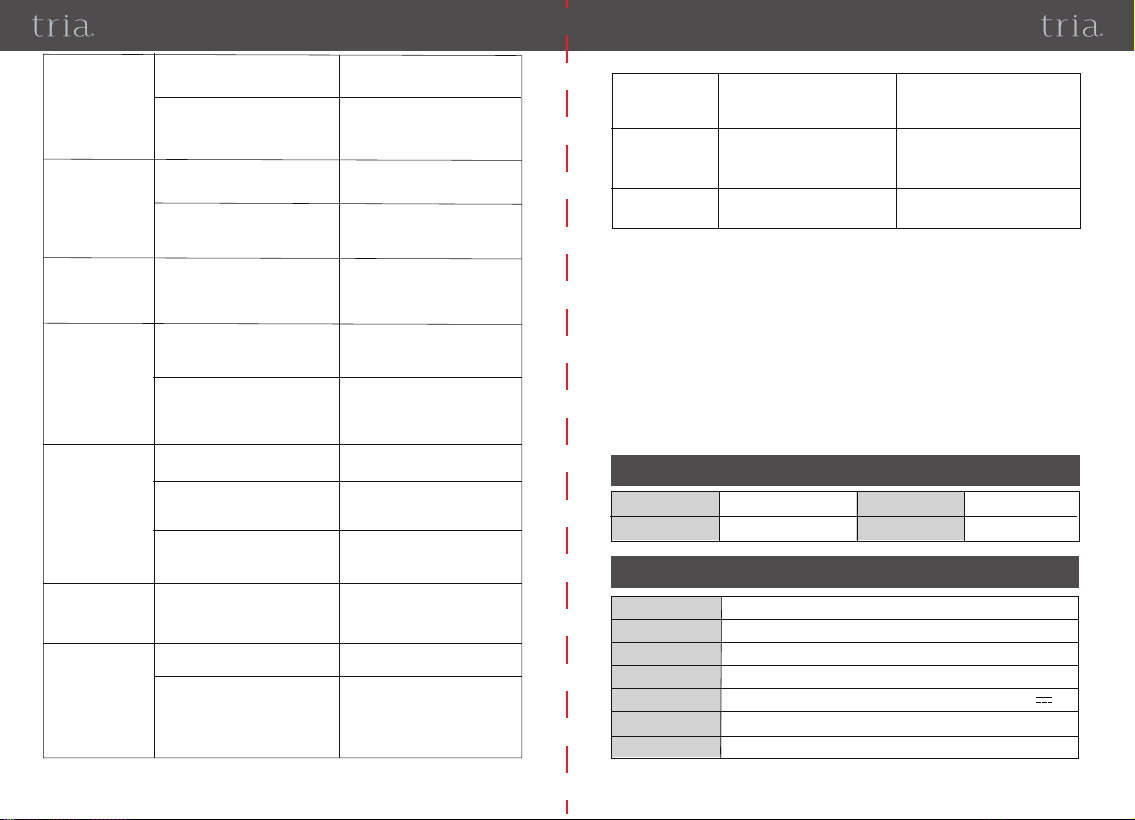
Device Name
Model
Dimension
Irradiation area
Power supply
Wavelength
Intense Pulsed Light (IPL) System
T012C
148×190×56mm
Light outlet: 4cm² With Probe Cover: 1.85cm²
Input: 100-240VAC ~ 50/60Hz,1.5A Max.Output: 24V 2A
510~1200nm
11. Specification Parameters
Max. Fluence 5.18J/cm² (Attach Probe Cover:3.41J/cm²)
•
After-Sales Service
Please contact Tria Beauty, email: [email protected].
•
Manufacturer: Shenzhen Fansizhe Science And Technology Co., Ltd.
•
Manufacturer's address and conact details: 2nd,
3rd, and 4th floors, No.11,
Henggangxia Industrial Zone, Xiangshan Community, Xinqiao Street, Bao’an
District , Shenzhen, Guangdong, China. (Zip code 518125)
10. Packing List
2524
Q: Why does the device power off automatically during use?
A: The device will power off automatically when the internal temperature of the
device is too high. Please restart device after 10 minutes.
Q: What is ice-cool care function?
A: The Intense Pulsed Light (IPL) System features an ice-cold care function
which is realized though a semiconductor cooling plate. This function starts
automatically when the device is powered on and turns off automatically when
device is powered off. The cold side of semiconductor cooling plate is attached
with a Metal Cooling Plate which is encircles the Light Exit Window as part of
the device surface. Since the temperature of the Metal Cooling Plate is reduced
by semiconductor cooling plate and thus is lower than temperature of skin
surface, it generates an ice-cold feeling when device contacts with skin surface
while it is on. This is a physical heat transfer process.
Q: Why didn’t I achieve the same effect as others who have used the
device. Why did I see no effect at all?
A: People have different physiologies and differences in hair thickness and
other factors can affect the treatment cycle. The 2-week cycle is an average
value; the specific time for an individual may be slightly different.
Q: Why didn’t I achieve the same effect as the others, or no effect at all?
A: People have different physiques, and the difference of hair thickness and
Adaptor Technical specifications:
Pulse duration
Output energy
Weight
Warranty period
Applied part
Software version
No Sterilize requirement
Not category AP / APG equipment
Mode of operation: continuous
Item Parameters
100Vac~240Vac
50Hz/60Hz ,1.5A
10 years
22.8 ~ 25.2 Vdc
0 ~ 2 A
≤ 48W
≤ 170% of output voltage
4.5-7.5A
Model of adaptor
Manufacturer of adaptor
Input Voltage
Input Frequency
Service life for power adapter
Output voltage range
Output current range
Output power
Output over voltage
Current-limiting protection
Operating
environment
Storage and
transportation
environment
Service life
Service life for
power adapter
Service life for
goggles
4~ 12ms
5.5J ~20.7J (Attach Probe Cover: 1.6J~6.3J)
400,000 flashes
3 years
390g
T012C-V1.0
Type BF
One year warranty for main unit
Temperature: -20 ~55℃
Relative humidity: 5 ~ 95%, without condensation
Atmospheric Pressure:70 kPa ~ 106 kPa
Temperature: 5~30℃
Relative humidity: 20 ~ 90%, without condensation
Atmospheric Pressure:70 kPa ~ 106 kPa
GJ48WA-2400200DP
Shenzhen Guijin Technology Co., Ltd
100000 hours
12. Frequently Asked Questions
Q: Why does the device power off automatically during use?
A: The device will power off automatically when the internal temperature of the
device is too high. Please restart device after 10 minutes.
Q: What is ice-cool care function?
A: The Intense Pulsed Light (IPL) System features an ice-cold care function
which is realized though a semiconductor cooling plate. This function starts
automatically when the device is powered on and turns off automatically when
device is powered off. The cold side of semiconductor cooling plate is attached
with a Metal Cooling Plate which is encircles the Light Exit Window as part of
the device surface. Since the temperature of the Metal Cooling Plate is reduced
by semiconductor cooling plate and thus is lower than temperature of skin
surface, it generates an ice-cold feeling when device contacts with skin surface
while it is on. This is a physical heat transfer process
Q: Why is my hair still growing after a few treatments? Why is it not
falling out immediately after treatment?
A: The Intense Pulsed Light (IPL) System is a home IPL hair removal device
which applies very gentle pulses of light to the hair root. It works step by step,
gradually. Initially, the hair will go into its dormant phase, after which the hair
falls out and gradually your body grows less hair in that area. And, finally, the
hair stops growing back. It takes time.
It is a permanent hair remover. Hair cannot be removed permanently until you
have used the device for one period. It can only repress hair growth and slow
down hair growing speed at the beginning. The hair enters dormant phase with
multiple applications, at least once every two weeks for the first 3-4 treatments.
Thus, permanent hair removal effect is achieved.
Q: Why didn’t I achieve the same effect as others who have used the
device. Why did I see no effect at all?
A: People have different physiologies and differences in hair thickness and
other factors can affect the treatment cycle. The 2-week cycle is an average
value; the specific time for an individual may be slightly different.
Q: Why didn’t I achieve the same effect as the others, or no effect at all?
A: People have different physiques, and the difference of hair thickness and
Q: Why is my hair still growing after a few treatments? Why is it not
falling out immediately after treatment?
A: The Intense Pulsed Light (IPL) System is a home IPL hair removal device
which applies very gentle pulses of light to the hair root. It step-by-step gradu-
ally. Initially, the hair will go into its dormant phase, after which the hair falls
out and gradually your body grows less hair in that area. Eventually, your hair
will stop growing, however, this can take time.
It is a permanent hair remover. Hair cannot be removed permanently until you
have used the device for a course over treatments, but results can vary from
person to person. It can only repress hair growth and slow down hair growing
speed at the beginning. The hair enters dormant phase with a course of
treatments of once every two weeks for 90 days or more.Thus, permanent hair
removal effect is achieved.
2726
treated parts can affect the effecting cycle. The using cycle is an average
value, of which the specific time may be slightly different.
Q: Which level is suitable?
A:There is no unified standard of suitable levels; it all depends on your skin
tolerance. The darker the skin color, the lower the level that should be used.
When initially choosing the suitable level, it is important to start from the lowest
one. The higher the level is, the more obvious the treatment effect is and the
shorter the treatment time will be. Conversely, if you use a low level, the
treatment time will be extended accordingly. It is recommended to do local skin
tests on the treated skin part before each hair removal and then start treatment
on large skin areas afterwards, making sure that no skin discomfort occurs on
the second day.
Q: Will it hurt?
A: During the hair removal process, light waves will generate heat when they
encounter hair melanin, causing slight pain. Due to the different skin sensitivity
and pain tolerance of different individuals, the actual feelings are different. It is
recommended to increase the level slowly, starting from the lowest one,
according to your actual situation.
Q: Must I shave my hair before each use?
A: No. But you are advised to shave the hair when it is longer than 5mm.
Q: How should I shave? What kind of hair should be shaved off?
A: Generally speaking, you should shave hair in the armpit, the bikini area, and
the legs before use. The following method makes shaving easier:
1) Use shaving cream or mild shower gel to lubricate the area to be shaved
2) Or, apply a hot towel on the area to be shaved for a few minutes, and gently
shave the hair immediately after removing the towel.
Q: Why is there a smell of scorched hair after use?
A: That's because the hair is not completely shaved. The device produces light
waves which will generate heat when they encounter melanin. This can cause
the smell of scorched hair. This is normal.
Q: I want to remove my hair quickly. Can I use the device every day?
A: It is not advised to use the device every day. Hair has a growth cycle. Treat
with the device once every 2 weeks for 90 day treatments and gradually decr-
ease the frequency of use after the hair growth slows down.
Warning: Using cell phone or microwave oven, HF surgical equipment,
magnetic resonance imaging or other radio radiant equipment near this
device may cause malfunction or lead to loss of essential performance.
Warning: Use of this equipment adjacent to or stacked with other
equipment should be avoided because it could result in improper operation.
If such use is necessary, this equipment and the other equipment should be
observed to verify that they are operating normally.
Warning: Use of adapter other than those specified or provided by the
manufacturer of this equipment could result in increased electromagnetic
emissions or decreased electromagnetic immunity of this equipment and
result in improper operation.
Warning: Portable RF communications equipment (including peripherals
such as antenna cables and external antennas) should be used no closer than
30 cm (12 inches) to any part of Intense Pulsed Light (IPL) System, including
cables specified by the manufacturer. Otherwise, degradation of the
performance of this equipment could result.
Guidance and manufacture’s declaration – electromagnetic emission
The device is intended for use in the electromagnetic environment specified
below. The user of the device should ensure that it is used in such an environ-
ment.
Electromagnetic environment –
guidance
Compliance
Table 1
Group 1
Class B
Emission test
Conducted and
Radiated RF
emissions CISPR 11
The device uses RF energy only for
its internal function. Therefore, its
RF emissions are very low and are
not likely to cause any interference
in nearby electronic equipment.
13. Important Information Regarding Electro Magnetic
Compatibility (EMC)
2928
Guidance and manufacture’s declaration – electromagnetic immunity
The device is intended for use in the electromagnetic environment specified
below. The user of the device should ensure that it is used in such an environment.
Note: The ISM (industrial, scientific and medical) bands between 0,15 MHz
and 80 MHz are 6,765 MHz to 6,795 MHz; 13,553 MHz to 13,567 MHz; 26,957
MHz to 27,283 MHz; and 40,66 MHz to 40,70 MHz. The amateur radio bands
between 0,15 MHz and 80 MHz are 1,8 MHz to 2,0 MHz, 3,5 MHz to 4,0 MHz,
5,3 MHz to 5,4 MHz, 7 MHz to 7,3 MHz, 10,1 MHz to 10,15 MHz, 14 MHz to
14,2 MHz, 18,07 MHz to 18,17 MHz, 21,0 MHz to 21,4 MHz, 24,89 MHz to 24,
99 MHz, 28,0 MHz to 29,7 MHz and 50,0 MHz to 54,0 MHz.
IEC 60601-1-2
test level
Compliance level
Electromagnetic
environment-
guidancel
Immunity test
Electrostatic dis
charge
IEC 61000-4-2
Radiated RF EM
fields IEC
61000-4-3
±8kV contact;
±2kV, ±4kV,
±8kV, ±15 kV air
3V/m
(Professional
healthcare facility
environment);
10V/m
(Home healthcare
environment),
80MHz – 2.7GHz
80% AM at 1kHz
10V/m
(Home healthcare
environment)
80MHz – 2.7GHz
80% AM at 1kHz
±8kV contact;
±2kV, ±4kV,
±8kV, ±15kV air
Floors should be
wood, concrete or
ceramic tile.
If floors are covered
with synthetic
material, the relative
humidity should be
at least 30%.
Group 1
Class B
Applicable
Conducted RF
emissions CISPR 11
Group 1
Class B
Radiated RF
emissions CISPR 11
Class A
Harmonic emissions
IEC 61000-3-2
Voltage fluctuations
and flicker emissions
IEC 61000-3-3
The device is suitable for use in all
establishments, including domestic
and those directly connected to the
public low-voltage power supply
network that supplies buildings
used for domestic purposes except
for near active HF surgical
equipment and the RF shielded
room for magnetic resonance
imaging.
Table 2
±2kV AC power
supply lines;
±1kV DC power/
Signal lines.
100 kHz repetition
frequency
±0.5kV, ±1kV
lines to lines;
±0.5kV, ±1kV,
±2kV lines to
earth
3V
0.15MHz – 80MHz,
6V in ISM bands
between 0.15MHz
and 80MHz
(Professional
healthcare facility
environment),
6V in ISM and
amateur radio
bands between
0.15MHz and 80MHz
(Home healthcare
environment)
80% AM at 1kHz
±0.5kV, ±1kV
lines to lines;
Applicable
30A/m
50Hz or 60Hz
30A/m
50Hz
±2kV AC power
supply lines;
Mains power quality
should be that of a
HOME HEALTHCARE
ENVIRONMENT or a
Professional health
care facility
environment.
Mains power quality
should be that of a
HOME HEALTHCARE
ENVIRONMENT or a
Professional
healthcare facility
environment.
Electrical fa st
transients/
bursts
IEC 61000-4-4
Surges
IEC 61000-4-5
Conducted
disturbances
induced by RF
fields IEC
61000-4-6
Rated power
frequency
magnetic fields
IEC 61000-4-8
Power frequency magnetic
fields should be at levels
characteristic of a HOME
HEALTHCARE
ENVIRONM ENT or a
Professional healthcare
facility environment.
3130
Guidance and manufacture’s declaration – electromagnetic immunity
The device is intended for use in the electromagnetic environment specified
below. below. The user of the device should ensure that it is used in such an envi-
ronment.
IEC 60601-1-2
test level
Compliance level
Electromagnetic
environment-
guidance
Immunity test
Proximity fields
from RF wireless
communications
equipment
IEC 61000-4-3
See the following
table
Complies
Table 3
0% U
T
, 0.5 cycle
At 0°, 45°, 90°, 135°,
180°, 225°, 270°
and 315°;
0% U
T
, 1 cycle
and
70% U
T
, 25/30
cycle Single
phase: at 0°
0% U
T
,
250/300 cycle
Applicable
Applicable
Mains power quality
should be that of a
HOME HEALTHCARE
ENVIRONMENT or a
Professional healthcare
facility environment...
Voltage dips
IEC 61000-4-11
Voltage
interruptions
IEC 61000-4-11
NOTE: U
T
is the a.c. mains voltage prior to application of the test level.
E.g.: 25/30 means 25 periods at 50 Hz or 30 periods at 60 Hz.
Test specifications for ENCLOSURE PORT IMMUNITY to RF wireless communications
equipment
Test
frequency
(MHz)
385 380-390 TETRA400
Pulse
modulation
18 Hz
1.8 0.3 27
450
710
745
780
810
870
930
1720
1845
5240
5500
5785
1970
2450
430– 470
704-787
800-960
1700-1990
2400-2570
5100-5800
GMRS 460,
FRS 460
LTE Band
13, 17
GSM 800/900,
TETRA 800,
iDEN 820,
CDMA 850,
LTE Band 5
GSM 1800,
CDMA 1900 ,
GSM 1900 ,
DECT;
LTE Band
1.3.4.25;
UMTS
Bluetooth,
WLAN,
802.11 b/g/n,
RFID 2450,
LTE Band 7
WLAN 802.11
a/n
FM ± 5 kHz
deviation
1 kHz sine
Pulse
modulation
217 Hz
Pulse
modulation
18 Hz
Pulse
modulation
217 Hz
Pulse
modulation
217 Hz
Pulse
modulation
217 Hz
2
0.2
2
2
2
0.3
0.3
0.3
0.3
0.3
28
28
28
28
0.2 0.3 9
9
Band
(MHz)
Service Modulation
Maximum
power
(W)
Immunity
Test Level
(V/m)
Distance
(m)
NOTE If necessary to achieve the
IMMUNITY TEST LEVEL, the distance between the
transmitting antenna and the ME EQUIPMENT or ME SYSTEM may be reduced to 1 m.
The 1 m test distance is permitted by IEC 61000-4-3.
a)
a)
b)
b)
b)
b)
b)
b)
b)
C)
3332
Operation Record
Operating site:
Level:
Date Remark
1
2
3
4
5
6
7
No.
8
9
10
Table 4
Rated
maximum
output power
of transmitter/ W.
a) For some services, only the uplink frequencies are included.
b) The carrier shall be modulated using a 50 % duty cycle square wave signal.
c) As an alternative to FM modulation, 50 % pulse modulation at 18 Hz may be used
because while it does not represent actual modulation, it would be the worst case.
For transmitters rated at a maximum output power not listed above, the recommended
separation distance d in meters (m) can be estimated using the equation applicable to
the frequency of the transmitter, where P is the maximum output power rating of the
transmitter in watts(W) according to the transmitter manufacturer.
NOTE 1 At 80MHz and 800MHz, the separation distance for the higher frequency
range applies.
NOTE 2 These guidelines may not apply in all situations. Electromagneti
c
propagation is affected by absorption and reflection from structures, objects and
people.
Recommended separation distances between portable and mobile RF
communication equipment and The device
Separation distance according to frequency of transmitter/m
The device is intended for use in an electromagnetic environment in which
radiated RF disturbances are controlled. The customer or the user of the devices
can help prevent electromagnetic interference by maintaining a minimum distance
between portable and mobile RF communications equipment (transmitters) and
the device as.
150kHz ~80MHz
d = 1.2
0.01
0.1
1
10
100
0.12
0.38
1.2
3.8
12
0.12
0.38
1.2
3.8
12
0.23
0.73
2.3
7.3
23
80MHz ~800MHz
d = 1.2
800MHz ~2.5GHz
d = 2.3
P P P
Operation Record
Operating site:
Level:
Date Remark
1
2
3
4
5
6
7
No.
8
9
10
Operation Record
Operating site:
Level:
Date Remark
1
2
3
4
5
6
7
No.
8
9
10
Operation Record
Operating site:
Level:
Date Remark
1
2
3
4
5
6
7
No.
8
9
10
34
Operation Record
Operating site:
Level:
Date Remark
1
2
3
4
5
6
7
No.
8
9
10
Operating site:
Level:
Operation Record
Date Remark
1
2
3
4
5
6
7
No.
8
9
10
Operation Record
Operating site:
Level:
Date Remark
1
2
3
4
5
6
7
No.
8
9
10
Operating site:
Level:
Operation Record
Date Remark
1
2
3
4
5
6
7
No.
8
9
10