
1
USER MANUAL
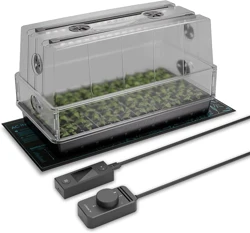
PROPAGATION SYSTEM
HUMIDITY CONTROLLED ENVIRONMENT


3
WELCOME
Thank you for choosing AC Infinity. We are committed to product quality and friendly customer service.
If you have any questions or suggestions, please don’t hesitate to contact us. Visit www.acinfinity.com
and click contact for our contact information.
EMAIL
support@acinfinity.com
WEB
www.acinfinity.com
LOCATION
Los Angeles, CA

4
MANUAL CODE HD2208X1
MODEL
AC-HDA5
AC-HDM5
AC-HDL5
AC-HMX5
AC-HDA7
AC-HDL7
AC-HMX7
PRODUCT
Humidity Dome
Heated Humidity Dome
Propagation Kit
Propagation System
Humidity Dome, Large 1020
Propagation Kit, Large 1020
Propagation System, Large 1020
UPC-A
819137023208
819137023420
819137023215
819137023413
819137023864
819137023871
819137023888

5
MANUAL INDEX
Manual Index .................................................................................
Product Warning ............................................................................
Key Features .................................................................................
Product Contents ...........................................................................
Installation: Humidity Dome ...........................................................
Installation: IONBEAM LED Light Bars ..........................................
Installation: SUNCORE Seedling Mat ............................................
Controller Mounting .......................................................................
Cleaning ........................................................................................
Programming .................................................................................
Starter Guide .................................................................................
Connecting to UIS
TM
......................................................................
Other AC Infinity Products .............................................................
Warranty ........................................................................................
Page 5
Page 6
Page 7
Page 9
Page 10
Page 12
Page 14
Page 15
Page 16
Page 18
Page 20
Page 26
Page 28
Page 29

6
Ensure your power source conforms to the electrical requirements of this product.
Read all instructions before installing and using this product.
Be careful not to damage or cut the wire insulation (covering) during the installation. Do not
permit wires to come in contact with any sharp edges.
If you are unfamiliar or have doubts about performing this product's installation, seek the
services of a qualified, trained, and licensed professional. Inappropriate installation will void
this product's warranty.
This product must not be used in potentially hazardous locations such as flammable,
explosive, chemical-laden or wet atmospheres.
Do not cover power cords or seedling mat with rugs or other fabric materials.
Safety precautions should be exercised during the installation, operation, and maintenance of
this product.
Do not block or tamper with this product in any manner while it is in operation as it may cause
electric shock, fire, or damage to this product.
Do not depend on the on/off programming as the sole means of shutting power from this
product. Unplug the power cord before installing, servicing, or moving this product.
Do not operate this product while its cord is damaged, or if it malfunctions, has been dropped,
or is damaged in any manner.
1.
2.
3.
4.
5.
6.
7.
8.
9.
10.
PRODUCT WARNING
TO REDUCE THE RISK OF FIRE, ELECTRIC SHOCK, OR INJURY TO PERSONS,
OBSERVE THE FOLLOWING:
7
M
HL
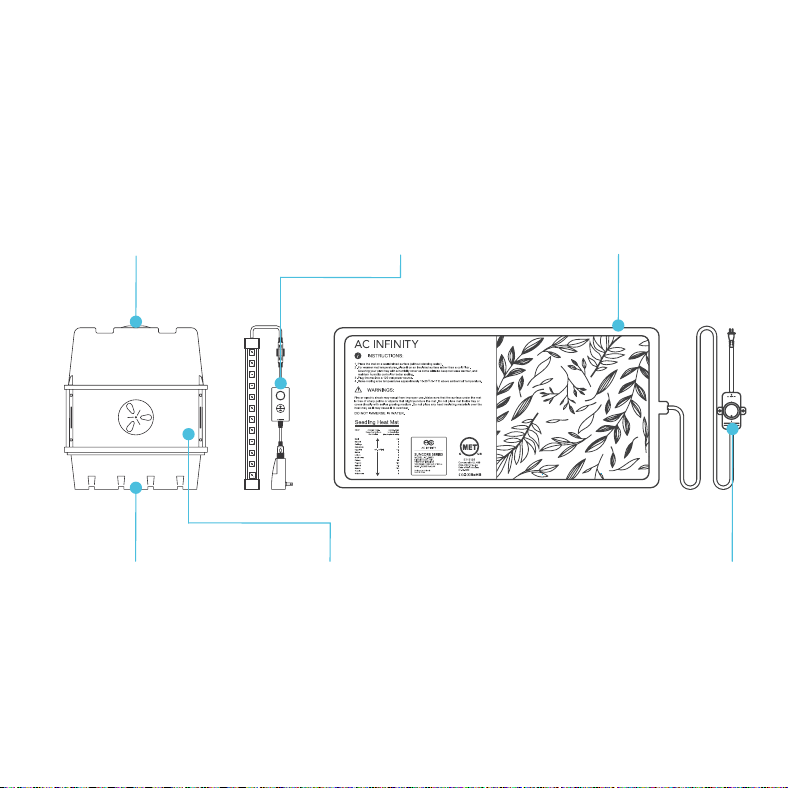
KEY FEATURES
LOCKED-IN HUMIDITY
Dual built-in rotating vents
set atop the humidity dome
provide precise control to
lock in moisture or lower
internal humidity levels.
SEED STARTING BASE*
IP-67 rated heating pad
improves germination and
rooting, emitting a steady
output of heat while insulating
your seedling tray.
TEMPERATURE CONTROL
Built-in dial controller gradually
adjusts the far infrared heating
film to provide uniform heating
output in custom low, medium,
and high settings.
HEAVY-DUTY BUILD
Long-lasting, durable
tray with a 5x8 cell grid
design that supports up to
40 seedlings and drains
excess water.
CLONE-FRIENDLY
Transparent dome extender
with adjustable vents
provides a higher ceiling
to fit taller plants in clone
propagation applications.
DOME LED LIGHTING*
Two LED light bars and a
controller with four intensity
settings to follow the plant's
growth cycle, as well as four
daily repeating timer settings.
*Included only in select models
40 CELL COUNT
8
M
HL
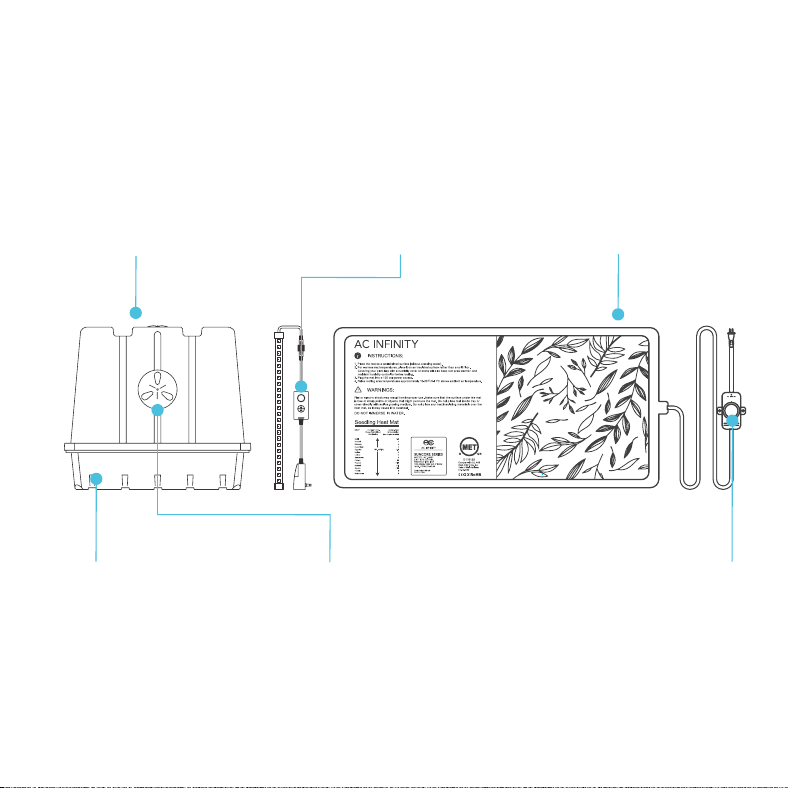
KEY FEATURES
LOCKED-IN HUMIDITY
Dual built-in rotating vents
set atop and on the sides the
humidity dome provide precise
control to lock in moisture or
lower internal humidity levels.
SEED STARTING BASE*
IP-67 rated heating pad
improves germination and
rooting, emitting a steady
output of heat while insulating
your seedling tray.
TEMPERATURE CONTROL
Built-in dial controller gradually
adjusts the far infrared heating
film to provide uniform heating
output in custom low, medium,
and high settings.
HEAVY-DUTY BUILD
Long-lasting, durable
tray with a 6x12 cell grid
design that supports up to
72 seedlings and drains
excess water.
CLONE-FRIENDLY
Transparent dome with
adjustable vents provides
a higher ceiling to fit taller
plants in clone propagation
applications.
DOME LED LIGHTING*
Two LED light bars and a
controller with four intensity
settings to follow the plant's
growth cycle, as well as four
daily repeating timer settings.
*Included only in select models
LARGE 1020 SERIES
9
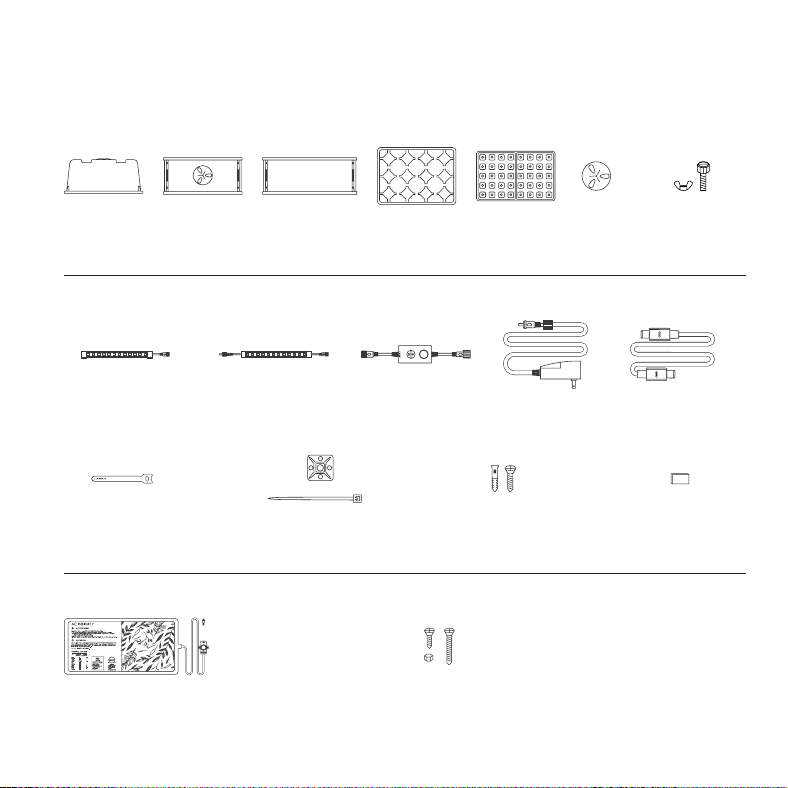
HUMIDITY DOME
IONBEAM LED LIGHT BARS (AC-HDL5, AC-HMX5)
SUNCORE SEEDLING MATS (AC-HDM5, AC-HMX5)
PRODUCT CONTENTS
LIGHT BAR
(SINGLE-CORDED)
(x1)
LIGHT BAR
(DUAL-CORDED)
(x1)
LIGHT
CONTROLLER
(x1)
POWER
ADAPTER
(x1)
UIS EXTENSION
CORD (M-M)
(x1)
HOOK AND LOOP
CABLE TIES
(x4)
WIRE
MOUNT
(x1)
WOOD SCREWS
(WALL MOUNT)
(x1)
ADHESIVE
MAGNET
(x1)
CONTROLLER
SCREW SET
(x2)
SEEDLING
M AT
(x1)
M
HL
HUMIDITY
DOME
(x1)
VENTED
PANEL*
(x2)
SIDE
PANEL*
(x2)
BASE
TRAY
(x1)
VENT
DISKS
(x4)
SEEDLING
TRAY
(x1)
BOLT AND
WING NUTS*
(x8)
*Included only in select models
10
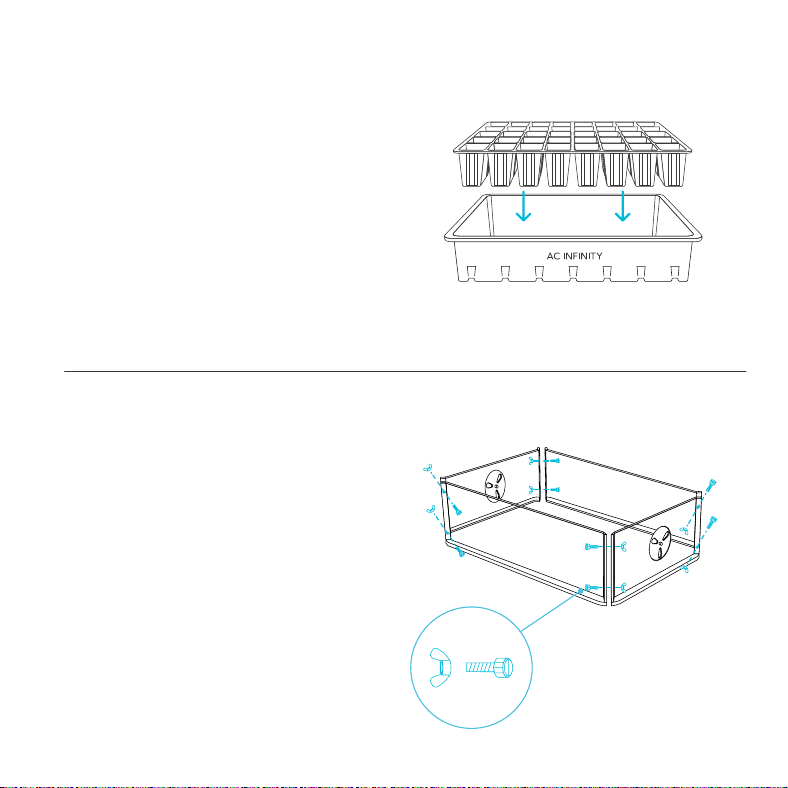
STEP 1
Place the seedling tray into the base tray.
For Large 1020 Series humidity domes,
proceed to step 3.
INSTALLATION
STEP 2
Assemble the dome extender, keeping the
vented panels on opposite ends and applying
the plastic screw and nuts to secure the corners.
HUMIDITY DOME
11
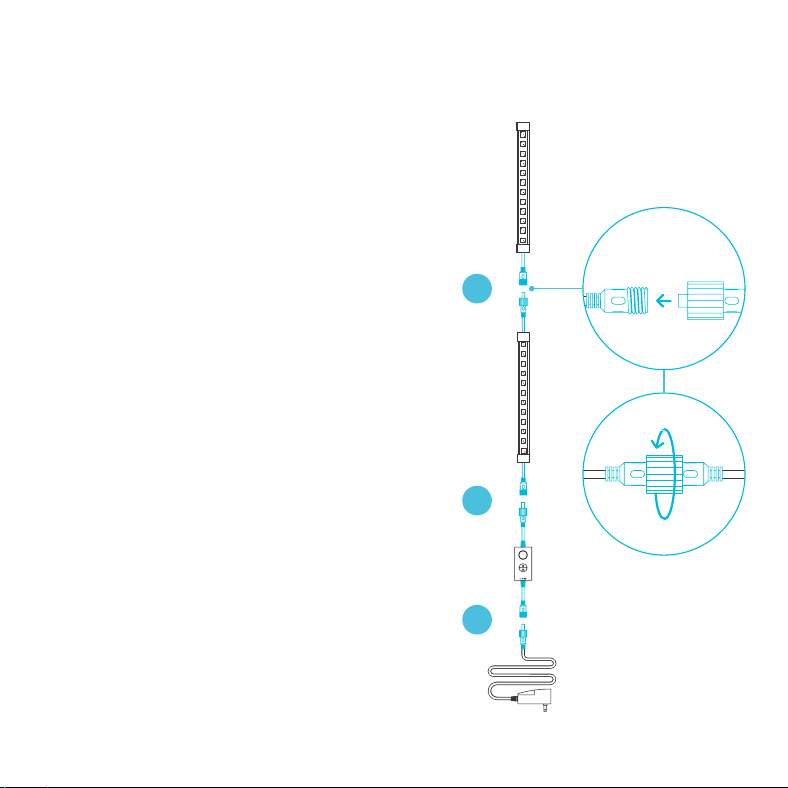
STEP 4
Place the dome over the tray.
You may also place the dome extender in
between the tray and dome as an option.
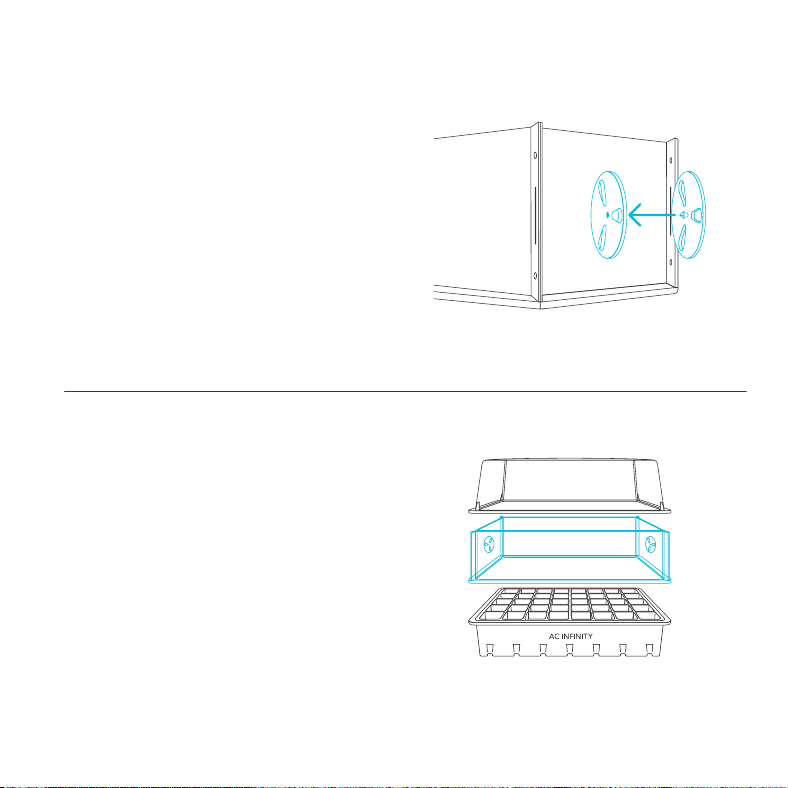
STEP 3
Snap the vent disks into the side openings.
Adjust the vents as needed.
INSTALLATION
HUMIDITY DOME
12
INSTALLATION
IONBEAM LED LIGHT BARS
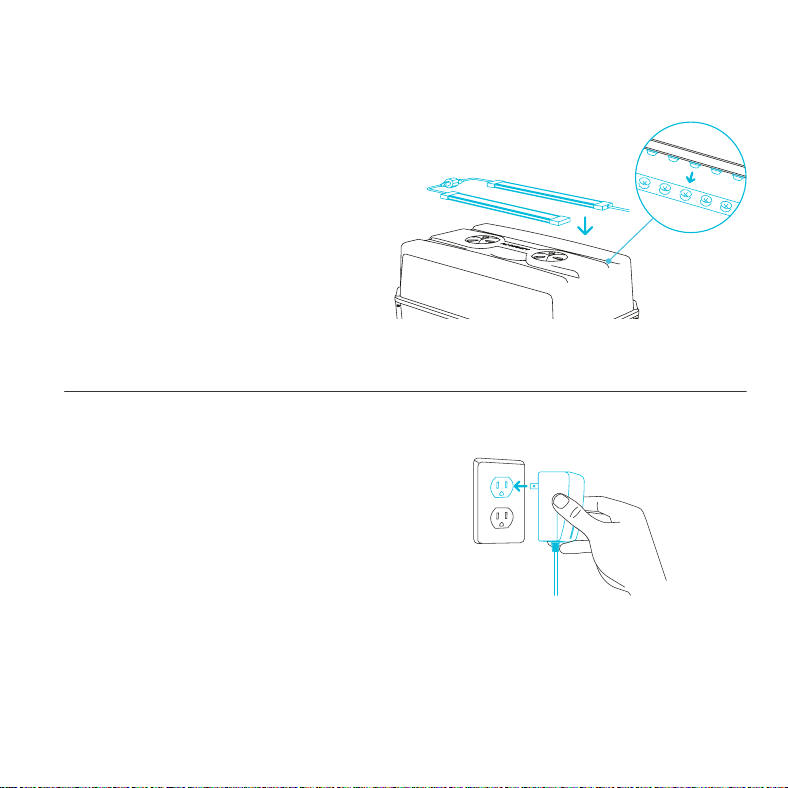
STEP 1
Assemble the light bar chain.
Connect the single-corded LED light bar's
female port to the dual-corded LED light
bar's male connector.
Connect the light controller's male
connector to the other end of the dual-
corded LED light bar.
Connect the power adapter to the
light controller.
A
B
C
MF
A.
Secure all connections using the twist-on pieces.
B.
C.
13
INSTALLATION
IONBEAM LED LIGHT BARS
STEP 2
Place the LED light bars on top of the dome.
Its diodes should fit snugly into the divots of
the dome.
STEP 3
Plug the power adapter into a wall outlet to
power the LED light bars.
14
INSTALLATION
SUNCORE SEEDLING MAT
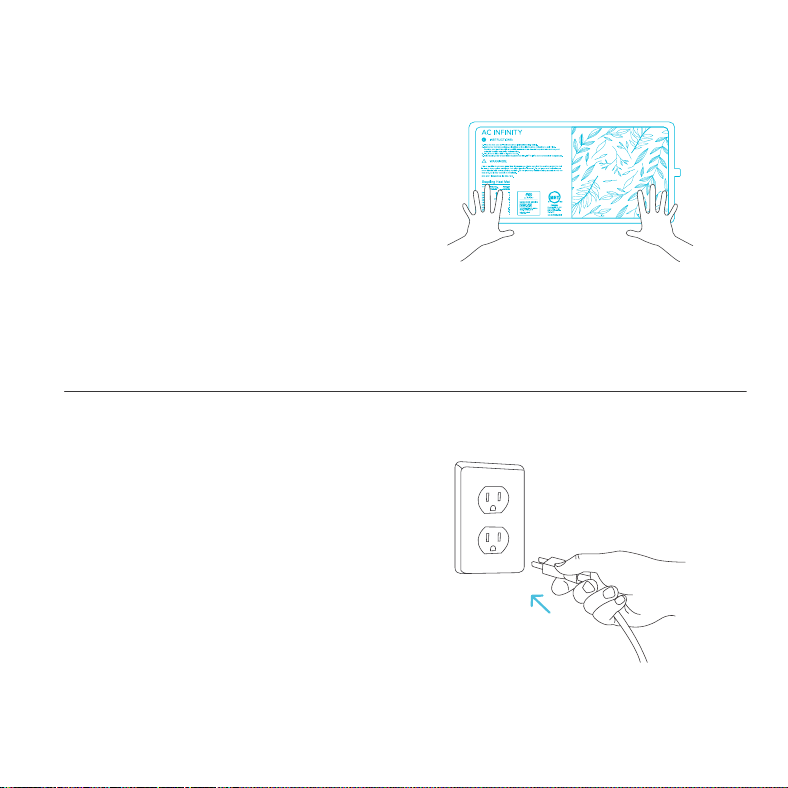
STEP 1
Unroll the seedling mat flat on to the ground.
Do not allow the mat to overlap onto itself.
STEP 2
Connect the AC power plug to a power outlet to
turn on the seedling mat.
15
CONTROLLER MOUNTING
IONBEAM LED LIGHT BARS
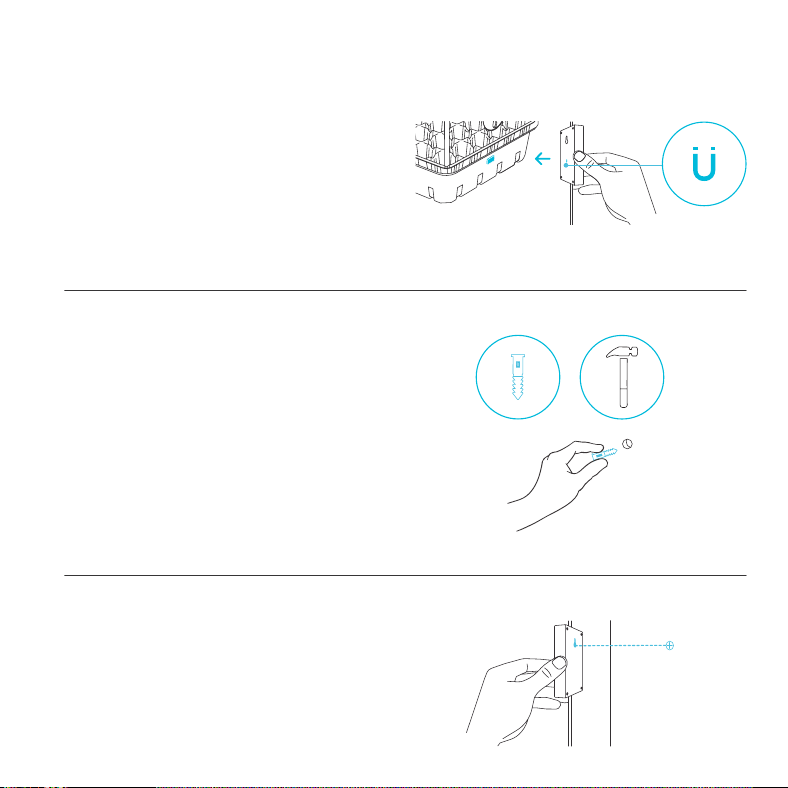
STEP 1 — WALL MOUNTING
Locate a spot free of obstruction and secure
the anchor into your wall. Twist the wood screw
into the anchors.
STEP 2 — WALL MOUNTING
Use the mounting hole located on the back of
the controller for wall mount.
MAGNET MOUNTING
You may magnetically mount the light controller
by applying the included adhesive magnet onto
your humidity dome.
16
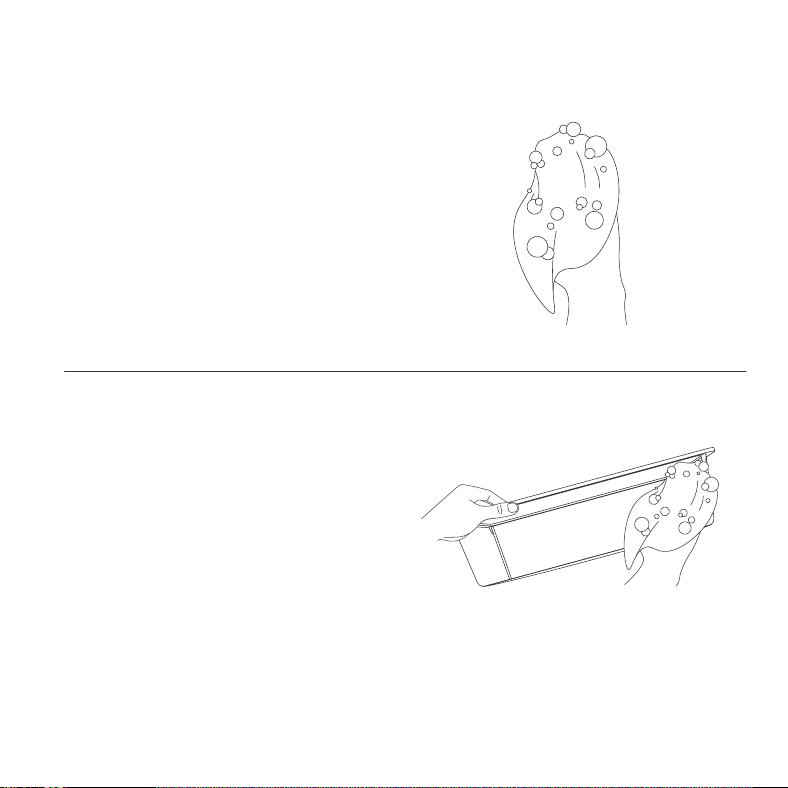
CLEANING
STEP 1
Dip or soak a cloth with your preferred solvent.
STEP 2
Separate each section and wipe each item to
clear them of any debris.
17
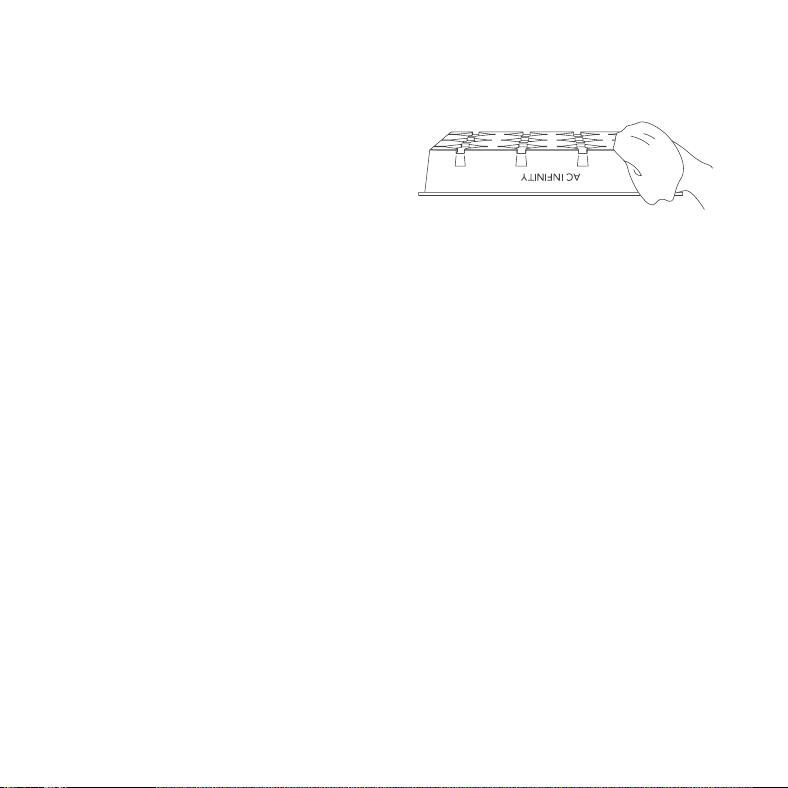
CLEANING
STEP 3
Using a dry cloth, pat or wipe each item and set
them aside upside-down to dry.
18
PROGRAMMING
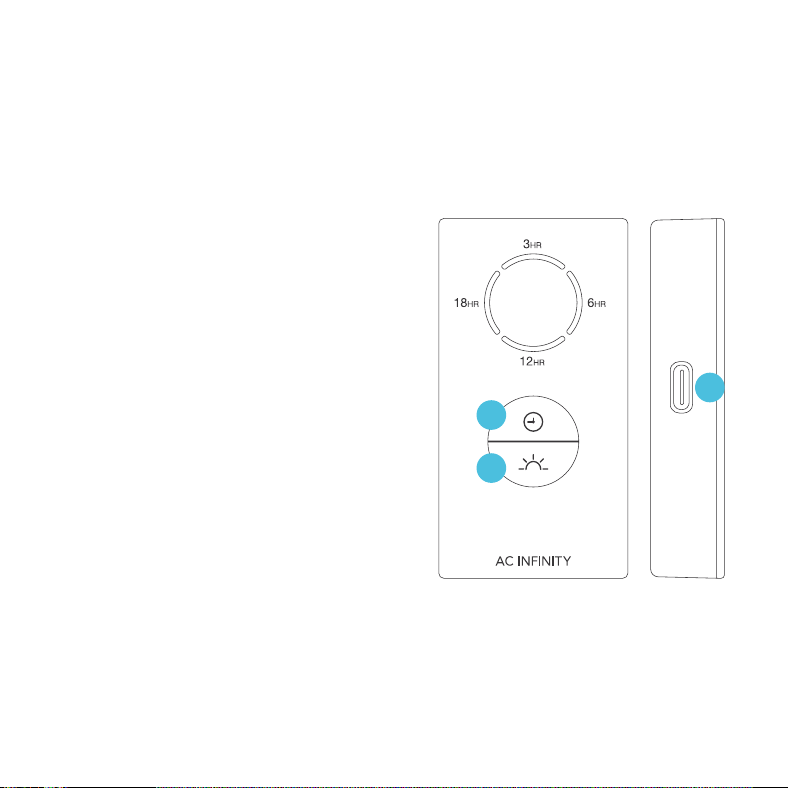
1. LIGHTING
Pressing the light button will increase the light
intensity level in 10/30/60/100% increments,
displayed with white LED indicators. Pressing
this button at 100% intensity will cycle to 0%.
Holding the light button will shut off the lighting.
Pressing it again will return the light intensity to
its previous setting.
2. TIMER
Pressing the clock button will set the timer
in 3/6/12/18-hour increments, displayed with
orange LED indicators.
Within a 24-hour cycle, lighting will be active for
the amount of time set here (ex. 3 hours for a
3HR timer). It will deactivate for the rest of the
24-hour cycle (ex. 21 hours).
Pressing the clock button at the 18HR setting
will deactivate the timer, cycling from 3HR
onwards when pressing this button again.
3. UIS CONNECTION
Refer to the programming section of your selected
UIS controller for programming instructions.
2
1
3
LIGHT CONTROLLER
19
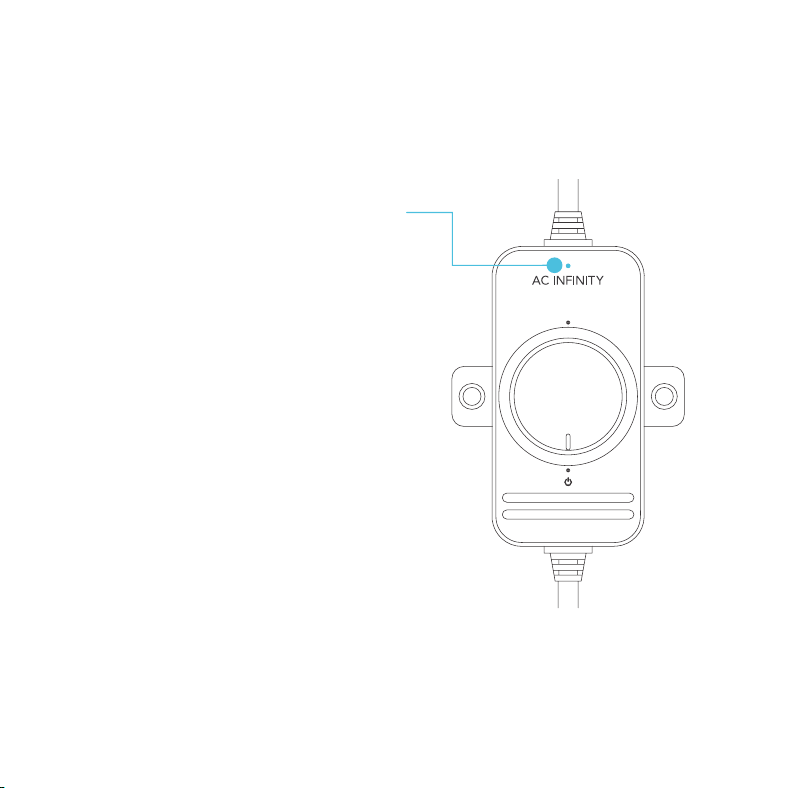
HEATING CONTROLLER
PROGRAMMING
LIGHT INDICATOR
When the controller is turned on and receiving
power, the LED at the top of the controller will
light up to show it is on.
M
HL
ON
Turn the knob clockwise until you hear and feel
a click to turn on the seedling mat.
OFF
Turn the knob counterclockwise from ON until you
hear and feel a click to turn off the seedling mat.
SPEED CONTROL
Turning the knob will gradually adjust the heat
between low, medium, and high.
20
STARTER GUIDE
GROWING SEASONS
You may use a seedling mat to get a head start
on the gardening season. Start the germination
process during late winter or spring if you live in
a colder region.
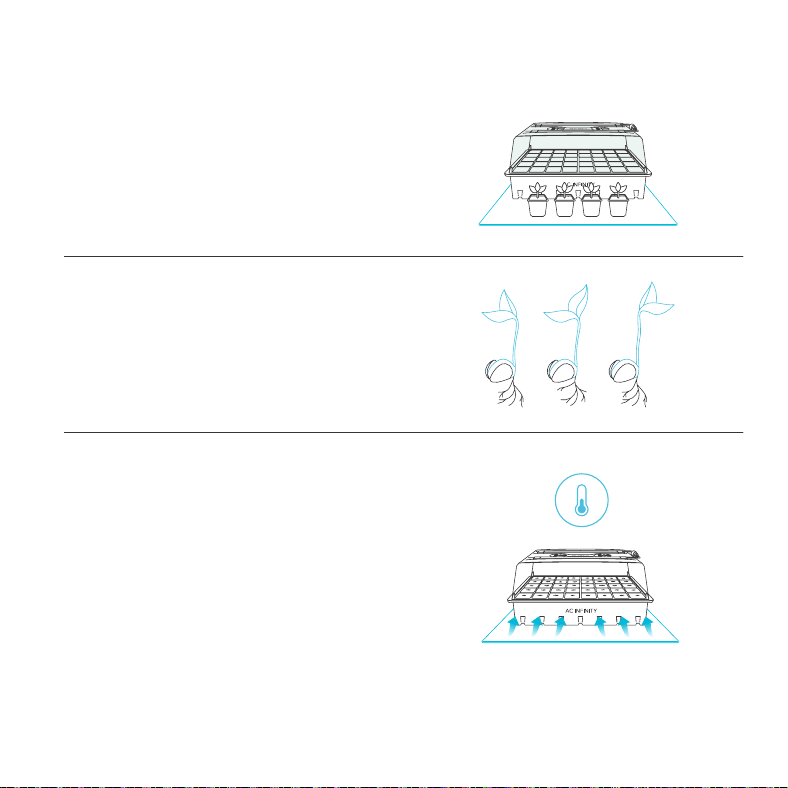
GERMINATION
Different seeds require different temperatures to
germinate. Before you begin, refer to your seed
package and the table on the seedling mat for
recommended temperature settings.
TEMPERATURE
If your seed packet does not specify a
temperature, keep the temperature between
65°F and 75°F (18-24°C).
Make sure to also keep track of ambient room
temperatures; along with your local weather,
this can also affect your germination process.
HUMIDITY DOME AND SEEDLING MAT
21
STARTER GUIDE
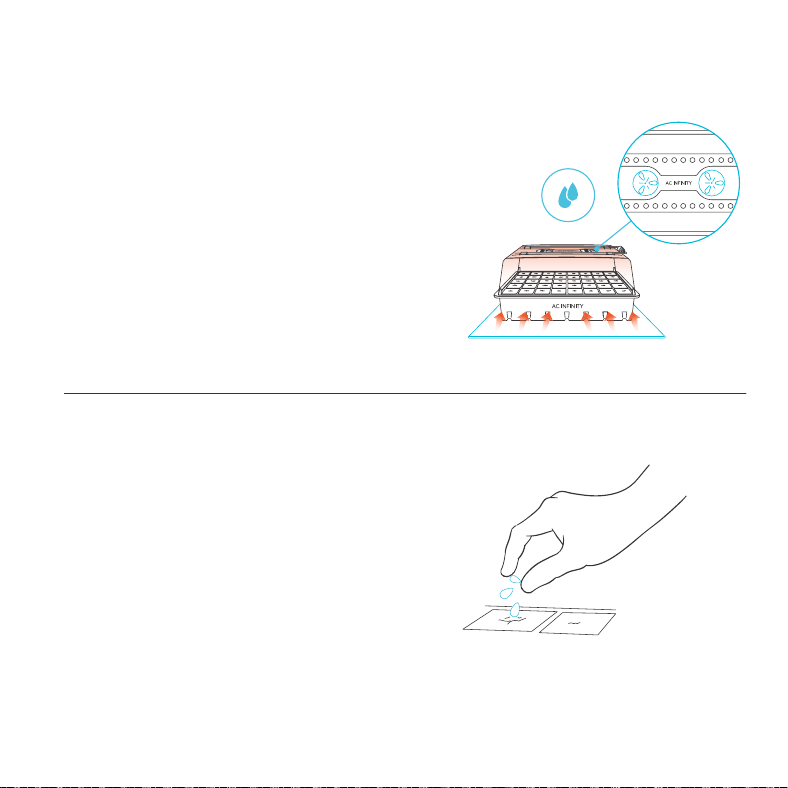
SOWING SEEDS
Sow 2-3 seeds per cell; not every seed will
germinate. Cover the seeds completely with
your grow media. Set the humidity dome over
the tray. Place the seed tray on the seedling mat
and turn it on to begin heating.
HUMIDITY
Closing the vents of the humidity dome will
increase the humidity of the environment. To
accelerate the environmental humidity build-up,
pair the humidity dome with a seedling mat.
HUMIDITY DOME AND SEEDLING MAT
22
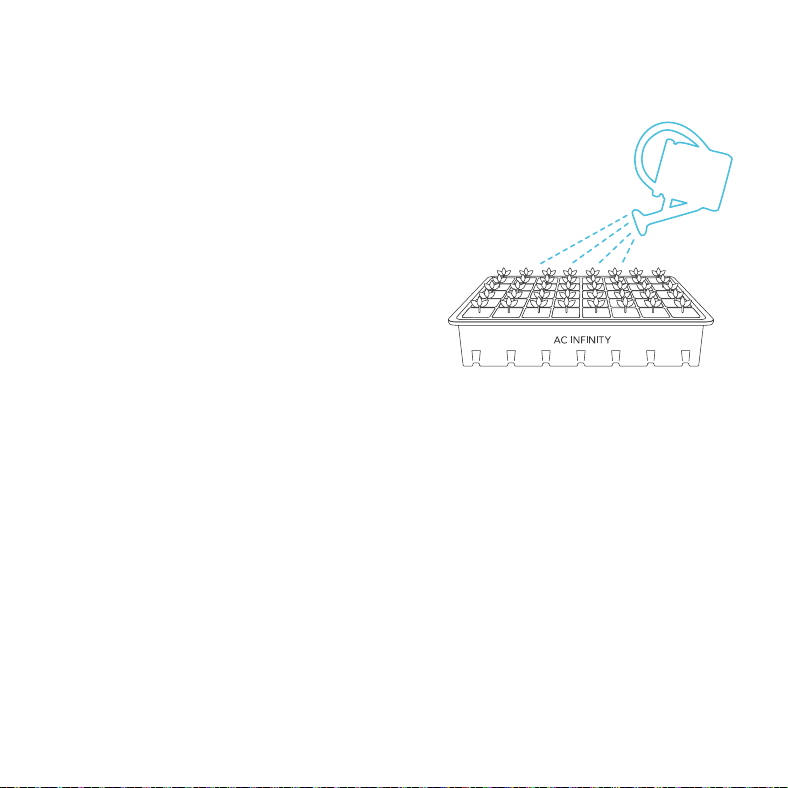
WATERING
Water your seed tray’s starter mix or pellets,
which will appear dark brown. Dry off any
excess water.
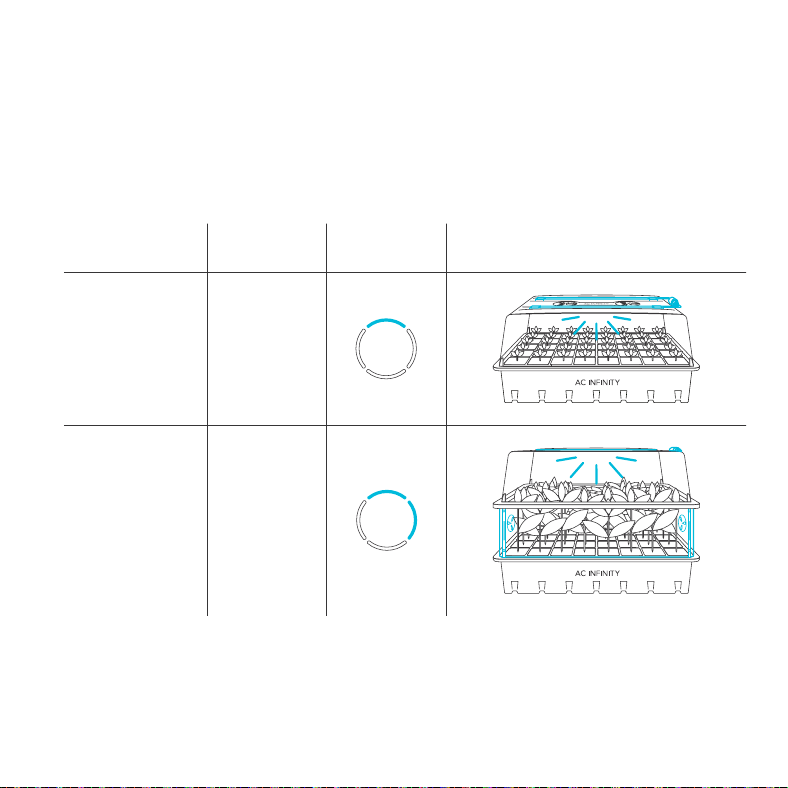
Place the humidity dome on the seed tray and
close all air vents. Lightly water your seeds
whenever the mix/pellets appear light brown.
Once your seeds begin to germinate, open an
air vent on the humidity dome. When about half
of your tray yields seedlings, open two of the air
vents on the humidity dome.
STARTER GUIDE
HUMIDITY DOME AND SEEDLING MAT
23
STARTER GUIDE
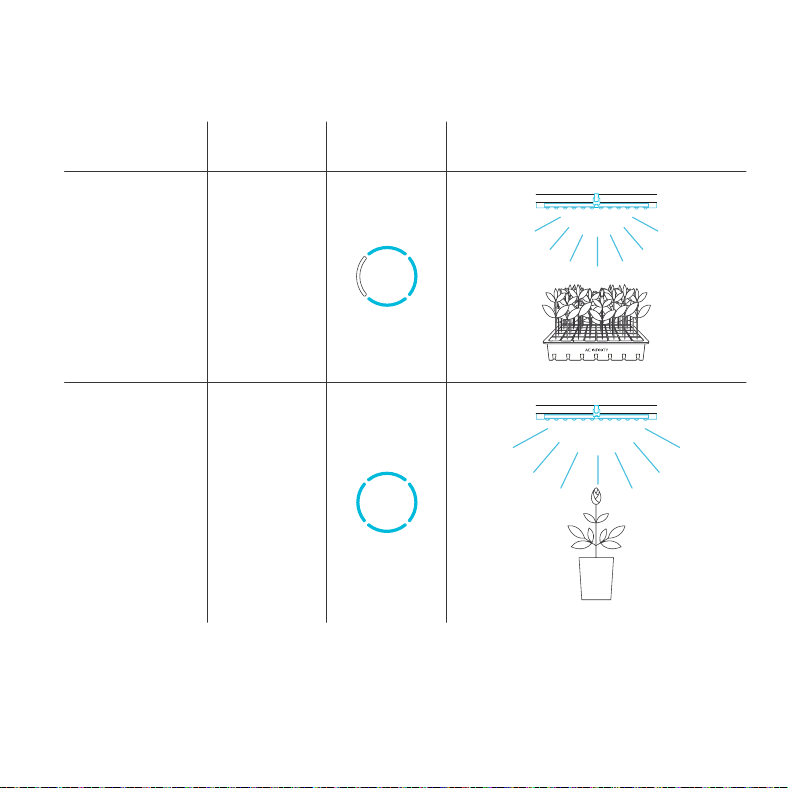
The charts below offer suggested mounting heights and light intensities for each stage in the
growing process. These factors will vary based on the plant you are growing. Height refers to the
minimum recommended distance from the canopy (tip of the plant) to the light.
*Also recommended for plant propagation.
Intensity Set-Up
GROW
STAGE
Seedling
Stage
Vegetative
Stage
Height
1 IN.
2 IN.
10%*
30%
FULL SPECTRUM LIGHTING
24
STARTER GUIDE
Intensity Set Up
GROW
STAGE
Vegetative
Stage
Flowering
Stage
Height
6 IN.
6 IN.
60%
100%
FULL SPECTRUM LIGHTING
25
STARTER GUIDE
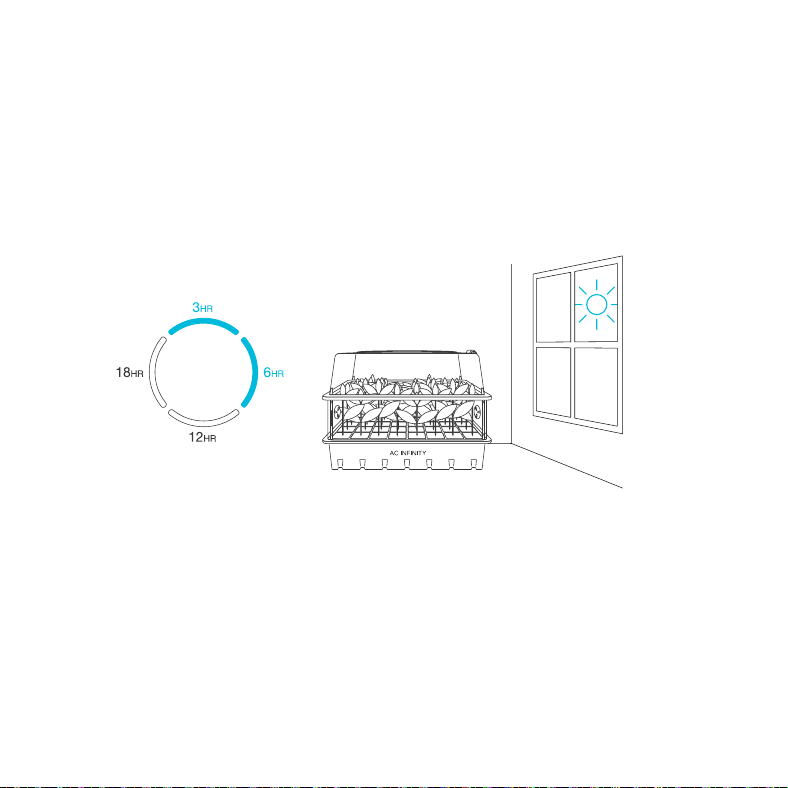
SETTING ACTIVE LIGHTING TIMERS
The included controller can set timers in 3/6/12/18-hour increments.
Use either the 3HR or the 6HR timer to extend your plant's daily exposure to light, in conjunction
with natural sunlight, or when growing plants that don't require extended exposure to lighting.
Use either the 12HR or the 18HR timer to complement common light cycles used to grow high yield
plants indoors. This will also allow for your lighting to sync with your grow set-up's existing lighting,
so that they may activate at the same time.
FULL SPECTRUM LIGHTING
26
CONNECTING TO UIS
TM
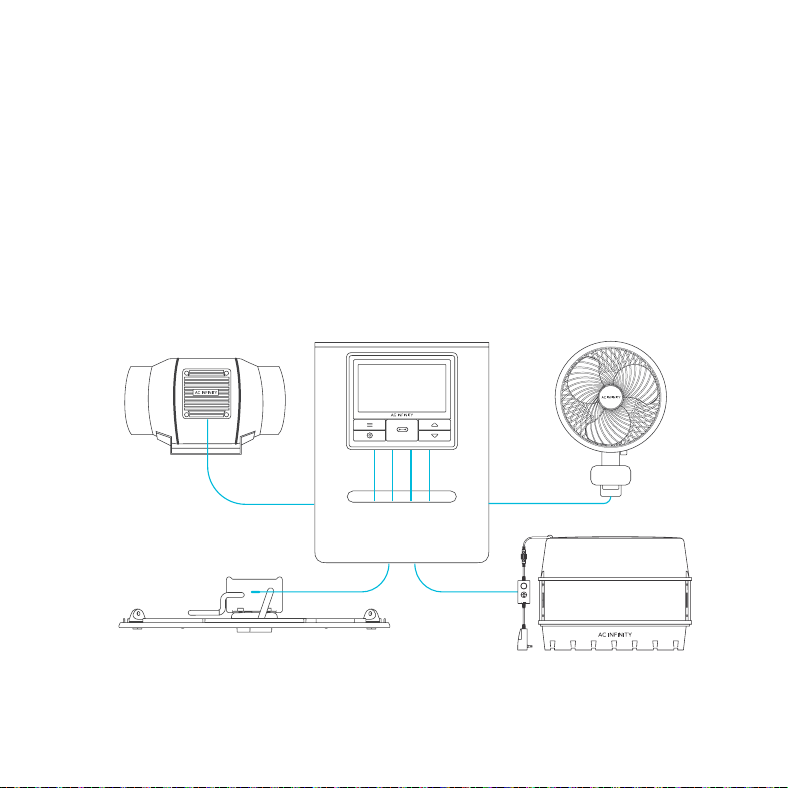
AN INTERCONNECTED GROW SETUP
The Universal Infinity System (UIS) is a series of controllers and devices that come together
to create a fully automated system. UIS enables our controllers to simultaneously connect with
various grow equipment such as inline fans, clip-on fans, and grow lights. Advance UIS controllers
can provide each connected UIS device with their own automated programming like temperature,
humidity, cycles, schedules, and dynamic levels, while also pairing with the AC Infinity app.
27
CONNECTING TO UIS
TM
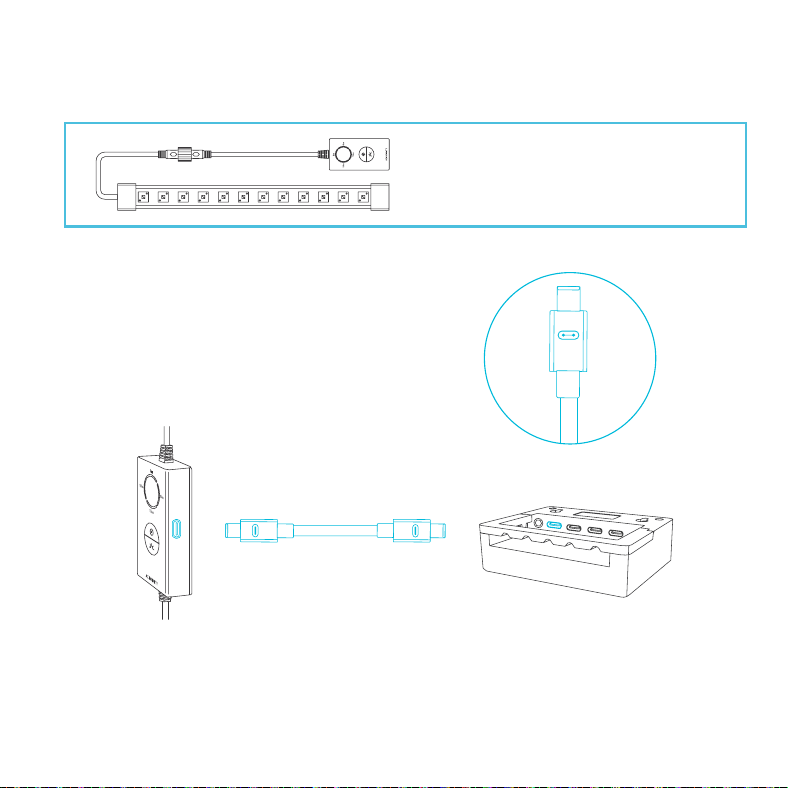
IONBEAM LED grow lights can connect
with select smart controllers as part of an
integrated system using the included UIS
extension cord.
CONNECTING TO UIS CONTROLLERS
Use the included UIS M-M extension cord to
connect the LED light bar(s) to your selected
UIS controller via the light controller's side port.
Your selected UIS controller will override all of the light controller's onboard settings when
connected in this manner.
28
AC INFINITY PRODUCTS
Discover the latest innovations in environmental controls at acinfinity.com
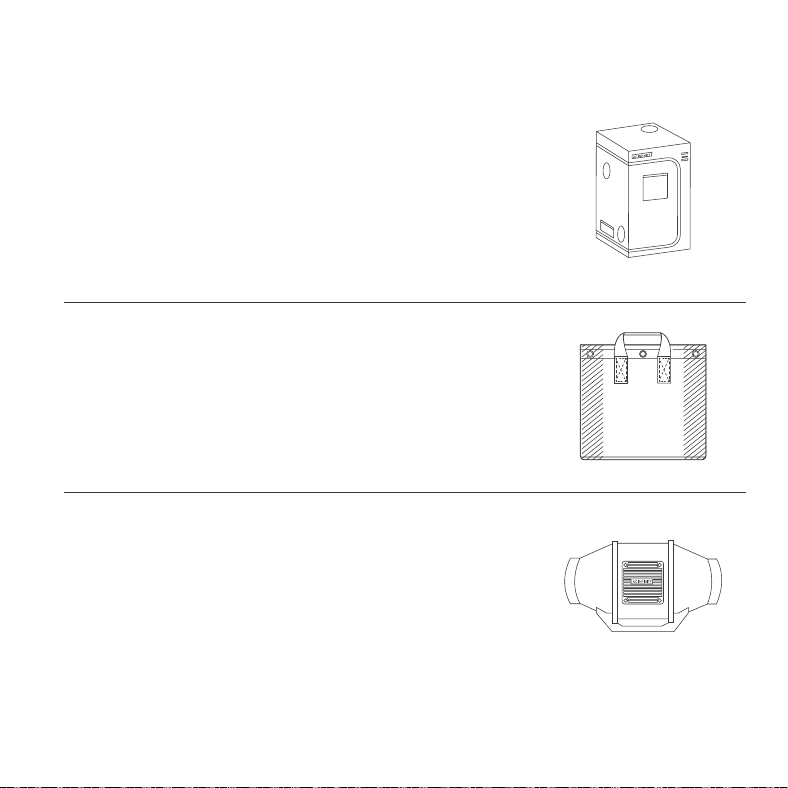
Advance Grow Tents
The CLOUDLAB series is a line of grow tents designed to create
ideal growing conditions and facilitate indoor plant cultivation
year-round. Features 2000D thick oxford canvas lined with inner
diamond patterned mylar that maximizes grow light luminosity, and
a reinforced frame with 150 lb. weight capacity. Includes a mounting
plate to install your AC Infinity controller onto.
Fabric Pots
A set of gardening grow bags designed to create wider root networks
and improve plant growth by air pruning roots while draining excess
water. Features industry leading 500G thick nonwoven fabric sewn
with metal rings to enable air-suspended hanging or twist tie pass-
through for low stress plant training.
Inline Duct Fans
The CLOUDLINE series is a line of duct fans designed to quietly
ventilate AV rooms and closets, as well as various DIY air circulation
and exhaust projects. Features a thermal controller with intelligent
programming that will automatically adjust duct fan speeds in
response to changing temperatures.

29
WARRANTY
If you have any issues with this product, contact us and we’ll
happily resolve your problem or issue a full refund!
This warranty program is our commitment to you, the product sold by AC Infinity will be free from
defects in manufacturing for a period of two years from the date of purchase. If a product is found
to have a defect in material or workmanship, we will take the appropriate actions defined in this
warranty to resolve any issues.
The warranty program applies to any order, purchase, receipt, or use of any products sold by AC
Infinity or our authorized dealerships. The program covers products that have become defective,
malfunctioned, or expressively if the product becomes unusable. The warranty program goes into
effect on the date of purchase. The program will expire two years from the date of purchase. If your
product becomes defective during that period, AC Infinity will replace your product with a new one
or issue you a full refund.
The warranty program does not cover abuse or misuse. This includes physical damage, submersion
of the product in water, incorrect installation such as wrong voltage input, and misuse for any
reason other than its intended purpose. AC Infinity is not responsible for consequential loss or
incidental damages of any nature caused by the product. We will not warrant damage from normal
wear such as scratches and dings.
For more information about our dealers and distributors, please contact our customer service at
support@acinfinity.com or (626) 838-4656 Monday to Friday (9:00 am to 5:00 pm PST).

COPYRIGHT © 2022 AC INFINITY INC. ALL RIGHTS RESERVED
No part of the materials including graphics or logos available in this booklet may be copied,
photocopied, reproduced, translated or reduced to any electronic medium or machine readable form,
in whole or in part, without specific permission from AC Infinity Inc.


www.acinnity.com