
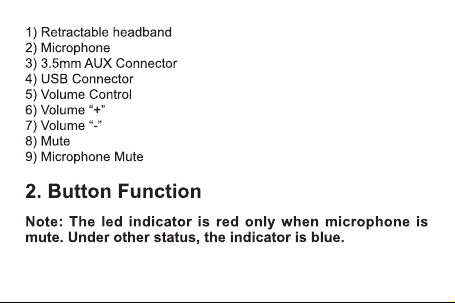
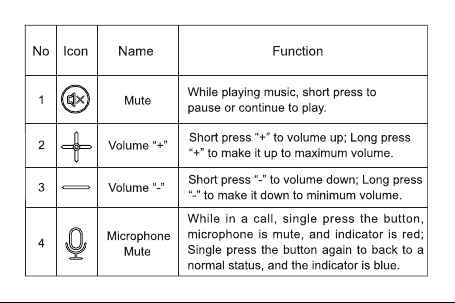
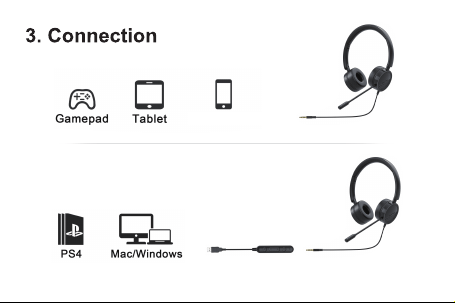
Note: Please connect with USB cable when using PC devices (windows, mac)
iOS/Android
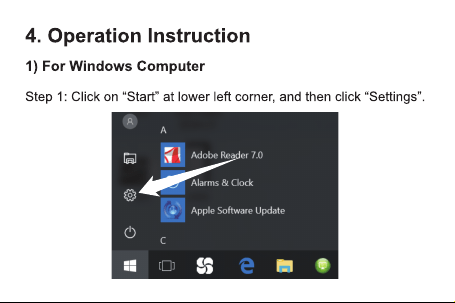
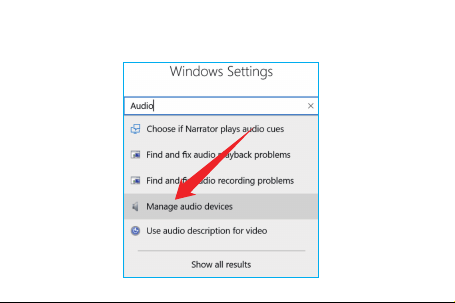
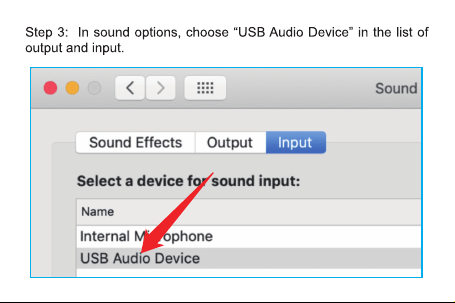
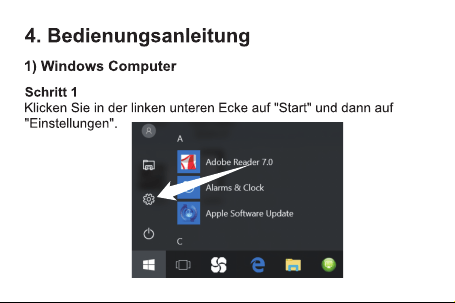
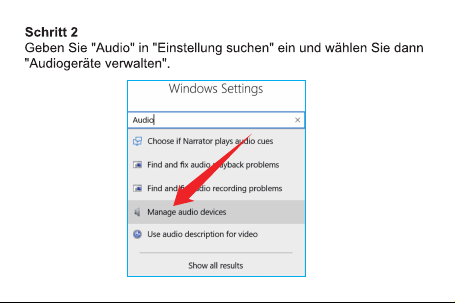
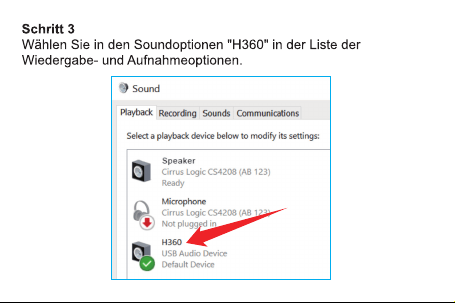
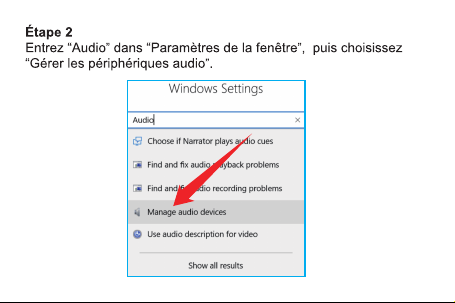
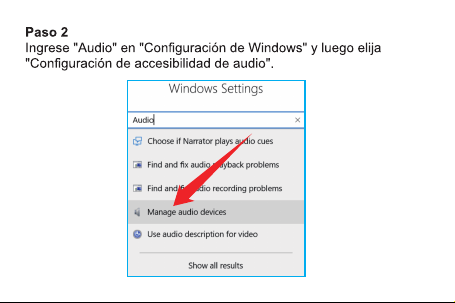
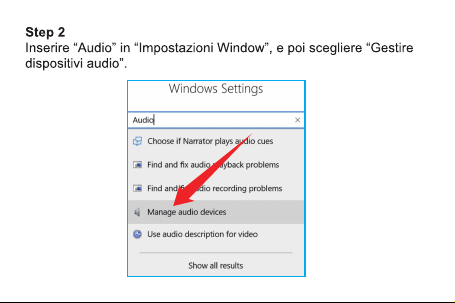
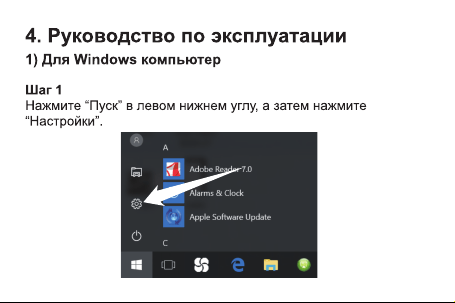
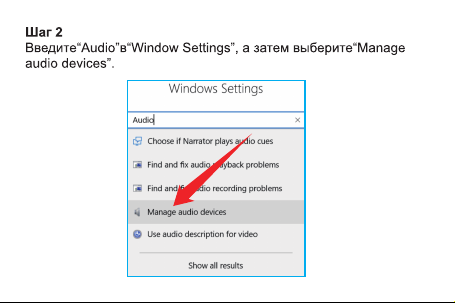
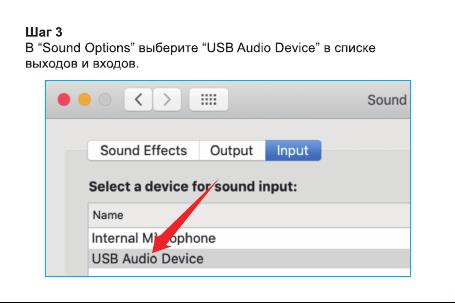
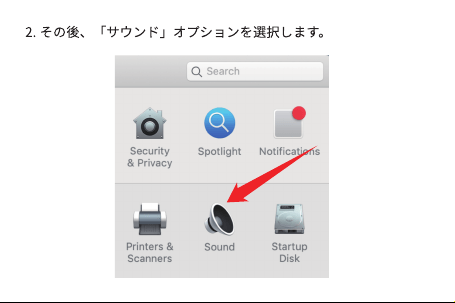
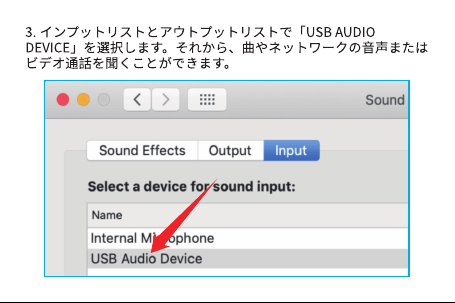
Step 2: Input "audio" in "window settings", and then choose
"Manage audio devices".
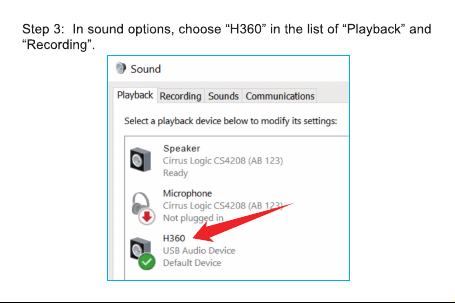
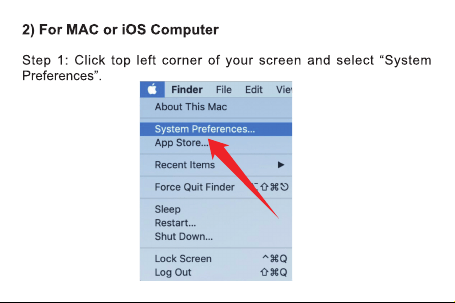
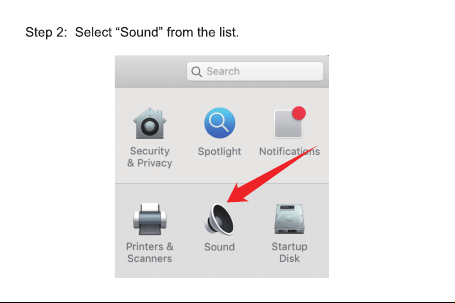
Question 1: No sound or no sound when speaking
Solution: Ensure the normal connection of USB cable control, and
turn off the mute function of the audio and microphone; ensure
sufficient power supply to the USB interface of the PC; and at the

Question 2: The horn and microphone have screeches
and echoes
Question 3: When talking with the headset, both ends
have a buzzing-like background noise
Solution: Adjust the volume or the distance between the microphone
and the lips accordingly if the volume is too high or the microphone
is too close to the mouth, and at the same time, check that the PC
microphone is not too close to the headset.
Solution: The PC is designed with a separate audio input USB port.
Please use the USB port correctly according to the PC manual; or
same time, check that the 3.5mm audio plug is well connected with
the USB cable.
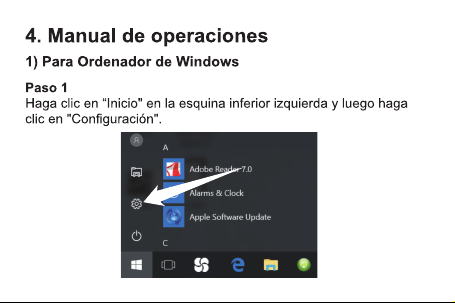
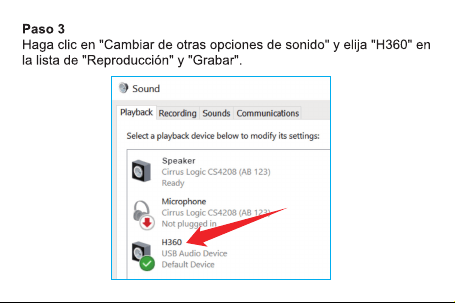
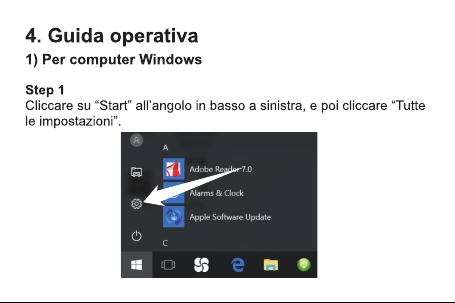
Please refer to the operating instructions in Article IV.
Question 4: USB is unrecognizable, incompatible or
does not work after a period of use
Solution: Please change the USB interface, or delete the PC USB
driver and try again.
1) It is not suitable for PC audio input/output separation when the
headphone uses the 3.5mm audio plug. Use USB connection for
similar devices.
try to change a USB interface, as the ‘buzzing’ sound may be
resulted by the insufficient power supply to the USB interface
of the PC.

3rd Fl, Bldg E, Guanghao Ind., No. 23, Yunfeng Rd,
Dalang St., Longhua Dist., Shenzhen City,
Guangdong Prov., China
(USA) 1-626-701-7623 (UK)07845854035
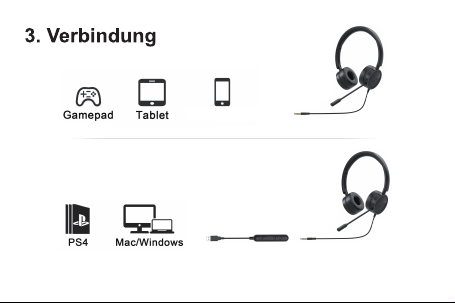
Hinweis: Wenn Sie Computergeräte (Windows, Mac) verwenden,
schließen Sie bitte mit
iOS/Android
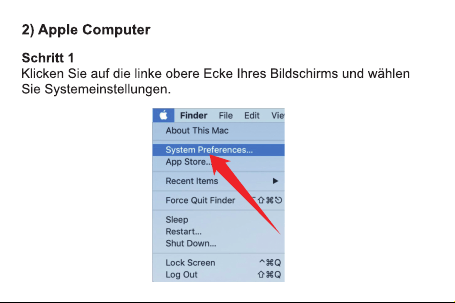
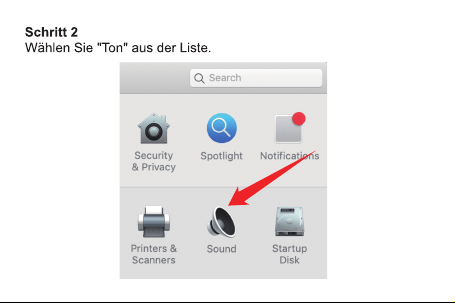
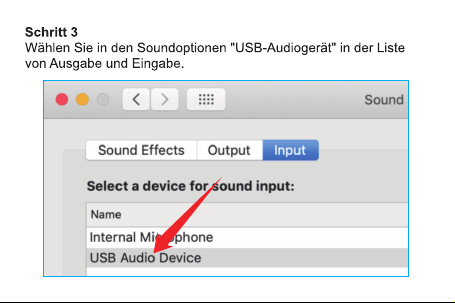
Q1: Es ist kein Ton zu hören oder es gibt keinen Ton beim
Sprechen.
Lösung: Stellen Sie sicher, dass die USB-Kabelsteuerung
ordnungsgemäß angeschlossen ist, während Sie die
Stummschaltungsfunktion von Audio und Mikrofon ausschalten.

Q2: Es gibt Schreie und Echo in Lautsprecher und Mikrofon.
Problem 3: Wenn Sie das Headset-Mikrofon für einen Anruf
verwenden, ist ein Geräusch wie „Brummen“ an beiden Enden
zu hören.
Und stellen Sie sicher, dass die USB-Schnittstelle des Computers
über eine ausreichende Stromversorgung verfügt. Überprüfen Sie
außerdem, ob der 3,5-Audiokopf mit dem USB-Kabel gut verbunden
ist. Bitte beachten Sie die vierte Betriebsanleitung.
Lösung: Die Lautstärke ist zu hoch oder das Mikrofon ist zu nah am
Mund, stellen Sie die Lautstärke entsprechend ein oder bewegen
Sie das Mikrofon von den Lippen weg. Beachten Sie auch, dass das
Computermikrofon und das Headset-Mikrofon nicht zu nahe kommen.
Lösung: Der Computer ist mit einem separaten USB-Anschluss mit
Audioeingang ausgelegt, bitte lesen Sie das Computerhandbuch,

Q4: USB erkennt nicht und ist nicht kompatibel oder
funktioniert nach einer gewissen Zeit nicht mehr.
um den USB-Anschluss richtig zu verwenden. Oder versuchen Sie
es mit einem anderen USB-Anschluss, der USB-Anschluss des
Computers ist möglicherweise nicht ausreichend mit Strom versorgt,
was zu „Brummen“ führt.
Lösung: Bitte versuchen Sie es mit einem anderen USB-Anschluss,
oder löschen Sie den USB-Treiber des Computers, und versuchen
Sie es erneut.
1) Das Headset mit 3,5-Audiokopf ist nicht geeignet für den
separaten Ein- und Ausgang von PC-Audio. Bitte schließen Sie
das ähnliche Gerät mit USB an.
Etage, Gebäude E, Guanghao-Industriepark,
Yunfeng-Str. 23, Dalangjiedao, Stadtteil Longhua,
Stadt Shenzhen, Provinz Guangdong
0049-17619256911
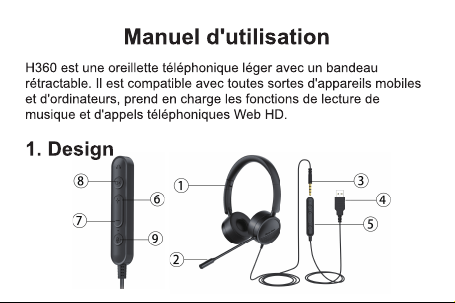
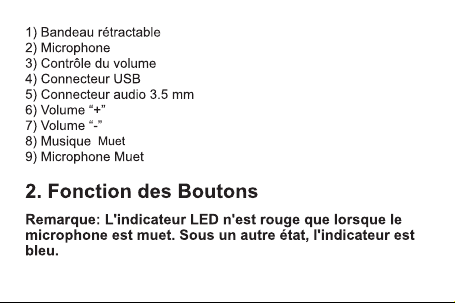
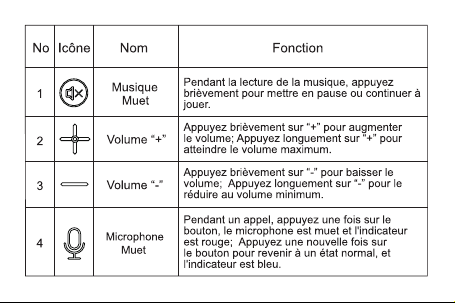
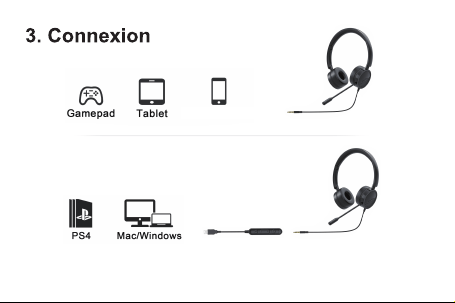
Remarques: Lorsque vous utilisez du matériel informatique (Windows, Mac),
veuillez vous connecter avec un câble USB.
iOS/Android
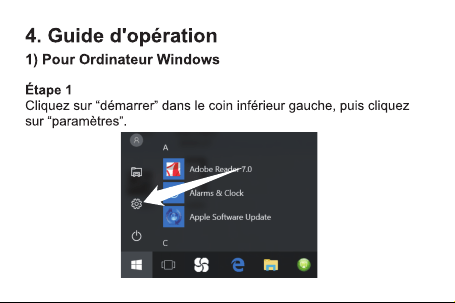
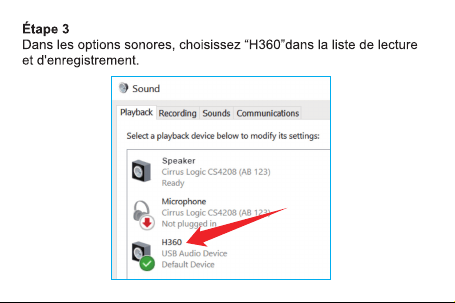
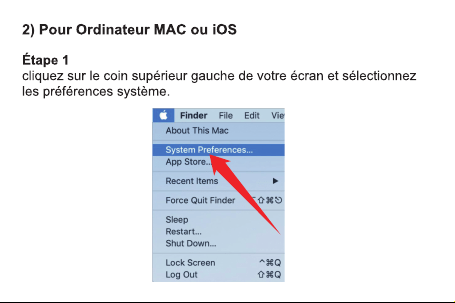
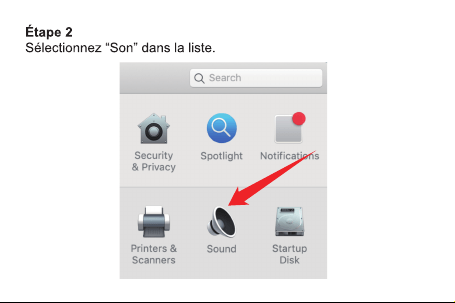
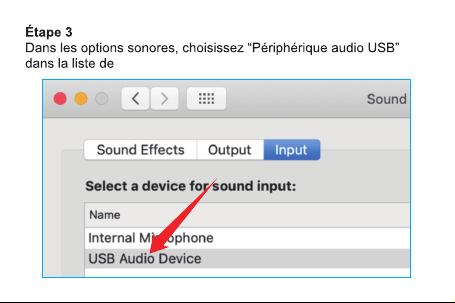
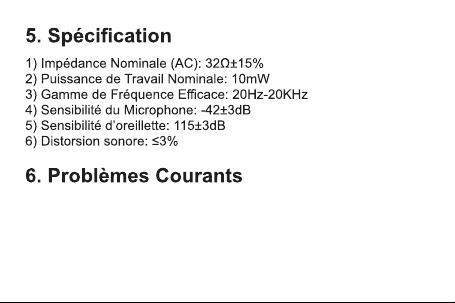
P1: Impossible d'entendre le son ou pas de son
lorsque vous parlez.
Solution: Assurez-vous que le câble USB est connecté normalement
et désactivez la fonction de muet de son et du microphone. Et
assurez-vous que l'interface USB de l'ordinateur est suffisamment

P2: Il y a des cris et un écho dans le haut-parleur et le
microphone.
P3: Lors de l’utilisation des écouteurs pour parler, il
y a un bruit comme « bourdonnement ».
alimentée. Vérifiez également que la tête audio 3,5 est connectée au
câble USB. Veuillez vous référer au quatrième point des instructions
de fonctionnement.
Solution: Le volume est peut-être trop élevé ou le microphone est
trop près de la bouche. Il vous faut ajuster le volume en
conséquence ou déplacer la distance entre le microphone et les
lèvres. Dans le même temps, vérifiez que le microphone de
l'ordinateur n'est pas trop proche du microphone d’écouteurs.
Solution: L'ordinateur est conçu avec un port USB d'entrée audio
P4: L’USB ne peut pas être reconnu, n'est pas
compatible ou ne fonctionne pas après une période
d'utilisation
séparé. Veuillez vous reporter au manuel de l'ordinateur pour utiliser
correctement le port USB ou essayez un autre port USB. Le port
USB de l'ordinateur n'est peut-être pas suffisamment alimenté pour
provoquer un « bourdonnement ».
Veuillez changer un autre port USB ou supprimer le pilote USB de
l'ordinateur et réessayer.
1) Les écouteurs utilisant des têtes audio 3,5 ne conviennent pas
pour une entrée et une sortie audio PC séparées. Veuillez utiliser
USB pour connecter des appareils similaires.


3e étage, bâtiment E, parc industriel de Guanghao,
n ° 23, route de Yunfeng, rue de Dalang,
district de Longhua, Shenzhen, Guangdong, Chine
adresse:

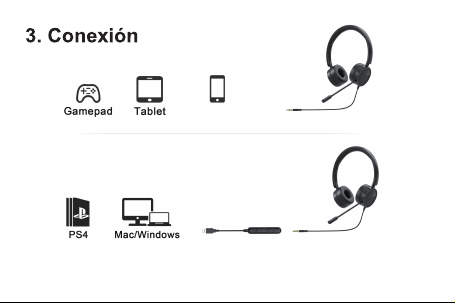
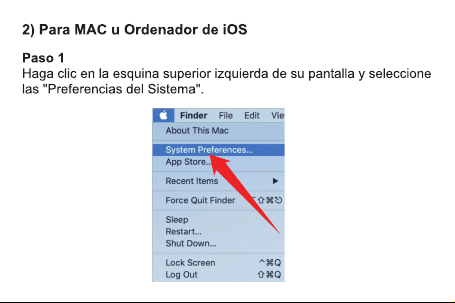
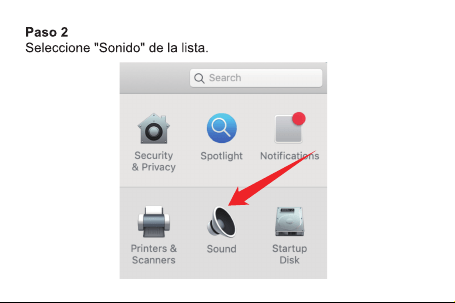
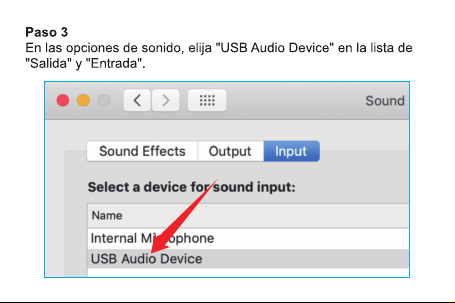
Nota: Cuando utilice dispositivos de ordenador (windows, mac), hay que utilizar
el cable USB para conectar
iOS/Android
Solución: Asegúrese de que el cable USB esté conectado
correctamente y desactive el silencio del audio y del micrófono.
Problema 1: No se puede oír el sonido o no se oye el
hablante

Y asegúrese de que haya suficientes puertos USB del ordenador.
También puede comprobar si el cabezal de audio 3.5 y el cable
USB están bien conectados.
Podría consultar el punto 4 sobre las instrucciones de operación.
Solución: Eso se debe a que el volumen está demasiado alto o el
micrófono está cerca de su boca. Puede bajar el volumen o alejar
el micrófono de sus labios. También hay que tener en cuenta
mantener el micrófono de la computadora lejos del micrófono de
los auriculares.
Problema 2: Hay eco y ruido en el altavoz y en el
micrófono.
Problema 3: Al hablar con los auriculares, se oye un
ruido como un "zumbido" en ambos extremos.

Solución: El ordenador está diseñado con un puerto USB de
entrada de audio, podría consultar el manual del ordenador para
conseguir la manera correcta de uso del puerto USB. O también
puede intentar cambiar el puerto USB. Posiblemente se debe a
que el puerto USB del ordenador no tiene suficiente potencia y
produce un zumbido.
Solución: Podría sustituir otro puerto USB o eliminar el controlador
USB del ordenador e inténtelo de nuevo.
Problema 4: No reconoce ni es compatible el USB o
no funciona después de un período de tiempo
1) Los cabezales 3.5 de los auriculares no son compatibles para la
forma separada de la entrada y la salida de audio de PC. Le
pedimos conectar con el cable USB para dispositivos similares.

3er piso, Edificio E, Industrial Guanghao, No. 23,
Camino Yunfeng, Calle Dalang, Distrito Longhua,
Shenzhen, Guangdong, China

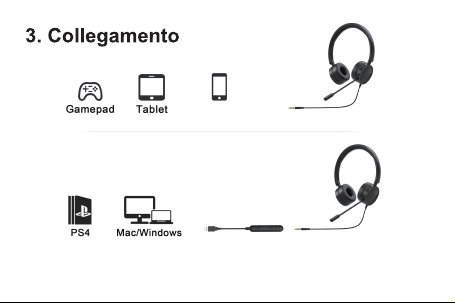
Nota: Quando si utilizza un'apparecchiatura informatica (Windows, Mac),
collegare con un cavetto USB.
iOS/Android
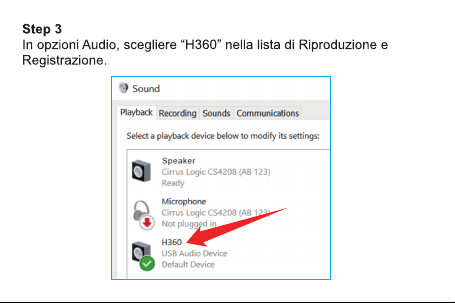
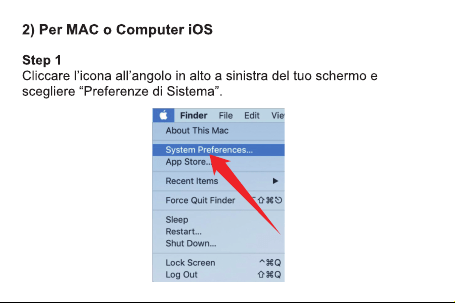
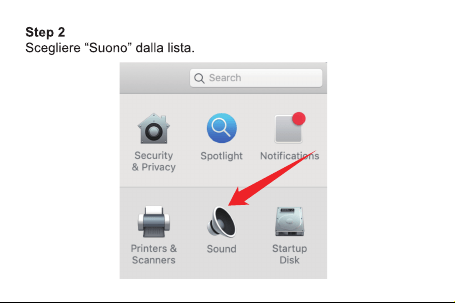
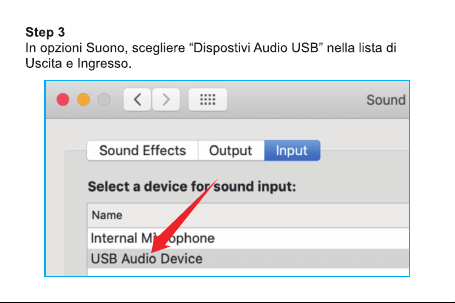
Soluzione: Assicurarsi che il cavetto USB sia collegato
correttamente e disattivare la funzione di silenziamento dell'audio
e del microfono. E assicurarsi che la porta USB del computer sia in
Problema 1: Non si sente l'audio, o la voce non si
sente quando si parla.

grado di fornire sufficiente energia. Inoltre, controllare e assicurarsi
che il connettore jack audio da 3,5mm sia correttamente collegato
al cavetto USB.
Consultare la quarta sezione delle istruzioni per l'uso.
Soluzione: Controllare se il volume è troppo alto o se il microfono è
troppo vicino alla bocca, regolare il volume o regolare la distanza
tra il microfono e le labbra. Inoltre, assicurarsi che il microfono del
computer non sia troppo vicino al microfono delle cuffie.
Soluzione: Il computer è dotato di una porta USB di ingresso audio
Problema 2: Gli altoparlanti o il microfono emette un
fischio e fa eco.
Problema 3: Quando si parla con le cuffie, si sente un
rumore di fondo simile al "ronzio" ad entrambi i lati.

indipendente, utilizzare correttamente la porta USB in base al
manuale d'uso del computer. Oppure utilizzare un'altra porta USB,
in quanto il "ronzio" può essere causato dal fatto che la porta USB
del computer non è in grado di fornire sufficiente energia.
Soluzione: Utilizzare un'altra porta USB, o cancellare il driver USB
del computer e riprovare.
1) Il connettore jack audio da 3,5mm delle cuffie non funziona con
le porte di ingresso e uscita audio separate del PC. Quando si
Problema 4: La porta USB non riconosce, non è
compatibile o non funziona dopo un certo periodo
di utilizzo.
utilizzano dispositivi simili, collegare con un cavetto USB.

Parco industriale Guanghao, padiglione E,
terzo piano, Via Yunfeng N.23, Viale Dalang,
Distretto di Longhua, città di Shenzhen,
provincia del Guangdong, Cina
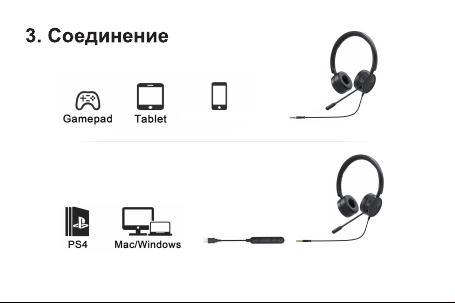
ɉɪɢɦɟɱɚɧɢɟɜɨɜɪɟɦɹɢɫɩɨɥɶɡɨɜɚɧɢɹɤɨɦɩɶɸɬɟɪɧɨɝɨɭɫɬɪɨɣɫɬɜɚ
:LQGRZV0DFɢɫɩɨɥɶɡɭɣɬɟ86%ɤɚɛɟɥɶɞɥɹɩɨɞɤɥɸɱɟɧɢɹ
iOS/Android
Ɋɟɲɟɧɢɟɭɛɟɞɢɬɟɫɶɱɬɨ86%ɤɚɛɟɥɶɩɨɞɤɥɸɱɟɧɧɨɪɦɚɥɶɧɨ
ɢɨɞɧɨɜɪɟɦɟɧɧɨɜɵɤɥɸɱɢɬɟɡɜɭɤɨɜɭɸɱɚɫɬɨɬɭɢɮɭɧɤɰɢɸ
ɛɟɡɡɜɭɱɧɨɝɨɪɟɠɢɦɚɦɢɤɪɨɮɨɧɚɂɭɛɟɞɢɬɟɫɶɱɬɨ
ɉɪɨɛɥɟɦɚɇɟɦɨɠɧɨɫɥɵɲɚɬɶɡɜɭɤɢɥɢɧɟɬɡɜɭɤɚɜɨ
ɜɪɟɦɹɪɚɡɝɨɜɨɪɚ

86%ɢɧɬɟɪɮɟɣɫɤɨɦɩɶɸɬɟɪɚɢɦɟɟɬɞɨɫɬɚɬɨɱɧɨɟɩɢɬɚɧɢɟ
Ɍɚɤɠɟɭɛɟɞɢɬɟɫɶɱɬɨɞɸɣɦɨɜɚɹɝɨɥɨɜɤɚɡɜɭɤɨɜɨɣɱɚɫɬɨɬɵ
ɯɨɪɨɲɨɩɨɞɤɥɸɱɚɟɬɫɹɤ86%ɤɚɛɟɥɸ
ɋɦɑɟɬɜɟɪɬɵɣɩɭɧɤɬɜɢɧɫɬɪɭɤɰɢɢɩɨɷɤɫɩɥɭɚɬɚɰɢɢ
Ɋɟɲɟɧɢɟɝɪɨɦɤɨɫɬɶɫɥɢɲɤɨɦɜɵɫɨɤɚɢɥɢɦɢɤɪɨɮɨɧɧɚɯɨɞɢɬɫɹ
ɫɥɢɲɤɨɦɛɥɢɡɤɨɤɨɪɬɭɫɨɨɬɜɟɬɫɬɜɟɧɧɨɪɟɝɭɥɢɪɭɣɬɟɝɪɨɦɤɨɫɬɶ
ɢɥɢɩɟɪɟɦɟɳɚɣɬɟɪɚɫɫɬɨɹɧɢɟɦɟɠɞɭɦɢɤɪɨɮɨɧɨɦɢɝɭɛɚɦɢ
ɂɨɞɧɨɜɪɟɦɟɧɧɨɭɛɟɞɢɬɟɫɶɱɬɨɦɢɤɪɨɮɨɧɤɨɦɩɶɸɬɟɪɚɧɟ
ɧɚɯɨɞɢɬɫɹɫɥɢɲɤɨɦɛɥɢɡɤɨɤɦɢɤɪɨɮɨɧɭɝɚɪɧɢɬɭɪ
ɉɪɨɛɥɟɦɚɝɪɨɦɤɨɝɨɜɨɪɢɬɟɥɶɢɦɢɤɪɨɮɨɧɢɡɞɚɸɬ
ɤɪɢɤɢɷɯɨ
ɉɪɨɛɥɟɦɚɜɨɜɪɟɦɹɢɫɩɨɥɶɡɨɜɚɧɢɹɦɢɤɪɨɮɨɧɚ
ɝɚɪɧɢɬɭɪɞɥɹɪɚɡɝɨɜɨɪɚɧɚɨɛɨɢɯɤɨɧɰɚɯɫɥɵɲɟɧ
ɲɭɦɮɨɧɚɩɨɯɨɠɢɣɧɚɝɭɥ

ɉɪɨɛɥɟɦɚ86%ɧɟɪɚɫɩɨɡɧɚɟɬɫɹɧɟɫɨɜɦɟɫɬɢɦɢɥɢ
ɱɟɪɟɡɧɟɤɨɬɨɪɨɟɜɪɟɦɹɢɫɩɨɥɶɡɨɜɚɧɢɹɧɟɪɚɛɨɬɚɟɬ
Ɋɟɲɟɧɢɟɤɨɦɩɶɸɬɟɪɨɛɨɪɭɞɨɜɚɧɨɬɞɟɥɶɧɵɦ86%ɜɜɨɞɧɵɦ
ɩɨɪɬɨɦɡɜɭɤɨɜɨɣɱɚɫɬɨɬɵɉɨɠɚɥɭɣɫɬɚɨɛɪɚɬɢɬɟɫɶɤ
ɢɧɫɬɪɭɤɰɢɢɩɨɷɤɫɩɥɭɚɬɚɰɢɢɤɨɦɩɶɸɬɟɪɚɞɥɹɩɪɚɜɢɥɶɧɨɝɨ
ɢɫɩɨɥɶɡɨɜɚɧɢɹ86%ɩɨɪɬɚɂɥɢɩɨɩɪɨɛɭɣɬɟɡɚɦɟɧɢɬɶɞɪɭɝɨɣ
86%ɩɨɪɬɦɨɠɟɬɛɵɬɶɧɚ86%ɢɧɬɟɪɮɟɣɫɟɤɨɦɩɶɸɬɟɪɚɧɟ
ɯɜɚɬɚɟɬɩɢɬɚɧɢɹɢɜɵɡɵɜɚɟɬɝɭɥ
Ɋɟɲɟɧɢɟɩɨɠɚɥɭɣɫɬɚɡɚɦɟɧɢɬɟɞɪɭɝɨɣ86%ɩɨɪɬɢɥɢɭɞɚɥɢɬɟ
86%ɩɪɢɜɨɞɤɨɦɩɶɸɬɟɪɚɢɩɨɩɪɨɛɭɣɬɟɟɳɺɪɚɡ
Ƚɚɪɧɢɬɭɪɵɫɞɸɣɦɨɜɵɦɢɝɨɥɨɜɤɚɦɢɡɜɭɤɨɜɨɣɱɚɫɬɨɬɵɧɟ
ɩɨɞɯɨɞɹɬɞɥɹɦɟɬɨɞɨɜɜɜɨɞɚɢɜɵɜɨɞɚɡɜɭɤɨɜɨɣɱɚɫɬɨɬɵ3&
ɂɫɩɨɥɶɡɭɣɬɟ86%ɞɥɹɩɨɞɤɥɸɱɟɧɢɹɚɧɚɥɨɝɢɱɧɵɯɭɫɬɪɨɣɫɬɜ
Ⱦɨɜɨɥɶɧɵɩɪɨɞɭɤɬɨɦ"

ɣɷɬɚɠɡɞɚɧɢɟ(ɩɪɨɦɵɲɥɟɧɧɵɣɩɚɪɤȽɭɚɧɯɚɨ
ɞɭɥɘɣɮɷɧɶɤɜɚɪɬɚɥȾɚɥɚɧɪɚɣɨɧɅɭɧɯɭɚ
ɝɒɷɧɶɱɠɷɧɶȽɭɚɧɞɭɧɄɢɬɚɣ
ɇɟɞɨɜɨɥɶɧɵ"

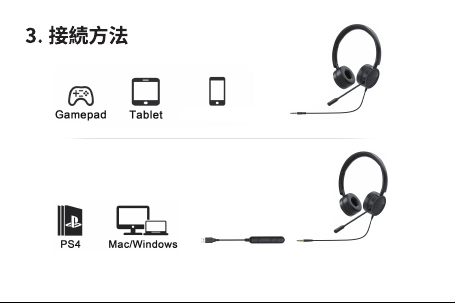
備考:パソコン(windows, mac)を使用する場合、USBケーブルで接続してください。
iOS/Android
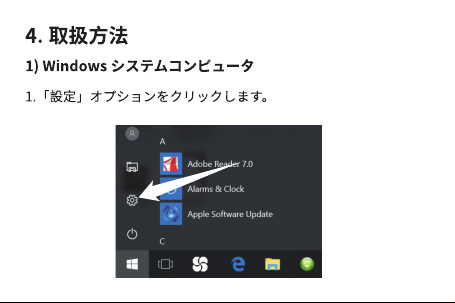
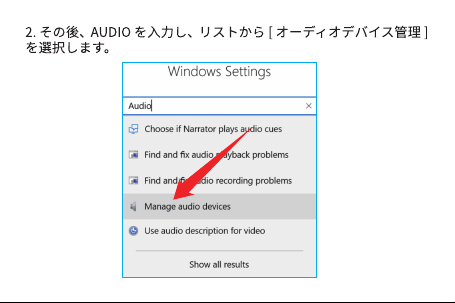
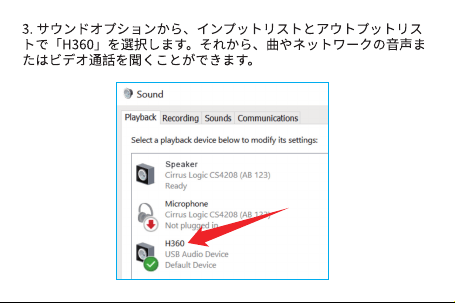
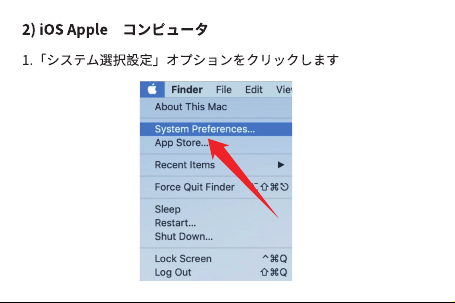
⭆桅▁͵உב瀭刖濮濣瀙濶瀮澞瀙濺瀊宝濴㨺瀆உב濧Ӟ瀙濶瀮澞
ゎỴ⟇䠖㼁㻿㻮䜿䞊䝤䝹䜢ṇ䛧䛟᥋⥆䛧䛶䛔䜛䛣䛸䜢☜ಖ䛩䜛ྠ䛻䚸䜸䞊䝕䜱䜸
ཬ䜃䝬䜲䜽䛾䝭䝳䞊䝖ᶵ⬟䜢䜸䝣䛻䛧䛶䛟䛰䛥䛔䚹䜎䛯䚸䝟䝋䝁䞁㼁㻿㻮䝫䞊䝖䛾⤥
㟁䛜༑ศ䛷䛒䜛䛣䛸䜢☜ಖ䛩䜛ྠ䛻䚸㻟㻚㻡䜸䞊䝕䜱䜸䝦䝑䝗䛜㼁㻿㻮䛻䛝䛱䜣䛸
᥋⥆䛧䛶䛔䜛䛣䛸䜢☜ಖ䛧䛶䛟䛰䛥䛔䚹

⭆桅з͵灒灭炕灄炕瀃灷瀽灈瀆ଟӣ瀥בՂ瀎濮濻瀙濧濝瀥瀙濴澞
⭆桅Ѕ͵灷瀽灈瀭҄濾瀁ૹ宝濴瀦㨺瀆澝澨瀑瀮瀑瀮澩瀉瀣濡瀅ѹ
槬உஉב瀭刖濮濣瀙濴
⭆桅֙͵;9(瀭岃⢻瀂濨瀙濶瀮澞к㠧㓬濧濝瀥瀙濶瀮澞瀙濺瀊澝
▁ؓޫ族瀆࣐҄濲濺㑡瀆澝㷚ৗ瀂濨瀅濪瀅瀥瀙濲濺澞
ゎỴ⟇䠖㡢㔞䛜䛝䛩䛞䜎䛩䚹䜎䛯䛿䚸䝬䜲䜽䛜ཱྀ䛻㏆䛩䛞䜎䛩䚹䛣䛾ሙྜ䚸
㡢㔞䜢ㄪᩚ䛧䛶䛟䛰䛥䛔䠊䜎䛯䛿䚸䝬䜲䜽䜢ཱྀ䛻㞳䜜䛶䛟䛰䛥䛔䚹䜎䛯䚸䝟䝋䝁
䞁䛾䝬䜲䜽䛸䜲䝲䝩䞁䛾䝬䜲䜽䛸䛾㊥㞳䛜㏆䛩䛞䛺䛔䜘䛖䛻䛤☜ㄆ䛟䛰䛥䛔䚹
ゎỴ⟇䠖䝟䝋䝁䞁䛻༢⊂䛺䜸䞊䝕䜱䜸䜰䜲䞁䝥䝑䝖㼁㻿㻮䝫䞊䝖䜢タィ䛧䛶䛔䜎䛩
䛾䛷䚸䝟䝋䝁䞁䛾ྲྀᢅㄝ᭩䛻ཧ↷䛧䚸㼁㻿㻮䝫䞊䝖䜢ṇ䛧䛟⏝䛧䛶䛟䛰䛥䛔䚹
䜎䛯䛿䚸䛾㼁㻿㻮䝫䞊䝖䛻ኚ䜟䛳䛶䛚ヨ䛧ୗ䛥䛔䚹䝟䝋䝁䞁㼁㻿㻮䝫䞊䝖䛻⤥㟁
㊊䛺ሙྜ䚸䛂䜆䜣䜆䜣䛃䛾㡢ኌ䛜Ⓨ⏕䛩䜛ྍ⬟ᛶ䛜䛒䜚䜎䛩䚹
ゎỴ⟇䠖䛾㼁㻿㻮䝫䞊䝖䛻ኚ䜟䛳䛶䛚ヨ䛧ୗ䛥䛔䚹䜎䛯䛿䚸䝟䝋䝁䞁㼁㻿㻮䝗䝷
᧯సㄝ䛾ᅄⅬ┠䛻䛤ཧ↷䛟䛰䛥䛔䚹
䜲䝞䜢๐㝖䛧䛶䛛䜙ᨵ䜑䛶䛚ヨ䛧ୗ䛥䛔䚹
䜲䝲䝩䞁䛜㻟㻚㻡䜸䞊䝕䜱䜸䝦䝑䝗䜢⏝䛧䛶䛔䜎䛩䚹㻼㻯䜸䞊䝕䜱䜸䜲䞁䝥䝑䝖䛸
䜰䜴䝖䝥䝑䝖䛜ศ䛡䛶䛔䜛ᵝ䛻㐺⏝䛧䜎䛫䜣䚹㢮ఝ䝕䝞䜲䝇䛾ሙྜ䛿㼁㻿㻮
䛷᥋⥆䛧䛶䛟䛰䛥䛔䚹

୰ᅜᗈᮾ┬῝䝉䞁ᕷ㱟⳹༊ᾉ⾤㐨㞼ᓠ㊰㻞㻟ྕ
ගᾈᕤᴗᅬ㻱Ჷ୕㝵