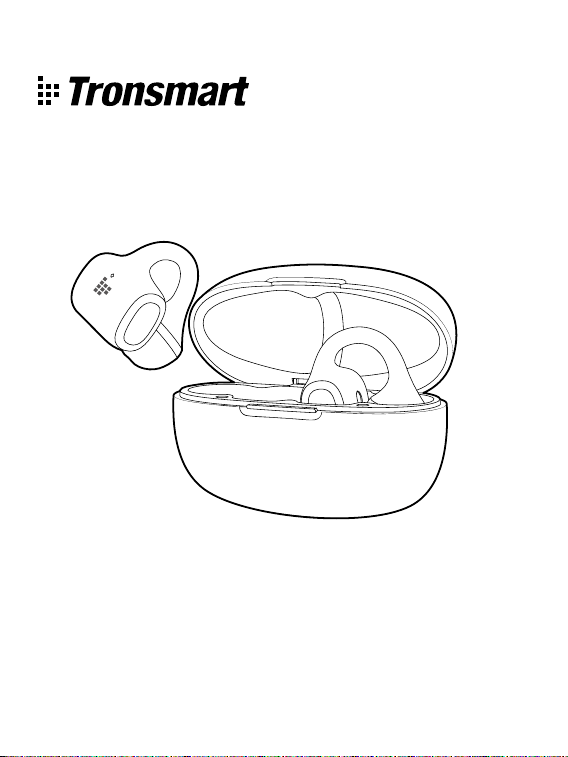
Tronsmart OpenFly Clip 2
User Manual
Open Ear Clip-on Earbuds
Model: S1000
- 2 -
EN
1
2
Package Contents
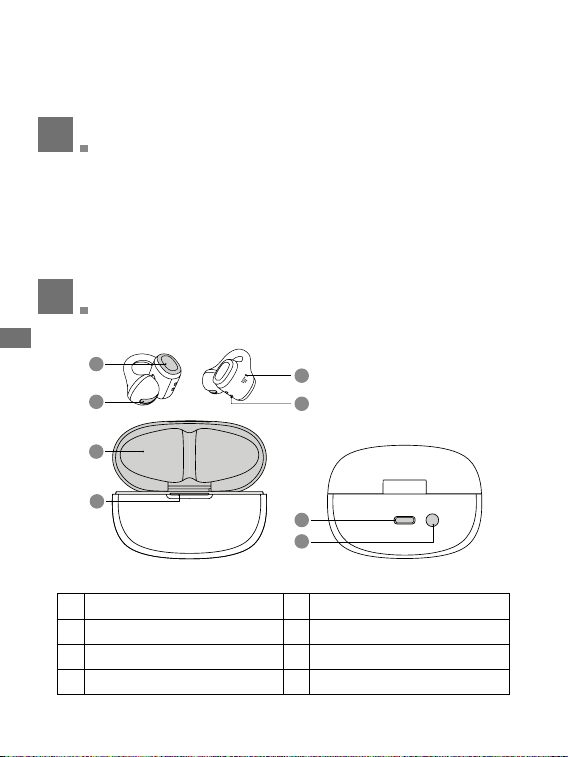
Product Overview
• 1 x Tronsmart OpenFly Clip 2 Open Ear Clip-on Earbuds(L/R)
• 1 x Charging Case
• 1 x USB-C Charging Cable
• 1 x Quick Start Guide
• 1 x Warranty Card
2
1
5
7
8
3
4
6
1 Button Control 2 Sound Outlet
3 Microphone 4 Charging Contacts
5 Charging Case 6 Indicator of Charging Case
7 USB-C Charging Port 8 Reset Button on Charging Case
Thank you for purchasing the Tronsmart OpenFly Clip 2 Open Ear Clip-on
Earbuds. Please read the user manual before use and keep it handy for future
reference. If you have any additional questions or comments, please contact us
by email at: [email protected].
- 3 -
EN
3
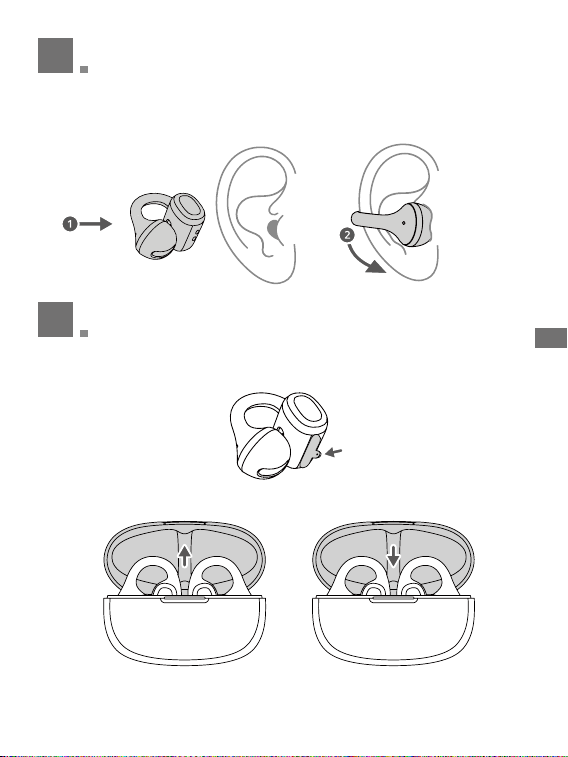
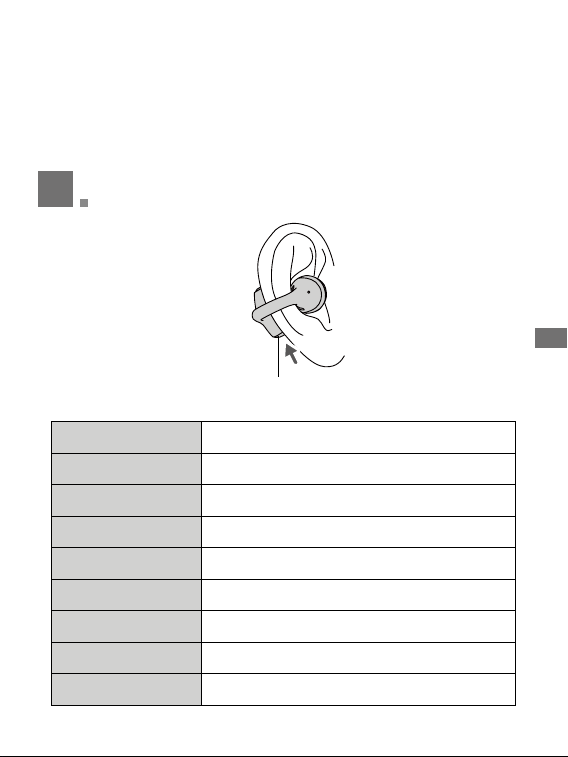
Wearing
For a perfect fit, place the earbuds on the thinnest part of your outer ear.
Gently adjust them until you achieve a secure seal and optimal sound.
4
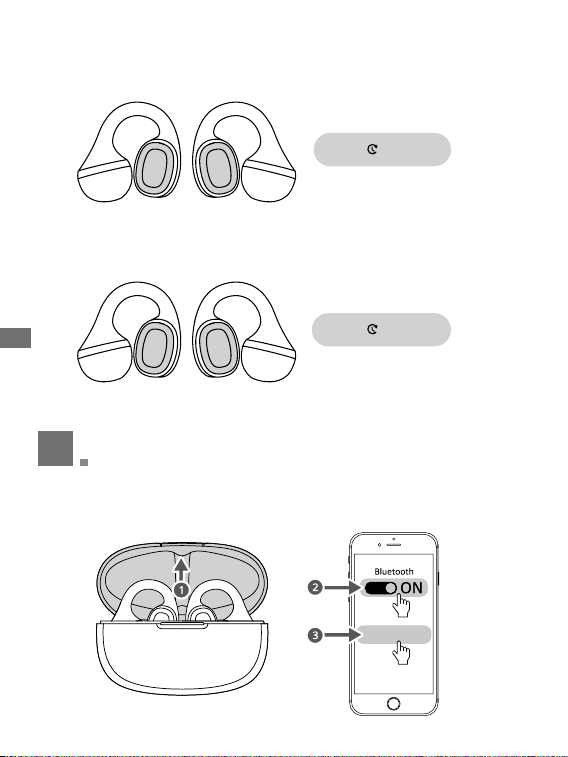
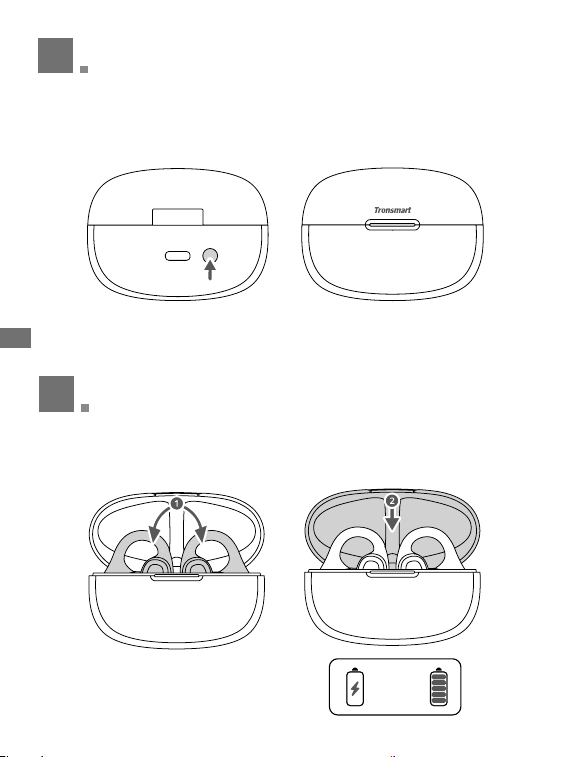
Turn On/Turn O
Remove the protective films on the earbuds before first use. Put both earbuds
into charging case and close it to charge.
With Charging Case:
Turn On
Open the charging case
Turn O
Close the charging case
Remove
- 4 -
EN
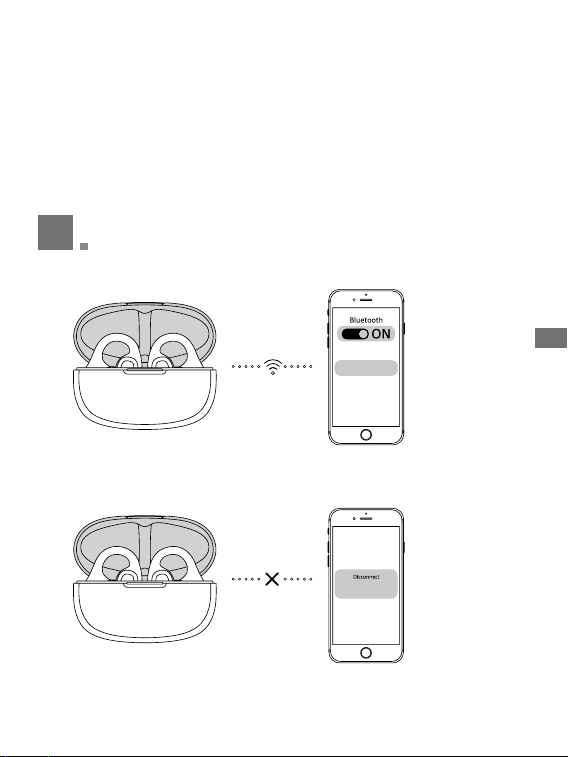
Without Charging Case:
L/R
L/R
3S
5S
Press button control on either earbud for 5s to turn off when music is not
playing.
L
L
R
R
Press button control on either earbud for 3s to turn on.
5
Pairing
Open the charging case. The earbuds will automatically turn on and enter
pairing mode. Search and click ‘Tronsmart OpenFly Clip 2’ to connect with your
device.
Tronsmart OpenFly Clip 2
- 5 -
EN
Note:
If you need to connect with another device, please follow the steps:
a. Disconnect the pairing device and the earbuds will automatically enter
pairing mode.
b. Put both earbuds into charging case with case opened, press the button on
the charging case for 5s with indicator flashes white and the earbuds will
enter pairing mode. If connected successfully, the indicator of charging case
will off.
6
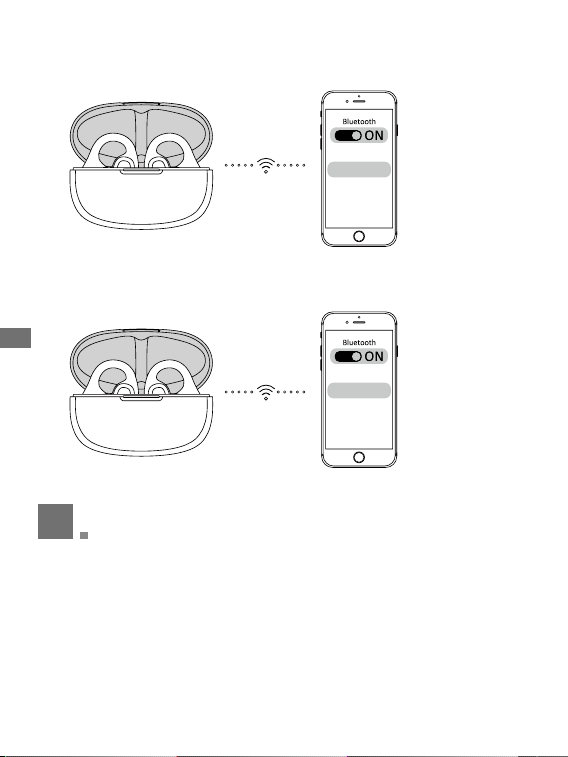
Dual Audio Modes
a. Search & click ‘Tronsmart OpenFly Clip 2’ to connect with device A.
Device A
Device A
b. Disconnect ‘Tronsmart OpenFly Clip 2’ from the device A(Note that do not
clear the pairing record on the device).
Tronsmart OpenFly Clip 2
Tronsmart OpenFly Clip 2
- 6 -
EN
Device B
Device A
c. Tronsmart OpenFly Clip 2 will re-enter pairing mode.
d. Search & click ‘Tronsmart OpenFly Clip 2’ to connect with the device B.
e. Click ‘Tronsmart OpenFly Clip 2’ on device A to connect.
Tronsmart OpenFly Clip 2
Tronsmart OpenFly Clip 2
7
LDAC (Not available on iOS devices.)
LDAC needs to be enabled in the Tronsmart App.
• Use devices powered by Android 8.0 or later to experience LDAC-quality
sound.
• LDAC provides higher-quality sound, increases power consumption, and
reduces playtime.
• Enable LDAC in a low-interference environment to ensure a stable Bluetooth
connection.
- 7 -
EN
1. Go to settings in the Tronsmart app.
2. Click on "Sound Effects".
3. Select "Sound Priority LDAC" to switch to LDAC codec.
4. You will be notified that the earbuds do not support LDAC when connected
to two devices. Select "Turn on" to continue.
5. It takes about 10 seconds to switch audio codecs. You may be asked to
update the earbuds' firmware if available.
8
Operation
Button Control
Play/Pause Press the button once on the Left/Right earbud
Previous Track Double press the button on the Left earbud
Next Track Double press the button on Right earbud
Voice Assistant Triple Press the button on the Left/Right earbud
Volume +(music-playing) Press and hold the button on the Right earbud
Volume -(music-playing) Press and hold the button on the Left earbud
Answer a Call Press the button once on the Left/Right earbud
End a Call Double press the button on the Left/Right earbud
Reject an Incoming Call Press and hold the button on the Left/Right earbud for 2s
- 8 -
EN
9
Indicator of Charging Case
a. Press the button on the charging case to check the battery levels.
b. Charging Status of Earbuds
<
20% Indicator Stays Red for 3s
>
20% ndicator Stays White for 5s
Put both earbuds into charging case
and close to charge. The indicator of
charging case will off after staying
white for 5s.
10
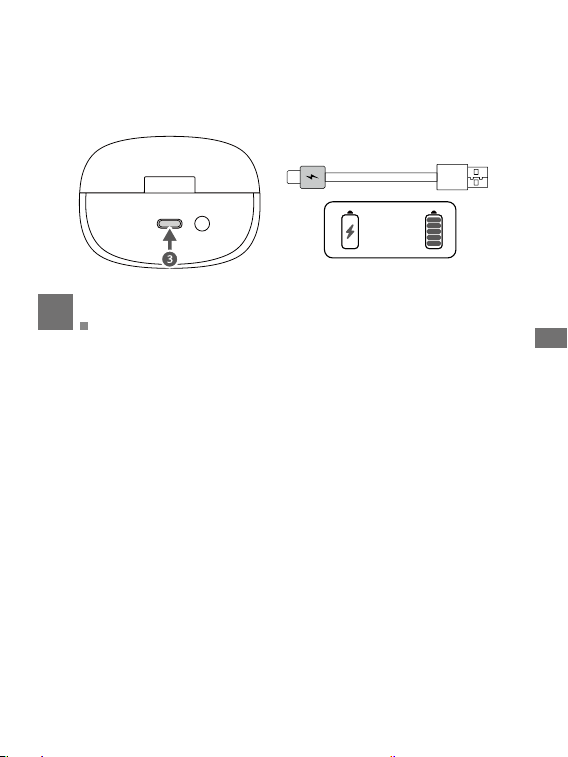
Charging
a. Put both earbuds into charging case and close it.
Charging Time of Earbuds
:
≤1.5H
1.5 Hours
- 9 -
EN
b. Connect the charging case to a power supply using the attached USB-C
charging cable. The indicators will flash while charging and stay on if fully
charged.
c. Charging Time of Charging Case: ≤2H
2 Hours
11
Reset
Place both earbuds in the charging case and press the button on the case for
10 seconds until the red indicator blinks 5s. It will clear the pairing records
between the earbuds and your device. After a few seconds, the earbuds will
enter pairing mode automatically.
Note:
After resetting, make sure to delete the pairing record of any connected
Bluetooth devices so that they can be easily searched for pairing again.
- 10 -
EN
How to Connect Tronsmart App?
1. Turn on Bluetooth setting on your device, search & click 'Tronsmart OpenFly
Clip 2' to connect.
2. Open 'Tronsmart' App & allow to access Bluetooth on your device.
3. Slide to find out 'Tronsmart OpenFly Clip 2' & click to connect.
4. If connected successfully, you could customize Equalizers, lights, etc.
12
Specications
*Specifications may change without prior notice.
Model S1000
Rated Output Power ≤10mW
Input 5V
0.5A
Driver Unit 11mm
Battery Capacity Charging Case: 500mAh Earbuds
:
51mAhx2
Playtime 8H Max with SoundPulse Bass Mode Off
Frequency Range 20Hz–40kHz
Wireless Version 6.0
Frequency Band 2.402GHz-2.480GHz
Maximum Transmission
Power
<10dBm
Transmission Distance Over 10m/33ft (Open Area)
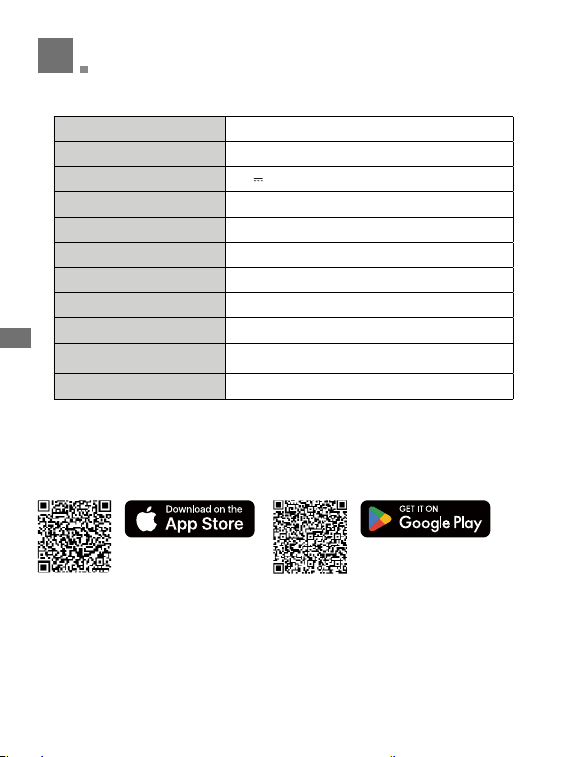
Tronsmart App
Download 'Tronsmart App' via Google Play or App Store.
Apple & the Apple logo are
trademarks of Apple Inc.
Google Play & the Google Play
logo are trademarks of Google
Inc.

- 11 -
EN
Warranty Information
Your ‘Tronsmart OpenFly Clip 2 Open Ear Clip-on Earbuds’, is warranted to
the original owner for 1 year from the date of purchase against defects in
material and workmanship under normal use and service. Tronsmart is not
responsible for the accidental use of this product and its liability will not exceed
the purchase price of the product. If you have any problems while using the
product, please do not hesitate to contact our customer support team at
Care and Maintenance
• If this product is not used for a long period of time, it's recommended to recharge
it at least once a month to extend its life and maintain the normal use.
• Keep the product in a dry location.
• Do not dispose this product in fire as batteries may explode or leak.
• To clean the product, use a lightly dampened cloth in water to clean the exterior
in case it gets dirty.
• Do not disassemble this product. It contains no user serviceable parts.
FCC Statement
This device complies with Part 15 of the FCC Rules. Operation is subject to the
following two conditions:
(1) this device may not cause harmful interference, and (2) this device must
accept any interference received, including interference that may cause
undesired operation.
NOTE: This equipment has been tested and found to comply with the limits
for a Class B digital device, pursuant to part 15 of the FCC Rules. These limits
are designed to provide reasonable protection against harmful interference
in a residential installation. This equipment generates uses and can radiate
radio frequency energy and, if not installed and used in accordance with
the instructions, may cause harmful interference to radio communications.
However, there is no guarantee that interference will not occur in a particular
installation. If this equipment does cause harmful interference to radio or
television reception, which can be determined by turning the equipment off
and on, the user is encouraged to try to correct the interference by one or
more of the following measures:
- Reorient or relocate the receiving antenna.
- Increase the separation between the equipment and receiver.
- Connect the equipment into an outlet on a circuit different from that to which
the receiver is connected.
- Consult the dealer or an experienced radio/TV technician for help.
Changes or modifications not expressly approved by the party responsible for
compliance could void the user's authority to operate the equipment.
RF warning for Portable device
The device has been evaluated to meet general RF exposure requirement. The
device can be used in portable exposure condition without restriction.

Hearing Safety
To avoid hearing damage, do not listen for extended periods at high volume.
Do not turn the volume so high that you're unable to hear your surroundings.
Do not use earphones while driving. You should use caution or temporarily
discontinue use in potentially hazardous situations.
The product generates stronger permanent magnetic fields that could cause
interference with cardiac pacemakers, implanted defibrillators(lCDs), and other
implants. Always maintain a distance of at least 3.94"/10 cm between the product
component containing the magnet (earbuds and charging case)and the cardiac
pacemaker, implanted defibrillator, or other implant.
This symbol means the product must not be discarded as household waste,
and should be delivered to an appropriate collection facility for recycling. Follow
local rules and never dispose of the product and rechargeable batteries with
normal household waste. Correct disposal of old products and rechargeable
batteries helps prevent negative consequences for the environment and human
health.
To preserve natural resources, please recycle or dispose of the battery properly.
Consult your local waste authority for information regarding available recycling
and/or disposal options. When the battery runs out, remove the battery from
the product housing and cover the battery pack connections with heavy-duty
adhesive tape to prevent short circuit and energy discharge. Do not attempt to
open or remove any of the components.
Important Safety Instructions
• Do not disassemble.
• Keep out of the reach of children. The product contains small parts that may
be a choking hazard.
• The battery shall not be exposed to excessive heat such as sunshine, fire, or
the like.
• Do not use the product in environments with too high or too low temperatures,
and never
• expose it to strong sunlight or very wet environments.
• Ensure there is no liquid, sweat or water on the charging port when charging.
• Refer to your user manual for your earphones waterproof level and follow the
corresponding instructions.
• For IPX4: Do not expose headphones to dripping or splashing water.
• For IPX4, IPX5, and lPX6: Do not submerge headphones in water.