QUICK START GUIDE
1
Before You Begin
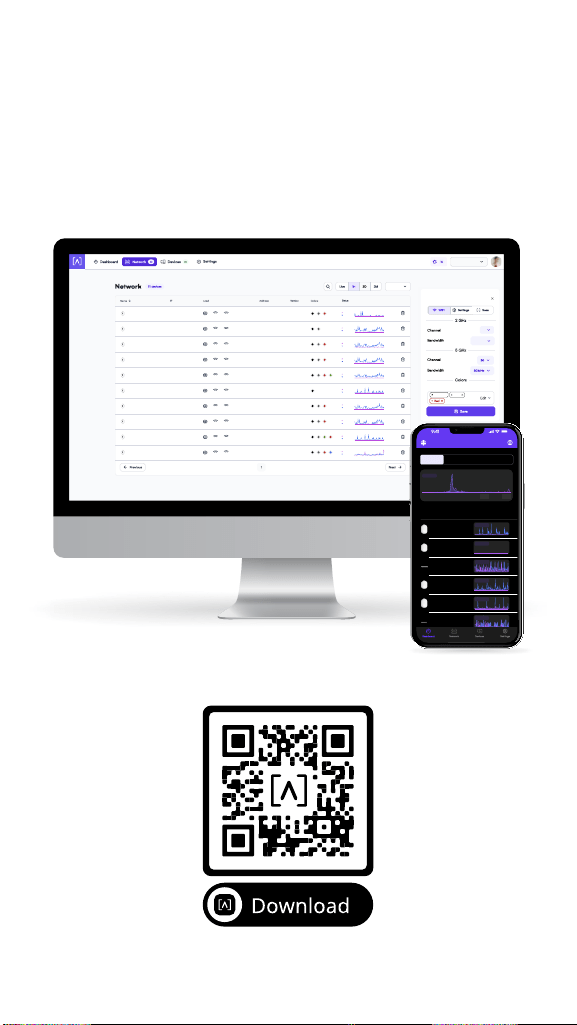
Create your free Alta account to manage
your Alta devices. Visit manage.alta.inc or
download the Alta Networks app from the
Apple App store. (Note: Android app will be
available soon)
50.5 kb/s
1.97 Mb/s
38.1 Mb/s
0 b/s
391 kb/s
119 kb/s
5.74 kb/s
249 kb/s
0 b/s
108 kb/s
7.08 kb/s
290 kb/s
0 b/s
121 kb/s
0 b/s
119 kb/s
500 b/s
704 kb/s
203 kb/s
410 kb/s
936 kb/s
391 kb/s
700 kb/s
540 kb/s
391 kb/s
21.6 Mb/s
6.24 Mb/s
600 b/s
725 kb/s
22.3 Mb/s
1.0
1.0
1.0
1.0
1.0
1.0
1.0
1.0
1.0
1.0
bcb923123426
bcb923774886
bcb923361965
bcb927895241
bcb923218939
bcb923196785
bcb923745432
bcb923828698
bcb92300080c
bcb923800898
44
2
10
165
11
36
5
36
1
36
17
40
11
44
11
149
1
157
36
1
192.168.1.22
192.168.1.17
192.168.1.28
192.168.1.30
192.168.1.34
192.168.1.45
192.168.1.48
192.168.1.61
192.168.1.56
192.168.1.87
AP6-main
AP6-lobby
AP6-pro-shipping
AP6-pro-sales
AP6-floor2
AP6-pro-studio
AP6-breakroom
AP6-floor3
AP6-Opsfloor2
AP6-floor5
Devices
9
5
12
7
4
15
25
12
8
3
Columns
2
Corp Office
AP6-main
20MHz
2
Colors (Groups)
Gray
Black (all)
Corp
Top Active Network Devices
1H
2D 2MLive
Download
Upload
0 B/s
0 B/s
C - Sales Floor
B - Warehouse
C - 8 Port Switch
C - Break Room
B - Closet Switch
C - Support
Show Peak
Show Peak
Show Peak
Show Peak
Show Peak
Show Peak
Show Peak
2
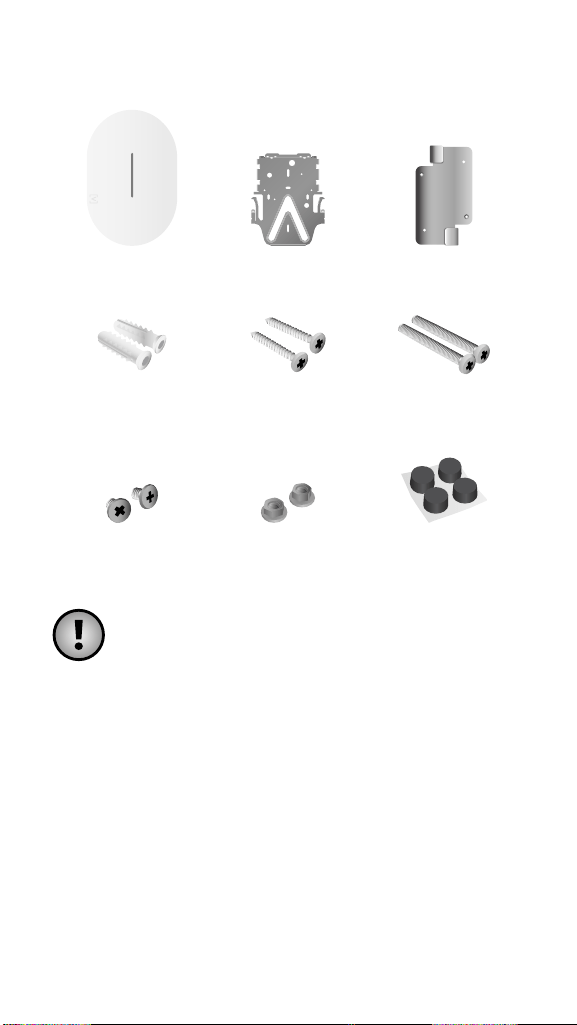
Package Contents
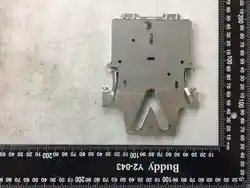
AP7-Pro Mounting Plate Ceiling Mount
Anchors
(Qty. 2)
Wall-Mount
Screws (Qty. 2)
Ceiling Tile
Screws (Qty. 2)
T-Bar Screws Nuts Rubber Feet
Note: Be sure to use the included
mounting hardware for installation.
Installation Requirements
• Ethernet cabling (CAT 6 or above)
• 48V PoE+ switch or PoE injector
• Router
• Phillips screwdriver
• Drill and drill bit for wall or ceiling mounting
3
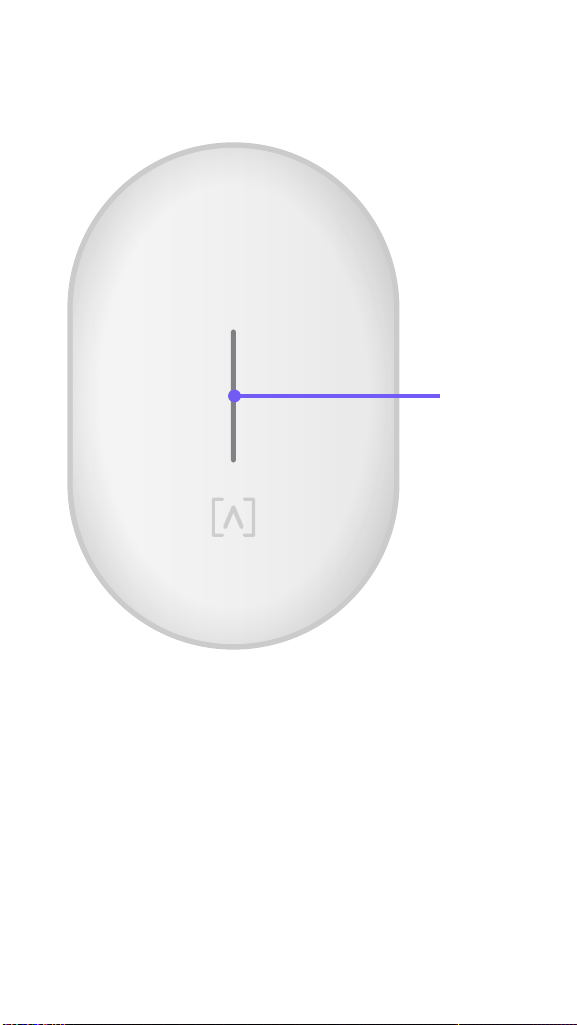
Hardware Overview
Front
LED
LED Illuminates white by default when AP is
online and functional. Can be changed to blue,
white, or off in the Alta app or management
interface. Flashes when booting.
4
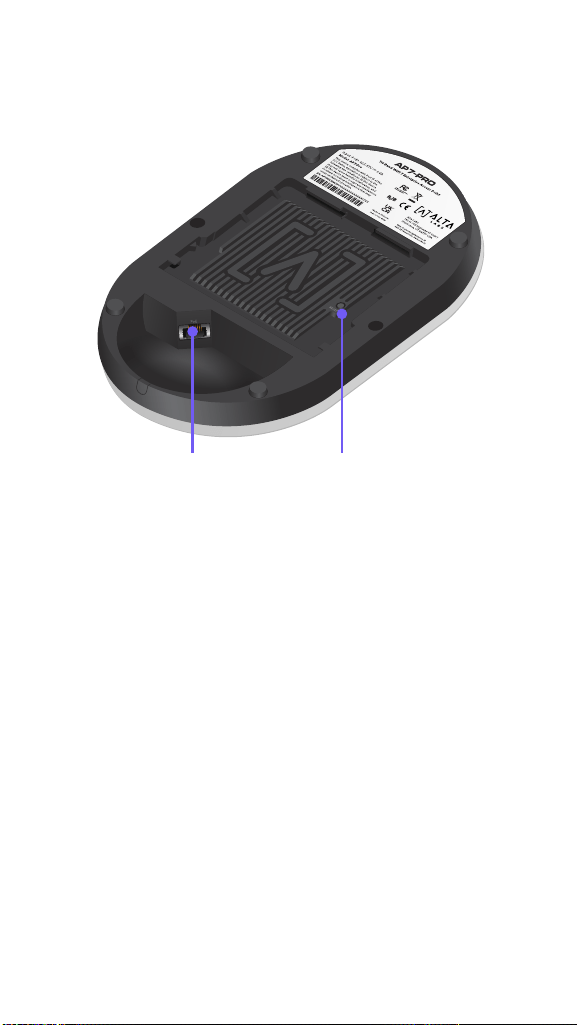
Back
Reset ButtonEthernet Port
Ethernet Port Connects to an Ethernet cable
from your PoE+ Switch. An optional 48V, 0.5A
adapter can be purchased and used to power
the AP.
Reset Button Press down for 10 seconds until
the LED begins flashing to reset the AP to
factory defaults.
5
Hardware Installation
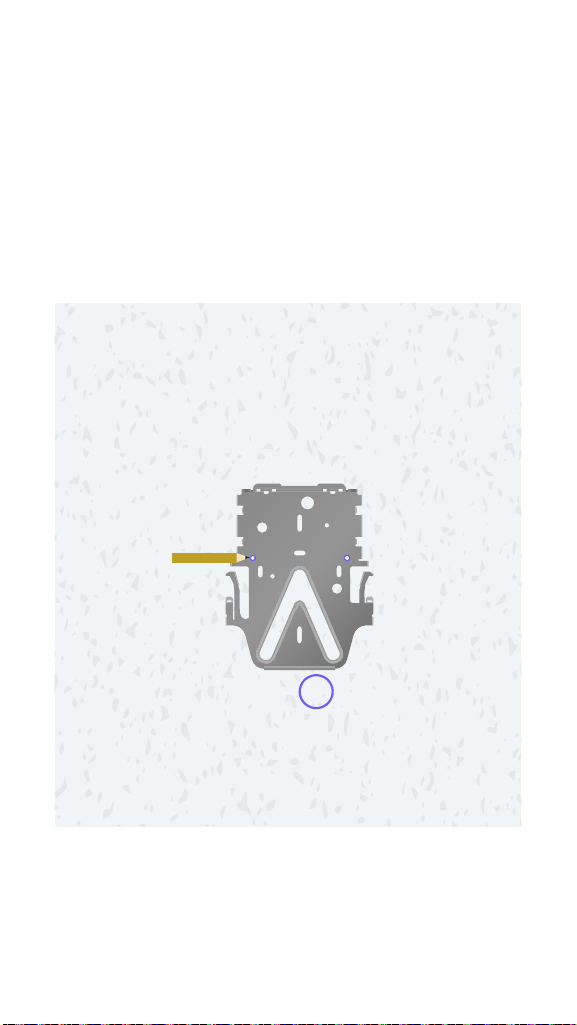
Ceiling Tile Mount
1. Remove the appropriate ceiling tile.
2. Align the Mounting Plate in the desired
location flat on the tile (typically centered).
Mark the areas indicated below for the
screws and the Ethernet cable.
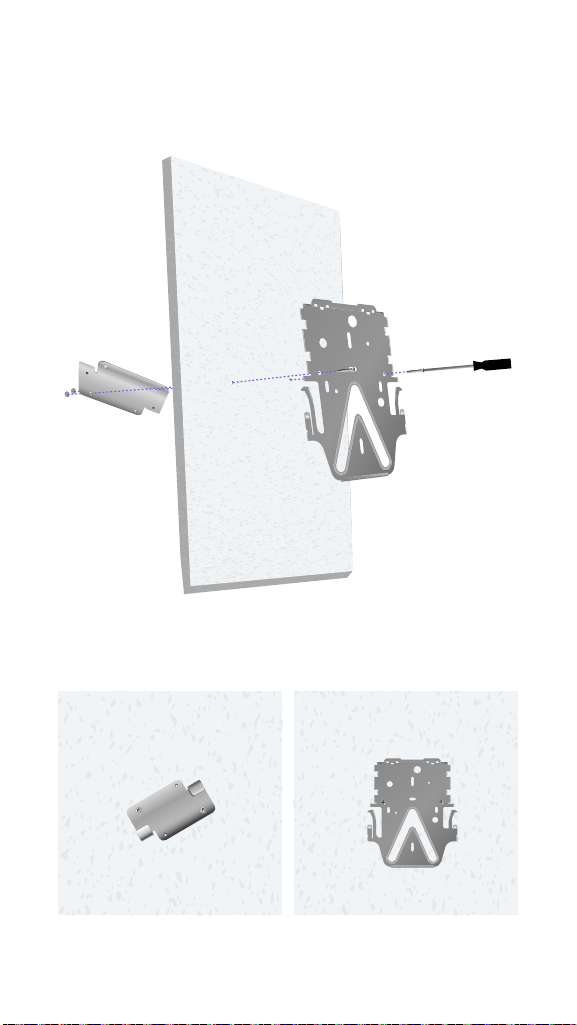
7
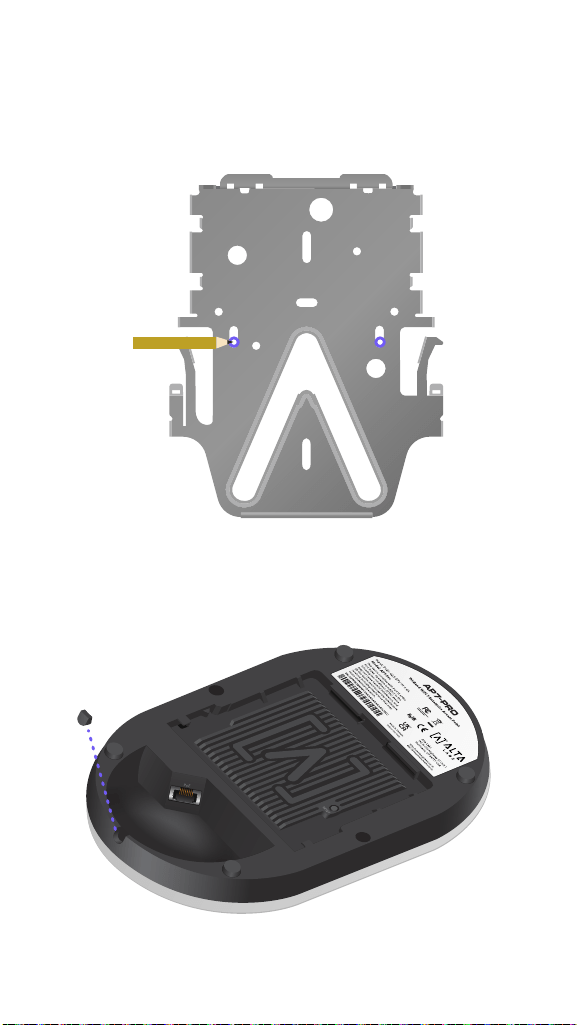
Wall Mount
1. Position the Mounting Plate in the desired
location and use a pencil to mark the holes.
2. If running cabling along the wall, remove the
notch on the AP.
8
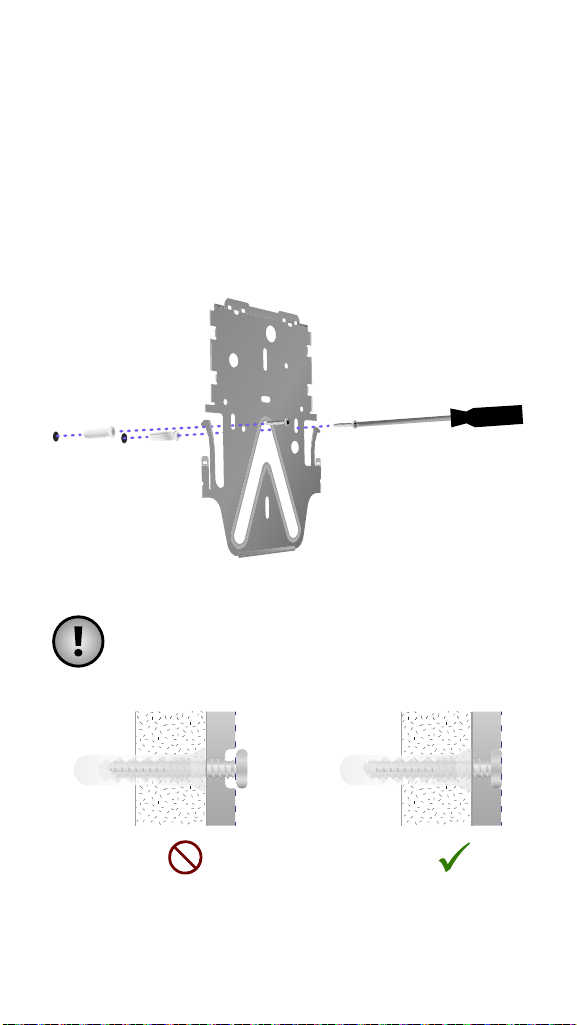
3. Secure the Mounting Plate to the wall
using the Wall-Mount Screws and a Phillips
screwdriver. Be sure to use the screws
included with the product.
If mounting on drywall, use the anchors to
ensure secure mounting. Use a 6 mm drill
bit to drill the holes for the anchors and
insert them in the wall.
Note: Ensure the included Wall-Mount
Screws are flush with Mounting Plate.
Proceed to “Connecting The AP” on page 13
9
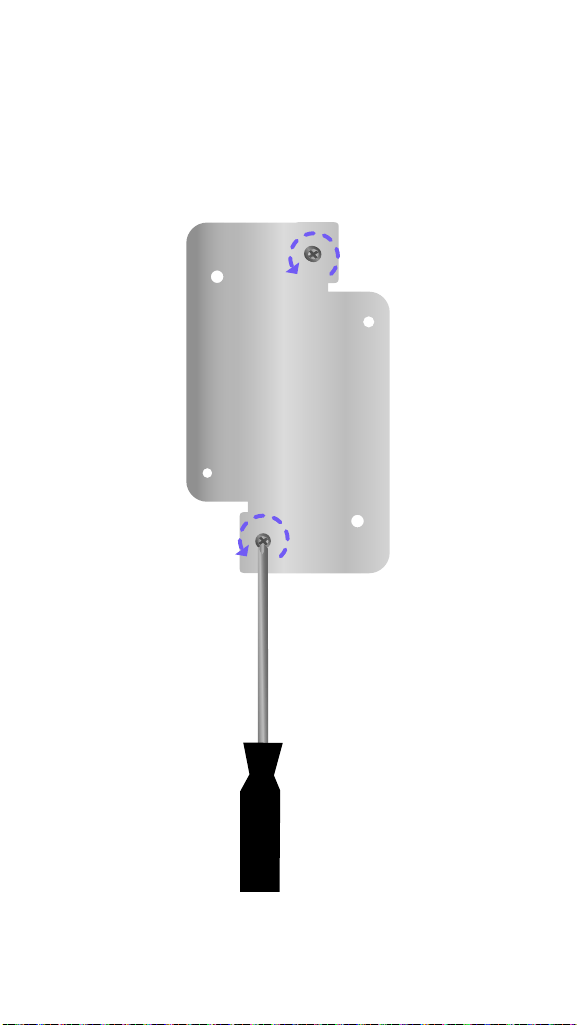
T-Bar Ceiling TIle Mount
1. Use a small Phillips head screwdriver to
loosen the two pre-installed screws on the
Ceiling Mount to allow enough clearance for
the T-Bar.
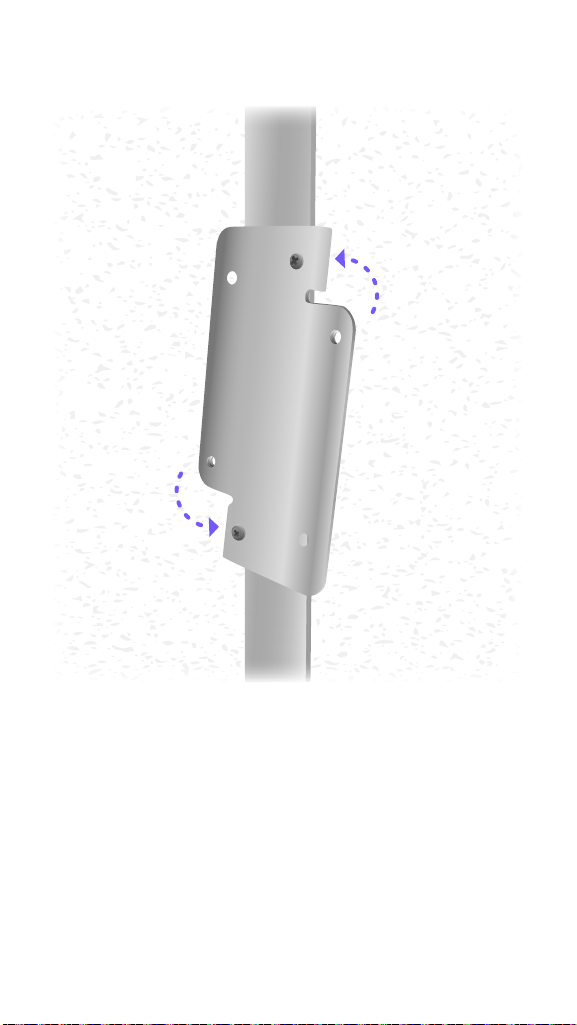
10
2. Rotate the Ceiling Mount around the T-Bar.
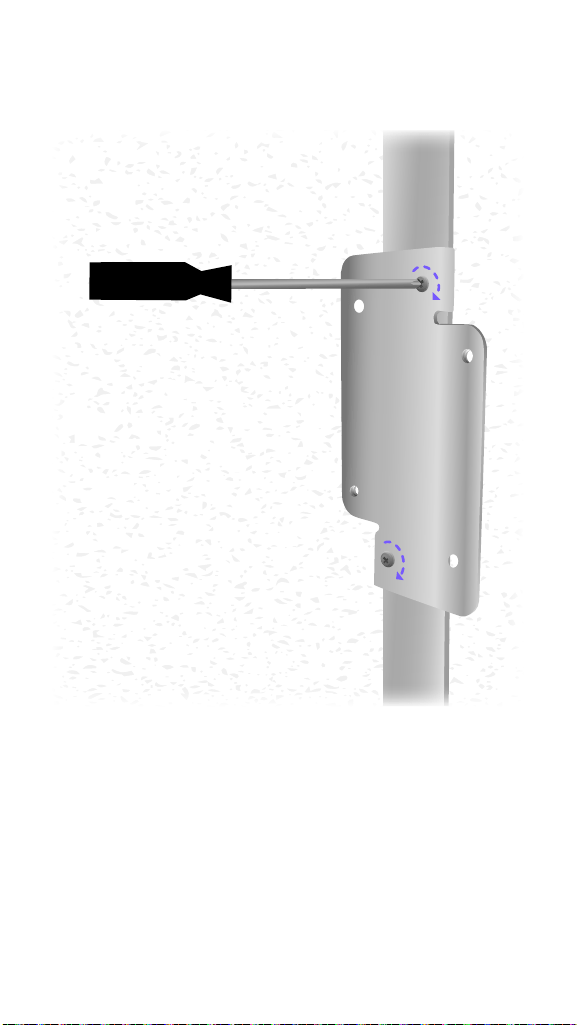
11
3. Tighten both screws using a Phillips
screwdriver.
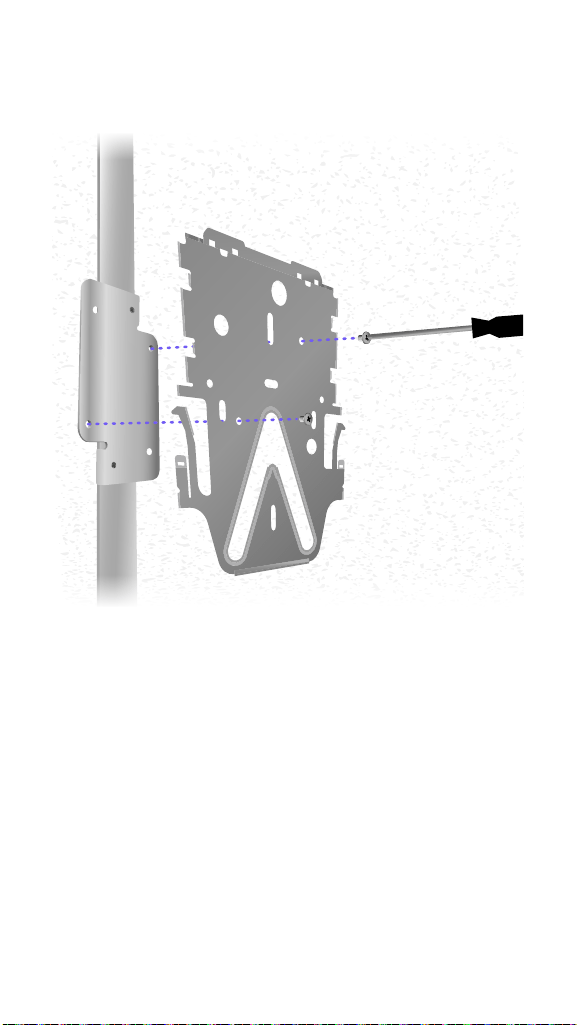
13
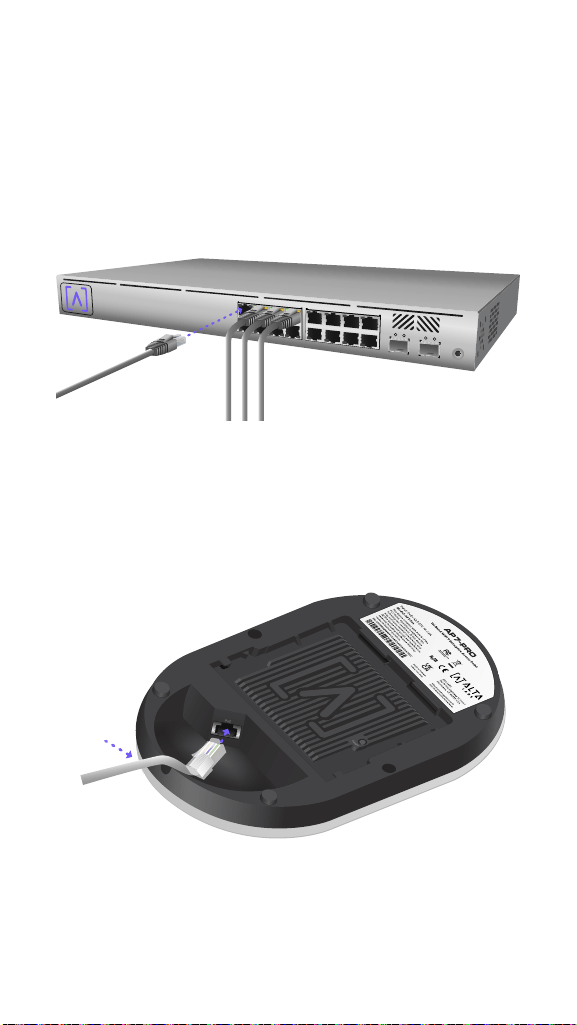
Connecting The AP
The AP is powered over Ethernet, it can be
powered by a PoE+ Switch or using an optional
48V, 0.5A PoE Injector.
1. Connect an Ethernet cable from your PoE+
Switch (or optional PoE Injector).
2. Connect the other end to the Ethernet
Port on the AP. If mounting on the wall,
the Ethernet cable can be fed through the
removable notch area.
14
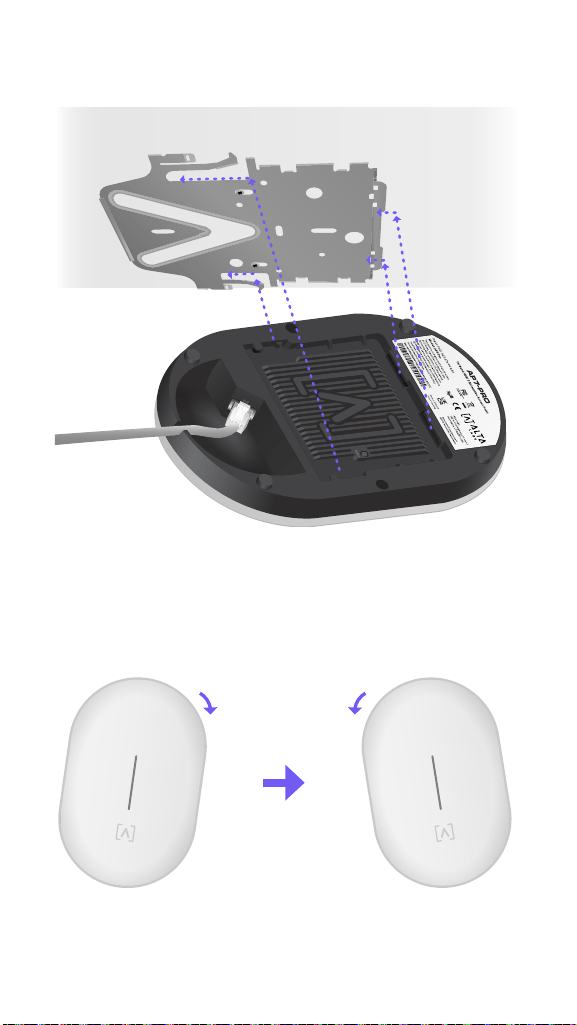
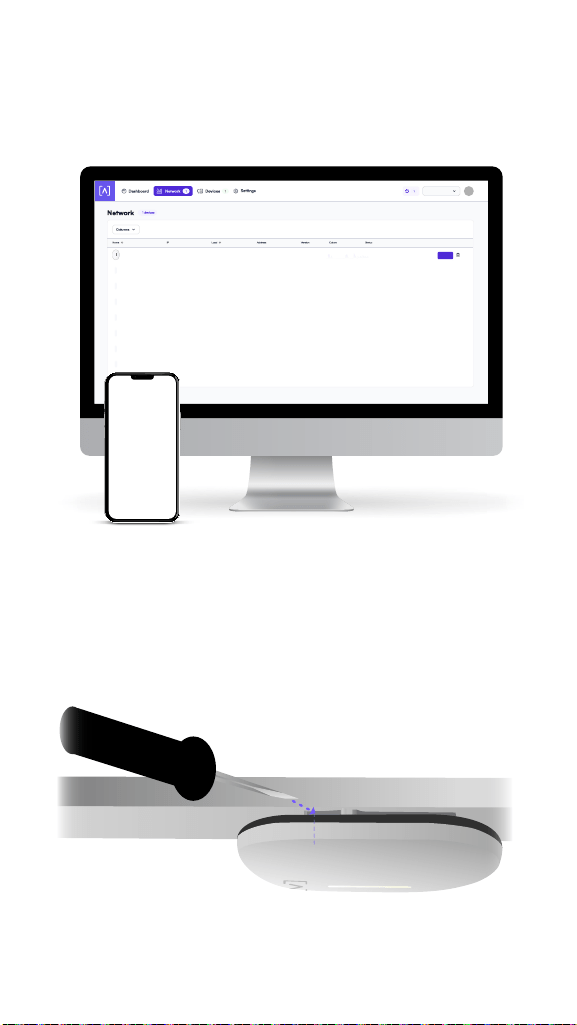
3. Align the AP with the Mounting Plate.
4. Slightly tilt the AP right and then left as you
slide the AP down the Mounting Plate to
lock it into place.
1
1
15
Set Up Your Device
1. Follow the instructions in the Alta app or
management interface to set up your AP.
1.0
bcb923123426
New AP
Home Base
Set Up
Disconnecting the AP
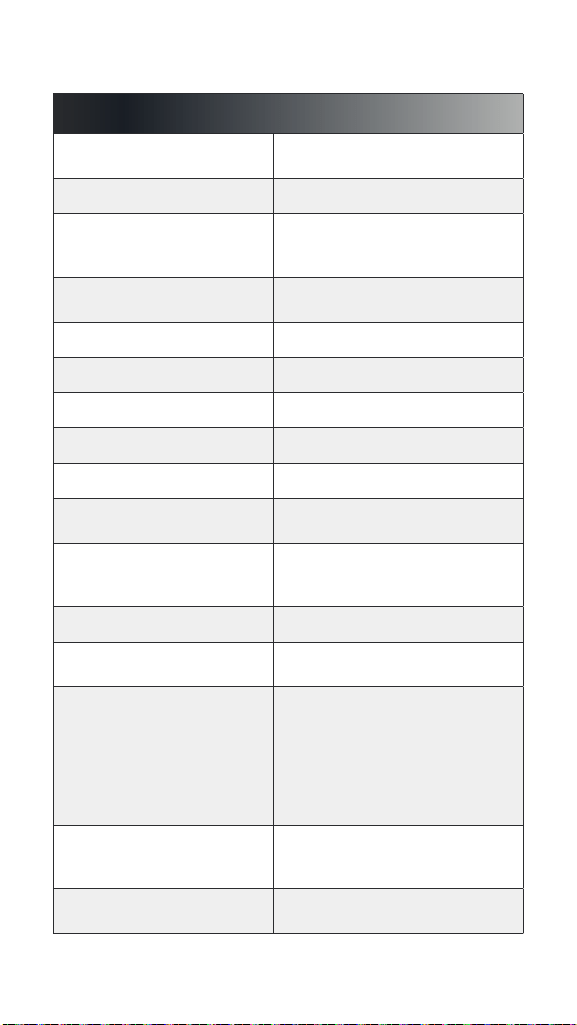
If you need to remove the AP from the mount,
use a flat blade screwdriver to disengage the
Mounting Plate at the logo indicator.
16
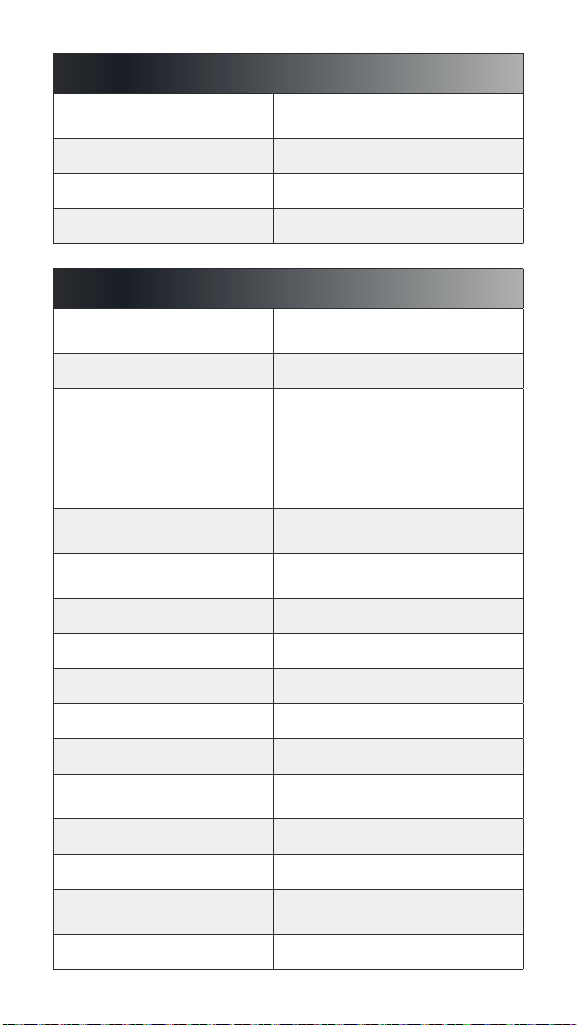
Specifications
Model: AP7-Pro
Dimensions
230 x 151.3 x 36.9 mm
(9.06 x 5.96 x 1.45")
Weight 1.04 kg (2.3 lbs)
Enclosure
Top Cover: Polycarbonate,
Bottom Cover: Milled
Aluminum
Mount Hardware
Ceiling/Wall/Drop Ceiling:
Steel
Weatherproofing None
Network Interface Ethernet, WiFi, Bluetooth
Management Interface (1) 10 Gbps RJ45
Button(s) Reset/Factory Reset
LED Blue, White, Off
Power Method
PoE+ for up to 2.5 Gbps,
PoE++ for up to 10 Gbps
Power Supply
PoE+ or PoE++ Enabled
Network Switch, or 48V, 1.25A
PoE Adapter (Optional)
Supported Voltage Range 42.5-57V DC
Max. Power Consumption
Max: 30 W for POE+, 35 W for
POE++, 12 W Typical
MIMO
6 GHz: 2x2, UL MU-MIMO,
DL MU-OFDMA
5 GHz: 4x4, DL/UL MU-MIMO,
DL/UL MU-OFDMA
2.4 GHz: 2x2, UL MU-MIMO,
DL MU-OFDMA
Explicit TX Beam-Forming
Throughput Rate
2.4 GHz: Up to 649 Mbps,
5 GHz: Up to 8.6 Gbps,
6 GHz: Up to 5.8 Gbps
Antenna Gain
2.4 GHz: 4 dBi, 5 GHz: 5.09 dBi,
6 GHz: 4.5 dBi
17
Model: AP7-Pro
Mounting
Wall, ceiling, drop-ceiling,
table top
Operating Temperature -30 to 50° C (-22 to 122° F)
Operating Humidity 5 to 95% Noncondensing
Certifications CE, UK, FCC, IC
Software
WiFi Standards
802.11a/b/g/n/ac/ax/be
(WiFi 4/WiFi 5/WiFi 6/WiFi 7)
Roaming 802.11r/k/v
Wireless Security
2.4 GHz, 5 GHz: WPA2-
Personal (PSK), WPA3-
Personal (SAE), WPA-
Enterprise (WPA2/WPA3)
6 GHZ: WPA3 - Personal (SAE),
WPA3-Enterprise (192 bit)
SSID
48 (16 per Radio), Unlimited
per Site
Ability to Limit Clients per
SSID
Yes
VLAN 802.1Q
Advanced QoS 802.11e
Guest Traffic Isolation Supported
Max Concurrent User 500+
Zero Wait DFS Yes
Intelligent WiFi
Scheduling
Yes
Hotspot Functionality Yes
Scalable Yes
Seamless Per Client
Settings
VLAN, Device Type, Rate Limit,
Hotspot/Schedule Exception
AltaPass Yes*
18
Software
DPI Yes
Content Filtering Yes
Customizable Dashboard Yes
Status Snapshots Yes
* Password-based assignment is not supported currently in 6 GHz due to industry
standard limitations; however per-MAC assignment is supported in 6 GHz.
Max Physical Transmit Power
Max. Transmit Power
2.4 / 5 GHz: 30 dBm EIRP,
6 GHz: 25 dBm EIRP
The frequency and the maximum transmitted power in EU/
UK are listed below:
ETSI/CE Transmit Power Limits
Channel Frequency (MHz) Max. RF Output Power
2412 - 2472 20 dBm (EIRP)
2402 - 2480 (Bluetooth) 7.40 dBm (EIRP)
5180 - 5240 23 dBm (EIRP)
5260 - 5320 23 dBm (EIRP)
5500 - 5700 30 dBm (EIRP)
5955 - 6415 23 dBm (EIRP)
For CE/UK, the device is restricted to indoor use only when
operating in the 5150-5350 MHz, 5945-6425 MHz frequency
range.

19
Compliance
Federal Communication Commission
Interference Statement
This equipment has been tested and found to comply
with the limits for a Class B digital device, pursuant to Part
15 of the FCC Rules. These limits are designed to provide
reasonable protection against harmful interference in a
residential installation. This equipment generates, uses
and can radiate radio frequency energy and, if not installed
and used in accordance with the instructions, may cause
harmful interference to radio communications.
However, there is no guarantee that interference will not
occur in a particular installation. If this equipment does
cause harmful interference to radio or television reception,
which can be determined by turning the equipment off and
on, the user is encouraged to try to correct the interference
by one of the following measures:
• Reorient or relocate the receiving antenna.
• Increase the separation between the equipment and
receiver.
• Connect the equipment into an outlet on a circuit
different from that to which the receiver is connected.
• Consult the dealer or an experienced radio/TV technician
for help.
The operation of this device is prohibited on oil platforms,
cars, trains, boats, and aircraft, except that operation of this
device is permitted in large aircraft while flying above 10,000
feet in the 5.925-6.425 GHz band.
Operation of transmitters in the 5.925-7.125 GHz band
is prohibited for control of or communications with
unmanned aircraft systems.
FCC Caution
This device complies with Part 15 of the FCC Rules.
Operation is subject to the following two conditions:
(1) This device may not cause harmful interference, and
(2) This device must accept any interference received,
including interference that may cause undesired
operation.
This device is restricted to indoor use.
Non-Modification Statement
Changes or modifications not expressly approved by the
party responsible for compliance could void the user’s
authority to operate the equipment.

20
FCC Radiation Statement
This equipment complies with FCC radiation exposure limits
set forth for an uncontrolled environment. This equipment
should be installed and operated with minimum distance
29 cm between the radiator and your body.
CAN ICES-003(B) / NMB-003(B)
This device contains licence-exempt transmitter(s)/
receiver(s) that comply with Innovation, Science and
Economic Development Canada’s licence-exempt RSS(s).
Operation is subject to the following two conditions:
(1) This device may not cause interference.
(2) This device must accept any interference, including
interference that may cause undesired operation of the
device.
L’émetteur/récepteur exempt de licence contenu dans
le présent appareil est conforme aux CNR d’Innovation,
Sciences et Développement économique Canada
applicables aux appareils radio exempts de licence.
L’exploitation est autorisée aux deux conditions suivantes :
(1) L’appareil ne doit pas produire de brouillage;
(2) L’appareil doit accepter tout brouillage radioélectrique
subi, même si le brouillage est susceptible d’en
compromettre le fonctionnement.
The device for operation in the band 5150-5250 MHz is
only for indoor use to reduce the potential for harmful
interference to co-channel mobile satellite systems.
Les dispositifs fonctionnant dans la bande 5150-5250 MHz
sont réservés uniquement pour une utilisation à l’intérieur
afin de réduire les risques de brouillage préjudiciable aux
systèmes de satellites mobiles utilisant les mêmes canaux.
ISED Radiation Exposure Statement:
This equipment complies with IC RSS-102 radiation
exposure limits set forth for an uncontrolled environment.
This equipment should be installed and operated with
minimum distance 29 cm between the radiator & your body.
Cet équipement est conforme aux limites d’exposition aux
rayonnements IC établies pour un environnement non
contrôlé. Cet équipement doit être installé et utilisé avec
un minimum de 29 cm de distance entre la source de
rayonnement et votre corps.
The transmitter module may not be co-located with any
other transmitter or antenna.

21
Le module émetteur peut ne pas être coïmplanté avec un
autre émetteur ou antenne.
The Country Code Selection feature is disabled for products
marketed in the US/Canada.
For product available in the USA/Canada market, only
channel 1~11 can be operated. Selection of other channels is
not possible.
Pour les produits disponibles aux États-Unis / Canada du
marché, seul le canal 1 à 11 peuvent être exploités. Sélection
d’autres canaux n’est pas possible.
Devices shall not be used for control of or communications
with unmanned aircraft systems.
Les appareils ne doivent pas être utilisés pour contrôler ou
communiquer avec des systèmes d’aéronefs sans pilote.
Devices shall not be used on oil platforms.
Les appareils ne doivent pas être utilisés sur les plates-
formes pétrolières.
Devices shall not be used on aircraft, except for the low-
power indoor access points, indoor subordinate devices,
low-power client devices, and very low-power devices
operating in the 5925-6425 MHz band, that may be used
on large aircraft as defined in the Canadian Aviation
Regulations, while flying above 3,048 metres (10,000 feet).
Les appareils ne doivent pas être utilisés sur les avions, à
l’exception des points d’accès intérieure à faible puissance,
des dispositifs subordonnés intérieurs, des dispositifs
clients de faible puissance et des dispositifs de très faible
puissance fonctionnant dans la bande 5925-6425 MHz, qui
peut être utilisée sur de grands avions tel que défini dans
la réglementation de l’aviation canadienne, tout en volant
au-dessus de 3 048 mètres (10 000 pieds).
Devices shall not be used on automobiles.
Les appareils ne doivent pas être utilisés sur les automobiles.
Devices shall not be used on trains.
Les appareils ne doivent pas être utilisés dans les trains.
Devices shall not be used on maritime vessels.
Les appareils ne doivent pas être utilisés sur les navires
maritimes.
Operation shall be limited to indoor use only.
Le fonctionnement doit être limité à une utilisation en
intérieur uniquement.
22
CE Marking
The CE marking on this product represents the product is in
compliance with all directives that are applicable to it.
This equipment complies with EU/UK radiation exposure
limits set forth for an uncontrolled environment. This
equipment should be installed and operated with minimum
distance 29 cm between the radiator & your body.
Country List
AT BE BG CY CZ DE DK EE EL
UK(NI)ES FI FR HR HU IE IT LV LT
LU MT NL PL PT RO SE SI SK
EU/UK Declaration of Conformity
Hereby, Alta Labs, declares that this device conforms with
the essential requirements and provisions of Directives
2014/53/EU, 2014/30/EU and 2014/35/EU. To see the full EU
declaration Conformity information, please see
www.alta.inc/regulatory
Hereby, Alta Networks, LLC declares that the radio
equipment type AP7-Pro is in compliance with Radio
Equipment Regulations 2017. The full text of the UK
declaration of conformity is available at the following
internet address: www.alta.inc/regulatory