
Bind Device
01
Device Connection Device networking Function Introduction Equipment Specifications Product Precautions
warning
02 03
QMox
Volume buttons
Power button
on/off
Speaker hole
Ai button
microphone
touchscreen
Photo button
Back button
Device binding requires downloading the APP. Follow the steps
below to bind the device:
Device WIFI connection method:
Download the APP:
Scan the QR code below to search
“QMox” in the application market
to download the APP.
01
Log in to the APP:
Register and log in to the account.
02
Turn on the device:
Press and hold the power-on button for
3 seconds to turn on the device, and then
enter the binding QR code interface.
03
Scan the device QR code:
The device will display a "Bind
Device" QR code. Use the "QMox"
APP to scan and connect to the
device.
04
User Guide
Fill light
Camera
TF card
TF
Reset button
Charging port
QMox
Let AI Connect with Life
Sign in
Create account
04 05
Please read the following precautions carefully when using
the device.
Before using this product, please read and follow the precautions below to ensure
optimal device performance, avoid unnecessary losses, and prevent problems
before they occur:
Environmental Information
Security Information
Equipment size/function
The device is not sold with a power adapter. Please use a CCC-certified USB power adapter for
charging. The adapter specifications are as follows:
Input: AC 100-240V 50/60Hz 0.2A; Output: DC 5V 2A.
Unauthorized modifications to this equipment (such as replacing the lens/battery/
motherboard/disassembling the camera body, etc.) are strictly prohibited.
The device requires a 5V/2A charger. The charging port indicator light will illuminate
green during charging and will turn off when charging is complete. Please fully
charge the device upon receipt before use.
When using the device, please enable the app's auto-start and message notifications
on your phone to avoid missing notifications in case of abnormal situations.
This device only supports the 2.4 GHz band when connecting to Wi-Fi; it does not
upport the 5 GHz band.
1. This product contains small parts. Do not allow children under three years old to use
it alone; adult supervision is required.
2. Please regularly check the casing or other parts for damage. If any damage is found,
stop using the product until it is repaired.
3. Given that this product may require children to maintain a high level of concentration
and attention during use, please use this product in a safe and appropriate place, and
avoid using this product in places or scenarios where there may be safety hazards
(such as parking lots, riding escalators, crossing the road).
4. The image recognition and content generation services of this product
are based on artificial intelligence models and may contain errors or omissions. The
accuracy, completeness, and functionality of the service content cannot be guaranteed,
and the service content does not represent the views or positions of our company. Users
are advised to use the service content for reference only and not as a direct basis or
guidance for subsequent actions (such as food, use, hazard assessment, operating
procedures, etc.). We are not liable for any losses caused thereby.nly supports the 2.4 GHz
band when connecting to Wi-Fi; it does not upport the 5 GHz band.
1. Click the "Wireless Network" option, then select the desired Wi-Fi network
and enter your username and password to connect.
Wi-Fi
Dangqian
Dwaef
Current Network
Other Network
The device can only connect to the 2.4GHz
band and does not support the 5GHz band.
1. After clicking the " " button to enter the camera interface, click the "Shoot"
button. After taking the picture, click the "AI" button to explore.
AI Explores Everything
01
1. This device is equipped with intelligent AI dialogue functionality. Users can
trigger the device's AI chat function through the "AI Chat " on the homepage
or by long-pressing the AI button on any interface.
1. Click the "Workshop Menu" on the homepage and select the style you want
to create.
AI Dialogue
02
Raw image creation
03
1 2
2. Once you enter the AI learning dialogue interface, the device will automatically
generate standard Chinese and English. Click the AI button to enter the "Chat
with it" option, and then click the answer option to have a conversation
with the AI.
1 2
butterfly
Question 1
Question 2
What's this Let's talk about it Magic Creation What's this Let's talk about it Magic Creation
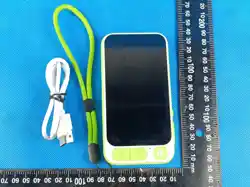
7cm
13cm
Component
Name
Printed Circuit
Board
Housing
components
Battery
Accessories
Harmful substances or elements
(Pb) (Hg) (Cd) (Cr(VI)) (PBB) (PBDE)
Please use this product in an environment between 0 and 35°C. Excessively high or low ambient
temperatures may affect product functionality or even cause malfunctions. Battery performance
will be limited below 5°C. Do not place the device in environments with high temperatures, low
temperatures, high humidity, or strong electromagnetic fields.
This product is equipped with a non-removable built-in battery; do not disassemble or modify the
battery, and do not drop, pull, or bend this product to avoid small parts falling off and causing
suffocation or other dangers.
Please store and use the equipment and accessories properly, and avoid moisture, deformation,
baking or damage to prevent affecting normal use.
If this product or its accessories are subjected to impact, drop, bending, liquid ingress, or foreign
object entry, or if the product or its accessories are damaged, swollen, abnormally hot, smoked,
burned, or have an unusual odor, please turn off the power and stop using the product.
Aircraft Safety: Please turn off this device before boarding, as it interferes with aircraft operation
and the entire cellular network. Using this device on an aircraft is illegal, and violating these safety
regulations may result in prosecution or a denial-of-service (DoS) network issue.
Environmental safety: Remember to comply with all applicable rules and regulations in all places.
Always turn off your mobile communication devices in areas where their use is prohibited or where
they may cause interference or danger.
Creation Generation
AI Chat
mapCamera
Workshop Creation
Give it a try
LEGO Miniature Style
Pixar movie style
Low-poly style
Ghibli hand-drawn style
return
←
LEGO Miniature Style
gurgle
Press and hold to speak
Click “Ai” to begin exploration.
Start creating
Give it a try Give it a try Give it a try
AI Camera

FCC Information and Copyright
This equipment has been tested and found to comply with the limits for a Class B
digital device,
pursuant to part 15 of the FCC Rules.
These limits are designed to provide reasonable protection against harmful
interference in a residential installation. This equipment generates, uses and can
radiate radio frequency energy and, if not installed and used in accordance with the
instructions, may cause harmful interference to radio communications. However,
there is no guarantee that interference will not occur in a particular installation. If this
equipment does cause harmful interference to radio or television reception, which can
be determined by turning the equipment off and on, the user is encouraged to try to
correct the interference by one or more of the following measures:
—Reorient or relocate the receiving antenna.
—Increase the separation between the equipment and receiver.
—Connect the equipment into an outlet on a circuit different from that to which the
receiver is connected.
—Consult the dealer or an experienced radio/TV technician for help.
15.19 Labelling requirements.
This device complies with part 15 of the FCC Rules. Operation is subject to the
following two conditions:
(1)This device may not cause harmful interference, and
(2) this device must accept any interference received, including interference that may
cause undesired operation.
changes or modifications not expressly approved by the party responsible for
compliance could void the user's authority to operate the equipment.
FCC RF warning statement: the device has been evaluated to meet general RF
exposure requirement , The device can be used in portable exposure condition without
restriction.