G6190使用说明书 正反印刷 100x175mm
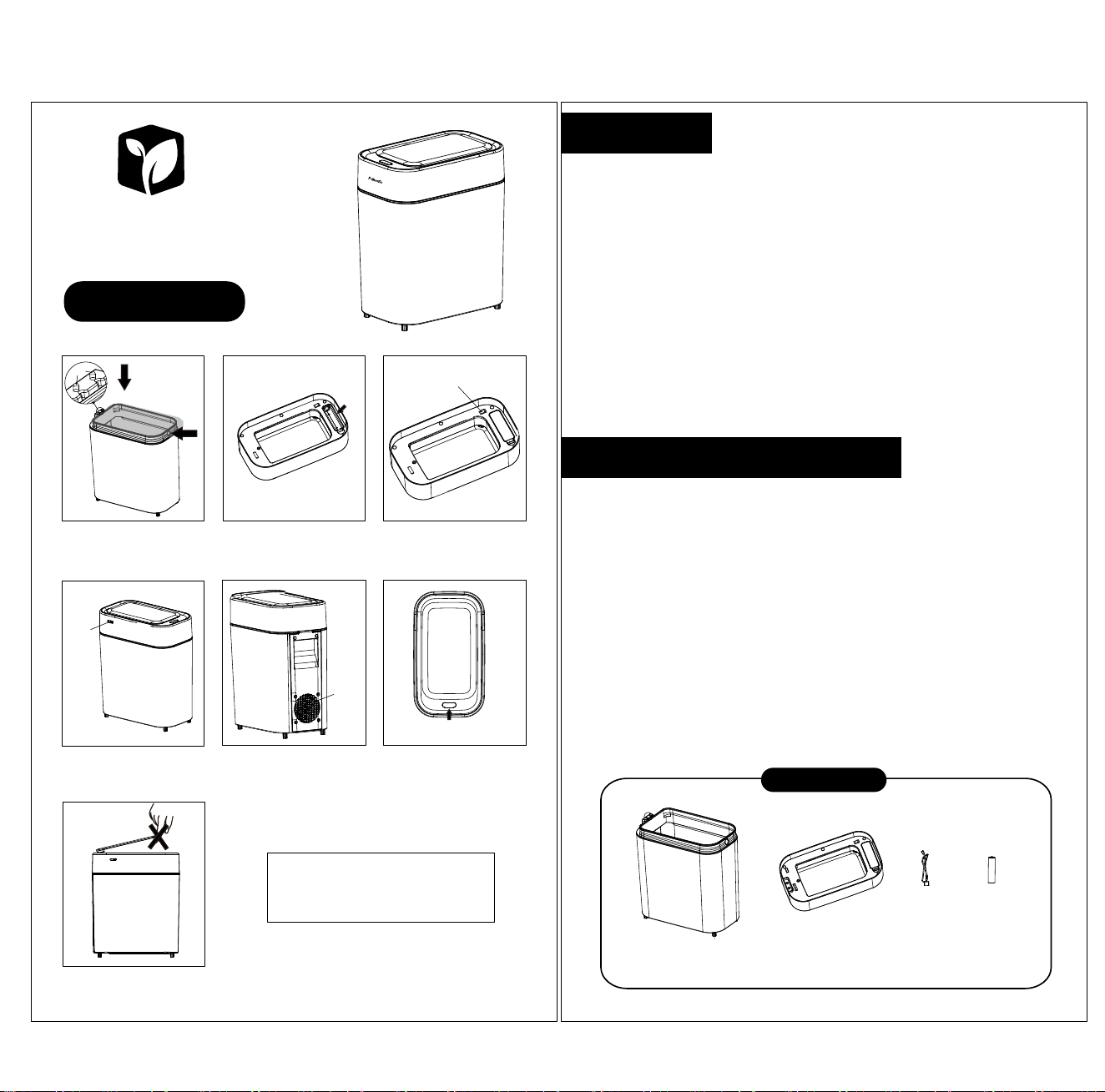
Automatic Adsorption
Touchless Garbage Can
Instructions
1.Cover the bucket with a garbage bag
(to avoid covering the rear sensing point)
and tighten it, then insert the excess
garbage bag into the hole.
4.Every time the lid is placed into the barrel,
the suction fan will automatically work once.
If the lid open difficultly, plug in TYPE-
[for charging.
7.Do not manually close the cover to avoid
damaging the motor.
5.When the exhaust fan is working, don't
cover the exhaust port. (The lid cannot be
placed back and forth, otherwise it will not
work)
6.Place your hand 20 centimeters above the
sensing area, the green light will turn on,
and the lid open. After 5 seconds, the lid
closes and the green light goes out. (Please
don't block the sensing area with other
objects)
When charging, the green light will flash.
If fully charged,the green light will remain
on constantly. After unplugging the
charging cable, the green light will go off.
2.Install 18650 lithium batteries into the
battery compartment
3.Close the battery cover, turn on the
power switch
1. Please pay attention to the positive and negative poles when installing the battery.
2. Fully charge the lithium battery before use Frist time.
3. The sensing height of this product's sensing area is 25-35 centimeters.Please do not place
product in a shaded area within 35 centimeters above the sensing area, or place other items on
the sensing area.
4. After using for a period of time, if it can not be opened or opening is weak or unresponsive,
please charge it in a timely manner.
5. The charging time is about 6 hours.
6. After the battery is fully charged, please unplug the charging wire in a timely manner.
7. Please do not rinse the lid with clean water, as there are precision components inside that
are easily damaged by the water. If water enters, please do not power on and stop using. Dry in
a well ventilated area before use.
8. When opening the lid, avoid using external force to forcefully press or quickly flip the lid to
avoid damaging the accessories.
9. When the battery is depleted, please charge it as soon as possible to avoid battery capacity
degradation.
10. Keep the sensing window clean to avoid affecting its function during sensing.
11. Please do not disassemble, repair or replace parts with other accessories without authorization.
1. Incorrect operation: Reverse the positive and negative terminals of the battery, or manually
force the lid to close. Turn off the power for 10 seconds and then turn it back on to restore power.
2. Power supply issue: Failure to charge results in damage to the charging circuit board, commonly
caused by the charging head being damaged due to a voltage greater than 5V.
Abnormal lid opening:
Product Accessories
1. Short usage time: The battery is not fully charged or the lithium battery has decreased and
needs to be replaced.
2. Unable to charge: Using a charging head with a voltage exceeding 5V resulted in damage to the
circuit board, damage to the adult lithium battery, and failure to turn on the adult power switch.
Charging issue:
1. The sensing area is obstructed.
2. The motor is stuck due to foreign objects.
3. The battery is depleted.
4. Strong light interferes with the precision components in the sensing area.
5. The sensing window is contaminated with dirt.
Bucket body
combination
Upper cover
assembly
Charging
line
Lithium
battery
Abnormal lid closure:
Sensing
point
Battery
case
Charging
port
exhaust
outlet
Sensing
Area
Power
switch
Charging Version
ATTENTIONS
COMMON TROUBLESHOOTING