USER MANUAL
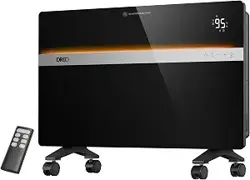
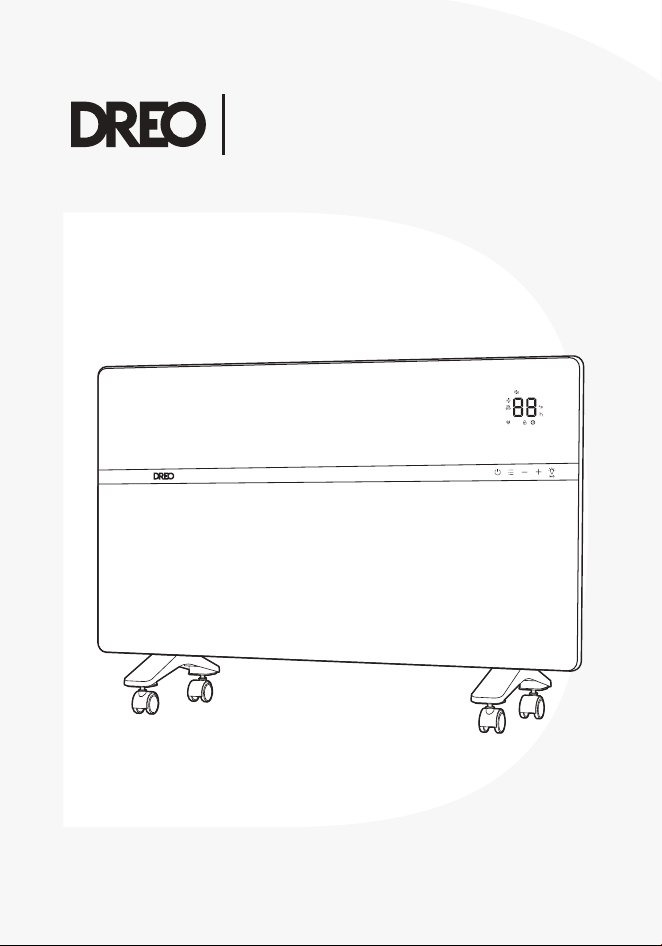
Convection Heater
711

Your support means the world to us.
We hope you enjoy our product as much as
we did creating it.
,,
Thanks for
Choosing
DREO!

CONTENTS
04
0201
03
7-8
21
3-6
CLEANING AND
MAINTENANCE
KNOWING YOUR
APPLIANCE
ASSEMBLING YOUR
APPLIANCE
USING YOUR APPLIANCE
05
9-10
TROUBLESHOOTING
1
01
ASSEMBLING YOUR
APPLIANCE
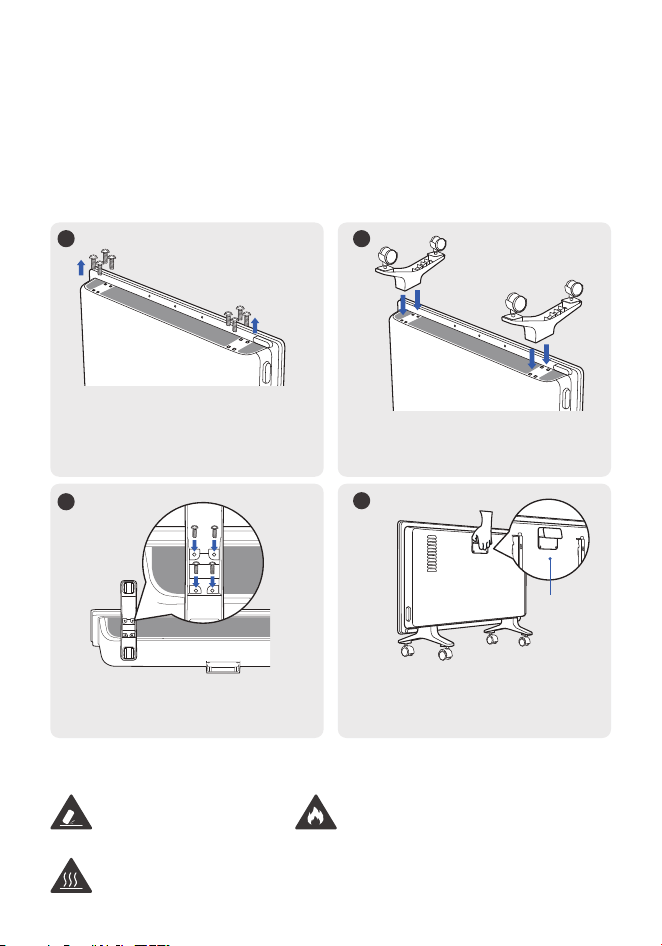
Assembly Instructions
WARNING
Only use the screws provided with the product for installation.
When using the appliance for the first time, remove the wraps and aach
the parts by following the steps below.
Tip-over hazard
Do not operate without
the caster wheels
properly installed.
Burn hazard
Unplug and allow the heater to cool before
using the handle to move the heater.
Fire hazard
Operate the heater in the upright
position only. Any other position can
cause damage to this heater and even
a fire hazard.
2
Align the caster wheels with
the holes on the base.
4
Set the heater upright. Use the
handle to move to the desired
location.
Handle
1
Place the heater upside down
and remove the eight
pre-installed screws from the
boom.
3
Screw through the holes in the
caster wheels.
2
02
KNOWING YOUR
APPLIANCE
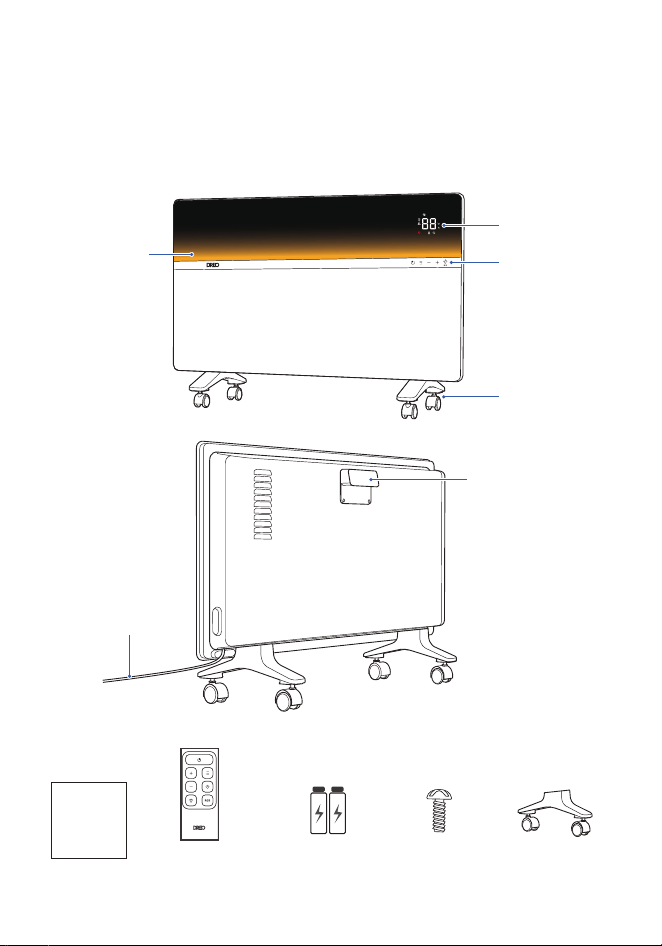
Package Contents
Control Panel
Remote Control
2 x AAA Baeries
User
Guide
LED Display
Ambient
Temperature
Indicator
Caster Wheels
Handle
Power & Plug
8 x Screws
(Pre-installed)
2 x Caster Wheels
Note:
When the heater is plugged into the electric outlet,
will light in red.
3
03
USING YOUR APPLIANCE
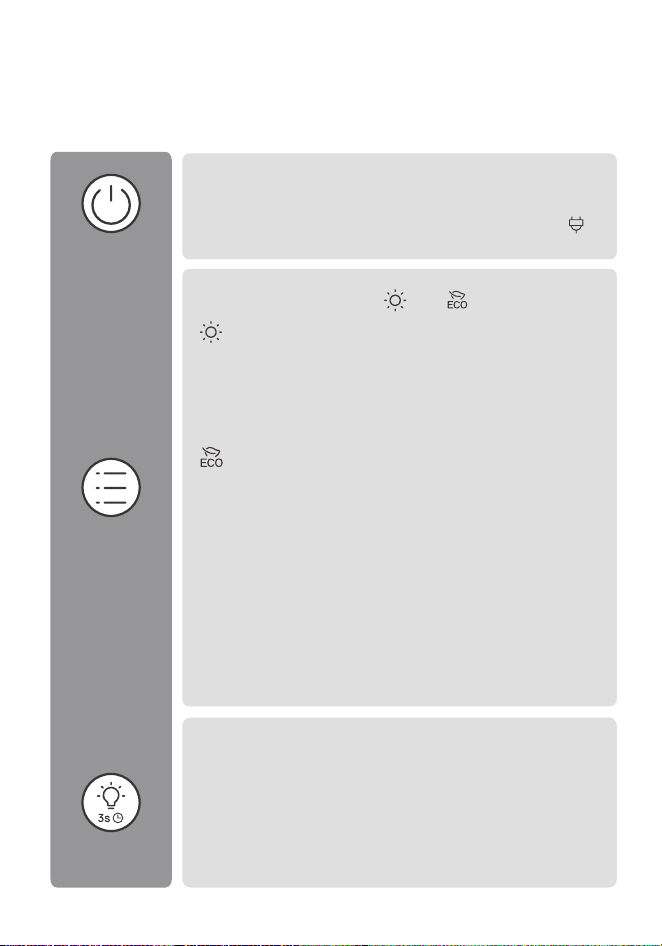
Control Panel
Power On/O
- Touch to turn the heater on or o.
Mode
Touch to switch between and .
Three heating levels: H1 (900W), H2 (1100W), H3 (1500W).
The display will show H1, H2 or H3 accordingly:
H1 - Low heat mode
H2 - Medium heat mode
H3 - High heat mode
The heater will automatically select its optimal heating
power, depending on the dierence between the set
temperature (41-95°F) and ambient temperature.
Note:
- When the ambient temperature drops below the set
temperature, the heater will adjust the power
depending on the dierence between the two
temperatures.
- When the ambient temperature reaches the set
temperature, the heater will turn o automatically.
- If your heater turns o frequently, please raise the set
temperature or switch to Power Heat mode.
Ambient Temperature Indicator
- Touch to turn the ambient temperature indicator on/o.
- When the heater is on, long press for 3 seconds to set the
timer (0-24h). After the timer ends, the heater will turn o
automatically.
- When the heater is o, long press for 3 seconds to set the
timer (0-24h). After the timer ends, the heater will turn on
automatically.
4
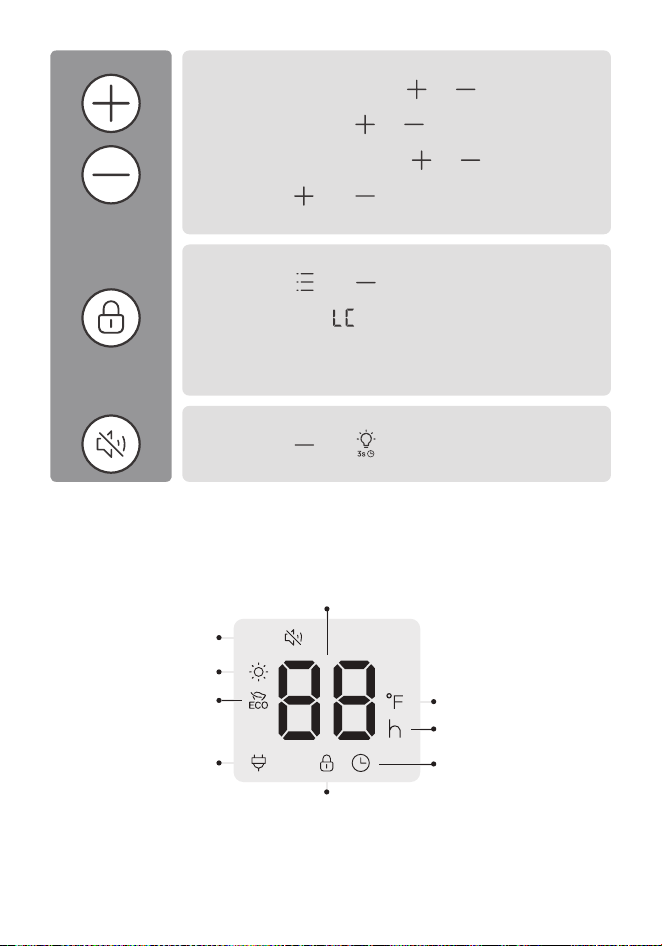
LED Display
Seings Adjustment
- In Power Heat Mode, touch or to adjust the
heating level.
- In ECO mode, touch or to adjust the set
temperature.
- When seing a timer, touch or to adjust the
duration of timer.
- Long press and for 3 seconds to restore
factory seings.
Child Lock
- Long press and for 3 seconds to activate /
deactivate the Child Lock function. When activated, the
display will show , and all the buons on the heater
will be locked.
Note:
Child Lock is not available on the remote control.
Mute/Unmute
- Long press and for 3 seconds to turn the beep
on/o.
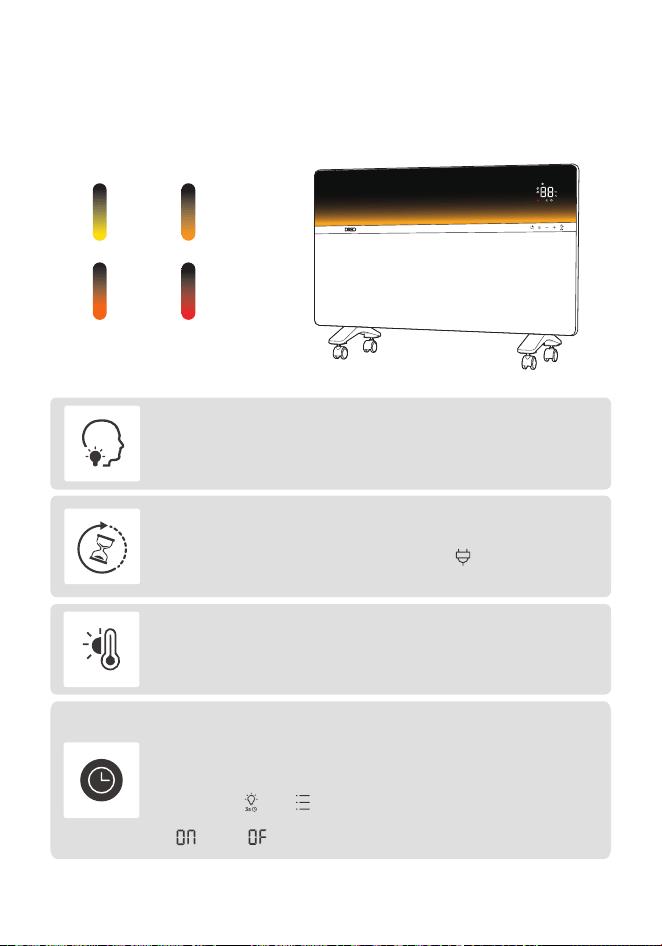
Plugged In
Child Lock
Hour
Timer
Temperature Unit
Heat Level / Timer Hour / Set Temperature
Power Heat
Mute
ECO Mode
5
More Features
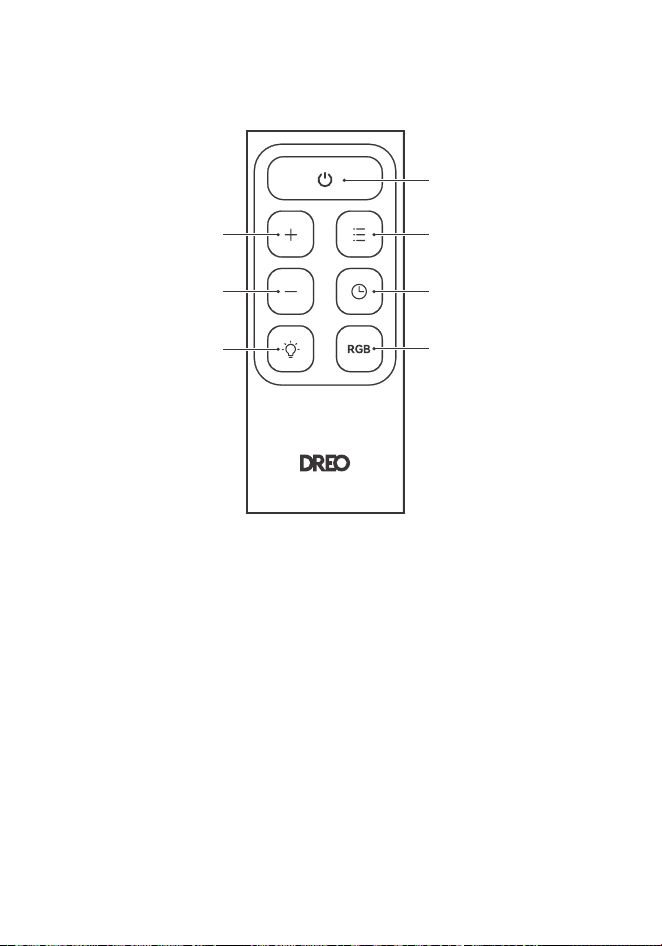
Ambient Temperature Indicator
Memory
If the heater is turned OFF or disconnected from power, it will
operate under the previous seings (except the Timer seing)
when it is turned ON again.
Besides the LED display, your new heater comes with an additional LED light
that lets you see the ambient temperature condition even from far away.
Tip-over Protection
When the heater is tipped over, it will shut o automatically. To
restore it, place it back up and wait for the indicator to light
on to turn the heater on.
Overheat Protection
When the heater overheats, it will shut o automatically
with the error code "F2" on the display.
24-Hour Auto O
This feature is not ON by default.
When this feature is ON, the heater will shut o automatically
after continuously running for 24 hours.
Long press and for 3 seconds to turn this feature ON/OFF
when this heater is on standby. The display will show
" " and " " respectively.
Cold
Hot
Comfort
Warm
6
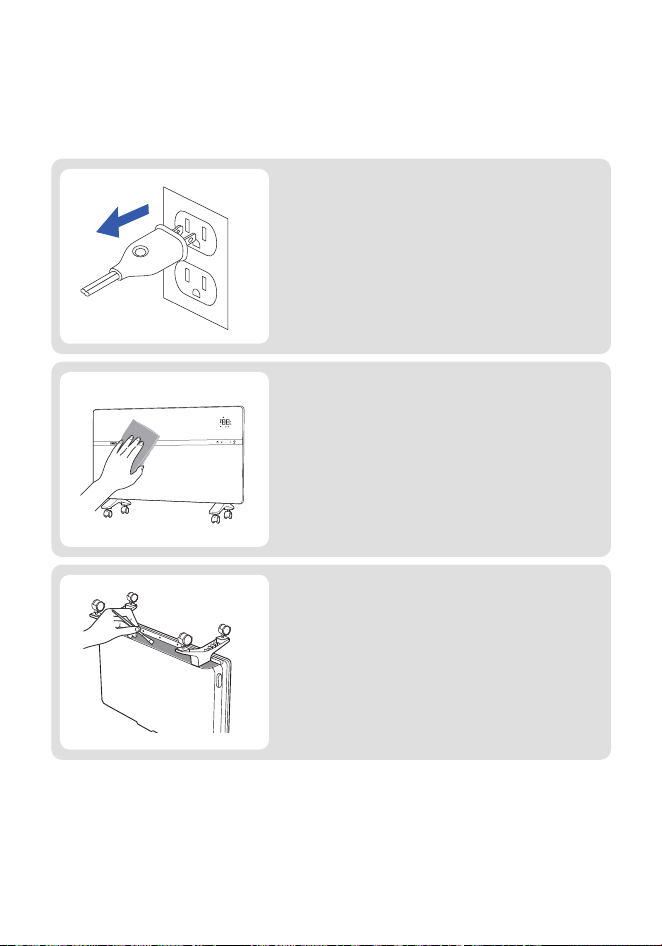
Remote Control
Power On/O
When using the remote control, ensure it is pointed toward the LED display.
Mode
Increase Level
Decrease Level
Ambient Temperature
Indicator
Timer
Ambient Light Eects
04
CLEANING AND
MAINTENANCE
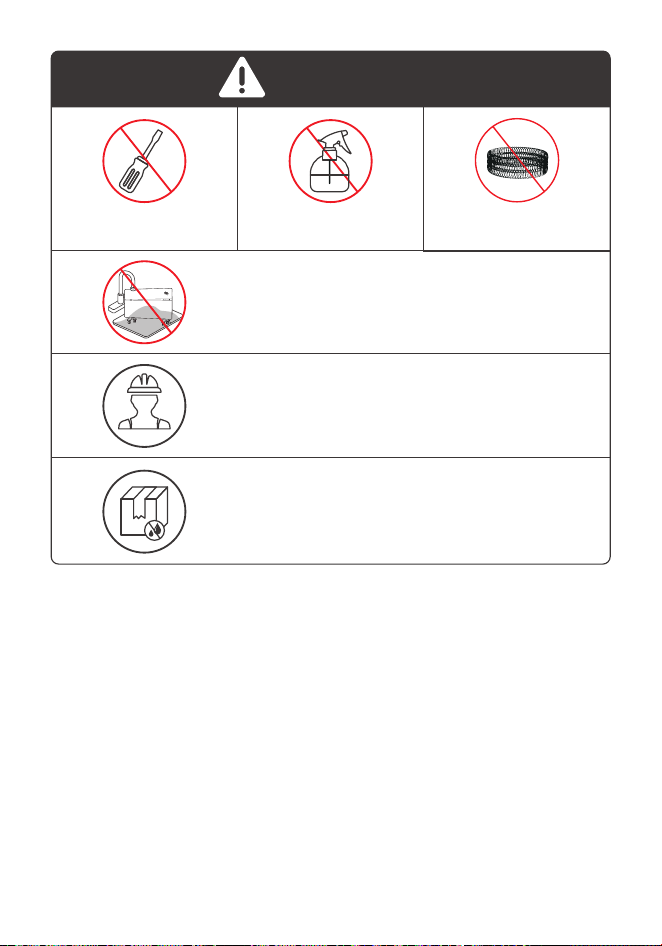
Always turn o and unplug before cleaning.
Outer Surface
Gently wipe o the dust with a soft, dry cloth.
Air Inlet
Use a soft, dry cloth or a coon-tipped
swab to remove any dust from the air inlet.
7
8
DO NOT unscrew
the unit.
DO NOT use
cleaning agents.
DO NOT use
abrasive scrubbers.
Except for cleaning, any servicing should be
performed by an authorized service representative.
Store in a cool, dry area and keep the cable out of
high-traic areas to avoid tripping hazards.
Fire or electrical shock hazard.
DO NOT immerse the main unit in water.
NEVER allow water to get inside the heater.
ATTENTION
9
TROUBLESHOOTING
Problem Possible Causes Solution
E2 - Temperature
sensor short circuit
Connect the plug to a powered
electrical outlet.
Unplug and wait for it to cool
down before plugging in again.
Ensure that your circuit breaker
or fuse is working properly.
Remove any objects on or
near the heater.
Ensure that your heater is
placed on a flat and even surface.
05
Unplug it from the power source
and contact Customer Support.
Unplug it from the power source
and contact Customer Support.
Unplug and wait for it to cool
down before plugging in again.
Place the heater back on a flat,
level and stable surface.
E1 - Temperature
sensor open circuit
Malfunction
codes on LED
display
The heater
suddenly
stops during
heating
Heater does
not start
F2 - Overheat protection
P4 - Tip-over protection
Turn o and unplug the unit.
Allow it to cool and plug into
the electrical outlet again.
Place it on a flat, level and
stable surface.
This is normal. If your heater
turns o frequently, please
raise the set temperature, or
switch to Power Heat mode.
The temperature
exceeds the threshold
of the thermal cuto.
The heater is tipped
over.
In ECO mode, the
heater will turn o
automatically when the
set temperature has
been reached.
If your problem is not listed or still persists, please contact our Customer Support
(see page 10)
Power cord is not
properly plugged in.
Overheat protection
has been activated.
No power is passing
through the unit.
The set temperature is
lower than the ambient
temperature.
Ensure that the temperature is
set to be higher than the
ambient temperature.

10
Model No.: DR-HSH041
Rev_EN_1.0
Reach out to us, it's easy!
(Mon-Fri, 9:00 am-5:00 pm PST/PDT)
(888)290-1688
www.dreo.com

Reach out to us, it's easy!
Contact us to get expert support.
www.dreo.com
support@dreo.com (888) 290-1688
Mon - Fri, 9:00 am-5:00 pm PST/PDT
www.dreo.com