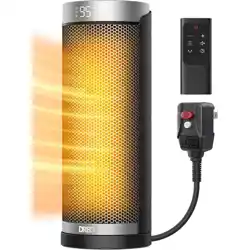
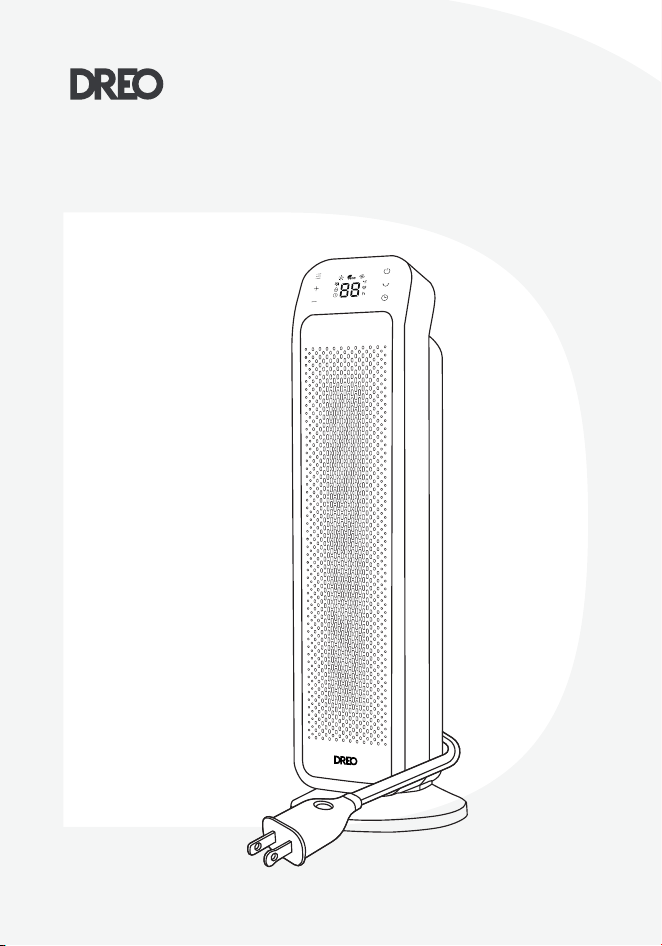
PTC Fan Heater
USER MANUAL

Your support means the world to us. We
hope you enjoy our product as much as
we did creating it.
,,
Thanks for
Choosing
DREO!
Extend Warranty
to 30 Months
Scan or visit
dreo.com/warranty
to extend your warranty for free by registering your product.
If you have any product issues, we always stand ready to help.
Mon - Fri, 9:00 am-5:00 pm PST/PDT
(888) 290-1688
www.dreo.com

CONTENTS
1
4
1-4
11-12
CLEANING AND
MAINTENANCE
IMPORTANT SAFETY
INSTRUCTIONS

2
5
3
5
13-14
6-10
KNOWING YOUR
HEATER
TROUBLE-
SHOOTING
USING YOUR
HEATER
6
15-16
DREO CUSTOMER
CARE
IMPORTANT SAFETY
INSTRUCTIONS
When using electrical
appliances, basic
precautions should
always be followed to
reduce the risk of fire,
electric shock, and
injury to persons and
hyperthermia, includ-
ing the following:
1
Dreo PTC FAN HEATER
GENERAL SAFETY
1
1
Dreo PTC FAN HEATER
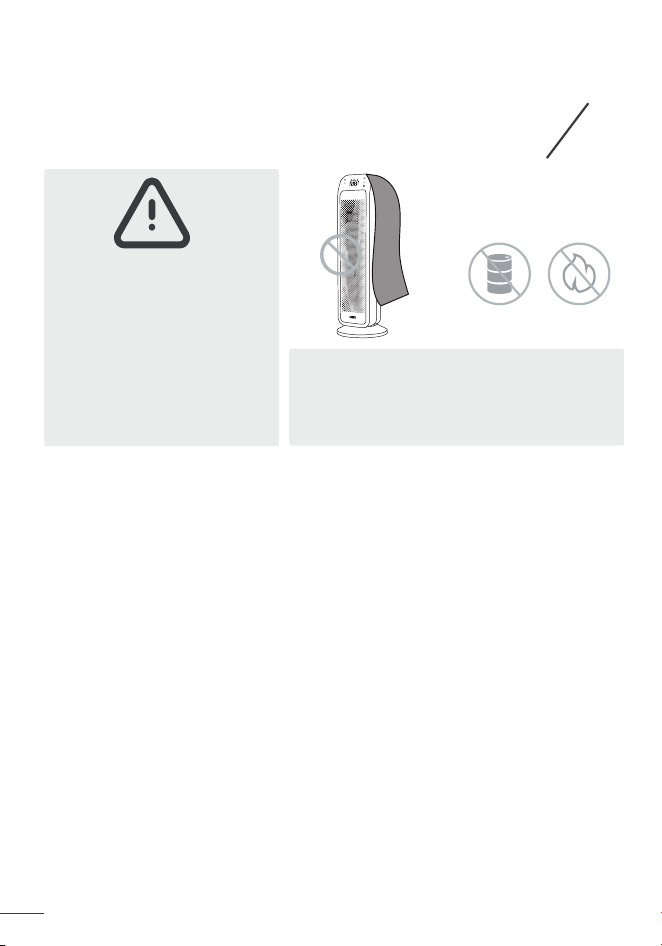
Do not use the
fan heater near
near flammables
and combustibles.
Warning:
In order to avoid
overheating, do not
cover the heater.
Read all instructions before using this heater.
This heater is hot when in use. To avoid burns, do not let bare skin touch
hot surfaces.
Use the handle to move this heater.
Extreme caution is necessary when any heater is used by or near children
or invalids and whenever the heater is left operating and unaended.
Do not insert or allow foreign objects to enter any ventilation or exhaust
opening as this may cause an electric shock or fire, or damage the heater.
1.
2.
3.
4.
5.
6.
7.
8.
9.
10.
Do not aempt to modify or repair the product by yourself. Doing so could
void the warranty and cause damage or personal injury. Only a repair techni-
cian may disassemble or repair this product.
Make sure that no pieces of polystyrene or other packaging material have
been left between elements of the appliance. It may be necessary to pass
over the appliance with a vacuum cleaner.
If the machine is not working as it should, has received a sharp blow, has
and dropped, damaged, left outdoors, or dropped into water, do not use
and contact Customer Support.
There may be a trace of smoke or odor when the unit is first operated. This
indicates that a drop of oil fell on the heating coil during the manufacturing
process.It will quickly evaporate and should not re-occur.
The output of this heater may vary and its temperature may become hot
enough to burn exposed skin. Use of this heater is not recommended for
persons with a high sensiticity to heat or an inability to react to avoid burns.
areas where gasoline, where gasoline, paint, or flammable liquids are
To prevent a possible fire, do not block air intakes or exhaust in any
appliances. Arrange cord away from traic area and where it will not be
To disconnect heater, turn controls to o, then remove plug from outlet.
If there is a loose fit between the plug and the socket or the plug becomes
very hot, the socket may need to be replaced. Check with a qualified
ing of the power cord or fire.
reduce the risk of electric shock, this plug is intended to fit in a polarized
plug. If the plug does not fit fully in the outlet, reverse the plug. If it still does
not fit, contact a qualified electrician. Do not aempt to rig this safety

reduce the risk of fire,
2
Dreo PTC FAN HEATER
1
near flammables
:
or invalids and whenever the heater is left operating and unaended.
opening as this may cause an electric shock or fire, or damage the heater.
Do not aempt to modify or repair the product by yourself. Doing so could
There may be a trace of smoke or odor when the unit is first operated. This
LOCATION SAFETY
1.
2.
3.
4.
5.
6.
Always unplug heater when not in use.
ELECTRICITY SAFETY
1.
2.
3.
4.
5.
6.
7.
8.
9.
10.
Do not use outdoors.
Ensure the heater is on a stable, secure surface to eliminate the
potential of tipping it over.
Keep combustible materials, such as furniture, pillows, bedding, papers,
clothes, and curtains at least 3 feet (0.9 m) from the front of the heater
and keep them away from the sides and rear.
A heater has hot and arcing or sparking parts inside. Do not use it in
areas where gasoline, where gasoline, paint, or flammable liquids are
used or stored.
To prevent a possible fire, do not block air intakes or exhaust in any
manner. Do not use on soft surfaces, like a bed, where openings may
become blocked.
This heater is not intended for use in bathrooms, laundry areas and
similar indoor locations. Never locate heater where it may fall into a
bathtub or other water container.
Do not operate any heater with a damaged cord or plug or after the heater
malfunctions, has been dropped or damaged in any manner. Discard
heater, or return to authorized service facility for examination and/or
repair.
Do not run cord under carpeting. Do not cover cord with throw rugs,
runners, or similar coverings. Do not route cord under furniture or
appliances. Arrange cord away from traic area and where it will not be
tripped over.
To disconnect heater, turn controls to o, then remove plug from outlet.
Always plug heaters directly into a wall outlet/receptacle.
Never use with an extension cord or relocatable power tap (outlet/power
strip).
If there is a loose fit between the plug and the socket or the plug becomes
very hot, the socket may need to be replaced. Check with a qualified
electrician to replace the socket.
It is normal for the plug and cord to feel warm to the touch.
A plug or cord which becomes hot to the touch or becomes distorted in
shape may be a result of a result of a worn electrical outlet. Worn outlets
or receptacles should be replaced prior to further use of the heater.
Plugging the heater into a worn outlet / receptacle may result in overheat-
ing of the power cord or fire.
This appliance has a polarized plug (one prong is wider than the other). To
reduce the risk of electric shock, this plug is intended to fit in a polarized
plug. If the plug does not fit fully in the outlet, reverse the plug. If it still does
not fit, contact a qualified electrician. Do not aempt to rig this safety
feature.
Specifications
Hyperthermia can result in death in infants or others
Use caution to avoid overheating individuals
Read and follow all instructions before use
3
Dreo PTC FAN HEATER
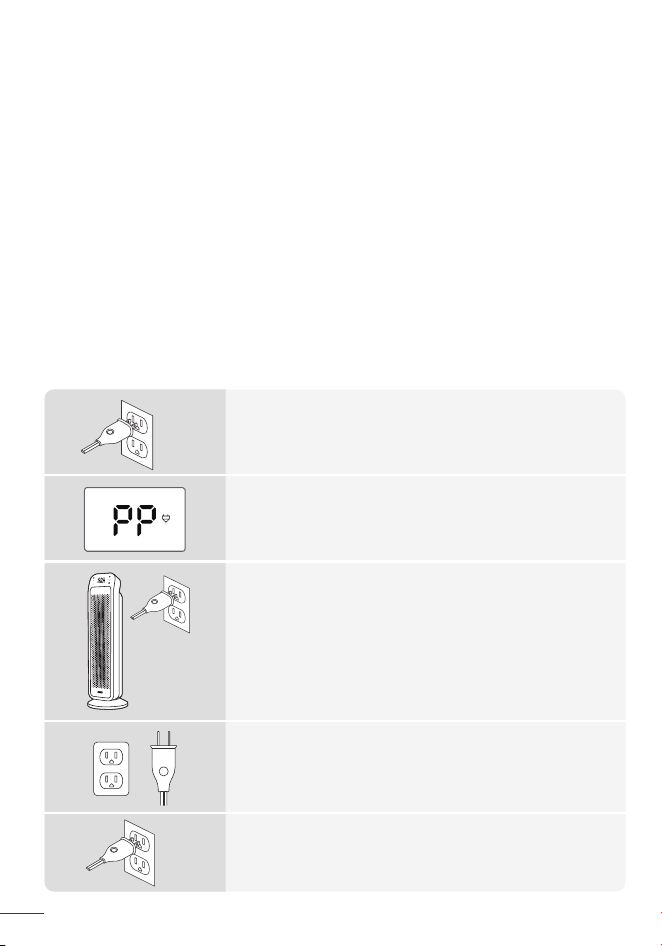
This unit is iequipped with Dreo's FortPlug™ restorable overheat protection to prevent fire accidents.
Safety Plug
When the area around the power plug switch overheats,
the protection will cut o the heating power to prevent
overheating or fire.
After confirming that the above risks are not present, wait for the plug
temperature to cool (at least 5 minutes), then plug it.
If the overheat plug protection is repeatedly triggered, it is
recommended to use another outlet, or contact Dreo customer
service.
Caution: To prevent electric shock, please match the wide blade of
the plug with the wide slot insert.
After the plug overheat protection takes eect, please unplug the
heater and make sure that:
- The current is greater than 15A.
- The socket is not loose or has aged.
- The outlet is not shared with other appliances.
- The heater is not plugged through a extension cord.
- The plug is not bent or damaged.
- The power cord is not tied or pressed by other objects.
Check your Quick Start Guide for detailed safety instructions.
When activated, the screen will show PP and power indicator will
start flashing.
Note: The machine will not be operational until power is
restored to normal.
To avoid excessive room temperatures which can cause hyperthermia:
DO NOT leave product running unaended in a confined space around
infants, or individuals with reduced physical, sensory, or mental capabilities.
Hyperthermia can result in death. Symptoms of hyperthermia include
high body temperature, headache, nausea, vomiting, tiredness, dizziness,
fainting, and rapid pulse. If you begin to experience symptoms related
to hyperthermia, turn o the heater and seek medical aention.
11.
Use this heater only as described in this manual. Any other use not
recommended by the manufacturer may cause fire, electric shock, or
injury to persons.
13.
CAUTION – High temperature, keep electrical cords, drapery, andother
furnishings at least 3 feet (0.9 m) from the front of the heater and away
from the side and rear.
WARNING – Risk of Hyperthermia.
14.
12.
FOR HOUSEHOLD
USE ONLY
READ AND SAVE
THESE INSTRUCTIONS
Specifications
Check the appliance regularly
and refer to TROUBLESHOOTING
or contact our customer support
if it shows any of the following
signs:
- Power cord or plug is damaged.
- Loud noise, unusual smell or excessive heat.
Gentle Reminder:
Model DR-HSH013B
Rated Power
1500W
Input 120V~ 60Hz
HOT SURFACE
Hyperthermia can result in death in infants or others
Use caution to avoid overheating individuals
Read and follow all instructions before use
WARNING - Risk of Heat Stroke
(Hyperthermia)
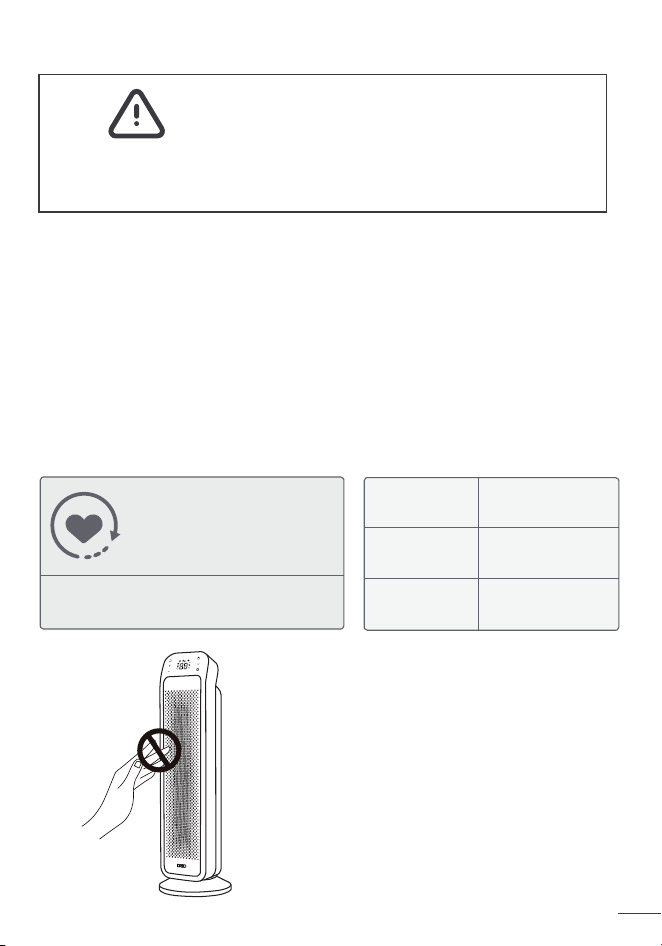
THE FRONT SURFACE CAN BE VERY HOT
DURING USE.
DO NOT TOUCH WHEN IN USE.
4
Dreo PTC FAN HEATER
restorable overheat protection to prevent fire accidents.
the protection will cut o the heating power to prevent
overheating or fire.
After confirming that the above risks are not present, wait for the plug
After the plug overheat protection takes eect, please unplug the
flashing.
Note: The machine will not be operational until power is
restored to normal.
DO NOT leave product running unaended in a confined space around
to hyperthermia, turn o the heater and seek medical aention.
recommended by the manufacturer may cause fire, electric shock, or
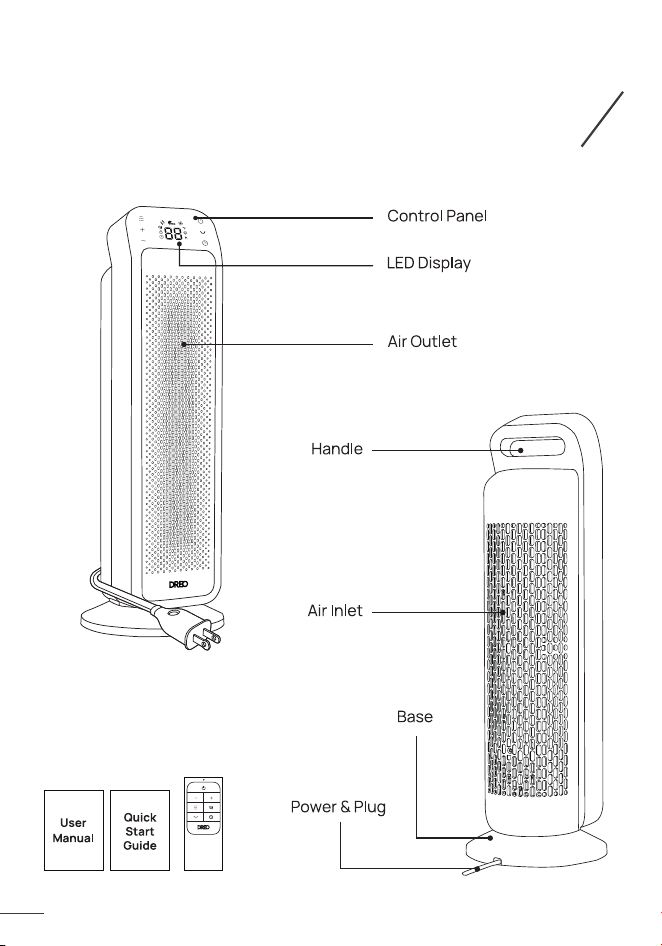
KNOWING YOUR
HEATER
Package Contents
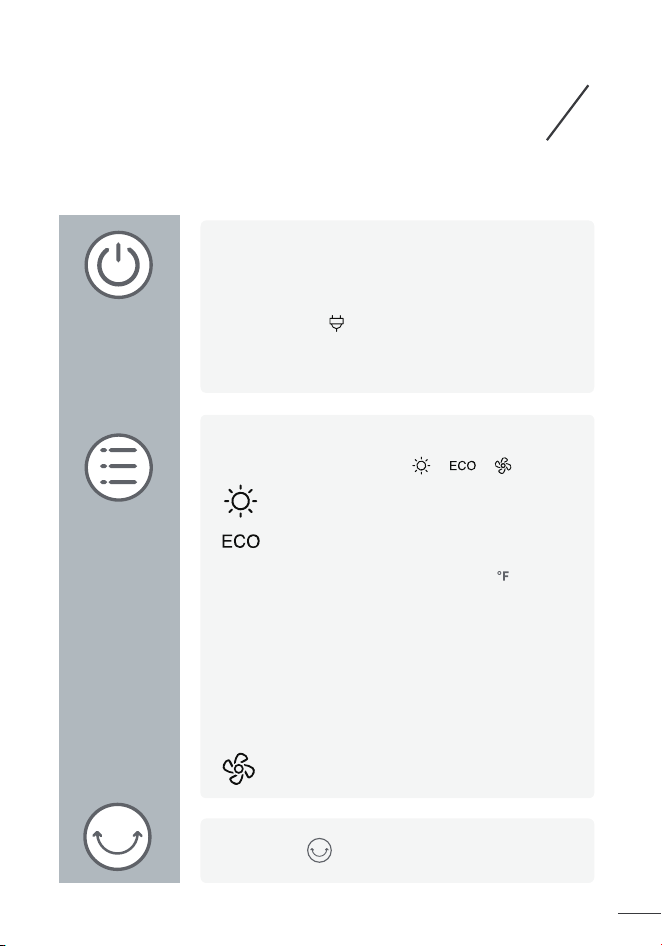
Power On/O
ouch to turn the heater on or o.
- Once turned o, a 30-second countdown will show up
Mode Seings
Touch to switch between .
heating power, depending on the dierence
set temperature, the heater will turn o
the dierence between the two temperatures.
Touch to turn on/o oscillation.
2
5
Dreo PTC FAN HEATER
USING YOUR
HEATER
Control Panel
Power On/O
Touch to turn the heater on or o.
Note:
- When the heater is plugged into the electric outlet, the
power indicator will light in red.
- Once turned o, a 30-second countdown will show up
on the display as the fan will continue to run for 30
seconds to blow out the remaining heat.
Mode Seings
Touch to switch between .
Power heat with three heating levels:
H1 (900W),H2 (1300W), H3(1500W)
The heater will automatically select its optimal
heating power, depending on the dierence
between the set temperature (41-95 ) and
ambient temperature.
Note:
- When the ambient temperature reaches the
set temperature, the heater will turn o
automatically in 30 seconds.
- When the ambient temperature drops below
the set temperature, the heater will operate on
low or high power (900W or 1500W), depending on
the dierence between the two temperatures.
Fan only.
Touch to turn on/o oscillation.
2 3
6
Dreo PTC FAN HEATER
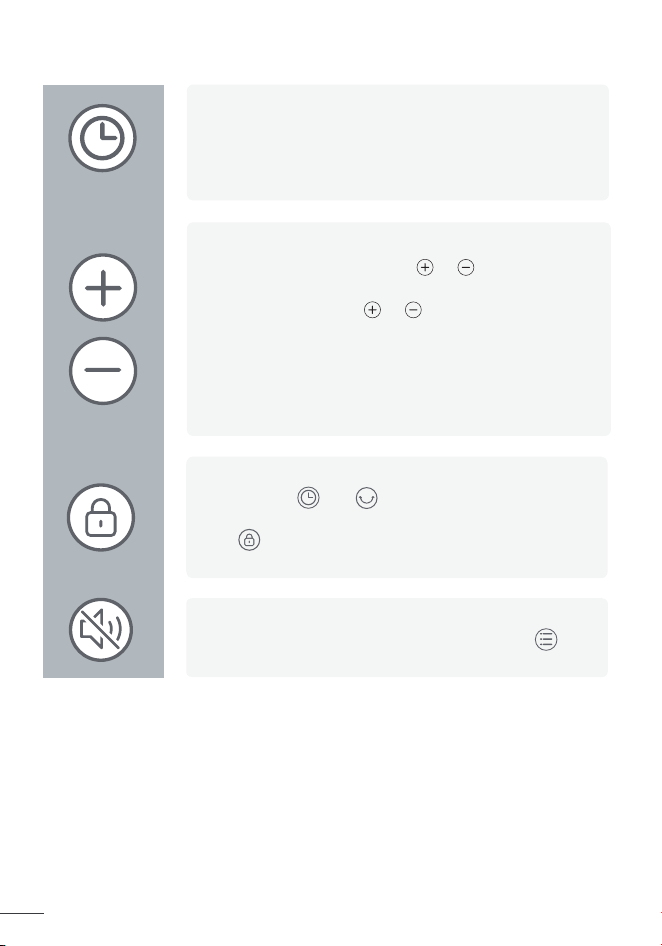
Auto-O Timer
· When the heater is on, touch to set a timer (0-12h).
After the timer ends, the heater will turn o
automatically.
· To cancel, set the timer to 0 hour.
Heat Level / Temperature
· In Power Heat mode, touch or to adjust the
heating level.
· In ECO mode, touch or to adjust the set
temperature.
Note:
In ECO mode, the heater will turn o automatically when
the set temperature has been reached. If your heater turns
o frequently, please raise the set temperature, or switch
to Power Heat mode.
Child Lock
Long press and for 3s to activate /
deactivate the Child Lock function, when activated,
the on the display will light up, and all the buons
on the space heater will be locked.
Mute/Unmute
To turn on/o the buon sounds, long press
for 3s.
7
Dreo PTC FAN HEATER
Fan Only
Power Heat with three
heating levels:

Auto-O Timer
After the timer ends, the heater will turn o
In ECO mode, the heater will turn o automatically when
o frequently, please raise the set temperature, or switch
the on the display will light up, and all the buons
To turn on/o the buon sounds, long press
8
Dreo PTC FAN HEATER
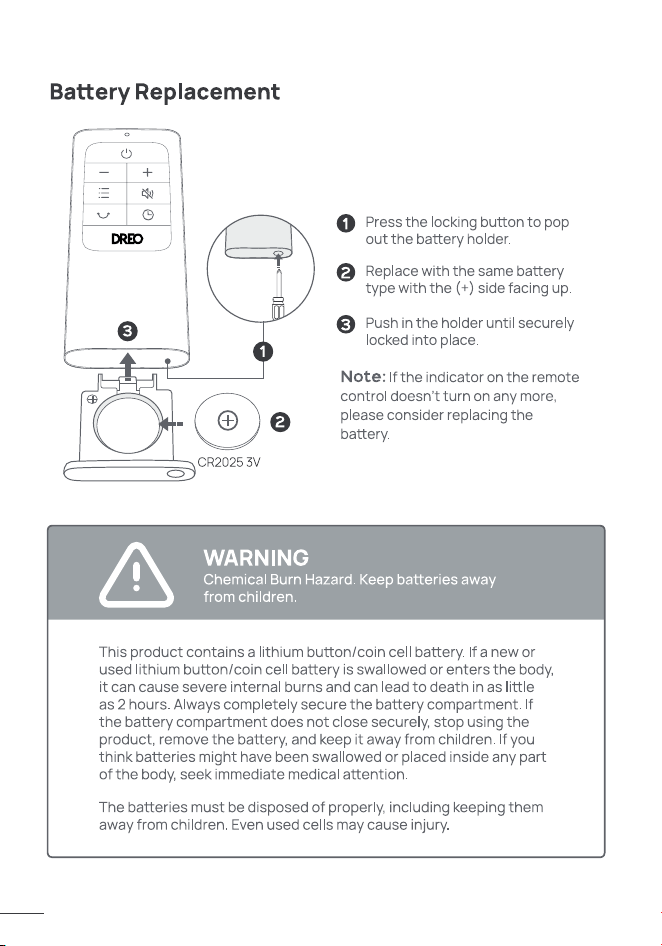
Fan Only Mute/Unmute Plugged in Child Lock Timer
Power Heat with three
heating levels:
H1(900W)
H2(1300W)
H3(1500W)
last seings (temperatures,
24-Hour Auto O
Tip-Over Protection
shut o automatically with the error
Overheat Protection
shut o automatically with the error
will shut o automatically after
This appliance features auto-brightness.
9
Dreo PTC FAN HEATER
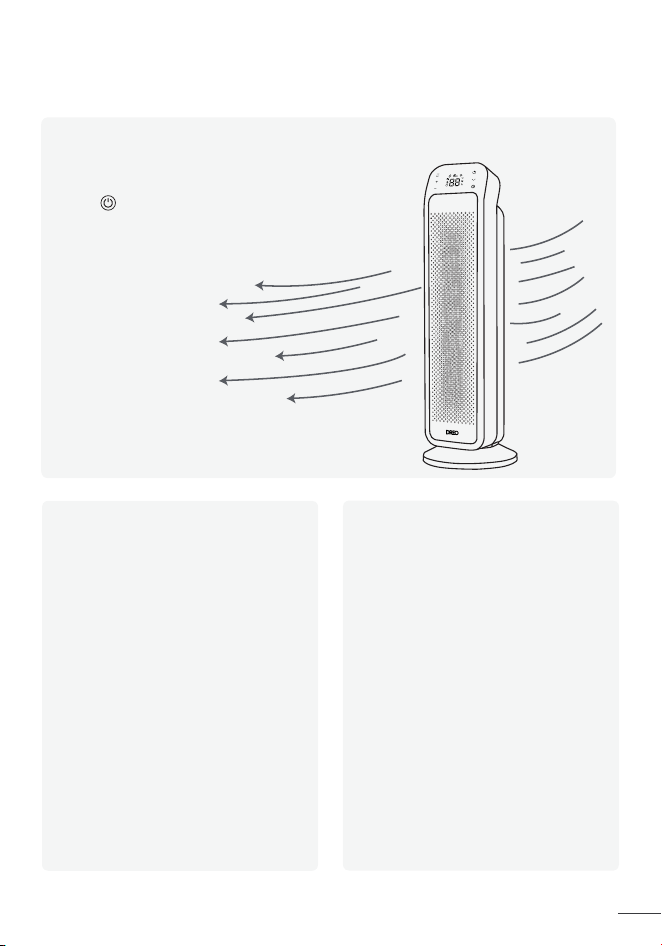
More Features
Memory Function
The heater will remember its
last seings (temperatures,
working modes, oscillation status)
once turned on again.
24-Hour Auto O
Tip-Over Protection
When the heater is tipped over,it will
shut o automatically with the error
code “ P4 ” on the display.
Overheat Protection
When the heater overheats, it will
shut o automatically with the error
code “ FF ” on the display.
This feature is not ON by default.
When this feature is ON, the heater
will shut o automatically after
continuously running for 24 hours.
Long press the timer for 3 seconds
to turn this feature ON/OFF when
this heater is on standby. The
display will show "ON" and "OF"
respectively.
This appliance features auto-brightness.
The display adapts automatically based on the ambient
lighting conditions.
Touch to activate the control panel and LED display.
10
Dreo PTC FAN HEATER
cable out of high-traic areas to
CLEANING AND
MAINTENANCE
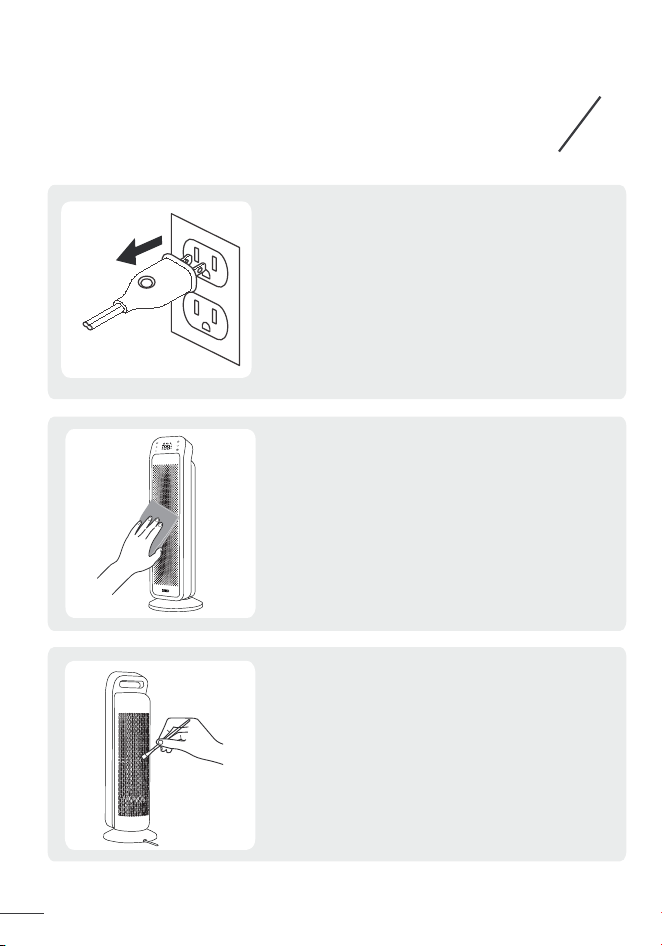
Always turn o and unplug before cleaning.
Outer Surface
Use a soft, dry cloth to gently wipe clean
the outer surface.
Air Inlet
Use a soft, dry cloth or a coon-tipped
swab to remove any dust from the air inlet.
4
11
Dreo PTC FAN HEATER
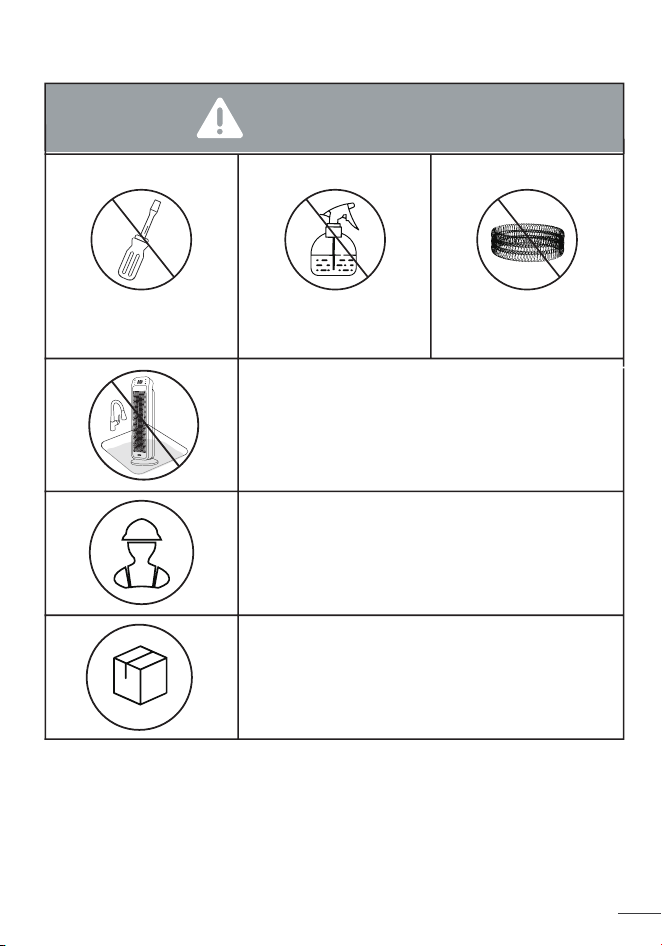
ATTENTION
DO NOT unscrew
the unit.
DO NOT use
cleaning agents.
DO NOT use
abrasive scrubbers.
Fire or electrical shock hazard.
DO NOT immerse the main unit in water.
NEVER allow water to get inside the heater.
Except for cleaning, any servicing
should be performed by an authorized
service representative.
Store in a cool, dry area and keep the
cable out of high-traic areas to avoid
tripping hazards.
Always turn o and unplug be
Use a soft, dry cloth or a coon-tipped
4
12
Dreo PTC FAN HEATER
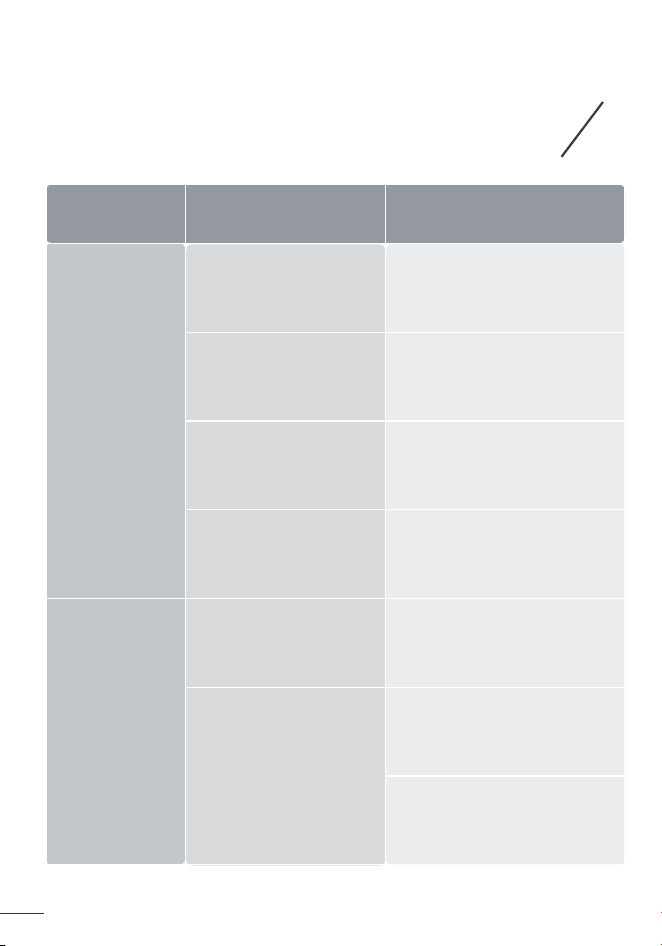
TROUBLESHOOTING
Problem Possible Causes
Solution
Malfunction
codes on LED
display
Heater does
not start
E2 - Temperature
sensor short circuit
E1 - Temperature
sensor open circuit
FF - Overheat
Protection
P4 - Tip-Over
Protection
Unplug it from the power
source and contact
Customer Support.
Unplug it from the power
source and contact
Customer Support.
Unplug and wait for it
to cool down before
plugging in again.
Place the heater back on
a flat, level and stable
surface.
Power cord is not
properly plugged in.
Overheat protection
has been activated.
Connect the plug to
a powered electrical
outlet.
Unplug and allow it to
cool.
Remove any objects on
or near the heater.
Heater does
not start
placed on a flat and even
The heater
heating.
of the thermal cuto.
Turn o and unplug the unit.
turns o frequently, please
Place it on a flat, level and
our problem is not listed or still persists, contact our Customer
Support (see page 16).
will turn o automatically
5
13
Dreo PTC FAN HEATER

Problem Possible Causes
Malfunction
display
Heater does
not start
a flat, l
Heater does
not start
No power is passing
through the unit.
Ensure that your circuit
breaker or fuse is working
properly.
Ensure that your heater is
placed on a flat and even
surface.
The set temperature
is lower than the ambient
temperature.
Ensure that the temperature is
set to be higher than the
ambient temperature.
The heater
suddenly
stops during
heating.
The temperature
exceeds the threshold
of the thermal cuto.
Turn o and unplug the unit.
Allow it to cool and plug into
the electrical outlet again.
The heater is tipped
This is normal. If your heater
turns o frequently, please
raise the set temperature, or
switch to Power Heat mode.
over.
Place it on a flat, level and
stable surface.
If your problem is not listed or still persists, contact our Customer
Support (see page 16).
In ECO mode, the heater
will turn o automatically
when the set temperature
has been reached.
5
14
Dreo PTC FAN HEATER

DREO CUSTOMER
CARE
Default 12-Month Warranty
Extend Your Warranty
This appliance is covered by Dreo warranty for 12 months from the date of
its original purchase.
We can only provide after-sales service for products that are sold by Dreo
or Dreo authorized retailers and distributors. If you have purchased the
appliance from a dierent place, please contact your seller for return and
warranty issues.
Accident, misuse, or repairs performed by unauthorized personnel.
Any unit that has been tampered with or used for commercial purposes.
Normal wear and tear of wearable parts.
Use of force, damage caused by external influences.
Damage caused by non-observance of the User Manual, e.g. connection
to an unsuitable mains supply or noncompliance with the instructions.
Partially or completely dismantled appliances.
Defects caused by or resulting from damages from shipping or from
repairs, service, or alteration to the product or any of its parts that have
been perform ed by a repair person not authorized by Dreo.
The warranty will not apply in cases of:
Extend your warranty by registering your new appliance on our website
hps://dreo.com/warranty.
1.
2.
3.
4.
5.
6.
7.
6
15
Dreo PTC FAN HEATER
ault 12-Month arranty
arranty
orce, damage caused by external influences.
hps://dreo.com/warrant
We’re Here to Help!
support@dreo.com
(888) 290-1688
Mon - Fri, 9:00 am-5:00 pm PST/PDT
www.dreo.com
Shenzhen Hesung Innovation
Technology Co., LTD
26F, Bldg A7, Creative City, Shenzhen, China
Rev_1.1_EN
6
16
Dreo PTC FAN HEATER

Looking for help?
Contact us to get expert support.
DR-HSH013B
www.dreo.com
support@dreo.com (888) 290-1688
Mon - Fri, 9:00 am-5:00 pm PST/PDT
www.dreo.com