
mTS1000 Series Tripod Turnstile User Manual
Page | 1
User Manual
Swing Barrier Turnstile
Applicable Model(s): SBT2000S (2023)
Date: January 2025
Doc Version: 1.1
English

SBT2000S (2023) Swing Barrier Turnstile User Manual
Page | 2
About the Manual
This manual introduces the operations of SBT2000S (2023) Swing Barrier Turnstile..
All figures displayed are for illustration purposes only. Figures in this manual may not be exactly consistent
with the actual products.
Features and parameters with ★ are not available in all devices.

SBT2000S (2023) Swing Barrier Turnstile User Manual
Page | 3
Table of Contents
1 OVERVIEW ......................................................................................................................................................... 5
F
EATURES ........................................................................................................................................................ 5 1.1
A
PPEARANCE AND SYSTEM COMPONENTS ........................................................................................................ 6 1.2
1.2.1 APPEARANCE ........................................................................................................................................ 6
1.2.2 SYSTEM COMPONENTS ....................................................................................................................... 7
T
ECHNICAL SPECIFICATIONS ............................................................................................................................. 8 1.3
M
ECHANICAL SYSTEM ...................................................................................................................................... 9 1.4
E
LECTRONIC CONTROL SYSTEM ........................................................................................................................ 9 1.5
S
TATUS OF TRAFFIC INDICATOR ........................................................................................................................ 9 1.6
W
ORKING PRINCIPLE ...................................................................................................................................... 10 1.7
2 FUNCTION INTRODUCTION .......................................................................................................................... 11
C
ARD VERIFICATION ....................................................................................................................................... 11 2.1
FACE VERIFICATION★ ................................................................................................................................... 12 2.2
3 CONTROL SYSTEM INTRODUCTION ............................................................................................................ 14
W
IRING DIAGRAM .......................................................................................................................................... 14 3.1
ACCESS CONTROL BOARD★ .......................................................................................................................... 15 3.2
T
URNSTILE CONTROL BOARD ......................................................................................................................... 16 3.3
M
ENU OF SPEED GATE ................................................................................................................................... 18 3.4
E
RROR CODE FOR TURNSTILE .......................................................................................................................... 26 3.5
4 TROUBLESHOOTING ...................................................................................................................................... 27
5 MAINTENANCE ............................................................................................................................................... 28
C
HASSIS MAINTENANCE ................................................................................................................................. 28 5.1
M
OVEMENT MAINTENANCE ............................................................................................................................ 28 5.2
P
OWER SUPPLY MAINTENANCE ...................................................................................................................... 28 5.3
6 PACKING LIST .................................................................................................................................................. 29

SBT2000S (2023) Swing Barrier Turnstile User Manual
Page | 4
Revision History
Revision Date Author Reviewer Description
V1.0 02/29/2024 Yang Kaijin Original Document
V1.1 01/23/2025 Stella Modify the parameters
SBT2000S (2023) Swing Barrier Turnstile User Manual
Page | 5
1 Overview
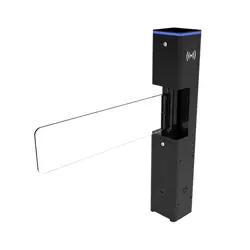
The SBT2000S (2023) swing barrier turnstile is designed for smooth and silent operation, drawing
very little power. It is made of SPCC, it is highly durable. These barriers are normally held in a locked
position, denying access to the secured side. When SBT2000S (2023) reader positively recognizes a
user’s valid access card, its barriers swing automatically, allowing users passage to the secured side.
During emergencies, the barriers automatically swing, thereby ensuring users fast unencumbered
exit to safety. In an event of power outage, users can easily push through the barrier to exit to safety.
The SBT2000S (2023) swing barrier turnstile provides both security and convenient space in a
durable and elegant compact design.
Features 1.1
Long Service Life: The gate can open and close over 5 million times with regular maintenance.
High-End Moter: The motor is driven by a high-end DC brushless motor with a planetary metal
gear reducer for high speed, precision, silence and reliable operation.
Multi Alarm Functionality: Alerts break-in, and gate opening/closing delays.
Emergency Mode: Automatically open door during fire alarm or power off.
Pass Status Indicator: Provides visual indication of pass status.
Latest Driver Technology: Adopt the latest driver with RS485 communication protocol,
multiple mode switching, with over-current, over-voltage and over-temperature protection.
Anti-Pinch Function: Halts gate closure upon detecting an anti-pinch signal during the closing
process.
Automatic Reset: Cancels pass authority automatically if the pedestrian fails to pass within the
specified time after a valid card is read.
SBT2000S (2023) Swing Barrier Turnstile User Manual
Page | 6
Access Control Capability: External port allows connection to various biometric devices for
access control.
Appearance and System Components 1.2
1.2.1 Appearance
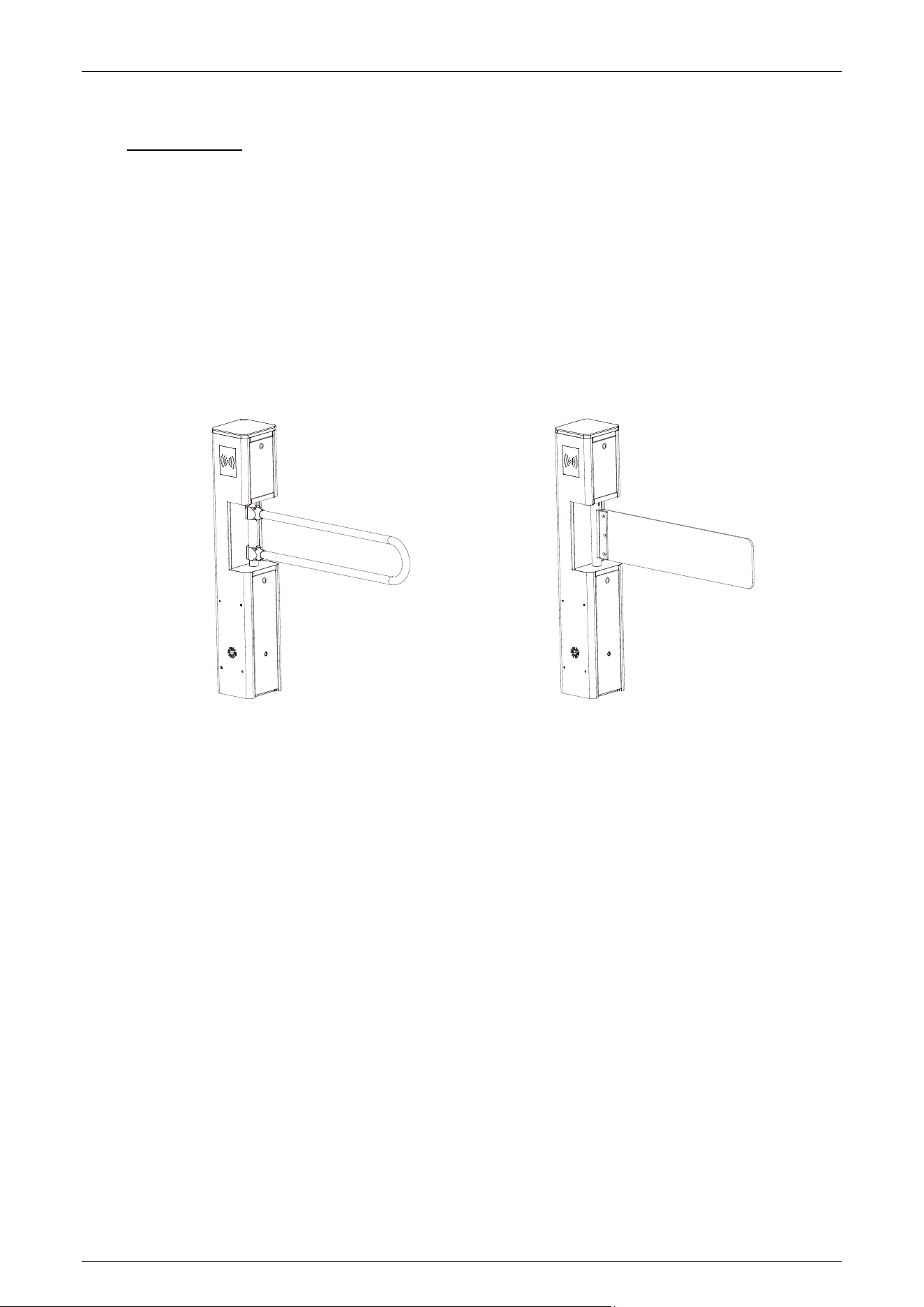
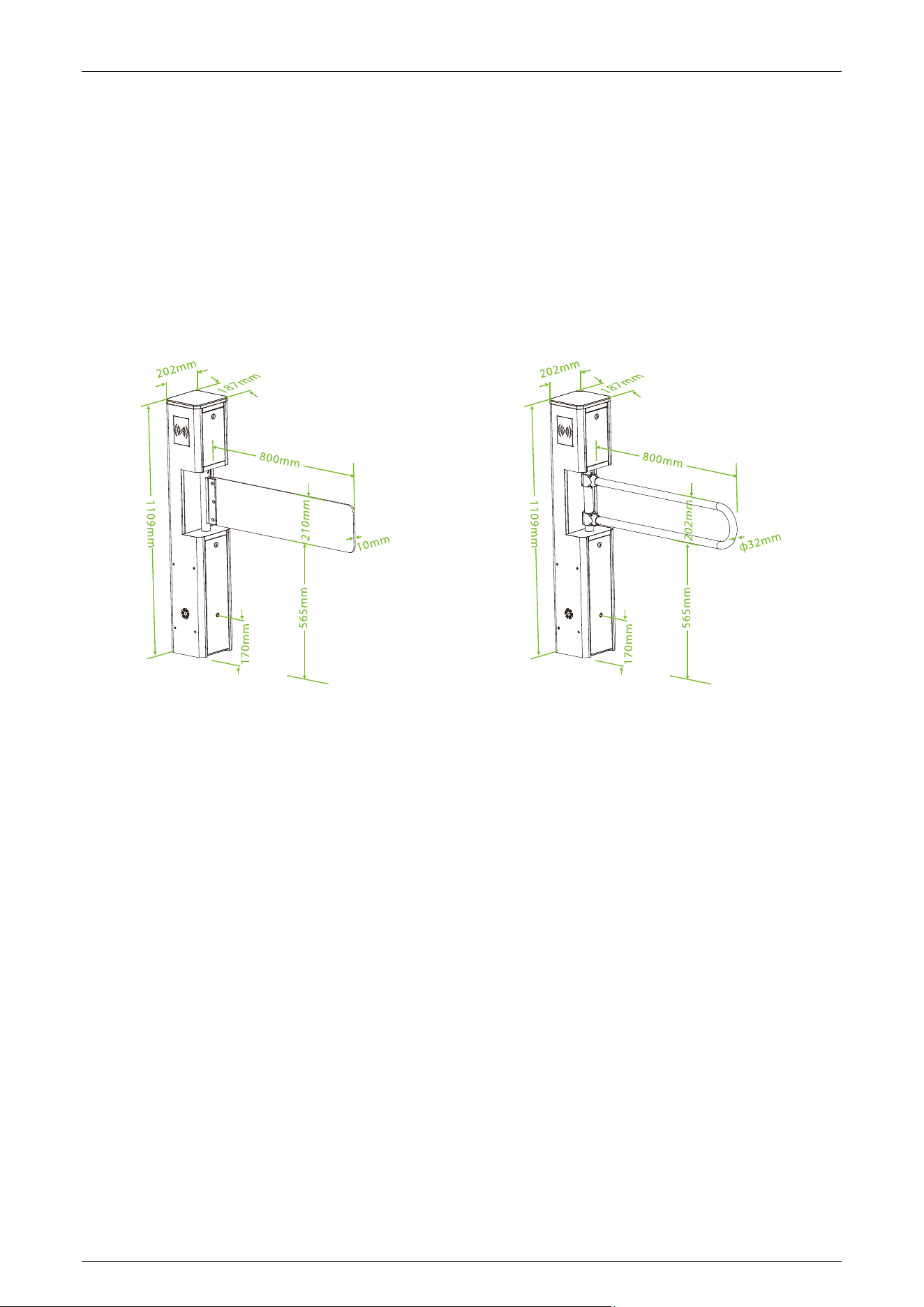
The figure below illustrates the appearance and dimensions of the SBT2000S (2023):
Glass barrier/acrylic (optional) Stainless steel bar
SBT2000S (2023) Swing Barrier Turnstile User Manual
Page | 7
1.2.2 System Components
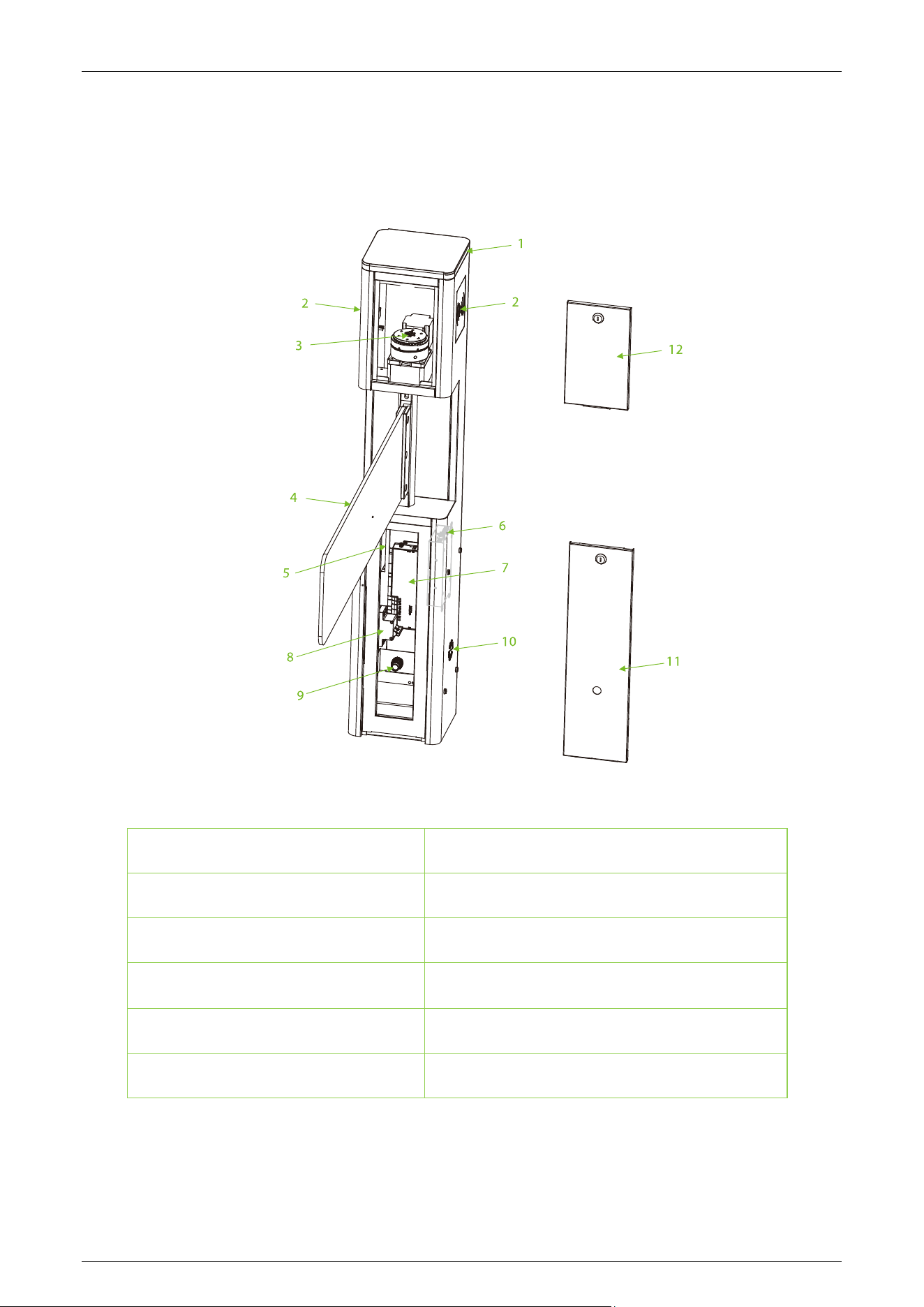
The following figure displays the system components of the SBT2000S (2023):
1. Traffic Indicator
2. Card Verification Area
3. Motor Driver Kit
4. Swig Arm
5. Power Supply
6. Turnstile Control Board
7. Access Controller Board★
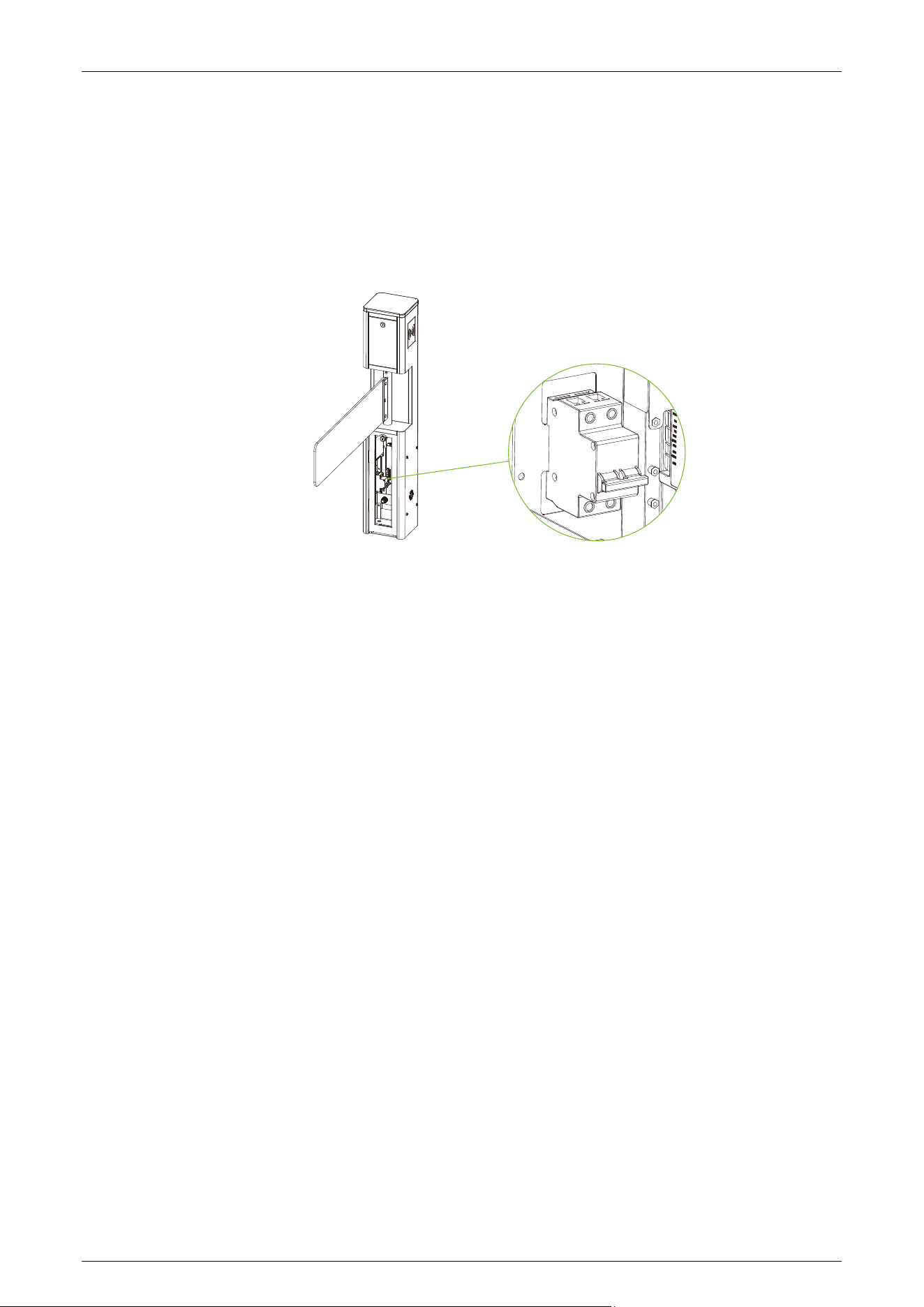
8. Air Switch
9. Infrared Sensor
10. Speaker
11. Access Door
12. Access Door

SBT2000S (2023) Swing Barrier Turnstile User Manual
Page | 8
Technical Specifications 1.3
Feature Specification
Communication
TCP/IP, RS485
Input Voltage
AC110V/240V, 50/60Hz
Input Control Signal
Dry Contact
Output Voltage
DC 24V
Time of Gate Opening/Closing
0.8 to 5 Sec
Operating Humidity
20% to 93% (Non-condensing)
Operating Temperature
-15°C to 60°C
Flow Rate
Normally Close: Maximum 30/minute
Drive Unit
Brushless Motor
Infrared Sensor
1 pair
LED
Support
Working Environment
Indoor and outdoor
Dimension (mm) (L*W*H)
202 x 187 x 1109
Weight
25kg(±5kg)
Noise
<10dB
MCBF
5 million
Infrared Detection Distance <1000mm
Certifications
CE, FCC
SBT2000S (2023) Swing Barrier Turnstile User Manual
Page | 9
Mechanical System 1.4
The turnstile's mechanical system consists of the chassis and core component. The chassis serves as
a carrier and holds the Traffic Indicator, Reader, Infrared Sensor. and Door lock. The core
components are the Motor, Frame, and Swing Arm.
Electronic Control System 1.5
The electronic control system of a swing barrier turnstile mainly consists of the Card Reader,
Turnstile Control Board, Access Controller, Infrared Sensor, Traffic Indicator, and Alarm.
Card Reader: The reader reads the data on the card and transmits it to the Access Controller.
Turnstile Control Board: The turnstile control board serves as the control center of the system,
receiving signals from the access controller and photoelectric switch. It makes logical judgments
and processes these signals, then subsequently sends executive commands to the traffic indicator,
motor, and alarm.
Access Controller: This component enhances convenience for authorized personnel by facilitating
entry while simultaneously restricting access for unauthorized individuals.
Traffic Indicator: It displays the current passage status of the lane and guides pedestrians to pass
through the lane in a safe and orderly manner.
Alarm: This system issues an alarm alert when it detects unauthorized entry or illegal access by
pedestrians.
Status of Traffic Indicator 1.6
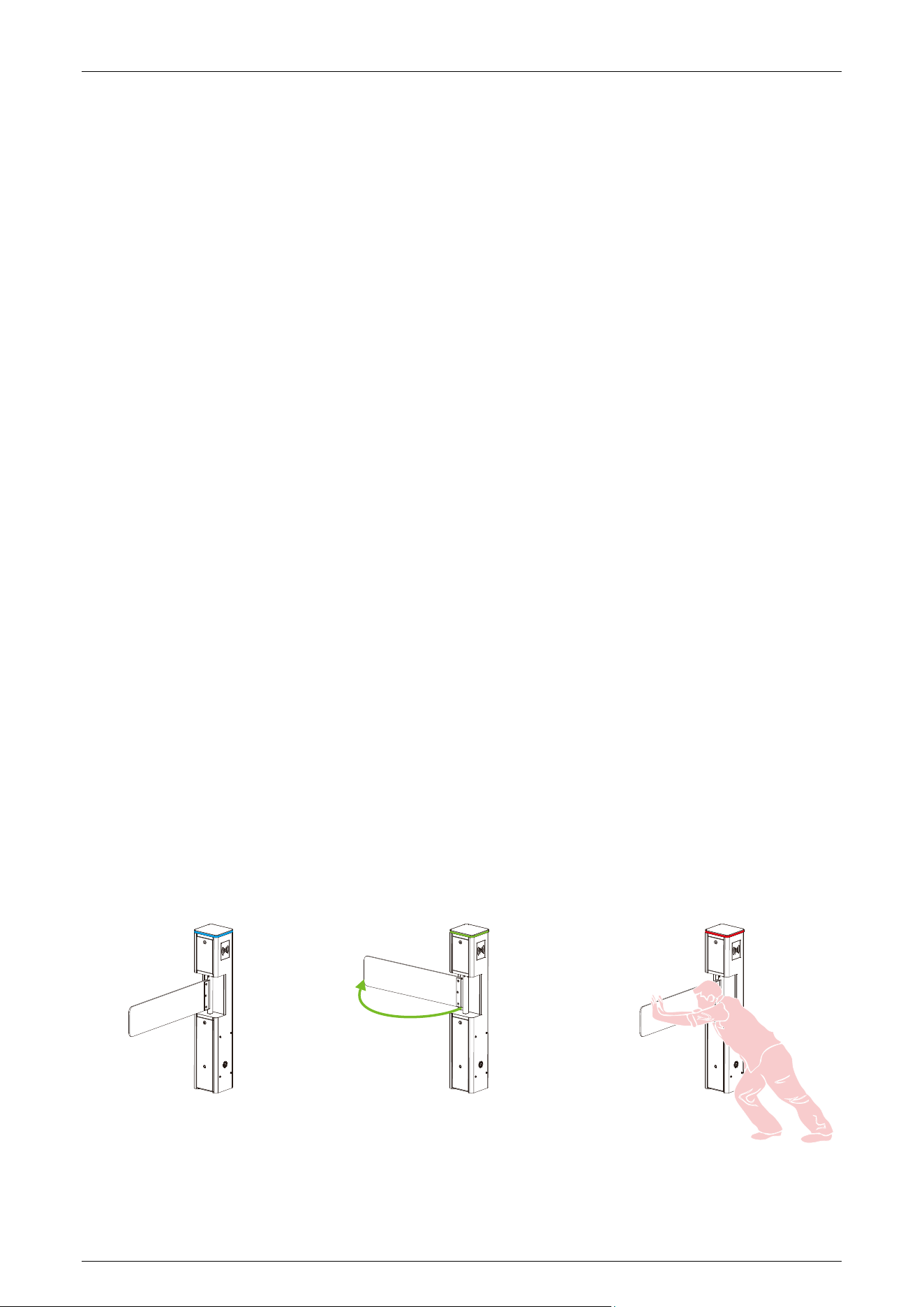
The swing barrier turnstile is in a working state after power-on self-test. The traffic indicators provide
pedestrians with the appropriate passage indications.
Standby: Pass-through (In/Out): Alarm:
SBT2000S (2023) Swing Barrier Turnstile User Manual
Page | 10
Working Principle 1.7
1. When connected to power, the swing barrier turnstile undergoes a Power-On Self-Test. If no
issues are detected during this process, the turnstile will operate normally. If a failure is
detected, the system will display relevant error messages on the digital tube, allowing the user
to quickly identify and resolve the problem.
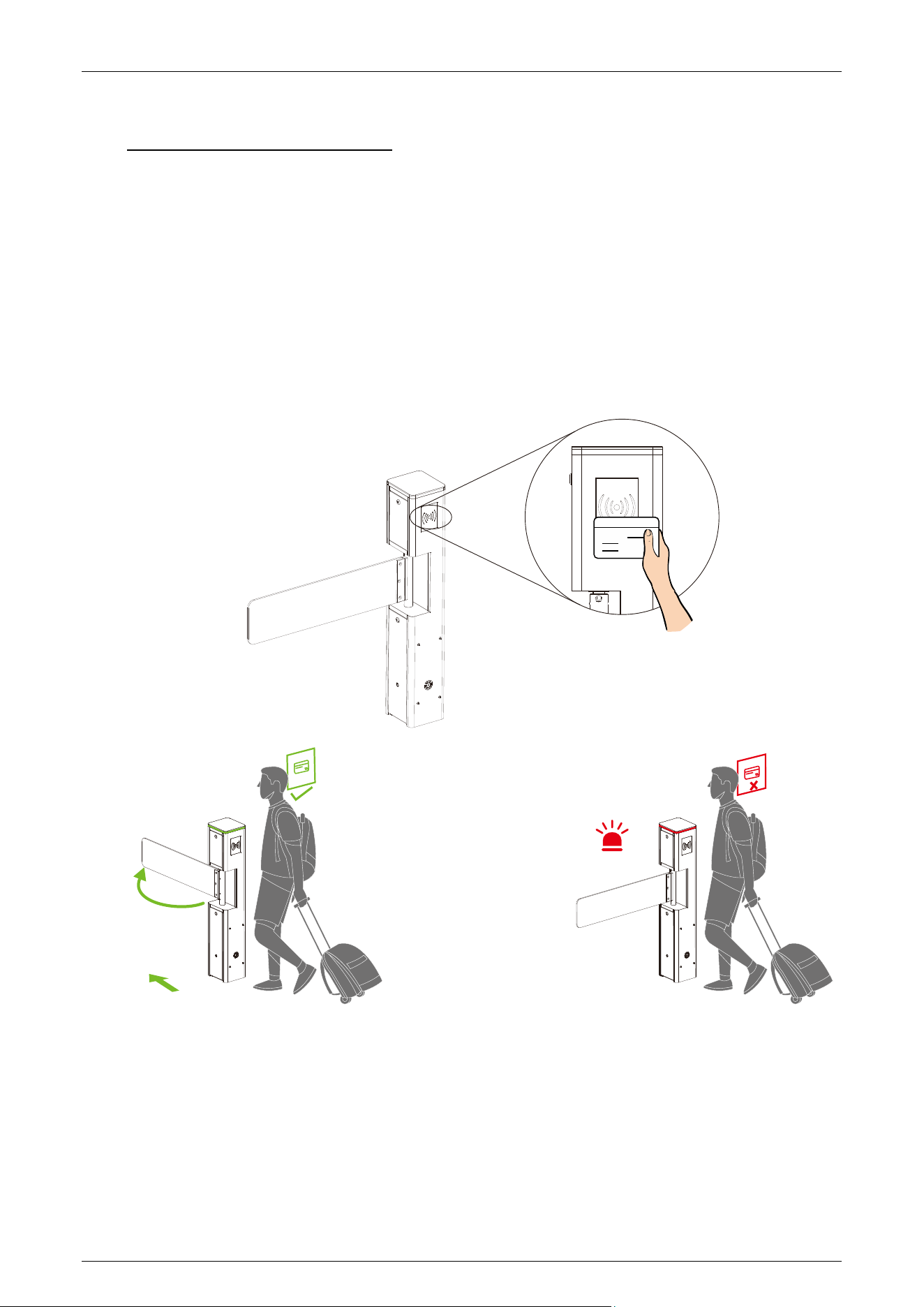
2. When a valid card/Face★ is detected, the buzzer will give a positive audible prompt to the
pedestrian, indicating that successfully verified. Then, the card reader/Camera★ sends signals
to the Access Controller to request permission to pass through the passage. The Access
Controller will send the signal to the Turnstile Control Board.
3. After presenting the valid card/Face★, the turnstile control board receives the signals from the
access controller and the infrared sensor. It processes these signals, and then sends out valid
control signals to the traffic indicator and the motor. The traffic indicator turns green, and at
this time, if the system is in the normally closed mode, the motor operates, and the gate opens.
4. After the passenger passes through the lane in accordance with the opening direction of the
swing arm, the Infrared Sensor will continuously monitor the pedestrian's movement
throughout the passage. It will continue to send signals to the Turnstile Control Board until the
pedestrian completes the passage.
5. If a pedestrian enters the passage without successfully verifying their identification or with an
invalid card/Face★, the system will not grant passage. Only when a valid card/Face★ is
successfully confirmed will the pedestrian be allowed to pass through the passage.
Note: Make sure the ground wire of the system is securely connected to avoid personal injuries or
other accidents.
SBT2000S (2023) Swing Barrier Turnstile User Manual
Page | 11
2 Function Introduction
Card Verification 2.1
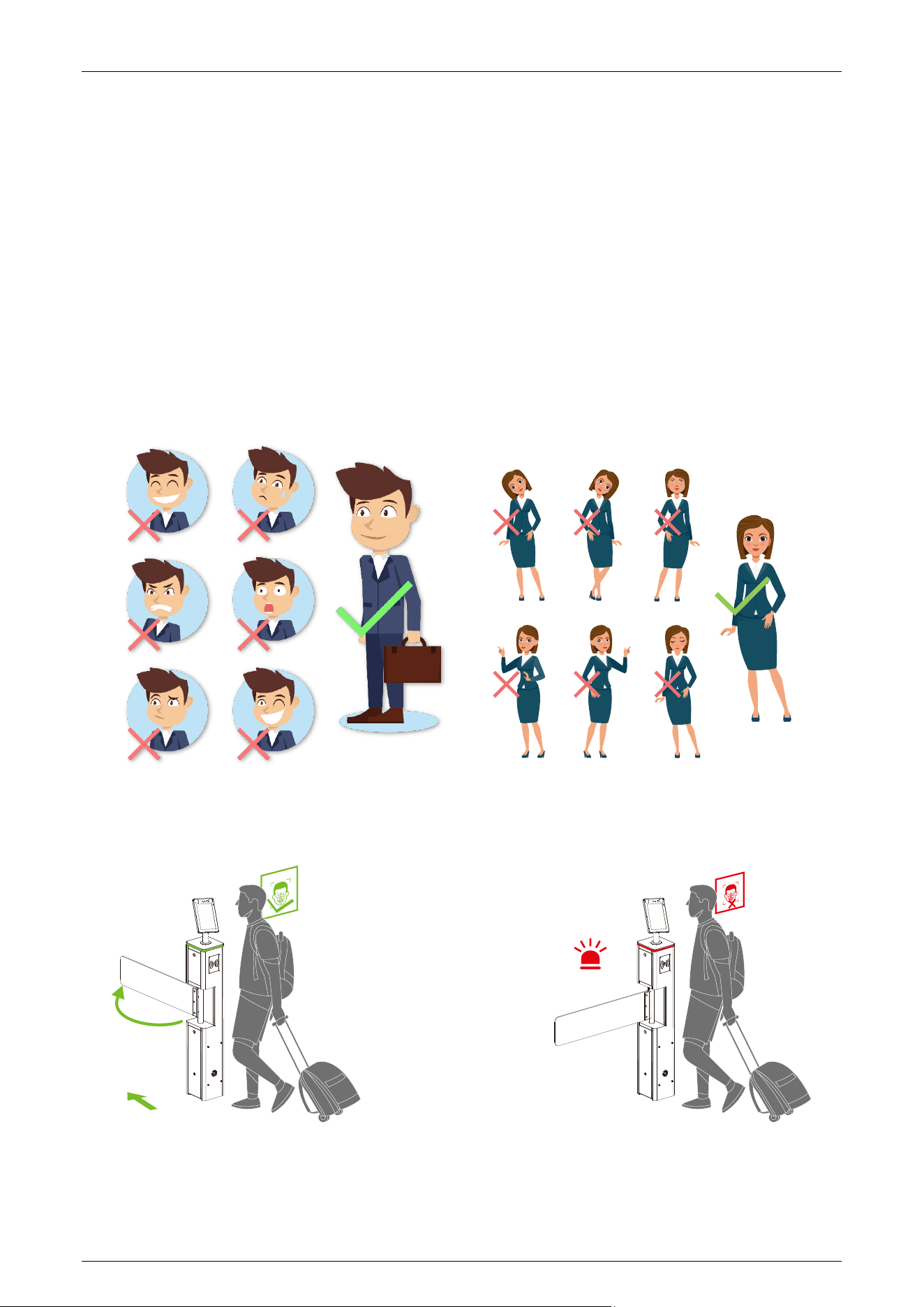
In card verification mode, the device compares the card number in the card induction area with all
the card number data registered in the device and sends it to the access controller. When the user
brings the card close to the card reading area, the device enters the card verification mode. When
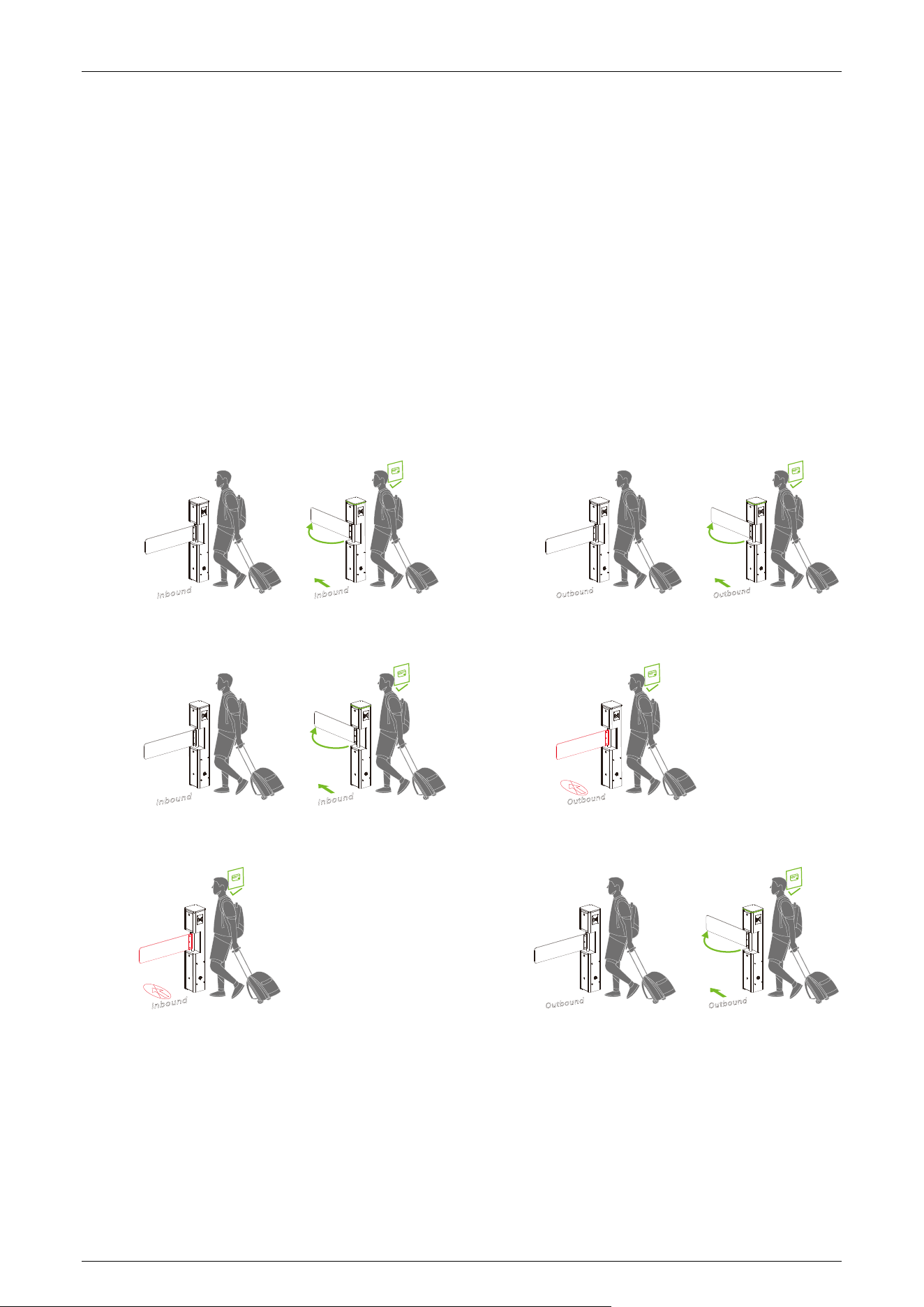
the validation is successful, the traffic indicator of the device turns green, the arm can be pushed,
and passage is allowed. In case of validation failure, the traffic indicator turns red, preventing the
arm from being pushed, and at the same time, an alarm sounds, and passage is prohibited.
SBT2000S (2023) Swing Barrier Turnstile User Manual
Page | 12
Face Verification
★
2.2
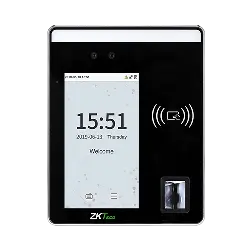
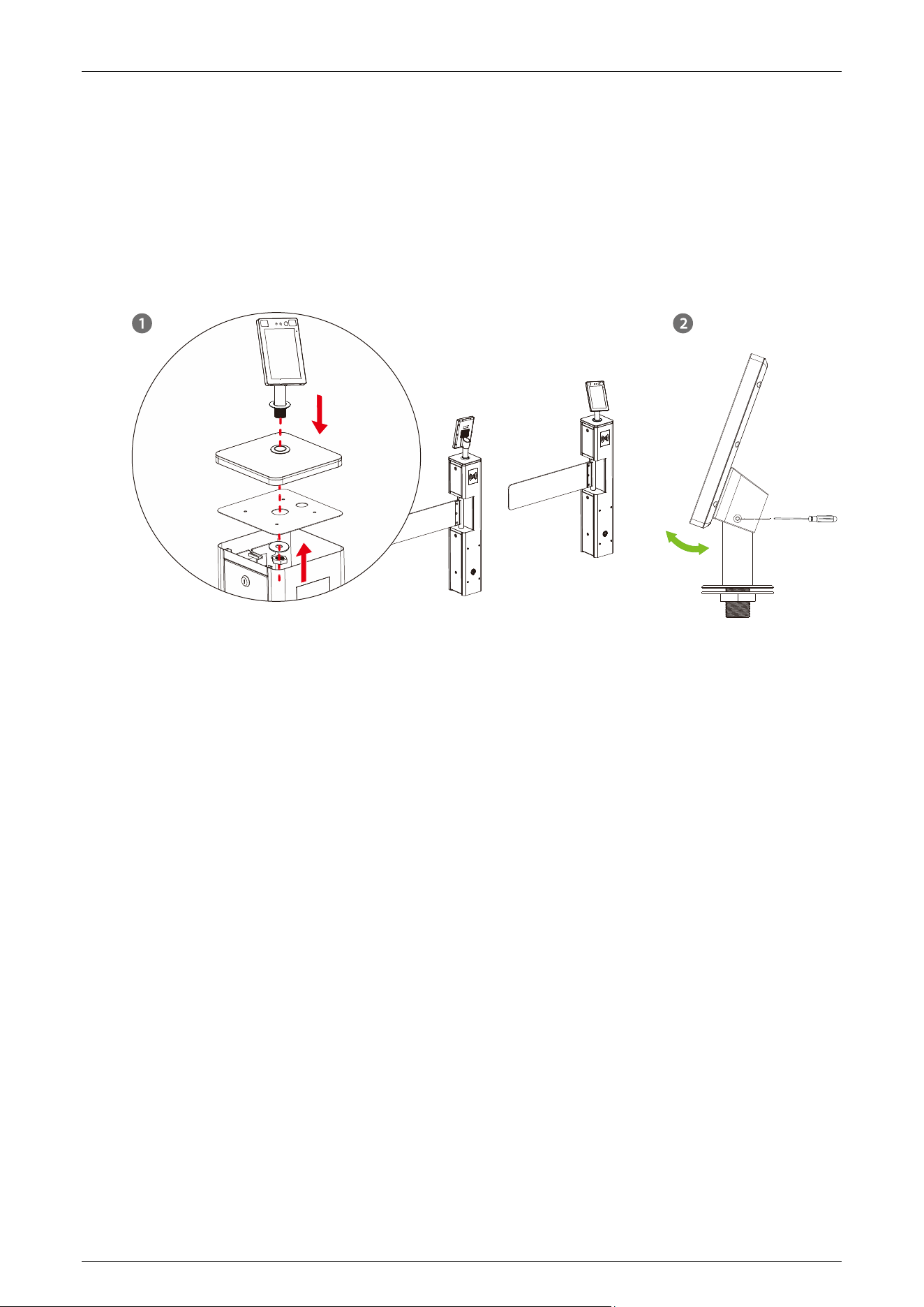
In facial verification mode, the device compares the facial template captured by the camera with all
the facial data registered in the device and sends it to the access controller. When the verification is
successful, the traffic indicator of the device turns green, the arm can be pushed, allowing passage.
In case of verification failure, the traffic indicator turns red, preventing the arm from being pushed.
and an alarm sounds, prohibiting passage.
During the verification process, please try to center your face on the screen. When registering facial
information, please make sure your face is facing the camera and remain still.
Recommended Standing Posture and Facial Expression:
Note: Maintain a natural facial expression and standing posture during both enrollment and
verification processes.
SBT2000S (2023) Swing Barrier Turnstile User Manual
Page | 13
Installation on the swing barrier turnstile:
a) Before installation, insert the wire through the bracket.
b) Punch a 30mm diameter mounting hole at the top center of the swing barrier turnstile.
c) Insert the bracket into the hole and fix it with a nut.
d) Adjust the angle of the device.
SBT2000S (2023) Swing Barrier Turnstile User Manual
Page | 14
3 Control System Introduction
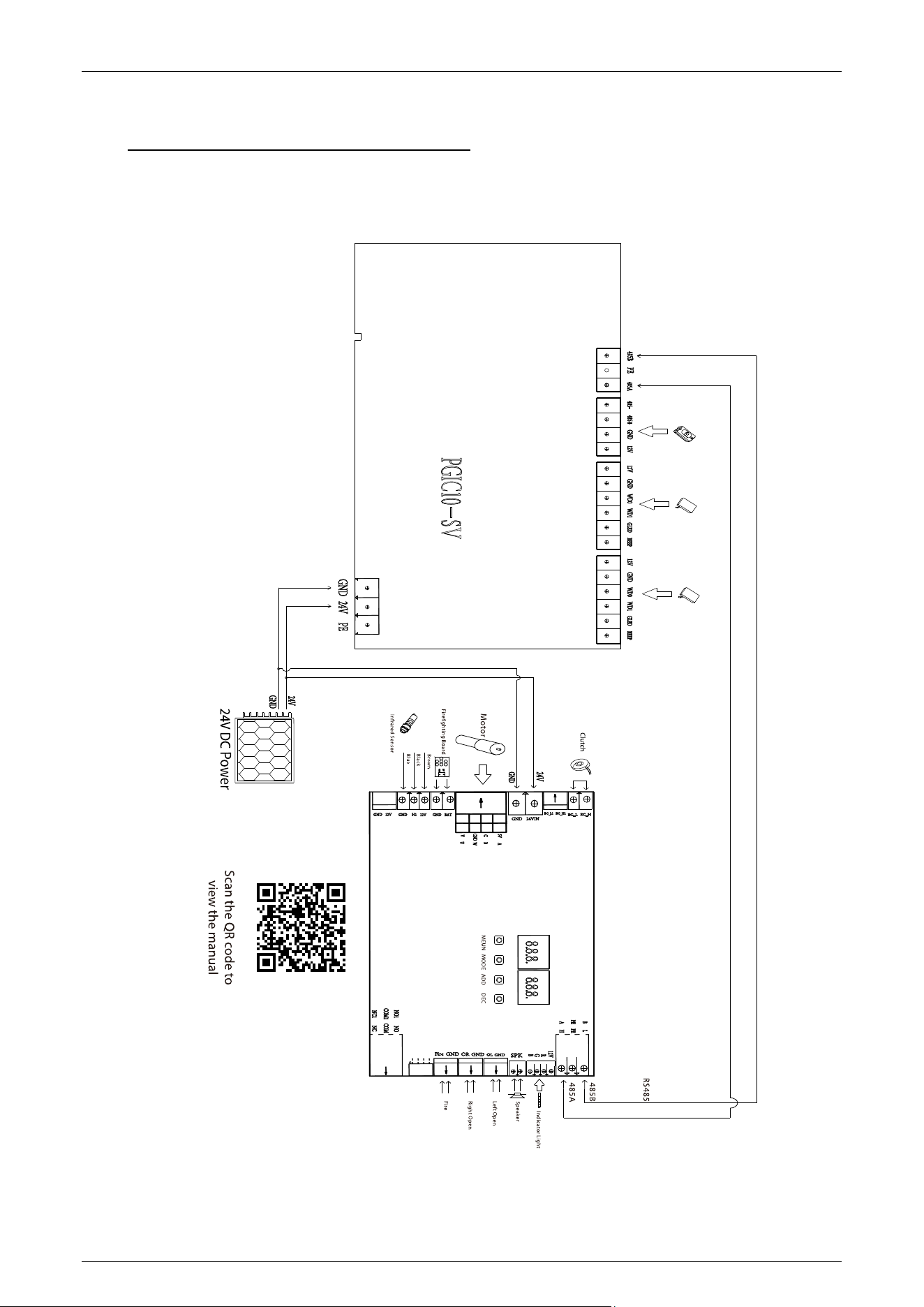
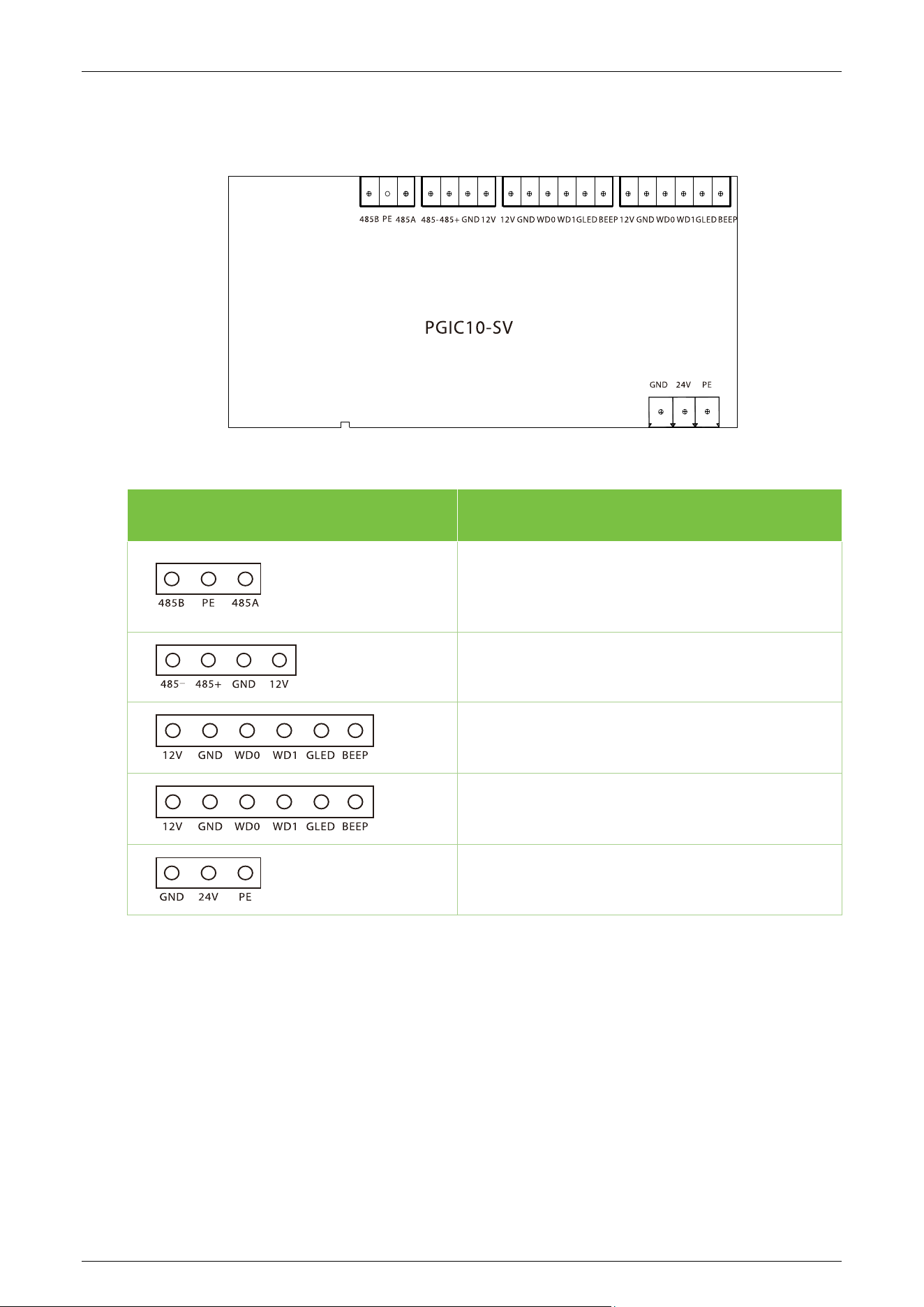
Wiring Diagram 3.1
SBT2000S (2023) Swing Barrier Turnstile User Manual
Page | 15
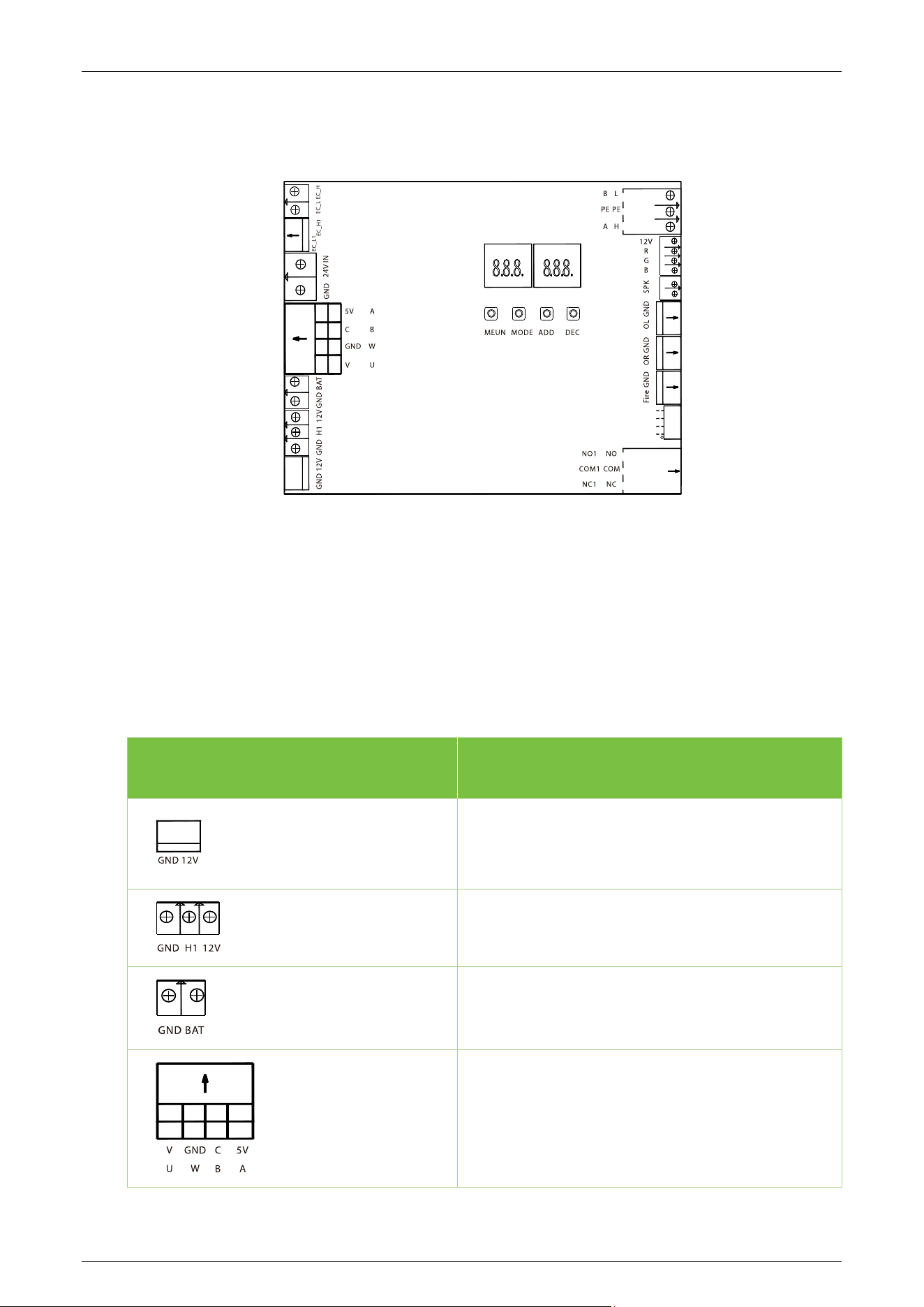
Access Control Board
★
3.2
Terminal Description
RS485
485 Reader
Wiegand Reader
Wiegand Reader
24V Power Supply
SBT2000S (2023) Swing Barrier Turnstile User Manual
Page | 16
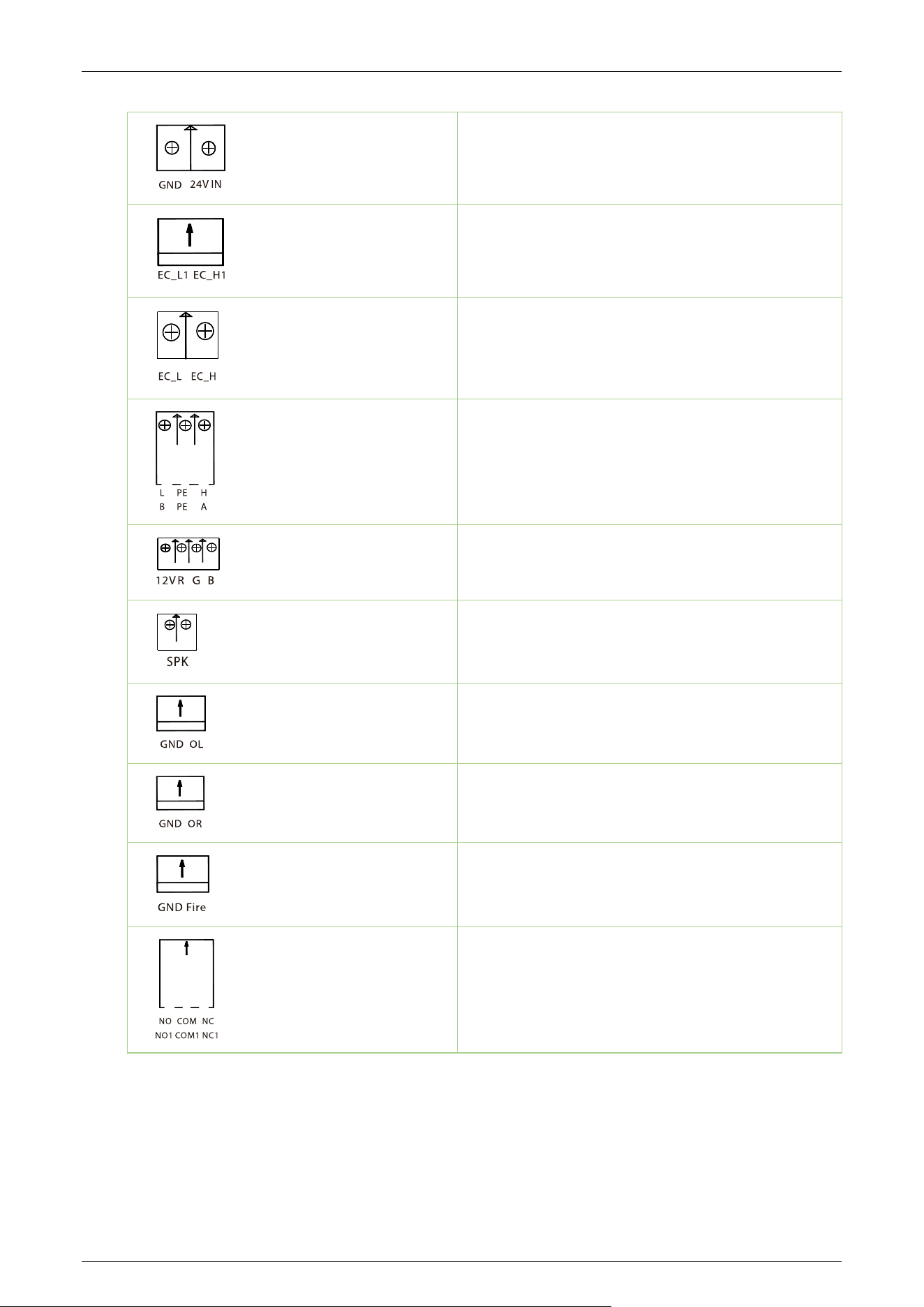
Turnstile Control Board 3.3
There are 4 keys on the master motor driving controller, "MENU", "MODE", "ADD" and "DEC".
MENU: Used to access the Settings menu and confirm modified values.
MODE: Returns to the previous menu and cancels the current operation.
ADD: Navigate to the upper menu item and increase the value.
DEC: Navigate to the lower menu item and decrease the value.
Terminal Description
12V Power Supply Input
Infrared Sensor
Firefighting Board
Motor
SBT2000S (2023) Swing Barrier Turnstile User Manual
Page | 17
24V Power Supply Input
Clutch
Clutch
RS485
Indicator Light
Speaker
Left Open(Out)
Right Open(In)
Fire
Ethernet
SBT2000S (2023) Swing Barrier Turnstile User Manual
Page | 18
Menu of Speed Gate 3.4
Display Mode (01EXXX)
(01E000) Displays current position of the gate
(01E001) Infrared input signal
(01E002) Controls input signal
(01E003) Test mode (the digital LED displays "---" in the test mode)
(01E004) Version number (Default)
Opening Mode Setting (02EXXX)
(02E001) Two-way controlled, both need verification (Default).
(02E002) In need verification, out prohibited.
(02E003) In prohibited, out need verification.
SBT2000S (2023) Swing Barrier Turnstile User Manual
Page | 19
(02E004) Two-way prohibited.
(02E005) Two-way normally open.
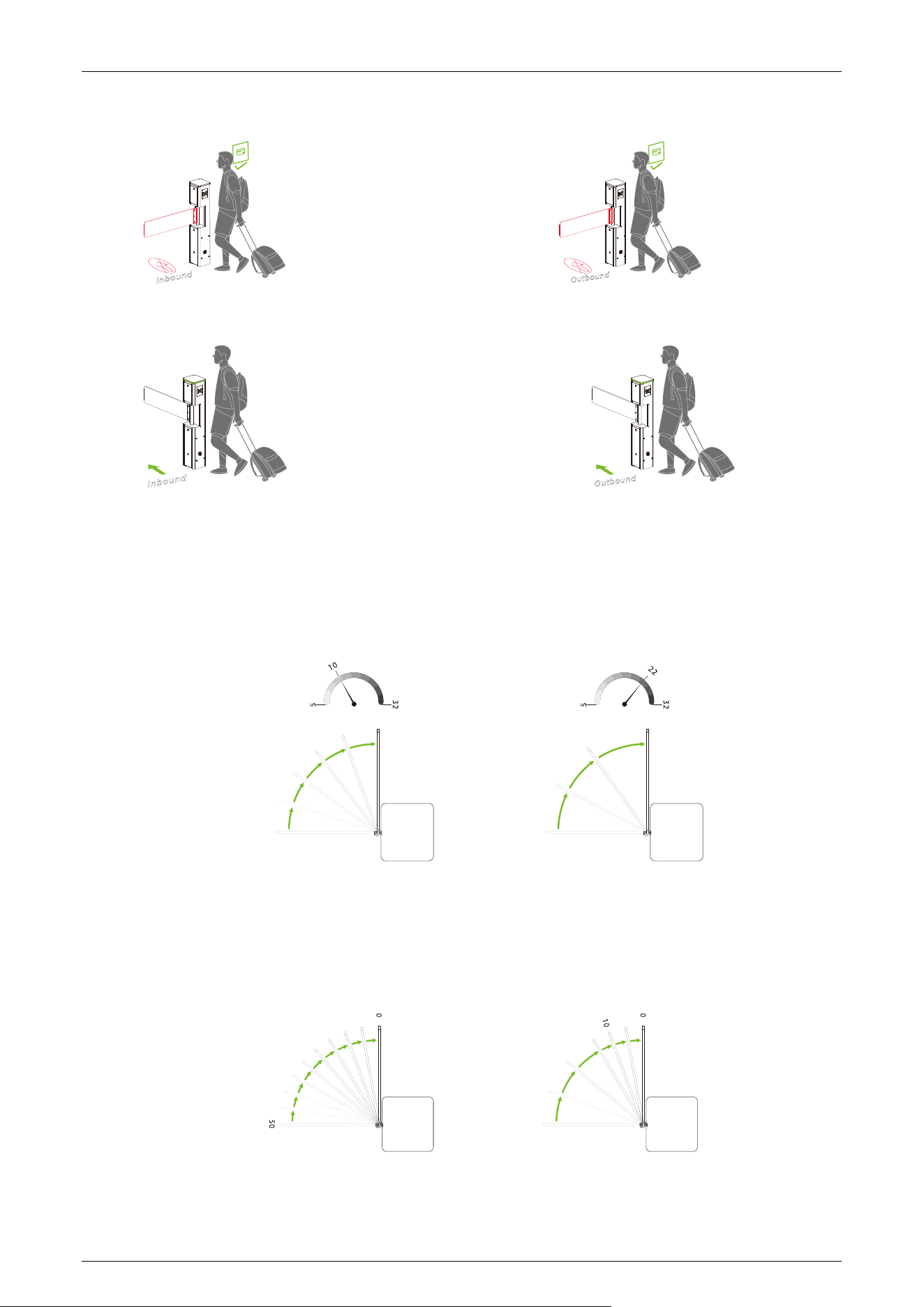
Gate Opening Speed (03EXXX)
To adjust the gate opening speed, you can set a larger number for a faster opening. The Gate
Opening Speed can be configured between 5 and 32, with a default value of 10.
Gate Opening Deceleration Distance (04EXXX)
A larger number increases the deceleration time, enhancing the stability of the swing arm operation.
The Gate Opening Deceleration Distance can be set between 0 and 50, with a default value of 10.
SBT2000S (2023) Swing Barrier Turnstile User Manual
Page | 20
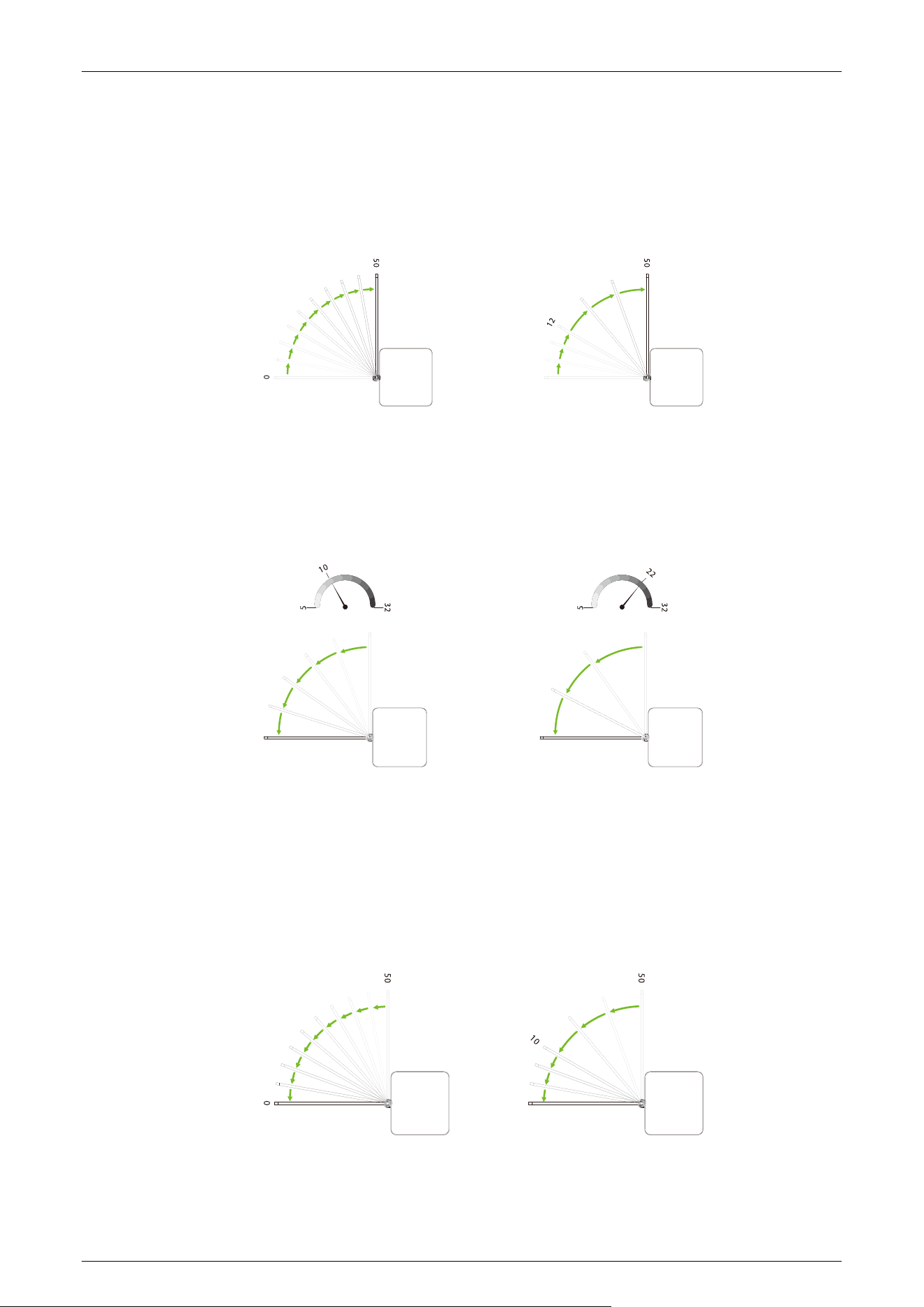
Gate Opening Compensation Speed (05EXXX)
This setting is used when the swing arm cannot fully open or shakes during operation. A larger
number of results in faster compensation speed. The Gate Opening Compensation Speed can be set
between 0 and 50, with a default value of 12.
Gate Closing Speed (06EXXX)
Set the gate closing speed to close the gate. The larger the number is set, the faster the speed. The
Gate Closing Speed value can be set between 5 to 32 and the default value is 10.
Gate Closing Deceleration Distance (07EXXX)
The larger the number, the longer the deceleration time and the more stable the swing arm
operation. The Gate Closing Deceleration Distance value can be set between 0 to 50 and the default
value is 10.
SBT2000S (2023) Swing Barrier Turnstile User Manual
Page | 21
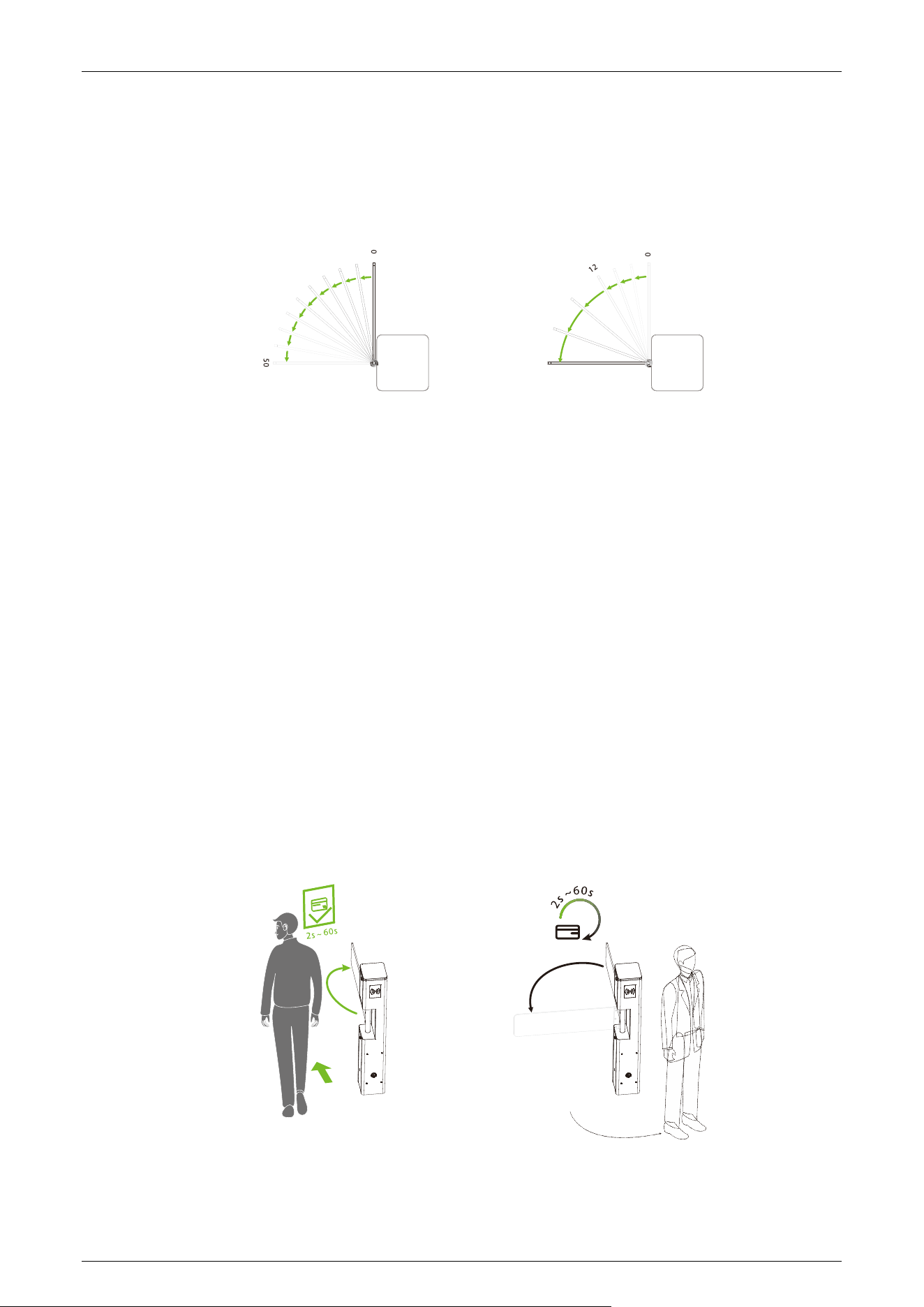
Gate Closing Compensation Speed (08EXXX)
It can be set when the swing arm cannot close to the zero position or shakes. The larger the number
is set, the faster of the compensation speed. The Gate Closing Compensation Speed value can be set
between 0 to 50 and the default value is 12.
Master/Slave Setting (09EXXX)
Setting up the gate as a master or a slave, the SBT2000S (2023) is an independent system, there is no
multi-lane management system, so there is no master-slave relationship.
(09E000) Master (Default)
(09E001) Slave
RS485 Address (10EXXX)
It can be set between 0 to 254 and the default value is 0.
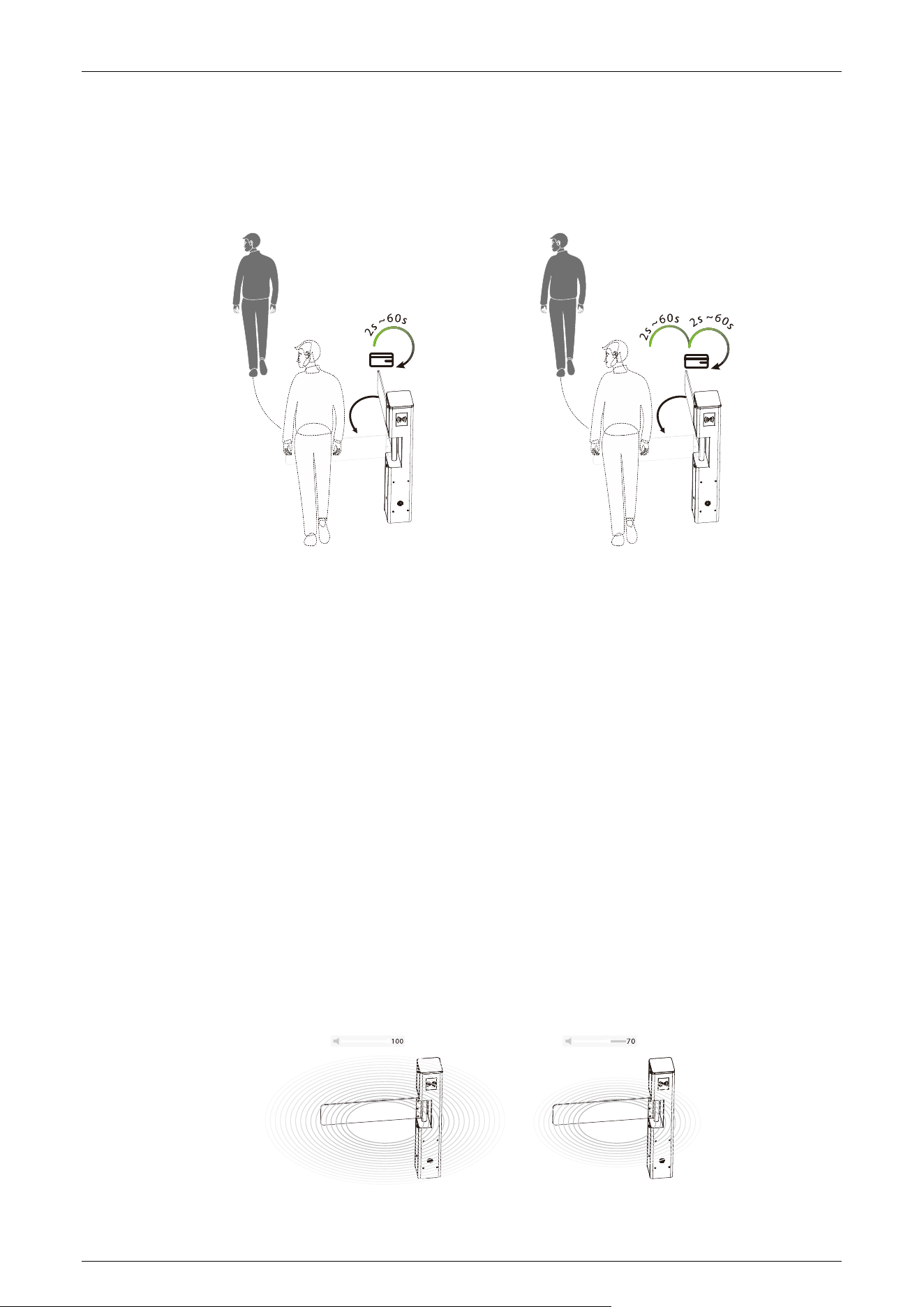
Open Duration Time (11EXXX)
The valid time period after a successful verification can be configured. Once the set time is reached,
the gate will automatically close. The longer the number set, the longer the valid time. The valid
value ranges from 2 to 60 seconds, with a default value of 5 seconds.
SBT2000S (2023) Swing Barrier Turnstile User Manual
Page | 22
Gate Closing Delay Time (12EXXX)
Set the delay time of gate closing after passing. The valid value for gate closing delay time can be set
between 2 to 60s and the default value is 2s.
Adjustment Limit (13EXXX)
(13E001) Zero position (Default)
(13E002) Right position
(13E003) Left position
(13E004) Slave position
1. Adjust the position only when SBT2000S (2023) series is installed properly.
2. When setting the zero position, you can manually push the swing arm for fine-tuning. If the
barrier exceeds a certain angle, it will be invalid.
Volume Setting (14EXXX)
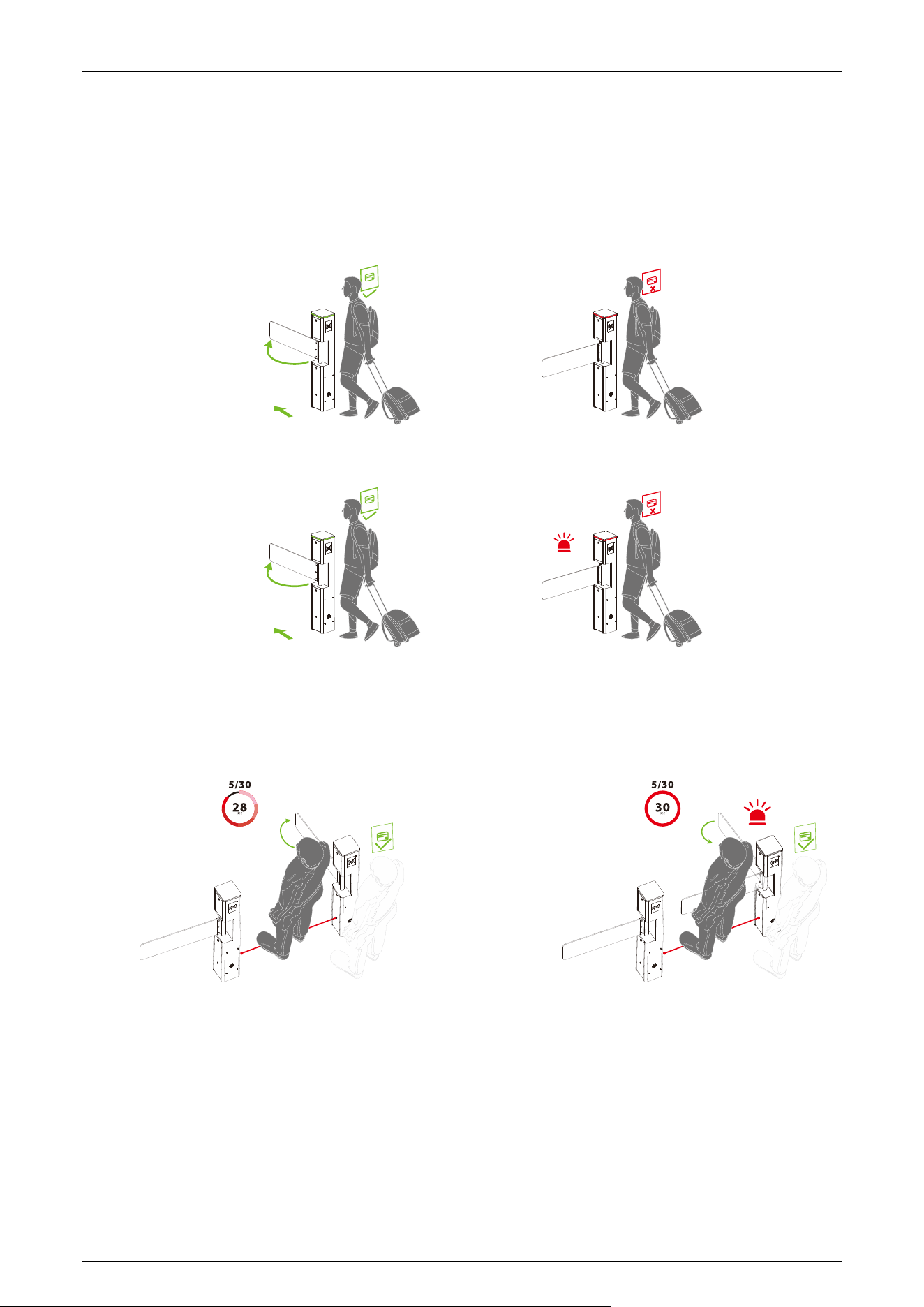
Volume Setting is used for adjusting the volume of the device. The larger the number is set, the
louder the volume. The valid value for Volume Setting can be set between 1 to 100 and the default
value is 70.
SBT2000S (2023) Swing Barrier Turnstile User Manual
Page | 23
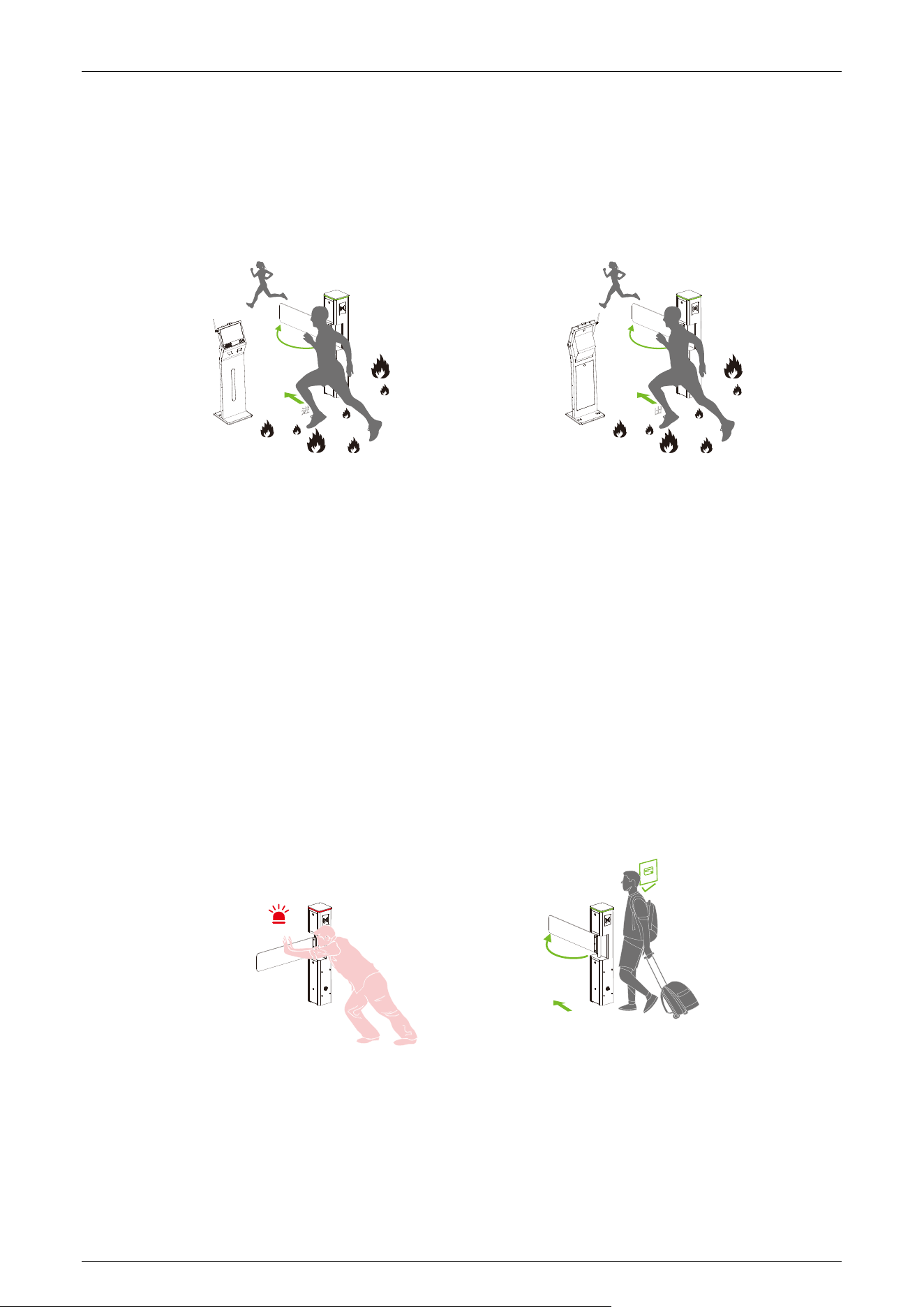
Close Alarm Tone (15EXXX)
When the alarm tone is turned off, the Turnstile will not emit an alarm tone when encountering an
alarm situation. The following figure shows an example of the swipe verification:
(15E000) Close
(15E001) Open (Default)
Stay Duration Time (16EXXX)
Set the duration of stay in the lane after successful verification. The valid value for Stay Duration
Time can be set between 5 to 30 seconds and the default value is 10s.
Force Adjustment (17EXXX)
The larger the number, the greater the efficiency of the gate opening and closing force. The valid
value for Force Adjustment can be set between 10 to 100 and the default value is 50.
SBT2000S (2023) Swing Barrier Turnstile User Manual
Page | 24
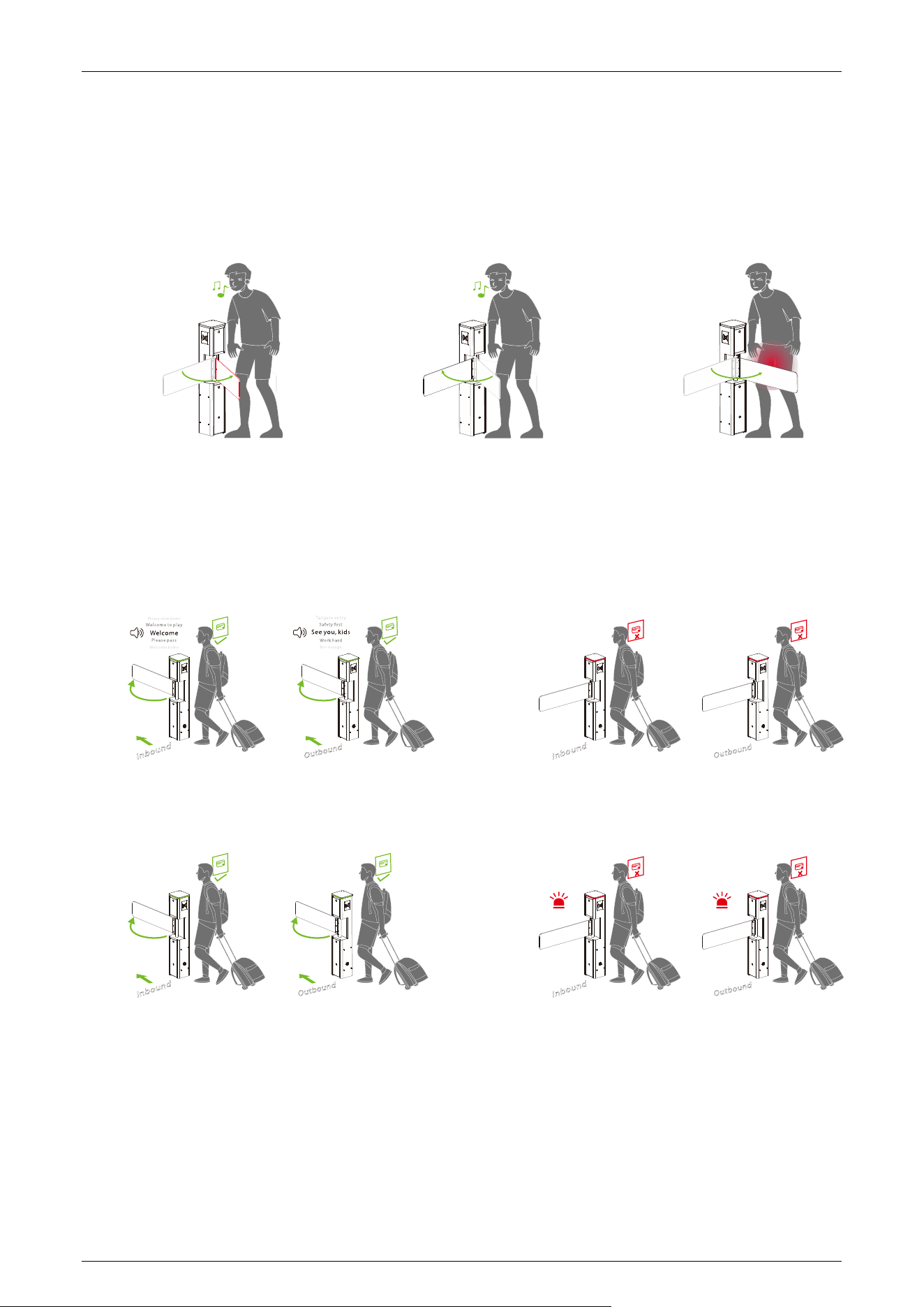
Fire Opening Direction (18EXXX)
According to the external fire device, select the corresponding type of trigger mode.
(18E000) Entry direction (Default)
(18E001) Exit direction
Clutch Locking Stroke (19EXXX)
Set the angle at which the clutch starts. The larger the number, the bigger the angle. The valid value
for Clutch Locking Stroke can be set between 0 to 99, and the default value is 10. When setting it to
0 do not lock it, adapting it to movements without a clutch.
Clutch Locking Mode (20EXXX)
When the gate is unlocked in an unauthorized way, the clutch gets locked automatically. Swipe a
valid card to dismiss the alarm.
(20E000) Delayed unlock (Default)
(20E001) Authentication to unlock.
Restore Factory Setting (21EXXX)
(24E001) Restore factory settings.
SBT2000S (2023) Swing Barrier Turnstile User Manual
Page | 25
Anti-pinch Action Setting (22EXXX)
(22E000) Stop
(22E001) Open (Default)
(22E002) Close the function
Voice Switching (23EXXX)
Sets whether the device announces a voice or an alarm tone.
(23E000) Voice playback
(23E001) Alarm tone (Default)
Motor Installation Direction (24EXXX)
(24E000) Inverted (Default)
(24E001) Upright

SBT2000S (2023) Swing Barrier Turnstile User Manual
Page | 26
Right Synchronous Adjustment (25EXXX)
Set the gate opening compensation speed in the direction the master inbound, the default value is
100, the larger the value, the faster the speed.
Left Synchronous Adjustment (26EXXX)
Set the gate opening compensation speed in the direction the master outbound, the default value is
100, the larger the value, the faster the speed.
Zero Position Strength Adjustment (27EXXX)
Set the strength of the swing arm to return to the zero position, the larger the value, the stronger
the strength, the valid value of the zero position strength adjustment is 1 to 10, and the default
value is 2.
Error Code for Turnstile 3.5
Error Code Cause
ER0002
Power-on Self-test failure, Hall Limit Detection Error
ER0004
Run Timeout
ER0008
Clutch Locked
ER016
The code disk detection failed.
ER032
Electric Motor Shaft Lock Protection failure

SBT2000S (2023) Swing Barrier Turnstile User Manual
Page | 27
4 Troubleshooting
Failure Description Solution
The mode indicator light
does not respond or the
indication is incorrect.
Check that the control panel mode indicator wiring is correct or
that the contact is poor.
When the gate is self-
tested, the swing arm is
not in the normal closing
position!
During the self-test, if obstacles are detected, please remove them.
Then, restart the self-test after powering on the system.
The gate doesn't open to
limit.
If the motor resistance is too high, adjust the minimum
compensation speed accordingly.
There's no sound.
Check speakers for loose wiring or turn off sound.
The swing arm is not
centered.
To adjust the zero position, navigate to the "Limit Adjustment"
menu.
After successful
verification, open the gate
in the direction of the
authorized person.
Access control controller in and out of the open gate signal line is
reversed, can be adjusted.
Verification was
successful, the gate did
not open.
1. Check if it is not exited in the menu setting interface.
2. Check if the gate opening signal line is properly connected to
the gate controller.
3. Enter the menu to confirm whether the current access mode is
set to prohibit access.

SBT2000S (2023) Swing Barrier Turnstile User Manual
Page | 28
5 Maintenance
Chassis Maintenance 5.1
The chassis is made of SPCC. If it has been used for a long time, the surface may develop rust stains.
It is recommended to clean the surface regularly with a clean cloth and apply anti-rust oil, making
sure not to cover the infrared sensor.
Movement Maintenance 5.2
Before performing maintenance, ensure the power is turned off. Open the door, wipe away surface
dust, and apply lubricant for smooth movement.
Power Supply Maintenance 5.3
Switch off the power supply before conducting maintenance.
Check the power plug connection ; if loose, securely fix it.
Do not change any connection position randomly.
Periodically check the insulation of the external power supply.
Conduct regular checks for any potential leakage.
Check if the technical parameters of the interface are normal.
Check the service life of the electronic components and replace them accordingly.
Caution: All maintenance procedures for the swing barrier mentioned above should be carried out
by a professional technician, especially when handling movement and electric control components.
To guarantee operational safety, it is crucial to switch off the power supply when the barrier is not in
use.
SBT2000S (2023) Swing Barrier Turnstile User Manual
Page | 29
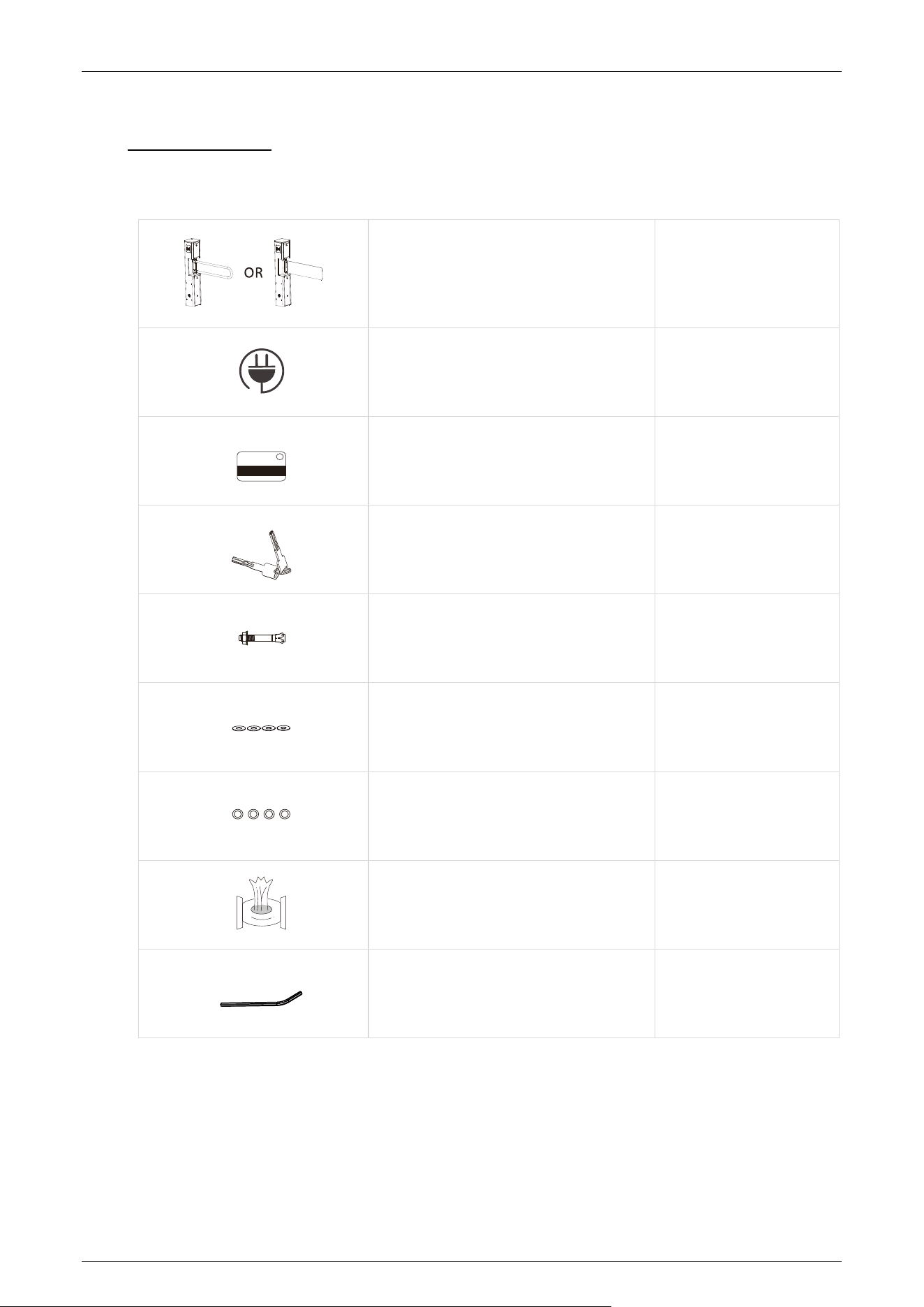
6 Packing List
The package consists of the following items:
SBT2000S (2023) 1
Power Cable
1
Card
1
Keys
2
Expansion Screw M12*100
4
Washer
4
Expansion Screw Washers
4
Stainless Steel Maintenance Wipes
1
Hex Wrench
1

Page | 30