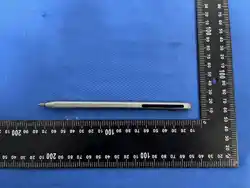

User Manual
Product: P18C
Item
Content
Model No.
P18C
FCC ID
【
FCC ID
】
Version
V1.00
1. Product Overview
The product is a rechargeable active capacitive stylus with a built-in microphone and a Bluetooth Low
Energy (BLE) transceiver. It is used to write and draw on iPad (iPadOS) capacitive touch screens and
to record voice, for example in meetings and lectures.
The pen connects to the APP on the iPad over Bluetooth Low Energy (2.4 GHz, BLE only).
Recordings are uploaded by the APP to a cloud service and returned as text transcription, translation,
summary and mind map. The pen itself has no Internet connection; its 2.4 GHz radio is used only for
the Bluetooth communication between the pen and the iPad.
Main functions:
•
Writing and drawing on iPad
•
Voice recording with the built-in microphone (double click the key to start / stop)
•
Long press the key for about 2 seconds to switch the pen on / off
•
Automatic power off after 5 minutes without operation (not during recording)
•
Bluetooth Low Energy link to the APP for writing data, control commands and audio files
•
APP functions: transcription, translation, summary, mind map
2. Keys and LED Indicator
Position
Name
Function
Nib
Capacitive nib
(electrode)
Writes on the touch screen
Barrel
LED indicator
Power, recording, charging and low battery status (does not indicate the
Bluetooth connection state)
Barrel
Power / Record key
Long press about 2 s: power on / off; double click: start / stop recording
Tail
Charging area
Charging (the pen switches on automatically while charging)
3. Charging
1.
Charge the pen with the supplied USB Type-C charging cable (wired charging only).
2.
The red LED is steady on while charging; when charging is completed, the red LED turns off and
the blue LED is steady on.
3.
Charging switches the pen on automatically: even if the pen was switched off, it switches on when
the charger is connected, and it stays switched on after the charger is removed.
4.
The pen cannot be switched off while charging: a long press of the key is ignored and the pen does
not power off automatically, so that the charging indication remains visible. To switch the pen off,
remove the charger first and then press and hold the key for about 2 seconds.
5.
Charging takes about 20 minutes (fast charging); a full charge provides about
【
8
】
hours of use.
6.
If the pen is not used for a long time, charge it at least once every
【
3
】
months.
4. Power On / Off and Pairing
1.
Press and hold the key for about 2 seconds to switch the pen on or off. When switched on, the blue
LED is steady on; when switched off, all LEDs are off.
2.
Pairing: open the APP on the iPad and turn Bluetooth on, then select the Bluetooth name of the
pen in the device list of the APP.

3.
The LED does not indicate the Bluetooth connection state; check the connection status in the APP.
4.
Automatic power off: the pen switches off after 5 minutes without any operation and without
movement, whether or not it is connected to the iPad by Bluetooth. While the pen is being used
(movement / vibration detected) it remains switched on, and any operation restarts the timer. The
pen does not switch off automatically during recording or while charging.
5. How to Use
Function
Operation
Writing / drawing
Switch the pen on, then write or draw on the iPad screen
Start recording
Double click the key; the blue LED starts blinking = recording. The pen must be
connected in the APP first; a double click has no effect while the pen is not
connected
Stop recording
Double click the key again; the recording is saved and transferred to the APP
Transcription / translation /
summary / mind map
Open the APP, select the recording in the list and choose the function
Playback volume
Adjust the volume in the APP
6. LED Indication
LED status
Meaning
Blue steady on
The pen is switched on and not recording (does not indicate whether Bluetooth is
connected)
Blue blinking
Recording is in progress
Red steady on
Charging
Red off, blue steady
on
Fully charged
Red blinking
Low battery, please charge the pen
All LEDs off
The pen is switched off
7. Specifications
Item
Value
Model
P18C
Compatible device
iPad (iPadOS)
Main control chip
BT8912E (QFN32)
Wireless technology
Bluetooth Low Energy (BLE), 2.4 GHz
Frequency range
2402 – 2480 MHz
Modulation
GFSK
Data rate
1 Mbps / 2 Mbps
Maximum RF output power
≤ 11 dBm
Antenna
Internal ceramic chip antenna (2012 package), peak gain 0.21 dBi
Microphone
Built-in microphone
Battery
3.7 V / 125 mAh lithium battery, built-in
Charging
USB Type-C, wired charging only
Charging input
Type-C, 5 V
Operating temperature
【
0 °C to +40 °C
】
Dimensions / Weight
【
xxx × xx × xx mm
】
/
【
xx g
】
8. Troubleshooting

Problem
Solution
The pen does not write
Make sure the pen is switched on (blue LED steady on) and that the nib is not
damaged. This product is designed for iPad
The APP cannot find the
pen
Make sure the pen is switched on (blue LED steady on) and within 10 m of the iPad
and that Bluetooth is on, then restart the APP
Cannot connect
In iPad Settings → Bluetooth, ignore the device if it is listed, then search again in
the APP
Double click has no effect
(recording does not start)
The pen must be connected in the APP first; recording is not available while the pen
is not connected
The pen cannot be
switched off
The pen cannot be switched off while it is charging. Remove the charger first, then
press and hold the key for about 2 seconds
The pen switches off by
itself
The pen switches off automatically after 5 minutes without operation and without
movement; while it is being used it stays on. It does not switch off during recording
or while charging
The pen is on although the
key was not pressed
The pen switches on automatically when the charger is connected and remains on
after the charger is removed
The red LED is blinking
Low battery, please charge the pen
Recording is too short / not
saved
Double click the key to start recording, record for at least
【
2
】
seconds, then
double click the key again to stop
No sound in the recording
Check that the microphone hole is not blocked and that the speaker is within 1 m
Cannot charge
Use the supplied charger, clean the charging contacts and place the pen correctly
9. Safety and Care
•
Do not disassemble, crush, heat or puncture the built-in battery.
•
Do not use the pen in a wet environment; keep the charging contacts free of water and dust.
•
Use only the supplied charger or a charger with the same rated output.
•
Keep the device away from strong magnetic fields and from high temperatures.
•
This product is not a toy; keep it away from children under 3 years old.
10. FCC Statement
FCC ID: 【FCC ID】
This device complies with Part 15 of the FCC Rules. Operation is subject to the following two
conditions:
1.
This device may not cause harmful interference, and
2.
this device must accept any interference received, including interference that may cause undesired
operation.
Caution: Any changes or modifications not expressly approved by the party responsible for
compliance could void the user's authority to operate the equipment.
Note: This equipment has been tested and found to comply with the limits for a Class B digital device,
pursuant to Part 15 of the FCC Rules. These limits are designed to provide reasonable protection
against harmful interference in a residential installation. This equipment generates, uses and can radiate
radio frequency energy and, if not installed and used in accordance with the instructions, may cause
harmful interference to radio communications. However, there is no guarantee that interference will not
occur in a particular installation. If this equipment does cause harmful interference to radio or
television reception, which can be determined by turning the equipment off and on, the user is
encouraged to try to correct the interference by one or more of the following measures:
•
Reorient or relocate the receiving antenna.
•
Increase the separation between the equipment and receiver.
•
Connect the equipment into an outlet on a circuit different from that to which the receiver is
connected.
•
Consult the dealer or an experienced radio/TV technician for help.

RF Exposure Statement: This equipment complies with FCC radiation exposure limits set forth for an
uncontrolled environment. This transmitter must not be co-located or operating in conjunction with any
other antenna or transmitter.