Basic parameter
MU-A06
Packing list
Installation and Setup
MU-A06
Instructions & Warranty
30-Day Money-Back Gua
rantee
We stand behind the quality of our products. If for any reason you are not
completely satisfied, you may return your purchase within 30 days for a full
refund — no questions asked.
3-Month Limited Warranty
Your pu
rchase is covered by a 3-month warranty. During this period, if the
product has any defects in material or workmanship , we will provide a free
replacement or repair.
Customer Support
Our customer service team is here to help with returns, replacements, or
any questions you may have.
Email: mucw.official@gmail.com
Manufacturer: Shenzhen Weishidai Technology Co., Ltd.
Manufacturer Address: Room 1606, Building 1, Qianhai Kexing Science Park,
Laodong Community, Xixiang Street, Bao'an District, Shenzhen City
Company Email: mucw.offi[email protected]
Return Warranty Policy
Made in China
Safety Precautions
This device complies with part 15 of the FCC Rules. Operation is subject to the
following two conditions: (1) this device may not cause harmful interference,
and (2) this device must accept any interference received, including interference
that may cause undesired operation.
Any changes or modifications not expressly approved by the party responsible
for compliance could void the user's authority to operate the equipment.
NOTE: This equipment has been tested and found to comply with the limits for
a Class B digital device, pursuant to Part 15 of the FCC Rules. These limits are
designed to provide reasonable protection against harmful interference in a
residential installation. This equipment generates, uses and can radiate radio
frequency energy and, if not installed and used in accordance with the
instructions, may cause harmful interference to radio communications.
However, there is no guarantee that interference will not occur in a particular
installation.
If this equipment does cause harmful interference to radio or television
reception,
which can be determined by turning the equipment off and on, the user is
encouraged to try to correct the interference by one or more of the following
measures:
-- Reorient or relocate the receiving antenna.
-- Increase the separation between the equipment and receiver.
-- Connect the equipment into an outlet on a circuit different
from that to which the receiver is connected.
-- Consult the dealer or an experienced radio/TV technician for help.
The device has been evaluated to meet general RF exposure requirement.
The device can be u sed in portable exposure condition without restriction
FCC Statement
This equipment complies with FCC's RF radiation exposure limits set forth for
an uncontrolledenvironment. This device and its antenna(s) must not be co-
located or conjunction with anyother antenna or transmitter.
The device can be used in portable exposure conditions without restriction.
基本参数
包装清单
按键和说明
MU-A06
使用说明和保修条款
退货保修政策
FCC声明
操作说明
安全预防措施
该设备符合FCC规则第15部分。操作受以下两个条件的约束:
(1)此设备可能不会造成有害干扰,
(2)此设备必须接受任何接收到的干扰,包括可能导致意外操作的干扰。
未经负责合规的一方明确批准的任何更改或修改都可能使用户操作设备的
权限无效。注:根据FCC规则第15部分,该设备经过测试,符合B类数字设备
的限制。这些限制旨在为住宅安装提供合理的保护,防止有害干扰。该设备产生、
使用并可以辐射射频能量,如果不按照说明安装和使用,可能会对无线电通信造
成有害干扰。但是,不能保证在特定安装中不会发生干扰。
如果该设备确实对无线电或电视接收造成有害干扰,
鼓励用户尝试通过以下一种或多种措施来纠正干扰:
-重新定向或重新定位接收天线。
-增加设备和接收器之间的间距。
-将设备连接到与接收器连接的电路不同的插座上。
-请咨询经销商或经验丰富的无线电/电视技术人员以获取帮助。
该设备已被评估为符合一般射频暴露要求。
该设备可以在便携式暴露条件下使用,不受限制
本设备符合FCC针对未控环境设定的射频辐射暴露限值。
本设备及其天线不得与其他天线或发射器共同放置或配合使用。
该设备可在便携式曝光条件下无限制地使用。
7天退款保证
我们保证产品的质量。如果出于任何原因您不完全满意,您可以在7天内退还
您的购买,并获得全额退款--无需提问。
12个月有限保修
您的购买享有12个月保修。在此期间,如果产品在材料或工艺上有任何缺陷,
我们将提供免费更换或维修。
客服支持
我们的客服团队随时为您提供退货、换货或任何问题的帮助。
电子邮件:mucw.offi[email protected]
制造商:深圳市威时代科技有限公司
制造商地址:深圳市宝安区西乡街道劳动社区前海科兴科技园1号楼1606室
公司邮箱:mucw.offi[email protected]
中国制造
常见问题及解决方法
故障 解决办法
配对失败
卡顿断音
静音
关闭扬声器并再次打开,或关闭手机上的无线并打开
连接距离是否超出范围,或者扬声器和手
机之间是否有障碍物
检查扬声器是否最小
无法启动
电源灯不亮
扬声器内置电池是否充电
检查充电口是否插好
声音低或失真
音量低
充电器电流不足,更换另一个充电器。
将声源设备调整到合适的音量。
使用本产品时,必须有成人从 。
请勿
有 品 。
请勿
掷、针刺产品, 挤压、 折产品。
1.请
理由拆卸 备,否则 音箱发生 ;
2.请勿让设备
体弄湿,否则 备严重损坏;
3.请
于温 或者45 的 中;
4.请勿在雷暴
使用设备,雷 设备工作不正常, 等
无线K歌音响*1
2
说明书及保修卡 *1
1
AUX音频线*1
3
电源线*1
4
3 4
Light Cool Soundbox Desktop Speakers*1
AUX audio cable*1
Instruction Manual *1
Power cord*1
MU-A06
MUCW无线K歌音箱
V 5.4
5W*1
700mv±50
约101(长)*82(宽)*143(高)mm
约270g
无线、AUX、TF、U盘、RGB灯效
100Hz-20KHz
5W
无线版本
产品型号
产品名称
音箱功率
有效距离
输入电压
扬声器单元
功能
产品重量
输入灵敏度
产品尺寸
频响范围
信噪比
DC 5V 1A
电池容量
1500mAh
85dB
10米
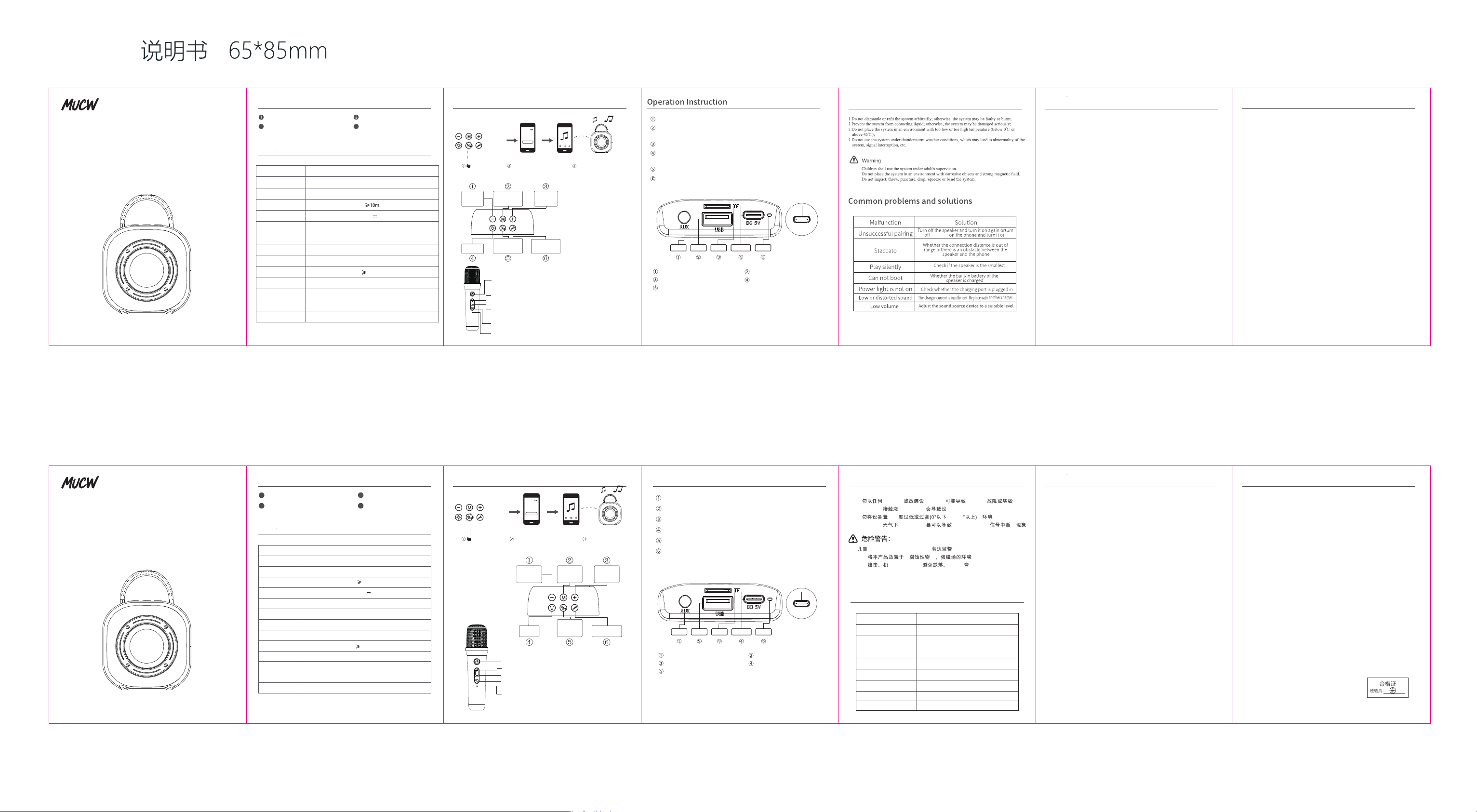
短按,切换灯光效果;长按,开/关灯效
短按,音量减;长按,上一曲
短按,音量加;长按,下一曲
短按,开/关消人声(原唱/伴奏)
长按,开/关机;短按,暂停/播放音乐
短按,切换播放模式;长按,清除无线
Short press, switch light effect;
long press, turn on/off light effect
Short press, volume down; long press, previous track
Short press, volume up; long press, next track
Short press, on/off voice(Original/accompaniment)
Long press, power on/off; short press, pause/play music.
Short press, switch playback mode;
Long press, clear Wireless
MUCW wireless karaoke speaker
MU-A06
DC 5V 1A
5W*1
5W
≈
≈
101*82*143(L*W*H)mm
270g
、AUX、TF、USB flash drive、RGB
1500mAh
85dB
Product name
Model
Wireless version
Effective distance
Input voltage
System power
Loudspeaker
Scope of frequency
response
Input sensitivity
SNR
Battery Capacity
Function
Overall dimensions
Weight
V5.4
100Hz-20KHz
700mv±50
3.5mm音频输入插口
U盘接口
AUX
Type-C
USB
TF卡
指示 灯
TF卡接口
5V/1A充电插口
充电指示灯
Long p ress, microphone on/off;
shor t press, enter microphone effe ct mode
(Mic rophone; Reverberation;
Acco mpaniment adjustment).
Long p ress, next song;
shor t press,Sound effect added (Op eration under
soun d effect mode)
Long p ress, previous track;
shor t press,Sound effect reducti on (Operation under
soun d effect mode)
Shor t press to switch sound effects
(Ori ginal voice KTV male to female; female to male;
Warc raft voice; doll voice)
Char ging indicator light
3.5mm audio input port
USB interface
AUX
Type-C
USB
TF
LED
TF card interface
5V/1A charging port
Charging indicator light
Power on/off
Pause/play
Turn on/off
voice
cancellation
Play mode
switch key
Volume+
next song
Volume-
previous
song
Light key
M
ERAZER K20
长按3秒,开机
打开手机无线,搜索找到
音响,配对即可
打开手机上的音乐软件
即可享受音乐
M
开机/关机
暂停/播放
开/关消人声
播放模式
切换键
音量+
下一曲
音量-
上一曲
灯光键
M
ERAZER K20
Long press for
3 seconds to
turn on
Turn on your phone's ,
search and find the
MU-A06 speaker, pair it.
Open the music software
on your phone
And you can enjoy the music
M
长按,话筒开/关机;
短按,进入话筒音效模式(话筒 混响 伴奏调节)
长按,下一曲;短按,音效加(音效模式下操作)
长按,上一曲;短按,音效减(音效模式下操作)
短按切换声效(原音 KTV 男变女 女变男
魔兽音 娃娃音)
充电指示灯
MU-A06
Wireless
Wireless
Wireless