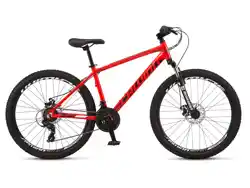

This manual contains important safety, performance and maintenance
information. Read the manual before taking your first ride on your
new bicycle, and keep the manual handy for future reference.
To register your bike visit
schwinnbikes.com/register
Owner’s Manual
Mountain Bike
Contents
1 Safety ............................................4
Safety Signal Words ...............................4
User Responsibility................................4
Bicycle Setup ....................................5
Personal Safety...................................8
Riding Safety....................................11
Before You Ride Safety Checklist ...................13
2 Parts Idencaon . . . . . . . . . . . . . . . . . . . . . . . . . . . . . . . . 14
3 Assembly . . . . . . . . . . . . . . . . . . . . . . . . . . . . . . . . . . . . . . . . 16
Tools Required . . . . . . . . . . . . . . . . . . . . . . . . . . . . . . . . . . 16
Geng Started..................................17
Aach the Handlebar.............................18
Aach the Lockon Grips . . . . . . . . . . . . . . . . . . . . . . . . . . 20
Aach the Brake Cables . . . . . . . . . . . . . . . . . . . . . . . . . . 21
Aach the Front Wheel ...........................22
Aach the Seat..................................25
Aach the Pedals ................................28
4 Adjustments......................................29
Tools Required . . . . . . . . . . . . . . . . . . . . . . . . . . . . . . . . . . 29
Adjusng the Brakes . . . . . . . . . . . . . . . . . . . . . . . . . . . . . 30
Adjusng the Derailleur...........................40
Adjusng the Seat Height . . . . . . . . . . . . . . . . . . . . . . . . . 42
Adjusng the Handlebar . . . . . . . . . . . . . . . . . . . . . . . . . . 44
Adjusng the Headset ............................46
Adjust the Boom Bracket . . . . . . . . . . . . . . . . . . . . . . . . 50
5 Use..............................................52
Brake Operaon .................................52
Gear Operaon..................................53
Security ........................................55
6 Maintenance . . . . . . . . . . . . . . . . . . . . . . . . . . . . . . . . . . . . . 56
Basic Maintenance ...............................56
Lubricaon Schedule .............................57
Parts Maintenance . . . . . . . . . . . . . . . . . . . . . . . . . . . . . . 58
Hub Bearings....................................61
Inang the Tire Tube . . . . . . . . . . . . . . . . . . . . . . . . . . . . 61
Repairing a Flat Tire ..............................62
Troubleshoong Guide ...........................63
7 Warranty.........................................66
Purchase Record.................................67

2
Congratulaons
on your new bicycle! Proper assembly and operaon of your
bicycle is important for your safety and enjoyment. Our
customer service department is dedicated to your sasfacon
with Pacic Cycle and its products. If you have quesons or need
advice regarding assembly, parts, performance, or returns,
please contact the experts at Pacic Cycle. Enjoy the ride!
Toll free: 1-800-626-2811.
Customer Service hours: Monday - Friday 8 AM- 5 PM Central
Standard Time (CST)
You may also reach us at:
Web: www.pacic-cycle.com
Email: customerservice@pacic-cycle.com
Mail: P. O. Box 344
4730 E. Radio Tower Lane
Olney, IL 62450
Do not return this item to the store. Please call Pacic Cycle
customer service if you need assistance. You will need your
model number and date code located on the service scker near
the boom bracket area. See Secon 7: Purchase Record for the
locaon of the model number on your bicycle.
About This Manual
It is important for you to understand your new bicycle.
By reading this manual before you go out on your rst ride, you’ll
know how to get beer performance, comfort, and enjoyment
from your new bicycle. It is also important that your rst ride on
your new bicycle is taken in a controlled environment, away from
cars, obstacles and other cyclists.
This manual contains important informaon regarding safety,
assembly, use, and maintenance of the bicycle but is not
intended to be a complete or comprehensive manual covering all
aspects concerning bicycle ownership. We recommend
consulng a bicycle specialist if you have any doubts or concerns
regarding your experience or ability to properly assemble and
maintain the bicycle.
A Special Note For Parents and Guardians
It is a tragic fact that most bicycle accidents involve children.
As a parent or guardian, you bear the responsibility for the
acvies and safety of your minor child. Among these
responsibilies are to make sure that the bicycle which your
child is riding is properly ed to the child; that it is in good
repair and safe operang condion; that you and your child
have learned, understand and obey not only the applicable local
motor vehicle, bicycle, and trac laws, but also the common
sense rules of safe and responsible bicycling. As a parent, you
should read this manual before leng your child ride the
bicycle. Please make sure that your child always wears an
approved bicycle helmet when riding.
3
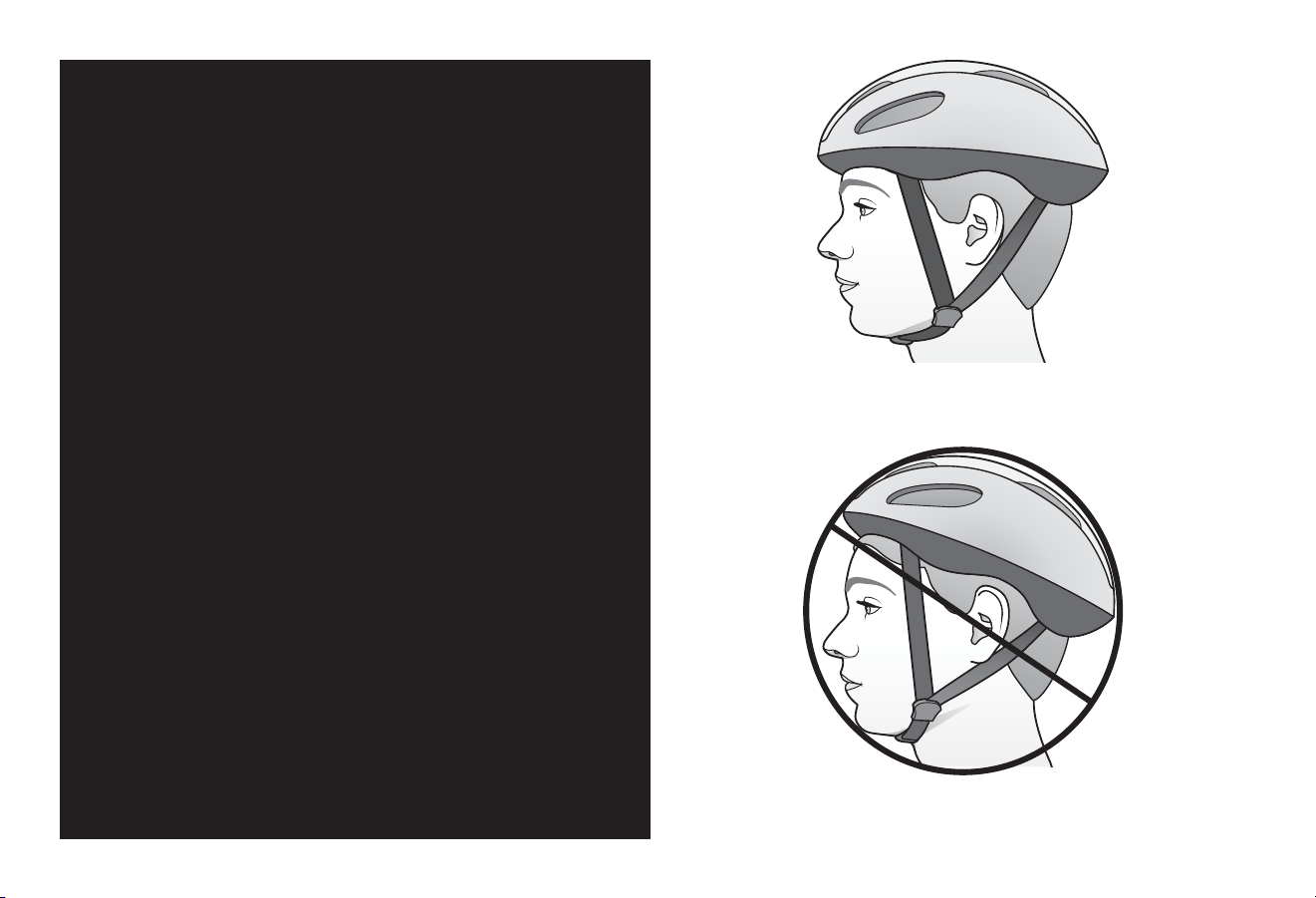
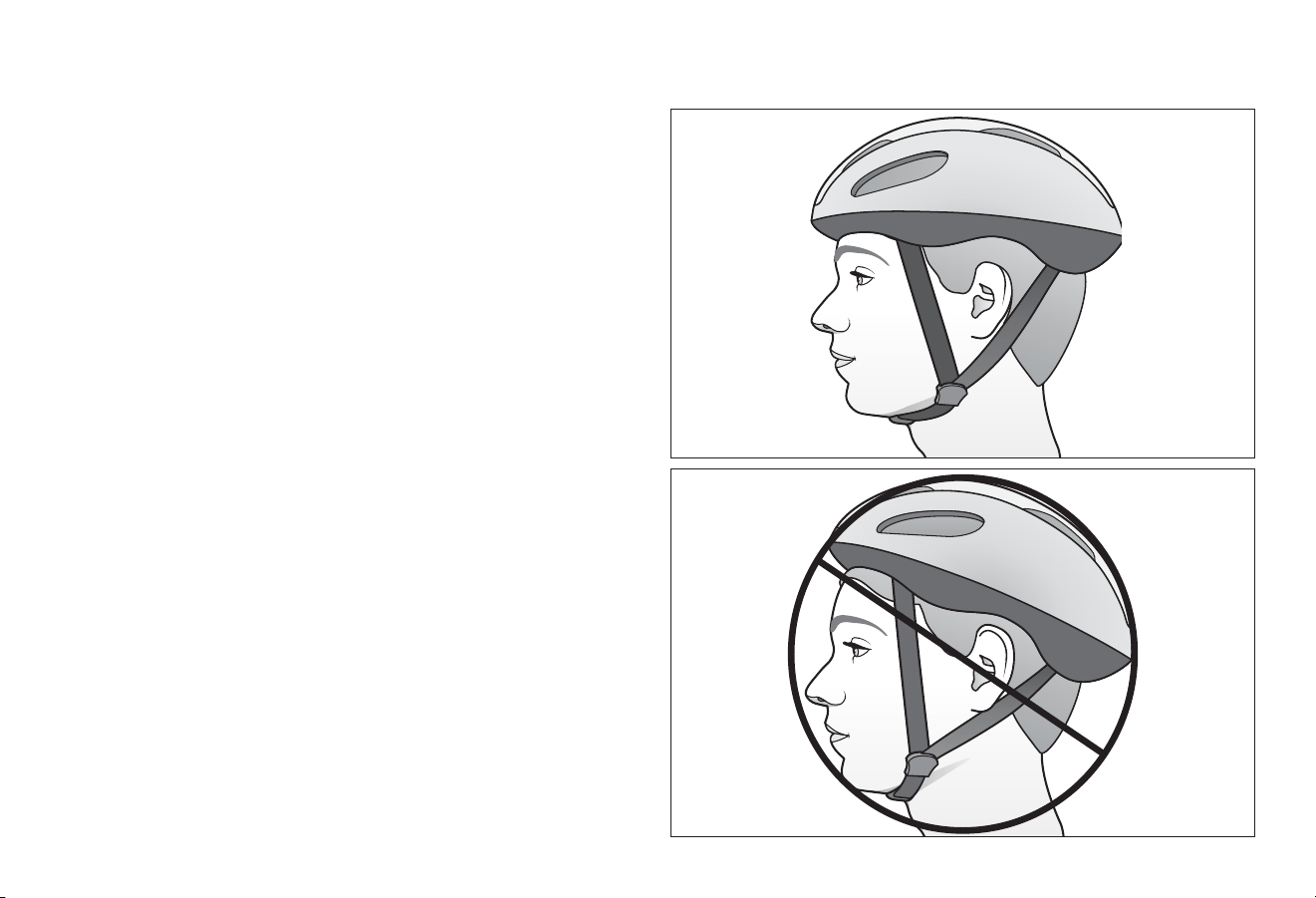
Correct Fing
Make sure your helmet covers your forehead
Incorrect Fing
Forehead is exposed and vulnerable to serious injury
• ALWAYS WEAR A PROPERLY FITTED
HELMET WHEN RIDING YOUR BICYCLE
• DO NOT RIDE AT NIGHT
• AVOID RIDING IN WET CONDITIONS
Helmets
Save
Lives!
4
1 Safety
WARNING!
CAUTION!
SAFETY SIGNAL WORDS
The following safety signal words indicate a safety message.
The symbol alerts you to potenal hazards. Failure to follow the
warning may result in damage to property, injury, or death.
This manual contains many Warnings and Cauons concerning
the consequences of failure to follow safety warnings. Because
any fall can result in serious injury or even death, we do not
repeat the warning of possible injury or death whenever the risk
of falling is menoned.
Indicates a hazard or unsafe pracce that will result in severe
injury or death. Failure to read, understand and follow the safety
informaon in this manual may result in serious injury or death.
Indicates a hazard or unsafe pracce that could result in
minor injury.
Indicates a hazard unrelated to personal injury, such as
property damage.
❶ Safety
NOTICE
USER RESPONSIBILITY
All persons assembling, using, and maintaining the bicycle must
read and understand the safety warnings and operang
instrucons in this manual before using the bicycle.
It is the responsibility of the user, or in the case of a child rider,
an adult, to ensure the bicycle is properly maintained and in
proper operang condion. Doing so will reduce the risk of
injury. Always conduct regular maintenance and inspecon of
your bicycle. Complete the Safety Checklist at the end of this
secon before each use.
A responsible adult must always supervise the use of the bicycle
by a child. You must ensure:
WARNING!
• The child is wearing the proper protecve are and approved
bicycle helmet.
• The child is seated securely and the bicycle is properly ed
to the child.
• The child understands applicable laws and common sense
rules of safe responsible bicycling.
Do not install any kind of power plant or internal combuson
engine to a bicycle. Adapng a bicycle in this manner poses an
extreme safety risk to rider and could result in loss of control
or death.
Safety 1
5
Figure 1.1
BICYCLE SETUP
Correct Bicycle Size
Riding a bicycle that is not correctly sized to the rider may result
in the rider’s feet not being able to touch the ground and
balance the bicycle, properly reach the handlebar for steering or
braking, and loss of control when pedaling.
Use the wheel size in the following table as a guide to match the
rider and bicycle. For example, bicycles with a wheel size of 12
inches t a rider that is 28 to 38 inches tall. Note: Some bicycles
such as folding bicycles may have smaller wheels but sll t
adults.
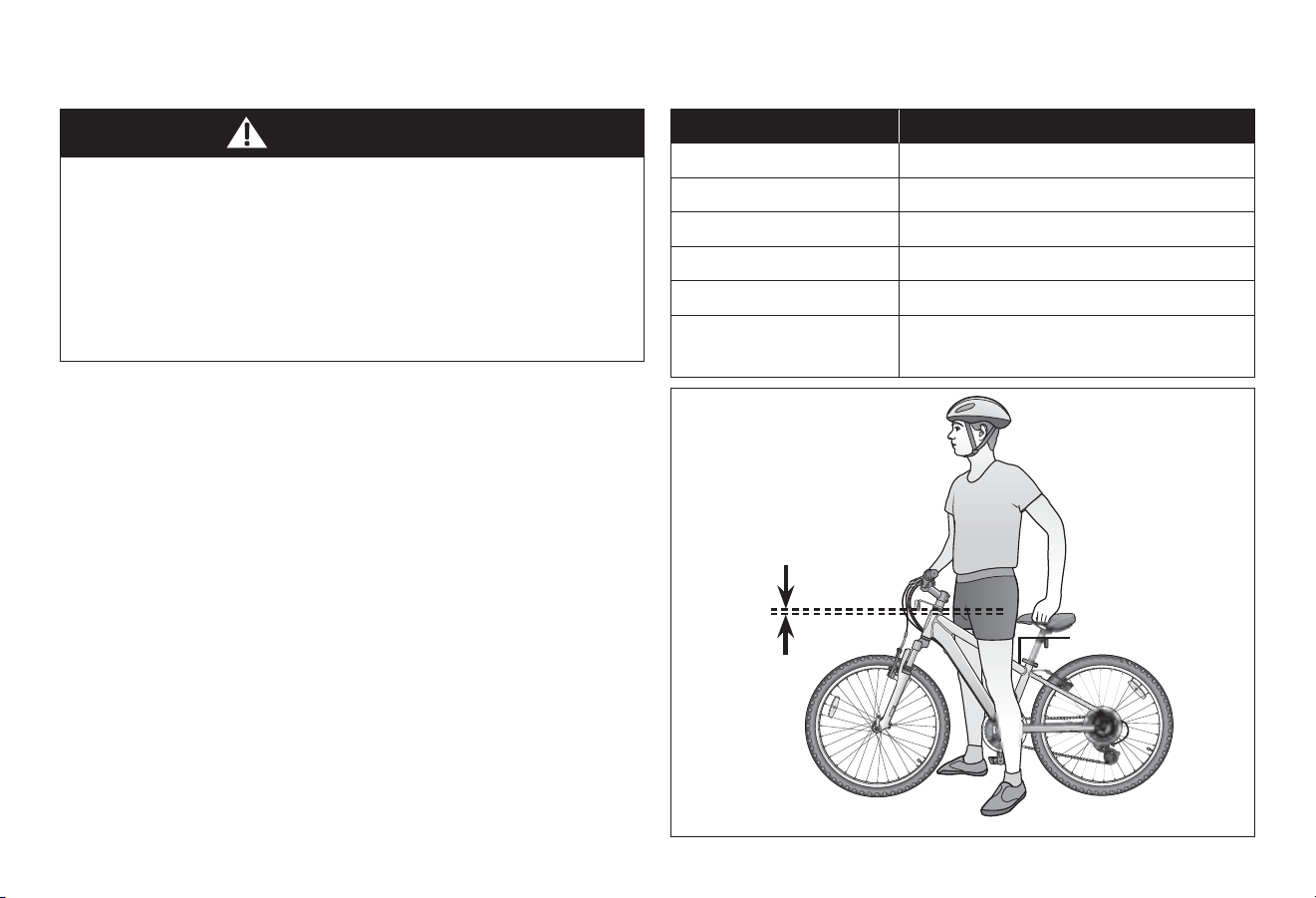
If the bicycle has a top tube on the frame, check that there is
one to three inches of clearance between the rider and the top
tube. Figure 1.1
Inability to safely reach the handlebars and dismount the
bicycle may result in loss of control of the bicycle. If the
bicycle has a top tube on the frame, ensure there is one to
three inches of clearance between the rider and the top tube.
Improper setup or maintenance of the bicycle may result in
an unexpected movement, loss of control, and serious injury
or death.
WARNING!
Wheel Size Riders Approximate Height
12 inch 28 - 38 inches tall
16 inch 38 - 48 inches tall
18 inch 42 - 52 inches tall
20 inch 48 - 60 inches tall
24 inch 56 - 66 inches tall
26 inch, 27.5 inch,
29 inch, 700c
64 - 74 inches tall
1 to 3 inch
clearance
Top tube
6
1 Safety
Figure 1.2
Improperly adjusted seat height could aect the rider’s ability
to reach the handlebar and pedals may result in an unexpected
movement, loss of control, and serious injury or death. Follow
these guidelines when adjusng the seat height. Always
ensure the seat post minimum inseron marks are below the
seat clamp and cannot be seen. Ensure the seat clamp is
locked and the seat cannot move.
WARNING!
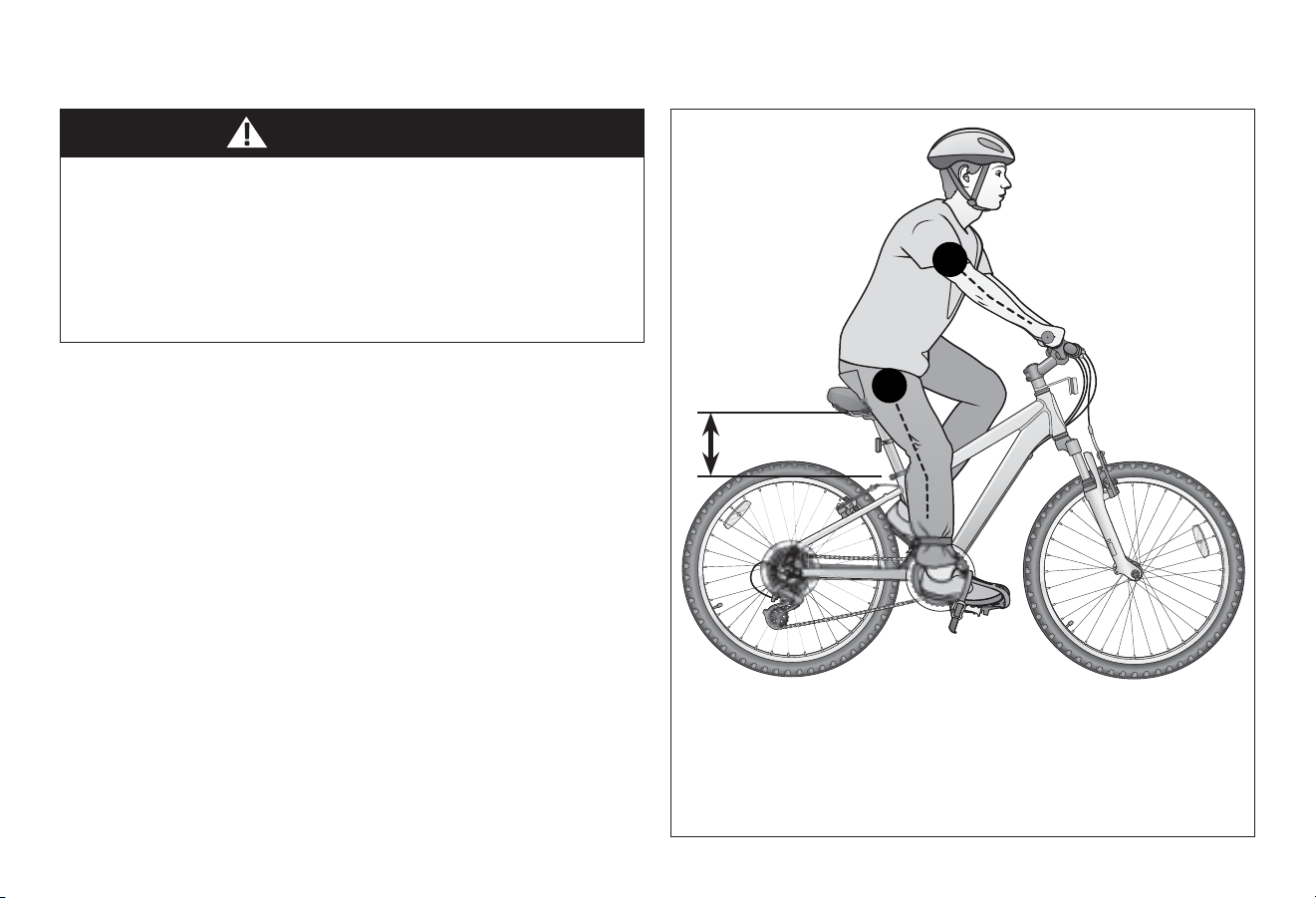
Seat Height and Handlebar Reach
❶ Your legs should be almost completely straight when the
pedal is in the down most posion, just a slight bend in
the knee. Figure 1.2
Note: The rider’s feet may not touch the ground easily. If
this is the case the rider can simply move forward o the
seat to mount and dismount the bicycle or the seat can be
adjusted lower if the rider is uncomfortable with the height,
but note that riding is more dicult with the seat too low,
as the legs are in an unnatural posion.
Do not raise the seat so much the knees lock straight when
pedaling or you have to move forward o the seat to pedal.
This is unsafe and the bicycle cannot be controlled in this
condion.
❷ You should be able to safely reach the handlebar with
your arms bent slightly (approximately 10 degrees) at
the elbow.
Adjust the seat
height
1
2
Safety 1
7
Figure 1.3
Wheels
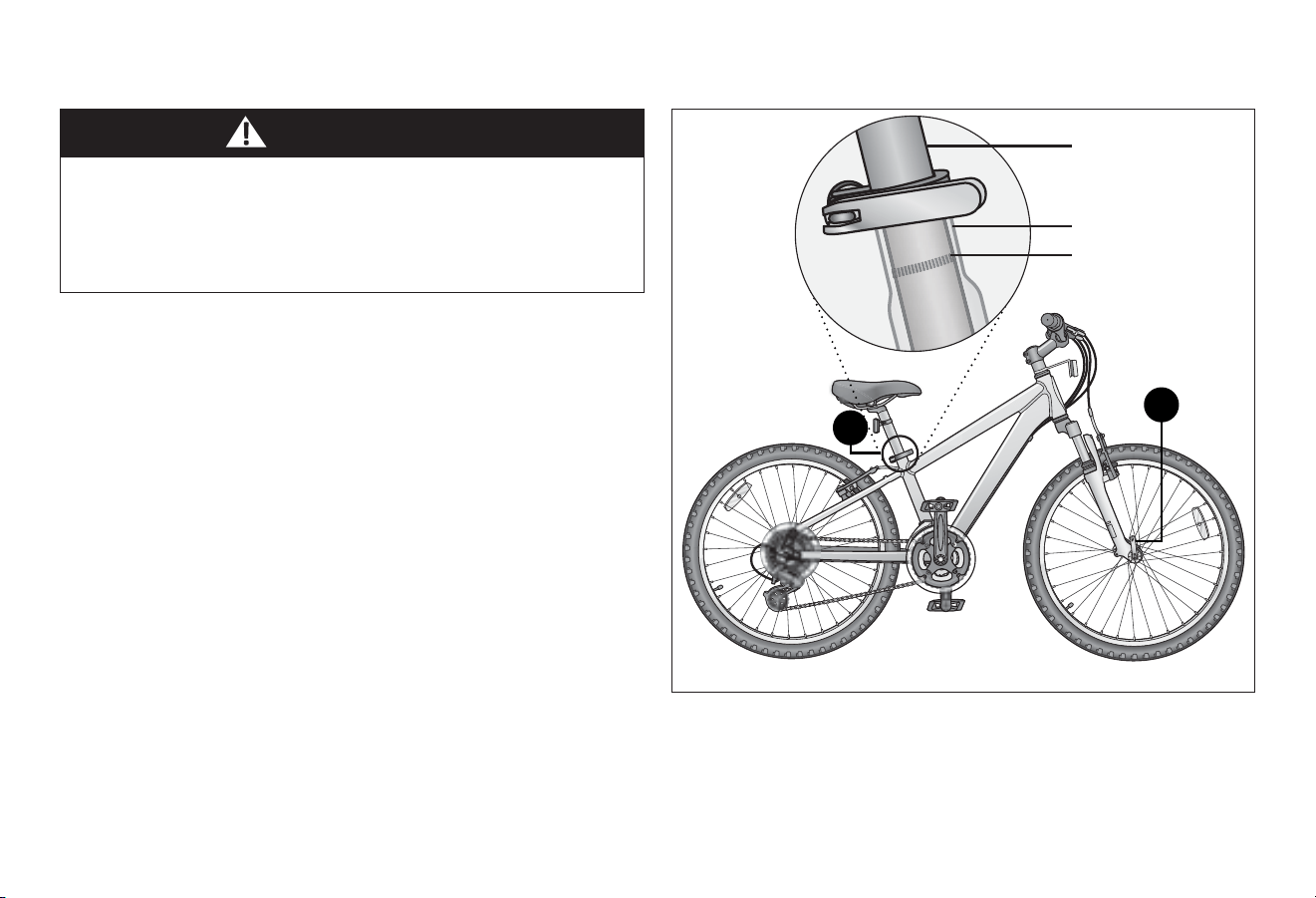
❶ Some bicycles will come equipped with quick-release levers
for the front wheel. The wheels must be securely locked.
Ensure the wheel quick-release lever is rmly locked in
place. Figure 1.3
Seat Post
❷ Ensure the seat post’s minimum inseron marks are not
visible above the quick-release seat clamp and the clamp is
locked in place.
Note: See Secon 4: Adjusng the Seat Height if
adjustments are needed.
Improper setup or maintenance of the quick-release levers
may result in an unexpected movement, loss of control, and
serious injury or death. Before riding always check that the
quick-release lever is rmly locked in place and the seat does
not move.
Quick-release Levers
WARNING!
1
Quick-release
seat clamp
Quick-release
wheel
2
Minimum inseron
marks are located on
the seat post
Seat post
Seat tube
8
1 Safety
Riding a bicycle without protecve gear, clothing, or a helmet
may result in serious injury or death. Always wear protecve
gear, clothing, and helmet when riding the bicycle. Ensure
protecve gear does not interfere with steering, braking, and
pedaling.
WARNING!
Protecve Gear and Clothing
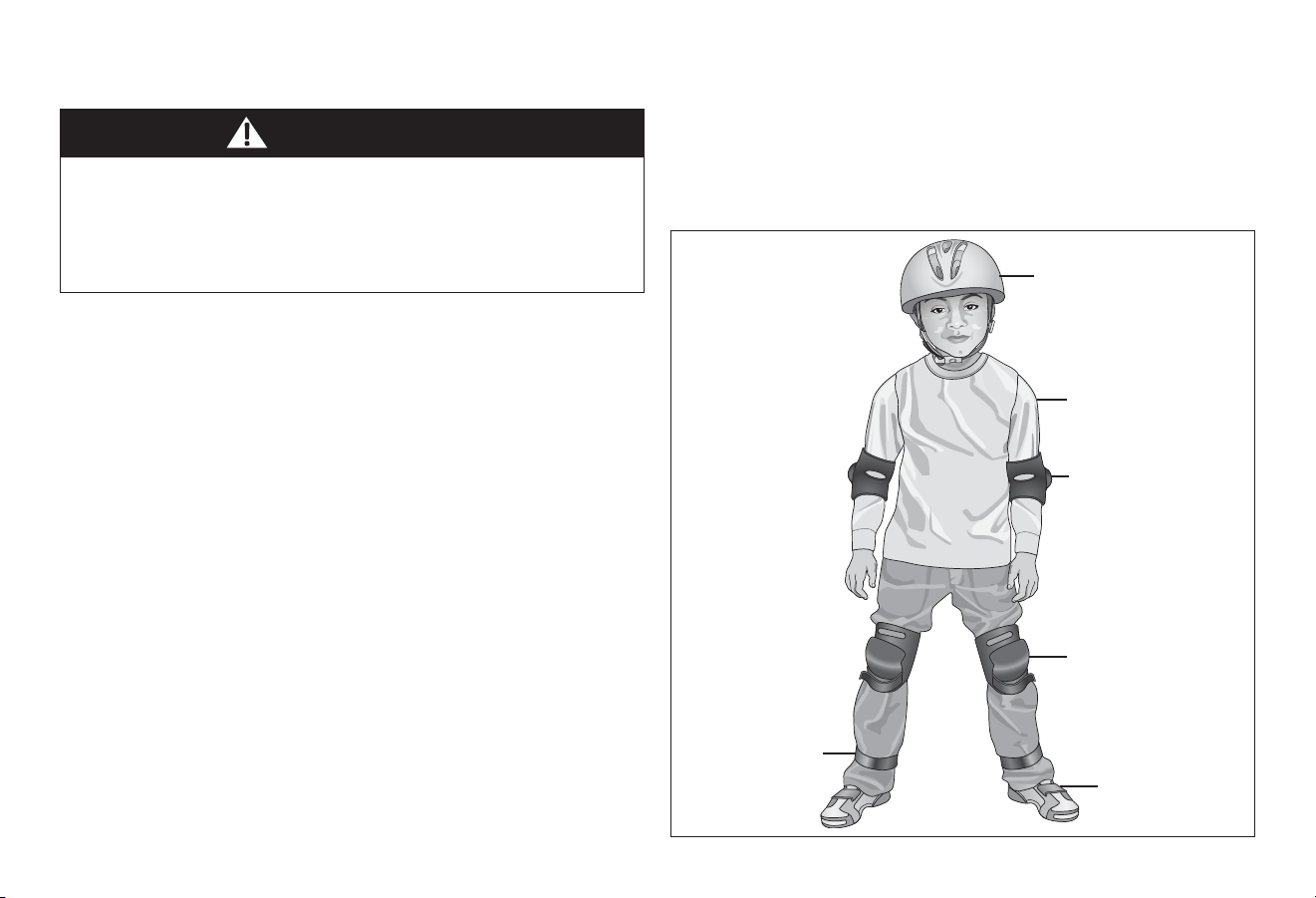
Always wear: Figure 1.4
• Colors that are easily seen and, if possible, reecve clothing.
• Clothing appropriate for the weather condions.
• Use of protecve gear such as pads for the knees and elbows
is highly recommended for children.
• A properly ed, ASTM or SNELL approved, bicycle helmet
shall be worn at all mes by riders of the bicycle. For
informaon regarding how to properly t a helmet visit:
hp://www.nhtsa.gov/people/injury/pedbimot/bike/
easystepsweb
Do not wear:
• Loose clothing parts, strings, or jewelry that may become
entangled with moving parts on the bicycle or interfere with
handling of the bicycle.
• Pants with loose pant legs. If necessary, always tuck pant legs
into a sock or use a leg band to avoid the clothing becoming
caught in the drive chain.
• Shoes with uned shoe laces.
PERSONAL SAFETY
Figure 1.4
Properly ed helmet
Elbow pads
Knee pads
Leg band
Shoes fastened
or ed
Easily seen or
reecve clothing
Safety 1
9
Figure 1.6
Figure 1.5
Helmet Use
Important! Many states have passed helmet laws regarding
children. Make sure you know your state’s helmet laws. It is your
job to enforce these rules with your children. Even if your state
does not have a children’s helmet law, it is recommended that
everyone wear a helmet when cycling. When riding with a child
carrier seat or trailer, children must wear a helmet.
It is strongly advised that a properly ng, ASTM or SNELL
approved, bicycle safety helmet be worn at all mes when riding
your bicycle. In addion, if you are carrying a passenger in a
child safety seat, they must also be wearing a helmet.
The correct helmet should: Figure 1.5
• Be comfortable
• Have good venlaon
• Fit correctly
• Cover forehead
Incorrect helmet posion: Figure 1.6
• Helmet does not cover the forehead
10
1 Safety
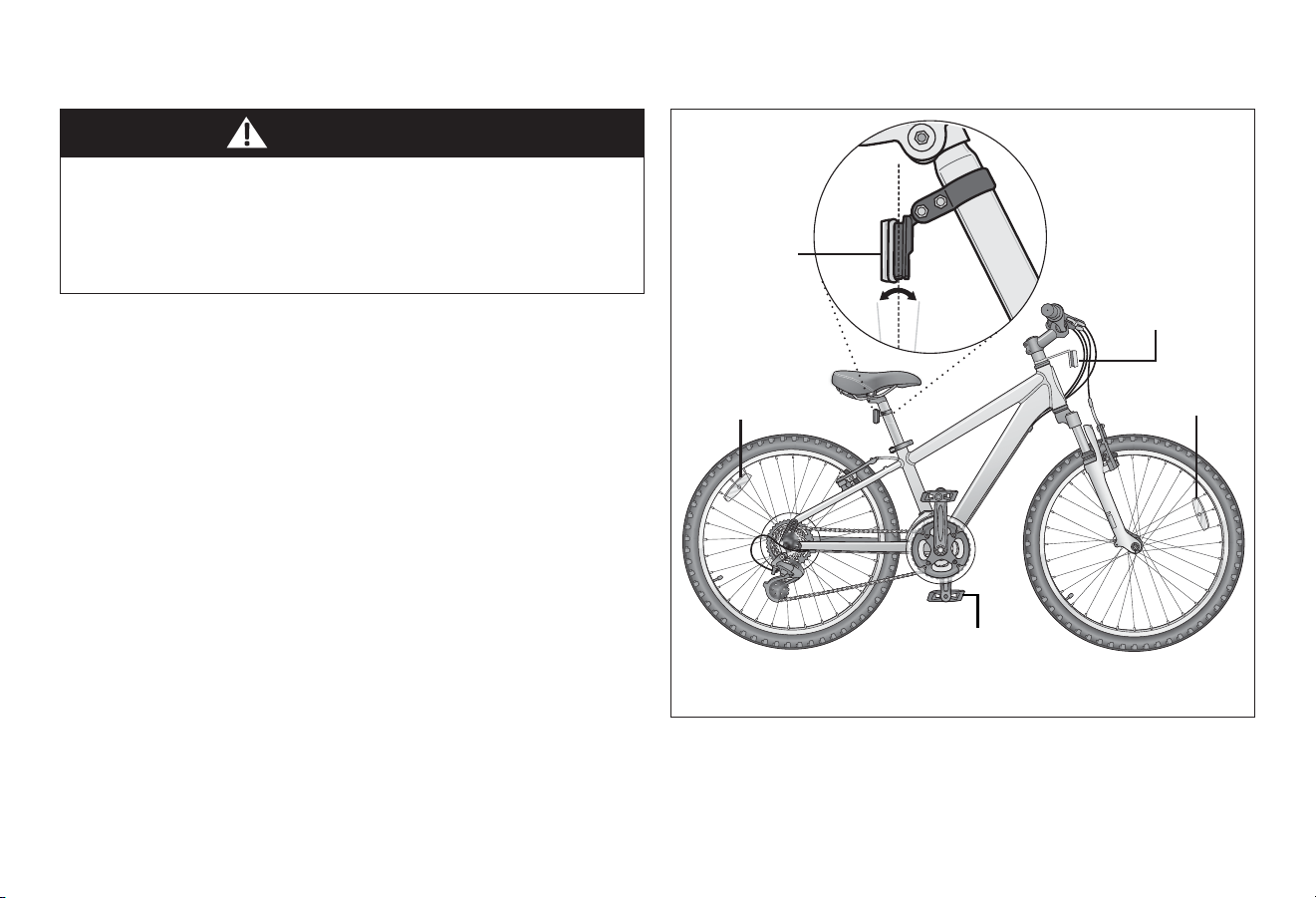
Figure 1.7
Missing, damaged, or dirty reectors will aect the ability of
others to see and recognize you as a moving bicyclist, increasing
the risk of being hit, serious injury or death. Always check the
reectors are in place and make sure they are clean, straight,
unbroken and securely mounted before riding the bicycle.
WARNING!
Important! Federal regulaons require every bicycle over 16
inches to be equipped with front, rear, wheel, and pedal
reectors. Many states require specic safety devices. It is your
responsibility to familiarize yourself with the laws of the state
where you ride and to comply with all applicable laws, including
properly equipping yourself and your bike as the law requires.
Bicycles under 16 inches are considered “sidewalk bicycles” and
may not be ed with reectors. These bicycles should not be
ridden on streets, at night or unsupervised by an adult.
Check and conrm the front and rear reectors are in the
correct posion: Figure 1.7
• Front Reector: Should aim forward (when viewed from
above) and be mounted so it is within 5 degrees of vercal.
• Rear Reector: Should aim straight back (when viewed from
above) and be mounted so it is within 5 degrees of vercal.
Reectors
Rear (red)
plus or minus
5 degrees of
vercal
Front wheel
(white)
Rear wheel
(white)
Pedal (orange)
Front (white)
Safety 1
11
WARNING!
General Safety
• Familiarize yourself with all the bicycle’s features before
riding. Pracce gear shis, braking, and the use of toe clips
and straps, if installed.
• Always ride defensively in a predictable, straight line. Never
ride against trac.
• Expect the unexpected (e.g., opening car doors or cars
backing out of concealed driveways).
• Take extra care at intersecons and when preparing to pass
other vehicles.
• Maintain a comfortable stopping distance from all other
riders, vehicles and objects. Safe braking distances and forces
are subject to the prevailing weather condions. Do not lock
up the brakes. When braking, always apply the rear brake
rst, then the front. The front brake is more powerful and if it
is not correctly applied, you may lose control and fall.
• Always use the correct hand signals to indicate turning
or stopping.
• Obey the trac laws (e.g., stopping at a red light or stop sign,
giving way to pedestrians).
• Wear proper riding are, reecve if possible, and avoid
open toe shoes.
• Do not use items that may restrict your hearing and vision.
• Do not carry packages or passengers that will interfere with
your visibility or control of the bicycle.
Road Condions
• Be aware of road condions. Concentrate on the path ahead.
Avoid pot holes, gravel, wet road markings, oil, curbs, speed
bumps, drain grates and other obstacles.
• Cross train tracks at a 90 degree angle or walk your
bicycle across.
Wet Weather
• When riding in wet weather always wear reecve clothing
and use safety lights to enhance visibility.
• Exercise extreme cauon when riding in wet condions.
• Ride at a slower speed. Turn corners gradually and avoid
sudden braking.
• Brake earlier, it will take a longer distance to stop.
• Pot holes and slippery surfaces such as line markings and train
tracks all become more hazardous when wet.
RIDING SAFETY
Riding the bicycle in unsafe condions (i.e. at night), in an unsafe
manner, or disregarding trac laws may result in an unexpected
movement, loss of control, and serious injury or death.

12
1 Safety
Night Riding
• Important! Riding a bicycle at night is not recommended.
Check your local laws regarding night riding.
• Ensure bicycle is equipped with a full set of correctly
posioned and clean reectors.
• Use a white light on the front and a red light on the rear.
Use lights with ashing capability for enhanced visibility.
• If using baery powered lights, make sure baeries are
well charged.
• Wear reecve and light colored clothing. Wear reecve
clothing and use safety lights for increased visibility.
• Ride at night only if necessary. Slow down and use familiar
roads with street lighng.
Hill Technique
• Gear down before a climb and connue gearing down as
required to maintain pedaling speed.
• If you reach the lowest gear and are struggling, stand up on
your pedals. You will then obtain more power from each
pedal revoluon.
• On the descent, use the high gears to avoid rapid pedaling.
• Do not exceed a comfortable speed; maintain control and
take addional care.
• Braking will require addional distance. Iniate braking slowly
and earlier than usual.
Cornering Technique
• Brake slightly before cornering and prepare to lean your body
into the corner.
• Maintain the inside pedal at the 12 o’clock posion and
slightly point the inside knee in the direcon you are turning.
• Keep the other leg straight, do not pedal through fast or ght
corners.
• Decrease your riding speed, avoid sudden braking and
sharp turns.
Safe Riding Rules for Children
• Many states require that children wear a helmet while cycling.
Always wear a properly ed helmet.
• Do not play in driveways or the road.
• Do not ride on busy streets.
• Do not ride at night.
• Obey all the trac laws, especially stop signs and red lights.
• Be aware of other road vehicles behind and nearby.
• Before entering a street: Stop, look le, right, and le again
for trac. If there’s no trac, proceed into the roadway.
• If riding downhill, be extra careful. Slow down using the
brakes and maintain control of the steering.
• Never take your hands o the handlebars, or your feet o the
pedals when riding downhill.

Safety 1
13
BEFORE YOU RIDE SAFETY CHECKLIST
Before every ride, it is important to carry out the following
safety checks. Do not ride a bicycle that is not in proper
working condion!
Accessories
□ The reectors are properly placed and not obscured. Note:
Bicycles 16” and under may not be equipped with reectors
since small children should not ride at night.
□ All other ngs on the bike are properly and securely
fastened, and funconing.
□ The rider is wearing a properly ed helmet (protecve gear
if necessary) and that clothing and loose items are properly
constrained.
Bearings
□ All bearings are lubricated, run freely and display no excess
movement, grinding or raling.
Brakes
□ The front and rear brakes work properly.
□ The brake shoe pads are not overly worn and are correctly
posioned in relaon to the rims.
□ The brake control cables are lubricated, correctly adjusted
and display no obvious wear.
□ The brake control levers are lubricated and ghtly secured
to the handlebar.
Chain
□ The chain is oiled, clean and runs smoothly.
Cranks and Pedals
□ The pedals are securely ghtened to the crank arms.
□ The crank arms are secured to the axle and are not bent.
Frame and Fork
□ The frame and fork are not bent or broken.
□ The quick-release clamps are locked in place.
Steering
□ The handlebar and post are correctly adjusted and
ghtened, and allow proper steering.
□ The handlebars are set correctly in relaon to the forks and
the direcon of travel.
□ The handlebar binder bolt is ghtened.
Wheels and Tires
□ The rims do not have dirt or grease on them.
□ The wheels are properly aached to the bicycle and axle.
□ The res are properly inated within the recommended
pressures displayed on the res sidewall.
□ The res have the proper amount of tread, no bulges or
excessive wear.
14
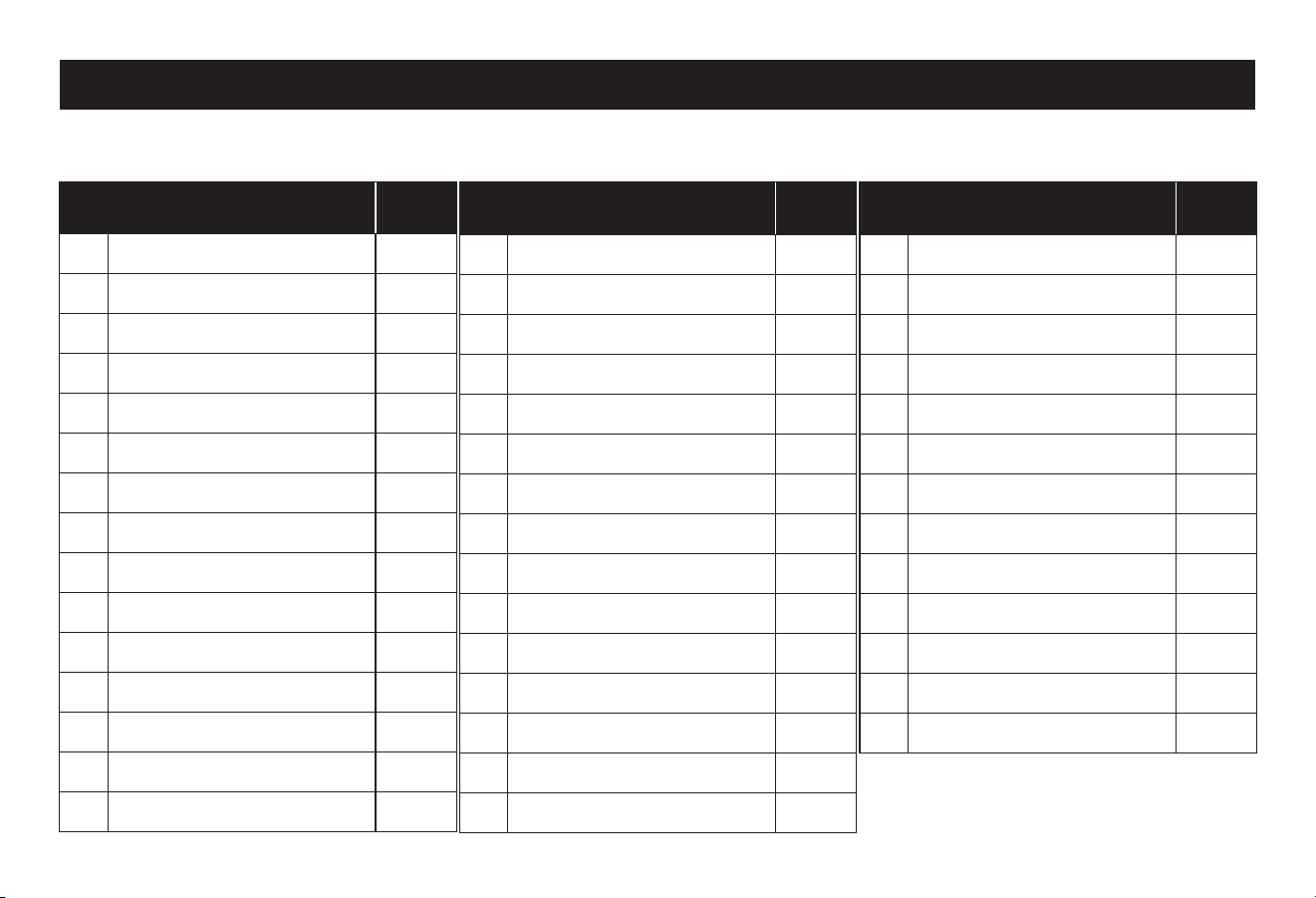
Part name
Torque
(in-lb)
13 Valve stem -
14 Spoke -
15 Fork dropout -
16 Wheel axle nut (front) 180-240
16A Wheel quick-release (opon) -
16B Wheel axle nut (rear) 240-300
17 Front fork -
18 Crank arm (1-piece) 300
18A Crank arm (3-piece) 390
19 Chainwheel -
20 Boom bracket lockring 300
21 Pedal 300-360
22 Front derailleur -
23 Chain -
24 Chain stay -
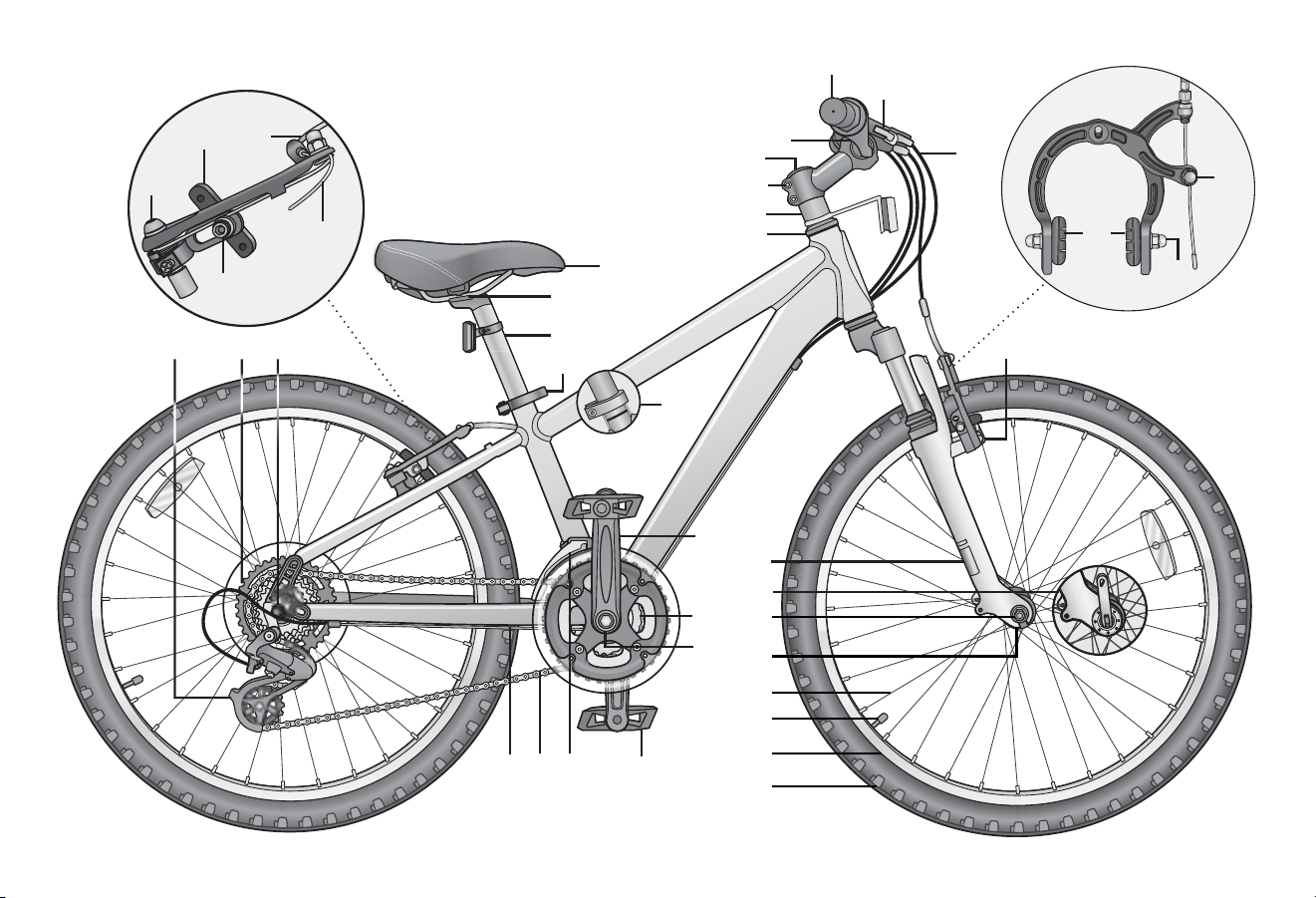
Mountain Bicycle
Get to know the parts of your bicycle. This will help with assembly, maintenance, and troubleshoong. Models vary in color and style.
Part name
Torque
(in-lb)
1 Handle grip -
2 Rear brake lever 55 - 70
3 Brake cable -
4 Handlebar -
5 Stem binder bolt 100-120
6 Handlebar binder bolt(s) 145-200
7 Stem -
8 Headset 175-260
9 Caliper brake assembly 50 - 70
9A Brake cable pinch bolt 50 - 70
9B Brake pads -
9C Brake pads hardware 50 - 60
10 Caliper brake aaching nut 70-85
11 Tire -
12 Rim -
Part name
Torque
(in-lb)
25 Rear derailleur -
26 Freewheel -
27 Linear brake assembly -
28A Brake cable pinch bolt 50-70
28B Brake pad -
28C Brake pad hardware 50-60
28D Brake spring -
28E Brake pivot bolt 17-20
29 Saddle (seat) -
30 Seat post aaching hardware 130 -170
31 Seat post -
32 Seat post quick-release 60-80
32A Seat post bolted clamp (opt.) -
❷ Parts Idencaon
Parts Idencaon 2
15
2
1
4
3
9
8
11
17
15
26
2124
14
23
28B
27
5
12
13
6
25
7
28C
30
10
16
16B
19
28A
28D
28E
29
18, 18A
20
31
32
22
16A
32A
9A
9C
9B
3 Assembly
16
Figure 3.1
If you need replacement parts or have quesons pertaining to
the assembly of your bicycle, call the service line direct at:
1-800-626-2811. Monday - Friday 8:00 am to 5:00 pm Central
Standard Time (CST).
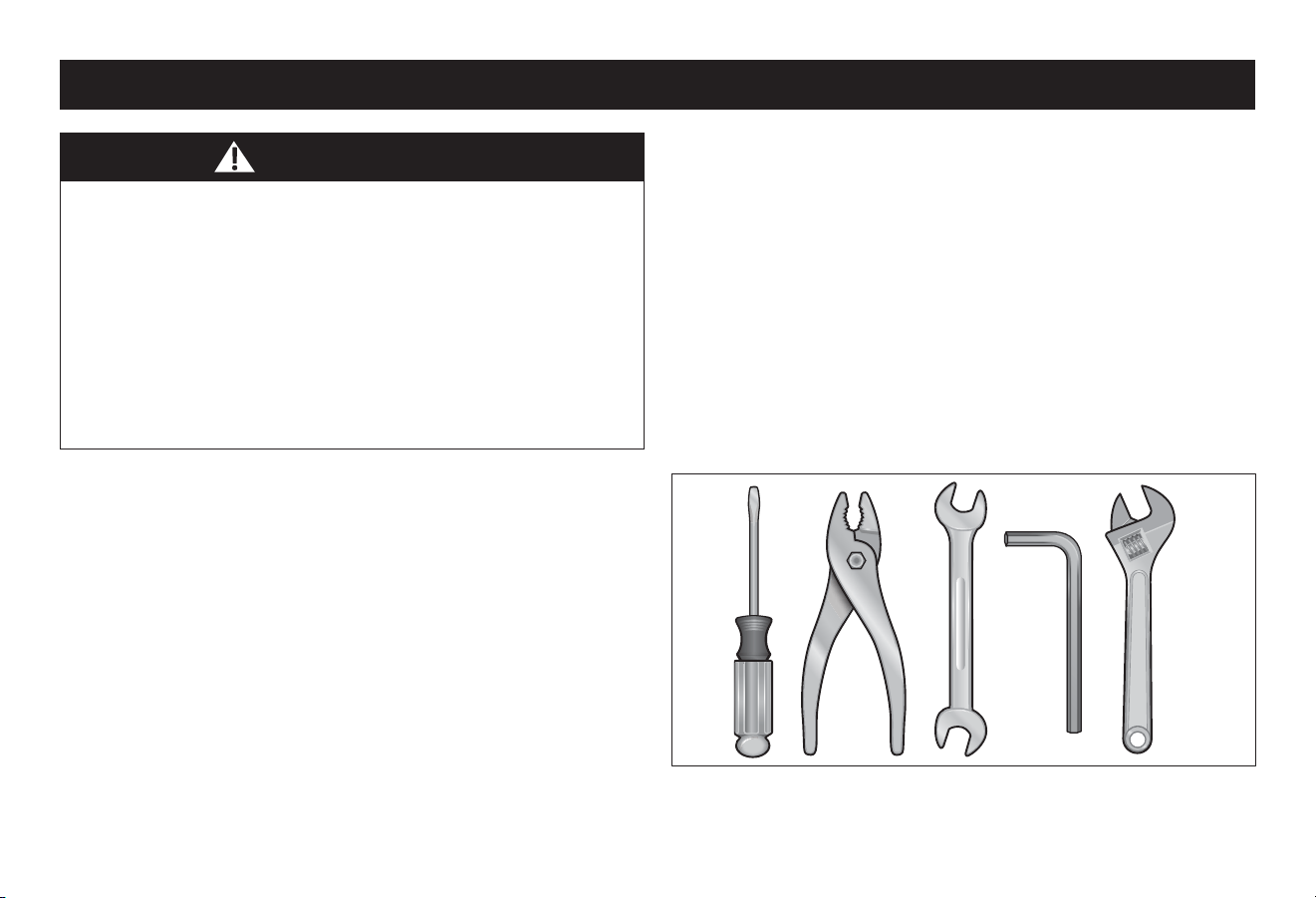
TOOLS REQUIRED
• Phillips head screw driver
• 2.5 mm, 4 mm, 5 mm, 6 mm and 8 mm Allen wrench
• Adjustable wrench or a 9 mm, 10 mm, 14 mm and 15 mm
open and box end wrenches
• A pair of pliers with cable cung ability
Your new bicycle was assembled and tuned in the factory and
then parally disassembled for shipping. You may have
purchased the bicycle already fully assembled and ready to ride
or in the shipping carton in the parally disassembled form.
The following instrucons will enable you to prepare your
bicycle for years of enjoyable cycling.
For more details on inspecon, lubricaon, maintenance and
adjustment of any area please refer to the relevant secons in
this manual. If you have quesons about your ability to
properly assemble this unit, please consult a qualied specialist
before riding.
❸ Assembly
WARNING!
• Improper assembly of this product may result in serious
injury or death. Always follow the instrucons in this
manual and check crical components (e.g. wheels, seat,
pedals, brakes, derailleurs, res) before each use.
• We recommend that you consult a bicycle specialist if you
have doubts or concerns as to your experience or ability to
properly assemble, repair, or maintain your bicycle. If your
bicycle was obtained assembled, we recommend that you
read these instrucons and perform checks specied in
this manual before riding.
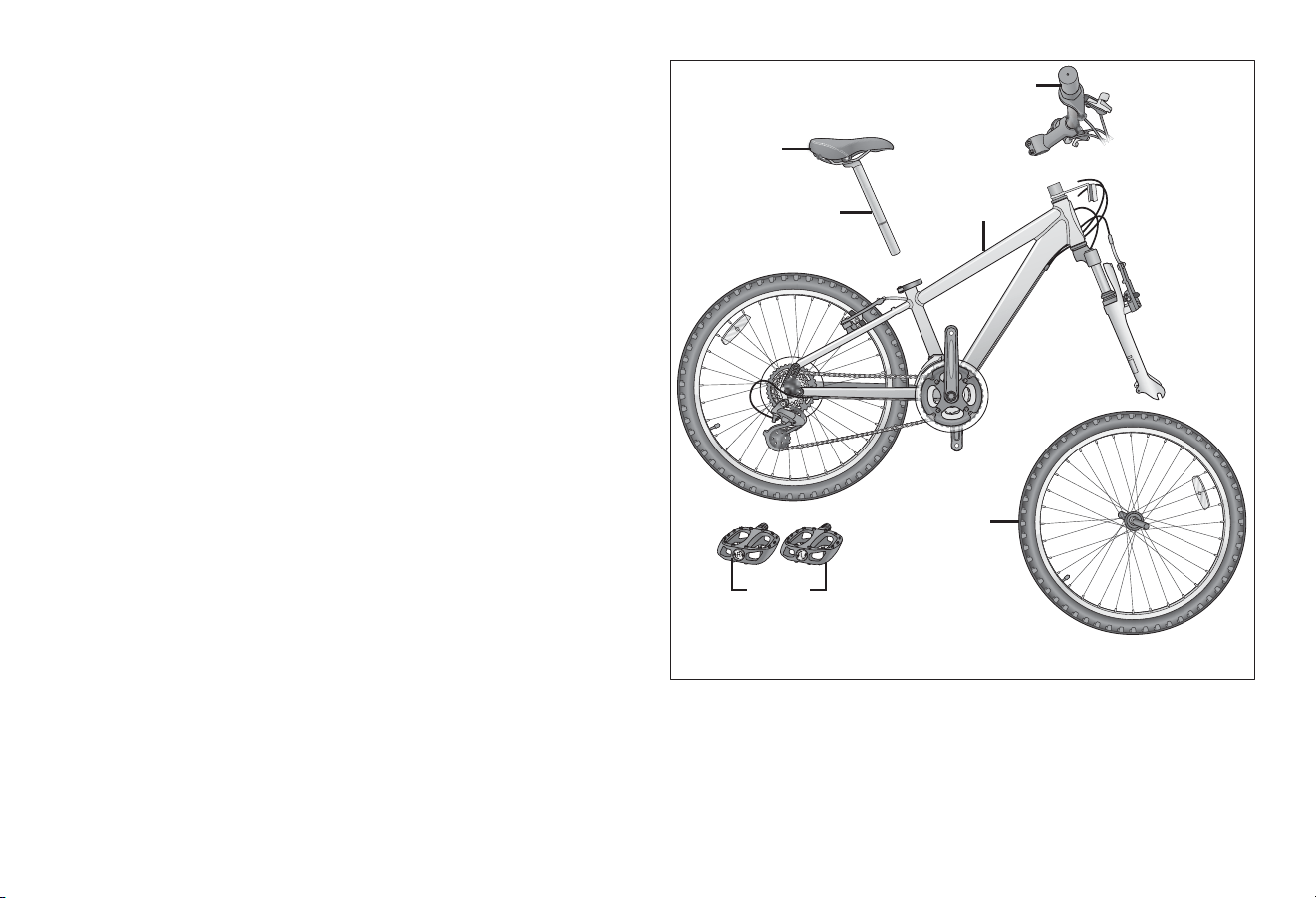
Assembly 3
17
17
Figure 3.2
GETTING STARTED
❶ Open the carton from the top and remove the bicycle.
Figure 3.2
❷ Remove the straps and protecve packaging from the
bicycle. Important! Do not discard packing materials unl
assembly is complete to ensure that no required parts are
accidentally discarded.
❸ Inspect the bicycle and all accessories and parts for possible
shortages. It is recommended that the threads and all moving
parts in the parts package be lubricated prior to installaon.
Note: We recommend using a lithium based grease on the
parts before assembly.
Pedals
Handlebar
assembly
Frame
Front wheel
Seat
Seat post
3 Assembly
18
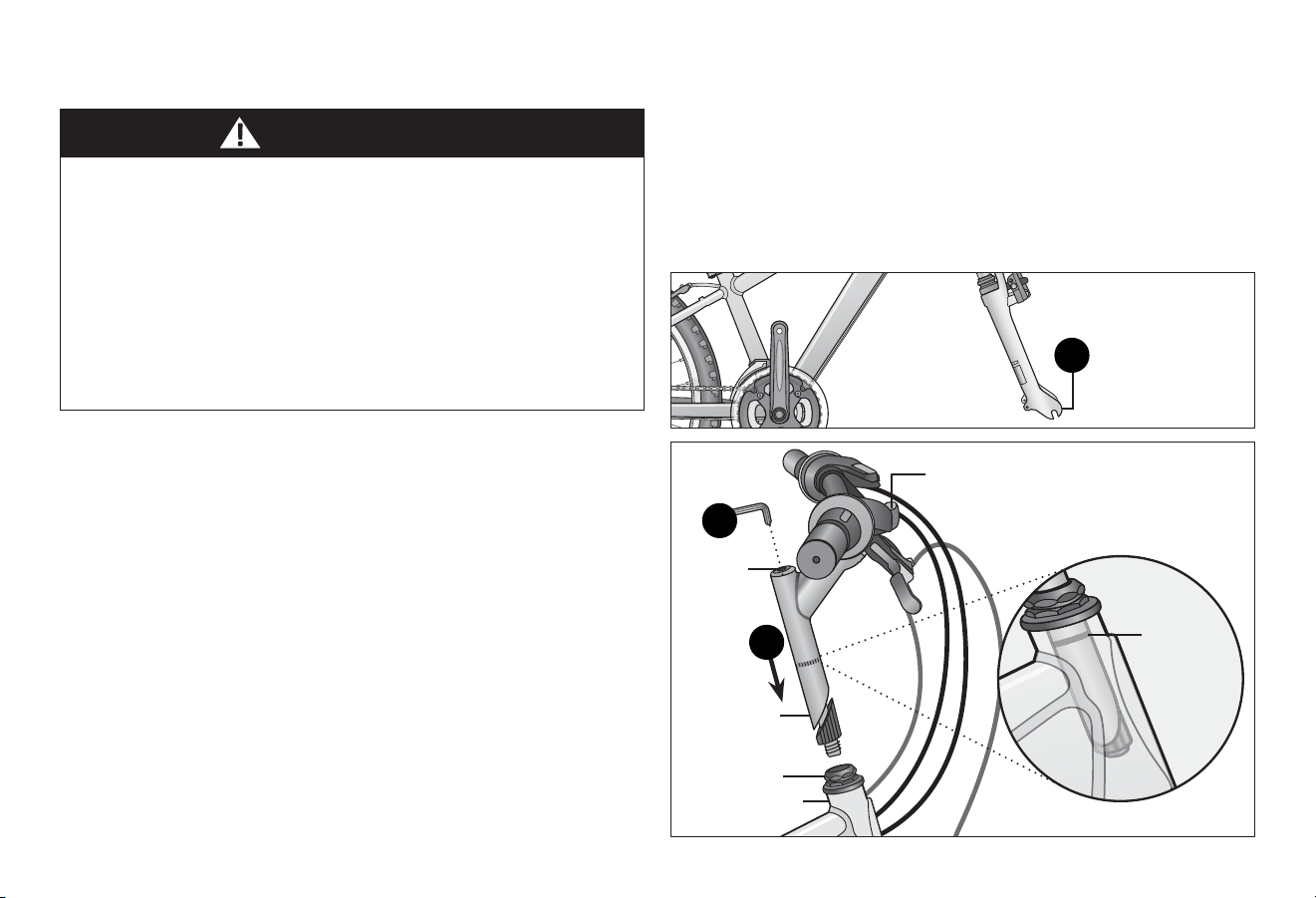
Figure 3.3
Figure 3.4
There are two types of stems that aach the handlebar to the
steerer tube. It is either a quill or clamp (threadless) stem.
Aaching a Quill Stem
❶ Turn the front fork to face forward. Figure 3.3
Posion the handlebar assembly over the steerer tube.
Look at all the cables to be sure they run in a smooth arc
from the shier or brake lever to the front brake or cable
stop on the frame. Important! If they are twisted or kinked,
the shiing and braking will not work. Figure 3.4
❷ Insert the stem post into the steerer tube and adjust the
handlebar height unl the rider feels they have control of
the bicycle and are comfortable. See Secon 1, Fig. 1.2:
Seat Height and Handlebar Reach for guidelines.
WARNING!
• Improper aachment of the handlebar may result in
damage to the stem post, steerer tube and result in loss of
control, serious injury or death. Ensure the minimum
inseron marks on the stem post are not visible above the
top of the headset.
• Failure to properly ghten handlebar components may
result in loss of control, serious injury or death.
Always check the handlebar cannot move and is secured to
the frame before riding the bicycle.
ATTACH THE HANDLEBAR Important! Be sure the minimum inseron marks do not go
above the top of the headset and are not visible.
❸ Using a 6 mm Allen wrench ghten the stem binder bolt at
the top of the stem post. Check the handlebar binder bolt(s)
to be sure they are properly ghtened and the handlebar is
clamped in place. Note: See Secon 4: Adjusng the
Handlebar if adjustments are needed.
Front fork
faces forward
Minimum
inseron
marks
Handlebar binder bolt(s)
Headset
Stem post
Steerer tube
Stem
b i n d e r
bolt
1
2
3
Assembly 3
19
19
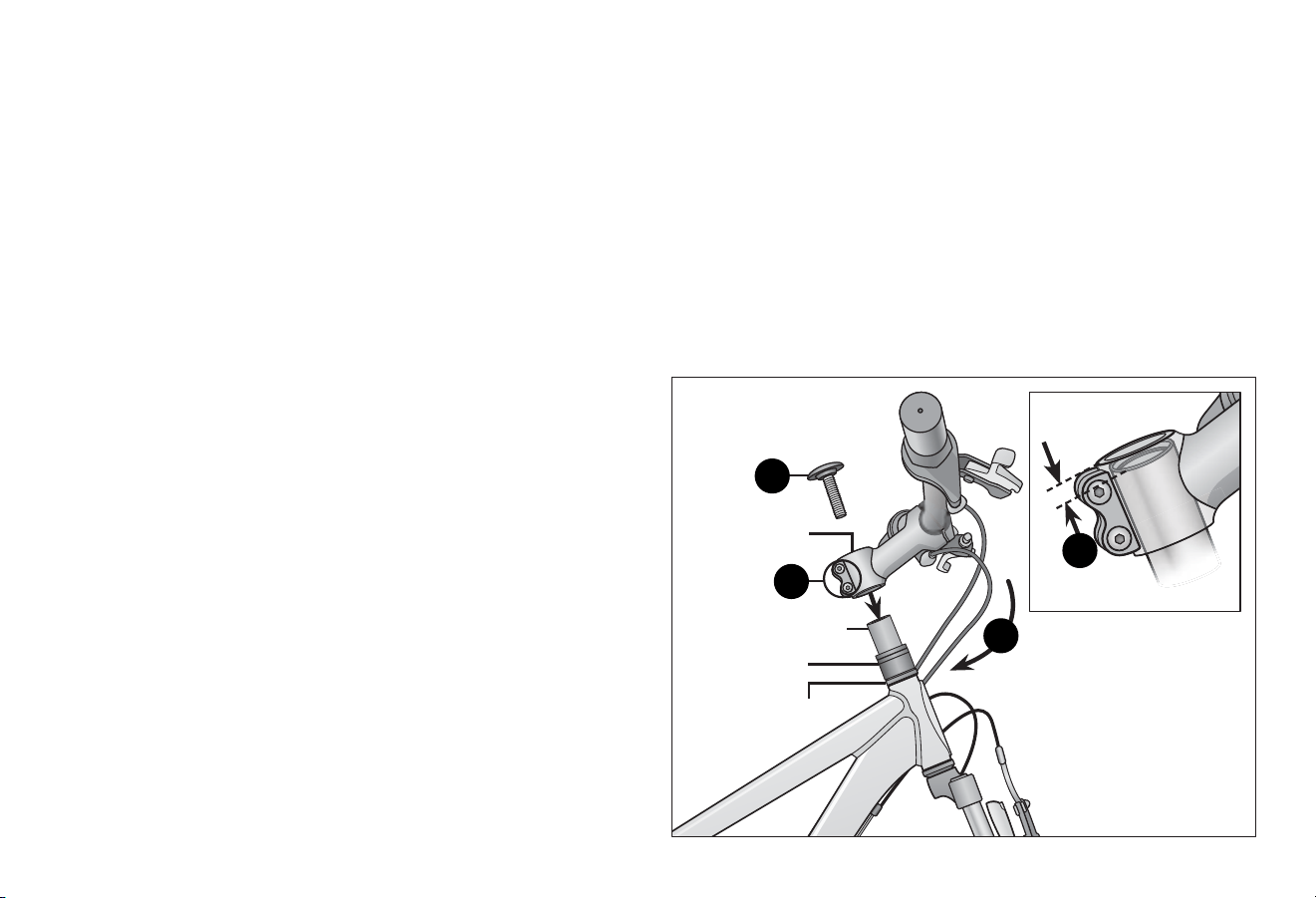
Figure 3.6
Figure 3.5
Aaching a Threadless Stem
Important! Do not disassemble the headset or lose any parts.
Be sure the end of the fork is on the ground or being held with
your free hand, because once you loosen the top cap the fork
assembly may fall out of the frame.
❶ Turn the front fork to face forward (ie: the fork dropout is in
the furthest forward posion). Figure 3.3
❷ Using a 5 mm Allen wrench loosen the top cap bolt on the
steerer tube and remove the top cap and bolt. Important!
Do not remove the spacers. Figure 3.5
❸ Posion the handlebar assembly over the steerer tube. Look
at all the cables to be sure they run in a smooth arc from the
shier or brake lever to the front brake or cable stop on the
frame. Important! If they are twisted or kinked, the shiing
and braking will not work.
❹ While holding the fork assembly in place, use a 6 mm Allen
wrench and loosen the stem pinch bolts. Slide the handlebar
assembly onto the steerer tube.
❺ Align and center the stem to the fork and wheel. Tighten the
stem pinch bolts unl there is no play between the stem and
stem tube. Note: There should be a 3 to 5 mm (1/8" - 3/16")
gap between the top of the stem and stem post. Figure 3.6
❻ Place the top cap onto the top of the steerer tube. Insert
and tighten the top cap bolt until it is snug. Do not over
tighten.
❼ Using a 5 mm Allen wrench ghten the top cap bolt. Do the
following checks to determine if the headset is properly set.
Tighten or loosen the top cap bolt if necessary.
• Li up the front wheel of the bicycle, if the wheel does
not move freely le to right the headset is too ght.
• Hold the handlebar, close the brakes and rock the fork
back and forth. If you hear a knock or clunking sound the
headset is too loose.
Note: If needed, see Secon 4: Adjusng the Headset for
more detailed informaon. See Secon 4: Adjusng the
Handlebar for informaon on aligning the handlebar.
Top cap
and bolt
Stem pinch
bolts
Headset
Steerer tube
Stem
Spacers
1/8" - 3/16"
(3 - 5 mm)
2
4
5
3
3 Assembly
20
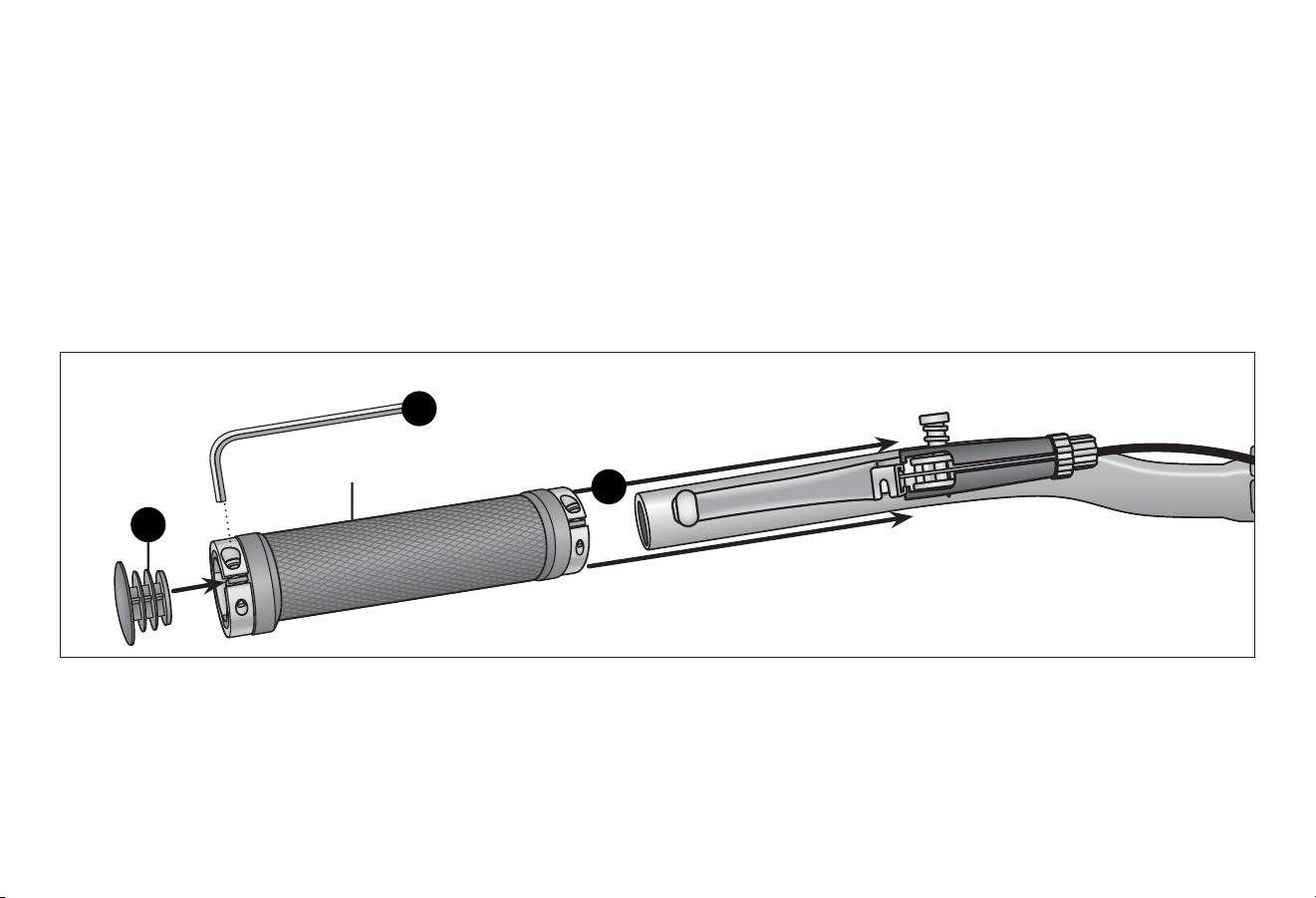
Figure 3.7
ATTACH THE LOCKON GRIPS
Follow these steps if your bicycle is equipped with lockon grips.
❶ Clean the handlebar surface.
❷ Slide the lockon grip over the handlebar as far as it can go.
Note: Rotate the clamp so the clamp screws are on the
underside of the handlebar. Figure 3.7
❸ Adjust the grip to how you want it to feel.
❹ Using a 2.5 mm Allen wrench ghten the clamps on both
ends of the lockon grip. Check the grip is securely aached
and does not rotate or slip.
❺ Snap the lockon grip cap onto the end of the lockon grip.
❻ Repeat steps 1 - 5 for the second lockon grip.
Lockon grips
Lockon grip cap
4
2
5
Assembly 3
21
21
Figure 3.8
Figure 3.9
Figure 3.10
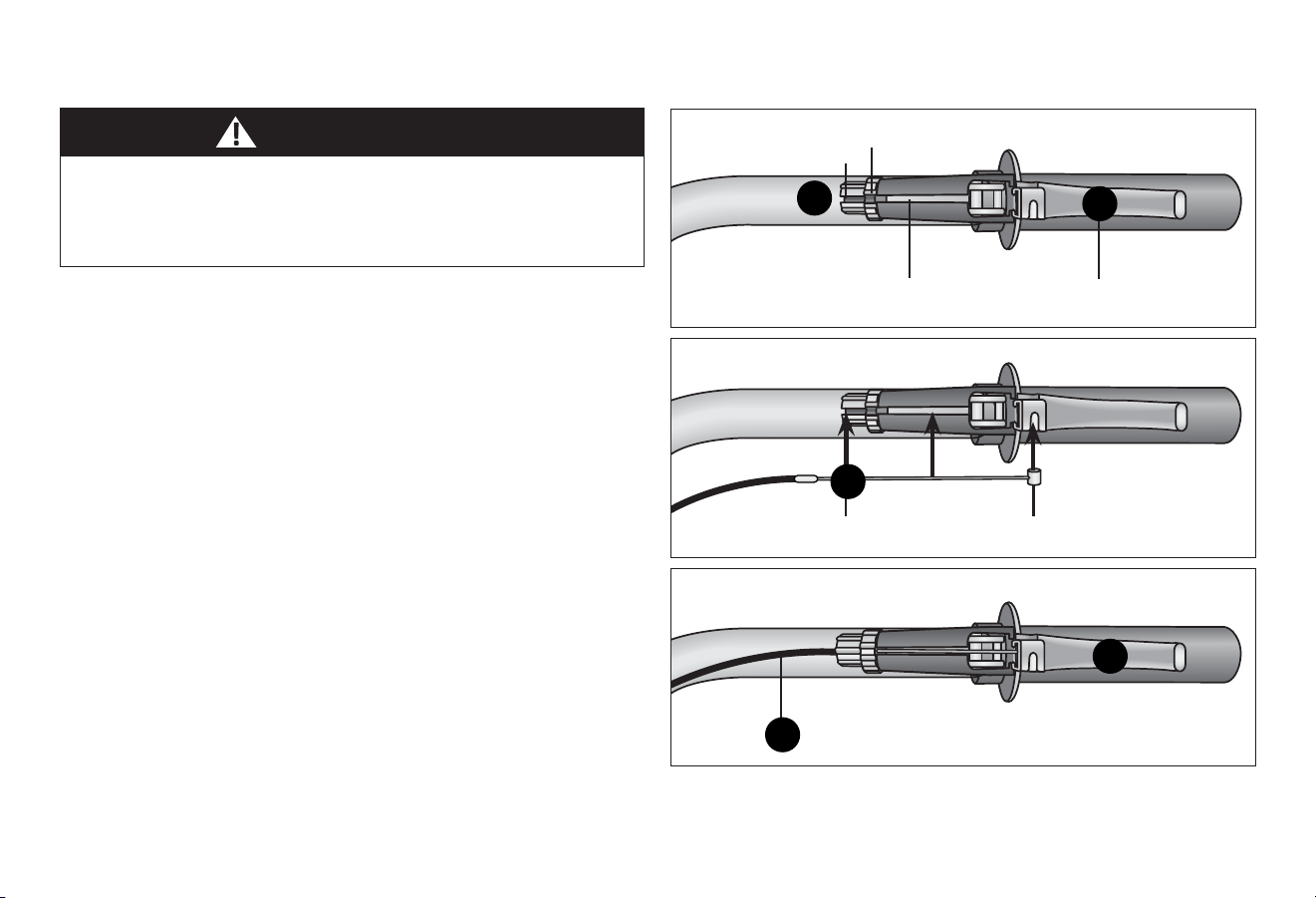
There are four brake opons, Caliper, Linear Pull, Disc and
Hydraulic Disc. If you have hydraulic disc brakes, see the manual
on hydraulic disc brakes that came with your bicycle.
Follow these steps if the brake cables are not aached to the
brake levers:
❶ Rotate the cable adjustment barrel and cable nut unl the
slots are aligned with the slot on the brake lever body.
Figure 3.8
❷ Press the brake lever towards the grip.
❸ Slide the brake cable through the slots and place the cable
head into the brake lever. Figure 3.9
❹ Release the brake lever. Figure 3.10
❺ Lightly pull on the cable and rotate the cable nut and cable
barrel so they are no longer aligned.
Note: See Secon 4: Adjusng the Brakes if adjustments are
needed.
Failure to properly set the brakes may result in the inability to
stop the bicycle movement and cause serious injury or death.
Be sure the brakes are funconing properly before using the
bicycle.
ATTACH THE BRAKE CABLES
WARNING!
Cable adjustment
barrel slot
Cable nut slot
Brake cable slot
Brake lever
Cable head
Brake cable
4
2
5
3
1
3 Assembly
22
Figure 3.12
Figure 3.11
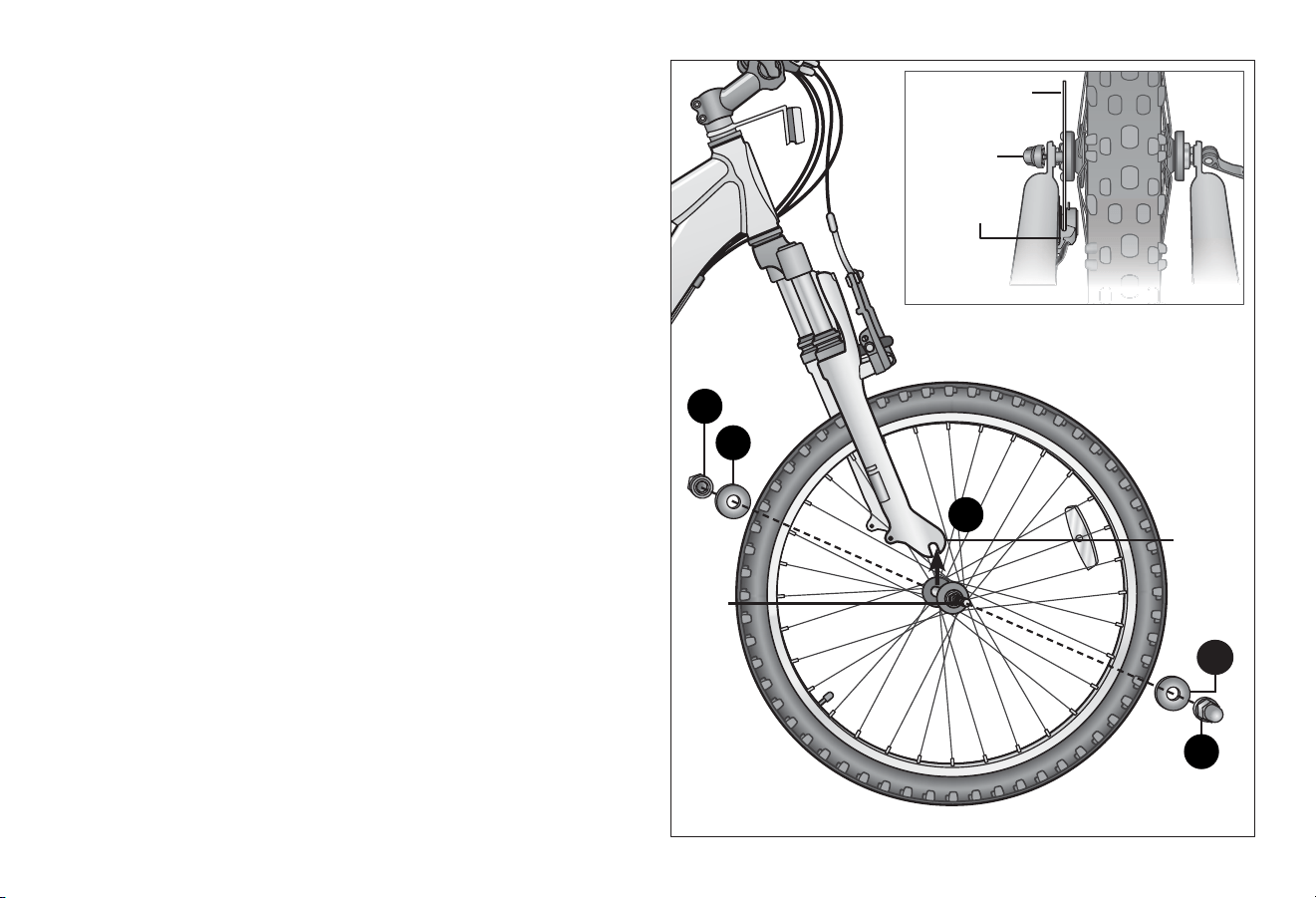
ATTACH THE FRONT WHEEL
There are two types of front wheel assemblies; nued and
quick-release. Note: Quick-release wheels may be on both the
front and rear wheels or just one. Also, some re tread paerns
have a direcon, so compare your front re and rear re of the
bicycle so that both tread paerns face the same way.
Nued Front Wheel
❶ Posion the front wheel between the front fork legs with
the axle resng inside the fork drop outs. Note: If the front
wheel has a disc brake insert the disc rotor into the slot on
the caliper body as you insert the wheel axle into the fork
drop out. Important! Be sure the wheel is as centered as
possible between the fork legs. Figure 3.11
❷ Place the axle washers on the axle and slide it up against the
fork drop out.
❸ Aach the two axle nuts on the axle. Tighten one nut part
way, then ghten the other nut. Repeat unl both sides are
ghtened securely. Be sure that the wheel is centered
between the fork legs.
❹ If the wheel is o center, loosen the axle nut on the side that
has a smaller gap between re and fork leg and use your
hand to push the wheel to a centered posion; hold the
wheel with one hand and ghten the axle nut and check
again. Repeat if needed to be sure the wheel is centered
and securely ghtened.
Axle
Fork
dropout
Axle nut
Axle
washer
Disc rotor
Nut
Disc brake
caliper body
2
3
1
2
3
Assembly 3
23
23
Figure 3.14
Figure 3.13
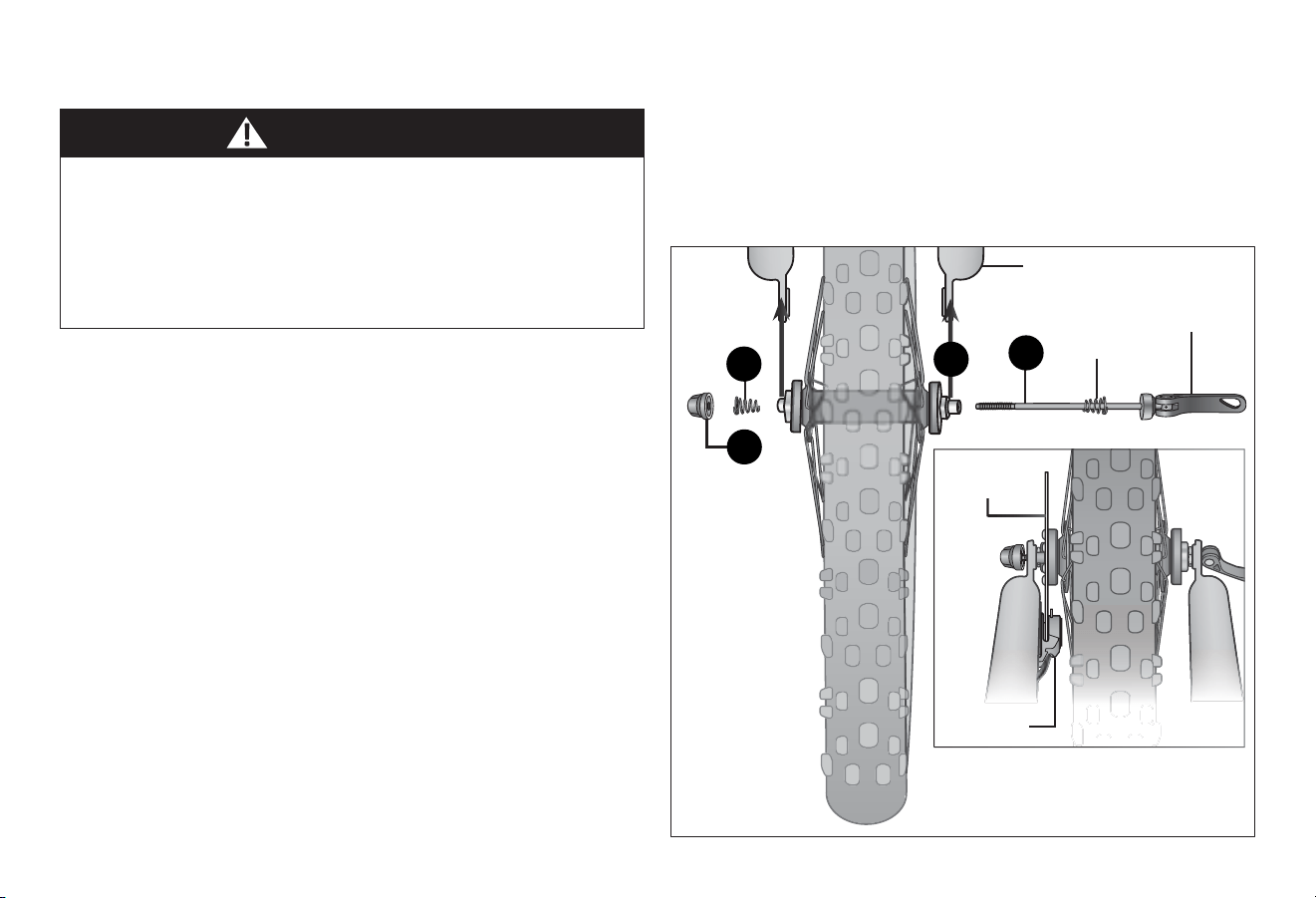
Quick-release Front Wheel
• All quick-release levers should be inspected before every ride
to be sure they are fully closed and secure. Failure to
properly close a quick-release lever can cause loss of control
of the bicycle resulng in injury or death.
• Make sure the wheel is properly seated and the quick-release
lever is properly closed.
WARNING!
❶ Some re tread paerns have a direcon, so compare your
front re and rear re of the bicycle so that both tread
paerns face the same way.
❷ Locate the skewer from the small parts carton of your
bicycle. Figure 3.13
❸ Unscrew the adjustment nut from the skewer, remove outer
spring and slide the skewer through the front wheel axle so
the quick-release lever is on the side of the bike opposite the
chain.
❹ Slide the outer spring over the end of the skewer. Note: The
smaller end should be in towards the wheel.
❺ Begin to thread the adjustment nut back onto the skewer,
but do not ghten too far. Allow enough play so you can
place the axle into the fork drop out.
❻ Slide the wheel into the fork dropout slots. Note: If you
have a wheel with disc brakes insert the disc rotor into the
center of the disc brake at the same me you are inserng
the wheel axle into the fork drop out.
Important! Be sure the wheel is as centered as possible
between the fork legs.
Skewer
Inner
spring
Quick-release
lever
Front fork
Adjustment
nut
Outer
spring
4
2
6
3
Caliper
body
Disc rotor
3 Assembly
24
Figure 3.15
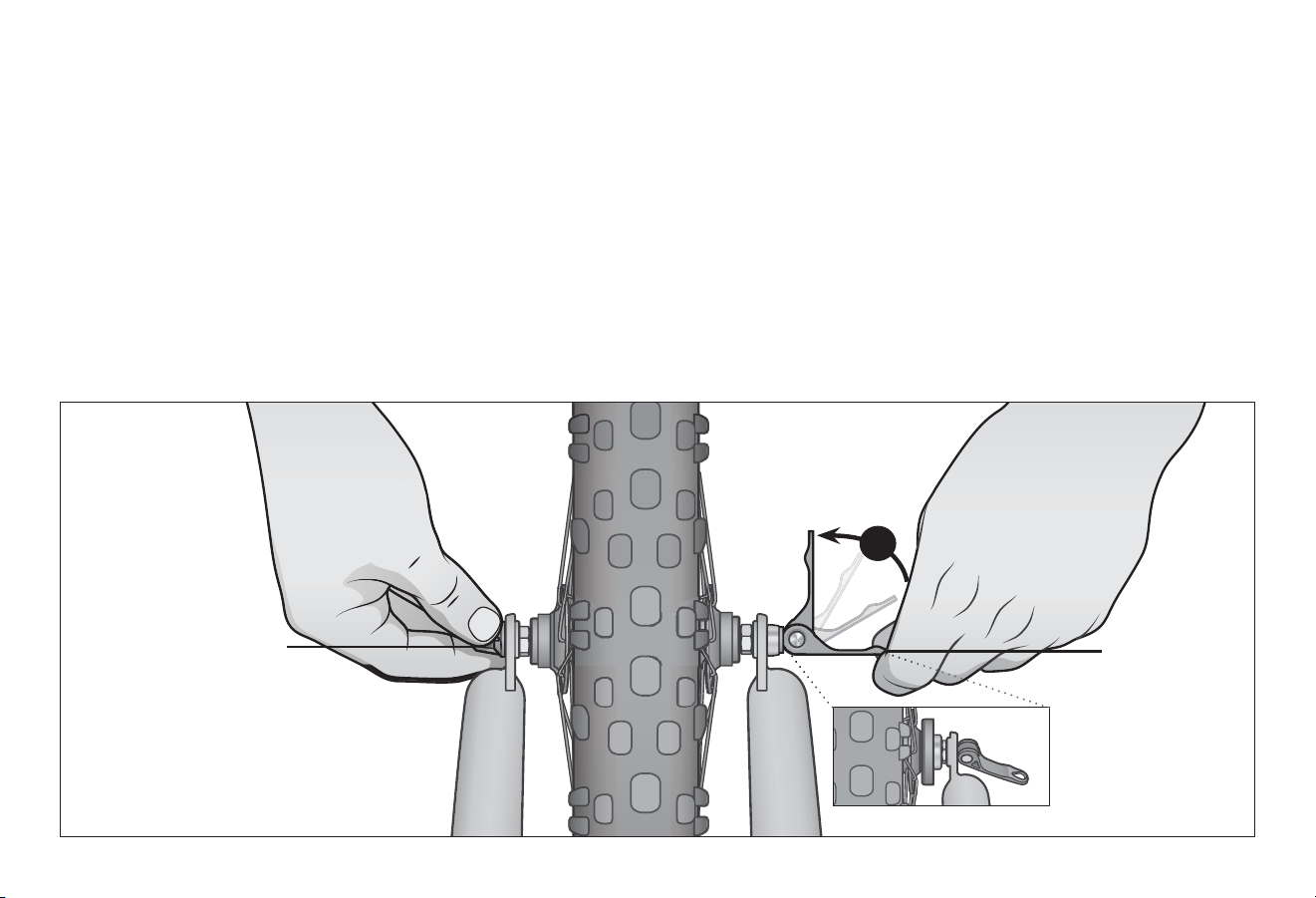
❼ Move the quick-release lever into the open posion. With
one hand on the quick-release lever and one hand on the
adjustment nut, start to hand ghten the adjustment nut
unl you start to feel some resistance against the fork.
Figure 3.15
❽ Try to close the quick-release lever. If it closes easily, open
it up and ghten the adjustment nut further. If it is too
dicult to close, open the quick-release lever up and
loosen the adjustment nut a lile and try again. Do not
aempt to ghten by turning the quick-release lever. The
quick-release lever is for closing, the adjustment nut is for
adjusng the tension.
Important! You should feel resistance when you close
the quick-release lever that should leave a temporary
impression on your ngers. Open and close the handle to
ensure the wheel is securely locked in place.
❾ Re-check that the handlebars are perpendicular to the front
wheel. Adjust if needed.
Quick-release
lever in closed
posion
Important! Only ghten
the quick-release with the
adjustment nut.
Quick-release
lever in the
open posion
7
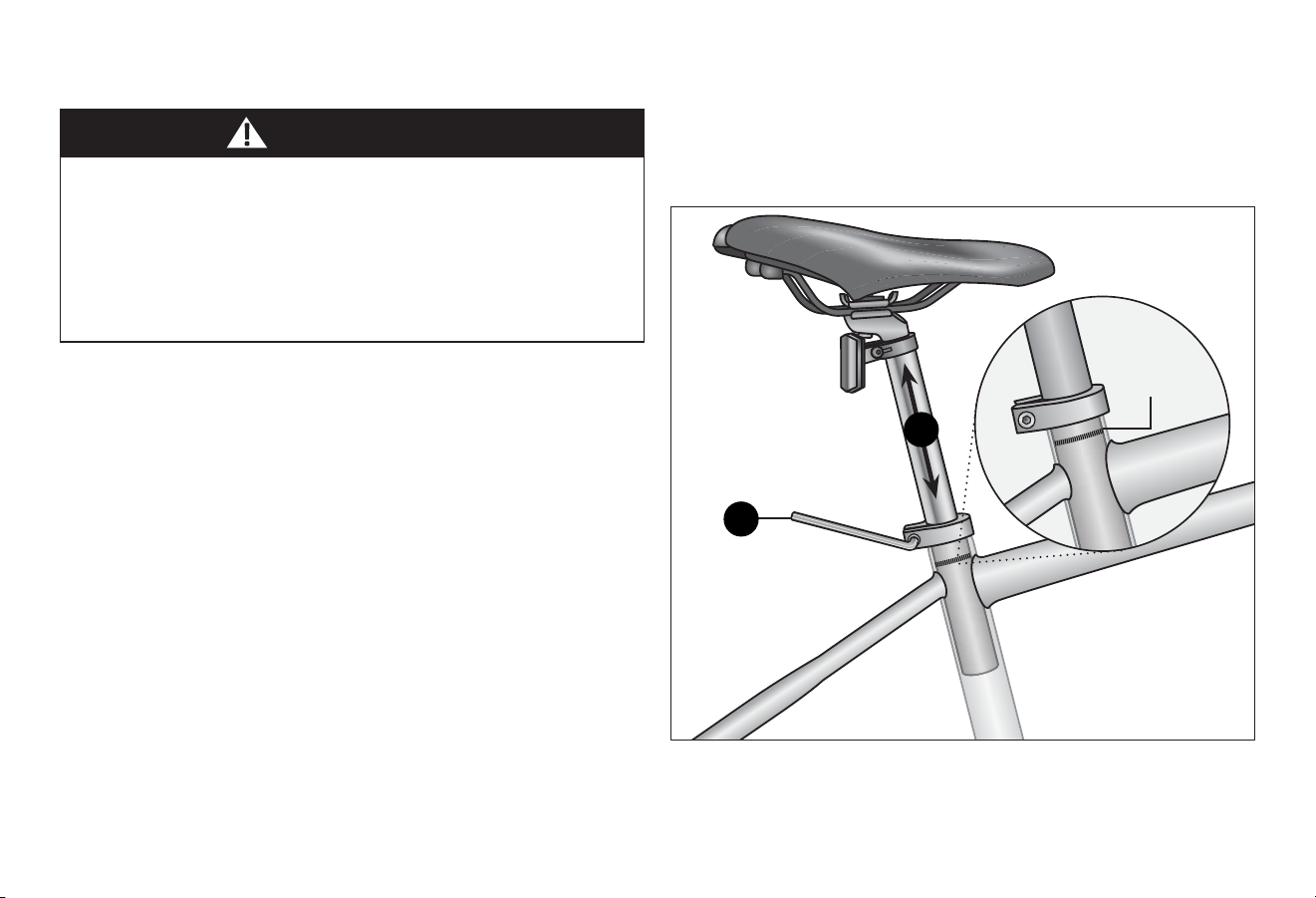
Assembly 3
25
25
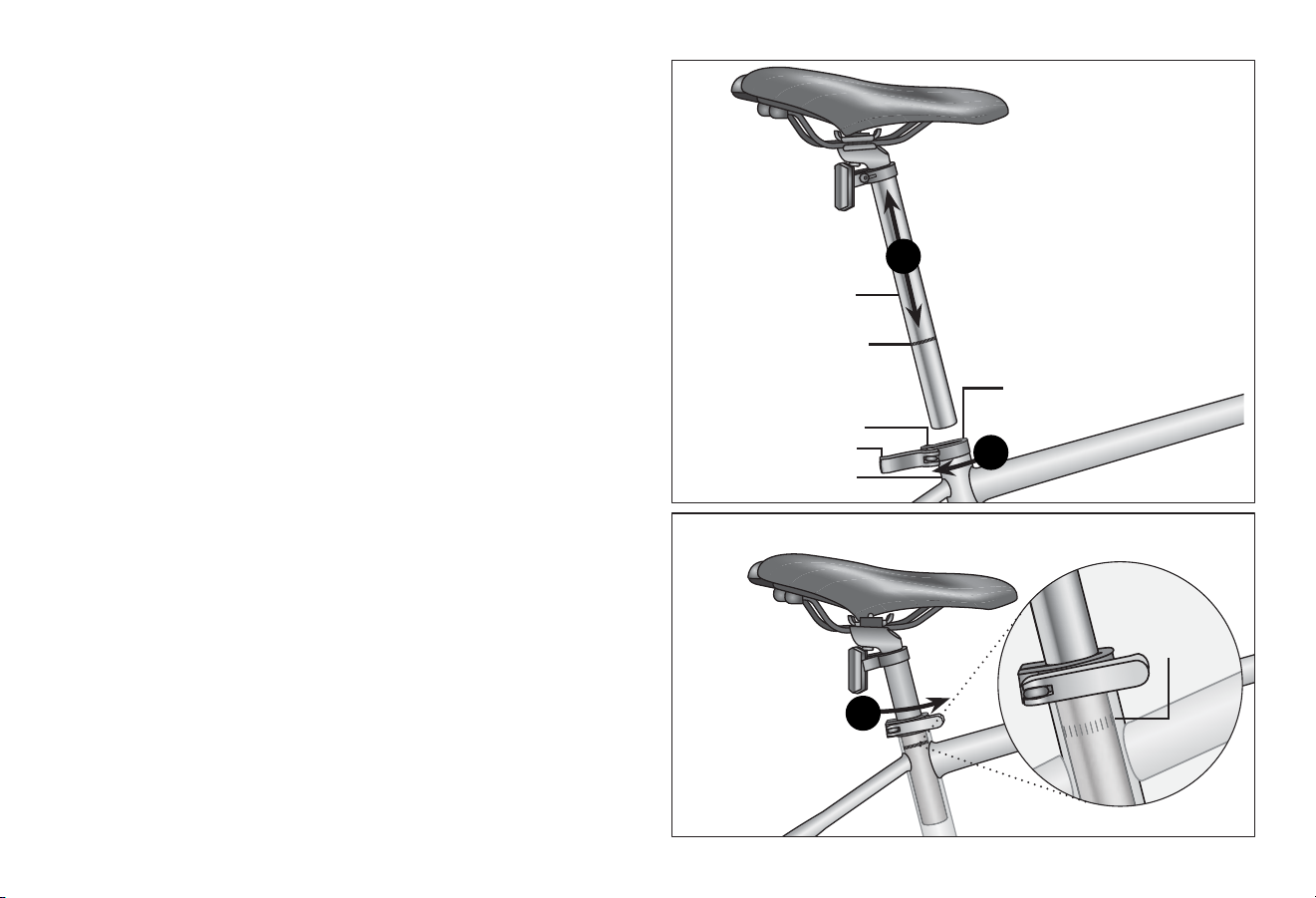
Figure 3.16
ATTACH THE SEAT
Improperly adjusted seat height could aect the rider’s ability
to reach the handlebar and pedals resulng in unexpected
movement, loss of control and serious injury or death. Follow
these guidelines when adjusng the seat height. Always
ensure the seat post minimum inseron marks are below the
seat clamp and cannot be seen. Ensure the seat clamp is
locked and the seat cannot move.
WARNING!
There are two kinds of seat clamps; bolted and quick-release,
and two kinds of seat posts standard and micro-adjust. The seat
assembly should be adjusted with the seat centered on the rails
and level. It is recommended to add some grease to all threads
and binders on a bicycle, especially on the outside of the seat
post. Otherwise it may corrode over me and not be able to be
adjusted again.
Bolted Seat Clamp
❶ Using a 5 mm Allen wrench, loosen the seat clamp bolt and
insert the seat post into the seat tube. Figure 3.16
❷ Adjust the seat height up or down unl the rider feels they
have control of the bicycle and is comfortable.
Important! Be sure the minimum inseron marks do not go
past the top of the seat clamp and are not visible. See
Secon 1, Fig. 1.2: Seat Height and Handlebar Reach.
❸ Tighten the seat clamp bolt to lock the seat in place.
❹ Check the seat to be sure it does not move.
Use a 5 mm Allen
wrench to loosen and
ghten the seat clamp
Minimum
inseron
marks
2
1
3 Assembly
26
Figure 3.18
Figure 3.17
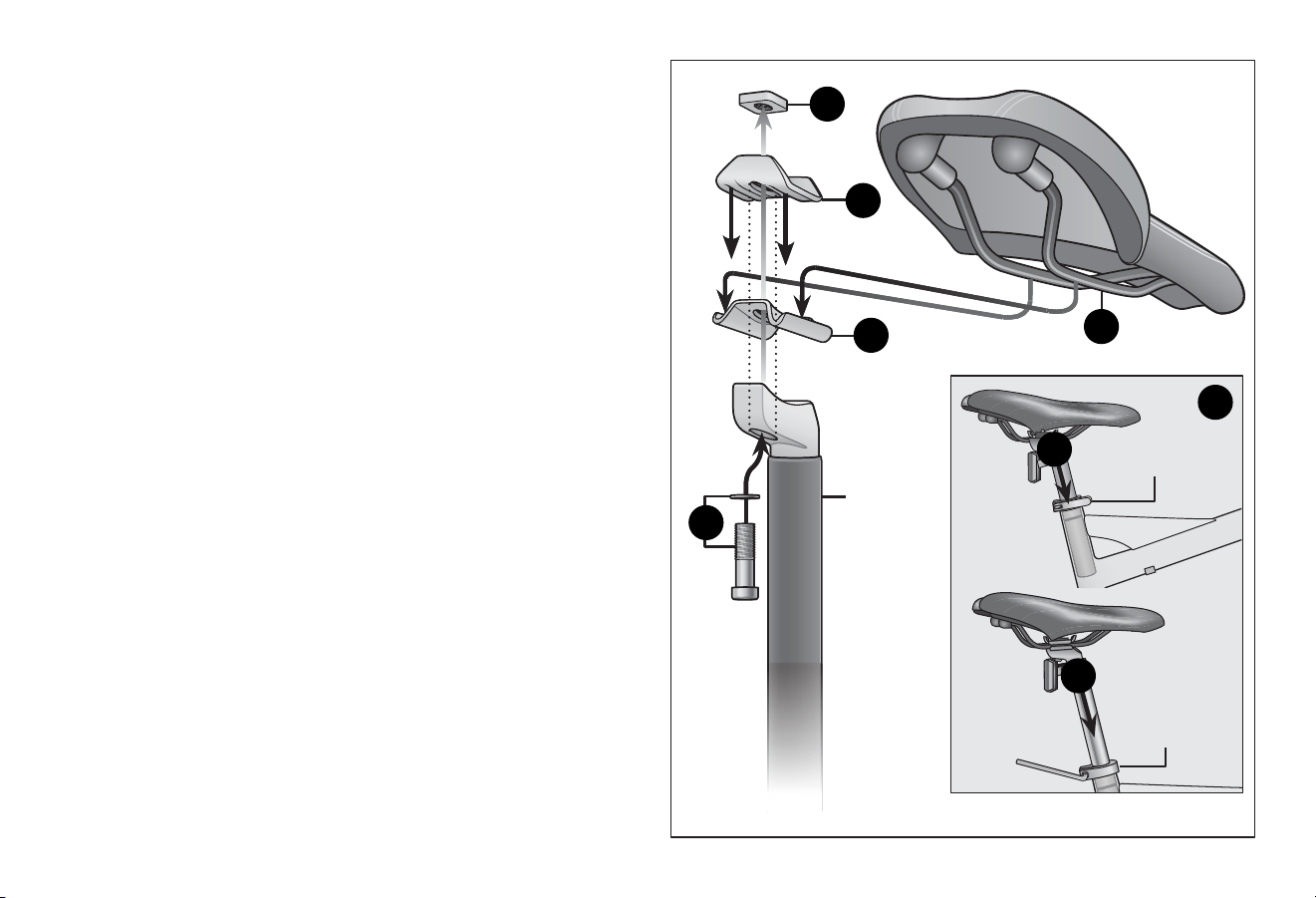
Quick-release Seat Clamp
❶ Unlock the quick-release lever and insert the seat post into
the seat tube. Figure 3.17
❷ Adjust the seat height up or down unl the rider feels they
have control of the bicycle and is comfortable.
Important! Be sure the minimum inseron marks do not go
past the top of the seat clamp and are not visible. See
Secon 1, Fig. 1.2: Seat Height and Handlebar Reach.
❸ Close the quick-release lever and lock the seat in place.
If there is not enough pressure to hold the seat in place
open the quick-release lever. With one hand on the quick-
release lever and one hand on the adjustment nut, start to
hand ghten the adjustment nut unl you start to feel some
resistance against the seat clamp post. Do not aempt to
ghten by turning the quick-release lever. The quick-release
lever is for closing, the adjustment nut is for adjusng the
pressure. Figure 3.18
❹ Try to close the quick-release lever. If it closes easily, open it
up and ghten the adjustment nut further. If it is too
dicult to close, open the quick-release lever up and loosen
the adjustment nut a lile and try again.
Important! You should feel resistance when you close
the quick-release lever that should leave a temporary
impression on your ngers. Open and close the handle to
ensure the seat is securely locked in place.
Minimum
inseron
marks
Minimum
inseron marks
on the seat post
Seat post
Quick-release lever
Quick-release
seat clamp
Adjustment nut
Seat tube
2
1
3
Assembly 3
27
27
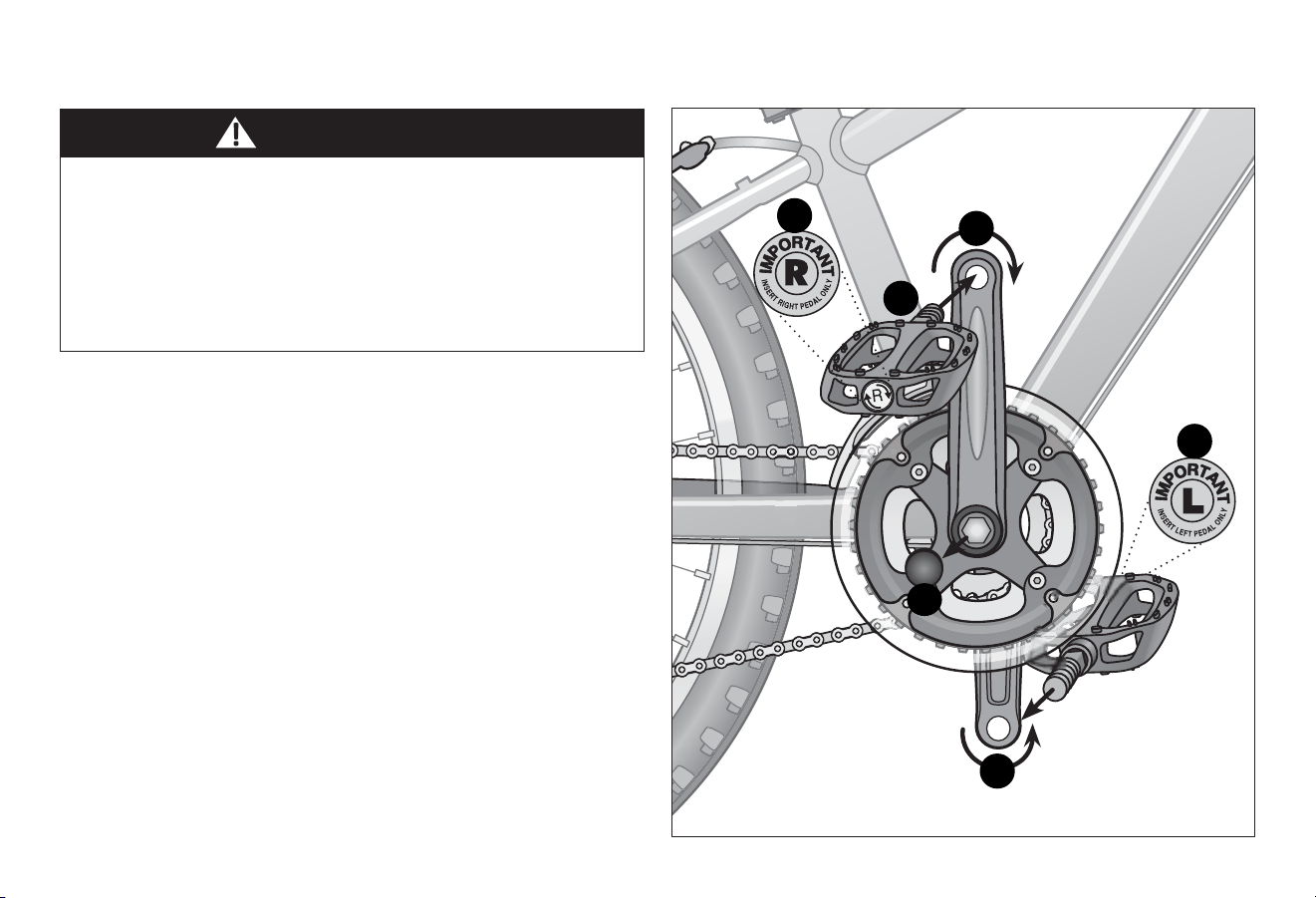
Figure 3.19
Micro Adjust Seat with Pillar Seat Post
❶ Place the boom plate on the pillar seat post. Be sure the
holes in the boom plate and the holes in the seat post are
aligned. Figure 3.19
❷ Place the washer on the hex bolt and insert the bolt through
the boom hole of the pillar seat post and boom plate.
❸ Place the rails of seat into the grooves of the boom plate.
❹ Place the top plate over the top of the seat rails. The hex
bolt should be inserted through the hole in the top plate.
❺ Insert the square nut onto the hex bolt and ghten
completely.
❻ Insert the pillar seat post into the seat tube and adjust the
seat height up or down unl the rider feels they have
control of the bicycle and is comfortable.
Important! Be sure the minimum inseron marks do not go
past the top of the seat clamp and are not visible. See
Secon 1, Fig. 1.2: Seat Height and Handlebar Reach.
❼ Lock the seat in place. Note: Refer to the secon that
pertains to your seat clamping device (bolted or quick-
release) on the previous page for instrucons.
❽ Check the seat to be sure it does not move.
Quick-release
seat clamp
Bolted seat
clamp
Boom plate
Top plate
Square nut
Pillar seat
post
Seat rails
5
4
1
3
7
2
6
6
3 Assembly
28
WARNING!
Figure 3.20
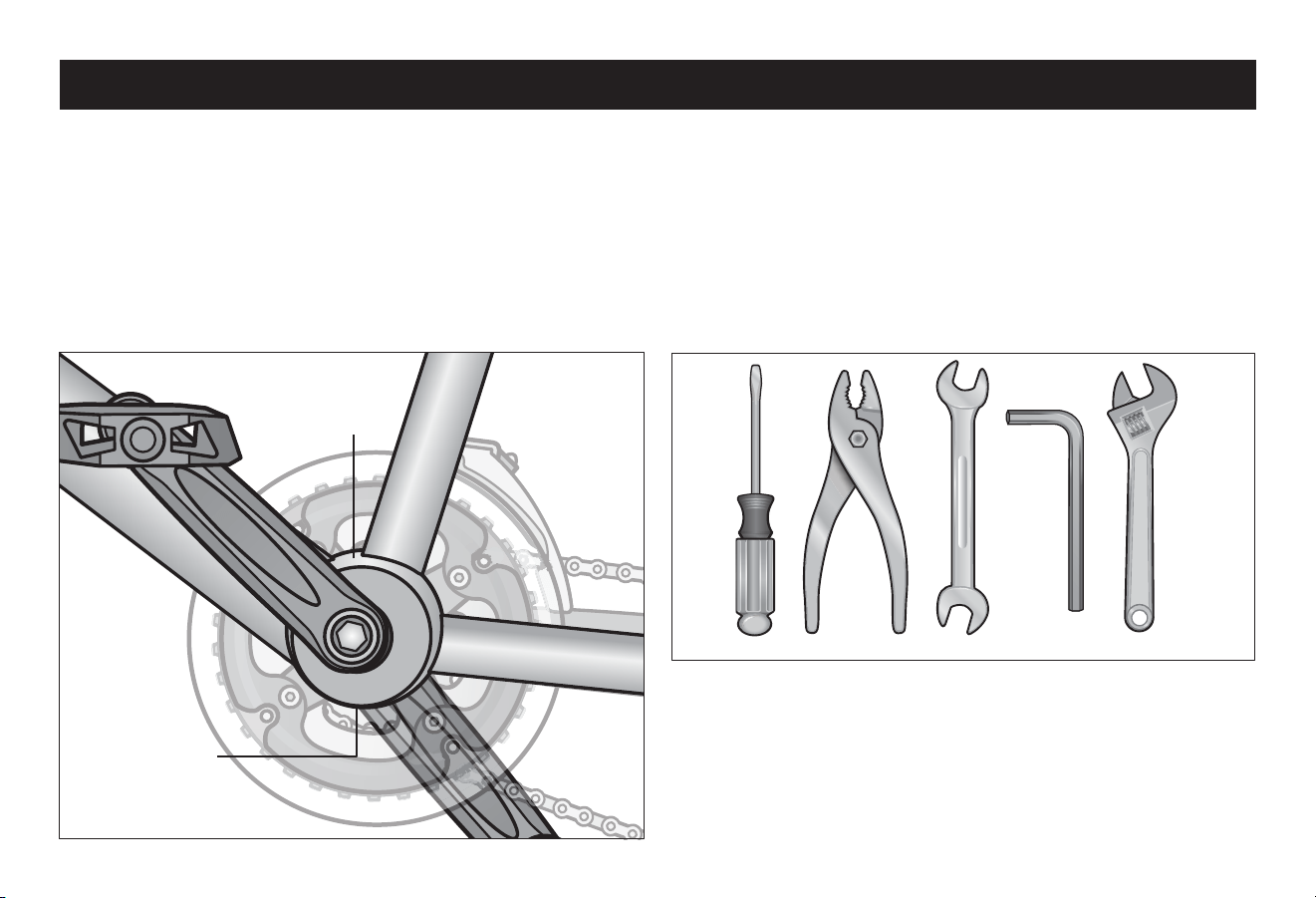
ATTACH THE PEDALS
• Aachment of an incorrect pedal into a crank arm can strip
pedal threads and cause irreparable damage. Visually
match the R and L sckers on the pedal and crank arm
before aaching the pedals. Before your rst ride, please
check to ensure your pedals are aached correctly.
• It is very important that you check the crank set for correct
adjustment and ghtness before riding your bicycle.
❶ Match the pedal marked R with the right-hand crank arm
and match the pedal marked L with the le-hand crank arm.
Figure 3.20
❷ Place the threaded pedal into the threaded hole on the
crank arm.
❸ By hand, slowly turn the spindle the correct direcon.
Clockwise for right side pedal, counterclockwise for le side
pedal. Important! Stop if you feel resistance! This may be
an indicaon the spindle is entering the hole at an
angle. Remove the spindle and repeat step two.
❹ If the spindle is entering the hole cleanly then use a 15 mm
wrench or pliers to ghten completely.
❺ Remove the dust caps and ghten the crank axle nuts using
a 15 mm wrench.
5
The left pedal turns
counter-clockwise and
the right pedal turns
clockwise.
1
1
2
3
3
Adjustments 4
29
29
Figure 4.2
Figure 4.1
Aer your bicycle is assembled you will need to make
adjustments. If you need replacement parts or have quesons
pertaining to the assembly of your bicycle, call the service line
direct at: 1-800-626-2811. Monday - Friday 8:00 am to 5:00 pm
Central Standard Time (CST).
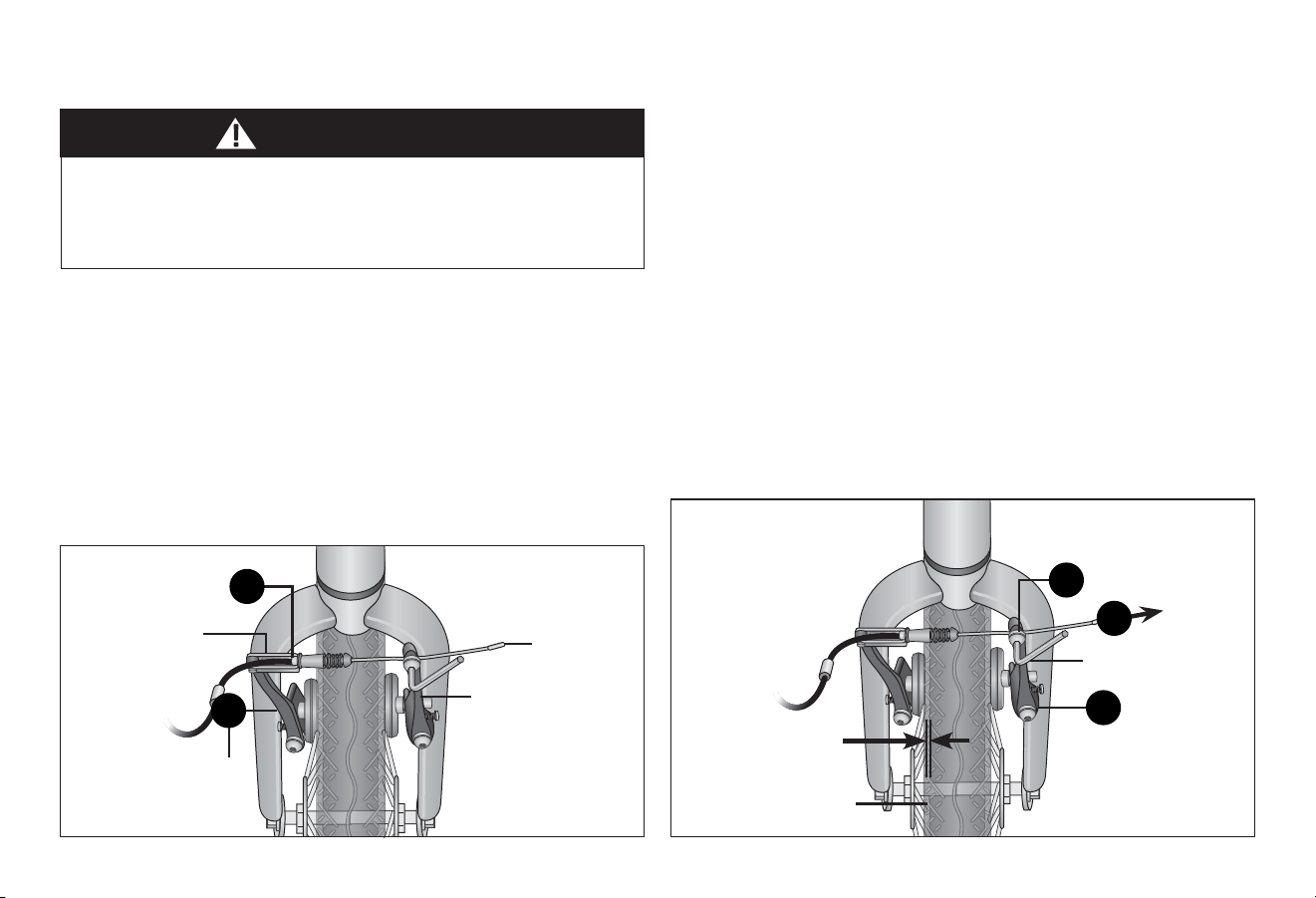
Note: You will need your model number and date code located
on the service scker near the boom bracket area. Figure 4.1
TOOLS REQUIRED
• Phillips head screw driver
• 4 mm, 5 mm, 6 mm and 8 mm Allen wrench
• Adjustable wrench or a 9 mm, 10 mm, 14 mm and 15 mm
open and box end wrenches
• A pair of pliers with cable cung ability
❹ Adjustments
Service scker is
located above the
boom bracket
Serial number is
located below the
boom bracket
4 Adjustments
30
Figure 4.3 Figure 4.4
ADJUSTING THE BRAKES
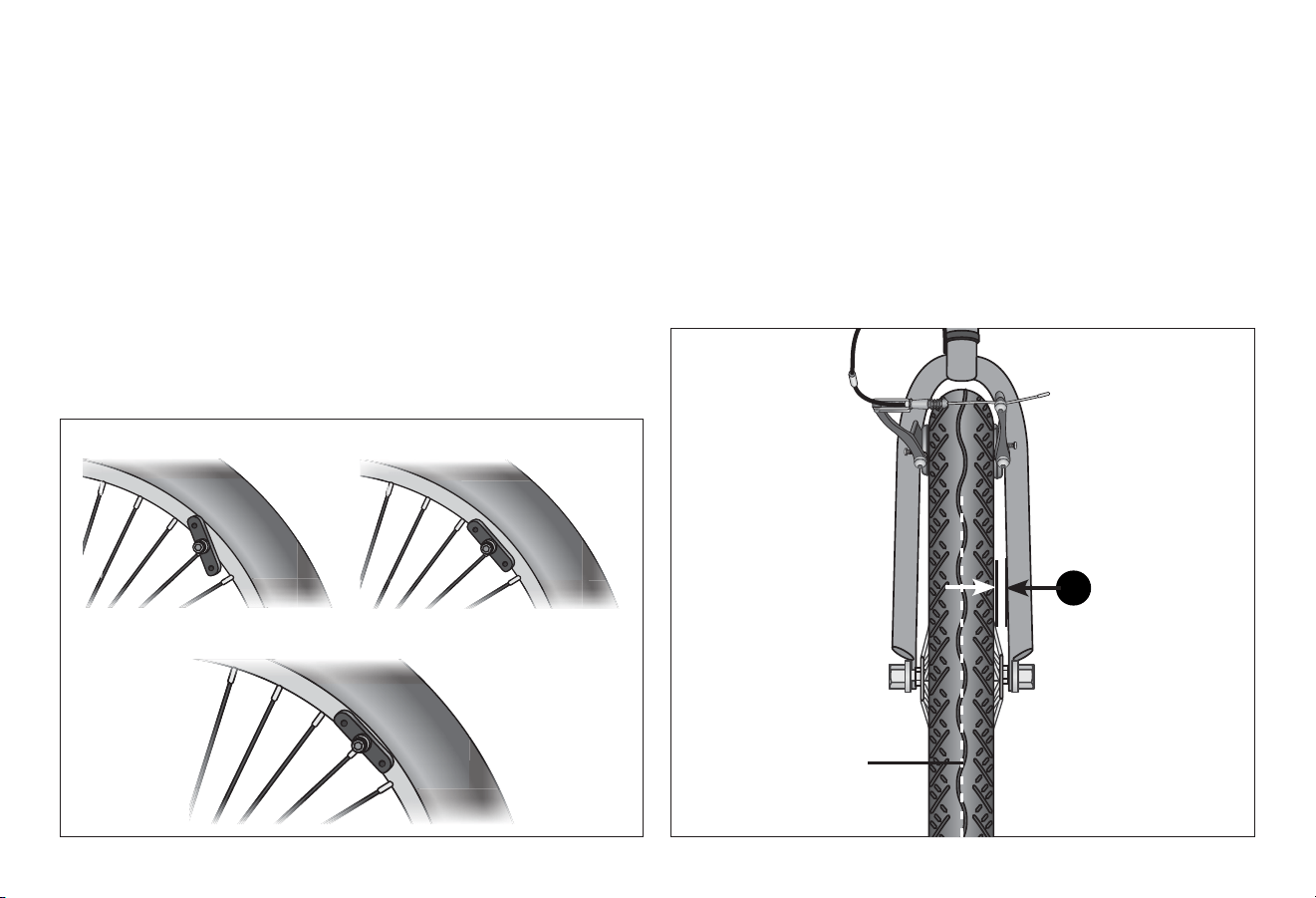
Adjusng Linear Pull Brakes
Aaching the Brake Cable to the Brake Carrier
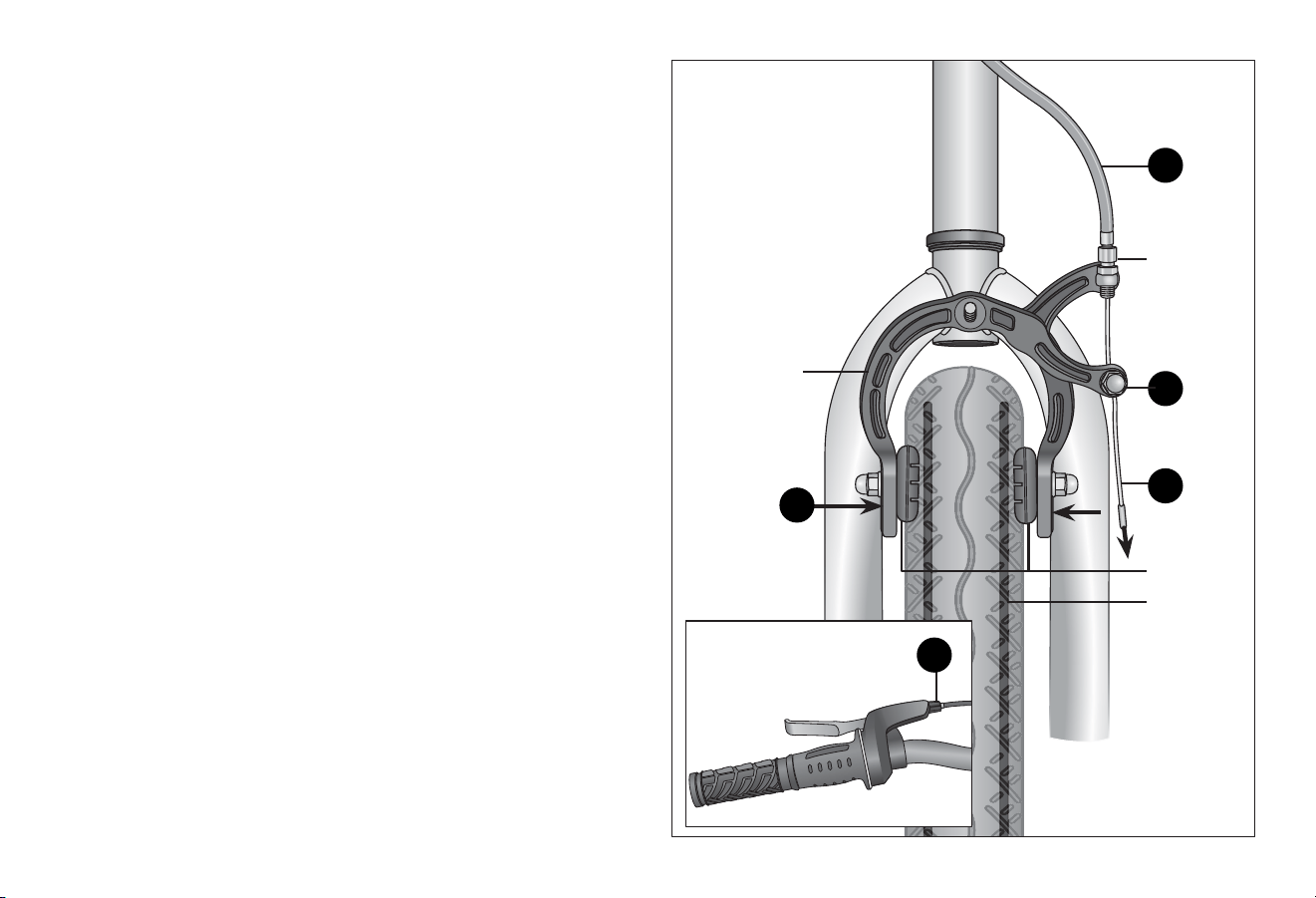
❶ Squeeze the two brake arms together unl the brake pads
touch the wheel rim. Figure 4.3
❷ With your other hand, pull on the brake cable and insert the
end of the “noodle” into the brake carrier.
Adjusng the Brake Pads
❸ Check the brake cable is seated in the brake lever. Using a
5 mm Allen wrench loosen the cable anchor bolt enough so
the brake cable can move freely. Figure 4.4
❹ Pull the brake cable through the cable anchor so the
le brake arm moves towards the rim and there is
approximately a 1/8” (3 mm) gap between the brake
pad and rim.
❺ Move the right brake arm towards the rim unl there is
approximately a 1/8” (3 mm) gap between the brake pad
and rim.
❻ Using the 5 mm Allen wrench, rmly ghten the cable
anchor bolt completely.
Failure to properly set the brakes may result in the inability
to stop the bicycle movement and cause serious injury or
death. Be sure the brakes are funconing properly before
using the bicycle.
WARNING!
Cable anchor bolt
Wheel rim
5 mm Allen wrench
1/8” gap
(both pads)
Brake carrier
End of “noodle” in
the brake carrier
Brake arm
Brake cable
Brake arm
4
2
3
5
1
Adjustments 4
31
31
Figure 4.5
Figure 4.6
Important! Before riding the bicycle it is important to check the
brakes. If you squeeze the brake lever and one brake arm moves
more than the other (or not at all) the brake is not centered. You
will need to ne-tune the brake pads. Mulple adjustments may
be necessary to center the brake pads, correctly set the brake
pressure and set the gap between the brake pad and rim.
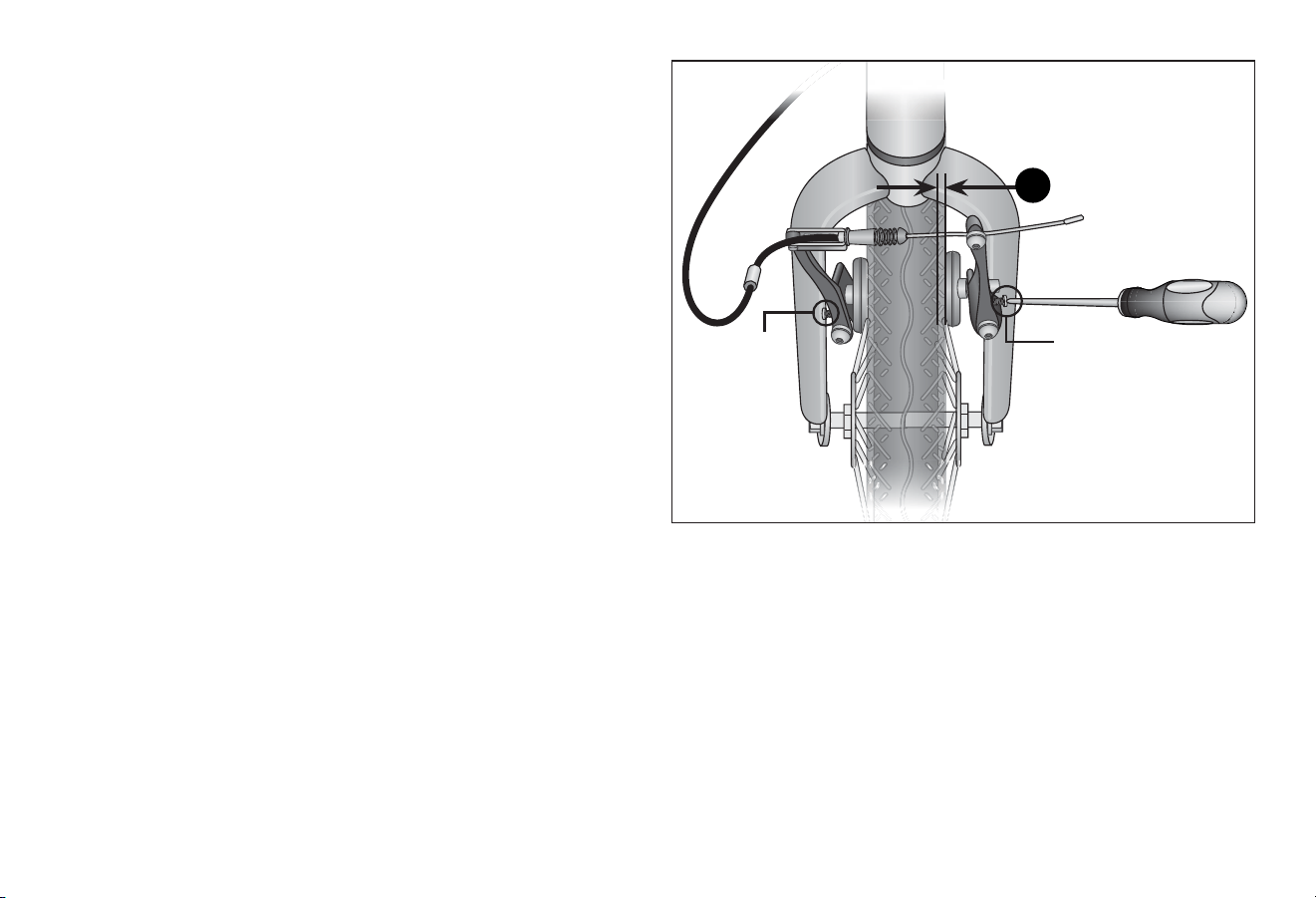
Adjust the Brake Pad Alignment
Check that all brake pads are aligned correctly. If not, use a
5 mm Allen wench and loosen the bolt enough so you can
reposion the pad. Posion the pad so it is evenly centered on
the rim. Reghten the bolt aer posioning the pad correctly.
Figure 4.5
Center the Brake Pads
Rotate the wheel and look straight down at the gap between
the rim, brake pads and fork. If you nd the gap between these
are uneven it indicates the wheel, the brake pads, or both are
not centered.
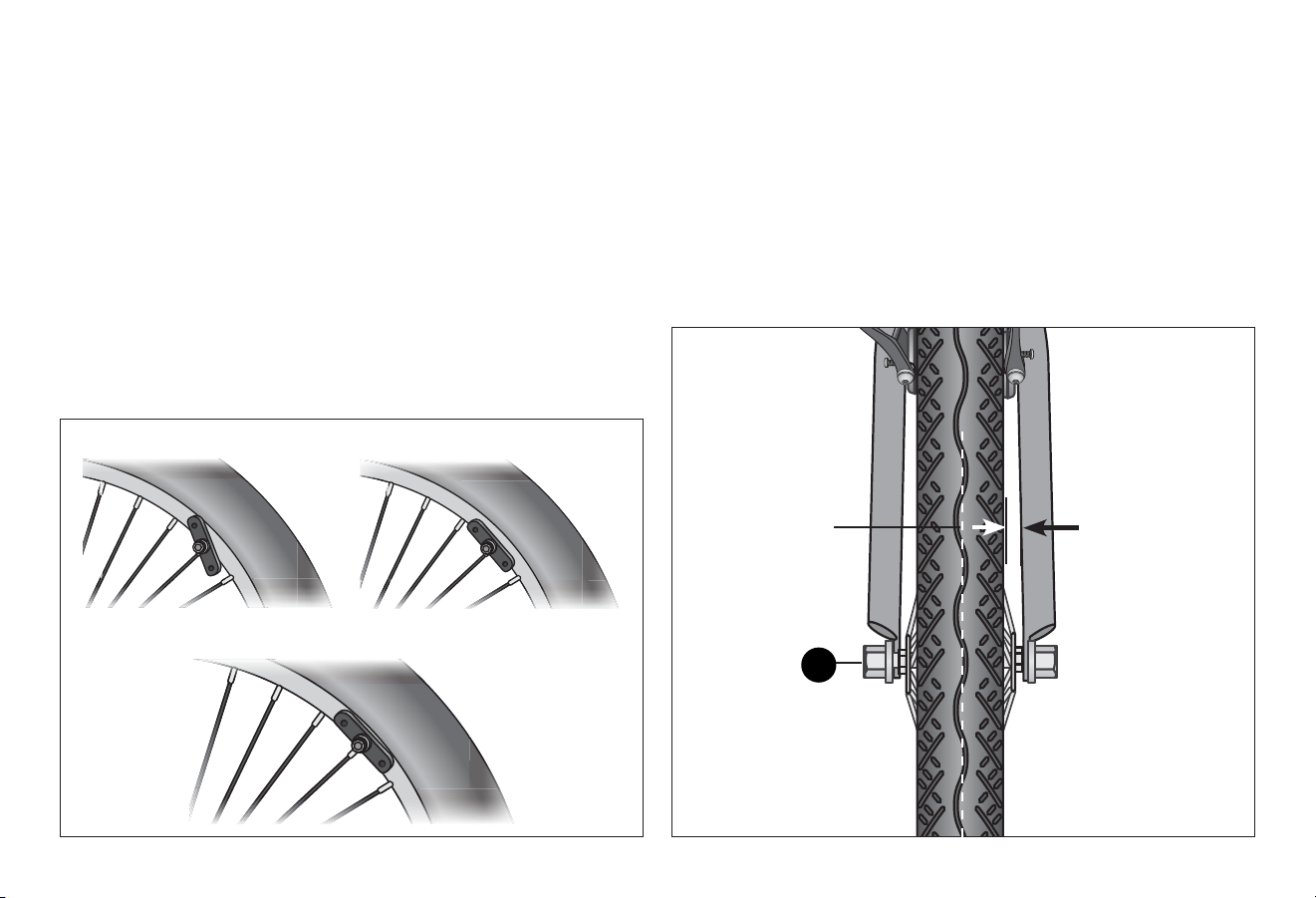
❶ If you see the gap between the fork and wheel is uneven
loosen the axle nuts and adjust the wheel unl centered.
Figure 4.6
1
Incorrect Alignment
Correct Alignment
Even space
between
wheel and fork
(both sides)
Wheel should
be centered
4 Adjustments
32
Figure 4.7
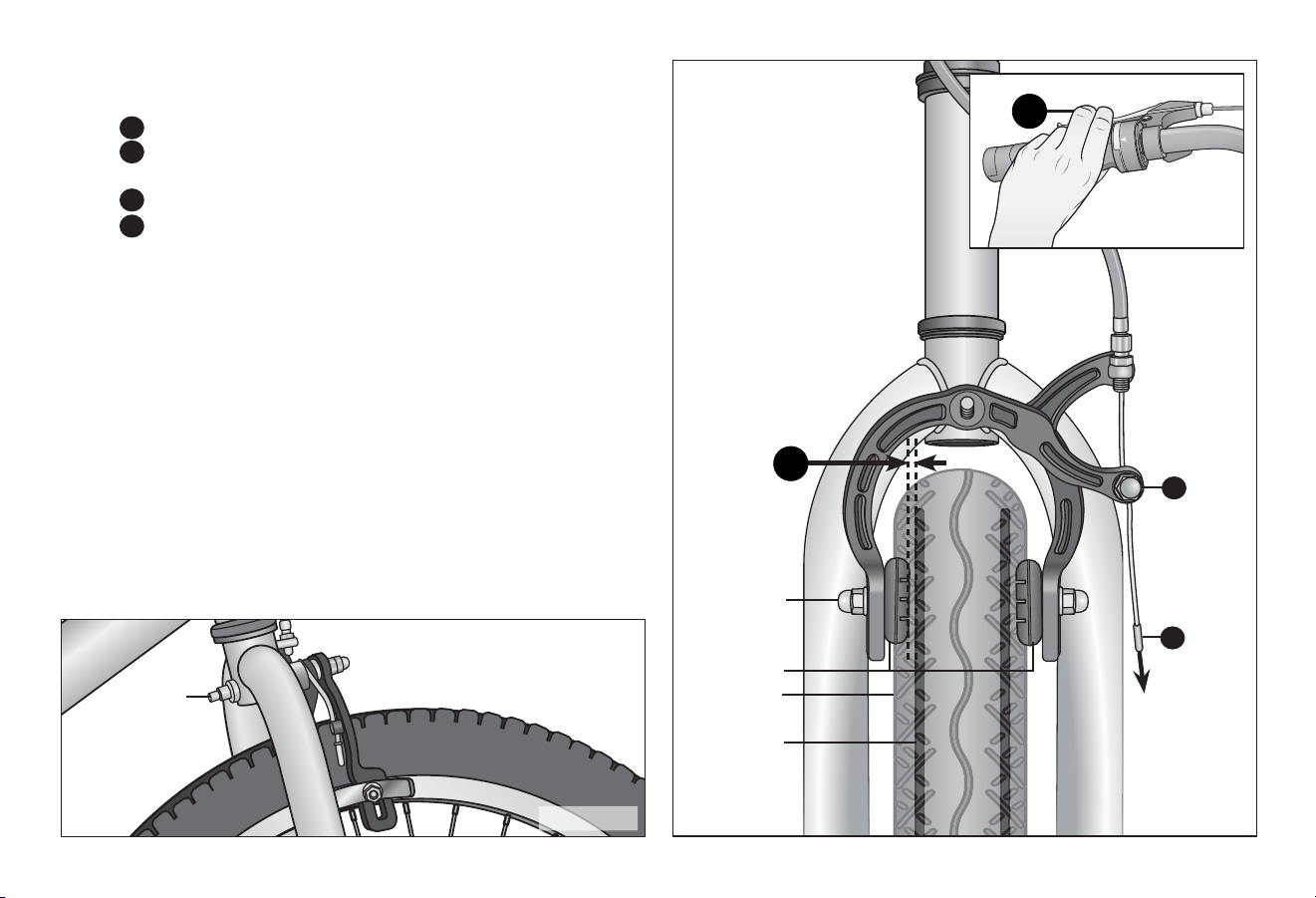
❷ If the gap between the brake pad and wheel is uneven,
adjust the posion of the brake pad.
• Using a phillips head screwdriver, adjust the brake arm
screws on either side of the brake arm. Note: Turning the
screw clockwise moves the pad away from the rim.
Turning the screw counterclockwise moves the pad
towards the rim. Figure 4.7
• Start with the side where the pad is closest to the rim or
is not moving properly. Turn the screw to move the pad
towards or away from the rim.
• Adjustments to these screws should be made in small
increments, one-quarter to one-half turn then checked by
acvang the brake lever three to four mes aer each
adjustment. If you connue to adjust the screw unl you
have noceable movement you will run out of
adjustment.
❸ Pull and release the brake lever a few mes and check if the
pads are centered.
❹ If necessary, repeat steps one and two unl the brake pads
are centered and the gap between the pads and rim is close
to 1/8 inch.
Note: If you run out of adjustment capability on one side,
adjust the screw on the opposite side. If you run out of
adjustment capability on both screws do a minor
adjustment to the brake cable. Adjustments should be made
to each side as equally as possible to prevent running out of
adjustment capability.
Even space between
brake pad and wheel
Brake arm screw
Brake arm
screw
2
Adjustments 4
33
33
Adjusng the Side-pull Caliper Brake
Aaching the Brake Cable to the Brake Carrier
❶ If the brake cable is disconnected at the caliper, thread the
brake wire through the adjustment barrel. Figure 4.8
❷ Loosen the cable anchor bolt unl you can see a gap large
enough for the cable wire.
❸ Thread the cable wire through the gap. By hand, screw the
cable anchor bolt snug enough to hold the cable wire.
❹ Check the cable end is seated in the brake lever.
❺ With one hand squeeze the caliper arms unl both brake
pads contact the rim. Loosen the cable anchor bolt just
enough to allow the cable wire to move freely.
❻ While holding the caliper closed, use your other hand to pull
the brake cable ght (through the cable anchor bolt).
Check that the cable end is seated in the brake lever and the
barrel adjuster of the brake.
❼ Tighten the cable anchor bolt as much as you can by hand
and then while sll squeezing the caliper arms unl both
brake pads contact the rim, ghten the cable anchor bolt
fully with a 10 mm box wrench. Note: Use the adjustment
barrel(s) to ne-tune the brake cable tension. Turning the
barrel clockwise will loosen the brake cable tension, counter-
clockwise will ghten the brake cable tension. Figure 4.9
Figure 4.8
Figure 4.9
Brake cable end at
brake lever
4
Cable
anchor bolt
Brake pad
Cable wire
Brake cable
Side-pull
caliper brake
Wheel rim
1
2
3
Cable
adjustment
barrel
5
Caliper
arms
4 Adjustments
34
Figure 4.10
Adjusng the Brake Pads
Important! Before riding the bicycle it is important to check the
brakes. If you squeeze the brake lever and one brake arm moves
more than the other (or not at all) the brake is not centered. You
will need to ne-tune the brake pads. Mulple adjustments may
be necessary to center the brake pads, correctly set the brake
pressure and set the gap between the brake pad and rim.
❶ Check that all brake pads are aligned correctly. If not, use a
5 mm Allen wench and loosen the bolt enough so you can
reposion the pad. Posion the pad so it is evenly centered
on the rim. Reghten the bolt aer posioning the pad
correctly. Figure 4.10
Figure 4.11
Center the Brake Pads
Rotate the wheel and look straight down at the gap between
the rim, brake pads and fork. If you nd the gap between these
are uneven it indicates the wheel, the brake pads, or both are
not centered.
❶ If you see the gap between the fork and wheel is uneven
loosen the axle nuts and adjust the wheel unl centered.
Figure 4.11
Even space
between
wheel and fork
(both sides)
Wheel should
be centered
Axle nut
1
Incorrect Alignment
Correct Alignment
Adjustments 4
35
35
1
Figure 4.13
❷ If the gap between the brake pad and wheel is uneven,
adjust the cable tension. Figure 4.13
2a
Loosen the cable anchor nut.
2b
Using one hand, squeeze the brake pads against
the rim.
2c
Pull the slack out of the cable.
2d
While holding tension on the cable, ghten the cable
anchor nut.
Note: Watch the brake if it begins to shi or rotate, then
release the brake lever and use your hand to rotate the
brake caliper back unl both sides of the brake move
equally. Somemes it is necessary to over-rotate the brake
slightly, so that as you ghten the caliper locknut, the brake
will end up centered. Figure 4.12
❸ Pull and release the brake lever a few mes and check if the
pads are centered.
❹ If necessary, repeat steps one through three unl the brake
pads are centered and the gap between the pads and rim is
close to 1/8 inch.
Brake pad
locknut
Brake pads
Tire
Wheel rim
Distance from
brake pad to
wheel rim 1/8”
Caliper
locknut
Cable
anchor
nut
2a
2c
3
4
Cable
Figure 4.12
4 Adjustments
36
Figure 4.14
Equal space
between brake
pad and the rim
on both sides
Brake pads
Wheel rim
Check the Brakes
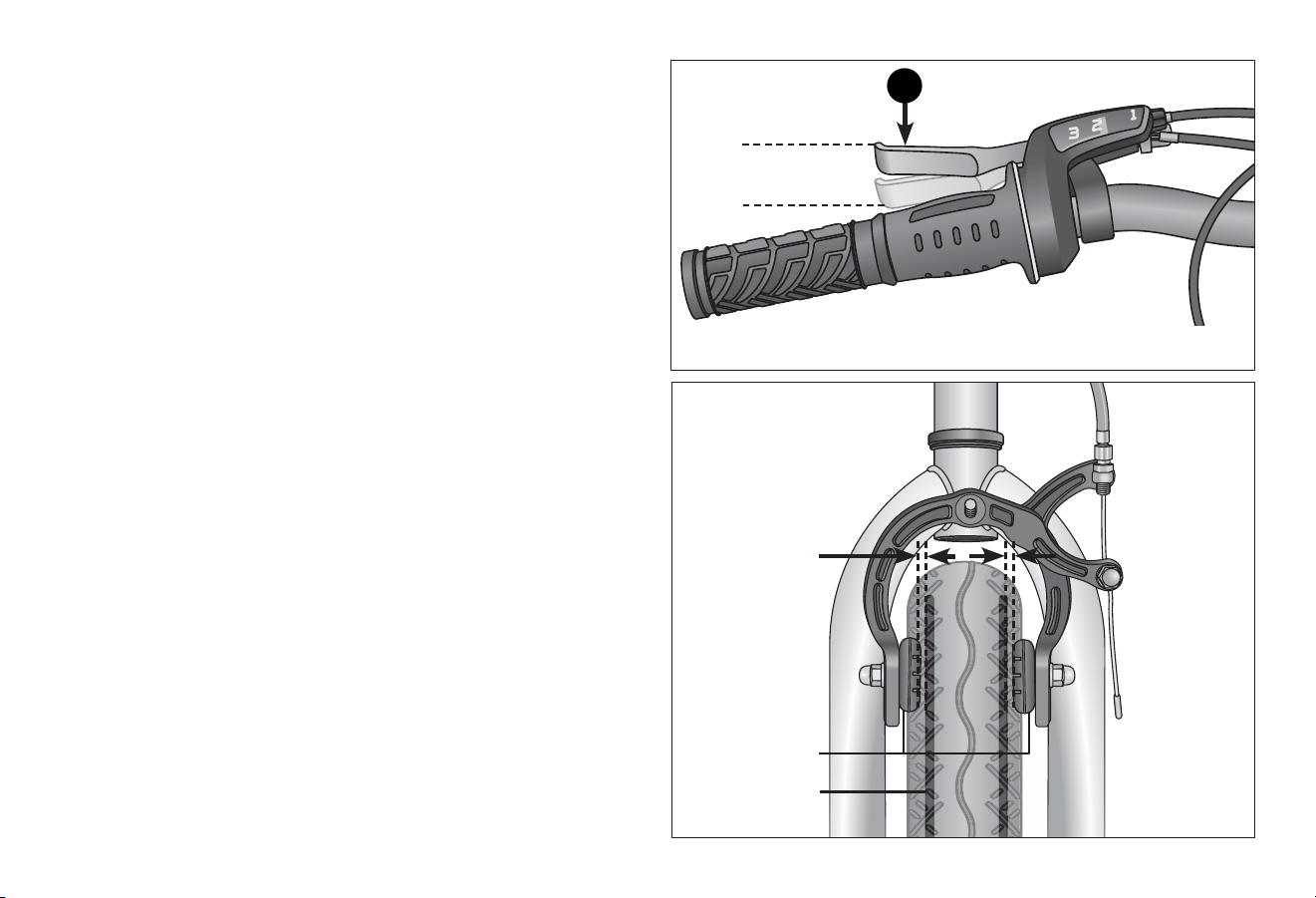
❶ Aer adjusng the brake, squeeze the brake lever as hard as
you can several mes and re-inspect the brake pads,
centering and brake lever travel. If the brake pads are no
longer square to the rim, repeat brake pad adjustments.
Figure 4.14
❷ Be sure that brake pads return to a centered posion by
spinning the wheel and listening for the brake pad rubbing
the rim on either side. Re-adjust as needed.
❸ Check that the brake cable tension allows the brake lever
about 1/3 of the travel before the brake pads contact the
rim. If the cable has stretched or slipped, re-adjust the brake
cable tension by loosening cable anchor bolt and pulling
more cable through the anchor or use brake adjustment
barrels for ne tuning brake cable tension.
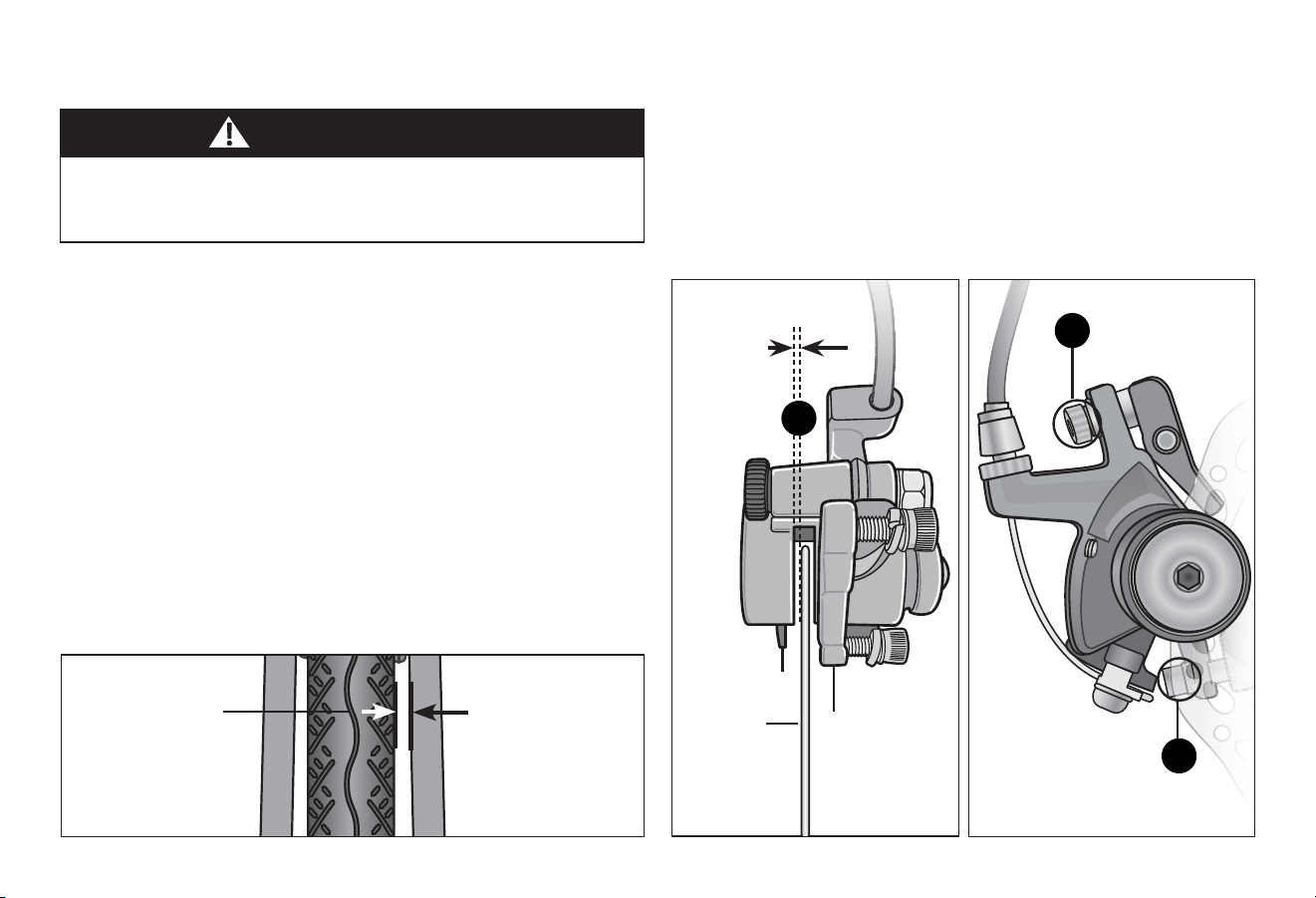
Brake is correctly adjusted when:
• The brake pads do not drag on the rim when the brake is
open. Figure 4.15
• Both brake pads move away from the rim equally when the
brake is released.
• When the brake is applied, the brake pads contact the rim
before the brake lever reaches about 1/3 of the way to the
handlebar.
1/3 distance to
handlebar
1
Figure 4.15
Adjustments 4
37
37
Adjusng the Disc Brake
Important! Dierent types of disc brakes may require specic
adjustments not covered in this secon. If you are unsure of
what needs to be done see a qualied bicycle mechanic.
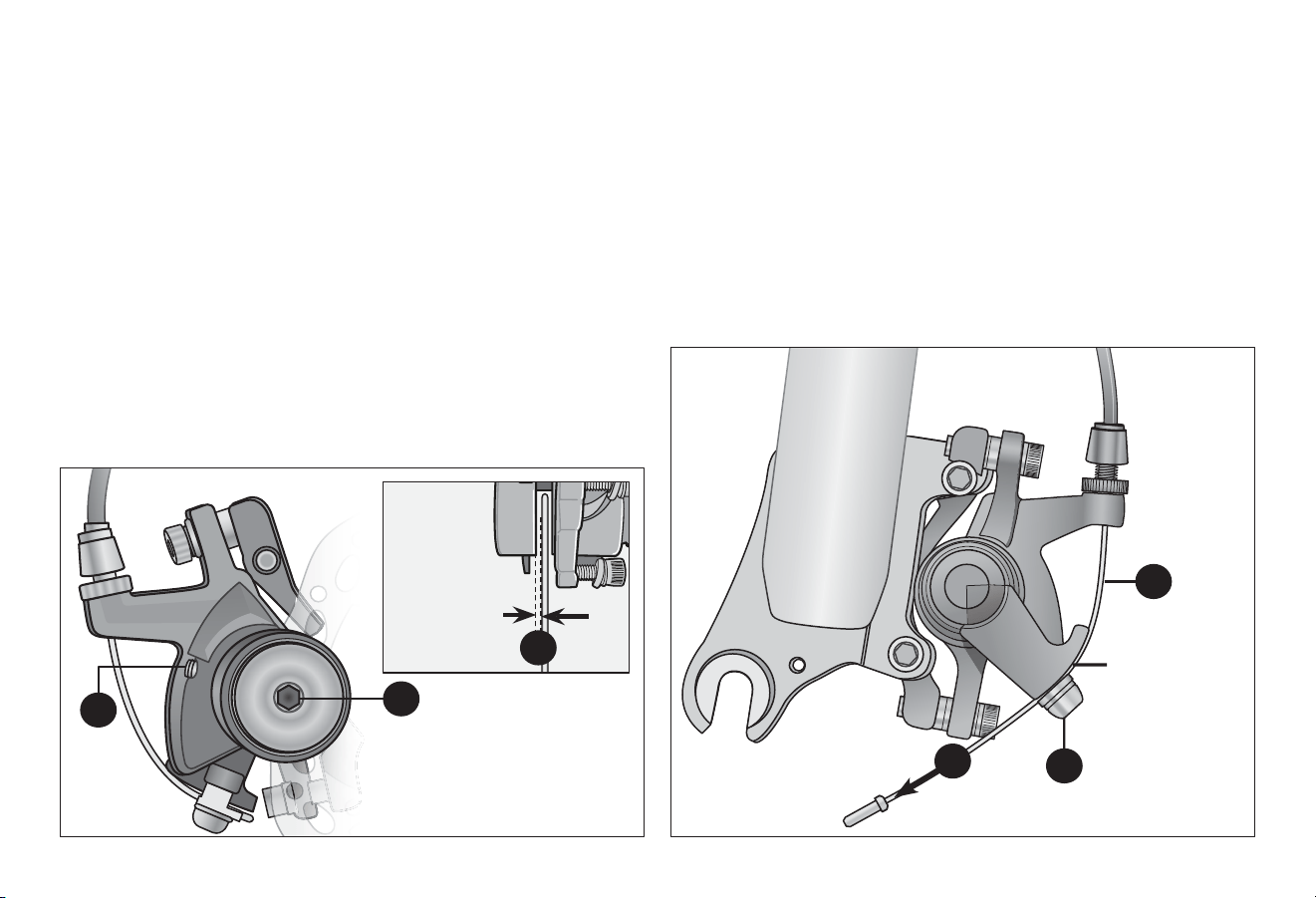
Misalignment of the disc brake may be due to the following:
• The wheel is not centered.
• The caliper body is misaligned.
• The brake pads are not centered.
Center the Wheel
❶ Rotate the wheel and look at the gap between the rim and
fork. If the gap is uneven, loosen the axle nuts and adjust
unl the wheel and disc rotor are centered. Figure 4.16
Realign the Caliper Body
❶ Using a 5 mm Allen wrench, loosen the two centering
adjustment screws. Adjust the caliper body unl the gap
between the disc rotor and the brake pads in the caliper body
is even (1/32" per side). Figure 4.17
❷ Tighten the centering adjustment screws.
• Disc brakes are sharp, keep ngers away from the brake
caliper and rotor. If ngers contact the disc brake while the
wheel is turning serious injury may occur.
WARNING!
Centering
adjustment screws
Brake pad
1/32 inch
clearance
on each
side of disc
rotor
Disc rotor
Adjust caliper
body so disc
rotor is centered
1
2
2
Centering
adjustment screws
Even space
between
wheel and fork
(both sides)
Wheel should
be centered
Figure 4.16 Figure 4.17 Figure 4.18
4 Adjustments
38
Figure 4.20
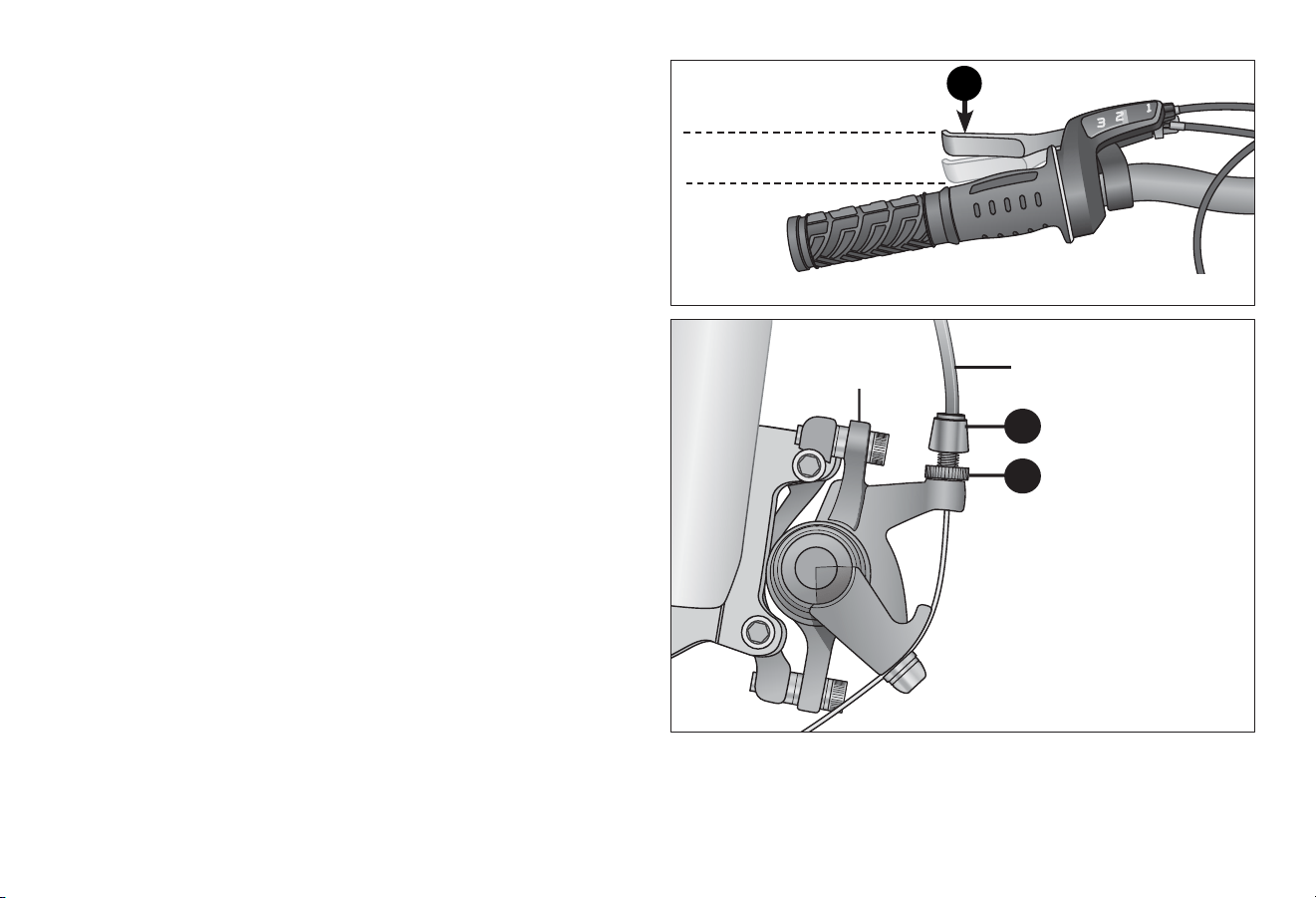
Aaching the Brake Cable to the Brake Arm
❶ If the brake cable wire is not attached to the brake arm then
loosen the cable anchor bolt unl you can see a gap large
enough for the brake cable wire. Figure 4.20
❷ Pull on the brake cable wire and place it under the cable
anchor bolt.
❸ Tighten the cable anchor bolt. Note: The brake cable should
not be "pulling" on the brake arm.
Figure 4.19
Brake pad
adjustment screw
2
1/32 inch
clearance on
each side of
disc rotor
4
3
Set
screw
Center the Brake Pads
❶ Insert a 1/32" spacer gage between the disc rotor and
brake pad. Figure 4.19
❷ Using a 2.5 mm Allen wrench, loosen the set screw.
❸ Using a 5 mm Allen wrench, turn the brake pad adjustment
screw to move the brake pad. Turning the pad clockwise
moves it towards the disc rotor, counterclockwise moves the
pad away from the disc rotor.
❹ Adjust the pad unl the gap between the disc rotor and the
brake pads are even (1/32" per side).
❺ Re-tighten the set screw.
Brake
cable
wire
1
Brake arm
Cable anchor bolt
3
2
Adjustments 4
39
39
Figure 4.21
Figure 4.22
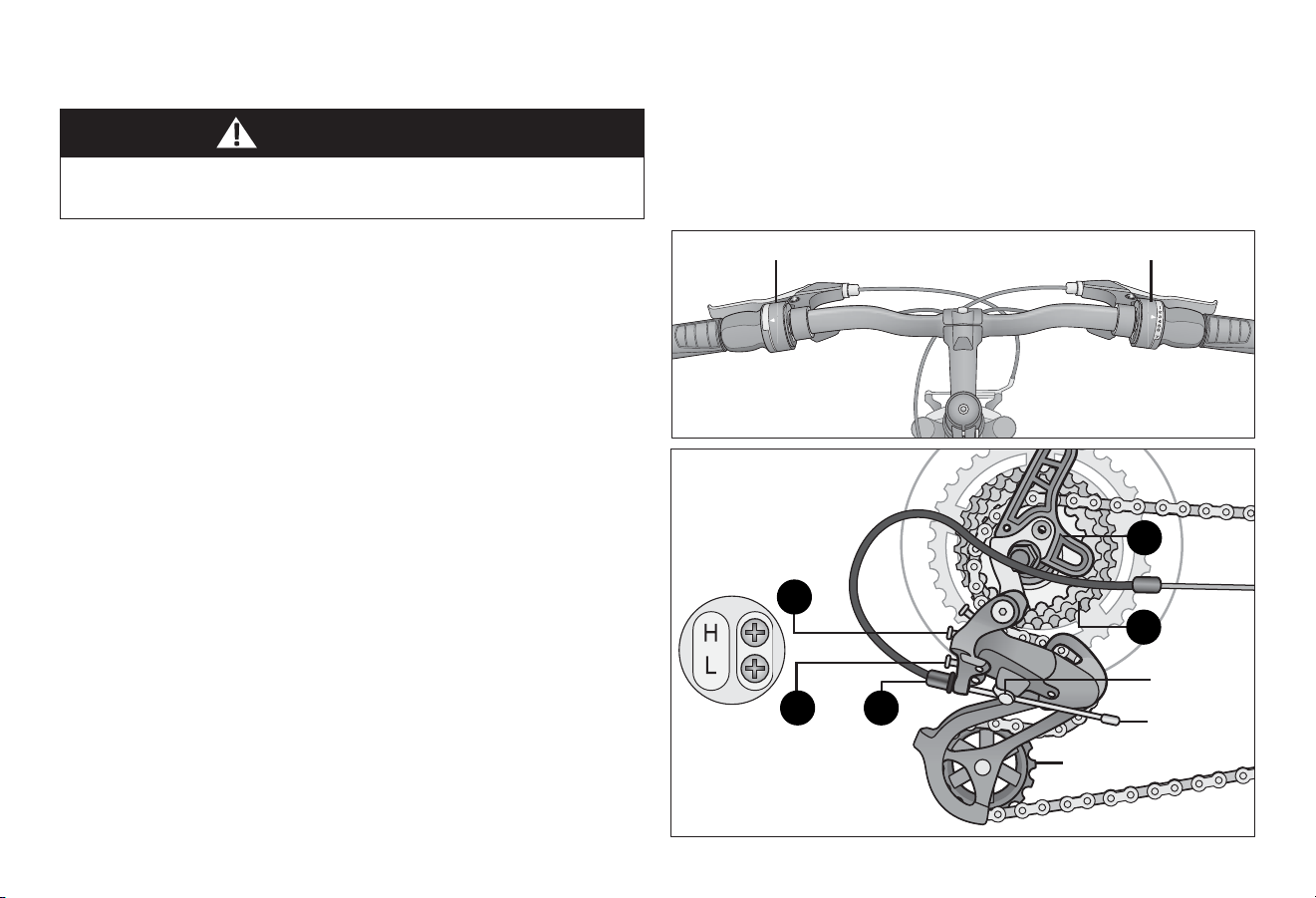
Adjusng the Cable Tension
❶ Check that the brake cable tension allows the brake lever
about 1/3 of the travel before the brake pads contact the
disc rotor. If the cable has stretched or slipped, re-adjust the
brake cable tension. Figure 4.21
❷ At the caliper body, or brake lever, slightly loosen the jam
nut that is next to the adjustment barrel. Figure 4.22
❸ Turn the adjustment barrel to adjust the cable tension.
Turning clockwise will loosen the brake cable tension,
counter-clockwise will ghten the brake cable tension.
❹ Re-check that the brake cable tension allows the brake lever
about 1/3 of the travel before the brake pads contact the
disc rotor. When you have the brake tension you want then
ghten the jam nut.
Brake is correctly adjusted when:
• The brake pads do not drag on the disc rotor.
• Both brake pads move away from the disc rotor equally when
the brake is released.
• When the brake is applied, the brake pads contact the disc
rotor before the brake lever reaches about 1/3 of the way to
the handlebar.
Aer brake adjustment, squeeze the brake lever as hard as you
can several mes and re-inspect if the wheel and brake pads are
centered. If necessary, repeat brake adjustments.
Brake cable
Adjustment
barrel
Caliper body
Jam nut
2
3
1/3 travel to handlebar before
brake pads contact disc rotor
1
4 Adjustments
40
1
WARNING!
Figure 4.23
Figure 4.24
ADJUSTING THE DERAILLEUR
Ensure all bolts are secured ghtly and the chain does not fall
o in either direcon.
Although the front and rear derailleurs are inially adjusted at
the factory, you will need to inspect and re-adjust both before
riding the bicycle.
Adjust the Rear Derailleur
❶ Begin by shiing the rear shier to largest number indicated
and place the chain on the smallest sprocket. Figure 4.23
❷ Adjust the high limit screw so the guide pulley and the
smallest sprocket are lined up vercally. Figure 4.24
❸ Shi through the gears, making sure each gear achieved is
done quietly and without hesitaon. If necessary, use the
barrel adjuster to ne-tune each gear by turning it the
direcon you want the chain to go. For example, turning
clockwise will loosen the cable tension and move the chain
away from the wheel, while turning counter-clockwise will
ghten cable tension and direct the chain towards the
wheel.
❹ Shi the rear shier to gear one and place the chain on the
largest cog.
❺ Adjust the low limit screw in quarter turn increments unl
the guide pulley and the largest cog are aligned vercally.
❻ Again, shi through each gear several mes, checking that
each gear is achieved smoothly. It may take several aempts
before the rear derailleur and cable is adjusted properly.
Rear shierFront shier
Anchor bolt
Low limit
screw
High limit
screw
Cable
Smallest
sprocket
Largest
sprocket
Barrel
adjuster
Guide pulley
2
1
36
5
Adjustments 4
41
41
WARNING!
Figure 4.25
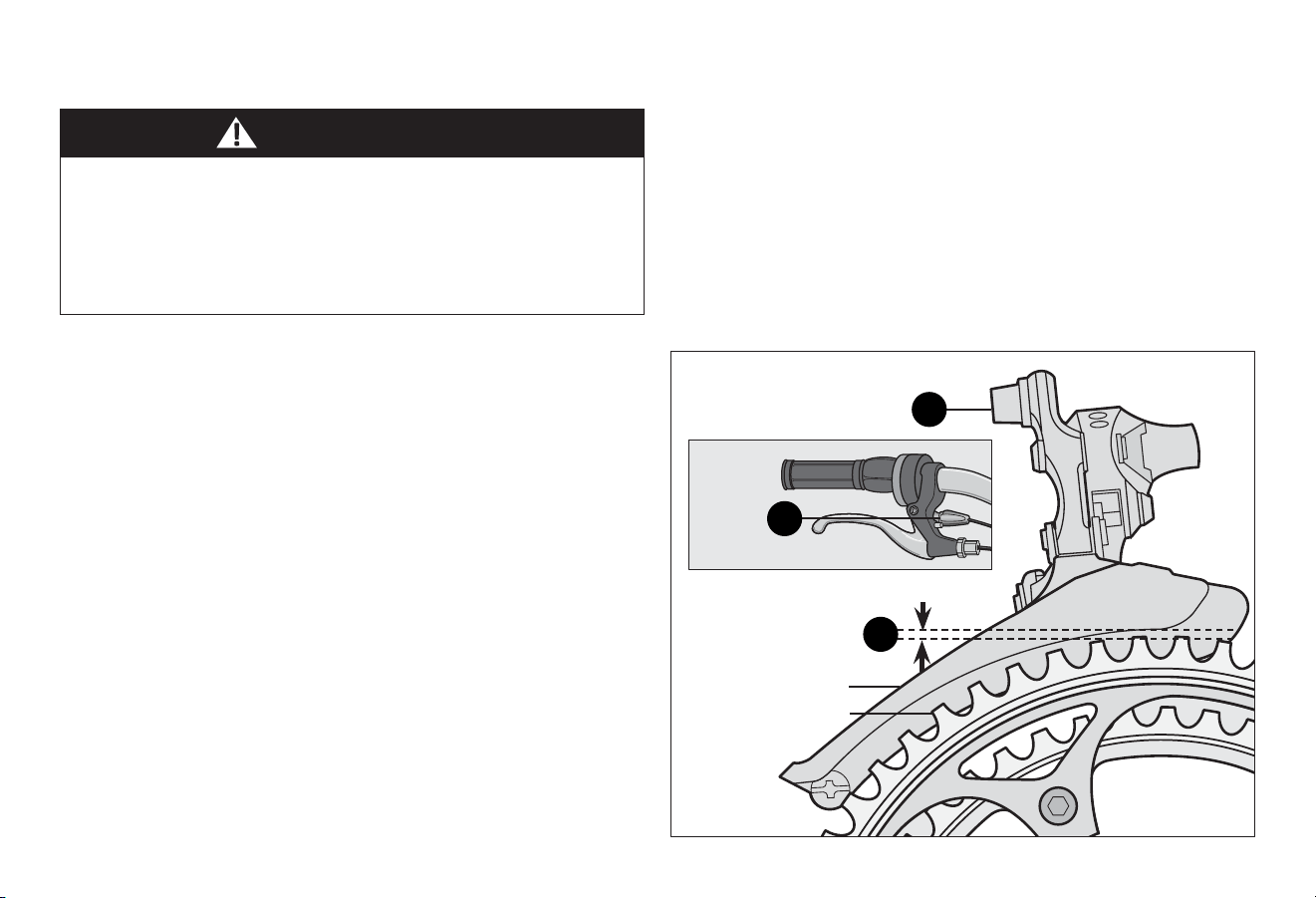
Adjust the Front Derailleur
❶ Shi both shiers to the smallest number indicated and
place the chain on the corresponding cog and chainwheel.
❷ Disconnect the front derailleur cable from the cable anchor
bolt. Figure 4.25
❸ Check the posion of the front derailleur; it should be
parallel with the outer chainwheel and clear the largest
chainwheel by 1-3 mm when fully engaged.
❹ With the chain on the smallest chainwheel in front and the
largest cog in back, adjust the low limit screw so the chain is
centered in the front derailleur cage.
❺ Reconnect the cable, pull any slack out and ghten the cable
anchor bolt securely.
❻ Shi the front shier to the largest chainwheel. If the chain
does not go onto the largest chainwheel, turn the high limit
screw in 1/4 turn increments counter-clockwise unl the
chain engages the largest chainwheel.
Do not ride a bicycle that is not shiing properly. Overlooking
proper adjustments may cause irreparable damage to the
bicycle and/or bodily injury. Never move the shier while
pedaling standing up, or under heavy load, nor pedal
backwards aer having moved the shier. This could jam the
chain and cause serious damage to the bicycle and/or rider.
If the chain falls o the largest chainwheel and into the
pedals, you will need to turn the high limit screw in 1/4 turn
increments clockwise unl the chain no longer falls o.
❼ Shi through every gear, using the barrel adjusters to
ne-tune each transion. The barrel adjuster for the front
derailleur is located on the front shier where the cable
comes out of the shier. Clockwise will loosen the cable
tension and direct the chain closer to the frame while
counter-clockwise will ghten the cable tension and direct
the chain away from the frame.
Barrel
adjuster
Cable anchor bolt
1-3 mm clearance
between chain wheel
and chain guide
Chain guide
Chain wheel
2
3
7
4 Adjustments
42
Figure 4.26
ADJUSTING THE SEAT HEIGHT
Improperly adjusted seat height could aect the rider’s ability
to reach the handlebar and pedals resulng in unexpected
movement, loss of control and serious injury or death. Follow
these guidelines when adjusng the seat height. Always
ensure the seat post minimum inseron marks are below the
seat clamp and cannot be seen. Ensure the seat clamp is
locked and the seat cannot move.
WARNING!
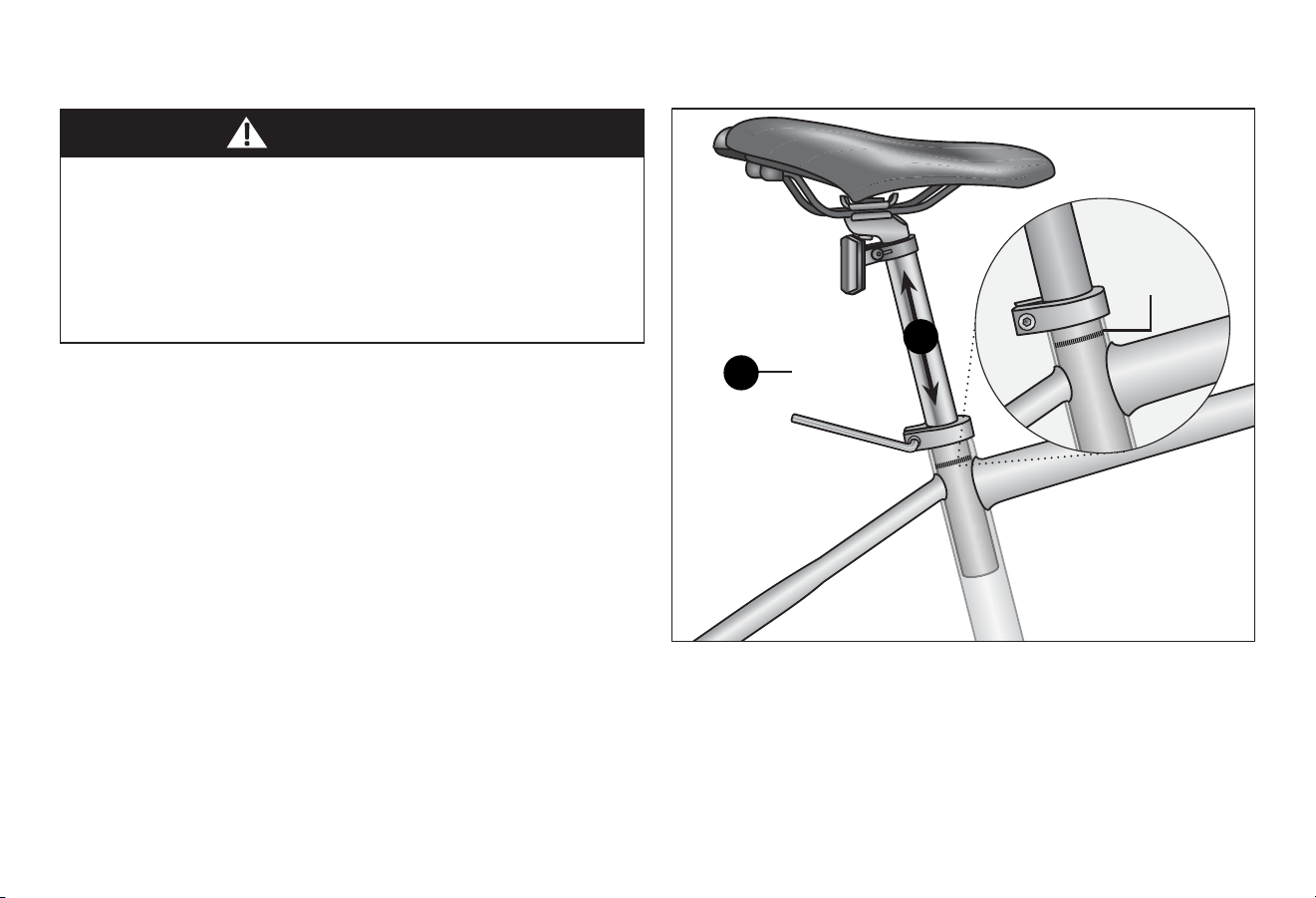
Bolted Seat Clamp
❶ Using a 5 mm Allen wrench, loosen the seat clamp bolt.
Figure 4.26
❷ Adjust the seat height up or down unl the rider feels they
have control of the bicycle and are comfortable.
Important! Be sure the minimum inseron marks do not go
past the top of the seat clamp and are not visible. See
Secon 1, Fig. 1.2: Seat Height and Handlebar Reach.
❸ Tighten the seat clamp bolt to lock the seat in place.
❹ Check the seat to be sure it does not move.
Use a 5 mm Allen
wrench to loosen and
ghten the seat clamp
Minimum
inseron
marks
2
1
Adjustments 4
43
43
Figure 4.27
Figure 4.28
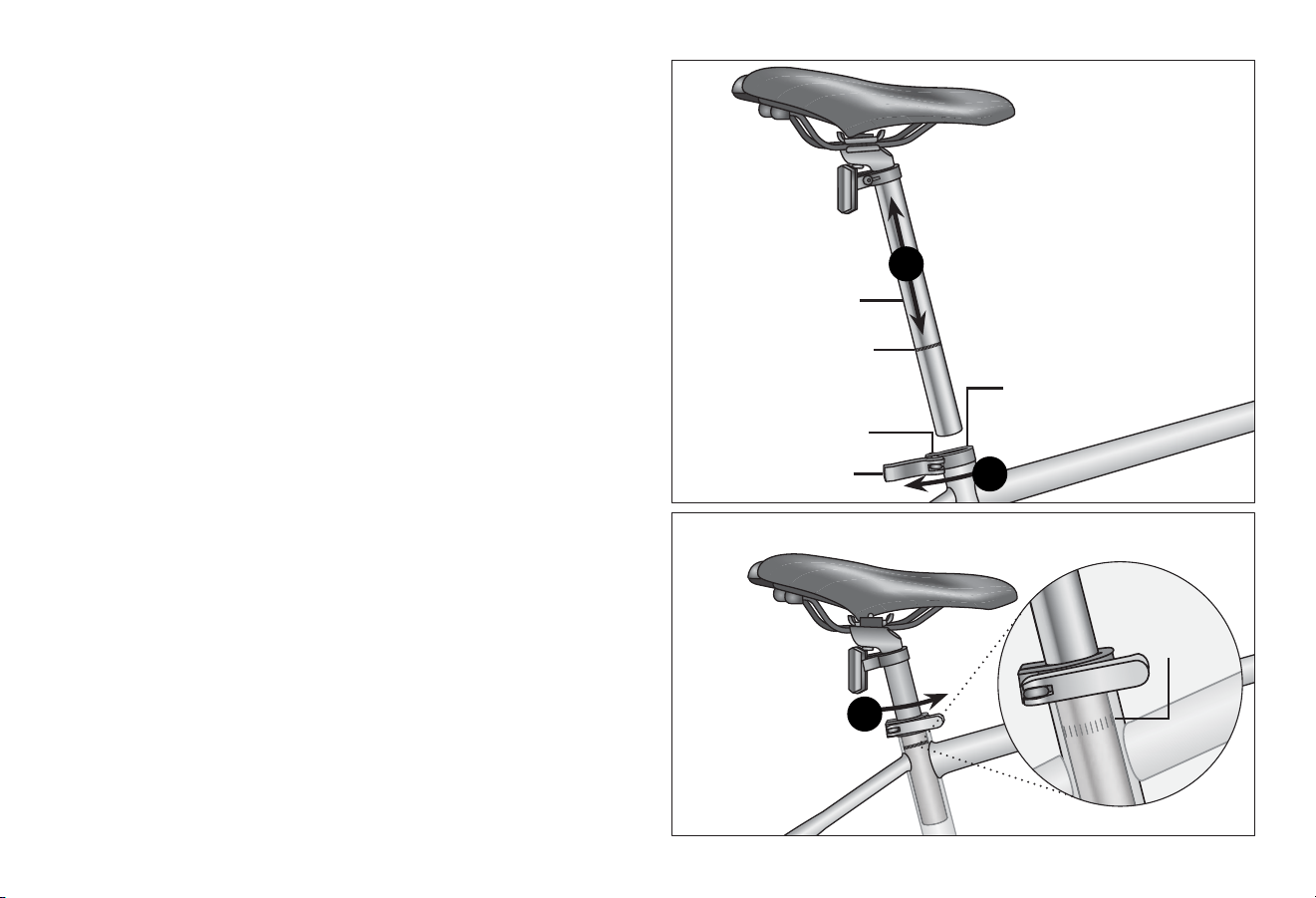
Quick-release Seat Clamp
❶ Unlock the quick-release lever. Figure 4.27
❷ Adjust the seat height up or down unl the rider feels they
have control of the bicycle and are comfortable.
Important! Be sure the minimum inseron marks do not go
past the top of the seat clamp and are not visible. See
Secon 1, Fig. 1.2: Seat Height and Handlebar Reach.
❸ Close the quick-release lever and lock the seat in place.
If there is not enough pressure to hold the seat in place
open the quick-release lever. With one hand on the quick-
release lever and one hand on the adjustment nut, start to
hand ghten the adjustment nut unl you start to feel some
resistance against the clamp post. Do not aempt to ghten
by turning the quick-release lever. The quick-release lever is
for closing, the adjustment nut is for adjusng the pressure.
Figure 4.28
❹ Try to close the quick-release lever. If it closes easily, open it
up and ghten the adjustment nut further. If it is too
dicult to close, open the quick-release lever, loosen the
adjustment nut a lile and try again.
Important! You should feel resistance when you close
the quick-release lever that should leave a temporary
impression on your ngers. Open and close the handle to
ensure the seat is securely locked in place.
Minimum
inseron
marks
Minimum
inseron marks
on the seat post
Seat post
Quick-release lever
Quick-release
seat clamp
Adjustment nut
2
1
3
4 Adjustments
44
Figure 4.29 Figure 4.30
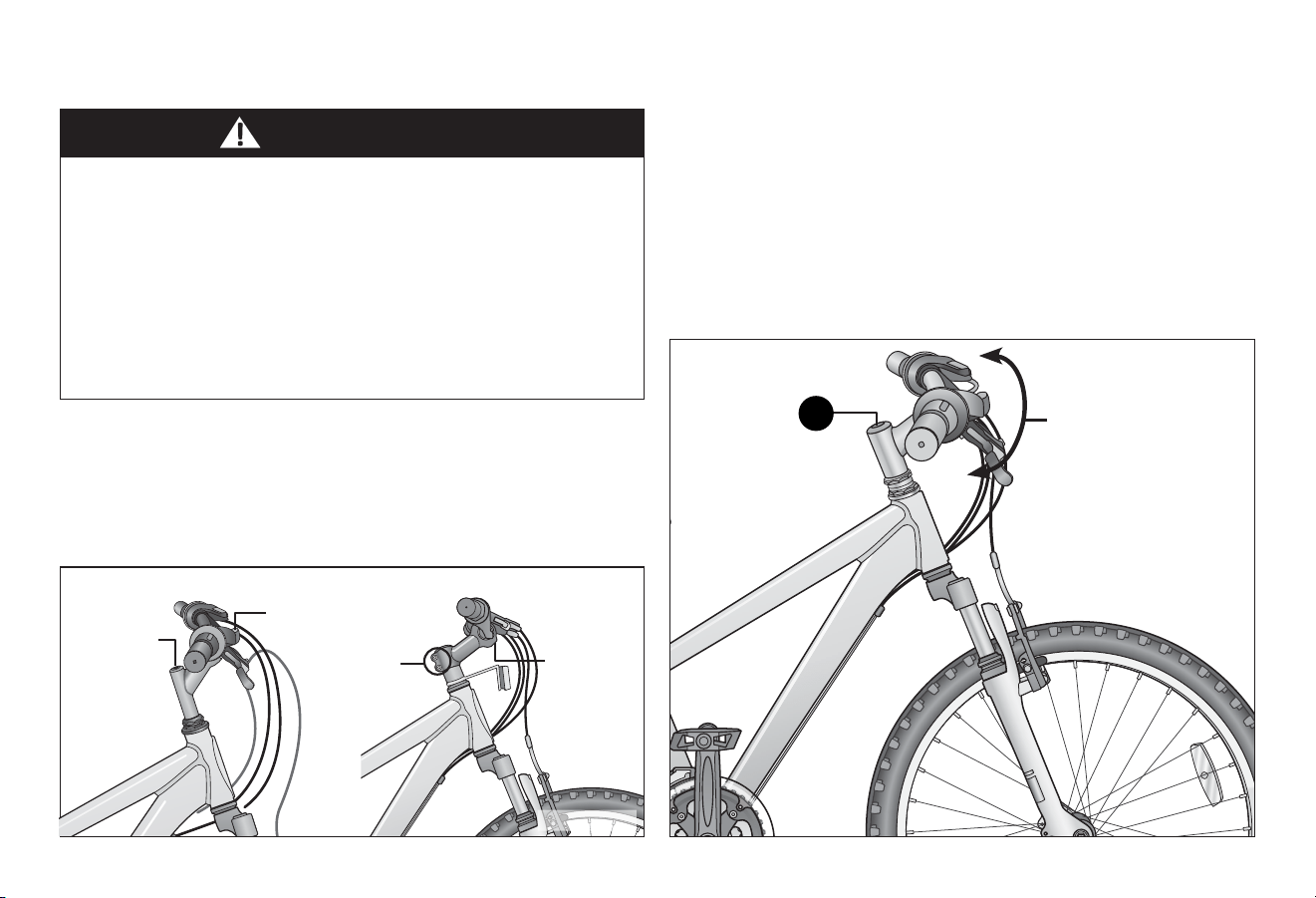
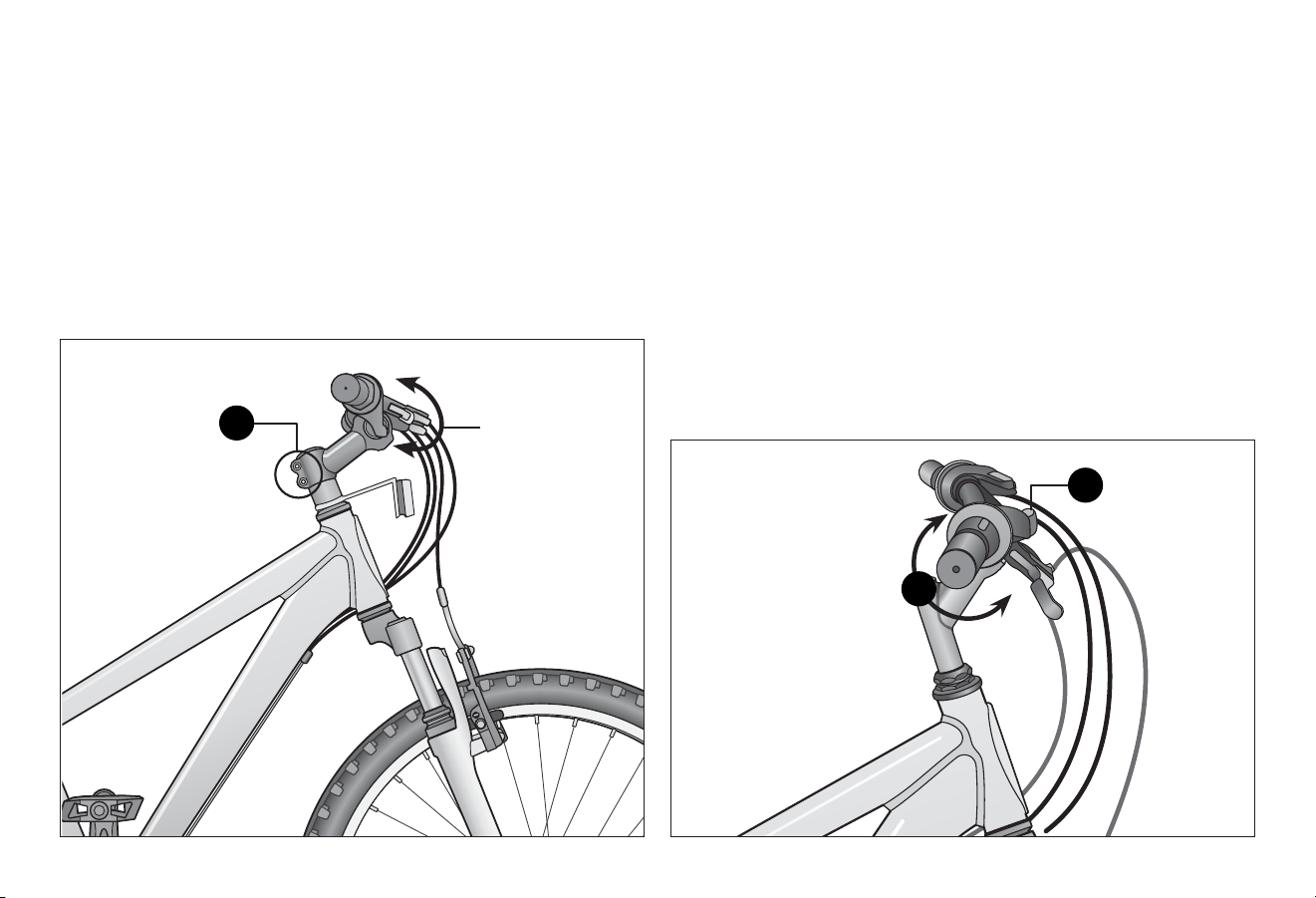
ADJUSTING THE HANDLEBAR
Adjusng the Handlebar Height
Instrucons for adjusng the handlebar height depend on
whether your bicycle has a quill or clamp (threadless) stem.
Figure 4.29
WARNING!
• Improper adjustment of the handlebar may result in
damage to the stem post, steering tube and result in loss of
control, serious injury or death. Ensure the minimum
inseron marks on the stem post are not visible above the
top of the headset.
• Failure to properly ghten handlebar components may
result in loss of control, serious injury or death. Always
check the handlebar cannot move and is secured to the
frame before riding the bicycle.
Align the Handlebar (with quill stem)
❶ Stand in front of the handlebar and hold the front wheel
between your legs.
❷ Using a 6 mm Allen wrench, loosen the stem binder bolt
and move the handlebar le or right unl it is aligned with
the front wheel. Figure 4.30
❸ Tighten the stem binder bolt and check the handlebar is
securely aached and cannot move.
Quill Stem Threadless Stem
Handlebar
binder
bolt(s)
Handlebar
binder bolt(s)
Pinch
b i n d e r
bolts
Stem binder
bolt
Stem
binder bolt
Move the handlebar
le or right unl it is
aligned with the
front wheel
2
Adjustments 4
45
45
Figure 4.31 Figure 4.32
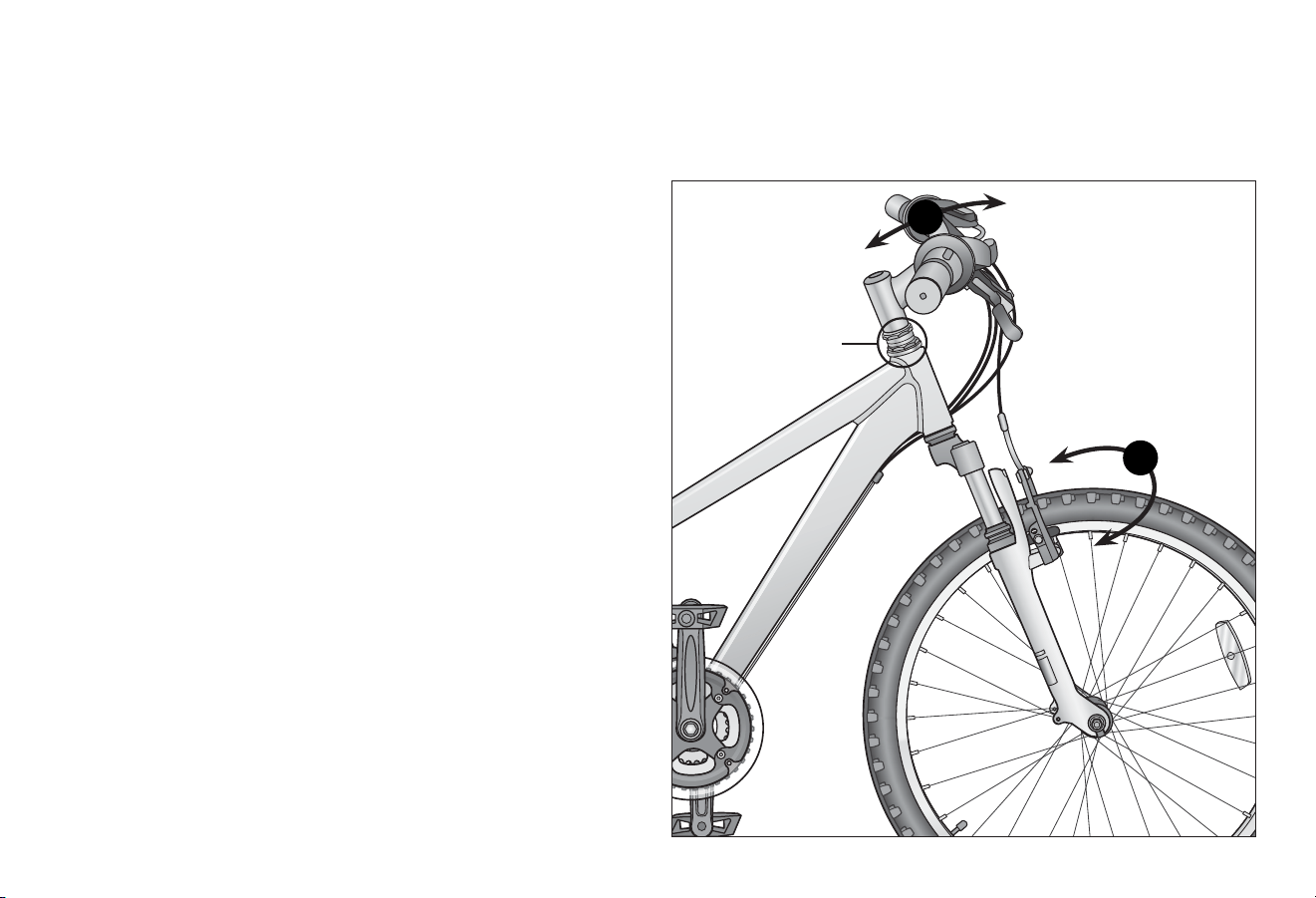
Adjust the Handlebar Angle (all stem types)
❶ Using a 6 mm Allen wrench loosen the handlebar binder
bolt(s). Figure 4.32
❷ Rotate the handlebar into the desired posion.
❸ Check that the handlebar is centered to the frame and front
wheel. Sit on the seat and check your reach to grips, shiers
and brakes. Refer to Secon 1, Fig. 1.2: Seat Height and
Handlebar Reach for guidelines.
❹ Tighten the handlebar binder bolt(s) and check the
handlebar is securely aached and cannot move.
Align the Handlebar (with threadless stem)
❶ Stand in front of the handlebar and hold the front wheel
between your legs.
❷ Using a 6 mm Allen wrench, loosen the pinch binder bolts
and move the handlebar le or right unl it is aligned with
the front wheel. Figure 4.31
❸ Tighten the stem binder bolt and check the handlebar is
securely aached and cannot move.
Pinch binder
bolts
Move the
handlebar le
or right unl it
is aligned with
the front wheel
Loosen
handlebar
binder bolt(s)
2
1
2
4 Adjustments
46
Figure 4.33
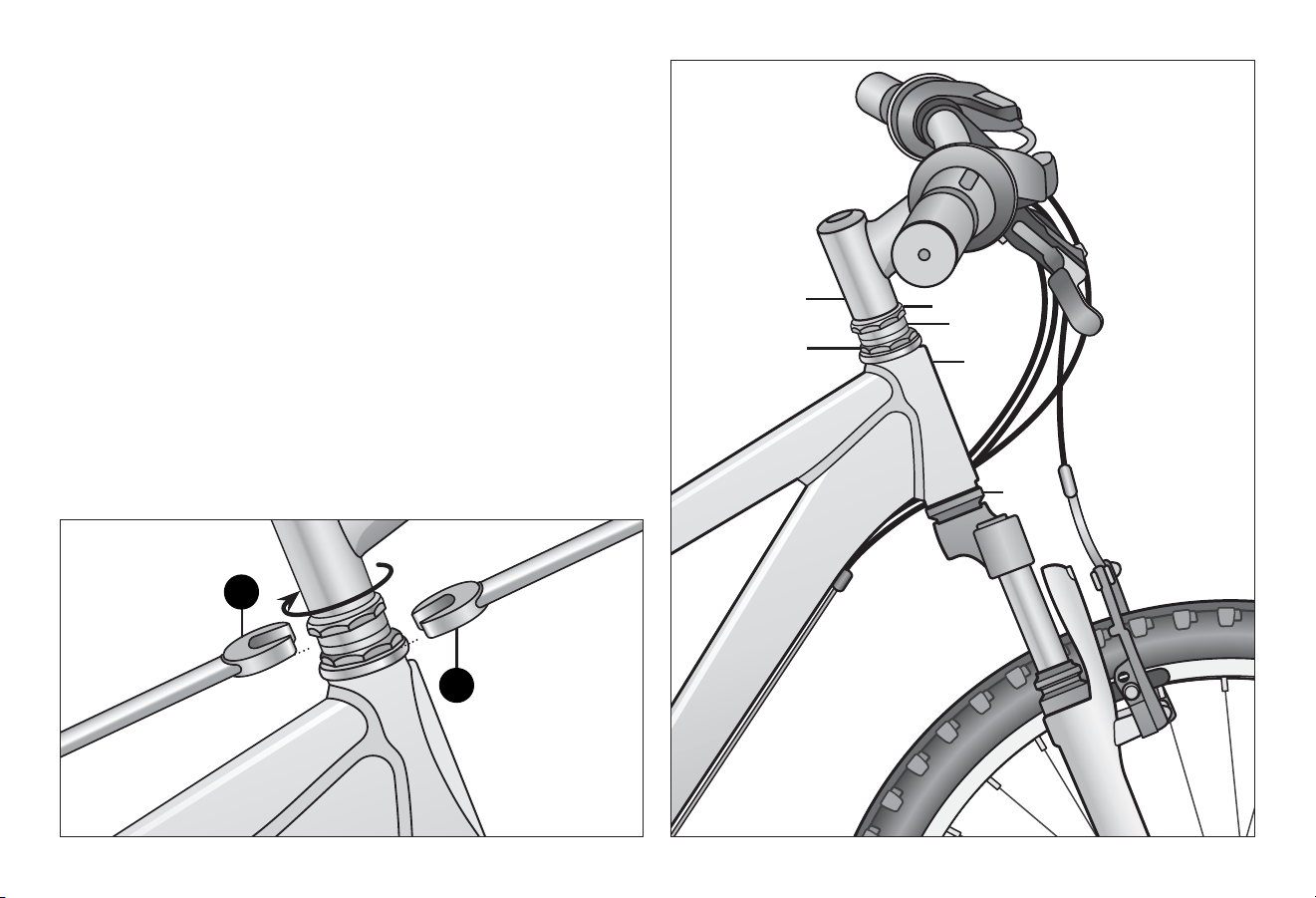
ADJUSTING THE HEADSET
The headset is an assembly of parts that connects the front fork
and the head tube of the frame. It is the rotaonal interface
that enables the fork to turn. There are two types of headsets:
threaded and threadless.
Adjusng a Threaded Headset
A typical threaded headset consists of two cups that are pressed
into the top and boom of the head tube. Inside the two cups
are bearings which provide a low fricon contact between the
bearing cup and the steerer. The short tube through which the
steerer of the fork passes is called the head tube.
Adjustment of the headset is needed if the headset is too loose
(shakiness), too ght (sness). Note: It is possible that the
bearings have become worn or damaged and cause sness.
Replacement of the parts may be necessary.
Conduct the following checks to determine if there is play in the
headset:
❶ Shakiness: Apply the front brake and push the handlebars
back and forth, front to back or if the bicycle is on a
workstand and the front wheel removed, push and pull on
the forks. If you feel a knocking sensaon or "clunk" it
means the headset is too loose. Important! Use care with
suspension forks, because the legs may have play in sliders.
Grab upper poron of fork. Figure 4.33
❷ Sness: Li the front of the frame so the front wheel is
o the ground. The handlebar and wheel should op to
one side or another. If there is drag or binding the headset
is too ght.
Headset
1
2
Adjustments 4
47
47
Figure 4.35
Figure 4.34
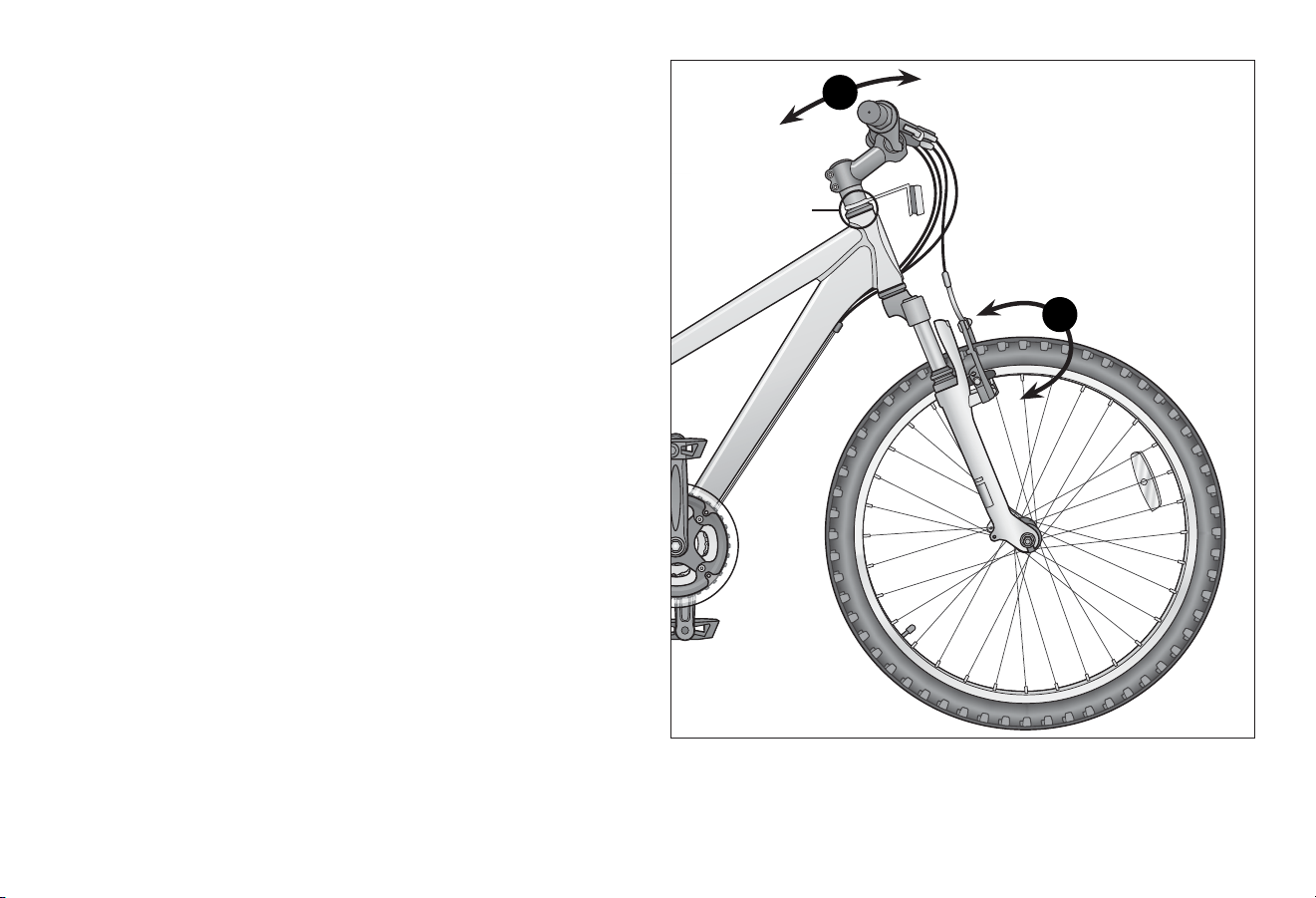
❸ With the front wheel resng on the ground, use an
adjustable, or headset wrench and hold the upper threaded
race in place. Figure 4.34
❹ Loosen the locknut clockwise about 1/32nd of a turn.
Note: The front wheel must be straight to gauge
adjustment.
❺ By hand, screw the upper threaded race down unl bearings
begin to bind. Then back the race o about 1/8 turn.
❻ Tighten the locknut and test that there is no shakiness or
sness (i.e. play) in the headset. Repeat steps 3 - 6 unl
there is no play in the headset.
If the play in the headset cannot be reced with these
adjustments see a qualied bicycle mechanic for these repairs.
Loosen locknut
Hold upper
threaded race
in place
Lower
race
Head
tube
Upper
threaded race
Spacers
Locknut
Stem
4
3
4 Adjustments
48
Figure 4.36
Adjusng a Threadless Headset
Threadless headsets are similar to threaded headsets, they use
two sets of bearings and bearing cups. Unlike a threaded
headset, a threadless headset does not have an upper threaded
race or use a threaded steerer tube. Instead the steerer tube
extends from the fork all the way through the head tube and
above the headset and is held in place by the stem clamped on
top.
Conduct the following checks to determine if there is play in the
headset:
❶ Shakiness: Apply the front brake and push the handlebars
back and forth, front to back or if the bicycle is on a
workstand and the front wheel removed, push and pull on
the forks. If you feel a knocking sensaon or "clunk" it
means the headset is too loose. Important! Use care with
suspension forks, because the legs may have play in sliders.
Grab upper poron of fork. Figure 4.36
❷ Sness: Li the front of the frame so the front wheel is o
the ground. The handlebar and wheel should op to one
side or another. If there is drag or binding the headset is too
ght.
Headset
2
1
Adjustments 4
49
49
Figure 4.37
Figure 4.38
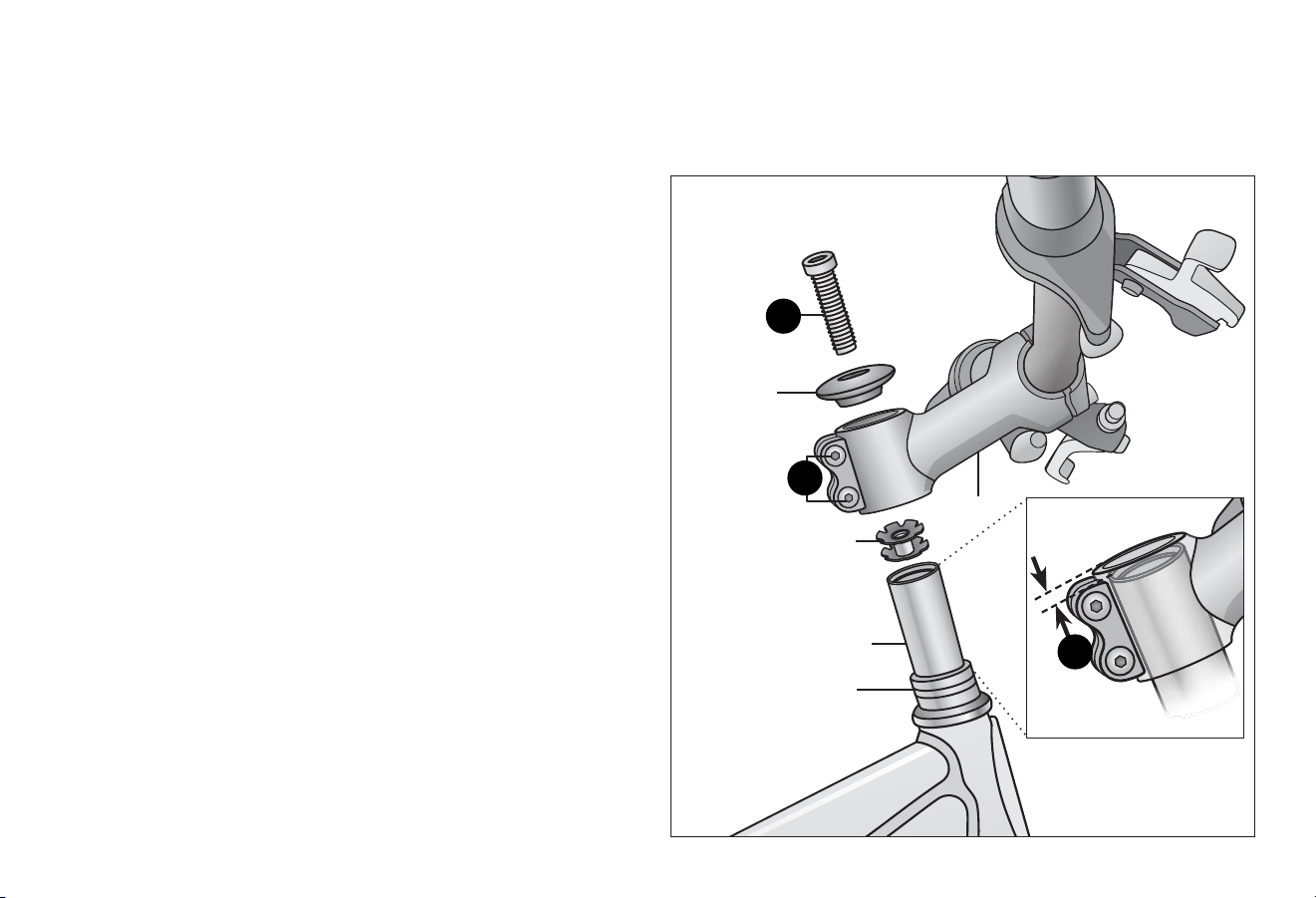
❶ Loosen the top cap bolt and remove the top cap.
Important! Do not disassemble the headset or loosen any
parts. Be sure the end of the fork is on the ground or being
held with your free hand, because once you loosen the top
cap the fork assembly may fall out of the frame. Figure 4.37
❷ Check that the gap between the top of the steerer tube and
top of the stem is between 3 - 5 mm (1/8" - 3/16").
Figure 4.38
If the gap is not correct add or remove spacers unl it is.
The stem needs to press down on the spacers in order to
adjust the bearings. If the gap is correct then re-install the
top cap and tighten the top cap bolt until it is snug. Do not
over tighten.
❸ Slightly loosen the stem pinch bolts. The stem probably
won't move but make sure the stem remains aligned with
the fork and wheel.
❹ Re-install and ghten the top cap down with a 1/4 to 1/2
turn of the top cap screw and test for shakiness in the
headset. If there is sll play in the headset then turn the top
cap bolt another 1/4 to 1/2 turn. Repeat this process unl
the shakiness is gone.
❺ Li up the front wheel of the bicycle, if the wheel does not
move freely le to right the top cap bolt is too ght. If this is
the case turn the top cap bolt back some.
❻ Repeat steps 3 and 4 unl there is no play in the headset.
If the play in the headset cannot be reced with these
adjustments see a qualied bicycle mechanic for these
repairs.
Top cap
bolt
Top cap
Star nut
Steerer tube
Stem pinch
bolts
Stem
1/8" - 3/16"
(3 - 5 mm)
Spacers
2
1
3
4 Adjustments
50
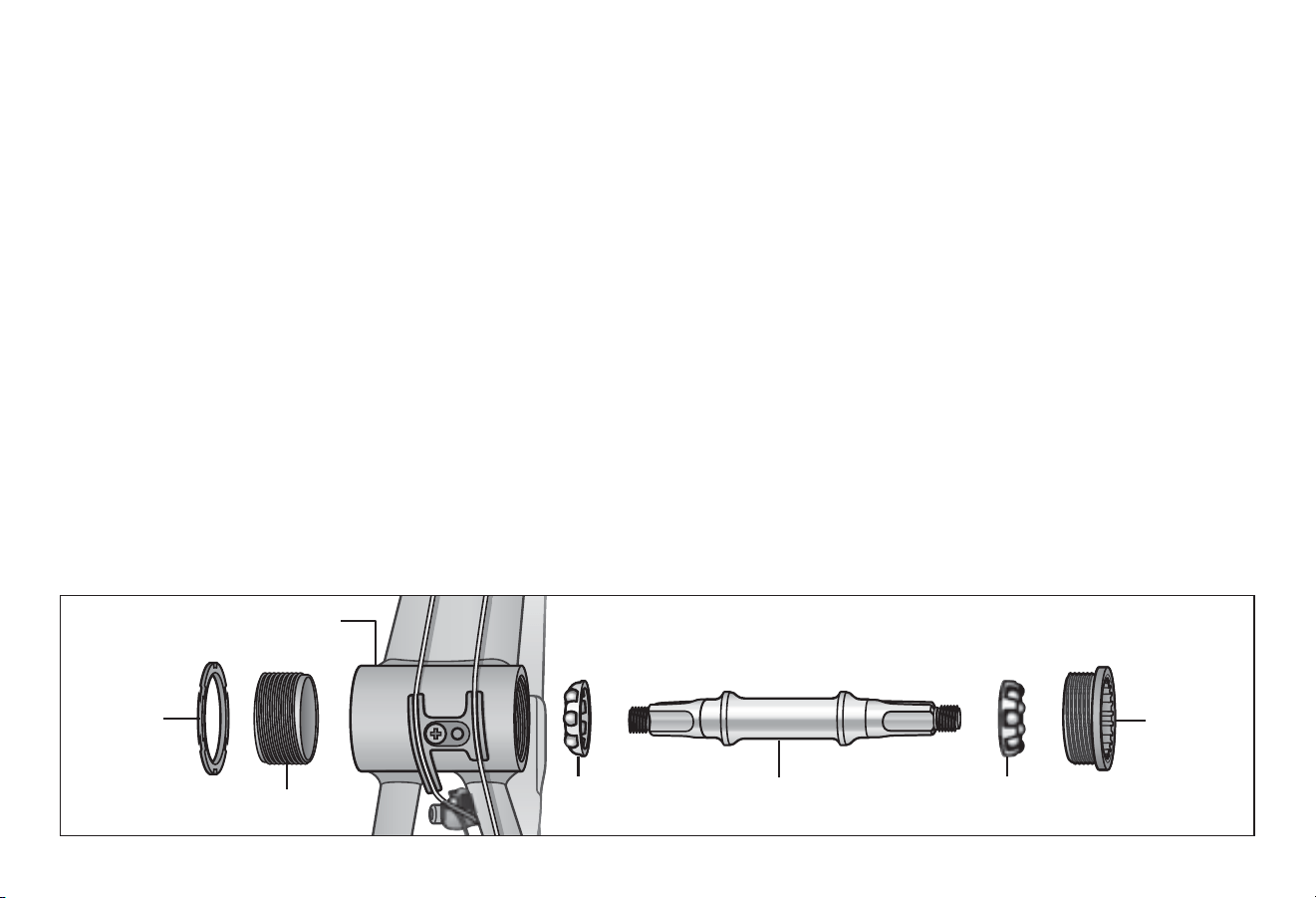
Figure 4.39
ADJUST THE BOTTOM BRACKET
Three piece boom bracket: Adjustable
Typically the boom bracket contains four major pieces:
lockring, adjustable cup, spindle and xed cup. The lockring has
notched rings and the adjustable cup may have holes for a pin
spanner, or notches for a wrench. The xed cup will have wrench
ats, but no lockring. Cups and the spindle may be removed and
replaced separately. A set of round ball bearings are found in
each cup, typically eleven balls per side of 1/4 inch diameter.
This type of bracket may be cleaned, greased and adjusted.
Bearing Adjustment
The basic concept for bearing adjustments is to get the bearings
adjusted as loose as possible but without play. Start by purposely
beginning with play in the adjustment and then ghtening in
small increments unl play is gone. Note: Extended use may
cause the bearings, cups (or cones) to become worn and pied.
In this case, bearing adjustment will not be possible. If boom
bracket is correctly adjusted, but grinds when spun, cups and/or
cones are worn and should be replaced. Figure 4.39
❶ Loosen the locknut. Turn adjusng cone counter-clockwise
unl it hits the ball bearing, then turn back clockwise to
loosen 1/4 turn.
❷ Secure the locknut.
❸ Grab the end of the crankarms and rock it sideways to check
for play. If play is present, loosen locknut and turn adjusng
cone counter-clockwise slightly to ghten. Re-secure
locknut and check again.
❹ Repeat process of checking for play and re-ghtening cone a
slight amount unl no play is felt. Note: The one-piece crank
systems do not use a polished bearing system. There will be
some roughness to a correctly adjusted boom bracket.
Adjust as loose as possible but without play in the bearings.
Boom bracket shown with
crank arm removed
Lockring
Adjusng cup
Fixed cup
Bearings BearingsSpindle
Adjustments 4
51
51
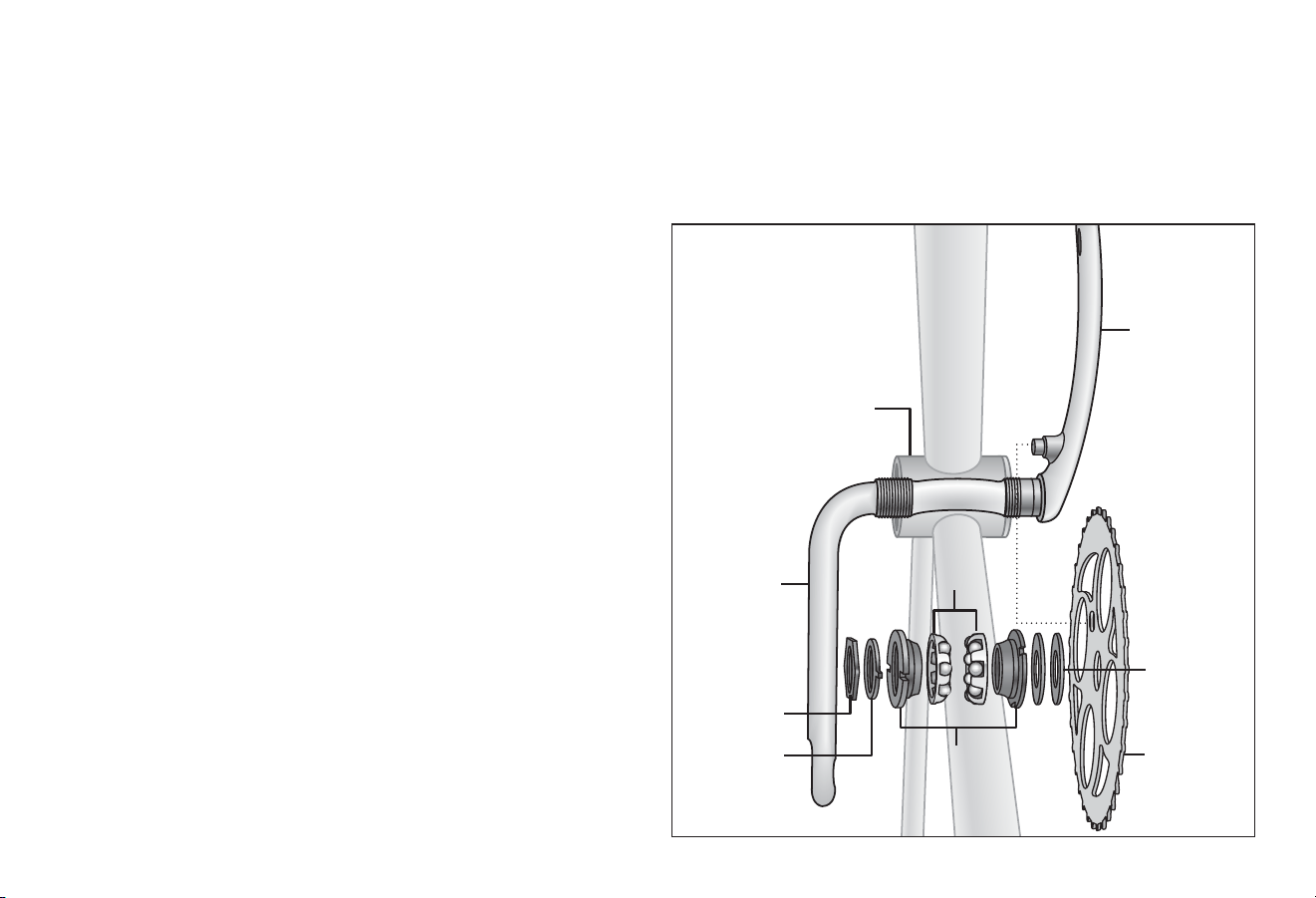
Boom bracket shown
with crank arm
removed
Locknut
Ball bearings
Crank arm
Chainwheel
Adjustable cones
Lockring
Crank arm
Washers
❹ Repeat process of checking for play and re-ghtening cone
a slight amount unl no play is felt. Note: The one-piece
crank systems do not use a polished bearing system.
There will be some roughness to a correctly adjusted
boom bracket. Adjust as loose as possible but without
play in the crank assembly.
ADJUSTING THE BOTTOM BRACKET
Typically the boom bracket contains four major pieces:
lockring, adjustable cone, bearings, and washers. The lockring
has notches. The adjustable cone will have notches for a
spanner wrench or boom bracket tool. The cones can be
removed and replaced separately. A set of round ball bearings
are found in each adjustable cone. A typical ball bearing is 5/16"
in diameter and contains nine balls. This type of boom bracket
may be cleaned, greased and adjusted.
Bearing Adjustment
The basic concept for bearing adjustments is to get the bearings
adjusted as loose as possible but without play. Start by
purposely beginning with play in the adjustment and then
ghtening in small increments unl play is gone. Note: Extended
use may cause the bearings, cups (or cones) to become worn
and pied. In this case, bearing adjustment will not be possible.
If boom bracket is correctly adjusted, but grinds when spun,
cups and/or cones are worn and should be replaced. Figure 4.40
❶ Loosen the locknut. Turn adjusng cone counter-clockwise
unl it hits the ball bearing, then turn back clockwise to
loosen 1/4 turn.
❷ Secure the locknut.
❸ Grab the end of the crank arms and rock it sideways to
check for play. If play is present, loosen locknut and turn
adjusng cone counter-clockwise slightly to ghten.
Re-secure locknut and check again.
Figure 4.40
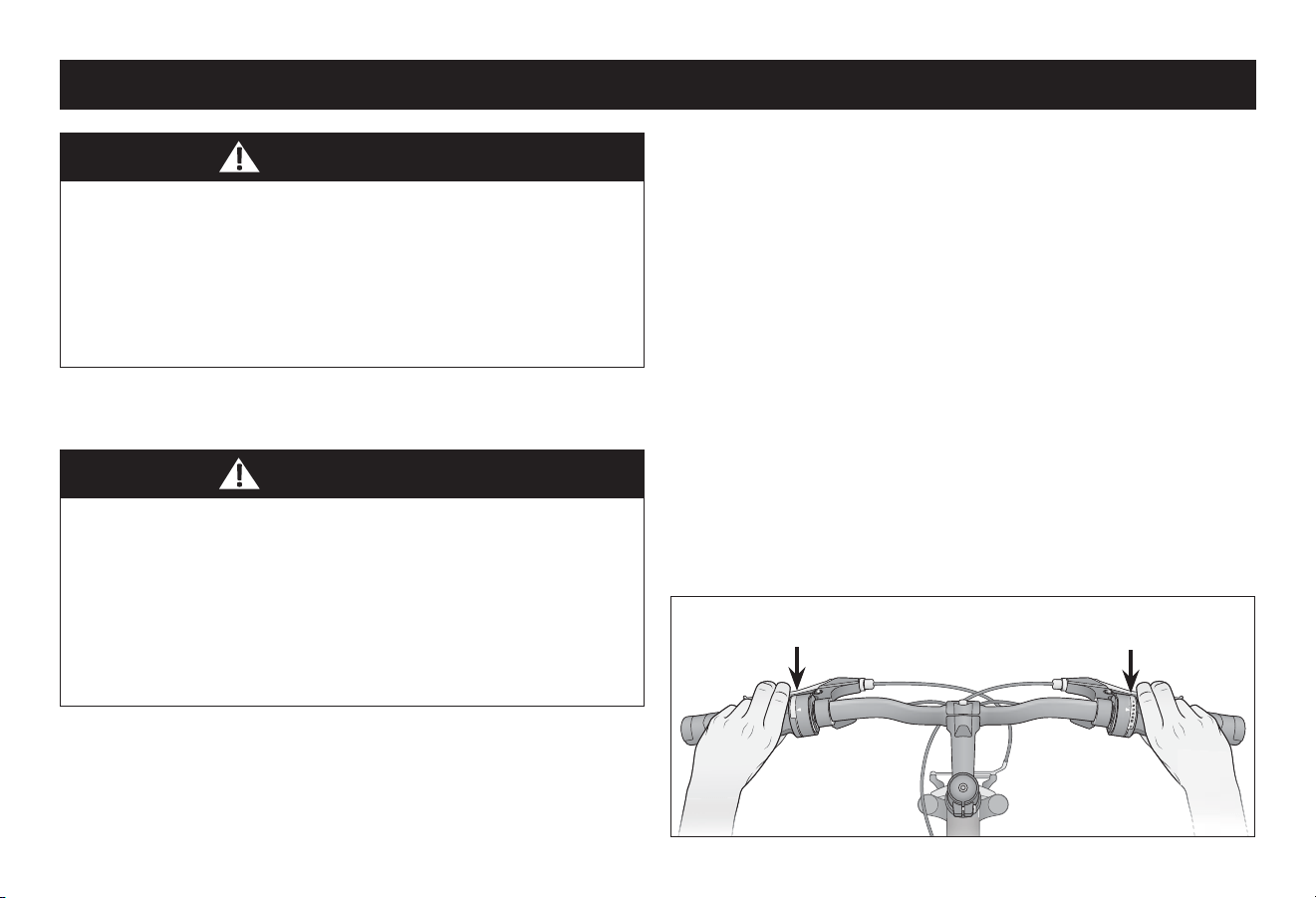
5 Use
52
1
Figure 5.1
BRAKE OPERATION
Failure to follow all local and state regulaons and laws
pertaining to bicycle use as well as the safety warnings in this
manual may result in serious injury or death. Always follow all
local and state regulaons and laws pertaining to bicycle use,
follow the safety warnings in this manual and use common
sense when riding the bicycle. Always conduct a pre-ride
check of the bicycle condion before riding.
Hand operated brakes have a separate hand lever to operate
front and rear brakes. Front hand brake levers are located on the
le side of the handlebar, and rear hand brake levers are located
on the right side of the handlebar. Figure 5.1
• If the front brake is applied too quickly or too hard, the
front wheel can stop turning resulng in a front pitch over
or cause the bicycle to lose steering funcon leading to a
crash.
• Disc brake rotor's become hot during use and can burn the
skin if contacted. Do not touch or come in contact with the
disc rotor when it is hot. Allow it to cool before touching.
You may operate one brake at a me, or all together, however,
be careful to pay close aenon to front brakes locking up. To
avoid this:
• Apply both brakes simultaneously, while shiing your body
weight back slightly to compensate for braking force.
• As terrain changes, the rider must pracce and learn how the
bicycle will respond in a new terrain or weather change.
The same bicycle will react dierently if it is wet, or if there is
gravel on the road etc.
• Always test the brakes and be sure you feel comfortable with
the reacon. If the riding condions are too steep (o road
for example) and you are unsure, dismount the bicycle and
walk past the quesonable terrain before riding again.
• Remember that as you apply the brakes your weight will want
to shi forward, and the wheels will want to stop.
Note: See Secon 4: Adjusng the Brakes for informaon on
brake adjustment.
WARNING!
WARNING!
❺ Use
Le side brakes the
front wheel
Right side brakes the
rear wheel
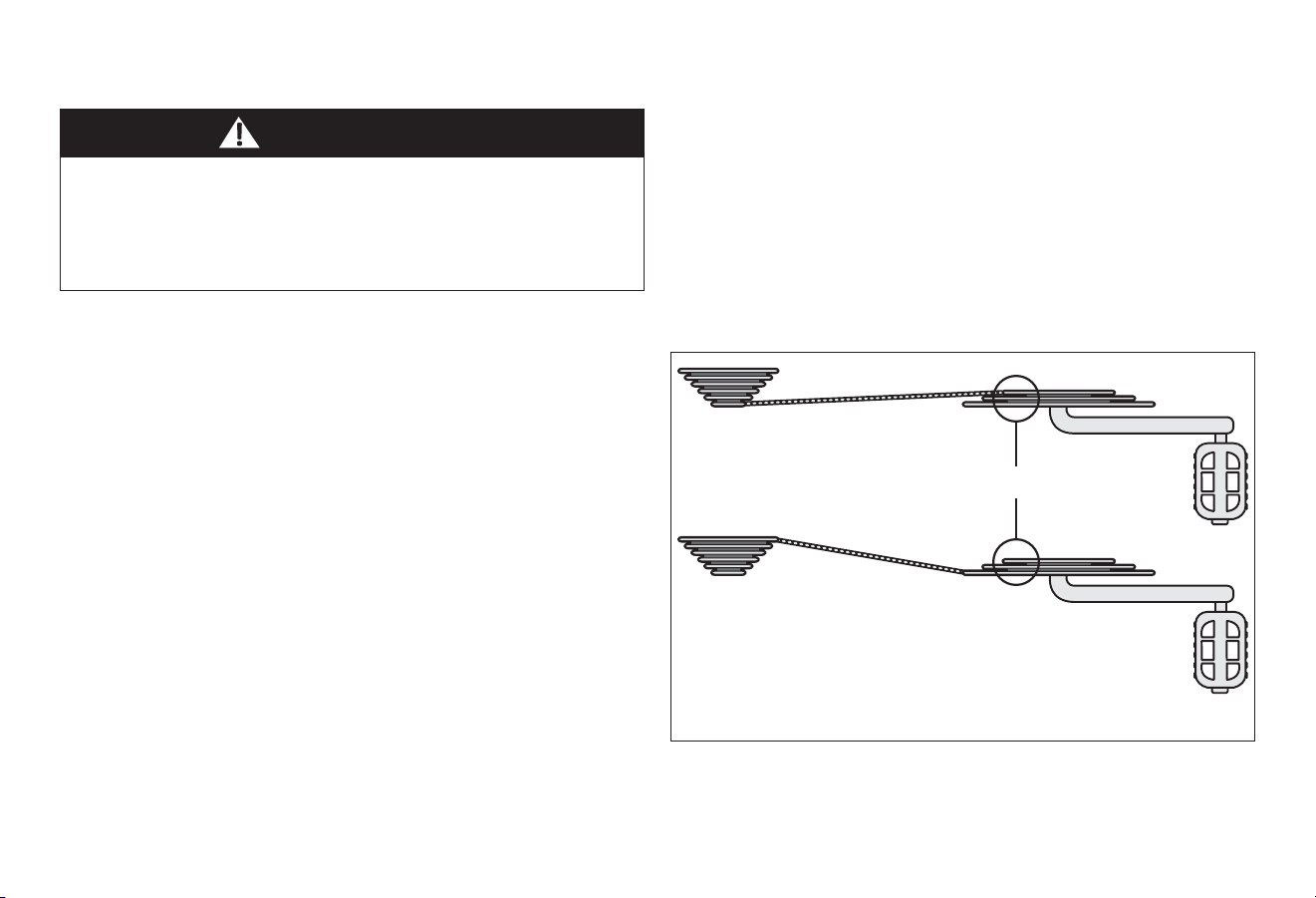
Use 5
53
53
Figure 5.2
GEAR OPERATION
Mul speed bicycles can have internal or derailleur gear
systems.
Important! Best pracces for proper shiing:
• Pedal the bicycle with lile pressure on the pedals, and move
the shier one gear at a me, ensuring that the chain is fully
engaged in that gear before applying more pressure on the
pedals.
• For bicycles with 3 front chain rings; avoid “Cross Chaining”,
which is the posion when the chain is in the smallest cog in
the rear combined with the inner or smallest chain ring in the
front, or the largest cog in the rear and the outer or largest
chain ring in the front. These gear posions put the chain at
the most extreme angle and can cause premature wear to
the drivetrain. Bicycles with 3 front chain rings have enough
gear “overlaps” that these gears are not needed. Figure 5.2
• It is OK to ride the whole me in only one gear if this is
comfortable.
• Shi only while pedaling forward and seated. When shiing,
lessen the pressure exerted on the pedals during the shi.
• Once you have successfully shied gears, it is OK to start to
pedal hard if desired.
• Pedaling hard while shiing can cause the chain to skip and
not engage the appropriate gear.
• Backpedaling should be avoided on derailleur bikes because
the chain can jam and cause the bike to become unstable.
See Secon 4: Adjusng the
Derailleur for further
informaon on proper gear adjustment.
Improper shiing can result in the chain jamming, or becoming
derailed resulng in loss of control, serious injury or death
Always be sure the chain is fully engaged in the desired gear
before pedaling hard. Avoid shiing while standing up on the
pedals or under load.
WARNING!
Avoid these extreme angles of the chain
Three chain rings
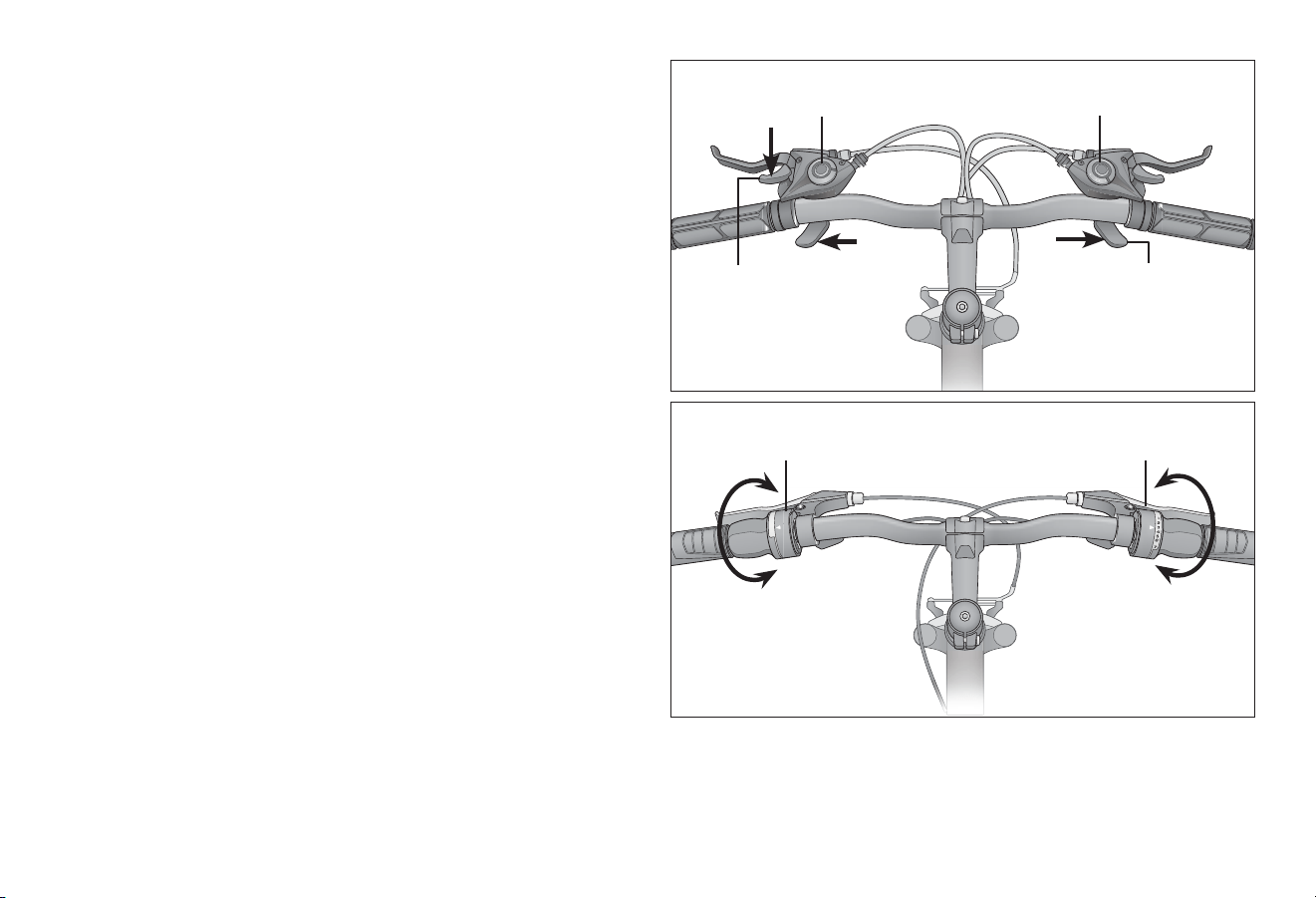
5 Use
54
1
3
2
1
8
6
3
Figure 5.4
Figure 5.3
Using the Rear Shier
The rear shier (right) will have an indicator that reads either
low to high or a series of numbers from 1 and up. Low or “1” is
the lowest gear. This is used for slower riding, hill climbing, or to
allow for easier pedaling. It is recommended to start o in this
gear and move through the gears as speed increases as needed,
or comfortable.
Using the Front Shier
Note: Not all models have a front shier. The front (le) shier
will have an indicator that reads either low to high or a series of
numbers from 1 and up. Low or “1” is the lowest gear. The front
shier acts much like the rear shier, but the change between
gears is greater. This means that one shi at the rear derailleur
will be a subtle change in pedaling speed, but one shi at the
front derailleur will be a large change in pedaling speed. Think of
the front shier as a range; low and high or low, medium, and
high. Low is used for slower riding, hill climbing, or to allow for
easier pedaling. It is recommended to start o in this gear and
move through the gears as speed increases as needed, or
comfortable.
To Use the Trigger-style Shier
Rear shier: Use your index nger to shi up to a higher gear,
and your thumb to shi down to lower gear.
Le shier: Use your index nger to shi down to a lower gear,
and your thumb to shi up to higher gear. Figure 5.3
To Use the Twist-style Shier
Turn the area of the handlebar grip closest to the gear numbers
to the desired gear level. Figure 5.4
Rear shier
Pull down with
index nger to shi
up in gear level
Front shier
Push in with thumb to
shi down in gear level
Front shier Rear shier
Twist-style Shier
Trigger-style Shier
Twist to change
gear level
Thumb shier
Thumb
shier
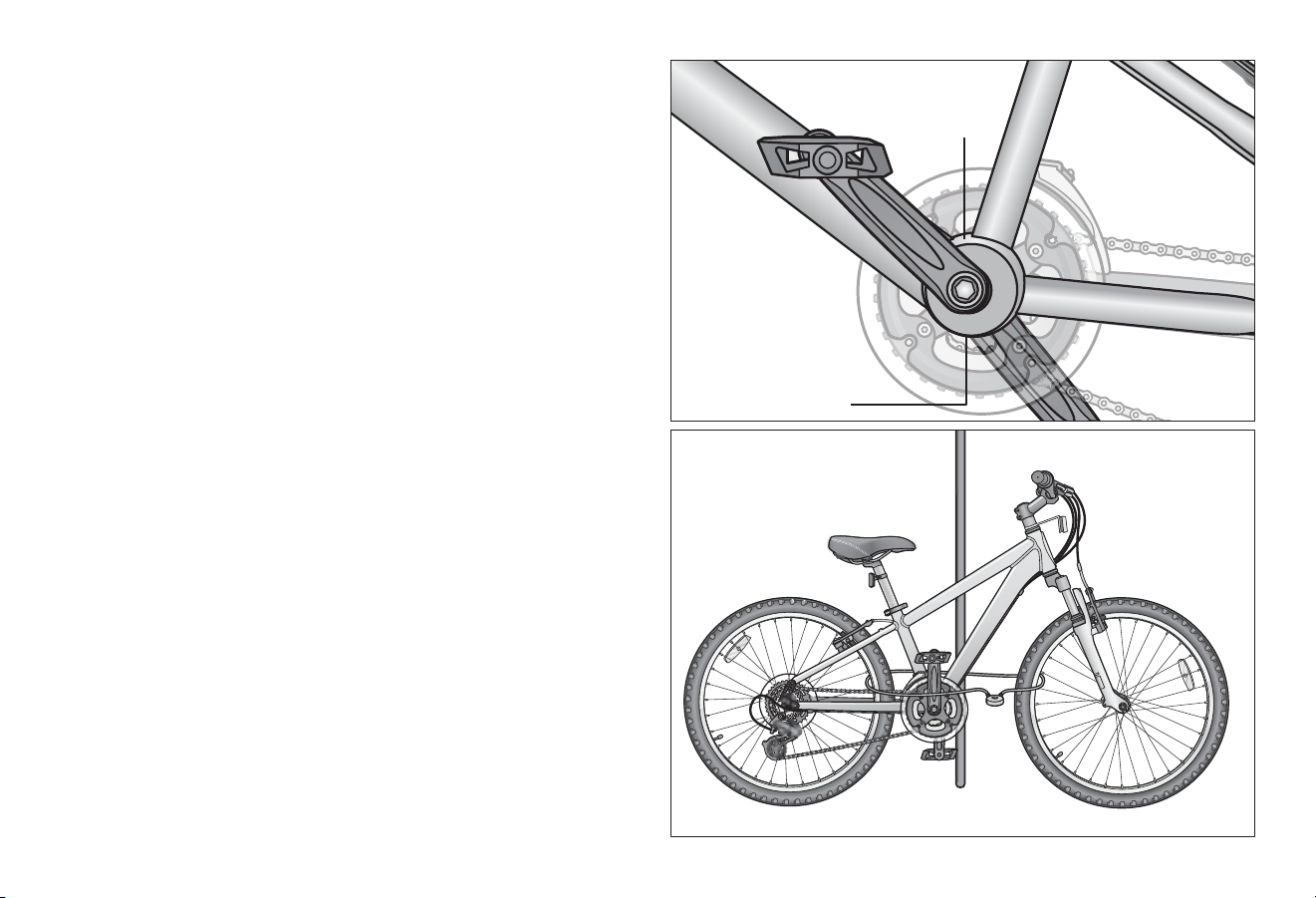
Use 5
55
55
Figure 5.6
Figure 5.5
SECURITY
You just bought a new bicycle! Don’t lose it. It is advisable that
the following steps be taken to prepare for and help prevent
possible the:
• Maintain a record of the bicycle’s serial number, generally
located on the frame underneath the boom bracket.
Figure 5.5
• Register the bicycle with the local police and/or bicycle
registry.
• Invest in a high quality bicycle lock that will resist hacksaws
and bolt cuers.
• Always lock your bicycle to an immovable object if it is le
unaended. Keep in mind that individual parts of a bicycle
may be stolen. Most commonly, if you lock just a wheel or just
the frame, other parts may be removed from the bicycle.
Although it is impossible to lock all the parts, it is suggested
to lock the major components if possible. Figure 5.6
• Use a lock that is long enough to lock the frame and both
wheels if possible. Some models with quick-release front
wheels allow the front wheel to be placed beside the frame
so a smaller lock can be used to lock all 3 components.
• Be aware that a quick-release seat post can be stolen. It is
recommended to remove the seat post and saddle and carry
it with you if you believe that this is a risk.
Service scker is
located above the
boom bracket
The serial number is
located below the
boom bracket
6 Maintenance
56
❻ Maintenance
WARNING!
This secon presents important informaon on maintenance
and will assist you in determining the proper course of acon
to take if you do have a problem with the operaon of the
bicycle. If you have quesons regarding maintenance please
call our customer service, toll free, at 1-800-626-2811 or see
a qualied bicycle mechanic. Do not call the store where the
bicycle was purchased.
Correct roune maintenance of your new bike will ensure:
• Smooth running
• Longer lasng components
• Safer riding
• Lower running costs
BASIC MAINTENANCE
The following procedures will help you maintain your bicycle for
years of enjoyable riding.
• For painted frames, dust the surface and remove any loose
dirt with a dry cloth. To clean, wipe with a damp cloth soaked
in a mild detergent mixture. Dry with a cloth and polish with
car or furniture wax. Use soap and water to clean plasc
parts and rubber res. Chrome plated bikes should be wiped
over with a rust preventave uid.
• Store your bicycle under shelter. Avoid leaving it in the rain
or exposed to corrosive materials.
• Riding on the beach or in coastal areas exposes your bicycle
to salt which is very corrosive. Wash your bicycle frequently
and wipe or spray all unpainted parts with an an-rust
treatment. Make sure wheel rims are dry so braking
performance is not aected. Aer rain, dry your bicycle and
apply an-rust treatment. If the hub and boom bracket
bearings of your bicycle have been submerged in water, they
should be taken out and re-greased. This will prevent
accelerated bearing deterioraon.
• If paint has become scratched or chipped to the metal, use
touch up paint to prevent rust. Clear nail polish can also be
used as a preventave measure.
• Regularly clean and lubricate all moving parts, ghten
components and make adjustments as required.
• Failure to conduct maintenance on the bicycle may result
in malfuncon of a crical part and serious injury or death.
Proper maintenance is crical to the performance and safe
operaon of the bicycle.
• The recommended intervals and need for lubricaon and
maintenance may vary depending on condions the bicycle
is exposed to. Always inspect the bicycle and conduct
necessary maintenance before each use of the bicycle.
Maintenance 6
57
Note: The frequency of maintenance should increase with use in wet or dusty condions. Do not over lubricate. Remove excess
lubricant to prevent dirt build up. Never use a degreaser to lubricate your chains (WD-40®).
Component Lubricant Method
Weekly
Chains Chain lube or light oil Brush on or squirt
Brake calipers Oil Three drops from oil can
Brake levers Oil Two drops from oil can
Freewheel Oil Two drops from oil can
Derailleur Systems Light oil or grease All pivot points should be lubricated (more oen in severely rainy
or muddy condions). Wipe o any excess oil.
Brake cables Lithium based grease Remove cable from casing. Grease enre length. Wipe o excess
lubricaon from other surfaces.
Brake lever and caliper pivot points Light oil Two to three drops from oil can
Shiing cables Thin layer of grease Clean and grease
Yearly
Boom bracket Lithium based grease Disassemble
Pedals Lithium based grease Disassemble
Wheel bearings Lithium based grease Disassemble
Headset Lithium based grease Disassemble
Seat stem Lithium based grease Disassemble
Pedals: that can be disassembled See bicycle mechanic for maintenance.
LUBRICATION SCHEDULE
6 Maintenance
58
PARTS MAINTENANCE
Inspect Acon Maintenance
Tire Inaon Check re pressure. Inate re to the pressure indicated on the re sidewall. See
“Inang a Tire Tube” for more detail. If the re is at see
“Fixing a Flat Tire” for more detail.
Check the bead is properly seated while inang
or reng the re.
Reduce air pressure in the tube and re-seat the bead.
Spin wheel and check rotaon / alignment
is smooth and even.
Loosen axle nut(s) and adjust unl properly seated. If the hub
bearings need repair see a bicycle mechanic for repair.
Bead Seang Check for broken or loose spokes. See bicycle mechanic for repair.
Tread Inspect for signs of excessive wear, at spots or
cuts and damage.
Replace re.
Valves Check that valve caps are ed and free of dirt. Clean dirt from the valve.
Inspect Acon Maintenance
Rims Inspect for dirt and grease. Use a clean rag or wash with soapy water, rinse, and air dry.
Wheels Check the wheels are securely fastened to the
bicycle and axle nuts are ght.
Adjust if necessary and ghten axle nuts.
Spin wheel and check rotaon / alignment is true See bicycle mechanic for repair.
Spokes Check for broken or loose spokes. See bicycle mechanic for repair.
Hub Bearings Li each wheel and see if there is movement side
to side.
See bicycle mechanic for repair.
Frequency: Inspect and maintain at least each use.
Frequency: Inspect and maintain at least each use.
Tires
Wheels
Maintenance 6
59
Drivetrain (pedals, chains, chainwheel, crank set, freewheel)
Inspect Acon Maintenance
Pedals Every month, check each pedal is securely set and ghten into
the crank arm.
If necessary, re-set and ghten.
Before each ride, check each front and rear pedal reectors are
clean and in place.
Clean or replace.
Pedal Bearings Every ride, check the pedal bearings are properly adjusted.
Move the pedal up and down, le and right. If looseness or
roughness is detected adjustment, lubricaon or replacement
is required.
See bicycle mechanic for repair.
Chains Every week, check the chain is clean, properly lubricated,
rust-free, and is not stretched, broken, or has s links.
Lubricate if necessary. Replace if rusted,
stretched, or broken.
Crank Set Every month, check the crank set (crank arms, chain rings, and
boom bracket axle and bearings) is correctly adjusted and
ght.
See bicycle mechanic for repair.
Frequency: as noted
6 Maintenance
60
Brakes
Inspect Acon Maintenance
Levers Check the levers are securely fastened to the handlebar. Posion the levers to t the rider’s grip and
screw ght to handlebar.
Pads Check pad posion, gap and pressure. See Secon 4: Adjusng the Brakes
Cables Check the outer casing for kinks, stretched coils and damage.
Check cables for kinks, rust, broken strands or frayed ends.
Check the outer casing for kinks, stretched coils and damage.
Replace cable.
Check the housing is seated properly into each cable stop of
the bicycle.
It is recommended that the cables and
housing be replaced every riding season.
Frequency: Inspect and maintain before each use
Maintenance 6
61
INFLATING THE TIRE TUBEHUB BEARINGS
Hub bearings require special thin wrenches called cone
wrenches. If you do not own these tools, do not aempt hub
bearing adjustments. Have a qualied bicycle mechanic perform
the adjustment if you have any doubts.
❶ Check to make sure neither locknut is loose.
❷ To adjust, remove wheel from bicycle and loosen the locknut
on one side of the hub while holding the bearing cone on
the same side with a cone wrench.
❸ Rotate the adjusng cone as needed to eliminate free play.
❹ Re-ghten the locknut while holding the adjusng cone in
posion.
❺ Re-check that the wheel can turn freely without excessive
side play.
Follow these steps to inate a re:
❶ Remove the valve cap and add air.
❷ Be sure the re is evenly seated on the rim, both sides.
❸ Spin the wheel and check for high and low areas.
❹ Complete inaon to the recommended psi found on the
sidewall of the re.
❺ Be sure the re is evenly seated on the rim, both sides.
If not, release some air and repeat steps three through six.
❻ Check for dirt in the valve cap or stem. Clean dirt from cap
or stem.
❼ Securely replace the valve cap on the stem.
• An unseated re can rupture unexpectedly and cause
serious injury or death. Be sure the re is properly seated
when inang the tube.
• Over inaon or inang the tube too quickly may result
in the re blowing o the rim and damaging the bicycle or
causing injury to the rider. Always use a hand pump to
inate the tube. Do not use a gas staon service pump to
inate the tube.
WARNING!
6 Maintenance
62
An unseated re can rupture unexpectedly and cause serious
injury or death. Be sure the re is properly seated when
inang the tube.
Follow these steps to x a at re:
❶ Match tube size and re size (see re sidewall for size).
❷ Remove the wheel from the bicycle. Deate the re tube
completely.
❸ Squeeze the re beads into the center of the rim.
❹ Opposite the valve, use a bicycle re lever to pry the re
bead up and out of the rim. Repeat around the wheel unl
one bead is o the rim.
❺ Remove tube. Release second re bead.
❻ Remove re.
❼ Carefully inspect inside of the rim and re for the cause of
the at.
❽ Inate the tube ¼ full and place inside re.
❾ Insert the valve stem through valve stem hole in rim.
REPAIRING A FLAT TIRE
❿ Start at the valve stem and install the rst bead onto the
rim. Repeat for the second bead.
⓫ Slowly inate the re tube, checking the re is seated
properly and not pinched as the re tube is inated.
⓬ Inate to recommended pressure (see re sidewall).
WARNING!
Maintenance 6
63
TROUBLESHOOTING GUIDE
Problem Possible Cause Remedy
Gear shis not
working properly
• Derailleur cables scking/stretched/ damaged
• Front or rear derailleur not adjusted properly
• Indexed shiing not adjusted properly
• Lubricate/ghten/replace cables
• Adjust derailleurs
• Adjust indexing
Slipping chain • Excessively worn/chipped chain wheel or freewheel sprocket
teeth
• Chain worn/stretched
• S link in chain
• Non compable chain/chain wheel freewheel
• Replace chain wheel, sprockets and
chain
• Replace chain
• Lubricate or replace link
• Seek advice at a bicycle shop
Chain jumping o
freewheel sprocket or
chain wheel
• Chain wheel out of true
• Chain wheel loose
• Chain wheel teeth bent or broken
• Rear or front derailleur side-to-side travel out of adjustment
• Cross chaining and shiing under load
• Re-true if possible, or replace
• Tighten mounng bolts
• Repair or replace chain wheel/set
• Adjust derailleur travel
Constant clicking
noises when pedaling
• S chain link
• Loose pedal axle/bearing
• Loose boom bracket axle/bearings
• Bent boom bracket or pedal axle
• Loose crankset
• Lubricate chain/adjust chain link
• Adjust bearings/axle nut
• Adjust boom bracket
• Replace boom bracket axle or pedals
• Tighten crank bolts
Grinding noise when
pedaling
• Pedal bearings too ght
• Boom bracket bearings too ght
• Chain fouling derailleurs
• Derailleur jockey wheels dirty/binding
• Adjust bearings
• Adjust bearings
• Adjust chain line
• Clean and lubricate jockey wheels
6 Maintenance
64
Problem Possible Cause Remedy
Freewheel does not
rotate
• Freewheel internal pawl pins are jammed • Lubricate. If problem persists, replace freewheel
Brakes not working
eecvely
• Brake pads worn down
• Brake pads/rim greasy, wet or dirty
• Brake cables are binding/stretched/damaged
• Brake levers are binding
• Brakes out of adjustment
• Replace brake pads
• Clean pads and rim
• Clean/adjust/replace cables
• Adjust brake levers
• Center brakes
When applying the
brakes they squeal/
squeak
• Brake pads worn down
• Brake pads toe-in incorrect
• Brake pads/rim dirty or wet
• Brake arms loose
• Replace pads
• Correct pads toe-in
• Clean pads and rim
• Tighten mounng bolts
Knocking or shuddering
when applying brakes
• Bulge in the rim or rim out of true
• Brake mounng bolts loose
• Brakes out of adjustment
• Fork loose in head tube
• True wheel or take to a bike shop for repair
• Tighten bolts
• Center brakes and/or adjust brake pads toe-in
• Tighten headset
Wobbling wheel • Axle broken
• Wheel out of true
• Hub comes loose
• Headset binding
• Hub bearings collapsed
• Quick-release mechanism loose
• Replace axle
• True wheel
• Adjust hub bearings
• Adjust headset
• Replace bearings
• Adjust quick-release mechanism
Maintenance 6
65
Problem Possible Cause Remedy
Steering not
accurate
• Wheels not aligned in frame
• Headset loose or binding
• Front forks or frame bent
• Align wheels correctly
• Adjust/ghten headset
• Take bike to a bike shop for possible frame realignment
Frequent
punctures
• Inner tube old or faulty
• Tire tread/casing worn
• Tire unsuited to rim
• Tire not checked aer previous puncture
• Tire pressure too low
• Spoke protruding into rim
• Replace inner tube
• Replace re
• Replace with correct re
• Remove sharp object embedded in re
• Correct re pressure
• File down spoke
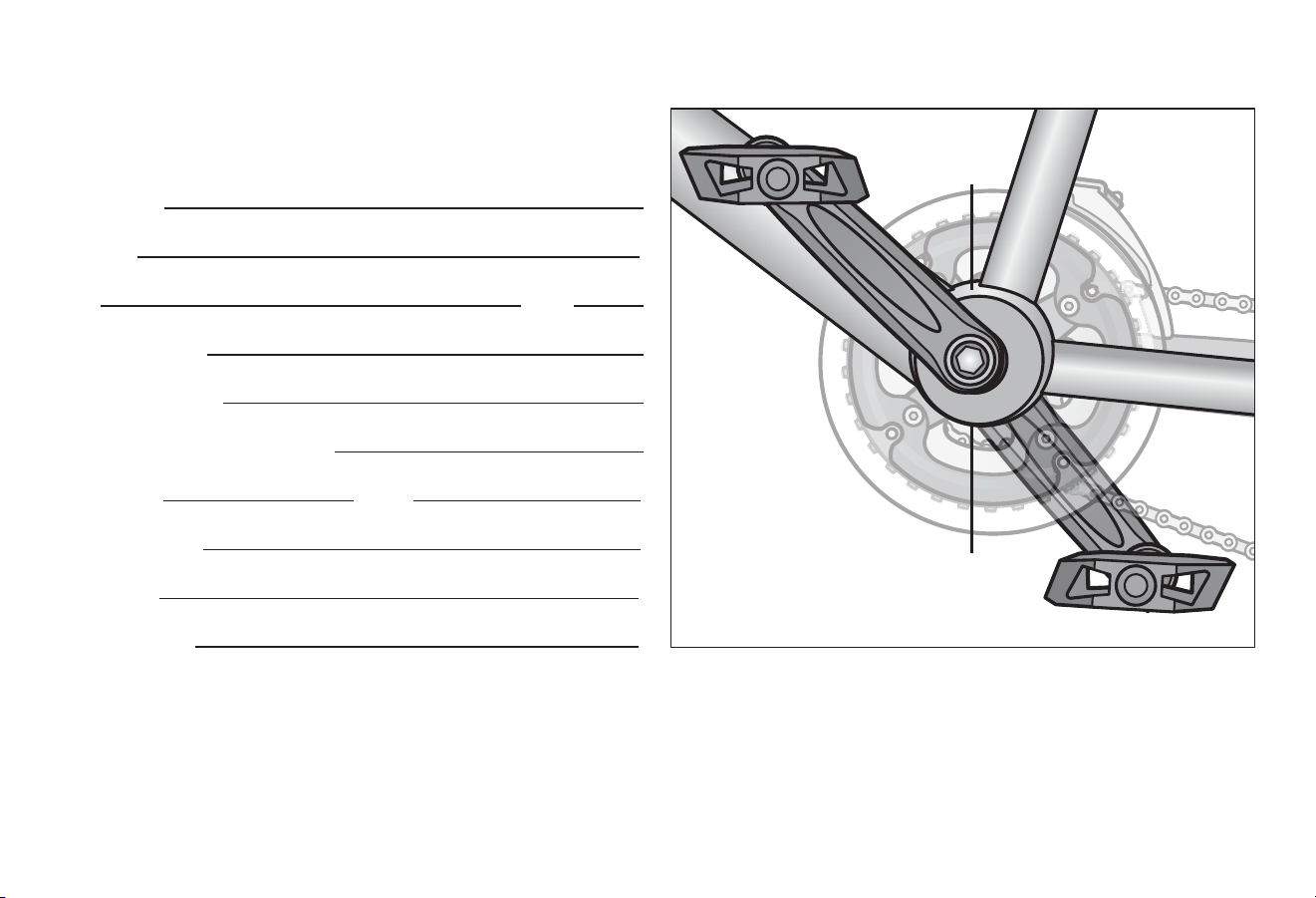
Warranty 7
67
Figure 7.1
PURCHASE RECORD
Fill in immediately and retain as a record of your purchase.
Please retain your sales receipt for any possible warranty claims.
Your Name:
Address:
City: State:
Date Purchased:
Place of Purchase:
Model and Brand Informaon:
Wheel Size: Color:
Model Number:
Date Code:
Serial Number:
Service scker is
located above the
boom bracket
Serial number is
located below the
boom bracket

US 1-800-626-2811
Canada 1-877-758-4741
schwinnbikes.com
OMSCMTB
WARNING: This product can expose you to chemicals including lead and lead
compounds, which is known to the State of California to cause cancer, birth defects
and other reproductive harm. For more information go to www.P65Warnings.ca.gov
© 2021 PACIFIC CYCLE, INC. SCHWINN
®
is a registered trademark of Pacic Cycle, Inc.
Limited
Lifetime
Warranty
For as long as you own the bike.
Some restrictions apply.
Details at schwinnbikes.com