USER MANUAL
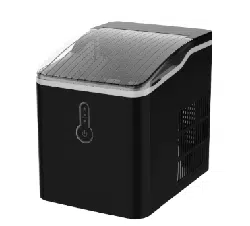
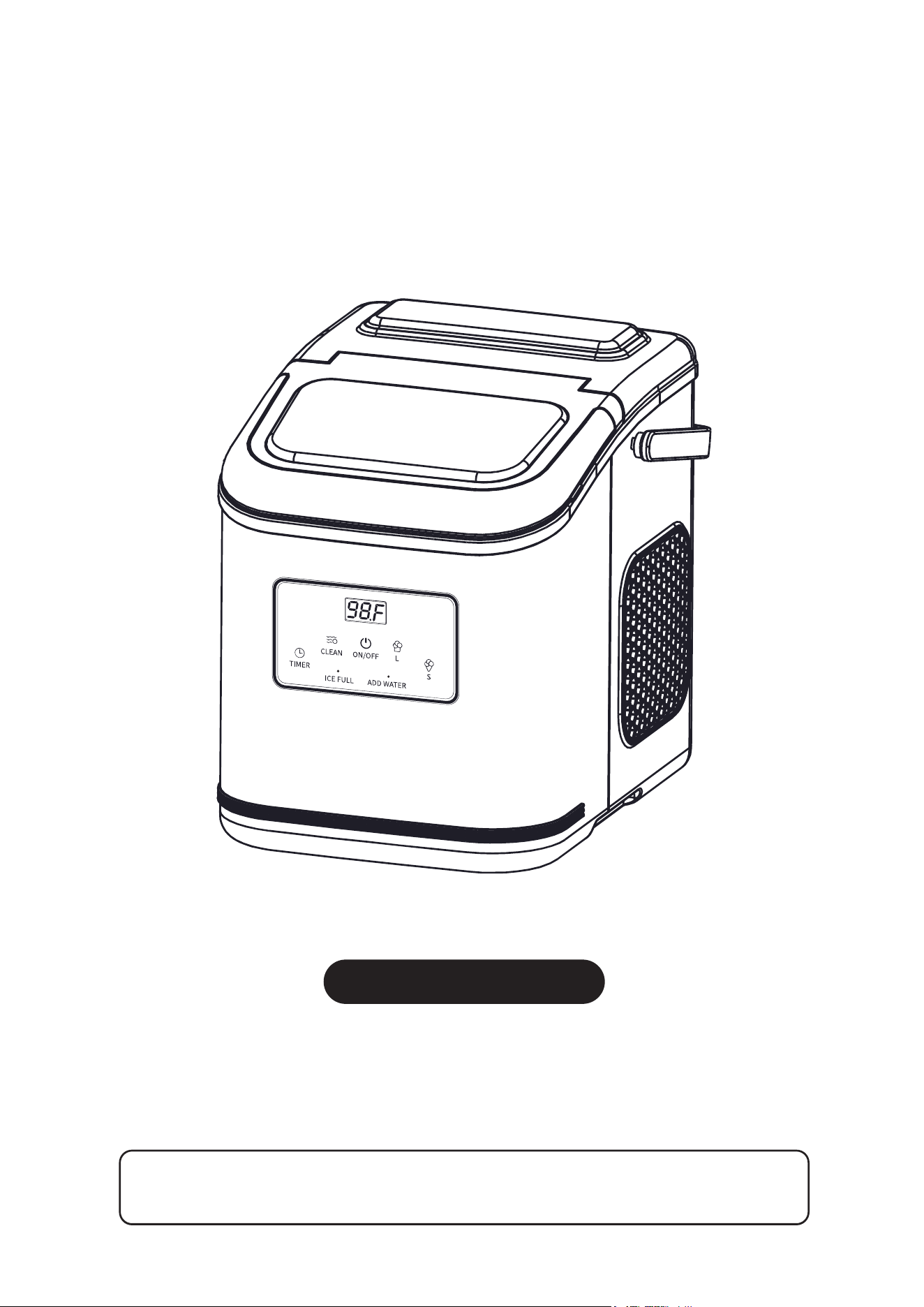
PORTABLE AUTOMATIC ICE MAKER
THANK YOU FOR PURCHASING THIS PORTABLE ICE MAKER! PLEASE READ THE
INSTRUCTION CAREFULLY BEFORE USING THE PRODUCT.
Model No.: HZB-12/K
IT IS IMPORTANT THAT YOU READ THE MANUAL BEFORE USING YOUR PORTABLE ICE MAKER AND WE
STRONGLY RECOMMEND THAT YOU KEEP IT IN A SAFE PLACE FOR FUTURE REFERENCE.
Tel: 213-4467172 or 661-4358826
Tel: 213-4467172 or 661-4358826
Tel: 213-4467172 or 661-4358826
Thank you for choosing our
product as your life partner!
Our customer service department is always available for you
to address concerns and problems.
Your satisfaction is our ultimate goal!
We persist in providing every customer with reliable products and services.
If you have any problem when using our products, please contact us via:

MUST-READ Q&A
1. How often should I clean my ice maker?
The expected frequency of cleaning ice maker depends on how often you use it.
We recommend you to clean it at least once a week. But if you don’t use the ice
maker regularly, please drain all the water and wipe remaining water inside and
outside of the machine after you clean it for avoiding mildew inside of the machine.
2. How should I clean my ice maker?
You can use clean towel to wipe the outside and inside of the ice maker. There
may be scale accumulation in the interior water pipe, we recommend you to
mix a certain amount of water and neutral detergent in the sink, then press the
"CLEAN" button (
Note
: do not long press the button) to enter the self-cleaning
mode.Then drain the wastewater and repeat above steps with potable water
for 2-3 times.
3. Can I add juice, milk or other drinks to make ice?
We recommend you not to do so as some of the ingredients in these drinks may
accumulate on the pump, causing blockage of the pump and affecting normal
use.
4. Why is my ice defective (less or thinner ice)?
The refrigeration circuit of the ice maker needs to run 3 to 4 rounds after each
ice-making starting to get into perfect working condition. Therefore, the
phenomenon of less or thinner ice may occurs in the first 3 to 4 rounds. Please
don't worry, this is normal. If the situation persists after this, please contact us
and we will be responsible for the defective product.
Tel: 213-4467172 / 661-4358826

MUST-READ Q&A
5. Why does my ice taste terrible?
If you use tap water to make ice, the taste of ice may be affected by the hardness
of the water. So we highly recommend you to use drinking water or mineral water
to make ice to improve the taste. If you still have such problem, please contact us
to let us guard your usage experience.
6. Why is my ice so cloudy?
If your ice is cloudy, it's probably because the water you’re using is too hard.
Using water that is too hard to make ice can affect the transparency of ice, the
lifespan of the machine, and even your health. We therefore highly recommend
you to use better water whenever possible.
7. Why does my ice melt so fast?
The ice maker is not a refrigerator, so the ice cannot be stored in the basket for
a long period. We recommend you to use the produced ice as soon as possible
to enjoy the best taste of it.
8. Why does the ice freeze into a big block after
I put it in the freezer?
When you put the ice in the freezer, the melted water on the surface of the ice
will condense in the freezer and then sticks the ice together. This is normal.
Note: If you have any other question not listed above, please refer to
"TROUBLESHOOTING" section to solve your problem. If you cannot get any
help through this manual, please contact us and we will be happy to receive
your feedback and provide satisfactory service.
Tel: 213-4467172 / 661-4358826

CATALOGUE
1
1
1
4
4
5
6
6
7
7
7
8
9
10
11
14
15
16
17
SAFETY INSTRUCTION..................................................................
KNOWING YOUR UNIT...................................................................
BEFORE FIRST USE......................................................................
CONNECTING YOUR UNIT............................................................
USING YOUR UNIT.........................................................................
CLEANING AND MAINTENANCE...................................................
TROUBLESHOOTING....................................................................
Safety Tips
.....................................................................................
Package Content
............................................................................
Unpacking Your Unit
.......................................................................
Basic Maintenance Operation
..........................................................
Self-Cleaning Operation
..................................................................
Basic Cleaning
..............................................................................
Placement Requirement
..................................................................
Water requirement
.........................................................................
Control Panel
.................................................................................
Handle Assembling
.........................................................................
Scoop Placement
...........................................................................
Safety Instruction
............................................................................
15
TIMER SETTING.............................................................................
Tel: 213-4467172 / 661-4358826
Safety Tips
SAFETY INSTRUCTION
Your safety and the safety of others is very important!
We have provided many important safety messages in the manual for your
appliance. All safety messages will tell you what the potential hazard is, how to
reduce the chance of injury, and what could happen if the instructions are not
followed. Always read and obey all safety messages.
All safety messages will follow the safety alert symbol and the word
“DANGER” or “WARNING” as shown below:
DANGER
WARNING
These words mean: Serious injury may occur if you don’t immediately
follow the instructions.
· Do not operate this, or any other appliance with a damaged cord.
· If the supply cord is damaged, it must be replaced by the manufacturer, the service
agent or a similarly qualified person in order to avoid a hazard.
· This ice-maker must be positioned so that the plug is accessible.
· Connect to properly polarized outlets only. No other appliance should be plugged
into the same outlet. Be sure that the plug is fully inserted into the receptacle.
* When using electrical appliances, basic safety precautions should be
followed to reduce the risk of fire, electric shock, and injury to persons or
property. Read all instructions before using any appliance.
Safety Instruction
1
Tel: 213-4467172 / 661-4358826

· Do not run the power cord over carpeting or other heat insulators. Do not cover
the cord. Keep cord away from traffic areas, and do not submerge it in water.
· We do not recommend the use of an extension cord, as it may overheat and
become a risk of fire. If you must use an extension cord, use No.14AWG
minimum size and rated no less than 1875 watts.
· Unplug the ice maker before cleaning or making any repairs or servicing.
· Exercise caution and reasonable supervision should be taken when appliance
is used near children.
· Do not use your ice-maker outdoors. Place the ice-maker away from direct
sunlight and make sure that there is at least 4 inches of space between the
back of your unit and wall. Keep a minimum distance of 4 inches on each side
of your unit free.
· Do not use other liquids to make the ice-cube other than water.
· Do not clean your ice maker with flammable fluids. The fluids can create a fire
hazard or explosion.
· Do not tip over.
· If the ice maker is brought in from outside in wintertime, give it a few hours to
warm up to room temperature before plugging it in.
· WARNING – This appliance must be earthed.
· DANGER – Risk Of Fire Or Explosion. Flammable Refrigerant Used. Do Not
Use Mechanical Devices To Defrost Ice Maker. Do Not Puncture Refrigerant
Tubing.
· DANGER – Risk Of Fire Or Explosion. Flammable Refrigerant Used. To Be
Repaired Only By Trained Service Personnel. Do Not Puncture Refrigerant
Tubing.
2
Tel: 213-4467172 / 661-4358826
· CAUTION – Risk Of Fire Or Explosion. Flammable Refrigerant Used. Consult
Repair Manual/Owner’s Guide Before Attempting To Install Or Service This
Product. All Safety Precautions Must Be Followed.
· CAUTION – Risk Of Fire Or Explosion. Dispose Of Property In Accordance
With Federal Or Local Regulations. Flammable Refrigerant Used.
· CAUTION – Risk Of Fire Or Explosion Due To Puncture Of Refrigerant Tubing;
Follow Handling Instructions Carefully. Flammable Refrigerant Used.
· The ice maker should be installed in accordance with the safety standard for
Refrigeration Systems, ASHRAE15. The ice maker shall not be installed in
corridors or hallways of public buildings.
· If the unit is with problem needs to be maintained, that replacing it with like
components and that servicing shall be done by factory authorized service
personnel, so as to minimize the risk of possible ignition due to incorrect parts
or improper service.
Important:
The wires in this mains lead are colored in accordance with the
following code:
To avoid a hazard due to instability of the appliance, it must be placed
at a even or flat surface.
Green or Green with a strip of yellow Grounding
White Neutral
Black Live
3
Tel: 213-4467172 / 661-4358826
KNOWING YOUR UNIT
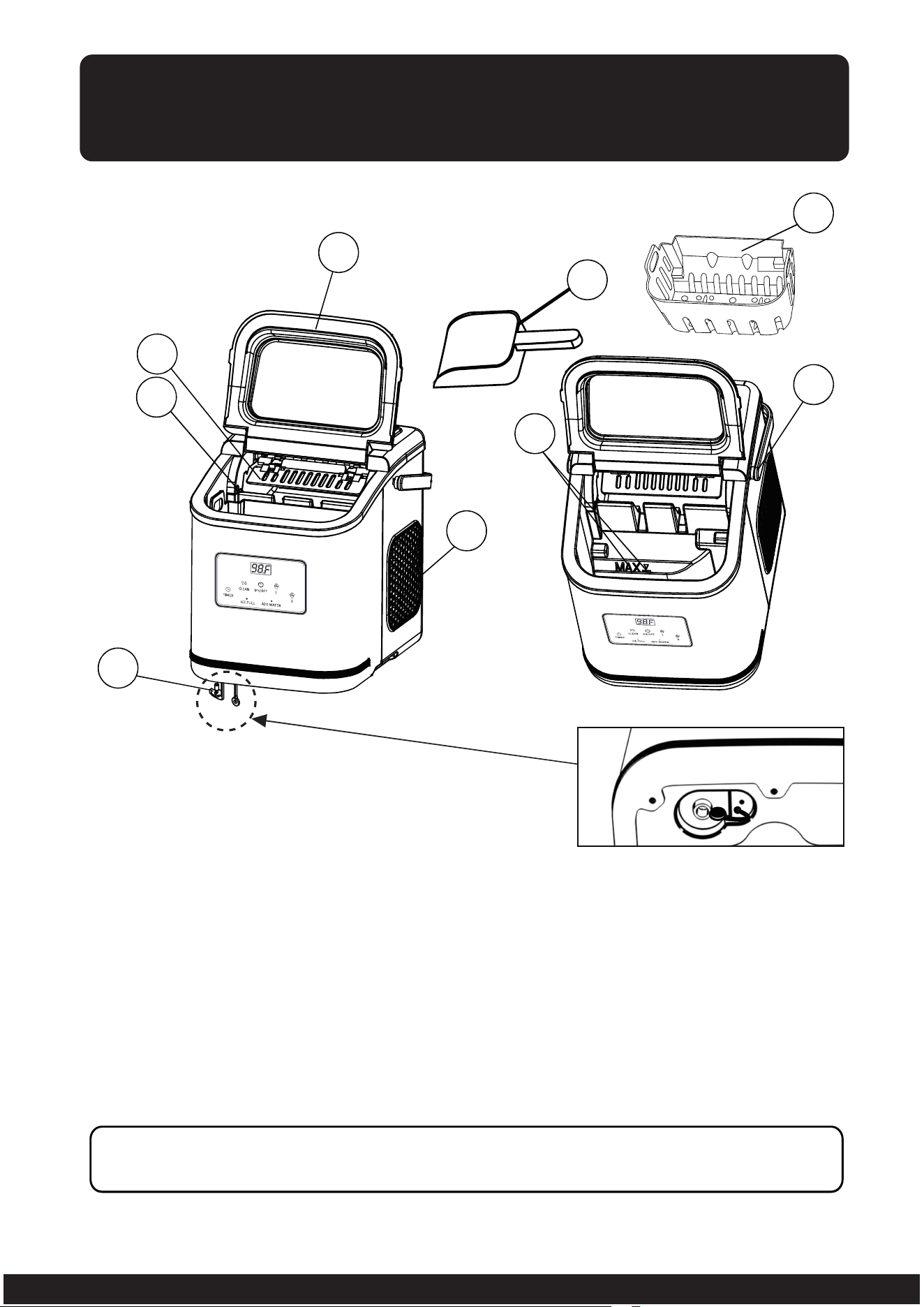
Package Content
1. Ice shovel
2. Ice full sensor
3. Ice basket
4. Top cover with transparent window
5. Air exhausting
6. Water drain cap: to drain out the water from the unit
(at front bottom side of the unit)
7. Maximum water level mark: remove the ice basket to see the mark
8. Handle
9. Ice scoop
Note: If you find any part damaged or missing, please contact our customer
service immediately.
1
2
3
4
5
6
7
8
9
4
Tel: 213-4467172 / 661-4358826
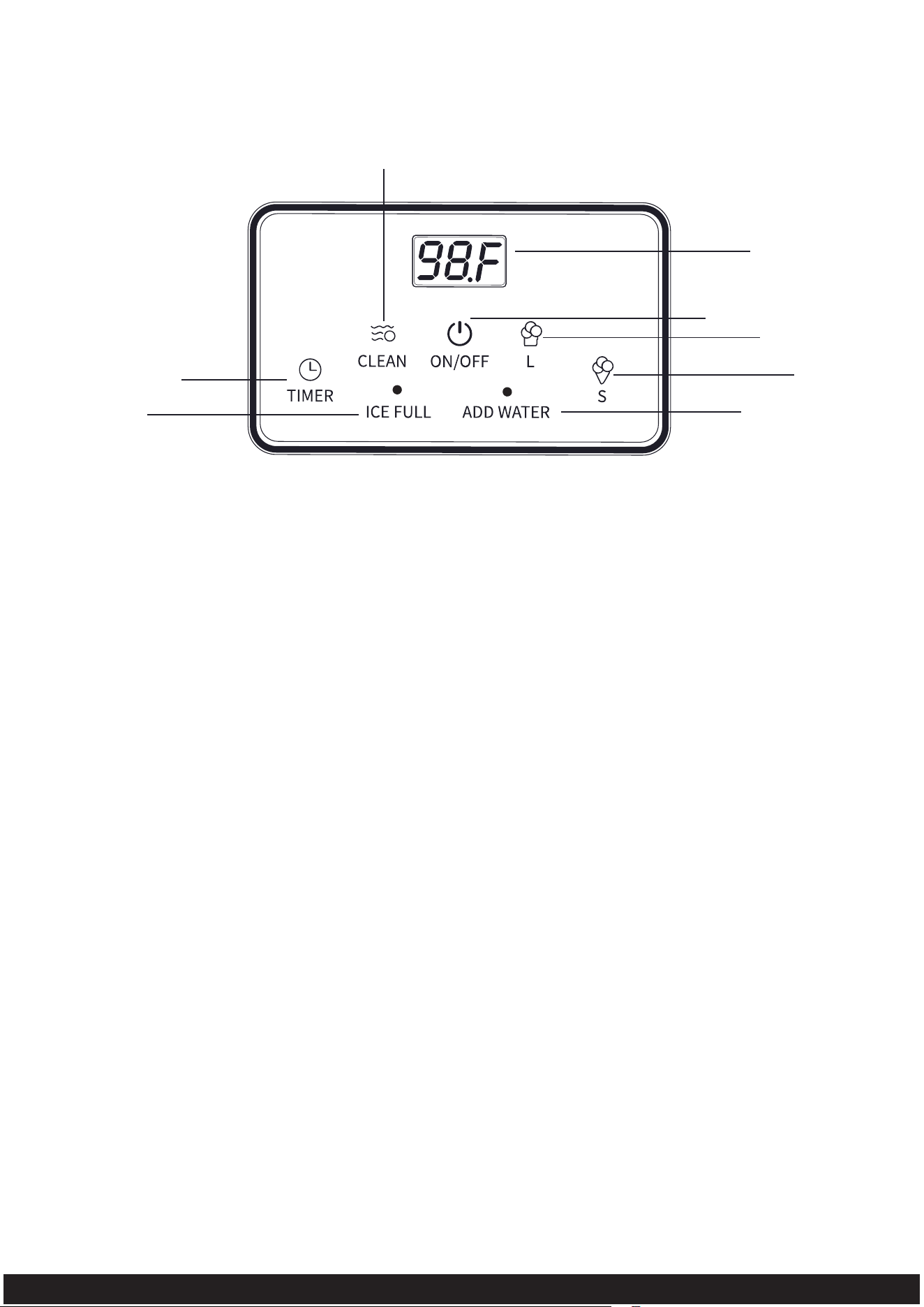
Control Panel
A. Button to turn on/off the timer
B. Button to turn on the self-cleaning function in standby mode
(the cleaning time is 30 minutes)
C. Button to turn on/off the unit for making ice
D. Button to select large ice size & increase time when setting timer
E. Button to select small ice size & decrease time when setting timer
F. Ice full indicator
G. Temperature and time displaying: ambient temperature, ice-making
countdown seconds, self-cleaning countdown minutes, timer countdown
hours.
H. Water shortage indicator
A
F
B
C
G
D
E
H
5
Tel: 213-4467172 / 661-4358826
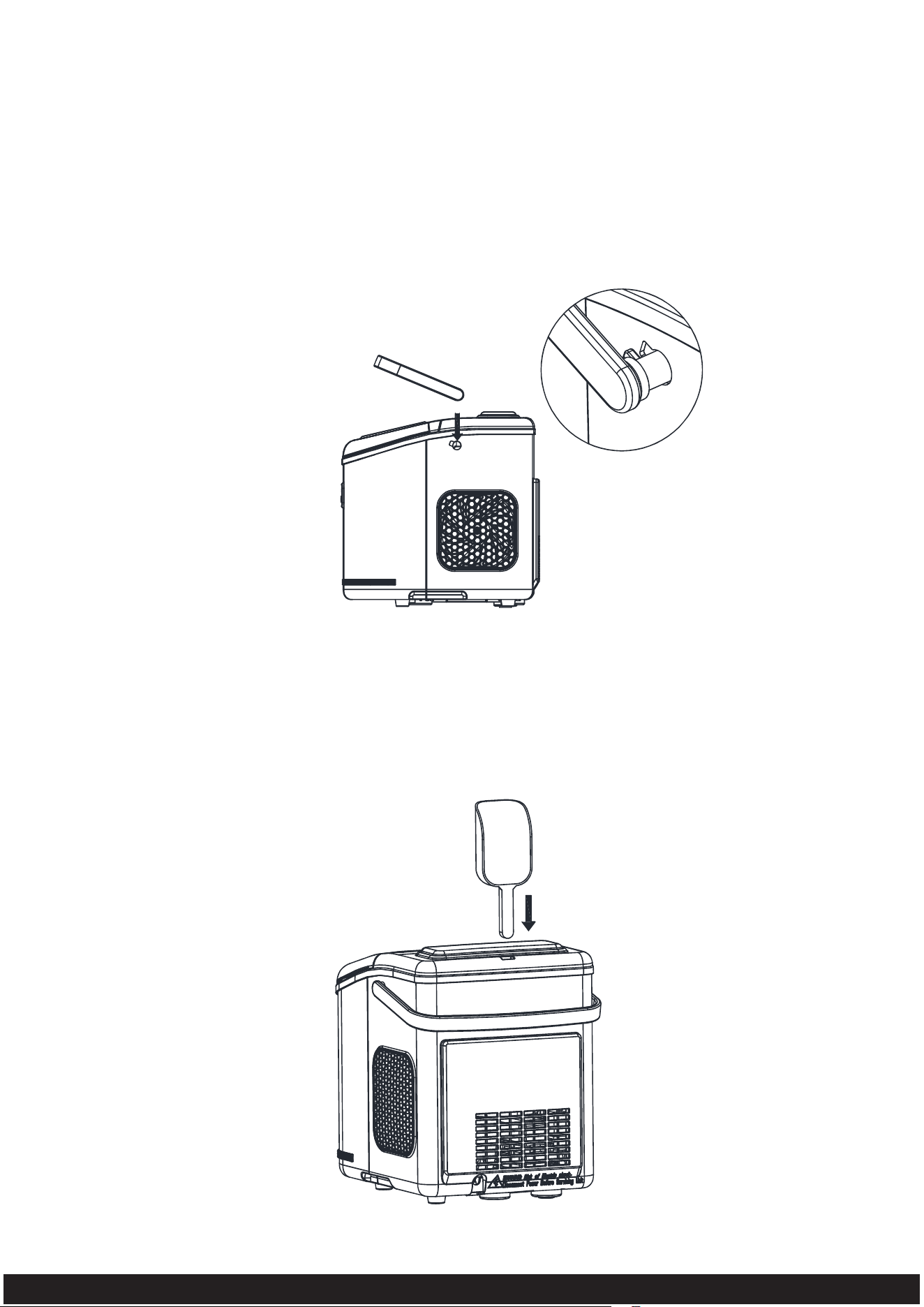
Handle Assembling
Rotate the handle to the same angle as the mounting hole on the machine. Make
sure the handle is inserted into the machine.
The ice scoop can be placed in the square hole on the rear panel of the machine.
Scoop Placement
6
Tel: 213-4467172 / 661-4358826
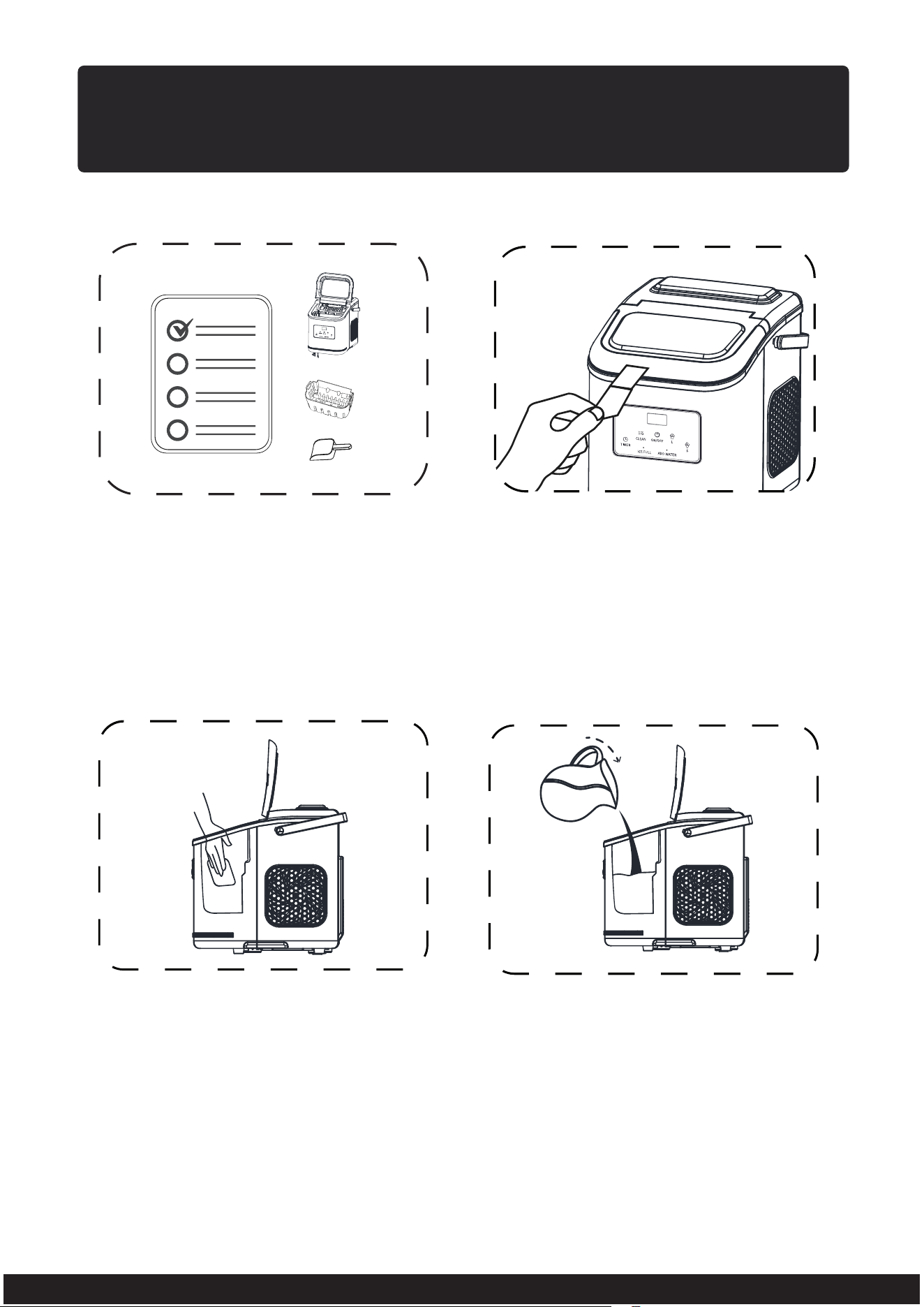
BEFORE FIRST USE
Unpacking Your Unit
Basic Cleaning
1. Remove the exterior and interior
packaging and check the included
accessories according to “Package
Content” section.
2. Remove all the tapes on the unit
and take out all accessories inside
of it.
1. External cleaning: Clean the
outside of the unit and all the
accessories with lukewarm
water and a soft cloth.
2. Internal cleaning: For your health,
before using the ice maker, please
add the appropriate amount of
drinking water to the sink, enter
the self-cleaning mode and finally
drain the wastewater (Please refer
to “Self-Cleaning Operation” section).
7
Tel: 213-4467172 / 661-4358826
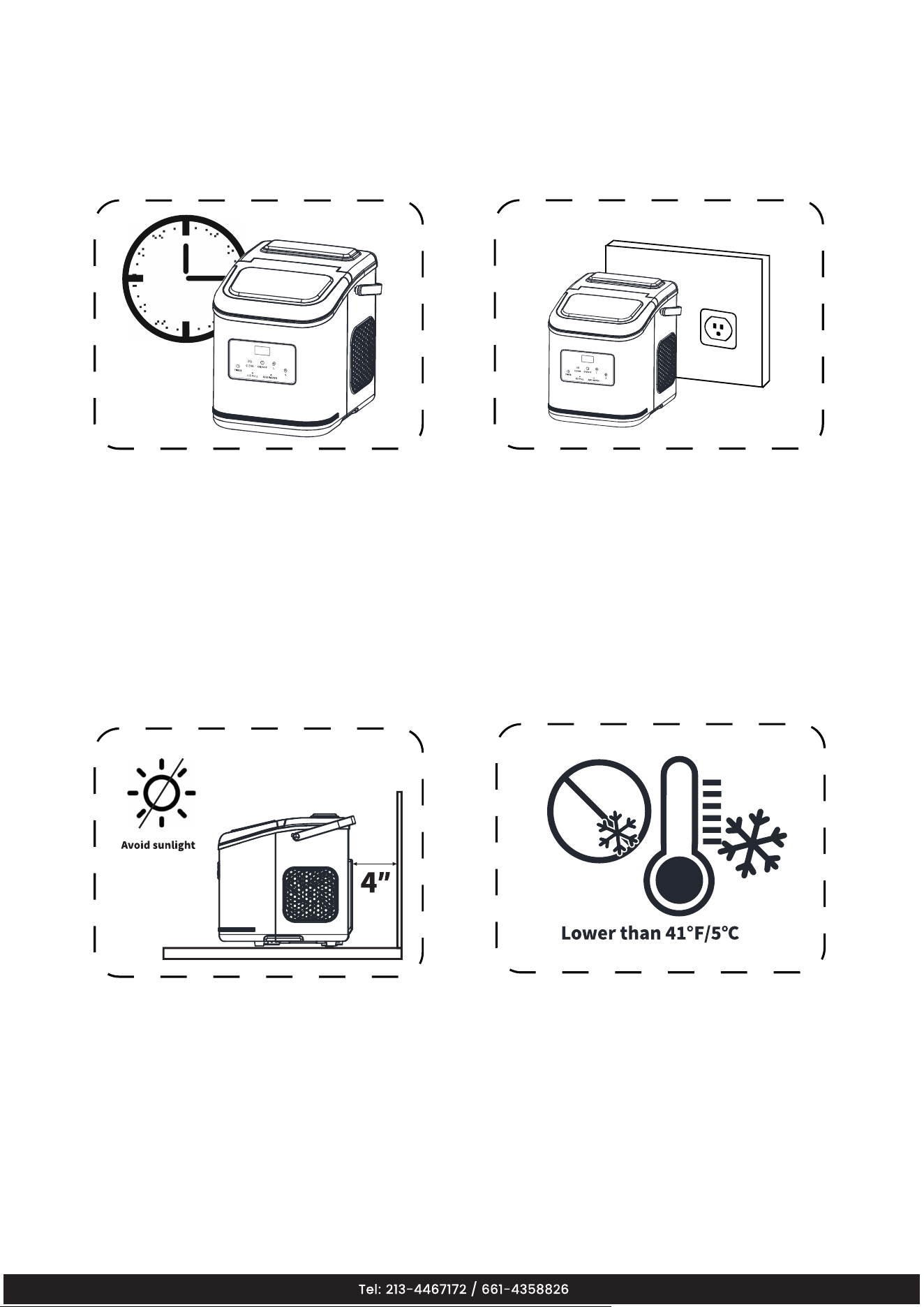
Placement Requirement
2. The ice maker must be positioned
so that the plug is accessible.
1. Before using the ice maker,
let it sit for 2 hours to settle
down the refrigerant. Place
the ice maker on a horizontal
counter top to avoid irreversible
damage to your ice maker.
3. Place the ice maker away from
direct sunlight and other heat
sources. Make sure there’s at
least 4 inches between each
side of your ice maker and
wall or obstacles.
4. Do not use the ice maker in room
temperatures below 41℉(The
recommended room temperature
is 50-105℉).
8
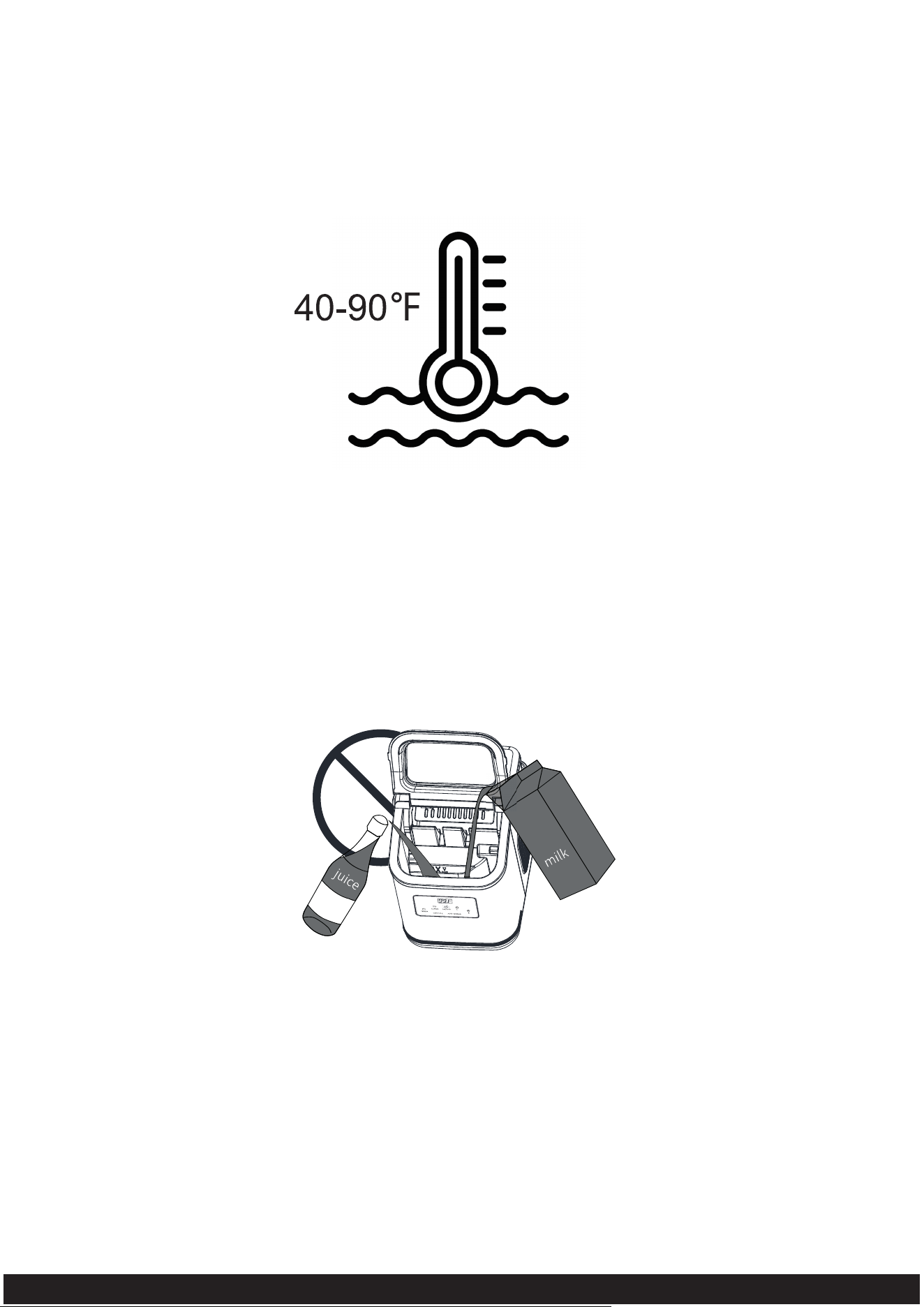
Water Requirement
1. The recommended water temperature range is 40-90℉.
2. In order to better enjoy your ice and warranty, please do not use drinks such
as juice and milk, which may cause irreversible damage to your ice maker.
9
Tel: 213-4467172 / 661-4358826
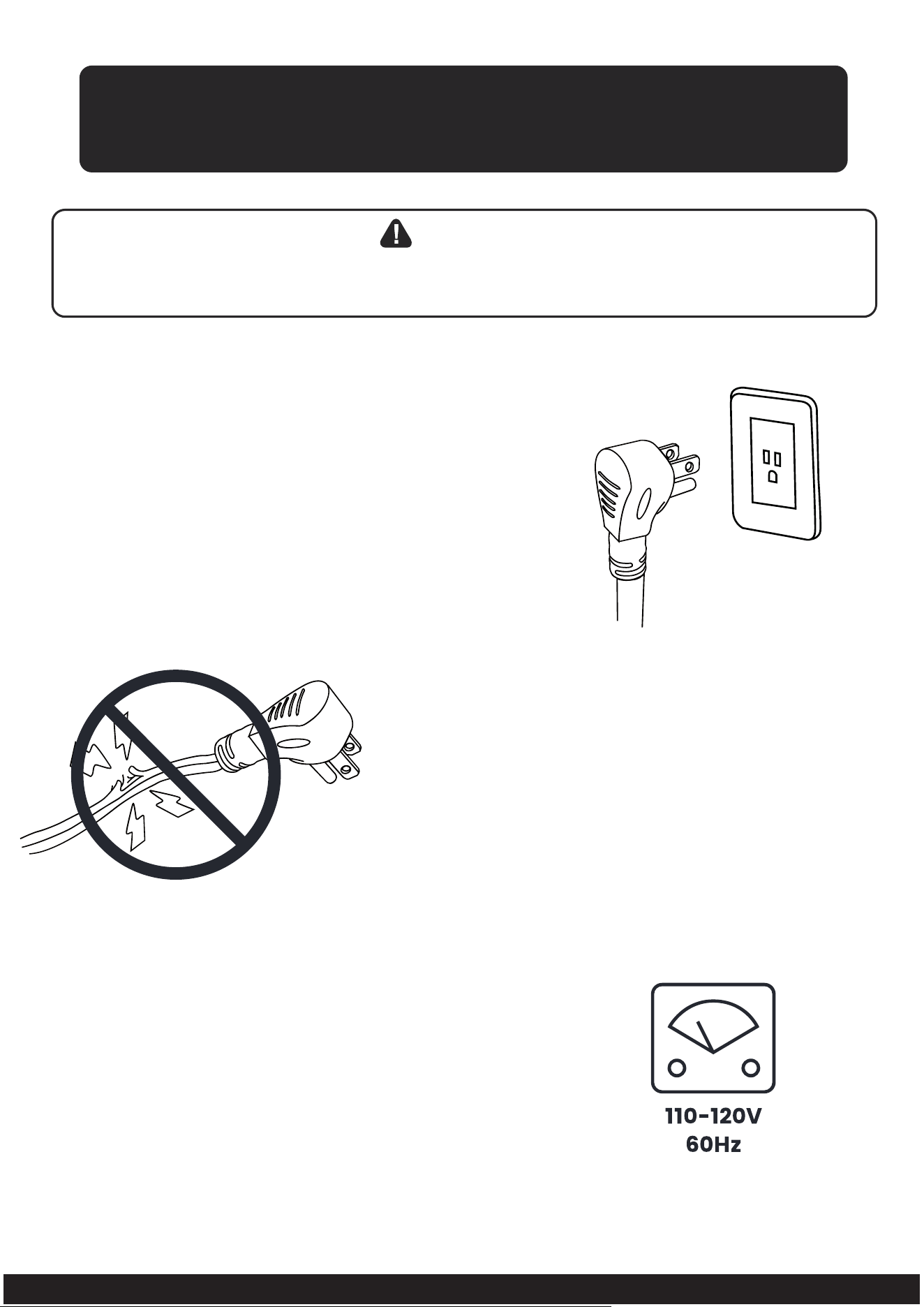
* Improper use of the grounded plug can result in the risk of electrical shock.
If the power cord is damaged, please call our customer service.
CONNECTING YOUR UNIT
DANGER
1. This unit should be properly grounded for your
safety. The power cord of this appliance is
equipped with a three-prong plug which mates
with standard three-prong wall outlets to minimize
the possibility of electric shock.
2. Plug your appliance into an exclusive, properly
installed, grounded wall outlet. Do not, under
any circumstances, cut or remove the three-
prong (ground) from the power cord. Any
question concerning power and/or grounding
should be directed toward a certified electrician.
3. This appliance requires a standard 110-120volt,
60Hz electrical outlet with three-prong ground.
10
Tel: 213-4467172 / 661-4358826
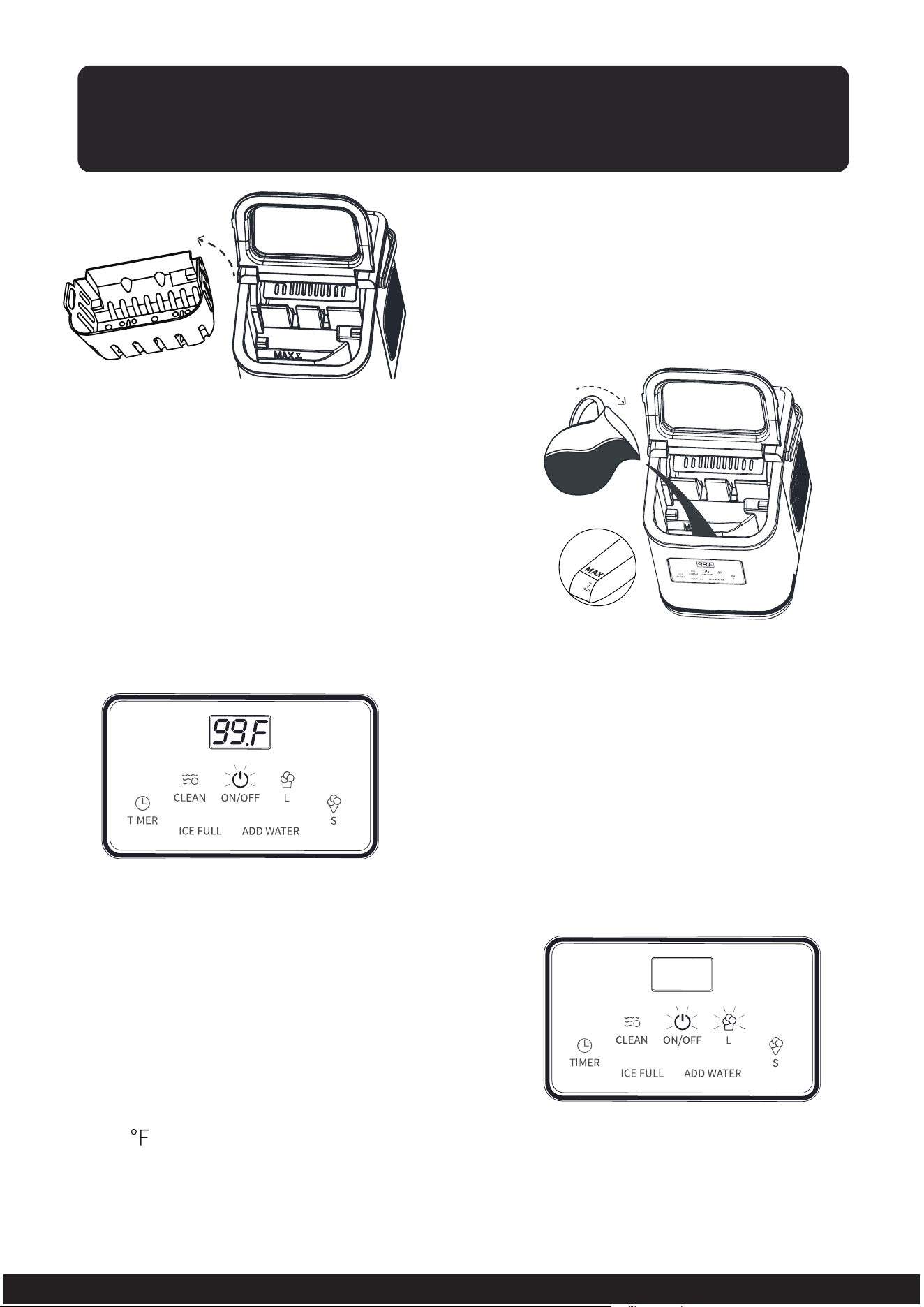
USING YOUR UNIT
2. Pour potable water into the water tank
to the “MAX” water level mark (Do not
exceed the mark).
1. Open the top cover and take
out the ice basket.
3. Insert the plug into the correct socket,
the machine will enter standby mode,
the"ON/OFF" indicator will flash and the
digital screen will display the ambient
temperature with letter "F" or small letter
"c" (meaning the temperature unit).
Note
: The temperature unit can be
switched by long pressing the "L" button.
4. Press "ON/OFF" button to begin the
ice-making cycle and press "S" or "L"
button to select the ice size as you like.
The "ON/OFF" and the "S" or "L" indicator
will be steady on white according to your
selection.
Note:
In order to ensure a reasonable
hygiene level, please change the water
in the water reservoir every 24 hours
and clean the inner tank and water tank
every three days.
360
Note
: If the room temperature is below
60 , it is recommended to select “S” size
to avoid ice sticking together.
11
Tel: 213-4467172 / 661-4358826
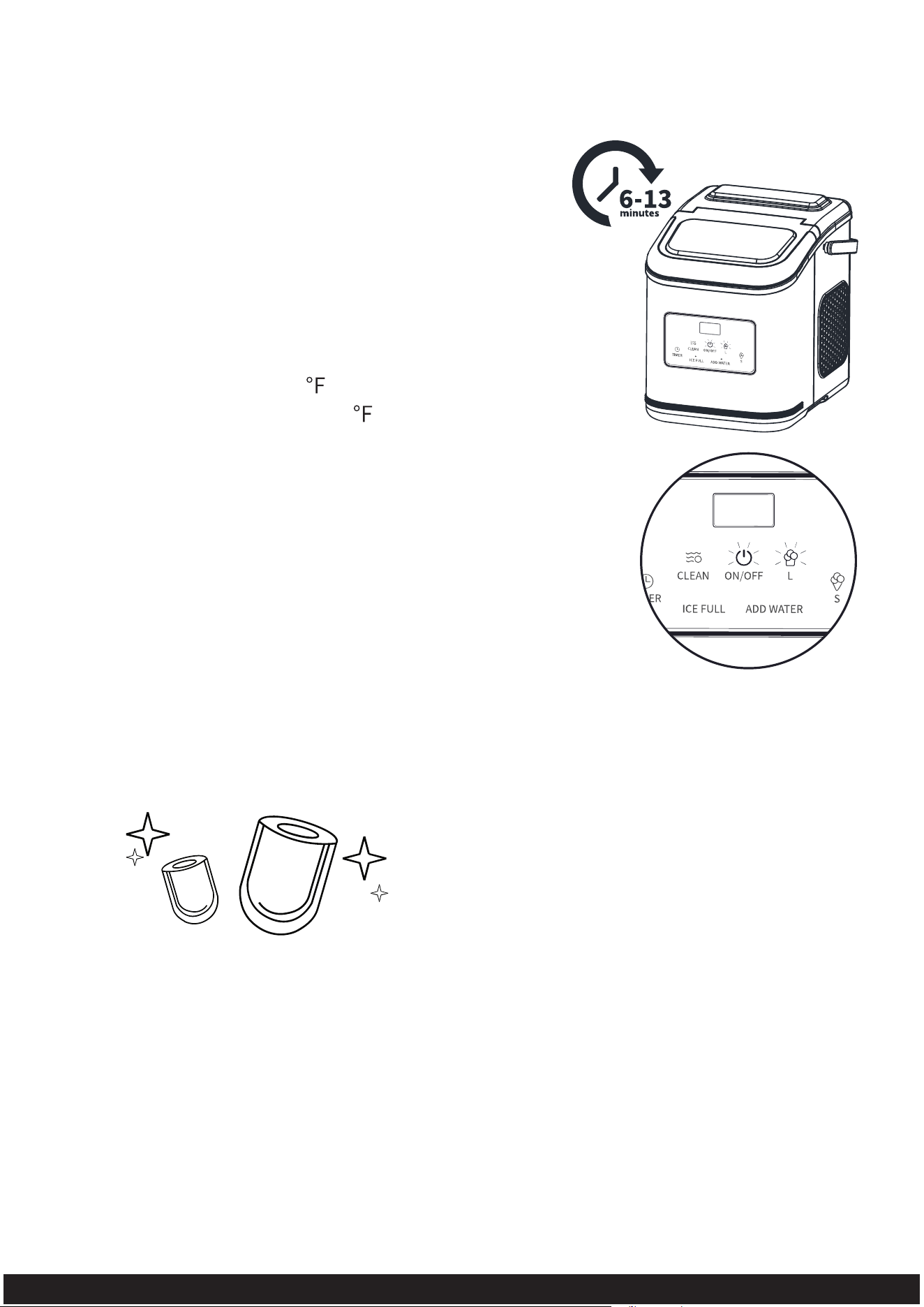
5. During the ice-making process, the digital
screen will display the remaining time to
complete a round of ice making (with seconds
as the unit of time). For example, "360" means
360 seconds, i.e., 6 minutes. The ice making
cycle lasts about 6 to 13 minutes, depending
on selection of ice size and the temperature
of water and room (The recommended room
temperature is 50-105 , The recommended
water temperature is 40-90 ).
6. The ice-making completed.
Note: When the water level in the sink is too low
that the water pump can’t inject water, the “ADD
WATER” indicator will be steady on red and the
machine stops making ice. Please repeat step 2 and
press “ON/OFF” button to restart the ice maker. Allow
the refrigerant inside the compressor to settle for at
least 3 minutes before restarting.
Note: It's normal for the first 4 rounds
of ice to be defective, but the ice after
that will be perfect.
360
360
12
Tel: 213-4467172 / 661-4358826
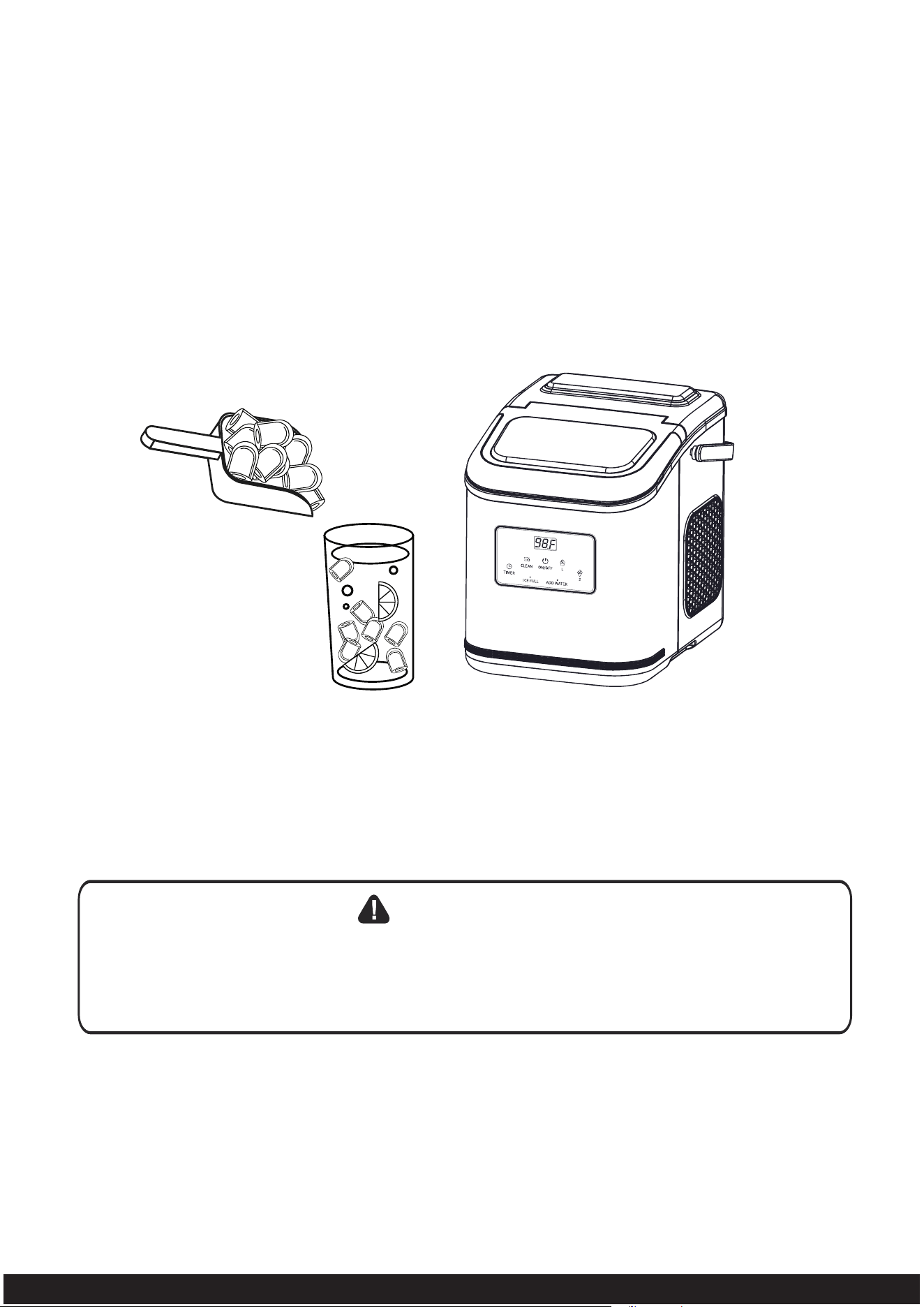
7. Take the ice out before it melts.
Note: When the ice in the ice basket blocks the sensor, the “ICE FULL” indicator
will be steady on red and the machine stops making ice. After removing the ice,
the machine will automatically restart the ice making after a few seconds. If the ice
making is not resumed, please press the "ON/OFF" button to manually restart it.
Direct sunlight or sunlight reflection may cause infrared sensor malfunction.
If the unit doesn’t work and shows ice full when the ice in the tank is not full,
please move the unit to a place free from sunlight.
WARNING
13
Tel: 213-4467172 / 661-4358826
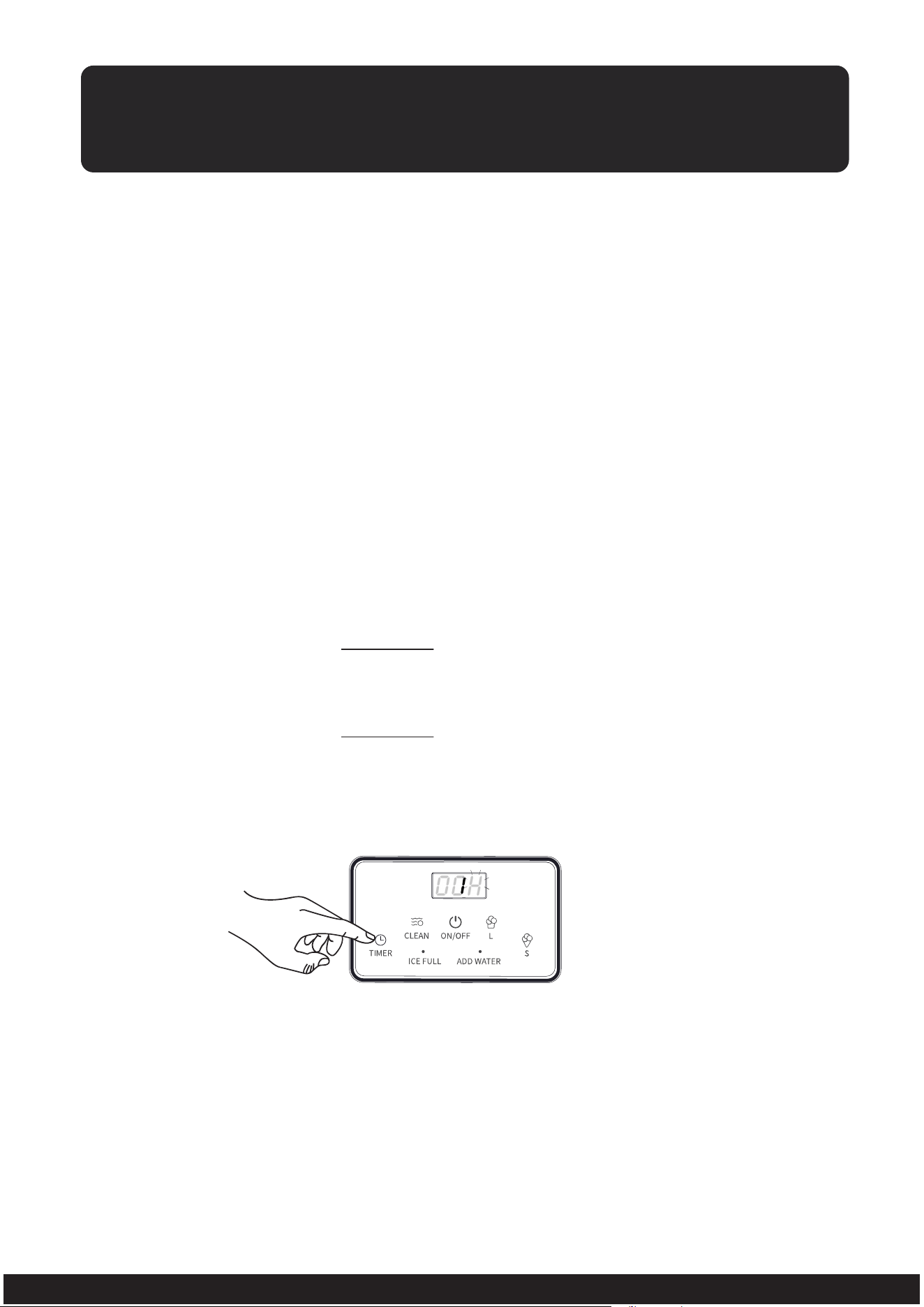
TIMER SETTING
Time range of the timer: 1-24 hours
Default variate: increase/decrease 1 hour by pressing the “L”/“S” button once
Timed turn on: In standby mode, the unit could be set time for turning on.
Timed turn off: During the ice-making process, the unit could be set time
for turning off.
Press the "TIMER" button, the “TIMER” indicator will be on, the digital screen
will display “01H” as default set time and the letter "H" will flash. Set the timer
by pressing the "L" or "S". After 5 seconds without any operation, the letter "H"
will stop flashing and stay on, meaning that the setting is completed.
The time displayed in the digital screen indicates that the machine currently has
been set a timer, and the time will gradually diminish until becoming zero, then
the machine will enter the mode you set before.
Note:
After setting the timer for turning on in the standby mode, the “ON/OFF”
indicator will flash, the “TIMER” indicator will be on, and the digital screen will
display the remaining time to turn on (with hour as the unit of time).
After setting the timer for turning off in the ice-making process, the “TIMER”,
“ON/OFF” and “S” or ”L” indicators will be steady on, and the digital screen
will alternately display remaining time of the ice-making (with minute as the
unit of time) and the remaining time to turn off, i.e., enter the standby mode
(with hour as the unit of time).
If you are setting the timer (the letter “H” is flashing in the digital screen), you
can directly cancel the timer by pressing the “TIMER” button again. If you have
already set up the timer (the letter “H” stays on), you can press the "TIMER"
button to enter the setting state again and then press the "TIMER" button
again, or directly press the "ON/OFF" button to cancel the timer.
How to set the timer
How to set the timer
h0
14
Tel: 213-4467172 / 661-4358826
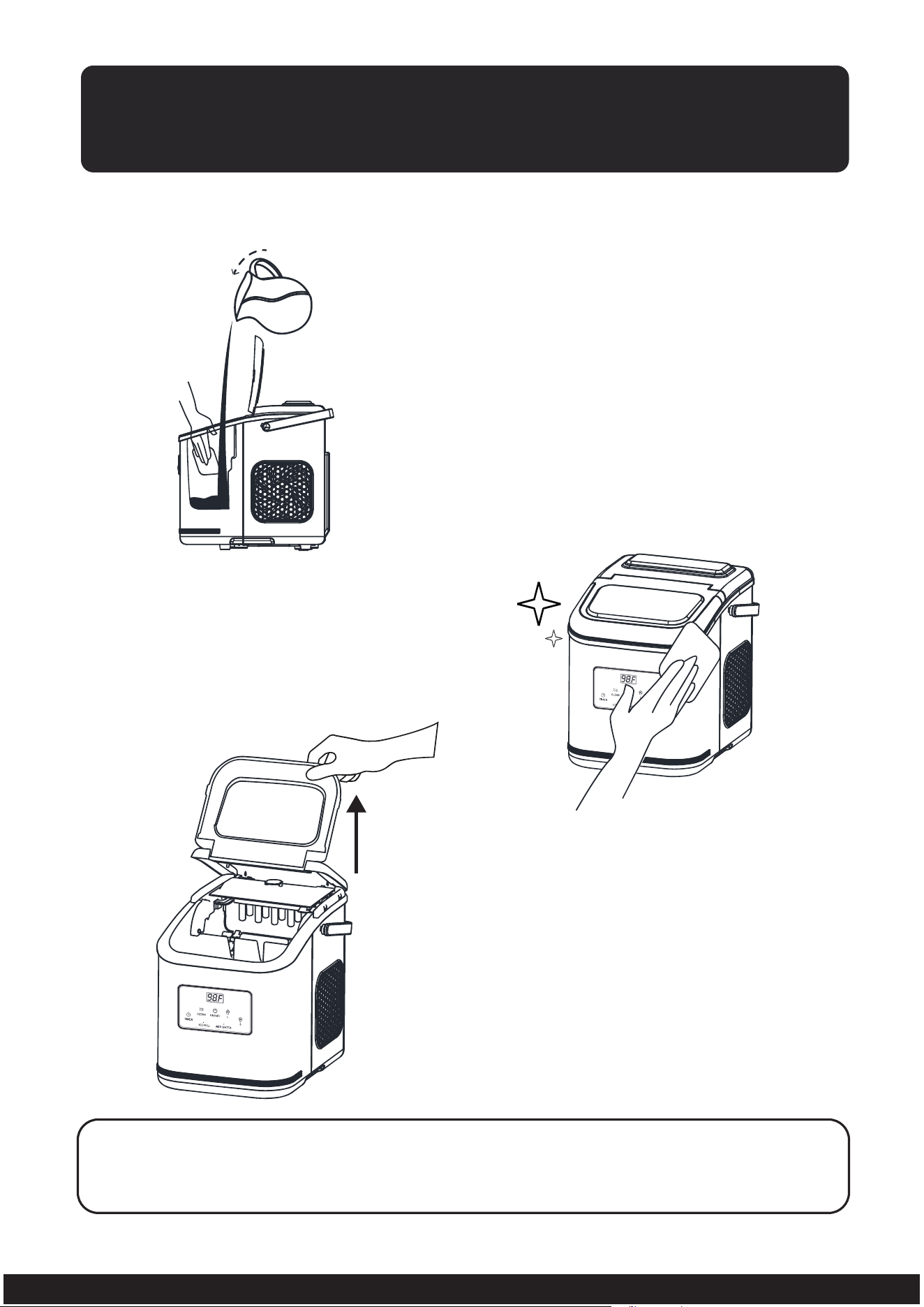
* Note: To protect your health and avoid the mildew, when the machine is
not to be used for a long time, please drain water completely and
dry the interior.
Basic Maintenance Operation
Note: In order to facilitate cleaning, the
entire top panel can be opened up and
removed by pulling up the front transparent
cover gently. Reinstall the top panel after
the cleaning completed.
CLEANING AND MAINTENANCE
1. Clean the inside of the unit with diluted
detergent, lukewarm water and a soft
cloth.
3. Dry the interior and exterior with
a clean soft cloth.
2. The outside of the unit should be
cleaned regularly with a mild detergent
and lukewarm water and a soft cloth.
15
Tel: 213-4467172 / 661-4358826
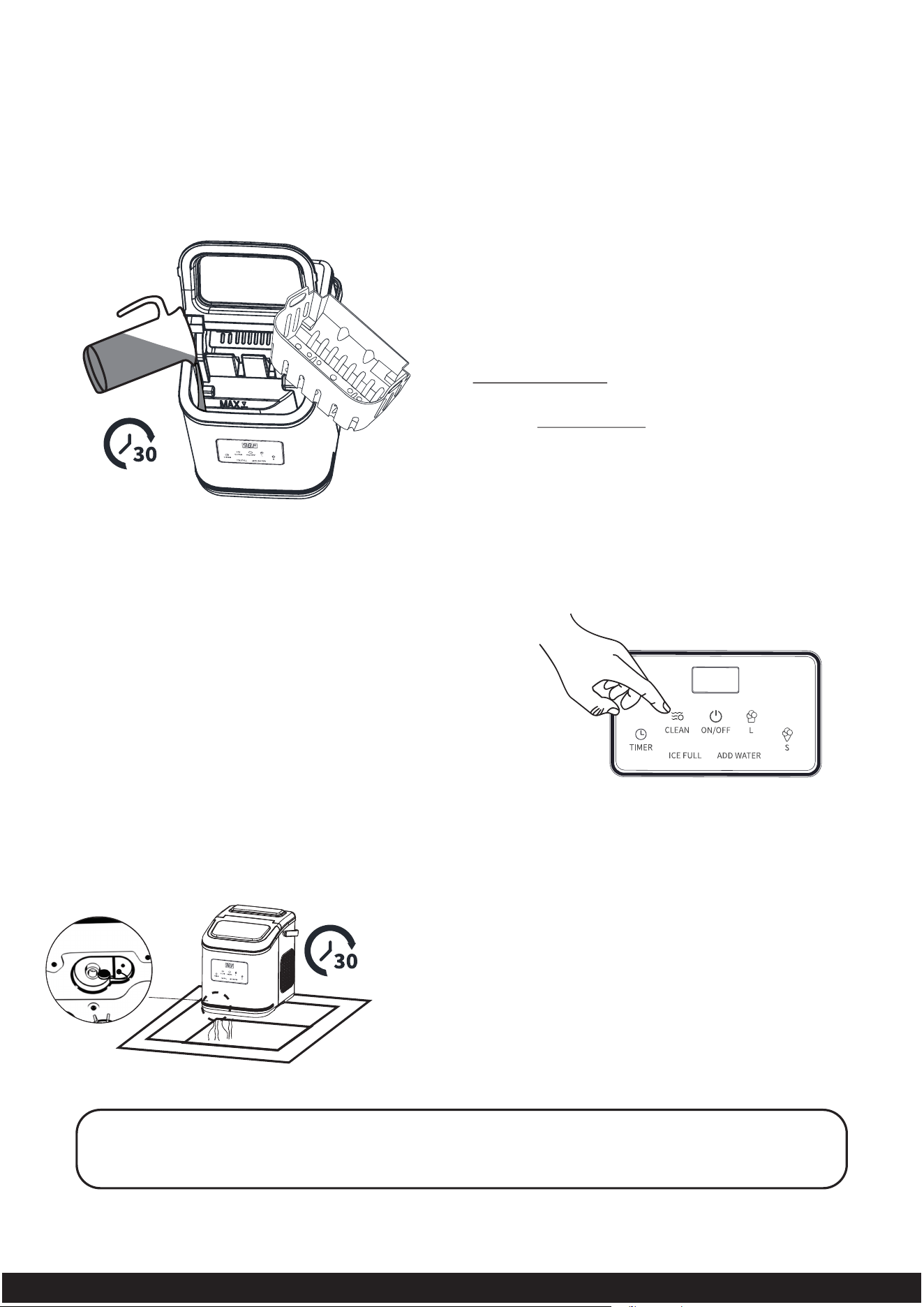
* Note: It is recommended to proceed descaling operation at least once
a week to maximize the lifespan of the product.
* Self-Cleaning Operation is only used for basic cleaning, which can
not achieve the effect of descaling. For descaling operation, it should
be proceed on the basis of the self-cleaning operation.
Self-Cleaning Operation
2. In standby mode, press the "CLEAN"
button (Note: do not long press the
button) to enter the self-cleaning mode.
During the self-cleaning process, the
digital screen will display the remaining
time of self-cleaning (with minute as the
unit of time), the "CLEAN" indicator will
keep the light on and the liquid in the
tank will rinse the interior parts.Auxiliary
tools such as neutral or food hygiene
cleaners can be used.
1. Take out the ice basket and fill the water in
the tank to “MAX” water level mark.
Note: For descaling, please mix an appropriate
amount of water and neutral detergent in the tank,
and let it sit for 30 minutes, then continue with the
following operation.
3. When self-cleaning process is completed after
30 minutes, the machine will enter standby
mode and the "ON/OFF" indicator will slowly
flash a white light. Please drain the liquid in
the tank through the draining outlet at front
bottom side of the unit.
Note: For descaling, repeat Step 2 and 3 for several rounds
with water until there is no residual descaling solution or odor.
(In the case of
descaling.)
20
16
Tel: 213-4467172 / 661-4358826
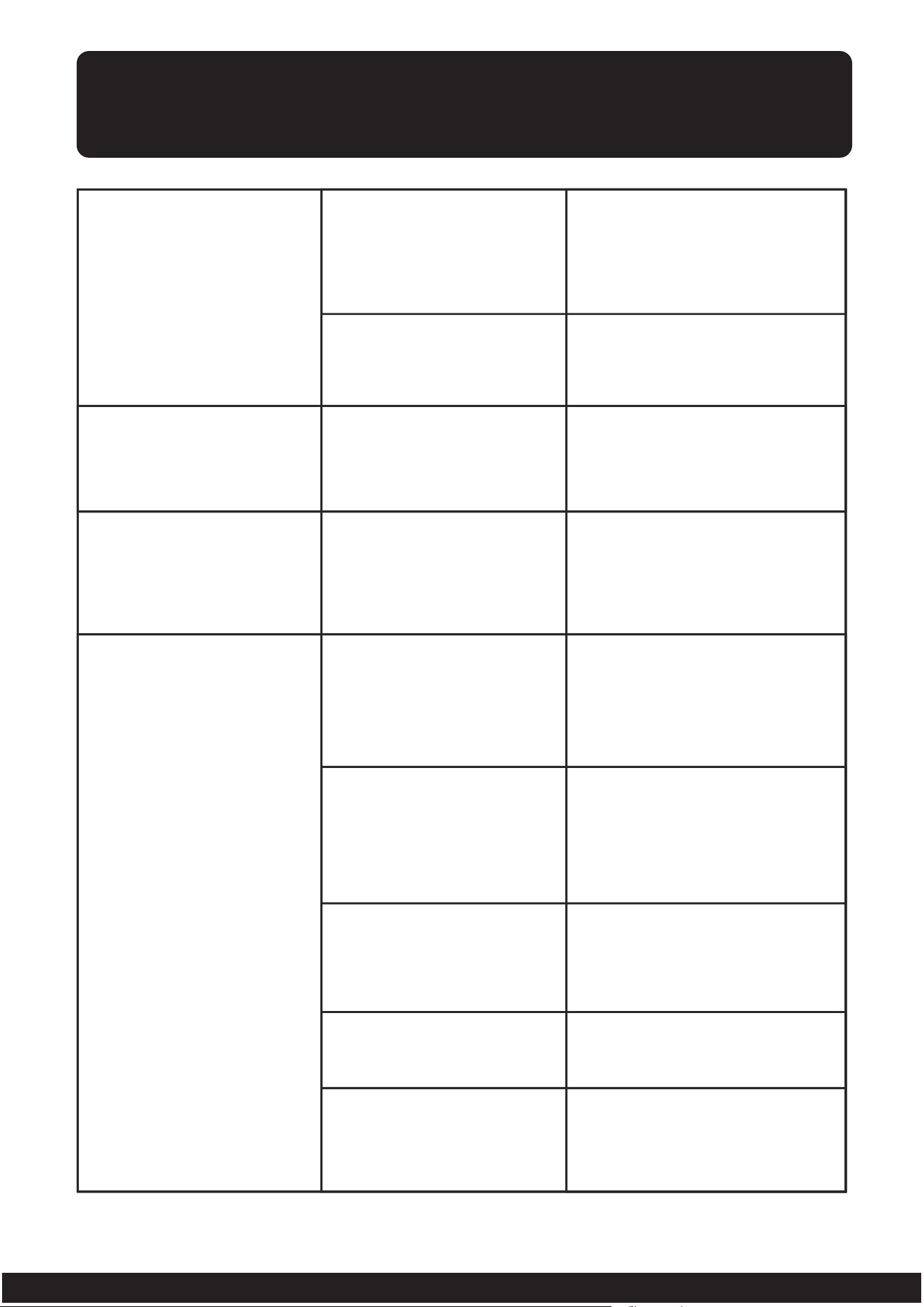
TROUBLESHOOTING
The "ON/OFF"
indicator is not
on after being
plugged in
The fan is not working
Outlet failure
Insert the plug into a
powered outlet
Please contact our
customer service
Power cable fault
The main control
board is in poor contact
Please contact our
customer service
Program error
Please re-plug your
ice maker
The water level is too
low for the water pump
to carry water
successfully
Please add water to
MAX mark
The water pump
is blocked
Please proceed descaling
operation of “Self-Cleaning
Operation” section
The water pump
is broken
Please contact our
customer service
The water sensor
is broken
Please contact our
customer service to
replace it
The "ADD WATER"
indicator is on when
there is water in
the tank
Ice shovel does not
turn over normally
after starting
The micro switch is
broken
Please contact our
customer service
17
Tel: 213-4467172 / 661-4358826
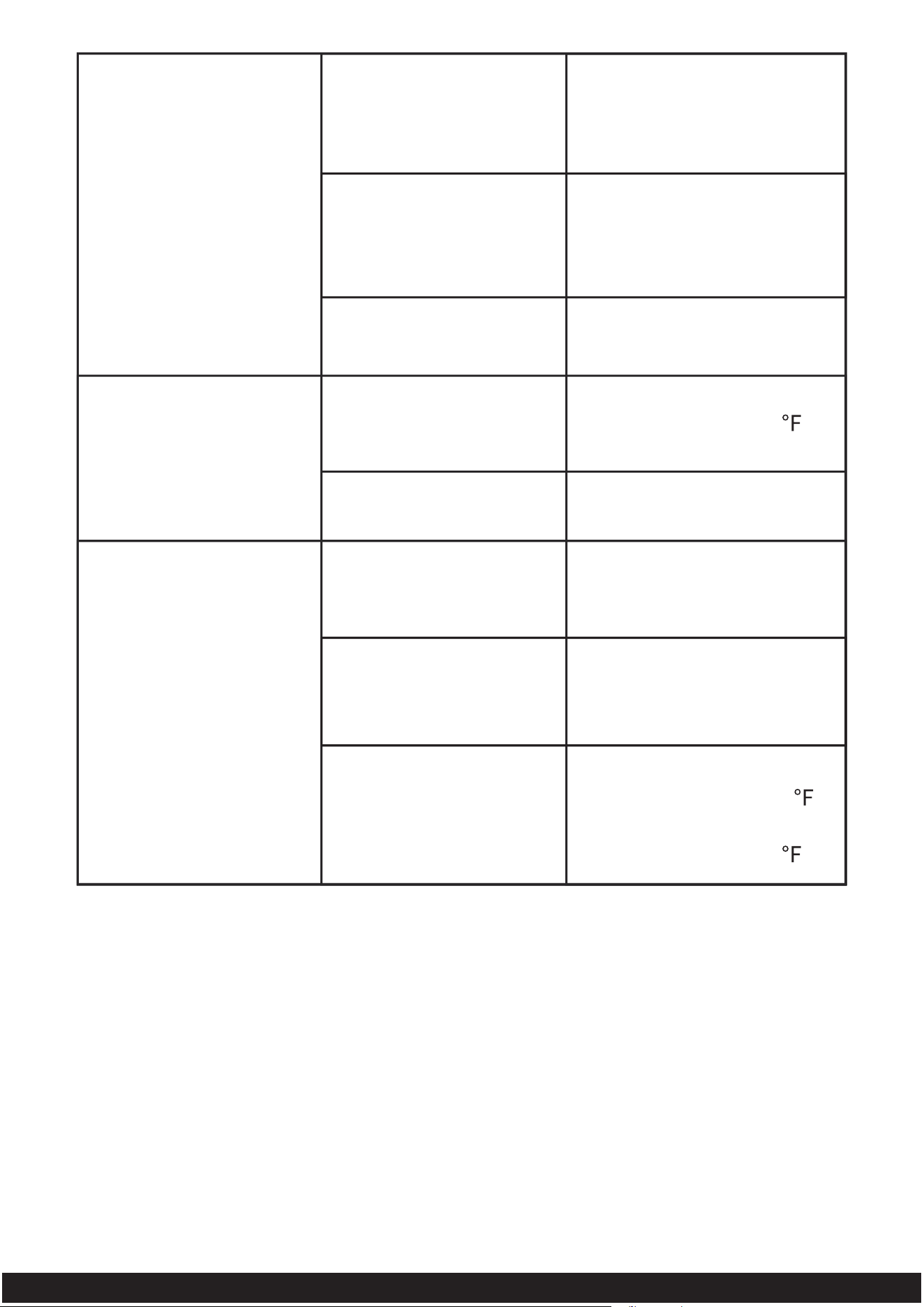
The “ICE FULL”
indicator is on when
there’s no ice in the
basket
The ice sticks together
Program error
Please re-plug your
ice maker
Remove the obstruction
The detection
sensor is blocked
by ice or other matters
The detection sensor
is broken
The water temperature
is too low.
The ice-making cycle
is too long.
Please contact our
customer service
The recommended water
temperature is 40-90 or
change the ice size to "S".
Turn off the unit, and restart
it when the ice blocks melt.
Please contact our
customer service
Refrigerant is leaked
Refrigerant cooling
system is blocked
No ice produced
with normal
ice-making process
The ambient or water
temperature is too high
Please contact our
customer service
The recommended room
temperature is 50-105 .
The recommended water
temperature is 40-90 .
18
Tel: 213-4467172 / 661-4358826
IMPORTANT
Please call our customer service department for any consulting:
213-4467172
661-4358826
(8:30am - 5:30pm P.S.T.)
DATED PROOF OF PURCHASE IS REQUIRED FOR WARRANTY SERVICE.
AVIS
Veuillez appeler le service à la clientèle pour toutes questions au:
213-4467172
661-4358826
(8:30am - 5:30pm P.S.T.)
PREUVE D’ACHAT ORIGINALE REQUISE POUR SERVICE DE GARANTIE.
IMPORTANTE
Sólo hay que llamar nuestro departamento de servicio
al cliente en caso de tener preguntas o inquietudes:
213-4467172
661-4358826
(8:30am - 5:30pm P.S.T.)
SE REQUIERE PRUEBA DE COMPRA CON FECHA PARA SERVICIO BAJO
GARANTÍA.
8:30am-5:30pm P.S.T. Monday to Friday
V1