Model:T6F10
1
2
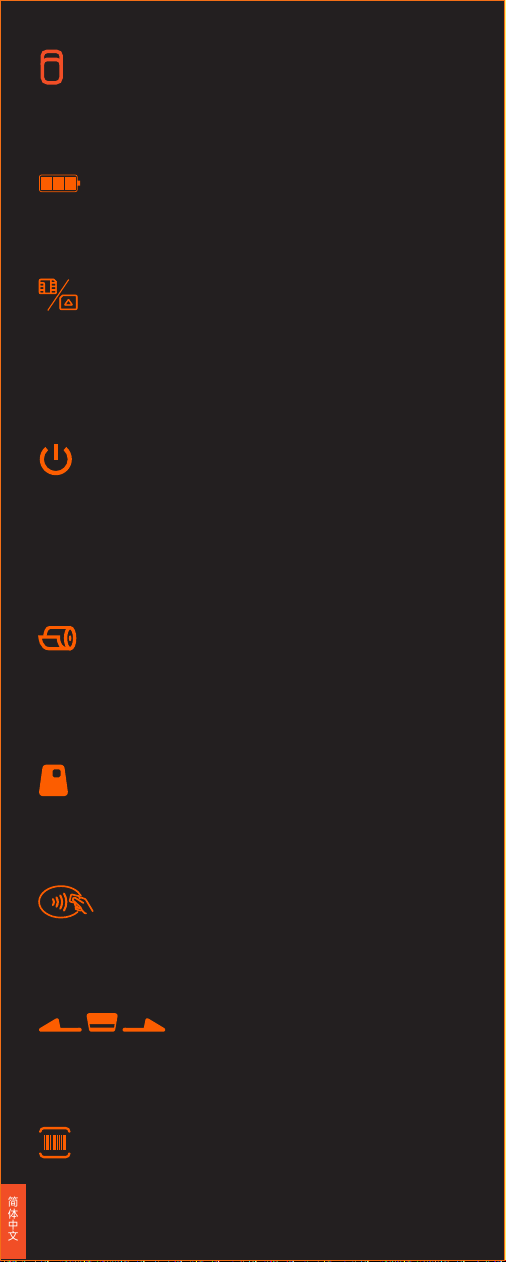
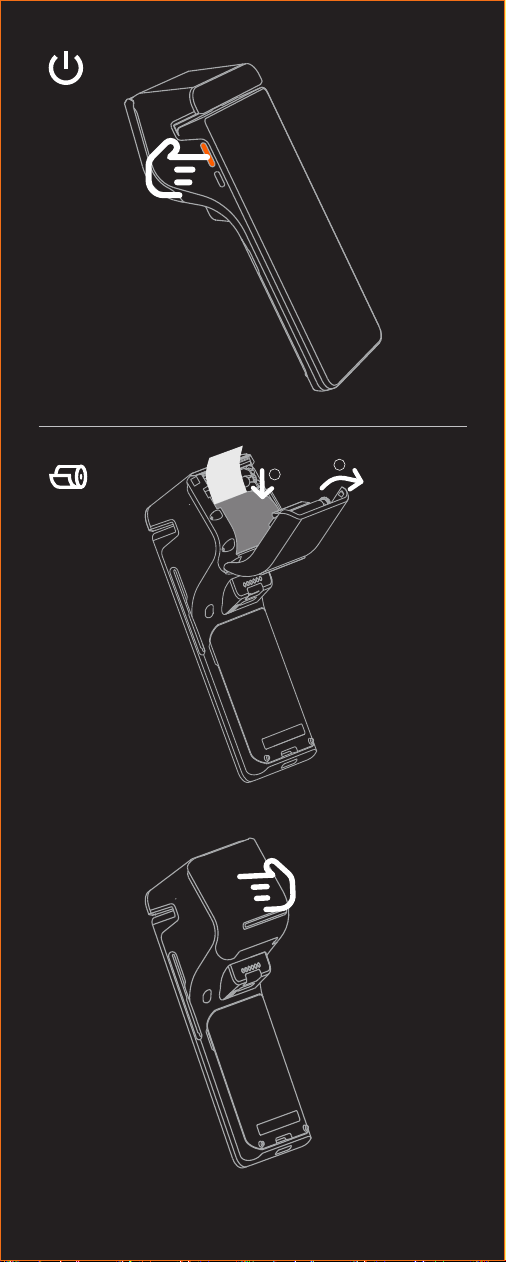
开机/按电源键开机
短按:点亮屏幕,锁定屏幕。
长按:关机状态下,长按 2-3 秒开机;
使用状态下,长按 2-3 秒,可选择关机或重启;
死机状态下,长按 11 秒,自动重启。
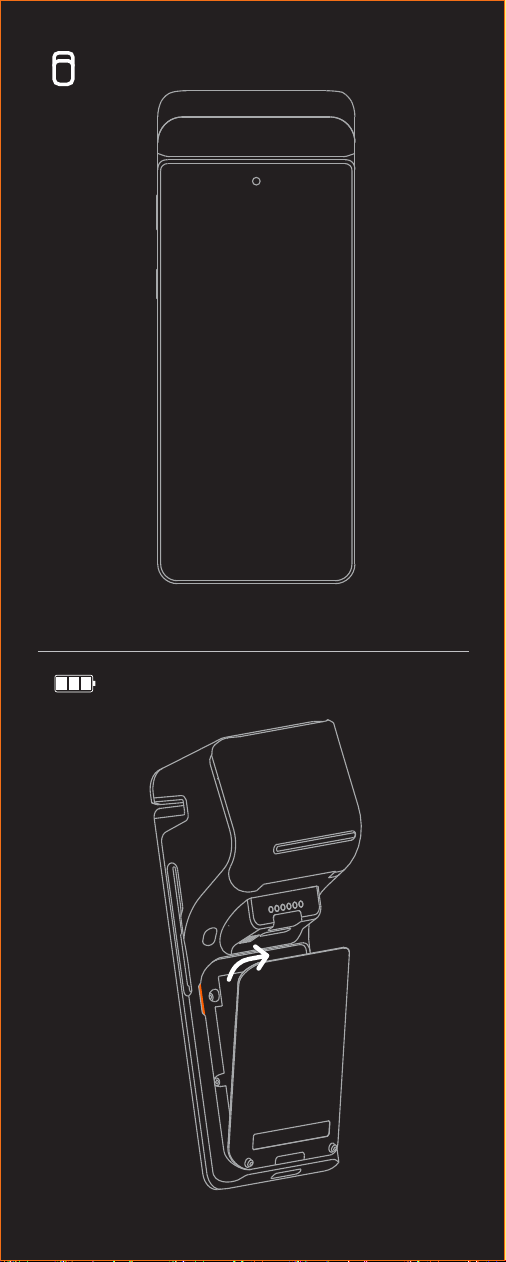
电池
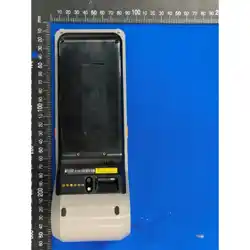
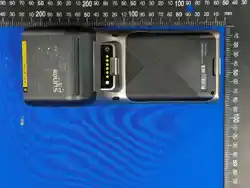
打开后盖,按照箭头指示方向装取电池。
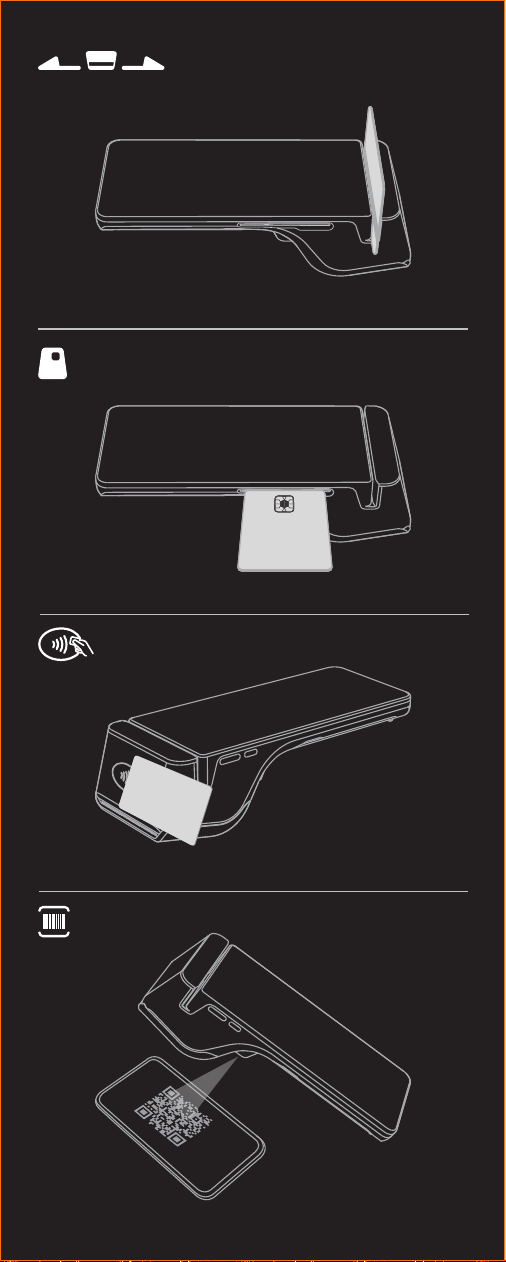
扫码
支持拍照及1D/2D快速扫码
打印机
按照图示方向,打开纸仓盖,将打印纸正确放入纸仓,并拉出部分打印
纸至切刀外,盖好纸仓盖,打印纸安装完成,用于开机状态下打印单据。
NFC读卡器
用于感应闪付卡
IC读卡器
用于插入银行芯片卡。
磁卡读卡器
插卡
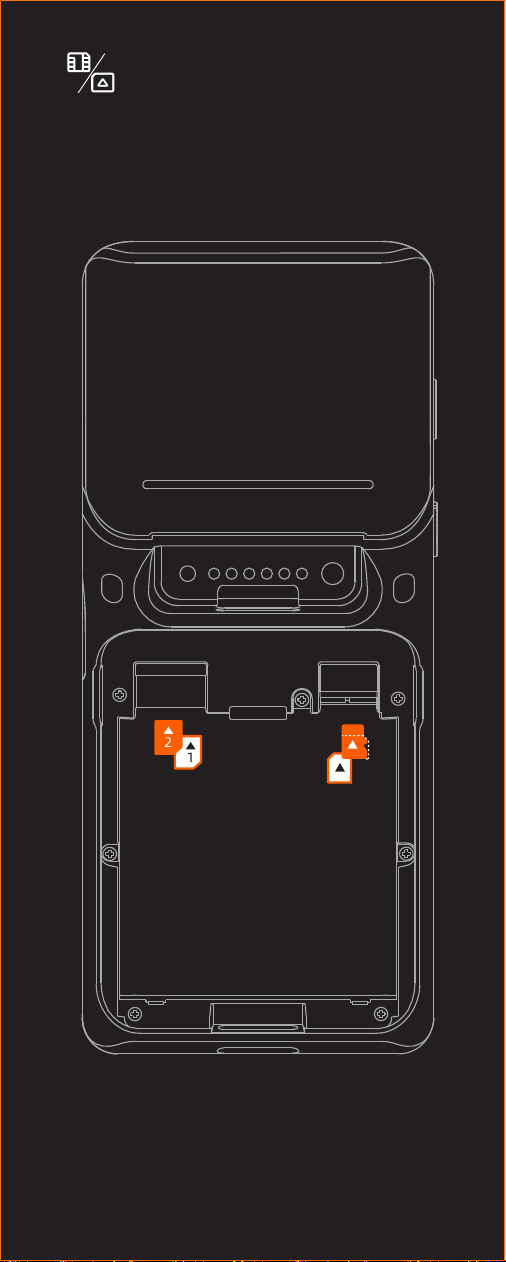
PSAM卡、Micro SD卡、Nano SIM卡
打开电池盖,取出电池,按图示方向插入卡。
(支持:2G/3G/4G)
显示屏
用于显示多媒体功能及价格信息展示等。
简体中文
用于刷银行卡磁条信息。
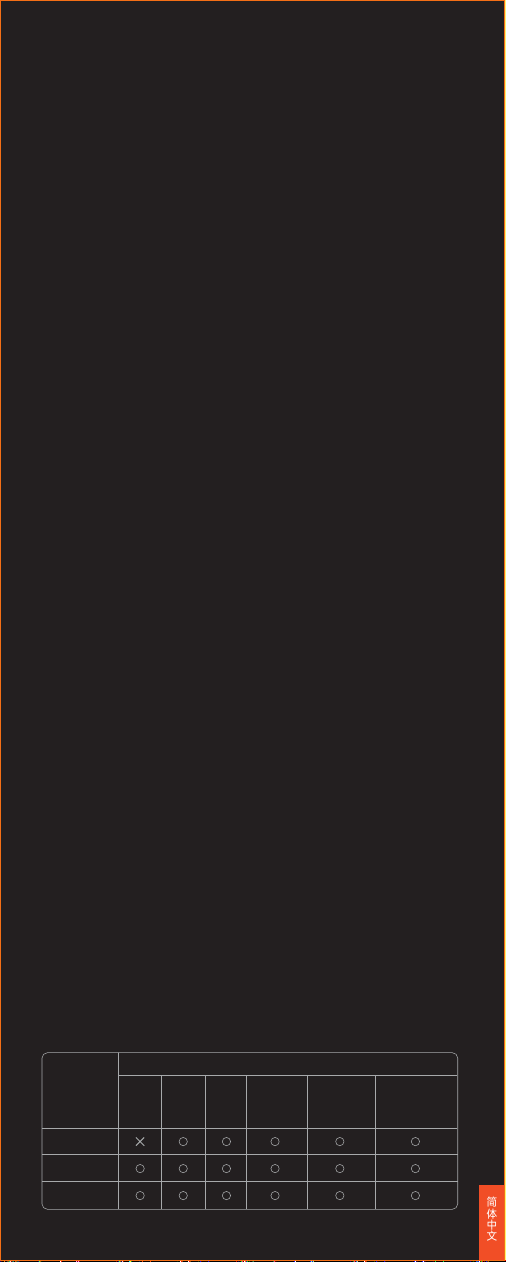
以上软件详细信息查询方法:选择“设置->应用”,选择相应软件名称进
行查看信息;软件卸载方法:选择“设置->应用->管理应用->卸载”卸载
应用;或长按图标,拖曳到垃圾桶卸载。
系统预置软件列表
安全警告
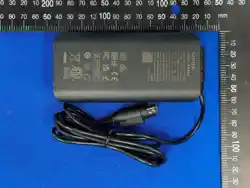
· 请将交流电插头插入与配件电源适配器上标识输入相对应的交流电插
座中;
· 此为A级产品。在生活环境中,该产品可能会造成无线电干扰。
在这种情况下,可能需要用户对于干扰采取切实可行的措施。
· 不能在非安全区域打开设备。
· 请勿在危险场所充电。
· 仅使用原装电池。
· 可能存在爆炸性气体时请勿更换电池。
· 关于电池的更换:
① 用错误型号电池更换会有爆炸危险!
② 更换后的旧电池应交维修人员处置,切勿把它投入火中!
重要安全说明
· 避免在雷电期间安装或使用,否则有被雷电电击的危险;
· 当您发现有异常气味,过热或烟雾情形下,请立刻切断电源;
· 撕纸刀较锋利,请勿触碰!
建议
· 不要在极端冷、热环境中使用,例如靠近火源或点燃的香烟;
· 不要摔、投掷或弯折;
· 尽量在清洁无尘环境中使用,避免细小物品落入终端中;
· 在未获允许的情况下,不要在医疗设备附近使用;
· 仅适用于海拔5000m及以下地区安全使用;
· 如果长期不使用设备,为避免电池过放,建议对设备进行补电,
· 例如如果你打算将设备存放六个月以上,应每隔六个月为设备充至半
声明
本公司不对以下行为负责
· 不在本指南说明的条件下使用和维护所造成的损坏;
· 对于因选件或耗材(非本公司提供之最初产品或认可产品)造成的损坏
或问题;(未经本公司同意,无权进行产品修改或变动)
· 本产品的操作系统支持官方的系统更新,如果用户刷了第三方的ROM
系统或者采用破解方式修改了系统文件,可能会导致系统不稳定,以
及带来安全风险和安全威胁。
免责申明
由于产品的更新,此文档的某些细节可能与产品不符,请以实物为准,
此文档的解释权归本公司。保留不预先通知的情况下,修改本说明书的
权利。
· 应用市场 · 启动器
· 功能键自定义 · baseService · 定制服务
· 使用指南 · 开机向导 · 远程协助 · OTA · 硬件管家
本产品有毒有害物质名称及含量标识表
部件名称
有毒有害物质或元素
铅
(Pb)
汞
(Hg)
镉
(Cd)
六价铬
(Cr(VI))
多溴联苯
(PBB)
多溴二苯醚
(PBDE)
电路板组件
结构件
包装件
简体中文
电状态。
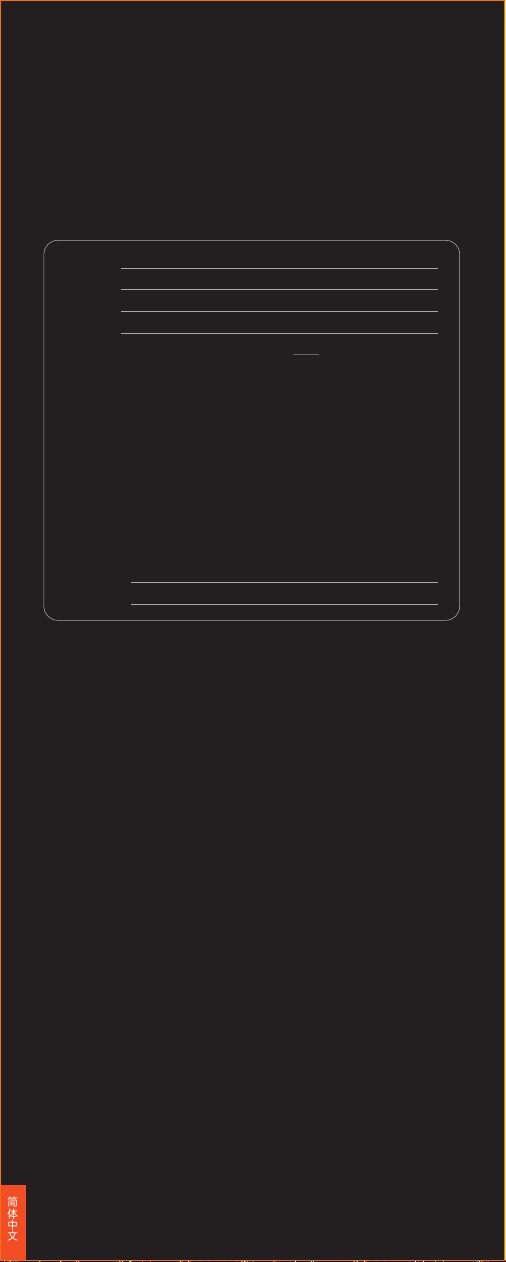
○:表示该有毒有害物质在该部件所有均质材料中的含量均在
SJ/T11363-2006规定的限量要求以下。
X:表示该有毒有害物质至少在该部件的某一均质材料中的含量超出
SJ/T11363-2006规定的限量要求;但是上表中打“×”的部件,其含
量超出是因为目前业界还没有成熟的可替代的技术。
对达到或超出环保使用年限的产品,应依据《电子信息产品控制管理办
法》规定进行回收再利用,不应随意丢弃。
产品保修卡
产品名称:
产品型号:
产品编号:
购买日期:
保修期限:自购买之日起,我公司提供 天保修服务。
以下情况恕不提供免费保修:
· 未经允许擅自拆卸修理的产品。
· 产品条码、易碎贴破损及保修卡涂改、残缺的。
· 未按照说明书的要求操作设备所引起的故障。
· 因进水或跌落而造成的故障、划伤或破损的人为损坏。
· 因不可抗拒因素造成的故障或损坏。
· 保修期限外。
联系方式:
· 公司地址:
· 联系电话:
简体中文
(一) 符合“微功率短距离无线电发射设备目录和技术要求”第一条通用微
功率设备第3款C类设备的规定,内置环形NFC天线 ,1.5A/m≤磁场
强度≤7.5A/m;
(二) 不得擅自改变使用场景或使用条件、扩大发射频率范围、加大发射
功率(包括额外加装射频功率放大器),不得擅自更改发射天线;
(三) 不得对其他合法的无线电台(站)产生有害干扰,也不得提出免受有害
干扰保护;
(四) 应当承受辐射射频能量的工业、科学及医疗(ISM)应用设备的干扰或
其他合法的无线电台(站)干扰;
(五) 如对其他合法的无线电台(站)产生有害干扰时,应立即停止使 用,并
采取措施消除干扰后方可继续使用;
(六) 在航空器内和依据法律法规、国家有关规定、标准划设的射电天文
台、气象雷达站、卫星地球站(含测控、测距、接收、导航站)等军民
用无线电台(站)、机场等的电磁环境保护区域内使用微功率设备,
应当遵守电磁环境保护及相关行业主管部门的规定;
(七) 禁止在以机场跑道中心点为圆心、半径5000米的区域内使用各类模
型遥控器;
(八) 本产品的NFC功能可在常温下工作,由自带的适配器和电池供电。

Used for multimedia functions or price display, etc.
Display
Open the battery cover, install or remove the battery in the direction
indicated by the arrow.
Battery
PSAM card slot, Micro SD card slot, Nano SIM card slot
Open the battery cover to remove the battery, insert the card in the
direction indicated by the arrow.
Card Slots
Open the printer cover and put the paper roll correctly into the printer
in the direction indicated by the arrow. Keep the paper end out of the
printer, and close the cover. The printer is ready for receipt printing
when the device is on.
Printer
Bank cards with chips can be inserted and read through this.
IC Card Reader
NFC cards can be tapped and read through this.
NFC Card Reader
Photo taking and quick 1D/2D code scanning supported.
Scanner
Please insert the AC plug into the AC socket corresponding to the
input marked on the power adapter;
· This is a class A product. In a residential environment, this product
may cause radio interference. In this case, it may be necessary for
the user to take practical measures to address the interference.
· Do not operate the device in non-safe areas.
· Use original batteries only.
· Do not replace the battery when explosive gas may be present..
· Do not charge the device in dangerous places.
· Battery Replacement:
① There is a risk of explosionif the battery is replaced by an incorrect
type!
② The old battery shall be given to the maintenance personnel for di-
sposal. Do not throw it into fire!
Caution
· Please avoid installation or usage during thunderstorms to prevent the
risk of being struck by lightning.
· Please disconnect the power immediately once you find any abnormal
odors, overheating, or smoke.
· Please do not touch the sharp cutter.
Safety Warning
Short Press: turn on the screen or lock the screen;
Long Press: press for 2-3 seconds to boot up the device when it is off.
Press for 2-3 seconds to power off or restart the device when it is on.
Press for 11 seconds to power off the device when it crashes.
Power Button
English
Magnetic Stripe Card Reader
For reading the information through magnetic stripe of bank cards.
Do not use the devcie under extreme cold or hot enrionment, such as
conditions near fire or lit cigarettes;
Do not throw, drop, or bend the device;
· Try to use the device in a clean and dust-free condition to avoid
small items falling into the terminal;
· Do not use the device near medical equipment without permission;
· This device is only suitable for safe use in areas with an altitude of
5000m and below.
· Before storing your device for an extended period,please charge the
battery to the optimal level to prevent deep discharge. For instance,
if you plan to store the device for more than six months, it's reco-
mmended to charge it to 50% of its capacity every six months.
Suggestions
The company is not responsible for the following actions:
· Damage caused by use and maintenance without the conditions
described in this guide;
· The company will not be responsible for any damages or problems
caused by the alternatives or consumables (not the original products
or approved products provided by the company). (Without consent
of the company. It is not authorized to make product modifications
or changes);
· The operating system of this product supports official system upd-
ates. If the user flashes a third-party ROM system or modifies the
system files using cracking methods, it may cause system instability
as well as pose security risks and threats.
Statements
Due to product updates, some details of this document may not match
the product, please refer to the actual product, and the right to inte-
rpret this document belongs to the company. The right to modify this
guide without prior notice is reserved.
Disclaimer
· SUNMI App Store · Launcher
· Function Keys Customization · BaseService · Customization Service
(Wallpaper, Boot Animation)
Pre-installed Software List
INFORMATION ABOUT THE SOFTWARE
The description of accessories and components, including software,
which allow the radio equipment to operate as intended, can be
obtained in the full text of the EU declaration of conformity at the
following internet address:
https://developer.sunmi.com/docs/read/en-US/maaeghjk480.
RESTRICTIONS OF USE
5150-5350MHz only be used by
· Developer Guidance (Testing Assistant) · User Guide · Startup Guide
· Remote Assistance · SUNMI OTA
How to check the above software details: select "Settings-Applications"
and select the corresponding software name to view information.
To uninstall software, select "Settings-Applications-Manage Applications-
Uninstall" or long-press on the icon and drag it to the "Recycle Bin".
RF Exposure Statement (SAR)
EU regulatory conformance
Conformity CE
Hereby, Shanghai Sunmi Technology Co., Ltd. declares that this device
is in compliance with the essential requirements and other relevant
provisions of Radio Equipment Directive 2014/53/EU.The full text of the
EU declaration of conformity is available at the following internet
address: https://developer.sunmi.com/docs/read/en-US/maaeghjk480
indoor.
English
This device has been tested and meets EU, FCC and IC RSS-102
applicable limits for radio frequency (RF) exposure.
For details, please visit: www.sunmi.com.
This device has been tested and meets the FCC/ IC RF exposure li
mit. SAR has been tested with 0mm distance.
Cet appareil a été testé et est conforme aux limites d'exposition aux r
adiofréquences (RF) établies par la FCC et Innovation, Sciences et Dé
veloppement économique Canada (ISED). Le SAR a été évalué avec u
ne distance de séparation de 0 mm.

ISED Canada compliance statements
Technical specifications
CE certification information (SAR)
This device was tested for typical body-worn operations with the back
of the handset kept 5mm away. To maintain compliance with RF expo-
sure requirements, use accessories that maintain a 5mm separation di-
stance between the user's body and the back of the handset. The use
of belt clips, holsters and similar accessories should not contain metallic
components in its assembly. The use of accessories that do not satisfy
these requirements may not comply with RF exposure requirements, and
should be avoided.
If you are using pacemaker, hearing aid, cochlear implant or other device,
please use the phone according to the doctor’s advice.
PRODUCT SAFETY WARNINGS
Use responsibly. Read all instructions and safety information before use
to avoid injury.The limit operating ambient temperature of the equipm-
ent declared by the manufacturer is -10~50°C
Battery safety
Charge battery only at ambient temperatures ranging from 40°C.
(1) CAUTION: Danger of explosion if battery is incorrectly replaced. Re-
place only with the same or equivalent type of battery recommended
by the manufacturer. Dispose of used batteries according to battery
manufacturer’s instructions.
(2) CAUTION: Risk of explosion if battery is replaced by an incorrect ty-
pe . Dispose of used batteries according to the instructions.
(3) CAUTION:Battery charging temperature upper limit is 40°C.
Adapter safety
When charging, please place the device in an environment that has a
normal room temperature and good ventilation. It is recommended to
charge the device in an environment with a temperature that ranges
from 0°C~40°C.
For altitude 2km below use only
Wi-Fi Safety
Turn Wi-Fi off in areas where Wi-Fi use is prohibited or when it may
cause interference or danger, such as in airplanes while flying.
This device complies with ISED Canada licence-exempt RSS standard(s).
Operation is subject to the following two conditions: (1) this device may
not cause interference, and (2) this device must accept any interference,
including interference that may cause undesired operation of the device.
Le présent appareil est conforme aux CNR d'ISDE Canada applicables
aux appareils radio exempts de licence. L'exploitation est autorisée aux
deux conditions suivantes:(1) L’appareil ne doit pas produire de brouill-
age, et (2) L’appareil doit accepter tout brouillage radioélectrique subi,
même si le brouillage est susceptible d’en compromettre le fonctionne-
ment.
the device for operation in the band 5150-5350 MHz is only for indoor
use to reduce the potential for harmful interference to co-channel mo-
bile satellite systems;
Les dispositifs fonctionnant dans la bande 5150-5350 MHz sont réservés
uniquement pour une utilisation à l'intérieur afin de réduire les risques
de brouillage préjudiciable aux systèmes de satellites mobiles utilisant
les mêmes canaux.
FCC compliance statement
This device complies with Part 15 of the FCC Rules. Operation is subject
to the following two conditions: (1) this device may not cause harmful
interference, and (2) this device must accept any interference received,
including interference that may cause undesired operation.
Note: This equipment has been tested and found to comply with the li-
mits for a Class B digital device, pursuant to part 15 of the FCC Rules.
These limits are designed to provide reasonable protection against har-
English
mful interference in a residential installation.This equipment generates,
uses and can radiate radio frequency energy and, if not installed and
used in accordance with the instructions, may cause harmful interfere-
nce to radio communications. However, there is no guarantee that int-
erference will not occur in a particular installation. If this equipment do-
es cause harmful interference to radio or television reception, which can
be determined by turning the equipment off and on, the user is encou-
raged to try to correct the interference by one or more of the following
measures:
—Reorient or relocate the receiving antenna.
—Increase the separation between the equipment and receiver.
—Connect the equipment into an outlet on a circuit different from that
to which the receiver is connected.
—Consult the dealer or an experienced radio/TV technician for help.
Caution: The user is cautioned that changes or modifications not expr-
essly approved by the party responsible for compliance could void the
user's authority to operate the equipment.
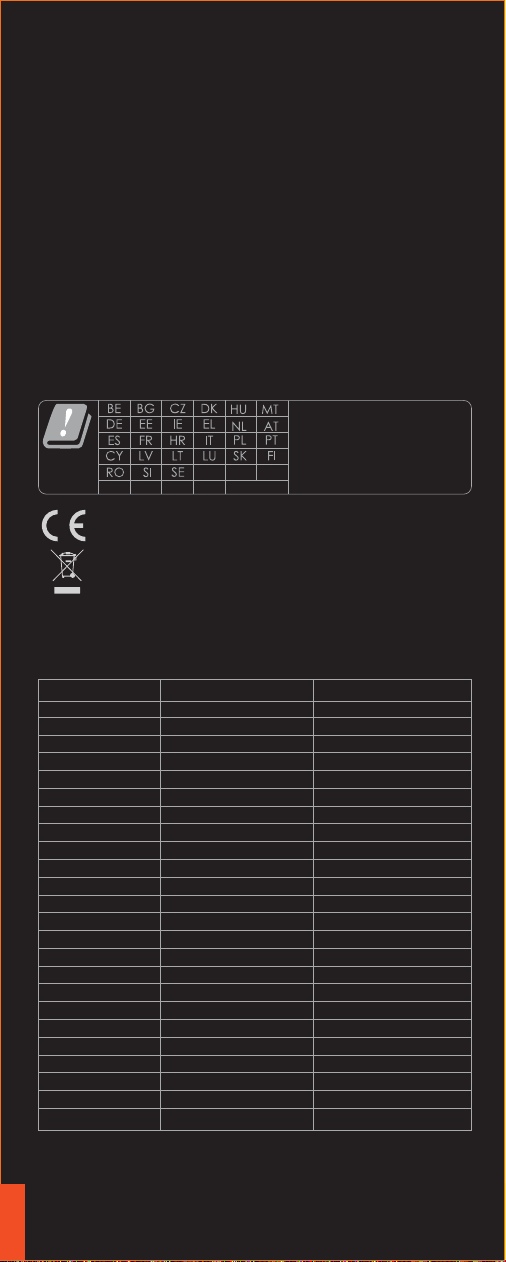
This symbol means that it is forbidden to dispose the
product of with normal household waste. At the end of
the product life cycle, waste equipment should be taken
to designated collection points, returned to the
distributor when purchasing a new product, or contact
your local authority representative for detailed
information on WEEE recycling.
EU Representative :SUNMI France SAS
190 Avenue Thiers,69006 Lyon,France
Declaration of Conformity
English
UK(NI)
UK
IS
LI NO CH TR
Note:In all EU and UK member
states,operation of 5150-5350
MHz restricted to indoor use
only.
Manufacturer: Shanghai Sunmi Technology Co., Ltd.
Address:Room 505,No.388,Song Hu Road,Yang Pu District,Shanghai,
China
Mode/Band Operafion Frequency Power(dBm)
GSM900 880-915 MHz 33.50
DCS1800 1710-1785 MHz 30.00
WCDMA Band 1 1920-1980 MHz 23.50
WCDMA Band 5 824-849 MHz 24.00
WCDMA Band 8 880-915 MHz 24.00
LTE Band 1 1920-1980 MHz 23.00
LTE Band 3 1710-1785 MHz 23.00
LTE Band 5 824-849 MHz 23.50
LTE Band 7 2500-2570 MHz 24.00
LTE Band 8 880-915 MHz 23.00
LTE Band 20 832-862 MHz 23.00
LTE Band 28 703-803 MHz 23.00
LTE Band 34 2010-2025 MHz 23.00
LTE Band 38 2570-2620 MHz 23.50
LTE Band 40 2300-2400 MHz 23.50
LTE Band 41 2496-2690 MHz 23.50
BT 2402-2480MHz 11.59
BLE 2402-2480MHz -0.07
2.4G Wifi 2412-2472MHz 17.70
5.2G Wifi 5150-5250MHz 17.58
5.3G Wifi 5250-5350MHz 16.78
5.5G Wifi 5470-5725MHz 17.02
5.8G WiFi 5725-5850MHz 13.59
NFC 13.56 MHz 26.408 dBμA/m @3M

Verwendung für beispielsweise multimediale Funktionen oder die
Anzeige von Preisen.
Display
Öffnen Sie die Akkufachabdeckung und nehmen Sie den Akku heraus
oder legen Sie ihn wie durch die Pfeile angegeben ein.
Akku
PSAM-, microSD- und Nano-SIM-Kartenschacht
Öffnen Sie die Akkufachabdeckung und entfernen Sie den Akku.
Setzen Sie anschließend die Karte wie durch die Pfeile angegeben ein.
Kartenschacht
Öffnen Sie die Druckerabdeckung und setzen Sie die Papierrolle ordn-
ungsgemäß wie durch die Pfeile angegeben im Drucker ein. Führen
Sie das Papierende aus dem Drucker heraus und schließen Sie dann
die Druckerabdeckung wieder. Wenn das Gerät eingeschaltet ist, ist
der Drucker einsatzbereit.
Drucker
Zum Lesen von Chip-Bankkarten.
IC-Kartenleser
Zum Lesen von NFC-Karten.
NFC-Kartenleser
Unterstützt die Übernahme von Fotos und das Scannen von 1D/2D-
Codes.
Scanner
Allgemeine Sicherheitshinweise
Kurzes Drücken: Einschalten oder Sperren des Bildschirms;
Lang drücken: 2 bis 3 Sekunden lang drücken, um das ausgeschaltete
Gerät zu booten.
2 bis 3 Sekunden lang drücken, um das eingeschaltete Gerät auszusc-
halten oder neu zu starten.
11 Sekunden lang drücken, um das Gerät auszuschalten, wenn es hängt.
Ein/Aus-Taste
Bitte stecken Sie den Netzstecker in eine Netzsteckdose, die die ent-
sprechenden auf dem Netzadapter angegebenen Eingangsspezifikati-
onen bereitstellt;
· Dieses Produkt ist ein Produkt der Klasse A. In Wohnumgebungen
kann dieses Produkt Funkstörungen verursachen. In diesem Fall kann
es notwendig werden, dass der Benutzer Gegenmaßnahmen ergreift,
um diesen Störungen entgegenzuwirken.
· Betreiben Sie dieses Gerät nicht in unsicheren Bereichen.
· Verwenden Sie nur die Originalakkus.
· Wechseln Sie den Akku bei möglicher Anwesenheit von explosiven
Gasen nicht.
· Laden Sie das Gerät nicht in gefährlichen Bereichen.
· Akkuersetzung:
① Es besteht Explosionsgefahr, wenn der Akku durch einen nicht
äquivalenten Akkutyp ersetzt wird!
② Der Altakku ist zur Entsorgung beim Wartungspersonal abzugeben.
Werfen Sie ihn nicht ins Feuer!
Deutsch
Wird zum Durchziehen der Magnetstreifeninformationen einer Ban-
kkarte verwendet.
Magnetkartenleser

Verwenden Sie das Gerät nicht in extrem kalten oder heißen Umgeb-
ungen, wie z. B. neben Feuer oder glühenden Zigaretten;
Werfen, knicken und lassen Sie das Gerät nicht fallen;
· Verwenden Sie das Gerät in einer nach Möglichkeit sauberen und
staubfreien Umgebung, um einem Eindringen kleiner Partikel in das
Terminal vorzubeugen;
· Verwenden Sie das Gerät nicht ohne vorherige Erlaubnis in der Nähe
medizintechnischer Geräte;
· Der sichere Betrieb des Geräts ist nur in Umgebungen mit einer
Höhenlage bis max. 5000 m gewährleistet.
Das Unternehmen übernimmt keine Haftung und Verantwortung bei:
Beschädigungen aufgrund von Verwendung und Wartung, die nicht
wie in diesem Handbuch beschrieben aus- bzw. durchgeführt wurde.
- Das Unternehmen haftet nicht für Schäden oder Probleme aufgrund
der Verwendung von alternativen Ersatz- oder Verbrauchsmaterialien
(weder Originalteile oder vom Unternehmen zugelassene Teile). (Oh-
ne Genehmigung des Unternehmens ist es untersagt, Änderungen
oder Modifikationen am Produkt durchzuführen);
· Das Betriebssystem dieses Produkts unterstützt die Durchführung
von offiziellen Systemaktualisierungen. Wenn der Benutzer das Sy-
stem mit einem Drittanbieter-ROM-System flasht oder die System-
dateien mithilfe von Cracking-Methoden modifiziert, können Syste-
minstabilitäten sowie Sicherheitsrisiken und Sicherheitsbedrohungen
die Folge sein.
Durch die permanente Weiterentwicklung des Produkts können Teile
dieser Dokumentation nicht mit dem Produkt übereinstimmen. Bitte
beziehen Sie sich immer auf das Ihnen vorliegende Produkt. Das Recht
der Auslegung dieses Dokuments liegt beim Unternehmen. Wir behalten
uns das Recht vor, dieses Benutzerhandbuch stillschweigend zu ändern.
Hinweise zur Betriebsumgebung
Erklärungen
Haftungsausschluss
Liste der vorinstallierten Software
Achtung
· Bitte vermeiden Sie sowohl die Installation als auch die Verwendung
dieses Produkts während Gewitterstürmen, um dem Risiko eines durch
Blitzschlag hervorgerufenen Stromschlags vorzubeugen.
· Bei ungewöhnlichen Gerüchen, Überhitzung oder Rauchentwicklung
trennen Sie das Gerät unverzüglich vom Stromnetz.
· Bitte berühren Sie nicht das scharfe Abrissmesser.
· SUNMI App Store – Starter
· Funktionstastenanpassung · Grundservices · Individualisierte Services
(Hintergrundbild, Boot-Animation)
· Entwicklerhandbuch (Prüfassistent) · Benutzerhandbuch · Erste Schritte
· Remote-Unterstützung – SUNMI OTA
So überprüfen Sie die oben genannten Software-Details: Wählen Sie „
Anwendungseinstellungen“ und anschließend den entsprechenden Soft-
warenamen aus, für den Sie die Informationen anzeigen lassen möchten.
Um Software zu deinstallieren, wählen Sie „Anwendungseinstellungen“ -> „
Anwendungsverwaltung“ -> „Deinstallieren“ aus oder drücken lang auf
das Symbol und ziehen es dann in den „Papierkorb“.
Deutsch
Hersteller:Shanghai Sunmi Technology Co., Ltd.
Room 505, No.388 Songhu Road, Yangpu District, Shanghai, China
Shanghai Sunmi Technology Co., Ltd.
Room 505,
No.388 Songhu Road, Yangpu District, Shanghai, China

Utilizada para funciones multimedia , para mostrar precios, etc.
Pantalla
Abra la tapa de la batería, coloque o retire la batería en la dirección
indicada por la flecha.
Batería
Ranura para tarjeta PSAM, ranura para tarjeta Micro SD, ranura para
tarjeta Nano SIM
Abra la tapa de la batería, retírela e inserte la tarjeta en la dirección
indicada por la flecha.
Ranura para tarjeta
Pulsación corta: enciende o bloquea la pantalla;
Pulsación larga: mantenga pulsado durante 2 - 3 segundos para arr-
ancar el dispositivo cuando esté apagado.
Mantenga pulsado durante 2 - 3 segundos para apagar o reiniciar el
dispositivo cuando esté encendido.
Manténgalo pulsado durante 11 segundos para apagar el dispositivo
cuando se bloquee.
Botón de alimentación
Abra la tapa de la impresora y coloque el rollo de papel correctame-
nte en su interior, en la dirección indicada por la flecha. Mantenga
el extremo del papel fuera de la impresora y cierre la tapa. La impr-
esora está lista para la impresión de recibos cuando el dispositivo
esté encendido.
Impresora
En él pueden insertarse y leerse tarjetas bancarias.
Lector de tarjetas IC
Con él se pueden acercar y leer tarjetas NFC.
Lector de tarjetas NFC
Admite la toma de fotografías y el escaneo rápido 1D/2D.
Escáner
Introduzca el conector de CA en el enchufe de CA correspondiente a
la entrada marcada en el adaptador de alimentación.
· Este es un producto de clase A. Dentro de un entorno residencial,
este producto puede causar interferencias de radio. En este caso,
podría ser necesario que el usuario tome medidas prácticas para
solucionar la interferencia.
· No ponga en funcionamiento el dispositivo en áreas no seguras.
· Utilice solo las baterías originales.
· No sustituya la batería cuando pueda haber gas explosivo presente.
· No cargue el dispositivo en lugares peligrosos.
· Sustitución de la batería:
① ¡Existe riesgo de explosión si la batería es sustituida por otra de un
tipo incorrecto!
② La batería sustituida debe entregarse al personal de mantenimiento
para que la desecha correctamente. ¡No la lance al fuego!
Precaución
· Evite la instalación o el uso durante tormentas eléctricas para evitar
el riesgo de ser alcanzado por un rayo.
Advertencia de seguridad
Español
Se utiliza para deslizar la información de la banda magnética de la
tarjeta bancaria.
Lector de tarjetas magnéticas

No utilice el dispositivo en entornos excesivamente fríos o calientes,
como cerca de fuegos o cigarrillos encendidos;
No tire, deje caer ni doble el dispositivo;
· Intente usar el dispositivo en condiciones limpias y sin polvo para
evitar que se introduzcan pequeñas partículas en el terminal;
· No utilice el dispositivo cerca de equipo médico sin autorización
previa;
· Este dispositivo solo es adecuado para su uso en áreas a una altit-
ud de 5000 o menos.
Recomendaciones
La empresa no se hace responsable de las siguientes acciones:
· Los daños causados por el uso o mantenimiento sin seguir las con-
diciones descritas en esta guía;
· La empresa no se hará responsable de ningún daño o problema ca-
usado por alternativas o consumibles (que no sean los productos
originales proporcionados por la empresa). (Sin la autorización de
la empresa. No está permitido realizar modificaciones o cambios en
el producto);
· El sistema operativo de este producto admite actualizaciones ofici-
ales del sistema. Si el usuario flashea un sistema ROM de un terce-
ro o modifica los archivos del sistema utilizando métodos de crack-
eo, puede ocasionar la inestabilidad del sistema y plantear riesgos
y amenazas a la seguridad.
Declaraciones
Debido a las actualizaciones del producto, algunos detalles de este
documento pueden no coincidir con el producto, tome como refere-
ncia el producto real, la empresa se reserva el derecho a interpretar
este documento. Se reserva el derecho a modificar esta guía sin pre-
vio aviso.
Aviso legal
· SUNMI App Store · Iniciador
· Personalización de botones de función · Servicio Base· Servicio de
personalización (Fondo de pantalla, Animación de encendido)
· Guía para el desarrollador (Asistente de comprobación) · Guía del
usuario · Guía de inicio · Asistencia remota · SUNMI OTA
Para comprobar los detalles del software anterior: seleccione «Ajust-
es-Aplicaciones» y seleccione el software correspondiente para ver la
información.
Para desinstalar el software, seleccione «Ajustes-Aplicaciones-Admi-
nistrar aplicaciones-Desinstalar» o mantenga pulsado el icono y arrá-
strela a la «Papelera de reciclaje».
Lista de software preinstalado
· Desconecte inmediatamente la alimentación si nota olores, sobrec-
alentamiento o humo anormales.
· No toque el cortador afilado.
Español
Fabricante :Shanghai Sunmi Technology Co., Ltd.
Room 505, No.388 Songhu Road, Yangpu District, Shanghai, China

マルチメディアコンテンツおよび価格情報の表示に使用します。
ディスプレイ
バッテリーカバーを開けて、矢印の指示方向にバッテリーを取り出します。
バッテリー
PSAMカード、Micro SDカード、Nano SIMカード
バッテリーカバーを開けて、バッテリーを取り出した後、図の示すよう
にカードを挿入します。(2G/3G/4Gに対応)。
カード挿入
短押し:画面を点灯してロックします。
長押し:電源オフ時、2~3秒長押しすると、電源がオンになります。
使用中に2~3秒長押しすると、電源がオフになる、または再起動します。
クラッシュ状態で11秒長押しすると、自動的に再起動します。
電源オン/電源ボタンを押して起動します
電源オン時に帳票を印刷できるように、図示の方向に従って印刷用紙ホ
ッパーの蓋を開け、印刷用紙を正しくセットしてください。また、切断
刃の外に印刷用紙を一部引き出し、印刷用紙ホッパーの蓋を閉めると、
印刷用紙の取り付けが完了します。
プリンター
ICチップキャッシュカードを挿入します。
IC カードリーダー
QuickPassカードの読み取りに使用します。
NFC カードリーダー
写真や1D/2Dのクイックスキャンに対応します。
スキャン
· AC電源プラグは、アクセサリの電源アダプタに記載されている入力に
対応するAC電源ソケットに挿入してください。
· 本製品はAクラス製品です。生活環境において、この製品は電波干渉を
引き起こす可能性があります。
このような場合には、ユーザーが電波干渉に対して実行可能な措置をと
る必要があります。
· 安全でない場所では、電源を入れないでください。
· 純正のバッテリーしか対応しません。
爆発性ガスが存在する場合は、バッテリーを交換しないでください。
危険な場所で充電しないでください。
· バッテリー交換について:
① 誤った型番のバッテリーに交換すると、爆発の恐れがあります。
② 交換後の古いバッテリーはメンテナンススタッフに渡して処理してく
ださい。絶対に火の中に入れないでください。
安全上のご注意
· 落雷の恐れがあるので、雷の発生する場合の設置や使用は避けてくだ
さい。
· 異常な臭い、過熱、または煙が発生した場合は、すぐに電源を切って
ください。
· カッターは非常に鋭利ですので、触れないように注意してください。
安全上の警告
銀行カードの磁気ストライプ情報を読み取るために使用されます。
磁気カードリーダー
日本語

着火源や火のついたタバコの近くなど、極端に高温または低温の環境で
は使用しないでください。
· 落としたり、投げたり、曲げたりしないでください。
· 端末内に小物が落下しないように、できるだけ清潔でほこりのない環
境で使用してくださ。
· 許可なく医療機器の近くで使用しないでください。
· 標高5000m以下でのみ安全にご使用ください。
推奨事項
当社は以下の責任を負いません。
· 本書の記載条件に違反したご使用・保守のために生じた損害。
· オプション品や消耗品(当社が最初に提供した純正品または認定品以
外)に起因する損害と不具合。(当社の許可なしに製品の改造や変更
をしてはなりません)
· 本製品のオペレーティングシステムは、正式なシステムアップデート
をサポートしています。ユーザーがサードパーティのROMシステムを
ブラッシングしたり、クラッキングによってシステムファイルを変更
したりする場合、システムが不安定になってしまい、セキュリティリ
スクやセキュリティ上の脅威を招く恐れがあります。
声明
製品の更新により、この文書の一部の詳細が製品と合致しない場合は、
実物に準じます,
本書の解釈権は、当社に帰属します。当社は予告なく、本説明書を変更
する権利を留保します。
免責声明
· APP Store · ランチャー
· ファンクションキーカスタマイズ · ベースサービス · カスタマイズサ
ービス(ウォールペーパー、起動アニメ)
· 開発者ガイド(デバッグアシスタント) · ユーザガイド · スタートア
ップガイド · リモートアシスタンス · OTA
上記ソフトウェアの詳細の確認方法:「設定→アプリ」を選択し」、ソ
フトウェア名を選択して情報を確認できます。
ソフトウェアのアンインストール方法:「設定->アプリ->アプリの管理
->アンインストール」を選択し、アプリをアンインストールできます。
または、アイコンを長押しし、ゴミ箱にドラッグしてアンインストール
することもできます。
システムプリセットソフトウェアリスト
メーカー :Shanghai Sunmi Technology Co., Ltd.
Room 505, No.388 Songhu Road, Yangpu District, Shanghai, China
日本語

用於顯示多媒體功能及價格資訊呈現等。
顯示螢幕
打開後蓋,按照箭頭指示方向裝取電池。
電池
PSAM 卡、Micro SD 卡、Nano SIM 卡
打開電池蓋,取出電池,按圖示方向插卡。
(支援:2G/3G/4G)
插卡
短按:螢幕亮起,鎖定螢幕。
長按:關機狀態下,長按 2-3 秒開機;
使用狀態下,長按 2-3 秒可選擇關機或重新啟動
當機狀態下,長按 11 秒,自動重啟。
開機/ 按電源鍵開機
按照圖示方向,打開紙倉蓋,將列印紙正確放入紙倉,並拉出部分列印紙至
切刀外,蓋好紙倉蓋,列印紙安裝完成,用於開機狀態下列印單據。
印表機
用於插入銀行晶片卡。
IC 讀卡器
用於感應閃付卡。
NFC 讀卡器
支援拍照及 1D/2D 快速掃碼。
掃碼
請將交流電插頭插入與配件電源轉接器上標識輸入相對應的交流電插座中;
此為 A 級產品。在生活環境中,該產品可能會造成無線電干擾。
在這種情況下,可能需要使用者對於干擾採取切實可行的措施。
· 不能在非安全區域開啟裝置。
· 僅適用原裝電池。
可能存在爆炸性氣體時,請勿更換電池。
請勿在危險場所充電。
關於電池更換:
① 用錯誤型號電池更換會有爆炸危險!
② 更換後的舊電池應交由維修人員處置,切勿隨意焚燒!
重要安全說明
避免在雷電期間安裝或使用,否則有被雷電電擊的危險;
當您發現異常氣味、過熱或煙霧時,請立刻切斷電源;
撕紙刀較鋒利,請勿觸碰!
安全警告
請勿在極端冷、熱環境中使用,例如靠近火源或點燃的香菸;
請勿摔、投擲或彎折;
盡量在清潔無塵環境中使用,避免細小物品落入終端機中;
若未經允許,請勿在醫療裝置附近使用;
僅適用於海拔5000公尺以下地區安全使用。
建議
繁體中文
用于刷銀行卡磁條信息。
磁卡讀卡器

對於以下行為,本公司概不負責
·未在本指南說明的條件下使用和維護所造成的損壞;
·對於因選件或耗材(非本公司提供之最初產品或認可產品)造成的損壞或
問題;(未經本公司同意,無權進行產品修改或變動)
·本產品的作業系統支援官方的系統更新,如果使用者使用第三方的 ROM
系統或者採用破解方式修改系統檔案,可能會導致系統不穩定,並且引起
安全風險和安全威脅。
聲明
由於產品的更新,本文件的某些細節可能與產品不符,請以實物為準,
本文件的解釋權歸本公司。保留不預先通知的情況下,修改本說明書的權
利。
免責申明
· 應用程式市場 ·啟動器
· 功能鍵自訂 · BaseService · 客製化服務(桌面、開機動畫)
· 開發人員指南(除錯小幫手) · 使用指南 · 開機指導 · 遠端協助 · OTA
以上軟體詳細資訊查詢方法:選擇「設定 -> 應用程式」,選擇相應軟體名
稱以檢視資訊;
軟體解除安裝方法:選擇「設定 -> 應用程式 -> 管理應用程式 -> 解除安
裝」解除安裝應用程式;或長按圖示,拖曳到垃圾桶以解除安裝。
系統預設軟體清單
製造商:上海商米科技集團有限公司
地址:上海市楊浦區淞滬路 388 號 505 室
繁體中文

繁體中文
Shenzhen Tianyin Electronics Co., Ltd.
TPA-830A050200BU01
TPA-830A050200VU01
Shenzhen Lokyung Times Technology Co., Ltd.
TC513U-050200
TC513E-050200
TC513B-050200
batteries in hand-held equipment, direct plug-in equipment and
transportableequipment that are replaceable by an ordinary person
shall be inherently protected toavoid creating a class 2 energy source
or a class 3 energy source; andfor batteries that are replaceable by
an ordinary person, reverse polarity installation shalbe prevented if
this could create a class 2 or class 3 energy source (see also B.3.6).

Scan to know more
扫码了解更 多
上海商米科技集团股份有限公司
地 址:上海市杨浦区淞沪路388号505室
网 址:www.sunmi.com 服务热线:400-6666-509
已检验合格
产品合格证