地贝清洁 时尚便捷
ContentContent
Safety InstructionsSafety Instructions
Product ComponentsProduct Components
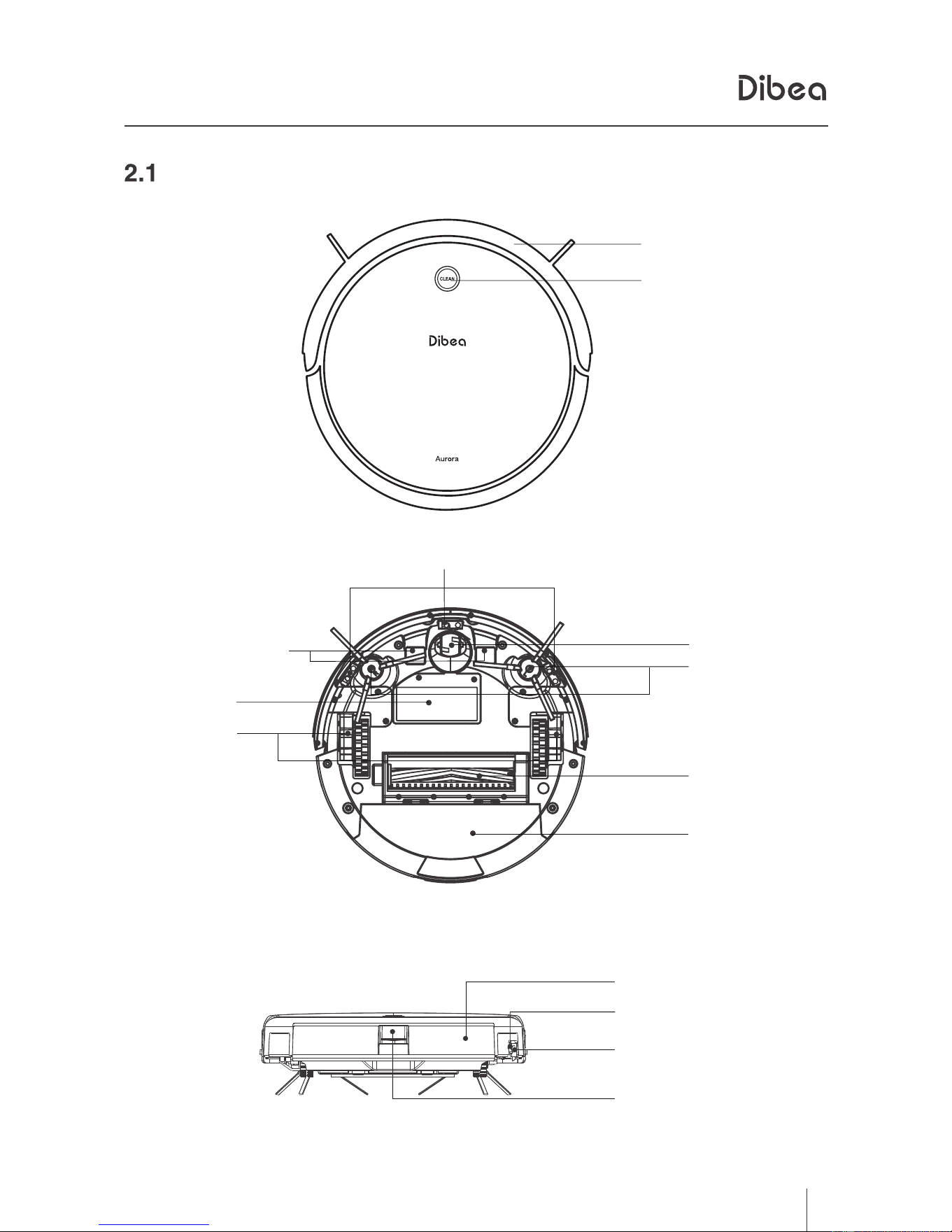
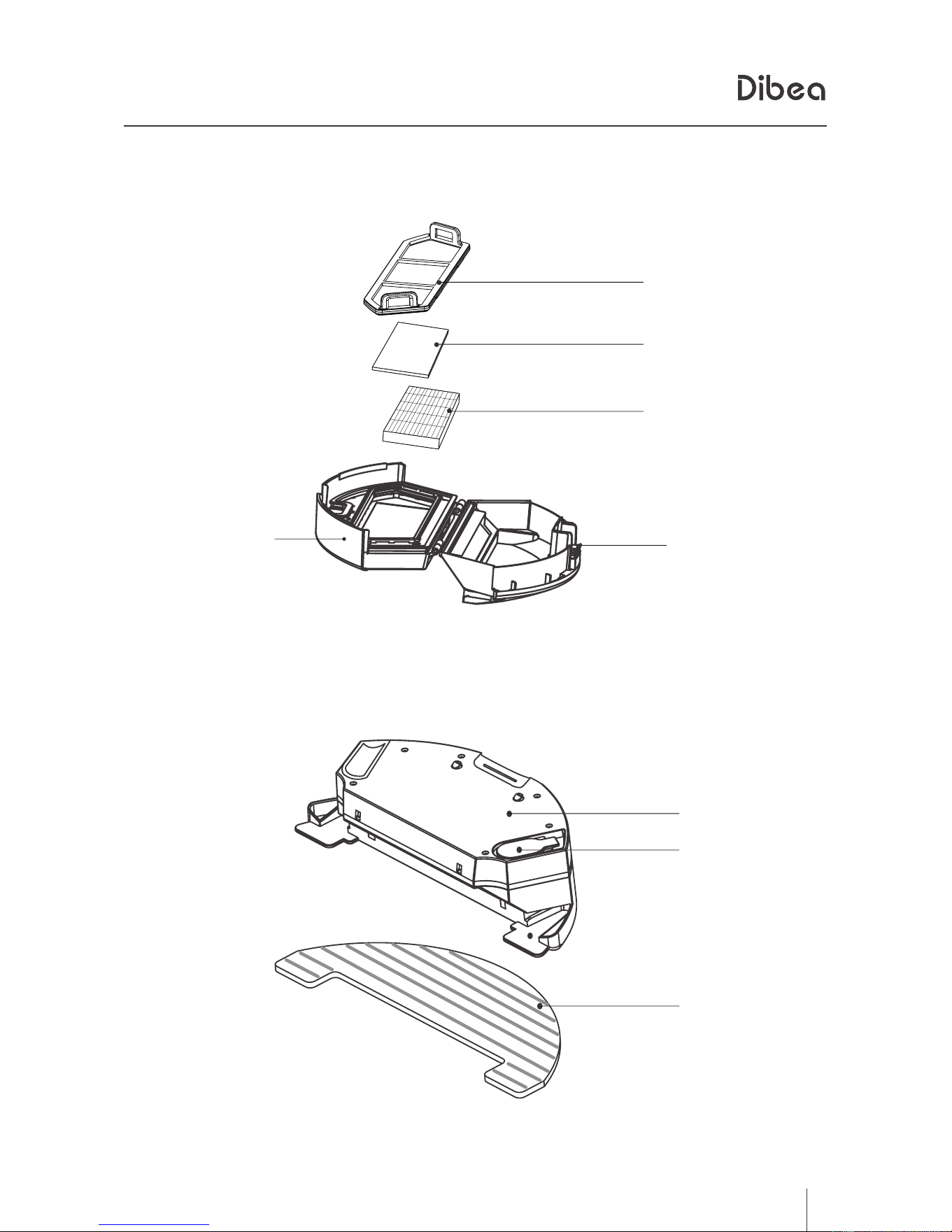
Main body
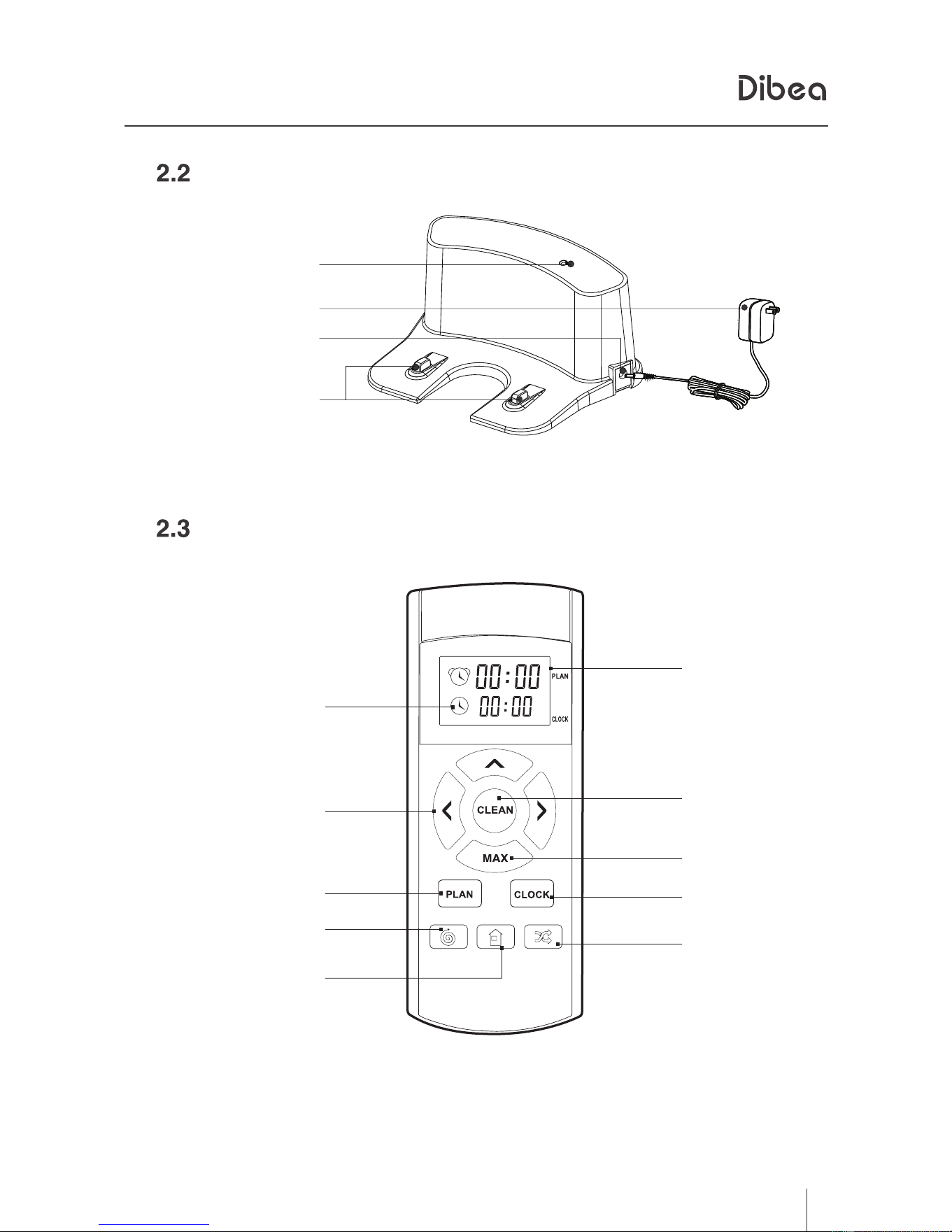
Charging accessories
Remote control
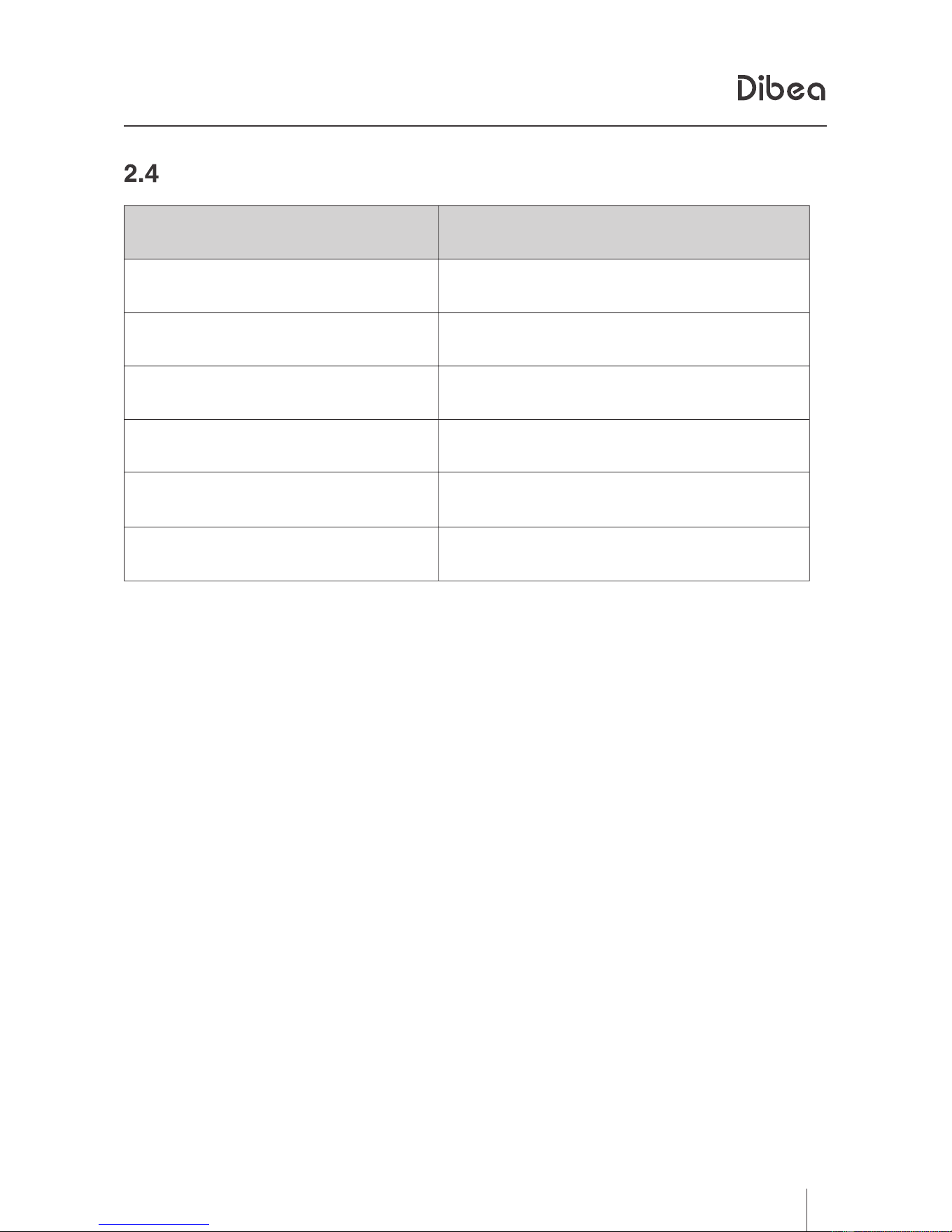
2.4
CLEAN button
Product operationProduct operation
Considerations
Quick operation
Cleaning modes
Scheduling
Using water tank
Product maintenanceProduct maintenance
Clean side brush, rolling brush and mop
Clean dust tank and filters
Clean sensors and charging poles
TroubleshootingTroubleshooting
Error sheet
Product specificationsProduct specifications
18
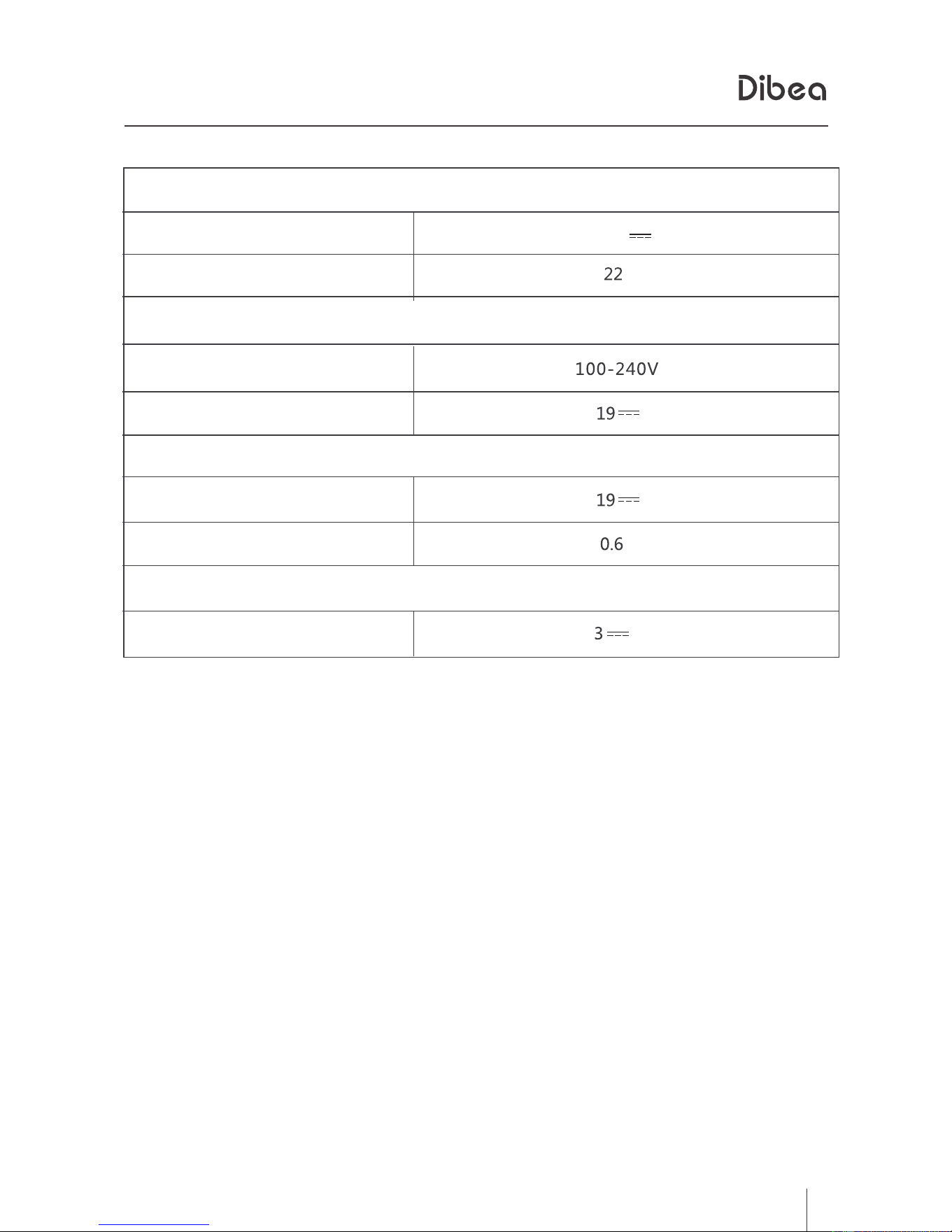
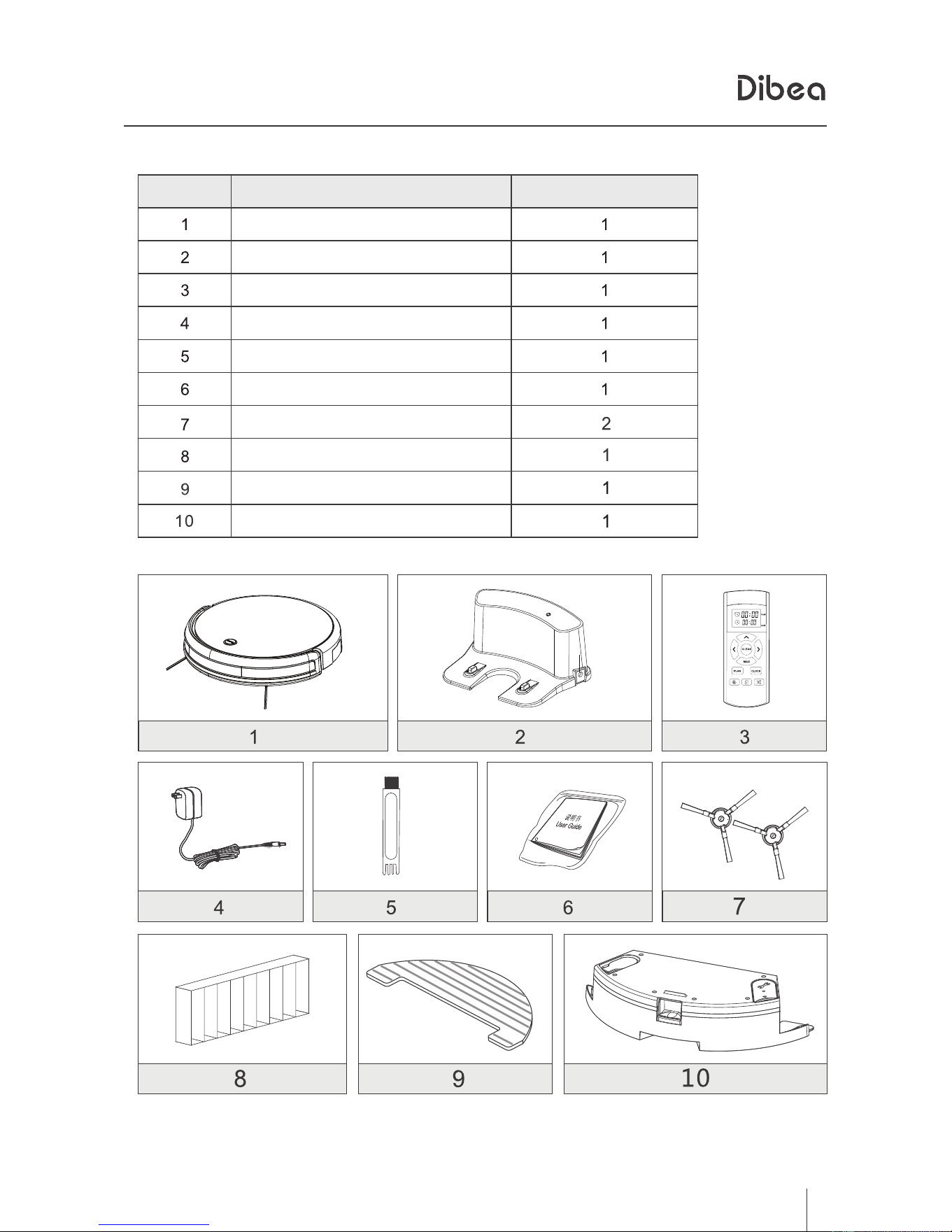
In the box
In the box
Downloaded from www.ManualsFile.com manuals search engine

Before using this product, please read the safety instructions and follow all
those regular safety precautions.
Warning:
This appliance can only be used by children of 8 years old and above. For persons with reduced
physical, sensory or mental capabilities or lack of experience and knowledge, proper supervision or
instruction should be given concerning use of the appliance in a safe way to help them understand the
hazards involved. Children should not play with the appliance. Cleaning and user maintenance should
not be made by children without supervision.
1. Only authorized technicians can disassemble the product. Users are not allowed to
2. Only use the original battery and power adapter of the product for charging. Using other
un-matched adapter may cause electric shock, fire or product damage.
3. Do not touch the power cord, plug or adapter with wet hands.
4. Do not use this product in wet or moist environment (any environment with liquid), e.g.
bathroom or laundry.
5. Do not use near curtains,wrapping materials,or any objects that may be winded in the drive
wheels.
6. Before use, collect the floor environment (remove all the fragile objects and cords, clothing,
papers, loose cables, as well as make sure to lift curtains and drapes off the floor to avoid any
possible accidents. In case that a loose cable is tangled with the product, the cable might move
around with the product as it works and topple down the table, chairs, or cabinet and might
cause hurt or properly damage.)
7. Do not use this product near cigarette, lighter, match or any flammables.
8. Never use the product to clean combustible or highly volatile liquids, such a as gasoline.
9. Only use the product indoors, do not use outdoors.
10. If the product needs cleaning, clean it after it's fully charged.
11. Do not over-bend or put anything heavy or sharp onto the charging cord.
12. Do not sit on top of this product or attach an object on the top of it. Beware of children or
pets while the product is in operation.
13. Do not place this product where it is easy to drop off (tables, chairs, etc).
14. Turn off the power switch during product transportation or when you don't need to use this
product for a long time.
15. Before charging, check whether adapter and outlet are properly connected.
16. To avoid tripping, inform all the people in the house when this product is working.
17. When dust bin is full, empty it before using.
18. Use this product in temperature from 0 to 40 .
℃℃
19. Do not use this product in high-temperature environment or under direct sunlight for a long
time.
20. The battery must be removed from the product before it is scrapped.
21. The battery should be disposed of properly for safety .
22. The adaptor must be removed from the socket-outlet before cleaning or maintaining the
appliance or removing the battery.
disassemble or repair the product.
1. Safety Instructions
地贝清洁 时尚便捷
2
Downloaded from www.ManualsFile.com manuals search engine
5
2、
地贝清洁 时尚便捷
Product ComponentsProduct Components
Charging base
indicator light
adapter
power socket
charging poles
Remote control
clock time
scheduled time
direction button
clean button
Max mode button
plan button
spot cleaning button
self-charging button
Clock button
classical mode button
Downloaded from www.ManualsFile.com manuals search engine
6
2、
地贝清洁 时尚便捷
Product ComponentsProduct Components
CLEAN button on main body
state
indicator light
charging
finish charging
selecting mode
occuring error
low power
normally working
flashing orange light
green light
flashing green light
green light
orange light
red light
Downloaded from www.ManualsFile.com manuals search engine
7
3、
地贝清洁 时尚便捷
Product OperationProduct Operation
Considerations
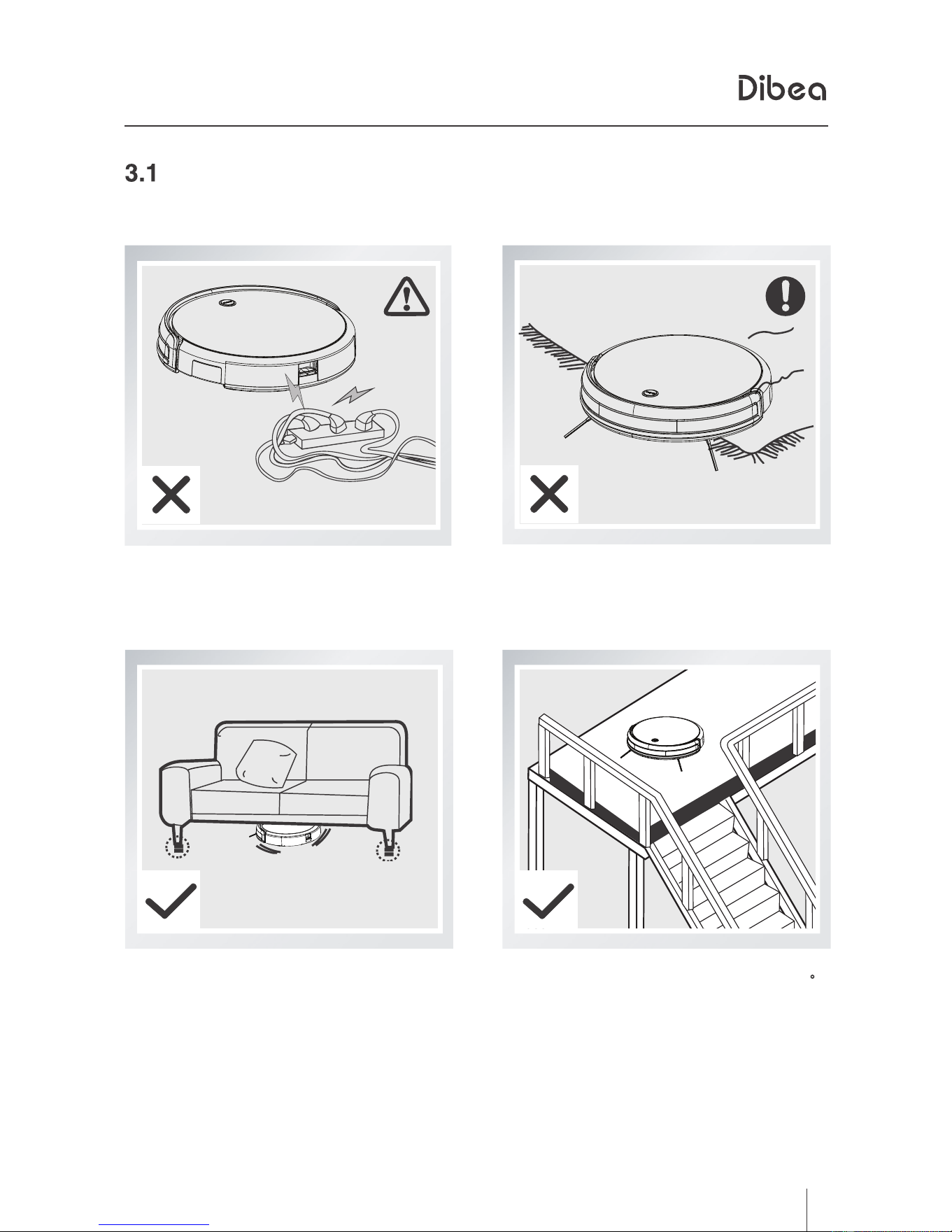
Before starting the vacuum cleaner, please check the environment as followed.
Move away the cables and cords
around to avoid tangling
Lift up the furniture if it is lower than
8cm height when cleaning.
Make sure there are protective railings
when it cleans on stairs.
Make sure the carpet fringing
won't tangle the machine.
Downloaded from www.ManualsFile.com manuals search engine
8
3、
地贝清洁 时尚便捷
■
■
Product OperationProduct Operation
Quick operation
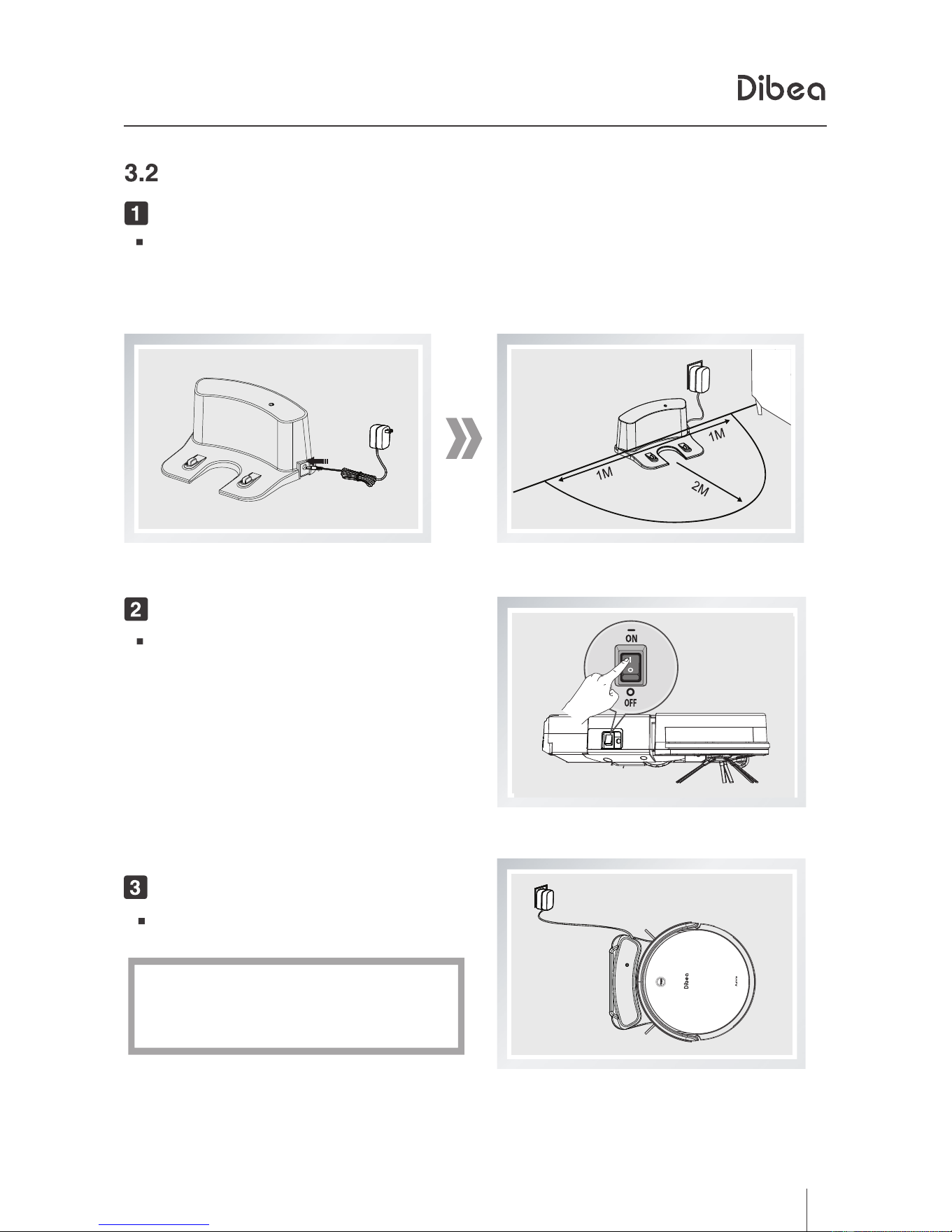
charging prepair
connect the adapter with the charging base
place the charging base against the wall and remove obstacles
about 1 meter at two sides and about 2 meters forward
plug the adapter into an outlet
turn on the power button
turn on the power button
on the side of the machine
charging
place the vacuum cleaner on the
charging base correctly
the CLEAN light turns orange means on
charging, green means fully-charged.
Downloaded from www.ManualsFile.com manuals search engine
9
3、
地贝清洁 时尚便捷
Product OperationProduct Operation
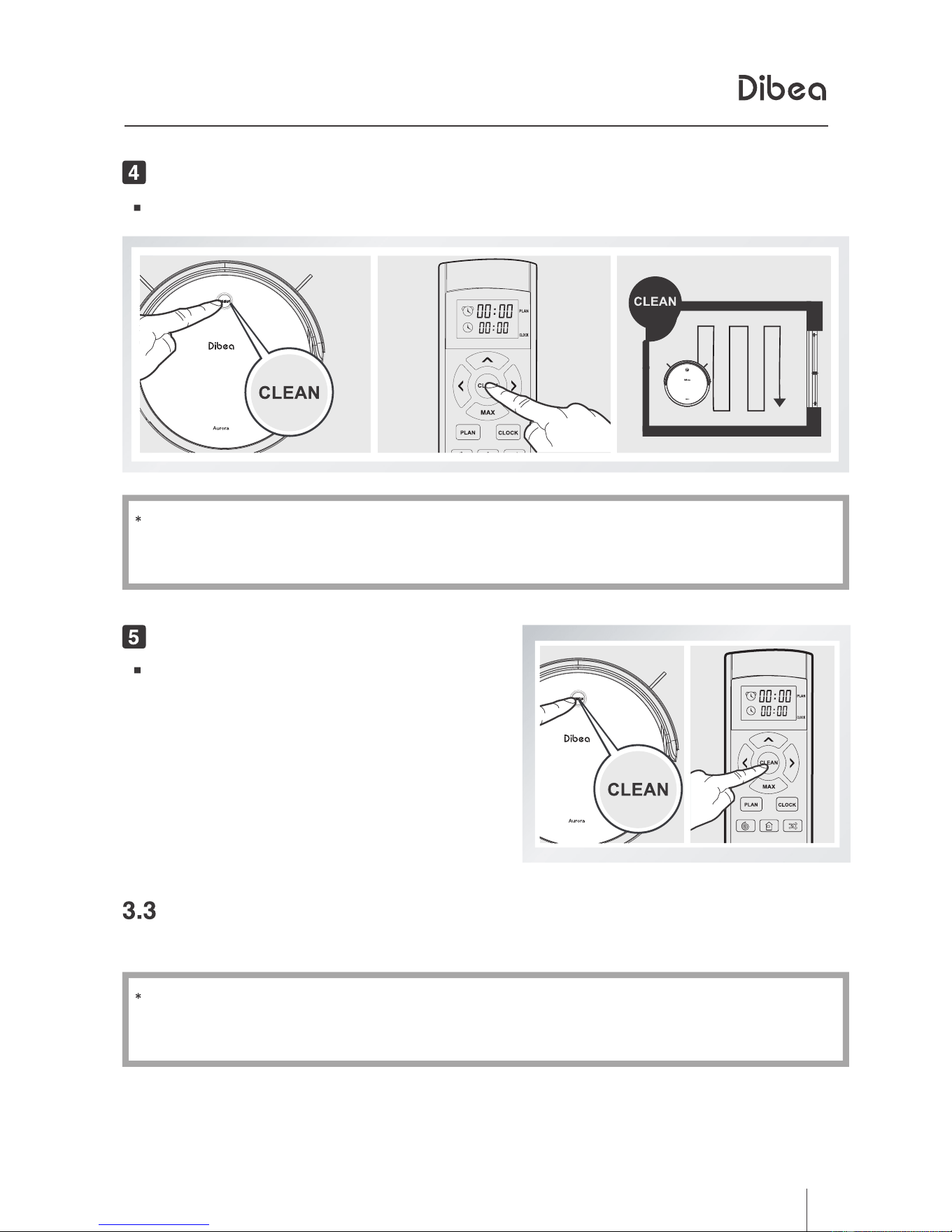
Start cleaning by pressing the CLEAN button on the main body.
Before starting cleaning, make sure the machine is not in sleeping mode.
If yes, short press the CLEAN button to wake it up.
Start CleaningStart Cleaning
Stop CleaningStop Cleaning
Cleaning Modes
Press the CLEAN button on the main
body to stop working.
Use the remote control to change modes.
If the robot is in standby mode, please press the CLEAN button to
wake it up first.
Downloaded from www.ManualsFile.com manuals search engine
10
地贝清洁 时尚便捷
3、
Product Operation
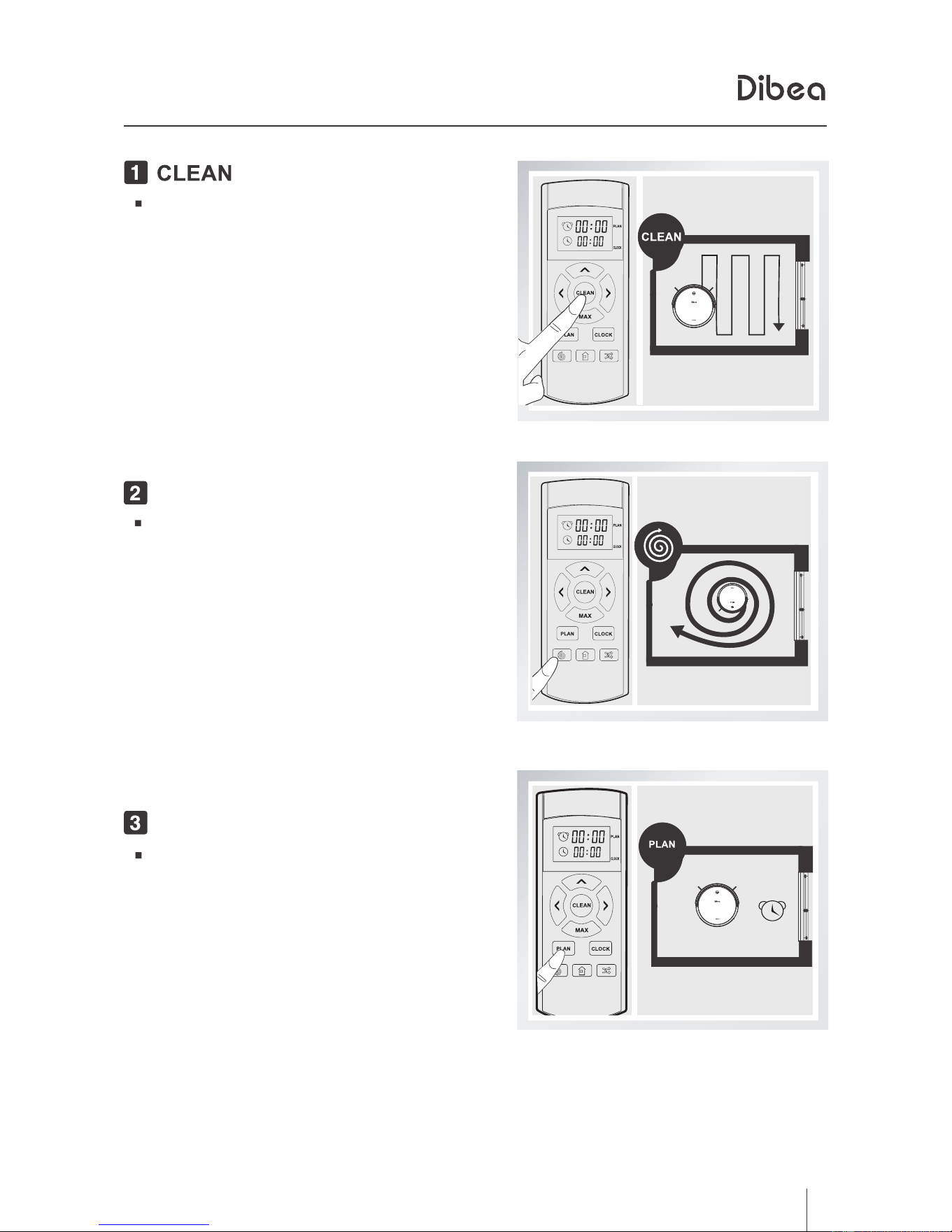
mode
In auto cleaning mode, the robot will
clean the room automatically.
Also, it will adjust the suction according
to different surfaces.
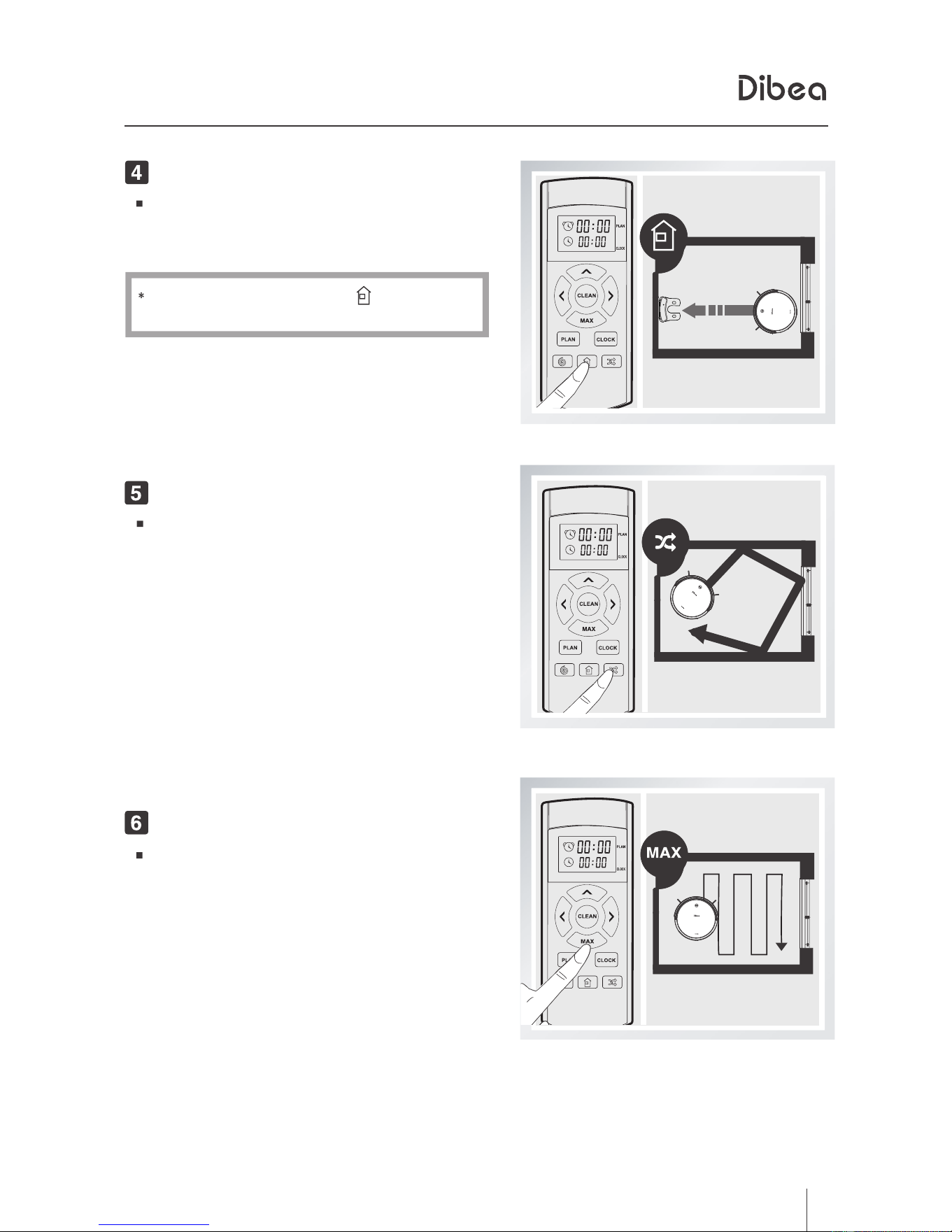
Spot mode
The robot will spiral intensely when it
detects a dirtier area.
Scheduling mode
You can preset the cleaning time and
the robot will start to clean at the certain
time you scheduled everyday.
Downloaded from www.ManualsFile.com manuals search engine
11
地贝清洁 时尚便捷
3、
Product Operation
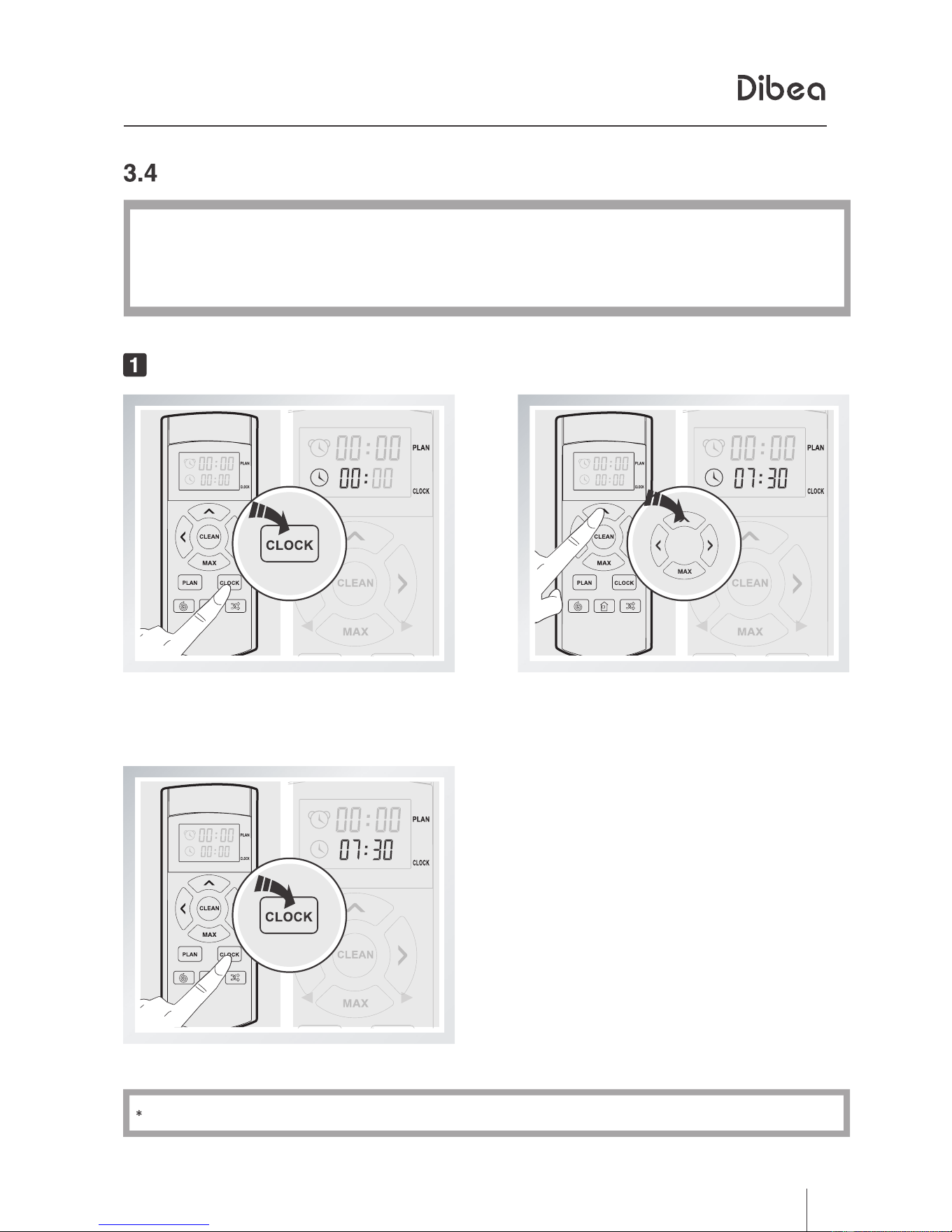
Self-charging
When the power is lower than 20%,
the robot will go back to the charging
base automatically.
You can also press the
button to
make it go charging.
Classical mode
The frequently used mode. The robot
will clean automatically and avoid
obstacles.
Max mode
Suitable for a dirty area. In this mode,
the robot will turn to the largest suction.
Downloaded from www.ManualsFile.com manuals search engine
12
地贝清洁 时尚便捷
3、
Product Operation
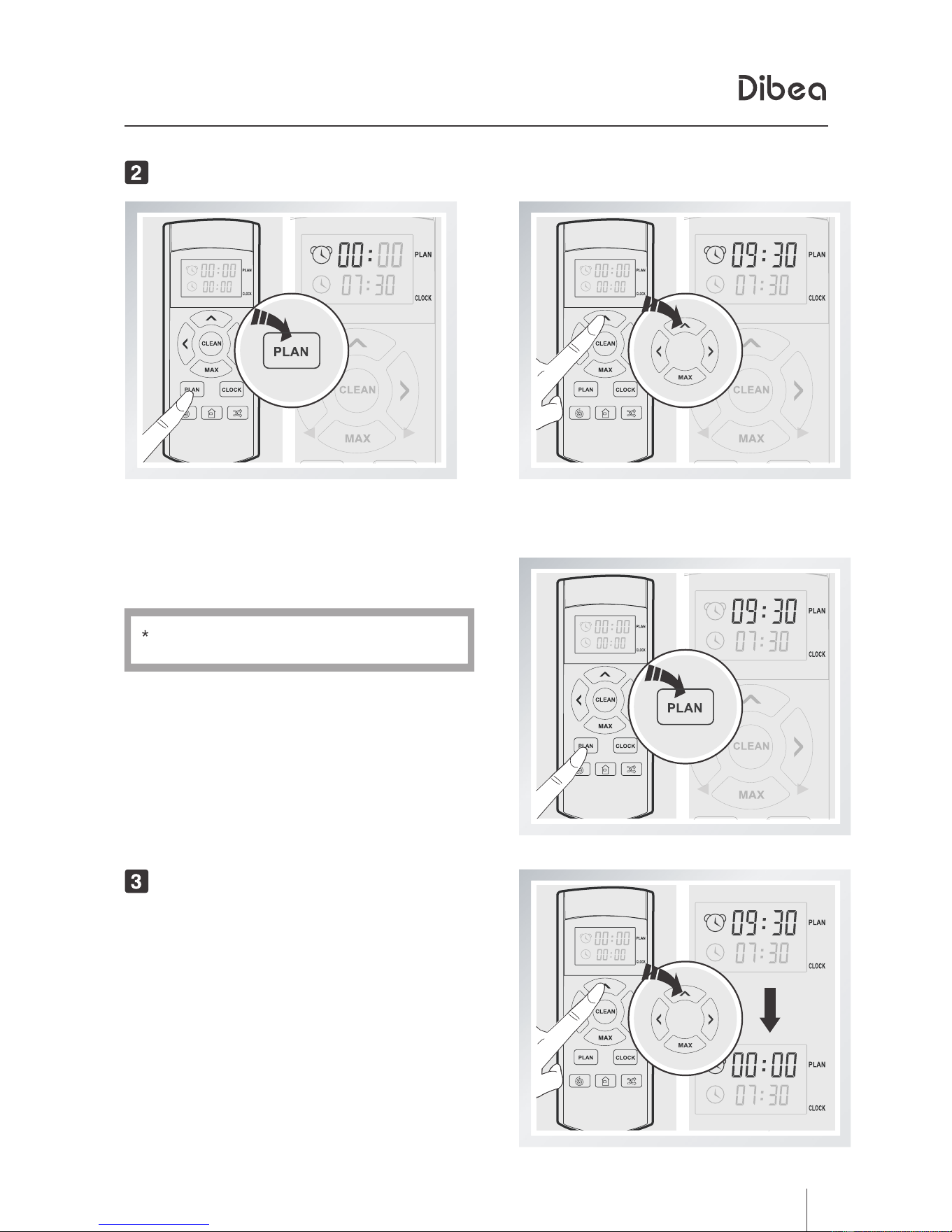
Scheduling setting
Make sure the robot is not in standby or sleeping mode. If yes, press the
ClEAN button to wake it up first. Then, you can set the scheduling time.
Set the clock time
Short press the PLAN button,
the left 00
of 00:00 will flash.
Change between hour an minute
by pressing the directional buttons.
If you don't press PLAN, settings won't be saved.
Press the PLAN to save the settings.
Downloaded from www.ManualsFile.com manuals search engine
13
地贝清洁 时尚便捷
3、
Product Operation
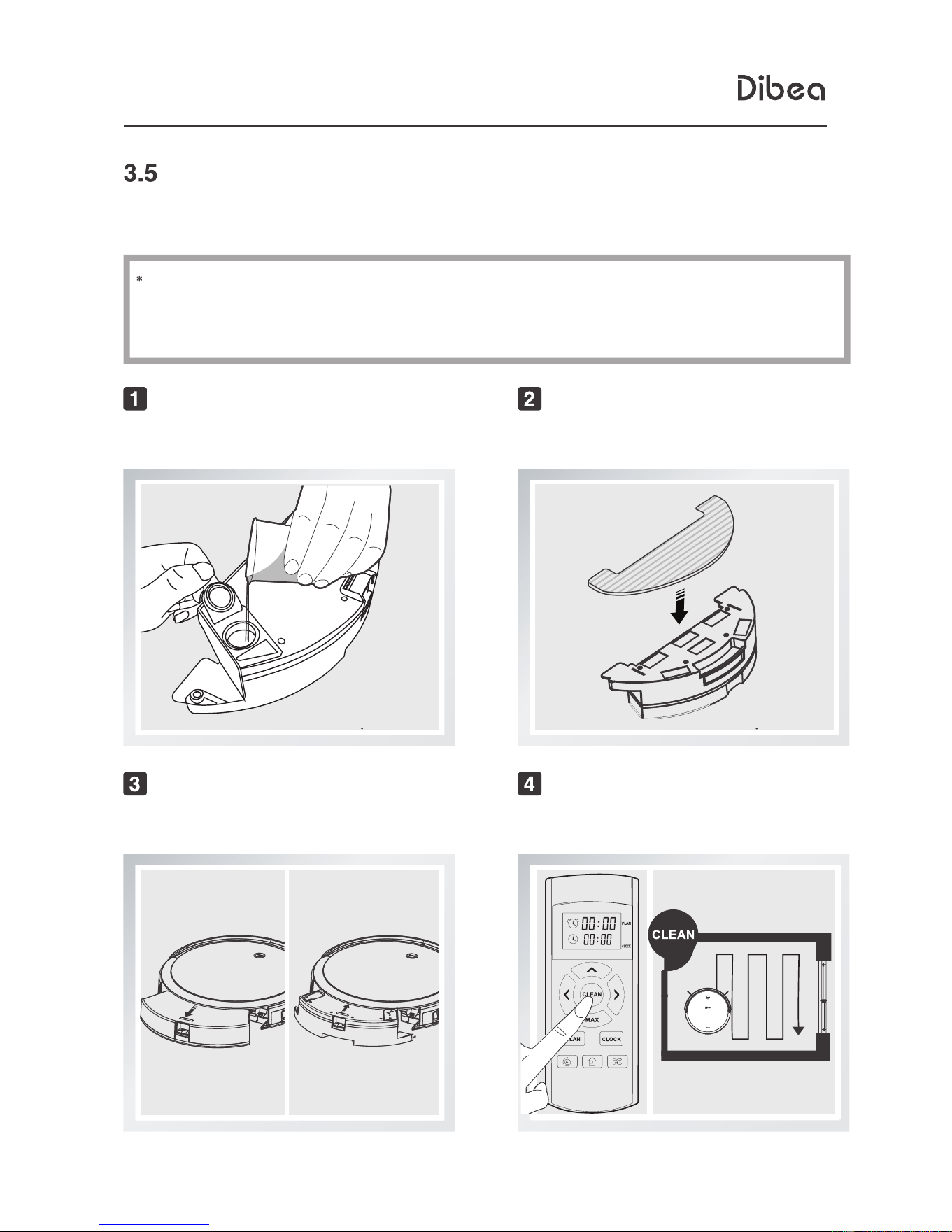
Scheduling
Short press the PLAN button,
the left 00
of 00:00 will flash.
Set the certain time, press the PLAN button
to save the settings.
If you don't press PLAN, settings won't
Change the time by pressing directial buttons.
Cancel scheduling
Set the scheduling time as 00:00, and
the scheduling will be cancelled.
be saved.
Downloaded from www.ManualsFile.com manuals search engine
14
地贝清洁 时尚便捷
3、
Product Operation
Water tank
The water tank and dust bin of GT100 are interchageable. For correct installment,
please refer to related operation instructions.
Add water
Add enough water through the inlet
Install the mop
Attach the mop to the bottom of the water
tank
Install water tank accessories
Press to take out the dust bin, and install
the water tank
Start mopping
Start auto cleaning, and it will mop at
the same time
Do not use mopping fuction on carpets or rugs.
When the robot is mopping, please pay attention to the water and add more
when needed.
Do not install the water tank with water when the robot is charging.
Downloaded from www.ManualsFile.com manuals search engine
15
4、
地贝清洁 时尚便捷
Product MaintenanceProduct Maintenance
Clean side brush, rolling brush and mop
Notes:
Remove the rolling brush from the main body by pressing the lock and wash it.
Clean side brushes, rolling brush and mop once getting dirty. Replace them once damaged.
Remove the mop from the water tank and wash it with water.
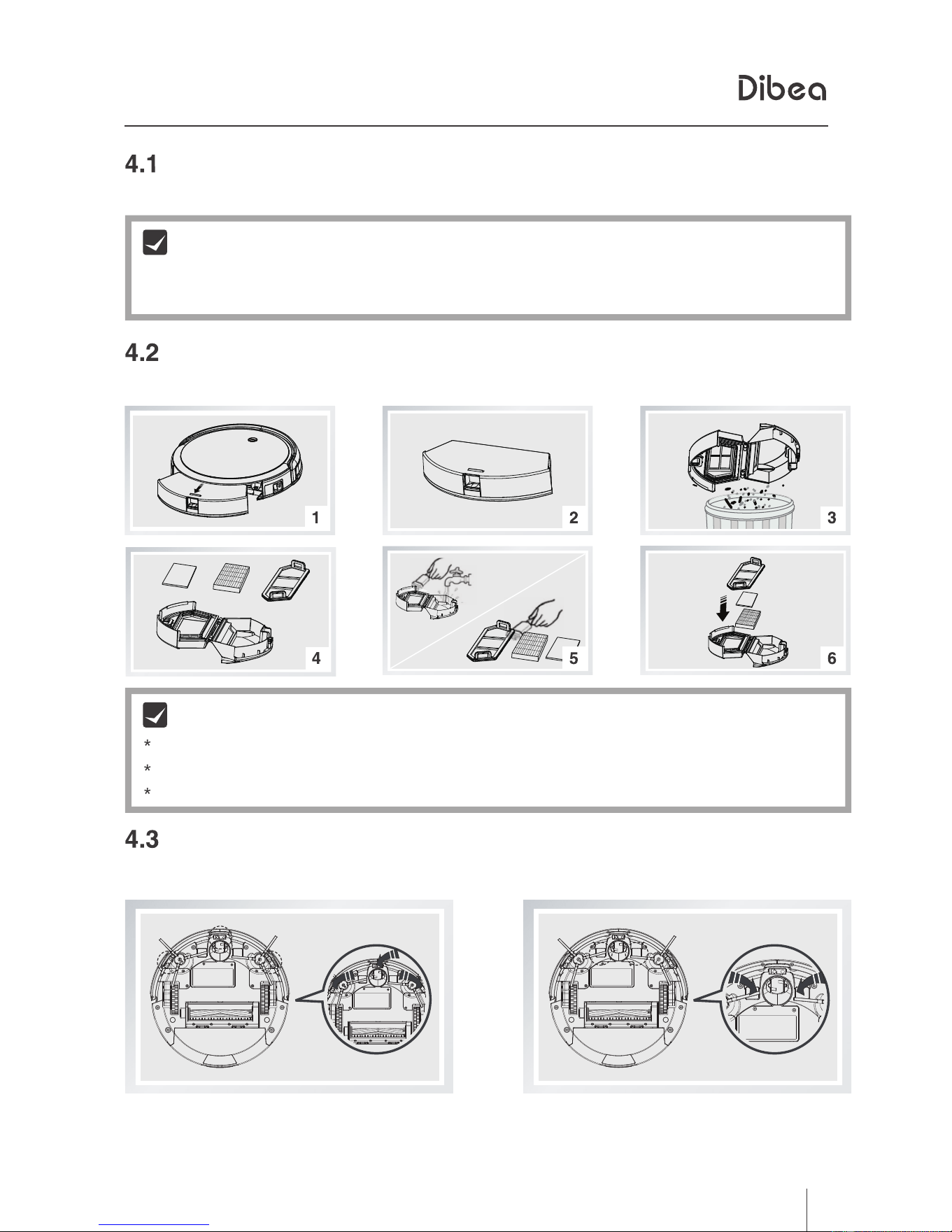
Clean dust bin and filters
Clean the dust bin and filters as following tips after every use.
check the suction and clean the obstacles
Notes:
wash the primary filter every 15-30 days and install it after drying
clean the HEPA filter with wet mop instead of washing it with water directly
Clean sensors and charging poles
clean the sensors and charging poles with soft dry mop cloth as followed:
Downloaded from www.ManualsFile.com manuals search engine
16
5、
地贝清洁 时尚便捷
TroubleshootingTroubleshooting
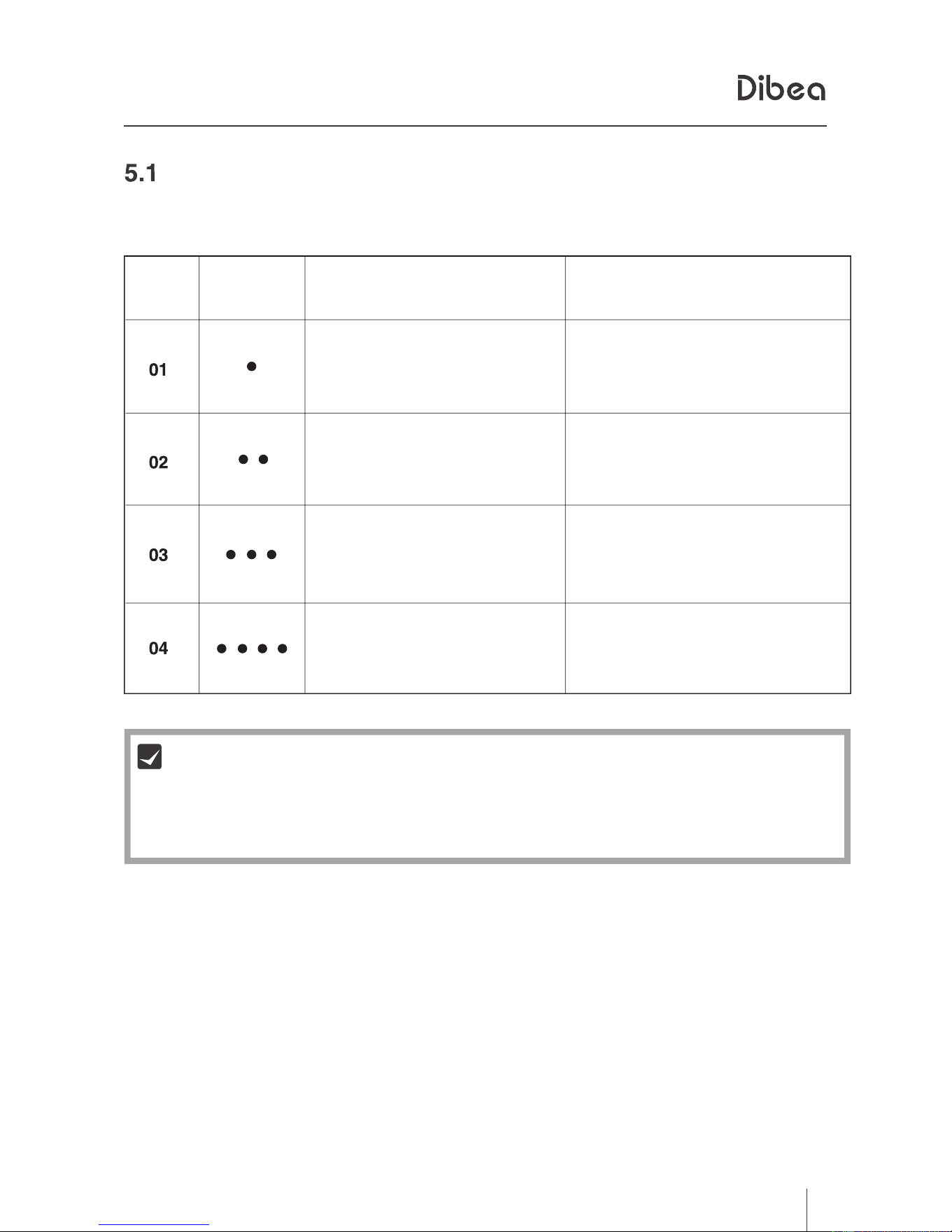
Error sheet
times of
beep
cause
solution
wheel failure
check the wheels
cliff sensor or bumper
failure
check the cliff sensor and
bumper
main body gets stuck
move it to a new place and
restart
side brush failure
check the side brush
Notes
In case you still can't solve the problem, please follow this:
1. Press the power button on the side of the machine to restart it.
2. If the problem can't be solved by restarting, please contact the after-service team.
Downloaded from www.ManualsFile.com manuals search engine