Ⅱ
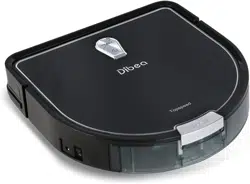
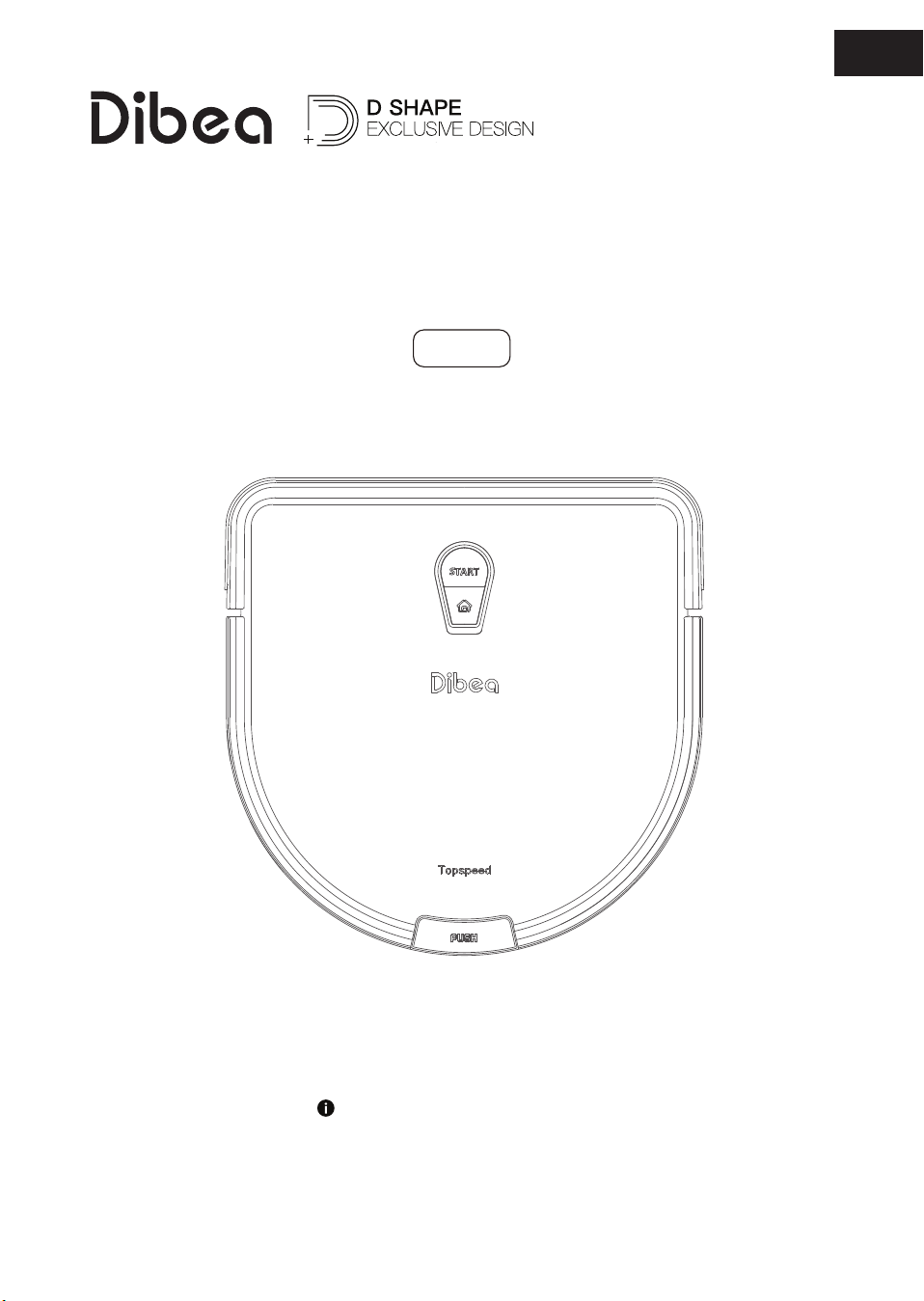
D960
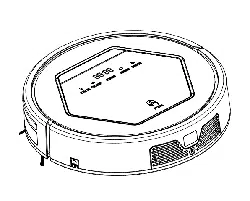
Robotic vacuum cleaner
Read this user manual carefully before first use.
Keep this manual for further guidance in case.
Instruction Manual
EN


Safety Instructions
........................................................................................................................ 4-5
Product Component
.................................................................................................................... 6-9
Main body ........................................................................................................................................................6
Dust bin .............................................................................................................................................................7
Charging base .................................................................................................................................................7
Remote control ...............................................................................................................................................8
Main button .....................................................................................................................................................9
Main body & accessories ............................................................................................................................9
Product Operation
....................................................................................................................10-16
Attention ........................................................................................................................................................10
Quick guide ...................................................................................................................................................11
Scheduling...............................................................................................................................................14-15
Water tank .....................................................................................................................................................16
Product Maintenance
.............................................................................................................17-18
Side & roller brush cleaning ...................................................................................................................17
Sensors & charging poles cleaning ......................................................................................................17
Dust bin & filters cleaning .......................................................................................................................18
Troubleshooting
................................................................................................................................19
Product Specifications
................................................................................................................ 20
Content

4
Safety Instructions
WARNING:
Basic safety precautions should always be observed when using an
electrical appliance, including the following to reduce the risk of fire,
electrical shock, or injury.
●
Read this manual carefully.
●
Keep this manual for further guidance.
●
Any operations oppose to the description in this user manual may lead to injury to
human or this product.
(1). Only authorized technicians can disassemble the product. Users are not allowed to
disassemble or repair the product.
(2). Only use the original battery and power adaptor of the product for charging. Using
other unmatched adaptor may cause electric shock, fire or product damage.
(3). Do not touch the power cord, plug or adaptor with wet hands.
(4). Do not use this product in wet or moist environment (any environment with liquid),
e.g. bathroom or laundry.
(5). Do not use near curtains, wrapping materials, or any objects that may be winded in
the drive wheels.
(6). Before using, collect the floor environment (remove all the fragile objects and
cords, clothing, papers, loose cables, as well as make sure to lift curtains and drapes
off the floor to avoid any possible accidents )
(7). Do not use this product near cigarette, lighter, match or any flammables.
(8). Never use the product to clean combustible or highly volatile liquids, such as
gasoline.
(9). Only use the product indoors. Do not use it outdoors.
(10). If the product needs cleaning, clean it after it is fully charged.
(11). Do not over-bend or put anything heavy or sharp onto the charging cord.
(12). Do not sit on top of this product or attach an object on the top of it. Beware of
children or pets while the product is working.
(13). Do not place this product where it is easy to drop off (tables, chairs, etc).
(14). Turn off the power switch during product transportation or when you don't need to
use it for a long time.
(15). Before charging, check whether adaptor and outlet are properly connected.
(16). To avoid tripping, inform all the people in the house when the product is working.
(17). When the dust bin is full, empty it before using.
(18).Usethisproductintemperaturefrom0-40℃ .
(19). Do not use this product in high-temperature environment or under direct sunlight
for a long time.
5
Safety Instructions
(20). The battery must be removed from the product before it is scrapped.
(21). The battery should be disposed properly for safety.
(22). The adaptor must be removed from the socket outlet before cleaning or
maintaining the appliance or removing the battery.
(23). Do not use the product on long plush rugs or dark color floors.
Warning:
●
Children, mentally challenged people or people lack related experience
and knowledge are not allowed to use this product without special
guidance.
●
Do not use the product somewhere higher than the user in case it
drops off and hurts people.
●
Do not use the product in open areas without protective guard.
6
Product Components
●
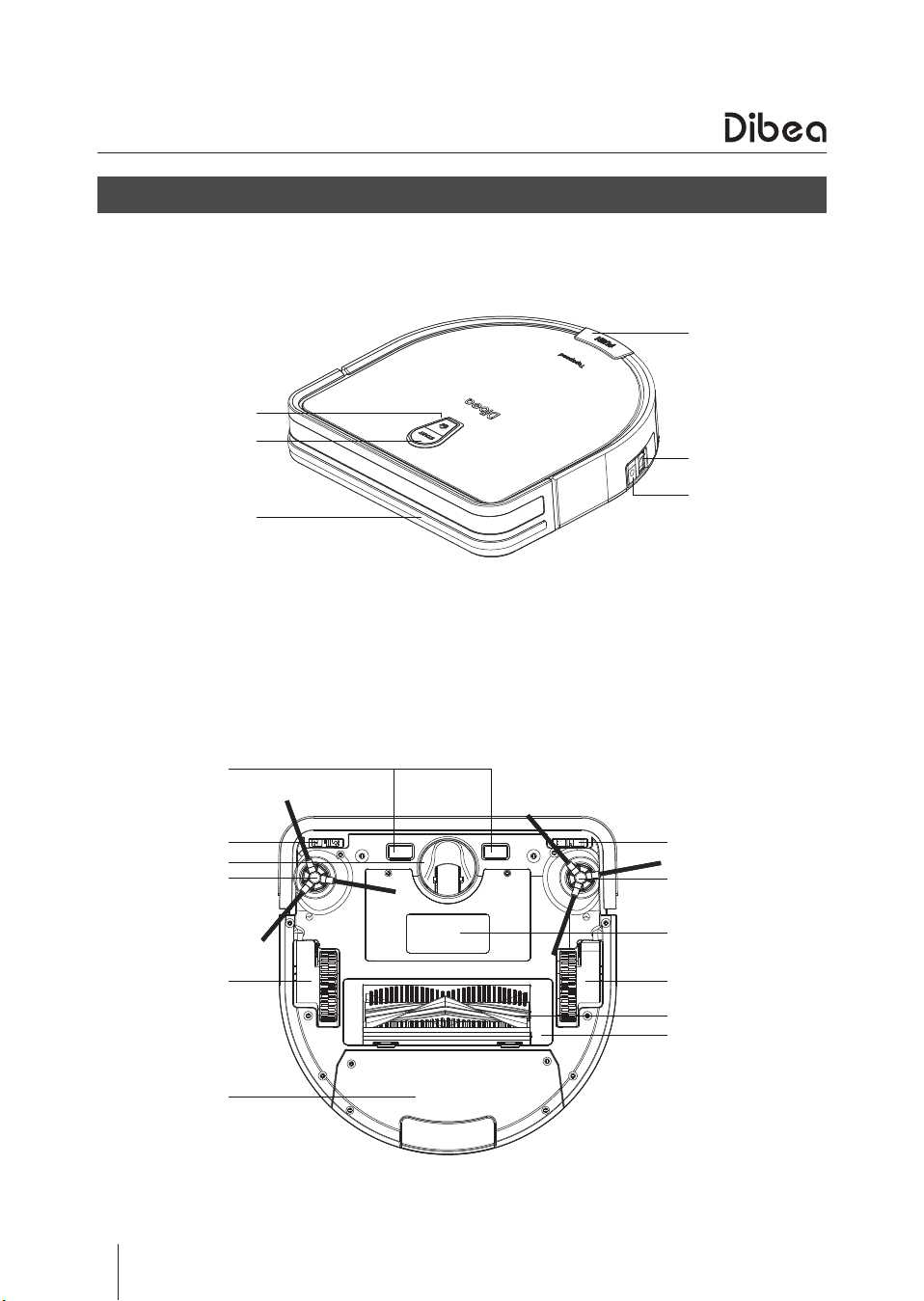
Main body
HOME button
START button
Front bumper
Dust bin button
Power switch
Power socket
Charging pole
Cliff sensor
Cliff sensor
Side brush
Battery cover
Big wheel
Roller brush
Roller brush guard
Nose wheel
Side brush
Big wheel
Dust bin
7
Product Components
●
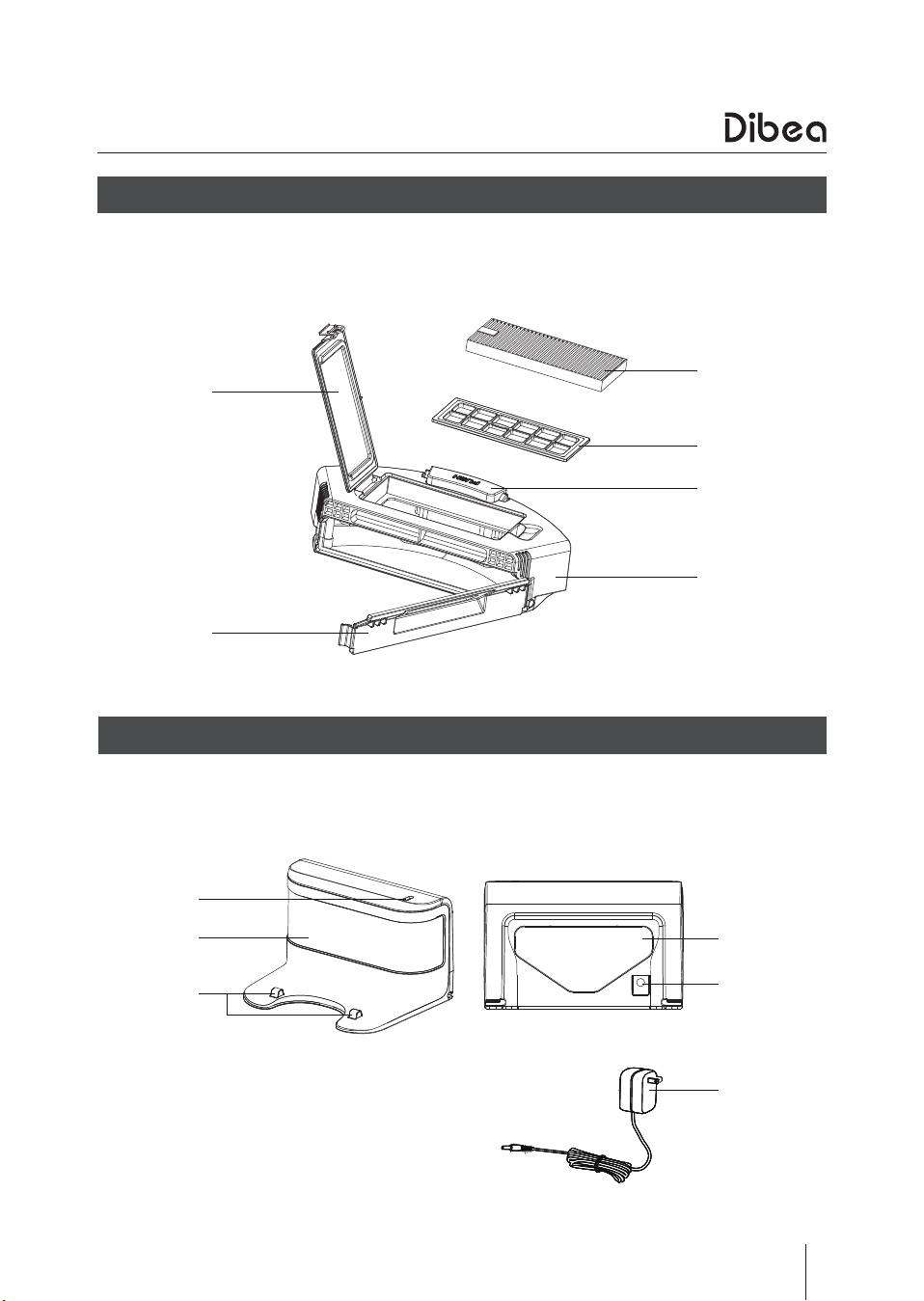
Dust bin
Hepa cover
Dust bin cover
Hepa filter
Primary filter
Dust bin button
Dust bin
●
Charging base and accessories
Indicator light
Window
Charging pole
Winding tool
Charging socket
Charging adaptor
8
Product Components
●
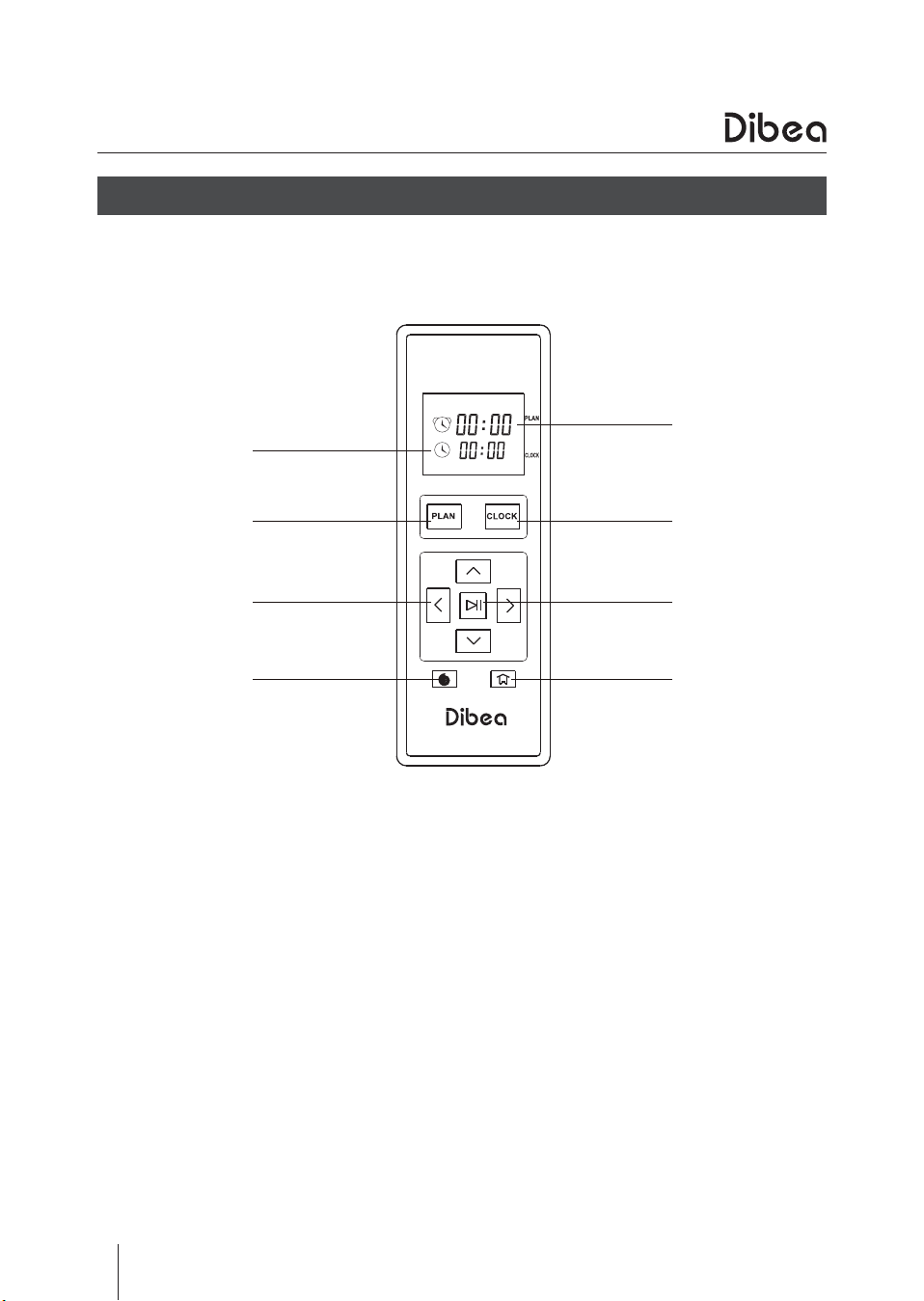
Remote control
Clock time
Plan button
Direction button
Spot cleaning
Scheduling time
Clock button
ON/OFF button
Recharging button
9
Product Components
●
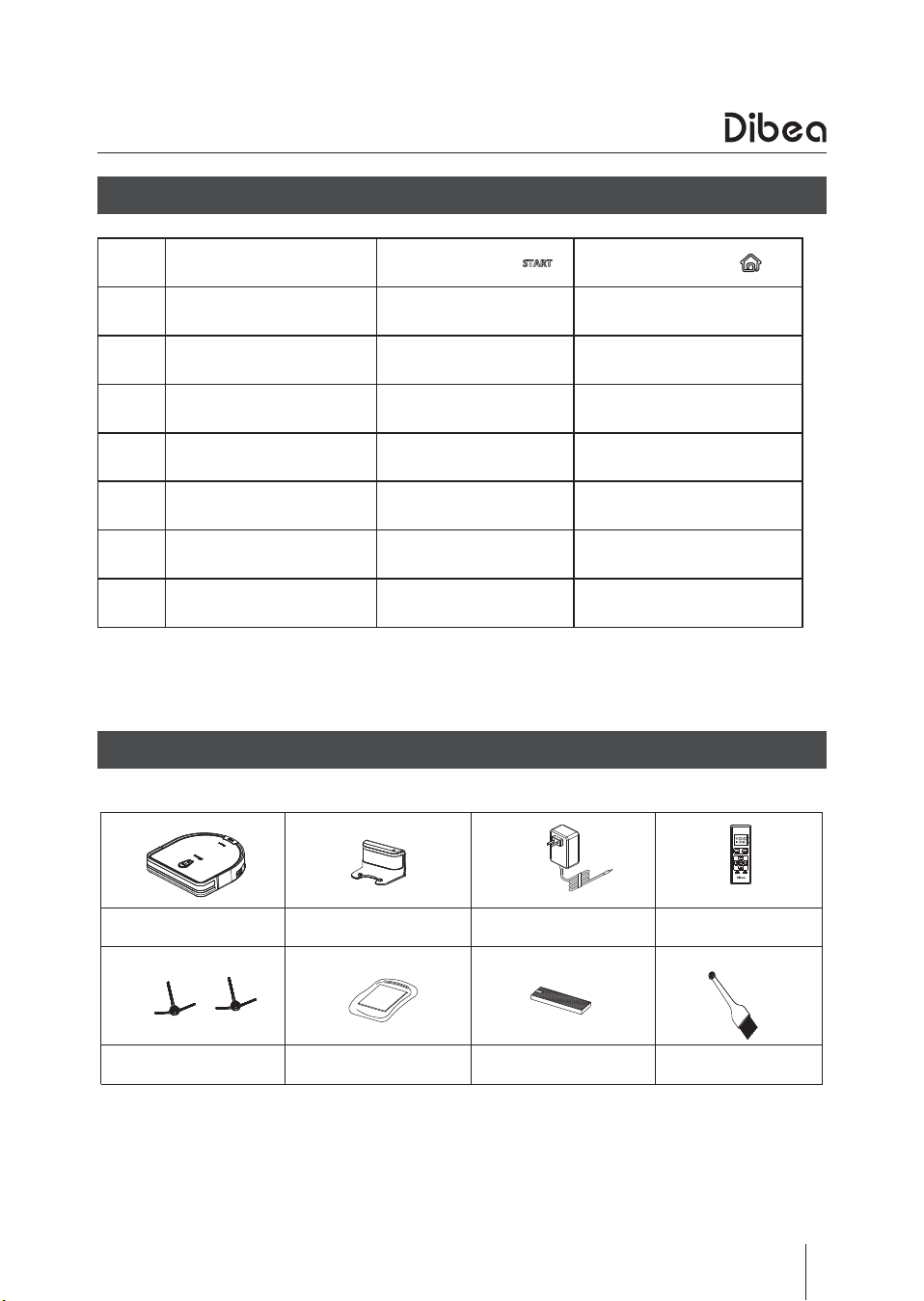
Main button
●
Main body & accessories
State START button HOME button
1 Standby Yellow —
2 Working Green —
3 Back to charging base Green —
4
Back to charging
base(received the signal)
Blue Yellow
5 Charging Flashing yellow Yellow
6 Fully charged Green —
7 Error Red —
说
明 书
Main body
*
1
Side brush
*
2 User manual
*
1 Hepa filter
*
1 Cleaning brush
*
1
Charging base
*
1 Charging adaptor
*
1 Remote control
*
1
10
Product Operation
3
4
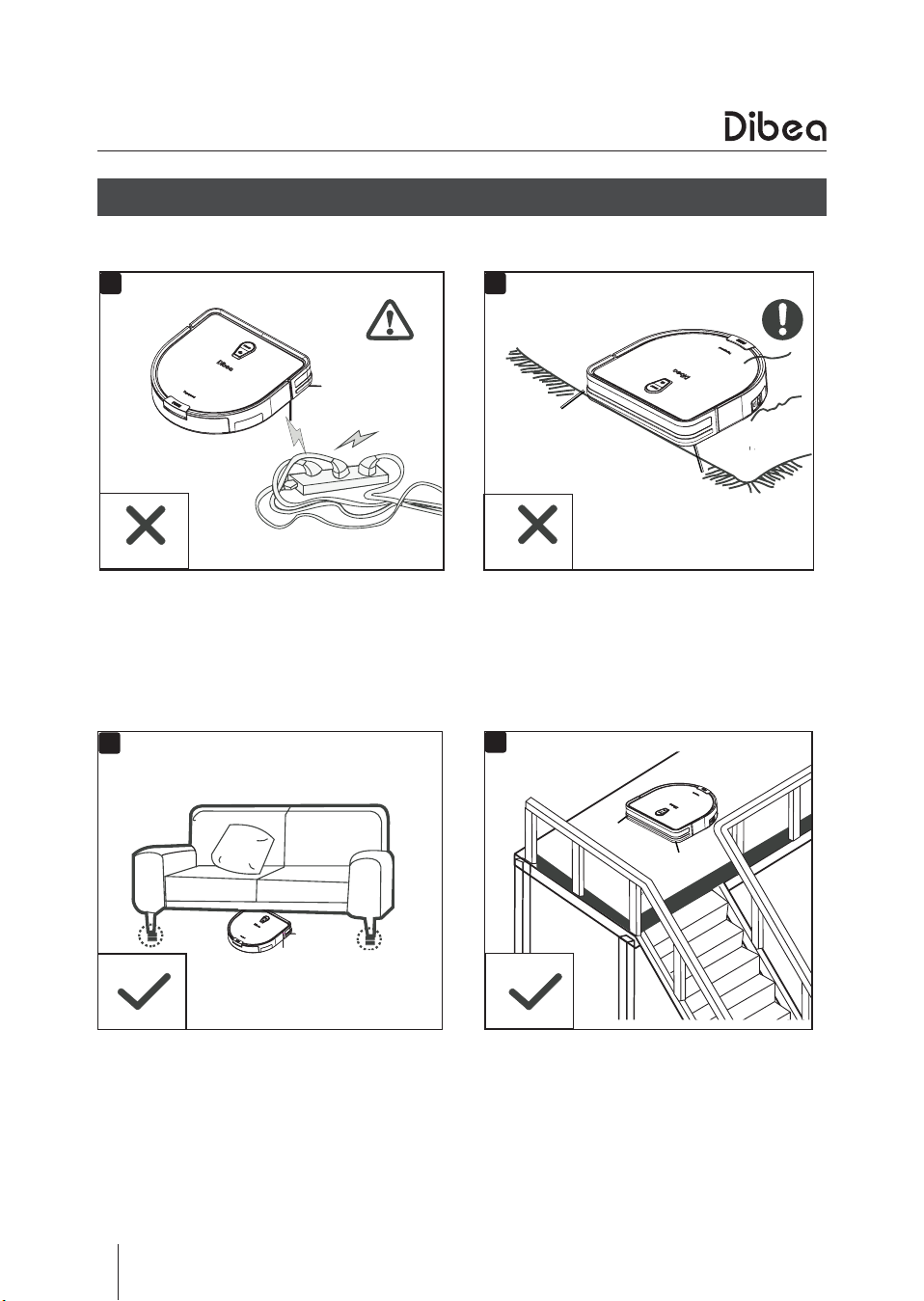
Lift up the furniture if it is lower than
8cm when cleaning.
Make sure there are protective railings
when it cleans on stairs.
●
Attention
1
2
Remove all the cables to avoid tangling. Make sure the carpet fringing won't
tangle the vacuum robot.
Before using the vacuum robot, please check the environments as described below:
11
Product Operation
●
Quick guide
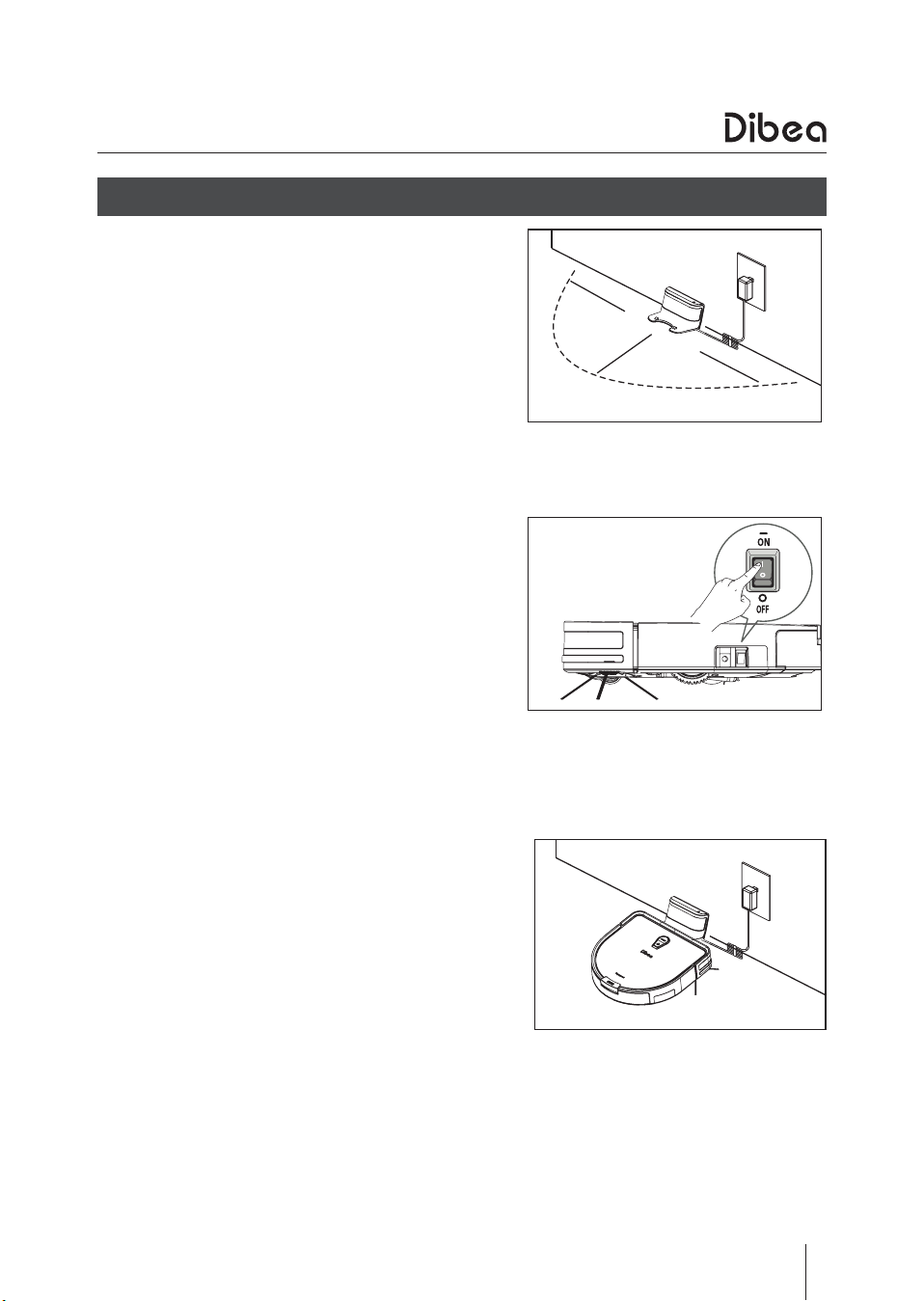
Charging prepare
●
Connect the adaptor to the charging base
●
Place the charging base against the wall
and remove obstacles about 1 meter at two
sides and 2 meters forward.
●
Plug the adaptor into the wall socket.
Start the vacuum
●
Turn on the switch button on the side, “I”
means turn on, “O”means turn off.
●
After cleaning, for next use, do not turn on
the main switch button.
Charging
●
Place the vacuum robot onto the charging
base.
●
Or connect the adaptor to the main body
directly.
●
When the “START” button turns yellow
from weak to strong, it means the vacuum
robot is charging.
●
When the light turns green, the vacuum
robot is fully charged.
●
When using it at the first time, please fully
charge the vacuum robot until the light
turns green.
1m
2m
1m
.
.
.
12
Start cleaning
●
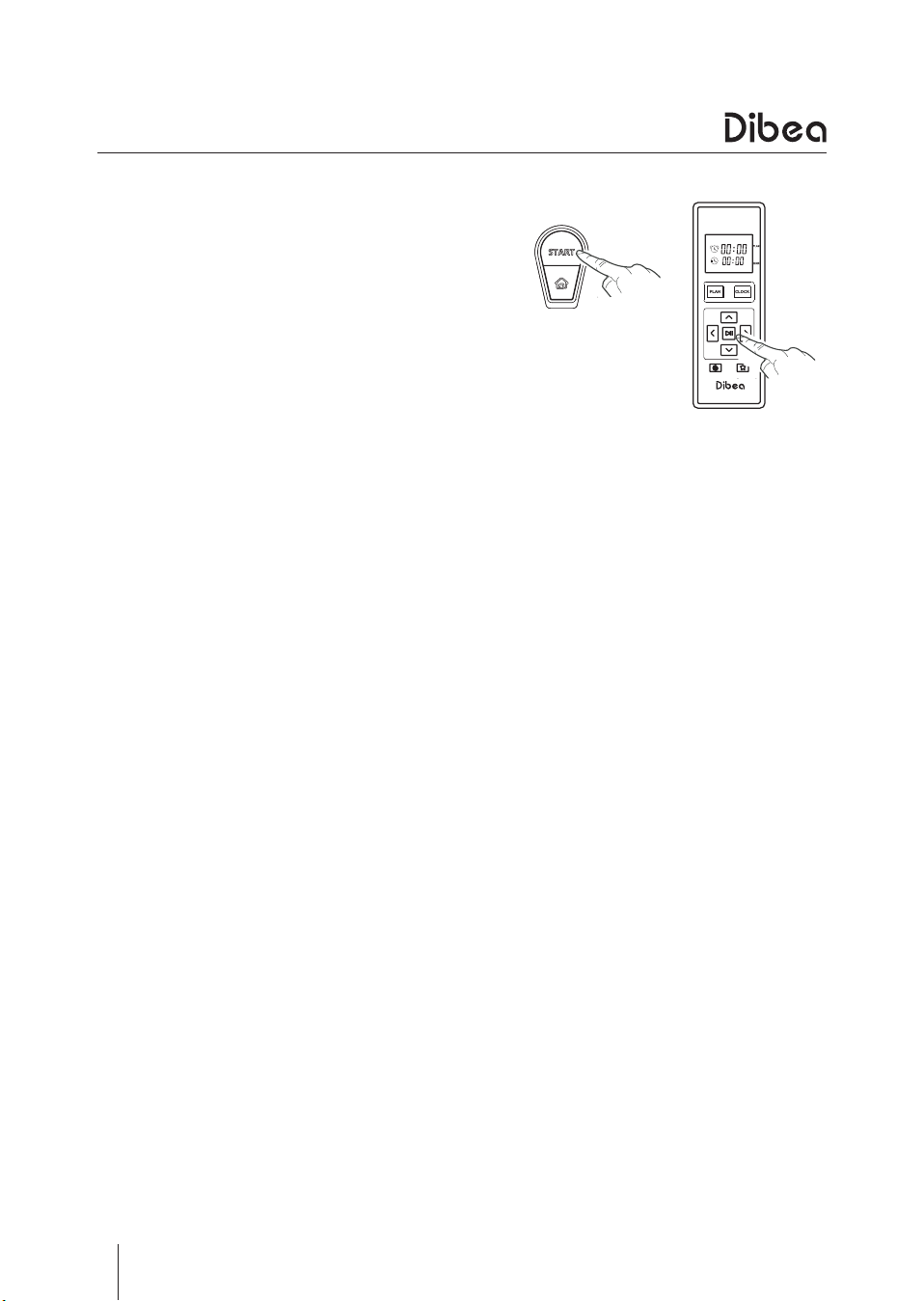
Press the START button on the vacuum
robot or the ON/OFF button on the remote
control to start cleaning.
●
Before starting cleaning, make sure the
vacuum robot is not in sleeping mode. If
yes, press the START or ON/OFF button to
wake it up.
●
The START button doesn't have light in
sleeping mode. It turns yellow in standby
mode and turns green when working.
Product Operation
Stop cleaning
●
When the vacuum robot is working, press the START or ON/OFF button to stop it.
●
After stopping it, the START button will turn yellow. And it will turn to sleeping
mode if there is no operation in 30 seconds.
Sleeping
●
When in sleeping mode, press the START or ON/OFF button can wake it up.
●
When in standby mode, long press the START button to turn to sleeping mode.
●
When in standby mode, the vacuum robot will turn to sleeping mode if there is no
operation in 30 seconds.
13
Product Operation
●
Cleaning Modes
Cleaning paths
●
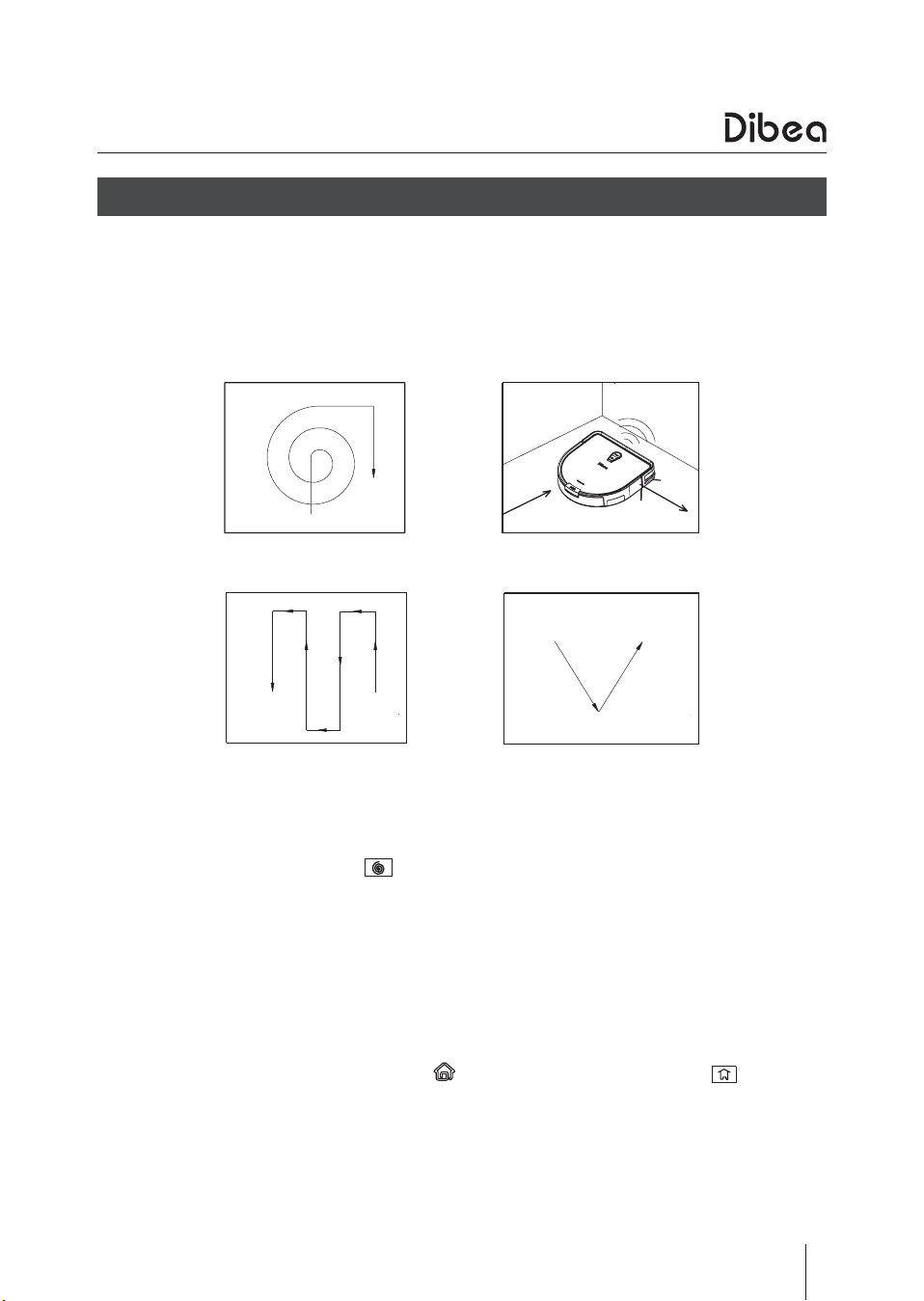
This vacuum robot has several cleaning paths, which can automatically switch
according to different surface types.
●
The default mode when starting the vacuum is Auto mode. And it will switch the 4
cleaning paths automatically depending on different floor types.
Spot cleaning
●
In standby mode, press the button on the remote control and the vacuum robot
will turn to spot cleaning mode.
●
This mode is suitable for cleaning at a dirtier area. The vacuum robot will spiral
intensively until it finishes cleaning the dirty spot.
Scheduling
●
In standby mode, press the PLAN button to set the scheduling time.
Once scheduled, the vacuum will clean at a certain time 7 days a week.
Recharging
●
When the battery is low, press the button on the vacuum or the button on
the remote control to make it go for recharging.
●
When it is working and the battery is low, the vacuum will automatically go back to
the charging base for recharging.
Auto cleaning path
Zig-zag cleaning path
Edge cleaning path
V cleaning path
14
●
Scheduling setting
Product Operation
Please use the remote control to set the scheduling. Once successfully scheduled, the
vacuum robot will clean at a certain time every day.
Before setting the time, make sure the START button is green. If the vacuum is in
standby mode, press the START button to wake it up first.
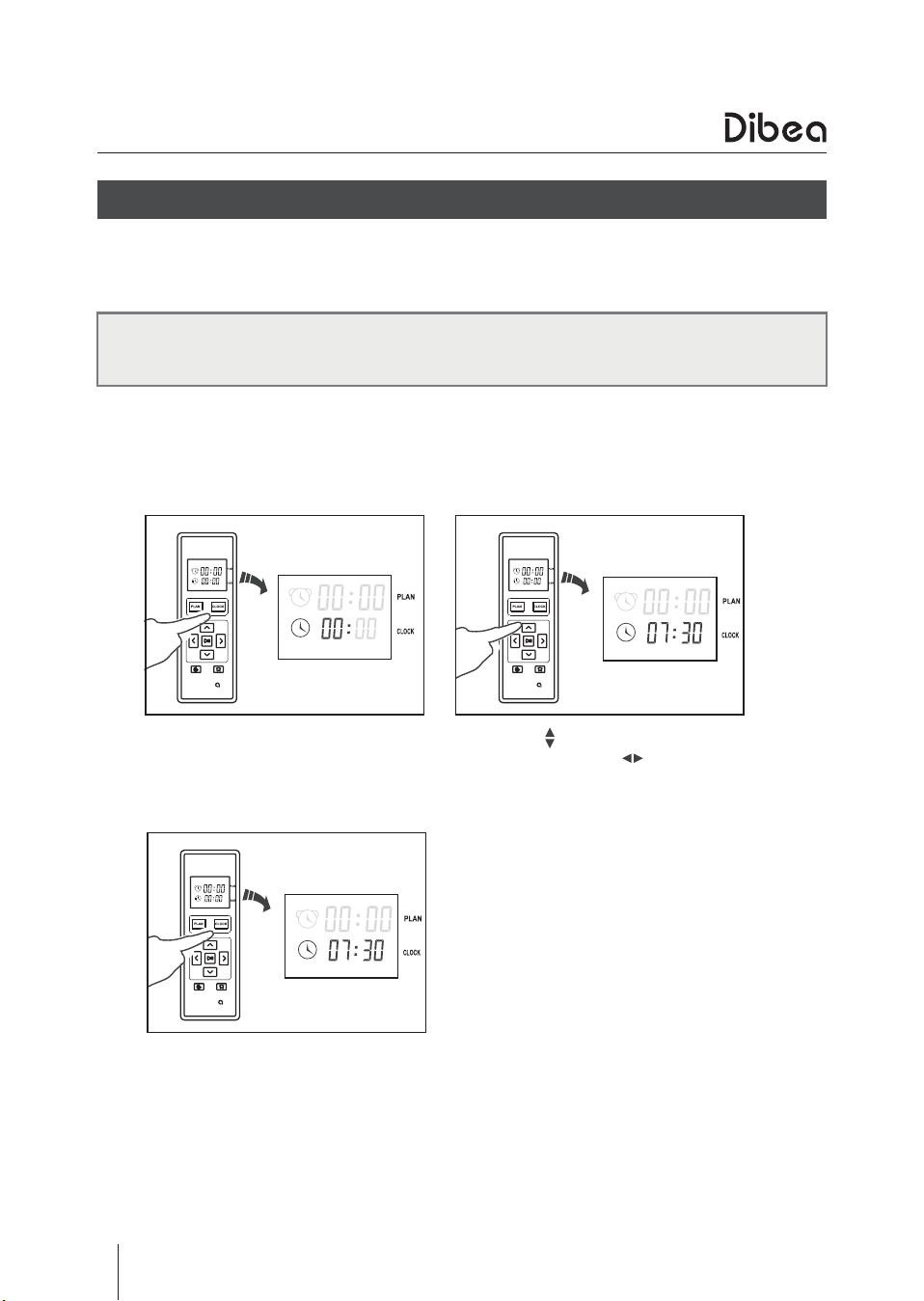
Set the clock time
Press the CLOCK button, and the
left 00 of the 00:00 will flash.
After finishing the setting, press
the CLOCK button to save the
setting.
Press the to set the hour and
minute, press the to change
between the hour and minute.
15
Product Operation
Set the scheduling time
Cancel the scheduling
●
Set the scheduling time as ”00:00”and save the setting, the previous scheduling
will be canceled.
●
When setting the clock and scheduling time, there will be beep tone. If you don't
hear a tone, the setting may be unsuccessful.
●
When replacing a new remote control battery, you need to reset the time as
showed above.
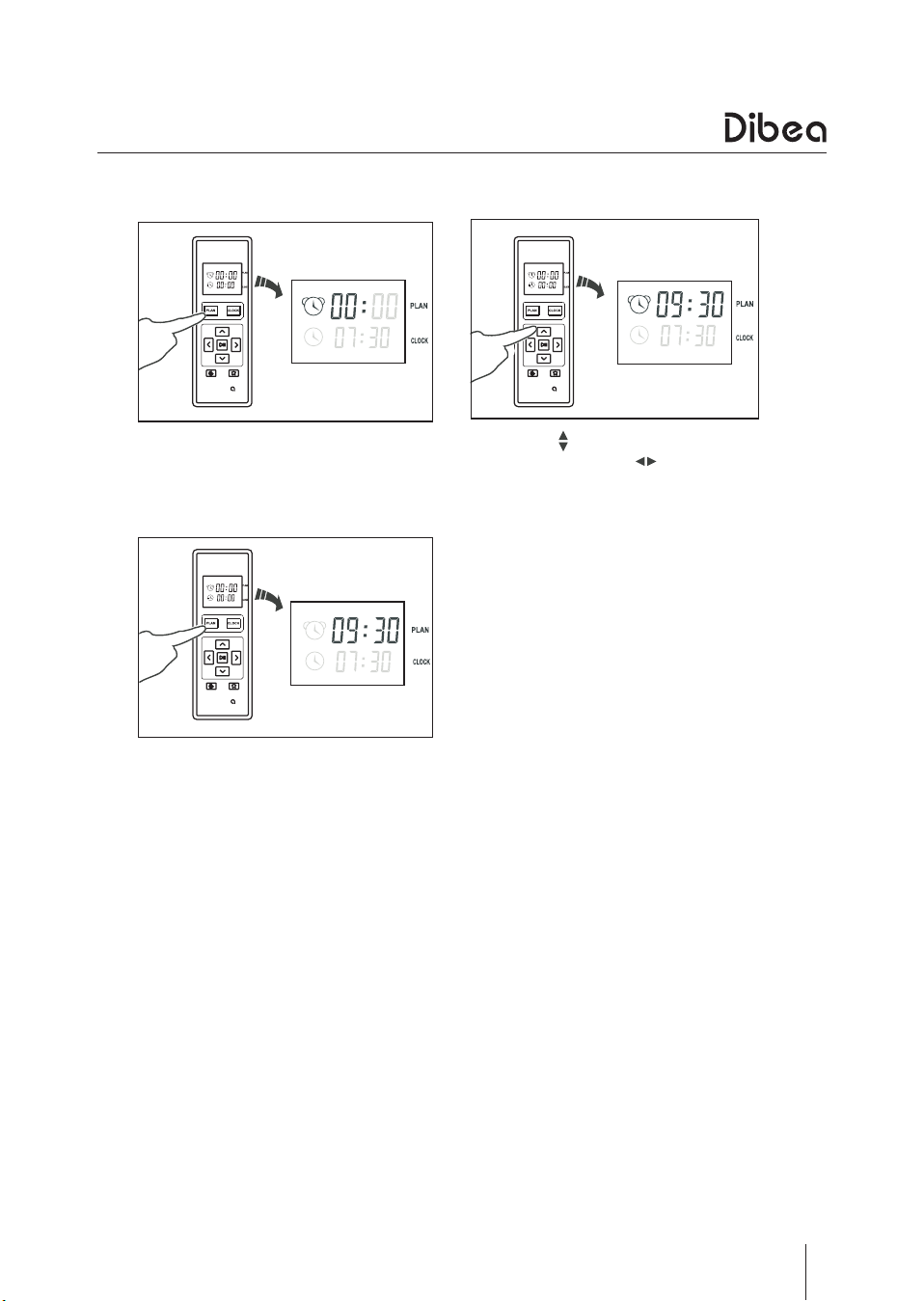
Press the PLAN button and the
left 00 of the 00:00 will flash.
After finishing the setting, press
the PLAN button to save the
setting.
Press the to set the hour and
minute, press the to change
between the hour and minute.
16
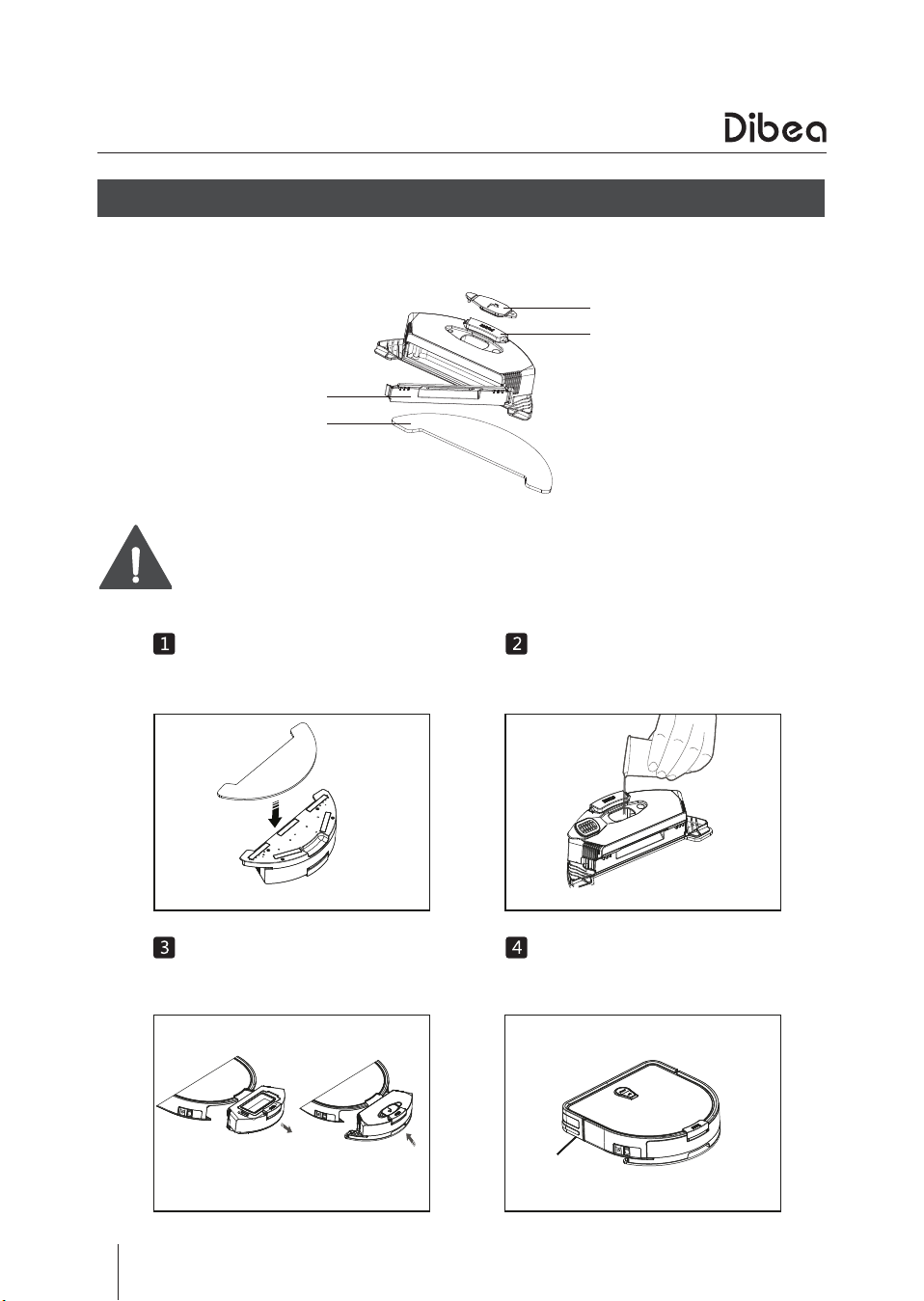
Add water
Add enough water through the
inlet.
●
Water tank
Water tank cover
Mop cloth
Water tank plug
Water tank button
Product Operation
Install the mop
Attach the mop to the bottom of
the water tank.
Install water tank accessiories
Press to take out the dust bin, and
install the water tank.
Start mopping
Start auto cleaning, and it will
mop at the same time.
●
Do not use mopping function on carpets or rugs.
●
When the robot is mopping, please pay attention to the water and add
more when needed.
●
Do not install the water tank with water when the robot is charging.
The water tank and dust bin of D960 are interchageable. For correct instalment, please
refer to related operation instroctions.
17
Product Maintenance
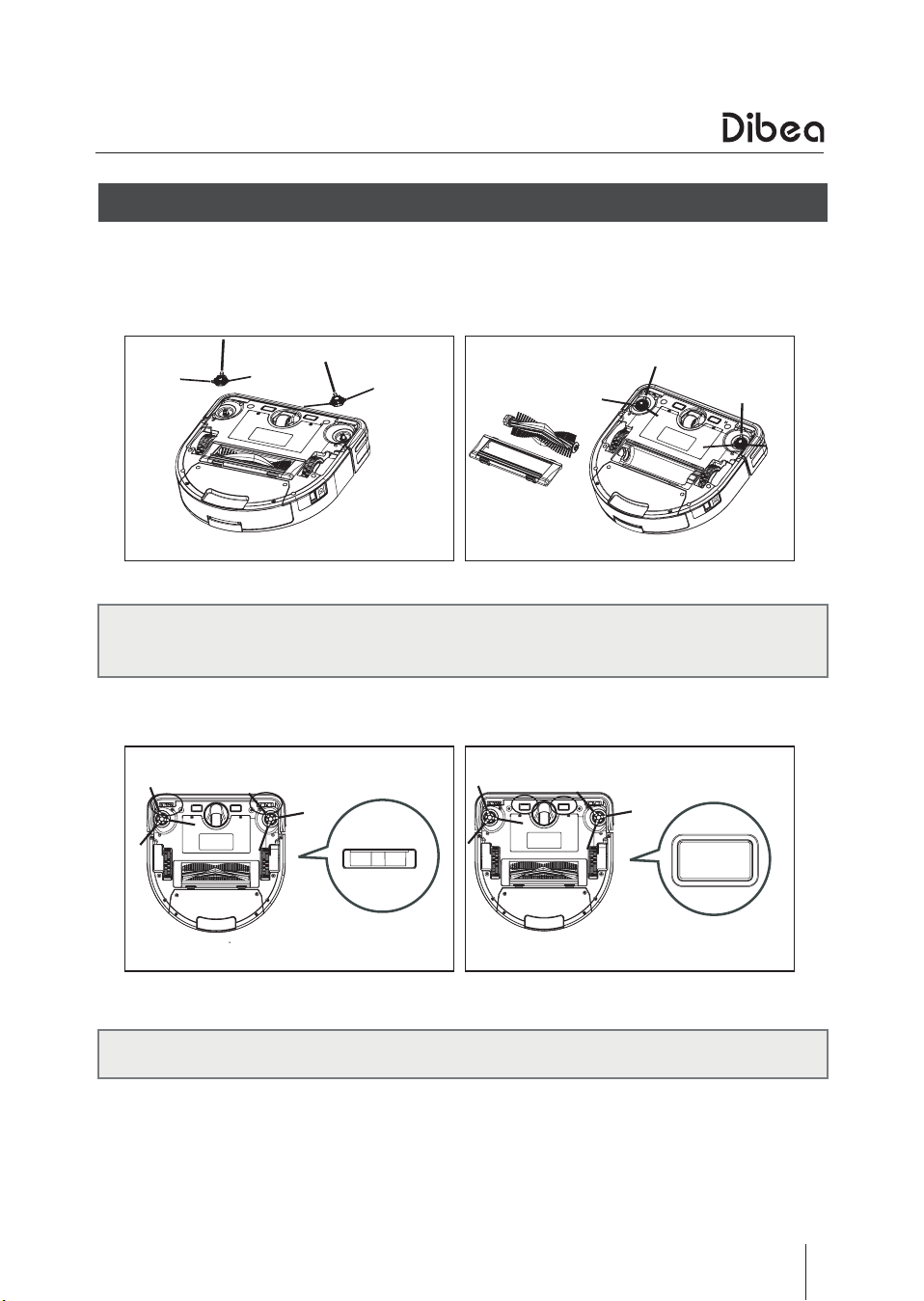
Clean the side brushes and roller brush when they get dirty and replace them once
damaged.
Gently pull and take out the side brushes as showed above.
Remove the roller brush guard and take out the roller brush as showed below.
Clean the charging poles and cliff sensors with soft cleaning cloth or tool.
●
Side & roller brush cleaning
●
Do not use mopping function on carpets or rugs.
●
When the robot is mopping, please pay attention to the water and add
more when needed.
●
Do not install the water tank with water when the robot is charging.
18
Product Maintenance
●
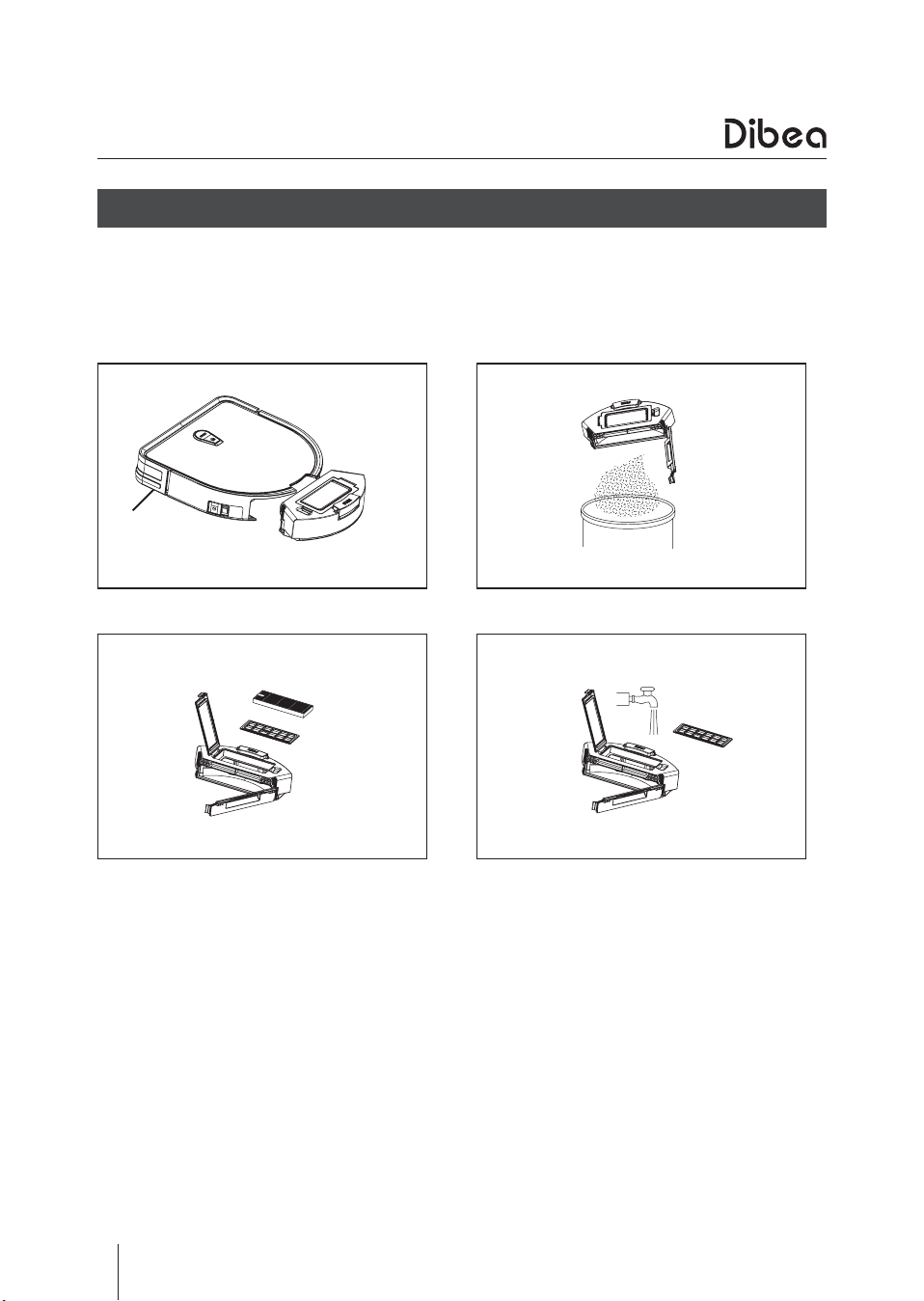
Dust bin & filter cleaning
●
Take out the dust bin and check if the suction is blocked.
●
Open the dust bin and empty it.
●
Take out the HEPA filter and primary filter and clean them
●
Install the filters correctly after drying them.
●
Empty the dust bin after every use.
●
Do not wash the HEPA filter with water.
●
Make sure filters are dry before installing.
●
Do not dry the filters under strong sunlight.
●
Filters are replaceable parts.
19
Troubleshooting
Error Cause Solution
When charging, press
the START button and
the vacuum won't back
off and starts cleaning,
and the light turns red
with 3 beeps.
Switch button is turned
off.
Turn on the switch
button and press the
START button again.
The vacuum is connected
to the adaptor directly
for charging.
Cut off the power and
turn on the switch
button.
The inside fan doesn't
work when installing the
dust bin.
Inappropriate installment
of dust bin.
Re-install the dust bin.
Magnet of dust bin gets
lost.
Contact the seller.
Fan failure Contact the seller.
The vacuum keeps acting
like: back - swing from
left to right - back - turn
around.
Foreign body in roller
brush tank.
Clean the roller brush
tank.
The vacuum keeps acting
like: back - turn in circles
or keep turning in circles.
Front sensors get
covered by dust.
Clean the sensors.
Cliff sensors get covered
by dust.
The vacuum acts like:
back - turn around for 3
times when cleaning.
Front bumper gets stuck.
Gently pull and pat the
front bumper.
The vacuum acts like:
back - turn around every
2-3 seconds when
cleaning and without any
other trouble.
Nose wheel failure.
Move the nose wheel by
hand and check if it gets
stuck.
●
Errors and solutions
20
Providing one-stop household
cleaning solution
Suzhou Dibea Electrical Technology Co.,Ltd.
Official website: www.dibea.com
Troubleshooting
●
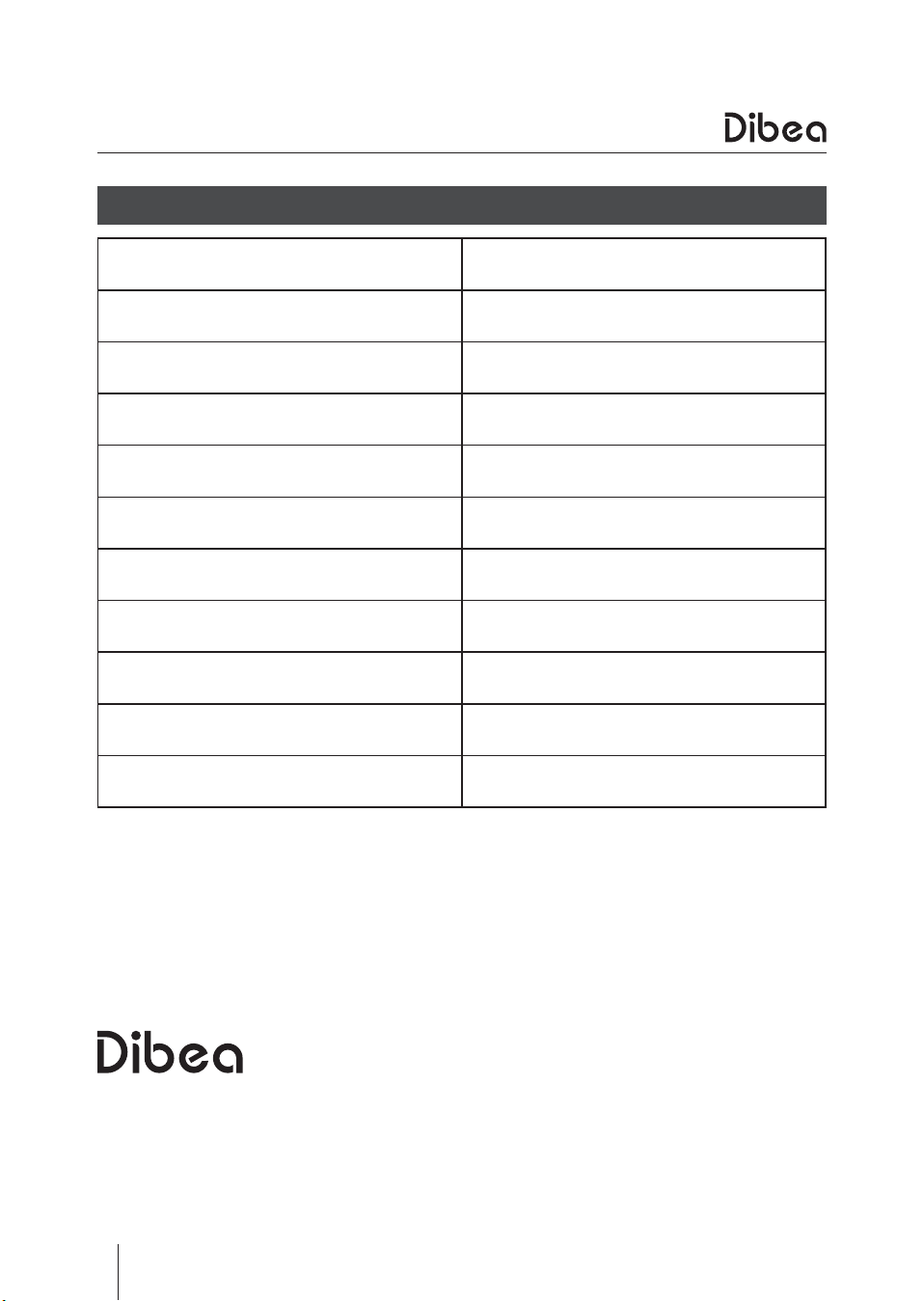
Product specifications
Item Specifications
Diameter 305 mm
Height 75 mm
Net weight 3 kg
Voltage
14.8 V
Battery Li-ion 2600 mAh
Dust bin capacity 350 ml
Charging type Auto
Cleaning modes Auto, spot, edge, scheduling
Charging hour 5 hours
Working hour
150 minutes