Quick Start Guide
Terms & Conditions
Your device
Read this document before operating the product
Read this document before operating the mobile device,
accessories, or software (defined collectively and individually
as the “Product”) and keep it for future reference. This
document contains important Terms and Conditions.
Electronic acceptance, opening the packaging, use, or
retention of the Product constitutes acceptance of these
Terms and Conditions.
GH68-56229A
Printed in Korea
QR code for
Samsung use
Rated IP68: Dust-tight.
Tested for submersion in
up to 5 feet of fresh water
for up to 30 minutes.
Use only compatible charging devices and accessories. Damage caused by use of
accessories which are not compatible may not be covered by warranty.
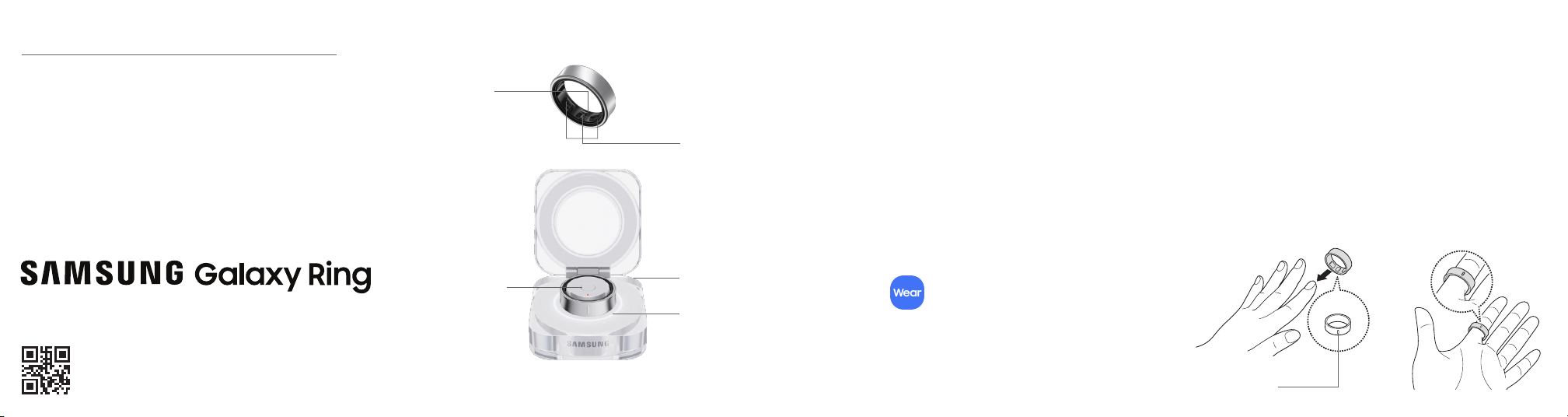
Optical heart
rate sensor
Temperature
sensor
USB Type-C
Charging port
(back)
Multipurpose
button
Quick pairing
Enable Bluetooth on your mobile device. Place
the Ring in the charging case. Close the charging
case, and then open it again. When the connection
window appears on your mobile device, follow the
instructions to complete the connection.
Galaxy Wearable
To access all features, download and install the Galaxy
Wearable app (requires Android OS 11.0 or later).
Get started
Charge your Ring
Connect the USB cable to the charging port of
the charging case. Place the Ring in the charging
case and close it. The Ring is charged rst, and
then the charging case.
Your Samsung account
Do everything Samsung with one account.
Sign in at smsng.us/mypage to connect all your
devices, use the latest features, and access exclusives,
plus product support, order tracking, and more.
You must have Samsung account to use this device.
Wear the Ring
Wear the Ring with the indicator facing your palm, on a
nger where it is comfortable and neither too tight nor
too loose.
Do more
Indicator light
Orientation
indicator

© 2024 Samsung Electronics America, Inc. Samsung & Samsung Galaxy are registered
trademarks of Samsung Electronics Co., Ltd. Other company and product names mentioned
herein may be trademarks of their respective owners. Screen images simulated. Appearance
of device may vary. Images shown are for reference only.
Terms & Conditions
Important legal information
Read this document before operating the mobile device, accessories, or software
(dened collectively and individually as the “Product”) and keep it for future
reference. This document contains important Terms and Conditions. Electronic
acceptance, opening the packaging, use, or retention of the Product constitutes
acceptance of these Terms and Conditions.
You can obtain a copy of the complete Terms and Conditions and Samsung Standard
One-year Limited Warranty by contacting Samsung at the address or phone number
provided in this document.
Dispute Resolution Agreement - This Product is subject to a binding Dispute
Resolution Agreement, which includes arbitration terms, between you
and SAMSUNG ELECTRONICS AMERICA, INC. (“Samsung”). You can opt out
within 30 calendar days of purchase: email [email protected] or call
1-800-SAMSUNG (726-7864) and providing the applicable information.
The Dispute Resolution Agreement, Standard One-year Limited Warranty, End
User License Agreement (EULA), and additional Health, Safety and Device care
information, including:
• Device Temperature
• Samsung Knox security platform
• Maintaining Dust and Water Resistance (IP rating)
• Location, Navigation, GPS and AGPS
• Wireless Emergency Alerts (WEA)
• Hearing Aid Compatibility (HAC)
are available at:
English: www.samsung.com/us/support/legal/mobile
Spanish: www.samsung.com/us/support/legal/mobile-sp
FCC ID and model number
Ring Size Ring model Case model FCC ID
5 SM-Q505 EP-QQ505
All Rings: A3LSMQ503
All cases: A3LEPQQ503
6 SM-Q506 EP-QQ506
7 SM-Q507 EP-QQ507
8 SM-Q508 EP-QQ508
9 SM-Q509 EP-QQ509
10 SM-Q500 EP-QQ500
11 SM-Q501 EP-QQ501
12 SM-Q502 EP-QQ502
13 SM-Q503 EP-QQ503
Specific Absorption Rate (SAR) certification information
For information visit:
• www.fcc.gov/general/radio-frequency-safety-0
• www.fcc.gov/encyclopedia/specific-absorption-rate-sar-cellular-telephones
• www.samsung.com/sar
Samsung Electronics America, Inc.
85 Challenger Road
Ridgeeld Park, New Jersey 07660
Phone: 1-800-SAMSUNG (726-7864)
Internet: www.samsung.com
Safe Handling & Recycling of Batteries
WARNING! Never dispose of batteries in a re because they may explode. Do not
disassemble, crush, puncture, heat, burn or reuse batteries. For more information,
visit call2recycle.org or call 1-800-822-8837. Alternatively, visit:
www.samsung.com/recycling or call 1-800-SAMSUNG.
FCC Part 15 Information and Notices
This device complies with part 15 of the FCC Rules. Operation is subject to
conditions: (1) This device may not cause harmful interference, and (2) this device
must accept any interference received, including interference that may cause
undesired operation. Operate devices that support wireless power sharing at least
8inches/20cm away from your body.
FCC Radiation Exposure Statement
This equipment complies with FCC Radiation exposure limits set forth for an
uncontrolled environment. This device and its antenna must not be co-located or
operating in conjunction with any other antenna or transmitter.
WARNING! Your Samsung device contains magnets. Keep it away from credit cards
and devices that may be affected by magnets. Keep your Samsung device more than
6 in./15cm away from medical devices. If you suspect interference with a medical
device, stop using your Samsung device and consult your medical provider.
WARNING! Choking hazard. Small parts. Keep away from children and pets.
WARNING! If you experience redness or skin irritation, remove the Ring immediately.
If irritation persists, contact a medical professional.
If the product becomes hot to the touch, remove it until it cools. Exposing your skin to
the product’s hot surface for a long time may cause low-temperature burns.
If you are in an emergency or are experiencing discomfort and cannot remove the
Ring yourself, consult a medical professional immediately.
Do not wear other rings next to the Ring; the Ring may become scratched, or scratch
other rings.
Never use an ultrasonic cleaner when cleaning the Ring. Doing so may result in
permanent damage to the device.
Do not look directly at the optical heart rate sensor lights. Doing so may impair your
vision.

