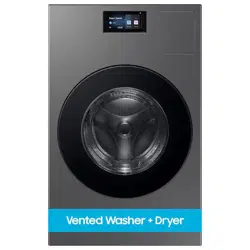
Laundry Combo
User manual
WD90F53AV*
Untitled-3 1Untitled-3 1 2025-02-05 2:37:292025-02-05 2:37:29
English2
Contents
Safety information 4
What you need to know about the safety instructions 4
Important safety symbols 4
Important safety precautions 8
CALIFORNIA PROPOSITION 65 WARNING 9
Critical installation warnings 9
Installation cautions 11
Critical usage warnings 11
Usage cautions 13
Critical cleaning warnings 17
Care for preventing freezing 17
Regulatory notice 18
FCC Notice 18
IC Notice 20
Open Source Announcement 21
Installation 22
Key installation requirements 22
Location considerations 22
Unpacking your Laundry Combo 23
What’s included 24
Installation requirements 26
Ducting requirements 30
Exhausting requirements 31
Electrical requirements 32
Step-by-step installation 33
Vent blockage test 42
Before you start 43
Initial setup 43
Run Calibration (recommended) 43
Laundry guidelines 44
Detergent drawer guidelines 46
Untitled-3 2Untitled-3 2 2025-02-05 2:37:302025-02-05 2:37:30
English 3
Operations 52
LCD panel 52
Operating a cycle 55
Cycle overview 56
Cycle chart 59
Settings 65
Special features 72
SmartThings 73
Maintenance 75
Product Care 75
Drum Clean+ 76
Emergency drain 77
Cleaning 79
Recovery from freezing 86
Care for an extended period of non-use 87
Cleaning the exterior 87
Exhaust system 87
Cleaning the interior 87
Troubleshooting 88
Checkpoints 88
Information codes 94
Specifications 96
Fabric care chart 96
Protecting the environment 97
Declaration of conformity 97
Specification sheet 98
Untitled-3 3Untitled-3 3 2025-02-05 2:37:302025-02-05 2:37:30
SAVE THESE INSTRUCTIONS
English4
Safety information
Congratulations on your new Samsung Laundry Combo. This manual contains important information on
the installation, use and care of your appliance. Please take some time to read this manual to take full
advantage of your Laundry Combo’s many benefits and features.
What you need to know about the safety instructions
Please read this manual thoroughly to ensure that you know how to safely and efficiently operate the
extensive features and functions of your new appliance. Please store the manual in a safe location close
to the appliance for future reference. Use this appliance only for its intended purpose as described in this
instruction manual.
Warnings and Important Safety Instructions in this manual do not cover all possible conditions and
situations that may occur. It is your responsibility to use common sense, caution and care when installing,
maintaining and operating your Laundry Combo.
Because the following operating instructions cover various models, the characteristics of your Laundry
Combo may differ slightly from those described in this manual and not all warning signs may be applicable.
If you have any questions or concerns, contact your nearest service center or find help and information
online at www.samsung.com.
Important safety symbols
What the icons and signs in this user manual mean:
WARNING
Hazards or unsafe practices that may result in severe personal injury, death and/or property damage.
CAUTION
Hazards or unsafe practices that may result in personal injury and/or property damage.
NOTE
Indicates that a risk of personal injury or material damage exists.
These warning signs are here to prevent injury to yourself and others.
Please follow them explicitly.
After reading this manual, store it in a safe place for future reference.
Read all instructions before using the appliance.
As with any equipment that uses electricity and moving parts, potential hazards exist. To safely operate
this appliance, familiarize yourself with its operation and exercise care when using it.
Untitled-3 4Untitled-3 4 2025-02-05 2:37:302025-02-05 2:37:30
SAVE THESE INSTRUCTIONS
English 5
WARNING - Risk of Fire
• Laundry Combo installation must be performed by a qualified
installer.
• Install the Laundry Combo according to the manufacturer’s
instructions and local codes.
• Do not install a Laundry Combo with flexible plastic venting
materials. If flexible metal (foil type) duct is installed, it must be of
a specific type identified by the appliance manufacturer as suitable
for use with clothes dryers. Flexible venting materials are known
to collapse, be easily crushed, and trap lint. These conditions will
obstruct Laundry Combo airflow and increase the risk of fire.
• Do not install a booster fan in the exhaust duct.
• To reduce the risk of severe injury or death, follow all installation
instructions.
• Save these instructions.
Untitled-3 5Untitled-3 5 2025-02-05 2:37:302025-02-05 2:37:30
SAVE THESE INSTRUCTIONS
Safety information
English6
WARNING - To reduce the risk of fire or
explosion:
• Do not dry items that have been previously cleaned, washed,
soaked, or spotted with gasoline, dry cleaning solvents, or other
flammable or explosive substances. They emit vapors that could
ignite or explode. Any material that has been in contact with a
cleaning solvent or flammable liquids or solids should not be placed
in the Laundry Combo until all traces of these flammable liquids
or solids and their fumes have been removed. There are many
highly flammable items used in homes, such as acetone, denatured
alcohol, gasoline, kerosene, some liquid household cleaners, some
spot removers, turpentine, waxes, and wax removers.
• Items containing foam rubber (which may be labeled latex foam)
or similarly textured rubberlike materials must not be dried on
a heat setting. Heated foam rubber materials can, under certain
circumstances, ignite spontaneously.
Untitled-3 6Untitled-3 6 2025-02-05 2:37:302025-02-05 2:37:30
SAVE THESE INSTRUCTIONS
English 7
WARNING - Fire or explosion hazard
• Failure to follow safety warnings exactly could result in serious
injury, death or property damage.
• Do not store or use gasoline or other flammable vapors and liquids
near this or any other appliance.
• Installation and service must be performed by a qualified installer,
service agency, or the gas supplier.
• Do not install a booster fan in the exhaust duct.
WARNING - What to do if you smell gas:
• Do not try to light any appliance.
• Do not turn on the appliance.
• Do not touch any electrical switch.
• Do not use any phone in your building.
• Clear the room, building or area of all occupants.
• Immediately call your gas supplier from a neighbor’s phone. Follow
the gas supplier’s instructions.
• If you cannot reach your gas supplier, call the fire department.
Untitled-3 7Untitled-3 7 2025-02-05 2:37:302025-02-05 2:37:30
SAVE THESE INSTRUCTIONS
Safety information
English8
Important safety precautions
WARNING
To reduce the risk of fire, electric shock, or injury to persons when using
your appliance, follow basic precautions, including the following:
1. Read all instructions before using this appliance.
2. DO NOT wash or dry articles that have been previously cleaned in, washed in, soaked in, or spotted with
gasoline, dry-cleaning solvents, other flammable or explosive substances as they give off vapors that
could ignite or explode.
3. DO NOT use the appliance to dry clothes which have traces of any flammable substance, such as
vegetable oil, cooking oil, machine oil, flammable chemicals, paint thinner, etc., or anything containing
wax or chemicals, such as mops and cleaning cloths. Flammable substances may cause the fabric to
catch fire by itself.
4. DO NOT store or use combustible materials, gasoline or other flammable liquids near the unit. Keep
area around the air intake vent on the front of the unit and adjacent surrounding areas free from the
accumulation of lint, dust and dirt.
5. Risk of Suffocation and Injury from Entrapment: Do not allow children to play on or in the appliance.
Close supervision of children is necessary when the appliance is used near children.
6. Before the appliance is removed from service or discarded, remove the door to the washing or drying
compartment.
7. DO NOT reach into the appliance if the tub or agitator is moving.
8. DO NOT install or store this appliance where it will be exposed to the weather.
9. DO NOT tamper with controls.
10. DO NOT repair or replace any part of the appliance or attempt any servicing unless specifically
recommended in the user-maintenance instructions or in published user-repair instructions that you
understand and have the skills to carry out.
11. DO NOT add gasoline, dry-cleaning solvents, or other flammable or explosive substances to the wash
water. These substances give off vapours that could ignite or explode.
12. Under certain conditions, hydrogen gas may be produced in a hot-water system that has not been used
for 2 weeks or more. HYDROGEN GAS IS EXPLOSIVE. If the hot-water system has not been used for such
a period, before using a washing machine, turn on all hot-water faucets and let the water flow from
each for several minutes. This will release any accumulated hydrogen gas. As the gas is flammable, do
not smoke or use an open flame during this time.
13. DO NOT use fabric softeners or products to eliminate static unless recommended by the manufacturer
of the fabric softener or product.
14. Clean lint screen before or after each load.
Untitled-3 8Untitled-3 8 2025-02-05 2:37:302025-02-05 2:37:30
SAVE THESE INSTRUCTIONS
English 9
15. DO NOT use heat to dry articles containing foam rubber or similarly textured rubber-like materials.
16. Keep area around the exhaust opening and adjacent surrounding areas free from the accumulation of
lint, dust, and dirt.
17. The interior of the appliance should be cleaned periodically by qualified service personnel.
18. DO NOT place items exposed to cooking oils in your dryer. Items contaminated with cooking oils may
contribute to a chemical reaction that could cause a load to catch fire. To reduce the risk of fire due to
contaminated loads, the final part of a tumble dryer cycle occurs without heat (cool down period). Avoid
stopping a tumble dryer before the end of the drying cycle unless all items are quickly removed and
spread out so that the heat is dissipated.
19. This appliance must be grounded. See “Electrical requirements” and ”Grounding” in “Installation”
section.
20. The control board, inlet valve and motors are intentionally not grounded and may present a risk of
electric shock only during servicing.
- DO NOT contact these parts while the appliance is energized.
21. DO NOT operate this appliance if it is damaged, malfunctioning, partially disassembled, or has missing
or broken parts including a damaged cord or plug.
22. Unplug the appliance or turn off the circuit breaker before servicing. Pressing the Power button DOES
NOT disconnect power.
23. DO NOT use replacement parts that have not been recommended by the manufacturer (e.g. parts made
at home using a 3D printer).
CALIFORNIA PROPOSITION 65 WARNING
WARNING
Cancer and Reproductive Harm - www.P65Warnings.ca.gov.
Critical installation warnings
WARNING
The installation of this appliance must be performed by a qualified technician or service company.
• Failure to do so may result in electric shock, fire, an explosion, problems with the appliance, or injury.
The appliance is heavy, therefore take care when lifting it.
Untitled-3 9Untitled-3 9 2025-02-05 2:37:302025-02-05 2:37:30
SAVE THESE INSTRUCTIONS
Safety information
English10
Plug the power cord firmly into a wall socket that meets local electrical specifications. Use the socket for
this appliance only, and do not use an extension cord.
• Sharing a wall socket with other appliances using a power strip or extending the power cord may result
in electric shock or fire.
• Ensure that the power voltage, frequency, and current are the same as those of the product
specifications. Failure to do so may result in electric shock or fire.
Remove all foreign substances such as dust or water from the power plug terminals and contact points
using a dry cloth on a regular basis.
• Unplug the power plug and clean it with a dry cloth.
• Failure to do so may result in electric shock or fire.
Plug the power plug into the wall socket so that the cord is running towards the floor.
• If you plug the power plug into the socket in the opposite direction, the electric wires within the cable
may be damaged and this may result in electric shock or fire.
Keep all packaging materials out of the reach of children as these may be dangerous.
• If a child places a bag over its head, it may suffocate.
When the appliance, power plug or power cord is damaged, contact your nearest service center.
This appliance must be properly grounded.
Do not ground the appliance to a gas pipe, plastic water pipe, or telephone line.
• This may result in electric shock, fire, an explosion, or problems with the appliance.
• Never plug the power cord into a receptacle that is not grounded adequately or not in accordance
with local and national codes. See the installation instructions for information about grounding this
appliance.
Do not install this appliance near a heater or any inflammable material.
Do not install this appliance in a humid, oily or dusty location, or in a location exposed to direct sunlight or
water (raindrops).
Do not install this appliance in a location exposed to low temperatures.
• Frost may cause the tubes to burst.
Do not install this appliance in a location where gas may leak.
• This may result in electric shock or fire.
Do not install or keep the product exposed to the outdoor elements.
Do not use an electric transformer.
• This may result in electric shock or fire.
Do not use a damaged power plug, damaged power cord or loose wall socket.
• This may result in electric shock or fire.
Untitled-3 10Untitled-3 10 2025-02-05 2:37:302025-02-05 2:37:30
SAVE THESE INSTRUCTIONS
English 11
Do not pull or excessively bend the power cord.
Do not twist or tie the power cord.
Do not hook the power cord over a metal object, place a heavy object on the power cord, insert the power
cord between objects, or push the power cord into the space behind the appliance.
• This may result in electric shock or fire.
Do not unplug the appliance by pulling the power cord.
• Unplug the power plug by holding the plug.
• Failure to do so may result in electric shock or fire.
This appliance should be positioned so that the power plug, the water supply taps, and the drain pipes are
accessible.
Following the repair by a non-authorized service provider, self-repair or non-professional repair of the
product, Samsung is not liable for any damage to the product, any injury or any other product safety issue
caused by any attempt to repair the product which does not carefully follow these repair and maintenance
instructions. Any damage to the product caused by an attempt to repair the product by any person other
than a Samsung certified service provider will not be covered by the warranty.
Installation cautions
CAUTION
Install your appliance on a solid, level floor that can support its weight.
• Failure to do so may result in abnormal vibrations, movement, noise, or problems with the appliance.
Critical usage warnings
WARNING
If the appliance is flooded, turn off the water and power supplies immediately and contact your nearest
service center.
• Do not touch the power plug with wet hands.
• Failure to do so may result in electric shock.
If the appliance generates a strange noise, a burning smell, or smoke, unplug the power cord immediately
and contact your nearest service center.
• Failure to do so may result in electric shock or fire.
Untitled-3 11Untitled-3 11 2025-02-05 2:37:302025-02-05 2:37:30
SAVE THESE INSTRUCTIONS
Safety information
English12
In the event of a gas leak (such as propane gas, LP gas, etc.), ventilate immediately without touching the
power plug. Do not touch the appliance or power cord.
• Do not use a ventilating fan.
• A spark may result in an explosion or fire.
Remove all door levers before disposing of the appliance.
• If trapped inside the appliance, children may suffocate to death.
Make sure to remove the packaging (sponge, styrofoam) attached to the bottom of the Laundry Combo
before using it.
Do not wash items contaminated with gasoline, kerosene, benzene, paint thinner, alcohol or other
inflammable or explosive substances.
• This may result in electric shock, fire, or explosion.
Do not open the door by force while operating.
• Water flowing out of the Laundry Combo may result in burns or cause the floor to be slippery. This may
result in injury.
• Opening the door by force may result in damage to the appliance or injury.
Do not sit on the appliance or lean against the doors.
• The appliance may fall over causing a serious injury.
Dry the laundry only after it was spun by an appropriate washing machine.
Do not dry laundry contaminated by inflammable materials such as gasoline, kerosene, benzene, thinner,
alcohol, etc.
• This may result in electric shock, fire or explosion.
Do not touch the power plug with wet hands.
• This may result in electric shock.
Do not turn the appliance off by unplugging the power cord while an operation is in progress.
• Plugging the power cord into the wall socket again may cause a spark and result in electric shock or fire.
Do not let children climb in or onto the appliance.
• This may result in electric shock, burns or injury.
Do not insert your hand or a metal object under the Laundry Combo while it is operating.
• This may result in injury.
Do not unplug the appliance by pulling the power cord. Always grip the plug firmly and pull it straight out
of the outlet.
• Damage to the power cord may cause a short-circuit, fire and/or electric shock.
Do not attempt to repair, disassemble, or modify the appliance yourself.
• Do not use a fuse (such as copper, steel wire, etc.) other than a standard fuse.
Untitled-3 12Untitled-3 12 2025-02-05 2:37:302025-02-05 2:37:30
SAVE THESE INSTRUCTIONS
English 13
• When the appliance needs to be repaired or reinstalled, contact your nearest service center.
• Failure to do so may result in electric shock, fire, problems with the appliance, or injury.
If the water supply hose comes loose from the water tap and floods the appliance, unplug the power cord.
• Failure to do so may result in electric shock or fire.
Unplug the power cord when the appliance is not being used for long periods of time or during a thunder or
lightning storm.
• Failure to do so may result in electric shock or fire.
If any foreign substance enters into the appliance, unplug the power cord and contact your nearest
Samsung Customer Service.
• This may result in electric shock or fire.
Keep your pets away from the appliance to prevent them from chewing any parts of the Laundry Combo,
which may result in electric shock, fire, or injury.
Gas leaks may occur in your system, resulting in a dangerous situation.
Usage cautions
CAUTION
When the Laundry Combo is contaminated by a foreign substance such as detergent, dirt, food waste, etc.,
unplug the power cord and clean the Laundry Combo using a damp, soft cloth.
• Failure to do so may result in discoloration, deformation, damage, or rust.
The glass parts may break by a strong impact. Take care when using the Laundry Combo.
• If the glass is broken, it may result in injury.
Open the water tap slowly after a long period of non-use, water supply failure, or when reconnecting the
water supply hose.
• The air pressure in the water supply hose or the water pipe may damage a part of the appliance or result
in a water leak.
If a draining error occurs during an operation, check if there is a draining problem.
• If the Laundry Combo is used when it is flooded because of a draining problem, it may result in electric
shock or fire.
Insert the laundry into the Laundry Combo completely so that the laundry does not get caught in the door.
• If laundry gets caught in the door, it may result in damage to the laundry or the appliance, or result in a
water leak.
Turn the water supply off when the Laundry Combo is not being used.
• Ensure that the screws on the water supply hose connector are properly tightened.
Untitled-3 13Untitled-3 13 2025-02-05 2:37:302025-02-05 2:37:30
SAVE THESE INSTRUCTIONS
Safety information
English14
Ensure that the rubber seal and front door glass are not contaminated by a foreign substance (such as
waste, thread, hair, etc.).
• If a foreign substance is caught in the door or the door is not completely closed, it may cause a water
leak.
Open the water tap and check if the water supply hose connector is firmly tightened and that there is no
water leak before using the appliance.
• If the screws on the water supply hose connector are loose, it may result in a water leak.
The appliance you have purchased is designed for domestic use only.
Using the appliance for business purposes qualifies as an appliance misuse. In this case, the appliance will
not be covered by the standard warranty provided by Samsung and no responsibility can be attributed to
Samsung for malfunctions or damages resulting from such misuse.
Do not stand on the appliance or place objects (such as laundry, lighted candles, lighted cigarettes, dishes,
chemicals, metal objects, etc.) on the appliance.
• This may result in electric shock, fire, problems with the appliance, or injury.
Do not spray volatile material such as insecticide onto the surface of the appliance.
• As well as being harmful to humans, this may result in electric shock, fire or problems with the
appliance.
Do not place objects that generate electromagnetic fields near the Laundry Combo.
• This may result in injury due to a malfunction.
Water drained during a high-temperature wash or drying cycle is hot. Do not touch the water.
• This may result in burns or injury.
Draining time may vary depending on the water temperature. If the water temperature is too high, the
draining process starts after the water cools down.
Do not wash, spin, or dry water-proof seats, mats, or clothing (*) unless your model has a special cycle for
these items.
(*): Woollen bedding, rain covers, fishing vests, ski pants, sleeping bags, diaper covers, sweat suits, and
bicycle, motor cycle and car covers, etc.
• Do not wash thick or hard mats even if the washing machine mark is on the care label. This may result in
injury or damage to the Laundry Combo, walls, floor, or clothing due to abnormal vibrations.
• Do not wash throw rugs or doormats with rubber backing. The rubber backing may come off and stick to
inside the drum, and this may result in malfunction such as a drainage error.
Do not operate the Laundry Combo when the detergent drawer is removed.
• This may result in electric shock or injury due to a water leak.
Do not touch the insides of the drum during or just after drying as it is hot.
• This may result in burns.
Untitled-3 14Untitled-3 14 2025-02-05 2:37:312025-02-05 2:37:31
SAVE THESE INSTRUCTIONS
English 15
Do not touch the inside of the glass door and the drum after washing and drying as those parts may
become hot and could cause burns.
Do not insert your hand into the detergent drawer.
• This may result in injury as your hand may be caught by the detergent input device.
Remove the liquid detergent guide (applicable models only) when using powdered detergent.
• If not, water may leak through the front of the detergent drawer.
Do not place any objects (such as shoes, food waste, or animals) other than laundry into the Laundry
Combo.
• This may result in damage to the Laundry Combo, or injury and death in the case of pets because of the
abnormal vibrations.
Do not press the buttons using sharp objects such as pins, knives, fingernails, etc.
• This may result in electric shock or injury.
Do not wash or dry laundry contaminated by oils, creams or lotions usually found in skincare shops or
massage clinics.
• This may cause the rubber seal to become deformed and result in a water leak.
Do not leave metal objects such as safety pins or hairpins in the drum for long periods of time.
• This may cause the drum to rust.
• If rust starts appearing on the surface of the drum, apply a (neutral) cleansing agent to the surface and
use a sponge to clean it. Never use a metal brush.
Do not use dry cleaning detergent directly and do not wash, rinse, or spin laundry contaminated by dry
cleaning detergent.
• This may result in spontaneous combustion or ignition due to the heat from the oxidation of the oil.
Do not use water from water cooling/heating devices.
• This may result in problems with the Laundry Combo.
Do not use natural hand-washing soap for the Laundry Combo.
• If it hardens and accumulates inside the Laundry Combo, it may result in problems with the appliance,
discoloration, rust, or bad odors.
Place socks and brassieres in a washing net and wash them with the other laundry.
Do not wash large laundry items such as bedding in the washing net.
• Failure to do so may result in injury due to abnormal vibrations.
Do not use hardened detergent.
• If it accumulates inside the Laundry Combo, it may result in a water leak.
Untitled-3 15Untitled-3 15 2025-02-05 2:37:312025-02-05 2:37:31
SAVE THESE INSTRUCTIONS
Safety information
English16
Make sure that the pockets of all the clothing items are empty.
• Hard, sharp objects such as coins, safety pins, nails, screws, or stones can cause extensive damage to
the appliance.
Do not wash or dry clothing with large buckles, buttons, or other heavy metal objects.
Sort the laundry by color on the basis of its colorfastness and select the recommended cycle, water
temperature and additional functions.
• This may result in discoloration or fabric damage.
Take care that children’s fingers are not caught in the door when closing it.
• Failure to do so may result in injury.
To prevent odors and mold, leave the door open after completing a cycle to allow the drum to dry.
To prevent limescale build-up, leave the detergent drawer open after a wash cycle and dry inside it.
Do not dry laundry containing forming rubber (latex) or similar rubber textures.
• If forming rubber is heated, it may start a fire.
If necessary, use the laundry net for small and lightweight laundry such as fabric tie belts, apron strings,
and underwire bras which can break during a cycle.
Dryer sheets are compatible with this model, and are recommended for better drying performance.
Dryer sheets are also beneficial in reducing the static electricity generated during a drying cycle. Static
electricity could lead to damaging laundry items and potentially the appliance.
Do not use the Laundry Combo near dangerous powders such as coal dust, wheat flour, etc.
• This may result in electric shock, fire, or explosion.
Do not touch the rear side of the appliance during or immediately after drying is complete.
• The appliance remains hot and may cause burns.
Do not sit on top of the Laundry Combo.
Residual oil on clothing can ignite spontaneoulsy. The potential for spontaneous combustion increases
when items containing vegetable oil or cooking oil are exposed to heat. Heat sources such as your Laundry
Combo can warm these items, allowing an oxidation reaction in the oil to occur. Oxidation creates heat. If
this heat cannot escape, the items can become hot enough to catch fire. Piling, stacking, or storing these
kinds of items may prevent heat from escaping and can create a fire hazard.
All washed and unwashed fabrics that contain vegetable oil or cooking oil can be dangerous. Washing
these items in hot water with extra detergent will reduce, but not eliminate, the hazard. Always use the
Cool Down cycle for these items to reduce their temperature. Never remove these items from the Laundry
Combo hot or interrupt the drying cycle until the items have run through the Cool Down cycle. Never pile or
stack these items when they are hot.
Untitled-3 16Untitled-3 16 2025-02-05 2:37:312025-02-05 2:37:31
SAVE THESE INSTRUCTIONS
English 17
Critical cleaning warnings
WARNING
Do not clean the appliance by spraying water directly onto it.
Do not use a strong acidic cleaning agent.
Do not use benzene, thinner or alcohol to clean the appliance.
• This may result in discoloration, deformation, damage, electric shock or fire.
Before cleaning or performing maintenance, unplug the appliance from the wall socket.
• Failure to do so may result in electric shock or fire.
Clean the filter case before and after using the Laundry Combo.
Clean the inside of the product on a regular basis by asking an authorized service engineer.
Care for preventing freezing
WARNING
Install the Laundry Combo in an area where the temperature does not drop below a water-freezing
temperature.
If draining directly using a long drain hose, water remaining inside the hose can freeze in winter. Make sure
there is no water left inside the hose after use.
If the drain hose has frozen, wrap the hose with a towel soaked in warm water for approximately ten
minutes to thaw it.
Untitled-3 17Untitled-3 17 2025-02-05 2:37:312025-02-05 2:37:31
SAVE THESE INSTRUCTIONS
English18
Regulatory notice
FCC Notice
CAUTION
Any changes or modifications not expressly approved by the party responsible for compliance could void
the user’s authority to operate the equipment.
This device complies with Part 15 of FCC Rules. Operation is subject to the following two conditions:
1. This device may not cause harmful interference, and
2. This device must accept any interference received including interference that cause undesired
operation.
For products sold in the US and Canadian markets, only channels 1–11 are available. You cannot select any
other channels.
FCC STATEMENT:
This equipment has been tested and found to comply within the limits for a Class B digital device, pursuant
to part 15 of the FCC Rules. These limits are designed to provide reasonable protection against harmful
interference in a residential installation.
This equipment generates, uses, and can radiate radio frequency energy and, if not installed and used in
accordance with the instructions, may cause harmful interference to radio communications. However, there
is no guarantee that interference will not occur in a particular installation. If this equipment does cause
harmful interference to radio or television reception, which can be determined by turning the equipment
off and on, the user is encouraged to try to correct the interference by one or more of the following
measures:
• Reorienting or relocating the receiving antenna
• Increasing the separation between the equipment and receiver
• Connecting the equipment to an outlet that is on a different circuit than the radio or TV.
• Consulting the dealer or an experienced radio/TV technician for help.
FCC RADIATION EXPOSURE STATEMENT:
This equipment complies with FCC radiation exposure limits set forth for an uncontrolled environment.
This equipment should be installed and operated so there is at least 8 inches (20 cm) between the radiator
and your body. This device and its antenna(s) must not be colocated or operated in conjunction with any
other antenna or transmitter.
Untitled-3 18Untitled-3 18 2025-02-05 2:37:312025-02-05 2:37:31
SAVE THESE INSTRUCTIONS
English 19
FCC Compliance Statement (applicable models only)
Model WD90F53AV*
Variant model
WD90F53AV*
Asterisk (*) varies from A through Z which indicates the color of the
appliance.
Responsible Party - U.S. Contact
Information
Samsung Electronics America, Inc.
85 Challenger Road
Ridgefield Park, NJ 07660
Phone : 1-800-SAMSUNG (726-7864)
This device complies with Part 15 of the FCC Rules. Operation is subject to the following two conditions: (1)
This device may not cause harmful interference, and (2) This device must accept any interference received,
including interference that may cause undesired operation.
Untitled-3 19Untitled-3 19 2025-02-05 2:37:312025-02-05 2:37:31
SAVE THESE INSTRUCTIONS
Regulatory notice
English20
IC Notice
The term "IC" before the radio certification number only signifies that Industry Canada technical
specifications were met. Operation is subject to the following two conditions:
1. This device may not cause interference, and
2. This device must accept any interference, including interference that may cause undesired operation of
the device.
This Class B digital apparatus complies with Canadian ICES-003 .
Cet appareil numérique de la classe B est conforme á la norme NMB-003 du Canada.
For products sold in the US and Canadian markets, only channels 1–11 are available. You cannot select any
other channels.
IC RADIATION EXPOSURE STATEMENT:
This equipment complies with IC RSS-102 radiation exposure limits set forth for an uncontrolled
environment. This equipment should be installed and operated so there is at least 8 inches (20 cm)
between the radiator and your body. This device and its antenna(s) must not be colocated or operated in
conjunction with any other antenna or transmitter.
Untitled-3 20Untitled-3 20 2025-02-05 2:37:312025-02-05 2:37:31
SAVE THESE INSTRUCTIONS
English 21
Open Source Announcement
The software included in this product contains open source software. You may obtain the complete
corresponding source code for a period of three years after the last shipment of this product by contacting
our support team via http://opensource.samsung.com (Please use the "Inquiry" menu.)
It is also possible to obtain the complete corresponding source code in a physical medium such as a CD-
ROM; a minimal charge will be required.
The following URL http://opensource.samsung.com/opensource/SMART_AT_051/seq/0 leads to the
open source license information as related to this product. This offer is valid to anyone in receipt of this
information.
Untitled-3 21Untitled-3 21 2025-02-05 2:37:312025-02-05 2:37:31
English22
Installation
Follow these instructions carefully to ensure proper installation of the Laundry Combo and to prevent
accidents when doing laundry.
WARNING
Certain internal parts are intentionally not grounded and may present a risk of electric shock only during
servicing. Service personnel – Do not contact the following parts while the appliance is energized: Control
board, heat sink, motor, inlet valve and pump.
Key installation requirements
• A grounded electrical outlet.
• A power cord for electric Laundry Combo (except in Canada).
• Gas lines (for gas models) that must meet national and local regulations.
• An exhaust system made of rigid metal or flexible stiff-walled metal exhaust ducting.
WARNING
Remove the door from all discarded appliances to prevent a child from suffocating.
Location considerations
The Laundry Combo should be located where there is enough space at the front for loading the Laundry
Combo, and enough space behind for the exhaust system. This Laundry Combo is factory-ready for the
rear exhaust option. Make sure the room in which the Laundry Combo is located has enough fresh air. The
Laundry Combo must be located where there are no air-flow obstructions.
The Laundry Combo must not be installed or stored in an area where it will be exposed to water and/
or weather. The Laundry Combo area must be kept clear of combustible materials, gasoline, and other
flammable vapors and liquids. A Laundry Combo produces combustible lint. The area around the Laundry
Combo should be kept lint-free.
Untitled-3 22Untitled-3 22 2025-02-05 2:37:312025-02-05 2:37:31
English 23
Unpacking your Laundry Combo
Unpack your Laundry Combo and inspect it for shipping damage. Make sure you have received all the items
shown on the next page. If your Laundry Combo was damaged during shipping, or you do not have all of the
items, call 1-800-SAMSUNG (1-800-726-7864). To prevent personal injury or strain, wear protective gloves
whenever lifting or carrying the unit.
WARNING — Packing materials can be dangerous to children; Keep all packing material (plastic bags,
polystyrene, etc.) well out of children’s reach.
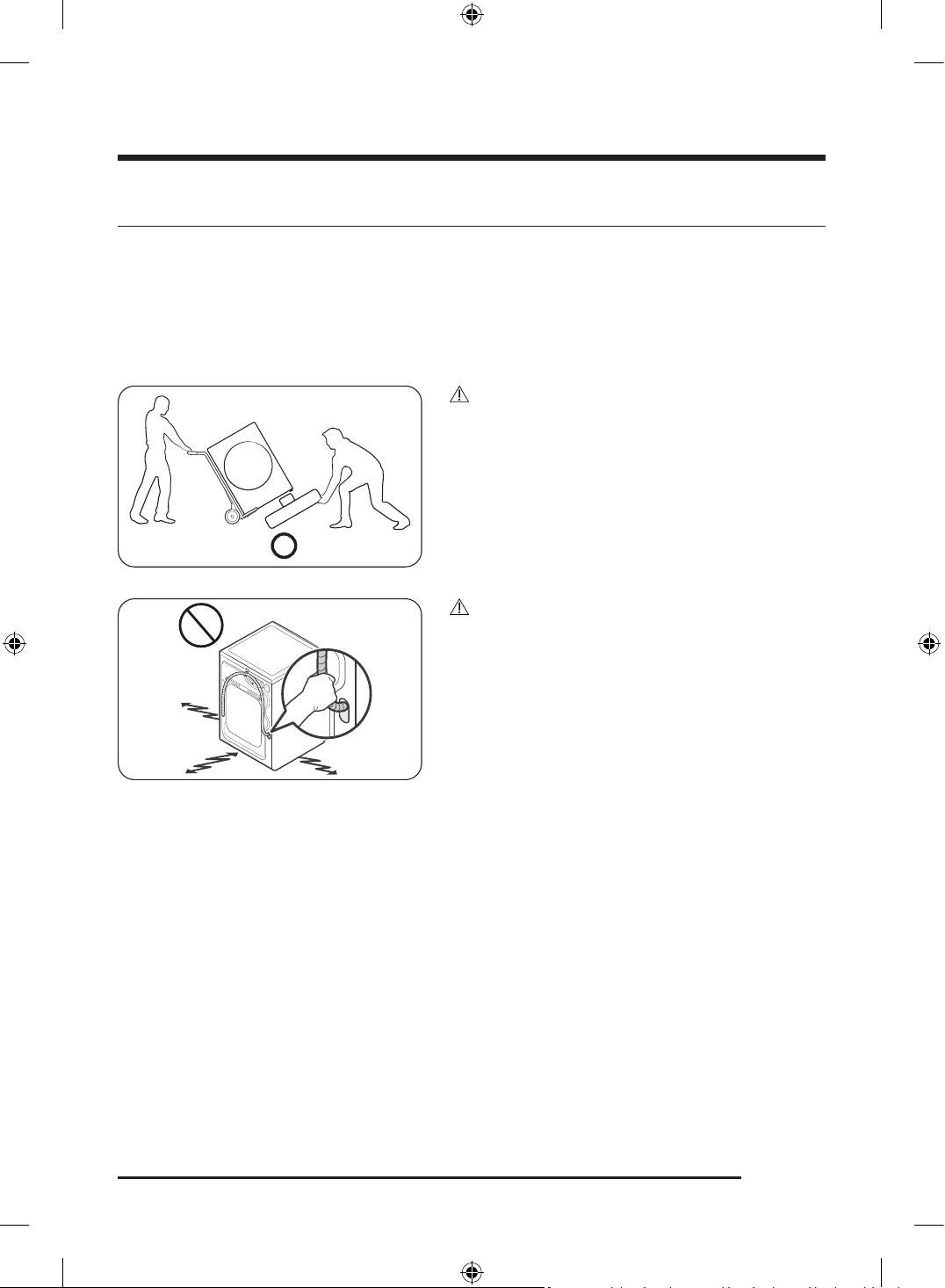
CAUTION
You must have at least 2 people unpack the Laundry
Combo. To remove the cushion bottom of the packing
materials, do not tip the Laundry Combo over on its front
side.
When you lay the Laundry Combo down to remove the
carton base, protect the side of the Laundry Combo and
lay it down carefully. Never lay your Laundry Combo on
its back or front.
CAUTION
Do not grab or pull the drain hose to drag and move the
product.
Untitled-3 23Untitled-3 23 2025-02-05 2:37:312025-02-05 2:37:31
Installation
English24
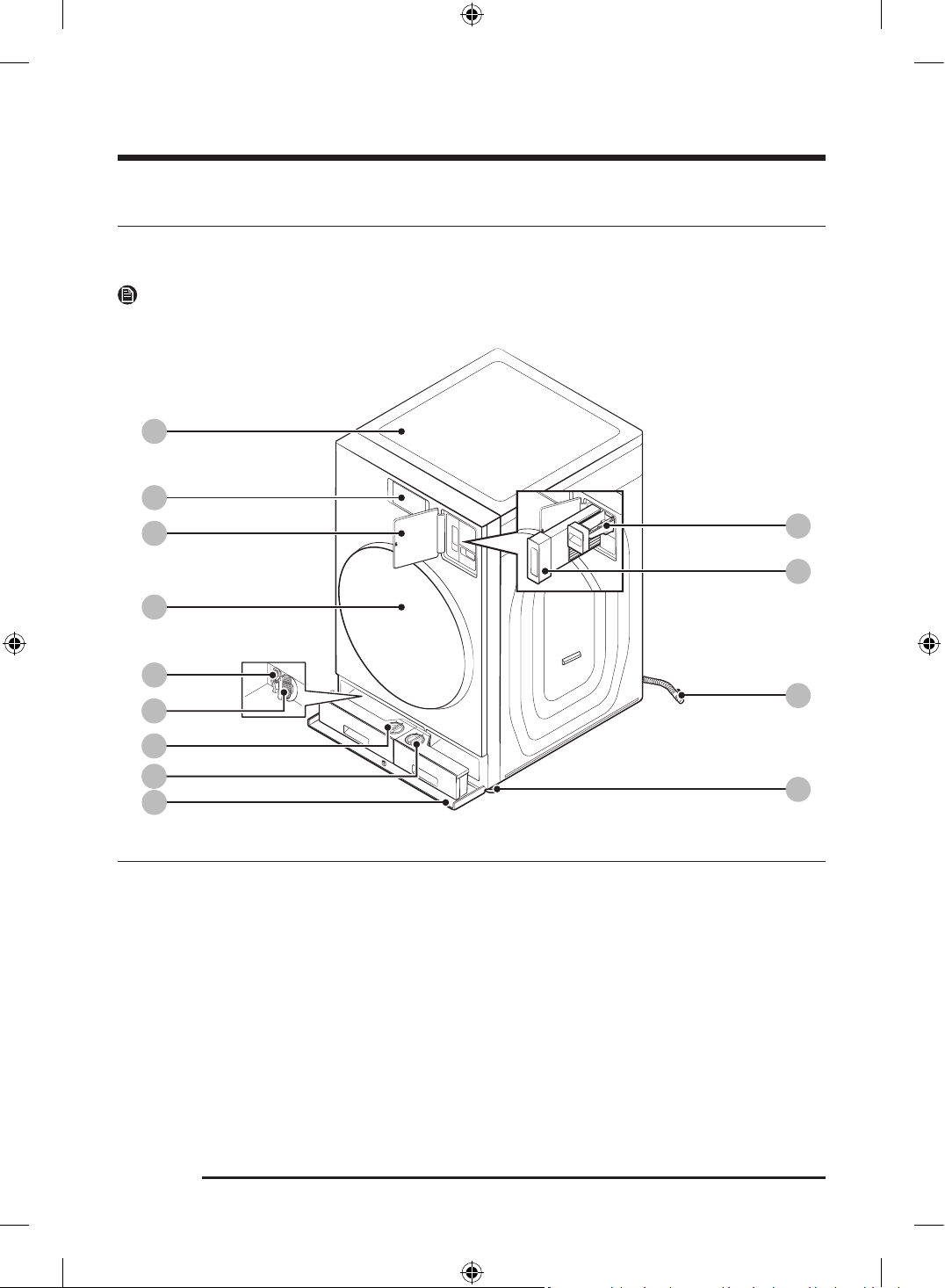
What’s included
Make sure all the parts are included in the product package. If you have a problem with the Laundry Combo
or the parts, contact a local Samsung customer center or retailer.
NOTE
The appearance of the actual product may differ from the image shown.
01
02
03
04
09
13
12
08
07
10
11
05
06
01 Worktop 02 LCD panel 03 Lint filter cover
04 Door 05 Emergency drain tube 06 Drain filter
07 Auto dispenser 08 Flex auto dispenser 09 Compartment cover
10 Manual bleach dispenser 11 Lint filter 12 Drain hose
13 Levelling feet
Untitled-3 24Untitled-3 24 2025-02-05 2:37:322025-02-05 2:37:32
English 25
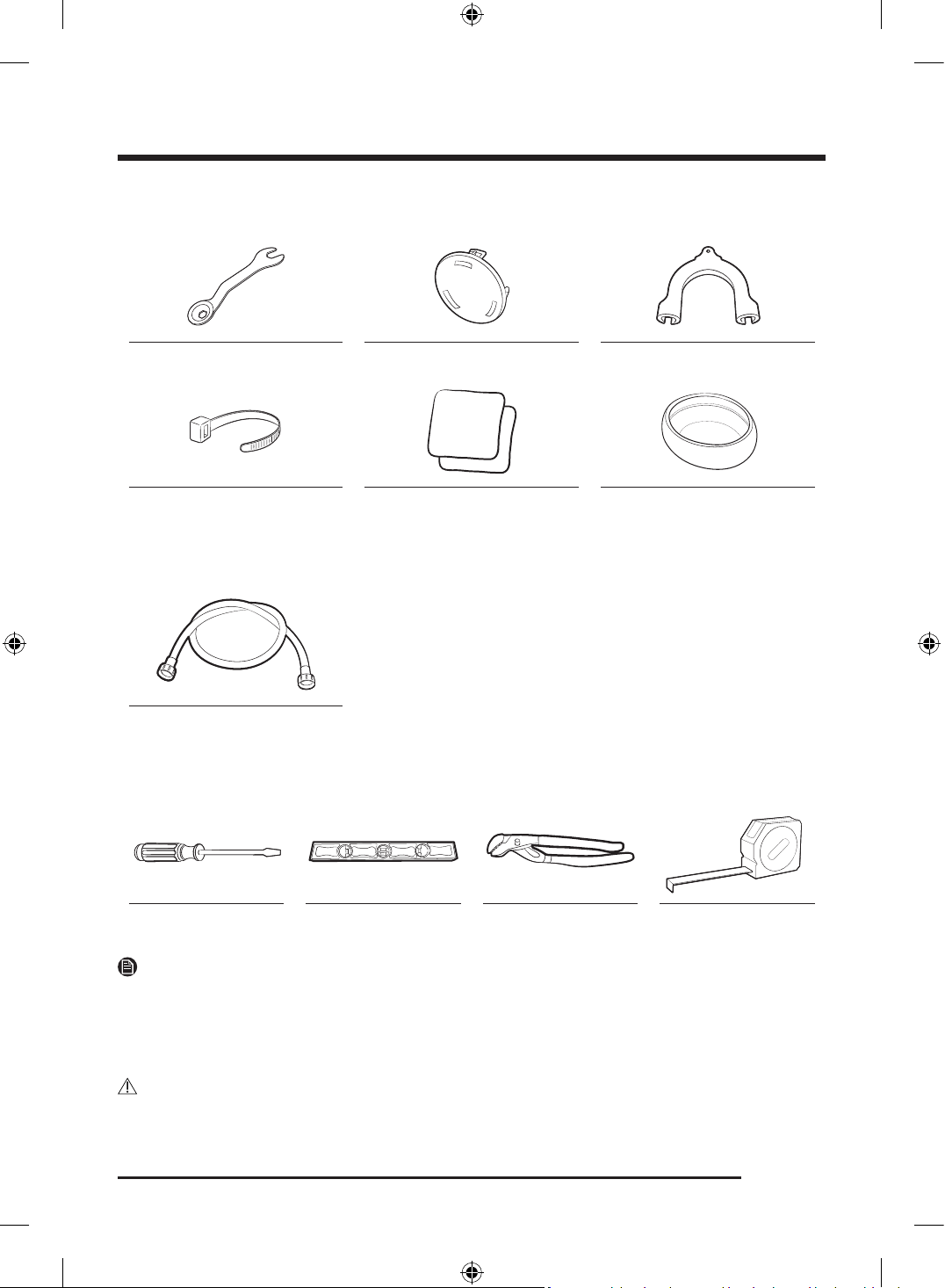
Parts supplied
Wrench Bolt caps Hose guide
50 ml
100 ml
Cable tie Anti-slip pads Aqua Pebble
Parts sold separately
Water hoses
Tools needed for installation
Phillips screwdriver Level Adjustable pliers Measuring tape
NOTE
• Bolt caps: The number (3 to 6) of bolt caps provided depends on the model.
• The appearance of the Laundry Combo and provided accessories may differ with the model.
• To purchase an accessory or lost part, contact a local Samsung service center or retailer.
- Water hoses are not sold in Samsung service center or retailers.
CAUTION
• Do not reuse old water hoses, which may leak or burst, causing flooding and/or property damage.
Untitled-3 25Untitled-3 25 2025-02-05 2:37:332025-02-05 2:37:33
Installation
English26
• Make sure rubber washers are inserted in each coupling of both water hoses.
Installation requirements
Electrical connections
Before operating or testing, follow all grounding instructions in the “ Grounding” section. An individual
branch (or separate) circuit serving only your Laundry Combo is recommended.
Do not use an extension cord.
Electric models – U.S. only
Most U.S. dryers require a 120 / 240 volt, 60 Hz AC approved electrical service. Some require 120 / 208 volt,
60 Hz approved electrical service. The electric service requirements can be found on the data label located
behind the door. A 30-ampere fuse or circuit breaker on both sides of the line is required.
• If a power cord is used, the cord should be plugged into a 30-ampere receptacle.
• The power cord is not provided with U.S. electric dryers. This cord is sold separately.
Risk of Electric Shock
WARNING
When local codes allow, you can connect the Laundry Combo's electrical supply with a new power
supply cord kit, marked for use with a dryer, that is U.L. listed and rated at a minimum of 120 / 240 volts,
30-amperes with three No. 10 copper wire conductors terminated with closed loop terminals, open-end
spade lugs with turned up ends, or with tinned leads.
• Do not reuse a power supply cord from an old dryer. The power cord electric supply wiring must be
supported at the Laundry Combo cabinet by a suitable UL-listed strain relief.
• Grounding through the neutral conductor is prohibited for (1) new branch-circuit installations, (2)
mobile homes, (3) recreational vehicles, and (4) areas where local codes prohibit grounding through the
neutral conductor. (Use a 4-prong plug for a 4 wire receptacle, NEMA type 14-30R.)
Electric models – Canada Only
A 120 / 240 volt, 60 Hz AC approved electrical service fused through a 30-ampere fuse or circuit breaker on
both sides of the line is required.
NOTE
All Canadian models are shipped with the power cord attached. The power cord should be plugged into a
30-ampere receptacle. In Canada, you may convert a Laundry Combo to 120 / 208 volts.
Untitled-3 26Untitled-3 26 2025-02-05 2:37:332025-02-05 2:37:33
English 27
Water supply
The proper water pressure for this Laundry Combo is between 20-116 psi (137-800 kPa). Water pressure less
than 20 psi (137 kPa) may cause the water valve not to close completely. Or, it may take longer to fill the
drum, causing the Laundry Combo to turn off. Water taps must be within 4 ft. (122 cm) from the rear of the
Laundry Combo so that the inlet hoses reach the Laundry Combo.
To reduce the risk of leaks:
• Make sure water taps are easily accessible.
• Turn off the taps when the Laundry Combo is not in use.
• Check for any leaks at the water inlet hose fittings on a regular basis.
CAUTION
• The minimum water pressure must be 30 psi if the Laundry Combo is installed along with another
washer.
• Before using the Laundry Combo for the first time, check all connections at the water valve and taps for
any leaks.
Drain
Samsung recommends a standpipe 18 in. (460 mm) high. The drain hose must be connected through the
hose clip to the standpipe, and the standpipe must fully cover the drain hose.
Flooring
For best performance, the Laundry Combo must be installed on a solid floor. Wood floors may need to be
reinforced to minimize vibration and/or unbalanced loads. Carpeting and soft tile surfaces do not provide
good resistance to vibrations and may cause the Laundry Combo to move slightly during the spin cycle.
CAUTION
Do NOT install the Laundry Combo on a platform or a poorly supported structure.
Water temperature
Do not install the Laundry Combo in areas where water may freeze as the Laundry Combo always retains
some water in its water valves, pumps, and/or hoses. Frozen water can cause damage to belts, the pump,
and other components of the Laundry Combo.
Untitled-3 27Untitled-3 27 2025-02-05 2:37:332025-02-05 2:37:33
Installation
English28
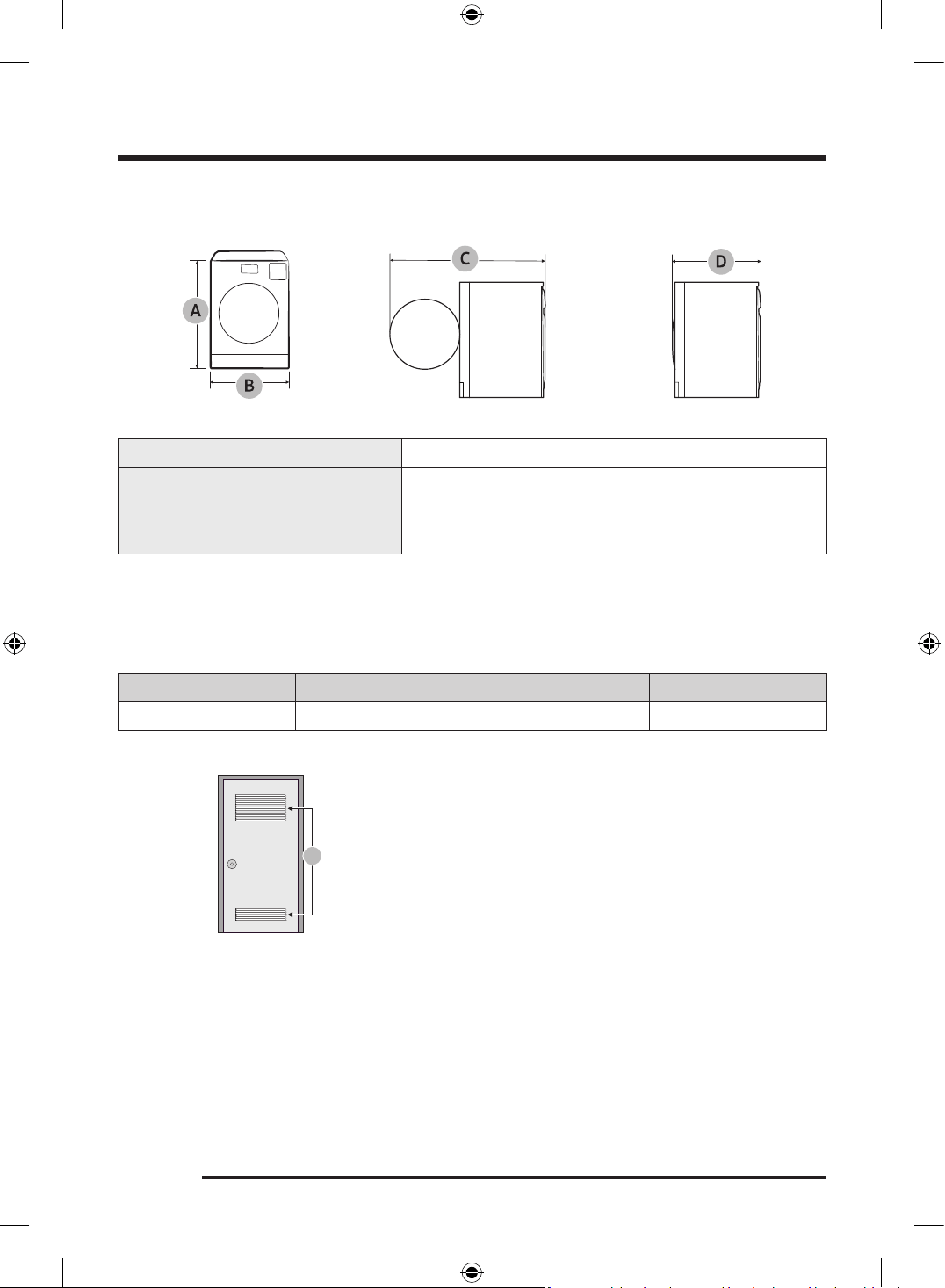
Dimensions
A. Overall height 43.7 in. (1110 mm)
B. Width 27 in. (686 mm)
C. Depth with door open 56.3 in. (1430 mm)
D. Depth 34.4 in. (875 mm)
Clearance requirement
Alcove or closet installations
Minimum clearance for stable operation
Sides Top Rear Front
1 in. (25 mm) 1 in. (25 mm) 2 in. (50 mm) 1 in. (25 mm)
A
A: If the Laundry Combo is installed in the same location
with other washer or dryer, the front of the alcove or
closet must have two unobstructed air openings for a
combined minimum total area of 72 in.
2
(465 cm
2
).
Untitled-3 28Untitled-3 28 2025-02-05 2:37:332025-02-05 2:37:33
English 29
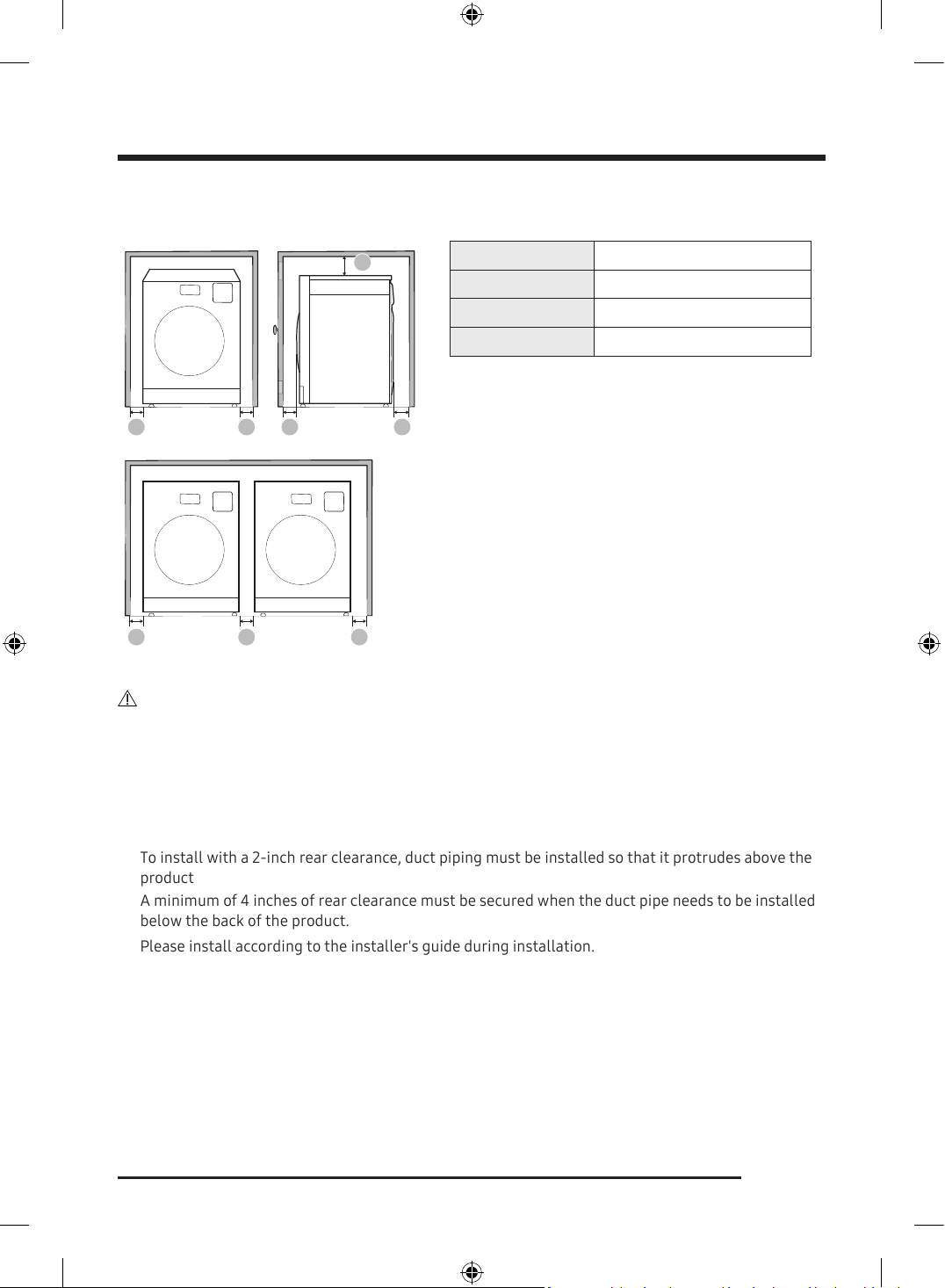
Custom cabinet and side-by-side installation
A A A
B
A A C D
A 1 in. (25 mm)
B 1 in. (25 mm)
C 1 in. (25 mm)
D 2 in. (50 mm)
CAUTION
Please be aware of the following when installing and using the product.
Untitled-3 29Untitled-3 29 2025-02-05 2:37:332025-02-05 2:37:33
•
•
•
The product must be installed in a place where it can be easily plugged. Otherwise, an electrical leak age
may occur and lead to electric shock or fire.
To install with a 2-inch rear clearance, duct piping must be installed so that it protrudes above the
product
A minimum of 4 inches of rear clearance must be secured when the duct pipe needs to be installed
below the back of the product.
Please install according to the installer's guide during installation.
• After plugging the power plug, make sure the power cord does not get pressed or pinched by the
product while you push it into the final installation position.
- This could cause fire or electric shock.
•
Installation
English30
Ducting requirements
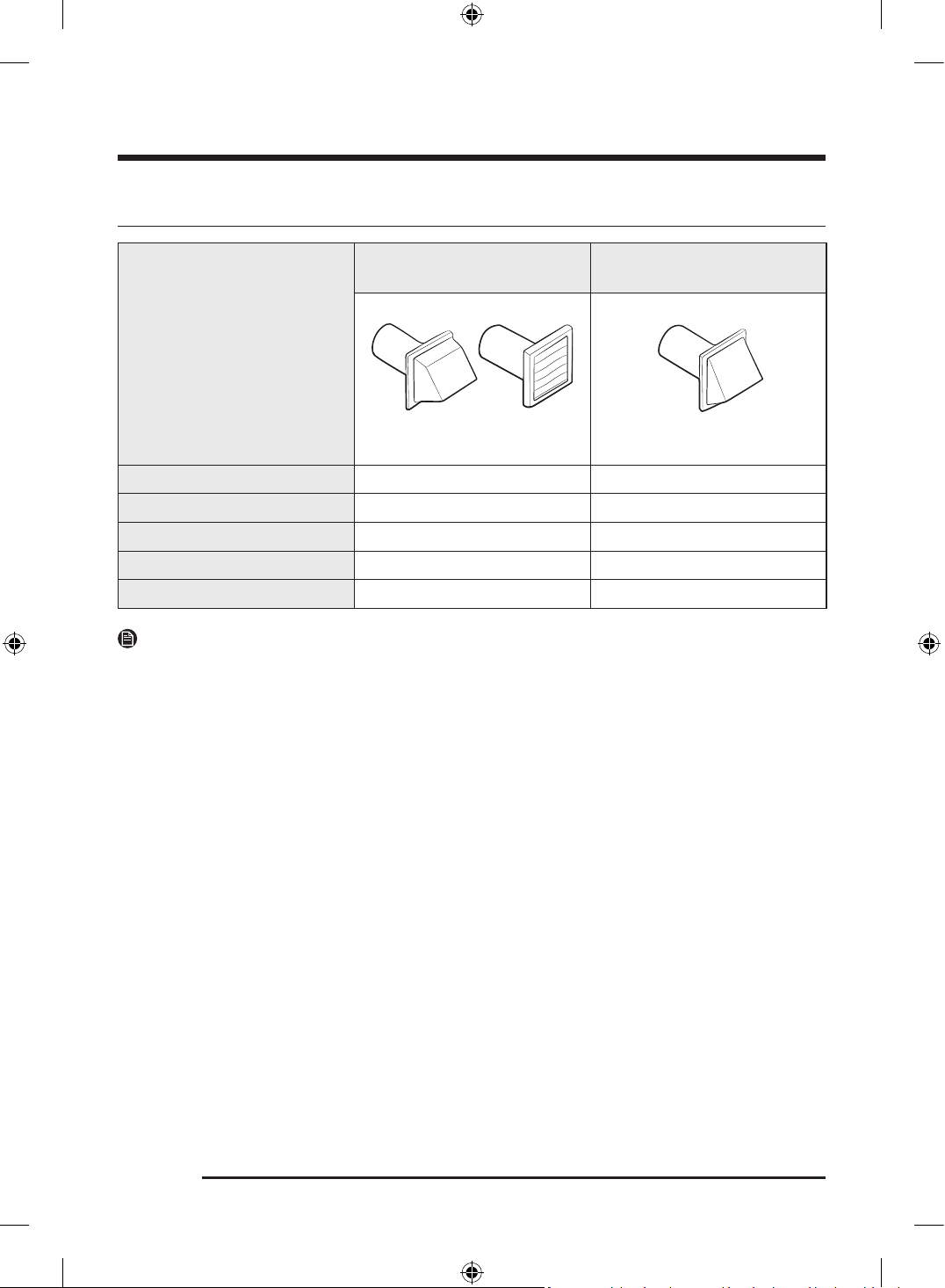
Weather hood type
Recommended
Use only for short-run
installation
4” (10.2 cm)
2.5” (6.4 cm)
No. of 90° elbows Rigid Rigid
0 80 ft. (24.4 m) 74 ft. (22.6 m)
1 68 ft. (20.7 m) 62 ft. (18.9 m)
2 57 ft. (17.4 m) 51 ft. (15.5 m)
3 47 ft. (14.3 m) 41 ft. (12.5 m)
NOTE
* Use a 4-inch (10.2 cm) diameter rigid aluminum or galvanized steel duct.
If you integrate the Laundry Combo's vent system with an existing exhaust system:
• Make sure the exhaust system meets all applicable local, state, and national regulations.
• Verify you are not using flexible plastic duct.
• Make sure to check for and remove all lint buildup from inside the existing ducts.
• Confirm the duct is not kinked or crushed.
• Make sure the exhaust hood damper opens and closes freely.
Manometer measurements
The static pressure in any exhaust system must not exceed 0.83 inches of water column or be less than 0.
Note that these values are measured with the Laundry Combo running with a manometer presented to the
exhaust duct that connects to the Laundry Combo. The Laundry Combo drum must be empty and lint filter
clean.
Untitled-3 30Untitled-3 30 2025-02-05 2:37:332025-02-05 2:37:33
English 31
Exhausting requirements
The Laundry Combo must not be exhausted into a chimney, a wall, a ceiling, an attic, a crawl space, or a
concealed space of a building. Exhausting the Laundry Combo to the outside will prevent large amounts of
lint and moisture from being blown into the room.
In the United States and Canada
• All dryers must be exhausted to the outside.
• The required exhaust duct is 4 inches (10.2 cm) in diameter.
• See “ Ducting requirements” in the “ Installation” section for the maximum duct length and number of
bends that can be used.
• The total length of flexible metal duct must not exceed 7’ 10
1
/ 2” (2.4 m).
• Do not assemble the duct with screws or other fasteners that extend into the duct and catch lint.
• For the United States only: Use only those foil-type flexible ducts, if any, specifically identified for use
with the appliance by the manufacturer and that comply with the Outline for Clothes Dryer Transition
Duct. Use Subject 2158A.
Outside the United States and Canada
• Refer to the local codes.
WARNING
• You must exhaust the Laundry Combo to the outside to reduce the risk of fire when you install the
Laundry Combo in an alcove or closet.
• Do not use a plastic or non-metal flexible duct.
• If your existing ductwork is plastic, non-metal, or combustible, replace it with metal.
• Use only a metal exhaust duct that is non-flammable to ensure containment of exhaust air, heat, and
lint.
Untitled-3 31Untitled-3 31 2025-02-05 2:37:332025-02-05 2:37:33
Installation
English32
Electrical requirements
The wiring diagram is located on the plate under the control panel or rear frame.
WARNING
• Improperly connecting the equipment grounding conductor can result in a risk of electric shock. Check
with a qualified electrician or serviceman if you are in doubt as to whether your Laundry Combo is
properly grounded. Do not modify the plug provided with your Laundry Combo – if it doesn’t fit the
outlet, have a proper outlet installed by a qualified electrician.
• To prevent unnecessary risk of fire, electrical shock, or personal injury, all wiring and grounding must be
done in accordance with local codes, or in the absence of local codes, in accordance with the National
Electrical Code, ANSI/NFPA No. 70-Latest Revision (for the U.S.) or the Canadian Electrical Code CSA
C22.1 – Latest Revisions and local codes and ordinances. It is your responsibility to provide adequate
electrical service for your Laundry Combo.
• All gas installations must be done in accordance with the national Fuel Code ANSI/Z2231 – Latest
Revision (for the U.S.) or CAN/CGA – B149 Installation Codes – Latest Revision (for Canada) and local
codes and ordinances.
Grounding
This Laundry Combo must be grounded. In the event of a malfunction or breakdown, the ground will reduce
the risk of electrical shock by providing a path of least resistance for the electrical current.
Gas models
WARNING
• Your Laundry Combo has a cord with an equipment-grounding conductor and a grounding plug. The
plug must be plugged into an appropriate outlet that is properly installed and grounded in accordance
with all local codes and ordinances.
• Do not modify the plug provided with your Laundry Combo – if it doesn’t fit the outlet, have a proper
outlet installed by a qualified electrician.
• Do not connect the ground wire to plastic plumbing lines, gas lines, or hot water pipes.
Electric models
WARNING
• Your Laundry Combo has an optional cord with an equipment-grounding conductor and a grounding
plug. This cord is sold separately.
• The plug must be plugged into an appropriate outlet that is properly installed and grounded in
accordance with all local codes and ordinances.
• Do not modify the plug provided with your Laundry Combo – if it doesn’t fit the outlet, have a proper
outlet installed by a qualified electrician.
• If a power cord is not used and the electric Laundry Combo is to be permanently wired, the Laundry
Combo must be connected to a permanently grounded metal wiring system, or an equipment
grounding conductor must be run with the circuit conductors and connected to the equipment
grounding terminal or lead on the Laundry Combo.
Untitled-3 32Untitled-3 32 2025-02-05 2:37:342025-02-05 2:37:34
English 33
Step-by-step installation
Make sure you have a qualified technician install the Laundry Combo. Step by step installation instructions
start below.
• Do not remove the protective film on the door before completing the product installation. If you remove
the protective film before the installation is complete, the door may get scratched or damaged during
installation.
• Make sure the installation location allows enough space for the Laundry Combo door to be fully open.
STEP 1 Select a location
Location requirements:
• A solid, level surface without carpeting or flooring that may obstruct ventilation
• No direct sunlight
• Adequate room for ventilation and wiring
• Ambient temperature always higher than the freezing point (32 °F / 0 °C)
• Away from heat sources
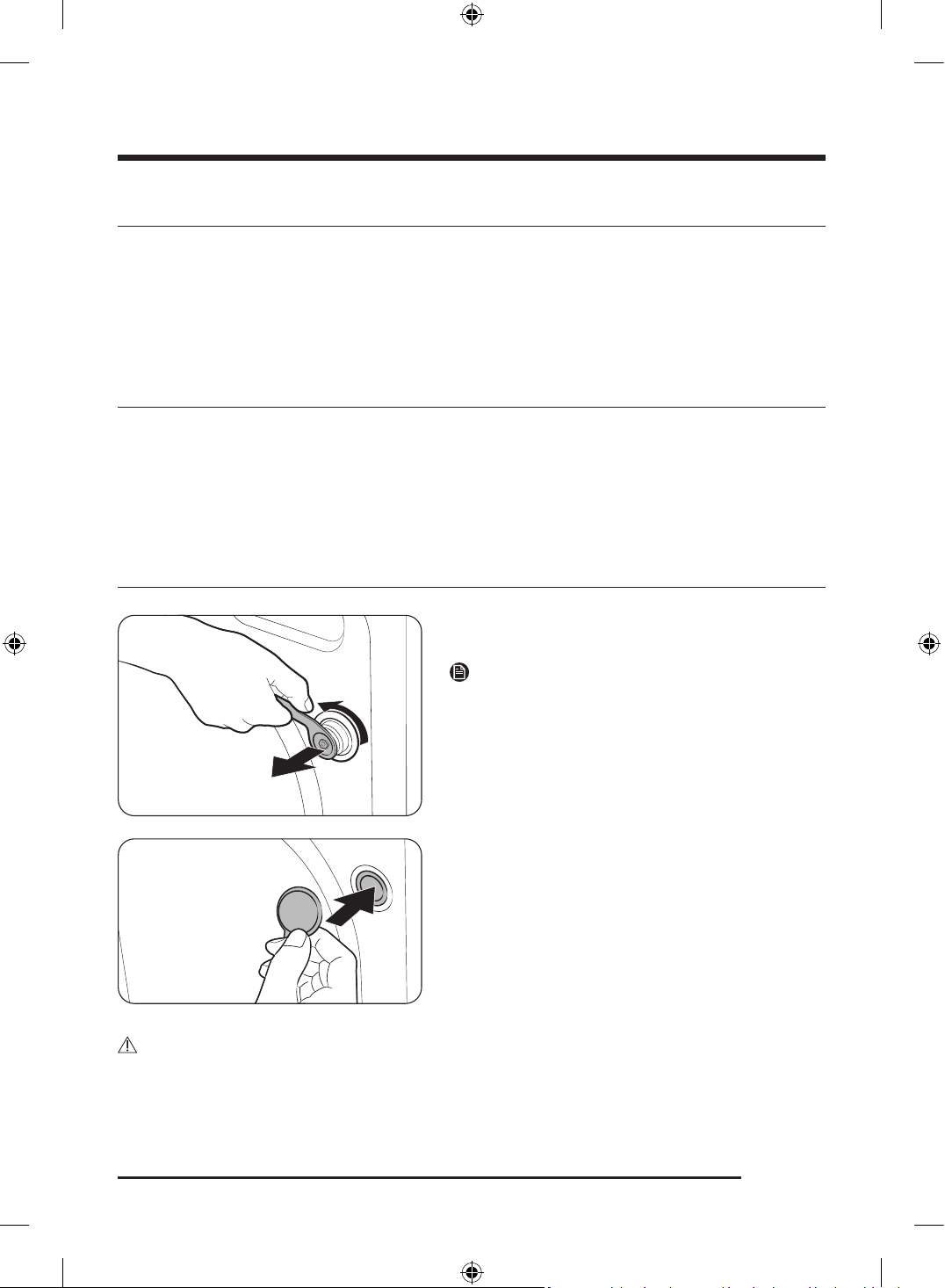
STEP 2 Remove the shipping bolts
1. After unpacking the product, remove all shipping
bolts.
NOTE
Use the enclosed end of the supplied wrench to remove
the shipping bolts.
2. Fill the holes with the supplied plastic bolt caps.
Keep the shipping bolts for future use.
WARNING
• The shipping bolts secure the tub during product transportation and reduce the chance of suspension
damage. Remove the shipping bolts before using the product and only reinsert them if you need to
move the product.
Untitled-3 33Untitled-3 33 2025-02-05 2:37:342025-02-05 2:37:34
Installation
English34
• Packaging materials can be dangerous to children. Dispose all packaging material (plastic bags,
polystyrene, etc.) out of children’s reach.
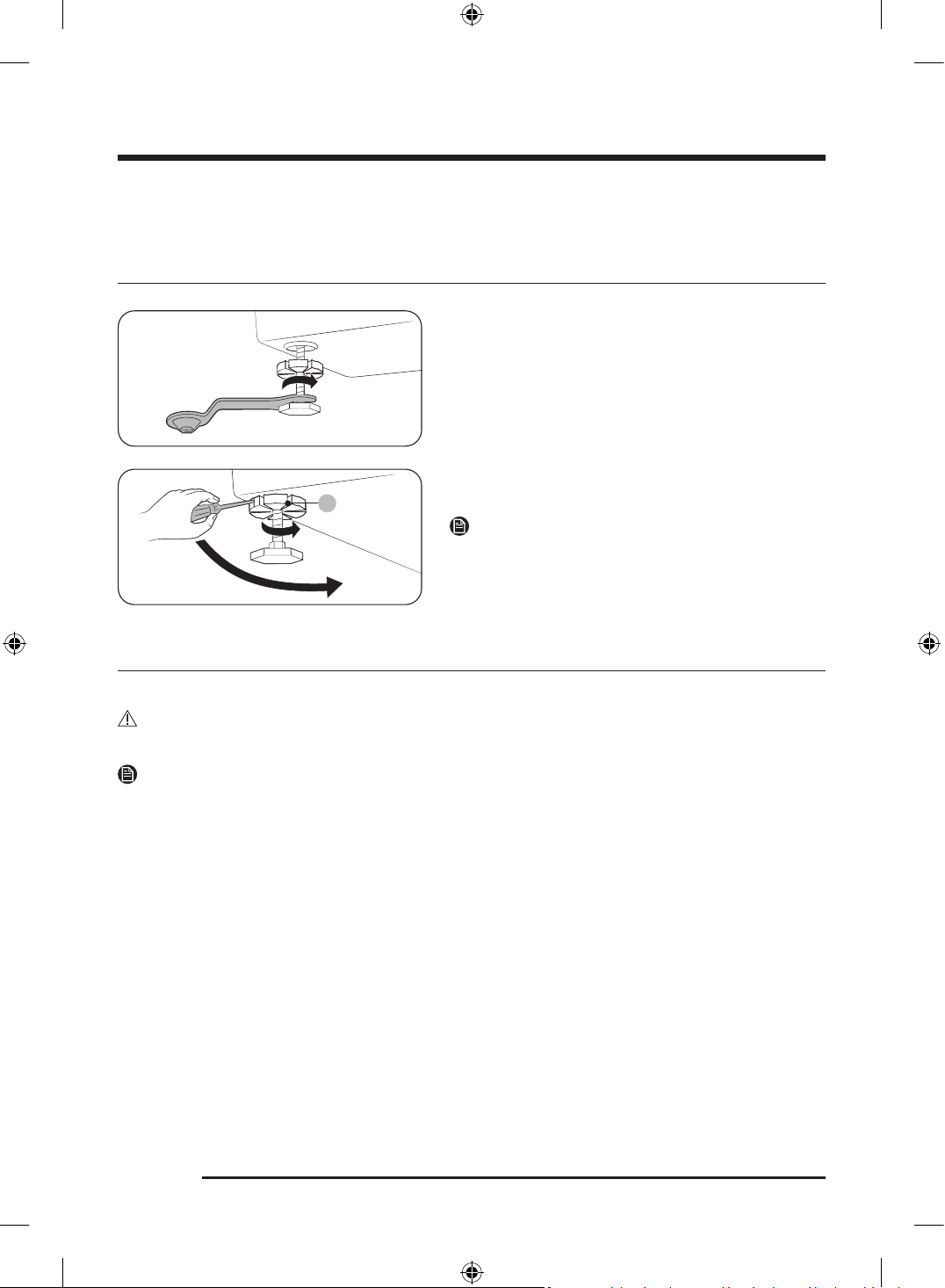
STEP 3 Adjust the leveling feet
1. Gently slide the Laundry Combo into position.
Excessive force may damage the leveling feet.
2. Using a wrench, turn the leveling feet clockwise
or counterclockwise to adjust the height until the
Laundry Combo is level.
3. Using a flathead screwdriver, tighten the locking
nuts (A).
NOTE
Use the open-end of the supplied wrench to adjust the
leveling feet.
STEP 4 Install the exhaust system
Install the exhaust system as instructed in the “ Exhaust ducting guide” section.
CAUTION
Before installing your appliance, remove the packing in the duct.
NOTE
• To move the appliance easily, lay two of the carton cushions from the packaging on the floor. Tip the
appliance on its side so it lies across both cushion-tops. Push the appliance so that it is near its final
location, and then set the appliance upright.
• Secure room around the appliance to facilitate ducting and wiring.
Untitled-3 34Untitled-3 34 2025-02-05 2:37:342025-02-05 2:37:34
English 35
STEP 5 Connect the electrical wiring (for electric models)
Before connecting the electrical wiring, make sure you have read the “ Electrical requirements” section on
page 32.
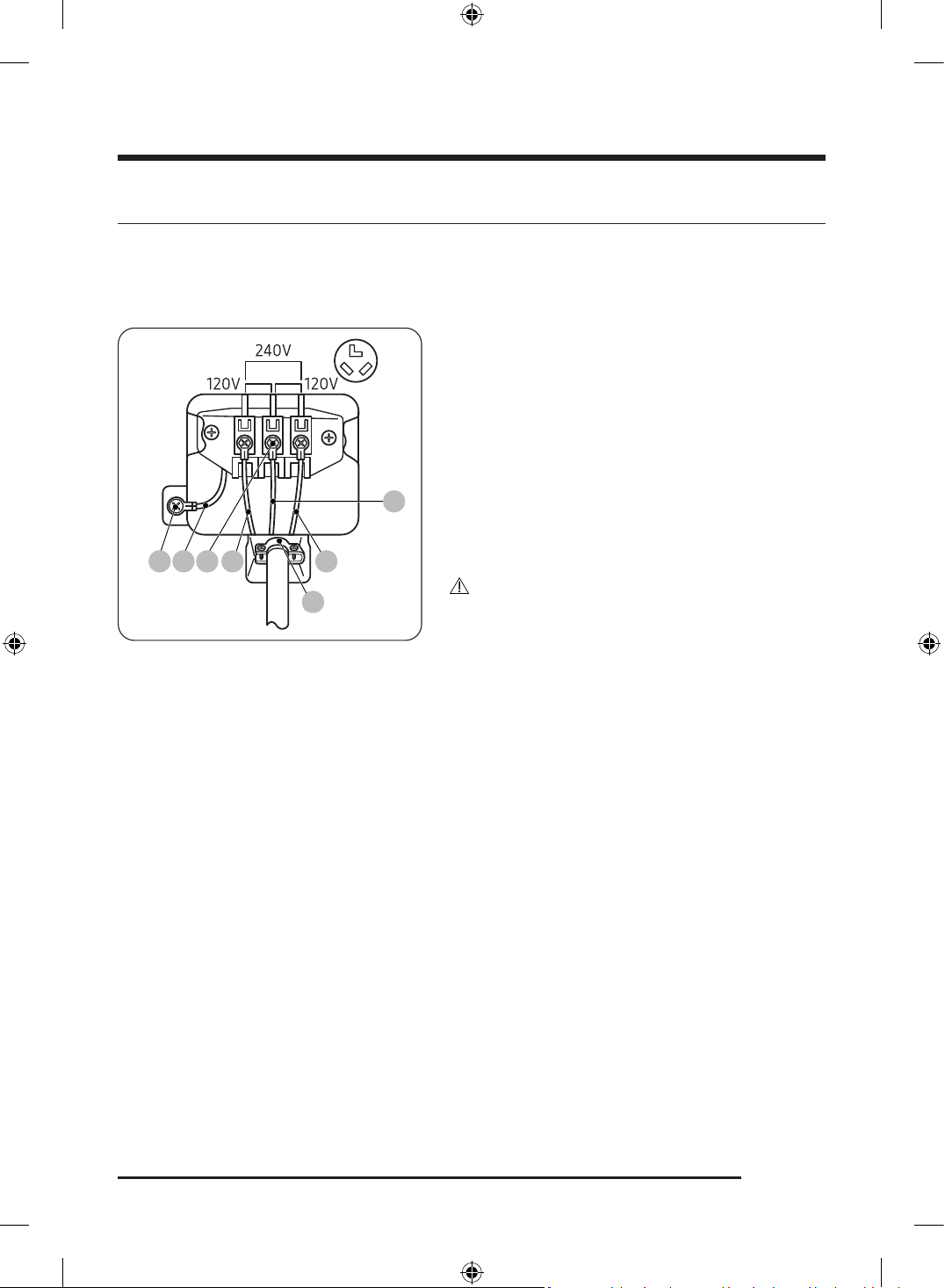
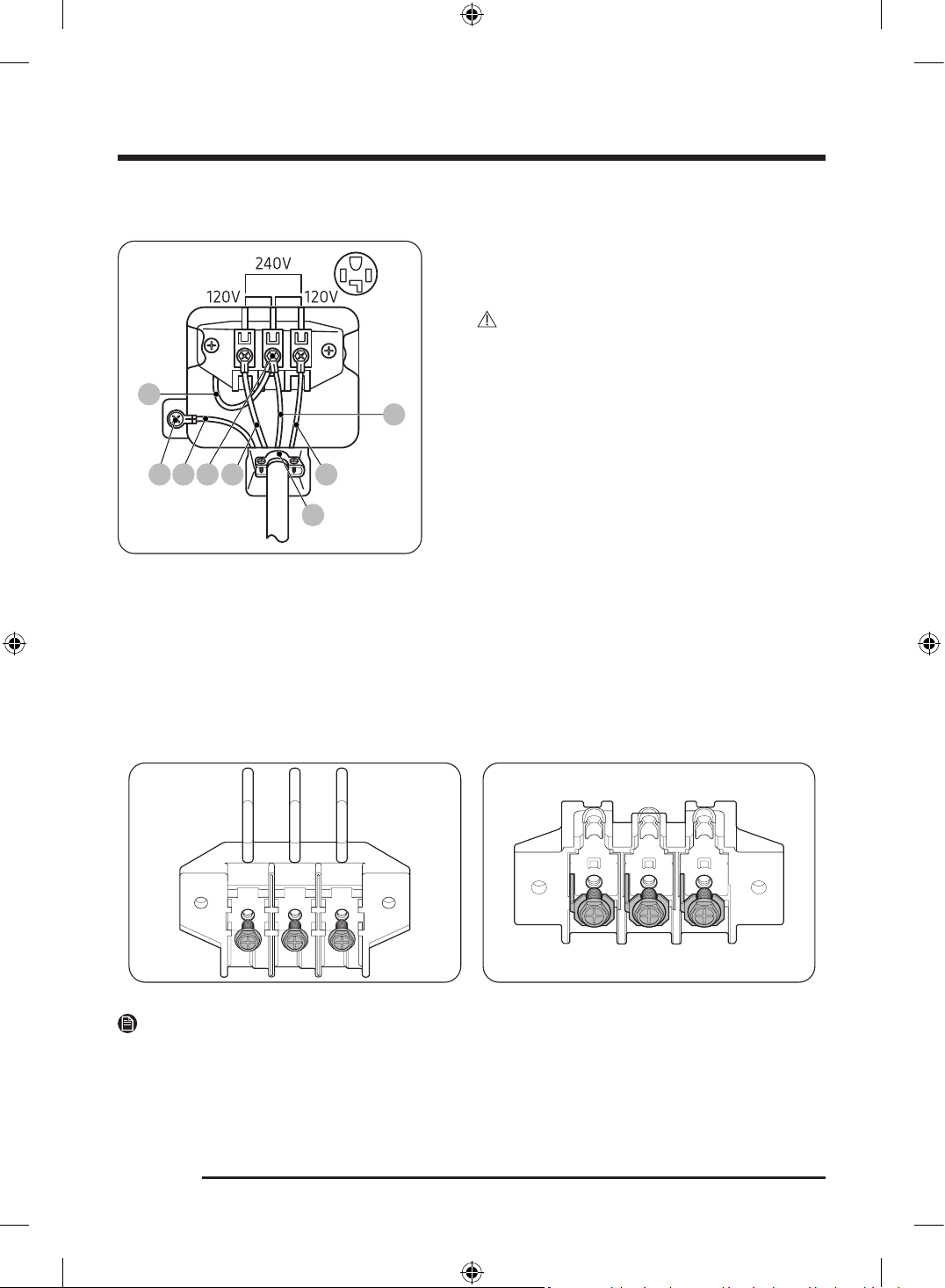
3-wire system
A B C L2 L1
D
E
A. External ground connector
B. Neutral grounding wire (white)
C. Center silver-colored terminal block
screw
D. Neutral wire (white or center wire)
E.
3
/ 4” (1.9 cm) UL-listed strain relief
1. Loosen or remove the screws from the center
terminal block.
2. Connect the neutral wire (white or center wire) of the
power cable to the center, silver-colored terminal
screw of the terminal block. Tighten the screws.
3. Connect the other wires to the outer terminal block
screws. Tighten the screws.
4. Tighten the strain relief screws.
5. Insert the terminal block cover into the rear panel
of the Laundry Combo. Then, secure the cover with a
hold-down screw.
CAUTION
• To convert from the 4-wire system to 3-wire system,
connect the ground strap to the terminal block
support to ground the Laundry Combo frame to the
neutral conductor.
• Ring-type terminals are recommended. If using strap
terminals, make sure they are tightened.
• Connect the power cord and check L1/L2/D (N)
voltage. If the voltage is low, it may not heat properly.
Review the “ Electrical requirements” section on page
32 if needed.
Untitled-3 35Untitled-3 35 2025-02-05 2:37:342025-02-05 2:37:34
Installation
English36
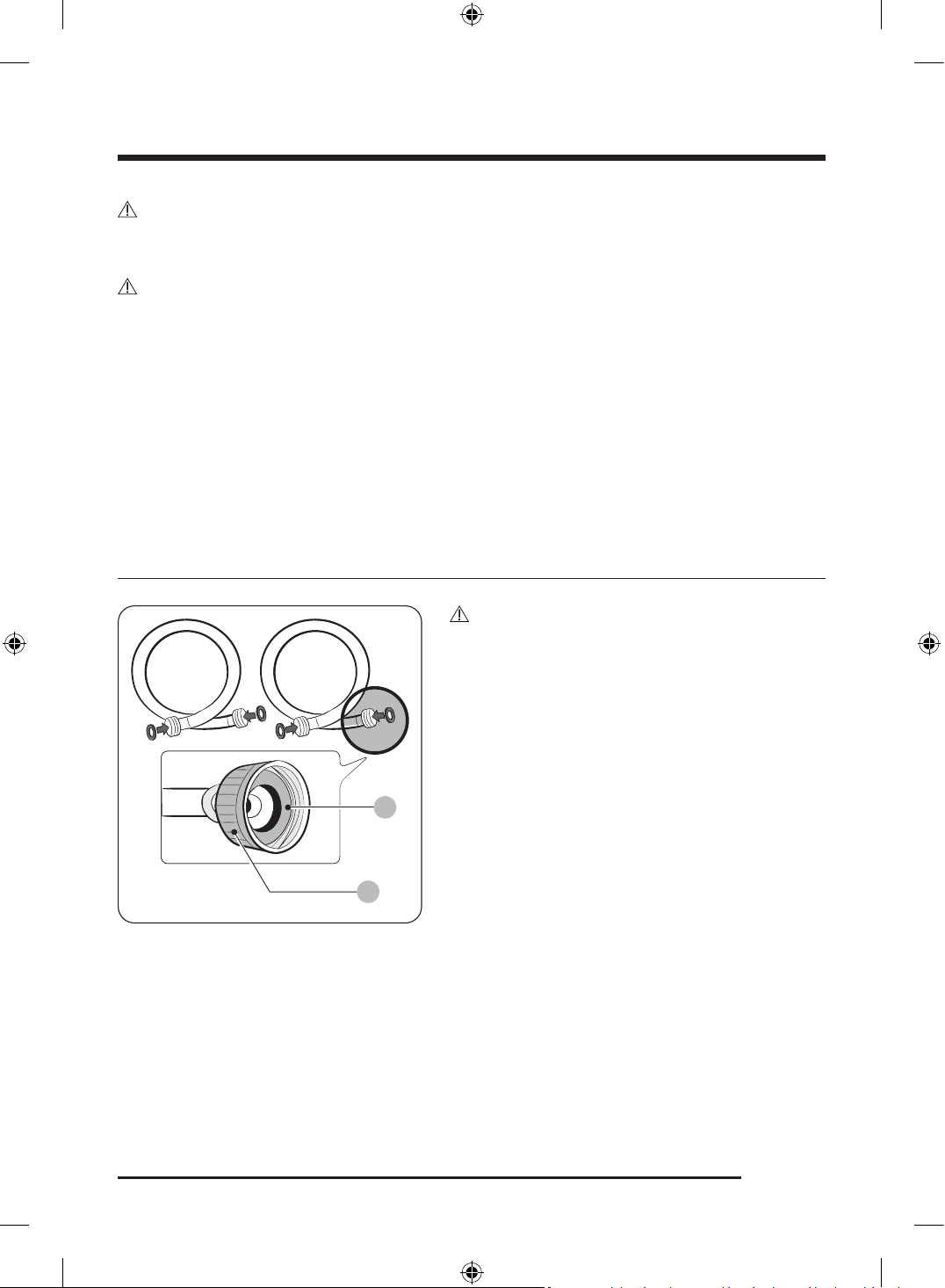
4-wire system
F
A B C L2 L1
D
E
A. External ground connector
B. Neutral grounding wire (white)
C. Center silver-colored terminal block
screw
D. Neutral wire (white or center wire)
E.
3
/ 4” (1.9 cm) UL-listed strain relief
F. Neutral wire (white or center wire)
1. Remove the external ground connector’s screw and
connect the ground wire (green or unwrapped) of the
power cable to the screw.
CAUTION
- To connect the ground wire to the neutral position
without through contact A (cabinet ground),
contact a technician. This is not user serviceable.
- Ring-type terminals are recommended. If using
strap terminals, make sure they are tightened.
2. Loosen or remove the screws from the center
terminal block.
3. Connect the neutral wire (white or center wire)
and ground wire (white) to the center screw of the
terminal block. Tighten the screw.
4. Connect the other wires to the outer terminal block
screws. Tighten the screws.
5. Tighten the strain relief screws.
6. Insert the tab of the terminal block cover into the
rear slot of the Laundry Combo. Secure the cover with
a hold-down screw.
NOTE
There are two types of terminal blocks, one with fully removable screws and the other with non-removable
screws.
Untitled-3 36Untitled-3 36 2025-02-05 2:37:352025-02-05 2:37:35
English 37
CAUTION
Connect the power cord and check L1/L2/D (N) voltage. If the voltage is low, it may not heat properly.
Review the “Electrical requirements” section on page 32 if needed.
WARNING
• All U.S. models are designed for a 3-wire system connection. The Laundry Combo frame is grounded
to the neutral conductor at the terminal block. A 4-wire system connection is required for new or
remodeled construction, mobile homes, or if local codes do not permit grounding through neutral. If
you use the 4-wire system, you cannot ground the Laundry Combo frame to the neutral conductor at
the terminal block.
• Remove the terminal block cover plate. Insert the power cord with a UL-listed strain relief through the
hole provided in the cabinet near the terminal block.
• A strain relief must be used. Do not loosen the nuts already installed on the terminal block. Be sure
they are tight. Use a
3
/ 8” (1 cm) deep well socket.
• Since january 1, 1996, the national electric code requires that new wiring (not existing) utilize a 4-wire
connection to this Laundry Combo.
STEP 6 Connect the water hose
B
A
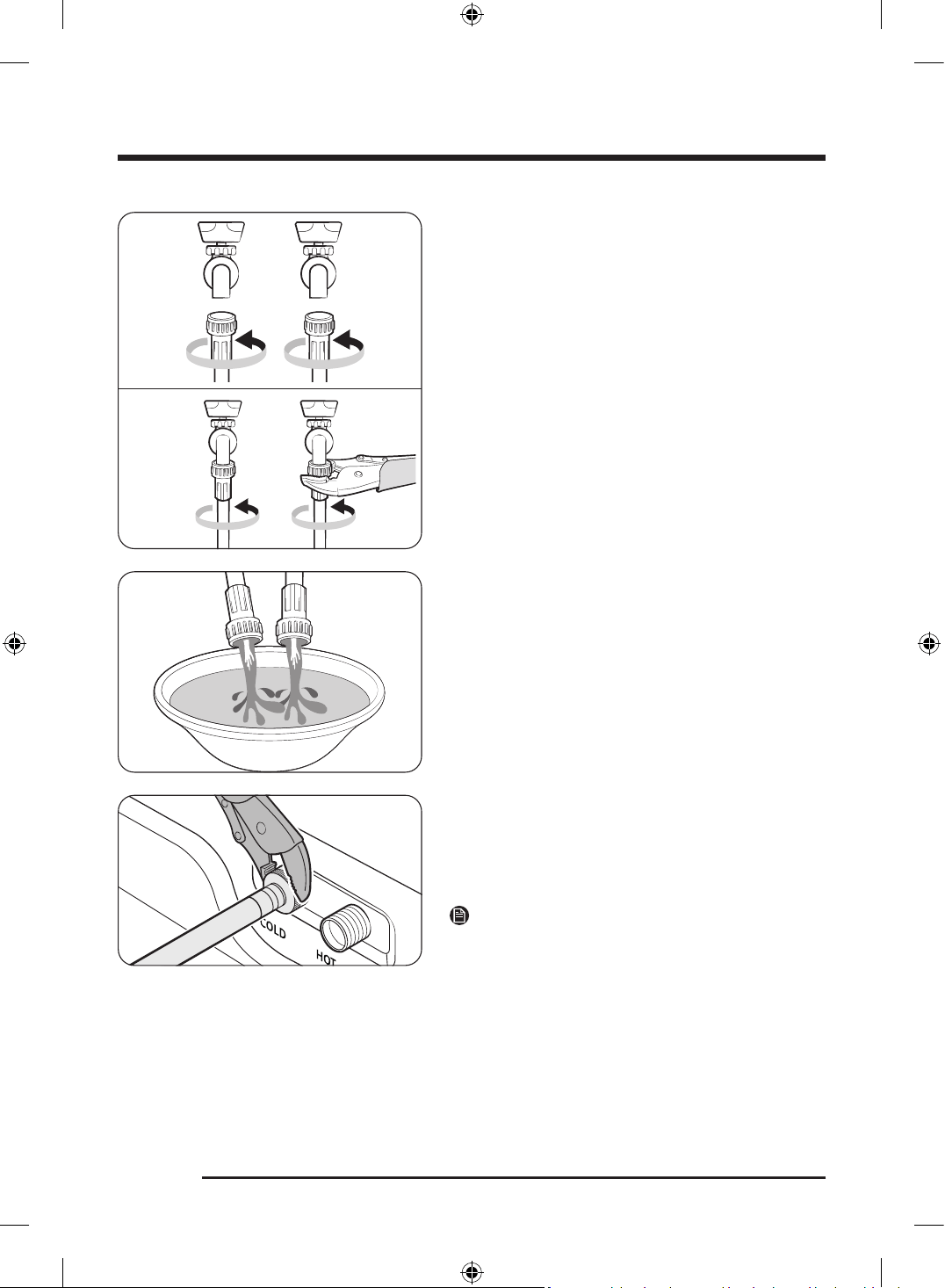
CAUTION
• Make sure to use new water hoses and that rubber
gaskets (B) are inside the couplings (A) at both ends
of the hoses. Water hoses without the gaskets may
leak.
• Allow 5 in. (127 mm) of space between the back of
the Laundry Combo and the wall to prevent water
hoses from being kinked. Kinked hoses may cause
water leaks.
• If there is a water leak, stop using the Laundry Combo
and contact a local Samsung service center. A water
leak may cause electric shock.
• Do not stretch the water hoses by force. If a hose is
too short, replace the hose with a longer hose.
Untitled-3 37Untitled-3 37 2025-02-05 2:37:352025-02-05 2:37:35
Installation
English38
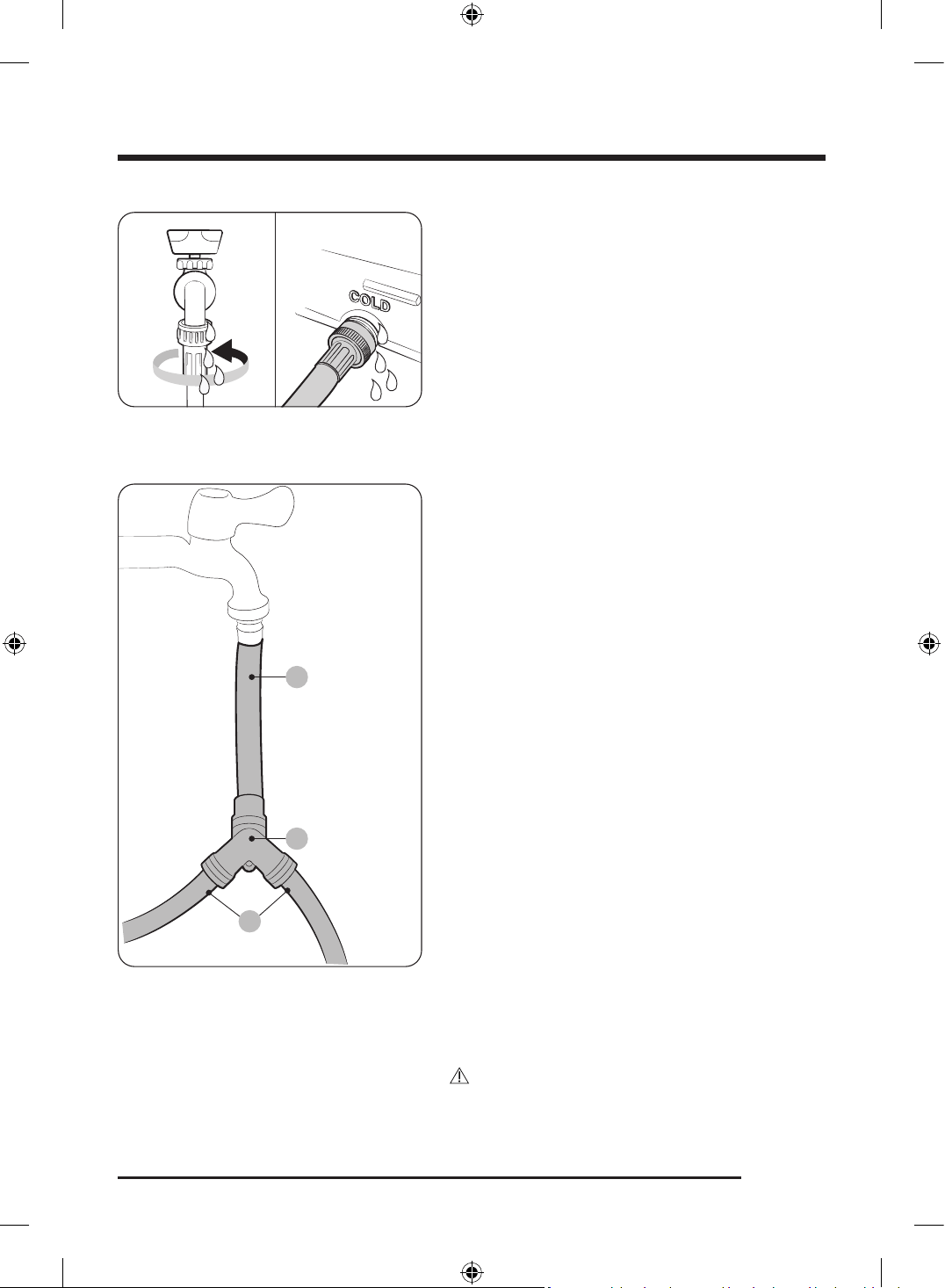
1. Attach the water hoses to the hot and cold water
taps, and then hand tighten the water hose fittings
until they are tight. Then, use pliers to tighten the
fittings by an additional two-thirds of a turn. To avoid
damaging the fittings, do not overtighten them.
2. Pull the water hoses to check if they are firmly
connected.
3. Put the other ends of the hoses into a bucket, and
then open the water taps for 10 - 15 seconds to
remove impurities. When done, close the taps.
4. Attach the water hoses to the hot and cold water
inlets on the back of the Laundry Combo, and then
hand tighten the water hose fittings until they are
tight. Then, use pliers to tighten the fittings by an
additional two-thirds of a turn.
NOTE
If you do not want to use the hot water supply hose,
attach the water intake cap to the hot water supply
intake. When you do a wash, tap Temp. and select Tap
Cold .
Untitled-3 38Untitled-3 38 2025-02-05 2:37:352025-02-05 2:37:35
English 39
5. Open the water taps, and check for leaks.
Using the short hose as an extension
B
A
C
To install this product with another washer, use the
separately sold Y-connector.
1. Close the water tap. If you have a washer's water hose
attached to the water tap, unscrew and remove the
hose. Then, connect the short hose (B) to the water
tap. Turn the coupling by hand until it is tight.
2. Using pliers, tighten the coupling an additional two-
thirds turn. Do not overtighten. You can damage the
coupling.
3. Connect the Y-connector (A) to the end of the short
hose. Turn the coupling by hand until it is tight.
4. Using pliers, tighten the coupling an additional two-
thirds turn. Do not overtighten. You can damage the
coupling.
5. Connect the water hoses (C) to the filling valve at
the top rear of the washer. Turn the coupling by hand
until it is tight.
6. Using pliers, tighten the coupling an additional two-
thirds turn. Do not overtighten. You can damage the
coupling.
7. If you detached the water hose from your washer,
attach the hose to the free end of the Y-connector,
tighten the coupling by hand until it is tight, and
then, using pliers, tighten an additional two-thirds
turn.
8. Open the water tap, and then check for any leaks.
Untitled-3 39Untitled-3 39 2025-02-05 2:37:362025-02-05 2:37:36
CAUTION
• Issues caused by external factors, including
Y-connector and hoses, are not covered under
the product warranty.
Installation
English40
STEP 7 Connect the drain hose
To a Laundry Tub or Drain Pipe
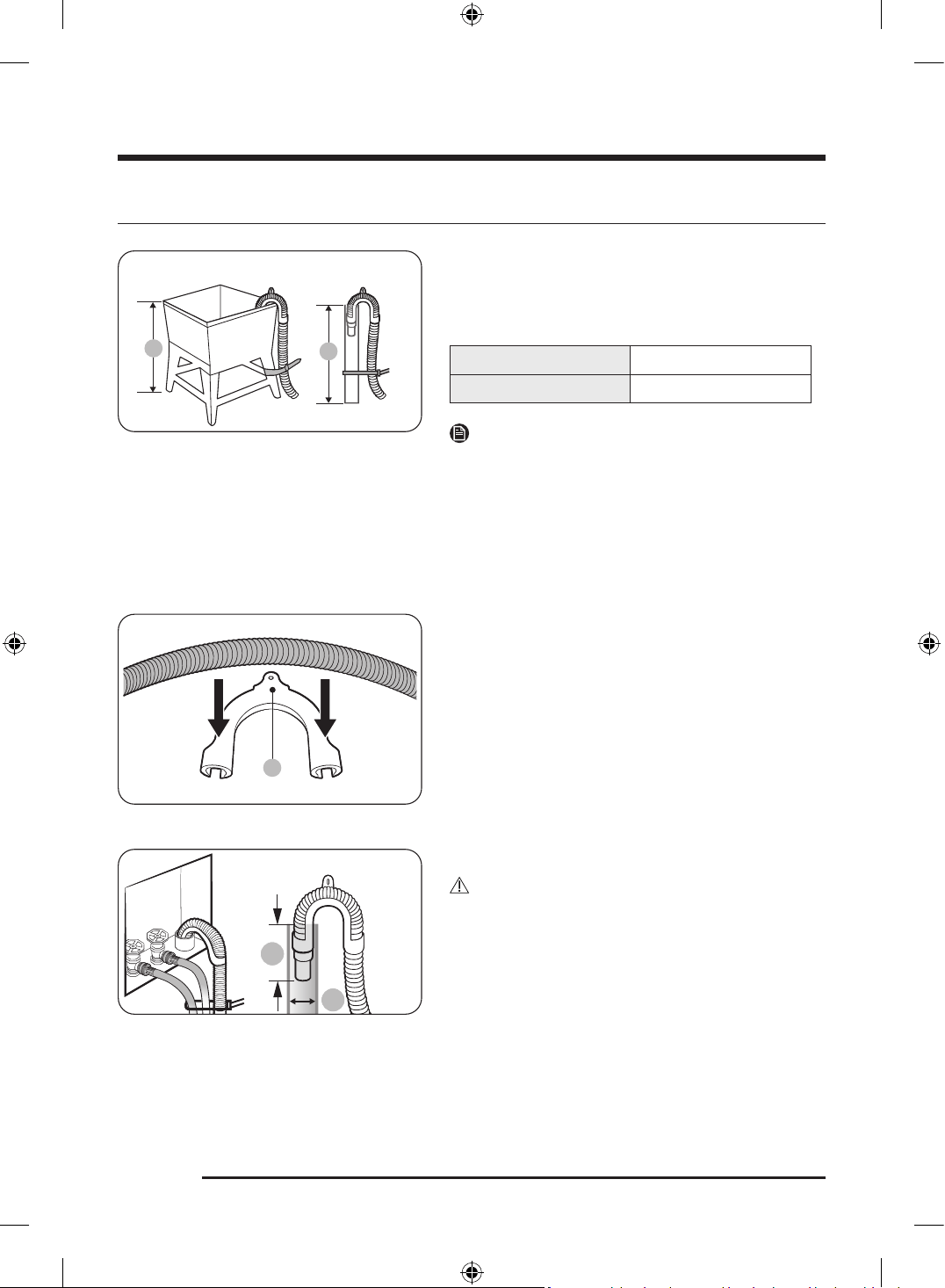
1. Check the height (A) of your drain system and make
sure the minimum and maximum heights shown
below are met.
Minimum 18 in. (46 cm)
Maximum 96 in. (245 cm)
NOTE
• Make sure to measure the height from the floor
where the Laundry Combo is placed.
• Draining efficiency may be reduced if the drain
system is at the maximum height.
• To prevent the Laundry Combo from siphoning
water, do not use a drain system below the minimum
height.
9
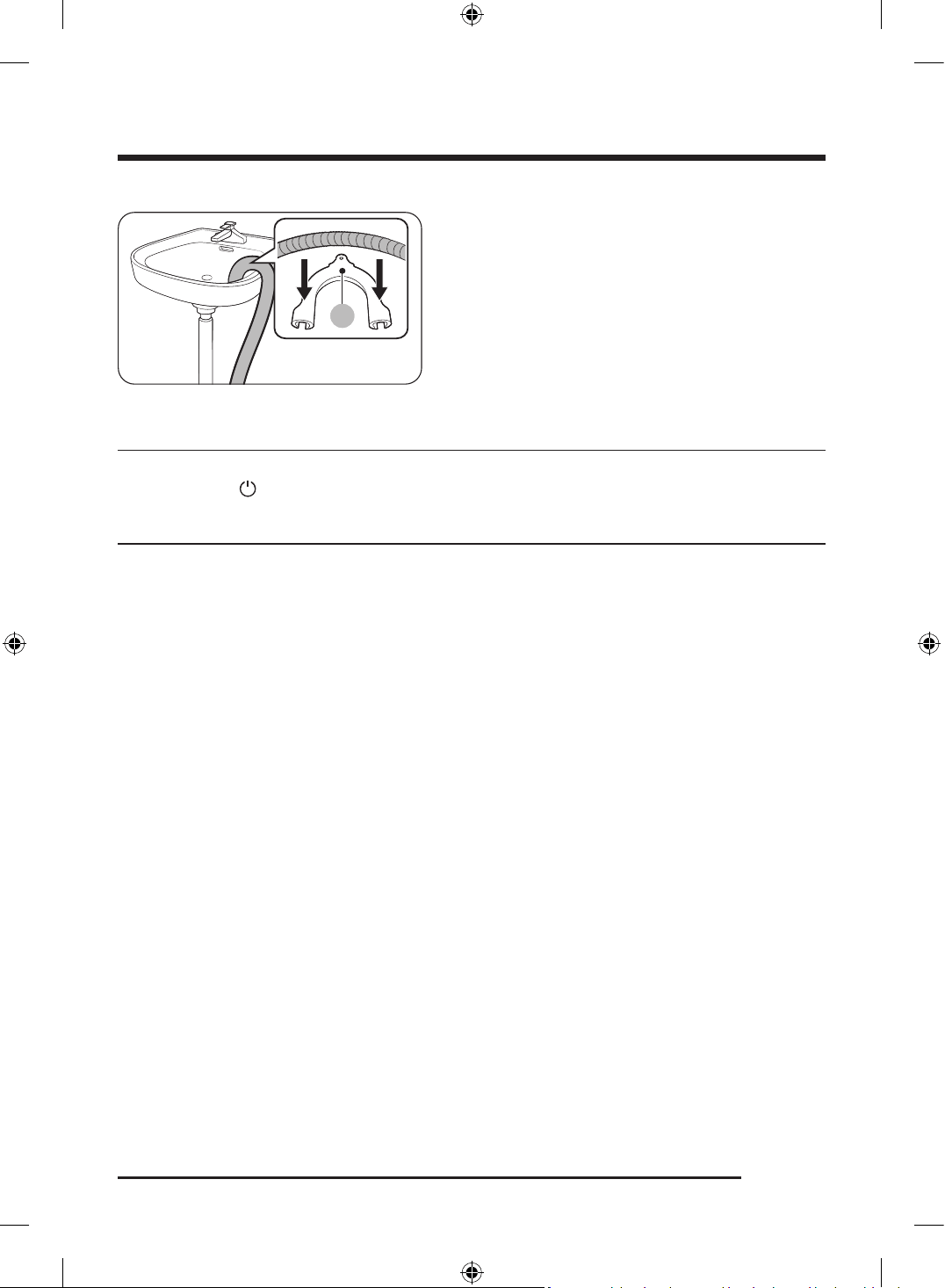
2. Attach the drain hose to the plastic hose guide (B).
*
C
(*): Min. 6 in. (152 mm), Max. 8 in. (203 mm)
3. Route the drain hose to the drain system.
CAUTION
• If using a standpipe, make sure the standpipe and
drain hose connection is not airtight.
• If using a standpipe, make sure the drain hose is
inserted at least 6 in. (152 mm) but no more than 8 in.
(203 mm) into the standpipe.
• The minimum diameter of the standpipe (C) must be
2 inches if the Laundry Combo is installed along with
another washer.
4. Secure the drain hose with cable ties.
Untitled-3 40Untitled-3 40 2025-02-05 2:37:362025-02-05 2:37:36
English 41
AA
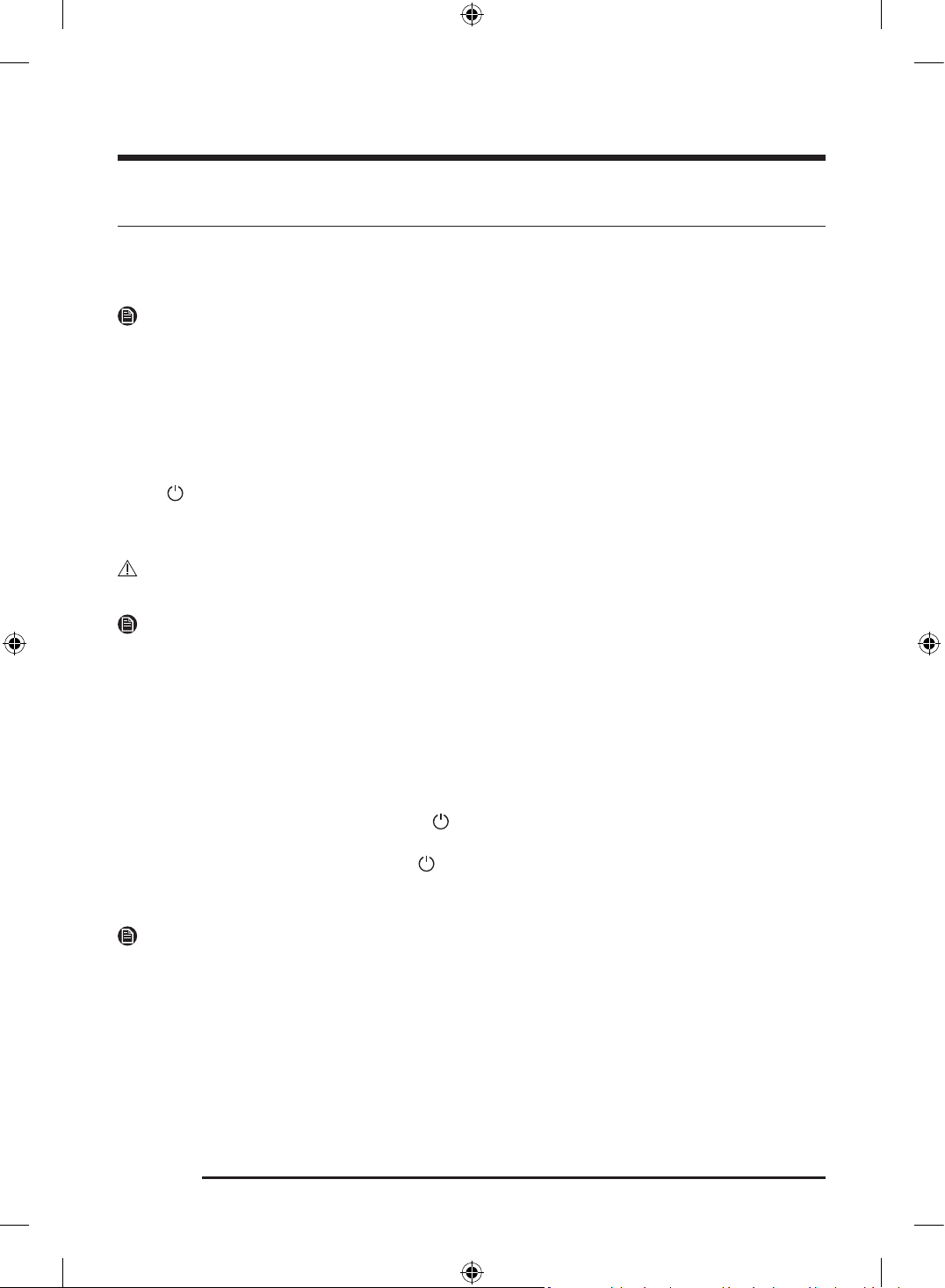
Over the edge of a wash basin
The drain hose must be placed no lower than 24 in. (60
cm) and no higher than 35 in. (90 cm) from the floor. To
keep the spout of the drain hose bent, use the supplied
plastic hose guide (A). Secure the guide to the wall using
a hook to ensure stable drainage.
STEP 8 Power on
Plug the power cord into an 240 V / 60 Hz / 30 AMP approved electrical outlet protected by a fuse or circuit
breaker. Then, tap to turn on the Laundry Combo.
STEP 9 Final Check
When installation is complete, confirm that:
• The appliance is plugged into an electrical outlet and grounded properly.
• The exhaust ductwork is connected, and the joints are taped.
• You have used rigid or stiff-walled flexible metal duct material, not plastic flexible duct.
• The appliance is level and is sitting firmly on the floor.
• The appliance starts, runs, heats, and shuts off properly.
Untitled-3 41Untitled-3 41 2025-02-05 2:37:362025-02-05 2:37:36
Installation
English42
Vent blockage test
After the Laundry Combo is installed, run the Vent Blockage Test function to check if the duct system
is properly installed. Vent Blockage Test automatically detects the status of the ducts and reports any
blockage or problems. Proper ducting can reduce drying time and save energy.
NOTE
The Vent Blockage Test function must run when the Laundry Combo is cool. If the Laundry Combo
warms up after the installation check, run the Air Fluff cycle for several minutes to reduce its internal
temperature.
Running the vent blockage test
1. Make sure the drum is empty, and then close the door. (If there are any clothes or other items in the
drum, the test will not give accurate results.)
2. Tap to turn the Laundry Combo on, then tap Settings > Washer > Vent Blockage Test .
3. Tap Start test to start the vent blockage test.
- The test takes about 2 minutes and " Testing..." is displayed during the test.
CAUTION
Do not open the door during the test.
NOTE
If you have started other procedures before running Vent Blockage Test , the Laundry Combo will not enter
the Vent Blockage Test mode.
4. After 2 minutes, when the test is complete, the results are displayed and the Laundry Combo sounds
a tone. If status of the duct system is normal, an alarm triggers with the " No problems detected "
message. If the duct system cannot exhaust properly, a problem and the solution appear on the display,
and the Laundry Combo sounds an alarm tone.
If there are any other problems, an information code appears in the display. For description about the
code, see the “Information codes” section on page 94.
- To stop or cancel Vent Blockage Test , tap to turn off your Laundry Combo.
- The results remain on the display for about 5 minutes and then automatically turn off. You can turn
the results off immediately by tapping
.
- When resolving a problem, refer to the “ Ducting requirements” section on page XX if necessary. Also,
you can tap How to clean on the display to check the cleaning method.
NOTE
• During or after the test, the internal drum is hot. Use caution to prevent burns. The Vent Blockage Test
function is used to check for problems in the current duct system when the Laundry Combo is installed
for the first time.
• Even if the test result is normal (“ No problems detected ”), the duct system could be blocked slightly.
Properly install all ductwork according to the installation instructions in this manual.
Untitled-3 42Untitled-3 42 2025-02-05 2:37:372025-02-05 2:37:37
English 43
Before you start
Initial setup
• When you turn on the Laundry Combo for the first time, the screen shows the initial setup process.
Follow the on-screen instructions to complete it.
• Once you select a language, the language selection screen will not reappear. However, you must
complete a wash cycle once to stop the tutorial screen from reappearing.
- You can change the language from the Settings menu. On the Home screen, tap > General >
Language to change the language.
• The initial setup includes language selection and a brief tutorial.
• Tap OK to skip to the next screen.
NOTE
If the initial setup screen does not appear during the first use of the product, it does not indicate a problem
with the product. You can adjust the desired settings by selecting > General from the Home screen,
or reset the product to try running the initial setup process by selecting > General > Reset > Reset all
settings .
Run Calibration (recommended)
Calibration ensures accurate weight detection by the Laundry Combo. Make sure the drum is empty before
running calibration.
1. Tap to turn the power on.
2. Tap > Washer > Calibration .
3. Tap Start Calibration to start the calibration.
Untitled-3 43Untitled-3 43 2025-02-05 2:37:372025-02-05 2:37:37
Before you start
English44
Laundry guidelines
STEP 1 Sort
Sort the laundry according to these criteria:
• Care Label: Sort the laundry into cottons, mixed fibers, synthetics, silks, wools, and rayon.
• Color: Separate whites from colors.
• Size: Mixing different sized items together in the drum improves the washing performance.
• Sensitivity: Wash delicate items separately. For pure, new woolen items, curtains, and silk items, check
the labels on the items.
NOTE
Make sure to check the care label on all clothing, and sort clothing accordingly before starting the wash.
STEP 2 Empty pockets
Empty all the pockets of your laundry items
• Metal objects such as coins, pins, and buckles on clothing may damage other laundry items as well as
the drum.
Turn clothing with buttons and embroideries inside out
• If pants or jacket zippers are open while washing, the drum may be damaged. Zippers should be closed
and fixed with a string.
• Clothing with long strings may become entangled with other clothes. Make sure to tie the strings
before starting the wash.
STEP 3 Use a laundry net
• Brassieres (water washable) must be placed in a laundry net. Metal parts of the brassieres may break
through and tear other laundry items.
• Small, light clothing such as socks, gloves, stockings, and handkerchiefs may become caught around
the door. Place them inside a fine laundry net.
• Do not wash the laundry net by itself without other laundry. This may cause abnormal vibrations that
could move the Laundry Combo and result in injury.
Untitled-3 44Untitled-3 44 2025-02-05 2:37:372025-02-05 2:37:37
English 45
STEP 4 Determine the load capacity
Do not overload the Laundry Combo. Overloading may cause the Laundry Combo to wash improperly.
NOTE
When washing bedding or bedding covers, the wash time may be lengthened or the spin efficiency may be
reduced.
For bedding or bedding covers, the recommended maximum spin level is Low or Medium , and the load
capacity is 7 lb (3.0 kg) or less.
CAUTION
If the laundry is unbalanced and the " Unbalanced laundry detected " information code is displayed,
redistribute the load. Unbalanced laundry may reduce spinning performance.
STEP 5 Add the correct detergent type
The type of detergent you use - general purpose, specifically for woolens, etc. - depends on the type of
fabric (cotton, synthetic, delicate items, wool), color, wash temperature, and degree of soiling. Regardless
of the specific type of detergent you use, always use "low suds" HE laundry detergent which is designed for
automatic washers.
NOTE
• Follow the detergent manufacturer’s recommendations based on the weight of the laundry, the degree
of soiling, and the hardness of the water in your local area. If you are not sure about the water hardness,
contact your local water authority.
• Do not use detergent that tends to harden or solidify. This detergent may remain after the rinse cycle,
blocking the drain outlet.
CAUTION
When washing wool using the Wool cycle, use only a neutral liquid detergent. Powdered detergent used
with the Wool cycle can remain on the laundry and discolor it.
Use HE detergent only
For the best cleaning results, use a high efficiency detergent such as Tide
HE, Wisk HE, Cheer HE or Gain HE*. High efficiency detergents contain suds
suppressors that reduce or eliminate suds. When fewer suds are produced, the
load tumbles more efficiently and cleaning is maximized. (* Brand names are
trademarks of their respective manufacturers.)
WARNING
For best results, use HE detergents only. Do not use non-HE detergent, organic
detergent, natural detergent or HE detergents with natural ingredients (such as
vinegar, baking soda).
Untitled-3 45Untitled-3 45 2025-02-05 2:37:372025-02-05 2:37:37
Before you start
English46
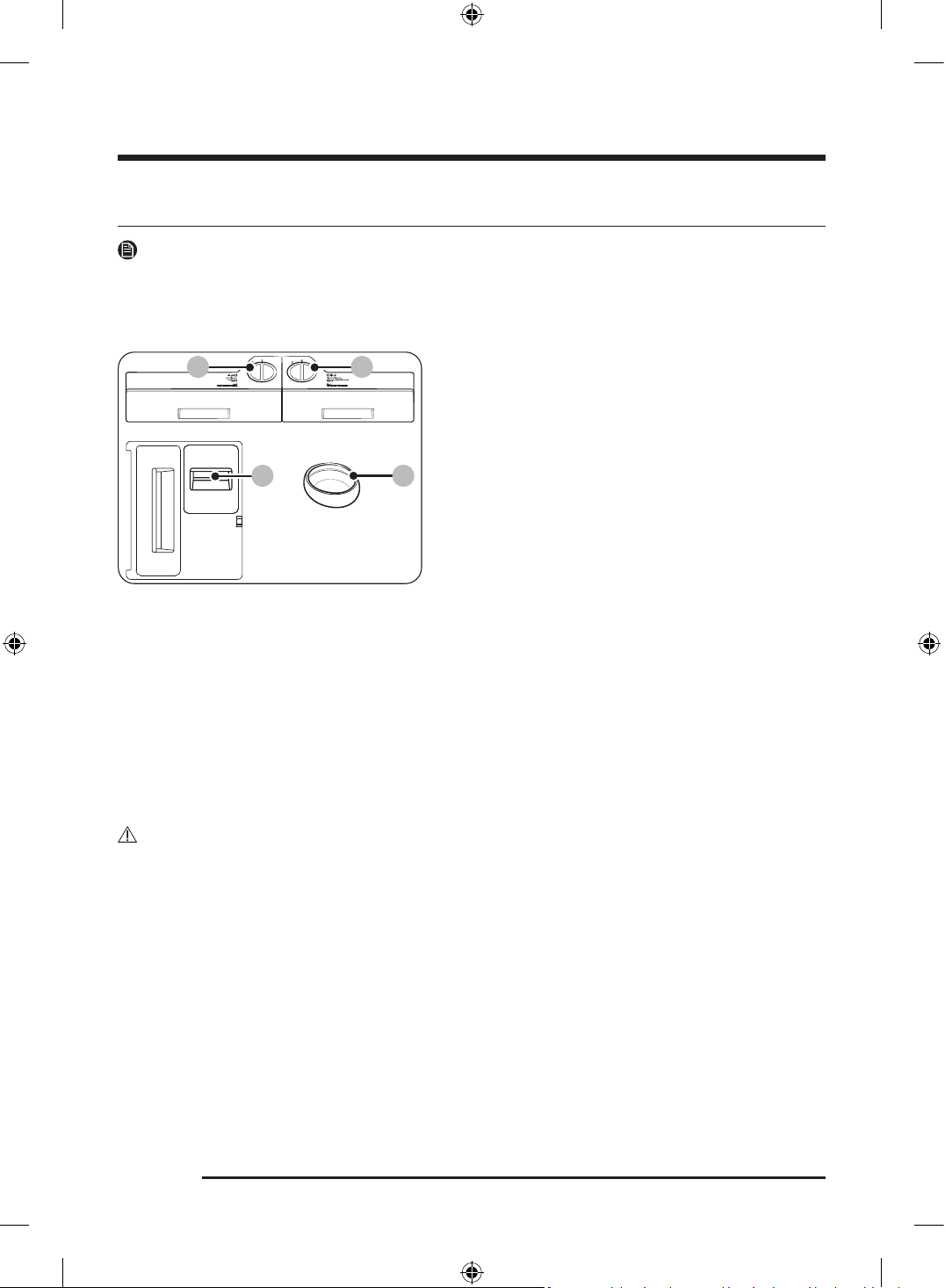
Detergent drawer guidelines
NOTE
Auto dispensers make laundry easier by dispensing the preset amount of washing agents without
you having to pour it in every time, and it could be more economical because the exact amount will be
dispensed each time of use, allowing less waste of washing agents.
50 ml
100 ml
A B
C
D
A. Auto dispenser
- You can use the general detergent in this
compartment.
- Use liquid detergent only. Do not put powdered
detergent or softener.
B. Flex auto dispenser
- You can set this dispenser to dispense detergent
( General detergent or Specialty detergent ) or
softener.
- Use only neutral detergent in this dispenser if
you have set the Detergent type to Specialty
detergent .
- Do not put powdered detergent.
C. Manual bleach compartment
- Add liquid chlorine bleach. Do not exceed the max
line.
D. Aqua Pebble
- To use the Aqua Pebble, set the Amount option for
Auto dispenser and Flex auto dispenser to Off .
- Do not use the Aqua Pebble for bleach or fabric
softener.
CAUTION
• Do not operate the Laundry Combo without the dispensers in the detergent drawer.
- A water leak may cause electric shock or injury.
• Do not use the following types of detergent in the drawer.
- Tablet, capsule, ball, or net types.
• Do not use gel-type or viscous detergent/softener in the detergent drawer as they may not flow well.
- Read the detergent/softener manufacturer's instructions before using them in the Laundry Combo.
• Do not carry around the dispenser removed from the detergent drawer. Put the dispenser back in place.
- Otherwise, the dispenser may shake and cause the content to spill out.
• Empty the dispensers in the detergent drawer before moving the Laundry Hub to prevent any content
from spilling out on the floor.
• Do not use chlorine bleach, which may damage the laundry.
Untitled-3 46Untitled-3 46 2025-02-05 2:37:372025-02-05 2:37:37
English 47
• Use caution when inserting the Aqua Pebble as it is supposed to be balanced on top of the laundry at
the beginning of the wash. Tipping the Aqua Pebble before the start of a wash may cause detergent
residue to remain on the laundry at the end of the wash, causing discoloration of the laundry or reduced
washing performance.
• Before each wash, clean the Aqua Pebble before adding fresh detergent.
• Do not insert the Aqua Pebble into a folded item or between different laundry items.
• Do not use liquid or powdered chlorine bleach.
• Do not put or store cleaning agents such as detergent, bleach, or fabric softener on your Laundry
Combo. Wipe up any spills immediately to prevent damage to the Laundry Combo, especially the finish
and the LCD panel.
NOTE
• If the message " Needs refill " appears on the display, refill the corresponding dispenser.
• The detergent/softener is not automatically dispensed in the Wool , Delicates , and Activewear cycles if
the Detergent type for Auto dispenser and Flex auto dispenser are set to General detergent . You must
use the Aqua Pebble to put the detergent directly into the drum.
- However, If the Detergent type for Flex auto dispenser is set to Specialty detergent , the detergent
will be dispensed automatically.
• Do not exceed the max line when filling detergent and softener.
• It may be hard to open the detergent drawer with just your fingertips. Grab the detergent drawer handle
firmly with your hand and pull to open it.
• Push the detergent drawer all the way to the end to close it.
• If you feel the softener scent is weak, set the softener input amount to a higher level.
Untitled-3 47Untitled-3 47 2025-02-05 2:37:372025-02-05 2:37:37
Before you start
English48
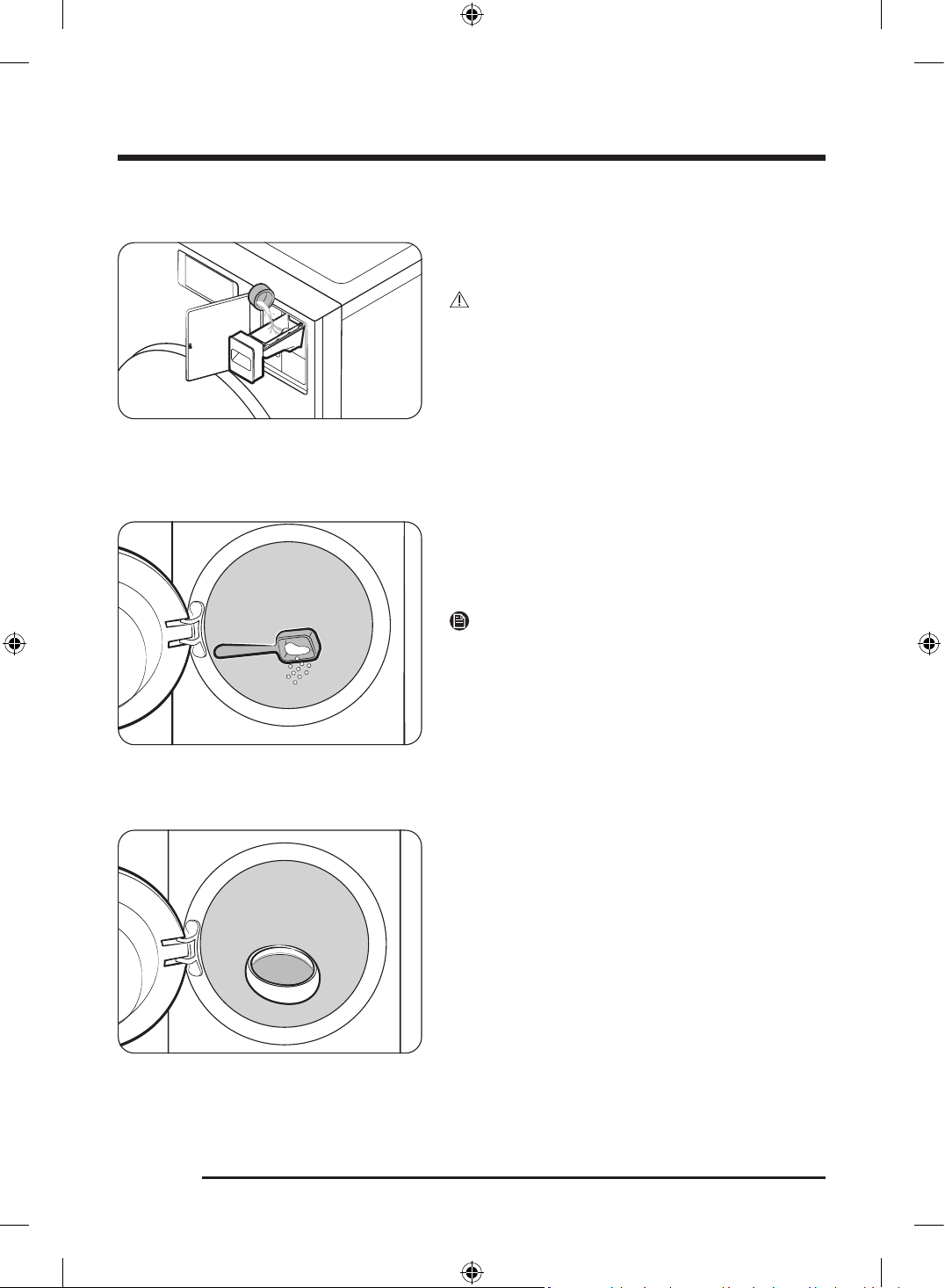
To use bleach
Add only liquid chlorine bleach to the Manual bleach
dispenser. Do not exceed the max line.
CAUTION
• Do not add the liquid bleach without the liquid
detergent guide in the Manual bleach dispenser.
• Do not add undiluted liquid chlorine bleach directly
to the load or to the drum. It is a powerful chemical
and can cause fabric damage, such as weakening of
the fibers or color loss if not used properly.
To use oxygen boosters or color-safe bleach
Oxygen boosters or color-safe bleach can increase
washing performance. Make sure to add the oxygen
booster or color-safe bleach after putting the laundry
into the drum.
NOTE
To use both powdered detergent and powdered oxygen
booster or powdered color-safe bleach, it is more
effective to put them together into the drum before
loading the laundry.
To use Aqua Pebble
50 ml
100 ml
Pour the recommended amount of liquid or powdered
detergent (specialty detergent) into the Aqua Pebble,
and then put the Aqua Pebble directly into the drum.
There are two guidelines inside the Aqua Pebble to
indicate 50 ml (1.69 fl oz) and 100 ml (3.38 fl oz). Do not
exceed the 100 ml line.
Untitled-3 48Untitled-3 48 2025-02-05 2:37:382025-02-05 2:37:38
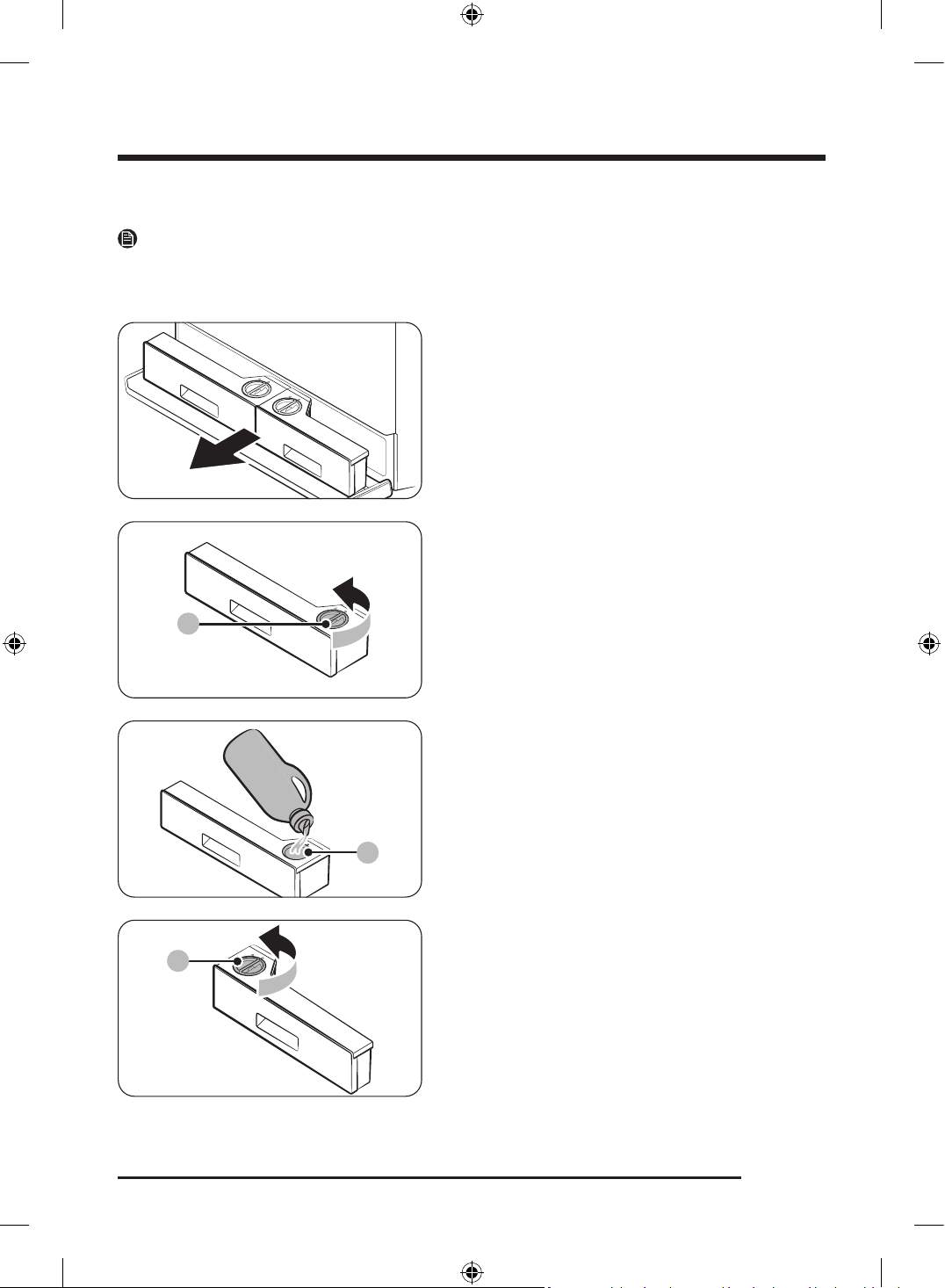
English 49
To apply washing agents to the Auto dispensers
NOTE
If the message " Needs refill " appears on the display, refill the corresponding dispenser.
• The detection time may vary depending on the type of the detergent/softener.
1. Press the Compartment cover to open it.
2. Pull out the Auto dispensers.
A
3. Turn the Auto dispenser cap (A) counterclockwise to
open.
B
4. Apply an appropriate amount of detergent to the
Auto dispenser (B).
- After you finish, put the cap back and turn it
clockwise to close.
C
5. Turn the Flex auto dispenser cap (C)
counterclockwise to open.
Untitled-3 49Untitled-3 49 2025-02-05 2:37:382025-02-05 2:37:38
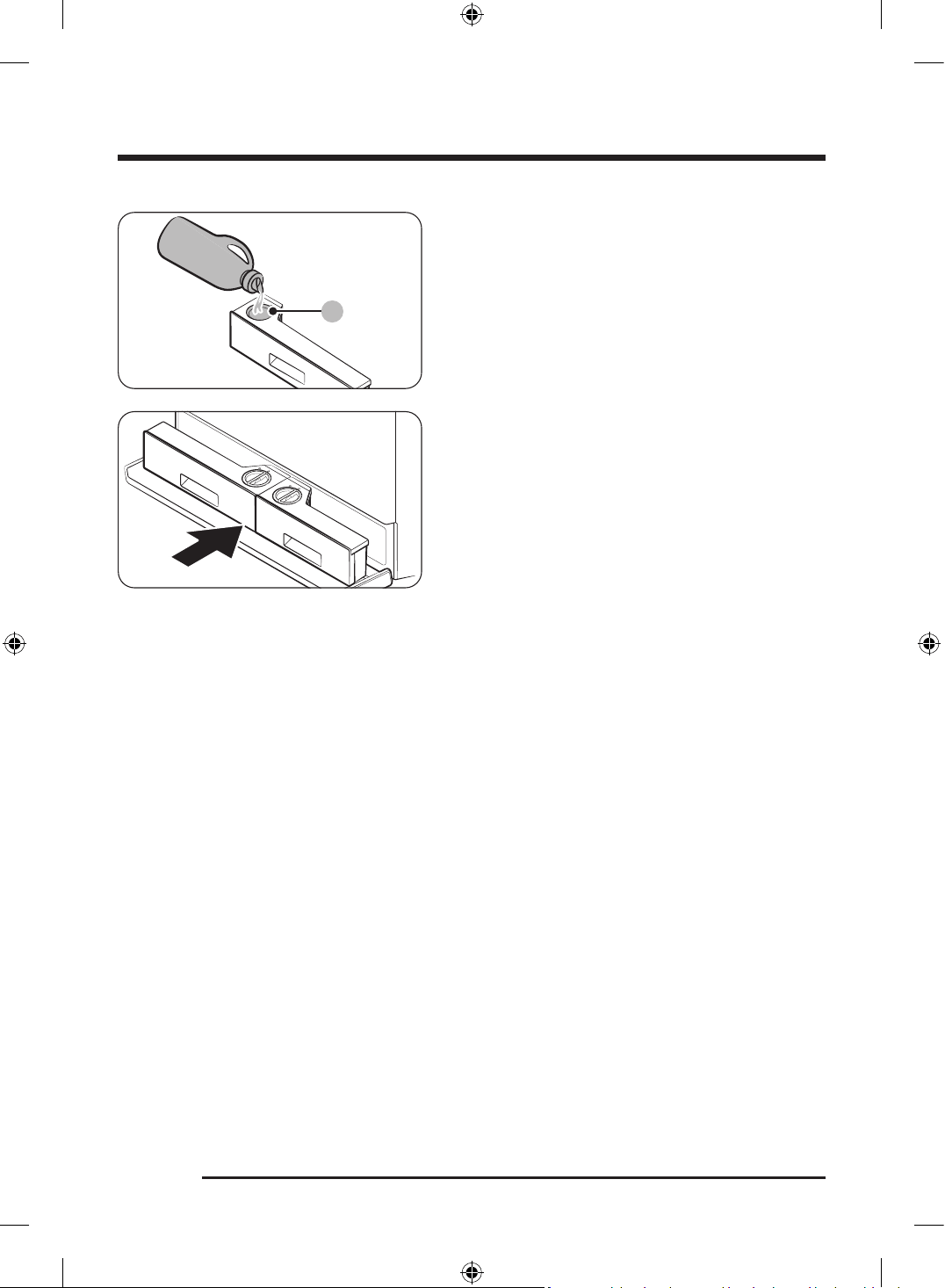
Before you start
English50
D
6. Apply an appropriate amount of detergent (General
detergent or Specialty detergent) or softener to the
Flex auto dispenser (D).
- After you finish, put the cap back and turn it
clockwise to close.
7. Push the Auto dispensers back into their positions.
8. Close the Compartment cover.
Untitled-3 50Untitled-3 50 2025-02-05 2:37:382025-02-05 2:37:38
English 51
Dispenser care
You can check the detergent type used in each dispenser.
NOTE
On the Dispenser care screen, the current status of detergent and fabric softener is displayed and will alert
you if any of the dispensers are running low. Follow the on-screen instructions to refill the detergent or
fabric softener.
1. On the Home screen, tap Dispenser care to move to the Dispenser care screen.
2. Check the amount of detergent in each dispenser and fill the dispenser if the amount is low.
3. Tap to move to the Home screen.
Untitled-3 51Untitled-3 51 2025-02-05 2:37:382025-02-05 2:37:38
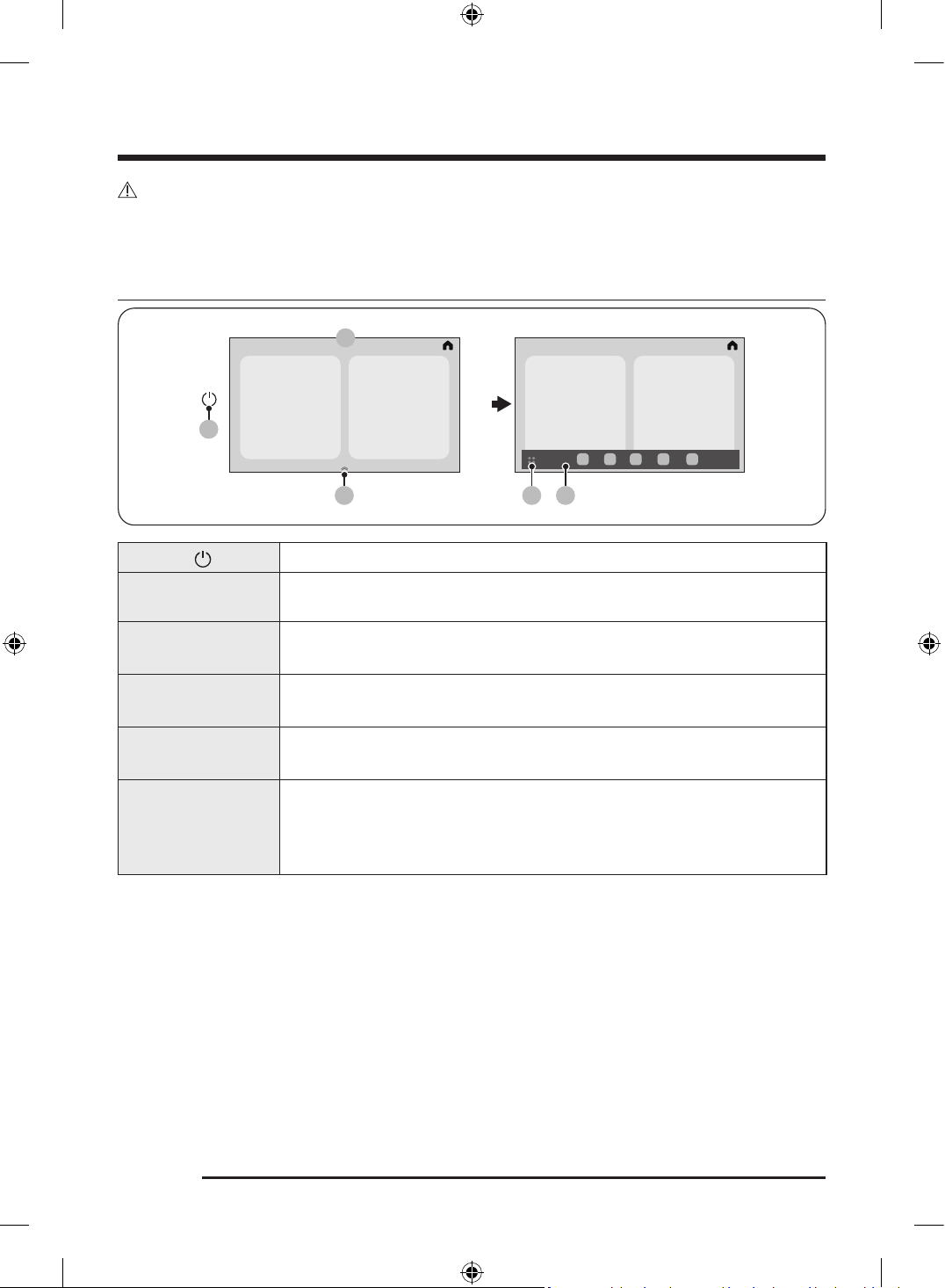
English52
Operations
WARNING
To reduce the risk of fire, electric shock, or injury to persons, read the Safety information before operating
this Laundry Combo.
LCD panel
02
0403
01
05
01 Power
Tap to turn the Laundry Combo on or off.
02 Display
The display shows current cycle information and estimated time remaining, or
an information message when a problem occurs.
03 App dock handler
Drag the App dock handler upward to open the App dock.
• The App dock handler only appears on the Home screen.
04 App tray button
Tap to view all available apps.
• You can open the SmartThings , Timer , Bixby , Weather , Internet , Settings , etc.
05 App dock
App dock displays the icons to allow easier access to the frequently used apps.
• Maximum five icons are displayed in the App dock.
06 Quick Panel
Swipe down from the top of the screen to open the Quick Panel.
• The Quick Panel provides quick access to various settings.
• For more information on Quick Panel icons, see Display icon descriptions,
see page 53.
Untitled-3 52Untitled-3 52 2025-02-05 2:37:392025-02-05 2:37:39
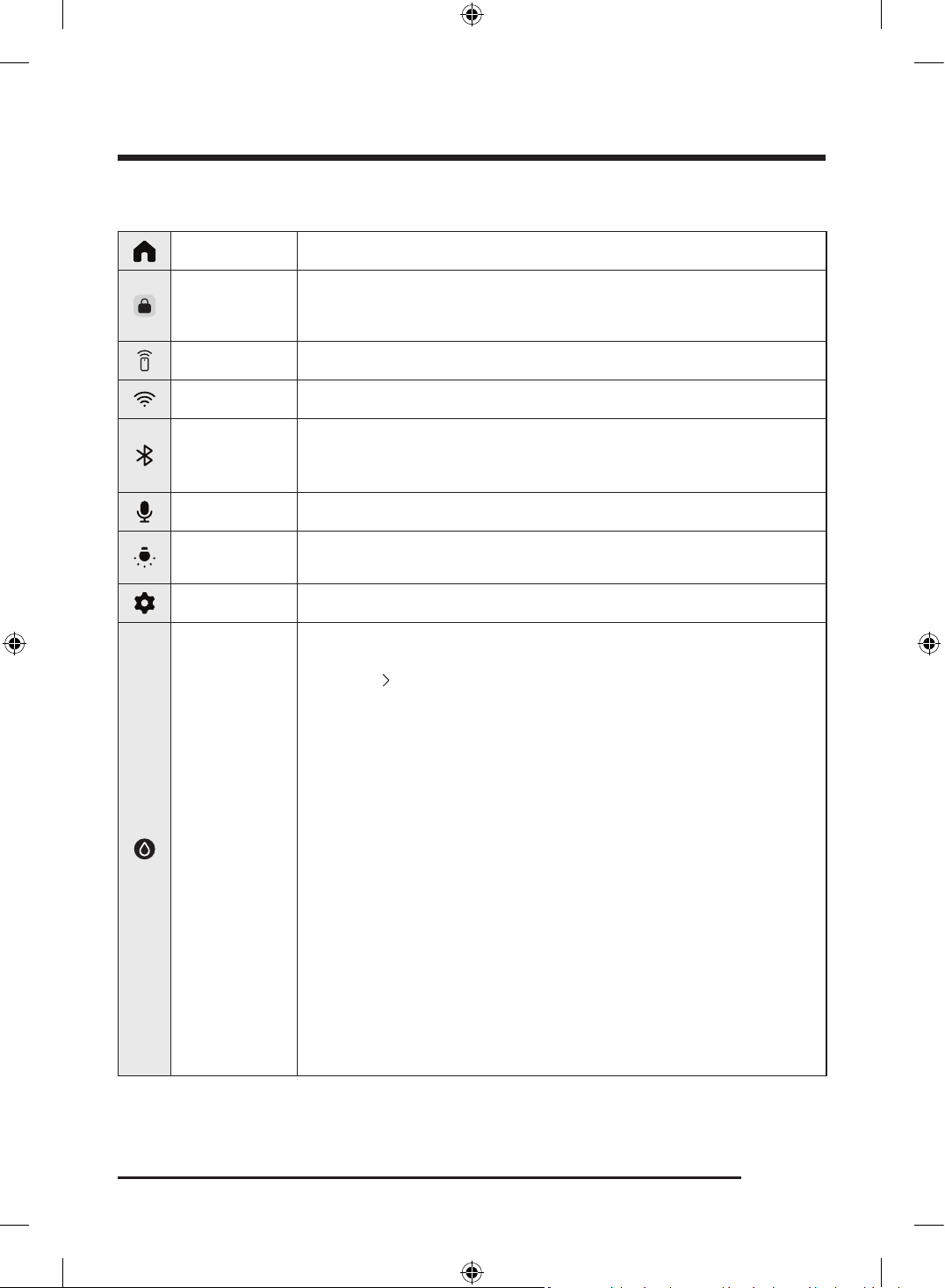
English 53
Display icon descriptions
Home Tap to go to the Home screen.
Door Lock
• This icon indicates the door is locked and cannot be opened.
• The door locks automatically during a cycle and this icon turns on.
• You can open the door when this icon disappears.
Smart Control • This icon indicates that the Smart Control is on.
Wi-Fi Tap to turn on or off the Wi-Fi .
Bluetooth
Tap to turn on or off the Bluetooth .
• Once you turn on the Bluetooth , you can connect to Bluetooth-enabled
devices near the Laundry Combo.
Microphone Tap to turn on or off the microphone.
Drum light
Tap to turn on or off the drum light.
• You can turn on the light for better visibility of the items inside the drum.
Settings Tap to change the General and Washer settings.
Washer
(Wash Options)
This icon appears during a wash-only cycle or a washing process. Tap cycle
card to change the default wash cycle settings. You can see the full option list
by tapping
button.
• Temp. : Tap to change the water temperature for the selected cycle.
• Spin : Tap to change the spin speed for the selected cycle.
- Rinse Hold & No Spin : The final rinse process is suspended so that the
laundry remains in the water. To unload the laundry, run a drain or spin
process.
- Drain & No Spin : The drum does not spin after the final drain process.
• Soil : Tap to change the soil level for the current cycle.
• Detergent : You can select the amount of the detergent to be dispensed
during each wash cycle.
• Softener : You can select the amount of the softener to be dispensed
during each wash cycle.
• Extra Rinse : Adds an additional rinse at the end of the cycle to remove
laundry additives more thoroughly.
- Tap to turn on or off this function.
• Bubble Soak : This function helps remove a wide variety of stubborn
stains. With Bubble Soak selected, laundry is thoroughly soaked in water
bubbles for effective washing.
- Tap to turn on or off this function.
Untitled-3 53Untitled-3 53 2025-02-05 2:37:392025-02-05 2:37:39
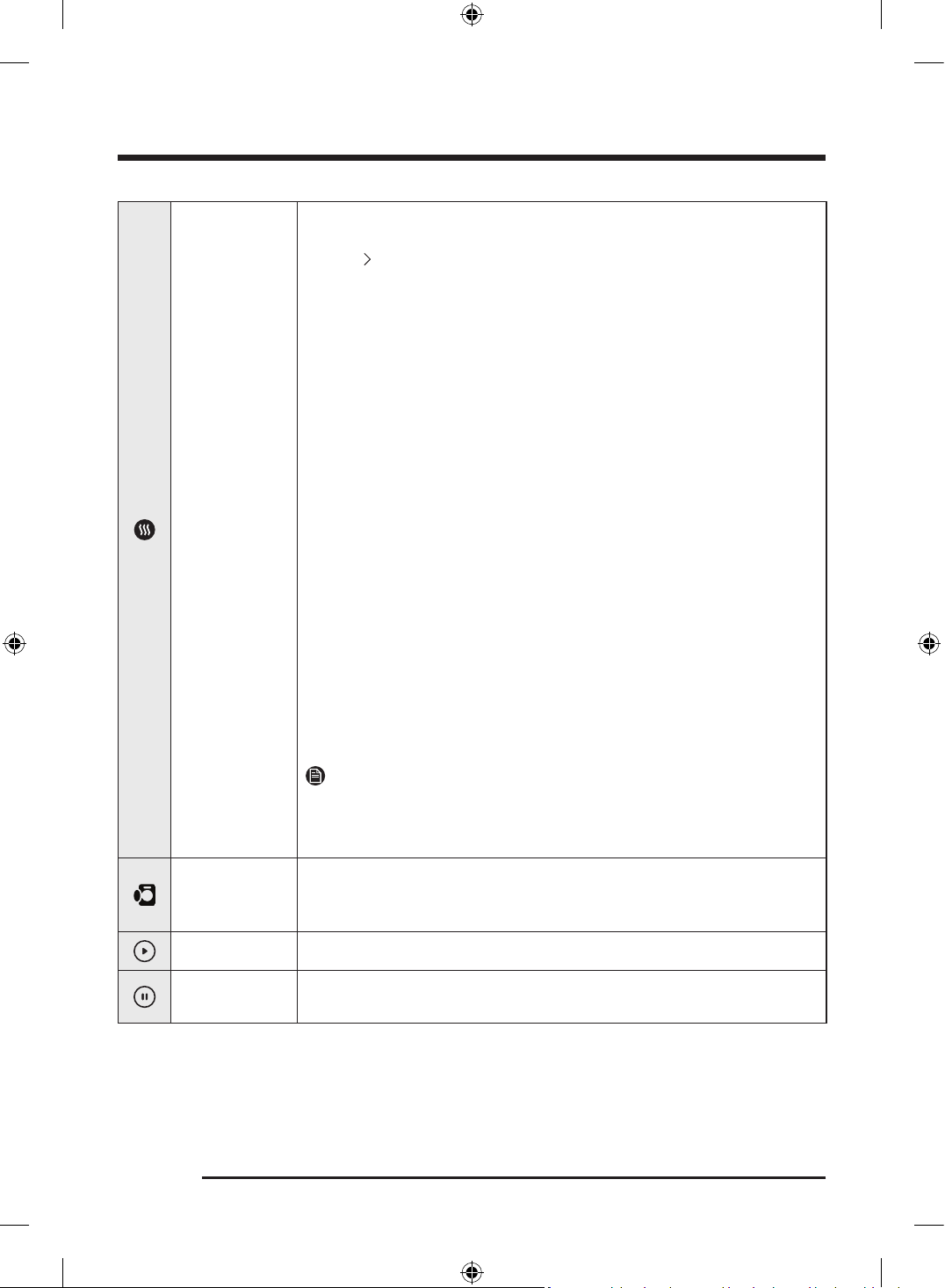
Operations
English54
Dryer
(Dry Options)
This icon appears during a dry-only cycle or a washing process. Tap cycle card
to change the default wash cycle settings. You can see the full option list by
tapping
button.
• Dryness : Tap to change the dry level. You can select from 4 different
levels , but the available level depends on the selected cycle.
• Dry Temp : Temperature can only be adjusted in Time Dry cycle. Tap to
change the temperature of the current cycle.
• Dry Time : Tap to change the cycle time.
- Some cycles do not support a time setting.
- You can set the drying time between 10 minutes and 90 minutes.
However, available drying time depends on the selected cycle.
• Dry Prep : After the washing process is complete and before the drying
process begins, the Laundry Combo pauses and alerts the user to remove
items unsuitable for drying.
- If you do not tap the pop-up message within the waiting period, the
drying process will start automatically after waiting for 10 minutes.
- Dry Prep is only available for the cycles that include both washing and
drying process.
• Wrinkle Prevent : Reduces wrinkles by rotating the drum intermittently
after completing the dry cycle. Wrinkle Prevent provides approximately
180 minutes. The load is dry and can be removed at any time during the
Wrinkle Prevent cycle.
- Tap to turn on or off this function.
• Eco Dry : With the Eco Dry activated, drying takes a longer time but power
consumption is reduced.
This function is available with Normal and Time Dry .
NOTE
• The drying time can be extended by up to 3 times normal depending on
the temperature and load.
• In the dry only settings, the Eco Dry function is enabled by default.
Open Door
Tap this button to open the door.
• The button deactivates when the door is open and reactivates when the
door is closed.
Start You can start the operation.
Pause
You can pause the operation.
• During the operation, tap the button to pause.
Untitled-3 54Untitled-3 54 2025-02-05 2:37:402025-02-05 2:37:40
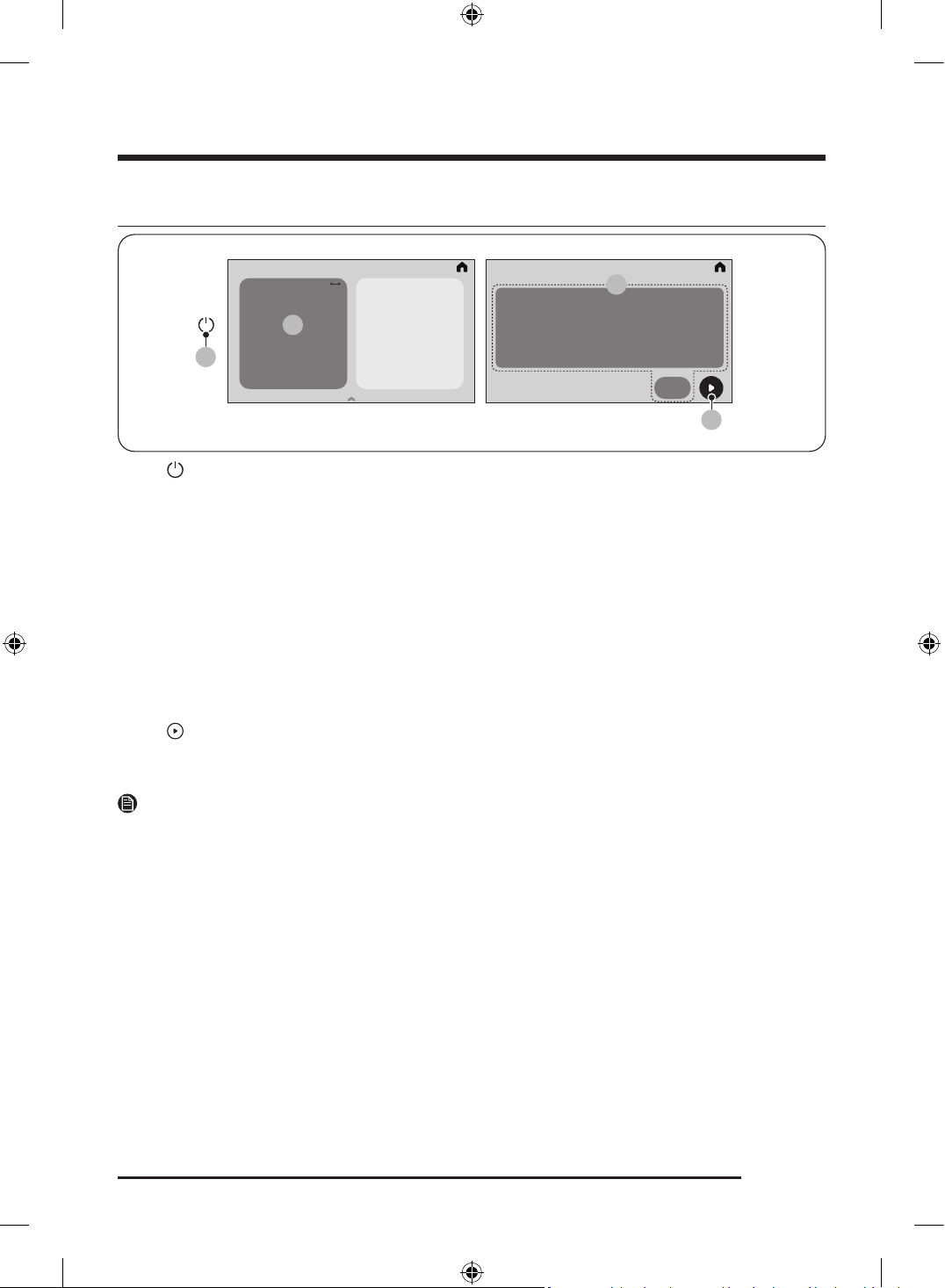
English 55
Operating a cycle
01
02
04
03
1. Tap to turn the power on.
2. Select the desired cycle.
- For more information on Cycle overview, see page 56.
3. Change the default cycle options.
- For the washing process, tap Temp. , Spin , Soil , Detergent , Softener , Extra Rinse , or Bubble Soak to
change the default cycle settings.
- For the drying process, tap Dryness , Dry Temp , Dry Time , Dry Prep , or Wrinkle Prevent , Eco Dry to
change the default cycle settings.
- You cannot set the Dry Time for the Air Fluff cycle.
- You can select a wash-only cycle or dry-only cycle.
- You can set the Delay End function.
- Not all cycles have additional functions available.
4. Tap to start the operation.
- Once you set the cycle you want, the screen displays and cycle duration. You can also check the cycle
progress, remaining cycle time, and information codes.
NOTE
To change the cycle, tap View All , and then select the desired cycle.
Untitled-3 55Untitled-3 55 2025-02-05 2:37:402025-02-05 2:37:40
Operations
English56
Cycle overview
Cycle descriptions
You can add or delete cycles to personalize the cycle list in the My cycles option. See page 69 for more
information.
NOTE
• Energy savings will vary depending on the installation conditions, loads and cycles. Energy
consumption could increase if the LCD screen is set to stay on all year long.
• If you have finished the wash cycle with a lower Spin setting, the laundry might not be fully dried after
the dry cycle. In this case, run the Time Dry cycle additionally.
• To ensure even drying results, you may need to reposition the items in the drum.
• Use the Towels cycle if you need to dry only the towels.
• The Energy Test Mode ( Eco Dry ) is set as the default only for the Normal and Time Dry cycles when the
Laundry Combo is used exclusively for drying, without the washing function.
Wash+Dry cycles
Cycle Description
Normal
• For cottons, bed linens, table linens, underwear, towels, or shirts.
The washing time and the rinse count are automatically adjusted
according to the load.
• Default energy cycle: Normal
- To access the Normal cycle on the LCD models, turn on the power,
and select Cycle > Normal .
AI Opti Wash & Dry
• The Laundry Combo detects the type, weight, and soil level of your
laundry, and then selects the wash cycle settings accordingly. For
example, the Laundry Combo will add more detergent*, washing
time, and rinse count if your laundry is heavily soiled, and it will
select appropriate settings to handle delicate items.
- *: We recommend enabling the Auto Dispense function if you use
the AI Opti Wash & Dry cycle. Enable the Auto Dispense function
if you want the Laundry Combo to adjust the detergent amount
automatically according to the soil level of your laundry.
- Based on internal testing using the AI Opti Wash & Dry cycle on
an IEC 8 lb load. A turbidity sensor operates for all weight while
fabric sensing operates for 8lb and under. Actual results may vary
depending on individual use.
Super Speed
• The shortened time may differ depending on the load/options.
• For best performance, recommended load is 10 lb (4.5 kg) or lower.
Heavy Duty • For sturdy, colorfast fabrics and heavily soiled items.
Untitled-3 56Untitled-3 56 2025-02-05 2:37:402025-02-05 2:37:40
English 57
Cycle Description
Small Load
• For lightly soiled items that you want to finish washing quickly.
• For best performance, recommended load is 4 lb (2.0 kg) or lower.
Tide POD Cold
• The Tide POD Cold cycle provides deep cleaning as the detergent
dissolves effectively even in cold water.
• Appropriate for the household laundry loads when used with Tide
Power PODs.
Delicates
• For sheer fabrics, bras, lingerie (silk), and other handwash-only
fabrics.
• Using specialty detergent in the Aqua Pebble or Flex auto dispenser
is recommended.
Steam Whites • For white items. You can wash with or without bleach.
Steam Sanitize
• For colorfast fabrics and heavily soiled laundry, this cycle heats the
supplied water over 60 °C (140 °F) to clean deeply.
• If you stop running the cycle while the Laundry Combo is heating the
water, the door remains locked for your safety.
Steam Normal • For washing everyday garments with steam.
Towels • For bath towels, washcloths, and mats.
Bedding
• For bulky items such as comforters, blankets, and sheets.
• For best results, wash only 1 type of bedding.
• For bulky items, use liquid detergent and do not roll the items in the
drum because they might get stuck in the drum.
Activewear
• For exercise wear such as sports jerseys, training pants, shirts/tops
and other performance clothing. This cycle provides effective soil
removal with controlled drum rotation for special fabric care.
• Using specialty detergent in the Aqua Pebble or Flex auto dispenser
is recommended.
Wool
• Specific for machine-washable wool for loads less than 4 lb (2.0 kg).
• The Wool cycle features fine pulsating and soaking to protect the
wool fibres from shrinkage/distortion.
• Using specialty detergent in the Aqua Pebble or Flex auto dispenser
is recommended.
Colors
• This cycle washes items in low-temperature water to prevent
discoloration.
Perm Press
• For wash-and-wear, synthetic fabrics, and lightly to normally soiled
items.
Eco Cold
• For normally and lightly soiled items. This cycle uses only cold water
to save energy. Cold water also helps prevent fabric damage.
Untitled-3 57Untitled-3 57 2025-02-05 2:37:402025-02-05 2:37:40
Operations
English58
Cycle Description
Less Microfiber
• Use this cycle to reduce the amount of microfibers generated during
washing synthetic clothes.
Spin Only • To perform the spin process only.
Rinse+Spin
• Features an additional rinse process after fabric softener is applied
to the laundry.
Dry cycles
Cycle Description
Time Dry • You can set the cycle time from 10 minutes to 90 minutes.
Air Fluff • Tumbles the load in room temperature air.
Product Care cycles
Cycle Description
Product Care
Drum Clean+
• Cleans the drum by removing dirt and build-up from the drum.
• Perform once every 40 washes.
• Make sure the drum is empty.
• You can set an option to run a drum drying process at the end of the
Drum Clean+ cycle.
Untitled-3 58Untitled-3 58 2025-02-05 2:37:402025-02-05 2:37:40
English 59
Cycle chart
Use this chart to set the best cycle and options for your laundry.
Wash Cycle chart
: factory setting, : can be selected
Cycle
Functions
Temp.
Extra Hot Hot Warm Cold Tap Cold
Normal
AI Opti Wash & Dry
Super Speed
Heavy Duty
Small Load
Tide POD Cold
Delicates
Steam Whites
Steam Sanitize
Steam Normal
Towels
Bedding
Activewear
Wool
Colors
Perm Press
Eco Cold
Less Microfiber
Spin Only
Rinse+Spin
Drum Clean+
Untitled-3 59Untitled-3 59 2025-02-05 2:37:402025-02-05 2:37:40
Operations
English60
Cycle
Functions
Spin
Wash Only Wash & Dry
Extra
High
High Medium Low
Extra
Low
Drain
& No
Spin
Rinse
Hold
& No
Spin
Extra
High
High Medium Low
Normal
AI Opti Wash & Dry
Super Speed
Heavy Duty
Small Load
Tide POD Cold
Delicates
Steam Whites
Steam Sanitize
Steam Normal
Towels
Bedding
Activewear
Wool
Colors
Perm Press
Eco Cold
Less Microfiber
Spin Only
Rinse+Spin
Drum Clean+
Untitled-3 60Untitled-3 60 2025-02-05 2:37:412025-02-05 2:37:41
English 61
Cycle
Functions
Soil level
Bubble Soak Extra Rinse
Extra
Heavy
Heavy Normal Light
Extra
Light
Normal
AI Opti Wash & Dry
Super Speed
Heavy Duty
Small Load
Tide POD Cold
Delicates
Steam Whites
Steam Sanitize
Steam Normal
Towels
Bedding
Activewear
Wool
Colors
Perm Press
Eco Cold
Less Microfiber
Spin Only
Rinse+Spin
Drum Clean+
Untitled-3 61Untitled-3 61 2025-02-05 2:37:412025-02-05 2:37:41
Operations
English62
Dry Cycle chart
NOTE
For best drying results, avoid overloading or underloading.
Cycle Recommended items Temp.
Normal Cotton, mixed loads of cotton and synthetic fabrics Medium
AI Opti Wash & Dry Cotton, mixed loads of cotton and synthetic fabrics Medium
Super Speed Synthetic fabrics High
Heavy Duty Heavy fabrics such as jeans, corduroys, heavy work clothes High
Small Load Small loads Medium
Tide POD Cold Cotton, mixed loads of cotton and synthetic fabrics Medium
Delicates Underwear, lingerie Extra Low
Steam Whites Cotton, mixed loads of cotton and synthetic fabrics Medium
Steam Sanitize Bedding, curtains, children's clothing Medium
Steam Normal Cotton, mixed loads of cotton and synthetic fabrics Medium
Towels Bath towels and similar items High
Bedding Blankets, sheets, comforters, pillows High
Activewear Exercise wear, sports jerseys Med Low
Wool For machine washable and tumble dryable wool only Low
Colors Cotton, mixed loads of cotton and synthetic fabrics Medium
Perm Press Wrinkle-free cotton, synthetic fabrics Med Low
Eco Cold - Medium
Less Microfiber The drying process is off as a default setting. Med Low
Time Dry Any load High ( Extra Low ~ High )
Air Fluff All types of fabric –
Untitled-3 62Untitled-3 62 2025-02-05 2:37:412025-02-05 2:37:41
English 63
: factory setting, : can be selected
Cycle
Functions
Dryness
Dry Time Dry Prep
Wrinkle
Prevent
Eco Dry
More Normal Less Damp
Normal
: wash+dry
: dry only
AI Opti Wash & Dry
Super Speed
Heavy Duty
Small Load
Tide POD Cold
Delicates
Steam Whites
Steam Sanitize
Steam Normal
Towels
Bedding
Activewear
Wool
Colors
Perm Press
Eco Cold
Less Microfiber
Spin Only
Rinse+Spin
Drum Clean+
Time Dry
Air Fluff
Untitled-3 63Untitled-3 63 2025-02-05 2:37:412025-02-05 2:37:41
Operations
English64
Drying guide
The best way to dry items is to follow the instructions on the care label. If no drying instructions are
provided, see the following table for reference.
Items Description
Bedspreads & Comforters
Follow the care label instructions or dry using Bedding.
• Make sure the item is thoroughly dry before using or storing.
• May require repositioning in the drum to ensure even drying.
Blankets
Use Normal and dry only one blanket at a time for best tumbling action.
• Make sure blankets are thoroughly dry before using or storing.
Curtains & Draperies
Use Perm Press and the medium low temperature setting to help
minimize wrinkling.
• Dry curtains and draperies in small loads for best results and remove
as soon as possible after the cycle is complete.
Cloth Diapers Use Normal and the Medium temperature setting for soft, fluffy diapers.
Down–filled Items (jackets,
sleeping bags, comforters,
etc.)
Use Normal and the Medium temperature setting.
• Add a couple of dry towels to absorb moisture and shorten drying
time.
Foam Rubber (rug backs,
stuffed toys, shoulder pads,
etc.)
Do not dry on a heat setting.
WARNING
Drying a rubber item with heat may damage it or cause a fire.
Pillows
Use Normal.
• Add a couple of dry towels and a pair of clean sneakers to help the
tumbling action and to fluff the pillows.
• Do not dry kapok or foam pillows using a heated drying cycle.
Plastics (shower curtains,
outdoor furniture covers,
etc.)
Use Time Dry and the Low temperature settings depending on the care
label instructions.
WARNING
Do not dry:
• Fiberglass items (curtains, draperies, etc.)
• Woolens, unless recommended on the label
• Items spotted or soaked with vegetable or cooking oils
Untitled-3 64Untitled-3 64 2025-02-05 2:37:412025-02-05 2:37:41
English 65
Settings
Using Settings
1. Tap .
2. Tap General or Washer .
3. Scroll through the screen to select the desired menu.
4. Change the settings or start the function.
NOTE
• To return to the Home screen, tap < on the top left corner, or on the top right corner of the screen.
• If the selected function is not supported, the " Currently not supported " message is displayed, and the
OK button is not activated.
• When you select an additional function, a brief help message appears for the first ten times of use.
Settings menu description
General
Options Descriptions
Samsung account
You can log in to your Samsung account or create a new Samsung
account.
Untitled-3 65Untitled-3 65 2025-02-05 2:37:412025-02-05 2:37:41
Operations
English66
Options Descriptions
Connections
You can turn the Wi-Fi on or off. You can also start the Smart Control
function.
• Wi-Fi : Tap to turn on or off the Wi-Fi.
- The Laundry Combo's Wi-Fi is off as a factory default setting.
However, the Laundry Combo's Wi-Fi turns on automatically when
you turn on the Laundry Combo for the first time. Then, the final
Wi-Fi setting is maintained regardless of the Laundry Combo
power status.
- Once you turn on the Laundry Combo's Wi-Fi and connect to a
network, the Laundry Combo remains connected to the network
even when you turn off the power.
- The Wi-Fi indicates that the Laundry Combo is connected to the
router through the Wi-Fi connection.
• Easy Connection : You can easily install the SmartThings app using
the displayed QR code on the screen.
- You can connect to the SmartThings app and control your Laundry
Combo remotely.
• Bluetooth : Tap to turn on or off the Bluetooth.
- Once you turn on the Bluetooth, you can connect to Bluetooth-
enabled devices near the Laundry Combo.
• SmartThings Hub : Tap to turn on or off the SmartThings Hub .
- You can activate the SmartThings Hub by tapping " Set up " or
deactivate by tapping " Remove ".
- In the SmartThings app on your mobile, you can connect IoT
devices, such as door locks, lights, smart plugs, thermostats, etc
Lock
You can lock the control of the Laundry Combo to prevent children or
infants from accidentally starting or setting the Laundry Combo.
• When Lock is enabled, the touch screen and the door become locked
for safety.
• You can enable/disable Lock in any selected cycle.
• Press and hold the Unlock button for 3 seconds to unlock.
NOTE
• If you want to put additional items into the Laundry Combo while
Lock is enabled, you must disable the Lock function first.
• You cannot open the door after a wash cycle when the Lock is on.
Disable the function first, and then open the door and take out the
laundry.
- Turn on the power, tap > General > Lock and set the function to
Off . Then, you will be able to open the door.
Untitled-3 66Untitled-3 66 2025-02-05 2:37:412025-02-05 2:37:41
English 67
Options Descriptions
Sounds
You can set the Sound mode , Sound theme , Volume , and Voice style .
• Sound mode : You can set the desired Sound mode from Voice , Tone ,
and Mute .
- If you set the Sound mode to Mute , the alert sound will not be
turned off for safety purposes.
• Sound theme : You can select the desired Sound theme . Tap a theme
once to preview the sound.
• Volume : You can adjust the volume for system and media sounds.
- Sound mode will automatically change to Voice if you adjust the
volume while the Sound mode is set to Mute .
• Voice style : You can select the desired Voice style . Tap a style once to
preview the sound.
Home device notifications
You can turn on or off the notifications for your home devices registered
on the SmartThings app.
Display You can set the Brightness and Font size .
Display and style You can set the Screen theme .
Bixby
You can set the Voice wake-up and Sound feedback options.
NOTE
• The microphone for voice recognition is built into the Laundry
Combo's worktop.
- The best way to use the voice recognition function is to stand
within 3 feet (1 meter) of the Laundry Combo, reduce any
background noise, and speak loudly and clearly at a steady pace
toward the built-in microphone.
• The voice recognition function may not work if you stand more than 3
feet (1 meter) away or if you speak too softly.
Microphone You can enable or disable the use of the microphone.
Language You can change the system language.
Date and time
You can set the time and date automatically or manually and set the
desired time format.
Liquid units You can select the liquid units.
Untitled-3 67Untitled-3 67 2025-02-05 2:37:422025-02-05 2:37:42
Operations
English68
Options Descriptions
Accessibility
You can set the Screen reader and Visibility enhancements settings.
• Screen reader : Enable this feature to receive voice guidance from
your Laundry Combo.
- Turn on the power, tap - Accessibility - Screen reader , and tap
On to enable the feature.
- When the Screen reader feature is enabled, tapping an item once
will read it aloud, and tapping it twice will execute the action. You
can also navigate the screen by swiping in any direction with two
fingers.
- Some options in the menu may be unavailable while the Screen
reader feature is enabled.
NOTE
To disable the feature, follow these instructions. (single tap: select /
double-tap: execute):
1. Select at the top right of the screen and double-tap to enter the
menu.
2. In the menu, swipe the screen with two fingers to find and select
Accessibility , and then double-tap to enter the menu.
3. Select Screen reader , and double-tap to enter the menu.
4. Select Off and double-tap to change the setting.
• Visibility enhancements : You can change the High contrast and Text
size settings to enhance the visibility.
Software update
You can download and install the latest version of the software.
Download begins automatically when the Laundry Combo is connected
to Wi-FI.
Support
You can check the user guide or start the remote support service.
• Get remote support for all your needs related to your appliance.
Reset
You can reset network settings or reset all settings.
• Reset network settings : Turn on the power, tap - General - Reset
- Reset network settings - Reset in that order.
- This will reset the Wi-Fi and SmartThings connection settings.
• Reset all settings : Turn on the power, tap - General - Reset
- Reset all settings - Reset in that order.
- This will reset all the settings, including network settings and
personal data.
- Your Laundry Combo resets to the factory setting.
• Restart : Restart the device.
Untitled-3 68Untitled-3 68 2025-02-05 2:37:422025-02-05 2:37:42
English 69
Options Descriptions
About device
You can check the information of the Laundry Combo such as Status and
Legal information.
Washer
Options Descriptions
Drum light
This turns on the light inside the drum so you can check the status of
the items inside.
Auto dispensers
You can select the dispenser mode and set the detergent type,
concentration, and amount setting. The Laundry Combo automatically
dispenses an adequate amount of detergent for the selected cycle.
• Dispenser mode : You can select the Dispenser mode . The default
setting is General detergent and Softener .
- You can select General detergent and Softener , General
detergent and Specialty detergent , or General detergent and
General detergent .
• Detergent type
- Auto dispenser : You can only select General detergent .
- Flex auto dispenser : You can set this dispenser to dispense
detergent ( General detergent , Specialty detergent ) or softener.
• Concentration : You can change the concentration level.
- 1x > 2x > 3x
- The default setting is 1x.
• Amount : You can select the amount of the detergent to be dispensed
during each wash cycle.
- Low > Medium > High
- The default setting is Medium .
NOTE
• You can enable and disable automatic detergent dispensing and
set the detergent amount to be dispensed for each cycle. You must
put detergent manually if you disable the automatic detergent
dispensing.
• For the cycles that require the use of special detergent, only the
available options are displayed.
Untitled-3 69Untitled-3 69 2025-02-05 2:37:422025-02-05 2:37:42
Operations
English70
Options Descriptions
Pump clean
You can use this function to clean detergent or softener residue buildup
in the pump.
Use this function after you empty and clean the dispenser.
• You can select from Auto dispenser , Flex auto dispenser , or Auto
dispenser/Flex auto dispenser .
- Pour water up to the MAX line in the dispenser, and then tap Start
cleaning .
NOTE
During the pump cleaning process, the drum rotates to drain water.
When the pump cleaning process is complete, the water inside the
dispenser(s) will drain automatically.
Auto Open Door
You can set the Laundry Combo door to open automatically after the
cycle is finished.
• The default setting is Open immediately . However, if you perform
only the washing process, the Open 5 mins later setting applies.
• You can select from Open 5 mins later , or Open immediately .
NOTE
• Available options for the Auto Open Door function are active only
when the function is on. The options are inactive when the function
is off.
• The Auto Open Door function does not work when Lock is enabled.
• The door will not open at the end of the cycle if you have enabled the
Stay Connect function in the SmartThings app.
AI pattern
This function saves frequently used cycles and settings. When you turn
the function on, the Laundry Combo remembers the cycles you use
most and their settings (Wash cycles: Temp. , Spin , and Soil / Dry cycles:
Dryness and Dry Time ) and displays them in frequency order.
• The default setting is On . Set it to Off if you do not want to use this
function.
• When you turn off the function, all the saved data resets.
My cycles
Add or remove cycles to create a personal cycle list.
• You can only edit a cycle to create a personal cycle when the Laundry
Combo is not operating.
NOTE
• The Normal and Product Care cycle cannot be removed from the list
of cycles.
• You can also edit My cycles in the SmartThings app.
Untitled-3 70Untitled-3 70 2025-02-05 2:37:422025-02-05 2:37:42
English 71
Options Descriptions
Calibration
You can run calibration again for accurate weight detection.
• Calibration does not start if the door is not closed properly.
• The drum rotates clockwise and counterclockwise for about 3
minutes.
Self diagnosis
You can use this function to check for abnormal signs on your Laundry
Combo.
• If the Laundry Combo detects an error, an information code and
solution is displayed on the LCD panel.
Vent Blockage Test
You can check the blockage in the ductwork.
• For more information, see the “ Vent blockage test” section on
page 42.
Delay End
You can set the Laundry Combo to finish your wash automatically at a later time, choosing a delay of
between 5 hours to 24 hours.
1. Select a cycle and change the cycle settings as necessary.
2. Tap Delay End at the bottom of the Cycle screen.
3. Set the desired end time, and then tap OK .
- Status shows in the display and the Laundry Combo tumbles the drum to sense the weight of the
load (if load sensing is preset for the selected cycle). When load sensing is complete, the display
shows the remaining time until the end of the wash cycle.
- The time at which the operation ends may vary depending on the amount and condition of the
laundry items.
- To cancel Delay End , tap Stop to restart the Laundry Combo.
Untitled-3 71Untitled-3 71 2025-02-05 2:37:422025-02-05 2:37:42
Operations
English72
Special features
Smart Control
You can connect to the SmartThings app and control your Laundry Combo remotely.
Connecting your Laundry Combo
1. Download and open the SmartThings app on your smartphone or tablet (Android & iOS).
2. Tap to turn on the Laundry Combo.
3. Tap and hold .
a. The Laundry Combo enters AP mode and connects to your smartphone or tablet.
b. Tap to authenticate your Laundry Combo.
c. Once the authentication process is complete, your Laundry Combo is successfully connected to the
app.
- You can use various features available in the SmartThings app.
NOTE
• If your Laundry Combo fails to connect with the SmartThings app, try again.
• Check your router if you experience any Internet connection problem after connecting your Laundry
Combo with the SmartThings app.
• If the Wi-Fi is off, tap and hold > Connections , and then turn the Wi-Fi on.
• Turning the Laundry Combo's Wi-Fi on allows you connect to the Laundry Combo through the
SmartThings app on your smartphone or tablet, regardless of the power status of the Laundry Combo.
However, the Laundry Combo appears offline on the SmartThings app if the Laundry Combo's Wi-Fi is
off.
• Close the door before starting the Smart Control function.
• If you use your Laundry Combo for a while without connecting it to the SmartThings app, a pop-up
message about Smart Control will show for 3 seconds on 20th, 40th, and 60th use.
• If the Laundry Combo's Wi-Fi is not connected to an AP (access point), the Wi-Fi will turn off when you
turn of the power.
Stay Connect
Set up the Stay Connect function in your SmartThings app to keep Smart Control turned on at the end of a
cycle. Your Laundry Combo stays connected to the app so you can send additional instructions, whether you
are at home or away.
1. If you turn on the Stay Connect function on the SmartThings app, the Laundry Combo will stay in
standby power saving mode after completing a cycle.
- The Stay Connect function will remain active for up to 24 hours if the door remains closed.
2. When the Stay Connect function is active, the Smart Control , Door Lock, and Wi-Fi icons are illuminated
on the LCD display.
3. You can conveniently control your Laundry Combo, adding rinse, spin cycles using the SmartThings app.
Untitled-3 72Untitled-3 72 2025-02-05 2:37:422025-02-05 2:37:42
English 73
NOTE
• The Laundry Combo switches to standby power saving mode when operation is paused even if the
machine is not connected to the SmartThings app.
• In some circumstances, only the Door Lock icon may be illuminated.
SmartThings
Wi-Fi connection
On your smartphone or tablet, go to Settings and turn on the wireless connection and select an AP (Access
Point).
• This appliance supports the Wi-Fi 2.4 GHz protocols.
Download
On an app market (Google Play Store, Apple App Store, Samsung Galaxy Apps), find the SmartThings app by
searching for " SmartThings ". Download and install the app on your device.
NOTE
The app is subject to change without notice for improved performance.
Log in
You must first log into SmartThings with your Samsung account. To create a new Samsung account, follow
the instructions on the app. You don’t need a separate app to create your account.
NOTE
If you have a Samsung account, use the account to log in. A registered Samsung smartphone or tablet user
automatically logs in.
Untitled-3 73Untitled-3 73 2025-02-05 2:37:422025-02-05 2:37:42
Operations
English74
To register your appliance to SmartThings
1. Make sure your smartphone or tablet is connected to a wireless network. If not, go to Settings and turn
on the wireless connection and select an AP (Access Point).
2. Open SmartThings on your smartphone or tablet.
3. If a message of " A new device is found .", select Add .
4. If no message appears, select + and select your appliance in a list of devices available. If your appliance
is not listed, select Device Type > Specific Device Model , and then add your appliance manually.
5. Register your appliance to the SmartThings app as follows.
a. Add your appliance to SmartThings . Make sure your appliance is connected to SmartThings .
b. When registration is complete, your appliance appears on your smartphone or tablet.
If you're moving out, we recommend you completely wipe the appliance and do a network reset on it before
you leave it behind.
If you're moving in, the easiest way to take control and remove the previous user's access is to add it to
SmartThings yourself. But if you don't plan on using SmartThings , a network reset should be performed to
protect your privacy. In rental properties, there’s a regular change of ownership. To ensure resident privacy,
Wi-Fi and/or other connectivity settings should be reset at each change of resident. Please refer to factory
reset instructions in this manual.
Untitled-3 74Untitled-3 74 2025-02-05 2:37:422025-02-05 2:37:42
English 75
Maintenance
Keep the Laundry Combo clean to prevent deteriorated performance and to preserve its life cycle.
WARNING
• Certain internal parts are intentionally not grounded and may present a risk of electric shock only
during servicing. Service personnel – Do not contact the following parts while the appliance is
energized: Control board, heat sink, motor, inlet valve and pump.
• Sharp Edges - To reduce the risk of injury, use care when cleaning the condenser or evaporator coil fins.
Product Care
The Product Care screen offers maintenance tips to keep your Laundry Combo clean and prolong the
product life cycle.
You can check the remaining number of cycles until the next Drum Clean+ duration, and start the Drum
Clean+ cycle.
NOTE
If the Product Care cycle needs to be performed, a guide message will appear on the Home screen. Follow
the on-screen instructions to run the Drum Clean+ cycle.
1. On the Home screen, tap Product Care to move to the Product Care screen.
2. Tap Clean now or Start cleaning under the desired option to start the care cycle.
- All the options for the Product Care cycle are set automatically.
3. Tap to move to the Home screen.
Untitled-3 75Untitled-3 75 2025-02-05 2:37:422025-02-05 2:37:42
Maintenance
English76
Drum Clean+
Certain usage and environmental conditions may result in some residue build-up or odor in the drum. To
prevent this build-up or odor and keep the drum fresh and clean, perform the Drum Clean+ cycle at least
once a month or every 40 cycles. Perform the recommended procedure below when using the Drum Clean+
cycle.
1. Tap .
2. On the cycle screen, select Product Care > Drum Clean+ .
3. Tap Clean now .
CAUTION
If there is chlorine bleach left in the drum for an extended period of time, rust can occur.
NOTE
• The water temperature for Drum Clean+ is defaulted to Extra Hot. This temperature cannot be changed.
• In the case where residue is present in the drum, add liquid chlorine bleach to the MAX level line in
the Manual bleach compartment before starting the Drum Clean+ cycle. Do not add the liquid chlorine
bleach to the other compartments (This is only the case for Drum Clean+ cycle).
• Do not exceed the max line. Do not use or mix any other detergent or chemicals during the Drum Clean+
cycle. If necessary, run a Rinse+Spin cycle after the Drum Clean+ cycle has completed to help remove
any remaining residue.
• You can set an option to run a drum drying process at the end of the Drum Clean+ cycle.
Drum Clean+ reminder
• After every 40 cycles, the Laundry Combo displays the " It's time for Drum Clean+. Press Clean now to
clean the drum. " message for an hour to alert you to run the Drum Clean+ cycle.
• It is recommended to run the cycle regularly for hygienic purposes.
• You will see the Drum Clean+ alert message when the Laundry Combo completes a cycle. If you
open the door, the message disappears, and the display shows the Drum Clean+ cycle setting screen
automatically. At this time, the LCD panel displays the recommended drying cycle.
• The reminder will appear on the LCD panel for 5 additional consecutive cycles before turning off. The
next reminder will not appear until another 40 cycles have been completed.
Untitled-3 76Untitled-3 76 2025-02-05 2:37:422025-02-05 2:37:42
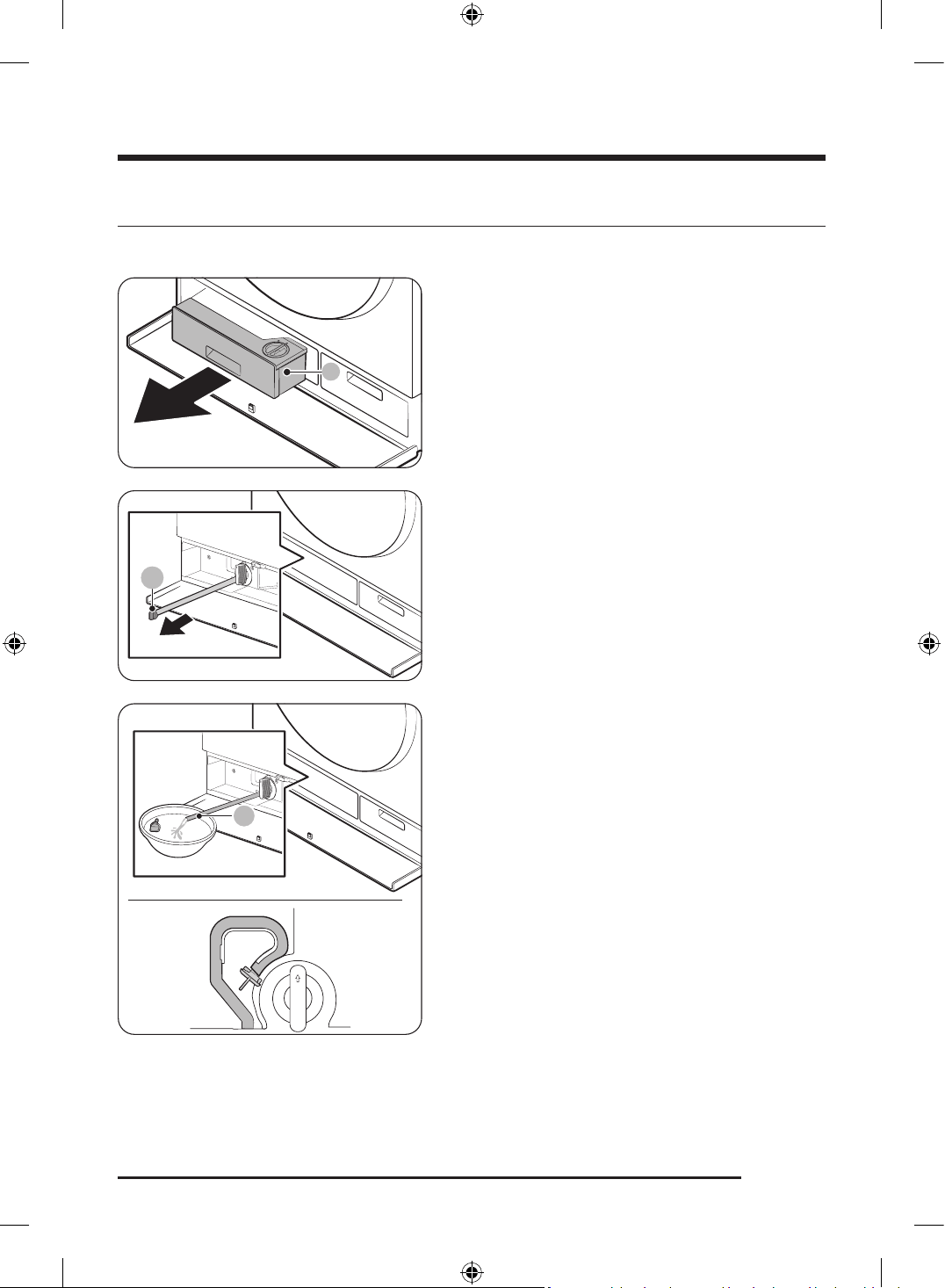
English 77
Emergency drain
In case of a power failure, drain the water inside the drum before taking out the laundry.
1. Power off and unplug the Laundry Combo from the
electrical outlet.
2. Press the Compartment cover to open it.
3. Pull out the Auto dispenser (A).
B
4. Put an empty, spacious container around the
cover, and stretch the emergency drain tube to the
container while holding the tube cap (B).
C
5. Open the tube cap and let water in the emergency
drain tube (C) flow into the container.
6. When done, close the tube cap, and reinsert the tube.
Then, close the filter cover.
Untitled-3 77Untitled-3 77 2025-02-05 2:37:432025-02-05 2:37:43
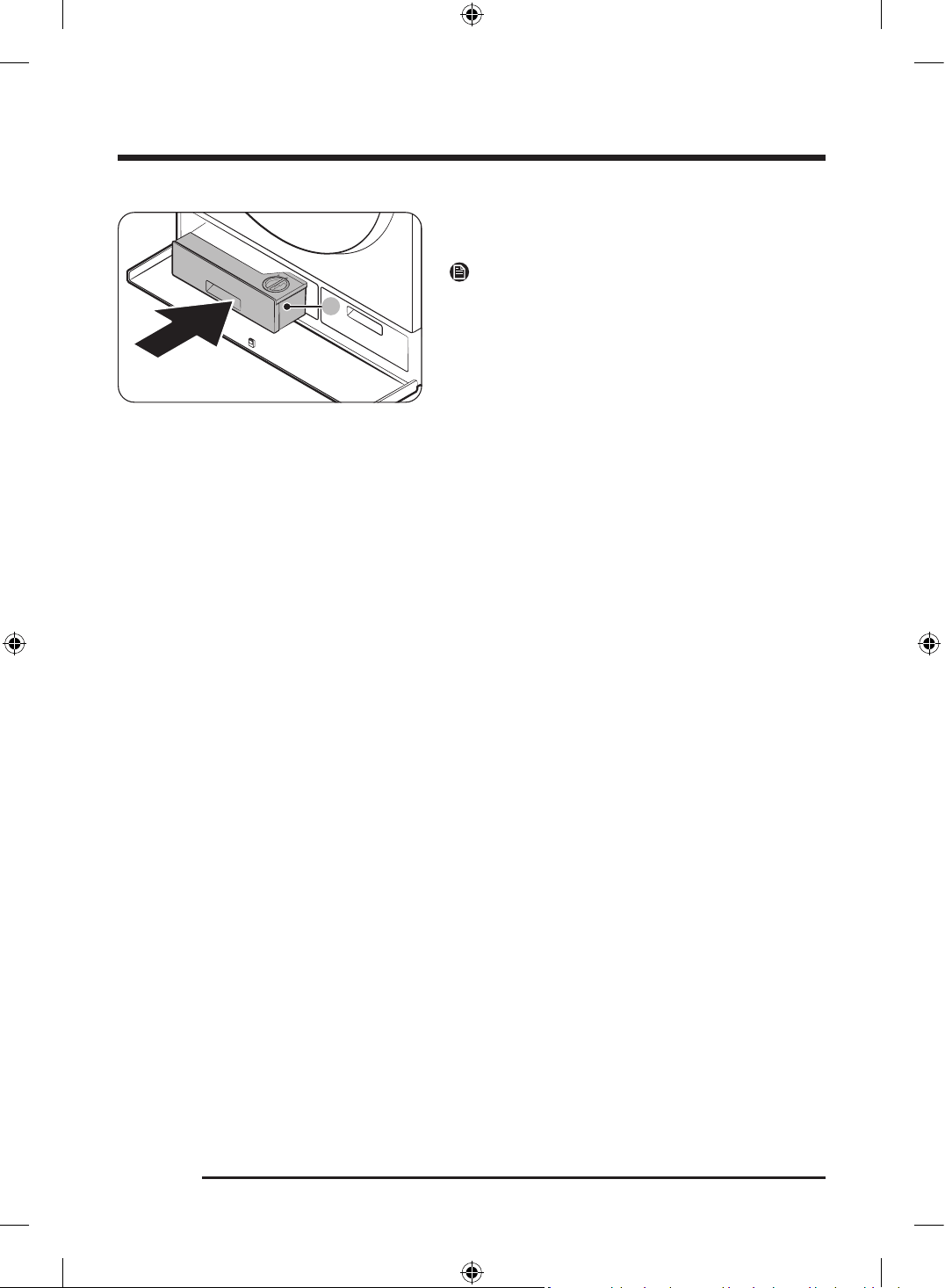
Maintenance
English78
7. Insert the Auto dispenser (A) back into the place.
8. Close the Compartment cover.
NOTE
Use a spacious container because the water in the drum
may be more than expected.
Untitled-3 78Untitled-3 78 2025-02-05 2:37:432025-02-05 2:37:43
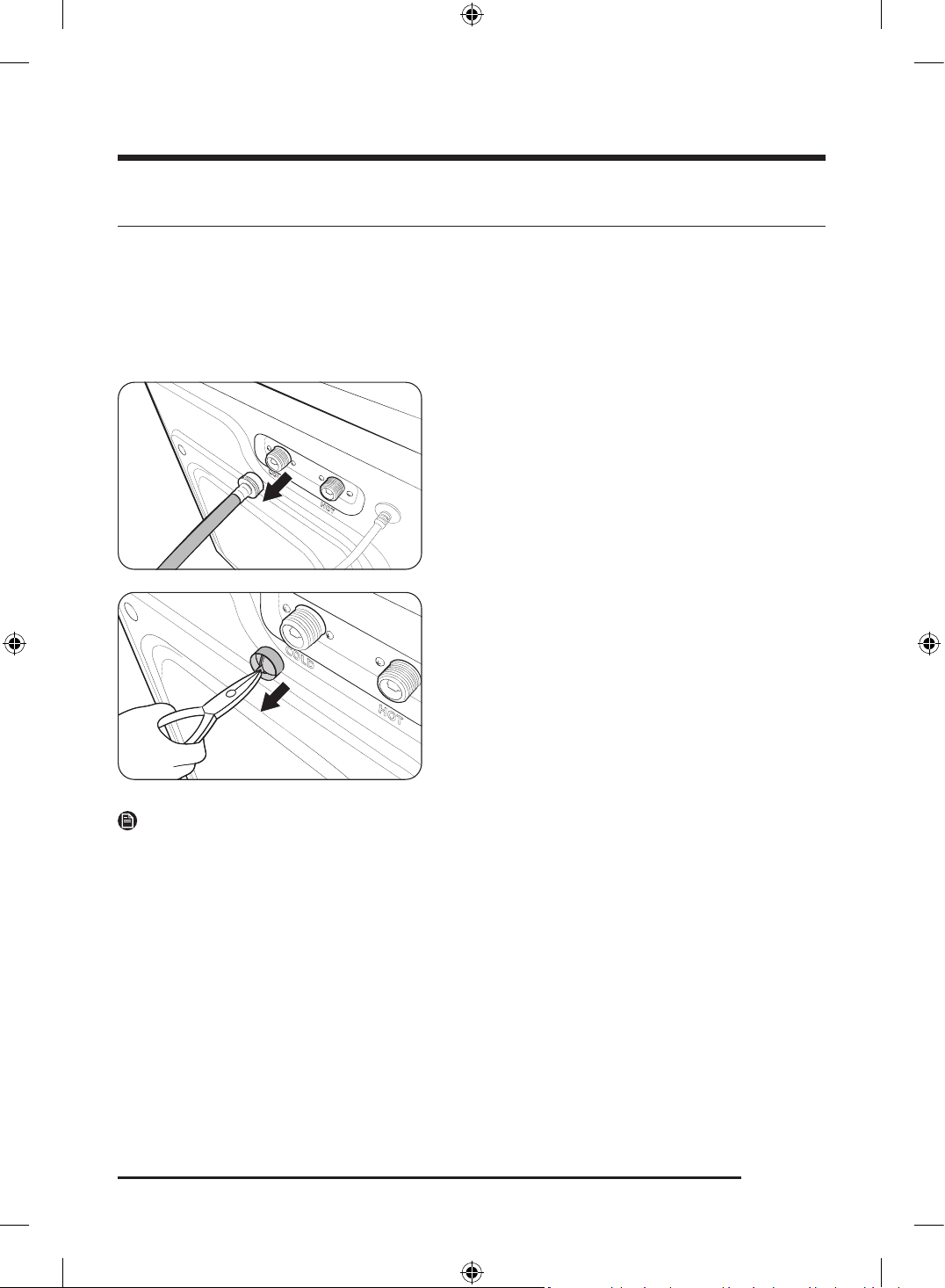
English 79
Cleaning
Surface of the Laundry Combo
Use a soft cloth with a nonabrasive household detergent. Do not spray water onto the Laundry Combo.
Mesh filter
Clean the mesh filter of the water hose once or twice a year.
1. Turn off the Laundry Combo, and unplug the power
cord.
2. Close the water tap.
3. Loosen and disconnect the water hose from the back
of the Laundry Combo. Cover the end of each hose
with a cloth or towel to prevent water from gushing
out.
4. Use pliers to pull out the mesh filter from the inlet
valve.
5. Submerge the mesh filter deeply in water so that the
threaded connector is also submerged.
6. Dry the mesh filter completely in the shade.
7. Reinsert the mesh filter into the inlet valve, and
reconnect the water hose to the inlet valve.
8. Open the water tap.
NOTE
• If the mesh filter is clogged, an information code of " 4C" appears on the screen.
• Clean the mesh filter of the water hose more frequently if water is provided by an aged water system or
well.
Untitled-3 79Untitled-3 79 2025-02-05 2:37:432025-02-05 2:37:43
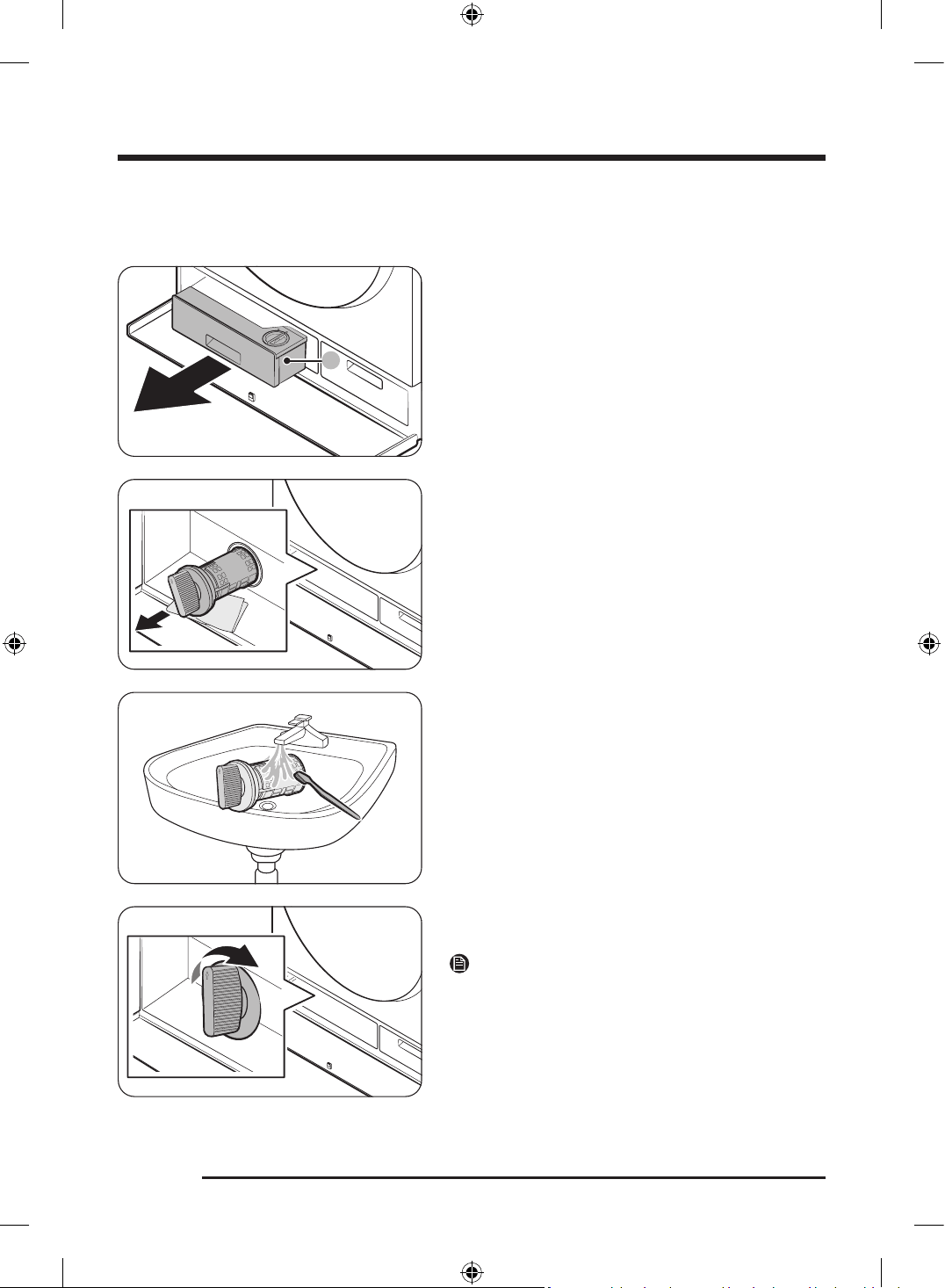
Maintenance
English80
Drain filter
It is advisable to clean the drain filter every 2 months to prevent its clogging.
1. Turn off the Laundry Combo, and unplug the power
cord.
2. Drain the remaining water inside the drum. (For more
information, see the Emergency drain section on
page 77.)
3. Press the Compartment cover to open it.
4. Pull out the Auto dispenser (A).
5. Turn the drain filter knob to the left, and drain off the
remaining water.
6. Clean the drain filter using a soft brush. While the
drain filter is removed, make sure the impeller inside
the drain pump is free of debris.
7. Reinsert the drain filter, and turn the filter knob to
the right.
NOTE
Some drain filters feature a safety knob that is designed
to prevent accidents by children. To open the safety
knob of the drain filter, push in and turn it to the left.
The spring mechanism of the safety knob helps open the
filter.
Untitled-3 80Untitled-3 80 2025-02-05 2:37:442025-02-05 2:37:44
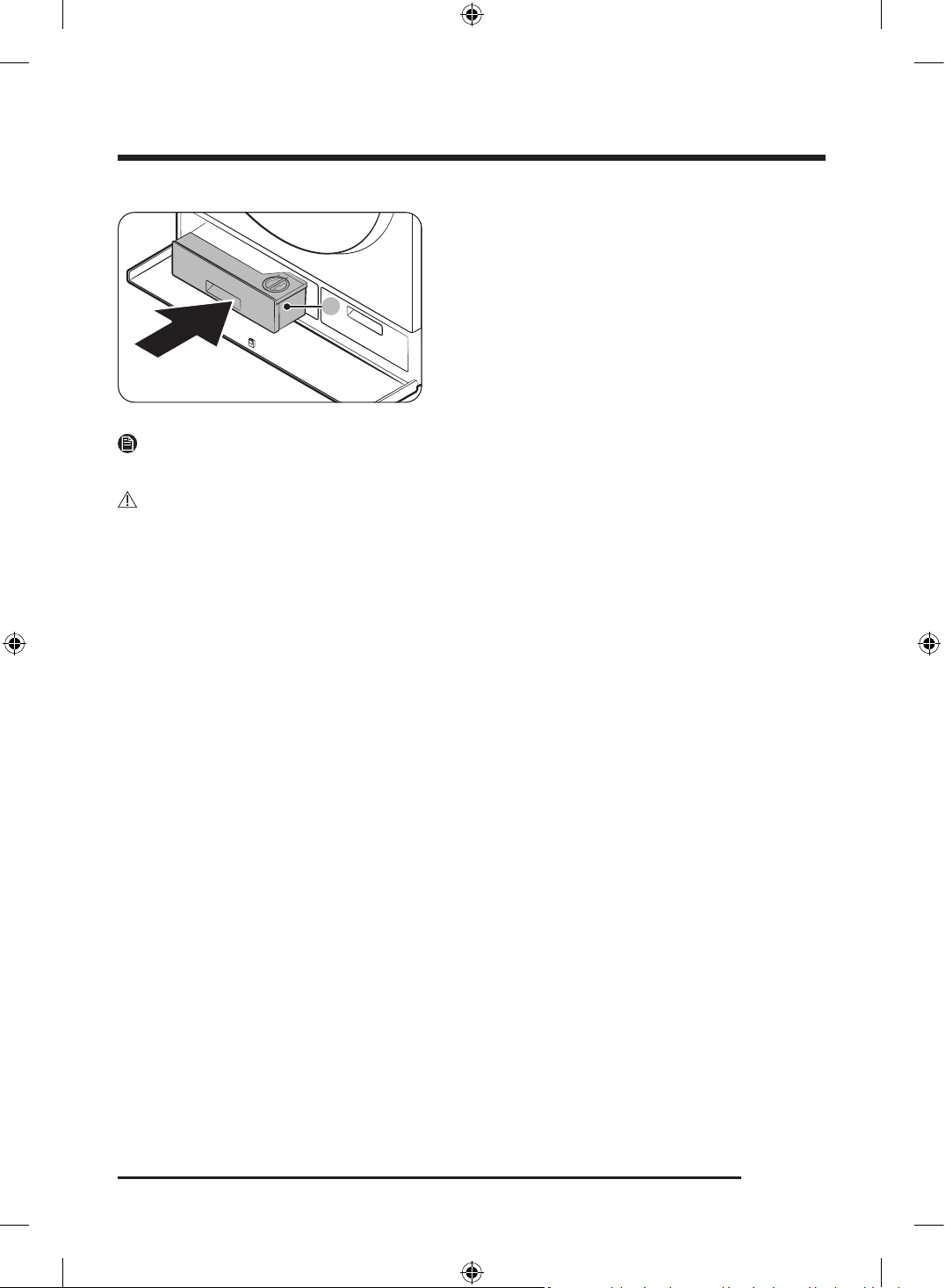
English 81
8. Insert the Auto dispenser (A) back into the place.
9. Close the Compartment cover.
NOTE
If the drain filter is clogged, an information code of " 5C" appears on the screen.
CAUTION
• Make sure the filter knob is closed properly after cleaning the filter. Otherwise, this may cause a leak.
• Make sure the filter is inserted properly after cleaning it. Otherwise, this may cause an operational
failure or a leak.
Untitled-3 81Untitled-3 81 2025-02-05 2:37:442025-02-05 2:37:44
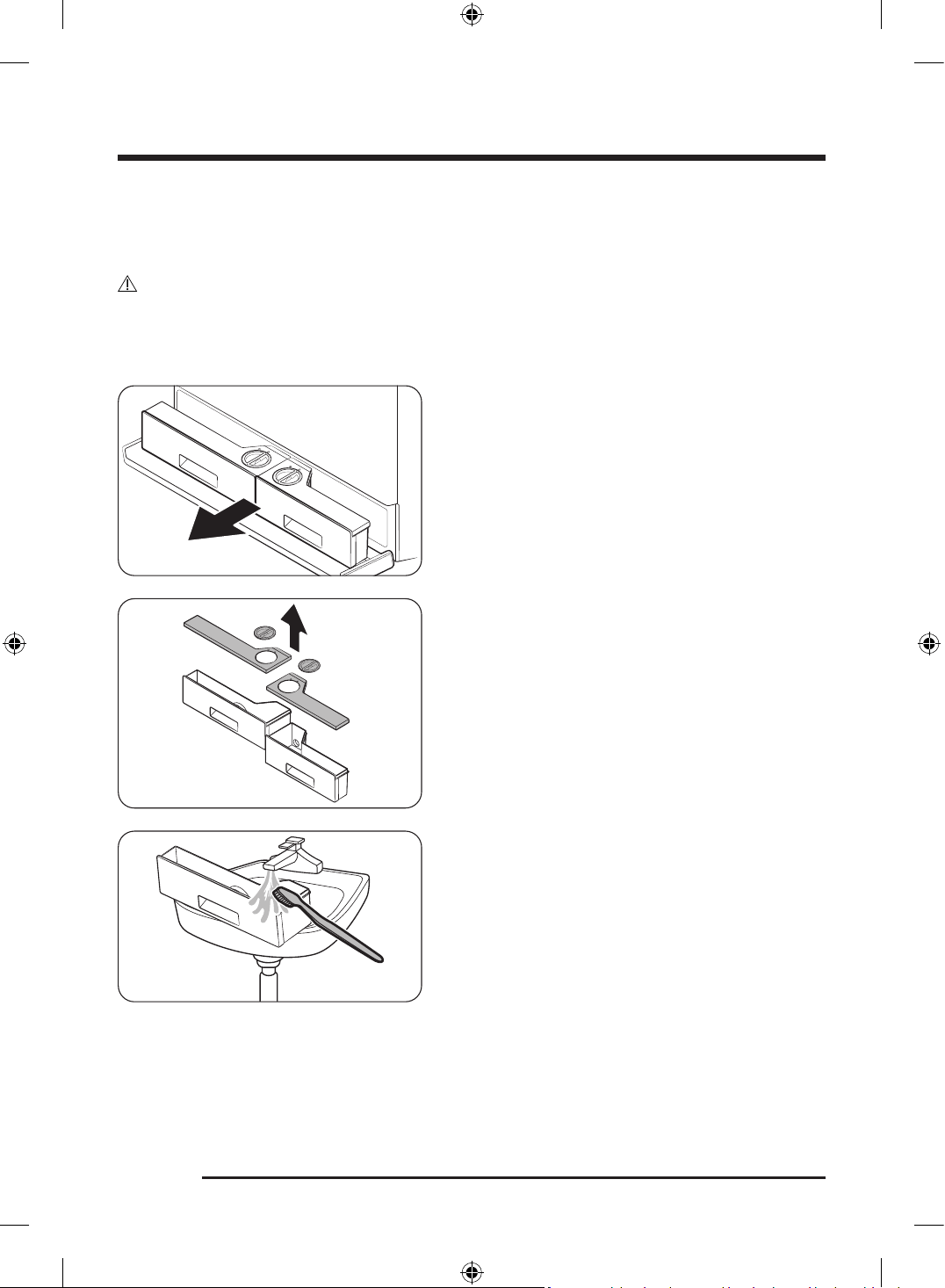
Maintenance
English82
Auto dispensers
To prevent the detergent residue buildup in the automatic dispensers, clean the dispensers and their
components once or twice a month, and whenever you refill or change the detergent or softener.
CAUTION
• Make sure to turn off the Laundry Combo and unplug the power cord before cleaning.
• If you are not going to use the Laundry Combo for a long time, empty the dispensers and clean them
thoroughly.
1. Press the Compartment cover to open it.
2. Pull out the Auto dispensers.
3. Remove the lids of both dispensers using the pull
tabs at the back of each lid.
4. Clean the dispensers and all the other components
under warm running water with a soft brush.
- Wipe all components with a dry towel or cloth
after cleaning
Untitled-3 82Untitled-3 82 2025-02-05 2:37:442025-02-05 2:37:44
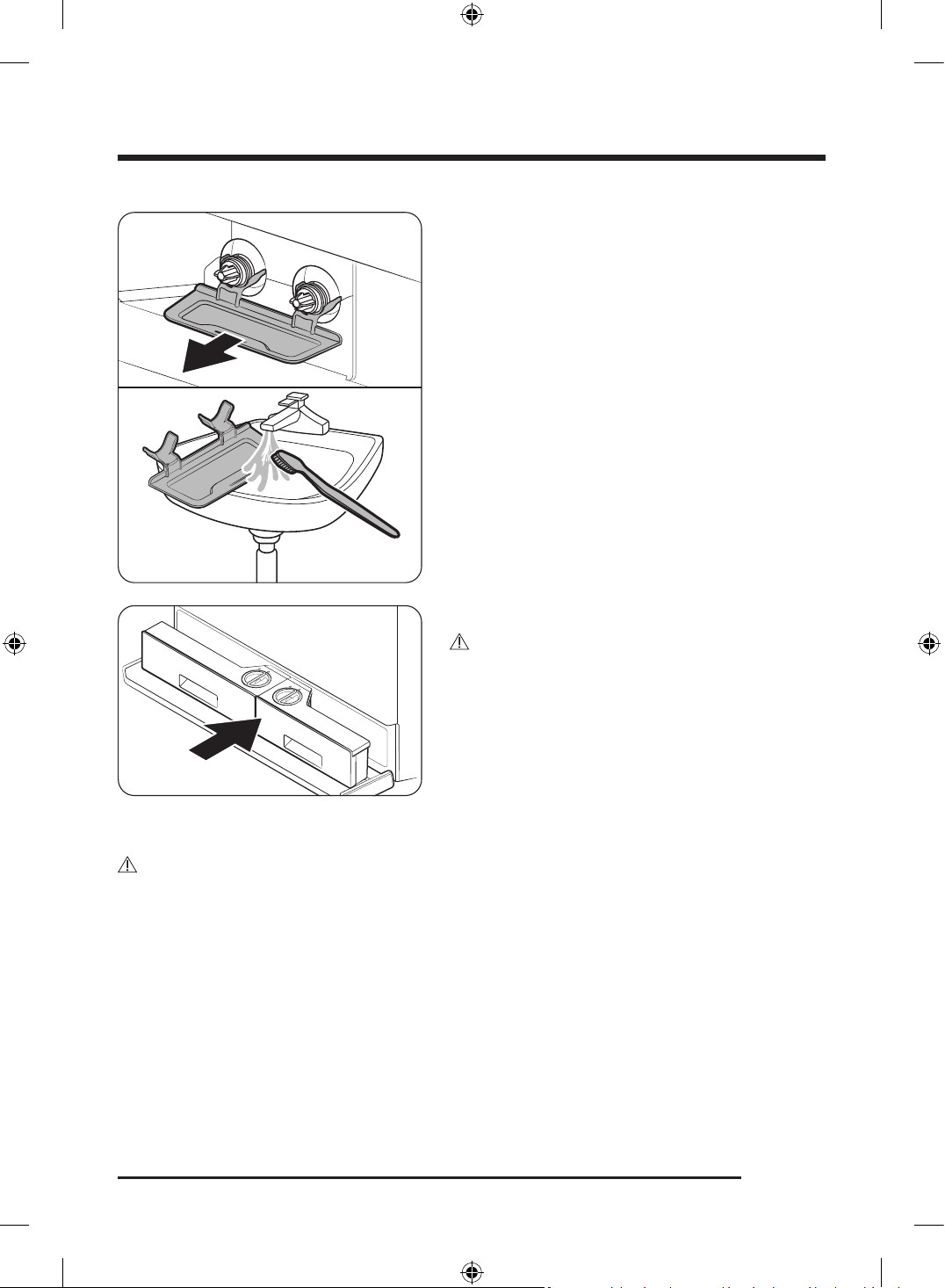
English 83
5. Remove the dispenser tray and clean it in running
water to remove leaked detergent or softener. Then,
put the tray back.
6. Push the Auto dispensers back into their positions.
CAUTION
• Make sure the dispenser recess is completely dry
before inserting Auto dispensers.
• Tightly attach the tops of both dispensers before
inserting them back.
• If the Compartment cover is not tightly closed,
detergent may leak. Make sure the auto dispensers
are fully pushed in.
7. Close the Compartment cover.
CAUTION
Do not spray water into the dispenser recess. This may cause electronic shock or fire.
Untitled-3 83Untitled-3 83 2025-02-05 2:37:442025-02-05 2:37:44
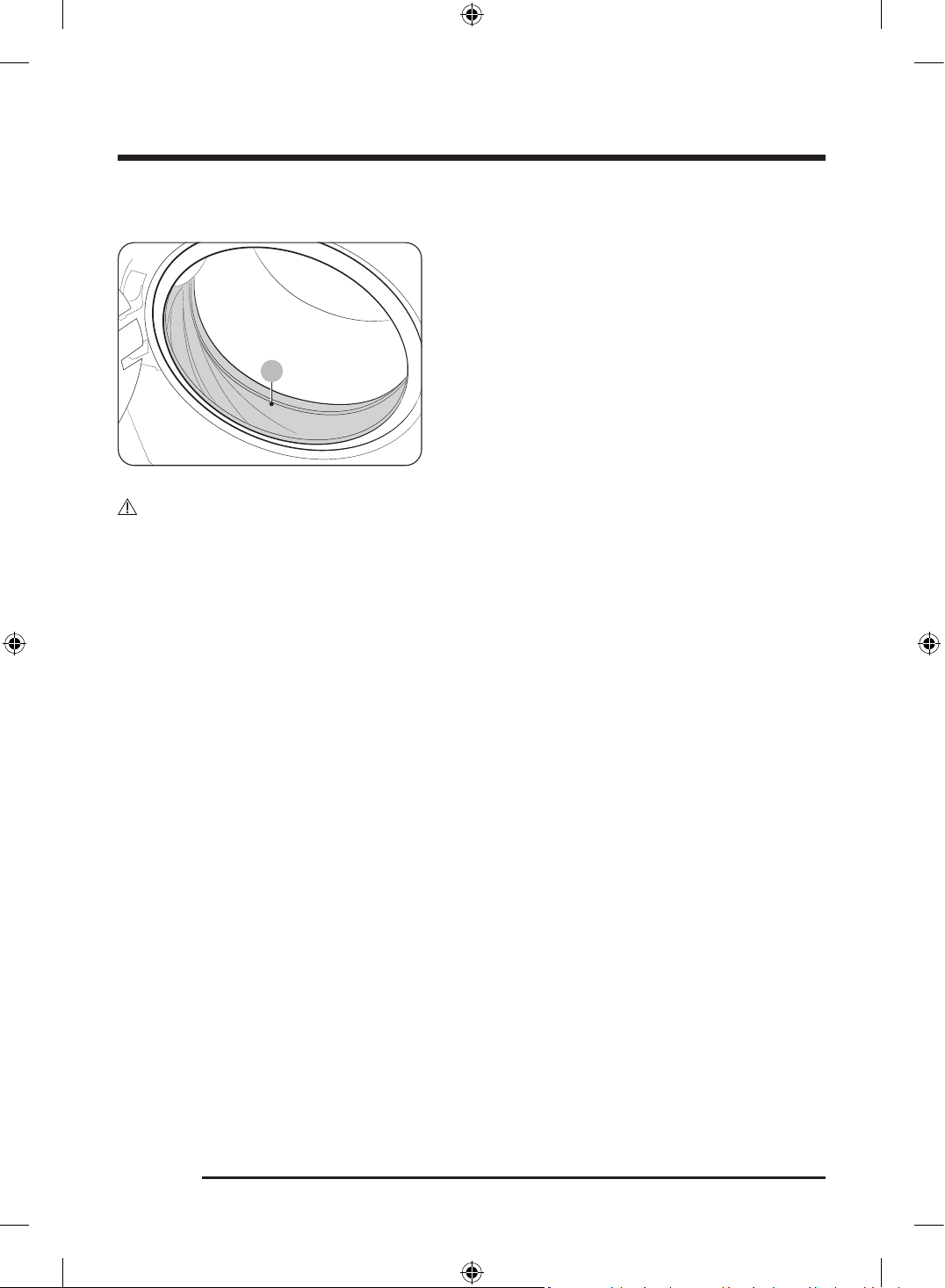
Maintenance
English84
Door diaphragm
A
1. Open the door, and then empty the drum.
2. Combine 3/4 cups of liquid chlorine bleach and 1
gallon of warm tap water.
3. Wearing rubber gloves, use a soft, clean cloth
dipped in the water and bleach solution to clean the
diaphragm.
4. Let stand for 5 minutes, and then wipe up and dry
well.
CAUTION
Use bleach carefully and be sure to follow the bleach manufacturer’s use and care instructions.
Untitled-3 84Untitled-3 84 2025-02-05 2:37:442025-02-05 2:37:44
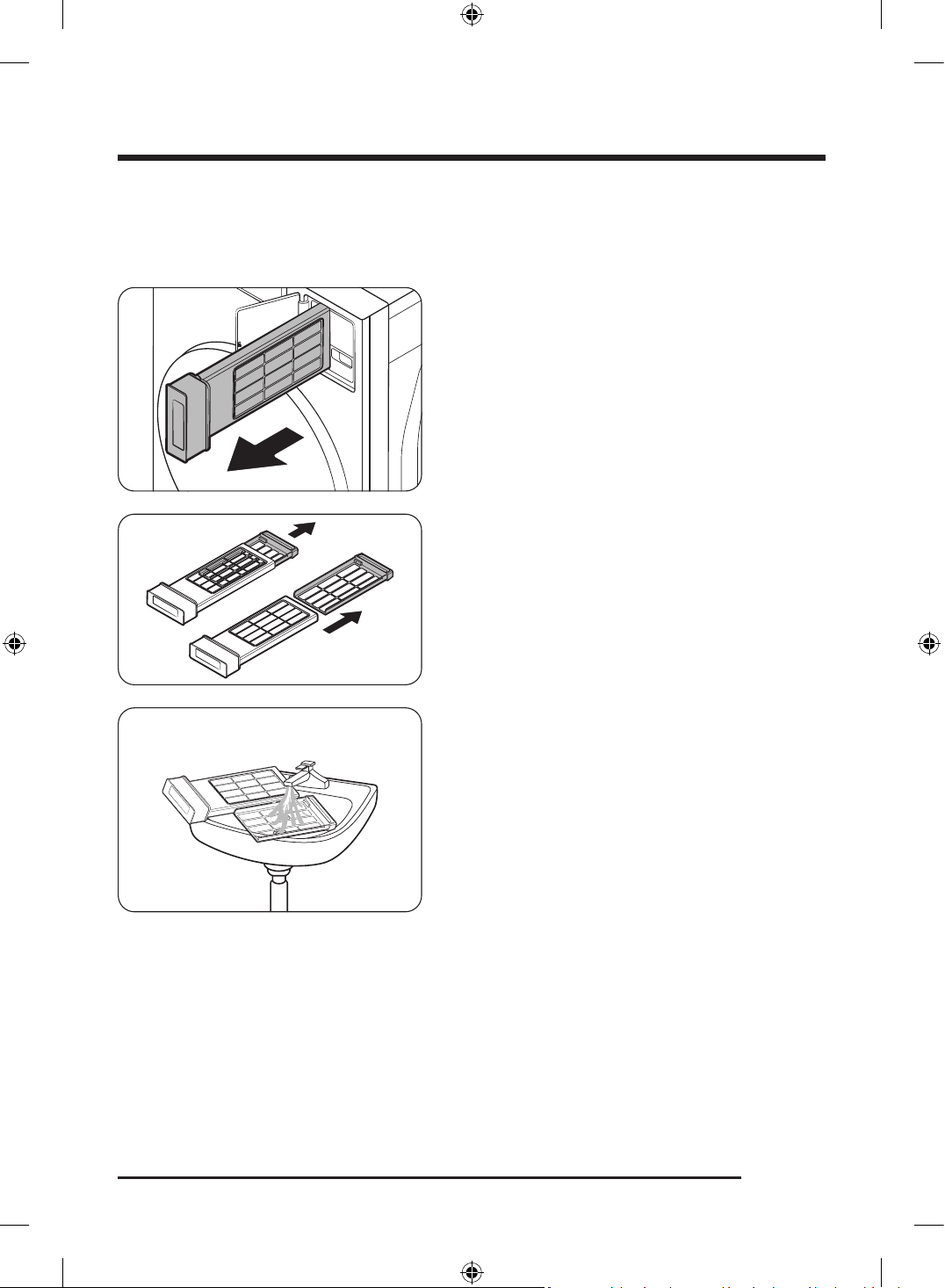
English 85
Lint filter
You must clean the lint filter every time after using the dry cycle. Not cleaning the lint filter could degrade
the drying performance and affect the drying time.
1. Open the Lint filter cover.
2. Pull out the lint filter.
- Do not remove the rubber seal on the lint filter.
3. Remove the inner filter.
4. Remove lint on both inner and outer filters. Then,
wash the filters in running water and completely dry
the filters in a shade.
Untitled-3 85Untitled-3 85 2025-02-05 2:37:452025-02-05 2:37:45
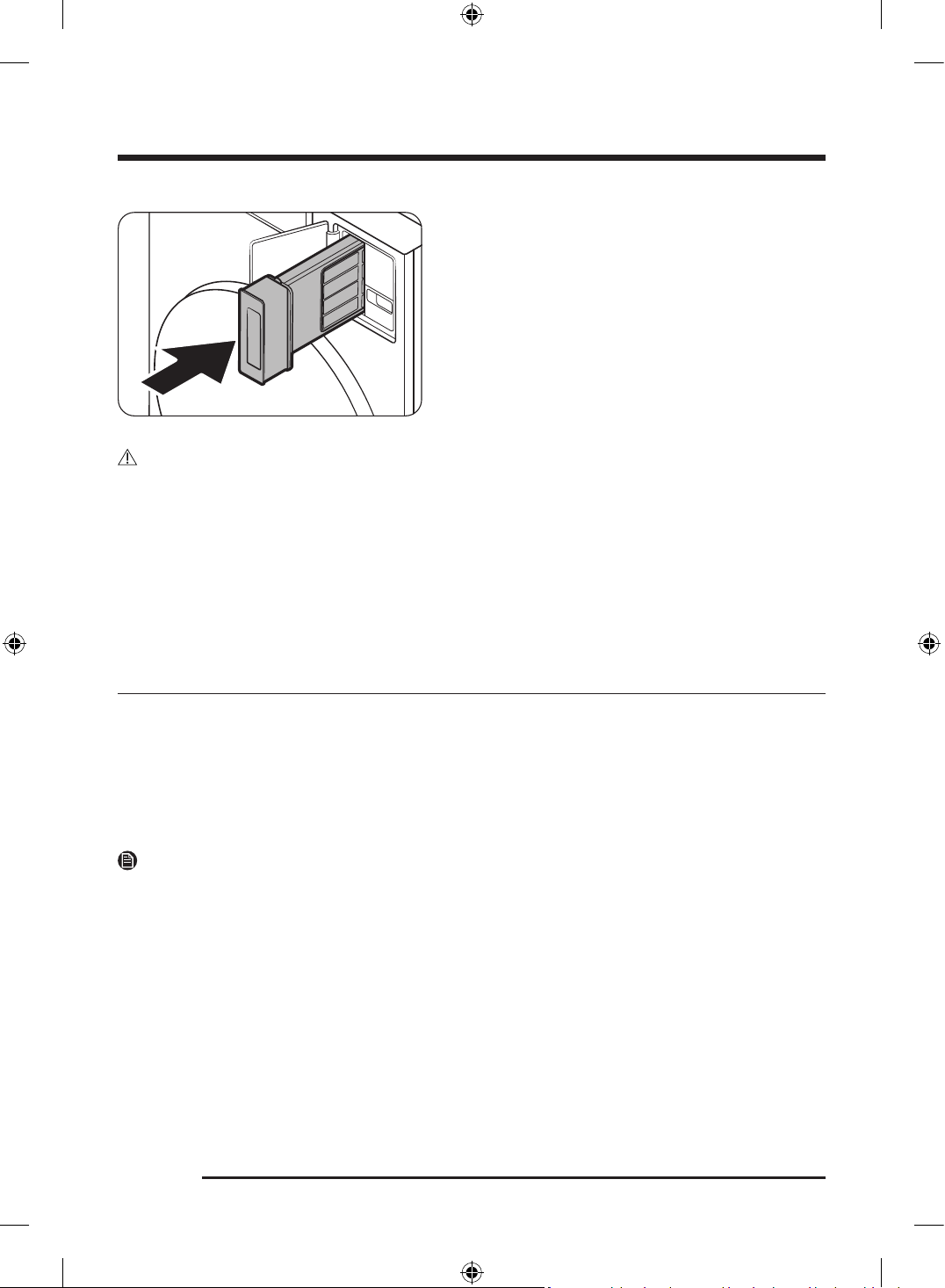
Maintenance
English86
5. Put the inner filter into the outer filter in the correct
direction.
6. Insert the assembled lint filter back into the place.
CAUTION
• Clean the lint filter after each load. Failure to remove lint from the filter may affect drying performance
and increase drying time.
• If the filter surface is wet, allow it to completely dry before use.
- Inserting the filter while it is wet may lead to the development of mold, unpleasant odors, or
resulting in less efficient drying.
• When cleaning or removing the lint filter, do not shake or tap on the filter. Doing so can damage the
filter.
• Opening the outer and inner filters carelessly and with excessive force can damage the filters.
Recovery from freezing
The Laundry Combo may freeze when the temperature in its location drops below 32 °F (0 °C).
1. Turn off the Laundry Combo, and then unplug the power cord.
2. Pour warm water over the water tap to loosen the water hose.
3. Disconnect the water hose, and then soak it in warm water.
4. Pour warm water into the drum and leave it for about 10 minutes.
5. Reconnect the water hose to the water tap.
NOTE
If the Laundry Combo still doesn’t operate normally, repeat the steps above.
Untitled-3 86Untitled-3 86 2025-02-05 2:37:452025-02-05 2:37:45
English 87
Care for an extended period of non-use
Avoid leaving the Laundry Combo unused for an extended time. However, if you intend to leave the Laundry
Combo unused for a long period of time, follow the directions below:
1. Tap .
2. On the cycle screen, select Rinse+Spin .
3. Empty the drum, and then tap and hold .
4. When the cycle is complete, close the water taps and disconnect the water hoses.
5. Turn off the Laundry Combo, and then unplug the power cord.
6. Open the door to let air circulate through the drum.
Cleaning the exterior
1. Turn off the water taps after finishing the day’s washing.
This will shut off the water supply to your Laundry Combo and prevent the unlikely possibility of
damage from escaping water. Leave the door open to allow the inside of your Laundry Combo to dry out.
2. Use a soft cloth to wipe up all detergent, bleach, or other spills as they occur. Clean the following as
recommended below:
- LCD panel – Clean with a soft, damp cloth. Do not use abrasive powders or cleaning pads. Do not
spray cleaners directly on the panel.
- Cabinet – Clean with soap and water.
CAUTION
Make sure to turn off the Laundry Combo and unplug the power cord before cleaning.
Exhaust system
• Check and clean the exhaust system on a regular basis to maintain optimum performance.
• The external exhaust hood must be cleaned frequently to ensure proper air flow.
Cleaning the interior
Clean the interior of your Laundry Combo periodically to remove any dirt, soil, odor, mold, mildew, or
bacterial residue that may remain in your Laundry Combo as a result of washing clothes.
CAUTION
Failure to follow these instructions may result in unpleasant conditions, including odors and/or permanent
stains on your Laundry Combo or laundry.
NOTE
Hard water deposits may be removed, if needed. Use a cleaner labeled "Washer safe".
Untitled-3 87Untitled-3 87 2025-02-05 2:37:452025-02-05 2:37:45
English88
Troubleshooting
If a problem persists, contact a service center. The number of the service center is on the label attached to
the product.
Checkpoints
If you encounter a problem with the Laundry Combo, first check the table below and try these suggestions.
Problem Action
Does not start.
• Make sure the Laundry Combo is plugged in.
• Make sure the door is properly closed.
• Make sure the water taps are open.
• Tap to start the Laundry Combo.
• Make sure Lock is not activated.
• Before the Laundry Combo starts to fill, it will make a series of clicking
noises to check the door lock and will do quick drain.
• Check the fuse or reset the circuit breaker.
• Check if power is supplied properly.
• Low voltage detected.
- Check if the power cord is plugged in.
• Make sure laundry is not caught in the door.
• Clean the filter.
Water supply is
insufficient, or no water is
supplied.
• Fully open the water tap.
• Make sure the door is properly closed.
• Make sure the water supply hose is not frozen.
• Make sure the water supply hose is not kinked or clogged.
• Make sure there is sufficient water pressure.
• Make sure that the cold water tap and the hot water tap are properly
connected.
• Clean the mesh filter as it may be clogged.
After a cycle, detergent
remains in the detergent
drawer.
• Make sure the Laundry Combo is running with sufficient water pressure.
• Make sure the detergent is added to the center of the detergent drawer.
• Make sure the rinse cap is inserted properly.
• If using granular detergent, make sure the detergent selector is in the
upper position.
• Remove the rinse cap and clean the detergent drawer.
Untitled-3 88Untitled-3 88 2025-02-05 2:37:452025-02-05 2:37:45
English 89
Problem Action
Excessive vibrations or
makes noise.
• Make sure the Laundry Combo is installed on a level, solid floor that is
not slippery. If the floor is not level, use the leveling feet to adjust the
height of the Laundry Combo.
• Make sure the shipping bolts are removed.
• Make sure the Laundry Combo is not in contact with any other object.
• Make sure the laundry load is balanced.
• The motor can cause noise during normal operation.
• Overalls or clothes with metallic decorations can cause noise while
being washed. This is normal.
• Metal objects such as coins can cause noise. After washing, remove
these objects from the drum or filter case.
• The spinning process is not performing properly because there is not
enough laundry or the load is unbalanced.
- Add more laundry or redistribute the items, then tap Start to restart
the washer. Or, turn off the product and turn it back on after 2-3
minutes, then try again.
• Remove any items stuck inside the lint filter.
Does not drain and/or
spin.
• Make sure the drain hose is not kinked between the unit and drain
system. If you encounter a drain problem, call for service.
• Make sure the drain filter is not clogged.
• Close the door and tap and hold .
For your safety, the Laundry Combo will not tumble or spin unless the
door is closed.
• Make sure the drain hose is not frozen or clogged.
• Make sure the drain hose is connected to a drain system that is not
clogged.
• If the Laundry Combo is not supplied with sufficient power, the Laundry
Combo will temporarily not drain or spin. As soon as the Laundry Combo
regains sufficient power, it will operate normally.
• Make sure the drain hose is positioned correctly, depending on the
connection type.
• Clean the drain filter as it may be clogged.
Untitled-3 89Untitled-3 89 2025-02-05 2:37:452025-02-05 2:37:45
Troubleshooting
English90
Problem Action
The door does not open.
• Tap to stop the Laundry Combo.
• It may take a few moments for the door lock mechanism to disengage.
• The door will not open until 3 minutes after the Laundry Combo has
stopped or the power has been off.
• Make sure all the water in the drum is drained.
• The door may not open if water remains in the drum. Drain the drum
and open the door manually.
• Make sure the door lock light is off. The door lock light turns off after
the Laundry Combo has drained.
• Power Off and restart the unit.
Excessive suds.
• Make sure you use the recommended types of detergent as appropriate.
• Use high efficiency (HE) detergent to prevent oversudsing.
• Reduce the detergent amount for soft water, small loads, or lightly
soiled loads.
• Non-HE detergent is not recommended.
Cannot add additional
detergent.
• Make sure the remaining amount of detergent and fabric softener is not
over the limit.
Stops.
• Plug the power cord into a live electrical outlet.
• Check the fuse or reset the circuit breaker.
• Close the door, and tap and hold to start the Laundry Combo. For
your safety, the Laundry Combo will not tumble or spin unless the door
is closed.
• Before the Laundry Combo starts to fill, it will make a series of clicking
noises to check the door lock and will do quick drain.
• There may be a pause or soak period in the cycle. Wait briefly, and the
Laundry Combo may start.
• Make sure the mesh filter of the water supply hose at the water taps is
not clogged. Periodically clean the mesh filter.
• If the Laundry Combo is not supplied with sufficient power, the Laundry
Combo will temporarily not drain or spin. As soon as the Laundry Combo
regains sufficient power, it will operate normally.
Untitled-3 90Untitled-3 90 2025-02-05 2:37:452025-02-05 2:37:45
English 91
Problem Action
Fills with the wrong water
temperature.
• Fully open both taps.
• Make sure the temperature selection is correct.
• Make sure the hoses are connected to the correct taps. Flush water
lines.
• Make sure the water heater is set to supply a minimum of 49 °C hot
water at the tap. Also, check the water heater capacity and recovery
rate.
• Disconnect the hoses and clean the mesh filter. The mesh filter may be
clogged.
• While the Laundry Combo fills, the water temperature may change
as the automatic temperature control feature checks incoming water
temperature. This is normal.
• While the Laundry Combo fills, you may notice just hot and/or just cold
water going through the dispenser when cold or warm temperatures are
selected. This is a normal function of the automatic temperature control
feature as the Laundry Combo determines the water temperature.
Load is wet at the end of
a cycle.
• Use the High or Extra High spin speed.
• Use high efficiency (HE) detergent to reduce oversudsing.
• Load is too small. Small loads (one or two items) may become
unbalanced and not spin completely.
• Make sure the drain hose is not kinked or clogged.
Leaks water.
• Make sure the door is properly closed.
• Make sure all hose connections are tight.
• Make sure the end of the drain hose is correctly inserted and secured to
the drain system.
• Avoid overloading.
• Use high efficiency (HE) detergent to prevent oversudsing.
• Check the drain hose.
- Make sure the end of the drain hose is not placed on the floor.
- Make sure the drain hose is not clogged.
Items still wrinkled after
Wrinkle Prevent ( Wrinkle
Away , Wrinkle Release )
• Small loads of 1 to 4 items work best.
• Load fewer items. Load similar-type items.
• Take out the items immediately after drying is complete.
Untitled-3 91Untitled-3 91 2025-02-05 2:37:452025-02-05 2:37:45
Troubleshooting
English92
Problem Action
The clothes have lint on
them.
• Always make sure the lint filter is clean before putting items into the
Laundry Combo. When drying items that generate a large amount of
lint, you may need to clean the lint filter in the middle of a cycle.
• Some fabrics (such as white towels) causes more lint and should be
dried separately from fabrics that lint attaches easily (such as black
linen pants).
• Check the inside of the pockets to make sure they are empty before
drying.
Items are not dried.
Check all of the above. Additionally:
• Do not overload the Laundry Combo. If the Laundry Combo is
overloaded, it could take longer for items to dry.
• Dry heavy fabrics separately from light fabrics.
• The item(s) are too small and may not get enough spinning inside the
drum.
• Clean the filter.
• If a drain hose is connected, make sure the water is draining properly.
• The load may be too small to tumble properly. Add a few towels and
restart the Laundry Combo.
Items are not dried
evenly.
• Seams, pockets, and other parts of clothing are harder to dry than
others. This is normal.
• Sort heavy and light items separately.
Has odors.
• Excessive suds collect in recesses and can cause foul odors.
• Run cleansing cycles to sanitise periodically.
• Clean the door seal (diaphragm).
• Do not attempt to dry wet items after leaving them in the Laundry
Combo for a long time.
• The Laundry Combo circulates ambient air inside and outside during
the drying process to cool the system. Using the drying in a poorly
ventilated area may, depending on the operating environment, raise
the ambient humidity level and cause a damp, soggy smell to develop.
Ensure proper ventilation when using the drying.
• Dry the interior of the Laundry Combo after a cycle has finished.
A message appears on
the display to alert that
dispenser is open.
• Check if the detergent drawer is closed properly.
- Open the detergent drawer and close it again. Make sure it’s closed
properly.
Untitled-3 92Untitled-3 92 2025-02-05 2:37:452025-02-05 2:37:45
English 93
Problem Action
The " Needs refill "
message does not
disappear after refilling
the detergent/softener.
• After refilling the Auto dispenser and Flex auto dispenser, close the
detergent drawer, and then tap and hold . Then, the Laundry Combo
will start to detect the detergent/softener, and the message will
disappear.
• Depending on the type of detergent/softener, the message may not
disappear immediately.
Detergent/softener is not
dispensed.
• Check if the Amount option for Auto dispenser or Flex auto dispenser
is set to Off . The automatic dispensers do not dispense the detergent if
the option is set to Off .
• Tap , select Auto dispenser or Flex auto dispenser , and then change
the Amount option.
• The automatic dispensers are disabled in the Delicates , Activewear , or
Wool cycles. To dispense detergent in those cycles, tap , select Auto
dispenser or Flex auto dispenser , and then change the Amount option.
Excessive or insufficient
amount of detergent/
softener is dispensed.
• Check the Amount option for Auto dispenser or Flex auto dispenser .
Tap , select Auto dispenser or Flex auto dispenser , and then change
the Amount option.
Screen retention occurs
while using the LCD
screen.
• When the temperature around the Laundry Combo is low, screen
retention may occur while using the LCD. It will function normally when
the temperature rises.
If a problem persists, contact a service center. The number of the service center is on the label attached to
the product.
Untitled-3 93Untitled-3 93 2025-02-05 2:37:462025-02-05 2:37:46
Troubleshooting
English94
Information codes
If there is any problem, check the information message on the LCD screen and follow the on-screen
instructions.
Problem Code Action
Check drainage 5C
• The Laundry Combo isn't draining properly.
• Clean the drain filter, then tap Start to restart the Laundry
Combo. Or, turn it off and on again after 2-3 minutes, then
try again.
NOTE
If you perform the Condenser Cleaning function without
connecting the water supply hose, you may see the 5C code
on the LCD display. In this case, please check the drainage
and water supply status.
Check water supply 4C
• Water isn't being supplied properly.
• Check the faucets, then tap Start to restart the Laundry
Combo. Or, turn it off and on again after 2-3 minutes, then
try again.
Please connect the
hot/cold water hose
connection correctly
4C2
• The water is too hot. Some fabrics need to be protected.
• Check if the water supply hoses are properly connected,
then tap Start to restart the Laundry Combo. Or, turn it off
and on again after 2-3 minutes, then try again.
Incorrect button state BC2
• A button on the Laundry Combo is still pressed in.
• Turn off the Laundry Combo, then turn it on again after
2-3 minutes and try again.
Open the door and evenly
distribute the load
UB
• The spinning process is not performing properly because
there is not enough laundry or the load is unbalanced.
- Add more laundry or redistribute the items, then tap
Start to restart the washer. Or, turn off the product and
turn it back on after 2-3 minutes, then try again.
Waterproof items
detected
UB1
• Your laundry contains waterproof items.
• Remove those items, then tap Start to restart the Laundry
Combo. Or, turn it off and on again after 2-3 minutes, then
try again.
Door is open DC • The door is open. Close it and try again.
Close the washer door and
try again
DC6
• Auto Open Door isn't working properly.
• If you turn off the power, the door will open. To use
Auto Open Door , turn off Lock and Smart control in
SmartThings.
Untitled-3 94Untitled-3 94 2025-02-05 2:37:462025-02-05 2:37:46
English 95
Problem Code Action
The door switch lock/
unlock is not working
properly.
DC1
• Turn off the Laundry Combo, then turn it on again after
2-3 minutes and try again.
• The door switch isn't working properly.
• Check for foreign substances around the door, then push
the door closed and try again.
Check filter is inserted
correctly
NC
• Check if the filter is inserted correctly, then tap Start to
restart the Laundry Combo. Or, turn it off and on again
after 2-3 minutes, then try again.
If any information code keeps appearing on the screen, contact a local Samsung service center.
Untitled-3 95Untitled-3 95 2025-02-05 2:37:462025-02-05 2:37:46
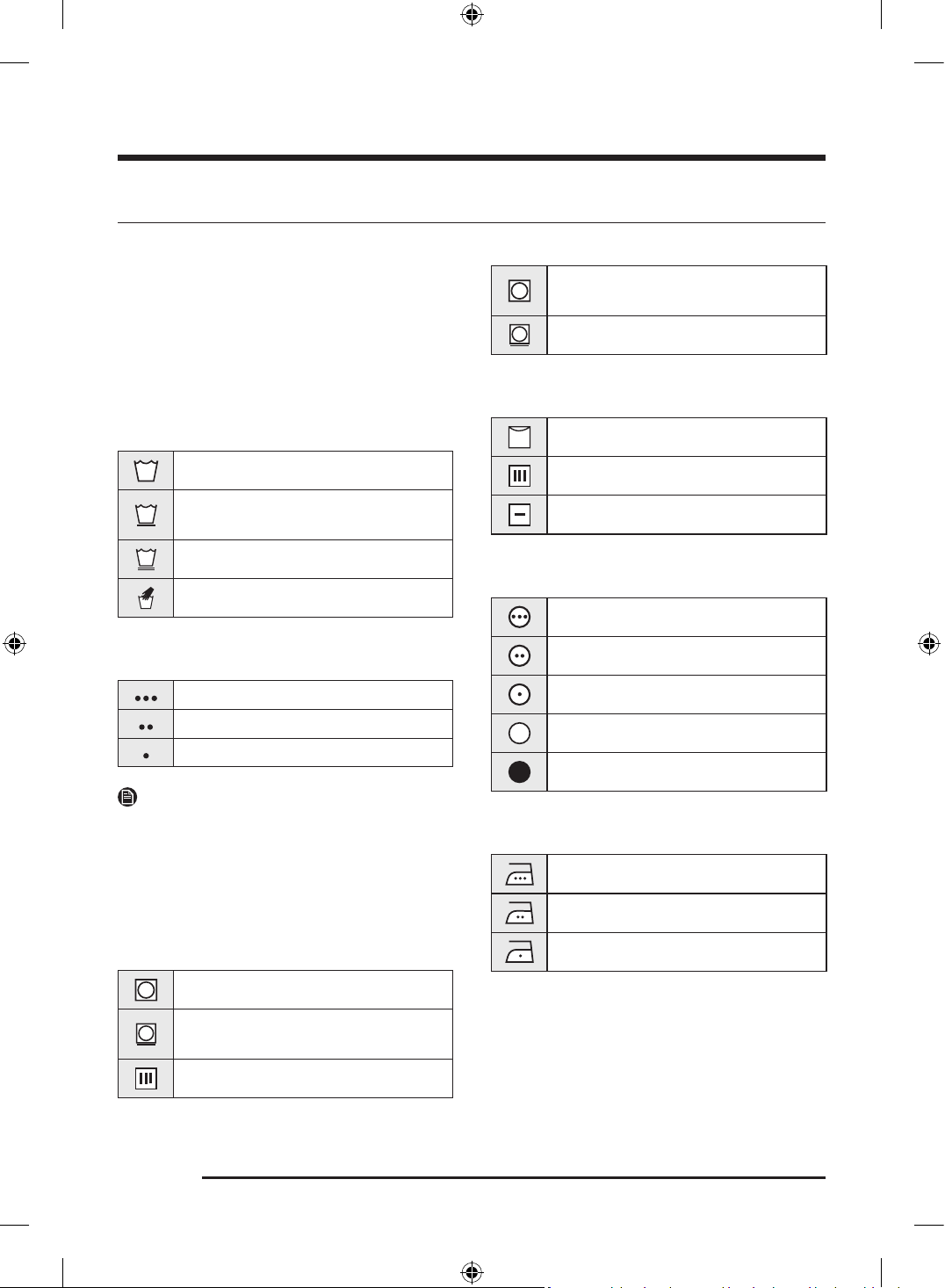
English96
Specifications
Fabric care chart
The following symbols provide garment care
direction. The clothing care labels include
symbols for drying, bleaching, drying and ironing,
or dry cleaning when necessary. The use of
symbols ensures consistency among garment
manufacturers of domestic and imported items.
Follow care label directions to optimize garment
life and reduce laundering problems.
Wash cycle
Normal
Permanent press/Wrinkle resistant/
Wrinkle control
Gentle/Delicates
Hand wash
Water temperature
Hot
Warm
Cold
NOTE
The temperature range for Hot is 135 °F (57 °C) or
below, 95 °F (35 °C) or below for Warm, and 68 °F
(20 °C) or below for Cold. Wash water temperature
must be a minimum of 60 °F (16 °C) for detergent
activation and effective cleaning.
Bleach
Any bleach (when needed)
Only non-chlorine (color-safe) bleach
(when needed)
Tumble dry
Normal
Permanent press/Wrinkle resistant/
Wrinkle control
Gentle/Delicates
Special instructions
Line dry/Hang to dry
Drip dry
Dry flat
Heat setting
High
Medium
Low
Any heat
No heat / Air
Iron dry or steam temperatures
High
Medium
Low
Untitled-3 96Untitled-3 96 2025-02-05 2:37:482025-02-05 2:37:48
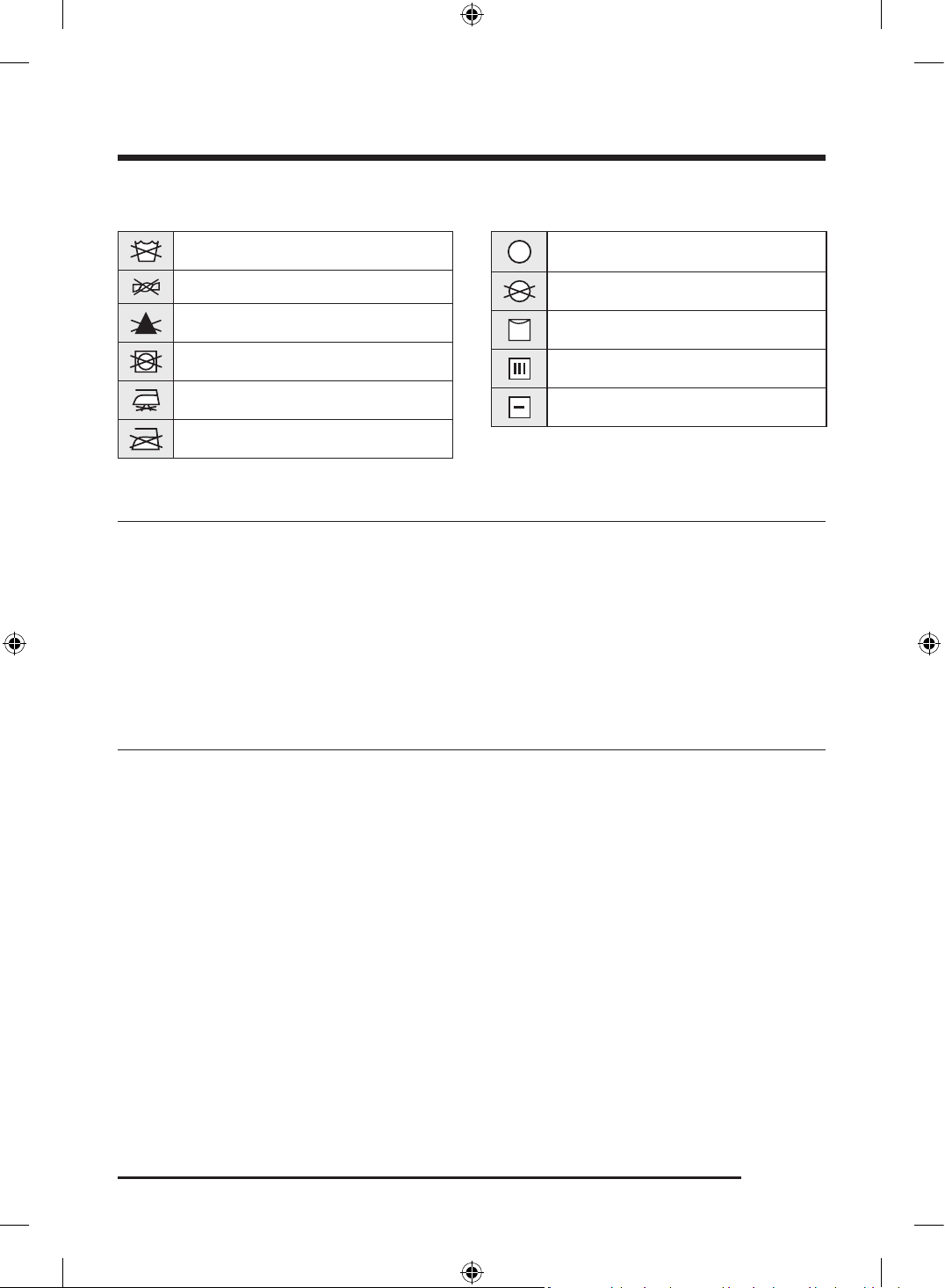
English 97
Warning symbols for laundering
Do not wash
Do not wring
Do not bleach
Do not tumble dry
No steam (added to iron)
Do not iron
Dry-clean
Dry-clean
Do not dry-clean
Line dry/Hang to dry
Drip dry
Dry flat
Protecting the environment
• This appliance is manufactured from recyclable materials. If you decide to dispose of it, please observe
local waste disposal regulations. Cut off the power cord so that the appliance cannot be connected
to a power source. Remove the lid so that animals and small children cannot get trapped inside the
appliance.
• Do not exceed the detergent quantities recommended in the detergent manufacturers’ instructions.
• Use stain removal products and bleaches before the wash cycle only when necessary.
• Save water and electricity by only washing full loads (the exact amount depends upon the program
used).
Declaration of conformity
This appliance complies with UL2157.
Untitled-3 97Untitled-3 97 2025-02-05 2:37:492025-02-05 2:37:49
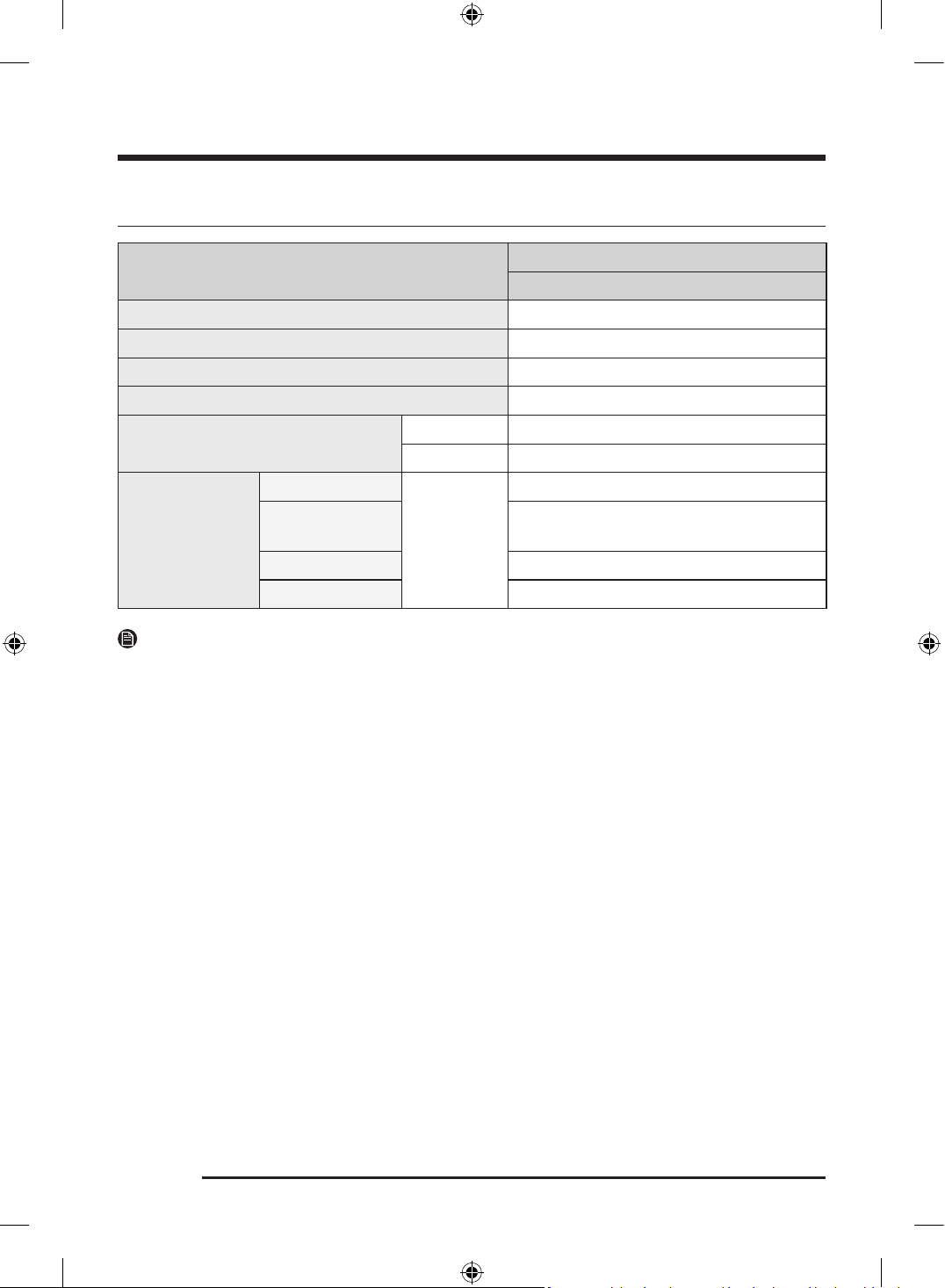
Specif ccaiion
English98
Specification sheet
Type
Front loading washer
WD90F53AV***
Capacity (Cu.ft) 5.3
Water pressure (psi (kPa)) 20-116 (137-800)
NET weight (lb (kg)) 298 (135.0)
Spin revolution 1200 rpm
Heating rating
Washing 1300 W
Drying 5200 W
Power
consumption
Washing
240 V
200 W
Washing and
heating
1400 W
Spin 550 W
Drain 80 W
NOTE
You can fill the tub with dry, unfolded clothes, but DO NOT OVERLOAD the tub.
Untitled-3 98Untitled-3 98 2025-02-05 2:37:492025-02-05 2:37:49
English 99
LIMITED WARRANTY (U.S.A.)
SAMSUNG WASHER
LIMITED WARRANTY TO ORIGINAL CONSUMER PURCHASER WITH PROOF OF PURCHASE AND/
OR PROOF OF DELIVERY
This SAMSUNG brand product, as supplied and distributed by SAMSUNG ELECTRONICS AMERICA, INC.
(SAMSUNG) and delivered new, in the original carton to the original consumer purchaser, is warranted by
SAMSUNG against manufacturing defects in materials or workmanship for the following limited warranty
periods, starting on the date of delivery to the original consumer purchaser:
Parts and labor : One (1) year
Stainless tub part (Part Only) : Three (3) years
Washing DIT (Digital Inverter Motor) motor part (Part Only):
• Twenty (20) years
This limited warranty is valid only on products purchased and used in the United States that have been
installed, operated, and maintained according to the instructions attached to or furnished with the product.
To receive warranty service, the purchaser must contact SAMSUNG at the address or phone number
provided below for problem determination and service procedures. Warranty service can only be performed
by a SAMSUNG authorized service center. The original dated bill of sale and/or proof of delivery must be
presented upon request to SAMSUNG or SAMSUNG’s authorized service center to receive warranty service.
SAMSUNG will provide in-home service within the contiguous United States during the warranty period
at no charge, subject to availability of SAMSUNG authorized servicers within the customer’s geographic
area. If in-home service is not available, SAMSUNG may elect, at its option, to provide transportation of
the product to and from an authorized service center. If the product is located in an area where service by a
SAMSUNG authorized servicer is not available, you may be responsible for a trip charge or required to bring
the product to a SAMSUNG authorized service center for service.
To receive in-home service, product must be unobstructed and accessible to the service agent.
During the applicable warranty period, a product will be repaired, replaced, or the purchase price refunded,
at the sole option of SAMSUNG. SAMSUNG may use new or reconditioned parts in repairing a product, or
replace the product with a new or reconditioned product. Replacement parts and products are warranted
for the remaining portion of the original product’s warranty or ninety (90) days, whichever is longer. All
replaced parts and products are the property of SAMSUNG and you must return them to SAMSUNG.
Untitled-3 99Untitled-3 99 2025-02-05 2:37:492025-02-05 2:37:49
LIMITED WARRANTY (U.S.A.)
English100
This limited warranty covers manufacturing defects in materials or workmanship encountered in normal
household, noncommercial use of this product and shall not cover the following: damage that occurs
in shipment, delivery, installation, and uses for which this product was not intended; damage caused by
unauthorized modification or alteration of the product; product where the original factory serial numbers
have been removed, defaced, changed in any way, or cannot be readily determined; cosmetic damage
including scratches, dents, chips, and other damage to the product’s finishes; damage caused by abuse,
misuse, pest infestations, accident, fire, floods, or other acts of nature or God; damage caused by use of
equipment, utilities, services, parts, supplies, accessories, applications, installations, repairs, external
wiring or connectors not supplied or authorized by SAMSUNG; damage caused by incorrect electrical
line current, voltage, fluctuations and surges; damage caused by failure to operate and maintain the
product according to instructions; in-home instruction on how to use your product; and service to correct
installation not in accordance with electrical or plumbing codes or correction of household electrical or
plumbing (i.e., house wiring, fuses, or water inlet hoses). The cost of repair or replacement under these
excluded circumstances shall be the customer’s responsibility.
Visits by an authorized servicer to explain product functions, maintenance or installation are not covered
by this limited warranty. Please contact SAMSUNG at the number below for assistance with any of these
issues.
EXCLUSION OF IMPLIED WARRANTIES
IMPLIED WARRANTIES, INCLUDING THE IMPLIED WARRANTIES OF MERCHANTABILITY OR FITNESS FOR
A PARTICULAR PURPOSE, ARE LIMITED TO ONE YEAR OR THE SHORTEST PERIOD ALLOWED BY LAW.
Some states do not allow limitations on how long an implied warranty lasts, so the above limitations or
exclusions may not apply to you. This warranty gives you specific rights, and you may also have other rights,
which vary from state to state.
Untitled-3 100Untitled-3 100 2025-02-05 2:37:492025-02-05 2:37:49
English 101
LIMITATION OF REMEDIES
YOUR SOLE AND EXCLUSIVE REMEDY IS PRODUCT REPAIR, PRODUCT REPLACEMENT, OR REFUND OF
THE PURCHASE PRICE AT SAMSUNG’S OPTION, AS PROVIDED IN THIS LIMITED WARRANTY. SAMSUNG
SHALL NOT BE LIABLE FOR SPECIAL, INCIDENTAL OR CONSEQUENTIAL DAMAGES, INCLUDING BUT NOT
LIMITED TO TIME AWAY FROM WORK, HOTELS AND/OR RESTAURANT MEALS, REMODELING EXPENSES,
LOSS OF REVENUE OR PROFITS, FAILURE TO REALIZE SAVINGS OR OTHER BENEFITS REGARDLESS OF
THE LEGAL THEORY ON WHICH THE CLAIM IS BASED, AND EVEN IF SAMSUNG HAS BEEN ADVISED OF
THE POSSIBILITY OF SUCH DAMAGES. Some states do not allow exclusion or limitation of incidental or
consequential damages, so the above limitations or exclusions may not apply to you. This warranty gives
you specific rights, and you may also have other rights, which vary from state to state.
SAMSUNG does not warrant uninterrupted or error-free operation of the product. No warranty or
guarantee given by any other person, firm, or corporation with respect to this product shall be binding on
SAMSUNG.
To obtain warranty service, please contact SAMSUNG at:
Samsung Electronics America, Inc.
85 Challenger Road
Ridgefield Park, NJ 07660
1-800-SAMSUNG (726-7864)
www.samsung.com/us/support
Untitled-3 101Untitled-3 101 2025-02-05 2:37:492025-02-05 2:37:49
English102
Warranty (CANADA)
SAMSUNG WASHER
LIMITED WARRANTY TO ORIGINAL PURCHASER
This SAMSUNG brand product, as supplied and distributed by SAMSUNG ELECTRONICS CANADA, INC.
(SAMSUNG) and delivered new, in the original carton to the original consumer purchaser, is warranted by
SAMSUNG against manufacturing defects in materials and workmanship for a limited warranty period of:
Parts and labor : One (1) year
Washing DIT (Digital Inverter Motor) motor part (Part Only):
• Twenty (20) years
This limited warranty begins on the original date of purchase, and is valid only on products purchased
and used in the Canada. To receive warranty service, the purchaser must contact SAMSUNG for problem
determination and service procedures. Warranty service can only be performed by a SAMSUNG authorized
service center. The original dated bill of sale must be presented upon request as proof of purchase to
SAMSUNG or SAMSUNG’s authorized service center. SAMSUNG will provide in-home service during the
warranty period at no charge, subject to availability within the Canada. In-home service is not available in
all areas.
To receive in-home service, product must be unobstructed and accessible to the service agent. If service
is not available, SAMSUNG may elect to provide transportation of the product to and from an authorized
service center.
SAMSUNG will repair, replace, or refund this product at our option and at no charge as stipulated
herein, with new or reconditioned parts or products if found to be defective during the limited warranty
period specified above. All replaced parts and products become the property of SAMSUNG and must
be returned to SAMSUNG. Replacement parts and products assume the remaining original warranty, or
ninety (90) days, whichever is longer.This limited warranty covers manufacturing defects in materials
and workmanship encountered in normal, noncommercial use of this product and shall not apply to
the following: damage that occurs in shipment; delivery and installation; applications and uses for
which this product was not intended; altered product or serial numbers; cosmetic damage or exterior
finish; accidents, abuse, neglect, fire, water, lightning, or other acts of nature or God; use of products,
equipment, systems, utilities, services, parts, supplies, accessories, applications, installations, repairs,
external wiring or connectors not supplied or authorized by SAMSUNG that damage this product or result
in service problems; incorrect electrical line voltage, fluctuations and surges; customer adjustments and
failure to follow operating instructions, maintenance and environmental instructions that are covered
and prescribed in the instruction book; product removal and reinstallation; problems caused by pest
infestations. This limited warranty does not cover problems resulting from incorrect electric current,
voltage or supply, light bulbs, house fuses, house wiring, cost of a service call for instructions, or fixing
installation errors. SAMSUNG does not warranty uninterrupted or error-free operation of the product.
EXCEPT AS SET FORTH HEREIN, THERE ARE NO WARRANTIES ON THIS PRODUCT EITHER EXPRESS OR
IMPLIED, AND SAMSUNG DISCLAIMS ALL WARRANTIES INCLUDING, BUT NOT LIMITED TO, ANY IMPLIED
WARRANTIES OF MERCHANTABILITY, INFRINGEMENT OR FITNESS FOR A PARTICULAR PURPOSE.
Untitled-3 102Untitled-3 102 2025-02-05 2:37:492025-02-05 2:37:49
English 103
NO WARRANTY OR GUARANTEE GIVEN BY ANY PERSON, FIRM, OR CORPORATION WITH RESPECT TO THIS
PRODUCT SHALL BE BINDING ON SAMSUNG. SAMSUNG SHALL NOT BE LIABLE FOR LOSS OF REVENUE
OR PROFITS, FAILURE TO REALIZE SAVINGS OR OTHER BENEFITS, OR ANY OTHER SPECIAL, INCIDENTAL
OR CONSEQUENTIAL DAMAGES CAUSED BY THE USE, MISUSE, OR INABILITY TO USE THIS PRODUCT,
REGARDLESS OF THE LEGAL THEORY ON WHICH THE CLAIM IS BASED, AND EVEN IF SAMSUNG HAS BEEN
ADVISED OF THE POSSIBILITY OF SUCH DAMAGES.
NOR SHALL RECOVERY OF ANY KIND AGAINST SAMSUNG BE GREATER IN AMOUNT THAN THE PURCHASE
PRICE OF THE PRODUCT SOLD BY SAMSUNG AND CAUSING THE ALLEGED DAMAGE. WITHOUT LIMITING
THE FOREGOING, PURCHASER ASSUMES ALL RISK AND LIABILITY FOR LOSS, DAMAGE, OR INJURY TO
PURCHASER AND PURCHASER’S PROPERTY AND TO OTHERS AND THEIR PROPERTY ARISING OUT OF
THE USE, MISUSE, OR INABILITY TO USE THIS PRODUCT. THIS LIMITED WARRANTY SHALL NOT EXTEND
TO ANYONE OTHER THAN THE ORIGINAL PURCHASER OF THIS PRODUCT, IS NONTRANSFERABLE AND
STATES YOUR EXCLUSIVE REMEDY.
Some provinces do not allow limitations on how long an implied warranty lasts, or the exclusion or
limitation of incidental or consequential damages, so the above limitations or exclusions may not apply to
you.
This warranty gives you specific rights, and you may also have other rights, which vary from province to
province.
To obtain warranty service, please contact SAMSUNG at:
Samsung Electronics Canada Inc.
2050 Derry Road West,
Mississauga, Ontario L5N 0B9 Canada
1-800-SAMSUNG (726-7864)
www.samsung.com/ca/support (English)
www.samsung.com/ca_fr/support (French)
FAX : 1-866-436-4617
Visits by a Service Engineer to explain functions, maintenance, or installation are not covered by
warranty.
Please contact your Samsung call agent for help with any of these issues.
Untitled-3 103Untitled-3 103 2025-02-05 2:37:492025-02-05 2:37:49
For Washer Only
For Dryer Only
This product qualifies for ENERGY STAR in the factory default " Normal + Eco Dry "
setting.
If you change the factory default setting or enable other features, power consumption
could increase and exceed the limits qualified for ENERGY STAR.
Scan this with your smartphone
QUESTIONS OR COMMENTS?
COUNTRY CALL OR VISIT US ONLINE AT
U.S.A 1-800-SAMSUNG (726-7864) www.samsung.com/us/support
CANADA 1-800-Samsung (726-7864)
www.samsung.com/ca/support (English)
www.samsung.com/ca_fr/support (French)
Untitled-3 104Untitled-3 104 2025-02-05 2:37:492025-02-05 2:37:49
