BG-VPTZ-HSU3
PTZ Full HD 1080P 10X/20X/30X Zoom HDMI/SDI/USB 3.0/IP Live
Streaming Camera with POE
User Manual

BZBGEAR BG-VPTZ-HSU3 PRODUCT MANUAL
Address: 830 National Drive #140, Sacramento, CA 95834, USA · Tel: +1(888)499-9906 · Email: support@bzbgear.com 2

BZBGEAR BG-VPTZ-HSU3 PRODUCT MANUAL
Table of Contents
Safety Precaution 4
Features 5
Packing List 6
Specifications 7
Operation Controls and Functions 8
Remote Control 11
Operation Instructions 12
Menu Settings 14
Network Connection 18
Camera Web Interface 22
Application Example 30
Installation Instructions 31
Tech Support 32
Limited Product Warranty Terms 32
Mission Statement 32
Copyright 32
Address: 830 National Drive #140, Sacramento, CA 95834, USA · Tel: +1(888)499-9906 · Email: support@bzbgear.com 3

BZBGEAR BG-VPTZ-HSU3 PRODUCT MANUAL
Statement
Please read these instructions carefully before connecting, operating, or configuring this
product. Please save this manual for future reference.
Safety Precaution
● To prevent damaging this product, avoid heavy pressure, strong vibration, or immersion
during transportation, storage, and installation.
● The housing of this product is made of organic materials. Do not expose to any liquid,
gas, or solids which may corrode the shell.
● Do not expose the product to rain or moisture.
● The product has no power switch. Remove power immediately if camera is not in proper
working condition to avoid electrical shock.
● To prevent the risk of electric shock, do not open the case. Installation and maintenance
should only be carried out by qualified technicians.
● Do not use the product beyond the specified temperature, humidity, or power supply
specifications.
● This product does not contain parts that can be maintained or repaired by users.
Damage caused by dismantling the product without authorization from BZBGEAR is not
covered under the warranty policy.
● Installation and use of this product must strictly comply with local electrical safety
standards.
● Do not turn camera head manually. Doing so may result in mechanical damage. Camera
should only be placed on a stable horizontal surface and cannot be installed at an
angle.
● Make sure there are no obstacles within the camera’s rotational range when installing.
Never power on before installation has been completed.
Address: 830 National Drive #140, Sacramento, CA 95834, USA · Tel: +1(888)499-9906 · Email: support@bzbgear.com 4

BZBGEAR BG-VPTZ-HSU3 PRODUCT MANUAL
Introduction
The BG-VPTZ-HSU3 is a compact 1080p HD PTZ camera. Designed with a small footprint
to unobtrusively blend into offices and classrooms, this performer is equipped with
simultaneous HDMI, 3G-SDI, USB 3.0, and IP streaming outputs. The camera also supports
H.264 and H.265 video compression formats, and can broadcast in ONVIF, RTSP, and
RTMP IP streaming protocols.
The BG-VPTZ-HSU3 camera can capture clear images at resolutions up to 1080p@60Hz
thanks to a high signal to noise ratio CMOS sensor. The built-in 3.5mm audio input jack
allows the BG-VPTZ-HSU3 to embed audio directly into the video stream for easier
production.
This camera can be controlled using RS-232, RS-485, LAN, or IR remote control. There are
255 available preset positions that can be stored internally, with nine of those presets being
available via IR remote control. These features, small size, and quiet operation make the
BG-VPTZ line of cameras ideal for education, conferencing, houses of worship, and
telemedicine, where space may be limited but thanks to the BG-VPTZ your options are not!
Features
● 1080P Full High-definition: 1/2.8" high quality CMOS sensor (1/2.7" sensor on 10x),
can reach maximum 1920 x 1080 resolutions and output frame rate up to 60fps.
● 10/20/30X Optical Zoom with 72°/65°/65.4° horizontal field of view: Equipped
with advanced image processing technology and a full HD 1/2.8" CMOS Sensor
(1/2.7" sensor on 10x), 10/20/30X Optical Zoom, and a maximum resolution of
1080P@60fps.
● Low Video Noise: The inclusion of a high SNR (Signal to Noise Ratio) CMOS sensor
combined with 2D and 3D noise reduction functions reduces video noise to provide a
clear image, even under low-light conditions.
● Multiple Simultaneous Outputs: Equipped with simultaneous USB3.0, 3G-SDI,
HDMI, and 4 channels of IP streaming outputs (RTSP/RTMP/RTMPS).
● Quiet Pan and Tilt Movement: High-precision stepper motors and an advanced
motor drive processor ensure smooth, quiet, and responsive camera movement.
● Multiple Control Options: The camera can be operated via RS232, RS485, LAN, or
IR remote control. Supported protocols include VISCA, PELCO-P/D, ONVIF, and
VISCA over IP.
● Preset Image Freeze: When enabled, this function captures a still image and holds
it until the camera has moved to the next selected preset, eliminating jarring
transitions.
● Multi-preset: Supports up to 255 presets. (Remote control can only set and recall 9
presets.)
● Suitable for a wide variety of applications: The compact footprint makes this
camera an ideal fit for education, conferencing, telemedicine, houses of worship, and
any other scenario where space is limited but high- quality video is required.
● Multiple Network Protocols: Supports ONVIF, RTSP, RTMP, and RTMPS protocols.
Address: 830 National Drive #140, Sacramento, CA 95834, USA · Tel: +1(888)499-9906 · Email: support@bzbgear.com 5

BZBGEAR BG-VPTZ-HSU3 PRODUCT MANUAL
Packing List
● 1x BG-VPTZ-HSU3 Camera
● 1x IR Remote Controller
● 1x RS-232 to DB 9-pin cable
● 1x 12V 2.0 A DC Power Adapter
● 1x User Manual
Address: 830 National Drive #140, Sacramento, CA 95834, USA · Tel: +1(888)499-9906 · Email: support@bzbgear.com 6
BZBGEAR BG-VPTZ-HSU3 PRODUCT MANUAL
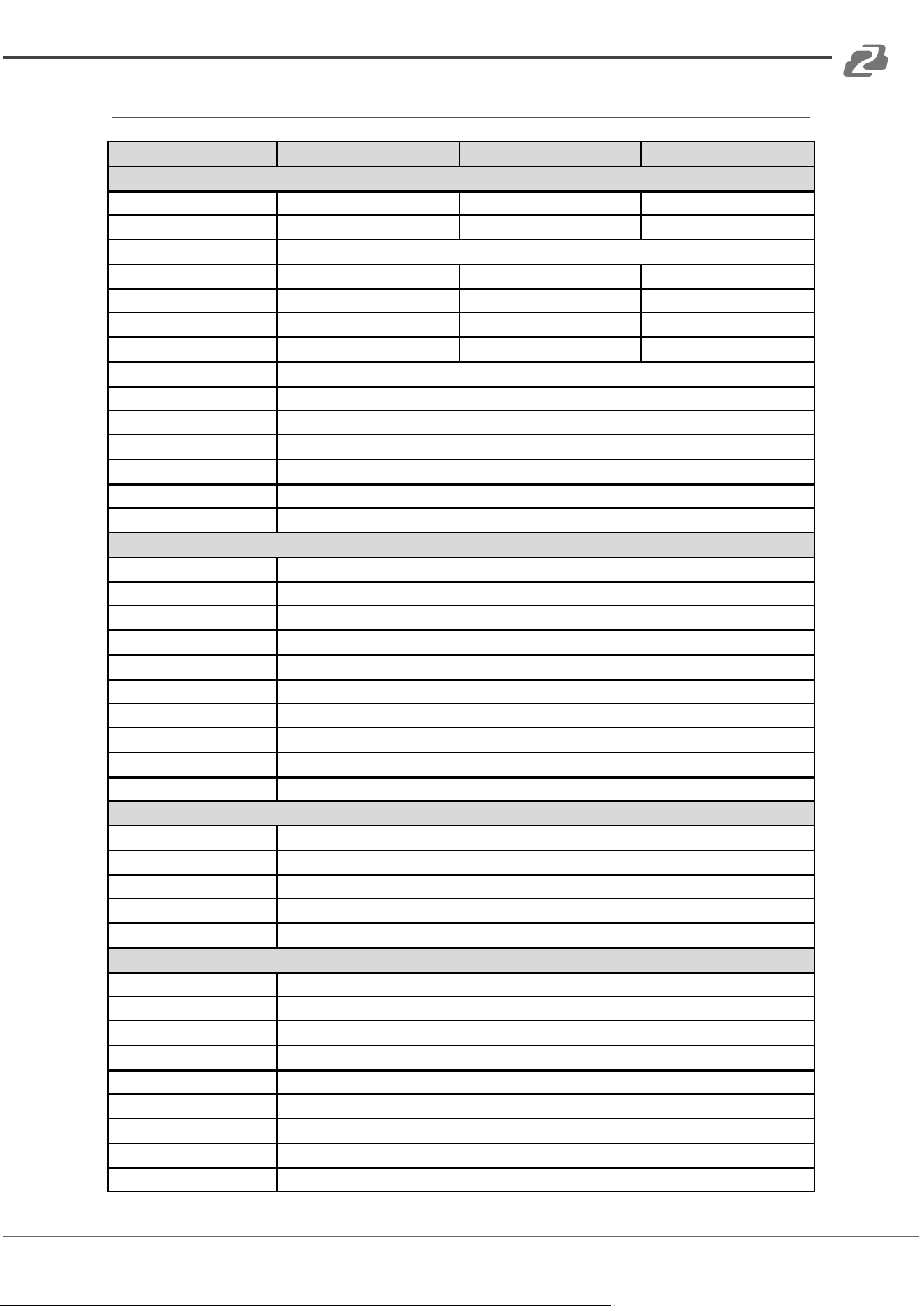
Specifications
Model
BG-VPTZ-10HSU3
BG-VPTZ-20HSU3
BG-VPTZ-30HSU3
Camera Parameters
CMOS Sensor
1/2.7" Exmor CMOS
1/2.8"Exmor CMOS
1/2.8"Exmor CMOS
Effective Pixels
2.7 Megapixels
2.38 Megapixels
2.7 Megapixels
Video Format
1080P60/59.94/50/30/29.97/25;1080I60/59.94/50/30/29.97/25;720P60/50/30/25,480I60,576I50
Optical Zoom
10X Optical
20X Optical
30X Optical
Focus
f=5.1mm~51mm
f=4.7mm~94.0mm
f=5.2mm~148.4mm
HOV
72°
65°
65.4“
F-number
F=1.6(W)-3.5(T)
F=1.6(W)-3.5(T)
F=1.3(W)-4.8(T)
Min. Illumination
0.005Lux (F1.8,AGC:ON)
Digital Noise Reduction
2D & 3D
White Balance
Auto/Manual/Indoor/outdoor/White Balance/3000K/4000K/5000K/6500K
Focus
Auto/Manual
Iris
Auto/Manual
Backlight Compensation
1-7/Off
Control Panel
Brightness, Hue, Saturation, Contrast, Sharpness
Interface Parameters
Video Output Interface
HDMI, 3G-SDI, IP Streaming, USB 3.0
Video Network Coding
H.265, H.264, MJPEG
Communication
1x RS232 IN, 1x RS232 Out, 1x RJ45, RS485
Control Protocol
VISCA/PELCO-D/PELCO-P/Visca Over IP/ONVIF
Baud Rate
2400/4800/9600/115200
Audio Input
1-ch 3.5mm audio interface, Line In
Audio Compression Format
G.711, G.722, G.722.1, G.728, G.722.1C AAC
Network Interface
100M internet access (10/100BASE-TX)
Network Protocol
TCP/IP, HTTP, RTSP, RTMP, RTMPS, ONVIF, DHCP, Multicast
Power Interface
JEITA type (DC IN 12V)/POE
Mechanical Parameters
Pan Rotation Angle
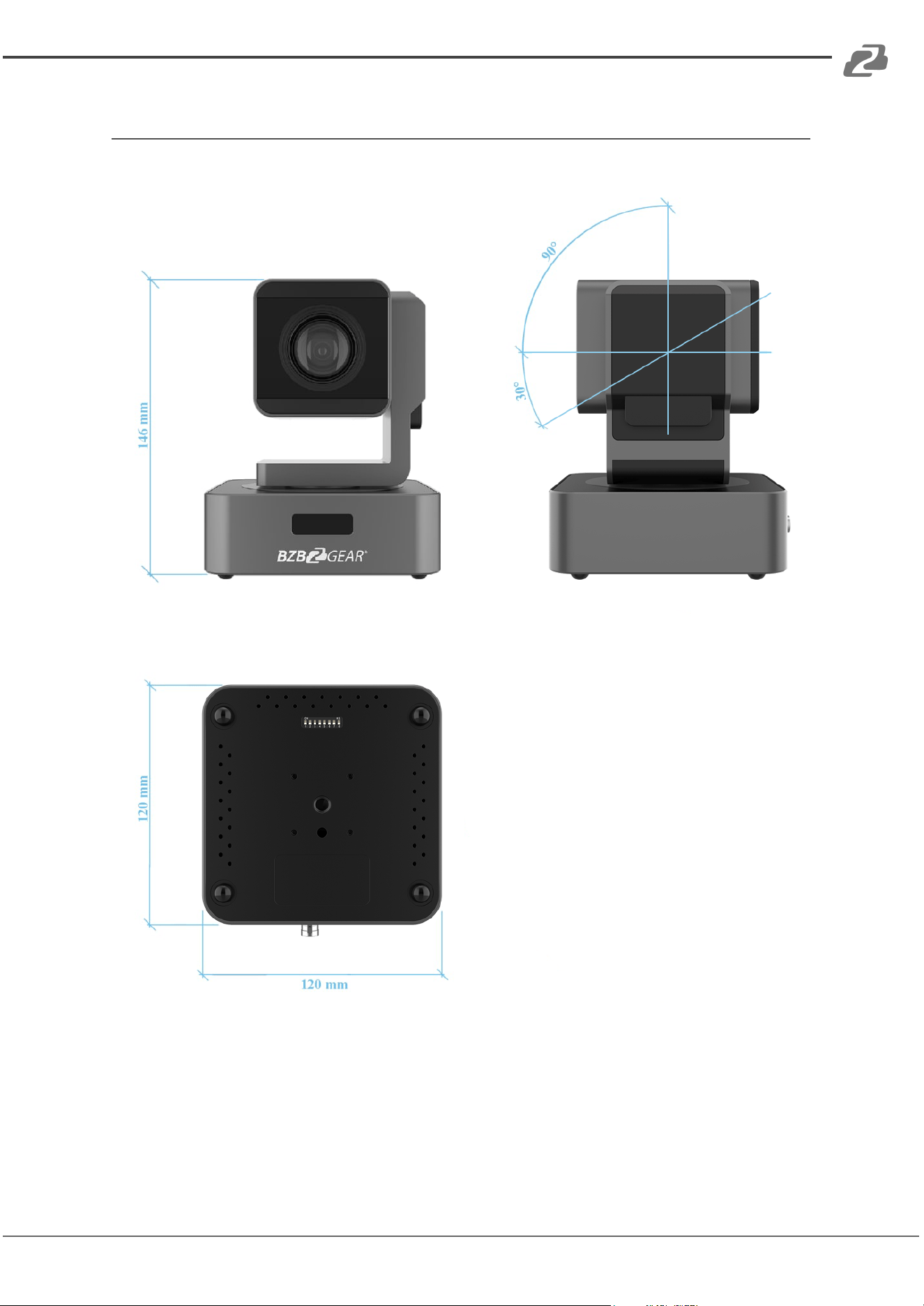
-178°- +178°
Vertical Angle of View
-30°- +90°
Pan Speed Range (per sec)
0.1~180
o
/s
Tilt Speed Range (per sec)
0.1-120%
Presets
255
Other Parameters
Power Adapter
AC100V-AC240V in, DC12V/2A out
Input Voltage
DC 12V
Power Consumption
12W
Storage Environment
-10°C - +60°C / 20% - 95%
Working Environment
-10°C - +50°C / 20% - 80%
Dimensions (L x W x H)
4.7in x 4.7in x 5.7in [120mm x 120mm x 145mm]
Gross Weight
3.5 lbs [1.6kg]
Working Environment
Indoor Only
Optional Accessories
Wall mount (BG-VPTZ-WM); ceiling mount (BG-VPTZ-CM)
Address: 830 National Drive #140, Sacramento, CA 95834, USA · Tel: +1(888)499-9906 · Email: support@bzbgear.com 7
BZBGEAR BG-VPTZ-HSU3 PRODUCT MANUAL
Operation Controls and Functions
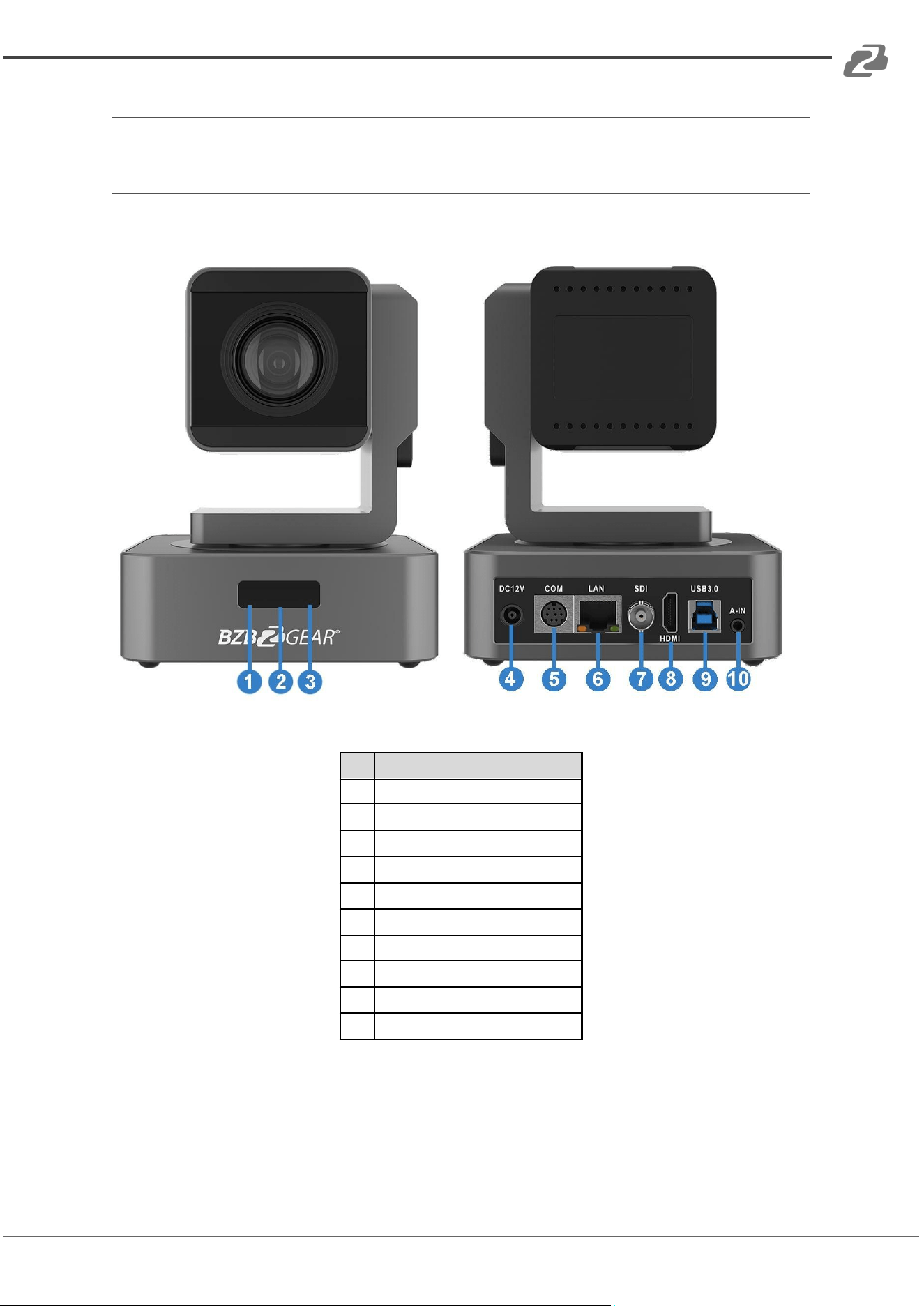
Connections Overview
No.
Name
1
IR Lens
2
IR Receiver
3
Power Indicator
4
DC12V Input
5
COM Port (RS485/RS232)
6
LAN (PoE)
7
3G-SDI Output
8
HDMI Output
9
USB 3.0 Type-B
10
3.5mm Audio-Input
Address: 830 National Drive #140, Sacramento, CA 95834, USA · Tel: +1(888)499-9906 · Email: support@bzbgear.com 8
BZBGEAR BG-VPTZ-HSU3 PRODUCT MANUAL
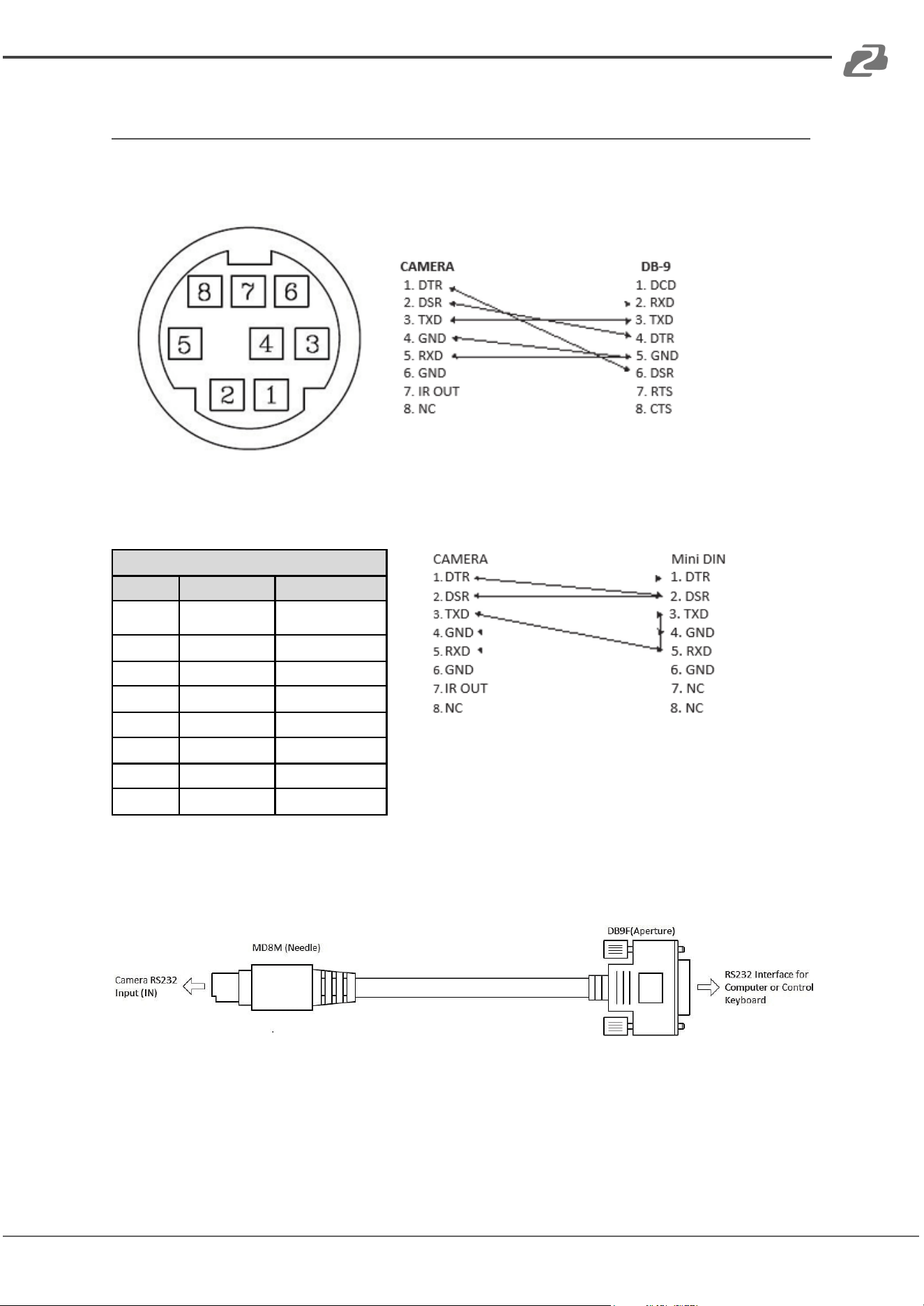
RS232 Interface Specifications
For serial connection to computers or joystick controllers.
RS232 INPUT
NO.
Function
Definition
1
DTR
Data Terminal
Ready
2
DSR
Data Set Ready
3
TXD
Transmit Data
4
GND
Ground
5
RXD
Receive Data
6
GND
Ground
7
IR OUT
IR Signal Output
8
NC
No Connection
Address: 830 National Drive #140, Sacramento, CA 95834, USA · Tel: +1(888)499-9906 · Email: support@bzbgear.com 9
BZBGEAR BG-VPTZ-HSU3 PRODUCT MANUAL
Camera Dimensions
Address: 830 National Drive #140, Sacramento, CA 95834, USA · Tel: +1(888)499-9906 · Email: support@bzbgear.com 10
BZBGEAR BG-VPTZ-HSU3 PRODUCT MANUAL
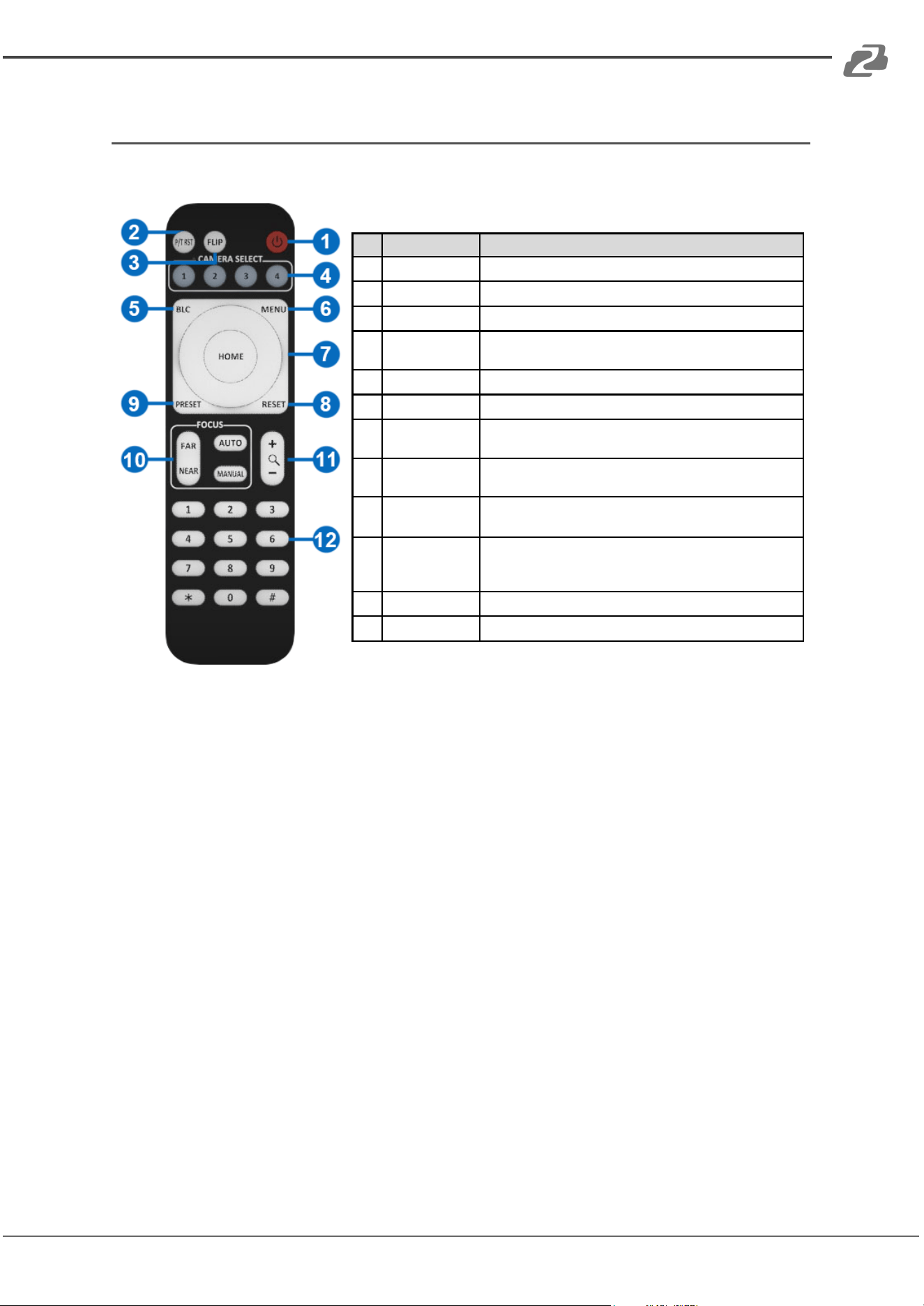
Remote Control
No.
Key
Function
1
Power Key
After pressing, the camera enters standby mode
2
P/T RST Key
After pressing, the camera enters self-check
3
Flip Key
Flip the camera image
4
Camera
Select Key
Select the camera to be controlled
5
BLC Key
Turn on/off BLC
6
Menu Key
Enter/Exit Menu
7
Camera PTZ
Control Key
Press the HOME button to return the camera to the
center position
8
Preset
Erase Key
Press "Reset"+ Number (1-9)to erase the corresponding
Preset
9
Preset
Setting Key
Press "Preset"+ Number (1-9)to save the corresponding
preset
10
Focus Key
[AUTO]: Automatic focus [MANUAL]: Manual focus
[FAR]: Manual focus on distant objects
[NEAR]: Manual focus on nearby objects
11
Zoom Key
+ increase, - decrease
12
Number Key
Used for setting and recalling Presets
Note: Always maintain a direct and unobstructed line of sight between the remote control
and the sensor on the front of the camera.
Address: 830 National Drive #140, Sacramento, CA 95834, USA · Tel: +1(888)499-9906 · Email: support@bzbgear.com 11
BZBGEAR BG-VPTZ-HSU3 PRODUCT MANUAL
Operation Instructions
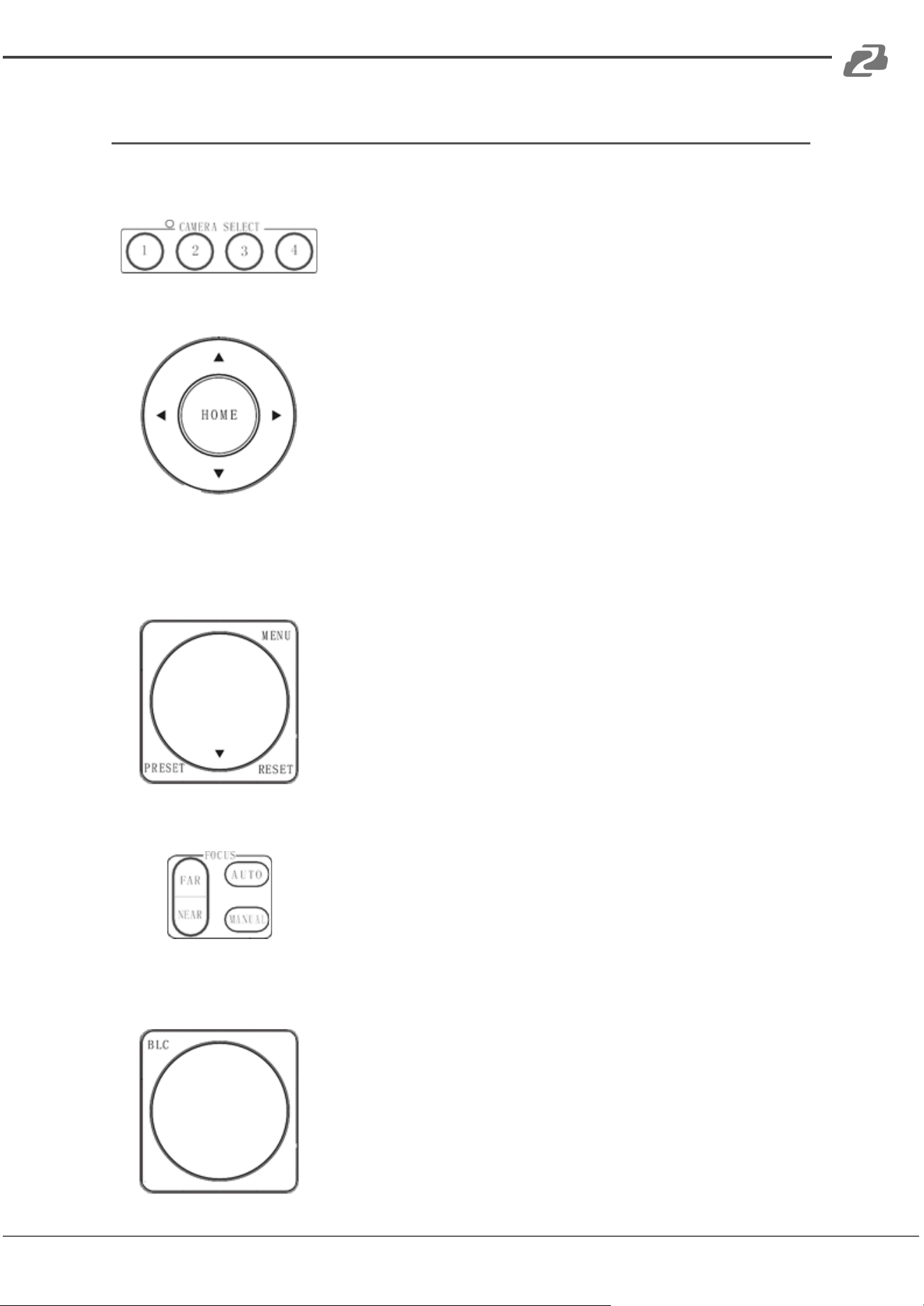
Camera ID Select
Select the target camera ID (from No.1 to No.4)
Pan/Tilt Control
Move camera lens up ▲
Move camera lens down ▼
Move camera lens to the left ◀
Move camera lens to the right ▶
Return camera lens to center [HOME]
Tip: Pressing the directional button will rotate the camera lens slowly. Pressing and holding
the button will rotate it faster.
Menu Display
Click the [MENU] button to display the on-screen menu. To
exit, press [MENU] again.
Focus
[AUTO] Enable auto focus
[MANUAL] Switch to manual focus mode
[FAR] Manually focus on a distant object
[NEAR] Manually focus on a nearby object
Back Light Compensation
Strong background light can create unwanted shadows.
Press [BLC] to activate backlight compensation mode.
Press [BLC] again to deactivate.
Address: 830 National Drive #140, Sacramento, CA 95834, USA · Tel: +1(888)499-9906 · Email: support@bzbgear.com 12
BZBGEAR BG-VPTZ-HSU3 PRODUCT MANUAL
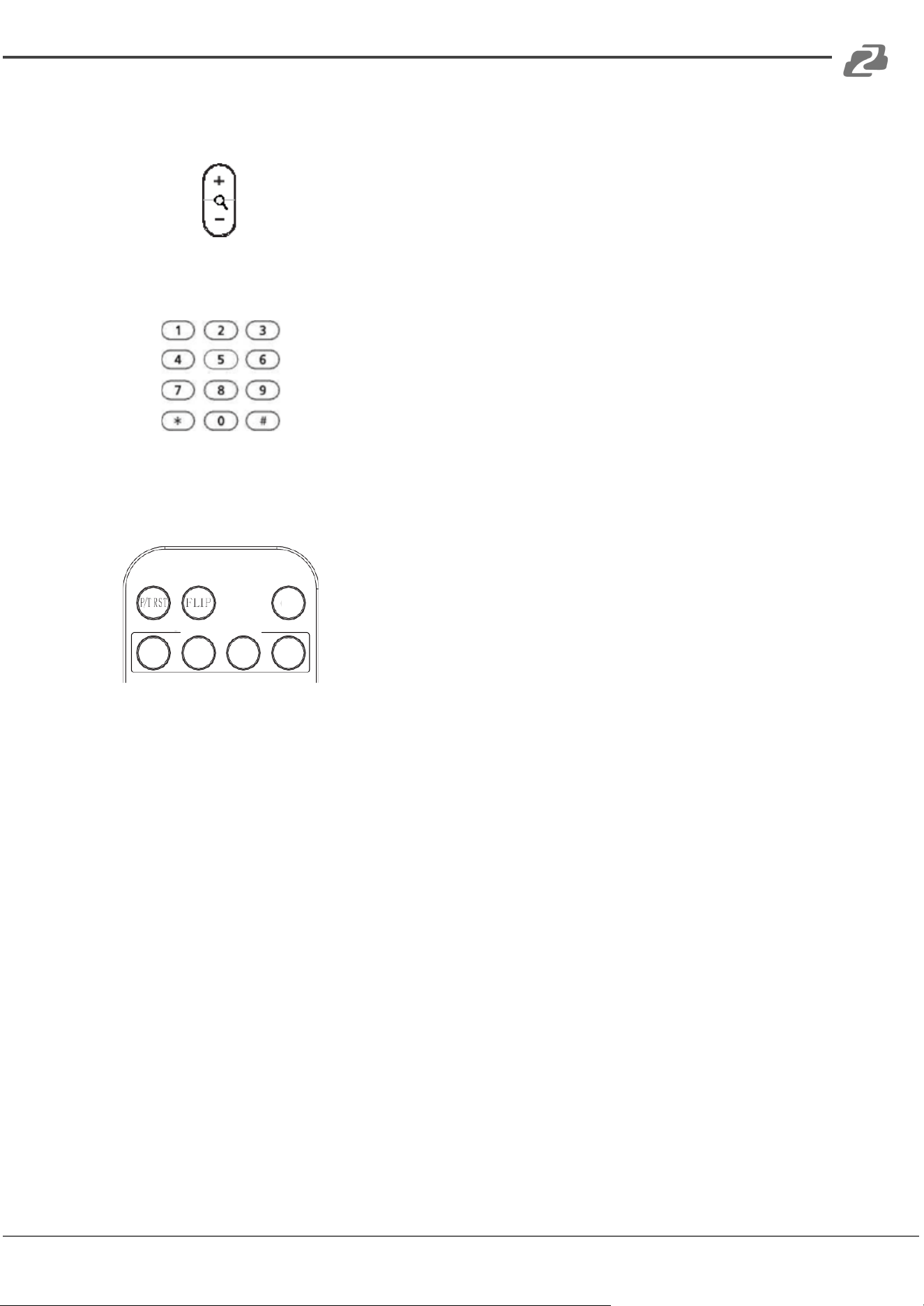
Zoom
Click the [+] Button, to zoom in.
Click the [-] Button, to zoom out.
Setting, Recalling, and Erasing Presets
To save a preset, press [PRESET] then press any of the
numbers (no. 1-9). You can save up to 9 presets.
To call a preset, press the saved preset number (no. 1-9).
To reset a preset, press [RESET] then press the preset
number (no. 1-9) you want to reset.
Image Flip & P/T Reset
Click the [FLIP] button to invert the image for ceiling
applications.
Click the [P/T RST] button to automatically recalibrate the
PTZ controls.
Address: 830 National Drive #140, Sacramento, CA 95834, USA · Tel: +1(888)499-9906 · Email: support@bzbgear.com 13
BZBGEAR BG-VPTZ-HSU3 PRODUCT MANUAL
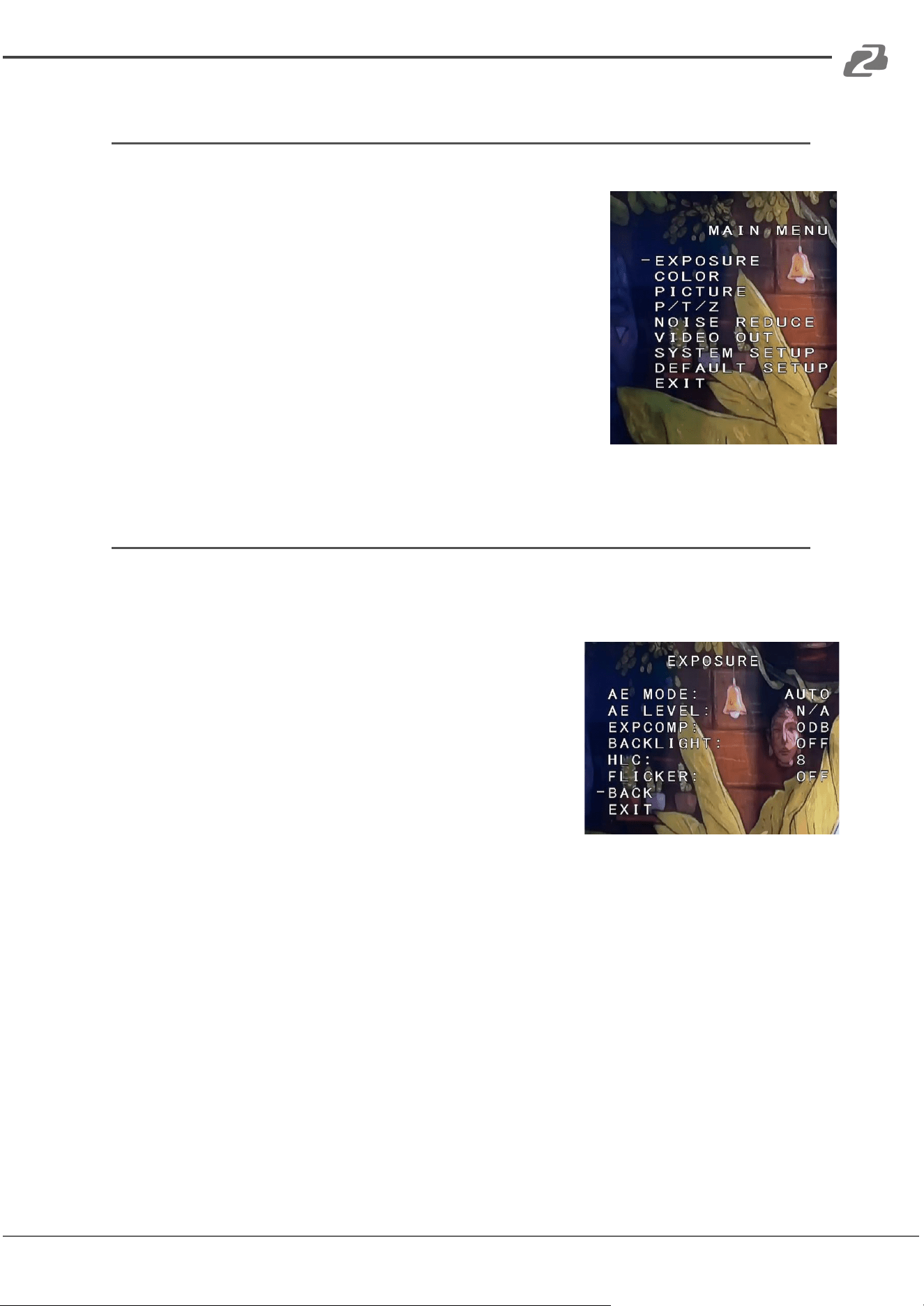
Menu Settings
1. Press the [MENU] button on the remote control to
display the OSD menu.
2. Use the arrow keys to navigate the menu, press left and
right buttons to adjust the settings.
Exposure
Press the [MENU] button to display the OSD menu, press arrow
keys to highlight EXPOSURE and then press right to enter the
sub-menu.
● [AE MODE]: AUTO/SHUTTER/IRIS/BRIGHT/MANUAL
● Press right button to select options as defined below:
● [AE LEVEL]: Changes depending on selected AE
MODE (Not available in AUTO Mode)
○ Manual Mode Only
○ [SHUTTER]: Shutter priority mode:1/1 -
1/10000
○ [IRIS]: priority mode: F1.6 - F24
○ [GAIN] -3DB - 28DB
● [EXPCOMP]: -10.5DB - +10.5DB / OFF
● [HLC]: 0-15
● [BACKLIGHT]: 1-7 / OFF
● [FLICKER]: 50HZ, 60HZ, OFF
Address: 830 National Drive #140, Sacramento, CA 95834, USA · Tel: +1(888)499-9906 · Email: support@bzbgear.com 14
BZBGEAR BG-VPTZ-HSU3 PRODUCT MANUAL
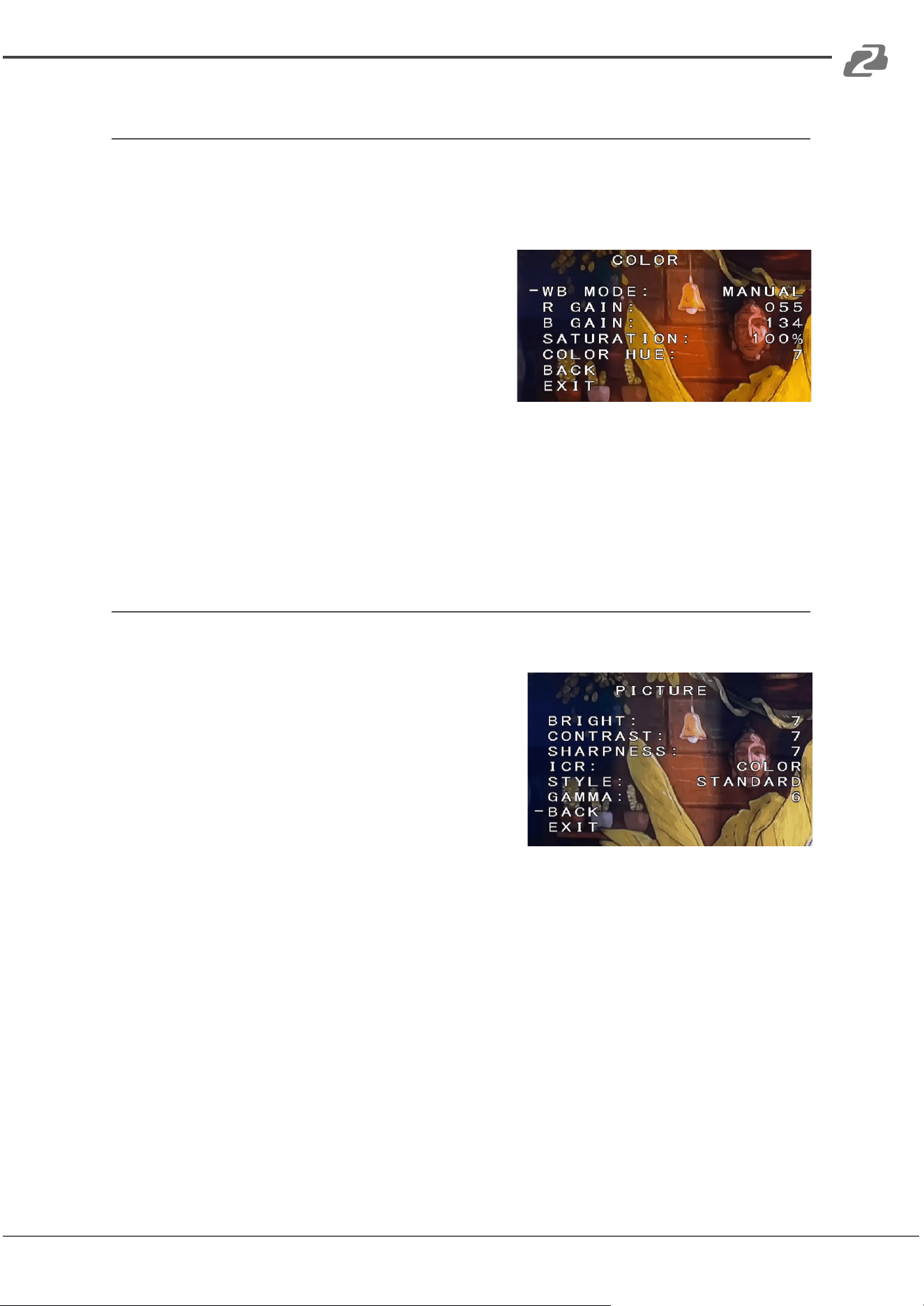
Color
Press the [MENU] button to display the OSD menu, press arrow
keys to highlight COLOR and then press right to enter the sub
menu.
● [WB MODE]: AUTO/INDOOR/OUTDOOR/
OPW/ATW/MANUAL/3000K/
4000K/5000K/6500K
● [SATURATION]: 60%-200%
● [COLOR HUE]: 0-14
● [RED GAIN]: 0-255
(MANUAL mode only)
● [BLUE GAIN]: 0-255
(MANUAL mode only)
Picture
Press the [MENU] button to display the OSD menu, press the
arrow keys to highlight [PICTURE] and then press
the right button to enter the sub-menu.
● [BRIGHT]: 0-14
● [CONTRAST]: 0-14
● [SHARPNESS]: 0-15
● [ICR]: COLOR/BLACK
● [STYLE]: STANDARD/BRIGHT/RTSP/SOFT
● [GAMMA]: 0-9
Address: 830 National Drive #140, Sacramento, CA 95834, USA · Tel: +1(888)499-9906 · Email: support@bzbgear.com 15
BZBGEAR BG-VPTZ-HSU3 PRODUCT MANUAL
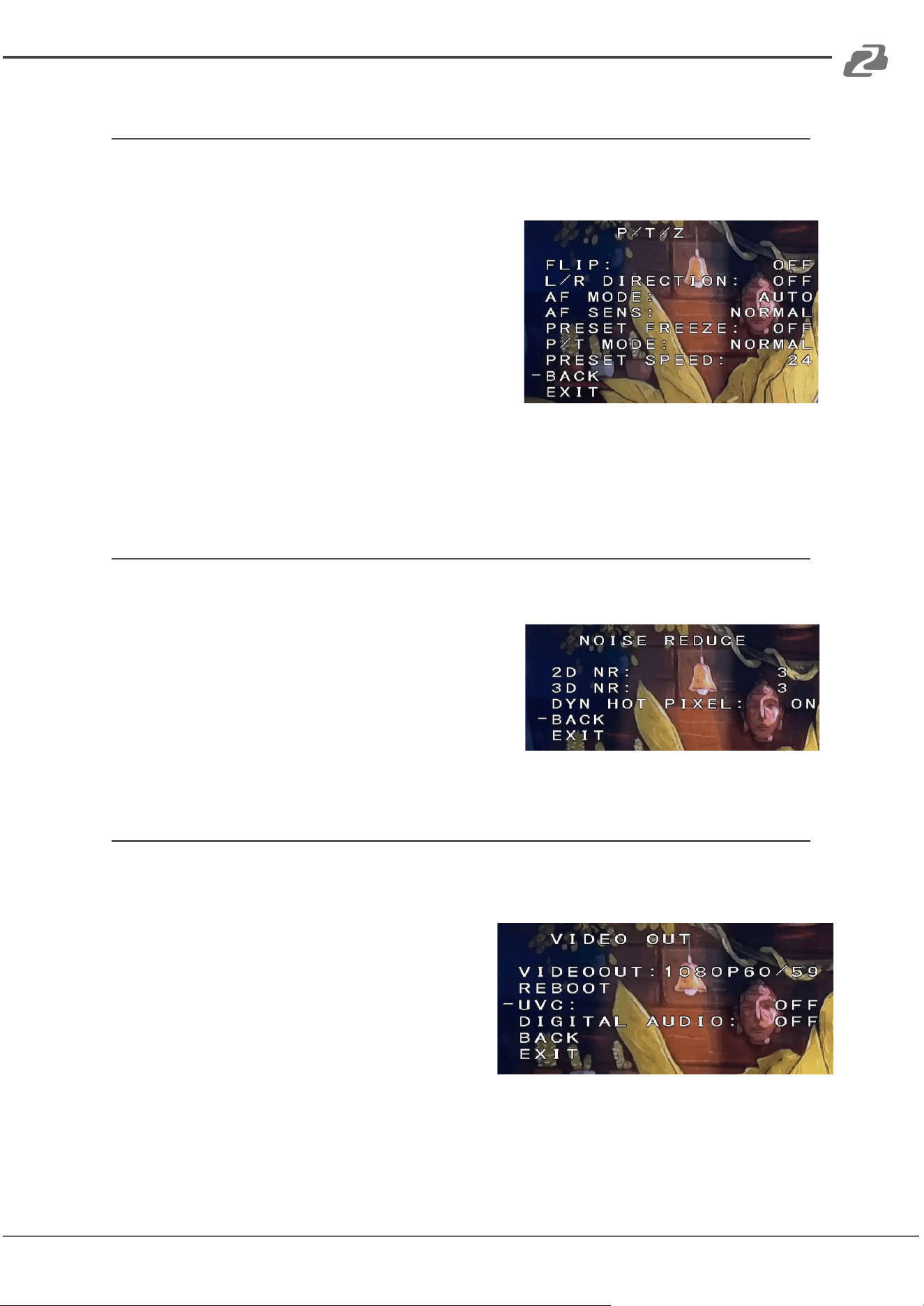
P/T/Z
Press the [MENU] button to display the OSD menu, then press
the arrow keys to highlight [P/T/Z] and press right to enter the
sub-menu.
● [FLIP]: ON/OFF (flips image vertically)
● [L/R DIRECTION]: ON/OFF (changes L/R
controls for when image is flipped)
● [AF MODE]: AUTO/MANUAL/Z Trigger
● [AF SENS]: NORMAL/LOW
● [PRESET FREEZE]: ON/OFF
● [PRESET SPEED]: 1-24
Noise Reduction
Press the [MENU] button to display the OSD menu, press the
arrow keys to highlight [NOISE REDUCTION], then
press right to enter the submenu.
● [2D NR]: 0-5 / OFF
● [3D NR]: 0-5 / OFF
● [DYN HOT PIXEL]: ON/OFF
Video Format
Press the [MENU] button to display the OSD menu, press the
arrow keys to highlight [VIDEO OUT], then press right to enter
the sub-menu.
● [VIDEO OUT]:
1080P60/59.9 4/50/30/29.97/25
1080I60/59.94/50
720P/60/59/50
● [REBOOT]: Reboots the camera
● [UVC]: ON / OFF (enables USB video output, OFF by default)
● [DIGITAL AUDIO]: ON / OFF (embed audio from 3.5mm stereo mini)
Address: 830 National Drive #140, Sacramento, CA 95834, USA · Tel: +1(888)499-9906 · Email: support@bzbgear.com 16
BZBGEAR BG-VPTZ-HSU3 PRODUCT MANUAL
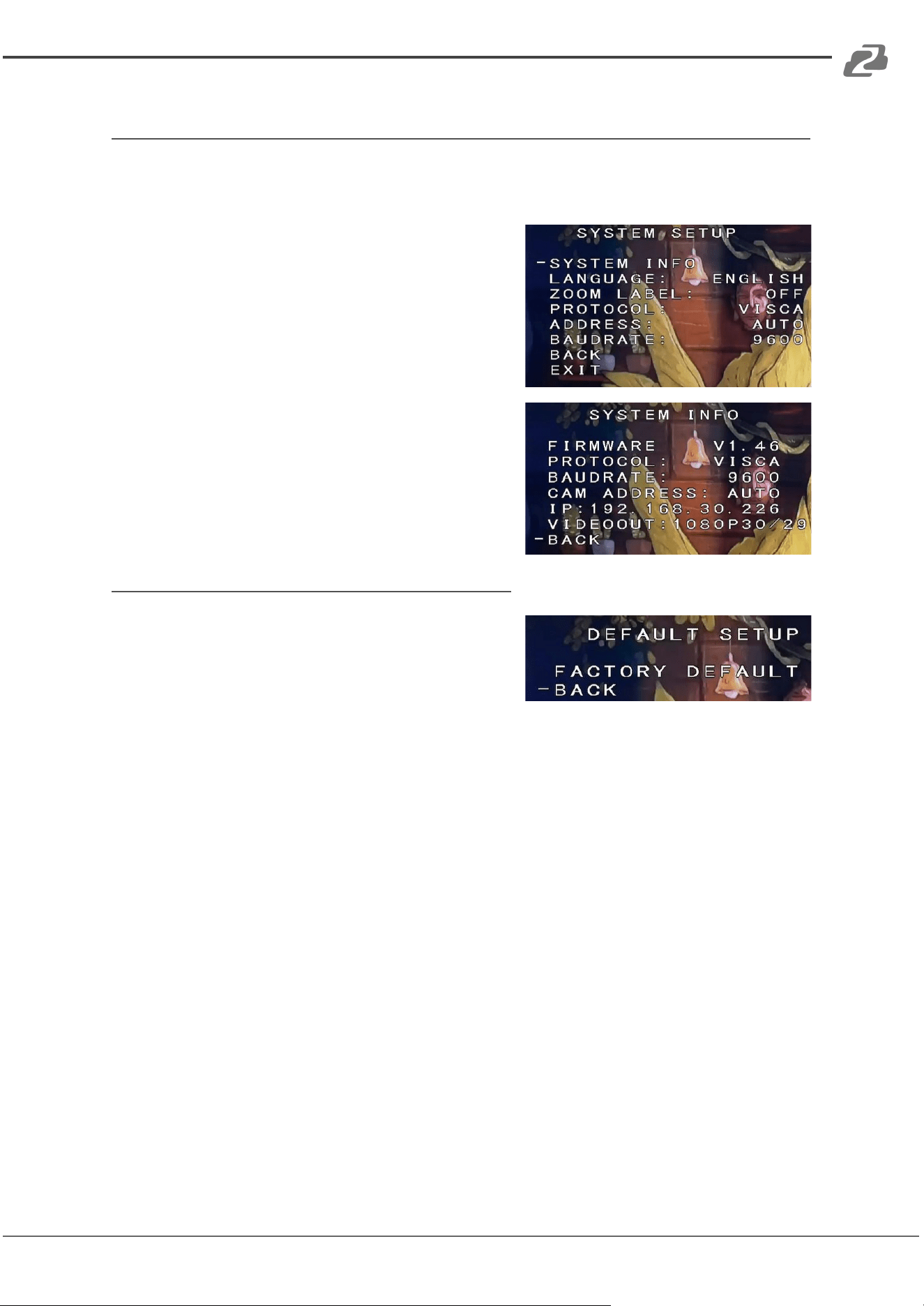
System Setup
Press the [MENU] button to display the OSD menu, press the
arrow keys to highlight [SYSTEM SETUP], then press right to
enter the sub-menu.
● [SYSTEM INFO]: press right button to the sub
menu, as the right picture shown
● [LANGUAGE]: ENGLISH/CHINESE
● [ZOOM LABEL]: ON/OFF
● [PROTOCOL]: VISCA/PELCO-D/PELCO-P
● [ADDRESS]: 1-255 / AUTO
● [BAUDRATE]: 2400/4800/9600/19200/38400
Restore Default
Press the [MENU] button to display the OSD menu,
press the arrow keys to move to [DEFAULT], press
the right button to make the OSD parameters return
to default.
Address: 830 National Drive #140, Sacramento, CA 95834, USA · Tel: +1(888)499-9906 · Email: support@bzbgear.com 17
BZBGEAR BG-VPTZ-HSU3 PRODUCT MANUAL
Network Connection
To successfully complete this process, you will need several pieces of information. The first
is the IP address of your computer. You will also need to select an unused IP address on
your local network (This is the address you will set the camera to). The third piece is the
default IP address of your camera. Finally, you will need the IP address of your Default
Gateway/Router.
All versions of the BZBGEAR VPTZ series cameras have the following default IP address:
192.168.1.162
The computer must be on the same subnet as the camera to connect successfully,
therefore the computer must be connected to the 192.168.1.x subnet. If your network is
already using this IP address subnet, simply enter the cameras’ IP address in a web
browser to connect. If the current IP subnet is not the same then the computers’ network
adapter settings must be changed.
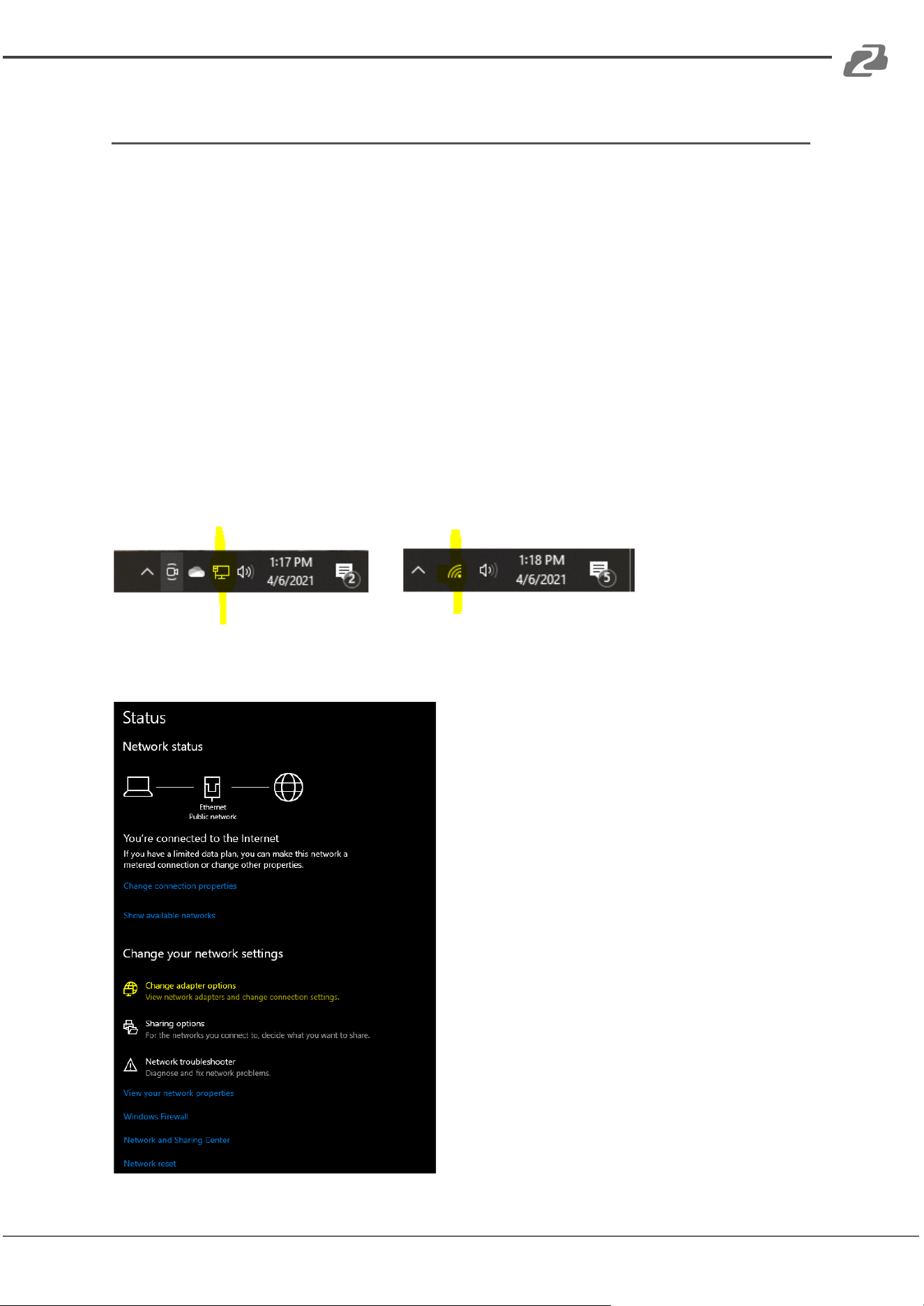
• Right-click on the internet connection in the lower right corner of the desktop and
select ‘Open Network & Internet Settings’.
• Select “Change Adapter Options".
Address: 830 National Drive #140, Sacramento, CA 95834, USA · Tel: +1(888)499-9906 · Email: support@bzbgear.com 18
BZBGEAR BG-VPTZ-HSU3 PRODUCT MANUAL
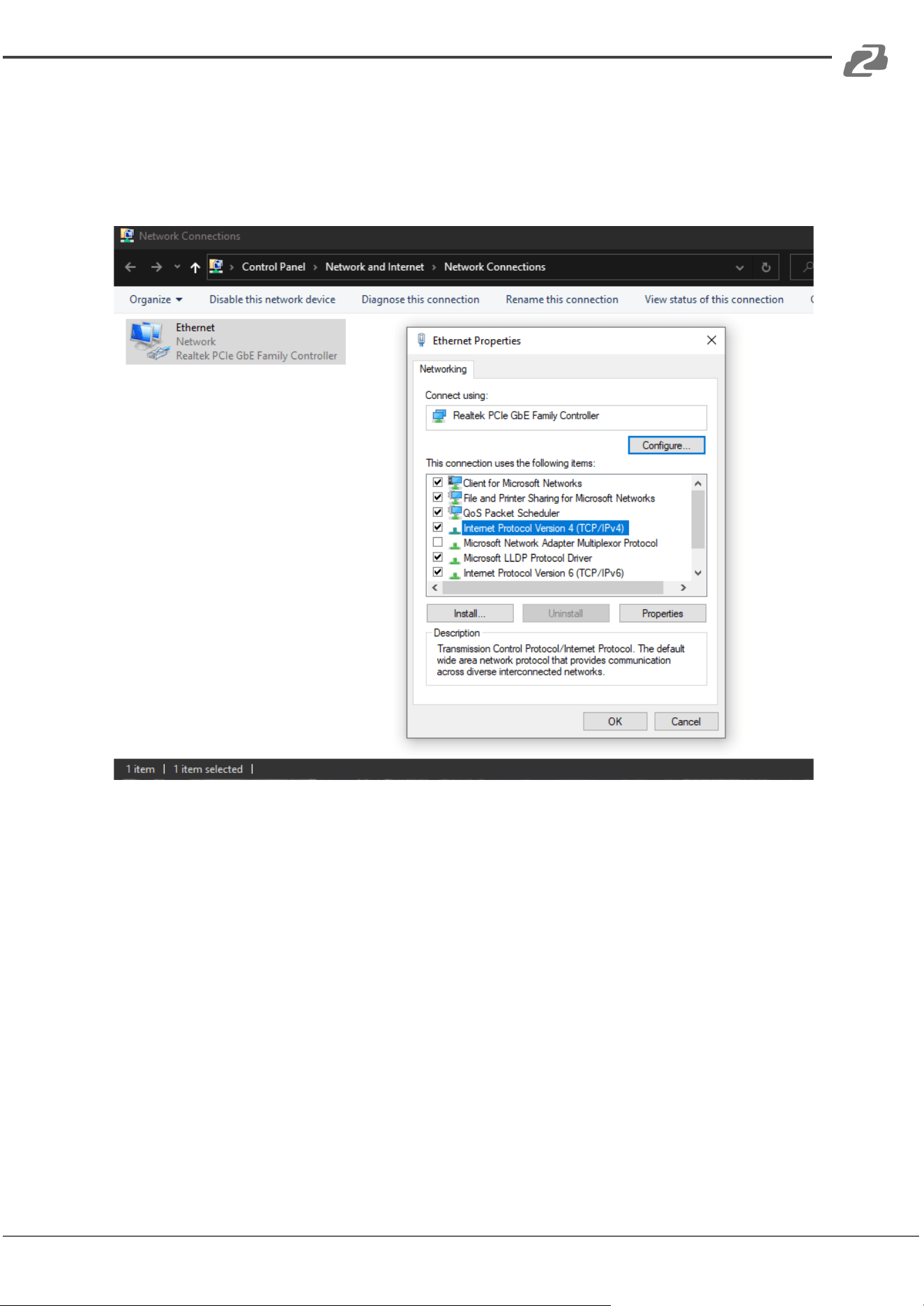
• Right-click on your connection (Wi-Fi or Ethernet) and select ‘Properties.’
• Select ‘Internet Protocol Version 4 (TCP/IPv4)’ as shown below and click
‘Properties.’
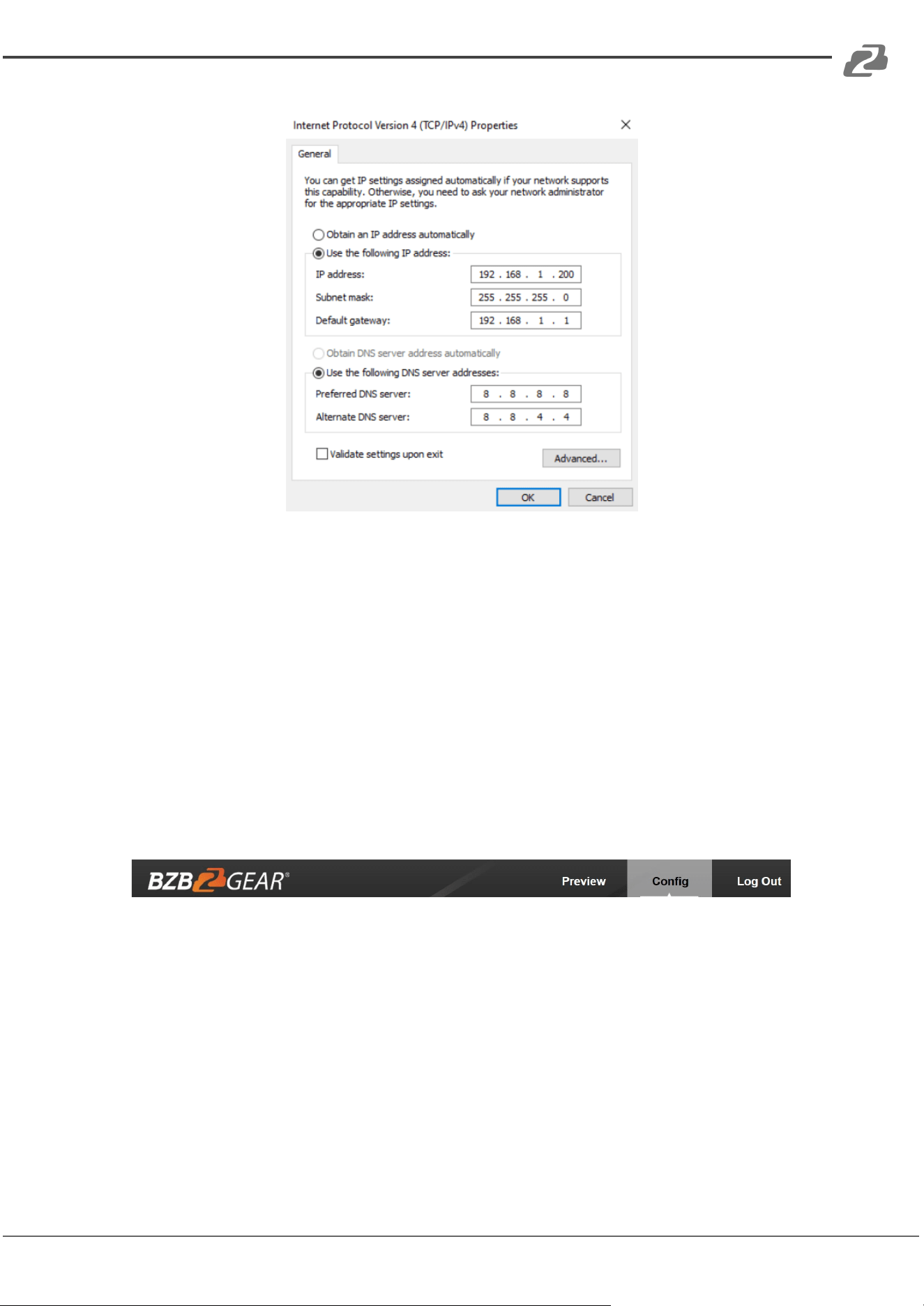
• For the following steps refer to the diagram below. Select ‘Use the following IP
address.’
• In the IP address field enter a non-conflicting IP address on the same subnet as the
camera. If there is another device with the same IP address you will not be able to
connect. In the example below we are using 192.168.1.200
• In the Subnet mask field enter 255.255.255.0 In the Default gateway field type
192.168.1.1 You can leave the DNS fields blank.
Address: 830 National Drive #140, Sacramento, CA 95834, USA · Tel: +1(888)499-9906 · Email: support@bzbgear.com 19
BZBGEAR BG-VPTZ-HSU3 PRODUCT MANUAL
NOTE: When you are finished configuring the camera you will need to return to this screen
and select ‘Obtain an IP address automatically’ and ‘Obtain DNS server automatically’ to
restore internet connectivity to your computer. Also make sure to reconnect any ethernet
cables you may have unplugged.
• Click OK to apply your settings.
• Click OK to close the network properties screen.
• Once you have applied your settings open your web browser and enter the IP
address of your camera.
• Enter the login information to access the interface.
o User: admin / Password: admin
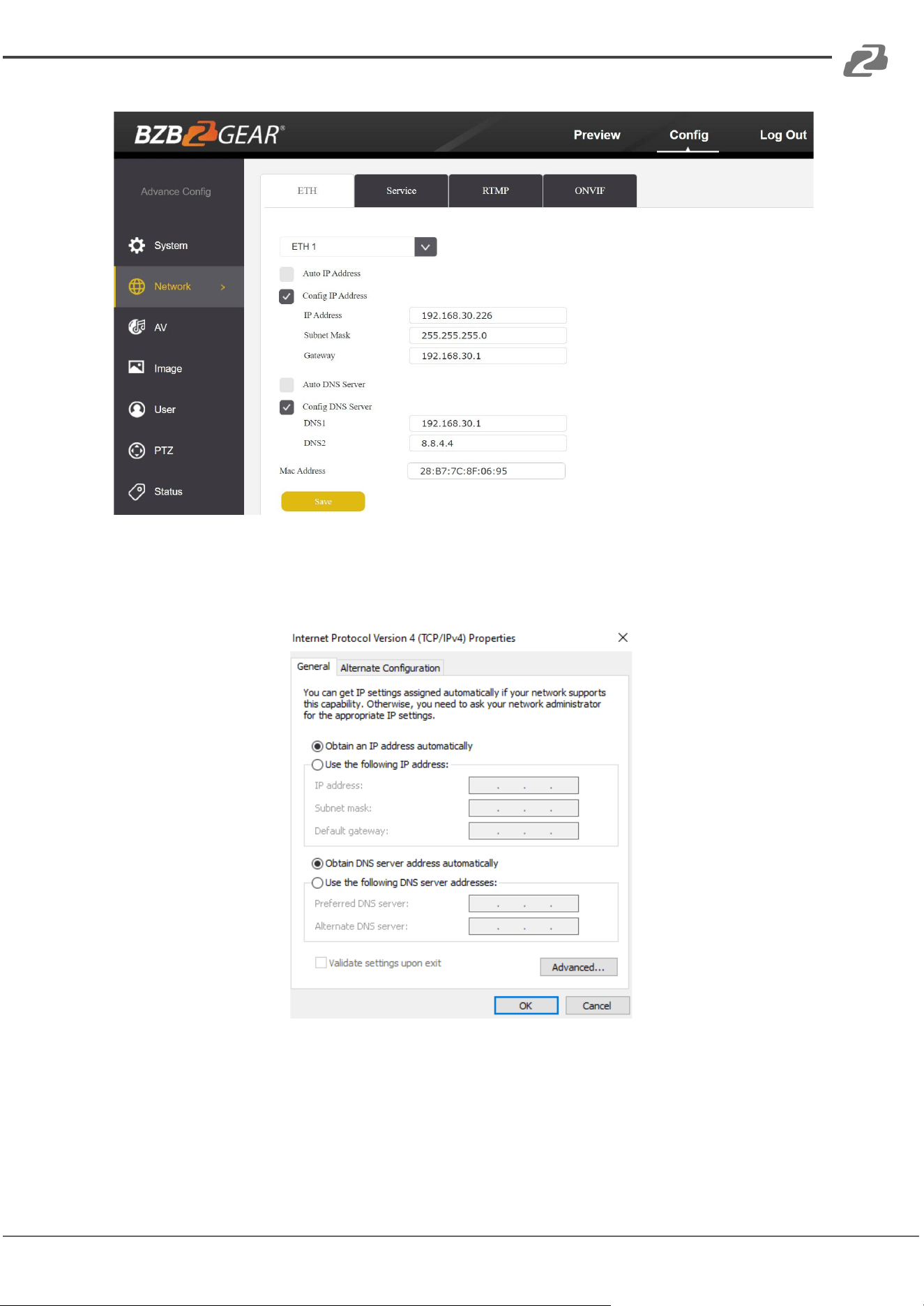
• At the top left of your screen select ‘Config’.
• On the left side of your screen select ‘Network’. In the IP address field, you will enter
the unused IP address you selected at the beginning. Our example will use an
address of 192.168.20.186.
*This address MUST NOT be in use by any other device on your network
or you will create an IP conflict and be unable to access your camera. *
• In the ‘Subnet Mask’ field enter 255.255.255.0 and enter the IP address of your
Default Gateway in the field below. Double-check your values and click the Save
Button.
• Unless you are given different information by your network administrator you should
enter 8.8.8.8 for DNS1 and 8.8.4.4 for DNS2. Click Save.
Address: 830 National Drive #140, Sacramento, CA 95834, USA · Tel: +1(888)499-9906 · Email: support@bzbgear.com 20
BZBGEAR BG-VPTZ-HSU3 PRODUCT MANUAL
• Once you complete the camera setup, repeat the steps on your computer to adjust
‘Internet Protocol Version 4 (TCP/IPV4) Properties’ and select ‘Obtain IP address
automatically’ and ‘Obtain DNS server address automatically.’ Click OK to close all
network-related screens.
• Your computer and camera should now be on your network. Open your web
browser and enter the IP address you assigned to your camera and your setup is
complete.
Address: 830 National Drive #140, Sacramento, CA 95834, USA · Tel: +1(888)499-9906 · Email: support@bzbgear.com 21
BZBGEAR BG-VPTZ-HSU3 PRODUCT MANUAL
Camera Web Interface
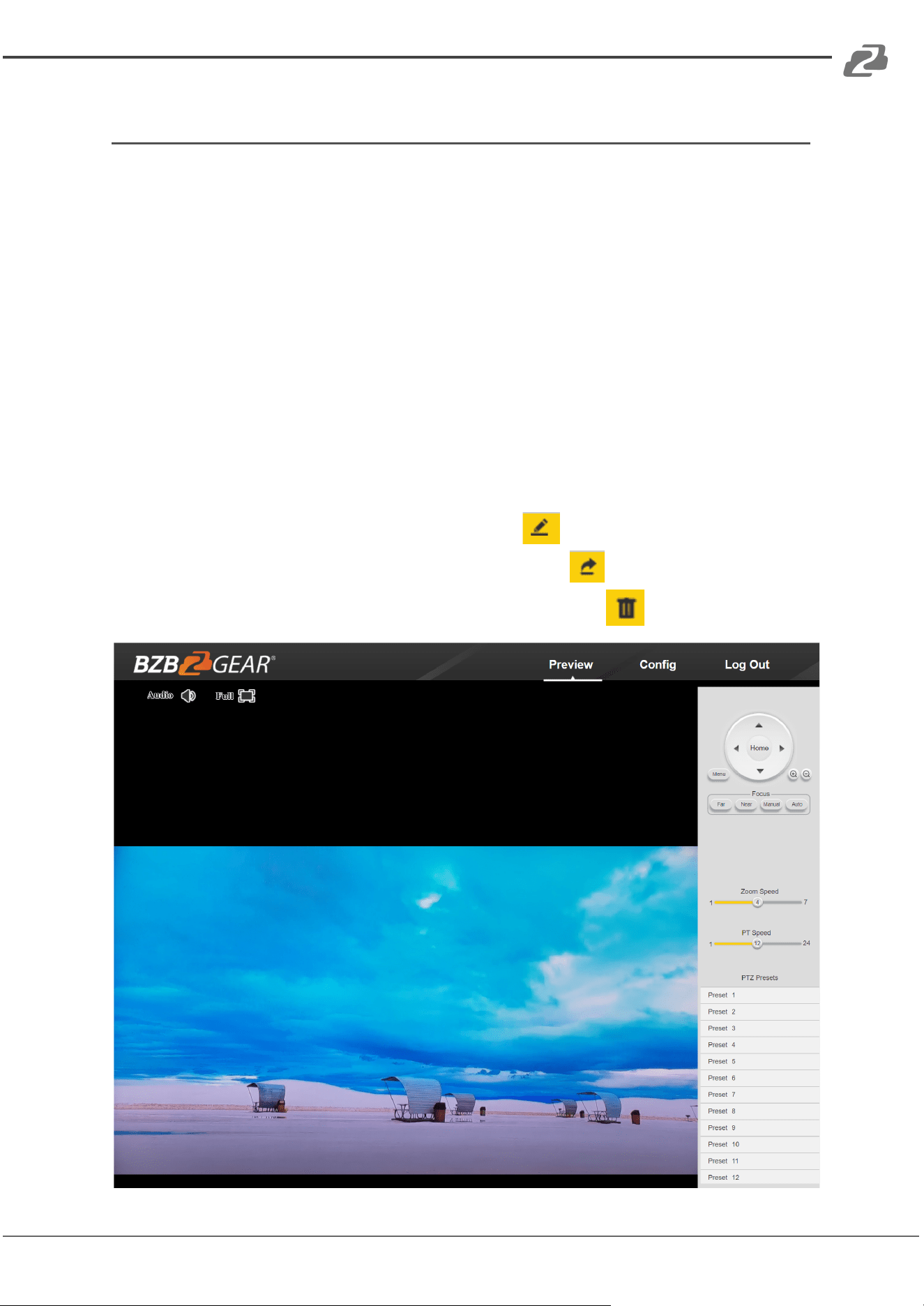
From the Web Interface you can control the camera, view the video feed, and adjust various
camera settings and functions.
Preview Screen
From the preview screen you can view the live video feed, preview embedded audio, and
adjust PTZ, Focus, and IRIS controls.
Directional Arrows: Use the Up/Down/Left/Right/Diagonal buttons to rotate the camera.
Home Button: Use the Home button to return the camera to the Home position.
Zoom In/Out: Use the Zoom buttons to adjust the zoom level of the camera.
Focus In/Out: Use the Focus buttons to manually adjust the camera's focus.
Speed Control: Use the slider to adjust the PTZ speed of the camera.
Preset Tab: Use the Preset tabs to Set, Recall, and Delete Preset positions. To record a
preset, adjust the camera to the desired location and zoom level. Highlight the preset
number you wish to record and click the “Set" button . To recall a preset, highlight the
preset number you wish to recall and click the "Call" button . To delete a preset,
highlight the preset number you wish to delete and click “Delete" .
Address: 830 National Drive #140, Sacramento, CA 95834, USA · Tel: +1(888)499-9906 · Email: support@bzbgear.com 22
BZBGEAR BG-VPTZ-HSU3 PRODUCT MANUAL
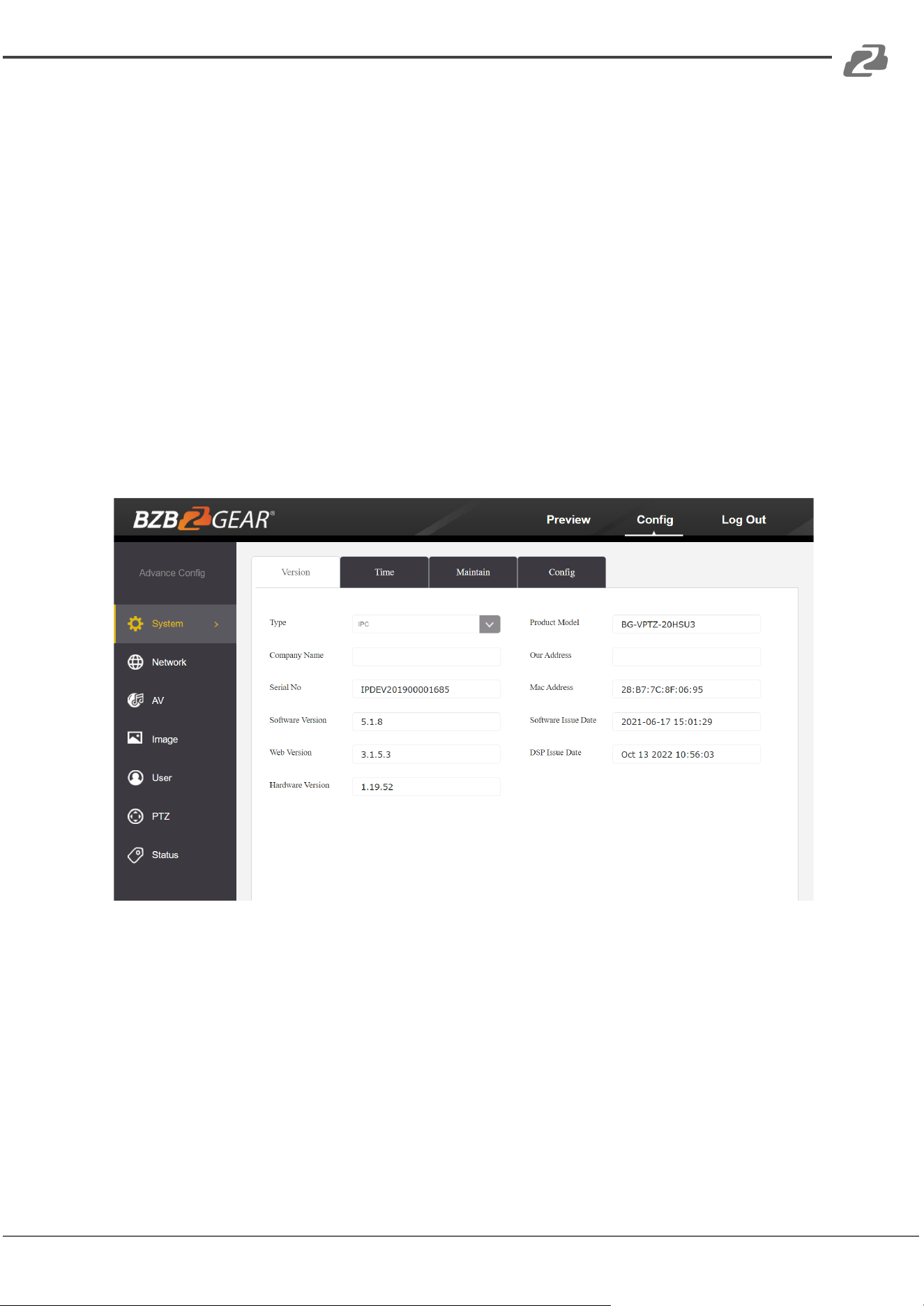
Configuration Screen
From the configuration screen you can set and adjust all the functions and parameters of
the camera.
System Page
The system page contains information regarding the camera, time settings, firmware, and
main video output resolution.
Version Tab: The version tab contains camera information including model number, serial
number, firmware and hardware versions, and MAC address.
Time Tab: The time tab allows you to adjust time, date, and time zone settings.
Maintain Tab: This tab allows you to reboot, restore factory default settings, and update the
firmware.
Config Tab: Name the camera, select menu language, select Video Standard (not used), set
output resolution, and enable/disable UVC (USB) video output.
Address: 830 National Drive #140, Sacramento, CA 95834, USA · Tel: +1(888)499-9906 · Email: support@bzbgear.com 23
BZBGEAR BG-VPTZ-HSU3 PRODUCT MANUAL
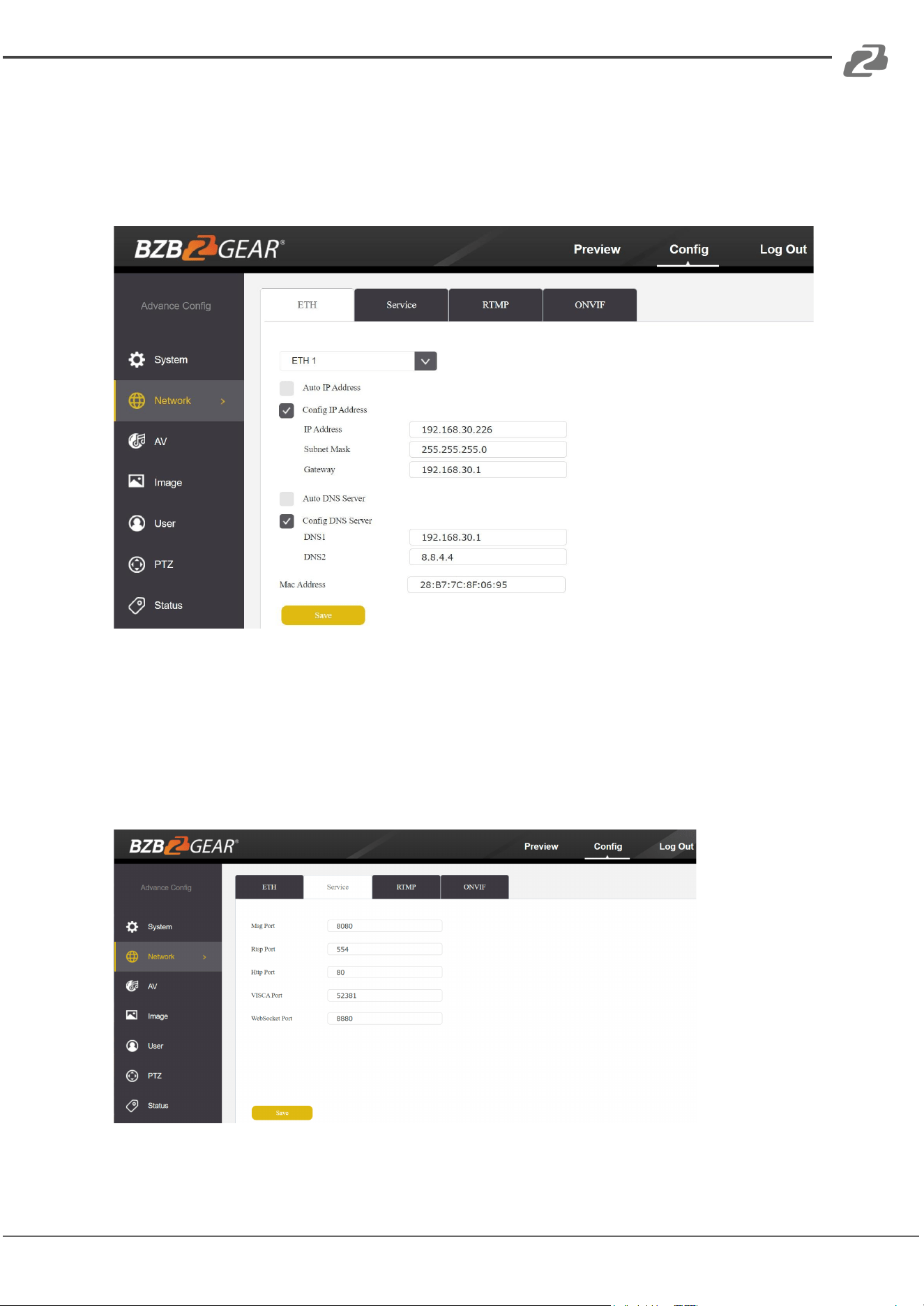
Network Page
The network page includes network settings, port settings, and streaming settings.
ETH Tab: Select static (Config IP Address) or DHCP (Auto IP Address), select Auto or
Manual DNS settings.
Service Tab
MSG Port: default 8080
RTSP Port: default 554
HTTP Port: default 80
VISCA Port: default 52381
WebSocket Port: default 8880
Note: Changing the port number requires restarting the camera to validate the new
settings. In order to avoid port conflicts, please be careful to modify.
Address: 830 National Drive #140, Sacramento, CA 95834, USA · Tel: +1(888)499-9906 · Email: support@bzbgear.com 24
BZBGEAR BG-VPTZ-HSU3 PRODUCT MANUAL
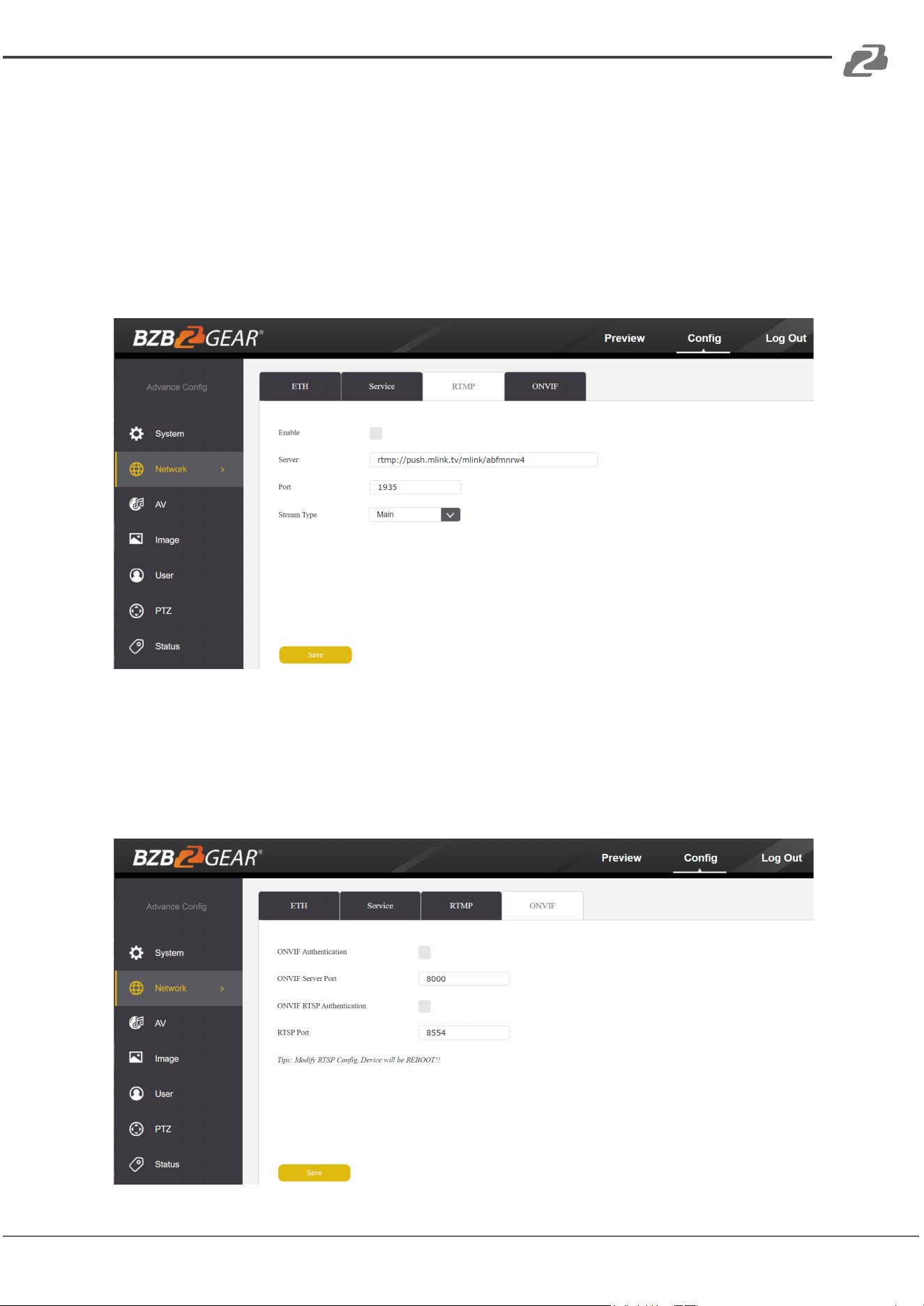
RTMP Tab
Enable RTMP: (Check box)
Server: Enter the server URL and Stream Key of your streaming platform in the format of :
rtmp://serverURL/StreamKey.
(Ex. rtmp://a.rtmp.youtube.com/live2/du36-z46c-1p31-4kxw-29yx)
Port: Set according to your streaming platform (YouTube=1935, Facebook=443)
Stream Type: Select desired stream
ONVIF Configuration Tab
ONVIF Authentication: Authentication enable, default disable.
ONVIF Server Port: default 8554.
ONVIF RTSP Authentication: Authentication enable, default disable.
RTSP Port: ONVIF RTSP Port, default 8554.
Address: 830 National Drive #140, Sacramento, CA 95834, USA · Tel: +1(888)499-9906 · Email: support@bzbgear.com 25
BZBGEAR BG-VPTZ-HSU3 PRODUCT MANUAL
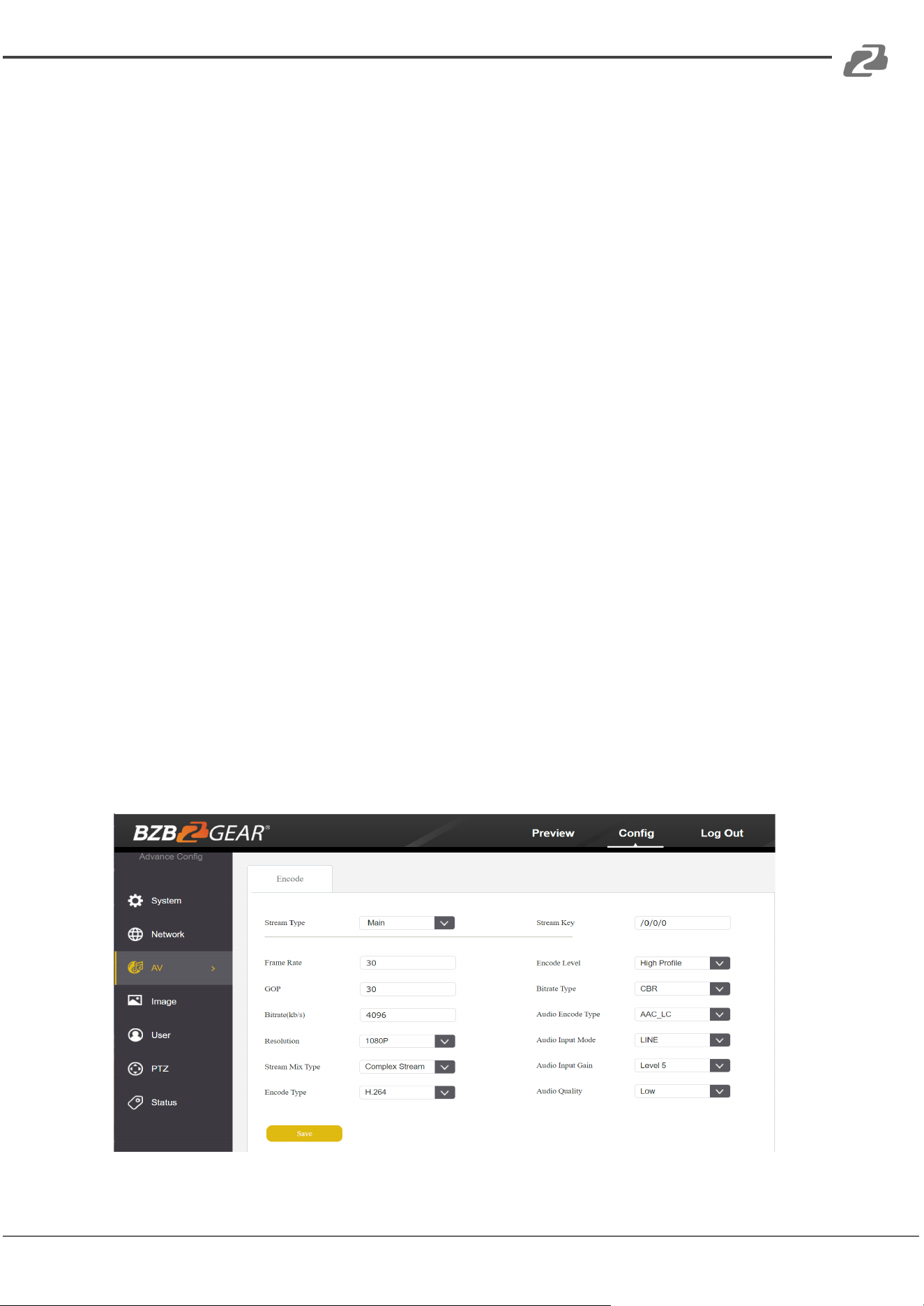
AV Page
The AV page is where you will find all the audio and video settings for stream encoding.
Stream Type: Use the pull-down to select which of the 3 streams you wish to adjust. When
you select a stream, all options and settings on the page affect the selected stream.
Stream Key: This shows the address information for your streaming output. This is not
adjustable and should be added to the end of your camera's IP address as shown below:
Default Main Stream: rtsp://192.168.1.162:554/0/0/0
Default Sub-Stream: rtsp://192.168.1.162:554/0/0/1
Frame Rate: Specify frame rate (1-30). Frame Rate Priority prioritizes frame rate over image
quality when VBR mode is enabled.
GOP: Frame interval (1-60). Default is 30.
Bitrate: Video Bit Rate (1-10240). Default is 4096
Resolution: Set streaming video resolution
Stream Mix Type: Select Complex or Video Stream. Complex Stream includes audio.
Encode Type: Select video encoding format.
Bitrate Type: CBR (Coded Bit Rate), VBR (Variable Bit Rate), Fix QP (Fixed Bit Rate).
⎯ When CBR is selected stream quality, IFrame, and PFrame settings are unavailable.
⎯ When VBR is selected IFrame and PFrame settings are unavailable.
⎯ When Fix QP is selected stream quality setting is unavailable.
Audio Encode Type: Select audio encoding format. AAC is recommended for most
streaming platforms.
Audio Input Mode: Select Mic Level or Line Level
Audio Input Gain: Set the audio input gain level (1-10, mute)
Audio Quality: Select High or Low
Covered by one or more claims of the HEVC patents listed at patentlist.accessadvance.com
Address: 830 National Drive #140, Sacramento, CA 95834, USA · Tel: +1(888)499-9906 · Email: support@bzbgear.com 26
BZBGEAR BG-VPTZ-HSU3 PRODUCT MANUAL
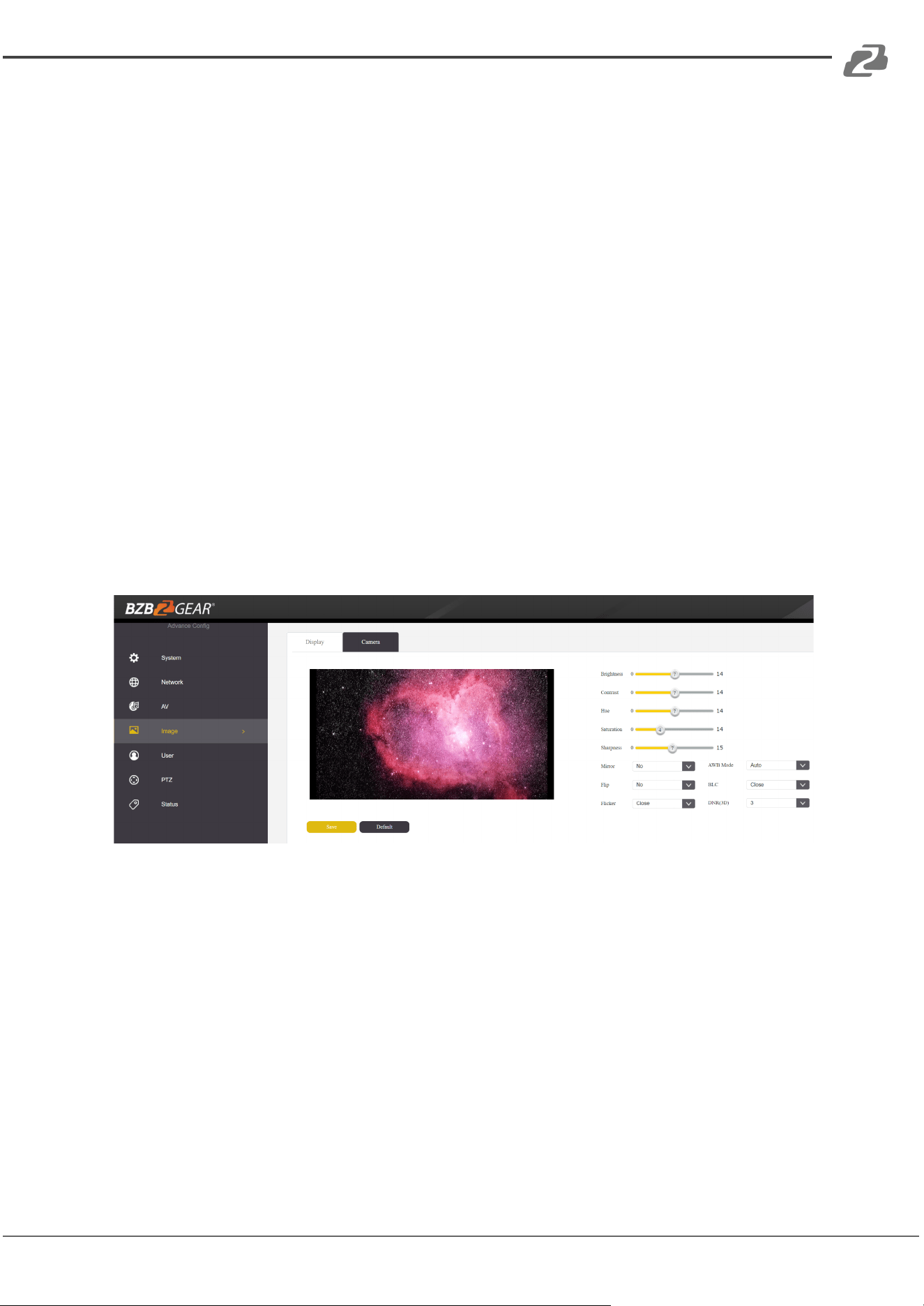
Image Page
On the image page you will find all the image, iris, and focus settings for adjusting the
camera's picture.
Display Tab
Brightness: Brightness adjustment slider
Contrast: Contrast adjustment slider
Hue: Hue adjustment slider
Saturation: Color saturations adjustment slider
Sharpness: Video sharpness adjustment slider
Mirror: Horizontal image reverse
Flip: Vertical image reverse
Flicker: Lighting flicker compensation
AWB Mode: Auto White Balance Mode settings
BLC: Backlight Compensation adjustment
DNR(3D): 3D Digital Noise Reduction Control
Address: 830 National Drive #140, Sacramento, CA 95834, USA · Tel: +1(888)499-9906 · Email: support@bzbgear.com 27
BZBGEAR BG-VPTZ-HSU3 PRODUCT MANUAL
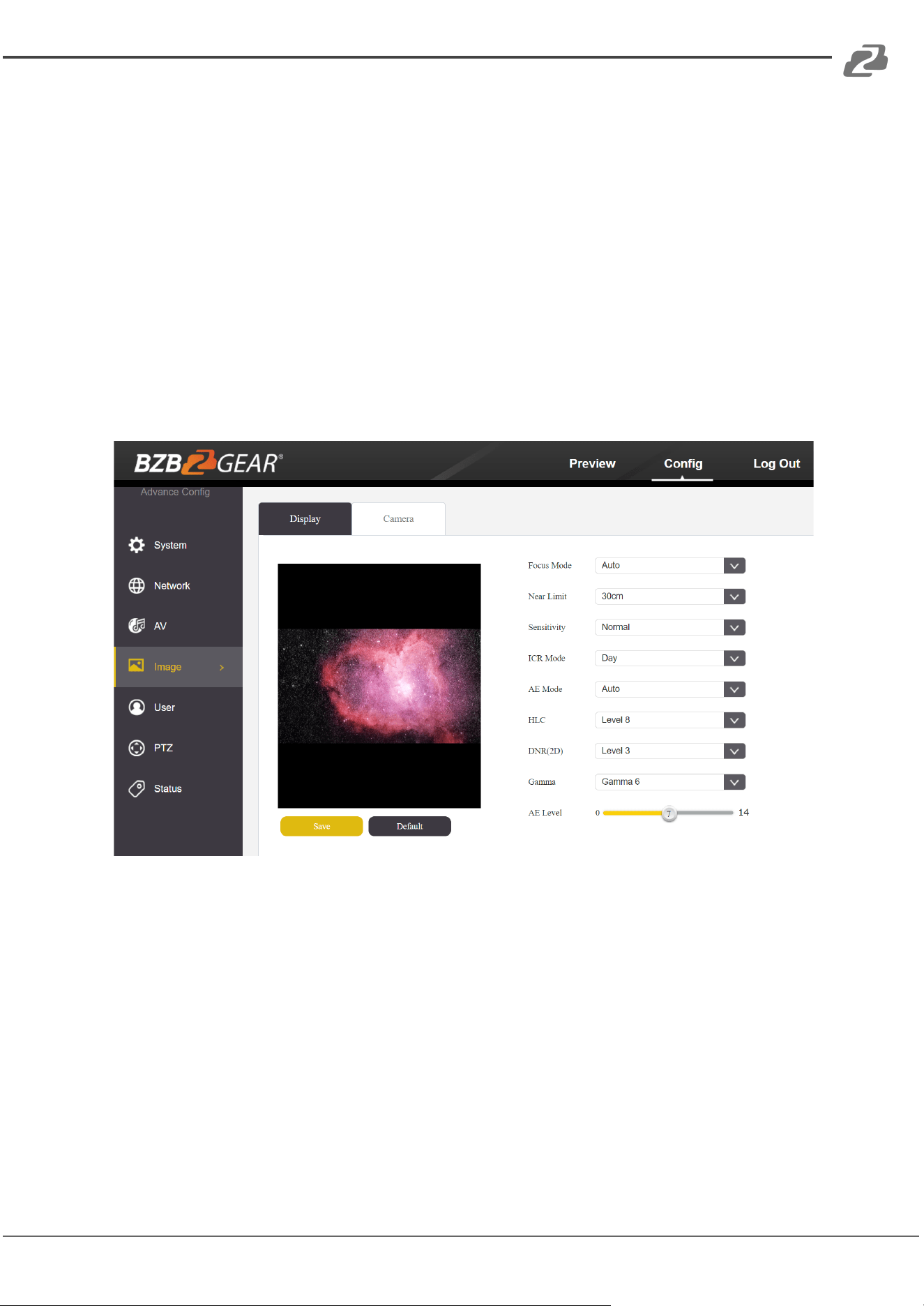
Camera Tab
Focus Mode: Change camera focusing mode
Near Limit: Set the distance from the lens for auto focusing. The camera will not focus on
anything closer than the set value.
Sensitivity: Auto focus sensitivity level
ICR Mode: Infrared Cut Filter Removal Mode
AE Mode: Auto Exposure Mode
AE Level: Auto Exposure Level adjustment
HLC: Highlight Compensation Level
DNR(2D): 2D Digital Noise Reduction adjustment
Gamma: Gamma adjustment
Address: 830 National Drive #140, Sacramento, CA 95834, USA · Tel: +1(888)499-9906 · Email: support@bzbgear.com 28
BZBGEAR BG-VPTZ-HSU3 PRODUCT MANUAL
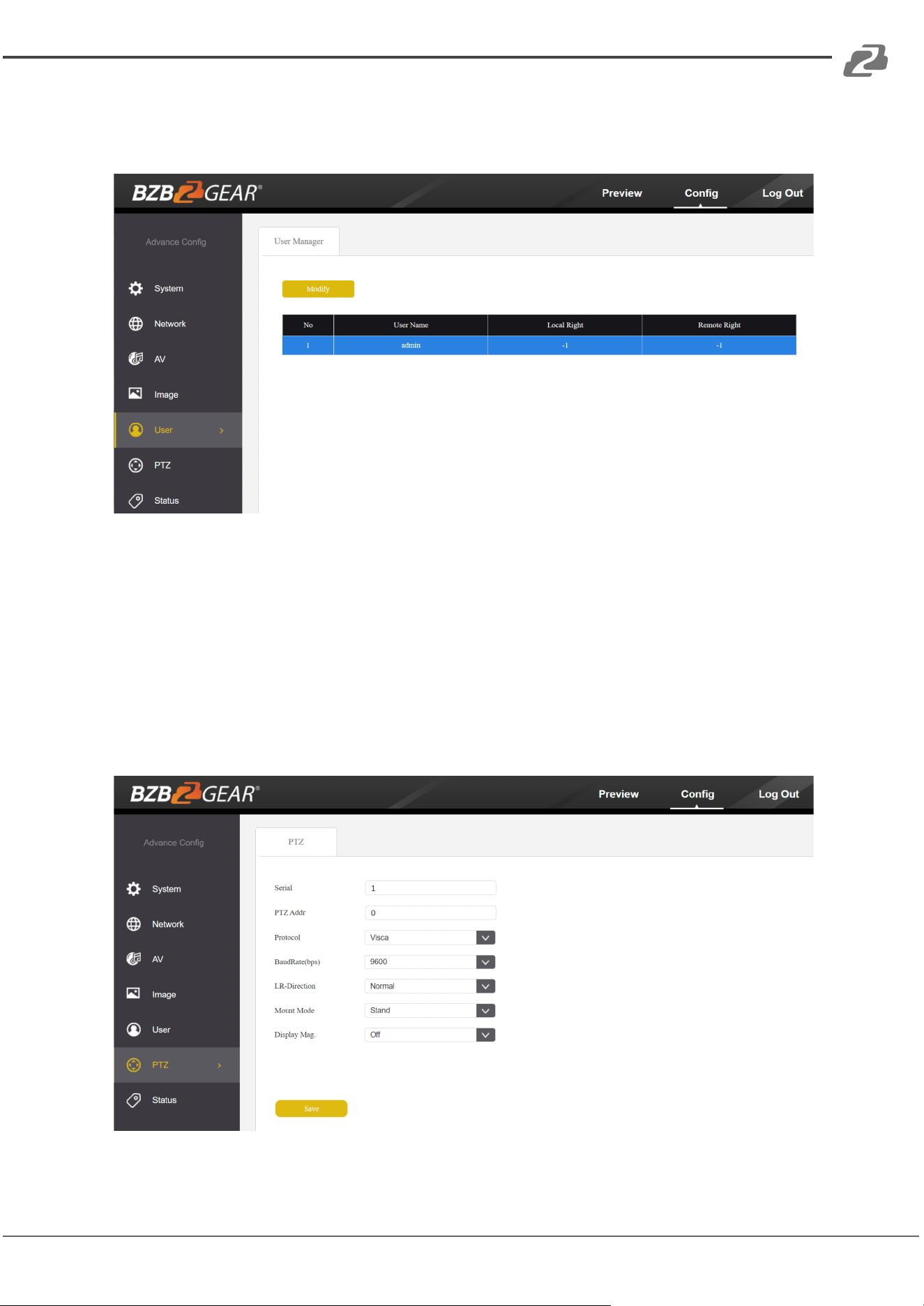
Safety Page
From this screen you can modify the login information
PTZ Page
From this screen you can view and modify the PTZ control settings of the camera.
PTZ Address: Set the PTZ control address of the camera
Protocol: Set the serial control protocol
Baud Rate: Set the serial control baud rate
LR-Direction: Reverse the left and right controls
Vertical Axis: Reverse the up and down controls
Display Mag: Display current magnification (zoom) level
Address: 830 National Drive #140, Sacramento, CA 95834, USA · Tel: +1(888)499-9906 · Email: support@bzbgear.com 29
BZBGEAR BG-VPTZ-HSU3 PRODUCT MANUAL
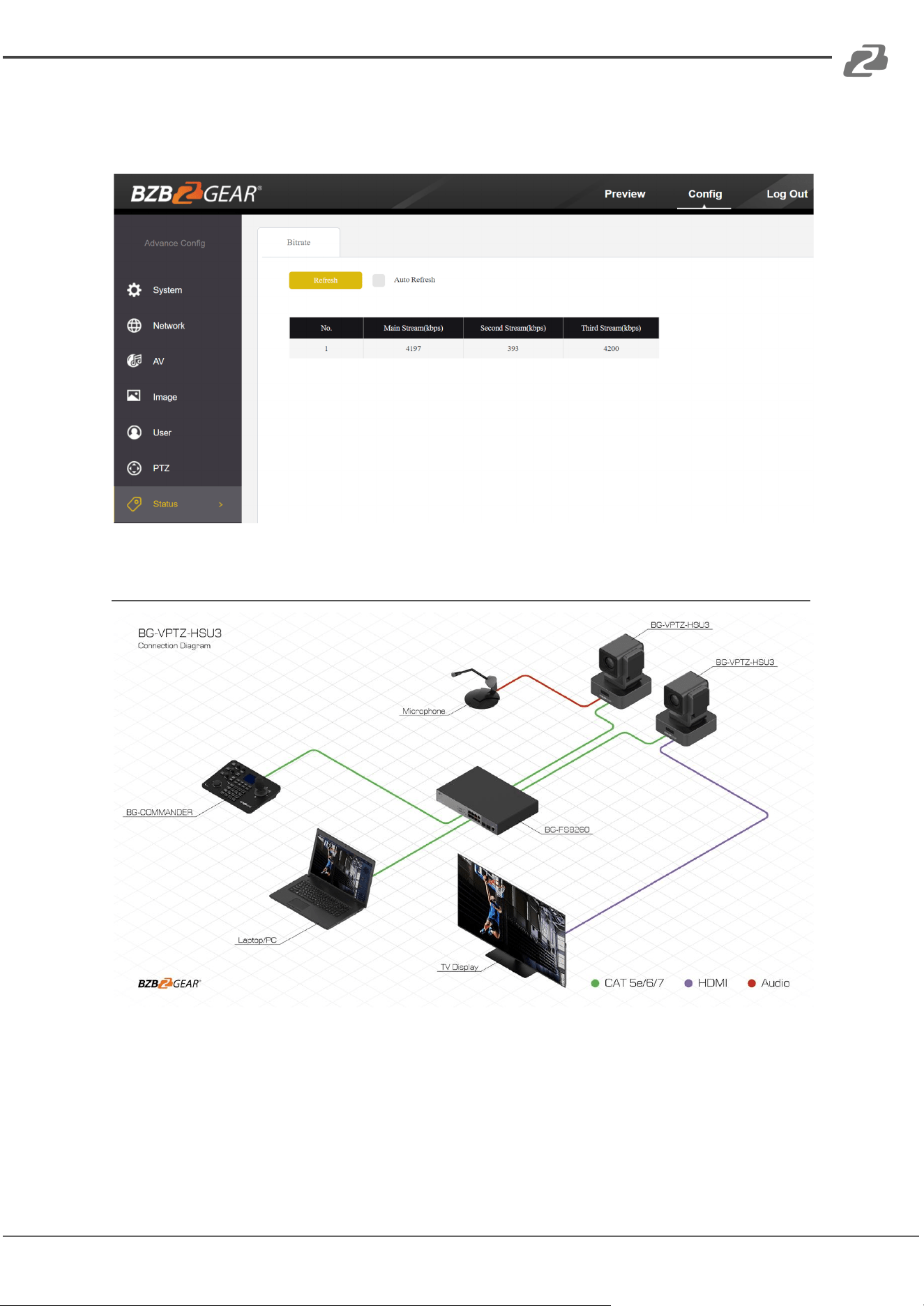
Status Page
On this screen you can view the current bit rates of the 3 IP streams.
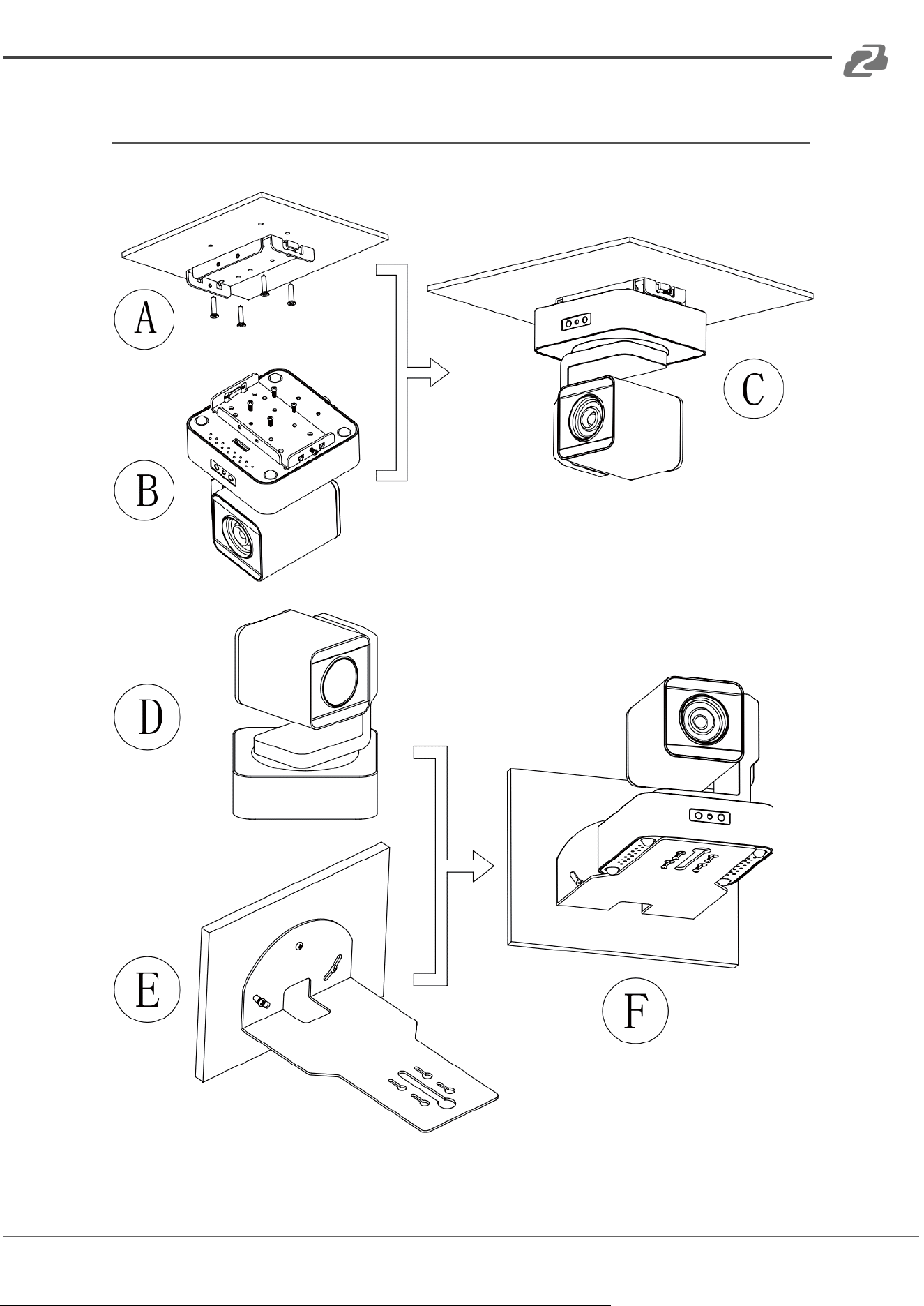
Application Example
Address: 830 National Drive #140, Sacramento, CA 95834, USA · Tel: +1(888)499-9906 · Email: support@bzbgear.com 30
BZBGEAR BG-VPTZ-HSU3 PRODUCT MANUAL
Installation Instructions
Address: 830 National Drive #140, Sacramento, CA 95834, USA · Tel: +1(888)499-9906 · Email: support@bzbgear.com 31

BZBGEAR BG-VPTZ-HSU3 PRODUCT MANUAL
Tech Support
Have technical questions? We may have answered them already!
Please visit BZBGEAR’s support page (bzbgear.com/support) for helpful information and
tips regarding our products. Here you will find our Knowledge Base
(bzbgear.com/knowledge-base) with detailed tutorials, quick start guides, and step-by-step
troubleshooting instructions. Or explore our YouTube channel, BZB TV
(youtube.com/c/BZBTVchannel), for help setting up, configuring, and other helpful how-to
videos about our gear.
Need more in-depth support? Connect with one of our technical specialists directly:
Phone
1.888.499.9906
Email
support@bzbgear.com
Live Chat
bzbgear.com
Limited Product Warranty Terms
Pro Line: 5-year warranty from the date of purchase for AV/Broadcasting products bought
on or after August 1, 2024.
Essential Line: 3-year warranty from the date of purchase for AV/Broadcasting products
bought on or after August 1, 2024.
Cables: Lifetime Limited Product Warranty.
For complete warranty information, please visit bzbgear.com/warranty.
For questions, please call 1.888.499.9906 or email support@bzbgear.com.
Mission Statement
BZBGEAR is a breakthrough manufacturer of high-quality, innovative audiovisual equipment
ranging from AVoIP, professional broadcasting, conferencing, home theater, to live
streaming solutions. We pride ourselves on unparalleled customer support and services.
Our team offers system design consultation, and highly reviewed technical support for all
the products in our catalog. BZBGEAR delivers quality products designed with users in
mind.
Copyright
All the contents in this manual and its copyright are owned by BZBGEAR. No one is allowed
to imitate, copy, or translate this manual without BZBGEAR’s permission. This manual
contains no guarantee, standpoint expression or other implies in any form. Product
specification and information in this manual is for reference only and subject to change
without notice.
All rights reserved. No reproducing is allowed without acknowledgement.
Address: 830 National Drive #140, Sacramento, CA 95834, USA · Tel: +1(888)499-9906 · Email: support@bzbgear.com 32