T9148 51005003206 V01
Owner’s Manual
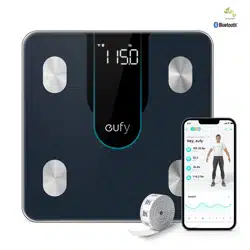
Smart Scale P2
Health & Wellness
EN 01
Table of Contents
02 ImportantSafetyInstructions
07 What’sIntheBox
07 InsertingtheBatteries
08 SelectingtheMeasuringUnit
11 StartingaMeasurement
12 Weight-OnlyMeasurement
13 UsingtheMeasuringTape
13 Maintenance
14 Troubleshooting
16 Specications
18 CustomerService
English01
ةيبرعلا
20
02 EN EN 03
Important Safety Instructions
• This device is powered by 4 AAA batteries. Do not
attempt to recharge non-rechargeable batteries as
this can cause the batteries to leak or explode.
• Do not mix and use dierent types of batteries
together, e.g. lithium-ion (Li-ion) and nickel-metal
hydride (NiMH) batteries.
• Do not mix new and used batteries.
• If the device will not be used for an extended period
of time, remove the batteries before storing the device
in a cool and dry place.
• This device can be used by children aged from 8
years and above and persons with reduced physical,
sensory or mental capabilities or lack of experience
and knowledge if they have been given supervision or
instruction concerning use of this appliance in a safe
way and understand the hazards involved. Children
should not play with the appliance. Cleaning and user
maintenance should not be done by children without
supervision.
• Used batteries should be placed in a sealed
plastic bag and disposed of safely according to local
environmental regulations.
• Read all instructions before using the device. Keep the manual for future reference.
• Only use the device as described in this user manual. Any misuse may result in electric
shocks, burns, start a fire, or cause other unexpected hazards.
• Be aware that this device is designed for individuals to measure their weight and to monitor
their body composition. Any information provided by this device is in no way meant to treat,
cure, or prevent diseases or illnesses from happening.
• DO NOT use this device if you are pregnant or if you suspect you may be pregnant. The
eects of this device on a fetus are unknown and untested.
• DO NOT use this device if you use a wearable or implanted electronic device such as a
defibrillator or pacemaker.
• This device should not be used by individuals who are acutely or chronically ill, suering
from diseases or taking medications that can aect water levels. The accuracy of the
readings for these individuals has not been verified. Specific medical advice should be
obtained from a physician.
• The device is equipped with a data transmission function that emits electromagnetic
energy. Portable Radio Frequency (RF) communications equipment (including peripherals
such as antenna cables and external antennas) should not be used within 30 cm (12 inches)
of the device, otherwise, performance may be aected.
• Do not modify this device.
• Do not expose this device to extreme temperatures, direct sunlight, moisture, or corrosive
environments.
• To prevent slipping, do not step on the device after bathing or showering.
04 EN EN 05
• This device should not be used when it is adjacent to or stacked on top of another device
because it could cause the device to operate improperly. If such use is necessary, this device
and the other device should be observed to verify that they are operating normally.
• If the batteries start to leak, put on your gloves and remove the leaking batteries from the
battery door immediately. Place them in a clear plastic bag and recycle. If you don’t wear
gloves, you should wash your hands thoroughly with soap afterwards. In case of eye contact,
seek medical attention immediately.
Usage Tips:
To ensure measurement accuracy, follow the instructions below when you
start your measurement:
• Place the scale on a flat, hard surface. Soft surfaces such as carpeting will aect the
performance of the scale.
• Step barefoot onto the center of the scale. Stand still and keep full contact with the
electrodes until the measurement is complete.
• For the most consistent measurements, weigh yourself at the same time of day and
location.
• Avoid weighing yourself immediately after strenuous exercise, sitting in the sauna, taking
a bath, or drinking and eating.
• The condition of the skin on the bottom of your feet can aect the measurement. The
natural eects of aging or activity can make this skin hard. Take the reading with clean,
slightly damp feet for best accuracy.
• Body fat percentage estimates will vary with the amount of water in the body, and can
be aected by dehydration or overhydration due to factors such as alcohol consumption,
menstruation, illness, intense exercise etc.
• Considering the vast individual dierences among children under 16, the measurement of
body fat or other body composition measurements may be less accurate. Their weight-
only measurement should remain accurate.
Notice
This symbol on the device or its packaging indicates:Do not dispose of
electrical appliances as unsorted municipal waste; use separate collection
facilities. Contact your local authority for information regarding the collection
systems available. If electrical appliances are disposed of in landfills or dumps,
hazardous substances can leak into the groundwater and get into the food
chain, damaging your health and well-being. When replacing old appliances
with new ones, the retailer is legally obliged to take back your old appliance
for disposal at least free of charge.
FCC Statement
This device complies with Part 15 of the FCC Rules. Operation is subject to the following two
conditions: (1) This device may not cause harmful interference, and (2) this device must
accept any interference received, including interference that may cause undesired operation.
Warning: Changes or modifications not expressly approved by the party responsible for
compliance could void the user's authority to operate the equipment.
Note: This equipment has been tested and found to comply with the limits for a Class B
digital device, pursuant to Part 15 of the FCC Rules. These limits are designed to provide
reasonable protection against harmful interference in a residential installation.
This equipment generates, uses, and can radiate radio frequency energy and, if not
installed and used in accordance with the instructions, may cause harmful interference
to radio communications. However, there is no guarantee that interference will not occur
in a particular installation. If this equipment does cause harmful interference to radio or
television reception, which can be determined by turning the equipment o and on, the user
is encouraged to try to correct the interference by one or more of the following measures:
(1) Reorient or relocate the receiving antenna. (2) Increase the separation between the
equipment and receiver. (3) Connect the equipment into an outlet on a circuit dierent from
that to which the receiver is connected. (4) Consult the dealer or an experienced radio / TV
technician for help.
06 EN EN 07
RF Exposure Compliance Statement
This equipment complies with FCC/IC radiation exposure limits set forth for an uncontrolled
environment. This equipment should be installed and operated with a minimum distance of
20cm between the radiator and your body.
ISED Compliance Statement
This device contains licence-exempt transmitter(s)/receiver(s) that comply with Innovation,
Science and Economic Development Canada’s licence-exempt RSS(s). Operation is subject
to the following two conditions:
1. This device may not cause interference.
2. This device must accept any interference, including interference that may cause undesired
operation of the device.
Declaration of Conformity
This product complies with the radio interference requirements of the European Community.
Hereby, Anker Innovations Limited declares that the radio equipment type T9148 is in
compliance with Directive 2014/53/EU. The full text of the EU declaration of conformity is
available at the following internet address: https://www.eufylife.com/.
GB Declaration of Conformity
Hereby, Anker Innovations Limited declares that the product type T9148 is in compliance
with Radio Equipment Regulations 2017 and The Restriction of the Use of Certain Hazardous
Substances in Electrical and Electronic Equipment Regulations 2012. The full text of the GB
declaration of conformity is available at the following internet address:
https://www.eufylife.com/
The following importer is the responsible party (contract for EU and UK matters)
Anker Technology (UK) Ltd
Suite B, Fairgate House, 205 Kings Road, Tyseley, Birmingham, B11 2AA, United Kingdom
Anker Innovations Deutschland GmbH
Georg-Muche-Strasse 3, 80807 Munich, Germany
Anker Innovations Limited
Room 1318-19, Hollywood Plaza, 610 Nathan Road, Mongkok, Kowloon, Hong Kong
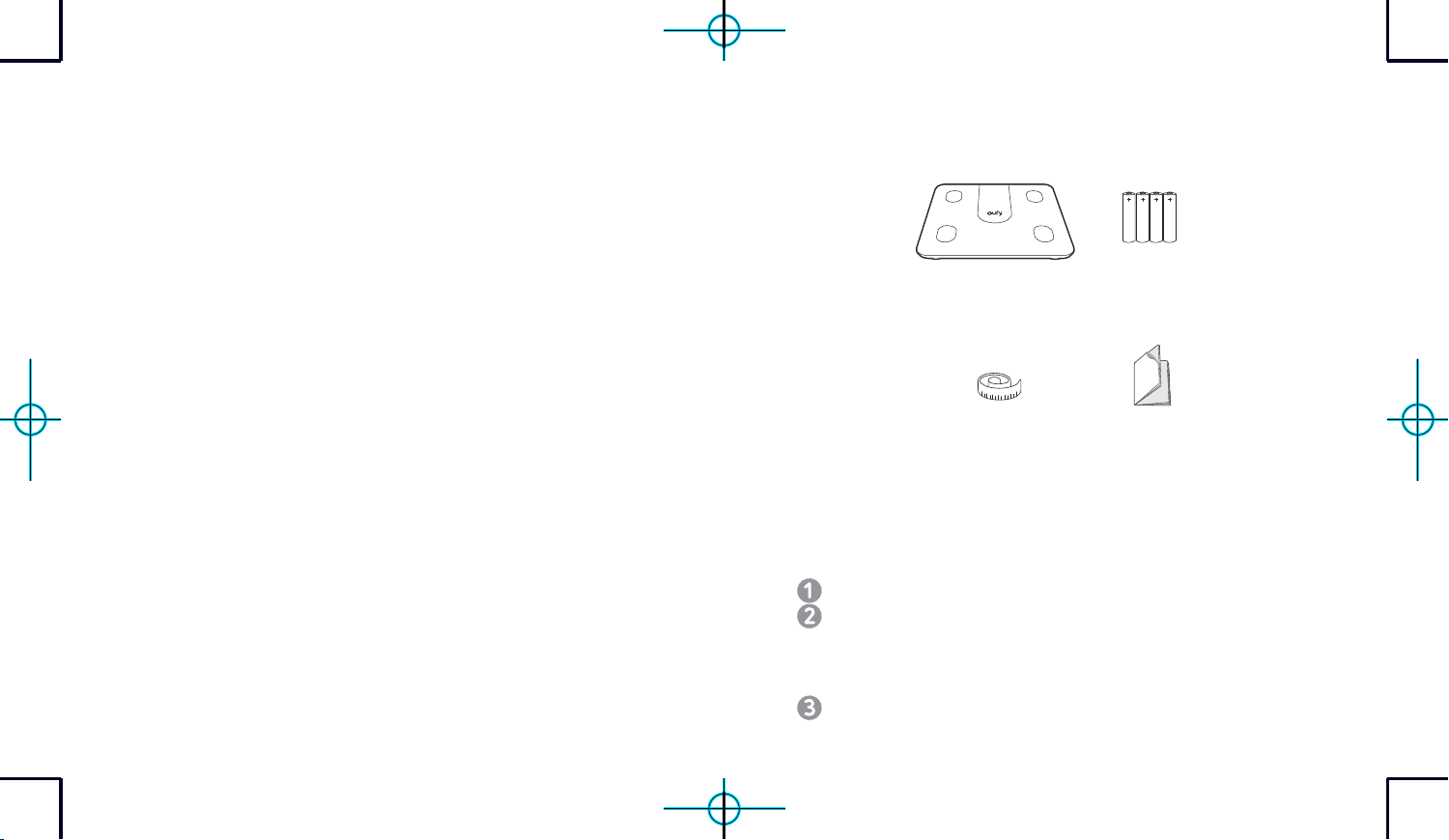
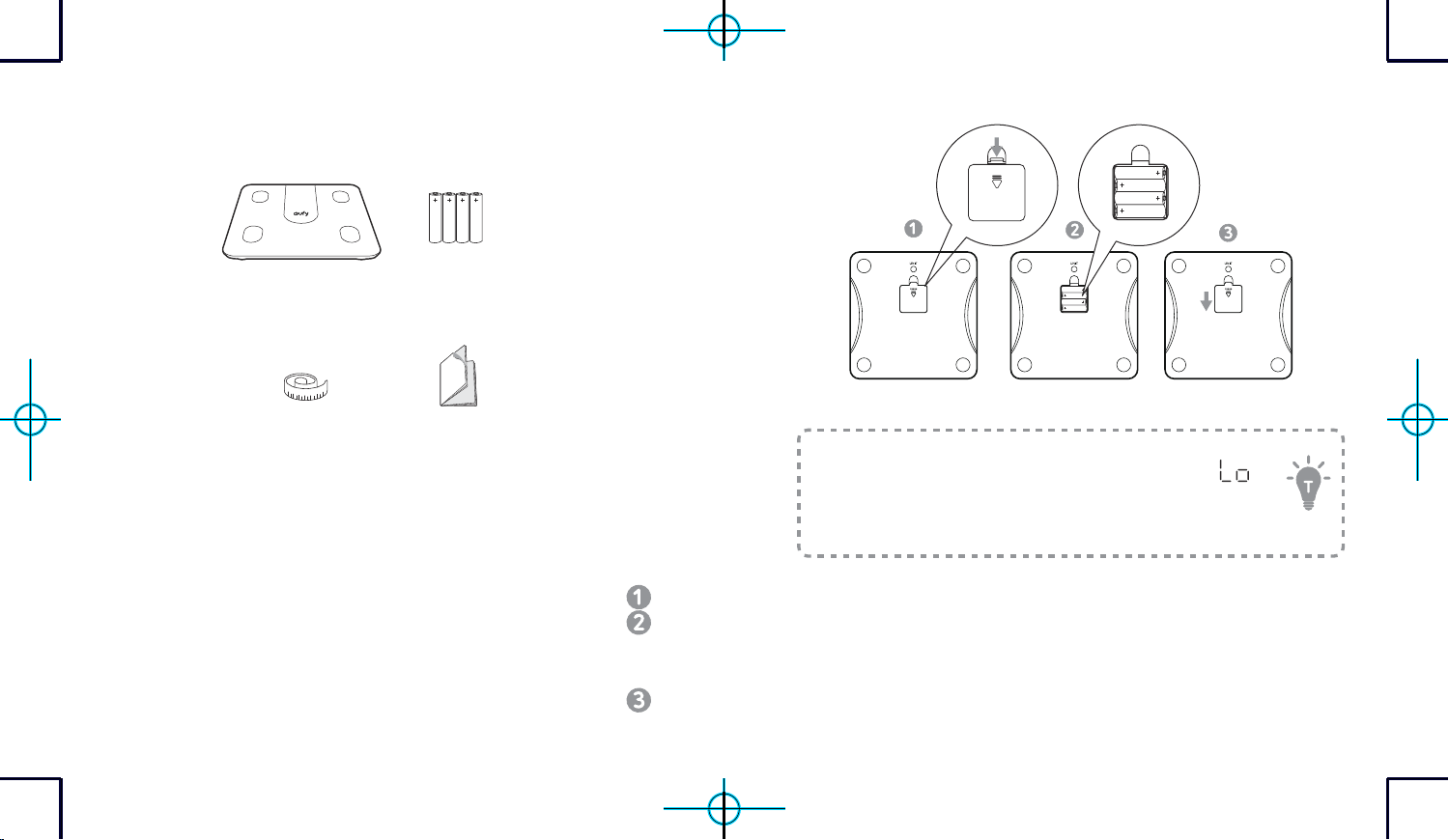
What’s In the Box
Smart Scale AAA Battery (×4)
Soft Measuring Tape
(60in / 150cm)
Owner’s Manual &
Other Documents
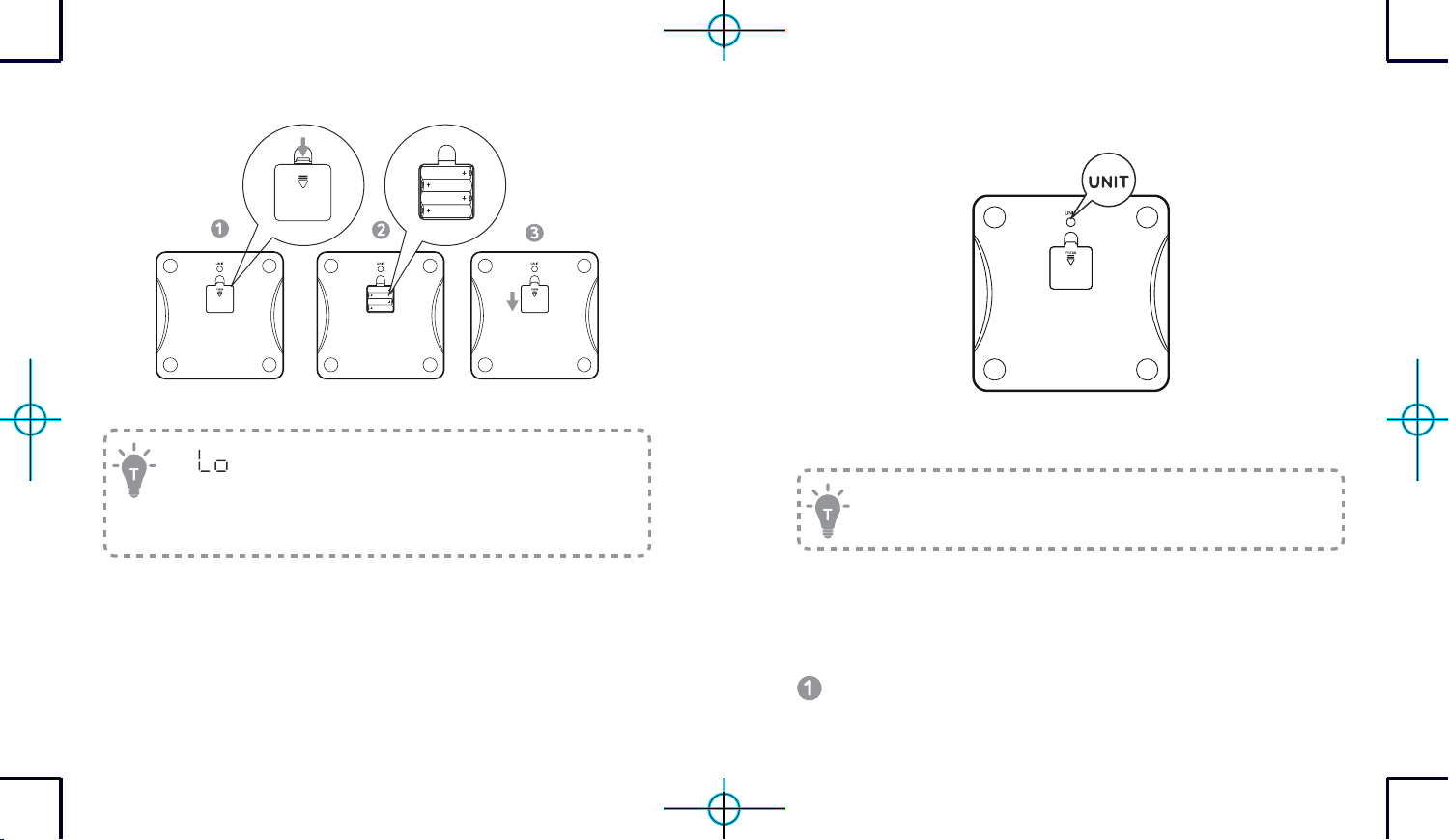
Inserting the Batteries
Turn the scale over and place it on a flat surface.
Open the battery door and insert 4 AAA batteries. Make sure the positive
and negative ends are facing the correct polarity directions marked in the
battery compartment.
- The digits will show on the LED display.
Press down to close the battery door. Make sure the battery door is fixed in place.
08 EN EN 09
PRESS
-
will appear on the LED display when the batteries are low.
Replace all batteries at the same time. Do not mix new and used
batteries.
- The scale turns off automatically after being idle for 10 seconds.
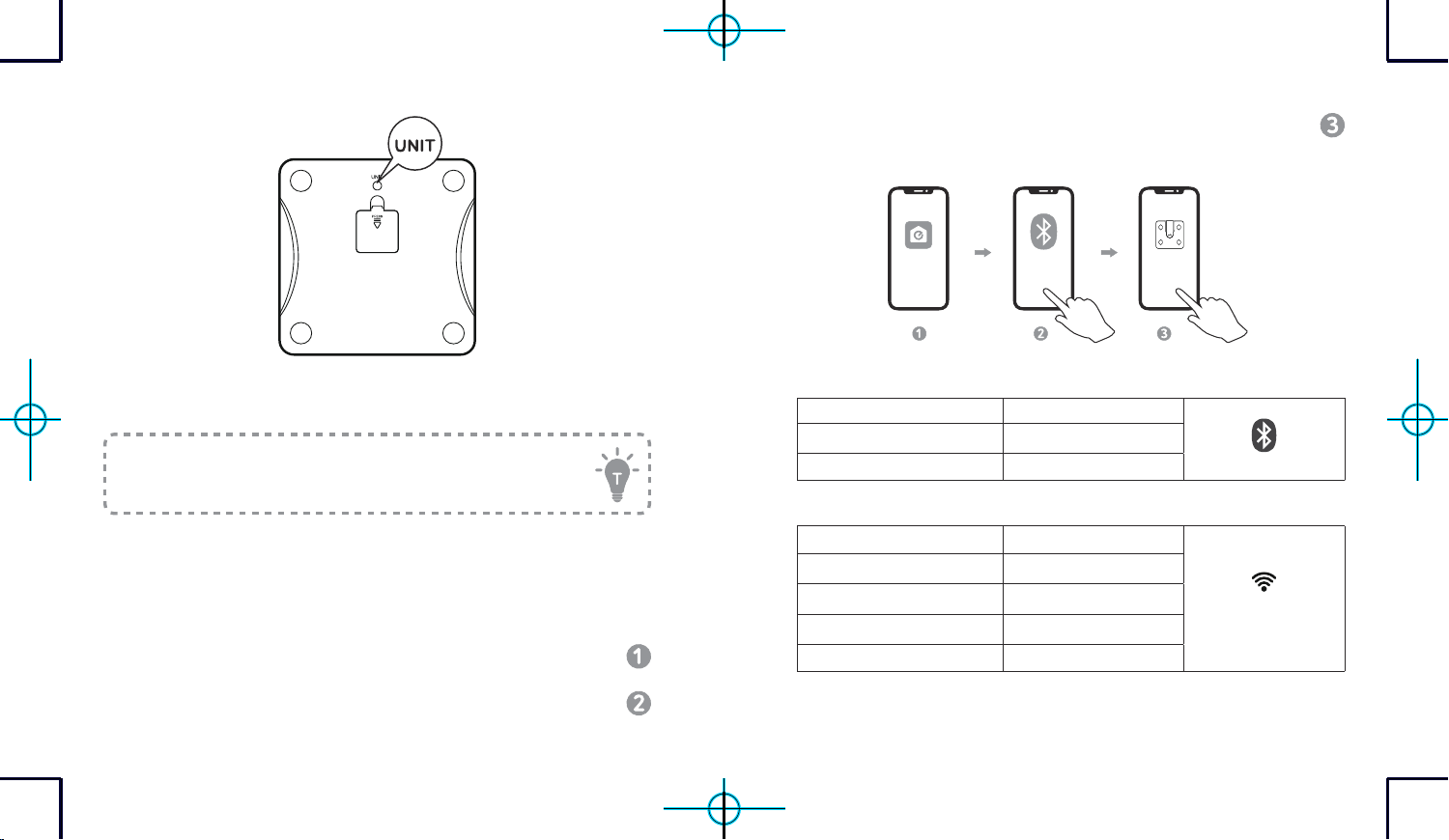
Selecting the Measuring Unit
Press the UNIT button at the bottom of the scale to cycle through and select
the measuring unit: lb (Pound) / kg (Kilogram) /st (stone). The measuring
unit can be selected and saved within the EufyLife app.
To restore factory settings, press and hold the UNIT button at the
bottom of the scale for 10 seconds.
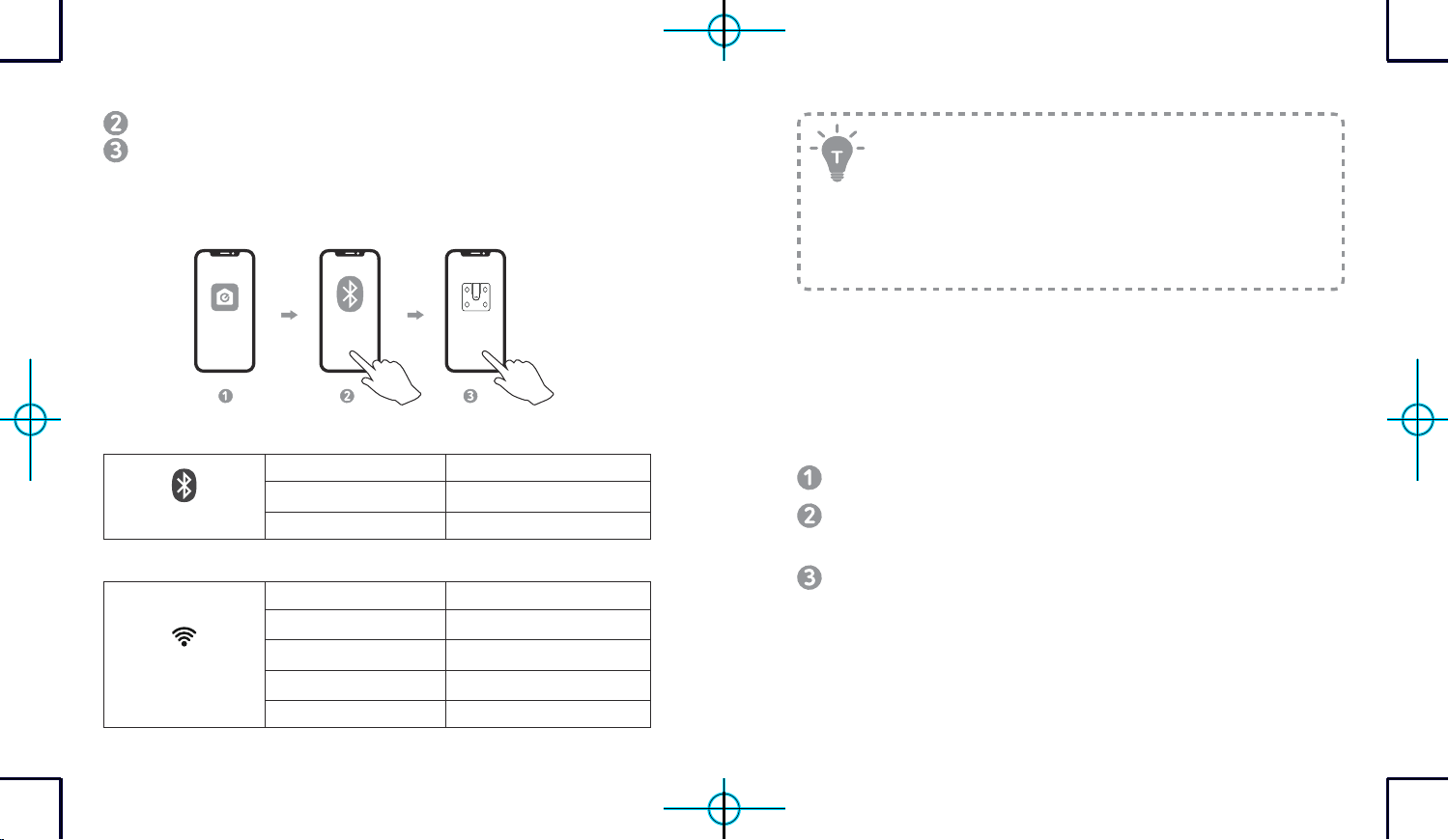
Installing the EufyLife App and Pairing
g
Download the EufyLife app from the App Store (iOS devices) or Google
Play (Android devices).
10 EN EN 11
Enable Bluetooth on your smartphone or tablet.
Open the EufyLife app and follow the on-screen instructions to pair the
scale with your device.
- Once paired, the app and scale will automatically connect the next time
the app is opened.
Bluetooth ON
Smart Scale
EufyLife
Bluetooth Status Icon
Status Icon Indicates
Flashing
Pairing
Solid Connected
Wi-Fi Status Icon
Status Icon Indicates
Off
Not connected
Flashing slowly
Ready for connecting
Flashing quickly
Connecting
Solid Connected
- This scale is compatible with devices running iOS 10.0 and above or
Android 5.0 and above.
- To complete the setup, you need to enable Bluetooth on your
smartphone or tablet and allow the EufyLife app to use your
location.
- Do not pair the scale from your smartphone’s Bluetooth menu. Use
the EufyLife app to pair the scale with your smartphone.
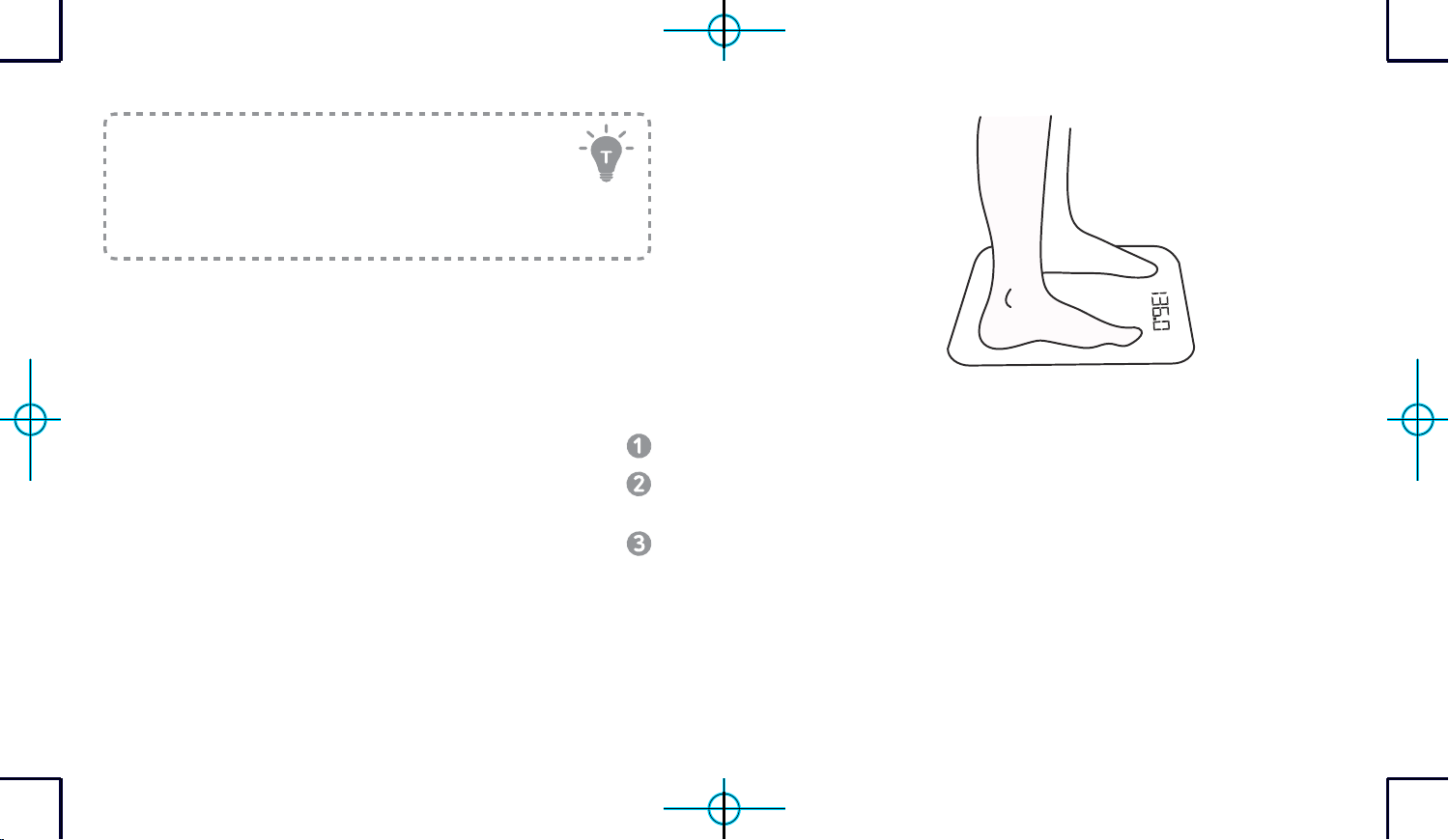
Starting a Measurement
Before taking your first measurement, you will need to create and set up a
user ID in the EufyLife app.
Place the scale on a hard and flat surface.
Open the EufyLife app and select “Add Device” on the homepage. Follow
the in-app instructions to add the smart scale.
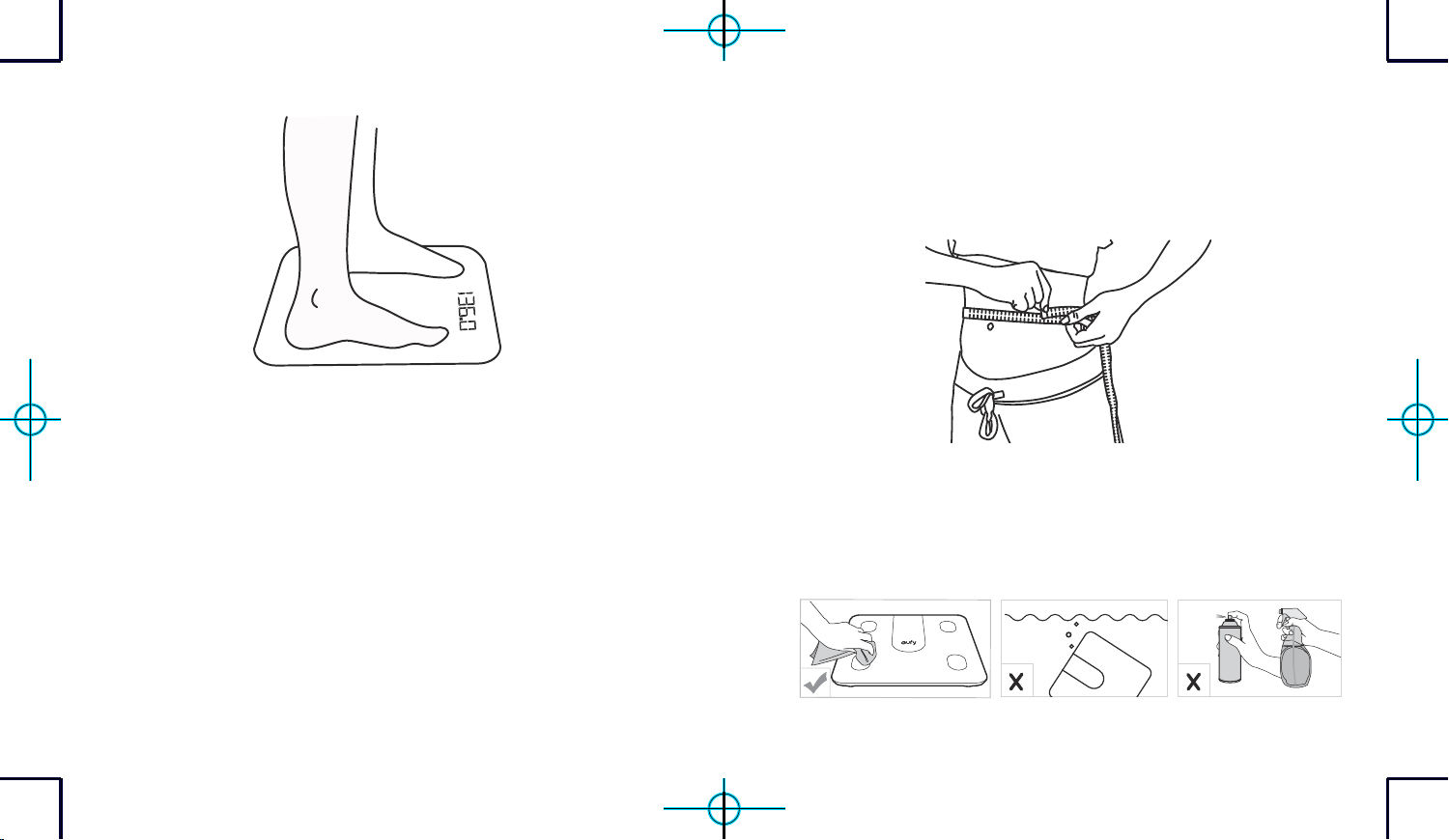
Step barefoot onto the center of the scale. Stand still and keep full
contact with the electrodes until the measurement is complete.
- An analysis of your weight and your body’s composition will begin
automatically.
- After measuring, your weight and other available information will be
shown on the LED display. You can find detailed body composition
analysis within the EufyLife app.
12 EN EN 13
Weight-Only Measurement
This scale can also be used as a conventional weight-reading scale.
1. Open the EufyLife app and select "Simple mode".
2. Step on the scale to measure your current weight.
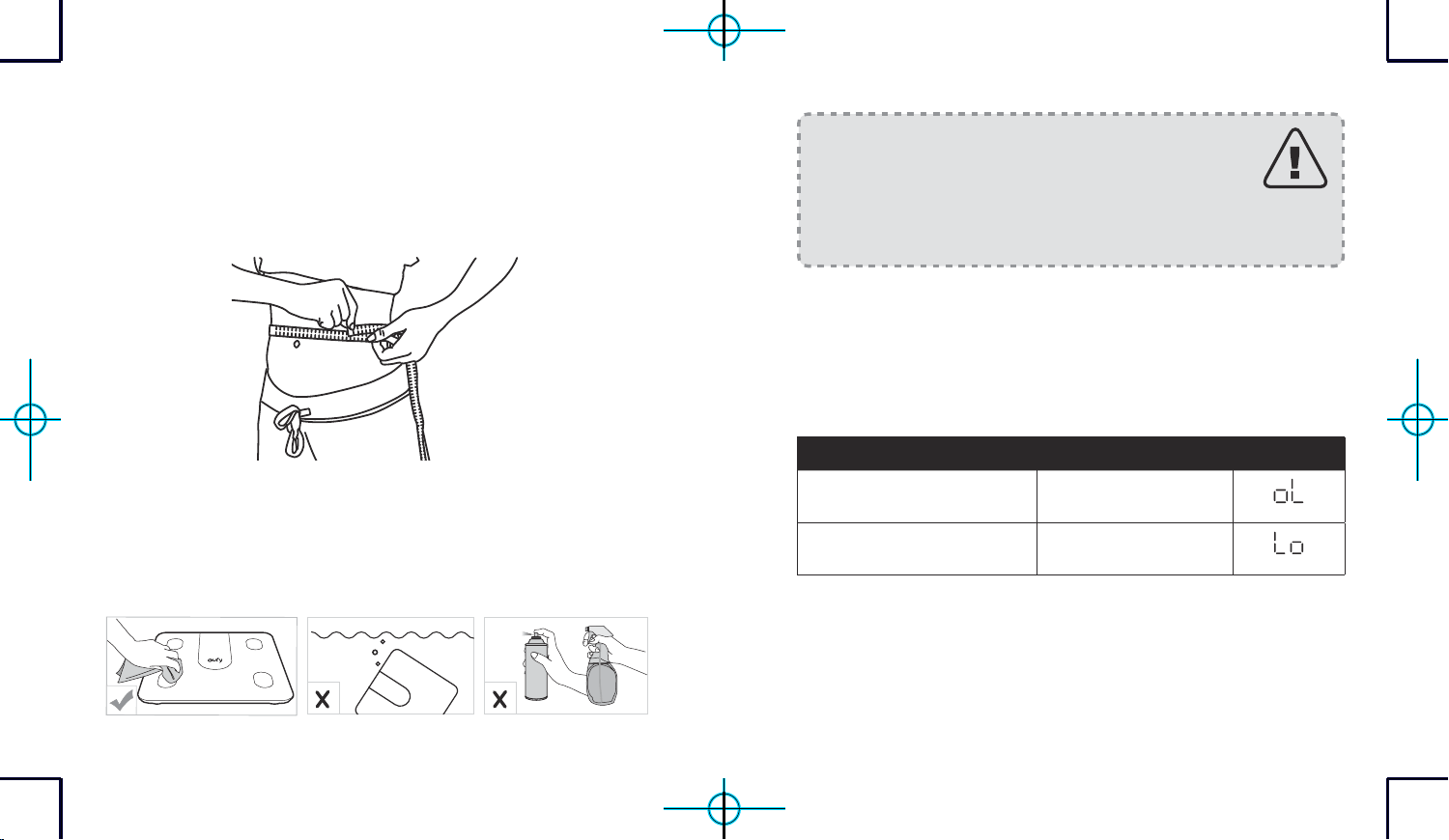
Using the Measuring Tape
With the measuring tape, you can get accurate measurements according to
your requirements.
Maintenance
Regularly clean the scale with a dry or slightly dampened soft cloth.
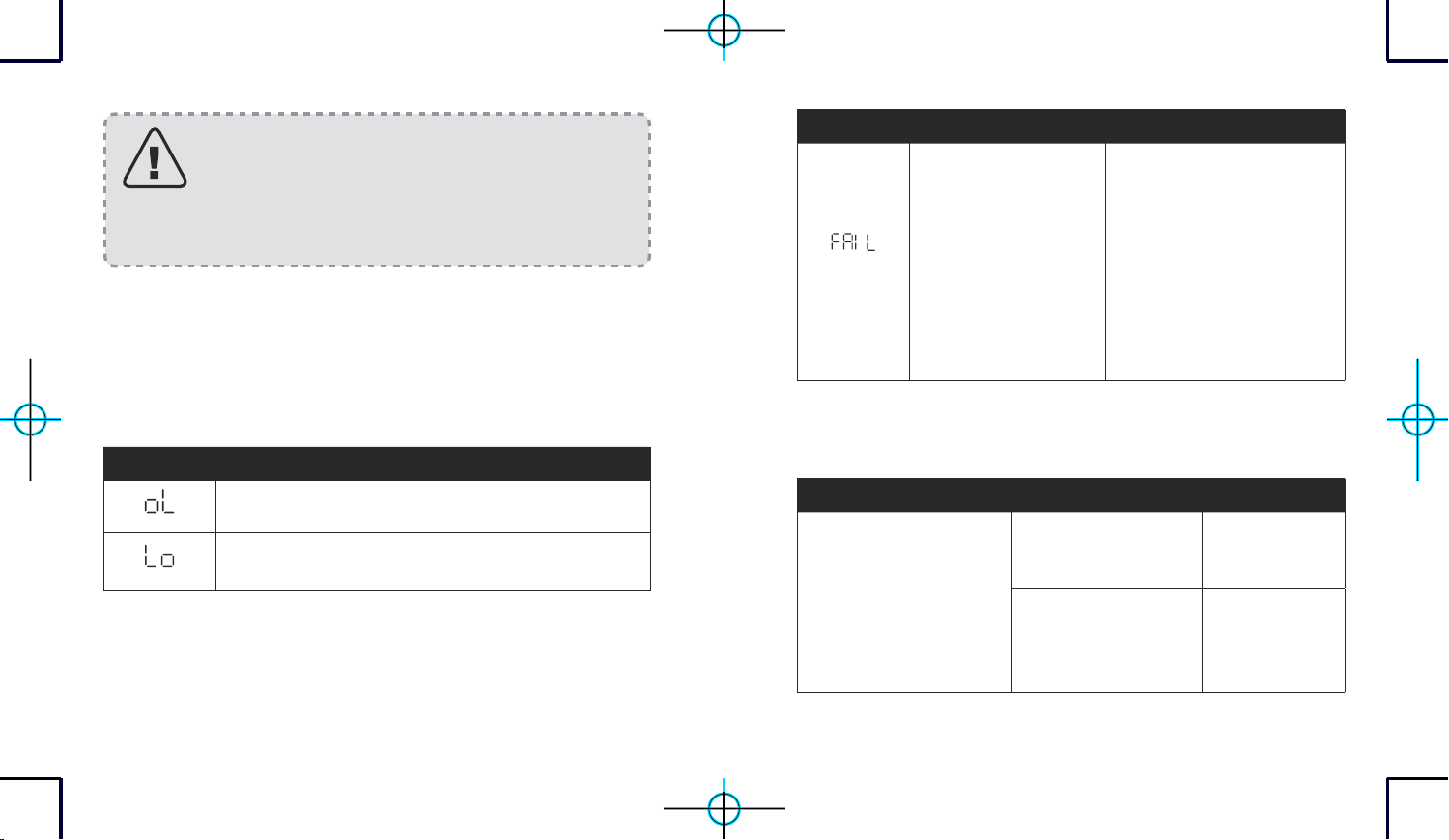
14 EN EN 15
- This scale is waterproof, but it is not recommended
to wash it with water for a long time or immerse it in
water.
- Never use detergents to clean the scale as this may
cause it to malfunction or discolor.
Troubleshooting
Error Message
Error Display Description Solution
Overload. The device will
power o.
Stop using this scale for
measurement.
Low battery. The device will
power o.
Replace all batteries at the same
time.
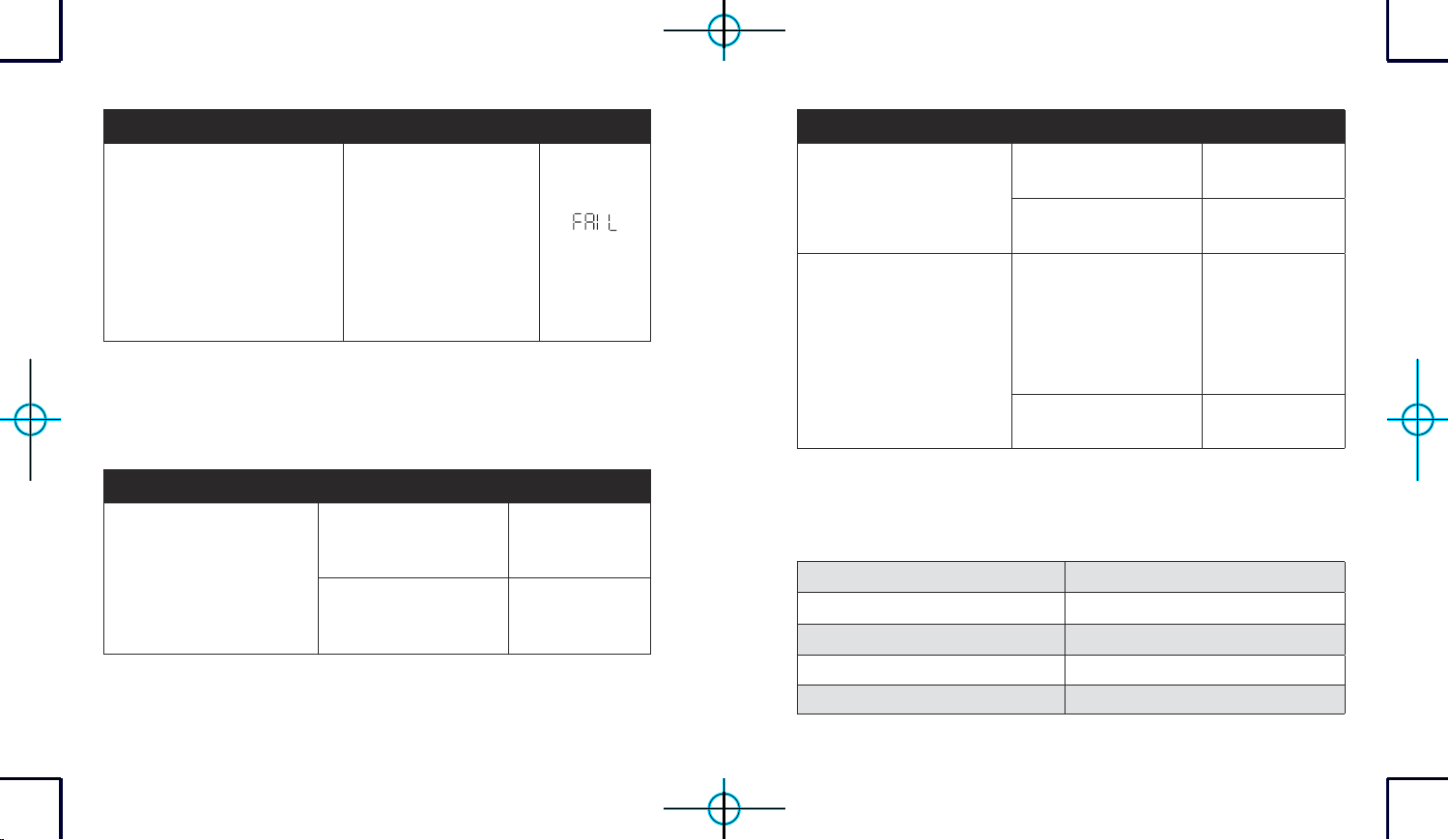
Error Display Description Solution
Wi-Fi setup failure.
• Open the EufyLife app
and follow the on-screen
instructions to reconnect the
scale with your device.
• Move the scale to a place near
your router before the Wi-Fi
setup.
• Press and hold the UNIT
button for 10 seconds to
restore factory settings, then
restart the Wi-Fi connection.
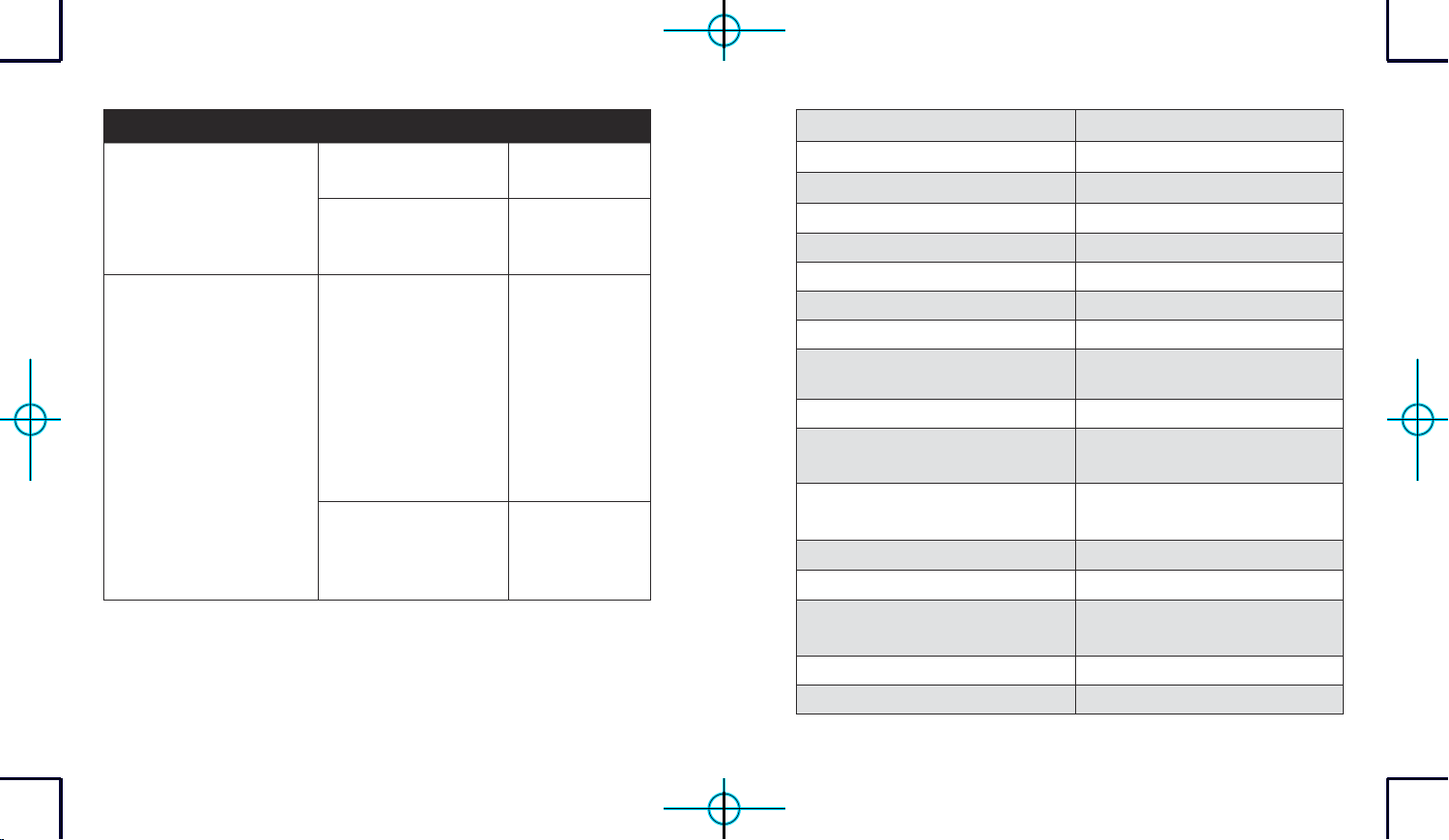
When Measuring
Issue Cause Solution
Abnormal measurement
results:
• Too high
• Too low
• Huge dierence
between two recent
measurements
• Incorrect posture.
Step onto the
scale barefoot
and stand still.
• Device is placed on
soft carpeting or
uneven surface.
Place the device
on a hard and flat
surface.
16 EN EN 17
Issue Cause Solution
LED display does not turn
on after stepping onto the
scale.
• Batteries not installed.
• Install 4 new
AAA batteries.
• Worn batteries.
• Replace all
batteries at the
same time.
Scale does not proceed to
analyse body composition.
• Taking a measurement
while wearing shoes or
socks.
• Step barefoot
onto the center
of the scale.
Stand still
and keep full
contact with
the electrodes
until the
measurement is
complete.
• Using the weight-only
measuring mode in the
EufyLife app.
• Change the
measuring
mode in the
EufyLife app.
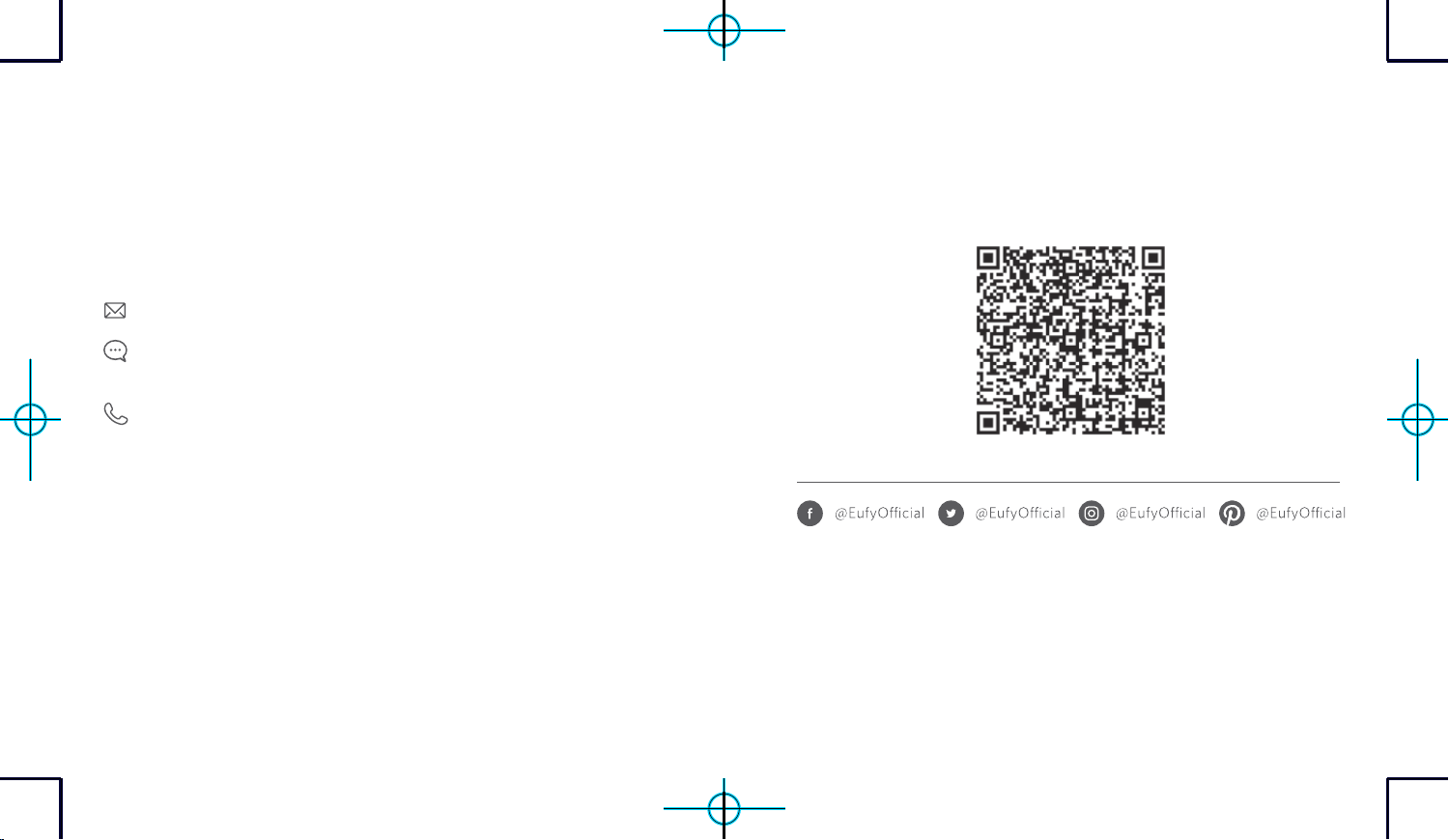
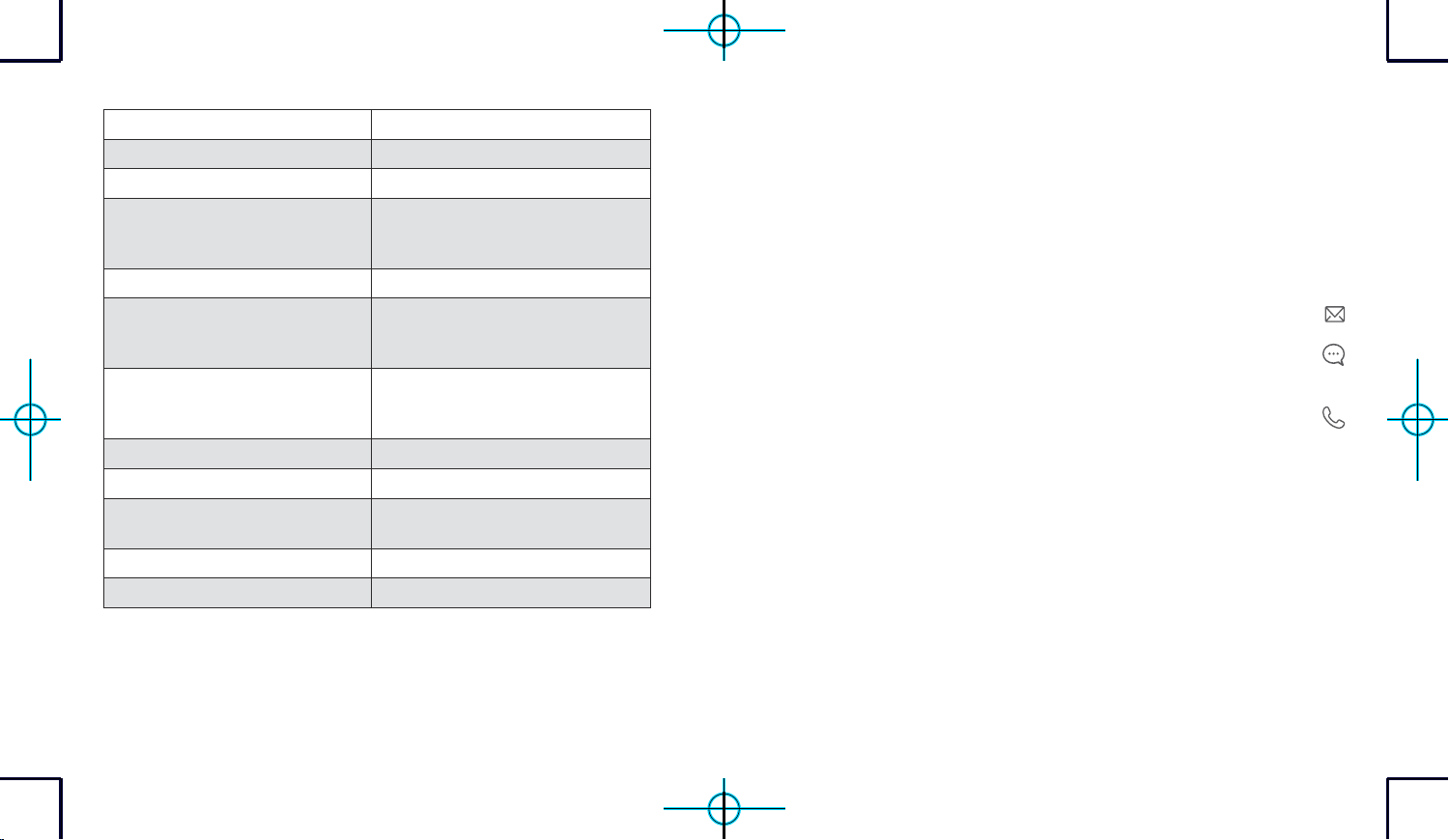
Specifications
Model T9148
Power 6V (4 × AAA batteries)
LED Display 2.5 × 1.4 in / 64 × 35 mm
Measurement Units Pound / Kilogram / Stone
Unit Increments 0.1lbs / 0.05kg
Body Fat Unit Increments 0.1 %
Body Water Unit Increments 0.1 %
Muscle Mass Unit Increments 0.1 %
Measurement Range
0.2lbs - 397lbs / 0.1kg - 180kg / 0st:
0.2lbs - 28st: 5lbs
Activation Weight 3 kg
Working Environment
Temperature: 10 - 40 °C
Humidity: <= 90% RH
Storage Environment
Temperature: -10 - 50 °C
Humidity: <= 90% RH
Operating Frequency Range 2400 MHz - 2500 MHz
Waterproof Degree IPX5
Transmitted Power
Wi-Fi: 18 dBm
Bluetooth: 4 dBm
Bluetooth Version 5.0
Wi-Fi Version 2.4 G
18 EN EN 19
Customer Service
For tutorial videos, FAQs, manuals, and more information,
please visit: support.eufylife.com.
Contact Us
(US)+1(800)9887973Mon-Fri6:15-17:00(PT);
Sat-Sun6:30-16:30(PT)
(UK)+44(0)1604936200Mon-Fri6:00-17:00;
Sat-Sun6:00-14:00
(DE)+49(0)6995797960Mo-Fr8:00-16:00
(日本)0344557823月-金9:00-17:00
www.eufylife.com
For more support phone numbers, please visit:
support.eufylife.com/s/phonecontactus
Or scan the QR code below:
20 AR AR 21
تايوتحملا لودج
ةمهملا ةمسلا تاميلعت 21
ةوبعلا يف دجوي ام 24
تايراطبلا بيكرت 24
سايقلا ةدحو رايتخا 25
سايقلا ءدب 28
طقف نزولا سايق 29
سايقلا طيرش مادختسا 30
ةنايصلا 30
اهحصإو ءاطخا فاشكتسا 31
تافصاوملا 33
ءمعلا ةمدخ 35
ةمهملا ةمسلا تاميلعت
بنجت .AAA عون نم تايراطب 4 ةطساوب زاهجلا اذه ليغشت متي •
يف ببستي دق كلذ ن نحشلا ةداع ةلباقلا ريغ تايراطبلا نحش ةداعإ
.اهراجفنا وأ تايراطبلا برست
ليبس ىلع ،ا
ً
عم تايراطبلا نم ةفلتخم عاونأ مادختساو جزم بنجت •
لكينلا ديرديه تايراطبو )Li-ion( نويأ مويثيللا تايراطب لاثملا
.)NiMH( يندعملا
.ةلمعتسملاو ةديدجلا تايراطبلا جزم بنجت •
متت نأ ،تقولا نم ةليوط ةرتفل زاهجلا مادختسا مدع ةلاح يف ىصوي •
.فاجو دراب ناكم يف زاهجلا نيزخت لبق تايراطبلا ةلازإ
مهرامعأ حوارتت نيذلا لافطا لبق نم زاهجلا اذه مادختسا نكمي •
تاردقلا فعض نم نوناعي نيذلا صاخشاو قوف امف تاونس 8 نيب
فارشا طرشب ةفرعملاو ةربخلا صقن وأ ةيلقعلا وأ ةيسحلا وأ ةيدسجلا
ةنمآ ةقيرطب مادختساب ةقلعتملا تاميلعتلا صوصخب مهداشرإو مهيلع
بعللاب لافطل حومسم ريغ .هنع مجنت دق يتلا رطاخملل مهكرادإو
صخش فارشإ ةنايصلاو فيظنتلا لامعأب لافطا مايق بلطتي .زاهجلاب
.دشار
قلغلا مكح
ُ
م يكيتسب سيك يف ةلمعتسملا ةيراطبلا عضو يغبني •
.ةيلحملا ةيئيبلا تاميظنتلل ا
ً
قفو نامأب اهنم صلختلاو
22 AR AR 23
.لبقتسملا يف هيلإ عوجرلل ليلدلاب ظفتحا .زاهجلا مادختسا لبق
ً
ةلماك تاميلعتلا أرقا •
وأ ةيئابرهك تامدص ثودح ىلإ مادختسا ءوس يأ يدؤي دق .طقف مدختسملا ليلد يف ةحضوملا مادختسا تاميلعت عبتا •
.ةعقوتم ريغ ىرخأ رطاخم يف ببستلا وأ قيرح بوشن وأ قورح
يأب زاهجلا اذه اهمدقي تامولعم يأب دصق
ُ
ي .مهماسجأ نيوكت ةبقارمو مهنزو سايقل دارفل ممصم زاهجلا اذه نأ ملعا •
.اهثودح عنم وأ ضارما نم ءافشلا وأ جعلا لاوحا نم لاح
ةفورعم ريغ نينجلا ىلع زاهجلل ةيبناجلا راثا .لماح كنأ يف نيكشت
ِ
تنك اذإ وأ
ً
ماح تنك اذإ زاهجلا اذه يمدختست •
.اهرابتخا متي ملو
تابرض مظنم وأ نافجرلا ليزم لثم ا
ً
عورزم وأ ءادترل لباق ا
ً
ينورتكلإ ا
ً
زاهج مدختست تنك اذإ زاهجلا اذه مدختست •
.بلقلا
ةيودأ نولوانتي وأ ضارمأ نم نوناعي وأ ةنمزم وأ ةداح ضارمأب نيباصملا دارفا لبق نم زاهجلا اذه مادختسا يغبني •
ىلع لوصحلا ىلع راصتقا بجي .دارفا ءؤهل تاءارقلا ةقد نم ققحتلا متي مل .هايملا تايوتسم ىلع رثؤت نأ نكمي
.بيبطلا نم ةيبطلا ةروشملا
تاذ ةلومحملا تاصتا تادعم مادختسا يغبني .ةيسيطانغمورهك ةقاط اهنم ثعبنت تانايبلا لقن ةفيظوب دوزم زاهجلا •
)ةصوب 12( مس 30 طيحم يف )ةيجراخلا تايئاوهلاو يئاوهلا تباك لثم ةطيحملا ةزهجا كلذ يف امب( يكلسلا ددرتلا
.ءادا رثأتي دقف إو ،زاهجلا نم
.زاهجلا اذه ليدعتب مقت •
.لكآتلل ةببسملا تائيبلا وأ ةبوطرلا وأ ةرشابملا سمشلا ةعش وأ ةديدش ةرارح تاجردل زاهجلا اذه ضرعت •
.لاستغا وأ مامحتسا دعب زاهجلا ىلع وطخت ،قلزنت ىتح •
،كلذل تررطضا اذإو .ءادا رثأتي دقف إو هقوف ا
ً
سدكم وأ رخآ زاهجل ا
ً
رواجم نوكي امدنع زاهجلا اذه مادختسا يغبني •
.يعيبط لكشب نمعي امهنأ نم ققحتلل نيزاهجلا لمع ةظحم بجي
.روفلا ىلع ةيراطبلا باب نم بيرستلا تاذ تايراطبلا لزأو كتازافق
ِ
دتراف ،تايراطبلا نم بيرست ثودح ةلاح يف •
يفو .اهدعب نوباصلاب ا
ً
ديج كيدي لسغ بجي ،تازافق يدترت نكت مل اذإ .اهريودت ةداع فافش يكيتسب سيك يف اهعضو
.روفلا ىلع ةيبطلا ةيانعلا بلطاف ،نيعلا ةسمم ةلاح
:مادختسا تاحيملت
:كب صاخلا سايقلا يف ءدبلا دنع هاندأ تاميلعتلا عبتا ،سايقلا ةقد نم دكأتلل
• .نازيملا ءادأ ىلع ،داجسلا لثم ،ةن
ّ
يللا حطسا رثؤت .بلصو
ٍ
وتسم حطس ىلع نازيملا عضوب مق
• .سايقلا لمتكي ىتح ةيئابرهكلا باطقا عم لماك سمت ىلع قباو تابثب فق .نازيملا فصتنم يف نيمدقلا يفاح طخا
• .عقوملاو ،تقولا سفن يف موي لك كسفن نزوب مق ،ا
ً
قاستا رثكأ سايقل
• .برشلا وأ ، لكا وأ ،مامحتسا وأ ،راخبلا مامح يف سولجلا وأ ،قاشلا نيرمتلا دعب ةرشاب
ُ
م كسفن نزو بنجت
• دلجلا اذه لعجت نأ طاشنلا وأ ةخوخيشلل ةيعيبطلا تاريثأتلل نكمي .سايقلا ىلع كيمدق لفسأ يف دلجلا ةلاح رثؤت دق
.ةقد لضفأ ىلع لوصحلل
ً
يلق ةبطرو ةفيظن مادقأب ةءارقلا ذخ .ا
ً
يساق
• دوجو طرف وأ ،فافجلاب رثأتت دقو ،مسجلا لخاد هايملا ةيمك بسحب مسجلا يف نوهدلل ةيوئملا ةبسنلا تاريدقت فلتخت
،ةفثكملا ةيضايرلا نيرامتلا وأ ،ضرملا وأ ،ضيحلا وأ ،لوحكلا لوانت يف طارفا لثم لماوع دوجو ببسب لئاوسلا
.كلذ ىلإ امو
• تاسايق وأ ،مسجلا يف ةنمسلا تاسايق نوكت دق ،ةنس 16 نم لقأ لافطا نيب ةعساولا ةيدرفلا تافتخا ىلإ رظنلاب
.ا
ً
قيقد طقف نزولا سايق لظي .ةقد لقأ ىرخا مسجلا نيوكت
راعشإ
تايافنك ةيئابرهكلا ةزهجا نم صلختت :يلي ام ىلإ هتوبع وأ زاهجلا ىلع دوجوملا زمرلا اذه ريشي
ةمظنأ ةفرعمل كيدل ةيلحملا ةطلسلا عم لصاوتو .ةلصفنم عيمجت قفار
َ
م مدختسا ؛ةزورفم ريغ ةيلحم
برست ىلإ ،تايافنلا نفادم وأ تابكم يف ةيئابرهكلا ةزهجا نم صلختلا ببسي دق .ةرفوتملا عيمجتلا
دنعو .كتمسو كتحصب ا
ً
ررض كلذ قحليف ،ةيئاذغلا ةلسلسلاب اهلخادتو ةيفوجلا هايملا ىلإ ةرطخ داوم
ا
ً
ناجم ميدقلا كزاهج دادرتساب ا
ً
ينوناق ا
ً
مزلم ةئزجتلا عئاب نوكي ،ةديدج ةزهجأب ةميدقلا ةزهجا لادبتسا
.حيحصلا وحنلا ىلع هنم صلختلا متيل لقا ىلع
ةقباطملا نعإ
Anker Innovations Limited ةكرش نلعت .يبوروا داحتا يف يكلسلا لخادتلا تابلطتم عم جتنملا اذه قفاوتي
نع لماكلا صنلا .EU/2014/53 هيجوتلا عم قفاوتم T9148 عون نم يكلسلا زاهج نأ دنتسملا اذه بجومب
.https://www.eufylife.com/ :يلاتلا تنرتنا ناونع ىلع حاتم يبوروا داحتل ةقباطملا
24 AR AR 25
ةوبعلا يف دجوي ام
Smart Scale AAA عون نم تايراطب
)تايراطب 4 ددع(
معان سايق طيرش
)مس 150 / ةصوب 60(
قئاثوو مدختسملا ليلد
ىرخأ
تايراطبلا لاخد
.وتسم حطس ىلع نازيملا عض
ةبلاسلاو ةبجوملا فارطا نأ نم دكأت .AAA عون نم تايراطب 4 لخدأو ةيراطبلا باب حتفا
.ةيراطبلا ةريجح يف ةددحملا ةحيحصلا باطقا تاهاجتا يف ةهجوم
.LED ةشاش ىلع ماقرا رهظتس -
.هناكم يف ةيراطبلا باب تيبثت نم دكأت .ةيراطبلا باب قغ لفس طغضا
PRESS
عيمج لدبتسا .ةضفخنم تايراطبلا نوكت امدنع LED ةشاش ىلع رهظيس
-
.ةلمعتسملاو ةديدجلا تايراطبلا جزم بنجت .تقولا سفن يف تايراطبلا
.
ٍ
ناوث 10 ةدمل لومخلا دعب ا
ً
يئاقلت نازيملا ليغشت فاقيإ متي -
سايقلا ةدحو رايتخا
/ )لطر( lb :اهديدحتو سايقلا ةدحو نيب لقنتلل نازيملا نم يلفسلا ءزجلا يف UNIT رز ىلع طغضا
.EufyLife قيبطت يف اهظفحو سايقلا ةدحو ديدحت نكمي .)نوتس( st/ )مارجوليك( kg
26 AR AR 27
.نازيملا لفسأ UNIT رز ىلع
ٍ
ناوث 10 ةدمل طغضا ،عنصملا تادادعإ ةداعتس
نارتقاو EufyLife قيبطت تيبثت
وأ )iOS ماظنب لمعت يتلا ةزهجل( App Store نم EufyLife قيبطت ل
ّ
زن
.)Android ماظنب لمعت يتلا ةزهجل( Google Play
.يحوللا كزاهج وأ يكذلا كفتاه ىلع Bluetooth نيكمتب مق
.كزاهجب نازيملا نارق ةشاشلا ىلع رهظت يتلا تاميلعتلا عبتاو EufyLife قيبطت حتفا
.قيبطتلا اهيف حتف
ُ
ي ةرم لك يف ا
ً
يئاقلت نازيملاو قيبطتلا ليصوت متيس ،نارتقا درجمب -
Bluetooth ON
Smart Scale
EufyLife
حضوت ةلاحلا ةنوقيأ
ثوتولب
نارتقا
ضيمو
لصتم
بلص
حضوت
ةلاحلا ةنوقيأ
أيقونة حالة شبكة Wi-Fi
لصتم ريغ
فاقيإ
لاصتل زهاج
ءيطب ضيمو
لاصتا
عيرس ضيمو
لصتم
بلص
28 AR AR 29
وأ قوف امف iOS 10.0 ماظنب لمعت يتلا ةزهجا عم قفاوتم نازيملا اذه -
.ثدحا تارادصاو Android 5.0
كزاهج وأ يكذلا كفتاه ىلع Bluetooth نيكمت ىلإ جاتحت ،دادعا لامك -
.كعقوم مادختساب EufyLife قيبطتل حامسلاو يحوللا
قيبطت مدختسا .يكذلا كفتاه يف Bluetooth ةمئاق نم نازيملا نارقإب مقت -
.يكذلا كفتاه عم نازيملا نارق EufyLife
سايقلا ءدب
.EufyLife قيبطت يف مدختس
ُ
ملا فرع
ُ
م نييعتو ءاشنإ ىلإ جاتحتس ،لوا كسايق ىلع لوصحلا لبق
ٍ
وتسمو بلص حطس ىلع نازيملا عضوب مق
تاميلعتلا عبتا .ةيسيئرلا ةحفصلا ىلع "زاهج ةفاضإ" ددحو EufyLife قيبطت حتفا
.يكذلا نازيملا ةفاض قيبطتلا يف ةدوجوملا
باطقا عم لماك سمت ىلع قباو تابثب فق .نازيملا فصتنم يف نيمدقلا يفاح طخا
.سايقلا لمتكي ىتح ةيئابرهكلا
.كمسج نيوكتو كنزو ليلحت ا
ً
يئاقلت أدبيس -
روثعلا كنكمي .LED ةشاش ىلع ةحاتملا ىرخا تامولعملاو كنزو رهظيس ،سايقلا دعب -
.EufyLife قيبطت لخاد مسجلا نيوكتل ل
ّ
صفم ليلحت ىلع
طقف نزولا سايق
.نزولا ةءارقل يديلقت نازيمك نازيملا اذه مدختس
ُ
ي نأ نكم
ُ
ي
1 . ."طيسبلا عضولا" ددحو EufyLife قيبطت حتفا
2 . .يلاحلا كنزو سايقل نازيملا ىلع طخا
30 AR AR 31
ءاملا يف هرمغ وأ ءاملاب هلسغب حصني نكل ،ءاملل مواقم نازيملا اذه -
.ةليوط ةرتفل
يف ببستت دقف ؛قطا ىلع نازيملا فيظنتل تافظنملا مدختست -
.نازيملا نول ريغت وأ ،لطع ثودح
اهحصإو ءاطخا فاشكتسا
أطخلا ةلاسر
لحلا فصولا أطخلا ضرع
.سايقلل نازيملا اذه مادختسا نع فقوت
ليغشت فاقيإ متيس .دئاز لمح
.زاهجلا
.تقولا سفن يف تايراطبلا عيمج لدبتسا
فوس زاهجلا .ةضفخنم ةيراطبلا
.زاهجلا ليغشت
سايقلا طيرش مادختسا
.كتابلطتمل ا
ً
قفو ةقيقد تاسايق ىلع لوصحلا كنكمي ،سايقلا طيرش مادختساب
ةنايصلا
.
ً
يلق ةبطر
ُ
م وأ ،ةمعانو ،ةففجم شامق ةعطقب نازيملا فيظنتب مق
32 AR AR 33
لحلا فصولا أطخلا ضرع
تاميلعتلا عبتاو EufyLife قيبطت حتفا
ليصوت ةداع ةشاشلا ىلع رهظت يتلا
.كزاهجب نازيملا
زاهج نم بيرق ناكم ىلإ نازيملا لقنا
ةكبش دادعإ لبق كب صاخلا هيجوتلا
.Wi-Fi
UNIT رز ىلع
ٍ
ناوث 10 ةدمل طغضا
ليغشت دعأ مث ،عنصملا تادادعإ ةداعتس
.Wi-Fi لاصتا
.Wi-Fi ةكبش دادعإ لشف
سايقلا دنع
ةلكشملا ببسلا لحلا
:ةيداع ريغ سايق جئاتن
ةياغلل ةيلاع
ةياغلل ةضفخنم
نيثيدح نيسايق نيب لئاه قراف
.ةئطاخ ةيعضو
نازيملا قوف دعصا
فقو نيمدقلا يفاح
.تابثب
ةداجس قوف زاهجلا عضو مت
.
ٍ
وتسم ريغ حطس وأ ،ةمعان
ىلع زاهجلا عضوب مق
.
ٍ
وتسمو بلص حطس
ةلكشملا ببسلا لحلا
دعب LED ةشاش ليغشت متي مل
.نازيملا ىلع فوقولا
.تايراطبلا بيكرت متي مل
تايراطب 4 بيكرتب مق
.ةديدج AAA عون نم
.ةكلهتس
ُ
م تايراطب
تايراطبلا عيمج لدبتسا
.تقولا سفن يف
نيوكت ليلحت نازيملا لصاوي مل
.مسجلا
ءادترا ءانثأ سايقلا ءارجإ
.براوجلا وأ ،ةيذحا
يف نيمدقلا يفاح طخا
فق .نازيملا فصتنم
سمت ىلع قباو تابثب
باطقا عم لماك
لمتكي ىتح ةيئابرهكلا
.سايقلا
طقف نزولا سايق عضو مادختسا
.EufyLife قيبطت يف
سايقلا عضو رييغتب مق
.EufyLife قيبطت يف
تافصاوملا
T9148 ليدوملا
)AAA عون نم تايراطب 4( تلوف 6 ةقاطلا
ملم 35 × 64 / ةصوب 1.4 × 2.5 LED ةشاش
نوتس / مارجوليك / لطر سايقلا تادحو
مجك 0.05/لطر 0.1 ةدايزلا ةدحو
34 AR AR 35
0.1 %
مسجلا نوهد ةدايز ةدحو
0.1 %
مسجلا يف هايملا ةدايز ةدحو
0.1 %
ةيلضعلا ةلتكلا ةدايز ةدحو
180 - مجك 0.1/لطر 397 - لطر 0.2
:نوتس 28 - لطر 0.2 :نوتس 0 / مجك
لطر 5
سايقلا لدعم
مجك 3 طيشنتلا نزو
ةيوئم ةجرد 40 - 10 :ةرارحلا ةجرد
90% يواست وأ نم لقأ :ةبوطرلا ةبسن
ةيبسن ةبوطر
لمعلا ةئيب
ةيوئم ةجرد 50 - -10 :ةرارحلا ةجرد
90% يواست وأ نم لقأ :ةبوطرلا ةبسن
ةيبسن ةبوطر
نيزختلا ةئيب
زتره اجيم 2500 - زتره اجيم 2400 ليغشتلا ءانثأ ددرتلا قاطن
IPX5 ءاملا ةمواقم ةجرد
طاو يللم لبيسيد Wi-Fi: 18
طاو يللم لبيسيد Bluetooth: 4
ةلوقنملا ةقاطلا
5.0
Bluetooth ـلا رادصإ
اجيج 2.4 Wi-Fi رادصإ
ءمعلا ةمدخ
،تامولعملا نم ديزملاو تابيتكلاو ةعئاشلا ةلئساو ةيميلعتلا ويديفلا عطاقمل
.support. eufylife.com :ةرايز ىجري
انب لصتا
17:00 - 6:15 ةعمجلا ىلإ نينثا نم +1 )800( 988 7973 )ةدحتملا تايولا(
)ئداهلا طيحملا تيقوتب( 6:30-16:30 دحا - تبسلا ؛ )ئداهلا طيحملا تيقوتب(
؛ 17:00 - 6:00 دحا-نينثا +44 )0( 1604 936200 )ةدحتملا ةكلمملا(
6:00-14:00 دحا-تبسلا
16:00 - 8:00 ةعمجلا-نينثا +49 )0( 69 9579 7960 )ايناملأ(
(日本)03 4455 7823 月-金 9:00 - 17:00
www.eufylife.com
36 AR AR 37
:ةرايزب لضفت ؛معدلا فتاوه ماقرأ نم ديزمل
support.eufylife.com/s/phonecontactus
:هاندأ ا
ً
يئوض ةعيرسلا ةباجتسا زمر حسما وأ