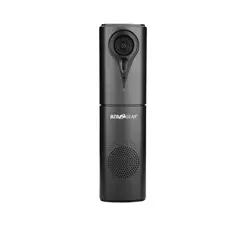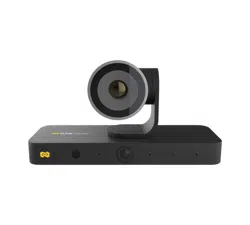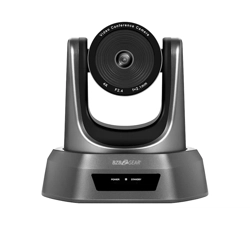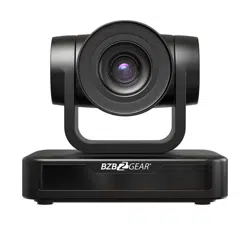
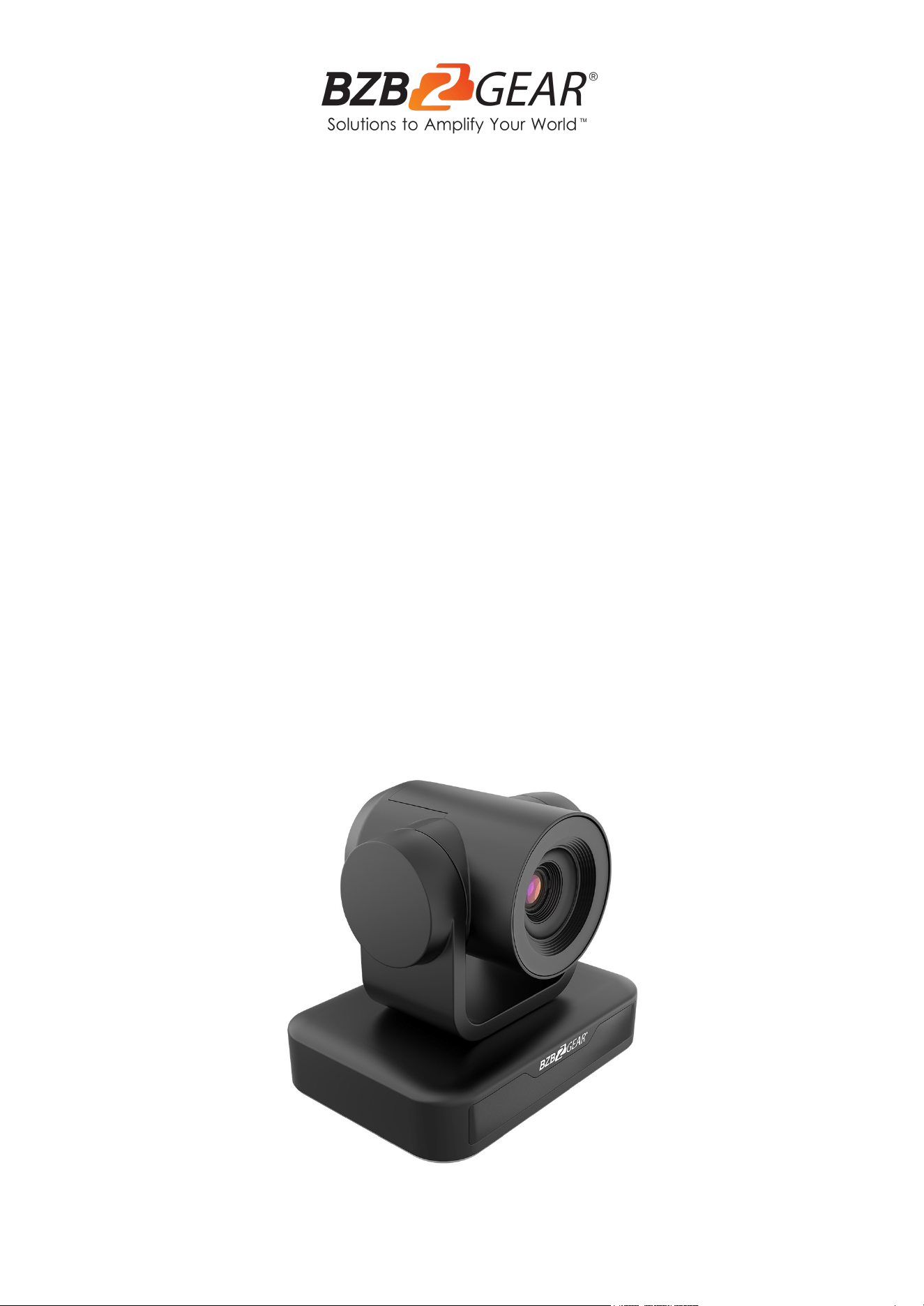
BG-BPTZ-XU
1080P Full HD 3X/10X USB 2.0 / RS232
Huddle / Conference Room PTZ Camera
User Manual

BZBGEAR BG-BPTZ-XU PRODUCT MANUAL
Address: 830 National Drive #140, Sacramento, CA 95834, USA · Tel: +1(888)499-9906 · Email: support@bzbgear.com 2

BZBGEAR BG-BPTZ-XU PRODUCT MANUAL
TABLE OF CONTENTS
Statement 4
Safety Precaution 4
Introduction 5
Features 5
Packing List 5
Technical Specifications 6
Camera Overview 7
Remote Control 13
Keys Introduction for IR Remote Control 14
Menu Introduction 17
Serial Port Communication and Control 22
Camera Maintenance and Troubleshooting 29
Application Example 30
Tech Support 31
Limited Product Warranty Terms 31
Mission Statement 31
Copyright 32
Address: 830 National Drive #140, Sacramento, CA 95834, USA · Tel: +1(888)499-9906 · Email: support@bzbgear.com 3

BZBGEAR BG-BPTZ-XU PRODUCT MANUAL
Statement
Please read these instructions carefully before connecting, operating, or configuring this
product. Please save this manual for future reference.
Safety Precaution
● To prevent damaging this product, avoid heavy pressure, strong vibration, or immersion
during transportation, storage, and installation.
● The housing of this product is made of organic materials. Do not expose to any liquid,
gas, or solids which may corrode the shell.
● Do not expose the product to rain or moisture.
● The product has no power switch. Remove power immediately if camera is not in proper
working condition to avoid electrical shock.
● To prevent the risk of electric shock, do not open the case. Installation and maintenance
should only be carried out by qualified technicians.
● Installation and use of this product must strictly comply with local electrical safety
standards.
● The power supply of the product is ±12V, the max electrical current is 2A.
● Do not use the product beyond the specified temperature, humidity, or power supply
specifications.
● This product does not contain parts that can be maintained or repaired by users.
Damage caused by dismantling the product without authorization from BZBGEAR is not
covered under the warranty policy.
● Installation and use of this product must strictly comply with local electrical safety
standards.
● Do not turn the camera head manually. Doing so may result in mechanical damage.
Camera should only be placed on a stable horizontal surface and cannot be installed at
an angle.
● Make sure there are no obstacles within the camera’s rotational range when installing.
Never power on before installation has been completed.
Address: 830 National Drive #140, Sacramento, CA 95834, USA · Tel: +1(888)499-9906 · Email: support@bzbgear.com 4

BZBGEAR BG-BPTZ-XU PRODUCT MANUAL
Introduction
The BG-BPTZ-XU is a high-quality pan tilt zoom (PTZ) camera that is available in two
configurations, the 3x optical zoom and the 10x optical zoom. The 3x optical zoom variant is
ideal for smaller spaces, huddle rooms, and wide-angle shots with its 85° field of view. The
10x optical zoom version is a better fit for larger rooms where individual subjects are located
further away but still need to fill the frame using its field of view of up to 66°. Both variants of
the BG-BPTZ-XU support resolutions up to 1080p@30Hz. The BG-BPTZ-XU has quick and
easy plug and play connectivity with USB 2.0 type A for any video conferencing software
such as Skype, Zoom, Microsoft Teams, and Google Meet.
Features
● High-definition Images: This camera employs 1/2.9-inch high quality CMOS sensor.
Resolution is up to 1920x1080 with frame rate up to 30 fps.
● H.265/H.264 encoding: Makes motion video fluid and clear even with less than ideal
bandwidth conditions.
● Optical Zoom Lens: either 3x or 10x optical zoom lens.
● Leading Auto Focus Technology: Leading autofocus algorithm allows for fast,
accurate and stable auto-focusing.
● Low Noise and High SNR: Low Noise CMOS effectively ensures high SNR of
camera video.
● Control Interface:RS485, RS232, RS232 supports cascade function for convenient
installation.
● Supports Multiple Control Protocols: VISCA, PELCO-D, and PELCO-P protocols
which can be automatically recognized.
● Quiet PTZ: Utilizing a high accuracy step driving motor ensures its movements are
extremely quiet, smooth, and quick.
● 255 Presets Positions: Up to 255 presets (10 presets by remote).
● Application Examples: Tele-education, Lecture recording, Webcasting, Video
conferencing, Tele-training, Tele-medicine, and Emergency command systems.
Packing List
● 1x BG-BPTZ-XU Camera
● 1x 12V/1.5A Power supply
● 1x Remote Control
● 1x USB 2.0 Cable
● 1x User Manual
● 1х Quick Start Guide
Address: 830 National Drive #140, Sacramento, CA 95834, USA · Tel: +1(888)499-9906 · Email: support@bzbgear.com 5
BZBGEAR BG-BPTZ-XU PRODUCT MANUAL
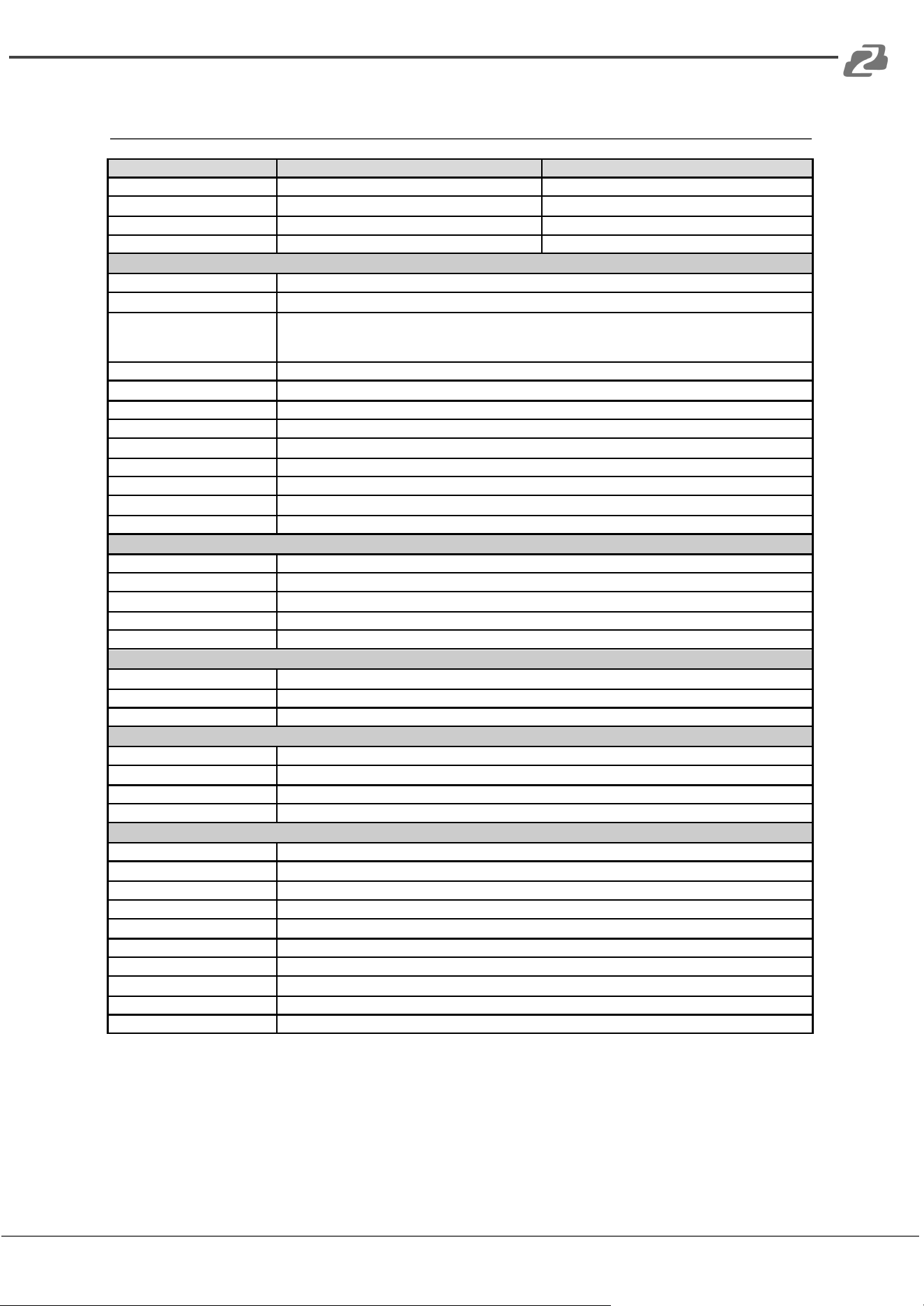
Technical Specifications
Model Number
BG-BPTZ-3XU
BG-BPTZ-10XU
View Angle
34.1° ~ 85°
8.8° ~ 66°
F Value
f=3.35mm ~ 10.05mm
f=4.34mm ~ 41.66mm
AV
F1.7 ~ 3.0
F1.85 – F2.43
Optical Zoom
3X
10X
Camera Parameters
Image Sensor
1/2.9 Inch High Quality CMOS Sensor
Effective Pixels
2.07MP, 16:9
Video Format
1920×1080P@30fps/25fps; 1280×720P@30fps/25fps; 1024×576P@30fps/25fps;
960×540P@30fps/25fps; 800×448P@30fps/25fps; 640×360P@30fps/25fps;
320×176P@30fps/25fps
Low Illumination
0.5Lux (F1.8, AGC ON)
DNR
2D & 3D DNR
White Balance
Auto/Manual/One Push/3000K/3500K/4000K/4500K/5000K/5500K/6000K/6500K/7000K
Focus
Auto/Manual/One Push
Electronic Shutter
Auto/Manual
BLC
On/Off
WDR
OFF/Dynamic Level Adjustment
Video Adjustment
Brightness, Color, Saturation, Contrast, Sharpness, B/W mode, Gamma curve
SNR
>55dB
Interface and Protocol
Video Output
USB2.0. Type A
Video Compression
H.265, H.264, MJPEG
Control Port
RS232 in & out, RS485
Control Protocol
VISCA/Pelco-D/Pelco-P
Power Supply
HEC3800 Outlet (DC12V)
USB characteristics
Support operating system
Windows 7, Windows8, Windows10, Mac OS, Linux
Video Compression
H.265, H.264, MJPEG
USB communication protocol
UVC
PTZ Parameter
Pan/Tile Rotation
-170° ~ +170° / -30° ~ +30°
Pan/Tile Controller Speed
0.1 ~ 60°/Second, 0.1 ~ 30°/Second
Preset Speed
Pan: 60°/Second, Tilt: 30°/Second
Preset Numbers
255 Presets (10 presets on IR Remote)
Other Parameter
Working Voltage
12V
Working current
0.25A(max)
Power Consumption
2.5W(max)
Storage Temperature
-10°C ~ +60°C , 20% ~ 95%
Working Temperature
-10°C ~ +50°C, 20% ~ 80%
Dimension
156.8mm×112.6mm×139.5mm
Weight
1KG
Usage
Indoor Only
Package
Camera, 12V/1.5A Power supply, Remote Controller, Manual, USB 2.0 Cable
Optional Accessories
Wall or Ceiling mounts available
Address: 830 National Drive #140, Sacramento, CA 95834, USA · Tel: +1(888)499-9906 · Email: support@bzbgear.com 6
BZBGEAR BG-BPTZ-XU PRODUCT MANUAL
Camera Overview
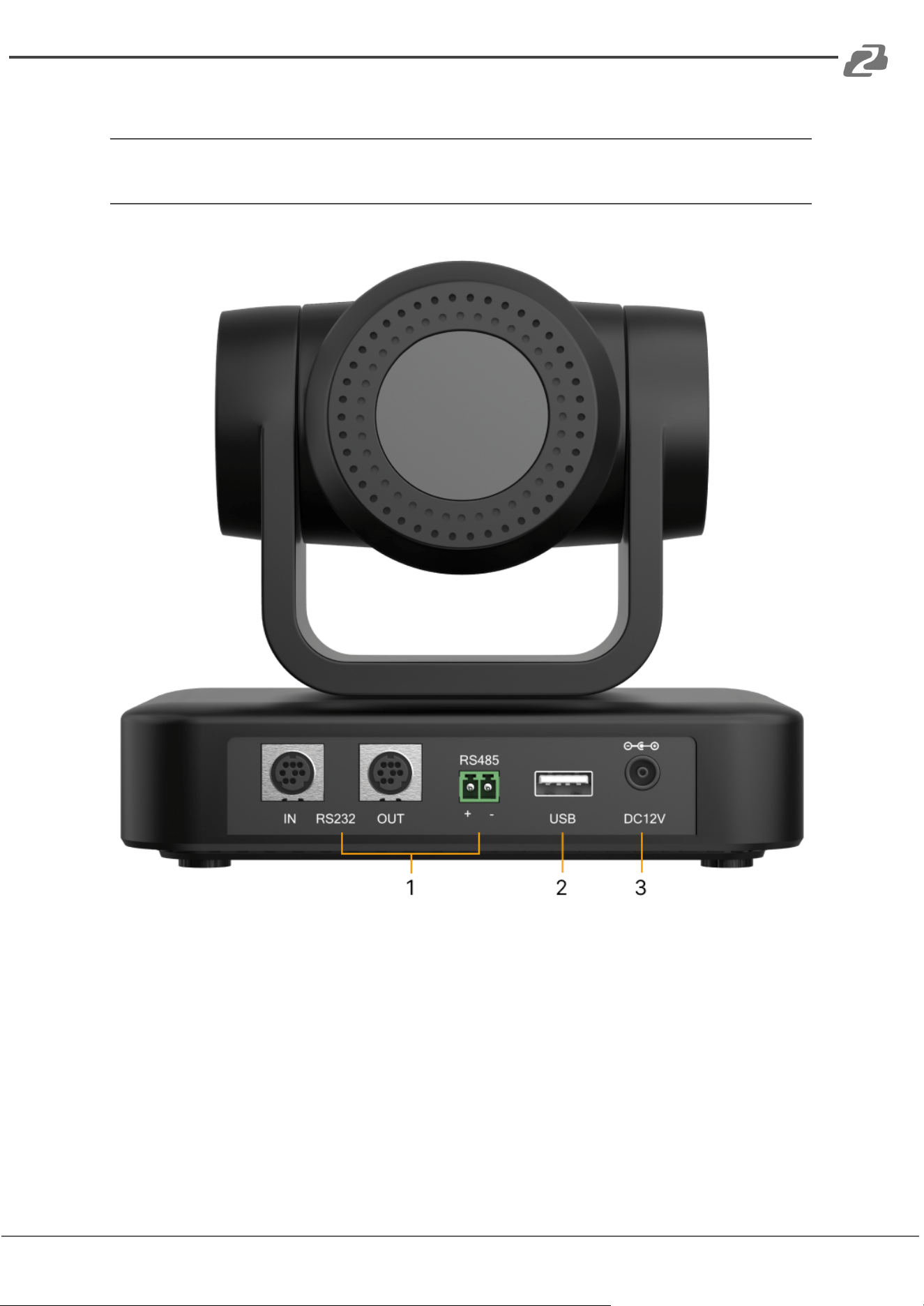
Camera Interfaces
1. RS-232, RS-422/485: Connect directly or cascade RS-232 or RS-485 to control the
camera(s) with a joystick controller or control software.
2. USB: Connect a USB 2.0 type A cable to a PC for plug & play connectivity for any
conferencing service like Skype or Zoom, supports resolution up to 1080@30Hz.
3. Power: Connect supplied 12V power adapter.
Address: 830 National Drive #140, Sacramento, CA 95834, USA · Tel: +1(888)499-9906 · Email: support@bzbgear.com 7
BZBGEAR BG-BPTZ-XU PRODUCT MANUAL
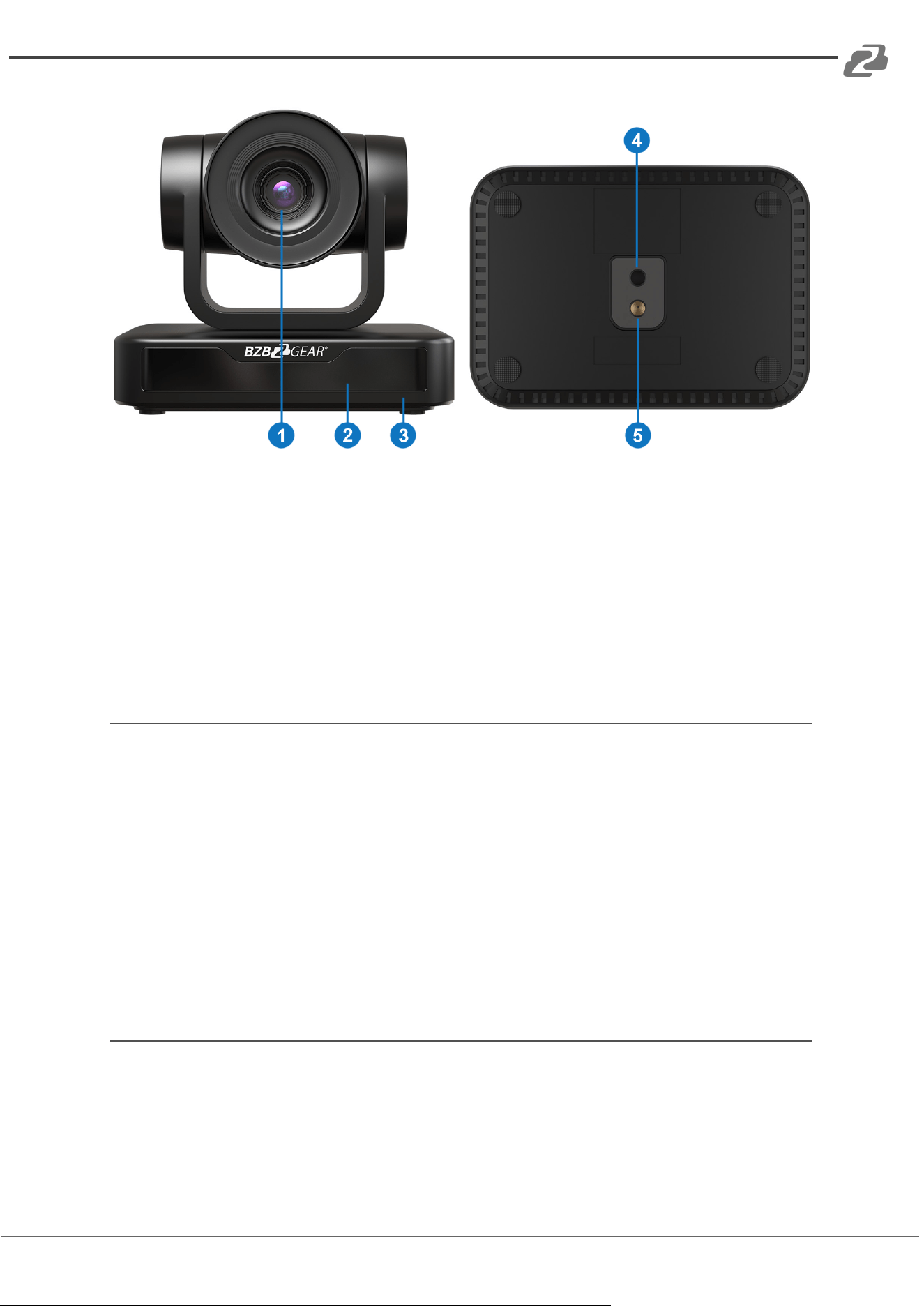
1. Camera Lens
2. Remote Controller Receiver Light
3. Camera Base
4. Mounting hole
5. Tripod Screw Hole
Power-on Initial Configuration
1) Power on: Connect DC12V power supply adapter to the power supply socket.
2) Initial configuration: Power on the unit and the power indicator light will begin
blinking. The camera head will move to the bottom left and then it will return to the
HOME position (intermediate position of both horizontal and vertical facing forward).
The camera module will zoom out and back in as well as adjust focus near and far.
When the remote control receiver light stops blinking, the self-check will be
complete.
Note: If you set or change preset 0 position, after the Power on self-test is
completed the camera will automatically move to the new preset 0 position.
Video Output
This model only supports USB 2.0 video output.
Connect the camera to a computer using the provided USB 2.0 cable and then choose your
desired video conference software or camera application to view the image.
Address: 830 National Drive #140, Sacramento, CA 95834, USA · Tel: +1(888)499-9906 · Email: support@bzbgear.com 8
BZBGEAR BG-BPTZ-XU PRODUCT MANUAL
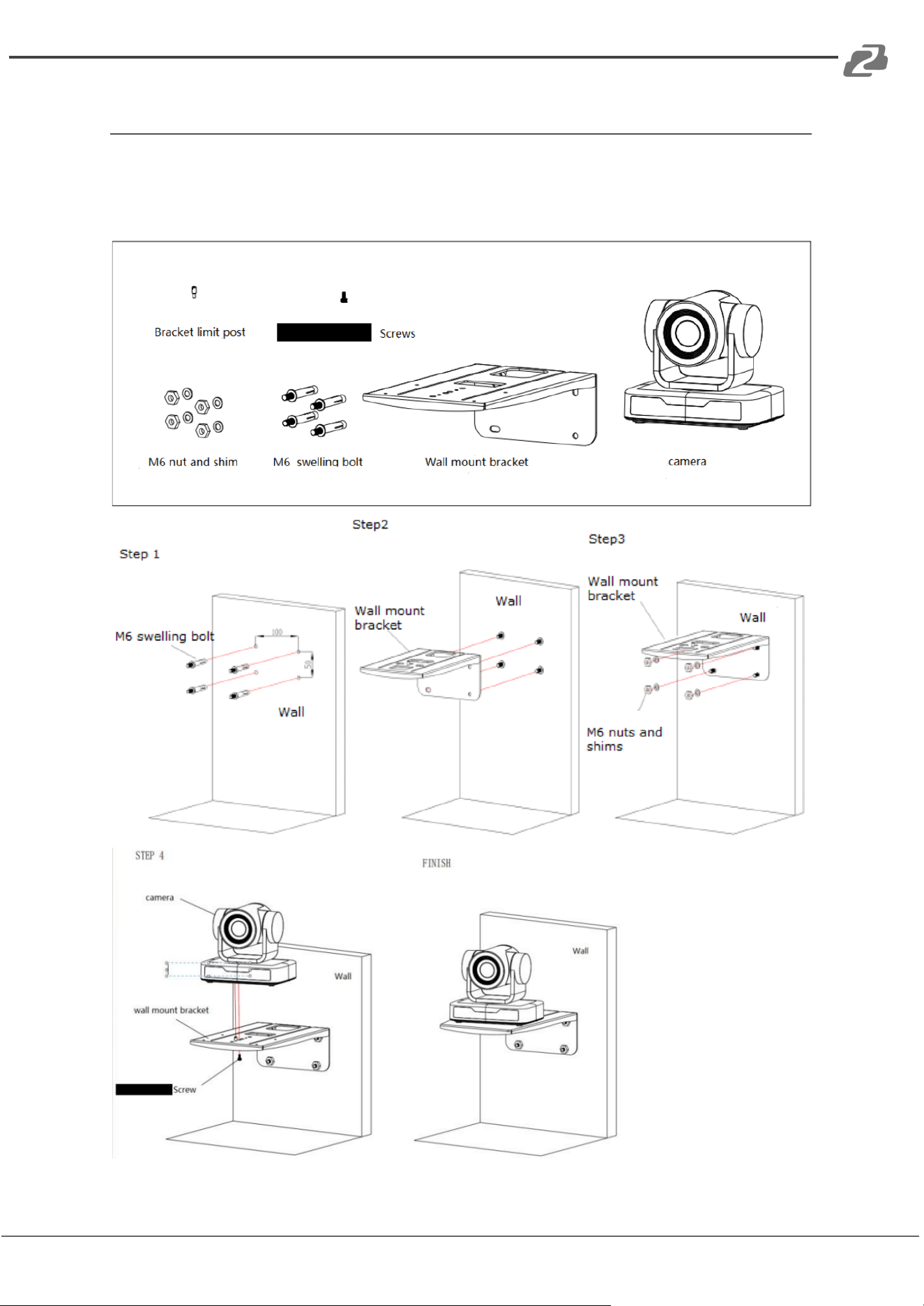
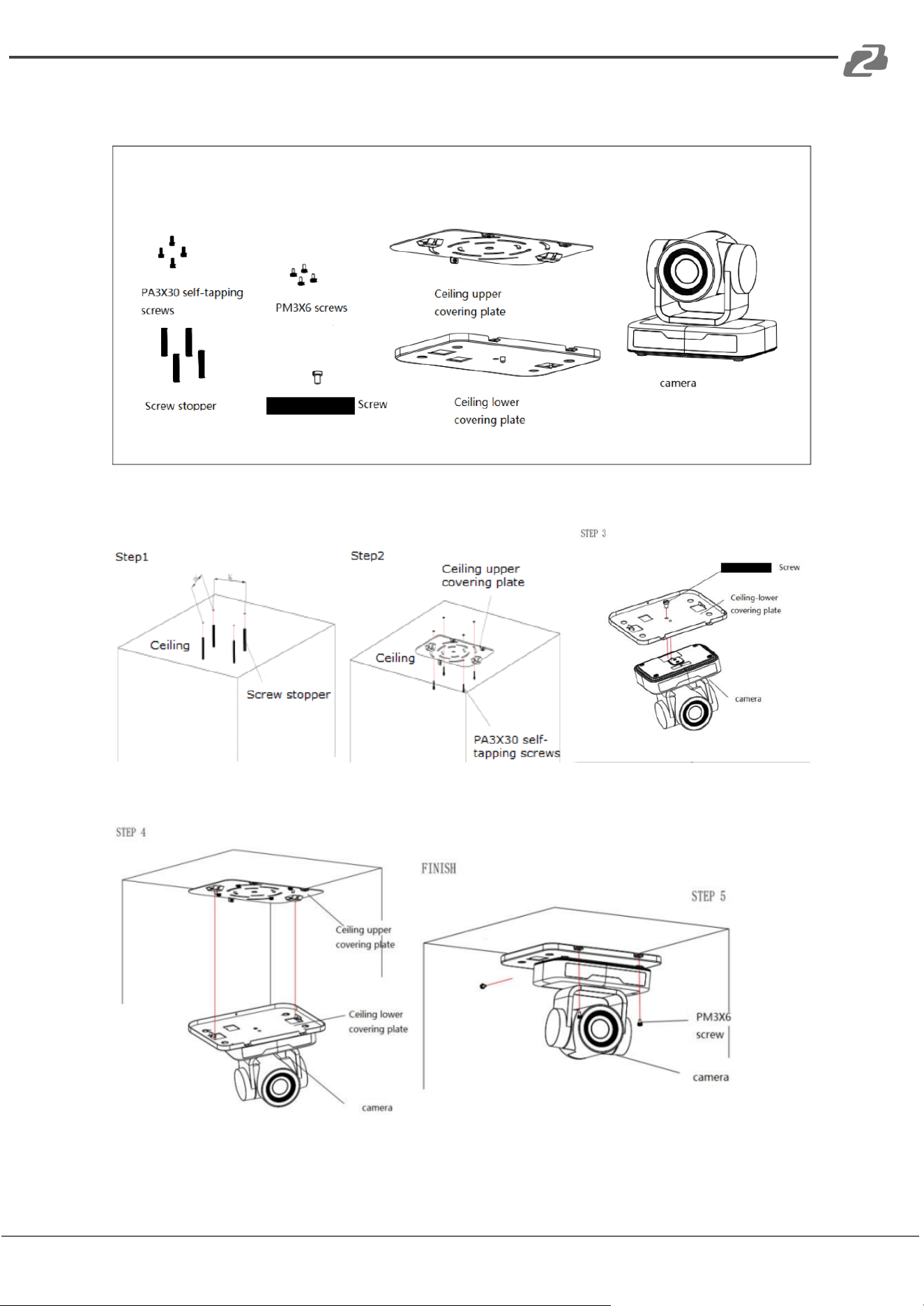
Mounting Brackets
Note: Brackets can be wall mounted or upside-down. It is recommended to mount to a wall
stud, ceiling joist, and to use proper mounting hardware. It is not recommended to be
installed on plasterboard only.
1) Wall Mount Setup
Address: 830 National Drive #140, Sacramento, CA 95834, USA · Tel: +1(888)499-9906 · Email: support@bzbgear.com 9
BZBGEAR BG-BPTZ-XU PRODUCT MANUAL
2). Ceiling Mount Setup
Address: 830 National Drive #140, Sacramento, CA 95834, USA · Tel: +1(888)499-9906 · Email: support@bzbgear.com 10
BZBGEAR BG-BPTZ-XU PRODUCT MANUAL
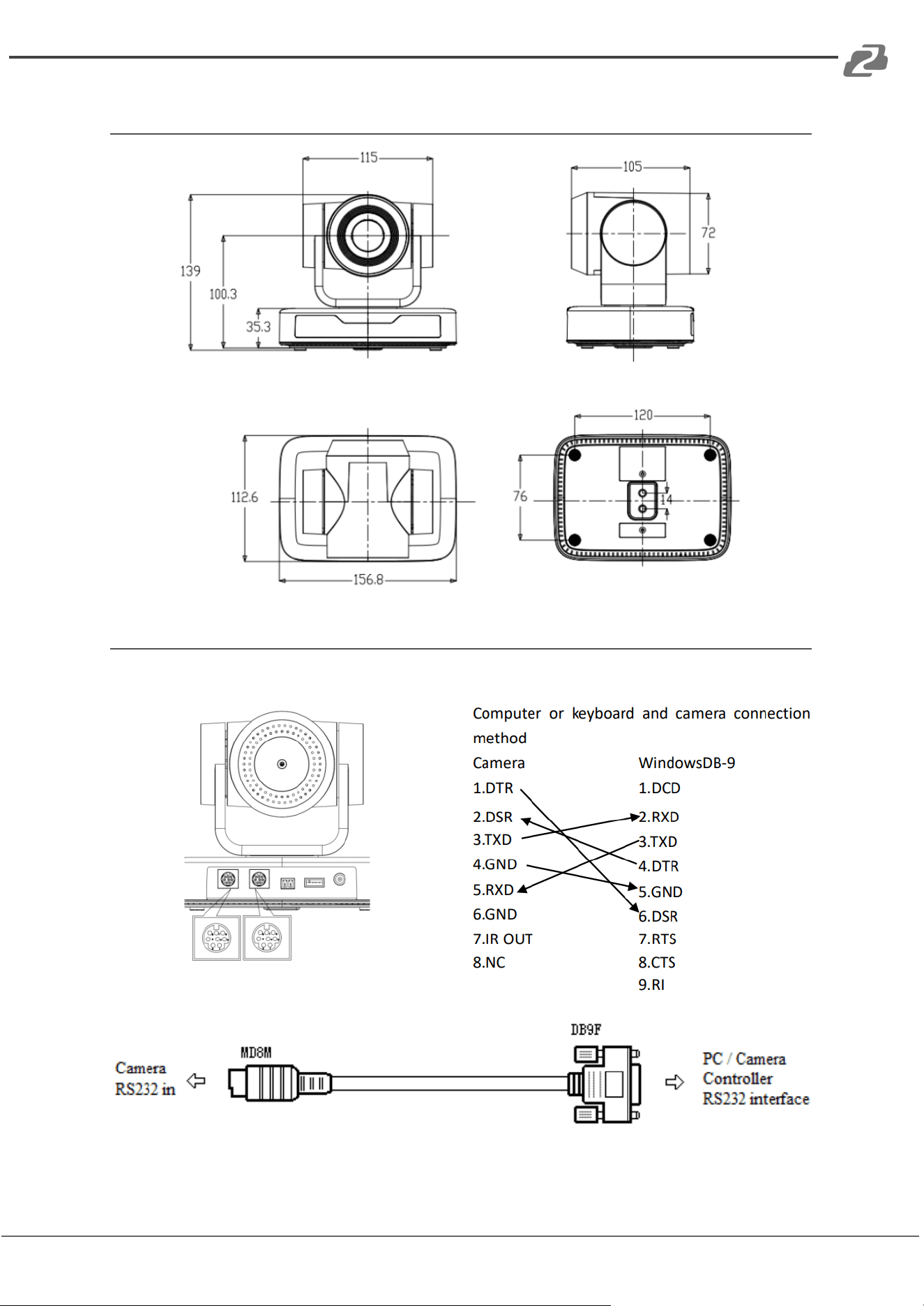
Product Dimension
RS-232 Interface
1) RS-232 Interface Definition
Address: 830 National Drive #140, Sacramento, CA 95834, USA · Tel: +1(888)499-9906 · Email: support@bzbgear.com 11
BZBGEAR BG-BPTZ-XU PRODUCT MANUAL
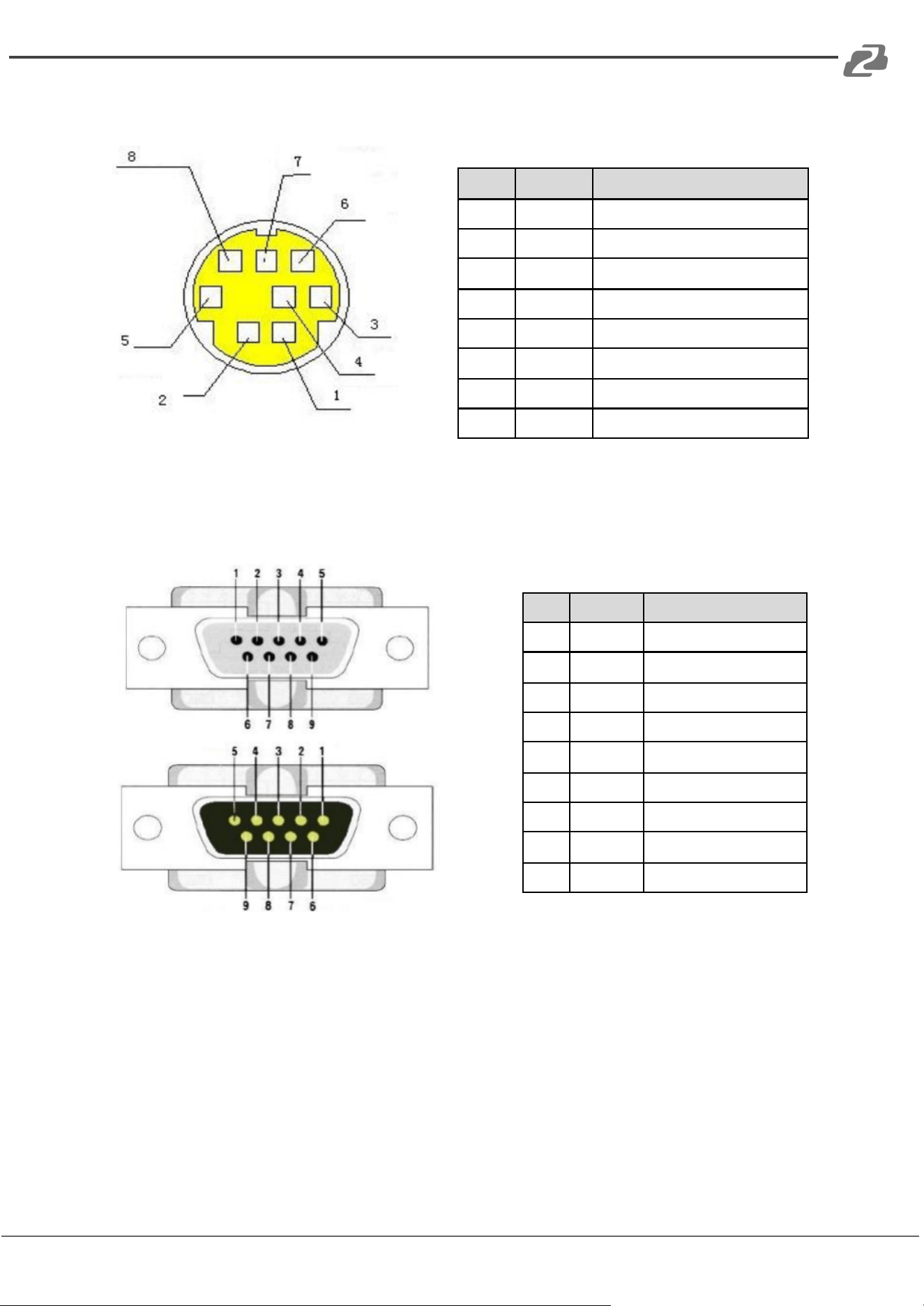
2) RS-232 Mini-DIN 8-pin Port Definition
NO.
Port
Definition
1
DTR
Data Terminal Ready
2
DSR
Data Set Ready
3
TXD
Transmit Data
4
GND
Signal Ground
5
RXD
Receive Data
6
GND
Signal Ground
7
IR OUT
IR Commander Signal
8
NC
No Connection
3) RS232(DB9) Port Definition
NO.
Port
Definition
1
DCD
Data Carrier Detect
2
RXD
Receive Data
3
TXD
Transmit Data
4
DTR
Data Terminal Ready
5
GND
System Ground
6
DSR
Data Set Ready
7
RTS
Request to Send
8
CTS
Clear to Send
9
RI
Ring Indicator
Address: 830 National Drive #140, Sacramento, CA 95834, USA · Tel: +1(888)499-9906 · Email: support@bzbgear.com 12
BZBGEAR BG-BPTZ-XU PRODUCT MANUAL
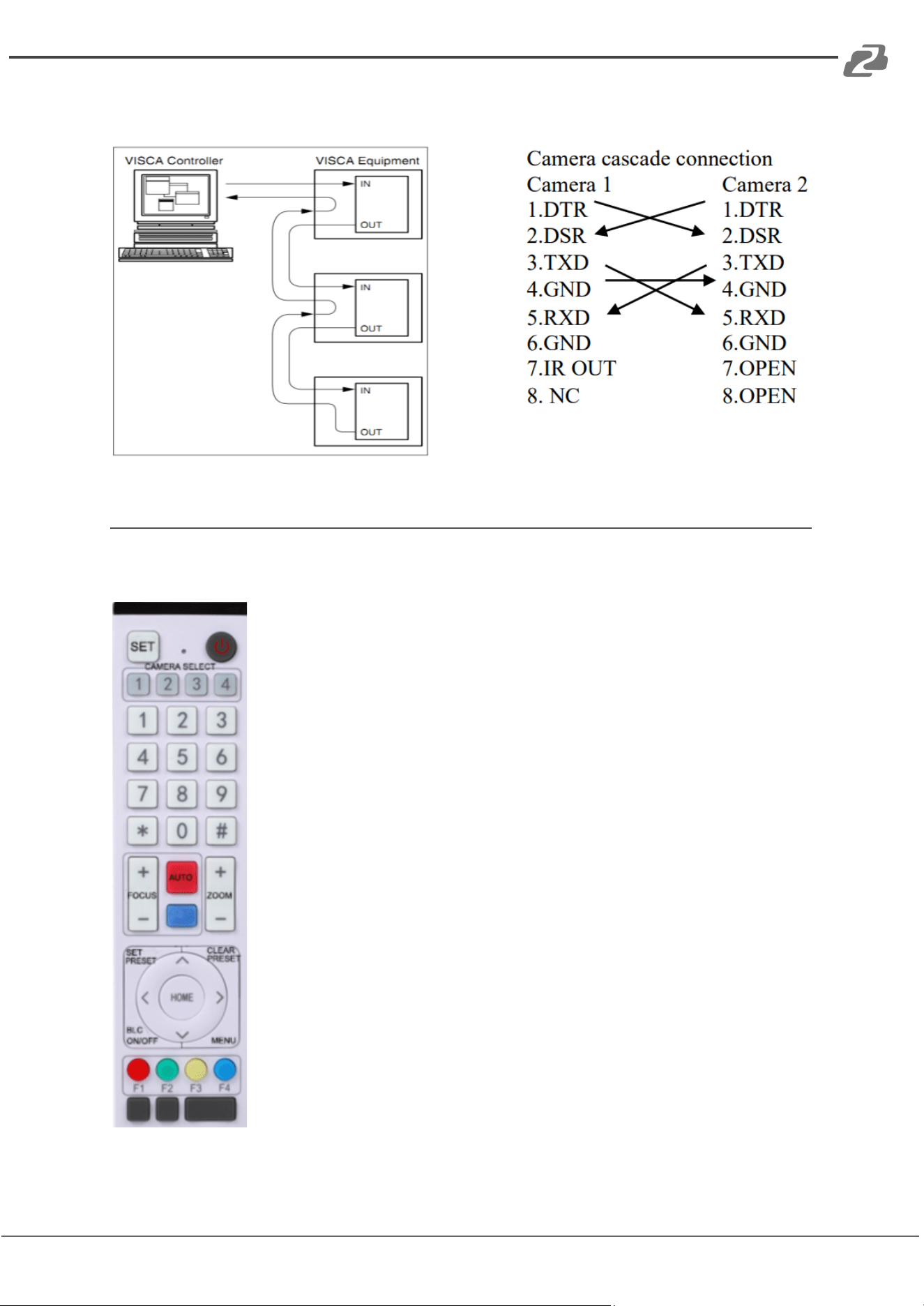
4) VISCA networking as shown below
Remote Control
Match Code for Wireless Remote Control
One-to-One Code Matching:
Press the "set" and "*" keys combined for 3 seconds, LED indicator
starts flashing. Camera will receive the signal and power on. The LED
indicator will turn off if the code matching is successful. The camera can
be controlled by the wireless remote control only after one to one code
pairing.
If one-to-one code matching fails, the red LED light flashes for 20
seconds and then will go off. The camera will halt code matching and
activate sleep mode; Hold the power for 3 seconds to wake the camera
up and re-match code.
Note: Upon matching code successfully, please select the camera’s
address to control it.
Clear Code:
Press the "set" and "*" keys combined for 3 seconds, the LED indicator
will start flashing. Camera will power off and on and the LED indicator
will go off if the code clearing is successful.
Sleep Mode and Wake Up:
Press and hold the power button for 3 seconds to wake up the camera
from sleep mode.
Address: 830 National Drive #140, Sacramento, CA 95834, USA · Tel: +1(888)499-9906 · Email: support@bzbgear.com 13
BZBGEAR BG-BPTZ-XU PRODUCT MANUAL
Keys Introduction for IR Remote Control
● In this manual, “press the key” means a click rather than a long-press, and a special
note will be given if a long-press for more than one second is required.
● When a key-combination is required, do it in sequence. For example, 【*】+【#】+【F1】
means press “【*】” first and then press “【#】” and last press “【F1】”.
1. Standby Key
The camera enters standby mode if the power button is pressed for 3 seconds.
Press and hold power for 3 seconds to wake up the camera and it will perform the
system self-check again and return to the HOME position (If preset (0) position is set, the
camera will return to the preset (0) position).
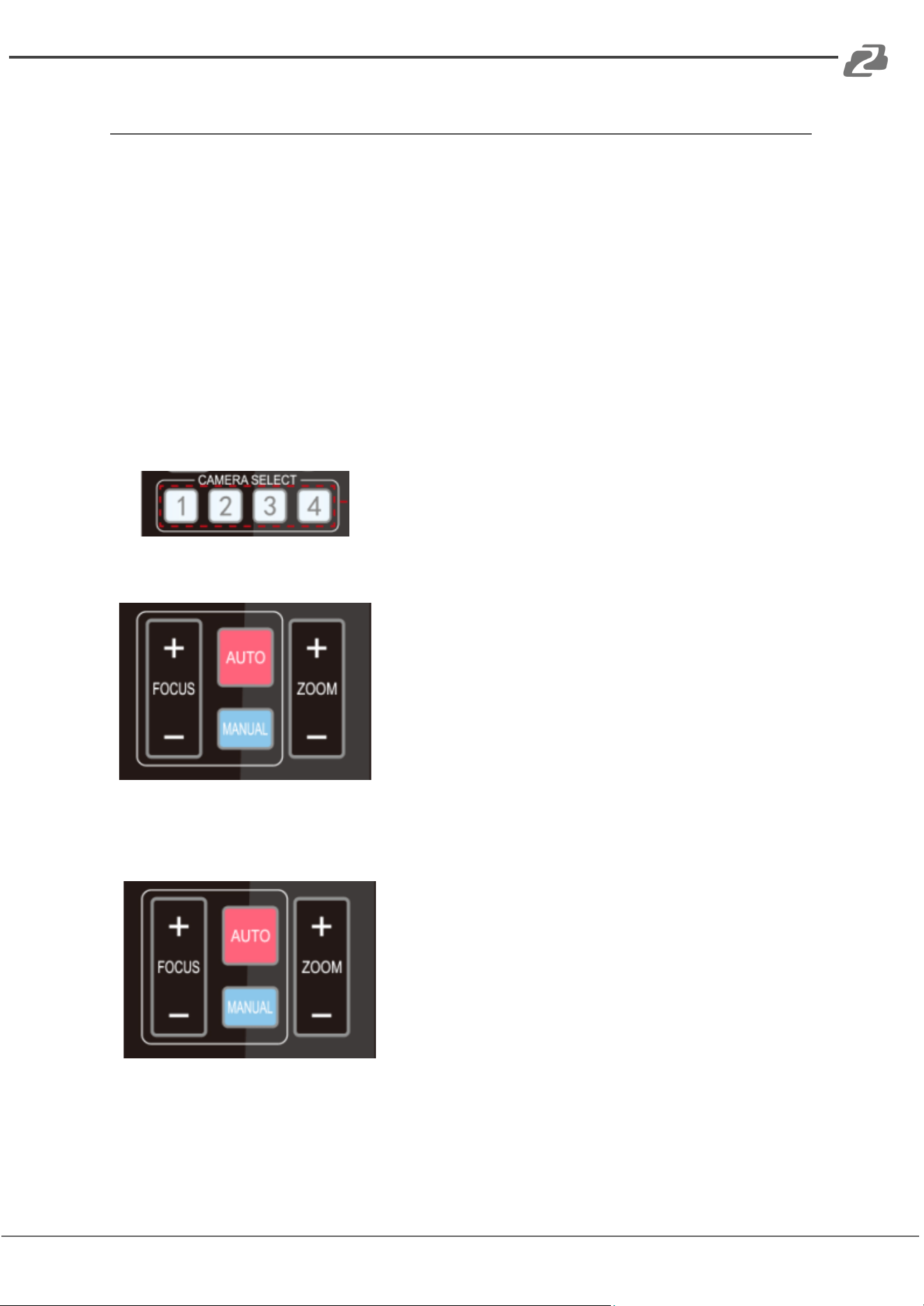
2. Camera Selection
Select the camera’s address to control it.
3. Focus Control
Auto: Auto focus mode
Manual: Manual focus mode
Focus + (near): Press【FOCUS +】 key (Valid only in
manual focus mode)
Focus - (far): Press【FOCUS -】 key (Valid only in
manual focus mode)
Press and hold the keys, focusing will continue and
stop based on the key being pressed and released.
4. Zoom Control
ZOOM +: press【ZOOM +】key to zoom in
ZOOM - : press 【ZOOM -】key to zoom out
Press and hold the keys, the action of zoom will
continue until the key is released.
Address: 830 National Drive #140, Sacramento, CA 95834, USA · Tel: +1(888)499-9906 · Email: support@bzbgear.com 14
BZBGEAR BG-BPTZ-XU PRODUCT MANUAL
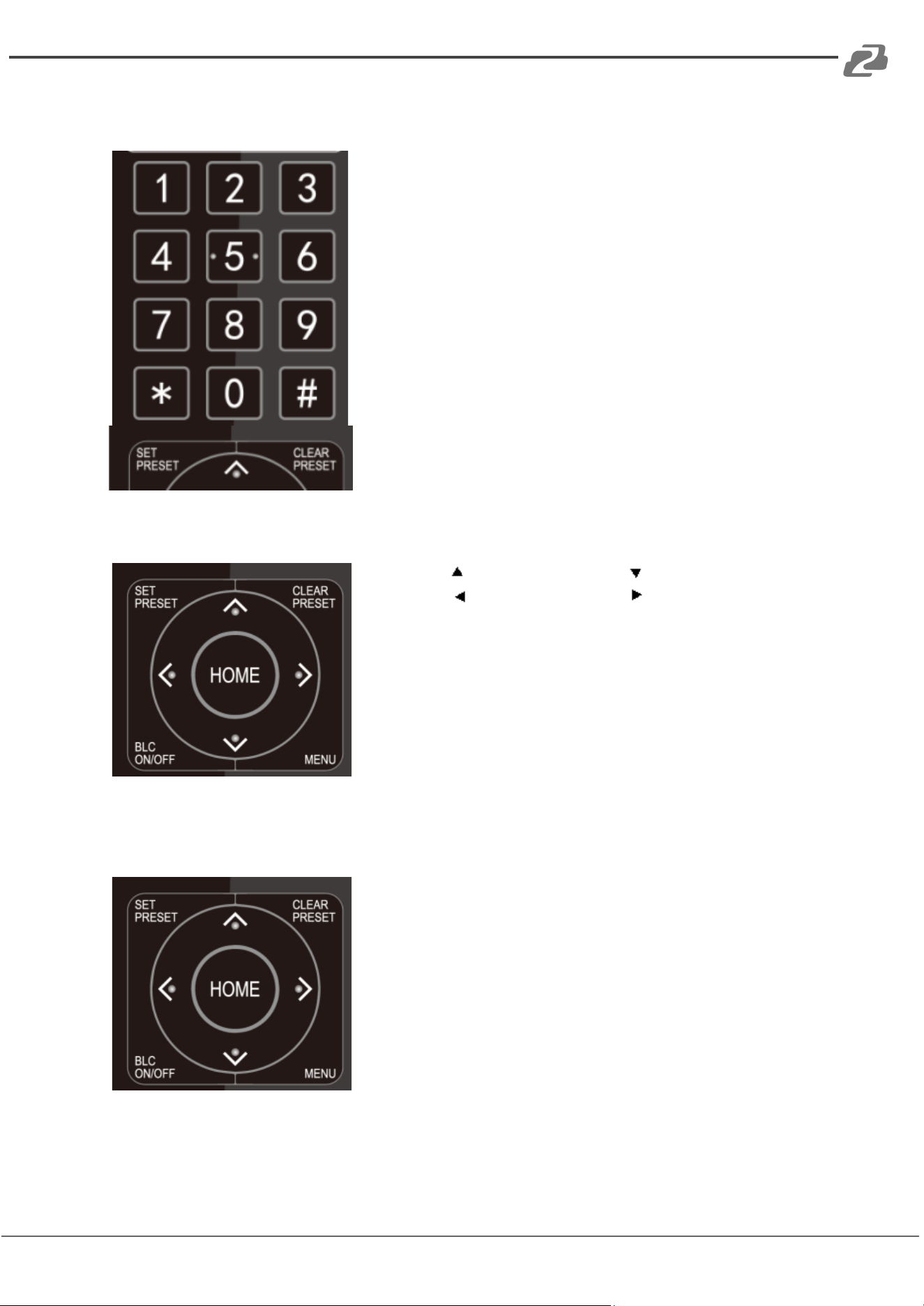
5. Set and Clear Presets
Set Preset: press 【SET PRESET】 button, and then press
the number key 0-9 to set preset positions.
Note: 10 presets are available via the remote control.
Call Preset: Press a number key (0-9) to call a preset
position.
Clear Preset: Press【CLEAR PRESET】and then press the
number key 0-9 to clear the preset position.
Note: press the【#】 key three times to clear all presets.
6. Pan/Tilt Control
Up: press Down: press
Left: press Right: press
Back to middle position: press【HOME】
Press and hold the up/down/left/right key, the pan/tilt
movements will keep running, from slow to fast, until it
runs to the endpoint; the camera will stop as soon as the
key is released.
7. Menu Setting
【MENU】: Open / close the OSD menu
【HOME】: Camera lens back to the middle position;
Confirm button; Enter next menu
【↑】【↓】:Choose item
【←】【→】:Modify values
【BLC ON/OFF】:Turn on or off the back light
compensation
Address: 830 National Drive #140, Sacramento, CA 95834, USA · Tel: +1(888)499-9906 · Email: support@bzbgear.com 15
BZBGEAR BG-BPTZ-XU PRODUCT MANUAL
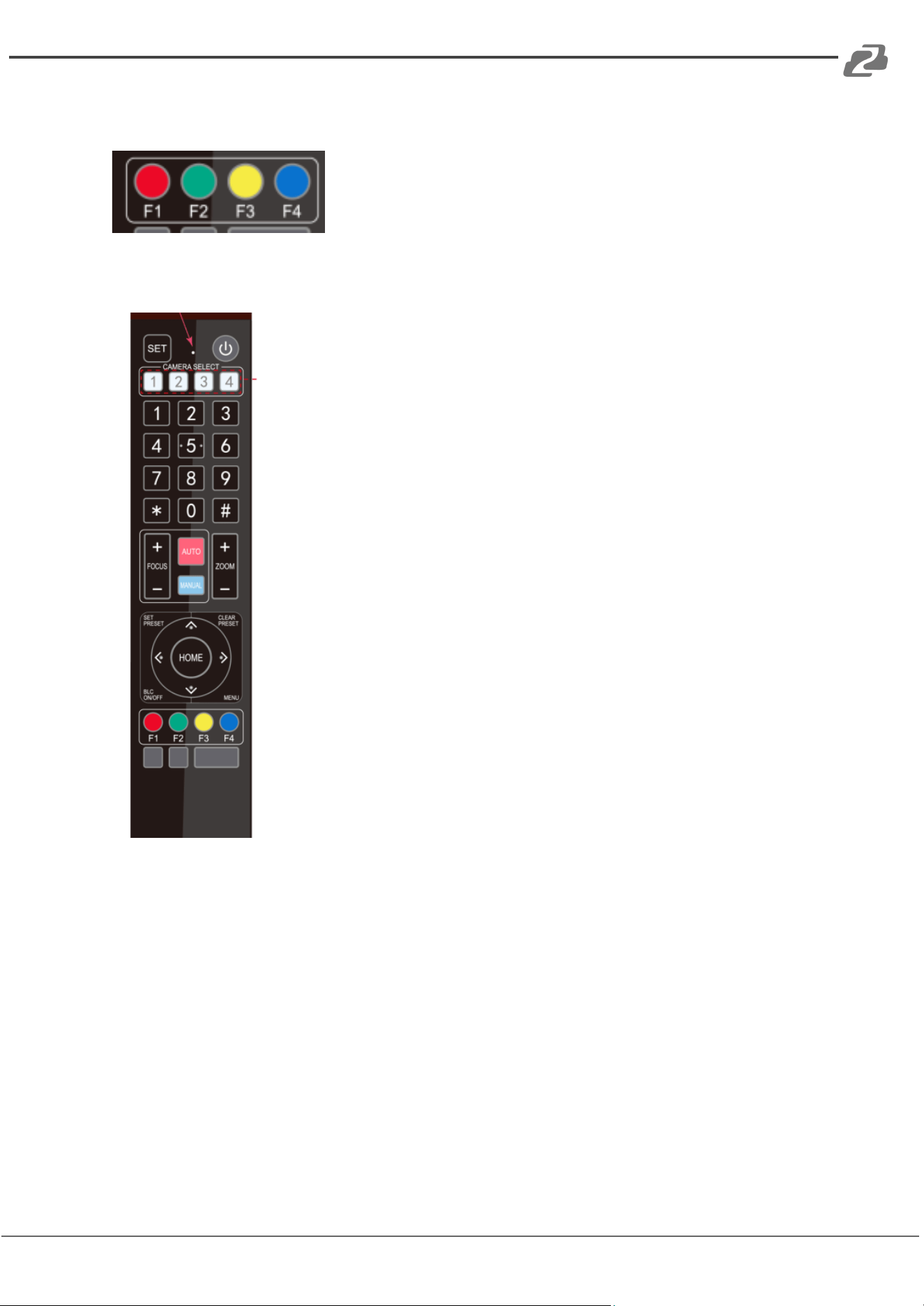
8. Camera Remote Control Address Setting
【*】+【#】+【F1】:Camera Address No.1
【*】+【#】+【F2】:Camera Address No. 2
【*】+【#】+【F3】:Camera Address No. 3
【*】+【#】+【F4】:Camera Address No. 4
9. Key Combination
1) 【#】+【#】+【#】: Clear all presets
2) 【*】+【#】+【6】: Restore factory defaults
3) 【*】+【#】+【3】: Menu set to Chinese
4) 【*】+【#】+【4】: Menu set to English
5) 【*】+【#】+【9】: Flip switch
6) 【*】+【#】+Auto: Enter aging mode
7) 【#】+【*】+Auto: Exit aging mode
8) 【*】+【#】+Manual: Restore the default username, password, and IP
address
9) 【#】+【#】+【0】: Switch the video format to 1080P60
10)【#】+【#】+【1】: Switch the video format to 1080P50
11)【#】+【#】+【2】: Switch the video format to 1080I60
12)【#】+【#】+【3】: Switch the video format to 1080I50
13)【#】+【#】+【4】: Switch the video format to 720P60
14)【#】+【#】+【5】: Switch the video format to 720P50
15)【#】+【#】+【6】: Switch the video format to 1080P30
16)【#】+【#】+【7】: Switch the video format to 1080P25
17)【#】+【#】+【8】: Switch the video format to 720P30
18)【#】+【#】+【9】: Switch the video format to 720P25
Note: If the address of the former remote control is not address 1, the
camera will restore to address 1 when the unit is restored to factory
defaults. Users need to change the remote control address to address
1 to control the camera again.
Address: 830 National Drive #140, Sacramento, CA 95834, USA · Tel: +1(888)499-9906 · Email: support@bzbgear.com 16
BZBGEAR BG-BPTZ-XU PRODUCT MANUAL
Menu Introduction
Main Menu
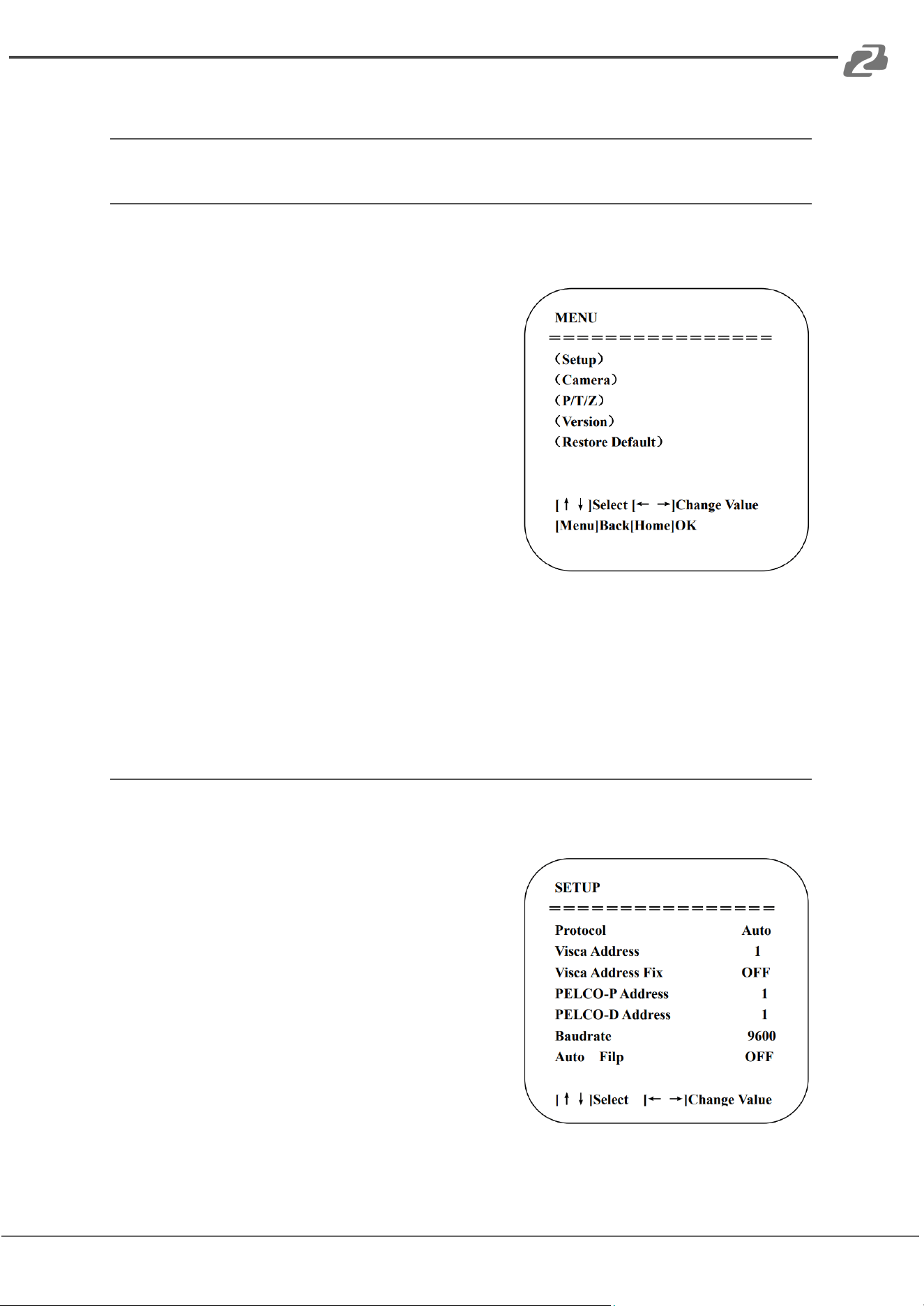
In normal working mode, press the【MENU】 key to display the On Screen Display (OSD)
menu. Use the scrolling arrow to point/highlight items.
Setup: System parameter settings
Camera: Camera parameter settings
P/T/Z: Pan, tilt, and zoom settings
Version: Camera firmware version information
Restore Default: Reset the camera to factory
default settings. Select YES to confirm or NO to
cancel.
[↑↓] Select: Use the up and down arrow keys on the
remote to select a menu item.
[← →] Change Value: Use the left and right arrows keys to modify a setting parameter.
[MENU] Back: Press [Menu] to go back or return to a previous menu item.
[Home] OK: Press [Home] to confirm and implement a settings change.
System Setting
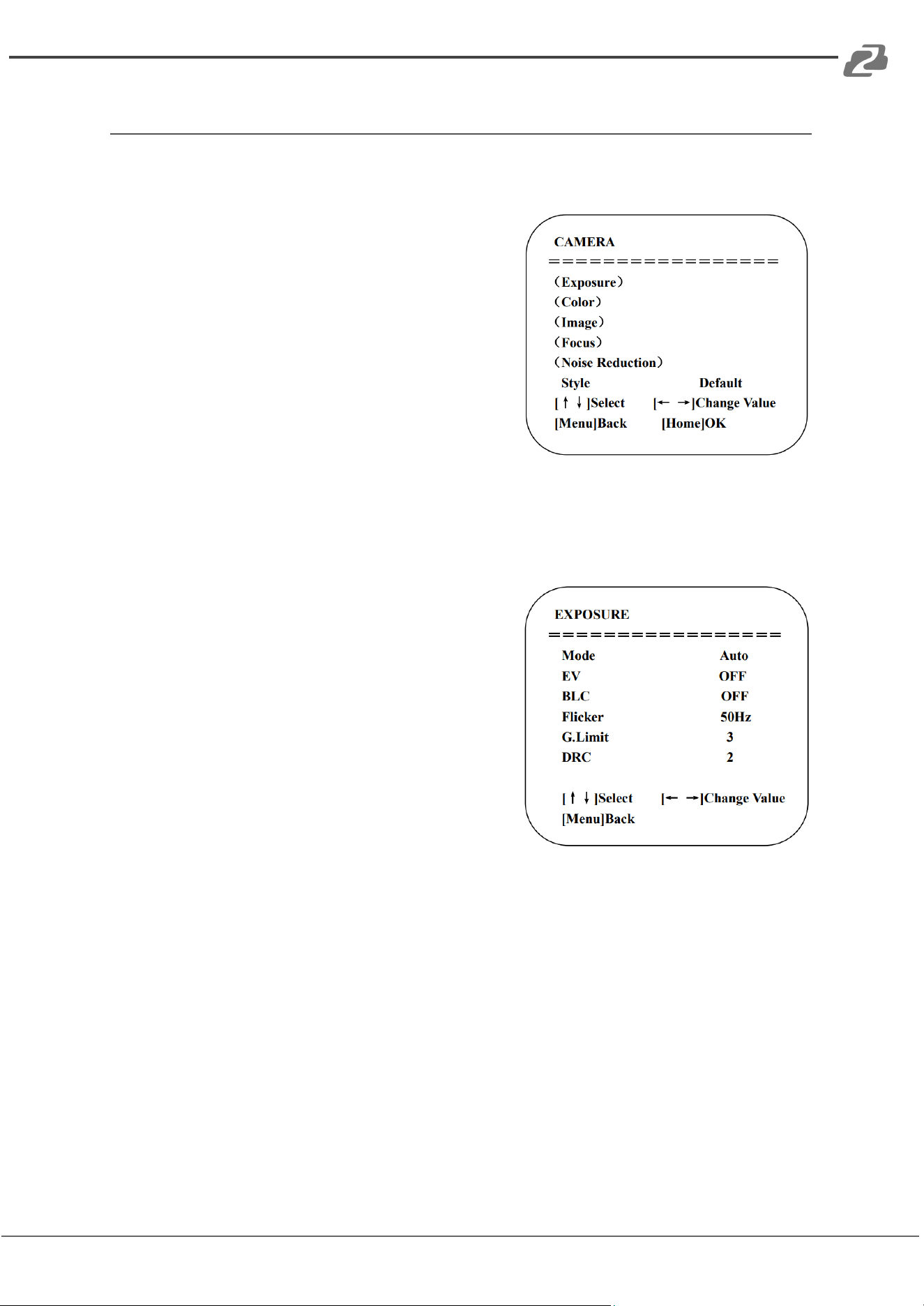
Move the pointer to (Setup) in the Main Menu, click the【HOME】key and enter into the
(System Setting) as shown below:
Protocol: VISCA/Pelco-P/Pelco-D/Auto
Visca Address: VISCA=1~7
Visca Address Fix: On/Off
Pelco-P: 1~255
Pelco-D: 1~255
Baud rate: 2400/4800/9600/115200
Auto Flip: On/Off
Address: 830 National Drive #140, Sacramento, CA 95834, USA · Tel: +1(888)499-9906 · Email: support@bzbgear.com 17
BZBGEAR BG-BPTZ-XU PRODUCT MANUAL
Camera Setting
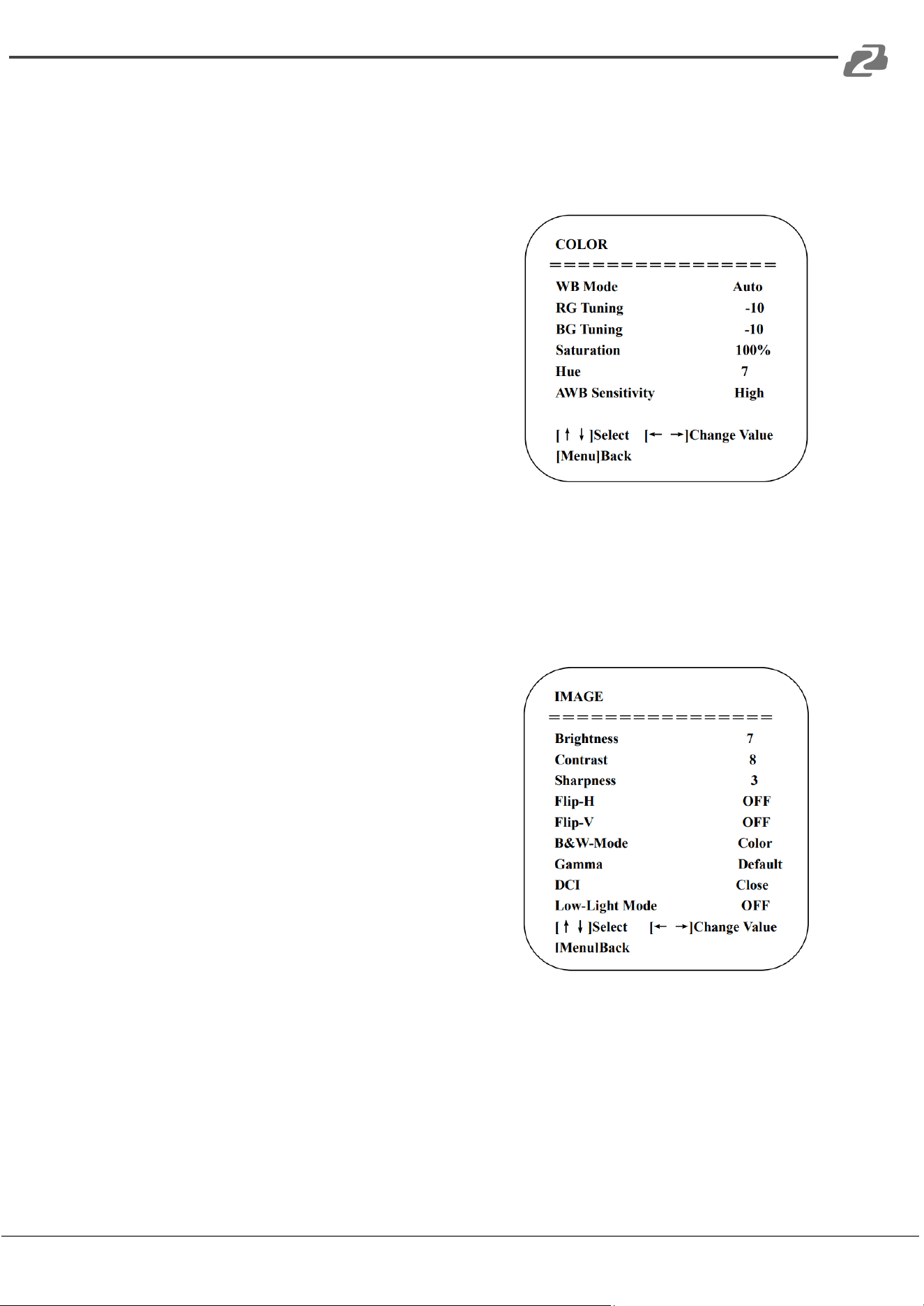
Move the pointer to (CAMERA) in the Main Menu, click the 【HOME】key and enter the
(CAMERA) settings as shown below:
Exposure: Enter into Exposure settings
Color: Enter into color settings
Image: Enter into image settings
Focus: Enter into focus settings
Noise Reduction: Enter into noise reductions
1) Exposure Setting
Move the pointer to (EXPOSURE) in the Main Menu, click the【HOME】key and enter into the
(Exposure) sub menu as shown below:
Mode: Auto, Manual, Shutter priority, Iris priority
and Brightness priority.
EV: On/Off (only available in auto mode)
BLC: ON/OFF for options (only available in auto
mode)
Anti-Flicker: OFF/50Hz/60Hz for options (only
available in Auto/Iris priority/Brightness priority
modes)
Gain limit: 0~15(only available in Auto/ Iris priority
/Brightness priority mode)
DRC: Off, 1~8
Address: 830 National Drive #140, Sacramento, CA 95834, USA · Tel: +1(888)499-9906 · Email: support@bzbgear.com 18
BZBGEAR BG-BPTZ-XU PRODUCT MANUAL
2) Color setting
Move the pointer to (COLOR) in the Main Menu, click the【HOME】and enter the (COLOR)
sub menu as shown below:
WB Mode: Auto, Manual, One Push, 3000K, 3500K,
4000K, 4500K, 5000K, 5500K, 6000K, 6500K,7000K
Red fine-tuning: -10~10 (only available in automatic
mode)
Blue fine-tunable: -10~10 (only available in
automatic mode)
Saturation: 60%, 70%, 80%, 90%, 100%, 110%,
120%, 130%
Hue: 0~14
AWB Sensitivity: high/middle/low
3) Image
Move the pointer to (IMAGE) in the Menu, click the【HOME】and enter into the (IMAGE) sub
menu as shown below:
Brightness: 0~14
Contrast: 0~14
Sharpness: 0~15
Flip-H: On/Off
Flip-V: On/Off
B&W Mode: color, black/white
Gamma: Default/0.45/0.50/0.55/0.63
DCI: Dynamic Contrast: Off/1~8
Address: 830 National Drive #140, Sacramento, CA 95834, USA · Tel: +1(888)499-9906 · Email: support@bzbgear.com 19
BZBGEAR BG-BPTZ-XU PRODUCT MANUAL
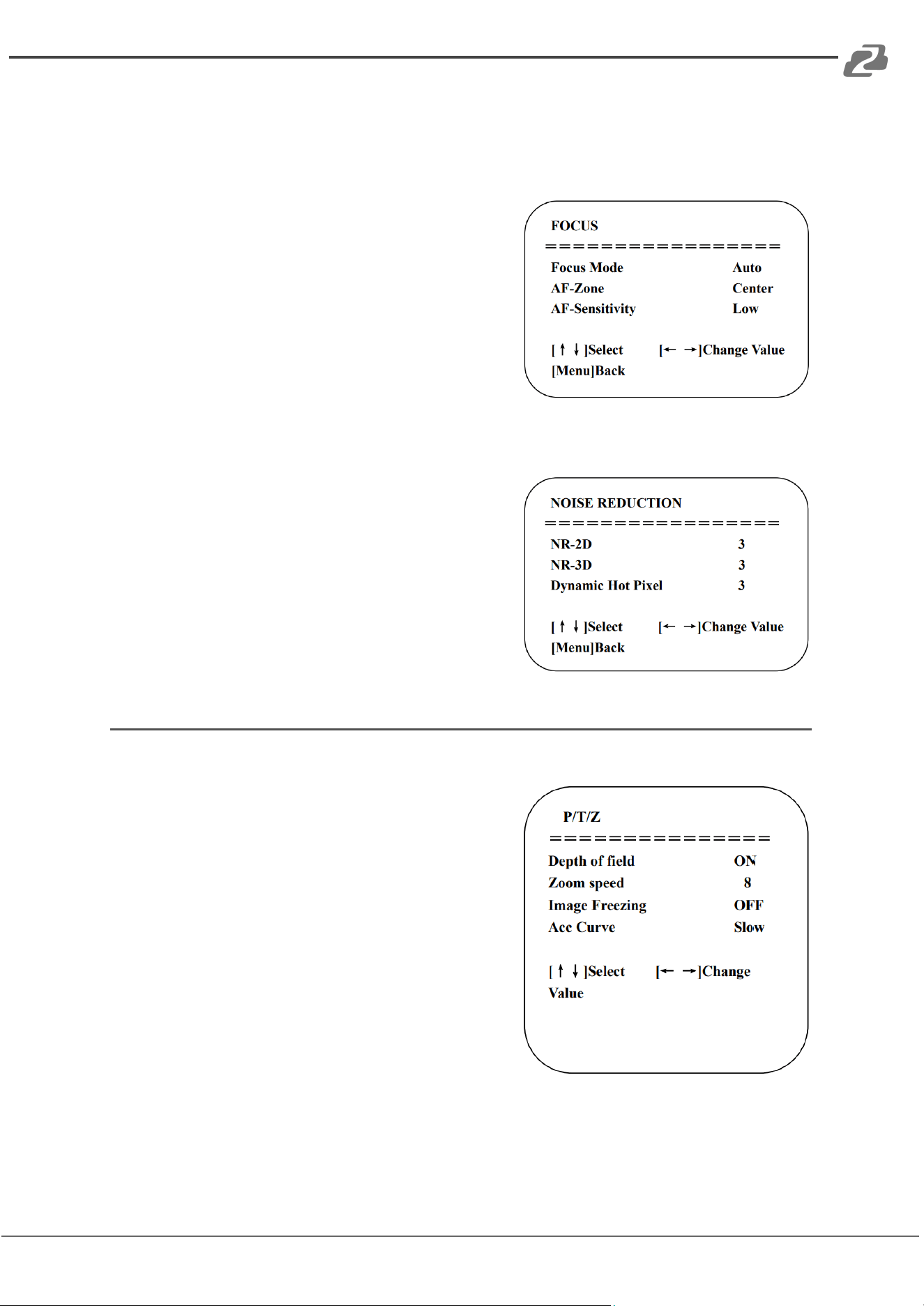
4) Focus
Move the pointer to (FOCUS) in the Menu, click the【HOME】and enter the (FOCUS) menu as
shown below:
Focus Mode: Auto/manual
AF-Zone: Up/middle/down
AF-Sensitivity: High/middle/low
5) Noise Reduction
Move the pointer to (NOISE REDUCTION) in the Menu, click the【HOME】key and enter the
(NOISE REDUCTION) menu as shown below:
2D Noise Reduction: Auto, close, 1~7
3D Noise Reduction: Close, 1~8
Dynamic Hot Pixel: Close, 1~5
P/T/Z
Move the pointer to (P/T/Z) in the Main Menu, click the【HOME】and enter the (P/T/Z) sub
menu as shown below:
Depth of Field: Only effective for the remote
controller, On/ Off;
(When zooming in, the PT control speed by remoter
will become slow)
Zoom Speed: Set the zoom speed for the remote
controller, 1~8
Image Freezing: On/Off
Accelerating Curve: Fast/Slow
Address: 830 National Drive #140, Sacramento, CA 95834, USA · Tel: +1(888)499-9906 · Email: support@bzbgear.com 20
BZBGEAR BG-BPTZ-XU PRODUCT MANUAL
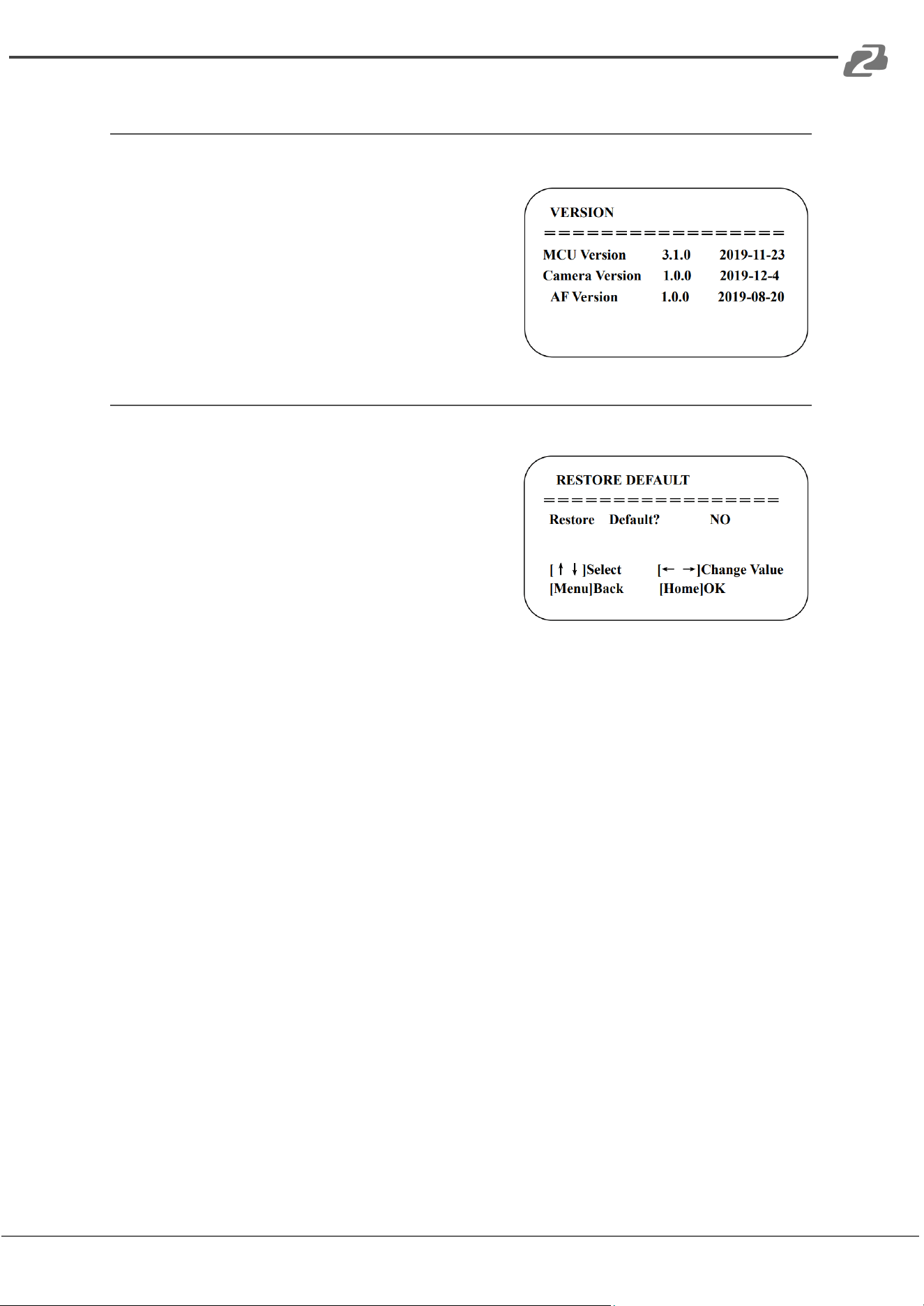
Version
Move the pointer to (VERSION) in the Main Menu, click the【HOME】and enter the (VERSION)
menu as shown below:
MCU Version: Display MCU version information
Camera Version: Display camera version
information
AF Version: Display the focus version information
Restore Default
Move the pointer to (RESTORE DEFAULT) in the Main Menu, click the【HOME】and enter the
(RESTORE DEFAULT) sub menu as shown below:
Restore default: YES/NO. Color style and video
format cannot be restored to factory default
Note: If the address of the camera on a remote was changed to 2, 3, or 4 the camera’s
address will be restored to address 1 when the factory restore is complete. Users will need
to change the remote address back to 1 to control the camera again.
Address: 830 National Drive #140, Sacramento, CA 95834, USA · Tel: +1(888)499-9906 · Email: support@bzbgear.com 21
BZBGEAR BG-BPTZ-XU PRODUCT MANUAL
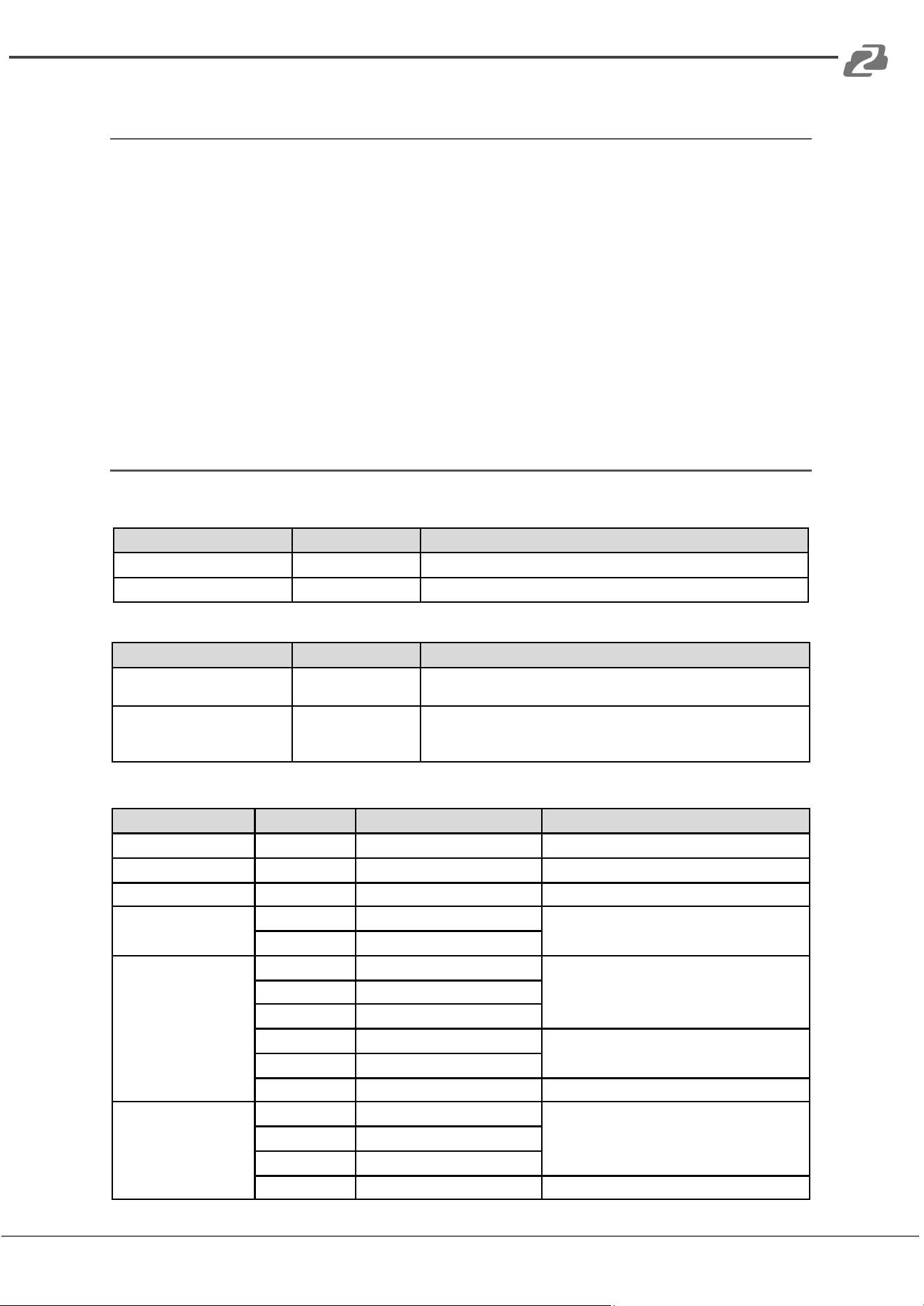
Serial Port Communication and Control
Under normal working conditions the camera can be controlled through its RS-232/RS-485
interfaces using VISCA, PELCO-D, and PELCO-P protocols by using a RS-232 serial adapter
with the following parameter:
Baud rate: 2400/4800/9600/115200 bits / sec;
Start bit: 1;
Data bits: 8;
Stop bit: 1;
Parity: None.
VISCA Protocol List
VISCA Protocol Return Command
Ack/Completion Message
Command packet
Note
ACK
z0 41 FF
Returned when the command is accepted.
Completion
z0 51 FF
Returned when the command has been executed.
z = camera address + 8
Error Messages
Command packet
Note
Syntax Error
z0 60 02 FF
Returned when the command format is different or when a command
with illegal command parameters is accepted
Command Not Executable
z0 61 41 FF
Returned when a command cannot be executed due to current
conditions. For example, when commands controlling the focus
manually are received during auto focus.
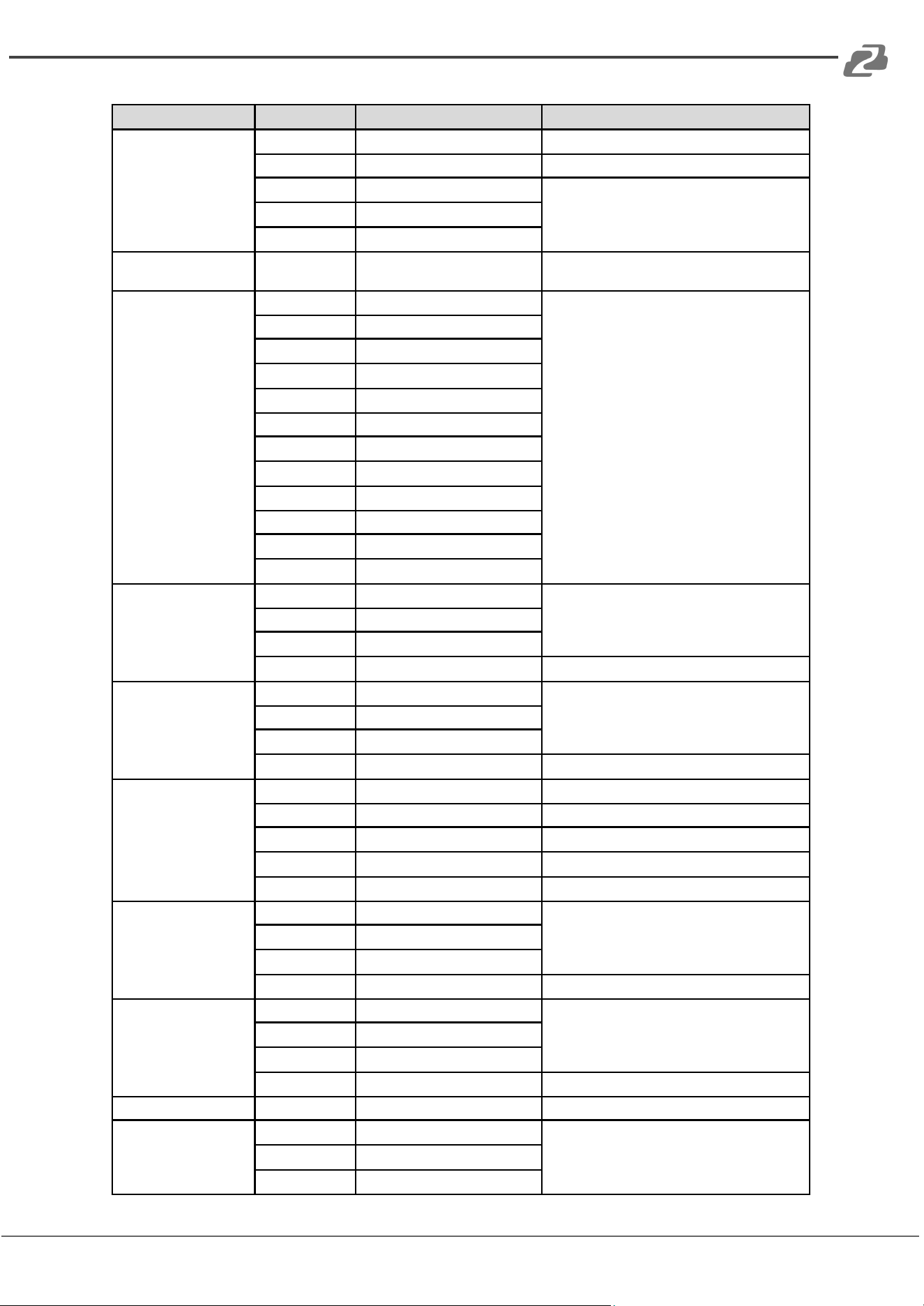
VISCA Protocol Control Command
Command
Function
Command packet
Note
AddressSet
Broadcast
88 30 0p FF
p: Address setting
IFClear
Broadcast
88 01 00 01 FF
1/F Clear
CommandCancel
8x 21 FF
CAM_Power
On
8x 01 04 00 02 FF
Power ON/OFF
Off
8x 01 04 00 03 FF
CAM_Zoom
Stop
8x 01 04 07 00 FF
Tele(Standard)
8x 01 04 07 02 FF
Wide(Standard)
8x 01 04 07 03 FF
Tele(Variable)
8x 01 04 07 2p FF
p = 0(low) - F(high)
Wide(Variable)
8x 01 04 07 3p FF
Direct
8x 01 04 47 0p 0q 0r 0s FF
pqrs: Zoom Position
CAM_Focus
Stop
8x 01 04 08 00 FF
Far(Standard)
8x 01 04 08 02 FF
Near(Standard)
8x 01 04 08 03 FF
Far(Variable)
8x 01 04 08 2p FF
p - O(low) - F(high)
Address: 830 National Drive #140, Sacramento, CA 95834, USA · Tel: +1(888)499-9906 · Email: support@bzbgear.com 22
BZBGEAR BG-BPTZ-XU PRODUCT MANUAL
Command
Function
Command packet
Note
Near (Variable)
8x 01 04 08 3p FF
Direct
8x 01 04 48 0p 0q 0r 0s FF
pqrs: Focus Position
Auto Focus
8x 01 04 38 02 FF
Manual Focus
8x 01 04 38 03 FF
One Push mode
8x 01 04 38 04 FF
CAM_Zoom Focus
Direct
8x 01 04 47 0p 0q 0r
0s 0t 0u 0v 0w FF
pqrs: Zoom Position
tuvw: Focus Position
CAM_WB
Auto
8x 01 04 35 00 FF
3000K
8x 01 04 35 01 FF
4000k
8x 01 04 35 02 FF
One Push mode
8x 01 04 35 03 FF
5000k
8x 01 04 35 04 FF
Manual
8x 01 04 35 05 FF
6500k
8x 01 04 35 06 FF
3500K
8x 01 04 35 07 FF
4500K
8x 01 04 35 08 FF
5500K
8x 01 04 35 09 FF
6000K
8x 01 04 35 0A FF
7000K
8x 01 04 35 0B FF
CAM_RGain
Reset
8x 01 04 03 00 FF
Manual Control of R Gain
Up
8x 01 04 03 02 FF
Down
8x 01 04 03 03 FF
Direct
8x 01 04 43 00 00 0p 0q FF
pq: R Gain
CAM_Bgain
Reset
8x 01 04 04 00 FF
Manual Control of B Gain
Up
8x 01 04 04 02 FF
Down
8x 01 04 04 03 FF
Direct
8x 01 04 44 00 00 0p 0q FF
pq: B Gain
CAM_AE
Full Auto
8x 01 04 39 00 FF
Automatic Exposure mode
Manual
8x 01 04 39 03 FF
Manual Control mode
Shutter priority
8x 01 04 39 0A FF
Shutter Priority Automatic Exposure mode
Iris priority
8x 01 04 39 0B FF
Iris Priority Automatic Exposure mode
Bright
8x 01 04 39 0D FF
Bright mode
CAM_Shutter
Reset
8x 01 04 0A 00 FF
Shutter Setting
Up
8x 01 04 0A 02 FF
Down
8x 01 04 0A 03 FF
Direct
8x 01 04 4A 00 00 0p 0q FF
pq: Shutter Position
CAM_Iris
Reset
8x 01 04 0B 00 FF
Iris Setting
Up
8x 01 04 0B 02 FF
Down
8x 01 04 0B 03 FF
Direct
8x 01 04 4B 00 00 0p 0q FF
pq: Iris Position
CAM_Gain Limit
Gain Limit
8x 01 04 2C 0p FF
p: Gain Position
CAM_Bright
Reset
8x 01 04 0D 00 FF
Bright Setting
Up
8x 01 04 0D 02 FF
Down
8x 01 04 0D 03 FF
Address: 830 National Drive #140, Sacramento, CA 95834, USA · Tel: +1(888)499-9906 · Email: support@bzbgear.com 23
BZBGEAR BG-BPTZ-XU PRODUCT MANUAL
Command
Function
Command packet
Note
Direct
8x 01 04 4D 00 00 0p 0q FF
pq: Bright Position
CAM_ExpComp
On
8x 01 04 3E02 FF
Exposure Compensation ON/OFF
Off
8x 01 04 3E03 FF
Reset
8x 01 04 0E 00 FF
Exposure Compensation Amount Setting
Up
8x 01 04 0E 02 FF
Down
8x 01 04 0E 03 FF
Direct
8x 01 04 4E 00 00 0p 0q FF
pq: ExpComp Position
CAM_Back Light
On
8x 01 04 33 02 FF
Back Light Compensation
Off
8x 01 04 33 03 FF
CAM_WDRStrength
Reset
8x 01 04 21 00 FF
WDR Level Setting
Up
8x 01 04 21 02 FF
Down
8x 01 04 21 03 FF
Direct
8x 01 04 51 00 00 00 0p FF
p: WDR Level Position
CAM_NR (2D)
8x 01 04 53 0p FF
P=0-7
0:OFF
CAM_NR (3D)
8x 01 04 54 0p FF
P=0-8
0:OFF
CAM_Gamma
8x 01 04 5B 0p FF
p = 0 - 4
0: Default
1: 0.45 2: 0.50 3: 0.55 4: 0.63
CAM_Flicker
OFF
8x 01 04 23 00 FF
OFF
50HZ
8x 01 04 23 01 FF
50HZ
60HZ
8x 01 04 23 02 FF
60HZ
CAM_Aperture
Reset
8x 01 04 02 00 FF
Aperture Control
Up
8x 01 04 02 02 FF
Down
8x 01 04 02 03 FF
Direct
8x 01 04 42 00 00 0p 0q FF
pq: Aperture Gain
CAM_Memory
Reset
8x 01 04 3F00 pq FF
pq: Memory Number(=0 to 254) Corresponds
to 0 to 9 on the Remote Commander
Set
8x 01 04 3F01 pq FF
Recall
8x 01 04 3F02 pq FF
CAM_LR_Reverse
On
8x 01 04 61 02 FF
Image Flip Horizontal ON/OFF
Off
8x 01 04 61 03 FF
CAM_PictureFlip
On
8x 01 04 66 02 FF
Image Flip Vertical ON/OFF
Off
8x 01 04 66 03 FF
CAM_ColorSaturation
Direct
8x 01 04 49 00 00 00 0p FF
P=0-7
0:60% 1:70% 2:80% 3:90% 4:100%
5:110% 6:120% 7:130%
CAM_IDWrite
8x 01 04 22 0p 0q 0r 0s FF
pqrs: Camera ID (=0000 to FFFF)
SYS_Menu
ON
8x 01 04 06 06 02 FF
Turn on the menu screen
OFF
8x 01 04 06 06 03 FF
Turn off the menu screen
IR_Receive
ON
8x 01 06 08 02 FF
IR(remote commander)receive On/Otf
OFF
8x 01 06 08 03 FF
IR_ReceiveRetum
On
8x 01 7D 01 03 00 00 FF
IR(remote commander)receive message via the
VISCA communication ON/OFF
Off
8x 01 7D01 13 00 00 FF
CAM_SettingReset
Reset
8x 01 04 A0 10 FF
Reset Factory Setting
CAM_Brightness
Direct
8x 01 04 A1 00 00 0p 0q FF
pq: Brightness Position
Address: 830 National Drive #140, Sacramento, CA 95834, USA · Tel: +1(888)499-9906 · Email: support@bzbgear.com 24
BZBGEAR BG-BPTZ-XU PRODUCT MANUAL
Command
Function
Command packet
Note
CAM_Contrast
Direct
8x 01 04 A2 00 00 0p 0q FF
pq: Contrast Position
CAM_Flip
OFF
8x 01 04 A4 00FF
Single Command For Video Flip
Flip-H
8x 01 04 A4 01 FF
Flip-V
8x 01 04 A4 02 FF
Flip-HV
8x 01 04 A4 03 FF
CAM_VideoSystem
Set camera
video system
8x 01 06 35 00 0p FF
P: 0~E Video format
0:1080P60 8:720P30
1:1080P50 9:720P25
2:1080i60 A:1080P59.94
3:1080i50 B:1080i59.94
4:720P60 C:720P59.94
5:720P50 D:1080P29.97
6:1080P30 E:720P29.97
7:1080P25
Pan-tiltDrive
Up
8x 01 06 01 VV WW03 01 FF
VV: Pan speed 0x01 (low speed)
to 0x18 (high speed)
WW: Tilt speed 0x01 (low speed)
to 0x14 (high speed)
YYYY: Pan Position
ZZZZ: Tilt Position
Down
8x 01 06 01 VV WW 03 02 FF
Left
8x 01 06 01 VV WW01 03 FF
Right
8x 01 06 01 VV WW 02 03 FF
Upleft
8x 01 06 01 VV WW01 01 FF
Upright
8x 01 06 01 VV WW02 01 FF
DownLeft
8x 01 06 01 VV WW01 02 FF
DownRight
8x 01 06 01 VV WW 02 02 FF
Stop
8x 01 06 01 VV WW 03 03 FF
AbsolutePosition
8x 01 06 02 VV WW
0Y 0Y 0Y 0Y 0Z 0Z 0Z 0Z FF
RelativePosition
8x 01 06 03 VV WW
0Y 0Y 0Y 0Y 0Z 0Z 0Z 0Z FF
Home
8x 01 06 04 FF
Reset
8x 01 06 05 FF
Pan-tiltLimitSet
Set
8x 01 06 07 00 0W
0Y 0Y 0Y 0Y 0Z 0Z 0Z 0Z FF
W: 1 UpRight 0: DownLeft
YYYY: Pan Limit Position(TBD)
ZZZZ: Tilt Limit Position(TBD)
Clear
8x 01 06 07 01 0W
07 0F 0F 0F 07 0F 0F 0F FF
VISCA Protocol Inquiry Command
Command
Command Packet
Return Packet
Note
CAM_Powerlnq
8x 09 04 00 FF
y0 50 02 FF
On
y0 50 03 FF
Off(Standby)
CAM_ZoomPosInq
8x 09 04 47 FF
y0 50 0p 0q 0r 0s FF
pqrs: Zoom Position
CAM_FocusAFModelnq
8x 09 04 38 FF
y0 50 02 FF
Auto Focus
y0 50 03 FF
Manual Focus
y0 50 04 FF
One Push mode
CAM_FocusPosInq
8x 09 04 48 FF
y0 50 0p 0q 0r 0s FF
pqrs: Focus Position
CAM_WBModelnq
8x 09 04 35 FF
y0 50 00 FF
Auto
y0 50 01 FF
3000K
y0 50 02 FF
4000K
y0 50 03 FF
One Push Mode
y0 50 04 FF
5000K
y0 50 05 FF
Manual
Address: 830 National Drive #140, Sacramento, CA 95834, USA · Tel: +1(888)499-9906 · Email: support@bzbgear.com 25
BZBGEAR BG-BPTZ-XU PRODUCT MANUAL
Command
Command Packet
Return Packet
Note
y0 50 00 FF
6500K
y0 50 06 FF
6500K
y0 50 07 FF
3500K
y0 50 08 FF
4500K
y0 50 09 FF
5500K
y0 50 0A FF
6000K
CAM_RGainlnq
8x 09 04 43 FF
y0 50 0B FF
7000K
CAM_BGainlnq
8x 09 04 44 FF
y0 50 00 00 0p 0q FF
pq: B Gain
CAM_AEModelnq
8x 09 04 39 FF
y0 50 00 FF
Full Auto
y0 50 03 FF
Manual
y0 50 0A FF
Shutter priority
y0 50 0B FF
Iris priority
y0 50 0D FF
Bright
CAM_ShutterPosInq
8x 09 04 4A FF
y0 50 00 00 0p 0q FF
pq: Shutter Position
CAM_IrisPosInq
8x 09 04 4B FF
y0 50 00 00 0p 0q FF
pq: Iris Position
CAM_GainLimitlnq
8x 09 04 2C FF
y0 50 0p FF
p: Gain Position
CAM_BrightPosilnq
8x 09 04 4D FF
y0 50 00 00 0p 0q FF
pq: Bright Position
CAM_ExpCompModeln
q
8x 09 04 3E FF
y0 50 02 FF
On
y0 50 03 FF
Off
CAM_ExpCompPosInq
8x 09 04 4E FF
y0 50 00 00 0p 0q FF
pq: ExpComp Position
CAM_BacklightModelnq
8x 09 04 33 FF
y0 50 02 FF
On
y0 50 03 FF
Off
CAM_WDRStrengthInq
8x 09 04 51 FF
y0 50 00 00 00 0p FF
p: WDR Strength
CAM_NRLevel(2D)Inq
8x 09 04 53 FF
y0 50 0p FF
p: 2DNR LeveI
CAM_NRLevel(3D)Inq
8x 09 04 54 FF
y0 50 0p FF
p: 3DNR Level
CAM_FlickerModelnq
8x 09 04 55 FF
y0 50 0p FF
p: Flicker Settings(0: OFF, 1: 50Hz, 2:60Hz)
CAM_Apertureinq
8x 09 04 42 FF
y0 50 00 00 0p 0q FF
pq: Aperture Gain
CAM_PictureEffectMod
elnq
8x 09 04 63 FF
y0 50 00 FF
Off
y0 50 04 FF
B&W
CAM_MemoryInq
8x 09 04 3F FF
y0 50 0p FF
p: Memory number last operated.
SYSMenuModelnq
8x 09 06 06 FF
y0 50 02 FF
On
y0 50 03 FF
Off
CAM_LRReverselnq
8x 09 04 61 FF
y0 50 02 FF
On
y0 50 03 FF
Off
CAM_PictureFlipInq
8x 09 04 66 FF
y0 50 02 FF
On
y0 50 03 FF
Off
CAM_ColorSaturationln
q
8x 09 04 49 FF
y0 50 00 00 00 0p FF
p: Color Gain setting Oh (60%) to Eh (130%)
CAM_IDInq
8x 09 04 22 FF
y0 50 0p FF
p: Gamma ID
IR_Receivelnq
8x 09 06 08 FF
y0 50 02 FF
On
y0 50 03 FF
Off
IR_ReceiveRetum
y0 07 7D 01 04 00 FF
Power ON/OFF
y0 07 7D 01 04 07 FF
Zoom tele/wide
y0 07 7D 01 04 38 FF
AF ON/OFF
Address: 830 National Drive #140, Sacramento, CA 95834, USA · Tel: +1(888)499-9906 · Email: support@bzbgear.com 26
BZBGEAR BG-BPTZ-XU PRODUCT MANUAL
Command
Command Packet
Return Packet
Note
y0 07 7D 01 04 33 FF
Camera Backlight
y0 07 7D 01 04 3F FF
Camera Memory
y0 07 7D01 06 01 FF
Pan title Driver
CAM_Brightnesslnq
8x 09 04 A1 FF
y0 50 00 00 0p 0q FF
pq: Brightness Position
CAM_Contrastinq
8x 09 04 A2 FF
y0 50 00 00 0p 0q FF
pq: Contrast Position
CAM_FlipInq
8x 09 04 A4 FF
y0 50 00 FF
Off
y0 50 01 FF
Flip-H
y0 50 02 FF
Flip-V
y0 50 03 FF
Flip-HV
CAM_Gammalnq
8x 09 04 5B FF
y0 50 0p FF
p: Gamma setting
CAM_Versionlnq
8x 09 00 02 FF
y0 50 ab cd mn pq rs tu
vw FF
ab cd : vender ID ( 0220 )
mn pq : model ID ST ( 0910 )
U3 ( 3950 )
rs tu : ARM Version
vw : reserve
VideoSystemlnq
8x 09 06 23 FF
y0 50 0p FF
P: 0~E Video format
0:1080P60 8:720P30
1:1080P50 9:720P25
2:1080i60 A:1080P59.94
3:1080i50 B:1080i59.94
4:720P60 C:720P59.94
5:720P50 D:1080P29.97
6:1080P30 E:720P29.97
7:1080P25
Pan-tiltMaxSpeedlnq
8x 09 06 11 FF
y0 50 ww zz FF
ww: Pan Max Speed
zz: Tilt Max Speed
Pan-tiltPosInq
8x 09 06 12 FF
y0 50 0w 0w 0w 0w
wwww: Pan Position
zzzz: Tilt
0z0z0z0zFF
Position
Note: [X] in the above table indicates the camera address to be operated,【y】=【x + 8】.
Pelco-D Protocol Command List
Function
Byte1
Byte2
Byte3
Byte4
Byte5
Byte6
Byte7
Up
0xFF
Address
0x00
0x08
Pan Speed
Tilt Speed
SUM
Down
0xFF
Address
0x00
0x10
Pan Speed
Tilt Speed
SUM
Left
0xFF
Address
0x00
0x04
Pan Speed
Tilt Speed
SUM
Right
0xFF
Address
0x00
0x02
Pan Speed
Tilt Speed
SUM
Upleft
0xFF
Address
0x00
0x0C
Pan Speed
Tilt Speed
SUM
Upright
0xFF
Address
0x00
0x0A
Pan Speed
Tilt Speed
SUM
DownLeft
0xFF
Address
0x00
0x14
Pan Speed
Tilt Speed
SUM
DownRight
0xFF
Address
0x00
0x12
Pan Speed
Tilt Speed
SUM
Zoom In
0xFF
Address
0x00
0x20
0x00
0x00
SUM
Zoom Out
0xFF
Address
0x00
0x40
0x00
0x00
SUM
Focus Far
0xFF
Address
0x00
0x80
0x00
0x00
SUM
Focus Near
0xFF
Address
0x01
0x00
0x00
0x00
SUM
Stop
0xFF
Address
0x00
0x00
0x00
0x00
SUM
Set Preset
0xFF
Address
0x00
0x03
0x00
Preset ID
SUM
Clear Preset
0xFF
Address
0x00
0x05
0x00
Preset ID
SUM
Address: 830 National Drive #140, Sacramento, CA 95834, USA · Tel: +1(888)499-9906 · Email: support@bzbgear.com 27
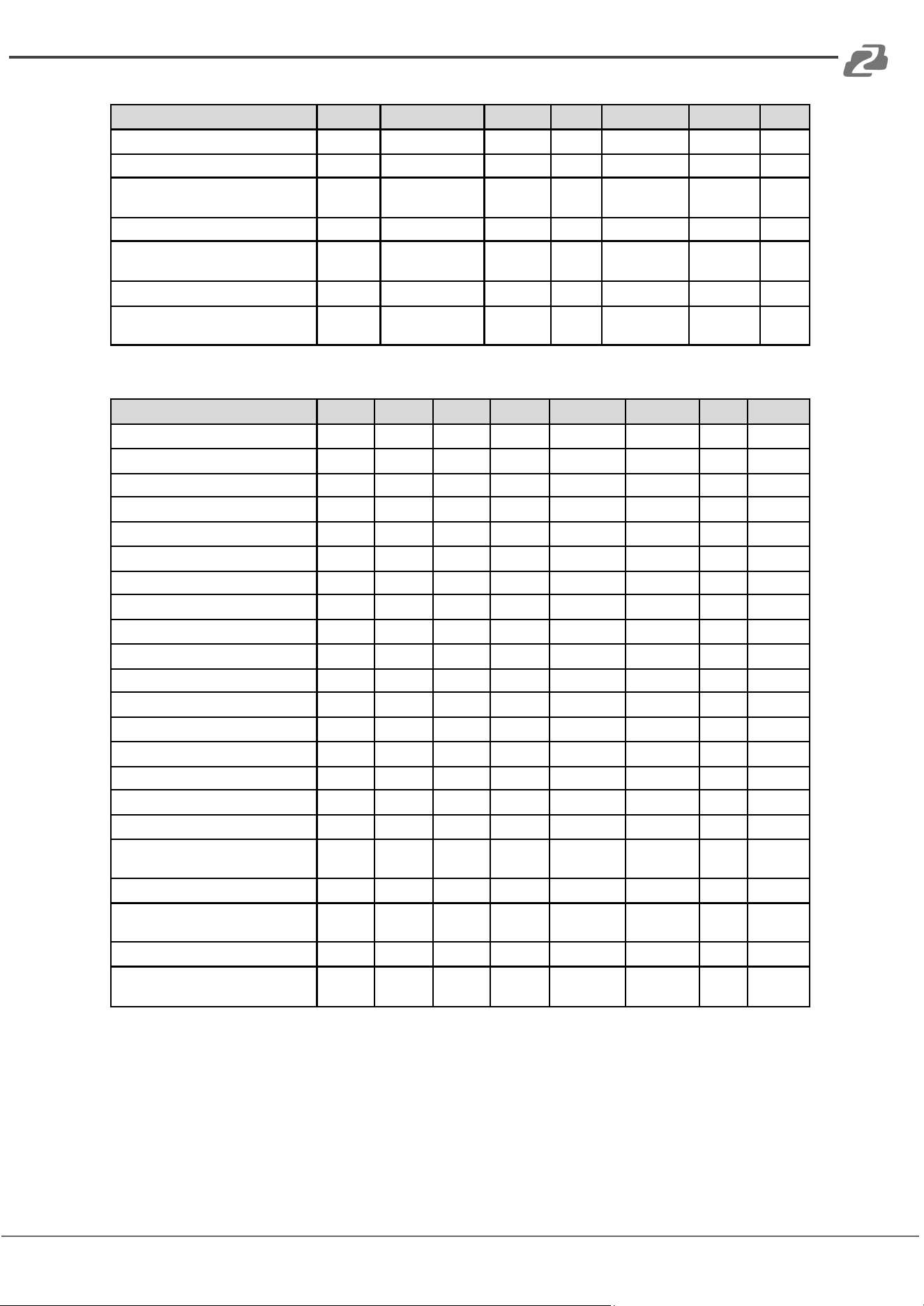
BZBGEAR BG-BPTZ-XU PRODUCT MANUAL
Function
Byte1
Byte2
Byte3
Byte4
Byte5
Byte6
Byte7
Call Preset
0xFF
Address
0x00
0x07
0x00
Preset ID
SUM
Query Pan Position
0xFF
Address
0x00
0x51
0x00
0x00
SUM
Query Pan Position Response
0xFF
Address
0x00
0x59
Value High
Byte
Value Low
Byte
SUM
Query Tilt Position
0xFF
Address
0x00
0x53
0x00
0x00
SUM
Query Tilt Position Response
0xFF
Address
0x00
0x5B
Value High
Byte
Value Low
Byte
SUM
Query Zoom Position
0xFF
Address
0x00
0x55
0x00
0x00
SUM
Query Zoom Position Response
0xFF
Address
0x00
0x5D
Value High
Byte
Value Low
Byte
SUM
Pelco-P Protocol Command List
Function
Byte1
Byte2
Byte3
Byte4
ByteS
Byte6
Byte7
Byte8
Up
0xAO
Address
0x00
0x08
Pan Speed
Tilt Speed
0xAF
XOR
Down
0xAO
Address
0x00
0x10
Pan Speed
Tilt Speed
0xAF
XOR
Left
0xAO
Address
0x00
0x04
Pan Speed
Tilt Speed
0xAF
XOR
Right
0xAO
Address
0x00
0x02
Pan Speed
Tilt Speed
0xAF
XOR
Upleft
0xAO
Address
0x00
0xOC
Pan Speed
Tilt Speed
0xAF
XOR
Upright
0xAO
Address
0x00
0xOA
Pan Speed
Tilt Speed
0xAF
XOR
DownLeft
0xAO
Address
0x00
0x14
Pan Speed
Tilt Speed
0xAF
XOR
DownRight
0xAO
Address
0x00
0x12
Pan Speed
Tilt Speed
0xAF
XOR
Zoom In
0xAO
Address
0x00
0x20
0x00
0x00
0xAF
XOR
Zoom Out
0xAO
Address
0x00
0x40
0x00
0x00
0xAF
XOR
Stop
0xAO
Address
0x00
0x00
0x00
0x00
0xAF
XOR
Focus Far
0xAO
Address
0x01
0x00
0x00
0x00
0xAF
XOR
Focus Near
0xAO
Address
0x02
0x00
0x00
0x00
0xAF
XOR
Set Preset
0xAO
Address
0x00
0x03
0x00
Preset ID
0xAF
XOR
Clear Preset
0xAO
Address
0x00
0x05
0x00
Preset ID
0xAF
XOR
Call Preset
0xAO
Address
0x00
0x07
0x00
Preset ID
0xAF
XOR
Query Pan Position
0xAO
Address
0x00
0x51
0x00
0x00
0xAF
XOR
Query Pan Position Response
0xAO
Address
0x00
0x59
Value High
Byte
Value Low
Byte
0xAF
XOR
Query Tilt Position
0xAO
Address
0x00
0x53
0x00
0x00
0xAF
XOR
Query Tilt Position Response
0xAO
Address
0x00
0x5 B
Value High
Byte
Value Low
Byte
0xAF
XOR
Query Zoom Position
0xAO
Address
0x00
0x55
0x00
0x00
0xAF
XOR
Query Zoom Position Response
0xAO
Address
0x00
0x5D
Value High
Byte
Value Low
Byte
0xAF
XOR
Address: 830 National Drive #140, Sacramento, CA 95834, USA · Tel: +1(888)499-9906 · Email: support@bzbgear.com 28

BZBGEAR BG-BPTZ-XU PRODUCT MANUAL
Camera Maintenance and Troubleshooting
Camera Maintenance
1) If the camera will not be used for an extended period of time, turning off the power
can help extend the life of the product.
2) Use a soft cloth or tissue to clean the camera body.
3) Use soft cloth to clean the lens; Use neutral cleanser if needed by applying it to the
cloth first. Do not directly spray the camera.
Troubleshooting
1) No Video Output:
● Check if the camera power supply is connected, the voltage is normal, and the
power indicator is lit.
● Check whether the camera performed a self-test after restart successfully.
● Check whether the bottom DIP switch is in the normal operating mode.
● Verify that the output cable and display monitor are working properly.
2) Intermitent Image:
● Verify that the output cable and video displays are working properly.
3) Image distorts/is shaky when camera is stationary/moving:
● Check whether the camera installation position is solid.
● Check whether there is machinery or objects nearby that could be transmitting
vibration to the camera.
4) Remote control does not work:
● Verify the remote control address is set appropriately.
● Check remote control batteries.
● Verify the camera is in the normal operating mode.
● Verify the OSD has been exited. The camera cannot be controlled while the menu is
being displayed.
5) Serial port not works:
● Verify that the camera serial device protocol, baud rate, address is correct.
● Check whether the control cable is connected properly.
● Check whether the camera working mode is set to the normal operating mode.
Address: 830 National Drive #140, Sacramento, CA 95834, USA · Tel: +1(888)499-9906 · Email: support@bzbgear.com 29
BZBGEAR BG-BPTZ-XU PRODUCT MANUAL
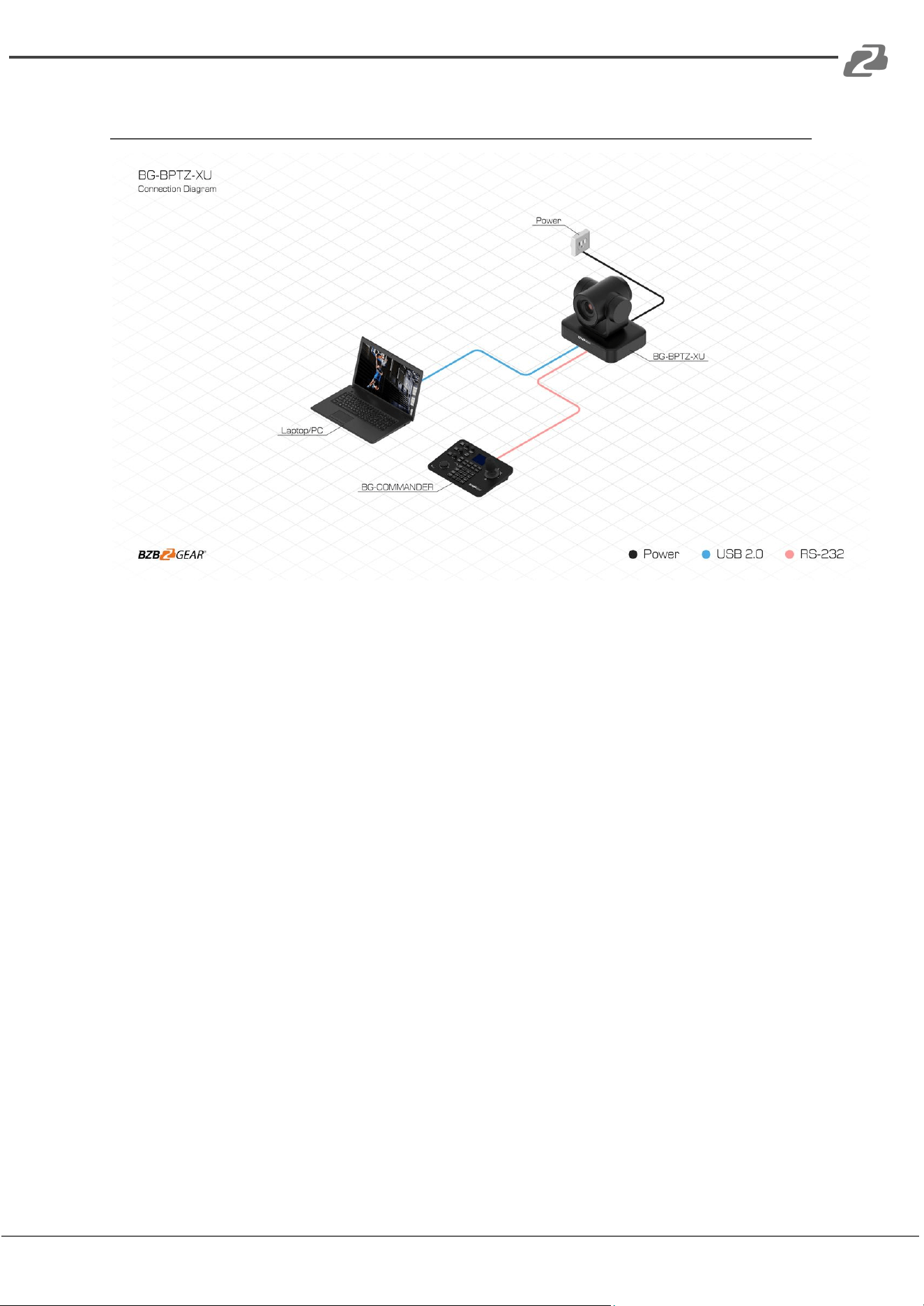
Application Example
Address: 830 National Drive #140, Sacramento, CA 95834, USA · Tel: +1(888)499-9906 · Email: support@bzbgear.com 30

BZBGEAR BG-BPTZ-XU PRODUCT MANUAL
Tech Support
Have technical questions? We may have answered them already!
Please visit BZBGEAR’s support page (bzbgear.com/support) for helpful information and
tips regarding our products. Here you will find our Knowledge Base
(bzbgear.com/knowledge-base) with detailed tutorials, quick start guides, and step-by-step
troubleshooting instructions. Or explore our YouTube channel, BZB TV
(youtube.com/c/BZBTVchannel), for help setting up, configuring, and other helpful how-to
videos about our gear.
Need more in-depth support? Connect with one of our technical specialists directly:
Phone
1.888.499.9906
Email
support@bzbgear.com
Live Chat
bzbgear.com
Limited Product Warranty Terms
Pro Line: 5-year warranty from the date of purchase for AV/Broadcasting products bought
on or after August 1, 2024.
Essential Line: 3-year warranty from the date of purchase for AV/Broadcasting products
bought on or after August 1, 2024.
Cables: Lifetime Limited Product Warranty.
For complete warranty information, please visit bzbgear.com/warranty.
For questions, please call 1.888.499.9906 or email support@bzbgear.com.
Mission Statement
BZBGEAR is a breakthrough manufacturer of high-quality, innovative audiovisual equipment
ranging from AVoIP, professional broadcasting, conferencing, home theater, to live streaming
solutions. We pride ourselves on unparalleled customer support and services. Our team
offers system design consultation, and highly reviewed technical support for all the products
in our catalog. BZBGEAR delivers quality products designed with users in mind.
Address: 830 National Drive #140, Sacramento, CA 95834, USA · Tel: +1(888)499-9906 · Email: support@bzbgear.com 31

BZBGEAR BG-BPTZ-XU PRODUCT MANUAL
Copyright
All the contents in this manual and its copyright are owned by BZBGEAR. No one is allowed
to imitate, copy, or translate this manual without BZBGEAR’s permission. This manual
contains no guarantee, standpoint expression or other implies in any form. Product
specification and information in this manual is for reference only and subject to change
without notice.
All rights reserved. No reproducing is allowed without acknowledgement.
Address: 830 National Drive #140, Sacramento, CA 95834, USA · Tel: +1(888)499-9906 · Email: support@bzbgear.com 32