
User Manual
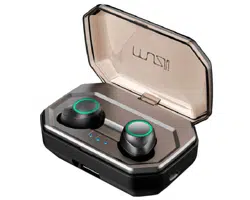
Welcome to use X9 PLUS True Wireless Bluetooth Headphone.
TWS-X9 PLUS

Manual and Q&A ---------------01
English Version --------------02
Deutsche Version --------------08
Version Française --------------15
Versione Italiana --------------22
Versión Española --------------28

01
Manual Download
Q&A
02
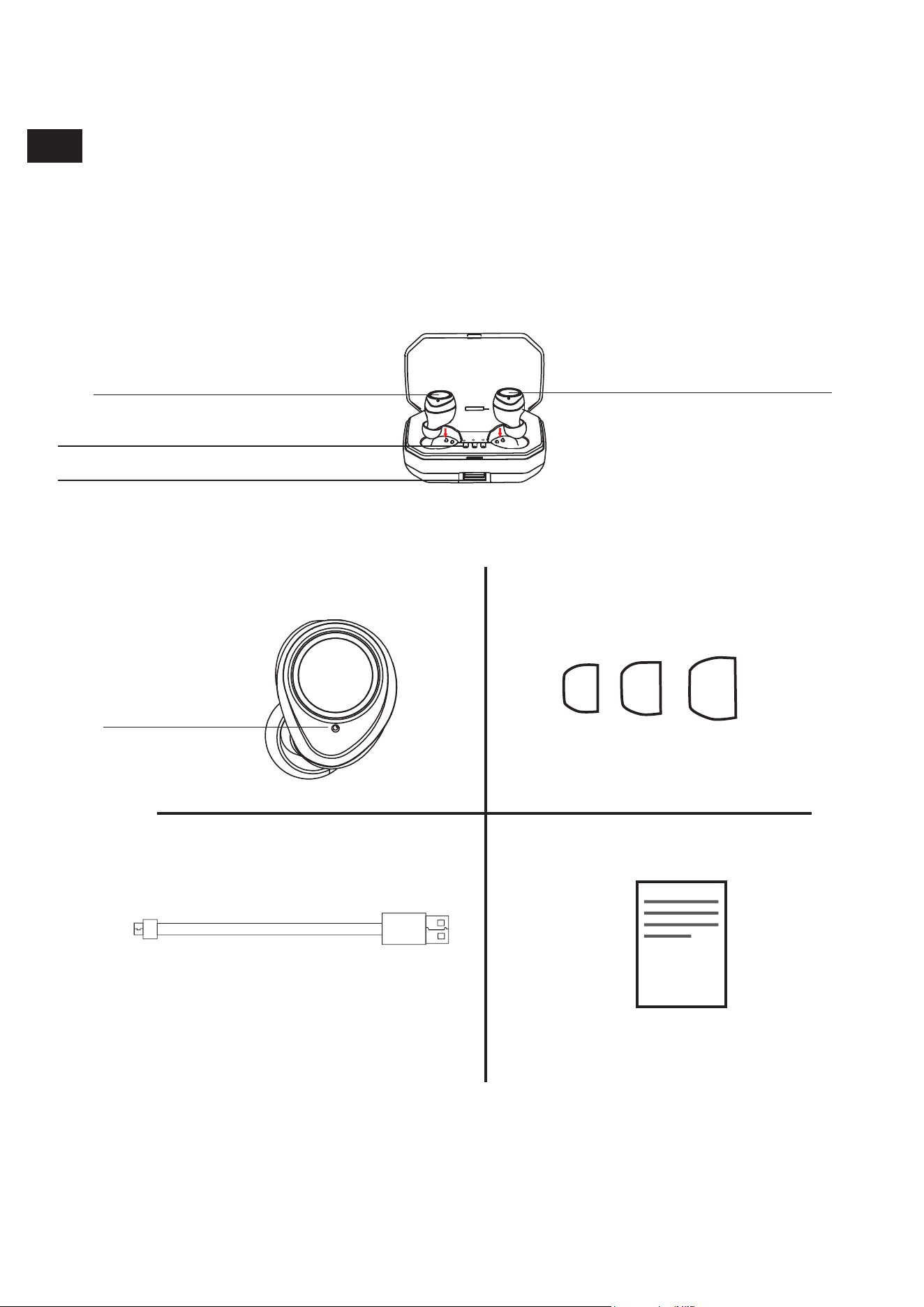
Product illustration
Touch control panel Touch control panel
Battery level indicator
USB interface
Wireless headphones Earplugs
USB Cable User Manual
Power on/
connection/
charging indicator
EN
03
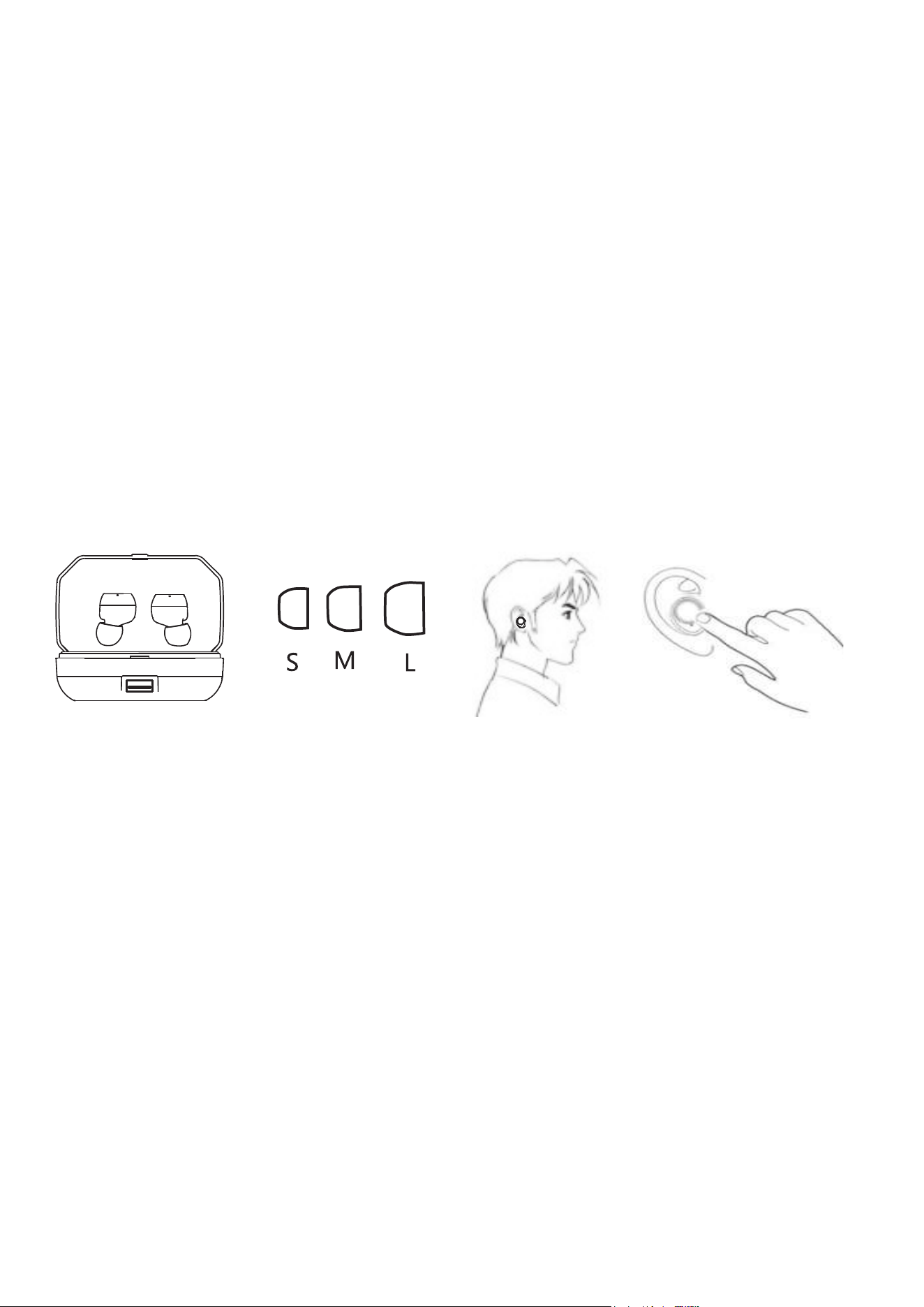
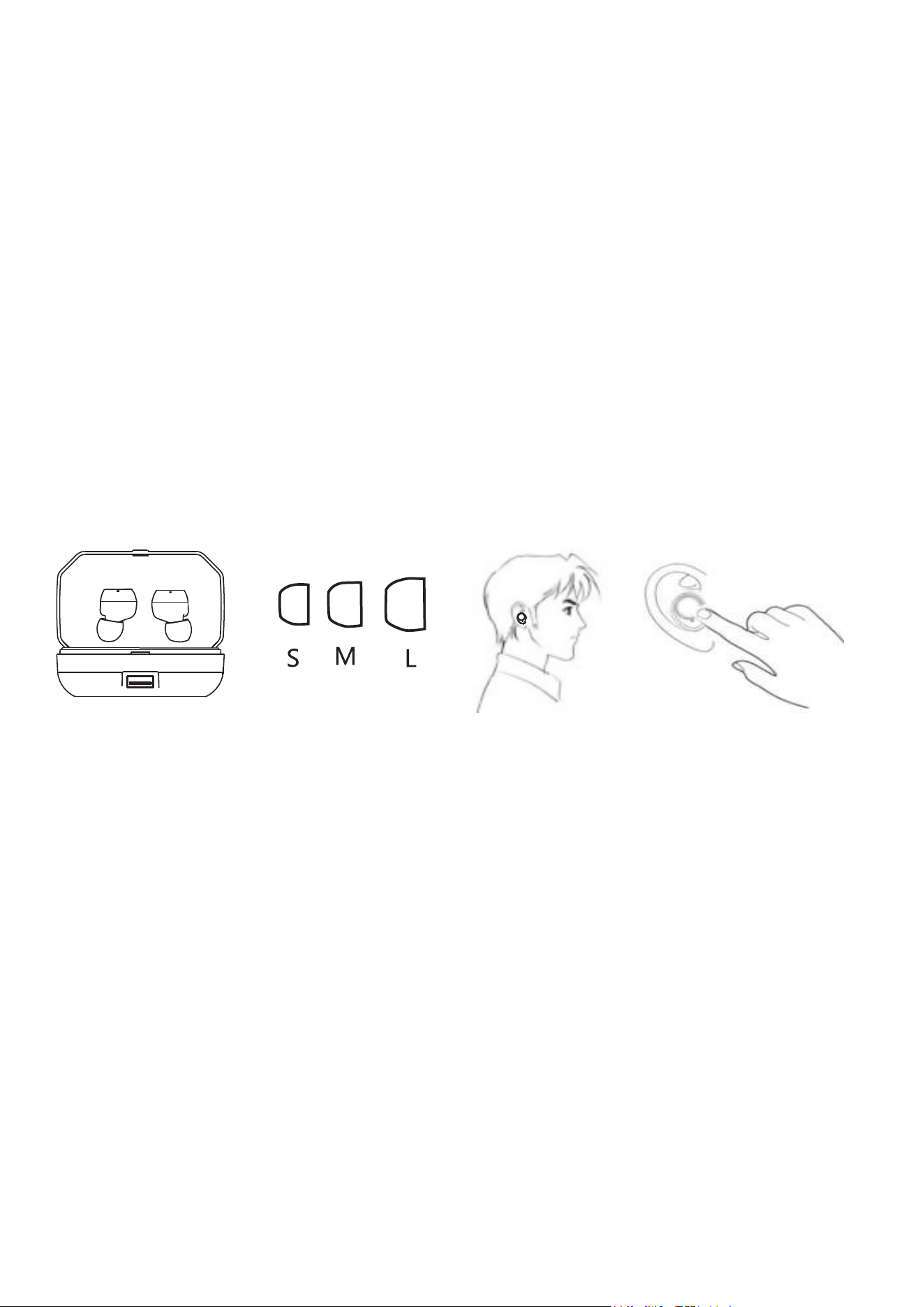
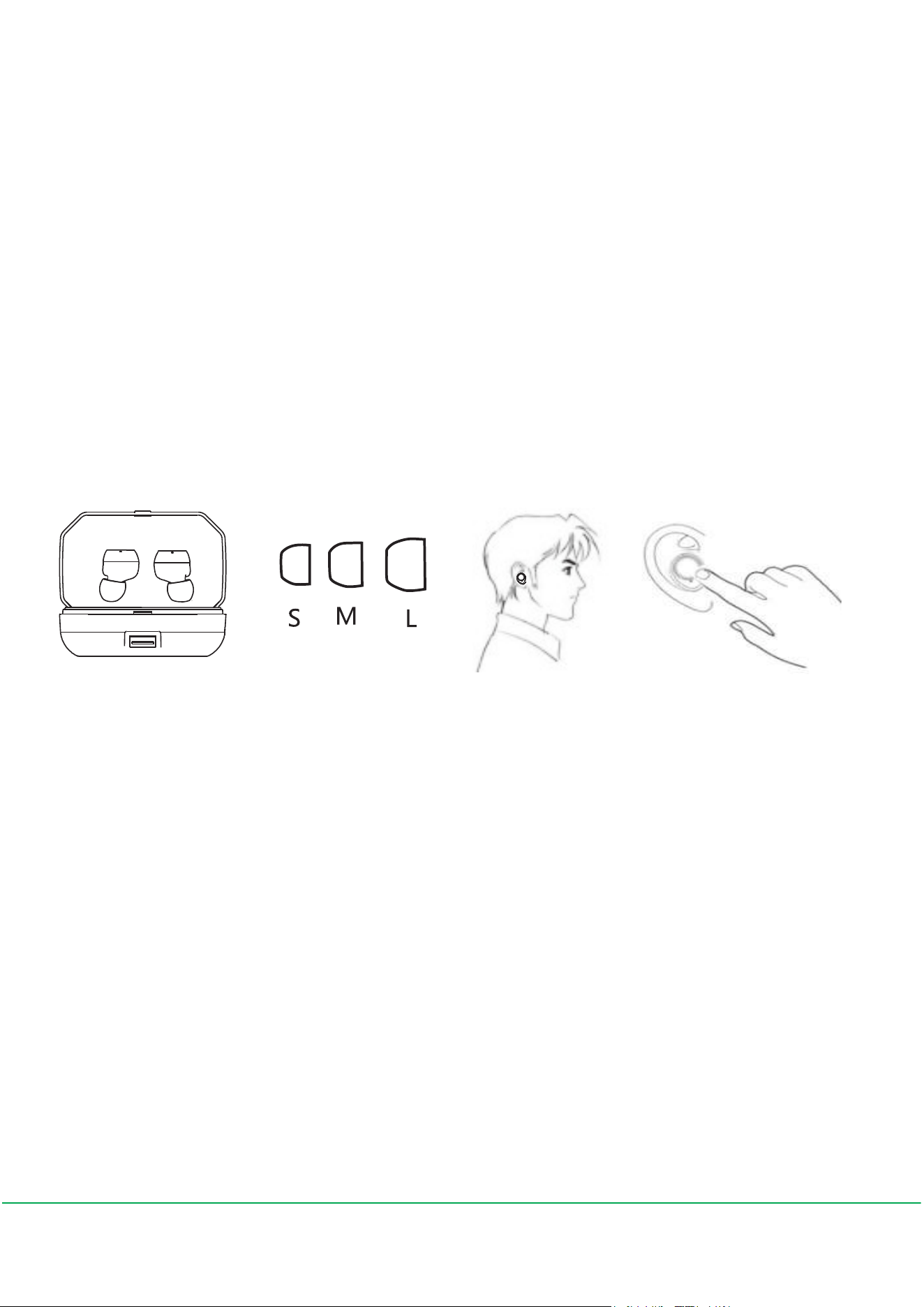
Choose the right size earplugs to fit your ear
How to wear?
This is a compact size Bluetooth headphone with multiple
functions and simple operation. Please try each size of the
earplug and choose the best one which is tight and secure in
your ear. Suitable earplug will make you feel more comfortable
and improve the sound performance.
Instruction
Identify the L/R earbuds. Insert the earbud into your ear and
rotate to fit comfortably.
Turn the earbuds on/off
Remove them from the charging case to turn them on or place
the earbuds in the charging case to turn them off.
04
How to pair with your smartphone
Pairing for the first time
Remove the earbuds from the charging case and insert them
into your ears, turn on the Bluetooth on your smartphone,
choose X9 PLUS to connect.
Use for next time
Remove the earbuds from the charging case, they will turn on
and pair with the smartphone which was connected last time
automatically. Place the earbuds in the charging case to turn
them off after use.
"1 link 2" function: mono earbud can link to two
smartphones at the same time.
1. Pair the earbud with the first smartphone. Turn off the earbud
and the Bluetooth function of the first smart phone after pairing
successfully.
X9 PLUS

05
2. Turn on the earbud again and pair it with the second smart
phone, turn on the Bluetooth of the first smart phone when the
second pairing is successful.
Mono earbud could be used separately to link to different
smartphones at the same time.
Music functions
Play: single tap
Pause: single tap
Skip backward: double tap the L earbud
Skip forward: double tap the R earbud
Volume up: long touch the R earbud
Volume down: Long touch the L earbud
Call functions
Answer call: single tap the earbud
End call: single tap the earbud
Reject call: long touch the earbud
Answer the second call: double tap the earbud
Switch between two calls: double tap the earbud
End one of the calls: single tap the earbud while on the call.
Redial the last number: double tap earbud while not on a call.
Mono earbud use

06
Each earbud can be used alone for playback or calls. When
both earbuds are turned on, they will automatically relink.
Wake up SIRI
Triple tap the earbud while not on a call.
How to charge?
Charge the case
1. Plug the charging case into a USB power supply with the
attached micro USB cable in the package.
2. When charging, the indicator which lights up at last will flash
blue light. When battery is fully charged, three indicators will
keep on.
3. Charge the charging case when the LED flashes once which
means low battery.
Charge the earbuds
Place the earbuds in the charging case and close the lid. The
battery LED inside the charging case will glow red and light off
after they have been fully charged.
Note: if the R earbud is used as mono for the first time, you
should pair it with your smartphone separately.

07
Specifications
Bluetooth version: 5.0
Battery capacity : 3000mAh
Support agreement: A2DP/AVRCP/HFP/HSP
Frequency range : 2402MHz-2480MHz
Transmissiondistance:≤10m
Audio playback time : 3-4 hours
Headphone charge time : within 60 minutes
Case battery charge time: about 1 hour
Support system: all phones and devices with Bluetooth
Reset
Remove the earbuds from the charging case, tap 5 times,
place it back and then pair it again.
Warnings:
Don't disassemble the earbuds and charging case, or the
warranty will no longer work.
The earbuds and charging case contain a lithium-ion battery, do
not expose them to the fire or high temperature.
In some degree, the earbuds are waterproof, but they are not
suitable for swimming. Please don't expose them to hot water.
Produktabbildung
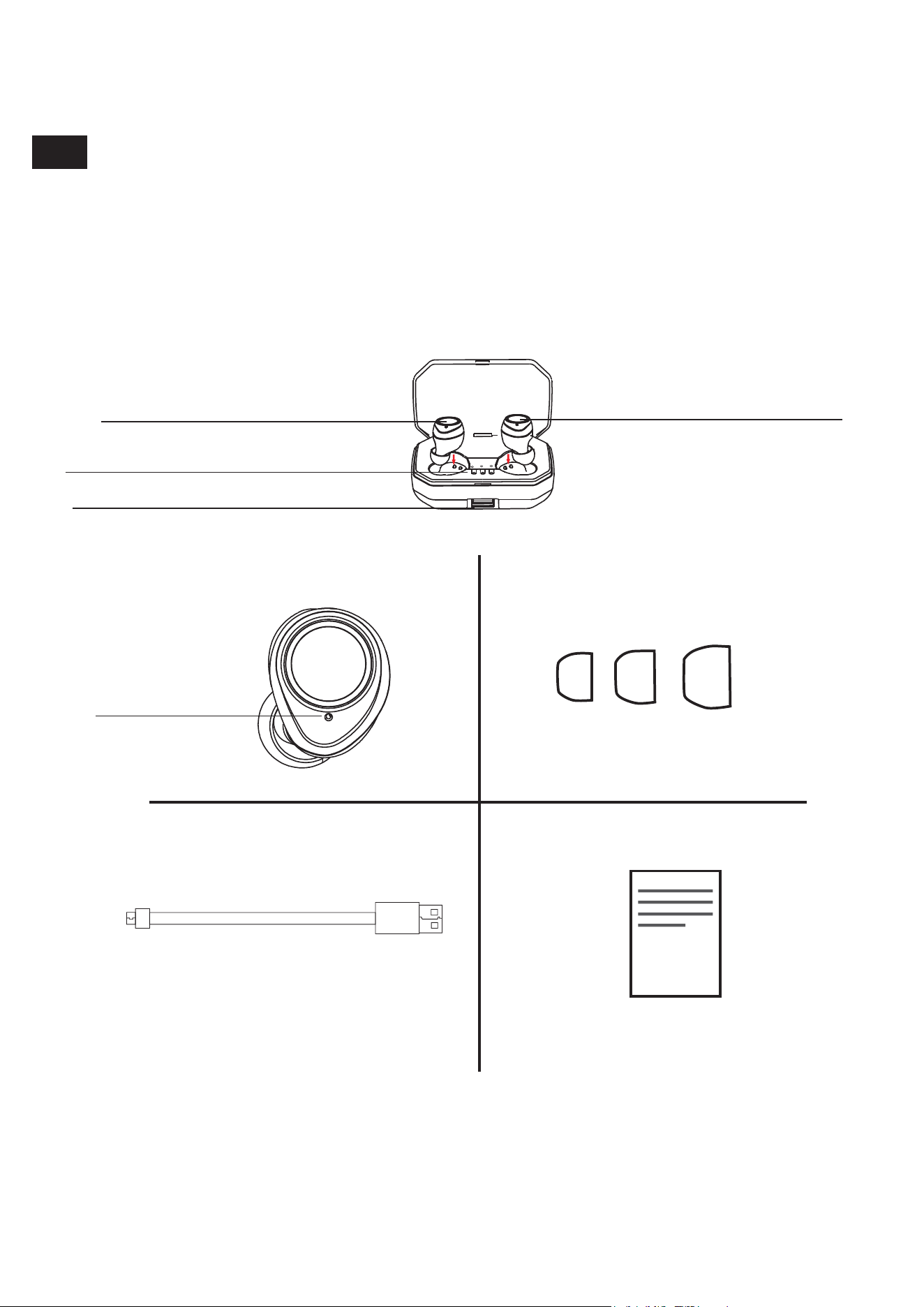
Touch-Kontrollbereich
Touch-Kontrollbereich
Batterieanzeige
USB-Schnittstelle
Kabellose Kopfhörer Ohrstöpsel
USB Kabel Benutzerhandbuch
Einschalten /
Verbindung /
Ladeanzeige
DE
08
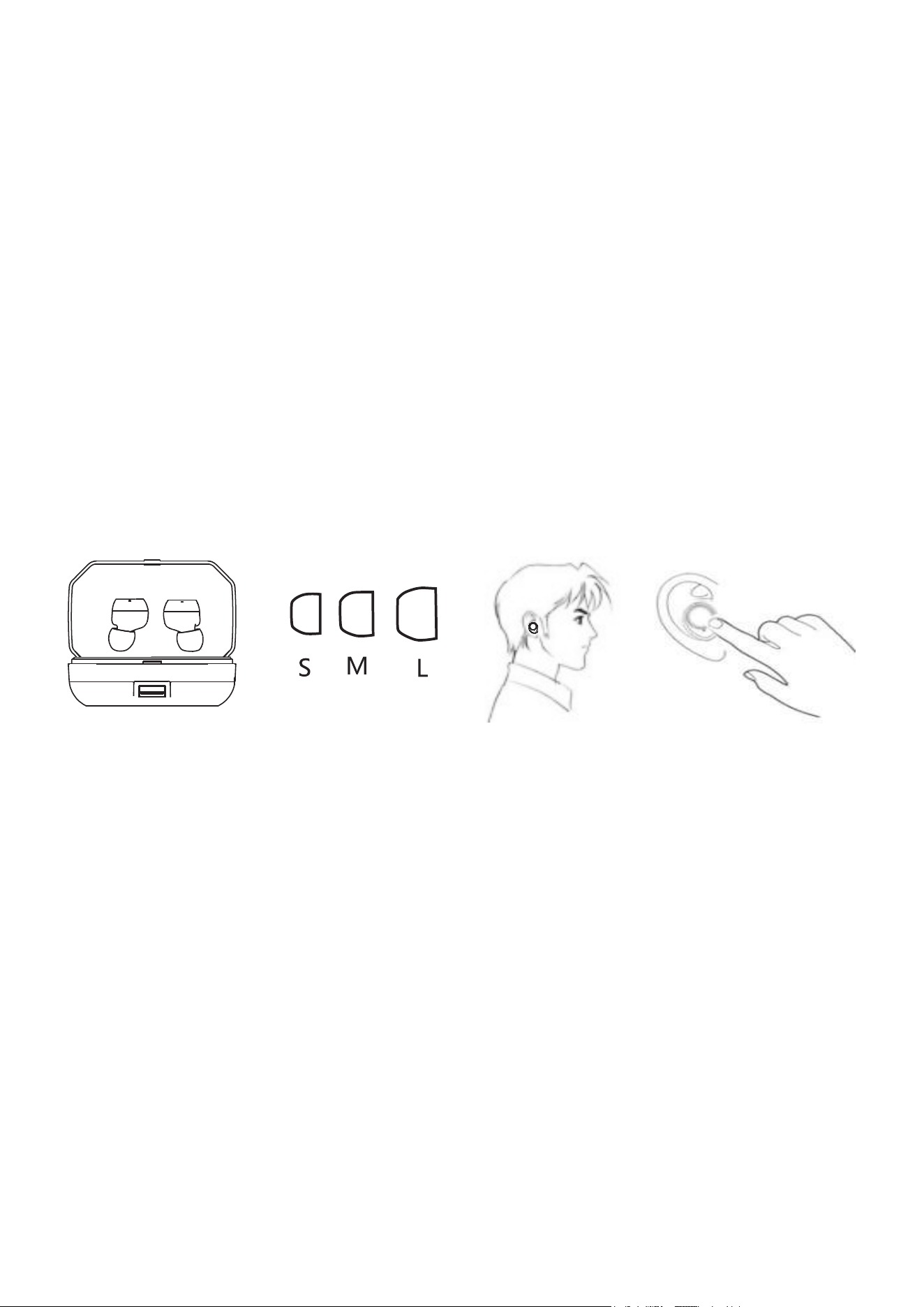
Wählen Sie die passende Ohrstöpsel
Wie zu tragen
Dies ist ein kompakter Bluetooth Kopfhörer mit mehreren
Funktionen und einfacher Bedienung. Bitte versuchen Sie jede
Größe des Ohrstöpsels und wählen Sie die beste Ohrstöpsel,
die fest und sicher in Ihrem Ohr ist.
Mit einem geeigneten Ohrstöpsel fühlen Sie sich wohler und die
Klangqualität is besser.
Anweisung
Identifizieren Sie die Ohrhörer L / R. Setzen Sie den Ohrhörer
in Ihr Ohr ein und drehen Sie ihn, bis er bequem sitzt.
Schalten Sie die Ohrhörer ein / aus
Nehmen Sie die Ohrhörer aus der Ladebox, um sie
einzuschalten, oder legen Sie die Ohrhörer in der Ladebox, um
sie auszuschalten.
09
X9 PLUS
Koppeln Sie mit Ihrem Smartphone
Erstmalige Paarung
Nehmen Sie die Ohrhörer aus der Ladebox und stecken Sie sie
in Ihre Ohren, schalten Sie das Bluetooth auf Ihrem Smartphone,
wählen Sie X9 PLUS, um eine Verbindung herzustellen.
Beim nächsten Mal verwenden
Nehmen Sie die Ohrhörer aus der Ladebox, die Ohrhörer
werden sich einschalten und mit dem Smartphone automatisch
koppeln, das beim letzten Mal verbunden war. Legen Sie die
Ohrhörer in die Ladebox, um sie nach dem Gebrauch
auszuschalten.
"1 Link 2" Funktion: Mono-Ohrhörer können
gleichzeitig mit zwei Smartphones verbunden
werden.
Betrieb:
1. Koppeln Sie den Ohrhörer mit dem ersten Smartphone.
Schalten Sie den Ohrhörer und die Bluetooth-Funktion des
ersten Smartphones nach der erfolgreiche Paarung aus.
10

2. Schalten Sie den Ohrhörer erneut ein und koppeln Sie ihn
mit dem zweiten Smartphone. Schalten Sie die Bluetooth-
Funktion des Smartphones an, sobald die zweite Paarung
erfolgreich ist.
Mono Ohrhörer können separat verwendet werden und
gleichzeitig mit verschiedene Smartphones verbinden.
Musik Spielen
Wiedergabe: einzel klicken
Pause: einzel klicken
Zurück: Doppelklick auf den L-Ohrhörer
fortsetzen: Doppelklicken Sie auf den R-Ohrhörer
die Lautstärke Erhöhen : lang drücken Sie den R-Ohrhörer
die Lautstärke Verringern: lang drücken Sie den L-Ohrhörer
Anruffunktionen
Anruf beantworten: klicken Sie einmal auf den Ohrhörer
Anruf beenden: klicken Sie einmal auf den Ohrhörer
Anruf ablehnen: drücken Sie den Ohrhörer lange
den zweiten Anruf beantworten: doppelklicken Sie auf den
Ohrhörer
zwischen zwei Anrufen wechseln: doppelklicken Sie auf
den Ohrhörer
11

Mono Ohrhörer verwenden
Jeder einzelne Ohrhörer kann alleine für Mono-Wiedergabe
oder Anrufe verwendet werden. Wenn beide Ohrhörer
eingeschaltet sind, werden sie automatisch neu verbunden.
Hinweis: Wenn der R-Ohrhörer zum ersten Mal als Mono
verwendet wird, sollten Sie ihn separat mit Ihrem Smartphone
koppeln.
einen der Anrufe beenden: klicken Sie einmal auf den Ohrhörer
während des Anrufs Wahlwiederholung der letzten Nummer:
doppelklicken Sie auf den Ohrhörer, während Sie nicht
telefonieren.
SIRI aktivieren
Klicken Sie dreimal auf den Ohrhörer, während Sie nicht
telefonieren.
Wie zu aufladen
die Ladebox aufladen
1. Schließen Sie die Ladebox mit dem enthaltenen Micro USB
Kabel an ein USB-Netzteil an.
2. Während des Ladevorgangs blinkt die zuletzt leuchtende
Anzeige blau. Wenn der Akku vollständig aufgeladen ist,
leuchten drei Anzeigen weiter.
12

3. Laden Sie die Ladebox, wenn die LED einmal blinkt, was
eine schwache Batterie bedeutet.
die Ohrhörer aufladen
Legen Sie die Ohrhörer in die Ladebox und schließen Sie den
Deckel. Die LES auf der Ladebox leuchtet rot und erlischt
nach der vollständigen Aufladung.
Zurücksetzen
Nehmen Sie die Ohrhörer aus der Ladebox, klicken Sie 5 Mal
auf die Ohrhörer, legen Sie sie in die Ladebox zurück, wenn
Sie es das nächste Mal herausnehmen, werden sie
automatisch erneutgekoppelt.
Spezifikationen
Bluetooth-Version: 5.0
Batteriekapazität: 3000mAh
Unterstützung: A2DP / AVRCP / HFP / HSP
Frequenzbereich: 2402 MHz-2480 MHz
Übertragungsdistanz:≤10m
Audio-Wiedergabezeit: 3-4 Stunden
Ladezeit des Kopfhörers: innerhalb von 60 Minuten
Ladezeit der Ladebox: ca. 1 Stunde
Unterstützungssystem: alle Smartphone und Geräte mit
Bluetooth
13

Warnungen:
Zerlegen Sie die Ohrhörer und die Ladebox nicht oder die
Garantie erlischt.
Die Ohrhörer und die Ladebox enthalten eine Lithium-Ionen
Batterie, stellen Sie es nicht in der Nähe von Feuer oder hohen
Temperaturen
In gewissem Maße sind die Ohrhörer wasserdicht, sie sind
jedoch nicht zum Schwimmen geeignet. Bitte setzen Sie sie
keinem heißen Wasser aus.
14
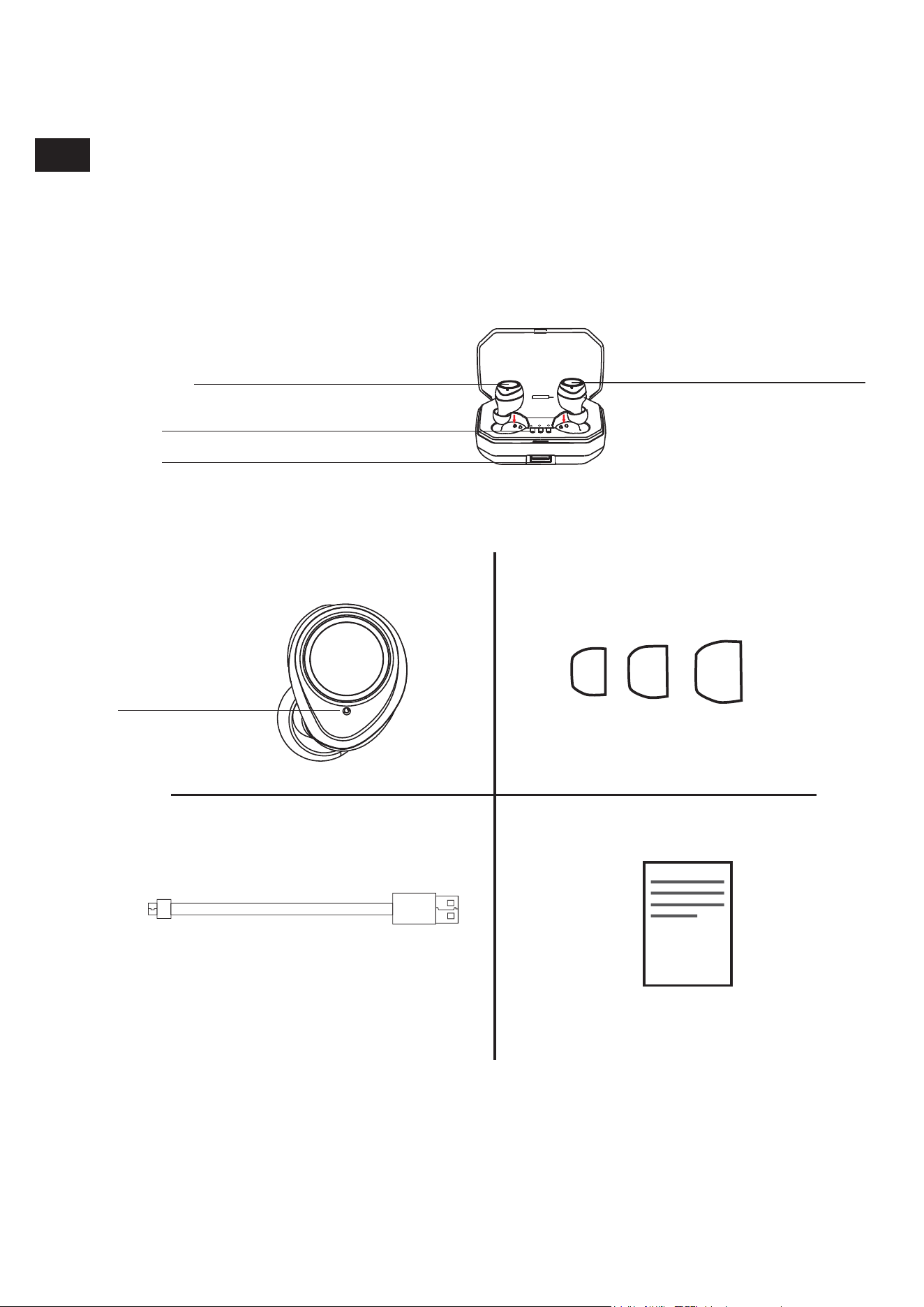
Introduction du produitproduit
Panneau de contrôle tactile Panneau de
contrôle tactile
Indicateur de niveau de batterie
USB interface
Écouteur sans fil Bouchons d'oreilles
USB câble Mode d’emploi
Allumer/
connexion/
indicateur de
charge
FR
15
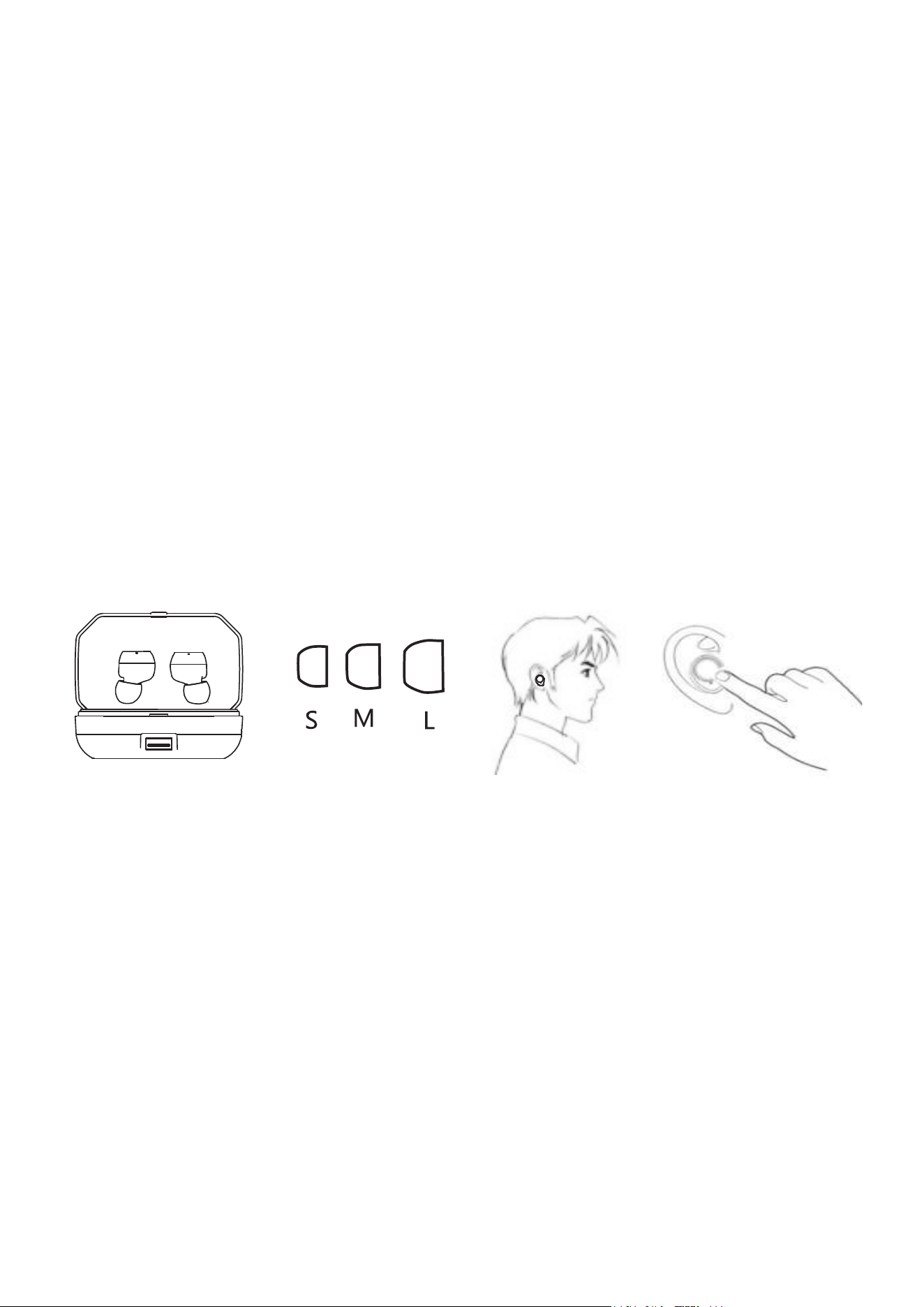
Choisissez la bonne taille de bouchons
d'oreilles pour s'adapter à votre oreille
Comment porter
Ceci est un écouteur Bluetooth de taille compacte avec de
multiples fonctions et un fonctionnement simple. S'il vous plaît
essayer chacune des tailles de bouchon d'oreille et l'ajustement
devrait se sentir serré et sécurisé dans votre oreille.
Des bouchons d'oreille adaptés vous permettront de vous sentir
plus à l'aise et d'améliorer les performances sonores.
Instruction
Identifiez les écouteurs L / R. Insérez l'écouteur dans votre
oreille et faites-le pivoter pour vous adapter confortablement.
Allumer / éteindre les écouteurs
Déplacez les oreillettes du boîtier de charge pour les allumer ou
placez les écouteurs dans le boîtier de charge pour les éteindre.
16
Comment jumeler avec votre smartphone
Jumelage pour la première fois
Déplacez les écouteurs dans le boîtier de chargement et
insérez-les dans vos oreilles, activez le Bluetooth sur votre
smartphone, choisissez X9 PLUS pour vous connecter.
Utiliser pour la prochaine fois
Retirez les écouteurs du boîtier de charge, ils allumeront et
jumeleront avec le smartphone qui a été connecté la dernière
fois automatiquement. Placez les écouteurs dans le boîtier de
charge pour les éteindre après l’utilisation.
X9 PLUS
Fonction "1 connecte 2": l’écouteur mono peut
être relié à deux smartphones simultanément.
Opération:
1. Connectez l'écouteur au premier smartphone. Éteignez
l'oreillette et la fonction Bluetooth du premier smartphone après
appariement avec succès.
17

Fonctions de musique
2. Allumez l'écouteur de nouveau et jumelez avec le deuxième
smartphone, activez le Bluetooth du premier smartphone
lorsque le second jumelage est un succès.
L'écouteur mono pourrait être utilisé pour jumeler avec
différents smartphones en même temps.
Lecture: simple tap
Pause: robinet simple
Revenir en arrière: appuyer deux fois sur l’oreillette gauche
Passer en avant: appuyez deux fois sur l’oreillette droite
Augmentation du volume: appui long sur l’oreillette droite
Volume bas: appuyez longuement sur l’oreillette gauche
Fonctions d'appel
Répondre à un appel: appuyez une fois sur l'écouteur
Terminer l'appel: appuyez une fois sur l'écouteur
Rejeter l'appel: touchez longtemps l'écouteur
Répondre au deuxième appel: appuyez deux fois sur l'écouteur
Basculer entre deux appels: appuyez deux fois sur l'écouteur
Mettre fin à l'un des appels: appuyez une fois sur l'écouteur
pendant l'appel.
Recomposer le dernier appel téléphonique: appuyez deux fois
18

Écouteur en mono mode
Chaque oreillette peut être utilisée seulement pour la lecture
mono ou les appels. Lorsque les deux oreillettes sont activées,
elles se reconnectent automatiquement.
sur l'écouteur lorsque vous n'êtes pas en communication
téléphonique.
Réveiller SIRI
Appuyez trois fois sur l’oreillette lorsque vous n'êtes pas en
communication téléphonique.
Comment charger
Charger le boîtier de charge
1. Branchez le boîtier de chargement sur une source
d'alimentation USB avec le câble micro USB fourni dans
l'emballage.
2. Lors de la charge, le voyant qui s’allume en dernier
clignotera en bleu. Lorsque la batterie est complètement
chargée, trois indicateurs restent allumés.
3. Chargez le boîtier de charge lorsque le voyant clignote, ce
qui signifie que la batterie est faible.
Remarque: si l’oreillette R est utilisée en mono pour la première
fois, vous devez la jumeler séparément avec votre smartphone.
19

Charger les oreillettes
Placez les oreillettes dans le boîtier de charge et fermez le
couvercle.
La batterie à l'intérieur du boîtier s'allume en rouge et s'éteint
une fois complètement chargée.
Caractéristiques
Version Bluetooth: 5.0
Capacité de la batterie: 3000mAh
Protocole de support: A2DP / AVRCP / HFP / HSP
Gamme de fréquence: 2402 MHz-2480 MHz
Distancedetransmission:≤10m
Temps de lecture audio: 3-4 heures
Temps de charge des écouteurs: environ 60 minutes
Temps de charge du boîtier de charge: environ 1 heure
Système de support: tous les téléphones et appareils avec
Bluetooth
Réinitialiser
Retirez les oreillettes du boîtier de charge, appuyez 5 fois,
replacez-le dans le boîtier et jumelez-le à nouveau.
PRÉCAUTIONS:
Ne démontez pas les écouteurs et le boîtier de charge, sinon la
garantie sera désactivée.
20

Les écouteurs et le boîtier de chargement contiennent une
batterie lithium-ion, ne les exposez pas au feu ou à des
températures excessives.
Dans une certaine mesure, les oreillettes sont imperméables,
mais elles ne sont pas adaptées à la natation. S'il vous plaît ne
les exposez pas à l'eau chaude.
21
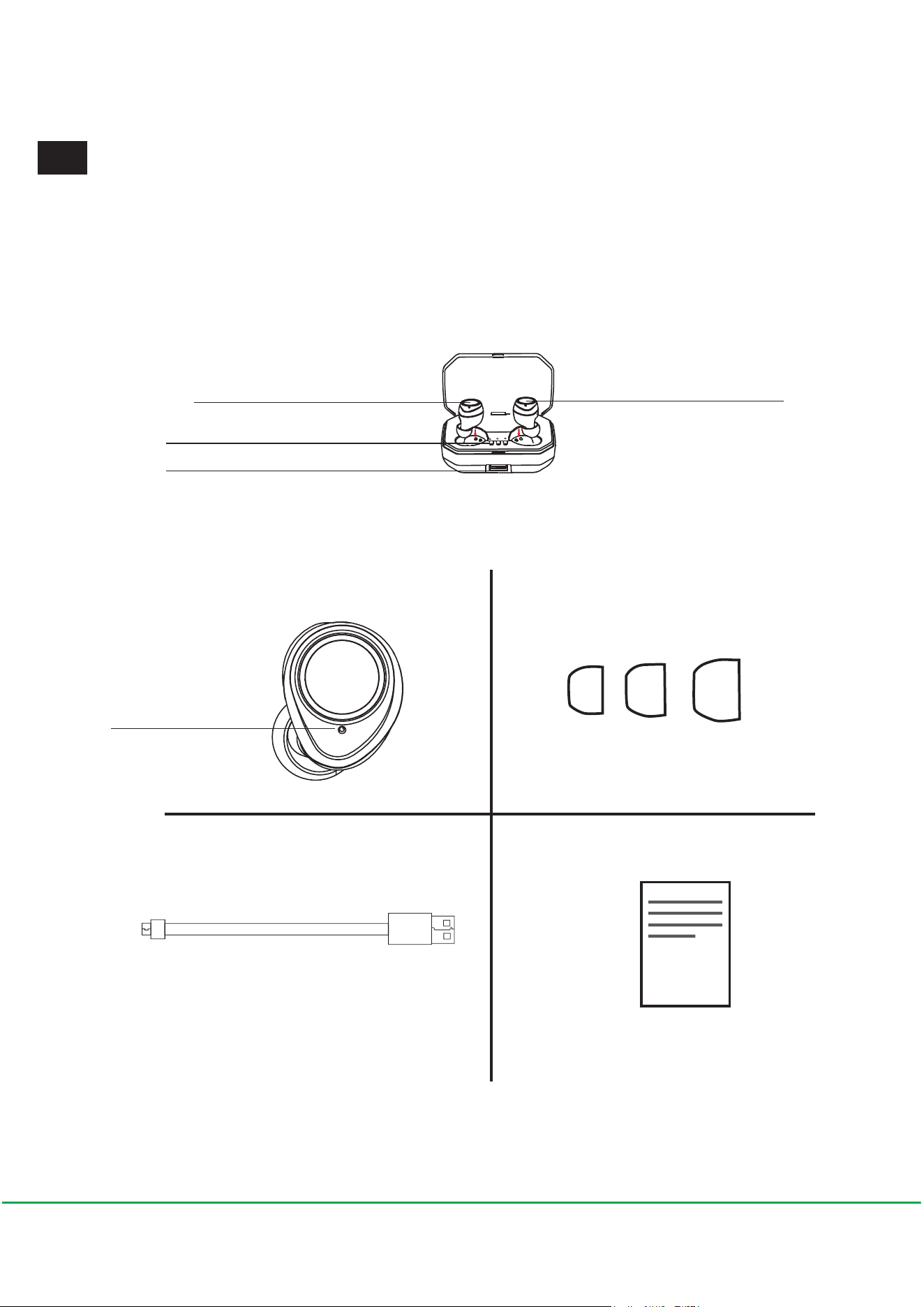
Illustrazione del prodotto
Pannello di controllo tattile Pannello di controllo tattile
Indicatore del livello della batteria
USB interface
Auricolari Senza Fili Tappi per le cuffie
USB cavo Manuale
Accensione /
connessione /
indicatore di
carica
I T
22
Scegli i tappi giusti alle tue orecchie
Come indossare
Questa è una cuffia Bluetooth di dimensioni compatte con
funzioni multiple e funzionamento semplice. Si prega di provare
ogni dimensione del tappino per le orecchie e scegliere il
migliore che è stretto e sicuro nel tuo orecchio.
Earplug Adatto vi farà sentire più a suo agio e migliorare le
prestazioni audio.
Istruzione
Identificare gli auricolari L / R. Inserisci l'auricolare nell'orecchio
e ruota per adattarlo comodamente.
Attiva / disattiva gli auricolari
Rimuoverli dalla custodia di ricarica per accenderli o
posizionare gli auricolari nella custodia di ricarica per spegnerli.
23
Come abbinarlo al tuo smartphone
Abbinamento per la prima volta
Rimuovere gli auricolari dalla custodia di ricarica e inserirli nelle
orecchie, accendere il Bluetooth sullo smartphone, scegliere X9
PLUS per connettersi.
Utilizzo per la prossima volta
Rimuovere gli auricolari dalla custodia di ricarica, si
accenderanno e si accoppiano con lo smartphone che è stato
collegato l'ultima volta automaticamente. Posizionare gli
auricolari nella custodia di ricarica per spegnerli dopo l'uso.
X9 PLUS
"1 collega 2" funzione: l'auricolare mono può
essere collegato a due smartphone
contemporaneamente.
Operazione :
1. Accoppia l'auricolare con il primo smartphone. Spegnere
l'auricolare e la funzione Bluetooth del primo smartphone dopo
l' accoppiamento con successo.
24

Funzioni musicali
Gli auricolari mono possono essere utilizzati
separatamente per collegarsi a diversi smartphone
Riproduzione: un solo tap
Pausa: un solo tap
2. Accendi di nuovo l'auricolare e abbinalo al secondo
smartphone, accendi il Bluetooth del primo smartphone quando
il secondo abbinamento è successo.
Salta indietro: due tap sul L
Salta in avanti: due tap sul R
Volume su: tocca a lungo sul R
Volume giù: tocca a lungo sul L
Chiamata
Rispondere alla chiamata: un solo tap sul earbud
Terminare la chiamata: un solo tap sul earbud
Rifiutare le chiamate: toccare a lungo l'auricolare
Rispondere alla seconda chiamata: due tap su earbud
Passa tra due chiamate: due tap su earbud
Termina le chiamate: un solo tap su earbud mentre le chiamate.
Redial il number precedente: due tap su earbud mentre non è
in corso di una chiamata.
Uso di auricolari mono
25

Ciascuno di questi auricolari può essere usato da solo per la
riproduzione mono o per le chiamate. Quando entrambi gli
auricolari sono accesi, si ricollegheranno automaticamente.
Sveglia SIRI
Tocca tre volte l'auricolare mentre non sei impegnato in una
chiamata.
Come caricare
Carica la custodia
1. Inserire la custodia di ricarica in un alimentatore USB con il
cavo micro USB in dotazione nella confezione.
2. durante la ricarica, l'indicatore che si illumina alla fine
lampeggerà di luce blu. quando la batteria è completamente
carica, tre indicatori si accendono.
3. Ricaricare la custodia quando il LED lampeggia una volta,
in quando significa batteria scarica.
Carica gli auricolari
Posizionare gli auricolari nella custodia di ricarica e chiudere il
coperchio. Il LED della batteria all'interno della custodia di
ricarica si illumina in rosso e si spegne dopo una carica
completa.
Nota: se l'auricolare R viene usato come mono per la prima
volta, dovresti associarlo al tuo smartphone separatamente.
26

Specificazioni
Bluetooth versione: 5.0
Capacità della batteria : 3000mAh
Accordo di supporto: A2DP/AVRCP/HFP/HSP
Intervallo di frequenze : 2402MHz-2480MHz
Distanzaditrasmissione:≤10m
Tempo di riproduzione audio : 3-4 ore
Tempo di ricarica della cuffia : entro 60 minuti
Tempo di ricarica della batteria: circa 1 ora
Sistema compatibile: tutti i telefoni e i dispositivi con Bluetooth
Risistemazione
Rimuovere gli auricolari dalla custodia di ricarica, toccare 5
volte, posizionarlo indietro e quindi accoppiarlo di nuovo.
Avvertenze:
Non smontare gli auricolari e la custodia di ricarica, altrimenti la
garanzia perderà efficacia.
Gli auricolari e la custodia di ricarica contengono una batteria
agli ioni di litio, non esporli al fuoco o a temperature eccessive
L'auricolare ha una certa capacità impermeabile, ma non è
adatto al nuoto e non lo lascia in acqua calda
27
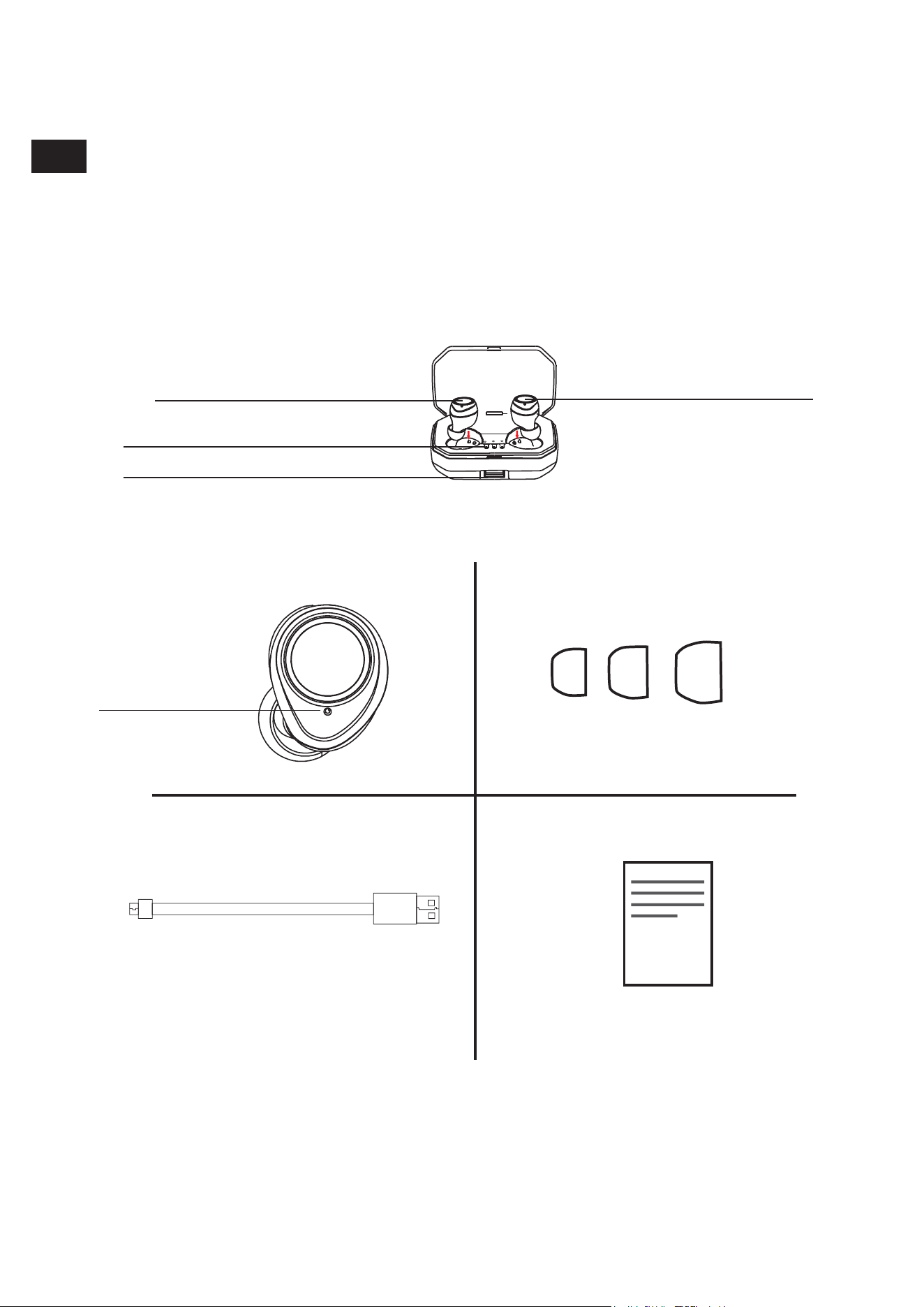
Ilustración del Producto
Botón de control táctil Botón de control táctil
Indicador de nivel de batería
USB interface
Auriculares Inalámbricos Almohadillas de Silicona
Cable USB Manual de Usuario
Encender/
Conexión
/Indicador de
Carga
ES
28
Elija el tamaño más adecuado para sus orejas
Cómo llevar
Son unos auriculares Bluetooth de tamaño compacto con
múltiples funciones y operación simple. Pruebe las almohadillas
de cada tamaño y elija el más apropiado y seguro en su oído.
Los tapones para los oídos adecuados le harán sentir más
cómodo y mejorarán el rendimiento del sonido.
Instrucción
Identifique los auriculares L / R. Insértelos en la oreja y gírelos
para que encajen cómodamente.
Encender / apagar los auriculares
Retírelos del estuche de carga para encenderlos o coloque los
auriculares en el estuche de carga para apagarlos.
29
Cómo emparejar con su teléfono inteligente
Emparejar por primera vez
Retire los auriculares de la funda de carga e insértelos en sus
oídos, active el Bluetooth en su teléfono inteligente, elija X9
PLUS para conectarse.
Utilizar para la próxima vez
Retire los auriculares del estuche de carga, se encenderán y
se emparejarán automáticamente con el teléfono inteligente
que se conectaron la última vez. Coloque los auriculares en el
estuche de carga para apagarlos después del uso.
X9 PLUS
Función "1 enlace 2": el audífono mono puede
conectarse a dos teléfonos inteligentes al
mismo tiempo.
Operación:
1. Empareje el auricular con el primer teléfono inteligente.
Apague el audífono y la función Bluetooth del primer teléfono
30

Funciones de Música
inteligente después de emparejarlo con éxito.
2. Encienda el auricular de nuevo y sincronícelo con el segundo
teléfono inteligente, active el Bluetooth en el primer teléfono
inteligente cuando el segundo emparejamiento sea exitoso.
Los auriculares se puede usar por separado emparejando con
diferentes teléfonos inteligentes al mismo tiempo.
Reproducción: un solo toque
Pausa: un solo toque
Canción Anterior: pulse dos veces la tecla L
Canción Siguiente: doble toque el auricular R
Subir el volumen: mantenga pulsando el auricular R
Bajar el volumen: mantenga pulsando el auricular L
Funciones de Llamada
Responder llamada: un solo toque
Colgar llamada: un solo toque
Rechazar llamada: presione largamente
Responda la llamada segunda: toque dos veces el auricular
Cambiar entre dos llamadas: toca dos veces el auricular
Terminar una de las llamadas: toque solo el auricular mientras
está en la llamada.
31

Volver a marcar el último número: pulse dos veces mientras no
esté en una llamada.
Uso de Auricular Mono
Cada auricular se puede utilizar por separada para
reproducción individual o llamadas. Cuando ambos auriculares
estén encendidos, se volverán a vincular automáticamente.
Despertar SIRI
Toque tres veces el auricular mientras no esté en una llamada.
Cómo cargar
Cargar la caja
1. Conecte la caja de carga a una fuente de alimentación USB
con el cable micro USB adjunto en el paquete.
2. Cuando se está cargando, la luz indicadora que se enciende
por fin destellará una luz azul. Cuando la batería está
completamente cargada, tres luces indicadoras se mantendrán
encendidas.
3. Cargue la caja de carga cuando el LED parpadea una vez,
que significa batería baja.
Nota: si el auricular R se usa por primera vez como mono,
debe vincularlo con su teléfono inteligente por separado.
32

Cargar los auriculares
Coloque los auriculares en el estuche de carga y cierre la tapa.
El LED de la batería dentro de la caja de carga se iluminará en
rojo y se apagará una vez que esté completamente cargado.
Specificaciones
Versión de Bluetooth: 5.0
Capacidad de la batería: 3000mAh
Acuerdo soportado: A2DP / AVRCP / HFP / HSP
Rango de frecuencia: 2402MHz-2480MHz
Distanciadetransmisión:≤10m
Tiempo de reproducción de audio: 3-4 horas
Tiempo de carga de los auriculares: dentro de 60 minutos
Tiempo de carga de la batería de la caja: aproximadamente 1
hora
Sistema soportado: todos los teléfonos y dispositivos con
Bluetooth
Reiniciar
Retire los auriculares del estuche de carga, toque 5 veces,
colóquelo de nuevo y vuelva a vincularlo.
Advertencias:
No desmonte los auriculares y la funda de carga, en esta
situación la garantía perderá efectividad.
33

Los auriculares y el estuche de carga contienen una batería de
iones de litio, no los exponga al fuego ni a temperaturas
excesivas.
La caja de carga no debe estar expuesta a sustancias como
agua, lluvia, líquido o nieve.
En cierto grado, los auriculares son a prueba de agua y sudor,
pero no son adecuados para nadar. Y por favor no los exponga
al agua caliente.
34