DIGITAL KEYBOARD
Owner’s Manual
Bedienungsanleitung
Mode d'emploi
Manual de instrucciones
Manual do Proprietário
Manuale di istruzioni
Gebruikershandleiding
Podręcznik użytkownika
Руководство пользователя
Brugervejledning
Bruksanvisning
Uživatelská příručka
Používateľská príručka
Használati útmutató
Navodila za uporabo
Ръководство на потребителя
Manualul proprietarului
Lietotāja rokasgrāmata
Vartotojo vadovas
Kasutusjuhend
Korisnički priručnik
Kullanıcı el kitabı
Hướng dẫn sử dụng
English
Deutsch
Français
Español
Português
Italiano
Nederlands
Polski
Русский
Dansk
Slovenčina
Magyar
Slovenščina
Български
Română
Latviski
Lietuvių k.
eesti keel
Hrvatski
Türkçe
Tiếng Việt
Svenska
Česky
EN
DE
FR
ES
PT
IT
NL
PL
RU
DA
SV
CS
SK
HU
SL
BG
RO
LV
LT
ET
HR
TR
VI
PSR-E263 YPT-260 Owner’s Manual
2
PRECAUTIONS
PLEASE READ CAREFULLY BEFORE PROCEEDING
Please keep this manual in a safe and handy place for future reference.
For AC adaptor
WARNING
• This AC adaptor is designed for use with only Yamaha electronic
instruments. Do not use for any other purpose.
• Indoor use only. Do not use in any wet environments.
CAUTION
• When setting up, make sure that the AC outlet is easily
accessible. If some trouble or malfunction occurs, immediately
turn off the power switch of the instrument and disconnect the AC
adaptor from the outlet. When the AC adaptor is connected to the
AC outlet, keep in mind that electricity is flowing at the minimum
level, even if the power switch is turned off. When you are not
using the instrument for a long time, make sure to unplug the
power cord from the wall AC outlet.
For this instrument
WARNING
Always follow the basic precautions listed below to avoid the possibility of serious injury or
even death from electrical shock, short-circuiting, damages, fire or other hazards. These
precautions include, but are not limited to, the following:
• Do not place the power cord near heat sources such as heaters or
radiators. Also, do not excessively bend or otherwise damage the
cord, or place heavy objects on it.
• Only use the voltage specified as correct for the instrument. The
required voltage is printed on the name plate of the instrument.
• Use the specified adaptor (page 15) only. Using the wrong
adaptor can result in damage to the instrument or overheating.
• Check the electric plug periodically and remove any dirt or dust
which may have accumulated on it.
• This instrument contains no user-serviceable parts. Do not open
the instrument or attempt to disassemble or modify the internal
components in any way. If it should appear to be malfunctioning,
discontinue use immediately and have it inspected by qualified
Yamaha service personnel.
• Do not expose the instrument to rain, use it near water or in damp
or wet conditions, or place on it any containers (such as vases,
bottles or glasses) containing liquids which might spill into any
openings. If any liquid such as water seeps into the instrument,
turn off the power immediately and unplug the power cord from
the AC outlet. Then have the instrument inspected by qualified
Yamaha service personnel.
• Never insert or remove an electric plug with wet hands.
• Do not put burning items, such as candles, on the unit. A burning
item may fall over and cause a fire.
• Follow the precautions below. Failure to do so might result in
explosion, fire, overheating or battery fluid leakage.
- Do not tamper with or disassemble batteries.
- Do not dispose of batteries in fire.
Power supply/AC adaptor
Do not open
Water warning
Fire warning
Battery
DMI-5 1/3
PSR-E263 YPT-260 Owner’s Manual
3
- Do not attempt to recharge batteries that are not designed to be
charged.
- Keep the batteries separate from metallic objects such as
necklaces, hairpins, coins, and keys.
- Use the specified battery type (page 15) only.
- Use new batteries, all of which are the same type, same model,
and made by the same manufacturer.
- Always make sure all batteries are inserted in conformity with
the +/- polarity markings.
- When the batteries run out, or if the instrument is not to be
used for a long time, remove the batteries from the instrument.
- When using Ni-MH batteries, follow the instructions that came
with the batteries. Use only the specified charger device when
charging.
• Keep batteries away from small children who might accidentally
swallow them.
• If the batteries do leak, avoid contact with the leaked fluid. If the
battery fluid should come in contact with your eyes, mouth, or
skin, wash immediately with water and consult a doctor. Battery
fluid is corrosive and may possibly cause loss of sight or
chemical burns.
• When one of the following problems occur, immediately turn off
the power switch and disconnect the electric plug from the outlet.
(If you are using batteries, remove all batteries from the
instrument.) Then have the device inspected by Yamaha service
personnel.
- The power cord or plug becomes frayed or damaged.
- It emits unusual smells or smoke.
- Some object has been dropped into the instrument.
- There is a sudden loss of sound during use of the instrument.
CAUTION
Always follow the basic precautions listed below to avoid the possibility of physical injury to you
or others, or damage to the instrument or other property. These precautions include, but are not
limited to, the following:
• Do not connect the instrument to an electrical outlet using a
multiple-connector. Doing so can result in lower sound quality, or
possibly cause overheating in the outlet.
• When removing the electric plug from the instrument or an outlet,
always hold the plug itself and not the cord. Pulling by the cord
can damage it.
• Remove the electric plug from the outlet when the instrument is
not to be used for extended periods of time, or during electrical
storms.
• Do not place the instrument in an unstable position where it might
accidentally fall over.
• Before moving the instrument, remove all connected cables, to
prevent damage to the cables or injury to anyone who might trip
over them.
• When setting up the product, make sure that the AC outlet you are
using is easily accessible. If some trouble or malfunction occurs,
immediately turn off the power switch and disconnect the plug
from the outlet. Even when the power switch is turned off,
electricity is still flowing to the product at the minimum level.
When you are not using the product for a long time, make sure to
unplug the power cord from the wall AC outlet.
• Use only the stand specified for the instrument. When attaching it,
use the provided screws only. Failure to do so could cause
damage to the internal components or result in the instrument
falling over.
• Before connecting the instrument to other electronic components,
turn off the power for all components. Before turning the power on
or off for all components, set all volume levels to minimum.
• Be sure to set the volumes of all components at their minimum
levels and gradually raise the volume controls while playing the
instrument to set the desired listening level.
• Do not insert a finger or hand in any gaps on the instrument.
• Never insert or drop paper, metallic, or other objects into the gaps
on the panel or keyboard. This could cause physical injury to you
or others, damage to the instrument or other property, or
operational failure.
• Do not rest your weight on, or place heavy objects on the
instrument, and do not use excessive force on the buttons,
switches or connectors.
• Do not use the instrument/device or headphones for a long period
of time at a high or uncomfortable volume level, since this can
cause permanent hearing loss. If you experience any hearing loss
or ringing in the ears, consult a physician.
If you notice any abnormality
Power supply/AC adaptor
Location
Connections
Handling caution
DMI-5 2/3
PSR-E263 YPT-260 Owner’s Manual
4
Always turn the power off when the instrument is not in use.
Even when the [ ] (Standby/On) switch is in standby status (display is off), electricity is still flowing to the instrument at the minimum level.
When you are not using the instrument for a long time, make sure you unplug the power cord from the wall AC outlet.
Make sure to discard used batteries according to local regulations.
(bottom_en_01)
NOTICE
To avoid the possibility of malfunction/ damage
to the product, damage to data, or damage to
other property, follow the notices below.
Handling
• Do not use the instrument in the vicinity of a TV, radio,
stereo equipment, mobile phone, or other electric
devices. Otherwise, the instrument, TV, or radio may
generate noise. When you use the instrument along with
an application on your iPad, iPhone or iPod touch, we
recommend that you set “Airplane Mode” to “ON” on that
device in order to avoid noise caused by communication.
• Depending on the condition of surrounding radio waves,
the instrument may possibly malfunction.
• Do not expose the instrument to excessive dust or
vibrations, or extreme cold or heat (such as in direct
sunlight, near a heater, or in a car during the day) to
prevent the possibility of panel disfiguration, damage to
the internal components or unstable operation. (Verified
operating temperature range: 5° – 40°C, or 41° – 104°F.)
• Do not place vinyl, plastic or rubber objects on the
instrument, since this might discolor the panel or
keyboard.
Maintenance
• When cleaning the instrument, use a soft cloth. Do not
use paint thinners, solvents, alcohol, cleaning fluids, or
chemical-impregnated wiping cloths.
Saving data
• Some of the data of this instrument (page 14) are retained
when the power is turned off. However, the saved data
may be lost due to some failure, an operation mistake,
etc.
Information
About copyrights
• Copying of the commercially available musical data
including but not limited to MIDI data and/or audio data
is strictly prohibited except for your personal use.
• This product incorporates and bundles contents in which
Yamaha owns copyrights or with respect to which
Yamaha has license to use others' copyrights. Due to
copyright laws and other relevant laws, you are NOT
allowed to distribute media in which these contents are
saved or recorded and remain virtually the same or very
similar to those in the product.
* The contents described above include a computer
program, Accompaniment Style data, MIDI data, WAVE
data, voice recording data, a score, score data, etc.
* You are allowed to distribute medium in which your
performance or music production using these contents
is recorded, and the permission of Yamaha Corporation
is not required in such cases.
About functions/data bundled with the
instrument
• Some of the preset songs have been edited for length or
arrangement, and may not be exactly the same as the
original.
About this manual
• The illustrations and LCD screens as shown in this
manual are for instructional purposes only, and may
appear somewhat different from those on your
instrument.
• iPhone, iPad, iPod touch are trademarks of Apple Inc.,
registered in the U.S. and other countries.
• The company names and product names in this manual
are the trademarks or registered trademarks of their
respective companies.
Yamaha cannot be held responsible for damage caused by improper use or modifications to the instrument, or data that is lost or destroyed.
The model number, serial number, power
requirements, etc., may be found on or near
the name plate, which is at the bottom of the
unit. You should note this serial number in the
space provided below and retain this manual
as a permanent record of your purchase to
aid identification in the event of theft.
Model No.
Serial No.
DMI-5 3/3
PSR-E263 YPT-260 Owner’s Manual
5
(weee_battery_eu_en_02)
This instrument has the following documents and instructional materials.
Included Documents
Owner’s Manual (this book)
This book explains how to use the basic functions and how to make detailed settings for the various
functions of the instrument. The Appendix section contains various important preset content lists
such as Voices, Styles and Effects.
• Owner’s manual (this book)
• Music rest
• AC Adaptor
* May not be included depending on your area. Please
check with your Yamaha dealer.
• Online Member Product Registration
* The PRODUCT ID on the sheet will be needed when you
fill out the User Registration form.
Information for users on collection and disposal of old equipment and used batteries:
These symbols on the products, packaging, and/or accompanying documents mean that used electrical and electronic products and batteries
should not be mixed with general household waste.
For proper treatment, recovery and recycling of old products and used batteries, please take them to applicable collection points, in
accordance with your national legislation.
By disposing of these products and batteries correctly, you will help to save valuable resources and prevent any potential negative effects on
human health and the environment which could otherwise arise from inappropriate waste handling.
For more information about collection and recycling of old products and batteries, please contact your local municipality, your waste disposal
service or the point of sale where you purchased the items.
For business users in the European Union:
If you wish to discard electrical and electronic equipment, please contact your dealer or supplier for further information.
Information on Disposal in other Countries outside the European Union:
These symbols are only valid in the European Union. If you wish to discard these items, please contact your local authorities or dealer and ask
for the correct method of disposal.
Note for the battery symbol (bottom two symbol examples):
This symbol might be used in combination with a chemical symbol. In this case it complies with the requirement set by the EU Battery
Directive for the chemical involved.
About the Manuals
Downloading the Song Book
Song Book (only in English, French, German and Spanish)
Contains music scores for the preset Songs (excluding the Demo Songs) of this instrument.
After completing the user registration at the website below, you can download the Song Book
free of charge.
Yamaha Online Member https://member.yamaha.com/
You will need the PRODUCT ID on the sheet (“Online Member Product Registration”) packaged with this
manual in order to fill out the User Registration form.
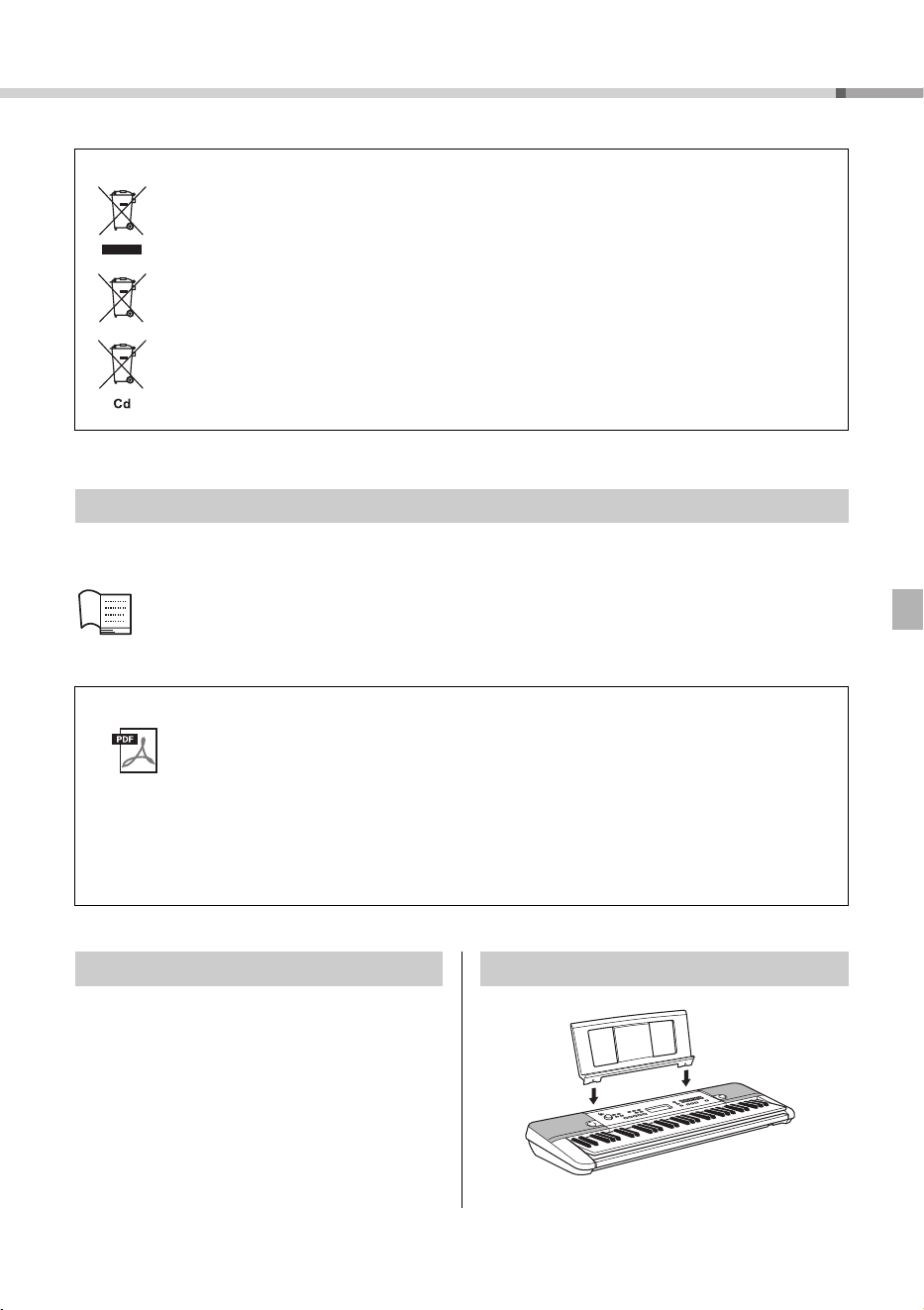
Included Accessories Using the Music Rest
Insert into the slot
PSR-E263 YPT-260 Owner’s Manual
6
Setting Up
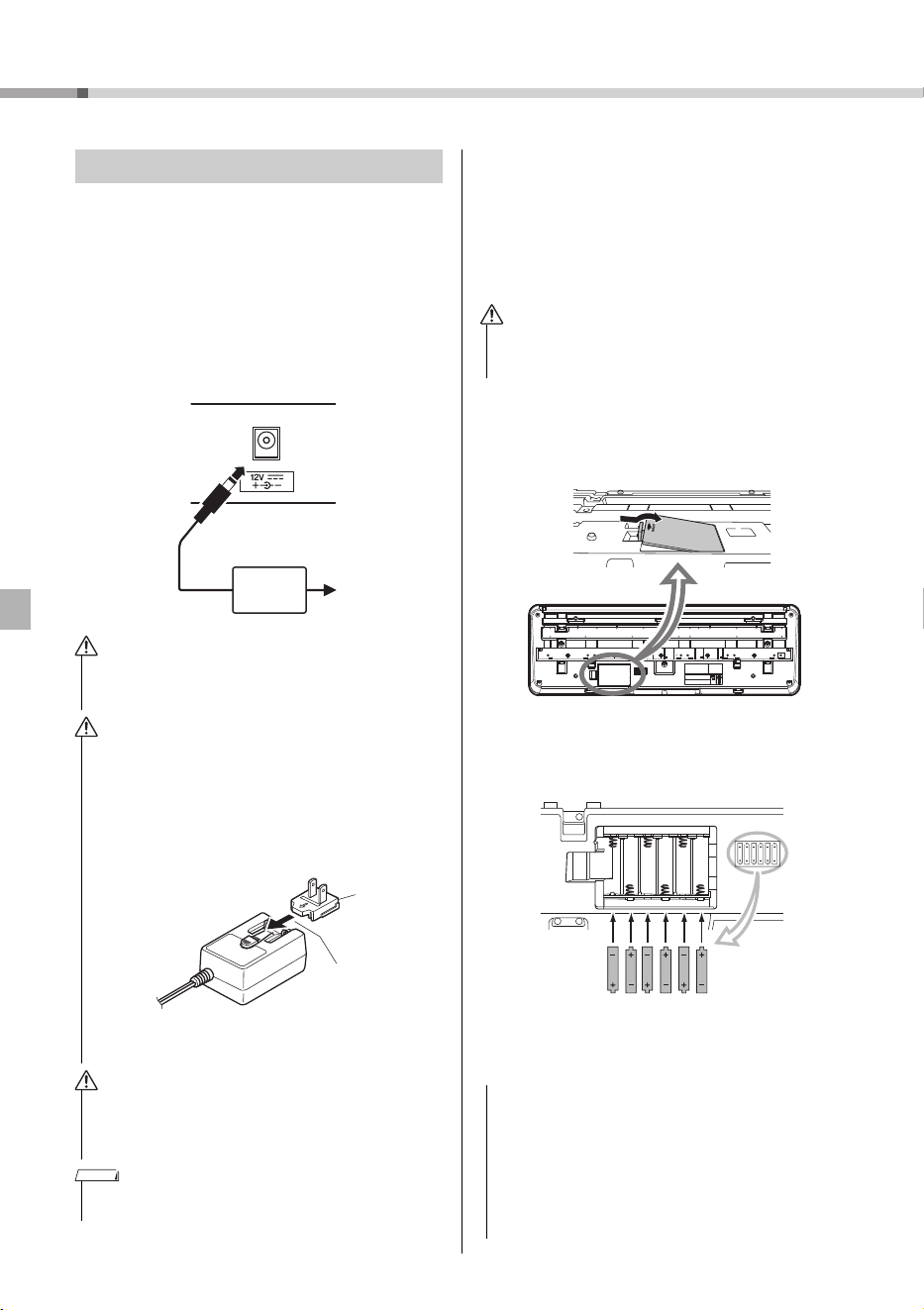
Although the instrument will run either from an AC
adaptor or batteries, Yamaha recommends use of an
AC adaptor whenever possible. An AC adaptor is
more environmentally friendly than batteries and
does not deplete resources.
Using an AC Adaptor
Connect the AC adaptor in the order shown in the
illustration.
Using Batteries
This instrument requires six “AA” size, Alkaline (LR6)/
Manganese (R6) batteries, or rechargeable nickel-
metal hydride batteries (rechargeable Ni-MH batter-
ies). The Alkaline batteries or rechargeable Ni-MH
batteries are recommended for this instrument, since
other types may result in poorer battery performance.
1 Make sure that the power of the instrument is off.
2 Open the battery compartment cover located on
the instrument’s bottom panel.
3 Insert the six new batteries, being careful to follow
the polarity markings on the inside of the com-
partment.
4 Replace the compartment cover, making sure that
it locks firmly in place.
Power Requirements
• Use the specified AC adaptor (page 15) only. Using the
wrong AC adaptor can result in damage to the instrument
or overheating.
• When using the AC adaptor with a removable plug, make
sure to keep the plug attached to the AC adaptor. Using the
plug alone can cause electric shock or fire.
• If the plug is accidentally removed from the AC adaptor,
slide it back in until it clicks into place, taking care to
avoid touching any internal metal parts. To avoid electric
shock, short circuit or damage, also be careful that there
is no dust between the AC adaptor and plug.
• When setting up the product, make sure that the AC outlet
you are using is easily accessible. If some trouble or mal-
function occurs, immediately turn the power off and dis-
connect the plug from the outlet.
• Follow the order shown above in reverse when disconnecting
the AC adaptor.
AC outlet
AC
adaptor
2
1
DC IN jack
(page 9)
WARNING
WARNING
Plug
The shape of the plug differs depending on
your area.
Slide the plug as
indicated.
CAUTION
NOTE
• When the batteries run out, or if the instrument is not to be
used for a long time, remove the batteries from the instru-
ment.
• Connecting or disconnecting the power adaptor with bat-
teries installed may turn the power off, resulting in loss of
data being recorded at the time.
• Make sure to set the battery type correctly (page 7).
• When battery power becomes too low for proper opera-
tion, the volume may be reduced, the sound may be dis-
torted, and other problems may occur. When this happens,
make sure to replace all batteries with new ones or already
recharged ones.
WARNING
NOTICE
Setting Up
PSR-E263 YPT-260 Owner’s Manual
7
Setting the battery type
Depending on the battery type to be used, you may
need to change the battery type setting on this instru-
ment. Alkaline (and manganese) batteries are cho-
sen by default. After installing new batteries and
turning the power on, make sure to set the Battery
Type appropriately (rechargeable or not) via Function
number 022 (page 14).
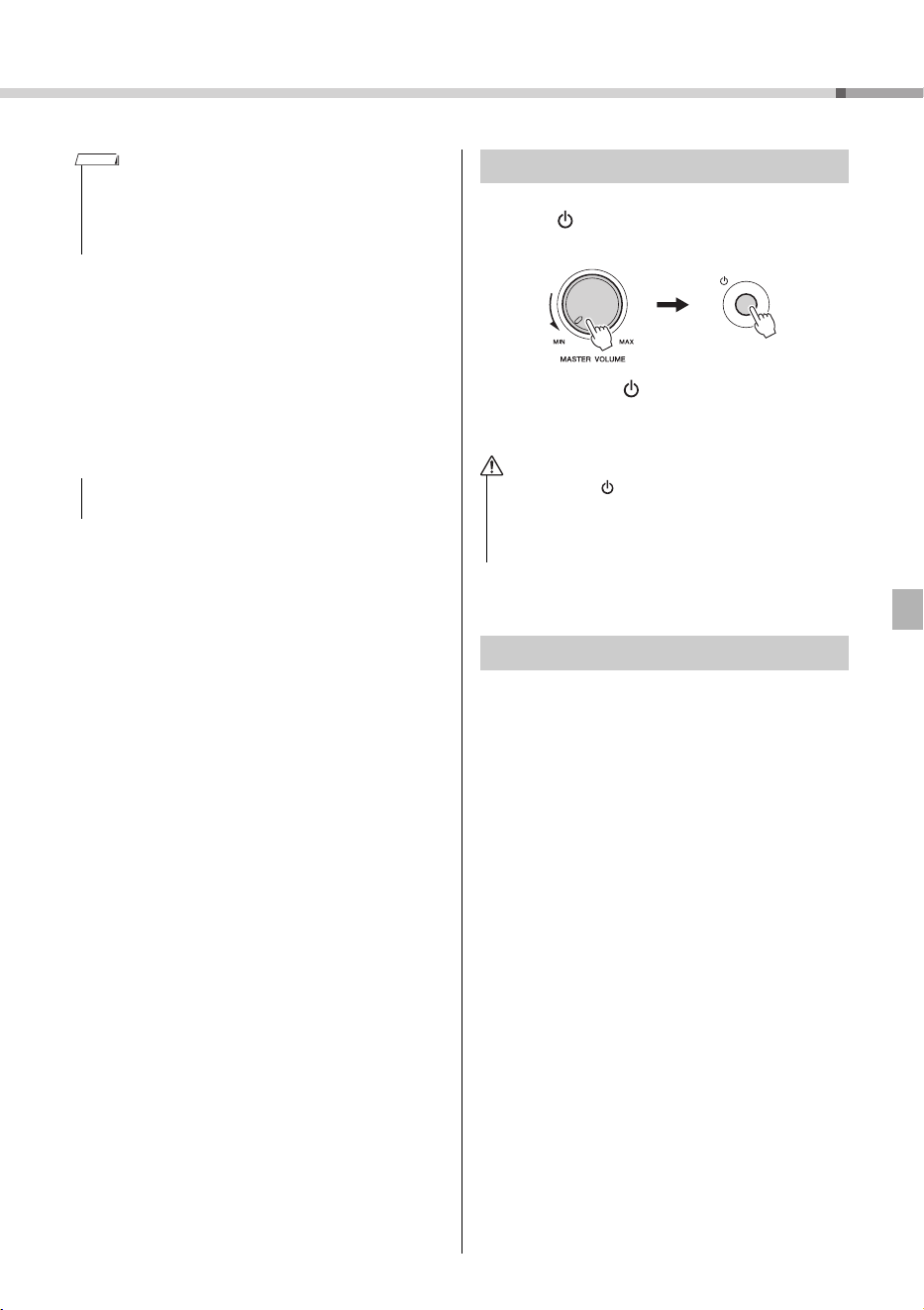
Set [MASTER VOLUME] to the MIN position, then
press the [ ] (Standby/On) switch to turn on the
power.
Press and hold the [ ] (Standby/On) switch for
about a second to set the instrument to standby
mode.
To prevent unnecessary power consumption, this
instrument features an Auto Power Off function that
automatically turns the power off if the instrument is
not used for approximately 30 minutes. To disable
the Auto Power Off function, select “Off” in the Func-
tion settings (Function 021).
• This instrument cannot charge the batteries. Use only the
specified charger device when charging.
• Power will be automatically drawn from the AC adaptor if an
AC adaptor is connected while batteries are installed in the
instrument.
• Failure to set the battery type may shorten the amount of
the battery life. Make sure to set the battery type correctly.
NOTE
NOTICE
Turning the Power On
• Even when the [ ] (Standby/On) switch is in standby sta-
tus, electricity is still flowing to the product at the mini-
mum level. Remove the electric plug from the outlet when
the instrument is not to be used for extended periods of
time, or during electrical storms.
Auto Power Off function
CAUTION
PSR-E263 YPT-260 Owner’s Manual
8
Panel Controls and Terminals
GrandPno
001
001
w
q
e
t
!1 !3
!2
!4 !5
u i
o
!0
y
r
@4
DisplaySong List (page 22) Voice List (page 16)
Front Panel
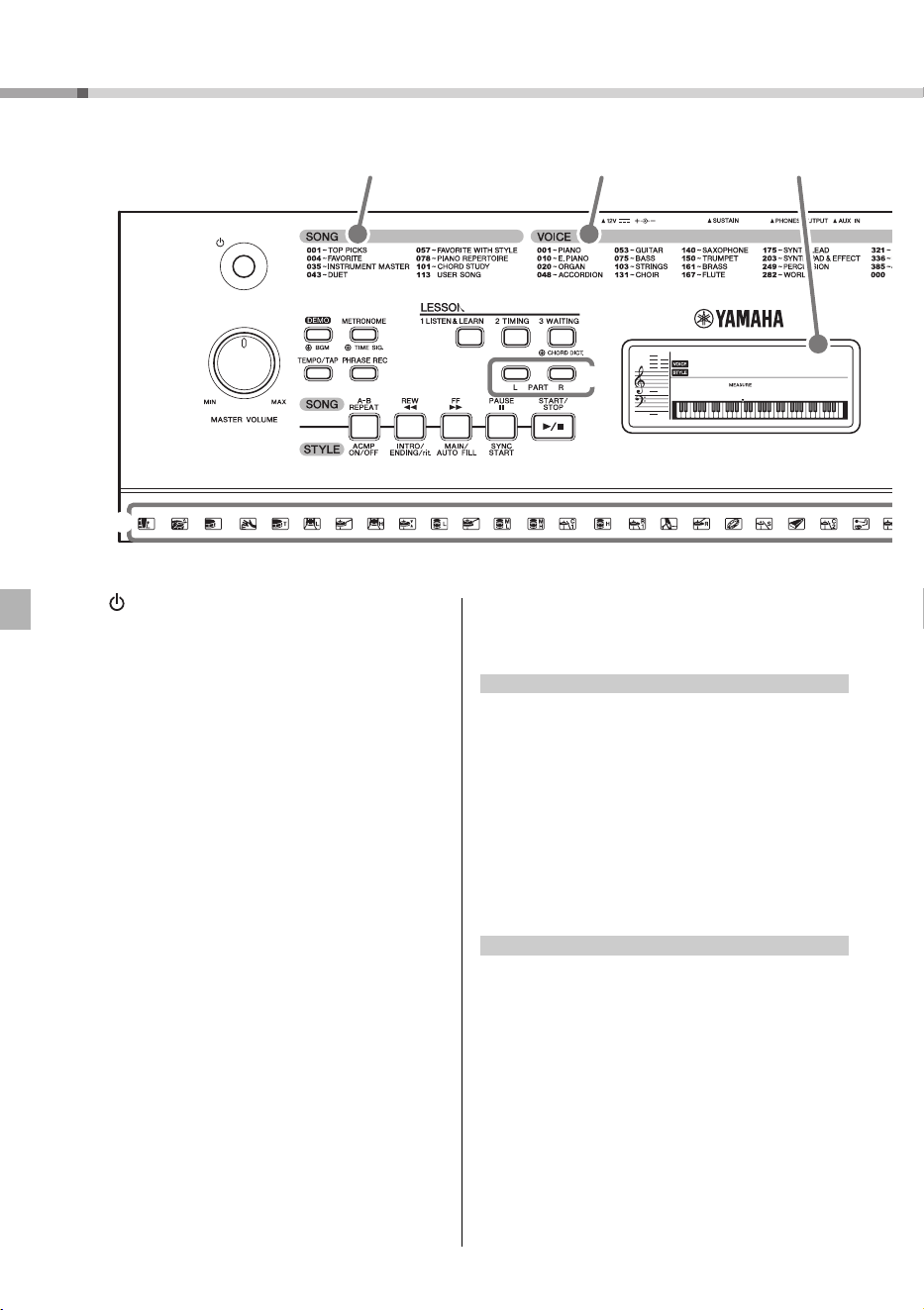
q [ ] (Standby/On) switch
Turns the instrument’s power on or off.
w [MASTER VOLUME] control
Adjusts the overall volume.
e [DEMO] button
Starts/stops the Demo.
Holding down this button changes the playback
group.
r [METRONOME] button
Starts/stops the metronome.
Holding down this button calls up the Time Signa-
ture display (Function number 016 on page 14.)
t [TEMPO/TAP] button
Calls up the Tempo display. With this status, use
the Number buttons to set the tempo of the Song,
Style and metronome.
You can set the tempo also by tapping this button
several times at the desired tempo.
y [PHRASE REC] button
Records your performance. See page 12.
u [1 LISTEN & LEARN] button
Starts the Song with the Lesson 1 mode (page 11).
i [2 TIMING] button
Starts the Song with the Lesson 2 mode (page 11).
o [3 WAITING] button
Starts the Song with the Lesson 3 mode (page 11).
Holding down this button calls up the Chord Diction-
ary display. In this status, the keyboard is divided
into three sections, split at C3 and C6. Specify a
chord root in the right section then a chord type in
the middle section. As the notes to be played are
shown in the display, play the corresponding notes
in the left section. When you’ve played the chord
properly, a bell sound signals your success.
!0 PART [L]/[R] buttons
Selects a lesson part or a mute part of the current
Song. Pressing the [L] button enters the Duo mode.
See page 10.
!1 [A-B REPEAT] button
Turns on/off Song Repeat playback.
Pressing this a first time specifies the starting point
A. Pressing this a second time specifies the ending
point B. Pressing this again turns off Song Repeat
playback.
!2 [REW] button
Returns to the earlier measure of the Song.
!3 [FF] button
Skips ahead to the next beat of the Song.
!4 [PAUSE] button
Stops Song playback at the current position.
!1 [ACMP ON/OFF] button
Splits the keyboard into the Left hand (Chord) and
Right hand (Melody) sections.
!2 [INTRO/ENDING/rit.] button
By pressing this when the Style is stopped, you can
start playback from the Intro.
By pressing this during Style playback, you can
switch playback to the Ending.
By pressing this during Ending playback, you can
apply a tempo ritardando to playback.
!3 [MAIN/AUTO FILL] button
Switches between the Main A and Main B of the
Style. During playback, the Fill-in is added when
you press this button.
In the Song mode
In the Style mode
Panel Controls and Terminals
PSR-E263 YPT-260 Owner’s Manual
9
@0 @1 @2 @3
!6
!7
!8
!9
@5 @6
@7
@8
Style List (page 23)
Rear Panel
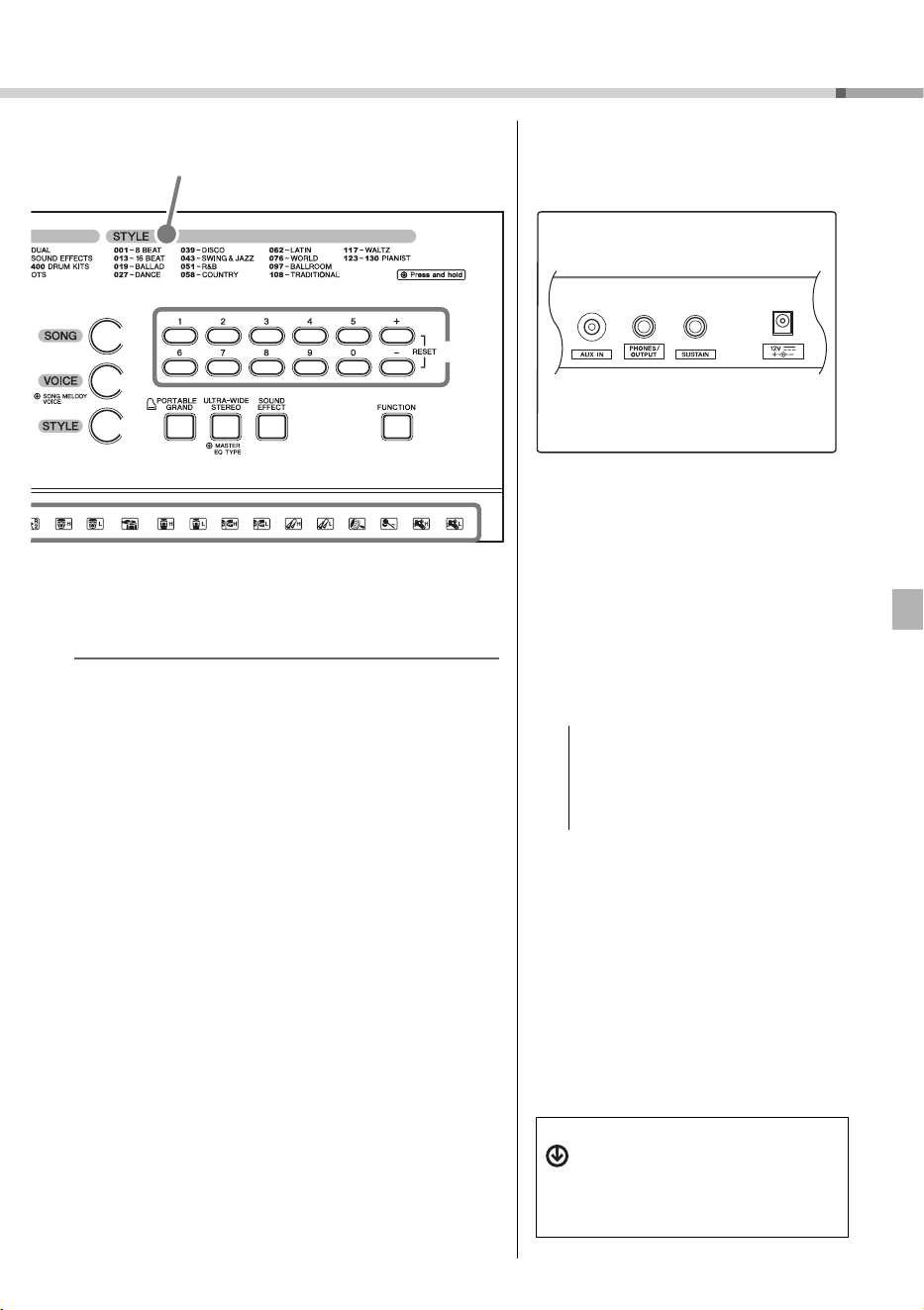
!4 [SYNC START] button
Enables/disables the ability to start playback by simply play-
ing the keyboard.
!5 [START/STOP] button
Starts/stops Song playback in the Song mode, or Style
playback in the Style mode.
!6 [SONG] button
Calls up the Song selection display.
Enters the Song mode.
!7 [VOICE] button
Calls up the Voice selection display.
If you hold down this button in the Song mode, the current
Voice will be assigned to the Melody of the current Song.
!8 [STYLE] button
Calls up the Style selection display.
Enters the Style mode.
!9 Number buttons [0]–[9], [+], [-]
Selects the setting value for items such as Voice, Style,
Song and Tempo.
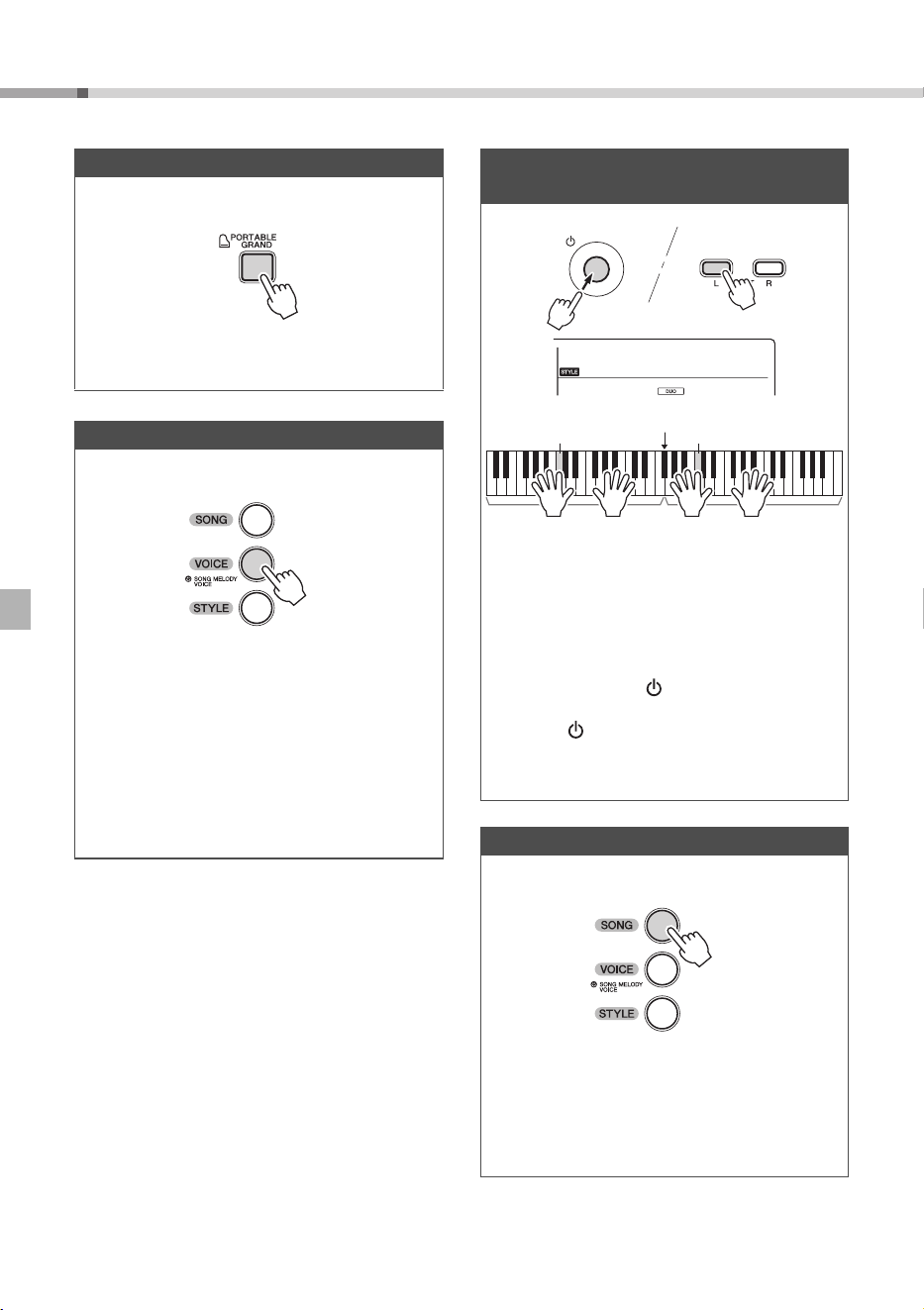
@0 [PORTABLE GRAND] button
Makes the appropriate settings for piano performance only.
@1 [ULTRA-WIDE STEREO] button
Press this to turn on the ULTRA-WIDE STEREO Effect.
Holding this down calls up the Master EQ Type selection
display (Function number 013 on page 13.)
@2 [SOUND EFFECT] button
Lets you play various Sound Effects from the keyboard.
@3 [FUNCTION] button
Pressing this repeatedly calls up various parameters in
sequence.
@4 Drum illustrations for the Drum Kit
Indicates drum instruments assigned to each key when the
Standard Kit 1 is selected.
@5 AUX IN jack
For connecting an external audio device.
See page 12.
@6 PHONES/OUTPUT jack
For connecting headphones and external
audio equipment
@7 SUSTAIN jack
For connecting a Footswitch.
@8 DC IN jack
For connecting the AC adaptor.
• To avoid possible damage to the external
device, first turn on the power to the instru-
ment, then to the external device. When turn-
ing off the power, do so in reverse order: first
turn off the power to the external device,
then to the instrument.
NOTICE
The “Press & Hold” Symbol
Buttons having this indication can be
used to call up an alternate function
when the relevant button is pressed
and held. Hold down this button until
the function is called up.
PSR-E263 YPT-260 Owner’s Manual
10
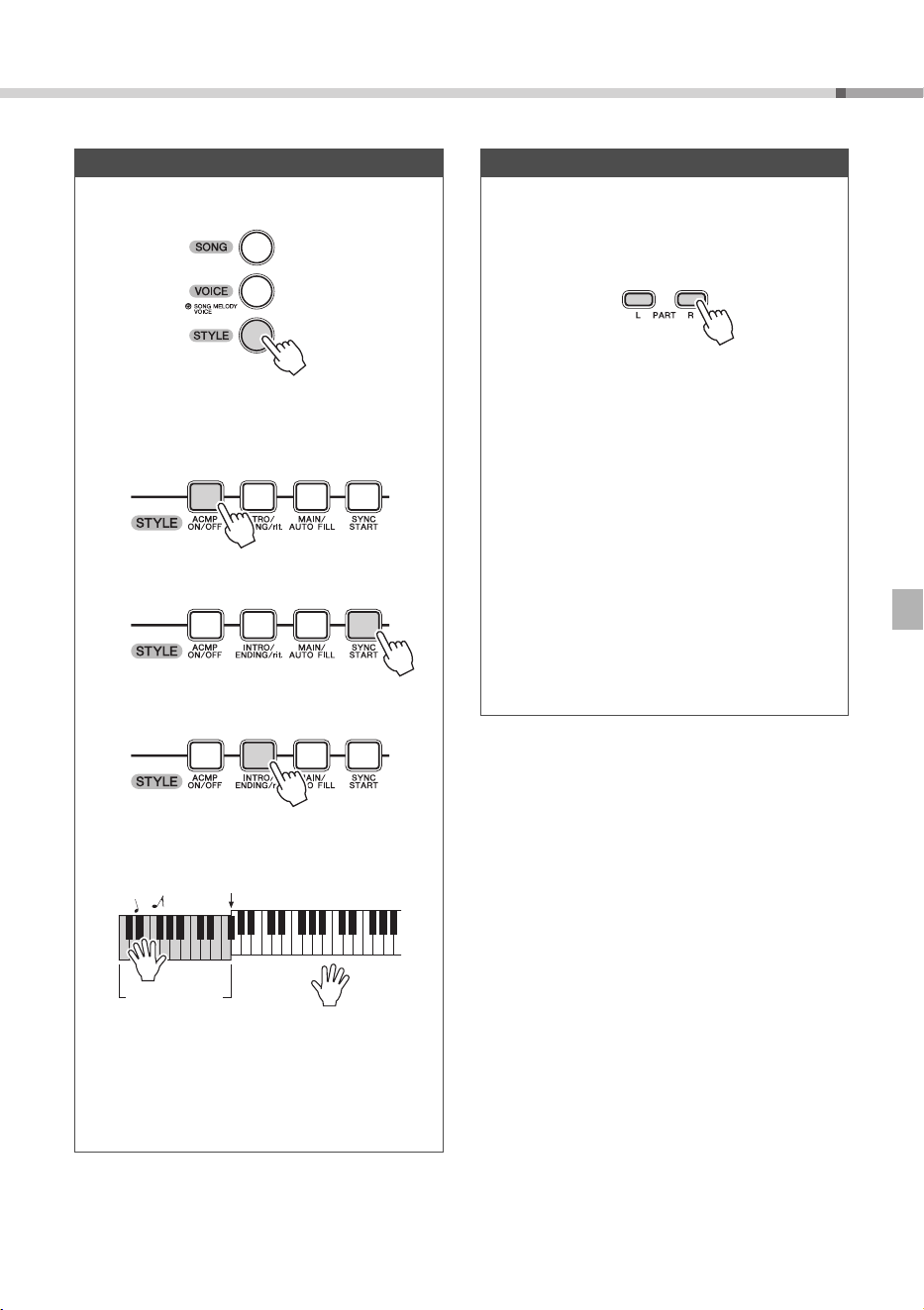
Let’s enjoy playing the keyboard !
Simply playing as a piano
1
Press [PORTABLE GRAND] @0.
2 Play the keyboard like a Pianist !
Playing a Voice
1
Press [VOICE] !7.
2 Use the Number buttons to select a Voice.
3 Play the keyboard.
One Touch Setting
The One Touch Setting feature automatically
selects the most suitable Voice when you select a
Style or Song (excepting the Song inputted from
the [AUX IN] jack). Simply select Voice number
“000” to activate this feature.
Playing the keyboard with two
persons (Duo mode)
When this mode is on, two different players can
play the instrument simultaneously, with the same
sound, over the same octave range—one person
on the left and the other on the right.
To do so, simultaneously hold down the PART [L]
button and press the [ ] (Standby/On) switch to
turn on the power. To exit from the Duo mode,
press the [ ] (Standby/On) switch to turn off the
power, and turn the power back on again nor-
mally.
Playing a Song
1
Press [SONG] !6.
2 Use the Number buttons to select a Song.
3 Press [START/STOP] !5 to start playback.
4 Press the PART buttons !0 to mute the Mel-
ody part.
DuoMode
on
Equivalent to C3
Split Point: 066 (F#3)
Left Player
Equivalent to C3
Right Player
Let’s enjoy playing the keyboard !
PSR-E263 YPT-260 Owner’s Manual
11
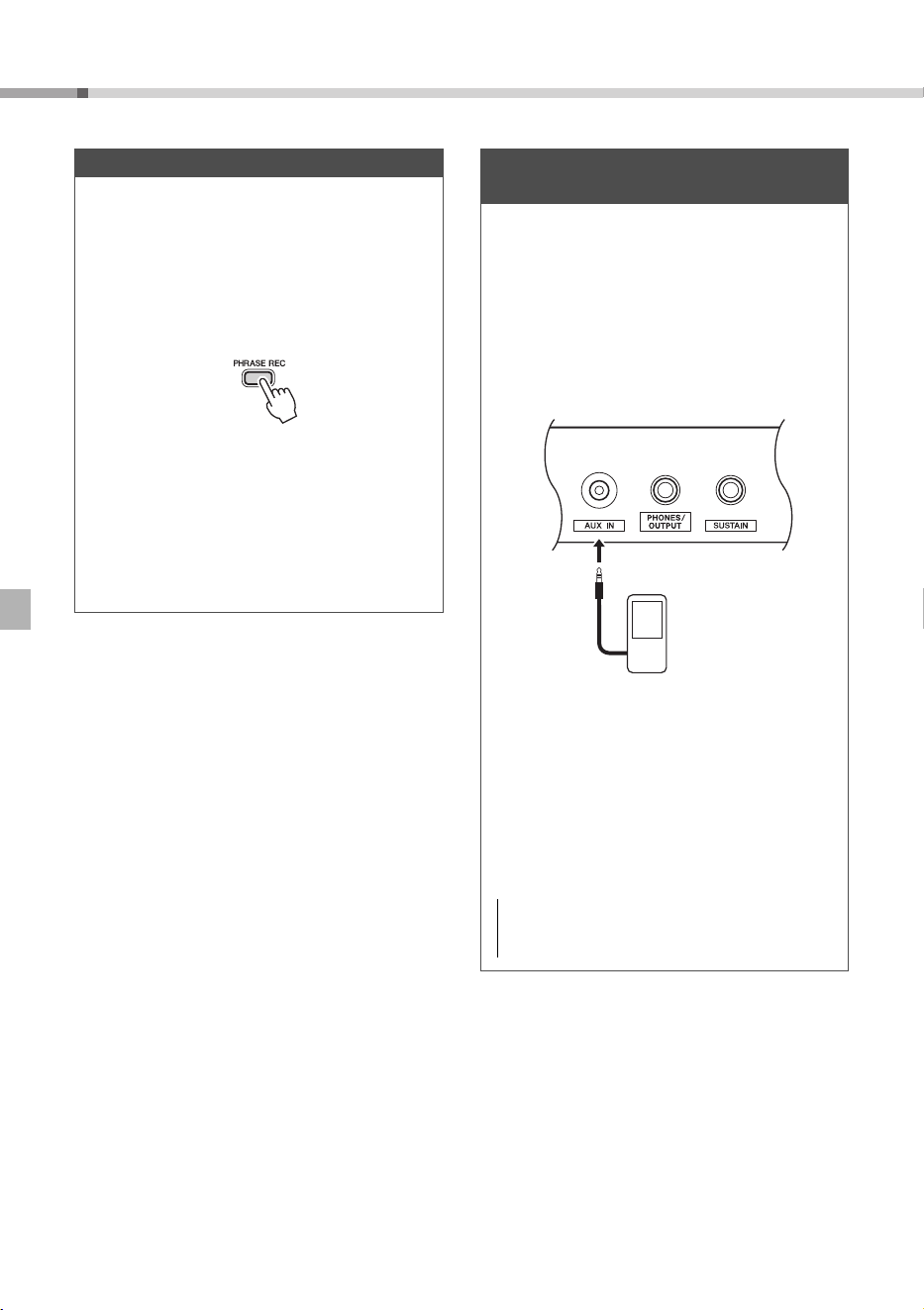
Playing with a Style
1
Press [STYLE] !8.
2 Use the Number buttons to select a Style.
3 Press [ACMP ON/OFF] !1 to turn accompani-
ment on.
4 Press [SYNC START] !4 to turn Sync Start on.
5 Press [INTRO/ENDING/rit.] !2.
6 Play a chord in the left area of the keyboard
to start playback.
7 Play a chord with your left hand and play a
melody with your right hand.
8 Press [INTRO/ENDING/rit.] !2.
9 As desired, press [INTRO/ENDING/rit.] !2
again to apply ritardando.
Split Point
Auto Accompani-
ment range
Song Lesson
1
Press [SONG] then use the Number buttons
to select a Song.
2 Press the PART buttons !0 to select the Les-
son Part.
3 Press the desired Lesson button.
[1 LISTEN & LEARN]
...... Simply listen to the Song.
[2 TIMING]
...... Learn to play the notes at the correct
timing.
[3 WAITING]
...... Learn to play the correct notes.
4 See the evaluation on the display when play-
back finishes. (Only for [2 TIMING] and [3
WAITING])
Chord Study
A Song category for experiencing the sounds of
chords. Simply play back a Song from this cate-
gory, then play the notes/chord indications shown
in the display.
Let’s enjoy playing the keyboard !
PSR-E263 YPT-260 Owner’s Manual
12
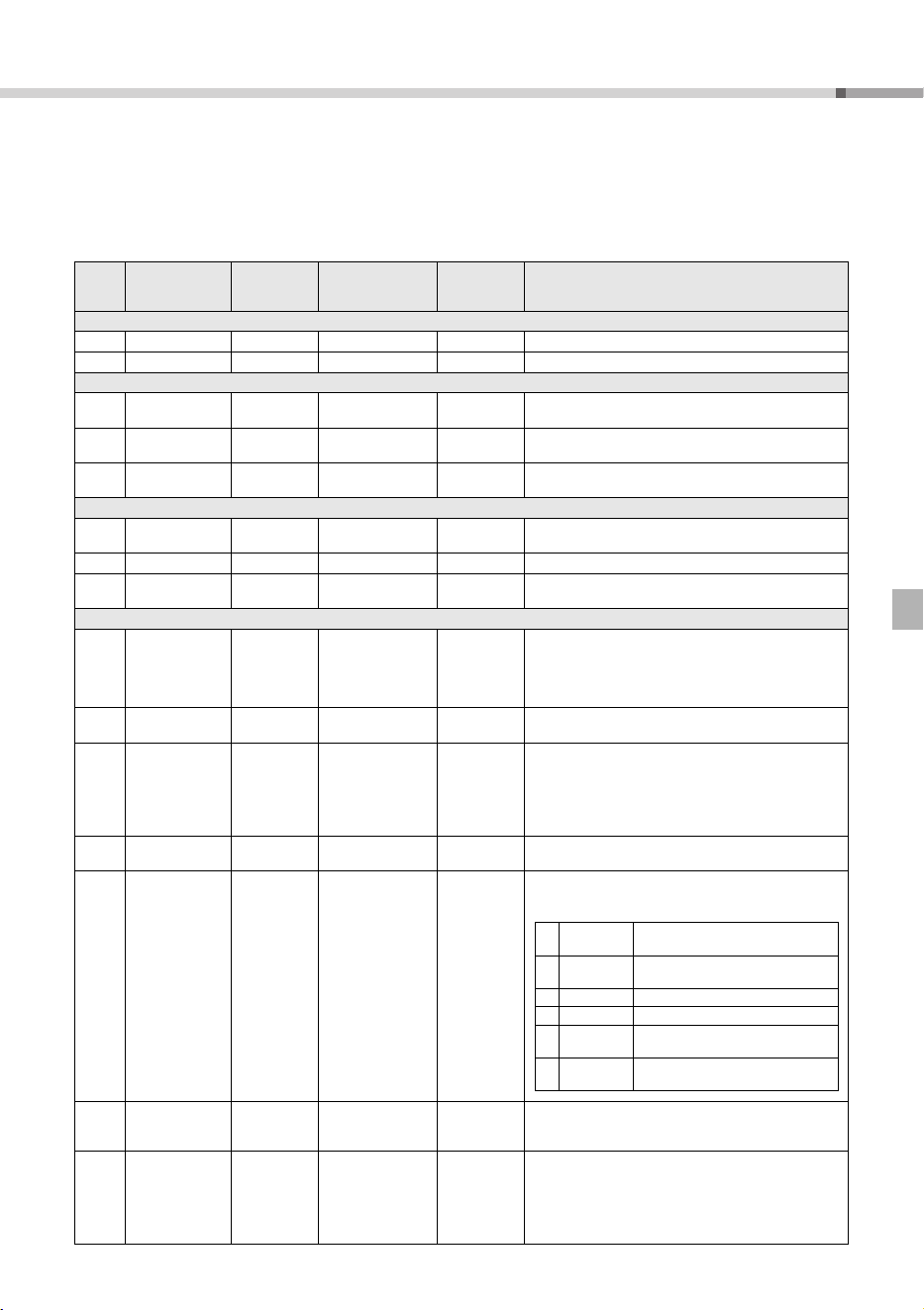
Recording
Record your performance as a User Song (Song
number 113, up to approx. 300 notes), which can
then be played back on the instrument.
1 Press [PHRASE REC] y to enter the Record
mode.
To exit from the Record mode, press this but-
ton again.
2 Play the keys in the Record mode to start the
recording.
3 Stop the recording by pressing the [START/
STOP] !5.
4 To listen to the recorded Song and stop the
playing, use [START/STOP].
Playing an External Audio Device
with the Built-in Speakers
1
Turn off the power for both the external audio
device and this instrument.
2 Connect the audio device to the instrument’s
[AUX IN] jack @5.
Use an audio cable with no resistance having
a stereo-mini plug on one side for connecting
to this instrument, and a proper plug to
match the output jack of the external audio
device on the other side.
3 Turn on the audio device, and then this instru-
ment.
4 Start play back of the connected audio
device.
The sound of the audio device is output
through the speakers of this instrument.
5 Stop playback of the audio device.
Audio device (portable
audio player, etc.)
Stereo-mini
plug
• When turning off the power, first turn off the power to
the instrument, and then to the external device to avoid
damage to the devices.
NOTICE
PSR-E263 YPT-260 Owner’s Manual
13
Making detailed settings
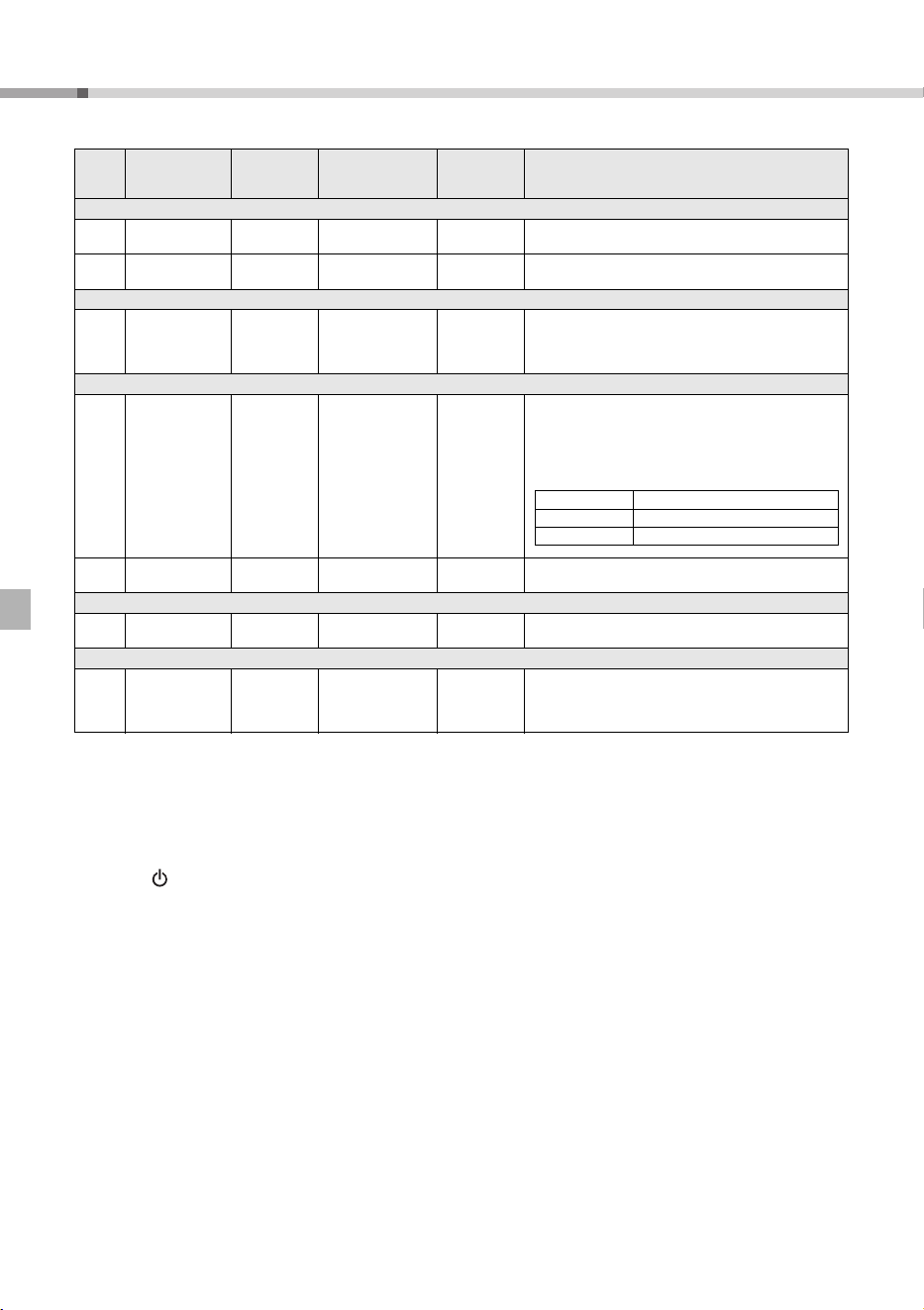
1 Press [FUNCTION] @3 repeatedly to call up the desired setting from various items such as Transpose, Tun-
ing, Split Point, Sustain, and Time Signature of the metronome.
2 Use the Number buttons to set the value.
Function List
Func-
tion
Number
Function name Display Range/Settings Default Value Descriptions
Vol ume
001 Style Volume StyleVol 000–127 100 Determines the volume of the Style. (page 11)
002 Song Volume SongVol 000–127 100 Determines the volume of the Song. (page 10)
Overall
003 Transpose Transpos -12–12 0
Determines the pitch of the instrument in semitone incre-
ments.
004 Tuning Tuning 427.0Hz–453.0Hz
440.0Hz
***
Determines the fine tuning of the pitch of the entire instrument
in approx. 0.2Hz increments.
005 Split Point SplitPnt 036–096 (C1–C6) 54 (F#2)
Determines the Split “point”—in other words, the key that sep-
arates the auto accompaniment range and Voice. (page 11)
Voice (page 10)
006 Volume M.Volume 000–127 *
Adjusts the volume of keyboard performance when perform-
ing along with a Song or a Style.
007 Octave M.Octave -2 – +2 * Determines the octave range for the Voice.
008 Chorus Depth M.Chorus 000–127 *
Determines how much of the Voice’s signal is sent to the Cho-
rus effect.
Effects
009 Reverb Type Reverb
01–03 (Hall 1–3)
04–05 (Room 1–2)
06–07 (Stage 1–2)
08–09 (Plate 1–2)
10 (Off)
** Determines the Reverb type, including off (10). (page 24)
010 Reverb Level RevLevel 000–127 64
Determines how much of the Voice’s signal is sent to the Reverb
effect.
011 Chorus Type Chorus
1 (Chorus1)
2 (Chorus2)
3 (Chorus3)
4 (Flanger1)
5 (Flanger2)
6 (off)
** Determines the Chorus type, including off (6). (page 24)
012 Panel Sustain Sustain ON/OFF
OFF
***
Determines whether the Panel Sustain function is on or off.
013 Master EQ Type MasterEQ
1 (Speaker)
2 (Headphone)
3 (Boost)
4 (Piano)
5 (Bright)
6 (Mild)
1 (Speaker)
***
Sets the equalizer applied to the speaker output for optimum
sound in different listening situations.
014 Wide Type Wide
1 (Wide1)
2 (Wide2)
3 (Wide3)
2 (Wide2)
Determines the Ultra-Wide Stereo type.
Higher values produce a greater Wide effect. (page 9)
015 Voice Output VoiceOut
1 (Normal)
2 (Separate)
2 (Separate)
When the Duo mode (page 10) is on, this function is effective. If
“Normal” is selected, the performance sounds of the left section
and the right section will sound from both the left and right speak-
ers. If “Separate” is selected, the performance sound of the left
section will sound from the left speaker, and the performance
sound of the right section will sound from the right speaker.
Master EQ types
1 Speaker
Optimum for listening via the instru-
ment’s built-in speakers.
2 Headphone
Optimum for headphones, or for listen-
ing via external speakers.
3 Boost Features more powerful sound.
4 Piano Optimum for piano solo performance.
5 Bright
Lowers the mid range for a brighter
sound.
6 Mild
Lowers the high range for a softer
sound.
Making detailed settings
PSR-E263 YPT-260 Owner’s Manual
14
* The appropriate value is automatically set for each Voice combination.
** The appropriate value is automatically set for each Song or Style.
*** The Backup parameters. The Backup parameters and the User Song will be maintained even if you turn off the power.
Initialization
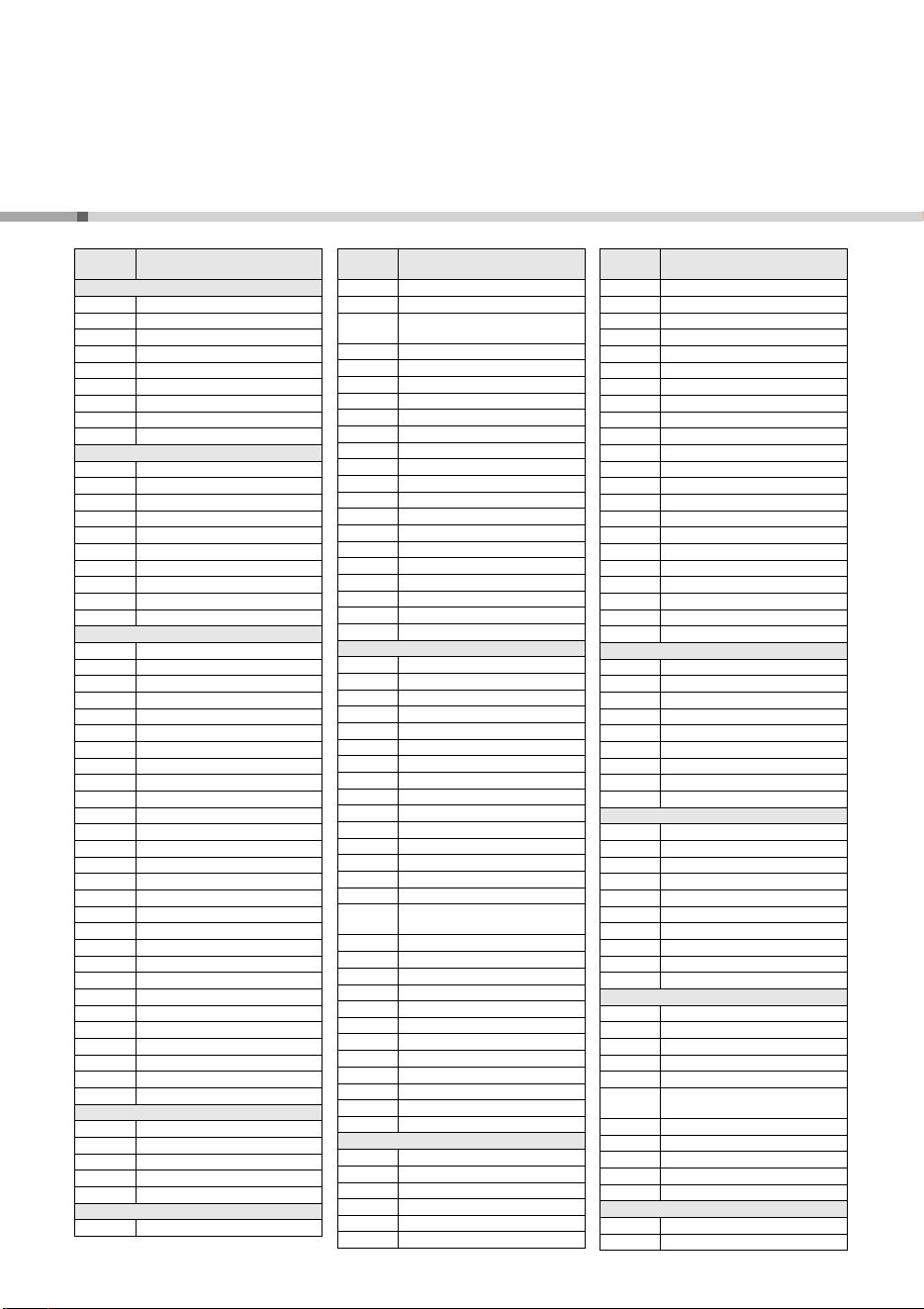
This operation initializes the backup parameters and the User Song. While holding down the highest white key,
press the [ ] (Standby/On) switch to turn the power on.
Metronome (page 8)
016
Time Signature
Numerator
TimeSig 00–15 ** Determines the time signature of the Metronome.
017
Metronome Vol-
ume
MetroVol 000–127 100 Determines the volume of the Metronome.
Lesson (page 11)
018 Your Tempo YourTemp ON/OFF
ON
***
This parameter is for the Lesson 3 “Waiting.” When set to ON,
playback tempo will change for matching the speed you are
playing at. When set to OFF, playback tempo will be main-
tained regardless of the speed you are playing at.
Demo (page 8)
019 Demo Group DemoGrp
1 (Demo)
2 (Preset)
3 (User)
1 (Demo)
Determines the repeat playback group. With the default set-
ting, pressing the [DEMO] button will play back only three
internal Demo Songs repeatedly. This setting can be changed
so that, for example, all internal Songs (excepting Songs 101–
112) automatically play back, letting you use the instrument as
a background music source.
020 Demo Play Mode PlayMode
1 (Normal)
2 (Random)
1 (Normal) Determines the repeat playback mode.
Auto Power Off (page 7)
021
Auto Power Off
Time
AutoOff
OFF, 5/10/15/30/60/
120 (minutes)
30 minutes
***
Specifies the time that will elapse before the instrument’s
power is automatically turned off.
Battery (page 6)
022 Battery Type Battery
1 (Alkaline)
2 (Ni-MH)
1 (Alkaline)
***
Selects the type of batteries you have installed to this instru-
ment.
Alkaline: Alkaline battery/manganese battery
Ni-MH: Rechargeable battery
Func-
tion
Number
Function name Display Range/Settings Default Value Descriptions
Demo Preset Songs (001–003)
Preset Preset Songs (001–100)
User User Song (113)

PSR-E263 YPT-260 Owner’s Manual
15
Specifications
Product Name
• Digital Keyboard
Keyboards
• 61 standard-size keys (C1–C6)
Display
• LCD display
Voice
• 384 panel Voices + 16 drum/SFX kits
• Polyphony: 32
Style
• 130 Preset Styles
• Style Control: ACMP ON/OFF, SYNC START,
START/STOP, INTRO/ENDING/rit., MAIN/AUTO
FILL
Effects
• Reverb: 9 types
• Chorus: 5 types
• Ultra-Wide Stereo: 3 types
• Master EQ: 6 types
Song
• 112 Preset Songs
Recording
• 1 (up to approx. 300 notes)
Amplifier
• 2.5W + 2.5W
Speakers
• 12cm x 2
Power Consumption
• 6W (When using PA-130 AC adaptor)
Power Supply
• Adaptor: Yamaha PA-130 or an equivalent
recommended by Yamaha
• Batteries: Six 1.5V “AA” size alkaline (LR6),
manganese (R6) or six 1.2V “AA” size
Ni-MH rechargeable batteries (HR6)
Dimensions (W x D x H)
• 940mm x 317mm x 106mm
(37” x 12-1/2” x 4-3/16”)
Weight
• 4.0kg (8lbs 13oz.) (not including batteries)
Separately Sold Accessories
• Footswitch: FC4A/FC5
• Keyboard Stand: L-2C
• Headphones: HPH-50/HPH-100/HPH-150
• Adaptor: Yamaha PA-130 or an equivalent
recommended by Yamaha
* The contents of this manual apply to the latest specifications as
of the printing date. Since Yamaha makes continuous
improvements to the product, this manual may not apply to the
specifications of your particular product. To obtain the latest
manual, access the Yamaha website then download the manual
file. Since specifications, equipment or separately sold
accessories may not be the same in every locale, please check
with your Yamaha dealer.
PSR-E263 YPT-260
16
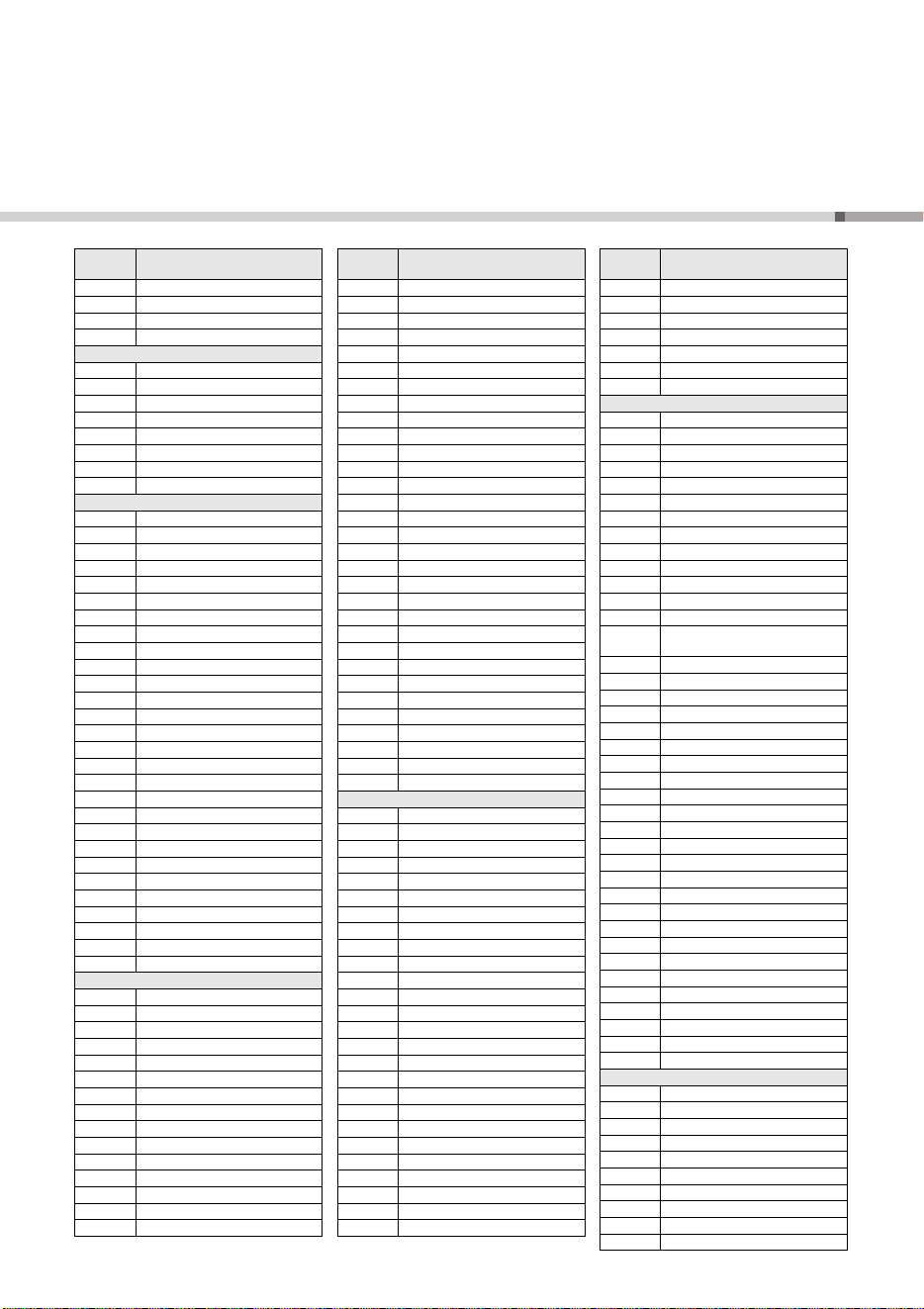
Voice List / Liste der Voices / Liste des sonorités / Lista de voces / Lista de vozes /
Elenco delle voci / Voiceoverzicht / Lista brzmień /
Список тембров
/
Liste over lyde / Lista över ljud / Seznam rejstříků / Zoznam hlasov /
Hangszínek listája / Seznam zvokov /
Списък с тонове
/ Listă de voci /
Skaņu saraksts / Garsų sąrašas / Helide loend / Popis zvukova /
Enstrüman Sesi Listesi /
Danh sách tiếng
Voice
No.
Voice Name
PIANO
1 Grand Piano
2 Mono Grand Piano
3 Bright Piano
4 Mellow Piano
5 Honky-tonk Piano
6 Piano Strings
7 Dream
8 Harpsichord 1
9 Harpsichord 2
E.PIANO
10 Electric Piano 1
11 Electric Piano 2
12 Electric Piano 3
13 Electric Grand Piano
14 Chorus Electric Piano 1
15 Chorus Electric Piano 2
16 Detuned Electric Piano
17 DX + Analog Electric Piano
18 Clavi
19 Wah Clavi
ORGAN
20 Drawbar Organ 1
21 Drawbar Organ 2
22 60s Drawbar Organ 1
23 60s Drawbar Organ 2
24 60s Drawbar Organ 3
25 70s Drawbar Organ 1
26 70s Drawbar Organ 2
27 Detuned Drawbar Organ
28 Percussive Organ 1
29 Percussive Organ 2
30 70s Percussive Organ
31 Detuned Percussive Organ
32 16+2'2/3 Organ
33 Organ Bass
34 Rock Organ
35 Rotary Organ
36 Slow Rotary Organ
37 Fast Rotary Organ
38 Pipe Organ 1
39 Pipe Organ 2
40 Pipe Organ 3
41 Organ Flute
42 Tremolo Organ Flute
43 Notre Dame
44 Cheezy Organ
45 Light Organ
46 Reed Organ
47 Puff Organ
ACCORDION
48 Accordion
49 Tango Accordion 1
50 Tango Accordion 2
51 Harmonica 1
52 Harmonica 2
GUITAR
53 Nylon Guitar
54 Steel Guitar
55 Nylon & Steel Guitar
56
Steel Guitar with Body
Sound
57 Muted Steel Guitar
58 12-string Guitar
59 Jazz Guitar
60 Jazz Amp
61 Jazz Man
62 Clean Guitar
63 Chorus Guitar
64 Funk Guitar
65 Guitar Pinch
66 Muted Guitar
67 Overdriven Guitar
68 Distortion Guitar
69 Feedback Guitar 1
70 Feedback Guitar 2
71 Guitar Feedback
72 Guitar Harmonics 1
73 Guitar Harmonics 2
74 Guitar Harmonics 3
BASS
75 Acoustic Bass 1
76 Acoustic Bass 2
77 Finger Bass 1
78 Finger Bass 2
79 Finger Dark
80 Finger Slap Bass
81 Pick Bass
82 Fretless Bass 1
83 Fretless Bass 2
84 Fretless Bass 3
85 Fretless Bass 4
86 Slap Bass 1
87 Slap Bass 2
88 Slap Bass 3
89 Jazz Rhythm
90
Bass & Distorted Electric
Guitar
91 Muted Pick Bass
92 Modulated Bass
93 Punch Thumb Bass
94 Synth Bass 1
95 Synth Bass 2
96 Synth Bass 2 Dark
97 Techno Synth Bass
98 Mellow Synth Bass
99 Sequenced Bass
100 Click Synth Bass
101 Modular Synth Bass
102 DX Bass
STRINGS
103 Strings 1
104 Strings 2
105 Strings 3
106 Slow Strings
107 Stereo Strings
108 Stereo Slow Strings
Voice
No.
Voice Name
109 Orchestra 1
110 Orchestra 2
111 60s Strings
112 Suspense Strings
113 Legato Strings
114 Warm Strings
115 Kingdom
116 Tremolo Strings
117 Slow Tremolo Strings
118 Tremolo Orchestra
119 Pizzicato Strings
120 Violin
121 Slow Violin
122 Viola
123 Cello
124 Contrabass
125 Orchestral Harp
126 Synth Strings 1
127 Synth Strings 2
128 Orchestra Hit 1
129 Orchestra Hit 2
130 Impact
CHOIR
131 Choir Aahs
132 Voice Oohs
133 Stereo Choir
134 Mellow Choir
135 Choir Strings
136 Synth Voice 1
137 Synth Voice 2
138 Choral
139 Analog Voice
SAXOPHONE
140 Tenor Sax
141 Breathy Tenor Sax
142 Alto Sax
143 Soprano Sax
144 Baritone Sax
145 Sax Section
146 Clarinet
147 Oboe
148 English Horn
149 Bassoon
TRUMPET
150 Trumpet
151 Warm Trumpet
152 Muted Trumpet
153 Trombone 1
154 Trombone 2
155
Trumpet & Trombone
Section
156 French Horn 1
157 French Horn 2
158 French Horn Solo
159 Horn Orchestra
160 Tuba
BRASS
161 Brass Section
162 Synth Brass 1
Voice
No.
Voice Name
PSR-E263 YPT-260
17
163 Synth Brass 2
164 Soft Brass
165 Resonant Synth Brass
166 Choir Brass
FLUTE
167 Flute
168 Piccolo
169 Pan Flute
170 Recorder
171 Blown Bottle
172 Shakuhachi
173 Whistle
174 Ocarina
SYNTH LEAD
175 Square Lead 1
176 Square Lead 2
177 LM Square
178 Sawtooth Lead 1
179 Sawtooth Lead 2
180 Thick Sawtooth
181 Dynamic Sawtooth
182 Digital Sawtooth
183 Fargo
184 Funky Lead
185 Sine Lead
186 Solo Sine
187 Calliope Lead
188 Chiff Lead
189 Charang Lead
190 Voice Lead
191 Fifths Lead
192 Bass & Lead
193 Hollow
194 Shroud
195 Mellow
196 Big Lead
197 Sequenced Analog
198 Pure Lead
199 Distorted Lead
200 Big Five
201 Big & Low
202 Fat & Perky
SYNTH PAD & EFFECT
203 New Age Pad
204 Fantasy
205 Warm Pad
206 Poly Synth Pad
207 Equinox
208 Choir Pad
209 Bowed Pad
210 Metallic Pad
211 Halo Pad
212 Sweep Pad
213 Soft Whirl
214 Itopia
215 Rain
216 Sound Track
217 Crystal
Voice
No.
Voice Name
218 Atmosphere
219 Brightness
220 Goblins
221 Echoes
222 Sci-Fi
223 African Wind
224 Carib
225 Prologue
226 Synth Drum Comp
227 Popcorn
228 Tiny Bells
229 Round Glockenspiel
230 Glockenspiel Chimes
231 Clear Bells
232 Chorus Bells
233 Soft Crystal
234 Air Bells
235 Warm Atmosphere
236 Hollow Release
237 Nylon Electric Piano
238 Nylon Harp
239 Harp Vox
240 Atmosphere Pad
241 Goblins Synth
242 Creeper
243 Ritual
244 To Heaven
245 Night
246 Glisten
247 Bell Choir
248 Bell Harp
PERCUSSION
249 Vibraphone
250 Soft Vibraphone
251 Marimba
252 Soft Marimba
253 Sine Marimba
254 Balimba
255 Log Drums
256 Xylophone
257 Steel Drums
258 Celesta
259 MusicBox 1
260 MusicBox 2
261 Church Bells
262 Carillon
263 Tubular Bells
264 Timpani
265 Glockenspiel
266 Tinkle Bell
267 Agogo
268 Woodblock
269 Castanets
270 Melodic Tom 1
271 Melodic Tom 2
272 Real Tom
273 Rock Tom
274 Electronic Percussion
Voice
No.
Voice Name
275 Analog Tom
276 Synth Drum
277 Taiko Drum
278 Gran Cassa
279 Gamelimba
280 Glass Percussion
281 Reverse Cymbal
WORLD
282 Banjo
283 Muted Banjo
284 Fiddle
285 Bagpipe
286 Dulcimer 1
287 Dulcimer 2
288 Cimbalom
289 Santur
290 Kanoon
291 Oud
292 Rabab
293 Kalimba
294 Harmonium 1 (Single Reed)
295
Harmonium 2 (Double
Reed)
296 Harmonium 3 (Triple Reed)
297 Tanpura
298 Sitar 1
299 Sitar 2
300 Detuned Sitar
301 Pungi
302 Shehnai
303 Gopichant
304 Tabla
305 Er Hu
306 Di Zi
307 Pi Pa
308 Gu Zheng
309 Yang Qin
310 Shamisen
311 Koto
312 Taisho-kin
313 Mandolin
314 Ukulele
315 Bonang
316 Altair
317 Gamelan Gongs
318 Stereo Gamelan Gongs
319 Rama Cymbal
320 Thai Bells
DUAL*
321 Octave Piano
322 Piano & Pizzicato Strings
323 Piano & Flute
324 Piano Pad
325 Octave Honky-tonk Piano
326 Harpsichord & Strings
327 Electric Piano Pad 1
328 Electric Piano Pad 2
329 Electric Piano Pad 3
330 Octave Strings
Voice
No.
Voice Name
Voice List / Liste der Voices / Liste des sonorités / Lista de voces / Lista de vozes /
Elenco delle voci / Voiceoverzicht / Lista brzmień /
Список тембров
/ Liste over lyde /
Lista över ljud / Seznam rejstříků / Zoznam hlasov / Hangszínek listája / Seznam zvokov /
Списък с тонове
/ Listă de voci / Skaņu saraksts / Garsų sąrašas / Helide loend / Popis zvukova /
Enstrüman Sesi Listesi / Danh sách tiếng
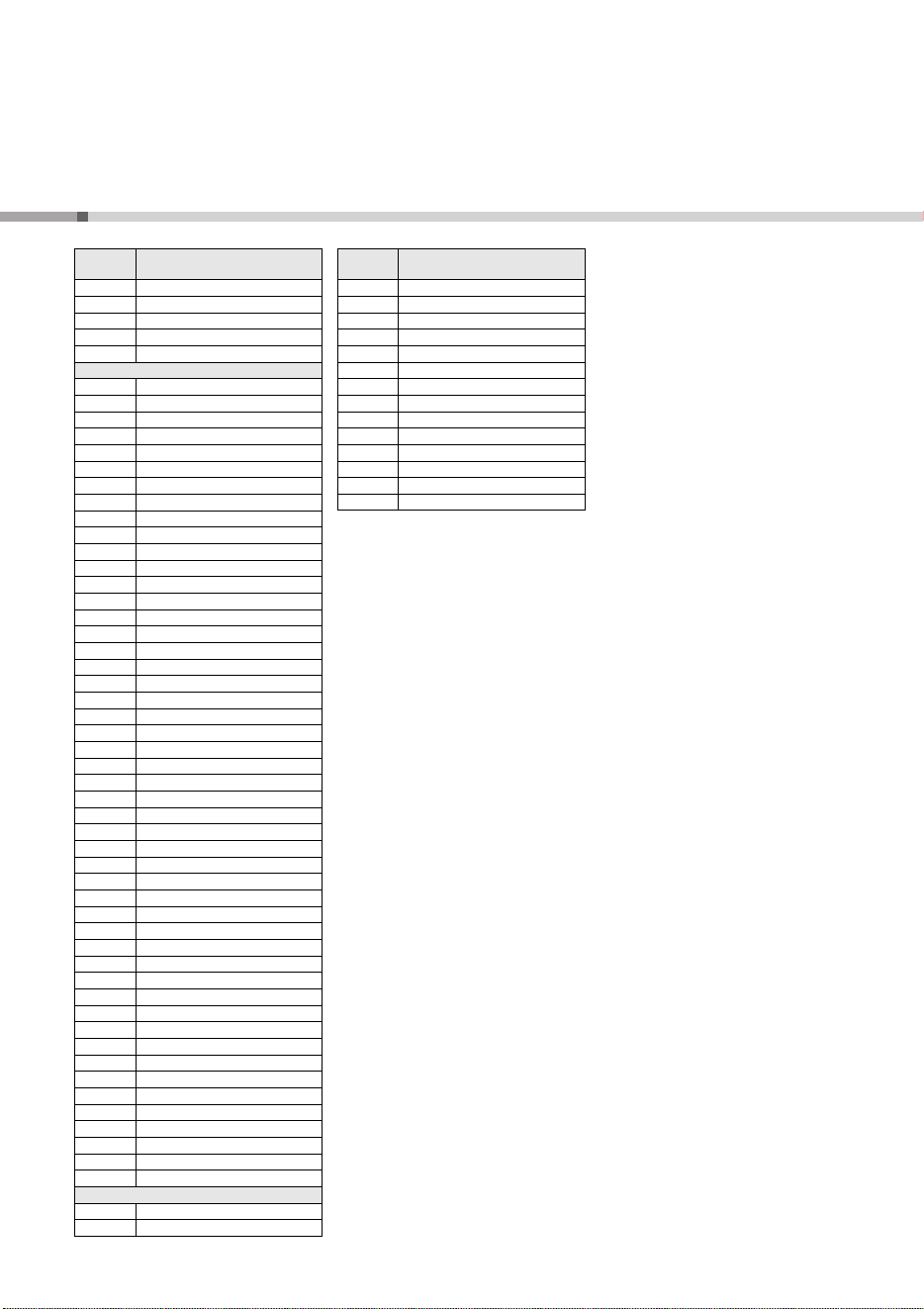
PSR-E263 YPT-260
18
331 Octave Brass
332 Orchestra Tutti
333 Octave Choir
334 Jazz Section
335 Flute & Clarinet
SOUND EFFECTS
336 Fret Noise
337 Breath Noise
338 Cutting Noise 1
339 Cutting Noise 2
340 String Slap
341 Flute Key Click
342 Bird Tweet 1
343 Bird Tweet 2
344 Telephone Ring 1
345 Telephone Ring 2
346 Phone Call
347 Shower
348 Thunder
349 Wind
350 Stream
351 Seashore
352 Bubble
353 Feed
354 Dog
355 Horse
356 Maou
357 Door Squeak
358 Door Slam
359 Scratch Cut
360 Scratch Split
361 Wind Chime
362 Car Engine Ignition
363 Car Tires Squeal
364 Car Passing
365 Car Crash
366 Siren
367 Train
368 Helicopter
369 Jet Plane
370 Starship
371 Burst
372 Roller Coaster
373 Submarine
374 Laugh
375 Scream
376 Punch
377 Heartbeat
378 Footsteps
379 Applause
380 Gunshot
381 Machine Gun
382 Laser Gun
383 Explosion
384 Firework
DRUM KITS
385 Standard Kit 1
386 Standard Kit 2
Voice
No.
Voice Name
387 Room Kit
388 Rock Kit
389 Electronic Kit
390 Analog Kit
391 Dance Kit
392 Jazz Kit
393 Brush Kit
394 Symphony Kit
395 StdKit 1 + Chinese Perc.
396 Indian Kit
397 Arabic Kit
398 SFX Kit 1
399 SFX Kit 2
400 Sound Effect Kit
Voice
No.
Voice Name
Voice List / Liste der Voices / Liste des sonorités / Lista de voces / Lista de vozes /
Elenco delle voci / Voiceoverzicht / Lista brzmień /
Список тембров
/ Liste over lyde /
Lista över ljud / Seznam rejstříků / Zoznam hlasov / Hangszínek listája / Seznam zvokov /
Списък с тонове
/ Listă de voci / Skaņu saraksts / Garsų sąrašas / Helide loend / Popis zvukova /
Enstrüman Sesi Listesi / Danh sách tiếng
PSR-E263 YPT-260
19
Drum Kit List / Liste der Drum-Kits / Liste des kits de batterie / Lista de juegos de batería /
Lista do conjunto de bateria / Elenco dei kit di batteria / Lijst met drumkits /
Lista zestawów perkusyjnych /
Список наборов ударных
/ Liste over trommesæt /
Trumsetlista / Seznam bicích sad / Zoznam bicích nástrojov / Dobkészletek listája /
Seznam bobnov /
Списък с набор от ударни инструменти
/ Listă Seturi de tobe /
Bungu komplektu saraksts / Mušamųjų rinkinio sąrašas / Trummikomplektide loend /
Popis komplet bubnjeva / Davul Seti Listesi /
Danh sách bộ trống
Voice No. 385 386 387 388 389 390
Keyboard
Standard Kit 1 Standard Kit 2 Room Kit Rock Kit Electronic Kit Analog Kit
Note# Note
25 C# 0 Surdo Mute Surdo Mute Surdo Mute Surdo Mute Surdo Mute Surdo Mute
26 D 0 Surdo Open Surdo Open Surdo Open Surdo Open Surdo Open Surdo Open
27 D# 0 Hi Q Hi Q Hi Q Hi Q Hi Q Hi Q
28 E 0 Whip Slap Whip Slap Whip Slap Whip Slap Whip Slap Whip Slap
29 F 0 Scratch H Scratch H Scratch H Scratch H Scratch H Scratch H
30 F# 0 Scratch L Scratch L Scratch L Scratch L Scratch L Scratch L
31 G 0 Finger Snap Finger Snap Finger Snap Finger Snap Finger Snap Finger Snap
32 G# 0 Click Noise Click Noise Click Noise Click Noise Click Noise Click Noise
33 A 0 Metronome Click Metronome Click Metronome Click Metronome Click Metronome Click Metronome Click
34 A# 0 Metronome Bell Metronome Bell Metronome Bell Metronome Bell Metronome Bell Metronome Bell
35 B 0 Seq Click L Seq Click L Seq Click L Seq Click L Seq Click L Seq Click L
36 C 1 Seq Click H Seq Click H Seq Click H Seq Click H Seq Click H Seq Click H
37 C# 1 Brush Tap Brush Tap Brush Tap Brush Tap Brush Tap Brush Tap
38 D 1 Brush Swirl Brush Swirl Brush Swirl Brush Swirl Brush Swirl Brush Swirl
39 D# 1 Brush Slap Brush Slap Brush Slap Brush Slap Brush Slap Brush Slap
40 E 1 Brush Tap Swirl Brush Tap Swirl Brush Tap Swirl Brush Tap Swirl Reverse Cymbal Reverse Cymbal
41 F 1 Snare Roll Snare Roll Snare Roll Snare Roll Snare Roll Snare Roll
42 F# 1 Castanet Castanet Castanet Castanet Hi Q 2 Hi Q 2
43 G 1 Snare Soft Snare Soft 2 Snare Soft Snare Noisy Snare Snappy Electronic Snare Noisy 4
44 G# 1 Sticks Sticks Sticks Sticks Sticks Sticks
45 A 1 Bass Drum Soft Bass Drum Soft Bass Drum Soft Bass Drum Soft Bass Drum H Bass Drum H
46 A# 1 Open Rim Shot Open Rim Shot 2 Open Rim Shot Open Rim Shot Open Rim Shot Open Rim Shot
47 B 1 Bass Drum Hard Bass Drum Hard Bass Drum Hard Bass Drum H Bass Drum Rock Bass Drum Analog L
48 C 2 Bass Drum Bass Drum 2 Bass Drum Bass Drum Rock Bass Drum Gate Bass Drum Analog H
49 C# 2 Side Stick Side Stick Side Stick Side Stick Side Stick Side Stick Analog
50 D 2 Snare Snare 2 Snare Room L Snare Rock Snare Noisy 2 Snare Analog 1
51 D# 2 Hand Clap Hand Clap Hand Clap Hand Clap Hand Clap Hand Clap
52 E 2 Snare Tight Snare Tight 2 Snare Room H Snare Rock Rim Snare Noisy 3 Snare Analog 2
53 F 2 Floor Tom L Floor Tom L Tom Room 1 Tom Rock 1 Tom Electronic 1 Tom Analog 1
54 F# 2 Hi-Hat Closed Hi-Hat Closed Hi-Hat Closed Hi-Hat Closed Hi-Hat Closed Hi-Hat Close Analog 1
55 G 2 Floor Tom H Floor Tom H Tom Room 2 Tom Rock 2 Tom Electronic 2 Tom Analog 2
56 G# 2 Hi-Hat Pedal Hi-Hat Pedal Hi-Hat Pedal Hi-Hat Pedal Hi-Hat Pedal Hi-Hat Close Analog 2
57 A 2 Low Tom Low Tom Tom Room 3 Tom Rock 3 Tom Electronic 3 Tom Analog 3
58 A# 2 Hi-Hat Open Hi-Hat Open Hi-Hat Open Hi-Hat Open Hi-Hat Open Hi-Hat Open Analog
59 B 2 Mid Tom L Mid Tom L Tom Room 4 Tom Rock 4 Tom Electronic 4 Tom Analog 4
60 C 3 Mid Tom H Mid Tom H Tom Room 5 Tom Rock 5 Tom Electronic 5 Tom Analog 5
61 C# 3 Crash Cymbal 1 Crash Cymbal 1 Crash Cymbal 1 Crash Cymbal 1 Crash Cymbal 1 Cymbal Analog
62 D 3 High Tom High Tom Tom Room 6 Tom Rock 6 Tom Electronic 6 Tom Analog 6
63 D# 3 Ride Cymbal 1 Ride Cymbal 1 Ride Cymbal 1 Ride Cymbal 1 Ride Cymbal 1 Ride Cymbal 1
64 E 3 Chinese Cymbal Chinese Cymbal Chinese Cymbal Chinese Cymbal Chinese Cymbal Chinese Cymbal
65 F 3 Ride Cymbal Cup Ride Cymbal Cup Ride Cymbal Cup Ride Cymbal Cup Ride Cymbal Cup Ride Cymbal Cup
66 F# 3 Tambourine Tambourine Tambourine Tambourine Tambourine Tambourine
67 G 3 Splash Cymbal Splash Cymbal Splash Cymbal Splash Cymbal Splash Cymbal Splash Cymbal
68 G# 3 Cowbell Cowbell Cowbell Cowbell Cowbell Cowbell Analog
69 A 3 Crash Cymbal 2 Crash Cymbal 2 Crash Cymbal 2 Crash Cymbal 2 Crash Cymbal 2 Crash Cymbal 2
70 A# 3 Vibraslap Vibraslap Vibraslap Vibraslap Vibraslap Vibraslap
71 B 3 Ride Cymbal 2 Ride Cymbal 2 Ride Cymbal 2 Ride Cymbal 2 Ride Cymbal 2 Ride Cymbal 2
72 C 4 Bongo H Bongo H Bongo H Bongo H Bongo H Bongo H
73 C# 4 Bongo L Bongo L Bongo L Bongo L Bongo L Bongo L
74 D 4 Conga H Mute Conga H Mute Conga H Mute Conga H Mute Conga H Mute Conga Analog H
75 D# 4 Conga H Open Conga H Open Conga H Open Conga H Open Conga H Open Conga Analog M
76 E 4 Conga L Conga L Conga L Conga L Conga L Conga Analog L
77 F 4 Timbale H Timbale H Timbale H Timbale H Timbale H Timbale H
78 F# 4 Timbale L Timbale L Timbale L Timbale L Timbale L Timbale L
79 G 4 Agogo H Agogo H Agogo H Agogo H Agogo H Agogo H
80 G# 4 Agogo L Agogo L Agogo L Agogo L Agogo L Agogo L
81 A 4 Cabasa Cabasa Cabasa Cabasa Cabasa Cabasa
82 A# 4 Maracas Maracas Maracas Maracas Maracas Maracas 2
8
3 B 4
Samba Whistle H Samba Whistle H Samba Whistle H Samba Whistle H Samba Whistle H Samba Whistle H
84 C 5 Samba Whistle L Samba Whistle L Samba Whistle L Samba Whistle L Samba Whistle L Samba Whistle L
85 C# 5 Guiro Short Guiro Short Guiro Short Guiro Short Guiro Short Guiro Short
86 D 5 Guiro Long Guiro Long Guiro Long Guiro Long Guiro Long Guiro Long
87 D# 5 Claves Claves Claves Claves Claves Claves 2
88 E 5 Wood Block H Wood Block H Wood Block H Wood Block H Wood Block H Wood Block H
89 F 5 Wood Block L Wood Block L Wood Block L Wood Block L Wood Block L Wood Block L
90 F# 5 Cuica Mute Cuica Mute Cuica Mute Cuica Mute Scratch H Scratch H
91 G 5 Cuica Open Cuica Open Cuica Open Cuica Open Scratch L Scratch L
92 G# 5 Triangle Mute Triangle Mute Triangle Mute Triangle Mute Triangle Mute Triangle Mute
93 A 5 Triangle Open Triangle Open Triangle Open Triangle Open Triangle Open Triangle Open
94 A# 5 Shaker Shaker Shaker Shaker Shaker Shaker
95 B 5 Jingle Bells Jingle Bells Jingle Bells Jingle Bells Jingle Bells Jingle Bells
96 C 6 Bell Tree Bell Tree Bell Tree Bell Tree Bell Tree Bell Tree
97 C# 6
98 D 6
99 D# 6
100 E 6
101 F 6
102 F# 6
103 G 6
E1
F1
F#1
G1
G#1
A1
A#1
B1
C1
D#1
D1
C#1
E2
F2
F#2
G2
G#2
A2
A#2
B2
C2
D#2
D2
C#2
E3
F3
F#3
G3
G#3
A3
A#3
B3
C3
D#3
D3
C#3
E4
F4
F#4
G4
G#4
A4
A#4
B4
C4
D#4
D4
C#4
E5
F5
F#5
G5
G#5
A5
A#5
B5
C5
D#5
D5
C#5
C6
PSR-E263 YPT-260
20
Drum Kit List / Liste der Drum-Kits / Liste des kits de batterie / Lista de juegos de batería /
Lista do conjunto de bateria / Elenco dei kit di batteria / Lijst met drumkits / Lista zestawów perkusyjnych /
Список наборов ударных
/ Liste over trommesæt / Trumsetlista / Seznam bicích sad /
Zoznam bicích nástrojov / Dobkészletek listája / Seznam bobnov /
Списък с набор от ударни инструменти
/
Listă Seturi de tobe / Bungu komplektu saraksts / Mušamųjų rinkinio sąrašas / Trummikomplektide loend /
Popis komplet bubnjeva / Davul Seti Listesi / Danh sách bộ trống
Voice No. 391 392 393 394 395
Keyboard
Dance Kit Jazz Kit Brush Kit Symphony Kit StdKit1 + Chinese Perc.
Note# Note
25 C# 0 Surdo Mute Surdo Mute Surdo Mute Surdo Mute Surdo Mute
26 D 0 Surdo Open Surdo Open Surdo Open Surdo Open Surdo Open
27 D# 0 Hi Q Hi Q Hi Q Hi Q Hi Q
28 E 0 Whip Slap Whip Slap Whip Slap Whip Slap Whip Slap
29 F 0 Scratch H Scratch H Scratch H Scratch H Scratch H
30 F# 0 Scratch L Scratch L Scratch L Scratch L Scratch L
31 G 0 Finger Snap Finger Snap Finger Snap Finger Snap Finger Snap
32 G# 0 Click Noise Click Noise Click Noise Click Noise Click Noise
33 A 0 Metronome Click Metronome Click Metronome Click Metronome Click Metronome Click
34 A# 0 Metronome Bell Metronome Bell Metronome Bell Metronome Bell Metronome Bell
35 B 0 Seq Click L Seq Click L Seq Click L Seq Click L Seq Click L
36 C 1 Seq Click H Seq Click H Seq Click H Seq Click H Seq Click H
37 C# 1 Brush Tap Brush Tap Brush Tap Brush Tap Brush Tap
38 D 1 Brush Swirl Brush Swirl Brush Swirl Brush Swirl Brush Swirl
39 D# 1 Brush Slap Brush Slap Brush Slap Brush Slap Brush Slap
40 E 1 Reverse Cymbal Brush Tap Swirl Brush Tap Swirl Brush Tap Swirl Brush Tap Swirl
41 F 1 Snare Roll Snare Roll Snare Roll Snare Roll Snare Roll
42 F# 1 Hi Q 2 Castanet Castanet Castanet Castanet
43 G 1 Snare Techno Snare Soft Brush Slap 2 Snare Soft Snare Soft
44 G# 1 Sticks Sticks Sticks Sticks Sticks
45 A 1 Kick Techno Q Bass Drum Soft Bass Drum Soft Bass Drum Soft L Bass Drum Soft
46 A# 1 Rim Gate Open Rim Shot Open Rim Shot Open Rim Shot Open Rim Shot
47 B 1 Kick Techno L Bass Drum Hard Bass Drum Hard Gran Cassa Bass Drum Hard
48 C 2 Kick Techno Bass Drum Jazz Bass Drum Jazz Gran Cassa Mute Bass Drum
49 C# 2 Side Stick Analog Side Stick Side Stick Side Stick Side Stick
50 D 2 Snare Clap Snare Jazz L Brush Slap 3 Band Snare 1 Snare
51 D# 2 Hand Clap Hand Clap Hand Clap Hand Clap Hand Clap
52 E 2 Snare Dry Snare Jazz M Brush Tap Band Snare 2 Snare Tight
53 F 2 Tom Analog 1 Tom Jazz 1 Tom Brush 1 Tom Jazz 1 Floor Tom L
54 F# 2 Hi-Hat Close Analog 3 Hi-Hat Closed Hi-Hat Closed Hi-Hat Closed Hi-Hat Closed
55 G 2 Tom Analog 2 Tom Jazz 2 Tom Brush 2 Tom Jazz 2 Floor Tom H
56 G# 2 Hi-Hat Close Analog 4 Hi-Hat Pedal Hi-Hat Pedal Hi-Hat Pedal Hi-Hat Pedal
57 A 2 Tom Analog 3 Tom Jazz 3 Tom Brush 3 Tom Jazz 3 Low Tom
58 A# 2 Hi-Hat Open Analog 2 Hi-Hat Open Hi-Hat Open Hi-Hat Open Hi-Hat Open
59 B 2 Tom Analog 4 Tom Jazz 4 Tom Brush 4 Tom Jazz 4 Mid Tom L
60 C 3 Tom Analog 5 Tom Jazz 5 Tom Brush 5 Tom Jazz 5 Mid Tom H
61 C# 3 Cymbal Analog Crash Cymbal 1 Crash Cymbal 1 Hand Cymbal 1 Crash Cymbal 1
62 D 3 Tom Analog 6 Tom Jazz 6 Tom Brush 6 Tom Jazz 6 High Tom
63 D# 3 Ride Cymbal 1 Ride Cymbal 1 Ride Cymbal 1 Hand Cymbal 1 Short Ride Cymbal 1
64 E 3 Chinese Cymbal Chinese Cymbal Chinese Cymbal Chinese Cymbal Chinese Cymbal
65 F 3 Ride Cymbal Cup Ride Cymbal Cup Ride Cymbal Cup Ride Cymbal Cup Ride Cymbal Cup
66 F# 3 Tambourine Tambourine Tambourine Tambourine Tambourine
67 G 3 Splash Cymbal Splash Cymbal Splash Cymbal Splash Cymbal Splash Cymbal
68 G# 3 Cowbell Analog Cowbell Cowbell Cowbell Cowbell
69 A 3 Crash Cymbal 2 Crash Cymbal 2 Crash Cymbal 2 Hand Cymbal 2 Crash Cymbal 2
70 A# 3 Vibraslap Vibraslap Vibraslap Vibraslap Vibraslap
71 B 3 Ride Cymbal 2 Ride Cymbal 2 Ride Cymbal 2 Hand Cymbal 2 Short Ride Cymbal 2
72 C 4 Bongo H Bongo H Bongo H Bongo H Bongo H
73 C# 4 Bongo L Bongo L Bongo L Bongo L Bongo L
74 D 4 Conga Analog H Conga H Mute Conga H Mute Conga H Mute Conga H Mute
75 D# 4 Conga Analog M Conga H Open Conga H Open Conga H Open Conga H Open
76 E 4 Conga Analog L Conga L Conga L Conga L Conga L
77 F 4 Timbale H Timbale H Timbale H Timbale H Timbale H
78 F# 4 Timbale L Timbale L Timbale L Timbale L Timbale L
79 G 4 Agogo H Agogo H Agogo H Agogo H Dagu Mute
80 G# 4 Agogo L Agogo L Agogo L Agogo L Zhongcha Mute
81 A 4 Cabasa Cabasa Cabasa Cabasa Dagu Heavy
82 A# 4 Maracas 2 Maracas Maracas Maracas Zhongcha Open
83
B 4 Sam
ba Whistle H Samba Whistle H Samba Whistle H Samba Whistle H Paigu Middle
84 C 5 Samba Whistle L Samba Whistle L Samba Whistle L Samba Whistle L Paigu Low
85 C# 5 Guiro Short Guiro Short Guiro Short Guiro Short Xiaocha Mute
86 D 5 Guiro Long Guiro Long Guiro Long Guiro Long Bangu
87 D# 5 Claves 2 Claves Claves Claves Xiaocha Open
88 E 5 Wood Block H Wood Block H Wood Block H Wood Block H Bangzi
89 F 5 Wood Block L Wood Block L Wood Block L Wood Block L Muyu Low
90 F# 5 Scratch H Cuica Mute Cuica Mute Cuica Mute Zhongluo Mute
91 G 5 Scratch L Cuica Open Cuica Open Cuica Open Muyu Mid-Low
92 G# 5 Triangle Mute Triangle Mute Triangle Mute Triangle Mute Zhongluo Open
93 A 5 Triangle Open Triangle Open Triangle Open Triangle Open Muyu Middle
94 A# 5 Shaker Shaker Shaker Shaker Xiaoluo Open
95 B 5 Jingle Bells Jingle Bells Jingle Bells Jingle Bells Triangle Mute
96 C 6 Bell Tree Bell Tree Bell Tree Bell Tree Triangle Open
97 C# 6
98 D 6
99 D# 6
100 E 6
101 F 6
102 F# 6
103 G 6
E1
F1
F#1
G1
G#1
A1
A#1
B1
C1
D#1
D1
C#1
E2
F2
F#2
G2
G#2
A2
A#2
B2
C2
D#2
D2
C#2
E3
F3
F#3
G3
G#3
A3
A#3
B3
C3
D#3
D3
C#3
E4
F4
F#4
G4
G#4
A4
A#4
B4
C4
D#4
D4
C#4
E5
F5
F#5
G5
G#5
A5
A#5
B5
C5
D#5
D5
C#5
C6
PSR-E263 YPT-260
21
Drum Kit List / Liste der Drum-Kits / Liste des kits de batterie / Lista de juegos de batería /
Lista do conjunto de bateria / Elenco dei kit di batteria / Lijst met drumkits / Lista zestawów perkusyjnych /
Список наборов ударных
/ Liste over trommesæt / Trumsetlista / Seznam bicích sad /
Zoznam bicích nástrojov / Dobkészletek listája / Seznam bobnov /
Списък с набор от ударни инструменти
/
Listă Seturi de tobe / Bungu komplektu saraksts / Mušamųjų rinkinio sąrašas / Trummikomplektide loend /
Popis komplet bubnjeva / Davul Seti Listesi / Danh sách bộ trống
Voice No. 396 397 398 399 400
Keyboard
Indian Kit Arabic Kit SFX Kit 1 SFX Kit 2 Sound Effect Kit
Note# Note
25 C# 0 Zarb Back mf
26 D 0 Zarb Tom f
27 D# 0 Indian Hand Clap Zarb Eshareh
28 E 0 Dafli Open Zarb Whipping
29 F 0 Dafli Slap Tombak Tom f
30 F# 0 Dafli Rim Neghareh Tom f
31 G 0 Duff Open Tombak Back f
32 G# 0 Duff Slap Neghareh Back f
33 A 0 Duff Rim Tombak Snap f
34 A# 0 Hatheli Long Neghareh Pelang f
35 B 0 Hatheli Short Tombak Trill
36 C 1 Baya ge Khaligi Clap 1 Cutting Noise 1 Phone Call
Drum Loop
37 C# 1 Baya ke Arabic Zalgouta Open Cutting Noise 2 Door Squeak
38 D 1 Baya ghe Khaligi Clap 2 Door Slam
39 D# 1 Baya ka Arabic Zalgouta Close String Slap Scratch Cut
40 E 1 Tabla na Arabic Hand Clap Scratch
41 F 1 Tabla tin Tabel Tak 1 Wind Chime
42 F# 1 Tablabaya dha Sagat 1 Telephone Ring
43 G 1 Dhol 1 Open Tabel Dom
44 G# 1 Dhol 1 Slap Sagat 2
45 A 1 Dhol 1 Mute Tabel Tak 2
46 A# 1 Dhol 1 Open Slap Sagat 3
47 B 1 Dhol 1 Roll Riq Tik 3
48 C 2 Dandia Short Riq Tik 2 Heartbeat
49 C# 2 Dandia Long Riq Tik Hard 1 Footsteps
50 D 2 Chutki Riq Tik 1 Door Squeak
51 D# 2 Chipri Riq Tik Hard 2 Door Slam
52 E 2 Khanjira Open Riq Tik Hard 3 Flute Key Click Car Engine Ignition Applause
53 F 2 Khanjira Slap Riq Tish Car Tires Squeal Camera
54 F# 2 Khanjira Mute Riq Snouj 2 Car Passing Horn
55 G 2 Khanjira Bendup Riq Roll Car Crash Hiccup
56 G# 2 Khanjira Benddown Riq Snouj 1 Siren Cuckoo Clock
57 A 2 Dholak 1 Open Riq Sak Train Stream
58 A# 2 Dholak 1 Mute Riq Snouj 3 Jet Plane Frog
59 B 2 Dholak 1 Slap Riq Snouj 4 Starship Rooster
60 C 3 Dhol 2 Open Riq Tak 1 Burst Dog
61 C# 3 Dhol 2 Slap Riq Brass 1 Roller Coaster Cat
62 D 3 Dhol 2 Rim Riq Tak 2 Submarine Owl
63 D# 3 Mridangam na Riq Brass 2 Horse Gallop
64 E 3 Mridangam din Riq Dom Horse Neigh
65 F 3 Mridangam ki Katem Tak Doff Cow
66 F# 3 Mridangam ta Katem Dom Lion
67 G 3 Mridangam Chapu Katem Sak 1 Scratch
68 G# 3 Mridangam Lo Closed Katem Tak 1 Shower Laugh Yo!
69 A 3 Mridangam Lo Open Katem Sak 2 Thunder Scream Go!
70 A# 3 Chimta Normal Katem Tak 2 Wind Punch Get up!
71 B 3 Chimta Ring Daholla Sak 2 Stream Heartbeat Whoow!
72 C 4 Dholki Hi Open Daholla Sak 1 Bubble Footsteps
Huuaah!
73 C# 4 Dholki Hi Mute Daholla Tak 1 Feed
74 D 4 Dholki Lo Open Daholla Dom
75 D# 4 Dholki Hi Slap Daholla Tak 2
76 E 4 Dholki Lo Slide Tablah Prok
77 F 4 Khol Open Tablah Dom 2
78 F# 4 Khol Slide Tablah Roll of Edge
79 G 4 Khol Mute Tablah Tak Finger 4
80
G# 4 Manjira Open Tablah Tak Trill 1
81 A 4 Manjira Close Tablah Tak Finger 3
82 A# 4 Jhanji Open Tablah Tak Trill 2
83 B 4 Jhanji Close Tablah Tak Finger 2
84 C 5 Mondira Open Tablah Tak Finger 1 Dog Machine Gun
Uh!+Hit
85 C# 5 Mondira Close Tablah Tik 2 Horse Laser Gun
86 D 5 Indian Bhangra Scat 1 Tablah Tik 4 Bird Tweet Explosion
87 D# 5 Indian Bhangra Scat 2 Tablah Tik 3 Firework
88 E 5 Indian Bhangra Scat 3 Tablah Tik 1
89 F 5 Indian Bhangra Scat 4 Tablah Tak 3
90 F# 5 Khomokh Normal Tablah Tak 1
91 G 5 Khomokh Mute Tablah Tak 4 Maou
92 G# 5 Khomokh Mltatk Tablah Tak 2
93 A 5 Thavil Open Tablah Sak 2
94 A# 5 Thavil Slap Tablah Tremolo
95 B 5 Thavil Mute Tablah Sak 1
96 C 6 Khartaal Tablah Dom 1
97 C# 6 Dholak 2 Open
98 D 6 Dholak 2 Slide
99 D# 6Dholak 2 Rim 1
100 E 6 Dh olak 2 Rim 2
101 F 6 Dholak 2 Ring
102 F# 6 Dholak 2 Slap
103 G 6
E1
F1
F#1
G1
G#1
A1
A#1
B1
C1
D#1
D1
C#1
E2
F2
F#2
G2
G#2
A2
A#2
B2
C2
D#2
D2
C#2
E3
F3
F#3
G3
G#3
A3
A#3
B3
C3
D#3
D3
C#3
E4
F4
F#4
G4
G#4
A4
A#4
B4
C4
D#4
D4
C#4
E5
F5
F#5
G5
G#5
A5
A#5
B5
C5
D#5
D5
C#5
C6
PSR-E263 YPT-260
22
Song List / Liste der Songs / Liste des morceaux / Lista de canciones /
Lista de músicas / Elenco delle song / Songoverzicht / Lista utworów /
Список композиций
/ Liste over melodier / Lista över Songer / Seznam skladeb /
Zoznam skladieb / Zenedarabok listája / Seznam pesmi /
Списък с песни
/
Listă de Cântece / Dziesmu saraksts / Kūrinių sąrašas / Lugude loend /
Popis pjesama / Șarkı Listesi /
Danh sách bài hát
Song No. Song Name
Top Picks
001 Demo 1
002 Demo 2
003 Demo 3
Favorite
004 Frère Jacques
005 Der Froschgesang
006 Aura Lee
007 London Bridge
008 Sur le pont d'Avignon
009 Nedelka
010 Aloha Oe
011 Sippin’ Cider Through a Straw
012 Old Folks at Home
013 Bury Me Not on the Lone Prairie
014 Old MacDonald Had A Farm
015 Santa Lucia
016 If You’re Happy and You Know It
017 Beautiful Dreamer
018 Greensleeves
019 Kalinka
020 Holdilia Cook
021 Ring de Banjo
022 La Cucaracha
023 Funiculi Funicula
024 Largo (from the New World)
025 Brahms’ Lullaby
026 Liebesträume Nr.3
027 Pomp and Circumstance
028 Chanson du Toreador
029 Jupiter, the Bringer of Jollity
030 The Polovetsian Dances
031 Die Moldau
032 Salut d'Amour op.12
033 Humoresques
034
Symphony No.9 (from the New World - 4th
movement)
Instrument Master
035 Sicilienne/Fauré
036 Swan Lake
037 Grand March (Aida)
038 Serenade for Strings in C major, op.48
039 Pizzicato Polka
040 Romance de Amor
041 Menuett BWV. Anh.114
042 Ave Verum Corpus
Duet
043 Ten Little Indians (DUET)
044 The Cuckoo (DUET)
045 Close Your Hands, Open Your Hands (DUET)
046 O du lieber Augustin (DUET)
047 We Wish You A Merry Christmas (DUET)
048 London Bridge (DUET)
049 Scarborough Fair (DUET)
050 Twinkle Twinkle Little Star (DUET)
051 Im Mai (DUET)
052 O Christmas Tree (DUET)
053 Pop Goes The Weasel (DUET)
054 Mary Had a Little Lamb (DUET)
055 Row Row Row Your Boat (DUET)
056 On Top of Old Smoky (DUET)
Favorite with Style
057 Amazing Grace
058 Oh! Susanna
059 Joy to the World
060 Little Brown Jug
061 Yankee Doodle
062 My Darling Clementine
063 Auld Lang Syne
064 My Bonnie
065 When the Saints Go Marching In
066 The Danube Waves
067 Battle Hymn of the Republic
068 I’ve Been Working On The Railroad
069 Grandfather’s Clock
070 Bill Bailey (Won’t You Please Come Home)
071 Down by the Riverside
072 Camptown Races
073 When Irish Eyes Are Smiling
074 Ave Maria
075 American Patrol
076 Valse Des Fleurs (From “The Nutcracker”)
077 Frühlingsstimmen
Piano Repertoire
078 Wenn ich ein Vöglein wär
079 Die Lorelei
080 Home Sweet Home
081 Scarborough Fair
082 My Old Kentucky Home
083 Loch Lomond
084 Silent Night
085 Deck the Halls
086 O Christmas Tree
087 Sonata Pathétique 2nd Adagio Cantabile
088 Ave Maria/J. S. Bach - Gounod
089 Jesus bleibet meine Freude
090 Prelude op.28-15 “Raindrop”
091 Nocturne op.9-2
092 Etude op.10-3 “Chanson de L'adieu”
093 Romanze (Serenade K.525)
094 Arabesque
095 La Chevaleresque
096 Für Elise
097 Turkish March
098 24 Preludes op.28-7
099 Annie Laurie
100 Jeanie with the Light Brown Hair
Song No. Special Appendix
Chord Study
101–112 Chord Study 01–Chord Study 12
Song No. Song Name
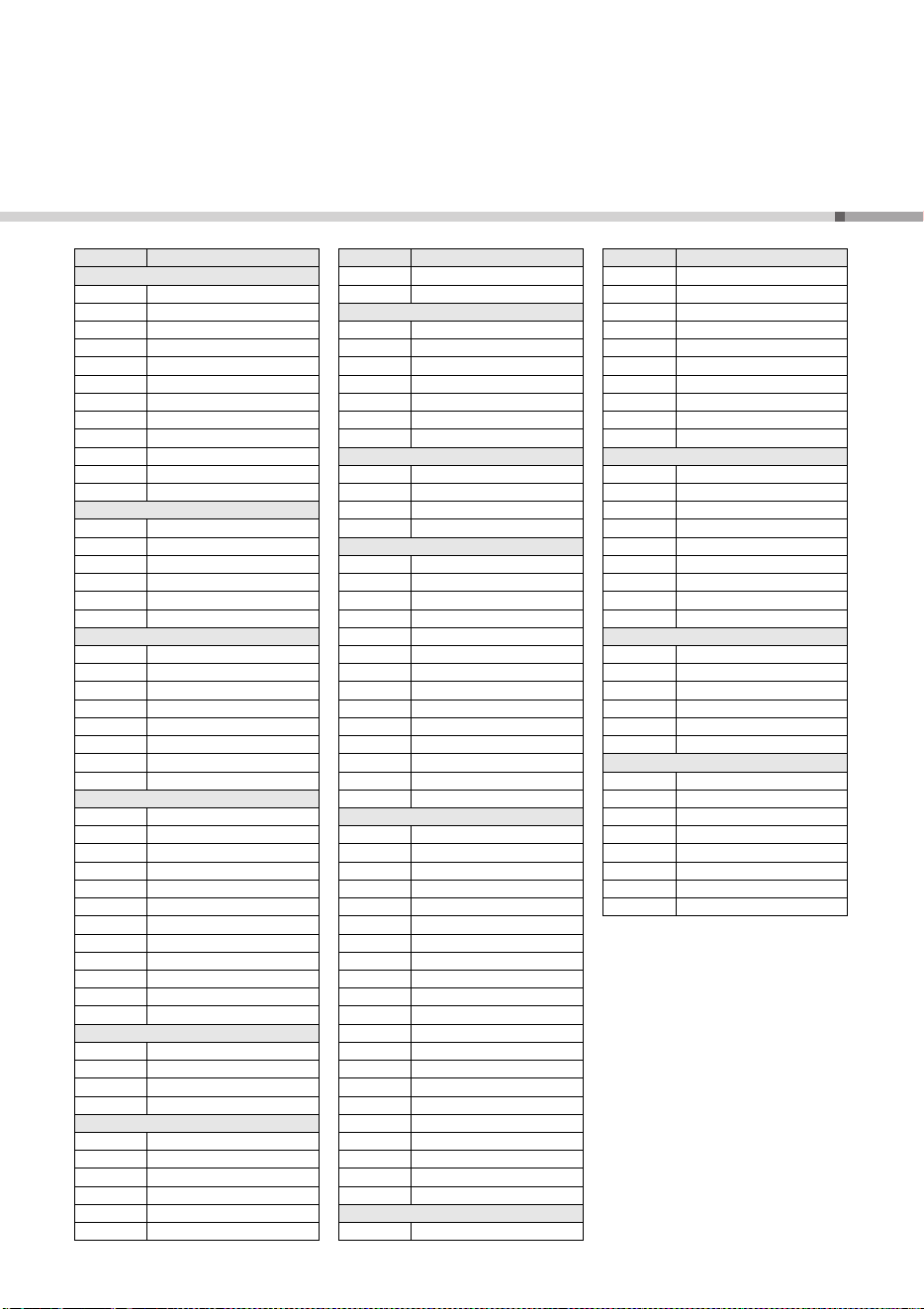
PSR-E263 YPT-260
23
Style List / Liste der Styles / Liste des styles / Lista de estilos / Lista de estilos /
Elenco degli stili / Stijllijst / Lista stylów /
Список стилей
/ Liste over stilarter /
Lista över Styles / Seznam stylů / Zoznam štýlov / Stílusok listája /
Seznam slogov /
Списък със стилове
/ Listă de Stiluri / Stilu saraksts /
Stilių sąrašas / Stiilide loend / Popis stilova / Tarz Listesi /
Danh sách giai điệu
Style No. Style Name
8Beat
1BritPopRock
2 8BeatModern
3 Cool8Beat
460sGuitarPop
58BeatAdria
6 60s8Beat
78Beat
8OffBeat
960sRock
10 HardRock
11 RockShuffle
12 8BeatRock
16Beat
13 16Beat
14 PopShuffle
15 GuitarPop
16 16BeatUptempo
17 KoolShuffle
18 HipHopLight
Ballad
19 70sGlamPiano
20 PianoBallad
21 LoveSong
22 6/8ModernEP
23 6/8SlowRock
24 OrganBallad
25 PopBallad
26 16BeatBallad
Dance
27 EuroTrance
28 Ibiza
29 SwingHouse
30 Clubdance
31 ClubLatin
32 Garage 1
33 Garage 2
34 TechnoParty
35 UKPop
36 HipHopGroove
37 HipShuffle
38 HipHopPop
Disco
39 70sDisco
40 LatinDisco
41 SaturdayNight
42 DiscoHands
Swing&Jazz
43 BigBandFast
44 BigBandBallad
45 JazzClub
46 Swing 1
47 Swing 2
48 Five/Four
49 Dixieland
50 Ragtime
R&B
51 Soul
52 DetroitPop
53 6/8Soul
54 CrocoTwist
55 Rock&Roll
56 ComboBoogie
57 6/8Blues
Country
58 CountryPop
59 CountrySwing
60 Country2/4
61 Bluegrass
Latin
62 BrazilianSamba
63 BossaNova
64 Forro
65 Sertanejo
66 Joropo
67 Parranda
68 Reggaeton
69 Tijuana
70 PasoDuranguense
71 CumbiaGrupera
72 Mambo
73 Salsa
74 Beguine
75 Reggae
World
76 ScottishReel
77 Saeidy
78 WehdaSaghira
79 IranianElec
80 Emarati
81 IndianPop
82 Bhangra
83 Bhajan
84 BollyMix
85 Tamil
86 Kerala
87 GoanPop
88 Rajasthan
89 Dandiya
90 Qawwali
91 FolkHills
92 ModernDangdut
93 Keroncong
94 XiQingLuoGu
95 YiZuMinGe
96 JingJuJieZou
Ballroom
97 VienneseWaltz
Style No. Style Name
98 EnglishWaltz
99 Slowfox
100 Foxtrot
101 Quickstep
102 Tango
103 Pasodoble
104 Samba
105 ChaChaCha
106 Rumba
107 Jive
Traditional
108 US March
109 6/8March
110 GermanMarch
111 PolkaPop
112 OberkrainerPolka
113 Tarantella
114 Showtune
115 ChristmasSwing
116 ChristmasWaltz
Waltz
117 ItalianWaltz
118 Sw in gWa lt z
119 JazzWaltz
120 CountryWaltz
121 OberkrainerWalzer
122 Musette
Pianist
123 Stride
124 PianoSwing
125 Arpeggio
126 Habanera
127 SlowRock
128 8BeatPianoBallad
129 6/8PianoMarch
130 PianoWaltz
Style No. Style Name
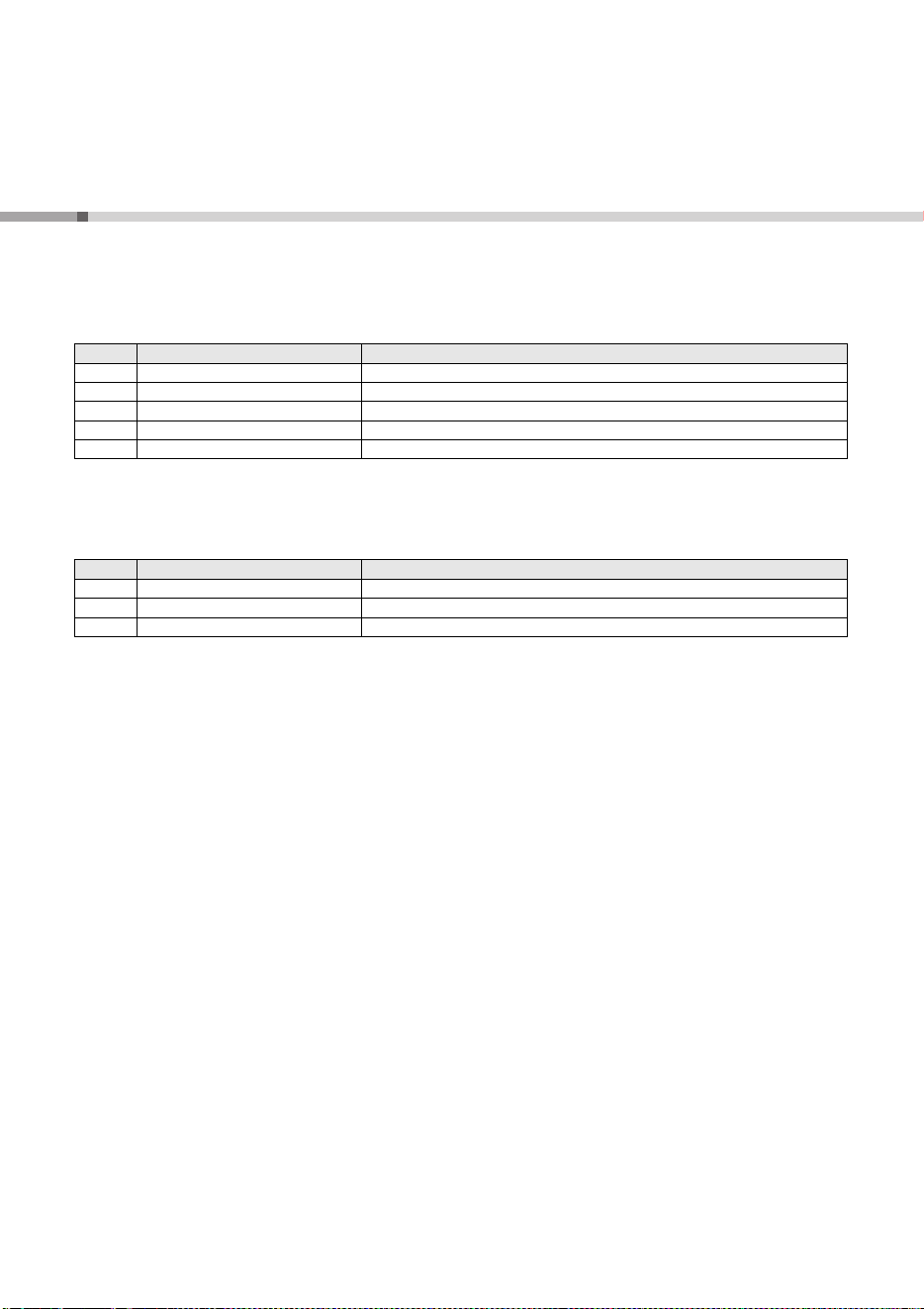
PSR-E263 YPT-260
24
Effect Type List / Liste der Effekttypen / Liste des types d'effets /
Lista de tipos de efecto / Lista de tipos de efeitos / Elenco dei tipi di effetto / Effecttypelijst /
Lista rodzajów efektów /
Список типов эффектов
/ Effekttypeliste /
Lista över effekttyper / Seznam typů efektů / Zoznam typov efektov / Effekttípusok listája /
Seznam vrst učinkov /
Списък с типове ефекти
/ Listă tipuri efecte / Efektu tipu saraksts /
Efektų tipų sąrašas / Efektitüüpide loend / Popis vrste efekata / Efekt Türü Listesi /
Danh sách kiểu hiệu ứng
Reverb Types / Liste der Reverb-Typen / Types d'effets de réverbération / Tipos de reverberación /
Tipos de reverberação / Tipi di riverbero / Reverbtypen / Rodzaje pogłosu / Типы реверберации /
Rumklangtyper / Reverbtyper / Typy dozvuku / Typy ozveny / Zengéstípusok / Vrste odmevov /
Типове на изкуствено ехо / Tipuri reverberaţie / Atbalsojošās skaņas tipi / Dirbtinio garso fono tipai /
Kajatüübid / Vrste reverberacije / Yankı Türleri / Kiểu tiếng vang
Chorus Types / Liste der Chorus-Typen / Types d'effets de chœur / Tipos de coros / Tipos de coro /
Tipi di chorus / Chorus-typen / Rodzaje chóru / Типы хоруса / Kortyper / Chorustyper / Typy efektu
chorus / Typy zboru / Kórustípusok / Vrste pripevov / Типове хорове / Tipuri cor / Kora dziedājuma tipi /
Choro tipai / Kooritüübid / Vrste refrena / Koro Türleri / Kiểu hợp xướng
No. Reverb Type Description
01–03 Hall 1–3 Concert hall reverb.
04–05 Room 1–2 Small room reverb.
06–07 Stage 1–2 Reverb for solo instruments.
08–09 Plate 1–2 Simulated steel plate reverb.
10 Off No effect.
No. Chorus Type Description
1–3 Chorus 1–3 Conventional chorus program with rich, warm chorusing.
4–5 Flanger 1–2 This produces a rich, animated wavering effect in the sound.
6 Off No effect.

OBSERVERA!
Apparaten kopplas inte ur växelströmskällan (nätet) så länge
som den ar ansluten till vägguttaget, även om själva apparaten
har stängts av.
ADVARSEL: Netspændingen til dette apparat er IKKE
afbrudt, sålænge netledningen sidder i en stikkontakt, som er
tændt — også selvom der er slukket på apparatets afbryder.
VAROITUS: Laitteen toisiopiiriin kytketty käyttökytkin ei irroita
koko laitetta verkosta.
(standby)
Entsorgung leerer Batterien (nur innerhalb
Deutschlands)
Leisten Sie einen Beitrag zum Umweltschutz. Verbrauchte
Batterien oder Akkumulatoren dürfen nicht in den Hausmüll. Sie
können bei einer Sammelstelle für Altbatterien bzw. Sondermüll
abgegeben werden. Informieren Sie sich bei Ihrer Kommune.
(battery)
CANADA
Yamaha Canada Music Ltd.
135 Milner Avenue, Toronto, Ontario M1S 3R1,
Canada
Tel: +1-416-298-1311
U.S.A.
Yamaha Corporation of America
6600 Orangethorpe Avenue, Buena Park, CA 90620,
U.S.A.
Tel: +1-714-522-9011
MEXICO
Yamaha de México, S.A. de C.V.
Av. Insurgentes Sur 1647 Piso 9, Col. San José
Insurgentes, Delegación Benito Juárez, CDMX,
C.P. 03900, México
Tel: +52-55-5804-0600
BRAZIL
Yamaha Musical do Brasil Ltda.
Praça Professor José Lannes, 40-Cjs 21 e 22, Brooklin
Paulista Novo CEP 04571-100 – São Paulo – SP,
Brazil
Tel: +55-11-3704-1377
ARGENTINA
Yamaha Music Latin America, S.A.,
Sucursal Argentina
Olga Cossettini 1553, Piso 4 Norte,
Madero Este-C1107CEK,
Buenos Aires, Argentina
Tel: +54-11-4119-7000
PANAMA AND OTHER LATIN
AMERICAN REGIONS/
CARIBBEAN REGIONS
Yamaha Music Latin America, S.A.
Edificio Torre Davivienda, Piso: 20
Avenida Balboa, Marbella, Corregimiento de Bella
Vista, Ciudad de Panamá, Rep. de Panamá
Tel: +507-269-5311
THE UNITED KINGDOM/IRELAND
Yamaha Music Europe GmbH (UK)
Sherbourne Drive, Tilbrook, Milton Keynes,
MK7 8BL, U.K.
Tel: +44-1908-366700
GERMANY
Yamaha Music Europe GmbH
Siemensstrasse 22-34, 25462 Rellingen, Germany
Tel: +49-4101-303-0
SWITZERLAND/LIECHTENSTEIN
Yamaha Music Europe GmbH, Branch
Switzerland in Thalwil
Seestrasse 18a, 8800 Thalwil, Switzerland
Tel: +41-44-3878080
AUSTRIA/CROATIA/
CZECH REPUBLIC
/
HUNGARY/ROMANIA/SLOVAKIA/
SLOVENIA
Yamaha Music Europe GmbH, Branch Austria
Schleiergasse 20, 1100 Wien, Austria
Tel: +43-1-60203900
POLAND
Yamaha Music Europe
Sp.z o.o. Oddzia w Polsce
ul. Wielicka 52, 02-657 Warszawa, Poland
Tel: +48-22-880-08-88
BULGARIA
Dinacord Bulgaria LTD.
Bul.Iskarsko Schose 7 Targowski Zentar Ewropa
1528 Sofia, Bulgaria
Tel: +359-2-978-20-25
MALTA
Olimpus Music Ltd.
Valletta Road, Mosta MST9010, Malta
Tel: +356-2133-2093
NETHERLANDS/BELGIUM/
LUXEMBOURG
Yamaha Music Europe, Branch Benelux
Clarissenhof 5b, 4133 AB Vianen, The Netherlands
Tel: +31-347-358040
FRANCE
Yamaha Music Europe
7 rue Ambroise Croizat, Zone d'activités de Pariest,
77183 Croissy-Beaubourg, France
Tel: +33-1-6461-4000
ITALY
Yamaha Music Europe GmbH, Branch Italy
Via Tinelli N.67/69 20855 Gerno di Lesmo (MB),
Italy
Tel: +39-039-9065-1
SPAIN/PORTUGAL
Yamaha Music Europe GmbH Ibérica, Sucursal
en España
Ctra. de la Coruña km. 17,200, 28231
Las Rozas de Madrid, Spain
Tel: +34-91-639-88-88
GREECE
Philippos Nakas S.A. The Music House
19th klm. Leof. Lavriou 190 02 Peania – Attiki,
Greece
Tel: +30-210-6686260
SWEDEN
Yamaha Music Europe GmbH Germany Filial
Scandinavia
JA Wettergrensgata 1, 400 43 Göteborg, Sweden
Tel: +46-31-89-34-00
DENMARK
Yamaha Music Denmark,
Fillial of Yamaha Music Europe GmbH, Tyskland
Generatorvej 8C, ST. TH., 2860 Søborg, Denmark
Tel: +45-44-92-49-00
FINLAND
F-Musiikki Oy
Antaksentie 4
FI-01510 Vantaa, Finland
Tel: +358 (0)96185111
NORWAY
Yamaha Music Europe GmbH Germany -
Norwegian Branch
Grini Næringspark 1, 1332 Østerås, Norway
Tel: +47-6716-7800
ICELAND
Hljodfaerahusid Ehf.
Sidumula 20
IS-108 Reykjavik, Iceland
Tel: +354-525-5050
CYPRUS
Nakas Music Cyprus Ltd.
Nikis Ave 2k
1086 Nicosia
Tel: + 357-22-511080
Major Music Center
21 Ali Riza Ave. Ortakoy
P.O.Box 475 Lefkoa, Cyprus
Tel: (392) 227 9213
RUSSIA
Yamaha Music (Russia) LLC.
Room 37, entrance 7, bld. 7, Kievskaya street,
Moscow, 121059, Russia
Tel: +7-495-626-5005
OTHER EUROPEAN REGIONS
Yamaha Music Europe GmbH
Siemensstrasse 22-34, 25462 Rellingen, Germany
Tel: +49-4101-303-0
Yamaha Music Gulf FZE
JAFZA-16, Office 512, P.O.Box 17328,
Jebel Ali FZE, Dubai, UAE
Tel: +971-4-801-1500
TURKEY
Yamaha Music Europe GmbH
Merkezi Almanya Türkiye stanbul ubesi
Mor Sumbul Sokak Varyap Meridian Business
1.Blok No:1 113-114-115
Bati Atasehir Istanbul, Turkey
Tel: +90-216-275-7960
ISRAEL
RBX International Co., Ltd.
P.O Box 10245, Petach-Tikva, 49002
Tel: (972) 3-925-6900
OTHER REGIONS
Yamaha Music Gulf FZE
JAFZA-16, Office 512, P.O.Box 17328,
Jebel Ali FZE, Dubai, UAE
Tel: +971-4-801-1500
THE PEOPLE’S REPUBLIC OF CHINA
Yamaha Music & Electronics (China) Co., Ltd.
2F, Yunhedasha, 1818 Xinzha-lu, Jingan-qu,
Shanghai, China
Tel: +86-400-051-7700
HONG KONG
Tom Lee Music Co., Ltd.
11/F., Silvercord Tower 1, 30 Canton Road,
Tsimshatsui, Kowloon, Hong Kong
Tel: +852-2737-7688
INDIA
Yamaha Music India Private Limited
P-401, JMD Megapolis, Sector-48, Sohna Road,
Gurugram-122018, Haryana, India
Tel: +91-124-485-3300
INDONESIA
PT Yamaha Musik Indonesia Distributor
Yamaha Music Center Bldg. Jalan Jend. Gatot
Subroto Kav. 4, Jakarta 12930, Indonesia
Tel: +62-21-520-2577
KOREA
Yamaha Music Korea Ltd.
11F, Prudential Tower, 298, Gangnam-daero,
Gangnam-gu, Seoul, 06253, Korea
Tel: +82-2-3467-3300
MALAYSIA
Yamaha Music (Malaysia) Sdn. Bhd.
No.8, Jalan Perbandaran, Kelana Jaya, 47301
Petaling Jaya, Selangor, Malaysia
Tel: +60-3-78030900
SINGAPORE
Yamaha Music (Asia) Private Limited
Block 202 Hougang Street 21, #02-00,
Singapore 530202, Singapore
Tel: +65-6740-9200
TAIWAN
Yamaha Music & Electronics Taiwan Co., Ltd.
2F., No.1, Yuandong Rd., Banqiao Dist.,
New Taipei City 22063, Taiwan (R.O.C.)
Tel: +886-2-7741-8888
THAILAND
Siam Music Yamaha Co., Ltd.
3, 4, 15, 16th Fl., Siam Motors Building,
891/1 Rama 1 Road, Wangmai,
Pathumwan, Bangkok 10330, Thailand
Tel: +66-2215-2622
VIETNAM
Yamaha Music Vietnam Company Limited
15th Floor, Nam A Bank Tower, 201-203 Cach
Mang Thang Tam St., Ward 4, Dist.3,
Ho Chi Minh City, Vietnam
Tel: +84-28-3818-1122
OTHER ASIAN REGIONS
https://asia-latinamerica-mea.yamaha.com/
index.html
AUSTRALIA
Yamaha Music Australia Pty. Ltd.
Level 1, 80 Market Street, South Melbourne,
VIC 3205 Australia
Tel: +61-3-9693-5111
NEW ZEALAND
Music Works LTD
P.O.BOX 6246 Wellesley, Auckland 4680,
New Zealand
Tel: +64-9-634-0099
REGIONS AND TRUST
TERRITORIES IN PACIFIC OCEAN
https://asia-latinamerica-mea.yamaha.com/
index.html
NORTH AMERICA
CENTRAL & SOUTH AMERICA
EUROPE
AFRICA
MIDDLE EAST
ASIA
OCEANIA
DMI30
Head Office/Manufacturer: Yamaha Corporation 10-1, Nakazawa-cho, Naka-ku, Hamamatsu, 430-8650, Japan
Importer (European Union): Yamaha Music Europe GmbH Siemensstrasse 22-34, 25462 Rellingen, Germany
Importer (United Kingdom): Yamaha Music Europe GmbH (UK) Sherbourne Drive, Tilbrook, Milton Keynes, MK7 8BL, United Kingdom

VFW7560
Manual Development Group
© 2016 Yamaha Corporation
Published 01/2022 POES-D0
Yamaha Global Site
https://www.yamaha.com/
Yamaha Downloads
https://download.yamaha.com/