User Manual


Table of Contents
2023-06 EN 5040062.0.04
3
Table of Contents
1 IMPORTANT SAFETY INSTRUCTIONS .................. 5
Important Information ........................................ 8
2 My bernette ......................................................... 10
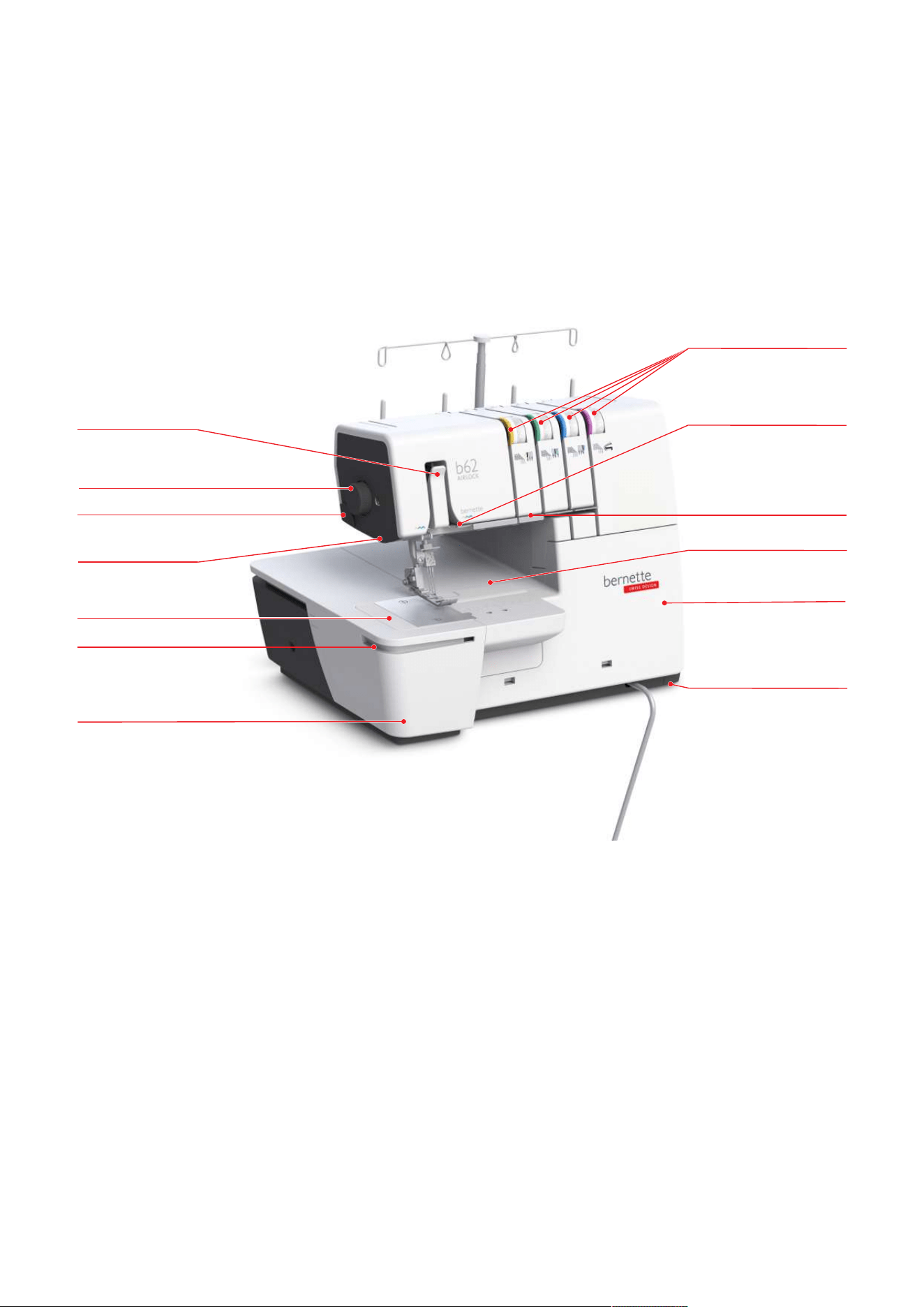
2.1 Machine Overview .................................................. 10
Front view ................................................................... 10
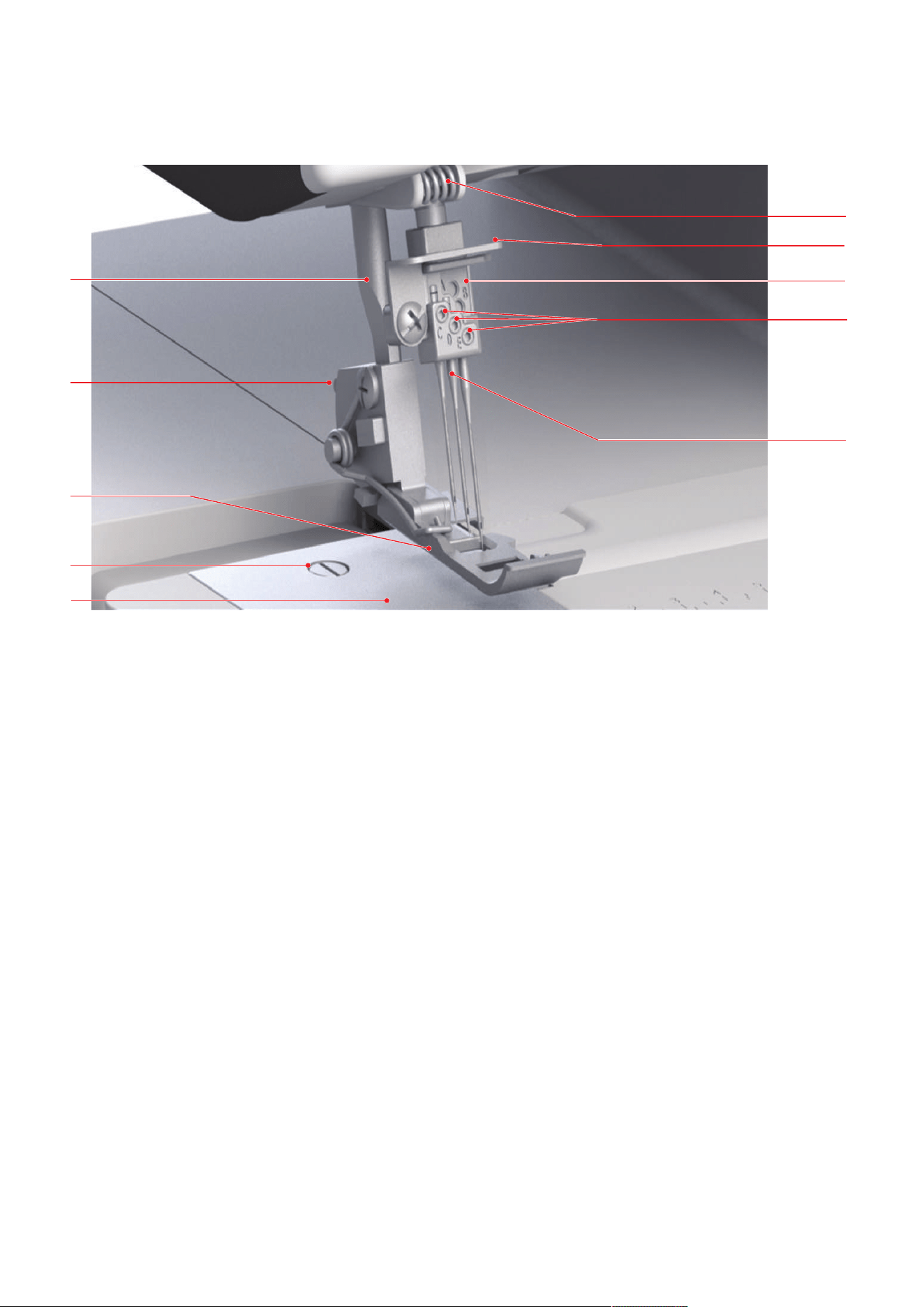
Overview - Needle area ............................................... 11
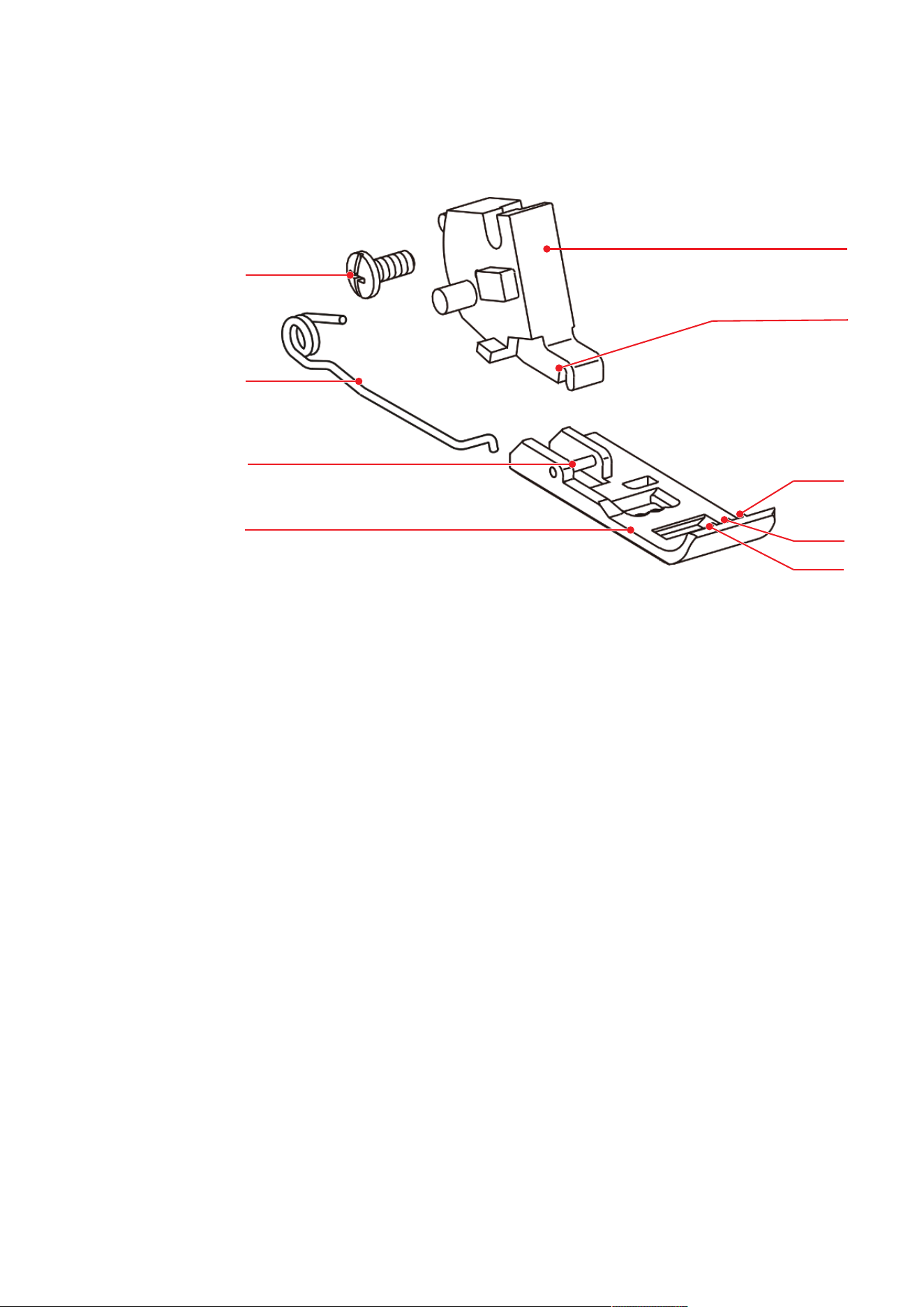
Overview Presser Foot ................................................. 12
Overview - Looper area ............................................... 13
Overview Threading area ............................................. 14
Overview - Side panel .................................................. 15
Symbols on the machine ............................................. 16
2.2 Overview - Standard Accessories ............................. 17
Included Accessories ................................................... 17
Accessories behind the Threader Cover ....................... 18
Accessories Box ........................................................... 18
3 Setting Up the Machine ...................................... 20
3.1 Working Area ......................................................... 20
3.2 Connection and Switching On ................................ 20
Connecting the Machine and Foot Control .................. 20
Switching the Machine and Sewing Light On/Off ........ 20
3.3 Foot Control ........................................................... 21
Press the Foot Control ................................................. 21
3.4 Handwheel ............................................................. 21
3.5 Machine Covers ...................................................... 21
Threader Cover ........................................................... 22
Coverstitch insert ........................................................ 22
Removing/attaching the Coverstitch Insert for Slide-on
Table ........................................................................... 23
3.6 Spool Holder ........................................................... 23
Attaching the Spool Holder ......................................... 23
Preparing the Thread Guide ........................................ 24
Attaching the Spool Stabilizer ..................................... 24
Place the Spool Disc .................................................... 25
Using the Spool Net .................................................... 25
3.7 Presser Foot ............................................................ 25
Positioning the Presser Foot Up/Down ......................... 25
Lifting the Presser Foot Up/Down with the Knee Lifter . 26
Changing the Presser Foot .......................................... 26
3.8 Needle Area ............................................................ 27
Needle holder ............................................................. 27
Changing the needle ................................................... 28
Threading the Needle Manually .................................. 29
3.9 Sewing Assistance ................................................. 30
Using the thread cutter ............................................... 30
Needle Pad ................................................................. 30
Attaching/Removing the Knee Llifter ........................... 31
Attaching/Removing the Freearm Cover ...................... 31
Attaching/Removing the Slide-on Table ...................... 31
Attaching the Decorative Threads Guide ..................... 32
4 Sewing Start ........................................................ 33
4.1 Check before Starting to Sew ................................ 33
4.2 Selecting the Fabric ................................................ 33
4.3 Selecting the Thread .............................................. 33
Needle Thread ............................................................ 34
Looper Thread ............................................................ 34
4.4 Selecting the Needle .............................................. 35
Detect Defective Needles ............................................ 36
Needle Overview ........................................................ 36
5 Stitch .................................................................... 37
5.1 Stitch Type ............................................................. 37
Coverstitch ................................................................. 37
Chainstitch ................................................................. 38
5.2 Stitch Chart ........................................................... 39
6 Machine Settings ................................................ 40
6.1 Setting the Presser Foot Pressure ............................ 40
6.2 Adjusting the thread tension .................................. 40
6.3 Adjusting the Differential Feed ............................... 41
Default Value "1" ...................................................... 42
Gathering/Gather to fit "1.5 – 2" ............................... 42
Stretching "0.6" ......................................................... 43
6.4 Setting the Stitch Length ....................................... 43
7 Threading ............................................................ 44
7.1 Threading preparation ........................................... 44
7.2 Threading the Looper Thread ................................. 45
Treading the Chain Lopper Thread CL/purple .............. 46
Threading the Looper Thread with an auxiliary thread . 48
Using the Threading Wire ........................................... 48
7.3 Threading the needle thread .................................. 49
Threading the left Coverstitch Needle Thread left LC/
yellow ........................................................................ 49

Table of Contents
4
2023-06 EN 5040062.0.04
Threading the center Coverstitch Needle Thread center
CC/green .................................................................... 50
Threading the right Coverstitch Needle Thread RC/blue
.................................................................................... 51
7.4 Thread change ........................................................ 52
Knotting thick thread .................................................. 52
Changing the needle thread ........................................ 52
Changing the looper thread ........................................ 53
8 Sewing Test .......................................................... 54
8.1 Perfoming a Sewing Test for an Coverstitch ............ 54
8.2 Perfoming a Sewing Test for an Chainstitch ............ 54
8.3 Optimizing stitches ................................................. 54
4-/3-Thread Coverstitch ............................................... 55
9 Practical Coverstitching ....................................... 56
9.1 Securing the stitch .................................................. 56
Securing Cover- and Chainstitches at the Start of the
Seam .......................................................................... 56
Securing Cover- and Chainstitches at the Seam End .... 56
9.2 Undoing a stitch ..................................................... 57
Undoing Coverstitches ................................................ 57
Undoing Chainstitches ................................................ 57
9.3 Sewing a Hem ........................................................ 57
9.4 Binding Seams ........................................................ 58
9.5 Topstitching Seams ................................................. 58
9.6 Joining Seams ......................................................... 58
9.7 Gathering a Seam ................................................... 59
10 Appendix .............................................................. 60
10.1 Storing and Transporting the Machine .................... 60
Storing the Machine .................................................... 60
Transporting the Machine ........................................... 60
10.2 Maintenance and Cleaning the Machine ................. 60
Cleaning the machine ................................................. 60
Cleaning the Looper Area ........................................... 61
Cleaning the Air Threader Pipes .................................. 62
Cleaning the Suction Feet ........................................... 62
Oiling the Machine ...................................................... 62
10.3 Troubleshooting ..................................................... 63
10.4 Specifications .......................................................... 64

IMPORTANT SAFETY INSTRUCTIONS
5
2023-06 EN 5040062.0.04
IMPORTANT SAFETY INSTRUCTIONS
Please be aware of the following basic safety instructions when using your
machine. Before using this machine, read instruction manual carefully.
DANGER
To protect against electric shock, the following instructions must be observed.
• Never leave the machine unattended when it is connected to the power
supply.
• Immediately after use and before cleaning, switch off the machine and
disconnect the power cable from the outlet.
In order to protect against injury, the following instructions must be adhered to.
• Do not look directly into the LED lamp with optical instruments
(e.g.magnifying glass).
• If the LED lamp is damaged or defective, have the LED lamp checked or
repaired at your local authorized bernette dealer.
• Switch off the machine before working in the needle area.
• Before starting the machine, attach all protection guards and close the
covers.
WARNING
To reduce the risk of burns, fire, electric shock or injury to persons, the following
instructions must be observed.
General Facts
• This machine may only be used for the purpose described in this instruction
manual.
Working Environment
• Do not use the machine outdoors.
• Only use the machine in dry rooms.
• Do not use the machine in a humid area.
• Do not use the machine in rooms where aerosol products (sprays) are being
used.
• Do not use the machine in rooms where oxygen is dispensed.

IMPORTANT SAFETY INSTRUCTIONS
6
2023-06 EN 5040062.0.04
Technical Condition
• Never use the machine when it is damp.
• Do not use the machine if it is not working properly.
• Do not use the machine if a cable or the plug is damaged.
• Do not use the machine if it has been dropped, damaged or has fallen into
water.
• If the machine is damaged or does not work properly, have the machine
checked or repaired by your local authorized bernette dealer.
• Keep all ventilation openings of the machine and the foot control free of
lint, dust and loose cloth.
• Do not use the machine if the ventilation openings are blocked.
Accessories and Supplies
• Only use the accessories recommended by the manufacturer.
• Always use the original bernette Stitch Plate.
An incorrect stitch plate can result in needle breakage.
• Use only straight needles of good quality.
Bent or damaged needles can cause needle breakage.
• This machine is double-insulated (except for USA, Canada and Japan).
Use only identical replacement parts. See instructions for Servicing of
double-insulated products.
• To lubricate the machine, only use the supplied overlocker oil.
Safety Instructions
• While operating the machine, all protective inserts must be in place and all
covers must be closed.
Appropriate Use
• The machine may be used, cleaned and maintained by children older than
eight or by people with reduced physical, sensory or mental capabilities or if
there is a lack of experience and knowledge as long as they have been given
instructions.
• Furthermore, these persons must be supervised while working with the
machine, and/or they must know the safe operation of the machine and be
aware of the resulting hazards.
• Children are not allowed to play with the system.
• Special care should be taken when the machine is operated by or in the
presence of children.
• Only use the machine with the supplied power cable.

IMPORTANT SAFETY INSTRUCTIONS
7
2023-06 EN 5040062.0.04
• USA and Canada only: Do not connect power plug NEMA 1-15 to circuits
exceeding 150 volt-to-ground.
• Only use this machine with the supplied foot control of type
4C-316/-326/-345.
• Do not insert any objects into the openings of the machine.
• Do not place any objects on the foot control.
• While sewing, guide the fabric gently.
Pulling and pushing the fabric can cause needle breakage.
• Keep fingers away from all moving parts.
• Special care is required in the area of the Needle and the Looper.
• For activities in the needle area - such as threading the needle, changing the
needle, threading the looper or changing the presser foot - switch off the
machine.
• To switch off, set the power switch to «0».
• When protective covers are removed, when the machine is oiled or when
other cleaning and maintenance operations mentioned in this instruction
manual are carried out, switch off the machine and disconnect the power
plug from the outlet.
• Pull the plug out of the outlet by pulling on the plug. Do not pull on the
cable.

Important Information
8
2023-06 EN 5040062.0.04
Important Information
Availability of the Instruction Manual
The short manual is part of the machine.
• Keep the short manual of the machine in a suitable place near the machine and have it ready for
reference.
• The latest version of the detailed instruction manual can be downloaded at www.bernette.com.
• When passing on the machine to a third party, enclose the short manual of the machine.
Proper Use
Your bernette machine is conceived and designed for private household use. It answers the purpose for
overlocking fabrics as it is decribed in this instruction manual. Any other use is not considered proper.
BERNINA assumes no liability for consequences resulting from improper use.
Equipment and Scope of Delivery
Example images are used in these instructions for the purposes of illustration. The machines shown in the
images and the accessories shown therefore do not always match the actual items included with your
machine. The supplied accessory can vary depending on the country of delivery. You can acquire any
accessories mentioned or shown that are not included in the scope of delivery as optional accessories from a
specialist bernette dealer. Further accessories can be found at www.bernette.com.
For technical reasons and in order to improve the product, changes may be made to the equipment of the
machine and the scope of delivery at any time and without prior notice.
Servicing of Double-insulated Products
In a double-insulated product two systems of insulation are provided instead of grounding. No grounding
means is provided on a double-insulated product nor should a means for grounded be added to the product.
Servicing a double-insulated product requires extreme care and knowledge of the system and should only be
done by qualified service personnel. Replacement parts for a double-insulated product must be identical to
the original parts in the product. A double insulated product is marked with the words: «Double-Insulation»
or «double-insulated».
The symbol may also be marked on the product.
Environmental Protection
BERNINA International AG is committed to environmental protection. We strive to minimize the
environmental impact of our products by continuously improving product design and our technology of
manufacturing.
The machine is labeled with the symbol of the crossed-out wastebin. This means that the machine should
not be disposed of in household waste when it is no longer needed. Improper disposal can result in
dangerous substances getting into the groundwater and thus into our food chain, damaging our health.
The machine must be returned free of charge to a nearby collection point for waste electrical and electronic
equipment or to a collection point for the reuse of the machine. Information on the collection points can be
obtained from your local administration. When purchasing a new machine, the dealer is obliged to take back
the old machine free of charge and dispose of it properly.
If the machine contains personal data, you are responsible for deleting the data yourself before returning the
machine.

Important Information
9
2023-06 EN 5040062.0.04
Explanation of Symbols
DANGER
Designates a danger with a high risk which can lead to serious injuries or even death unless it is avoided.
WARNING
Designates a medium-risk hazard which can lead to serious injuries if not avoided.
CAUTION
Designates a low-risk hazard which can lead to minor or moderate injuries if not avoided.
NOTICE
Designates a hazard which can lead to material damage if not avoided.
You will find tips from bernette sewing experts next to this symbol.
My bernette
10
2023-06 EN 5040062.0.04
2 My bernette
2.1 Machine Overview
Front view
1
2
3
5
6
7
8
10
12
4
9
11
13
1 Freearm Cover 8 Thread Tension Adjustment
2 Guide Rail 9 Thread Deflection Finger
3 Freearm 10 Thread Guiding Plate
4 Sewing Light 11 Coverstitch Insert
5 Thread Cutter 12 Threader Cover
6 Presser Foot Pressure Wheel 13 Suction feet
7 Needle Thread Take-up Lever Cover
My bernette
11
2023-06 EN 5040062.0.04
Overview - Needle area
1
2
4
5
3
8
7
10
9
6
1 Stitch Plate 6 Thread Guide on the Headframe
2 Stitch Plate Screw 7 Thread Guide on the Needle Holder
3 Standard Coverstitch Presser Foot 8 Needle Clamp
4 Presser Foot Release Button 9 Needle Screws
5 Presser Foot Bar 10 Needles
My bernette
12
2023-06 EN 5040062.0.04
Overview Presser Foot
1
2
3
4
5
6
7
9
8
1 Presser Foot Sole 6 Shaft Groove
2 Presser Foot Sole Pin 7 Marking: Right Coverstitch Needle (RC)
3 Presser Foot Spring 8 Marking: Center Coverstitch Needle (CC)
4 Fixing Screw 9 Marking: Left Coverstitch Needle (LC)
5 Presser Foot shaft
My bernette
13
2023-06 EN 5040062.0.04
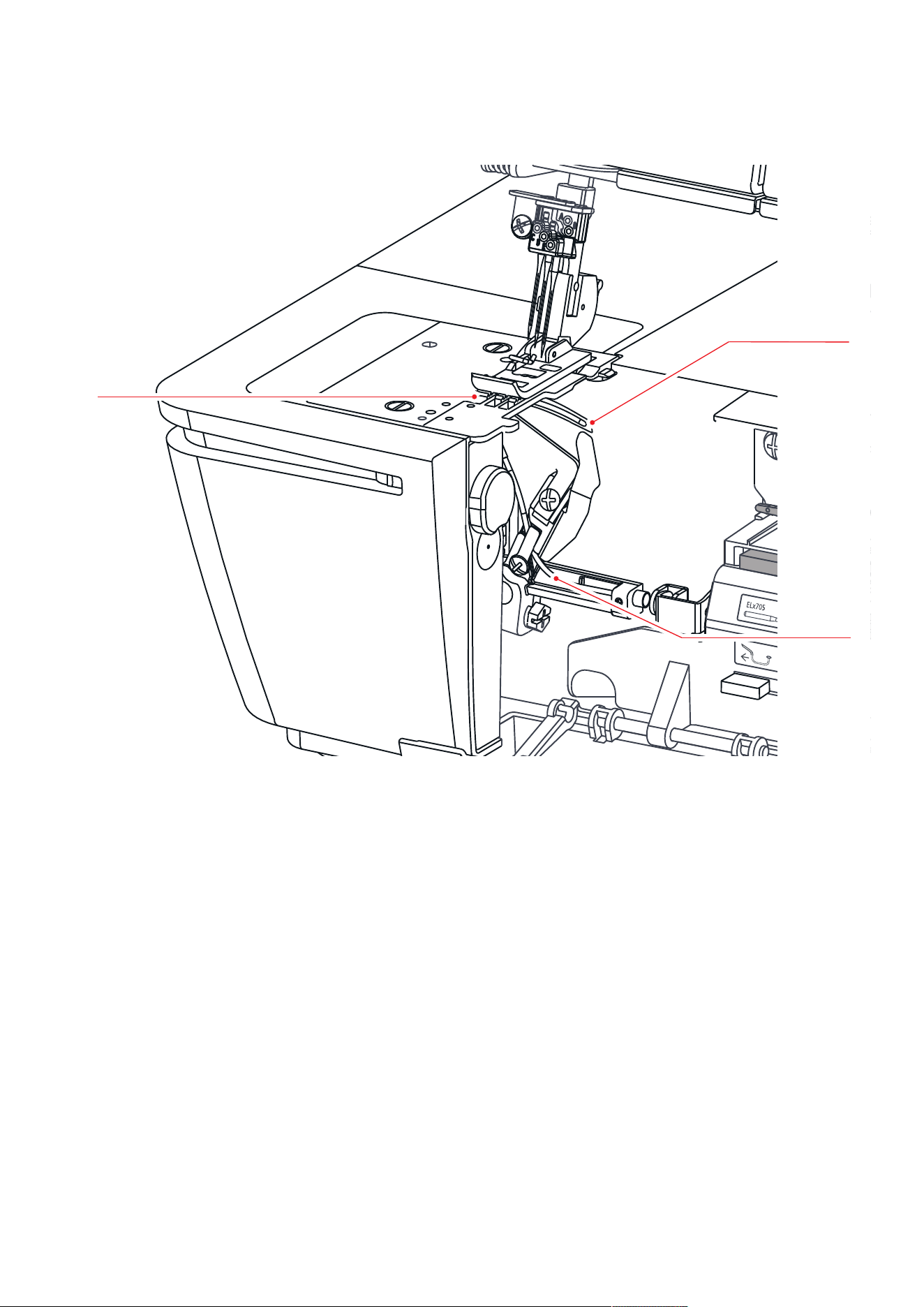
Overview - Looper area
2
3
1
1 Feed Dog 3 Air Threader Pipes Chain Looper
2 Chain Looper
My bernette
14
2023-06 EN 5040062.0.04
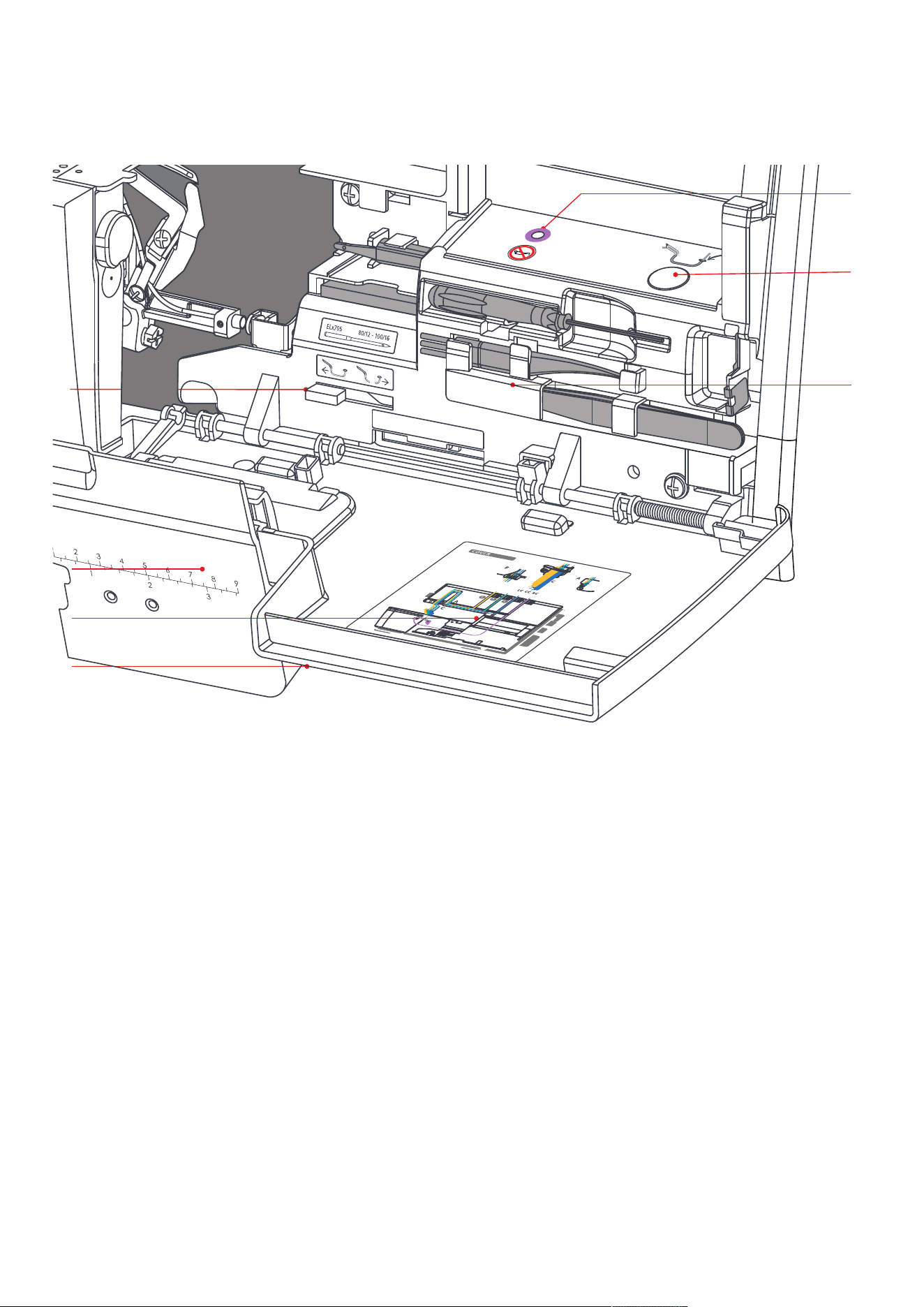
Overview Threading area
1
2
3
4
5
6
7
1 Threader Cover 5 Air Threader Nozzle
2 Threading Chart 6 Air Threader Lever
3 Coverstitch Insert 7 Accessories stored in the Threader Cover
4 Air Threader Connector On/Off
My bernette
15
2023-06 EN 5040062.0.04
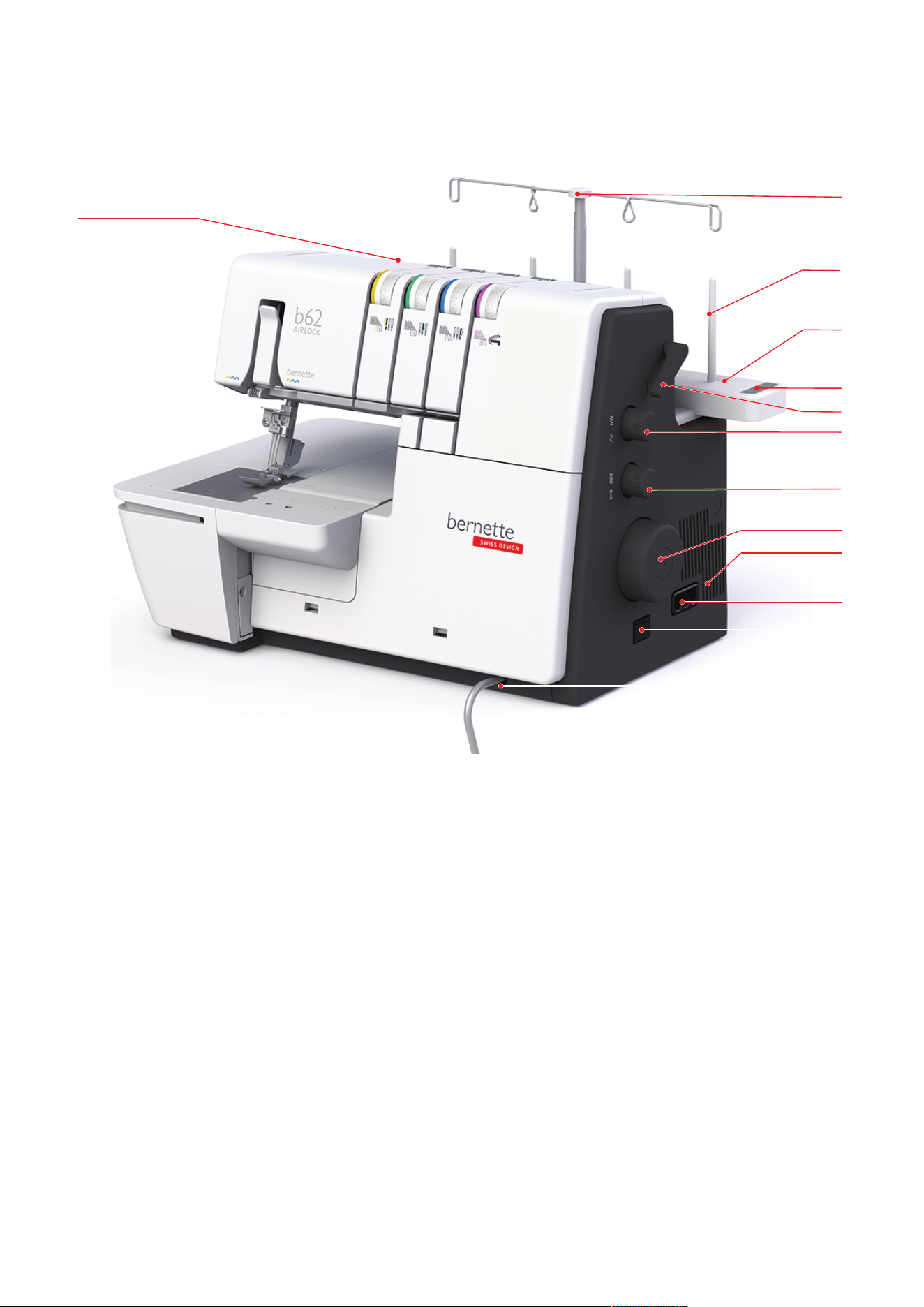
Overview - Side panel
11
12
9
8
7
2
6
5
10
4
1
3
13
1 Carry Handle 8 Differential Feed Dial
2 Retractable Thread Guide 9 Handwheel
3 Spool Pin 10 Air Vents
4 Spool Pin 11 Connection for Foot Control and Power
Cable
5 Needle Pad 12 Main Switch
6 Presser Foot Lifter 13 Connection for Knee Lifter (FHS)
7 Stitch Length Setting
My bernette
16
2023-06 EN 5040062.0.04
Symbols on the machine
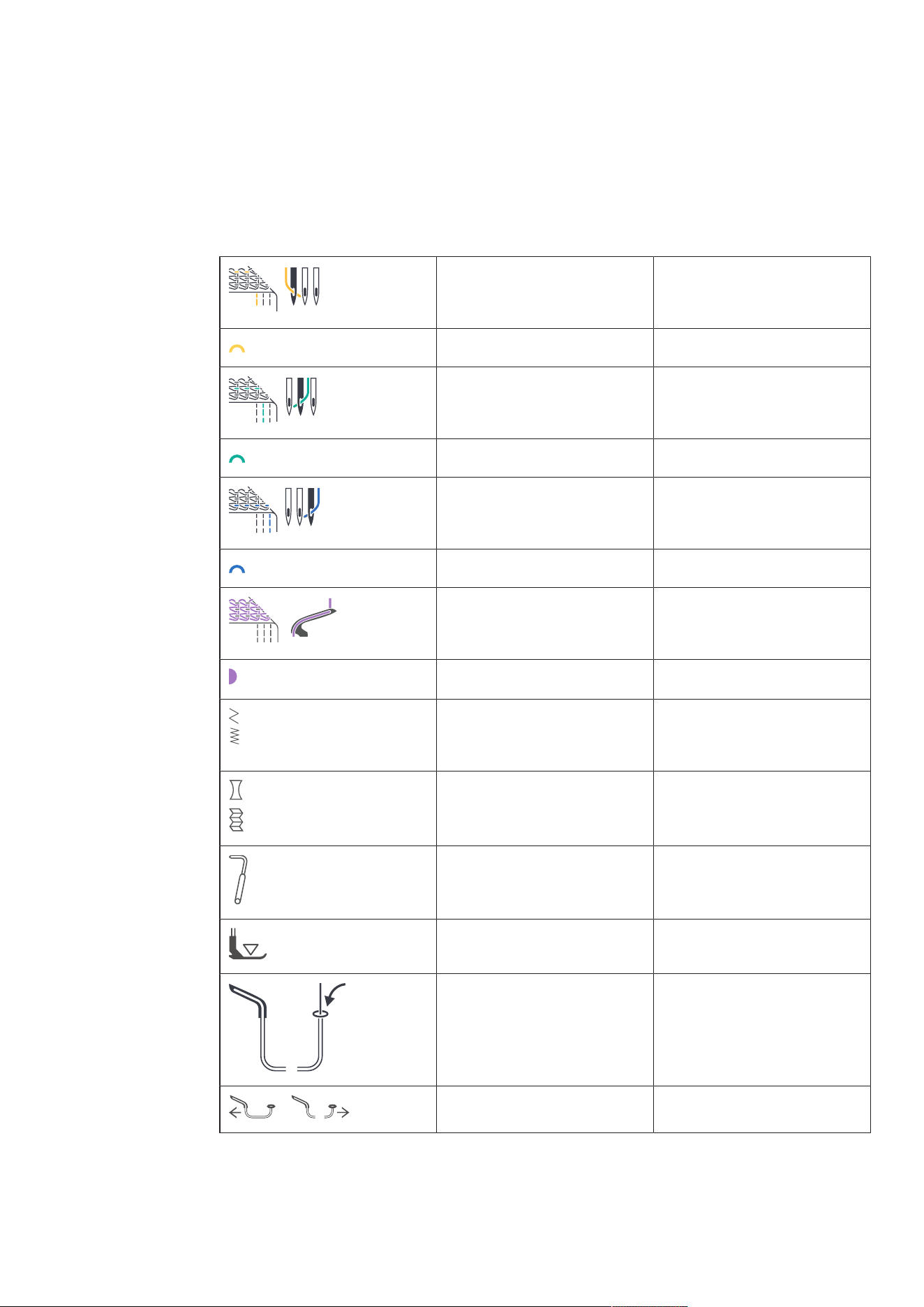
The symbols on the machine are for your guidance and give assistance when adjusting settings and
threading the machine.
• Coverstitch Formation «CS»
• Chainstitch Formation «CL»
LC
(Left Coverstitch Needle)
Left Coverstitch Needle Thread
Thread Path yellow «CS»
CC
(Center Coverstitch Needle)
Center Coverstitch Needle
Thread
Thread Path green «CS»
RC
(Right Coverstitch Needle)
Right Coverstitch Needle Thread
Thread Path blue «CS»
CL
(Chain Looper)
Chain Looper
Thread Path purple «CL»
SL
(Stitch Length)
Stitch Length
DF
(Differential Feed)
Differential Feed
FHS
(Free Hand System)
Knee Lifter (Free Hand System)
Foot Pressure
Air Threader
Air Threader Connector On/Off
My bernette
17
2023-06 EN 5040062.0.04
2.2 Overview - Standard Accessories
Included Accessories
Visit www.bernette.comfor more accessories information.
Figure Name Purpose
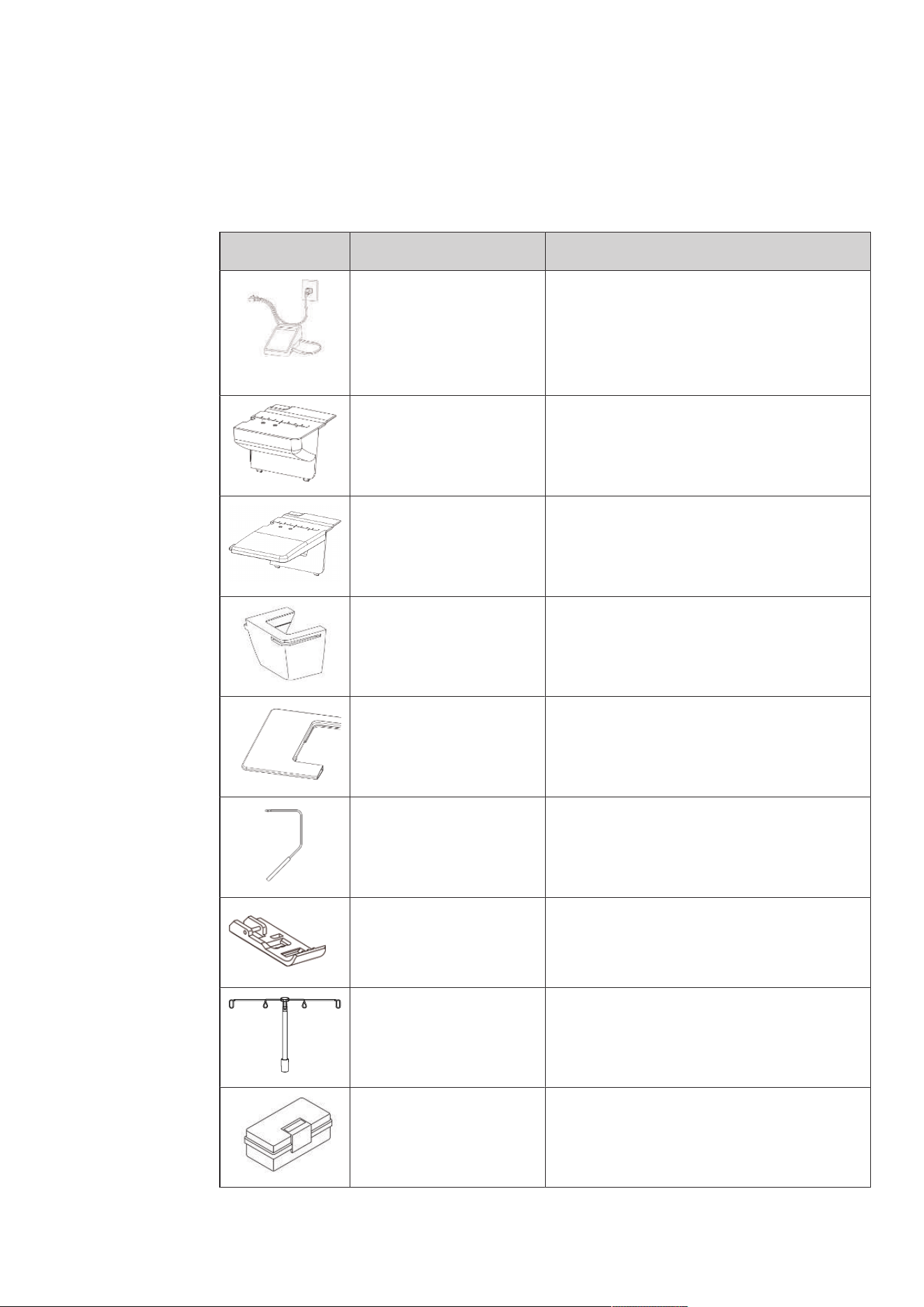
Power Cable and Foot
Control Cable
To connect the machine with the power supply
system and the Foot Control.
To start and stop the machine.
To control the sewing speed.
Coverstitch Insert To protect the Looper Area.
Coverstitch Insert for Slide-on
Table
To protect the Looper Area.To increase the sewing
surface when the Slide-on Table is used.
Freearm Cover To extend the work surface.
Slide-on Table To increase the sewing surface.
Free Hand System (FHS) To raise and lower the presser foot.
Standard Coverstitch Presser
Foot
For all cover and combo stitches.
For general sewing projects.
Retractable Thread Guide For an even unwinding of the thread from the
thread cones.
Accessories Box To store the supplied accessories as well as
optional accessories.
My bernette
18
2023-06 EN 5040062.0.04
Accessories behind the Threader Cover
The most often used accessories while sewing are stored behind the Threader Cover on the machine, so it is
always quickly at hand.
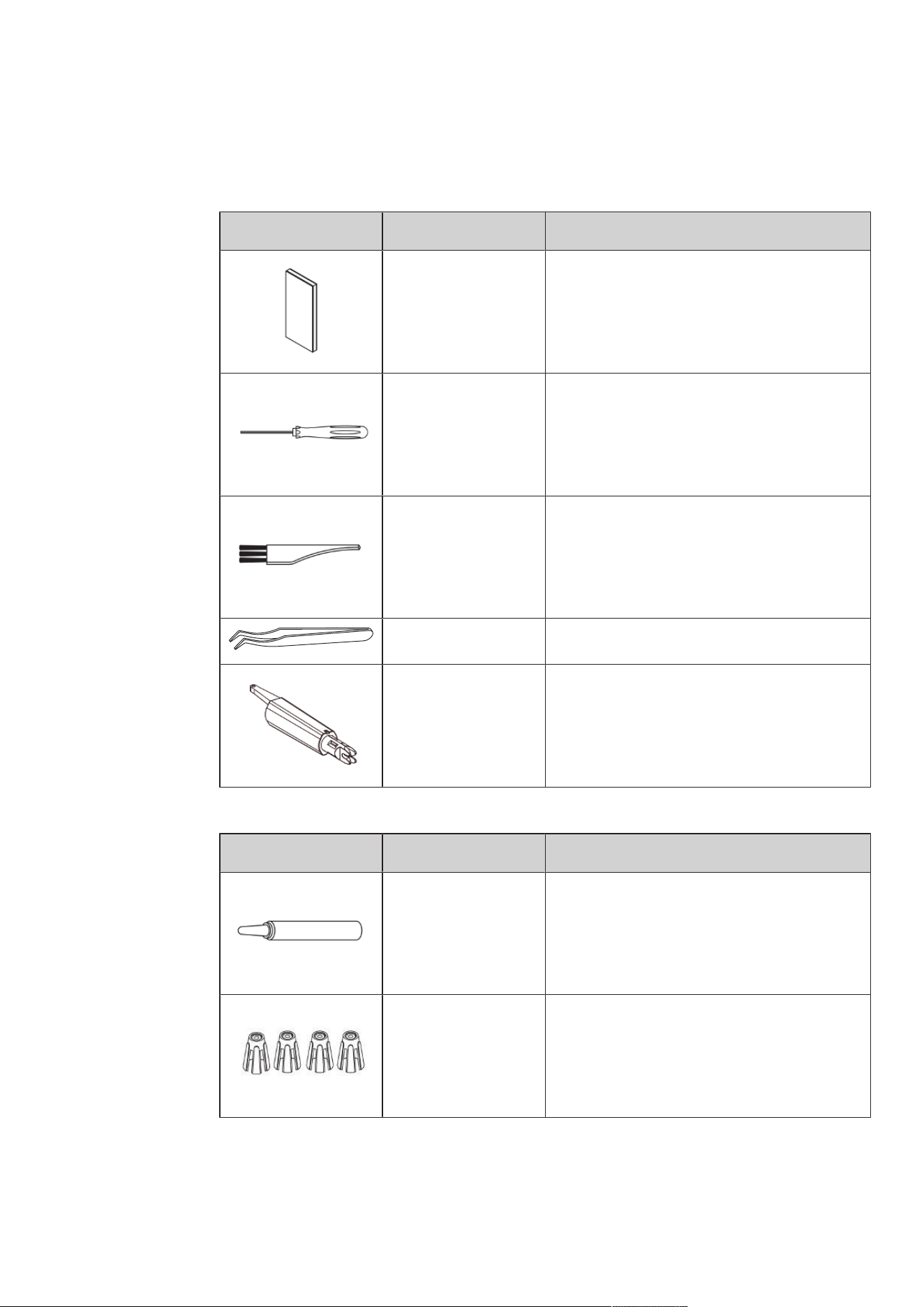
Figure Name Purpose
Needle Set ELx705 CF Recommended needles for all-purpose use.
Screwdriver To loosen or tighten the fixing screws on the
needle holder.
Brush To clean the feed dog and the looper area.
Tweezers For gripping the thread in tight positions.
Needle Threader/
Inserter
To manually thread, insert and remove the needle.
Accessories Box
Figure Name Purpose
Overlocker Oil For oiling the looper components.
Spool Stabilizer (4x) To stabilize the thread cone on the spool holder.
My bernette
19
2023-06 EN 5040062.0.04
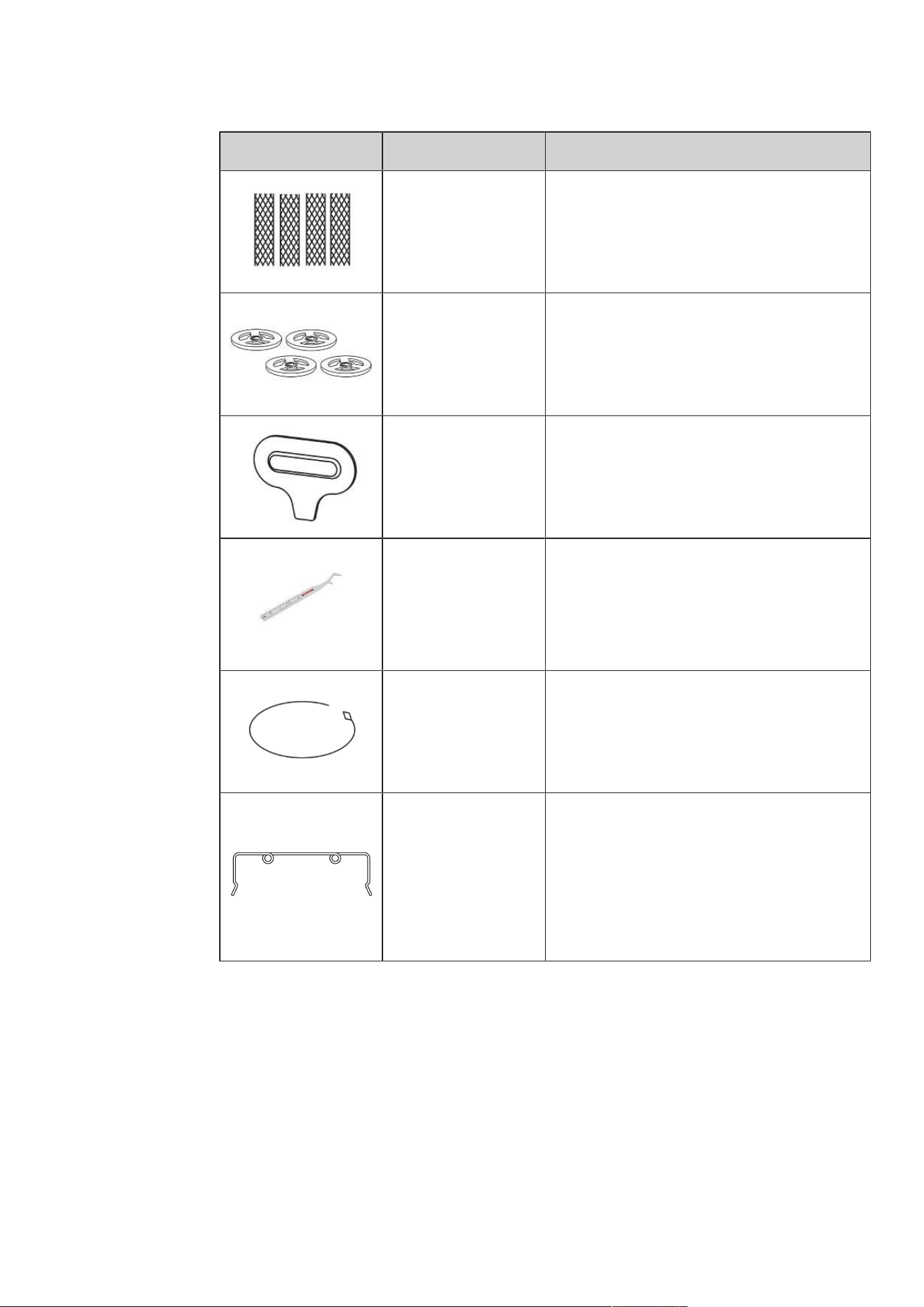
Figure Name Purpose
Spool Net (4x) To support even unwinding of nylon, rayon, silk or
metallic threads from the spool.
Spool Cap (4x) To support the regular unwinding of the thread
from the spool.
Screwdriver To loosen/tighten the stitch plate screws.
CS Lock Tool To pull the needle threads and to secure the
stitches.
To separate the threads so that the sewing project
can be removed from or placed under the presser
foot.
Threading Wire To thread the looper threads manually in the air
threader pipe.
Decorative Thread
Guide
To sew with decorative threads for particularly
wide and long stitches, for seams and edge
finishing.
Setting Up the Machine
20
2023-06 EN 5040062.0.04
3 Setting Up the Machine
3.1 Working Area
A solid table with a secure stand is a good prerequisite for optimal sewing results. Ergonomics around the
sewing table is important to protect the muscles and joints of the back, shoulder, arms and hands. The
recommendation for this includes matching the table height with the body posture. Avoid remaining in the
same position for long periods.
The machine can also be operated when standing.
> Place the machine on a solid table.
Correct sitting position
> Sit comfortably in front of the machine.
> Hold the arms bent a 90 ° across the table, with your fingertips to the machine.
– The fingertips should touch the stitch plate.
3.2 Connection and Switching On
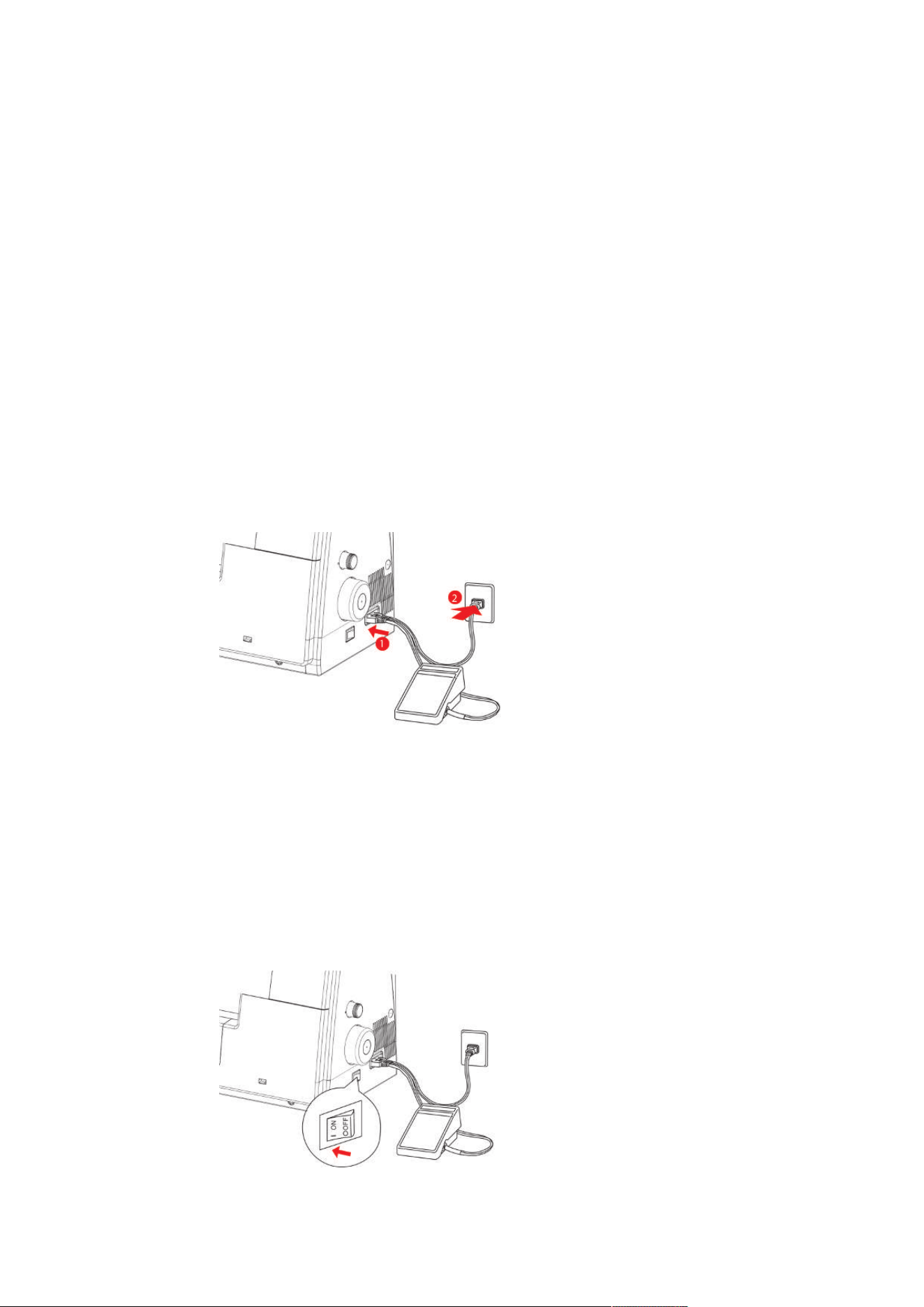
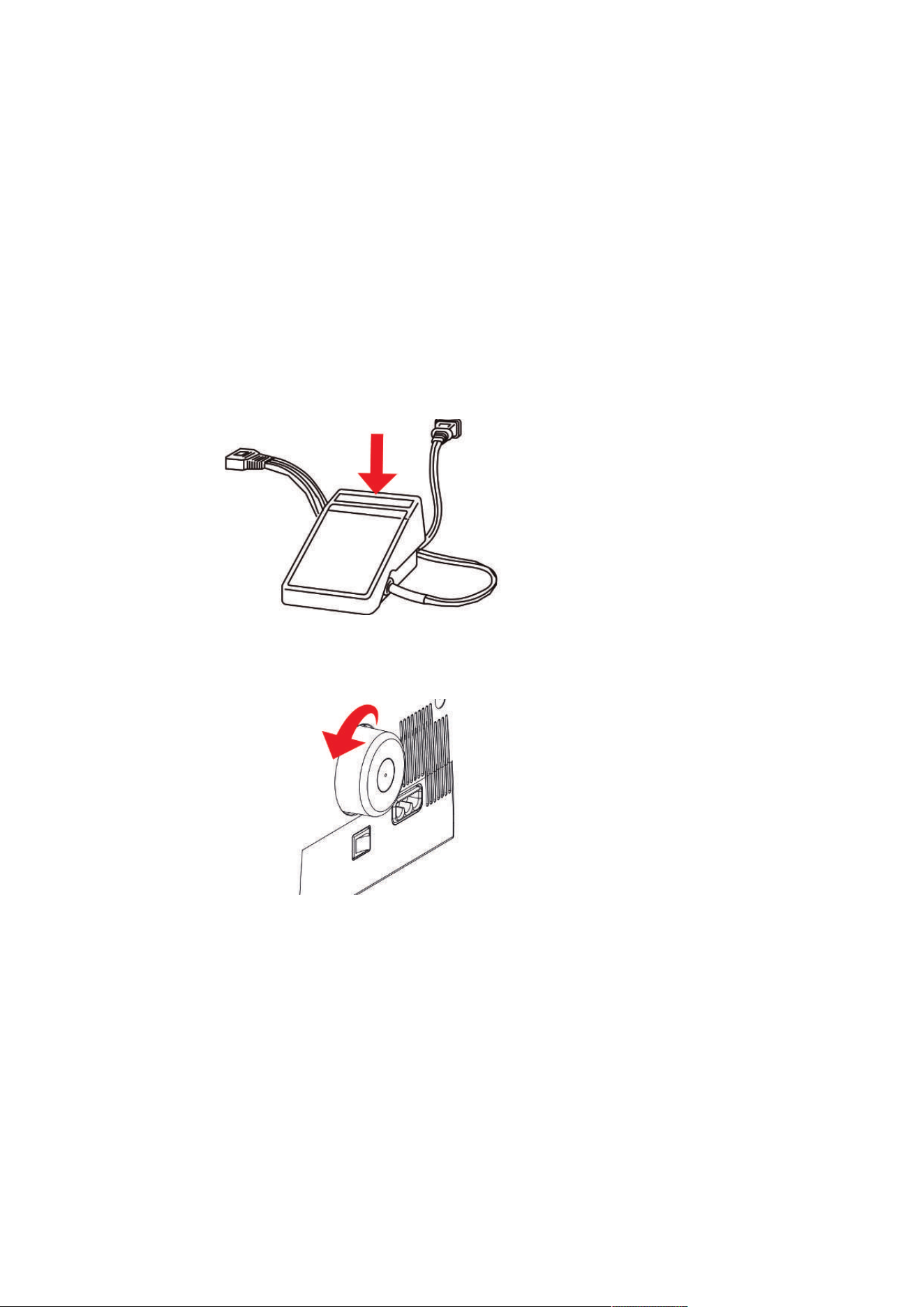
Connecting the Machine and Foot Control
> Insert the device plug (1) of the foot control/power cable into the connection for the foot control/power
cable.
> Insert the power plug (2) of the foot control/power cable into the socket.
Use of the Power Cable (only USA/Canada)
The machine has a polarized plug (one contact is wider than the other). To reduce the risk of electric shock,
the plug can only be plugged into the socket in one way. If the plug does not fit into the socket, turn the
plug. If it still does not fit, contact an electrician to install an appropriate outlet. Do not modify the plug in
any way.
Switching the Machine and Sewing Light On/Off
Setting Up the Machine
21
2023-06 EN 5040062.0.04
> Set the Power Switch to «I».
– The machine and the Sewing Light switch on.
> Turn the Power Switch to «0».
– The machine switches off.
– The sewing light switches off time-delayed to the machine.
3.3 Foot Control
Press the Foot Control
By operating the foot control the needle and knife move. The sewing speed can be infinitely adjusted by
more or less pressure on the foot control.
> To start the sewing process, increase the pressure on the foot control.
> To stop the sewing process, reduce the pressure on the foot control.
3.4 Handwheel
By turning the Handwheel counterclockwise, several activities can be performed.
• Slow, precise placement of the needle
• Moving the Loopers
• Moving the Knife
• Mechanical coupling of the Air Threader
3.5 Machine Covers
The machine covers protect against injuries caused by moving components and prevent fragile elements
from being damaged. All covers must be fitted or closed prior to sewing.
• Threader Cover
• Knife cover insert
• Coverstitch Insert for Slide-on Table
Setting Up the Machine
22
2023-06 EN 5040062.0.04
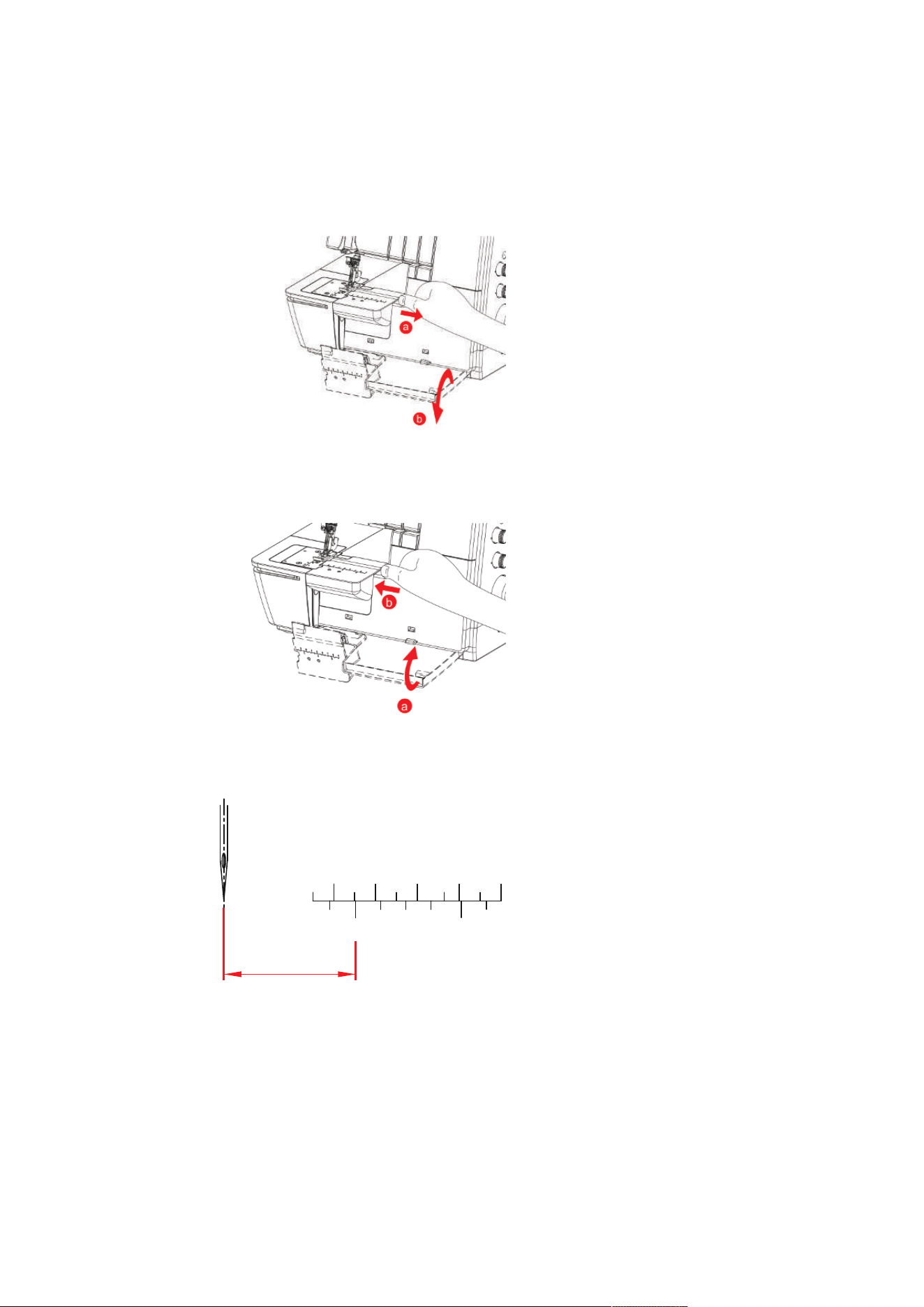
Threader Cover
The Threader Cover protects the inserted Looper Threads during sewing operations. The Accessory Holder on
the inside of the Threader Cover provides quick access to the most frequently used accessories.
> To open the Threader Cover, hold the groove and lower it forwards.
Prerequisite:
• The Air Threader Connector On/Off is at «O».
> To close the Threader Cover and swing the Threader Cover up until it clicks into place.
Coverstitch insert
The markings on the Coverstitch Insert refer to the Center Coverstitch Needle.
1
25mm
2 3 4
2
65
( )
1"
CC
Setting Up the Machine
23
2023-06 EN 5040062.0.04
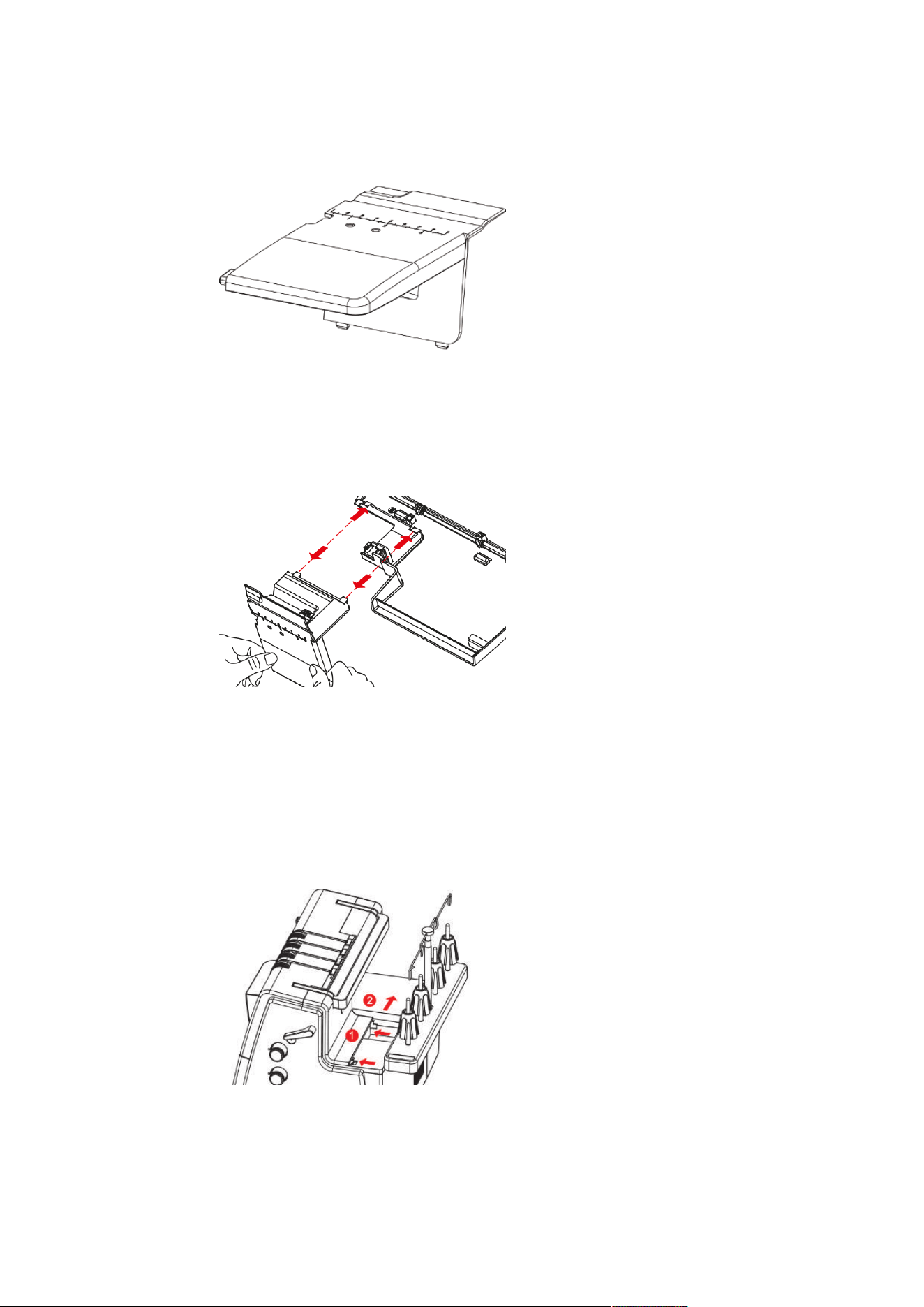
Removing/attaching the Coverstitch Insert for Slide-on Table
Prerequisite:
• Threader Cover is opened.
> To remove the Coverstitch Insert, pull the Coverstitch Insert out of the snap-in opening.
> To attach the Coverstitch Insert for the Slide-on Table, push the Coverstitch Insert for the Slide-on Table
into the snap-in opening.
> To remove the Coverstitch Insert for the Slide-on Table, press the Coverstitch Insert down at the snap-in
opening and pull the Coverstitch Insert for the Slide-on Table out of the snap-in opening.
3.6 Spool Holder
Thread cones, foot spools or household spools of all sizes can be placed on the thread stand.
Attaching the Spool Holder
> To fit the Thread Stand, press the connection points from behind towards the front of the machine (1)
and snap them into place at the side (2).
Setting Up the Machine
24
2023-06 EN 5040062.0.04
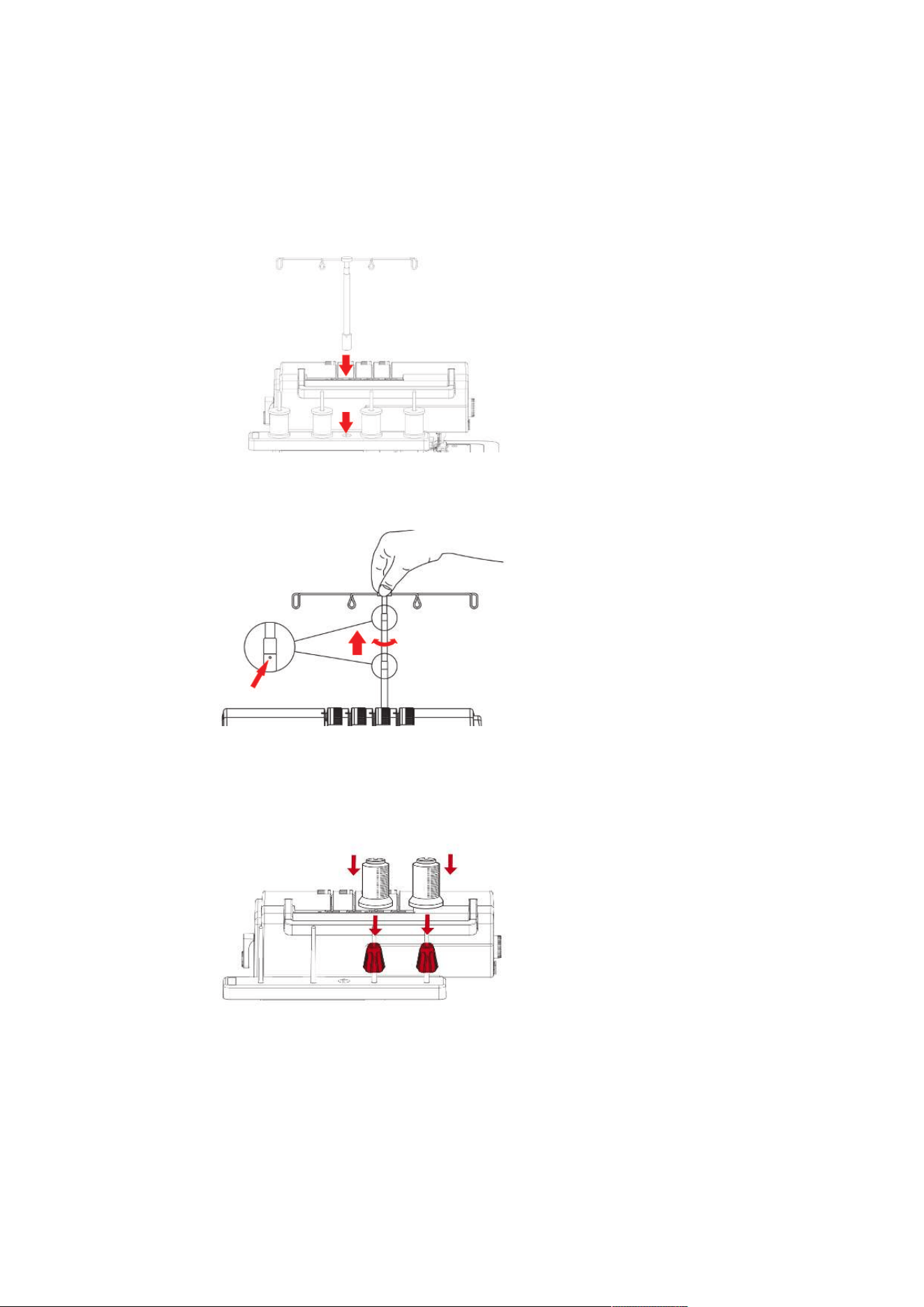
Preparing the Thread Guide
The Thread Guide ensures a clean unwinding of the thread from the thread cones. Each thread is guided
through a Thread Guide Wire located directly above the thread cone.
> To attach the Retractable Thread Guide, insert it into the opening provided in the Thread Stand until it
clicks.
> Hold the Thread Guide and pull it up to the stop.
> Turn the Thread Guide to the left and right until the two positioning pins engage.
– The outer Thread Guide Wires are parallel to the machine front.
> To retract the Thread Guide, push the Thread Guide down with a little pressure.
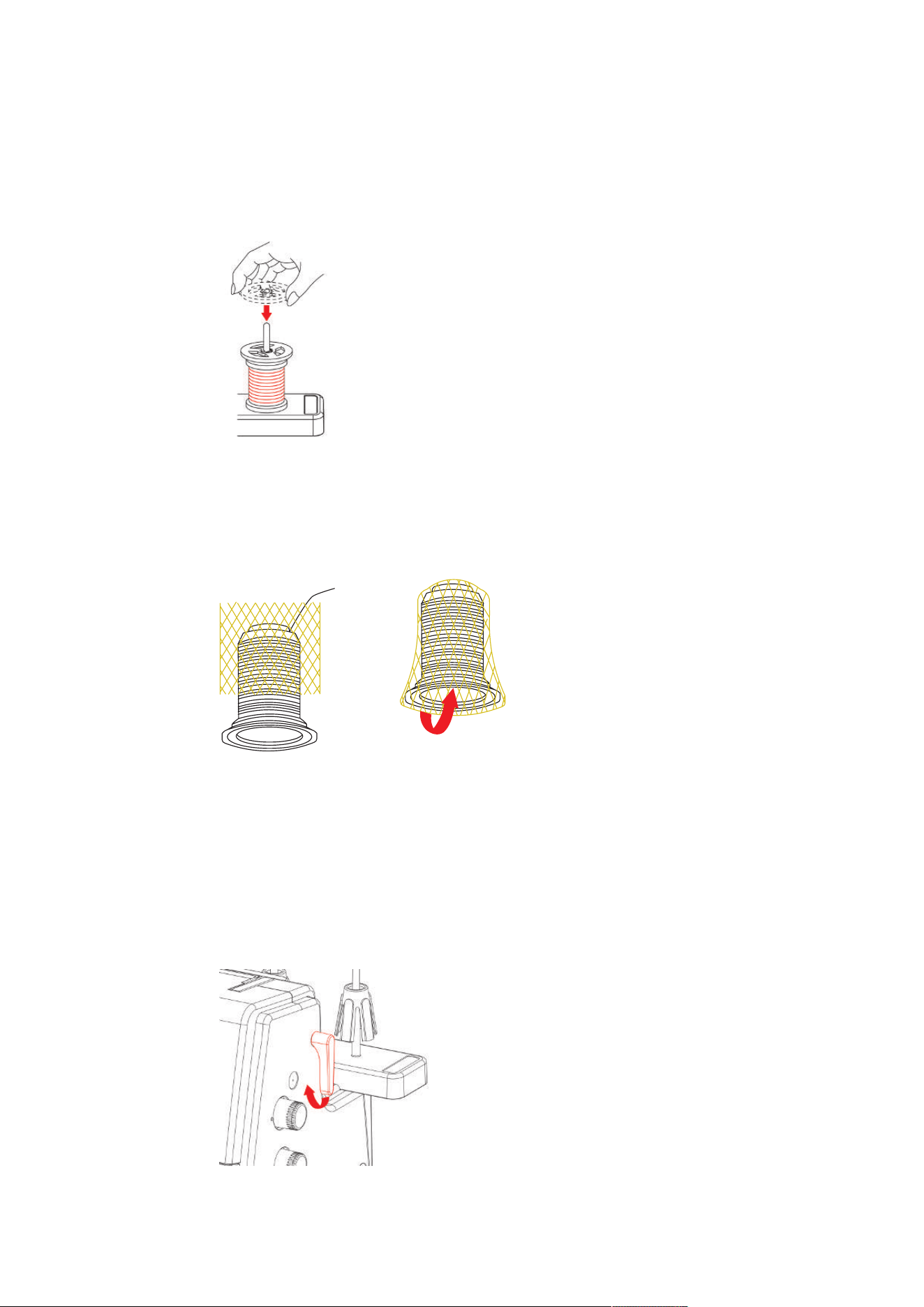
Attaching the Spool Stabilizer
For large thread cones, the spool stabilizer serves to stabilize the thread cone on the spool pin.
> For extremely conical spools, place the spool stabilizer onto the thread spool pin with the pointy end up.
> For slightly conical spools, place the spool stabilizer onto the thread spool pin with the pointy end down.
Setting Up the Machine
25
2023-06 EN 5040062.0.04
Place the Spool Disc
The spool disc ensures the stability of the thread spool and the even unwinding of the thread.
> Place the thread spool on the spool holder.
> Push the flat side of the spool cap over the spool pin to the thread spool.
Using the Spool Net
The spool net prevents the thread from sliding down from the thread spool and is recommended for special
threads.
• Thin threads, which slide easily off the spool
• Nylon, rayon, silk threads or effect and metallic threads
> Put the spool net over the thread spool from above and pull the thread end upwards.
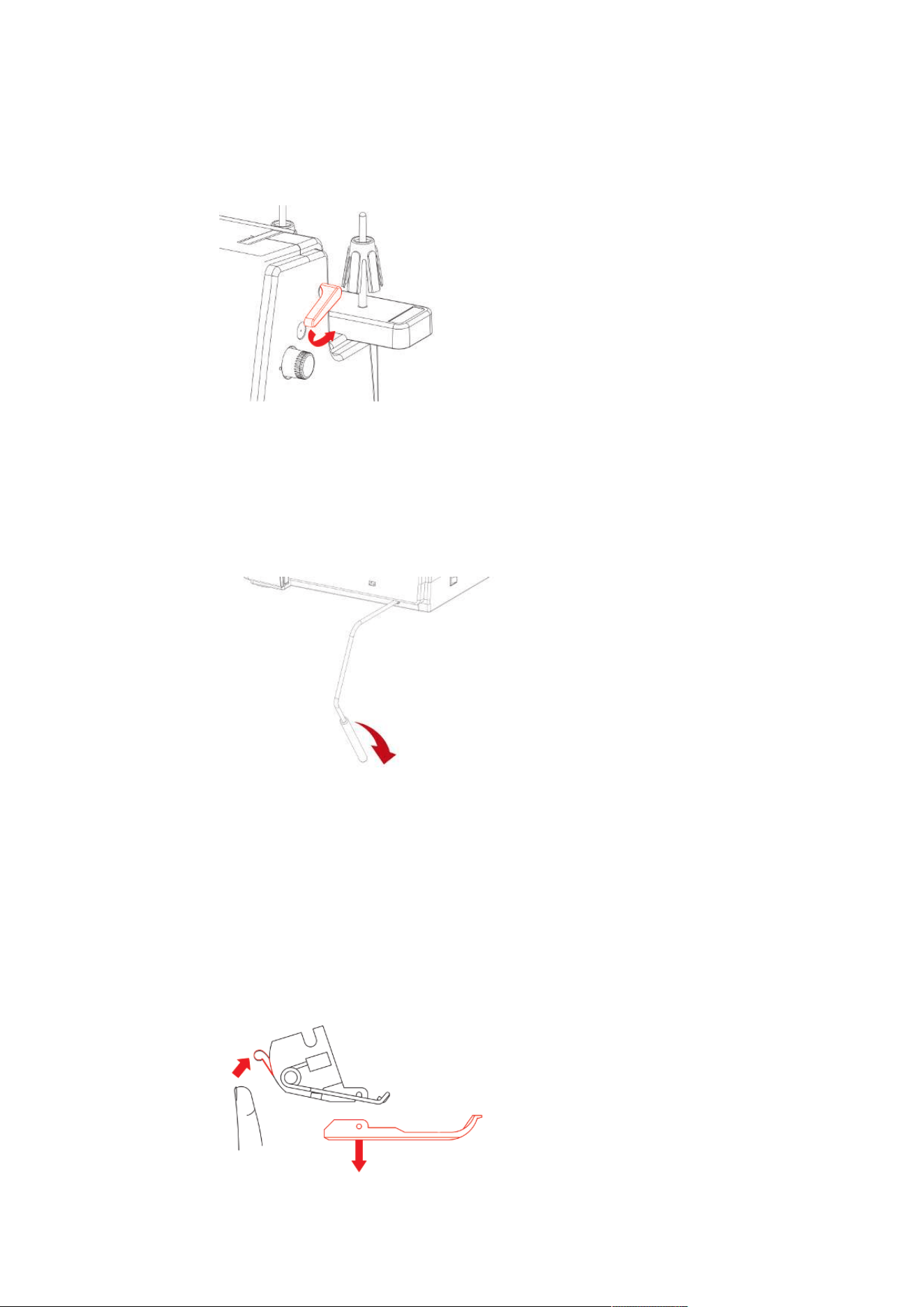
3.7 Presser Foot
Positioning the Presser Foot Up/Down
The lifted presser foot allows you to place the sewing project under the presser foot. The lowered presser
foot is a prerequisite for starting to sew.
> Lift the presser foot lifter until it engages.
– The presser foot remains in the upper position.
– The thread tension is released.
Setting Up the Machine
26
2023-06 EN 5040062.0.04
> Lower the presser foot lifter.
– The machine is ready for sewing.
– The thread tension is active.
Lifting the Presser Foot Up/Down with the Knee Lifter
Temporarily lifting the presser foot via the Free Hand System allows repositioning the sewing project with
both hands.
Prerequisite:
• The Knee Lifter of the Free Hand System is attached. (see page31)
> To raise the presser foot, press the Knee Lifter with the knee out to the right and hold it in place.
> To lower the raised presser foot, slowly release the pressure on the Knee Lifter.
> To lower the already engaged presser foot, press the knee lifter all the way to the right and release
slowly.
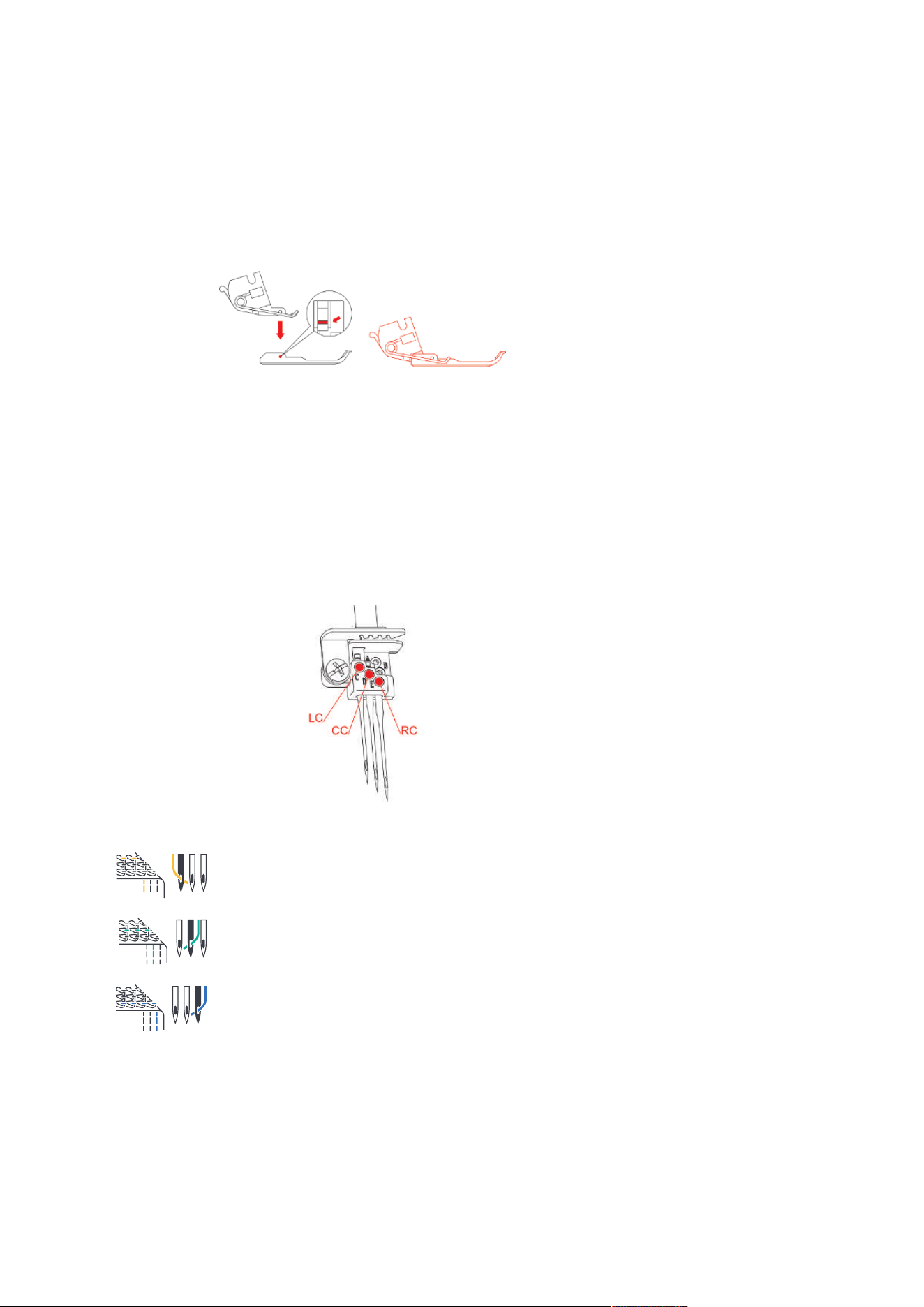
Changing the Presser Foot
Prerequisite:
• The needles are in the top position.
• The presser foot is raised.
> Press the Release Button on the rear side of the Presser Foot Shaft.
– The presser foot is released.
Setting Up the Machine
27
2023-06 EN 5040062.0.04
> Lift the Presser Foot Spring slightly and remove the presser foot.
> Lift the Presser Foot Spring slightly and place the new presser foot beneath the shaft groove so that the
shaft groove lies exactly above the Presser Foot Pin.
> Lower the Presser Foot Shaft carefully until the shaft groove engages with the Presser Foot Pin.
> Raise the presser foot.
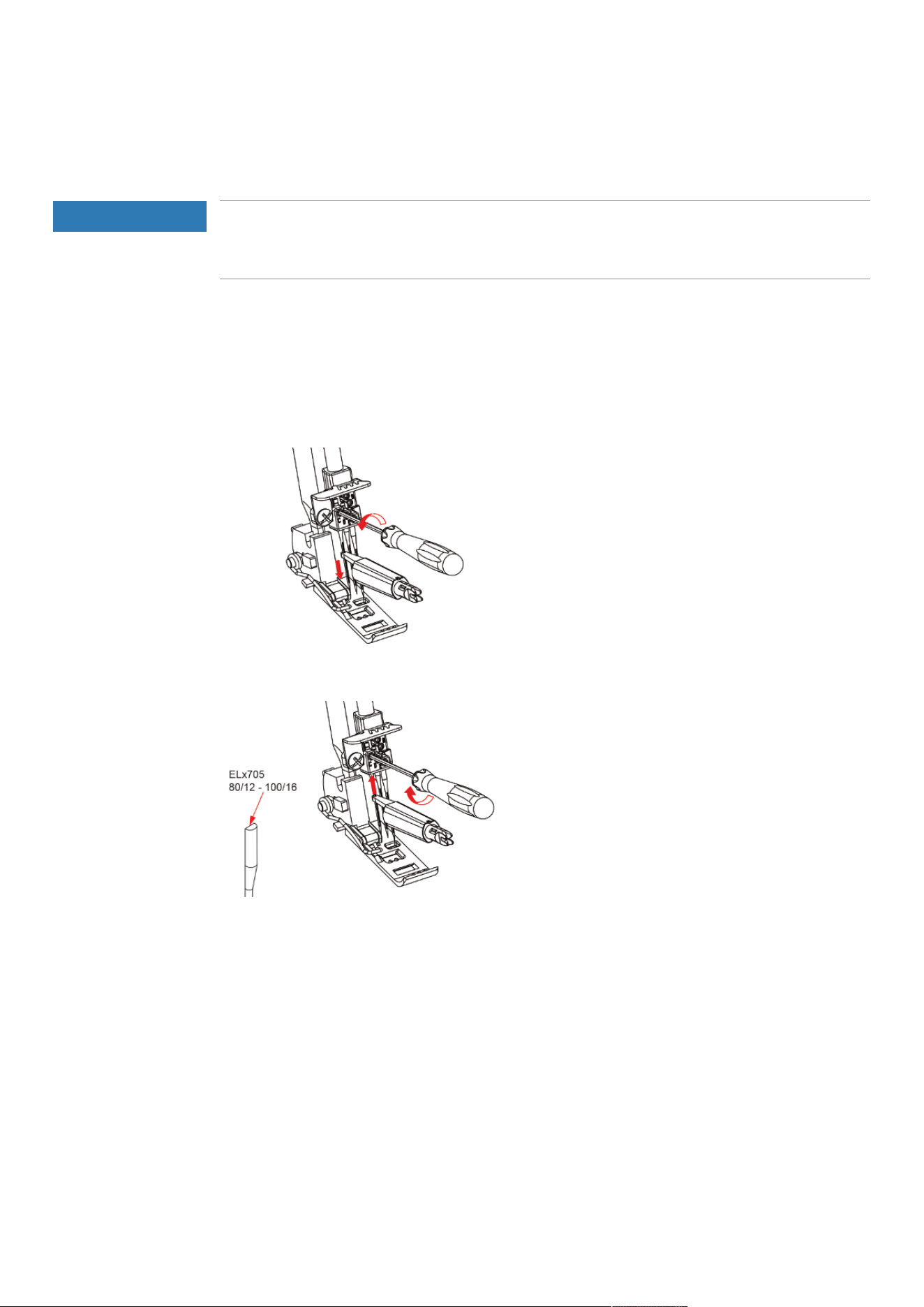
3.8 Needle Area
Needle holder
The needle holder can hold three needles. The machine is designed for needles of the ELx705 system. Needle
sizes between 80 − 100 are to be used for this machine.
Needles for coverstitches
«LC» Left Coverstitch Needle for coverstitches and chainstitches.
«CC» Center Coverstitch Needle for coverstitches and chainstitches.
«RC» Right Coverstitch Needle for coverstitches and chainstitches.
Setting Up the Machine
28
2023-06 EN 5040062.0.04
Changing the needle
The use of the needle inserter is recommended and prevents the needle from falling into the feed dog area.
NOTICE
Damage due to Excessive Tightening of the Screws
The threads of the needle holder may be damaged. A repair by the authorized bernette dealer is required.
> Do not overtighten the needle screws.
The needle holder can hold three needles. The machine is designed for needles of the ELx705 system. Needle
sizes between 80 − 100 are to be used for this machine. (see page35)
Prerequisite:
• The needles are in the top position.
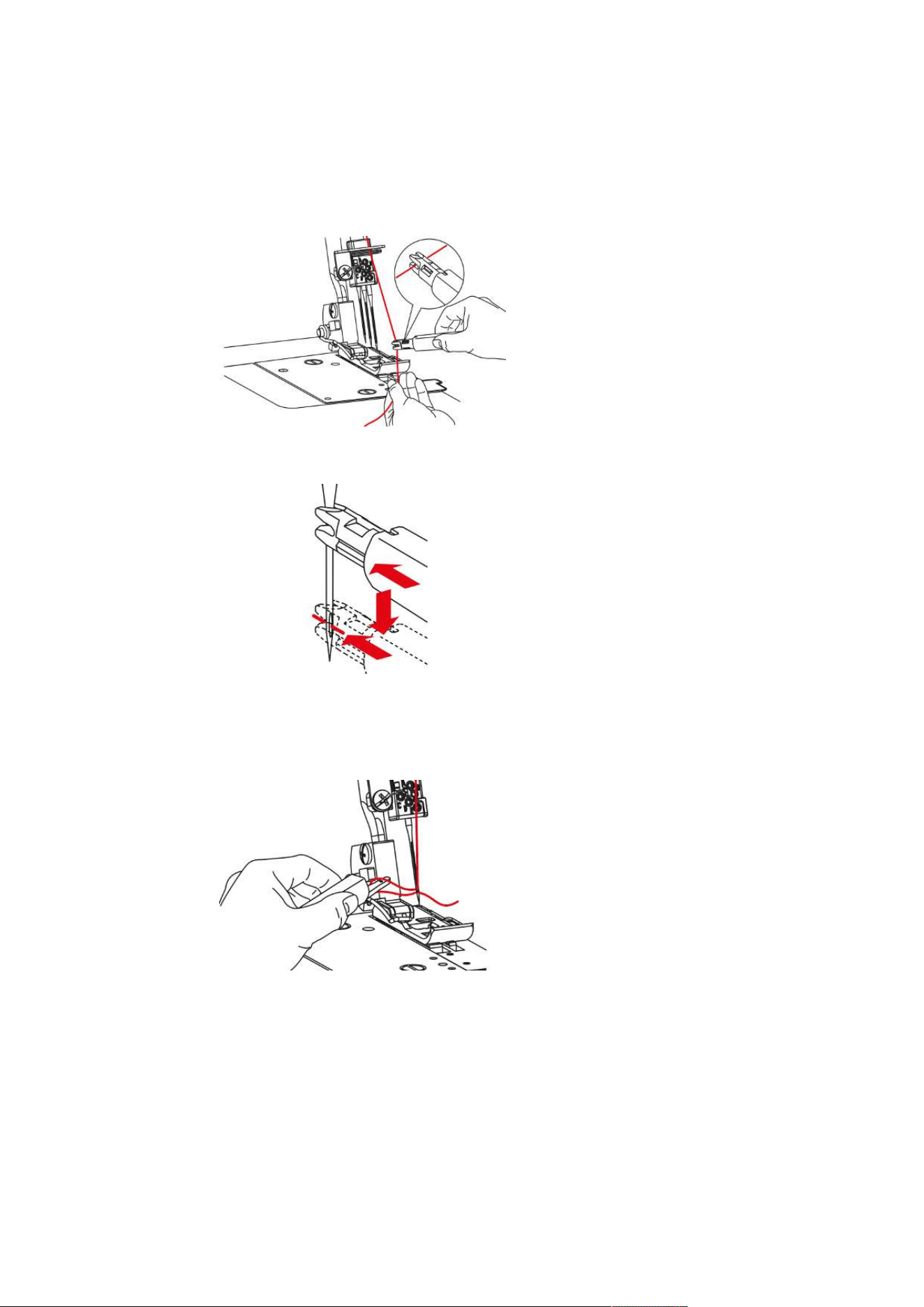
> Guide the Needle Inserter from below over the needle and loosen the Needle Screw using the supplied
Screwdriver.
> Pull the needle downwards to remove.
> Insert the new needle into the Needle Inserter with the flat side facing back.
> Push the needle into the corresponding Needle Holder opening as far as it will go.
– Correctly inserted needles are not at the same height.
> Tighten the Needle Holder Screws.
The Needle Holder Screws must always be tightened, even if no needles are inserted. This prevents the
Needle Holding Screws from falling out a result of vibrations.
Setting Up the Machine
29
2023-06 EN 5040062.0.04
Threading the Needle Manually
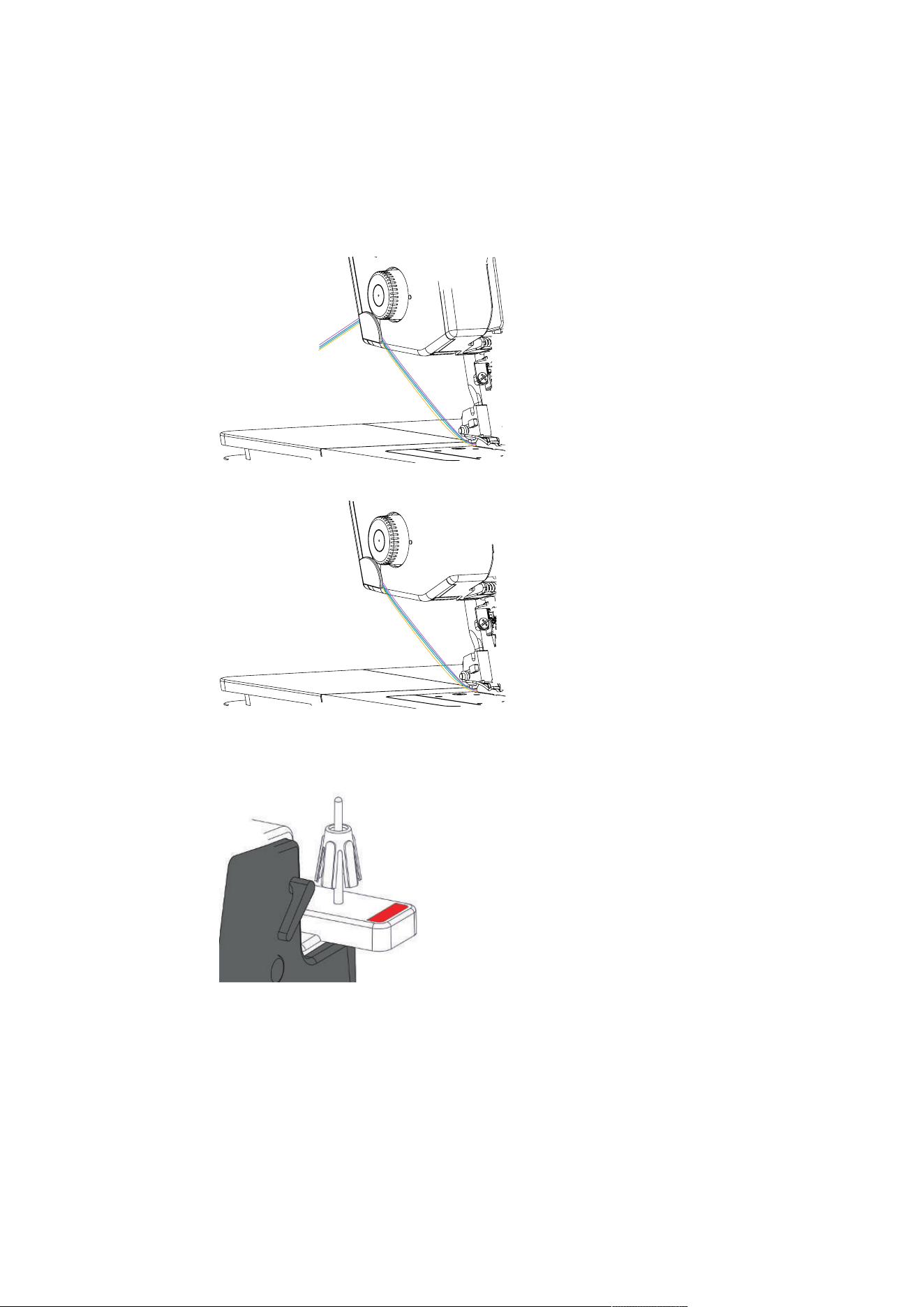
With the needle threader every needle can be threaded easily.
> Hold the needle threader with the flat grip side facing up.
> Pull the thread horizontally through the slot and hold the end of the thread.
> Position the needle threader with the V-guide at the top of the needle and with little pressure slide along
the needle to the eye.
– The metal pin presses the thread through the eye of the needle.
> Release the pressure on the needlet threader and remove it from the needle.
– A thread loop is formed.
> Pull the thread loop with the end of the needle threader to the back.
> Place the thread under the presser foot to the back left.
Setting Up the Machine
30
2023-06 EN 5040062.0.04
3.9 Sewing Assistance
Using the thread cutter
The Thread Cutter is used for cutting threads.
> Pull the threads over the thread cutter from the front and then down.
– The threads are clamped and ready for the sewing start.
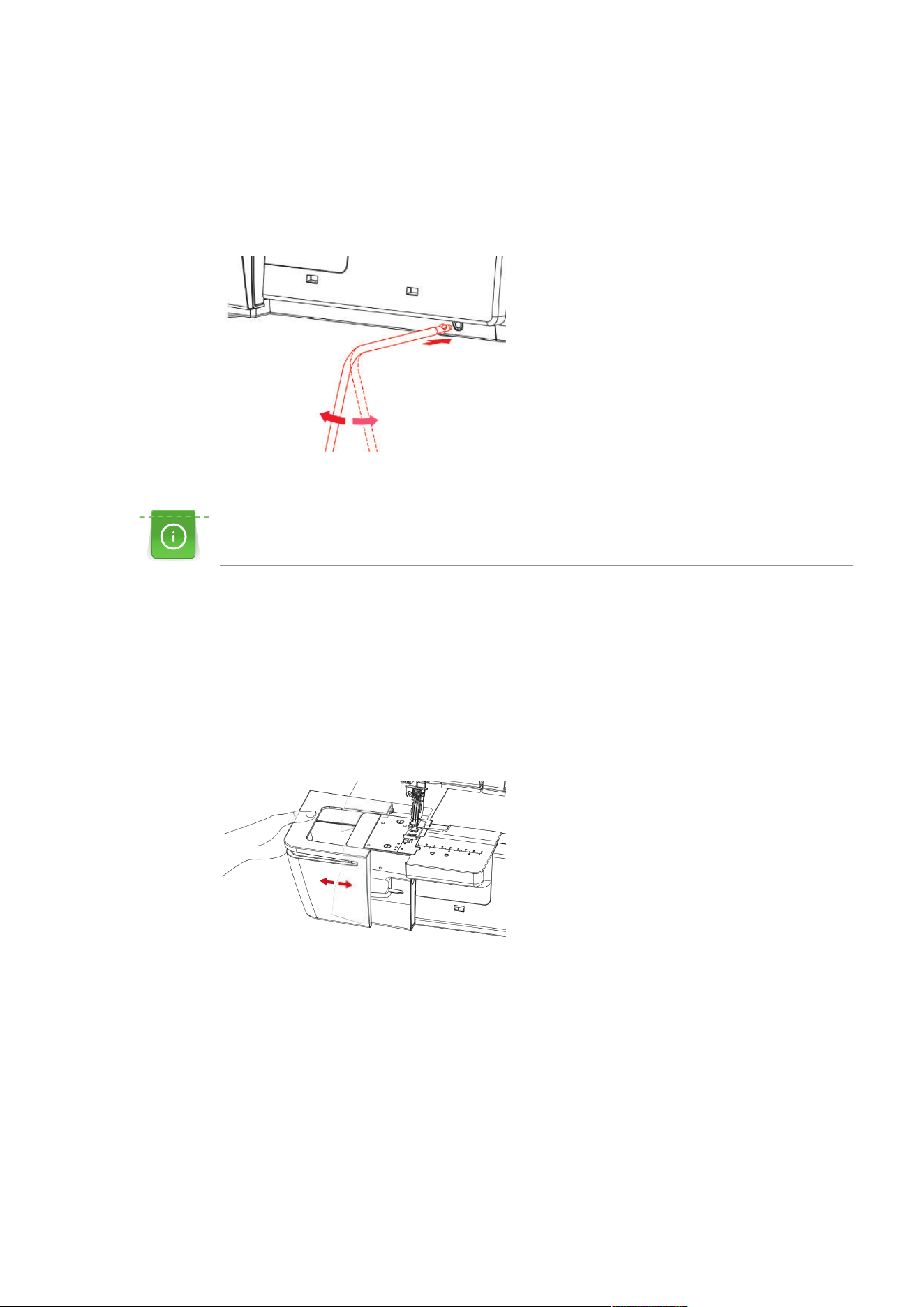
Needle Pad
The needle pad is used to store needles that are not being used.
Setting Up the Machine
31
2023-06 EN 5040062.0.04
Attaching/Removing the Knee Llifter
Temporarily lifting the presser foot via the Free Hand System allows repositioning the sewing project with
both hands.
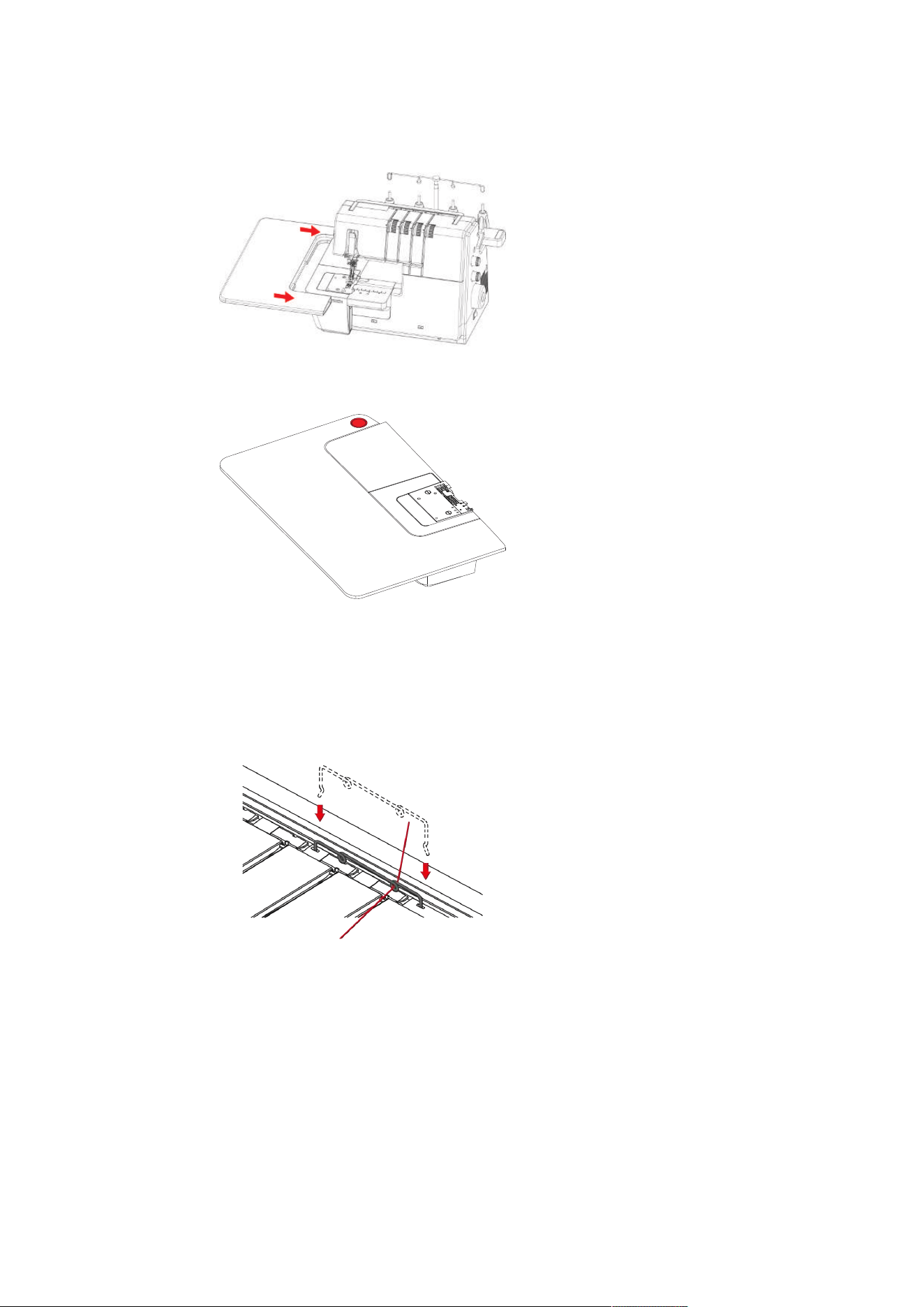
> To attach the Knee Lifter, push the Knee Lifter Engaging Cam in a horizontal position into the Knee Lifter
Connection until it stops.
> To remove the Knee Lifter, pull the Knee Lifter out of the Knee Lifter Connection without swinging the
Knee Lifter sideways.
The swing-out position of the knee lifter can be adjusted at an authorized bernette dealer if required.
Attaching/Removing the Freearm Cover
The freearm is ideal when working with tubular, closed projects such as cuffs, trouser hems or sleeve ends.
The freearm cover closes the gap between the stitch plate and the sewing surface.
Prerequisite:
• The slide-on table is removed.
• The Coverstitch Insert is fitted.
> To attach the Freearm Cover, push the Freearm Cover along the guide rails from the left until it engages.
> To remove the freearm cover, pull the freearm cover to the left.
Attaching/Removing the Slide-on Table
The slide-on table increases the sewing surface, which is especially helpful with larger sewing projects.
Prerequisite:
• The Freearm Cover and the Coverstitch Insert are removed.
• The Coverstitch Insert for the Slide-on Table has been fitted.
Setting Up the Machine
32
2023-06 EN 5040062.0.04
> To attach the Slide-on Table, push the Slide-on Table along the guide rails from the left until it engages.
> To remove the Slide-on Table, press the Release Mechanism (1) of the Slide-on Table and pull the Slide-
on Table to the left.
1
Attaching the Decorative Threads Guide
Decorative Threads Guide prevents the Thread Tension Setting from overstretching the thread.
> Tension the Decorative Threads Guide slightly and hook it into the left and right recesses in the machine
cover.
> Thread the thread through the Thread Guide Eyelet and insert it along the Thread Path between the
Thread Tension Discs.
Fitting the Decorative Threads Guide with thread already inserted
> Pull the thread out of the Thread Pretension.
> Attach one end of the Decorative Threads Guide.
> Thread the thread into the Decorative Threads Guide.
> Attach the second end of the Decorative Threads Guide.

Sewing Start
33
2023-06 EN 5040062.0.04
4 Sewing Start
4.1 Check before Starting to Sew
In order to start a project successfully, the following steps must be performed.
• The machine is switched on and the presser foot is lifted.
• The fabric and the applications have been selected. (see page33)
• The thread has been selected. (see page33)
• The needle size is matched with the thread type and the sewing project. (see page35)
• The stitch is selected.
• The machine settings based on the stitch selection have been performed. (see page40)
• The Needle and Looper Threads have been threaded.
• All Needle Threads and Looper Threads lie under the presser foot to the back left.
• The Threader Cover is closed.
> Place the sample fabric under the presser foot and lower the presser foot.
> To start the sewing process, press the foot control.
– The selected stitch is formed.
– If no stitch is formed, the settings on the machine for the stitch must be checked.
4.2 Selecting the Fabric
The choice of fabric, in combination with needle, thread and stitch, plays a vital role in achieving the perfect
sewing result. The sewing test with the selected fabric is recommended. (see page54)
4.3 Selecting the Thread
A wide range of sewing and special overlock threads are manufactured in various sizes and in different fiber
combinations.
• The purchase of high-quality threads is recommended to achieve good sewing results.
• Use thread cones/spools which are suitable for cover machines.
NOTICE
Thread Breakage due to Incorrect Needle/Thread or Thread/Looper Matching
The thread needs to glide smoothly through the respective thread guides.
It must be possible to feed the thread through the looper or the needle eye without any resistance.
In the case of thick threads, elongate the stitch length and reduce the thread tension.
Sewing Start
34
2023-06 EN 5040062.0.04
Needle Thread
Needle size and thread type must be carefully matched. The correct needle thickness depends on the
selected thread as well as the fabric being used.
• The fabric type determines the thread type and point form.
• The thread type determines the needle size.
Needle sizes of 80/12 100/16 can be used on the machine.
Thread type Needle size
Polyester Overlock Thread No. 120 #80 – #100
Polyester Multifilament < No. 120 80 – 90
Wooly Nylon #80 – #100
Decorative Thread/Yarn #80 – #100
Metallic Thread #80 – #100
Check the Needle/Thread Combination
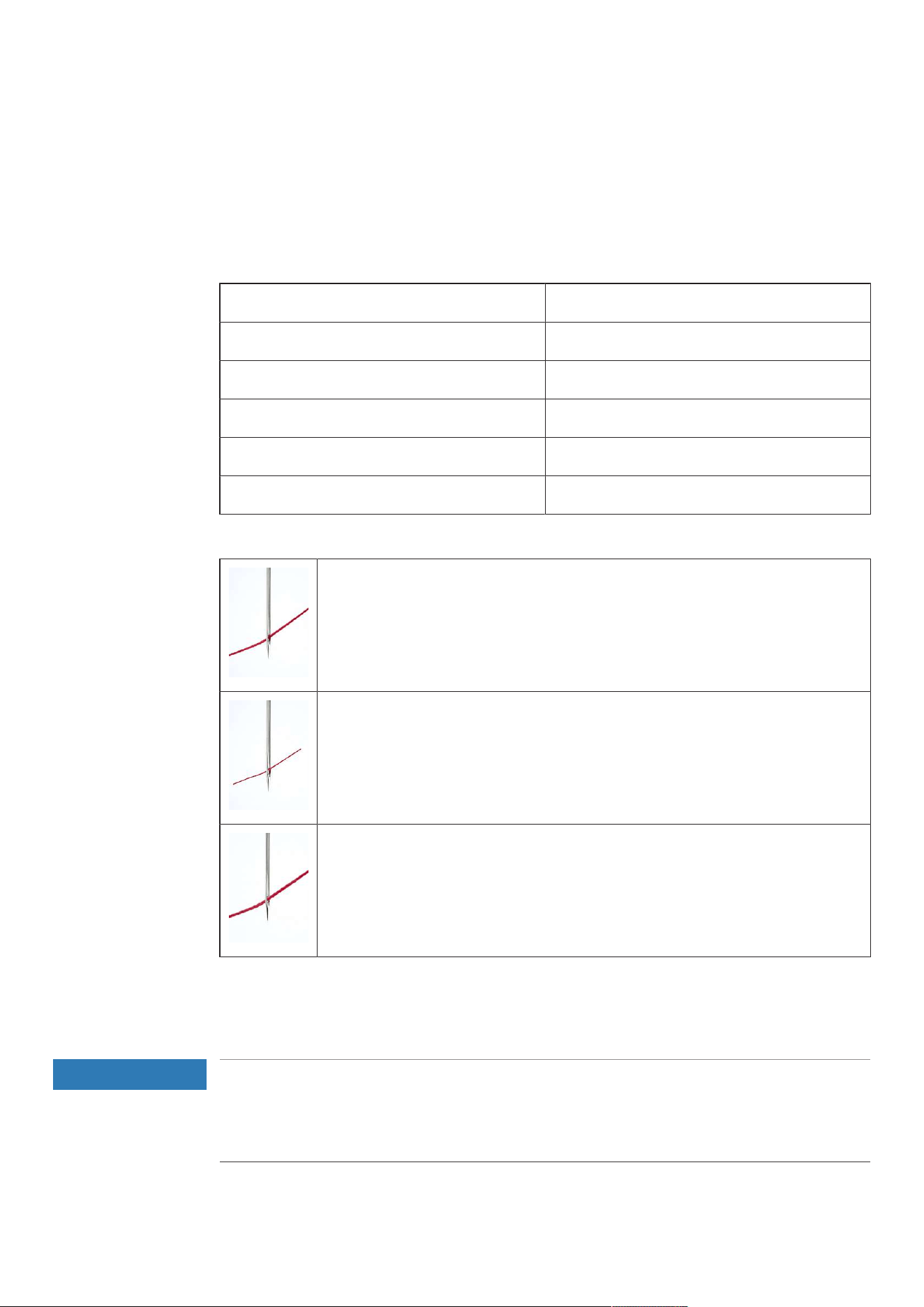
The needle/thread combination is correct if the thread is guided perfectly into the long
groove and through the eye of the needle.
The thread can break and cause skipped stitches if there is too much play in the long
groove or eye of the needle.
The thread can break and become jammed if it frays on the edges of the long groove and
is not guided optimally through the eye of the needle.
Looper Thread
A wide variety of thread types can be used as Looper Threads which can be threaded via the Air Threader
System.
NOTICE
Damage by coated or waxed threads
Coated or waxed threads may lose some of their coating in the Air Threader Pipes which results in
permanent blocking of the pipes. A repair by the Authorized bernette dealer is required.
Avoid the use of coated or waxed threads.
Sewing Start
35
2023-06 EN 5040062.0.04
4.4 Selecting the Needle
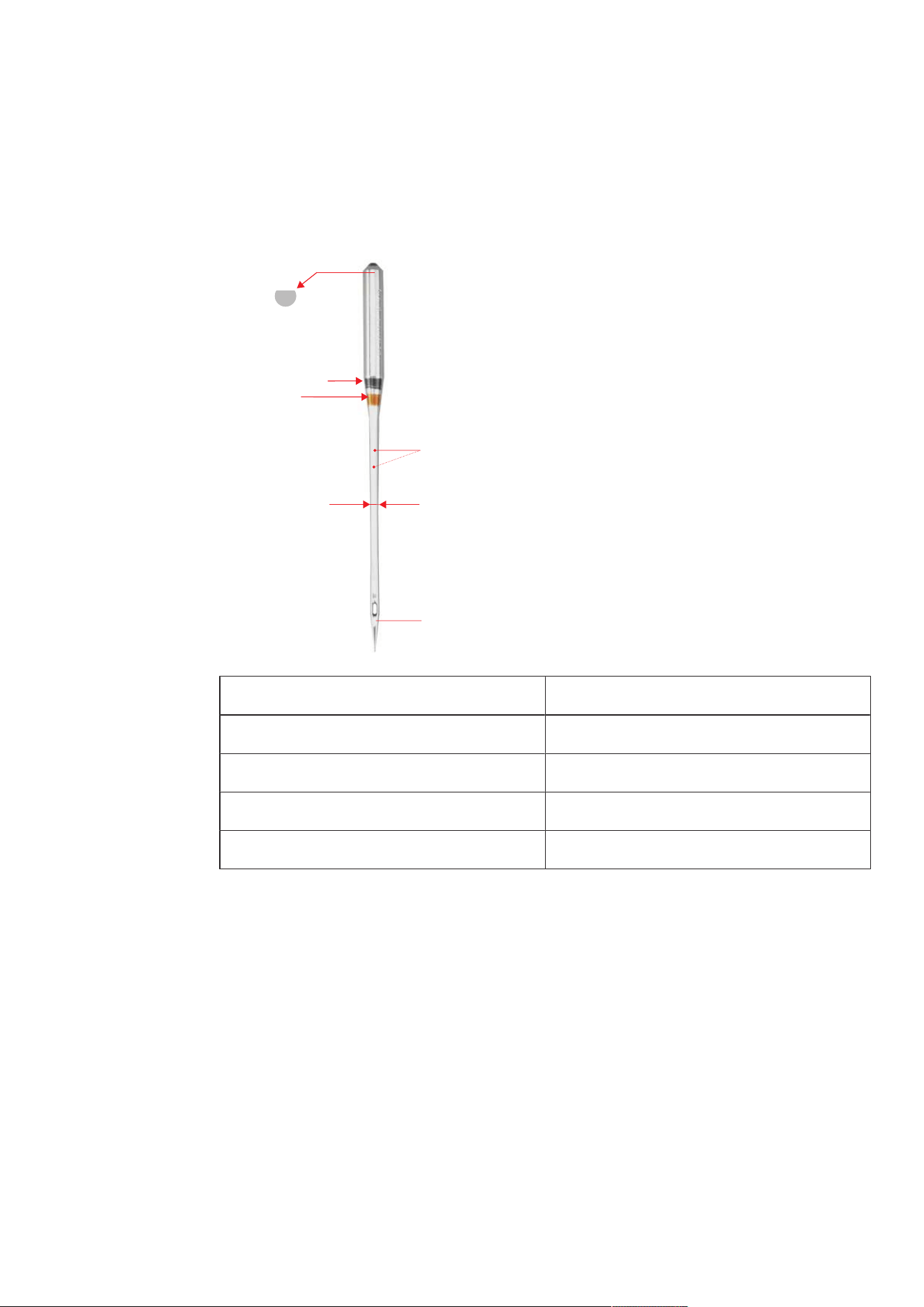
It is recommended to use the Needle Type ELx705 CF (Chrome Finish) version as this type is more durable
due to the chrome coating.The machine runs most reliably with these needles because of their second
groove. The needles should be replaced regularly. Only a perfect needle point can achieve a proper stitch.
2
1
3
4
A
B
A Coverstitch needle ELx705 CF/80
1 two thread grooves
2 705 = Flat shank
3 CF = Chrome Finish
4 / B 80 = Needle size
• Needle size 80: For any common applications. For medium-weight to heavy fabrics.
• Needle size 90: For heavy fabrics.
• Needle size >90: In exceptional cases, only for very heavy fabrics.
Sewing Start
36
2023-06 EN 5040062.0.04
Detect Defective Needles
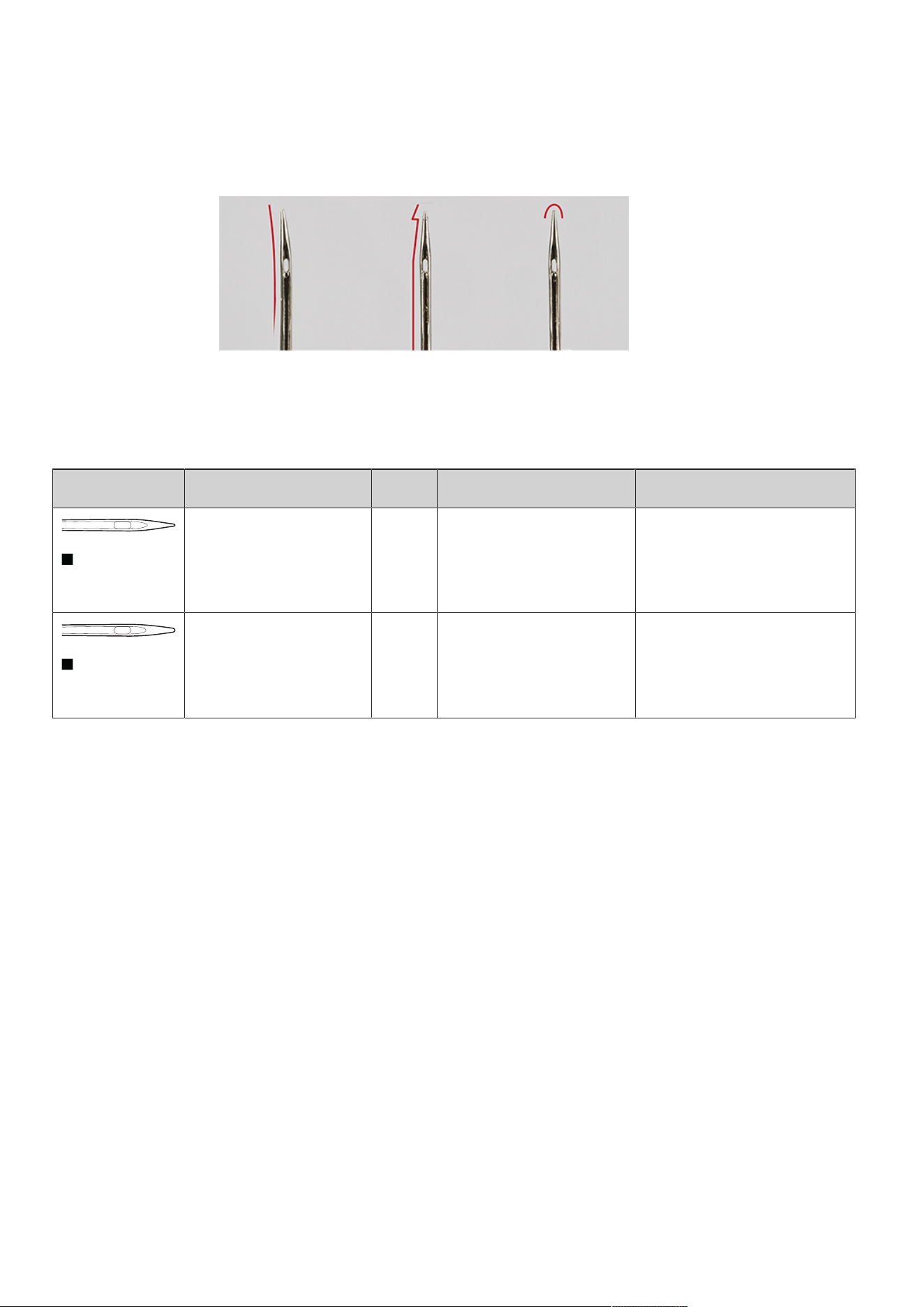
Check the needle before each sewing start and replace it if necessary.
1 Bent Needle 3 Blunt Needle
2 Damaged Needle Point
Needle Overview
Illustration Designation *Size Description Material/Application
Coverstitch Needle
ELx705CF
80/12
90/14
100/16
With slightly rounded point, a
second groove and chrome
coating.
For overlocking and
coverstitching applications.
Jersey/Coverstitch Needle
ELx705SUKCF
80/12
90/14
100/16
With slightly rounded point, a
second groove and chrome
coating.
For overlocking and
coverstitching on multilayer,
elastic fabrics.
*Not all needle sizes are available as BERNINA Needles.
Stitch
37
2023-06 EN 5040062.0.04
5 Stitch
5.1 Stitch Type
With this machine different stitch formations can be set. These stitches are achieved by different
configurations of needles and mechanical settings.
Coverstitch
Hem
Coverstitch hems on garments, having been sewn with the machine, look very professional.
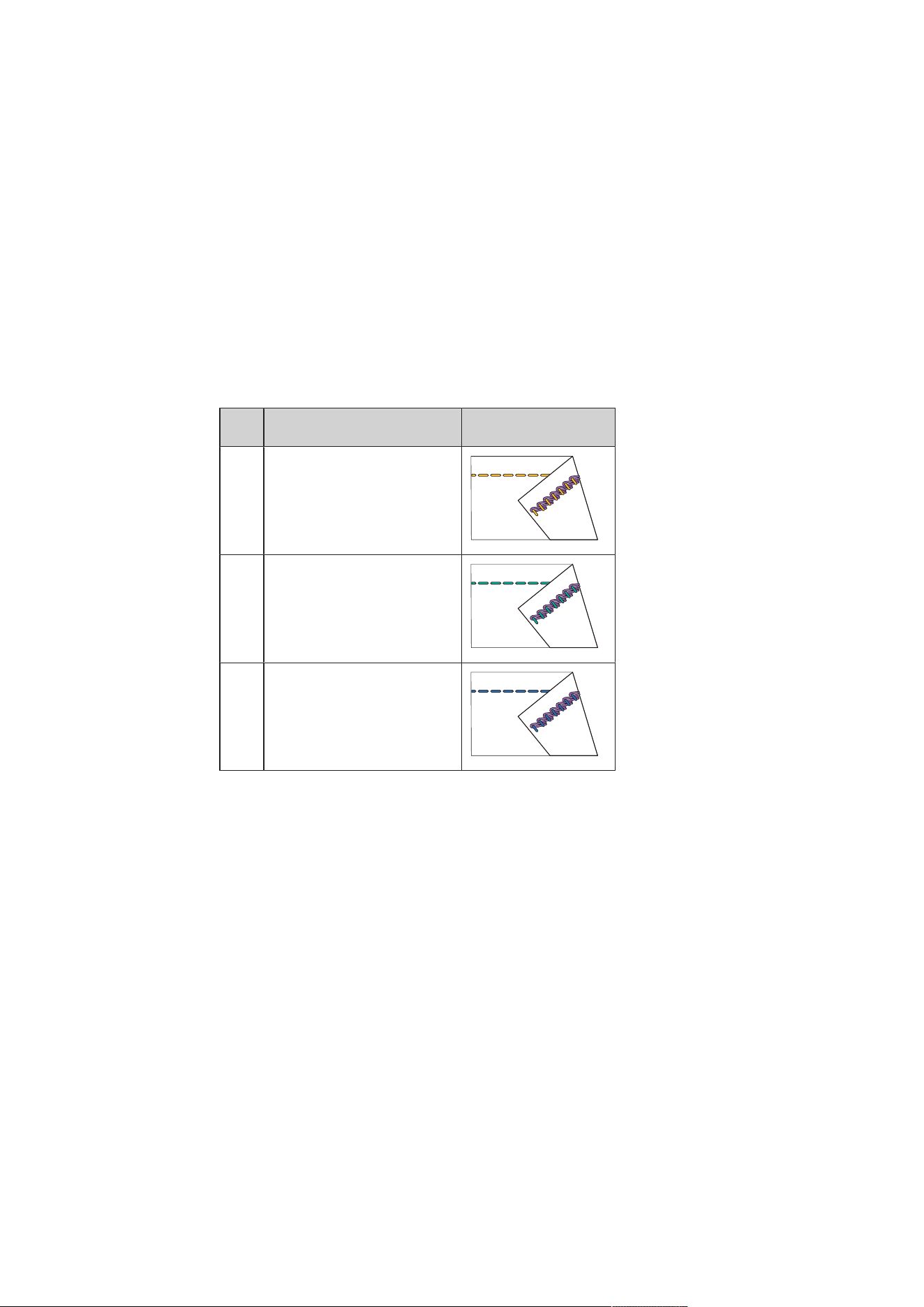
3- / 4-Thread Coverstitch
The coverstitch consists of 2 - 3 needle threads on the right side and 1 looper thread on the wrong side of
the fabric.
Cover and chainstitch seams allow the option to sew without cutting the edges. These seams can be used in
many different ways, for both functional and decorative purposes: Seams, hems, bindings etc.
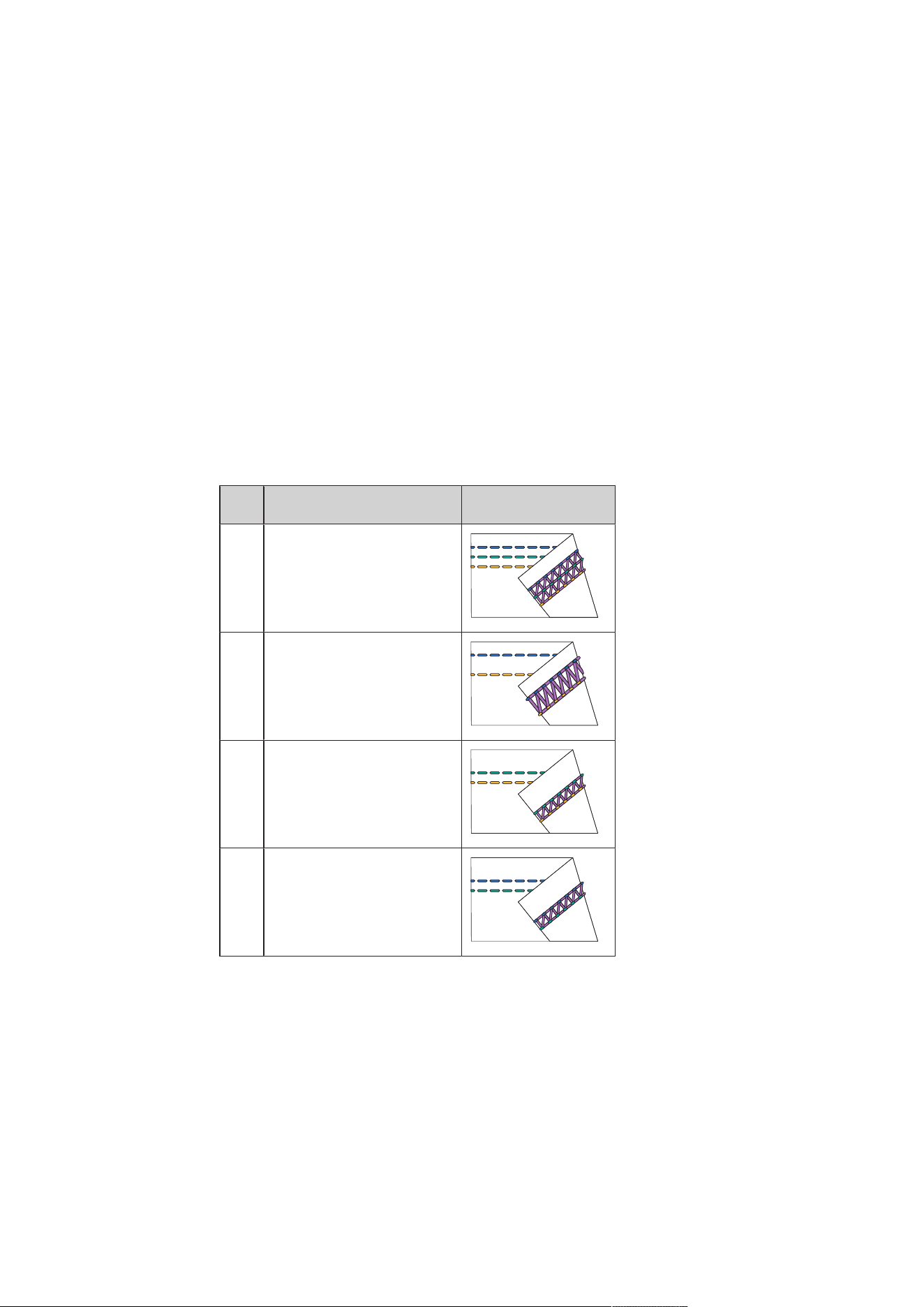
No. Stitch name Stitch pattern
21 4-Thread Coverstitch
22 3-Thread Coverstitch Wide
(LC-RC)
23 3-Thread Coverstitch Narrow
(LC-CC)
24 3-Thread Coverstitch Narrow
(CC-RC)
Tab.1: 3- / 4-Thread Coverstitch
Decorative Seam
Coverstitches and chainstitches can be used for decorative sewing. The wrong side of the seam is especially
attractive when multicolor thread is used in the looper.
Stitch
38
2023-06 EN 5040062.0.04
Chainstitch
Basting
The chainstitch is ideal for basting, e.g. in the provisional assembly of garments for fitting, when sewing
costumes or with alterations to be made. Due to the loop structure of the stitch, the seam can be undone
simply by pulling the looper thread.
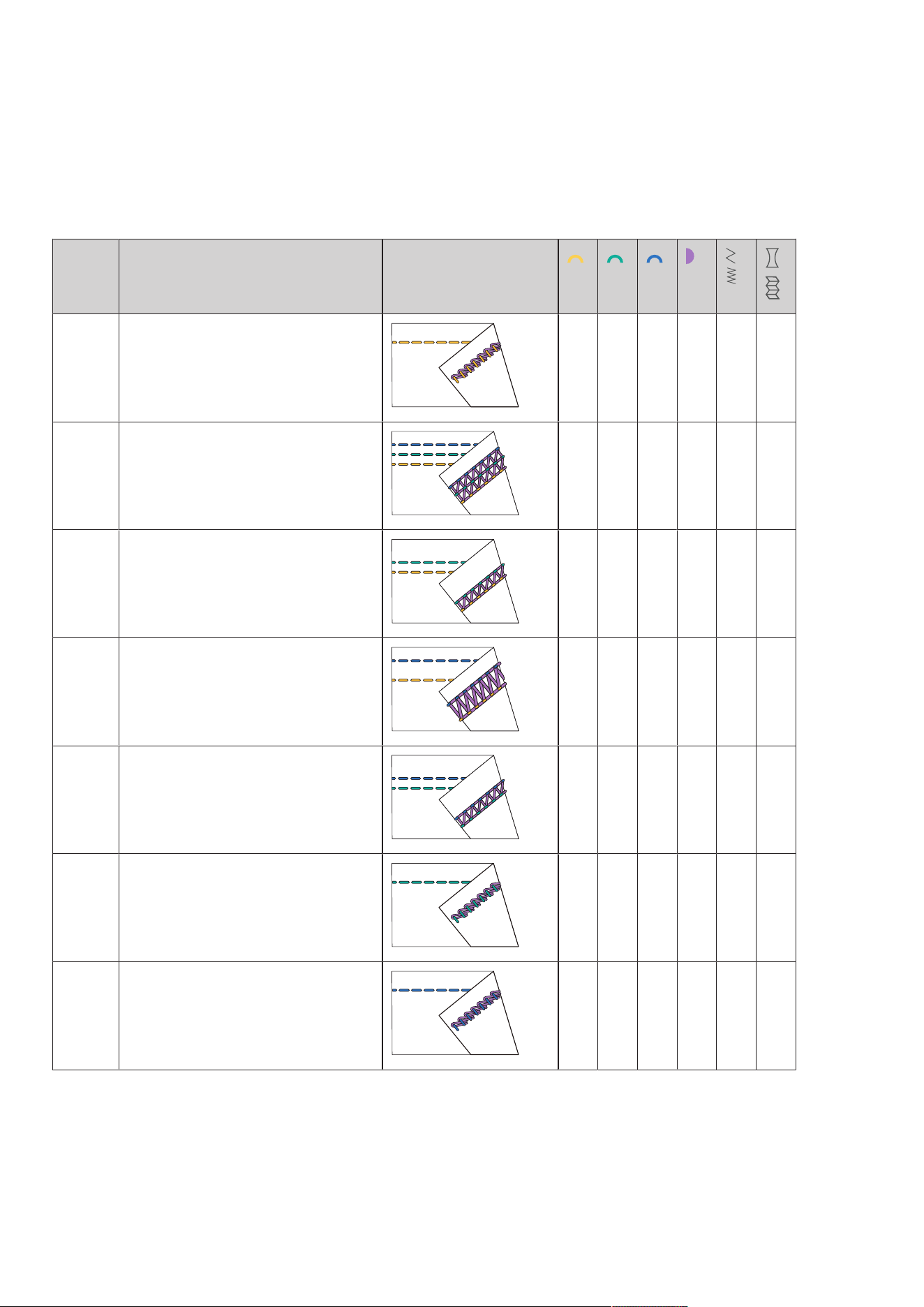
2-Thread Chainstitch
The 2-thread chainstitch looks like a straight stitch on the right side of the fabric, and on the wrong side it
forms a chain. With a decorative thread in the Chain Looper and the needle, the chainstitch looks more
distinctive and is more prominent. With such a Chain Looper/Needle Thread combination, many creative
possibilities are given. Due to the loop structure of the stitch, the seam can be undone simply by pulling the
Chain Looper Thread.
No. Stitch name Stitch pattern
16 2-Thread Chainstitch (LC)
32 2-Thread Chainstitch (CC)
33 2-Thread Chainstitch (RC)
Tab.2: Chainstitch
Stitch
39
2023-06 EN 5040062.0.04
5.2 Stitch Chart
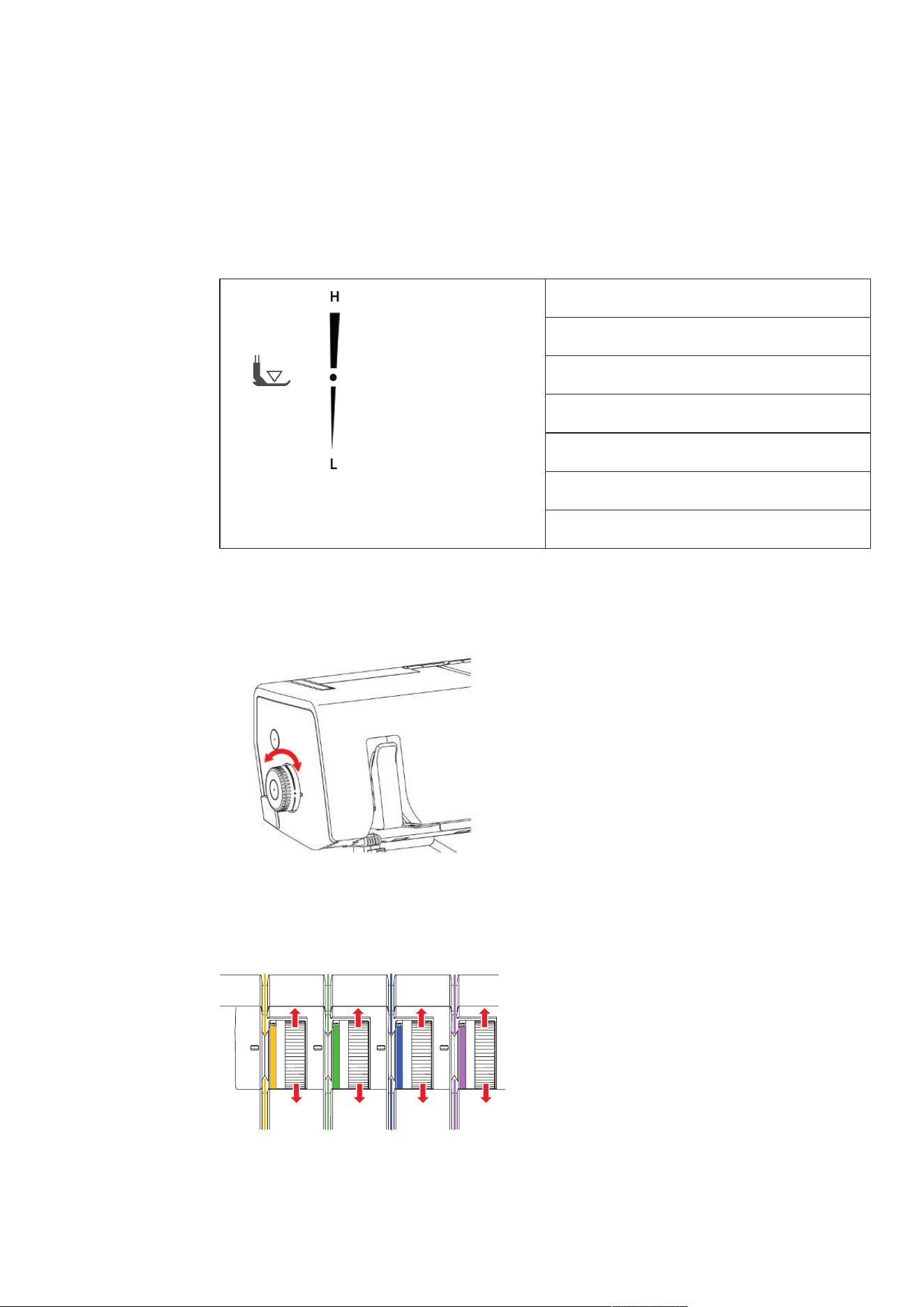
This instruction manual includes a Stitch Overview with all necessary default settings for each stitch. These
default values may vary depending on the used material.
> Remove all the needles which are not required.
No. Stitch name Stitch pattern
No.16 2-Thread Chainstitch (LC) 3 ─ ─ 3 3 1
No.21 4-Thread Coverstitch 4 4 4 4 3 1
No.22 3-Thread Coverstitch Narrow (LC-CC) 4 4 ─ 4 3 1
No.23 3-Thread Coverstitch Wide (LC-RC) 4 ─ 4 4 3 1
No.24 3-Thread Coverstitch Narrow (CC-RC) ─ 4 4 4 3 1
No. 32 2-Thread Chainstitch (CC) ─ 3 ─ 3 3 1
No. 33 2-Thread Chainstitch (RC) ─ ─ 3 3 3 1
Machine Settings
40
2023-06 EN 5040062.0.04
6 Machine Settings
6.1 Setting the Presser Foot Pressure
The Pressure Foot Pressure has been set in the default value so that it is optimal to sew medium-weight
fabrics.Most materials do not require any adjustment of the Presser Foot Pressure. There are cases, however,
when adjustment is required, such as when sewing very light and heavy fabrics.
Extra-high
High
Medium-high
Default value
Medium-light
Light
Extra-light
> Reduce the Presser Foot Pressure for light fabrics.
> Increase the Presser Foot Pressure for heavy fabrics.
> Perform a sewing test to set the optimal Presser Foot Pressure for your sewing project.
> To increase the presser foot pressure, set the presser foot pressure wheel to a higher value.
> To reduce the presser foot pressure, set the presser foot pressure wheel to a lower value.
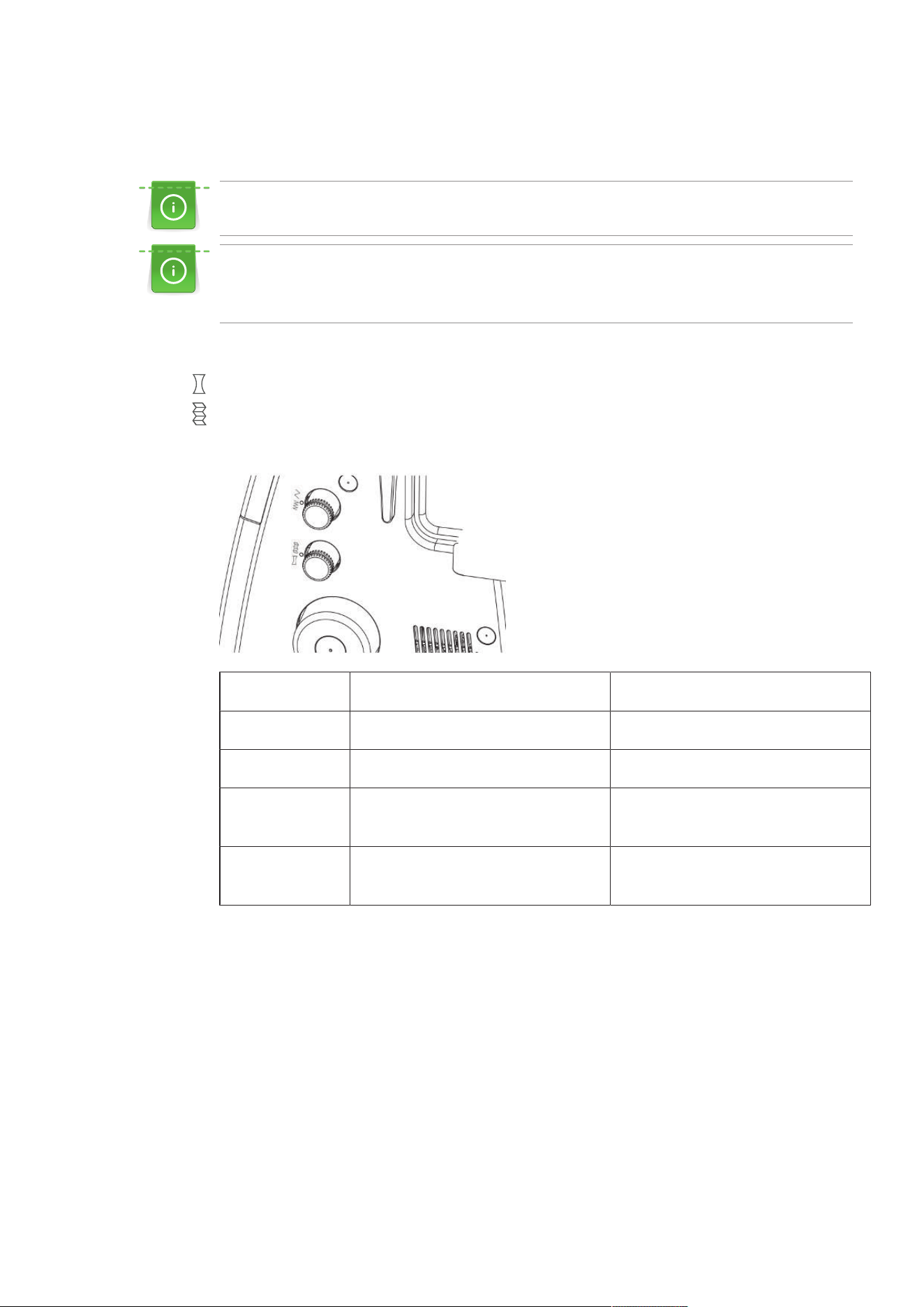
6.2 Adjusting the thread tension
The Thread Tension has a considerable influence on each individual thread and its task to perform the stitch
formation. The Stitch Chart provides a recommended default value for each stitch. This recommendation can
be optimized for different thread/fabric combinations. (see page54)
> To reduce the Thread Tension, turn the Thread Tension Adjustment Dial of the corresponding threads
down to a lower value.
Machine Settings
41
2023-06 EN 5040062.0.04
> To increase the Thread Tension, turn the Thread Tension Adjustment Dial of the corresponding threads
down to a higher value.
An adjustment of the stitch formation can primarily be achieved by reducing the thread tension.
Optimizing the Thread Tension for coverstitches
The Thread Tension should be reduced in the smallest possible steps from the basic value. The stitch
elasticity can also be increased by reducing the stitch length.
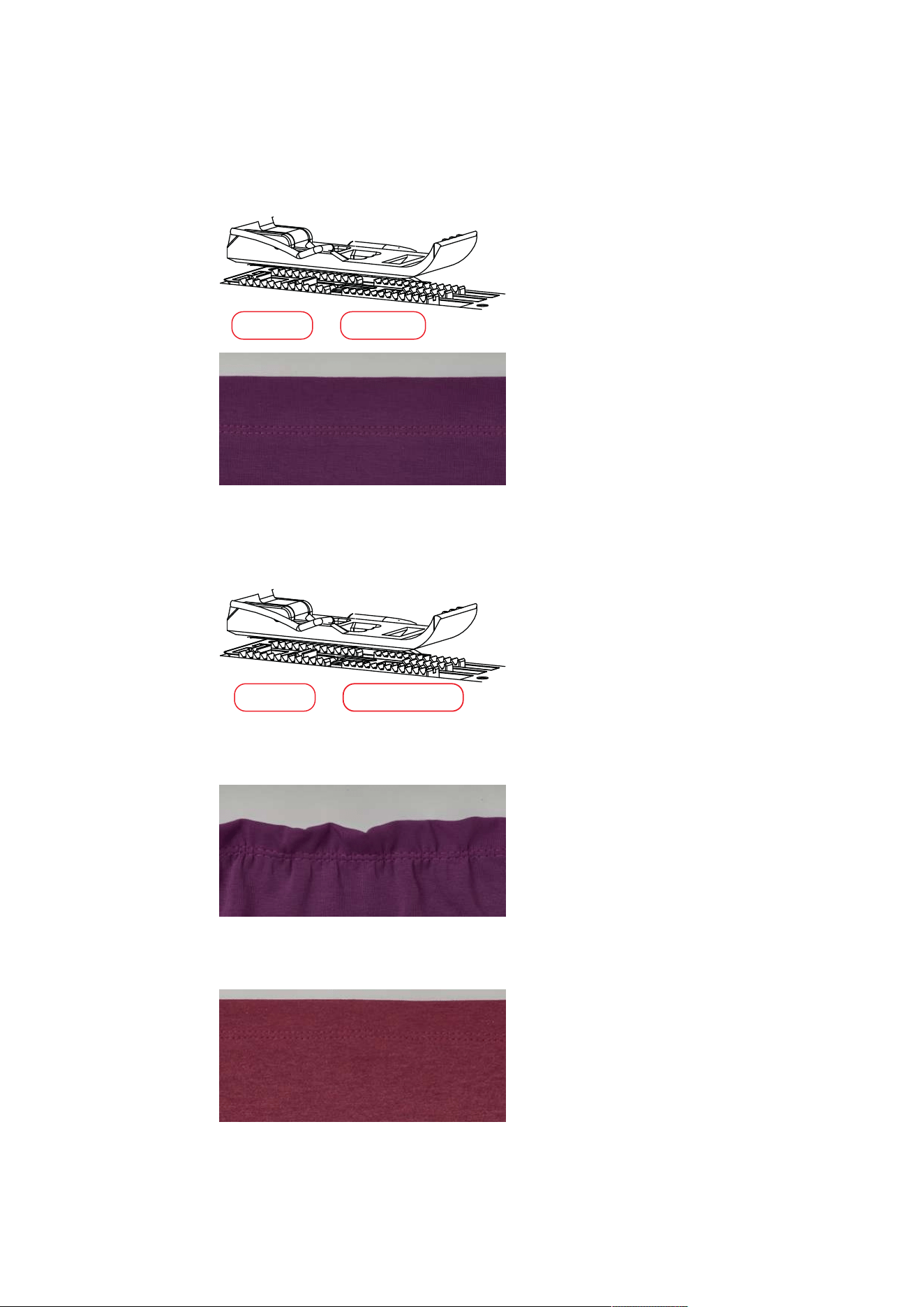
6.3 Adjusting the Differential Feed
The differential feed prevents unwanted puckering or wavering in knitted or stretch fabrics as well as shifting
of fabric layers. The setting values describe the ratio of movement of front feed dog relative to the rear feed
dog. With default value 1, both feed dogs move at the same speed.
> Adjust the feeding ratio of the two feed dogs by using the differential feed setting.
Value Fabric Result
2 Fine, soft fabrics Ruffling, puckering, gathering
1.5 Jersey, sweatshirt, knits Slight ruffling, preventing seam waving
1 Wowen knit and medium-weight dense
fabric
Default value
0.6 Fine nylon tricots, densely woven fabric,
lining, satin
Stretching, preventing seam puckering
Machine Settings
42
2023-06 EN 5040062.0.04
Default Value "1"
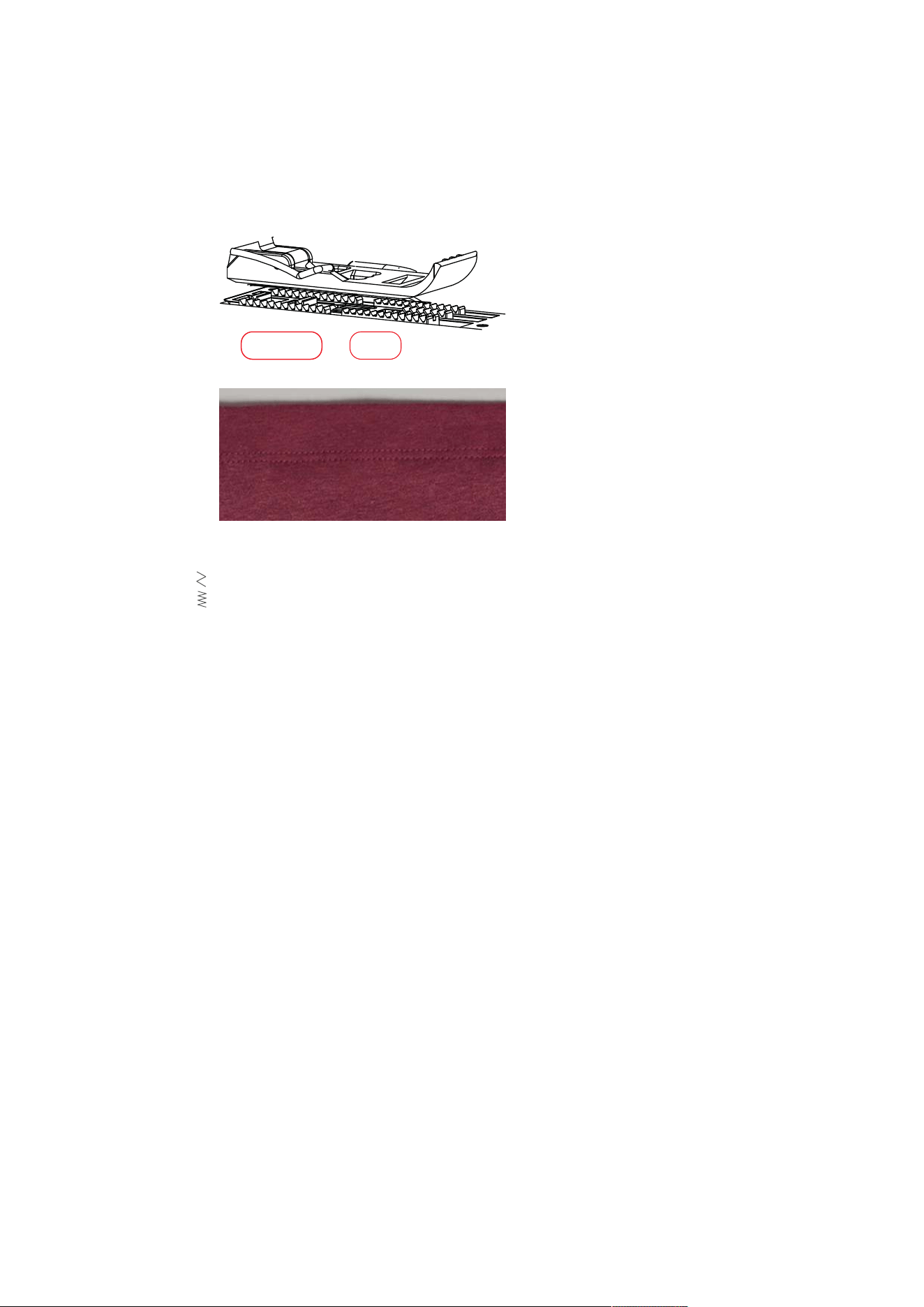
In a default value of 1, the machine achieves optimum sewing results with most applications.The differential
feed in default setting 1 for flat and even seams.
1 1
Gathering/Gather to fit "1.5 – 2"
At a setting of 1.5 - 2 the front feed dog (2) covers a longer distance than the rear feed dog (1).
1
2
Gathering
> To gather intentionally, increase the differential feed to a value between 1.5 and 2.
Gather to Fit
> To prevent waving increase the differential feed to a value between 1 and 2.
Machine Settings
43
2023-06 EN 5040062.0.04
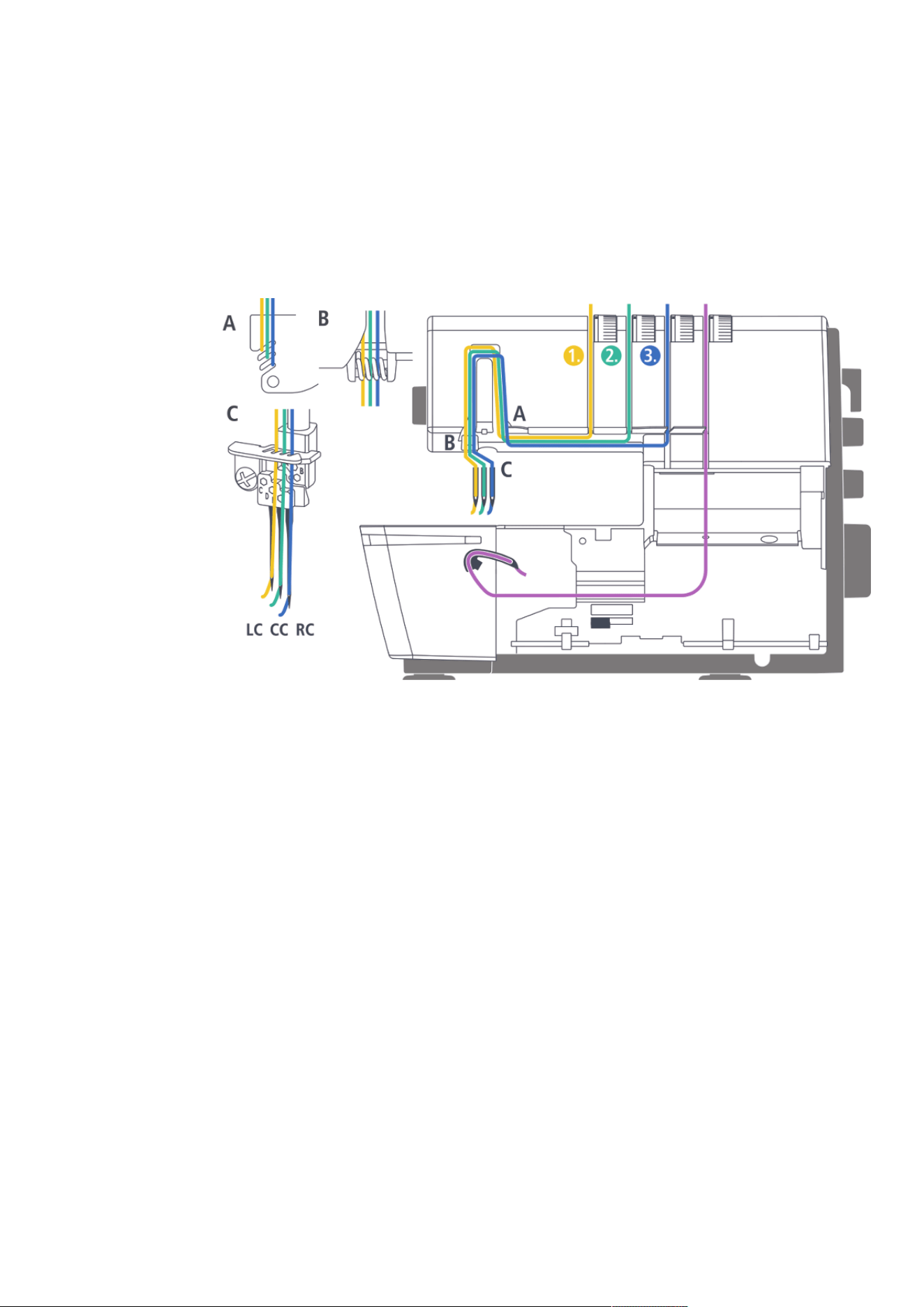
Stretching "0.6"
The front feed dog (0.6) covers a shorter distance than the rear feed dog (1). The material is stretched under
the presser foot which helps to reduce puckering. This setting can also be used to deliberately stretch the
material.
1 0.6
> To prevent seam puckering, reduce the differential feed to a value between 0.6 and 1.
6.4 Setting the Stitch Length
The stitch length can be infinitely adjusted between 1.0 – 5.0mm while sewing.
> To elongate the stitch, set the stitch length knob to a higher value.
> To shorten the stitch, set the stitch length knob to a lower value.
Threading
44
2023-06 EN 5040062.0.04
7 Threading
Threading of all Looper Threads is done by the Air Threading System. Threading of the Needle Threads must
be performed in a specific sequence.
> Thread the Needle Threads from left to right.
7.1 Threading preparation
Before threading, make sure that the device is mechanically adjusted to the required stitch.
The machine has color-coded threading paths. Correct threading is ensured when following the color
markings.
Prerequisite:
• The retractable thread guide is fully extended.
• The needles are at the top position.
• All threads and needles that are not needed for the particular stitch have been removed.
> Raise the presser foot.
– The Thread Tensions are released and the thread can be inserted without resistance.
> Place the thread cones on the respective spool pin.
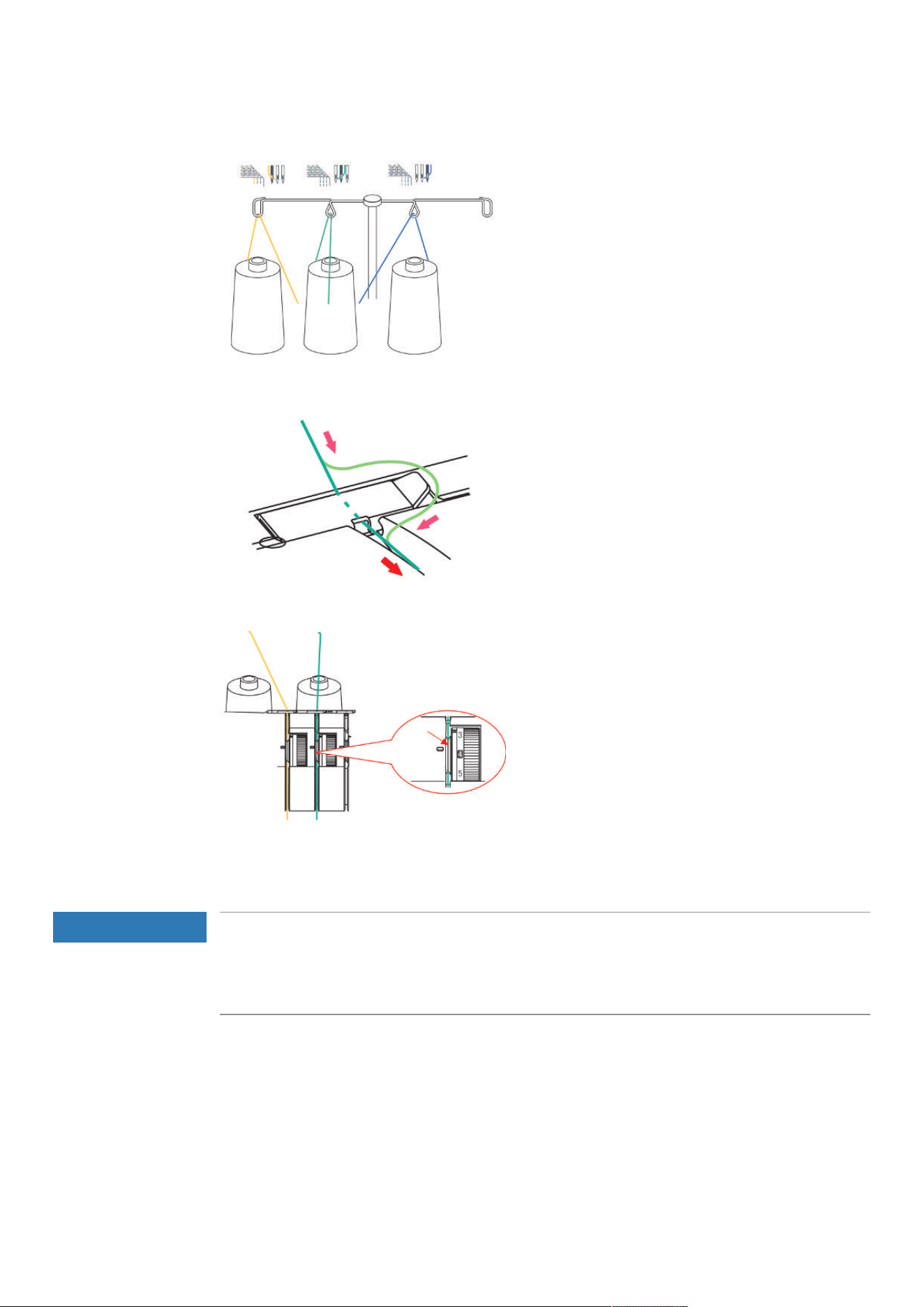
Threading
45
2023-06 EN 5040062.0.04
> Place the thread from the back through the Thread Guide.
> Engage the thread in the Thread Pretension.
> Place the thread along the Threading Path between the Thread Tension Discs.
7.2 Threading the Looper Thread
The Chain Looper Thread (purple) is needed for each stitch.
NOTICE
Damage by coated or waxed threads
Coated or waxed threads may lose some of their coating in the Air Threader Pipes which results in
permanent blocking of the pipes. A repair by the Authorized bernette dealer is required.
Avoid the use of coated or waxed threads.
Detailed information can be found in the stitch chart.
Threading
46
2023-06 EN 5040062.0.04
Treading the Chain Lopper Thread CL/purple
Prerequisite:
• Preparing for threading has been performed.
• Threader Cover is opened.
> Set the Air Threader Connector to the left position.
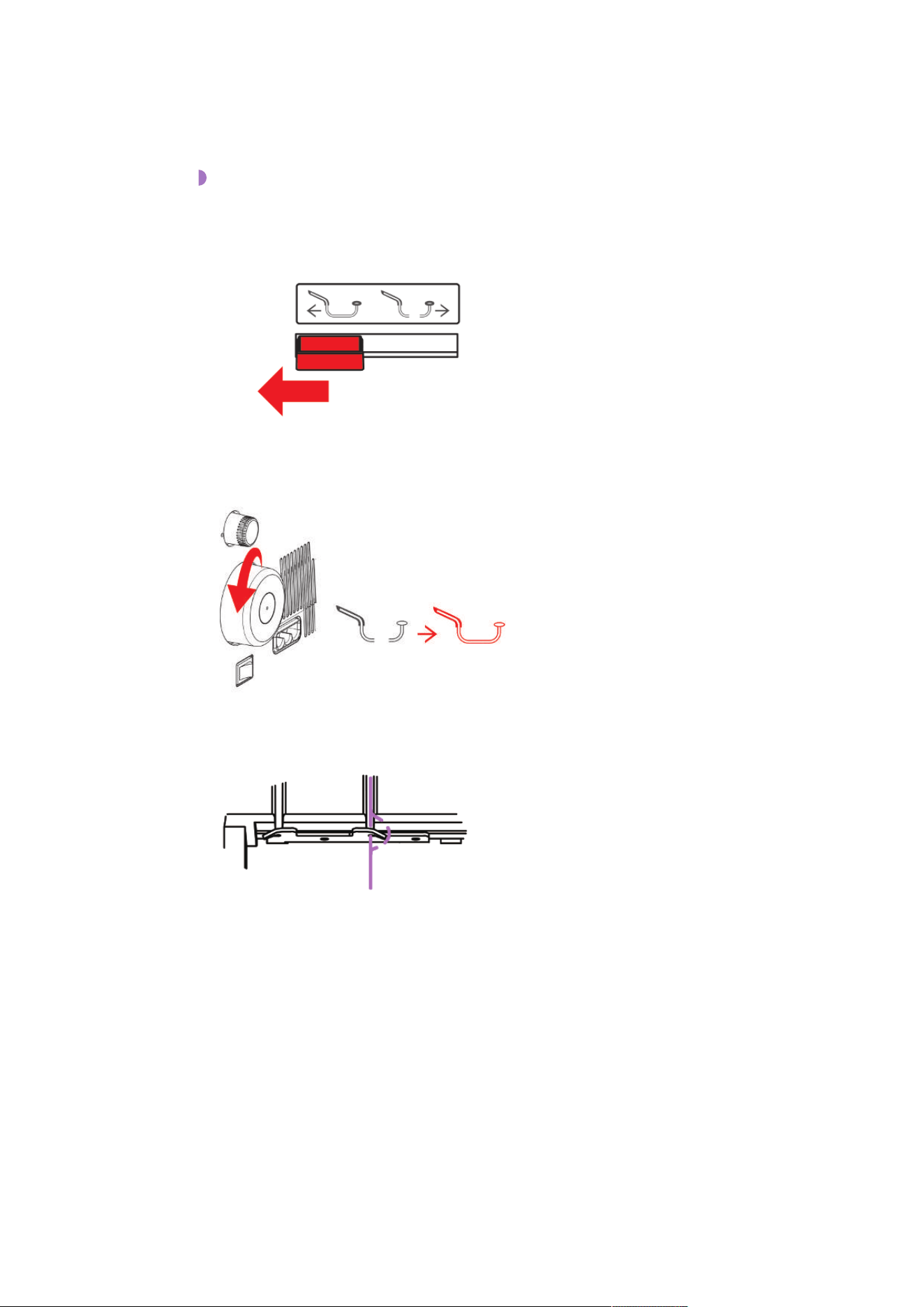
> Slowly turn the Handwheel counterclockwise until the Air Threader Pipes couple.
> Feed the thread through the Thread Guide.
> Pull a thread reserve of approx. 56 cm so that the thread can be completely drawn through the Air
Threader Pipe.
Threading
47
2023-06 EN 5040062.0.04
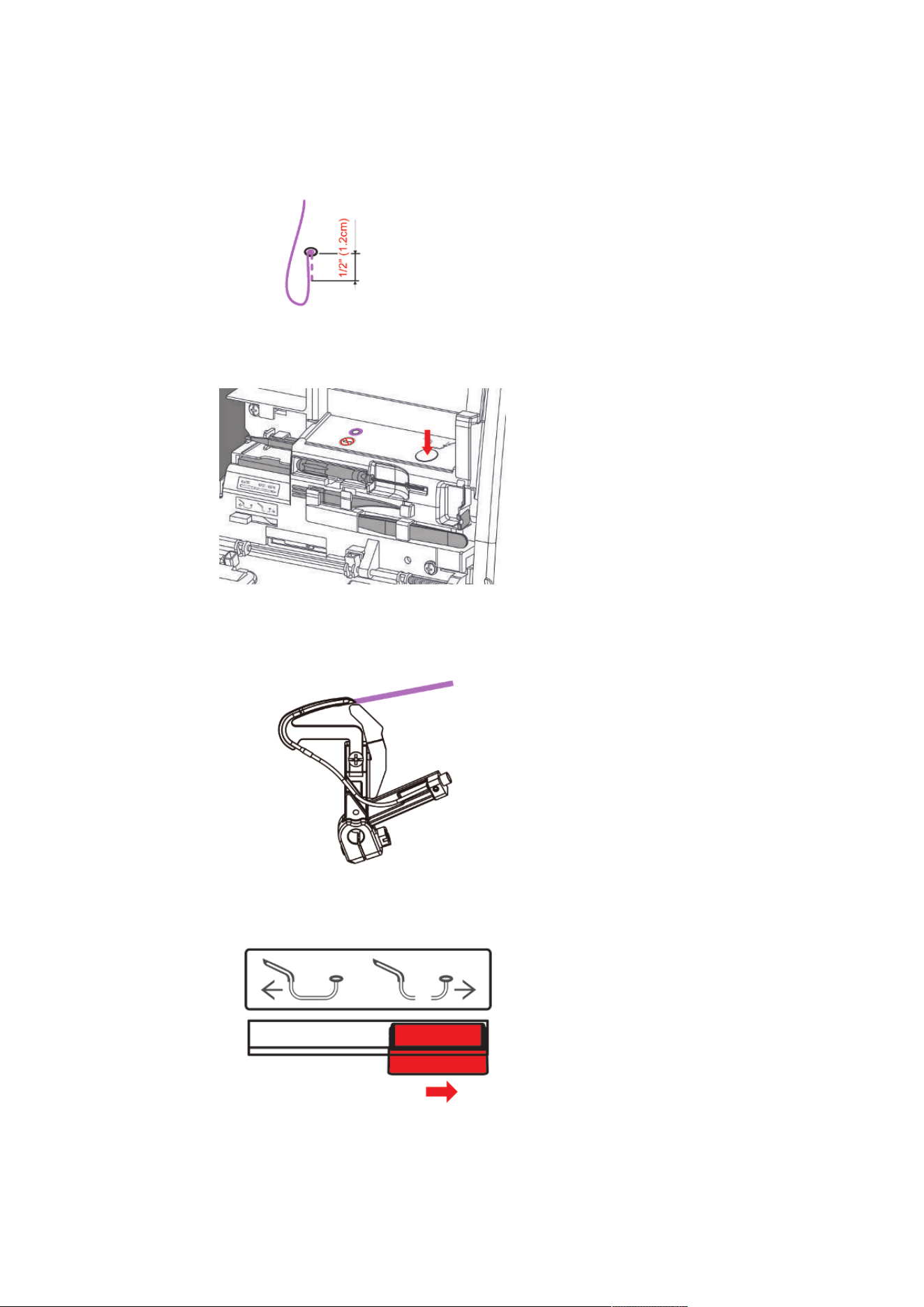
> Place the end of the thread approx. 1.2 cm into the corresponding Air Threader Nozzle.
> Press and hold the Air Threader Button.
– The automatic thread feed into the Air Threader starts.
– The Looper Thread is shot through the Air Threader Pipe and exits at the Looper Tip.
> As soon as the Looper Thread exits out of the Looper Eye, release the Air Threader Button.
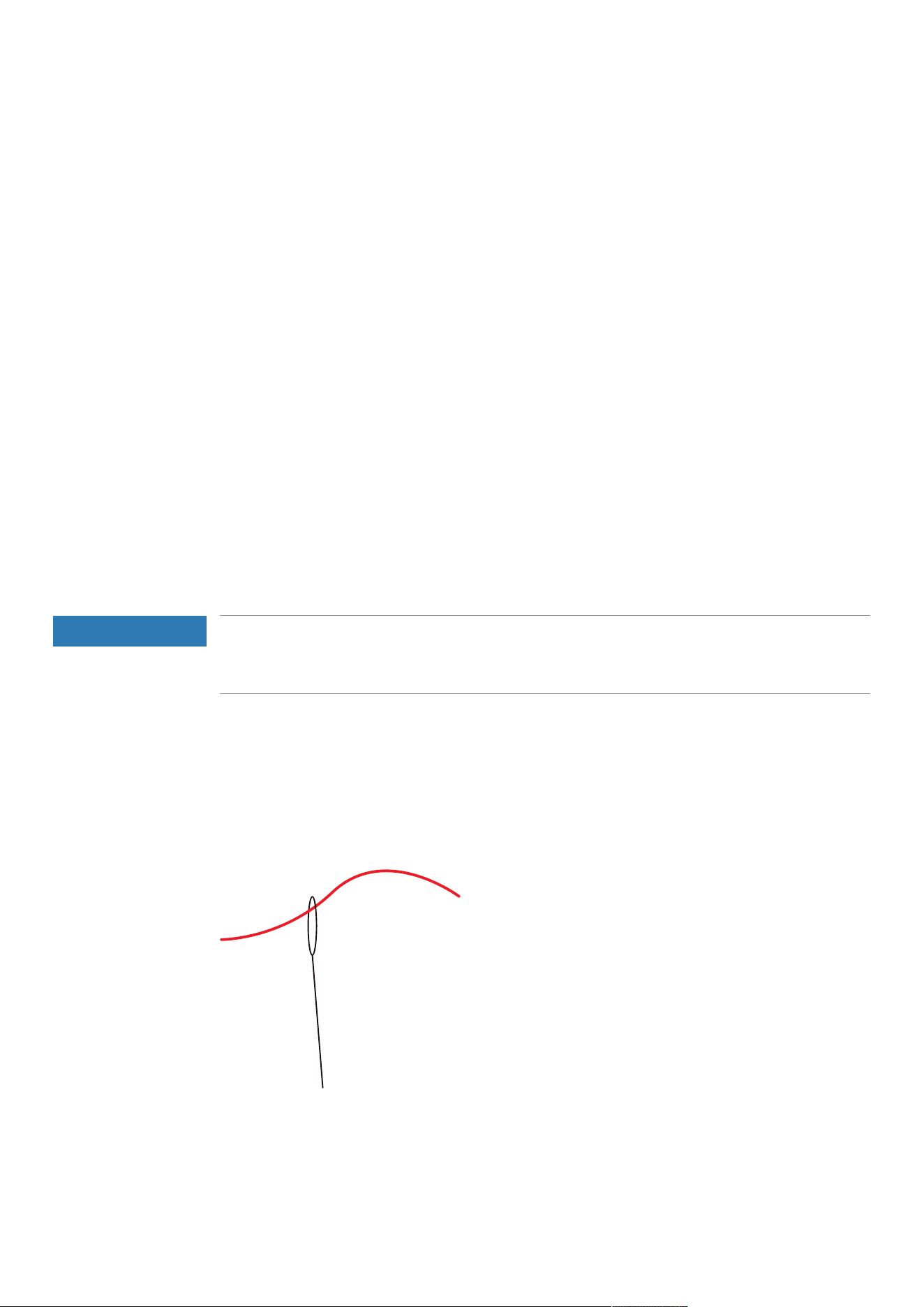
> Place the Looper Thread under the presser foot to the back left.
> Set the Air Threader Connector to the right position.
> Close the Threader Cover.
Threading
48
2023-06 EN 5040062.0.04
Threading the Looper Thread with an auxiliary thread
If a Looper Thread cannot be threaded automatically with the Air Threader, the use of an auxiliary thread
makes sense.
Prerequisite:
• «Threading is prepared».
> Open the Threader Cover.
> Set the Air Threader Connector to the «left position».
> Prepare an auxiliary thread at a length of about 60 cm.
> Fold the auxiliary thread in half, hold the thread end with the loop in your hand and insert the two
thread ends into the Air Threader Nozzle.
> Start the Air Threader Process until the thread ends of the auxiliary thread emerge out of the Looper Eye.
> Place the Looper Thread end at the length of about 20 cm through the loop of the auxiliary thread.
> Pull the auxiliary thread ends until the thread comes out of the Looper Eye.
> Remove the auxiliary thread.
> Place the Looper Thread under the presser foot to the back left.
Using the Threading Wire
If the Air Threader cannot be started to thread the Looper Threads, the use of the Threading Wire is a
threading option. The Threading Wire is a wear part and not designed as a permanent threading or cleaning
aid.
Any malfunctions of the Air Threader System must be repaired by an authorized BERNINA dealer.
NOTICE
Damage by Improper Use of the Threading Wire
The air threader pipes may be damaged. A repair by the authorized bernette dealer is required.
> Insert and pull through the threading wire only in the thread flow direction.
Prerequisite:
• There is no thread in the respective air threader pipe.
• «Threading is prepared.»
> Open the Threader Cover.
> Push the end of the Threading Wire without loop through the Air Threader Nozzle until it exits at the
Looper Eye.
> Place the wanted thread through the loop of the Threading Wire.
> Pull the end of the Threading Wire until the Looper Thread exits from the Looper Eye.
> Place the Looper Thread under the presser foot to the back left.
> Close the Threader Cover.
Threading
49
2023-06 EN 5040062.0.04
7.3 Threading the needle thread
Detailed information can be found in the stitch chart.
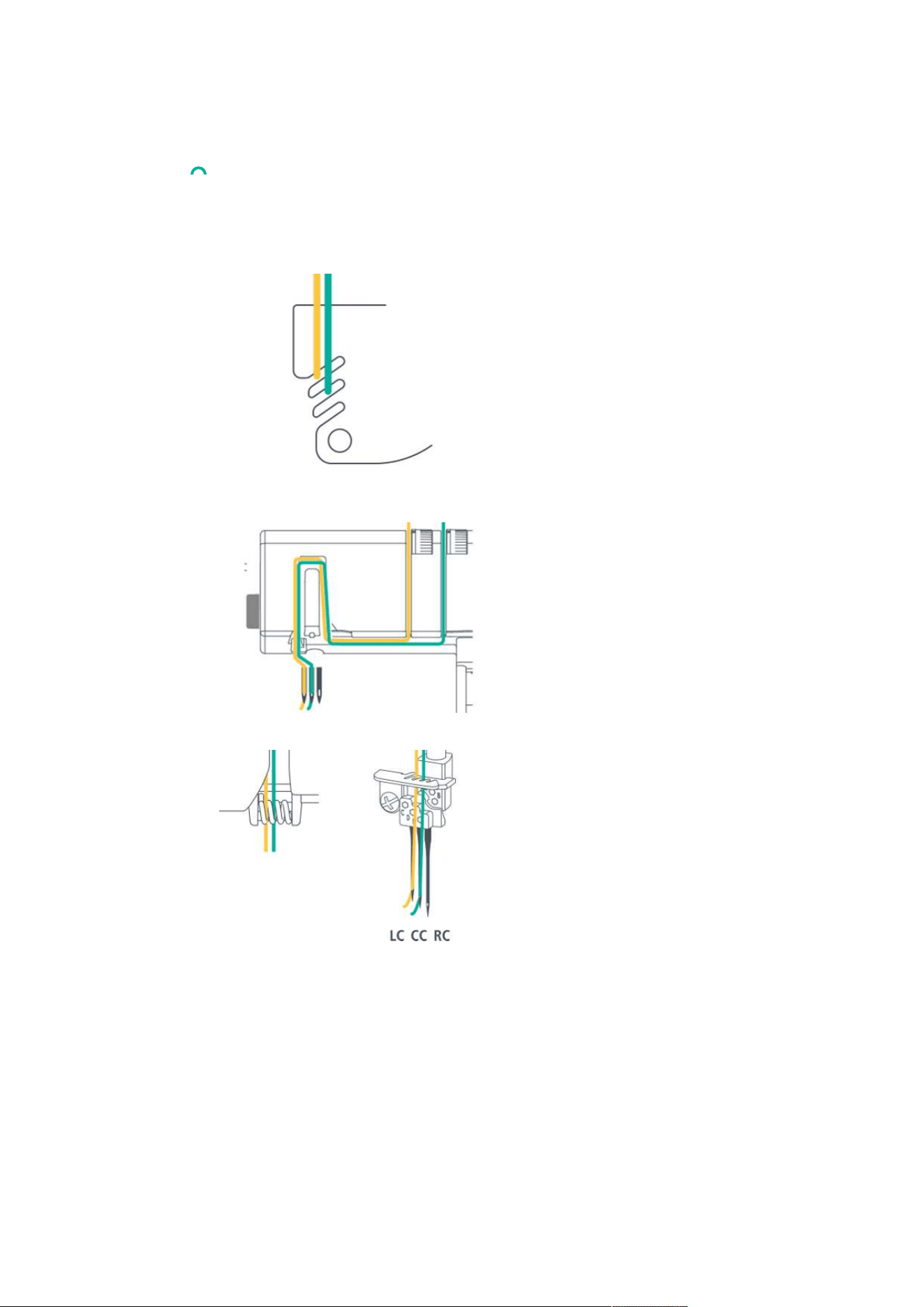
Threading the left Coverstitch Needle Thread left LC/yellow
The left Needle Thread is provided with this yellow marking along the entire threading path.
Prerequisite:
• «Threading is prepared».
> Pull the thread beneath the thread guide plate to the left and up behind the yellow marking.
> Pull the thread around the Thread Take-up Guide upwards and pull it in the corresponding Thread Path
towards the needle.
> Hook the thread into the left thread guide of the Needle Holder.
> Thread the Needle Eye.
> Place the thread beneath the presser foot to the back left.
> Lower the presser foot when all necessary threads have been threaded.
Threading
50
2023-06 EN 5040062.0.04
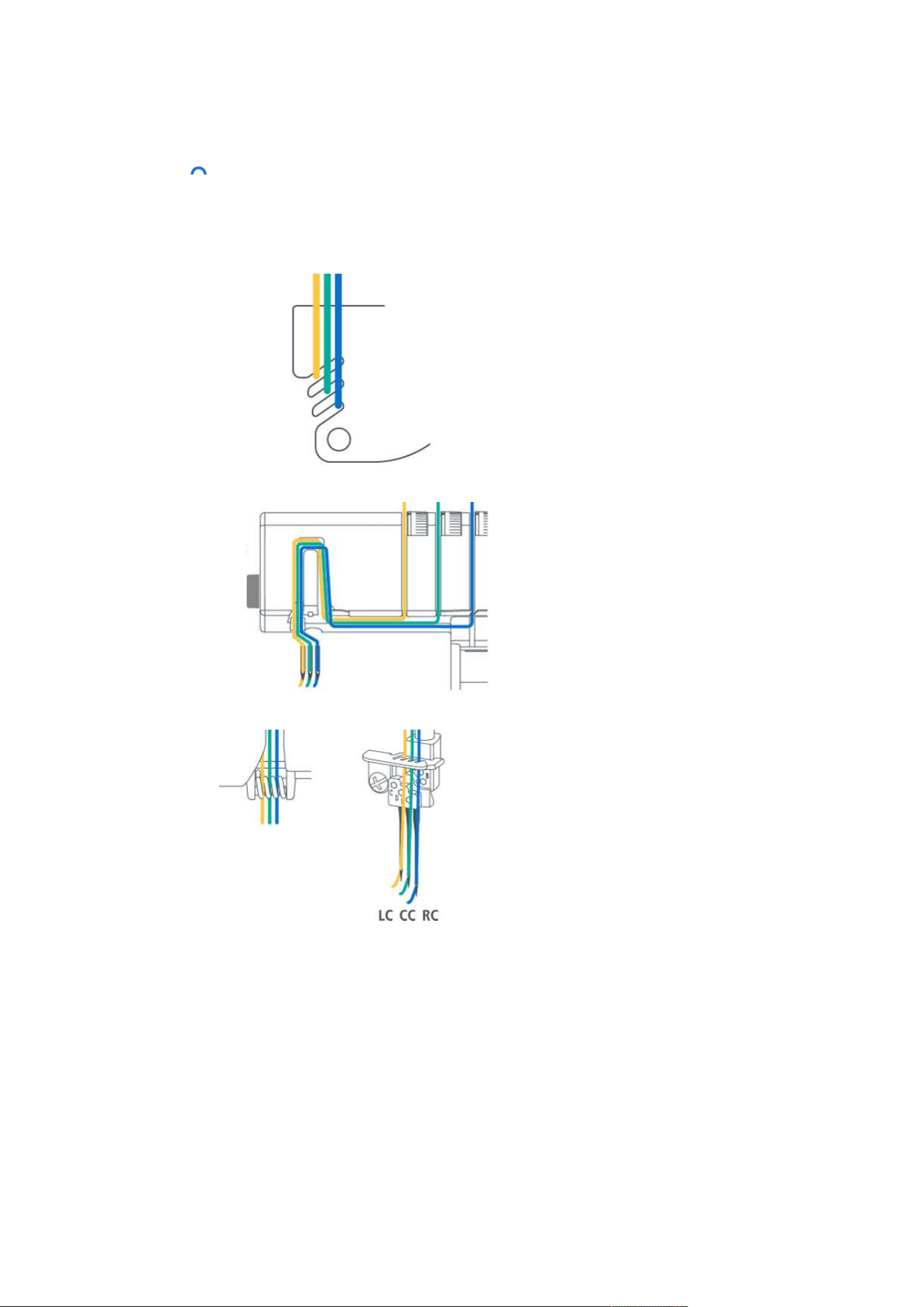
Threading the center Coverstitch Needle Thread center CC/green
The center Coverstitch Needle Thread is provided with this green marking along the entire Threading Path.
Prerequisite:
• «Threading is prepared».
> Pull the thread beneath the thread guide plate to the left and up behind the green marking.
> Pull the thread around the Thread Take-up Guide upwards and pull it in the corresponding Thread Path
towards the needle.
> Hook the thread into the second thread guide from left of the Needle Holder.
> Thread the Needle Eye.
> Place the thread beneath the presser foot to the back left.
> Lower the presser foot when all necessary threads have been threaded.
Threading
51
2023-06 EN 5040062.0.04
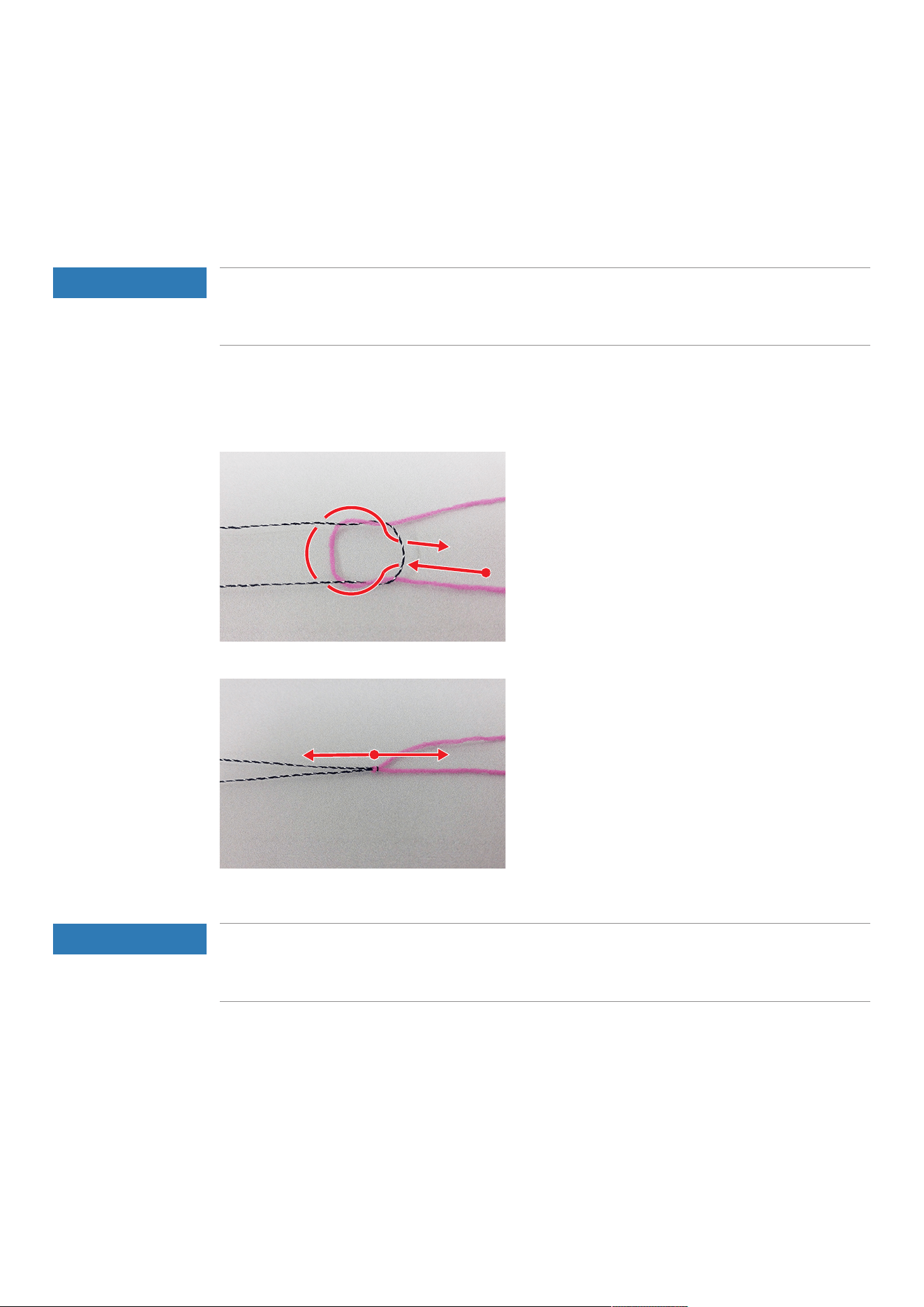
Threading the right Coverstitch Needle Thread RC/blue
The right Coverstitch Needle Thread is provided with this blue marking along the entire Threading Path.
Prerequisite:
• «Threading is prepared».
> Pull the thread beneath the thread guide plate to the left and up behind the blue marking.
> Place the thread over the upper Needle Thread Take-up Lever Cover.
> Hook the thread into the third Thread Guide from left of the Needle Holder.
> Thread the Needle Eye.
> Place the thread beneath the presser foot to the back left.
> Lower the presser foot when all necessary threads have been threaded.
Threading
52
2023-06 EN 5040062.0.04
7.4 Thread change
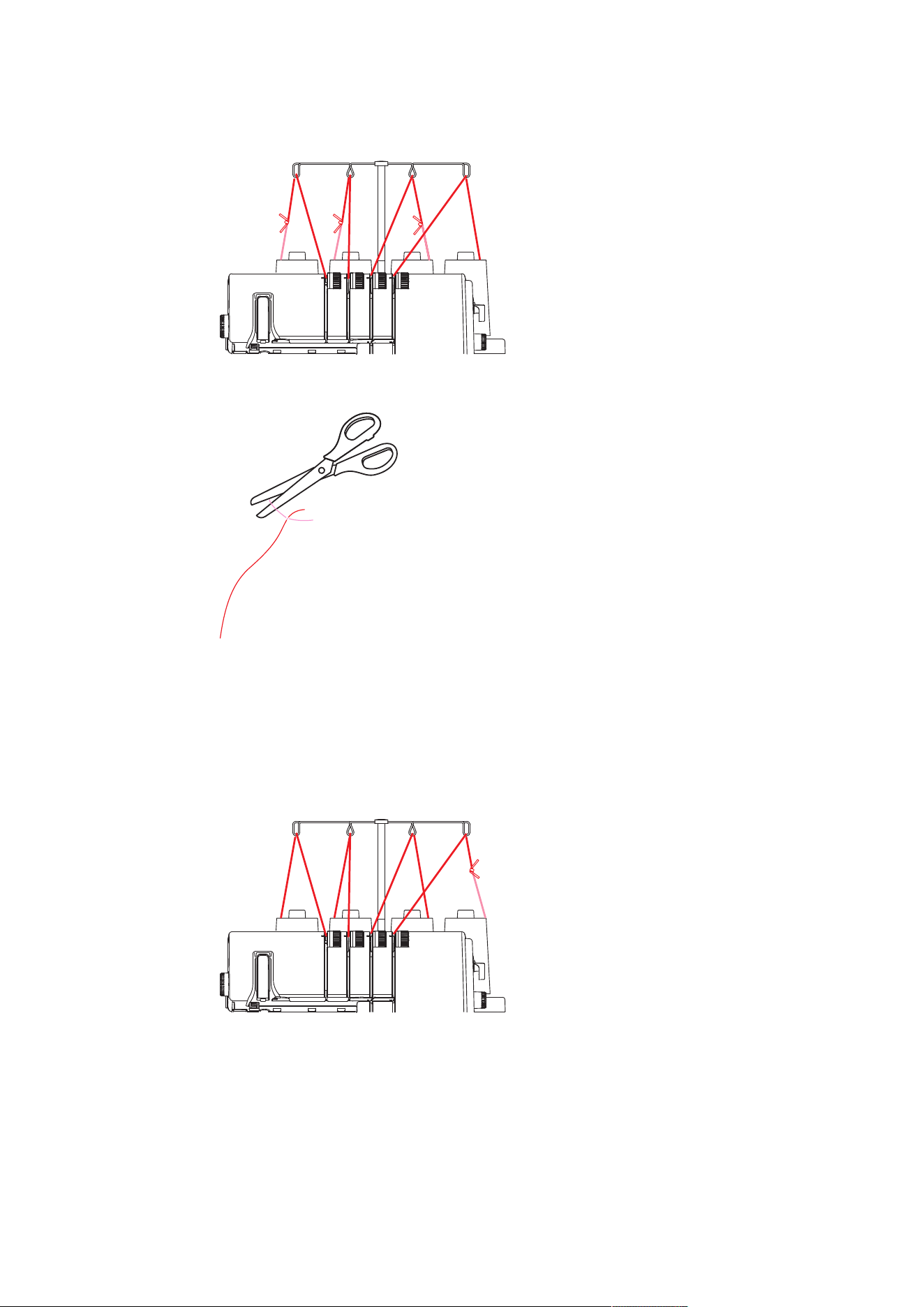
Knotting thick thread
Tying on threads is often used for changing Needle or Looper Threads.
Keep the knotted area as little as possible to reduce friction.
NOTICE
Pulling a Thread Tie through the Needle Eye
The needle can be bent. A bent needle affects the stitch formation.
> Cut the tie in front of the needle eye and thread the needle individually.
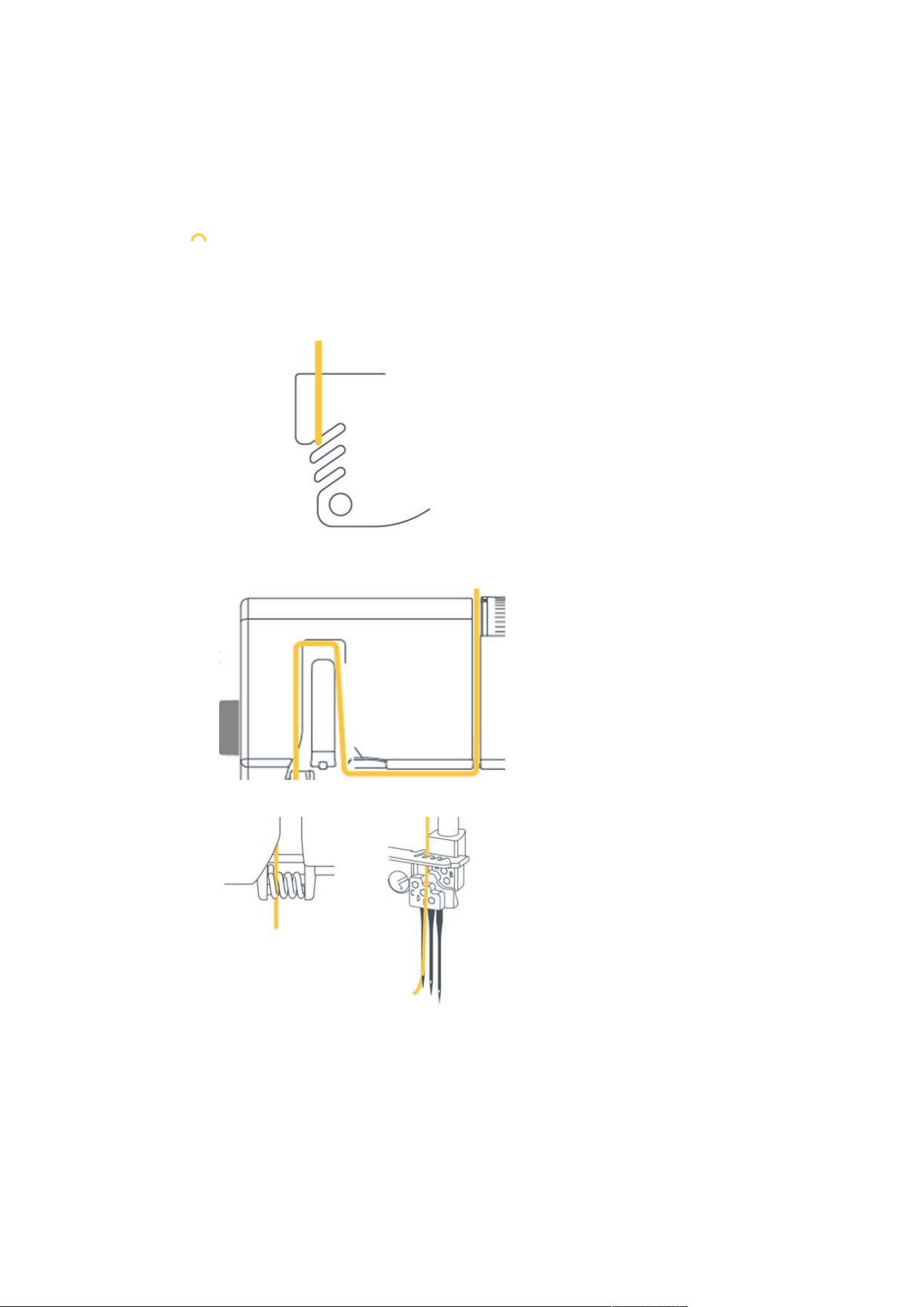
> Form a loop with the dark thread.
> Thread the pink thread end from beneath into the dark thread loop.
> Guide the pink thread to the back around the two dark thread ends and then from above through the
loop.
> Hold both thread ends and pull them apart.
Changing the needle thread
NOTICE
Pulling a Thread Tie through the Needle Eye
The needle can be bent. A bent needle affects the stitch formation.
> Cut the tie in front of the needle eye and thread the needle individually.
> Cut the thread above the thread cone.
> Change the thread cone.
Threading
53
2023-06 EN 5040062.0.04
> Tie the threaded thread to the new thread.
> Pull the threaded end of the thread until the newly knotted thread is in front of the Needle Eye.
> Cut off the new thread behind the knotting.
> Remove the excess thread from the Needle Eye.
> Thread the Needle Eye.
> Place the thread under the presser foot to the left.
Changing the looper thread
> Cut the thread above the thread cone.
> Change the thread cone.
> Tie the inserted Looper Thread to the new thread.
> Pull the end of the thread out of the Looper Eye until the knot emerges.
> Cut off the new thread behind the knotting.
> Place the thread under the presser foot to the left.

Sewing Test
54
2023-06 EN 5040062.0.04
8 Sewing Test
To check the optimal setting, a sewing test should be sewn on a spare piece of the fabric used for your
project.
The default values of the stitches represent recommendations that work for most standard applications.
Depending on the result of the sewing test, fine adjustments for stitch optimization are possible.
8.1 Perfoming a Sewing Test for an Coverstitch
Prerequisite:
• The «Sewing start» has been performed.
> Raise the presser foot.
> Place the fabric under the presser foot such that the presser foot lies completely on the fabric.
> Lower the presser foot.
> Press the foot control and start sewing slowly. Guide the fabric gently as the machine automatically
transports the material.
> Do not sew beyond the end of the fabric.
> Set needles to topmost position.
> Raise the presser foot.
> Pull the Needle Thread between the fabric and the presser foot to the left with the CS-Lock Tool and cut
it.
> Pull the sewing project to the back left and cut the Looper Thread.
– The seam end is secured.
> Assess the sewing test and make any necessary adjustments until the stitch setting matches the material
combination.
8.2 Perfoming a Sewing Test for an Chainstitch
Prerequisite:
• The «Sewing start» has been performed.
> Raise the presser foot.
> Place the fabric under the presser foot such that the presser foot lies completely on the fabric.
> Lower the presser foot.
> Press the Foot Control and sew slowly. Guide the fabric gently as the machine automatically transports
the material.
> Sew beyond the fabric end such that a thread chain is formed.
> Raise the presser foot.
> Pull the sewing project to the back left and pull the threads over the Thread Cutter.
– The seam end is secured.
> Assess the sewing test and make any necessary adjustments until the stitch setting matches the material
combination.
8.3 Optimizing stitches
Optimizations of stitches should be made systematically. In the following, recommendations are listed for
each stitch type, which optimize the stitch pattern through specific changes to the machine setting.
> Perform one action step after another, starting from the top.
> Reduce the Thread Tension in the first place before increasing the Thread Tension.
> Alter the Thread Tensions by half or one digit.
> Perform a sewing test.

Sewing Test
55
2023-06 EN 5040062.0.04
4-/3-Thread Coverstitch
In a balanced stitch formation the Needle Threads (yellow, green, blue) are visible as straight lines on the top
side of the stitch and as points on the bottom side of the stitch. The Looper Thread forms a connecting
waved line on the bottom side of the stitch.
Stitch pattern Solution
Needle thread (yellow, green or blue) creates
loops on bottom side of the fabric.
> Increase the needle thread tension (yellow,
green or blue).
> Reduce the CL Thread Tension (purple).
> Increase the Stitch Length «SL».
> Check threading path.
Chain looper (purple) thread loose on the
bottom side of fabric.
> Increase the CL Thread Tension (purple).
> Increase the Stitch Length «SL».
> Check threading path.
Chain looper (purple) thread too tense, seam
is tunneling.
> Reduce the CL Thread Tension (purple).
> Reduce the Stitch Length «SL».
> Check threading path.
The seam puckers. Needle thread (yellow,
green or blue) too tense.
> Reduce the needle thread tension (yellow,
green or blue).
> Set the Differential Feed between 1 and 0.7
(Stretching).
> Reduce the Stitch Length «SL».
Tab.3: Stitch optimization: 4-/3-Thread Coverstitch
Practical Coverstitching
56
2023-06 EN 5040062.0.04
9 Practical Coverstitching
9.1 Securing the stitch
The stitches are secured when they are overstitched. Securing stitches is particularly important when seam
ends are not integrated with other seams or hems.
Securing Cover- and Chainstitches at the Start of the Seam
With cover- and chainstitches, the first stitch is automatically secured by the following stitches.
Securing Cover- and Chainstitches at the Seam End
The stitches are secured when they are overstitched. Securing stitches is particularly important when they
don't start or end together with other seams or hems.
Securing Coverstitches at the Seam End
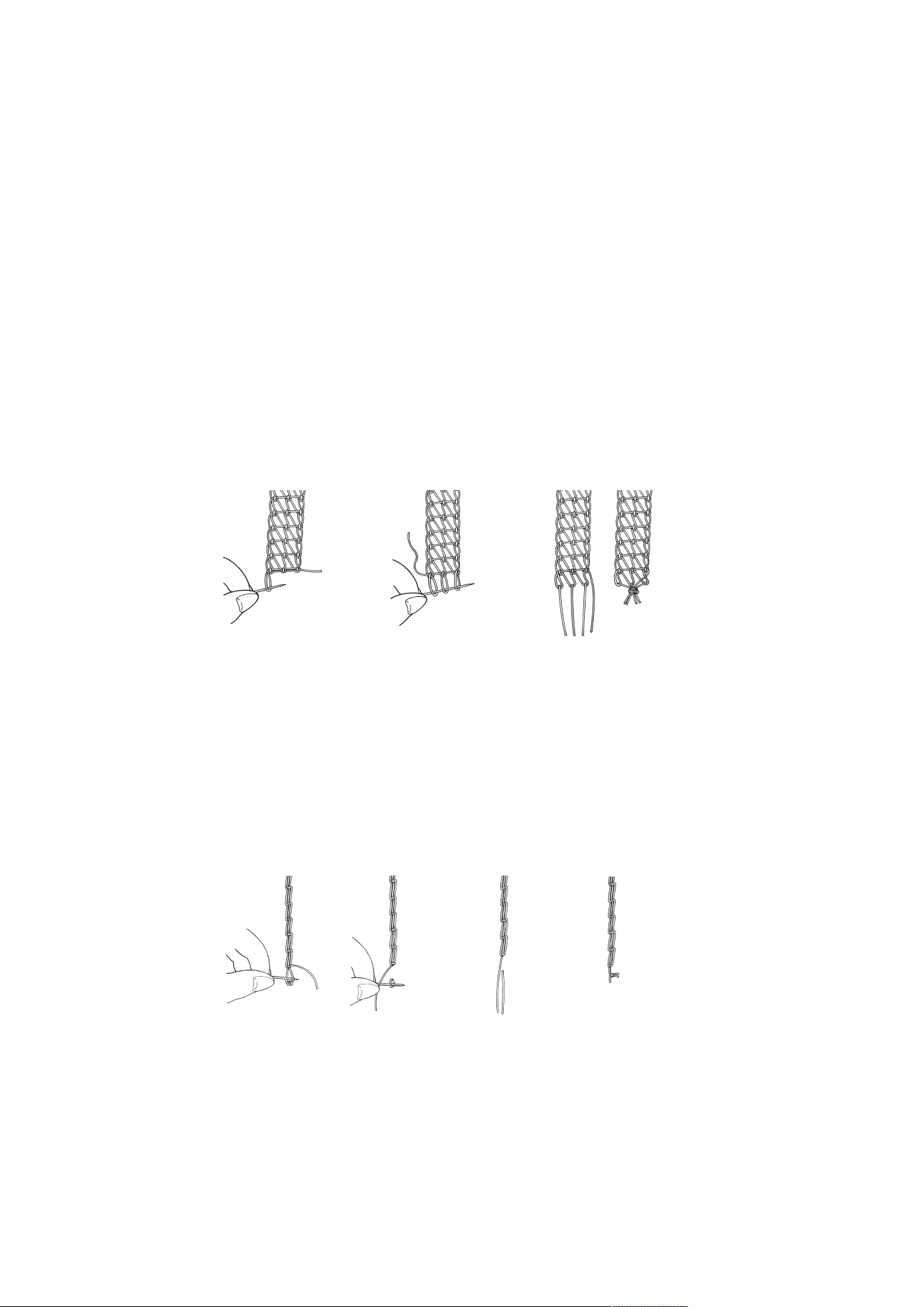
To secure the coverstitch at the end of the seam, the needle threads need to be pulled through the loop of
the looper thread first and then knotted with the end of the looper thread on the wrong side of the fabric.
> Turn the fabric to the wrong side.
> Undo the loop of the looper thread with a sewing needle and hold it.
> Pull the looper thread ends upwards so that the loops of the needle thread appear on the wrong side of
the fabric.
> String the loops of the needle threads with a sewing needle and pull them up so that all thread ends are
on the wrong side of the sewing project.
> Knot all thread ends together close to the stitch end.
Securing Chainstitches at Seam End:
To secure the chainstitch at the end of the seam, the needle thread need to be pulled through the loop of
the looper thread first and then knotted with the end of the looper thread on the wrong side of the fabric.
> Turn the fabric to the wrong side.
> Undo the loop of the looper thread with a sewing needle and hold it.
> Pull the end of the looper thread upwards so that the loops of the needle thread appear on the wrong
side of the fabric.
> String the loops of the needle threads with a sewing needle and pull them up so that all thread ends are
on the wrong side of the sewing project.
> Knot all thread ends together close to the stitch end.
Practical Coverstitching
57
2023-06 EN 5040062.0.04
9.2 Undoing a stitch
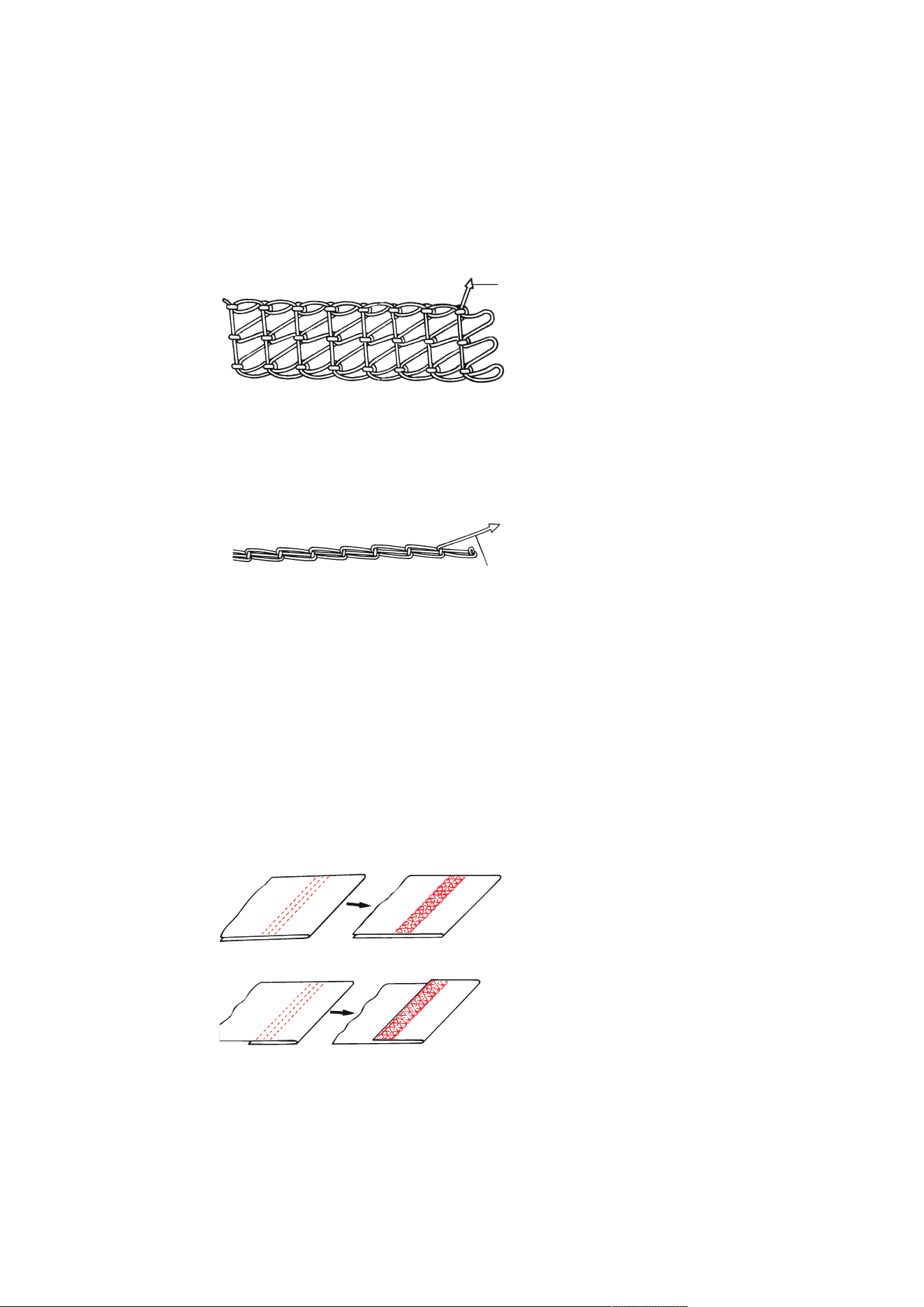
Cover- and chainstitches are loops which are formed by the intertwining of looper thread and needle
threadfs.
Undoing Coverstitches
> On the wrong side of the fabric, pull the looper thread out of the thread chain at the seam end.
> Remove the needle thread on the right side of the fabric.
– The stitches are undone.
Undoing Chainstitches
> At the end of the seam, pull the looper thread out of the thread chain on the wrong side.
> Remove the needle thread on the right side of the fabric.
– The stitches are undone.
9.3 Sewing a Hem
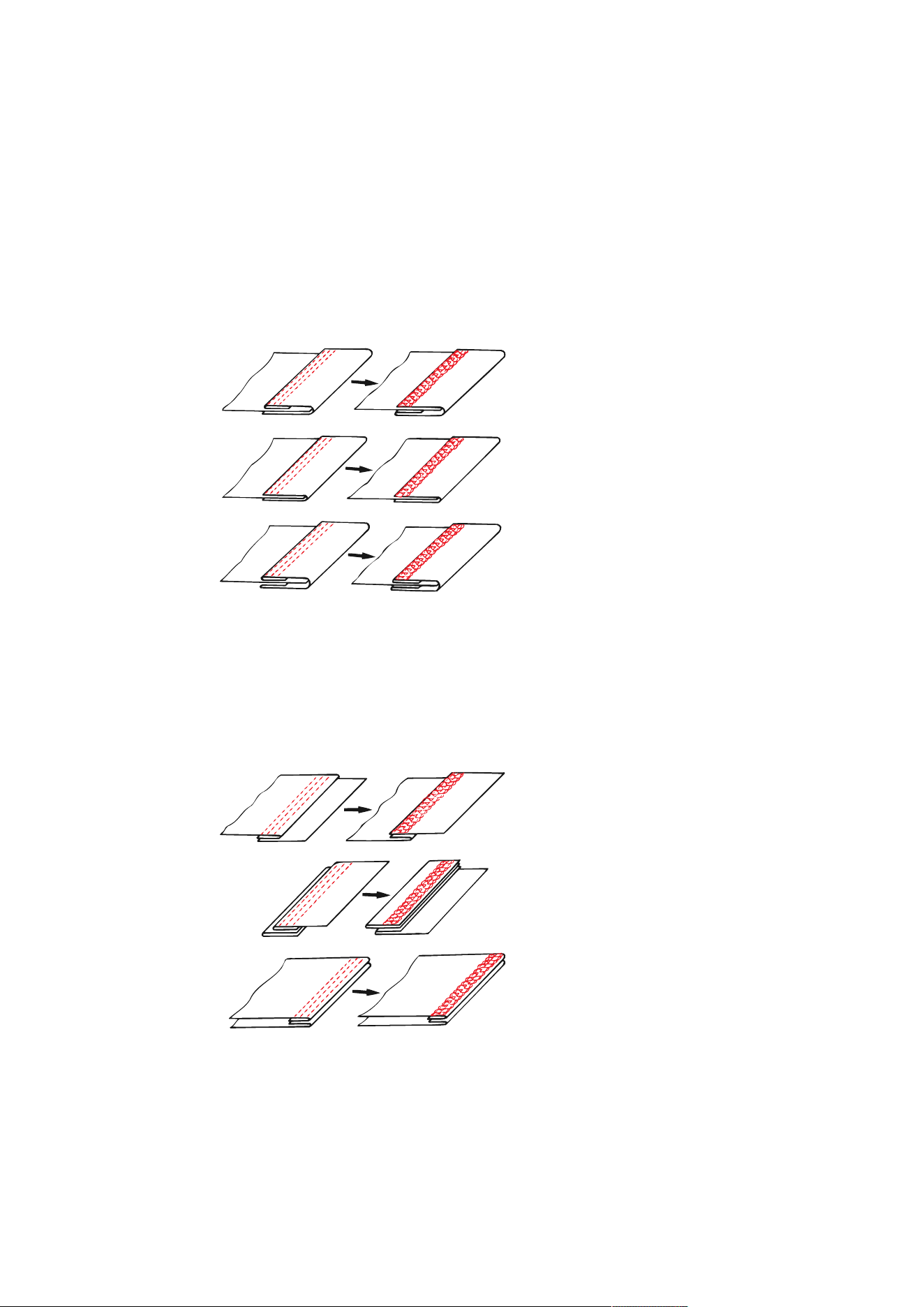
The coverstitch is ideal for hems in stretchy and knit material.
Prerequisite:
• The machine is set for a coverstitch.
> Mark the hem depth (wrong side on wrong side) and press the hem.
> the fabric under the presser foot, right side up.
> Guide the edge of the hem along one of the markings on the coverstitch insert and sew.
– The hem is sewn and finished on the wrong side at the same time.
> Cut back any excess seam allowance.
Practical Coverstitching
58
2023-06 EN 5040062.0.04
9.4 Binding Seams
Binding seams proves ideal for elastic necklines, sleeve edgings and circular finishes.
> Cut bias tape or strips of jersey to the desired width.
> Mark the seam, iron it or pin it in place.
> Wrap the binding around the edge of the material and sew it.
> Guide the edge of the binding on the upper side of the sewing project along the left spring-loaded foot
part.
– On the wrong side of the fabric, the edge of the binding is finished by the Looper Thread.
> Trim any protruding seam allowance back to 2 mm.
9.5 Topstitching Seams
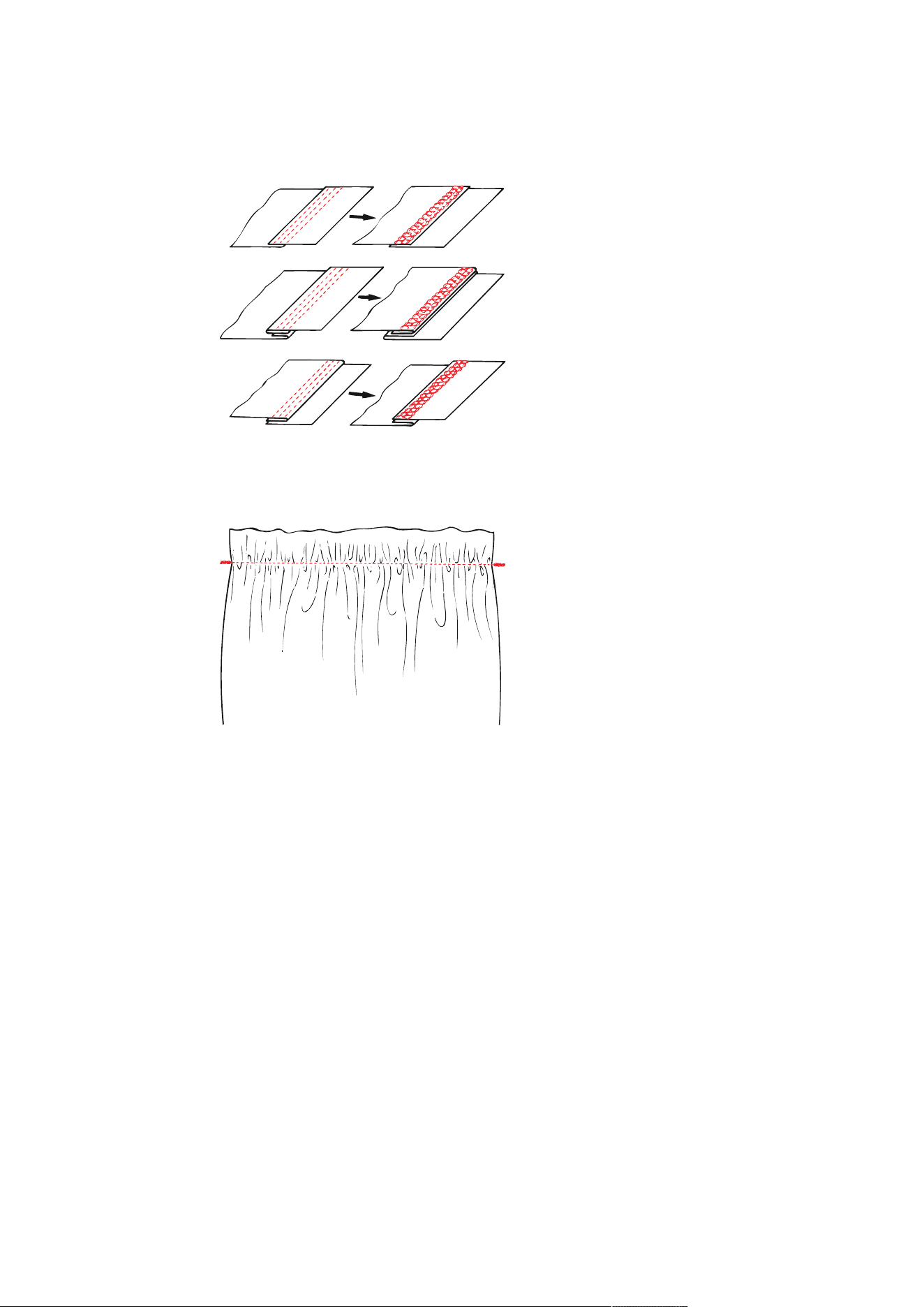
To topstitch overlock seams, the coverstitch is suitable in all elastic materials. Ideal for sweatshirts, jersey
dresses, jackets, knitted coats and patchworked garments.
> Place the seam to one side or iron it.
> Topstitch close along the edge on the right of the sewing project.
> Guide the lateral foot parts along the edge of the seam.
– A decorative, hard-wearing and durable finish is created.
9.6 Joining Seams
> Thread and set the machine for a cover- or chainstitch.
> Adjust the stitch length to be suitable for the fabric.
> Place the fabric under the presser foot and lower the presser foot.
> Sew the seam.
Practical Coverstitching
59
2023-06 EN 5040062.0.04
> To sew parallel lines or pintucks, use either the left or the right edge of the foot or the scale on the
coverstitch insert.
9.7 Gathering a Seam
Single layers of thin fabric can be gathered with the chainstitch.
> Increase differential deed

Appendix
60
2023-06 EN 5040062.0.04
10 Appendix
10.1 Storing and Transporting the Machine
Storing the Machine
The correct storage of the machine over a longer period of time has an influence on its lifespan and
functionality.
> Don't store the machine outdoors.
> Protect the machine against climatic influences.
> Before operating the machine again after storage, leave the machine unpacked for approx. 1 h at room
temperature.
Transporting the Machine
For a relocation or a longer transport of the machine, the following actions should be carried out.
> Retract the retractable thread guide of the thread stand completely downwards.
> Lower the presser foot.
> Remove all connecting cables.
> Lift and transport the machine by holding the Carry Handle.
10.2 Maintenance and Cleaning the Machine
NOTICE
Damage by Cleaning with Compressed Air
Cleaning using aerosol sprays or compressed air may cause permanent damage to your machine. A repair
by the authorized bernette dealer is required.
> Remove fabric scraps and thread remnants using a vacuum cleaner with soft tip.
Cleaning the machine
The service life of the machine depends on the care and maintenance. Based on normal household use, an
annual service at the Authorized bernette dealer is recommended.
Recommended aids for cleaning:
• Damp cloth
• Brush
• Tweezers
• Vacuum cleaner with soft tip
Clean recommended machine areas:
• Needle, Needle Bar
• Presser Foot
• Feed Dog (from above)
• Freearm interior
> The machine can be cleaned with a damp cloth without detergent.
> Free the sewing area from fabric and thread scraps regularly after sewing.
Appendix
61
2023-06 EN 5040062.0.04
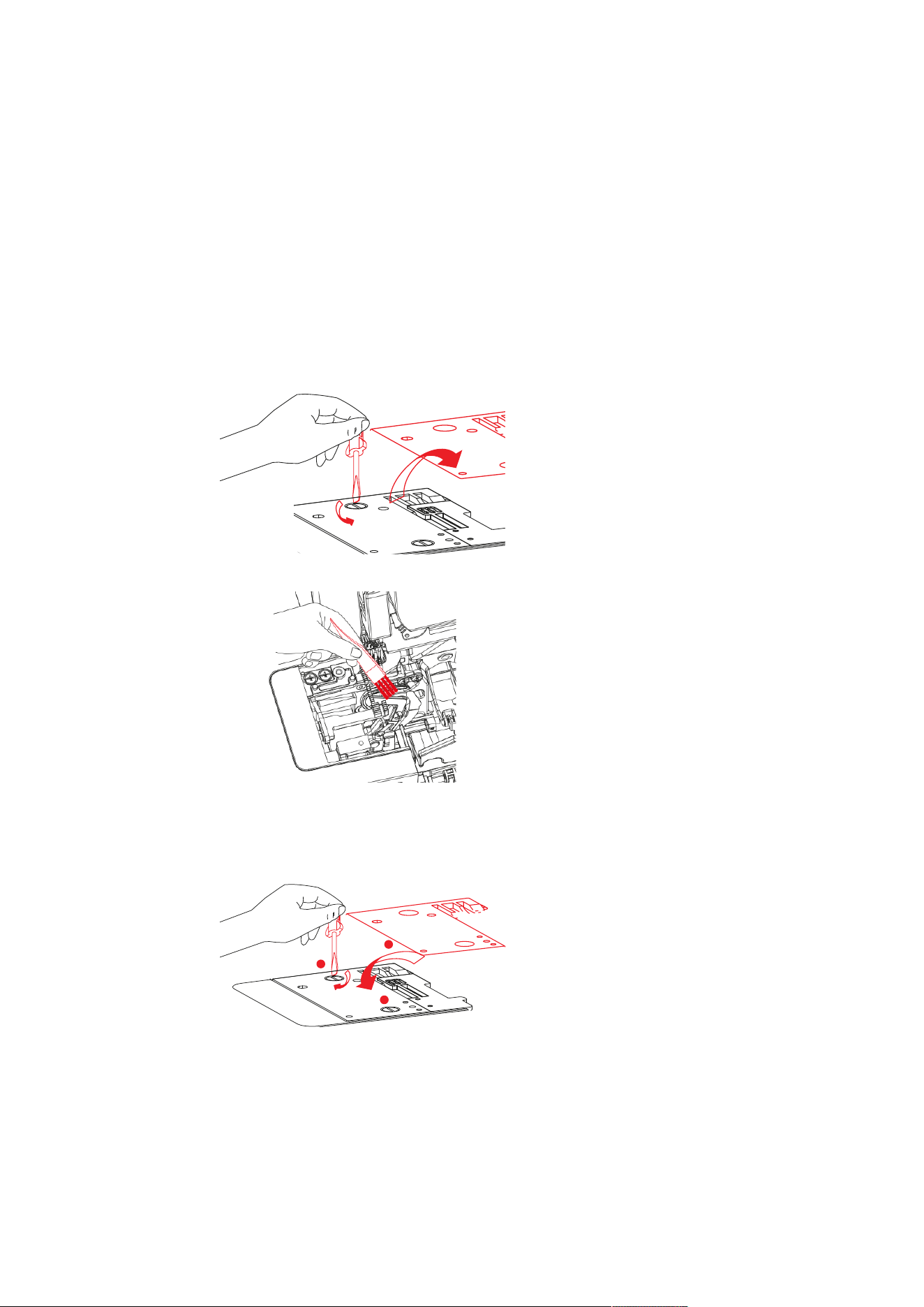
Cleaning the Looper Area
Dust, fabric and thread remnants accumulate in the Looper area during overlocking and these should be
removed regularly.
Prerequisite:
• The presser foot is raised.
• The needles are in the top position.
• The machine is switched off.
> Remove the presser foot.
> Unscrew the Stitch Plate from the freearm.
b
> Remove dust, fabric and thread remnants with the brush or a vacuum cleaner.
> Attach the stitch plate and screw it on.
> By slowly turning the Handwheel, ensure that the knife, the Needle and the Feed Dog are not impeded in
their movement.
a
b
b
> Attach the presser foot.
Appendix
62
2023-06 EN 5040062.0.04
Cleaning the Air Threader Pipes
NOTICE
Damage by fluids in the air threader system
The air threader pump may be damaged permanently if liquids infiltrate the system. A repair by the
authorized bernette dealer is required.
> Keep liquids way from the air threader nozzles.
Regularly remove dust and thread remnants from the Air Threader Pipes.
Prerequisite:
• Use a thick thread (e.g. Amann Saba C size 30) at a length of about 1 m.
> Thread the thread into the Air Threader Nozzle.
> Hold the thread at the thread ends and pull back and forth several times.
> Remove the thread at the Looper End in thread feed direction.
Cleaning the Suction Feet
Cleaning the suction feet prevents the machine from slipping on the table at high sewing speed.
> Remove dust and thread remnants from the suction feet with a damp cloth.
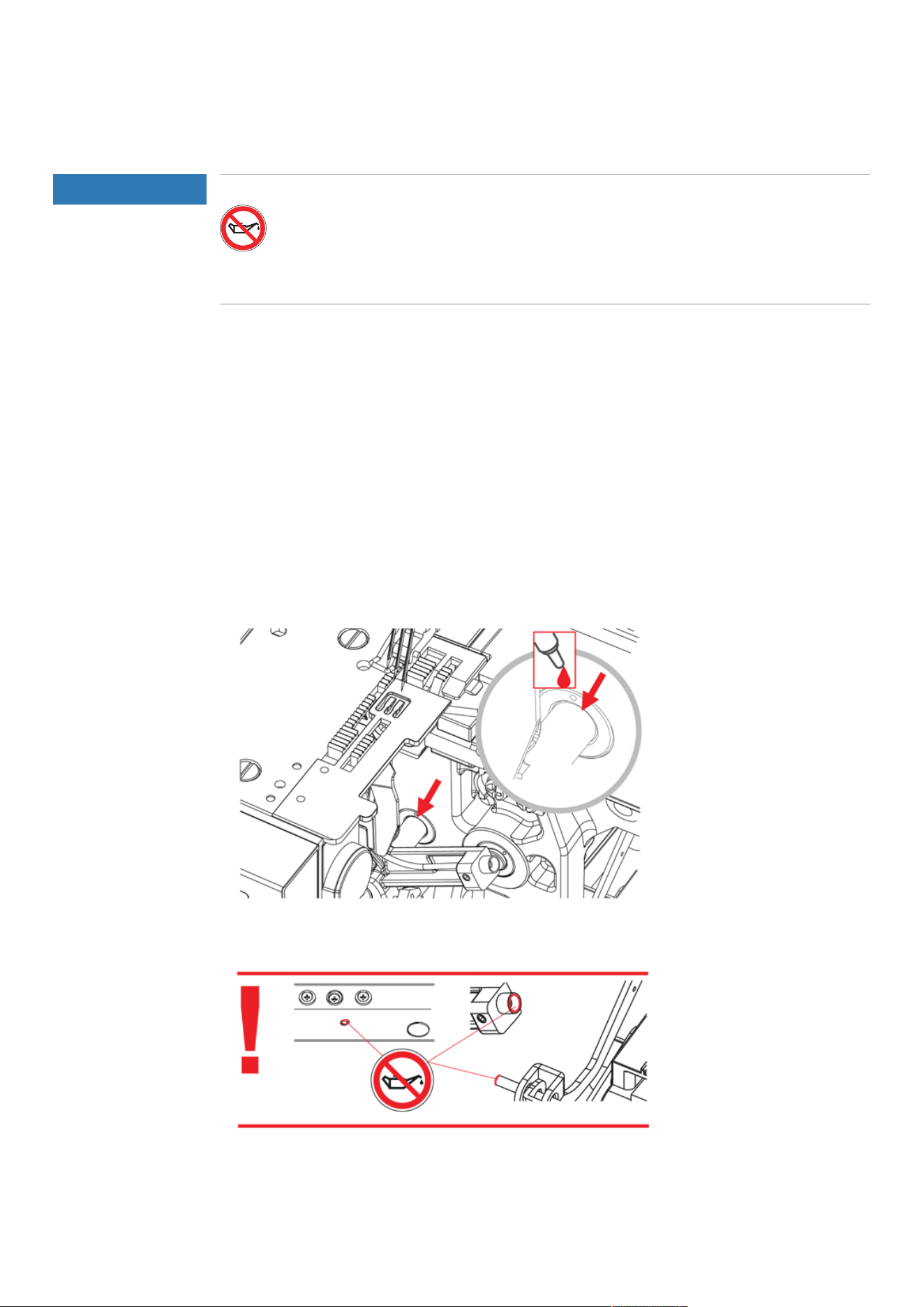
Oiling the Machine
> Regularly lubricate the Upper Looper Joint with a drop of the supplied bernette overlock oil.

Appendix
63
2023-06 EN 5040062.0.04
10.3 Troubleshooting
Fault Solution
Fabric does not feed well.
> Elongate the stitch length.
> Increase the Presser Foot Pressure for heavyweight fabric.
> Decrease the Presser Foot Pressure for lightweight fabrics.
> Check the setting of the Differential Feed.
Needle breaks
> Insert the needle correctly.
> Don't pull the fabric while sewing.
> Tighten the Needle Holder Screws.
> Select the appropriate needle for the sewing project and the
weight of thread.
Thread breakage
> Reduce the Thread Tension.
> Check the threading path.
> Check whether the thread has become tangled or caught.
> Insert the needle correctly.
> Changing the needle
> Thread high-quality thread.
Skipped stitches
> Changing the needle
> Tighten the Needle Holder Screws.
> Match the needle size with the fabric/thread.
> Insert the needles correctly.
> Select the appropriate needle for the sewing project and the
weight of thread.
> Check the threading path.
> Increase the Presser Foot Pressure.
> Thread high-quality thread.
Irregular stitches
> Adjust the Thread Tension.
> Check whether the thread has become tangled or caught.
> Check the Threading Path.
Fabric puckers
> Check the setting of the Differential Feed.
> Reduce the Thread Tension.
> Check whether the thread has become tangled or caught.
> Thread high-quality thread.
> Reduce the Stitch Length.
> Decrease the Presser Foot Pressure for lightweight fabrics.
Fabric piles up
> Elongate the stitch length.
> Check the setting of the Differential Feed.
> Check whether the thread has become tangled or caught.
> Baste thick layers of fabric first with a sewing machine, then sew
with the coverstitch machine.
Machine not running
> Connect machine to the power source and switch it on.
> Close the Threader Cover.

Appendix
64
2023-06 EN 5040062.0.04
10.4 Specifications
Article Value Unit
Number of stitches 7
Number of Loopers 1
Number of needles 1− 3
Needle System ELx705
Needle size 80 − 100 (12 − 16)
Differential Feed 0.6 − 2.0
Maximum fabric thickness 5 (0.23) mm (in)
Stitch Length LN 5.0 − 7.0 (0.19 − 0.27) mm (in)
Stitch Length RN 3.0 − 5.0 (0.14 − 0.19) mm (in)
Stitch Width 2.8 − 5.6 (0.11 − 0.22) mm (in)
Maximum sewing speed 1300 Stitches per minute
Dimensions without Retractable Thread Guide 43 x 27 x 29 (16.92/10.62/11.41) cm (in)
Dimensions with Slide-on Table / Cut-offs Bin 59 x 40 x 29 (23.22/15.78/11.41) cm (in)
Weight of the machine 8.9 (19.6) kg (lb)
Weight packaged 12.8 (28.2) kg (lb)
Input voltage (energy consumption) 120 (80) / 230 − 240 (75) V (W)
Protection class (Electrical Engineering) II
Date of manufacture Visible on the type plate

© BERNINA International AG
Steckborn CH, www.bernina.com
www.bernette.com/b62AIRLOCK
2023-06 EN
5040062.0.04