©COPYRIGHT AVPRO GLOBAL HOLDINGS 2023 - 2222 E 52ND STREET N SIOUX FALLS, SD 57104 ~ 1.877.866.5112
1
AC-SC-1X
FRL5 40Gbps 8K60 4:2:0/4K120 4:4:4
Down-scaler
User Manual

©COPYRIGHT AVPRO GLOBAL HOLDINGS 2023 - 2222 E 52ND STREET N SIOUX FALLS, SD 57104 ~ 1.877.866.5112
2
Table of Contents
Introduction ............................................................................................................ 3
Features ................................................................................................................. 3
Whats in the Box ..................................................................................................... 3
Specifications ......................................................................................................... 4
Device Overview ..................................................................................................... 5
EDID Management – Front Panel .............................................................................. 7
OUT2 Scaler – Front Panel ........................................................................................ 8
EXTERNAL AUDIO – Front Panel ................................................................................ 9
RS-232 Control ....................................................................................................... 10
RS-232 Commant List ............................................................................................. 11
Troubleshooting ..................................................................................................... 12
HDMI 2.1 Bandwidth Innovation Chart ..................................................................... 13
Maintenance .......................................................................................................... 15
Damage Requiring Service ...................................................................................... 15
Support ................................................................................................................. 16
Warranty ................................................................................................................ 16
©COPYRIGHT AVPRO GLOBAL HOLDINGS 2023 - 2222 E 52ND STREET N SIOUX FALLS, SD 57104 ~ 1.877.866.5112
3
Introduction
The AC-SC-1X is a single input, 2 output HDMI2.1a Downscaling device capable of supporting VRR, HDCP 2.3
, High Frame Rate, and 8K signals up to 40Gbps (FRL5). Equipped with 4K or 1080p downscaling on Output 2
with a passthrough Output 1, Analog & SPDIF (TOS) Audio Extraction, plus a brand-new OLED Front Panel for
control and diagnostics; the SC-1X seamlessly integrates with today’s new Gaming Consoles, Streaming
devices, and high-end PC into distribution systems with a combination of audio processors and displays from
over the last 10 year.
Features
• HDMI 2.1
• FRL (5)
• HDCP 2.3 and previous versions supported
• 40 Gbps Bandwidth Support
• 8 K60 4:2:0 Support
• 4 K resolutions at 120 frames per second
• 8 K resolutions at 60 frames per second
• Full HDR Support (HDR 10 & 12 Bit)
• Dolby Vision, HDR10+ and HLG Support
• HDCP 2.3 (and all earlier versions supported)
• 8 K/4K > 1080p or 8K > 4K Down Scaler (Out 2)
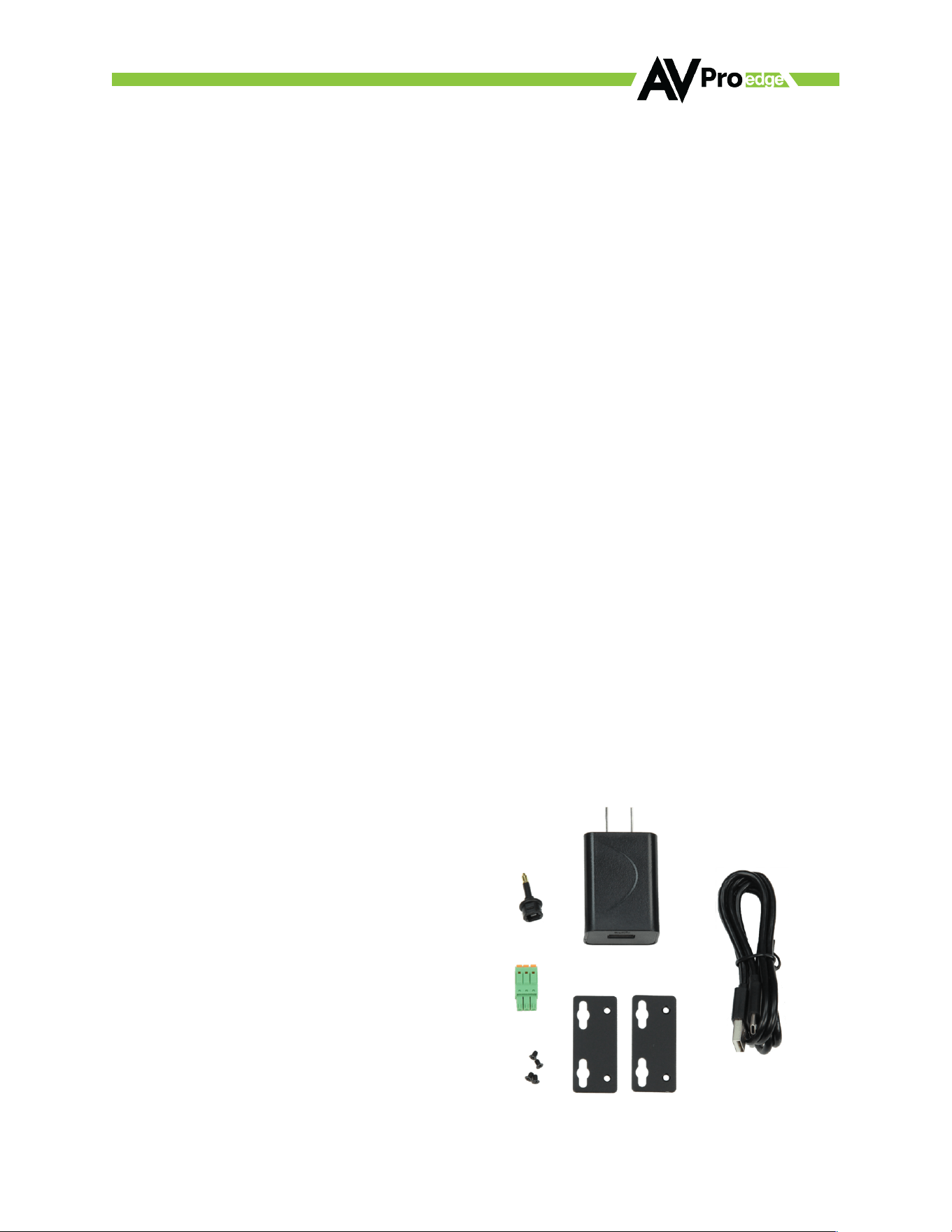
Whats in the Box
• 1 x AC-SC-1X
• 1 x USB-C Cord (for power )
• 1 x 5V 1A Wall PSU
• 1 x 3 Pin Terminal Connector (For RS 232)
• 1 x 3.5mm Mini Toslink adapter
• Mounting B rackets with hardware
• Perfect AVR Bypass deliver 40Gbps to Display and
uncompressed
• audio to AVR
• Advanced EDID Management
• RS-232 and Front Panel Control Options
• Tosli nk O ut (7C H PC M, D D, DTS)
• Balanced Analog Out (2CH PCM)
©COPYRIGHT AVPRO GLOBAL HOLDINGS 2023 - 2222 E 52ND STREET N SIOUX FALLS, SD 57104 ~ 1.877.866.5112
4
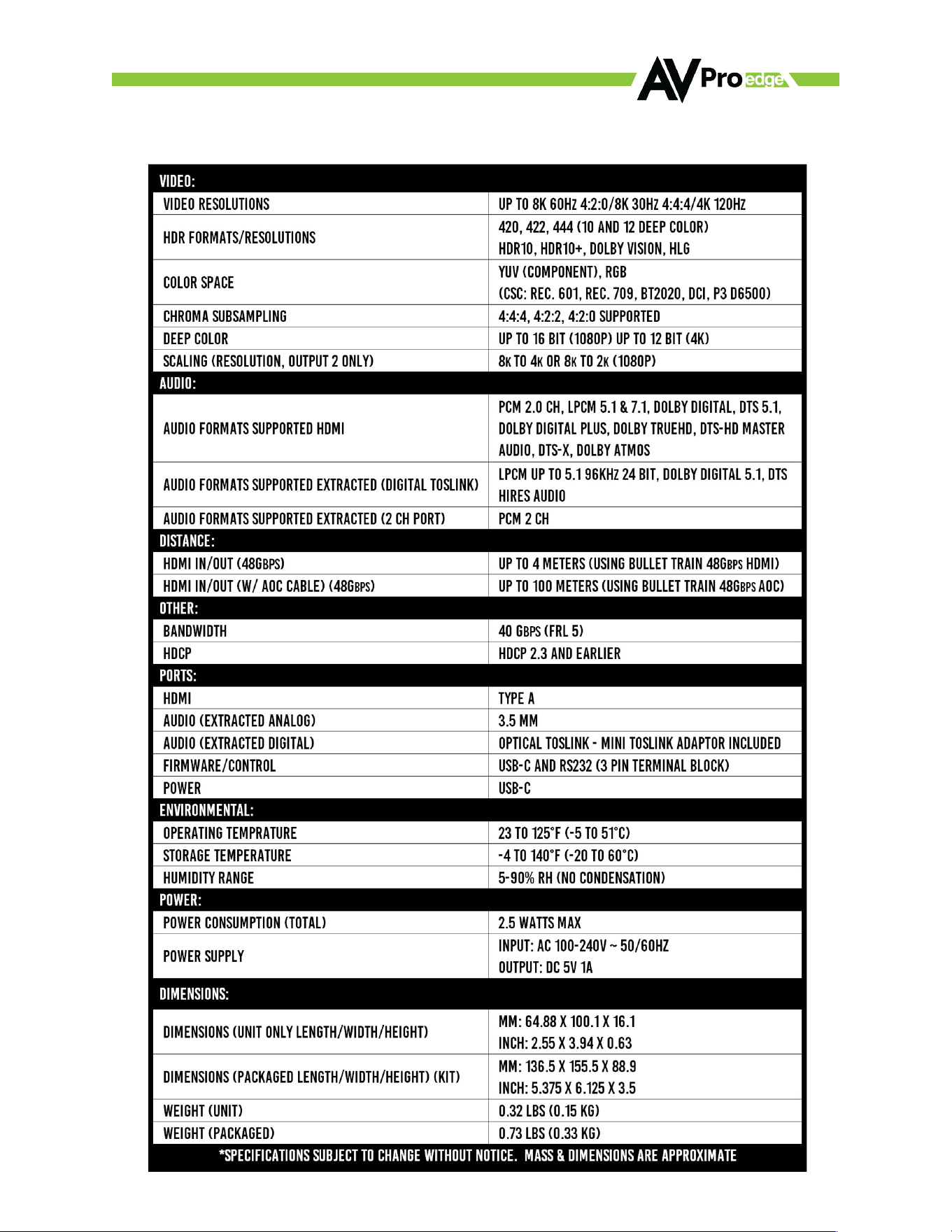
Specifications
©COPYRIGHT AVPRO GLOBAL HOLDINGS 2023 - 2222 E 52ND STREET N SIOUX FALLS, SD 57104 ~ 1.877.866.5112
5
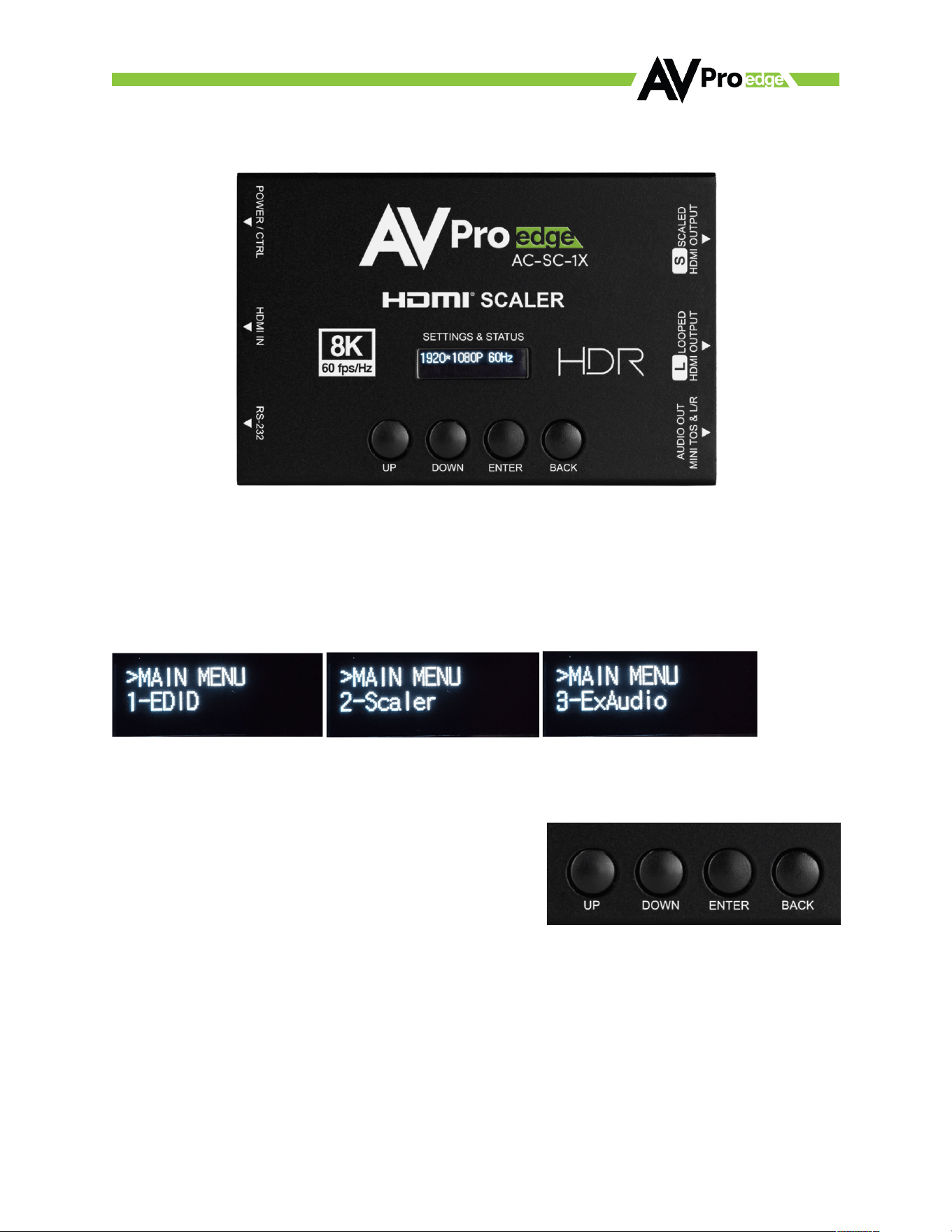
Device Overview
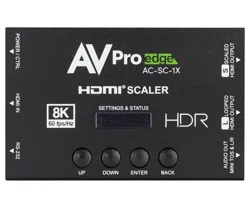
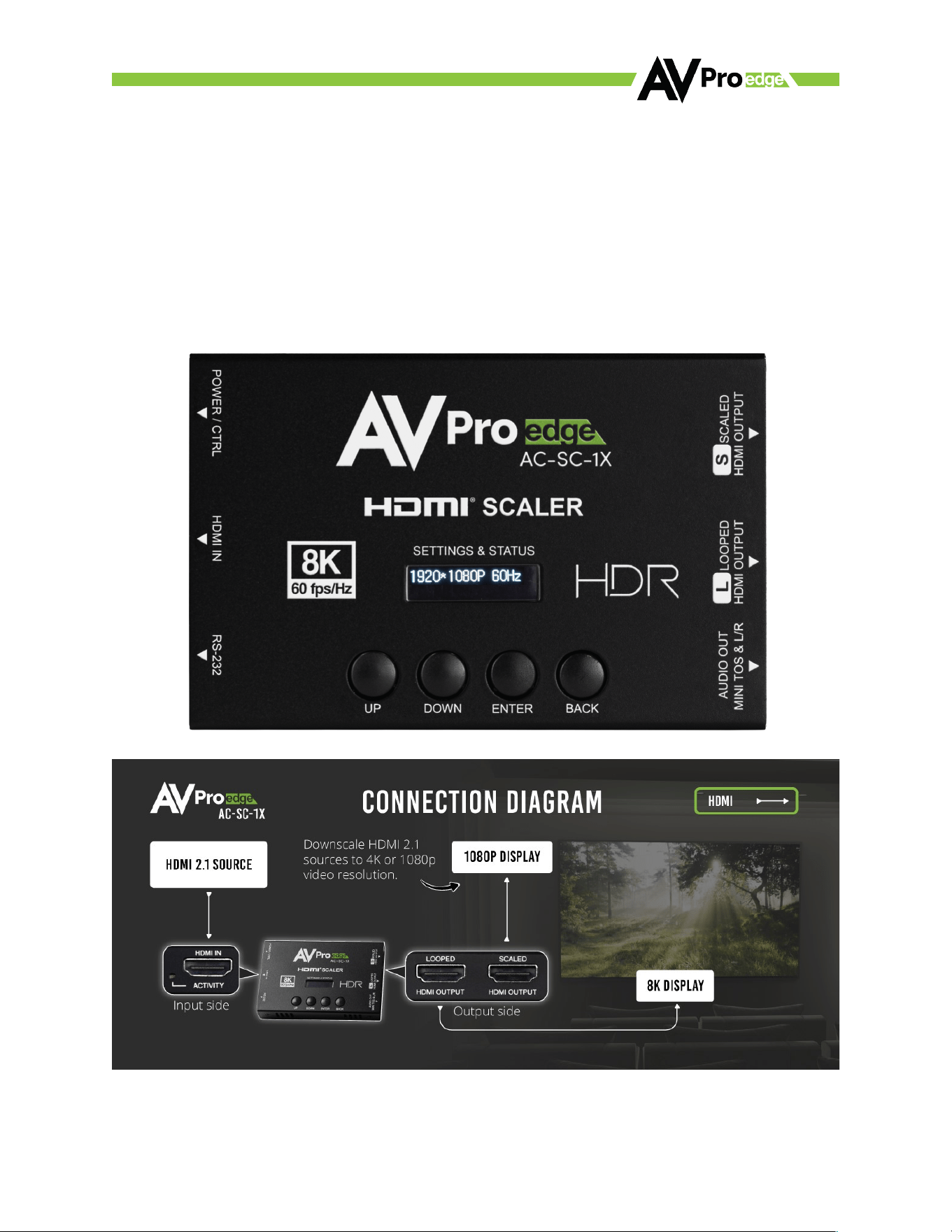
Front Screen Display/Settings & Status - Displays the current Resolution/Timing of - the HDMI Input. Use in
conjunction with the four Settings buttons (UP, DOWN, ENTER, and BACK) to navigate the available settings
menus and change 1-EDID, 2-Scaler settings, and 3-ExAudio (enable/disable the extracted audio port). The
screen back light time can be changed using the command list (default setting is 60 seconds).
Settings Buttons EDID/Scaler - Use these 4 buttons to navigate the available front screen menus.
UP/DOWN - Cycles menu and menu options up or down.
Enter Button - Opens menu/makes menu Selections.
Back Button - Exit menu/exit menu selection.
©COPYRIGHT AVPRO GLOBAL HOLDINGS 2023 - 2222 E 52ND STREET N SIOUX FALLS, SD 57104 ~ 1.877.866.5112
6
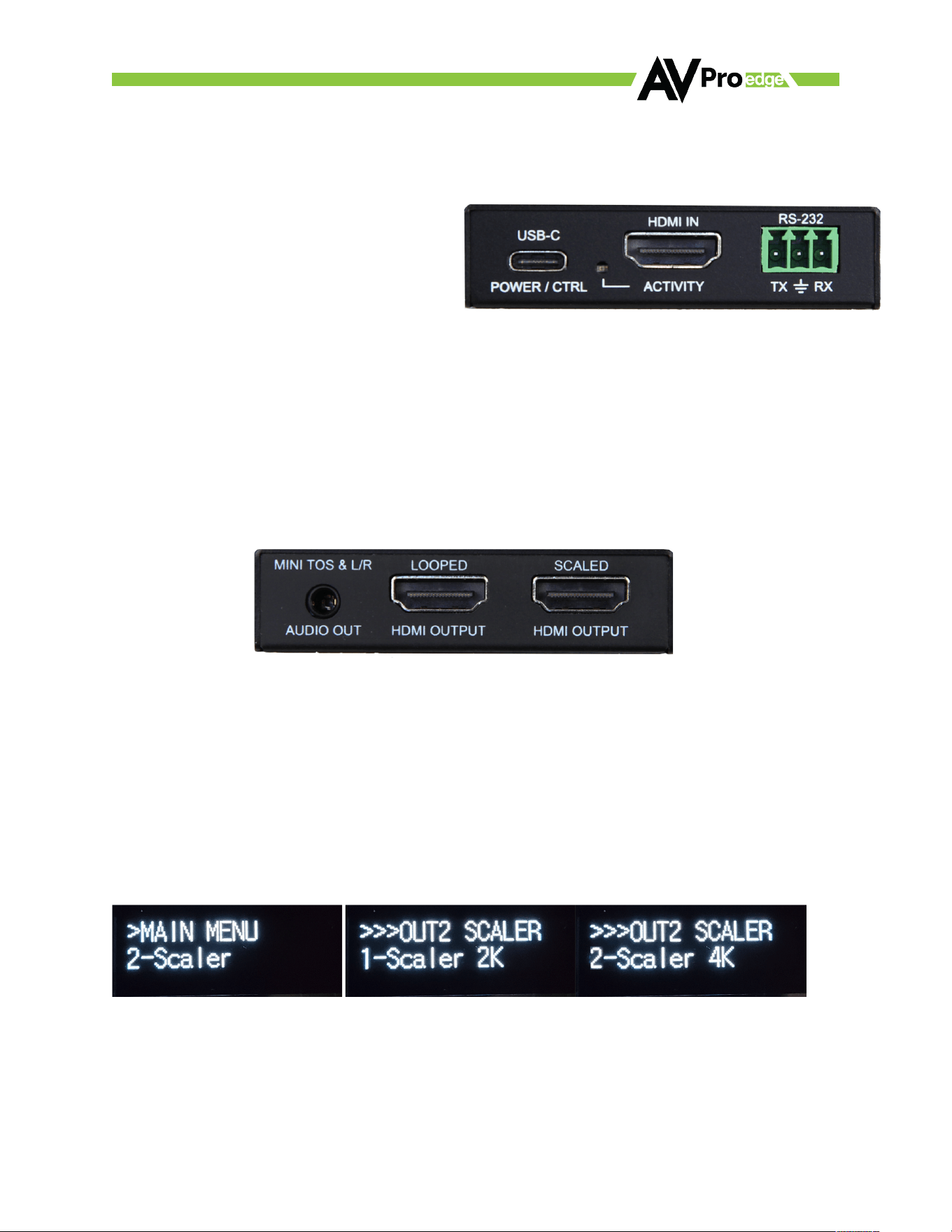
USB-C POWER/CTRL - This USB-C port provides power to scaler. Power using a USB port on the sync, or use
the provided wall power adapter. Connect to a PC will provide power and also communication. See page XX
for command list.
ACTIVITY LED - This LED indicates activity on the
HDMI INPUT port (from the source).
HDMI INPUT - HDMI-2.1 (FRL5) Input.
RS-232 Port – 3-pin terminal block from the control.
See page XX for the command list.
MINI TOS & L/R AUDIO OUT - This is a combination port. You can use 3.5mm audio cable to extract 2 Ch
PCM. Or use the provided Mini TOSLINK/3.5mm adapter to connect a standard TOSLINK cable.
LOOPED HDMI OUTPUT (OUT1) - This port is a none scaling port that supports CEC passthrough. Connect to
the sync device you want the full signal and CEC to go to.
SCALED HDMI OUTPUT (OUT2) - This port is scaled. Connect to the sync device that needs to be
downscaled, there are 2 options available.
1. Scaler 2K - This will down-scale any 8K (7680x4320) or 4K (3840x2160) signal down to 2k
(1920x1080P).
2. Scaler 4K - This will down-scale any 8K (7680x4320) signal to 4K (3840x2160).
NOTE: Only 16:9 resolutions can be scaled
©COPYRIGHT AVPRO GLOBAL HOLDINGS 2023 - 2222 E 52ND STREET N SIOUX FALLS, SD 57104 ~ 1.877.866.5112
7
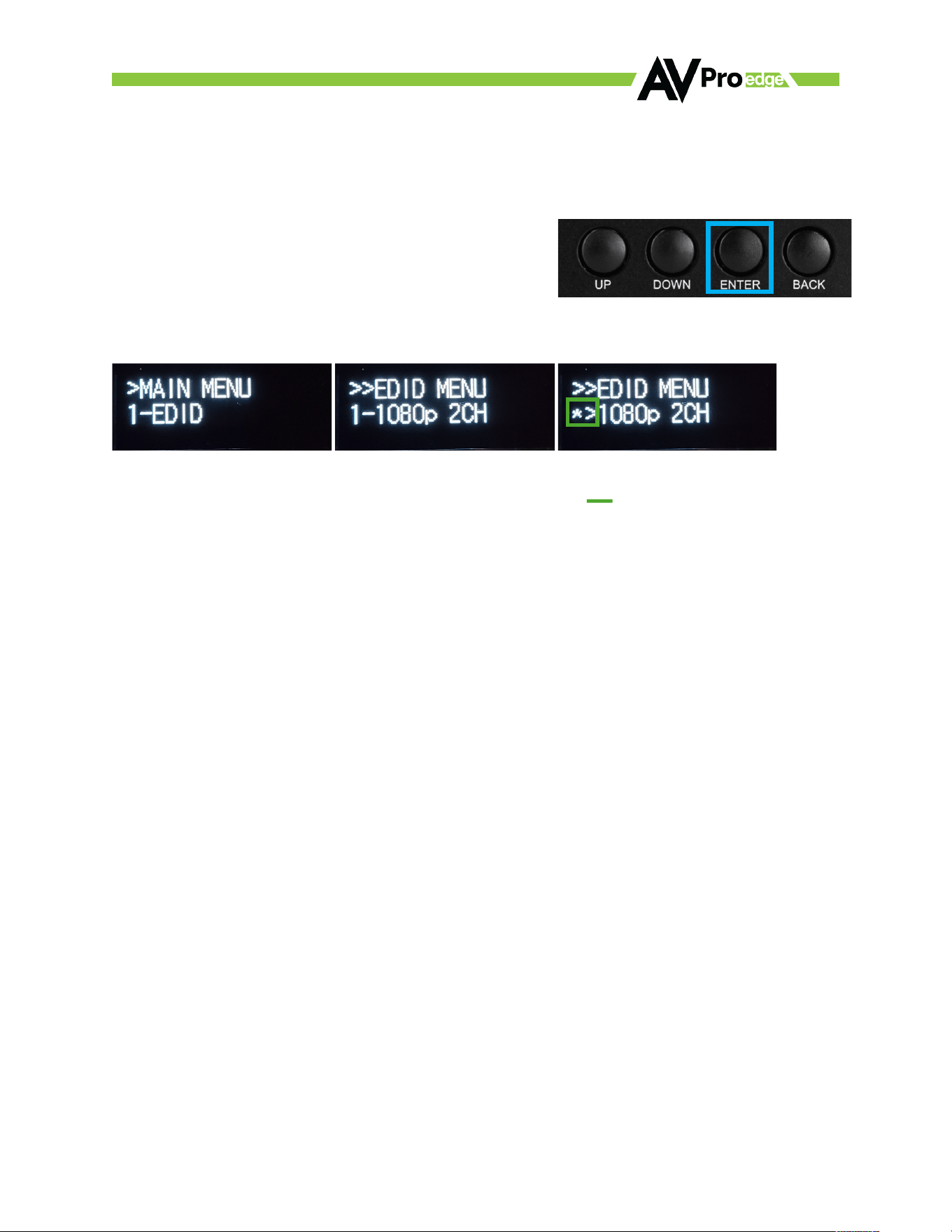
EDID Management – Front Panel
There are 12 built in canned EDIDs along with 3 USER EDID slots and a EDID Bypass. You can select from any
of these canned EDIDs or copy from one of the HDMI Outputs (saves to USER1_EDID).
1. Press the ENTER button to enter the Main Menu.
NOTE: If the screen is oi, press any button to wake up)
2. EDID is the first selection in the Main Menu. Press the ENTER button to open the EDID menu.
NOTE: The first displayed EDID will be the current setting (indicated by an *> instead of the number).
Default out of the box is “12. FRL40G_8K_8CH_HDR”.
3. Use the Up/Down Buttons to scroll through the available EDIDs.
4. Once the desired EDID is found, press the ENTER button to set the displayed EDID. The available
options are listed below.
1. 1080 P_2CH
2. 1080 P_6CH
3. 1080 P_8CH
4. 4 K60HzY420_3D_2CH
5. 4 K60HzY420_3D_6CH
6. 4 K60HzY420_3D_8CH
7. 4 K60HZ_3D_2CH_HDR
8. 4 K60HZ_3D_6CH_HDR
9. 4 K60HZ_3D_8CH_HDR
10. FRL40G_8K_2CH_HDR
11. FRL40G_8K_6CH_HDR
12. FRL40G_8K_8CH_HDR
13. USER1_EDID
14. USER2_EDID
15. USER3_EDID
16. EDID BYPASS
©COPYRIGHT AVPRO GLOBAL HOLDINGS 2023 - 2222 E 52ND STREET N SIOUX FALLS, SD 57104 ~ 1.877.866.5112
8
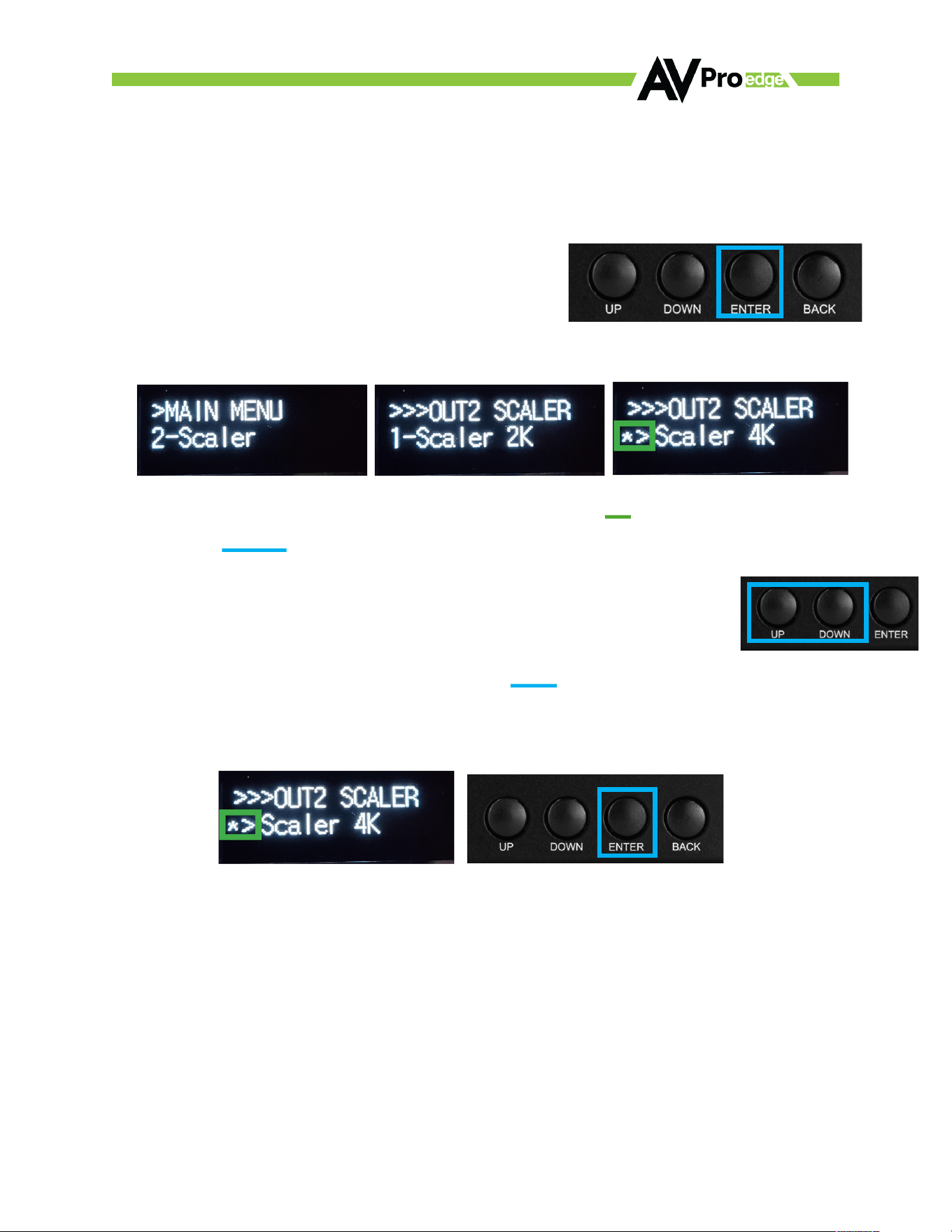
OUT2 Scaler – Front Panel
There are 12 built in canned EDIDs along with 3 USER EDID slots and a EDID Bypass. You can select from any
of these canned EDIDs or copy from one of the HDMI Outputs (saves to USER1_EDID).
1. Press the ENTER button to enter the Main Menu.
NOTE: If the screen if oi, press any button to wake up
2. Use the UP/DOWN buttons to change to 2-Scaler, Press the ENTER button twice to enter the Scaler
menu.
NOTE: The first displayed setting will be the current setting (indicated be an *> instead of the number.)
3. Use the Up/Down Buttons to change between the two available scaler settings.
a. Scaler 2K - This will down-scale any 8K (7680x4320) or 4K (3840x2160) signal down to 2k
(1920x1080P).
b. Scaler 4K - This will down-scale any 8K (7680x4320) signal to 4K (3840x2160).
NOTE: Only 16:9 resolutions can be scaled
4. Once the desired scaling setting is found, press the ENTER button to set.
©COPYRIGHT AVPRO GLOBAL HOLDINGS 2023 - 2222 E 52ND STREET N SIOUX FALLS, SD 57104 ~ 1.877.866.5112
9
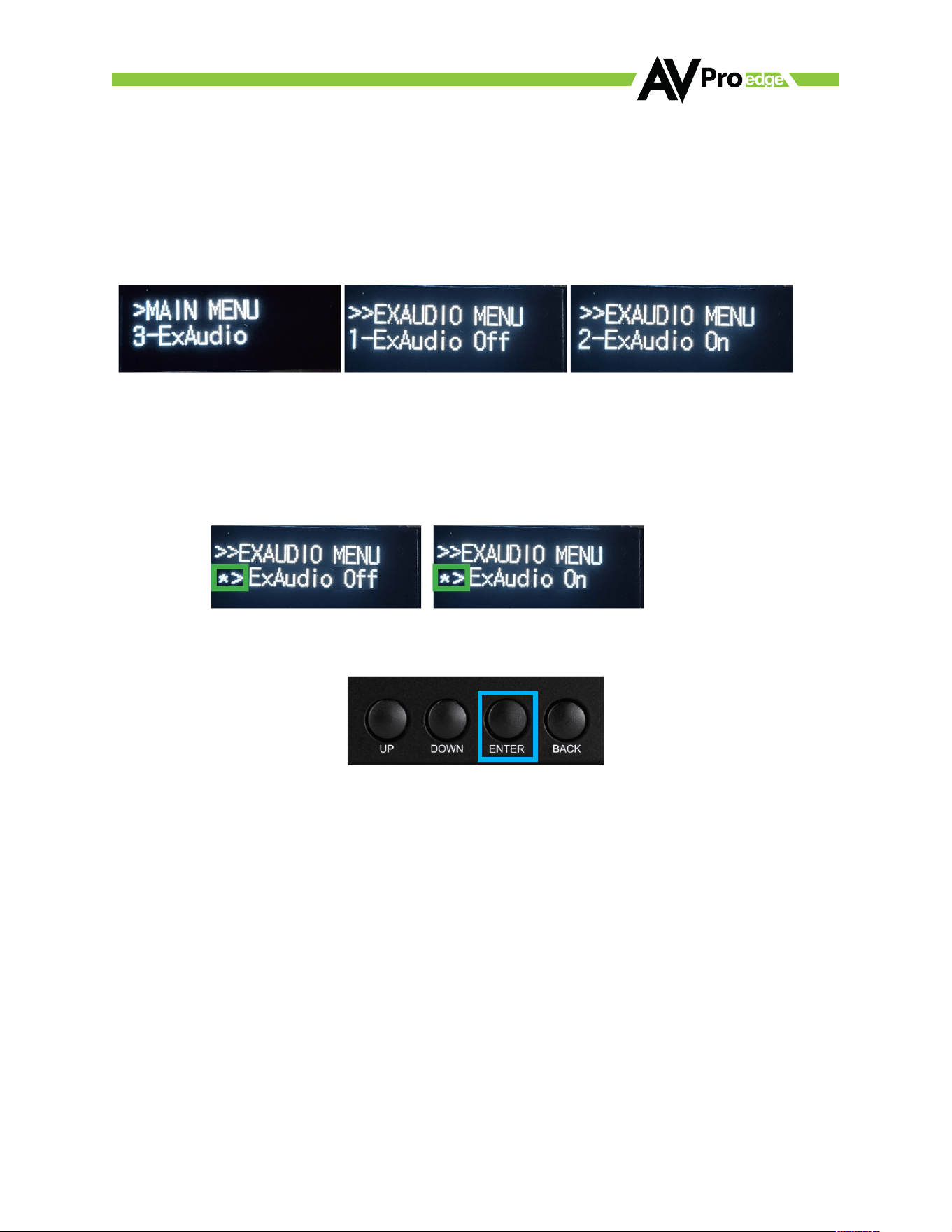
EXTERNAL AUDIO – Front Panel
The extracted audio port can be enabled or disabled (enabled by default). To change the settings
1. Press the ENTER button to enter the Main Menu
NOTE: If the screen is oi, press any button to wake up)
2. Use the UP/DOWN Buttons to change between the two available external audio menu.
NOTE: The first displayed settings will be the current setting(indicated by a *> instead of the number).
3. Use the Up/Down Buttons to change between the two available extracted audio settings.
ExAudio oi – This will disable the extracted audio port (nothing will be output).
ExAudio on – This will enable the extracted audio port.
4. Once the desired extracted audio setting is found, press the ENTER button to set.
©COPYRIGHT AVPRO GLOBAL HOLDINGS 2023 - 2222 E 52ND STREET N SIOUX FALLS, SD 57104 ~ 1.877.866.5112
10
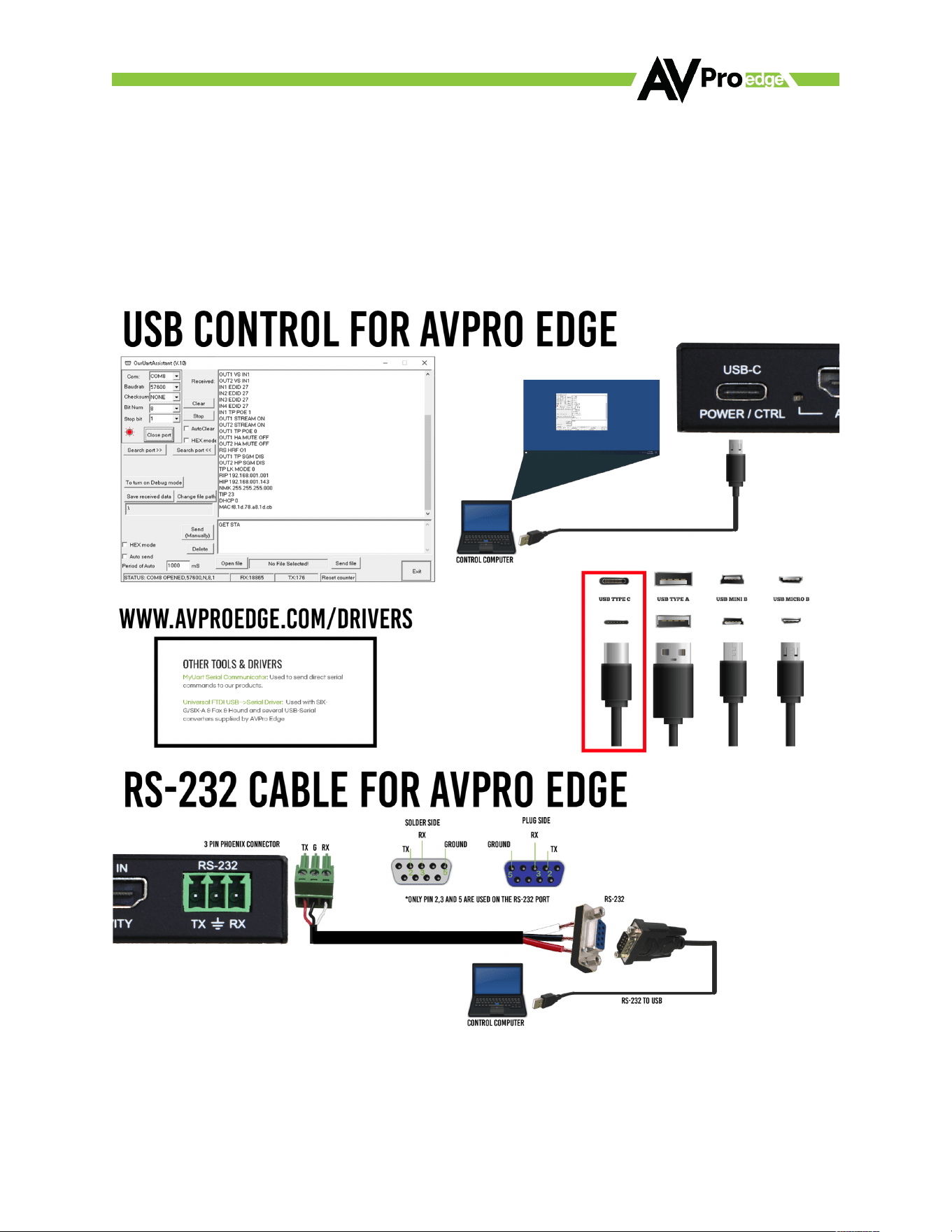
RS-232 Control
RS232 Control (through 3 Pin Terminal Block or USB-C).
To c ontro l via RS-232, the 3 Pin Terminal Block or a USB data cable with a USB-C Connecotr can be used.
- Baudrate: 57600 - Bit Num: 8
- Checksum: None - Stop Bit: 1

©COPYRIGHT AVPRO GLOBAL HOLDINGS 2023 - 2222 E 52ND STREET N SIOUX FALLS, SD 57104 ~ 1.877.866.5112
11
RS-232 Commant List
=======================================================================================
=*****************************Systems HELP*********************************************************=
=-----------------------------------------------------------------------------------------------------------------------------=
= System Address = 00 F/W Version : 1. 1. 4 =
= Azz : All Commands start by Prefix System Address zz, if [01-99] =
=-----------------------------------------------------------------------------------------------------------------------------=
= H : Help =
= STA : Show Global System Status =
= SET RST : Reset to Factory Defaults =
= SET RBT : System Reset to Reboot =
= SET ADDR xx : Set System Address to xx {xx=[00~99](00=Single)} =
= SET LCD ON Tx : Set LCD Remain On Time{x=[0~3](0=Always ON,1=15,2=30,3=60Sec)} =
= GET ADDR : Get System Address =
= GET STA : Get System System Status =
= GET LINK1 SIG STA : Get Link1 Signal Status =
= GET LCD ON T : Get LCD Remain On Time =
=-----------------------------------------------------------------------------------------------------------------------------=
=Output Setup Commands: Output Num[0~2] =
= SET OUT2 VIDEOy : Set Output VIDEO Mode =
= {y=[2,6](2=4K/8K->2K,6=8K->4K)} =
= SET OUTx STREAM ON/OFF : Set HDMI Output Video Stream On/Og{x=[0~2](0=ALL)} =
= SET HDMI STREAM MODEx : Set HDMI Stream Mode{x=[0~1](0=Always On,1=Follow Input Signal)} =
= SET OUTx HA MUTE ON/OFF : Set HDMI Output x Audio Mute ON/OFF{x=[0~2](0=ALL)} =
= SET OUTx SGM EN/DIS : Set HDMI Output x Signal Generator Enable/Disable{x=[0-2](0=ALL)} =
= GET OUT2 VIDEO : Get Output2 Video Status =
= GET OUTx EDID DATA : Get Output x EDID DATA{x=[1~2]} =
= GET OUTx HPD : Get HDMI Output x Hotplug Status{x=[0~2](0=ALL)} =
= GET OUTx STREAM : Get Output x Stream ON/OFF Status{x=[0~2](0=ALL)} =
= GET HDMI STREAM MODE : Get HDMI Stream Mode Status =
= GET OUTx HA MUTE : Get HDMI Output x Audio Mute Status{x=[0~2](0=ALL)} =
= GET OUTx SGM : Get HDMI Output x Signal Generator Enable/Disable Status{x=[0-2](0=ALL)} =
=-----------------------------------------------------------------------------------------------------------------------------=
=Input Setup Commands: =
= SET IN1 EDID y : Set Input1 EDID{y=[0~14} =
= 0:1080P_2CH 1:1080P_6CH 2:1080P_8CH =
= 3:4K60HzY420_3D_2CH 4:4K60HzY420_3D_6CH 5:4K60HzY420_3D_8CH =
= 6:4K60HZ_3D_2CH_HDR 7:4K60HZ_3D_6CH_HDR 8:4K60HZ_3D_8CH_HDR =
= 9:FRL40G_8K_2CH_HDR 10:FRL40G_8K_6CH_HDR 11:FRL40G_8K_8CH_HDR =
= 12:USER1_EDID 13:USER2_EDID 14:USER3_EDID =
= 15:EDID BYPASS =
= SET IN1 EDID CY OUTy : Copy Output y EDID To Input1(USER1 BUF){y=[1~2]} =
= SET IN1 EDID Uy DATAz : Write EDID To User y Buger of Input1{y=[1~3],z=[EDID Data]} =
= SET EDID OUTx A OUTy V MIX IN1: Set EDID OUTx Audio OUTy Video Mix Input1{x=[1~2],y=[1~2](x!=y)]} =
= GET IN1 EDID : Get Input1 EDID Index =
= GET IN1 EDID y DATA : Get Input1 EDID y Data{y=[0~14]} =
= GET LINK1 VID FMT INF : Get Input1 Video Signal infomation =
= GET LINK1 AUD FMT INF : Get Input1 Audio Signal infomation

©COPYRIGHT AVPRO GLOBAL HOLDINGS 2023 - 2222 E 52ND STREET N SIOUX FALLS, SD 57104 ~ 1.877.866.5112
12
Troubleshooting
1. Verify Power—The Monitor Screen on the front of the distribution amp should be present when power
is supplied. The Monitor screen has an automatic timeout to reduce screen burn. Select any button
to awaken the diagnostics screen.
2. Verify Connections – Check that all cables are correctly connected and support 48Gbps
a. HDMI Input LED – Light will be solid when the HDMI Link from the Source is stable.
b. Monitor Screen – Will present Input Resolution and Frame Rate when HDMI Link from the
source is stable.
3. Issues with One Output – Swap HDMI Outputs to see if issue follows. Try copying EDID from the
display. This can be found under EDID Options in the EDID Selection Menu.
4. Issues with Legacy HDMI Device when scaling
a. Ensure Legacy Device supports the Input Sources Frame Rate.
b. Ensure Variable Refresh Rate is Disabled.
c. Ensure Legacy Device supports meta-data.
©COPYRIGHT AVPRO GLOBAL HOLDINGS 2023 - 2222 E 52ND STREET N SIOUX FALLS, SD 57104 ~ 1.877.866.5112
13
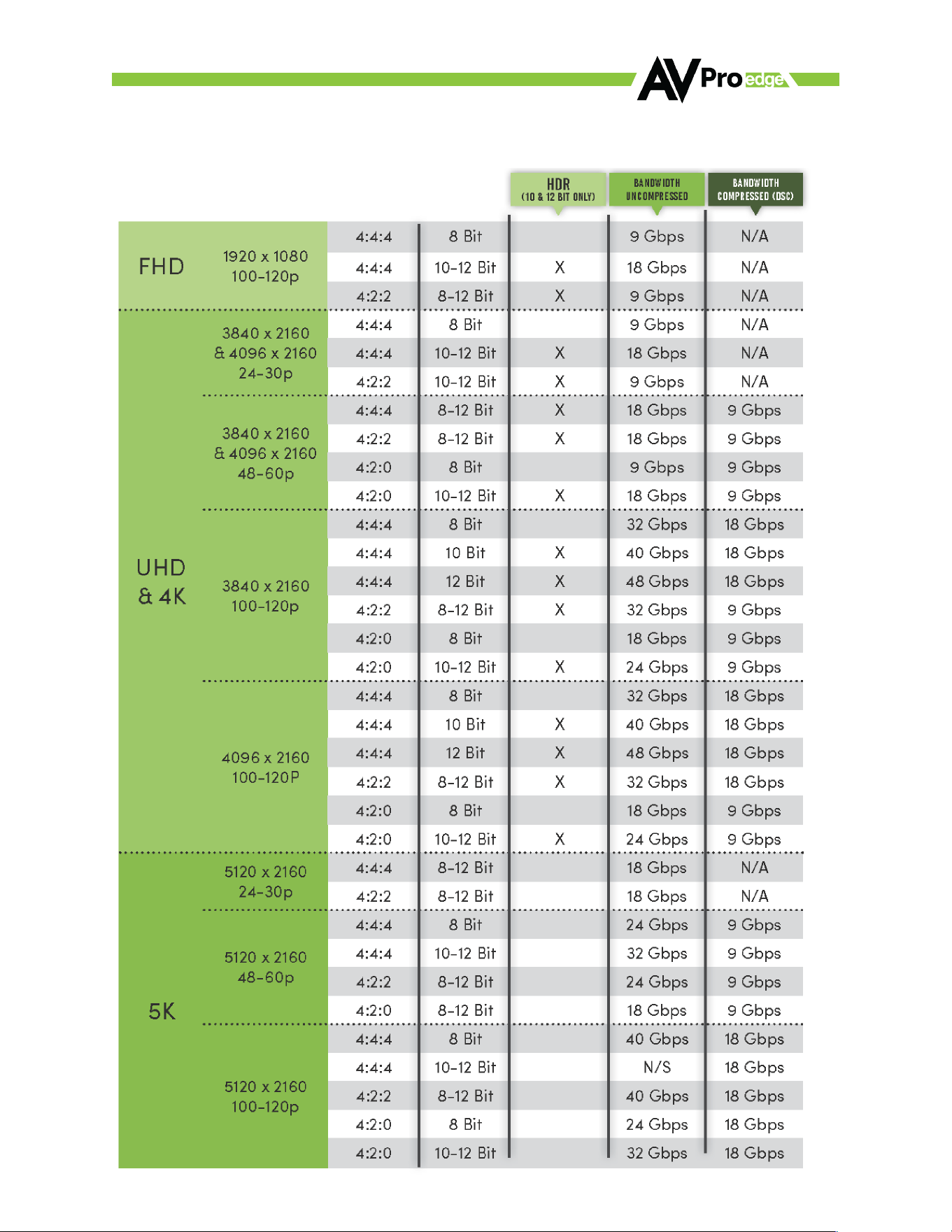
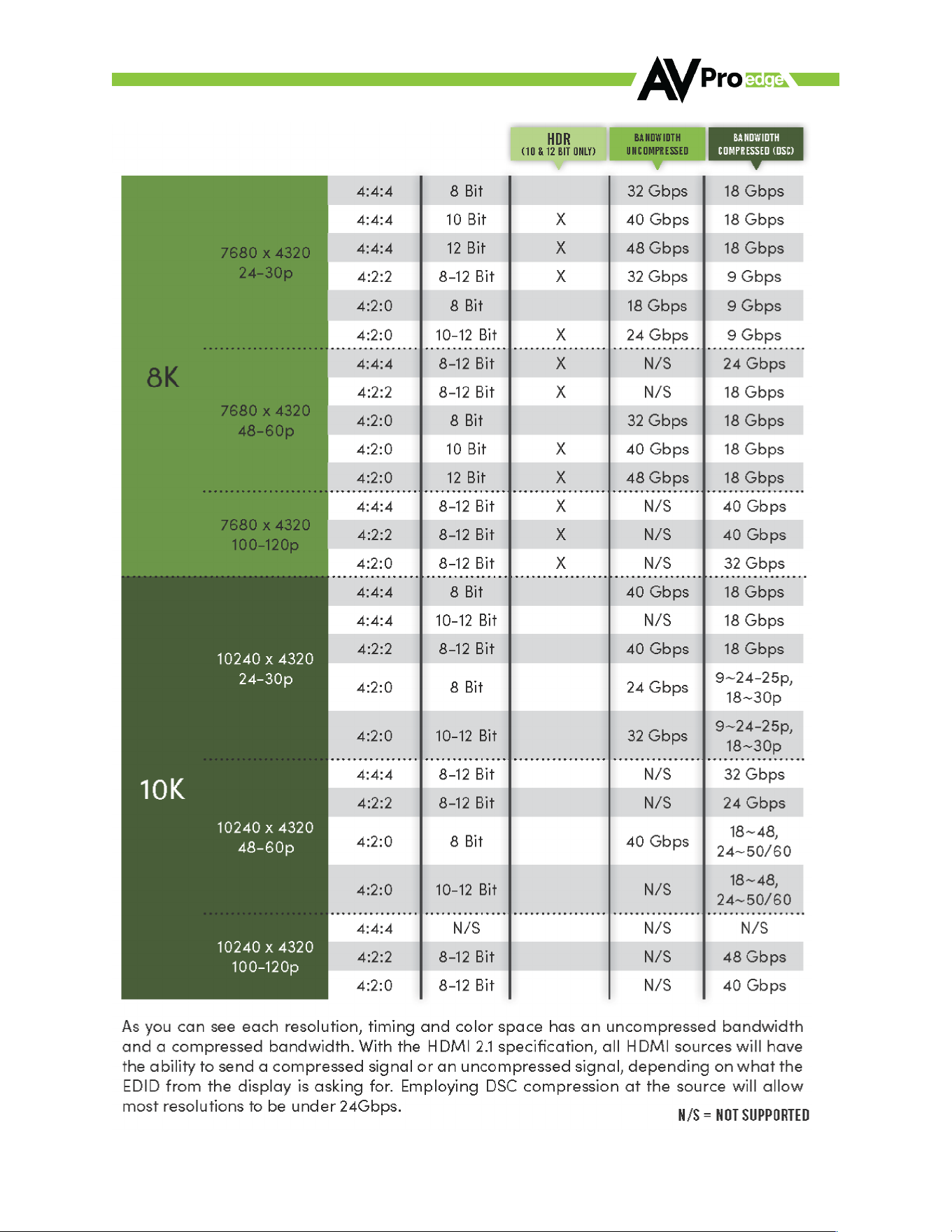
HDMI 2.1 Bandwidth Innovation Chart
©COPYRIGHT AVPRO GLOBAL HOLDINGS 2023 - 2222 E 52ND STREET N SIOUX FALLS, SD 57104 ~ 1.877.866.5112
14

©COPYRIGHT AVPRO GLOBAL HOLDINGS 2023 - 2222 E 52ND STREET N SIOUX FALLS, SD 57104 ~ 1.877.866.5112
15
Maintenance
To e nsure re liabl e op erati on o f th is p rod uct as we ll as pro te ctin g th e safe ty of any pe rson usi ng o r ha nd ling
this device while powered, please observe the following instructions.
• Use the power supplies provided. If an alternate supply is required, check voltage, polarity and that it
has suiicient power to supply the device it is connected to.
• Do not operate these products outside the specified temperature and humidity range given in the
above specifications.
• Ensure there is adequate ventilation to allow this product to operate eiiciently.
• Repair of the equipment should only be carried out by qualified professionals as these products
contain sensitive components that may be damaged by any mistreatment.
• Only use this product in a dry environment. Do not allow any liquids or harmful chemicals to come
into contact with these products.
• Clean this unit with a soft, dry cloth. Never use alcohol, paint thinner or benzene to clean this unit.
Damage Requiring Service
The unit should be serviced by qualified service personnel if:
• The DC power supply cord or AC adapter has been damaged
• Objects or liquids have gotten into the unit
• The unit has been exposed to rain
• The unit does not operate normally or exhibits a marked change in performance
• The unit has been dropped or the housing damaged

©COPYRIGHT AVPRO GLOBAL HOLDINGS 2023 - 2222 E 52ND STREET N SIOUX FALLS, SD 57104 ~ 1.877.866.5112
16
Support
Should you experience any problems while using this product, first, refer to the Troubleshooting section of
this manual before contacting Technical Support. When calling, the following information should be provided:
• · Product name and model number
• · Product serial number
• · Details of the issue and any conditions under which the issue is occurring
• · Clean this unit with a soft, dry cloth. Never use alcohol, paint thinner or benzene to clean this
unit.
Warranty
THE BASICS.
AVPro Edge warranties its products that are purchased from all Authorized AVPro Edge Resellers or direct
purchases. Products are guaranteed to be free from manufacturing defects and of sound physical and
electronic condition.
AVPro Edge has developed a warranty that anyone can get behind. We really wanted to take all the “red
tape” out of a warranty and just make is simple. Our 10 YEAR NO BS warranty hinges on 3 elements.
1. If you are having trouble, call us. We will attempt to troubleshoot your issue over the phone.
2. If it’s broke - We’ll replace it in advance on our dime. (We’ll cover return shipping too.) Repair is
anoption too, but it’s YOUR call.
3. We know you know what you are doing. We will not make you go through unnecessary steps to
troubleshoot an extender...
COVERAGE DETAILS.
AVPro Edge will replace or repair (at customer choice) the defective product. If the product is out of stock
or on back order it can either be replaced with a comparable product of equal value/feature set (if available)
or repair.
Your warranty begins at receipt of product (as confirmed by shipping firm tracking). If tracking information
is unavailable for any reason, the warranty will commence 30 ARO (After Receipt of Order). The coverage
continues for 10 YEARS.
RED TAPE.
AVPro Edge is not responsible for untraceable purchases or those that were made outside of an authorized
channel.
If we conclude that a product or serial number has been tampered with as identified by warranty seal or
physical examination the warranty will be void. Additionally, excessive physical damage (beyond normal
wear & tear) the warranty may be voided or pro-rated based on the extent of the damage as examined by
an AVPro Edge representative.
Damage caused by “acts of God” are not covered. They can include natural disasters, power surges,
storms, earthquakes, tornadoes, sink holes, typhoons, tidal waves, hurricanes, or any other uncontrollable
event related to nature.
Damage caused by incorrect installation will not be covered. Incorrect power supply, inadequate cooling,
improper cabling, inadequate protection, static discharge are examples of this.

©COPYRIGHT AVPRO GLOBAL HOLDINGS 2023 - 2222 E 52ND STREET N SIOUX FALLS, SD 57104 ~ 1.877.866.5112
17
Products installed or sold by a third party to AVPro Edge will be serviced by the Authorized AVPro Edge
Reseller.
Accessories (IR Cables, RS-232, Power Supplies, etc…) are not included in the warranty. We will make
acceptable eiort to source and supply replacements for defective accessories at a discounted rate as
needed.
OBTAINING AN RMA.
Dealers, Re-sellers, and Installers can request an RMA AVPro Edge Tech Support Rep or their Sales
Engineer. Or you may email support@avproedge.com or fill out the general contact form at
www.avproedge.com
End users may not request and RMA directly from AVPro Edge and will be referred back to the Dealer,
Reseller or Installer.
SHIPPING.
For USA (not including Alaska and Hawaii). Shipping is covered on advanced replacements for FedEx Ground
(some expressed exceptions may apply). Defective product return shipping is covered by AVPro
Edge using an emailed return label. Item must be returned within 30 days of receipt of replacement
product, after 30 days, the customer will be billed. Other return shipping methods will not be covered.
For International (and Alaska and Hawaii) return shipping costs will be the responsibility of the returnee.
Once the unit is scanned for return shipping AVPro Edge will ship new unit for replacement.
LEGAL STUFF.
Limitation on Liability legal theory to the maximum extent permitted by law.
The maximum liability of AVPro Global Holdings LLC under this limited warranty shall not exceed the actual
purchase price paid for the product. AVPro Global Holdings LLC is not responsible for direct, special,
incidental or consequential damages resulting from any breach of warranty or condition, or under any other
Taxes, Duties, VAT, and freight for warding ser vice charges are not covered or paid for by this warranty.
Obsolescence or incompatibility with newly invented technologies (after manufacture of product) is not
covered by this warranty.
Obsolescence is defined as:
“Peripherals are rendered obsolete when current technology does not support product repair or
remanufacture. Obsolete products cannot be re-manufactured because advanced technologies supersede
original product manufacturer capabilities. Because of performance, price and functionality issues, product
redevelopment is not an option.”
Discontinued or out of production items will be credited at fair market value towards a current product of
equal or comparable capabilities and cost. Fair market value is determined by AVPro Edge.
Exclusive Remedy
To t he m ax imum ex te nt p er mitt ed by l aw, thi s li mi ted wa rran ty a nd the remed ies se t for th a bove are excl us ive
and in lieu of all other warranties, remedies and conditions, whether oral or written, express or implied. To the
maximum extent permitted by law, AVPro Global Holdings LLC specifically disclaims any and all implied
warranties, including, without limitation, warranties of merchantability and fitness for a particular purpose. If
AVPro Global Holdings LLC cannot lawfully disclaim or exclude implied warranties under applicable law, then
all implied warranties covering this product, including warranties of merchantability and fitness for a
particular purpose, shall apply to this product as provided under applicable law.
This warranty supersedes all other warranties, remedies and conditions, whether oral or written, express or
implied.

©COPYRIGHT AVPRO GLOBAL HOLDINGS 2023 - 2222 E 52ND STREET N SIOUX FALLS, SD 57104 ~ 1.877.866.5112
18
_____________________________________________________________________________________________________
_____________________________________________________________________________________________________
_____________________________________________________________________________________________________
_____________________________________________________________________________________________________
_____________________________________________________________________________________________________
_____________________________________________________________________________________________________
_____________________________________________________________________________________________________
_____________________________________________________________________________________________________
_____________________________________________________________________________________________________
_____________________________________________________________________________________________________
_____________________________________________________________________________________________________
_____________________________________________________________________________________________________
_____________________________________________________________________________________________________
_____________________________________________________________________________________________________
_____________________________________________________________________________________________________
_____________________________________________________________________________________________________
_____________________________________________________________________________________________________
_____________________________________________________________________________________________________
_____________________________________________________________________________________________________
_____________________________________________________________________________________________________
_____________________________________________________________________________________________________
_____________________________________________________________________________________________________
_____________________________________________________________________________________________________
_____________________________________________________________________________________________________
_____________________________________________________________________________________________________
_____________________________________________________________________________________________________
_____________________________________________________________________________________________________

©COPYRIGHT AVPRO GLOBAL HOLDINGS 2023 - 2222 E 52ND STREET N SIOUX FALLS, SD 57104 ~ 1.877.866.5112
19
Thank you for choosing AVPro Edge!
Don't hesitate to contact us with any questions; we
are happy to serve you!
2222 E 52nd St N ~ Sioux Falls, SD 57104
1-877-886-5112 ~ 605-274-6055
support@avproedge.com