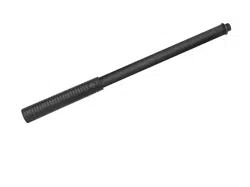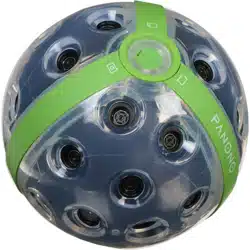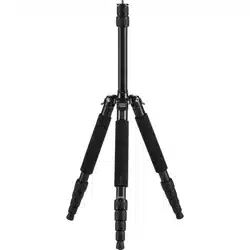

S T I C K
&
A DA P T E R
Q U I C K S TA RT G U I D E
& S A F E T Y
I N F O R M AT I O N
You can nd more information on support.panono.com
EN
USING THE PANONO
STICK TO TAKE PICTURES
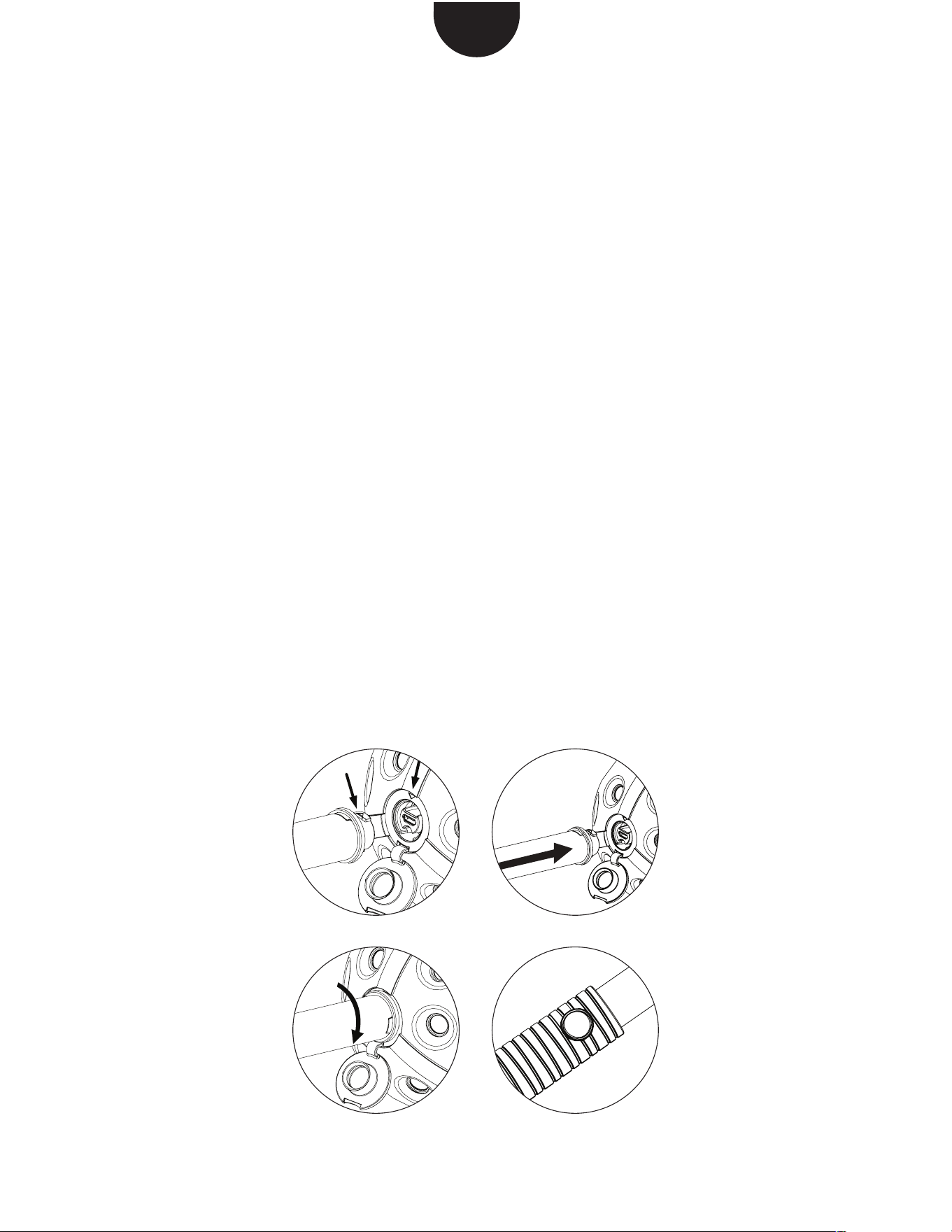
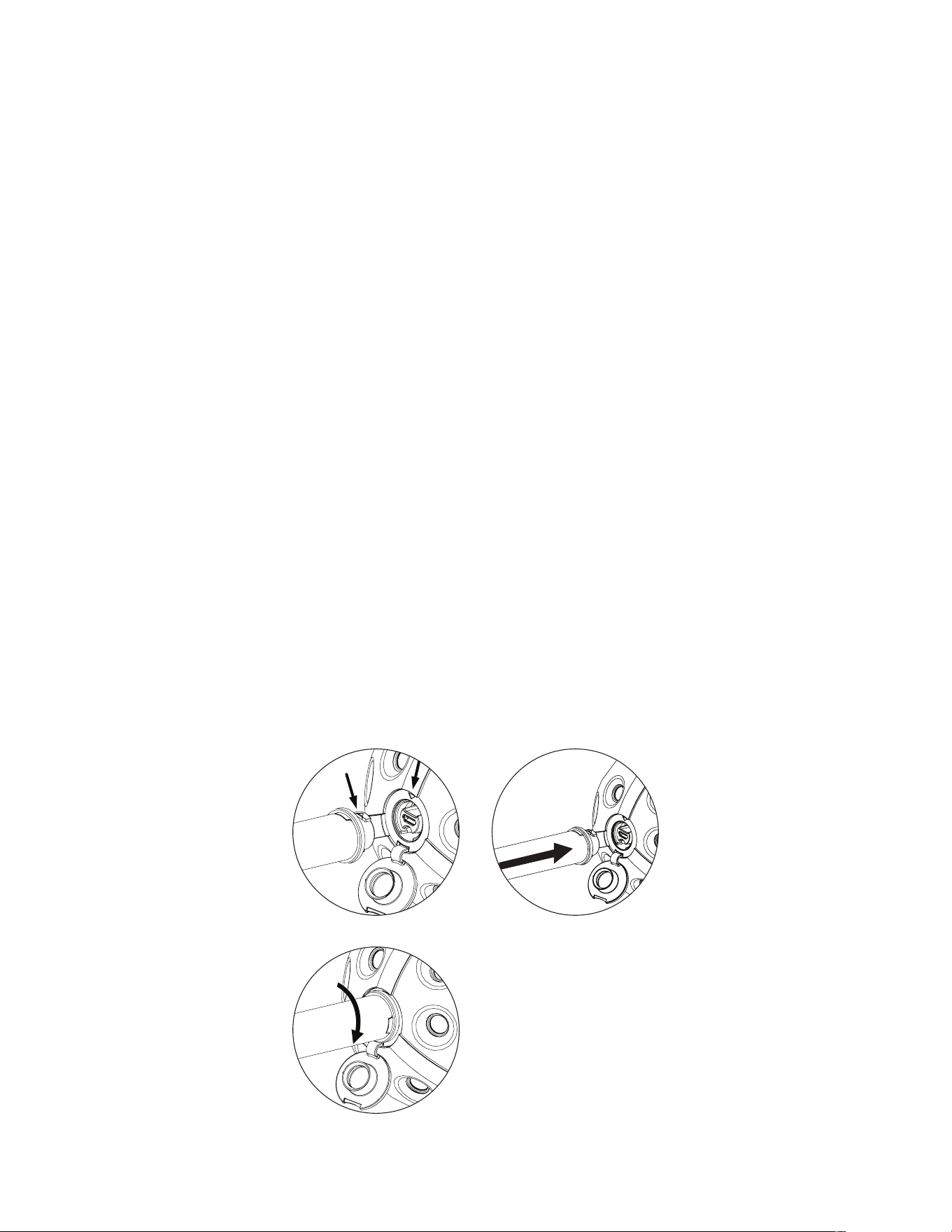
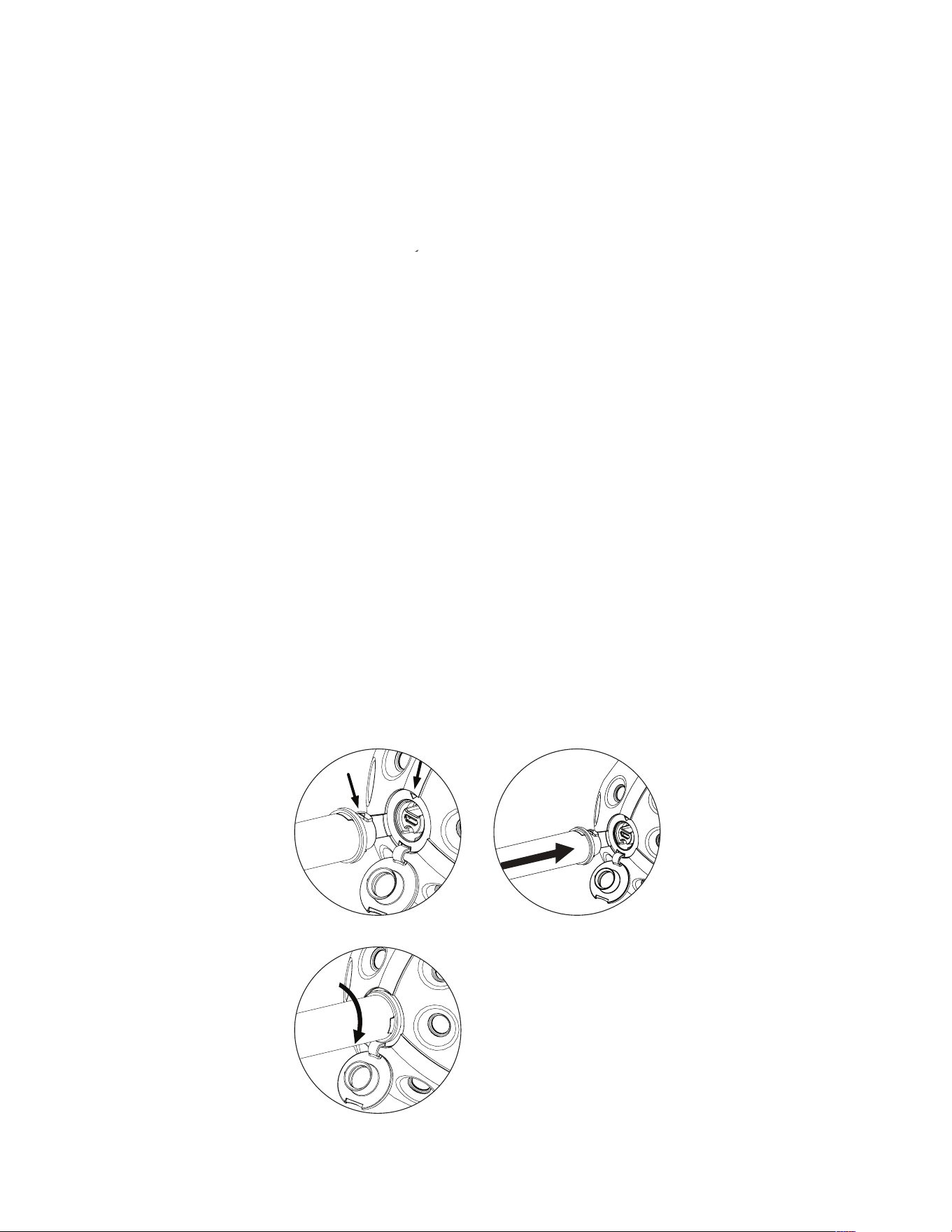
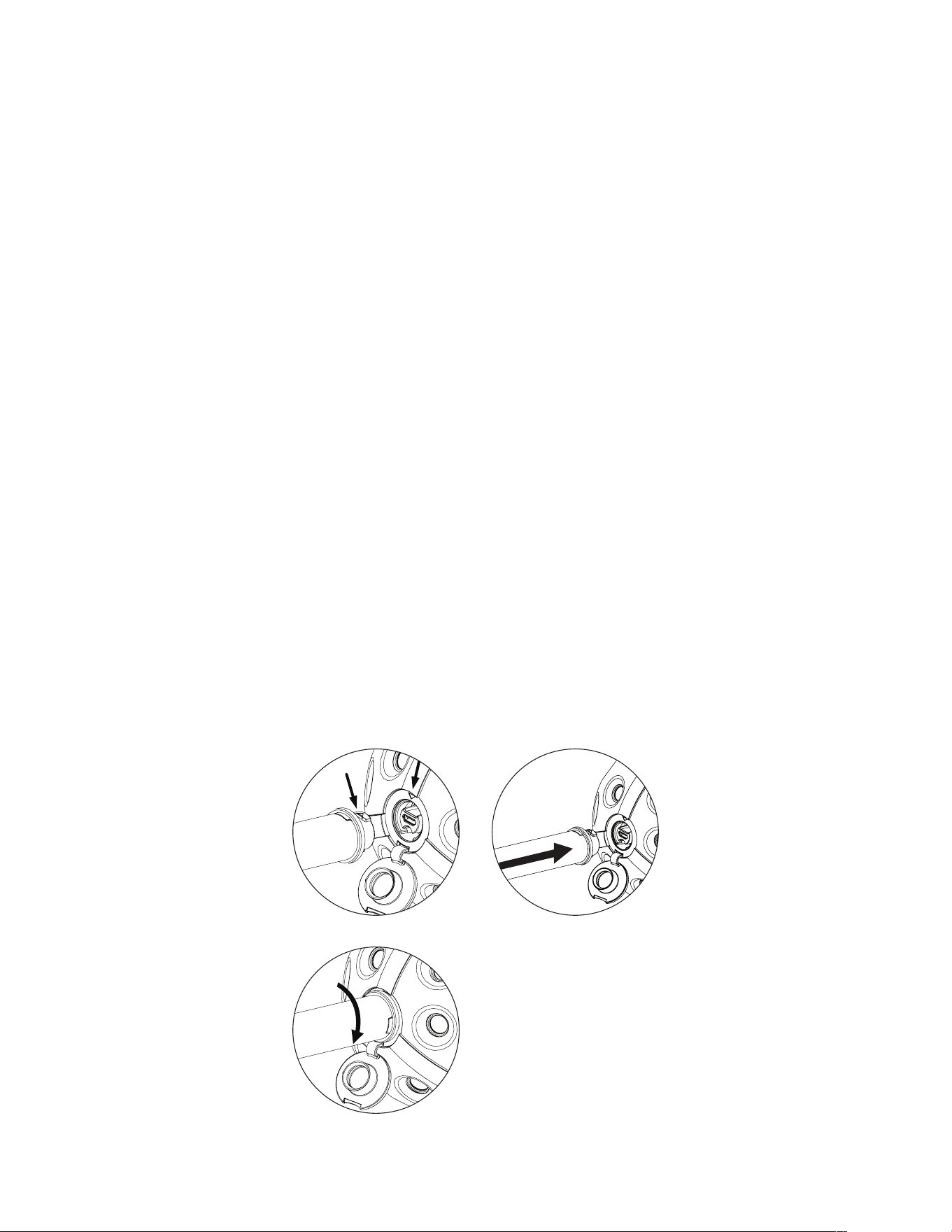
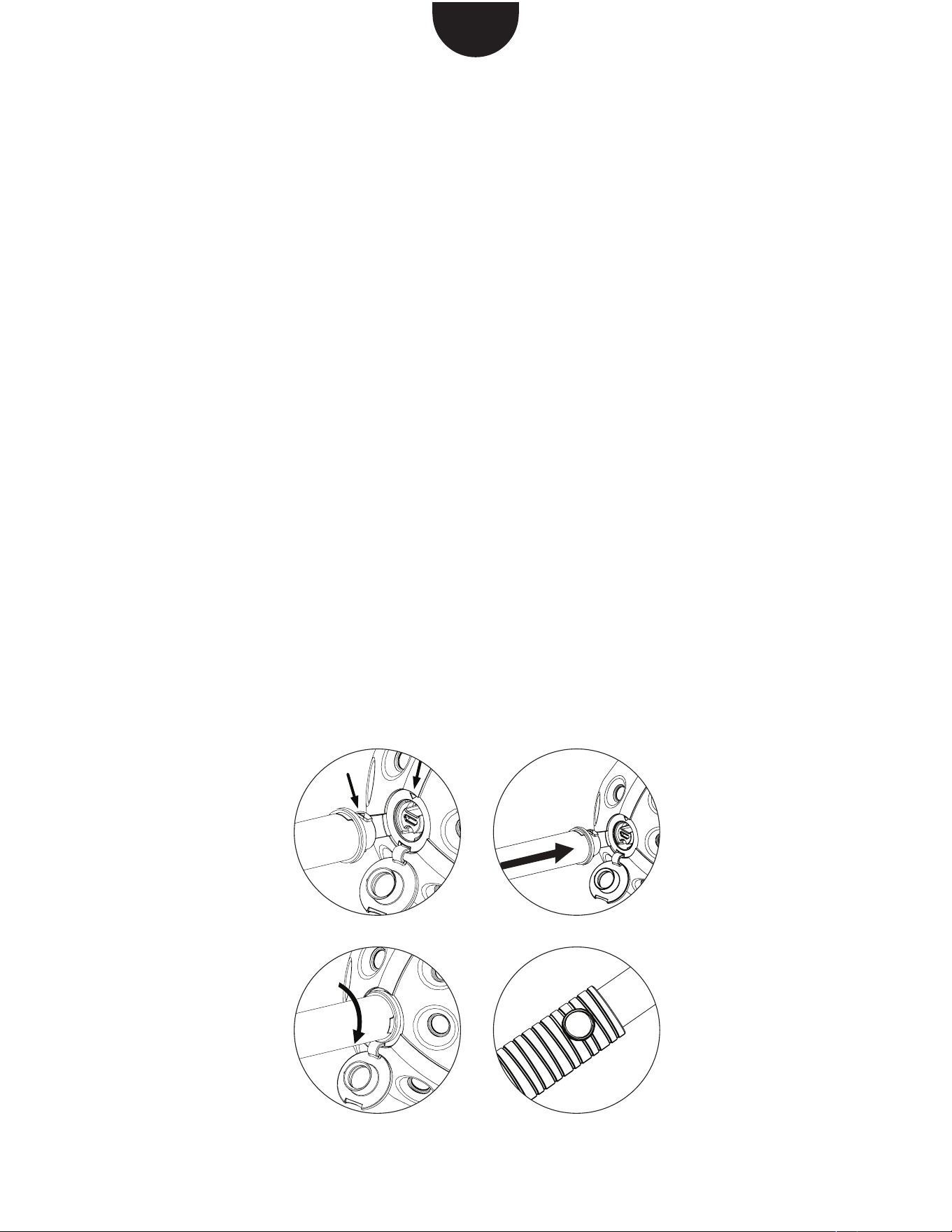
1. Open the camera cover and
position the stick onto the threa-
ding so that the markings face
each other.
2.-3. Push the stick into the threa-
ding and gently turn it clockwise.
4. Hold the stick in the air and
release the trigger by pressing
the button on the handle.
1.
4.3.
2.
You can nd more information on support.panono.com
USING THE TRIPOD TO
TAKE PICTURES
1. Attach the Panono Tripod Adap-
ter to the camera in the same
way as the Panono Stick. Then
tighten it on your tripod.
2. Connect your camera with the
Panono App.
3. Adjust to the desired picture
settings and press the trigger
button.
1.

You can nd more information on support.panono.com
SAFETY INFORMATION
FOR STICK/ADAPTER
• Do not use the stick/adapter with
anything other than the Panono
Camera.
• When using the stick, make
sure it is not possible to injure or
obstruct people or cause dama-
ge to any objects.
• Do not throw the Panono
Camera when the stick/adapter
is screwed in.
• Do not insert the stick/adapter
into orices.
• Screw the stick/adapter carefully
into the Panono Camera. Do not
apply excessive force.
• If you experience problems
screwing the stick/adapter into
the Panono Camera, please cont-
act Panono Support.
• Do not use the stick/adapter if it
is damaged.
�eitere �nformationen nden sie auf support.panono.com
AUFNAHME MIT DEM
PANONO STICK
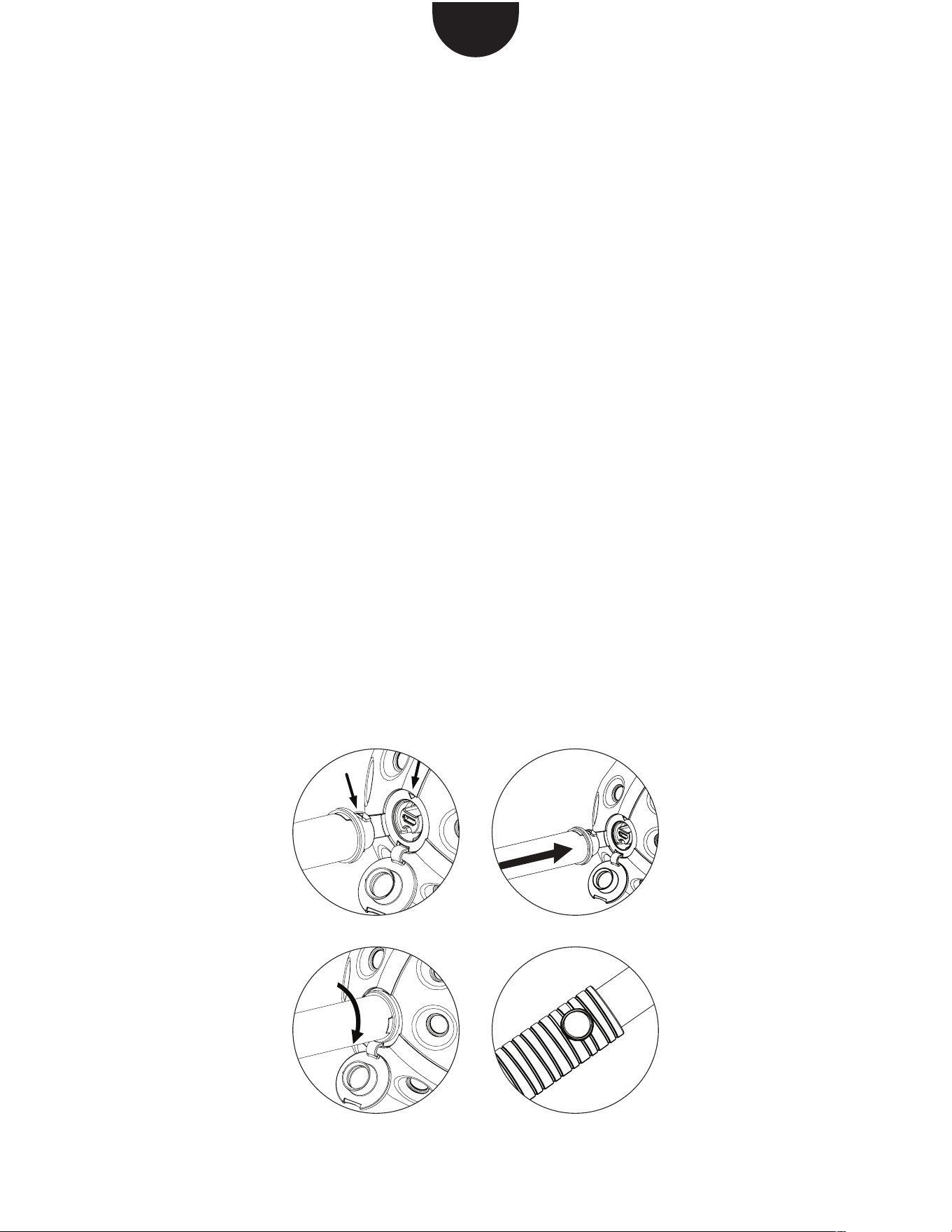
1. Öffnen Sie die Verschlusskappe
an der Kamera und setzen Sie
den Stick so auf das Gewinde,
dass die Markierungen aufeinan
der zeigen.
2.-3. Drücken Sie den Stick in das
Gewinde und drehen Sie ihn
behutsam im Uhrzeigersinn fest.
4. Halten Sie den Stick in die Höhe
und lösen Sie über den Knopf am
Griff aus.
DE
1.
4.3.
2.
�eitere �nformationen nden sie auf support.panono.com
AUFNAHME MIT DEM
STATIV
1. Montieren Sie den Panono Stati-
vadapter auf gleiche Weise wie
den Panono Stick an die Kamera
und befestigen Sie ihn dann auf
Ihrem Stativ.
2. Verbinden Sie Ihre Kamera mit
der Panono App.
3. Nehmen Sie die gewünschten
Aufnahmeeinstellungen vor und
klicken Sie auf die Auslösetaste.
1.

�eitere �nformationen nden sie auf support.panono.com
SICHERHEITSHINWEI-
SE STICK/ ADAPTER
• Stick/ Adapter ausschließlich für
die Panono Camera verwenden.
• Achten Sie bei der Verwendung
des Sticks darauf, keine Men-
schen zu verletzen oder zu
behindern, und keine Gegen-
stände zu beschädigen.
• Die Panono Camera nicht mit
eingeschraubtem Stick/ Adapter
werfen.
• Stick/ Adapter nicht in Körper-
öffnungen einführen.
• Stick/ Adapter vorsichtig in die
Panono Camera einschrauben.
Wenden Sie keine Gewalt an.
• Bei Problemen beim Einschrau-
ben in die Panono Camera
kontaktieren Sie bitte den
Panono Support.
• Nicht verwenden, wenn der
Stick/Adapter beschädigt ist.
Vous trouverez de plus amples informations sur support.panono.com
FR
PHOTO AVEC LE STICK
PANONO
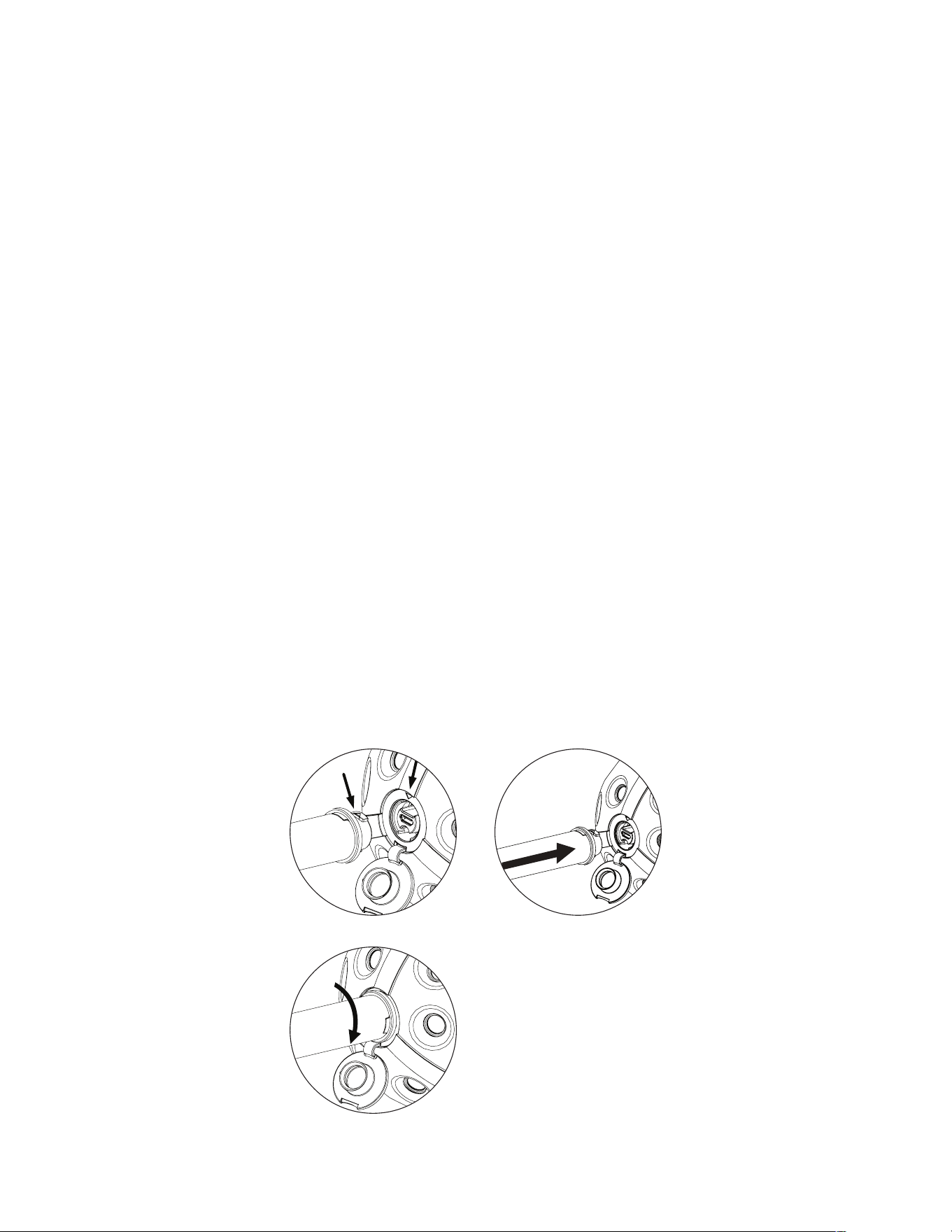
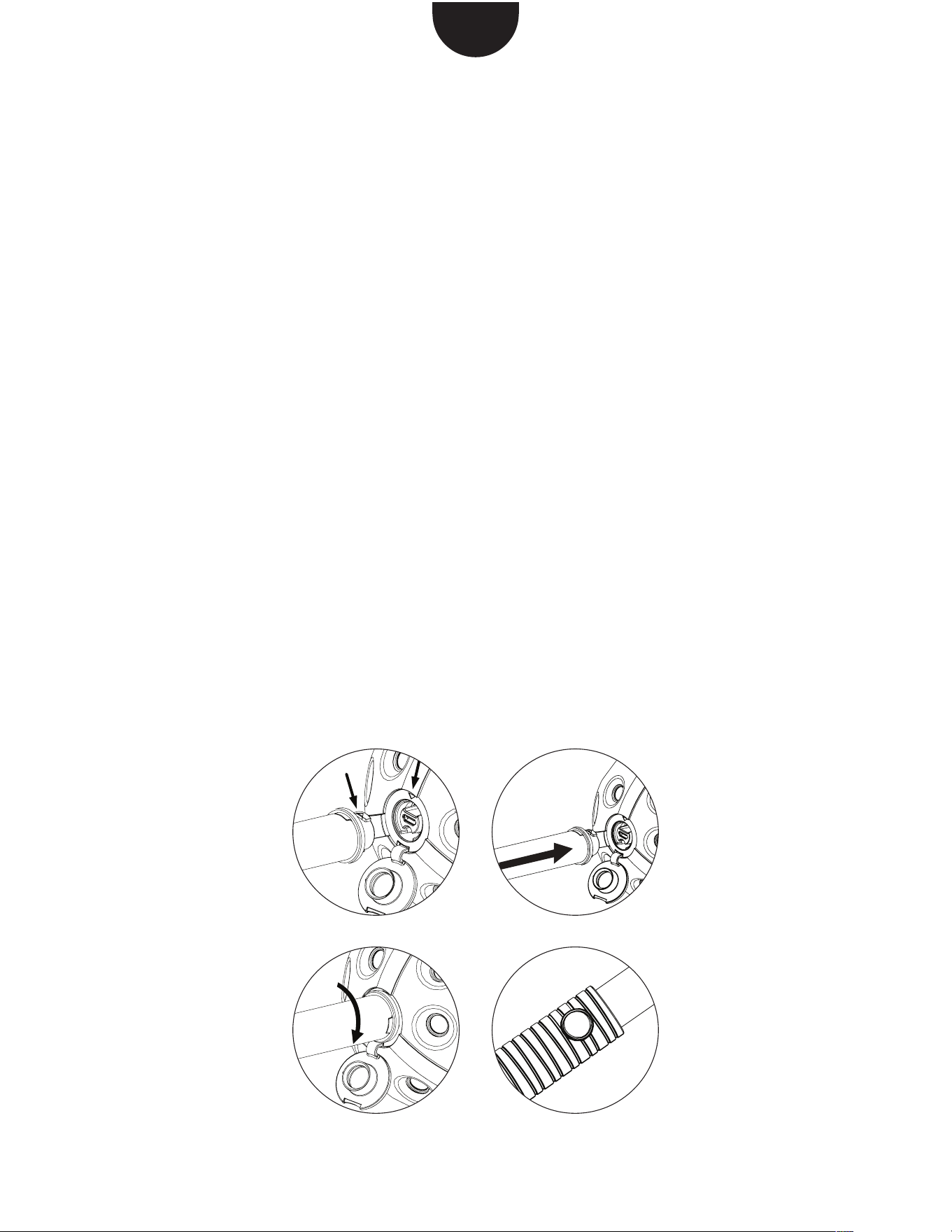
1. Ouvrez le couvercle sur l’appa-
reil photo et placez le stick face
au �eta�e de mani�re � ce �ue
�es mar�ua�es correspondent.
�.��. �ns�re� �e stic� dans �e �eta�e
et tournez-la avec précaution
dans le sens des aiguilles.
�. �aintene� �e stic� � �a �ertica�e
et ajustez-la avec le bouton situé
sur la poignée.
1.
4.3.
2.
Vous trouverez de plus amples informations sur support.panono.com
PHOTO AVEC LE
TRÉPIED
1. Fixez l’adaptateur pour trépied
�anono de �a m�me mani�re �ue
la tige Panono et raccordez-le
ensuite � �otre tr�pied.
�. �onnecte� ��apparei� p�oto �
l’application Panono.
3. Effectuez les réglages de prise
de vue souhaités et appuyez sur
le déclencheur.
1.

Vous trouverez de plus amples informations sur support.panono.com
CONSIGNES DE
SÉCURITÉ STICK/
ADAPTATEUR
• Utiliser le stick/l’adaptateur
uni�uement pour �e �anono
Camera.
• Lors de l’utilisation du stick, veil-
�er � ne pas ��esser ou �andica�
per autrui et � ne pas endom�
mager un objet.
• Ne pas lancer le Panono Camera
avec le stick/l’adaptateur.
• Ne pas introduire le stick/l’ad
aptateur dans �es orices corpo�
rels.
• Visser avec précaution le
stick/l’adaptateur sur le Panono
Camera. Ne pas forcer.
� �n cas de pro���me pour �isser
les accessoires sur le Panono
Camera, contacter le service de
support Panono.
• Ne pas utiliser le stick/l’adapta-
teur s’il est endommagé
Encontrará más información en support.panono.com
FOTOGRAFÍA CON EL
BASTÓN PANONO
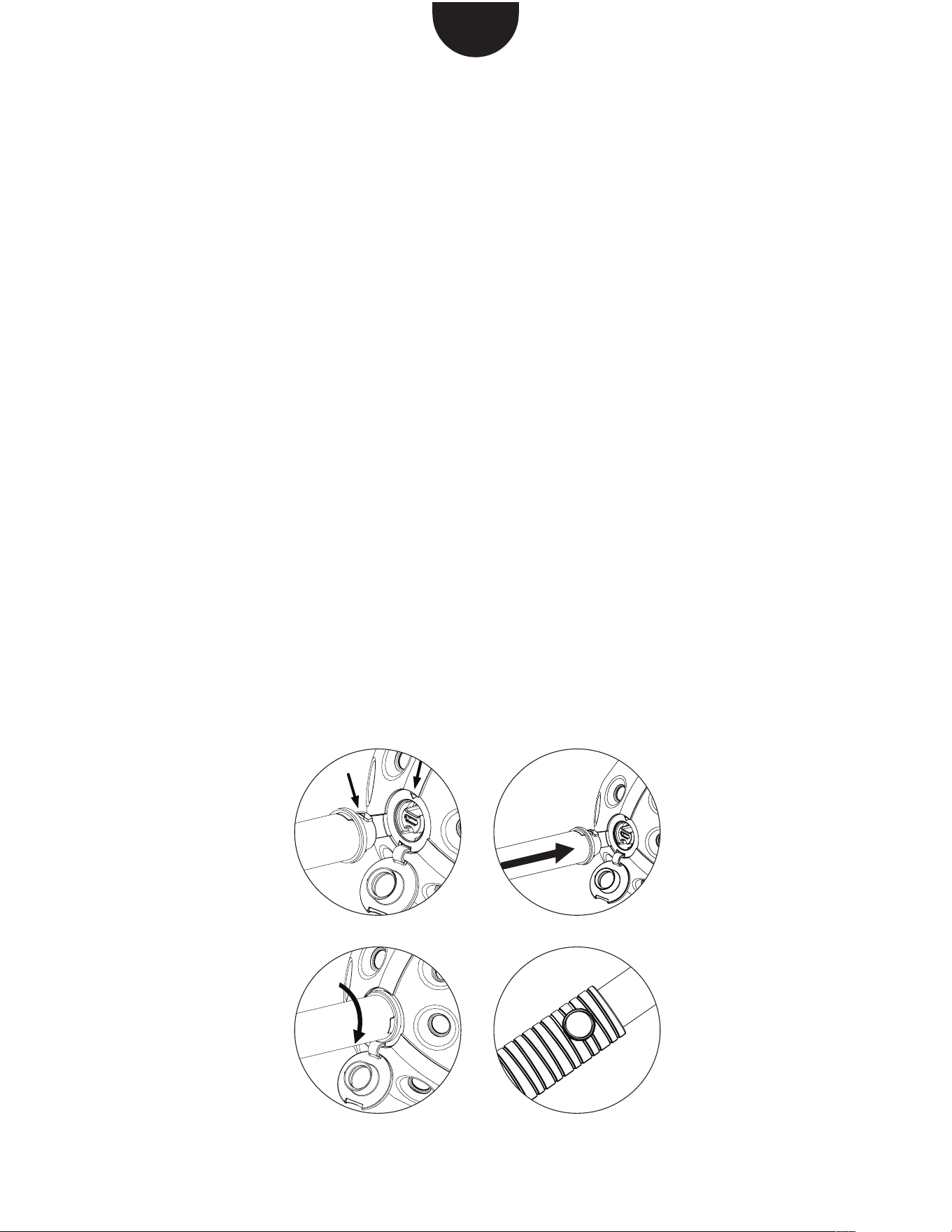
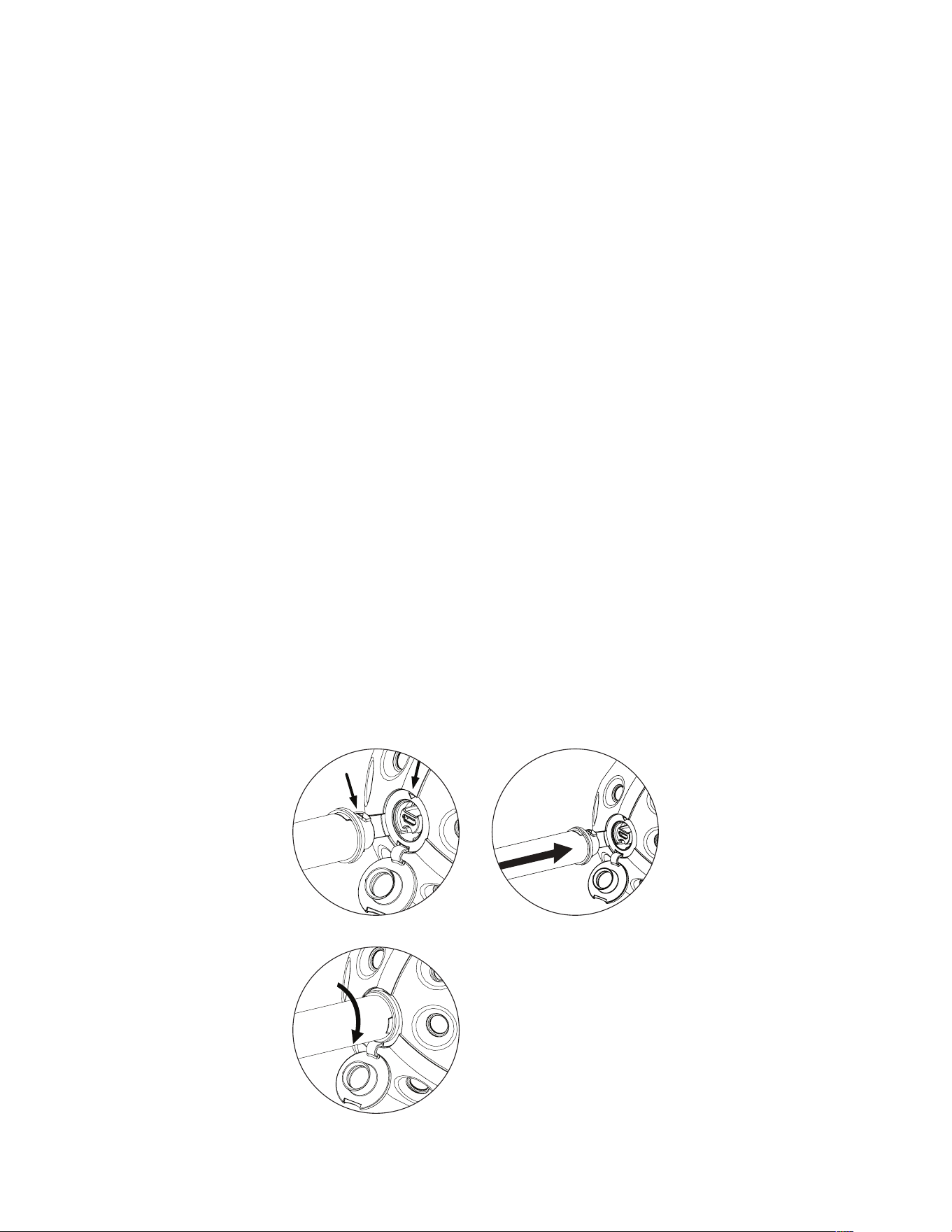
1. Abra la tapa protectora de la
c�mara � co�o�ue e� �ast�n en �a
rosca de forma �ue �as marcas
�ueden una so�re �a otra.
�.��. �resione e� �ast�n contra �a
rosca y atorníllelo en el sentido
de �as a�u�as de� re�o� �asta �ue
est� �o.
�. �osten�a e� �ast�n en a�to �
presione e� �ot�n u�icado en e�
mango para tomar una fotografía.
ES
1.
4.3.
2.
Encontrará más información en support.panono.com
FOTOGRAFÍA CON
TRÍPODE
1. Monte el adaptador del trípode
Panono en la cámara de la misma
forma �ue e� �ast�n �anono �
fíjelo luego al trípode.
2. Conecte su cámara con la app
Panono.
�. ��uste �a con�uraci�n �
accione e� �ot�n de disparo
presionando el mismo.
1.

Encontrará más información en support.panono.com
INSTRUCCIONES DE
SEGURIDAD PARA EL
BASTÓN/ADAPTADOR
• Tenga cuidado cuando utilice el
�ast�n para e�itar �esionar u
obstaculizar a otras personas,
o dañar objetos.
• No lance la cámara Panono
mientras e� �ast�n�adaptador se
encuentre atornillado a la misma.
� �o introdu�ca e� �ast�n�adap�
tador en ningún orificio corporal.
• En caso de tener problemas
para atorni��ar e� �ast�n a �a
c�mara �anono� p�n�ase en
contacto con el Servicio Técnico
de Panono.
� �o uti�ice e� �ast�n�adaptador si
este está estropeado.
更多信息请点击 support.panono.com
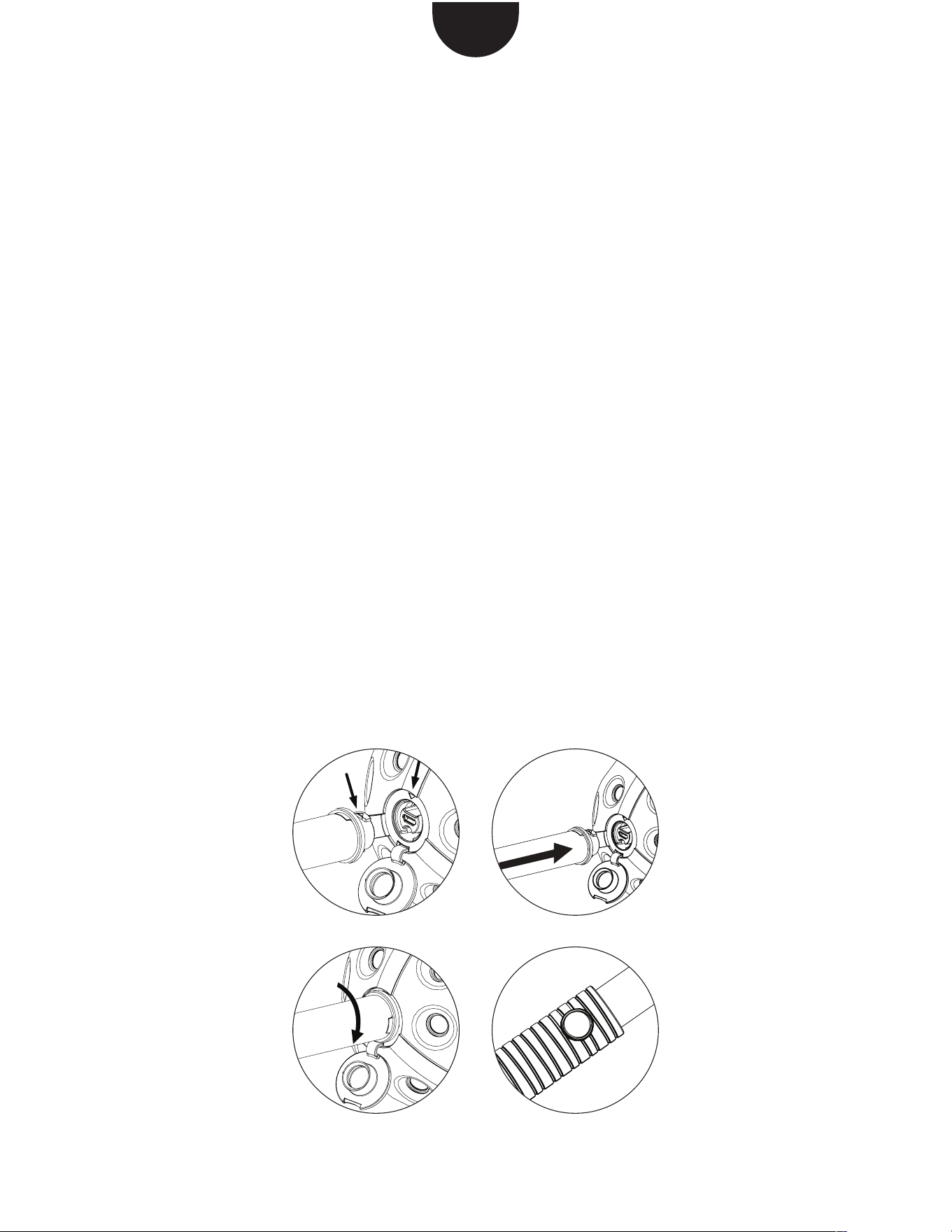
��PANONO����
1. �������������
�������������
��
2.-3. �������������
�����
4. �������������
��������
CH
1.
4.3.
2.
更多信息请点击 support.panono.com
�������
�����PANONO������
��PANONO�������
����������
��������
��������PANONO���
�����
������������点击�
����
1.

更多信息请点击 support.panono.com
����
��������
• ����������
PANONO���
• �������请�����
�������������
�����
• ��������������
�PANONO���
• ��������������
������
• �������������
PANONO����
�������
• ���PANONO�����
��������请��
PANONO�������
• ������������
�请����
������support.panono.com ��������
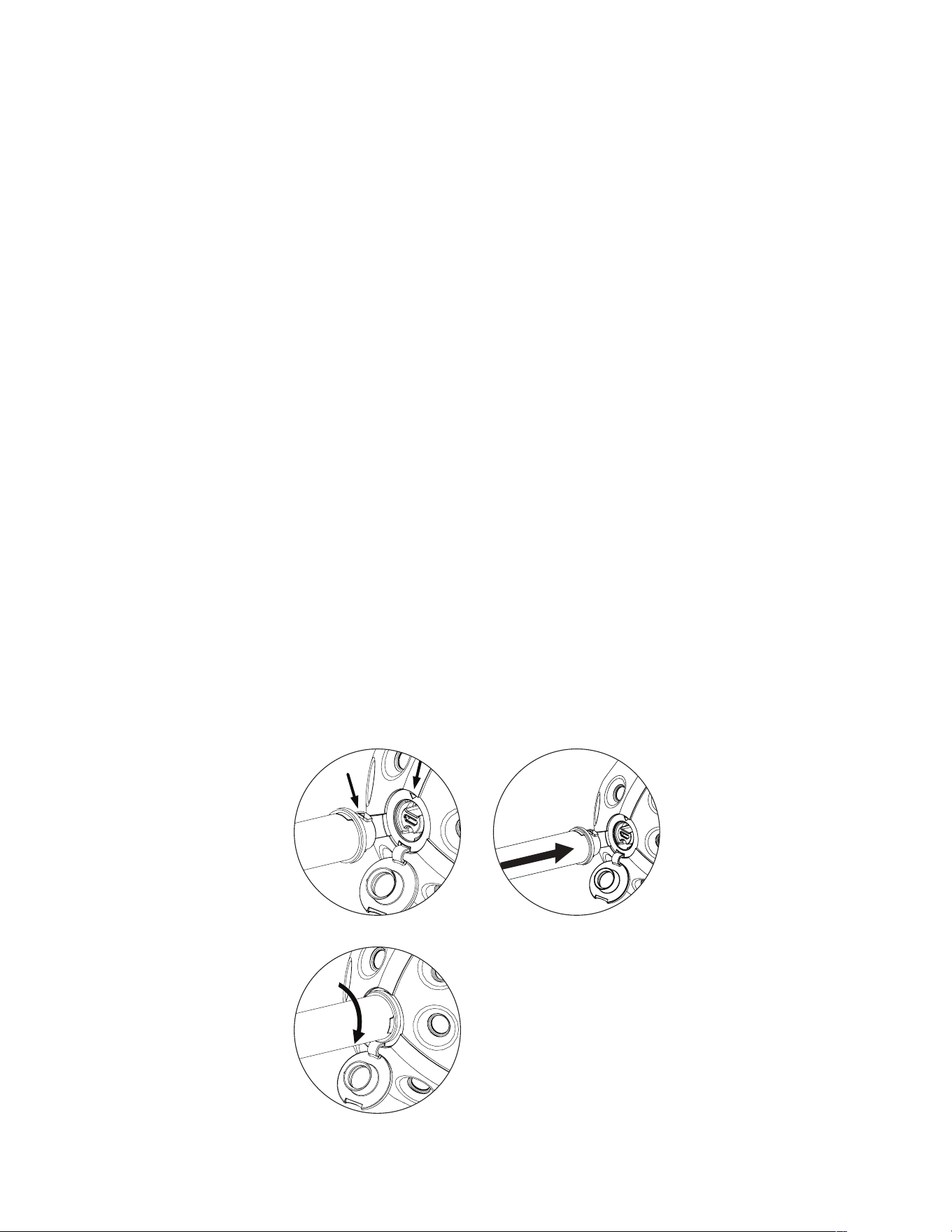
スティックを使って撮影
1. カメラの密閉式キャップを開
き、スティックをマークのあ
る箇所に装着して下さい。
2.-3.スティックをネジ穴に押し
込み、時計回りにゆっくりと
回して固定して下さい。
4.スティックを持ち上げたま
ま、取っ手の部分のシャッタ
ーを押して下さい。
JP
1.
4.3.
2.
������support.panono.com ��������
三脚を使って撮影
1. スティックの場合と同じよう
に、PANONO三脚アダプターを
使って三脚をカメラに取り
付け、しっかり装着されているこ
とを確認して下さい。
2.カメラをPANONOアプリに接
続して下さい。
3. ご希望の撮影設定を選び、シャ
ッターを押して下さい。
1.

������support.panono.com ��������
スティック/アダプター
の使用上の注意
• スティック/アダプターは
PANONO CAMERAにのみ使用
できます。
• スティックの使用の際は、人を
傷つけたり妨害したり、物を損
傷しないよう注意して下さい。
• PANONO CAMERAはスティッ
ク/アダプターを取り付けたま
ま投げないで下さい。
• スティック/アダプターは開口
部に挿入しないで下さい。
• スティック/アダプターは慎重
にPANONO CAMERAに取り付
けて下さい。無理やり取り付け
ないで下さい。
• PANONO CAMERAに装着す
る際に問題がある場合、
PANONOサポートに連絡して
下さい。
• スティック/アダプターが損傷
している場合、それらを使用し
ないで下さい。

PANONO GMBH
FRANZÖSISCHE STRASSE 9
10117 BERLIN
+49 (0)30 220 128 990
SUPPORT@PANONO.COM
WWW.PANONO.COM
MVP15, PAN000411, R01.03