
INSTANT POT
®
PRO
MULTI-COOKER
TM

2 | [email protected] | 0393 655 100
TABLE OF CONTENTS
IMPORTANT SAFEGUARDS 3
Special cord set instructions 8
Product specifi cations 8
Product, parts and accessories 9
Get started 11
Initial set up 11
Initial test run (water test) 12
Pressure Cooking 101 14
Control panel 18
Status messages 20
Settings 21
Pressure control features 23
Cooking 28
Smart Programme overview 29
Pressure Cook and Rice 31
Steam 33
Sauté 35
Deglazing 36
Slow Cook 37
Sous Vide 38
Yogurt 43
Bake 46
Keep Warm 47
Using Favourite Programmes 48
Care, cleaning and storage 49
Troubleshooting 53
Warranty 56
Contact 58

WARNING
Read this manual carefully and completely and retain for future reference. Failure to
adhere to safety instructions may result in serious injury or damage.
instantpot.com.au | 3
IMPORTANT
SAFEGUARDS
At Instant Brands
™
your safety always comes fi rst. The Instant Pot
®
Pro was
designed with your safety in mind.
As always, be cautious when using electrical appliances and follow basic safety
precautions.
1. READ ALL INSTRUCTIONS, SAFEGUARDS AND WARNINGS BEFORE USE.
FAILURE TO FOLLOW THESE SAFEGUARDS AND INSTRUCTIONS MAY
RESULT IN INJURY AND/OR PROPERTY DAMAGE.
2. Use only the Instant Pot Pro lid with the Instant Pot Pro multicooker base.
Using any other multicooker lids may cause injury and/or damage.
3. For household use only. Not for commercial use. Do not use the appliance for
anything other than its intended use.
4. For countertop use only. Always operate the appliance on a stable, non-
combustible, level surface.
• Do not place on anything that may block the vents on the bottom of
the appliance.
• Do not place on a hot stove.
5. Heat from an external source will damage the appliance.
• DO NOT place the appliance on or close to a hot gas or electric burner,
or a heated oven.
• DO NOT use the appliance near water or fl ame.
• DO NOT use outdoors. Keep out of direct sunlight.
6. DO NOT touch the appliance’s hot surfaces. Only use the side handles for
carrying or moving.
• DO NOT move the appliance when it is under pressure.
• DO NOT touch accessories during or immediately after cooking.
• DO NOT touch the metal portion of the lid when the appliance is in
operation; this could result in injury.
• Always use proper hand protection when removing hot accessories,
and to handle the hot inner pot.
• Always place hot accessories on a heat-resistant surface or cooking plate.
WARNING
Read this manual carefully and completely and retain for future reference. Failure to
adhere to safety instructions may result in serious injury or damage.
4 | [email protected] | 0393 655 100
IMPORTANT
SAFEGUARDS
7. The removable inner pot can be extremely heavy when full of ingredients.
Care should be taken when lifting the inner pot from the multicooker base to
avoid burn injury.
• Extreme caution must be used when the inner pot contains hot food, hot
oil or other hot liquids.
• Do not move the appliance while it is in use and use extreme caution
when disposing of hot grease.
8.
CAUTION
Overfi lling may cause a risk of clogging the steam release pipe
and developing excess pressure.
• DO NOT fi ll over the Max PC Fill line as indicated on the inner pot.
• DO NOT fi ll the inner pot over the Half Fill line (as indicated on the inner
pot) when cooking foods that expand during cooking such as rice or dried
vegetables.
9.
WARNING
This appliance cooks under pressure. Any pressure in the
appliance can be hazardous. Allow the appliance to depressurise naturally or
release all excess pressure before opening. Inappropriate use may result in
burns, injury and/or property damage.
• Make sure the appliance is properly closed before operating. Refer to
Pressure control features: multicooker lid.
• DO NOT cover or obstruct the steam release valve and/or fl oat valve with
cloth or other objects.
• DO NOT attempt to open the appliance until it has depressurised, and all
internal pressure has been released. Attempting to open the appliance
while it is still pressurised may lead to sudden release of hot contents and
may cause burns or other injuries.
• DO NOT place your face, hands or exposed skin over the steam release
valve or fl oat valve when the appliance is in operation or has residual
pressure.
• DO NOT lean over the appliance when removing the lid, as heat and
steam escape when the lid is removed.
• Turn the appliance off if steam escapes from the steam release valve
and/or fl oat valve in a steady stream during Pre-heating or Cooking,

WARNING
Read this manual carefully and completely and retain for future reference. Failure to
adhere to safety instructions may result in serious injury or damage.
instantpot.com.au | 5
IMPORTANT
SAFEGUARDS
for longer than 3 minutes.
• If steam escapes from the sides of the lid, turn the appliance off and
make sure the sealing ring is properly installed. Refer to Pressure
control features: sealing ring.
• DO NOT attempt to force the lid off the Instant Pot multicooker base.
Refer to Releasing pressure.
10. When cooking meat with skin (e.g. sausage with casing), the skin can swell
when heated. Do not pierce the skin while it is swollen; this could result in
scalding injury.
11. When pressure cooking food with a doughy or thick texture, or a high fat/oil
content, contents may splatter when opening the lid. Follow recipe instructions
for pressure release method. Refer to Releasing pressure.
12. Oversized foods and/or metal utensils must not be inserted into the inner pot
as they may cause risk of fi re and/or personal injury.
13. Proper maintenance is recommended before and after each use:
• Check the steam release valve, steam release pipe, anti-block shield and
fl oat valve for clogging;
• Before inserting the inner pot into the multicooker base, make sure both
parts are dry and free of food debris;
• Let the appliance cool to room temperature before cleaning or storage.
14. Do not use this appliance for deep frying or pressure frying with oil.
15. To disconnect, touch Cancel, then remove plug from power source. Always
unplug when not in use, as well as before adding or removing parts or
accessories, and before cleaning. To unplug, grasp the plug and pull from the
outlet. Never pull from the power cord.
16. Regularly inspect the appliance and power cord. Do not operate the appliance
if the power cord or plug is damaged, or after the appliance malfunctions or is
dropped or damaged in any manner. For assistance, contact Customer Care by
email at support@instantpot.com.au or by phone at 1800 251 643 or (02)
9317 1000.
17. Spilled food can cause serious burns. A short power-supply cord is provided to
reduce the hazards resulting from grabbing, entanglement and tripping.

WARNING
Read this manual carefully and completely and retain for future reference. Failure to
adhere to safety instructions may result in serious injury or damage.
6 | [email protected] | 0393 655 100
IMPORTANT
SAFEGUARDS
• DO NOT let the power cord hang over edges of tables or counters, or
touch hot surfaces or open fl ame, including the stovetop.
• DO NOT use below-counter power outlets, and never use with an
extension cord.
• Keep the appliance and cord away from children.
18. Do not use any accessories or attachments not authorised by Instant Brands
LLC. The use of parts, accessories or attachments not recommended by the
manufacturer may cause a risk of injury, fi re or electric shock.
• To reduce the risk of pressure leakage, cook only in an authorised
stainless steel Instant Pot inner pot made for this model.
• DO NOT use the appliance without the removable inner pot installed.
• To prevent personal injury and damage to the appliance, only replace the
sealing ring with an authorised Instant Pot sealing ring.
19. DO NOT attempt to repair, replace or modify components of the appliance, as
this may cause electric shock, fi re or injury, and will void the warranty.
20. Do not tamper with any of the safety mechanisms, as this may result in
injury or property damage.
21. The multicooker base contains electrical components. To avoid electrical
shock:
• DO NOT put liquid of any kind into multicooker base;
• DO NOT immerse power cord, plug or the appliance in water or other
liquid;
• DO NOT rinse the appliance under tap.
22. Do not use the appliance in electrical systems other than
220-240V~ 50-60Hz. Do not use with power converters or adapters.
23. This appliance is NOT to be used by children or by persons with reduced
physical, sensory or mental capabilities. Close supervision is necessary when
any appliance is used near children and these individuals. Children should
not play with this appliance.
24. Do not leave the appliance unattended while in use. Never connect this
appliance to an external timer switch or separate remote-control system.
WARNING
Read this manual carefully and completely and retain for future reference. Failure to
adhere to safety instructions may result in serious injury or damage.
instantpot.com.au | 7
IMPORTANT
SAFEGUARDS
25. Do not store any materials in the multicooker base or inner pot when not
in use.
26. Do not place any combustible materials in the multicooker base or inner pot,
such as paper, cardboard, plastic, Styrofoam or wood.
27. Do not use the included accessories in a microwave, toaster oven,
or outdoor grill.
SAVE THESE INSTRUCTIONS
WARNING
To avoid injury, read and understand instruction manual before using this machine.
WARNING
Electrical shock hazard. Use grounded outlet only.
• DO NOT remove ground.
• DO NOT use an adapter.
• DO NOT use an extension cord.
Failure to follow instructions can cause electrical shock and/or serious injury.
WARNING
THE FAILURE TO FOLLOW ANY OF THE IMPORTANT SAFEGUARDS AND THE
IMPORTANT INSTRUCTIONS FOR SAFE USE IS A MISUSE OF YOUR APPLIANCE THAT
CAN VOID YOUR WARRANTY AND CREATE THE RISK OF SERIOUS INJURY.
WARNING
Read this manual carefully and completely and retain for future reference. Failure to
adhere to safety instructions may result in serious injury or damage.
8 | [email protected] | 0393 655 100
IMPORTANT
SAFEGUARDS
SPECIAL CORD SET INSTRUCTIONS
Per safety requirement, a short power supply cord is provided to reduce the hazards
resulting from entanglement and tripping.
This appliance has a 3-prong grounding plug. To reduce the risk of electric shock, plug the
power cord into a grounded electrical outlet that is easily accessible.
PRODUCT SPECIFICATIONS
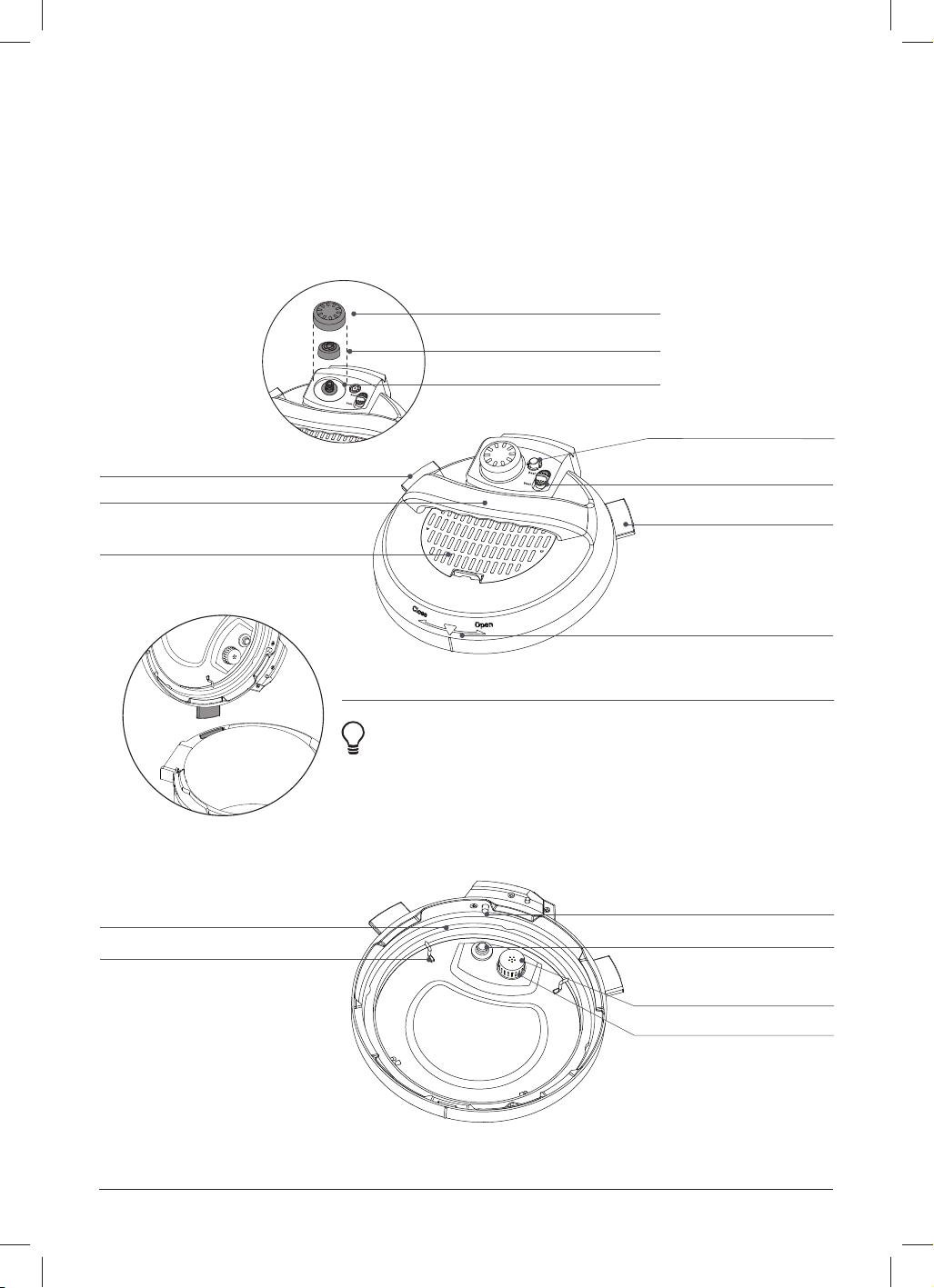
Model: Pro 60 1000-1200W 220-240V~ 50-60Hz 5.7 Litres 5.9 kg cm: 33.1 x 32.2 x 32.5
Model: Pro 80 1200-1400W 220-240V~ 50-60Hz 8 Litres 7.18 kg cm: 36.5 x 35.3 x 36.0
Find your model name and serial number
Find the model name on the silver rating label on the back of the multicooker base, near
the power cord. The serial number is located on a white sticker beside the rating label.
instantpot.com.au | 9
PRODUCT, PARTS AND ACCESSORIES
Before using your new Instant Pot Pro, make sure everything is accounted for, then see
Care, cleaning and storage: Removing and installing parts to fi nd out how everything
fi ts together.
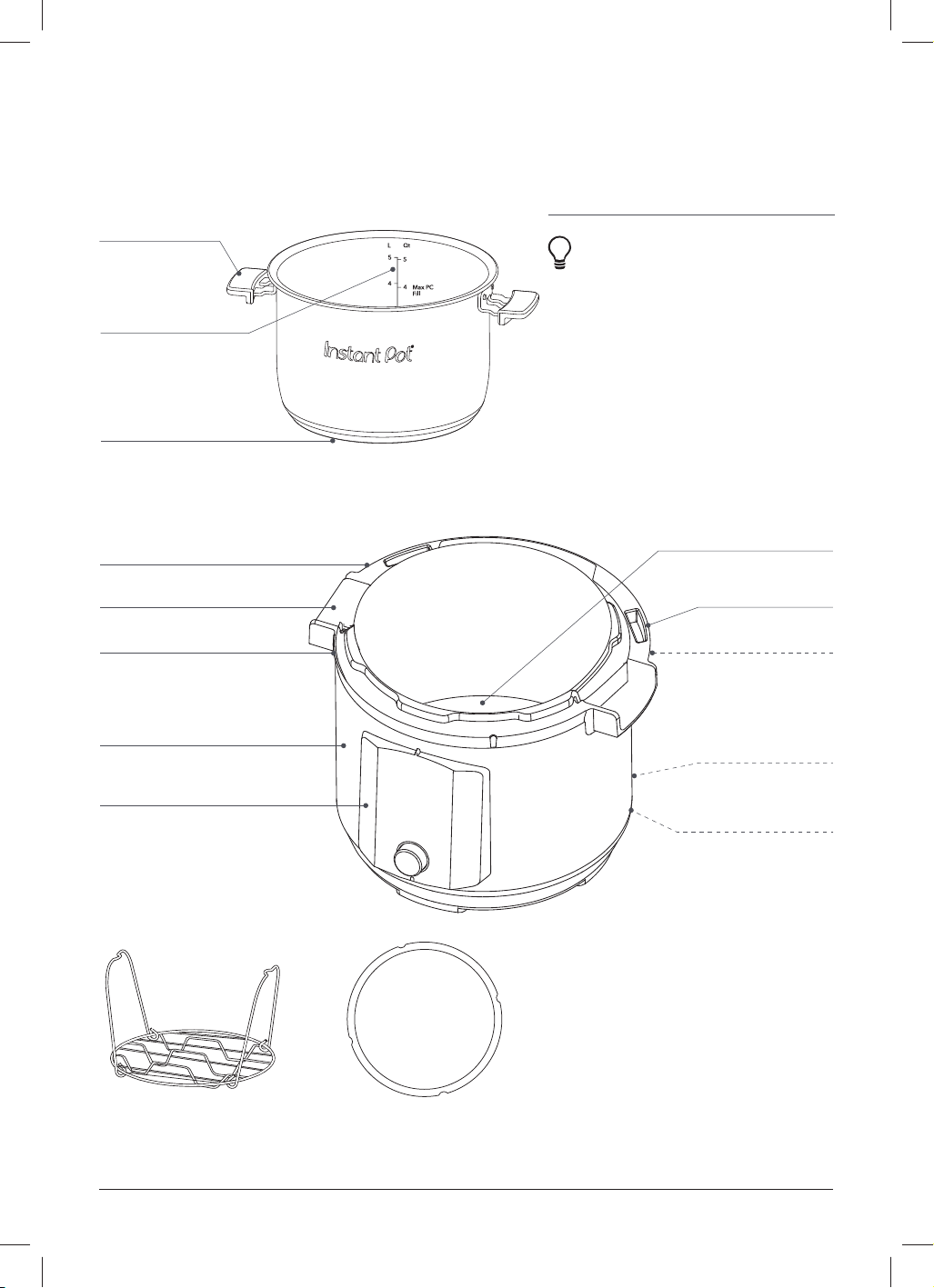
Top of multicooker lid
Bottom of multicooker lid
Instant Tip: Stand the multicooker lid up to keep
it off your countertop. Insert the left or right lid
fin into corresponding lid holders on the base to
stand it up and save some space!
Illustrations in this document are for reference only and may differ from the actual product.
Always refer to the actual product.
Steam release
assembly
Float valve
Steam release cover
Steam release valve
Steam release pipe
Lid fi n
Lid position markers
Lid handle
Lid fi n
QuickCool™ protective cover
Sealing ring rack
Silicone cap
(bottom of float valve)
Anti-block shield
Steam release pipe
(beneath the anti-block shield)
Locking pin
Sealing ring
Quick release switch
10 | [email protected] | 0393 655 100
Lid holder
Condensation collector
(rear)
Cord holder
(rear)
Power cord
(rear)
Outer pot
Condensation rim
Control panel
Stainless-steel exterior
Heating element
(interior)
Multicooker base handle
PRODUCT, PARTS AND ACCESSORIES
Instant Tip: Stove top and
oven-friendly up to 232°C!
The inner pot features
a cookware-grade
impact bonded tri-ply
bottom, which sounds
complicated, but really
just means you can use
it just about anywhere —
from the multicooker base
to any electric, ceramic,
gas or induction cooktop.
Illustrations in this document are for reference only and may differ from the actual product.
Always refer to the actual product.
Inner pot
Multicooker base
ACCESSORIES
Steam rack Extra sealing ring
Fill line indicators
Easy Grip silicone
handles
Flat bottom

instantpot.com.au | 11
GET STARTED
WARNING
Read the Important
safeguards before using the
appliance. Failure to read and
follow those instructions for
safe use may result in damage
to the appliance, property
damage or personal injury.
Do not place the
appliance on a stovetop
or upon another
appliance. Heat from
an external source will
damage the appliance.
Do not place anything on
top of the appliance, and
do not cover or block the
steam release valve or anti-
block shield, located on the
appliance lid to avoid risk
of injury and/or property
damage.
INITIAL SET UP
01 Pull that Instant Pot Pro out of the box!
02 Remove the packaging material and accessories from in and around the multicooker
and make sure all the parts are accounted for. See Product, parts and accessories
for a full parts breakdown.
Make sure to check under the inner pot!
03 Wash the inner pot in a dishwasher or with hot water and dish soap. Rinse it well with
warm, clear water and use a soft cloth to thoroughly dry the outside of the inner pot.
04 Wipe the heating element with a soft, dry cloth to make sure there are no stray
packaging particles left in the multicooker base.
Don’t remove the safety warning stickers from the lid (unless specifi ed on the
sticker!) or the labels from the back of the multicooker base.
05 You may be tempted to put the Pro on your stovetop — but don’t do it! Place the
multicooker base on a stable, level surface, away from combustible material and
external heat sources.
Is something missing or damaged?
Get in touch with Customer Care by email at support@instantpot.com.au or by phone at
1800 251 643 or (02) 9317 1000.
Feeling keen?
• While you’re doing the Initial test run (water test), read over Pressure cooking 101
to fi nd out how the magic happens, and read through Pressure control features for an
in-depth look.

12 | [email protected] | 0393 655 100
GET STARTED
INITIAL TEST RUN (WATER TEST)
Do you have to do the water test? No — but getting to know the ins and outs of your new
Pro prepares you for success in the kitchen! Take a few minutes to get to know how this
tireless kitchen hero works.
Stage 1: Setting up the Pro for pressure
cooking
01 Remove the inner pot from the
multicooker base and fi ll it to the fi rst
line (1) with water.
02 Insert the inner pot into the
multicooker base.
03 Connect the power cord to a 220-
240V power source.
The display shows OFF.
04 Place and close the lid as described
in Pressure control features:
Multicooker lid.
The lid automatically seals for
pressure cooking.
Stage 2: “Cooking” (…but not really,
this is just a test!)
01 Touch Pressure Cook.
02 When Custom fl ashes, press the dial
to select it and go to the next fi eld.
03 When the pressure level fl ashes, press
the dial to select High pressure and go
to the next fi eld.
04 When the time fl ashes, turn the dial
to adjust the cook time to 5 minutes
(00:05).
Press the dial to confi rm the change
and go to the next fi eld.
Customisations are saved to the
Smart Programme when cooking
begins.
05 When Reminder fl ashes, turn the
dial to toggle between vent reminder
options. Select Off and press the dial
to confi rm. See Control panel for
more information.
06 Select Off and press the dial to
confi rm.
07 Touch Start to begin.
The display shows On and the cooking
progress bar shows Pre-heating.
Keep Warm turns on automatically
after some Smart Programmes fi nish.
Touch Keep Warm to turn the setting
off for this test.
Stage 3: Releasing pressure
01 When Cooking fi nishes, the display
shows End.
02 If you have set a 5 or 10 minute vent
reminder, the reminder timer begins
to count down.
03 Follow instructions for a Quick Release
in Releasing pressure: Venting
methods.
04 Wait for the fl oat valve to drop, then
carefully open and remove the lid
as described in Pressure control
features: Multicooker lid.
05 Using proper hand protection, remove
the inner pot from the multicooker
base, discard the water and
thoroughly dry the inner pot.
That’s it! You’re good to go :)
Instant tip: While the multicooker does
its thing, read Pressure cooking 101 to
find out how the magic happens.

instantpot.com.au | 13
DANGER
DO NOT attempt to remove the lid while the fl oat valve is up and NEVER
attempt to force the lid open. Contents are under extreme pressure. Float valve must
be down before attempting to remove the lid. Failure to follow these instructions may
result in serious personal injury and/or property damage.
CAUTION
Pressurised steam releases through the top of the steam release valve. Keep exposed
skin away from the steam release valve to avoid burn injury.
CAUTION
The inner pot will be hot after cooking. Always use appropriate heat protection when
handling a hot inner pot to avoid burn injury.

14 | [email protected] | 0393 655 100
PRESSURE COOKING 101
Pressure cooking uses steam to raise the boiling point of water above 100ºC.
These high temperatures allow you to cook some foods way faster than normal.
Behind the magic curtain
When pressure cooking, the Instant Pot goes through 3 stages.
Pre-heating
What you see What you don’t see Tips
The cooking
pr
ogress bar shows
Pre-heating.
The display
shows On.
While the multicooker
pre-heats, it vaporises
liquid to create steam.
Once enough steam has
built up, the fl oat valve
pops up and locks the lid
in place.
The time it takes the multicooker
to pressurise depends on things
like food and liquid temperature
and volume.
Frozen foods have the longest pre-
heating time. For the fastest results,
thaw your food before cooking it.
Cooking
What you see What you don’t see Tips
The cooking progress
b
ar moves over to
Cooking.
The display switches
to the cooking
countdown timer.
When the Instant Pot reaches
the required pressure level,
cooking begins.
The multicooker automatically
maintains High or Low
pressure throughout cooking.
A higher pressure means
higher temperature.
Smart Programme settings
(e.g., cooking time,
pressure level, etc.) can
be adjusted at any time
during cooking.
Depressurisation
What you see What you don’t see Tips
If K
eep Warm is on
after cooking, the
cooking progress bar
moves over to Keep
Warm, and the timer
counts up from 00:00.
If not, the multicooker
returns to standby and
displays End.
Although food has
fi nished cooking, the
multicooker is still
pressurised and hot.
Venting the pressure
lowers the temperature
and allows you to safely
remove the lid.
Follow your recipe instructions
when choosing a venting method.
See Releasing pressure:
Venting methods on the next
page for information on safe
venting techniques.
Instant tip: The Instant Pot cools
faster if Keep Warm is turned off!
instantpot.com.au | 15
RELEASING PRESSURE
You must release pressure after pressure cooking before attempting to open the lid.
Follow your recipe’s instructions to choose a venting method, and always wait until the
fl oat valve drops into the lid before opening.
WARNING
Steam ejected from the steam release
valve is hot. DO NOT place hands, face, or
any exposed skin over the steam release
assembly when releasing pressure to avoid
injury.
Do not cover or obstruct the steam release
valve or cover to avoid injury and/or
property damage.
DANGER
DO NOT attempt to remove the lid while the fl oat valve is up and NEVER
attempt to force the lid open. Contents are under extreme pressure. Float valve must
be down before attempting to remove the lid. Failure to follow these instructions may
result in serious personal injury and/or property damage.
VENTING METHODS
• Natural Release (NR or NPR)
• Quick Release (QR or QPR)
• Timed Natural Release
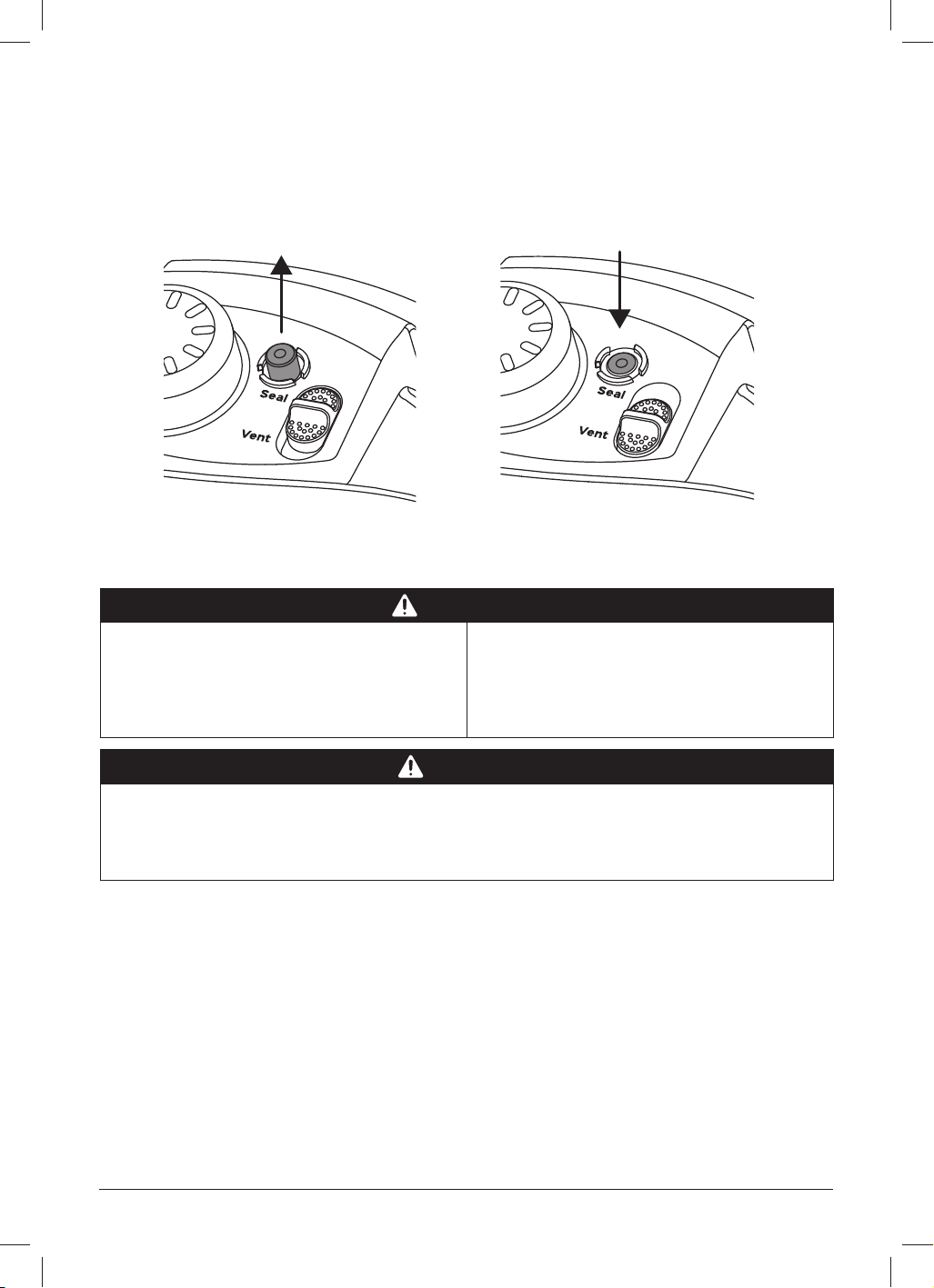
Pressurised Depressurised
16 | [email protected] | 0393 655 100
RELEASING PRESSURE
Natural release (NR or NPR)
Cooking stops gradually. As the temperature within the multicooker drops, the Instant Pot
Pro depressurises naturally over time.
What to do What to expect
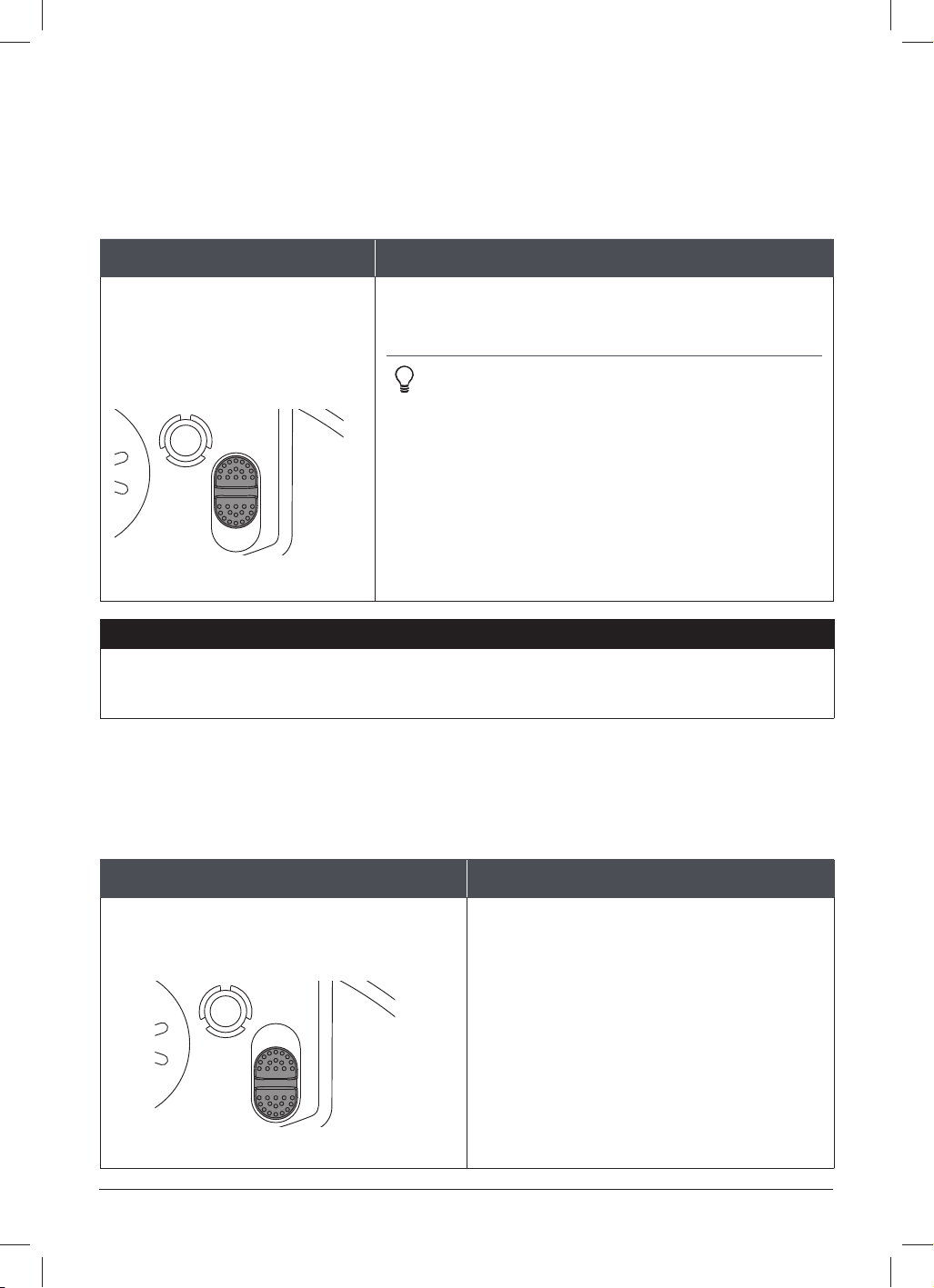
After cooking fi nishes, leave
the quick release switch in the
Seal position until the fl oat
valve drops into the lid.
Your meal continues to cook even after the Smart
Programme ends.
Instant tip: This is called “carryover cooking” or
“resting”, and it’s great for large cuts of meat.
The depressurisation time may vary based upon
the volume, type and temperature of food and liquid.
Unless you use QuickCool™ technology, NR can take
up to 40 minutes with some dishes, so plan ahead —
it’s well worth the wait!
See QuickCool to fi nd out how to naturally release
pressure faster than ever before!
NOTICE
Use NR to depressurise the multicooker after cooking high-starch foods (like soups,
stews, chilis, pasta, oatmeal and congee) or after cooking foods that expand when
cooked (like, beans and grains).
Quick Release (QR or QPR)
Stops cooking quickly and prevents overcooking. Perfect for quick-cooking vegetables and
delicate seafood!
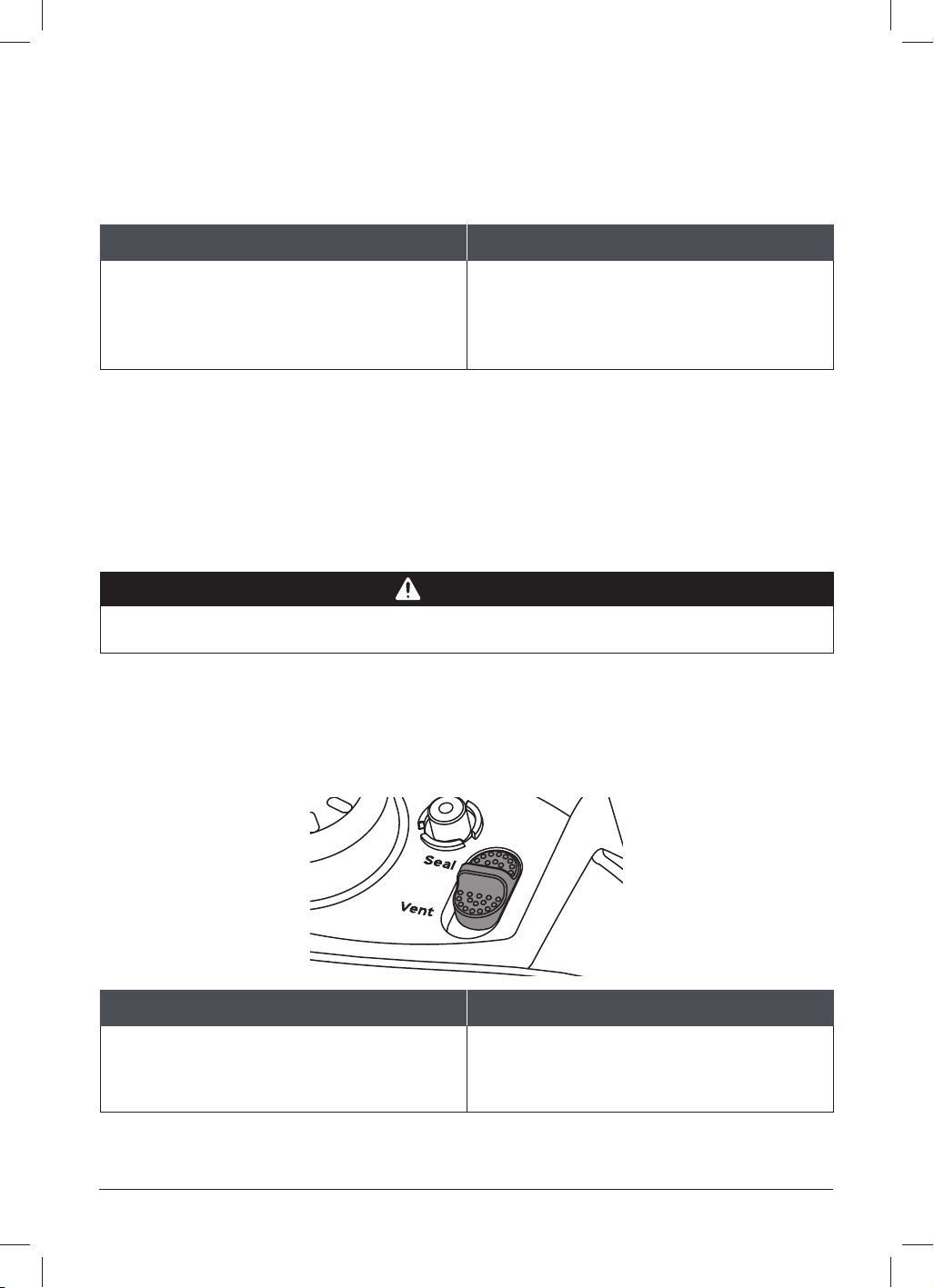
What to do What to expect
Move the quick release switch from
Sea
l to Vent and wait until the fl oat
valve drops into the lid.
When the steam release cover is installed
properly, you’ll hear a muffl ed hiss as
steam hits the cover and disperses.
If the cover is not installed properly, a
loud jet of steam will eject through the
top of the steam release valve.
Seal
Vent
Seal
Vent
Seal position
Vent position
instantpot.com.au | 17
RELEASING PRESSURE
NOTICE
Do not use QR when cooking fatty, oily, thick or high-starch foods (e.g., stews, chilis,
pasta and congee) or when cooking foods that expand when cooked (e.g., beans and
grains).
Timed Natural Release
The carryover cooking continues for a specifi c amount of time, then stops quickly when
you release the remaining pressure. Perfect for cooking rice and grains.
What to do What to expect
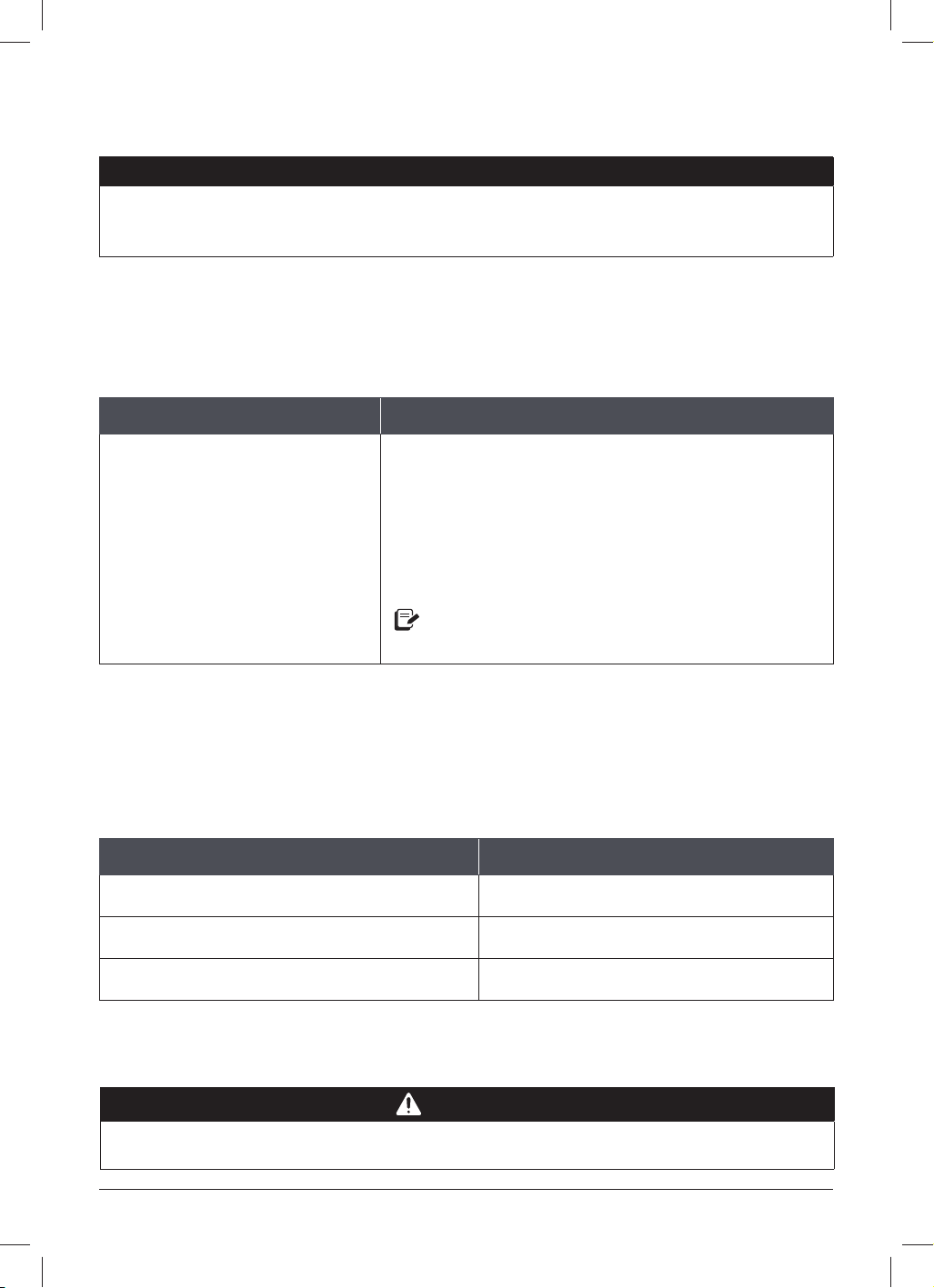
Leave the quick release switch
in the Seal position for a few
minutes (according to your
recipe) then move it from Seal
to Vent and wait until the fl oat
valve drops into the lid.
When the steam release cover is installed properly,
you’ll hear a muffl ed hiss as steam hits the cover
and disperses.
If the cover is not installed properly, a loud jet of
steam will eject through the top of the steam release
valve.
The temperature within the multicooker drops, so the
steam release may not be as powerful as a normal QR.
If you see a lot of spatter while releasing pressure, move the quick release switch back from
Vent to Seal, and wait a few minutes before trying to release pressure again. If spatter
continues, use NR to safely release the remaining pressure.
Vent reminder
Set a reminder for your Timed Natural Release so you can step away and own your day.
Recipe call for... Use this reminder!
Quick Release Off
5 minute Timed Natural Release 5 min
10 minute Timed Natural Release 10 min
CAUTION
Steam ejected from the steam release valve is hot. DO NOT place hands, face, or any
exposed skin over the steam release assembly when releasing pressure to avoid injury.
18 | [email protected] | 0393 655 100
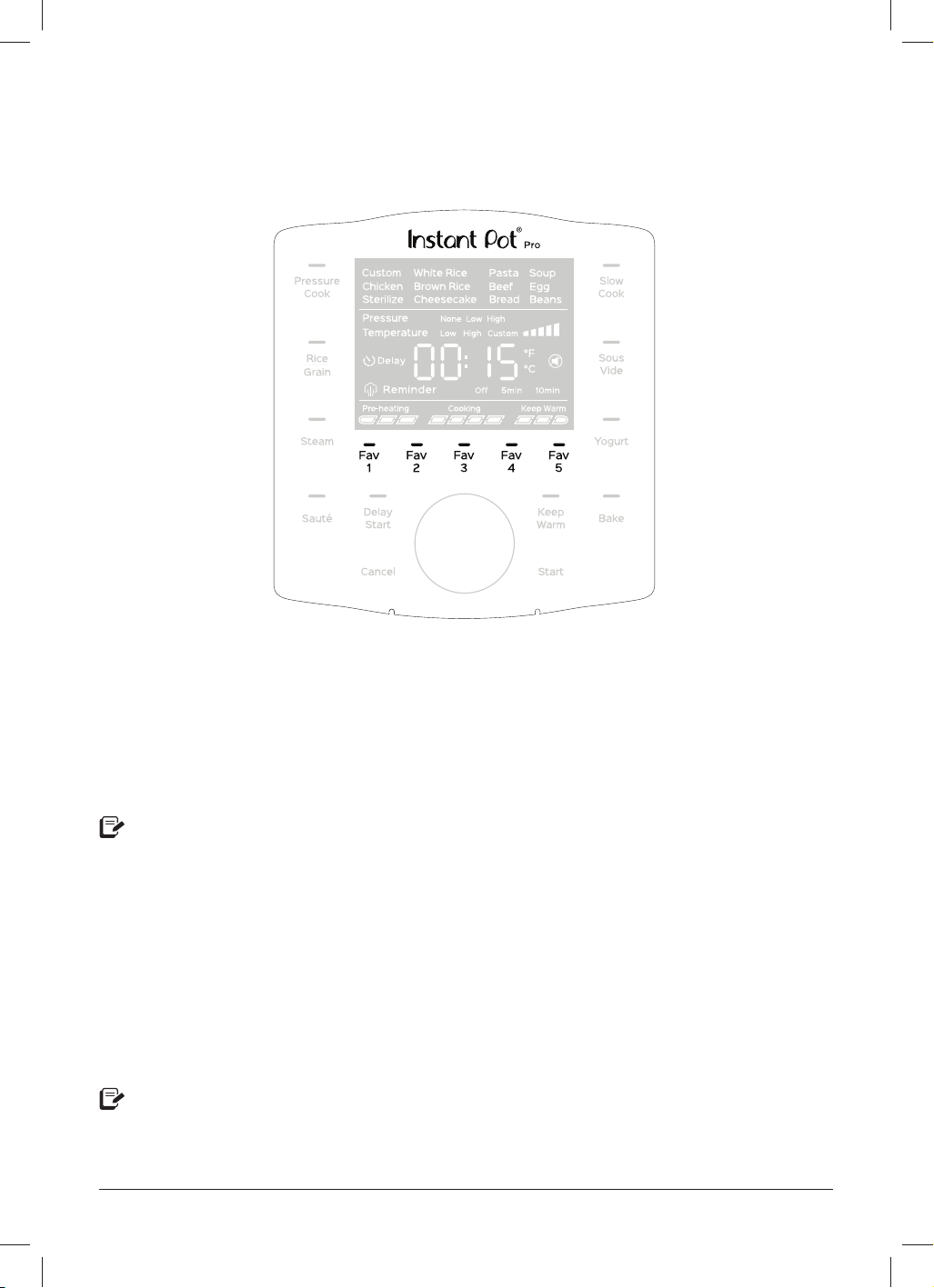
CONTROL PANEL
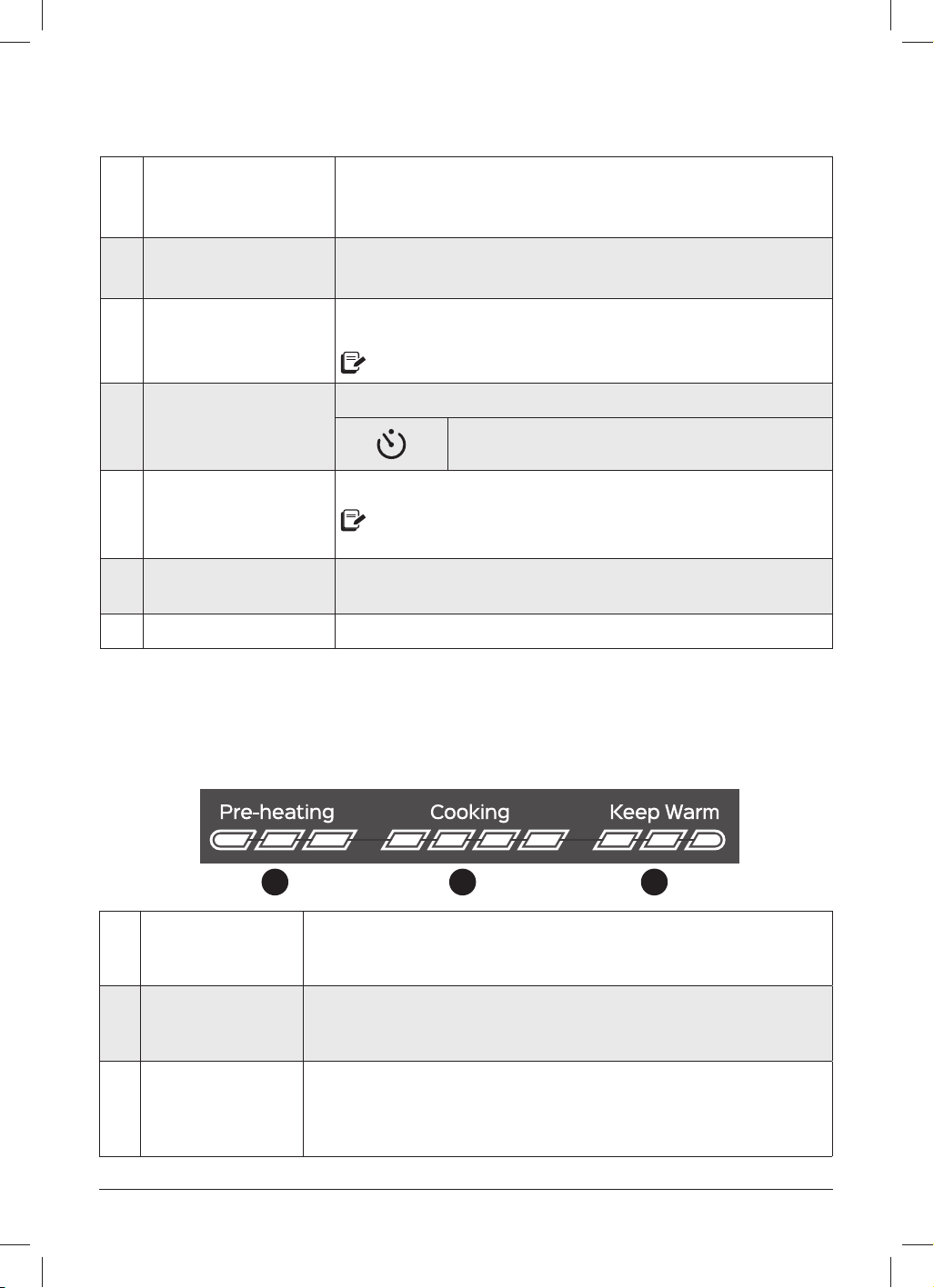
1 Smart Programmes
• Pressure Cook
• Rice/Grain
• Steam
• Sauté
• Slow Cook
• Sous Vide
• Yogurt
• Bake
See Cooking for details.
2 Preset cooking options
After selecting a Smart Programme, choose from a variety of
popular presets.
All preset cooking options are customisable.
3 Pressure Choose between None, Low and High.
4 Temperature Choose between Low, High, and Custom.
5 Time display
In standby, shows OFF.
For Smart Programmes the display counts down and for Keep
Warm, the display counts up.
S
ome Smart Programmes display the temperature in ºC (Celsius) or
ºF (Fahrenheit).
6 Vent reminder Only used when pressure cooking.
7 Sounds
Sounds are on.
Sounds are off.
Audible safety and error message alerts cannot be turned off.
See Control panel: Settings for more information.
1
1
10
11
13
2
3
5
6
4
7
8
9
12
14
instantpot.com.au | 19
CONTROL PANEL
8 Cooking progress bar
Shows when the multicooker is in Pre-heating, Cooking and
Keep Warm.
See Control panel: Cooking progress bar for more information.
9 Fav 1 to 5
One-touch access to 5 of your favourite recipes.
See Cooking: Fav 5 for more information.
10 Control dial
Turn the dial to scroll through Smart Programmes, modify status
icons, and adjust the time, temperature, and pressure levels.
The dial is also a button. Press the dial to confi rm your selections.
11 Delay Start
Delay the start of cooking. Doubles as a kitchen timer!
Icon appears when Delay Start timer is counting down.
12 Keep Warm
Turns Keep Warm on or off.
Can only be used with Pressure Cook, Rice and Slow Cook, or as a
standalone programme when in standby.
13 Cancel
Stops a Smart Programme at any time and returns the multicooker
to standby.
14 Start Begins the selected Smart Programme.
COOKING PROGRESS BAR
1 2 3
1 Preheating
Pre-heating is in progress. The display shows On during the pre-
heating stage to let you know that it’s working on getting up to
temperature.
2 Cooking
Cooking starts after the Pro reaches the target pressure or
temperature required by the Smart Programme. The display counts
down the remaining cooking time.
3 Keep Warm
Keep Warm comes on automatically after cooking fi nishes to keep
your meal at serving temperatures. The timer counts up the elapsed
time to a maximum of 10 hours (10:00). When Keep Warm completes,
the display shows End.
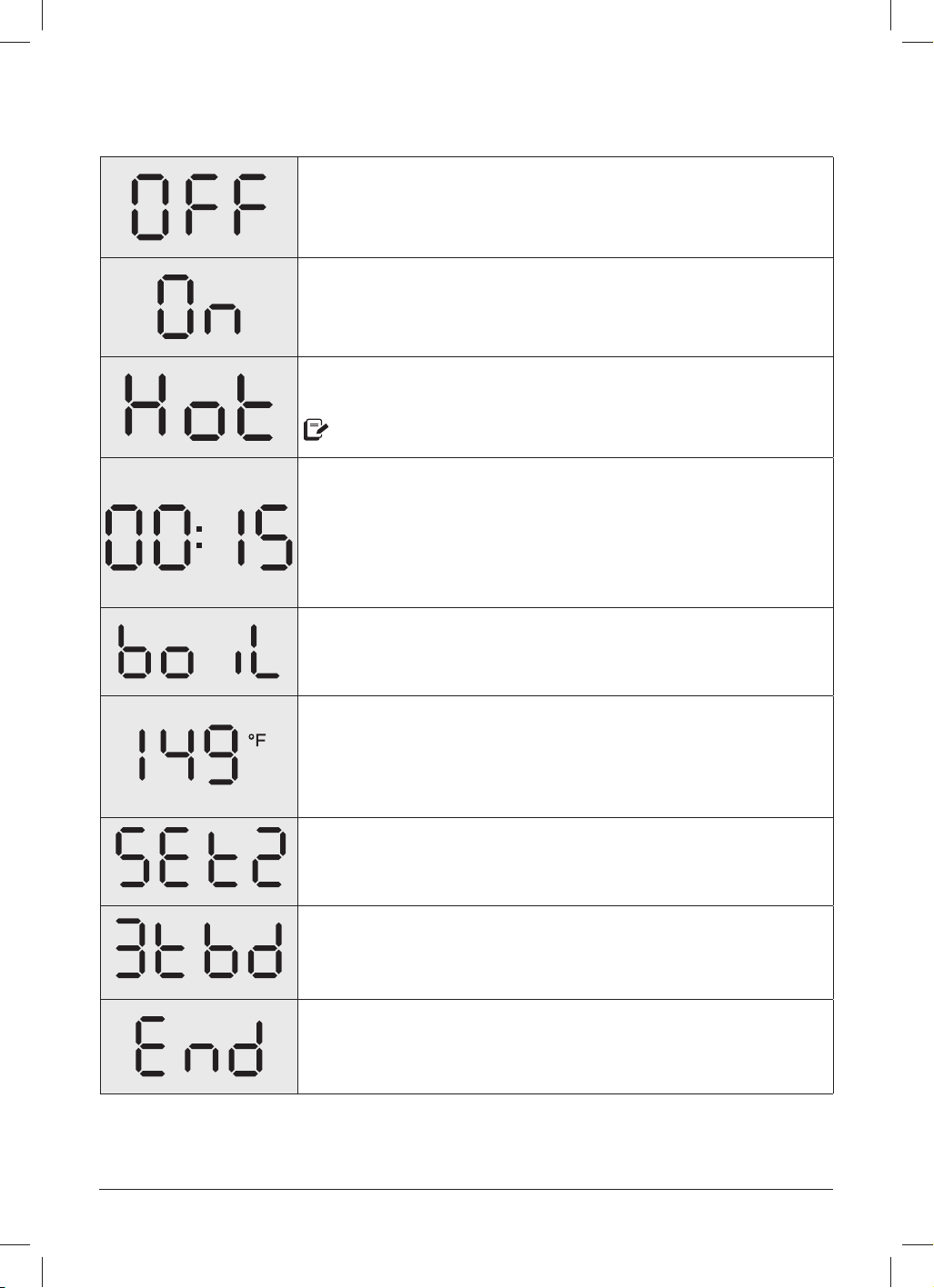
20 | [email protected] | 0393 655 100
The Pro is in standby mode, ready to make your next
favourite meal.
The multicooker is Pre-heating.
The inner pot has reached the perfect cooking temperature
and food can be added.
Only applies to Sauté and Sous Vide.
The display shows one of the following:
• The remaining Cooking time when a Smart Programme is
running,
• The Delay Start countdown,
• How long food has been in Keep Warm.
The Yogurt Smart Programme is set to pasteurisation mode.
See Cooking: Yogurt for more information.
Displays when you’re setting up Sous Vide cooking to show the
default temperature setting.
To set a custom cooking temperature, turn the dial when the
temperature fl ashes. Then press the dial to make your selection.
Displays when you press a Fav key to save a Favourite recipe.
Displays when you press a Fav key that hasn’t been saved as
a Favourite. Number will change between 1-5 depending on the
missing Fav setting selected.
When cooking fi nishes, the display shows End until you remove
the lid or touch Cancel.
Do you see something else? See Troubleshooting for more information.
STATUS MESSAGES
instantpot.com.au | 21
Setting Description
Change displayed
t
emperature (°C and °F).
In standby, press and hold the dial for 5 seconds.
When the temperature unit fl ashes, turn the dial to toggle
between °C and °F, then press Start to save the change.
Turn sound on or off.
In standby, press and hold the dial for 5 seconds.
When the temperature unit fl ashes, press the dial to go to
the sound fi eld.
When the sound icon fl ashes, turn the dial to toggle the
sound on and off, then press Start to save the change.
A
udible safety and error message alerts cannot be turned off.
Adjust and save custom
cooking times and
temperatures.
Changes to the cooking time, temperature and pressure
level are saved once the Smart Programme begins.
See Cooking for more information.
On-the-fl y changes to
cooking settings.
Once a Smart Programme has started, press the dial to
enter the cooking settings.
Turn the dial to adjust settings, then press the dial to
confi rm your changes and go to the next fi eld.
When you’re happy with the settings, touch Start to
confi rm your changes and resume cooking.
Change
s made during cooking are not saved to memory.
Delay the start of cooking.
Default time Time range
6 hours
(06:00)
10 minutes to 24 hours
(00:10 to 24:00)
Select and set up an applicable Smart Programme.
After programming the Smart Programme, touch
Delay Start.
When the time fl ashes, turn the dial to adjust the delay
time as needed.
Touch Start to begin the delay countdown.
Dela
y Start cannot be used with Sauté, Yogurt, Sous Vide or Steam.
SETTINGS

22 | [email protected] | 0393 655 100
Setting Description
Reset an individual
Smar
t Programme.
When in standby, touch and hold the Smart Programme
button you want to reset for 5 seconds.
The Smart Programme’s cooking time, pressure level and/
or temperature are restored to the factory default setting.
The Fav 5 programme's cannot be reset individually.
Reset all Smart
Programmes.
When in standby, touch and hold Cancel until the
multicooker beeps.
All Smart Programme cooking times, pressure levels and/
or temperatures are restored to factory default settings.
SETTINGS
instantpot.com.au | 23
PRESSURE CONTROL FEATURES
See Care, cleaning and storage for installation and removal of parts.
MULTICOOKER LID
What we love about it What you should know about it
When you close the lid (over the handles
on the new inner pot!), it automatically
sets to Seal for seriously easy pressure
cooking.
The lid handle is comfortable to use
whether you’re left or right-handed,
and, stands up in the multicooker base!
When it’s plugged in, the Pro plays a little
jingle when you open and close the lid. :)
The lid is removable during non-pressure
cooking so you can taste-test as you go.
When pressure cooking, the lid only
locks into place once the multicooker
has pressurised. Try not to remove the
lid unnecessarily!
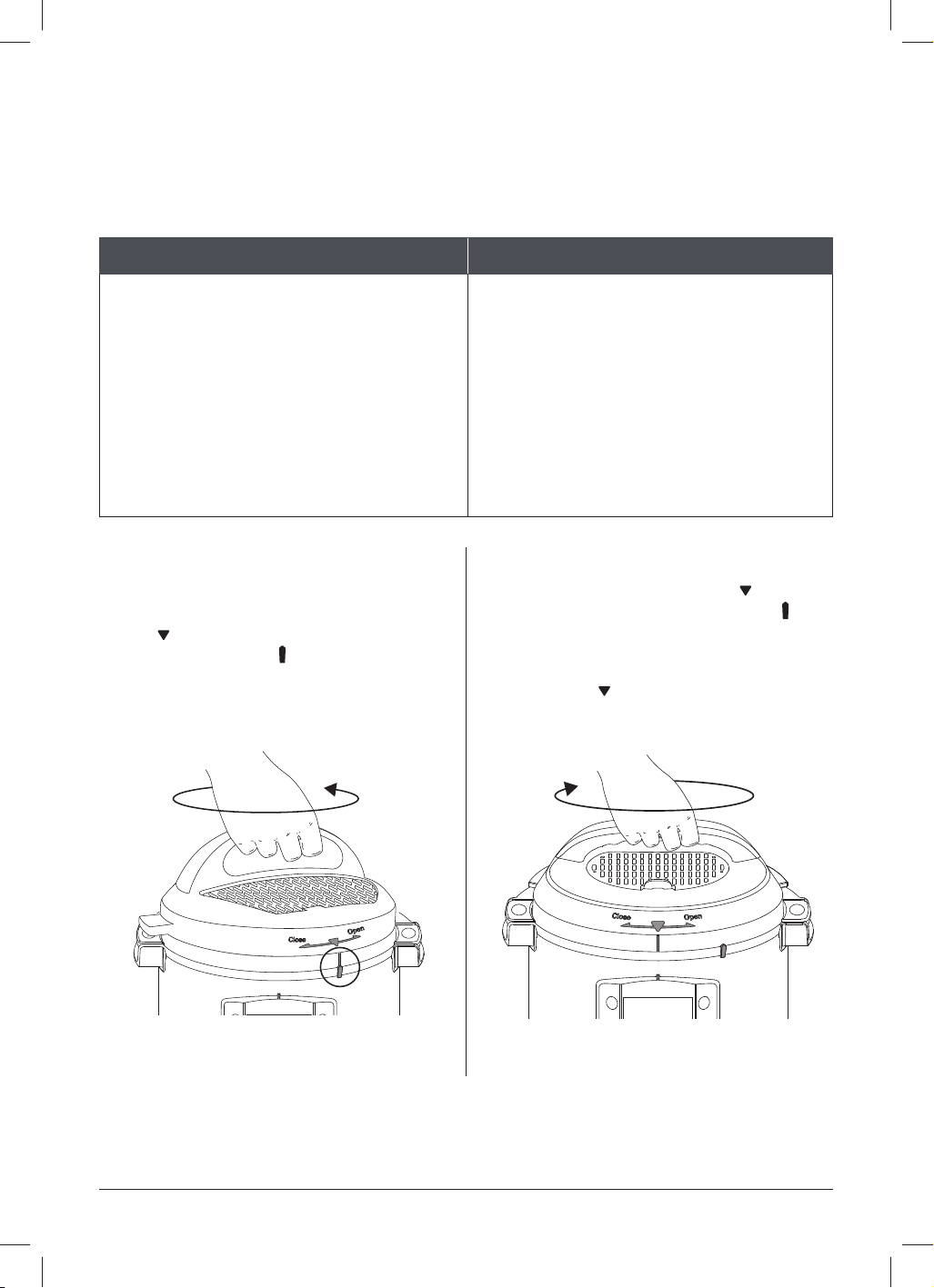
Removing the lid
01 Grip the lid handle and turn it counter-
clockwise to align the symbol on the
lid
with the symbol on the rim of the
multicooker base .
02 Lift the lid up and off the multicooker
base towards your body.
See Releasing pressure: Venting
methods for safe depressurisation
techniques.
Closing the lid
01 Align the symbol on the lid
with the
symbol on the multicooker base ,
then lower the lid onto the track.
02 Turn the lid clockwise until the symbol
on the lid
aligns with the middle of
the control panel.
Illustrations in this document are for reference only and may differ from the actual product.
Always refer to the actual product.
24 | [email protected] | 0393 655 100
PRESSURE CONTROL FEATURES
QUICKCOOL™
For the fastest Natural Release after pressure cooking, use the QuickCool tray*.
What we love about it What you should know about it
It’s a huge timer saver — you can release
pr
essure naturally up to 50% faster!
The metal portion of the lid gets
extremely hot, so don’t remove the
protective cover unless you’re using
QuickCool.
To use the QuickCool tray, fi ll it with ice or water and freeze it. Once frozen, remove the
protective cover from the multicooker lid, and position the QuickCool tray on the exposed
metal of the lid.
When the fl oat valve drops into the lid, remove the QuickCool tray, discard the water and
open the lid. Use caution when removing the tray as some or all of the ice may have melted.
*QuickCool tray sold separately.
CAUTION
The lid will be hot during and after cooking. Do not touch the exposed metal with bare
skin to avoid injury.
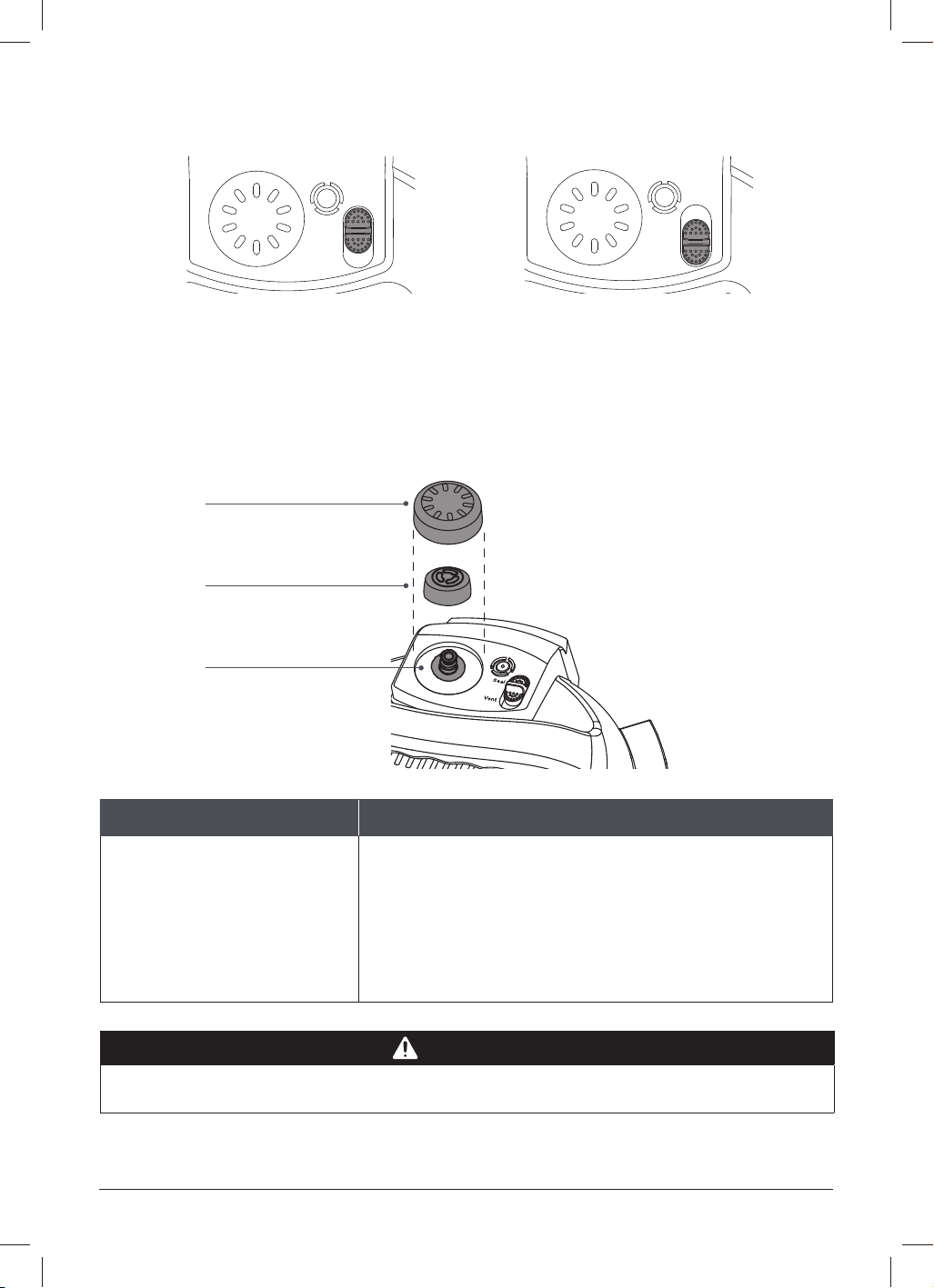
QUICK RELEASE SWITCH
The quick release switch controls the steam release valve — the part that releases pressure.
What we love about it What you should know about it
It’s super e
asy to use, and keeps our
hands far away from the steam when the
multicooker is releasing pressure!
It automatically sets to Seal when you
close the lid, so make sure to move it to
Vent when you’re not pressure cooking.
instantpot.com.au | 25
PRESSURE CONTROL FEATURES
See Releasing pressure: Venting methods for safe depressurisation techniques.
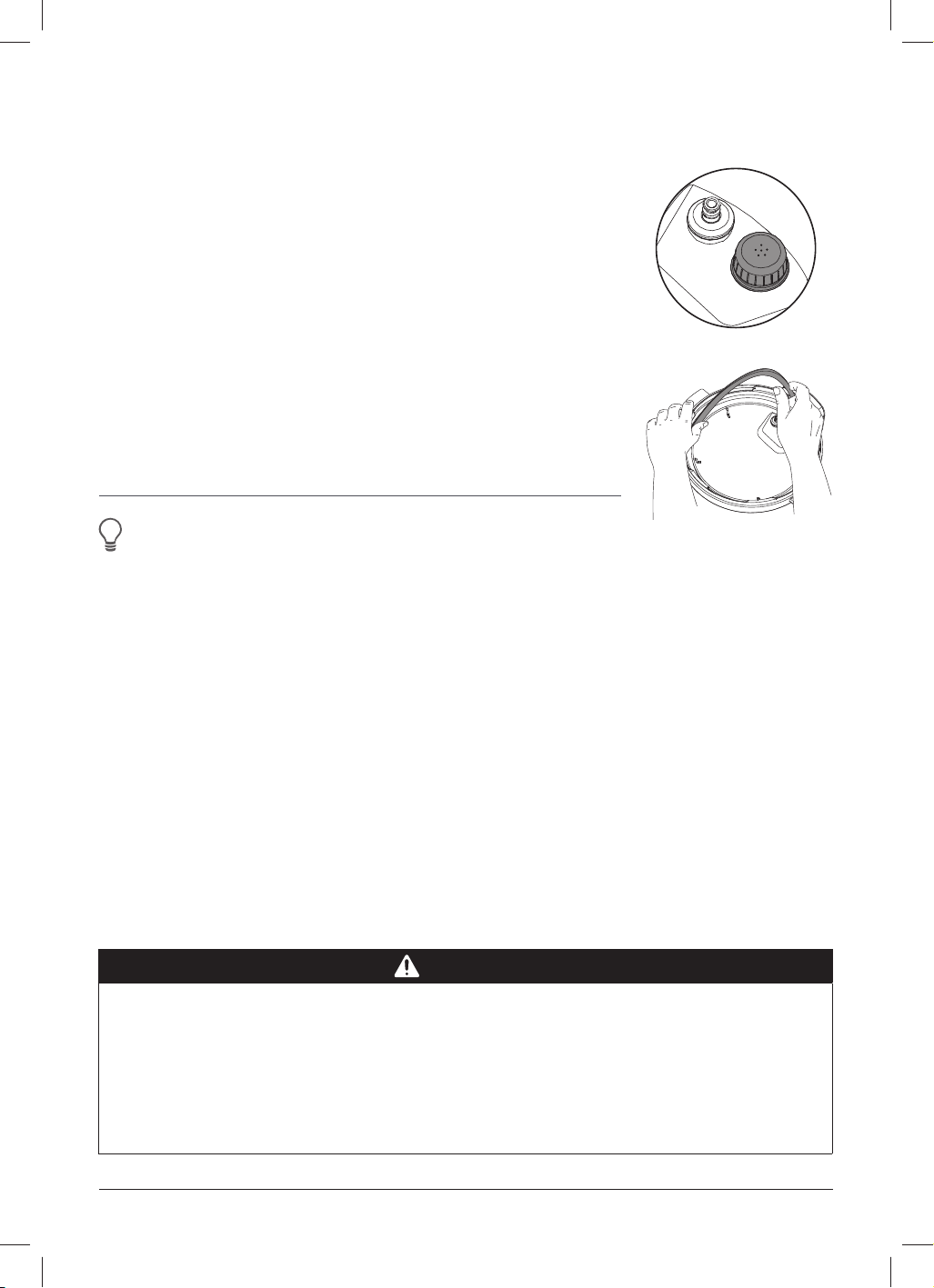
STEAM RELEASE ASSEMBLY
The steam release assembly must be fully installed before use.
What we love about it What you should know about it
When the valve is venting,
the steam release cover
disperses the steam, so the
quick release of pressure is
soft and gentle.
When releasing pressure, steam travels up from the
inner pot, through the steam release pipe and out from
the top of the steam release valve — so it’s important to
keep the area clean and clear.
The steam release valve sits loosely on the steam
release pipe.
Steam release cover
Steam release valve
Steam release pipe
Seal Position Vent Position
Seal
Vent
Seal
Vent
WARNING
Do not cover or block the steam release assembly in any way to avoid injury and/or
property damage.
26 | [email protected] | 0393 655 100
PRESSURE CONTROL FEATURES
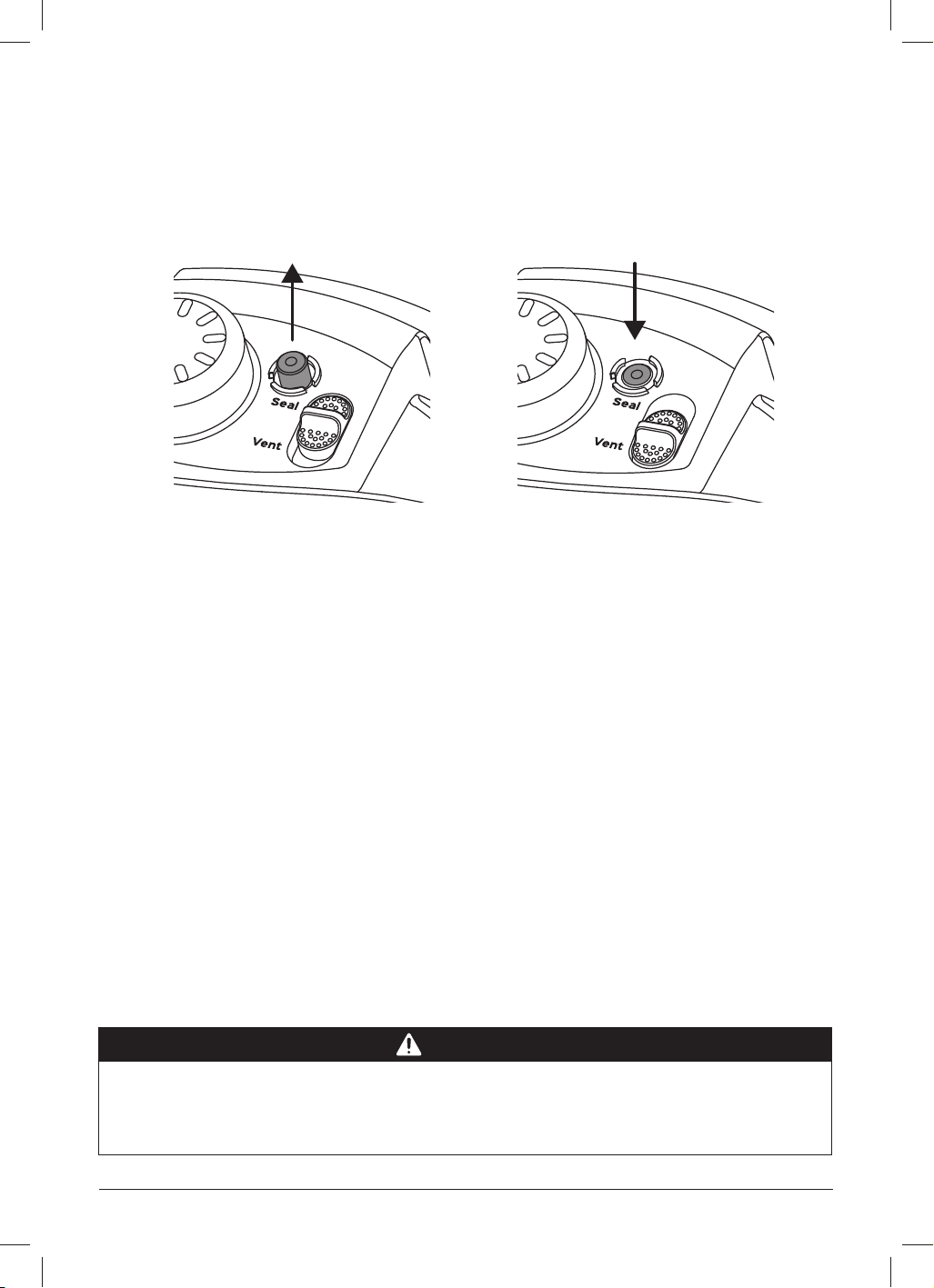
ANTI-BLOCK SHIELD
The anti-block shield prevents food particles from coming up
through the steam release pipe, which assists with pressure
regulation.
The anti-block shield is integral to product safety and necessary
for pressure cooking, so it must be installed before use.
SEALING RING
When the multicooker lid is closed, the sealing ring creates
an airtight seal between the lid and the inner pot.
The sealing ring must be installed before use.
Only one sealing ring should be installed in the lid at a time.
Instant Tip: Silicone is porous, so it absorbs strong
ar
omas and certain flavours. Keep extra sealing rings
on hand to limit the transfer of those aromas and
flavours between dishes.
CAUTION
Always check for cuts, deformation and correct installation before cooking, as sealing
rings stretch over time with normal use. If you notice stretching, deformation, or
damage to your sealing ring, DO NOT use it.
Replace the sealing ring every 12 to 18 months or sooner, and only use authorised
Instant Pot sealing rings.
Failure to follow these instructions may cause food to discharge, which may lead to
personal injury or property damage.
instantpot.com.au | 27
PRESSURE CONTROL FEATURES
Pressurised
The fl oat valve has visibly popped
up above the surface of the lid.
Depressurised
The fl oat valve has descended,
and the top is fl ush with the lid or below.
FLOAT VALVE
The fl oat valve lets you know when there is pressure in the multicooker (pressurised)
or not (depressurised). It appears in 2 positions:
The fl oat valve and silicone cap work together to seal in pressurised steam. These parts
must be installed before use. Do not attempt to operate the Instant Pot without the fl oat
valve properly installed. Do not touch the fl oat valve during use.
DANGER
DO NOT attempt to remove the lid while the fl oat valve is up and NEVER attempt
to force the lid open. Contents are under extreme pressure. Float valve must be down
before attempting to remove the lid. Failure to follow these instructions may result in
serious personal injury and/or property damage.

28 | [email protected] | 0393 655 100
COOKING
The Instant Pot Pro is amazingly versatile in the kitchen. No matter what kind of cooking
you want to do, the Pro has you covered.
CAUTION
Always inspect the lid and inner pot carefully to make sure they are clean and in good
working condition before use.
• To avoid personal injury or damage to the appliance, replace the inner pot if it is
dented, deformed, or damaged.
• Use only authorised Instant Pot inner pots made for this model when cooking.
Always make sure the heating element is clean and dry before inserting the inner pot
into the multicooker base.
Failure to follow these instructions may damage the multicooker. Replace damaged parts
to make sure safe function.
WARNING
DO NOT fi ll inner pot higher than the Max
PC Fill line as indicated on the inner pot
to avoid personal injury and/or property
damage.
When cooking foods that expand (e.g.,
rice, beans, pasta) do not fi ll the inner pot
higher than the Half Fill line as indicated
on the inner pot.
Always cook with the inner pot in place.
DO NOT pour food or liquid into the
multicooker base.
To avoid risk of personal injury and/or
property damage, place food and liquid
ingredients in the inner pot, then insert the
inner pot into the multicooker base.
CAUTION
When cooking meat, always use a meat thermometer to ensure the internal temperature
reaches a safe minimum temperature.

instantpot.com.au | 29
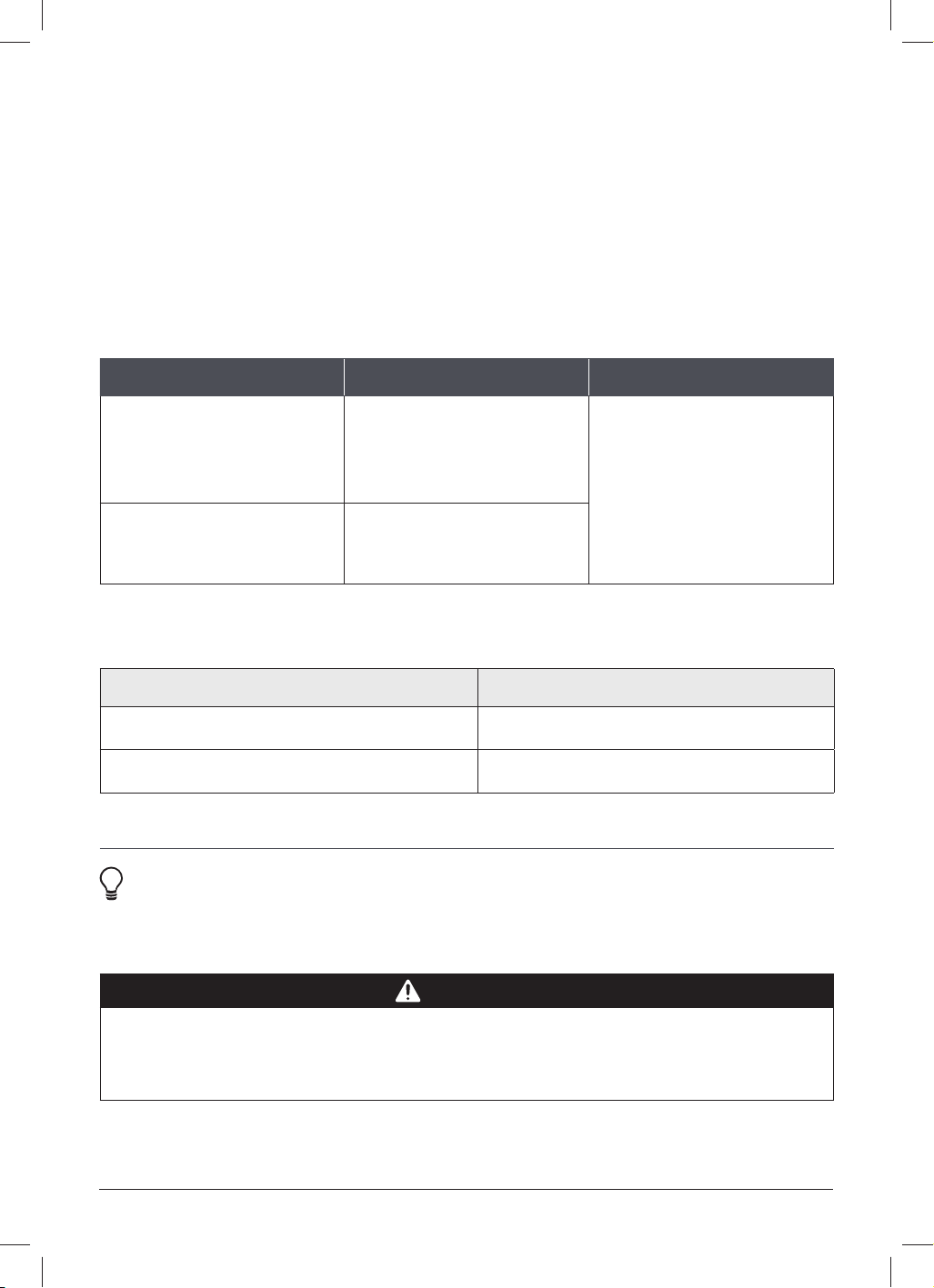
Smart
Programme
Cooking presets Pressure
levels
Tips
Pressure
Cook
Custom, Chicken, Sterilise, Pasta,
Beef, Soup, Egg, Beans
Low
High
It is recommended to use timed
Natural Release or follow recipes
for the best outcome.
Rice/Grain Custom, White Rice, Brown Rice
Low
High
Steam Custom —
This is a non-pressure steam
programme which is great
for cooking delicate food, like
zucchini and broccoli.
Sauté Custom —
Level 1 to 5 works like your
stovetop sauté pan where 5 is
the highest heat for browning,
and 1 is the lowest heat for
simmer.
Slow Cook
Custom, Chicken,
Beef, Beans, Soup
—
Works just like a traditional slow
cooker. Ensure cooking time is set
to 4 hours or more for optimal
result.
Caution: Cooking less than 3
hours will result in uncooked food.
Sous Vide
Custom, Chicken,
Beef, Egg
—
Yogurt Custom —
Bake Custom, Cheesecake, Bread
None
Low
High
Keep Warm —
Custom,
Low
High.
COOKING
SMART PROGRAMME OVERVIEW
30 | [email protected] | 0393 655 100
COOKING
PRESSURE COOK AND RICE
Jump start magic! These programmes use pressurised steam to cook food quickly, evenly,
and deeply, for delicious results every time!
For the best pressure cooking results, always follow an authorised Instant Pot recipe or
our tried, tested and true pressure cooking timetables which feature grain-to-water ratios
for making a variety of rice and grains.
Choose from 3 pressure levels, depending on the Smart Programme.
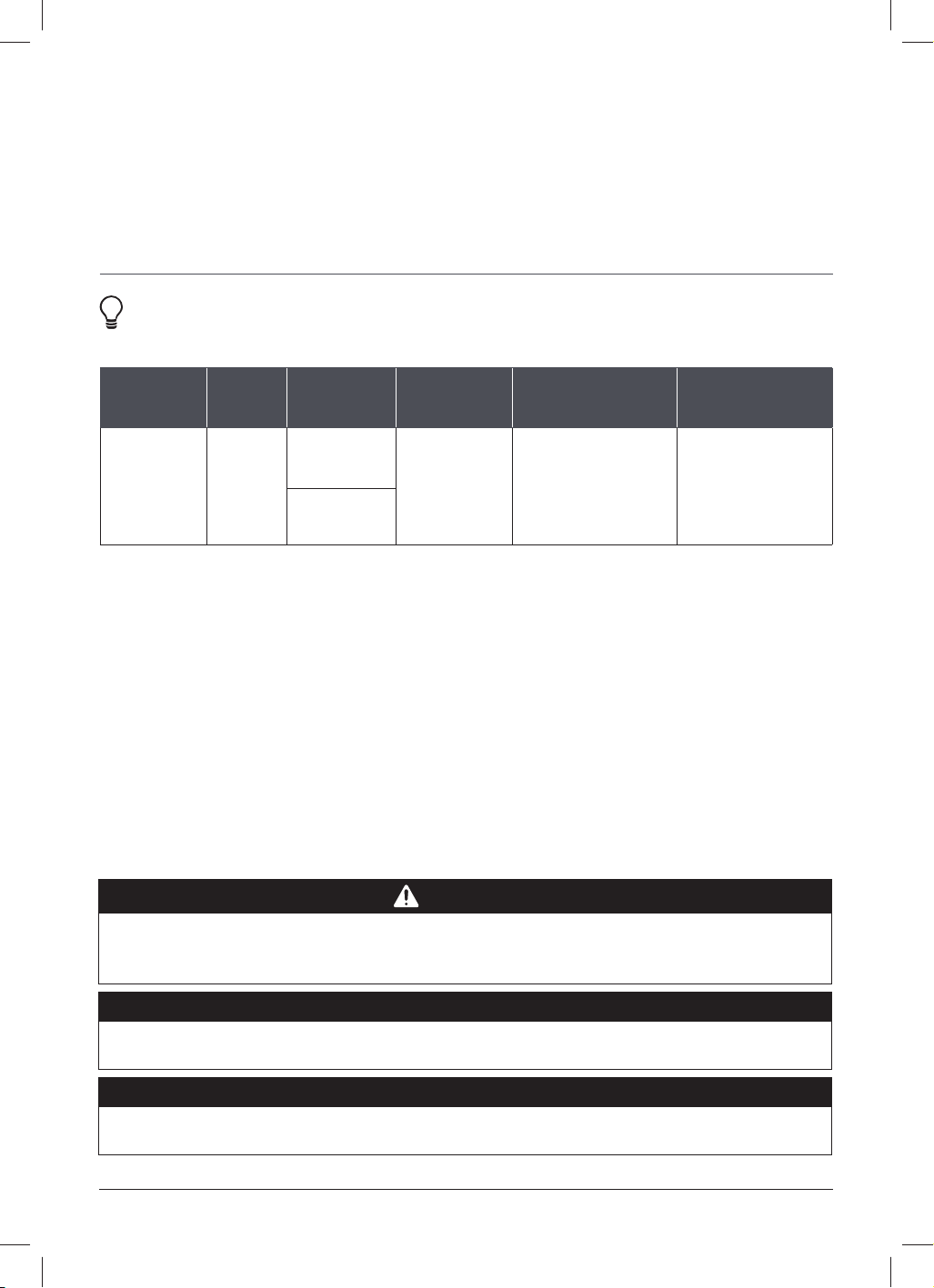
Pressure level Suggested use Notes
Low 5.8 – 7.2 psi
(30 – 50 kPa)
Fish and seafood, soft
vegetables and rice.
Also for canning of
high-acid foods.
When pressure cooking, the
pressure level controls the
cooking temperature, so a
higher pressure results in a
higher cooking temperature.
High 10.2 – 11.6 psi
(70 – 90 kPa)
Eggs, meat, poultry, root
vegetables, oats, beans,
grains, bone broth, stew, chili.
Pressure cooking liquids should be water-based, such as broth, stock, soup or juice.
If using canned, condensed or cream-based soup, add liquid as directed below.
Instant Pot size Minimum liquid for pressure cooking*
5.7 Litres
1 ½ cups (375 mL)
8 Litres 2 cups (500 mL)
*Unless otherwise specified in recipe.
Instant Tip: Use the steam rack to heat food evenly, prevent nutrients from
leeching in
to the cooking liquid, allow oil and grease to drip off the food,
and, prevent food from scorching the bottom of the inner pot.
CAUTION
To avoid scorching or scalding injury, be cautious when pressure cooking with more than
1/4 cup (60 mL) oil, oil-based sauces, condensed cream-based soups, and thick sauces.
Add suitable liquid to thin sauces. Avoid recipes that call for more than 1/4 cup (60 mL)
of oil or fat content.

instantpot.com.au | 31
Smart
Programme
Cooking
presets
Default
pressure
Default
cooking times
Time range
Pressure
Cook
Custom High
10 minutes
(00:10)
1 minute to 8 hours
(00:01 to 08:00)
Pasta High
1 minute
(00:01)
1 minute to 1 hour
(00:01 to 01:00)
Soup High
30 minutes
(00:30)
1 minute to 4 hours
(00:01 to 04:00)
Chicken High
10 minutes
(00:10)
Beef High
30 minutes
(00:30)
Beans High
20 minutes
(00:20)
Egg High
5 minutes
(00:05)
1 minute to 10 minutes
(00:01 to 00:10)
Sterilise High
10 minutes
(00:10)
1 minute to 30 minutes
(00:01 to 00:30)
Rice/Grain
Custom Low
12 minutes
(00:12)
1 minute to 1 hour
(00:01 to 01:00)
Brown Rice High
30 minutes
(00:30)
White Rice Low
12 minutes
(00:12)
1 minute to 30 minutes
(00:01 to 00:30)
Stage 1: Setting up the Pro for pressure
cooking
01 Add food and liquid to the inner pot as
indicated in your recipe.
Insert the inner pot into the multicooker
base.
02 Place and close the multicooker lid
as described in Pressure control
features: Multicooker lid.
Stage 2: Pressure cooking
01 Touch the Smart Programme you want
to use: Pressure Cook or Rice.
02 When Custom fl ashes, turn the dial
to toggle through the preset cooking
options.
Press the dial to make your selection
and go to the next fi eld.
03 When the pressure level fl ashes, turn
the dial to toggle through the options.
Press the dial to confi rm your choice
and go to the next fi eld.
COOKING
PRESSURE COOK AND RICE

32 | [email protected] | 0393 655 100
COOKING
04 When the time fl ashes, turn the dial
to adjust the cook time as directed by
your recipe.
Press the dial to confi rm the change
and go to the next fi eld.
Customisations are saved to the Smart
Programme when cooking begins.
05 When Reminder fl ashes, turn the
dial to toggle between vent reminder
options. See Control panel for more
information.
Press the dial to confi rm your choice.
06 Touch Start to begin.
The display shows On and the cooking
progress bar shows Pre-heating.
Stage 3: Releasing pressure
When Cooking fi nishes, the display
shows End if Keep Warm is turned off.
If Keep Warm is on, the timer begins
counting from 00:00 up to 10 hours
(10:00).
Food should not be kept warm for
more than 10 hours. If cooking thick or
starchy foods, heat may not dissipate
evenly. To ensure food safety, stir the
contents of thicker dishes every 40 to
60 minutes.
If you have set a 5 or 10 minute vent
reminder, the reminder timer begins to
count down.
01 When you’re ready, follow your recipe’s
instructions to choose a venting
method.
See Releasing Pressure for
information on safe venting techniques
02 Wait for the fl oat valve to drop, then
carefully open and remove the lid
as described in Pressure control
features: Multicooker lid.
03 Using proper hand protection, remove
the inner pot from the multicooker
base, discard the water and thoroughly
dry the inner pot.
A delay start timer can be set to
automatically start pressure cooking while
you're in bed, working, running errands or
busy with other dishes. To set a delay start
timer, see Control panel: Settings.
PRESSURE COOK AND RICE
instantpot.com.au | 33
STEAM (NON-PRESSURISED)
The Steam programme works in 2 ways: like a regular stovetop steamer, boiling liquid
to cook food with hot steam, and, as a sanitisation chamber for glass and plastics.
Note: please refer to manufacturer's instruction on the time and temp for sanitisation.
Instant tip: When steaming, use the steam rack to keep food out of the
boiling liquid.
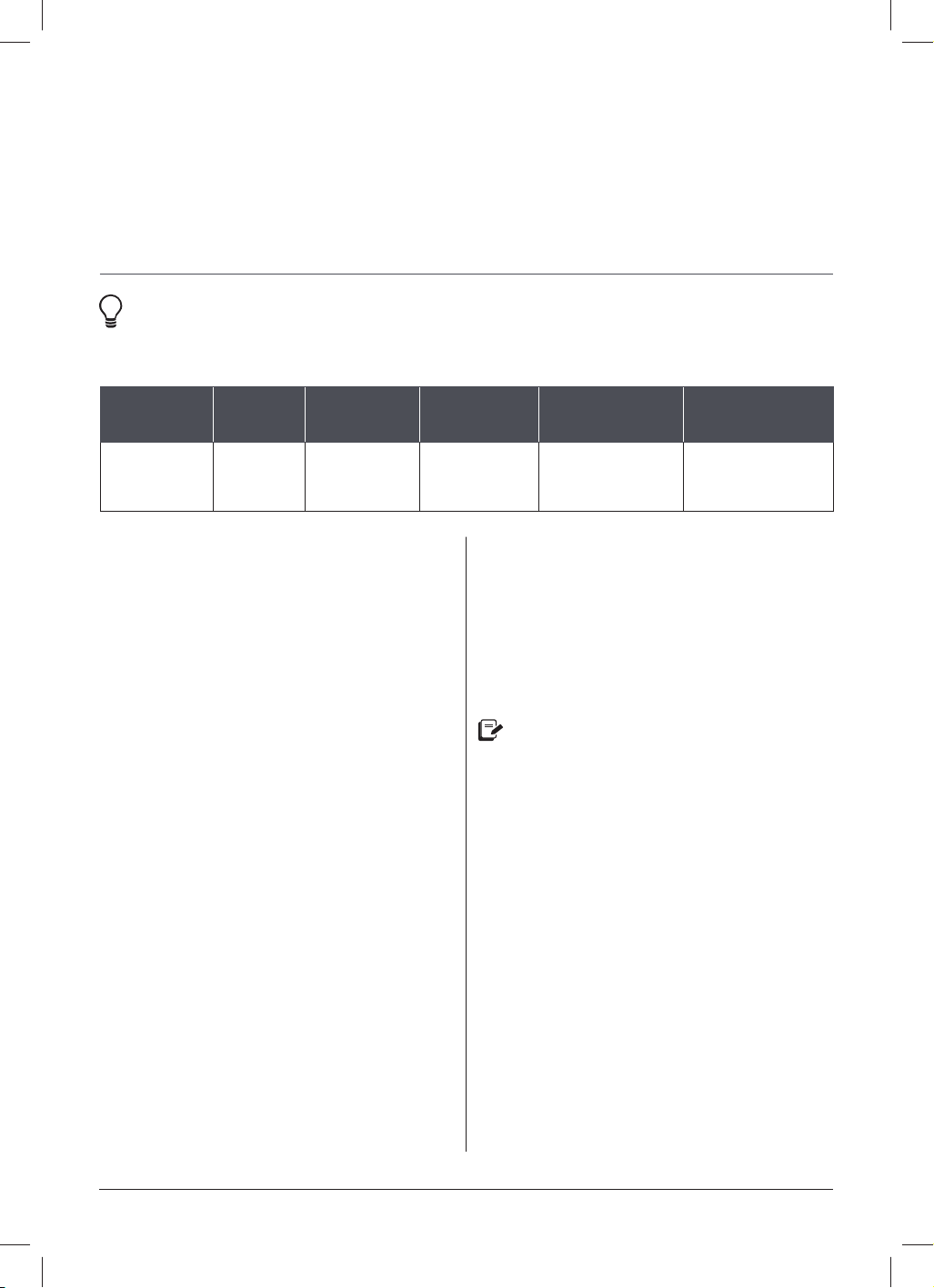
Smart
Programme
Cooking
presets
Default
temperature
Default
cooking
times
Temperature range Time range
Steam Custom
High
30 minutes
(00:30)
Low
83°C
High
100°C
(Not adjustable)
1 minute to 1 hour
(00:01 to 01:00)
Low
COOKING
CAUTION
The inner pot and accessories will be hot during and after cooking. Always use
appropriate hand protection when adding to or removing food from a hot inner pot to
avoid injury and/or property damage.
NOTICE
The fl oat valve should not rise during Steam. If the fl oat valve rises, make sure the quick
release switch is set to Vent.
NOTICE
If there is steam in the inner pot, you may notice some resistance when replacing the lid.
Allow the lid to settle into the track completely before closing it.

34 | [email protected] | 0393 655 100
Stage 1: Setting up the Pro for steaming
01 Add water to the inner pot.
Insert the inner pot into the
multicooker base.
02 Place steam rack in inner pot and add
food on top.
03 Place and close the multicooker lid
as described in Pressure control
features: Multicooker lid.
For easy access, or, if you want to watch
your food while it cooks, any glass lid
with a venting hole will do.
Stage 2: Steam cooking
01 Touch Steam.
02 When Custom fl ashes, turn the dial
to toggle through the preset cooking
options.
Press the dial to make your selection
and go to the next fi eld.
03 When the temperature fl ashes, turn the
dial to toggle between High and Low
temperature.
Press the dial to make your selection
and go to the next fi eld.
04 When the time fl ashes, turn the dial to
adjust the cooking time.
05 Touch Start to begin.
The display shows On and the cooking
progress bar shows Pre-heating.
06 When the Pro reaches the target
temperature, the progress bar moves
over to Cooking and the timer counts
down.
07 When the Smart Programme fi nishes
the display shows End.
Automatic Keep Warm cannot be used with
Steam.
The use of the steam rack or other
Instant Pot authorised accessories are
recommended for steaming.
COOKING
STEAM
instantpot.com.au | 35
COOKING
SAUTÉ
Like using a frying pan, griddle, or fl at-top grill, use Sauté to simmer, reduce and thicken
liquids, stir-fry meals, and to caramelise vegetables and sear meat before or after using
other cooking methods.
Instant Tip: If you prefer, you can use the inner pot on any electric,
ceramic, gas and induction cooktop. The silicone Easy Grip handles make it
easy to hold on to and stir without slipping!
Stage 1: Setting up the Pro for Sauté
01 Insert the inner pot into the multicooker
base. Do not use a lid.
02 Touch Sauté.
03 When Custom fl ashes, press the dial to
select it and go to the next fi eld.
04 When the temperature fl ashes, turn the
dial to toggle between High, Low and
Custom temperature.
To set a custom temperature, select
Custom, then turn the dial to toggle
through 5 temperature levels. The
display shows LE 1 (the lowest
temperature) through LE 5 (the highest
temperature). These levels are similar
to the temperature levels on your
stovetop.
Press the dial to make your selection
and go to the next fi eld.
05 When the time fl ashes, turn the dial to
adjust the cooking time.
06 Touch Start to begin.
The display shows On and the cooking
progress bar shows Pre-heating.
Stage 2: Sautéing
01 When the Pro reaches the target
temperature the progress bar moves
over to Cooking and the display
shows Hot for a few moments before
switching over to the countdown timer.
02 Add ingredients to the inner pot.
If your food ingredients are added
before the inner pot has reached the
target temperature, the Hot message
may not appear. This is normal.
03 If the ingredients are fi nished cooking
before the time runs out, touch
Cancel to end the Smart Programme,
otherwise, when the Smart Programme
fi nishes the display shows End.
Automatic Keep Warm is not available
on Sauté.
Delay Start and automatic Keep Warm
cannot be used with Sauté.
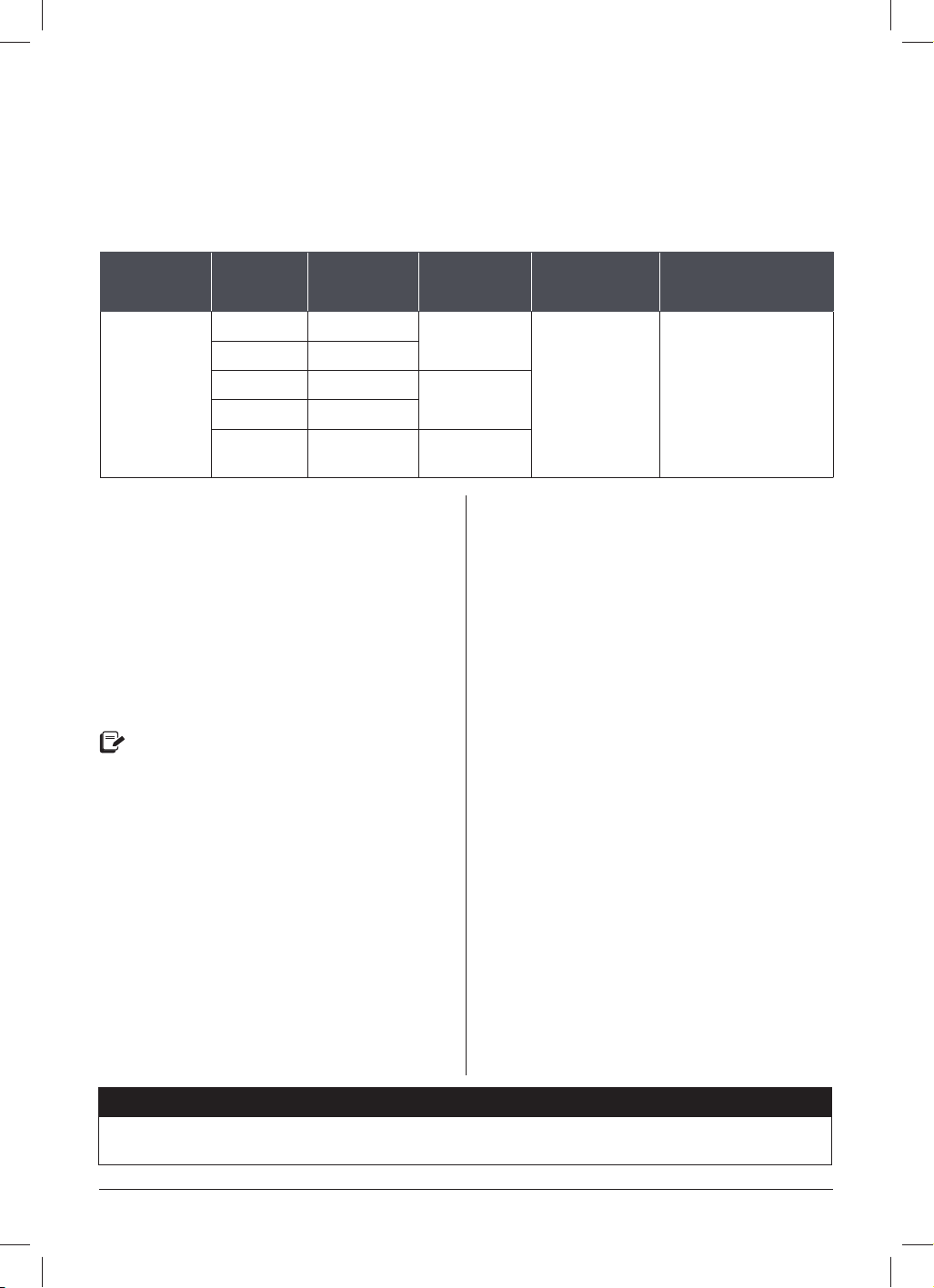
Smart
Programme
Cooking
preset
Default
temperature
Default
cooking time
Temperature
range
Time range
Sauté Custom High
30 minutes
(00:30)
Custom
Low
High
1 minute to 1 hour
(00:01 to 01:00)

36 | [email protected] | 0393 655 100
COOKING
DEGLAZING
Sautéing meat and vegetables before pressure cooking is the perfect way to boost
fl avours, as sugars caramelise from the high heat of the Sauté Smart Programme.
Deglazing the inner pot lets you unlock those fl avours in amazing sauces, gravies
and more.
To deglaze, remove food items from the inner pot and add a thin liquid, like water, broth or
wine to the hot surface. Use a wooden or silicone scraper to lift up any food stuck to the
bottom of the inner pot and stir it into the liquid.
WARNING
The Sauté Smart Programme reaches high temperatures. If left unmonitored, food may
burn on this setting. DO NOT use a lid and DO NOT leave the multicooker unattended
while using Sauté.
instantpot.com.au | 37
COOKING
SLOW COOK
The Slow Cook programme is comparable to a traditional slow cooker, so you can keep
using all your old family favourites!
Smart
Programme
Cooking
presets
Default
temperature
Default
cooking
times
Time range Tips
Slow Cook
Custom High
4 hours
(04:00)
30 minutes to
99 hours and
30 minutes
(00:30 to
99:30)
Dishes should cook
for at least 3 hours
(03:00) unless
otherwise stated in
your recipe.
Chicken High
Beef High
6 hours
(06:00)
Soup High
Beans High
8 hours
(08:00)
Stage 1: Setting up the Pro for slow
cooking
01 Add food and liquid ingredients to the
inner pot according to your recipe.
Insert the inner pot into the multicooker
base.
02 Place and close the multicooker lid as
described in Pressure control features:
Multicooker lid.
The multicooker lid is removable
throughout the cooking process for
easy access, or, if you want to watch
your food while it cooks, any glass lid
with a venting hole will do.
Stage 2: Slow cooking
01 Touch Slow Cook.
02 When Custom fl ashes, turn the dial
to toggle through the preset cooking
options.
Press the dial to make your selection
and go to the next fi eld.
03 When the temperature fl ashes, turn the
dial to toggle between High and Low
temperature.
Press the dial to make your selection
and go to the next fi eld.
04 When the time fl ashes, turn the dial to
adjust the cooking time.
05 Touch Start to begin.
The progress bar shows Pre-heating
and the timer starts counting down
immediately.
06 When the Pro reaches the target
temperature the progress bar moves
over to Cooking.
07 When Cooking fi nishes, the display
shows End if Keep Warm is turned off.
If Keep Warm is on, the timer begins counting
from 00:00 up to 10 hours (10:00).
A delay start timer can be set to
automatically start slow cooking while
you're in bed, working, running errands or
busy with other dishes. To set a delay start
timer, see Control panel: Settings.
NOTICE
The fl oat valve should not rise during Slow Cook. If the fl oat valve rises, move the quick
release switch to Vent.

38 | [email protected] | 0393 655 100
COOKING
SOUS VIDE
Sous Vide cooking involves cooking food underwater, in an airtight, food-safe bag,
for a long period of time. Food cooks in its own juices and comes out delicious and
unbelievably tender.
CAUTION
Do not overfi ll the inner pot to avoid damage to the multicooker. Total contents (water
and food pouches) should leave at least 5 cm of headspace between the water line and
the brim of the inner pot.
Smart
Programme
Cooking
presets
Default
temperature
Default
cooking times
Time range
Sous Vide
C
ustom 60°C
3 hours
(03:00)
30 minutes to
99 hours and 30 minutes
(00:30 to 99:30)
Chicken 60°C
2 hours
(02:00)
10 minutes to
99 hours and 30 minutes
(00:10 to 99:30)
Beef 54°C
2 hours
(02:00)
Egg 70°C
30 minutes
(00:30)
10 minutes to 24 hours
(00:10 to 24:00)
You’ll need:
• Tongs
• Thermometer
• Food safe, airtight, re-sealable food pouches, or,
• Vacuum sealer and food-safe vacuum bags

instantpot.com.au | 39
Step 1: Set up the sous vide water bath
01 Fill the inner pot to the Half Fill mark
as indicated the pot, then insert it into
the multicooker base.
02 Place and close the multicooker lid
as described in Pressure control
features: Multicooker lid.
The multicooker lid is removable
throughout the cooking process for
easy access.
Step 2: Setting up the Pro for sous vide
cooking
01 Touch Sous Vide.
02 When Custom fl ashes, turn the dial
to toggle through the preset cooking
options.
Press the dial to make your selection
and go to the next fi eld.
03 When the temperature fl ashes, turn
the dial to set a custom temperature.
Press the dial to make your selection
and go to the next fi eld.
04 When the time fl ashes, turn the dial to
adjust the cooking time.
05 Touch Start to begin.
The display shows On and the
progress bar shows Pre-heating.
Step 3: Get food ready
01 While the water heats, start by
seasoning your food as desired.
See Ingredients and Seasonings on
next page for tips!
02 When you’re ready, separate each
serving of food into individual
pouches.
03 Remove all air from the pouches and
seal them tightly.
Step 4: Cook ‘em up!
01 Once the water bath is ready,
the display shows Hot for a few
moments before switching over to the
countdown timer.
02 Remove the lid and carefully immerse
the sealed pouches.
The food in the pouches should be
immersed, so add heated water to the
inner pot any time it’s needed, but, if
you’re using a re-sealable bag, make
sure the seal stays above the water.
03 Place and close the multicooker lid
as described in Pressure control
features: Multicooker lid.
04 When the Smart Programme fi nishes
the display shows End. Open the
multicooker and use your tongs to
carefully remove the pouches from the
hot water.
05 Open the pouches and use a
thermometer to check for doneness.
COOKING
SOUS VIDE

40 | [email protected] | 0393 655 100
COOKING
REVERSE SEARING
Searing your meat after slow and precise cooking is the easiest way to boost those
already delicious fl avours through the roof without overcooking. Try reverse searing
for tender, juicy meat with a beautiful, burnished crust.
01 After sous vide cooking, remove the meat from the cooking pouch and gently pat it
dry to remove as much moisture from the exterior of the meat.
02 Use the Sauté programme set to High to give it a good sear, or use a hot cast iron
pan, browning torch, or a grill — anything hot to lock in that moisture!
In general, after sautéing, steaks need to rest to allow the internal temperature
to even out. However, with sous vide cooking, the internal temperature is already
consistent. So there’s no need to rest—you can serve your steak immediately.
INGREDIENTS AND SEASONINGS
• Salt goes a long way when it has nowhere to go, so it’s better to use a little less than
you normally would, especially with meats, poultry, and fi sh. If you fi nd it needs more
after cooking, it’s easy to salt to taste.
• Use high quality, fresh ingredients when cooking sous vide to ensure the best
possible fl avour.
• Use fresh garlic instead of garlic powder. Garlic powder can become bitter when
cooked sous vide. Fresh garlic will give you the best results.

instantpot.com.au | 41
Food
Recommended
Thickness
Expected
Doneness
Cooking
Temperature*
Minimum
Cooking
Time*
Maximum
Cooking
Time*
Beef and Lamb
Tender Cuts:
Tenderloin,
cutlets, sirloin,
rib-eye, rump,
T-bone, chops
2–5 cm Rare 50°C 1 hour 4 hours
Medium-rare 54°C 1.5 hours 4 hours
Tougher Cuts:
Blade, chuck,
shoulder,
shanks, game
meats
4–6 cm Medium 60°C 1.5 hours 4 hours
Medium-well 63°C 1.5 hours 4 hours
Poultry
Chicken Breast 3–5 cm Soft and
Juicy
63°C 1.5 hours 4 hours
Traditionally
fi rm
69°C 1 hour 4 hours
Chicken Thigh 3–5 cm Juicy and
tender
74°C 1 hour 4 hours
Off-the-bone
tender
74°C 4 hours 8 hours
Chicken Leg 5–7 cm Juicy and
Tender
74°C 2 hours 7 hours
Duck Breast 3–5 cm Soft and
Juicy
64°C 2 hours 4 hours
Pork
Belly 3–6 cm Traditionally
fi rm
82°C 10 hours 22 hours
Ribs 2–3 cm Off-the-bone
tender
59°C 10 hours 22 hours
Chops
2–4 cm
Pink and juicy
57°C
1 hour 4 hours
White
throughout
and juicy
64°C
1 hour 4 hours
COOKING
SOUS VIDE COOKING CHART

42 | [email protected] | 0393 655 100
COOKING
Food
Recommended
Thickness
Expected
Doneness
Cooking
Temperature*
Minimum
Cooking
Time*
Maximum
Cooking
Time*
Fish and Seafood
Fish
2–3 cm
Soft and
buttery
43°C 10 minutes 30 minutes
Translucent /
starts to fl ake
46°C 20 minutes 45 minutes
Medium-rare 52°C 20 minutes 45 minutes
Medium, dry 54°C 20 minutes 45 minutes
Well-done,
crumbly
57°C 20 minutes 45 minutes
Shrimp –
Traditionally
fi rm
60°C 30 minutes 45 minutes
Lobster Tail –
Soft and
buttery
60°C 1 hour 1 hour
Scallops –
Soft and
buttery
60°C 30 minutes 30 minutes
Eggs
Eggs
Large / Extra
Large
Runny 60°C – 45 minutes
Soft boiled 63°C – 45 minutes
Medium
boiled
66°C – 1 hour
Hard boiled 73.9°C – 1 hour
Fruits and Vegetables
Fruits – – 83.9°C 15 minutes 2 hours
Vegetables – – 83.9°C 45 minutes 2.5 hours
*Cooking times and temperatures are recommendations only. Always refer to
a trusted recipe.
SOUS VIDE COOKING CHART

instantpot.com.au | 43
COOKING
YOGURT
Made for easy fermenting dairy and non-dairy yogurt recipes that you can make again
and again.
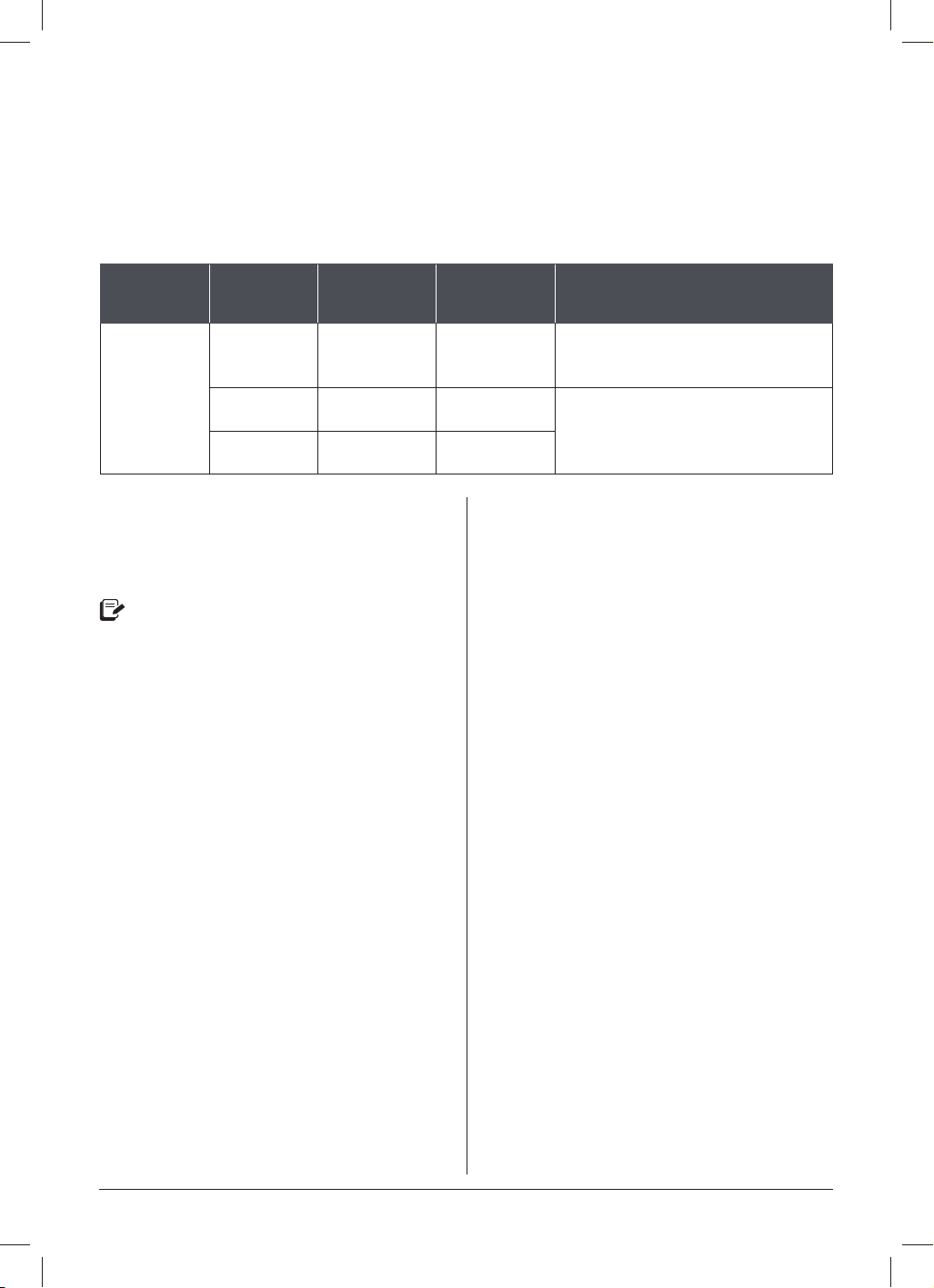
Instant Pot size Minimum milk volume Maximum milk volume
5.7 Litres
4 cups (1 L) ~3.8L
8 Litres 6 cups (1.5 L) ~5.7L
Smart
Programme
Cooking
presets
Default
temperature
Default
cooking time
Time range
Yogurt Cu
stom
Low
(Ferment)
8 hours
(08:00)
30 minutes to
99 hours and 30 minutes
(00:30 to 99:30)
High
(Pasteurise)
(boiL) Will take 30 minutes to 1 hour
depending on the amount of milk
Custom
56°C
8 hours
(08:00)
30 minutes to
99 hours and 30 minutes
(00:30 to 99:30)
Starting with... Do this!
Pasteurised or
unp
asteurised milk
Follow all the steps below
Ultra-pasteurised milk
Skip to Step 2: Add starter culture.
This is the “cold start” method of yogurt making.
You’ll Need:
• Food Thermometer
• Milk or a non-dairy alternative
• Active yogurt culture

44 | [email protected] | 0393 655 100
COOKING
Step 1: Pasteurise milk
01 Add milk or milk alternative to the inner
pot, and any other ingredients that your
recipe calls for.
02 Place and close the multicooker lid as
described in Pressure control features:
Multicooker lid.
The multicooker lid is removable
throughout yogurt making for easy
access.
03 Touch Yogurt.
04 When the temperature fl ashes, turn the
dial to toggle to High.
The pasteurisation time and
temperature are preset and cannot be
adjusted.
05 Touch Start to begin.
The display shows boiL and the
progress bar shows Pre-heating.
06 The display shows End when
pasteurisation is complete.
Milk must reach a minimum of 72°C to
pasteurise properly. Use a thermometer
to check the temperature.
Step 2: Add starter culture
01 Using a thermometer, allow the milk to
cool to just below 43°C.
02 Add your starter culture to the milk
according to the instructions included
with the starter culture product.
Plain yogurt with active cultures can
be used as a starter. Follow a trusted
Instant Pot yogurt recipe when using
yogurt as a starter culture.
03 Place and close the multicooker lid as
described in Pressure control features:
Multicooker lid.
Step 3: Ferment milk
01 Touch Yogurt.
02 When the temperature fl ashes, turn
the dial to toggle to Low or Custom.
To set a custom temperature, select
Custom, then turn the dial to set the
temperature.
Press the dial to make your selection
and go to the next fi eld.
03 When the time fl ashes, turn the dial to
adjust the cooking time.
An 8-hour fermentation period is
standard, but may vary based on your
recipe and fl avour preferences.
04 Touch Start to begin.
The display shows On and the progress
bar shows Pre-heating.
05 When fermentation is complete the
display shows End.
YOGURT

instantpot.com.au | 45
COOKING
YOGURT
Tips for yogurt making
• The thicker the milk, the thicker the yogurt!
• For even thicker yogurt, pasteurise your milk twice before fermenting.
• For the thickest yogurt, use a cheesecloth to strain out the liquid whey, and get rich
Greek-style yogurt.
• The longer you ferment your milk, the tangier the yogurt will be.
• Cool your fresh yogurt, then put it in the fridge (covered) for 12 to 24 hours to allow the
fl avours to develop.
• Honey, nuts, seeds and fresh fruit are perfect toppers for your homemade yogurt!
USING YOGURT CUPS
Yogurt cups are a convenient way to portion out yogurt servings.
01 After Step 2: Add started culture, carefully pour the milk into your yogurt cups and
seal them tightly.
02 Place the steam rack on the bottom of the inner pot.
03 Position the yogurt cups on the rack and add water to the inner pot until the cups are
immersed halfway.
04 Follow the steps in Step 3: Ferment yogurt normally.
46 | [email protected] | 0393 655 100
COOKING
BAKE
Use Bake with or without pressure to proof dough and create decadent brownies, moist
banana bread, and other tasty treats.
Smart
Programme
Cooking
presets
Default
temperature
or pressure
Default
cooking time
Time range
Bake
Cu
stom
None,
176°C
30 minutes
(00:30)
1 minute to 4 hours
(00:01 to 04:00)
Cheesecake High
45 minutes
(00:45)
1 minute to 1 hour
(00:01 to 01:00)
Bread High
40 minutes
(00:40)
Stage 1: Setting up the Pro for baking
01 Place the steam rack on the bottom of
the inner pot, then place your baking
dish on top of the steam rack.
Leave approximately 2.5 cm of space
around all sides of the baking dish to
allow heat to circulate evenly.
02 Insert the inner pot into the multicooker
base.
03 Place and close the multicooker lid as
described in Pressure control features:
Multicooker lid.
Stage 2: Baking
01 Touch Bake.
02 When Custom fl ashes, turn the dial
to toggle through the preset cooking
options.
Press the dial to make your selection
and go to the next fi eld.
03 When the pressure level fl ashes, turn
the dial to toggle through None, Low
and High.
If you choose None, turn the dial to set
a custom temperature.
Press the dial to confi rm your choice
and go to the next fi eld.
04 When the time fl ashes, turn the dial to
adjust the cook time as directed by your
recipe.
Press the dial to confi rm the change
and go to the next fi eld.
05 Reminder fl ashes if you’re cooking with
pressure.
Turn the dial to toggle between vent
reminder options. See Control panel for
more information.
06 Touch Start to begin.
The display shows On and the cooking
progress bar shows Pre-heating.
Stage 3: Releasing pressure
01 When Cooking fi nishes, the display
shows End.
02 If you have set a 5 or 10 minute vent
reminder, the reminder timer begins to
count down.
03 When you’re ready, follow your recipe’s
instructions to choose a venting
method.
See Releasing Pressure for
information on safe venting techniques.

instantpot.com.au | 47
KEEP WARM
Perfect to reheat meals or warm food for long periods of time.
Smart
Programme
Default
temperature
Temperature range Time range
Keep Warm High
Custom
62 to 90°C
30 minutes to 10 hours
(00:30 to 10:00)
Low
62°C
High
77°C
01 Touch Keep Warm.
02 When the temperature fl ashes, turn the dial to toggle to toggle to Low, High, or
Custom.
To set a custom temperature, select Custom, then turn the dial to set the
temperature.
Press the dial to make your selection and go to the next fi eld.
03 When the time fl ashes, turn the dial to adjust the cooking time.
To set a custom temperature, touch the Temperature fi eld to toggle to Custom, then
turn the dial to choose a temperature.
04 Touch Start to begin. The display shows On and the progress bar shows Pre-heating.
05 When Keep Warm completes, the display shows End.
04 If baking with pressure, wait for the
fl oat valve to drop, then carefully open
and remove the lid as described in
Pressure control features:
Multicooker lid.
05 Using proper hand protection,
remove the inner pot from the
multicooker base and carefully
lift out your baking dish.
CAUTION
Thicker foods may prevent even heating, which can lead to spoiled food if left
unattended. When keeping warm food like stew and chili, stir the contents of the inner
pot every 40 to 60 minutes to make sure that heat is evenly distributed.
COOKING
48 | [email protected] | 0393 655 100
USING FAVOURITE PROGRAMMES
Set and save 5 custom programmes as Favourites for one-touch access to recipes.
SAVING RECIPES AS FAVOURITES
01 Select any Smart Programme and set it up according to your recipe.
02 When you’re happy with the settings, touch and hold any Fav key for 3 seconds to
save the programme.
That’s it! Your customised programme is ready to use any time you want.
You can replace a saved Favourite with a new recipe by repeating these steps again.
USING FAVOURITE RECIPES
Depending on your recipe, you can add your ingredients to the inner pot before or after
Pre-heating.
01 Touch the Fav key you want to use.
02 Touch Start to begin.
The display shows On and the progress bar shows Pre-heating.
It’s really that easy!
If you press a Fav key that hasn’t been saved as a Favourite, the display fl ashes [tbd]
3 times and returns to the previous screen.

instantpot.com.au | 49
CARE, CLEANING AND STORAGE
Clean your Instant Pot Pro and its parts after each use. Failure to follow these cleaning
instructions may result in property damage and/or personal injury.
Always unplug your multicooker and let it cool to room temperature before cleaning.
Never use metal scouring pads, abrasive powders or harsh chemical detergents on any
of the Instant Pot’s parts or accessories.
Let all surfaces dry thoroughly before use, and before storage.
Parts Cleaning methods and instruction
Accessories
• S
team rack
Dishwasher safe if placed on the top rack.
Lid and parts
• Steam
release valve
• Steam
release cover
• Anti-block shield
• Sealing ring
• Float valve
• Silicone cap
• QuickCool cover
• Condensation
collector
Dishwasher safe if placed on the top rack.
Remove all the parts from the lid before cleaning. See Care, cleaning and storage:
Removing and installing parts.
• With the steam release valve and anti-block shield removed, clean the interior of the
steam release pipe with a pipe cleaner to prevent clogging.
• To drain water from the lid after dishwashing, grasp the lid handle and hold the lid
vertically over a sink, then turn it 360°— like turning a steering wheel.
• After cleaning and draining, store the lid upside down on the multicooker base to allow it
to air dry completely.
• Store sealing rings in a well-ventilated area to decrease residual odour of fl avourful
meals. To eliminate odours, add 1 cup (250 mL) water and 1 cup (250 mL) white vinegar
to the inner pot, then run Pressure Cook for 5 to 10 minutes and QR pressure.
• Check the condensation collector after each use and empty and clean it as needed.
Do not allow food or moisture to sit in the condensation collector, as harmful bacteria
may result.
Inner pot
Dishwasher safe.
• Acute hard water staining (rainbow, bluish or white discolouration) may require scrubbing
with a sponge dampened with vinegar or a non-abrasive cleanser like Bar Keeper’s Friend.
• For tough or burned food residue, add boiling water and dish soap to the inner pot and let
it sit for a few hours for easy cleaning.
• Make sure all exterior surfaces are dry before placing the inner pot in the multicooker base.
Power cord
Wipe only.
• Use a barely damp cloth to remove particles from the cord.
• Wrap it around the multicooker base and tuck the end into the cord holder.
Multicooker base
Wipe only.
• Wipe the inside of the outer pot as well as the condensation rim with a barely damp cloth.
Allow them to dry completely before inserting the inner pot.
• Clean the multicooker base and control panel with a soft, barely damp cloth or sponge.
Some discolouration may occur after machine washing, but this will not affect the multicooker’s safety or performance.
50 | [email protected] | 0393 655 100
CARE, CLEANING AND STORAGE
WARNING
The multicooker base contains electrical components. To avoid fi re, electric leakage and/
or personal injury, make sure the multicooker base always stays dry.
• DO NOT immerse the multicooker base in water or other liquid or attempt to cycle
it through the dishwasher.
• DO NOT rinse the heating element.
• DO NOT submerge or rinse the power cord or the plug.
Removing and installing parts
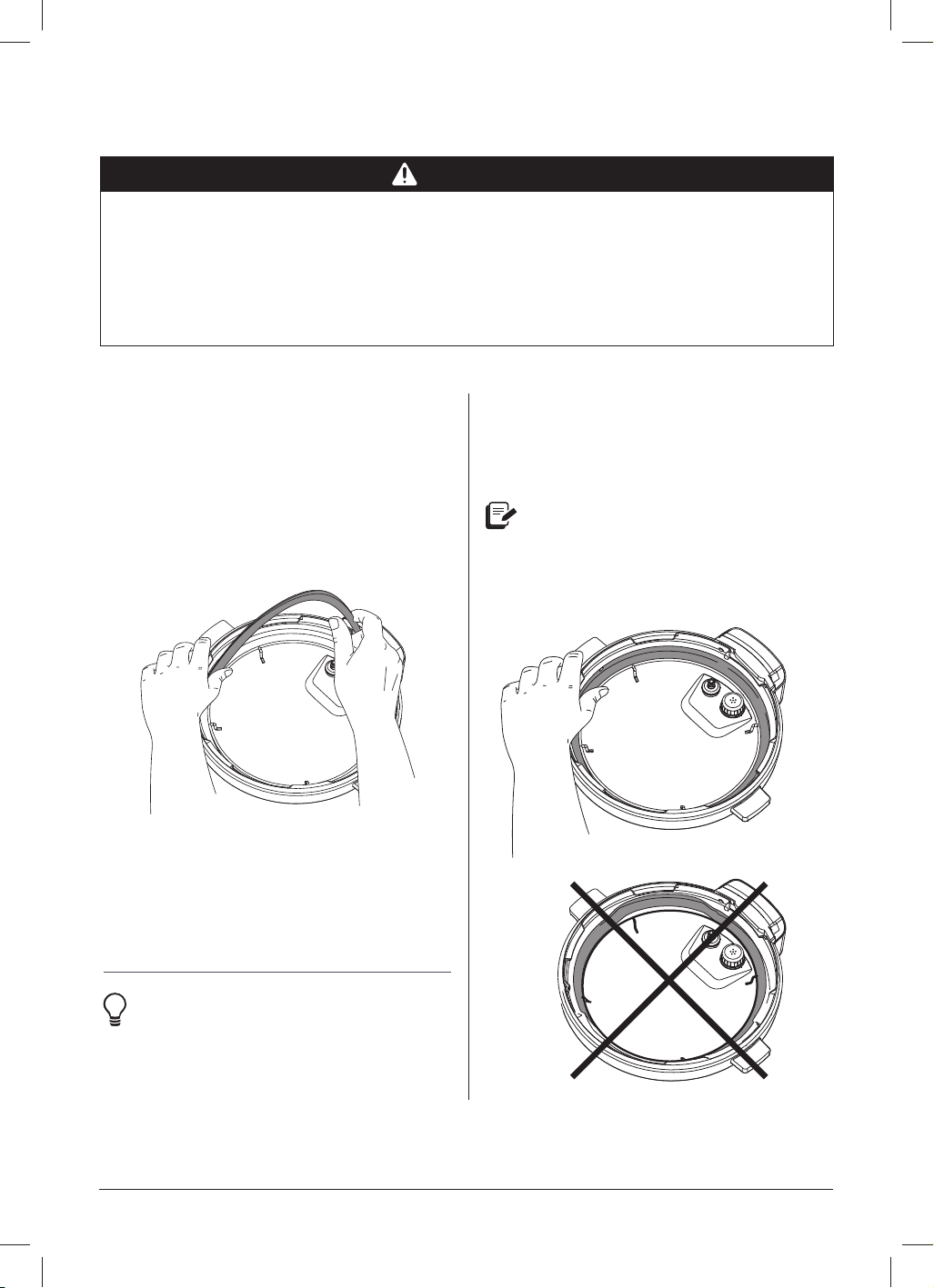
Silicone sealing ring
Remove the sealing ring
Grip the edge of the silicone and pull the
sealing ring out from behind the circular
stainless-steel sealing ring rack.
With the sealing ring removed, check
the ring rack to make sure it is secured,
centered, and an even height all the way
around the lid. Do not attempt to repair a
deformed ring rack.
Instant Tip: The sealing ring is
easiest
to remove when it is wet
and soapy.
Install the sealing ring
Plac
e the sealing ring over the sealing ring
rack and fi rmly press it into place. Make
sure there’s no puckering.
It should be snug behind the sealing
ring rack. It can wiggle a bit but shouldn’t
fall out when you turn over the lid.
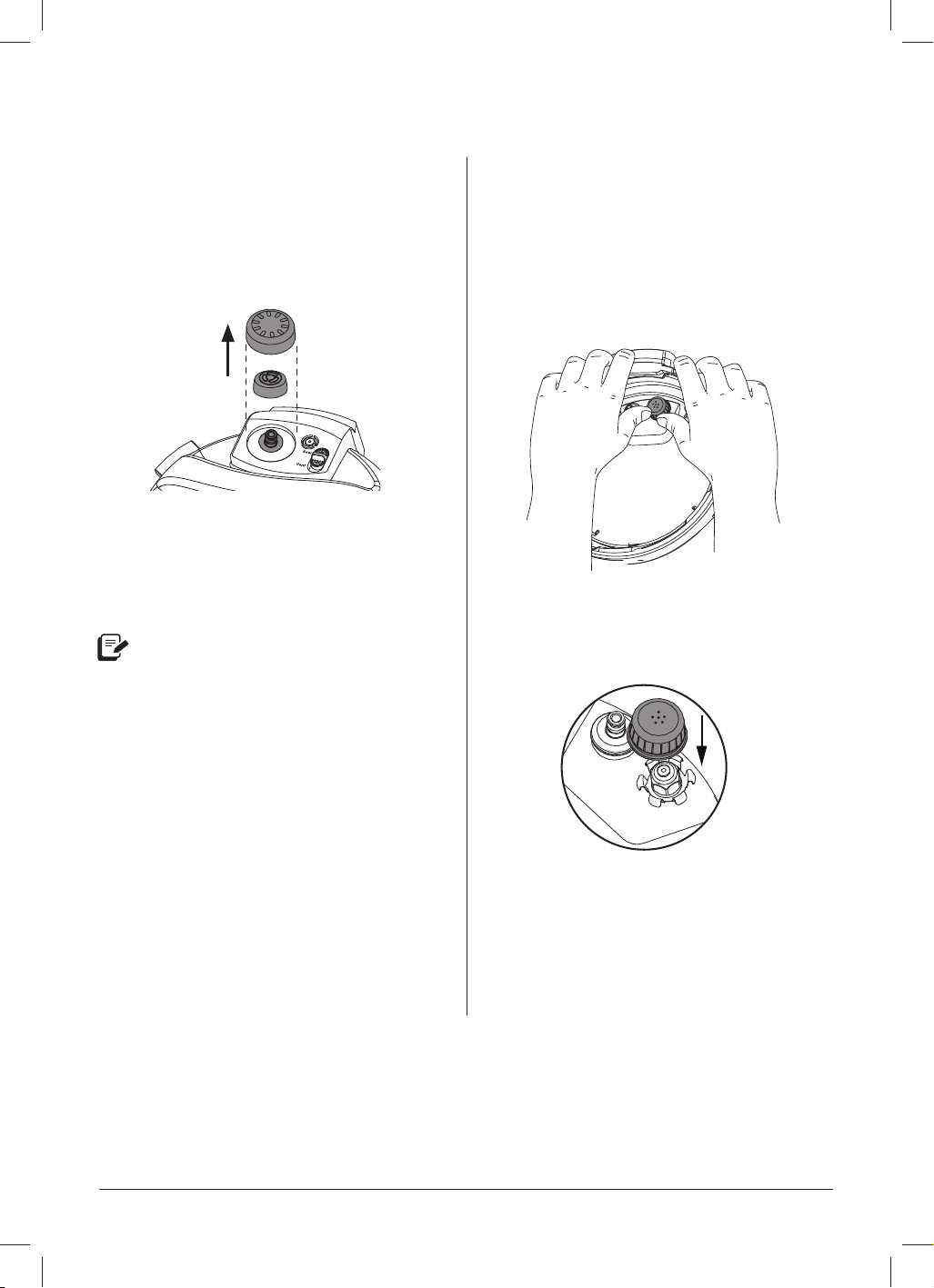
instantpot.com.au | 51
CARE, CLEANING AND STORAGE
Steam release assembly
Remove the steam release assembly
Remove the steam release cover, then pull
the steam release valve up and off the
steam release pipe.
Install the steam release assembly
Place the steam release valve on the
steam release pipe and press down fi rmly.
The steam release valve sits loosely
on the steam release pipe but
should remain in place when the
lid is turned over.
Place the steam release cover over the
steam release valve and press down.
The cover pressure-fi ts in place.
QuickCool protective cover
Remove the protective cover
Grip the tab and push it towards the lid
handle, then pull it up, towards you, and off.
Install the protective cover
Grip the tab and slide the cover towards
the back of the metal portion of the lid,
then press down until it clicks.
Anti-block shield
Remove the anti-block shield
Grip the lid like a steering wheel and use
your thumbs to press fi rmly against the
side of the anti-block shield (pressing
towards the side of the lid and up) until it
pops off the prongs underneath.
Install the anti-block shield
Place the anti-block shield over the prongs
and press down until it snaps into position.
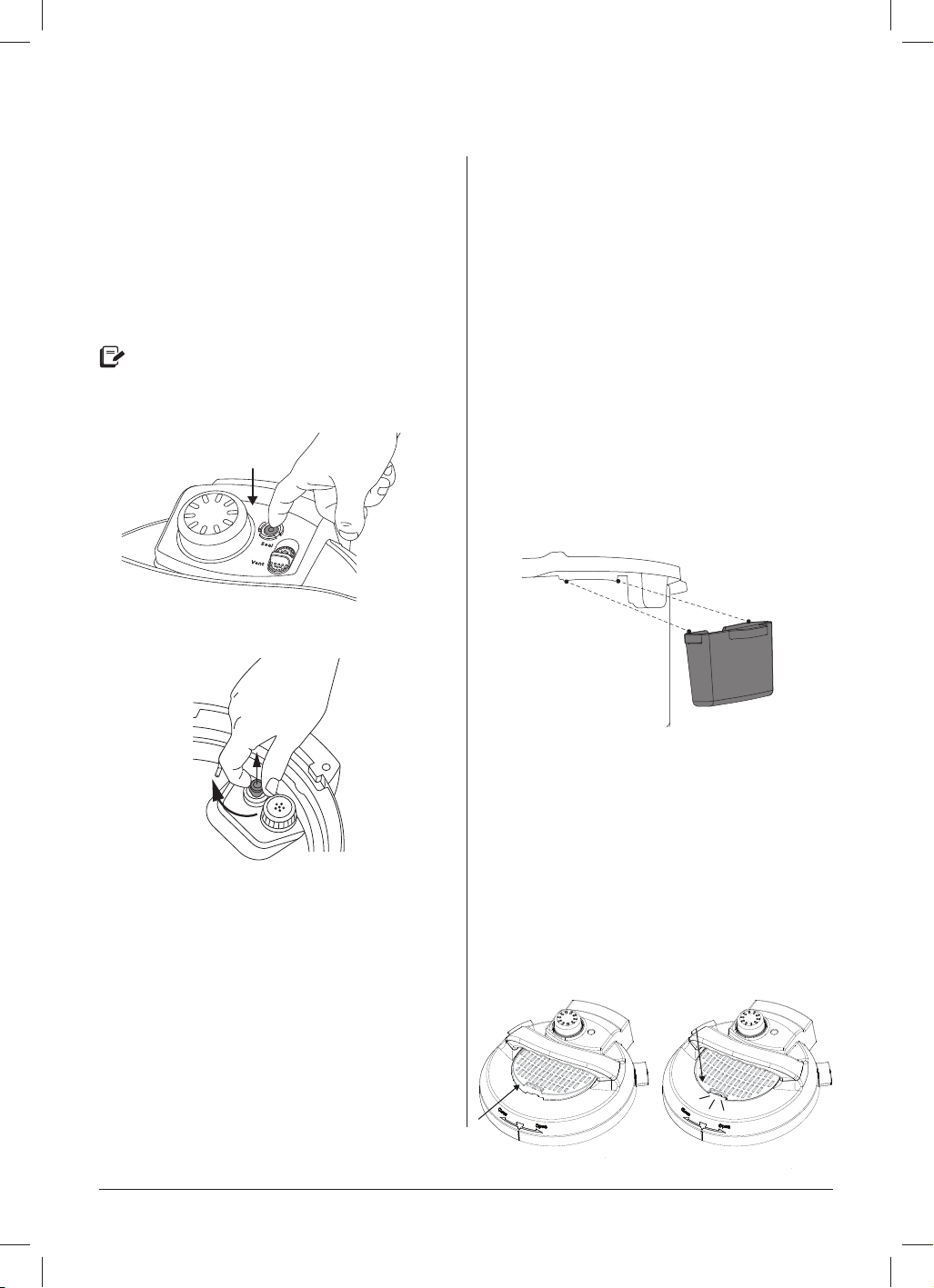
52 | [email protected] | 0393 655 100
CARE, CLEANING AND STORAGE
Float valve and silicone cap
Remove the float valve from the lid
Place one fi nger on the fl at top of fl oat
valve, then turn the lid over. Detach the
silicone cap from the bottom side of the
fl oat valve, and remove the fl oat valve
from the top of the lid.
Do not discard the fl oat valve or
silicone cap!
Top
Bottom
Install the float valve
Drop the narrow end of the fl oat valve into
the fl oat valve hole on the top of the lid.
Place one fi nger on the fl at top of the fl oat
valve, then turn the lid over. Firmly attach
the silicone cap to the bottom of the fl oat
valve.
Condensation collector
The condensation collector sits at the back
of the multicooker base and catches any
overfl ow from the condensation rim.
Remove the condensation collector
Pull the condensation collector away from
the multicooker base; do not pull down.
Note the tabs on the multicooker base and
the grooves on the condensation collector.
Install the condensation collector
Align the grooves on the condensation
collector over the tabs on the back
of the multicooker base and slide the
condensation collector into place like
closing a drawer.
QuickCool protective cover
Remove the protective cover
Grip the tab and push it towards the lid
handle, then pull it up, towards you,
and off.
Install the protective cover
Grip the tab and slide the cover towards
the back of the metal portion of the lid,
then press down until it clicks.
instantpot.com.au | 53
TR
OUBLESHOOTING
Register your Instant Pot Pro today at www.instantpot.com.au/pages/product-
registration.
If your problem persists of if you have any questions, get in touch with Customer Care
Problem Possible reason Try this
Occasional
clicking or
light cr
acking
sound.
The sound of power switching
and expanding pressure board
when changing temperatures.
This is normal; no action needed.
Bottom of the inner pot
is wet.
Wipe exterior surfaces of the inner pot. Make sure the
heating element is dry before inserting the inner pot into
the multicooker base.
Diffi culty
closing the lid.
Sealing ring is not properly
installed.
Reposition the sealing ring. Make sure it is snug behind the
sealing ring rack.
Float valve is in the popped-up
position.
Gently press the fl oat valve downward with a long utensil.
Contents in multicooker are
still hot.
Hold the quick release switch in the Vent position as you
lower the lid onto the multicooker base slowly, allowing
heat to dissipate.
Diffi culty
opening the lid.
Contents may be under pressure. To avoid scalding
injury, DO NOT attempt to force the lid open.
Pressure inside the multicooker.
Release pressure according to recipe. Only open the lid
after the fl oat valve has dropped down.
Float valve stuck in the popped-
up position due to food debris
or residue.
Release pressure completely, then tap the fl oat valve
gently with a long utensil. You may need to allow the
multicooker to cool slightly so all pressure can be released.
Open the lid cautiously, then thoroughly clean the fl oat
valve, surrounding area, and lid before next use.
The inner pot
is stuck to the
lid when the
multicooker is
opened.
Cooling of the inner pot may
create suction, causing the
inner pot to adhere to the lid.
To release the vacuum, move the quick release switch to
the Vent position.

54 | [email protected] | 0393 655 100
TROUBLESHOOTING
Problem Possible reason Try this
Steam leaks
fr
om side
of lid.
No sealing ring in the lid. Install a sealing ring.
The sealing ring is damaged or
not installed properly.
Replace the sealing ring.
Food debris on the
sealing ring.
Remove the sealing ring and clean it thoroughly.
The lid is not closed properly. Open, then close the lid.
The sealing ring rack is warped
or off-centre.
Remove the sealing ring from the lid, then check the
sealing ring rack for bends or warps. Contact Customer
Care.
The inner pot rim may be
misshapen.
Check for deformation and contact Customer Care.
The fl oat valve
does not rise.
Food debris on the fl oat valve
or fl oat valve silicone cap.
Remove the fl oat valve from the lid and clean it thoroughly.
Perform the Initial test run to check for function and
record your fi ndings. Contact Customer Care.
Too little liquid in the inner pot.
Check for scorching on the bottom of the inner pot.
Add thin, water-based liquid to the inner pot according
to its size.
5.7L: 1 ½ cups (375 mL)
8L: 2 cups (500 mL)
Float valve silicone cap
damaged or missing.
Install or replace the fl oat valve and/or silicone cap.
Float valve obstructed by lid-
locking mechanism.
Tap the fl oat valve with a long utensil. If the fl oat valve
does not drop, turn the multicooker off. Contact Customer
Care.
No heat in the inner pot.
Perform the Initial test run to check for function and
record your fi ndings. Contact Customer Care.
Inner pot base may be
damaged.
Perform the Initial test run to check for function and
record your fi ndings. Contact Customer Care.
Minor steam
leaking or
hissing from
the steam
release valve
during the
cook cycle.
Quick release switch is not in
the Seal position.
Move the quick release switch to the Seal position.
Add additional liquid to the inner pot.
Multicooker is regulating excess
pressure.
This is normal; no action required.
Too little liquid in the inner pot. Ensure there is minimum liquid in the inner pot.
The display
remains
blank after
connecting the
power cord.
Bad power connection or no
power.
Check outlet to make sure it is powered.
Inspect power cord for damage. If damage is noticed,
contact Customer Care.
Multicooker’s electrical fuse
has blown.
Contact Customer Care.

instantpot.com.au | 55
TROUBLESHOOTING
Problem Possible reason Try this
Steam gushes
from the steam
release valve when
the quick release
switch is in the
Seal position.
Not enough liquid in the inner pot.
Add thin, water-based liquid to the inner pot
according to its size.
5.7L: 1 ½ cups (375 mL)
8L: 2 cups (500 mL)
Pressure sensor control failure. Contact Customer Care.
Steam release valve is not seated
properly.
Move the steam release switch to Vent then
back to the Seal position.
Error code
appears on the
display and the
multicooker beeps
continuously.
C1
C3
C4
C6
Faulty sensor. Contact Customer Care.
C7
Heat element has failed. Contact Customer Care.
Not enough liquid.
Multicooker lid is not
used for pressure cooking
functions.
Add thin, water-based liquid to the inner pot
according to its size.
5.7L: 1 ½ cups (375 mL)
8L: 2 cups (500 mL)
Put on the lid and restart.
C8 Incorrect inner pot is used.
Only use a stainless-steel Pro Series inner pot
with Easy Grip handles with the Pro.
Lid
The lid is not in the correct
position for the selected
programme.
Open and close the lid.
Do not use a lid when using Sauté.
Food
burn
High temperature detected
at bottom of inner pot; the
multicooker automatically
reduces the temperature
to avoid overheating.
Starch deposits at the bottom of the inner pot
may have blocked heat dissipation.
Turn the multicooker off, release pressure and
inspect the bottom of the inner pot.
PrSE
Pressure has accumulated
during a non-pressure
cooking programme.
Touch Cancel and Quick Release pressure.
Any other servicing must be performed by an authorised representative.

56 | [email protected] | 0393 655 100
WARRANTY
one (1) year limited replacement warranty
statement.
If your product becomes defective due to faulty material or workmanship
within a period of 1 year from the date of purchase, we warrant to do the
following:
For New Zealand Consumers: We will replace the product with a new product, free of charge, or
repair the product at our cost, at our discretion.
For Australian Consumers: Our goods come with guarantees that cannot be excluded under the
Australian Consumer Law. You are entitled to a replacement or refund for a major failure and for
compensation for any other reasonably foreseeable loss or damage. You are also entitled to have
the goods repaired or replaced if the goods fail to be of acceptable quality and the failure does not
amount to a major failure.
YOUR WARRANTY IS SUBJECT TO THE FOLLOWING CONDITIONS:
• DO NOT operate the appliance with a damaged plug or cord, or if the unit has been dropped,
damaged or dropped in water. To avoid the risk of electric shock, do not disassemble or
attempt to repair the appliance on your own. If the supply cord is damaged, it must be replaced
by a qualified electrician in order to avoid a hazard. Incorrect reassembly or repair can cause a
risk of electric shock or injury to persons when the appliance is used.
• The item has not been misused, abused, neglected, altered, modified or repaired by anyone.
• The item has been subjected to fair wear and tear.
• The item has not been used for trade, professional or hire purposes.
• The item has not sustained damage through foreign objects, substances or accident.

instantpot.com.au | 57
WARRANTY
YOUR WARRANTY DOES NOT COVER:
• Components that are subject to natural wear and tear caused by normal use in
accordance with operating instructions.
• Unauthorised/improper maintenance/handling or overload is excluded from this
warranty.
• For guarantee claims, you will need to submit a proof of purchase in the form of a
valid receipt that displays date and place of purchase.
This warranty does not replace but is in addition to your statutory rights.
This warranty does not apply to accessories supplied with the item.
This warranty applies only to the original purchaser and may not be transferred.
Replacement items will be covered by the limited warranty for the balance of the
warranty period from the date of the original purchase.
PLEASE NOTE: Only the defective product or parts returned to place of purchase will be
replaced under this warranty.