artusi.com.au V20210806
Free
Standing Cooker
INSTRUCTION MANUAL
Model AFI607X
Please read these instructions carefully before using your new cooker

2
DEAR CUSTOMER
This cooker is exceptionally easy to use and extremely e
ffi
cient. After reading
the instruction manual, operating the cooker will be easy.
Before being packaged and leaving the manufacturer, the cooker was thoroughly checked
regarding safety and functionality.
Before using the appliance, please read this instruction manual carefully.
By following these instructions carefully, you will be able to avoid problems using the appliance.
It is important to keep the instruction manual in a safe place so that it may be referred to at any
time.
It is necessary to follow the instructions carefully to avoid possible accidents and hazards.
Caution
!
Do not use the cooker until you have read this instruction manual.
The cooker is intended for household use only.
The manufacturer reserves the right to introduce changes which do not affect the operation
of the appliance.

3
TABLE OF CONTENTS
Safety instructions .......................................................................................... 4
Unpacking ......................................................................................................
5
Disposal of the appliance ...............................................................................
5
Description of the appliance ........................................................................... 6
Installation ......................................................................................................
7
Operation .......................................................................................................
8
Prior first use ..................................................................................................
8
Oven Electronic timer ..................................................................................... 8
Controlling the heating zones of the ceramic hob ........................................ 14
Electronic programmer ................................................................................ 15
Oven functions and operation ...................................................................... 19
Cleaning and maintenance ........................................................................... 21
Operation in case of emergency ................................................................... 22
Technical information ....................................................................................
25

4
SAFETY INSTRUCTIONS
l
The appliance becomes hot during operation. Take care not to touch the hot parts inside
the oven.
l
Always keep children away from the cooker. While in operation direct contact with the
cooker may cause burns!
l
Ensure that small items of household equipment, including connection leads, do not touch
the hot oven or the hob as the insulation material of this equipment is usually not resistan
t
to high temperatures.
l
Do not leave the cooker unattended when frying. Oils and fats may catch fire due to
overheating.
l
Do not allow the cooktop to get soiled and prevent liquids from boiling over onto the
surface of the cooktop. Any spillages should be cleaned up as they happen.
l
Do not put pans weighing over 15kg on the opened door of the oven and pans over 25kg
on the cooktop.
l
Do not use harsh cleaning agents or sharp metal objects to clean the doors as they can
scratch the surface, which could then result in the glass cracking.
l
In the event of any incident caused by a technical fault, disconnect the power and report
the fault to the service centre to be repaired.
l
The rules and provisions contained in this instruction manual should be strictly observed.
Do not allow anybody who is not familiar with the contents of this instruction manual to
operate the cooker.
l
The cooker should not be cleaned using steam equipment.
l
WARNING: Accessible parts may become hot during use. Young children should be kept
away.
l
Ensure that the appliance is switched off before replacing the lamp to avoid the possibility
of electric shock.
l
WARNING: Accessible parts will become hot when the grill is in use. Children should be
kept away.
l
The appliance is not intended to be operated by means of an external timer or separate
remote-control system.
l
This appliance is not intended for use by persons (including children) with reduced
physical, sensory, or mental capabilities, or lack of experience and knowledge, unless
they have been given supervision or instruction concerning use of the appliance by a
person responsible for their safety.
l
Children should be supervised to ensure that they do not play with the appliance.
l
If the supply cord is damaged, it must be replaced by the manufacturer or its service
agent or a similarly qualified person to avoid a hazard.
l
Use pans that are specified by the manufacturer has designed for use with an
induction hob.
l
If the surface is cracked, switch off the appliance to avoid the possibility of electric shock.
l
Disconnect the appliance from the mains electricity supply before carrying out any work or
maintenance on it.
l
No combustible material or products should be placed on this appliance at any time.
l
Do not cook on a broken or cracked cooktop. If the cooktop surface should break or
crack, switch the appliance off immediately at the mains power supply (wall switch) and
contact a qualified technician.
l
Switch the cooktop off at the wall before cleaning or maintenance.
l
Persons with cardiac pacemakers or other electrical implants (such as insulin pumps)
must consult with their doctor or implant manufacturer before using this appliance to
make sure that their implants will not be affected by the electromagnetic field.
l
Do not let your body, clothing, or any item other than suitable cookware contact the
Induction glass until the surface is cool.
l
Metallic objects such as knives, forks, spoons, and lids should not be placed on the hob
surface since they can get hot.
l
Handles of saucepans may be hot to touch. Check saucepan handles do not overhang
other cooking zones that are on. Keep handles out of reach of children.
l
Failure to follow this advice could result in burns or scalds.
l
Do not place or leave any magnetized objects (e.g. credit cards, memory cards) or

5
SAFETY INSTRUCTIONS
electronic devices (e.g., computers, MP3 players) near the appliance, as they may be
affected by its electromagnetic field.
l Never use your appliance for warming or heating the room.
l After use, always turn off the cooking zones and the cooktop as described in this manual
by using the touch controls. Do not rely on the pan detection feature to turn off the cooking
zones when you remove the pans.
l Do not use pans with jagged edges or drag pans across the Induction glass surface as
this can scratch the glass.
l Do not use pans with sharp edges that may cause damage to the induction hob.
l The cooker should not be immersed in water or under running water or any kind of liquids.
Danger of fire: Do not store items on the cooking surfaces.
CAUTION: The cooking process must be supervised. A short-term cooking process has to
be supervised continuously.
WARNING: Unattended cooking on a hob with fat or oil can be dangerous and may result
in a fire.
The appliance must not be installed behind a decorative door to avoid overheating.
UNPACKING
During transportation, protective packaging was used to protect the appliance
against any damage.
After unpacking, please dispose of all elements of packaging in a way that will
not cause damage to the environment.
All materials used for packaging the appliance are environmentally friendly; they are 100%
recyclable and are marked with the appropriate symbol.
Caution!
During unpacking, the packaging materials (polythene bags, polystyrene pieces, etc.) should
be kept out of reach of children.
DISPOSAL OF THE APPLIANCE
Old appliances should not simply be disposed of with normal household waste but should be
delivered to a collection and recycling centre for electric and electronic equipment.
A symbol shown on the product, the instruction manual, or the packaging shows that it is suitable
for recycling.
Materials used inside the appliance are recyclable and are labeled with information concerning
this. By recycling materials or other parts from used devices you are making a significant
contribution to the protection of our environment.
Information on appropriate disposal centres for used devices can be provided by your local
authority.
6
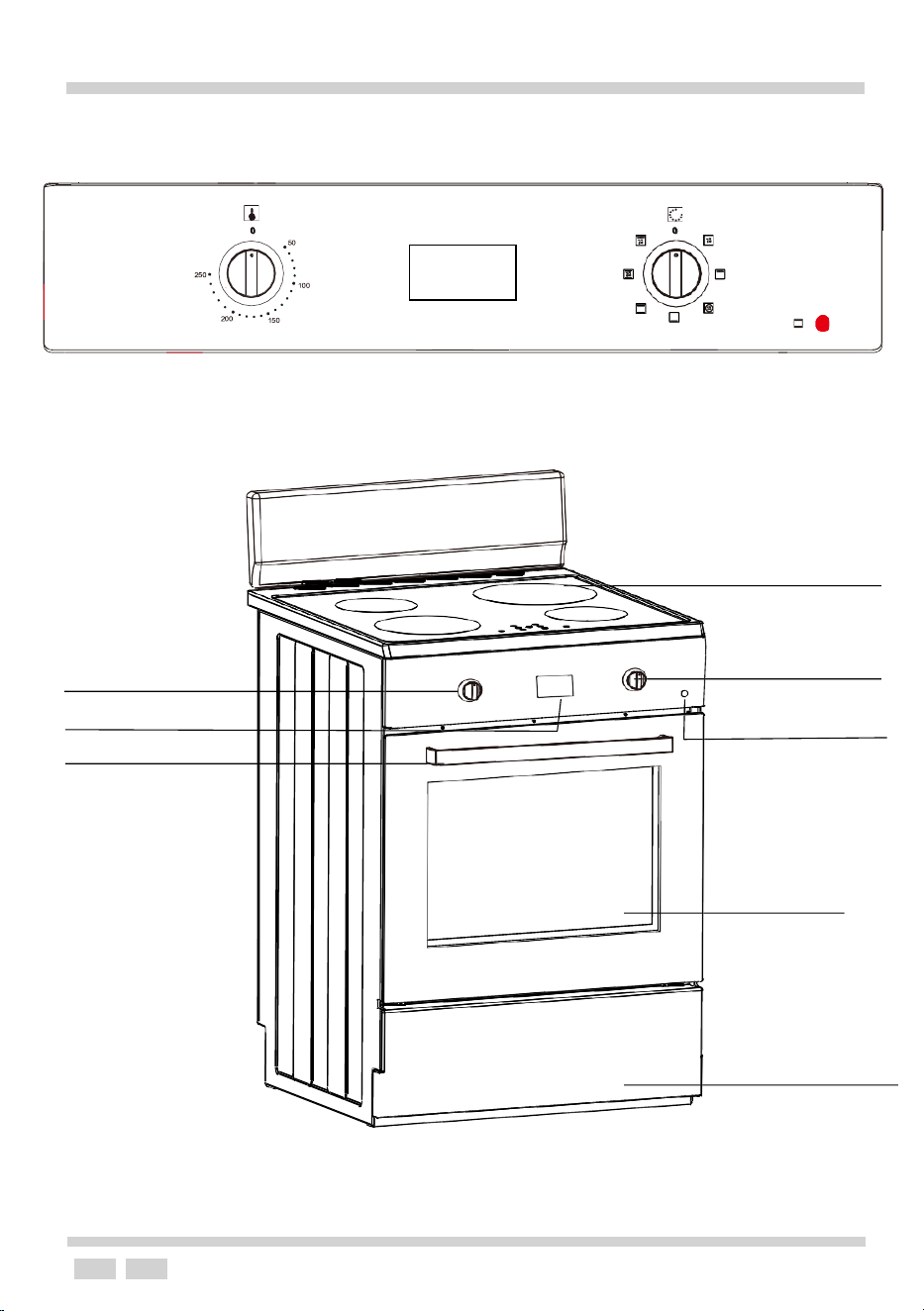
DESCRIPTION OF THE APPLIANCE
7. Induction hob
1.Temperature
control knob
3. Electronic timer
5. Oven door handle
2.Oven function
selection knob
4.Oven operation
signal light
6. Oven door
8.Drawer Panel
7
INSTALLATION
The following instructions are addressed to
the qualified specialist installing the cooker.
These instructions aim to ensure that installation
is performed as professionally as possible.
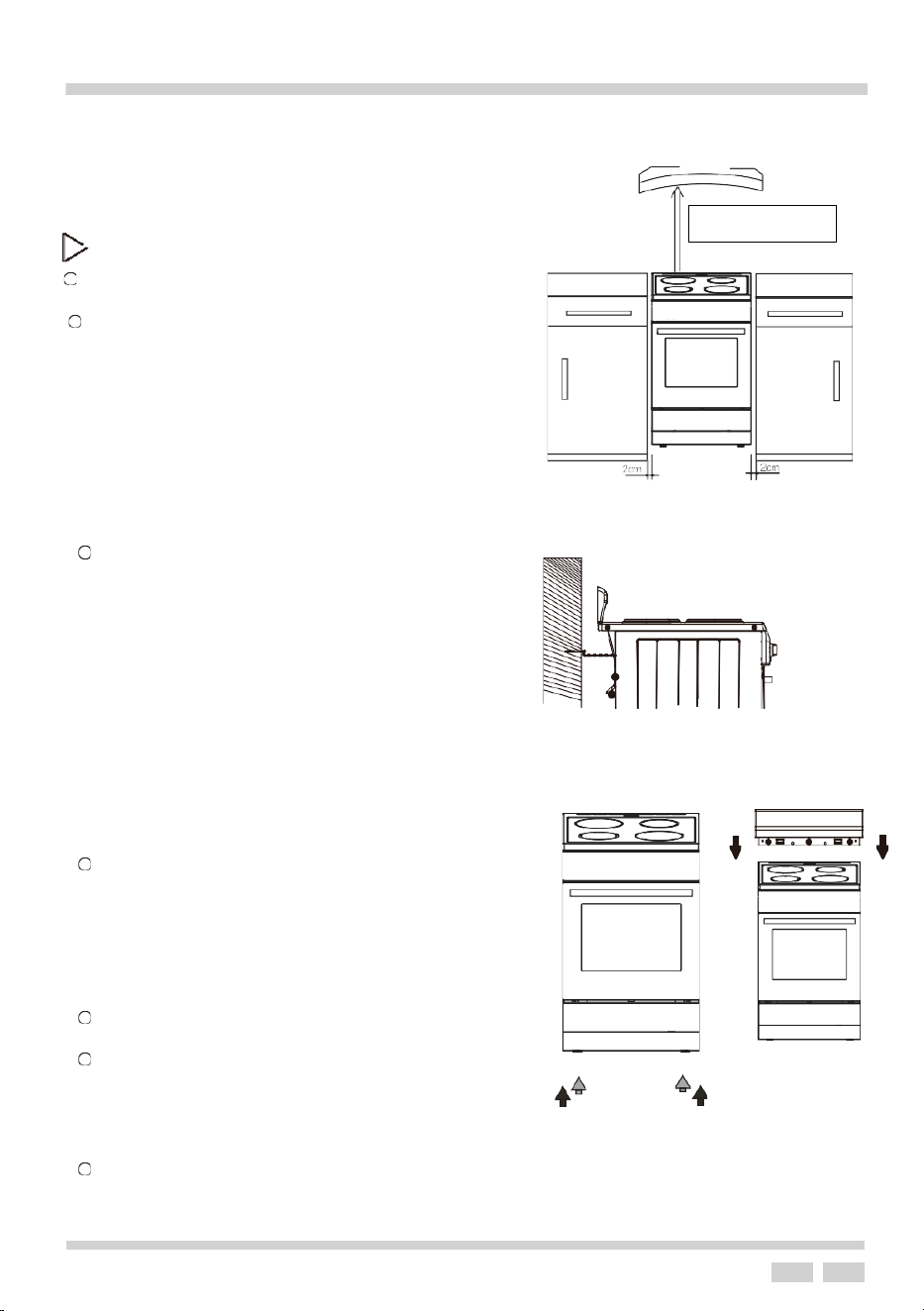
Installing the cooker
l
The kitchen where the appliance is to
be installed must be dry and well ventilated.
l The room should be equipped with a
ventilation system that pipes awa
y
exhaust fumes created during
combustion. This system should
consist of a ventilation grid or hood.
Hoods should be installed according
to the manufacturer’s instructions
.
The cooker should be placed to
ensure free access to all control
elements.
l Coating or veneer used on fitted
furniture must be applied with a hea
t
resistant adhesive (100℃). This
prevents surface deformation or
detachment of the coating. If y
ou
are unsure of your furniture’s heat
resistance, you should leave
approximately 2 cm of free a spac
e
around the cooker. The wall behind
the cooker should be resistant to
high temperatures. During operation,
its back side can warm up to around
*Fix the cooker to the back wall with 2
chains
l
Anti-tilt chains are located at the rear of the
appliance and must be secured to the wall
behind the appliance to prevent accidental
tipping/tilting. The chain length must be as
short as practicable to stop appliance tilti
ng
forward and also diagonal to avoid appliance
moving sideways.
l
The cooker should stand on a hard,
even floor (do not put it on a base.)
l Before you start using the cooker it should
be leveled, which is particularly important
for fat distribution in a frying pan. To this
purpose, adjustable feet are accessible after
removal of the drawer. The adjustment range is +/-5mm.
l To fit the rear panel/splash back, slide the lugs on the bottom of t
he
panel into the matching slots on rear of stove and fix with screws
provided.
600mm minimum
OPERATION
8
E
G
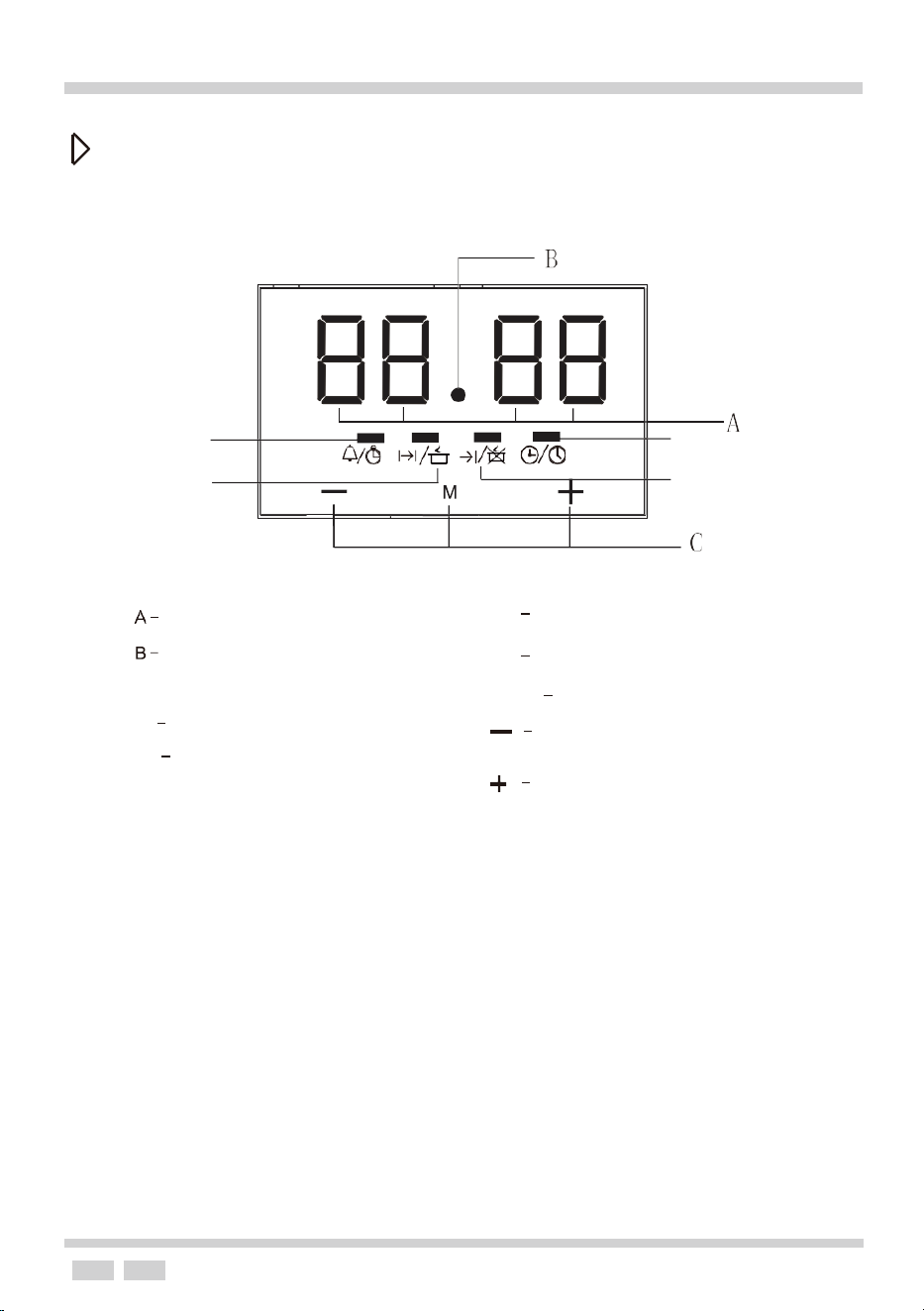
Button1
Button2
Button3
Electronic programmer
D
F
Display field
Seconds Icon
C - Buttons
D
Timer
E Current time
F Cooking time
G
End of cooking time
MODE
Function
To decrease the numbers
on the digital display
To increase the numbers
on the digital display
OPERATION
9
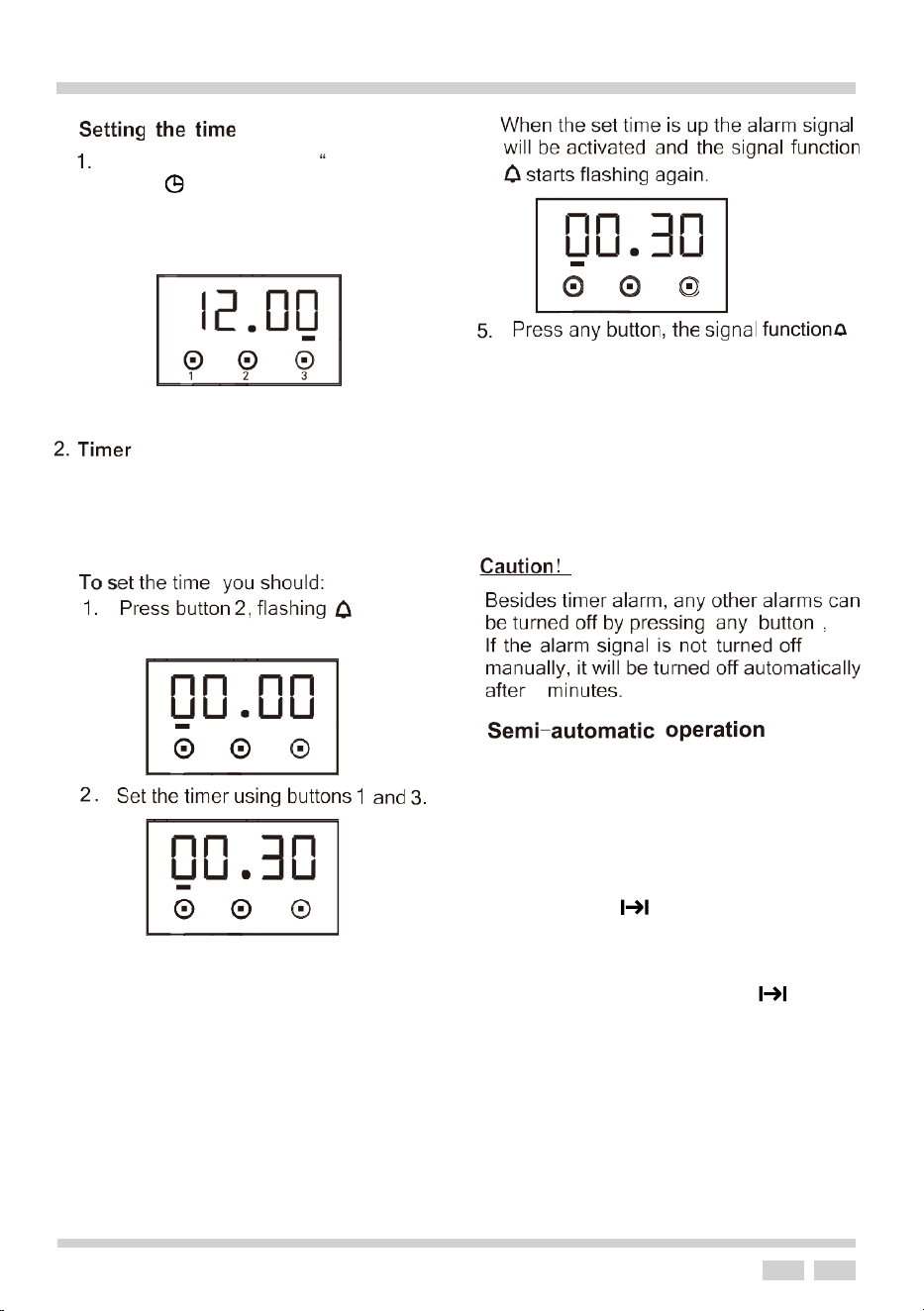
4
“12.00"
The current time can be set with
buttons 1 and 3. After 5 seconds
the new time set will be saved.
and alarm signal will go off. Or the alarm
signal will be turned off automatically
after 2 minutes.
.
The timer can be set for any time and function.
The timer can be set from 1 minute to 23 hours
and 59 minutes
timer setting.
Enter the
To set the oven to switch off at a given time
or switch off after a set period of time.
1. Set the oven function and the
temperature to the required settings.
2. Press button 2 and the oven will begin
to work. will flash.
3. Press button 1 or 3 to adjust the
cooking time. Range is 1 minute to 10
hours. OR
4. Press mode button twice will flash.
Use button 1 and 3 to set the end time.
5. After 5 seconds the timer is set.
6. When the set time is up the oven will
turn off and the alarm will ring.
1
2
3
1
2
3
At power on, displays
and flashes.
1 2 3
2
3. After 5 seconds the time is set.
Press button 2 and the alarm bell
lights up and your setting is saved.
OPERATION
10
Press any button, the alarm signal
and the icon will go off. The alarm
signal will turn off automatically after 2
minutes.
End of cooking time automatically
changes to 5:00.
Second Method:
1. Set the end of cooking time using
buttons 1 and 3.
After the auto function is off, the cooking
time is 0, and end of cooking time and
current time is the same.
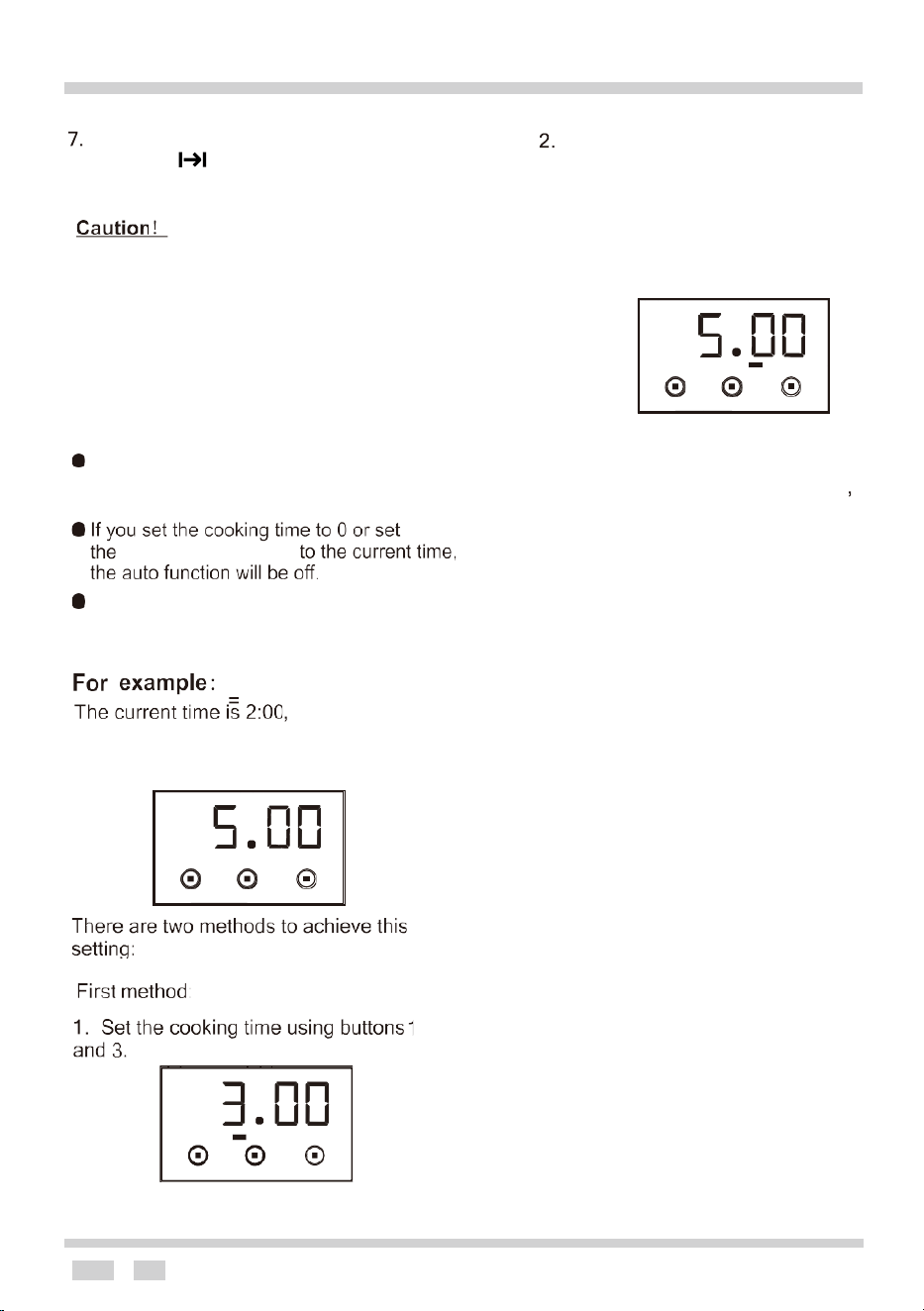
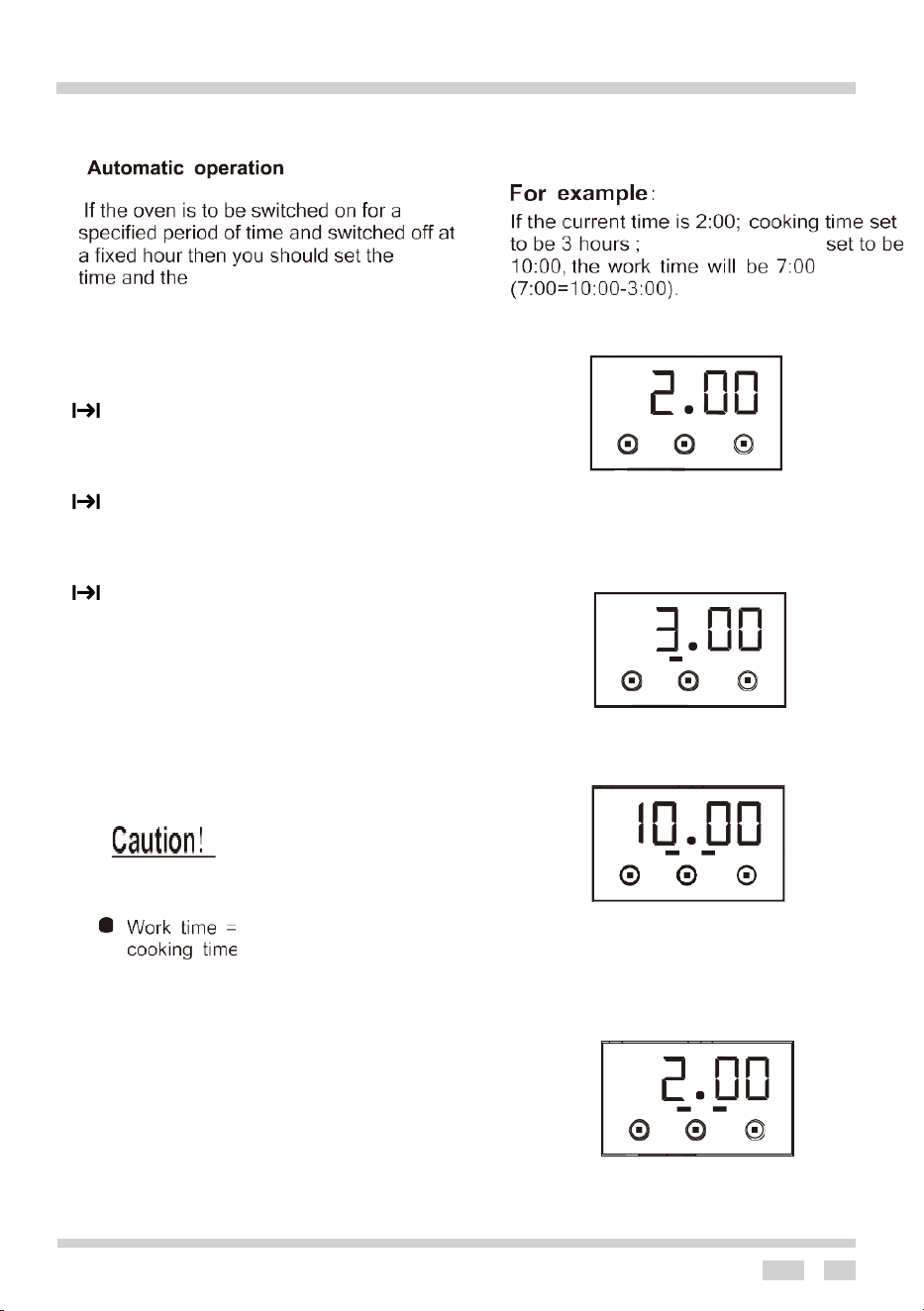
to set oven to
work for 3 hours, end of cooking is set to
5:00 (
2:00 + 3:00 = 5:00)
1 2 3
end of cooking time
1
2
3
2. Cooking time automatically
changes
to 3:00. After 5 seconds the auto
function is on. After 3 hours the current
time shows “5.00” and the alarm rings.
1 2 3
Set the cooking time or end of cooking
time using the semi-automatic operation.
The cooking time and end of cooking time
ranges.
Cooking time range is 0>t >=10 hours.
End of cooking time is: < current time + 24
hours.
End of cooking time range = current time +
cooking time.
OPERATION
11
1. Set the oven function knob and the
temperature knob to the required operation
setting.
2. Press button 2 and the oven will start to work
.
will flash.
3. Press buttons 1 or 3 to adjust the cooking
time within a range of 1 minute to 10 hours.
4. After 5 seconds the time will be set and the
will stop flashing.
5. The oven switches off automatically and
the alarm rings when the set time is
reached.
The display will go off.
6. Press any button and the alarm will stop.
Note: The alarm will stop after 2 minutes.
end of cooking time -
cooking
end of cooking time:
end of cooking time
1 2 3
1 2 3
1
2
3
1 2 3
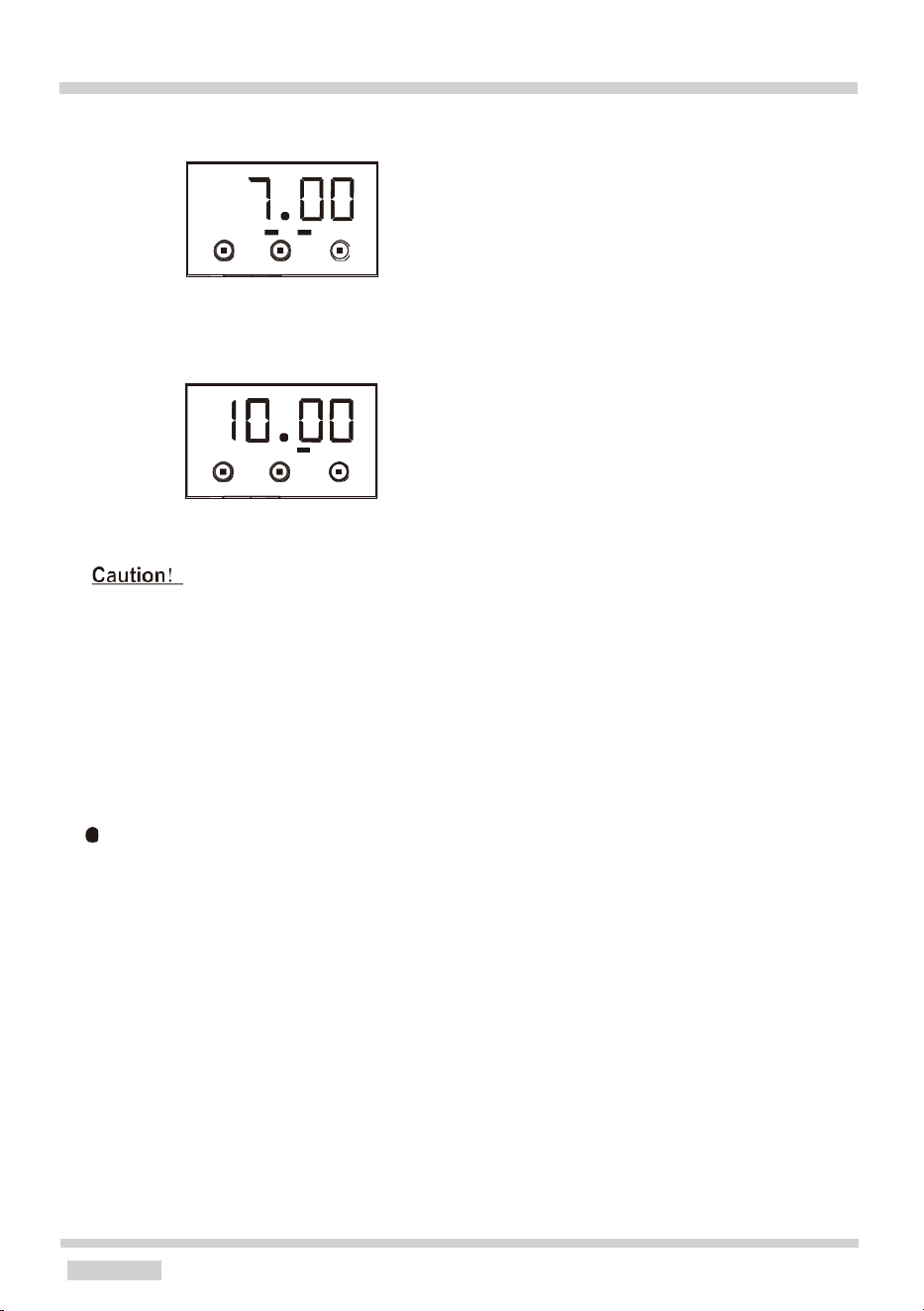
1. Set the cooking time to be “3.00”
2. Using buttons 1 and 3 set the end
of cooking time to be “10.00”
3. After 5 seconds the auto function
is on.
OPERATION
12
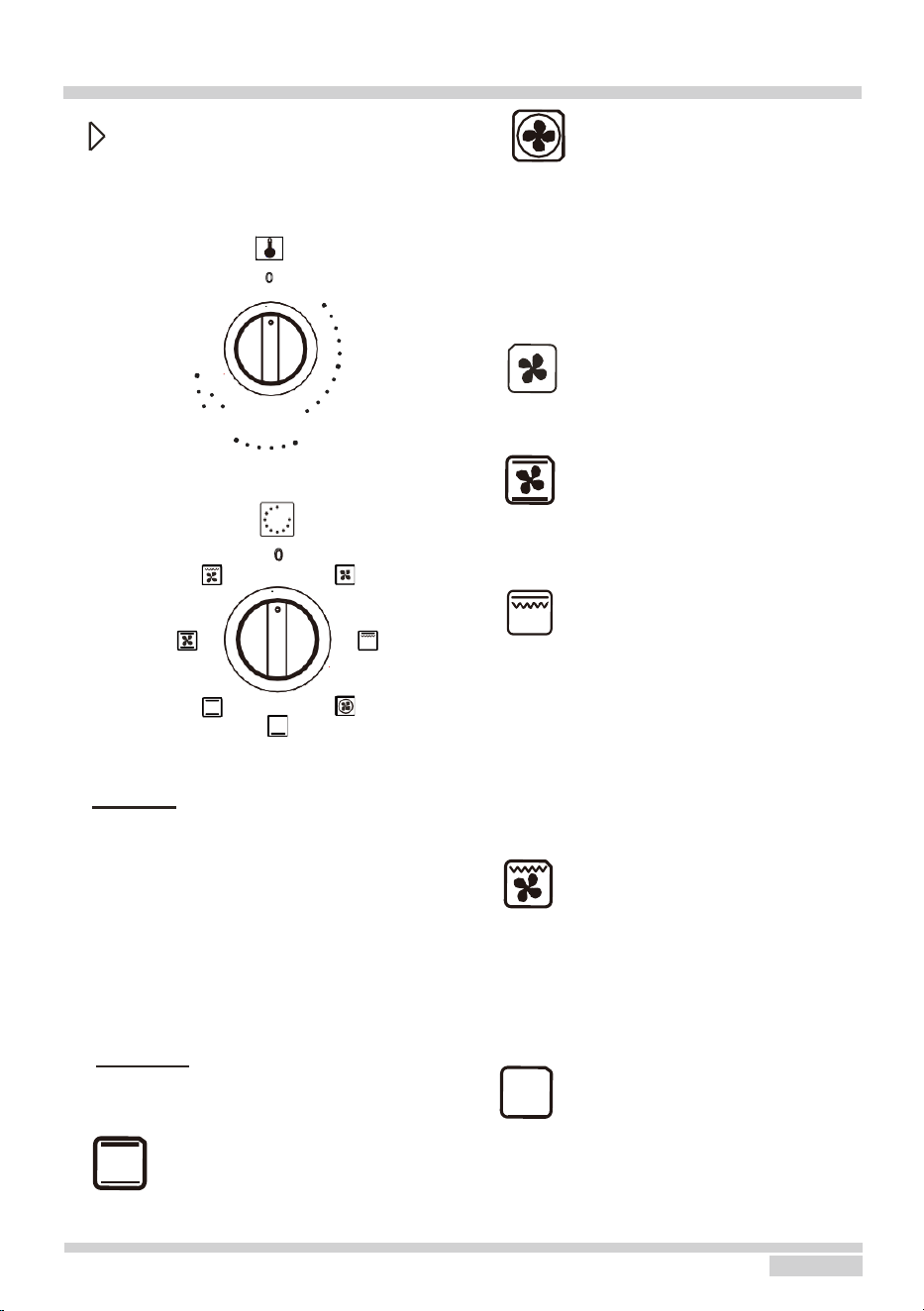
4. At 7.00 the oven will start.
5.
At 10.00 the alarm will ring, and the oven will
switch off.
● End of cooking time > current time
+ cooking time <= 10 hours
●
At least more than one minute cooking
time, cooking time and end of cooking
time must be set.
● If the cooking time is set to be 0 or the end
of cooking time is set to be the current
time, the auto function will be off.
After the auto function is off, and the
cooking time is 0, end of cooking time
and
current time is the same.
1 2 3
1 2 3
OPERATION
13
Oven functions and operation
(Only for main oven)
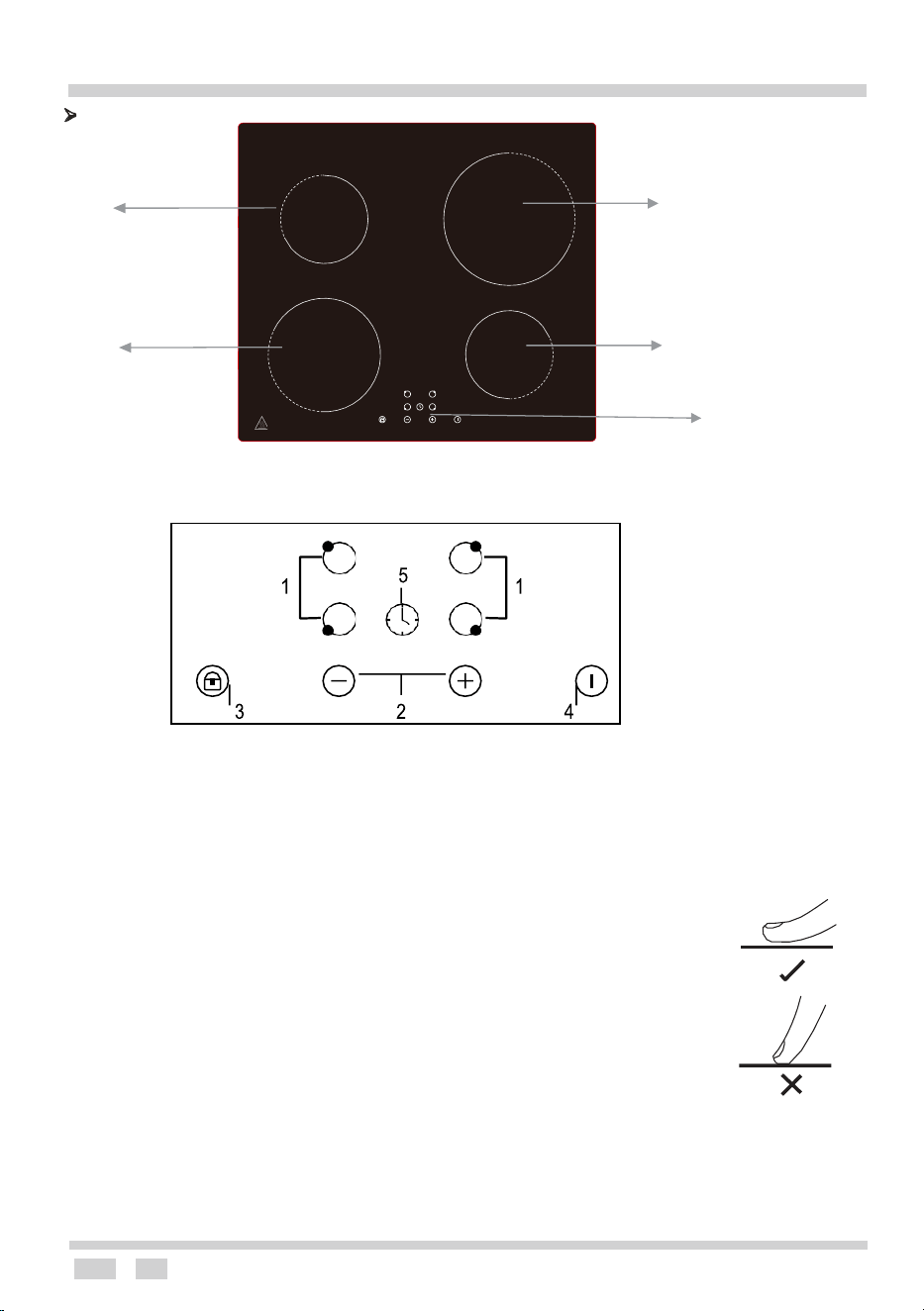
Oven is controlled by the temperature
and the function knobs.
0
50
Fan forced
(Rear Heat + Rear Fan)
A heating element around the fan enables
the most uniform heating possible. This
mode minimizes preheating time and is
also the best for cooking several different
types of food at once.
250
200
150
100
Defrost (Rear Fan Only)
This function for defrosting
Fan assisted
(Fan+ Bottom heat + Top Heat)
At this knob position the oven executes the
cake function. Conventional oven with a fan.
The
function
knobs
Caution!
Static Grill
(Double Grill)
When the “combined grill” is active it
enables grilling with the grill and with the
top heater switched on at the same time.
This function allows a higher temperature
at the top of the cooking area, which
causes more intense browning of the dish
and allows larger portions to be grilled.
When selecting any heating function
(switching a heater on etc.) the oven will
only be switched on after the temperature
has been set by the temperature regulator
knob.
Possible settings of the oven
function knob
Caution!
At this oven knob position. The oven
is not being warmed up.
Classic convection
(Top Heat + Bottom Heat)
Setting the knob to this position allows the
oven to be heated conventionally.
Half Fan Grill
(Fan + Grill)
When the knob is turned to this position,
the oven activates the grill and fan
function. This function allows a faster
grilling process and an improvement in the
taste of the dish. Only use the grill with the
oven door shut.
Base Heat
(Bottom Heat)
At this oven function knob position, the
oven activates the bottom heater.
Temperature
Selection knob
OPERATION
14
Zone heating
140mm Heating area
(Max. 1200W zone)
210mmHeating area
(Max. 1500W zone)
180mm Heating area
(Max. 1500W zone)
140mm Heating area
(Max. 1200W zone)
Control panel
PRODUCT OVERVIEW TECHNICAL DATA Top View
1. Heating zone control 2. Power / Timer regulating key
3. Keylock control
5. Timer control
Before using your Induction Hob
4. ON/OFF control
• Read this guide, taking special note of the ‘Safety Warnings’ section.
• Remove any protective film that may still be on your Induction hob.
Using the Touch Controls
• The controls respond to touch, so you don’t need to apply any pressure.
• Use the ball of your finger, not the tip. You will hear a beep each time a touch is registered.
•
Make sure the controls are always clean, dry, and that there is no object (e.g. a utensil or
a cloth) covering them. Even a thin film of water may make the controls difficult to operate.
Choosing the right cookware
• Only use cookware with a base suitable for induction cooking. Look for the induction symbol on the packaging or
on the bottom of the pan.
• You can check whether your cookware is suitable by carrying out a magnet test. Move a magnet towards the
base of the pan. If it is attracted, the pan is suitable for induction.
• If you do not have a magnet:
OPERATION
15
1.
Put some water in the pan you want to check.
2.
If does not flash “” in the display and the water is heating, the pan is suitable.
•
Cookware made from the following materials is not suitable: pure stainless steel, aluminum or copper without
a magnetic base, glass, wood, porcelain, ceramic, and earthenware.
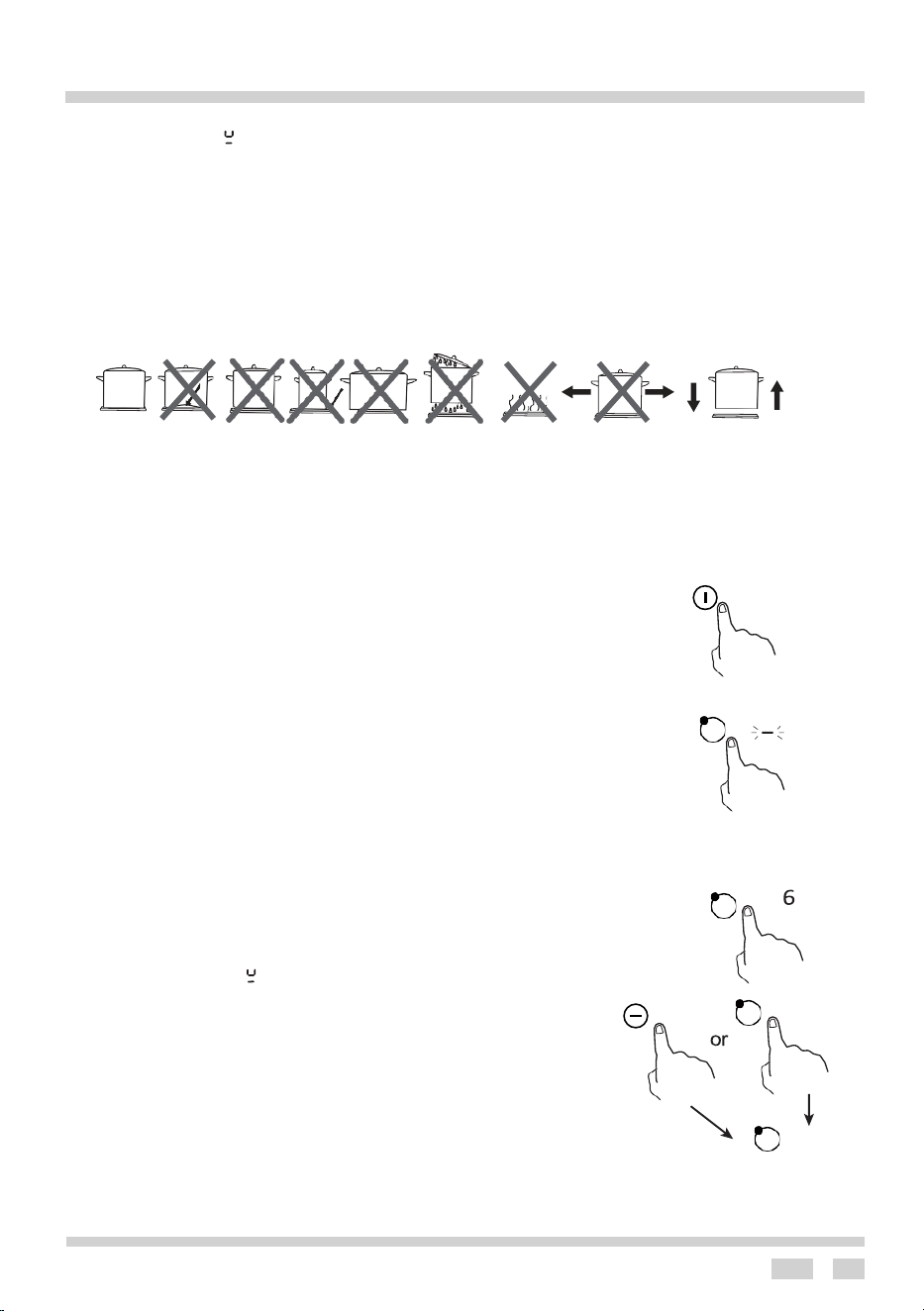
NOTE: Do not use cookware with jagged edges or a curved base.
Make sure that the base of your pan is smooth, sits flat against the glass, and is the same size as the cooking
zone. Use pans whose diameter is as large as the graphic of the zone selected. Using a slightly wider pot and
energy will be used at its maximum efficiency. If you use smaller pot efficiency could be less than expected.
Pot less than 140 mm could be undetected by the hob. Always centre your pan on the cooking zone.
Always lift pans off the Induction hob – do not slide, or they may scratch the glass.
Good Bad Bad Bad Bad Bad Bad Bad Good
(Recessed (convex base) (undersize) (oversize) (moisture on hotplate) (no utensil)
To start cooking
1. Power On
When the mains power supply is switched on, the buzzer beeps once and all the indicators light up for 1
second, then go out. This indicates that the ceramic hob has entered standby mode.
When the hob is in the standby mode the indicator lights do not shine, all the controls are disabled except
the “ON/OFF” and “keylock” control.
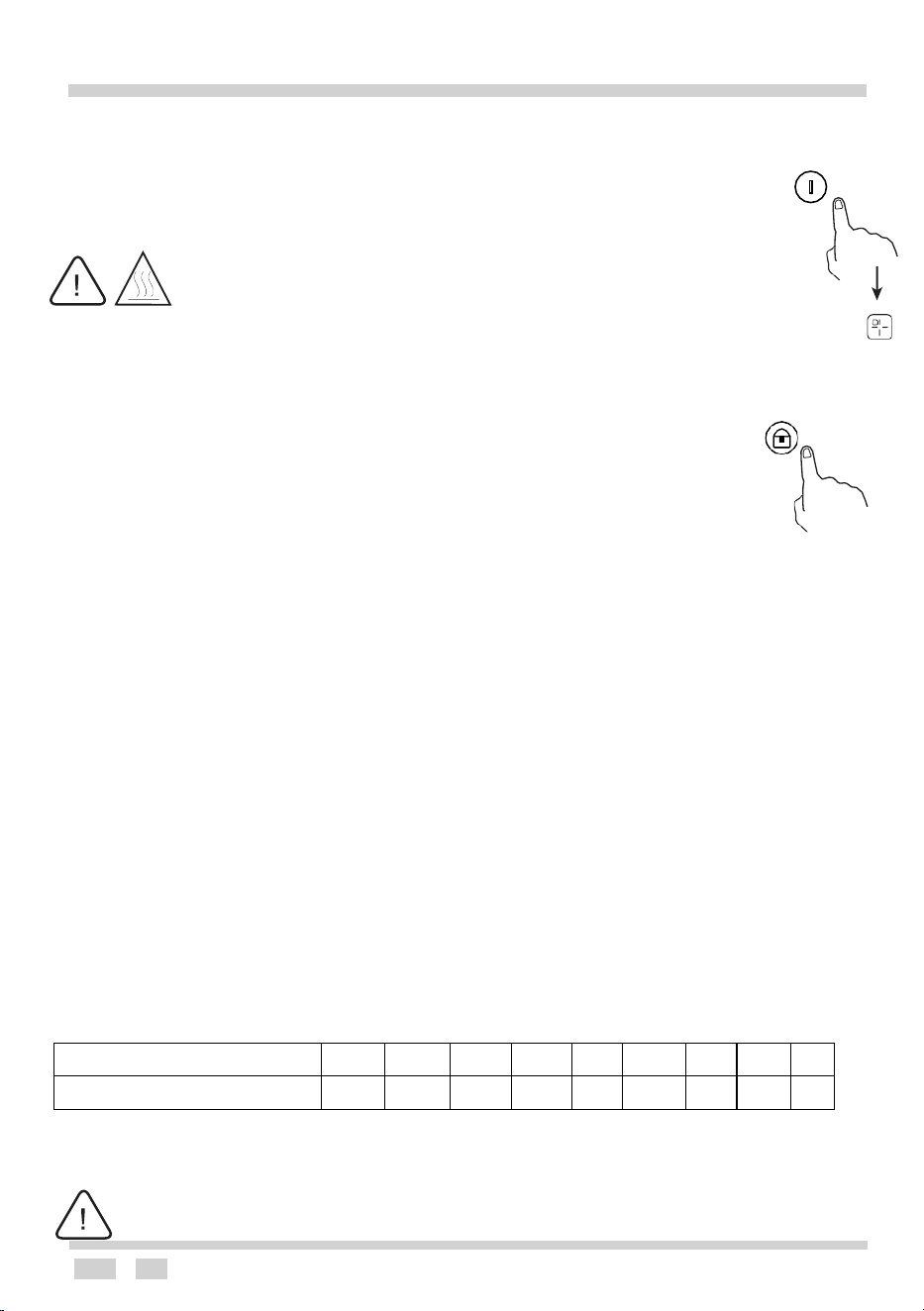
2. Touch the ON/OFF control.
After power on, the buzzer beeps once, all displays show “ –
” or “ ––”, indicating that the induction hob
has entered power on status.
When the hob is on, touch “ON/OFF”, all heating areas will be off. Another touch means the hob enters
power on status.
3. Place a suitable pan on the cooking zone that you wish to use.
• Make sure the bottom of the pan and the surface of the cooking zone are clean and dry.
4. Touching the heating zone selection control, and an indicator next to the key will flash
• Select a heat setting by touching the “-
” or “+” control.
• If you don’t choose a heat setting within 1 minute, the Induction hob will automatically switch off. You
will need to start again at step 2.
• You can modify the heat setting at any time during cooking.
5 、 If the display flashes “ ” alternately with the heat setting
This means that:
• you have not placed a pan on the correct cooking zone or,
• the pan is not suitable for induction cooking or,
• the pan is too small or not properly centered on the cooking zone.
NOTE: No heating takes place unless there is a suitable pan on the cooking zone.
The display will automatically turn off after 1 minute if no suitable pan is placed on it.
0
Cooling fan
When the hob starts heating, the cooling fan will start work together. When heating area stops work,
cooling fan will keep working for 2 minutes then stop.
OPERATION
16
When you have finished cooking
1. Touch the heating zone selection control that you wish to switch off
2. Turn the cooking zone off by scrolling down to “0”. Or press and hold button for heating area for 3 seconds,
the heating zone stop working, and the button is off. Make sure the display shows “0”, then show “H”.
3. Turn the whole cooktop off by touching the ON/OFF control.
4. Beware of hot surfaces:: “H” will show which cooking zone is hot to touch. It will
disappear when the surface has cooled down to a safe temperature. It can also be used a
s
an energy saving function if you want to heat more pans use the hotplates that are still hot.
Note: When “H” is shown on display, although the hob is off, but the temperature of induction glass is still very high,
do not let your fingers touch induction glass directly in case of scalds.
Note: After use, switch off the hob element by its control and do not rely on the pan detector
.
Locking the Controls
• You can lock the controls to prevent unintended use (for example children accidentally turning the cooki
ng
zones on).
• When the controls are locked, all the controls except the ON/OFF control are disabled. To lock the
controls: Touch the keylock control. The timer indicator will show “Lo”.
To unlock the controls
1. Make sure the Induction hob is turned on.
2. Touch and hold the keylock control for 3s
3. You can now start using your Induction hob.
When the hob is in the lock mode, all the controls are disabled except the ON/OFF, you can always turn the induction hob off
with the ON/OFF control in an emergency, but you must unlock the hob before the next operation
.
Over-Temperature Protection
The temperature sensor will monitor the temperature inside the Induction hob. When an excessive temperature is
reached, “E3” or “E5” is shown on display, the hob will turn off, the internal cooling fan keeps running until internal
temperature is cooler, then the hob will re-start heating.
Detection of Small Articles
When an unsuitable size or non-magnetic pan (e.g., aluminium), or some other small item (e.g., knife, fork, key) has
been left on the hob, the hob automatically goes on to standby in 1 minute. The fan will keep cooling down the
induction hob for a further 2 minutes.
Auto Shutdown Protection
Auto shut down is a safety protection function for your induction hob. It shuts down automatically when you forget to turn
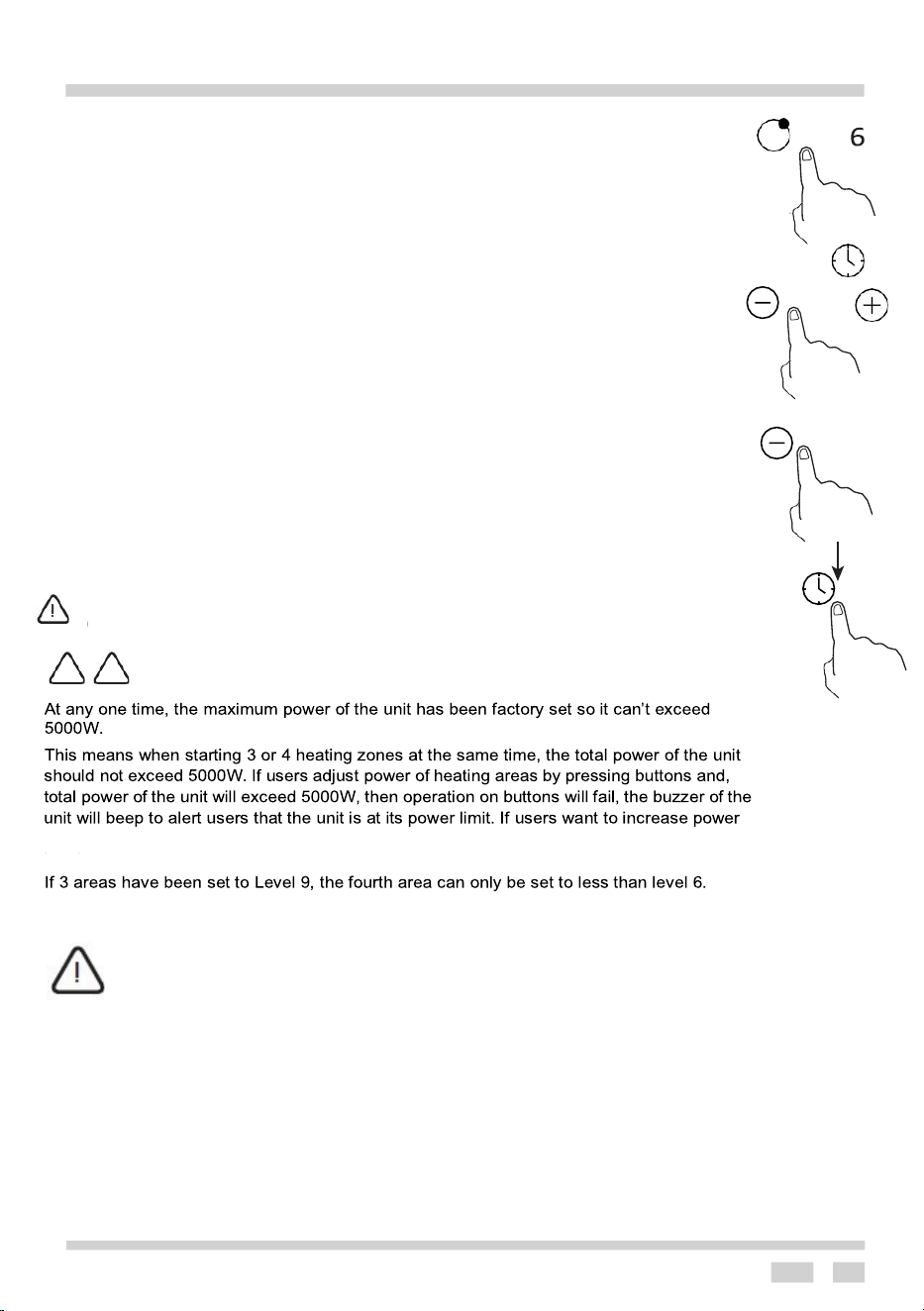
off your hob. The default working times for various power levels are shown in the below table:
Power level
1
2
3
4
5
6
7
8
9
Default working timer (hour)
8
8
8
4
4
4
2
2
2
When a pot is removed, the induction hob will stop heating immediately and the hob automatically switches off after 1minute.
People with a heart pacemaker should consult with their doctor before using this unit.
H
OPERATION
17
! !
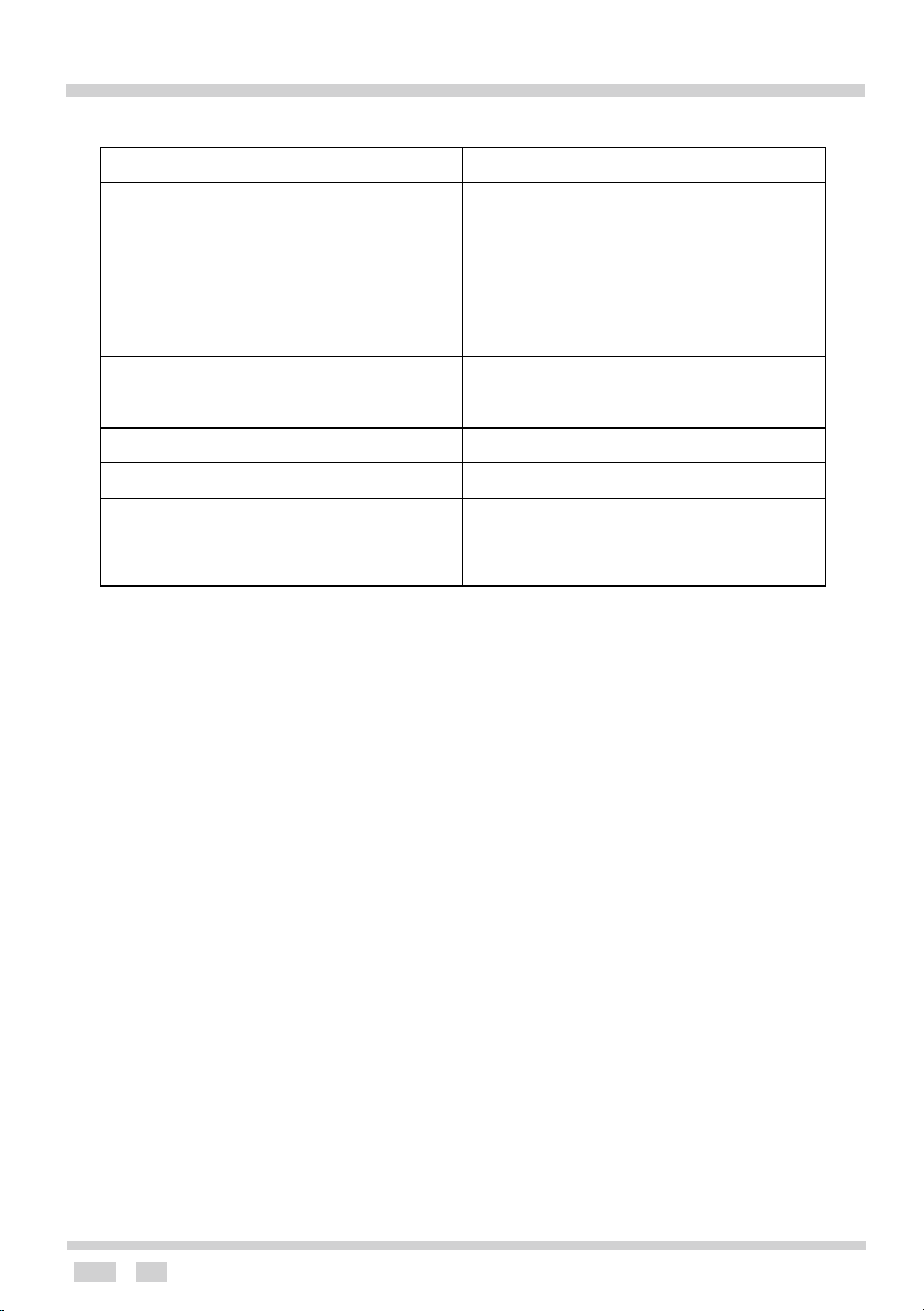
Using the Timer
• You can set it to turn one cooking zone off after the set time is up.
• You can set the timer up to 99 minutes. Setting the timer to turn one
cooking zone off. Cooking zones set for this feature will:
1. Touch the heating zone selection control that you want to set the timer for.
2. Touch timer control. The minder indicator will start flashing and “30” will show in the
timer display. The red point near the heating zone will be lit.
3. Set the time by touching the “-” or “+” control of the timer Hint: Touch the “-” or “+
”
control of the timer once will decrease or increase by 1 minute. decrease or touch and
hold the “ -”or “+” control of the timer will increase by 10 minutes.
4. Touching the “-”, when the “00” shows in the minute display, the timer is cancelled.
5. When the time is set, it will begin to count down immediately. The display will show
the remaining time and the timer indicator flashes for 5 seconds.
6. When cooking timer expires, the corresponding cooking zone will
be
switched off automatically.
7. Timer for multiple heating areas delay off, the shortest delay off time will be shown
on
display. To check remaining delay off time of other heating areas, you should press the
button for the different heating area.
NOTE: After setting the delay off time, the time shown on display shows heating area
with a red point twinkling.
00
Cooking guidelines
Take care when frying as oil and fat heat up very quickly At extremely high temperatures oil and fat will
ignite spontaneously and this presents a serious fire risk.
Heat setting
The settings below are guidelines only. The exact setting will depend on several factors, including your
cookware and the amount you are cooking. Experiment with the induction hob to find the settings that best suit
you.
3
0
5000-watt maximum power setting
Other cooking zones will keep operating if they were turned on prior to the timer.
of
one
heating area.If it is necessary to reduce power of other heating areas or turn off other heating
areas.
OPERATION
18
Heat setting
Suitability
1-2
● Delicate warming for small amounts of
food
● Melting chocolate, butter, and foods
that burn quickly
● Gentle simmering ● Slow warming
3-4
● Reheating ● Rapid simmering
● Cooking rice
5-6
● Pancakes
7-8
● Cooking pasta
9
● Stir-frying ● Searing ● Bringing soup
to the boil ● Boiling water
OPERATION
19
This function allows a higher temperature at the top of the cooking area which gives a
more intense browning of the food and for larger portions to be grilled.
Warning!
When using the grill, it is recommended that the oven door is closed.
When the grill is in use accessible parts can become hot.
Keep children away from the oven.
Use of the grill
The grilling process operates through infrared rays emitted onto the dish by the
incandescent grill heater.
To switch on the grill, you need to:
l
Set the oven knob to the position marked grill.
l
Heat the oven for approx. 5 minutes (with the oven door shut).
l
Insert a tray with a dish onto the appropriate cooking level; and if you are grilling on the
grate insert a tray for dripping on the level immediately below (under the grate).
l
Close the oven door.
For grilling the temperature must be set to 250C
Warning!
When using the grill, it is recommended that the oven door is closed.
When the grill is in use accessible parts can become hot.
Keep children away from the oven.
OVEN OPERATION
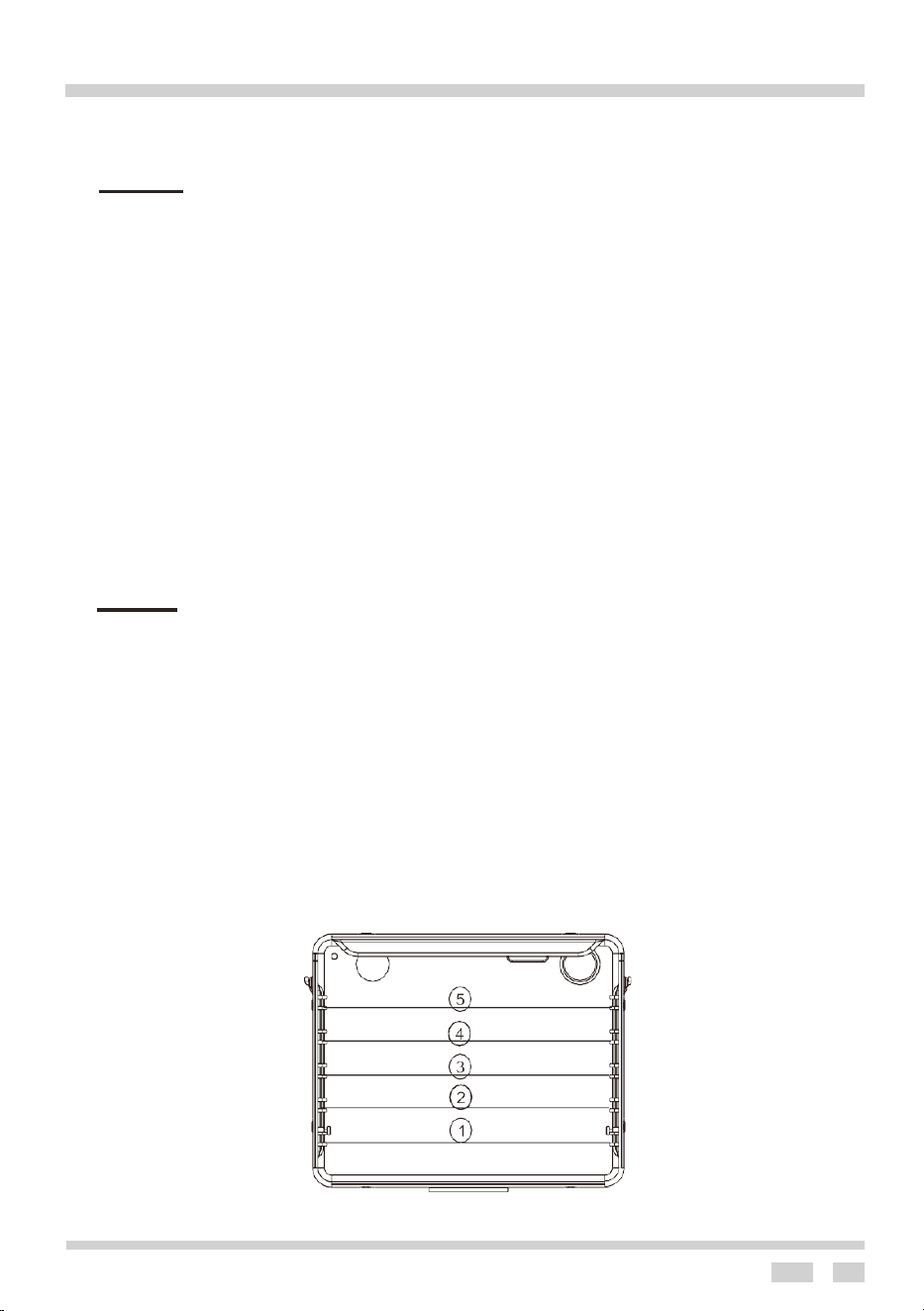
Oven guide levels
Baking pans and accessories (oven grid, baking tray, etc ) may be inserted into the oven in
5 guiding levels.
Appropriate levels are indicated in the tables that follow. Always count levels from the
bottom upwards!

CLEANING AND MAINTENANCE
20
Hob
1. Everyday soiling on glass (fingerprints, marks, stains left by food of non-sugary spillovers on the
glass).
1) Switch the power to the cooktop off.
2) Apply a cooktop cleaner while the glass is still warm (but not hot!)
3) Rinse and wipe dry with a clean cloth or paper towel.
4) Switch the power to the cooktop back on.
NOTE: When the power to the cooktop is switched off, there will be no hot surface indication, but the
cooking zone may still be hot! Take extreme care.
• Heavy-duty scourers, some nylon scourers and harsh/abrasive cleaning agents may scratch
.
Check if your cleaner or scourer is suitable.
• Never leave cleaning residue on the cooktop: the glass may become stained.
2. Boil overs, melts, and hot sugary spills on the glass
Remove these immediately with a fish slice, palette knife or razor blade scraper suitable for induction
glass cooktops, but beware of hot cooking zone surfaces:
1). Switch the power to the cooktop off at the wall.
2). Hold the blade or utensil at a 30°angle and scrape the soiling or spill to a cool area of the
cooktop.
3). Clean the soiling or spill up with a dish cloth or paper towel.
4). Follow steps 2 to 4 for everyday soiling on glass above.
NOTE: Remove stains left by melts and sugary food or spillovers as soon as possible. If left to cool
on the glass, they may be difficult to remove or even permanently damage the glass surface.
NOTE: Cut hazard: when the safety cover is retracted, use with extreme care, and always store
safely and out of reach of children.
3. Spillovers on the touch controls
1). Switch the power to the cooktop off.
2). Soak up the spill
3). Wipe the touch control area with a clean damp sponge or cloth.
4). Wipe the area completely dry with a paper towel.
5). Switch the power to the cooktop back on.
NOTE:
The cooktop may beep and turn Itself off, and the touch controls may not function when there is
liquid on them.
Make sure you wipe the touch control area dry before turning the cooktop back on.
Oven
By ensuring proper cleaning and maintenance of your oven you can have a significant
influence on the continuing fault-free operation of your appliance.
Before you start cleaning, the cooker must be switched off and you should ensure that all knobs
are set to the “0” position. Do not start cleaning until the cooker has completely cooled.
l
The oven should be cleaned after every use.
Ø
Ø
21
CLEANING AND MAINTENANCE
l Cool the oven completely before cleaning.
l Never clean the appliance with pressurized hot steam cleaner!
l The oven chamber should only be washed with warm water and a small amount of
washing-up liquid.
l Steam cleaning
-Pour 250ml of water (1 glass) into a bowl placed in the oven on the first level from the bottom.
-Close the oven door.
-Set the temperature knob to 50, and the function knob to the bottom heater position.
-heat the oven chamber for approximately 30 minutes.
-Open the oven door, wipe the chamber inside with a cloth or sponge and wash using warm
water with washing-up liquid.
l After cleaning the oven chamber wipe it dry.
Caution!
Do not use cleaning products containing abrasive materials for the cleaning and maintenance of the
glass front panel
When cleaning do not use cleaning agents with a strong abrasive effect such as e.g., scouring
powders containing an abrasive, abrasive compounds, abrasive stones, pumice stones, wire
brushes and so on. They may scratch the hob surface, causing irreversible damage. Lar
ge
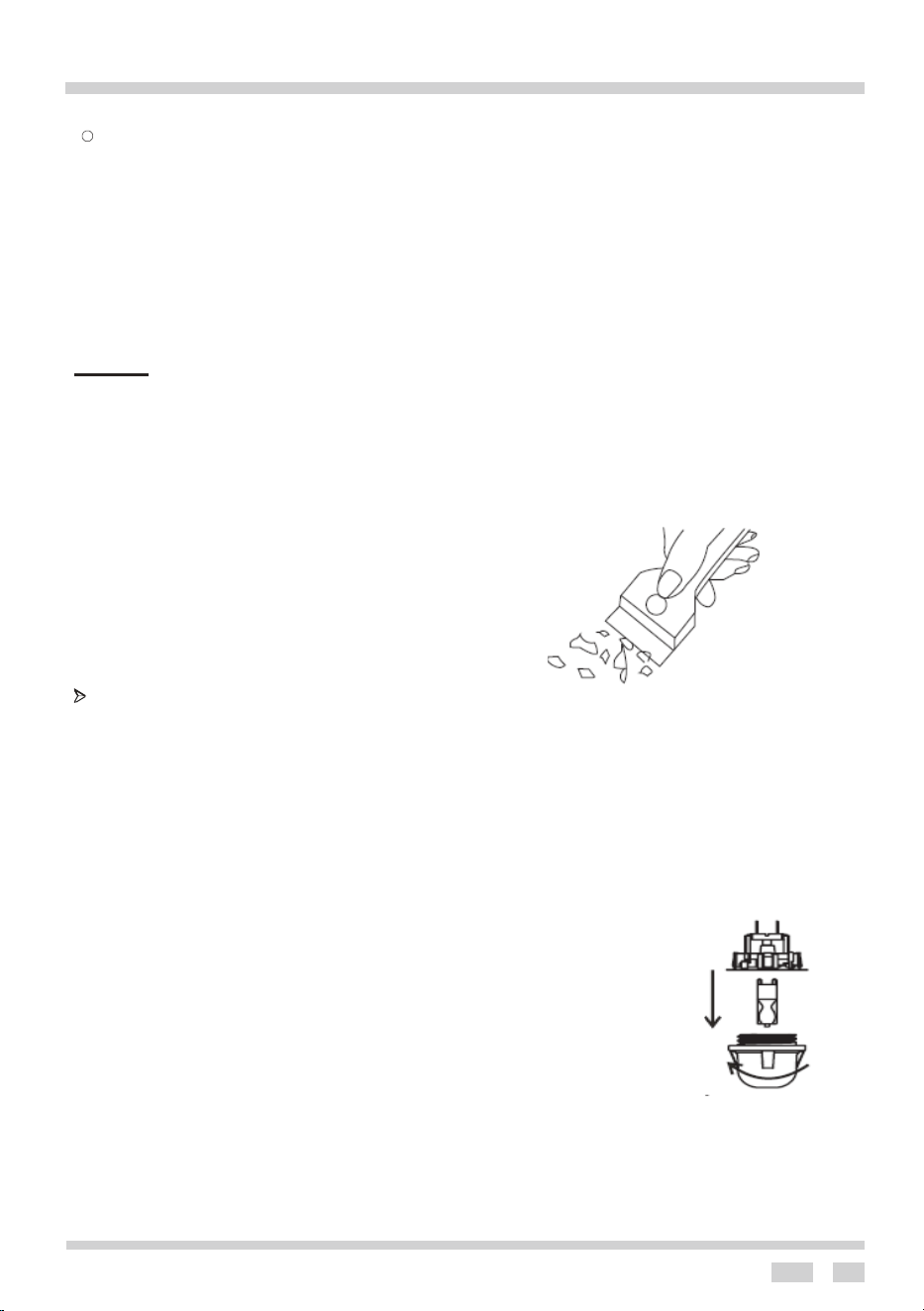
spillages that are firmly stuck to the hob can be removed by a special scraper; but be careful
not to damage the hob frame when doing this.
Scraper for cleaning the hob
Ø Replacement of the oven light bulb
Before any maintenance is started involving electrical parts, the appliance must be disconnected
from the power supply. If the oven has been in use, let the oven cavity and the elements cool down
before attempting any maintenance.
Changing the bulb
l Unscrew the protective cover. We recommend that you wash and dry the glass cover at
this point.
l Carefully remove the old bulb and insert the new bulb suitable for high temperatures
with the following specifications: 230V, 50/
• Refit the protective cover.
IMPORTANT
60Hz, 25W, G9 fitting
Never use screwdrivers or other utensils to remove the light cover.
This could damage the enamel of the oven or the lamp holder. Remove only by hand.
IMPORTANT
Never replace the bulb with bare hands as contamination from your fingers can cause
premature failure.
Always use a clean cloth or gloves.
Please note: The bulb replacement is not covered by the warranty.
CLEANING AND MAINTENANCE
22
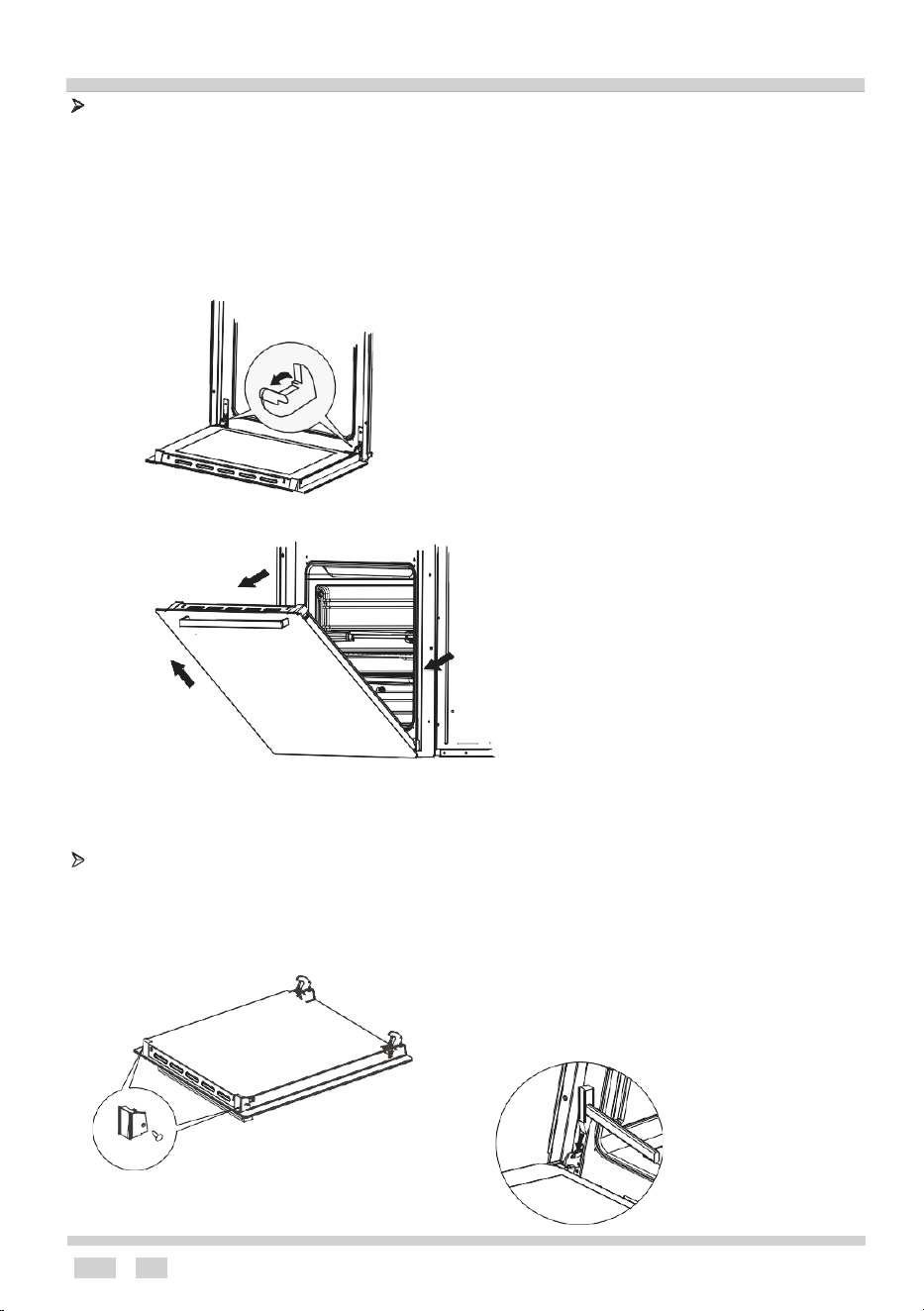
To obtain easier access to the oven chamber for cleaning, it is possible to remove the
door.
To do this, tilt the safety catch part of the hinge upwards. Close the door lightly, lift and pull it
out towards you. To fit the door back on to the cooker, do the inverse. When fitting, ensure
that the notch of the hinge is correctly placed on the protrusion of the hinge holder.
After the door is fitted to the oven, the safety catch should be carefully lowered down again. If
the safety catch is not set it may cause damage to the hinge when closing the door.
Tilting the hinge safety catches
Door removal
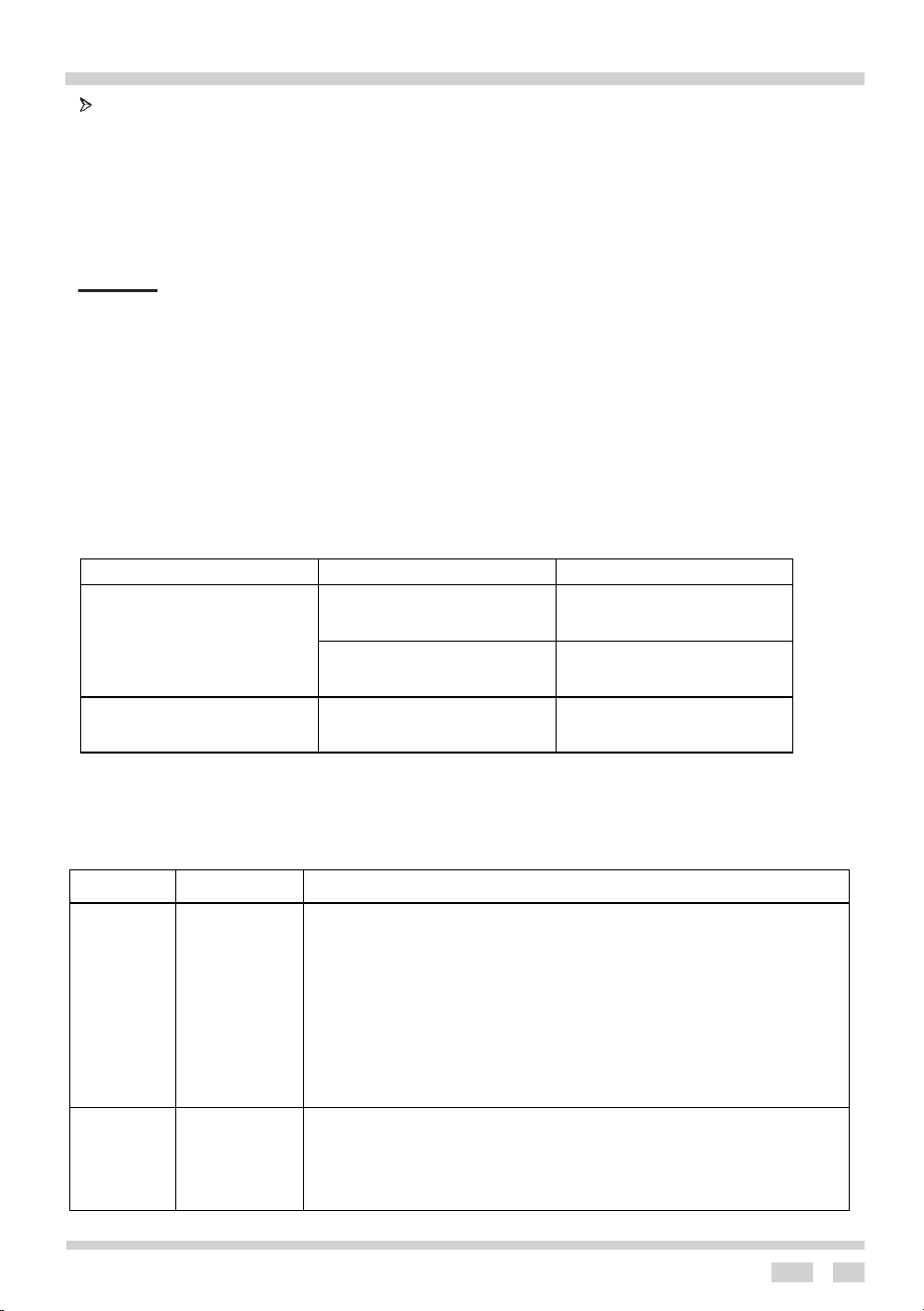
Ø Removal of the internal glass panel
Unscrew and unfasten the plastic latch that is in the corner at the top of the door. Next take out
the glass from the second blocking mechanism and remove. After cleaning, insert and block
the glass panel, and screw in the blocking mechanism.
Removal of the internal panel
Install door
Door removal
23
Operation in case of emergency
Ø Regular inspections
Besides keeping the cooker clean, you should:
• Carry out periodic inspections of the control elements and cooking units of the cooker. After
the warranty has expired you should have a technical inspection of the cooker carried out
by a service centre at least once every two years.
• Fix any operational faults.
• Carry out periodical maintenance of the cooking units of the cooker.
Caution!
All repairs and regulatory activities should be carried out by the appropriate service
centre or by an appropriately authorized fitter.
OPERATION IN CASE OF EMERGENCY
In the event of an emergency, you should:
l switch off all working sections of the stove’s cooktop and oven.
l disconnect the mains plug
l call the service centre
l some minor faults can be fixed by referring to the instructions given in the table below.
Before calling the customer support centre or the service centre check the following
points that are presented in the table.
PROBLEM
REASON
ACTION
1.The appliance does not
work.
Break in power supply.
Check the household fuse
box if there is a blown fuse
replace it with a new one.
Choose wrong function.
Check of function knobs,
temperature knobs are set to
the correct position.
2.The oven lighting does not
work.
The bulb is loose or
damaged.
Tighten up or replace the
blown bulb (see Cleaning and
Maintenance)
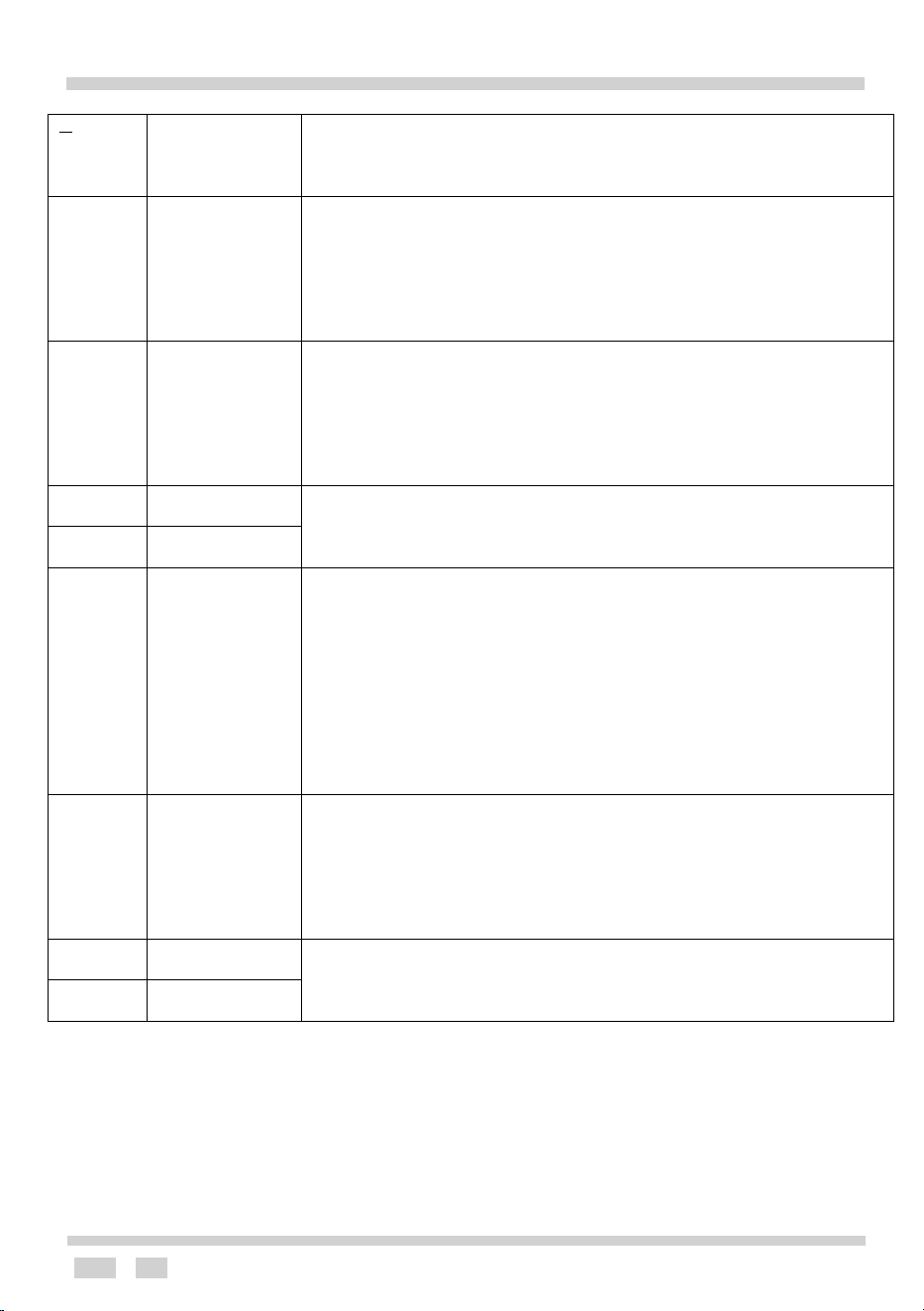
Failure Display and Inspection
If an abnormality arises, the induction hob will enter a safe state automatically and display
corresponding codes:
Problem
Possible
causes
What to do
The
appliance
Break in power
supply
- Please check the main power is normal if the leakage protection switch
is off if there is a blown fuse replace it with a new one.
does not
- If the main power is normal, check if the plug is securely connected with
the socket
work
- If the hob is a wire connection type, disconnect the power,
check if the wire is loose.
- Disconnect the power, check if main plug is off.
Excluding above reasons, call the service centre to arrange repair.
During
heating
the unit
stops
working
Delay off timer
activated.
Please check if set delay off function. If set delay off function, the unit will
stop once delay off time is up.
24
Operation in case of emergency
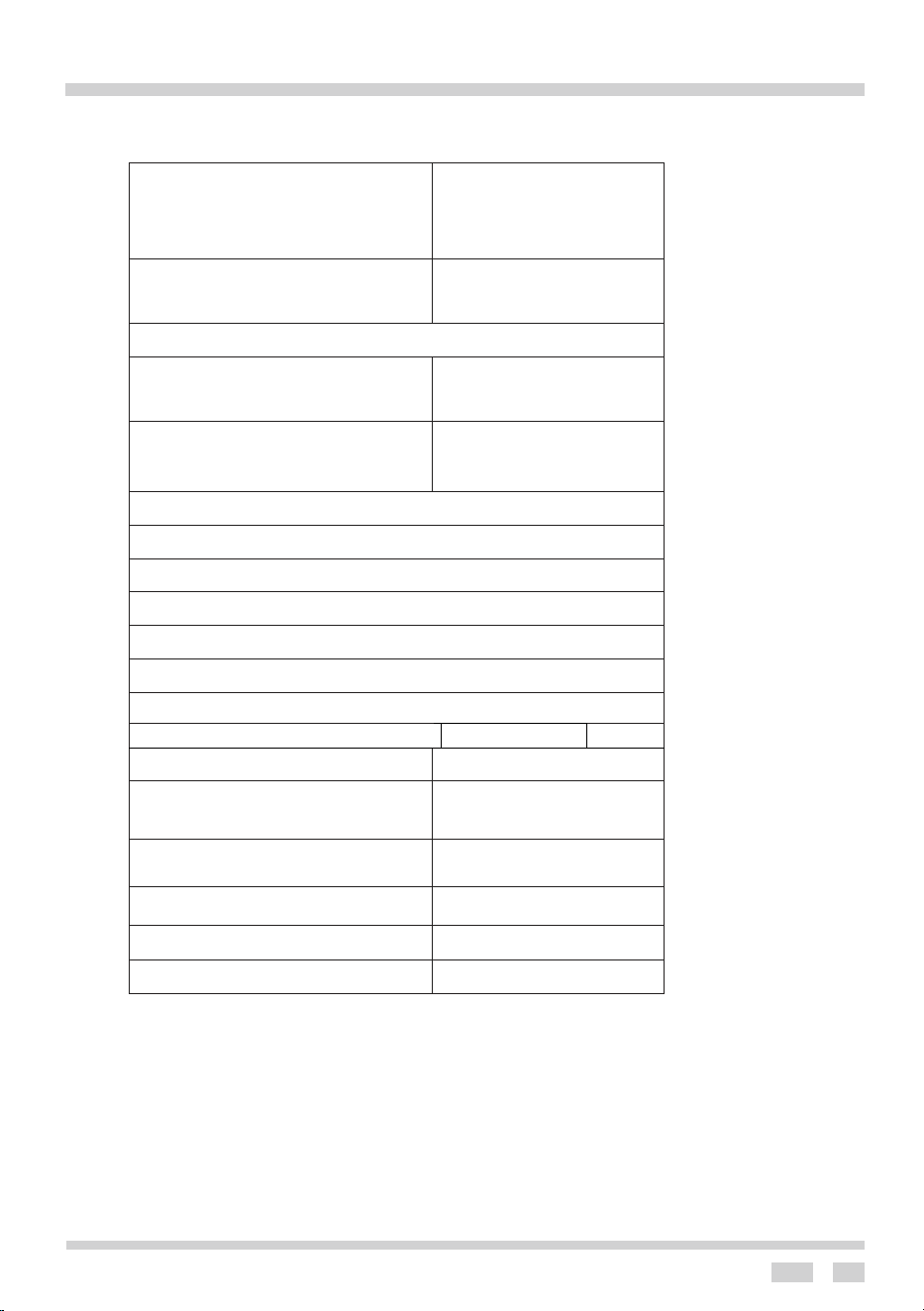
U
No pan or pan
unsuitable
No pan, please put proper pan. PCB synchronization or drive circuit
fault, please call the service centre for repair.
E2
Input power too
low
Low voltage, voltage of the main power is less 180V. Please check if
voltage of the main power is normal.
Once voltage of the main power returns normal, re-start the unit. Voltage
of PCB fault, please call the service centre for repair.
E1
Input power too
high
High voltage, voltage of the main power exceeds 250V. Please check if
voltage of the main power is
normal. Once voltage of the main power returns normal, re-start the unit.
Voltage of PCB fault, please call the service centre for repair.
F3
Thermistor of
coil short circuit
Sensor of coil thermistor connection error. Or detection part of PCB coil
thermistor failure,
Call the service centre for repair.
F4
Thermistor of
coil open circuit
E5
Too high
temperature
of IGBT
thermistor.
Too high temperature of IGBT thermistor, air outlet is blocked. Open air
outlet, re-start the unit. If still
unsolved, it is possible that cooling fan connection error, cooling fan
damaged, or drive circuit of fan
failure, call service center for repair. IGBT temperature sensor
open circuit /short circuit.
Temperature detection part of PCB IGBT failure, call service center for
repair.
E3
Too high
temperature
of coil
thermistor.
Too high temperature on induction glass surface, please check if there is
no water in pan. After
treatment, connect with power again. If still unsolved, it is possible that
sensor of cooktop failure, call service
center for repair.
F9
IGBT thermistor
short circuit
Senor of IGBT thermistor connection error. Or detection part of IGBT
PCB sensor failure,
Call service center for repair.
FA
IGBT thermistor
open circuit
Note: The above are common failures.
CAUTION! Never disassemble the unit by yourself to avoid danger and damage.
25
TECHNICAL INFORMATION
MODEL
AFI607X
Dimensions
(height/width/depth) cm
90/60/60
Oven
Temperature regulator /
function mode switch
1/1
Guide levels
5
140 induction hobs(W)
2*1200
180induction hobs(W)
1*1500
210 induction hobs(W)
1*1500
Top/bottom heater(kW)
0,85/1,15
Grill heater(kW)
1.1
Oven illumination (W)
25
Rear heater (kW)
2.0
Max. temperature
250℃
Electrical connection
220-240V ~50Hz
Nominal voltage of
heaters
230V
Total connected power (kW)
7 (2+5)
Oven total (kW)
2
Hotplate total (kW)
5
26
Electrical connection
Warning:
All electrical work must be carried by a suitably qualified and authorized electrician. No
alterations or willful changes in the electricity supply should be carried out.
The unit must only be installed according to municipal or government regulations and in
compliance with the instruction manual.
Before attempting the connection, check whether the voltage indicated on the rating
plate corresponds to the actual mains voltage.
Connection (by authorized electrician):
l Use no less than 32A control switch (circuit breaker).
l Connect the cable at the rear of the product on control switch (cable already assembled on
the rear of product).
l Mains power lead must be fed through the relief safety device, protecting the mains lead
cable from disconnection
l Tighten the relief device securely and check the connection mode according to the diagram.
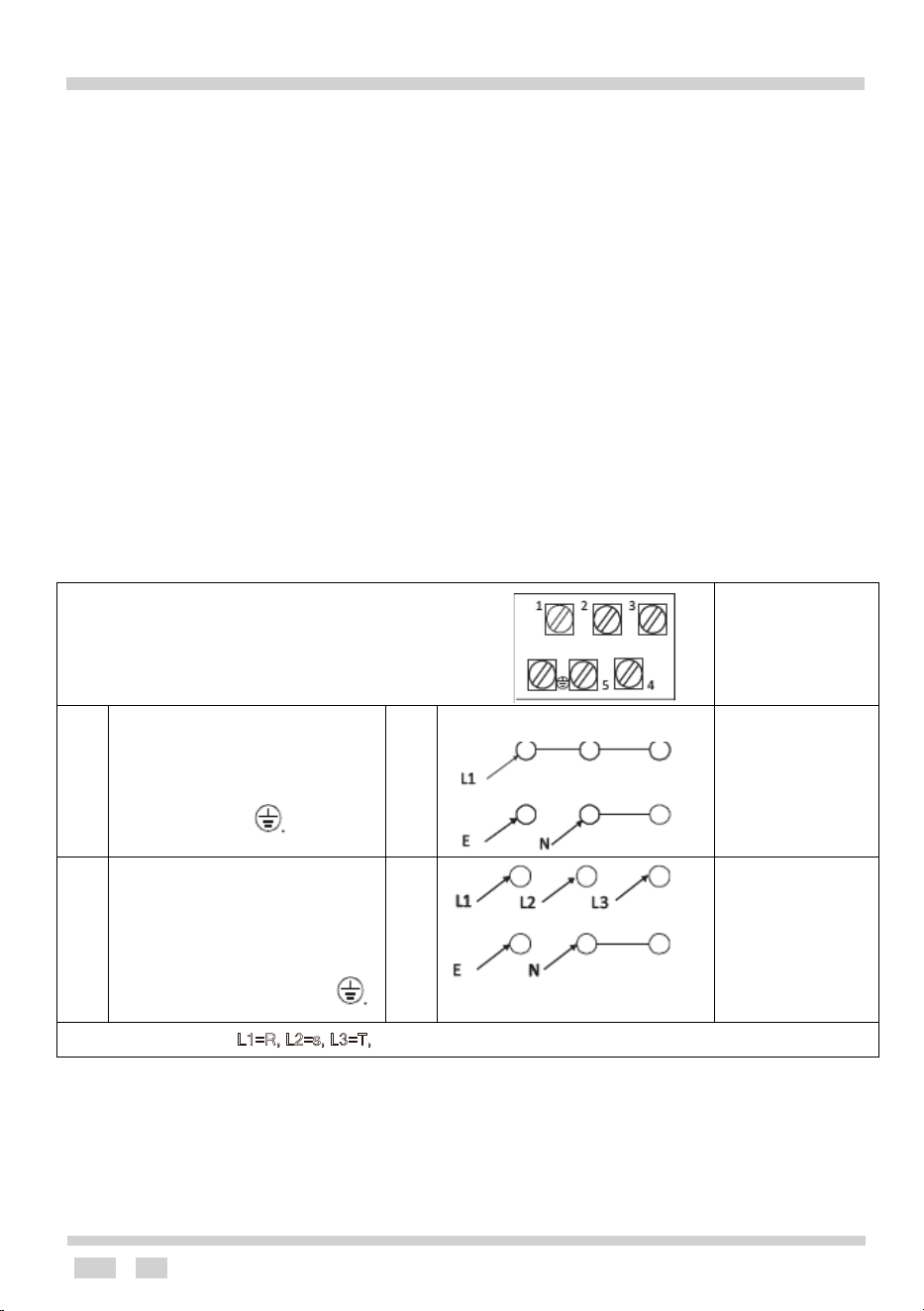
CONNECTION DIAGRAM
Caution! Voltage of heating elements 230V
Caution! In the event of any connection the safety
Wire must be connected to the E terminal.
Recommended
type of connection
lead
For 220-240V earthed
one-phase connection,
bridges connect 1-2-3
terminals and 4-5 terminals,
safety wire to
H05VV-F3G4
For 380-415/220-240V
earthed three phase
connection, bridges connect
4-5 terminals, phases in
succession 1,2 and 3, earth
to 4-5, the safety wire to
H05VV-F5G1,5
L1=R, L2=s, L3=T, Neutral wire terminal, E - Earthing wire terminal
Colour code
L = exterior live wires, usually coloured black, brown, red.
N = neutral, usually coloured blue, white
G = earthing wire, the color is green, yellow, green/yellow (two colors)

Warranty Card
Worldwide Appliances Pty Limited
A.B.N. 45868077422
Distributed by Eurolinx pty Ltd
Oce:
48-50 Moore Street, Leichhardt N.S.W 2040
Post:
Locked Bag 3000, Annandale, N.S.W 2038
P: 1300 694 583
WARRANTY REGISTRATION
Your ongoing satisfaction with your artusi
product is important to us. We ask that you
complete the enclosed Warranty Registration
Card and return it to us so that we have a record
of the artusi product purchased by you.
PRIVACY
Worldwide Appliances respects your
privacy and is committed to handling your
personal information in accordance with the
National Privacy Principles and the Privacy
Act 1988 (Cth). A copy of the Worldwide
Appliances Privacy Policy is available at
www.artusi.com.au. Worldwide Appliances will
not disclose any personal information set out
in the Warranty Registration Card (“Personal
Information”) without your consent unless
required by:
1. law;
2. any Worldwide Appliances related company;
3. any service provider which provide services
to artusi or assist artusi in providing services
(including repair and warranty services) to
customers. Our purpose in collecting the
Personal Information is
to keep a record of the artusi product purchased
by you, in order to provide a better warranty
service to you in the unlikely event that there is
a problem with your artusi product. Worldwide
Appliances may contact you at any one or more
of the address, email address or telephone
numbers set out in the Warranty Registration
Card. Please contact artusi on 1300 694
583 should you not wish to be contacted by
Worldwide Appliances.
WARRANTY
1. Warranty
Worldwide Appliances warrants that each artusi
product will remain, for a period of either 12
months or 24 months of warranty. All Warranties
are valid from the original date of purchase, And
warranty claims must be accompanied by the
proof of purchase.
24 months warranty products:
All Built-in Appliances – Limited to Ovens,
Gas, Induction and Electric Cooktops, and All
Rangehoods. Freestanding Cookers - Gas and
Electric Models (900mm Width).
artusi.com.au
Dishwashers - Freestanding, Fully Integrated,
Semi Integrated and built-in. All Wine coolers. All
Dryers.
Freestanding Cookers - Gas and Electric
Models in 50cm, 54cm and 60cm Widths
Portable Appliances* – Benchtop Models and
Portable Gas Models
2. What is not Covered by the Warranty.
The Warranty does not apply if an artusi product
is defective by a factor other than a defect arising
in the manufacture of the artusi product, including
but not limited to:
(a) damage through misuse (including failure
to maintain, service or use with proper care),
neglect, accident or ordinary wear and tear
(including deterioration of parts and accessories
and glass breakage);
(b) use for purpose for which the artusi product
was not sold or designed;
(c) use or installation which is not in accordance
with any specied instructions for use or
installation;
(d) use or operation after a defect has occurred or
been discovered;
(e) damage through freight, transportation or
handling in transit (other than when Worldwide
Appliances is responsible);
(f) damage through exposure to chemicals, dusts,
residues, excessive voltage, heat, atmospheric
conditions or other forces or environmental
factors outside the control or Worldwide
Appliances;
(g) repair, modication or tampering by the
purchaser or any person other than Worldwide
Appliances, an employee of Worldwide
Appliances or an authorised artusi service
contractor*;
(h) use of parts, components or accessories
which have not been supplied or specically
approved by artusi.
(i) damage to surface coatings caused by cleaning
or maintenance using products not recommended
in the artusi product handbook provided to the
purchaser upon purchase of the artusi product;
(j) damage to the base of an electric oven due to
items having been placed on the base of the oven
cavity or covering the base, such as aluminium
foil (this impedes the transfer of heat from the
element to the oven cavity and can result in
irreparable damage); or
(k) damages, dents or other cosmetic
imperfections not aecting the performance of the
artusi in respect of an artusi product purchased
as a “factory second” or from display
The Warranty does not extend to light globes
used in artusi products.
3. Domestic Use
Each artusi product is made for domestic use.
This Warranty may not extend to artusi products
used for commercial purposes.
Continued over...
Artusi Warranty May 2016.indd 1 14/07/2016 4:37 PM
4. Time for Claim under the Warranty
You must make any claim under this Warranty
within twenty eight (28) days after the occurrence
of an event which gives rise to a claim pursuant
to the Warranty, by booking a service call on the
telephone number below.
5. Proof of Purchase
Customers must retain proof of purchase in order
to be eligible to make a warranty claim in respect
of an artusi product.
6. Claiming under the Warranty
Customers will bear the cost of claiming under
this Warranty unless Worldwide Appliances
determines the expenses are reasonable, in which
case the customer must claim those expenses
by providing written evidence of each expense
to Worldwide Appliances at the address on the
Warranty Registration Card.
7. Statutory Rights
(a) These terms and conditions do not aect your
statutory rights.
(b) The limitations on the Warranty set out in this
document do not exclude or limit the application
of the consumer guarantees set out in the Act or
any other equivalent or corresponding legislation
in the relevant jurisdiction where to do so would:
(i) contravene the law of the relevant jurisdiction;
or
(ii) cause any part of the Warranty to be void.
(c) Worldwide Appliances excludes indirect or
consequential loss of any kind (including, without
limitation, loss of use of the artusi product) and
(other than expressly provided for in these terms
and conditions) subject to all terms,
conditions and warranties implied by custom, the
general law, the Act or other statute.
(d) The liability of Worldwide Appliances to you
for a breach of any express or non-excludable
implied term, condition or warranty is limited at
the option of Worldwide Appliances to:
(i) replacing or repairing the defective part of the
artusi product;
(ii) paying the cost of replacing or repairing the
defective part of the artusi product;
(iii) replacing the artusi product; or
(iv) paying the cost of replacing the artusi
product.
(e) Our goods come with guarantees that cannot
be excluded under the Australian Consumer
Law. You are entitled to a replacement or refund
for a major failure and for compensation for any
other reasonably foreseeable loss or damage.
You are also entitled to have the goods repaired
or replaced if the goods fail to be of acceptable
quality and the failure does not amount to a
major failure.
8. Defects
Any part of an artusi product deemed to be
defective and replaced by Worldwide Appliances
is the property of Worldwide Appliances.
Worldwide Appliances reserves the right to
inspect and test artusi products in order to
determine the extent of any defect and the
validity of a claim under the Warranty.
All warranty service calls must be booked via
the customer care department. The team can
be contacted on 1 300 85 64 11 option 1 or
customercare@eurolinx.com.au
01082016
Warranty Card continued
artusi.com.au
2
Please complete and send to ARTUSI at: REPLY PAID 83617
LEICHHARDT NSW 2040
Last Name: First Name:
Address:
State: Postcode: Email:
Home Phone: Mobile:
Purchase Date: / /
(Please attach proof of purchase to validate warranty)
MODEL NUMBER
SERIAL NUMBER
(if you cannot locate the serial number please call ARTUSI on 1300 856 411)
1
2
3
4
WARRANTY REGISTRATION CARD
01052016
01082016
Warranty Card tear off
Artusi Warranty May 2016.indd 2 14/07/2016 4:37 PM