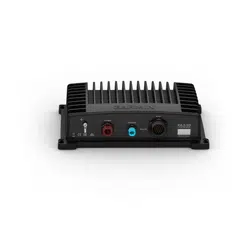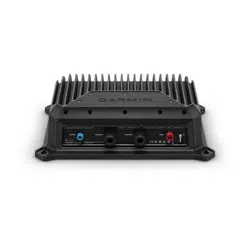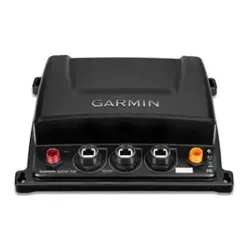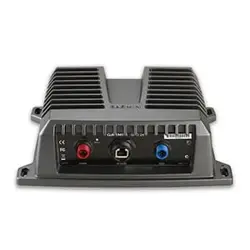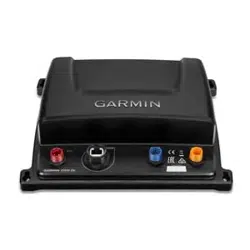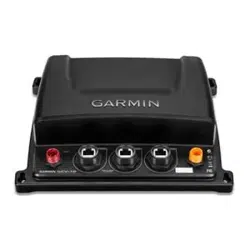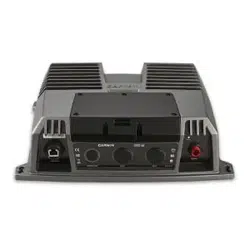
GSD
™
26
INSTALLATION INSTRUCTIONS
GSD 26 Installation Instructions
To obtain the best performance and to avoid damage to your boat, install the device according to these
instructions.
Read all installation instructions before proceeding with the installation. If you experience difficulty during the
installation, contact Garmin Product Support.
Important Safety Information
WARNING
See the Important Safety and Product Information guide in the product box for product warnings and other
important information.
You are responsible for the safe and prudent operation of your vessel. Sonar is a tool that enhances your
awareness of the water beneath your boat. It does not relieve you of the responsibility of observing the water
around your boat as you navigate.
CAUTION
Failure to install and maintain this equipment in accordance with these instructions could result in damage or
injury.
To avoid possible personal injury, always wear safety goggles, ear protection, and a dust mask when drilling,
cutting, or sanding.
NOTICE
When drilling or cutting, always check what is on the opposite side of the surface to avoid damaging the vessel.
This equipment should be installed by a qualified marine installer.
Transducers
A transducer is required to send and receive a sonar signal from the sounder. Proper transducer selection and
installation are critical to the operation of the device. Because mounting locations vary, see your local Garmin
dealer or contact Garmin Product Support for more information. Go to www.garmin.com/transducers to select a
transducer.
Installation Preparation
NOTICE
For the best possible performance, the device must be installed according to these instructions. If you
experience difficulty with the installation, contact Garmin Product Support.
Because every boat is different, you must carefully plan the GSD 26 sounder installation.
1 Select a mounting location.
2 Mount the sounder.
3 Connect the sounder to the Garmin Marine Network and to power.
4 Connect the sounder to the transducer.
GUID-CD9D5480-1EC6-4A73-AB59-0037B3321584 v8
July 2024

Tools Needed
• Drill
• #8 (5mm) drill bit for mounting surface
• #2 Phillips screwdriver
• 3mm flat screwdriver
• Cable ties (optional)
• Dielectric grease
• Wire cutter
• Wire stripper
• 1in. (24mm) and
19
/
32
in. (15mm) wrenches
• Marine sealant (optional)
Mounting the Sounder
Mounting Location Considerations
• The sounder must be mounted in a location where it cannot be submerged.
• The sounder must be mounted in a location with adequate ventilation where it will not be exposed to extreme
temperatures.
• The sounder should be mounted so that the LEDs are visible.
• The sounder should be mounted so that the power and network cables can be easily connected.
• The sounder should be mounted so that the transducer cable can be connected. If required, transducer
extension cables are available through your Garmin dealer.
Mounting the GSD 26 Device
NOTICE
If you are mounting the device in fiberglass, when drilling the pilot holes, use a countersink bit to drill a
clearance counterbore through only the top gel-coat layer. This will help to avoid cracking in the gel-coat layer
when the screws are tightened.
NOTE: Screws are included with the device, but they may not be suitable for the mounting surface.
Before you mount the device, you must select a mounting location and determine what screws and other
mounting hardware are needed for the surface.
1 Place the device in the mounting location and mark the location of the pilot holes.
2 Drill a pilot hole for one corner of the device.
3 Loosely fasten the device to the mounting surface with one corner and examine the other three pilot-hole
marks.
4 Mark new pilot-hole locations if necessary, and remove the device from the mounting surface.
5 Drill the remaining pilot holes.
6 Secure the device to the mounting location.
2
Connecting the Sounder
WARNING
When connecting the power cable, do not remove the in-line fuse holder. To prevent the possibility of personal
injury or product damage caused by fire or overheating, the appropriate fuse must be in place as indicated in
the product specifications. Connecting the power cable without the appropriate fuse in place voids the product
warranty.
NOTICE
Do not force a cable into its port. Forcing the cable can damage the pins. If the cable is properly aligned, the
cable should connect easily.
Before you connect the sounder to the network, power, and the transducer, you must mount the sounder
(Mounting the Sounder, page2).
1 Route the cables using the appropriate tie wraps, fasteners, and sealant to secure the cables along the route
and through any bulkheads or the deck.
2 Install the locking rings on the marine network and power cables (Installing Locking Rings on the Cables,
page6).
3 Connect the bare-wire end of the power cable to a 12Vdc power source and to ground.
4 Apply dielectric grease to the end of the power cable.
5 Align the notch on the end of the power cable with the power port on the device, and press the cable into
place.
6 Tighten the locking ring.
7 Repeat steps 5 and 6 for the network cable, and connect the device to a transducer (Connecting the Device to
a Transducer or Sensor, page3).
8 Select an option:
• If your boat is equipped with a GMS 10 network port expander, connect the network cable to one of its
available ports.
• If your boat is not equipped with a GMS 10 network port expander, connect the network cable directly to
the network port on your chartplotter.
Cable Routing Grommets
When routing cables through your boat, it may be necessary to drill holes to route the cables. Cable routing
grommets can be used to cover cable installation holes. The grommets do not create a waterproof seal. If
necessary, apply a marine sealant after installation to weatherproof around the grommet and the cable. You can
purchase grommets from your Garmin dealer or directly from Garmin at www.garmin.com.
Connecting the Device to a Transducer or Sensor
NOTICE
You must install cord grip plugs in any unused cord grip to make sure water cannot enter the transducer wiring
block area and damage the sounder.
The terminal blocks are not removable.
3
Preparing the Cable
1 Remove the terminal block lid from the sounder.
2 Select an option:
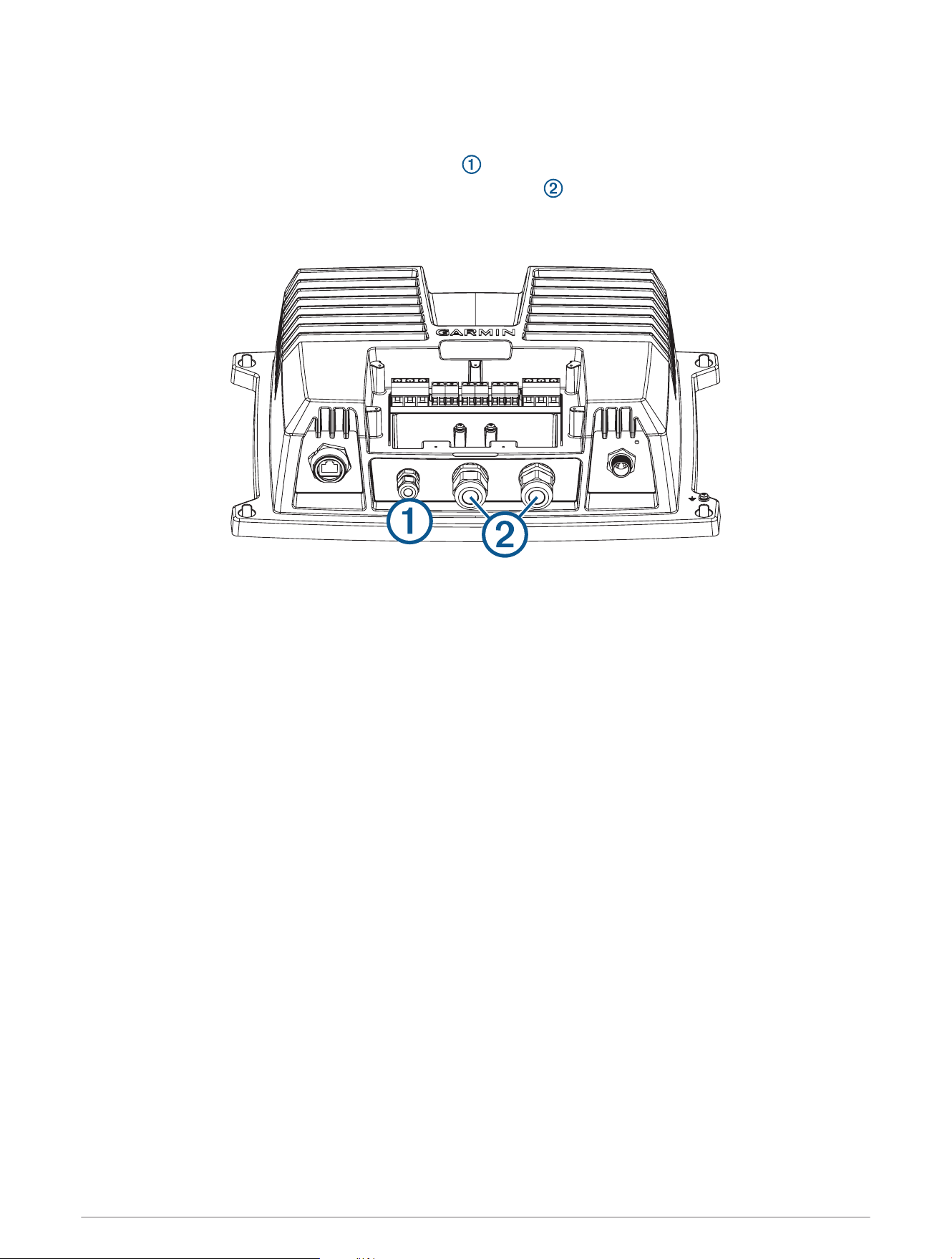
• Feed a sensor cable through the small cord grip , and pull the cable into the terminal block area.
• Feed a transducer cable through one of the large cord grips on the housing, and pull the cable into the
terminal block area.
NOTE: Do not tighten the cord grip.
Connecting the Wires to the Terminal Block
Before you connect the wires, consult the wiring diagrams (Transducer Wiring Diagrams, page7) to select the
proper wiring configuration for your transducer and the wiring tables (Transducer Wire Color Tables, page9)
for specific examples of Garmin wire colors.
1 Connect the uninsulated section of each wire to the terminal block using a 3mm flat screwdriver.
2 Connect the bare shield wire to one of the two ground posts under the terminal block using a #2 Phillips
screwdriver.
Securing the Wire Connections
1 After connecting the wires, use a 24mm (1in.) wrench to tighten the nut around the transducer cable.
When tightened correctly, you should not be able to pull the transducer cable out of the housing.
2 Insert a cord grip plug into each unused cord grip.
3 Replace and secure the terminal block lid on the sounder with a #2 Phillips screwdriver.
NOTE: The sounder does not operate when the lid is removed.
4
Grounding the Sounder
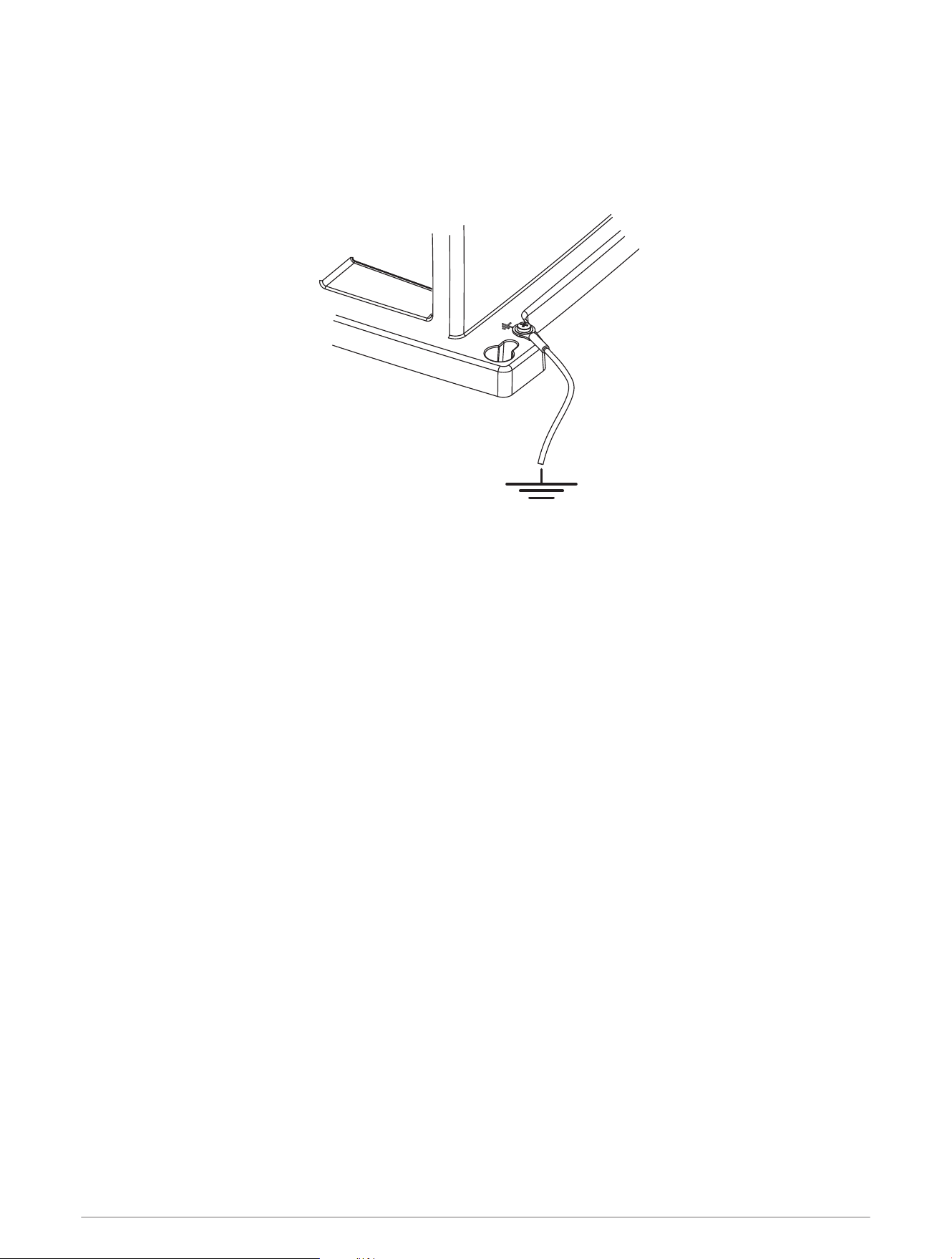
The chassis ground post is located on the exterior of the chassis, adjacent to a corner mounting hole.
1 Connect the chassis ground post to the boat water ground circuit.
NOTE: The boat battery ground is an acceptable alternative if your vessel does not have a designated water
ground circuit.
2 Mount the sounder (Mounting the Sounder, page2) and connect the power, marine network, transducer, and
sensors (Connecting the Sounder, page3).
Manual Transducer Configuration
While most transducer models are detected and configured automatically, in some cases you may need to
configure a transducer manually.
Manually Configuring a Transducer
1 From a sonar view, select Options > Sonar Setup > Installation > Transducers.
2 Select the GSD 26 sonar module.
3 Select Manual Configuration.
4 Select an option:
• If you connected the transducer to the LOW FREQ XDCR terminals, select Low.
• If you connected the transducer to the HIGH FREQ XDCR terminals, select High.
5 Select Manual Enabled to turn on manual configuration.
6 Set the parameters for your transducer (Manual Transducer Configuration Parameters, page6).
7 Select Done.
5
Manual Transducer Configuration Parameters
NOTICE
If parameters are set incorrectly, manual transducer configuration may damage your transducer. If necessary,
you should contact your transducer's manufacturer to verify the correct configuration parameters.
Impedance: The transducer's minimum impedance, in ohms.
Max. Transmit Power: The transducer's maximum transmit power, in watts.
Nominal Freq.: The transducer's nominal frequency, in kHz. If your transducer doesn't have a nominal frequency,
set it to any frequency within its range. This will automatically set a frequency preset for this transducer.
CHIRP: Turn on if configuring a CHIRP transducer.
Lower 3dB Freq.: The lower frequency limit of CHIRP sweeps, in kHz.
Upper 3dB Freq.: The upper frequency limit of CHIRP sweeps, in kHz.
Manual Transducer Configuration Values
The following Garmin transducers require manual configuration for use with the GSD 26 sonar module.
Transducer
Model
Impedance
(Ω)
Max.
Transmit
Power (W)
Nominal Freq.
(kHz)
CHIRP
Lower 3dB
Freq. (kHz)
Upper 3dB
Freq. (kHz)
GT12M-THF 80 350 125 On 85 165
GT15M-THF 80 600 125 On 85 165
GT17M-THF 100 1000 120 On 80 165
To obtain accurate manual configuration parameters for other transducers not produced by Garmin, contact the
transducer's manufacturer.
Installing Locking Rings on the Cables
Before you install locking rings on the cables, you must route the cables.
To help make the cable-routing process easier, the locking rings are packaged separately from the cables. Each
locking ring is packaged in a small bag with a number on the label for easy identification.
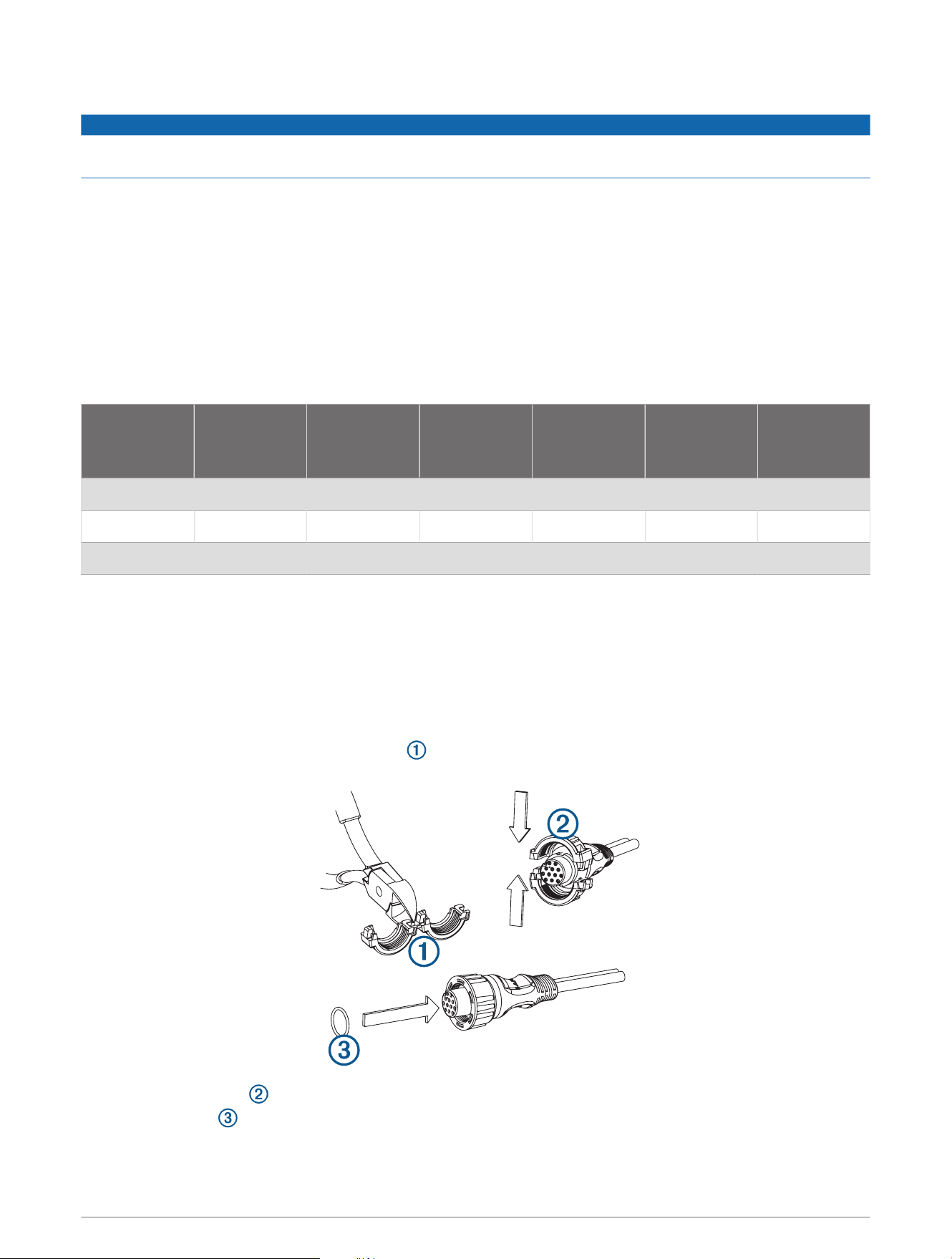
1 Separate the two halves of the locking ring .
2 Align the two halves of the locking ring over the cable and snap them together.
3 Insert the o-ring into the end of the connector.
6
Transducer Wiring Diagrams
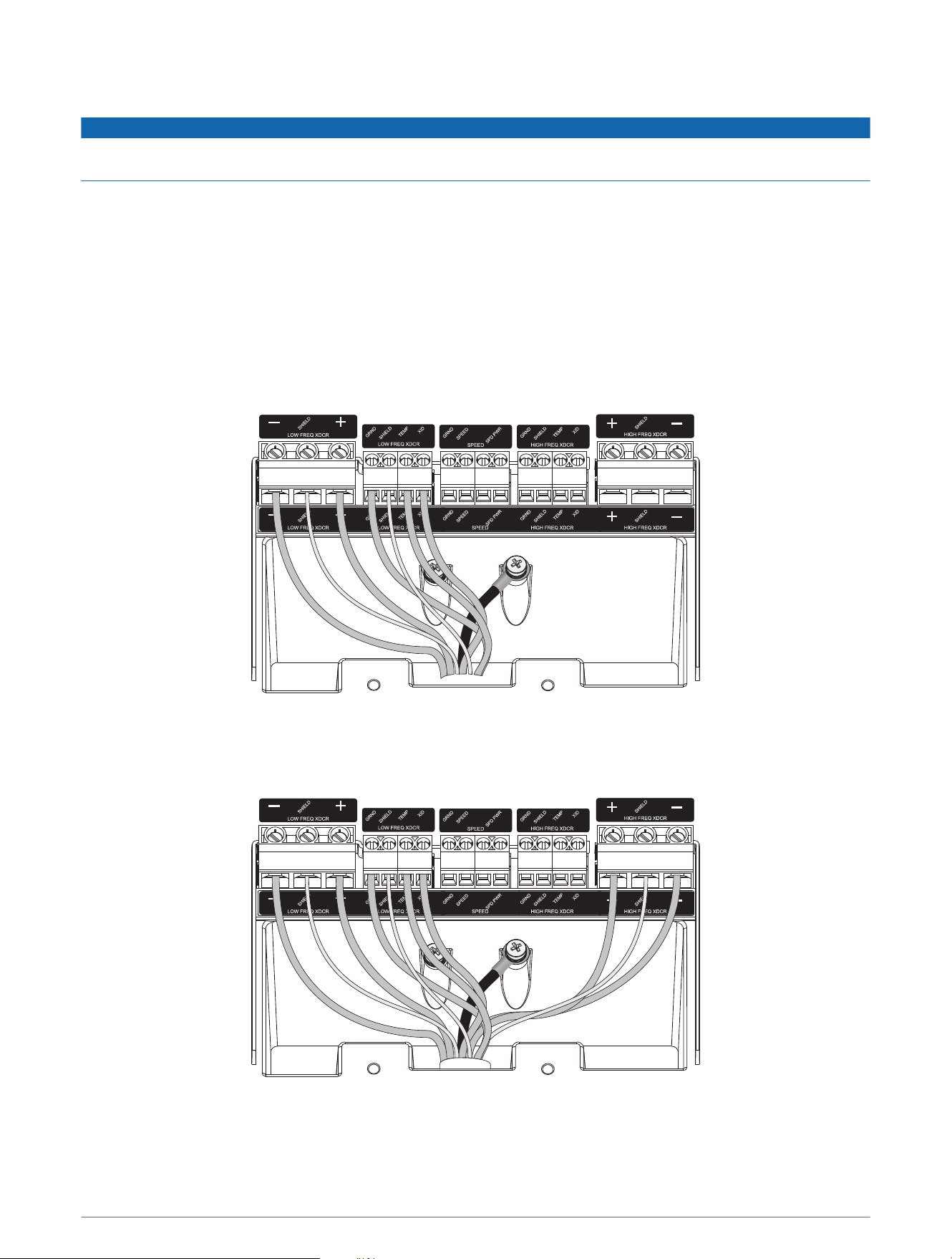
NOTICE
Connecting the high-frequency wires to the low-frequency terminal block, or the low-frequency wires to the
high-frequency terminal block, damages the device and the transducer.
You can use these diagrams to identify the connection points for your transducer wires on the GSD 26 terminal
block. Locate your CHIRP/spread spectrum transducer model in the wiring color tables (Transducer Wire Color
Tables, page9) for more information.
The outer shield wire must connect to one of the two screw posts below the terminal block using the included
ring crimp terminal. When connecting two single-element transducers, you must connect the second transducer
to the duplicate set of connections on the right side of the terminal block.
TIP: The primary transducer cable wire housing covers the wiring bundles. To identify the wiring groups in the
bundles more easily, you can remove up to an inch of the cable housing.
Single-Element CHIRP/Spread Spectrum
Dual-Element CHIRP/Spread Spectrum with Temperature and XID
NOTE: The temperature and XID wires can be connected at either location.
7
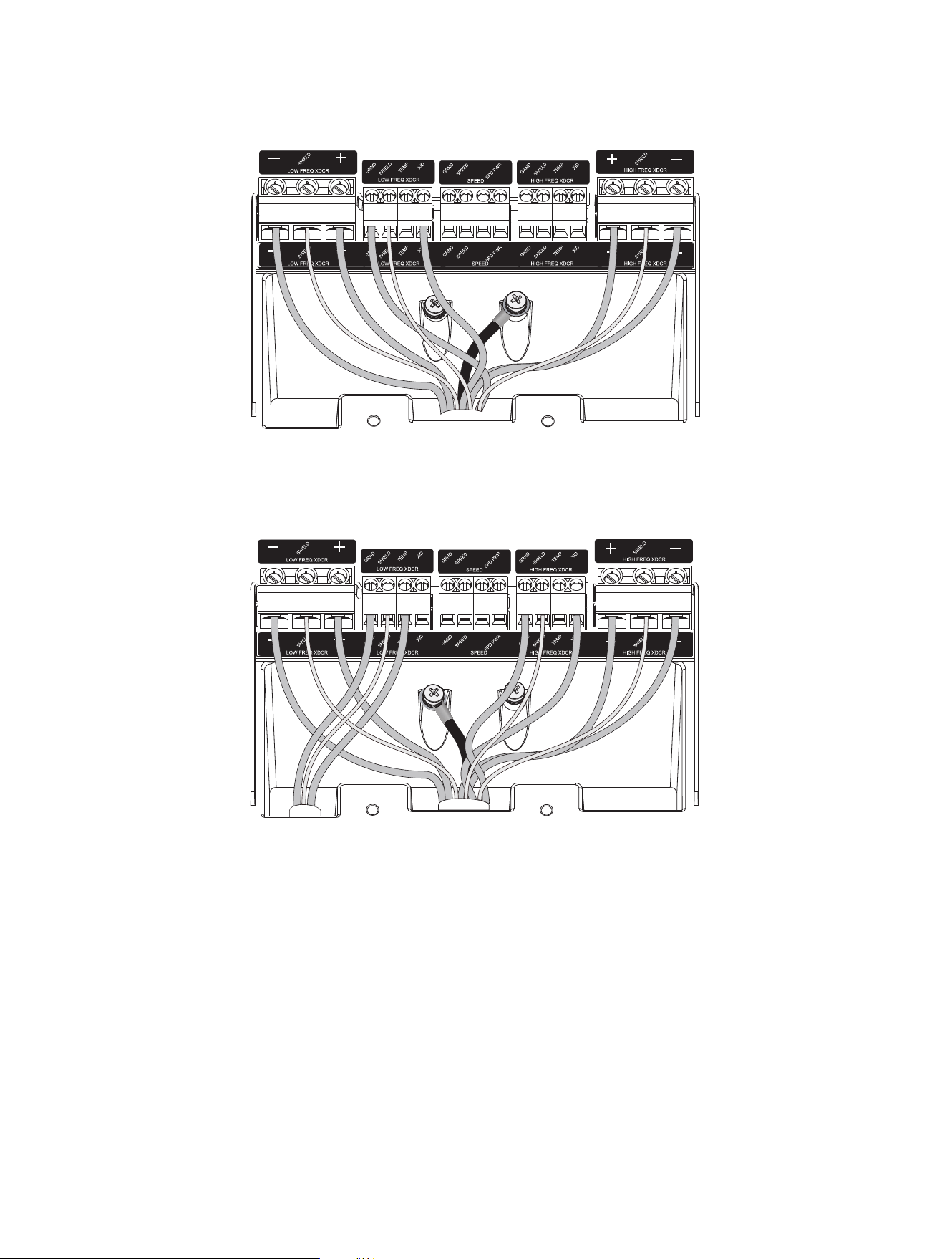
Dual-Element CHIRP/Spread Spectrum with XID
NOTE: The XID wires can be connected at either location.
Dual-Element CHIRP/Spread Spectrum with Separate Temperature Sensor
NOTE: The temperature and XID wires can be connected at either location.
8
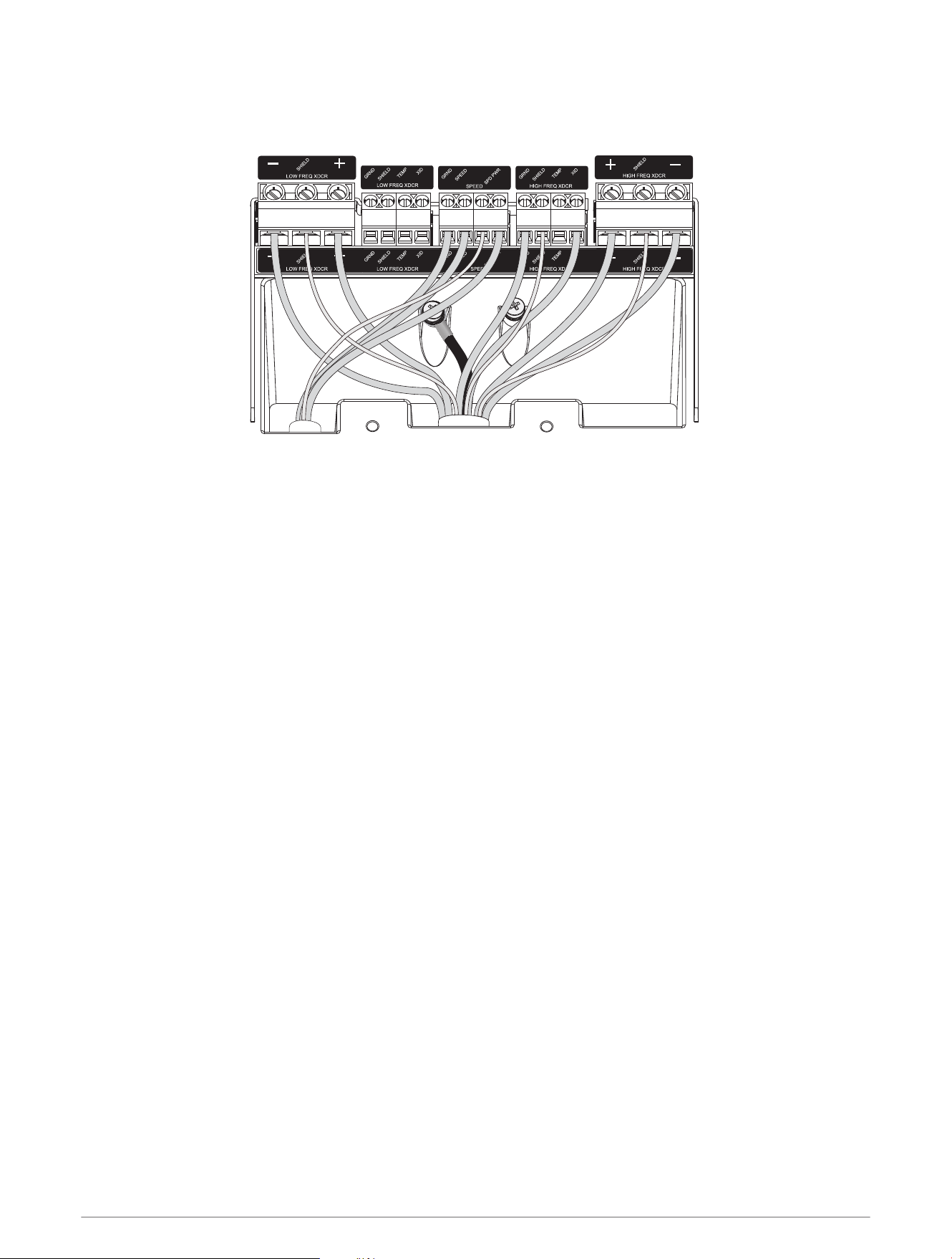
Dual-Element CHIRP/Spread Spectrum with Separate Speed Sensor
NOTE: The XID wires can be connected at either location.
Transducer Wire Color Tables
You can use these tables to help identify wire functions on certain Garmin or Airmar transducers.
9
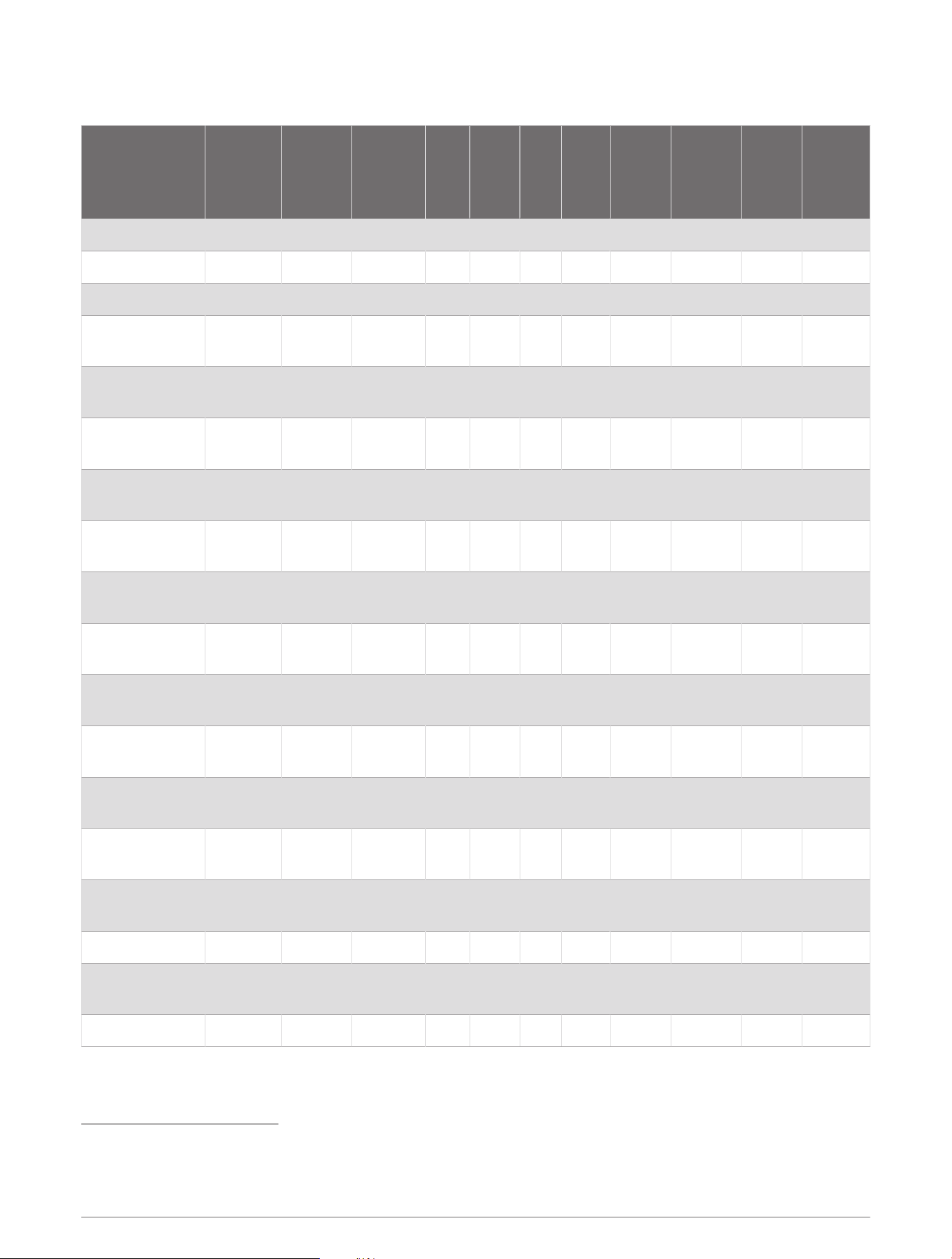
CHIRP/Spread Spectrum Transducers
Transducer Model
LOW FREQ
XDCR +
LOW FREQ
XDCR
SHIELD
LOW FREQ
XDCR −
GRND SHIELD TEMP XID
HIGH
FREQ
XDCR +
HIGH
FREQ
XDCR
SHIELD
HIGH
FREQ
XDCR −
Ground
Post
Garmin GT12M-THF
1
Red NA Black Bare NA White NA Red NA Black NA
Garmin GT15M-THF
1
Red NA Black Bare NA White NA Red NA Black NA
Garmin GT17M-THF
1
Red NA Black Bare NA White NA Red NA Black NA
Airmar R509LH Blue/White
2
Bare
Black/
White
Brown Bare White Orange Blue Bare Black Bare
Airmar R509LM Blue/White
2
Bare
Black/
White
Brown Bare White Orange Blue Bare Black Bare
Airmar R599LH Blue/White
2
Bare
Black/
White
Brown Bare NA Orange Blue Bare Black Bare
Airmar R599LM Blue/White
2
Bare
Black/
White
Brown Bare NA Orange Blue Bare Black Bare
Airmar R109LH Blue/White
2
Bare
Black/
White
Brown Bare White Orange Blue Bare Black Bare
Airmar R109LHW Blue/White
2
Bare
Black/
White
Brown Bare White Orange Blue Bare Black Bare
Airmar R111LH Blue/White
2
Bare
Black/
White
Brown Bare White Orange Blue Bare Black Bare
Airmar M265LH Blue/White
2
Bare
Black/
White
Brown NA White Orange Blue Bare Black Bare
Airmar B265LH Blue/White
2
Bare
Black/
White
Brown NA White Orange Blue Bare Black Bare
Airmar TM265LH Blue/White
2
Bare
Black/
White
Brown NA White Orange Blue Bare Black Bare
Airmar B265LM Blue/White
2
Bare
Black/
White
Brown NA White Orange Blue Bare Black Bare
Airmar TM265LM Blue/White
2
Bare
Black/
White
Brown NA White Orange Blue Bare Black Bare
Airmar B175H NA NA NA Brown NA White Orange Blue Bare Black Bare
Airmar B175L Blue/White Bare
Black/
White
Brown NA White Orange NA NA NA Bare
Airmar B175M
3
Blue NA Black Brown NA White Orange Blue Bare Black Bare
1
Can be connected to either LOW FREQ XDCR or HIGH FREQ XDCR terminal blocks. Requires manual configuration (Manually Configuring a Transducer,
page5). Tape off the bare end of the yellow wire.
2
Yellow before 11/20/10
3
Can be connected to either LOW FREQ XDCR or HIGH FREQ XDCR terminal blocks.
10
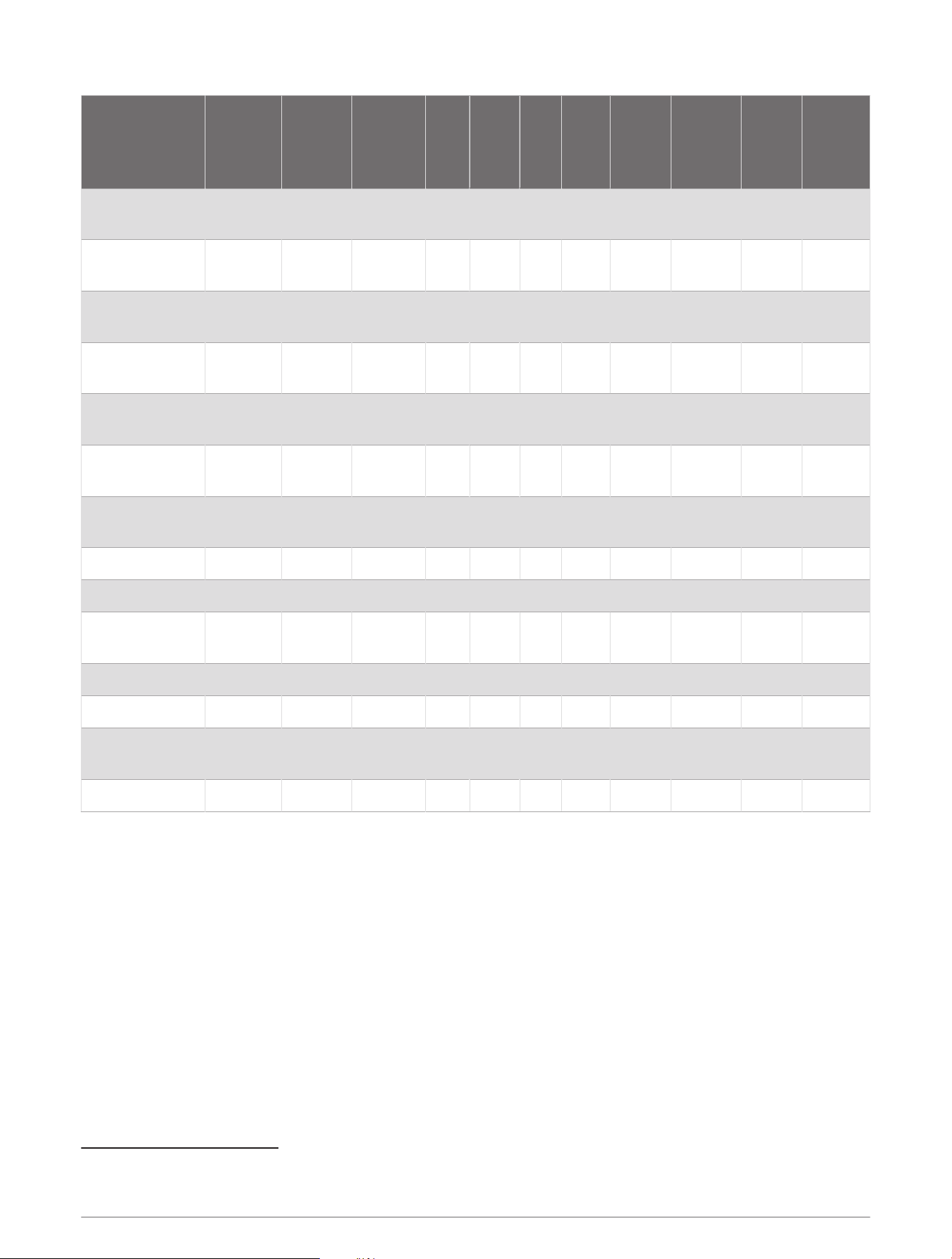
Transducer Model
LOW FREQ
XDCR +
LOW FREQ
XDCR
SHIELD
LOW FREQ
XDCR −
GRND SHIELD TEMP XID
HIGH
FREQ
XDCR +
HIGH
FREQ
XDCR
SHIELD
HIGH
FREQ
XDCR −
Ground
Post
Airmar PM265LH Blue/White Bare
Black/
White
Brown NA White Orange Blue Bare Black Bare
Airmar PM265LM Blue/White Bare
Black/
White
Brown NA White Orange Blue Bare Black Bare
Airmar PM411LWM Blue/White Bare
Black/
White
Brown NA White Orange Blue Bare Black Bare
Airmar B275LHW Blue/White Bare
Black/
White
Brown NA White Orange Blue Bare Black Bare
Airmar CM599LH Blue/White Bare
Black/
White
Brown Bare White Orange Blue Bare Black Bare
Airmar CM599LM Blue/White Bare
Black/
White
Brown Bare White Orange Blue Bare Black Bare
Airmar CM599LHW Blue/White Bare
Black/
White
Brown Bare White Orange Blue Bare Black Bare
Airmar TM150M
4
Blue NA Black Brown NA White Orange Blue NA Black Bare
Airmar B150M
4
Blue NA Black Brown NA White Orange Blue NA Black Bare
Airmar B75L Blue/White Bare
Black/
White
Brown NA White Orange NA NA NA Bare
Airmar B75M
4
Blue Bare Black Brown NA White Orange Blue Bare Black Bare
Airmar B75H NA NA NA Brown NA White Orange Blue Bare Black Bare
Airmar 509LHW Blue/White
5
Bare
Black/
White
Brown Bare White Orange Blue Bare Black Bare
Airmar TM185M
4
Blue Bare Black Brown NA White Orange Blue Bare Black Bare
4
Can be connected to either LOW FREQ XDCR or HIGH FREQ XDCR terminal blocks.
5
Yellow before 11/20/10
11
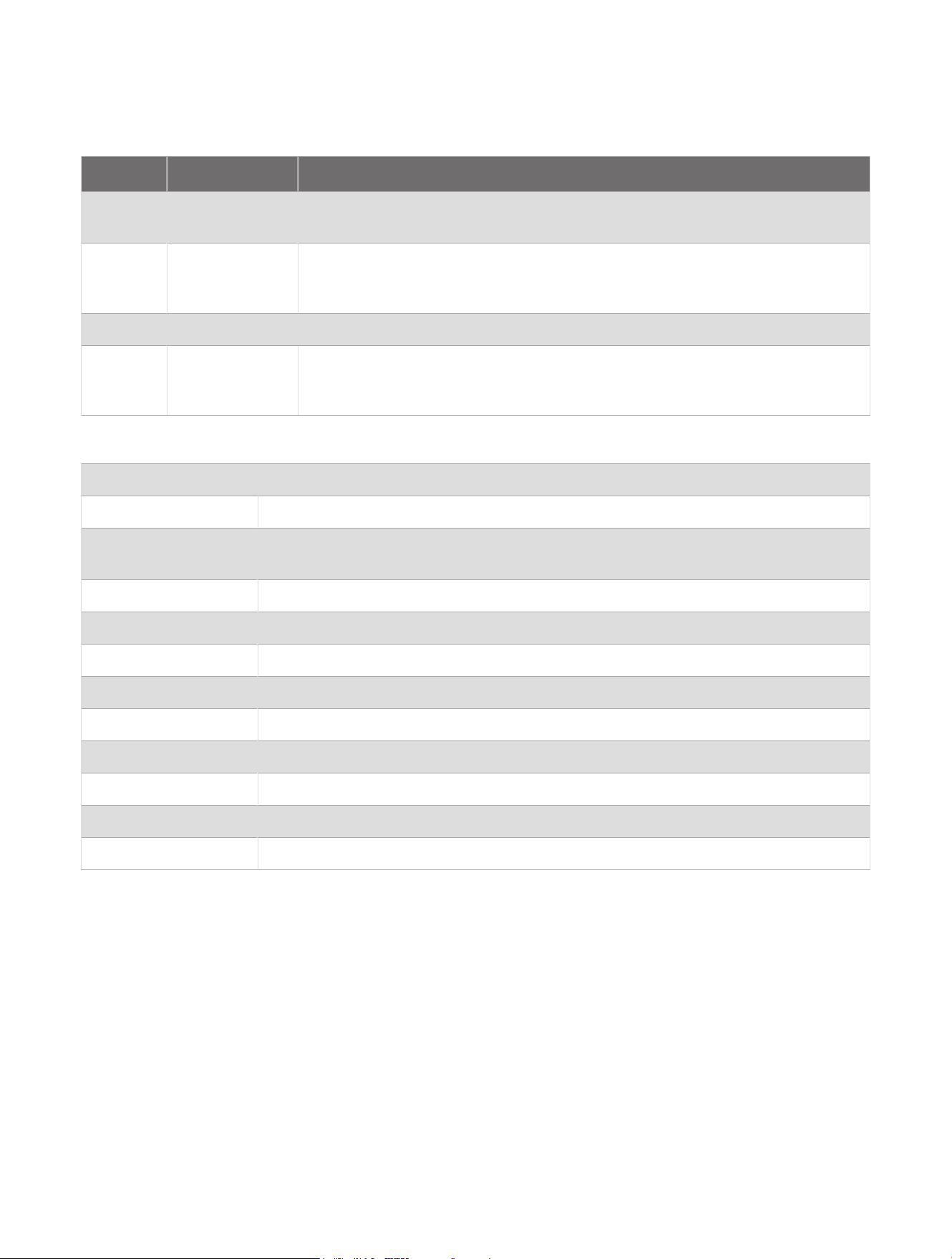
Blink Codes
After the sounder is installed, it turns on when the chartplotter is turned on. The two-color (green and red) status
LED on the sounder indicates its operational status.
LED Color State Status
Green Slow blink
The sounder is connected to a chartplotter and is operating properly. You
should see sonar data on the chartplotter.
Red Slow blink
The sounder is turned on, but is not connected to a chartplotter, or is waiting
to connect to a chartplotter. If the sounder is connected to the chartplotter and
this code persists, check the wiring connections.
Red/Green Slow blink The sounder is in test mode.
Red
Rapid blink
sequence
System error. The chartplotter displays a message indicating the type of failure.
When the error condition is fixed, the sounder must be completely disconnected
from and reconnected to its power source to clear the error.
Specifications
Size L x W x H: 274 x 373 x 100mm (10.8 x 14.7 x 3.9in.)
Weight 5.16kg (11.37lb.)
Case material
Fully gasketed, aluminum and steel housing with plastic access panel, water resistant
to IEC 60529 IPX7.
Temperature range From 5 to 158°F (from -15 to 70°C)
Power input 10–35V
Power usage 100W maximum
Fuse 10A
Compass safe distance 60cm (23.6in.)
Sounder power 25-3,000W (RMS)*
Frequency 25-250kHz (dependent on transducer)
Depth 3,048m (10,000ft.)**
Data output Garmin Marine Network
*Dependent on transducer rating and depth
**Maximum depth dependent on transducer, water salinity, bottom type, and other water conditions.
© 2014–2024 Garmin Ltd. or its subsidiaries
Garmin
®
and the Garmin logo are trademarks of Garmin Ltd. or its subsidiaries, registered in the USA and other countries. GSD and GMS
™
are trademarks of Garmin Ltd.
or its subsidiaries. These trademarks may not be used without the express permission of Garmin.
Airmar
™
is a trademark of Airmar Technology Corporation.
© 2014–2024 Garmin Ltd. or its subsidiaries
support.garmin.com