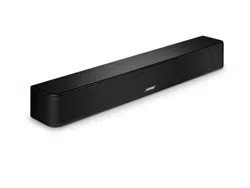
SOLO SOUNDBAR SERIES II
2
|
ENG
IMPORTANT SAFETY INSTRUCTIONS
Please read and keep all safety and use instructions.
Bose Corporation hereby declares that this product is in compliance with the essential requirements
and other relevant provisions of Directive 2014/53/EU and all other applicable EU directive
requirements. The complete declaration of conformity can be found at: www.Bose.com/compliancewww.Bose.com/compliance
This product conforms to all applicable Electromagnetic Compatibility Regulations 2016 and all other
applicable UK regulations. The complete declaration of conformity can be found at:
www.Bose.com/compliancewww.Bose.com/compliance
Bose Corporation hereby declares that this product is in compliance with the essential requirements
per Radio Equipment Regulations 2017 and all other applicable UK regulations. The complete
declaration of conformity can be found at: www.Bose.com/compliancewww.Bose.com/compliance
Important Safety Instructions
Read these instructions.
Keep these instructions.
Heed all warnings.
Follow all instructions.
Do not use this apparatus near water.
Clean only with a dry cloth.
Do not block any ventilation openings. Install in accordance with the manufacturer’s instructions.
Do not defeat the safety purpose of the polarized or grounding-type plug. A polarized plug has two blades with
one wider than the other. A grounding type plug has two blades and a third grounding prong. The wide blade
or the third prong are provided for your safety. If the provided plug does not fit into your outlet, consult an
electrician for replacement of the obsolete outlet.
Protect the power cord from being walked on or pinched, particularly at plugs, convenience receptacles, and
the point whe re they exit from the apparatus.
Only use aachments/accessories specified by the manufacturer.
Use only with the cart, stand, tripod, bracket, or table specified by the manufacturer, or sold with the
apparatus. When a cart is used, use caution when moving the cart/apparatus combination to avoid
injury from tip-over.
Unplug this apparatus during lightning storms or when unused for long periods of time.
Refer all servicing to qualified personnel. Servicing is required when the apparatus has been damaged in any
way, such as power-supply cord or plug is damaged, liquid has been spilled or objects have fallen into the
apparatus, the apparatus has been exposed to rain or moisture, does not operate normally, or has
been dropped.
WARNINGS/CAUTIONS
This symbol on the product means there are important operating and maintenance instructions in
this guide.
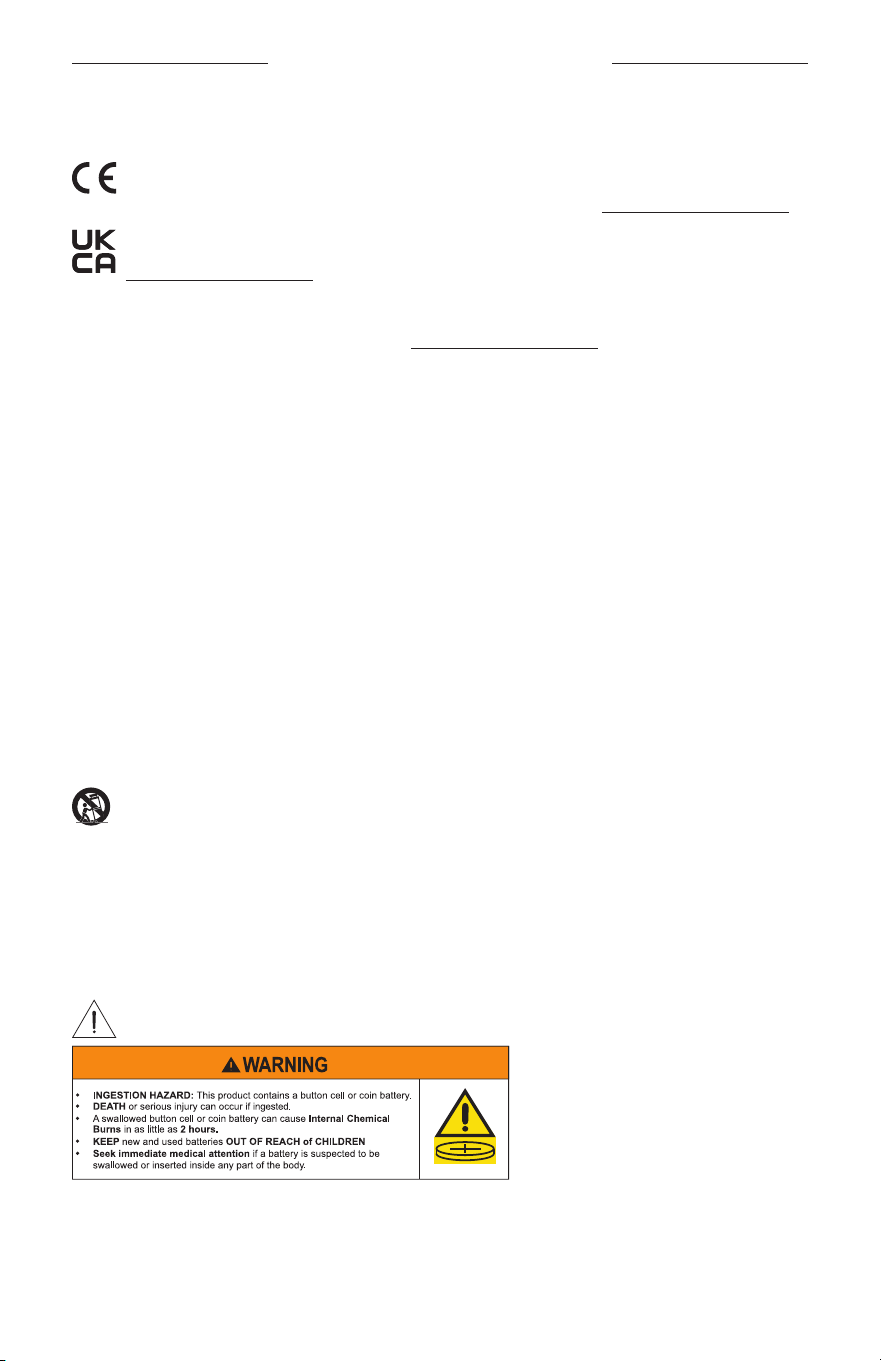
• Do not ingest baery, chemical burn hazard.
• The remote control supplied with this product contains a coin/buon cell baery. If the coin/buon cell
baery is swallowed, it can cause severe internal chemical burns in just 2 hours and can lead to death.

IMPORTANT SAFETY INSTRUCTIONS
3
|
ENG
• Keep new and used baeries away from children.
• Even used baeries may cause severe injury or death.
• Always completely secure the baery compartment. If the baery compartment does not close securely,
stop using the product, remove the baeries, and keep them away from children.
• Ensure the baeries are installed correctly according to polarity (+ and -).
• Do not mix old and new baeries, dierent brands or types of baeries, such as alkaline, carbon-zinc, or
rechargeable baeries.
• If you think baeries might have been swallowed or placed inside any part of the body, seek immediate
medical aention.
• Call a local poison control center for treatment information.
• To avoid risk of explosion, fire or chemical burn, use caution in replacing the baery and replace only with an
agency approved baery.
• Remove and immediately recycle or dispose of used baeries according to local regulations and keep away
from children. Do NOT dispose of baeries in household trash or incinerate.
• Remove and immediately recycle or dispose of baeries from equipment not used for an extended period of
time according to local regulations.
• Do not force discharge, recharge, disassemble, heat above 185° F (85° C) or incinerate. Doing so may result in
injury due to venting, leakage or explosion resulting in chemical burns.
• Non-rechargeable baeries are not to be recharged.
• Baery Type: CR2032 | Nominal baery voltage: 3V
This product contains magnetic material. Consult your physician on whether this might aect your
implantable medical device.
• To reduce the risk of fire or electrical shock, do NOT expose this product to rain, dripping, splashing, or
moisture and do not place liquid filled objects such as vases, on or near the product.
• Keep the product away from fire and heat sources. Do not place naked flame sources, such as lighted
candles, on or near the product.
• Do NOT make unauthorized alterations to the product.
• Do NOT use a power inverter with this product.
• Do NOT use in vehicles or boats.
• The speaker wire and interconnect cables included with this system are not approved for in-wall installation.
Please check your local building codes for the correct type of wire and cable required for in-wall installation.
• Use this product only with the power supply provided.
• Where the mains plug or appliance coupler is used as the disconnect device, the disconnect device shall
remain readily operable.
• The baery provided with this product may present a risk of fire, explosion or chemical burn if mishandled,
incorrectly replaced or replaced with an incorrect type.
• The product label is located on the boom of the product.
• Do NOT expose products containing baeries to excessive heat (e.g. from storage in direct sunlight, fire or
the like).
• Only use the mounting hardware supplied with this product.
• Do NOT mount on surfaces that are not sturdy, or that have hazards concealed behind them, such as
electrical wiring or plumbing. If you are not sure about installing the bracket, contact a qualified professional
installer. Ensure the bracket is installed according to local building code.

4
|
ENG
IMPORTANT SAFETY INSTRUCTIONS
• Only for mounting on the following surfaces:
– Wallboard ≥ q (10 mm)
– Masonry
If mounted on surfaces other than stated above please contact a professional installer.
• Due to ventilation requirements, Bose does not recommend placing the product in a confined space such as
in a wall cavity or in an enclosed cabinet.
• Do not place or install near any heat sources, such as fireplaces, radiators, heat registers, stoves or other
apparatus (including amplifiers) that produce heat.
Solvent, lubricant, cleaning agent warning
WARNING: Do not use hydrocarbon based solvents, lubricants or cleaning agents of any type on or around
Bose speakers, and associated mounting hardware, during installation. The use of such hydrocarbon based
lubricants, solvents or cleaning agents on or around the mounting anchors and screws can lead to degradation
of the plastic material, possibly resulting in cracking and premature failure of the product.

5
|
ENG
REGULATORY AND LEGAL INFORMATION
NOTE: This equipment has been tested and found to comply with the limits for a Class B digital device,
pursuant to Part 15 of the FCC Rules. These limits are designed to provide reasonable protection against
harmful interference in a residential installation. This equipment generates, uses, and can radiate radio
frequency energy and, if not installed and used in accordance with the instructions, may cause harmful
interference to radio communications. However, there is no guarantee that interference will not occur in a
particular installation. If this equipment does cause harmful interference to radio or television reception, which
can be determined by turning the equipment o and on, the user is encouraged to try to correct the
interference by one or more of the following measures:
• Reorient or relocate the receiving product or antenna.
• Increase the separation between the equipment and receiver.
• Connect the equipment into an outlet on a circuit dierent from that to which the receiver is connected.
• Consult the dealer or an experienced radio/TV technician for help.
Changes or modifications not expressly approved by Bose Corporation could void the user’s authority to
operate this equipment.
This device complies with part 15 of the FCC Rules and ISED Canada license-exempt RSS standard(s).
Operation is subject to the following two conditions: (1) This device may not cause harmful interference, and
(2) this device must accept any interference received, including interference that may cause
undesired operation.
This equipment should be installed and operated with minimum distance 20cm between the radiator and
your body.
CAN ICES-3(B)/NMB-3(B)
For Europe: Frequency band of operation 2400 to 2483.5 MHz. | Maximum transmit power less than
20 dBm EIRP.
Maximum transmit power is below regulatory limits such that SAR testing is not necessary and exempt per
applicable regulations.
This symbol means the product must not be discarded as household waste, and should be delivered to
an appropriate collection facility for recycling. Proper disposal and recycling helps protect natural
resources, human health and the environment. For more information on disposal and recycling of this
product, contact your local municipality, disposal service, or the shop where you bought
this product.
Low-power Radio-frequency Devices Technical Regulations: Without permission granted by the NCC, any
company, enterprise, or user is not allowed to change frequency, enhance transmiing power or alter original
characteristic as well as performance to a approved low power radio-frequency devices. The low power
radio-frequency devices shall not influence aircraft security and interfere legal communications; If found,
the user shall cease operating immediately until no interference is achieved. The said legal communications
means radio communications is operated in compliance with the Telecommunications Management Act. The
low power radio-frequency devices must be susceptible with the interference from legal communications or
ISM radio wave radiated devices.
REGULATORY AND LEGAL INFORMATION
6
|
ENG
Product Power State Table
The product, in accordance with the Ecodesign Requirements for Energy Related Products Directive
2009/125/EC and the Ecodesign for Energy-Related Products and Energy Information (Amendment) (EU Exit)
Regulations 2020, is in compliance with the following norm(s) or document(s): Regulation (EC) No. 1275/2008,
as amended by Regulation (EU) No. 801/2013.
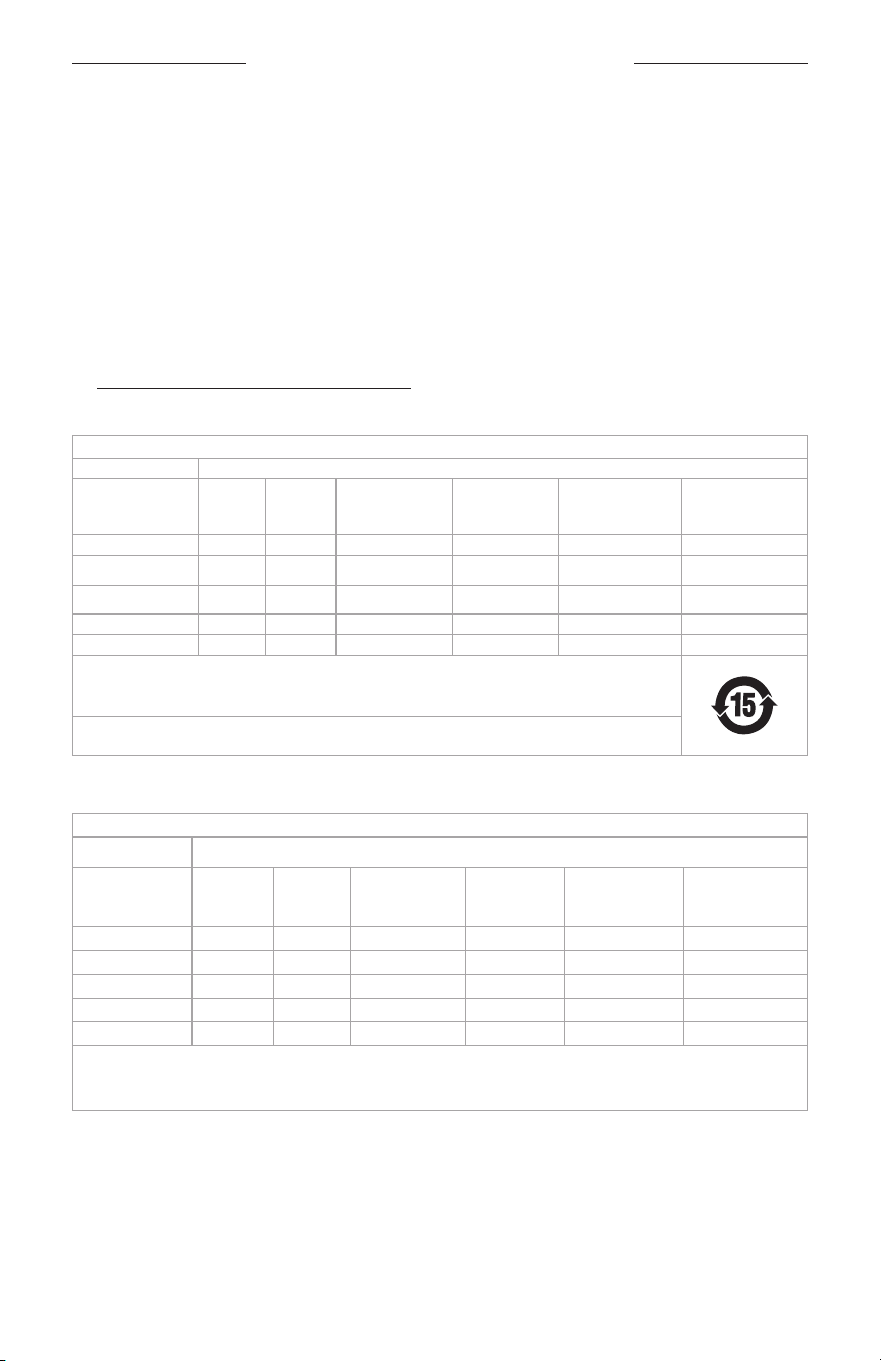
Required Power State Information
Power Modes
Standby Networked Standby
Power consumption in specified power mode, at
230V/50Hz input
≤
0.5 W N/A*
Time after which equipment is automatically
switched into mode
< 2.5 hours N/A*
Power consumption in networked standby if all
wired network ports are connected and all wireless
network ports are activated, at 230V/50Hz input
N/A N/A*
Network port deactivation/activation procedures.
Deactivating all networks will enable
standby mode.
Bluetooth®: Deactivate by clearing the pairing list by pressing and
holding the Bluetooth buon for 10 seconds. Activate by pairing with
a Bluetooth source.
*product does not utilize a networked standby mode for a Bluetooth
connection and does not have the ability to be configured to a
network via Wi-Fi® or Ethernet.
External Power Supply Technical Information
The external power supply provided with the product, in accordance with the Ecodesign Requirements for
Energy Related Products Directive 2009/125/EC and the Ecodesign for Energy-Related Products and Energy
Information (Amendment) (EU Exit) Regulations 2020, is in compliance with the following norms(s) or
documents(s): Commission Regulation (EU) 2019/1782.
Manufacturer Bose Products B.V.
Commercial registration number 36037901
Address
Gorslaan 60
1441 RG Purmerend
The Netherlands
Model identifier DT20V-1.8C-DC
Input voltage 100V-240V
Input AC frequency 50Hz/60Hz
Output voltage 20V DC
Output current
1.8A
Output power
36W
Average active eiciency 89.6%
Eiciency at low load (10%) 90.1%
No-load power consumption 0.08W
REGULATORY AND LEGAL INFORMATION
7
|
ENG
Date of Manufacture: The eighth digit in the serial number indicates the year of manufacture; ‘3” is 2013
or 2023
Importers: Bose Electronics (Shanghai) Company Limited, Level 6, Tower D, No. 2337 Gudai Rd. Minhang
District, Shanghai 201100 | Bose Products B.V., Gorslaan 60, 1441 RG Purmerend, The Netherlands | Bose de
México S. de R.L. de C.V., Avenida Prado Sur #150, Piso 2, Interior 222 y 223, Colonia Lomas de Chapultepec V
Sección, Miguel Hidalgo, Ciudad de México, C.P. 11000 Phone Number: +5255 (5202) 3545 | Bose Limited (H.K.),
9F., No.10, Sec. 3, Minsheng E. Road, Zhongshan Dist. Taipei City 10480, Phone Number: +886-2-2514 7676 |
Bose Limited, Bose House, Quayside Chatham Maritime, Chatham, Kent, ME4 4QZ, United Kingdom
Input Rating: 20V p 30W MAX
The CMIIT ID is located on the boom of the soundbar.
California: Contains lithium ion baery with Perchlorate Material - special handling may apply.
See www.dtsc.ca.gov/hazardouswaste/perchloratewww.dtsc.ca.gov/hazardouswaste/perchlorate
China Restriction of Hazardous Substances Table
Names and Contents of Toxic or Hazardous Substances or Elements
Toxic or Hazardous Substances and Elements
Part Name
Lead
(Pb)
Mercury
(Hg)
Cadmium(Cd)
Hexavalent
(CR(VI))
Polybrominated
Biphenyl(PBB)
Polybrominated
diphenylether
(PBDE)
PCBs X O O O O O
Metal Parts X O O O O O
Plastic Parts O O O O O O
Speakers X O O O O O
Cables X O O O O O
This table is prepared in accordance with the provisions of SJ/T 11364.
O: Indicates that this toxic or hazardous substance contained in all of the homogeneous materials for this
part is below the limit requirement of GB/T 26572.
X: Indicates that this toxic or hazardous substance contained in at least one of the homogeneous
materials used for this part is above the limit requirement of GB/T 26572.
Taiwan Restriction of Hazardous Substances Table
Equipment name: Powered Speaker Type designation: 418775
Restricted substances and its chemical symbols
Unit Lead (Pb)
Mercury
(Hg)
Cadmium (Cd)
Hexavalent
chromium
(Cr+6)
Polybrominated
biphenyls (PBB)
Polybrominated
diphenyl ethers
(PBDE)
PCBs
-
b b b b b
Metal Parts
-
b b b b b
Plastic Parts
b b b b b b
Speakers
-
b b b b b
Cables
-
b b b b b
Note 1: “b” indicates that the percentage content of the restricted substance does not exceed the percentage of reference
value of presence.
Note 2: The “−” indicates that the restricted substance corresponds to the exemption.
8
|
ENG
REGULATORY AND LEGAL INFORMATION
The Bose Terms of Use apply to this product: worldwide.bose.com/termsofuseworldwide.bose.com/termsofuse
This product is covered by a limited warranty from Bose, available at worldwide.Bose.com/Warrantyworldwide.Bose.com/Warranty
The Bluetooth® word mark and logos are registered trademarks owned by Bluetooth SIG, Inc. and any use of
such marks by Bose Corporation is under license.
Dolby, Dolby Audio, and the double-D symbol are trademarks of Dolby Laboratories
Licensing Corporation. Manufactured under license from Dolby Laboratories.
Confidential unpublished works. Copyright 1992–2019 Dolby Laboratories. All
rights reserved.
The terms HDMI, HDMI High-Definition Multimedia Interface, HDMI trade dress and the HDMI
logos are trademarks or registered trademarks of HDMI Licensing Administrator, Inc.
Bose is a trademark of Bose Corporation. | Bose Corporation Headquarters: 1-877-230-5639 | ©2024 Bose
Corporation. No part of this work may be reproduced, modified, distributed, or otherwise used without prior
wrien permission.
Please complete and retain for your records
The serial and model numbers are located on the back of the soundbar.
Serial number: ___________________________________________________________________________
Model number: 418775
Please keep your receipt. Now is a good time to register your Bose product.
You can easily do this by going to worldwide.Bose.com/ProductRegistrationworldwide.Bose.com/ProductRegistration

CONTENTS
9
|
ENG
WHAT’S IN THE BOX
Contents ........................................................................................................................................................................... 12
SOUNDBAR PLACEMENT
Recommendations ....................................................................................................................................................... 13
Wall mount the soundbar .......................................................................................................................................... 14
Adjust audio for wall mounting ..................................................................................................................... 14
SET UP THE SOUNDBAR
Cable options .................................................................................................................................................................. 15
Connect the soundbar to your TV .......................................................................................................................... 16
Option 1: Optical (preferred) .......................................................................................................................... 16
Option 2: Coaxial (not provided)................................................................................................................... 17
Connect the soundbar to power ............................................................................................................................ 18
Mounting ring ....................................................................................................................................................... 18
Turn o your TV speakers ........................................................................................................................................... 19
Check for sound ........................................................................................................................................................... 19
SOUNDBAR CONTROLS
Remote functions ......................................................................................................................................................... 20
Power ....................................................................................................................................................................... 21
Auto-wake ............................................................................................................................................................. 22
Volume .................................................................................................................................................................... 23
Sources ................................................................................................................................................................... 24
Dialogue mode ............................................................................................................................................................... 25
Adjust the bass .............................................................................................................................................................. 26
Reset the bass ................................................................................................................................................................ 27
Program a third-party remote .................................................................................................................................. 27

CONTENTS
10
|
ENG
BLUETOOTH® CONNECTIONS
Connect a mobile device ........................................................................................................................................... 28
Disconnect a mobile device ..................................................................................................................................... 29
Reconnect a mobile device ...................................................................................................................................... 29
Connect an additional mobile device ................................................................................................................... 30
Switch between connected devices..................................................................................................................... 30
Clear the soundbar device list ................................................................................................................................. 30
SOUNDBAR STATUS
Power, volume, and error status .............................................................................................................................. 31
Bluetooth status ............................................................................................................................................................ 31
ALTERNATE SETUP
No sound from a source(s) connected to your TV ........................................................................................... 32
No optical or coaxial ports on your TV .................................................................................................................. 32
Connect a source to the soundbar ............................................................................................................. 33
Connect a source’s analog port to the soundbar ................................................................................. 34
Connect two sources to the soundbar ..................................................................................................... 35
Use two sources connected to the soundbar ........................................................................................ 37
Connect a TV headphone port to the soundbar ................................................................................... 38
CONNECT BOSE PRODUCTS
Connect a Bose Home Speaker or Soundbar .................................................................................................... 39
Compatible products ........................................................................................................................................ 39
Connect using the Bose app ......................................................................................................................... 39
Reconnect to a Bose Home Speaker or Soundbar .......................................................................................... 40

CONTENTS
11
|
ENG
CARE AND MAINTENANCE
Replace the remote baery ...................................................................................................................................... 41
Clean the soundbar ...................................................................................................................................................... 43
Replacement parts and accessories .................................................................................................................... 43
Limited warranty ............................................................................................................................................................ 43
TROUBLESHOOTING
Try these solutions first ............................................................................................................................................... 44
Other solutions............................................................................................................................................................... 44
12
|
ENG
WHAT’S IN THE BOX
CONTENTS
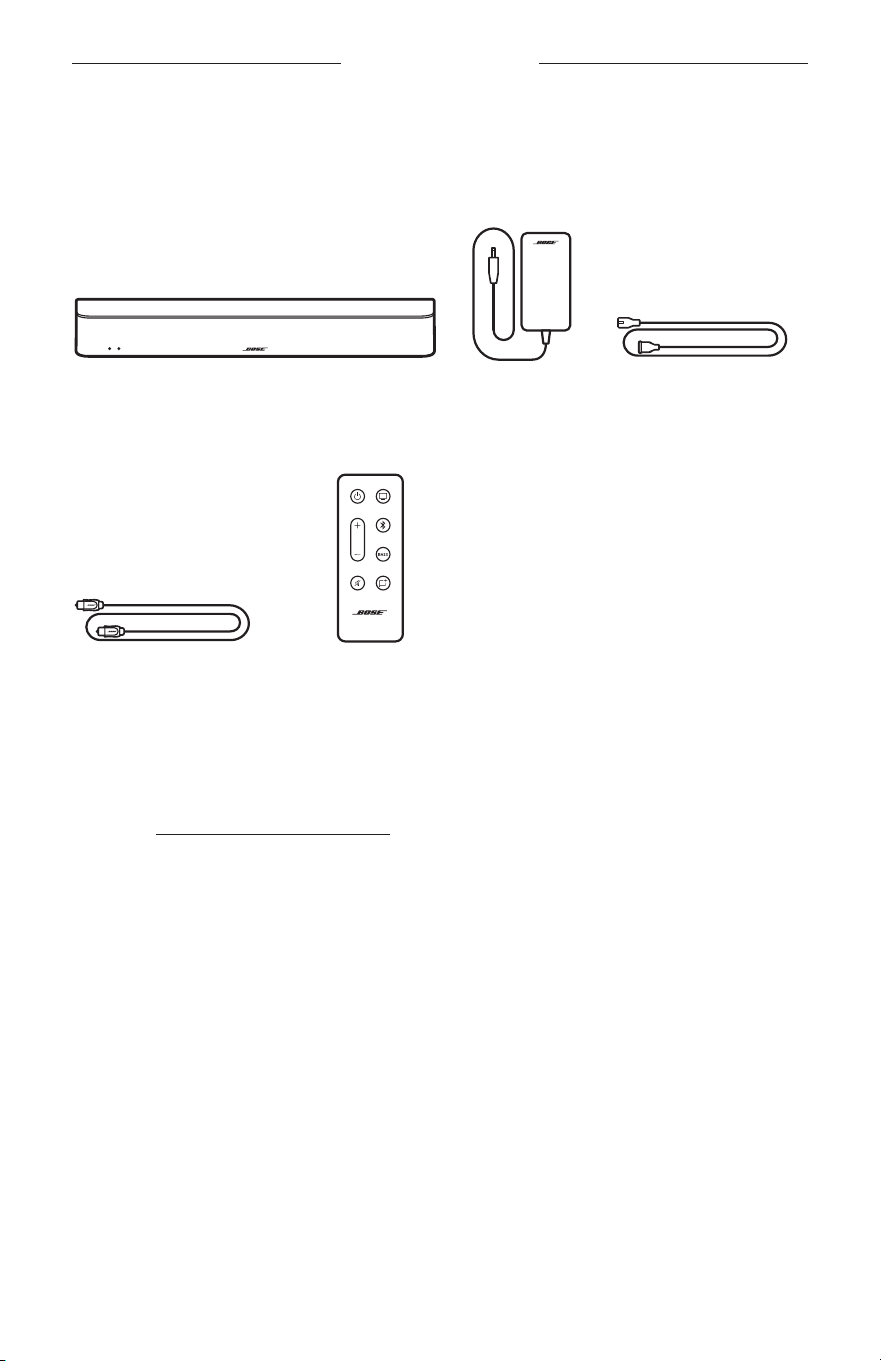
Confirm that the following parts are included:
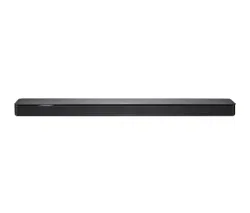
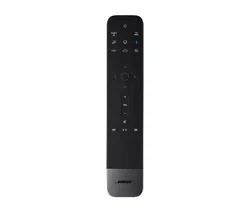
Bose Solo Soundbar Series II Power supply Power cord*
Optical cable Remote
(baery provided)
* May ship with multiple power cords. Use the power cord for your region.
NOTE: If any part of your product appears to be missing or damaged, don’t use it. Vis-
it support.Bose.com/SBSoloiisupport.Bose.com/SBSoloii for troubleshooting articles, videos, and product
repair or replacement.
13
|
ENG
SOUNDBAR PLACEMENT
RECOMMENDATIONS
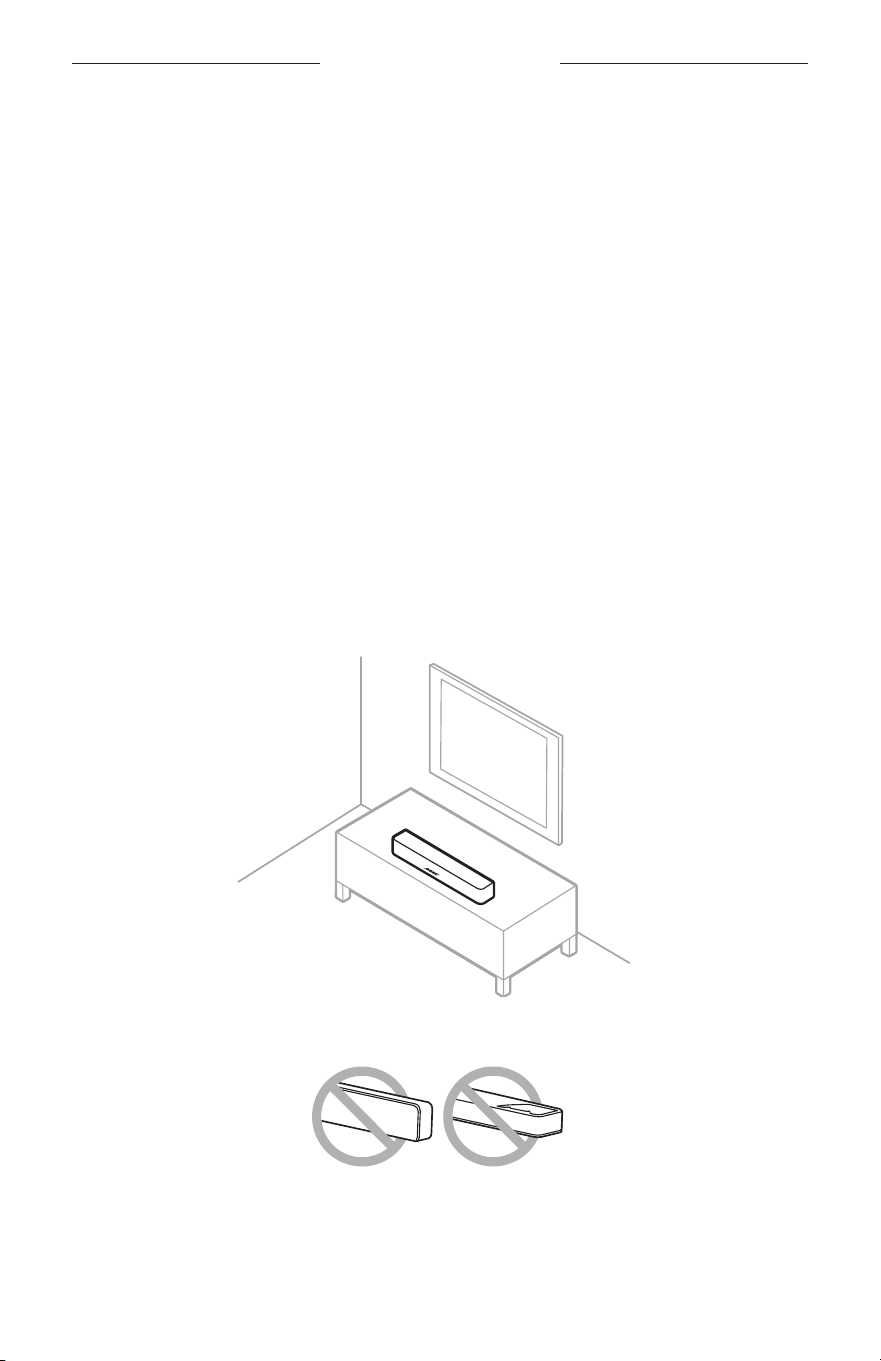
• Place the soundbar outside of and away from metal cabinets, other audio/video
components, and direct heat sources.
• Place the soundbar directly below (preferred) or above your TV with the grille facing
into the room.
• Place the soundbar on its rubber feet on a stable and level surface. For proper
support, both feet must be resting on the surface. Vibration can cause the
soundbar to move, particularly on smooth surfaces like marble, glass, or highly
polished wood.
• If placing the soundbar on a shelf or TV stand, position the front of the soundbar as
close as possible to the front edge of the shelf or stand for best sound quality.
• Keep the back side of the soundbar at least 0.4 in (1 cm) from any other surface.
Blocking the ports on this side aects sound quality.
• Make sure there is an AC (mains) outlet nearby.
• To avoid wireless interference, keep other wireless equipment 1 – 3 ft (0.3 – 0.9 m)
away from the soundbar.
• For best sound quality, don’t place the soundbar in an enclosed cabinet or
diagonally in a corner.
• Don’t place any objects on top of the soundbar.
CAUTION: Do NOT place the soundbar on its front, back, or top when in use.
SOUNDBAR PLACEMENT
14
|
ENG
WALL MOUNT THE SOUNDBAR
You can mount the soundbar on a wall. Follow the installation instructions included
with the soundbar.
CAUTION: Do NOT use any other hardware to mount the soundbar.
Adjust audio for wall mounting
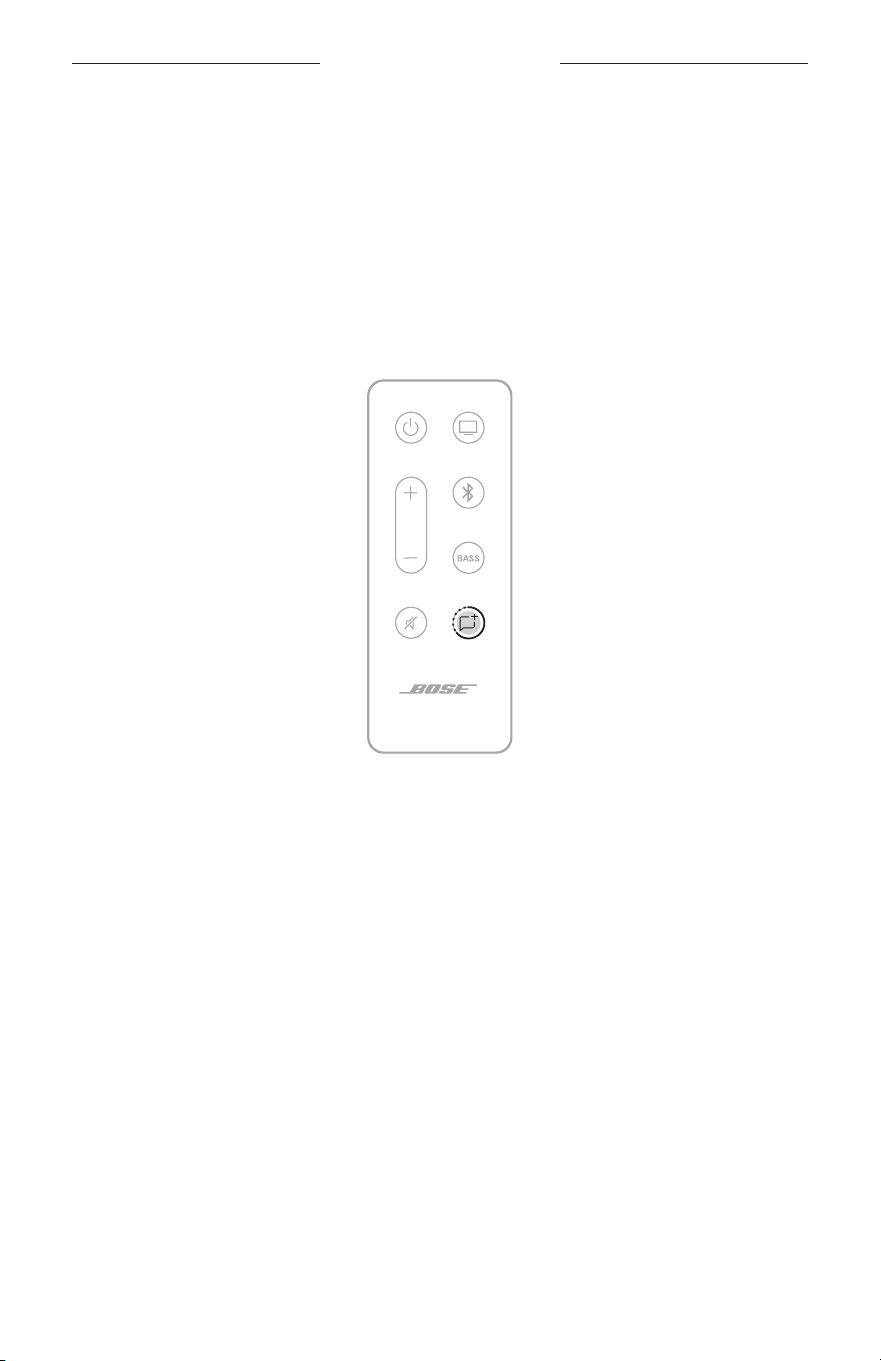
On the remote, press and hold the Dialogue mode buon 5 for 5 seconds until the
status light on the soundbar blinks amber (see page 31).
NOTE: If you remove the soundbar from the wall, repeat to return the soundbar to
default audio seings.
15
|
ENG
SET UP THE SOUNDBAR
CABLE OPTIONS
Connect your TV to the soundbar using one of the two cable options.
• Option 1: Optical (preferred)
• Option 2: Coaxial (not provided)
NOTE: If your TV does not have an optical or coaxial port, see “Alternate Setup” on
page 32.
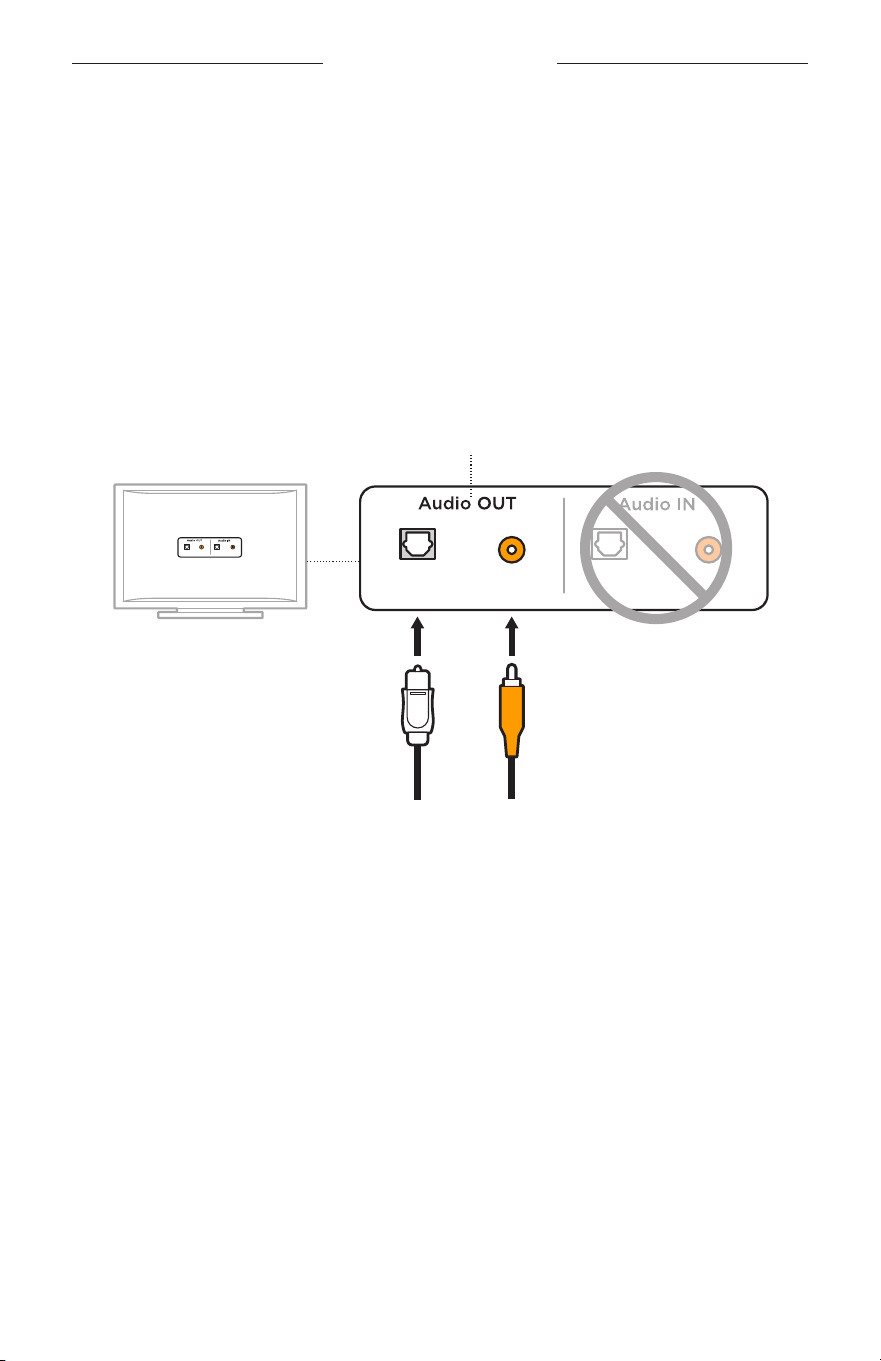
1. On the back of your TV, locate the Audio OUT (optical) port panel.
NOTE: You must connect the audio cable through your Audio OUT panel.
Optical Coaxial Optical Coaxial
Optical Coaxial Optical Coaxial
Your TV's port panel may not appear as shown.
Look for the shape or color (coaxial) of the port.
Option 1:
Optical cable (digital audio)
Preferred method
for connection.
Option 2:
Coaxial cable (digital audio)
Use if no optical output
is available.
2. Choose an audio cable.
Or
SET UP THE SOUNDBAR
16
|
ENG
CONNECT THE SOUNDBAR TO YOUR TV
Option 1: Optical (preferred)
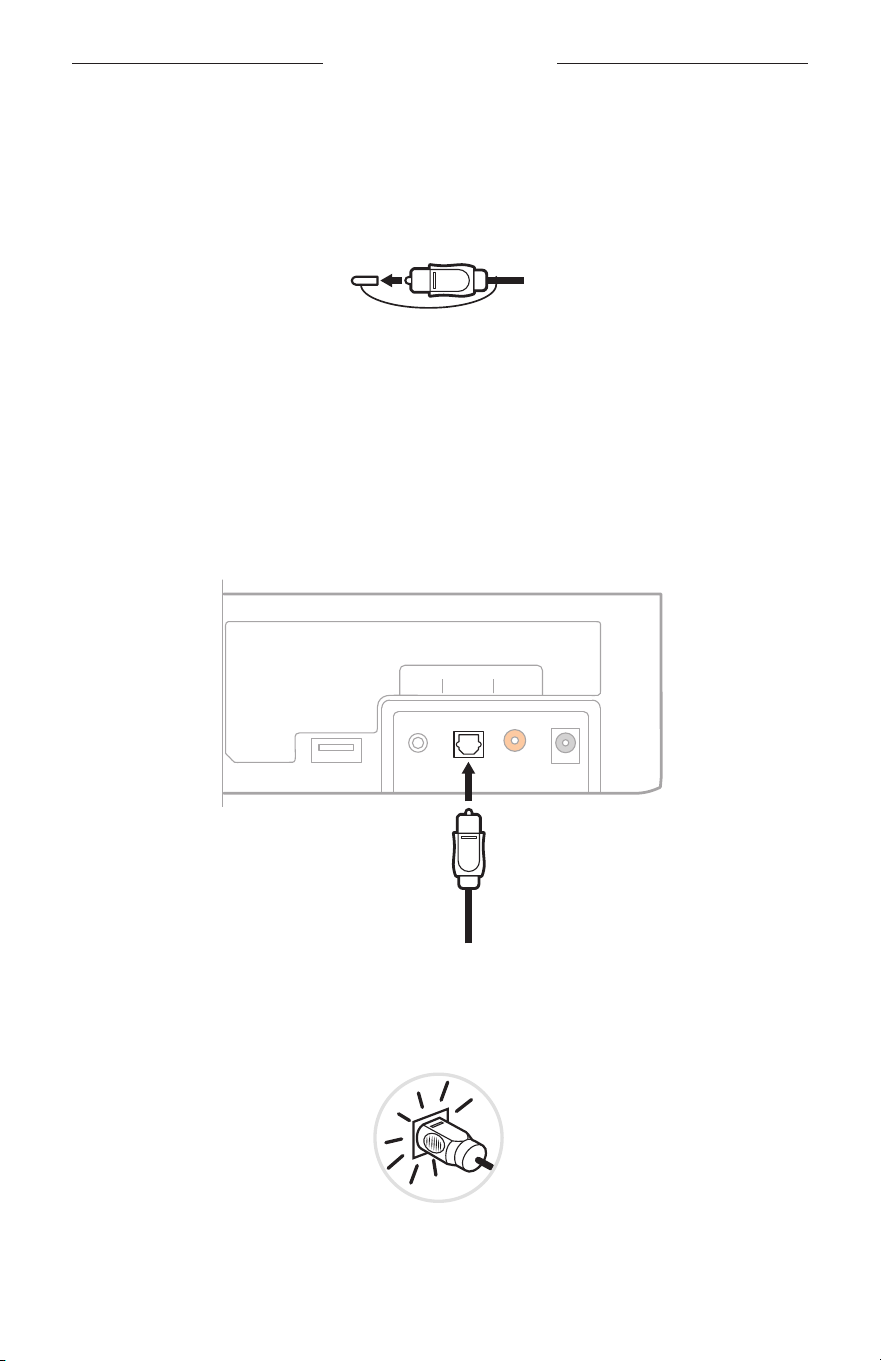
1. Remove the protective cap from both ends of the optical cable.
CAUTION: Make sure you have removed the protective cap from both ends of
the optical cable. Inserting the plug with the cap on or in the wrong
orientation can damage the plug and/or the port.
2. Align the plug on one end of the cable with your TV’s Optical OUT port and insert
the plug carefully.
3. Hold the plug at the other end of the optical cable with the Bose logo facing down.
4. Align the plug with the soundbar’s OPTICAL port and insert the plug carefully.
Service
TV Input
AUX Optical Coaxial Power
NOTE: The port has a hinged door that swings inward when inserting the plug.
5. Firmly push the plug into the port until you hear or feel a click.
SET UP THE SOUNDBAR
17
|
ENG
Option 2: Coaxial (not provided)
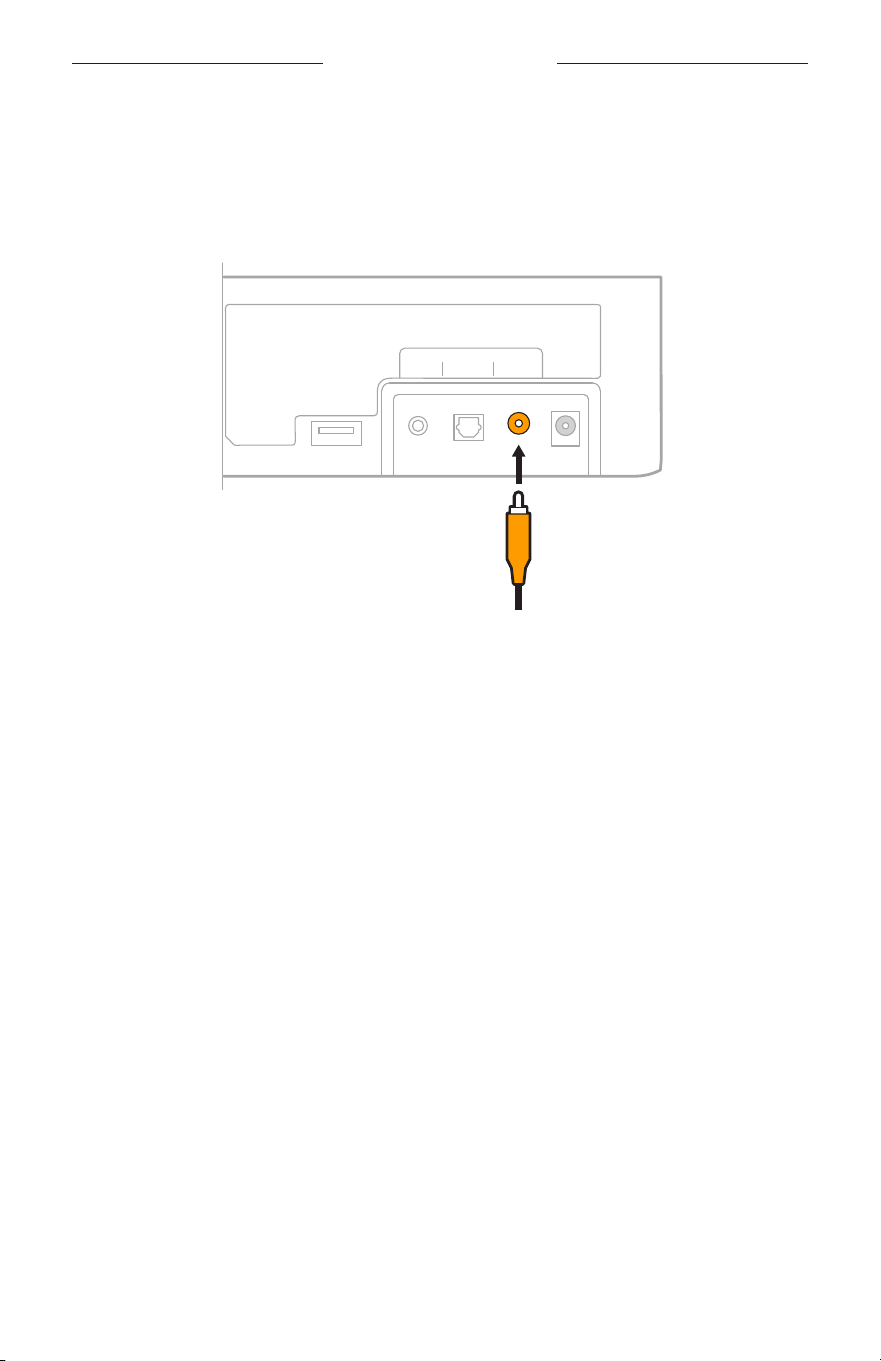
1. Insert one end of the coaxial cable into your TV’s coaxial port.
2. Insert the other end of the coaxial cable into the Coaxial port on
the soundbar.
Service
AUX Optical
TV Input
Coaxial Power
SET UP THE SOUNDBAR
18
|
ENG
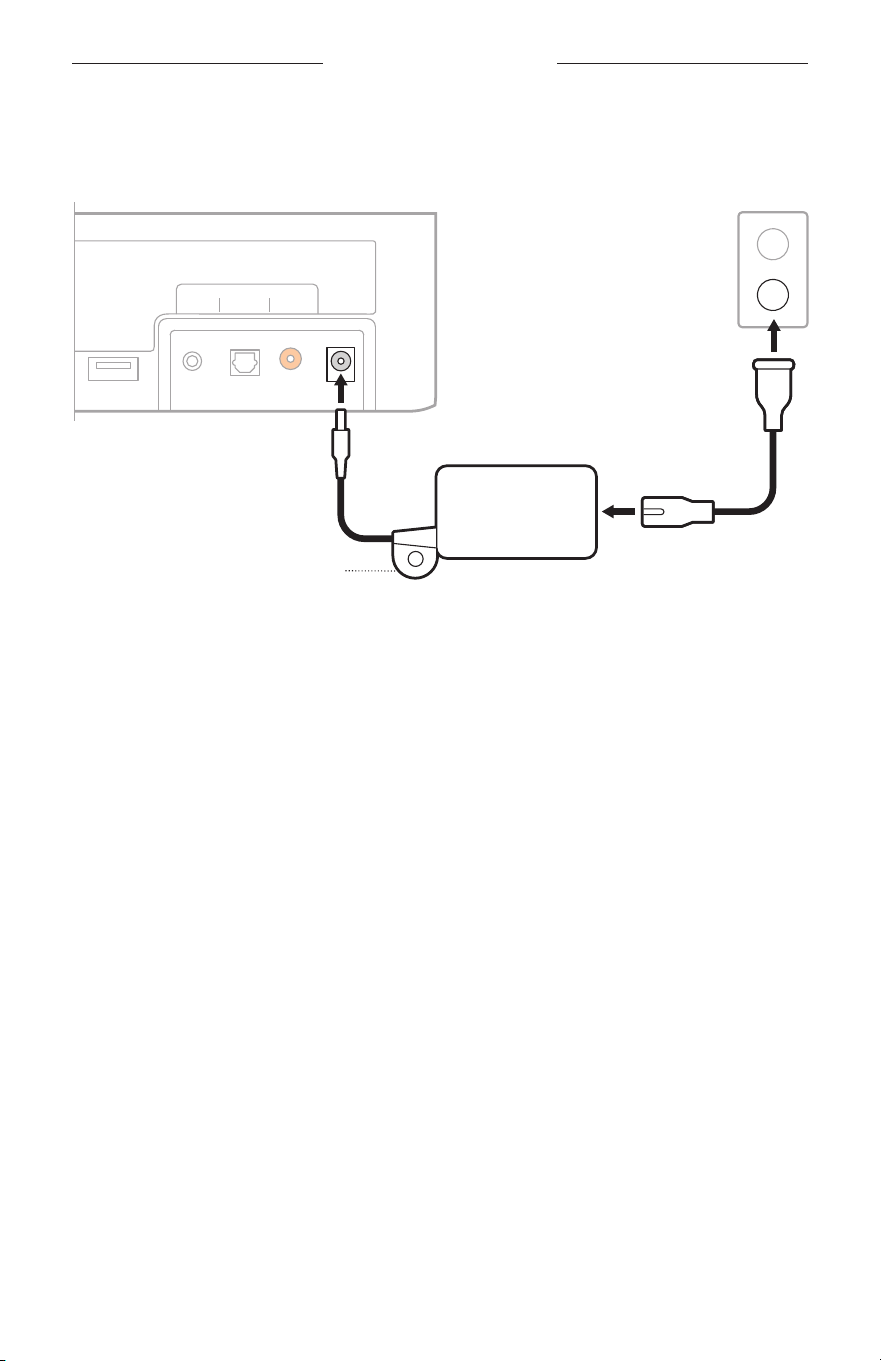
CONNECT THE SOUNDBAR TO POWER
1. Connect the power cord to the power supply.
Service
AUX Optical
TV Input
Coaxial Power
2
1
3
Mounting ring
2. Connect the power supply into the Power port on the back of the soundbar.
3. Plug the other end of the power cord into a live AC (mains) outlet.
The soundbar powers on, and you hear a tone.
Mounting ring
To hide the power supply behind your mounted TV, aach the mounting ring to your
TV’s wall mount using zip ties or bread ties (not provided).

SET UP THE SOUNDBAR
19
|
ENG
TURN OFF YOUR TV SPEAKERS
To avoid hearing distorted sound, turn o your TV speakers.
For more information, refer to your TV owner’s guide.
TIP: The audio seings are usually found in the TV menu.
CHECK FOR SOUND
1. Power on your TV.
2. If you are using a cable/satellite box or other secondary source:
a. Power on this source.
b. Select the appropriate TV input.
3. Power on the soundbar (see page 21).
You hear sound coming from the soundbar.
4. On the remote, press the Mute buon A.
You don’t hear sound coming from the TV speakers or soundbar.
NOTE: If you don’t hear sound coming from the soundbar or hear sound coming from
your TV speakers, see “Troubleshooting” on page 44.
20
|
ENG
SOUNDBAR CONTROLS
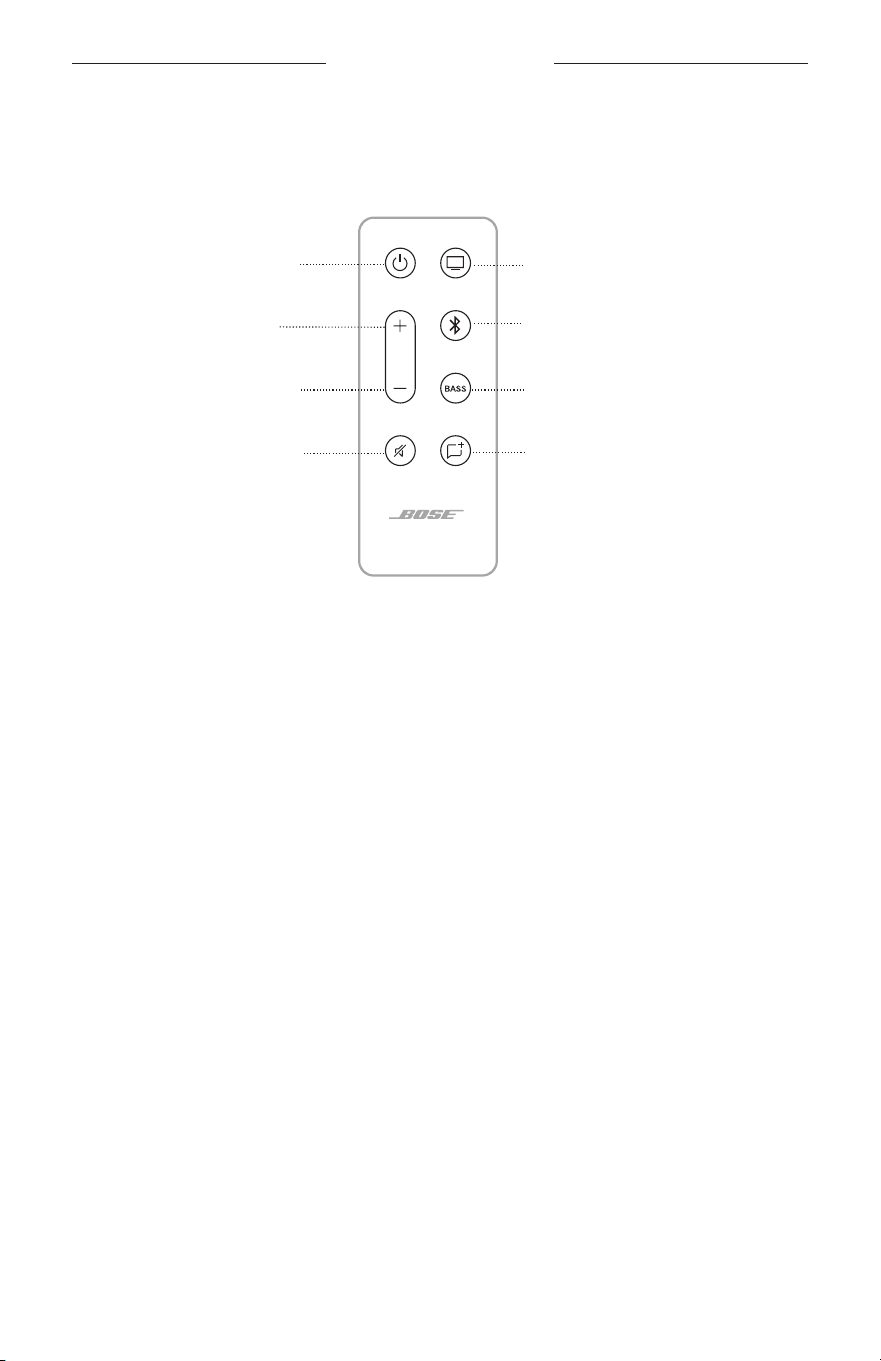
REMOTE FUNCTIONS
Use the remote to control the soundbar and Bluetooth connections.
Volume up (see page 23)
Volume down (see page 23)
Bluetooth buon (see page 24)
Power buon (see page 21)
Dialogue mode (see page 25)
TV buon (see page 24)
Adjust the bass (see page 26)
Mute/Unmute (see page 23)
SOUNDBAR CONTROLS
21
|
ENG
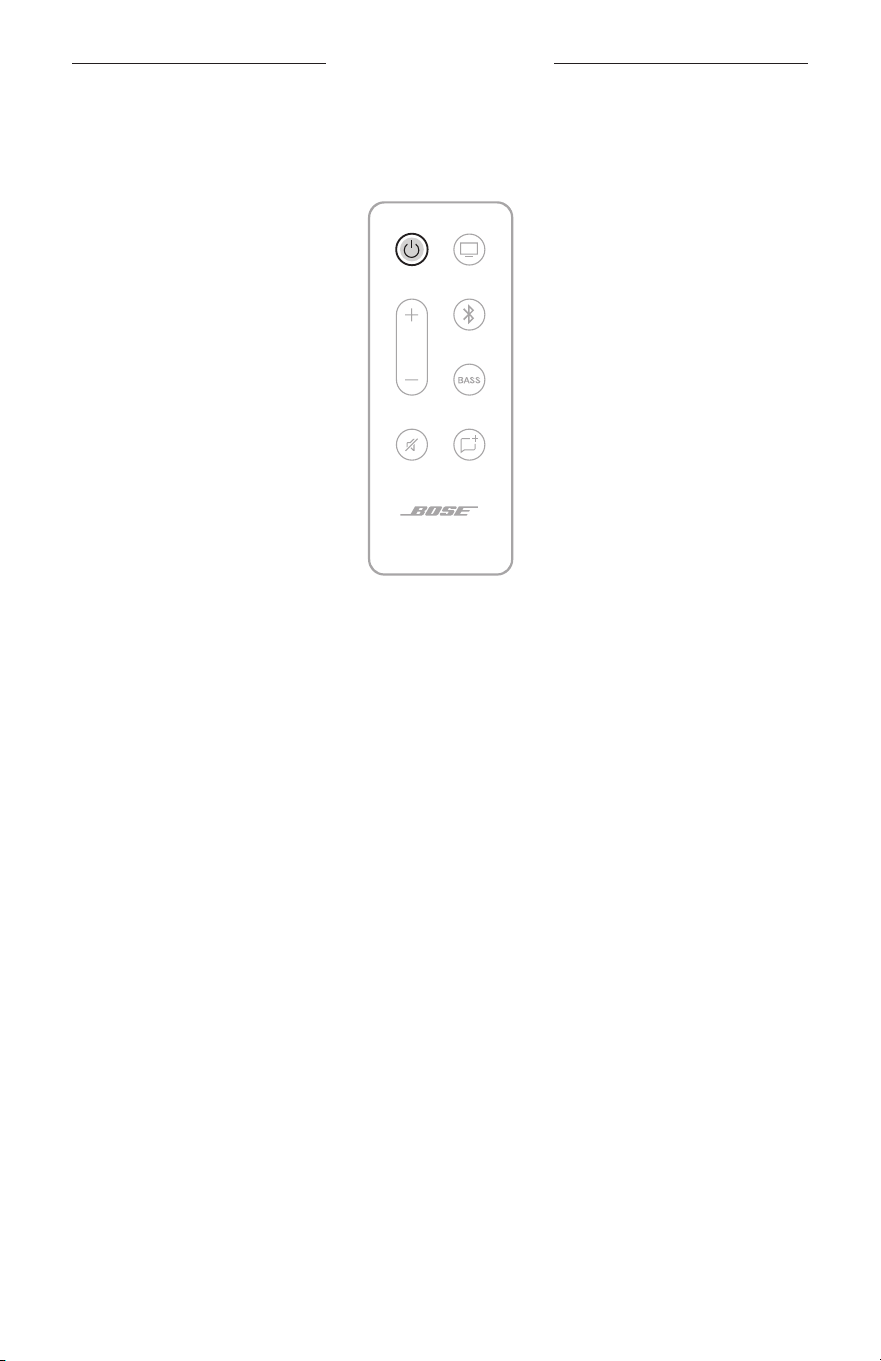
Power
On the remote, press the Power buon I to power the soundbar on/o.
When powered on, the soundbar defaults to the last active source.
NOTES:
• When you plug the soundbar into an AC (mains) outlet, the soundbar automatically
powers on.
• The first time the soundbar is powered on, the soundbar defaults to the
TV O source.
• The soundbar powers o after 60 minutes of inactivity.
SOUNDBAR CONTROLS
22
|
ENG
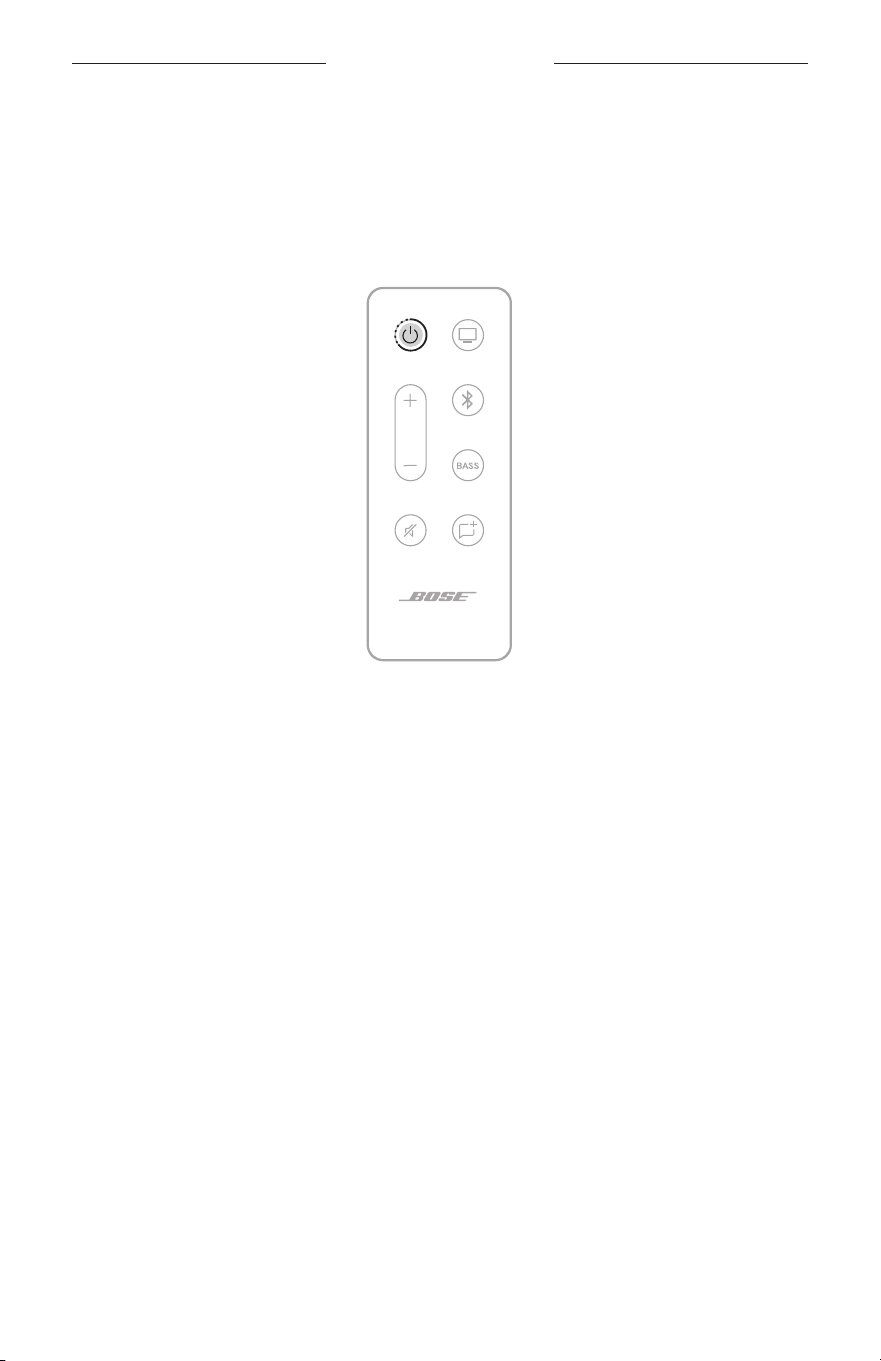
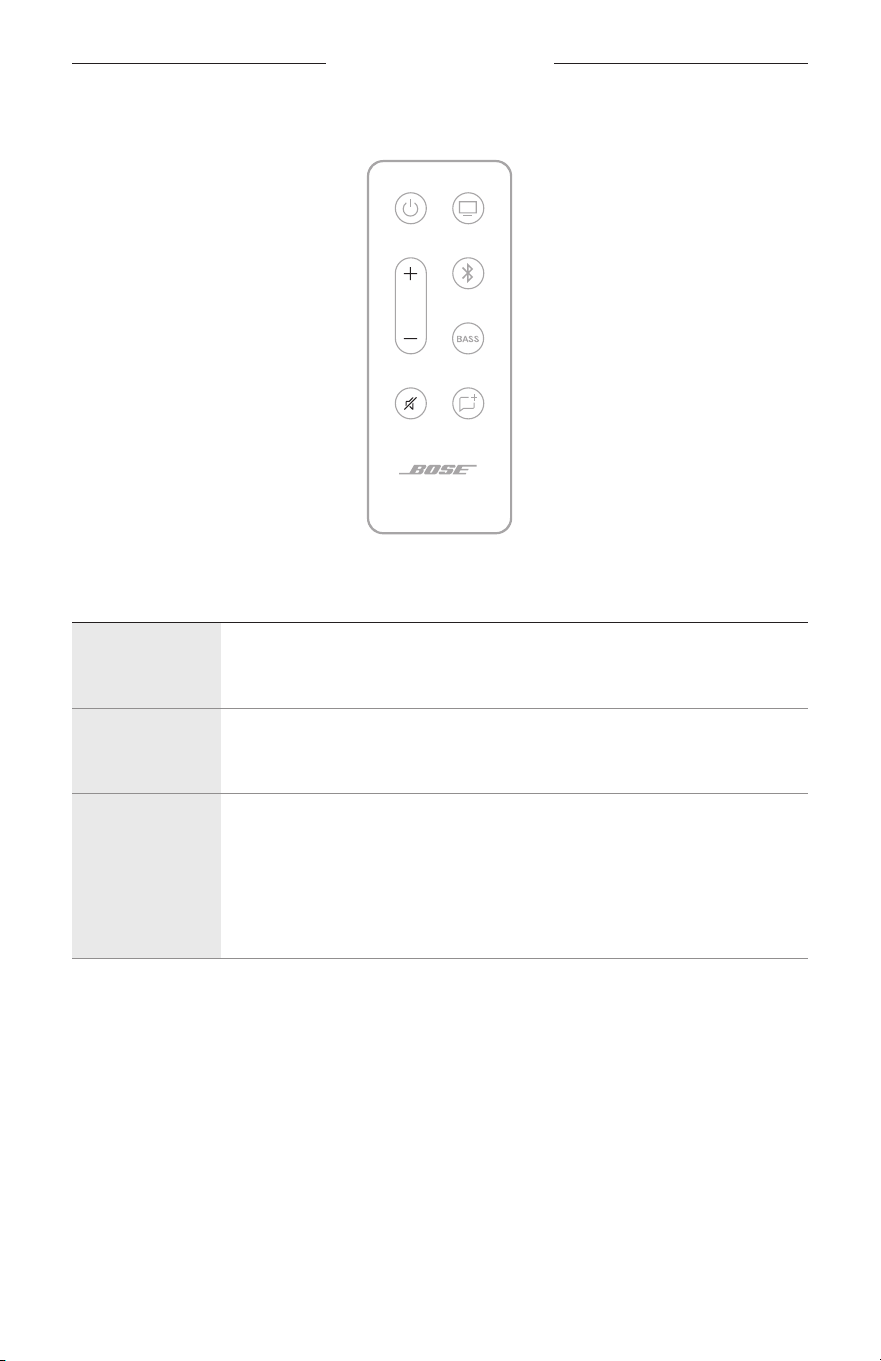
Auto-wake
You can set the soundbar to power on whenever a sound signal is received.
On the remote, to toggle between auto-wake and default power seings, press and
hold the Power buon I until you hear three tones and the status light on the
soundbar blinks 3 times (see page 31).
The status light glows dim amber when the soundbar is o and auto-wake
is enabled.
SOUNDBAR CONTROLS
23
|
ENG
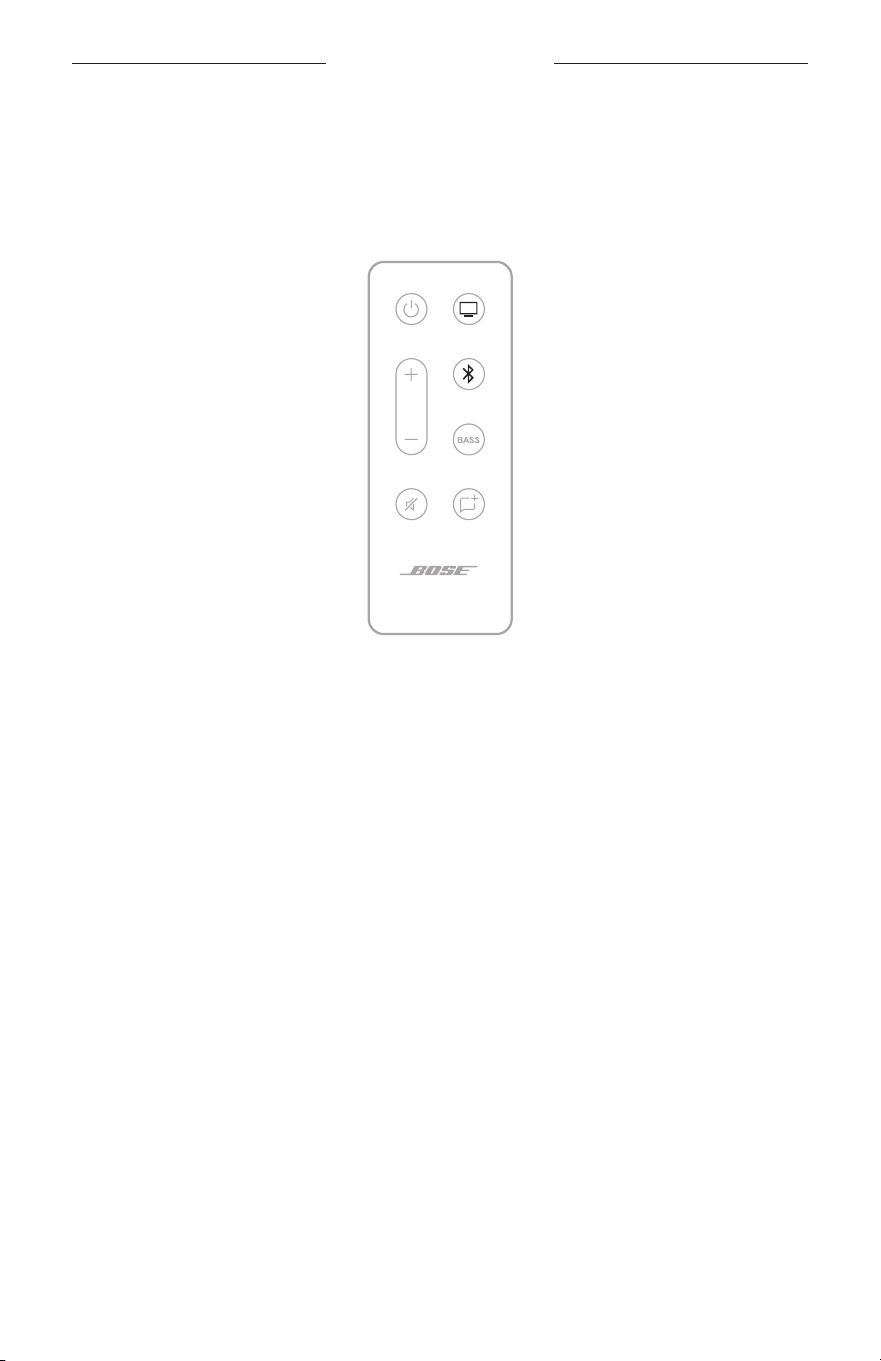
Volume
FUNCTION WHAT TO DO
Volume up
Press H.
NOTE: To quickly increase the volume, press and hold H.
Volume down
Press z.
NOTE: To quickly decrease the volume, press and hold z.
Mute/Unmute
Press A.
When audio is muted, the status light blinks green until audio resumes.
NOTE: When Dialogue mode is enabled and audio is muted, the status
light blinks amber.
Tip: You can also press H to resume audio.
SOUNDBAR CONTROLS
24
|
ENG
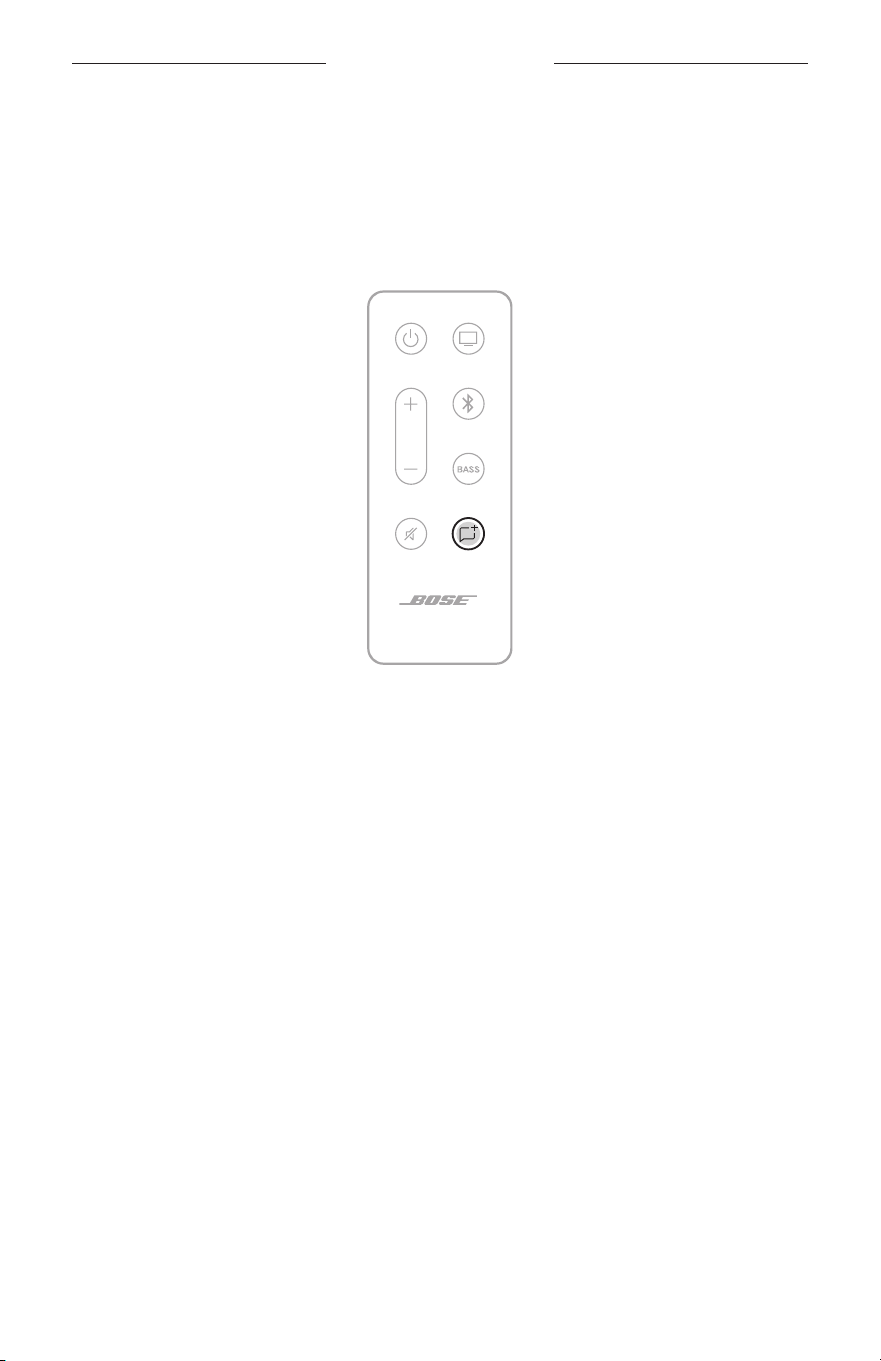
Sources
You can control your TV and Bluetooth connections using your remote.
To select a source, press the buon (TV buon O or Bluetooth buon l) on
the remote.
SOUNDBAR CONTROLS
25
|
ENG
DIALOGUE MODE
Dialogue mode improves the clarity of dialogue and vocals in movies, TV programs,
and podcasts by adjusting the audio balance of the system.
On the remote, press the Dialogue mode buon 5 to switch between Dialogue mode
and your default audio seings.
When Dialogue mode is enabled, the status light glows amber (see page 31).
NOTE: When you enable Dialogue mode, it stays enabled for your current source
even if you switch to another source or turn o the soundbar. To disable
Dialogue mode for a source, press 5 again.
26
|
ENG
SOUNDBAR CONTROLS
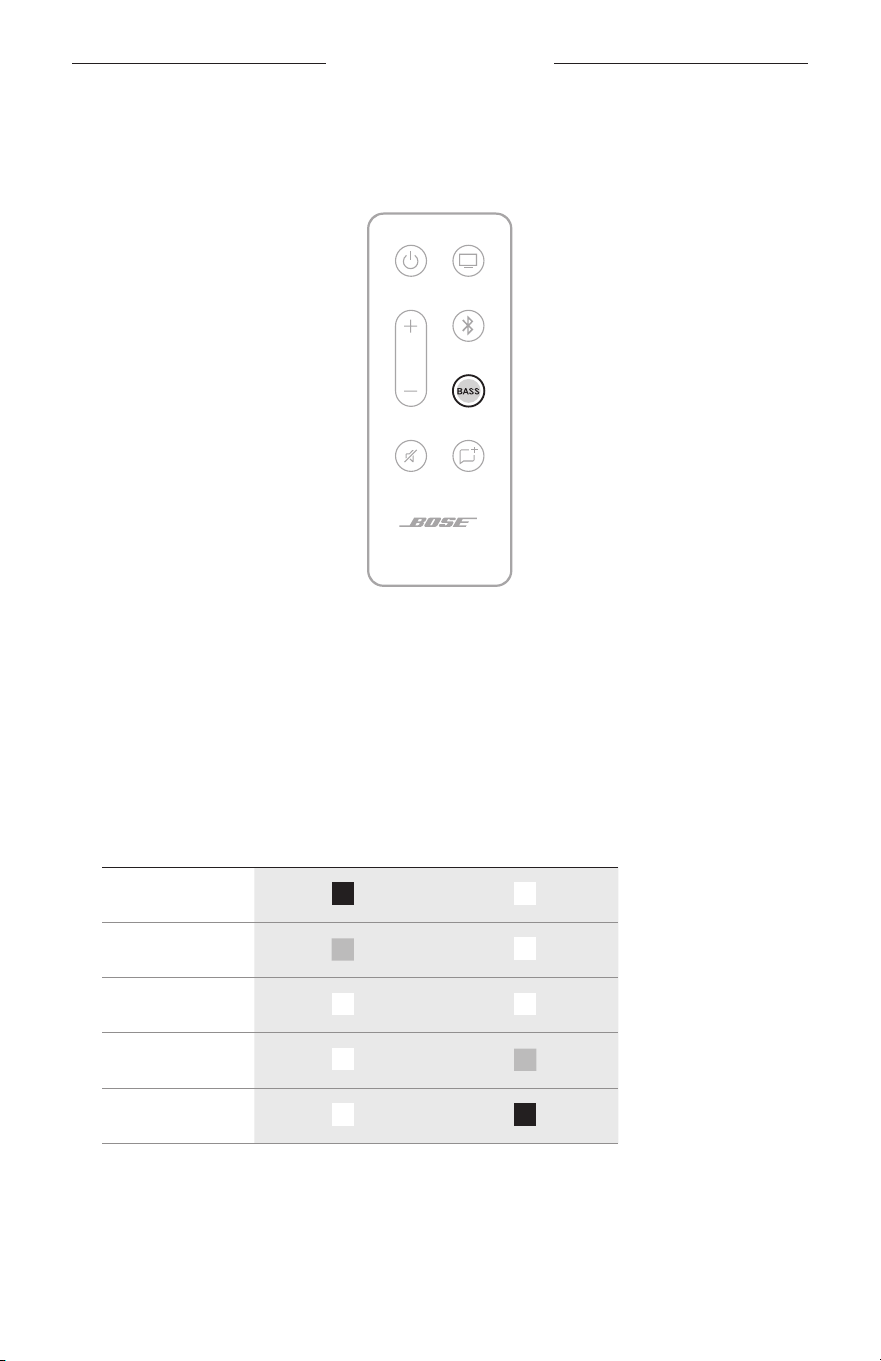
ADJUST THE BASS
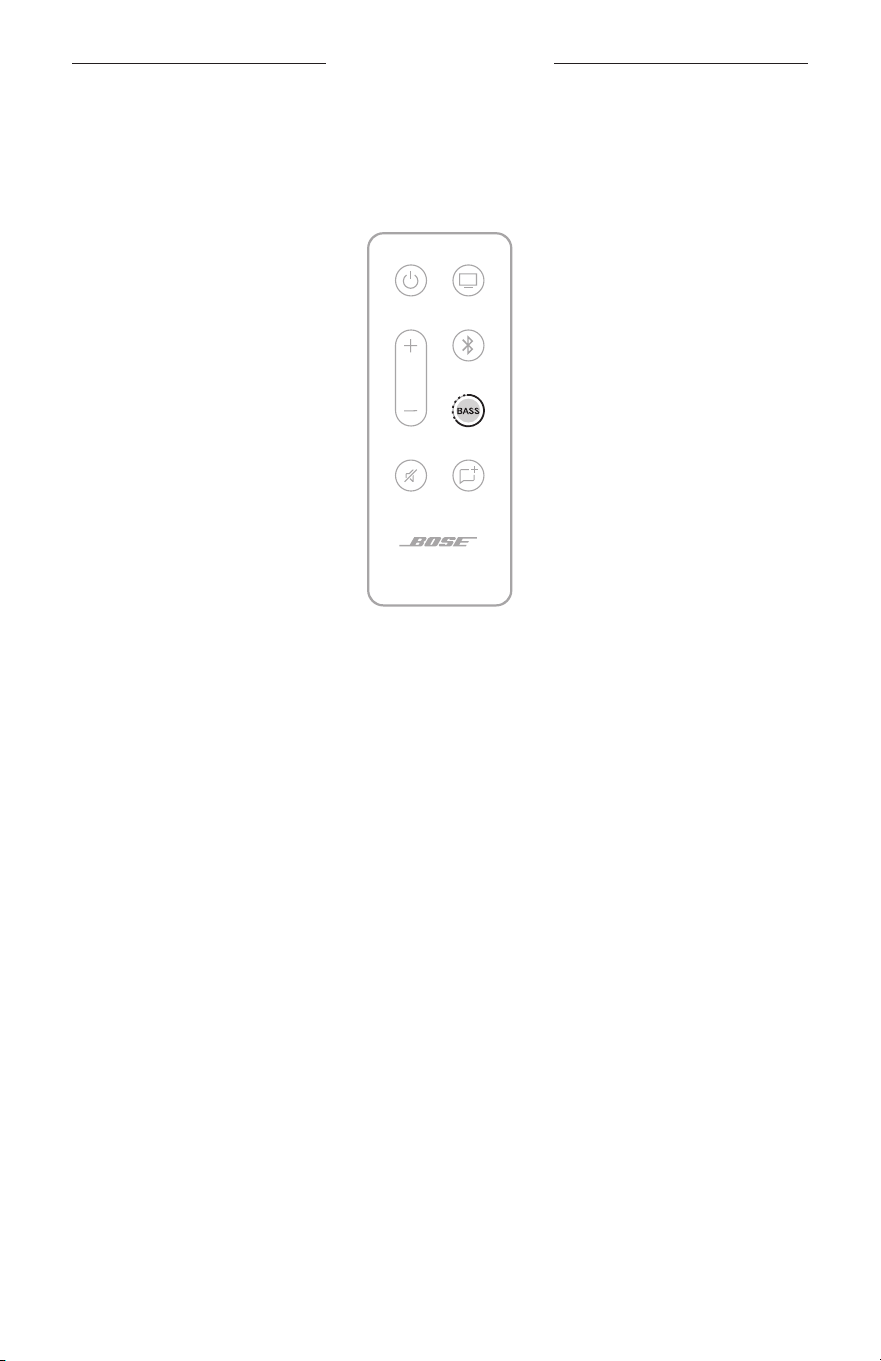
1. On the remote, press h.
On the soundbar, the status and Bluetooth lights blink white 3 times.
2. Adjust the bass by doing one of the following:
• Press Volume up H to increase the bass.
• Press Volume down z to decrease the bass.
The status and Bluetooth lights on the soundbar glow to show the current
bass seing.
BASS SETTING STATUS LIGHT BLUETOOTH LIGHT
2 (maximum)
1
0 (default)
-1
-2 (minimum)
3. Press h.
The soundbar saves the current bass seing.
NOTE: For best sound quality for dialogue-only programs, such as news and talk
shows, see ”Dialogue mode” on page 25.
SOUNDBAR CONTROLS
27
|
ENG
RESET THE BASS
On the remote, press and hold h until the status and Bluetooth lights on the
soundbar blink 3 times.
The bass seing reset to original factory seings.
PROGRAM A THIRD-PARTY REMOTE
You can program a third-party remote, such as your cable/satellite box remote, to
control the soundbar. Refer to your third-party remote owner’s guide or website
for instructions.
Once programmed, the third-party remote performs basic functions such as power
on/o and volume.
28
|
ENG
BLUETOOTH CONNECTIONS
Bluetooth wireless technology lets you stream music from mobile devices such as
smartphones, tablets, and laptop computers. Before you can stream music from a
device, you must connect your device to the soundbar.
CONNECT A MOBILE DEVICE
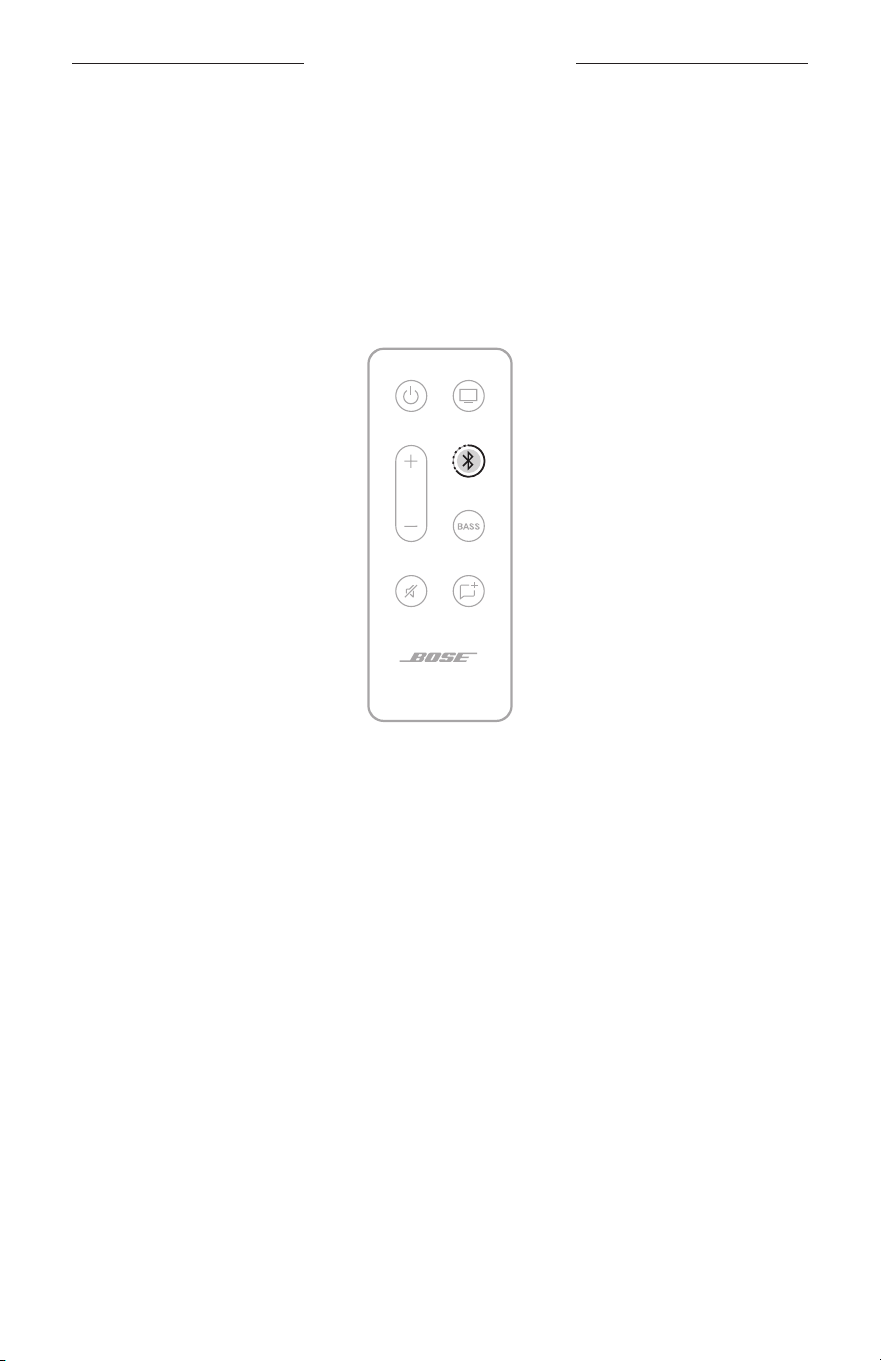
1. On the remote, press and hold the Bluetooth buon l until the Bluetooth light on
the soundbar blinks blue.
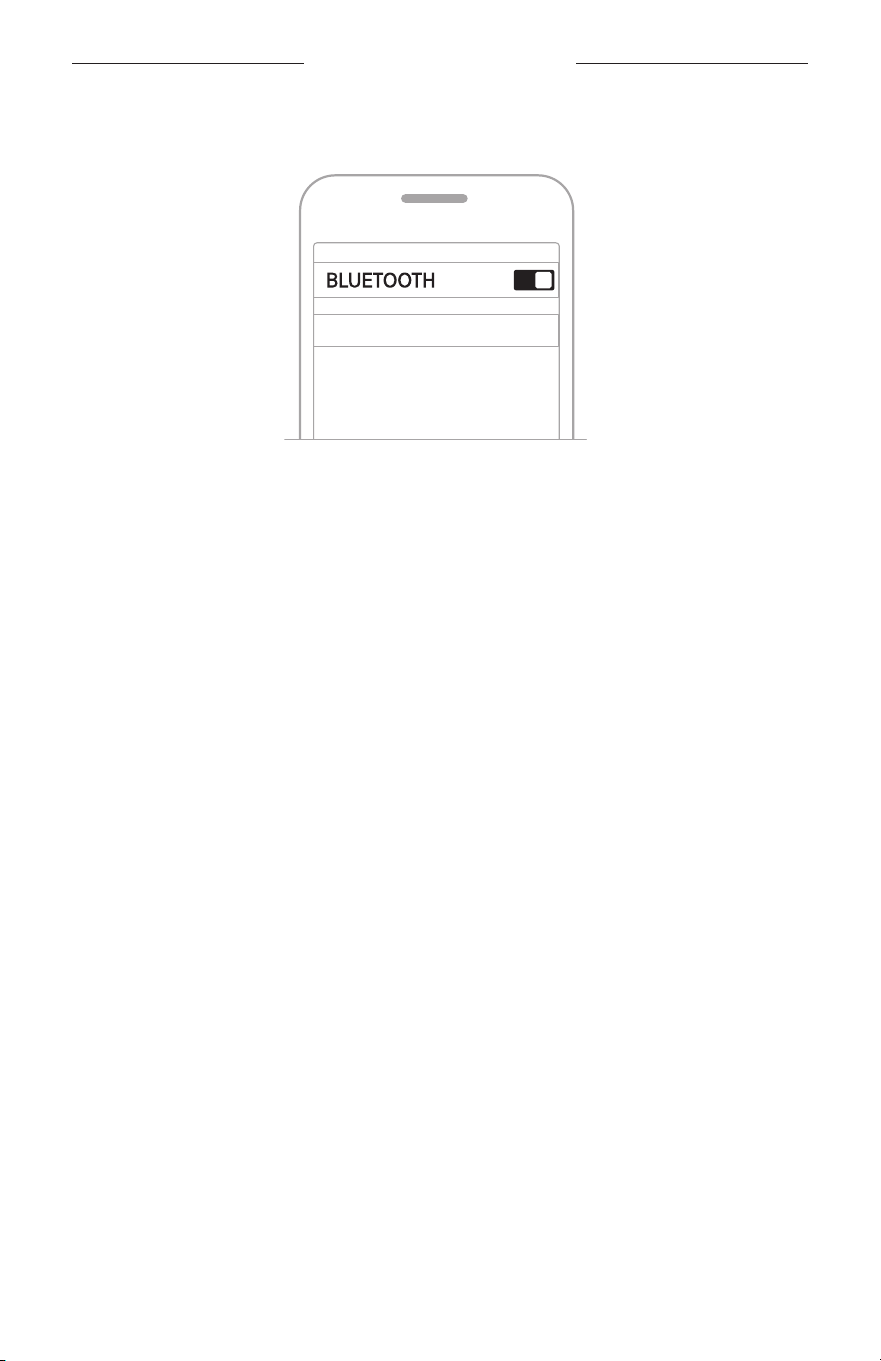
2. On your mobile device, turn on the Bluetooth feature.
TIP: The Bluetooth menu is usually found in the Seings menu.
29
|
ENG
BLUETOOTH CONNECTIONS
3. Select your soundbar from the device list.
Bose Solo
Once connected, you hear a tone. The Bluetooth light glows solid white. Your
soundbar appears in the mobile device list.
DISCONNECT A MOBILE DEVICE
Use your mobile device’s Bluetooth menu to disconnect from the soundbar.
TIP: You can also disable the Bluetooth feature on your mobile device to disconnect.
Disabling the Bluetooth feature disconnects all other devices.
RECONNECT A MOBILE DEVICE
On the remote, press the Bluetooth buon l.
The soundbar tries to reconnect with the two most recently-connected devices.
When connecting, the Bluetooth light on the soundbar blinks white. Once connected,
you hear a tone and the Bluetooth light on the soundbar glows solid white.
NOTES:
• Make sure the Bluetooth feature is enabled on your mobile device.
• The device must be within 30 ft (9 m) of the soundbar and powered on.

30
|
ENG
CONNECT AN ADDITIONAL MOBILE DEVICE
You can store up to eight devices in the soundbar device list, and the soundbar can be
actively connected to two devices at a time.
NOTE: You can play audio from only one device at a time.
1. On the remote, press and hold the Bluetooth buon l until the Bluetooth light on
the soundbar blinks blue.
2. On your mobile device, select your soundbar from the device list.
NOTE: Make sure the Bluetooth feature is enabled on your mobile device.
SWITCH BETWEEN CONNECTED DEVICES
1. Pause audio on your first device.
2. Play audio on your second device.
CLEAR THE SOUNDBAR DEVICE LIST
1. On the remote, press and hold l for 10 seconds until the Bluetooth light on the
soundbar blinks blue.
2. Delete your soundbar from the Bluetooth list on your device.
All devices are cleared, and the soundbar is ready to connect (see page 28).
BLUETOOTH CONNECTIONS
31
|
ENG
SOUNDBAR STATUS
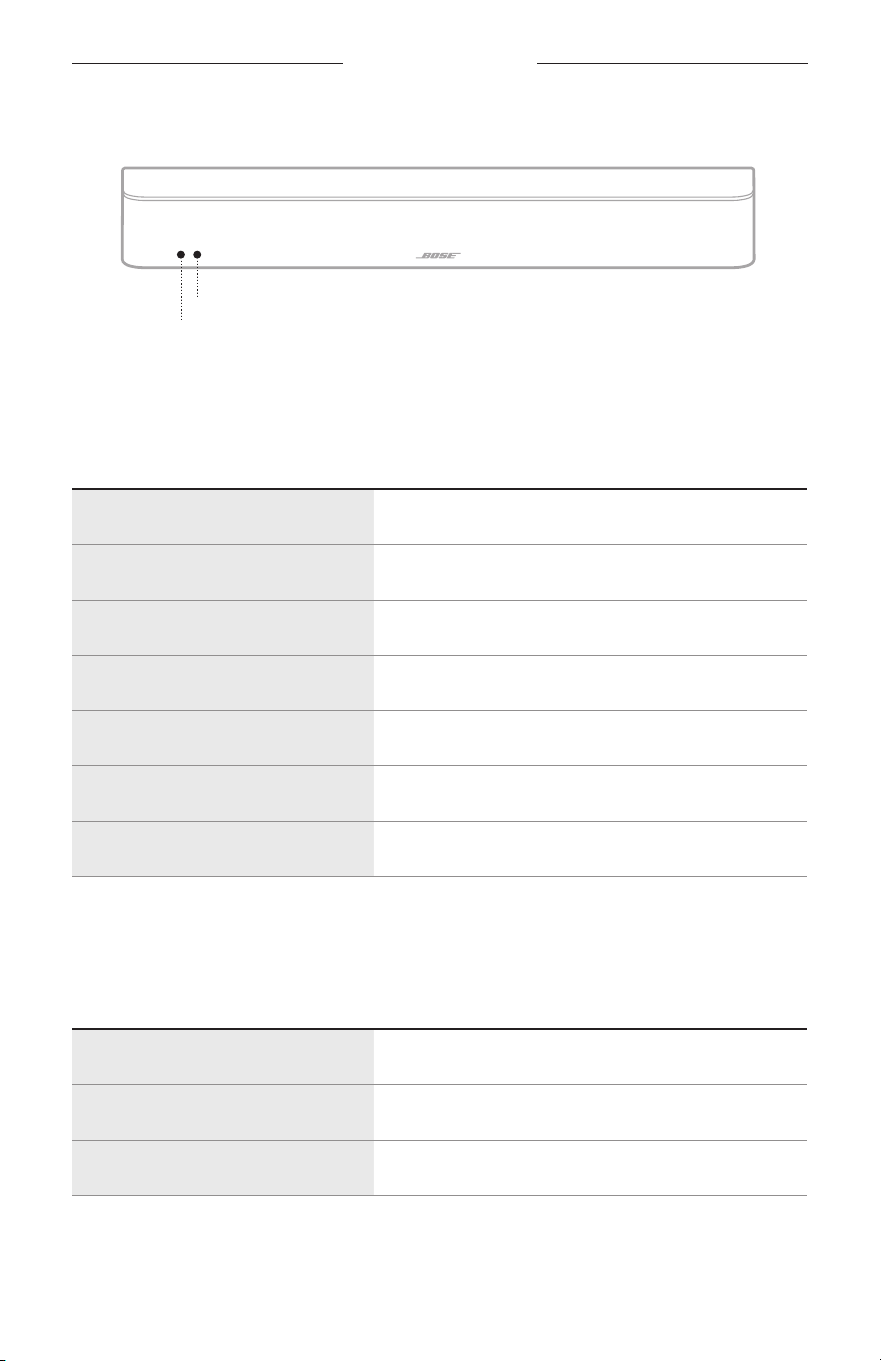
The LED lights located on the front of the soundbar show the soundbar status.
Bluetooth light
Status light
POWER, VOLUME, AND ERROR STATUS
Shows the power, media volume, and error status.
STATUS LIGHT ACTIVITY SYSTEM STATE
Off Power o (standby)
Glows solid green Power on
Blinks green Audio muted
Glows dim amber Standby, auto-wake enabled
Glows solid amber Dialogue mode
Blinks amber Dialogue mode, audio muted
Blinks red Error - contact Bose customer service
BLUETOOTH STATUS
Shows the Bluetooth connection status of mobile devices.
BLUETOOTH LIGHT ACTIVITY SYSTEM STATE
Blinks blue Ready to connect
Blinks white Connecting
Glows solid white Connected
32
|
ENG
ALTERNATE SETUP
You may need to use an alternate setup method for the following reasons:
• No sound from a source(s) connected to your TV.
• No optical or coaxial port on your TV.
NO SOUND FROM A SOURCE(S) CONNECTED TO
YOUR TV
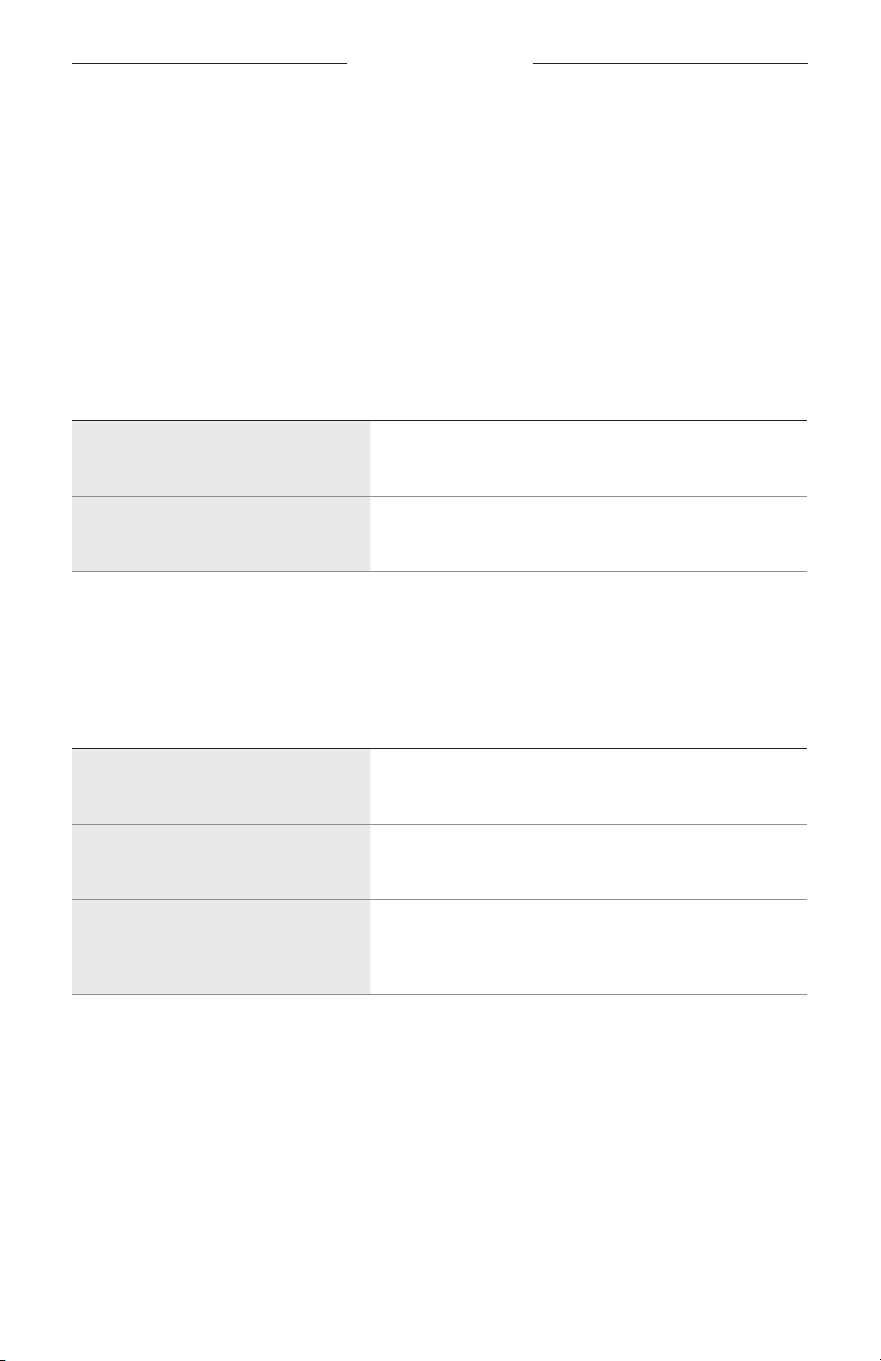
Some TVs don’t deliver sound from connected sources to the soundbar. Use an
alternate setup method to connect your source(s) to the soundbar.
PROBLEM WHAT TO DO
No sound from a source connected
to your TV
Connect your source to the soundbar using one of the
two cable options (see page 33).
No sound from two sources
connected to your TV
Connect your sources to the soundbar using Option 1
or Option 2 (see page 35).
NO OPTICAL OR COAXIAL PORTS ON YOUR TV
Some TVs don’t have optical or coaxial ports. Use an alternate setup method to
connect your TV to the soundbar.
PROBLEM WHAT TO DO
TV only has an analog port
Connect your TV using a 3.5 mm to RCA stereo cable
(not provided). See page 34.
TV only has a headphone port
Connect your TV using a 3.5 mm stereo cable (not
provided). See page 38.
TV doesn’t have audio outputs
Use the audio outputs on another source, such as a
cable/satellite box, to connect to the soundbar (see
page 33).
33
|
ENG
ALTERNATE SETUP
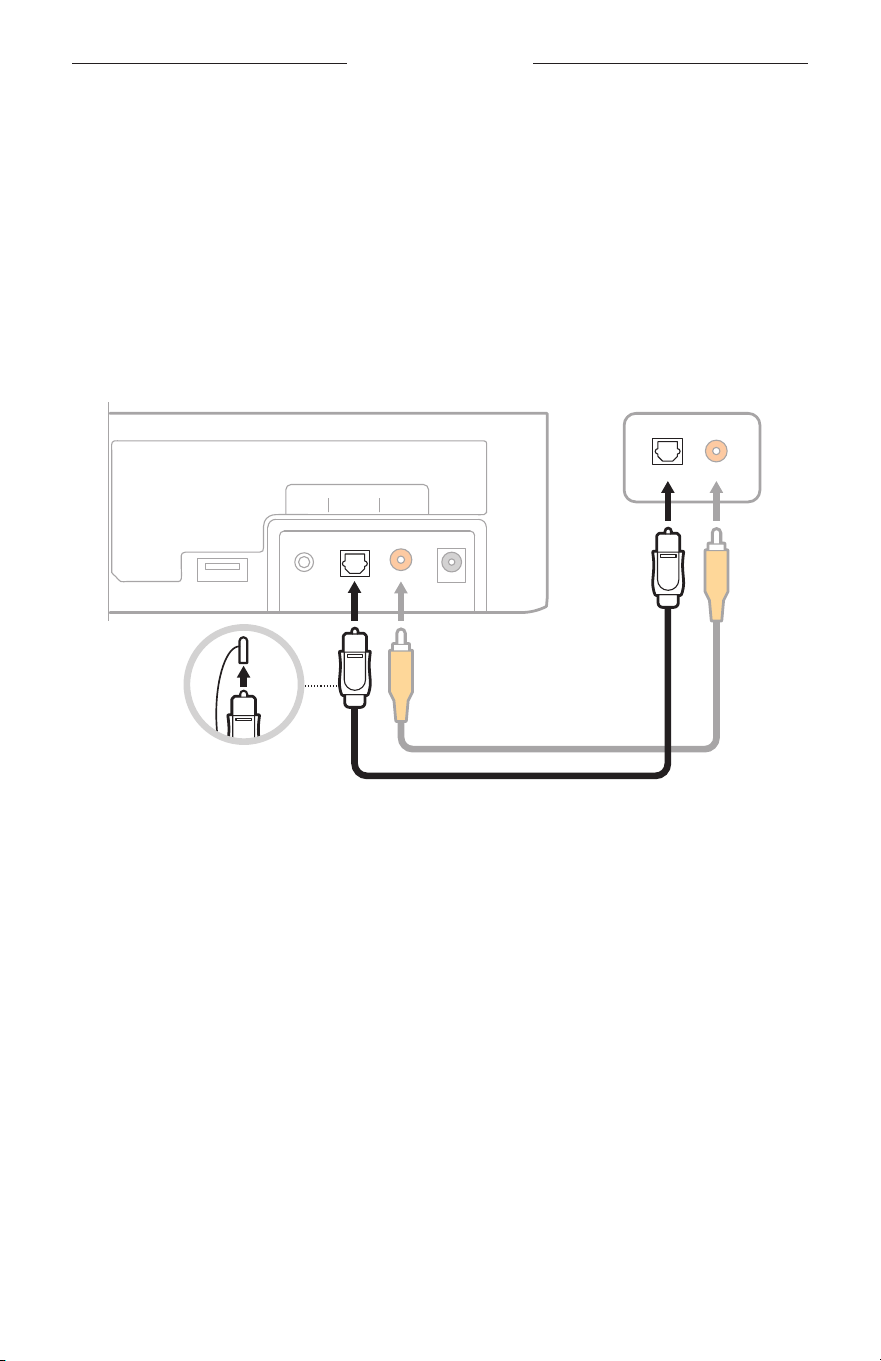
Connect a source to the soundbar
If you don’t get sound from a source that’s connected to your TV, such as a
DVD/Blu-ray Disc™ player, cable/satellite box, game system, or DVR, connect the
source directly to the soundbar using an audio cable.
CAUTION: If using an optical cable, remove the protective caps from both ends.
Inserting the plug in the wrong orientation can damage the plug and/or
the port.
1. On the back of your source, locate the Audio OUT (digital) panel.
Service
AUX Optical
TV Input
Coaxial Power
Optical Coaxial
Audio OUT
Source panel
Soundbar port panel
2. Choose an audio cable.
3. If you haven’t already, disconnect your TV from the soundbar.
4. Connect the audio cable from your source’s Audio OUT (digital)
panel to the soundbar.
NOTE: Don’t disconnect your source’s video cable, such as an HDMI cable, from
your TV.
34
|
ENG
ALTERNATE SETUP
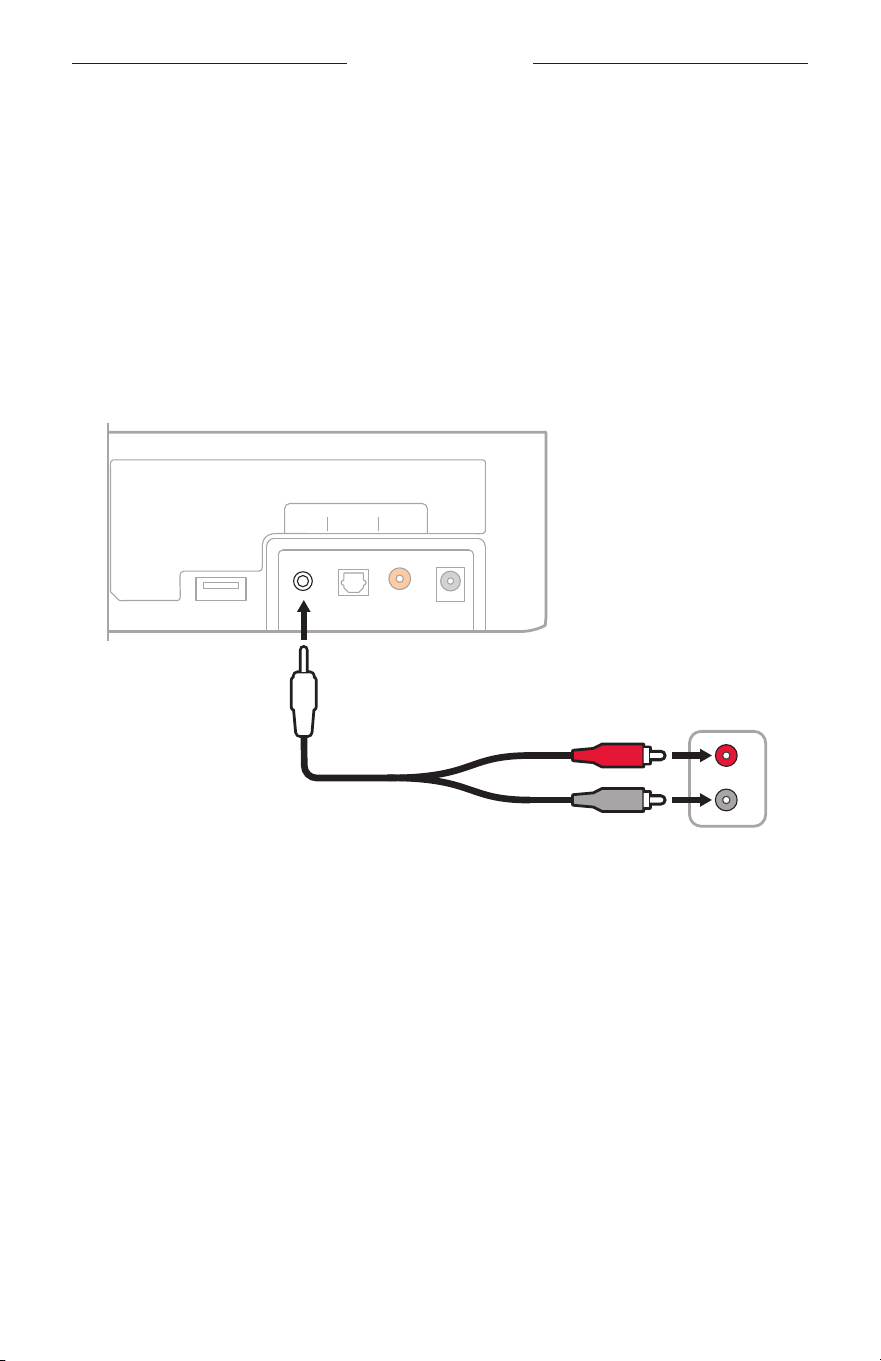
Connect a source’s analog port to the soundbar
If your source doesn’t have an optical or coaxial port and only has analog
ports (red and white), use a 3.5 mm to RCA stereo cable (not provided) to connect to
the soundbar.
1. If you haven’t already, disconnect your TV from the soundbar.
2. Insert the RCA analog cable into the Audio OUT RCA (red and white) ports on
your source.
3. Insert the stereo plug into the soundbar’s d port.
Service
TV Input
R
L
AUX Optical Coaxial Power
Audio OUT
Source port
panel
Soundbar port panel
3.5 mm to RCA
stereo cable
(not provided)

35
|
ENG
ALTERNATE SETUP
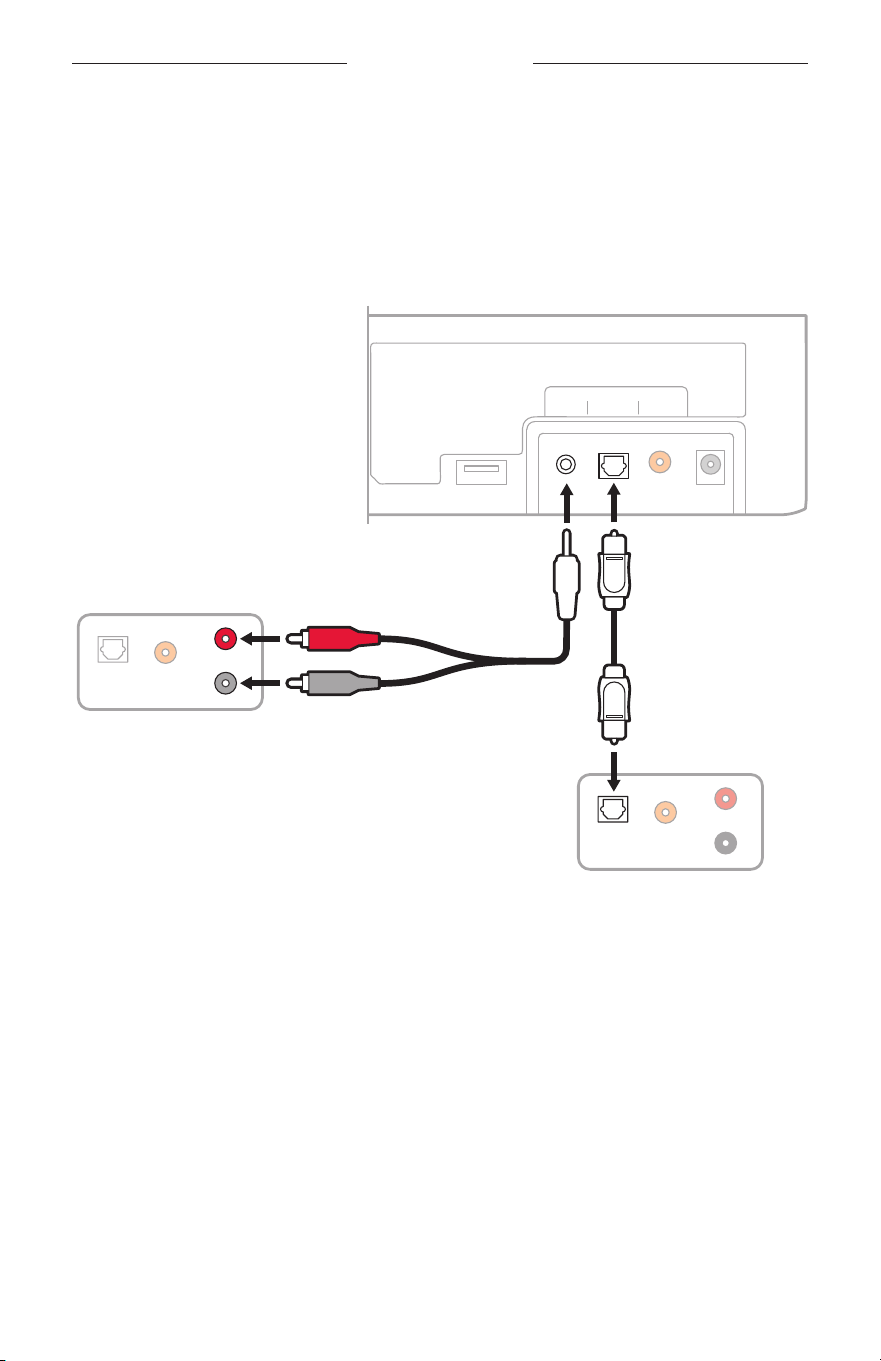
Connect two sources to the soundbar
If you don’t get sound from any source that’s connected to your TV, such as a
DVD/Blu-ray Disc™ player, cable/satellite box, game system, or DVR, connect the
source directly to the soundbar. Use only one audio cable for each source.
1. On the back of each source, locate the Audio OUT (digital) panel.
2. Choose a separate audio cable for each source using either Option 1 or Option 2
(see page 36).
NOTE: You MUST use either Option 1 or Option 2. Do not use the coaxial cable
(not provided) and optical cable at the same time.
3. If you haven’t already, disconnect your TV from the soundbar.
4. Separately connect the audio cable from each source’s Audio OUT (digital) panel
to the soundbar.
NOTE: Do not disconnect your source’s video cable, such as an HDMI cable, from
your TV.
36
|
ENG
ALTERNATE SETUP
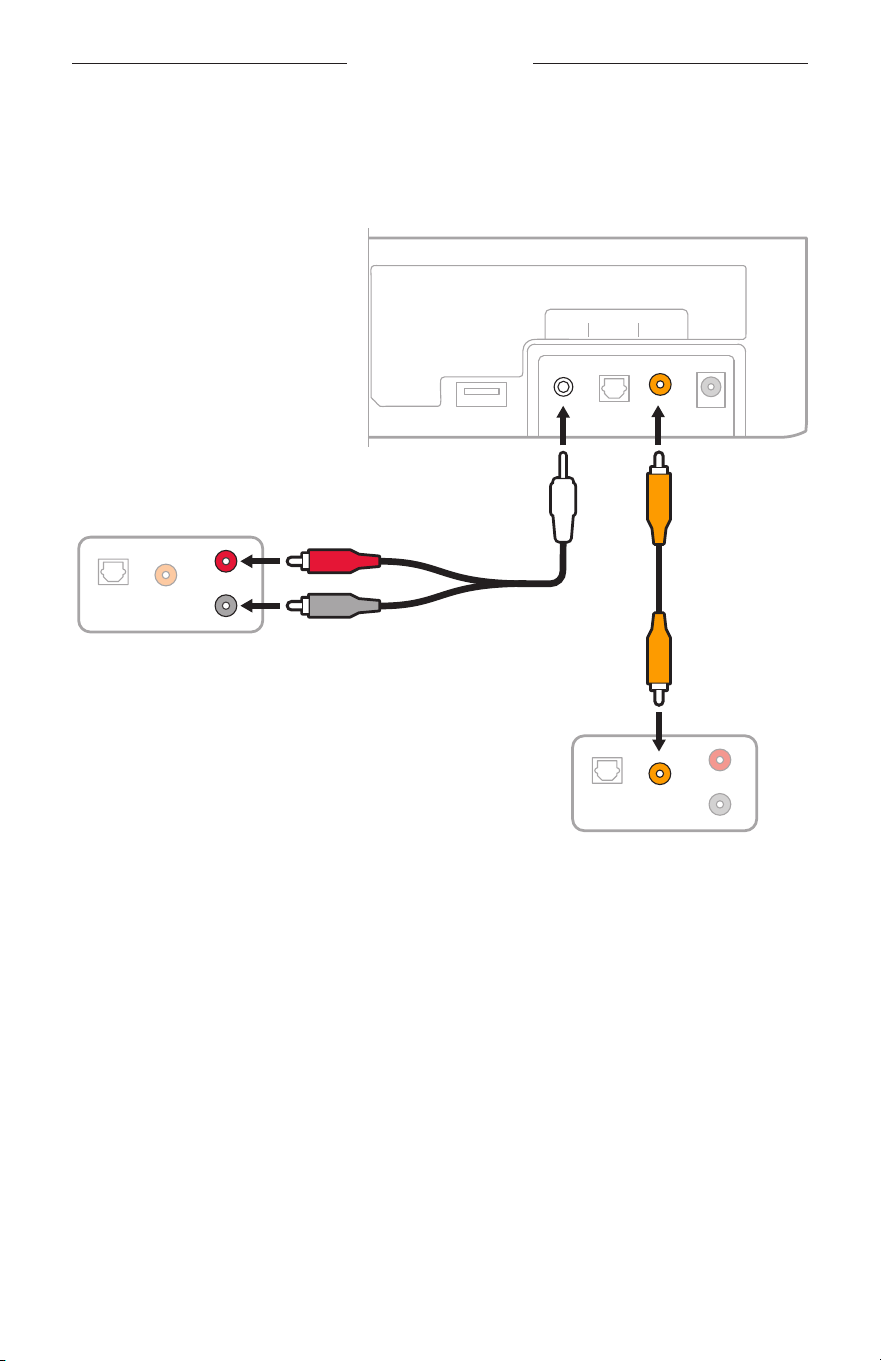
Option 1
This figure shows two source connections using an optical cable and 3.5 mm to RCA
stereo cable (not provided).
CAUTION: If using an optical cable, remove the protective caps from both ends.
Inserting the plug in the wrong orientation can damage the plug and/or
the port.
3.5 mm to RCA
stereo cable
(not provided)
Service
TV Input
R
L
CoaxialOptical
R
L
CoaxialOptical
AUX Optical Coaxial Power
Audio OUT
Source 2
Audio OUT
Source 1
Soundbar port panel
37
|
ENG
ALTERNATE SETUP
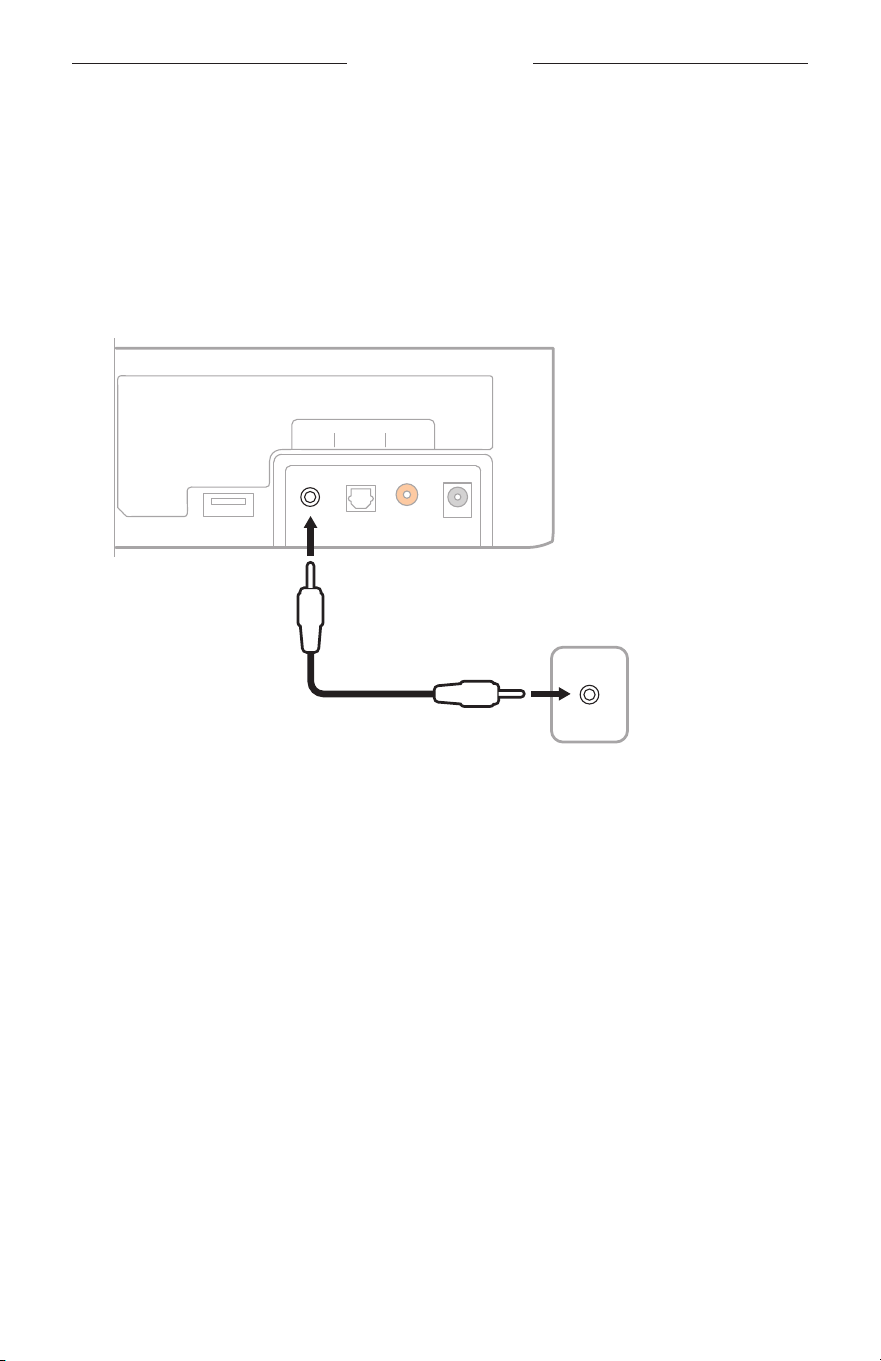
Option 2
This figure shows two source connections using a coaxial cable (not provided) and
3.5 mm to RCA stereo cable (not provided).
Service
TV Input
R
L
CoaxialOptical
R
L
CoaxialOptical
AUX Optical Coaxial Power
Audio OUT
Source 2
Audio OUT
Source 1
Soundbar port panel
3.5 mm to RCA
stereo cable
(not provided)
Use two sources connected to the soundbar
Power o sources when not in use. In order for one source to deliver audio to the
soundbar, your other source must be o.
ALTERNATE SETUP
38
|
ENG
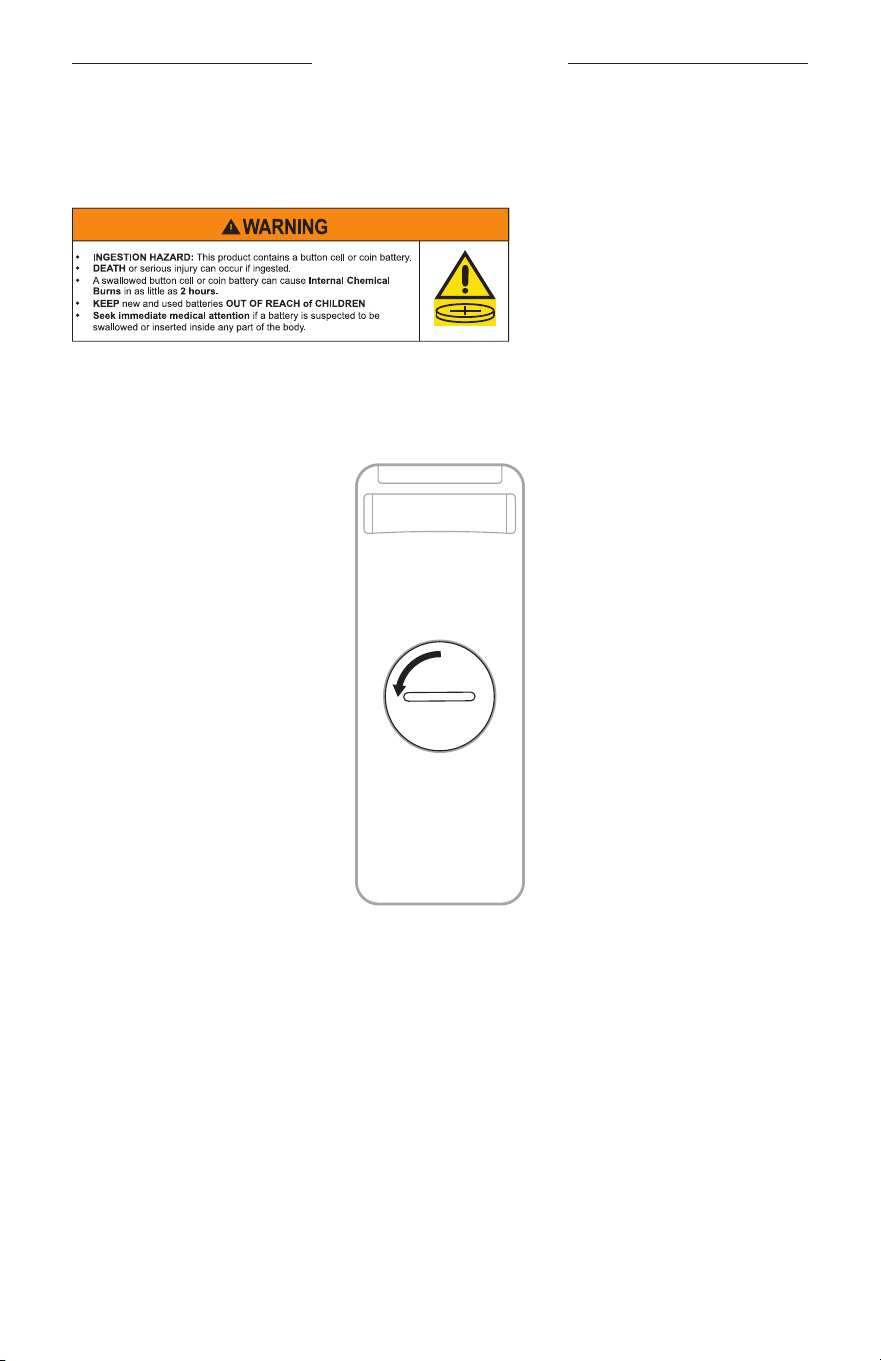
Connect a TV headphone port to the soundbar
If your TV only has a headphone port, use a 3.5 mm stereo cable (not provided) to
connect to the soundbar.
1. Insert one end of a 3.5 mm stereo cable into the TV headphones port.
2. Insert the other end of the cable into the d port on the soundbar.
Service
3.5 mm
TV Input
AUX Optical Coaxial Power
Soundbar port panel
Audio OUT
TV headphone panel
(or other variable
audio output)
3.5 mm stereo cable
(not provided)
3. Make sure your TV speakers are on.
Refer to your TV owner’s guide for more information.
4. To ensure optimal volume control from the soundbar:
a. Set your TV volume to 75% of maximum.
b. Set the soundbar volume using the remote.

39
|
ENG
CONNECT BOSE PRODUCTS
CONNECT A BOSE HOME SPEAKER OR SOUNDBAR
With Bose SimpleSync technology, you can connect your Bose Solo Soundbar
Series II to a Bose Home Speaker or Bose Soundbar to listen to the same song in two
dierent rooms at the same time.
NOTE: SimpleSync technology has a Bluetooth range of 30 ft (9 m). Walls and
construction materials can aect reception.
Compatible products
You can connect your Bose Solo Soundbar Series II to any member of the
Bose Home Speaker family.
Popular compatible products include:
• Bose Smart Soundbar 900
• Bose Smart Soundbar 700/Bose Soundbar 700
• Bose Smart Speaker 500/Bose Home Speaker 500
• Bose Home Speaker 300
• Bose Portable Smart Speaker/Bose Portable Home Speaker
New products are added periodically. For a complete list and more information, visit:
support.Bose.com/Groupssupport.Bose.com/Groups
Connect using the Bose app
1. On your Bose Solo Soundbar Series II remote, press and hold the Bluetooth buon
l until the Bluetooth light on your Bose Solo Soundbar Series II blinks blue.
2. For information about connecting a Bose Home Speaker or Bose Soundbar using
the Bose app, visit: support.Bose.com/Groupssupport.Bose.com/Groups
NOTES:
• Make sure that your Bose Solo Soundbar Series II is within 30 ft (9 m) of your
Bose Home Speaker or Bose Soundbar.
• You can connect your Bose Solo Soundbar Series II to only one product at a time.

CONNECT BOSE PRODUCTS
40
|
ENG
RECONNECT TO A BOSE HOME SPEAKER OR SOUNDBAR
Use the Bose app to reconnect the soundbar to a previously-connected compatible
Bose product. For more information, visit: support.Bose.com/Groupssupport.Bose.com/Groups
NOTES:
• Your Bose Home Speaker or Bose Soundbar must be within range (30 ft or 9 m)
and powered on.
• If your Bose Solo Soundbar Series II doesn’t connect, see “Soundbar doesn’t
reconnect to a previously- connected Bose Home Speaker or Bose Soundbar”
on page 46.
41
|
ENG
CARE AND MAINTENANCE
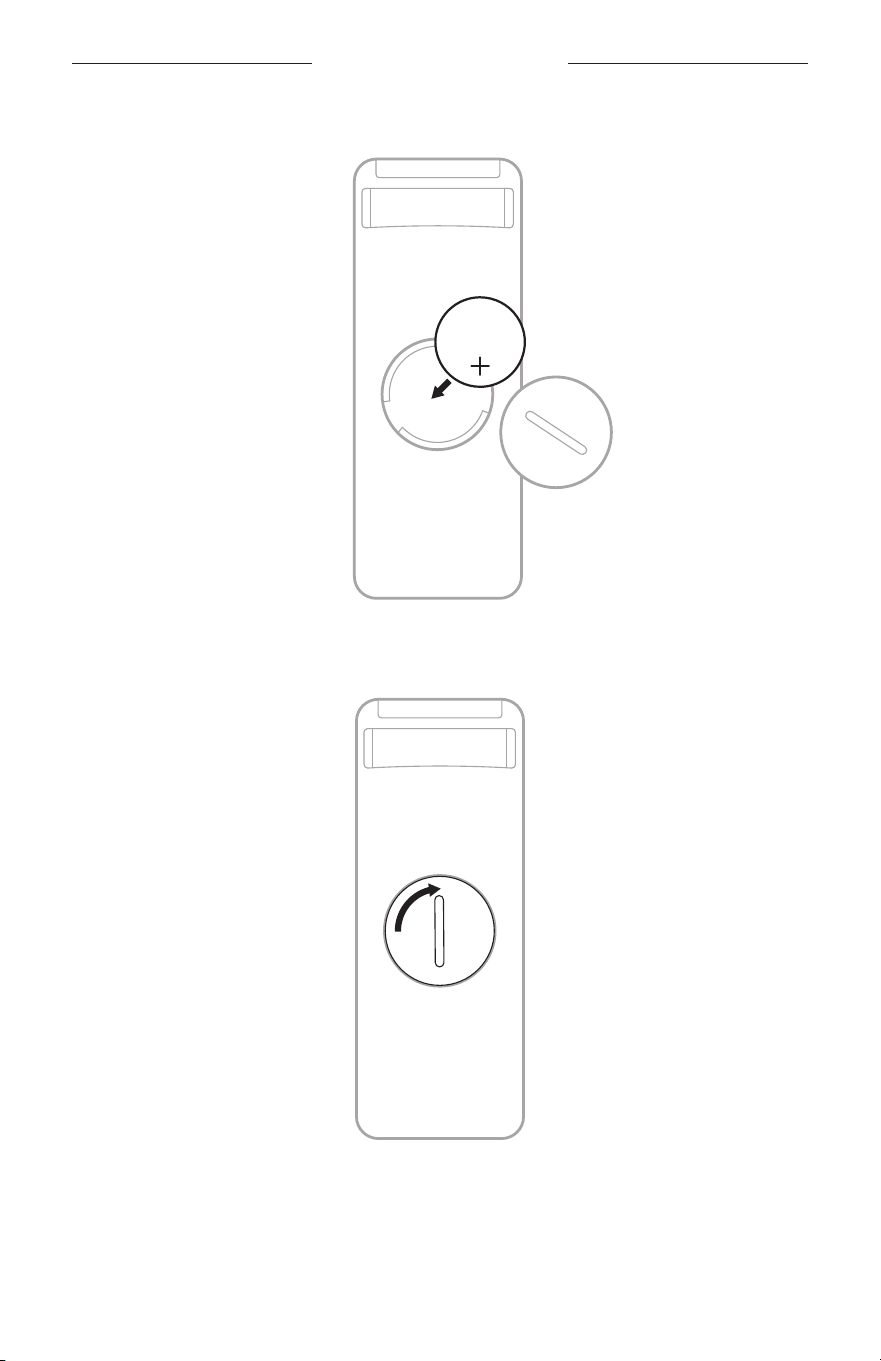
REPLACE THE REMOTE BATTERY
The soundbar remote uses coin cell baery CR2032.
NOTE: For more information, see “WARNINGS/CAUTIONS” on page 2.
1. Turn the baery compartment cover left (counter-clockwise) and remove
the cover.
CARE AND MAINTENANCE
42
|
ENG
2. Insert the new baery flat side up, with the + symbol facing up.
3. Reset the cover and turn it right (clockwise) to lock in place. The cover is
completely closed when the slot is vertical.

CARE AND MAINTENANCE
43
|
ENG
CLEAN THE SOUNDBAR
Clean the exterior of the soundbar with a soft dry cloth.
CAUTION:
• Do NOT allow liquids to spill onto the soundbar or into any openings.
• Do NOT blow air into the soundbar.
• Do NOT use a vacuum to clean the soundbar.
• Do NOT use any sprays near the soundbar.
• Do NOT use any solvents, chemicals, or cleaning solutions containing alcohol,
ammonia, or abrasives.
• Do NOT allow objects to drop into any openings.
REPLACEMENT PARTS AND ACCESSORIES
Replacement parts and accessories can be ordered through Bose customer service.
Visit: support.Bose.com/SBSoloiisupport.Bose.com/SBSoloii
LIMITED WARRANTY
The soundbar is covered by a limited warranty. Visit our website at
worldwide.Bose.com/Warrantyworldwide.Bose.com/Warranty for details of the limited warranty.
To register your product, visit worldwide.Bose.com/ProductRegistration worldwide.Bose.com/ProductRegistration for
instructions. Failure to register will not aect your limited warranty rights.

44
|
ENG
TROUBLESHOOTING
TRY THESE SOLUTIONS FIRST
If you experience problems with the soundbar:
• Make sure the soundbar is connected to a live AC (mains) outlet.
• Secure all cables and make sure all connections are correct.
• Check the status lights (see page 31).
• Move the soundbar 1 – 3 ft (0.3 – 0.9 m) away from possible interference (wireless
routers, cordless phones, televisions, microwaves, etc.).
• Move the soundbar within the recommended range of your mobile device for
proper operation.
• Place the soundbar according to the placement guidelines (see page 13).
• Unplug the power cord for at least 1 minute and reconnect.
OTHER SOLUTIONS
If you could not resolve your issue, see the table below to identify symptoms and
solutions to common problems. You can also access troubleshooting articles, videos,
and other resources at: support.Bose.com/SBSoloiisupport.Bose.com/SBSoloii
If you are unable to resolve your issue, contact Bose customer service.
Visit: worldwide.Bose.com/contactworldwide.Bose.com/contact
SYMPTOM SOLUTION
Remote is
inconsistent or
doesn’t work
Check the baery to see if it’s installed properly or if it needs to be
replaced (see page 41).
Point the remote directly at the soundbar.
Check that the status light blinks when you press the Volume up,
Volume down, or Mute/Unmute buons on the remote.
Unplug the power cord for at least 1 minute and reconnect.

TROUBLESHOOTING
45
|
ENG
SYMPTOM SOLUTION
No sound
Unmute the soundbar.
Increase the volume.
Plug the audio cable into a port on your TV labelled Audio Output or
Audio OUT, not Audio Input or Audio IN.
Use only one audio cable.
If you are using a cable/satellite box or other secondary source for
sound, select the correct TV input.
Enable your TV’s audio output and select the correct seing, such as
Stereo or 5.1 Channel Audio. Refer to your TV owner’s guide for more
information.
Use an alternate setup method (see page 32).
If connecting to two sources:
• Power o the other source.
• Make sure that you are not using an optical cable and
coaxial cable.
If the soundbar is connected to a TV output labelled VARIABLE
(VAR), turn o your TV speakers, set your TV volume to 75% of
maximum, and unmute your TV.
If connecting through a TV headphone output, increase your TV
volume to the maximum limit.
Sound is coming from
TV speaker
Turn o your TV speakers (see page 19).
Mute or decrease the TV volume.

TROUBLESHOOTING
46
|
ENG
SYMPTOM SOLUTION
Soundbar doesn’t
play audio from
Bluetooth device
On the soundbar:
• Connect a device (see page 28).
• Clear the soundbar device list (see page 30).
• Try connecting a dierent device.
• Unplug the soundbar from power for 30 seconds.
On your Bluetooth device:
• Turn the Bluetooth feature o and then on.
• Remove the soundbar from the Bluetooth menu. Connect again.
• Use a dierent music source.
• Reboot the Bluetooth device.
• Check your Bluetooth device for compatibility. Refer to your
Bluetooth device owner’s guide.
Increase the volume on the soundbar, mobile device, and
music source.
If more than one Bluetooth device is connected, pause audio on one
device and play audio on the second device.
Disconnect other Bluetooth devices when not in use.
See “No sound” on page 45 or “Distorted sound.”
Distorted sound
If the soundbar is connected to a TV output labeled VARIABLE (VAR),
reduce the TV volume.
Connect your source to the soundbar (see page 33).
If wall mounting the soundbar, adjust the audio (see page 14).
Soundbar doesn’t
connect with a Bose
Home Speaker or
Bose Soundbar
On your Bose Solo Soundbar Series II remote, press and hold the
Bluetooth buon l until the Bluetooth light on your Bose Solo
Soundbar Series II blinks blue. Use the Bose app to connect the
soundbar to a compatible Bose product. For more information, visit:
support.Bose.com/Groupssupport.Bose.com/Groups
Soundbar doesn’t
reconnect to
a previously-
connected Bose
Home Speaker or
Bose Soundbar
Connect using the Bose app. You can access this option from the
Seings menu.

©2024 Bose Corporation, 100 The Mountain Road, Framingham, MA 01701-9168 USA
AM886068-0010 Rev. 01