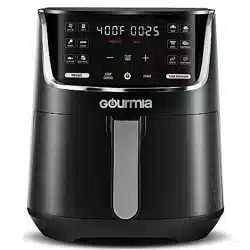
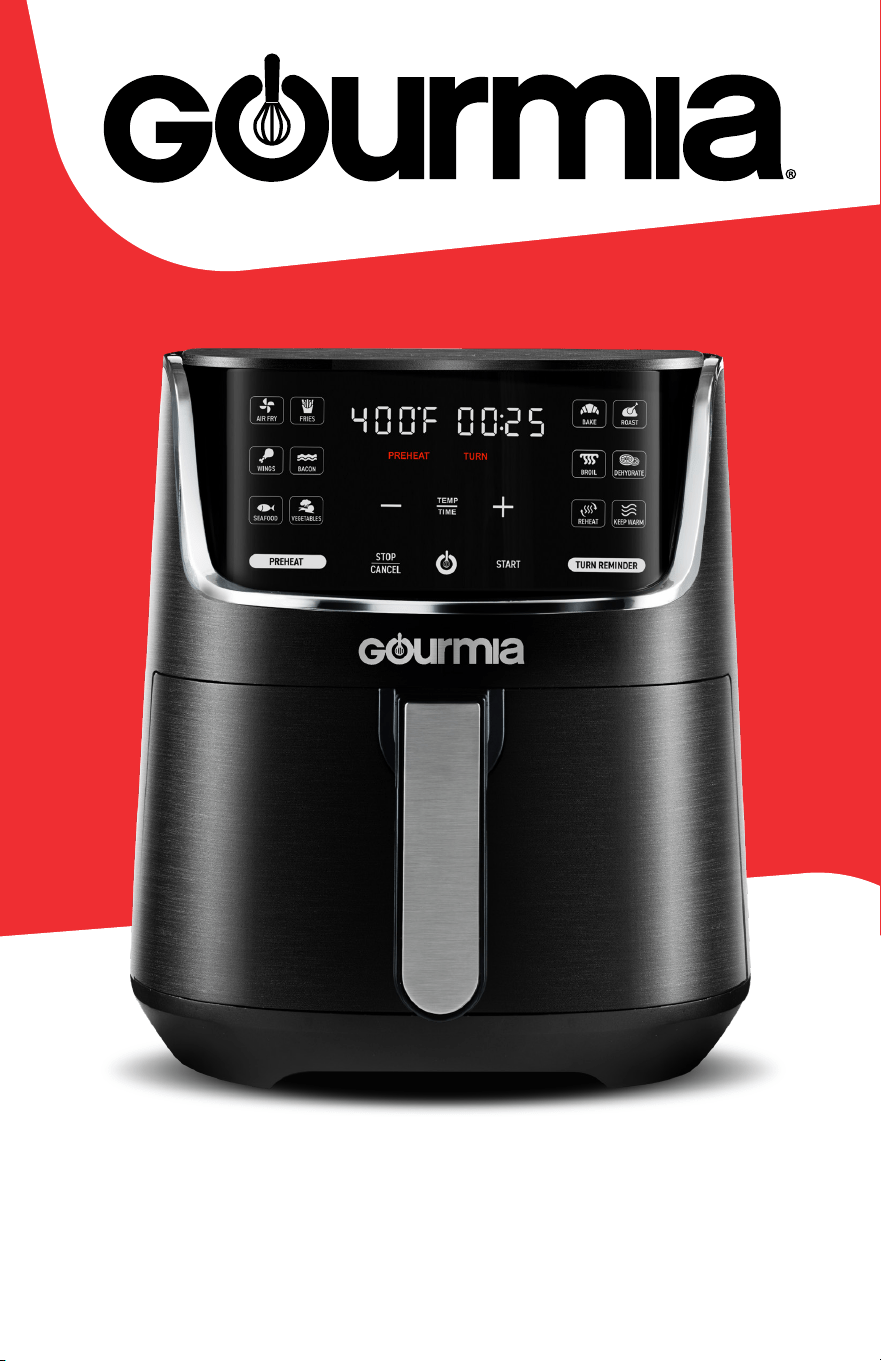
USER MANUAL 4 QT DIGITAL AIR FRYER GAF414
1
GAF414
USER MANUAL
4 QT DIGITAL AIR FRYER

CONTENTS
Important Safeguards 4
Before First Use 6
Know Your Air Fryer 7
Control / Display Panel 8
Display Messages and Sound 9
Toggle Fahrenheit and Celsius 9
Mute Air Fryer 9
Using Your Air Fryer
Set Up Your Air Fryer 10
Select Your Settings 11
Preheat / Start Cooking 12
Turn Reminder 13
End of Cooktime 14
Presets Chart 15
Cooking Tips 16
Cleaning and Maintenance 17
Troubleshooting 18
Warranty and Service 19
All rights reserved. No portion of this manual may be reproduced by any means whatsoever without written
permission from The Steelstone Group, except for the inclusion of quotations in a media review. Although
every precaution has been taken in the preparation of this manual, The Steelstone Group assumes no
responsibility for errors or omissions. Nor is any liability assumed for damages resulting from the use of
the information contained herein. Although every eort has been made to ensure that the information
contained in this manual is complete and accurate, The Steelstone Group is not engaged in rendering
professional advice or services to the individual consumer; further, The Steelstone Group shall not be held
responsible for any loss or damage allegedly arising from any information or suggestions in this manual.
Model: GAF414 | © 2023 Gourmia | 1.0
The Steelstone Group Brooklyn, NY | Gourmia com
3
Here at Gourmia, we’re all about helping cooks make easy,
healthy, and delicious meals an everyday possibility We
know how fast-paced life is and that sometimes a home
cooked meal doesn’t make the top of the priority list, no
matter how bad you want it Our dependable, easy-to-use
units are here to help you change that We’re giving you
the tools to eat better and healthier without spending hours
in the kitchen prepping and cooking
We want you to get the most out of your air fryer, which is
why our team is available to help with any questions you
may have Whether you have a question with setup or
need some guidance on which preset to use, we’re happy
to walk you through it Welcome to the ease of cooking
with Gourmia
This manual provides instructions for all of the air fryer’s
functions and features along with directions for assembling,
operating, cleaning, and maintaining the appliance Please
read all safety instructions and directions for safe usage at
all times Keep this manual for future use
Thank you for choosing Gourmia!
Congratulations on the
purchase of your Digital Air
Fryer from Gourmia!
@gourmia

IMportAnt SAFeGuArDS
FOR CUSTOMER SERVICE VISIT WWW.GOURMIA.COM OR CALL 888.552.0033
4
IMPORTANT SAFEGUARDS
read all instructions before using the electric appliance.
The following basic precautions should always be followed:
1. This appliance is not intended
for use by children or persons
with reduced physical, sensory
or mental capabilities, or lack of
experience and knowledge, unless
they have supervision
2. Close supervision is necessary
when any appliance is used near
children Children should be
supervised to ensure that they
do not play with the appliance
Cleaning and user maintenance
shall not be done by children
unless they are supervised
3. Check if the voltage indicated on
the appliance corresponds to the
local main voltage before you
connect the appliance
4. Do not use the appliance if
the plug, the main cord or the
appliance itself is damaged
Always make sure that the plug is
inserted properly into a wall outlet
5. Do not operate any appliance with
a damaged cord or plug, after the
appliance malfunctions, or if the
appliance has been damaged in
any manner Return the appliance
to the nearest authorized service
facility for examination, repair, or
adjustment
6. Do not let the cord hang over the
edge of the table or counter, nor
let it touch hot surfaces
7. To protect against electric shock,
do not immerse cord, plugs, or
appliance in water or other liquid
8. Do not plug in the appliance or
operate the control panel with wet
hands
9. never connect this appliance
to an external timer switch or
separate remote-control system
in order to avoid a hazardous
situation To disconnect, turn o
the appliance, then remove the
plug from wall outlet
10. Do not place the appliance on or
near combustible materials such
as a tablecloth or curtain The
accessible surfaces may become
hot during use Do not place on or
near a hot gas or electric burner,
or in a heated oven
11. Do not place the appliance
against a wall or against other
appliances Leave at least 4
inches of free space on the back
and sides and 4 inches of free
space above the appliance Do
not place anything on top of the
appliance
12. Do not use the appliance for any
other purpose than described in
this manual The use of accessory
attachments not recommended by
the appliance manufacturer may
cause injuries
SAVE THESE INSTRUCTIONS
IMportAnt SAFeGuArDS
USER MANUAL 4 QT DIGITAL AIR FRYER GAF414
5
13. Do not leave the appliance
unattended when plugged in
14. Extreme caution must be used
when moving an appliance
containing hot oil or other hot
liquids
15. Do not touch the hot surfaces; use
the handle During air frying, hot
steam is released through the air
outlet openings Keep your hands
and face at a safe distance from
the steam and from the air outlet
openings Also be careful of hot
steam and air when you remove the
basket from the appliance
16. After using the appliance, avoid
contact with the hot metal inside
17. Unplug from outlet when not in
use and before cleaning Allow the
appliance to cool before cleaning
18. Immediately unplug the appliance
if you see dark smoke coming from
the appliance Wait for the smoke
emission to stop before you remove
the basket from the appliance
19. Do not use outdoors
20. For household use only.
Cord and plug Safety
1. A short power-supply cord is provided to reduce risk of becoming entangled
in or tripping over a longer cord
2. Extension cords may be used if care is exercised in their use
3. If an extension cord is used:
• The marked electrical rating of the extension cord should be at least equal
to the electrical rating of the appliance; and
• The longer cord should be arranged so that it will not drape over the
countertop or tabletop where it can be pulled on by children or tripped
over
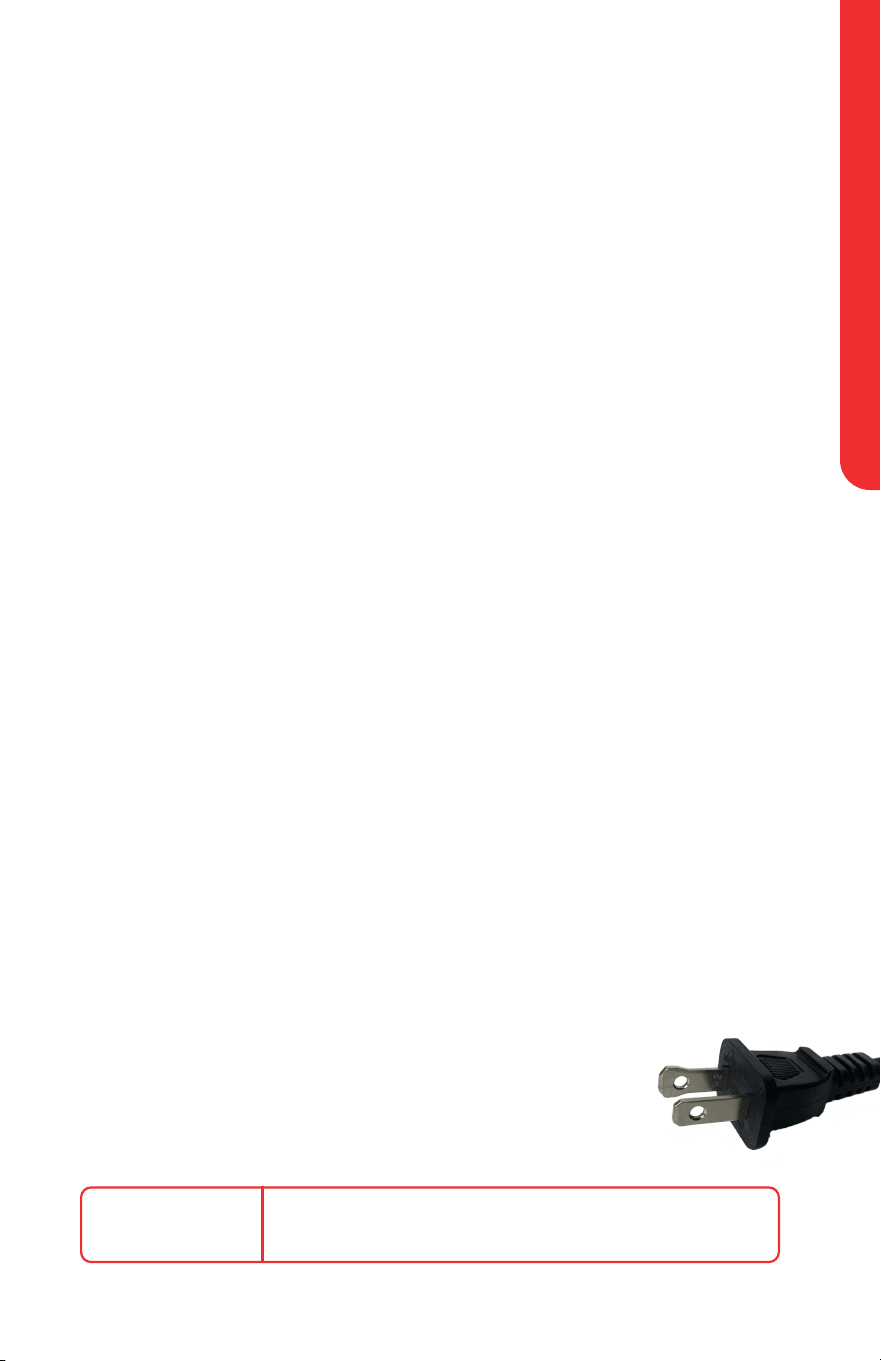
electrical polarized plug
This unit has a polarized plug (one blade is wider than the other)
To reduce the risk of electric shock, the plug is intended to be
used by inserting it into the electrical outlet only one way If the
plug does not fit securely into the outlet, reverse the plug and
re-insert If it still does not fit, contact a qualified electrician for
assistance Do not modify the plug in any way
poWer
120V~ 60Hz 1300W
BeFore FIrSt uSe
FOR CUSTOMER SERVICE VISIT WWW.GOURMIA.COM OR CALL 888.552.0033
6
1. Remove all packaging, stickers, and labels from the air fryer, including the
tape securing the basket to the unit
2. To pull out the basket for cleaning, secure the unit with one hand and pull
the basket handle straight back with the other hand
3. Thoroughly clean the basket and crisper tray with hot water, dishwashing
liquid, and a non-abrasive sponge
4. Wipe the inside chambers and outside of the air fryer with a moist cloth
5. note: During the first few uses, there might be a “hot plastic” smell. this
is perfectly normal in new air fryers as the material is heated for the first
time. the smell will go away after the first few uses.
BEFORE FIRST USE
Do not put anything on top of the air fryer
Do not place the air fryer against a wall or against other appliances It
is important to leave at least 4 inches of free space above and around
all sides of the air fryer to allow for proper ventilation
Do not fill the basket with oil, frying fat, or any other liquid; this
appliance works by circulating hot air
to avoid the risk of fire:
• neVer place the air fryer on a gas or electric stovetop, even if
the stovetop is o.
• If using parchment paper or other liner, always be sure there is food
on top of the liner to weigh it down and keep it safely secured in
place
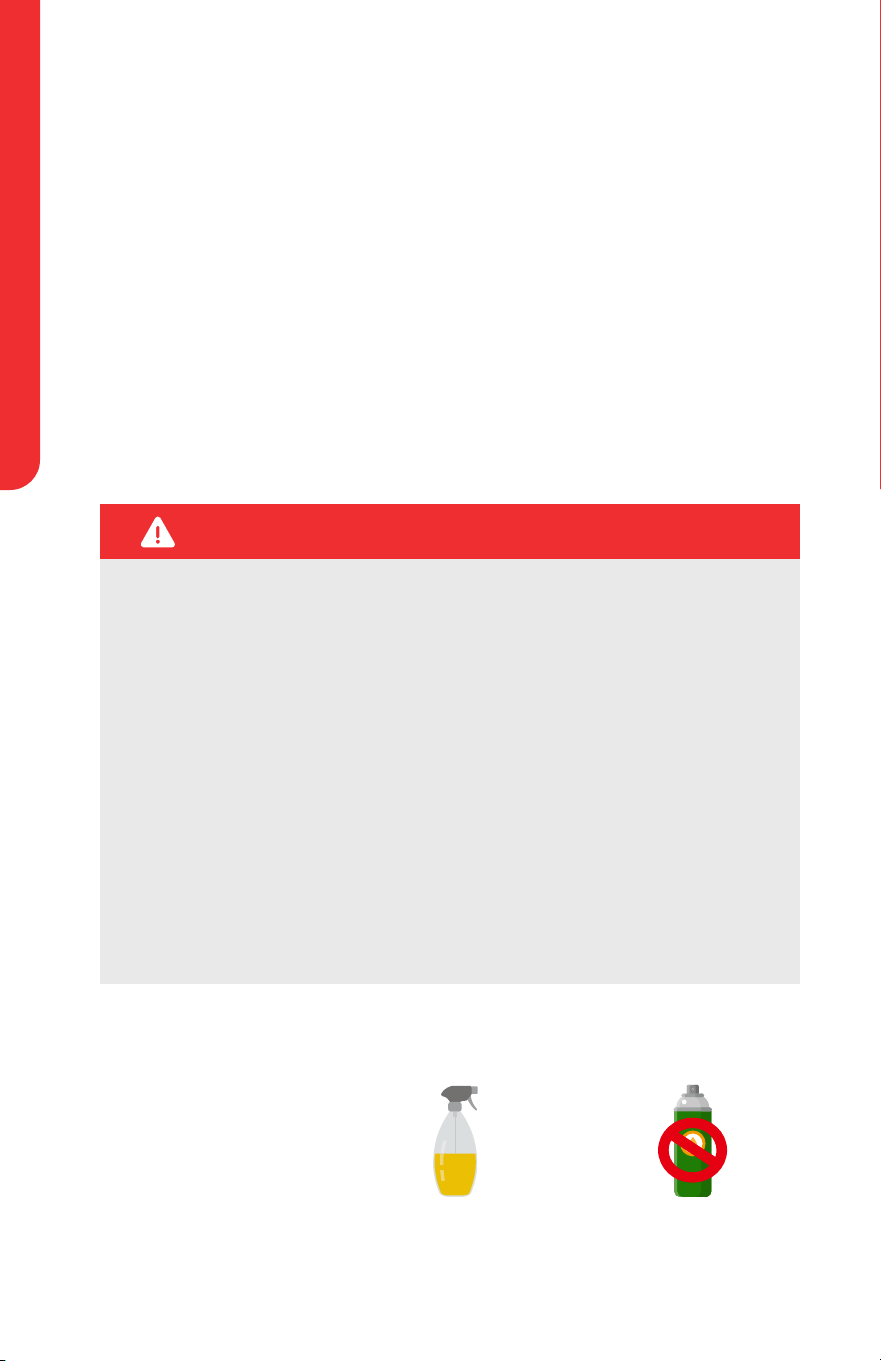
oil Spray
note: When spraying
food for a crispier finish,
we recommend using
regular cooking oil
instead of cooking spray,
as the latter may damage
the accessories
not recommended
Cooking Spray
recommended
Oil Mister / Spray Bottle
WARNING:
KnoW Your AIr FrYer
USER MANUAL 4 QT DIGITAL AIR FRYER GAF414
7
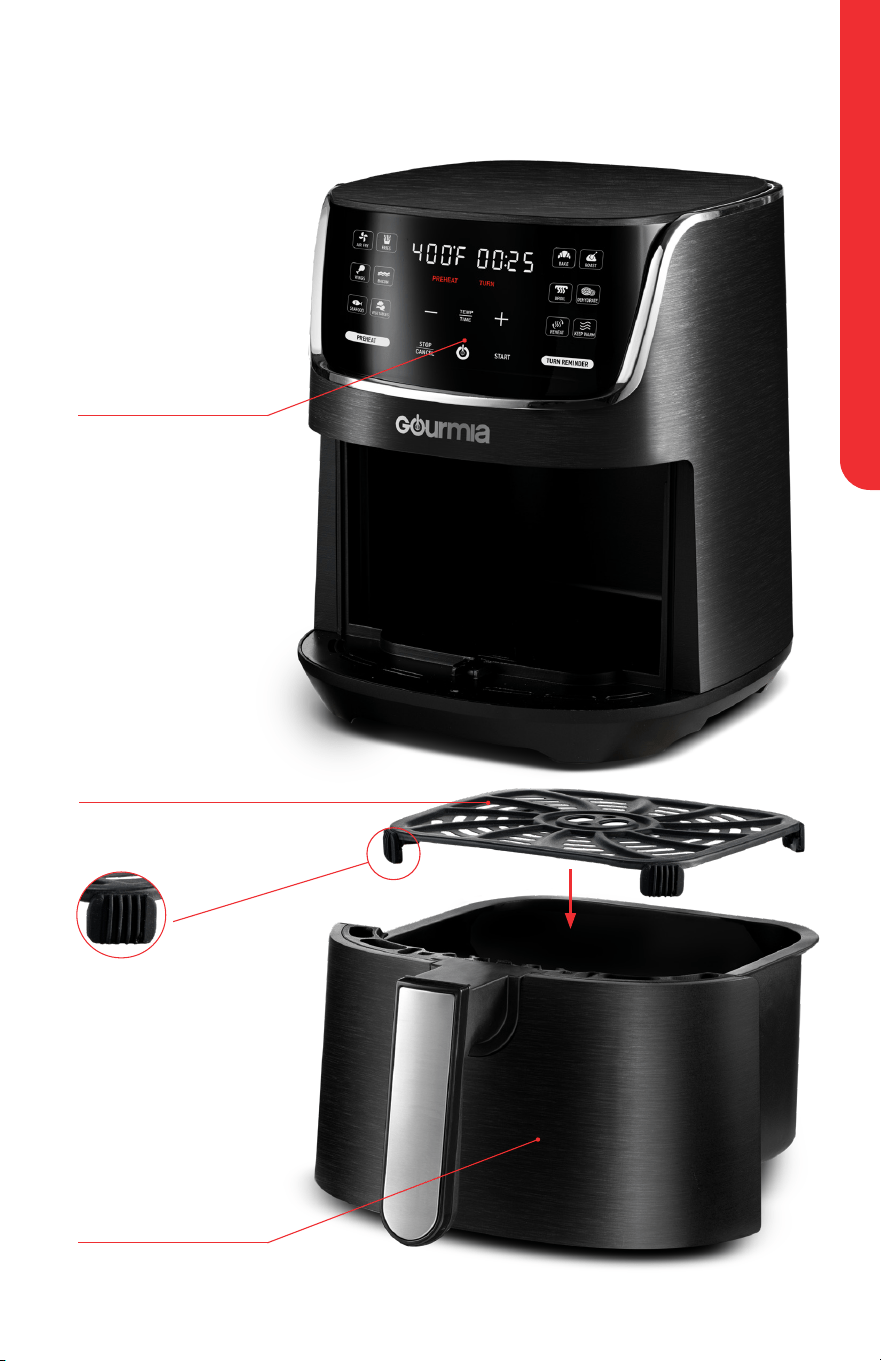
Basket
note: The silicone
bumpers on the crisper
tray should be left on
during use They are
food grade and BPA-free
The bumpers can be
removed for cleaning
Control Panel /
Display
Crisper Tray
KNOW
YOUR AIR
FRYER
Place the crisper tray into
the bottom of the basket
BeFore FIrSt uSe
FOR CUSTOMER SERVICE VISIT WWW.GOURMIA.COM OR CALL 888.552.0033
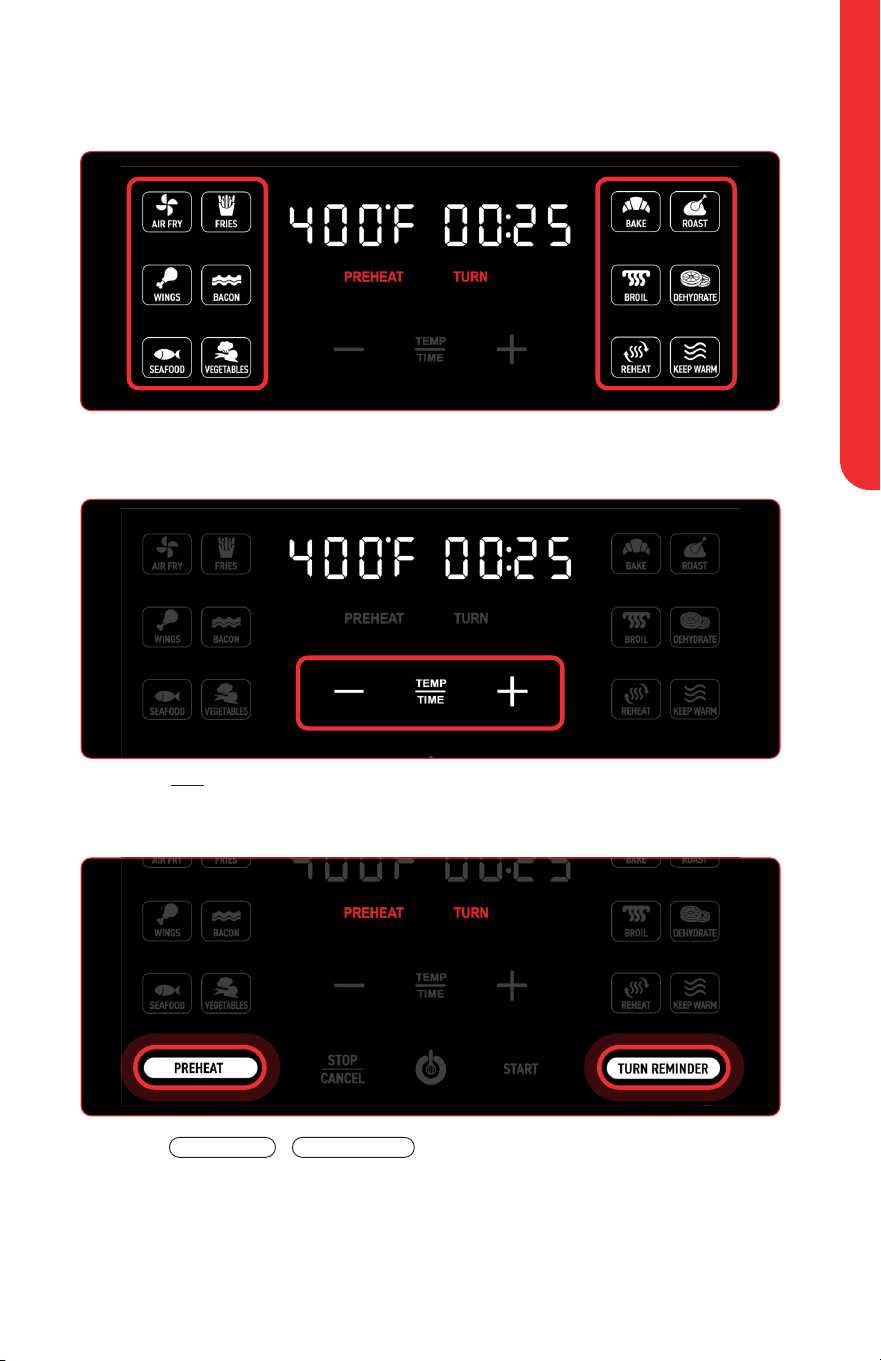
8
Control / Display panel
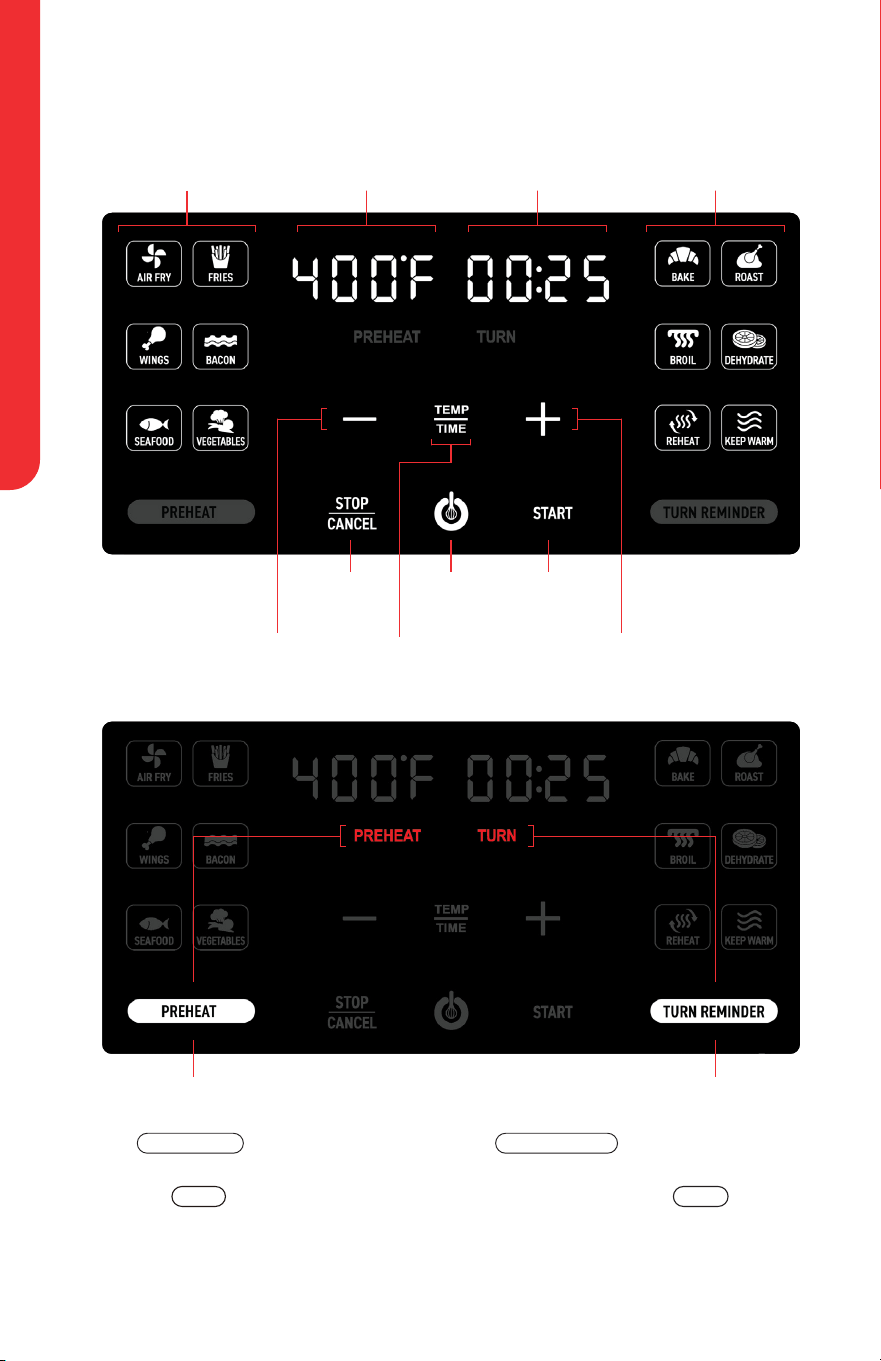
Air Fry Presets Cooking Presets
Ta p
TURN REMINDER
to enable or disable
a turn reminder halfway through cook
time Set before tapping
START
TURN will appear in red on the display
when turn reminder is enabled
Tap
PREHEAT
to enable or
disable preheating Set before
tapping
START
PREHEAT will appear in red on the
display when preheat is enabled
Temperature
Power
Icon
Start
Stop /
Cancel
Toggle Preheat
Toggle Turn Reminder
Time
Minus
Icon
Plus
Icon
Toggle between adjusting
Temperature or Time
BeFore FIrSt uSe
USER MANUAL 4 QT DIGITAL AIR FRYER GAF414
9
toggle Fahrenheit and Celsius
To toggle between displaying temperature in Fahrenheit (°F) and Celsius (°C),
press and hold
TIME
TEMP
Mute Air Fryer
To silence the air fryer’s beeping sound, press and hold
STOP
CANCEL
Press and
hold
STOP
CANCEL
again to turn the sound on
note: The air fryer will still beep for guided cooking prompts
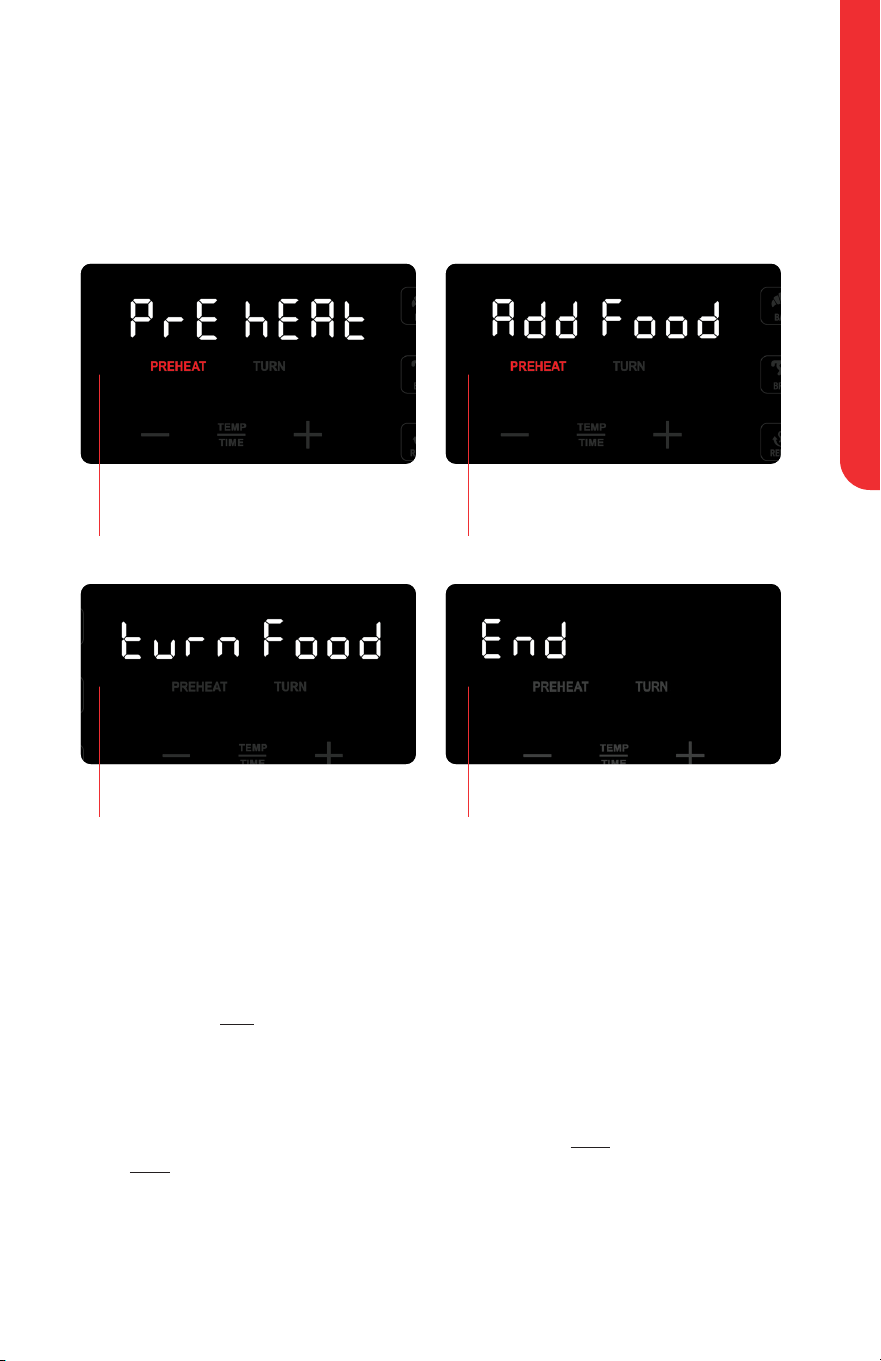
Below are messages and indicators for guided cooking prompts
Air fryer is preheating
Air fryer is done preheating,
ready for food
Display Messages and Sound
Cooking has ended Air fryer is ready for you to turn
or toss your food
uSInG Your AIr FrYer
FOR CUSTOMER SERVICE VISIT WWW.GOURMIA.COM OR CALL 888.552.0033
10
A step-by-step guide on setting up and getting
started with your new Gourmia Air Fryer
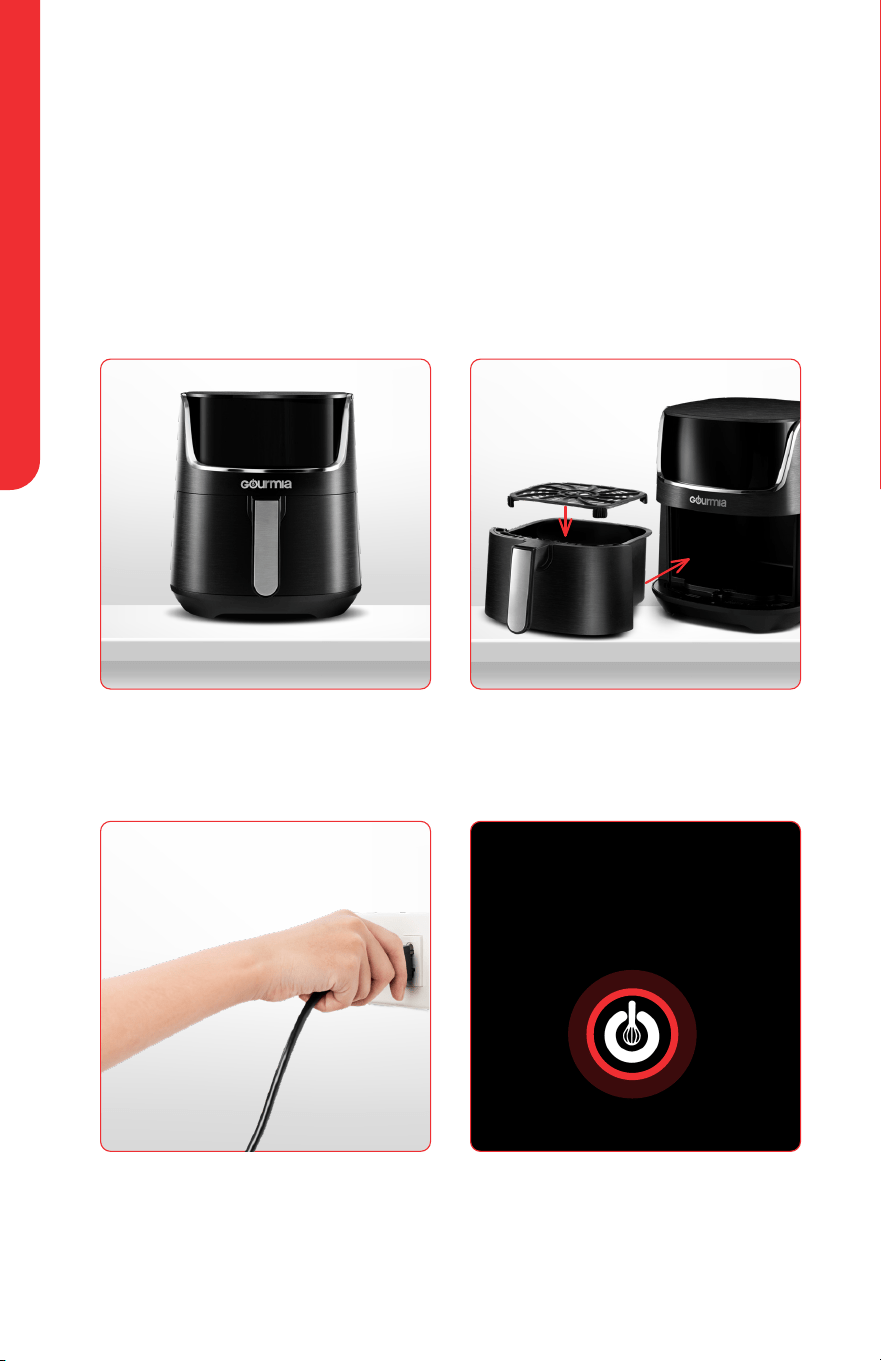
1
Place air fryer on a stable, level,
and heat-resistant surface
3
Plug air fryer into an outlet
4
Tap power icon to turn on
air fryer
2
Place the crisper tray into the
bottom of the basket and slide
the basket into the air fryer
USING YOUR AIR FRYER
Set up Your Air Fryer
uSInG Your AIr FrYer
USER MANUAL 4 QT DIGITAL AIR FRYER GAF414
11
2
Tap
TIME
TEMP
to adjust temperature / time
Tap plus and minus icons to increase and decrease temperature / time
3
Tap
PREHEAT
/
TURN REMINDER
to enable or disable these
settings PREHEAT / TURN appear in red on the display when those
settings are enabled
PREHEAT and TURN REMINDER are on by default for select presets. See
Presets Chart on page 15.
1
Tap desired preset The display will show the preset’s temperature
and time
Select Your Settings
uSInG Your AIr FrYer
FOR CUSTOMER SERVICE VISIT WWW.GOURMIA.COM OR CALL 888.552.0033
12
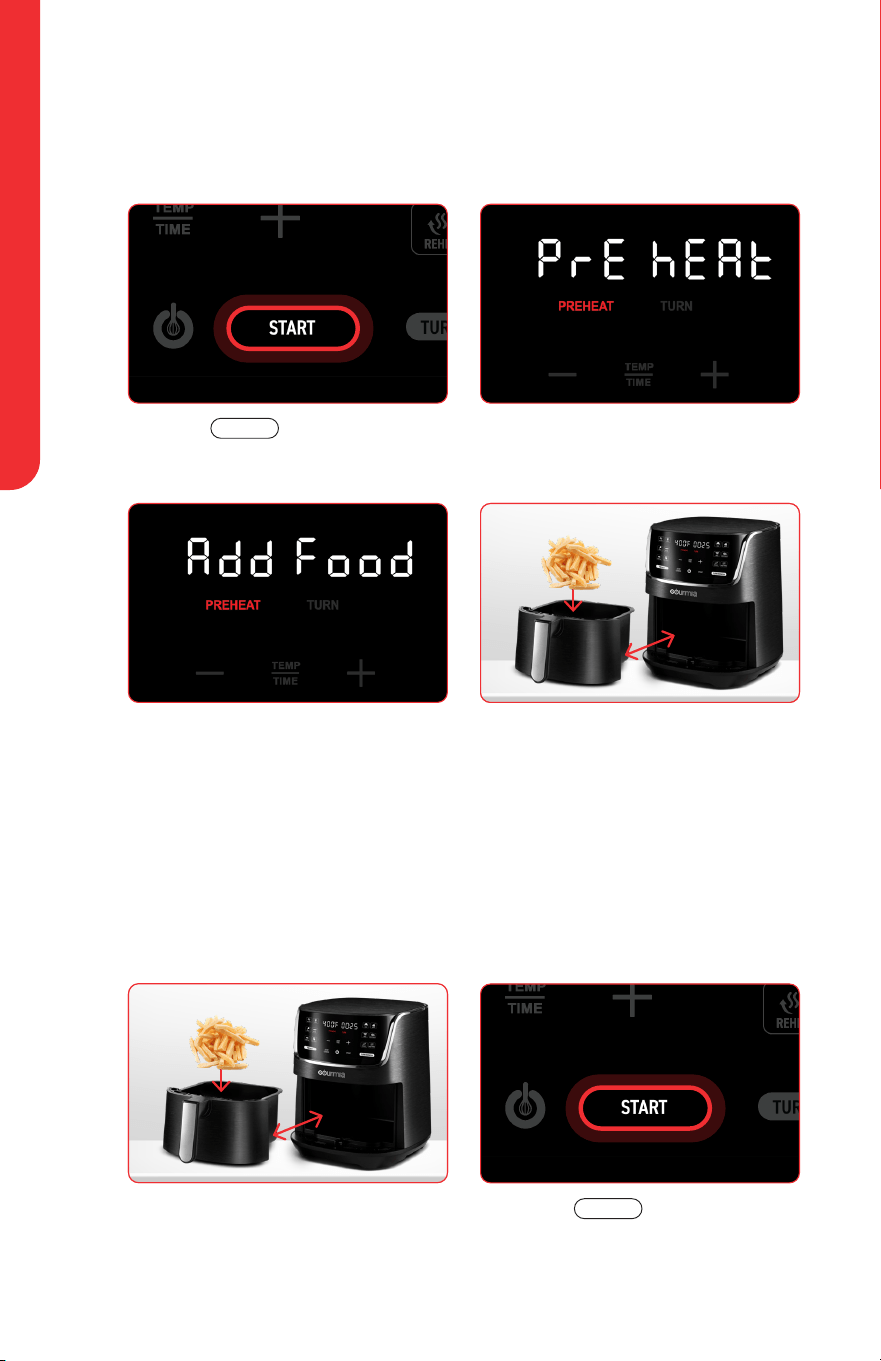
⊲ Adding Your Food with preheat enabled:
1
Tap
START
1
Remove the basket, place food
inside, and return it to the air
fryer
3
Once preheated, air fryer will
beep and display will show
ADD Food (Add Food)
WArnInG: The basket will be hot!
Do not touch hot surfaces.
2
Display will show Pre heat
(Pre Heat) Air fryer begins
preheating
2
Tap
START
4
Remove the basket carefully,
place food inside, and
return it to the air fryer to
automatically begin cooking
note: If the basket is not removed,
the cook time will begin regardless
preheat / Start Cooking
⊲ Adding Your Food if preheat is Disabled:
Continue to Turn Reminder on next page.
uSInG Your AIr FrYer
USER MANUAL 4 QT DIGITAL AIR FRYER GAF414
13
turn reminder
If TURN REMINDER is disabled skip to End of Cooktime on next page.
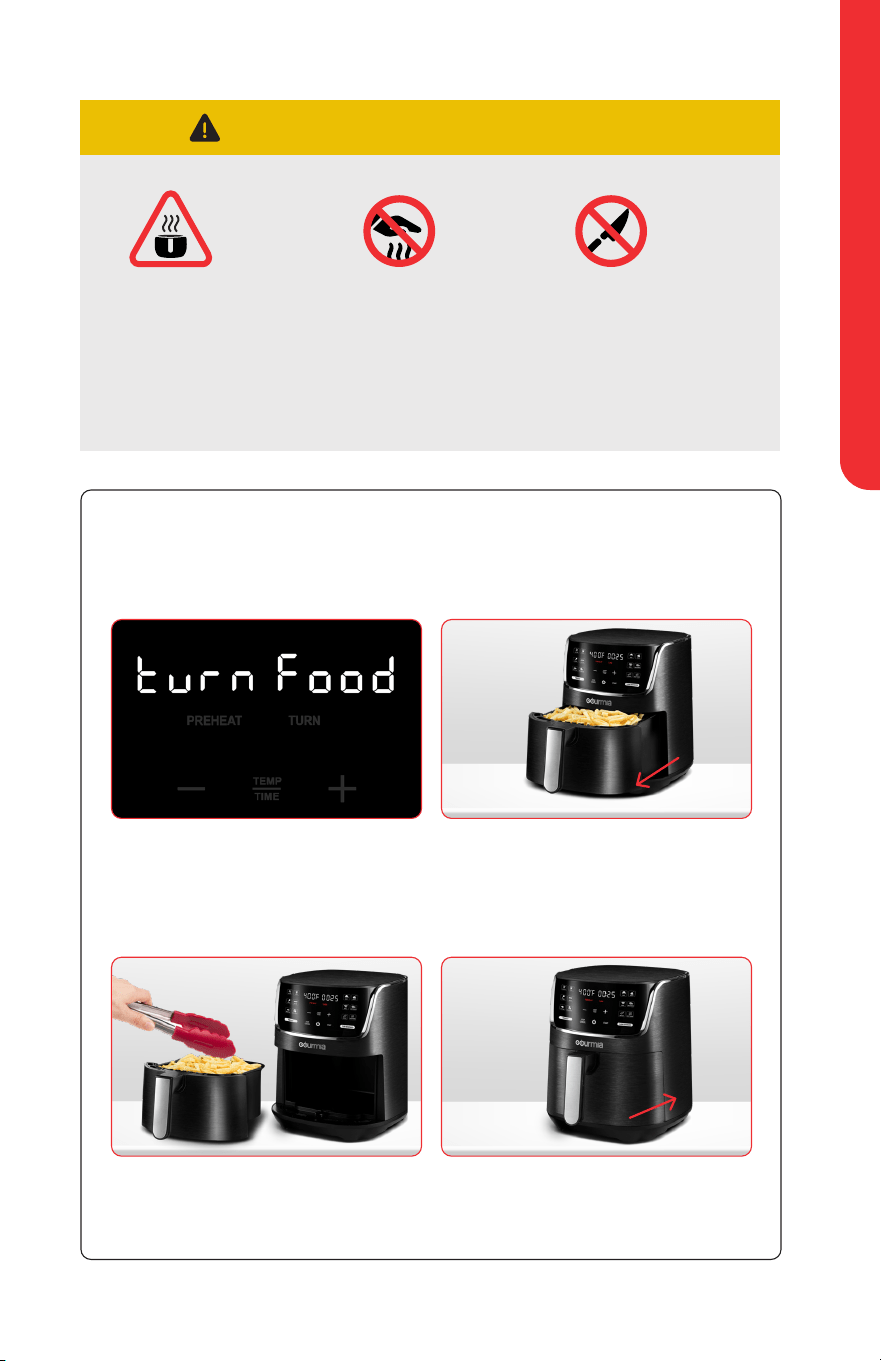
1
Halfway through cook
time, air fryer will beep and
display will show Turn
Food (Turn Food)
3
Turn or toss the food using
non-metal tongs
2
Remove basket carefully and
place on heat-resistant surface
If basket is not removed,
cooking will continue.
4
Return the basket to the air
fryer to automatically resume
cooking
IMPORTANT NOTICE:
use Caution when
removing the
basket during / after
cooking—hot steam
may escape!
Warning: The
basket and food
will be hot!
Do not touch hot
surfaces.
Do not use sharp
or metal utensils
which can scratch
the nonstick
surface
uSInG Your AIr FrYer
FOR CUSTOMER SERVICE VISIT WWW.GOURMIA.COM OR CALL 888.552.0033
14
Tap
STOP
CANCEL
to stop cooking
Tap
START
to resume cooking
Tap
STOP
CANCEL
twice to cancel
cooking
Press the power icon to turn
o the air fryer
Unplug the air fryer from the
outlet when not in use
pause / Stop / Cancel Cooking
turn o Air Fryer
end of Cooktime
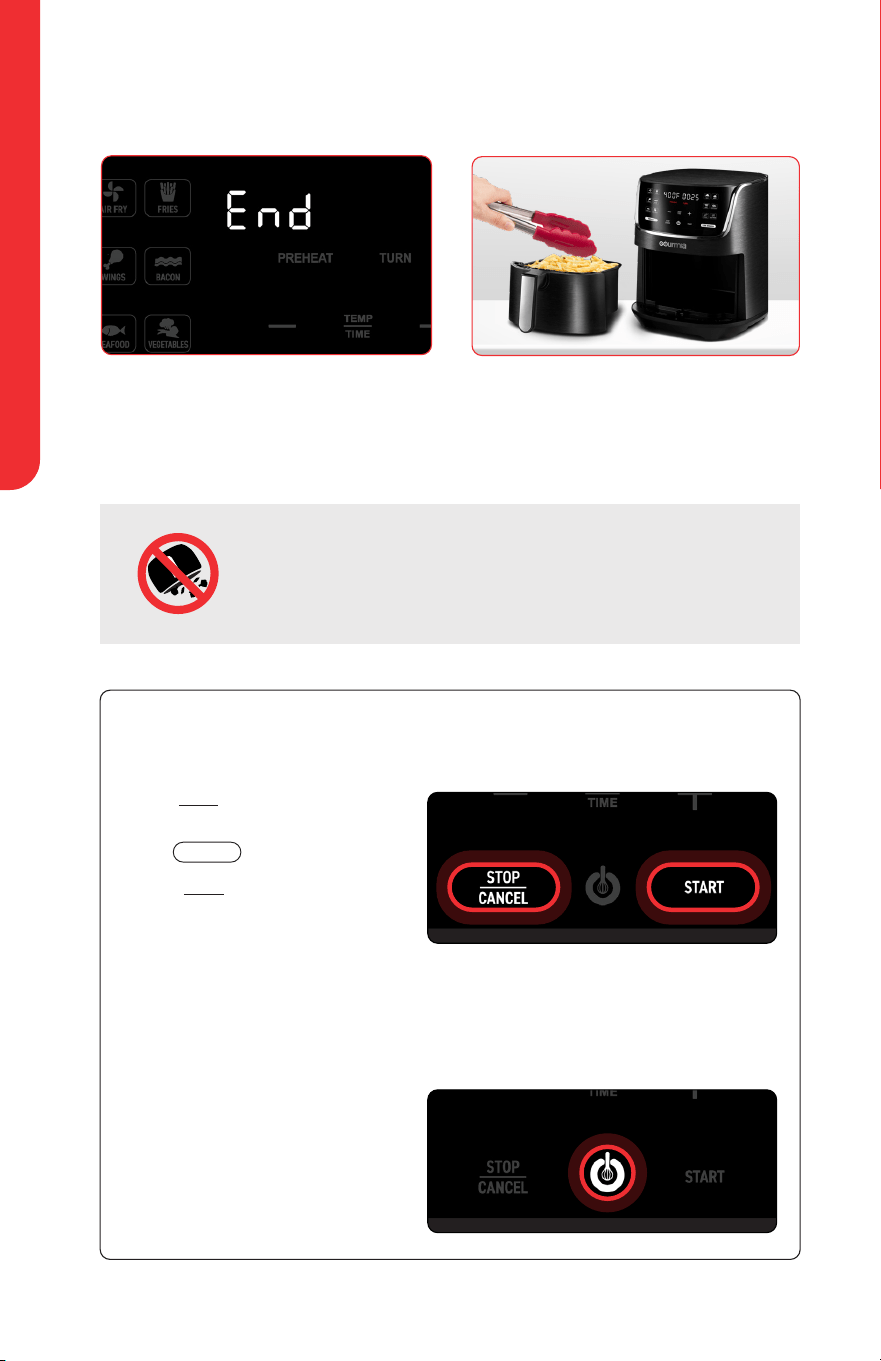
1
When your selected cook time
has elapsed, the air fryer will
beep and the display will show
End (End)
2
Remove the basket carefully
and place it on a heat-resistant
surface Remove food from the
basket using non-metal tongs
WArnInG: Do not turn the basket upside down, as any
excess oil collected on the bottom of the basket can drip
onto food Additionally, the hot crisper tray may fall out of
the basket and cause a burn
note: Removing the basket from the air fryer during cooking will stop cooking.
Returning the basket to the air fryer will automatically resume cooking.
uSInG Your AIr FrYer
USER MANUAL 4 QT DIGITAL AIR FRYER GAF414
15
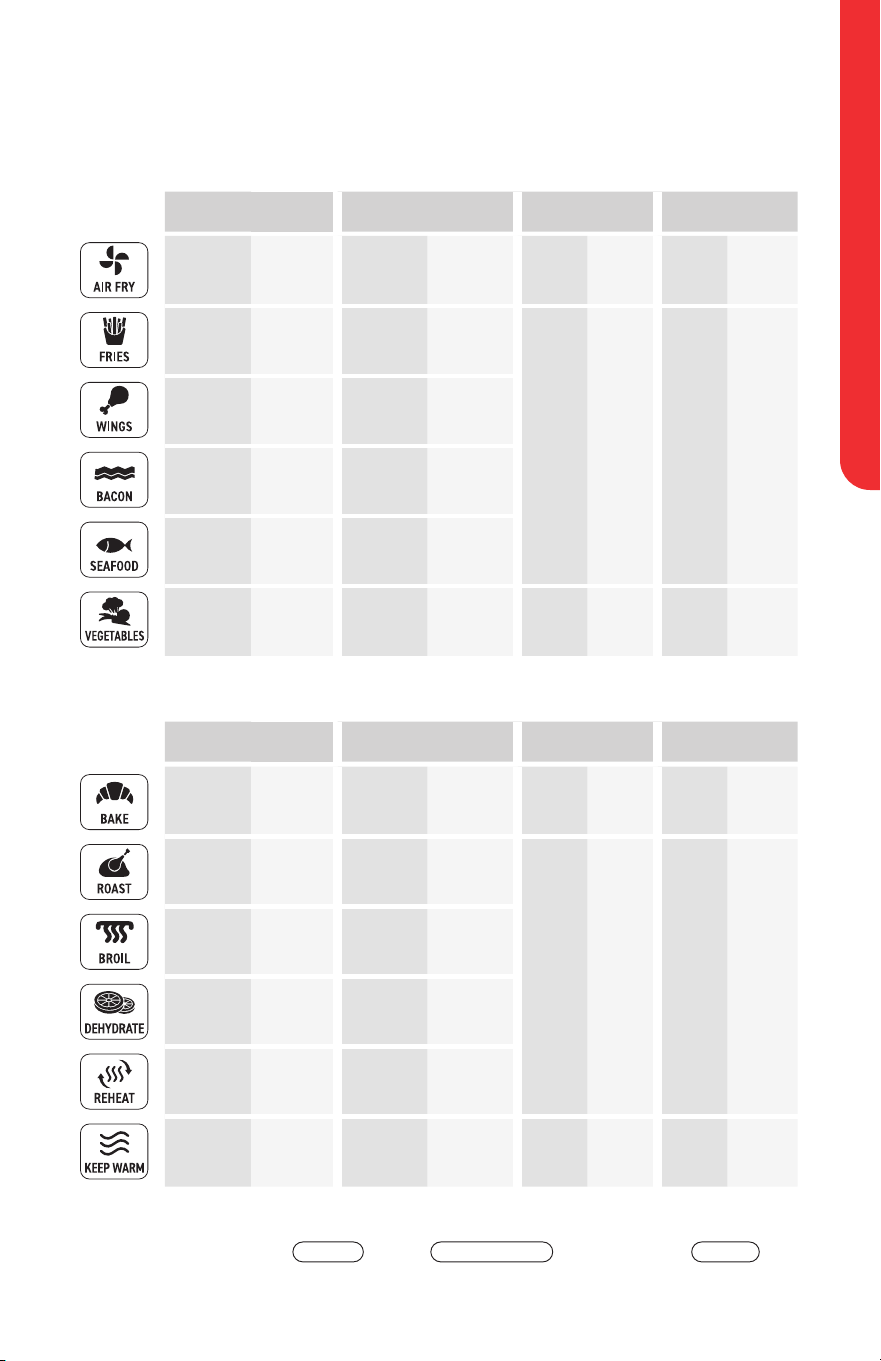
presets Chart
400° F 170-400° F 20 min 1–60min ON
P
ON
P
400° F 170-400° F 15 min 1–60min ON
P
ON
P
400° F 170-400° F 25 min 1–60min ON
P
ON
P
375° F 170-400° F 6 min 1–60min OFF
P
OFF
P
375° F 170-400° F 10 min 1–60min
ON
P
ON
P
400° F 170-400° F 20 min 1–60min ON
P
ON
P
325°F 170-400° F 25 min 1–120min ON
P
OFF
P
400° F 170-400° F 25 min 1–120min ON
P
ON
P
400° F
400° F
12 min 1–60min ON
P
ON
P
135° F
90-170° F
8 hr 30min–24hr OFF
—
OFF
P
300° F 170-400° F 15 min 1-60min
OFF
P
OFF
P
200° F
150-200° F
30 min 1 min–8hr OFF
—
OFF
—
TEMPERATURE TIME PREHEAT
TURN REMINDER
DEFAULT RANGE DEFAULT RANGE DEFAULT TOGGLE DEFAULT TOGGLE
TEMPERATURE TIME PREHEAT
TURN REMINDER
DEFAULT RANGE DEFAULT RANGE DEFAULT TOGGLE DEFAULT TOGGLE
P indicates PREHEAT and TURN REMINDER can be enabled or disabled
by tapping
PREHEAT
and/or
TURN REMINDER
before tapping
START
AIR FRY
PRESETS
COOKING
PRESETS

CooKInG tIpS
FOR CUSTOMER SERVICE VISIT WWW.GOURMIA.COM OR CALL 888.552.0033
16
For an extensive list of foods and their ideal amounts, temperature and
time settings, along with preparation notes, see the Air Fry Cooking Chart
and Dehydrate Chart on pages 64 through 67 of the Gourmia Recipe Book
• Check food for desired doneness a few minutes before cook time
elapses and cook a little longer if necessary
• Always ensure raw proteins reach food-safe temperature
• Air fryers perform similar to ovens; follow oven instructions on item
packaging or recipe
• Snacks that can be prepared in an oven can also be prepared in
the air fryer
• Smaller ingredients usually require a slightly shorter cook time than
larger ingredients
• Preheating the air fryer before adding food will generally deliver the
best results (see PREHEAT on bottom of page 8)
• When cooking multiple batches in a row, only preheat before the
first batch
• Turning or tossing food halfway through cook time will deliver evenly
browned and crispy results (see TURN REMINDER on bottom of
page 8)
• Toss fresh potatoes with 1 tablespoon of oil for a crispy exterior Air
fry the ingredients within a few minutes after adding the oil
• Do not cook foods that will produce a large amount of grease in the
air fryer
• Place a baking pan or an oven-safe dish or pan in the basket to
bake a cake or quiche or to air fry fragile or filled ingredients
COOKING TIPS
CleAnInG AnD MAIntenAnCe
USER MANUAL 4 QT DIGITAL AIR FRYER GAF414
17
CLEANING AND
MAINTENANCE
Cleaning
1. Clean the air fryer after every
use
2. Unplug the air fryer from the
outlet before cleaning
3. Let the air fryer cool down
completely before cleaning
Remove the basket from the air
fryer to cool it down quicker
4. Clean the basket and crisper tray
in the dishwasher’s top rack only,
or with hot water, dish soap, and
a non-abrasive sponge
5. If residue is stuck to the bottom
of the basket, fill it with hot water
and dish soap and let it soak
6. Wipe the outside of the air fryer
with a moist cloth
7. Clean the inside of the air fryer
with hot water, dish soap and a
cleaning brush to remove any
food residue
8. Ensure the air fryer is completely
dry before using
Storage
• Unplug the appliance and let it
cool down
• Make sure all parts are clean
and dry
• Store the appliance in a clean
and dry place
environment
Do not throw away the appliance
with the normal household waste
at the end of its life, but hand it in
at an ocial collection point for
recycling By doing this, you help to
preserve the environment
Guarantee and
Service
If you need service or information
or if you have a problem, please
visit www.gourmia.com or contact
your distributor
neVer IMMerSe CorD, pluG, or AIr FrYer
In WAter or AnY otHer lIQuID.
Do not use metal kitchen utensils or abrasive cleaning material to clean
the basket or crisper tray, as this may damage the nonstick coating.
WARNING:

trouBleSHootInG
FOR CUSTOMER SERVICE VISIT WWW.GOURMIA.COM OR CALL 888.552.0033
18
TROUBLESHOOTING
PROBLEM POSSIBLE CAUSE SOLUTION
The air fryer
does not work
The air fryer is not
plugged in.
Plug the main plug into a grounded wall
socket.
The timer has not been
set.
Tap + and - icons to set the required cook time
to turn on the air fryer.
The basket is not put into
the air fryer properly.
Slide the basket into the air fryer properly.
The basket does
not fit inside the
air fryer
The basket is
overfilled.
Do not fill the basket beyond max line.
The ingredients
did not cook
The set temperature is
too low.
Tap + and - icons to set the required
temperature setting.
The cook time is too short. Tap + and - icons to set the required cook time.
Food is cooked
unevenly
Some foods especially
smaller items need to be
tossed or flipped halfway
through the cook time.
Toss or flip food halfway through the cook
time. (See TURN REMINDER on page 13)
Food is not
crispy enough
The air fryer basket was
overfilled. Many foods
need oil to brown and
crisp properly.
Cook in smaller batches, keep food in a single
layer. Coat food with a small amount of oil.
White smoke
comes out of the
air fryer
You are preparing greasy
ingredients.
When you fry greasy ingredients in the air
fryer, a large amount of oil will leak into the
basket. The oil produces white smoke and
the basket may heat up more than usual. This
does not aect the air fryer or the end result.
The basket still contains
grease residue from
previous use.
White smoke is caused by grease heating up
in the basket. Make sure you clean the basket
properly after each use.
Display shows
E1 (E1)
NTC open circuit Please contact customer service
Display shows
E2 (e2)
NTC short circuit Please contact customer service
Display shows
E3 (E3)
NTC temperautre over
500°F
Please contact customer service
19
WARRANTY
AND SERVICE
For customer service, questions or comments
Visit gourmia com
Email info@gourmia com
Call 888 552 0033
Mon-Thu 9:00 a m to 6:00 p m ET
Fri 9:00 a m to 3:00 p m ET
Languages: English, Spanish, French
register your product at
www.gourmia.com/warranty
This Limited Warranty is for one full year from the date of
purchase and requires proof of purchase from an authorized
seller It is applicable to the original purchaser only and is not
transferable to a third party user Repair or replacement of
defective parts is solely at Gourmia’s discretion In the event
that repair isn’t possible, Gourmia will replace the product/part
If product repair/replacement won’t suce, Gourmia has the
option of refunding the cash value of the product or component
returned
Product defects not covered under the Warranty provisions
include normal wear and damage incurred from use or
accidental negligence, misuse of instruction specifications
or repair by unauthorized parties Gourmia is not liable for
any incidental or consequential damages incurred by such
circumstances
Only valid within the United States
@gourmia

FOR CUSTOMER SERVICE VISIT WWW.GOURMIA.COM OR CALL 888.552.0033
20
We’d love to hear from you!
888.552.0033
Get cooking with
