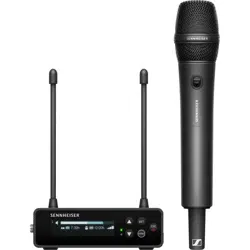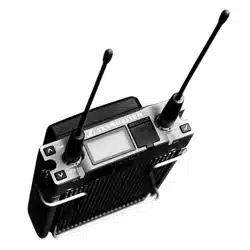

EK 6042
Betjeningsvejledning

|
EK 6042
Indhold
Indhold
Den bærbare kameramodtager EK 6042 ..................................... 5
Leveringsomfang ............................................................................ 5
Produktoversigter ........................................................................... 6
Overside ............................................................................................. 6
Tastfunktioner .................................................................................. 7
Forside ................................................................................................ 7
Underside ........................................................................................... 8
Lysdiodevisninger ............................................................................ 8
Display ................................................................................................ 9
Backpanel-adapter ........................................................................ 11
Ibrugtagning .................................................................................. 12
Anvendelse af EK 6042 i videokameraet ................................. 12
Tilslutning af backpanel-adapter ............................................... 13
Tilslutning af batteripakke-adapten ......................................... 13
Tilslutning af lydoptagelse eller mixerpult .............................. 14
Tilslutning af hovedtelefoner ..................................................... 14
Betjening ........................................................................................ 15
Til- eller frakobling ........................................................................ 15
Hentning af standard-, CH1- eller CH2-displayet ................... 15
Anvendelse af betjeningsmenuen ............................................. 15
Gennemførelse af synkronisering (Sync) ................................. 17
Gennemførelse af automatisk konfiguration (Auto) ............. 18
Gennemførelse af frekvensscanning ......................................... 19
Udskiftning af scener ................................................................... 19
Konfiguration med en webbrowser ........................................... 20
Pleje og vedligeholdelse ............................................................... 22
Tilbehør ........................................................................................... 22
Tekniske data ................................................................................ 23
Licenses ............................................................................................. 1
eCos ..................................................................................................... 1
Display Font (Palm OS) ................................................................... 1
DHC
P Server (dhcps) ......................................................................... 1
The
Creative Commons License ..................................................... 2
Pin a
ssignment ................................................................................. 1

EK 6042 | 5
Den bærbare kameramodtager EK 6042
Den bærbare kameramodtager EK 6042
EK 6042 er en tokanal-True-Diversity-modtager i miniatureformat. Den
passer ind i modtagerindstillet på professionelle videokameraer eller
mobile mixerpulte med UniSlot/SuperSlot™ (f.eks. Panasonic, Ikegami,
ARRI, Sound Devices) eller Sony-interface. Sammen med effektive lomme,
indstiks- eller håndsendere fra Sennheiser opstår der meget driftssikre
lydtransmissionsveje af høj kvalitet.
EK 6042 udmærker sig ved:
• den parallelle modtagelse af to sendere
• kompatibilitet med næsten alle Sennheiser-sendere og -mikrofoner
som f.eks.
- digitale sendere i serien Digital 9000 i LR-modusen
- analoge sender i serierne 5000, 3000 og 2000 i FM-modusen og med
kompandersystemerne HDX eller HiDyn plus
• efter ønske analog eller digital lydafspilning
• meget enkel betjening som følge af
- hurtig og ukompliceret One Touch Easy Setup
- menustyret betjening via display
- konfigurationsmulighed via en webbrowser
• adapter til professionelle videokameraer med UniSlot/SuperSlot™
(f.eks. Panasonic, Ikegami, ARRI, Sound Devices) og Sony-interface
• strømforsyning efter ønske fra videokameraet, en mobil strømforsy-
ning eller Sennheiser batteripakke-adapteren GA 6042 BA
• høj driftssikkerhed som følge af True-Diversity-modtagelse
• omfattende tilbehør til hver anvendelsessituation (se »Tilbehør« på
side 22)
Leveringsomfang
1 kameramodtager EK 6042
2 antenner
1USB-kabel
1 transportkuffert
1 betjeningsvejledning
Informationer om tilbehør som f.eks. strømforsyning, kabler og adapter
findes på side 22.
6 | EK 6042
Produktoversigter
Produktoversigter
Overside
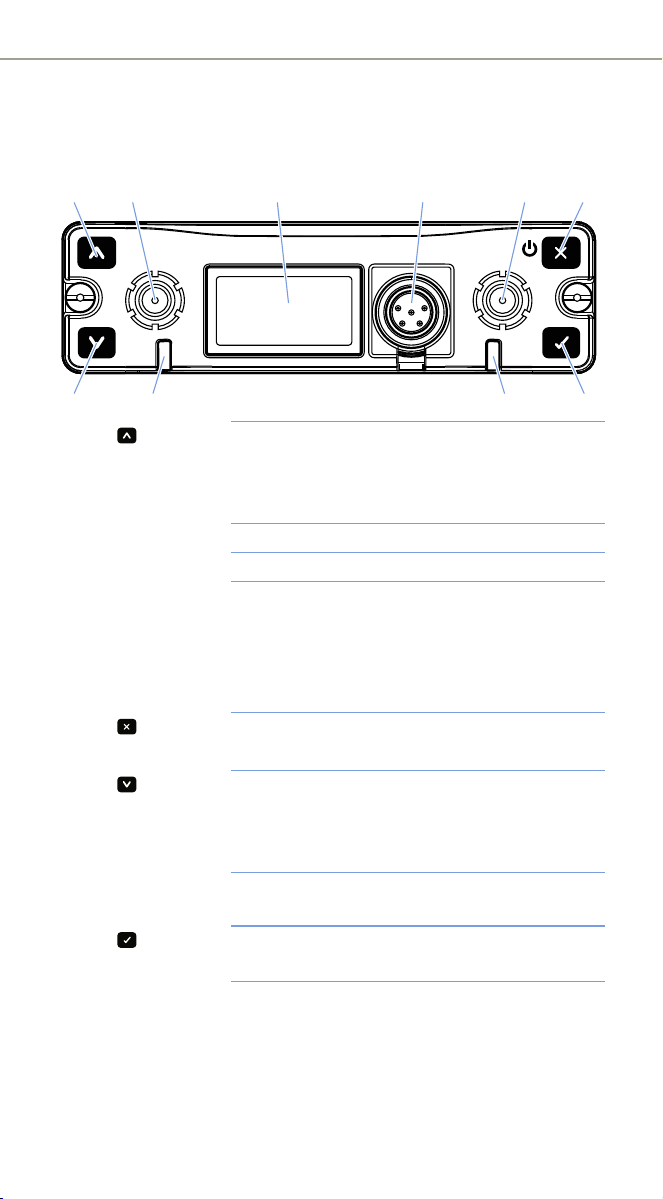
1 Tast Tryk kort: navigér op i menuen, eller skift til
standard-display
Tryk længe: se »Gennemførelse af synkronisering
(Sync)« på side 17
2 SMA-bøsninger Til aftagelige antenner (Diversity-grene A og B)
3 Display Detaljer, se side 9
4 Mini-XLR-5-
bøsning (Top)
AUX 1/2
Audiobøsningen på de sekundære audioudgange
AUX 1 og AUX 2 (under en afdækning)
Kan kun vise analoge audiosignaler
Udsender det samme audiosignal som audio-
bøsningen AUX 1/2
5 Tast Tryk kortvarigt: Sådan forlades menupunktet
Tryk længe: se »Til- eller frakobling« på side 15
6 Tast Tryk kortvarigt: Navigér i menuen, eller skift til
standarddisplayet
Tryk længe: se »Gennemførelse af synkronisering
(Sync)« på side 17
7 LED CH1 og CH2 Status-LED‘er for modtagelseskanal 1 eller 2
Detaljer, se side 8
8 Tast Tryk kortvarigt: Bekræft valg
Tryk længe: se »Udskiftning af scener« på side 19
Sync
Auto Scene
312 4 2 5
8767
EK 6042 | 7
Produktoversigter
Tastfunktioner
Forside
Tast Funktion
Tryk kortvarigt
• Navigerer et niveau op i betjeningsmenuen
• Forlader menupunktet uden at overtage
indtastninger
Tryk længe
• Tilkobl EK 6042 (se side 15)
• Frakobl EK 6042
Tryk kortvarigt
• Skifter fra det aktuelle standard-, CH1- eller CH2-
display til betjeningsmenuen
• Henter det valgte menupunkt
(Scene)
Tryk længe
• Henter en gemt scene (se side 20)
Tryk kortvarigt
• Skifter mellem standard-, CH1- og CH2-display
• Skifter til det forrige menupunkt
• Forøger den indstillede værdi
(Sync)
Tryk længe
• Synkroniserer en sender med EK 6042 (se side 17)
Tryk kortvarigt
• Skifter mellem standard-, CH1- og CH2-display
• Skifter til det næste menupunkt
• Reducerer den indstillede værdi
(Auto)
Tryk længe
• Start automatisk konfiguration (se side 17)
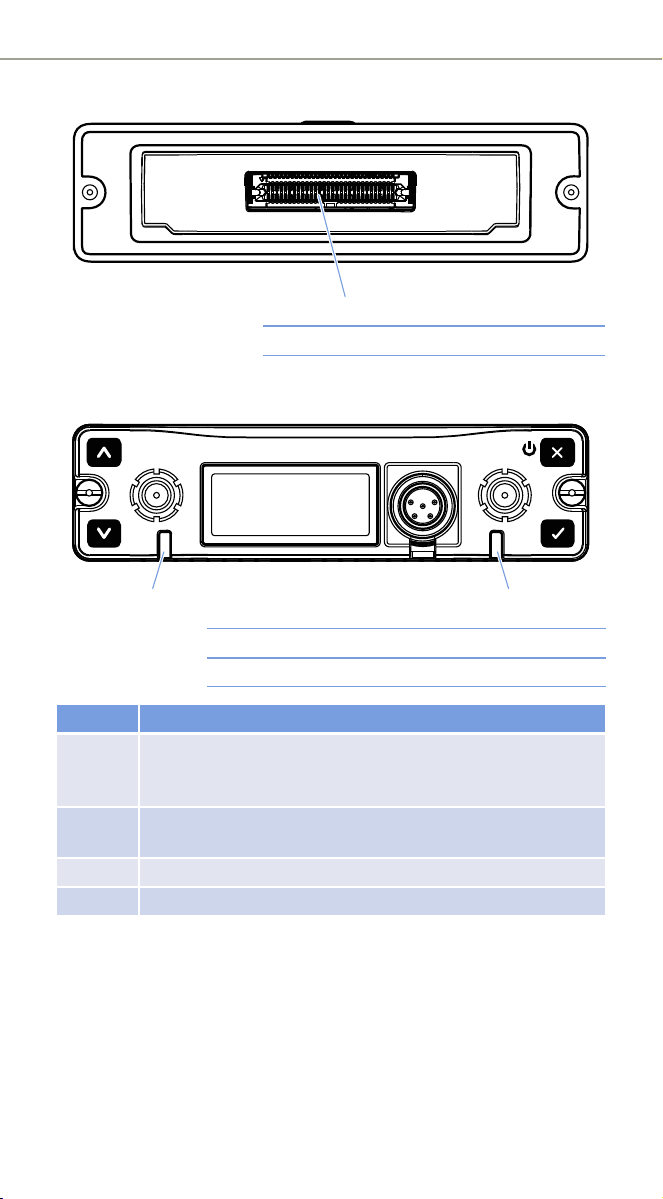
1 Infrarødt interface Til synkronisering med sendere (se Sync på
side 17 og Auto på side 18)
2 USB-interface Til tilslutning til en computer til konfiguration
med en webbrowser (se side 20)
CH1 CH2
USB
IR
2
1
8 | EK 6042
Produktoversigter
Underside
Lysdiodevisninger
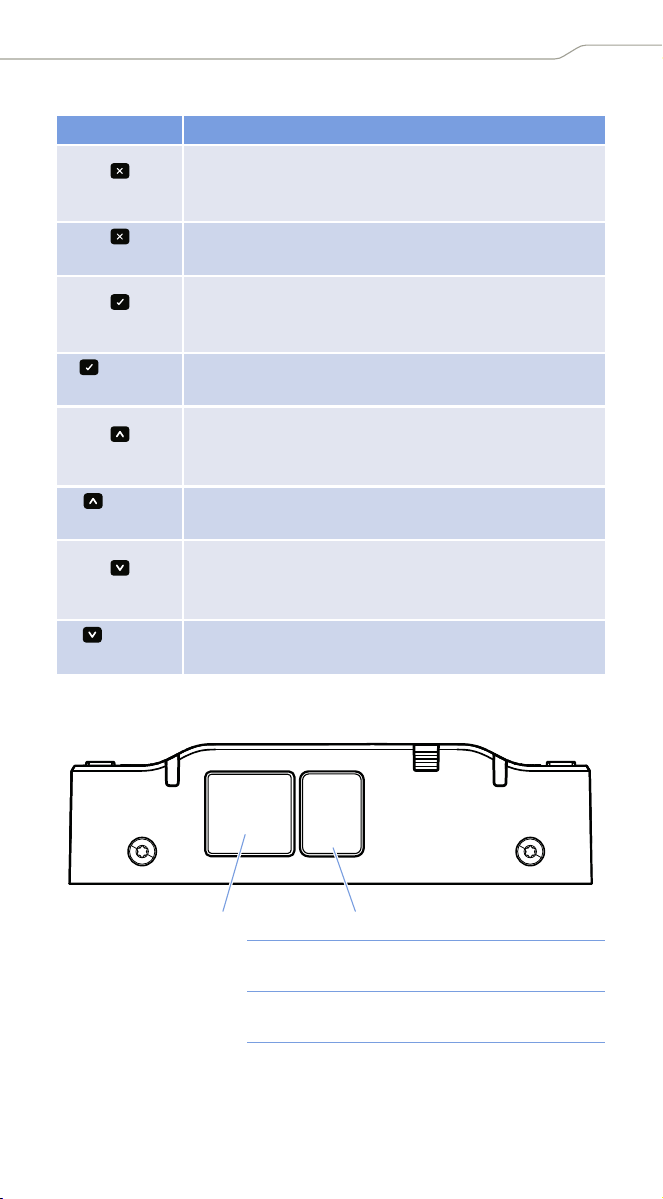
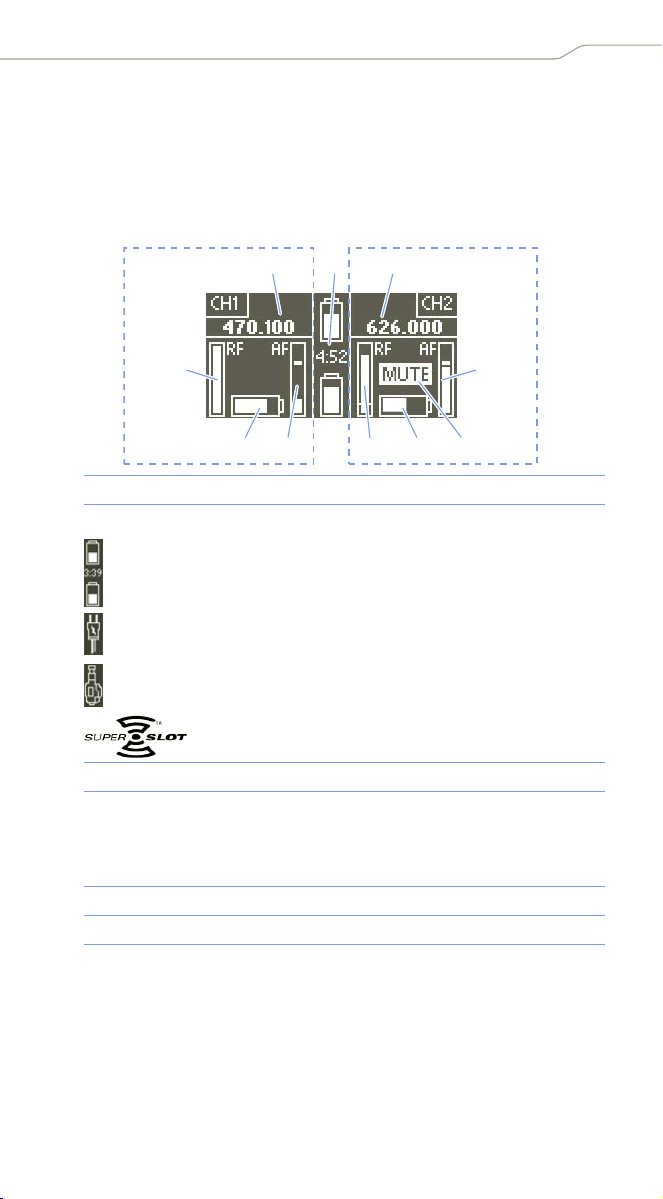
1 Multipin-interface Til tilslutning af tilbehør
1 Lysdiode CH1 Statuslysdiode til modtagelseskanal CH1
2 Lysdiode CH2 Statuslysdiode til modtagelseskanal CH2
Lysdiode Betydning
Slukket Modtagelseskanalen er slukket f.eks. for at spare på batteri-
kapaciteten. På displayet vises »Inactive«. Til-/frakobling af
en modtagelseskanal, se »Channel Power« på side 16.
Grøn Modtagelseskanalen er tilkoblet og modtager en sender.
Sender- og modtagerbatterier har tilstrækkelig kapacitet.
Gul En statusmelding vises på displayet.
Rød På modtagelseskanalen modtages der ikke en sender.
1
Sync
Auto Scene
1
2
EK 6042 | 9
Produktoversigter
Display
Displayet viser forskellige statusinformationer samt betjeningsmenuen.
Hentning af følgende displays, se side 15. Betjeningsmenu, se side 15.
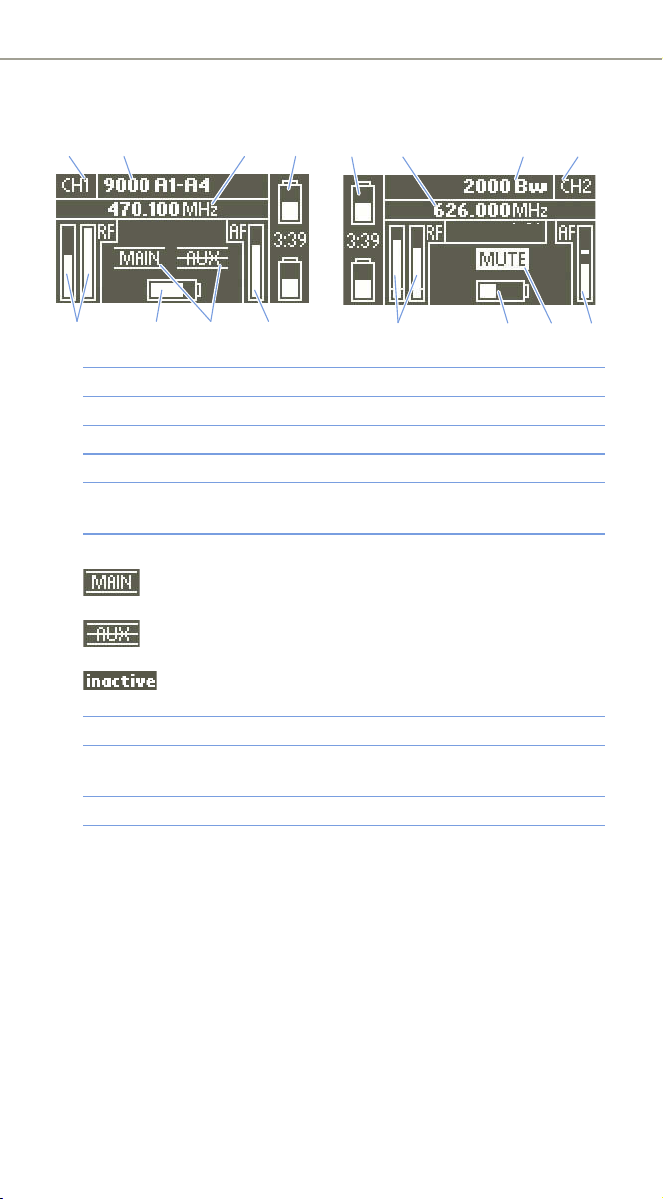
Standard-display
Standard-displayet vises efter tilkoblingen.
1 Modtagelsesfrekvens
2 Strømforsyningens kilde og status:
Hvis batteripakke-adapteren GA 6042 BA anvendes, vises kapaci-
teterne og den resterende levetid for de isatte batteripakker
BA 61.
Hvis der er tilsluttet en ekstern strømforsyning, vises der et
stiksymbol.
Hvis EK 6042 anvendes i et videokameras modtagerindstik,
vises der et videokamerasymbol.
Hvis EK 6042 sættes i et SuperSlot™-kompatibelt
modtagerindstik, vises dette logo.
3 Senderens audioniveau med peak-hold-funktion
4 Mute-visning: Enten har EK 6042 frakoblet lyden fra audioudgangen
på grund af et utilstrækkeligt eller fejlbehæftet modtagelsessignal,
eller lyden til den modtagede sender blev frakoblet med dens
MUTE-kontakt.
5 Den modtagede senders batteri-kapacitet
6 Modtagelsessignalets styrke på modtagelseskanalen
121
3
5635
6
4
Modtagelseskanal CH1
Modtagelseskanal CH2
10 | EK 6042
Produktoversigter
CH1- og CH2-display
Digital modtagelse Analog modtagelse
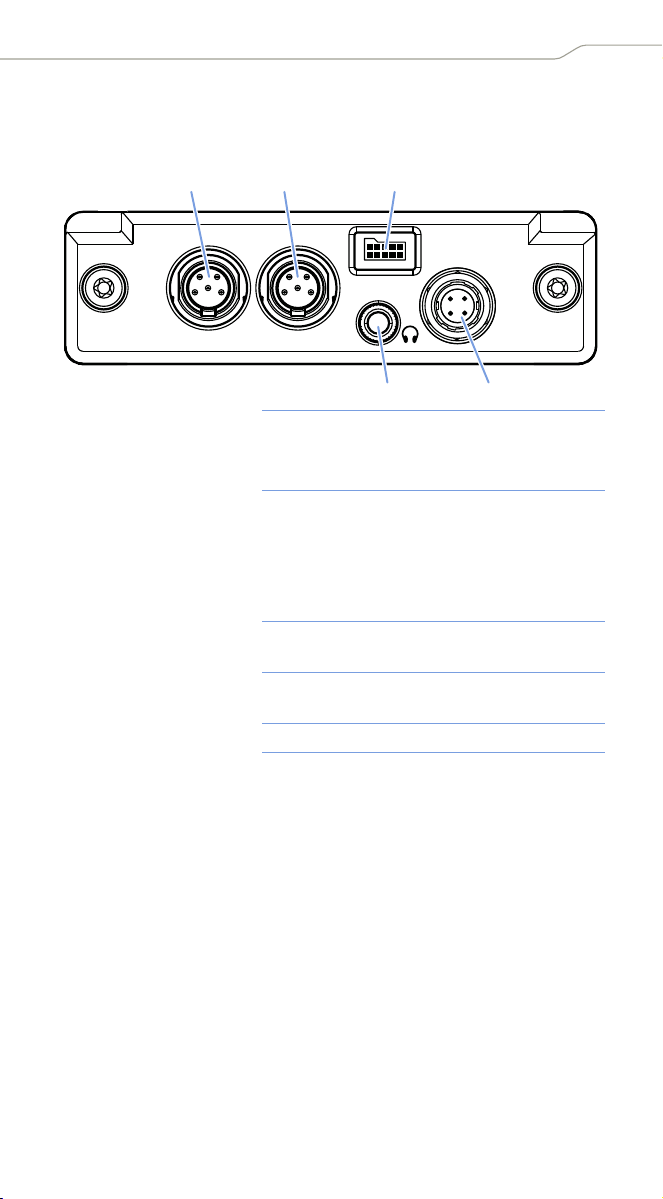
1 Modtagelseskanalens navn
2 Den modtagede senders senderbetegnelse
3 Modtagelsesfrekvens
4 Strømforsyningens kilde og status (se 2 på side 9)
5 Senderes audioniveau (deviation/modulation) med
peak-hold-funktion
6 Audioudgangsvisning:
Når audioudgangen er aktiv, vises dens symbol som
vist ved siden af.
Hvis en audioudgang er deaktiveret ved hjælp af
command-funktionen, vises dens symbol gennemstreget.
Hvis modtagelseskanalen blev frakoblet i menuen
Channel Power, vises »inactive«.
7 Den modtagede senders batteri-kapacitet
8 Styrke af modtagelsessignalet for de to Diversity-grene med visning
af støjspærringstærsklen
9 Mute-visning (se 4 på side 9)
12 34
5678
43 2 1
5978
EK 6042 | 11
Produktoversigter
Backpanel-adapter
Backpanel-adapteren GA 6042 BP kan fås som tilbehør. Der er brug for
den, hvis du ønsker at anvende EK 6042 uden for et videokamera.
1 Mini-XLR-5-bøsning
AES3 MAIN 1/2
Audiobøsning for de primære audioudgange
Kan udsende analoge eller digitale audio-
signaler
2 Mini-XLR-5-bøsning
AUX 1/2
Audiobøsning for de sekundære audio-
udgange AUX 1 og AUX 2
Kan kun vise analoge audiosignaler
Udsender det samme audiosignal som
f.eks. audiobøsning (Top) AUX 1/2
3 Bøsning til
batteripakke
Tilslutning af batteripakke-adapteren
GA 6042 BA
4 3,5 mm-jackbøsning
PHONES
Til tilslutning af en hovedtelefon
5 Bøsning DC-IN Til tilslutning af en ekstern strømforsyning
AES3
MAIN 1/2 AUX 1/2
DC-IN
7-18V
1
4
23
5
12 | EK 6042
Ibrugtagning
Ibrugtagning
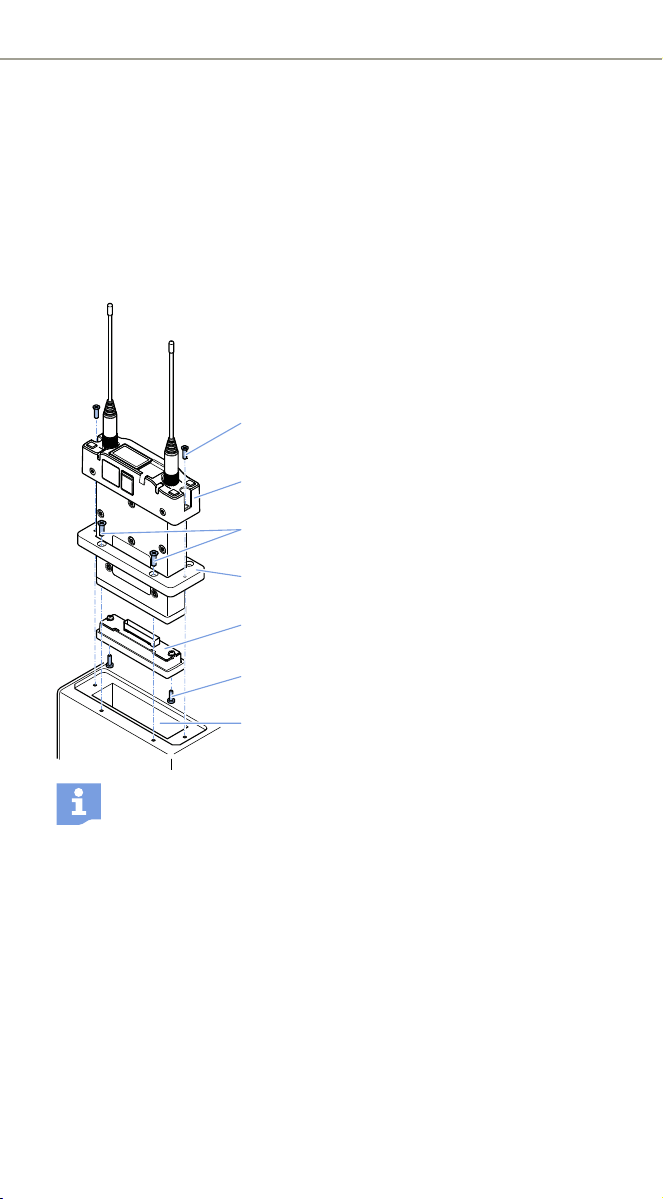
Anvendelse af EK 6042 i videokameraet
Du kan fastgøre EK 6042 i videokameraets modtagerindstik. Til indbyg-
ning i videokameraer med UniSlot/SuperSlot™ (f.eks. Panasonic, Ikegami,
ARRI, Sound Devices) har du brug for sættet GA 6042-25, til indbygning
i Sony-videokameraer sættet GA 6042-15. Hvert sæt består af en
adapterplade 4 og en D-Sub-adapter 5.
왘 Skru adapterpladen på modtager-
indstikket 7 på dit videokamera med de
fire medfølgende skruer 3.
왘 Sæt forsigtigt D-Sub-adapteren forsigtig
på multipin-interfacet på EK 6042 2.
Skru D-Sub-adapteren fast på EK 6042
med de to medfølgende skruer 6.
왘 Skub EK 6042 med den monterede D-Sub-
adapter gennem adapterpladen og ind
i modtagerindstikket.
왘 Skru EK 6042 fast på videokameraet med
de to medfølgende skruer 1.
EK 6042 er forbundet med videokameraet
via multipin-interfacet og forsynes med
strøm via videokameraets batteri.
Hvis du anvender EK 6042 i modtagelsesindstikket på et video-
kamera med UniSlot/SuperSlot™ (f.eks. Panasonic, Ikegami,
ARRI), overføres audiosignalerne fra de to modtagelseskanaler
via multipin-interface til videokameraet.
Hvis du anvender EK 6042 i modtagelsesindstikket på et Sony-
videokamera, accepteres muligvis kun audiosignalet på modta-
gelseskanalen CH1 fra videokameraet. Også overføring af den
anden modtagelseskanal CH2 til videokameraet:
왘 Forbind mini-XLR-5-bøsningen (Top) AUX 1/2 med en anden
audioindgang på dit Sony-videokamera ved hjælp af Y-adapter-
kablet.
1
2
4
5
6
7
3
EK 6042 | 13
Ibrugtagning
Tilslutning af backpanel-adapter
For at anvende EK 6042 uden for dit videokamera (f.eks. til en mobile
mixerpult) har du brug for backpanel-adapteren GA 6042 BP samt en
ekstern strømforsyning.
Tilslutning af batteripakke-adapten
For at anvende EK 6042 med batterier har du brug for batteripakken-
adapteren GA 6042 BA, to batteripakker BA 61 og opladeren L 60:
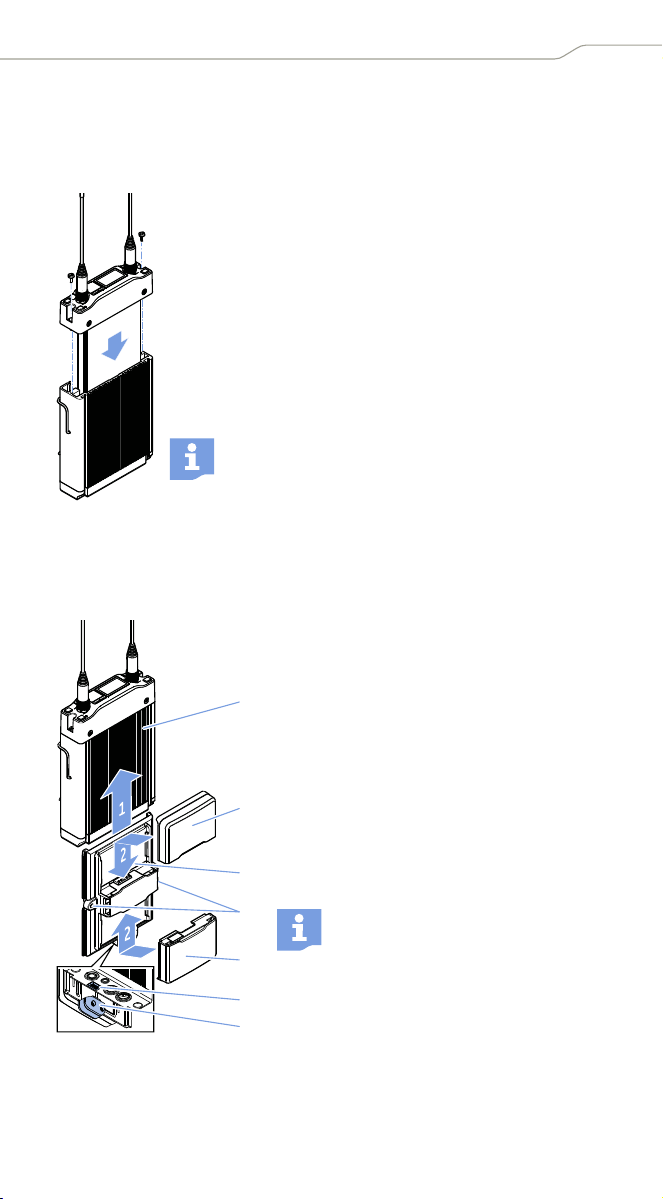
왘 Skub EK 6042 forsigtigt fuldstændigt ind i backpanel-
adapteren.
왘 Skru EK 6042 fast på backpanel-adapteren med de to
medfølgende skruer.
왘 Tilslut de primære og – hvis det ønskes – de sekundæren
audioudgange til din mixerpult ved hjælp af to Y-adap-
terkabler (se side 14).
왘 Tilslut ved hjælp af DC-IN-kablet CA 6042 DC en ekstern
strømforsyning til bøsningen DC-IN, eller montér batte-
ripakken-adapteren GA 6042 BA (se nedenfor).
Backpanel-adapterens bælteclips kan du fjerne.
왘 Montér backpanel-adapteren 1 (se
ovenfor).
왘 Skub batteripakke-adapteren 3 på den
rigtige side af backpanel-adapteren, så
stikket på backpanel-adapteret 6 tilslut-
tes til bøsningen for batteripakken 5.
왘 Skru batteripakke-adapteren fast på
backpanel-adapter med de to medføl-
gende skruern 4.
왘 Sæt de to batteripakker BA 61 2 på bat-
teripakke-adapteren, indtil det kan køres,
at de går i indgreb.
Du kan altid erstatte en batteri-
pakke – også under driften. Den
anden batteripakke overtage imid-
lertidig strømforsyningen.
1
2
3
4
2
5
6

14 | EK 6042
Ibrugtagning
Tilslutning af lydoptagelse eller mixerpult
EK 6042 kan modtage to sendere samtidigt. Til tilslutningen til lydopta-
gelsen eller mixerpulten har du derfor brug for mindst et Y-adapterkabel.
왘 Tilslut et Y-adapterkabel til den ønskede audioudgang (MAIN 1/2
og/eller AUX 1/2).
왘 Indstill det ønskede audioformat i menupunktet MAIN Format: digital
AES-3 eller analog.
På de primære audioudgange MAIN 1/2 kan audiosignalerne på de to
modtagelseskanaler udsendes enten analogt eller digitalt. På de sekun-
dære audioudgange AUX 1/2 og (Top) AUX 1/2 kan der kun udsendes
analoge audiosignaler.
Tilslutning af hovedtelefoner
FORSIGTIG
Risiko for høreskader på grund af for høj lydstyrke
Hovedtelefonudgangen kan skabe høje lydtryk. En højere
lydstyrke eller en længere påvirkningstid kan beskadige din
hørelse.
왘Indstil en middel lydstyrke.
왘 Reducér lydstyrkeniveauet, før du foretager en sender-
skift eller en frekvensændring.
왘 Montér backpanel-adapteren (se side 13).
왘 Tilslut hovedtelefonerne til backpanel-adapterens 3,5 mm-jackbøsnin-
gen PHONES.
EK 6042 | 15
Betjening
Betjening
Til- eller frakobling
Tillkobling af EK 6042:
왘 Hold tasten trykket ind længe.
Standard-displayet vises. Hovedtelefonudgangens lydstyrke indstilles
automatisk til en lavt niveau.
Frakobling af EK 6042:
왘 Hvis der vises en undermenu (se side 16), skal du trykke flere gange på
tasten , indtil standard-, CH1- eller CH2-displayet vises.
왘 Hold tasten trykket ind længe.
Der afspilles en animation. Derefter frakobles EK 6042.
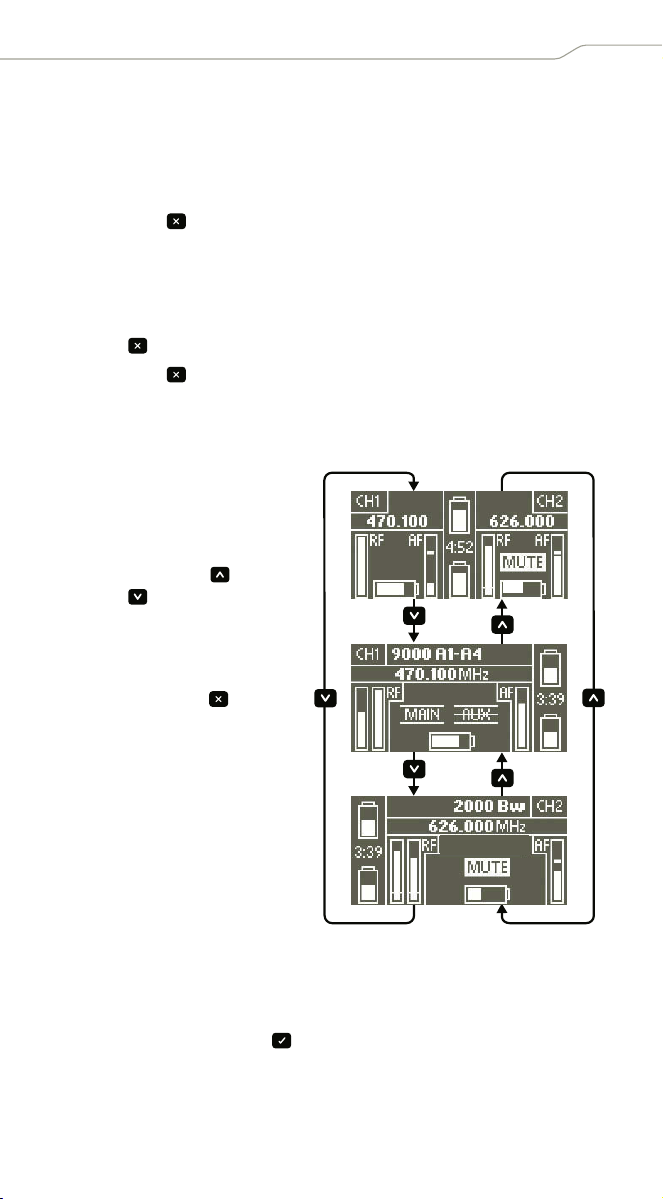
Hentning af standard-, CH1- eller CH2-displayet
Anvendelse af betjeningsmenuen
Hentning af betjeningsmenuen
왘 Tryk kortvarigt på tasten , mens standard-displayet, CH1-displayet
eller CH2-display vises.
- Hvis du henter betjeningsmenuen ud fra standard-displayet, vises
menuepunktet MAIN Format.
Efter tilkoblingen vises
standard-displayet 1. Skift
til CH1-displayet 2 eller CH2-
displayet 3:
왘 Tryk på tasten eller
tasten .
Skift fra betjeningsmenuen
(se side 16) tilbage til stan-
dard-displayet:
왘 Tryk på tasten flere
gange, indtil standard-dis-
playet vises.
1
2
3
16 | EK 6042
Betjening
- Hvis du henter betjeningsmenuen fra CH1-displayet, vises menupunk-
tet CH1 Settings.
- Hvis du henter betjeningsmenuen fra CH2-displayet, vises menupunk-
tet CH2 Settings.
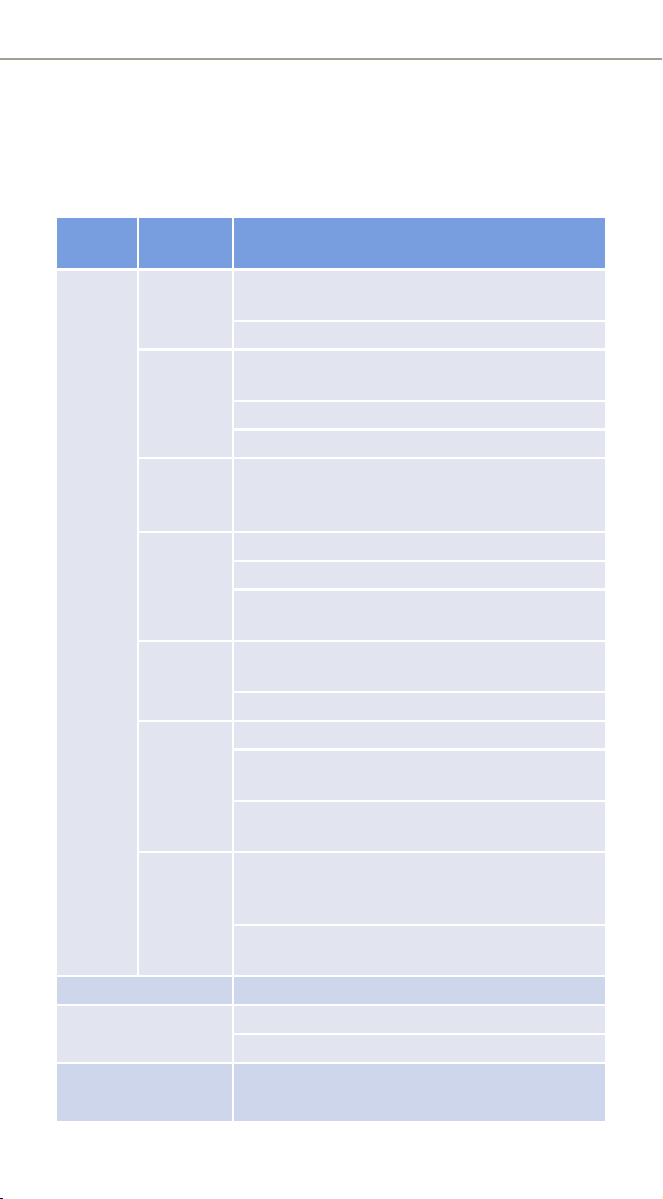
Oversigt over betjeningsmenuen
Hoved-
menu
Under-
menu
Mulige indstillinger
CH1
Settings
CH2
Settings
Trans-
mitter
Search via IR: Registrerer sender via infrarødt
interface
List: Vælger senderen i listen
Frequency Scan to next: Søg en egnet frekvens automatisk
på grundlag af Squelch-indstillingen
Tune: Indstiller frekvens manuelt
License: Vælger forindstillet frekvens-preset
Sync Overfører frekvens til senderen via infrarødt
interface, se »Gennemførelse af synkronisering
(Sync)« på side 17
Pilot
Squelch
inactive: Pilotlydanalyse deaktiveret
active: Pilotlydanalyse aktiveret
not supported: Senderen understøtter ikke
nogen pilotlyd
Squelch Analog modtagelse: Indstiller støjspærrings-
tærsklen
Digital modtagelse: inactive
MAIN Out
AUX Out
always ON: Audioudgangen er altid tilkoblet
ON by command: Audioudgang kan aktiveres
command-funktionen
MUTE by command: Lyden på audioudgang kan
frakobles med command-funktionen
Channel
Power
inactive: Audiosignalet er frakoblet på alle
udgangsbøsninger og kun aktive på hoved-
telefonudgangen
active: Audiosignalet er aktivt på alle udgangs-
bøsninger
MAIN Format digital AES-3 eller analog
Level MAIN 1
Level MAIN 2
Digital modtagelse: digital
Analog modtagelse: Indstiller audioniveau
Level AUX 1
Level AUX 2
Indstiller audioniveau
EK 6042 | 17
Betjening
Gennemførelse af synkronisering (Sync)
I menuen CH1 Settings eller CH2 Settings skal der være indstillet indstil-
linger, der passer til senderen, i undermenuerne Transmitter, Frequency
og Squelch.
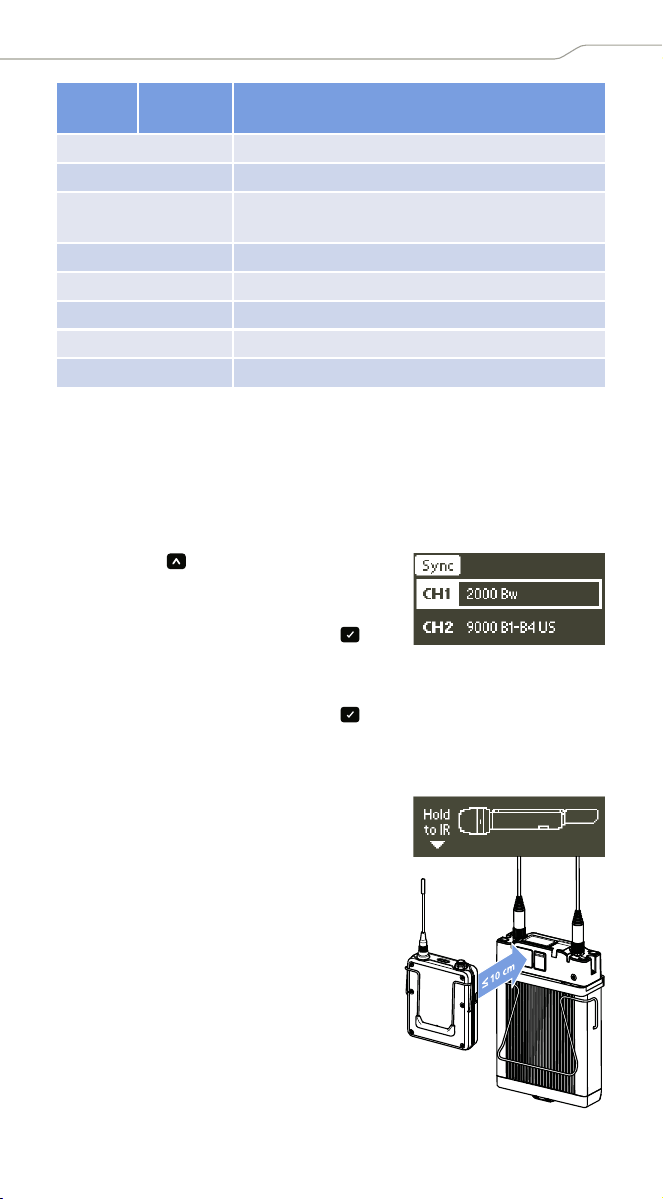
Der findes to muligheder for at starte en synkronisering. Første mulighed:
왘 Hold tasten trykket ind længe.
Valget af modtagelseskanalen vises.
왘 Vælg CH1 eller CH2 for synkroniseringen, og
start synkroniseringen med tasten .
Anden mulighed:
왘 Hent undermenupunktet Sync (i CH1 Settings eller CH2 Settings), og
start synkroniseringen med tasten .
Ved at vælge CH1 Settings eller CH2 Settings vælger du allerede mod-
tagelseskanal, der skal synkroniseres med senderen. Derfor vises der
ikke et valg af modtagelseskanalen.
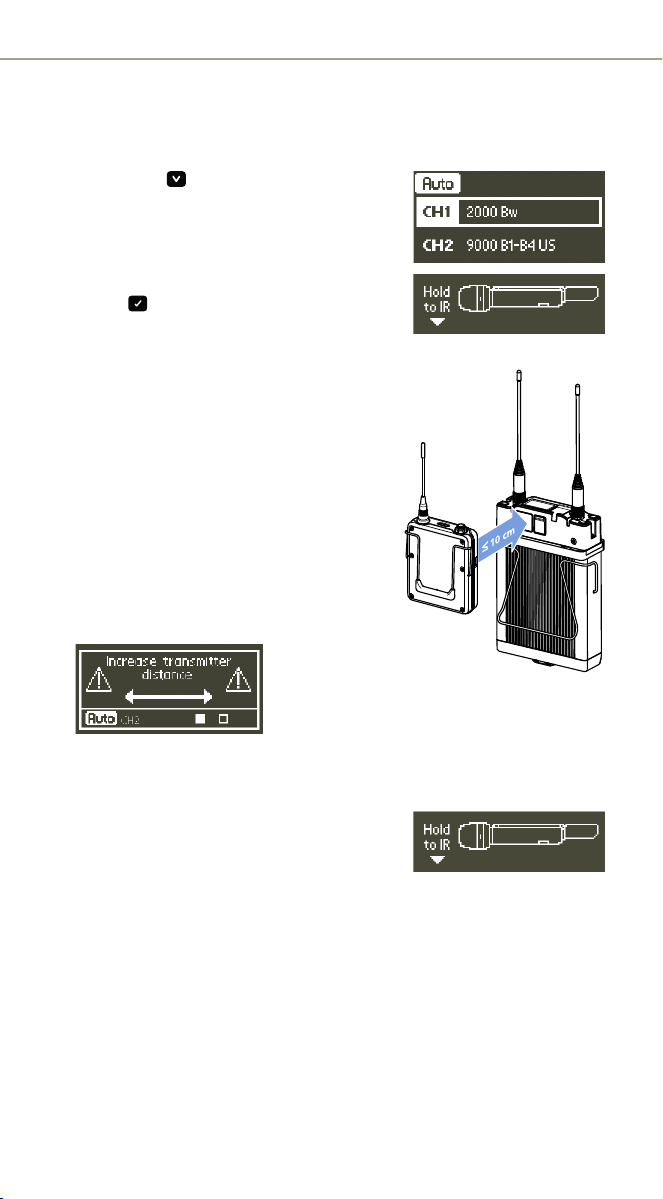
Når synkronisering er blevet startet, vises Hold
to IR, og det infrarøde interface blinker blåt.
왘 Hold den tilkoblede senders infrarøde
interface (se betjeningsvejledningen til
senderen) foran det infrarøde interface på
EK 6042.
Frekvensen, der er indstillet på EK 6042,
overføres til senderen. Hvis denne overfør-
sel lykkedes, lyser statuslysdioderne på
den tilsvarende modtagelseskanal grønt,
hvis lyden på senderen ikke er frakoblet.
Den trådløse forbindelse er straks klar til
brug. Hvis overførslen mislykkes, vises mel-
dingen Failure.
Testtone on eller off
PHONES Volume Indstiller hovedtelefonernes lydstyrke
PHONES Listen to Indstiller modtagelseskanalen CH1 eller CH2
eller CH1+CH2 på hovedtelefonernes udgang
Store Scene Gemmer aktuelle indstillinger som scene
Network Ændrer modtagerens IP-adresse
Info Viser firmware-version og word-clock-status
License List Viser licenserede frekvenser
Spectrum Scan Gennemfører en frekvensscanning
Hoved-
menu
Under-
menu
Mulige indstillinger
18 | EK 6042
Betjening
Gennemførelse af automatisk konfiguration (Auto)
Manuelle indstillinger er ikke nødvendige. Egnede indstillinger i underme-
nuerne Transmitter, Frequency og Squelch beregnes automatisk.
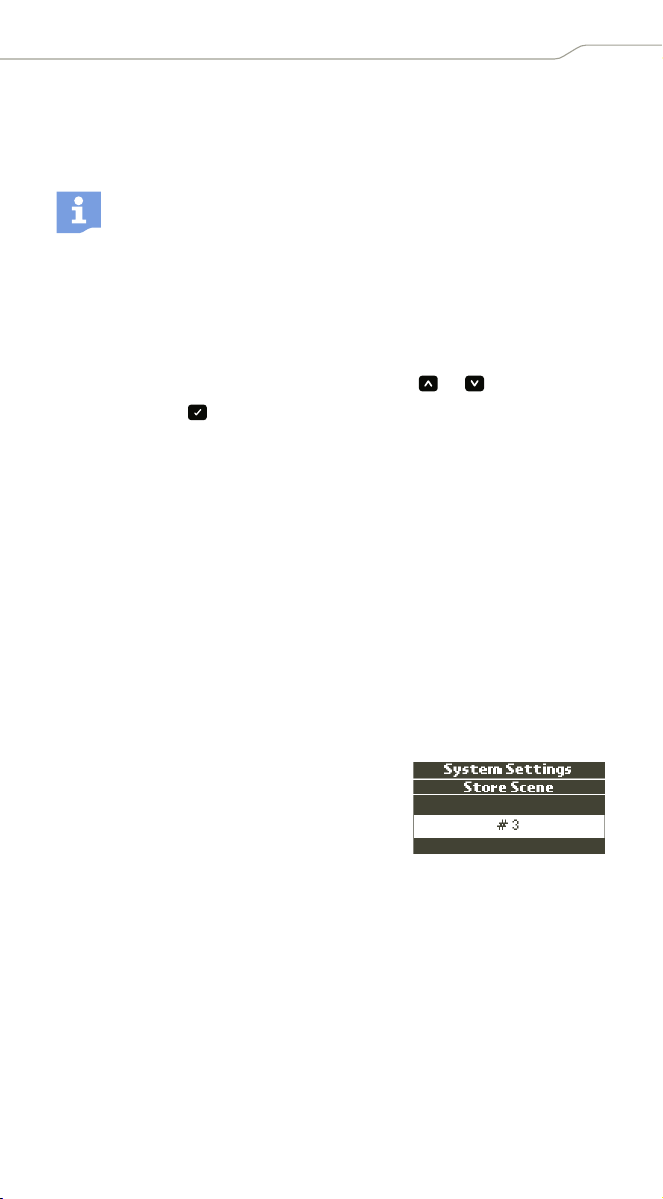
왘 Hold tasten trykket ind længe.
Valget af modtagelseskanalen vises.
왘 Vælg CH1 eller CH2 for den automatiske
konfiguration.
왘 Start den automatiske konfiguration med
tasten .
Hold to IR vises, og det infrarøde interface
blinker blåt.
왘 Hold den tilkoblede senders infrarøde
interface (se betjeningsvejledningen til
senderen) foran det infrarøde interface på
EK 6042.
EK 6042 registrerer sender og dens fre-
kvensområde. Derefter holder det infra-
røde interface op med at blinke blåt.
왘 Øg nu afstanden mellem sender og
EK 6042. Afhængigt af sendertypen kan
Increase transmitter distance vises på
displayet. Øg i dette tilfælde afstanden
endnu mere.
EK 6042 beregner nu automatisk en egnet frekvens samt omgivelser-
nes støjniveau og foretager tilsvarende indstillinger i undermenuerne
Transmitter, Frequency og Squelch.
Derefter vises Hold to IR igen, og det infra-
røde interface blinker blåt igen.
왘 Hold igen senderens infrarøde interface
foran det infrarøde interface på EK 6042.
Den beregnede frekvens overføres til senderen. Hvis denne overførsel
lykkedes, lyser statuslysdioderne på den tilsvarende modtagelseskanal
grønt, hvis lyden på senderen ikke er frakoblet. Den trådløse forbin-
delse er straks klar til brug. Hvis overførslen mislykkes, vises meldingen
Failure.
EK 6042 | 19
Betjening
Gennemførelse af frekvensscanning
Du kan gennemføre en frekvensscanning for at skabe dig et overblik over
den aktuelle frekvenssituation lokalt. Under en frekvensscanning frakob-
les lyden på audioudgangene på begge modtagelseskanaler.
왘 Hent betjeningsmenuen (se side 15), vælg Spectrum Scan, og bekræft
advarslen.
Frekvensscanningen begynder i midten af EK 6042-frekvensområdet
og kører derefter samtidigt med de lavere og højere. Du kan altid scrolle
gennem hele frekvensscanning med tasterne og .
왘 Tryk på tasten for at vende tilbage til betjeningsmenuen.
Udskiftning af scener
Hvis mikrofonerne udskiftes mellem flere takes, og der ikke er tid til at
konfigurere dem, kan du forberede dig på følgende måde:
왘 Konfigurér sender og den EK 6042 forinden. Gem de påkrævede mod-
tagerkonfigurationer som scene (se nedenfor).
Du kan gemme op til 10 scener.
왘 Skift uden at spilde tid til den påkrævede konfiguration ved at hente
den gemte scene (se side 20).
Lagring af en scene
왘 Indstil alle parametre som ønsket, og synkronisér de pågældende
sendere.
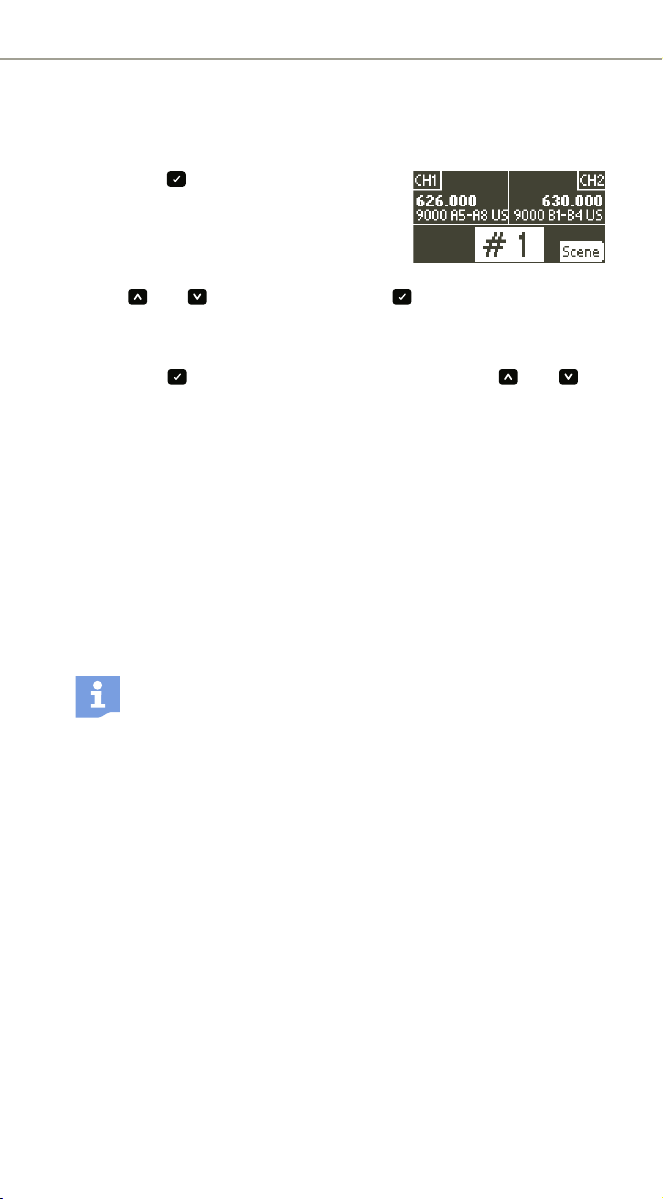
왘 Hent betjeningsmenuen (se side 15),
og vælg Store Scene.
Scenevalget vises.
왘 Vælg et scenenummer (#1 til #10).
Din konfiguration gemmes under det valgte
scenenummer. Ældre scener overskrives i den forbindelse. Du kan vise
og slette konfigurationen af alle scener i en webbrowser (se side 20).
For at indstille en modtagelsesfrekvens kan du anvende funktio-
nerne i undermenuen Frequency via menuerne CH1 Settings og
CH2 Settings (se side 16). Som alternativ kan du gennemføre den
automatiske setup (se side 17).
20 | EK 6042
Betjening
Hentning af en scene
Der findes to muligheder for at hente en scene.
Første mulighed:
왘 Hold tasten trykket ind længe.
Scenevalget vises. De forindstillede frekven-
ser og senderbetegnelserne og frekvensbån-
dene for de synkroniserede sendere vises.
왘 Vælg det ønskede scenenummer med
tasten eller , og bekræft med tasten .
Den forindstillede konfiguration aktiveres med det samme.
Anden mulighed (hurtigtvalg):
왘 Hold tasten trykket ind, og tryk samtidigt på tasten eller for
at navigere til det ønskede scenenummer.
왘 Slip begge taster.
Den sidste valgte scene aktiveres, og standard-displayet vises.
Konfiguration med en webbrowser
Du kan tilslutte EK 6042 direkte til en Windows-pc eller Mac og konfigu-
rere den med en webbrowser.
왘 Du skal ikke installere en driver, hvis du tilslutter EK 6042 til en
Windows-pc.
왘 Installér en RNDIS-driver på din Mac, før du tilslutter EK 6042. RNDIS-
drivere til Mac står frit til rådighed på internettet.
왘 Forbind EK 6042 med din computer ved hjælp af USB-kablet.
EK 6042 tilkobles automatisk. Ved den første tilslutning til en
Windows-computer installeres de påkrævede drivere til registrering af
EK 6042. Det kan vare et par minutter.
På displayet på EK 6042 vises der derefter en URL.
왘 Indtast denne URL i adresselinje i din webbrowser.
I webbrowseren vises følgende menuer.
License List
I menuen Licence List kan angive op til 100 frekvenser, der kan vælges
frit, og som primært vælges ved den automatiske søgning efter fri
frekvenser.
Band List
I menuen Band List kan angive op til 25 frekvensbånd, der kan vælges, og
som pirmært vælges ved den automatiske søgning efter fri frekvenser.
Hvis du ønsker at tilslutte flere EK 6042 samtidigt til din com-
puter, skal modtagerne først tilordnes forskellige IP-adresser
i menupunktet Network.

EK 6042 | 21
Betjening
Hvis der blev oprettet frekvenser i menuen Licence List (se ovenfor),
behandles de med højere prioritet.
Transmitter Profiles
Menuen Transmitter Profiles indeholder forindstillede senderprofiler, der
er kompatible med EK 6042. De kan vises med menupunktet Default
Profiles.
Du kan også oprette og redigere nye, brugerdefinerede sendeprofiler
i menupunktet Custom Profiles (Add profile) eller finde sendere med det
infrarøde interface (Detect over IR). Kompatible, men stadigt ukendte
sendere tilføjes i den forbindelse automatisk.
Scenes
I menuen Scenes kan du vise alle indstillinger for denne gemte scener
(se side 19) ved at klikke på dem.
Indstillingerne kan slettes ved at klikke på X.
Maintenance
I denne konfigurationsmenu kan du blandt andet:
• foretage et reset des EK 6042
• importere/eksportere konfigurationer
• gennemf're firmware-updates
22 | EK 6042
Pleje og vedligeholdelse
Pleje og vedligeholdelse
FORSIGTIG
Indtrængende væske kan ødelægge produktets elektronik.
Den kan forårsage en kortslutning af elektronikken i produktets kabinet.
왘 Sørg for, at produktet ikke kommer i nærheden af væsker.
왘 Undlad at bruge opløsnings- eller rengøringsmidler.
왘 Rengør EK 6042 og tilbehøret med en let fugtig klud.
Tilbehør
Artikel Artikelnummer Beskrivelse
EK 6042 A 506210 Bærbar kameramodtager
GA 6042-15 506213 15-pin-D-Sub-adapter til Sony
GA 6042-25 506212 25-pin-D-Sub-adapter til
UniSlot/SuperSlot™
GA 6042 BP 506214 Backpanel-adapter
GA 6042 BA 506215 Batteripakke-adapter
CA 6042 XLR 506216 Y-adapterkabel (mini-XLR til 2 x XLR)
CA 6042 DC 506217 DC-IN-kabel
BA 61 504703 Batteripakke
L60 504704 Oplader til opladning af BA 61

EK 6042 | 23
Tekniske data
Tekniske data
Højfrekvensegenskaber
Audioegenskaber
Andre egenskaber
Modtagerprincip Superheterodyn med digital demodulation
Modtagelseskanaler 2
Modtagelses-
kompatibilitet
Digital modulation: Digital 9000 LR-modus
Bredbånd-FM: HiDyn Plus, HDX
Frekvensområder 470 til 654 MHz
Koblingsbåndbredde 184 MHz
Trinbredde ≥ 5kHz
Modtagelsesdiversitet True Diversity (2 x 2 modtagere)
Følsomhed »LR-Modus«: <−90 dBm
»FM-Modus«: <−94 dBm @52 dB Audio SNR
Antenneindgange 2 SMA-bøsninger (50 Ω)
Antennetype 2 UHF-bredbåndsantenner
Nabokanalselektion Typ. 70 dB (kanalafstand ≥ 400 kHz)
Audiofrekvensgang 20 Hz til 20 kHz (+/−1,5 dB)
Dynamik > 108 dB(A)
Total harmonisk
forvrængning
»LR-Modus«: < 0,03 % (ved 1 kHz)
»FM-Modus«: < 0,5% (ved 1 kHz)
Latens »LR-Modus«: 3,0 ms (AES3)
»FM-Modus«: 1,5 ms (AES3)
Audioudgange 5-pin-mini-XLR (male), symmetrisk
MAIN 1/2 digital:
analog:
0 dBFs, AES3, 48 kHz, 24 bit
–22 dBu til +8 dBu (kan indstilles)
(Top) AUX 1/2 analog: –22 dBu til +8 dBu (kan indstilles)
Dimensioner (H x B x D) Ca. 107 x 90 x 26 mm (uden antenner)
Vægt Ca. 340 g
Konfigurationsinterface Mikro-USB-stik, type B
Multipin-interface 60-pin-stik til GA-6042-adapter

24 | EK 6042
Tekniske data
Anvendelse med backpanel-adapter GA 6042 BP
Anvendelse med batteripakke-adapter GA 6042 BA
(GA 6042 BP nødvendig til anvendelse)
Anvendelse med D-Sub-adapter
Betriebsbedingungen
Opbevarings- og transportbetingelser
Effektoptagelse Typ. 3 W ved 12 V (7 til 18 V)
Indgangsspænding 4-polet DC-IN-bøsning, typ. 12 V (7 til 18 V)
Hovedtelefonudgang 3,5 mm-jackbøsning
2 x 25 mW til 32 Ω
Dimensioner (H x B x D) Ca. 135 x 90 x 26 mm
Audioudgange 5-pin-mini-XLR (male), symmetrisk
MAIN 1/2 digital:
analog:
0 dBFs, AES3, 48 kHz, 24 bit
–22 dBu til +8 dBu (kan indstilles)
(Top) AUX 1/2 analog: –22 dBu til +8 dBu (kan indstilles)
Kompatibel batteripakke Sennheiser BA 61
Funktionstid > 4 timer (med 2 x batteripakke BA 61)
Dimensioner (H x B x D) Ca. 135 x 90 x 44 mm
D-Sub-adapter GA 6042-15 GA 6042-25
Kamerainterface D-Sub-15 (Male)
(Sony)
D-Sub-25 (Male)
(UniSlot/SuperSlot™)
Dimensioner (H x B x D) ca. 135 x 90 x 26 mm
Omgivelsestemperatur –10 °C til +55 °C
Relativ luftfugtighed Maks. 90% ved 40 °C (ikke-kondenserende)
Dråbe- og
stænkvandsbeskyttelse
Produktet må ikke udsættes for dråbe eller
stænkvand (IP2X).
Omgivelsestemperatur –25 °C til +70 °C
Relativ luftfugtighed Maks. 90% ved 40 °C
Dråbe- og
stænkvandsbeskyttelse
Produktet må ikke udsættes for dråbe eller
stænkvand (IP2X).
Stødstyrke I henhold til IEC 68 eller EN 60068, T2-27

EK 6042 | 1
Licenses
Licenses
This product includes software code developed by third parties. Please
find below a list of all used third party files.
eCos
Copyright (c) 2014, eCosCentric Ltd. All rights reserved.
Redistribution and use in source and binary forms, with or without modi-
fication, are permitted provided that the following conditions are met:
• Redistributions of source code must retain the above copyright notice,
this list of conditions and the following disclaimer.
• Redistributions in binary form must reproduce the above copyright no-
tice, this list of conditions and the following disclaimer in the documen-
tation and/or other materials provided with the distribution.
• Neither the name of the copyright holder nor the names of its contrib-
utors may be used to endorse or promote products derived from this
software without specific prior written permission.
THIS SOFTWARE IS PROVIDED BY THE COPYRIGHT HOLDERS AND CONTRIB-
UTORS “AS IS” AND ANY EXPRESS OR IMPLIED WARRANTIES, INCLUDING,
BUT NOT LIMITED TO, THE IMPLIED WARRANTIES OF MERCHANTABILITY
AND FITNESS FOR A PARTICULAR PURPOSE ARE DISCLAIMED. IN NO EVENT
SHALL THE COPYRIGHT HOLDER OR CONTRIBUTORS BE LIABLE FOR ANY DI-
RECT, INDIRECT, INCIDENTAL, SPECIAL, EXEMPLARY, OR CONSEQUENTIAL
DAMAGES (INCLUDING, BUT NOT LIMITED TO, PROCUREMENT OF SUBSTI-
TUTE GOODS OR SERVICES; LOSS OF USE, DATA, OR PROFITS; OR BUSINESS
INTERRUPTION) HOWEVER CAUSED AND ON ANY THEORY OF LIABILITY,
WHETHER IN CONTRACT, STRICT LIABILITY, OR TORT (INCLUDING NEGLI-
GENCE OR OTHERWISE) ARISING IN ANY WAY OUT OF THE USE OF THIS
SOFTWARE, EVEN IF ADVISED OF THE POSSIBILITY OF SUCH DAMAGE.
Display Font (Palm OS)
Copyright (c) 2012 DamienG
Used under the terms of the Creative Commons License.
http://fontstruct.com/fontstructions/show/palm_os
DHCP Server (dhcps)
Copyright (c) 2010, Valhalla Wireless, Todd Elliott
http://valhalla-wireless.com/All rights reserved.
Redistribution and use in source and binary forms, with or without modi-
fication, are permitted provided that the following conditions are met:
• Redistributions of source code must retain the above copyright notice,
this list of conditions and the following disclaimer.
• Redistributions in binary form must reproduce the above copyright no-
tice, this list of conditions and the following disclaimer in the documen-
tation and/or other materials provided with the distribution.

2 | EK 604
2
Licenses
• Neither the name of the Valhalla Wireless nor the names of its contrib-
utors may be used to endorse or promote products derived from this
software without specific prior written permission.
THIS SOFTWARE IS PROVIDED BY THE COPYRIGHT HOLDERS AND CONTRIB-
UTORS “AS IS” AND ANY EXPRESS OR IMPLIED WARRANTIES, INCLUDING,
BUT NOT LIMITED TO, THE IMPLIED WARRANTIES OF MERCHANTABILITY
AND FITNESS FOR A PARTICULAR PURPOSE ARE DISCLAIMED. IN NO EVENT
SHALL Valhalla Wireless BE LIABLE FOR ANY DIRECT, INDIRECT, INCIDENTAL,
SPECIAL, EXEMPLARY, OR CONSEQUENTIAL DAMAGES (INCLUDING, BUT
NOT LIMITED TO, PROCUREMENT OF SUBSTITUTE GOODS OR SERVICES; LOSS
OF USE, DATA, OR PROFITS; OR BUSINESS INTERRUPTION) HOWEVER
CAUSED AND ON ANY THEORY OF LIABILITY, WHETHER IN CONTRACT,
STRICT LIABILITY, OR TORT (INCLUDING NEGLIGENCE OR OTHERWISE) ARIS-
ING IN ANY WAY OUT OF THE USE OF THIS SOFTWARE, EVEN IF ADVISED OF
THE POSSIBILITY OF SUCH DAMAGE.
The Creative Commons License
THE WORK (AS DEFINED BELOW) IS PROVIDED UNDER THE TERMS OF THIS
CREATIVE COMMONS PUBLIC LICENSE (“CCPL” OR “LICENSE”). THE WORK IS
PROTECTED BY COPYRIGHT AND/OR OTHER APPLICABLE LAW. ANY USE OF
THE WORK OTHER THAN AS AUTHORIZED UNDER THIS LICENSE OR COPY-
RIGHT LAW IS PROHIBITED.
BY EXERCISING ANY RIGHTS TO THE WORK PROVIDED HERE, YOU ACCEPT
AND AGREE TO BE BOUND BY THE TERMS OF THIS LICENSE. TO THE EXTENT
THIS LICENSE MAY BE CONSIDERED TO BE A CONTRACT, THE LICENSOR
GRANTS YOU THE RIGHTS CONTAINED HERE IN CONSIDERATION OF YOUR
ACCEPTANCE OF SUCH TERMS AND CONDITIONS.
1. Definitions
a. “Adaptation” means a work based upon the Work, or upon the Work
and other pre-existing works, such as a translation, adaptation, de-
rivative work, arrangement of music or other alterations of a literary
or artistic work, or phonogram or performance and includes cine-
matographic adaptations or any other form in which the Work may
be recast, transformed, or adapted including in any form recogniz-
ably derived from the original, except that a work that constitutes a
Collection will not be considered an Adaptation for the purpose of
this License. For the avoidance of doubt, where the Work is a musical
work, performance or phonogram, the synchronization of the Work
in timed-relation with a moving image (“synching”) will be consid-
ered an Adaptation for the purpose of this License.
b. “Collection” means a collection of literary or artistic works, such as
encyclopedias and anthologies, or performances, phonograms or
broadcasts, or other works or subject matter other than works listed
in Section 1(f) below, which, by reason of the selection and arrange-
ment of their contents, constitute intellectual creations, in which the
Work is included in its entirety in unmodified form along with one or
more other contributions, each constituting separate and indepen-
dent works in themselves, which together are assembled into a col-
lective whole. A work that constitutes a Collection will not be consid-

EK 6042 | 3
Licenses
ered an Adaptation (as defined below) for the purposes of this Li-
cense.
c. “Creative Commons Compatible License” means a license that is list-
ed at https://creativecommons.org/compatiblelicenses that has
been approved by Creative Commons as being essentially equivalent
to this License, including, at a minimum, because that license: (i) con-
tains terms that have the same purpose, meaning and effect as the
License Elements of this License; and, (ii) explicitly permits the reli-
censing of adaptations of works made available under that license
under this License or a Creative Commons jurisdiction license with
the same License Elements as this License.
d. “Distribute” means to make available to the public the original and
copies of the Work or Adaptation, as appropriate, through sale or
other transfer of ownership.
e. “License Elements” means the following high-level license attri-
butes as selected by Licensor and indicated in the title of this Li-
cense: Attribution, ShareAlike.
f. “Licensor” means the individual, individuals, entity or entities that
offer(s) the Work under the terms of this License.
g. “Original Author” means, in the case of a literary or artistic work, the
individual, individuals, entity or entities who created the Work or if
no individual or entity can be identified, the publisher; and in addi-
tion (i) in the case of a performance the actors, singers, musicians,
dancers, and other persons who act, sing, deliver, declaim, play in, in-
terpret or otherwise perform literary or artistic works or expressions
of folklore; (ii) in the case of a phonogram the producer being the
person or legal entity who first fixes the sounds of a performance or
other sounds; and, (iii) in the case of broadcasts, the organization
that transmits the broadcast.
h. “Work” means the literary and/or artistic work offered under the
terms of this License including without limitation any production in
the literary, scientific and artistic domain, whatever may be the
mode or form of its expression including digital form, such as a book,
pamphlet and other writing; a lecture, address, sermon or other work
of the same nature; a dramatic or dramatico-musical work; a choreo-
graphic work or entertainment in dumb show; a musical composition
with or without words; a cinematographic work to which are assimi-
lated works expressed by a process analogous to cinematography; a
work of drawing, painting, architecture, sculpture, engraving or li-
thography; a photographic work to which are assimilated works ex-
pressed by a process analogous to photography; a work of applied
art; an illustration, map, plan, sketch or three-dimensional work rel-
ative to geography, topography, architecture or science; a perfor-
mance; a broadcast; a phonogram; a compilation of data to the ex-
tent it is protected as a copyrightable work; or a work performed by
a variety or circus performer to the extent it is not otherwise consid-
ered a literary or artistic work.
i. “You” means an individual or entity exercising rights under this Li-
cense who has not previously violated the terms of this License with
respect to the Work, or who has received express permission from

4 | EK 6042
Licenses
the Licensor to exercise rights under this License despite a previous
violation.
j. “Publicly Perform” means to perform public recitations of the Work
and to communicate to the public those public recitations, by any
means or process, including by wire or wireless means or public dig-
ital performances; to make available to the public Works in such a
way that members of the public may access these Works from a
place and at a place individually chosen by them; to perform the
Work to the public by any means or process and the communication
to the public of the performances of the Work, including by public
digital performance; to broadcast and rebroadcast the Work by any
means including signs, sounds or images.
k. “Reproduce” means to make copies of the Work by any means in-
cluding without limitation by sound or visual recordings and the
right of fixation and reproducing fixations of the Work, including
storage of a protected performance or phonogram in digital form or
other electronic medium.
2. Fair Dealing Rights. Nothing in this License is intended to reduce, limit,
or restrict any uses free from copyright or rights arising from limitations
or exceptions that are provided for in connection with the copyright pro-
tection under copyright law or other applicable laws.
3. License Grant. Subject to the terms and conditions of this License, Li-
censor hereby grants You a worldwide, royalty-free, non-exclusive, per-
petual (for the duration of the applicable copyright) license to exercise
the rights in the Work as stated below:
a. to Reproduce the Work, to incorporate the Work into one or more
Collections, and to Reproduce the Work as incorporated in the Collec-
tions;
b. to create and Reproduce Adaptations provided that any such Adap-
tation, including any translation in any medium, takes reasonable
steps to clearly label, demarcate or otherwise identify that changes
were made to the original Work. For example, a translation could be
marked “The original work was translated from English to Spanish.”
or a modification could indicate “The original work has been modi-
fied.”;
c. to Distribute and Publicly Perform the Work including as incorporat-
ed in Collections; and,
d. to Distribute and Publicly Perform Adaptations.
e. For the avoidance of doubt:
i. Non-waivable Compulsory License Schemes. In those jurisdictions
in which the right to collect royalties through any statutory or
compulsory licensing scheme cannot be waived, the Licensor re-
serves the exclusive right to collect such royalties for any exercise
by You of the rights granted under this License;
ii. Waivable Compulsory License Schemes. In those jurisdictions in
which the right to collect royalties through any statutory or com-
pulsory licensing scheme can be waived, the Licensor waives the
exclusive right to collect such royalties for any exercise by You of
the rights granted under this License; and,

EK 6042 | 5
Licenses
iii.Voluntary License Schemes. The Licensor waives the right to col-
lect royalties, whether individually or, in the event that the Licen-
sor is a member of a collecting society that administers voluntary
licensing schemes, via that society, from any exercise by You of
the rights granted under this License.
The above rights may be exercised in all media and formats whether now
known or hereafter devised. The above rights include the right to make
such modifications as are technically necessary to exercise the rights in
other media and formats. Subject to Section 8(f), all rights not expressly
granted by Licensor are hereby reserved.
4. Restrictions. The license granted in Section 3 above is expressly made
subject to and limited by the following restrictions:
a. You may Distribute or Publicly Perform the Work only under the
terms of this License. You must include a copy of, or the Uniform Re-
source Identifier (URI) for, this License with every copy of the Work
You Distribute or Publicly Perform. You may not offer or impose any
terms on the Work that restrict the terms of this License or the abil-
ity of the recipient of the Work to exercise the rights granted to that
recipient under the terms of the License. You may not sublicense the
Work. You must keep intact all notices that refer to this License and
to the disclaimer of warranties with every copy of the Work You Dis-
tribute or Publicly Perform. When You Distribute or Publicly Perform
the Work, You may not impose any effective technological measures
on the Work that restrict the ability of a recipient of the Work from
You to exercise the rights granted to that recipient under the terms
of the License. This Section 4(a) applies to the Work as incorporated
in a Collection, but this does not require the Collection apart from the
Work itself to be made subject to the terms of this License. If You cre-
ate a Collection, upon notice from any Licensor You must, to the ex-
tent practicable, remove from the Collection any credit as required
by Section 4(c), as requested. If You create an Adaptation, upon no-
tice from any Licensor You must, to the extent practicable, remove
from the Adaptation any credit as required by Section 4(c), as re-
quested.
b. You may Distribute or Publicly Perform an Adaptation only under the
terms of: (i) this License; (ii) a later version of this License with the
same License Elements as this License; (iii) a Creative Commons ju-
risdiction license (either this or a later license version) that contains
the same License Elements as this License (e.g., Attribution-
ShareAlike 3.0 US)); (iv) a Creative Commons Compatible License. If
you license the Adaptation under one of the licenses mentioned in
(iv), you must comply with the terms of that license. If you license
the Adaptation under the terms of any of the licenses mentioned in
(i), (ii) or (iii) (the “Applicable License”), you must comply with the
terms of the Applicable License generally and the following provi-
sions: (I) You must include a copy of, or the URI for, the Applicable Li-
cense with every copy of each Adaptation You Distribute or Publicly
Perform; (II) You may not offer or impose any terms on the Adapta-
tion that restrict the terms of the Applicable License or the ability of
the recipient of the Adaptation to exercise the rights granted to that

6 | EK 604
2
Licenses
recipient under the terms of the Applicable License; (III) You must
keep intact all notices that refer to the Applicable License and to the
disclaimer of warranties with every copy of the Work as included in
the Adaptation You Distribute or Publicly Perform; (IV) when You
Distribute or Publicly Perform the Adaptation, You may not impose
any effective technological measures on the Adaptation that restrict
the ability of a recipient of the Adaptation from You to exercise the
rights granted to that recipient under the terms of the Applicable Li-
cense. This Section 4(b) applies to the Adaptation as incorporated in
a Collection, but this does not require the Collection apart from the
Adaptation itself to be made subject to the terms of the Applicable
License.
c. If You Distribute, or Publicly Perform the Work or any Adaptations or
Collections, You must, unless a request has been made pursuant to
Section 4(a), keep intact all copyright notices for the Work and pro-
vide, reasonable to the medium or means You are utilizing: (i) the
name of the Original Author (or pseudonym, if applicable) if sup-
plied, and/or if the Original Author and/or Licensor designate anoth-
er party or parties (e.g., a sponsor institute, publishing entity, jour-
nal) for attribution (“Attribution Parties”) in Licensor's copyright
notice, terms of service or by other reasonable means, the name of
such party or parties; (ii) the title of the Work if supplied; (iii) to the
extent reasonably practicable, the URI, if any, that Licensor specifies
to be associated with the Work, unless such URI does not refer to the
copyright notice or licensing information for the Work; and (iv) , con-
sistent with Ssection 3(b), in the case of an Adaptation, a credit
identifying the use of the Work in the Adaptation (e.g., “French
translation of the Work by Original Author”, or “Screenplay based on
original Work by Original Author”). The credit required by this Sec-
tion 4(c) may be implemented in any reasonable manner; provided,
however, that in the case of a Adaptation or Collection, at a minimum
such credit will appear, if a credit for all contributing authors of the
Adaptation or Collection appears, then as part of these credits and in
a manner at least as prominent as the credits for the other contrib-
uting authors. For the avoidance of doubt, You may only use the
credit required by this Section for the purpose of attribution in the
manner set out above and, by exercising Your rights under this Li-
cense, You may not implicitly or explicitly assert or imply any connec-
tion with, sponsorship or endorsement by the Original Author, Licen-
sor and/or Attribution Parties, as appropriate, of You or Your use of
the Work, without the separate, express prior written permission of
the Original Author, Licensor and/or Attribution Parties.
d. Except as otherwise agreed in writing by the Licensor or as may be
otherwise permitted by applicable law, if You Reproduce, Distribute
or Publicly Perform the Work either by itself or as part of any Adap-
tations or Collections, You must not distort, mutilate, modify or take
other derogatory action in relation to the Work which would be prej-
udicial to the Original Author's honor or reputation. Licensor agrees
that in those jurisdictions (e.g. Japan), in which any exercise of the
right granted in Section 3(b) of this License (the right to make Ad-
aptations) would be deemed to be a distortion, mutilation, modifica-

EK 6042 | 7
Licenses
tion or other derogatory action prejudicial to the Original Author's
honor and reputation, the Licensor will waive or not assert, as appro-
priate, this Section, to the fullest extent permitted by the applicable
national law, to enable You to reasonably exercise Your right under
Section 3(b) of this License (right to make Adaptations) but not oth-
erwise.
5. Representations, Warranties and Disclaimer. UNLESS OTHERWISE MU-
TUALLY AGREED TO BY THE PARTIES IN WRITING, LICENSOR OFFERS THE
WORK AS-IS AND MAKES NO REPRESENTATIONS OR WARRANTIES OF ANY
KIND CONCERNING THE WORK, EXPRESS, IMPLIED, STATUTORY OR OTHER-
WISE, INCLUDING, WITHOUT LIMITATION, WARRANTIES OF TITLE, MER-
CHANTIBILITY, FITNESS FOR A PARTICULAR PURPOSE, NONINFRINGEMENT,
OR THE ABSENCE OF LATENT OR OTHER DEFECTS, ACCURACY, OR THE PRES-
ENCE OF ABSENCE OF ERRORS, WHETHER OR NOT DISCOVERABLE. SOME JU-
RISDICTIONS DO NOT ALLOW THE EXCLUSION OF IMPLIED WARRANTIES, SO
SUCH EXCLUSION MAY NOT APPLY TO YOU.
6. Limitation on Liability. EXCEPT TO THE EXTENT REQUIRED BY APPLICA-
BLE LAW, IN NO EVENT WILL LICENSOR BE LIABLE TO YOU ON ANY LEGAL
THEORY FOR ANY SPECIAL, INCIDENTAL, CONSEQUENTIAL, PUNITIVE OR EX-
EMPLARY DAMAGES ARISING OUT OF THIS LICENSE OR THE USE OF THE
WORK, EVEN IF LICENSOR HAS BEEN ADVISED OF THE POSSIBILITY OF SUCH
DAMAGES.
7. Termination
a. This License and the rights granted hereunder will terminate auto-
matically upon any breach by You of the terms of this License. Indi-
viduals or entities who have received Adaptations or Collections
from You under this License, however, will not have their licenses ter-
minated provided such individuals or entities remain in full compli-
ance with those licenses. Sections 1, 2, 5, 6, 7, and 8 will survive any
termination of this License.
b. Subject to the above terms and conditions, the license granted here
is perpetual (for the duration of the applicable copyright in the
Work). Notwithstanding the above, Licensor reserves the right to re-
lease the Work under different license terms or to stop distributing
the Work at any time; provided, however that any such election will
not serve to withdraw this License (or any other license that has
been, or is required to be, granted under the terms of this License),
and this License will continue in full force and effect unless terminat-
ed as stated above.
8. Miscellaneous
a. Each time You Distribute or Publicly Perform the Work or a Collection,
the Licensor offers to the recipient a license to the Work on the same
terms and conditions as the license granted to You under this Li-
cense.
b. Each time You Distribute or Publicly Perform an Adaptation, Licensor
offers to the recipient a license to the original Work on the same
terms and conditions as the license granted to You under this Li-
cense.

8 | EK 604
2
Licenses
c. If any provision of this License is invalid or unenforceable under ap-
plicable law, it shall not affect the validity or enforceability of the re-
mainder of the terms of this License, and without further action by
the parties to this agreement, such provision shall be reformed to
the minimum extent necessary to make such provision valid and en-
forceable.
d. No term or provision of this License shall be deemed waived and no
breach consented to unless such waiver or consent shall be in writing
and signed by the party to be charged with such waiver or consent.
e. This License constitutes the entire agreement between the parties
with respect to the Work licensed here. There are no understandings,
agreements or representations with respect to the Work not speci-
fied here. Licensor shall not be bound by any additional provisions
that may appear in any communication from You. This License may
not be modified without the mutual written agreement of the Licen-
sor and You.
f. The rights granted under, and the subject matter referenced, in this
License were drafted utilizing the terminology of the Berne Conven-
tion for the Protection of Literary and Artistic Works (as amended on
September 28, 1979), the Rome Convention of 1961, the WIPO Copy-
right Treaty of 1996, the WIPO Performances and Phonograms Trea-
ty of 1996 and the Universal Copyright Convention (as revised on Ju-
ly 24, 1971). These rights and subject matter take effect in the rele-
vant jurisdiction in which the License terms are sought to be en-
forced according to the corresponding provisions of the implementa-
tion of those treaty provisions in the applicable national law. If the
standard suite of rights granted under applicable copyright law in-
cludes additional rights not granted under this License, such addi-
tional rights are deemed to be included in the License; this License is
not intended to restrict the license of any rights under applicable
law.
EK 6042 | 1
Pin assignment
Pin assignment
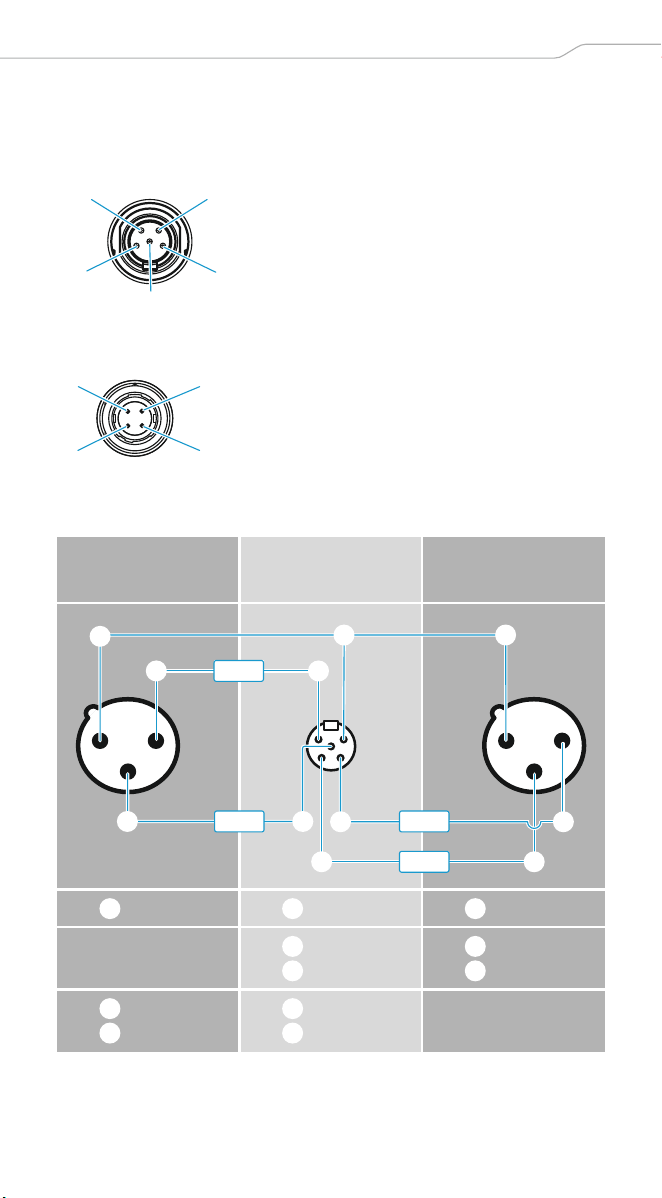
5-Pin-Mini-XLR (Male) AES3 MAIN 1/2, AUX 1/2, (Top) AUX
DC-IN
CA 6042 XLR Cable
1 GND
2 CH 1 (+)
3 CH 1 (–)
4 CH 2 (+)
5 CH 2 (–)
1 GND
2 –
3 –
4 Power
3-Pin-XLR (Female)
MAIN 2/AUX 2
5-Pin-Mini-XLR
(Female)
3-Pin-XLR (Female)
MAIN 1/AUX 1
GND GND GND
+ (black)
– (green)
+ (black)
– (green)
+ (white)
– (red)
+ (white)
– (red)
5
3
1
4
2
32
14
1
4
4
1
1
5 5
3
2
3
2
black
green
white
red
1 1 1
2
3
2
3
4
5
4
5
2 | EK 6042
Pin assignment
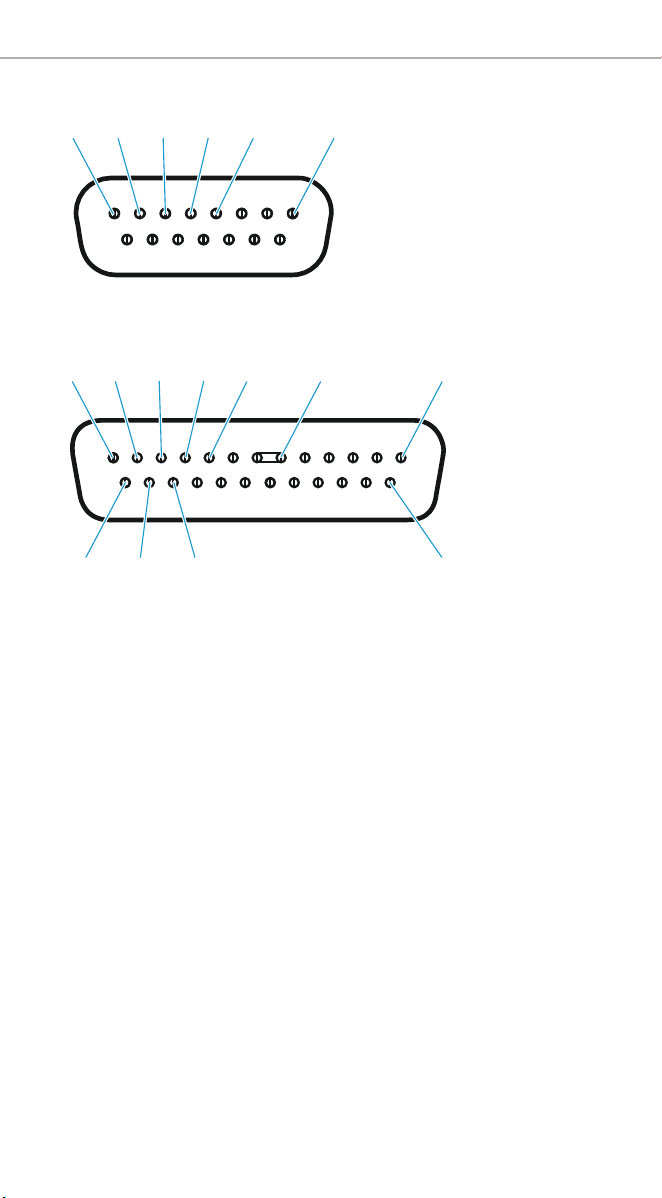
D-Sub-15
D-Sub-25
Unbelegte Pins dürfen nicht mit einem Signal belegt werden.
Unassinged pins must not be wired.
Les broches non assignées ne doivent pas être connectées.
I pin liberi non possono essere occupati da un segnale.
Los pines que no estén ocupados no se deben ocupar con una señal.
Os pinos sem ocupação não podem ser ocupados com um sinal.
Niet bezette pins mogen niet op een signaal worden aangesloten.
На неиспользуемые выводы не должны подаваться сигналы.
空闲的针脚不得被分配信号。
1 GND
2 CH 1/AES3
3 CH 2
4 Power
5 GND
8 GND
1 GND
2 CH 1P/AES3 P
3 CH 1N/AES3 N
4 GND
5 Power
8 GND
C GND
D GND
E CH 2P
F CH 2N
O GND
183245
1
D
2345 8 C
EF O


Sennheiser electronic GmbH & Co. KG
Am Labor 1, 30900 Wedemark, Germany
www.sennheiser.com
Publ. 06/19, 560088/A04