EN User Manual | Fridge Freezer

Welcome to our family
Thank you for bringing Frigidaire into your home! We see your purchase as the
beginning of a long relationship together.
This manual is your resource for the use and care of your product. Please read it
before using your appliance. Keep it handy for quick reference. If something doesn’t
seem right, the troubleshooting section will help you with common issues.
FAQ, helpful tips and videos, cleaning products, and kitchen and home accessories
are available at http://www.frigidaire.com.
We are here for you! Visit our website, chat with an agent, or call us if you need
help. We may be able to help you avoid a service visit. If you do need service, we
can get that started for you.
Let’s make it official! Be sure to register your product.
CONTENTS
1. IMPORTANT SAFETY INFORMATION................................................. 2
2. FEATURES ........................................................................................... 5
3. INSTALLATION .....................................................................................6
4. DOOR REMOVAL ................................................................................. 8
5. WATER SUPPLY CONNECTION ......................................................... 9
6. CONTROLS AND SETTINGS .............................................................11
7. INTERNAL WATER DISPENSER .......................................................13
8. ICE MAKER .........................................................................................13
9. STORAGE FEATURES .......................................................................15
10. STORING FOOD AND SAVING ENERGY ....................................... 16
11. NORMAL OPERATING SOUNDS .................................................... 17
12. FILTER REPLACEMENT .................................................................. 17
13. CARE AND CLEANING .................................................................... 19
14. TROUBLESHOOTING....................................................................... 21
15. LIMITED WARRANTY........................................................................25
1. IMPORTANT SAFETY
INFORMATION
1.1 Keep a record for
quick reference
Model number
..........................................................
Serial number
..........................................................
Purchase date
..........................................................
2 ENGLISH
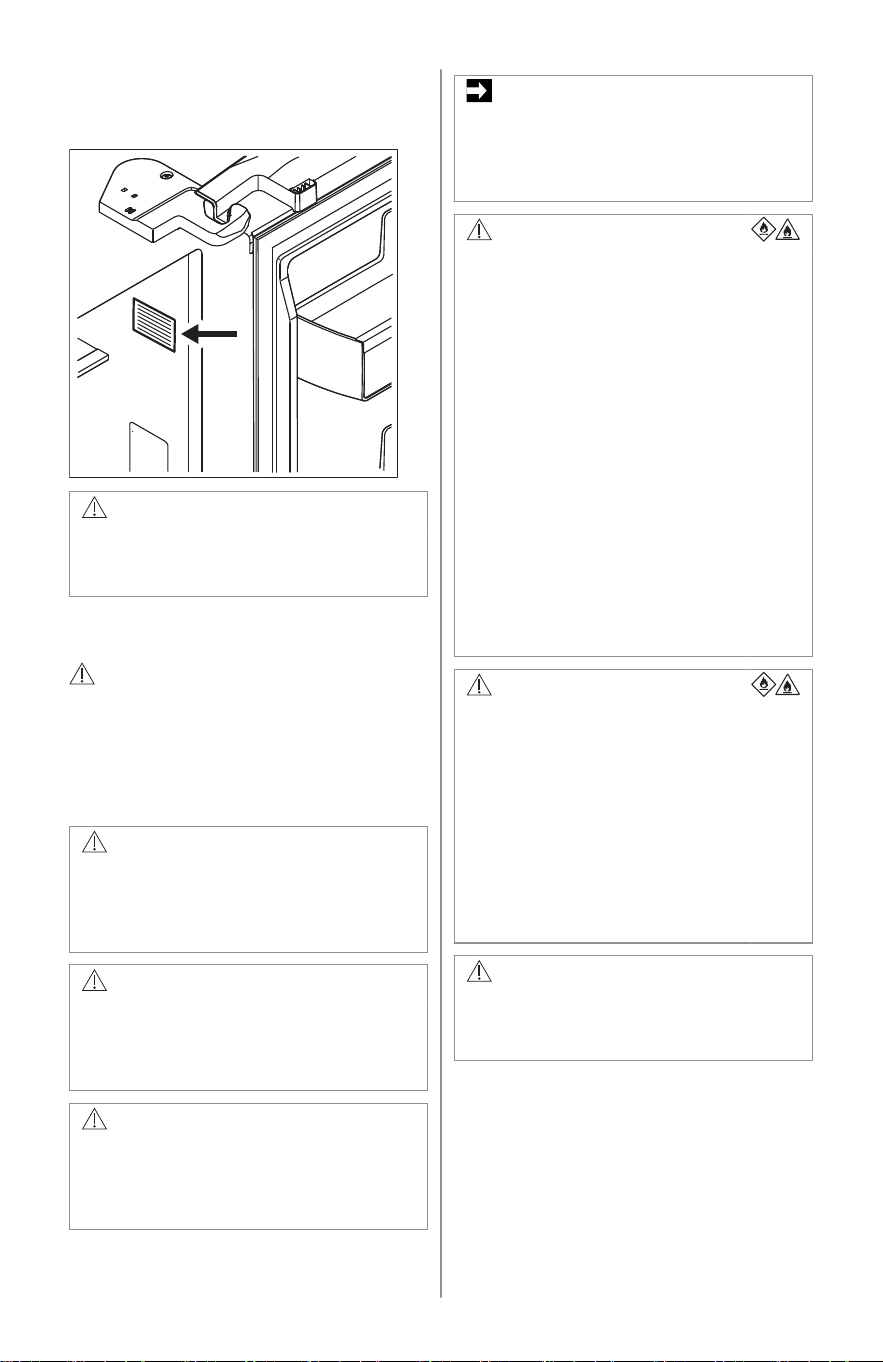
1.2 Serial number
location
WARNING!
You must follow these guidelines to
ensure that your refrigerator’s safety
mechanisms are operating correctly.
1.3 Safety definitions
This is the safety alert symbol. It is
used to alert of potential personal
injury hazards. Obey all safety
messages that follow this symbol to
avoid possible injury or death.
DANGER
DANGER indicates an imminently
hazardous situation which, if not
avoided, will result in death or serious
injury.
WARNING!
WARNING indicates a potentially
hazardous situation which, if not
avoided, could result in death or
serious injury.
CAUTION!
CAUTION indicates a potentially
hazardous situation which, if not
avoided, may result in minor or
moderate injury.
IMPORTANT
IMPORTANT indicates installation,
operation or maintenance information
which is important but not hazard-
related.
DANGER
DANGER Risk of fire or
explosion. Flammable
refrigerant used. Do not use
mechanical devices to defrost
refrigerator. Do not puncture
refrigerant tubing.
DANGER Risk of fire or
explosion. Flammable
refrigerant used. To be
repaired only by trained
service personnel. Use only
manufacturer-authorized
service parts. Any repair
equipment used must be
designed for flammable
refrigerants. Follow all
manufacturer repair
instructions. Do not puncture
refrigerant tubing.
CAUTION!
CAUTION Risk of fire or
explosion. Dispose of
refrigerator properly in
accordance with the applicable
federal or local regulations.
Flammable refrigerant used.
CAUTION Risk of fire or
explosion due to puncture of
refrigerant tubing. Follow
handling instructions carefully.
Flammable refrigerant used.
WARNING!
CALIFORNIA RESIDENTS ONLY
WARNING! Cancer and Reproductive
Harm http://www.P65Warnings.ca.gov
1.4 Child safety
This appliance is not intended for
use by persons (including children)
with reduced physical, sensory or
mental capabilities, or lack of
experience and knowledge, unless
ENGLISH 3
they have been given supervision or
instruction concerning use of the
appliance by a person responsible
for their safety.
Destroy or recycle the carton,
plastic bags, and any exterior
wrapping material immediately after
the refrigerator is unpacked.
Children should never use these
items to play. Cartons covered with
rugs, bedspreads, plastic sheets or
stretch wrap may become airtight
chambers, and can quickly cause
suffocation.
1.5 Important safety
instructions
Do not store or use gasoline or
other flammable vapors and liquids
in the vicinity of this or any other
appliance.
Do not store explosive substances
such as aerosol cans with a
flammable propellant in this
appliance.
Do not operate the refrigerator in
the presence of explosive fumes
Avoid contact with any moving parts
of automatic ice maker.
Remove all staples from the carton.
Staples can cause severe cuts, and
also destroy finishes if they come in
contact with other appliances or
furniture.
WARNING!
Do not use electrical appliances inside
the food storage compartments of the
appliance unless they are of the type
recommended by the manufacturer.
1.6 Proper disposal of
your refrigerator or
freezer
Risk of child entrapment
Child entrapment and suffocation
are not problems of the past.
Junked or abandoned refrigerators
or freezers are still dangerous –
even if they will sit for “just a few
days”. If you are getting rid of your
old refrigerator or freezer, follow the
instructions below to help prevent
accidents.
We strongly encourage responsible
appliance recycling/disposal
methods. Check with your utility
company or visit http://
www.energystar.gov/recycle for
more information on recycling your
old refrigerator.
Before you throw away your old
refrigerator/freezer:
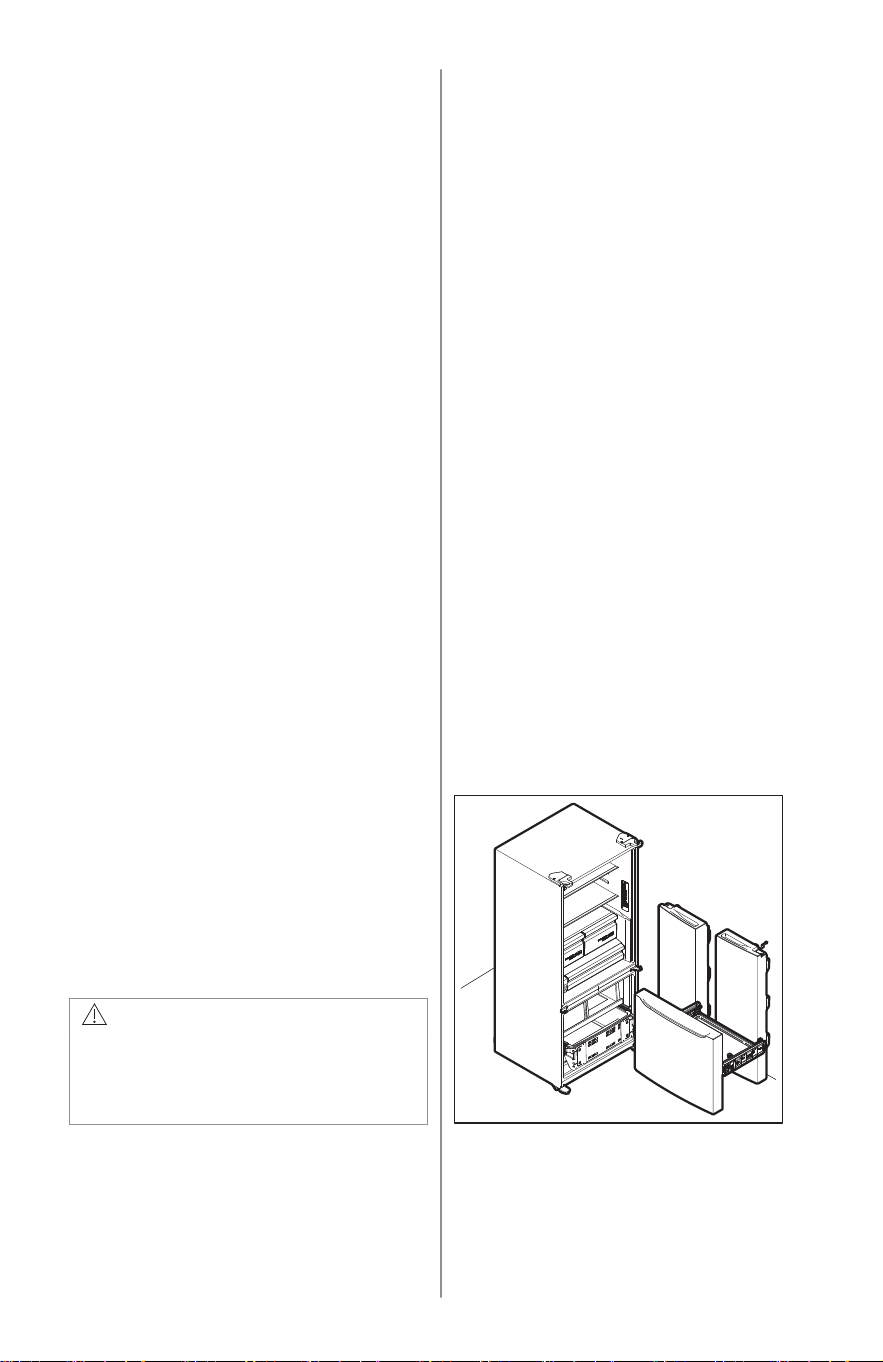
• Remove doors.
• Leave shelves in place so children may
not easily climb inside.
• Have it removed by a qualified service
technician.
4 ENGLISH
1.7 Electrical
information
IMPORTANT
Pressing and holding the On/Off
button for three seconds, located on
the temperature control panel, will
disable the appliance cooling system
but does not disconnect the power to
the light bulb and other electrical
components. To turn off power to the
appliance you must unplug the power
cord from the electrical outlet.
• The appliance must be plugged into its
own dedicated 115 Volt, 60 Hz., 15
Amp, AC only electrical outlet. The
power cord of the appliance is
equipped with a three-prong grounding
plug for your protection against
electrical shock hazards. It must be
plugged directly into a properly
grounded three-prong receptacle. The
receptacle must be installed in
accordance with local codes and
ordinances. Consult a qualified
electrician. Do not use an extension
cord or adapter plug.
WARNING!
Avoid fire hazard or electric shock.
• If the power cord is damaged, it should
be replaced by an authorized service
technician to prevent any risk.
• Never unplug the appliance by pulling
on the power cord. Always grip the plug
firmly, and pull straight out from the
receptacle to prevent damaging the
power cord.
• Unplug the appliance before cleaning
and before replacing the light bulb to
avoid electrical shock.
• Performance may be affected if the
voltage varies by 10% or more.
Operating the appliance with
insufficient power can damage the
compressor. Such damage is not
covered under your warranty.
• Do not plug the unit into an electrical
outlet controlled by a wall switch or pull
cord to prevent the appliance from
being turned off accidentally.
• Do not pinch, knot, or bend the power
cord in any manner.
WARNING!
When positioning the appliance,
ensure the supply cord is not trapped
or damaged.
Do not locate multiple portable socket-
outlets or portable power supplies at
the rear of the appliance.
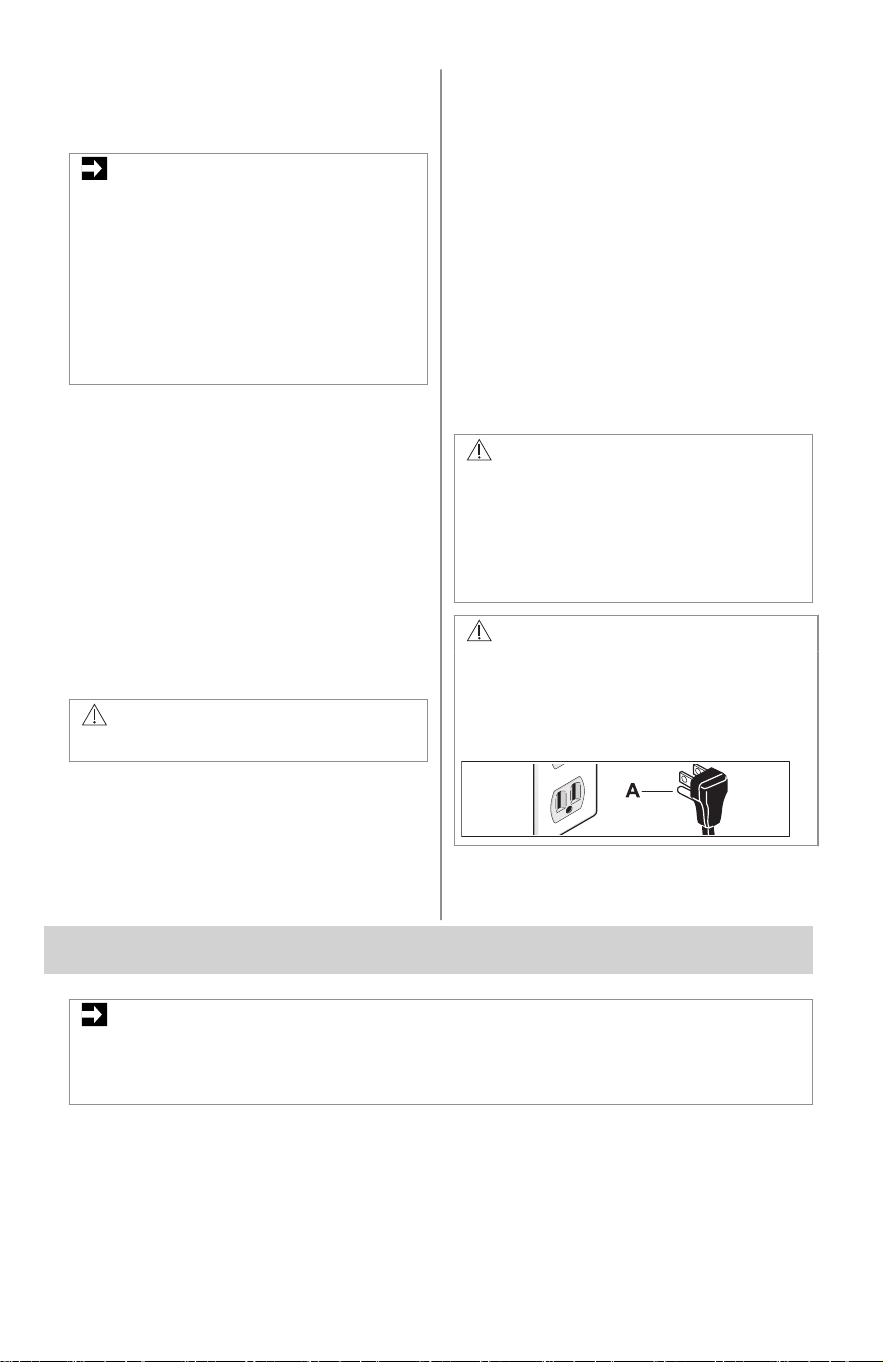
WARNING!
Do not, under any circumstances, cut,
remove, or bypass the grounding
prong (A). Always use the power cord
with a three-prong grounded plug and
grounding type wall receptacle.
2. FEATURES
IMPORTANT
Features may vary by model.
Accessories are available for your appliance and may be purchased at
Frigidaire.com or by calling toll-free 1-800-374-4432 or from an authorized seller.
ENGLISH 5
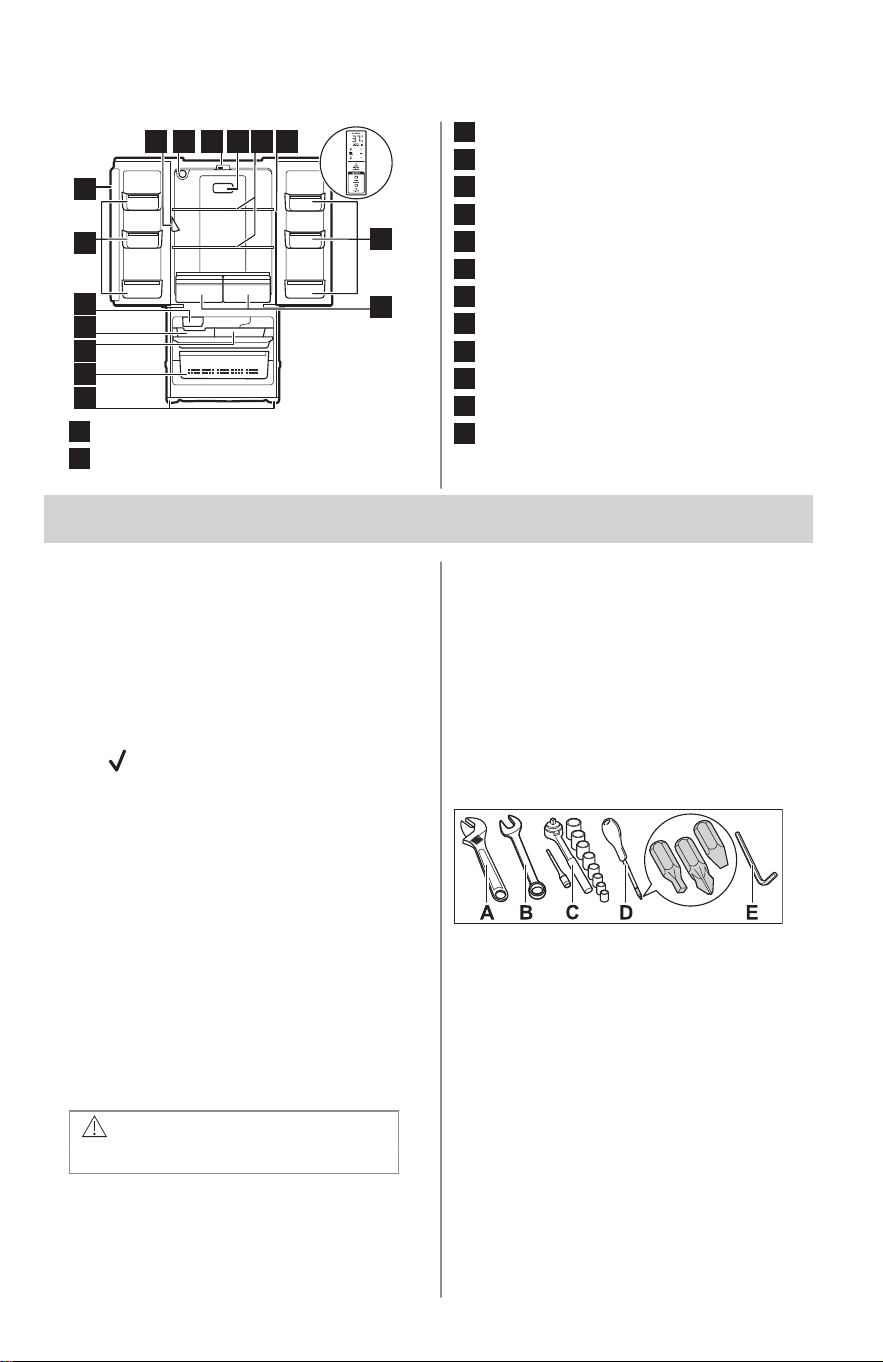
2.1 Internal Water Dispenser Model
1
2
3
6
6
7
8 12 1310 11
14
9
4
5
1
Leveling feet
2
Lower Freezer Basket
3
Upper Freezer Basket
4
Ice Bucket
5
Ice Maker
6
Door Bins
7
Flipper Mullion
8
Internal Water Dispenser
9
Water Filter
10
Flipper Mullion Guide
11
Air Filter
12
Shelves
13
Control Panel
14
Crispers
3. INSTALLATION
This User Manual provides general
installation and operating instructions for
your model. We recommend using a
service or kitchen contracting professional
to install your appliance. Use the
appliance only as instructed in this User
Manual. Before starting the appliance,
follow these important first steps.
3.1 Installation Checklist
Doors
❐ Door seals completely the cabinet on
all sides
Leveling
❐ Refrigerator is level side-to-side and
slightly elevated in front to assist with
door and drawer closing. Front should
be higher than back.
❐ Cabinet is setting solid on all corners
Electrical Power
❐ House power is turned on
❐ Appliance is plugged in
Ice Maker
❐ House water supply is connected to
the appliance
WARNING!
Potable water supply only.
❐ No water leaks present in any
connections - recheck in 24 hours
❐ Ice maker is turned on
❐ Ice and water dispenser operates
correctly
Final Checks
❐ Shipping material is removed
❐ Refrigerator and freezer temperatures
are set
❐ Registration card is sent in
3.2 Tools necessary
These tools are necessary at different
stages of the installation process:
A. Adjustable Wrench
B. Fixed Wrench: 10mm
C. Socket Wrench: 8mm
D. Screwdriver: Phillips™ Head or Flat
Head or T20 Torx
E. 6mm Allen Wrench
3.3 Location
• If possible, place the appliance out of
direct sunlight and away from the
range, dishwasher, or other heat
sources.
6 ENGLISH
• The appliance must be installed on a
floor that is level and strong enough to
support a fully loaded appliance.
• Consider water supply availability for
models equipped with an automatic ice
maker.
WARNING!
This appliance is intended for use in
residential household and similar
interior applications such as:
• Kitchen / kitchenette
• Pantry room
• Basement
• Enclosed garage
• Other interior residential type
environments
WARNING!
Allow the following clearances for
ease of installation, proper air
circulation, plumbing, and electrical
connections:
• Top 3/8" (9.5mm)
• Sides 3/8" (9.5mm)
• Back 2" (50.8mm)
NOTE
If you place the appliance with the
door hinge side against a wall, you
may have to allow additional space so
the door can be open wider.
3.4 Door opening
Position the appliance to allow easy
access to a counter when removing food.
Make sure the refrigerator drawers and
freezer baskets can be fully open.
3.5 Cabinet leveling and door
alignment
Guidelines for final positioning of
appliance:
• All 4 corners of the cabinet must rest
firmly on the floor.
• Slightly elevate the front to ensure that
doors close and seal properly.
• Align the doors with each other and
level them.
You can meet most of these conditions by
raising or lowering the adjustable front
feet.
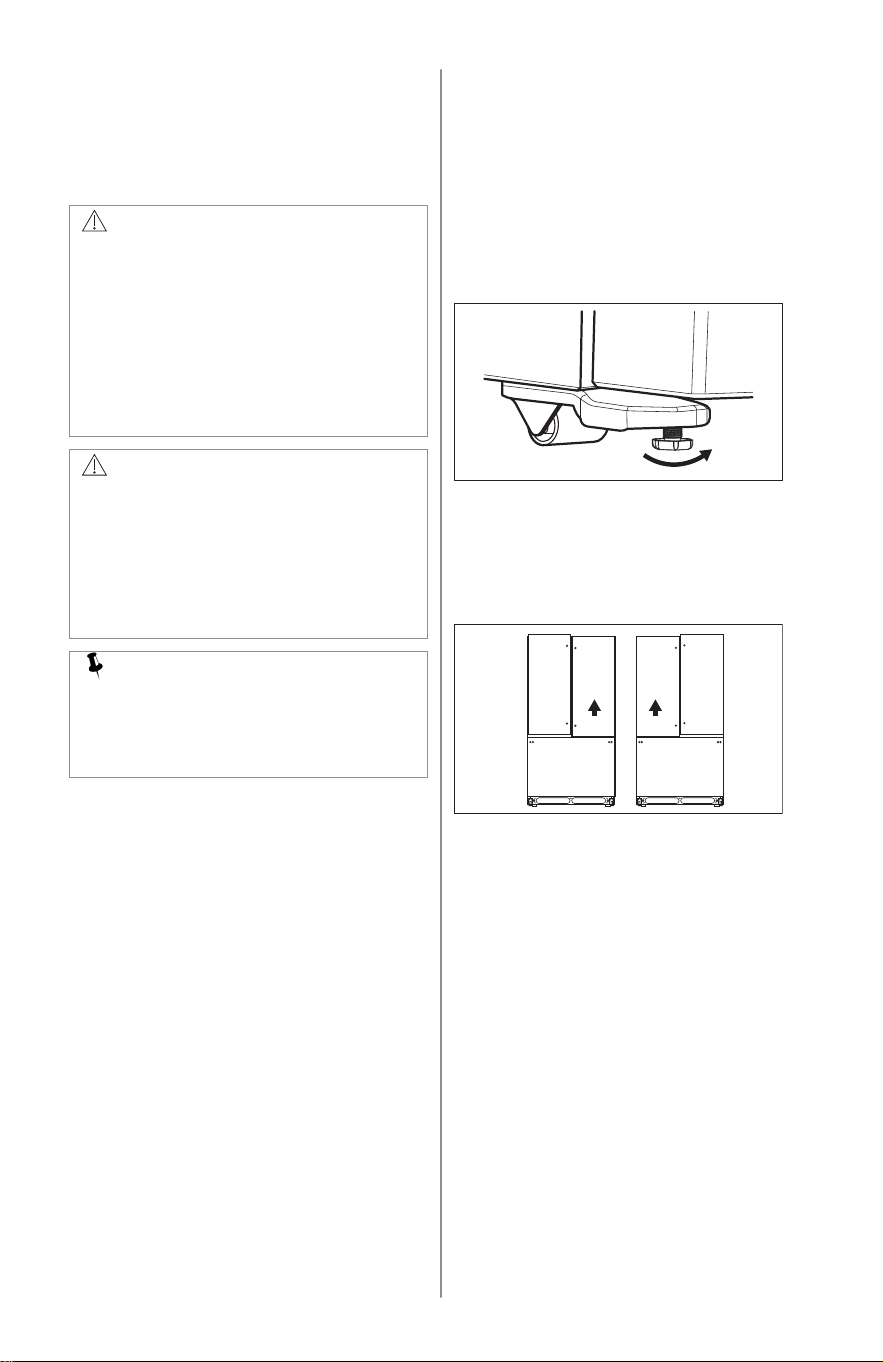
3.6 Leveling
Level the cabinet by raising or lowering the
front adjustable feet.
1. Slightly open the freezer drawer.
2. Lower the adjustable feet until they
touch the floor. Use pliers to adjust.
• To raise the unit, turn the feet
clockwise.
• To lower the unit, turn the feet
counterclockwise.
3. Ensure both doors are free of binding.
The seals must touch the cabinet on
all 4 sides.
4. Ensure the cabinet is stable.
3.7 Door Alignment
To align the door:
1. Take the washers from the plastic bag.
2. Lift the lower door up and insert the
washer on the center hinge pin.
3. If necessary, repeat the steps on the
other side of the appliance.
ENGLISH 7
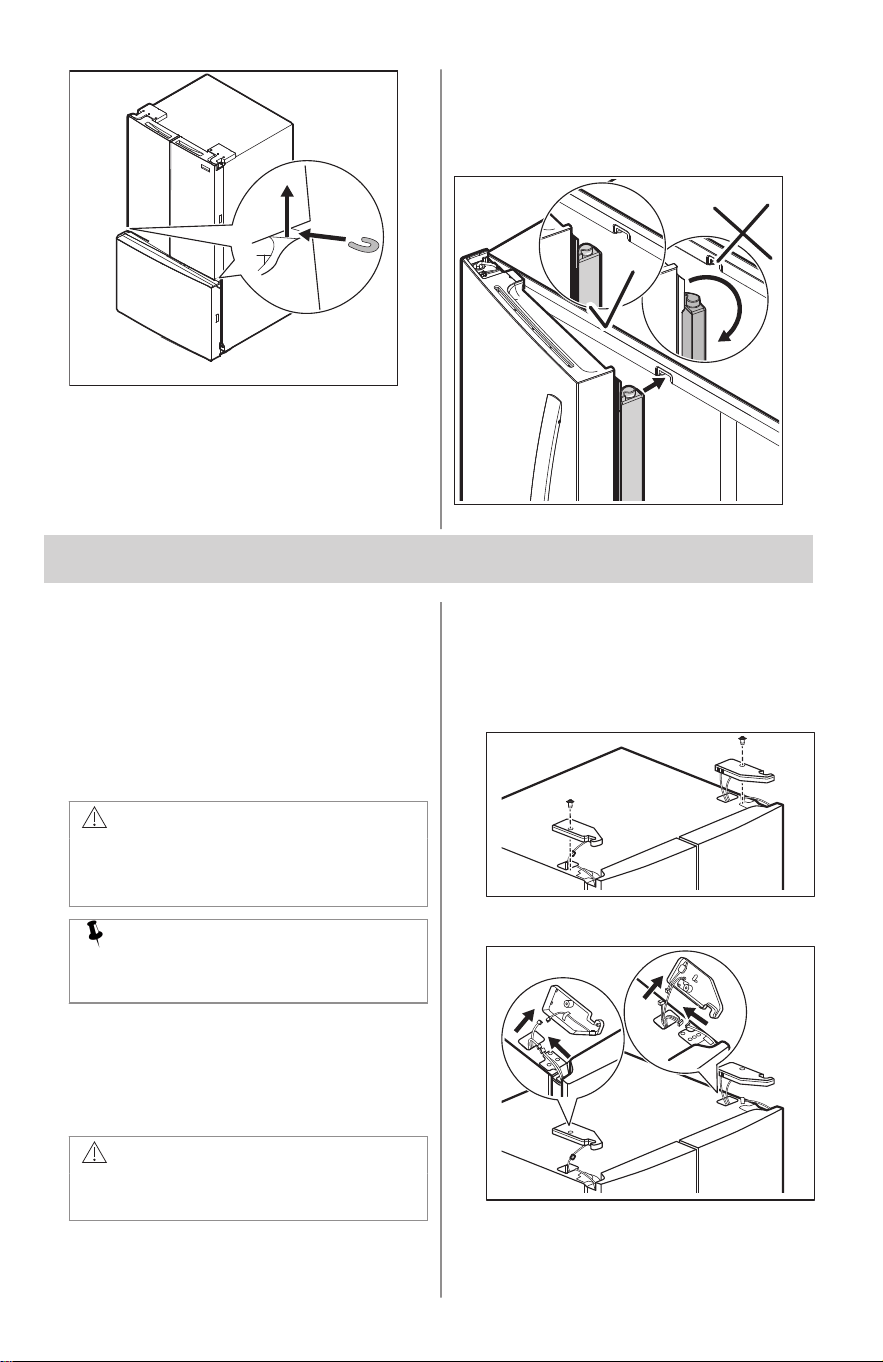
3.8 Flipper mullion
Adjust the flipper mullion for proper
connection with the mullion guide. Ensure
the flipper mullion is folded and
perpendicular to the fresh food door. If the
mullion guide is not in the correct position,
it could prevent the door from closing
completely.
4. DOOR REMOVAL
4.1 Getting through narrow
spaces
If your appliance does not fit through an
entrance area, you can remove the doors.
Check first by measuring the entrance.
4.2 Removing/Installing
refrigerator doors
CAUTION!
The door is heavy. We recommend
two people to remove or replace the
door assembly from the cabinet.
NOTE
Do not use an electric tool to unscrew
and screw parts.
To prepare for removing the doors:
1. Unplug the electrical power cord from
the wall outlet.
2. Remove any food from the door
shelves and close the doors.
WARNING!
Make sure the electrical power cord is
unplugged from the wall outlet.
To remove refrigerator doors:
1. Trace lightly around the door top
hinges with a pencil. This makes
reinstallation easier. Remove the
screw from the top hinge cover.
2. Disconnect electrical harness running
from door to hinge cover.
3. Remove three 8 mm bolts from both
top hinges. Lift the doors up off lower
8 ENGLISH
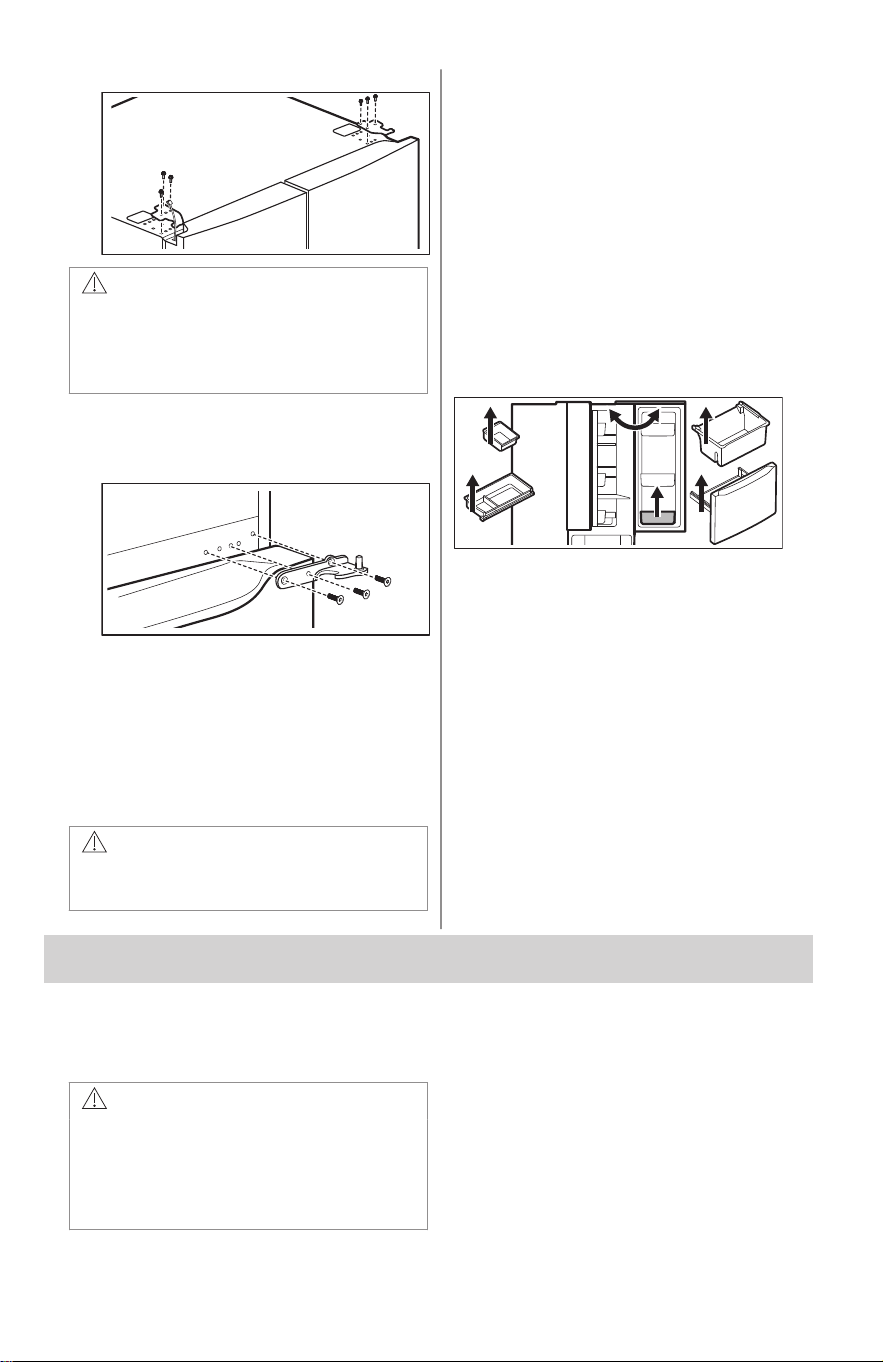
hinges and carefully set aside.
CAUTION!
Place the doors aside in a secure
position where they cannot fall and
cause personal injury or damage to
the doors.
4. To gain access to the lower hinge,
extend the drawer. Unscrew the lower
hinge screws and slide the hinge
inward to remove it.
5. To reinstall doors, reverse the
procedure.
Once both doors are in place, ensure they
are aligned with each other and level and
replace the top hinge cover. Refer to
Installation.
4.3 Removing The Freezer Drawer
CAUTION!
Drawer is heavy. Use caution when
lifting.
To remove the freezer drawer:
1. Open and fully extend the drawer.
2. Remove the ice bucket and upper
basket.
3. Open the refrigerator door.
4. Remove the bottom bins on the right
door.
5. Remove the lower basket.
• Drawer with sliders: Inside the
cabinet remove the screw and
press the tabs on both sides.
Remove the drawer with sliders.
• Drawer without sliders: Remove the
two screws on both sides. Remove
the drawer separately.
To reinstall the freezer drawer:
1. Reverse the procedure.
2. Replace the basket and bins.
5. WATER SUPPLY CONNECTION
5.1 Before Installing The Water
Supply Line
WARNING!
To avoid electric shock, which can
cause death or severe personal injury,
disconnect the appliance from the
electrical power before connecting a
water supply line to the appliance.
ENGLISH 9
CAUTION!
To avoid property damage:
• Use copper or stainless steel
braided tubing for the water supply
line. Do not use water supply
tubing made of 1/4" plastic. Plastic
tubing greatly increases the
potential for water leaks, and the
manufacturer will not be
responsible for any damage if you
use plastic tubing for the supply
line.
• Do not install water supply tubing in
areas where temperatures fall
below freezing.
• Chemicals from a malfunctioning
softener can damage the ice
maker. If the ice maker is
connected to soft water, ensure
that the softener is maintained and
working properly.
IMPORTANT
Ensure your water supply line
connections comply with all local
plumbing codes.
5.2 You will need
• Basic tools: adjustable wrench, flat-
blade screwdriver, and Phillips™
screwdriver.
• Access to a household cold water line
with water pressure between 30 and
100psi.
• A water supply line made of 1/4"
(6.4mm) OD, copper or stainless steel
tubing. To determine the length of
tubing needed, measure the distance
from the ice maker inlet valve at the
back of the appliance to your cold
water pipe. Then add approximately 6ft
(1.8m) to ensure you can move the
appliance for cleaning.
• A shutoff valve to connect the water
supply line to your household water
system. Do not use a self-piercing type
shutoff valve.
• Do not reuse compression fitting or use
thread seal tape.
• A compression nut and ferrule (sleeve)
for connecting a copper water supply
line to the ice maker inlet valve.
NOTE
Check with your local building
authority for recommendations on
water lines and associated materials
prior to installing your new refrigerator.
Depending on your local/state building
codes, Frigidaire recommends:
• for homes with existing valves
Smart Choice® water line kit
5305513409 with a 6ft (1.8m)
stainless steel water line.
• for homes without an existing valve
Smart Choice® water line kit
5305510264 with a 20ft (6m)
copper water line with self-tapping
saddle valve.
Please refer to Frigidaire.com for
more information.
5.3 Installing the water supply
line
IMPORTANT
Your appliance water supply system
includes several tubing lines, a water
filter, and a water valve. To ensure
that your water dispenser works
properly, this system must be
completely filled with water when your
appliance is first connected to the
household water supply line.
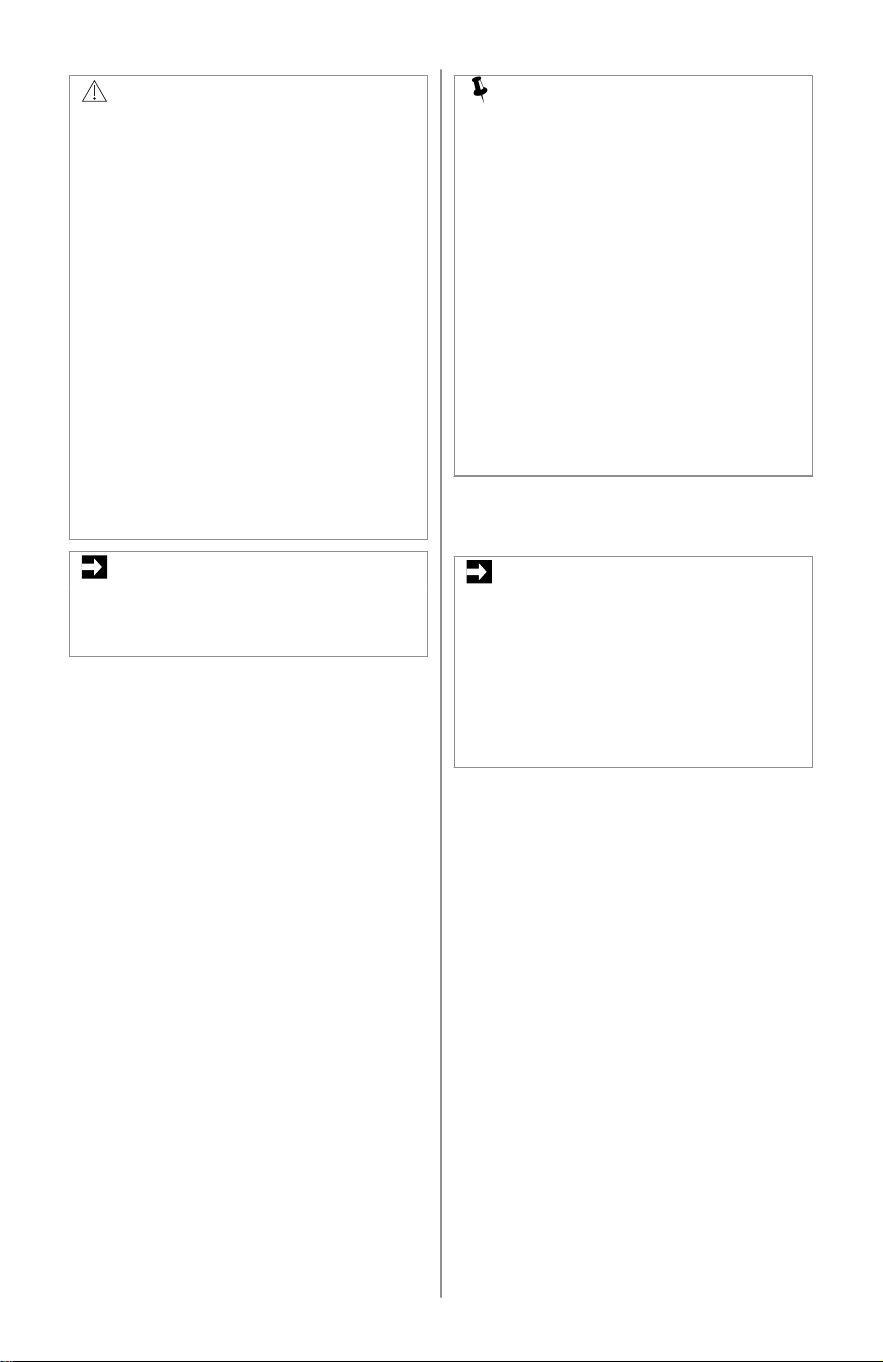
To connect water supply line to ice maker
inlet valve:
1. Disconnect refrigerator from electric
power source.
2. Place end of water supply line into sink
or bucket. Turn on water supply and
flush supply line until water is clear.
Turn off water supply at shutoff valve.
3. Remove plastic cap from water valve
inlet and discard cap.
4. Depending on the tubing you use:
• Copper tubing - Slide brass
compression nut, then ferrule
(sleeve) onto water supply line.
Push water supply line into water
valve inlet as far as it will go (1/4" /
6.4mm). Slide ferrule (sleeve) into
valve inlet and finger tighten
compression nut onto valve.
Tighten another half turn with a
wrench; do not over tighten.
• Braided flexible stainless steel
tubing - The nut is already
10 ENGLISH
assembled on the tubing. Slide nut
onto valve inlet and finger tighten
nut onto valve. Tighten another half
turn with a wrench; do not over
tighten.
5. With steel clamp and screw, secure
water supply line to rear panel of the
appliance.
6. Coil excess water supply line (copper
tubing only), about 2.5 turns, behind
refrigerator as shown and arrange
coils so they do not vibrate or wear
against any other surface. Do not kink
tubing.
7. Turn on water supply at shutoff valve
and tighten any connections that leak.
8. Reconnect refrigerator to electrical
power source.
9. Turn the ice maker on.
Copper tubing installation
A
B
C
E
G
F
D
Braided flexible stainless steel tubing
installation
A
G
F
H
A. Clamp
B. Brass compression nut
C. Ferrule (sleeve)
D. Copper water line*
E. Water valve bracket
F. Valve inlet
G. Water valve
H. 6 ft (1.8m) braided flexible stainless
steel water line from household water
supply*
*Include enough tubing in the loop to allow
moving the refrigerator out for cleaning.
6. CONTROLS AND SETTINGS
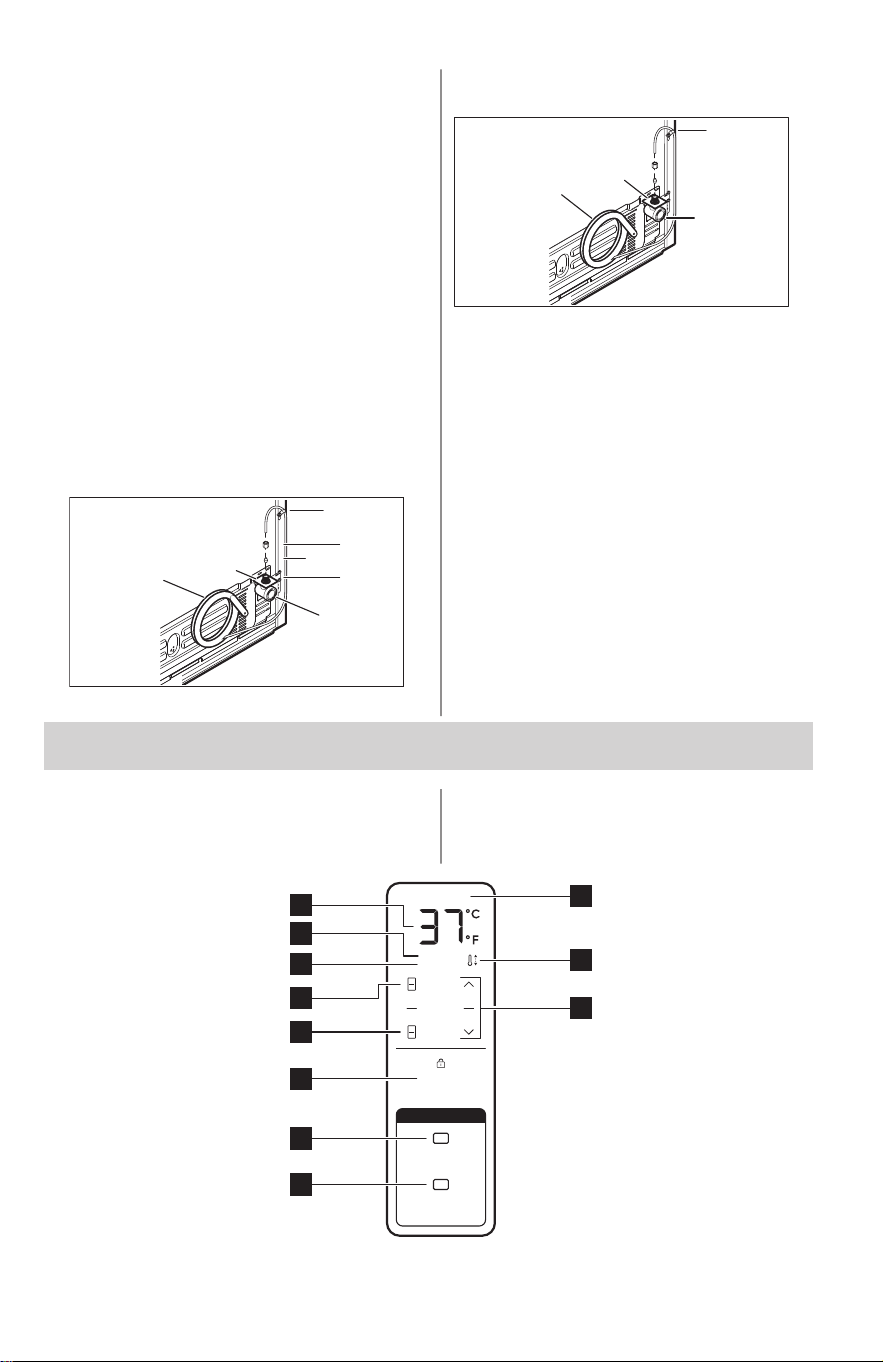
6.1 Controls and Settings:
Internal Water Dispenser
POWER OUTAGE
Water
Hold To Reset
FILTER STATUS
Air
Hold To Reset
Water
Dispenser
Hold To Reset
DOOR OPEN
HIGH TEMP
FRIDGE
FREEZER
2
1
10
4
5
6
3
11
7
8
9
ENGLISH 11
1
Air Filter Status
Indicator light:
• White - Good.
• Red - Replace the filter. Press and hold for 3 seconds to reset after re‐
placing the filter.
Change the air filter every 6 months.
2
Water Filter Sta‐
tus
Indicator light:
• White - Good.
• Red - Replace the filter. Press and hold for 3 seconds to reset after re‐
placing the filter.
Change the water filter every 6 months.
3
Water Dispenser
Lock
Press and hold for 3 seconds to turn on/off the water dispenser. Lock indica‐
tor lights on when dispenser is turned off.
4
Freezer button
Press to check or adjust freezer temperature.
5
Fridge button
Press to check or adjust refrigerator temperature.
6
Door Open Alarm
Indicator
When the refrigerator or freezer door is left open for more than 2 minutes, the
alarm sounds the Door Open indicator lights up. Close the door or press any
button to stop the alarm.
7
High Temp Alarm
Indicator
When the refrigerator or freezer temperature is too high, the alarm sounds,
the High Temp indicator lights up, and "HI" appears on the affected compart‐
ment display. The alarm sounds every 10 seconds. Press the Fridge or
Freezer button to stop the alarm.
8
Temperature Dis‐
play
Default temperature setting is in °F and can be changed to °C.
9
Power Outage
In the event of a power outage, a tone sounds and the Power Outage indica‐
tor lights up once power is restored. Press any button to stop the alarm.
10
Temperature Ad‐
justing Indicator
It lights up after lowering the temperature or a power outage, indicating the
appliance is reaching the set temperature.
11
Temperature and
Units Adjustment
• Temperature Adjustment - Choose the compartment by pressing the
Fridge or Freezer button. Adjust the temperature using the arrow buttons.
• Unit Adjustment - Simultaneously press and hold both arrow buttons for 3
seconds to toggle between °F and °C.
Sabbath Mode
NOTE
While in Sabbath Mode, neither the
lights, dispenser, nor the control panel
will work until Sabbath Mode is
deactivated. Refrigerator stays in
Sabbath Mode after power failure
recovery. It must be deactivated with
the buttons on the control panel.
NOTE
Although you have entered the
Sabbath Mode, the ice maker will
complete the cycle it had already
initiated. The ice cube compartment
will remain cold and new ice cubes
can be made with standard trays.
The Sabbath Mode is a feature that
disables portions of the refrigerator and its
controls in accordance with observance of
the weekly Sabbath and religious holidays
within the Orthodox Jewish community.
To activate/deactivate Sabbath Mode,
simultaneously press and hold both:
Fridge button, Freezer button for 5
seconds. The display shows Sb while in
Sabbath mode.
In the Sabbath Mode, the High Temp is
active for health reasons. For example, if
you leave the door ajar High Temp
activates. The refrigerator functions
normally once you close the door, without
any violation of the Sabbath/Holidays. The
High Temp activates when the cabinet
temperature is outside the safe zone.
12 ENGLISH
For further assistance, guidelines
for proper usage and a complete
list of models with the Sabbath
feature, visit the web at star-k.org.
7. INTERNAL WATER DISPENSER
Your appliance is equipped with an
internal water dispenser mounted inside
the cabinet, on the left hand fresh food
door.
7.1 Priming the Water Supply
System
CAUTION!
For proper dispenser operation, the
recommended water supply pressure
should fall between 30psi and 100psi.
Excessive pressure may cause the
system to malfunction.
Before dispensing water for the first time,
be sure to prime the water supply system.
If you do not flush the system, the first
glasses of water may have discolored
water or have an odd flavor.
1. Ensure the dispenser is enabled.
Refer to Controls and Settings.
2. Begin filling the system by pressing
and holding a drinking glass against
the water dispenser paddle.
3. Keep the glass in this position until
water comes out of the dispenser. It
may take about 4 minutes to purge air
from the system.
4. Continue dispensing water for about 1
full gallon. Stop to empty the glass if
necessary.
If you prefer to keep the internal water
dispenser disabled, use the appliance
control display to disable it.
Place a cup against the paddle and press
to dispense water.
8. ICE MAKER
NOTE
Freezer Ice Maker (Non-Dispenser Models Only)
8.1 Ice maker operation and care
After you properly install the appliance, the
ice maker may take up to 24 hours to
produce ice. When using the ice maker for
the first time, and in order for it to work
properly, you need to clear air from the
water tubing and the filter. If you do not
flush the system, the first ice cubes may
be discolored or have an odd flavor. Once
the ice maker begins making ice, allow the
bin to fill completely, and then discard the
first full bin of ice.
ENGLISH 13
8.2 Storage Bin Capacity
This ice maker should produce
approximately 2.8lbs of ice per 24 hours
depending on use.
The ice bin should hold:
• For a standard depth appliance: around
7lbs of ice.
NOTE
The ice maker only produces the
specified rate if you set the
temperature to 0°F.
NOTE
The freezer ice maker fills the ice bin
more in one spot. Move the ice to the
edges of the bin to allow it to fill
completely.
8.3 Turning the Ice Maker On/Off
Press the control on the ice maker to turn
it on.
Green LED stays on when the ice maker is
on.
The ice maker regulates the ice
production. It stops making ice when full
and resumes when ice is low in the ice bin.
Remove the Ice Bin if:
An extended power failure (1 hour or
longer) cause ice cubes in the ice bin to
melt and re-freeze together after power is
restored.
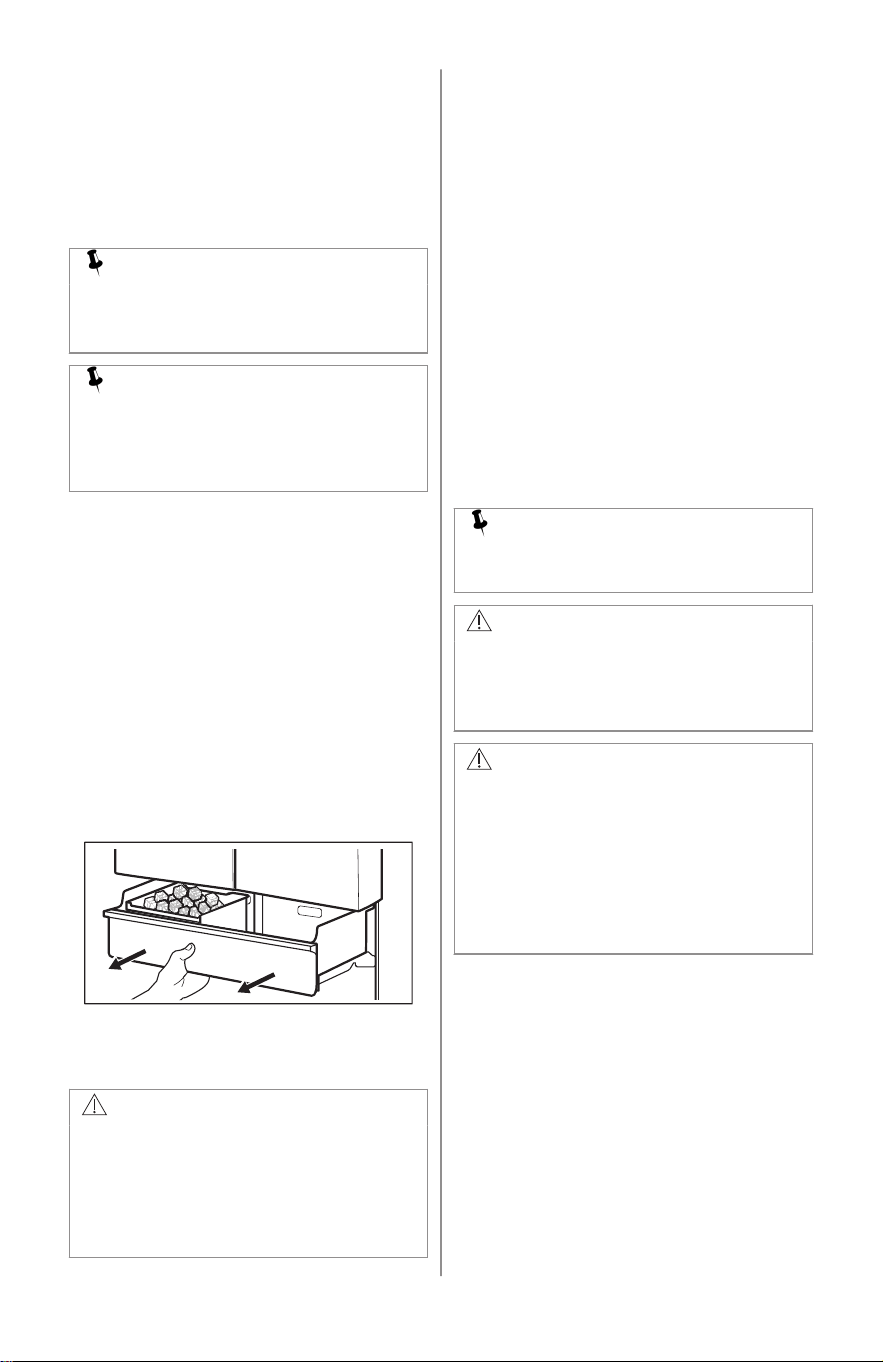
To remove ice bin lift it upward and pull
straight out. Shake to loosen the cubes or
clean.
CAUTION!
Never use an ice pick or similar sharp
instrument to loosen the ice cubes.
This could damage the ice bin. To
loosen ice clumps, use warm water.
Before replacing the ice bin, ensure it
is completely dry.
8.4 Ice Maker Tips
The following sounds are normal when the
ice maker is operating:
• Motor running
• Ice dropping into ice bin
• Water valve opening or closing
• Running water
• Ice loosening from tray
Ice cubes stored too long may develop an
odd flavor. Empty the ice bin.
If you turn the ice maker off for a long
period of time, turn the water supply valve
to the closed position.
Evenly distribute the ice in the container to
avoid clumps.
Keep the ice maker off until the ice maker
is connected to the water supply or
whenever the water supply is turned off.
NOTE
Water quality determines the ice
quality.
CAUTION!
If the water supply to your refrigerator
is softened, properly maintain the
softener. Chemicals from a water
softener can damage the ice maker.
CAUTION!
• Do not place the ice bin in the
dishwasher.
• Wash the ice bin with warm water
and mild detergent. Rinse well and
dry.
• Turn off the ice maker when
cleaning the freezer and during
vacations.
14 ENGLISH
9. STORAGE FEATURES
9.1 Shelves
CAUTION!
To avoid personal injury or property
damage, handle tempered glass
shelves carefully. Shelves may break
suddenly if nicked, scratched, or
exposed to sudden temperature
change. Allow the glass shelves to
stabilize to room temperature before
cleaning. Do not wash in dishwasher.
You can easily adjust shelf positions in the
refrigerator compartments to suit your
needs. The shelves have mounting
brackets that attach to slotted supports at
the rear of each compartment.
NOTE
When removing the shelf, disable the
Water Dispenser to avoid water
spillage.
1. Remove all the food from the shelf.
2. Lift the front edge up and then lift the
rear edge up to pull the shelf out.
3. Replace by inserting the mounting
bracket hooks into the desired support
slots.
4. Lower the shelf and lock into position.
9.2 Drawers
This appliance includes a variety of
storage drawers.
Crispers
Crispers are designed for storing fruits,
vegetables, and other fresh produce.
1
2
2
1
9.3 Doors
Storage bins (varies by model)
The doors to your refrigerator
compartment use a system of modular
storage bins. All of these bins are
removable for easy cleaning. Some of
them have fixed positions, while others
can be adjusted to your needs.
Door bins are ideal for storing jars, bottles,
cans, and large drink containers. They
also enable quick selection of frequently
used items.
9.4 Changing position of
adjustable door bin
To change the position of an adjustable
door bin:
1. Remove all food from door bin.
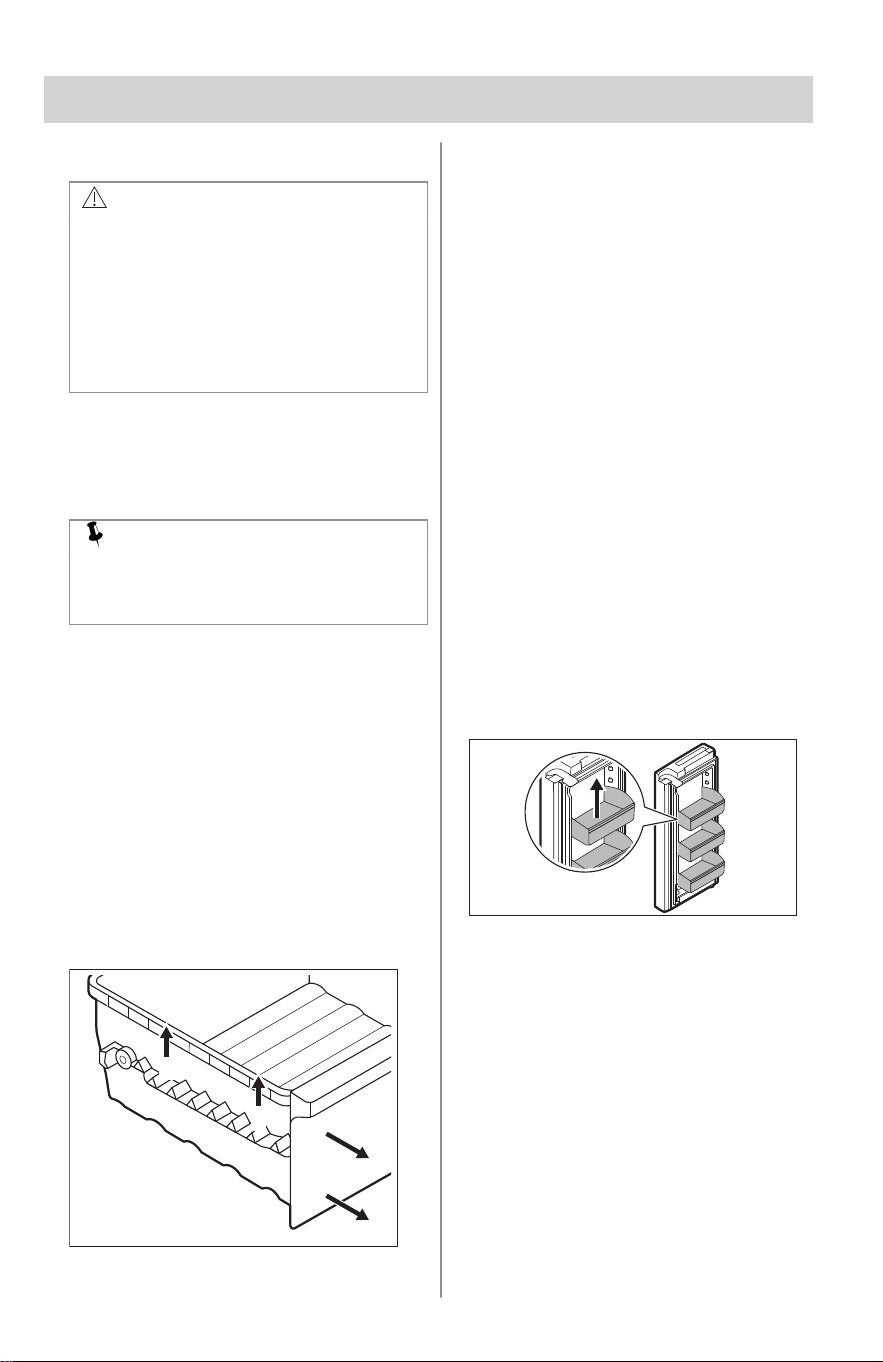
2. Grip the bin firmly with both hands and
lift it upward.
3. Remove the bin.
4. Place the bin just above desired
position.
5. Lower the bin onto supports until it is
locked in place.
6. Place the bin liner into the bin.
9.5 Removing/Installing Upper
Freezer Drawer
To remove the upper freezer drawer:
1. Open the freezer compartment fully.
2. Lift the upper freezer drawer up and
out.
ENGLISH 15
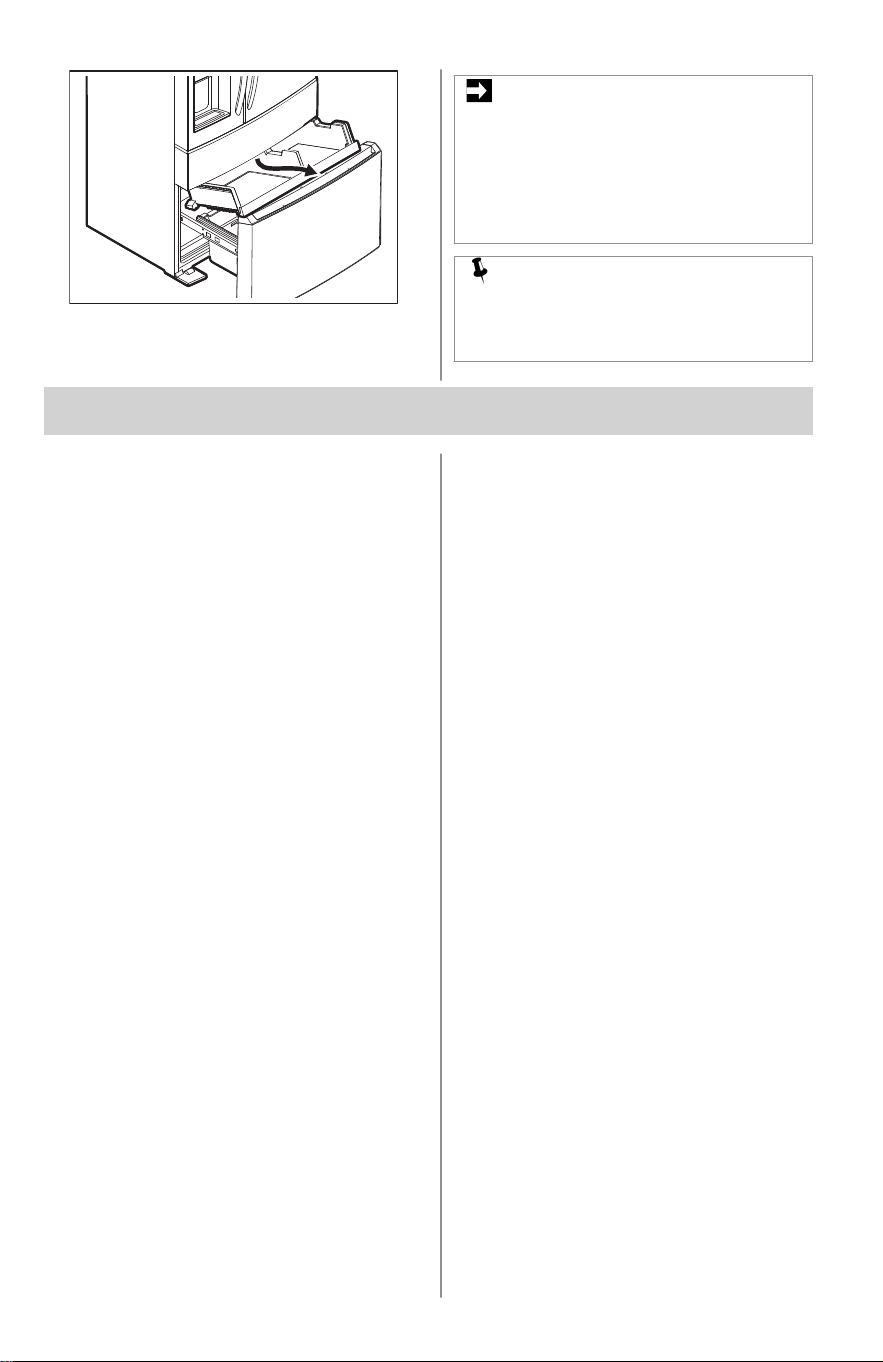
Reverse these steps to reinstall the
drawer.
IMPORTANT
There are wheels on the bottom of the
drawer. Make sure all wheels are
aligned with their tracks for proper
function. If the drawer is not aligned, it
will cause problems with the door
operation.
NOTE
If the basket does not rest on the
stabilizer bar retainer clips, the drawer
does not close correctly.
10. STORING FOOD AND SAVING ENERGY
10.1 Ideas for storing food
Fresh food storage
• Keep the fresh food compartment
between 34°F and 40°F, with an
optimum temperature of 37°F.
• Avoid overcrowding the refrigerator
shelves, which reduces air circulation
and causes uneven cooling.
• Avoid placing food in front of air ports.
Fruits and vegetables
• Store fruits and vegetables in crisper
drawers, where trapped moisture helps
preserve food quality for longer time
periods.
• Wash items and remove excess water.
• Wrap any items that have strong odors
or high moisture content.
Meat
• Wrap raw meat and poultry separately
and securely to prevent leaks and
contamination of other foods or
surfaces.
Frozen foods storage
• Keep the freezer compartment at 0°F
or lower.
• A freezer operates most efficiently
when it is at least 2/3 full.
Packaging foods for freezing
• To minimize food dehydration and
quality deterioration, use aluminum foil,
freezer wrap, freezer bags, or airtight
containers. Force as much air out of
the packages as possible and seal
them tightly. Trapped air can cause
food to dry out, change color, and
develop an off-flavor (freezer burn).
• Wrap fresh meats and poultry with
suitable freezer wrap prior to freezing.
• Do not refreeze meat that has
completely thawed.
Loading the freezer
• Avoid adding too much warm food to
the freezer at one time. This overloads
the freezer, slows the rate of freezing,
and can raise the temperature of frozen
foods.
• Leave a space between packages, so
cold air can circulate freely, allowing
food to freeze as quickly as possible.
10.2 Ideas for energy saving
Installation
• Locate the refrigerator in the coolest
part of the room, out of direct sunlight,
and away from heating ducts or
registers.
• Do not place the refrigerator next to
heat-producing appliances such as a
range, oven, or dishwasher. If this is
not possible, a section of cabinetry or
an added layer of insulation between
the two appliances will help the
refrigerator operate more efficiently.
• Level the refrigerator so that the doors
close tightly.
Temperature setting
• Refer to Controls and Settings for
procedures on temperature settings.
Food storage
• Avoid overcrowding the refrigerator or
blocking cold air vents. Doing so
causes the refrigerator to run longer
and use more energy.
• Cover foods and wipe containers dry
before placing them in the refrigerator.
16 ENGLISH
This cuts down on moisture build-up
inside the unit.
• Organize the refrigerator to reduce
door openings. Remove as many items
as needed at one time and close the
door as soon as possible.
• Do not place a hot container directly on
a cold shelf. Remember, such an
extreme temperature change may
damage the glass.
11. NORMAL OPERATING SOUNDS
11.1 Understanding the sounds
you may hear
Your new, high-efficiency appliance may
introduce unfamiliar sounds. These
sounds normally indicate your appliance is
operating correctly. Some surfaces on
floors, walls, and kitchen cabinets may
make these sounds more noticeable.
NOTE
Energy efficient foam in your
appliance is not a sound insulator.
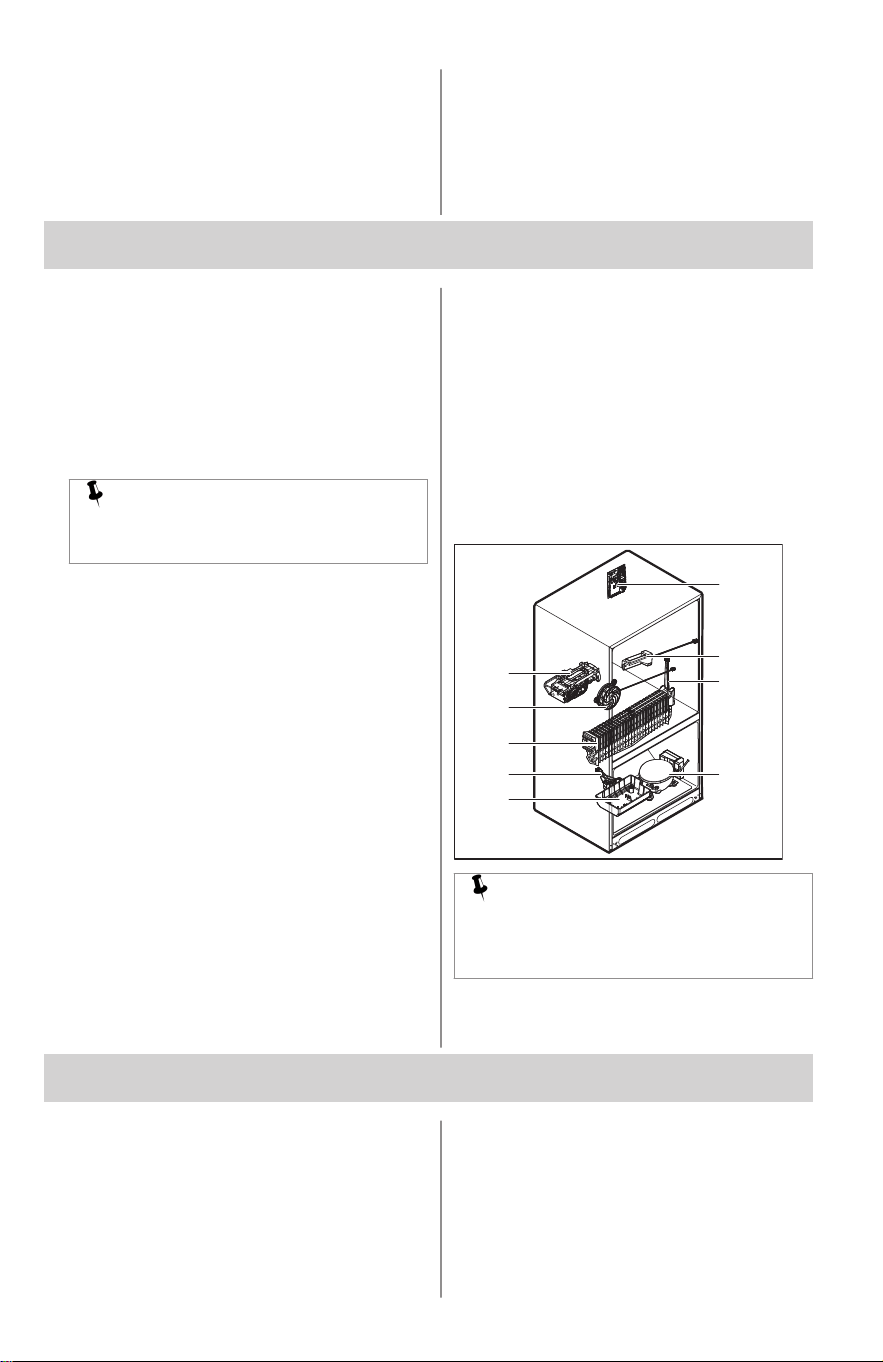
Following is a list of major components in
your appliance and the sounds they can
cause:
A. Evaporator. Refrigerant through the
evaporator may create a boiling or
gurgling sound.
B. Evaporator fan. You may hear air
being forced through the refrigerator
by the evaporator fan.
C. Defrost heater. During defrost cycles,
water dripping onto the defrost heater
may cause a hissing or sizzling sound.
After defrosting, a popping sound may
occur.
D. Automatic Ice maker. When ice has
been produced, you will hear ice
cubes falling into the ice bin.
E. Electronic control & automatic defrost
control. These parts can produce
snapping or clicking sound when
turning the cooling system on and off.
F. Compressor. Modern, high-efficiency
compressors run much faster than
previous models. The compressor may
have a noticeable hum or pulsating
sound during operation.
G. Water valve. Makes a buzzing sound
each time it opens to fill the ice maker.
H. Drain pan (not removable). You may
hear water dripping into the drain pan
during the defrost cycle.
I. Motorized damper. May produce
intermittent humming during operation.
E
D
B
A
H
G F
C
I
NOTE
During automatic defrost cycle, a red
glow in the back wall vents of your
freezer compartment is normal.
12. FILTER REPLACEMENT
12.1 PurePour™ Water Filter
Keep safe, great-tasting water flowing with
a PurePour™ water filter. Using a
PurePour™ water filter:
• Makes safe water second nature
PurePour™ water filters are certified to
reduce contaminates* and keep great-
tasting water flowing for you and your
family.
• Produces purity you can trust
Know for certain your PurePour™
water filter is a protector. Counterfeits
ENGLISH 17
and knockoffs put your refrigerator and
health at risk. Frigidaire Genuine Filters
are the smarter, safer choice.
• Every drop gives back
Partnered on sustainability efforts the
use of a PurePour™ water filter helps
cut back on the cost and use of plastic
used to produce and package bottled
water
*For the complete list, please see
Performance Data Sheet on
Frigidaire.com.
12.2 Ordering replacement filters
NOTE
When you order your replacement
filter, please reorder the same filter
type currently in your refrigerator.
To order your replacement filters, please
call toll-free at 1-800-374-4432, or visit
Frigidaire.com. Frigidaire recommends
that you order extra filters when you first
install your appliance, and that you replace
your filters at least once every 6 months.
Here are the product numbers to request
when ordering:
PurePour™ Water Filter PWF-1™
FPPWFUO1
Find the Performance Data Sheet located
in the Guides and Manuals section for
your specific water filter on Frigidaire.
12.3 More about your advanced
water filter
The PurePour™ ice and water filter system is
tested and certified by IAPMO R&T against
Standards 42, 53, 401 and NSF/ANSI/CAN
372CSA B483.1 in PurePour™ PWF-1 for
the reduction of claims specified on the
Performance Data Sheet.
Visit Frigidaire.com for more information.
Do not use with water that is
microbiologically unsafe or of unknown
quality without adequate disinfection
before or after the system. Use systems
certified for cyst reduction on disinfected
waters that may contain filterable cysts.
Test & certification results
• Rated Capacity - 125gal / 453L for
PurePour™ and ice and water filter
• Rated service flow - .50gal/min
• Operating Temperature: Minimum:
33°F, Maximum: 100°F
• Maximum rated pressure - 100lbs/in²
• Recommended minimum operating
pressure: 30lbs/in²
12.4 Replacing your PurePour™
water filter
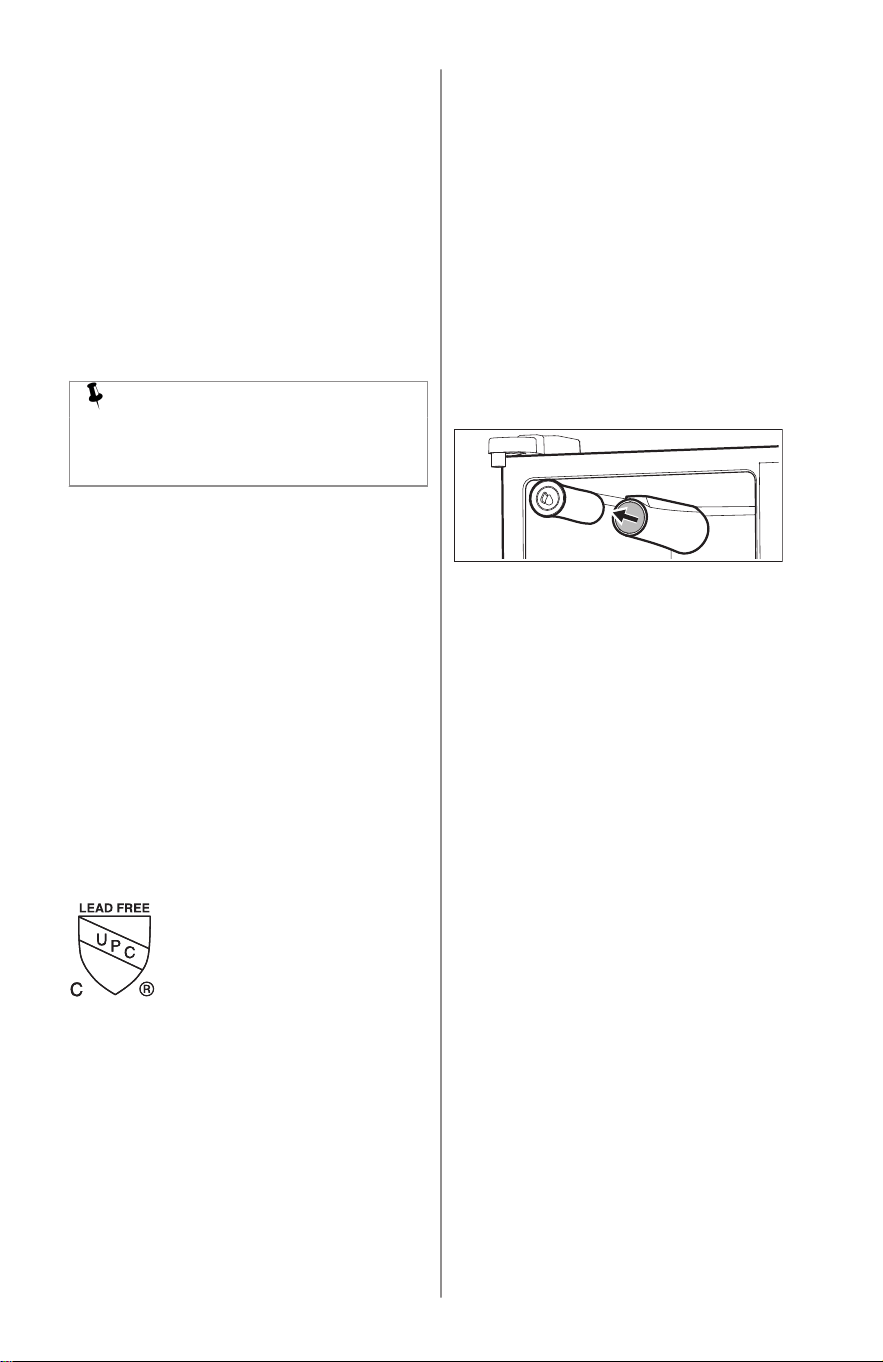
The water filter is located at the top left
corner of the appliance.
In general, you should change the water
filter every 6 months to ensure the highest
possible water quality. Water Filter Status
on the user interface prompts you to
replace the filter after a standard amount
of water (125gal / 453L for PurePour™)
has flowed through the system.
If you have not used your appliance for a
period of time (during moving for
example), change the filter before
reinstalling the appliance.
It is not necessary to turn the water supply
off to change the filter. Small amounts of
water may be released during the filter
replacement.
1. Turn off the ice maker.
2. Remove the filter by pushing on the
end/face of the filter.
3. Slide the old water filter cartridge
straight out of the housing and discard
it.
4. Unpack the new filter cartridge. Using
the alignment guide, slide it gently into
the filter housing until it stops against
the snap-in connector at the back of
the housing.
5. Push firmly until the cartridge snaps
into place. There is a clicking sound as
the cartridge engages with the snap-in
connector.
18 ENGLISH
6. Press a drinking glass against the
water dispenser while checking for any
leaks at the filter housing. Any spurts
and sputters that occur as the system
purges air out of the dispenser system
are normal.
7. After filling one glass of water,
continue flushing the system for about
4 minutes.
8. Turn on the ice maker.
9. Press and hold the Water Filter reset
button on the Ice and Water Dispenser
control panel for 3 seconds. When the
display changes from red to green, the
status is reset.
12.5 PureAir™ RAF-1 Air Filter
The air filter is located at the top of the air
tower.
To order replacement filters, please visit
our online store at Frigidaire.com or call
toll-free at 1-800-374-4432. Here are the
product numbers to request when
ordering:
PureAir™ RAF-1 replacement cartridge
FRGPAAF1
NOTE
We recommend you always use
genuine Frigidaire replacement filters
only.
12.6 Replacing your PureAir™
RAF-1
To ensure optimal filtering of refrigerator
odors, you should change the air filter
every 6 months. The filter status light on
the main controls prompts you to replace
the filter after 6 months.
To remove and replace the air filter:
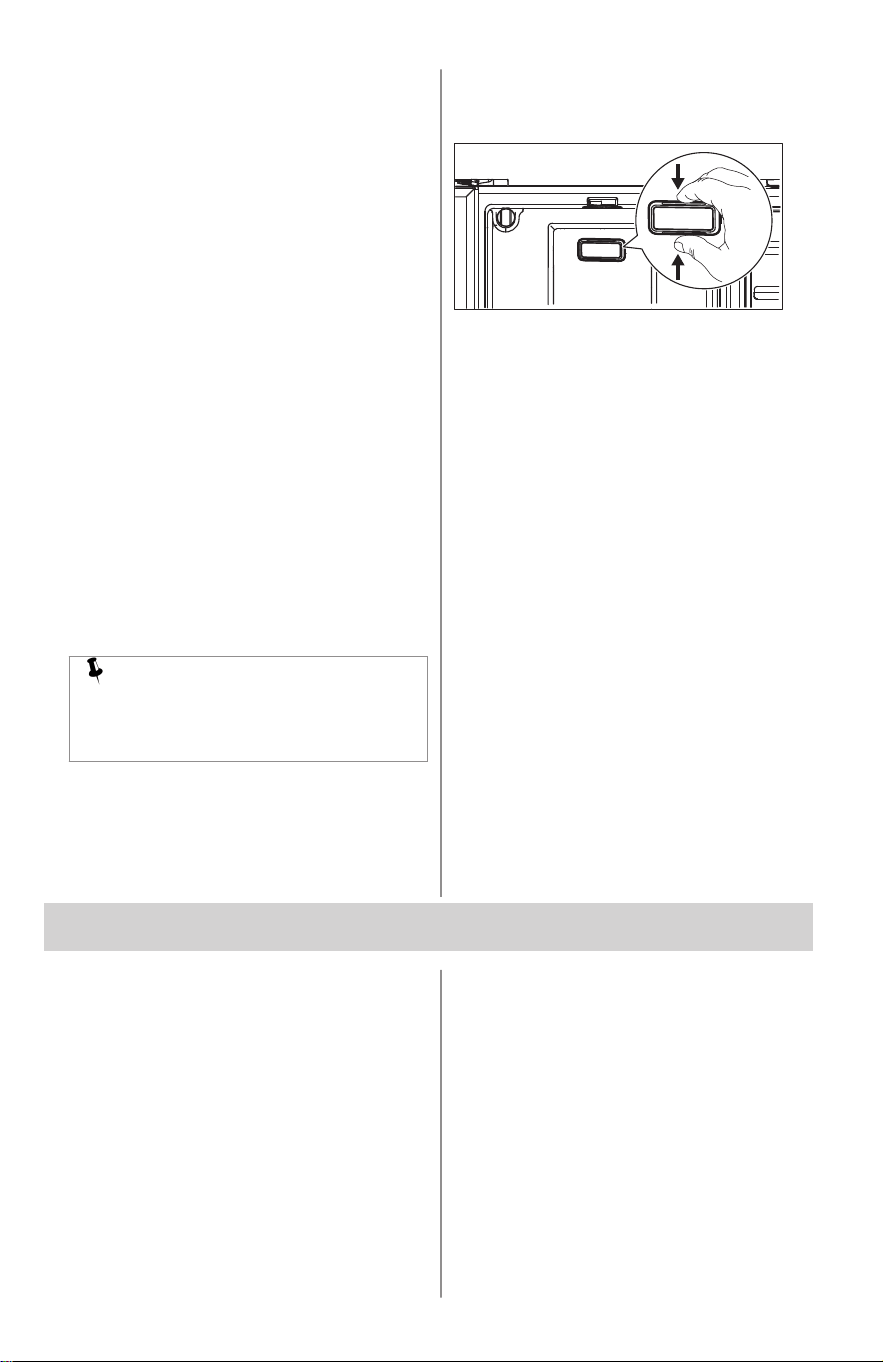
1. Remove the air filter cover by
squeezing the top and bottom of the
cover together and removing from
liner.
2. Remove the old filter and discard it.
3. Unpack the new filter and snap it into
the filter cover. Install the open face
(carbon media) of the filter facing
outward in the cover.
4. Replace air filter cover by squeezing
and snapping it back into place.
5. Press and hold the Reset Air Filter
button on the appliance control display
for 3 seconds. When the indicator
turns off, the status has been reset.
13. CARE AND CLEANING
13.1 Protecting your investment
Keeping your appliance clean maintains its
appearance and prevents odor build-up.
Wipe up any spills immediately and clean
the freezer and fresh food compartments
at least twice a year. When cleaning, take
the following precautions:
• Never use metallic scouring pads,
brushes, abrasive cleaners, or strong
alkaline solutions on any surface.
• Never use chloride or cleaners with
bleach to clean stainless steel.
• Do not wash any removable parts in a
dishwasher.
• Always unplug the electrical power cord
from the wall outlet before cleaning.
• Do not remove the serial plate.
Removal of your serial plate voids your
warranty.
• Remove adhesive labels by hand. Do
not use razor blades or other sharp
instruments which can scratch the
appliance surface.
• Before moving your appliance, raise
the anti-tip brackets so the rollers will
ENGLISH 19
work correctly. This will prevent the
floor from being damaged.
Do not use abrasive cleaners such as
window sprays, scouring cleansers,
brushes, flammable fluids, cleaning
waxes, concentrated detergents, bleaches
or cleansers containing petroleum
products on plastic parts, interior doors,
gaskets or cabinet liners. Do not use
paper towels, metallic scouring pads, or
other abrasive cleaning materials or strong
alkaline solutions.
Refer to the guide below for more details
on caring and cleaning specific areas of
your appliance.
NOTE
If you set your temperature controls to
turn off cooling, power to lights and
other electrical components will
continue until you unplug the power
cord from the wall outlet.
CAUTION!
Pull the appliance straight out to move
it. Shifting it from side to side may
damage flooring. Be careful not to
move the appliance beyond the
plumbing connections.
Damp objects stick to cold metal surfaces.
Do not touch refrigerated surfaces with
wet or damp hands.
IMPORTANT
If you store or move your appliance in
freezing temperatures, be sure to
completely drain the water supply
system. Failure to do so could result in
water leaks when the appliance is put
back into service. Contact a service
representative to perform this
operation.
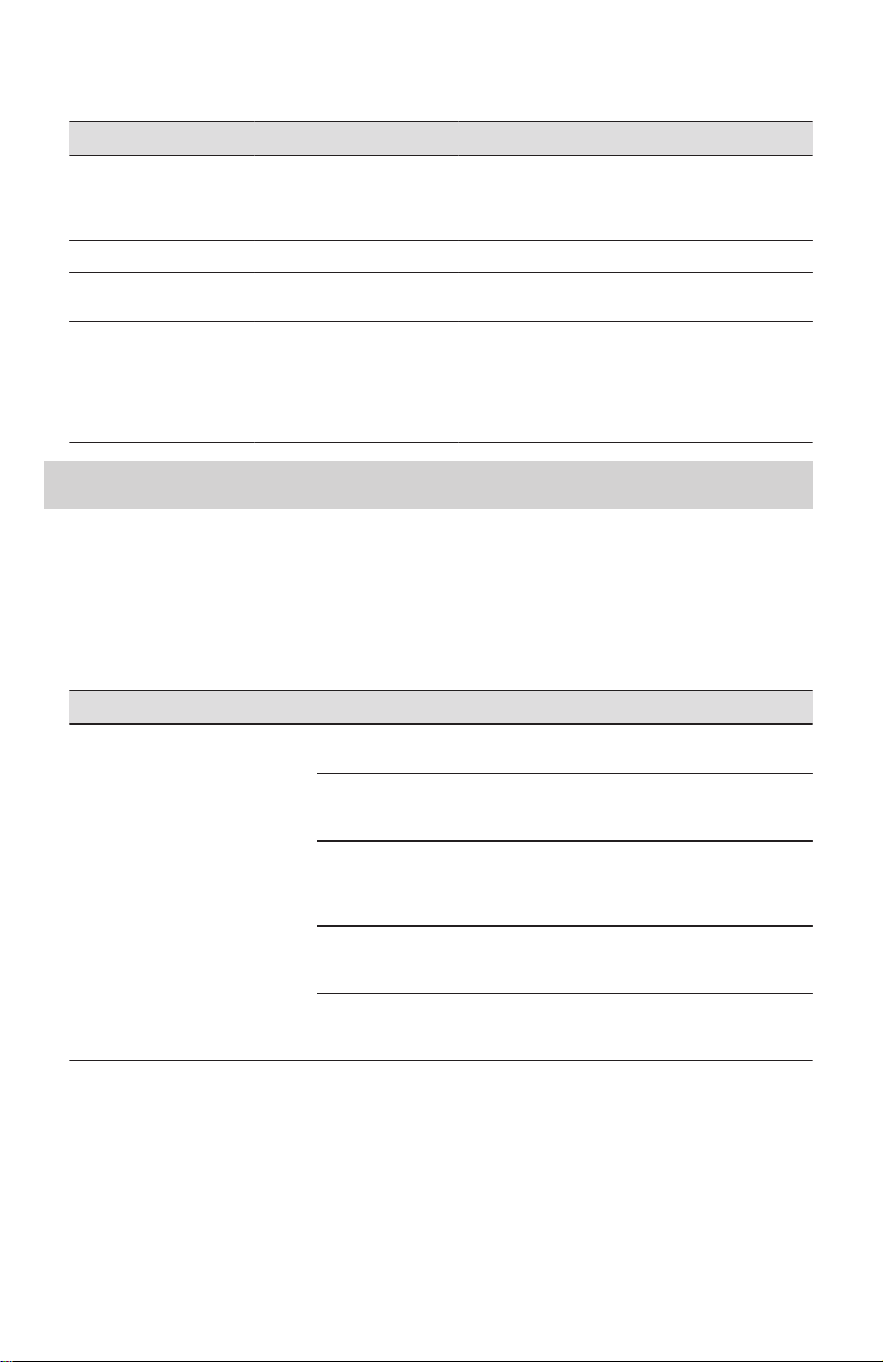
13.2 Vacation and moving tips
Occasion Tips
Short vacations
• Leave the appliance operating during vacations
of three weeks or less.
• Use all perishable items from the appliance
compartment.
• Turn automatic ice maker off and empty ice
bucket, even if you will only be gone a few days.
Long vacations
• Remove all food and ice if you will be gone one
month or more.
• Unplug the appliance.
• Turn water supply valve to closed position.
• Clean interior thoroughly.
• Leave both doors open to prevent odors and
mold build-up. Block doors open if necessary.
Moving
• Unplug the appliance
• Remove all food and ice.
• Recommend use of a handcart, load from the
side.
• Adjust rollers all the way up to protect them dur‐
ing sliding or moving.
• Pad cabinet to avoid scratching surface.
20 ENGLISH
13.3 Care & Cleaning Tips
Part What to use Tips and precautions
Interior and door liners
• Soap and water
• Baking soda and water
Use 2 tablespoons of baking soda in 1 quart of
warm water. Be sure to wring excess water out of
sponge or cloth before cleaning around controls,
light bulb or any electrical part.
Door gaskets Soap and water Wipe gaskets with a clean soft cloth.
Drawers and bins Soap and water Use a soft cloth to clean drawer runners and
tracks.
Exterior
• Soap and water
Never use chloride or cleaners with bleach to
clean stainless steel.
Always clean, wipe and dry with the grain to pre‐
vent scratching. Wash the rest of the cabinet with
warm water and mild liquid detergent. Rinse well,
and wipe dry with a clean soft cloth.
14. TROUBLESHOOTING
Let us help you troubleshoot your concern! This section will help you with common issues. If
you need us, visit our website, chat with an agent, or call us. We may be able to help you
avoid a service visit. If you do need service, we can get that started for you!
Visit Frigidaire.com or call toll-free 1-800-374-4432.
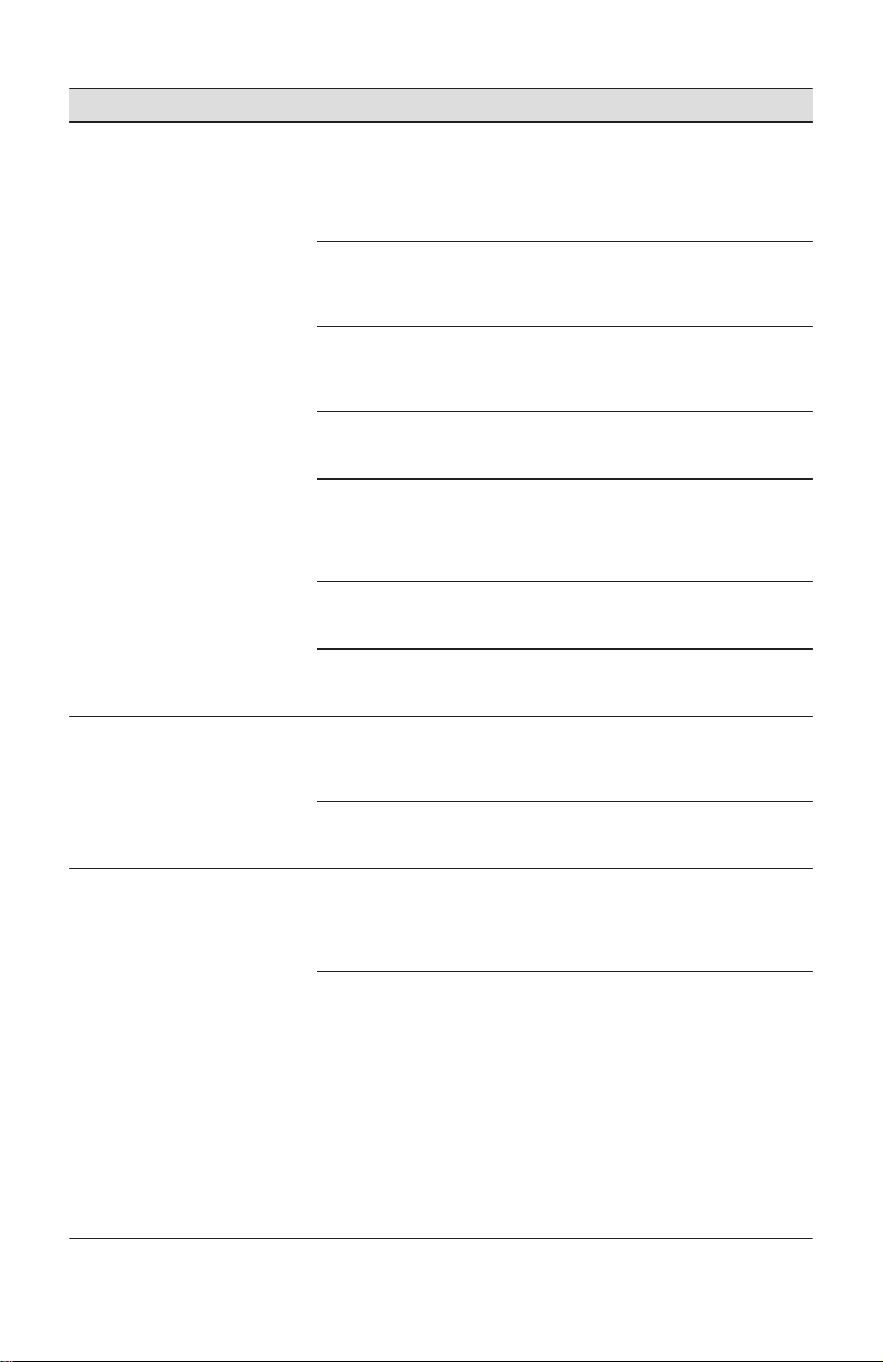
Automatic Ice Maker
Concern Potential Cause Common solution
Ice maker is not making any ice. Ice maker is turned off. Refer to Ice Maker and Controls
and Settings.
Refrigerator is not connected to
water line or water valve is not
open.
Connect the unit to the household
water supply and ensure the wa‐
ter valve is open.
The water supply line is kinked. Ensure that the supply line does
not kink when the refrigerator is
pushed into place against the
wall.
The water filter is not seated
properly.
Remove and re-install the water
filter. Be sure to seat it fully into
the locked position.
The water filter may be clogged
with foreign material.
If water dispenses slowly or not at
all, or if the filter is 6 months old
or older, it should be replaced.
ENGLISH 21
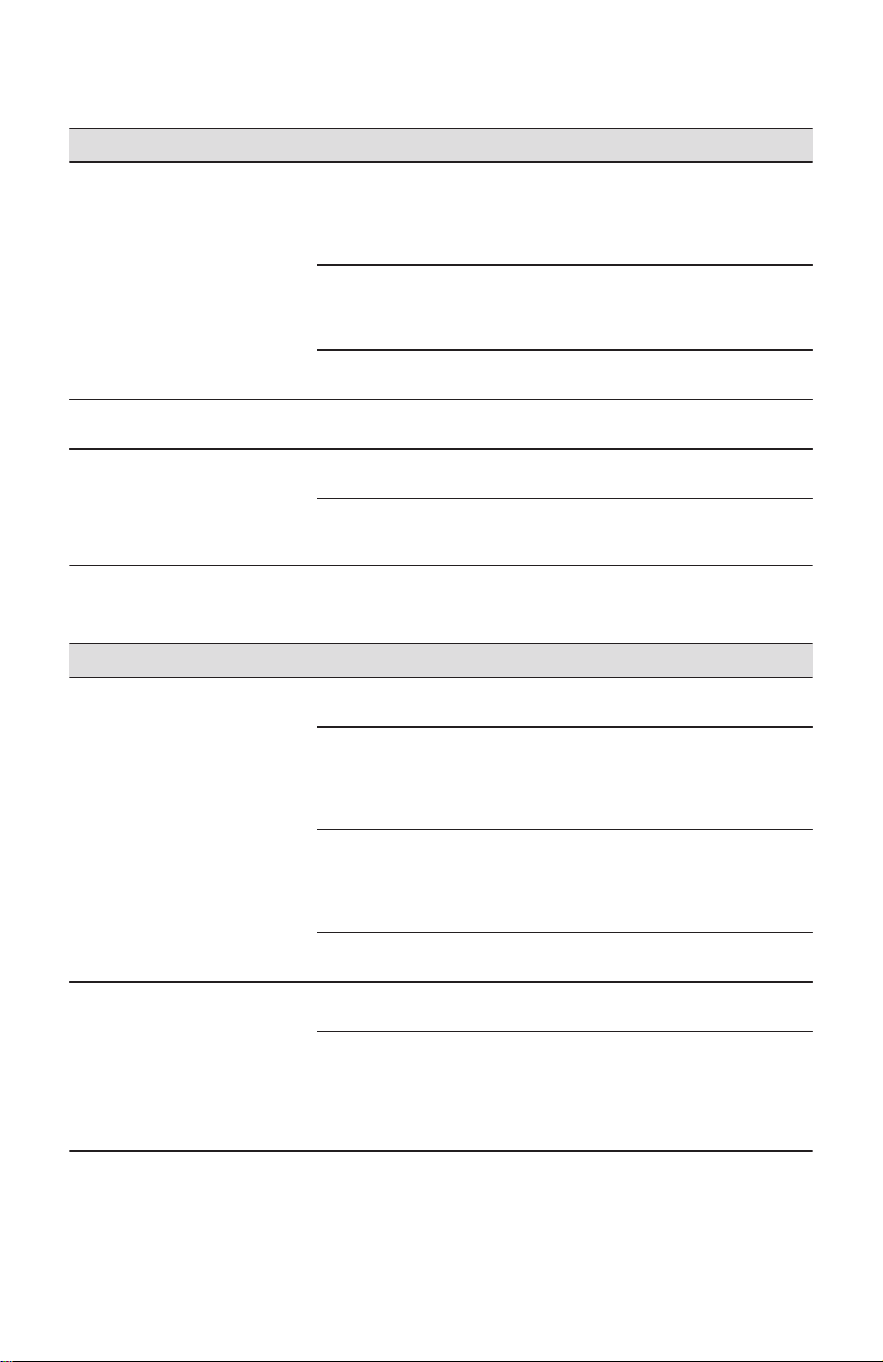
Concern Potential Cause Common solution
Ice maker is not making enough
ice.
Ice maker is producing less ice
than you expect.
• In a standard depth model,
the refrigerator ice maker
should produce around 2.8 to
lbs of ice per 24 hours and will
hold around 7lbs of ice.
The water filter may be clogged
with foreign material.
If water dispenses slower than
normal, or if the filter is six
months old or older, it should be
replaced.
Saddle valve on cold water pipe
is clogged or restricted by foreign
material.
Ensure that the supply line does
not kink when the refrigerator is
pushed into place against the
wall.
Heavy traffic, opening or closing
of the doors excessively.
Turn off household water line
valve. Remove valve. Clean
valve. Replace valve if necessary.
Freezer control is set too warm
(freezer ice maker).
Set freezer control to colder set‐
ting to improve performance of
the ice maker (freezer ice maker).
Allow 24 hours for temperature to
stabilize.
Water pressure is extremely low.
Cut-off and cut-on pressures are
too low (well systems only).
Have someone turn up the cut-off
and cut-on pressure on the water
pump system (well systems only).
Reverse osmosis system is in re‐
generative phase.
It is normal for a reverse osmosis
system to be below 20psi during
the regenerative phase.
Freezer ice maker will not stop
making ice (some models).
Ice maker bail arm is being held
down by a package in the freezer
that has fallen against ice maker.
Move any item or frozen ice
cubes that may block the bail arm
from being in the off or upward
position.
Ice cubes are located in once
spot inside the freezer ice bin.
Periodically move ice cubes
around the ice bin so that ice
maker will continue to make ice.
Ice cubes are freezing together. Ice cubes are not being used fre‐
quently enough or interruption of
power for prolonged time.
Remove ice container and dis‐
card ice. The ice maker will pro‐
duce fresh supply. Ice should be
used at least twice weekly to
keep the cubes separated.
Ice cubes are hollow (shells of ice
with water inside). The hollow
cubes break open in the bin and
leak their water onto existing ice,
which causes it to freeze togeth‐
er.
• This generally occurs when
the ice maker does not get
enough water. This is usually
the result of a clogged water
filter or restricted water sup‐
ply.
• Replace the water filter and if
the condition still occurs
check for a clogged saddle
valve, water valve not turned
on all the way or kinked water
supply line.
22 ENGLISH
Ice and water dispenser
Concern Potential cause Common solution
Dispenser does not dispense wa‐
ter.
Water filter not seated properly. Remove and reinstall the water fil‐
ter. For PurePour™, be sure to
push the filter in all the way until it
clicks into place and is secured
inside of the water filter housing.
Water filter is clogged. Replace filter cartridge. Be sure to
push filter all the way in until it
clicks into place and is secured
inside of the water filter housing.
Household water line valve is not
open.
Open household water line valve.
Water not cold enough. The water dispensing system is
not designed to chill water.
Add ice to cup or container before
dispensing water.
Water has an odd taste and/or
odor.
Water has not been dispensed for
an extended period of time.
Draw and discard 10-12 glasses
of water to freshen the supply.
The appliance not properly con‐
nected to cold water line.
Connect the appliance to cold wa‐
ter line that supplies water to the
kitchen faucet.
Opening/Closing of Doors/Drawers
Concern Potential cause Common solution
Door(s) does not close. Door was closed too hard, caus‐
ing other door to open slightly.
Close both doors gently.
Refrigerator is not level. It rocks
on the floor when moved slightly.
Ensure floor is level and solid,
and can adequately support the
refrigerator. Contact a carpenter
to correct a sagging or sloping
floor.
Refrigerator is touching a wall or
cabinet.
Ensure floor is level and solid,
and can adequately support the
refrigerator. Contact a carpenter
to correct a sagging or sloping
floor.
Food/packaging is obstructing the
door from closing.
Make sure there is no food/pack‐
aging blocking the doorway.
Drawers are difficult to move. Food is touching shelf on top of
drawer.
Remove top layer of items in
drawer.
Track that drawers slide on is
dirty.
• Ensure drawer is properly in‐
stalled on track.
• Clean drawer, rollers, and
track. Refer to Care and
Cleaning.
ENGLISH 23
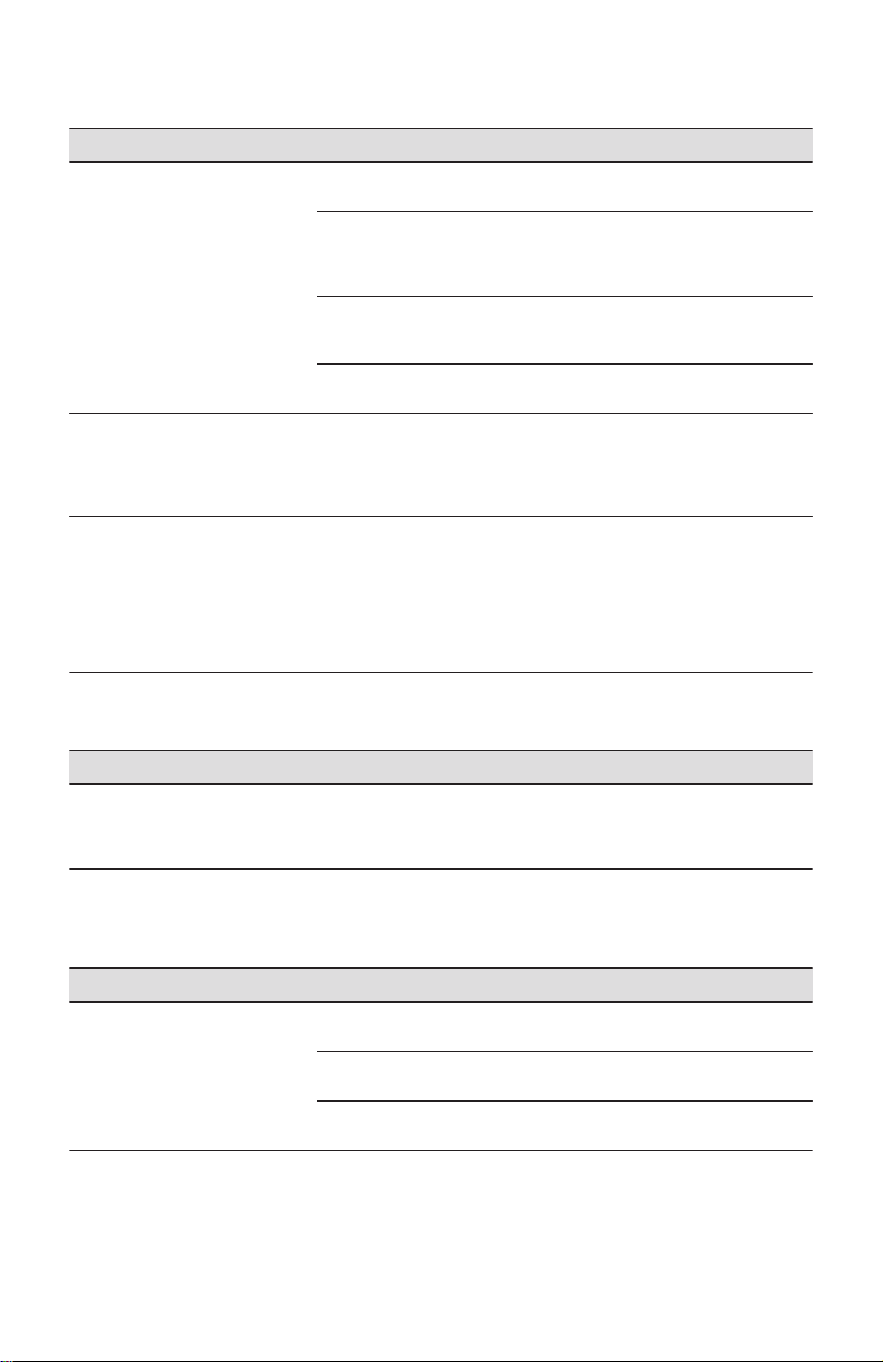
Running of appliance
Concern Potential cause Common solution
Compressor does not run. The appliance is unplugged. Ensure plug is tightly pushed into
outlet.
Refrigerator is in defrost cycle. This is normal for a fully automat‐
ic defrost refrigerator. The defrost
cycle occurs periodically, lasting
about 30 minutes.
House fuse blown or tripped cir‐
cuit breaker.
Check/replace fuse with a 15amp
time-delay fuse.
Reset circuit breaker.
Power outage. Check house lights. Call local
electric company.
Refrigerator seems to run too
much or too long.
The variable speed compressor is
designed to run 100% of the time
except during the defrost cycle. At
times it will run faster, such as af‐
ter a defrost cycle.
It is normal for the compressor to
run continuously except during
defrost mode.
Appliance seems to run continu‐
ously.
The appliances are designed with
a variable speed compressor to
be more energy efficient than pre‐
vious models. This means your
compressor reacts quickly to tem‐
perature fluctuations and circu‐
lates cold air based off your use
and room temperature.
This is normal for a variable
speed compressor refrigerator;
however, if you have concerns,
call toll-free 1-800-374-4432 or
visit Frigidaire.com.
Digital temperature display
Concern Potential cause Common solution
Digital temperature displays an
error.
Electronic control system has de‐
tected a performance problem.
Call your Frigidaire service repre‐
sentative, who can interpret any
messages or number codes flash‐
ing on the digital displays.
Water/Moisture/Frost Inside
Refrigerator
Concern Potential cause Common solution
Moisture collects on inside of re‐
frigerator walls.
Weather is hot and humid. The rate of frost buildup and inter‐
nal sweating increases.
Flipper mullion Adjust flipper mullion. Refer to
Flipper Mullion in Installation.
Door is slightly open. See the Opening/Closing of
Doors/Drawers section above.
24 ENGLISH
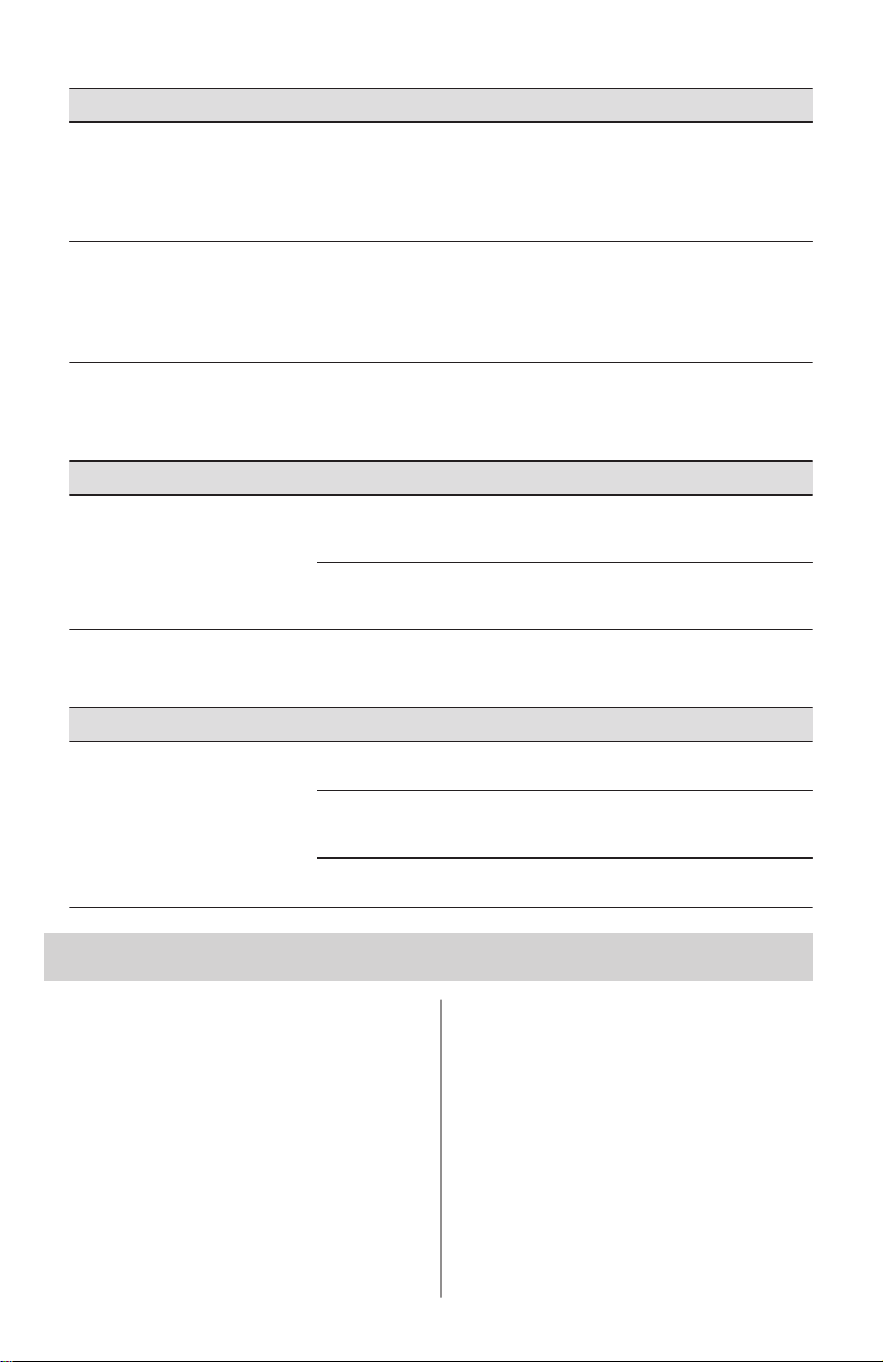
Concern Potential cause Common solution
Water collects on bottom side of
drawer cover.
Vegetables contain and give off
moisture.
• It is not unusual to have mois‐
ture on the bottom side of the
cover.
• Move humidity control (some
models) to lower setting.
Water collects in bottom of draw‐
er.
Washed vegetables and fruit
drain while in the drawer.
Water collecting in bottom of
drawer is normal. Dry items be‐
fore putting them in the drawer or
store produce in tightly sealed
bags to help reduce condensation
inside of the drawer.
Water/Moisture/Frost Outside
Refrigerator
Concern Potential cause Common solution
Moisture collects on outside of re‐
frigerator or between doors.
Weather is humid. This is normal in humid weather.
When humidity is lower, the mois‐
ture should disappear.
Door is slightly open, causing
cold air from inside refrigerator to
meet warm air from outside.
See the Opening/Closing of
Doors/Drawers section above.
Food in Fresh food compartment
Concern Potential cause Common solution
Food is freezing. Temperature setting is too low. Move the setting to a higher de‐
gree.
Temperature sensor is covered
by food (right side of fresh food
area).
Allow space for air flow to the
sensor.
Food is covering the air ports. Allow space between the air ports
and the food.
15. LIMITED WARRANTY
Your appliance is covered by a one year
limited warranty. For one year from your
date of delivery, Electrolux will pay all
costs for repairing or replacing any parts of
this appliance that prove to be defective in
materials or workmanship when such
appliance is installed, used and
maintained in accordance with the
provided instructions.
Exclusions
This warranty does not cover the following:
1. Products with original serial numbers
that have been removed, altered or
cannot be readily determined.
2. Product that has been transferred from
its original owner to another party or
removed outside the USA or Canada.
3. Rust on the interior or exterior of the
unit.
4. Products purchased “as-is” are not
covered by this warranty.
5. Food loss due to any refrigerator or
freezer failures.
6. Products used in a commercial setting.
ENGLISH 25

7. Service calls which do not involve
malfunction or defects in materials or
workmanship, or for appliances not in
ordinary household use or used other
than in accordance with the provided
instructions.
8. Service calls to correct the installation
of your appliance or to instruct you
how to use your appliance.
9. Expenses for making the appliance
accessible for servicing, such as
removal of trim, cupboards, shelves,
etc., which are not a part of the
appliance when it is shipped from the
factory.
10. Service calls to repair or replace
appliance light bulbs, air filters, water
filters, other consumables, or knobs,
handles, or other cosmetic parts.
11. Surcharges including, but not limited
to, any after hour, weekend, or holiday
service calls, tolls, ferry trip charges,
or mileage expense for service calls to
remote areas, including the state of
Alaska.
12. Damages to the finish of appliance or
home incurred during transportation or
installation, including but not limited to
floors, cabinets, walls, etc.
13. Damages caused by: services
performed by unauthorized service
companies; use of parts other than
genuine Electrolux parts or parts
obtained from persons other than
authorized service companies; or
external causes such as abuse,
misuse, inadequate power supply,
accidents, fires, or acts of God.
DISCLAIMER OF IMPLIED
WARRANTIES; LIMITATION OF
REMEDIES
CUSTOMER’S SOLE AND EXCLUSIVE
REMEDY UNDER THIS LIMITED
WARRANTY SHALL BE PRODUCT
REPAIR OR REPLACEMENT AS
PROVIDED HEREIN. CLAIMS BASED
ON IMPLIED WARRANTIES, INCLUDING
WARRANTIES OF MERCHANTABILITY
OR FITNESS FOR A PARTICULAR
PURPOSE, ARE LIMITED TO ONE YEAR
OR THE SHORTEST PERIOD ALLOWED
BY LAW, BUT NOT LESS THAN ONE
YEAR. ELECTROLUX SHALL NOT BE
LIABLE FOR CONSEQUENTIAL OR
INCIDENTAL DAMAGES SUCH AS
PROPERTY DAMAGE AND INCIDENTAL
EXPENSES RESULTING FROM ANY
BREACH OF THIS WRITTEN LIMITED
WARRANTY OR ANY IMPLIED
WARRANTY. SOME STATES AND
PROVINCES DO NOT ALLOW THE
EXCLUSION OR LIMITATION OF
INCIDENTAL OR CONSEQUENTIAL
DAMAGES, OR LIMITATIONS ON THE
DURATION OF IMPLIED WARRANTIES,
SO THESE LIMITATIONS OR
EXCLUSIONS MAY NOT APPLY TO
YOU. THIS WRITTEN WARRANTY
GIVES YOU SPECIFIC LEGAL RIGHTS.
YOU MAY ALSO HAVE OTHER RIGHTS
THAT VARY FROM STATE TO STATE.
If You Need Service
Keep your receipt, delivery slip, or some
other appropriate payment record to
establish the warranty period should
service be required. If service is
performed, it is in your best interest to
obtain and keep all receipts. Service under
this warranty must be obtained by
contacting Electrolux at the addresses or
phone numbers below.
This warranty only applies in the USA and
Canada. In the USA, your appliance is
warranted by Electrolux Major Appliances
North America, a division of Electrolux
Consumer Products, Inc. In Canada, your
appliance is warranted by Electrolux
Canada Corp. Electrolux authorizes no
person to change or add to any obligations
under this warranty. Obligations for service
and parts under this warranty must be
performed by Electrolux or an authorized
service company. Product features or
specifications as described or illustrated
are subject to change without notice.
USA
1-800-374-4432
Frigidaire
10200 David Taylor Drive
Charlotte, NC 28262
Canada
1-800-265-8352
Electrolux Canada Corp.
5855 Terry Fox Way
Mississauga, Ontario, Canada L5V 3E4
26 ENGLISH
*
A30086802 (May 2025)