GH68-55753A
Printed in Korea
Quick
Start
Guide
and
Terms &
Conditions
Set up your device
Scan the code
Use your old device for more
information on how to switch.
or visit
kaywa.me/switchtogalaxy
Start using your new device
Follow the prompts.
Read this document before operating the
product
Read this document before operating the
mobile device, accessories, or software
(defined collectively and individually as the
“Product”) and keep it for future reference.
This document contains important Terms
and Conditions. Electronic acceptance,
opening the packaging, use, or retention of
the Product constitutes acceptance of these
Terms and Conditions.
Manage your account
My Verizon Mobile app
Manage your account, track your
usage, edit account information,
pay your bill and more.
International travel
For features and rates when
outside the US, visit :
verizon.com/plans/international/
Customer service
Call 800.922.0204
X (Twitter) @VerizonSupport
Facebook @Verizon
Download a User Guide from
verizon.com/support
Find the user manual
.
Need help?
samsung.com/us/support
youtube.com/samsungcare
samsung.com/us/support/simulators
Do more
Charge your device
Use the included USB cable and a USB
Type-C adapter (sold separately).
Turn the device on
Press and hold the Side button
for a few seconds.
Get started
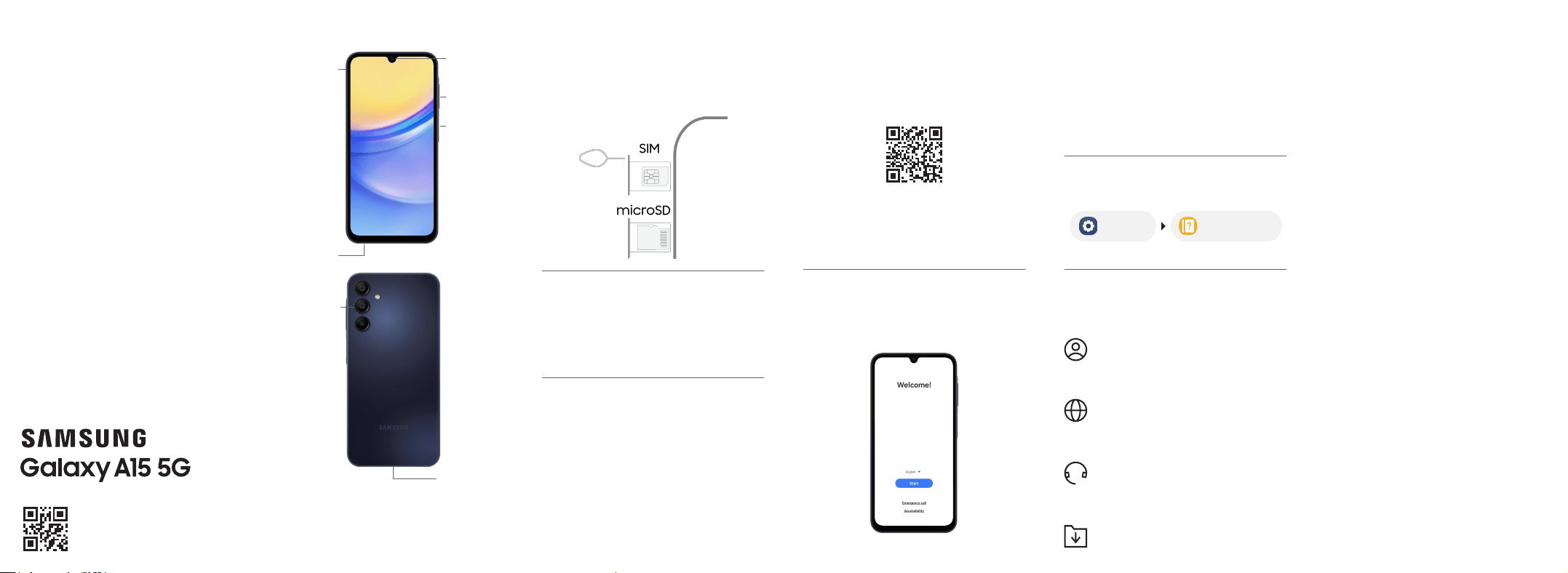
Insert a SIM/microSD card
Use the SIM tool to open the tray, and
then insert the SIM card and an optional
microSD
™
card (not included).
Your device
USB Type-C 3A cable included. For more information about
charging, visit https://www.samsung.com/us/support/
answer/ANS00078994/
Use only Samsung approved charging devices and
accessories. Damage caused by use of accessories which are
not approved may not be covered by warranty.
Camera
USB/Charging
port
Headset
jack
On/Off
Side
button
Lock/Unlock
Volume
button
Camera
Settings
User manual
SIM/microSD
card tray
Additional information
Your wireless device and
third‑party services
Verizon Wireless is the mobile carrier
associated with this wireless device, but
many services and features offered
through this device are provided by or
in conjunction with third parties. Verizon
Wireless is not responsible for your use of
this device or any non-Verizon Wireless
applications, services and products,
including any personal information you
choose to use, submit or share with others.
Specic third-party terms and conditions,
terms of use and privacy policies apply.
Please review carefully all applicable
terms, conditions and policies prior to using
this wireless device and any associated
application, product or service.

Samsung Electronics America, Inc.
85 Challenger Road
Ridgeeld Park, NJ 07660
Phone: 1.800.SAMSUNG (726-7864)
Internet: www.samsung.com
©
2024 Samsung Electronics America, Inc. Samsung & Samsung
Galaxy are registered trademarks of Samsung Electronics Co.,
Ltd. Other company and product names mentioned herein
may be trademarks of their respective owners. Screen images
simulated. Appearance of device may vary. Images shown are for
reference only. If you use a screen protector, make sure it allows
for use of screen features.
The Dispute Resolution Agreement, Standard
One-year Limited Warranty, End User License
Agreement (EULA), and additional Health,
Safety and Device care information, including:
• Device Temperature
• Samsung Knox security platform
• Maintaining Dust and Water Resistance
(IP rating)
• Location, Navigation, GPS and AGPS
• Wireless Emergency Alerts (WEA)
• Hearing Aid Compatibility (HAC)
are available at:
English:
www.samsung.com/us/support/legal/mobile
Spanish:
www.samsung.com/us/support/legal/mobile-sp
This information is also on the device:
Settings > About phone or About device
or About watch or About tablet > Legal
information > Samsung legal or, search for
“Legal”
You can view the Federal Communications
Commission (FCC) certication, if applicable, by
opening Settings > About phone or About
device or About watch or About tablet > Status
or Status information
Diagnostic software
This device may be equipped with diagnostic
software reporting usage and performance
information used to assess, deliver and improve
network quality and the overall device experience
to wireless customers. Please refer to your service
provider’s terms and conditions or privacy policy
for more information.
Specific Absorption Rate (SAR)
certification information
For information visit:
• www.fcc.gov/general/radio-frequency-
safety-0
• www.fcc.gov/encyclopedia/specic-
absorption-rate-sar-cellular-telephones
• www.samsung.com/sar
Exposure to Radio Frequency (RF)
signals
For information, visit www.samsung.com/us/
support/legal/mobile then select Health and
Safety Information > Radio Frequency (RF)
signals
Safe Handling & Recycling of Batteries
WARNING! Never dispose of batteries in a re
because they may explode. Do not disassemble,
crush, puncture, heat, burn or reuse batteries.
For more information, visit call2recycle.org
or call 1-800-822-8837. Alternatively, visit:
www.samsung.com/recycling or call
1-800-SAMSUNG.
FCC Part 15 Information and Notices
This device complies with part 15 of the FCC Rules.
Operation is subject to conditions: (1) This device
may not cause harmful interference, and (2) this
device must accept any interference received,
including interference that may cause undesired
operation. Operate devices that support wireless
power sharing at least 8 inches/20 cm away from
your body.
FCC Hearing Aid Compatibility (HAC)
regulations for wireless devices
The FCC established requirements for devices
to be compatible with hearing aids and other
hearing devices. For more information, visit
www.fcc.gov/consumers/guides/hearing-
aid-compatibility-wireline-and-wireless-
telephones
HAC for newer technologies
This phone has been tested and certified for
use with hearing aids for some of the wireless
technologies that it uses. However, there may
be some newer wireless technologies used in
this phone that have not been tested yet for
use with hearing aids. It is important to try the
different features of this phone thoroughly and
in different locations, using your hearing aid
or cochlear implant, to determine if you hear
any interfering noise. Consult your service
provider or the manufacturer of this phone
for information on hearing aid compatibility. If
you have questions about return or exchange
policies, consult your service provider or phone
retailer.
ANSI standard for HAC
This device was tested for compliance to the
ANSI C63.19-2019 standard for HAC. Devices
tested to this version of the standard, unlike
previous versions, do not receive a HAC
performance rating level; they are either
HAC-compliant or not. In addition, in this version
of the standard, the conversational gain of the
device is tested, both with and without hearing
aids. The conversational gain listed on the device
box represents the lowest conversational gain
found across all tested conditions.
Emergency calls
Emergency calls may not be possible on all
wireless mobile device networks or when certain
network services and/or mobile device features are
in use. Check with local service providers. If certain
features are in use (e.g. call blocking) you may rst
need to deactivate those features before you can
make an emergency call.
Smart practices while driving
Samsung is committed to both promoting
responsible driving and giving drivers tools to
address distractions. For more information, visit
www.samsung.com/us/support/legal/mobile
then select Health and Safety Information >
Smart practices while driving
Responsible listening
CAUTION! Avoid potential hearing loss by not
exposing yourself to loud sounds for a prolonged
period of time. For more information, visit
www.samsung.com/us/support/legal/mobile
then select Health and Safety Information >
Responsible listening
Important Legal information
Read this document before operating the
mobile device, accessories, or software
(dened collectively and individually as the
“Product”) and keep it for future reference.
This document contains important Terms
and Conditions. Electronic acceptance,
opening the packaging, use, or retention of
the Product constitutes acceptance of these
Terms and Conditions.
You can obtain a copy of the complete Terms
and Conditions and Samsung Standard
One-year Limited Warranty by contacting
Samsung at the address or phone number
provided in this document.
Dispute Resolution Agreement - This
Product is subject to a binding Dispute
Resolution Agreement, which includes
arbitration terms, between you and
SAMSUNG ELECTRONICS AMERICA, INC.
(“Samsung”). You can opt out within 30
calendar days of purchase: email optout@
sea.samsung.com or call 1-800-SAMSUNG
(726-7864) and providing the applicable
information.
Terms &
Conditions
Pacemaker and implantable medical
devices
CAUTION! Persons who have implantable
medical devices should consult their health care
provider before using mobile electronic devices.
For more information, visit www.samsung.
com/us/support/legal/mobile then select
Health and Safety Information > FCC Part 15
Information and Notices