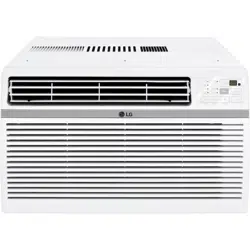
www.lg.com
EN ENGLISH
*MFL72002118*
Copyright © 2023 - 2024 LG Electronics Inc. All Rights Reserved
MFL72002118
Rev.03_052324
AIR CONDITIONER
Read this owner’s manual thoroughly before operating the appliance
and keep it handy for reference at all times.
OWNER’S MANUAL
TYPE : WINDOW
LW8024R
LW8024RSM
LW8024RSMY
LW8024RSMX
LW1025R
LW1025RSM
LW1025RSMY
LW1025RSMX
Scan to see the online manual.

TABLE OF CONTENTS
SAFETY INSTRUCTIONS ..............................................................3
IMPORTANT SAFETY INSTRUCTIONS ..........................................................4
INSTALLATION ...............................................................................8
Product Overview .............................................................................................. 8
Electrical Data ...................................................................................................8
Parts Included (Appearance May Vary) ............................................................9
Tools Needed ....................................................................................................9
How to Install the Unit .....................................................................................10
Window Requirements ....................................................................................10
Storm Window Requirements .........................................................................10
Preparation of the Chassis ..............................................................................11
Unit Installation................................................................................................12
OPERATION .................................................................................13
Control Panel and Remote Control .................................................................13
Using the Light Off Function ............................................................................ 14
Using the Mute Function .................................................................................14
Using the Auto Clean Function........................................................................14
Using the Child Lock Function ........................................................................14
Using the Clean Filter Function ....................................................................... 14
Wireless Remote Control ................................................................................15
Air Direction .....................................................................................................15
SMART FUNCTIONS ....................................................................16
LG ThinQ Application ......................................................................................16
Smart Diagnosis
TM
.......................................................................................... 18
MAINTENANCE ............................................................................ 19
Cleaning ..........................................................................................................19
TROUBLESHOOTING .................................................................. 20
Before Calling for Service ...............................................................................20
Normal Sounds You May Hear ........................................................................ 20
WARRANTY .................................................................................. 24
3
EN
SAFETY INSTRUCTIONS
READ ALL INSTRUCTIONS BEFORE USE
Your safety and the safety of others are very important.
We have provided many important safety messages in this manual and on
your appliance. Always read and follow all safety messages.
This is the safety alert symbol.
This symbol alerts you to potential hazards that can kill or injure you
and others.
All safety messages will follow the safety alert symbol and either the
word WARNING or CAUTION.
These words mean:
WARNING
You may be killed or seriously injured if you do not follow instructions.
CAUTION
You may be injured or cause damage to the product if you do not follow
instructions.
All safety messages will tell you what the potential hazard is, tell you
how to reduce the chance of injury, and tell you what may happen if the
instructions are not followed.
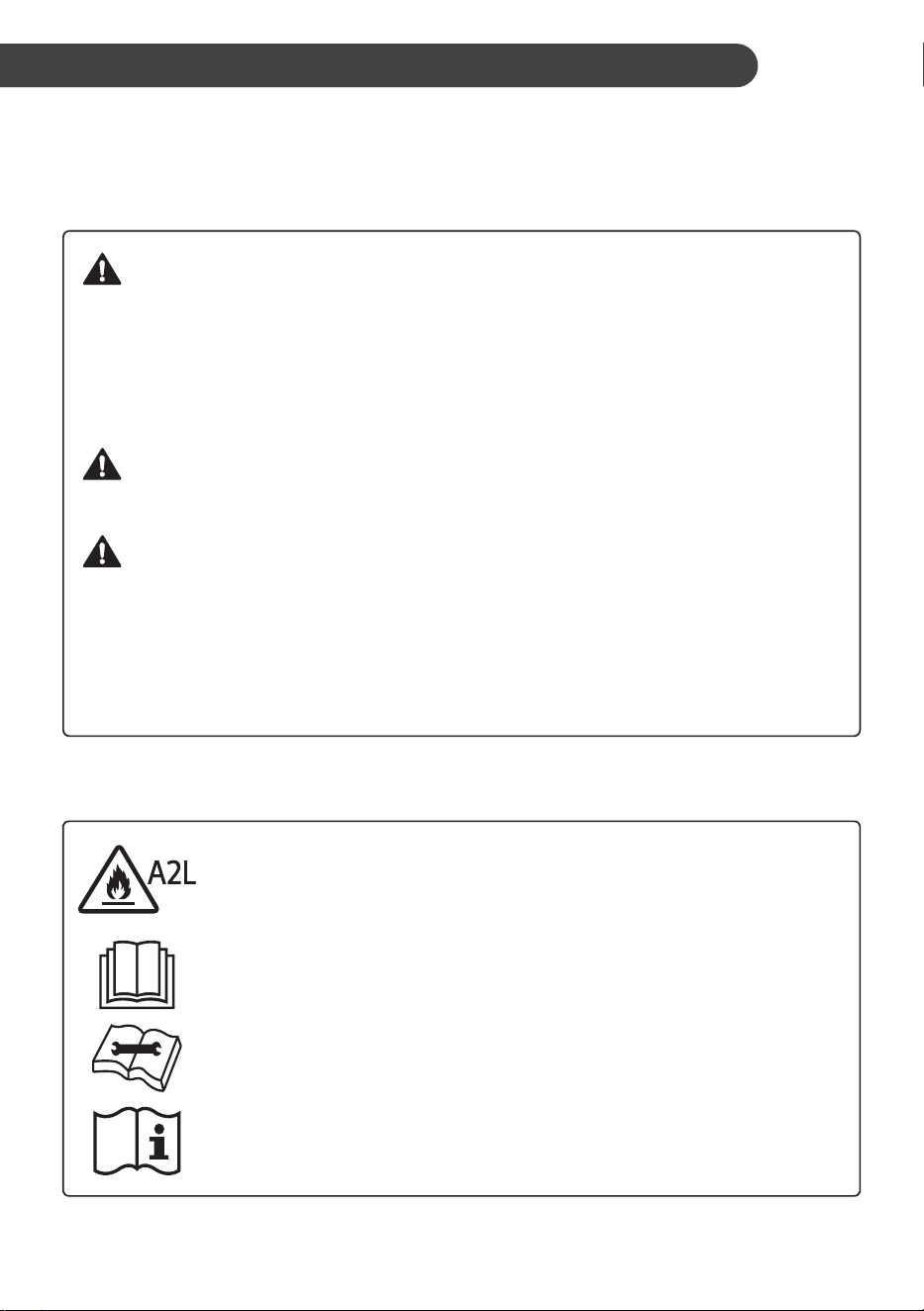
The following symbols are displayed on units.
This symbol indicates that this appliance uses a flammable
refrigerant. If the refrigerant is leaked and exposure to an
external ignition source, there is a risk of fire.
This symbol indicates that the Operation Manual should be
read carefully.
This symbol indicates that a service personnel should be
handling this equipment with reference to the Installation
Manual.
This symbol indicates that information is available such as the
Operating Manual or Installation Manual.
4
EN
IMPORTANT SAFETY INSTRUCTIONS
WARNING
To reduce the risk of explosion, fire, death, electric shock, scalding or
injury to persons when using this product, follow basic precautions,
including the following:
INSTALLATION
• Before use, the appliance must be properly installed as described in this manual.
• Contact the authorized service technician for repair or maintenance of this unit.
• Contact the installer for installation of this unit.
• When the power cord is to be replaced, replacement work shall be performed by authorized personnel
only using only genuine replacement parts.
• Installation work must be performed in accordance with the National Electric Code by qualified and
authorized personnel only.
• Connect to a properly rated, protected, and sized power circuit to avoid electrical overload.
• Always plug into a grounded outlet.
• Do not under any circumstances, cut or remove the third (ground) prong from the power cord.
• When installing or moving the appliance, be careful not to pinch, crush, or damage the power cord.
• Plug in the power plug properly.
• Do not modify or extend the power cord.
• If the supply cord is damaged, it must be replaced by the manufacturer, its service agent or similarly
qualified persons in order to avoid a hazard.
• Use a dedicated circuit.
• Do not disassemble or modify the product.
• Adhere to all industry recommended safety procedures including the use of long-sleeved gloves and
safety glasses.
• Disconnect the power cord or circuit breaker before installing or servicing the appliance.
• Keep packaging materials out of the reach of children. These materials can pose a suffocation risk to
children.
• Store and install the product where it will not be exposed to temperatures below freezing or exposed to
outdoor weather conditions.
• Do not store or use gasoline or other flammable vapors and liquids in the vicinity of this or any other
appliance.
• Do not install the unit in potentially explosive atmospheres.
• Piping material, pipe routing, and installation shall include protection from physical damage in operation
and service, and be in compliance with national and local codes and standards, such as ASHRAE 15,
IAPMO Uniform Mechanical Code, ICC International Mechanical Code, or CSA B52. All field joints shall
be accessible for inspection prior to being covered or enclosed.
• In order to avoid a hazard due to inadvertent resetting of the thermal cut-out, this appliance must not be
supplied through an external switching device, such as a timer, or connected to a circuit that is regularly
switched on and off by the utility.

5
EN
OPERATION
• Use this appliance only for its intended purpose.
• Never attempt to operate this appliance if it is damaged, malfunctioning, partially disassembled, or has
missing or broken parts, including a damaged cord or plug.
• Repair or immediately replace all power cords that have become frayed or otherwise damaged. Do not
use a cord that shows cracks or abrasion damage along its length or at either end.
• Do not run cord under carpets or mats where it could be stepped on and damaged.
• Keep the cord out from under heavy objects like tables or chairs.
• Do not place the power cord near a heat source.
• Do not use an adaptor or plug the product into a shared outlet.
• Do not tamper with controls.
• If you detect a strange sound, a chemical or burning smell, or smoke coming from the appliance, unplug
it immediately, and contact the LG Electronics Customer Information Center.
• Never unplug the appliance by pulling on the power cord. Always grip the plug firmly and pull straight out
from the outlet.
• Do not grasp the power cord or touch the appliance controls with wet hands.
• If water enters the product, turn off the power at the main circuit, then unplug the product and call for
service.
• If the product has been submerged, contact the LG Electronics Customer Information Center for
instructions before resuming use.
• Unplug the product when unused for long periods.
• Unplug the product before cleaning.
• In the event of a gas leak (propane gas, etc.) do not operate this or any other appliance. Open a window
or door to ventilate the area immediately.
• This appliance is not intended for use by persons (including children) with reduced physical, sensory or
mental capabilities, or lack of experience and knowledge, unless they have been given supervision or
instruction concerning the use of the appliance by a person responsible for their safety.
• The interior of the product must only be cleaned by an authorized service center or a dealer.
• Do not use solvent-based detergent on the product. Doing so can cause corrosion or damage, product
failure, electrical shock, or fire.
• Children should be supervised to ensure that they do not play with the air conditioner.
• Do not start/stop operation by plugging/unplugging the power cord.
GROUNDING INSTRUCTIONS
• The power cord of this appliance is equipped with a three-prong (grounding) plug. Use this with
a standard three-slot (grounding) wall power outlet to minimize the hazard of electric shock. The
customer should have the wall receptacle and circuit checked by a qualified electrician to make sure the
receptacle is properly grounded. DO NOT CUT OR REMOVE THE THIRD (GROUND) PRONG FROM
THE POWER PLUG.
− Situations when the appliance will be disconnected occasionally; Because of potential safety
hazards, we strongly discourage the use of an adapter plug. However, if you wish to use an adapter,
a TEMPORARY CONNECTION may be made. Use UL-listed adapter, available from most local
hardware stores. The large slot in the adapter must be aligned with the large slot in the receptacle to
assure a proper polarity connection.
• Attaching the adapter ground terminal to the wall receptacle cover screw does not ground the appliance
unless the cover screw is metal, and not insulated, and the wall receptacle is grounded through the
house wiring. The customer should have the circuit checked by a qualified electrician to make sure the
receptacle is properly grounded.
• Disconnect the power cord from the adapter, using one hand on each. Otherwise, the adapter ground
terminal might break. Do not use the appliance with a broken adapter plug.
− Situations when the appliance will be disconnected often; Do not use an adapter plug in these
situations. Unplugging the power cord frequently can lead to an eventual breakage of the ground
terminal. The wall power outlet should be replaced by a three-slot (grounding) outlet instead.
6
EN
CAUTION
To reduce the risk of minor or moderate injury to persons,
malfunction, or damage to the product or property when using this
product, follow basic precautions, including the following:
INSTALLATION
• Take care when installing the product that exhaust or condensation does not damage nearby property.
• Follow installation instructions exactly to avoid excessive vibration or water leakage.
• Wear gloves and use caution when unpacking and installing the appliance. Screws or sharp edges can
cause injuries.
• When installing or moving the appliance, be careful not to pinch, crush, or damage the power cord.
• The supply and return air openings in the conditioned space may have the body of the appliance may
be installed in open areas such as false ceilings not being used as return air plenums, as long as the
conditioned air does not directly communicate with the air of the false ceiling.
OPERATION
• This appliance is not intended for use as a precision refrigeration system. Do not use it for special
purposes such as maintaining pets, food, precision machinery, or art objects.
• Make sure the air inlet and outlet are free from obstructions.
• Do not step on or place heavy objects on top of the appliance.
• Do not operate the appliance without the filter securely installed.
• Do not drink water drained from the appliance.
• Be sure to ventilate sufficiently when the air conditioner and a heating appliance such as a heater are
used simultaneously.
• Do not expose people, animals, or plants to the cold or hot wind from the air conditioner for extended
periods of time.
• Remove the batteries if the remote control is not to be used for an extended period of time.
• Never mix different types of batteries, or old and new batteries for the remote control.
• Stop using the remote control if there is a fluid leak in the battery. If your clothes or skin are exposed to
the leaking battery fluid, wash off with clean water.
• If the leaking battery fluid has been swallowed, rinse the inside of the mouth thoroughly and consult a
doctor.
• Do not recharge or disassemble the batteries.
MAINTENANCE
• Clean the filter every two weeks.
• Never touch the metal parts of the air conditioner when removing the air filter.
• Never use strong cleaning agents or solvents when cleaning the air conditioner or spray water. Use a
smooth cloth.
• Use a soft cloth to clean the appliance. Do not use waxes, thinners, or harsh detergents.
7
EN
REFRIGERANT (FOR R32 ONLY)
WARNING
• Do not use means to accelerate the defrosting process or to clean, other than those recommended
by the manufacturer.
• The appliance shall be stored in a room without continuously operating open flames (for example
an operating gas appliance) and ignition sources (for example an operating electric heater).
• Do not pierce or burn.
• Be aware that flammable refrigerants may not contain an odour.
• The installation of pipe-work shall be kept to a minimum.
• National gas regulations shall be observed.
• Mechanical connections shall be accessible for maintenance purpose.
• The appliance shall be stored in a well-ventilated area where the room size corresponds to the
room area as specified for operation.
CAUTION
• This unit contains flammable refrigerant and has special safety precautions not normally
associated with older units. Please follow all precautions and advisories.
− Use caution while handling and prevent damage to unit. Do not put any holes into product for
any reason. This can cause damage to product and prevent unit from cooling.
− Maintenance and cleaning of unit should be performed by trained personnel. Failure to properly
clean unit can result in damage to the refrigeration system and or the electrical system.
− Keep any required ventilation openings clear of obstruction.
− Service should only be performed by technicians properly trained and certified in the use of
flammable refrigerants. Any service performed by unauthorized servicers/individuals will void all
warranties.
− When storing the appliance, do not put in a room with any open flame appliance, such as gas
water heaters or furnaces. Also keep away from electric heaters. Damaged units should be
repaired before storage.
− Any person who is involved with working on or breaking into a refrigerant circuit should hold a
current valid certificate from an industry-accredited assessment authority, which authorizes their
competence to handle refrigerants safely in accordance with an industry recognized assessment
specification.
− Servicing shall only be performed as recommended by the equipment manufacturer.
Maintenance and repair requiring the assistance of other skilled personnel shall be carried out
under the supervision of the person competent in the use of flammable refrigerants.
− The appliance shall be stored so as to prevent mechanical damage from occurring.
− The refrigerant and insulation blowing gas used in the appliance require special disposal
procedures. Consult a service agent or a similarly qualified person before disposing of them.
SAVE THESE INSTRUCTIONS
8
EN
INSTALLATION
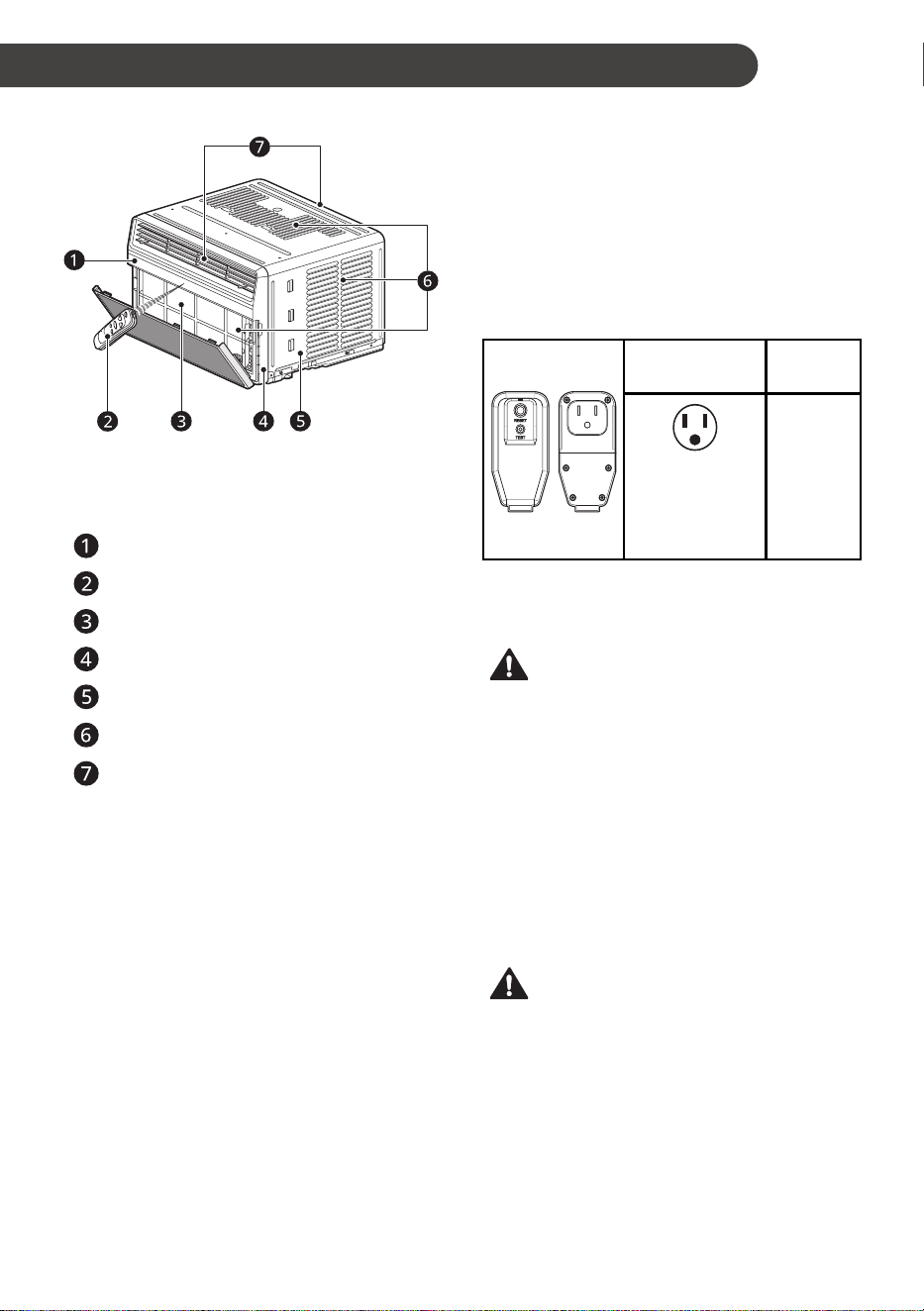
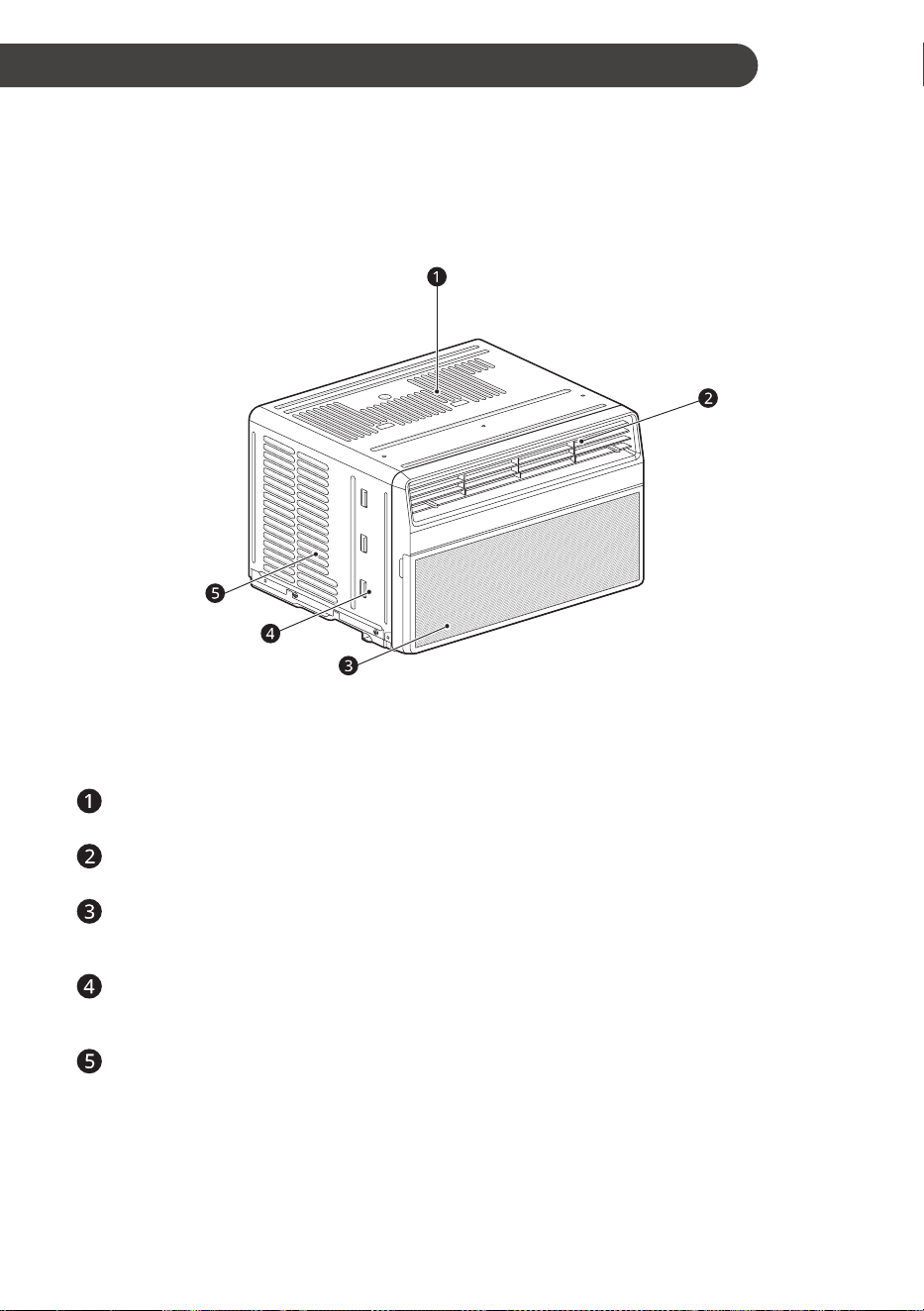
Product Overview
NOTE
• The feature may be changed according to the
type of model.
Control Panel
Remote Control
Air Filter
Front Grille
Cabinet
Air Inlet
Air Outlet
Electrical Data
The power cord may include a current interrupter
device. TEST and RESET buttons are provided
on the plug case. The device should be tested on
a periodic basis by first pressing the TEST button
and then the RESET button. If the TEST button
does not trip or if the RESET button will not stay
engaged, discontinue use of the air conditioner
and contact a qualified service technician.
for 120 V
Use Wall
Receptacle
Power
Supply
Standard 120 V,
3-wire grounding
receptacle rated
15 A / 120 VAC /
60 Hz
Use 15 A,
time delay
fuse or 15
A, circuit
breaker.
NOTE
• The feature may be changed according to the
type of model.
WARNING
• This appliance should be installed in
accordance with the National Electrical Code.
• Use of extension cords could cause serious
injury or death.
− Do not use an extension cord with this
window air conditioner.
− Do not use surge protectors or multi-outlet
adapters with this window air conditioner.
• Never push the TEST button during operation.
Doing so can damage the plug.
− Do not remove, modify, or immerse this
plug. If this device trips, the cause should be
corrected before further use.
CAUTION
• The conductors inside this cord are surrounded
by shields, which monitor leakage current.
These shields are not grounded. Periodically
examine the cord for any damage. Do not use
this product in the event the shields become
exposed. Avoid shock hazard. This unit cannot
be user-serviced. Do not open the tamper-
resistant sealed portion. All warranties and
performance will be voided. This unit is not
intended to be used as an ON/OFF switch.
9
EN
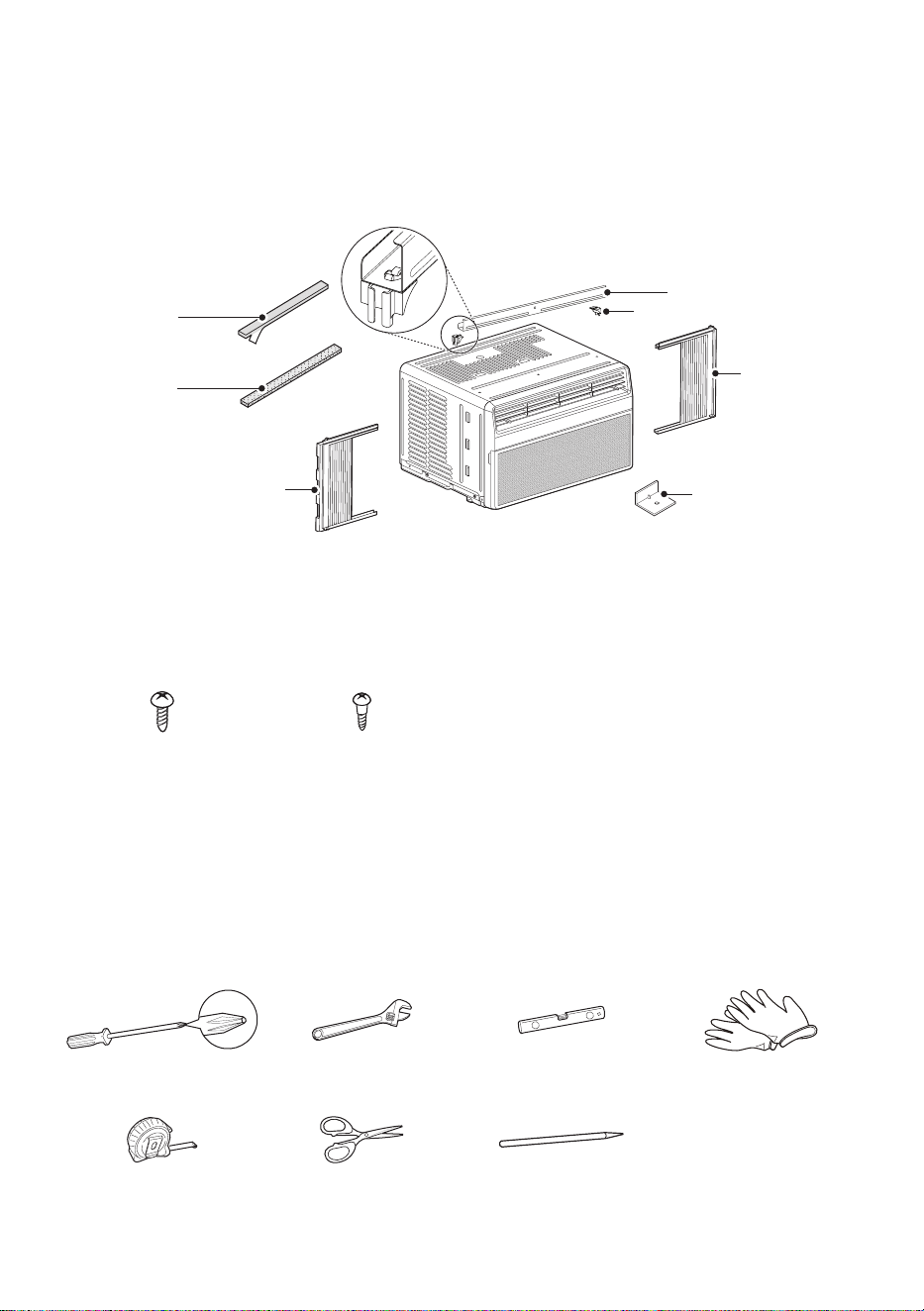
Parts Included (Appearance May Vary)
Right curtain
panel
Left curtain
panel
Foam strip
(Non-adhesive)
Foam-PE (2)
(Adhesive backed)
L bracket (3)
Supporter (2)
Upper Guide
NOTE
• The feature may be changed according to the type of model.
Type “A” ScrewsType “A” Screws
(6)(6)
Type “B” ScrewsType “B” Screws
(5)(5)
Tools Needed
Phillips-head screwdriverPhillips-head screwdriver Adjustable wrenchAdjustable wrench LevelLevel GlovesGloves
Tape measureTape measure Scissors or Cutting knifeScissors or Cutting knife PencilPencil
10
EN
How to Install the Unit
1
To prevent vibration and noise, make sure the
unit is installed securely and firmly.
2
Install the unit out of direct sunlight.
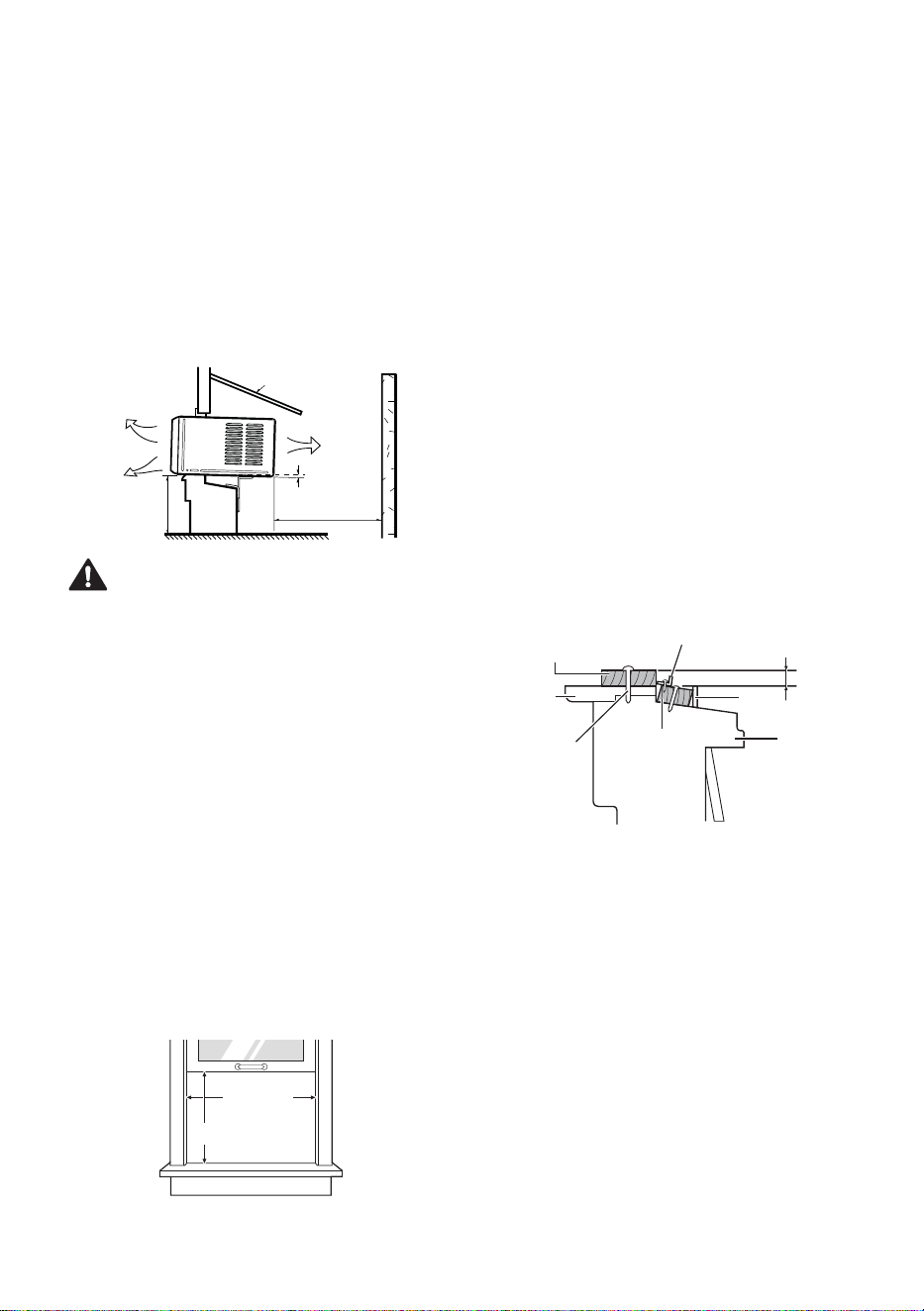
3
There should be no obstacles, such as a
fence or wall, within 20” from the back of the
cabinet because it will prevent heat radiation
of the condenser. Restriction of outside air will
greatly reduce the cooling efficiency of the air
conditioner.
Fence
Awning
Heat
radiation
Cooled air
Over 20"
30"~60"
About 1/4"
CAUTION
• DO NOT cover or block any of the side and top
louvers. All side louvers of the cabinet must
remain exposed to the outside of the structure
and unobstructed.
4
Install the unit slightly tilted so the back is
slightly lower than the front (about 1/4”). This
will force condensed water to flow to the
outside.
5
Install the unit with the bottom between
30”~ 60” above the floor level.
Window Requirements
• This unit is designed for installation in standard
double hung windows with actual opening
widths from 22” to 36”.
The top and bottom window sashes must open
sufficiently to allow a clear vertical opening of
13” from the bottom of the upper sash to the
inside sill.
22” to 36”22” to 36”
13” min13” min
NOTE
• All supporting parts should be secured to firm
wood, masonry, vinyl, fiberglass, or metal.
• This product is a window air conditioner. As
such, a standard single-hung or double-hung
window is required for proper installation. Non-
window installations, including using sleeves or
wall openings, and other installation methods
are not recommended.
Storm Window Requirements
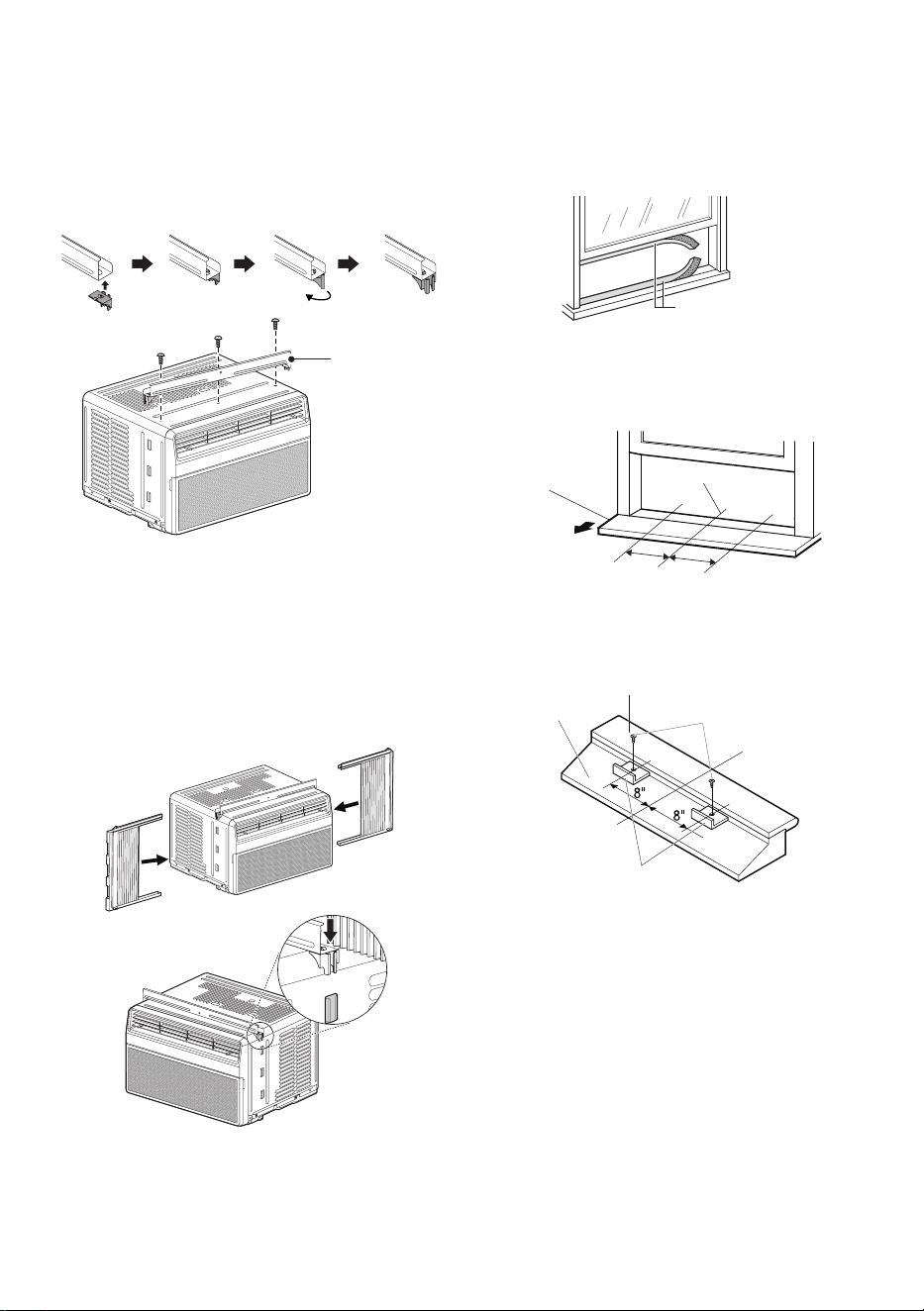
1
Windows that include a storm window frame
may prevent the air conditioner from tilting
down toward the outside to drain properly. For
proper drainage, attach a 1” x 2” piece of wood
to the inner sill, trimmed to a length which fits
inside the window frame. The top of the wood
shim must be at least 3/4” higher than the top
of the storm window frame. Attach the wood
securely to the sill with nails or screws.
2
If necessary, attach another 1” x 2” wood strip
flush against the back of the inner sill. This will
raise the L bracket, as shown in the drawing.
Indoors
Inner Sill
Nail or screw
Outer Sill
Storm
Window Frame
Wood Strip Mounted
on Top of Inner Sill
3/4" higher than
storm window fram
e
Wood Strip for
L bracket
L Bracket
Outdoors
11
EN
Preparation of the Chassis
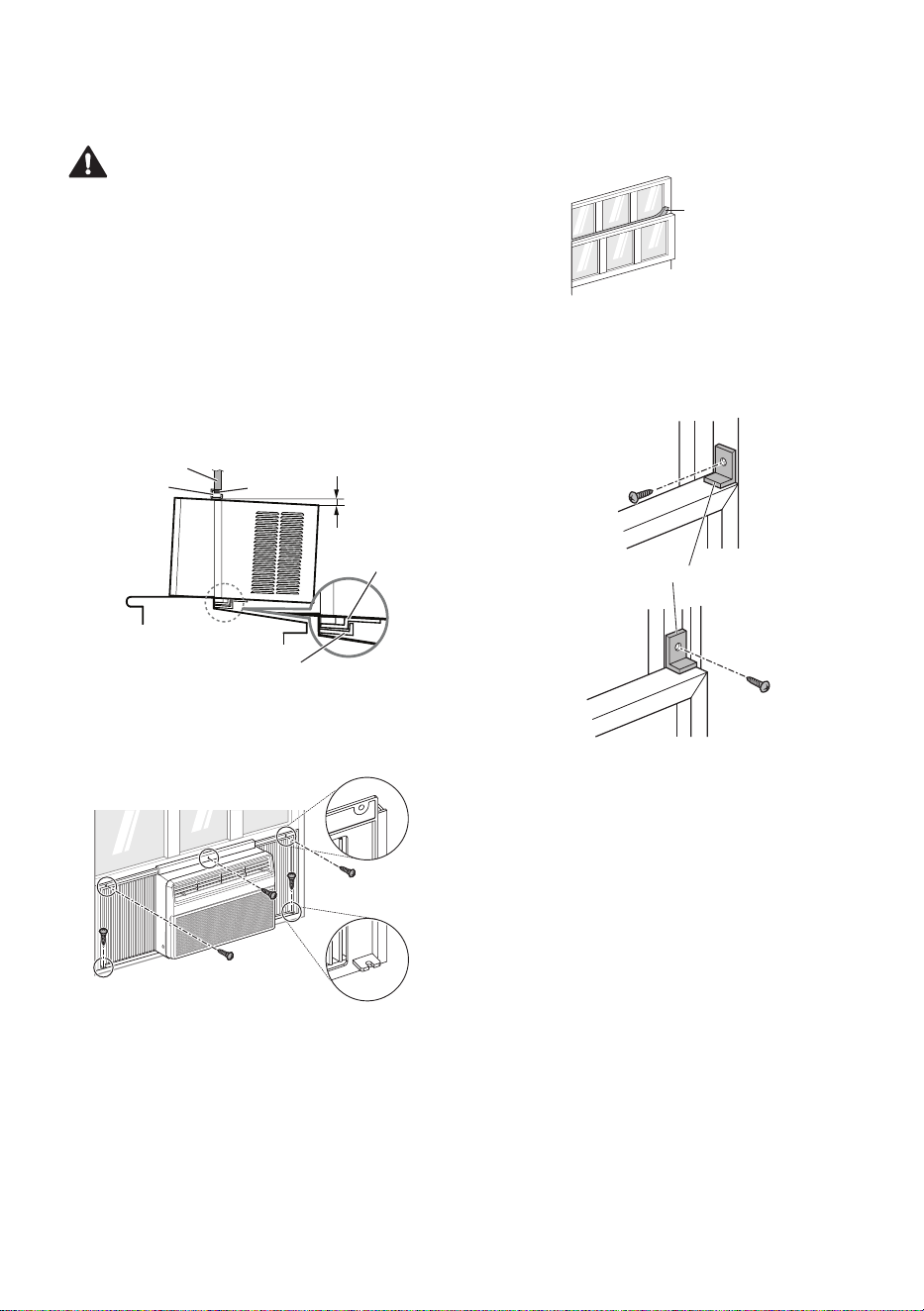
1
Assemble two supporters with upper guide.
Align holes between the upper guide and the
top of the cabinet and then install it with 3 type
A screws.
Upper GuideUpper Guide
Screws (Type A)Screws (Type A)
NOTE
• The feature may be changed according to the
type of model.
2
Extend the curtains in the curtain panels and
insert the edges into the brackets on either
side of the cabinet. Insert the top and bottom
rails on the curtain guides into the upper and
lower panel guides on the cabinet.
Right Right
Curtain Curtain
PanelPanel
Left Left
Curtain Curtain
PanelPanel
NOTE
• The feature may be changed according to the
type of model.
3
Cut the window sash seals to the proper
length. Peel off the backing and attach the
adhesive-backed foam to the underside of the
window sash and bottom of window frame.
Foam-PE Foam-PE
(Adhesive backed)(Adhesive backed)
4
Open the window and draw a center line on
the center of the inner sill. Then mark lines 8”
to the left and right of the center line.
8"
8"
Inner SillInner Sill
Center LineCenter Line
Room SideRoom Side
5
Install the L bracket behind the inner window
sill as shown. Use the 2 type A screws
provided.
Screws Screws
(Type A)(Type A)
Inner SillInner Sill
Center LineCenter Line
Outer SillOuter Sill
L BracketL Bracket
NOTE
• The bracket helps to hold unit securely in place.
Be sure to place bracket edge flush against
back of inner sill.
12
EN
Unit Installation
CAUTION
• During the following step, hold unit firmly until
window sash is lowered to top channel behind
side panel frames. Personal injury or property
damage may result if unit falls from window.
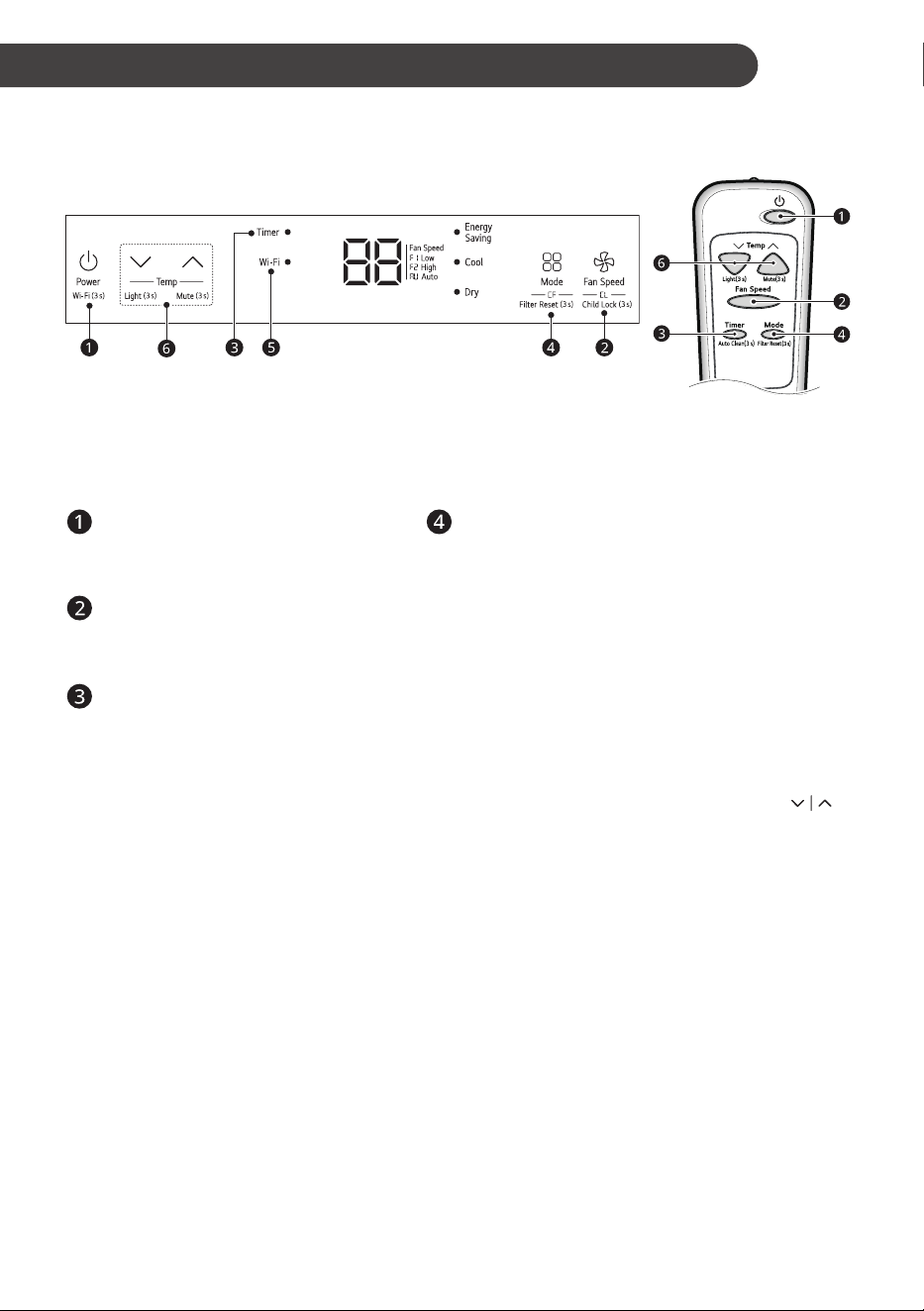
1
Set the air conditioner in the window so that
is centered. Place the air conditioner so that
front edge of the bottom guide is against the
back edge of the sill.
Bring the window down so that the front edge
of the upper guide is in front of the window.
Make sure that air conditioner is level or tilting
slightly to the outside.
About 1/4”About 1/4”
SealSeal
Window FrameWindow Frame
Bottom GuideBottom Guide
Upper GuideUpper Guide
L BracketL Bracket
2
Extend the guide panels to fill the window
opening and use 5 type B screws to secure
them to the window.
Screws Screws
(Type B)(Type B)
NOTE
• The feature may be changed according to the
type of model.
3
Cut the non-adhesive foam strip to the proper
length and insert it between the upper window
sash and the lower window sash.
Foam Strip Foam Strip
(Non-adhesive)(Non-adhesive)
4
To prevent broken glass or damage
to windows, on vinyl or other similarly
constructed windows, attach the L bracket with
a type A screw.
Screw Screw
(Type A)(Type A)
L BracketL Bracket
VinylVinyl
Screw Screw
(Type A)(Type A)
WoodWood
13
EN
OPERATION
Control Panel and Remote Control
Control Panel Remote Control
NOTE
• The feature may be changed according to the type of model.
• On control panel surface have protection film, Please remove film before use.
Power
Press to turn the air conditioner ON or
OFF.
Operation Mode
Press the Mode button to cycle between 4 types
of air conditioner operation: Energy Saving / Cool /
Dry / Fan.
Energy Saving - This mode increases the
temperature to the optimal level for minimizing
power consumption.
NOTE
• The temperature automatically sets to 72 °F if
set temperature is below 72 °F.
• The temperature automatically increases to
78 °F if set temperature is below 78 °F.
Cool - This mode is ideal on hot days to cool and
dehumidify the room quickly. Use the Temp
buttons to set the desired room temperature and
use the Fan Speed button to set the desired fan
circulation speed.
Dry - This mode is ideal for rainy and damp days
to dehumidify the room rather than cooling it
significantly. Humidity is removed from the room by
the combination of compressor operation and the
fan speed fixed at Low. The compressor and fan
turn off once the set temperature is reached. Fan
speed cannot be adjusted in Dry mode.
Fan - In this mode the fan circulates air but the
compressor does not run. Use the Fan Speed
button to set fan speed to Auto (AU), Low (F1) or
High (F2). In this mode, you cannot adjust the set
temperature.
Fan Speed
Press to set the Fan Speed to Auto
(AU), Low (F1) or High (F2).
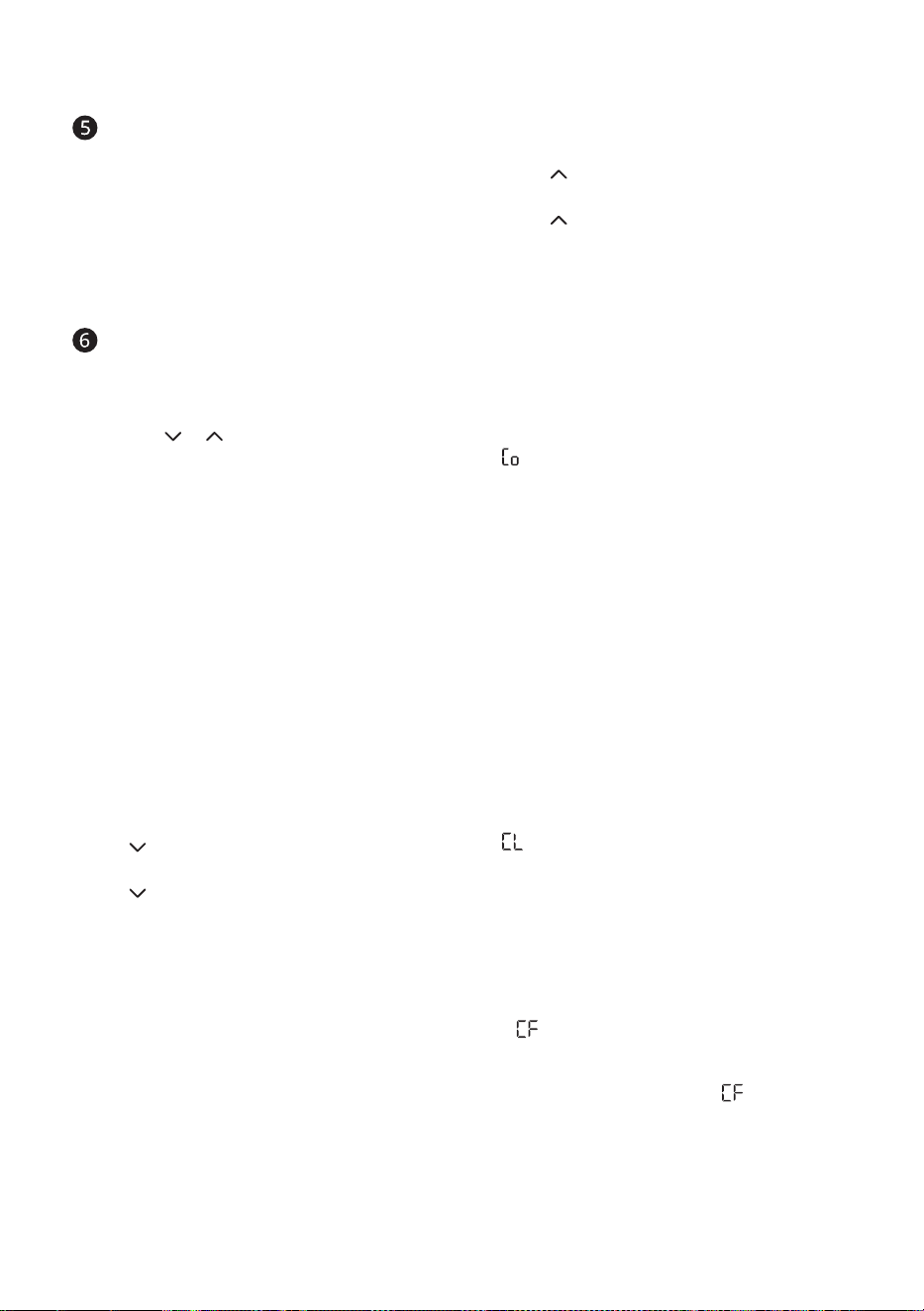
Delay ON/OFF Timer
Delay ON - When the air conditioner is
off, set it to automatically turn on from 1
to 24 hours later, at its previous mode
and fan settings.
Delay OFF - When the air conditioner is
on, set it to automatically turn off from 1
to 24 hours later.
NOTE
• Each press of the Timer button
advances the timer by 1 hour. After
the last press the display returns to
the temperature setting.
14
EN
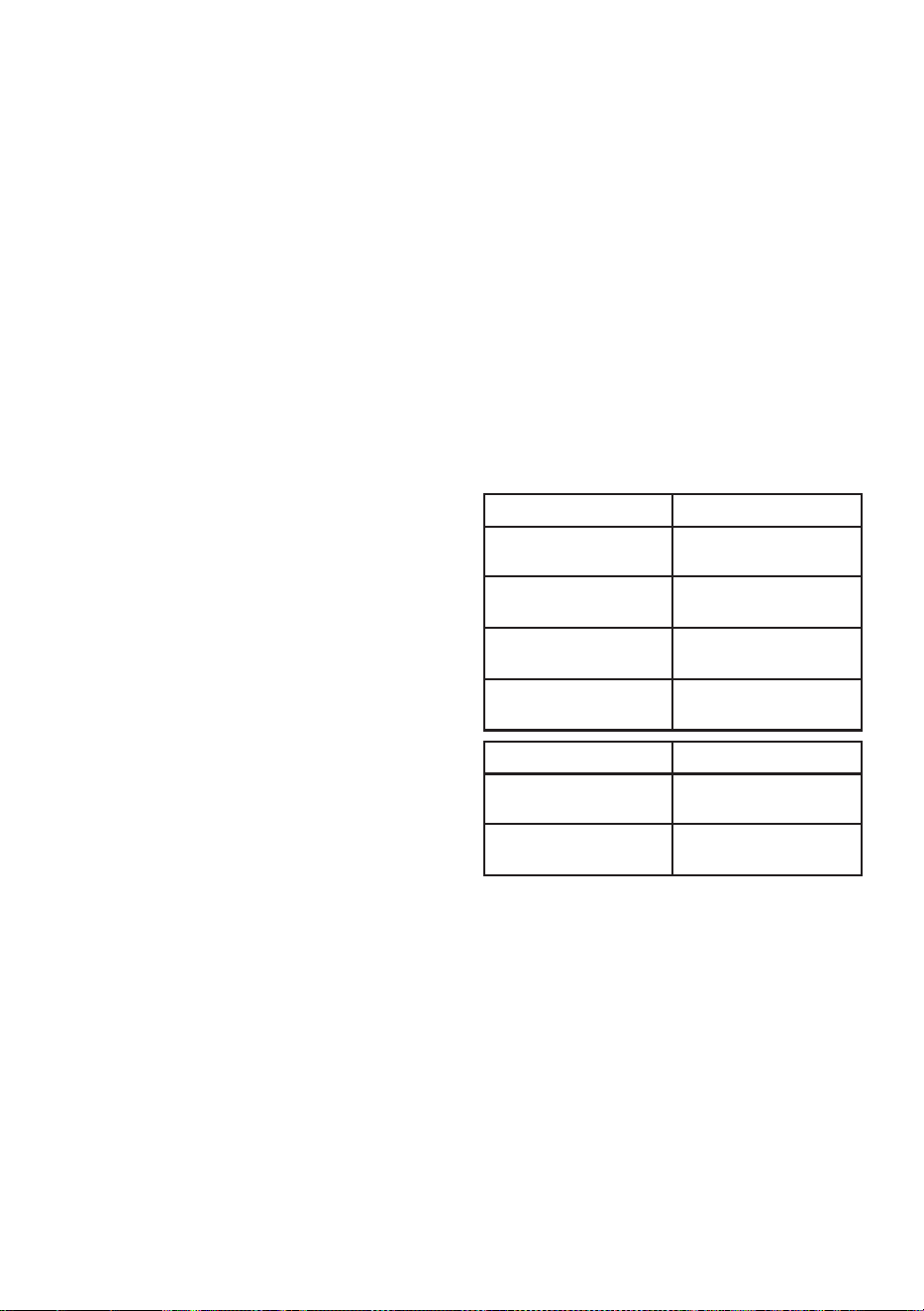
Wi-Fi (Wi-Fi Model Only)
Enables connection of the air conditioner to
the home Wi-Fi.
Press Power button 3 seconds to use
Wi-Fi.
NOTE
• Follow instructions on LG ThinQ
application on how to connect to your
unit.
Temperature Control
The thermostat monitors room
temperature to maintain the desired
temperature. The thermostat can be set
between 16 °C–30 °C (60 °F–86 °F).
Press or arrows to increase or
decrease temperature setting.
NOTE
• Auto Restart : If the air conditioner turns
off due to a power outage, it will restart
automatically once the power is restored, with
the same settings as were set before the unit
turned off.
• The remote control will not function properly if
the AC infrared sensor is exposed to direct light
or if there are obstacles between the remote
controller and the air conditioner.
Using the Light Off
Function
You can set the brightness of the control panel,
• Press button on the control panel for 3
seconds, or
• Press button on the remote control for 3
seconds.
NOTE
• If the brightness of an indoor appliance’s
display is set to OFF, pressing a button on the
remote control automatically turns the display
on for 5 seconds.
• This function may operate differently,
depending on the model.
Using the Mute Function
You can turn on/off the unit’s buzzer sound,
• Press button on the control panel for 3
seconds, or
• Press button on the remote control for 3
seconds.
Using the Auto Clean
Function
In the Cooling and Dry Mode, Moisture is
generated inside the indoor unit. This function
removes such moisture.
• Press
Timer
button on the remote control for 3
seconds.
• is displayed on the display screen.
NOTE
• When using the product for the first time, the
Auto Clean function is not set.
• If you turn off the unit, the fan continues to
run for 10-20 minutes and cleans inside of the
indoor unit.
Using the Child Lock
Function
You can set the lock function to prevent children
from operating the product’s control panel. Use
the Child Lock function to prevent unintended
operation or damage.
• Press Fan speed button 3 seconds to turn the
Child Lock function on or off.
• is displayed on the display screen.
NOTE
• The remote control operates normally even
when the lock function is enabled.
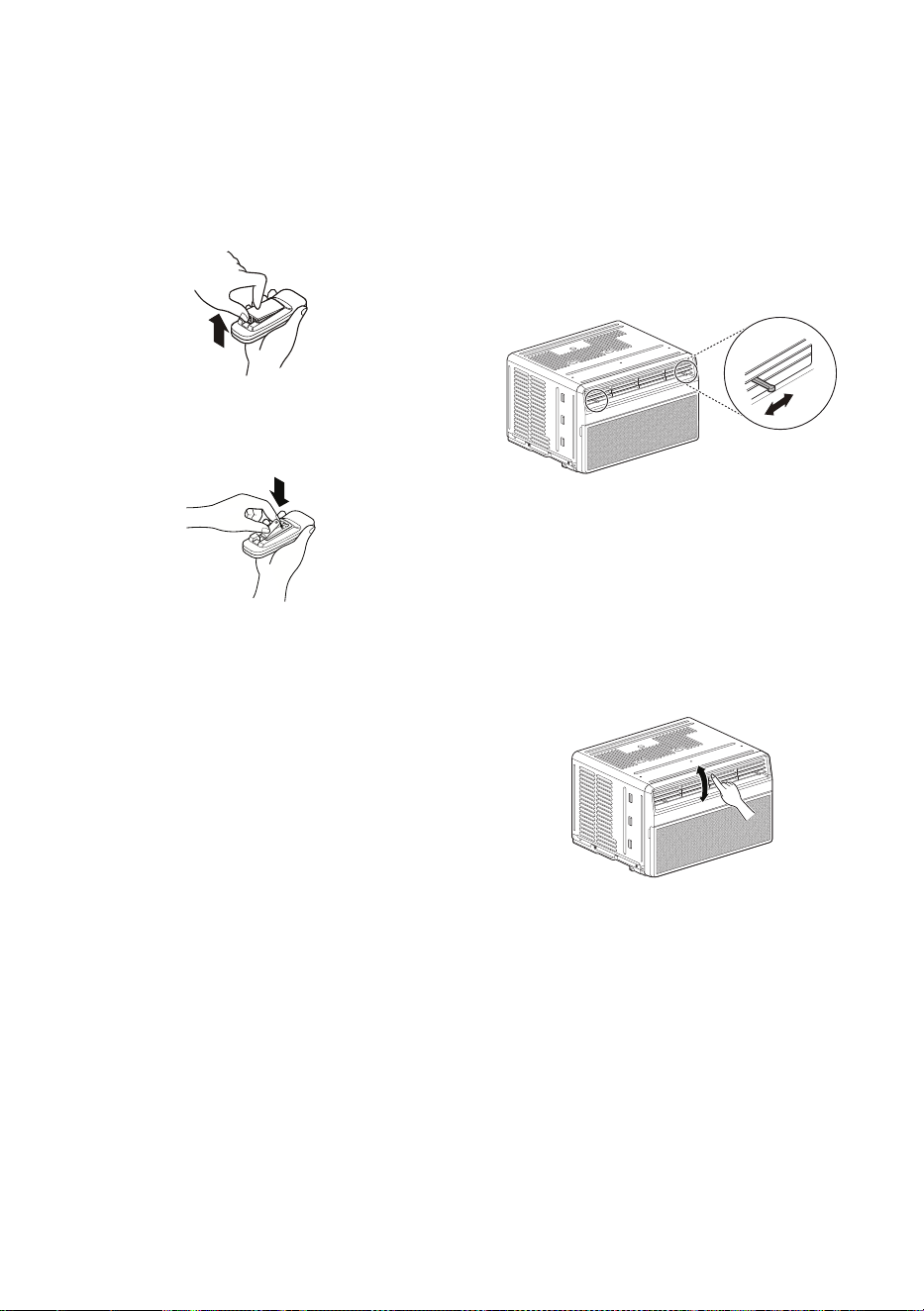
Using the Clean Filter
Function
The LED light up to notify you that the filter
needs to be cleaned. After cleaning the filter, press
the Mode button on the control panel or remote
control 3 seconds to turn off the light.
NOTE
• This feature is a reminder to clean the air filter
for more efficient operation. The LED light turns
on after 250 hours of operation.
15
EN
Wireless Remote Control
Inserting Batteries
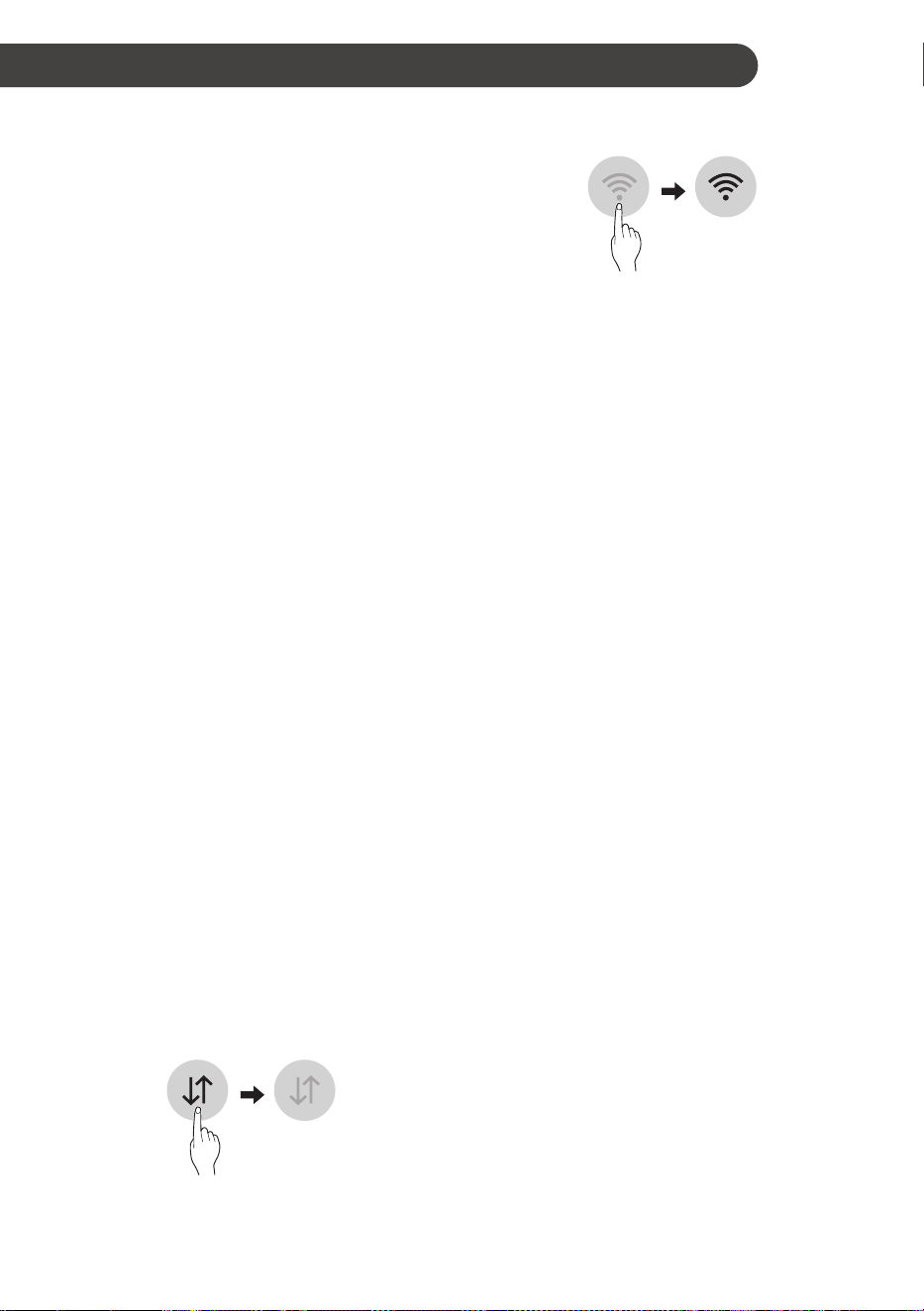
1
Push out the cover on the back of the remote
control with your thumb.
2
With the plus and minus poles facing as
marked, and insert two new AAA 1.5 V
batteries.
3
Reattach the cover.
NOTE
• Two new batteries are supplied with the air
conditioner for use in the remote control.
• Do not use a rechargeable battery. Make sure
that the battery is new.
• In order to prevent discharge, remove the
battery from the remote control if the air
conditioner is not going to be used for an
extended period of time.
• Keep the remote control away from extremely
hot or humid places.
• To maintain optimal operation of the remote
control, the remote sensor should not be
exposed to direct sunlight.
Air Direction
Airflow can be adjusted by changing the direction
of the air conditioner’s louvers.
Adjusting Horizontal Airflow
Direction
The horizontal airflow is adjusted by moving the
levers of the vertical louvers to the left or right.
NOTE
• The feature may be changed according to the
type of model.
Adjusting Vertical Airflow
Direction
Touch the horizontal louvers to adjust the airflow
up or down.
NOTE
• When the weather is extremely hot, the unit
may turn off automatically to protect the
compressor.
• The feature may be changed according to the
type of model.
16
EN
SMART FUNCTIONS
LG ThinQ Application
This feature is only available on models with
the b or ThinQ logo
The LG ThinQ application allows you to
communicate with the appliance using a
smartphone.
LG ThinQ Application Features
Communicate with the appliance from a
smartphone using the convenient smart features.
Smart Diagnosis
TM
If you experience a problem while using the
appliance,this smart diagnosis feature will help you
diagnose the problem.
Settings
Allows you to set various options on the appliance
and in the application.
NOTE
• If you change your wireless router, internet
service provider, or password, delete the
registered appliance from the LG ThinQ
application and register it again.
• The application is subject to change for
appliance improvement purposes without
notice to users.
• Functions may vary by model.
Before Using LG ThinQ
Application
1
Check the distance between the appliance
and the wireless router (Wi-Fi network).
• If the distance between the appliance and
the wireless router is too far, the signal
strength becomes weak. It may take a long
time to register or installation may fail.
2
Turn off the Mobile data or Cellular Data on
your smartphone.
3
Connect your smartphone to the wireless
router.
NOTE
• To verify the Wi-Fi connection, check that
Wi-Fi LED on the control panel is lit.
• The appliance supports 2.4 GHz Wi-Fi
networks only. To check your network
frequency, contact your Internet service
provider or refer to your wireless router manual.
• LG ThinQ is not responsible for any
network connection problems or any faults,
malfunctions, or errors caused by network
connection.
• If the appliance is having trouble connecting
to the Wi-Fi network, it may be too far from
the router. Purchase a Wi-Fi repeater (range
extender) to improve the Wi-Fi signal strength.
• The Wi-Fi connection may not connect or may
be interrupted because of the home network
environment.
• The network connection may not work properly
depending on the Internet service provider.
• The surrounding wireless environment can
make the wireless network service run slowly.
• The appliance cannot be registered due to
problems with the wireless signal transmission.
Unplug the appliance and wait about a minute
before trying again.
• If the firewall on your wireless router is enabled,
disable the firewall or add an exception to it.
• The wireless network name (SSID) should be
a combination of English letters and numbers.
(Do not use special characters.)
• Smartphone user interface (UI) may vary
depending on the mobile operating system
(OS) and the manufacturer.
• If the security protocol of the router is set
to WEP, you may fail to set up the network.
Please change it to other security protocols
(WPA2 is recommended) and register the
product again.
17
EN
FCC Notice
This following notice cover the transmitter module
contained in this product.
This equipment has been tested and found to
comply with the limits for a Class B digital device,
pursuant to Part 15 of the FCC Rules. These limits
are designed to provide reasonable protection
against harmful interference in a residential
installation. This equipment generates, uses,
and can radiate radio frequency energy and, if
not installed and used in accordance with the
instructions, may cause harmful interference
to radio communications. However, there is no
guarantee that interference will not occur in a
particular installation. If this equipment does
cause harmful interference to radio or television
reception, which can be determined by turning the
equipment off and on, the user is encouraged to
try to correct the interference by one or more of the
following measures:
• Reorient or relocate the receiving antenna.
• Increase the separation between the
equipment and the receiver.
• Connect the equipment into an outlet on a
circuit different from that to which the receiver
is connected.
• Consult the dealer or an experienced radio/TV
technician for help.
This device complies with part 15 of the FCC
Rules. Operation is subject to the following two
conditions:
1) This device may not cause harmful
interference and
2) This device must accept any interference
received, including interference that may
cause undesired operation.
Any changes or modifications in construction of
this device which are not expressly approved by
the party responsible for compliance could void the
user’s authority to operate the equipment.
FCC RF Radiation Exposure
Statement
This equipment complies with FCC radiation
exposure limits set forth for an uncontrolled
environment. This transmitter must not be
colocated or operating in conjunction with any
other antenna or transmitter.
This equipment should be installed and operated
with a minimum distance of 20 cm (7.8 inches)
between the antenna and your body. Users must
follow the specific operating instructions for
satisfying RF exposure compliance.
Radio Equipment Specifications
To identify the RF module installed in the
appliance, refer to the label attached to the
appliance.
Model Name LCWB-001
Wireless LAN
Frequency Range
2412 – 2462 MHz
Wireless LAN Output
Power (Max)
< 30 dBm
Bluetooth Frequency
Range
2402 – 2480 MHz
Bluetooth Output
Power (Max)
< 30 dBm
Model Name LCW-007
Wireless LAN
Frequency Range
2412 - 2462 MHz
Wireless LAN Output
Power (Max)
< 30 dBm

18
EN
Installing the LG ThinQ
Application
Search for the LG ThinQ application from the
Google Play Store or Apple App Store on a
smartphone. Follow instructions to download and
install the application.
Open Source Software Notice
Information
To obtain the source code that is contained in
this product, under GPL, LGPL, MPL, and other
open source licenses that have the obligation to
disclose source code, and to access all referred
license terms, copyright notices and other relevant
documents, please visit https://opensource.lge.
com.
LG Electronics will also provide open source code
to you on CD-ROM for a charge covering the cost
of performing such distribution (such as the cost of
media, shipping, and handling) upon email request
This offer is valid to anyone in receipt of this
information for a period of three years after our last
shipment of this product.
Smart Diagnosis
TM
This feature is only available on models with the
c or d logo.
Use this feature to help you diagnose and solve
problems with your appliance.
NOTE
• For reasons not attributable to LGE’s
negligence, the service may not operate due
to external factors such as, but not limited to,
Wi-Fi unavailability, Wi-Fi disconnection, local
app store policy, or app unavailability.
• The feature may be subject to change without
prior notice and may have a different form
depending on where you are located.
Using LG ThinQ to Diagnose
Issues
If you experience a problem with your Wi-Fi
equipped appliance, it can transmit troubleshooting
data to a smartphone using the LG ThinQ
application.
• Launch the LG ThinQ application and
select the Smart Diagnosis
TM
feature in the
menu. Follow the instructions provided in the
LG ThinQ application.
19
EN
MAINTENANCE
WARNING
• Before cleaning or performing maintenance,
disconnect the power supply and wait until the
fan stops.
Cleaning
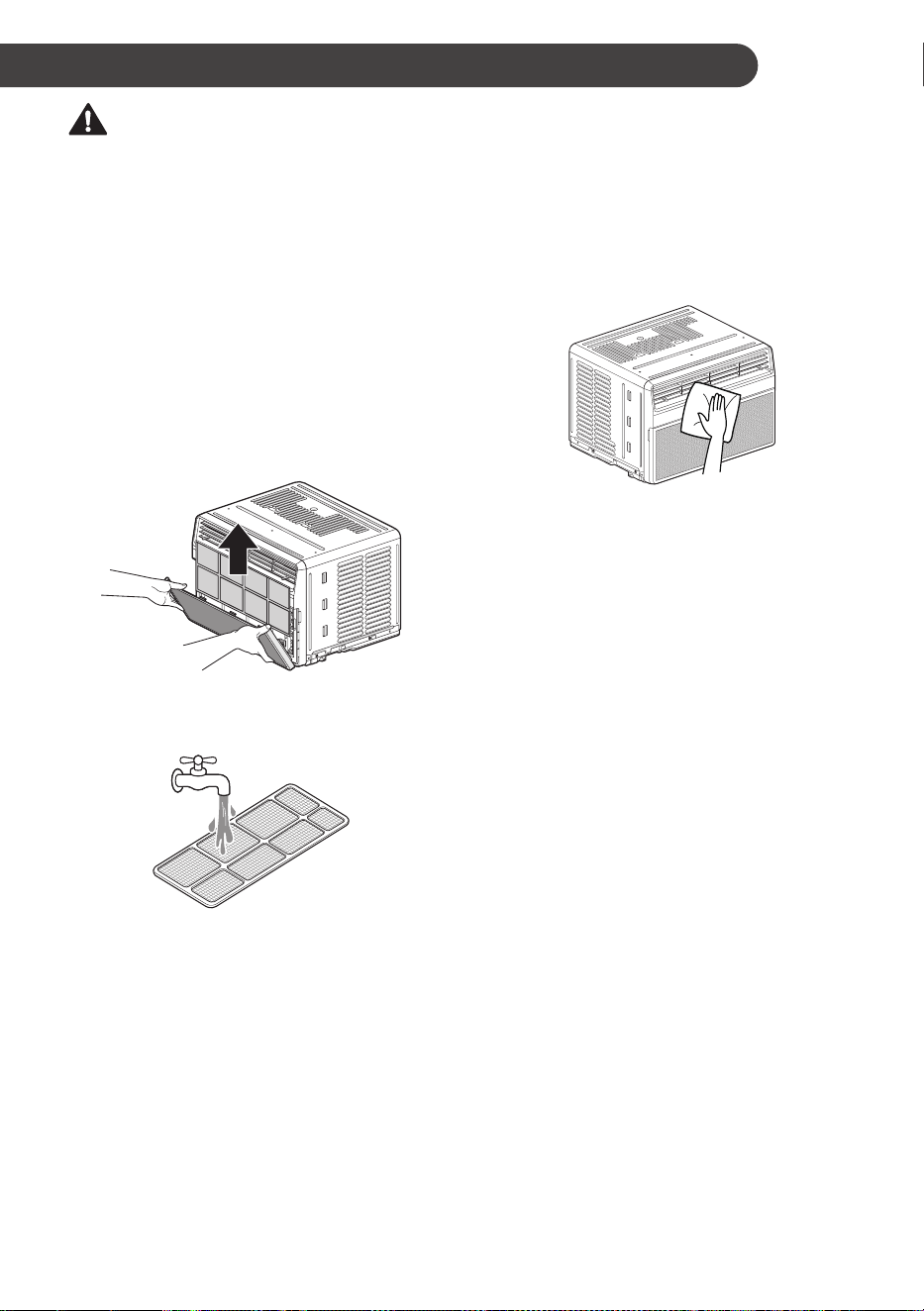
Check the air filter at least twice a month to see
if cleaning is necessary. Trapped particles in the
filter can build up and block the airflow, reducing
cooling capacity and causing an accumulation of
frost on the evaporator.
Cleaning the Air Filter
1
Remove the air filter from the front grille by
pulling the filter forward and then up slightly.
2
Wash the filter using lukewarm water below
40 °C (104 °F).
3
Gently shake the excess water from the filter
and replace.
NOTE
• The feature may be changed according to the
type of model.
Cleaning the Air Conditioner
• Remove dust from the air inlet and outlet using
a vacuum cleaner.
• Wipe the front grille and inlet grille with a cloth
dampened in a mild detergent solution.
• Wash the cabinet with mild soap or detergent
and lukewarm water, then polish using liquid
appliance wax.
NOTE
• To ensure continued peak efficiency, the
condenser coils (outside of unit) should be
checked periodically and cleaned if clogged
with soot or dirt from outside air.
• For repair and maintenance, contact an
Authorized Service Center. See the warranty
page for details or call 1-800-243-0000.
Have your model number and serial number
available. They can be found on the side of the
cabinet. Record them for future reference.
• The feature may be changed according to the
type of model.
20
EN
TROUBLESHOOTING
Before Calling for Service
The appliance is equipped with an automatic error-monitoring system to detect and diagnose problems at
an early stage. If the appliance does not function properly or does not function at all, check the following
before you call for service.
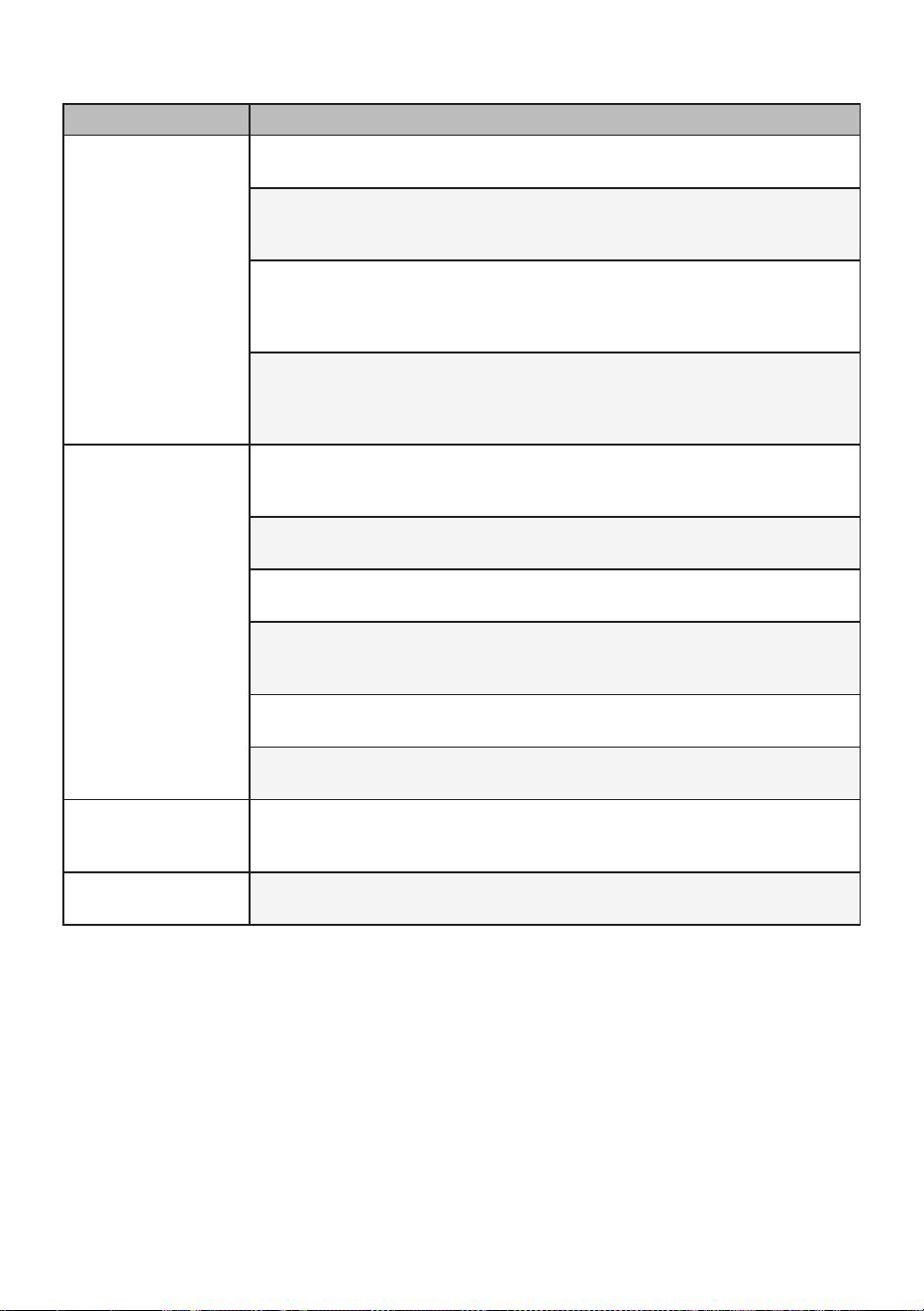
Normal Sounds You May Hear
NOTE
• The feature may be changed according to the type of model.
High Pitched Chatter
Today’s high efficiency compressors may have a high pitched chatter during the cooling cycle.
Sound of Rushing Air
At the front of the unit, you may hear the sound of rushing air being moved by the fan.
Gurgle/Hiss
Gurgling or hissing noise may be heard due to refrigerant passing through the evaporator during
normal operation.
Vibration
Unit may vibrate and make noise because of poor wall or window construction or incorrect
installation.
Pinging or Swishing
Droplets of water hitting the condenser during normal operation may cause pinging or swishing
sounds.
21
EN
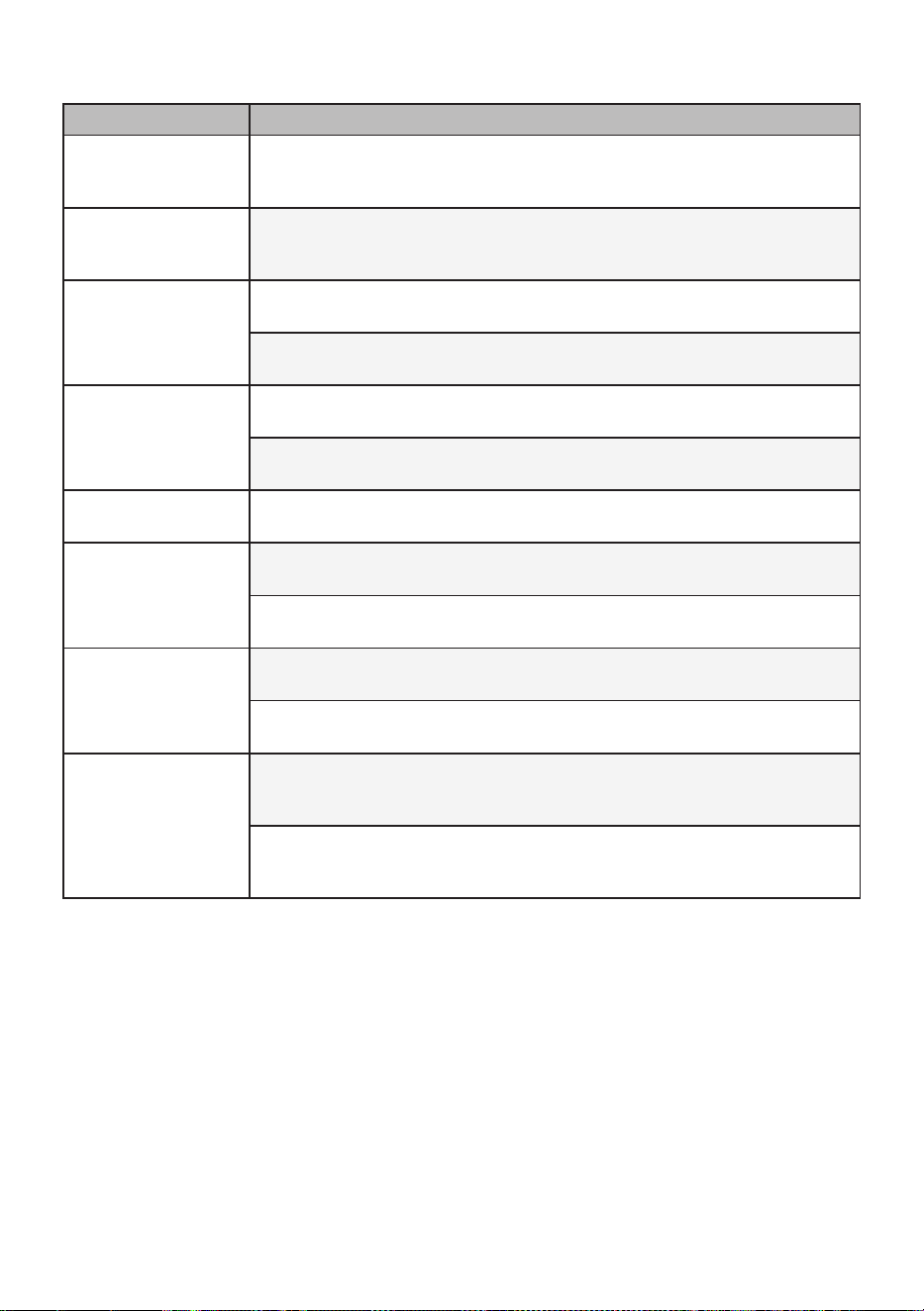
Problem Possible Causes & Corrective Action
Air conditioner does
not start.
The air conditioner is unplugged.
• Make sure the air conditioner plug is pushed completely into the outlet.
The fuse is blown/circuit breaker is tripped.
• Check the house fuse/circuit breaker box and replace the fuse or reset the
breaker.
Power failure.
• If power failure occurs, turn the mode control to off. When power is restored,
wait 3 minutes to restart the air conditioner to prevent tripping of the
compressor overload.
The current interrupter device is tripped.
• Press the RESET button located on the power cord plug. If the RESET
button will not stay engaged, discontinue use of the air conditioner and
contact a qualified service technician.
Air conditioner does
not cool as it should.
Airflow is restricted.
• Make sure there are no curtains, blinds, or furniture blocking the front of the
air conditioner.
The temp control may not be set correctly.
• Set the desired temperature to a level lower than the current temperature.
The air filter is dirty.
• Clean the filter at least every 2 weeks. See the ‘MAINTENANCE’ section.
The room may have been hot.
• When the air conditioner is first turned on, you need to allow time for the
room to cool down.
Cold air is escaping.
• Check for open fumace floor registers and cold air returns.
Cooling coils have iced up.
• See ‘Air conditioner freezing up’ below.
Air conditioner
freezing up.
The cooling coils are iced over.
• Ice may block the airflow and obstruct the air conditioner from properly
cooling the room. Set the mode control at High Fan or High Cool.
Water drips outside.
Hot, humid weather.
• This is normal.
22
EN
Problem Possible Causes & Corrective Action
Water drips Indoors.
The air conditioner is not tilted to the outside.
• For proper water disposal, make sure the air conditioner slants slightly from
the cabinet front to the rear.
Water collects in
base pan.
Moisture removed from air and drains into base pan.
• This is normal for a short period in areas with little humidity; normal for a
longer period in very humid areas.
Air conditioner turns
on and off rapidly.
Dirty air filter - air restricted.
• Clean air filter.
Outside temperature extremely hot.
• Refer to installation instructions or check with installer.
Noise when unit is
cooling.
Air movement sound.
• This is normal. If too loud, set to lower FAN Setting.
Window vibration - poor installation.
• Refer to installation instructions or check with installer.
Room too cold.
Set temperature too low.
• Increase set temperature.
Remote sensing
deactivating
prematurely.
Remote control not located within range.
• Place remote control within 20 feet & 120° radius of the front of the unit.
Remote control signal obstructed.
• Remove obstruction.
Can’t connect the LG
ThinQ application to
the air conditioner.
Air conditioner is turned off.
• Turn the air conditioner on.
Wireless router is turned off.
• Turn the router on.
The air conditioner is
not connecting to the
Wi-Fi.
The Wi-Fi router is too far from the air conditioner.
• Move the router closer to the air conditioner or purchase and install a Wi-Fi
repeater (signal booster).
You do not have permission to use the router or it is incompatible.
• Make sure you are selecting the correct wireless router from the list. The
router must be set to 2.4 GHz.
23
EN
Problem Possible Causes & Corrective Action
Your home appliance
and smartphone are
not connected to the
Wi-Fi network.
The password for the Wi-Fi network that you are trying to connect to is
incorrect.
• Find the Wi-Fi network connected to your smartphone and remove it, then
register your appliance on LG ThinQ.
Mobile data for your smartphone is turned on.
• Turn off the Mobile data of your smartphone and register the appliance
using the Wi-Fi network.
The wireless network name (SSID) is set incorrectly.
• The wireless network name (SSID) should be a combination of English
letters and numbers. (Do not use special characters.)
The router frequency is not 2.4 GHz.
• Only a 2.4 GHz router frequency is supported. Set the wireless router to
2.4 GHz and connect the appliance to the wireless router. To check the
router frequency, check with your Internet service provider or the router
manufacturer.
The distance between the appliance and router is too far.
• If the distance between the appliance and the router is too far, the signal may
be weak and the connection may not be configured correctly. Move location
of the router so that it is closer to the appliance.
During Wi-Fi setup, the application is requesting a password to connect to
the product (on certain phones).
• Locate the network name which starts with “LG” under Settings > Networks.
Note the last part of the network name.
− If the network name looks like LGE_Appliance_XX-XX-XX, enter lge12345.
− If the network name looks like LGE_Appliance_XXXX, enter XXXX
twice as your password. For example, if the network name appears as
LGE_Appliance_8b92, then you would enter 8b928b92 as your password.
In this instance, the password is case sensitive and the last 4 characters
are unique to your appliance.
NOTE
• If you see “CH” in the display, please call 1-800-243-0000.
24
EN
WARRANTY
ARBITRATION NOTICE: THIS LIMITED WARRANTY CONTAINS AN ARBITRATION PROVISION
THAT REQUIRES YOU AND LG TO RESOLVE DISPUTES BY BINDING ARBITRATION INSTEAD OF
IN COURT, UNLESS YOU CHOOSE TO OPT OUT. IN ARBITRATION, CLASS ACTIONS AND JURY
TRIALS ARE NOT PERMITTED. PLEASE SEE THE SECTION TITLED “PROCEDURE FOR RESOLVING
DISPUTES” BELOW.
WHAT THIS WARRANTY COVERS:
LG Electronics U.S.A., Inc. (“LG”) warrants your LG Room Air Conditioner (“product”) against defect in
materials or workmanship under normal household use, during the warranty period set forth below, LG will,
at its option, repair or replace the product. This limited warranty is valid only to the original retail purchaser
of the product, is not assignable or transferrable to any subsequent purchaser or user, and applies only
when the product is purchased through an LG authorized dealer or distributor and used within the United
States (“U.S.”) including U.S. Territories.
NOTE
• Replacement products and repair parts may be new or factory-remanufactured and are warranted for
the remaining portion of the original unit’s warranty period or ninety (90) days, whichever is longer.
Please retain dated receipt or delivery ticket as evidence of the Date of Purchase for proof of warranty
(you may be required to submit a copy to LG or authorized representative).
WARRANTY PERIOD:
1 year from the Date of Purchase: Any internal/ functional Parts and Labor
HOW SERVICE IS HANDLED: In-Home Service
In-home service will be provided during the warranty period subject to availability within the United States.
In-home service may not be available in all areas. To receive in-home service, the product must be
unobstructed and accessible to service personnel. If during in-home service repair cannot be completed, it
may be necessary to remove, repair and return the product. If in-home service is unavailable, LG may elect,
at our option, to provide for transportation of our choice to and from a LG authorized service center.
THIS LIMITED WARRANTY DOES NOT COVER:
• Service trips to deliver, pick up, or install the product or for instruction on product use.
• Replacing house fuses or resetting of circuit breakers, correction of house wiring or plumbing, or
correction of product installation.
• Damage or failure caused by leaky / broken / frozen water pipes, restricted drain lines, inadequate or
interrupted water supply or inadequate supply of air.
• Damage or failure caused by accidents, pets and vermin, lightning, wind, floods or acts of God.
• Damage or failure resulting from misuse, abuse, improper installation, repair or maintenance. Improper
repair includes use of parts not approved or specified by LG.
• Damage or failure caused by unauthorized modification or alteration to the product.
• Damage or failure caused by incorrect electrical current, voltage, or plumbing codes.
• Cosmetic damage, including scratches, dents, chips or other damage to finish of the product, unless
such damage results from defects in materials or workmanship and is reported to LG within seven (7)
calendar days from the date of delivery.
• Damage or missing items to any display, open box, discounted, or refurbished product.
• Product where the original factory serial numbers have been removed, defaced or changed in any way.
• Repairs when product is used in other than normal and usual household use (e.g. rental, commercial
use, offices, or recreational facilities) or contrary to the instructions outlined in the owner’s manual.
• The removal and reinstallation of the Product if it is installed in an inaccessible location.
25
EN
THIS WARRANTY IS IN LIEU OF ANY OTHER WARRANTY, EXPRESS OR IMPLIED, INCLUDING
AND WITHOUT LIMITATION TO, ANY WARRANTY OF MERCHANTABILITY OR FITNESS FOR A
PARTICULAR PURPOSE. TO THE EXTENT ANY IMPLIED WARRANTY IS REQUIRED BY LAW, THIS
WARRANTY IS LIMITED IN DURATION TO THE TERM PERIOD EXPRESSED ABOVE. REPAIR OR
REPLACEMENT AS PROVIDED UNDER THIS WARRANTY IS THE EXCLUSIVE REMEDY FOR THE
CUSTOMER. NEITHER THE MANUFACTURER NOR ITS U.S. DISTRIBUTOR SHALL BE LIABLE
FOR ANY INCIDENTAL, CONSEQUENTIAL, INDIRECT, SPECIAL, OR PUNITIVE DAMAGES OF ANY
NATURE, INCLUDING AND WITHOUT LIMITATION TO, LOST REVENUES OR PROFITS, OR ANY
OTHER DAMAGE, WHETHER BASED IN CONTRACT, TORT, OR OTHERWISE.
Some states do not allow the exclusion or limitation of incidental or consequential damages or limitations on
how long an implied warranty lasts, so the above exclusion or limitation may not apply to you. This warranty
gives you specific legal rights and you may also have other rights that vary from state to state.
HOW TO OBTAIN WARRANTY SERVICE & ADDITIONAL INFORMATION:
Call 1-800-243-0000 or visit our website at www.lg.com.
Mail to: LG Customer Information Center (ATTN: CIC)
201 James Record Road, Huntsville, AL 35824
FOR YOUR RECORDS
Write the model and serial numbers here:
Model No.
Serial No.
• This information is located on a label on the side of the unit.
Dealer’s Name
Date Purchased
• Staple your receipt to this page in the event you need it to prove date of purchase or for warranty
issues.

26
EN
PROCEDURE FOR RESOLVING DISPUTES:
ALL DISPUTES BETWEEN YOU AND LG ARISING OUT OF OR RELATING IN ANY WAY TO THIS
LIMITED WARRANTY OR THE PRODUCT SHALL BE RESOLVED EXCLUSIVELY THROUGH BINDING
ARBITRATION, AND NOT IN A COURT OF GENERAL JURISDICTION. BINDING ARBITRATION
MEANS THAT YOU AND LG ARE EACH WAIVING THE RIGHT TO A JURY TRIAL AND TO BRING OR
PARTICIPATE IN A CLASS ACTION.
Definitions.
For the purposes of this section, references to “LG” mean LG Electronics U.S.A., Inc., its
parents, subsidiaries and affiliates, and each of their officers, directors, employees, agents, beneficiaries,
predecessors in interest, successors, assigns and suppliers; references to “dispute” or “claim” shall
include any dispute, claim or controversy of any kind whatsoever (whether based in contract, tort, statute,
regulation, ordinance, fraud, misrepresentation or any other legal or equitable theory) arising out of or
relating in any way to the sale, condition or performance of the product or this Limited Warranty.
Notice of Dispute.
In the event you intend to commence an arbitration proceeding, you must first notify
LG in writing at least 30 days in advance of initiating the arbitration by sending a letter to LG at LG
Electronics, USA, Inc. Attn: Legal Department- Arbitration 111 Sylvan Avenue, Englewood Cliffs,
NJ 07632.
You and LG agree to engage in good faith discussions in an attempt to amicably resolve your claim. The
notice must provide your name, address, and telephone number; identify the product that is the subject of
the claim; and describe the nature of the claim and the relief being sought. If you and LG are unable to
resolve the dispute within 30 days, either party may proceed to file a claim for arbitration.
Agreement to Binding Arbitration and Class Action Waiver.
Upon failure to resolve the dispute
during the 30 day period after sending written notice to LG, you and LG agree to resolve any claims
between us only by binding arbitration on an individual basis, unless you opt out as provided below. Any
dispute between you and LG shall not be combined or consolidated with a dispute involving any other
person’s or entity’s product or claim. More specifically, without limitation of the foregoing, any dispute
between you and LG shall not under any circumstances proceed as part of a class or representative
action. Instead of arbitration, either party may bring an individual action in small claims court, but that
small claims court action may not be brought on a class or representative basis.
Arbitration Rules and Procedures.
To begin arbitration of a claim, either you or LG must make a
written demand for arbitration. The arbitration will be administered by the American Arbitration Association
(“AAA”) and will be conducted before a single arbitrator under the AAA’s Consumer Arbitration Rules that
are in effect at the time the arbitration is initiated (referred to as the “AAA Rules”) and under the
procedures set forth in this section. The AAA Rules are available online at www.adr.org/consumer. Send a
copy of your written demand for arbitration, as well as a copy of this provision, to the AAA in the manner
described in the AAA Rules. You must also send a copy of your written demand to LG at LG Electronics,
USA, Inc. Attn: Legal Department- Arbitration 111 Sylvan Avenue, Englewood Cliffs, NJ 07632. If there is a
conflict between the AAA Rules and the rules set forth in this section, the rules set forth in this section will
govern. This arbitration provision is governed by the Federal Arbitration Act. Judgment may be entered on
the arbitrator’s award in any court of competent jurisdiction. All issues are for the arbitrator to decide,
except that issues relating to the scope and enforceability of the arbitration provision and to the
arbitrability of the dispute are for the court to decide. The arbitrator is bound by the terms of this provision.
Governing Law.
The law of the state of your residence shall govern this Limited Warranty and any
disputes between us except to the extent that such law is preempted by or inconsistent with applicable
federal law.

27
EN
Fees/Costs.
You do not need to pay any fee to begin an arbitration. Upon receipt of your written demand
for arbitration, LG will promptly pay all arbitration filing fees to the AAA unless you seek more than
$25,000 in damages, in which case the payment of these fees will be governed by the AAA Rules. Except
as otherwise provided for herein, LG will pay all AAA filing, administration and arbitrator fees for any
arbitration initiated in accordance with the AAA Rules and this arbitration provision. If you prevail in the
arbitration, LG will pay your attorneys’ fees and expenses as long as they are reasonable, by considering
factors including, but not limited to, the purchase amount and claim amount. Notwithstanding the
foregoing, if applicable law allows for an award of reasonable attorneys’ fees and expenses, an arbitrator
can award them to the same extent that a court would. If the arbitrator finds either the substance of your
claim or the relief sought in the demand is frivolous or brought for an improper purpose (as measured by
the standards set forth in Federal Rule of Civil Procedure 11(b)), then the payment of all arbitration fees
will be governed by the AAA Rules. In such a situation, you agree to reimburse LG for all monies
previously disbursed by it that are otherwise your obligation to pay under the AAA Rules. Except as
otherwise provided for, LG waives any rights it may have to seek attorneys’ fees and expenses from you if
LG prevails in the arbitration.
Hearings and Location.
If your claim is for $25,000 or less, you may choose to have the arbitration
conducted solely on the basis of (1) documents submitted to the arbitrator, (2) through a telephonic
hearing, or (3) by an in-person hearing as established by the AAA Rules. If your claim exceeds $25,000,
the right to a hearing will be determined by the AAA Rules. Any in-person arbitration hearings will be held
at a location within the federal judicial district in which you reside unless we both agree to another
location or we agree to a telephonic arbitration.
Opt Out.
You may opt out of this dispute resolution procedure. If you opt out, neither you nor LG can
require the other to participate in an arbitration proceeding. To opt out, you must send notice to LG no
later than 30 calendar days from the date of the first consumer purchaser’s purchase of the product by
either: (i) sending an e-mail to [email protected], with the subject line: “Arbitration Opt Out” or (ii) calling
1-800-980-2973. You must include in the opt out e-mail or provide by telephone: (a) your name and
address; (b) the date on which the product was purchased; (c) the product model name or model number;
and (d) the serial number (the serial number can be found (i) on the product; or (ii) online by accessing
https://www.lg.com/us/support/repair-service/schedule-repair-continued and clicking on “Find My Model &
Serial Number”).
You may only opt out of the dispute resolution procedure in the manner described above (that is, by
e-mail or telephone); no other form of notice will be effective to opt out of this dispute resolution
procedure. Opting out of this dispute resolution procedure will not affect the coverage of the Limited
Warranty in any way, and you will continue to enjoy the full benefits of the Limited Warranty. If you keep
this product and do not opt out, then you accept all terms and conditions of the arbitration provision
described above.
LG Electronics USA, Inc.
111 Sylvan Avenue, Englewood Cliffs, NJ 07632
LG Customer Information Center
1-800-243-0000
Register your product Online!
www.lg.com