www.lg.com
EN ENGLISH
*MFL72002118*
Copyright © 2023 LG Electronics Inc. All Rights Reserved
MFL72002118
Rev.00_101623
AIR CONDITIONER
Read this owner’s manual thoroughly before operating the appliance
and keep it handy for reference at all times.
OWNER’S MANUAL
TYPE : WINDOW
LW8024R
LW8024RSM
LW8024RSMY
LW8024RSMX
QR Code
Scan to see the online manual.

TABLE OF CONTENTS
SAFETY INSTRUCTIONS ..............................................................3
IMPORTANT SAFETY INSTRUCTIONS ..........................................................4
INSTALLATION ...............................................................................8
Product Overview .............................................................................................. 8
Electrical Data ...................................................................................................8
Parts Included (Appearance May Vary) ............................................................9
Tools Needed ....................................................................................................9
How to Install the Unit .....................................................................................10
Window Requirements ....................................................................................10
Storm Window Requirements .........................................................................10
Preparation of the Chassis ..............................................................................11
Unit Installation................................................................................................12
OPERATION .................................................................................13
Control Panel and Remote Control .................................................................13
Using the Light Off Function ............................................................................ 14
Using the Mute Function .................................................................................14
Using the Auto Clean Function........................................................................14
Using the Child Lock Function ........................................................................14
Using the Clean Filter Function ....................................................................... 14
Wireless Remote Control ................................................................................15
Air Direction .....................................................................................................15
SMART FUNCTIONS ....................................................................16
LG ThinQ Application ......................................................................................16
Smart Diagnosis
TM
.......................................................................................... 17
MAINTENANCE ............................................................................ 19
Cleaning ..........................................................................................................19
TROUBLESHOOTING .................................................................. 20
Before Calling for Service ...............................................................................20
Normal Sounds You May Hear ........................................................................ 20
WARRANTY .................................................................................. 24
3
EN
SAFETY INSTRUCTIONS
READ ALL INSTRUCTIONS BEFORE USE
Your safety and the safety of others are very important.
We have provided many important safety messages in this manual and on
your appliance. Always read and follow all safety messages.
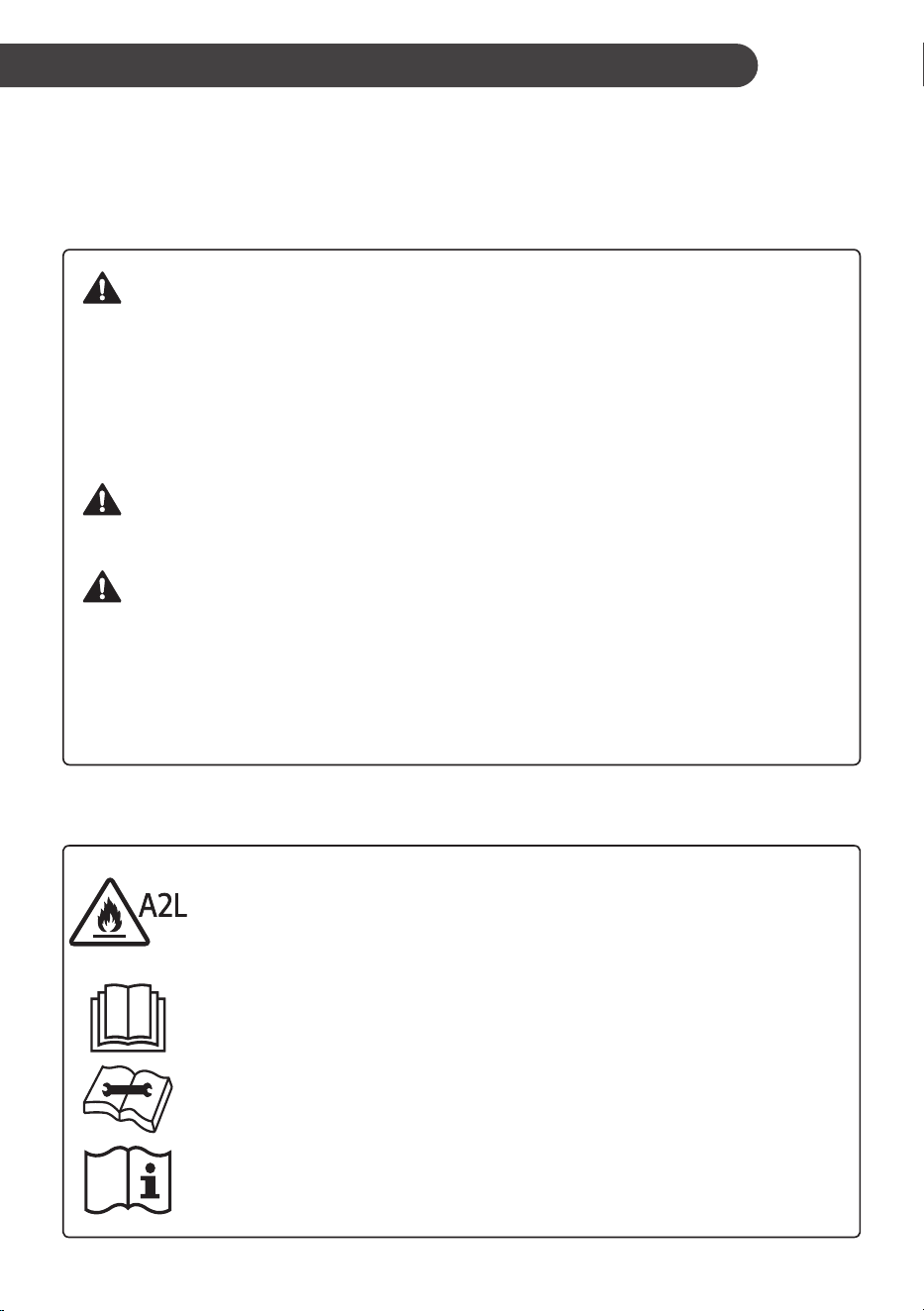
This is the safety alert symbol.
This symbol alerts you to potential hazards that can kill or injure you
and others.
All safety messages will follow the safety alert symbol and either the
word WARNING or CAUTION.
These words mean:
WARNING
You may be killed or seriously injured if you do not follow instructions.
CAUTION
You may be injured or cause damage to the product if you do not follow
instructions.
All safety messages will tell you what the potential hazard is, tell you
how to reduce the chance of injury, and tell you what may happen if the
instructions are not followed.
The following symbols are displayed on the product.
This symbol indicates that this appliance uses a flammable
refrigerant. If the refrigerant is leaked and exposed to an
external ignition source, there is a risk of fire.
This symbol indicates that the Owner’s Manual should be read
carefully.
This symbol indicates that service personnel should be
handling this equipment with reference to the Installation
Manual.
This symbol indicates that additional information is available,
such as the owner’s manual and installation manual.
4
EN
IMPORTANT SAFETY INSTRUCTIONS
WARNING
To reduce the risk of explosion, fire, death, electric shock, scalding or
injury to persons when using this product, follow basic precautions,
including the following:
INSTALLATION
• Before use, the appliance must be properly installed as described in this manual.
• Contact the authorized service technician for repair or maintenance of this unit.
• Contact the installer for installation of this unit.
• When the power cord is to be replaced, replacement work must only be performed by authorized
personnel using genuine replacement parts.
• Installation work must be performed in accordance with the National Electric Code by qualified and
authorized personnel only.
• Connect to a properly rated, protected, and sized power circuit to avoid electrical overload.
• Always plug into a grounded outlet.
• Do not under any circumstances cut or remove the third (ground) prong from the power cord.
• When installing or moving the appliance, be careful not to pinch, crush, or damage the power cord.
• Plug in the power plug properly.
• Do not modify or extend the power cord.
• If the supply cord is damaged, it must be replaced by the manufacturer, its service agent or similarly
qualified persons in order to avoid a hazard.
• Use a dedicated circuit.
• Do not disassemble or modify the product.
• Adhere to all industry recommended safety procedures including the use of long-sleeved gloves and
safety glasses.
• Disconnect the power cord or circuit breaker before installing or servicing the appliance.
• Keep packaging materials out of the reach of children. These materials can pose a suffocation risk to
children.
• Store and install the product where it will not be exposed to temperatures below freezing or exposed to
outdoor weather conditions.
• Do not store or use gasoline or other flammable vapors and liquids in the vicinity of this or any other
appliance.
• Do not install the unit in potentially explosive atmospheres.
• Piping material, pipe routing, and installation shall include protection from physical damage in operation
and service, and be in compliance with national and local codes and standards, such as ASHRAE 15,
IAPMO Uniform Mechanical Code, ICC International Mechanical Code, or CSA B52. All field joints shall
be accessible for inspection prior to being covered or enclosed.
• In order to avoid a hazard due to inadvertent resetting of the thermal cut-out, this appliance must not be
supplied through an external switching device, such as a timer, or connected to a circuit that is regularly
switched on and off by the utility.

5
EN
OPERATION
• Use this appliance only for its intended purpose.
• Never attempt to operate this appliance if it is damaged, malfunctioning, partially disassembled, or has
missing or broken parts, including a damaged cord or plug.
• Repair or immediately replace all power cords that have become frayed or otherwise damaged. Do not
use a cord that shows cracks or abrasion damage along its length or at either end.
• Do not run the cord under carpets or mats where it could be stepped on and damaged.
• Keep the cord out from under heavy objects like tables or chairs.
• Do not place the power cord near a heat source.
• Do not use an adaptor or plug the product into a shared outlet.
• Do not tamper with controls.
• If you detect a strange sound, a chemical or burning smell, or smoke coming from the appliance, unplug
it immediately, and contact the LG Electronics Customer Information Center.
• Never unplug the appliance by pulling on the power cord. Always grip the plug firmly and pull straight out
from the outlet.
• Do not grasp the power cord or touch the appliance controls with wet hands.
• If water enters the product, turn off the power at the main circuit, then unplug the product and call for
service.
• If the product has been submerged, contact the LG Electronics Customer Information Center for
instructions before resuming use.
• Unplug the product when unused for long periods.
• Unplug the product before cleaning.
• In the event of a gas leak (propane gas, etc.) do not operate this or any other appliance. Open a window
or door to ventilate the area immediately.
• This appliance is not intended for use by persons (including children) with reduced physical, sensory or
mental capabilities, or lack of experience and knowledge, unless they have been given supervision or
instruction concerning the use of the appliance by a person responsible for their safety.
• The interior of the product must only be cleaned by an authorized service center or a dealer.
• Do not use solvent-based detergent on the product. Doing so can cause corrosion or damage, product
failure, electrical shock, or fire.
• Children should be supervised to ensure that they do not play with the air conditioner.
• Do not start/stop operation by plugging/unplugging the power cord.
GROUNDING INSTRUCTIONS
• The power cord of this appliance is equipped with a three-prong (grounding) plug. Use this with
a standard three-slot (grounding) wall power outlet to minimize the hazard of electric shock. The
customer should have the wall receptacle and circuit checked by a qualified electrician to make sure the
receptacle is properly grounded. DO NOT CUT OR REMOVE THE THIRD (GROUND) PRONG FROM
THE POWER PLUG.
− Situations when the appliance will be disconnected occasionally; Because of potential safety
hazards, we strongly discourage the use of an adapter plug. However, if you wish to use an adapter,
a TEMPORARY CONNECTION may be made. Use UL-listed adapter, available from most local
hardware stores. The large slot in the adapter must be aligned with the large slot in the receptacle to
assure a proper polarity connection.
• Attaching the adapter ground terminal to the wall receptacle cover screw does not ground the appliance
unless the cover screw is metal, and not insulated, and the wall receptacle is grounded through the
house wiring. Have the circuit checked by a qualified electrician to make sure the receptacle is properly
grounded.
• Disconnect the power cord from the adapter, using one hand on each. Otherwise, the adapter ground
terminal might break. Do not use the appliance with a broken adapter plug.
− Situations when the appliance will be disconnected often; Do not use an adapter plug in these
situations. Unplugging the power cord frequently can lead to an eventual breakage of the ground
terminal. The wall power outlet should be replaced by a three-slot (grounding) outlet instead.
6
EN
CAUTION
To reduce the risk of minor or moderate injury to persons,
malfunction, or damage to the product or property when using this
product, follow basic precautions, including the following:
INSTALLATION
• Take care when installing the product that exhaust or condensation does not damage nearby property.
• Follow installation instructions exactly to avoid excessive vibration or water leakage.
• Wear gloves and use caution when unpacking and installing the appliance. Screws or sharp edges can
cause injuries.
• When installing or moving the appliance, be careful not to pinch, crush, or damage the power cord.
• The supply and return air openings in the body of the appliance may be installed in open areas such
as false ceilings not being used as return air plenums, as long as the conditioned air does not directly
communicate with the air of the false ceiling.
OPERATION
• This appliance is not intended for use as a precision refrigeration system. Do not use it for special
purposes such as maintaining pets, food, precision machinery, or art objects.
• Make sure the air inlet and outlet are free from obstructions.
• Do not step on or place heavy objects on top of the appliance.
• Do not operate the appliance without the filter securely installed.
• Do not drink water drained from the appliance.
• Be sure to ventilate sufficiently when the air conditioner and a heating appliance such as a heater are
used simultaneously.
• Do not expose people, animals, or plants to the cold or hot wind from the air conditioner for extended
periods of time.
• Remove the batteries if the remote control is not to be used for an extended period of time.
• Never mix different types of batteries, or old and new batteries in the remote control.
• Stop using the remote control if there is a fluid leak in the battery. If your clothes or skin are exposed to
the leaking battery fluid, wash off with clean water.
• If the leaking battery fluid has been swallowed, rinse the inside of the mouth thoroughly and consult a
doctor.
• Do not recharge or disassemble the batteries.
MAINTENANCE
• Clean the filter every two weeks.
• Never touch the metal parts of the air conditioner when removing the air filter.
• Never use strong cleaning agents or solvents or spray water when cleaning the air conditioner. Use a
smooth cloth.
• Use a soft cloth to clean the appliance. Do not use waxes, thinners, or harsh detergents.
7
EN
REFRIGERANT (FOR R32 ONLY)
WARNING
• Do not use means to accelerate the defrosting process or to clean, other than those recommended
by the manufacturer.
• The appliance shall be stored in a room without continuously operating open flames (for example
an operating gas appliance) and ignition sources (for example an operating electric heater).
• Do not pierce or burn.
• Be aware that flammable refrigerants may not contain an odour.
• The installation of pipe-work shall be kept to a minimum.
• National gas regulations shall be observed.
• Mechanical connections shall be accessible for maintenance purpose.
• The appliance shall be stored in a well-ventilated area where the room size corresponds to the
room area as specified for operation.
CAUTION
• This unit contains flammable refrigerant and has special safety precautions not normally
associated with older units. Please follow all precautions and advisories.
− Use caution while handling and prevent damage to unit. Do not put any holes into product for
any reason. This can cause damage to product and prevent unit from cooling.
− Maintenance and cleaning of unit should be performed by trained personnel. Failure to properly
clean unit can result in damage to the refrigeration system and or the electrical system.
− Keep any required ventilation openings clear of obstruction.
− Service should only be performed by technicians properly trained and certified in the use of
flammable refrigerants. Any service performed by unauthorized servicers/individuals will void all
warranties.
− When storing the appliance, do not put in a room with any open flame appliance, such as gas
water heaters or furnaces. Also keep away from electric heaters. Damaged units should be
repaired before storage.
− Any person who is involved with working on or breaking into a refrigerant circuit should hold a
current valid certificate from an industry-accredited assessment authority, which authorizes their
competence to handle refrigerants safely in accordance with an industry recognized assessment
specification.
− Servicing shall only be performed as recommended by the equipment manufacturer.
Maintenance and repair requiring the assistance of other skilled personnel shall be carried out
under the supervision of the person competent in the use of flammable refrigerants.
− The appliance shall be stored so as to prevent mechanical damage from occurring.
− The refrigerant and insulation blowing gas used in the appliance require special disposal
procedures. Consult a service agent or a similarly qualified person before disposing of them.
SAVE THESE INSTRUCTIONS
8
EN
INSTALLATION
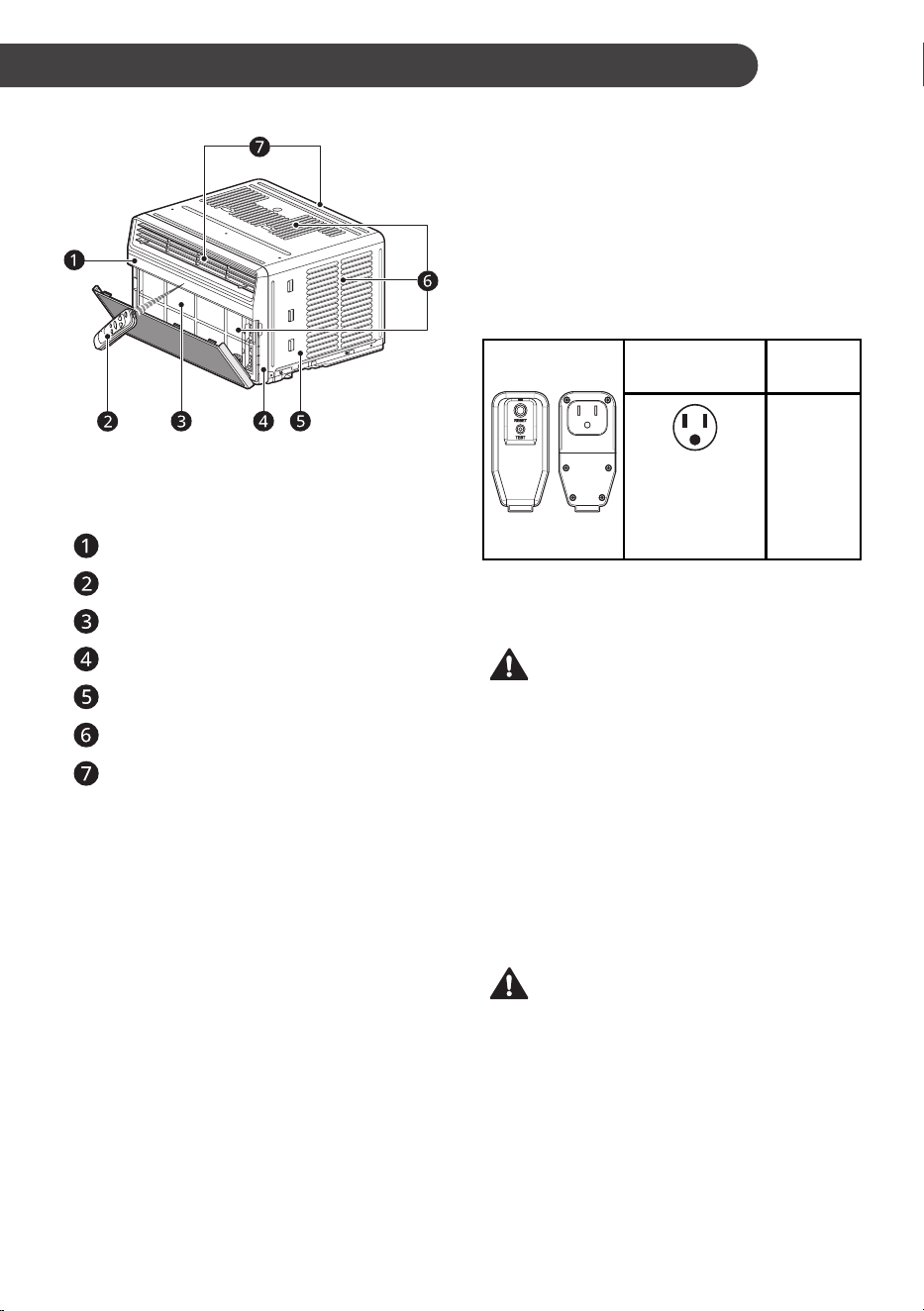
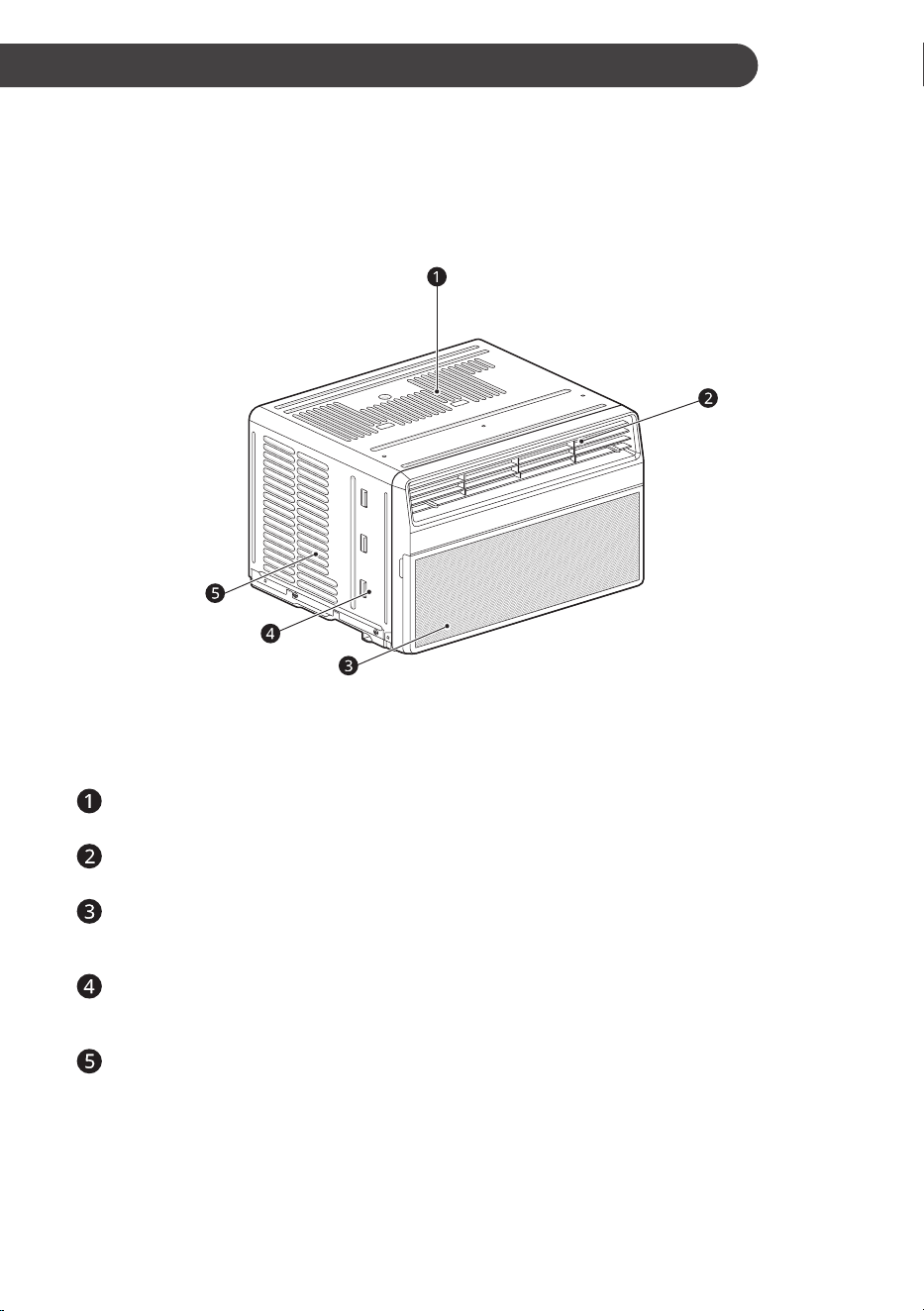
Product Overview
NOTE
• The feature may be changed according to the
type of model.
Control Panel
Remote Control
Air Filter
Front Grille
Cabinet
Air Inlet
Air Outlet
Electrical Data
The power cord may include a current interrupter
device. TEST and RESET buttons are provided
on the plug case. The device should be tested on
a periodic basis by first pressing the TEST button
and then the RESET button. If the TEST button
does not trip or if the RESET button will not stay
engaged, discontinue use of the air conditioner
and contact a qualified service technician.
for 120 V
Use Wall
Receptacle
Power
Supply
Standard 120 V,
3-wire grounding
receptacle rated
15 A / 120 VAC /
60 Hz
Use 15 A,
time delay
fuse or 15
A, circuit
breaker.
NOTE
• The feature may be changed according to the
type of model.
WARNING
• This appliance should be installed in
accordance with the National Electrical Code.
• Use of extension cords could cause serious
injury or death.
− Do not use an extension cord with this
window air conditioner.
− Do not use surge protectors or multi-outlet
adapters with this window air conditioner.
• Never push the TEST button during operation.
Doing so can damage the plug.
− Do not remove, modify, or immerse this
plug. If this device trips, the cause should be
corrected before further use.
CAUTION
• The conductors inside this cord are surrounded
by shields, which monitor leakage current.
These shields are not grounded. Periodically
examine the cord for any damage. Do not use
this product in the event the shields become
exposed. Avoid shock hazard. This unit cannot
be user-serviced. Do not open the tamper-
resistant sealed portion. All warranties and
performance will be voided. This unit is not
intended to be used as an ON/OFF switch.
9
EN
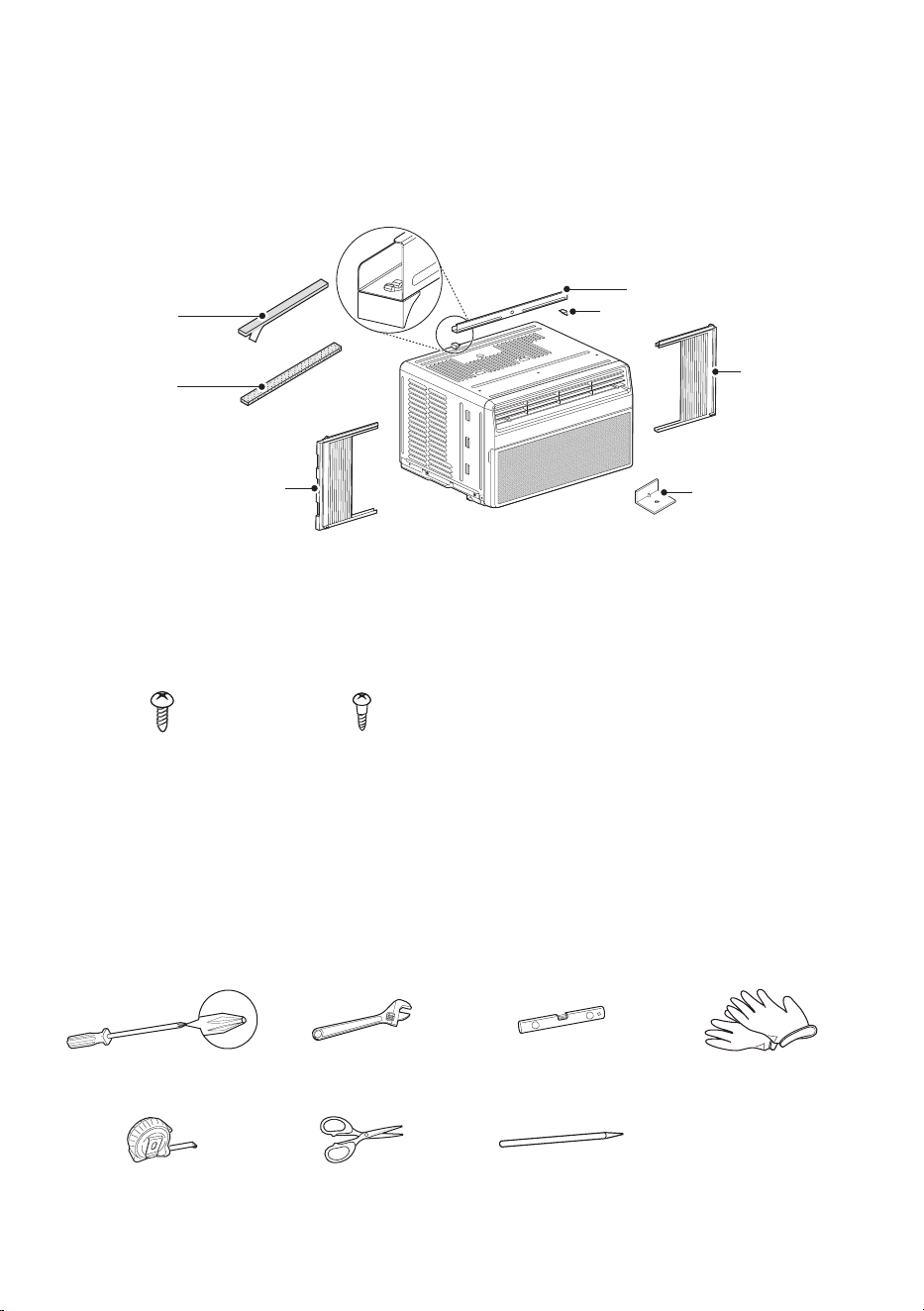
Parts Included (Appearance May Vary)
Right curtain
panel
Left curtain
panel
Foam strip
(Non-adhesive)
Foam-PE (2)
(Adhesive backed)
L bracket (3)
Supporter (2)
Upper Guide
NOTE
• The feature may be changed according to the type of model.
Type “A” ScrewsType “A” Screws
(6)(6)
Type “B” ScrewsType “B” Screws
(5)(5)
Tools Needed
Phillips-head screwdriverPhillips-head screwdriver Adjustable wrenchAdjustable wrench LevelLevel GlovesGloves
Tape measureTape measure Scissors or Cutting knifeScissors or Cutting knife PencilPencil
10
EN
How to Install the Unit
1
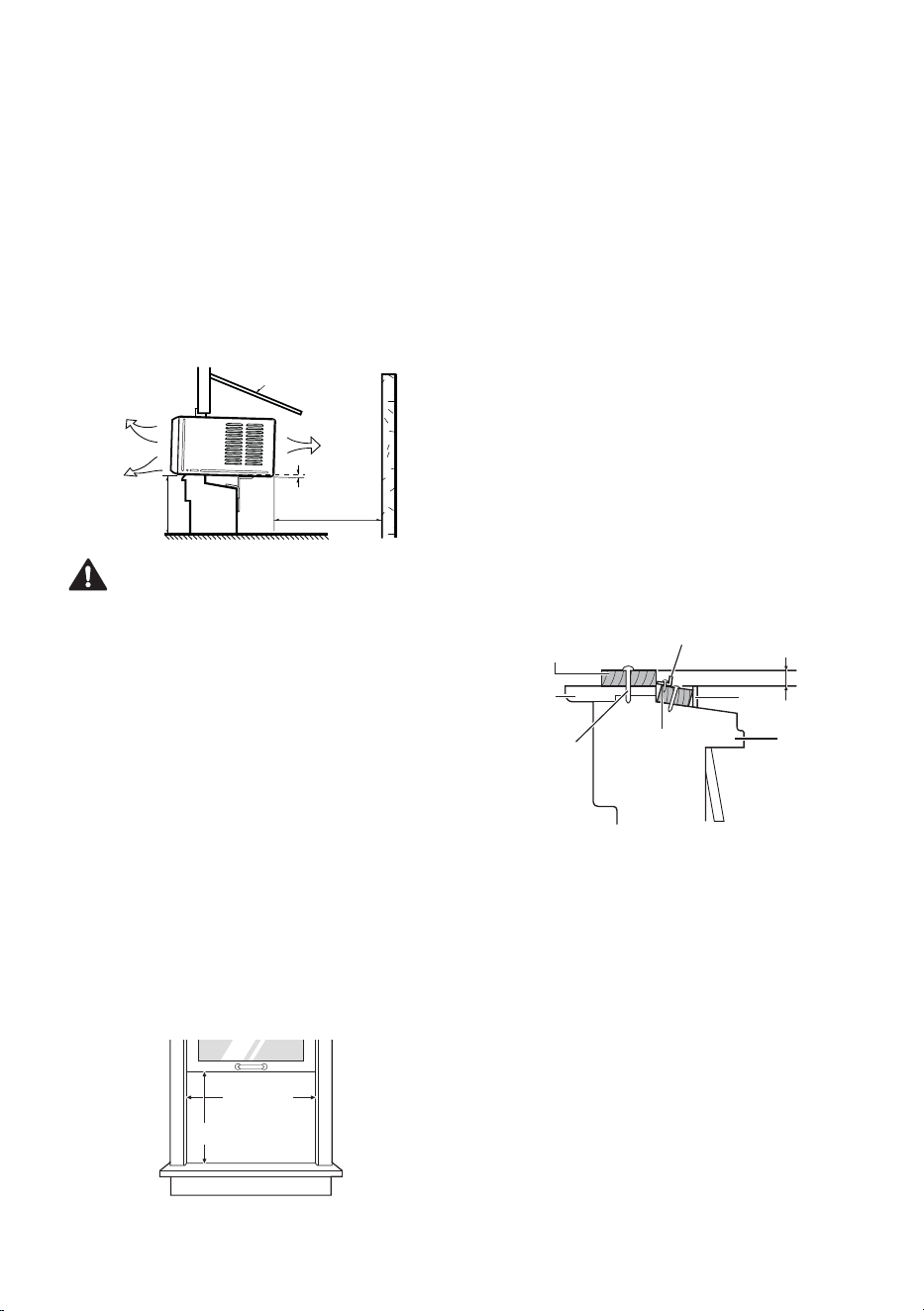
To prevent vibration and noise, make sure the
unit is installed securely and firmly.
2
Install the unit out of direct sunlight.
3
There should be no obstacles, such as a
fence or wall, within 20” from the back of the
cabinet because it will prevent heat radiation
of the condenser. Restriction of outside air will
greatly reduce the cooling efficiency of the air
conditioner.
Fence
Awning
Heat
radiation
Cooled air
Over 20"
30"~60"
About 1/4"
CAUTION
• DO NOT cover or block any of the side and top
louvers. All side louvers of the cabinet must
remain exposed to the outside of the structure
and unobstructed.
4
Install the unit slightly tilted so the back is
slightly lower than the front (about 1/4”). This
will force condensed water to flow to the
outside.
5
Install the unit with the bottom between
30”~ 60” above the floor level.
Window Requirements
• This unit is designed for installation in standard
double hung windows with actual opening
widths from 22” to 36”.
The top and bottom window sashes must open
sufficiently to allow a clear vertical opening of
13” from the bottom of the upper sash to the
inside sill.
22” to 36”22” to 36”
13” min13” min
NOTE
• All supporting parts should be secured to firm
wood, masonry, vinyl, fiberglass, or metal.
• This product is a window air conditioner. As
such, a standard single-hung or double-hung
window is required for proper installation. Non-
window installations, including using sleeves or
wall openings, and other installation methods
are not recommended.
Storm Window Requirements
1
Windows that include a storm window frame
may prevent the air conditioner from tilting
down toward the outside to drain properly. For
proper drainage, attach a 1” x 2” piece of wood
to the inner sill, trimmed to a length which fits
inside the window frame. The top of the wood
shim must be at least 3/4” higher than the top
of the storm window frame. Attach the wood
securely to the sill with nails or screws.
2
If necessary, attach another 1” x 2” wood strip
flush against the back of the inner sill. This will
raise the L bracket, as shown in the drawing.
Indoors
Inner Sill
Nail or screw
Outer Sill
Storm
Window Frame
Wood Strip Mounted
on Top of Inner Sill
3/4" higher than
storm window fram
e
Wood Strip for
L bracket
L Bracket
Outdoors
11
EN
Preparation of the Chassis
1
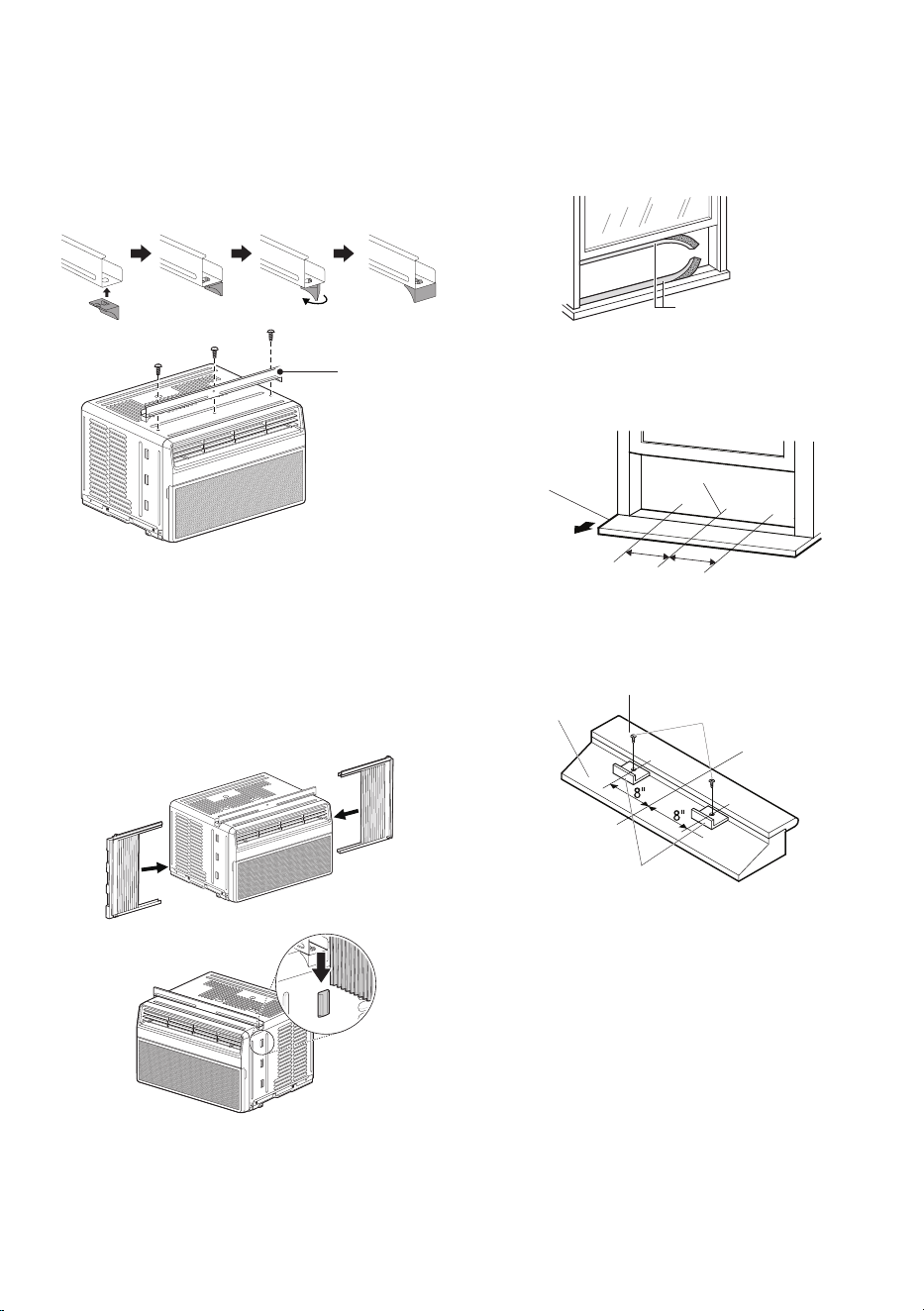
Assemble two supporters with upper guide.
Align holes between the upper guide and the
top of the cabinet and then install it with 3 type
A screws.
Upper GuideUpper Guide
Screws (Type A)Screws (Type A)
NOTE
• The feature may be changed according to the
type of model.
2
Extend the curtains in the curtain panels and
insert the edges into the brackets on either
side of the cabinet. Insert the top and bottom
rails on the curtain guides into the upper and
lower panel guides on the cabinet.
Right Right
Curtain Curtain
PanelPanel
Left Left
Curtain Curtain
PanelPanel
NOTE
• The feature may be changed according to the
type of model.
3
Cut the window sash seals to the proper
length. Peel off the backing and attach the
adhesive-backed foam to the underside of the
window sash and bottom of window frame.
Foam-PE Foam-PE
(Adhesive backed)(Adhesive backed)
4
Open the window and draw a center line on
the center of the inner sill. Then mark lines 8”
to the left and right of the center line.
8"
8"
Inner SillInner Sill
Center LineCenter Line
Room SideRoom Side
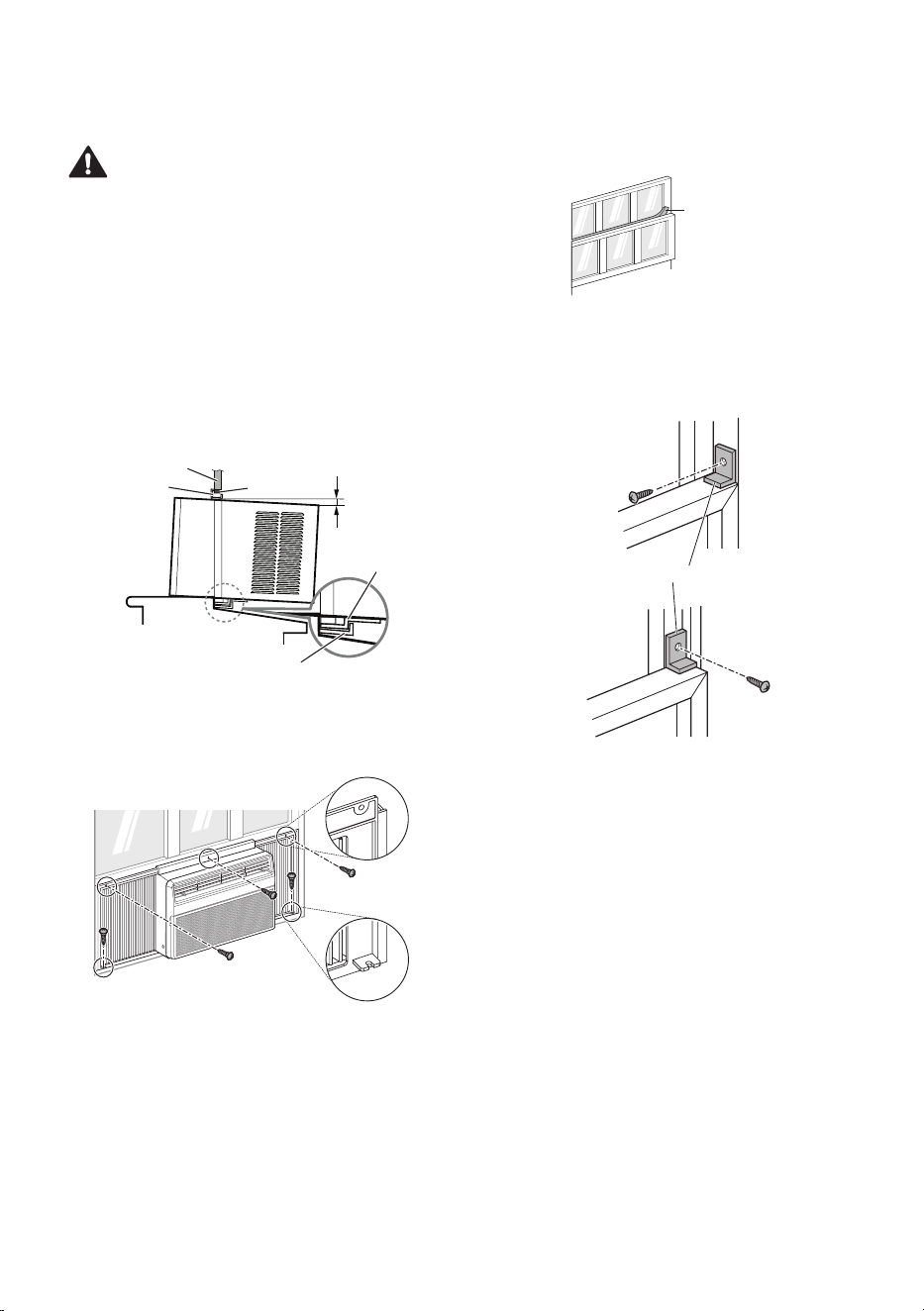
5
Install the L bracket behind the inner window
sill as shown. Use the 2 type A screws
provided.
Screws Screws
(Type A)(Type A)
Inner SillInner Sill
Center LineCenter Line
Outer SillOuter Sill
L BracketL Bracket
NOTE
• The bracket helps to hold unit securely in place.
Be sure to place bracket edge flush against
back of inner sill.
12
EN
Unit Installation
CAUTION
• During the following step, hold unit firmly until
window sash is lowered to top channel behind
side panel frames. Personal injury or property
damage may result if unit falls from window.
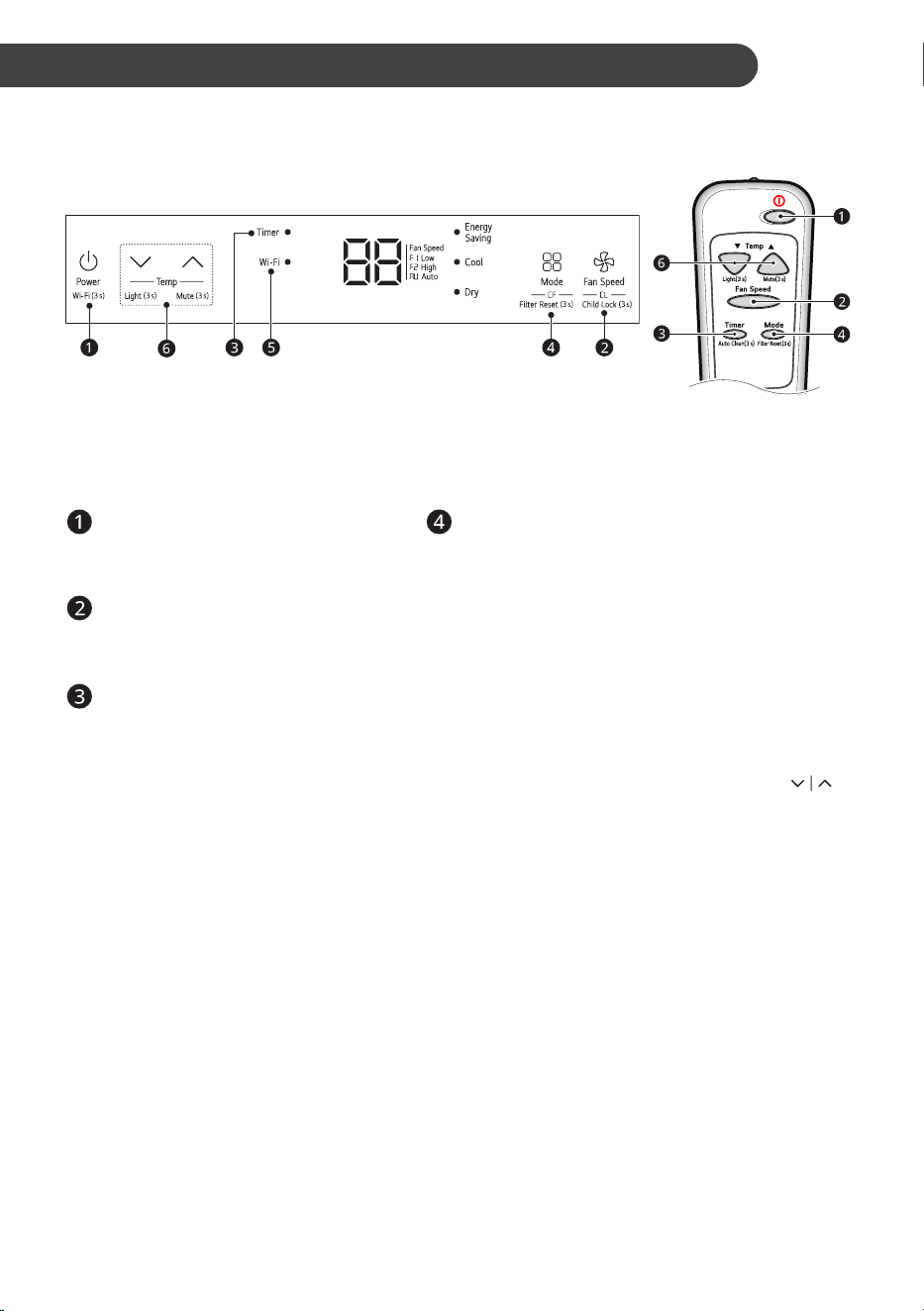
1
Set the air conditioner in the window so that
is centered. Place the air conditioner so that
front edge of the bottom guide is against the
back edge of the sill.
Bring the window down so that the front edge
of the upper guide is in front of the window.
Make sure that air conditioner is level or tilting
slightly to the outside.
About 1/4”About 1/4”
SealSeal
Window FrameWindow Frame
Bottom GuideBottom Guide
Upper GuideUpper Guide
L BracketL Bracket
2
Extend the guide panels to fill the window
opening and use 5 type B screws to secure
them to the window.
Screws Screws
(Type B)(Type B)
NOTE
• The feature may be changed according to the
type of model.
3
Cut the non-adhesive foam strip to the proper
length and insert it between the upper window
sash and the lower window sash.
Foam Strip Foam Strip
(Non-adhesive)(Non-adhesive)
4
To prevent broken glass or damage
to windows, on vinyl or other similarly
constructed windows, attach the L bracket with
a type A screw.
Screw Screw
(Type A)(Type A)
L BracketL Bracket
VinylVinyl
Screw Screw
(Type A)(Type A)
WoodWood
13
EN
OPERATION
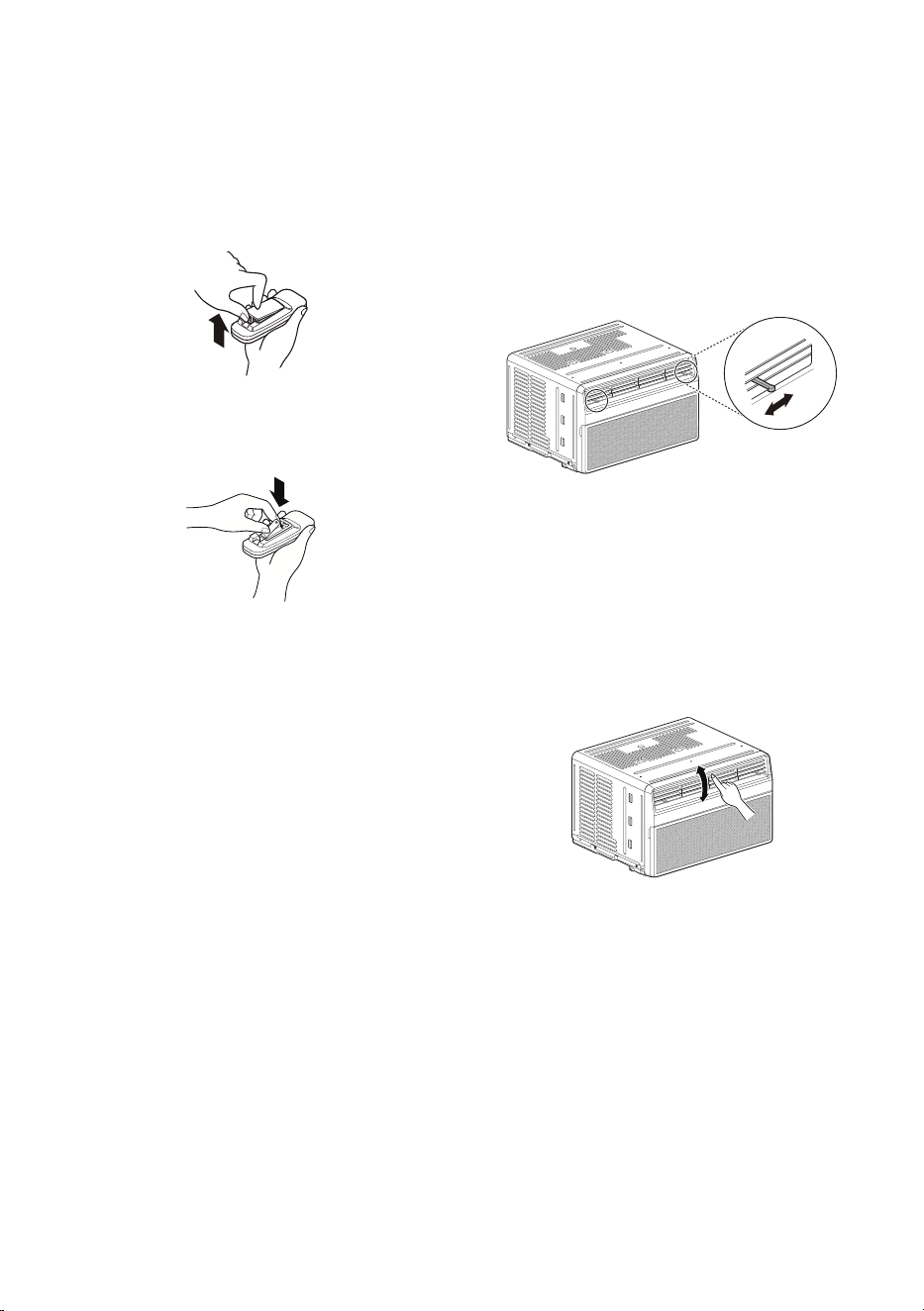
Control Panel and Remote Control
Control Panel Remote Control
NOTE
• The feature may be changed according to the type of model.
• On control panel surface have protection film, Please remove film before use.
Power
Press to turn the air conditioner ON or
OFF.
Operation Mode
Press the Mode button to cycle between 4 types
of air conditioner operation: Energy Saving / Cool /
Dry / Fan.
Energy Saving - In this mode the temperature is
automatically set to save energy.
NOTE
• Energy Saving mode automatically sets the
target temperature to 72 °F.
• The setting temperature increases up to 4 °F
from the preset temperature.
Cool - This mode is ideal on hot days to cool and
dehumidify the room quickly. Use the Temp
buttons to set the desired room temperature and
use the Fan Speed button to set the desired fan
circulation speed.
Dry - This mode is ideal for rainy and damp days
to dehumidify the room rather than cooling it
significantly. Humidity is removed from the room by
the combination of compressor operation and the
fan speed fixed at Low. The compressor and fan
turn off once the set temperature is reached. Fan
speed cannot be adjusted in Dry mode.
Fan - In this mode the fan circulates air but the
compressor does not run. Use the Fan Speed
button to set fan speed to Auto (AU), Low (F1) or
High (F2). In this mode, you cannot adjust the set
temperature.
Fan Speed
Press to set the Fan Speed to Auto
(AU), Low (F1) or High (F2).
Delay ON/OFF Timer
Delay ON - When the air conditioner is
off, set it to automatically turn on from 1
to 24 hours later, at its previous mode
and fan settings.
Delay OFF - When the air conditioner is
on, set it to automatically turn off from 1
to 24 hours later.
NOTE
• Each press of the Timer button
advances the timer by 1 hour. After
the last press the display returns to
the temperature setting.

14
EN
Wi-Fi (Wi-Fi Model Only)
Enables connection of the air conditioner to
the home Wi-Fi.
Press Power button 3 seconds to use
Wi-Fi.
NOTE
• Follow instructions on LG ThinQ
application on how to connect to your
unit.
Temperature Control
The thermostat monitors room
temperature to maintain the desired
temperature. The thermostat can be set
between 16 °C–30 °C (60 °F–86 °F).
Press or arrows to increase or
decrease temperature setting.
NOTE
• Auto Restart : If the air conditioner turns
off due to a power outage, it will restart
automatically once the power is restored, with
the same settings as were set before the unit
turned off.
• The remote control will not function properly if
the AC infrared sensor is exposed to direct light
or if there are obstacles between the remote
controller and the air conditioner.
Using the Light Off
Function
You can set the brightness of the control panel,
• Press
button on the control panel for 3
seconds, or
• Press
button on the remote control for 3
seconds.
NOTE
• If the brightness of an indoor appliance’s
display is set to OFF, pressing a button on the
remote control automatically turns the display
on for 5 seconds.
• This function may operate differently,
depending on the model.
Using the Mute Function
You can turn on/off the unit’s buzzer sound,
• Press
button on the control panel for 3
seconds, or
• Press
button on the remote control for 3
seconds.
Using the Auto Clean
Function
In the Cooling and Dry Mode, Moisture is
generated inside the indoor unit. This function
removes such moisture.
• Press
Timer
button on the remote control for 3
seconds.
•
is displayed on the display screen.
NOTE
• When using the product for the first time, the
Auto Clean function is not set.
• If you turn off the unit, the fan continues to
run for 10-20 minutes and cleans inside of the
indoor unit.
Using the Child Lock
Function
You can set the lock function to prevent children
from operating the product’s control panel. Use
the Child Lock function to prevent unintended
operation or damage.
• Press Fan speed button 3 seconds to turn the
Child Lock function on or off.
•
is displayed on the display screen.
NOTE
• The remote control operates normally even
when the lock function is enabled.
Using the Clean Filter
Function
The LED light up to notify you that the filter
needs to be cleaned. After cleaning the filter, press
the Mode button on the control panel or remote
control 3 seconds to turn off the
light.
NOTE
• This feature is a reminder to clean the air filter
for more efficient operation. The LED light turns
on after 250 hours of operation.
15
EN
Wireless Remote Control
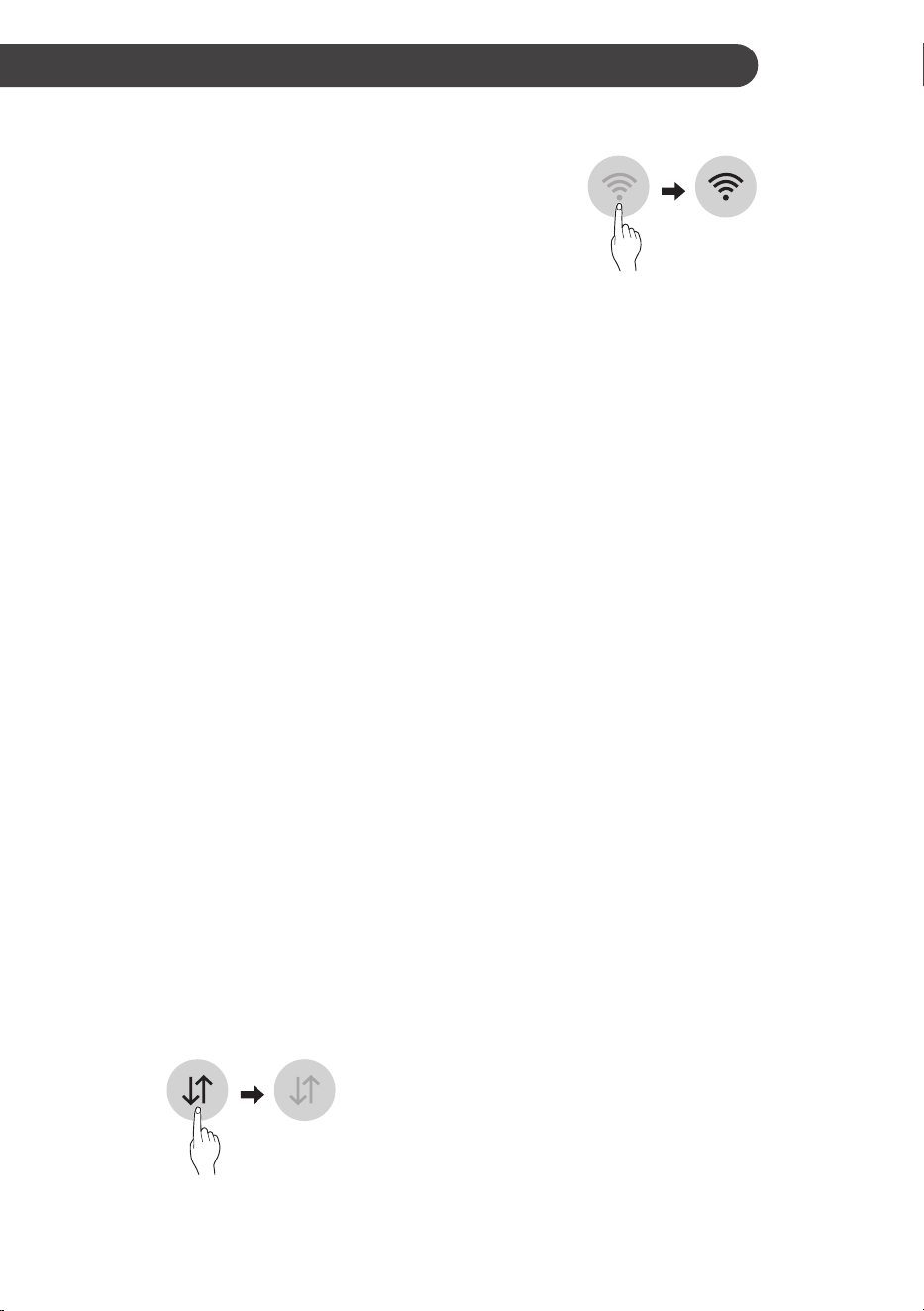
Inserting Batteries
1
Push out the cover on the back of the remote
control with your thumb.
2
With the plus and minus poles facing as
marked, and insert two new AAA 1.5 V
batteries.
3
Reattach the cover.
NOTE
• Two new batteries are supplied with the air
conditioner for use in the remote control.
• Do not use a rechargeable battery. Make sure
that the battery is new.
• In order to prevent discharge, remove the
battery from the remote control if the air
conditioner is not going to be used for an
extended period of time.
• Keep the remote control away from extremely
hot or humid places.
• To maintain optimal operation of the remote
control, the remote sensor should not be
exposed to direct sunlight.
Air Direction
Airflow can be adjusted by changing the direction
of the air conditioner’s louvers.
Adjusting Horizontal Airflow
Direction
The horizontal airflow is adjusted by moving the
levers of the vertical louvers to the left or right.
NOTE
• The feature may be changed according to the
type of model.
Adjusting Vertical Airflow
Direction
Touch the horizontal louvers to adjust the airflow
up or down.
NOTE
• When the weather is extremely hot, the unit
may turn off automatically to protect the
compressor.
• The feature may be changed according to the
type of model.
16
EN
SMART FUNCTIONS
LG ThinQ Application
This feature is only available on models with
the b or ThinQ logo
The
LG ThinQ application allows you to
communicate with the appliance using a
smartphone.
LG ThinQ Application Features
Communicate with the appliance from a
smartphone using the convenient smart features.
Smart Diagnosis
TM
If you experience a problem while using the
appliance,this smart diagnosis feature will help you
diagnose the problem.
Settings
Allows you to set various options on the appliance
and in the application.
NOTE
• If you change your wireless router, internet
service provider, or password, delete the
registered appliance from the
LG ThinQ
application and register it again.
• The application is subject to change for
appliance improvement purposes without
notice to users.
• Functions may vary by model.
Before Using LG ThinQ
Application
1
Check the distance between the appliance
and the wireless router (Wi-Fi network).
• If the distance between the appliance and
the wireless router is too far, the signal
strength becomes weak. It may take a long
time to register or installation may fail.
2
Turn off the Mobile data or Cellular Data on
your smartphone.
3
Connect your smartphone to the wireless
router.
NOTE
• To verify the Wi-Fi connection, check that
Wi-Fi LED on the control panel is lit.
• The appliance supports 2.4 GHz Wi-Fi
networks only. To check your network
frequency, contact your Internet service
provider or refer to your wireless router manual.
•
LG ThinQ is not responsible for any
network connection problems or any faults,
malfunctions, or errors caused by network
connection.
• If the appliance is having trouble connecting
to the Wi-Fi network, it may be too far from
the router. Purchase a Wi-Fi repeater (range
extender) to improve the Wi-Fi signal strength.
• The Wi-Fi connection may not connect or may
be interrupted because of the home network
environment.
• The network connection may not work properly
depending on the Internet service provider.
• The surrounding wireless environment can
make the wireless network service run slowly.
• The appliance cannot be registered due to
problems with the wireless signal transmission.
Unplug the appliance and wait about a minute
before trying again.
• If the firewall on your wireless router is enabled,
disable the firewall or add an exception to it.
• The wireless network name (SSID) should be
a combination of English letters and numbers.
(Do not use special characters.)
• Smartphone user interface (UI) may vary
depending on the mobile operating system
(OS) and the manufacturer.
• If the security protocol of the router is set
to WEP, you may fail to set up the network.
Please change it to other security protocols
(WPA2 is recommended) and register the
product again.

17
EN
Installing the LG ThinQ
Application
Search for the LG ThinQ application from the
Google Play Store or Apple App Store on a
smartphone. Follow instructions to download and
install the application.
Open Source Software Notice
Information
To obtain the source code that is contained in
this product, under GPL, LGPL, MPL, and other
open source licenses that have the obligation to
disclose source code, and to access all referred
license terms, copyright notices and other relevant
documents, please visit https://opensource.lge.
com.
LG Electronics will also provide open source code
to you on CD-ROM for a charge covering the cost
of performing such distribution (such as the cost of
media, shipping, and handling) upon email request
This offer is valid to anyone in receipt of this
information for a period of three years after our last
shipment of this product.
Smart Diagnosis
TM
This feature is only available on models with the
c or d logo.
Use this feature to help you diagnose and solve
problems with your appliance.
NOTE
• For reasons not attributable to LGE’s
negligence, the service may not operate due
to external factors such as, but not limited to,
Wi-Fi unavailability, Wi-Fi disconnection, local
app store policy, or app unavailability.
• The feature may be subject to change without
prior notice and may have a different form
depending on where you are located.
Using LG ThinQ to Diagnose
Issues
If you experience a problem with your Wi-Fi
equipped appliance, it can transmit troubleshooting
data to a smartphone using the LG ThinQ
application.
• Launch the
LG ThinQ application and
select the Smart Diagnosis
TM
feature in the
menu. Follow the instructions provided in the
LG ThinQ application.
18
EN
FCC Notice
This following notice cover the transmitter module
contained in this product.
This equipment has been tested and found to
comply with the limits for a Class B digital device,
pursuant to Part 15 of the FCC Rules. These limits
are designed to provide reasonable protection
against harmful interference in a residential
installation. This equipment generates, uses,
and can radiate radio frequency energy and, if
not installed and used in accordance with the
instructions, may cause harmful interference
to radio communications. However, there is no
guarantee that interference will not occur in a
particular installation. If this equipment does
cause harmful interference to radio or television
reception, which can be determined by turning the
equipment off and on, the user is encouraged to
try to correct the interference by one or more of the
following measures:
• Reorient or relocate the receiving antenna.
• Increase the separation between the
equipment and the receiver.
• Connect the equipment into an outlet on a
circuit different from that to which the receiver
is connected.
• Consult the dealer or an experienced radio/TV
technician for help.
This device complies with part 15 of the FCC
Rules. Operation is subject to the following two
conditions:
1) This device may not cause harmful
interference and
2) This device must accept any interference
received, including interference that may
cause undesired operation.
Any changes or modifications in construction of
this device which are not expressly approved by
the party responsible for compliance could void the
user’s authority to operate the equipment.
FCC RF Radiation Exposure
Statement
This equipment complies with FCC radiation
exposure limits set forth for an uncontrolled
environment. This transmitter must not be
colocated or operating in conjunction with any
other antenna or transmitter.
This equipment should be installed and operated
with a minimum distance of 20 cm (7.8 inches)
between the antenna and your body. Users must
follow the specific operating instructions for
satisfying RF exposure compliance.
Wireless LAN Module
Specifications
Frequency
Range
2412 MHz - 2462 MHz
Output
Power
(Max)
< 30 dBm
19
EN
MAINTENANCE
WARNING
• Before cleaning or performing maintenance,
disconnect the power supply and wait until the
fan stops.
Cleaning
Check the air filter at least twice a month to see
if cleaning is necessary. Trapped particles in the
filter can build up and block the airflow, reducing
cooling capacity and causing an accumulation of
frost on the evaporator.
Cleaning the Air Filter
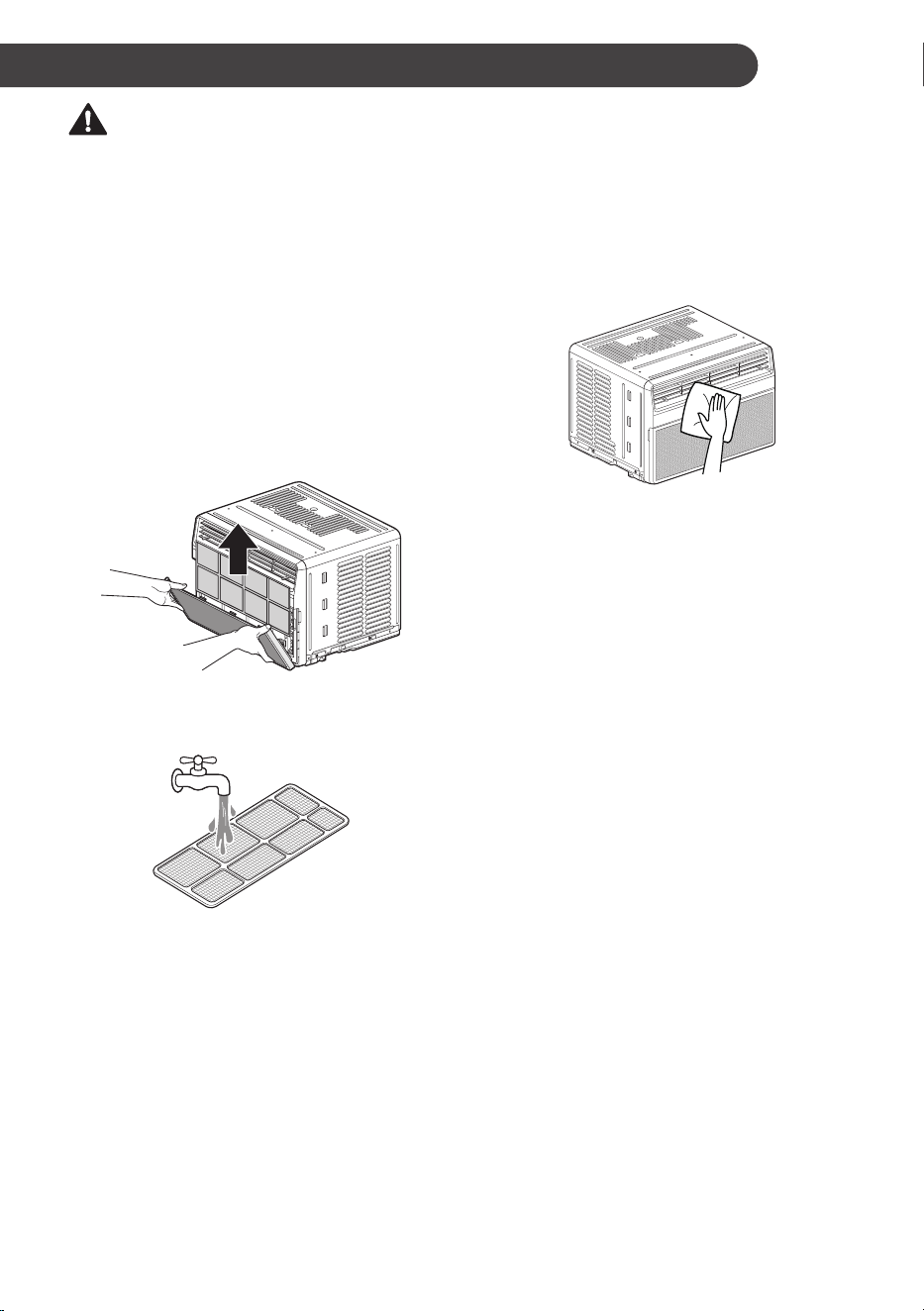
1
Remove the air filter from the front grille by
pulling the filter forward and then up slightly.
2
Wash the filter using lukewarm water below
40 °C (104 °F).
3
Gently shake the excess water from the filter
and replace.
NOTE
• The feature may be changed according to the
type of model.
Cleaning the Air Conditioner
• Remove dust from the air inlet and outlet using
a vacuum cleaner.
• Wipe the front grille and inlet grille with a cloth
dampened in a mild detergent solution.
• Wash the cabinet with mild soap or detergent
and lukewarm water, then polish using liquid
appliance wax.
NOTE
• To ensure continued peak efficiency, the
condenser coils (outside of unit) should be
checked periodically and cleaned if clogged
with soot or dirt from outside air.
• For repair and maintenance, contact an
Authorized Service Center. See the warranty
page for details or call 1-800-243-0000.
Have your model number and serial number
available. They can be found on the side of the
cabinet. Record them for future reference.
• The feature may be changed according to the
type of model.
20
EN
TROUBLESHOOTING
Before Calling for Service
The appliance is equipped with an automatic error-monitoring system to detect and diagnose problems at
an early stage. If the appliance does not function properly or does not function at all, check the following
before you call for service.
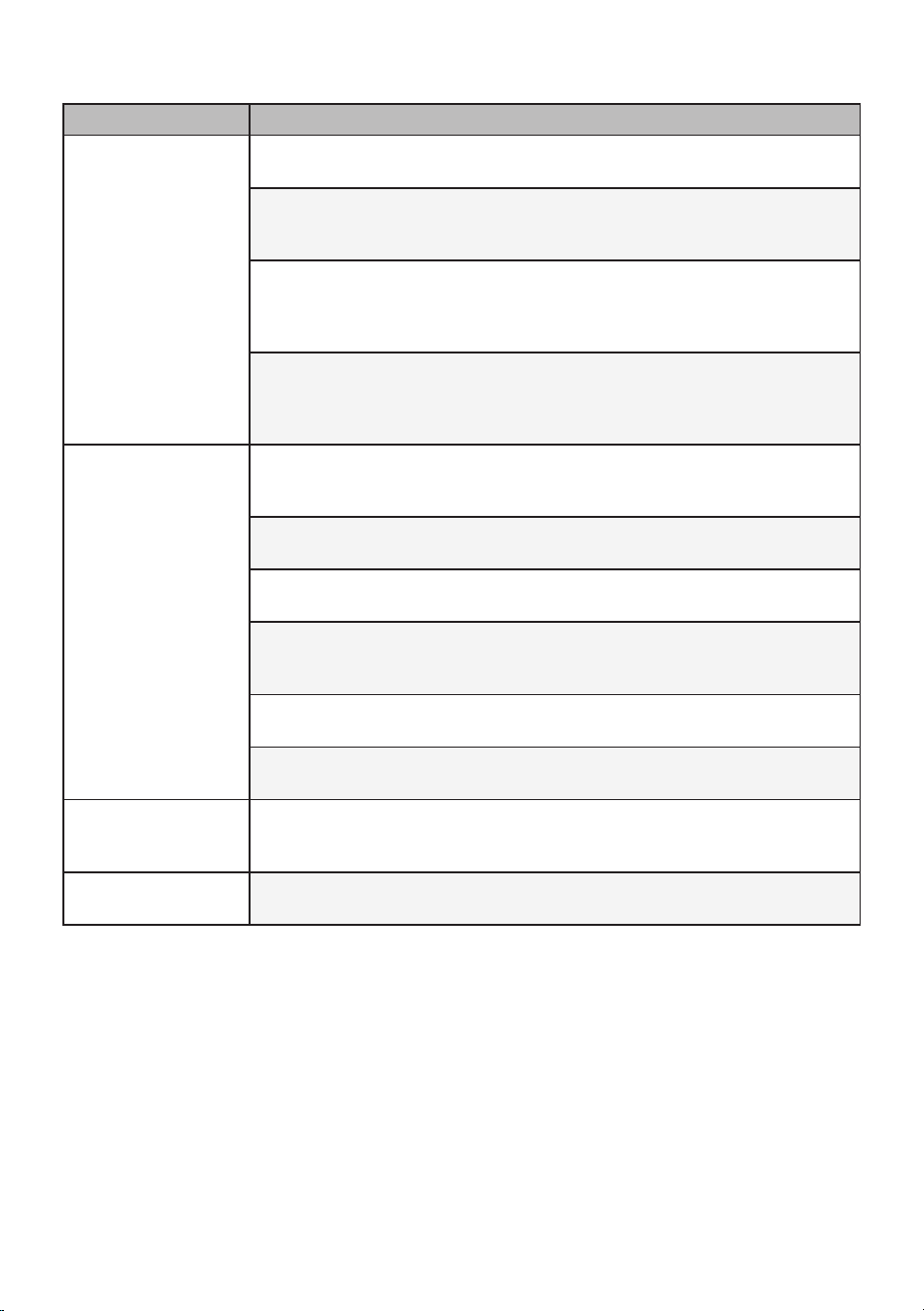
Normal Sounds You May Hear
NOTE
• The feature may be changed according to the type of model.
High Pitched Chatter
Today’s high efficiency compressors may have a high pitched chatter during the cooling cycle.
Sound of Rushing Air
At the front of the unit, you may hear the sound of rushing air being moved by the fan.
Gurgle/Hiss
Gurgling or hissing noise may be heard due to refrigerant passing through the evaporator during
normal operation.
Vibration
Unit may vibrate and make noise because of poor wall or window construction or incorrect
installation.
Pinging or Swishing
Droplets of water hitting the condenser during normal operation may cause pinging or swishing
sounds.
21
EN
Problem Possible Causes & Corrective Action
Air conditioner does
not start.
The air conditioner is unplugged.
• Make sure the air conditioner plug is pushed completely into the outlet.
The fuse is blown/circuit breaker is tripped.
• Check the house fuse/circuit breaker box and replace the fuse or reset the
breaker.
Power failure.
• If power failure occurs, turn the mode control to off. When power is restored,
wait 3 minutes to restart the air conditioner to prevent tripping of the
compressor overload.
The current interrupter device is tripped.
• Press the RESET button located on the power cord plug. If the RESET
button will not stay engaged, discontinue use of the air conditioner and
contact a qualified service technician.
Air conditioner does
not cool as it should.
Airflow is restricted.
• Make sure there are no curtains, blinds, or furniture blocking the front of the
air conditioner.
The temp control may not be set correctly.
• Set the desired temperature to a level lower than the current temperature.
The air filter is dirty.
• Clean the filter at least every 2 weeks. See the‘MAINTENANCE section.
The room may have been hot.
• When the air conditioner is first turned on, you need to allow time for the
room to cool down.
Cold air is escaping.
• Check for open fumace floor registers and cold air returns.
Cooling coils have iced up.
• See ‘Air conditioner freezing up’ below.
Air conditioner
freezing up.
The cooling coils are iced over.
• Ice may block the airflow and obstruct the air conditioner from properly
cooling the room. Set the mode control at High Fan or High Cool.
Water drips outside.
Hot, humid weather.
• This is normal.
22
EN
Problem Possible Causes & Corrective Action
Water drips Indoors.
The air conditioner is not tilted to the outside.
• For proper water disposal, make sure the air conditioner slants slightly from
the cabinet front to the rear.
Water collects in
base pan.
Moisture removed from air and drains into base pan.
• This is normal for a short period in areas with little humidity; normal for a
longer period in very humid areas.
Air conditioner turns
on and off rapidly.
Dirty air filter - air restricted.
• Clean air filter.
Outside temperature extremely hot.
• Refer to installation instructions or check with installer.
Noise when unit is
cooling.
Air movement sound.
• This is normal. If too loud, set to lower FAN Setting.
Window vibration - poor installation.
• Refer to installation instructions or check with installer.
Room too cold.
Set temperature too low.
• Increase set temperature.
Remote sensing
deactivating
prematurely.
Remote control not located within range.
• Place remote control within 20 feet & 120° radius of the front of the unit.
Remote control signal obstructed.
• Remove obstruction.
Can’t connect the LG
ThinQ application to
the air conditioner.
Air conditioner is turned off.
• Turn the air conditioner on.
Wireless router is turned off.
• Turn the router on.
The air conditioner is
not connecting to the
Wi-Fi.
The Wi-Fi router is too far from the air conditioner.
• Move the router closer to the air conditioner or purchase and install a Wi-Fi
repeater (signal booster).
You do not have permission to use the router or it is incompatible.
• Make sure you are selecting the correct wireless router from the list. The
router must be set to 2.4 GHz.
23
EN
Problem Possible Causes & Corrective Action
Your home appliance
and smartphone are
not connected to the
Wi-Fi network.
The password for the Wi-Fi network that you are trying to connect to is
incorrect.
• Find the Wi-Fi network connected to your smartphone and remove it, then
register your appliance on LG ThinQ.
Mobile data for your smartphone is turned on.
• Turn off the Mobile data of your smartphone and register the appliance
using the Wi-Fi network.
The wireless network name (SSID) is set incorrectly.
• The wireless network name (SSID) should be a combination of English
letters and numbers. (Do not use special characters.)
The router frequency is not 2.4 GHz.
• Only a 2.4 GHz router frequency is supported. Set the wireless router to
2.4 GHz and connect the appliance to the wireless router. To check the
router frequency, check with your Internet service provider or the router
manufacturer.
The distance between the appliance and router is too far.
• If the distance between the appliance and the router is too far, the signal may
be weak and the connection may not be configured correctly. Move location
of the router so that it is closer to the appliance.
During Wi-Fi setup, the application is requesting a password to connect to
the product (on certain phones).
• Locate the network name which starts with “LG” under Settings > Networks.
Note the last part of the network name.
− If the network name looks like LGE_Appliance_XX-XX-XX, enter lge12345.
− If the network name looks like LGE_Appliance_XXXX, enter XXXX
twice as your password. For example, if the network name appears as
LGE_Appliance_8b92, then you would enter 8b928b92 as your password.
In this instance, the password is case sensitive and the last 4 characters
are unique to your appliance.
NOTE
• If you see “CH” in the display, please call 1-800-243-0000.
24
EN
WARRANTY
ARBITRATION NOTICE: THIS LIMITED WARRANTY CONTAINS AN ARBITRATION PROVISION
THAT REQUIRES YOU AND LG TO RESOLVE DISPUTES BY BINDING ARBITRATION INSTEAD OF
IN COURT, UNLESS YOU CHOOSE TO OPT OUT. IN ARBITRATION, CLASS ACTIONS AND JURY
TRIALS ARE NOT PERMITTED. PLEASE SEE THE SECTION TITLED “PROCEDURE FOR RESOLVING
DISPUTES” BELOW.
WHAT THIS WARRANTY COVERS:
LG Electronics U.S.A., Inc. (“LG”) warrants your LG Room Air Conditioner (“product”) against defect in
materials or workmanship under normal household use, during the warranty period set forth below, LG will,
at its option, repair or replace the product. This limited warranty is valid only to the original retail purchaser
of the product, is not assignable or transferrable to any subsequent purchaser or user, and applies only
when the product is purchased through an LG authorized dealer or distributor and used within the United
States (“U.S.”) including U.S. Territories.
NOTE
• Replacement products and repair parts may be new or factory-remanufactured and are warranted for
the remaining portion of the original unit’s warranty period or ninety (90) days, whichever is longer.
Please retain dated receipt or delivery ticket as evidence of the Date of Purchase for proof of warranty
(you may be required to submit a copy to LG or authorized representative).
WARRANTY PERIOD:
1 year from the Date of Purchase: Any internal/ functional Parts and Labor
HOW SERVICE IS HANDLED: In-Home Service
In-home service will be provided during the warranty period subject to availability within the United States.
In-home service may not be available in all areas. To receive in-home service, the product must be
unobstructed and accessible to service personnel. If during in-home service repair cannot be completed, it
may be necessary to remove, repair and return the product. If in-home service is unavailable, LG may elect,
at our option, to provide for transportation of our choice to and from a LG authorized service center.
THIS LIMITED WARRANTY DOES NOT COVER:
• Service trips to deliver, pick up, or install the product or for instruction on product use.
• Replacing house fuses or resetting of circuit breakers, correction of house wiring or plumbing, or
correction of product installation.
• Damage or failure caused by leaky / broken / frozen water pipes, restricted drain lines, inadequate or
interrupted water supply or inadequate supply of air.
• Damage or failure caused by accidents, pets and vermin, lightning, wind, floods or acts of God.
• Damage or failure resulting from misuse, abuse, improper installation, repair or maintenance. Improper
repair includes use of parts not approved or specified by LG.
• Damage or failure caused by unauthorized modification or alteration to the product.
• Damage or failure caused by incorrect electrical current, voltage, or plumbing codes.
• Cosmetic damage, including scratches, dents, chips or other damage to finish of the product, unless
such damage results from defects in materials or workmanship and is reported to LG within seven (7)
calendar days from the date of delivery.
• Damage or missing items to any display, open box, discounted, or refurbished product.
• Product where the original factory serial numbers have been removed, defaced or changed in any way.
• Repairs when product is used in other than normal and usual household use (e.g. rental, commercial
use, offices, or recreational facilities) or contrary to the instructions outlined in the owner’s manual.
• The removal and reinstallation of the Product if it is installed in an inaccessible location.
25
EN
THIS WARRANTY IS IN LIEU OF ANY OTHER WARRANTY, EXPRESS OR IMPLIED, INCLUDING
AND WITHOUT LIMITATION TO, ANY WARRANTY OF MERCHANTABILITY OR FITNESS FOR A
PARTICULAR PURPOSE. TO THE EXTENT ANY IMPLIED WARRANTY IS REQUIRED BY LAW, THIS
WARRANTY IS LIMITED IN DURATION TO THE TERM PERIOD EXPRESSED ABOVE. REPAIR OR
REPLACEMENT AS PROVIDED UNDER THIS WARRANTY IS THE EXCLUSIVE REMEDY FOR THE
CUSTOMER. NEITHER THE MANUFACTURER NOR ITS U.S. DISTRIBUTOR SHALL BE LIABLE
FOR ANY INCIDENTAL, CONSEQUENTIAL, INDIRECT, SPECIAL, OR PUNITIVE DAMAGES OF ANY
NATURE, INCLUDING AND WITHOUT LIMITATION TO, LOST REVENUES OR PROFITS, OR ANY
OTHER DAMAGE, WHETHER BASED IN CONTRACT, TORT, OR OTHERWISE.
Some states do not allow the exclusion or limitation of incidental or consequential damages or limitations on
how long an implied warranty lasts, so the above exclusion or limitation may not apply to you. This warranty
gives you specific legal rights and you may also have other rights that vary from state to state.
HOW TO OBTAIN WARRANTY SERVICE & ADDITIONAL INFORMATION:
Call 1-800-243-0000 or visit our website at www.lg.com.
Mail to: LG Customer Information Center (ATTN: CIC)
201 James Record Road, Huntsville, AL 35824
FOR YOUR RECORDS
Write the model and serial numbers here:
Model No.
Serial No.
• This information is located on a label on the side of the unit.
Dealer’s Name
Date Purchased
• Staple your receipt to this page in the event you need it to prove date of purchase or for warranty
issues.

26
EN
PROCEDURE FOR RESOLVING DISPUTES:
ALL DISPUTES BETWEEN YOU AND LG ARISING OUT OF OR RELATING IN ANY WAY TO THIS
LIMITED WARRANTY OR THE PRODUCT SHALL BE RESOLVED EXCLUSIVELY THROUGH BINDING
ARBITRATION, AND NOT IN A COURT OF GENERAL JURISDICTION. BINDING ARBITRATION
MEANS THAT YOU AND LG ARE EACH WAIVING THE RIGHT TO A JURY TRIAL AND TO BRING OR
PARTICIPATE IN A CLASS ACTION.
Definitions.
For the purposes of this section, references to “LG” mean LG Electronics U.S.A., Inc., its
parents, subsidiaries and affiliates, and each of their officers, directors, employees, agents, beneficiaries,
predecessors in interest, successors, assigns and suppliers; references to “dispute” or “claim” shall
include any dispute, claim or controversy of any kind whatsoever (whether based in contract, tort, statute,
regulation, ordinance, fraud, misrepresentation or any other legal or equitable theory) arising out of or
relating in any way to the sale, condition or performance of the product or this Limited Warranty.
Notice of Dispute.
In the event you intend to commence an arbitration proceeding, you must first notify
LG in writing at least 30 days in advance of initiating the arbitration by sending a letter to LG at LG
Electronics, USA, Inc. Attn: Legal Department- Arbitration 111 Sylvan Avenue, Englewood Cliffs,
NJ 07632.
You and LG agree to engage in good faith discussions in an attempt to amicably resolve your claim. The
notice must provide your name, address, and telephone number; identify the product that is the subject of
the claim; and describe the nature of the claim and the relief being sought. If you and LG are unable to
resolve the dispute within 30 days, either party may proceed to file a claim for arbitration.
Agreement to Binding Arbitration and Class Action Waiver.
Upon failure to resolve the dispute
during the 30 day period after sending written notice to LG, you and LG agree to resolve any claims
between us only by binding arbitration on an individual basis, unless you opt out as provided below. Any
dispute between you and LG shall not be combined or consolidated with a dispute involving any other
person’s or entity’s product or claim. More specifically, without limitation of the foregoing, any dispute
between you and LG shall not under any circumstances proceed as part of a class or representative
action. Instead of arbitration, either party may bring an individual action in small claims court, but that
small claims court action may not be brought on a class or representative basis.
Arbitration Rules and Procedures.
To begin arbitration of a claim, either you or LG must make a
written demand for arbitration. The arbitration will be administered by the American Arbitration Association
(“AAA”) and will be conducted before a single arbitrator under the AAA’s Consumer Arbitration Rules that
are in effect at the time the arbitration is initiated (referred to as the “AAA Rules”) and under the
procedures set forth in this section. The AAA Rules are available online at www.adr.org/consumer. Send a
copy of your written demand for arbitration, as well as a copy of this provision, to the AAA in the manner
described in the AAA Rules. You must also send a copy of your written demand to LG at LG Electronics,
USA, Inc. Attn: Legal Department- Arbitration 111 Sylvan Avenue, Englewood Cliffs, NJ 07632. If there is a
conflict between the AAA Rules and the rules set forth in this section, the rules set forth in this section will
govern. This arbitration provision is governed by the Federal Arbitration Act. Judgment may be entered on
the arbitrator’s award in any court of competent jurisdiction. All issues are for the arbitrator to decide,
except that issues relating to the scope and enforceability of the arbitration provision and to the
arbitrability of the dispute are for the court to decide. The arbitrator is bound by the terms of this provision.
Governing Law.
The law of the state of your residence shall govern this Limited Warranty and any
disputes between us except to the extent that such law is preempted by or inconsistent with applicable
federal law.

27
EN
Fees/Costs.
You do not need to pay any fee to begin an arbitration. Upon receipt of your written demand
for arbitration, LG will promptly pay all arbitration filing fees to the AAA unless you seek more than
$25,000 in damages, in which case the payment of these fees will be governed by the AAA Rules. Except
as otherwise provided for herein, LG will pay all AAA filing, administration and arbitrator fees for any
arbitration initiated in accordance with the AAA Rules and this arbitration provision. If you prevail in the
arbitration, LG will pay your attorneys’ fees and expenses as long as they are reasonable, by considering
factors including, but not limited to, the purchase amount and claim amount. Notwithstanding the
foregoing, if applicable law allows for an award of reasonable attorneys’ fees and expenses, an arbitrator
can award them to the same extent that a court would. If the arbitrator finds either the substance of your
claim or the relief sought in the demand is frivolous or brought for an improper purpose (as measured by
the standards set forth in Federal Rule of Civil Procedure 11(b)), then the payment of all arbitration fees
will be governed by the AAA Rules. In such a situation, you agree to reimburse LG for all monies
previously disbursed by it that are otherwise your obligation to pay under the AAA Rules. Except as
otherwise provided for, LG waives any rights it may have to seek attorneys’ fees and expenses from you if
LG prevails in the arbitration.
Hearings and Location.
If your claim is for $25,000 or less, you may choose to have the arbitration
conducted solely on the basis of (1) documents submitted to the arbitrator, (2) through a telephonic
hearing, or (3) by an in-person hearing as established by the AAA Rules. If your claim exceeds $25,000,
the right to a hearing will be determined by the AAA Rules. Any in-person arbitration hearings will be held
at a location within the federal judicial district in which you reside unless we both agree to another
location or we agree to a telephonic arbitration.
Opt Out.
You may opt out of this dispute resolution procedure. If you opt out, neither you nor LG can
require the other to participate in an arbitration proceeding. To opt out, you must send notice to LG no
later than 30 calendar days from the date of the first consumer purchaser’s purchase of the product by
either: (i) sending an e-mail to [email protected], with the subject line: “Arbitration Opt Out” or (ii) calling
1-800-980-2973. You must include in the opt out e-mail or provide by telephone: (a) your name and
address; (b) the date on which the product was purchased; (c) the product model name or model number;
and (d) the serial number (the serial number can be found (i) on the product; or (ii) online by accessing
https://www.lg.com/us/support/repair-service/schedule-repair-continued and clicking on “Find My Model &
Serial Number”).
You may only opt out of the dispute resolution procedure in the manner described above (that is, by
e-mail or telephone); no other form of notice will be effective to opt out of this dispute resolution
procedure. Opting out of this dispute resolution procedure will not affect the coverage of the Limited
Warranty in any way, and you will continue to enjoy the full benefits of the Limited Warranty. If you keep
this product and do not opt out, then you accept all terms and conditions of the arbitration provision
described above.
Memo
www.lg.com
Copyright © 2023 LG Electronics Inc. Todos los Derechos Reservados
AIRE
ACONDICIONADO
Lea detenidamente el manual del propietario antes de poner el
electrodoméstico en funcionamiento y consérvelo a mano en todo
momento para su referencia.
MANUAL DEL PROPIETARIO
TIPO : VENTANA
SP ESPAÑOL
LW8024R
LW8024RSM
LW8024RSMY
LW8024RSMX
QR Code
Escanee el código QR para ver el manual.

TABLA DE CONTENIDO
INSTRUCCIONES DE SEGURIDAD ..............................................3
INSTRUCCIONES IMPORTANTES DE SEGURIDAD .....................................4
INSTALACIÓN ................................................................................8
DESCRIPCIÓN GENERAL DEL PRODUCTO ..................................................8
Datos eléctricos.................................................................................................8
Partes incluidas (Apariencia puede variar) .......................................................9
Herramientas necesarias ..................................................................................9
Cómo instalar la unidad ..................................................................................10
Requisitos de la ventana ................................................................................. 10
Requisitos de una ventana de tormentas........................................................10
Preparación de la carcasa ..............................................................................11
Instalación de la unidad ..................................................................................12
FUNCIONAMIENTO ......................................................................13
Panel de control y control remoto ...................................................................13
Uso de la función de luz apagada ................................................................... 14
Uso de la función de Silencio .......................................................................... 14
Uso de la función Limpieza automática ..........................................................14
Uso de la función Bloqueo infantil ................................................................... 14
Uso de la función Limpieza de filtro ................................................................14
Inserción de las baterías .................................................................................15
Dirección del aire ............................................................................................15
FUNCIONES INTELIGENTES ......................................................16
Aplicación LG ThinQ .......................................................................................16
Smart Diagnosis
TM
(Diagnóstico Inteligente) ...................................................17
MANTENIMIENTO ........................................................................19
Limpieza .......................................................................................................... 19
SOLUCIÓN DE PROBLEMAS ......................................................20
Antes de llamar al servicio técnico .................................................................. 20
Sonidos Normales Que Puede Escuchar........................................................20
GARANTÍA ....................................................................................24
3
SP
INSTRUCCIONES DE SEGURIDAD
LEA TODAS LAS INSTRUCCIONES ANTES DE UTILIZAR
Su seguridad y la de los demás son muy importantes.
Tanto en este manual como en el equipo, hemos proporcionado muchos
mensajes de seguridad importantes. Siempre debe leer y respetar todos los
mensajes de seguridad.
Este es el símbolo de alerta de seguridad.
Este símbolo le advierte sobre posibles riesgos que pueden
ocasionar lesiones o la muerte a usted o a otros.
El símbolo de alerta de seguridad siempre estará acompañado de
las palabras “ADVERTENCIA” o “PRECAUCIÓN” y seguido de un
mensaje de seguridad importante.
Estos términos significan lo siguiente :
ADVERTENCIA
Podría sufrir lesiones graves o la muerte si no sigue las instrucciones.
PRECAUCIÓN
Puede resultar lesionado o causar daño al producto si no sigue las
instrucciones.
Todos los mensajes de seguridad le indicarán cuál es el riesgo potencial,
le indicarán cómo reducir la probabilidad de lesiones y le proporcionarán
información sobre qué podría suceder si no se siguen las instrucciones.
Tos siguientes símbolos se muestran en las unidades
Este símbolo indica que este aparato utiliza un refrigerante
inflamable. Si se produce una fuga de refrigerante y este queda
expuesto a una fuente de ignición externa, existe riesgo de
incendio.
Este símbolo indica que el Manual de uso debe leerse
atentamente.
Este símbolo indica que el personal de servicio debe manipular
este equipo según lo indicado en el Manual de instalación.
Este símbolo indica que existe información disponible, como la
del Manual de uso o el Manual de instalación.
4
SP
INSTRUCCIONES IMPORTANTES DE SEGURIDAD
ADVERTENCIA
Para disminuir el riesgo de explosiones, incendios, descargas
eléctricas, quemaduras, lesiones o muerte para las personas que
usen este artefacto, siga las precauciones básicas, incluidas las
siguientes:
INSTALACIÓN
• Antes de ser utilizado, este artefacto debe ser correctamente instalado, conforme a lo descrito en este manual.
• Póngase en contacto con el técnico de servicio autorizado para reparar o mantener esta unidad.
• Póngase en contacto con el instalador para instalar esta unidad.
• Cuando sea necesario sustituir el cable de alimentación, el trabajo de sustitución deberá realizarlo
personal autorizado utilizando únicamente piezas de repuesto originales.
• El trabajo de instalación debe realizarlo únicamente personal cualificado y autorizado según el estándar
estadounidense National Electrical Code (NEC).
• Debe conectarse a un circuito de alimentación de clasificación y tamaño adecuados y debidamente
protegido para evitar la sobrecarga eléctrica.
• Enchúfelo siempre a una toma conectada a tierra.
• No corte ni quite la tercera clavija (tierra) del enchufe del cable de alimentación bajo ninguna circunstancia.
• Cuando traslade o instale el aparato, tenga especial cuidado en no apretar, aplastar o dañar el cable de
alimentación.
• Conecte el enchufe del cable de alimentación correctamente.
• No modifique ni extienda el cable de alimentación.
• Si el cable o el enchufe están dañados, una persona del servicio técnico autorizado debe sustituirlos
utilizando piezas de repuesto autorizadas.
• Utilice un circuito exclusivo.
• No desmonte ni modifique el producto.
• Cumpla con todos los procedimientos de seguridad del sector recomendados, incluido el uso de
guantes de manga larga y gafas de seguridad.
• Desconecte el cable de alimentación o el disyuntor antes de instalar el aparato o realizar operaciones
de servicio técnico.
• Mantenga los materiales de embalaje fuera del alcance de los niños. Estos materiales pueden suponer
un riesgo de asfixia para los niños.
• Almacene e instale el producto en lugares en los que no esté expuesto a temperaturas bajo cero ni a la intemperie.
• No almacene ni use gasolina u otros líquidos o vapores inflamables cerca de este artefacto ni de ningún otro.
• No instale la unidad en ambientes potencialmente explosivos.
• El material de las tuberías, el recorrido de estas y la instalación deberán incluir protección contra daños
físicos durante el funcionamiento y las tareas de mantenimiento, así como respetar el cumplimiento
de los códigos y las normas nacionales y locales, como la norma ASHRAE 15, el Código Mecánico
Uniforme de la IAPMO, el Código Mecánico Internacional de la ICC o el código B52 de la CSA (CSA
B52). Todas las juntas de campo deberán ser accesibles para su inspección antes de que se cubran o
se cierren.
• Para evitar el riesgo que supone un restablecimiento involuntario del sistema de desconexion termica,
el dispositivo no debe recibir la alimentacion mediante un dispositivo de conmutacion externo, como un
temporizador, ni se debe conectar a un circuito que normalmente encienda y apague la compania de
suministro.

5
SP
FUNCIONAMIENTO
• Use el artefacto únicamente para el fin previsto.
• Nunca intente operar este artefacto si se encuentra dañado, si no funciona correctamente, si no está
ensamblado por completo o si tiene piezas faltantes o rotas, incluido un cable o enchufe dañado.
• Repare o reemplace de inmediato todos los cables de alimentación deshilachados o dañados de otra forma. No use un cable
que exhiba roturas o abrasión en su longitud o en sus extremos.
• No pase cables bajo alfombras ni esteras donde pueda pisarse y dañarse.
• No coloque cables bajo objetos pesados como mesas o sillas.
• No coloque el cable de alimentación cerca de fuentes de calor.
• No utilice adaptadores ni enchufe el producto a una toma compartida.
• No utilice indebidamente los controles.
• Si detecta un sonido extraño, olor a quemado o a químico, o humo provenientes del artefacto, desconéctelo
de inmediato y contáctese con un Centro de Información al Cliente de LG Electronics.
• Nunca desconecte el artefacto tirando del cable de alimentación. Sujete siempre con firmeza el enchufe y tire
derecho para extraerlo del tomacorriente.
• No sujete el cable de alimentación ni toque los controles del artefacto con las manos húmedas.
• Si entra agua en el producto, interrumpa la alimentación del circuito principal y, a continuación, desenchufe el
producto y llame al servicio técnico.
• Si el producto se ha mojado accidentalmente, comuníquese con el Centro de Información al Cliente de LG
Electronics para que le den instrucciones antes de reanudar el uso.
• Desenchufe el producto cuando vaya a estar largos períodos sin utilizarse.
• Desenchufe el producto antes de limpiar.
• Si se produce una fuga de gas (propano, etc.), no utilice ni este ni ningún otro aparato. Abra una ventana o
una puerta para ventilar la zona inmediatamente.
• Este artefacto no ha sido diseñado para ser utilizado por personas con capacidades físicas, sensoriales o
mentales disminuidas (incluidos niños) o que no cuenten con la experiencia o los conocimientos necesarios
para operarlo, salvo que una persona responsable de su seguridad les brinde la supervisión o la instrucción
pertinente en cuanto al uso del artefacto.
• El interior del producto solo debe limpiarlo personal de un centro de servicio técnico autorizado o un distribuidor.
• No utilice detergentes con disolventes en el producto. Hacerlo puede causar corrosión o daños, el fallo del
producto, una descarga eléctrica o un incendio.
• Los niños y las personas con discapacidad no deben utilizar el acondicionador de aire sin supervisión.
• No ponga en marcha ni detenga el aparato enchufando o desenchufando el cable de alimentación.
INSTRUCCIONES DE CONEXIÓN A TIERRA
• El cable de alimentación de este aparato está equipado con un enchufe de tres clavijas (tierra). Utilícelo en
una toma de pared estándar de tres ranuras (tierra) para reducir al mínimo el peligro de descarga eléctrica. El
cliente debe solicitar a un electricistado que revise la toma de la pared y el circuito para asegurarse de que la
toma esté correctamente conectada a tierra. NO CORTE NI QUITE LA TERCERA CLAVIJA (TIERRA) DEL
ENCHUFE DEL CABLE DE ALIMENTACIÓN.
− Situaciones en las que el aparato se desconecta ocasionalmente; Debido a posibles riesgos para la
seguridad, recomendamos encarecidamente no utilizar enchufes adaptadores. Sin embargo, si desea utilizar
un adaptador, puede establecer una CONEXIÓN TEMPORAL. Utilice adaptadores aprobados por UL,
disponibles en la mayoría de las ferreterías. La ranura grande del adaptador debe alinearse con la ranura
grande de la toma para garantizar una conexión con la polaridad correcta.
• Conectar el terminal de tierra del adaptador al tornillo de cierre de la toma de la pared no conecta a tierra el
aparato a menos que el tornillo de cierre sea de metal y no esté aislado y la toma de la pared se conecte a
tierra a través del cableado doméstico. El cliente debe solicitar a un electricista cualificado que revise el circuito
para asegurarse de que la toma esté correctamente conectada a tierra.
• Desconecte el cable de alimentación del adaptador sujetando cada uno de estos elementos con una mano.
De lo contrario, el terminal de tierra del adaptador podría romperse. NO UTILICE el aparato con un enchufe
adaptador roto.
− Situaciones en las que el aparato se desconecta con frecuencia; No utilice enchufes adaptadores en estas
situaciones. Si se desenchufa el cable de alimentación con frecuencia, el terminal de tierra puede romperse.
En lugar de utilizar adaptadores, la toma de pared debe sustituirse por una toma de tres ranuras (tierra).
6
SP
PRECAUCIÓN
Para reducir el riesgo de lesiones leves o moderadas a personas,
el mal funcionamiento o daño al producto o propiedad cuando use
este producto, siga las precauciones básicas, incluido lo siguiente:
INSTALACIÓN
• Al instalar el producto, tenga cuidado de que los gases de escape o la condensación no produzcan
daños materiales a su alrededor.
• Siga escrupulosamente las instrucciones de instalación para evitar vibraciones excesivas o fugas de
agua.
• Utilice guantes y tenga cuidado al desembalar e instalar el aparato. Los tornillos o los bordes afilados
pueden provocar lesiones.
• Cuando traslade o instale el aparato, tenga especial cuidado en no apretar, aplastar o dañar el cable de
alimentación.
• Las aberturas de suministro y de aire de retorno en el espacio acondicionado podrían tener el cuerpo
del aparato. Se puede instalar en áreas abiertas, tales como cielos falsos que no se usen como
cámaras de aire de retorno, siempre que el aire acondicionado no se comunique directamente con el
aire del cielo falso.
FUNCIONAMIENTO
• Este aparato no debe utilizarse como sistema de refrigeración de precisión. No lo utilice para fines
especiales como la preservación de mascotas, alimentos, maquinaria de precisión u obras de arte.
• Asegúrese de que ni la entrada ni la salida de aire estén obstruidas.
• No pise el aparato ni coloque objetos pesados sobre él.
• No utilice el aparato sin instalar correctamente el filtro.
• No beba agua generada por el producto.
• Asegúrese de ventilar bien el ambiente cuando el aire acondicionado y un artefacto calentador (como,
por ejemplo, un calefactor) se utilicen simultáneamente.
• No exponga a personas, animales o plantas a la corriente fría o caliente del aire acondicionado durante
períodos prolongados.
• Retire las pilas del control remoto si no lo va a utilizar durante un período prolongado.
• Nunca mezcle diferentes tipos de baterías o baterías viejas y nuevas en el control remoto.
• Deje de usar el control remoto si existe una pérdida de líquido de las baterías. Si su ropa o su piel
entran en contacto con el líquido proveniente de la batería, lave con agua limpia.
• Ante la ingesta de líquido proveniente de una batería que pierde, lave el interior de la boca a fondo y
consulte a un médico.
• No recargue ni desarme las baterías.
MANTENIMIENTO
• Limpie el filtro cada dos semanas.
• Nunca toque las partes metálicas del acondicionado cuando retire el filtro de aire.
• Nunca utilice solventes o productos de limpieza fuertes para limpiar el aire acondicionado ni lo rocíe con
agua. Utilice un paño suave.
• Utilice un paño suave para limpiar el aparato. No utilice ceras, diluyentes ni detergentes fuertes.
7
SP
REFRIGERANTE (SOLO PARA R32)
ADVERTENCIA
• No utilice medios para acelerar el proceso de descongelación ni para limpiar que no sean los
recomendados por el fabricante.
• El aparato debe almacenarse en una habitación sin llamas de funcionamientocontinuo (por
ejemplo, un aparato de gas en funcionamiento) y fuentes deignición (por ejemplo, un calentador
eléctrico en funcionamiento).
• No perfore ni queme.
• Tenga en cuenta que los refrigerantes inflamables pueden ser inodoros.
• La instalación de tuberías se reducirá al mínimo.
• Se observarán las reglamentaciones nacionales sobre gas.
• Las conexiones mecánicas deben ser accesibles para fines de mantenimiento.
• El electrodoméstico deberá ser almacenado en un área bién ventilada en un ambiente cuyo
espacio corresponda al de las dimensiones específicadas para la operación.
PRECAUCIÓN
• Esta unidad contiene refrigerante inflamables y se le aplican precautiones de seguridad
especiales que no suelen ser necesarias en unidades más antiguas. Tenga en cuenta todos los
avisos y precauciones.
− Tenga cuidado durante la manipulación y evite que se dañe la unidad. No perfore el producto
por ningún motivo. Esto puede dañarlo e impedir que la unidad enfríe.
− El mantenimiento y la limpieza de la unidad debe llevarlos a cabo personal formado. Si la unidad
no se limpia correctamente, pueden dañarse el sistema de refrigeración o el sistema eléctrico.
− Mantenga las aberturas de ventilación requeridas libres de obstrucciones.
− Del servicio técnico solo deben encargarse técnicos adecuadamente formados y certificados
en el uso de refrigerantes inflamables. Todas las garantías quedarán anuladas por un servicio
técnico realizado por técnicos o personas sin autorización.
− Cuando almacene el aparato, no lo coloque en habitaciones con aparatos en los que haya
llamas abiertas, como calentadores de agua u hornos de gas. También debe mantener el
aparato alejado de calentadores eléctricos. Las unidades dañadas deben repararse antes de
almacenarse.
− Cualquierpersona que participe en el trabajo o la interrupción de un circuito derefrigerante debe
tener un certificado válido y vigente de una autoridad deevaluación acreditada por la industria,
que autorice su competencia paramanejar refrigerantes de manera segura de acuerdo con una
especificación deevaluación reconocida por la industria.
− El servicio solo debe realizarse según lo recomendado por el fabricante delequipo. El
mantenimiento y la reparación que requieran la asistencia de otropersonal capacitado se
realizarán bajo la supervisión de la personacompetente en el uso de refrigerantes inflamables.
− El electrodoméstico deberá ser almacenado de tal manera que se evite que suceda algún daño
mecánico.
− Le fluide frigorigène et le gaz d’isolation utilisés dans l’appareil nécessitent des procédures
d’élimination particulières. Consulter un technicien habilité ou une personne qualifiée avant de
les éliminer.
GUARDE ESTAS INSTRUCCIONES
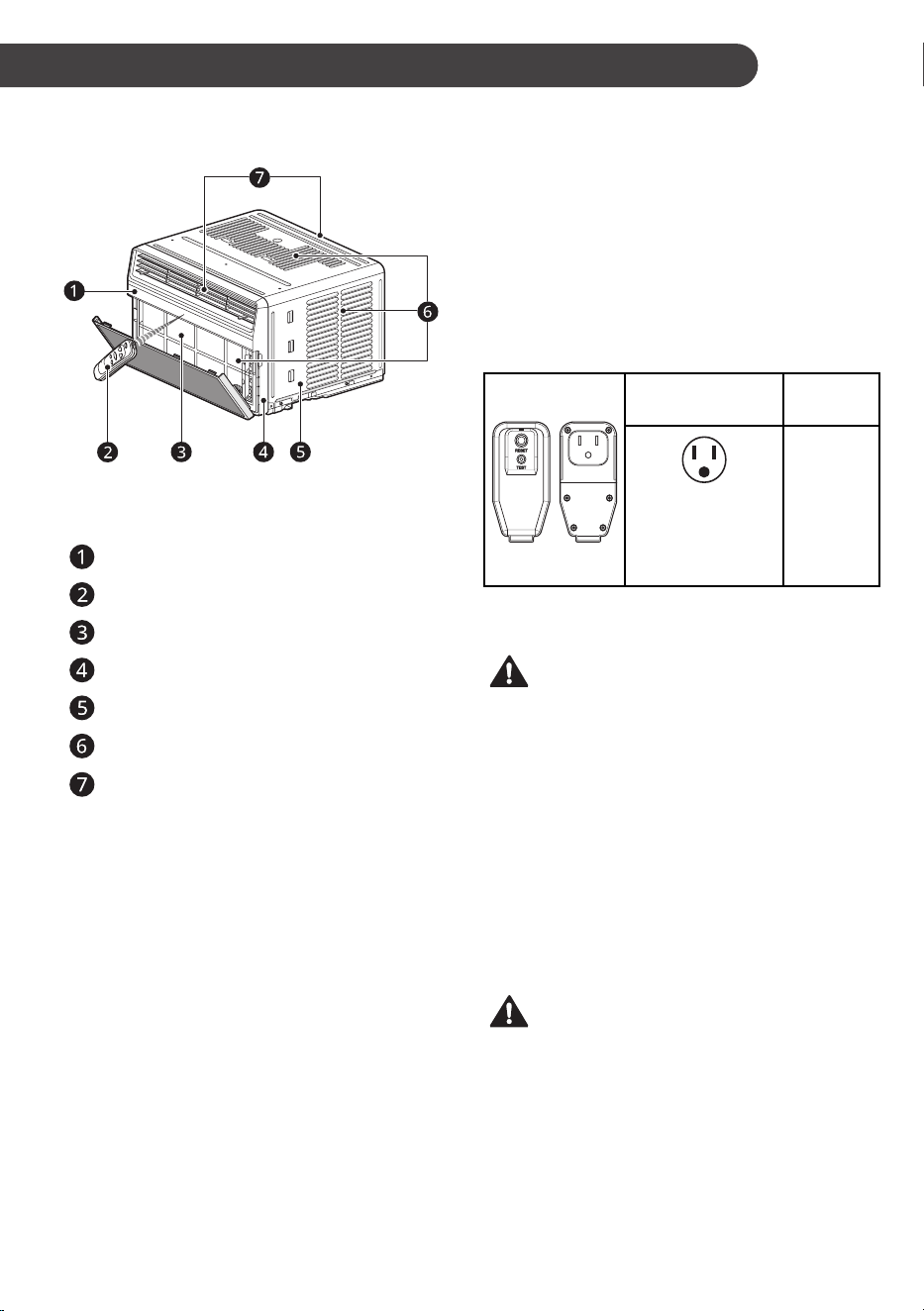
8
SP
INSTALACIÓN
DESCRIPCIÓN GENERAL
DEL PRODUCTO
NOTA
• La función puede cambiar según el tipo de modelo.
Panel de control
Mando a distancia
Filtro de aire
Rejilla delantera
Carcasa
Entrada de aire
Salida de aire
Datos eléctricos
El cable de alimentación puede incluir un
interruptor de corriente. En la carcasa del
enchufe hay un botón de TEST (prueba) y otro
de RESET (restablecer). El dispositivo debe
probarse periódicamente pulsando en primer
lugar el botón TEST y, a continuación, el botón
RESET. Si el botón TEST no funciona o si el botón
RESET no permanece pulsado, deje de utilizar el
acondicionador de aire y póngase en contacto con
un técnico de servicio cualificado.
Solo para 120 V
Utilice la toma de
la pared
Fuente de
alimentación
Toma estándar de
120 V conectada a
tierra para enchufes
de 3 clavijas de 15 A,
120 VCA y 60 Hz
Utilice 15
A, Fusible
de retardo
o 15 A,
Disyuntor.
NOTA
• La función puede cambiar según el tipo de modelo.
ADVERTENCIA
• Este aparato debe instalarse de acuerdo con el
estándar estadounidense NEC.
• El uso de alargadores eléctricos puede
provocar lesiones graves o la muerte.
− No utilice alargadores eléctricos con este
acondicionador de aire de ventana.
− No utilice protectores de sobretensión ni
adaptadores de varias tomas con este
acondicionador de aire de ventana.
• Nunca pulse el botón de TEST durante el
funcionamiento. Hacerlo podría dañar el
enchufe.
− No quite, modifique ni sumerja este enchufe.
Si este dispositivo se activa, debe corregirse
la causa antes de volver a utilizar el aparato.
PRECAUCIÓN
• Los conductores del interior de este cable están
rodeados por un blindaje, que controla la corriente
residual. Estos blindajes no están conectados a tierra.
Examine periódicamente el cable para comprobar
que no esté dañado. No utilice este producto si los
blindajes quedan expuestos. Evite el peligro de
descarga. El usuario no puede encargarse del servicio
técnico de esta unidad. No abra la parte sellada
antimanipulación. Todas las garantías de rendimiento
quedarán anuladas. Esta unidad no debe utilizarse
como un interruptor de encendido y apagado.
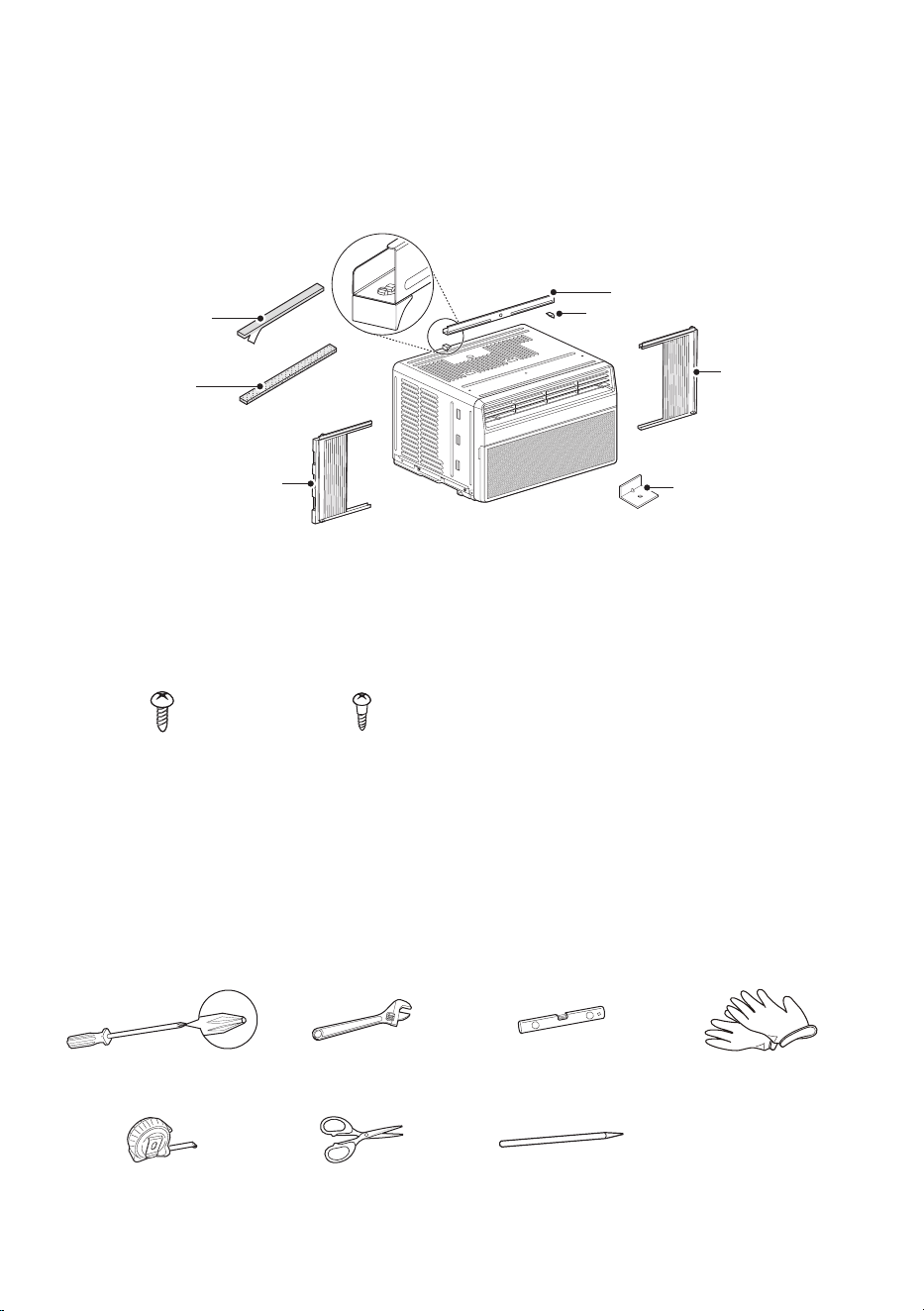
9
SP
Partes incluidas (Apariencia puede variar)
Panel de cortina
derecho
Panel de cortina
izquierda
Ménsula en L (3)
Banda Adhesiva (2)
(adhesivo posterior)
Banda del Marco
(no adhesivo posterior)
Soporte(2)
Guía Superior
NOTA
• La función puede cambiar según el tipo de modelo.
Tornillos de tipo “A”Tornillos de tipo “A”
(6)(6)
Tornillos de tipo “B”Tornillos de tipo “B”
(5)(5)
Herramientas necesarias
Destornillador PhillipsDestornillador Phillips Llave ajustableLlave ajustable NivelNivel GuantesGuantes
Cinta medidoraCinta medidora Tijeras o Tijeras o
Cuchilla de corteCuchilla de corte
LápizLápiz
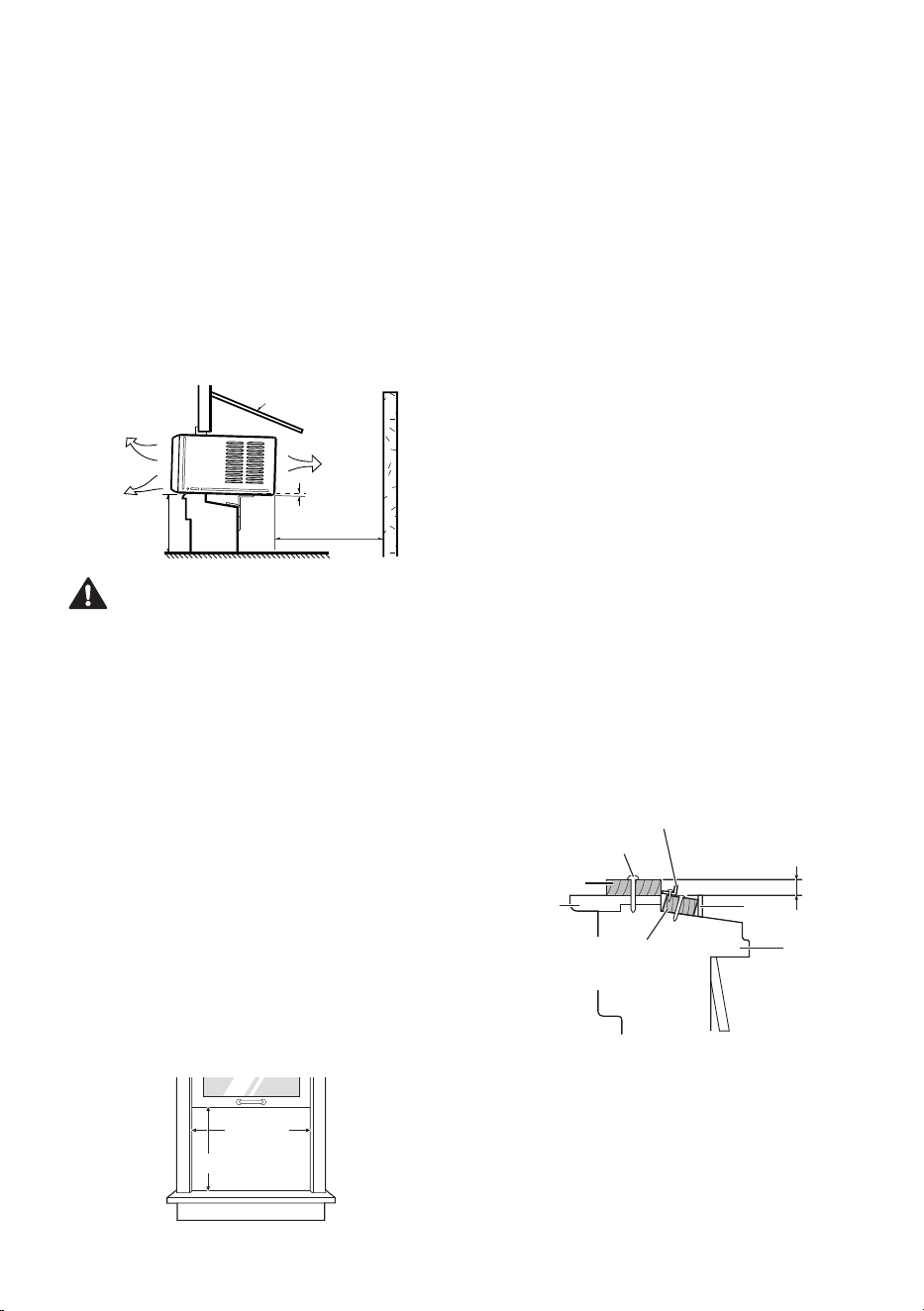
10
SP
Cómo instalar la unidad
1
Para prevenir la vibración y el ruido,
asegúrese que la unidad esté instalada con
seguridad y firmeza.
2
Instale la unidad fuera de la luz solar directa.
3
No debe haber obstáculos, como una cerca o
una pared, dentro 20” desde la parte posterior
del gabinete porque evitará la radiación de
calor del condensador. La restricción de aire
exterior reduce en gran medida la eficiencia
de enfriamiento del aire acondicionado.
Cerco
Protección
Radiación
de calor
Aire fresco
Sobre 20"
30"~60"
Alrededor 1/4"
PRECAUCIÓN
• NO cubra ni bloquee ninguna de las rejillas
superiores y laterales. Todos los álabes laterales
del gabinete deben permanecer expuestas al
exterior de la estructura y sin obstrucciones.
4
Instale la unidad un poco inclinada para que
la parte posterior quede ligeramente más baja
que le frente (alrededor de 1/4”). Esto forzará
al agua condensada a fluir hacia el exterior.
5
Instale la unidad con el fondo aproximadamente
30” ~ 60” por encima del nivel del piso.
Requisitos de la ventana
• Esta unidad ha sido diseñada para instalarse en
ventanas dobles de guillotina estándar con anchos
de abertura de 22” (55,88 cm) a 36” (91,44 cm).
Las ventanas de guillotina superior e inferior
deben abrirse lo suficiente para permitir que haya
una abertura vertical libre de 13” (33,02 cm) desde
la parte inferior de la ventana de guillotina superior
hasta el alféizar interior.
22” a 36”22” a 36”
13” min13” min
NOTA
• Todos los soportes deben fijarse a mandera,
obra de fábrica, vinilo, fibra de vidrio o metal
firmes.
• Este producto es un aparato de AIRE
ACONDICIONADO PARA INSTALACIÓN
EN VENTANAS. Como tal, se necesita una
ventana de un cuelgue o de doble cuelgue para
una instalación adecuada. No se recomiendan
instalaciones sin ventanas, incluido el uso de
mangas o aberturas de pared, y otros métodos
de instalación.
Requisitos de una ventana
de tormentas
1
Las ventanas que incluyen un marco de
ventana de tormenta pueden evitar que el
aire acondicionado se incline hacia el exterior
para drenar adecuadamente. Para un drenaje
adecuado,
fije una pieza de madera de 1” x 2”
al alféizar interior, recortado a una longitud
que encaje dentro del marco de la ventana. La
parte superior de la cuña de madera debe ser
al menos 3/4” más alta que la parte superior
del marco de la ventana de tormenta. Fije la
madera de forma segura al alféizar con clavos
o tornillos.
2
Si es necesario, coloque otra tira de madera
de 1” x 2” al ras contra la parte posterior del
alféizar interior. Esto elevará el soporte L,
como se muestra en el dibujo.
Interior
Tira de madera montada
Sobre el
umbral interno
Ménsula en L
Exterior
Umbral
interno
Marco
contra tormenta
Umbral
externo
Clavo o tornillo
3/4” más alto que el
marco de ventana
de tormentas
Tira de Madera para la
Ménsula L y Mensula
de Antepecho
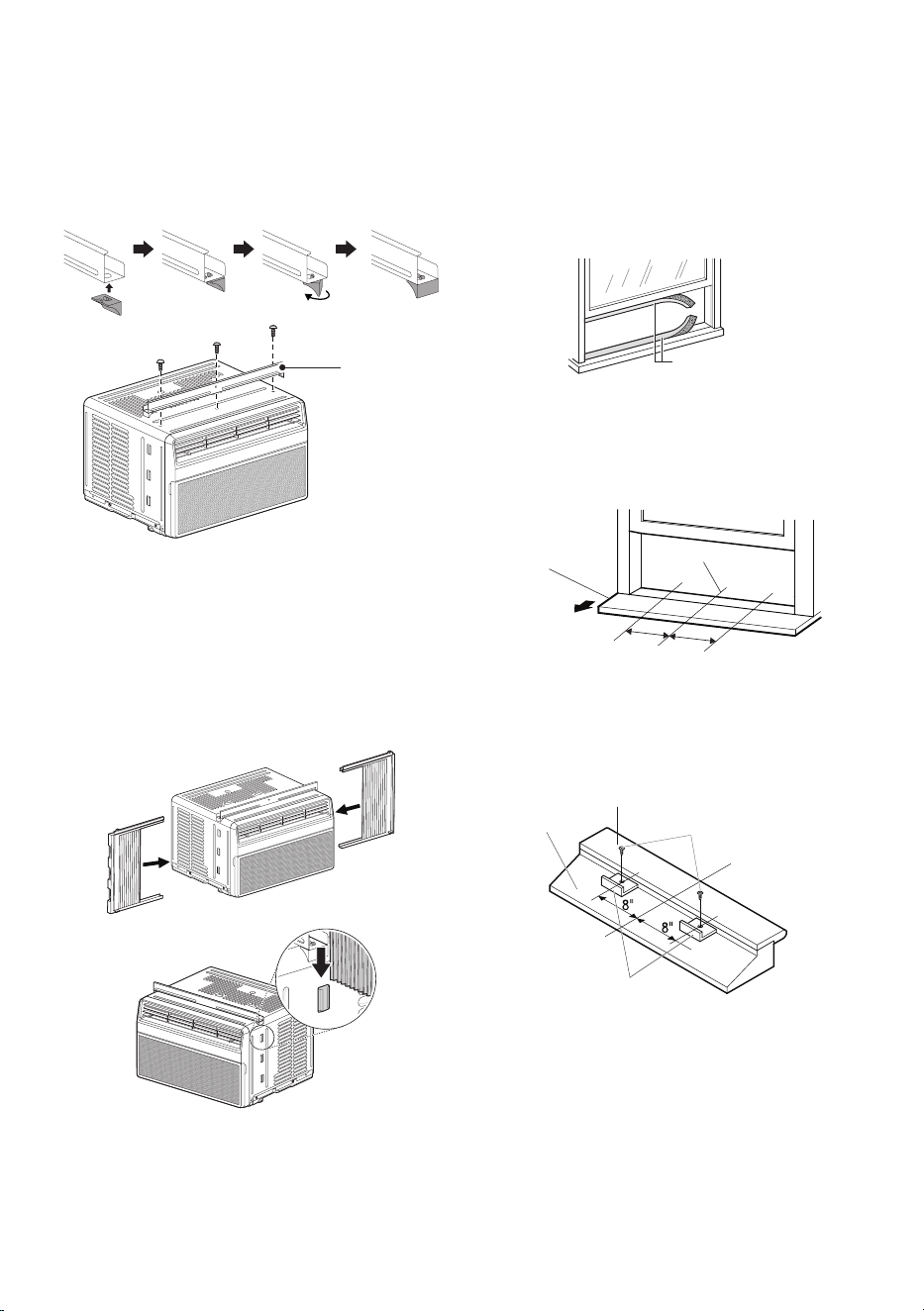
11
SP
Preparación de la carcasa
1
Monte dos soportes con guía superior.
Alinee los agujeros entre la guía superior y la
parte superior del gabinete y luego instálelo
con 3 tornillos tipo A.
Guía SuperiorGuía Superior
Tornillos (Tipo A)Tornillos (Tipo A)
NOTA
• La función puede cambiar según el tipo de modelo.
2
Extienda las cortinas por los paneles de las
cortinas e inserte los extremos en los soportes
a cada lado del gabinete. Inserte los rieles
superior e inferior de las guías de las cortinas”
en las guías del panel superior e inferior del
gabinete.
Panel de Panel de
cortina cortina
derecholderechol
Panel de Panel de
cortina cortina
izquierdaizquierda
NOTA
• La función puede cambiar según el tipo de modelo.
3
Corte los sellos para ventanas de guillotina
(espuma de PE) de forma que obtenga
la longitud adecuada. Despegue la capa
protectora y aplique la espuma con cara
adhesiva a la parte inferior de la ventana de
guillotina y a la parte inferior del marco de la
ventana.
Espuma de PE Espuma de PE
(cara adhesiva)(cara adhesiva)
4
Abra la ventana y marque la línea central en
el centro del alféizar de la ventana. Luego
marque las líneas de 8” a izquierda y derecha
desde la línea central.
8"
8"
Antepecho Antepecho
InteriorInterior
Linea del CentroLinea del Centro
TabureteTaburete
5
Instale los ménsula en L detrás de alféizar
interno de la ventana, con el lado corto del
soporte como está ilustrado. Utilice 2 tipo A
tornillos proveidos.
Tornillos Tornillos
(Tipo A)(Tipo A)
Descanso Descanso
InteriorInterior
Linea del CentroLinea del Centro
Descanso Descanso
ExteriorExterior
Ménsula en LMénsula en L
NOTA
• La ménsula ayuda a que la unidad se
encuentre firme. Asegúrese de poner la
ménsula en L contra la parte posterior del
descanso interior.
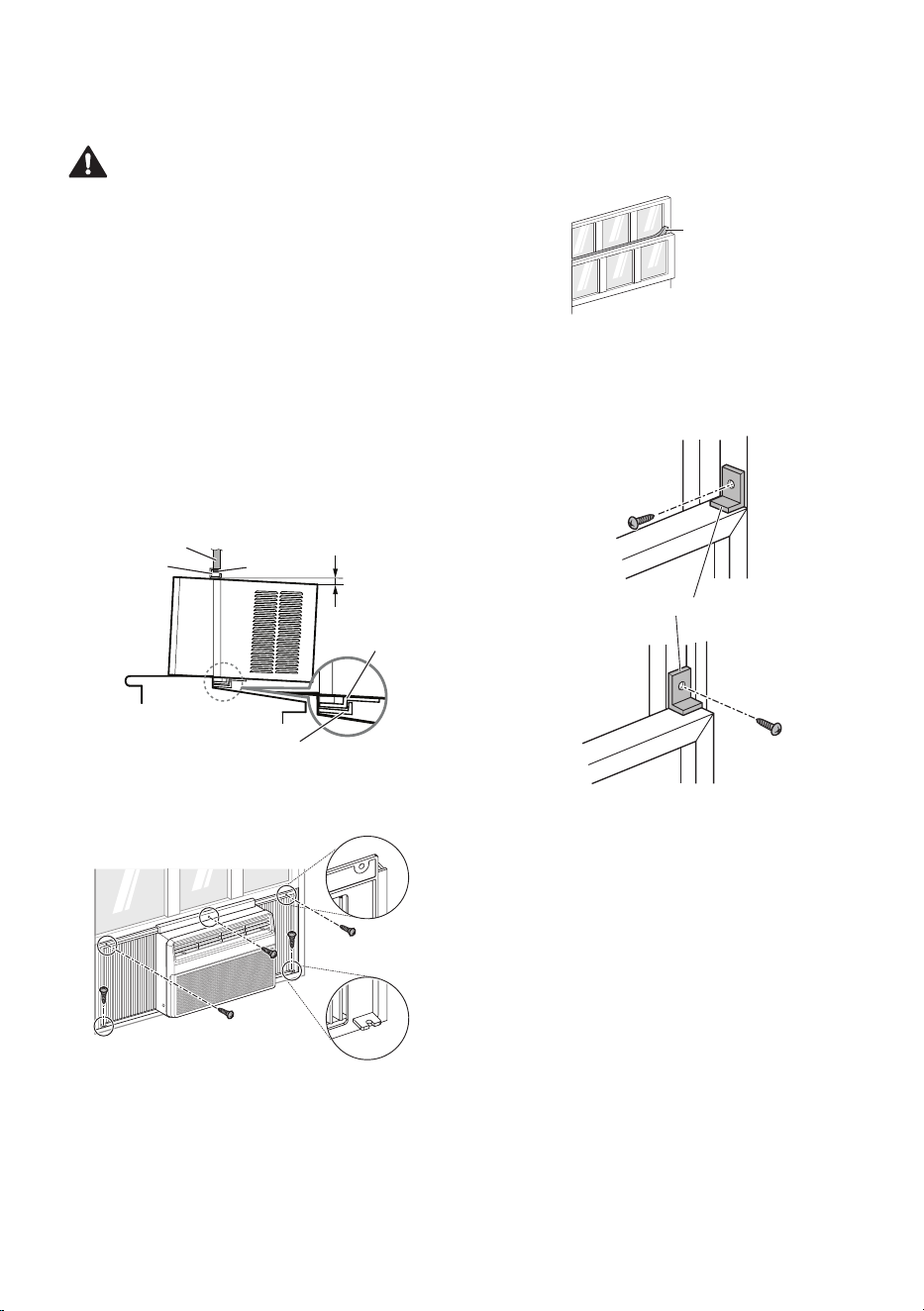
12
SP
Instalación de la unidad
PRECAUCIÓN
• En las siguientes instrucciones, sostenga la
unidad firmemente hasta que la parte corrediza
de la ventana descanse sobre la parte superior
del canal y por detrás del marco de los paneles
corredizos. Puede haber lesiones o daños si la
unidad se cae de la ventana.
1
Coloque el acondicionador de aire en la
ventana de modo que se encuente centrado.
Coloque el acondicionador de aire de modo
que el extremo frontal del riel de montaje
inferior se encuentrecontra el extremo trasero
del alfeizar. Baje la ventana de modo que
el extremo frontal del montaje superior se
encuentre delanta de la ventana. Asegurese
de que el acondicionador de aire este nivelado
o apenas inclinado hacia el exterior.
Aproxima Aproxima
dament 1/4”dament 1/4”
BandaBanda
Borde de la Ventana SuperiorBorde de la Ventana Superior
Guía InferiorGuía Inferior
Guía SuperiorGuía Superior
Ménsula en LMénsula en L
2
Extienda los paneles par a rellenar los orificos
de la ventana usando los 5 tipo B tornillos.
Tornillos Tornillos
(Tipo B)(Tipo B)
NOTA
• La función puede cambiar según el tipo de modelo.
3
Corte la tira de espuma no adhesiva de forma
que obtenga la longitud adecuada e insértela
entre la ventana de guillotina superior y la
inferior.
Tira de espuma Tira de espuma
(no adhesiva)(no adhesiva)
4
En ventanas construidas con vinilo o
construcción similar, fije el ménsula en L al
marco de la ventana con un tornillo tipo A para
evitar daños a la ventana y vidrios rotos.
Tornillo Tornillo
(Tipo A)(Tipo A)
Ménsula en LMénsula en L
ViniloVinilo
Tornillo Tornillo
(Tipo A)(Tipo A)
MaderaMadera
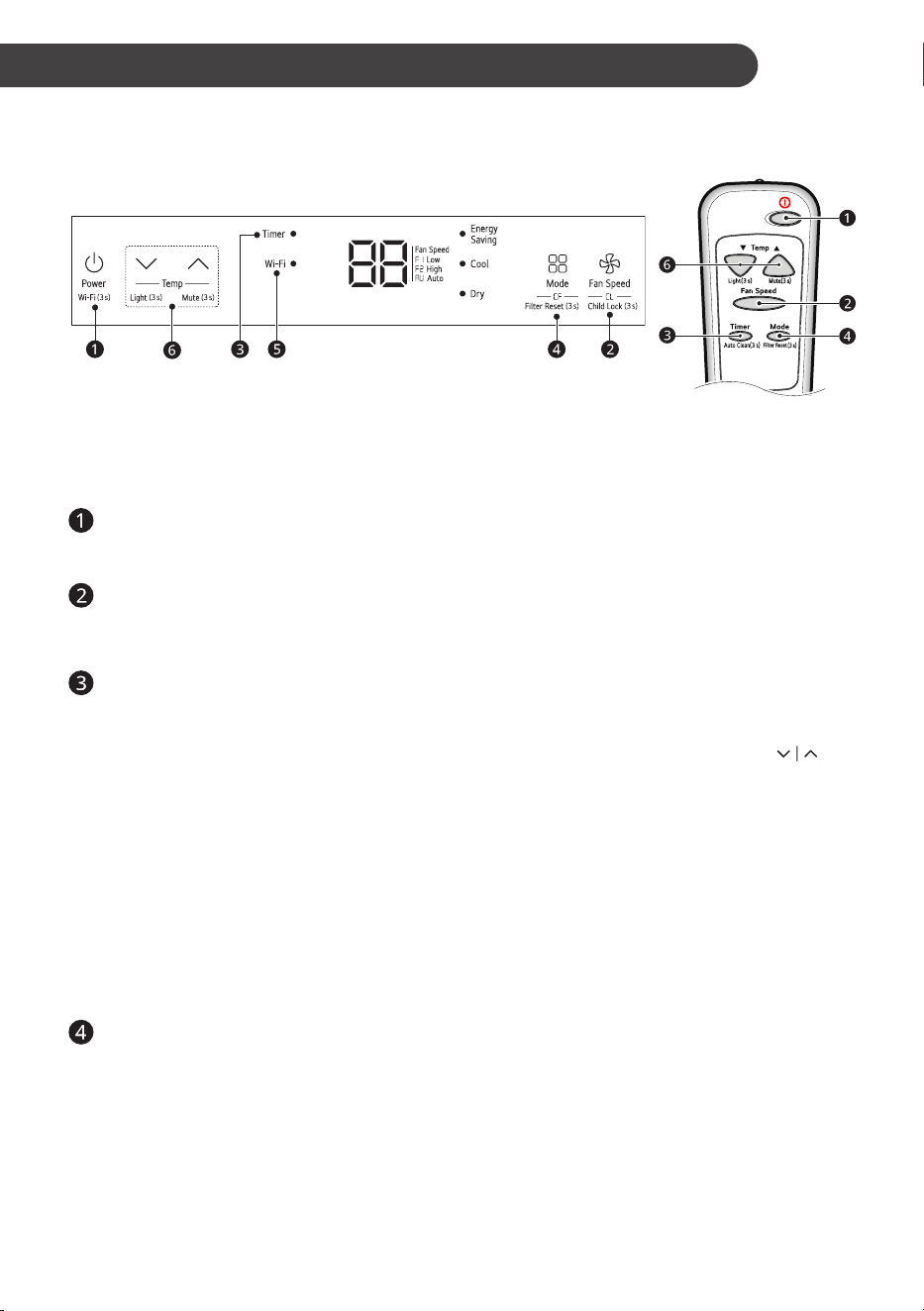
13
SP
FUNCIONAMIENTO
Panel de control y control remoto
Panel de control Control remoto
NOTA
• La función puede cambiar según el tipo de modelo.
• La superficie del panel de control tiene una película protectora, retírela antes de usar.
Power (t) (Alimentación)
Pulse este botón para encender o apagar el
acondicionador de aire.
Energy Saver (Ahorro de energía)
- En
este modo la temperatura se establece
automáticamente para ahorrar energía.
NOTE
• El modo
Energy Saver
establece
automáticamente la temperatura objetivo a
72 °F.
• La temperatura de ajuste aumenta hasta 4
°F desde la temperatura de preajuste.
Cool (Frío) - este modo es ideal en días calurosos
para enfriar y deshumedecer la habitación
rápidamente. Utilice los botones Temp
para establecer la temperatura deseada para la
habitación y el botón Fan Speed para establecer
la velocidad del ventilador deseada.
Dry (Secar) - este modo es ideal en días lluviosos
y húmedos para deshumedecer la habitación
en lugar de enfriarla significativamente. La
combinación del funcionamiento del compresor y
la velocidad del ventijada en Low (baja) elimina
la humedad de la habitación. El compresor y el
ventilador se desactivan cuando se alcanza la
temperatura establecida. En el modo Dry (secar)
no se puede ajustar la velocidad del ventilador.
Fan (Ventilador) - en este modo, el ventilador
hace circular el aire, pero el compresor no
funciona. Utilice el botón Fan Speed para
establecer la velocidad del ventilador en
Auto
(AU), Baja (F1) o Alta (F2)
. En este modo, no
puede ajustar la temperatura establecida.
Fan Speed (Velocidad del ventilador)
Presione para establecer Fan Speed a Auto
(AU), Baja (F1) o Alta (F2).
Delay ON/OFF Timer (Temporizador de
retraso de encendido o apagado)
Delay ON (Retraso de encendido) -
cuando el acondicionador de aire esté
apago, configúrelo para que se encienda
automáticamente de 1 a 24 horas después,
con los ajustes previos de modo y ventilador.
Delay OFF (Retraso de apagado) -
cuando el acondicionador de aire esté
encendido, configúrelo para que se apague
automáticamente de 1 a 24 horas después.
NOTA
• Cada vez que se pulsa el botón Timer,
este avanza 1 hora. Tras la última
pulsación, la pantalla vuelve al ajuste de
temperatura.
Operation Mode (Modo de funcionamiento)
Pulse el botón Mode (modo) para ver
sucesivamente los 4 tipos de funcionamiento
del acondicionador de aire: Energy Saver
(Ahorro de energía), Cool (Frío), Dry (Secar) y
Fan (Ventilador).

14
SP
Wi-Fi (Solo Modelo de Wi-Fi)
Permite conectar el acondicionador de aire
al Wi-Fi doméstico.
Presione el botón Power 3 segundos para
usar Wi-Fi.
NOTA
• Siga las instrucciones de la Aplicación
LG ThinQ sobre cómo conectarse a su
unidad.
Temperature Control (Control de
temperatura)
El termostato controla la temperatura de
la habitación para mantener la deseada.
El termostato puede ajustarse entre
60 °F–86 °F (16 °C - 30 °C). Pulse las
flechas
o para aumentar o reducir el
ajuste de temperatura.
NOTA
• Auto Restart (Reinicio automático): Si el
acondicionador de aire se apaga debido a
una interrupción del suministro eléctrico, se
reiniciará automáticamente cuando este se
restablezca, con los ajustes establecidos antes
de que se apagara.
• El control remoto no funcionará correctamente
si el sensor de infrarrojos de CA está expuesto
directamente a la luz o si hay algún obstáculo
entre el control remoto y el acondicionador de
aire.
Uso de la función de luz
apagada
Puede ajustar el brillo del panel de control,
• Pulse el botón de
en el panel de control
durante 3 segundos, o
• Pulse el botón de
en el control remoto
durante 3 segundos.
NOTA
• Si el brillo de la pantalla de un aparato interior
está apagado, al presionar un botón en el
control remoto se enciende automáticamente la
pantalla durante 5 segundos.
• Esta función puede operar de manera
diferente, dependiendo del modelo.
Uso de la función de
Silencio
Puede encender/apagar el sonido zumbador de la
unidad,
• Pulse el botón de
en el panel de control
durante 3 segundos, o
• Pulse el botón de
en el control remoto
durante 3 segundos.
Uso de la función Limpieza
automática
En el modo de Refrigeración y Seco, se genera
humedad dentro de la unidad interior. Esta función
elimina dicha humedad.
• Presione el botón
Timer
en el control remoto
por 3 segundos.
•
aparece en la pantalla de visualización.
NOTA
• Cuando esa el producto por primera vez, la
función Auto Clean no se establece.
• Si apaga la unidad, el ventilador continúa en
funcionamiento por 10-20 minutos y limpia el
interior de la unidad interior.
Uso de la función Bloqueo
infantil
Puede establecer la función de bloqueo para prevenir
que los niños hagan funcionar el panel de control
del producto. Use la función Bloqueo infantil para
prevenir un funcionamiento o daños accidentales.
• Presione el botón Fan speed 3 segundos para
activar o desactivar la función Bloqueo infantil.
•
aparece en la pantalla de visualización.
NOTA
• El control remoto funciona con normalidad
incluso cuando la función bloqueo está
habilitada.
Uso de la función Limpieza
de filtro
El LED Lse ilumina para notificarle que el filtro
necesita ser limpiado. Luego de limpiar el filtro,
presione el botón Mode en el panel de control
durante o en el control remoto durante 3 segundos
para apagar la luz
.
NOTA
• Esta función es un recordatorio para limpiar el
filtro de aire y pader utillzar el aparato de un
modo más eficiente. El led se enciende tras
250 horas de uso.
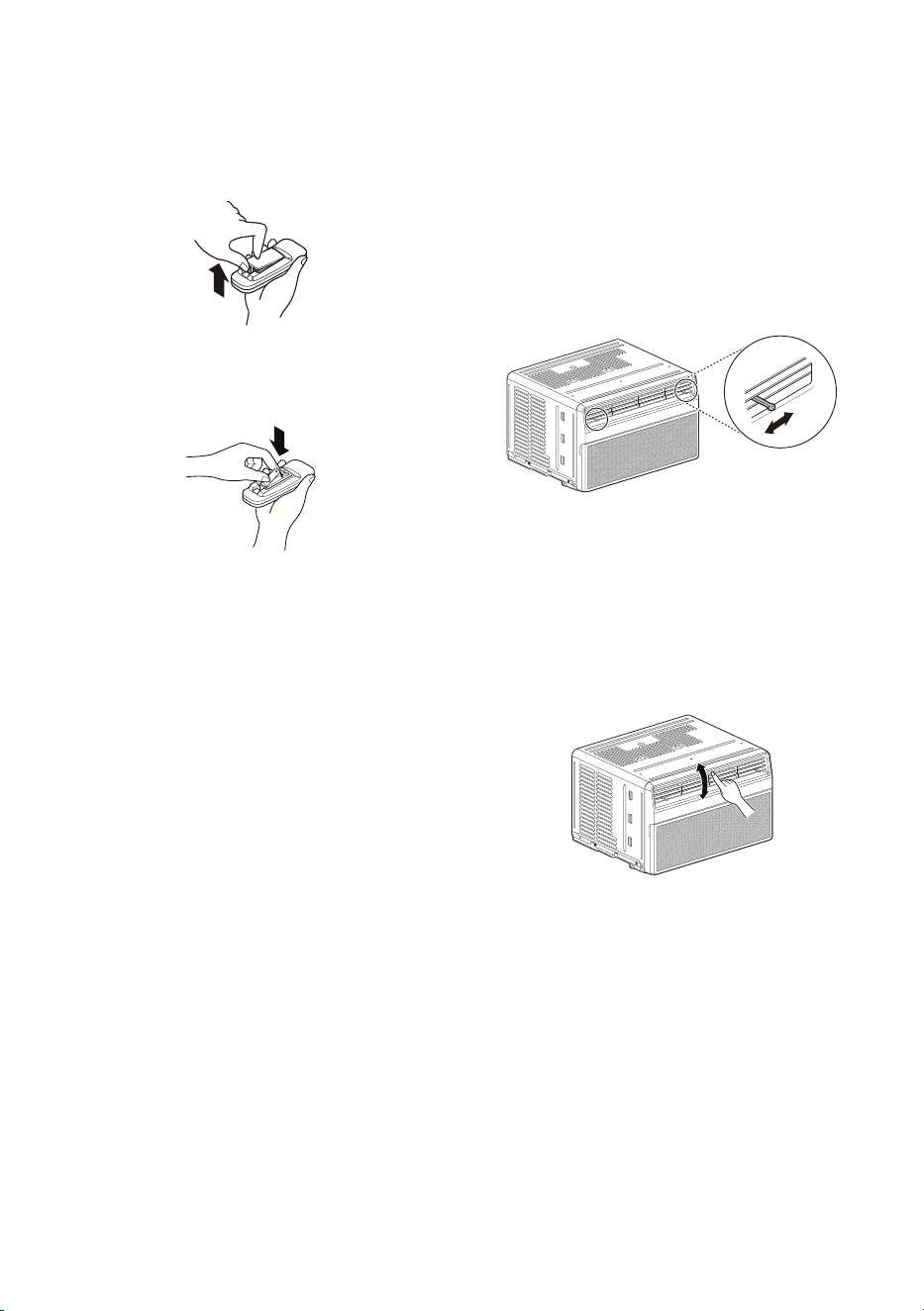
15
SP
Inserción de las baterías
1
Empuje hacia afuere con su pulgar la cubierta
en la parte posterior del control remoto.
2
Coloque las batería nuevas AAA 1,5V y
asegúrese de que los polos + y - estén
ubicados correctamente.
3
Vuelva a colocar la cubierta.
NOTA
• El acondicionador de aire incluye pilas nuevas
para el control remoto.
• No utilice pilas recargables. Asegúrese de que
las pilas sean nuevas.
• Para que no se descarguen, saque las pilas del
mando a distancia cuando el acondicionador
de aire vaya a estar un largo período sin
utilizarse.
• Mantenga el control remoto alejado de lugares
extremadamente cálidos o húmedos.
• Para que el mando a distancia continúe
funcionando correctamente, el sensor remoto
no debe exponerse directamente a la luz del
sol.
Dirección del aire
El flujo de aire puede ajustarse cambiando la
dirección de las lamas del acondicionador de aire.
Ajuste de la dirección del flujo de
aire horizontal
El flujo de aire horizontal se ajusta moviendo las
palancas de las lamas verticales hacia la izquierda
o hacia la derecha.
NOTA
• La función puede cambiar según el tipo de modelo.
Ajuste de la dirección del flujo de
aire vertical
Toque las lamas horizontales para subir o bajar el
flujo de aire.
NOTA
• Cuando haga mucho calor, la unidad puede
apagarse automáticamente para proteger el
compresor.
• La función puede cambiar según el tipo de modelo.
16
SP
FUNCIONES INTELIGENTES
Aplicación LG ThinQ
Esta característica solo está disponible en el
modelo con el logo b o ThinQ.
La aplicación
LG ThinQ le permite comunicarse
con el electrodoméstico usando un teléfono
inteligente.
Funciones de la aplicación LG ThinQ
Comuníquese desde un Smartphone usando las
características más convenientes.
Smart Diagnosis
TM
(Diagnóstico
Inteligente)
Si experimenta un problema a utilizar el
electrodoméstico, la función de diagnóstico
inteligente lo ayudará a diagnosticar el
inconveniente.
Configuración
Le permite ajustar varias opciones en el aparato y
en la aplicación.
NOTA
• Si cambia de enrutador inalámbrico,
proveedor de Internet, o contraseña, borre el
electrodoméstico registrado en la aplicación
LG ThinQ y proceda a registrarlo de nuevo.
• La aplicación está sujeta a cambios con el fin
de mejorar el producto sin previo aviso a los
usuarios.
• Las funciones pueden variar según el modelo.
Antes de usar la aplicación LG ThinQ
1
Revise la distancia entre el electrodoméstico y
el enrutador inalámbrico (Red Wi-Fi).
• Si la distancia entre el electrodoméstico y
el enrutador inalámbrico es muy grande, la
señal será débil. Puede que le tome más
tiempo registrarse o que falle la instalación.
2
Desactive los Datos Móviles o Datos
Celulares en su teléfono inteligente.
3
Conecte su teléfono inteligente al enrutador
inalámbrico.
NOTA
• Para verificar la conexión de Wi-Fi, compruebe
que la luz LED de Wi-Fi en el panel de control
esté encendida.
• El electrodoméstico funciona únicamente
con redes Wi-Fi de 2,4 GHz. Contacte a su
proveedor de servicios de internet o verifique el
manual del enrutador inalámbrico para revisar
la frecuencia de su red.
•
LG ThinQ
no es responsable por ningún problema
de conexión en red, falla, mal funcionamiento o
error causado por la conexión de red.
• Si el aparato tiene problemas para conectarse
a la red Wi-Fi, es posible que se encuentre
demasiado lejos del router. Adquiera un
repetidor Wi-Fi (extensor de alcance) para
mejorar la intensidad de la señal Wi-Fi.
• Es posible que la conexión Wi-Fi no se conecte o se
interrumpa debido al entorno de la red doméstica.
• Es posible que la conexión de red no funcione
bien por cuestiones relacionadas con su
proveedor de servicios de Internet.
• El entorno inalámbrico circundante puede
hacer que el servicio de red inalámbrica
funcione lentamente.
• El aparato no puede registrarse debido a
problemas con la transmisión de la señal
inalámbrica. Desconéctelo y espere alrededor
de un minuto previo a intentarlo de nuevo.
• Si el cortafuegos de su enrutador inalámbrico
está activado, desactivelo o añada una
excepción a éste.
• El nombre de la red inalámbrica (SSID) debe
ser una combinación de letras y números. (No
utilice símbolos especiales)
• La interfaz de usuario (IU) del teléfono
inteligente puede variar dependiendo del sistema
operativo (OS) del móvil y del fabricante.
• Es posible que no pueda establecer la
configuración de red si el protocolo de
seguridad del router está en WEP. Cambie el
protocolo de seguridad por otro (se recomienda
el WPA2) y registre el producto nuevamente.

17
SP
Instalación de la aplicación LG
ThinQ
Busque la aplicación LG ThinQ en la tienda
Google Play o App Store desde su teléfono
inteligente. Siga las instrucciones para descargar
e instalar la aplicación.
Información del aviso de software
de código abierto
Para obtener el código fuente bajo GPL, LGPL,
MPL y otras licencias de fuentes abiertas que
tengan las obligaciones de revelar un código
fuente, que esté contenido en este producto, y
para acceder a todos los términos sobre licencia
referidos, así como a los avisos sobre copyright
y otros documentos relevantes, por favor, visite
https://opensource.lge.com.
LG Electronics también le proporcionará código
abierto en CD-ROM por un importe que cubre
los gastos de su distribución (como el soporte, el
envío y la manipulación) previa solicitud por correo
electrónico a [email protected].
Esta oferta es válida para cualquier persona en
posesión de esta información durante un periodo
de tres años después del último envío de este
producto.
Smart Diagnosis
TM
(Diagnóstico Inteligente)
Esta característica solo está disponible en el
modelo con el logo c o d.
Utilice esta función como ayuda para diagnosticar
y resolver problemas con su electrodoméstico.
NOTA
• Por motivos no atribuibles a la negligencia
de LGE, es posible que el servicio no pueda
funcionar debido a factores externos como
por ejemplo, la indisponibilidad de Wi-Fi,
desconexión de Wi-Fi, política de la tienda
de aplicaciones local o indisponibilidad de
aplicaciones, entre otros.
• Esta función puede estar sujeta a cambios sin
previo aviso y puede tener una forma diferente
según dónde se encuentre ubicado.
Uso de LG ThinQ para
diagnosticar problemas
Si experimenta un problema con su
electrodoméstico equipado con Wi-Fi, este puede
transmitir datos sobre la resolución de problemas
a un teléfono inteligente con la aplicación
LG ThinQ.
• Inicie la aplicación
LG ThinQ y seleccione la
función Smart Diagnosis
TM
en el menú. Siga
las instrucciones provistas en la aplicación
LG ThinQ.
18
SP
Aviso de la FCC
El siguiente aviso cubre el módulo transmisor
contenido en este producto.
Este equipo fue probado y se determinó que
cumple con los límites para los dispositivos
digitales de Clase B, en conformidad con la parte
15 de las normas de la FCC. Estos límites están
diseñados para ofrecer una protección razonable
contra interferencias dañinas en una instalación
residencial. Este equipo genera, usa y puede
emitir energía de radiofrecuencia y, si no se
instala y utiliza de acuerdo con las instrucciones,
podría causar interferencias dañinas a las
comunicaciones por radio. Sin embargo, no se
garantiza que dicha interferencia no pueda ocurrir
en instalaciones particulares. Si este equipo causa
interferencia dañina a la recepción de radio o
televisión, que se puede determinar encendiendo
y apagando el equipo, se aconseja al usuario
intentar corregir la interferencia realizando alguna
de las siguientes acciones:
• Reorientar o reubicar la antena receptora.
• Aumentar la separación entre el equipo y el
receptor.
• Conectar el equipo a una toma de corriente
en un circuito diferente del utilizado por el
receptor.
• Consultar al vendedor o a un técnico de radio/
TV con experiencia para solicitar ayuda.
Este dispositivo cumple con la parte 15 de las
normas de la FCC. La operación está sujeta a las
dos siguientes condiciones:
1) Este dispositivo no debe causar interferencia
dañina, y
2) Este dispositivo debe aceptar cualquier
interferencia recibida, incluso aquellas que
pudieran causar un funcionamiento no
deseado del dispositivo.
Cualquier cambio o modificación en la
construcción de este dispositivo que no cuente
con la aprobación expresa de la parte responsable
del cumplimiento, puede anular la autorización del
usuario para operar este equipo.
Declaración sobre exposición a la
radiación de RF de la FCC
Este equipo cumple con los límites de exposición
a la radiación de la FCC establecidos para
entornos no controlados. Este transmisor no se
debe ubicar ni operar junto con ninguna otra
antena ni transmisor.
El equipo se debe instalar y operar con una
distancia mínima de 20 cm (7.8 pulg.) entre la
antena y su cuerpo. Los usuarios deben seguir las
instrucciones de operación específicas de manera
tal de cumplir con las normas de exposición a la
RF.
Especificaciones módulo LAN
inalámbrico
Rango de
frecuencia
2412 MHz - 2462 MHz
Potencia
de Salida
(Máx)
< 30 dBm
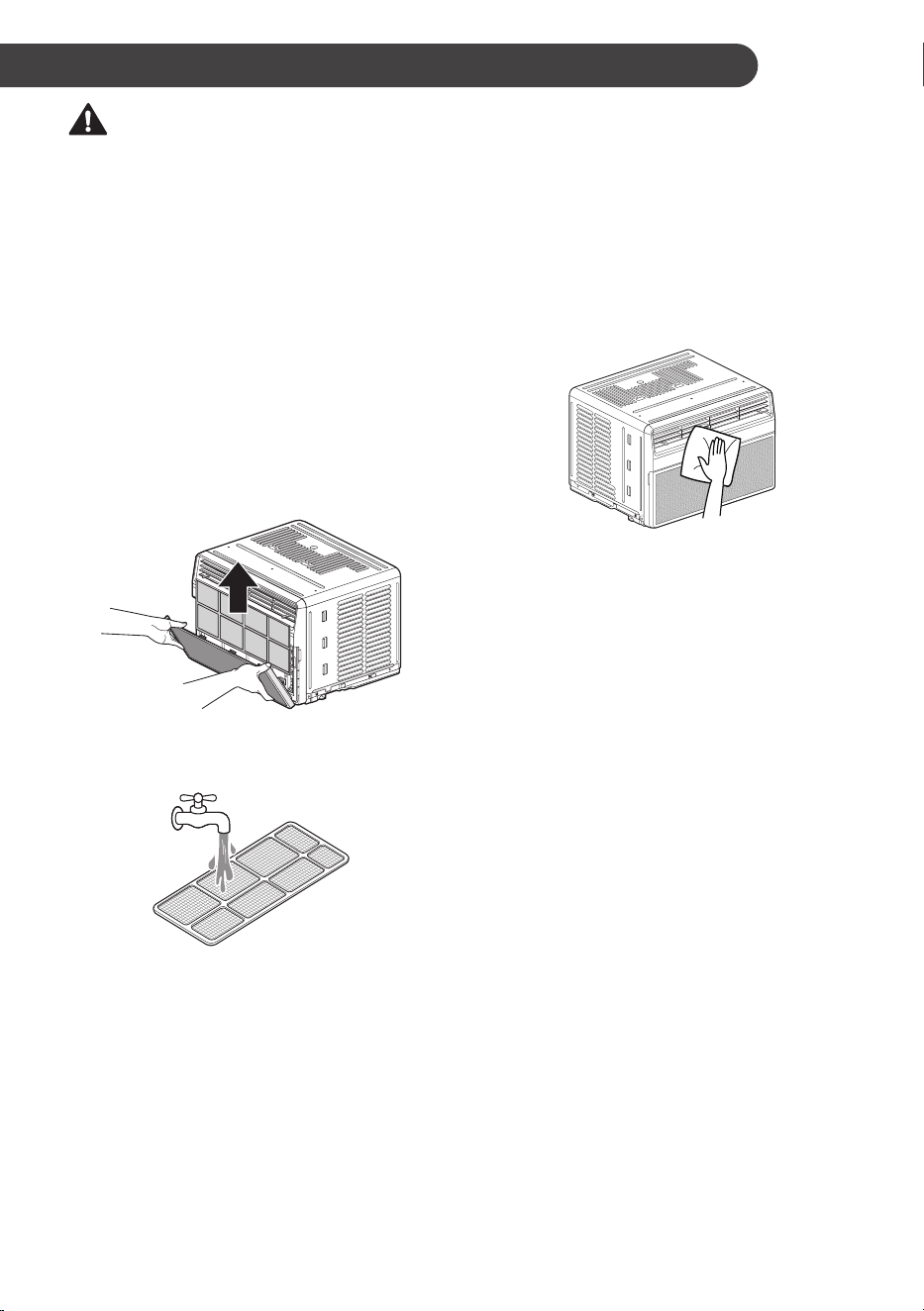
19
SP
MANTENIMIENTO
ADVERTENCIA
• Antes de limpiar o realizar el mantenimiento,
desconecte el suministro de electricidad y
espere que el ventilador se detenga.
Limpieza
Revisar el filtro de aire al menos dos veces al
mes para comprobar si es necesaria su limpieza.
Las partículas atrapadas en el filtro pueden
acumularse y bloquear el flujo de aire, lo que
reduce la capacidad de enfriar y ocasiona una
acumulación de escarcha en el evaporador.
Limpieza del filtro de aire
1
Quite el filtro de aire de la rejilla delantera
tirando de él hacia adelante y, a continuación,
ligeramente hacia arriba.
2
Lave el filtro con agua tibia a menos de
40 °C (104 °F).
3
Secuda suavemente el filtro para eliminar el
exceso de agua y vuelva a colocarlo.
NOTA
• La función puede cambiar según el tipo de modelo.
Limpieza del acondicionador de
aire
• Utilice una aspiradora para quitar la suciedad
de la entrada y salida de aire.
• Limpie la rejilla delantera y la rejilla de entrada
con un paño humedecido en una solución de
detergente suave.
• Lave la carcasa con jabón o detergente suaves
y agua tibia y, a continuación, púlala utilizando
cera líquida para aparatos.
NOTA
• Para garantizar siempre la máxima eficiencia,
las bobinas del condensador (fuera de la
unidad) deben revisarse periódicamente
y limpiarse si están obstruidas por hollín o
suciedad procedentes del aire exterior.
• Para las reparaciones y el mantenimiento,
póngase en contacto con un Centro de servicio
técnico autorizado. Si desea más información,
consulte la página de la garantía o llame al
1-800-243-0000. Tenga a mano el número
de modelo y el de serie. Se pueden encontrar
en el costado del gabinete. Regístrelos en la
referencia futura.
• La función puede cambiar según el tipo de modelo.
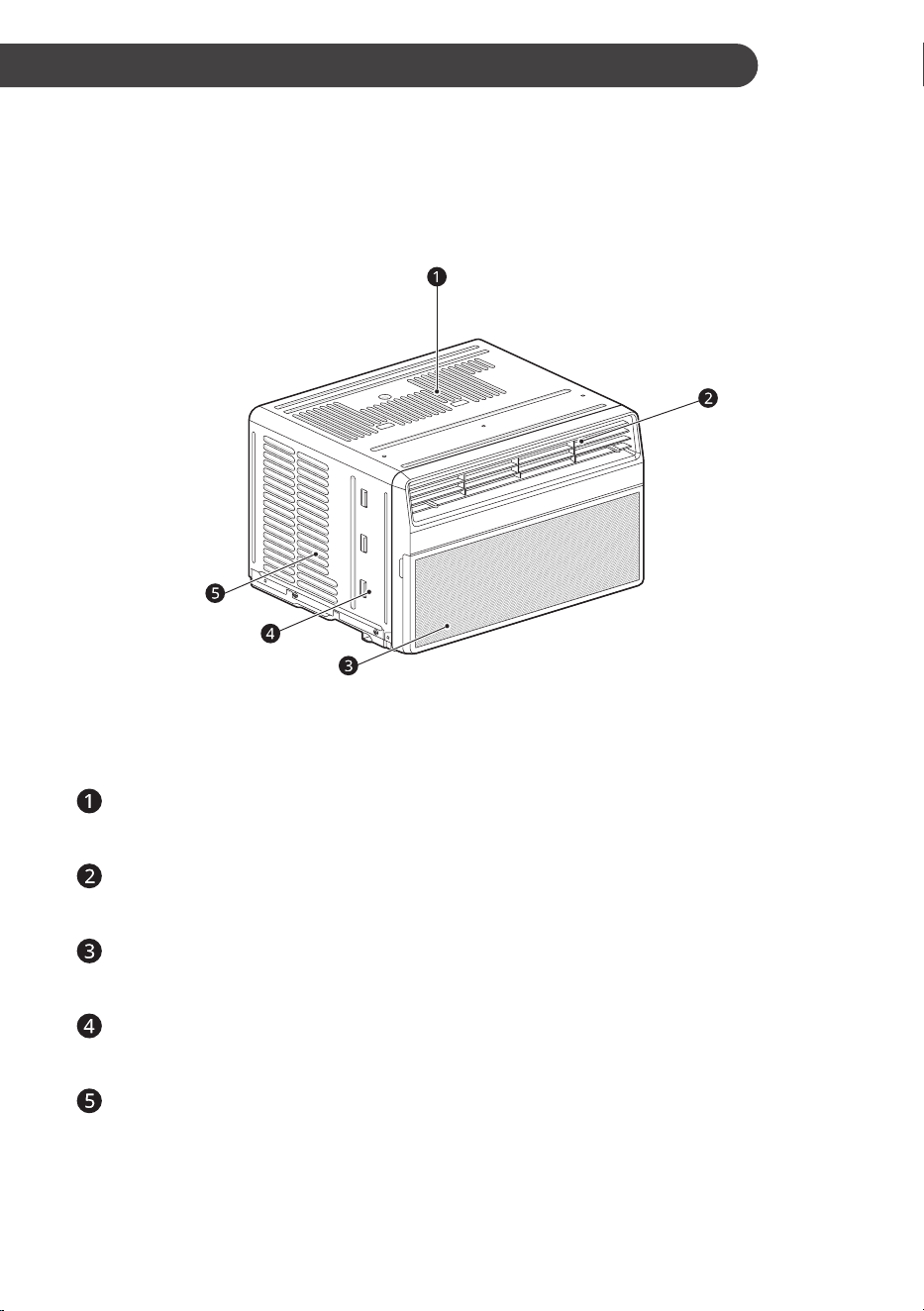
20
SP
SOLUCIÓN DE PROBLEMAS
Antes de llamar al servicio técnico
El artefacto está equipado con un sistema automático de monitoreo de errores para detectar y diagnosticar
problemas en una etapa temprana. Si el artefacto no funciona adecuadamente o si no funciona en
absoluto, verifique lo siguiente antes de solicitar servicio técnico.
Sonidos Normales Que Puede Escuchar
NOTA
• La función puede cambiar según el tipo de modelo.
Sonidos agudos
Los actuales compresores de alta eficiencia pueden emitir sonidos agudos durante el ciclo de
refrigeración.
Sonido de corriente de aire
En la parte delantera de la unidad puede escuchar el sonido de la corriente de aire producida por
el ventilador.
Gorgoteo o silbido
Puede escucharse ruido de gorgoteo o silbido cuando el refrigerante pasa por el evaporador
durante el funcionamiento normal.
Vibración
La unidad puede vibrar y hacer ruido debido a una mala construcción de la pared o la ventana o a
una instalación incorrecta.
Tintineo o silbido
Las gotas de agua que caen sobre el condensador durante el funcionamiento normal pueden
causar sonidos de tintineo o silbido.
21
SP
Problema Causas posibles & Acción correctiva
El acondicionador de
aire no se inicia.
El aire acondicionado está desenchufado.
• Asegúrese de que el enchufe del acondicionador de aire esté
completamente introducido en la toma.
El fusible se ha fundido o el disyuntor se ha activado.
• Revise la caja de fusibles o de disyuntores de la casa y sustituya el fusible o
restablezca el disyuntor.
Interrupción del suministro eléctrico.
• Si se interrumpe el suministro eléctrico, ajuste el control de modo en Off
(apagado). Cuando se restablezca el suministro eléctrico, espere 3 minutos
para reiniciar el acondicionador de aire; así evitará la sobrecarga del
compresor.
El interruptor de corriente se ha activado.
• Pulse el botón RESET del enchufe del cable de alimentación. Si el botón
RESET no permanece pulsado, deje de utilizar el acondicionador de aire y
póngase en contacto con un técnico de sevicio cualificado.
El acondicionador de
aire no enfría como
debería.
El flujo de aire está restringido.
• Asegúrese de que no haya cortinas, persianas ni muebles que bloqueen la
parte delantera del acondicionador de aire.
Es posible que el control de temperatura no esté correctamente ajustado.
• Configure latemperatura deseada en un nivel inferior que la temperatura
actual.
El filtro de aire está sucio.
• Limpie el filtro al menos cada 2 semanas. MANTENIMIENTO y servicio
técnico.
Es posible que en la habitación haya hecho calor.
• La primera vez que se enciende el acondicionador de aire transcurre algún
tiempo hasta que la habitación se enfría.
El aire frío se escapa.
• Revise las rejillas del suelo abiertas y el retorno de aire frío.
Las bobinas de enfriamiento se han congelado.
• Consulte a continuación “El aire acondicionado se congela”.
El acondicionador de
aire se congela.
Las bobinas de enfriamiento se han helado.
• El hielo puede bloquear el flujo de aire e impedir que el acondicionador de
aire enfríe adecuadamente la habitación. Ajuste el control de modo en High
Fan o High Cool.
Gotea agua en el
exterior.
Tiempo caluroso y húmedo.
• Esto es normal.
22
SP
Problema Causas posibles & Acción correctiva
Gotea agua en el
interior.
El acondicionador de aire no está inclinado hacia el exterior.
• Para que el agua se elimine correctamente, asegúrese de que el
acondicionador de aire se incline ligeramente desde la carcasa hacia la
parte posterior.
Se acumula agua en
la bandeja base.
La humedad eliminada del aire se acumula en la bandeja base.
• Esto es normal durante períodos breves en zonas con poca humedad; es
normal durante períodos más prolongados en zonas muy húmedas.
El acondicionador
de aire se enciende y
apaga rápidamente.
Filtro de aire sucio: aire limitado.
• Limpie el filtro de aire.
Temperatura exterior extremadamente alta.
• Consulte las instrucciones de instalación o al instalador.
Hay ruido cuando la
unidad enfría.
Sonido de movimiento de aire.
• Esto es normal. Si es demasiado alto, seleccione un ajuste más lento de la
velocidad del VENTILADOR.
Vibración de la ventana: instalación incorrecta.
• Consulte las instrucciones de instalación o al instalador.
La habitación está
demasiado fría.
La temperatura establecida es demasiado baja.
• Aumente la temperatura establecida.
El sensor remoto
se desactiva
prematuramente.
El mando a distancia no tiene cobertura.
• Utilice el mando a distancia a una distancia máxima de 20 pies (6,096 m) y
en un radio de 120° respecto a la parte delantera de la unidad.
Obstrucción de la señal del mando a distancia.
• Elimine la obstrucción.
No puedo conectar la
aplicación LG ThinQ
al acondicionador de
aire.
El acondicionador de aire está apagado.
• Encienda el aire acondicionado.
El router inalámbrico está apagado.
• Encienda el router.
El acondicionador de
aire no se conecta al
Wi-Fi.
El router Wi-Fi está demasiado lejos del acondicionador de aire.
• Acerque el router al acondicionador de aire o adquiera e instale un repetidor
Wi-Fi (amplificador de señal).
No tiene permiso para utilizar el router o este es incompatible.
• Asegúrese de seleccionar el router inalámbrico correcto en la lista. El router
debe tener un ancho de banda de 2,4 GHz.
23
SP
Problema Causas posibles & Acción correctiva
Problema al conectar
el electrodoméstico y
el teléfono inteligente
a la red Wi-Fi.
La contraseña de la red Wi-Fi fue ingresada incorrectamente.
• Borre su red Wi-Fi doméstica e inicie el proceso de registro de nuevo.
Los Datos Móviles para su teléfono inteligente están activados.
• Desactive los Datos Móviles en su teléfono inteligente previo a registrar el
electrodoméstico.
El nombre de la red inalámbrica (SSID) se ha configurado incorrectamente.
• El nombre de la red inalámbrica (SSID) debe ser una combinación de letras
y números. (No utilice caracteres especiales)
La frecuencia del enrutador no es de 2,4 GHz.
• Sólo se admite una frecuencia de enrutador de 2,4 GHz. Configure el
enrutador inalámbrico a 2,4 GHz y conecte el electrodoméstico a éste. Para
verificar la frecuencia del enrutador, consulte con su proveedor de servicios
de internet o con el fabricante del enrutador.
La distancia entre el enrutador y el electrodoméstico es muy grande.
• Si el electrodoméstico se encuentra muy lejos del enrutador, puede que
la señal sea débil y que la conexión no sea configurada correctamente.
Coloque el enrutador más cerca del electrodoméstico o compre e instale un
repetidor Wi-Fi.
Durante la configuración wifi, la aplicación solicita una contraseña para
conectarse al producto (en algunos teléfonos).
• Localice el nombre de la red que empieza por “LG” en Configuración >
Redes. Fíjese en la última parte del nombre de la red.
− Si el nombre de la red es similar a LGE_Appliance_XX-XX-XX, ingrese
lge12345.
− Si el nombre de la red es similar a LGE_Appliance_XXXX, ingrese
XXXX dos veces como su contraseña. Por ejemplo, si el nombre de la
red aparece como LGE_Appliance_8b92, deberá ingresar 8b928b92
como su contraseña. En este caso, la contraseña reconoce mayúsculas
y minúsculas; y los cuatro últimos caracteres son exclusivos de su
electrodoméstico.
NOTA
• Si ve “CH” en la pantalla, llame al 1-800-243-0000.
24
SP
GARANTÍA
AVISO DE ARBITRAJE: ESTA GARANTÍA LIMITADA CONTIENE UNA CLÁUSULA DE ARBITRAJE QUE
LE DEMANDA A USTED Y A LG RESOLVER CONFLICTOS A TRAVÉS DE UN ARBITRAJE VINCULANTE
EN LUGAR DE HACERLO EN LA CORTE, A MENOS QUE USTED DECIDA NO PARTICIPAR. EN EL
ARBITRAJE NO ESTÁN PERMITIDAS LAS ACCIONES COLECTIVAS NI LOS JUICIOS CON JURADO.
POR FAVOR, VEA A CONTINUACIÓN LA SECCIÓN TITULADA “PROCEDIMIENTO PARA RESOLVER
CONFLICTOS”.
COBERTURA DE LA GARANTÍA:
LG Electronics Inc. (“LG”) garantiza que reparará o sustituirá, gratuitamente, su producto si resulta
defectuoso en materiales o mano de obra bajo condiciones normales de uso durante el periodo de
garantía mencionado más abajo, efectivo a partir de la fecha de compra del producto original por parte del
consumidor. Esta garantía limitada sólo es válida para el comprador original del producto y no es asignable
ni transferible a ningún otro comprador o usuario final subsecuentes, y efectiva únicamente cuando
el producto se compra a través de un distribuidor autorizado de LG y se utiliza en los Estados Unidos
(“EE UU”) o en cualquiera de sus territorios.
NOTA
• Los recambios y piezas de repuesto pueden ser nuevos o estar reconstruidos de fábrica y están
garantizados durante el tiempo restante del periodo de garantía de la unidad original o noventa días
(90), el periodo de los dos que sea más largo. Por favor, guarde el recibo de compra o la nota de
entrega como prueba de la fecha de compra como comprobante de garantía (se le puede pedir que
presente una copia a LG o a su representante autorizado).
PERÍODO DE GARANTÍA:
1 año desde la fecha de compra: Cualquier repuesto interno/funcional y mano de obra
CÓMO SE MANEJA EL SERVICIO TÉCNICO: Servicio a domicilio
Los servicios a domicilio se prestarán durante el periodo de garantía sujeto a disponibilidad en los Estados
Unidos. El servicio a domicilio puede no estar disponible en todas las áreas. Para recibir asistencia técnica
a domicilio, el producto debe estar en un entorno despejado y accesible al personal técnico. Si durante el
servicio a domicilio la reparación no se puede llevar a cabo, es posible que sea necesario desplazarlo a
nuestras instalaciones, repararlo y devolverlo a su hogar. Si este fuera el caso, LG puede optar, a petición
nuestra, a utilizar el transporte de nuestra elección para desplazar la unidad al y del centro de servicio
autorizado de LG.
ESTA GARANTÍA LIMITADA NO CUBRE LO SIGUIENTE:
• Las visitas de Asistencia a domicilio para entregar, recoger y/o instalar el producto, instruir o sustituir
fusibles.
• Sustitución de fusibles de la casa o reajuste de interruptores de circuito, la corrección del cableado de
la casa o de la tubería, o la corrección de la instalación del producto.
• Los daños o averías causados por fugas / roturas / congelación de tuberías de agua, líneas de drenaje
restringido, suministro insuficiente de agua o interrumpido, o suministro insuficiente de aire.
• Los daños o averías causados por accidentes, plagas e insectos, rayos, viento, fuego, inundaciones o
actos de Dios.
• Los daños o fallos ocasionados por el mal uso, abuso, instalación inadecuada, reparación o
mantenimiento. Se considera reparación inadecuada aquella en que se hayan utilizado piezas no
aprobadas o especificadas por LG.
• Los daños o averías causados por modificaciones no autorizadas o alteraciones del producto.
• Daños o fallos causados por corriente o voltaje eléctrico incorrecto, o por códigos de fontanería.
• Daños estéticos, incluyendo arañazos, abolladuras, desportilladuras u otros daños en el acabado del
producto, a menos que dichos daños sean el resultado de defectos en los materiales o mano de obra y
se informe a LG en el plazo de siete días naturales (7) a partir de la fecha de entrega.
• Daños o artículos faltantes a productos reacondicionados, comprados con descuento, con la caja
abierta o que hayan estado en exhibición.
25
SP
• Los productos cuyos números de serie de fábrica originales hayan sido quitados, borrados o
cambiados de ninguna manera.
• Las reparaciones cuando el producto se utiliza para cualquier cosa fuera de lo normal y del uso
doméstico habitual (por ejemplo su alquiler, uso comercial, en oficinas o en instalaciones de ocio) o en
contra de la instrucciones que se indican en el manual del propietario.
• La extracción y reinstalación del producto si está instalado en un lugar inaccesible.
ESTA GARANTÍA SE OTORGA EN SUSTITUCIÓN O EXCLUSIÓN DE TODA OTRA GARANTÍA,
EXPRESA O IMPLÍCITA, INCLUYENDO SIN LIMITAR CUALQUIER GARANTÍA DE CALIDAD O
IDONEIDAD CON UN PROPÓSITO CONCRETO. EN LA MEDIDA EN QUE CUALQUIER GARANTÍA
IMPLÍCITA ES OBLIGADA POR LA LEY, ESTÁ LIMITADA EN DURACIÓN AL PERIODO DE GARANTÍA
YA MENCIONADO. LA REPARACIÓN O REEMPLAZO DE PIEZAS, SEGÚN LO ESTABLECIDO EN
ESTA GARANTÍA, ES EL ÚNICO QUE PUEDE RECLAMAR EL CLIENTE. NI EL FABRICANTE NI SU
DISTRIBUIDOR EN LOS EE.UU. SE HACE RESPONSABLE DE CUALQUIER DAÑO (DERIVADO,
INDIRECTO, ESPECIAL O PENAL) DE CUALQUIER NATURALEZA, INCLUYENDO, SIN LIMITACION,
LA PÉRDIDA DE INGRESOS O BENEEICIOS O CUALQUIER OTRO TIPO DE DAÑO, AÚN BASADO EN
UN CONTRATO, SEA UN AGRAVIO O DE CUALQUIER OTRA MANERA.
Algunos estados no permiten la exclusión o limitación de daños incidentales o emergentes, o limitaciones a
la duración de la garantía implícita, por lo que la exclusión o limitación anteriormente mencionadas podrían
no corresponder en su caso. Esta garantía le otorga derechos legal con otros derechos que varían según
el estado.
COMO OBTENER EL SERVICIO DE ESTA GARANTÍA E INFORMACIÓN ADICIONAL:
Llame al 1-800-243-0000 o visite nuestra página web: www.lg.com.
Dirección de correo ordinario: LG Customer Information Center (ATTN: CIC)
201 James Record Road, Huntsville, AL 35824
PARA SUS REGISTROS
Anote aquí los números de modelo y de serie:
N.º de modelo
N.º de serie
• Los encontrará en la etiqueta del lateral de cada unidad.
Nombre del distribuidor
Fecha de compra
• Grape el recibo a esta página si lo necesita para demostrar la fecha de compra o para cuestiones
relacionadas con la garantía.

26
SP
PROCEDIMIENTO PARA RESOLVER CONFLICTOS:
TODOS LOS CONFLICTOS ENTRE USTED Y LG QUE SURJAN FUERA DE O RELACIONADOS DE
ALGUNA MANERA CON ESTA GARANTÍA LIMITADA O CON EL PRODUCTO, SE RESOLVERÁN
EXCLUSIVAMENTE A TRAVÉS DE UN ARBITRAJE VINCULANTE Y NO EN UNA CORTE DE
JURISDICCIÓN GENERAL. ARBITRAJE VINCULANTE SIGNIFICA QUE USTED Y LG RENUNCIAN
AL DERECHO DE UN JUICIO CON JURADO Y A REALIZAR O PARTICIPAR EN UNA DEMANDA
COLECTIVA.
Definiciones.
Para el propósito de esta sección, las referencias a “LG” significan: LG Electronics U.S.A.,
Inc., sus empresas matrices, subsidiarias y filiales y cada uno de sus directivos, directores, empleados,
agentes, beneficiarios, predecesores en interés, sucesores, cesionarios y proveedores; las referencias a
“conflicto” o “reclamación” incluirán cualquier conflicto, reclamo o controversia de cualquier tipo, sin
importar (ya sea basado en contrato, agravio, estatuto, regulación, ordenanza, fraude, falsa
representación o cualquier teoría legal o equitativa) que surja de o esté relacionada con cualquier forma
de venta, condición o desempeño del producto o de esta Garantía Limitada.
Aviso de disputa.
En caso de que usted desee iniciar un procedimiento de arbitraje, primero debe
notificar a LG por escrito al menos 30 días antes de iniciar el arbitraje enviando una carta a LG a LG
Electronics, USA, Inc. Atención: Legal Department- Arbitration 111 Sylvan Avenue, Englewood Cliffs,
NJ 07632. Usted y LG aceptan participar en discusiones de buena fe en un intento de resolver su
reclamo de manera amistosa. En la carta debe proporcionar su nombre, dirección y número de teléfono;
identificar el producto que es objeto de la reclamación; y describir la naturaleza del reclamo y el remedio
que busca. Si usted y LG no pueden resolver la disputa dentro de 30 días, cualquiera de las partes
puede proceder a presentar una demanda de arbitraje.
Acuerdo de arbitraje vinculante y renuncia de demanda colectiva.
En caso de no resolver la
disputa durante el período de 30 días después de enviar una notificación por escrito a LG, Usted y LG se
comprometen a resolver cualquier reclamo entre nosotros, solamente a través de arbitraje vinculante
sobre una base individual, a menos que usted se excluya, conforme a lo dispuesto a continuación.
Cualquier conflicto entre usted y LG no estarán combinados o consolidados con una controversia
relacionada con cualquier otro producto o reclamo de otra persona o entidad. Más específicamente y sin
prejuicio de lo anterior, no procederá bajo ninguna circunstancia cualquier disputa entre usted y LG como
parte de una acción colectiva o representativa. En lugar del arbitraje, cualquiera de las partes podrá
iniciar una acción individual en la corte de reclamos menores, pero tales acciones en la corte de
reclamos menores no podrán ser realizadas en una acción colectiva o representativa.
Normas y procedimientos de arbitraje.
Para comenzar con el arbitraje de un reclamo, usted o LG
deben realizar una demanda escrita para arbitraje. El arbitraje será administrado por la Asociación
Americana de Arbitraje (AAA) y se llevará a cabo ante un árbitro único bajo las Normas de Arbitraje del
Consumidor de la AAA, que tienen efecto al momento de inicio del arbitraje (en adelante “Normas de la
AAA”) y bajo los procedimientos establecidos en esta sección. Las Normas de la AAA están disponibles
en línea en www.adr.org/consumer. Envíe una copia de su solicitud de arbitraje por escrito, así como una
copia de esta disposición, a la AAA de la forma descrita en las Normas de la AAA. También debe enviar
una copia de su solicitud por escrito a LG en LG Electronics, USA, Inc. Atención: Legal Department-
Arbitration 111 Sylvan Avenue, Englewood Cliffs, NJ 07632. Si hay un conflicto entre las Normas de la
AAA y las reglas establecidas en esta sección, prevalecerán dichas reglas de esta sección. Esta
disposición de arbitraje se rige por la Ley Federal de Arbitraje. El juicio se puede introducir en el laudo
arbitral en cualquier tribunal de jurisdicción competente. Todos son temas para que el árbitro tome sus
decisiones, excepto aquellos asuntos relativos al alcance y aplicabilidad de la cláusula de arbitraje y de la
capacidad de arbitraje de la controversia para que el tribunal decida. El árbitro se regirá por los términos
de esta disposición.
Legislación vigente.
La legislación del estado de su residencia regirá esta Garantía Limitada, así como
todas las disputas entre nosotros, salvo que sea invalidada o inconsistente con leyes federales
aplicables.

27
SP
Tarifas / Costos.
Usted no debe pagar ninguna tarifa para comenzar un arbitraje. Al recibir su solicitud
de arbitraje por escrito, LG pagará todos los gastos administrativos rápidamente a la AAA, a menos que
usted solicite más de $25,000.00 por daños, en cuyo caso el pago de estos gastos se regirá por las
Normas de la AAA. Salvo disposición contraria prevista en el presente documento, LG pagará a la AAA
todos los gastos documentales, administrativos y de arbitraje para cualquier arbitraje iniciado, de
conformidad con las Normas de la AAA y esta disposición de arbitraje. Si usted prevalece en el arbitraje,
LG pagará los honorarios y gastos de sus abogados, siempre y cuando sean razonables, considerando
factores que incluyen, entre otros, el monto de la compra y el monto del reclamo. No obstante lo anterior,
si la ley aplicable permite una adjudicación de honorarios y gastos razonables de abogados, un árbitro
puede otorgarlos en la misma medida que lo haría un tribunal. Si el árbitro considera que la sustancia de
su reclamo o la reparación solicitada en la demanda es frívola o se utiliza para un propósito inadecuado
(calificado según las normas establecidas en la Norma Federal de Procedimiento Civil 11 (b)), el pago de
todos los honorarios de arbitraje se regirá por las Normas de la AAA. En tal situación usted se
compromete a reembolsar a LG todos los fondos erogados previamente por ella, cuyo pago es, por otra
parte, su obligación, según las Normas de la AAA. Salvo disposición contraria, LG renuncia a cualquier
derecho que pudiera tener para solicitarle los honorarios y gastos de sus abogados, si LG prevalece en
el arbitraje.
Audiencias y ubicación.
Si su reclamo es por $25,000 o menos, usted puede optar que el arbitraje sea
realizado únicamente sobre la base de: (1) documentos presentados al árbitro, (2) a través de una
audiencia telefónica o (3) por una audiencia en persona, según lo establecido por las Normas de la AAA.
Si su reclamo excede $25,000, el derecho a una audiencia estará determinado por las Normas de la
AAA. Cualquier audiencia de arbitraje en persona se realizará en un lugar dentro del distrito judicial
federal en el cual resida, a menos que ambos acuerden otra ubicación o estemos de acuerdo con el
arbitraje telefónico.
Exclusión.
Usted puede quedarse fuera de este procedimiento de resolución de la disputa. Si se
excluye, ni usted ni LG pueden solicitar al otro que participe en un procedimiento de arbitraje. Para
excluirse usted debe enviar una notificación a LG, en un lapso de hasta 30 días continuos, contados a
partir de la fecha de la primera compra del consumidor del producto, ya sea por: (i) el envío de un correo
electrónico a [email protected] con el siguiente Asunto: “Exclusión del arbitraje” o (ii) llamada al 1-800-
980-2973. Debe incluir en el correo electrónico de exclusión o suministrar por teléfono: (a) su nombre y
dirección; (b) la fecha en la cual el producto fue comprado; (c) el nombre o el número del modelo del
producto; y (d) el número del serial (el número del serial puede ser hallado (i) en el producto, o (ii) en la
dirección de https://www.lg.com/us/support/repair-service/schedule-repair-continued al hacer clic en “Find
My Model & Serial Number”).
Sólo puede excluirse del procedimiento de resolución de conflictos en la forma descrita anteriormente (es
decir, por correo electrónico o por teléfono); ninguna otra forma de notificación será efectiva para hacerlo.
Excluirse de este procedimiento de resolución de controversias no afectará de ninguna manera la
cobertura de la Garantía Limitada, por lo que usted continuará disfrutando de todos sus beneficios. Si
conserva este producto y no se excluye, usted acepta todos los términos y condiciones de la cláusula de
arbitraje descrita anteriormente.