OPERATING MANUAL
PERMANENT FILTER IONIC AIR PURIFIER
Model No. B-1000
READ AND SAVE
THESE IMPORTANT INSTRUCTIONS

When using electrical appliances, basic precautions should always be followed to
reduce the risk of fire, electric shock and injury to persons, including the following:
1. Read all instructions before using the appliance.
2. To avoid fire or shock hazard, plug the appliance with the adapter directly into an
AC electrical outlet. The adapter inputs a 12V DC power into the unit.
3. Keep the cord out of heavy traffic areas. To avoid fire hazards, NEVER put the
cord under rugs, near heat registers, radiator, stoves, or heaters.
4. To protect against electrical hazards, DO NOT immerse in water or other liquids.
Do not use near water.
5. Close supervision is necessary when any appliance is used by or near children,
or by disabled persons.
6. Always unplug the air purifier before moving it, opening the grill, changing filters,
cleaning, or whenever the air purifier is not in use. Be sure to pull by the plug and
not the cord.
7. NEVER drop or insert any object into any openings.
8. DO NOT operate any appliance with a damaged cord or plug, if the motor fan fails
to rotate, after the appliance malfunctions, or if it has been dropped or damaged
in any manner.
9. Use appliance only for the intended household use as described in this manual.
Any other use not recommended by the manufacturer may cause fire, electric
shock, or injury to persons.
10. DO NOT use outdoors.
11. NEVER block the air openings, grills/outlets or place on a soft surface such as a
bed or sofa, as this could cause the unit to tip over, blocking the air intake
opening.
12. Keep the unit away from heated surfaces and open flames.
13. DO NOT attempt to repair or adjust any electrical or mechanical functions in this
unit. Doing so will void your warranty. The inside of the unit contains no user
serviceable parts. All servicing should be performed by qualified personnel only.
14. WARNING: To reduce the risk of fire or electric shock, DO NOT use this air
purifier with any solid-state speed control device.
15. DO NOT place anything on top of unit.
16. The collection rod has many edges and areas that can trap water. The collection
rod should be completely dry before installing it into the unit.
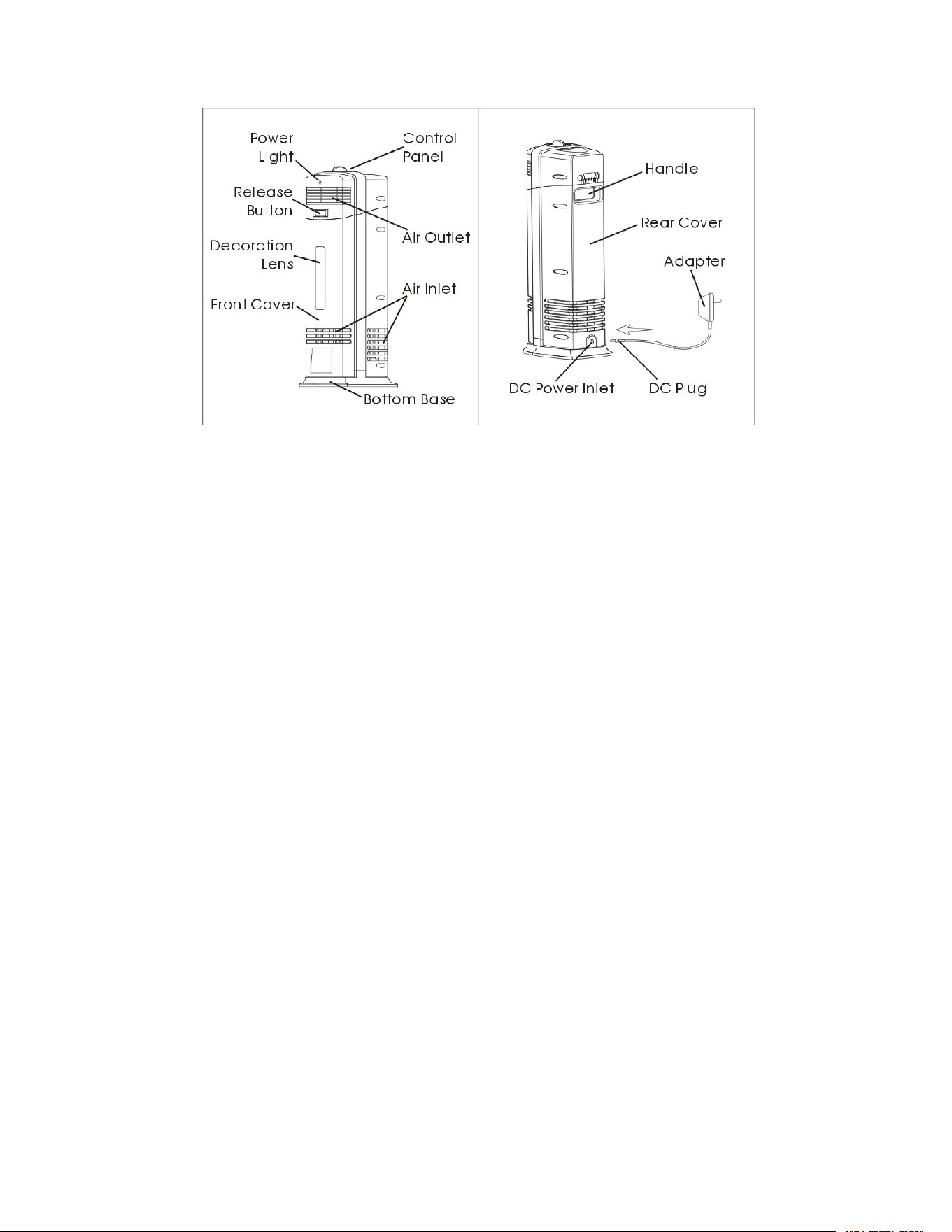
Figure 1
FEATURES
● ELECTROSTATIC COLLECTING
● OZONE FILTER and ACTIVATED CARBON FILTER
● POWERFUL UV LAMP
● NEGATIVE IONIZER
OZONE SAFETY INSTRUCTIONS
The electrostatic/ionic air purifier will produce small amounts of ozone as a
by-product. This unit complies with the requirements of UL 867 for acceptable levels
of ozone (less than 0.05 parts per million by volume of air circulating through the
product).
People with a history respiratory problems or lung disease should consult a
physician before using this product.
CAUTION: Keep electrical appliances out of reach from children or infirm persons.
Do not let them use appliance without supervision.
GETTING STARTED
1. Select a firm level and flat location. For proper air flow, place the unit at least 3
feet (1 M) from any wall or furniture.
2. Ensure that no grills are blocked.
3. Plug the terminal of adapter into the purifier then plug the adapter directly into an
AC outlet.
4. Do not lift the unit by the top cover. Always lift it by the handle on the rear of the
unit.
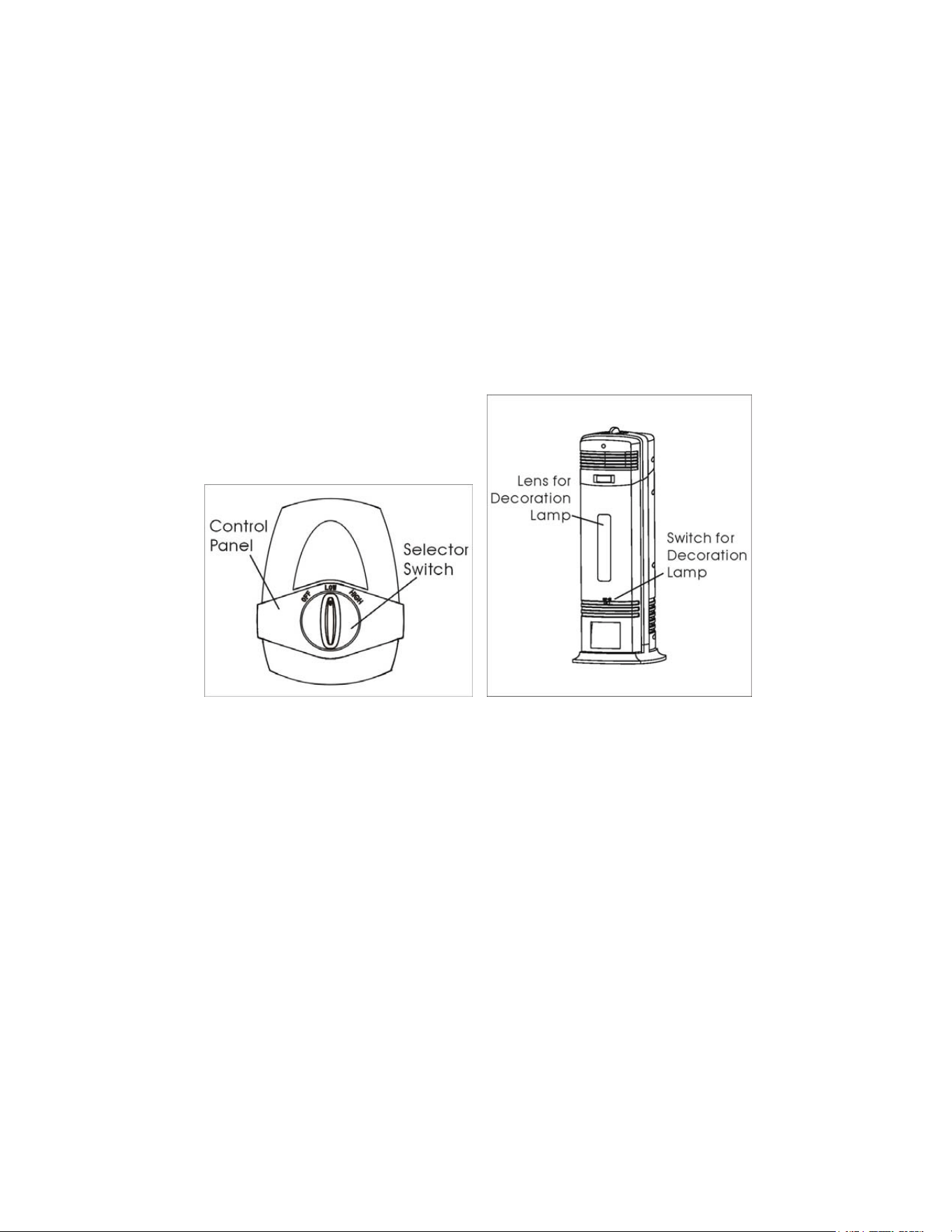
OPERATING INSTRUCTIONS (See Figure 2)
1. Ensure the collector rod is firmly seated in place and the top cover is securely
latched.
2. Turn the selector switch on the top of unit to LOW or HIGH mode.
3. The power light will illuminate automatically.
4. To switch off, turn the selector switch to OFF position.
Figure 2 Figure 3
AMBIENT BLUE LIGHTING INSTRUCTIONS (See Figure 3)
This purifier also provides a soothing blue ambient decorative light. Turn the
decoration lamp light switch on to turn on the blue light and turn the switch off to
shut the blue ambient lamp off.
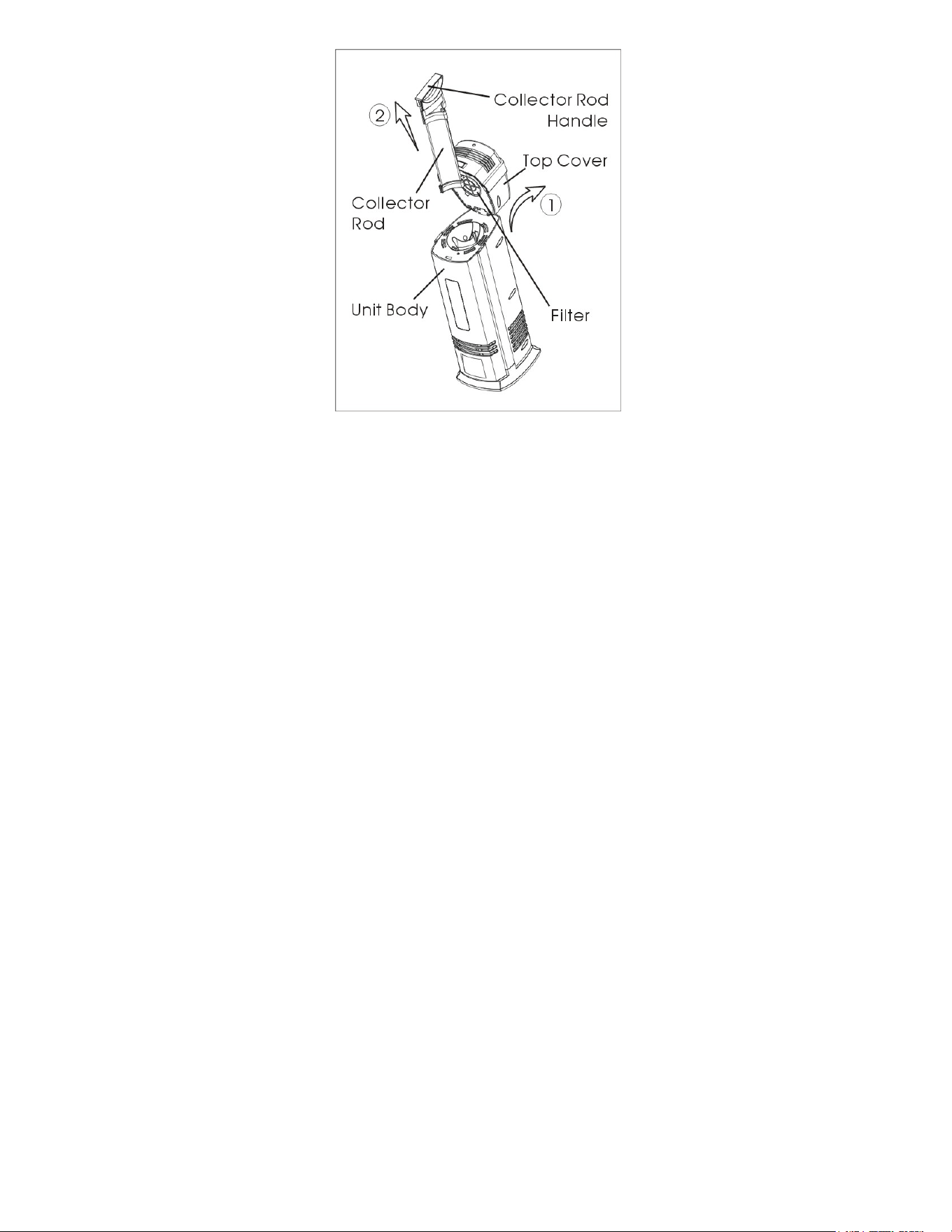
Figure 4
REMOVING/ CLEANING/INSTALLING THE COLLECTOR ROD (See Figure 4)
● To remove the collector rod:
1. Unplug the unit;
2. Press the release button and flip the top cover backward; (See Figure 4 and
follow arrow ①)
3. Grip the collector rod handle and pull it up firmly. (See Figure 4 and follow arrow
②)
● To clean the collector rod:
-- For common household particles
1. Remove the Collector Rod from the unit as described above;
2. Use a soft, damp cloth to wipe the surface of the Collector Rod;
3. Ensure that the collector rod is completely dry;
4. Insert the collector rod back into the unit;
5. Clean the collector rod every 2-3 weeks, sooner if needed.
-- For tobacco smoke or particles that are not easily removed
1. Remove the collector rod from the unit as described above;
2. Use a sponge with a mild soap and water solution to wipe the collector rod from
top to bottom;
3. Wipe down the collector rod with a damp cloth and ensure that no soap residue
remains on the collector rod and it is completely dry. (Do not place under running
water to rinse.)
4. Insert the collector rod back into the unit.
5. Clean the collector rod every week, sooner if needed.
6. Please see the FAQ section of this manual if no dust is present on your collector
rod.
NOTE: The air purifier may experience some discoloration on the collector rod over
time. This is normal and does not affect the performance of the product in any way.
● To install the collector rod:
1. Ensure the unit is unplugged and the collector is completely dry;
2. The collector rod can be inserted into the unit only one way;
Align the collector rod with the opening in the unit;
3. Insert the collector rod down until it sits firmly in place;
Ensure the top handle of the collector rod is flush with the surrounding surface;
4. Flip the top cover forward and securely latch in place.
Figure 5

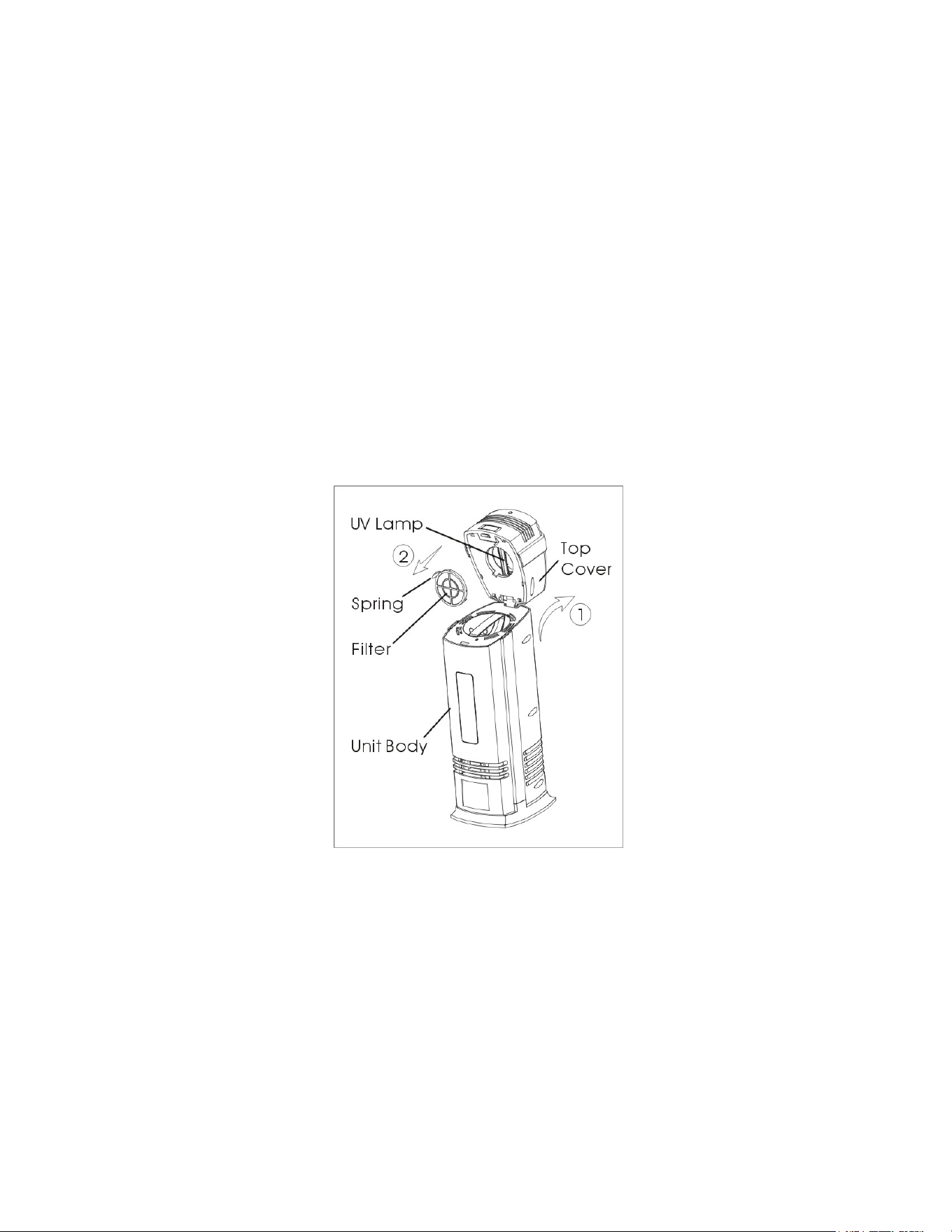
REMOVING/CLEANING/INSTALLING THE CARBON FILTER (See Figure 5)
● To remove the filter:
1. Unplug the unit;
2. Press the release button and flip the top cover backward; (See Figure 5 and
follow arrow ①)
3. Take out the filter from top cover by pressing and gripping the spring on the filter
cover. (See Figure 5 and follow arrow ②)
● To clean the filter:
1. Clean the filter with the vacuum brush attachment of your vacuum cleaner.
This will remove lint and dirt from the filter;
2. We recommend replacing this filter with a new one every 6-12 months of use.
● To install the filter:
1. Ensure the unit is unplugged;
2. Install the filter into the top cover by gripping and pressing the spring on the filter
cover;
3. Ensure the filter is flush with the surrounding surface;
4. Flip the top cover forward and securely latch in place.
CLEANING THE UV LAMP (See Figure 5)
● To find the UV lamp:
1. Unplug the unit;
2. Press the release button and flip the top cover backward; (See Figure 5 and
follow arrow ①)
3. Take out the filter from top cover by pressing and gripping the spring on the filter
cover; (See Figure 5 and follow arrow ②)
4. You should see the glass UV lamp; please handle the UV lamp with extreme
care;
● To clean the UV lamp:
Softly wipe the UV lamp with a dry, soft cloth to clean the dirt attached on the
surface of lamp;
CAUTION: The UV lamp is a glass product, please handle and clean it carefully;
Do not use a damp cloth or any liquid solution to clean the UV lamp.

● To install the unit after cleaning the UV lamp:
1. Ensure the unit is unplugged;
2. Install the filter to the top cover as in the above INSTALLING THE FILTER;
3. Ensure the filter is flush with the surrounding surface;
4. Flip the top cover forward and securely latch in place.
CLEANING AND MAINTENANCE OF THE UNIT
The air purifier should be cleaned at least once every three weeks. More frequent
cleaning may be required depending upon environmental conditions.
1. Turn off and unplug the unit;
2. Press the release button and flip the top cover backward;
3. Remove and clean the collector rod as described in CLEANING THE
COLLECTOR ROD;
4. Turn the unit upside-down 2 or 3 times and hold for at least 3 seconds each time.
This allows the cleaning spheres inside the unit to scrape any accumulated debris
off the electronic wires. IT IS NORMAL TO HEAR THE SOUND OF THE
CLEANING SPHERES SCRAPING THE WIRES.
NOTE: Do not stick any foreign objects or your fingers inside the unit.
5. Use a clean, dry, soft cloth to wipe the external surface of unit.
CAUTION: Do not use gasoline, benzene, thinner, harsh cleaners, etc., as
they will damage the product. NEVER use ALCOHOL OR SOLVENTS.
TROUBLE SHOOTING TIPS
If the air purifier shuts off unexpectedly, safety features may have been activated to
prevent damage or injury. If this happens:
1. Be sure the air purifier is plugged into a working electrical outlet;
2. Check to be sure the collector rod is firmly seated in place;
3. Check to be sure the top cover is latched firmly in place.
NOTE: IF YOU CONTINUE TO EXPERIENCE A PROBLEM, PLEASE CONTACT
TECH SUPPORT. DO NOT ATTEMPT TO TAKE APART THE UNIT BY
YOURSELF. DOING SO MAY VOID YOUR WARRANTY AND CAUSE DAMAGE
TO THE PRODUCT OR PERSONAL INJURY.

FREQUENTLY ASKED QUESTIONS
● Is the air purifier considered an ozone generator?
- No. Ozone generators produce large amounts of ozone and the EPA considers
these unsafe for household use. The air purifier electrostatically removes particles
from the air and releases only trace amounts of ozone.
● What does the power setting do?
- The power setting can change the cleaning power voltage of the electrostatic wires
inside the unit. Use low or high settings according to the need for the air quality in
which the unit is placed.
● The air purifier was making a “cracking” sound and now it doesn’t seem to be
cleaning the air any more. Is it broken?
- No. The air purifier needs to be cleaned. When too much dirt accumulates on both
the collector and electrostatic wire, the power to the collector rod turns-off, but the
fan will continue to run. Clean the unit and it should then operate normally. See
CLEANING THE COLLECTOR ROD and CLEANING AND MAINTENANCE.
● Why is there no dust visible on the collector rods?
- The area that the purifier can treat by pulling in particles from the air is limited due
to the unit size. However, the area that it can affect with its ozone is much larger.
Please note that for dust removal there are 2 methods that are recommended.
Method 1 is to use ion generation to attach the ions to the dust particles and have
them fall to the floor or surface, which is why you will see more dust on surfaces
and around the unit when using this method. Method 2 is to place the unit directly
in the area where you are experiencing dust if you want the unit to directly collect
as much dust as possible in the area because the only way to pull in airborne dust
is for the unit to directly operate in the area. Unfortunately, the only way to collect
dust on the collector rods in larger areas without moving the unit is similar to how
central air conditioning works, which requires large outdoor fans and return air
systems. The fan would have to be large and powerful enough to accomplish this,
which just isn't possible to accomplish in a portable air purifier without moving the
unit. This is why many units offer Method 1 of ion generation to pull the dust out of
the air and attach it to the floor or surfaces, so that the dust is not airborne and
being breathed in for the dust that cannot be pulled into the unit by the purifier fan.
The neutralized dust that attaches to surfaces should then be periodically
removed via routine home cleaning.

ELECTRICAL SPECIFICATIONS
DC12V, 600mA
WARRANTY
A. This limited warranty applies to repair or replacement of product found to be
defective in material or workmanship. This warranty does not apply to damage
resulting from commercial, abusive, unreasonable use or supplemental damage.
Defects that are the result of normal wear and tear will not be considered
manufacturing defects under this warranty. Please refer to your product sales
page for the warranty period for your specific purchase.
WE ARE NOT LIABLE FOR INCIDENTAL OR CONSEQUENTIAL DAMAGES
OF ANY NATURE. ANY IMPLIED WARRANTY OF MERCHANTABILITY OR
FITNESS FOR A PARTICULAR PURPOSE ON THIS PRODUCT IS LIMITED
TO THE DURATION OF THIS WARRANTY.
Some jurisdictions do not allow the exclusion or limitation of incidental or
consequential damages or limitations on how long an implied warranty lasts, so
the above limitation or exclusions may apply to you.
This warranty applies only to the original purchaser of this product from the
original date of purchase.
B. At our discretion, we will repair or replace this product if it is found to be defective
in material or workmanship. Please contact us for further assistance.
C. 1.This warranty does not cover damages resulting from any unauthorized
attempts to repair or from any use not in accordance with the instruction
manual.
2. If you have any questions or comments regarding this unit, please write to our
Customer Service Department at customerservice@oionair.com and we will
gladly assist you with any questions or issues with the unit.
3. If a product does not operate as warranted during the applicable warranty
period, please send to the dealer.
4. This warranty does not cover the product if it is damaged by accident and/or
improper use.
5. This warranty applies ONLY to repair or replacement of any supplied or

manufactured parts of this product that, upon inspection by the agent,
authorized personnel is shown to have failed in normal use due to defects in
material or workmanship.
6. Operating this unit under conditions other than those recommended or at
voltages other than the voltage indicated on the unit, or attempting to service
or modify the unit, will render this WARRANTY VOID.