
Installation and User’s Manual for
Meridian Ice Maker-Dispensers
Wall Mount Models
HID312AWX, HID525AWX and HID540AWX
This ice machine contains FLAMMABLE refrigerant and improper use can result in re or explosion. Do
not use cigarettes, vapes, or cellphones near pipes or cables, as it can be a source of ignition or spark.
This ice machine must not be installed next to equipment with an open ignition source (ie. open flames,
an operating gas appliance, or electric heater). Do not store explosive substances such as aerosol cans
with a ammable propellant in this appliance.
WARNING: Do not use electrical appliances inside the food/ice storage compartments unless they are
of the type recommended by the manufacturer.
WARNING: In order to reduce ammability hazards the installation of this appliance must only be
carried out by a suitably qualied person.
This appliance must be installed according to the safety standard for refrigeration systems presented in
ANSI/ASHRAE 15.
Do not install next to anything that continuously vibrates, avoiding excessive vibrations or pulsations.
Install in a well ventilated environment and ensure ventilation and outlets are not obstructed.
Properly secure electrical wiring and cabling for the machine to minimize wear, vibrations, corrosion,
excessive pressure, sharp edges, or other adverse environmental eects that could cause damage to
wiring over time.
Keep re extinguisher nearby in case of emergencies.
WARNING: Do not damage the refrigerating circuit
Use a Scotsman recommended technician certied to repair R290 equipment.
Install ONLY Scotsman factory service parts. Use of non-OEM parts can be dangerous due to the
design changes needed to safely use R290 refrigerant.
WARNING: Cancer and Reproductive Harm. Visit www.P65Warnings.ca.gov for details.
This appliance is not intended for use by persons (including children) with reduced physical, sensory or
mental capabilities, or lack of experience and knowledge, unless they have been given supervision or
instruction concerning the use of the appliance by a person responsible for their safety.
Children should be supervised to ensure that they do not play with the appliance.
Caution: This equipment should only be used on ice bins without electrical components
or bins designed to be used with ammable refrigerants.
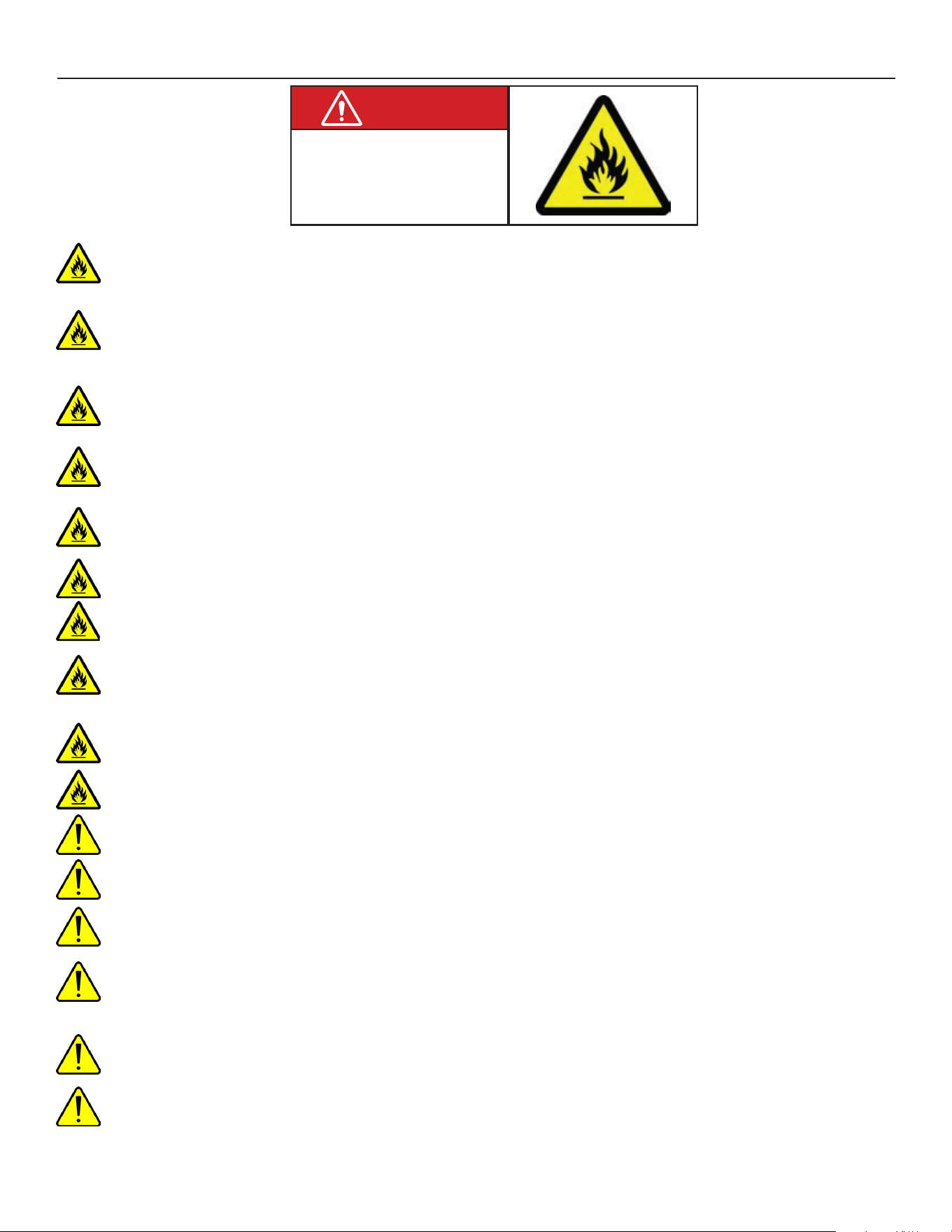
R290 Refrigerant is
Flammable.
Flame can cause burns or
property damage
Keep away from sources of re
WARNING
Safety Information
Safety Information
WARNING: Do not use means to accelerate the defrosting process or to clean, other than those
recommended by the manufacturer. The appliance shall be stored in a room without continuously operating
ignition sources
Do not pierce or burn.
Be aware that refrigerants may not contain an odor.
All installation, service, maintenance and decommissioning to be carried out by technicians certied to handle
FLAMMABLE REFRIGERANTS.
Install in a well-ventilated environment and ensure ventilation and outlets are not obstructed.
When breaking into the refrigerant circuit to make repairs – or for any other purpose conventional procedures
shall be used. However, for ammable refrigerants it is important that best practice be followed, since amma-
bility is a consideration. The following procedure shall be adhered to:
a) safely remove refrigerant following local and national regulations;
b) purge the circuit with inert gas;
c) evacuate;
d) purge with inert gas;
e) open the circuit by cutting or brazing.
The refrigerant charge shall be recovered into the correct recovery cylinders if venting is not allowed by local
and national codes. For appliances containing ammable refrigerants, the system shall be purged with oxygen-
free nitrogen to render the appliance safe for ammable refrigerants. This process might need to be repeated
several times. Compressed air or oxygen shall not be used for purging refrigerant systems. For appliances
containing ammable refrigerants, refrigerants purging shall be achieved by breaking the vacuum in the system
with oxygen-free nitrogen and continuing to ll until the working pressure is achieved, then venting to atmo-
sphere, and nally pulling down to a vacuum. This process shall be repeated until no refrigerant is within the
system. When the nal oxygen-free nitrogen charge is used, the system shall be vented down to atmospheric
pressure to enable work to take place. Ensure that the outlet for the vacuum pump is not close to any potential
ignition sources and that ventilation is available.
Ensure that the leak detection equipment being used is suitable for use with FLAMMABLE REFRIGERANT;
i.e., non-sparking, adequately sealed or intrinsically safe.
HID312AWX, HID525AWX and HID540AWX
Installation and User’s Manual
January 2025
Page 1
Introduction
The ice maker-dispensers covered in this manual
were designed to be the nest on the market. Their
design is a result of Scotsman’s long experience in ice
maker-dispensers.
This manual includes the information needed to
install, start up and operate the machine. Because
there are three models covered, be sure that any
instructions apply to your unit.
HID312X is 16 inches wide and 34.9” tall.
HID325X is 21 inches wide and 35 inches tall.
HID340X is also 21 inches wide, but it is 40 inches
tall.
Observe any caution or warning notices. They are
important and provide notice of potential hazards.
Keep this manual for future reference.
If additional technical information is needed, go to
Scotsman’s website, www.scotsman-ice.com to
download a service manual.
Contents
Specications . . . . . . . . . . . . . . . . . . . . . . . . . . . . . . . . . . . . . . . . . . . Page 2
HID312AWX Cabinet Drawing . . . . . . . . . . . . . . . . . . . . . . . . . . . . . . . . . . . Page 3
HID525AWX Cabinet Drawing . . . . . . . . . . . . . . . . . . . . . . . . . . . . . . . . . . . Page 4
HID540AWX Cabinet Drawing . . . . . . . . . . . . . . . . . . . . . . . . . . . . . . . . . . . Page 5
Placement . . . . . . . . . . . . . . . . . . . . . . . . . . . . . . . . . . . . . . . . . . . . . Page 6
Installation - Plumbing . . . . . . . . . . . . . . . . . . . . . . . . . . . . . . . . . . . . . . . Page 7
Installation - Electrical . . . . . . . . . . . . . . . . . . . . . . . . . . . . . . . . . . . . . . . Page 8
Wall Mounting . . . . . . . . . . . . . . . . . . . . . . . . . . . . . . . . . . . . . . . . . . . Page 9
Initial Start Up . . . . . . . . . . . . . . . . . . . . . . . . . . . . . . . . . . . . . . . . . . . Page 10
Operation: Ice and Water Vending . . . . . . . . . . . . . . . . . . . . . . . . . . . . . . . . . Page 11
Controller. . . . . . . . . . . . . . . . . . . . . . . . . . . . . . . . . . . . . . . . . . . . . . Page 12
Maintenance and Cleaning. . . . . . . . . . . . . . . . . . . . . . . . . . . . . . . . . . . . . Page 13
Maintenance and Cleaning - Dispensing bin and ice level controls . . . . . . . . . . . . . . . . Page 14
Ice level controls . . . . . . . . . . . . . . . . . . . . . . . . . . . . . . . . . . . . . . . . . . Page 15
Ice Making and Ice Dispensing System Cleaning Instructions. . . . . . . . . . . . . . . . . . . Page 16
Basic Troubleshooting . . . . . . . . . . . . . . . . . . . . . . . . . . . . . . . . . . . . . . . Page 18
Controller Diagnostics . . . . . . . . . . . . . . . . . . . . . . . . . . . . . . . . . . . . . . . Page 19
Decommissioning . . . . . . . . . . . . . . . . . . . . . . . . . . . . . . . . . . . . . . . . . Page 20
HID312AWX, HID525AWX and HID540AWX
Installation and User’s Manual
January 2025
Page 2
Specications
The ice maker-dispenser is designed to be installed
indoors, in a controlled environment. Although
it can operate in a wide range of air and water
temperatures, it will provide the best performance if
not subject to extremes.
Air Temperature Limitations
• Maximum: 100
o
F. or 38
o
C
• Minimum: 50
o
F. or 10
o
C
Water Temperature Limitations
• Maximum: 100
o
F. or 38
o
C
• Minimum: 40
o
F. or 4.4
o
C
Water Pressure, potable
• Maximum: 80 PSI or 5.5 bar
• Minimum: 20 PSI or 1.3 bar
Water Conductivity:
• Minimum: 10 microsiemens/cm
RO water may be supplied to the potable water
system, but if it has less than the above conductivity,
the water level sensor will not detect water and the
unit will not make ice.
Deionized water will not work and isn’t recommended.
Voltage
• Maximum: 126 Minimum: 104
Operating the machine outside of any of the above
limitations is considered abuse. Any resulting damage
is not covered by warranty and could cause a
complete loss of warranty coverage.
Warranty Information
The warranty statement for this product is provided
separately from this manual. Refer to it for applicable
coverage. In general, warranty covers defects
in material or workmanship. It does not cover
maintenance, corrections to installations, or situations
when the machine is operated in circumstances that
exceed the limitations printed above.
This is a commercial model, if installed in a residence
some commercial service companies may not be able
to service it on site.
Fill out the Warranty Registration Card shipped with
the unit and mail it in, or scan the QR code to register
the machine on the Scotsman warranty website:
Product Information
The product is an ice maker-dispenser. It is designed
to be hung on a wall over a sink.
• All models require a drain. An internal drain basin
separates the ice storage bin’s drain from other
drains.
• A backow preventer may be required by local
plumbing codes.
• A power cord with NEMA 5-15P plug is included.
• Air cooled models ow air left to right and include
a cleanable air lter.
• Ice or water vending is triggered by touch free
sensors, no other activation method is available.
• For available options and kits, see sales literature.
Scotsman Ice Systems are designed and
manufactured with the highest regard for safety and
performance. They meet or exceed the standards of
UL60335-2-89 and NSF.
Scotsman assumes no liability or responsibility of
any kind for products manufactured by Scotsman
that have been altered in any way, including the use
of any part and/or other components not specically
approved by Scotsman.
Scotsman reserves the right to make design changes
and/or improvements at any time. Specications and
design are subject to change without notice.
Model Electrical Condenser Typical Amp Draw Maximum Fuse Size
HID312AWX-1A 115/60/1 Air 4.5-5 15
HID525AWX-1A 115/60/1 Air 5.8-7 15
HID540AWX-1A 115/60/1 Air 5.8-7 15
HID312AWX, HID525AWX and HID540AWX
Installation and User’s Manual
January 2025
Page 3
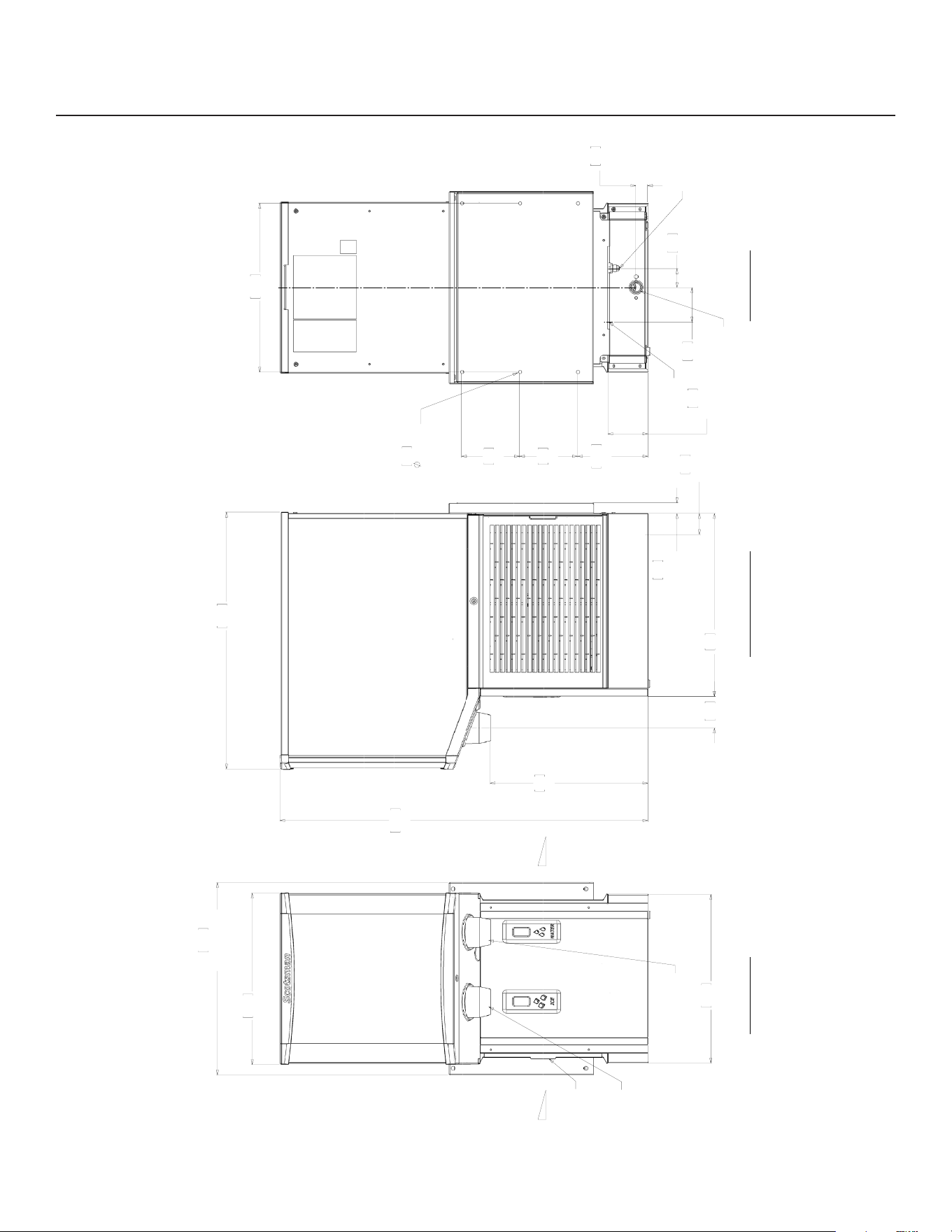
HID312AWX Cabinet Drawing
40.6
16.00
41.3
16.25
46.4
18.25
WALL MOUNT
BRACKET
REMOVABLE
AIR FILTER
ICE CHUTE
WATER CHUTE
88.6
34.88
44
17.33
5.1
2.01
UTILITY
CHASE
2.5
1.00
OFFSET
FROM
WALL
38
14.95
61.9
24.38
7.7
3.02
16.9
6.66
14
5.50
0.8
.312
(6) WALL
MOUNT HOLES
9.7
3.80
UTILITY
CHASE
2.8
1.12
40.6
16.00
14
5.50
4.6
1.80
8.3
3.25
3/8" FLARE
WATER INLET
3/4" FPT
DRAIN
POWER
CORD
BACK VIEW
RIGHT SIDE VIEW
AIR FLOW
AIR FLOW
FRONT VIEW
HID312AWX, HID525AWX and HID540AWX
Installation and User’s Manual
January 2025
Page 4
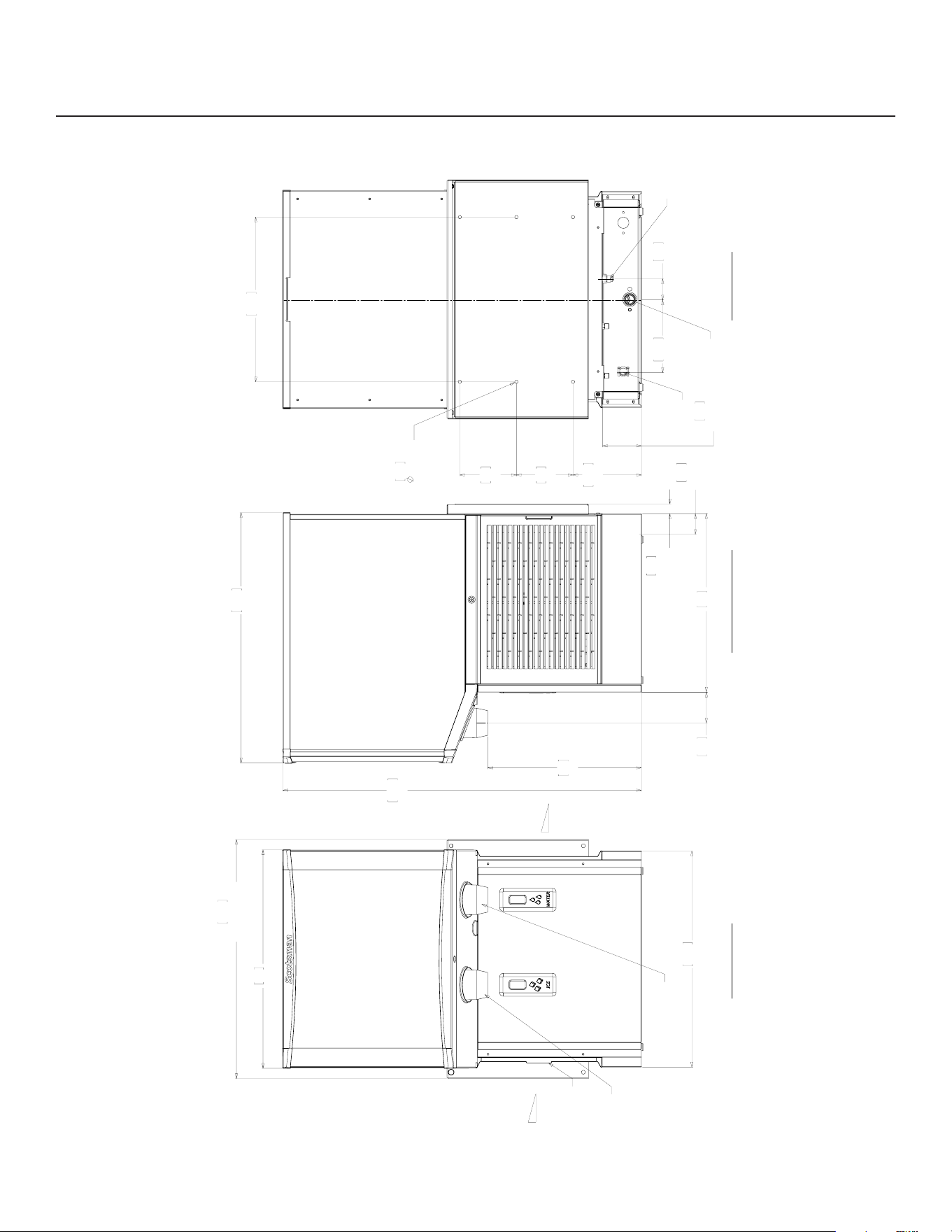
HID525AWX Cabinet Drawing
53.3
21.00
54
21.25
59.1
23.25
WALL MOUNT
BRACKET
REMOVABLE
AIR FILTER
ICE CHUTE
WATER CHUTE
5.1
2.01
UTILITY
CHASE
61.9
24.38
44
17.33
88.6
34.88
38
14.95
2.5
1.00
OFFSET
FROM
WALL
7.7
3.02
14
5.50
16.9
6.66
40.6
16.00
0.8
.312
(6) WALL
MOUNT HOLES
9.7
3.80
UTILITY
CHASE
14
5.50
5.2
2.05
17.9
7.05
3/8" FLARE
WATER INLET
3/4" FPT
DRAIN
POWER
CORD
AIR FLOW
AIR FLOW
BACK VIEW
RIGHT SIDE VIEW
FRONT VIEW
HID312AWX, HID525AWX and HID540AWX
Installation and User’s Manual
January 2025
Page 5
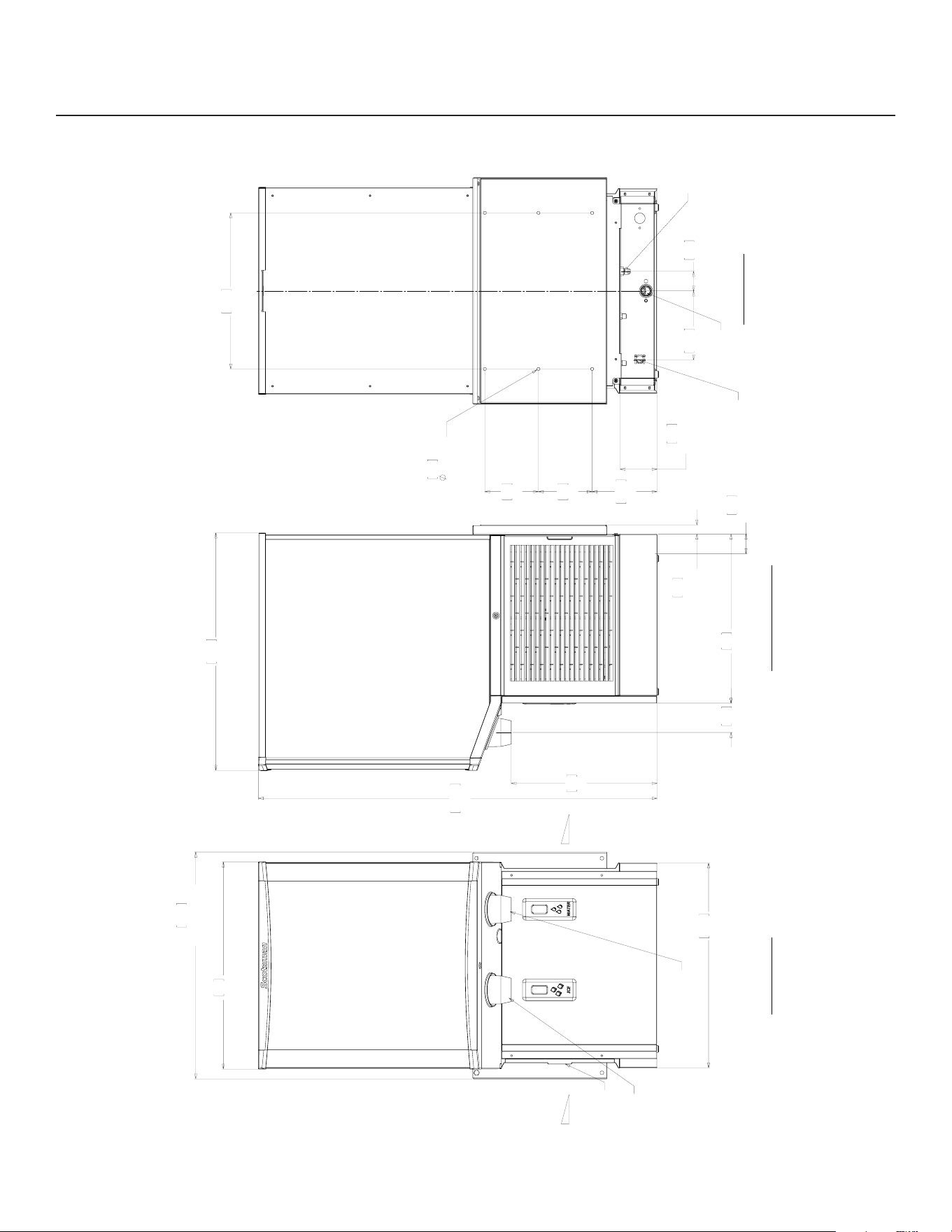
HID540AWX Cabinet Drawing
54
21.25
59.1
23.25
WALL MOUNT
BRACKET
53.3
21.00
REMOVABLE
AIR FILTER
ICE CHUTE
WATER CHUTE
61.9
24.38
38
14.95
103.8
40.88
44
17.33
2.5
1.00
OFFSET
FROM
WALL
5.1
2.01
UTILITY
CHASE
7.7
3.02
14
5.50
16.9
6.66
9.7
3.80
UTILITY
CHASE
17.9
7.05
0.8
.312
(6) WALL
MOUNT HOLES
14
5.50
40.6
16.00
5.1
2.00
3/8" FLARE
WATER INLET
3/4" FPT
DRAIN
POWER
CORD
BACK VIEW
RIGHT SIDE VIEW
FRONT VIEW
AIR FLOW
AIR FLOW
HID312AWX, HID525AWX and HID540AWX
Installation and User’s Manual
January 2025
Page 6
Placement
The location of the equipment should be selected
with care. Consideration should be given to allow
adequate space on the sides for air cooled models
to breathe. Minimum clearance is 3 inches at the
sides, none at the back and 2 inches above. The
power outlet should be located within the length of the
supplied power cord.
Air cooled models in a small room require ventilation
to exhaust the heat they produce. They also produce
some added noise from the fan.
Nearby infrared emitters or a window that allows
sunlight to shine on a dispensing sensor may cause
the unit to dispense ice or water on its own.
Wall mount units do NOT have a drip tray, so they
MUST be positioned over a sink to collect any
dripping water or spilled ice.
Wall Mount
These models are designed for mounting on a wall.
Check building wall for the strength required to
support a machine of this weight and size. Note that
if at least 6” of space is not left above the machine,
cleaning and most service of the machine will require
removal of the machine from the wall mounts. All
utilities are to be routed thru the base. One inch of
space is needed between the wall and the back of the
machine.
Note: The wall must be plumb or the unit will be out of
level front to back.
It is recommended that the wall mounting installation
be done by an experienced contractor.
The weight of the machine when in use may exceed
350 pounds. The unit should be mounted on a solid,
rigid wall with proper fasteners for that type of wall
and of adequate strength to support the weight of the
machine when in use.
Unpack
Separate the carton from the shipping pallet.
Important: Locate and retain the wall mounting
brackets, they were shipped in a box on the skid
in front of the unit.
Remove any strapping holding the cabinet to the
pallet.
Inspect for hidden shipping damage. If any is found,
retain carton and notify carrier for potential claim.
Shipping damage is not covered by warranty.
Remove bolts holding machine to pallet. Use caution
to not tip unit too far when removing bolts.
Remove the protective plastic covering the panels.
The longer it is left on the panel, the harder it will be
to remove it.
Set Up
It is a good idea to
remove the front panels
and inspect for any
loose or rubbing parts
prior to installation.
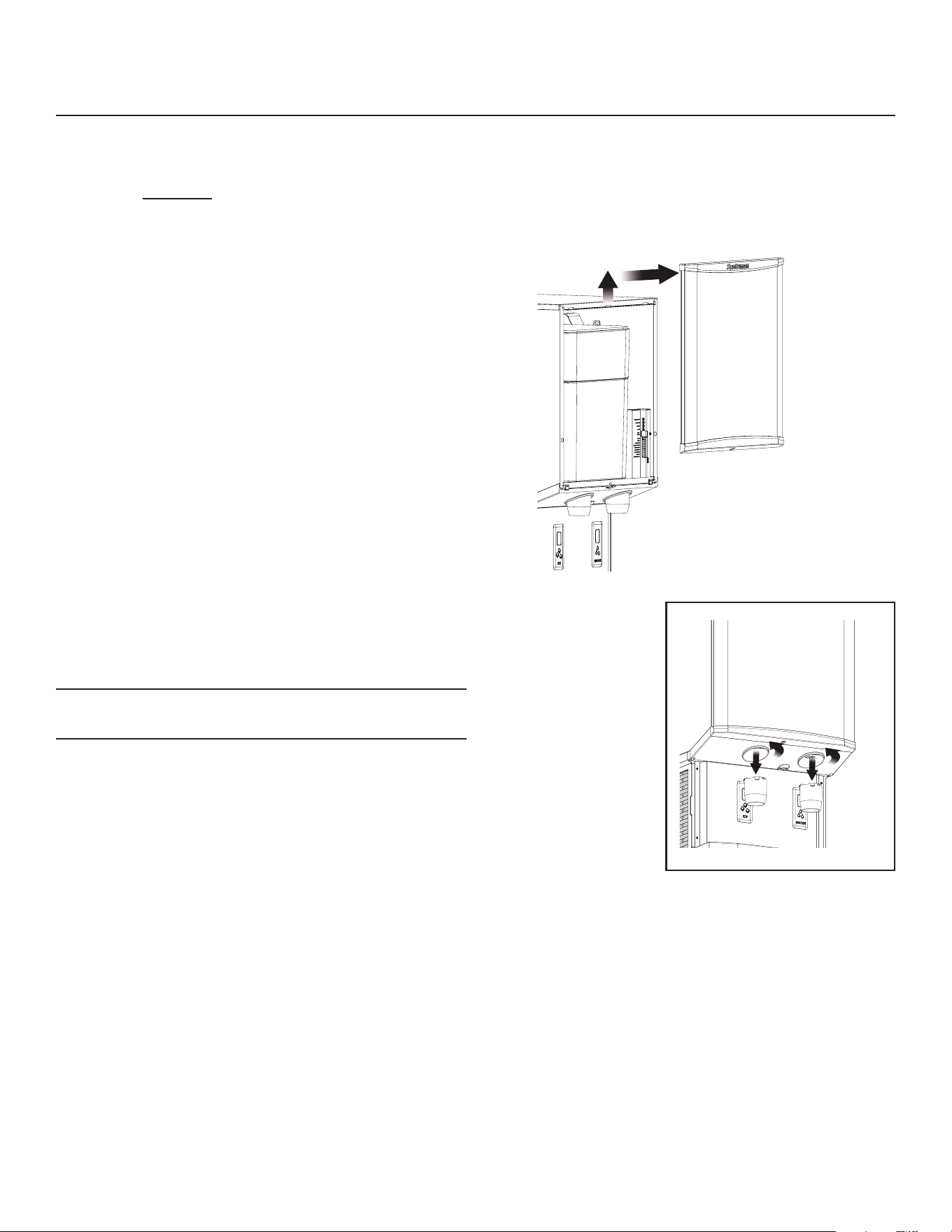
Panel Removal
Remove one screw at
bottom front of upper
front panel, swing
bottom of panel forward
and lift o the unit.
Twist ice and water chutes counterclockwise and pull
down to remove.
Remove four screws from sides of splash panel, pull
forward slightly. If needed, unplug sensor connector
and separate panel from unit.
Pre-Start Inspection
Conrm there are no loose or rubbing parts.
HID312AWX, HID525AWX and HID540AWX
Installation and User’s Manual
January 2025
Page 7
Installation - Plumbing
Installation should be done by an experienced ice
machine installer. To locate one, call the number on
the back of this manual or go to Scotsman’s website
www.scotsman-ice.com to identify a local distributor or
service company.
The machine will require power, water and drain.
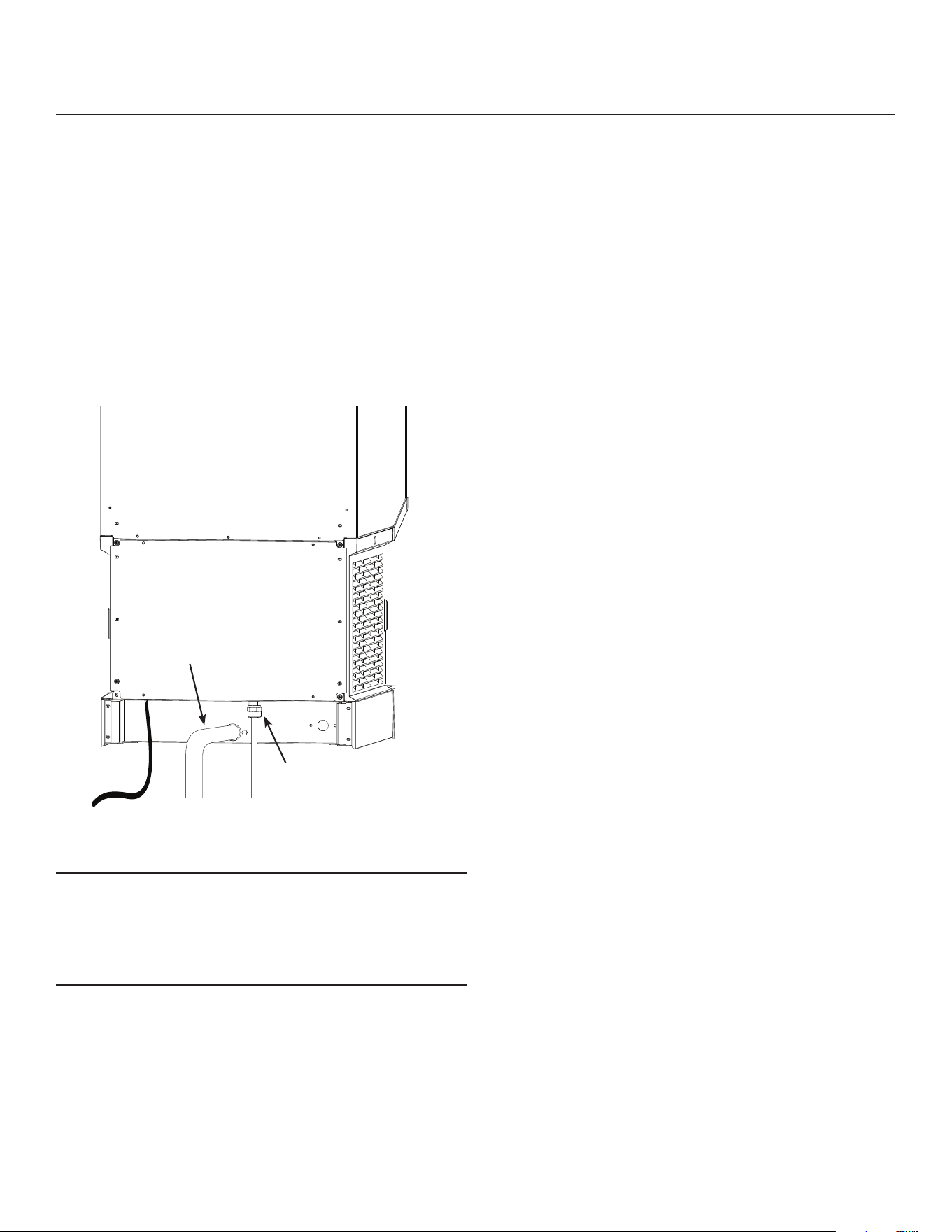
Locate the water supply tting on the lower back of
the cabinet and obtain the correct tting to connect
the water supply.
Plumbing Fittings:
• Potable water inlet: 3/8 male are.
• Cabinet drain: 3/4 FPT.
All models:
Note: Wall mounting limits access to the utility
connections which are at the back bottom of
the machine. Pre-plumbing the water and drain
is required so that stubs are available for nal
connection to water and drain.
Connect the potable water supply tube to the 3/8
inch male are inlet at the bottom back of the unit.
Water lters may be used but are not required. Note
that activated carbon or charcoal water lters are
used for taste and odor problems but also take out
any chlorine that the local water agency may have
added for purication. That can require more frequent
sanitization of the equipment.
Connect drain tubing to the 3/4 inch FPT central drain
tting at the back of the cabinet. Use 3/4 inch rigid
tubing, use material to meet local codes. The drain
basin in the machine will act as an internal vent, no
additional vent should be required unless there is a
very long horizontal run. Drain tubing must pitch down
1/4 inch per foot to the building drain. Insulation of
drain tubing is recommended for most environments.
Install Wall Mounting Brackets
See next page for detailed instructions.
Drain Tubing
Potable Water
Connection

HID312AWX, HID525AWX and HID540AWX
Installation and User’s Manual
January 2025
Page 8
Installation - Electrical
Electrical Supply - 115 volt models
Plug the unit into a dedicated 15 amp outlet. The unit must be the only device on the circuit. Conrm the outlet
is properly grounded and is in good condition. Worn outlets should be replaced as they can cause erratic
operation of equipment. Do not use an extension cord. Do not cut o the ground plug on the power cord.
Ground fault outlets are not recommended. If ground fault is required, a ground fault breaker should be used.
This ice machine should be installed on a dedicated circuit with a properly sized HACR-rated breaker or fuse.
No other devices or appliances should be connected to the same circuit with the ice machine. Installing a unit
on a shared circuit can cause product malfunctions or damage to the unit. The proper circuit size can be found
on the unit data tag listed as “MAX FUSE OR HACR TYPE CIRCUIT BREAKER”. Never allow the fuse size to
exceed the maximum fuse size listed on the data tag.
The use of a ground fault circuit interrupter (GFCI) or arc-fault circuit interrupter (ARCI) can lead to nuisance
trips and is not recommended for use on most appliances, including our equipment.
If local codes or other specications require the use of ground fault circuit interrupters, a properly rated HACR
GFCI or ARCI circuit breaker should be used. An outlet type GFCI or ARCI is not recommended for ice
machines and other refrigeration equipment due to more frequent nuisance trips of the GFCI or ARCI.
Always check with your local electrical inspector about the specic code requirements in your area for GFCI
or ARCI breakers and GFCI or ARCI receptacles. Use the services of a licensed electrician when needed and
conform to local and national codes.
Follow All Local Codes - This Unit Must Be Grounded. Do not use extension cords and do not disable or
by-pass ground prong on electrical plug.
Use the services of a licensed electrician when needed and conform to local and national codes.
Position the unit in its nal location.
Level the unit front to back and left to right.
HID312AWX, HID525AWX and HID540AWX
Installation and User’s Manual
January 2025
Page 9
Wall Mounting
It is recommended that the wall mounting installation
be done by an experienced contractor.
The weight of the machine when in use may exceed
350 pounds. The unit must be mounted on a solid,
rigid wall with proper fasteners for that type of wall
and of adequate strength to support the weight of the
machine when in use.
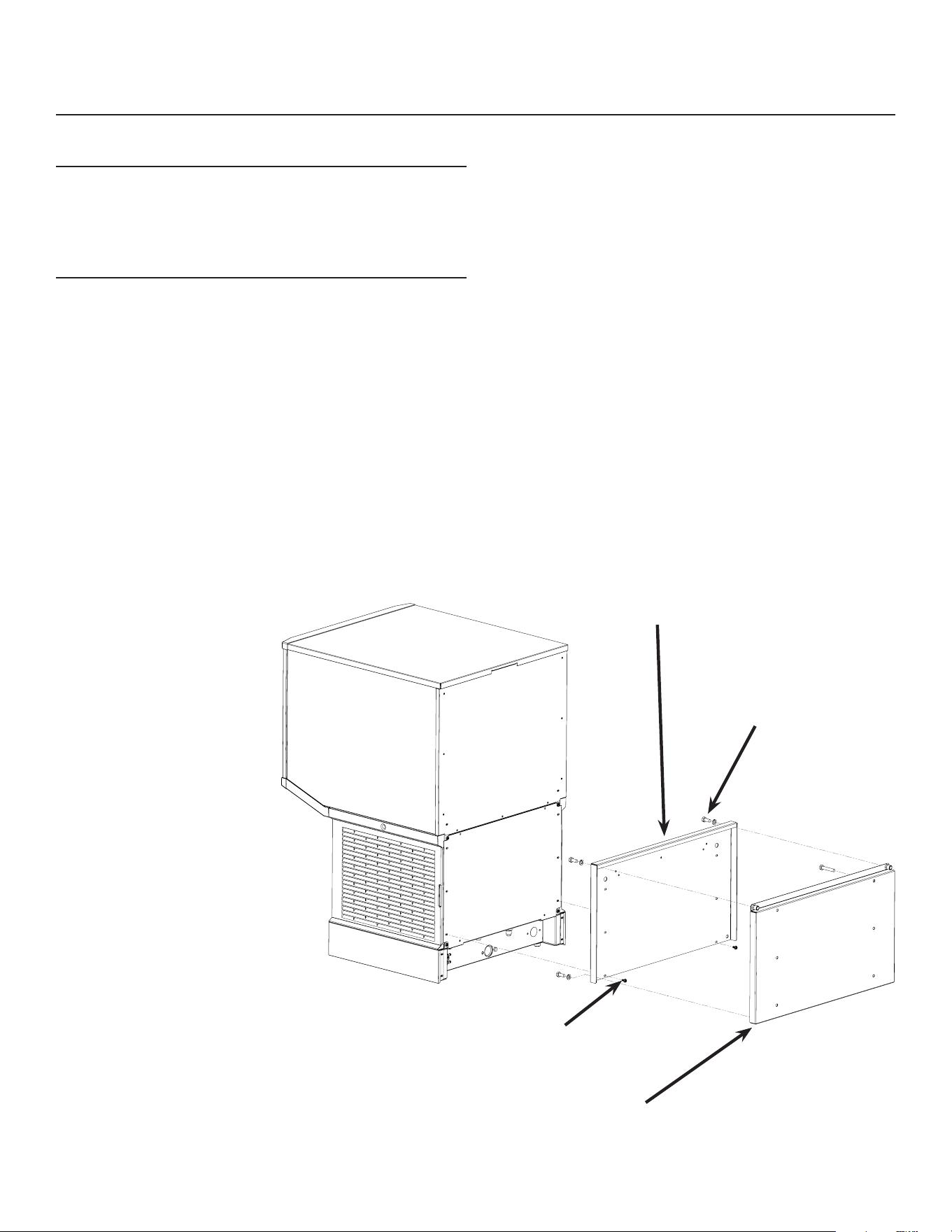
The machine will have a bracket and there will be
one bracket mounted to the wall. The machine will
hang from the wall bracket by the upper bracket on
the back of the cabinet. The lower bracket keeps the
machine plumb to the wall.
1. Attach the water and drain tubing so the tubing
extends below the bottom of the cabinet. That
allows connection when the machine is on the
wall.
2. Locate the box with
the mounting brackets.
Separate the two
brackets. Retain the bolts
and lock washers.
3. Identify the location of
the wall studs or other
materials to be used to
fasten the wall bracket to.
4. Mount the wall bracket
(has threaded inserts)
to the wall using the
appropriate methods and
fasteners. Note: Must be
level left to right.
The wall bracket extends
beyond the width of the
machine to allow attachment
to multiple wall studs.
5. Mount the other bracket
to the back of the ice
machine cabinet at the
joint between the two
back panels, using 9
existing screws in the
back.
6. Use a mechanical hoist to lift the cabinet high
enough to t the ange of the machine bracket
over the lip of the wall bracket. Then push it back
and lower it onto the wall bracket.
7. Secure the wall and machine bracket with
the bolts and lock washers originally used in
shipment.
Bracket, mounts to wall.
Bracket, mounts to
back of dispenser.
Bolt the two brackets
together after unit is
mounted.
Use cabinet screws to
attach to back of unit.
HID312AWX, HID525AWX and HID540AWX
Installation and User’s Manual
January 2025
Page 10
Initial Start Up
Final check list:
1. Is the icemaker-dispenser installed indoors, in a
location where the air and water temperatures
are controlled, and where they do not go beyond
design limitations?
2. Is there an electrical disconnect (switch or
plug as required) within sight of the installed
machine? Is the machine on a separate circuit?
Has the voltage been checked and compared to
nameplate requirements?
3. Have all of the plumbing connections been made
and checked for leaks?
4. Has the machine been leveled?
5. Is there a minimum of 6 inches of clearance at the
left and right sides of an air cooled machine?
6. Is there a minimum of 6 inches of clearance at the
top of the machine for service?
7. Is there a water shut o valve installed near the
machine?
Start Up
1. Remove upper front panel
2. Open the water hand valve, observe that water
enters the water reservoir, lls and then shuts o.
Check for leaks. Repair any leaks before going
any further.
3. Switch electrical supply on. Lights on controller
will ash and then the power light will remain on.
The code display will show O.
4. Push and release the ON/OFF button. The
machine will start the ice making process. The
code display will show F. Air cooled models will
discharge warm air out the right side, water cooled
models will discharge warm (about 110
o
F.) water
out of the condenser drain.
5. Soon ice will begin to fall into the dispensing bin.
Check ice dispensing by holding a container in
front of the Touch Free ice sensor (just below the
ice delivery spout). Ice should ow from the spout
when a container is present, and stop dispensing
when the container is removed.
6. Check water dispensing by holding a container in
front of the Touch Free water sensor. Water will
ow when a container is present and stop when it
is removed.
7. Push the ON/OFF button to switch machine o.
8. Unplug or disconnect electrical power.
9. Remove the top panel and the top of the ice
storage bin. Scoop out any ice in the bin and
sanitize the interior of the ice storage bin by wiping
it with a locally approved sanitizer or a mixture of
1 ounce of household bleach to 2 gallons of water.
Allow to air dry.
10. Reconnect electrical power.
11. Push the ON/OFF button to switch machine on.
12. Replace all covers and panels.
13. Give the owner/user the user manual. Instruct
them in the operation and maintenance
requirements of the unit. Make sure they know
who to call for service.
14. Fill out the Customer Evaluation and Warranty
Registration form, and mail it in to Scotsman or
register the unit at Scotsman’s website (www.
scotsman-ice.com).
ON / OFF
HID312AWX, HID525AWX and HID540AWX
Installation and User’s Manual
January 2025
Page 11
Operation: Ice and Water Vending
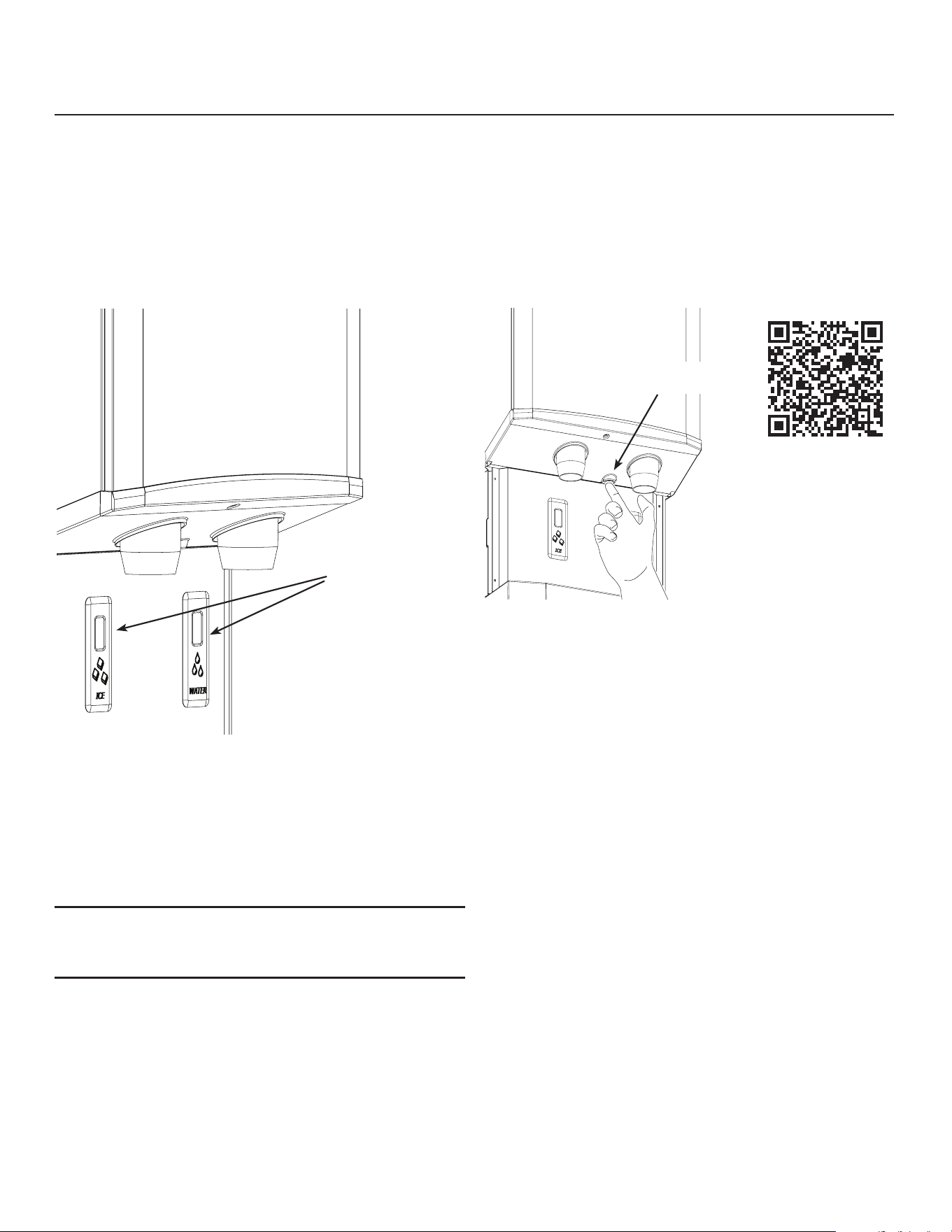
Dispensing takes place when the Touch Free sensor’s
infrared beam bounces back to the sensor from a
container placed directly in front of it.
If the container is in front of the Touch Free sensor
on the left side, the ice dispensing rotor will rotate
and sweep ice over the ice dispensing chute. Ice will
continue to discharge out this chute as long as the
rotor is turning. It stops when the rotor stops.
If the user does not remove the container, The
machine will stop dispensing ice after 24 seconds..
If the container is in front of the Touch Free sensor on
the right side, the inlet water valve will open and water
will ow into the container.
If the user does not remove the container, the
machine will stop making ice after 20 seconds.
Note: Water may dispense cloudy and then clear up in
the glass. That is normal due to air in the water and is
not an indicator of any malfunction.
Other notes:
• An occasional drip may be seen from the ice
dispense chute. This is normal and is from ice melting
inside the chute. A continuous stream of water from
the ice chute indicates a restricted bin drain.
• Clear containers (glass or plastic) may not always
activate the dispense sensors. Reposition your hand
to active the sensor in these situations.
• Both dispensing and ice making are disabled
when the unit is switched o at the controller.
Splash panel wipe-o. Wiping the splash panel could
result in unintended dispensing. To avoid that, a
disable button has been provided. It is recessed into
the bottom of the chute panel. Push and release it to
disable dispensing for 60 seconds.
Noise
This is a commercial ice machine. It contains a
powerful compressor, heavy duty gear reducer and, if
air cooled, a fan that moves a lot of air. It will produce
some noise when it is making ice. Every eort was
made during its design to minimize the sound level
but some noise during operation is unavoidable.
Dispense
Sensors
Vending Disable
Switch
HID312AWX, HID525AWX and HID540AWX
Installation and User’s Manual
January 2025
Page 12
Controller
All models use the same control system.
The electronic controller operates the compressor
(with fan motor), auger drive motor, dispense drive
motor and inlet water solenoid valve. It monitors:
• Reservoir water availability
• Storage bin ice level
• Call for ice dispense
• Call for water dispense
• Refrigeration pressure
• Dispense enable / disable
• Auger motor speed
• Auger motor rotation
• Any installed control options
Many of these are used to ensure that the machine
does not damage itself during use. For example, it is
critical that it not attempt to make ice without water.
So if the water sensor is dry, the machine will not
make ice.
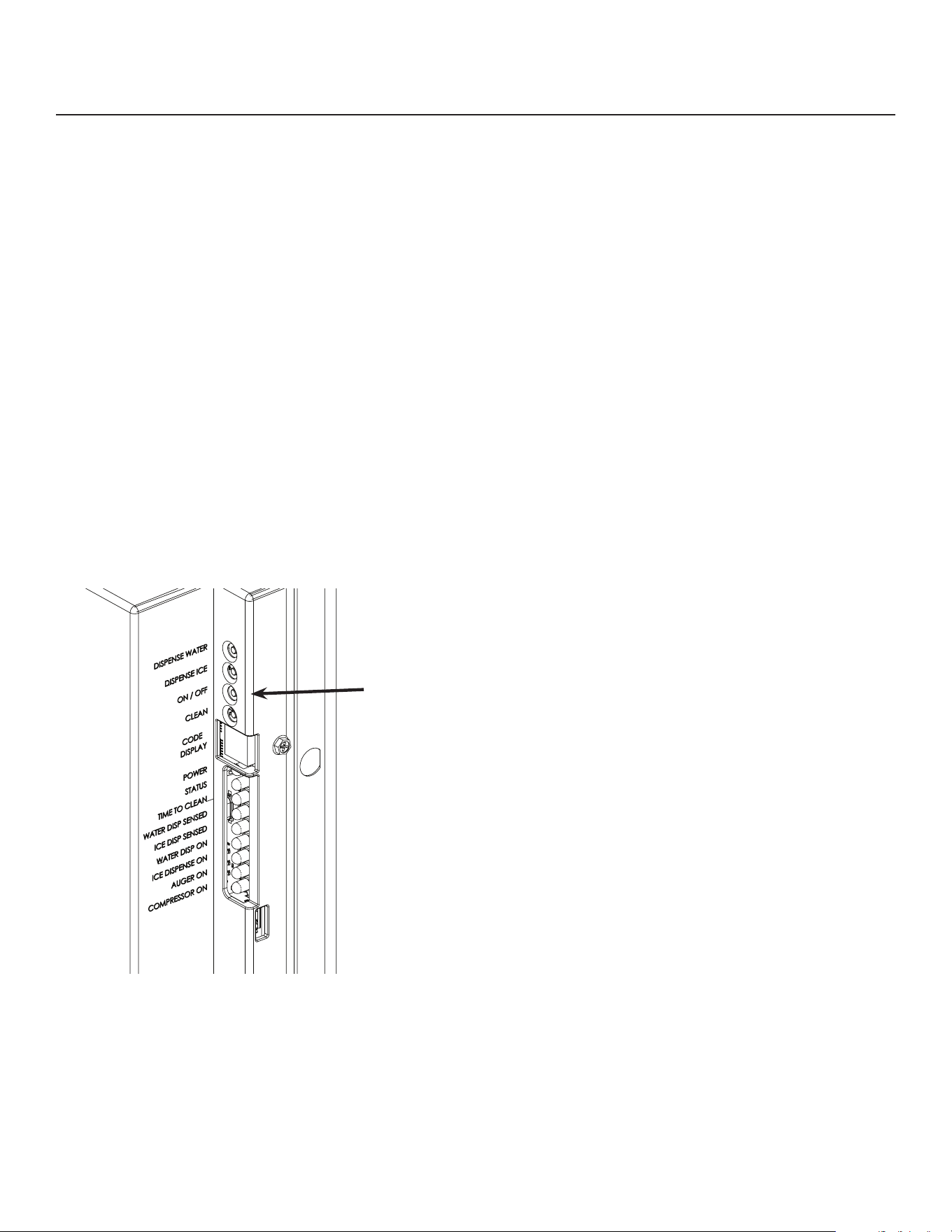
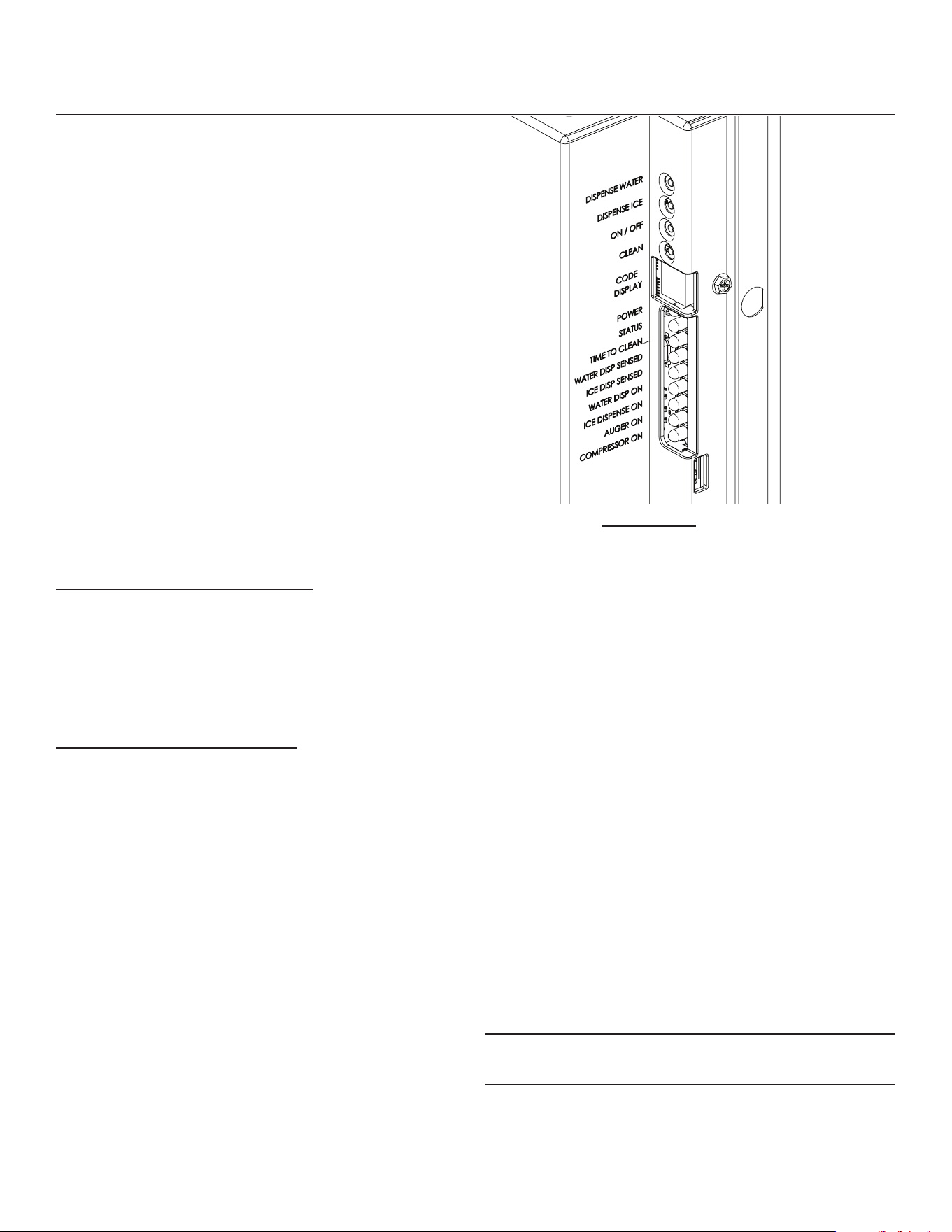
Switches - there are four switches:
• Dispense water - To test water dispensing
• Dispense ice - To test ice dispensing
• ON/OFF - To switch the machine on or o. Holding
it in to shut o will stop ice making immediately.
• Clean - To engage the clean mode
Indicators - there are nine LEDs:
• Power - Glows when controller has power
• Status - Glows when in ice making mode
• Time to Clean - Glows when it is time to clean the
machine
• Water Dispense Sensed - Glows when the water
dispense sensor has been triggered*
• Ice Dispensed Sensed - Glows when the ice
dispense sensor has been triggered*
• Water Dispense - Glows when the inlet water
solenoid valve has been powered*
• Ice Dispense - Glows when the ice dispense
motor has been powered*
• Auger - Glows when the auger motor is on
• Compressor - Glows when the compressor is on
* If blinking, the water or ice dispensing time limit has
been met.
There is also a code display, the codes are:
O - - - o
F - - - ice making
b - - - bin full
E - - - controller error
C - - - clean mode
d - - - test mode
1 - - - auger rotation direction wrong
2 - - - auger speed too slow
3 - - - no water sensed
4 - - - high refrigerant pressure
If a number code is triggered, the controller will stop
ice making. A blinking code means it is a temporary
condition. Example: A blinking F occurs during the
ice making restart process; it stops blinking when the
compressor starts.
The controller will automatically restart from a water
interruption or power interruption or when a refrigerant
pressure switch has automatically reset.
To reset the control when it has been manually locked
out, push and release the ON/OFF button to shut it o
and then push and release it again to switch it on.
Note: The compressor will not restart for 2 minutes
from the time it was shut o.
HID312AWX, HID525AWX and HID540AWX
Installation and User’s Manual
January 2025
Page 13
Maintenance and Cleaning
There are ve areas of maintenance:
1. Drain system
2. Air cooled condenser lter and condenser
3. Ice dispense bin and rotor
4. Photo eye ice level control
5. Ice making water system
Drain System
1. Remove upper front panel.
2. Twist dispense chutes clockwise and pull down to
remove.
3. Push in dispense disable switch, remove screws
holding lower front panel to unit and unplug lower
panel sensors at the harness connection. Set
panels aside.
4. Shut the machine o.
5. Pour hot water into the drain basin to conrm free
drainage.
6. Clean the dispense chutes. Use ice machine scale
remover if needed to dissolve scale.
7. Reverse to reassemble. Insert chutes and rotate
CCW until they snap into place and stop.
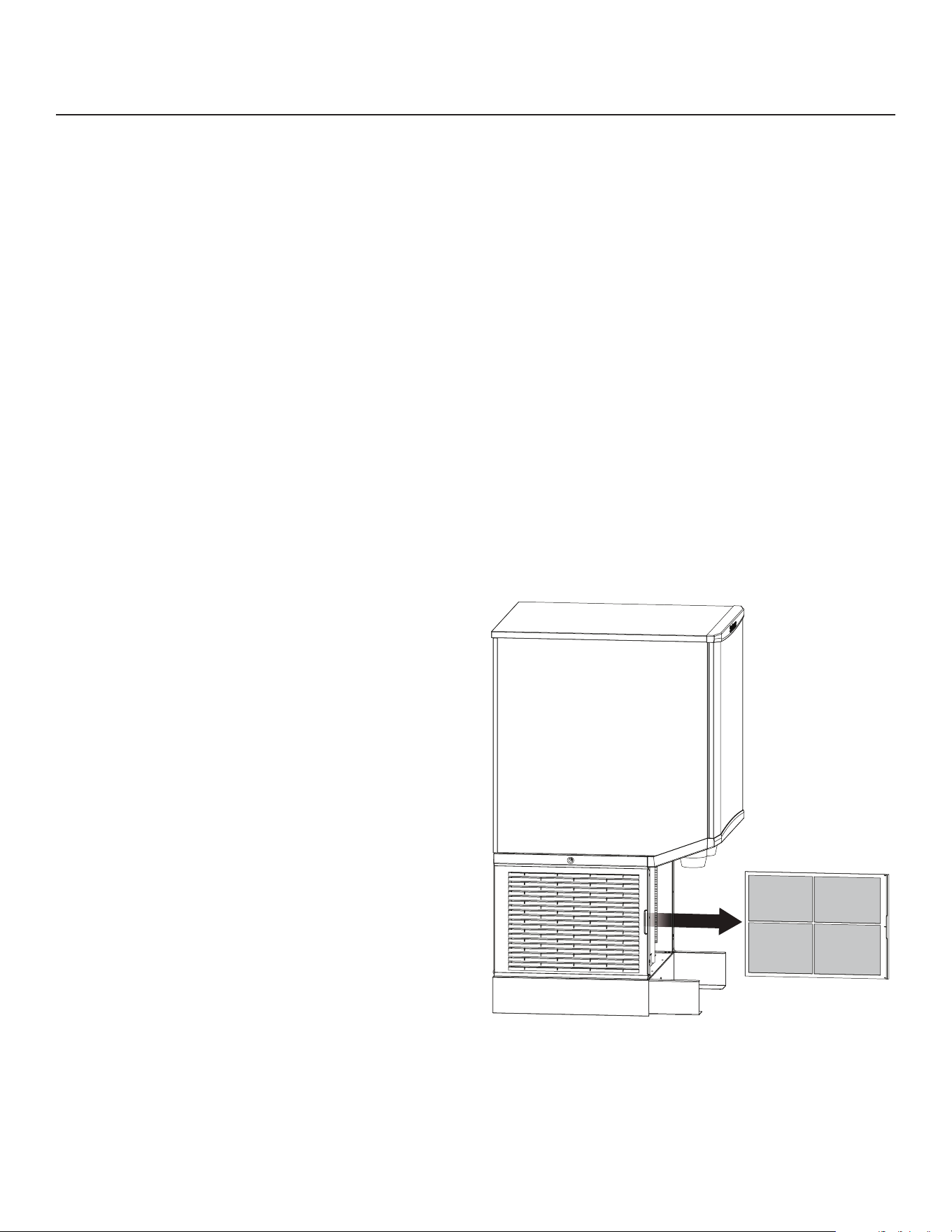
Air lter
The air lter on the left side of the cabinet will capture
signicant dust and lint during operation. As the dirt
builds up it begins to restrict air ow and causes the
refrigeration system to work longer to make ice. Clean
the air lter regularly.
To remove, pull it forward from the louvers. Do not
leave it out for extended periods of time.
To clean, wash it at a utility sink. Return it to the unit
when clean.
Condenser.
The condenser ns may need cleaning too. Remove
the left side air grill and brush any lint and dirt o the
surface of the condenser. Vacuum any remaining
dirt. Do not damage the ns of the condenser during
cleaning.
HID312AWX, HID525AWX and HID540AWX
Installation and User’s Manual
January 2025
Page 14
Maintenance and Cleaning - Dispensing bin and ice level controls
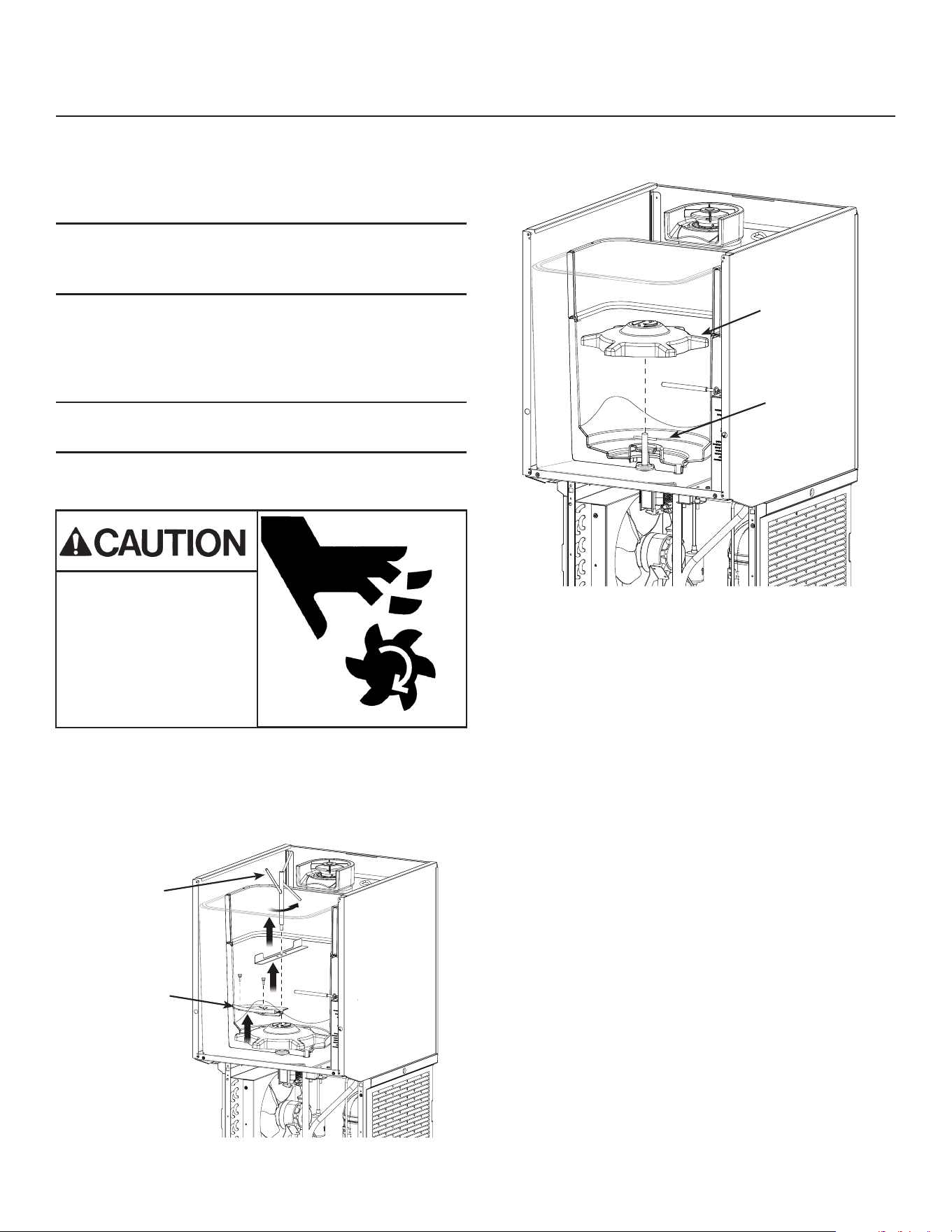
The ice storage bin and rotor must be cleaned and
sanitized on a regular basis (at least as often as the
ice making system is cleaned). Hand tools and hand
protection like rubber gloves are recommended for
this procedure.
Note: Some steps overlap with the procedure on the
next page. This procedure can be independent of the
ice making system cleaning or can be part of it.
1. Remove upper front panel.
2. Remove top panel.
3. Shut machine o.
4. Vend or melt out all ice.
Note: Only add 16 oz water to the bin at a time, as
excess water will drain out the spout.
5. Disconnect ice level control at harness.
6. Unplug or disconnect unit from electrical power.
7. Remove ice storage bin cover, set aside.
8. Remove agitator bar (rotate CCW), set aside.
9. Remove 2 thumbscrews & chute cover, set aside.
10. Lift up and remove dispense rotor, set aside.
11. Mix a solution of ice machine scale remover, such
as Scotsman Clear 1 and potable water per the
directions supplied with the scale remover.
12. Use a clean cloth and wash all the interior
surfaces of the bin and the bin cover, agitator
bar, chute cover and dispense rotor with the ice
machine scale remover solution. Rinse with clear
water.
13. Mix a 2 gallon solution of locally approved
sanitizer. A possible sanitizer solution is one
packet of Stera Sheen Green Label and 2 gallons
of warm (95
o
to 105
o
F.) potable water.
14. Use a new clean cloth and wipe all the interior
surfaces of the bin and the bin cover, agitator bar,
chute cover and dispense rotor with the sanitizer
solution.
15. Return all parts to their original positions and
secure them with their original fasteners.
16. Reconnect electrical power and restart the
machine.
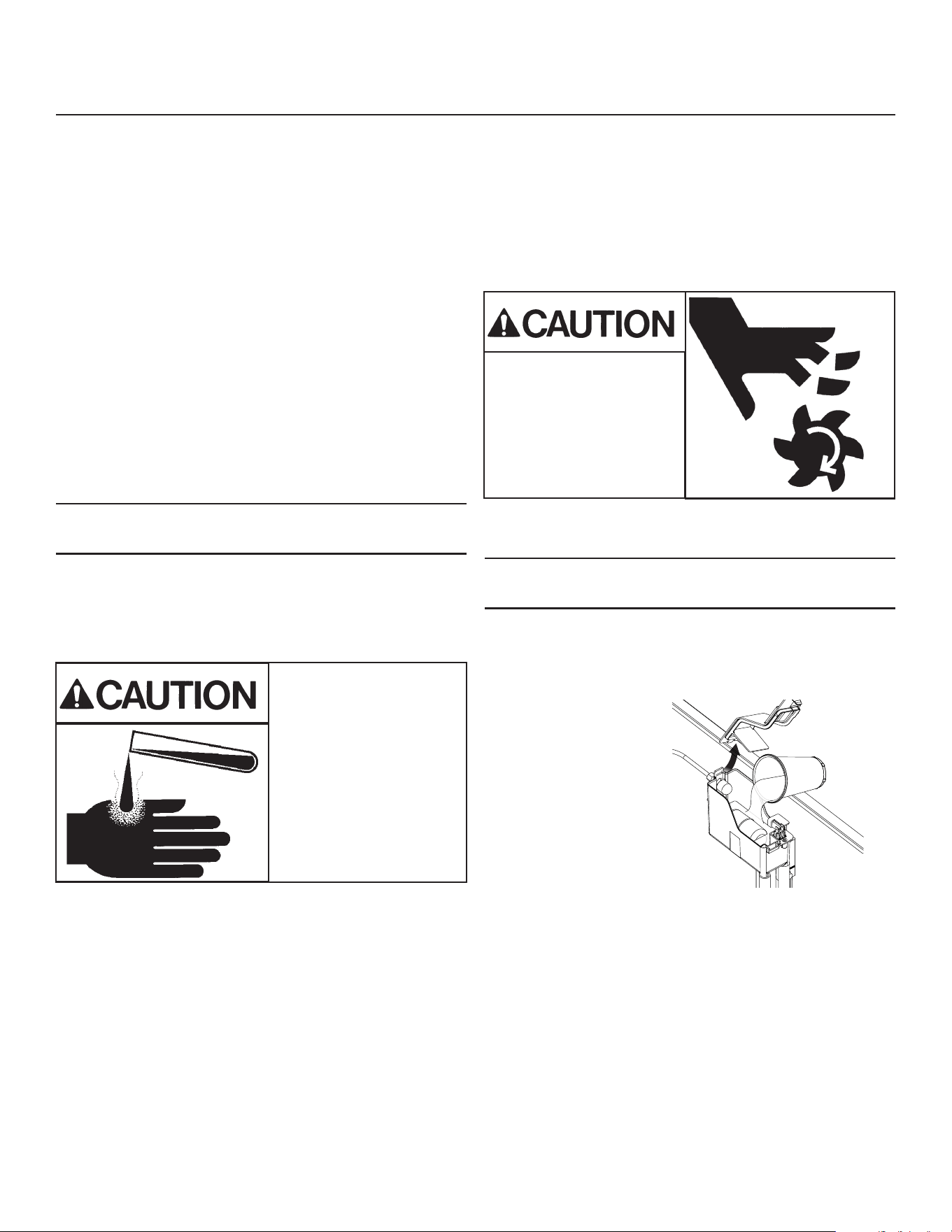
Moving parts hazard.
Risk of personal injury.
Disconnect electrical
power before
proceeding.
Dispense
Rotor
Dispense
Drive Pin
Agitator
Chute Cover
HID312AWX, HID525AWX and HID540AWX
Installation and User’s Manual
January 2025
Page 15
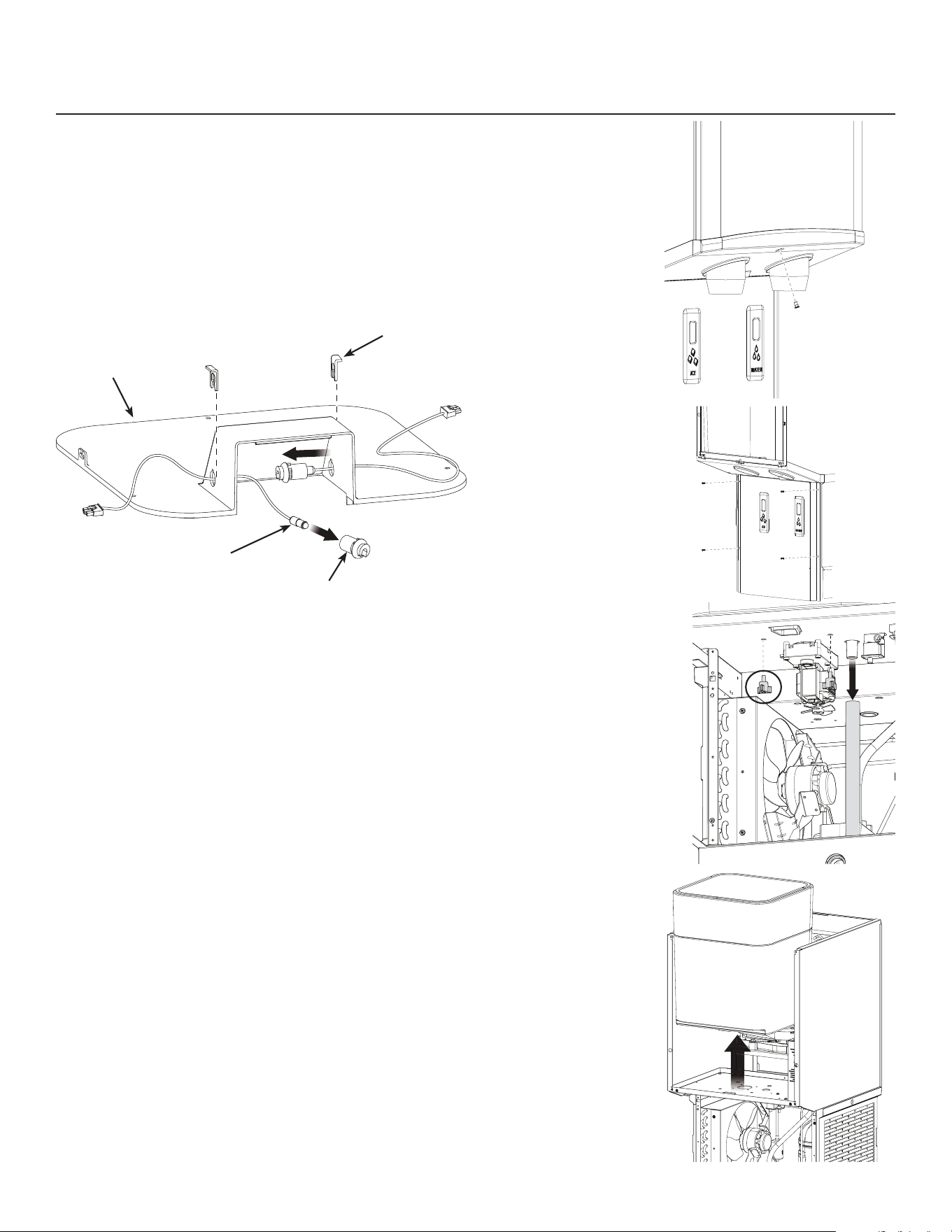
Ice level controls
Clean if the controller indicates bin full and there
is no ice between the sensors.
1. Remove top front and top panels.
2. Shut machine o.
3. Disconnect ice level controls at connector.
4. Remove 3 screws and ice storage bin cover.
5. Pull each sensor grommet clip up and o.
6. Push grommets out of bin top.
7. Pull each sensor out of its rubber grommet. Pull
on the part of the sensor closest to the grommet,
not the wire.
8. Wipe the sensor lenses clean with a soft, clean
cloth. Caution - do not scratch the lens. If there
is mineral scale on the lens, ice machine scale
remover will be needed to wipe them clean.
9. Return each sensor to a grommet, push it in until it
snaps into place.
10. Reverse the rest of the steps to reassemble.
Dispensing Bin
The dispensing bin may be removed for cleaning or to
provide service access to other components.
1. Go thru steps 1 thru 10 of the Bin Cleaning
Procedure above.
2. Remove ice sweep.
3. Remove ice delivery chute and chute cover.
4. Remove dispense motor drive pin.
5. Twist and remove the water and ice dispense
chutes.
6. Remove the chute
mounting panel.
7. Remove splash
panel, disconnect
sensors from
harness and set
panel aside.
8. Locate two 3
prong knob bolts
under the bin.
Remove them.
9. Locate bin drain
and disconnect it
from bin tting.
10. Lift the bin up and
o the chassis.
Clean as needed.
Cover
Clip
Sensor
Grommet
HID312AWX, HID525AWX and HID540AWX
Installation and User’s Manual
January 2025
Page 16
Ice Making and Ice Dispensing System Cleaning Instructions
Hand tools, cleaning supplies and hand protection are
recommended for this procedure.
Frequency: Recommended minimum time between
cleanings is 6 months. To aid in determining if the
machine has not been cleaned in 6 months, a Time
To Clean light will glow after 6 months of power up
time. Cleaning the machine with the following process
will reset that light and the timer that controls it. More
frequent cleanings may be required based on the
mineral content of the water, run time and potential
airborne contamination.
1. Remove both front panels.
2. Push ON/OFF button to shut ice making o.
3. Shut water supply o.
4. Drain water from ice making system by pulling
reservoir drain hose from plug at drain basin and
return to plug when drained.
Note: Drain into drain basin in base of unit. Sink must
be attached to unit throughout this process.
5. Remove reservoir cover and ll with hot (110-120
degree F.) water, wait 2 minutes and drain water
from ice making system by pulling reservoir drain
hose from plug and return hose to plug when
drained.
6. Mix a solution of 12 ounces of Scotsman Clear
1 ice machine scale remover and 12 ounces of
clean, potable water.
7. Loosen thumb screw holding water reservoir to
post.
8. Lift water reservoir to the top of the post and re-
secure with the thumb screw.
9. Remove cover from water reservoir.
10. Vend all ice from dispenser.
11. Remove dispense bin cover.
12. Remove ice discharge chute cover from top of ice
making system.
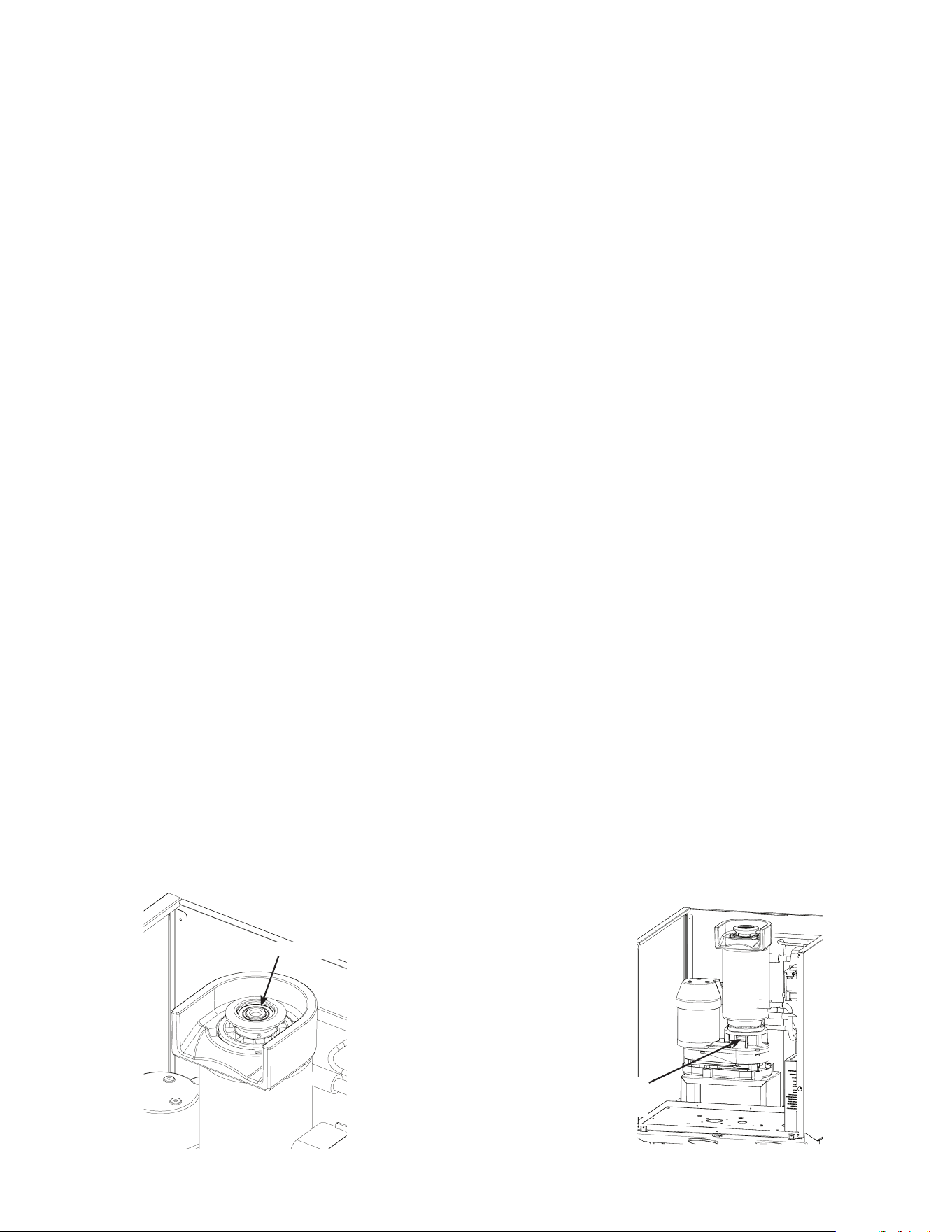
13. Pour cleaning solution into reservoir. CautionCaution:
solution is highly acidic. Use rubber gloves and
DO NOT SPILLDO NOT SPILL.
14. Push the Clean button. The unit will operate the
auger motor for 30 minutes and then stop.
Note: Stop at any time by pushing the ON/OFF
button.
15. Disconnect unit from electrical power.
16. Drain the scale remover solution from the water
system by pulling the reservoir drain hose from its
plug. Return it to the plug when drained.
17. Pour 24 ounces
of clean, potable
water into the
reservoir.
18. Drain the water
from the water
system by pulling
the reservoir drain
hose from its plug
and return it to the plug when drained.
19. Mix a solution of 4 ounces of ice machine scale
remover and 16 ounces of potable water. Use
this scale remover solution to wash out the water
reservoir cover, ice discharge chute, ice chute
cover, ice delivery chute, storage bin cover and
inside of the ice storage bin. Slowly pour the
cleaning solution down the bin drain.
Scotsman Ice Machine
Cleaner contains acids.
These compounds may cause
burns.
If swallowed, DO NOT
induce vomiting. Give large
amounts of water or milk. Call
Physician immediately. In
case of external contact, ush
with water.
KEEP OUT OF THE REACH
OF CHILDREN
Moving parts hazard.
Risk of personal injury.
Disconnect electrical
power before
proceeding.
HID312AWX, HID525AWX and HID540AWX
Installation and User’s Manual
January 2025
Page 17
Sanitize now.
20. Mix a 2 gallon solution of sanitizer. A
recommended sanitizer solution is one 2 oz.
packet of Stera Sheen Green Label and 2 gallons
of warm (95
o
to 105
o
F.) potable water, or an
equivalent sanitizer at a concentration of 100 ppm.
21. Pour the sanitizer solution into the reservoir until it
is full (level with the molded line on the side).
22. Reconnect electrical power.
23. Push the ON/OFF button to make ice for 10
minutes. Add more sanitizer to the reservoir to
keep it full while making ice.
24. Push the ON/OFF button to stop making ice.
25. Disconnect electrical power.
26. Remove the ice outlet cover, dispense rotor and
ice dispenser agitator from the bin. Wash them
with the sanitizer solution.
27. Wash all inside surfaces of the ice storage bin and
ice discharge chute with the sanitizer solution.
28. Wash the ice discharge chute cover, ice sweep,
metal area below the ice sweep and ice dispense
chute with the sanitizer solution.
29. Pour remaining sanitizer into the bin and sink. Do
not overll bin.
30. Drain sanitizer from ice making system by pulling
reservoir drain hose from plug and return hose to
plug when drained.
31. Loosen thumb screw holding water reservoir to
post and lower the water reservoir to the top of the
slot, retighten thumb screw.
32. Return the chute cover, dispense rotor and
agitator to the inside of the storage bin. Secure
with the original fasteners.
33. Return the ice dispense chute and water reservoir
cover to their original positions and secure them
with their original fasteners.
34. Reconnect water and electrical power to the
machine.
35. Push the ON/OFF button to restart ice making.
36. Operate machine for 5 minutes and then push the
ON/OFF button to stop ice making.
37. Pour 16 oz of warm (95
o
to 105
o
F.) potable water
into the bin. Repeat until the ice has been melted.
38. Return the dispense bin cover to the machine and
secure with the original screws.
39. Push the ON/OFF button to resume ice making.
40. Return all panels to their normal positions and
secure with the original screws.
Other maintenance
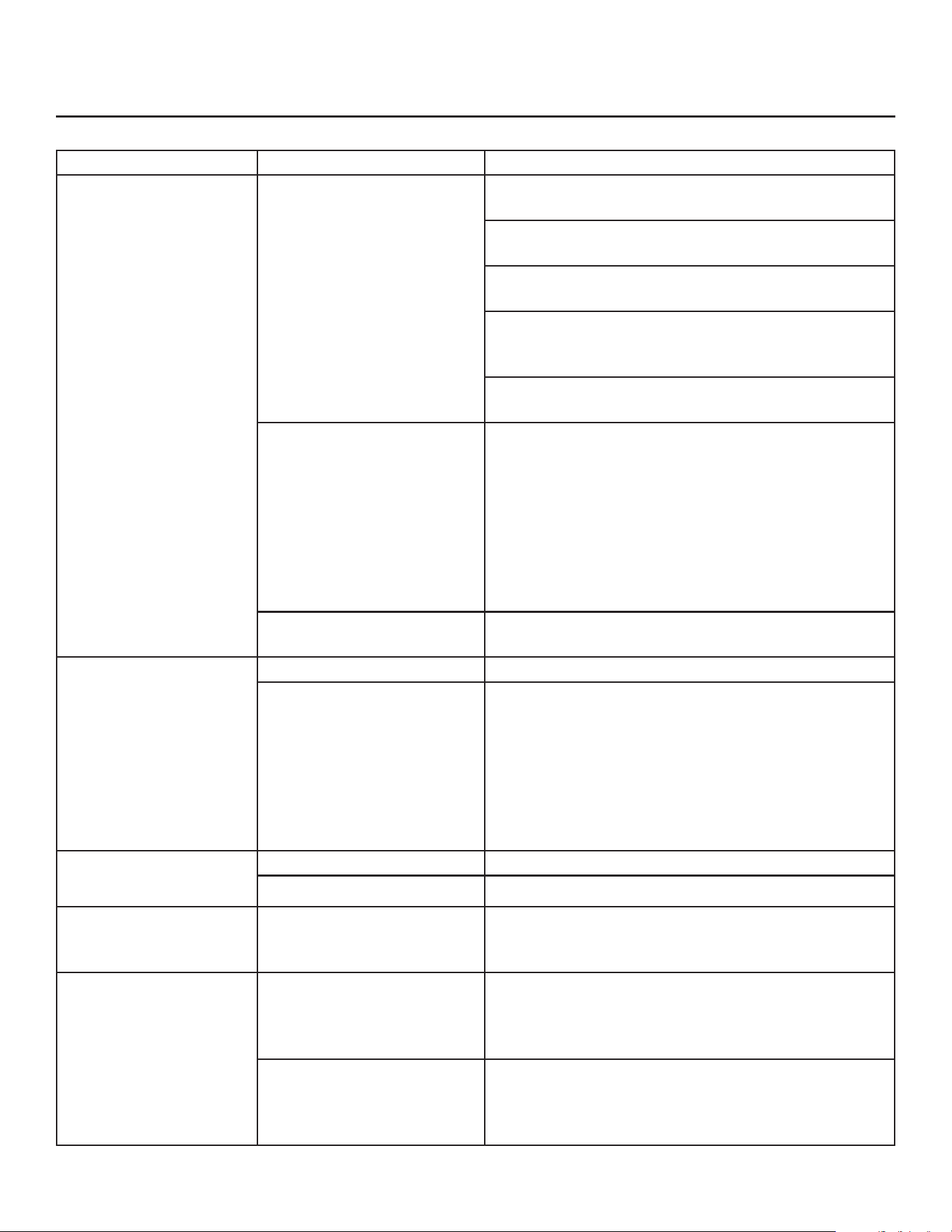
The auger in the ice making system is centered by
bearings at the top and bottom. It is also sealed from
leaking by a water seal at the bottom.
The bearings are permanently lubricated and need
no maintenance. They can be visually checked for
obvious wear or damage but there is no need to add
lubrication.
Auger motor bearings and the gear reducer are also
permanently lubricated and need no maintenance.
The bottom of the ice making system should be
checked for water leaks. Water draining from
the bottom is an indication of a water seal leak.
Immediate repair is required when a water seal leak is
discovered.
Caution: Moving parts hazard. Do not touch the
rotating shaft at any time.
Rotating Shaft -
Do NOT Touch
Bearing
HID312AWX, HID525AWX and HID540AWX
Installation and User’s Manual
January 2025
Page 18
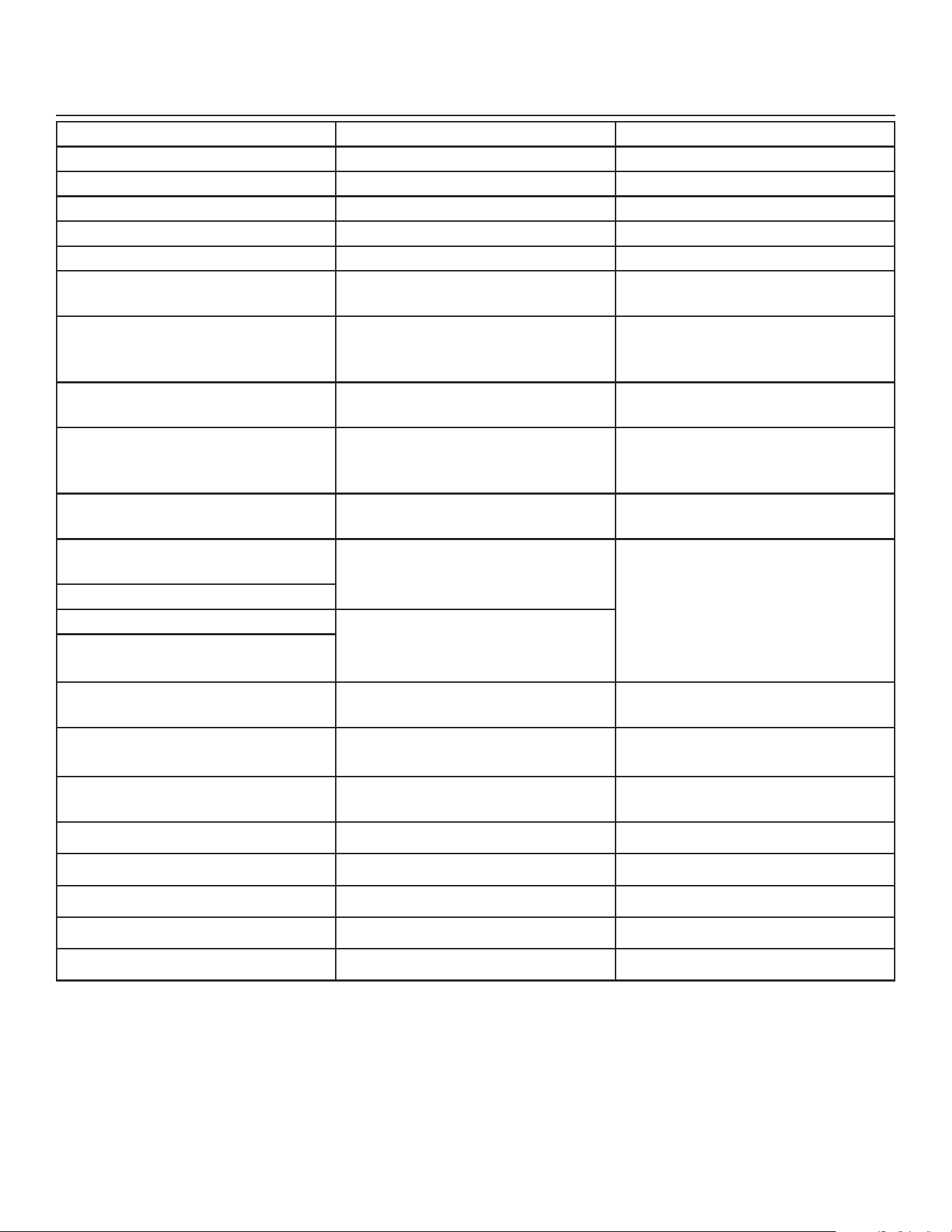
Basic Troubleshooting
See the separate HIDX service manual for more advanced troubleshooting information.
Symptom Possible Cause Probable Correction
No ice is dispensed No ice in bin Unit in O mode. Remove upper front panel, check
controller code, push ON/OFF button to restart.
No water to unit. Controller shows code 3. Restore
water supply.
No power to unit, power light on controller is o.
Restore power.
High pressure control opened. Controller shows
code 4, water interrupted to water cooled model.
Restore water and reset controller.
Ice level control sensing full bin falsely. Controller
shows b. Clean ice level control sensors.
Dispense motor not turning Remove upper front panel, check controller indicator
lights. Hold container in front of sensor, does the
Ice Dispense Sensed light glow? If no, sensor
isn’t detecting the container. If yes, does the Ice
Dispense light glow? If yes, push Dispense Ice
button. Does the motor activate? If yes, go to next
row. If no, check for voltage at motor. If no voltage,
replace controller. If voltage at motor, replace
motor.
Dispense motor working,
but ice in bin not moving
Agitator or rotor not turning, remove all ice and
inspect for damage to agitator and rotor.
No water is dispensed No water to unit. Restore water.
Water valve not opening Remove upper front panel, check controller indicator
lights. Hold container in front of sensor, does the
Water Dispense Sensed light glow? If no, sensor is
not detecting the container. If yes, does the Water
Dispense light glow? If yes, push Dispense Water
button. Does the water valve activate? If no, check
for voltage at valve. If no voltage, replace controller.
If voltage at valve, replace valve.
Water drips from spout May be normal A few drops per minute is normal.
Bin drain may be plugged. Check bin drain tube at basin.
Dispensed water is
cloudy, but clears up in a
few minutes
Air in the water This is normal and can vary depending upon how
much air is in the water. May be improved by
lowering water pressure to the unit.
Water stream is not
uniform or splashes
excessively when
dispensed
Aerator is not installed Machines manufactured in 2020 or earlier don’t
have an aerator that regulates a smooth stream
and reduces splashing. Conversion kit 16-1246-21
installs easily and compatible with all HIDX models.
Aerator is clogged Machines manufactured in 2021 or later include
an aerator. The aerator may become clogged and
should be replaced. Service kit 16-1246-22 includes
a replacement aerator and required key tool.
HID312AWX, HID525AWX and HID540AWX
Installation and User’s Manual
January 2025
Page 19
Controller Diagnostics
Code or Light Action Probable Cause Suggested Action
O
Unit manually switched o If desired, switch unit on.
F
Freeze mode None, unit is making ice.
b
Bin sensors sense bin full Check if bin is full.
E
Corrupted memory Replace controller
C
Clean mode Continue clean mode
d
Test mode None, allow unit to nish test
mode.
1
Auger motor rotated auger
backwards.
Replace auger motor. Check water
seal area for leaks, replace seal if
leaking.
2
Auger motor stalled or operating
slowly
Clean ice making system and retry.
3
No water in reservoir Restore water. If there is water,
is it too pure? Are sensor wires
connected?
4
High pressure cut out open Check fan motor on air cooled or
water supply on water cooled.
Water dispense sensed light
blinking
Container positioned in front of
water dispense sensor for more
than 24 seconds
Normal, controller has a time limit
for dispensing. Remove container.
Water dispense light blinking
Ice dispense sensed light blinking Container positioned in front of ice
dispense sensor for more than 20
seconds.
Ice dispense light blinking
Status light is on Unit is in ice making mode Normal, may not be making ice if
bin is full
Time to Clean light is on Unit has not been cleaned for at
least 6 months
Clean unit
Water Dispensed Sensed light is
on
A container is in front of the sensor Normal during water dispensing
Ice Dispensed Sensed light is on A container is in front of the sensor Normal during ice dispensing
Water Dispense light is on Water solenoid has been activated Normal during water dispensing
Ice Dispense light is on Bin drive motor has been activated Normal during ice dispensing
Auger light is on Auger motor is active Normal when making ice
Compressor light is on Compressor is active Normal when making ice

HID312AWX, HID525AWX and HID540AWX
Installation and User’s Manual
January 2025
Page 20
Only qualied technicians familiar with R290 refrig-
erant should decommission a machine, as special
tools and containers are required for the removal,
transportation, and disposal of this highly ammable
substance.
• Before attempting the procedure:
* Ensure that all protective gear is present and
used throughout the procedure.
* Make sure recovery equipment and containers
are available and ready for use. All containers
used for recovery must be rated for R290
refrigerant and must be labeled as such.
* Weigh any refrigerant prior to reclaiming.
• Maintain safety through standard operating proce-
dures as outlined on page 20 of this document. Be
sure to follow local, state, and federal guidelines
for proper disposal.
• Do not ll containers more than 80% and do not
exceed the pressure limits of the container. Make
sure the machine to be decommissioned is in
satisfactory working order and that the electrical
components of the machine are properly sealed to
prevent ignition.
• Recovered refrigerant should not be charged into
another refrigerating system or mixed in another
container.
• Make sure to safely transport the refrigerant in line
with standard operating procedures.
• All recovered refrigerant must be returned to re-
frigerant supplier for proper disposal.
• If compressor or compressor oils are removed
ensure it has been removed to an acceptable level
so the ammable refrigerant does not remain in
the lubricant.
Decommissioning

HID312AWX, HID525AWX and HID540AWX
Installation and User’s Manual
January 2025
Page 21
SCOTSMAN ICE SYSTEMS
101 Corporate Woods Parkway
Vernon Hills, IL 60061
800-726-8762
17-3906-03

