S
CROLL
EQUIPPED
UNITS
SHOULD
NEVER
BE
USED
TO
EVACUATE
THE
AIR
CONDITIONING
SYSTEM
. V
ACUUMS
THIS
LOW
CAN
CAUSE
INTERNAL
ELECTRICAL
ARCING
RESULTING
IN
A
DAMAGED
OR
FAILED
COMPRESSOR
.
CAUTION
S
HIPPING
I
NSPECTION
Always keep the unit upright; laying the unit on its side or top may
cause equipment damage. Shipping damage, and subsequent
investigation is the responsibility of the carrier. Verify the model
number, specifications, electrical characteristics, and accessories
are correct prior to installation. The distributor or manufacturer
will not accept claims from dealers for transportation damage or
installation of incorrectly shipped units.
C
ODES
& R
EGULATIONS
This product is designed and manufactured to comply with national
codes. Installation in accordance with such codes and/or
prevailing local codes/regulations is the responsibility of the
installer. The manufacturer assumes no responsibility for
equipment installed in violation of any codes or regulations. Rated
performance is achieved after 20 hours of operation. Rated
performance is delivered at the specified airflow. See outdoor
unit specification sheet for split system models or product
specification sheet for packaged and light commercial models.
Specification sheets can be found at www.goodmanmfg.com for
Goodman
®
brand products or www.amana-hac.com for Amana
®
brand products. Within either website, please select the
residential or commercial products menu and then select the
submenu for the type of product to be installed, such as air
conditioners or heat pumps, to access a list of product pages that
each contain links to that model’s specification sheet.
I
MPORTANT
S
AFETY
I
NSTRUCTIONS
The following symbols and labels are used throughout this manual
to indicate immediate or potential safety hazards. It is the owner’s
and installer’s responsibility to read and comply with all safety
information and instructions accompanying these symbols.
Failure to heed safety information increases the risk of personal
injury, property damage, and/or product damage.
HIGH VOLTAGE !
D
ISCONNECT
ALL
POWER
BEFORE
SERVICING
.
M
ULTIPLE
POWER
SOURCES
MAY
BE
PRESENT
. F
AILURE
TO
DO
SO
MAY
CAUSE
PROPERTY
DAMAGE
,
PERSONAL
INJURY
OR
DEATH
.
WARNING
O
NLY
PERSONNEL
THAT
HAVE
BEEN
TRAINED
TO
INSTALL
,
ADJUST
,
SERVICE
OR
REPAIR
(
HEREINAFTER
, “
SERVICE
”)
THE
EQUIPMENT
SPECIFIED
IN
THIS
MANUAL
SHOULD
SERVICE
THE
EQUIPMENT
. T
HE
MANUFACTURER
WILL
NOT
BE
RESPONSIBLE
FOR
ANY
INJURY
OR
PROPERTY
DAMAGE
ARISING
FROM
IMPROPER
SERVICE
OR
SERVICE
PROCEDURES
. I
F
YOU
SERVICE
THIS
UNIT
,
YOU
ASSUME
RESPONSIBILITY
FOR
ANY
INJURY
OR
PROPERTY
DAMAGE
WHICH
MAY
RESULT
. I
N
ADDITION
,
IN
JURISDICTIONS
THAT
REQUIRE
ONE
OR
MORE
LICENSES
TO
SERVICE
THE
EQUIPMENT
SPECIFIED
IN
THIS
MANUAL
,
ONLY
LICENSED
PERSONNEL
SHOULD
SERVICE
THE
EQUIPMENT
. I
MPROPER
INSTALLATION
,
ADJUSTMENT
,
SERVICING
OR
REPAIR
OF
THE
EQUIPMENT
SPECIFIED
IN
THIS
MANUAL
,
OR
ATTEMPTING
TO
INSTALL
,
ADJUST
,
SERVICE
OR
REPAIR
THE
EQUIPMENT
SPECIFIED
IN
THIS
MANUAL
WITHOUT
PROPER
TRAINING
MAY
RESULT
IN
PRODUCT
DAMAGE
,
PROPERTY
DAMAGE
,
PERSONAL
INJURY
OR
DEATH
.
Cancer and Reproductive Harm -
www.P65Warnings.ca.gov
PROP 65 WARNING
FOR CALIFORNIA CONSUMERS
0140M00517-A
CONDENSING UNIT
AIR CONDITIONING
INSTALLATION & SERVICE REFERENCE
© 2014, 2016-2019 Goodman Manufacturing Company, L.P.
5151 San Felipe, Suite 500, Houston, TX 77056
www.goodmanmfg.com -or- www.amana-hac.com
P/N: IO-449G Date: September 2019
is a registered trademark of Maytag Corporation or its related companies and is used under
license to Goodman Company, L.P., Houston, TX. All rights reserved.
“IMPORTANT - This product has been designed and manufactured to meet ENERGY STAR®
criteria for energy efficiency when matched with appropriate coil components. However,
proper refrigerant charge and proper air flow are critical to achieve rated capacity and
efficiency. Installation of this product should follow the manufacturer’s refrigerant charging
and air flow instructions. Failure to confirm proper charge and air flow may reduce energy
efficiency and shorten equipment life.”
2
The United States Environmental Protection Agency (EPA) has
issued various regulations regarding the introduction and disposal
of refrigerants. Failure to follow these regulations may harm the
environment and can lead to the imposition of substantial fines.
Should you have any questions please contact the local office of
the EPA.
If replacing a condensing unit or air handler, the system must be
manufacturer approved and Air Conditioning, Heating and
Refrigeration Institute (AHRI) matched. NOTE: Installation of
unmatched systems is strongly discouraged.
Outdoor units are approved for operation above 55°F in cooling
mode.
Damage to the unit caused by operating the unit in a structure that
is not complete (either as part of new construction or renovation)
is not covered by the warranty.
This condensing unit is part of a ComfortBridge™ control system
designed to more efficiently control heat gain/loss with better
efficiency and achieve targeted comfort conditions. The system
utilizes digital linkage between the indoor and outdoor
equipment and can be controlled by any single-stage thermostat.
The ComfortBridge control system reduces the number of required
thermostat wires, provides additional setup features and enhanced
active diagnostics through Bluethooth connectivity with the
downloadable CoolCloud™ app.
I
NSTALLATION
C
LEARANCES
Special consideration must be given to location of the condensing
unit(s) in regard to structures, obstructions, other units, and any/
all other factors that may interfere with air circulation. Where
possible, the top of the unit should be completely unobstructed;
however, if vertical conditions require placement beneath an
obstruction there should be a minimum of 60 inches between the
top of the unit and the obstruction(s). The specified dimensions
meet requirements for air circulation only. Consult all appropriate
regulatory codes prior to determining final clearances.
Another important consideration in selecting a location for the
unit(s) is the angle to obstructions. Either side adjacent the valves
can be placed toward the structure provided the side away from
the structure maintains minimum service clearance. Corner
installations are strongly discouraged.
OK!
OK!
AA AAA
A
CC
C
C
OK!
OK!
OK!
OK!
NOT
RECOMMENDED
AA
AA
AA
AA
AA
B B B
B
Model Type A B C AA
Residential
10" 10" 18" 20"
Light Commercial
12" 12" 18" 24"
Minimum Airflow Clearance
This unit can be located at ground floor level or on flat roofs. At
ground floor level, the unit must be on a solid, level foundation
that will not shift or settle. To reduce the possibility of sound
transmission, the foundation slab should not be in contact with
or be an integral part of the building foundation. Ensure the
foundation is sufficient to support the unit. A concrete slab raised
above ground level provides a suitable base.
R
OOFTOP
I
NSTALLATIONS
If it is necessary to install this unit on a roof structure, ensure the
roof structure can support the weight and that proper consideration
is given to the weather-tight integrity of the roof. Since the unit can
vibrate during operation, sound vibration transmission should
be considered when installing the unit. Vibration absorbing pads
or springs can be installed between the condensing unit legs or
frame and the roof mounting assembly to reduce noise vibration.
S
AFE
R
EFRIGERANT
H
ANDLING
While these items will not cover every conceivable situation, they
should serve as a useful guide.
T
O
AVOID
POSSIBLE
INJURY
,
EXPLOSION
OR
DEATH
,
PRACTICE
SAFE
HANDLING
OF
REFRIGERANTS
.
WARNING
R
EFRIGERANTS
ARE
HEAVIER
THAN
AIR
. T
HEY
CAN
“
PUSH
OUT
”
THE
OXYGEN
IN
YOUR
LUNGS
OR
IN
ANY
ENCLOSED
SPACE
. T
O
AVOID
POSSIBLE
DIFFICULTY
IN
BREATHING
OR
DEATH
:
• N
EVER
PURGE
REFRIGERANT
INTO
AN
ENCLOSED
ROOM
OR
SPACE
. B
Y
LAW
,
ALL
REFRIGERANTS
MUST
BE
RECLAIMED
.
• I
F
AN
INDOOR
LEAK
IS
SUSPECTED
,
THOROUGHLY
VENTILATE
THE
AREA
BEFORE
BEGINNING
WORK
.
• L
IQUID
REFRIGERANT
CAN
BE
VERY
COLD
. T
O
AVOID
POSSIBLE
FROSTBITE
OR
BLINDNESS
,
AVOID
CONTACT
AND
WEAR
GLOVES
AND
GOGGLES
. I
F
LIQUID
REFRIGERANT
DOES
CONTACT
YOUR
SKIN
OR
EYES
,
SEEK
MEDICAL
HELP
IMMEDIATELY
.
• A
LWAYS
FOLLOW
EPA
REGULATIONS
. N
EVER
BURN
REFRIGERANT
,
AS
P
OISONOUS
GAS
WILL
BE
PRODUCED
.
WARNING
T
O
AVOID
POSSIBLE
EXPLOSION
,
USE
ONLY
RETURNABLE
(
NOT
DISPOSABLE
)
SERVICE
CYLINDERS
WHEN
REMOVING
REFRIGERANT
FROM
A
SYSTEM
.
• E
NSURE
THE
CYLINDER
IS
FREE
OF
DAMAGE
WHICH
COULD
LEAD
TO
A
LEAK
OR
EXPLOSION
.
• E
NSURE
THE
HYDROSTATIC
TEST
DATE
DOES
NOT
EXCEED
5
YEARS
.
• E
NSURE
THE
PRESSURE
RATING
MEETS
OR
EXCEEDS
400
PSIG
.
W
HEN
IN
DOUBT
,
DO
NOT
USE
CYLINDER
.
WARNING
3
T
O
AVOID
POSSIBLE
EXPLOSION
:
• N
EVER
APPLY
FLAME
OR
STEAM
TO
A
REFRIGERANT
CYLINDER
. I
F
YOU
MUST
HEAT
A
CYLINDER
FOR
FASTER
CHARGING
,
PARTIALLY
IMMERSE
IT
IN
WARM
WATER
.
• N
EVER
FILL
A
CYLINDER
MORE
THAN
80%
FULL
OF
LIQUID
REFRIGERANT
.
• N
EVER
ADD
ANYTHING
OTHER
THAN
R-22
TO
AN
R-22
CYLINDER
OR
R-
410A
TO
AN
R-410A
CYLINDER
. T
HE
SERVICE
EQUIPMENT
USED
MUST
BE
LISTED
OR
CERTIFIED
FOR
THE
TYPE
OF
REFRIGERANT
USED
.
• S
TORE
CYLINDERS
IN
A
COOL
,
DRY
PLACE
. N
EVER
USE
A
CYLINDER
AS
A
P
LATFORM
OR
A
ROLLER
.
WARNING
R
EFRIGERANT
L
INES
T
HE
COMPRESSOR
POE
OIL
FOR
R-410A
UNITS
IS
EXTREMELY
SUSCEPTIBLE
TO
MOISTURE
ABSORPTION
AND
COULD
CAUSE
COMPRESSOR
FAILURE
. D
O
NOT
LEAVE
SYSTEM
OPEN
TO
ATMOSPHERE
ANY
LONGER
THAN
NECESSARY
FOR
INSTALLATION
.
CAUTION
Use only refrigerant grade (dehydrated and sealed) copper tubing
to connect the condensing unit with the indoor evaporator. After
cutting the tubing, install plugs to keep refrigerant tubing clean
and dry prior to and during installation. Tubing should always be
cut square keeping ends round and free from burrs. Clean the
tubing to prevent contamination.
Do NOT let refrigerant lines come in direct contact with plumbing,
ductwork, floor joists, wall studs, floors, and walls. When running
refrigerant lines through a foundation or wall, openings should
allow for sound and vibration absorbing material to be placed or
installed between tubing and foundation. Any gap between
foundation or wall and refrigerant lines should be filled with a
pliable silicon-based caulk, RTV or a vibration damping material.
Avoid suspending refrigerant tubing from joists and studs with
rigid wire or straps that would come in contact with the tubing.
Use an insulated or suspension type hanger. Keep both lines
separate and always insulate the suction line.
These sizes are suitable for line lengths of 79 feet or less. If a run
of more than 79, refer to TP-107 Long Line Set Application Guideline
or contact your distributor for assistance.
Insulation is necessary to prevent condensation from forming
and dropping from the suction line. Armflex (or satisfactory
equivalent) with 3/8” min. wall thickness is recommended. In
severe conditions (hot, high humidity areas) 1/2” insulation may
be required. Insulation must be installed in a manner which
protects tubing from damage and contamination.
E
XISTING
L
INE
S
ETS
Where possible, drain as much residual compressor oil from
existing systems, lines, and traps; pay close attention to low areas
where oil may collect. Use of an approved flushing agent is
recommended followed by a nitrogen purge to remove any
remaining flushing agent from the lines or indoor coil.
Replacement of indoor coil is recommended.
NOTE: If using existing indoor coil and changing refrigerant types,
ensure the indoor coil and metering device are compatible with
the type of refrigerant being used. If new indoor coil is required
check spec sheet or AHRI for approved coil. If system is being
replaced due to compressor electrical failure, assume acid is in
system. Refer to Service Procedure S-115 Compressor Burnout in
service manual for clean-up procedure.
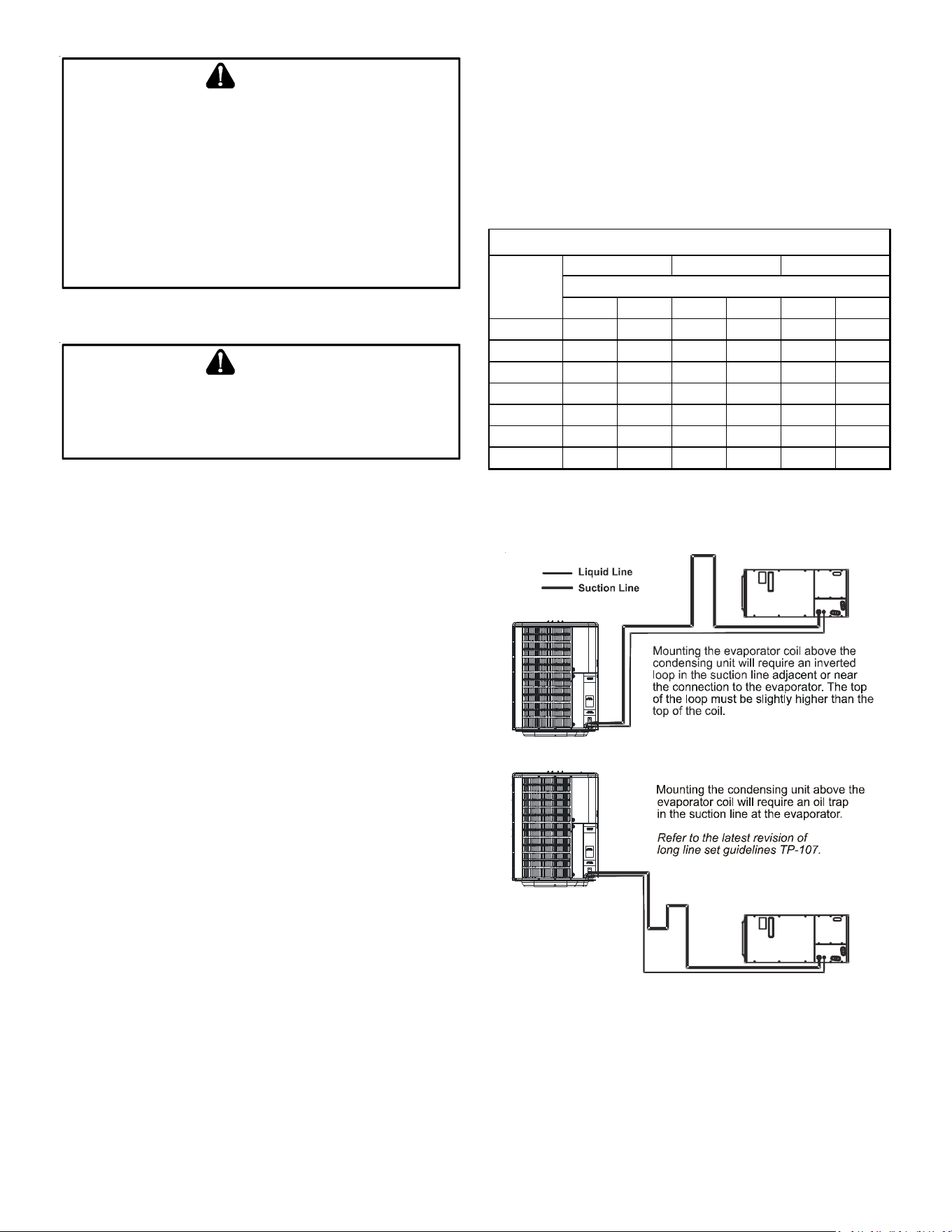
Cond
Unit
Tons Suct Liq Suct Liq Suct Liq
1 1/2 5/8 1/4 3/4 3/8 3/4 3/8
2 5/8 1/4 3/4 3/8 3/4 3/8
2 1/2 5/8 1/4 3/4 3/8 7/8 3/8
3 3/4 3/8 7/8 3/8 1 1/8 3/8
3 1/2 7/8 3/8 1 1/8 3/8 1 1/8 3/8
4 7/8 3/8 1 1/8 3/8 1 1/8 3/8
5 7/8 3/8 1 1/8 3/8 1 1/8 3/8
Line Diameter (In. OD)
RECOMMENDED INTERCONNECTING TUBING (Ft)
0-24 25-49 50-79*
* Lines greater than 79 feet in length refer to TP-107 Long Line Set
Application Guideline or contact your distributor for assistance.
NOTE: The maximum vertical difference between the outdoor unit and
indoor unit is 25 feet for two stage units.
4
B
URYING
R
EFRIGERANT
L
INES
If burying refrigerant lines can not be avoided, use the following
checklist.
1. Insulate liquid and suction lines separately.
2. Enclose all underground portions of the refrigerant lines
in waterproof material (conduit or pipe) sealing the ends
where tubing enters/exits the enclosure.
3. If the lines must pass under or through a concrete slab,
ensure lines are adequately protected and sealed.
R
EFRIGERANT
L
INE
C
ONNECTIONS
IMPORTANT
To avoid overheating the service valve, TXV valve, or filter drier
while brazing, wrap the component with a wet rag, or use a thermal
heat trap compound. Be sure to follow the manufacturer’s
instruction when using the heat trap compound. Note: Remove
Schrader valves from service valves before brazing tubes to the
valves. Use a brazing alloy of 2% minimum silver content. Do not
use flux.
Torch heat required to braze tubes of various sizes is proportional
to the size of the tube. Tubes of smaller size require less heat to
bring the tube to brazing temperature before adding brazing alloy.
Applying too much heat to any tube can melt the tube. Service
personnel must use the appropriate heat level for the size of the
tube being brazed. NOTE: The use of a heat shield when brazing is
recommended to avoid burning the serial plate or the finish on
the unit.
1. The ends of the refrigerant lines must be cut square,
deburred, cleaned, and be round and free from nicks or
dents. Any other condition increases the chance of a
refrigerant leak.
2. “Sweep” the refrigerant line with nitrogen or inert gas
during brazing to prevent the formation of copper-oxide
inside the refrigerant lines. The POE oils used in R-410A
applications will clean any copper-oxide present from the
inside of the refrigerant lines and spread it throughout the
system. This may cause a blockage or failure of the metering
device.
3. After brazing, quench the joints with water or a wet cloth to
prevent overheating of the service valve.
4. Ensure the filter drier paint finish is intact after brazing. If
the paint of the steel filter drier has been burned or
chipped, repaint or treat with a rust preventative. This is
especially important on suction line filter driers which
are continually wet when the unit is operating.
NOTE: Be careful not to kink or dent refrigerant lines. Kinked or
dented lines will cause poor performance or compressor damage.
Do NOT make final refrigerant line connection until plugs are
removed from refrigerant tubing.
NOTE: Before brazing, verify indoor piston size by checking the
piston kit chart packaged with indoor unit.
L
EAK
T
ESTING
(N
ITROGEN
OR
N
ITROGEN
-T
RACED
)
T
O
AVOID
THE
RISK
OF
FIRE
OR
EXPLOSION
,
NEVER
USE
OXYGEN
,
HIGH
PRESSURE
AIR
OR
FLAMMABLE
GASES
FOR
LEAK
TESTING
OF
A
REFRIGERATION
SYSTEM
.
WARNING
T
O
AVOID
POSSIBLE
EXPLOSION
,
THE
LINE
FROM
THE
NITROGEN
CYLINDER
MUST
INCLUDE
A
PRESSURE
REGULATOR
AND
A
PRESSURE
RELIEF
VALVE
. T
HE
PRESSURE
RELIEF
VALVE
MUST
BE
SET
TO
OPEN
AT
NO
MORE
THAN
150
PSIG
.
WARNING
Pressure test the system using dry nitrogen and soapy water to
locate leaks. If you wish to use a leak detector, charge the system
to 10 psi using the appropriate refrigerant then use nitrogen to
finish charging the system to working pressure then apply the
detector to suspect areas. If leaks are found, repair them. After
repair, repeat the pressure test. If no leaks exist, proceed to system
evacuation.
S
YSTEM
E
VACUATION
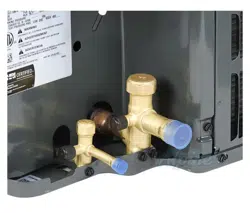
Condensing unit liquid and suction valves are closed to contain
the charge within the unit. The unit is shipped with the valve
stems closed and caps installed. Do not open valves until the
system is evacuated.
REFRIGERANT UNDER PRESSURE!
F
AILURE
TO
FOLLOW
PROPER
PROCEDURES
MAY
CAUSE
PROPERTY
DAMAGE
,
PERSONAL
INJURY
OR
DEATH
.
WARNING
NOTE: Scroll compressors should never be used to evacuate or
pump down a heat pump or air conditioning system.
P
ROLONGED
OPERATION
AT
SUCTION
PRESSURES
LESS
THAN
20
PSIG
FOR
MORE
THAN
5
SECONDS
WILL
RESULT
IN
OVERHEATING
OF
THE
SCROLLS
AND
PERMANENT
DAMAGE
TO
THE
SCROLL
TIPS
,
DRIVE
BEARINGS
AND
INTERNAL
SEAL
.
CAUTION
1. Connect the vacuum pump with 250 micron capability to
the service valves.
2. Evacuate the system to 250 microns or less using suction
and liquid service valves. Using both valves is necessary
as some compressors create a mechanical seal separating
the sides of the system.
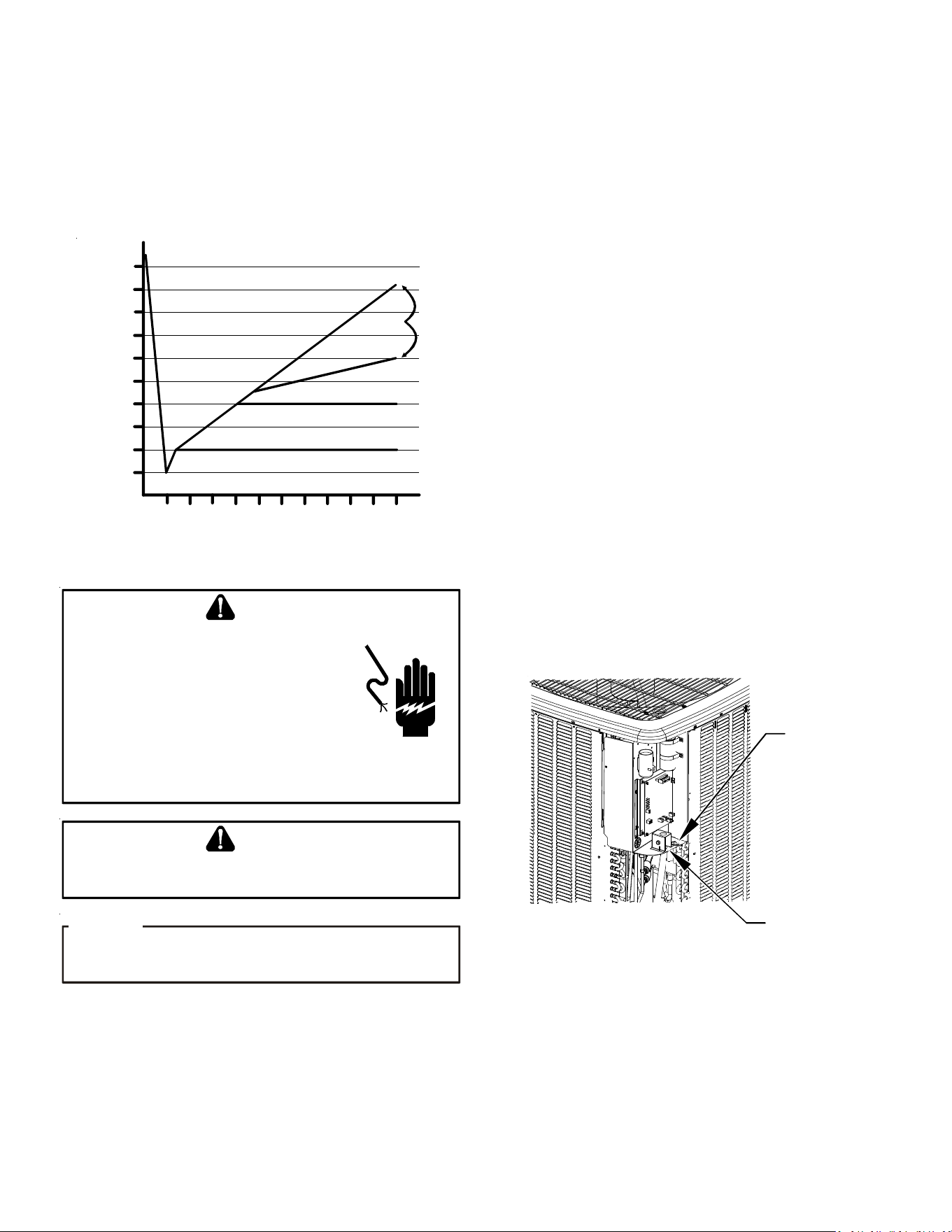
3. Close pump valve and hold vacuum for 10 minutes.
Typically pressure will rise during this period.
• If the pressure rises to 1000 microns or less and remains
steady the system is considered leak-free; proceed to
startup.
5
• If pressure rises above 1000 microns but holds steady
below 2000 microns, moisture and/or noncondensibles
may be present or the system may have a small leak. Return
to step 2: If the same result is encountered check for leaks
as previously indicated and repair as necessary then repeat
evacuation.
• If pressure rises above 2000 microns, a leak is present.
Check for leaks as previously indicated and repair as
necessary then repeat evacuation.
5000
4500
4000
3500
3000
2500
2000
1500
1000
500
0 1 2 3 4 5 6 7 8 9
10
LEAK(S)
PRESENT
MINUTES
V
ACUUM
IN
MICRONS
CONDENSIBLES OR SMALL
LEAK PRESENT
NO LEAKS
NO CONDENSIBLES
E
LECTRICAL
C
ONNECTIONS
HIGH VOLTAGE!
D
ISCONNECT
ALL
POWER
BEFORE
SERVICING
.
M
ULTIPLE
POWER
SOURCES
MAY
BE
PRESENT
. F
AILURE
TO
DO
SO
MAY
CAUSE
PROPERTY
DAMAGE
,
PERSONAL
INJURY
OR
DEATH
DUE
TO
ELECTRIC
SHOCK
. W
IRING
MUST
CONFORM
WITH
NEC
OR
CEC
AND
ALL
LOCAL
CODES
. U
NDERSIZED
WIRES
COULD
CAUSE
POOR
EQUIPMENT
PERFORMANCE
,
EQUIPMENT
DAMAGE
OR
FIRE
.
WARNING
T
O
AVOID
THE
RISK
OF
FIRE
OR
EQUIPMENT
DAMAGE
,
USE
COPPER
CONDUCTORS
.
WARNING
U
NITS
WITH
RECIPROCATING
COMPRESSORS
AND
NON
-
BLEED
TXV’
S
REQUIRE
A
H
ARD
S
TART
K
IT
.
NOTICE
The condensing unit rating plate lists pertinent electrical data
necessary for proper electrical service and overcurrent protection.
Wires should be sized to limit voltage drop to 2% (max.) from the
main breaker or fuse panel to the condensing unit. Consult the
NEC, CEC, and all local codes to determine the correct wire gauge
and length.
Local codes often require a disconnect switch located near the
unit; do not install the switch on the unit. Refer to the installation
instructions supplied with the indoor furnace/air handler for
specific wiring connections and indoor unit configuration.
Likewise, consult the instructions packaged with the thermostat
for mounting and location information.
O
VERCURRENT
P
ROTECTION
The following overcurrent protection devices are approved for
use.
• Time delay fuses
• HACR type circuit breakers
These devices have sufficient time delay to permit the motor-
compressor to start and accelerate its load.
H
IGH
V
OLTAGE
C
ONNECTIONS
Route power supply and ground wires through the high voltage
port and terminate in accordance with the wiring diagram provided
inside the control panel cover.
L
OW
V
OLTAGE
C
ONNECTIONS
Condensing unit control wiring requires a nominal 24 VAC (+/- 6
VAC), 60 Hz, minimum 25 VA service from either the indoor or
optional outdoor transformer. Low voltage wiring for the
condensing units depends on the thermostat used. The unit is
designed to work as part of a fully communicating HVAC system
utilizing the ComfortBridge compatible indoor unit, and up to four
wires. The unit also has legacy 24 VAC inputs and outputs to support
non-communicating systems. Route control wires through the
low voltage port and terminate in accordance with the wiring
diagram provided inside the control panel cover.
HIGH
VOLTAGE
PORT
LOW
VOLTAGE
PORT
Voltage Ports
6
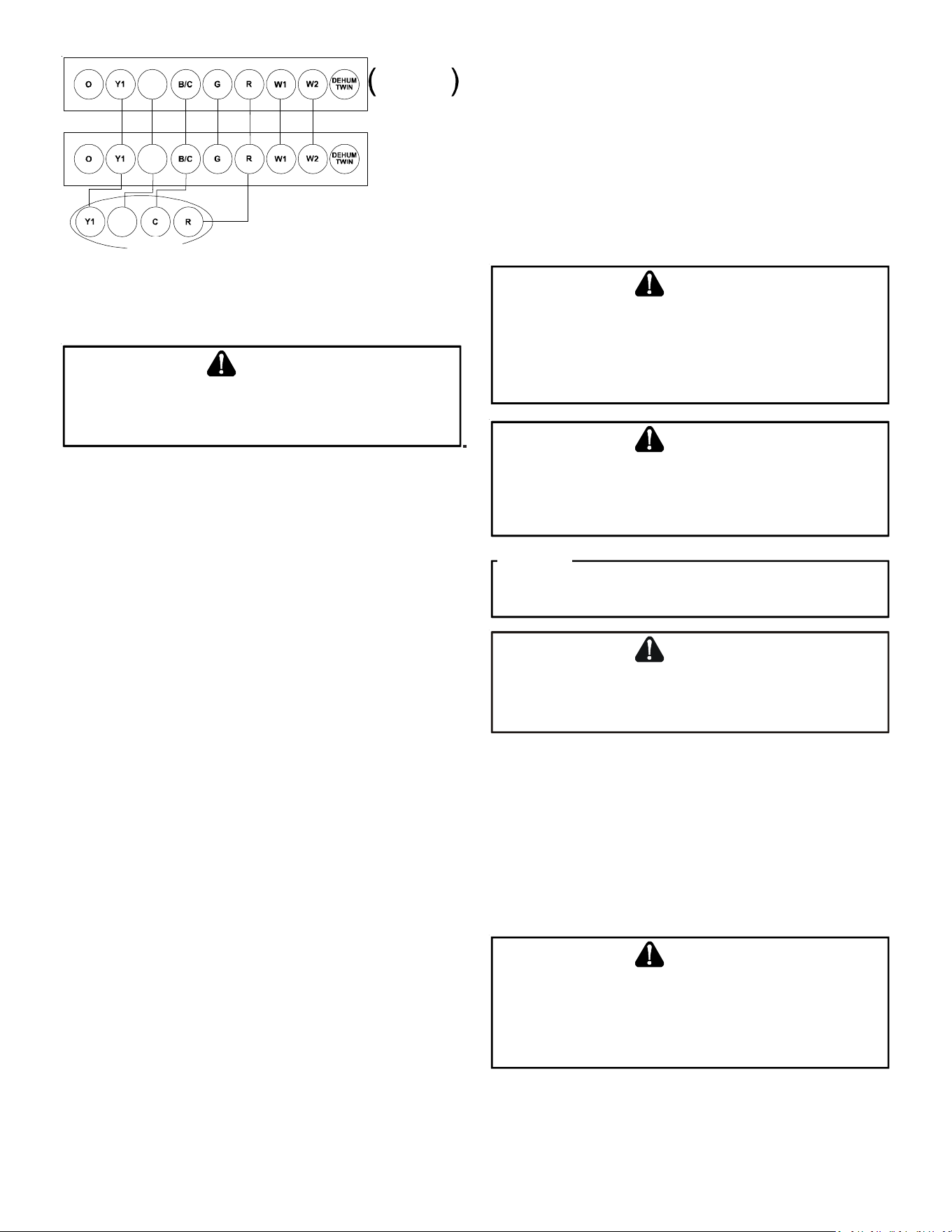
Y2
Y2
OD UNIT
FURNACE OR
A
IR HANDLER
Thermostat
Two-Stage Hea ting
with
Two-Stage Cooling
Y2
Two-Stage Non-Communicating Thermostat
Low Voltage Wire Connection (legacy mode)
S
YSTEM
S
TART
U
P
POSSIBLE REFRIGERANT LEAK!
T
O
AVOID
A
POSSIBLE
REFRIGERANT
LEAK
,
OPEN
THE
SERVICE
VALVES
UNTIL
THE
TOP
OF
THE
STEM
IS
1/8”
FROM
THE
RETAINER
.
CAUTION
NOTE: Power must be supplied to the 18 SEER outdoor units
containing ECM motors before the power is applied to the indoor
unit. Sending a low voltage signal without high voltage power
present at the outdoor unit can cause malfunction of the control
module on the ECM motor.
Adequate refrigerant charge for the matching HSVTC evaporator
coil and 15 feet of lineset is supplied with the condensing unit. If
using evaporator coils other than HSVTC coil it maybe necessary
to add or remove refrigerant to attain proper charge. If line set
exceeds 15 feet in length, refrigerant should be added at .6 ounces
per foot of liquid line.
NOTE: Charge should always be checked using superheat
when using a piston and subcooling when using TXV equipped
indoor coil to verify proper charge.
Open the suction service valve first! If the liquid service valve is
opened first, oil from the compressor may be drawn into the indoor
coil TXV, restricting refrigerant flow and affecting operation of
the system.
When opening valves with retainers, open each valve only until
the top of the stem is 1/8” from the retainer. To avoid loss of
refrigerant, DO NOT apply pressure to the retainer. When opening
valves without a retainer remove service valve cap and insert a
hex wrench into the valve stem and back out the stem by turning
the hex wrench counterclockwise. Open the valve until it contacts
the rolled lip of the valve body.
NOTE: These are not back-seating valves. It is not necessary to
force the stem tightly against the rolled lip.
After the refrigerant charge has bled into the system, open the
liquid service valve. The service valve cap is the secondary seal
for the valves and must be properly tightened to prevent leaks.
Make sure cap is clean and apply refrigerant oil to threads and
sealing surface on inside of cap. Tighten cap finger-tight and then
tighten additional 1/6 of a turn (1 wrench flat) to properly seat the
sealing surfaces.
Do not introduce liquid refrigerant from the cylinder into the
crankcase of the compressor as this may damage the compressor.
1. Break vacuum by fully opening liquid and suction base
valves.
2. Set thermostat to call for cooling. Check indoor and
outdoor fan operation and allow system to stabilize for 10
minutes for fixed orifices and 20 minutes for expansion
valves.
C
HARGE
V
ERIFICATION
REFRIGERANT UNDER PRESSURE!
• D
O
NOT
OVERCHARGE
SYSTEM
WITH
REFRIGERANT
.
• D
O
NOT
OPERATE
UNIT
IN
A
VACUUM
OR
AT
NEGATIVE
PRESSURE
.
F
AILURE
TO
FOLLOW
PROPER
PROCEDURES
MAY
CAUSE
PROPERTY
DAMAGE
,
PERSONAL
INJURY
OR
DEATH
.
WARNING
U
SE
REFRIGERANT
CERTIFIED
TO
AHRI
STANDARDS
. U
SED
REFRIGERANT
MAY
CAUSE
COMPRESSOR
DAMAGE
,
AND
THE
WARRANTY
. M
OST
PORTABLE
MACHINES
CANNOT
CLEAN
USED
REFRIGERANT
TO
MEET
AHRI
STANDARDS
.
IS
NOT
COVERED
UNDER
CAUTION
V
IOLATION
OF
EPA
REGULATIONS
MAY
RESULT
IN
FINES
OR
OTHER
PENALTIES
.
NOTICE
DAMAGE
TO
THE
UNIT
CAUSED
BY
OPERATING
THE
COMPRESSOR
WITH
THE
SUCTION
VALVE
CLOSED
IS
NOT
COVERED
UNDER
THE
WARRANTY
AND
MAY
CAUSE
SERIOUS
COMPRESSOR
DAMAGE
.
CAUTION
F
INAL
C
HARGE
A
DJUSTMENT
The outdoor temperature must be 60°F or higher. Set the room
thermostat to COOL, fan switch to AUTO, and set the temperature
control well below room temperature.
After system has stabilized per startup instructions, check
subcooling and superheat as detailed in the following section.
T
O
PREVENT
PERSONAL
INJURY
,
CAREFULLY
CONNECT
AND
DISCONNECT
MANIFOLD
GAUGE
HOSES
. E
SCAPING
LIQUID
REFRIGERANT
CAN
CAUSE
BURNS
. D
O
NOT
VENT
REFRIGERANT
INTO
THE
ATMOSPHERE
. R
ECOVER
ALL
REFRIGERANT
DURING
SYSTEM
REPAIR
AND
BEFORE
FINAL
UNIT
DISPOSAL
.
CAUTION

7
E
XPANSION
V
ALVE
S
YSTEM
NOTE: Units matched with indoor coils equipped with a non-
adjustable TXV should be charged by Subcooling only.
SUBCOOLING FORMULA = SATURATED LIQUID LINE TEMPERATURE –
LIQUID LINE TEMPERATURE
Run the outdoor unit in low stage cooling mode for 10 minutes
until refrigerant pressures stabilize. Use the following guidelines
and methods to check unit operation and ensure that the
refrigerant charge is within limits.
Note: Charge the unit on low stage.
1. Purge the gauge lines and connect the service gauge
manifold to the base valve service ports.
2. Clamp a pipe clamp thermometer on the liquid line near
the liquid line service valve.
a. Ensure the thermometer makes adequate contact to
obtain the best possible readings.
b. The temperature read with the thermometer should be
lower than the saturated condensing temperature.
3. The difference between the measured saturated condensing
temperature and the liquid line temperature is the liquid
Subcooling value.
4. TXV-based systems should have a Subcooling value of 6°F
+/- 1°F.
5. Add refrigerant to increase Subcooling and remove
refrigerant to decrease Subcooling.
NOTE: Units matched with indoor coils equipped with a TXV should
be charged by Subcooling only. Superheat can also be utilized to
best verify charge levels with an adjustable TXV and make
adjustments when needed in unique applications due to
refrigerant line length, differences in height between the indoor
and outdoor unit and refrigerant tubing sizes. These adjustments
should only be performed by qualified service personnel.
ADVANCED A DJUSTMENT R ECOMMENDATIONS
SUPERHEAT FORMULA = SUCTION LINE TEMPERATURE - SATURATED
SUCTION TEMPERATURE
1. Clamp a pipe clamp thermometer near the suction line
service valve at the outdoor unit.
a. Ensure the thermometer makes adequate contact for
the best possible readings.
b. The temperature read with the thermometer should be
higher than the saturated suction temperature.
2. The difference between the measured saturated suction
temperature and the suction line temperature is the
Superheat value.
3. TXV-based systems should have a Superheat value of 8°F +/
- 1°F.
4. Adjust Superheat by turning the TXV valve stem clockwise
to increase and counterclockwise to decrease.
a. If Subcooling and Superheat are low, adjust the TXV
to 8°F +/- 1°F, and then check Subcooling.
b. If Subcooling is low and Superheat is high, add
charge to raise Subcooling to 6°F +/- 1°F then check
Superheat.
c. If Subcooling and Superheat are high, adjust the TXV
valve to 8°F +/- 1°F Superheat, then check the
Subcooling value.
d. If Subcooling is high and Superheat is low, adjust the
TXV valve to 8°F +/- 1°F Superheat and remove charge
to lower the Subcooling to 6°F +/- 1°F.
NOTE: DO NOT adjust the charge based exclusively on suction
pressure unless for general charging in the case of a gross
undercharge.
NOTE: Check the Schrader ports for leaks and tighten valve cores if
necessary. Install caps finger-tight.
ADDITIONAL NOTES:
1. There are (3) 7-segment LED displays on the PCB. See the
Troubleshooting Tables at the end of this manual for
definitions of the LED status.
2. When system is at Standby mode, press “TEST” push button
to turn on both compressor and outdoor fan for five (5)
seconds.
3. Press “RECALL” push-button to retrieve the six most recent
faults. The control must be in Standby Mode (no thermostat
inputs) to use the feature. Depress the push-button for
approximately two seconds and less than five seconds.
The (3) 7-segment LED displays will then display the six
most recent faults beginning with the most recent fault
and decrementing to the least recent fault. The faults may
be cleared by depressing the button for greater than five
seconds. Consecutively repeated faults are displayed a
maximum of three times. Refer to the fault code definitions
at the end of this manual for more details.
4. “ TERM” dipswitch is used for communications bus
configuration. Leave the settings to the factory default
position.
5. “LEARN” push button is used to reset the communications
between the equipment. Used only for troubleshooting
purposes.
C
OMFORT
B
RIDGE
™ S
YSTEM
OVERVIEW
The ComfortBridge based heating and air conditioning system
uses an indoor unit and outdoor unit digitally communicating
with one another via a two-way communications path.
In a traditional system, the thermostat sends commands to the
indoor and outdoor units via analog 24 VAC signals. It is a one-
way communication path in that the indoor and outdoor units
typically do not return information to the thermostat.
The indoor unit and the outdoor unit of a ComfortBridge system
“communicate” digitally with one another creating a two-way
communications path. The thermostat still sends commands to
the indoor unit, however, the 24 VAC indoor and outdoor unit may
also request and recieve information from one another to optimize
system performance.
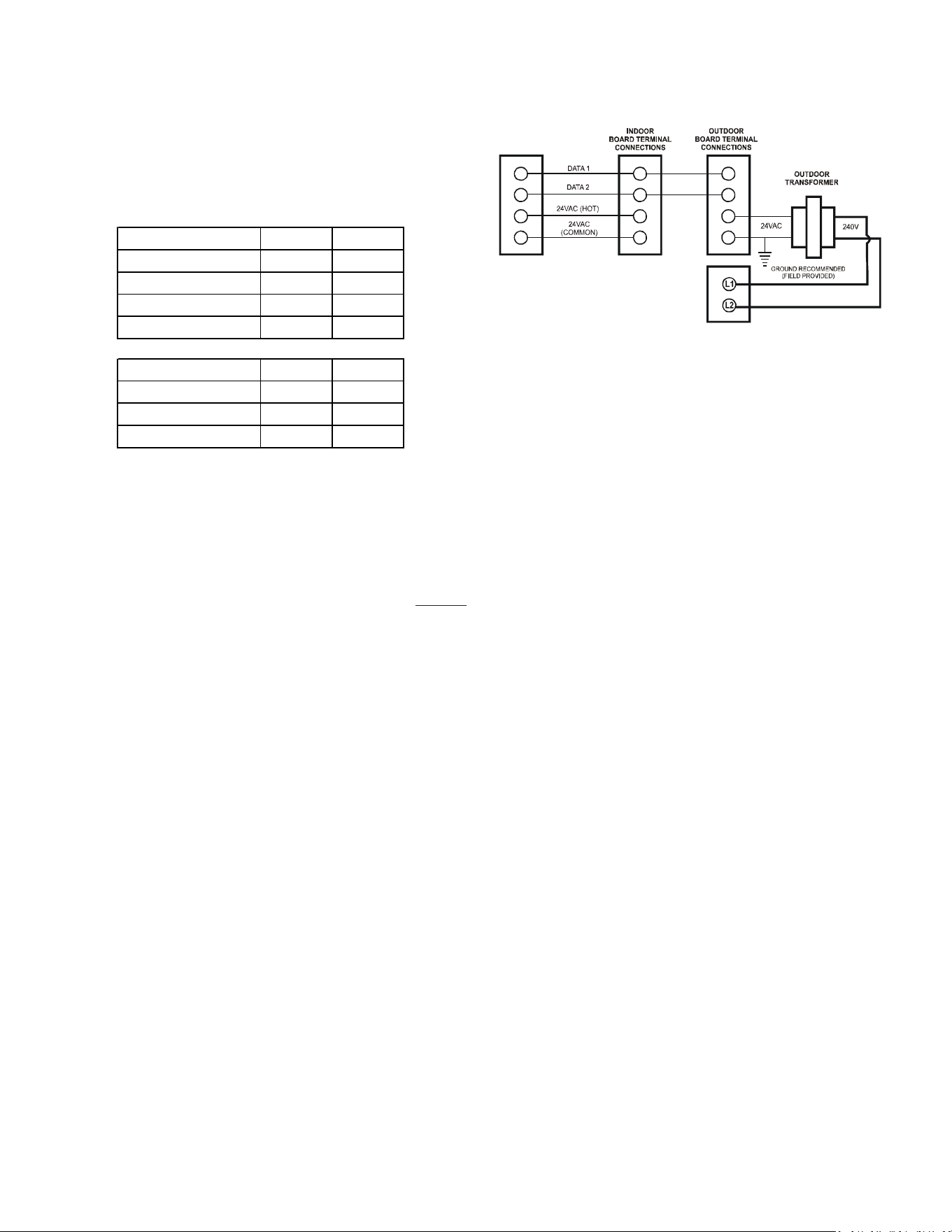
8
Two-way digital communications is accomplished using only two
wires. The thermostat and subsystem controls are powered with
24 VAC Thus, a maximum of 4 wires between the equipment and
thermostat is all that is required to operate the system.
AIRFLOW C ONSIDERATIONS
Airflow demands are managed differently in a fully communicating
system than they are in a legacy wired system. The system
operating mode (as determined by the thermostat) determines
which unit calculates the system airflow demand. If the indoor
unit is responsible for determining the airflow demand, it
calculates the demand and sends it to the ECM motor. If the outdoor
unit or thermostat is responsible for determining the demand, it
calculates the demand and transmits the demand along with a
fan request to the indoor unit. The indoor unit then sends the
demand to the ECM motor. The following table lists the various
ComfortBridge compatible systems, the operating mode, and
airflow demand source.
System
System
Ope rating M ode
Airflow Dem and
Source
Cooling Air Conditioner
Heating Air Handler
Continuous Fan Thermostat
Cooling Air Conditioner
Heating Furnace
Continuous Fan Thermostat
A ir Conditioner +
Air Handler
A ir Conditioner +
Furnace
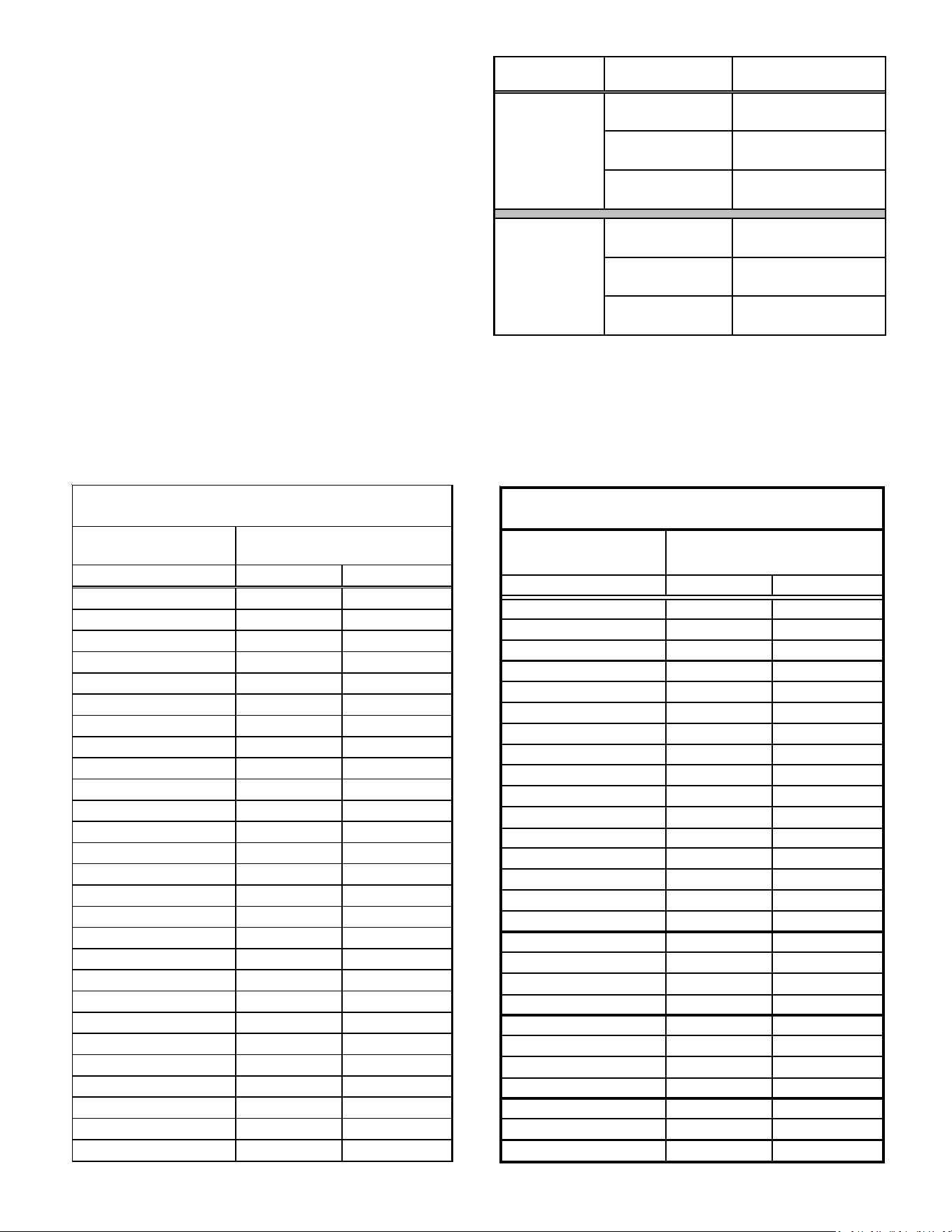
LIQUID PRESSURE
PSIG R-22 R-410A
200 101 70
210 105 73
220 108 76
225 110 78
235 113 80
245 116 83
255 119 85
265 121 88
275 124 90
285 127 92
295 130 95
305 133 97
325 137 101
355 144 108
375 148 112
405 155 118
415 157 119
425 n/a 121
435 n/a 123
445 n/a 125
475 n/a 130
500 n/a 134
525 n/a 138
550 n/a 142
575 n/a 145
600 n/a 149
625 n/a 152
SATURATED LIQUID PRESSU RE
TEMPERATURE CHART
SATURATED LIQUID
TEMPERATURE ºF
SUCTION
PRESSURE
PSIG R-22 R-410A
50 26 1
52 28 3
54 29 4
56 31 6
58 32 7
60 34 8
62 35 10
64 37 11
66 38 13
68 40 14
70 41 15
72 42 16
74 44 17
76 45 19
78 46 20
80 48 21
85 50 24
90 53 26
95 56 29
100 59 31
110 64 36
120 69 41
130 73 45
140 78 49
150 83 53
160 86 56
170 90 60
SATURATED SUCTION PRESSURE
TEMPERATURE CHART
SATURATED SUCTION
TEMPERATURE ºF
9
For example, assume the system is an air conditioner matched
with an air handler. With a call for low stage cooling, the air
conditioner will calculate the system’s low stage cooling airflow
demand. The air conditioner will then send a fan request along
with the low stage cooling airflow demand to the air handler.
Once received, the air handler will send the low stage cooling
airflow demand to the ECM motor. The ECM motor then delivers
the low stage cooling airflow. The following table lists the nominal
high and low stage airflow for the ComfortBridge air conditioners.
High Low
800 600
1200 800
1550 1100
1800 1400
800 600
1250 850
1550 1070
1750 1210
Model
*SXC160241
*SXC160361
*SXC160481
*SXC160601
*SXC180241
*SXC180361
*SXC180481
*SXC180601
CONTROL W IRING
NOTE: Refer to Electrical Connections - High Voltage Connections
for 208/230 volt line connections to the air conditioner.
NOTE: A removable plug connector is provided with the control to
make thermostat wire connections. This plug may be removed,
wire connections made to the plug, and replaced. It is strongly
recommended that multiple wires into a single terminal be twisted
together prior to inserting into the plug connector. Failure to do
so may result in intermittent operation.
Typical 18 AWG thermostat wire may be used to wire the system
components. However, communications reliability may be
improved by using a high quality, shielded, twisted pair cable for
the data transmission lines. In either case, 150 feet is the
recommended length of wire between indoor unit and outdoor
unit, or between indoor unit and thermostat.
Only data lines 1 and 2 are required between the indoor and
outdoor units. The included 40VA, 208/230 VAC to 24 VAC
transformer must be installed in the outdoor unit to provide 24
VAC power to the outdoor unit’s electronic control. See kit
instructions for mounting and wiring instructions.
NOTE: Use of a 40VA tramsformer is always recommended with
multi-stage equipment. Failure to use the transformer in the
outdoor unit could result in over loading of the indoor transformer.
1
2
R
C
1
2
R
C
1
2
R
C
CTK04
COMFORTBRIDGE S YSTEM A DVANCED F EATURES
The ComfortBridge system permits access to additional system
information, advanced set-up features, and advanced diagnostic/
troubleshooting features via the control board push buttons or
the CoolCloud mobile app.
FAULT CODE HISTORY
Accessing the air conditioner/heat pump’s diagnostics menu
provides ready access to the last six faults detected by the air
conditioner/heat pump. Faults are stored most recent to least
recent. Any consecutively repeated fault is stored a maximum of
three times. Example: The power supply to the air conditioner/
heat pump is continuously below 187 VAC. The control will only
store this fault the first three consecutive times the fault occurs.
NOTE: It is highly recommended that the fault history be cleared
after performing maintenance or servicing the heat pump.
CONFIGURATION I NFO
Model Number, Serial Number and Software Version are displayed
within this menu. A model number check will help determine if
the equipment shared data is correct for the unit. If the model
number is not correct or no serial number is visible, even though
very rare, memory cards are available to load the proper data.
SENSOR DATA
The outdoor ambient temperature and coil temperature are
displayed in the Sensor Data Menu. This information can be used
for troubleshooting purposes.
10
DEVICE S ETTINGS
This menu allows for the adjustment of several cooling
performance variables. Cool Airflow Trim (range from -10% to
10% in 2% increments), Cool Airflow Profiles, Cool Fan ON Delay,
Cool Fan OFF Delay and Dehumidification Select (enable or disable
dehumidification) can be adjusted in this menu. See the following
images showing the four cooling airflow profiles.
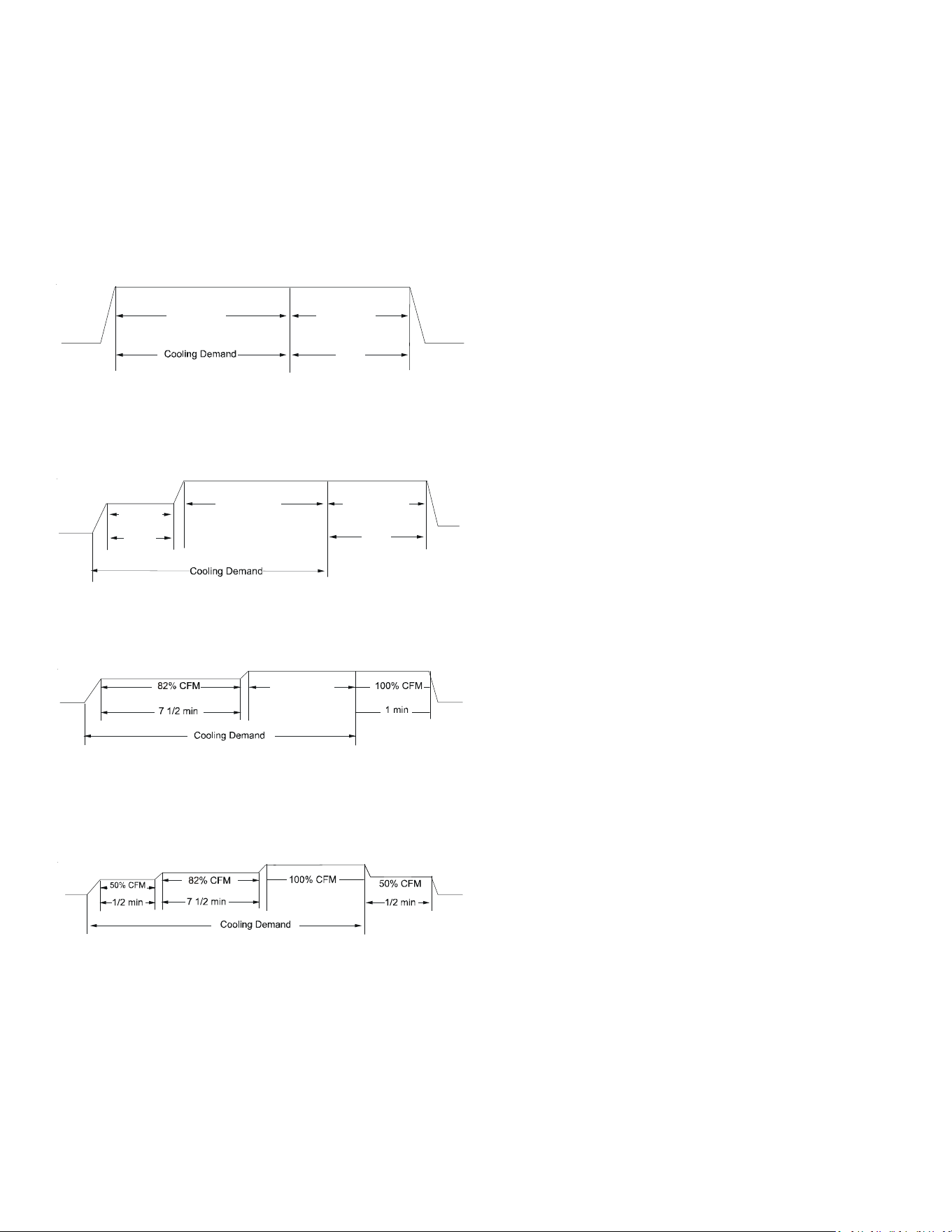
• Profile A (default) provides only an OFF delay of one (1) minute
at 100% of the cooling demand airflow.
OFF
100% CFM 100% CFM
1 min
OFF
• Profile B ramps up to full cooling demand airflow by first
stepping up to 50% of the full demand for 30 seconds. The
motor then ramps to 100% of the required airflow. A one (1)
minute OFF delay at 100% of the cooling airflow.
50% CFM
1/2 min
100% CFM
100% CFM
1 min
OFF
OFF
• Profile C ramps up to 82% of the full cooling demand airflow
and operates there for approximately 7 1/2 minutes. The motor
then steps up to the full demand airflow. Profile C also has a
one (1) minute 100% OFF delay.
100% CFM
OFF
OFF
• Profile D ramps up to 50% of the demand for 1/2 minute, then
ramps to 82% of the full cooling demand airflow and operates
there for approximately 7 1/2 minutes. The motor then steps up
to the full demand airflow. Profile D has a 1/2 minute at 50%
airflow OFF delay.
OFF
OFF
Airflow Tables
DEVICE STATUS
The current system operational mode and requested indoor CFM
is reported in this menu. This information can be used for
troubleshooting purposes.
SYSTEM T ROUBLESHOOTING
NOTE:Refer to the instructions accompanying the ComfortBridge
compatible indoor air handler/furnace/modular blower unit for
troubleshooting information.
Refer to the Troubleshooting Chart at the end of this manual for a
listing of possible air conditioner and heat pump error codes,
possible causes and corrective actions.
11
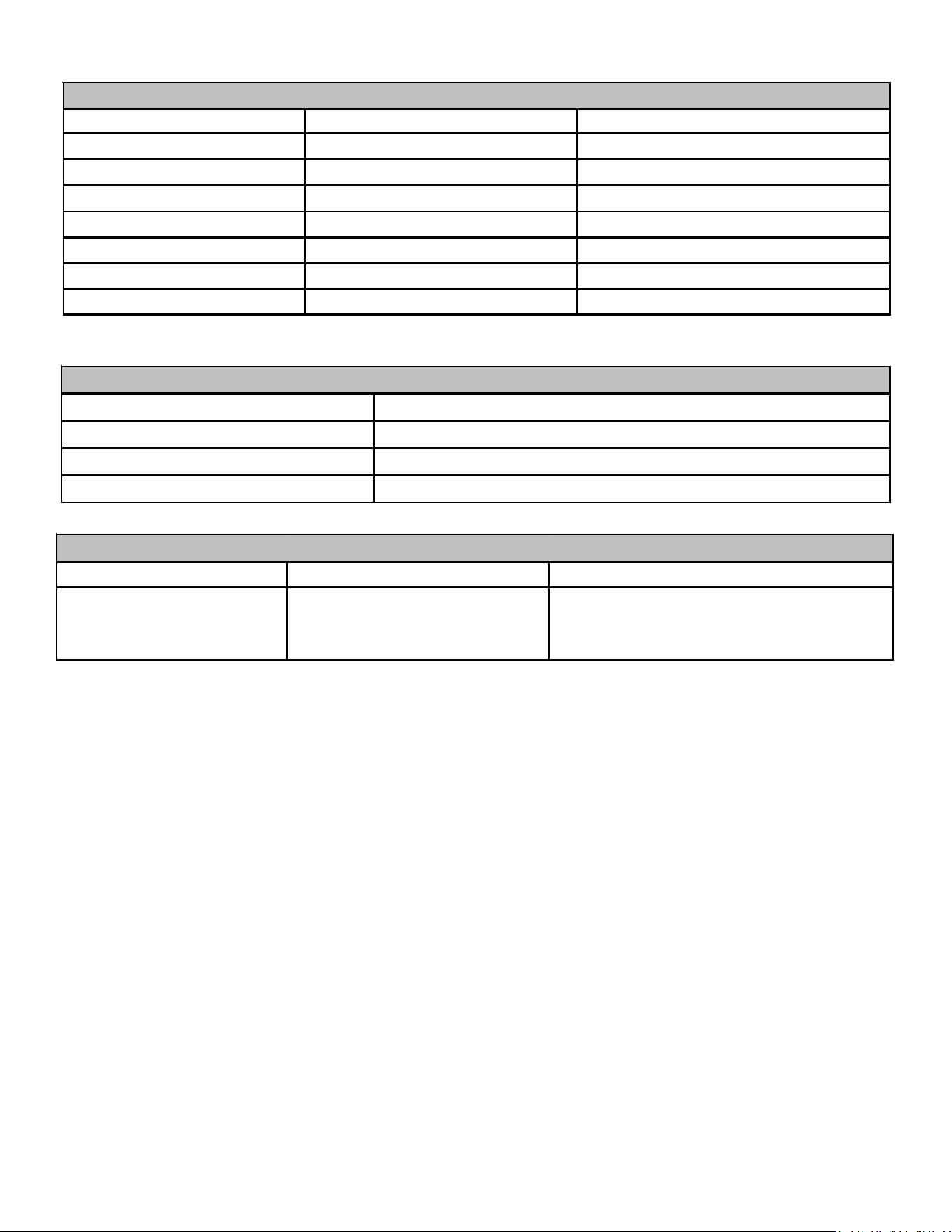
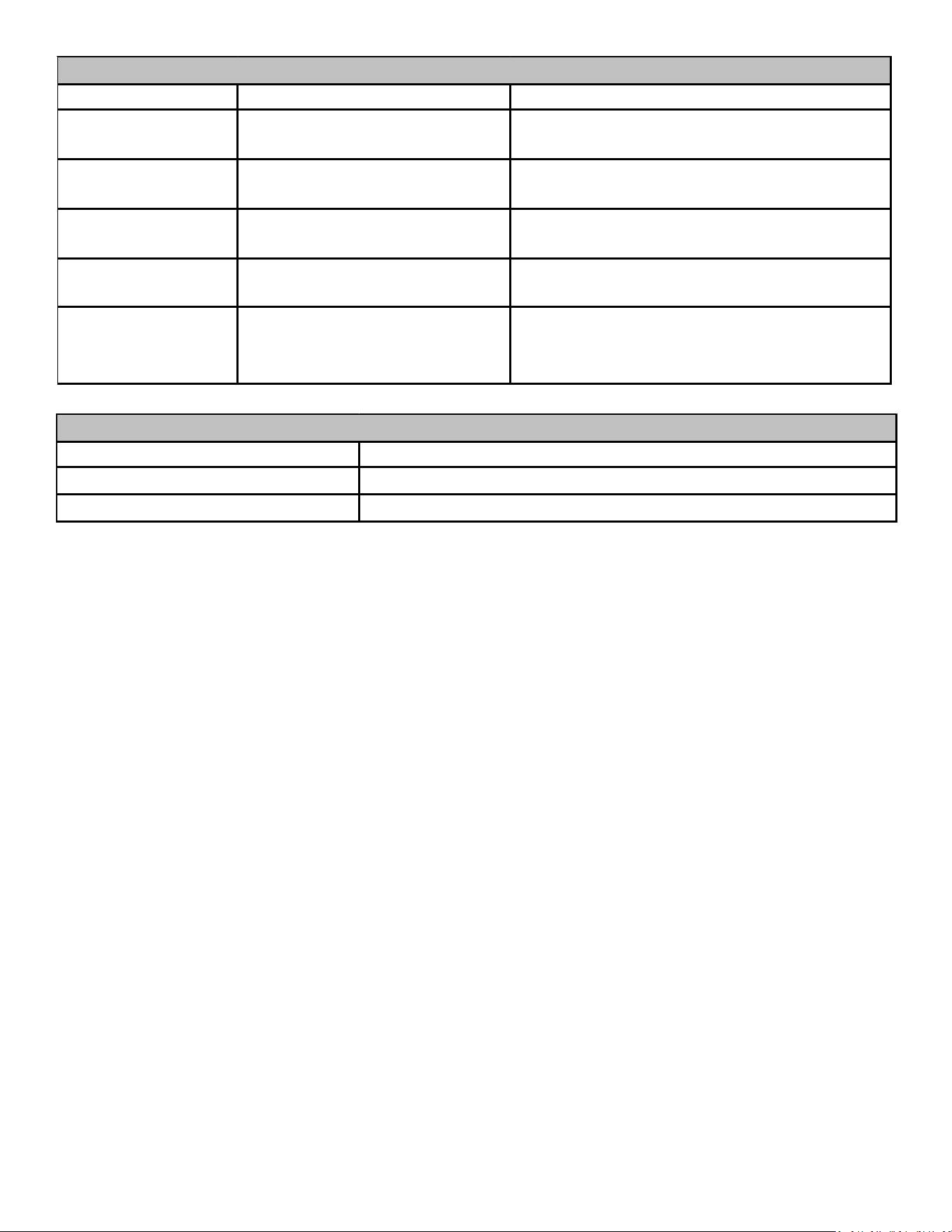
AIR CONDITIONER/HEAT PUMP ADVANCED FEATURES MENU
Submenu Item Indication (for Display Only; not User Modifiable)
Model Number (MOD NUM) Displays the air conditioner or heat pump model number
Serial Number (SER NUM) Displays the air conditioner or heat pump serial number (Optional)
Software (SOFTWARE) Displays the application software revision
IDENTIFICATION
Submenu Item Indication/User Modifiable Options Comments
Fault 1 (FAULT #1) Most recent AC/HP fault For display only
Fault 2 (FAULT #2) Next most recent AC/HP fault For display only
Fault 3 (FAULT #3) Next most recent AC/HP fault For display only
Fault 4 (FAULT #4) Next most recent AC/HP fault For display only
Fault 5 (FAULT #5) Next most recent AC/HP fault For display only
Fault 6 (FAULT #6) Least recent AC/HP fault For display only
Clear Fault History (CLEAR) NO or YES Selecting “YES” clears the fault history
NOTE: Consecutively repeated faults are shown a maximum of 3 times
DIAGNOSTICS
Submenu Item User Modifiable Options Comments
Outdoor Air Temperature
(AIR TMP)
Displays the outdoor air
temperature
Sensor may or may not be available on an
air conditioner. Check air conditioner
instructions for details.
SENSORS
12
Submenu Item User Modifiable Options Comments
Cool Airflow Trim
(CL TRM)
-10% to +10% in 2% increments,
default is 0%
Selects the airflow trim amount; applies to air
conditioner only.
Cool Airflow Profile
(CL PRFL)
A, B, C, or D, default is A Selects the airflow profile; applies to air conditioner
only.
Cool ON Delay
(CL ON)
5, 10, 20, or 30 seconds, default is 5
seconds
Selects the indoor blower ON delay; applies to air
conditioner only.
Cool OFF Delay
(CL OFF)
30, 60, 90, or 120 seconds, default
is 30 seconds
Selects the indoor blower OFF delay; applies to air
conditioner only.
Dehumidification Select
(DEHUM)
ON or OFF (default is OFF) Selecting "OFF" disables dehumidification; selecting
"ON" enables dehumidification; applies to air
conditioner only.
COOL SET-UP
Submenu Item Indication (for Display Only; not User Modifiable)
Mode (MODE) Displays the current air conditioner operating mode
CFM (CFM Displays the airflow for the current operating mode
STATUS
SYSTEM T ROUBLESHOOTING
NOTE:Refer to the instructions accompanying the ComfortBridge
compatible indoor air handler/furnace/modular blower unit for
troubleshooting information.
Refer to the Troubleshooting Chart at the end of this manual for a
listing of possible air conditioner and heat pump error codes,
possible causes and corrective actions.
13
UNIT TROUBLESHOOTING INFORMATION
For detailed service information refer to the Remote Condensing Unit Service manual.
Complaint
Unsatisfactory
Cooling
POSSIBLE CAUSE
DOTS IN ANALYSIS
GUIDE INDICATE
"POSSIBLE CAUSE"
SYMPTOM
System will not start
Compressor will not start - fan runs
Compressor and Condenser Fan will not start
Evaporator fan will not start
Condenser fan will not start
Compressor runs - goes off on overload
Compressor cycles on overload
System runs continuously - little cooling
Too cool and then too warm
Not cool enough on warm days
Certain areas to cool others to warm
Compressor is noisy
Low suction pressure
Low head pressure
High suction pressure
High head pressure
Test Method
Remedy
Power Failure
•
Test Voltage
Blown Fuse
•••
Im
p
act Fuse Size & T
yp
e
Loose Connection
• •••
Ins
p
ect Connection - Ti
g
hten
Shorted or Broken Wires
••••••
Test Circuits with Ohmmeter
Open Overload
••
Test Continuity of Overloads
Faulty Thermostat
••• •
Test Continuity of Thermostat and Wiring
Faulty Transformer
••
Check Control Circuit with Voltmete
r
Shorted or Open Capacitor
• •••
Test Ca
p
acito
r
Internal Compressor Overload Open
•
Test Continuity of Overload
Shorted or Grounded Compressor
••
Test Motor Windings
Compressor Stuck
••
Use Test Cord
Faulty Compressor Contactor
••• •
Test Continuit
y
of Coil and Contacts
Faulty Fan Relay
•
Test Continuity of Coil and Contacts
Open Control Circuit Test Control Circuit with Voltmeter
Low Voltage
•••
Test Voltage
Faulty Evaporator Fan Motor
••
Repair or Replace
Shorted or Grounded Fan Motor
•• •
Test Motor Windin
g
s
Improper Cooling Anticipator
•
Check Resistance of Anticipator
Shortage or Refrigerant
•• ••
Test For Leaks, Add Refrigerant
Restricted Liquid Line
•• ••
Replace Restricted Part
Undersized Liquid Line
•• •
Replace Line
Undersized Suction Line
•
Re
p
lace Line
Not Enough Air across Indoor Coil
••••
Speed Blower, Check Duct Static Pressure
Too Much Air across Indoor Coil
•
Reduce Blower Speed
Overcharge of Refrigerant
•• • ••
Recover Part of Charge
Noncondensibles
•• •
Recover Charge, Evacuate, Recharge
Recirculation of Condensing Air
•• •
Remove Obstruction to Air Flow
Infiltration of Outdoor Air
•••
Check Windows, Doors, Vent Fans, Etc.
Improperly Located Thermostat
•
Relocate Thermostat
Air Flow Unbalanced
••
Readjust Air Volume Dampers
System Undersized
••
Refi
g
ure Coolin
g
Load
Broken Internal Parts
•
Re
p
lace Com
p
resso
r
Broken Valves
•
Test Compressor Efficiency
Inefficient Compressor
•••
Test Compressor Efficiency
High Pressure Control Open
•
Reset and Test Control
Unbalanced Power, 3PH
•••
Test Volta
g
e
Wrong Type Expansion Valve
•• •
Re
p
lace Valve
Expansion Valve Restricted
••• • ••
Replace Valve
Oversized Expansion Valve
••
Replace Valve
Undersized Expansion Valve
••• • •
Replace Valve
Expansion Valve Bulb Loose
••
Ti
g
hten Bulb Bracket
Inoperative Expansion Valve
•• •
Check Valve O
p
eration
Loose Hold-down Bolts
•
Tighten Bolts
No Cooling
System
Operating
Pressures
U
NITS
WITH
ROTARY
OR
RECIPROCATING
COMPRESSORS
AND
NON
-
BLEED
TXV’
S
REQUIRE
A
H
ARD
S
TART
K
IT
.
14
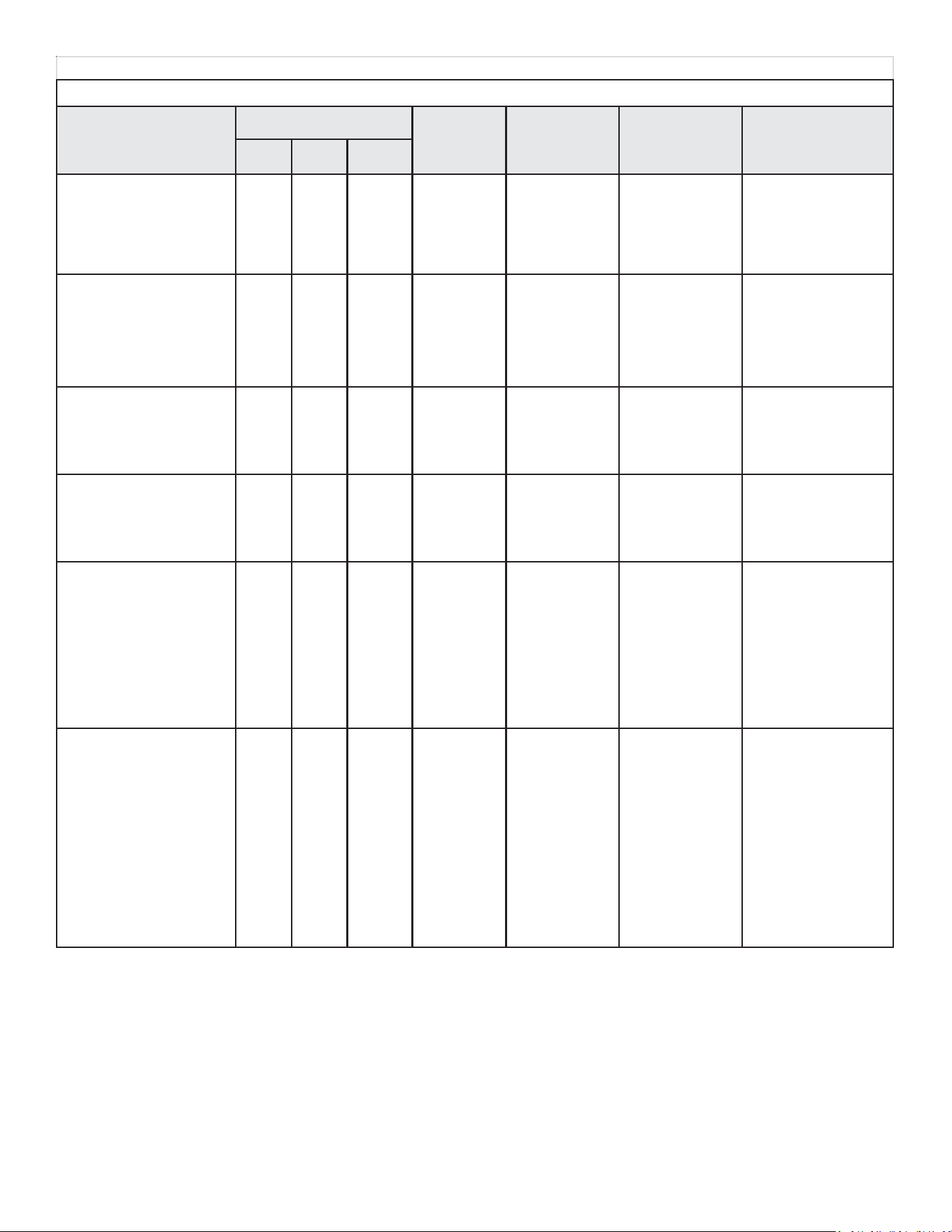
0140M00407-A
* CODE USED ON HEAT PUMP MODELS ONLY
NOTE 1: DS1, DS2 AND DS3 ARE LABELED ON THE CONTROL ABOVE EACH 7
SEGMENT LED DISPLAY
NOTE 2: 7 SEGMENT LED DISPLAY DS3 IS NOT USED
DIAGNOSTIC TABLE
15
TROUBLESHOOTING INFORMATION: UNITARY DIAGNOSTIC CODES
D igit 3 D igit 2
• In te g ra te d c o n tro l module
diagno stic/status LED display
shows the indicated co de.
• C o m fo rtB ridge
™ therm o stat
displays '---' in the tem perature
display area.
BLANK A • Outdoor air
tem p senso r
fault
• Heat pum p fa ils to o perate in
heating m o de
• Integrated co ntrol m o dule
diagno stic/status LED display
shows the indicated co de.
• Co m fo rtB ridge™ thermo stat
displays error message.
BLANK A • Outdoor coil
tem p senso r
fault
• Air co nditioner/heat pum p
fails to operate
• Integrated co ntrol m o dule
diagno stic/status LED display
shows the indicated co de.
BLANK E • Open fuse
• Air co nditioner/heat pum p
fails to operate
• Integrated co ntrol m o dule
diagno stic/status LED display
shows the indicated co de.
BLANK E • Board mis-
o peratio n
• Air co nditioner/heat pum p
fails to operate
• Integrated co ntrol m o dule
diagno stic/status LED display
shows the indicated co de.
• Co m fo rtB ridge™ thermo stat
displays error message.
BLANK b • Circulator
blo wer m o to r is
not running
when it s ho uld
be running.
• Air co nditioner/heat pum p
o perates at reduced
perfo rmance.
• A ir co nditio ner/heat pump
o perating at low stage when
expected to o perate at high
stage.
• Integrated co ntrol m o dule
diagno stic/status LED display
shows the indicated co de.
BLANK b • Airflow is
lo wer than
dem anded
SYSTEM TROUBLESHOOTING
UNITARY DIAGNOSTIC CODES
Symptoms of Abnormal
Operation (Legacy &
ComfortBridge™
Thermostat)
Diagnostic/Status LED
Display C odes
Fault
Description
Possible
Causes
Corrective
Actions
N o tes & C autio ns
Digit 1
2 • Sho rted senso r.
• Open senso r.
• Sens o r
disco nnected.
• Se ns o r o ut o f
range.
• Check sensor
co nnection.
• R eplace
o pen/sho rted
sensor.
• T u rn po we r O F F p rio r t o
repair.
• Replace with co rrect
replacem ent part.
3 • Sho rted senso r.
• Open senso r.
• Sens o r
disco nnected.
• Se ns o r o ut o f
range.
• Check sensor
co nnection.
• R eplace
o pen/sho rted
sensor.
• T u rn po we r O F F p rio r t o
repair.
• Replace with co rrect
replacem ent part.
5 • S ho rt in lo w
vo ltage wiring.
• Lo cate and co rrect
short in low voltage
wiring.
• T u rn po we r O F F p rio r t o
repair.
• Replace fuse with 3-amp
automotive type.
E• Compressor
relay co ntacts
welded.
• R eplace co ntro l. • Turn power OFF prio r to
repair.
• Replace with co rrect
replacem ent part.
0 • Indo o r blower
motor problem.
• Co m m unications
erro r between
indo o r and
outdoor unit.
• Check indoor
blower motor.
• Check indoor
blower motor wiring.
• C heck indo o r unit
control.
• R epair/replace any
faulty wiring.
• R epair/replace
indo o r blo wer m o to r
or control.
• T u rn po we r O F F p rio r t o
repair.
• A pplies o nly to fully
communicating system
using Co m fo rtB ridge™
thermostat.
• Replace with co rrect
replacem ent part.
9 • Indo o r blower
motor problem
• B lo cked filters
• Restrictive/
undersized
ductwork
• Indo o r/o utdo o r
unit mis-match.
• Check indoor
blower motor
• Check fliters;
clean/replace as
needed
• Check ductwork;
resize as needed
• Verify indoo r and
outdoor units are
properly m atched.
• T u rn po we r O F F p rio r t o
repair.
• A pplies o nly to fully
communicating system
using Co m fo rtB ridge™
thermostat.
• Replace with co rrect
replacem ent part. See
specificatio n sheet(s) fo r
airflo w requirements and
maximum external static
pressure.
• See specificatio n sheets
fo r appro ved system
matches.
16
TROUBLESHOOTING INFORMATION: UNITARY DIAGNOSTIC CODES
Digit 3 Digit 2
• A ir co nditio ner/heat pum p
fails to o perate.
• Integrated control module
diagnostic/status LED display
sho ws the indicated co de.
• C o m fo rtB ridge™ thermo stat
displays error m essage.
BLANK d
• A ir co nditio ner/heat pum p
fails to o perate.
• Integrated control module
diagnostic/status LED display
sho ws the indicated co de.
• C o m fo rtB ridge™ thermo stat
displays error m essage.
BLANK d
• A ir co nditio ner/heat pum p
fails to o perate.
• A ir co nditio ner/heat pum p
o perating at a reduced
perfo rm ance.
• A ir co nditio ner/heat pum p
o perating at low stage when
expected to o perate at high
stage.
• Integrated control module
diagnostic/status LED display
sho ws the indicated co de.
• C o m fo rtB ridge™ thermo stat
displays error m essage.
BLANK d
UNITA RY DIA GNOST IC CODES
Sympto m s o f A bnormal
Operation (Legacy &
ComfortBridge™
Thermostat)
D iagnostic/Status LED
Display Co des
Fault
Description
P ossible
Causes
Corrective
Actions
Notes & Cautions
Digit 1
0 • D ata no t yet o n
Network
• A ir co nditio ner/
heat pum p is wired
as part o f a
co mm unicating
system and
integrated co ntro l
m o dule do es no t
co ntain any shared
data.
• Verify system type
(co m m unicating o r
legacy)
• P o pulate shared data
using m emo ry card
• Wire s ys tem as
legacy system
• T u rn p o wer O F F prio r t o
repair.
• Use memory card for your
specific m o del.
• Insert memory card
B EFORE turning po wer
ON . M em o ry card m ay be
remo ved after data is
lo aded. Turn po wer OFF
before remo ving m em o ry
card.
• Erro r c o de will be cleared
o nce data is loaded.
A pplies o nly to fully
co m municating system
using Co m fo rtB ridge™
thermostat.
1 • Invalid D ata o n
Network
• A ir co nditio ner/
heat pum p is wired
as part o f a
co mm unicating
system and
integrated co ntro l
m o dule co ntains
inv alid shared data
o r network data is
inv alid fo r the
integrated co ntro l
m o dule.
• Verify system type
(co m m unicating o r
legacy)
• P o pulate shared data
using m emo ry card
• Wire s ys tem as
legacy system
• T u rn p o wer O F F prio r t o
repair.
• Use memory card for your
specific m o del.
• Insert memory card
B EFORE turning po wer
ON . M em o ry card m ay be
remo ved after data is
lo aded. Turn po wer OFF
before remo ving m em o ry
card.
• Erro r c o de will be cleared
o nce data is loaded.
A pplies o nly to fully
co m municating system
using Co m fo rtB ridge™
thermostat.
2• System Mis-
match
• A ir co nditio ner/
heat pum p is wired
as part o f a
co mm unicating
system and
outdoor unit
requires airflo w
greater than indo o r
unit's airflo w
capability.
• Shared data is
inc o m patible with
the system o r
missing
param eters .
• Verify system type
(co m m unicating o r
legacy)
• Verify shared data is
co rrect fo r yo ur
s p e c if ic m o de l; re -
po pulate data if
required.
• Wire s ys tem as
legacy system
• T u rn p o wer O F F prio r t o
repair.
• Use memory card for your
specific m o del.
• Insert memory card
B EFORE turning po wer
ON . M em o ry card m ay be
remo ved after data is
lo aded. Turn po wer OFF
before remo ving m em o ry
card.
• Erro r c o de will be cleared
o nce data is loaded.
A pplies o nly to fully
co m municating system
using Co m fo rtB ridge™
thermostat.
17
TROUBLESHOOTING INFORMATION: UNI-
Digit 3 Digit 2
• A ir co nditio ner/heat pump
fails to operate.
• Integrated control module
diagno stic/ status LED display
sho ws the indicated co de.
• Co mfortB ridge™ thermo stat
displays erro r message.
BLANK d
• A ir co nditio ner/heat pump
fails to operate.
• Integrated control module
diagno stic/ status LED display
sho ws the indicated co de.
• Co mfortB ridge™ thermo stat
displays erro r message.
BLANK d
• Very long run time.
• Four consecutive
compressor protector trips
with average run time between
trips greater than 3 ho urs.
• Co mpresso r o pearting at
high speed and outdo o r fan
o perating at lo w speed
• Integrated control module
diagno stic/status LED display
sho ws the indicated co de.
BLANK 0
• Co mpresso r and o utdo o r fan
are off.
• Thermostat demand is
present.
• Integrated control module
diagno stic/status LED display
sho ws the indicated co de.
BLANK 0
UNIT ARY DIAGNOST IC CODES
Symptoms of Abnormal
Operation (Legacy &
ComfortBridge™
Thermostat
)
Diagnostic/Status LED
Display Codes
Fault
Description
Possible
Causes
Corrective
Actions
Notes & Cautions
Digit 1
3 • Configuratio n
Mis-match
• Shared data sent
to integrated
co ntro l mo dule
do es not match
hardware
co nfiguratio n.
• Verify system type
(communicating o r
legacy).
• Verify shared data is
correct fo r yo ur
spec ific m o del; re-
populate data if
required.
• Wire system as
legacy system.
• Turn po wer OF F prio r to
repair
• Use memory card for your
specific mo del.
• Insert memory card
BEFORE turning power
ON. M emo ry card may be
remo ved after data is
loaded. Turn po wer OFF
befo re remo ving memo ry
card.
• Erro r code will be cleared
once data is lo aded.
Applies o nly to fully
communicating system
using Co mfo rtB ridge™
thermostat.
4 • Invalid M emo ry
Card Data
• Shared data on
memo ry card has
been rejected.
• Verify system type
(communicating o r
legacy).
• Verify shared data is
correct fo r yo ur
spec ific m o del; re-
populate data if
required.
• Wire system as
legacy system.
• Turn po wer OF F prio r to
repair
• Use memory card for your
specific mo del.
• Insert memory card
BEFORE turning power
ON. M emo ry card may be
remo ved after data is
loaded. Turn po wer OFF
befo re remo ving memo ry
card.
• Erro r code will be cleared
once data is lo aded.
1 • Lo w Side Fault • Lo w refrigerant
charge.
• Restriction in
liquid line.
• Indoo r blo wer
motor failure.
• Indoo r
thermo stat set
extremely low.
• Verify refrigerant
charge; adjust as
needed.
• Check for restricted
liquid line; repair/
replace as needed.
• Check indoo r blo wer
moto r; repair/ replace
as needed.
• Check indoo r
thermo stat setting.
• Turn po wer OF F prio r to
repair
• Fault will clear after 30
consecutive normal cycles.
• Fault may be cleared by
cycling 24VAC to control.
• Replace with co rrect
replacement part(s).
1 • Lo w P ressure
Cut Out Trip
• Lo w refrigerant
charge.
• Restriction in
liquid line.
• Indoo r blo wer
motor failure.
• Indoo r
thermo stat set
extremely low.
• Verify refrigerant
charge; adjust as
needed.
• Check for restricted
liquid line; repair/
replace as needed.
• Check indoo r blo wer
moto r; repair/ replace
as needed.
• Check low pressure
switch; repair/replace
as needed.
• Check indoo r
thermo stat setting.
• Turn po wer OF F prio r to
repair.
• Replace with co rrect
replacement part(s).
18
TROUBLESHOOTING INFORMATION: UNI-
Digit 3 Digit 2
• Compressor and o utdoo r fan
are off.
• Lo w pressure switch trip 3
times within same thermo stat
demand.
• Themostat demand is
present.
• Integrated co ntrol module
diagnostic/status LED display
shows the indicated code.
• Comfo rtBridge™ thermostat
displays error message.
BLANK L
• Four consecutive
co mpresso r pro tecto r trips
with average run time between
trips greater than 1 minute and
less than 15 minutes.
• Low pressure and high
pressure switches are closed.
• Integrated co ntrol module
diagnostic/status LED display
shows the indicated code.
BLANK 0
• Compressor and o utdoo r fan
are off.
• Thermostat demand is
present.
• Integrated co ntrol module
diagnostic/status LED display
shows the indicated code.
BLANK 0
• Compressor and o utdoo r fan
are off.
• Lo w pressure switch trip 3
times within same thermo stat
demand.
• Themostat demand is
present.
• Integrated co ntrol module
diagnostic/status LED display
shows the indicated code.
• Comfo rtBridge™ thermostat
displays error message.
BLANK L
UNITARY DIAGNOSTIC CODES
Symptoms of Abnormal
Operation (Legacy &
ComfortBridge™
Thermostat)
Diagnostic/Status LED
Display Codes
Fault
Description
Possible
Causes
Corrective
Actions
Notes & Cautions
Digit 1
1 • Lo w P ressure
Cut Out
Locko ut
(3 Trips)
• Lo w refrigerant
charge.
• Restriction in
liquid line.
• Indo o r blo wer
motor failure.
• Indoor
thermostat set
extremely low.
• Verify refrigerant
charge; adjust as
needed
• Check fo r
restricted liquid line;
repair/ replace as
needed.
• Check indoor
blower motor; repair/
replace as needed.
• Check low pressure
switch; repair/
replace as needed.
• Check indoor
thermo stat setting
• Turn po wer OFF prio r to
repair
• M ust clear fault by cycling
24VAC to control.
• Replace with co rrect
replacement part(s).
2 • High Side
Fault
• Blo cked
condenser coil.
• Outdoor fan not
running.
• Check and clean
condenser coil.
• Check o utdoor fan
moto r; repair/
replace as needed.
• Check o utdoor fan
mo to r wiring; repair/
replace as needed.
• Check o utdoor fan
motor capacitor;
replace as needed.
• Turn po wer OFF prio r to
repair
• Fault will clear after 4
co nsecutive normal cycles.
• Fault may be cleared by
cycling 24VA C to co ntro l.
• Replace with co rrect
replacement part(s).
2 • High
Pressure Cut
Out Trip
• Blo cked
condenser coil.
• Outdoor fan not
running.
• Check and clean
condenser coil.
• Check o utdoor fan
moto r; repair/
replace as needed.
• Check o utdoor fan
mo to r wiring; repair/
replace as needed.
• Check o utdoor fan
motor capacitor;
replace as needed.
• Turn po wer OFF prio r to
repair.
• Replace with co rrect
replacement part(s).
2 • High
Pressure Cut
Out Lockout
(3 Trips)
• Blo cked
condenser coil.
• Outdoor fan not
running.
• Check and clean
condenser coil.
• Check o utdoor fan
moto r; repair/
replace as needed.
• Check o utdoor fan
mo to r wiring; repair/
replace as needed.
• Check o utdoor fan
motor capacitor;
replace as needed.
• Turn po wer OFF prio r to
repair.
• M ust clear fault by cycling
24VAC to control.
• Replace with co rrect
replacement part(s).
19
TROUBLESHOOTING INFORMATION: UNI-
Digit 3 Digit 2
• Run time for last 4 cycles is
less than 3 minutes each.
• Compressor protector has
not tripped.
• Low pressure and high
pressure switches are closed.
• Integrated control module
diagnostic/status LED display
shows the indicated code.
BLANK 0
• Compresso r and outdo o r fan
are off.
• Compressor protector trips
four consecutive times
• Average run time between
trips is less than 15 seconds.
• Integrated control module
diagnostic/status LED display
shows the indicated code.
• Comfo rtBridge™ thermostat
displays error message.
BLANK 0
• Compresso r and outdo o r fan
are off for greater than 4 ho urs.
• Low pressure and high
pressure switches are closed.
• Integrated control module
diagnostic/status LED display
shows the indicated code.
• Comfo rtBridge™ thermostat
displays error message.
BLANK 0
• Compresso r and outdo o r fan
are off.
• Low pressure and high
pressure switches are closed.
• Integrated control module
diagnostic/status LED display
shows the indicated code.
• Comfo rtBridge™ thermostat
displays error message.
BLANK 0
5 • Open Circuit • Po wer is
disconnected.
• Failed
compressor
protecto r.
• Compressor not
properly wired to
control.
• Check circuit
breakers and fuses.
• Check wiring to
unit; repair/replace
as needed.
• Check
compressor;
repair/replace as
needed.
• Check compressor
wiring; repair/replace
as needed.
• Turn po wer OFF prio r to
repair.
• Fault will clear after 1
no rmal cycle.
• Fault may be cleared by
cycling 24VA C to co ntro l.
• Replace with correct
replacement part(s).
6 • Open Start
Circuit
• Co mpresso r
start winding is
open.
• Failed
compressor run
capacitor.
• Faulty run
capacito r wiring.
• Compressor not
properly wired to
control.
• Faulty
compressor wiring.
• Check
compressor;
repair/replace as
needed.
• Check run
capacitor; replace as
needed.
• Check wiring;
repair/replace as
needed.
• Turn po wer OFF prio r to
repair.
• Fault will clear after 1
no rmal cycle.
• Fault may be cleared by
cycling 24VA C to co ntro l.
• Replace with correct
replacement part(s).
3 • Short Cycling • Intermittent
thermostat
demand.
• Faulty
compressor relay.
• Check thermo stat
and thermo stat
wiring; repair/replace
as needed.
• Check compressor
relay operation;
replace contro l as
needed.
• Turn po wer OFF prio r to
repair.
• Fault will clear after 4
co nsecutive normal cycles.
• Fault may be cleared by
cycling 24VA C to co ntro l.
• Replace with correct
replacement part(s).
• M inimum compressor run
time is changed from 30
seconds to 3 minutes.
4 • Locked Rotor • Compressor
bearings are
seized.
• Failed
compressor run
capacitor.
• Faulty run
capacito r wiring.
• Lo w line vo ltage.
• Check compressor
operation; repair/
replace as needed.
• Check run
capacitor; replace as
needed.
• Check wiring;
repair/ replace as
needed.
• Verify line vo ltage is
within range o n rating
plate; co ntact lo cal
utility is o ut o f range.
• Turn po wer OFF prio r to
repair.
• M ust clear fault by cycling
24VAC to control.
• Replace with correct
replacement part(s).
UNITARY DIAGNOSTIC CODES
Symptoms of Abnormal
Operation (Legacy &
ComfortBridge™
Thermostat)
Diagnostic/Status LED
Display Codes
Fault
Description
Possible
Causes
Corrective
Actions
Notes & Cautions
Digit 1
20
TROUBLESHOOTING INFORMATION: UNI-
Digit 3 Digit 2
• Compressor and outdoor fan
are off.
• Lo w pressure and high
pressure switches are closed.
• Open start circuit has been
detected 4 times with 5 minute
delay between each detectio n.
• Integrated co ntrol mo dule
diagno stic/status LED display
sho ws the indicated co de.
• ComfortBridge™ thermostat
displays erro r message.
BLANK L • Open Start
Circuit Lo ckout
• Compressor and outdoor fan
are off.
• Lo w pressure and high
pressure switches are closed.
• Integrated co ntrol mo dule
diagno stic/status LED display
sho ws the indicated co de.
• ComfortBridge™ thermostat
displays erro r message.
BLANK 0 • Open Run
Circuit
• Compressor and outdoor fan
are off.
• Lo w pressure and high
pressure switches are closed
• Open run circuit has been
detected 4 times with 5 minute
delay between each detectio n.
• Integrated co ntrol mo dule
diagno stic/status LED display
sho ws the indicated co de.
• ComfortBridge™ thermostat
displays erro r message.
B LA NK L • Open Run
Circuit Lo ckout
• Air co nditioner/heat pump
may appear to be o perating
no rmally.
• Co mpresso r pro tecto r may
be o pen (compresso r and
outdoor fan off).
• Integrated control module
diagno stic/status LED
display sho ws the indicated
code.
BLA NK L • Low Line
Voltage
8 • Lo w line vo ltage • Check circuit
breakers and fuses
• Verify unit is
connected to power
supply as specified
on rating plate
• Co rrect low line
vo ltage conditio n;
contact lo cal utility if
needed.
• Turn power OFF prior to
repair
• Co ntrol detects line
voltage less than 185
VAC
• Fault will clear if line
vo ltage increases above
18 5 V A C .
7 • Co mpresso r run
winding is open.
• Compressor not
properly wired to
control
• Faulty
compressor wiring.
• Check
compressor;
repair/replace as
needed.
• Check wiring
repair/replaced as
needed.
• Turn power OFF prior to
repair
• Fault will clear after 1
normal cycle.
• Fault may be cycling
24VAC to control
• Replace with correct
replacement part(s).
7 • Co mpresso r run
winding is open.
• Compressor not
properly wired to
control.
• Faulty
compressor wiring.
• Check
compressor;
repair/replace as
needed.
• Check wiring;
repair/replace as
needed.
• Turn power OFF prior to
repair.
• M ust clear fault by
cycling 24VAC to control
• Replace with correct
replacement part(s).
UNITARY DIAGNOSTIC CODES
Symptoms of Abnormal
Operation (Legacy &
Co mfo rtBridge™
Thermostat
)
Diagnostic/Status LED
Display Codes
Fault
Descriptio n
P o ssible
Causes
Corrective
Actions
Notes & Cautions
Digit 1
6 • Co mpresso r
start winding is
open.
• Failed
compressor run
capacitor.
• Faulty run
capacitor wiring.
• Compressor not
properly wired to
control
• Faulty
co mpresso r wiring.
• Check
compressor;
repair/replace as
needed.
• Check run
capacitor; replace as
needed.
• Check wiring
repair/replaced as
needed.
• Turn power OFF prior to
repair
• M ust clear fault by
cycling 24VAC to control
• Replace with correct
replacement part(s).
21
TROUBLESHOOTING INFORMATION: UNI-
Digit 3 Digit 2
Digit
1
• Air co nditioner/heat pump
may appear to be o perating
normally.
• Compressor protector may
be open (co mpressor and
outdoor fan off).
• Integrated control module
diagnostic/status LED display
shows the indictated code.
BLANK H 8 • High line
voltage
• Air co ndition/heat pump may
appear to be o perating
normally.
• Integrated control module
diagnostic/status LED display
shows the indicated code.
BLANK 09 • Co ntrol detects
secondary
voltage less than
18 VA C .
• Transfo rmer
o verlo aded.
• Lo w line vo ltage
• Compressor is off.
• Integrated control module
diagnostic/status LED display
shows the indicated code.
BLANK P 0 • No current
thro ugh run o r
start windings.
• Co mpresso r
run winding is
open
• Co mpresso r
not pro perly
wired to control
• Faulty
compressor
wiring
• Failed
compressor run
capacitor
• Faulty run
capacitor wiring
• Air co nditioner/heat pump
may appear to be o perating
normally.
• Compressor protector may
be open (co mpressor and
outdoor fan off).
• Integrated control module
diagnostic/status LED display
shows the indicated code.
BLANK 08 • No Line Vo ltage • Turn po wer OFF prior to
repair
• Co ntrol detects line
voltage less than 185 VAC.
• Fault will clear if line
voltage increases above
18 5 V A C .
• Turn po wer OFF prio r to
repair
• Fault will clear after 1
no rmal cycle.
• Fault may be cleared by
cycling 24VA C to co ntro l
• Replace with correct
replacement part(s).
• Turn po wer OFF prio r to
repair.
• Fault will clear if
secondary vo ltage rises
abo ve 21VA C.
• Replace with correct
replacement part(s).
• Turn po wer OFF prio r to
repair.
• Co ntrol detects line
voltage greater than 255
VAC.
• Fault will clear if line
voltage decreases below
255 VAC.
• Co mp P rotecto r
Open
• Check compressor;
repair/replace as needed
• Check wiring;
repair/replace as needed
• Check run capacitor;
replace as needed
• No Line Vo ltage • Check circuit breaker
and fuses
• Verify unit is co nnected
to po wer supply as
specified o n rating plate.
• High Line Vo ltage • Correct high line
voltage co ndition;
contact lo cal utility if
needed.
• Verify unit is co nnected
to po wer supply as
specified o n rating plate.
• Lo w P ilo t
Voltage
• Check fuse.
• Correct low seco ndary
voltage co ndition
•Check transfo rmer;
replace if needed.
UNITARY DIAGNOSTIC CODES
Symptoms of Abnormal
Operation (Legacy &
ComfortBridge™
Thermostat)
Diagnostic/Status
LED Display Codes
Fault
Description
Possible
Causes
Corrective Actions Notes & Cautions
22
REPLACE OR CLEAN FILTER
IMPORTANT NOTE: Never operate unit without a filter installed as
dust and lint will build up on internal parts resulting in loss of
efficiency, equipment damage and possible fire.
An indoor air filter must be used with your comfort system. A
properly maintained filter will keep the indoor coil of your com-
fort system clean. A dirty coil could cause poor operation and/or
severe equipment damage.
Your air filter or filters could be located in your furnace, in a blower
unit, or in “filter grilles” in your ceiling or walls. The installer of
your air conditioner or heat pump can tell you where your filter(s)
are, and how to clean or replace them.
Check your filter(s) at least once a month. When they are dirty,
replace or clean as required. Disposable type filters should be
replaced. Reusable type filters may be cleaned.
You may want to ask your dealer about high efficiency filters.
High efficiency filters are available in both electronic and non-
electronic types. These filters can do a better job of catching small
airborne particles.
COMPRESSOR
The compressor motor is hermetically sealed and does not re-
quire additional oiling.
MOTORS
Indoor and outdoor fan motors are permanently lubricated and
do not require additional oiling.
ALUMINUM INDOOR COIL CLEANING (QUALIFIED SERVICER ONLY)
This unit is equipped with an aluminum tube evaporator coil. The safest way to
clean the evaporator coil is to simply flush the coil with water. This cleaning
practice remains as the recommended cleaning method for both copper tube
and aluminum tube residential cooling coils.
An alternate cleaning method is to use one of the products listed in the technical
publication TP-109 (shipped in the literature bag with the unit) to clean the
coils. The cleaners listed are the only agents deemed safe and approved for use
to clean round tube aluminum coils. TP-109 is available on the web site in Partner
Link > Service Toolkit.
NOTE: Ensure coils are rinsed well after use of any chemical cleaners.
CLEAN OUTSIDE COIL (QUALIFIED SERVICER ONLY)
Air must be able to flow through the outdoor unit of your com-
fort system. Do not construct a fence near the unit or build a
deck or patio over the unit without first discussing your plans
with your dealer or other qualified servicer. Restricted airflow
could lead to poor operation and/or severe equipment damage.
SPLIT SYSTEMS
AIR CONDITIONING AND HEAT PUMP HOMEOWNER’S ROUTINE MAINTENANCE RECOMMENDATIONS
We strongly recommend a bi-annual maintenance checkup be performed before the heating and cooling seasons begin by a qualified servicer.
Likewise, it is important to keep the outdoor coil clean. Dirt, leaves,
or debris could also restrict the airflow. If cleaning of the out-
door coil becomes necessary, hire a qualified servicer. Inexperi-
enced people could easily puncture the tubing in the coil. Even a
small hole in the tubing could eventually cause a large loss of
refrigerant. Loss of refrigerant can cause poor operation and/or
severe equipment damage.
Do not use a condensing unit cover to “protect” the outdoor unit
during the winter, unless you first discuss it with your dealer. Any
cover used must include “breathable” fabric to avoid moisture
buildup.
BEFORE CALLING YOUR SERVICER
• Check the thermostat to confirm that it is properly set.
• Wait 15 minutes. Some devices in the outdoor unit or in
programmable thermostats will prevent compressor
operation for awhile, and then reset automatically. Also,
some power companies will install devices which shut off
air conditioners for several minutes on hot days. If you
wait several minutes, the unit may begin operation on its
own.
T
O
AVOID
THE
RISK
OF
EQUIPMENT
DAMAGE
OR
FIRE
,
INSTALL
THE
SAME
AMPERAGE
BREAKER
OR
FUSE
AS
YOU
ARE
REPLACING
. I
F
THE
CIRCUIT
BREAKER
OR
FUSE
SHOULD
OPEN
AGAIN
WITHIN
THIRTY
DAYS
,
CONTACT
A
QUALIFIED
SERVICER
TO
CORRECT
THE
PROBLEM
.
I
F
YOU
REPEATEDLY
RESET
THE
BREAKER
OR
REPLACE
THE
FUSE
WITHOUT
HAVING
THE
PROBLEM
CORRECTED
,
YOU
RUN
THE
RISK
OF
SEVERE
EQUIPMENT
DAMAGE
.
• Check the electrical panel for tripped circuit breakers or
failed fuses. Reset the circuit breakers or replace fuses as
necessary.
• Check the disconnect switch near the indoor furnace or
blower to confirm that it is closed.
• Check for obstructions on the outdoor unit . Confirm that
it has not been covered on the sides or the top. Remove
any obstruction that can be safely removed. If the unit is
covered with dirt or debris, call a qualified servicer to clean
it.
• Check for blockage of the indoor air inlets and outlets.
Confirm that they are open and have not been blocked by
objects (rugs, curtains or furniture).
• Check the filter. If it is dirty, clean or replace it.
• Listen for any unusual noise(s), other than normal
operating noise, that might be coming from the outdoor
unit. If you hear unusual noise(s) coming from the unit,
call a qualified servicer.

23
THIS PAGE IS INTENTIONALLY LEFT BLANK
24
Visit our website at www.goodmanmfg.com or www.amana-hac.com for information on:
• Products
• Warranties
• Customer Services
• Parts
• Contractor Programs and Training
• Financing Options
Goodman Manufacturing Company, L.P.
5151 San Felipe, Suite 500 • Houston, TX 77056
© 2014 , 2016 - 2019
is a registered trademark of Maytag Corporation or its related companies and is used under license. All rights reserved.
NOTE: SPECIFICATIONS AND PERFORMANCE DATE LISTED HEREIN ARE SUBJECT TO CHANGE WITHOUT NOTICE.
Quality Makes the Difference!
All of our systems are designed and manufactured with the same high quality standards regardless of size or
efficiency. We have designed these units to significantly reduce the most frequent causes of product failure.
They are simple to service and forgiving to operate. We use quality materials and components. Finally, every
unit is run tested before it leaves the factory. That’s why we know. . . There’s No Better Quality.”
PRODUCT REGISTRATION
Thank you for your recent purchase. Though not required to get the protection
of the standard warranty, registering your product is a relatively short process,
and entitles you to additional warranty protection, except that failure by
California and Quebec residents to register their product does not diminish their
warranty rights.
For Product Registration, please register as follows:
Goodman® Brand products: (http://www.goodmanmfg.com/product-registration).
Amana® Brand products: (http:www.amana-hac.com/product-registration).
You can also scan the QR code on the right for the product brand
you purchased to be directed to the feedback page.
GOODMAN® BRAND AMANA® BRAND
CUSTOMER FEEDBACK
We are very interested in all product comments.
Please fill out the feedback form on one of the following links:
Goodman® Brand products: (http://www.goodmanmfg.com/about/contact-us).
Amana® Brand products: (
http:www.amana-hac.com/about-us/contact-us).
You can also scan the QR code on the right for the product brand
you purchased to be directed to the feedback page.
GOODMAN® BRAND
AMANA® BRAND