www.lg.com
OWNER’S MANUAL
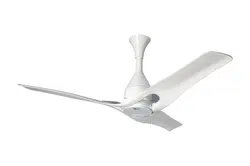
CEILING FAN
Read this owner’s manual thoroughly before operating the
appliance and keep it handy for reference at all times.
TYPE: CEILING FAN
MODEL : LCF12* (FC48G****)
EN ENGLISH FR FRANÇAIS AR ةيبرعلا
Copyright © 2020 LG Electronics Inc. All Rights Reserved
MFL70584103
Rev.00_030520
TABLE OF CONTENTS
This manual may contain images or content
different from the model you purchased.
This manual is subject to revision by the
manufacturer.
SAFETY INSTRUCTIONS ................................................. 3
IMPORTANT SAFETY INSTRUCTIONS ............................................ 3
PRODUCT OVERVIEW ...................................................... 8
Parts and Specifications...................................................................... 8
OPERATION ....................................................................... 9
Status Display Panel ........................................................................... 9
Remote Controller ............................................................................. 10
Using the Extra Function ................................................................... 12
SMART FUNCTIONS ....................................................... 13
LG ThinQ Application ........................................................................ 13
Smart Diagnosis ................................................................................ 14
MAINTENANCE ................................................................ 15
Recommended Maintenance Schedule ............................................ 15
TROUBLESHOOTING ..................................................... 16
3
SAFETY INSTRUCTIONS
EN
The following safety guidelines are intended to prevent unforeseen
risks or damage from unsafe or incorrect operation of the appliance.
The guidelines are separated into ‘WARNING’ and ‘CAUTION’ as
described below.
This symbol is displayed to indicate matters and operations
that can cause risk. Read the part with this symbol carefully
and follow the instructions in order to avoid risk.
WARNING
This indicates that the failure to follow the instructions can
cause serious injury or death.
CAUTION
This indicates that the failure to follow the instructions can
cause the minor injury or damage to the product.
IMPORTANT SAFETY INSTRUCTIONS
WARNING
To reduce the risk of explosion, fire, death, electric shock, injury
or scalding to persons when using this product, follow basic
precautions, including the following:
Children in the Household
This appliance is not intended for use by persons (including children)
with reduced physical, sensory or mental capabilities, or lack of
experience and knowledge, unless they have been given supervision or
instruction concerning use of the appliance by a person responsible for
their safety. Children should be supervised to ensure that they do not
play with the appliance.
If unusual oscillating movement is observed, immediately stop using the
ceiling fan and contact the manufacturer, its service agent or suitably
qualified persons.
4
EN
Installation
• Electrical or installation work needs to be performed by a qualified
service personnel.
• The replacement of parts of the safety suspension system device
shall be performed by the manufacturer, its service agent or suitably
qualified persons.
• Do not install the appliance less than 2.5 m from the ground and 1 m
from the wall to the blades.
• Ensure that the ceiling hook or other safey suspension devices shall
sustain more than 10 times the appliance weight.
• Ensure that the shaft has been fully tighten to motor shaft and shackle.
• Firmly tighten the blade screws using a screwdriver.
• Do not install the appliance in a place where flammable liquids or
gases such as gasoline, propane, paint thinner, etc., are stored.
• Do not install the appliance somewhere exposed to direct sunlight.
• Do not install the appliance in an area prone to combustible gas leaks,
grease, or metal dust.
• If the supply cord is damaged, it must be replaced by manufacturer or
service personnel in order to avoid hazard.
Operation
• Connect this appliance as per the rated voltage and frequency printed
on the name plate.
• Do not touch the power switch with wet hands.
• Do not disassemble, repair, modify or touch the appliance while it is
operating.
• Do not insert hands or any objects into the appliance.
• Do not place any objects on the appliance.
5
EN
• Do not use or store flammable or combustible substances (ether,
benzene, alcohol, chemical, LPG, combustible spray, insecticide, air
freshener, cosmetics, etc.) near the appliance.
• If there is a gas leakage (isobutane, propane, natural gas, etc.),
do not touch the appliance or power switch and ventilate the area
immediately.
• Cut off the power supply if there is any noise, smell, or smoke coming
from the appliance.
• Do not expose the appliance to splashing water or rain.
• Do not touch, operate, or repair the appliance with wet hands.
• In case of flood, cut off the power switch and contact the LG
Electronics customer service center.
• Dispose of all packaging materials (such as plastic bags and styrofoam)
away from children. The packaging materials can cause suffocation.
Maintenance
• Before cleaning or performing maintenance, disconnect the power
supply and wait until the blade stops.
• Do not use an abrasive cloth, sponge, or a metal brush to clean the
appliance.
Battery
• A button/coin-shaped battery is used in the remote controller of the
appliance. If you accidentally swallowed the battery, go to the doctor
immediately for emergency treatment. If you fail to receive first aid
within 2 hours after you swallowed it, you may experience damage to
your internal organs or death in severe cases.
• Do not swallow the battery.
• If the battery tray is not secured firmly, stop using the appliance
instantly and keep it away from children.
• Replace the all batteries in the remote controller with new ones of the
same type. Do not mix old and new batteries or different types of batteries.
6
CAUTION
To reduce the risk of minor injury to persons, malfunction, or
damage to the product or property when using this product, follow
basic precautions, including the following:
Installation
• Do not install the appliance at a wet, high temperature, high humidity
area, high vibration, windy places.
• Do not install the appliance in freezing temperature.
• Do not install the appliance on or near items that may be damaged or
discolored by heat or humidity.
• Do not install the appliance near curtains.
• Do not install the appliance within 1 m of a TV or stereo equipment. It
may cause interference.
• After installation make sure the appliance does not tremble extremely.
Operation
• Do not use the appliance in place of a vent hood. Doing so will shorten
the appliance’s lifespan.
• Do not operate in an area with unstable voltage, the appliance may
automatically shut down to protect appliance components.
• This appliance is intended to be used in household and domestic
applications only and must not be used for commercial purposes.
EN
7
Maintenance
• Replace all the blades if any of them breaks or cracks.
• Never use strong cleaning agents or solvents when cleaning the
appliance. Use a smooth cloth.
• Use a sturdy stool or ladder, when cleaning, maintaining or repairing
the ceiling fan at height.
Battery
• Do not modify the battery arbitrarily.
• Misplaced battery may cause an explosion.
• Do not recharge or take apart the battery.
• Do not throw the battery in the fire for disposal or leave it near the heat.
• Remove and store the battery in a safe location if you don’t intend to
use the remote controller for a long time.
EN
8
PRODUCT OVERVIEW
EN
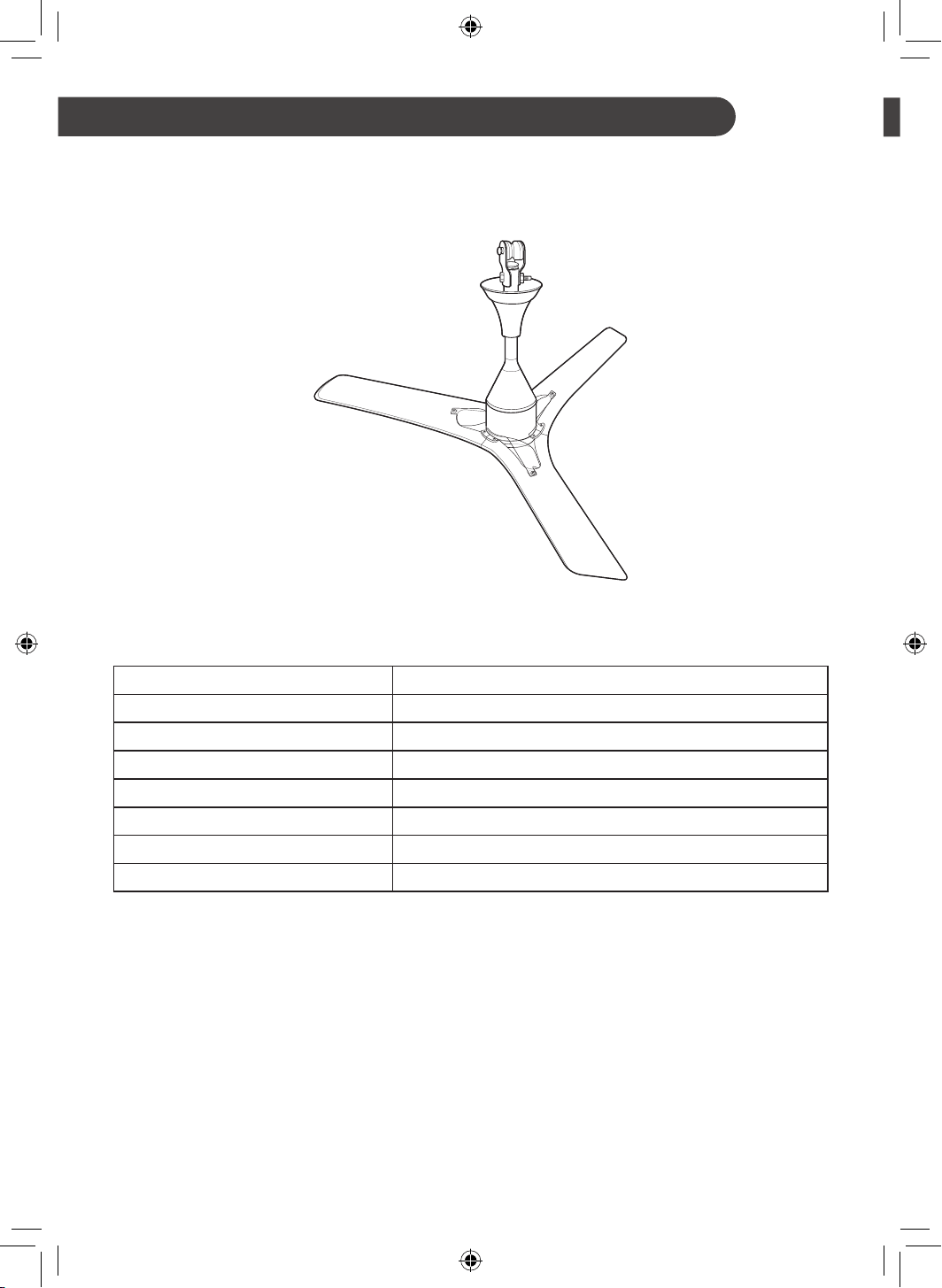
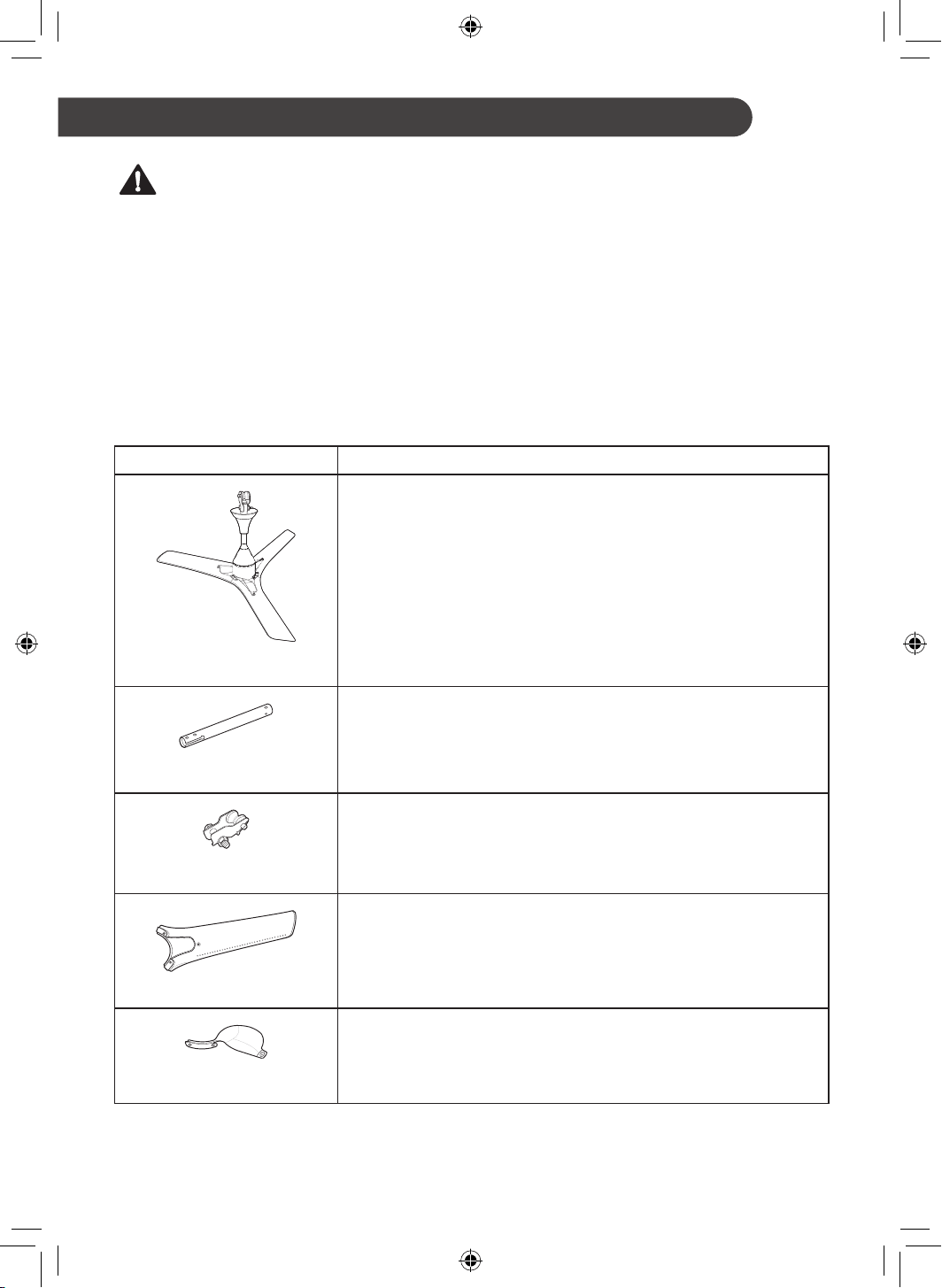
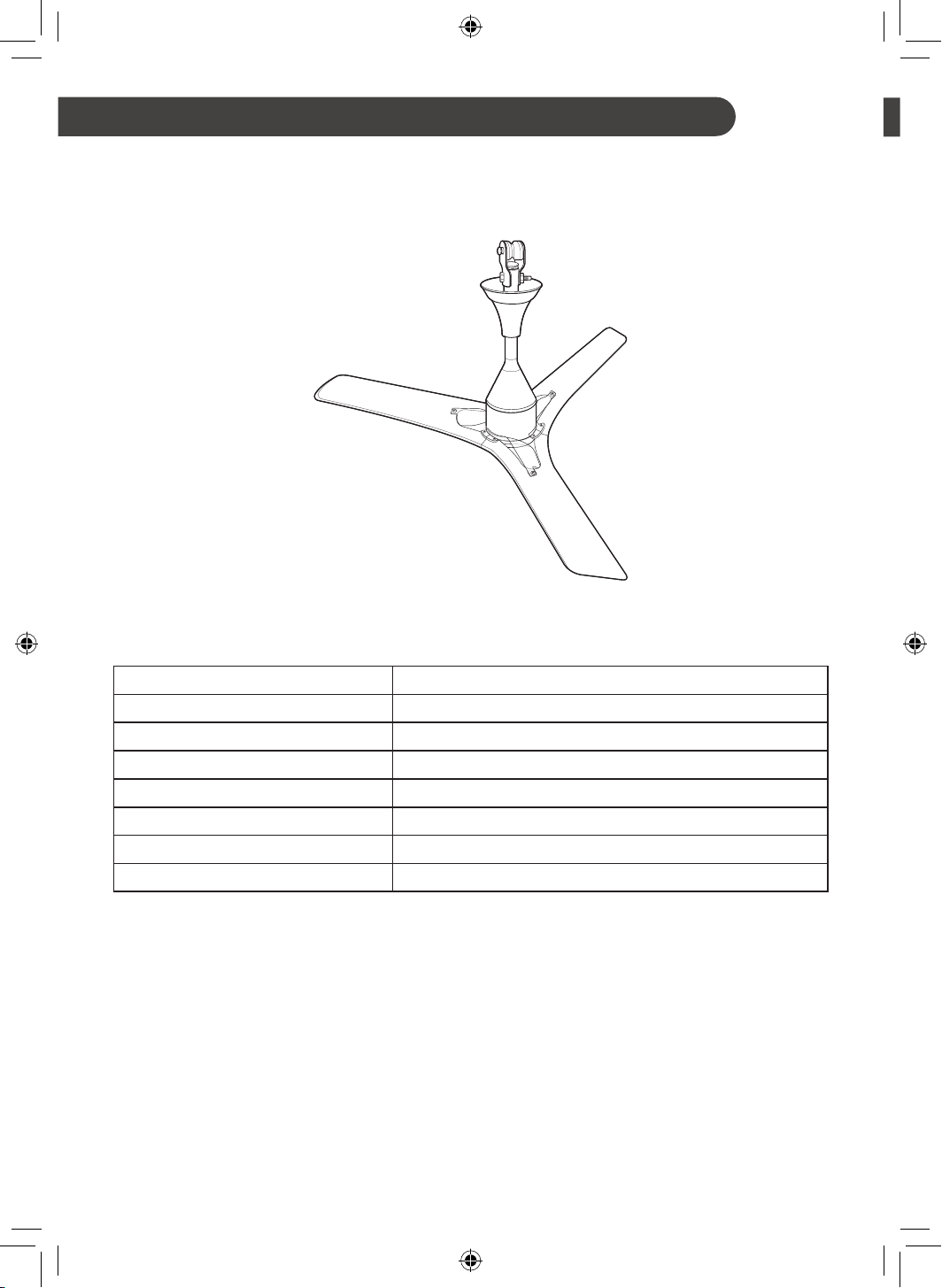
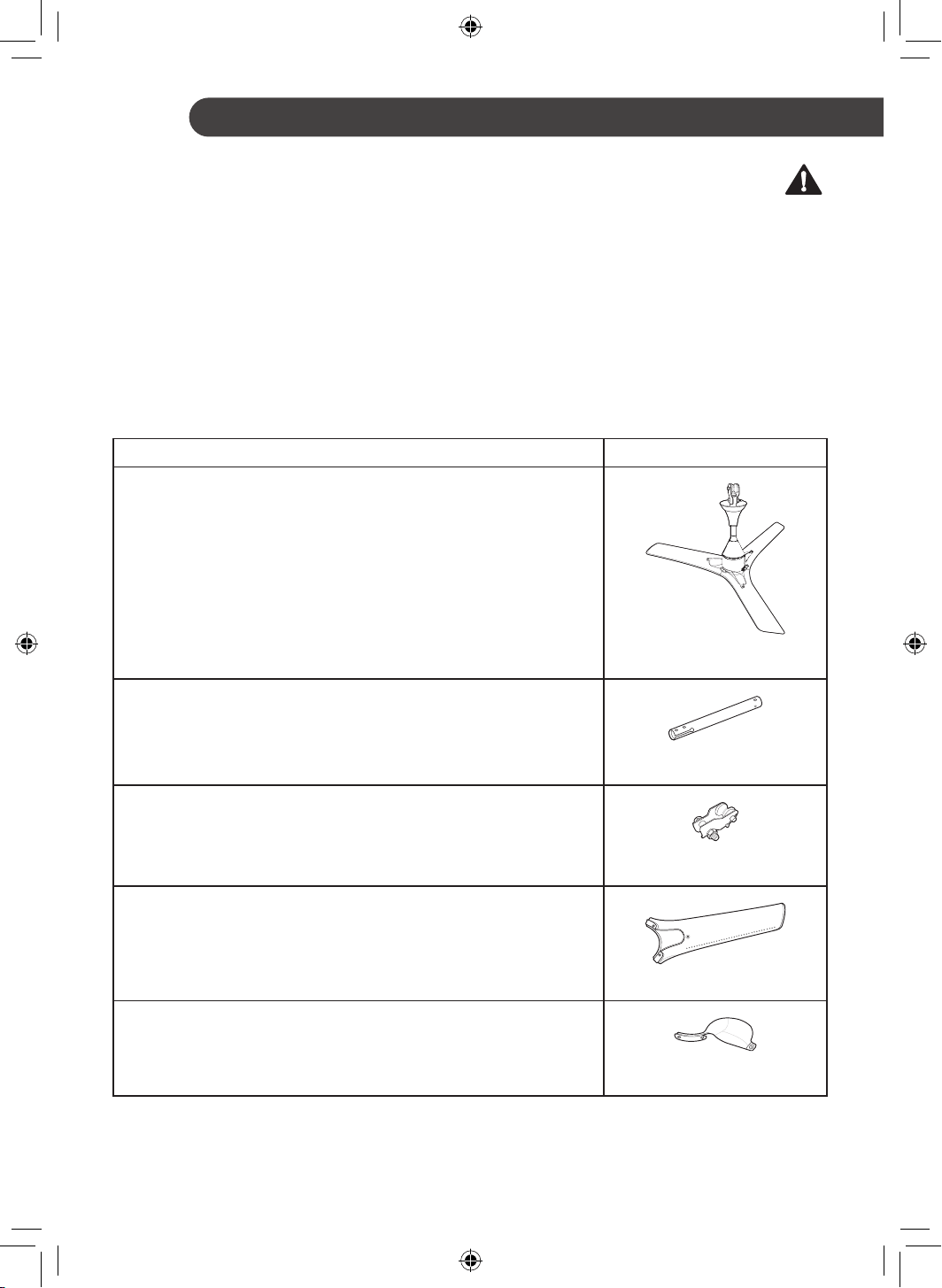
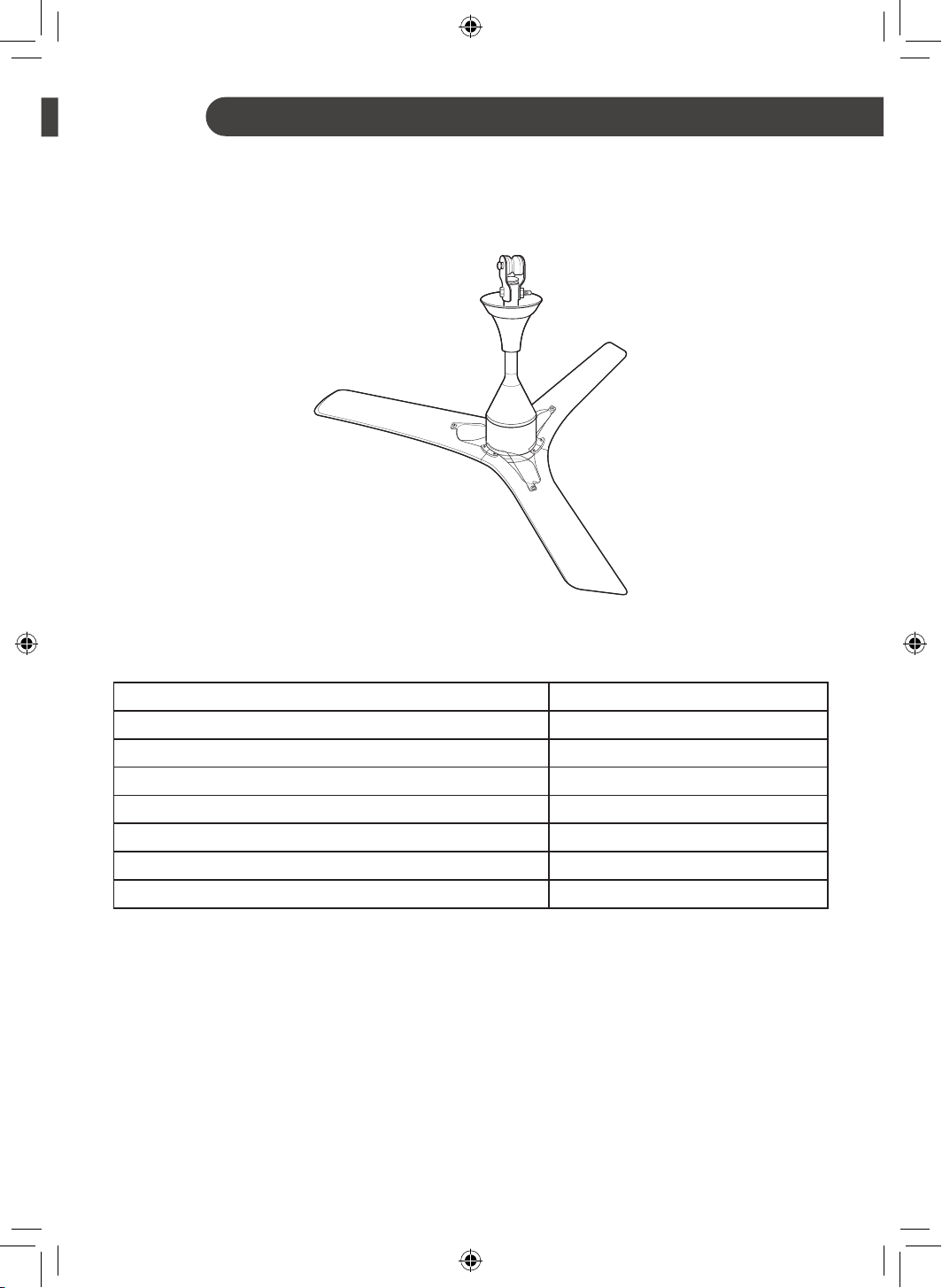
Parts and Specifications
Exterior
Specifications
Parameters Values
Input Voltage AC 220-240 V 1 Ø
Rated Frequency 50 Hz
Sweep 1200 mm
Typical Input Power 30 W
Speed Control Through Remote and Power Switch
Remote Battery CR2025 3V
Weight 3.7 kg (Net)
NOTE
• Specified weight may differ from actual weight.
9
EN
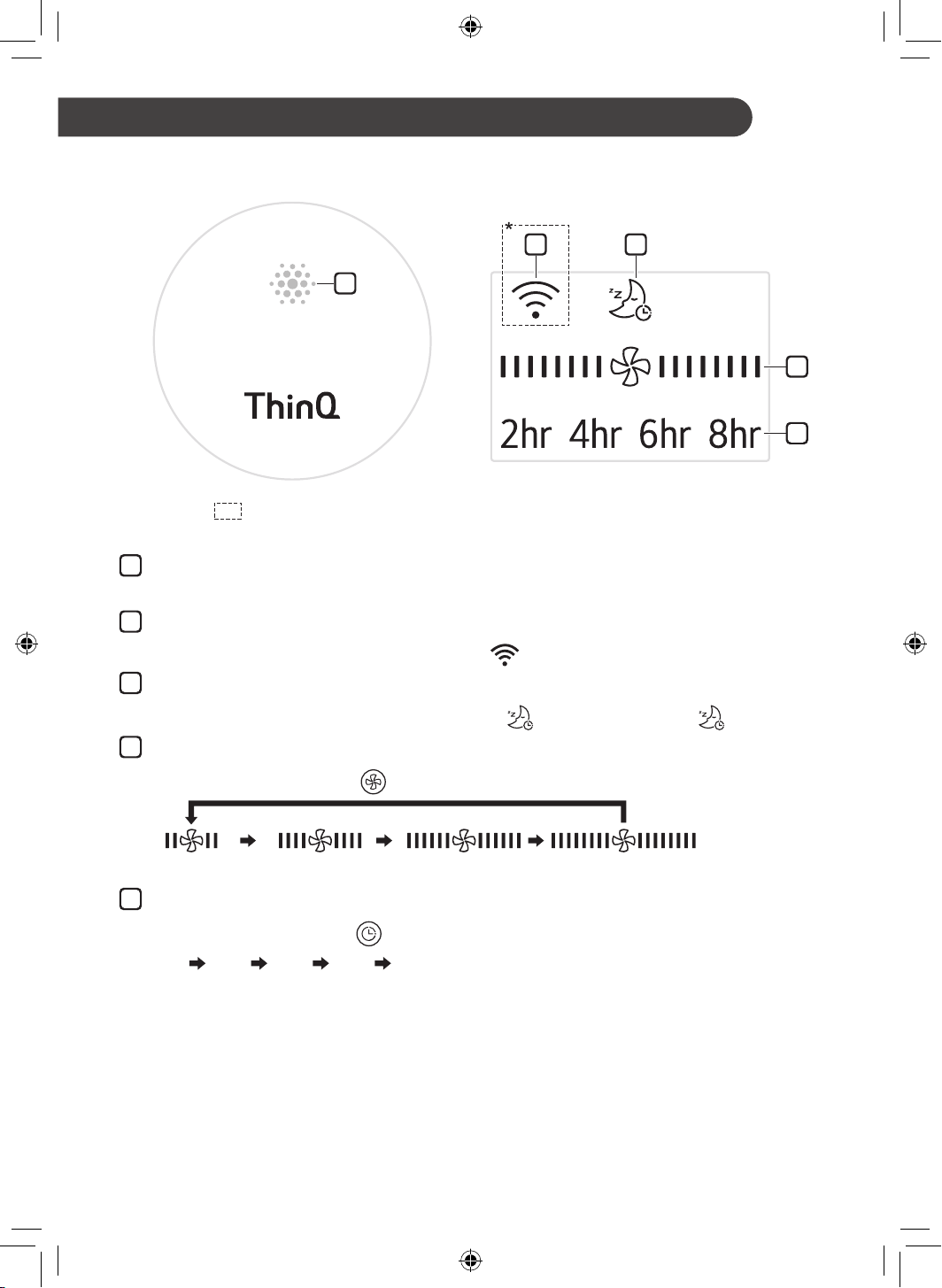
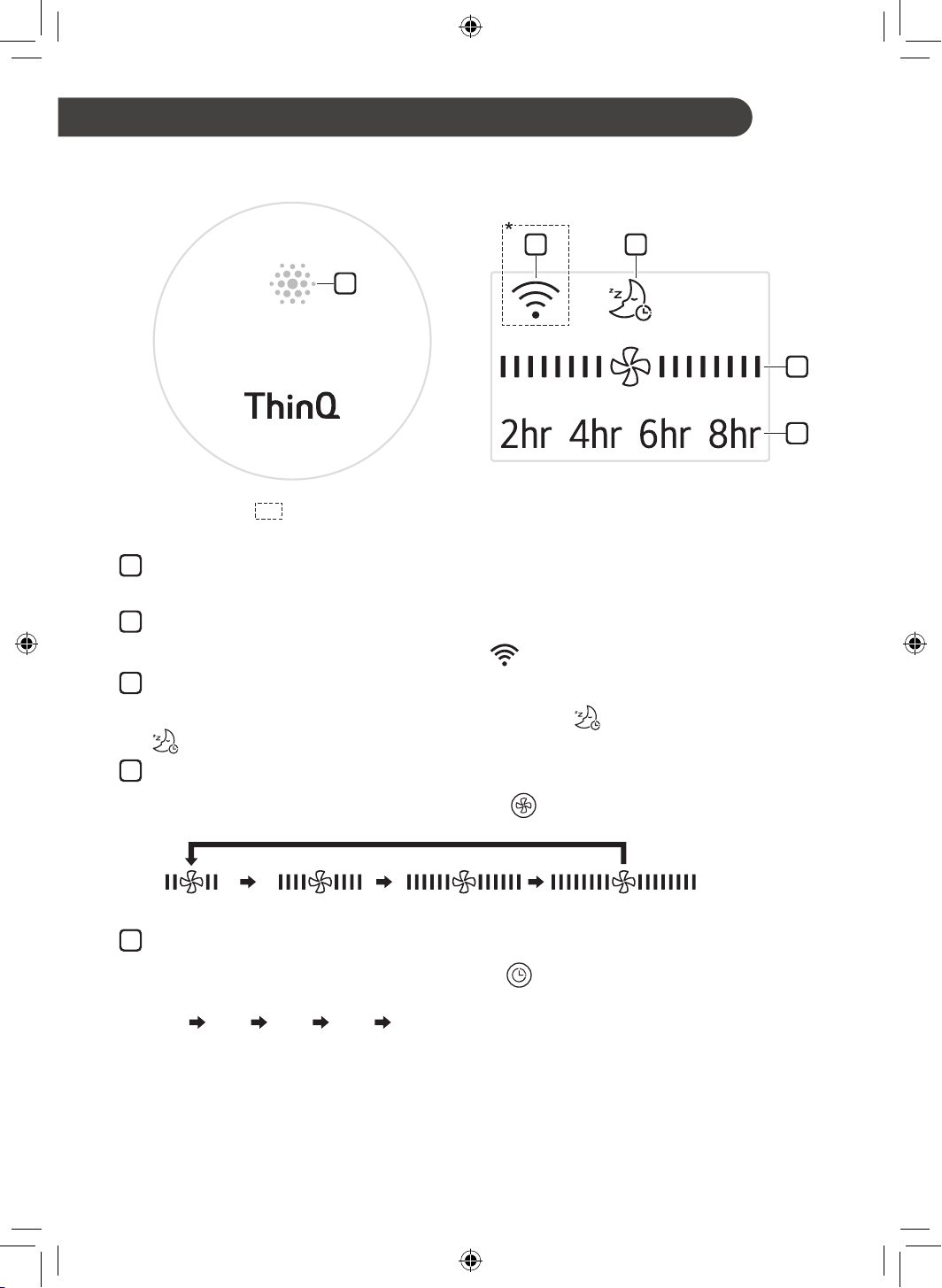
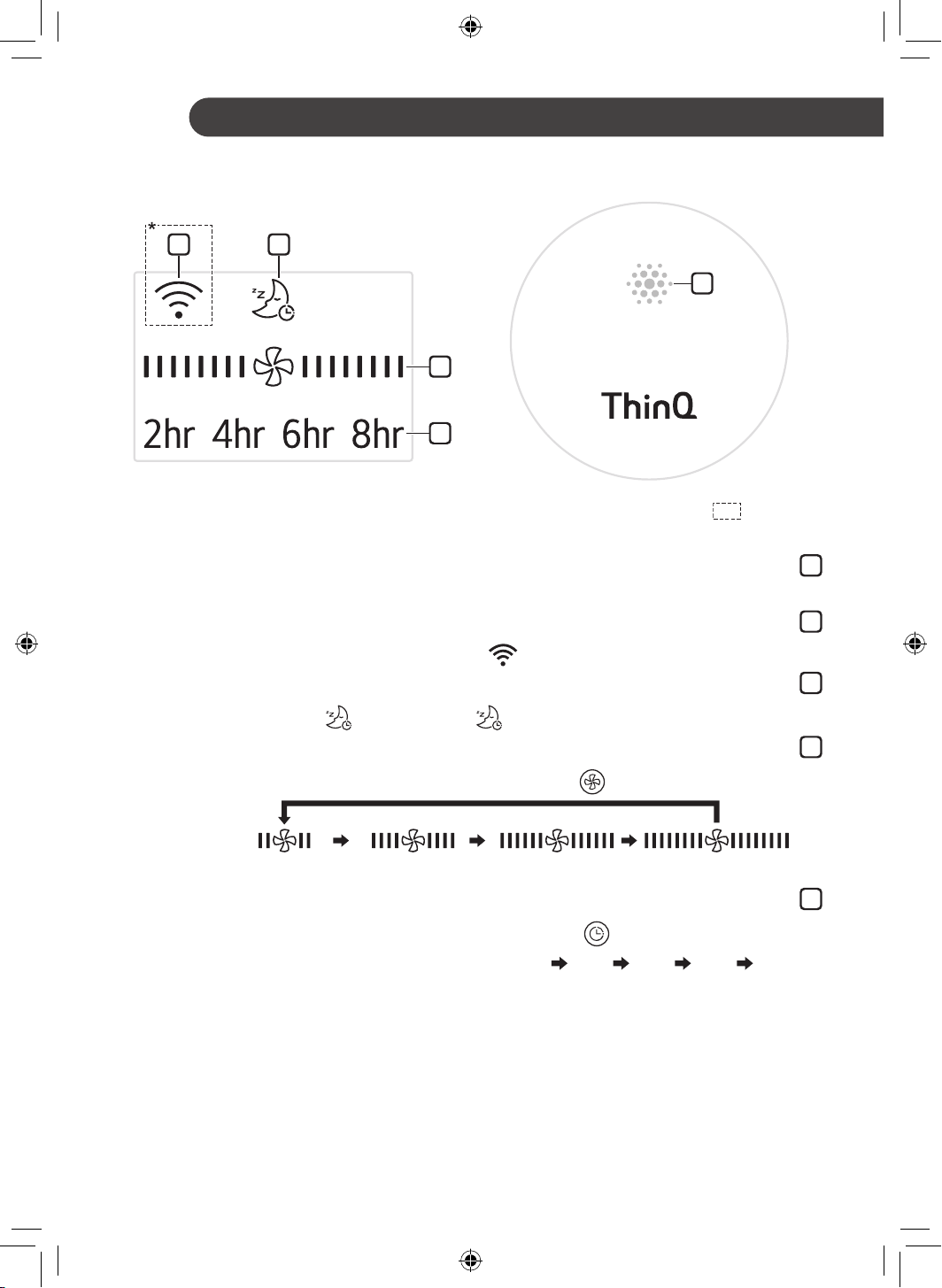
Status Display Panel
1
2
5
3
4
*Broken Line ( ): Optional
OPERATION
1
Receiver for Remote Controller Signal
Face the remote controller to the Receiver, the remote signal will pass through it.
2
Wi-Fi (Optional)
When the appliance is connected to a Wi-Fi network,
is displayed on the display screen.
3
Sleep Mode
When the sleep mode is selected, all display except the
will be off after displaying for 3 seconds.
4
Fan Speed
Whenever press Speed button (
) on the remote controller, fan speed will be changed.
(Speed 4)(Speed 3)(Speed 2)(Speed 1)
5
Timer
Whenever press Timer button (
) on the remote controller, the setting time will be changed.
2hr 4hr 6hr 8hr Off
NOTE
• Only when the functions operate, the display will light on.
• The appearance or functions of the appliance may differ depending on the model.
10
EN
Remote Controller
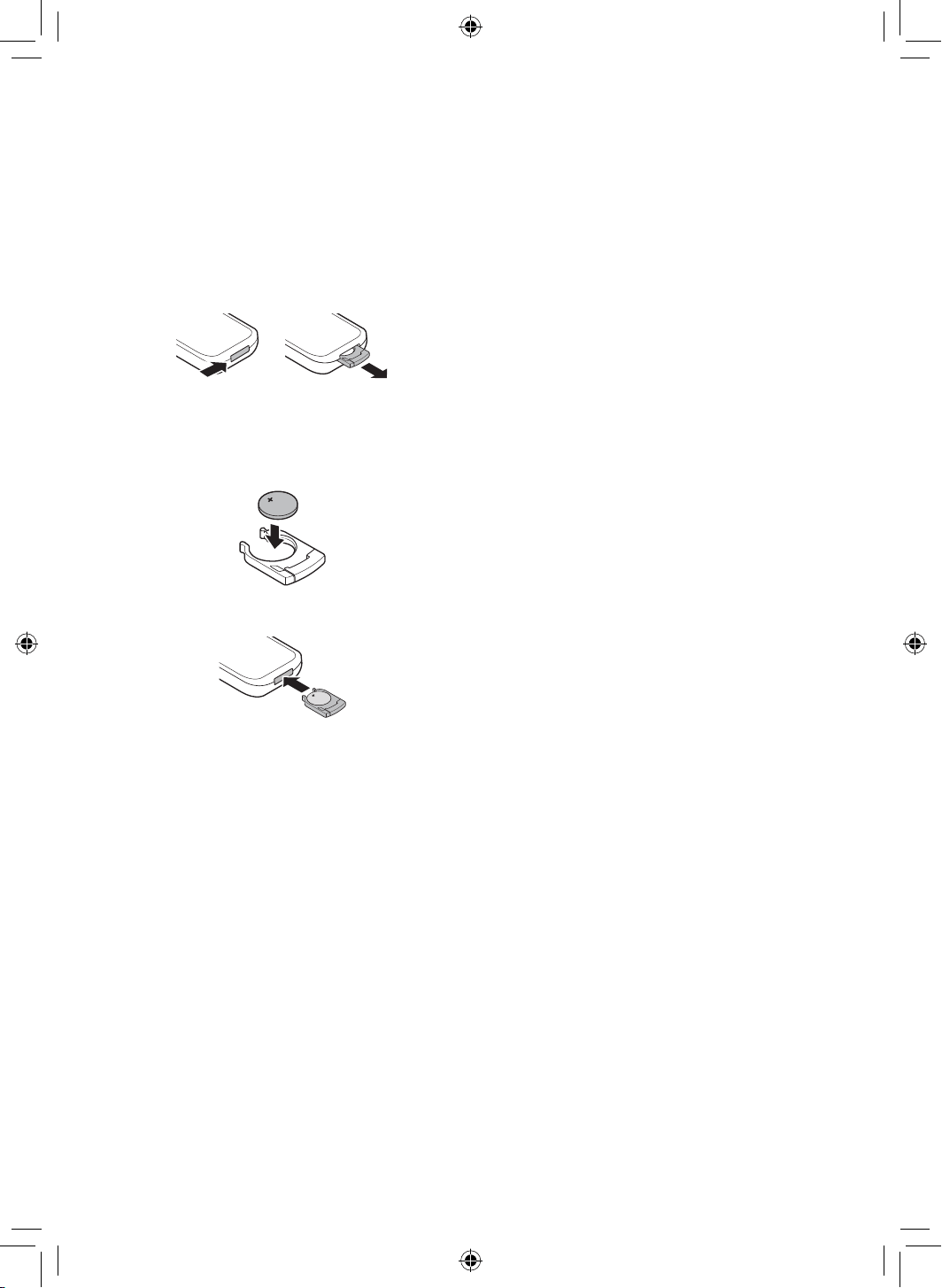
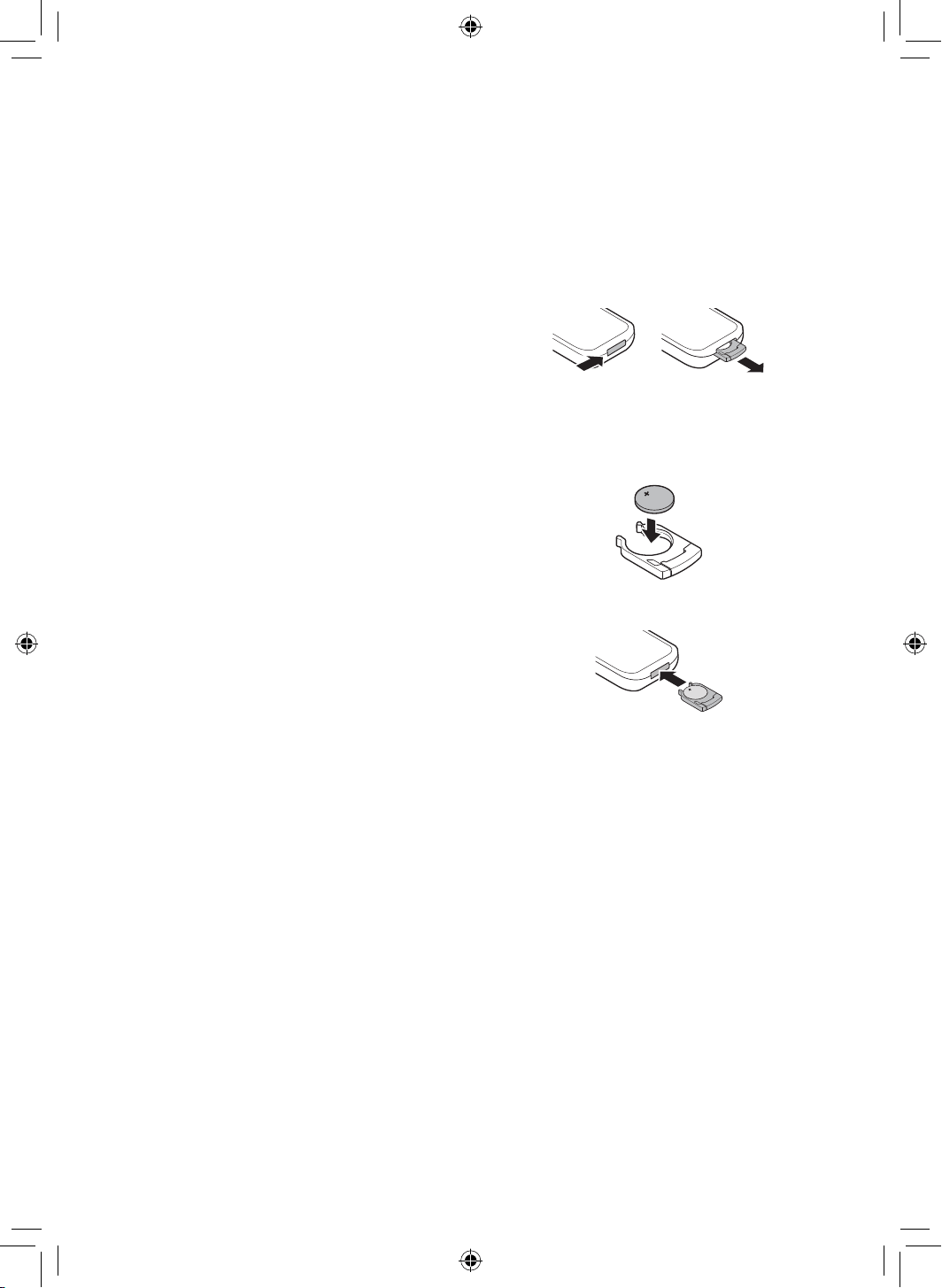
Inserting Battery
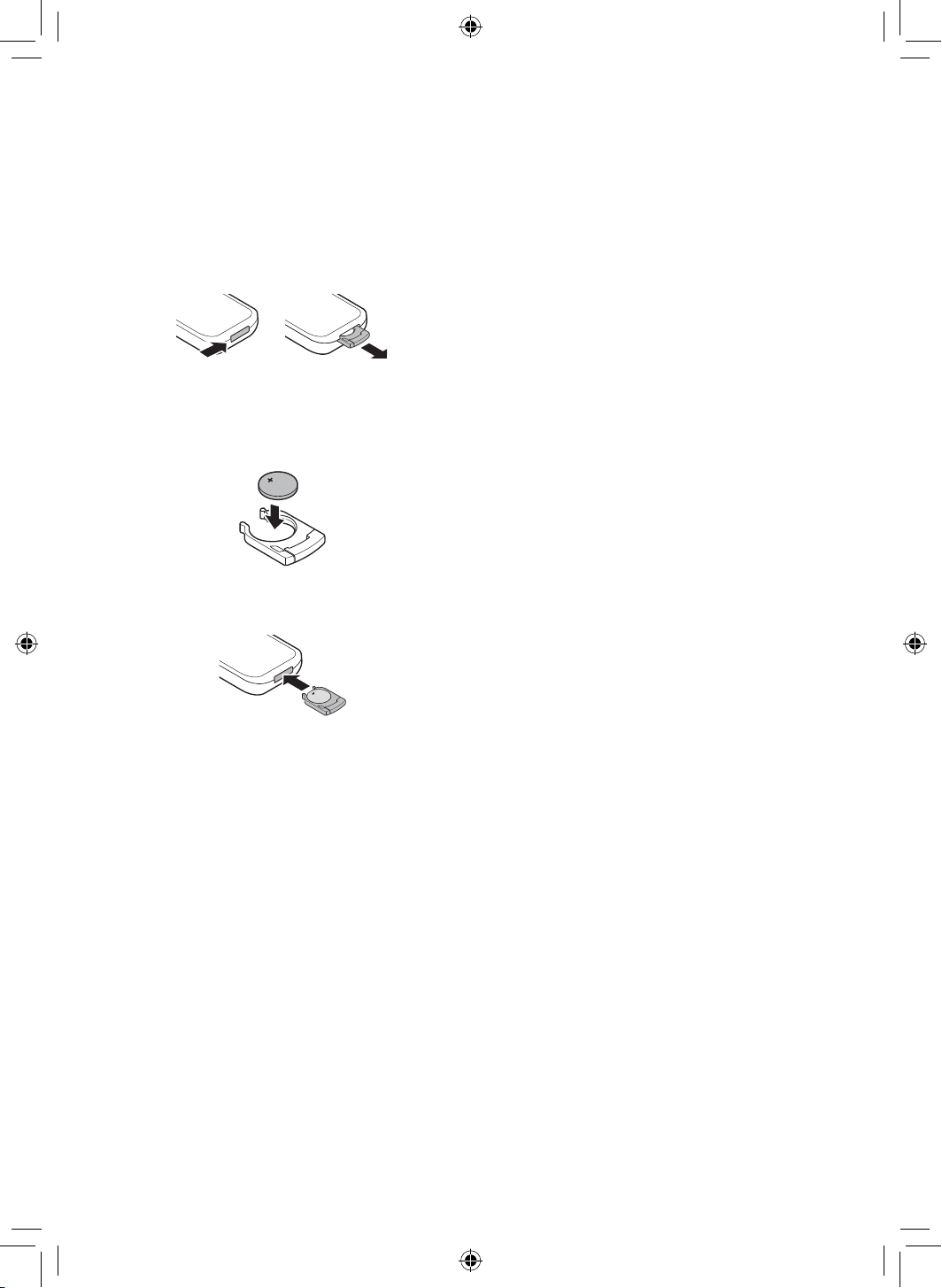
1
With the backside of the remote controller facing
up, remove the battery tray from the remote
controller.
2
Insert the battery provided with the appliance
to the tray.
• The (+) electrode of the battery must face
upward.
3
Insert the battery tray to the remote controller.
NOTE
• If the battery runs out of charge, replace it with a
new one (CR2025).
• If the remote controller does not work as expected,
try to replace the battery or check the polarity (+, -)
of the battery. If the problem continues, contact the
service centre.
• Dispose of the used battery according to the
environmental regulations.
11
EN
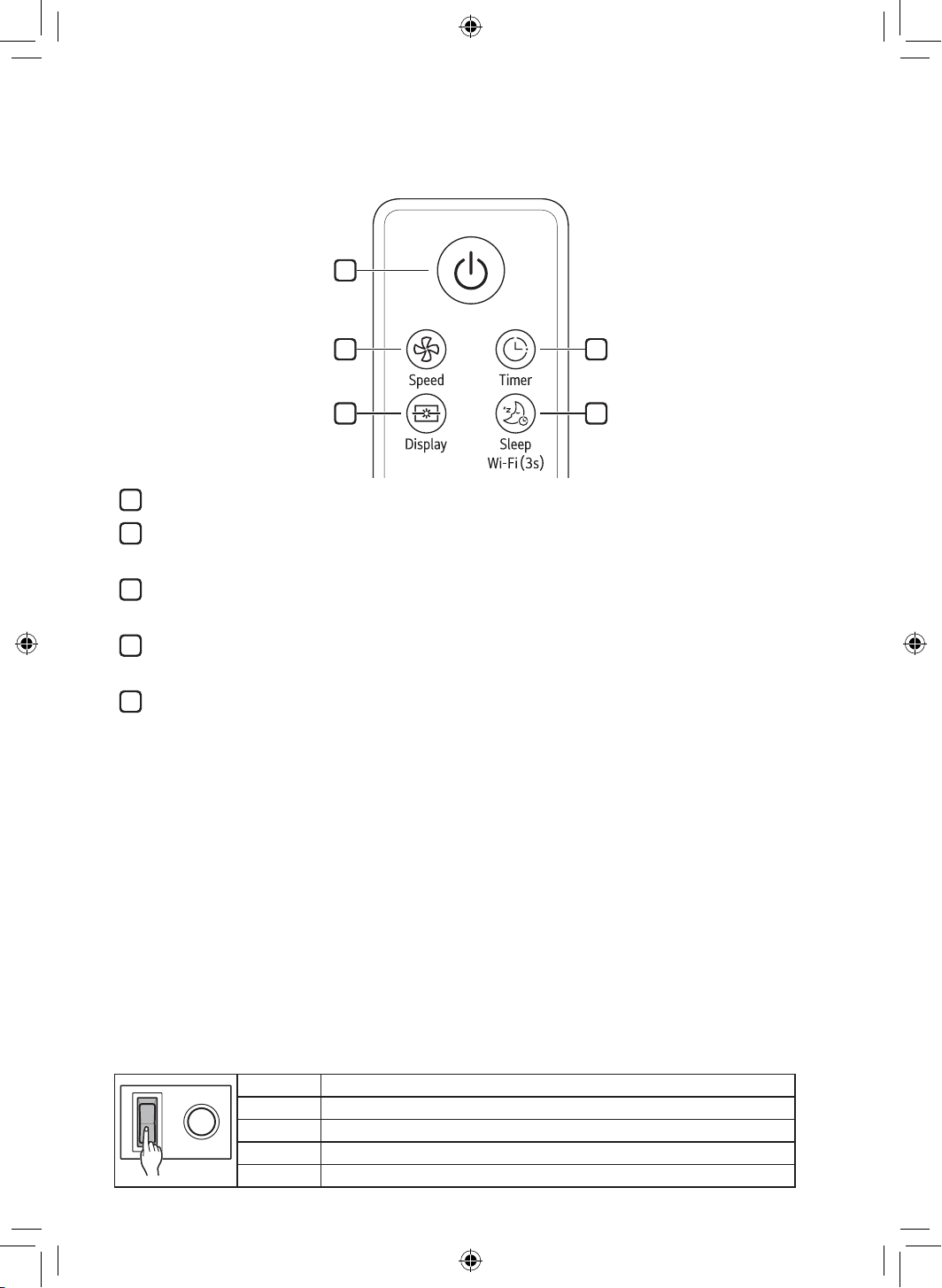
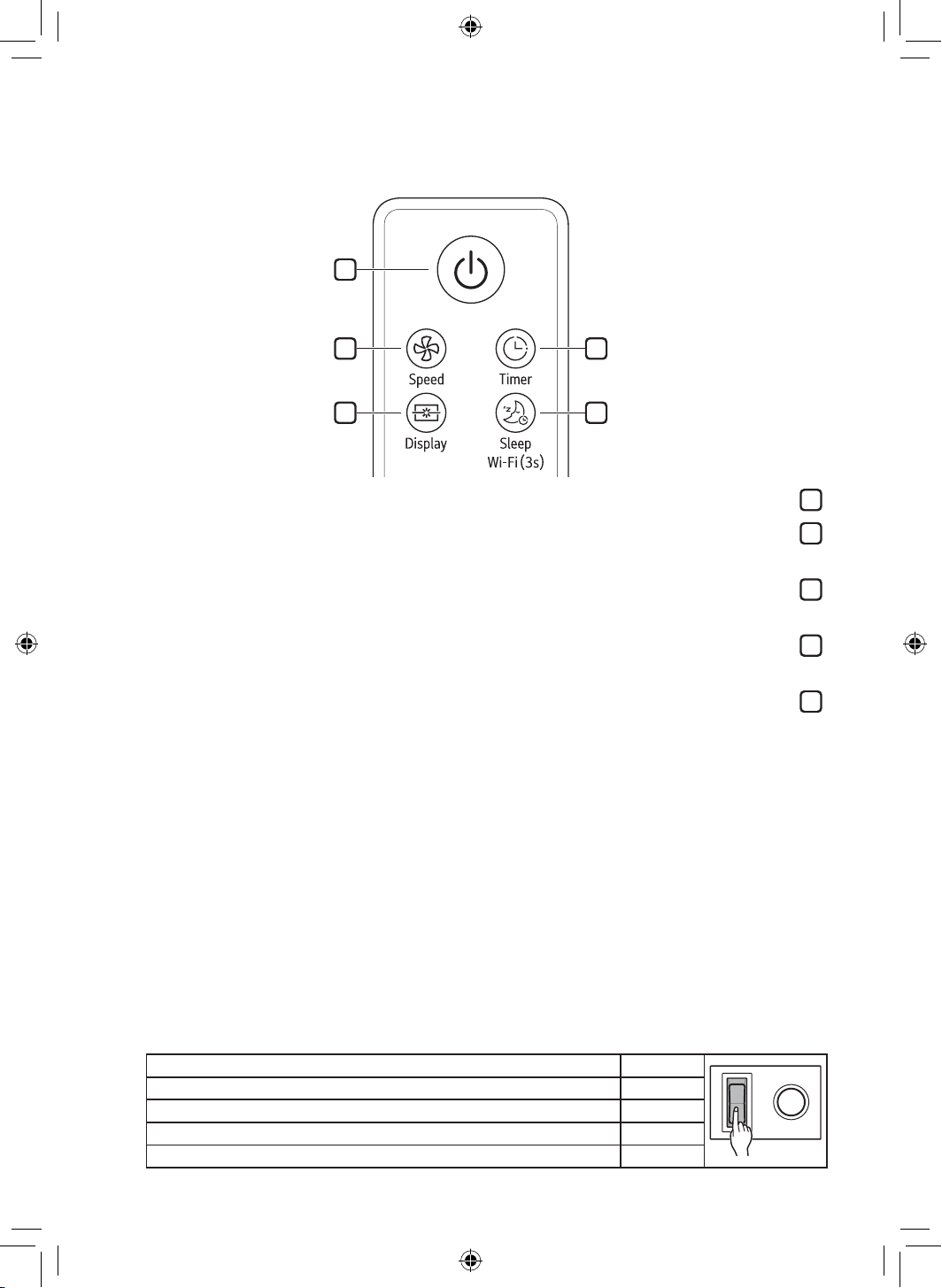
Remote Controller Features
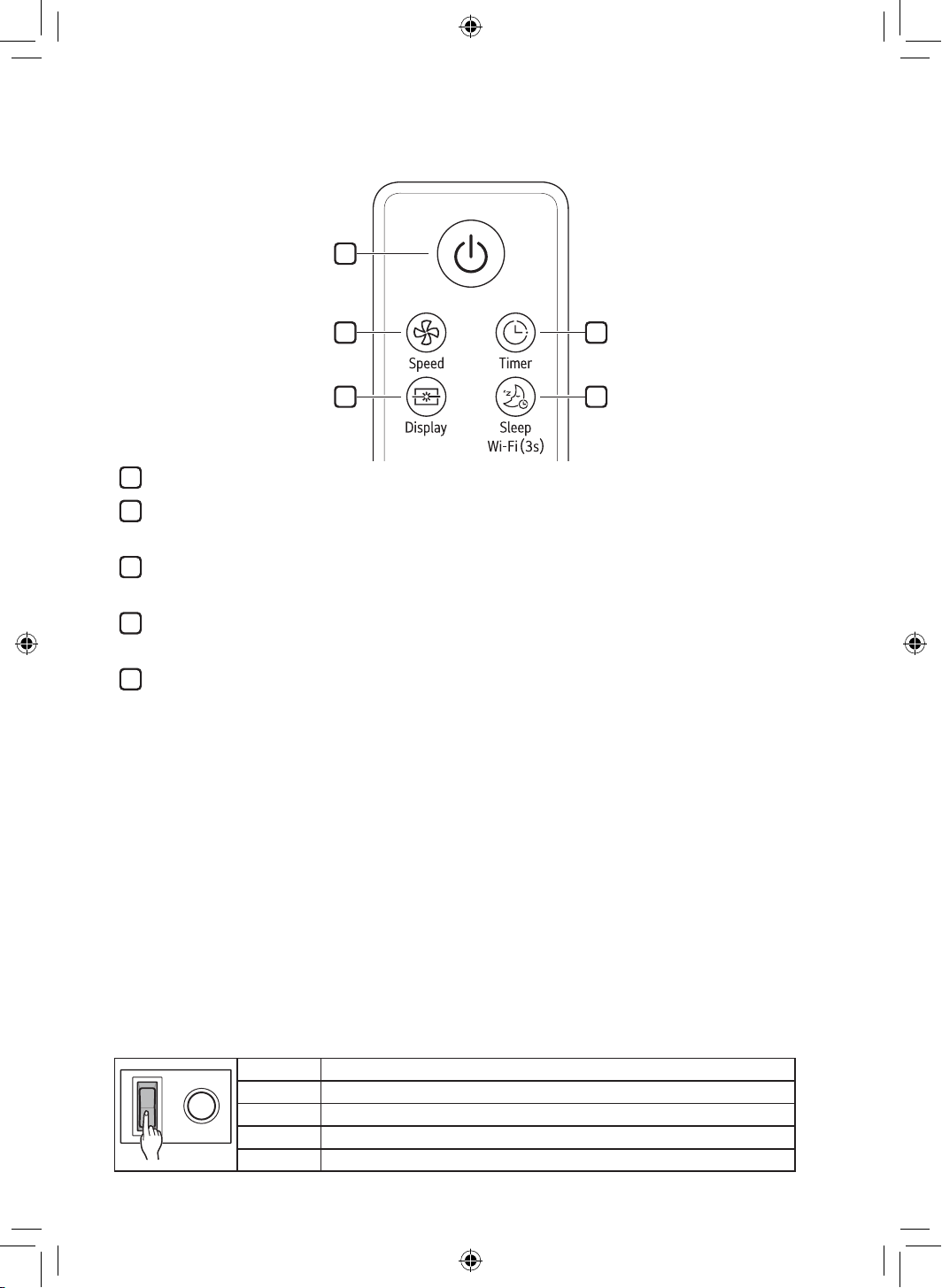
1
2
3
4
5
1
Start/Stop
2
Speed
Controls the fan speed.
3
Display
Turn on/off the display lightings.
4
Timer
Set time to power off.
5
Sleep
Turn on/off the sleep mode.
• When you enter sleep mode, the wind speed decreases by one step every hour. In case of “Speed1”, it
is maintained.
Wi-Fi
Press this button during 3 seconds for paring. For unparing, press 3 seconds again.
• Turning off Wi-Fi
− Press and hold the Start/Stop button and the Wi-Fi button at the same time for more than 3 seconds
to turn off Wi-Fi. After finishing the product registration and while Wi-Fi is off, press and hold the
Wi-Fi button for more than 3 seconds just once to turn on Wi-Fi and to control the product using the
registered smartphone.
NOTE
• When operating the fan, you have to set up the regulator with 5 step (maximum) only.
• If you miss your remote controller, you can operate the fan by using wall switch on/off.
• The appearance or function of the remote controller may vary depending on the model.
1 time Return to previous step before you switch on/off.
2 times Speed 1
3 times Speed 2
4 times Speed 3
5 times Speed 4
12
EN
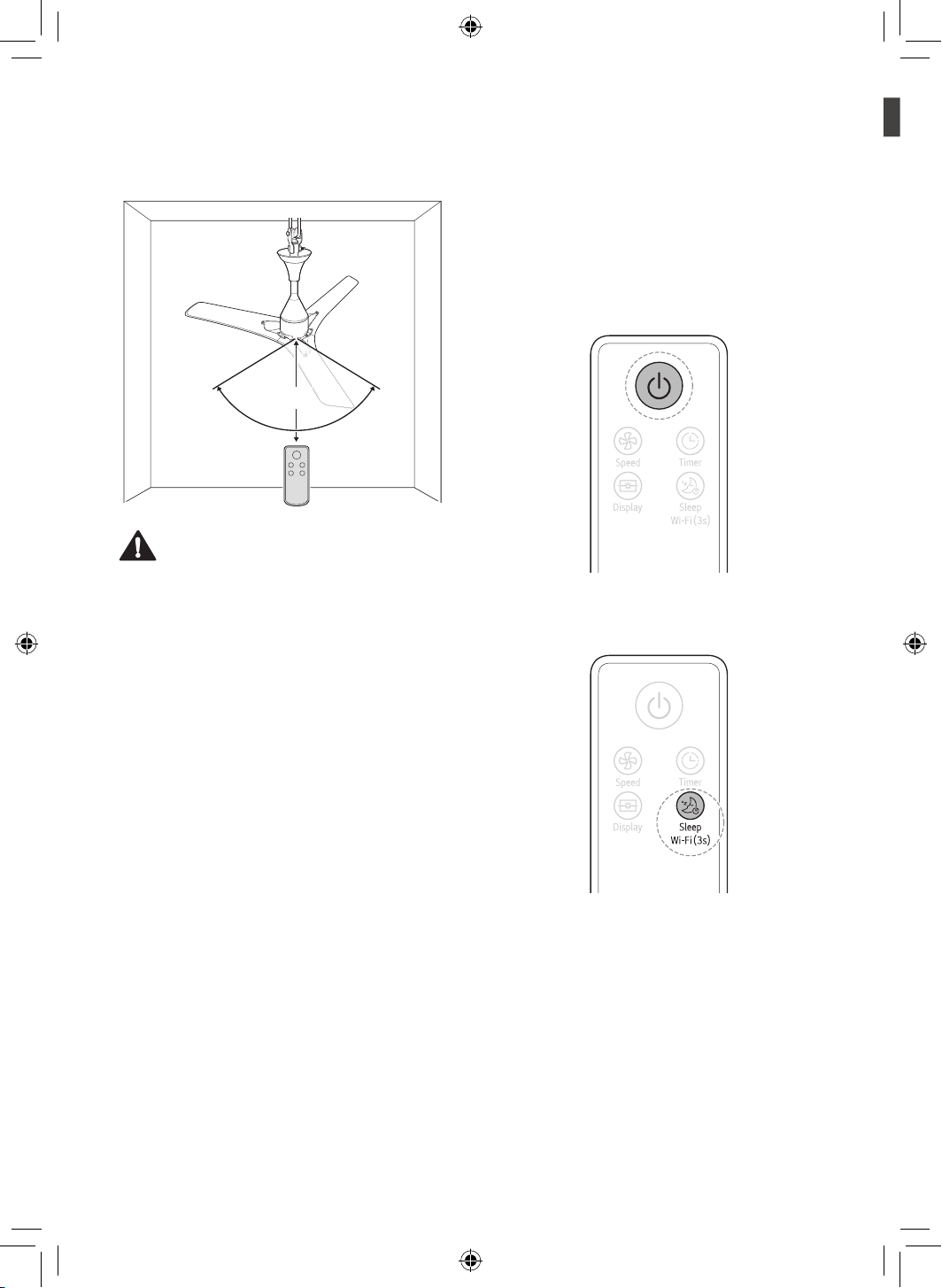
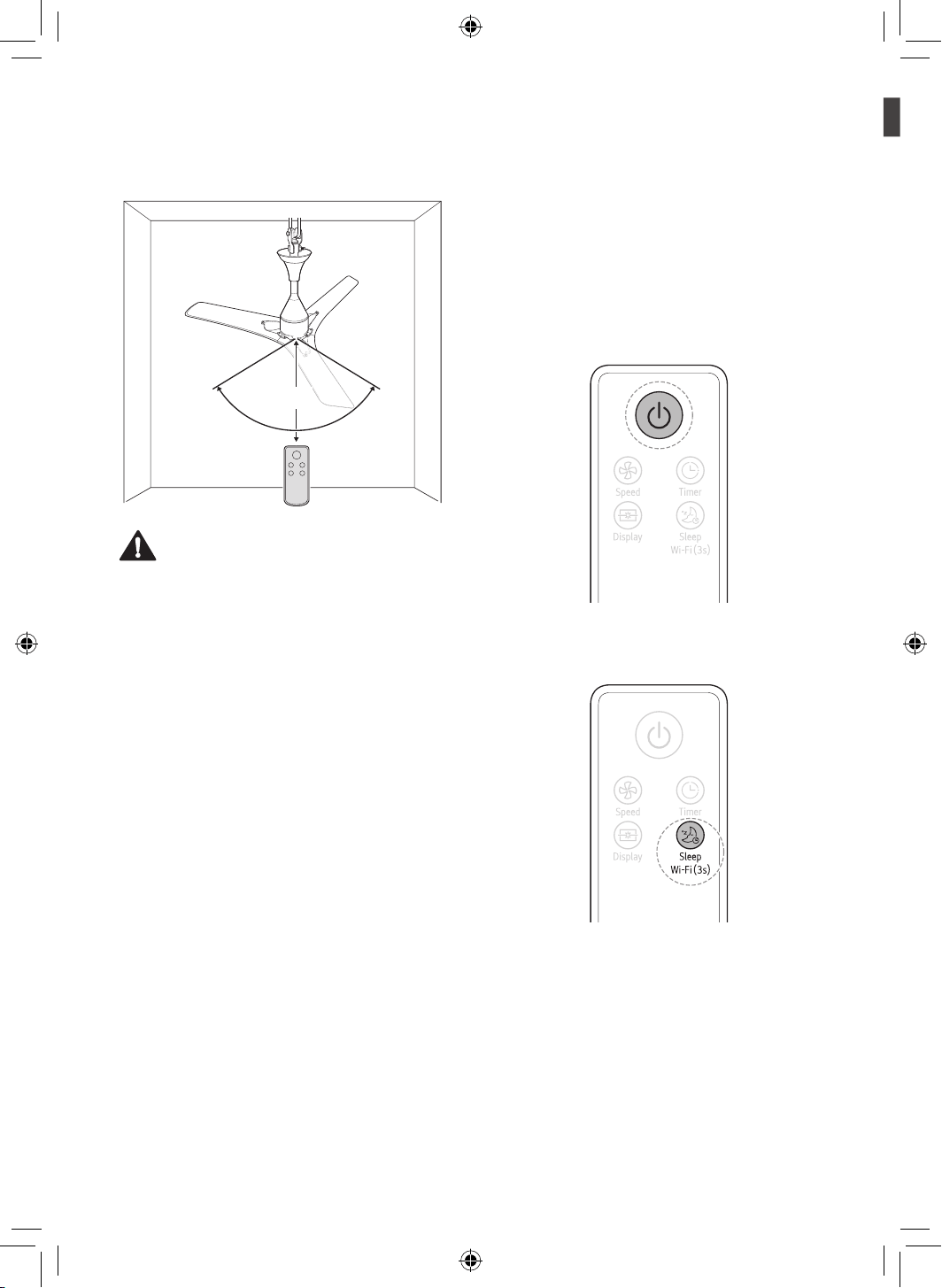
Operating Method
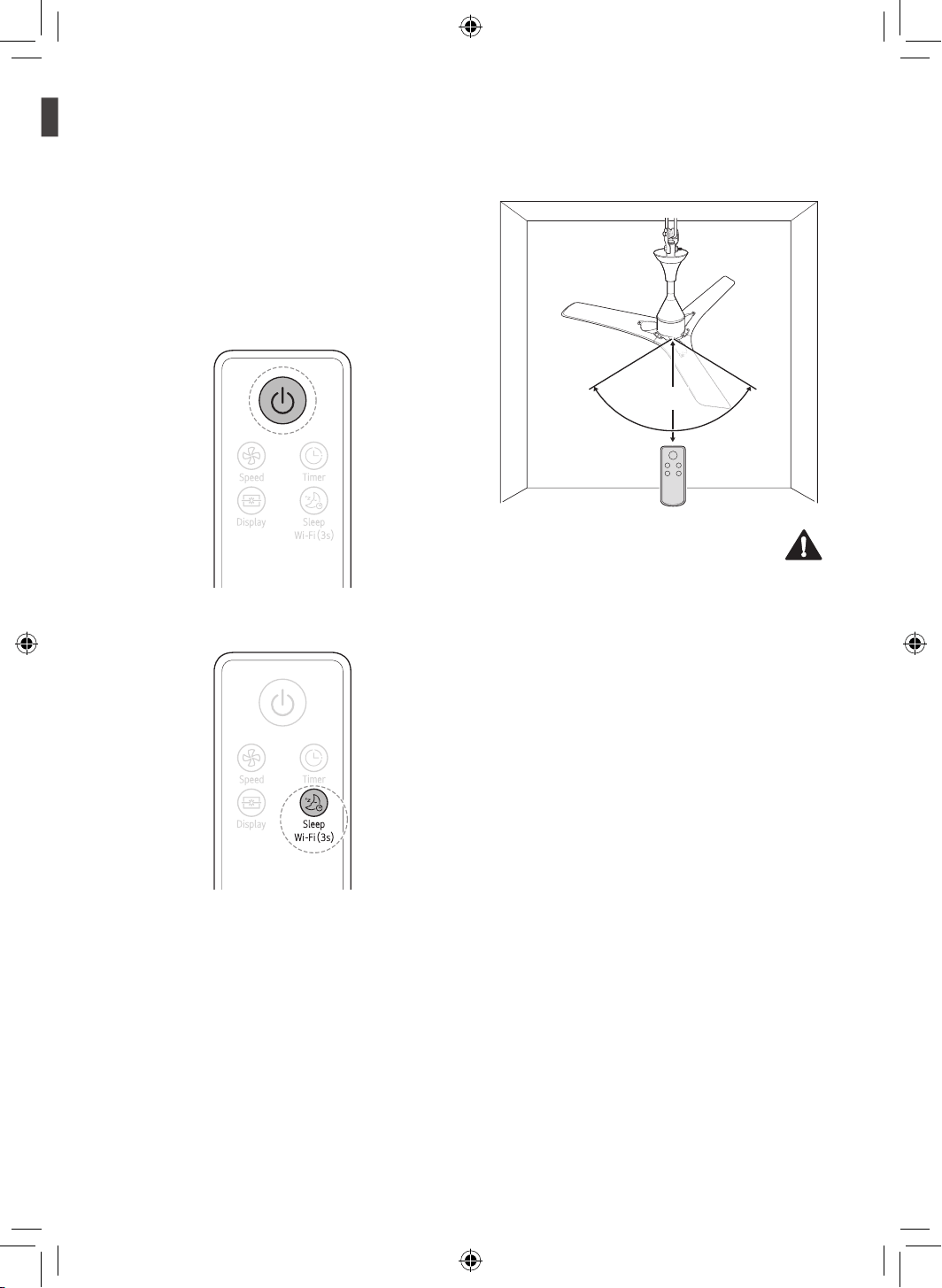
5 m
45°
45°
CAUTION
• Do not step on or apply pressure.
• Do not store or use near water or in high humidity.
• Do not store or use near an open flame or
heating devices such as space heaters or ovens.
Otherwise the battery could explode.
NOTE
• To use the remote controller, direct the signal
sending area of the remote controller toward the
signal reception area of the appliance.
• The remote works best within 5 m and 45° to the
left or right of the sensor in front of the appliance.
• Pressing multiple buttons at the same time may
cause the remote controller to malfunction.
• The remote controller may not work properly where
there is a strong light, such as those from a 3-wave
length fluorescent lamp or a neon sign.
• If you lost the remote controller, you can purchase
a new one in a nearby service centre.
Using the Extra Function
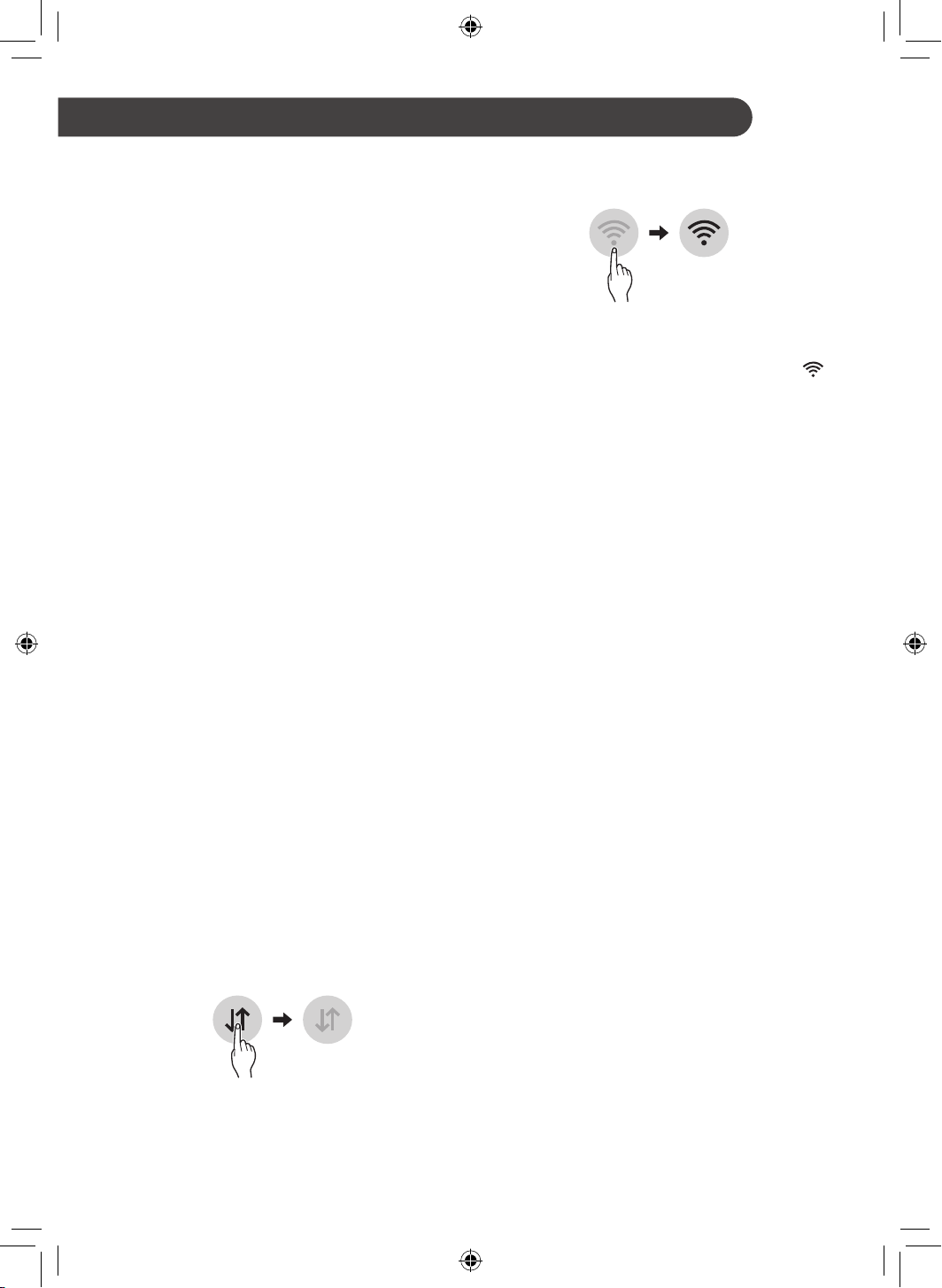
Sleep Mode
Use the sleep mode to make more silent and display
lighting off.
1
Press the Start/Stop button.
2
Press the Sleep button to select the Sleep
mode.
NOTE
• After setting this mode, the fan speed will reduce
next step automatically and to fan speed 1 finally.
• In Sleep mode, you can adjust the fan speed
manually using the Speed button.
• The Sleep mode will be kept until pressing the
Sleep button once.
13
LG ThinQ Application
The LG ThinQ application allows you to
communicate with the appliance using a smartphone.
LG ThinQ Application Features
Smart Diagnosis
If you experience a problem while using the
appliance, this smart diagnosis feature will help you
diagnose the problem.
Settings
Allows you to set various options on the appliance
and in the application.
NOTE
• If you change your wireless router, Internet service
provider, or password, delete the registered
appliance from the LG ThinQ application and
register it again.
• The application is subject to change for appliance
improvement purposes without notice to users.
• Functions may vary by model.
Before using LG ThinQ Application
This feature is only available on models with Wi-Fi
function.
1
Check the distance between the appliance and
the wireless router (Wi-Fi network).
• If the distance between the appliance and the
wireless router is too far, the signal strength
becomes weak. It may take a long time to
register or installation may fail.
2
Turn off the Mobile data or Cellular Data on
your smartphone.
3
Connect your smartphone to the wireless
router.
NOTE
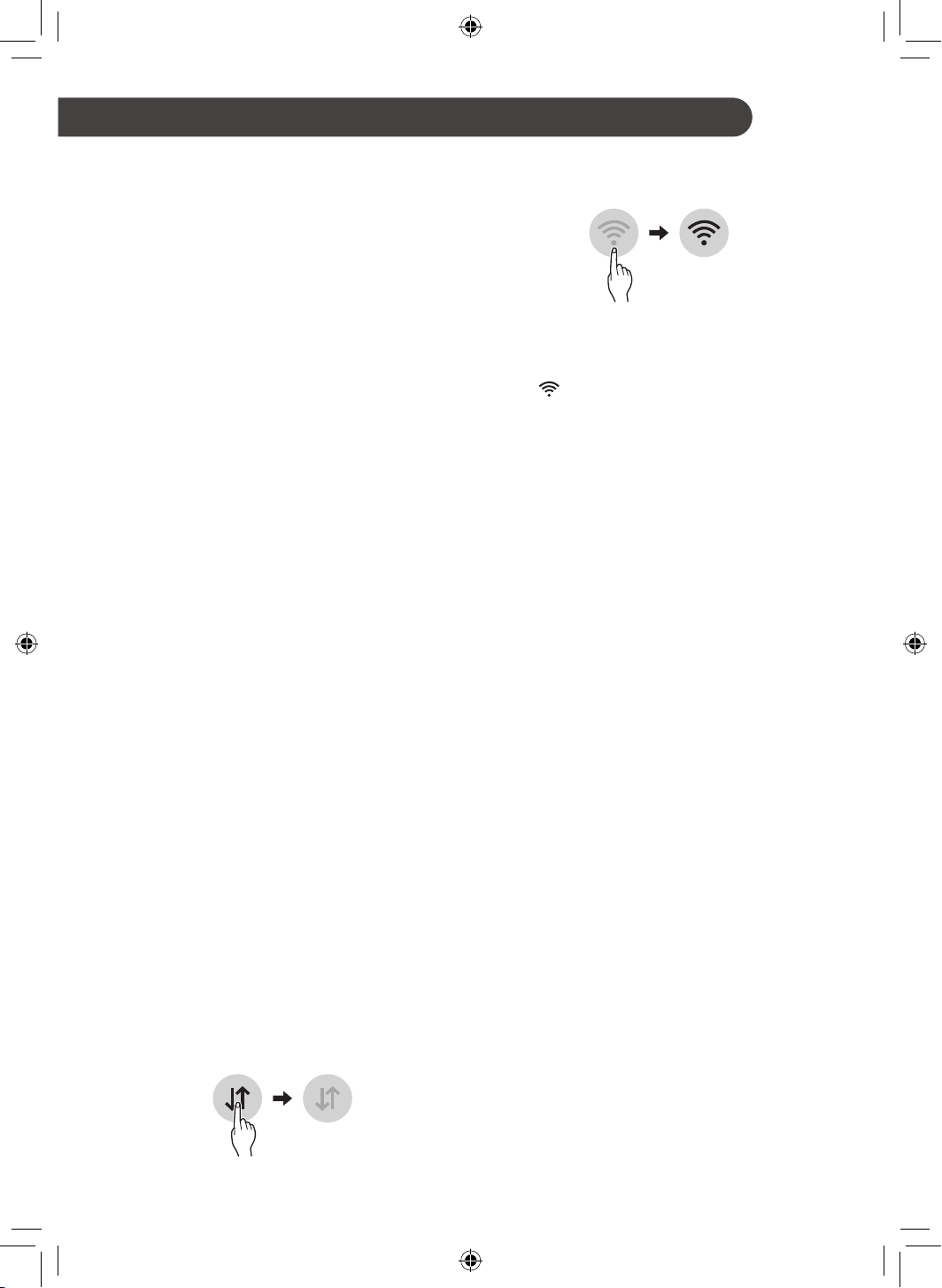
• To verify the Wi-Fi connection, check that Wi-Fi
icon on the control panel is lit.
• The appliance supports 2.4 GHz Wi-Fi networks
only. To check your network frequency, contact your
Internet service provider or refer to your wireless
router manual.
• LG ThinQ is not responsible for any network
connection problems or any faults, malfunctions, or
errors caused by network connection.
• If the appliance is having trouble connecting to the
Wi-Fi network, it may be too far from the router.
Purchase a Wi-Fi repeater (range extender) to
improve the Wi-Fi signal strength.
• The Wi-Fi connection may not connect or may
be interrupted because of the home network
environment.
• The network connection may not work properly
depending on the Internet service provider.
• The surrounding wireless environment can make
the wireless network service run slowly.
• The appliance cannot be registered due to
problems with the wireless signal transmission.
Unplug the appliance and wait about a minute
before trying again.
• If the firewall on your wireless router is enabled,
disable the firewall or add an exception to it.
• The wireless network name (SSID) should be a
combination of English letters and numbers. (Do
not use special characters.)
• Smartphone user interface (UI) may vary
depending on the mobile operating system (OS)
and the manufacturer.
• If the security protocol of the router is set to WEP,
you may fail to set up the network. Please change it
to other security protocols (WPA2 is recommended)
and register the product again.
SMART FUNCTIONS
EN
14
EN
Installing LG ThinQ Application
Search for the LG ThinQ application from the Google
Play Store or Apple App Store on a smartphone.
Follow instructions to download and install the
application.
Wireless LAN Module
Specifications
Model LCW-003
Frequency
Range
2412 - 2472 MHz
Output
Power (Max)
IEEE 802.11b: 18.37 dBm
IEEE 802.11g: 17.67 dBm
IEEE 802.11n: 17.67 dBm
Open Source Software Notice
Information
To obtain the source code under GPL, LGPL, MPL,
and other open source licenses, that is contained in
this product, please visit http://opensource.lge.com.
In addition to the source code, all referred license
terms, warranty disclaimers and copyright notices are
available for download.
LG Electronics will also provide open source code
to you on CD-ROM for a charge covering the cost
of performing such distribution (such as the cost of
media, shipping, and handling) upon email request
to [email protected]. This offer is valid for a
period of three years after our last shipment of this
product. This offer is valid to anyone in receipt of this
information.
Smart Diagnosis
This feature is only available on models with the
or logo.
Use this feature to help you diagnose and solve
problems with your appliance.
NOTE
• For reasons not attributable to LGE’s negligence,
the service may not operate due to external factors
such as, but not limited to, Wi-Fi unavailability,
Wi-Fi disconnection, local app store policy, or app
unavailability.
• The feature may be subject to change without prior
notice and may have a different form depending on
where you are located.
Using LG ThinQ to Diagnose Issues
If you experience a problem with your Wi-Fi equipped
appliance, it can transmit troubleshooting data to a
smartphone using the LG ThinQ application.
• Launch the LG ThinQ application and select the
Smart Diagnosis feature in the menu. Follow the
instructions provided in the LG ThinQ application.
15
EN
CAUTION
• Do not spray water on or into appliance. Doing so will cause appliance failure.
• Do not bend the blade while cleaning.
• Do not use alkaline detergents to clean the appliance.
• Do not attach stickers or use sulfuric acid, hydrochloric acid, or organic solvents such as thinners, lamp oil, or
acetone on the appliance’s surface. Doing so may damage the surface.
• Wipe away dirt with a clean soft cloth, ordinary soap and water.
• Ensure the ceiling fan is cut-off from power supply before removing the guard.
Recommended Maintenance Schedule
Parts Frequency
Check and clean every one year.
Ceiling Fan
Check for any damage and corrosion every year.
Shaft Assembly
Check for any damage and corrosion every year.
Shackle Assembly
Keep the blades clean and check every month.
Blade Assembly
Keep the guides clean and check every month.
Guide
MAINTENANCE
16
EN
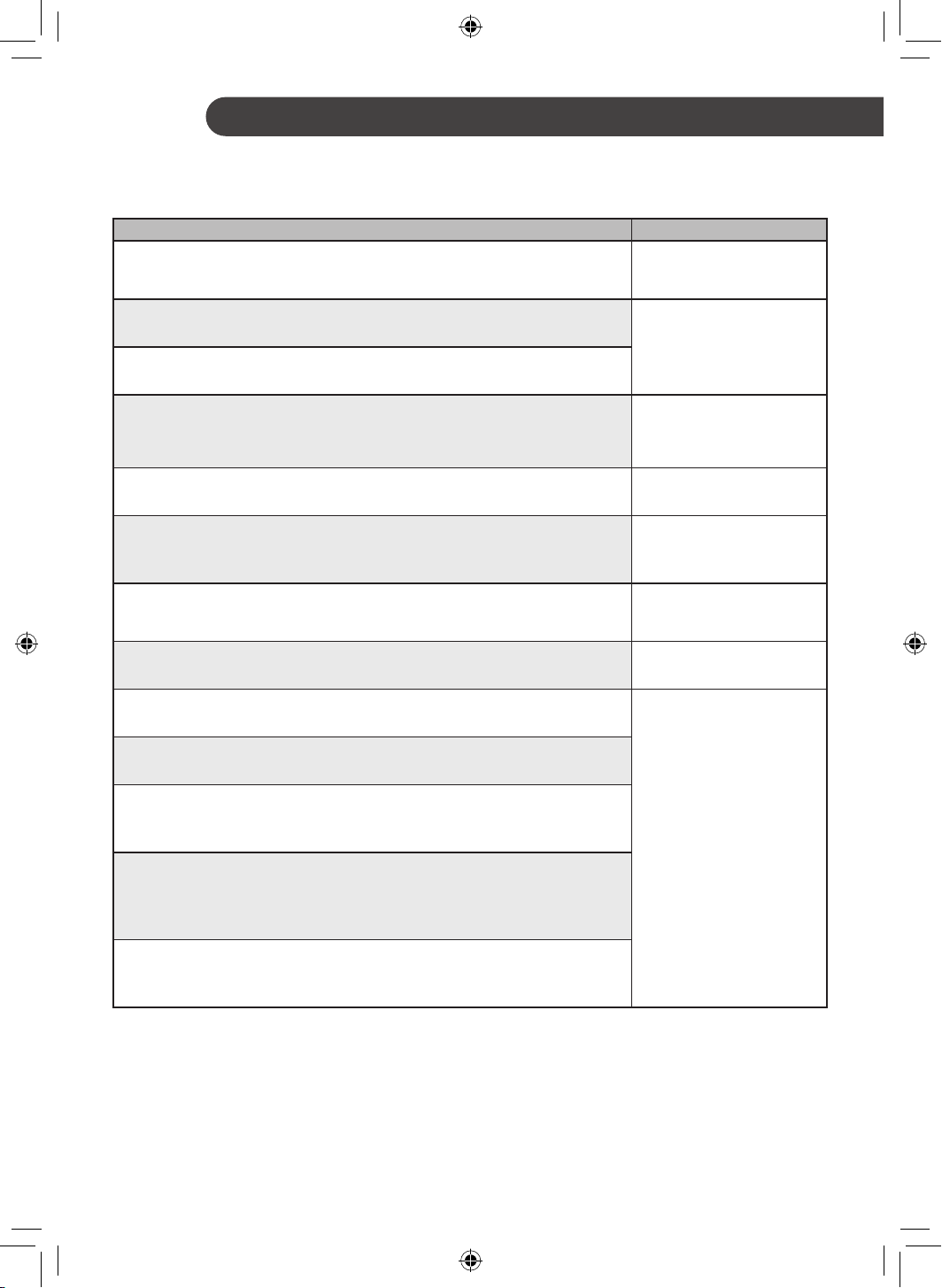
TROUBLESHOOTING
Before Calling for Service
Please check the following before you contact the service center. If the problem persists, contact your local
service center.
Problem Possible Causes & Solution
When supply power but
not power on, can’t hear
the beep.
Power is not supplied.
• Turn on the power switch.
Appliance is making noise.
Install location is too close to the wall or ceiling.
• Check the distance and reinstall at proper location.
Installation is not good.
• Check each assemble parts are proper and firmly tightened.
Sleep lighting is flickering
continuously.
Fan is locked.
• Use a regulator to turn off the power and turn on one minute later.
• If the same problem occurs, power off and call to service center.
Ceiling Fan not Working.
The voltage conditions are unstable.
• Check Voltage Condition, If unstable contact local Electrician.
Ceiling fan suddenly turns
off and turns on.
The installed environment is very windy.
• It’s the normal process of finding the right wind speed for your environment.
So fan can stop and re-adjust during high external wind.
When press a button on
remote controller, can’t
hear the beep.
Remote controller power is not supplied.
• Check the direction of remote controller battery or change it.
Remote controller is not
working.
Too far to communicate with sensor.
• Move close to the appliance and try again.
Your home appliance
and smartphone is not
connected to the Wi-Fi
network.
The password for the Wi-Fi that you are trying to connect to is incorrect.
• Find the Wi-Fi network connected to your smartphone and remove it, then
register your appliance on LG ThinQ.
Mobile data for your smartphone is turned on.
• Turn off the Mobile data of your smartphone and register the appliance using
the Wi-Fi network.
The wireless network name (SSID) is set incorrectly.
• The wireless network name (SSID) should be a combination of English letters
and numbers. (Do not use special characters.)
The router frequency is not 2.4 GHz.
• Only a 2.4 GHz router frequency is supported. Set the wireless router to
2.4 GHz and connect the appliance to the wireless router. To check the
router frequency, check with your Internet service provider or the router
manufacturer.
The distance between the appliance and the router is too far.
• If the distance between the appliance and the router is too far, the signal
may be weak and the connection may not be configured correctly. Move the
location of the router so that it is closer to the appliance.
Customer’s Copy
Name of Purchaser ________________________________________________________
Invoice No. & Date ________________________________________________________
Model ________________________________________________________
Serial No. ________________________________________________________
Name & Address of the Seller
(LG / Authorised Dealer)
________________________________________________________
________________________________________________________
Customer’s Copy
Name of Purchaser ________________________________________________________
Invoice No. & Date ________________________________________________________
Model ________________________________________________________
Serial No. ________________________________________________________
Name & Address of the Seller
(LG / Authorised Dealer)
________________________________________________________
________________________________________________________
--------------------------------------------------------------------------------------------------------------------------------------------------------
Memo
Memo
Memo
Memo
Memo
Memo
Memo
www.lg.com
MANUEL DU PROPRIÉTAIRE
VENTILATEUR DE
PLAFOND
Lisez attentivement le manuel du propriétaire avant d'utiliser
l'appareil et gardez-le à portée de main pour vous y référer à tout
moment.
Copyright © 2020 LG Electronics Inc. Tous droits réservés
TABLE DES MATIÈRES
Ce manuel peut contenir des images ou un
contenu différent du modèle que vous avez
acheté.
Ce manuel est sujet à révision par le fabricant.
CONSIGNES DE SÉCURITÉ ............................................ 3
CONSIGNES IMPORTANTES RELATIVES À LA SÉCURITÉ.............3
PRÉSENTATION DE L'APPAREIL ................................... 8
Pièces et spécifications ....................................................................... 8
UTILISATION ...................................................................... 9
Panneau d’affichage de l'état .............................................................. 9
Télécommande ................................................................................. 10
Utilisation des fonctions supplémentaires ......................................... 12
FONCTIONS SMART ....................................................... 13
Application LG ThinQ ........................................................................ 13
Smart Diagnosis ................................................................................ 14
MAINTENANCE ................................................................ 15
Calendrier de maintenance recommandé ......................................... 15
DÉPANNAGE .................................................................... 16
3
CONSIGNES DE SÉCURITÉ
FR
Les consignes de sécurité suivantes sont destinées à éviter
les risques ou dommages imprévus issus d'une utilisation
dangereuse ou incorrecte de l'appareil.
Les consignes sont séparées en 'AVERTISSEMENT' et
'ATTENTION' comme décrit ci-dessous.
Ce symbole s'affiche pour indiquer des problèmes et
des utilisations qui peuvent présenter des risques. Lire
attentivement la partie qui comporte ce symbole et suivre
les instructions afin d'éviter tout risque.
AVERTISSEMENT
Cela indique que tout manquement à suivre les instructions
peut entraîner des blessures graves ou la mort.
ATTENTION
Cela indique que tout manquement à suivre les instructions peut
entraîner des blessures légères ou endommager l'appareil.
CONSIGNES IMPORTANTES RELATIVES À LA SÉCURITÉ
AVERTISSEMENT
Pour réduire le risque d'explosion, d'incendie, de décès, de choc
électrique, de blessure ou d'ébouillantage de personnes lors de
l'utilisation de cet appareil, suivez les précautions de base, y
compris les suivantes :
Enfants au sein du foyer
Cet appareil n'est pas destiné à être utilisé par des personnes (y compris
des enfants) ayant des capacités physiques, sensorielles ou mentales
réduites, ou manquant d'expérience et de connaissances, à moins qu'elles
ne soient supervisées ou aient reçu des instructions quant à l'utilisation
de l'appareil par une personne responsable de leur sécurité. Les enfants
doivent être surveillés pour s'assurer qu'ils ne jouent pas avec l'appareil.
Si un mouvement oscillant inhabituel est observéllez arrêter
immédiatement le ventilateur de plafond et contactez le fabricant, son
agent de maintenance ou des personnes dûment qualifiées.
4
FR
Installation
• Les travaux électriques ou d'installation doivent être effectués par
un personnel de service qualifié.
• Le remplacement de pièces du dispositif de suspension de sécurité
doit être effectué par le fabricant, son agent de service ou des
personnes dûment qualifiées.
• Ne pas installer l'appareil à moins de 2,5 m du sol et 1 m du mur
par rapport aux pales.
• Assurez-vous que le crochet de plafond ou les autres dispositifs de
suspension de sécurité puissent supporter plus de 10 fois le poids
de l’appareil.
• Assurez-vous que l'arbre ait été bien serré sur l'arbre du moteur et
la manille.
• Serrez fermement les vis de la pale à l'aide d'un tournevis.
• Ne pas installer l’appareil dans un endroit où des liquides
inflammables ou des gaz tels que de l'essence, du propane, des
diluants pour peinture, etc., sont stockés.
• Ne pas installer l'appareil dans un endroit exposé à la lumière
directe du soleil.
• Ne pas installer l'appareil dans une zone exposée à des fuites de
gaz inflammables, à de la graisse ou à de la poussière métallique.
• Si le câble alimentation est endommagé, il doit être remplacé par le
fabricant ou son agent de maintenance afin d’éviter tous les risques
d’électrocution.
Utilisation
• Connectez cet appareil conformément à la tension et la fréquence
nominales indiquées sur la plaque signalétique.
• Ne pas toucher l’interrupteur d'alimentation avec des mains mouillées.
• Ne pas démonter, ne pas réparer, ne pas modifier et ne pas toucher
l’appareil pendant son fonctionnement.
• Ne pas insérer les mains ou des objets métalliques dans l’appareil.
• Ne pas poser d’objets sur l'appareil.
5
FR
• Ne pas utiliser ou stocker de substances inflammables ou combustibles
(éther, benzène, alcool, produits chimiques, GPL, pulvérisateur combustible,
insecticide, désodorisant, cosmétiques, etc.) à proximité de l'appareil.
• En cas de fuite de gaz (isobutane, propane, gaz naturel, etc.), ne
pas toucher l'appareil ni l’interrupteur d'alimentation et ventiler
immédiatement la zone.
• Couper l'alimentation en cas de bruit, d’odeur ou de fumée en
provenance de l’appareil.
• Ne pas exposer l'appareil à des éclaboussures d'eau ou à la pluie.
• Ne pas toucher, utiliser ou réparer l’appareil avec les mains humides.
• En cas d'inondation, couper l’interrupteur d’alimentation et
contacter le centre de service client LG Electronics.
• Éliminer tous les matériaux d’emballage (comme les sacs en
plastique et le polystyrène) loin des enfants. Les matériaux
d’emballage peuvent provoquer une suffocation.
Maintenance
• Avant de nettoyer ou d'effectuer une maintenance, débrancher
l'alimentation électrique et attendre l'arrêt de la pale.
• Ne pas utiliser de chiffon abrasif, d'éponge ou de brosse métallique
pour nettoyer l'appareil.
Pile
• Une pile bouton/en forme de pièce est utilisée dans la
télécommande de l’appareil. Si vous avez accidentellement avalé
la pile, allez chez le médecin immédiatement pour un traitement
d'urgence. Si vous ne recevez pas de premiers secours dans les
2 heures qui suivent votre ingestion, vous risquez de subir des
dégâts aux organes internes ou la mort dans des cas graves.
• Ne pas ingérer la pile.
• Si le compartiment à pile n'est pas bien fixé, arrêtez d'utiliser
l’appareil instantanément et tenez-le éloigné des enfants.
• Remplacez toutes les piles de la télécommande par des piles
neuves du même type. Ne pas mélanger des piles neuves et
usagées ou des types de piles différents.
6
ATTENTION
Pour réduire le risque de blessures légères à une personne,
dysfonctionnement ou dommages au produit ou à la propriété
lors de l'utilisation de cet appareil, suivre les précautions de
base, notamment les suivantes :
Installation
• Ne pas installer l'appareil dans des endroits humides, soumis à
une température élevée, à une humidité élevée, à des vibrations
élevées ou à du vent.
• Ne pas installer l’appareil sous des températures négatives.
• Ne pas installer pas l'appareil sur ou à proximité d'objets
susceptibles d'être endommagés ou décolorés par la chaleur ou
l'humidité.
• Ne pas installer l’appareil à proximité de rideaux.
• Ne pas installer l'appareil à moins d'un mètre d'un téléviseur ou
d'un équipement stéréo. Cela pourrait causer des interférences.
• Après l'installation, s’assurer que l'appareil ne tremble pas
excessivement.
Utilisation
• Ne pas utiliser l'appareil à la place d'une hotte aspirante. Cela
raccourcirait la durée de vie de l'appareil.
• Ne pas utiliser dans une zone où la tension est instable. L'appareil
peut s'arrêter automatiquement pour protéger ses composants.
• Cet appareil est destiné à être utilisé dans des applications
ménagères et domestiques uniquement et ne doit pas être utilisé à
des fins commerciales.
FR
7
Maintenance
• Remplacer toutes les pales si l'une d'entre elles se brise ou se
fissure.
• Ne jamais utiliser d'agents de nettoyage puissants ou de solvants
en nettoyant l’appareil. Utiliser un chiffon doux.
• Utiliser un tabouret ou une échelle solide lors du nettoyage, de
la maintenance ou de la réparation du ventilateur de plafond en
hauteur.
Pile
• Ne pas modifier la pile arbitrairement.
• Une pile mal positionnée peut provoquer une explosion.
• Ne pas recharger ou démonter la pile.
• Ne pas jeter la pile au feu pour l'éliminer ou la laisser à proximité
d'une source de chaleur.
• Retirez et rangez la pile dans un endroit sûr si vous n'avez pas
l'intention d'utiliser la télécommande pendant une longue période.
FR
8
PRÉSENTATION DE L'APPAREIL
FR
Pièces et spécifications
Extérieur
Caractéristiques
Paramètres Valeurs
Tension d'entrée AC 220-240 V 1 Ø
Fréquence nominale 50 Hz
Balayage 1200 mm
Puissance d’entrée type 30 W
Contrôle de vitesse Par télécommande et interrupteur d'alimentation
Pile de télécommande CR2025 3V
Poids 3,7 kg (net)
REMARQUE
• Le poids spécifié peut différer du poids réel.
9
FR
Panneau d’affichage de l'état
1
2
5
3
4
*Ligne discontinue ( ) : en option
UTILISATION
1
Récepteur pour signal de télécommande
Orienter la télécommande vers le récepteur, le signal de la télécommande le traversera.
2
Wi-Fi (en option)
Lorsque l’appareil est connecté à un réseau Wi-Fi,
est affiché sur l'écran d'affichage.
3
Mode veille
Lorsque le mode veille est sélectionné, tous les affichages sauf
seront éteints après affichage
pendant 3 secondes.
4
Vitesse du ventilateur
Chaque fois que vous appuyez sur le bouton Speed (
) sur la télécommande, la vitesse du
ventilateur est modifiée.
(Speed 4)(Speed 3)(Speed 2)(Speed 1)
5
Timer
Chaque fois que vous appuyez sur le bouton Timer (
) sur la télécommande, le réglage de
minuterie est modifié.
2hr 4hr 6hr 8hr Off
REMARQUE
• Ce n'est que lorsque les fonctions sont activées que l'écran s'allume.
• L'aspect et les fonctions de l’appareil peuvent différer en fonction du modèle.
10
FR
Télécommande
Insertion de la pile
1
Avec l'arrière de la télécommande vers le haut,
retirez le couvercle à pile de la télécommande.
2
Insérez la pile fournie avec l’appareil dans le
compartiment.
• L'électrode (+) de la pile doit être orientée
vers le haut.
3
Retirez le couvercle à pile de la
télécommande.
REMARQUE
• Si la pile est déchargée, remplacez-la par une
neuve (CR2025).
• Si la télécommande ne fonctionne pas comme
prévu, essayez de remplacer la pile ou vérifiez la
polarité (+, -) de la pile. Si le problème persiste,
contactez le centre de service après-vente.
• Éliminez la pile usagée conformément à la
réglementation environnementale.
11
FR
Fonctionnalités de la télécommande
1
2
3
4
5
1
Marche/Arrêt
2
Speed
Contrôle la vitesse du ventilateur.
3
Display
Allumer/éteindre l’éclairage de l'affichage.
4
Timer
Régler l'heure de mise hors tension.
5
Sleep
Activer/désactiver le mode veille.
• Lorsque vous entrez en mode veille, la vitesse du vent diminue d'un pas toutes les heures. Dans le
cas de « Speed1 », elle est maintenue.
Wi-Fi
Appuyer sur ce bouton pendant 3 secondes pour l’appairage. Pour désappairer, appuyez à nouveau
pendant 3 secondes.
• Désactiver le Wi-Fi
− Appuyer et maintenir le bouton Marche/Arrêt et le bouton Wi-Fi en même temps pendant plus
de 3 secondes pour désactiver le Wi-Fi. Une fois l’enregistrement du produit terminé et lorsque
le Wi-Fi est désactivé, appuyer et maintenir le bouton Wi-Fi pendant plus de 3 secondes pour
activer le Wi-Fi et contrôler le produit à l'aide du smartphone enregistré.
REMARQUE
• Lors du fonctionnement du ventilateur, vous devez configurer le régulateur en 5 étapes (maximum) uniquement.
• Si vous perdez votre télécommande, vous pouvez faire fonctionner le ventilateur à l’aide d’un interrupteur mural.
• L'aspect ou les fonctions de la télécommande peuvent varier en fonction du modèle.
1 fois Revenir à l'étape précédente avant mis sous/hors tension.
2 fois Vitesse 1
3 fois Vitesse 2
4 fois Vitesse 3
5 fois Vitesse 4
12
FR
Méthode d'utilisation
5 m
45°
45°
ATTENTION
• Ne pas marcher et ne pas appliquer de pression.
• Ne pas stocker ou utiliser à proximité de l'eau ou
dans une humidité élevée.
• Ne pas stocker ou utiliser à proximité d'une
flamme nue ou d'appareils de chauffage tels que
des radiateurs indépendants ou des fours. Sinon,
la pile pourrait exploser.
REMARQUE
• Pour utiliser la télécommande, diriger la zone
d'envoi du signal de la télécommande vers la
zone de réception du signal de l'appareil.
• La télécommande fonctionne mieux entre 5 m et
45° à gauche ou à droite du capteur situé devant
l’appareil.
• Appuyer simultanément sur plusieurs touches
peut entraîner un dysfonctionnement de la
télécommande.
• La télécommande peut ne pas fonctionner
correctement lorsqu'il y a une forte lumière,
comme celle d'une lampe fluorescente à 3
longueurs d'onde ou d'un signe de néon.
• Si vous avez perdu la télécommande, vous
pouvez en acheter une nouvelle dans un centre
de service situé à proximité.
Utilisation des fonctions
supplémentaires
Mode veille
Utiliser le mode veille pour rendre le son plus
silencieux et éteindre l'affichage.
1
Appuyer sur le bouton Marche/Arrêt.
2
Appuyer sur le bouton Sleep pour
sélectionner le mode veille.
REMARQUE
• Après avoir réglé ce mode, la vitesse du
ventilateur réduira automatiquement l’étape
suivante et atteindra finalement la vitesse 1 du
ventilateur.
• En mode veille, vous pouvez régler la vitesse
du ventilateur manuellement à l’aide du bouton
Speed.
• Le mode veille sera conservé jusqu'à ce que
vous appuyiez une fois sur le bouton Sleep.
13
Application LG ThinQ
L’application LG ThinQ vous permet de
communiquer avec l’appareil à l’aide d’un
smartphone.
Caractéristiques de l'application
LG ThinQ
Smart Diagnosis
Si vous rencontrez un problème lors de l’utilisation
de l’appareil, cette fonction de diagnostic intelligent
vous aidera à diagnostiquer le problème.
Réglages
Vous permet de définir diverses options sur
l’appareil et dans l'application.
REMARQUE
• Si vous changez le routeur sans fil, le fournisseur
de services Internet ou le mot de passe,
supprimer l'appareil enregistré de l'application
LG ThinQ et l'enregistrer à nouveau.
• L'application peut changer, dans le but
d'améliorer l’appareil, sans que les utilisateurs
n'en soient informés.
• Les caractéristiques peuvent varier selon le
modèle.
Avant d’utiliser l’application LG
ThinQ
Cette fonctionnalité est uniquement disponible sur
les modèles avec le Wi-Fi.
1
Vérifier la distance entre l'appareil et le routeur
sans fil (Réseau Wi-Fi),
• Si la distance entre l'appareil et le routeur
sans fil est trop éloignée, la puissance du
signal devient faible. L'installation peut
prendre trop de temps ou l'installation peut
échouer.
2
Désactiver les Données Mobiles ou
les Données cellulaires sur votre
smartphone.
3
Connectez votre smartphone au routeur sans
fil.
REMARQUE
• Pour tester la connexion Wi-Fi, vérifiez si l’icône
Wi-Fi sur le tableau de commande est allumée.
• L'appareil prend en charge les réseaux Wi- Fi
2,4 GHz uniquement. Pour vérifier la fréquence
de votre réseau, contacter votre fournisseur de
services Internet ou consulter le manuel de votre
routeur sans fil.
• LG ThinQ ne saurait être tenu responsable en
cas de problèmes de connexion au réseau,
ou de problèmes/dysfonctionnements/erreurs
provoqués par la connexion réseau.
• Si l'appareil a du mal à se connecter à la Wi-Fi, il se
peut qu'il soit trop éloigné du routeur. Achetez un
répétiteur Wi-Fi pour améliorer la force du signal.
• La connexion Wi-Fi peut avoir du mal à s'établir, ou
peut être coupée à cause d'un environnement gênant.
• La connexion réseau peut avoir du mal à fonctionner,
en fonction du fournisseur d'accès choisi.
• L'environnement sans fil peut entraîner un
ralentissement du réseau.
• L'appareil ne peut pas être enregistré en raison
de problèmes liés à la transmission du signal
sans fil. Débranchez l'appareil et attendez
environ une minute avant de réessayer.
• Si le pare-feu de votre routeur sans fil est activé,
désactivez le pare-feu ou ajoutez une exception
à ce dernier.
• Le nom du réseau sans fil (SSID) doit être composé
d'une combinaison de chiffres et de lettres anglais.
(Les caractères spéciaux ne sont pas autorisés)
• L'interface d'utilisateur du Smartphone (IU) peut
varier en fonction du système d'exploitation du
téléphone (SE) et du fabricant.
• Si le protocole de sécurité du routeur est configuré
sur WEP, il est possible que vous ne puissiez
pas configurer le réseau. Veuillez le modifier
par d'autres protocoles de sécurité (WPA2 est
recommandé) et enregistrer le produit à nouveau.
FONCTIONS SMART
FR
14
FR
Installation de l’application LG
ThinQ
Chercher l’application LG ThinQ dans Google
Play Store & Apple App Store sur un smartphone.
Suivez les instructions pour télécharger et installer
l’application.
Caractéristiques du module LAN
sans fil
Modèle LCW-003
Plage de
fréquence
2412 - 2472 MHz
Puissance
de sortie
(Max)
IEEE 802.11b: 18.37 dBm
IEEE 802.11g: 17.67 dBm
IEEE 802.11n: 17.67 dBm
Informations sur les logiciels
libres
Pour obtenir le code source sous la licence
publique générale, la licence publique générale
limitée, la licence publique Mozilla ou les autres
licences libres de ce produit, rendez-vous sur
http://opensource.lge.com.
En plus du code source, tous les termes de la
licence, ainsi que les exclusions de garantie
et les droits d’auteur, sont disponibles au
téléchargement.
LG Electronics peut aussi vous fournir le code
source sur CD-ROM moyennant le paiement des
frais de distribution (support, envoi et manutention)
sur simple demande adressée par e-mail à
[email protected]. Cette offre est valable pour
une période de trois ans à compter de la date de
la dernière distribution de ce produit. Cette offre
est valable pour toute personne possédant cette
information.
Smart Diagnosis
Cette fonction est uniquement disponible sur les
modèles avec le logo ou .
Utilisez cette fonction pour vous aider à
diagnostiquer et à résoudre des problèmes liés à
votre appareil.
REMARQUE
• Pour des raisons qui ne sont pas imputables à
la négligence de LGE, le service peut ne pas
fonctionner en raison de facteurs externes tels
que, notamment, l’indisponibilité du Wi-Fi, la
déconnexion du Wi-Fi, la politique du service
d’applications local ou la non-disponibilité de
l’application.
• La fonction peut être sujette à modification sans
préavis et peut avoir une forme différente en
fonction de votre emplacement.
Utiliser LG ThinQ pour
diagnostiquer des problèmes
Si vous rencontrez un problème avec votre
appareil équipé Wi-Fi, il peut transmettre des
données de dépannage à un smartphone à l’aide
de l’application LG ThinQ.
• Lancez l’application LG ThinQ et sélectionnez la
fonction Smart Diagnosis dans le menu. Suivez
les instructions fournies dans l’application LG
ThinQ.
15
FR
ATTENTION
• Ne pas vaporiser d'eau sur ou dans l'appareil. Cela provoquerait une défaillance de l'appareil.
• Ne pas plier la pale pendant le nettoyage.
• Ne pas utiliser de détergents alcalins pour nettoyer l'appareil.
• Ne pas coller d'autocollants et ne pas utiliser d'acide sulfurique, d'acide chlorhydrique ou de solvants
organiques tels que des diluants, du lampant ou de l'acétone sur la surface de l'appareil. Cela pourrait
endommager la surface.
• Essuyer la saleté avec un chiffon doux et propre, du savon ordinaire et de l'eau.
• Assurez-vous que le ventilateur de plafond est mis hors tension avant de démonter le dispositif de
sécurité.
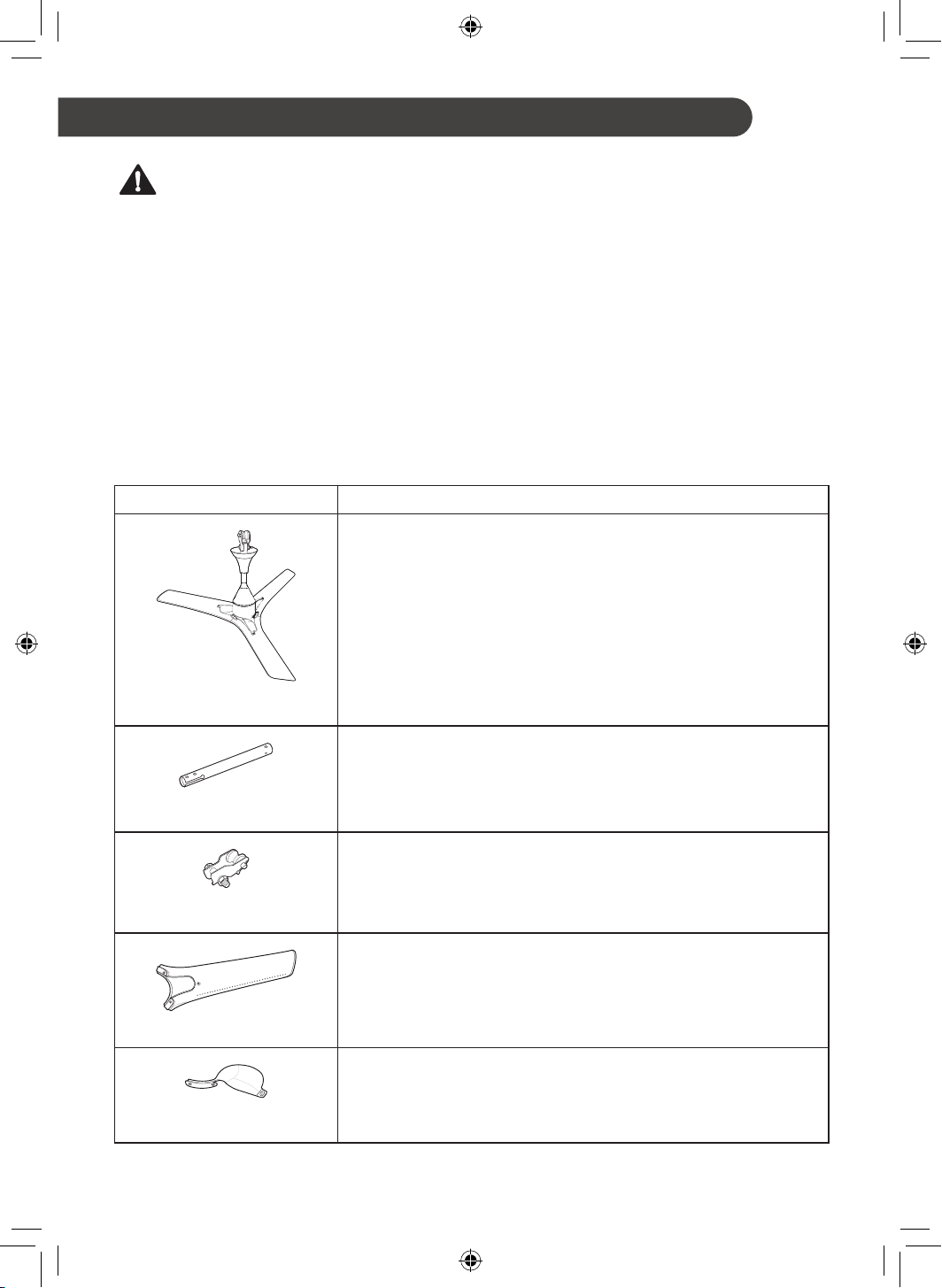
Calendrier de maintenance recommandé
Pièces Fréquence
Vérifier et nettoyer l’appareil tous les ans.
Ventilateur de plafond
Vérifier les signes de dommages et de corrosion chaque année.
Assemblage D'arbre
Vérifier les signes de dommages et de corrosion chaque année.
Assemblage de manille
Garder les pales propres et les vérifier tous les mois.
Assemblage de pale
Garder les guides propres et les vérifier tous les mois.
Guide
MAINTENANCE
16
FR
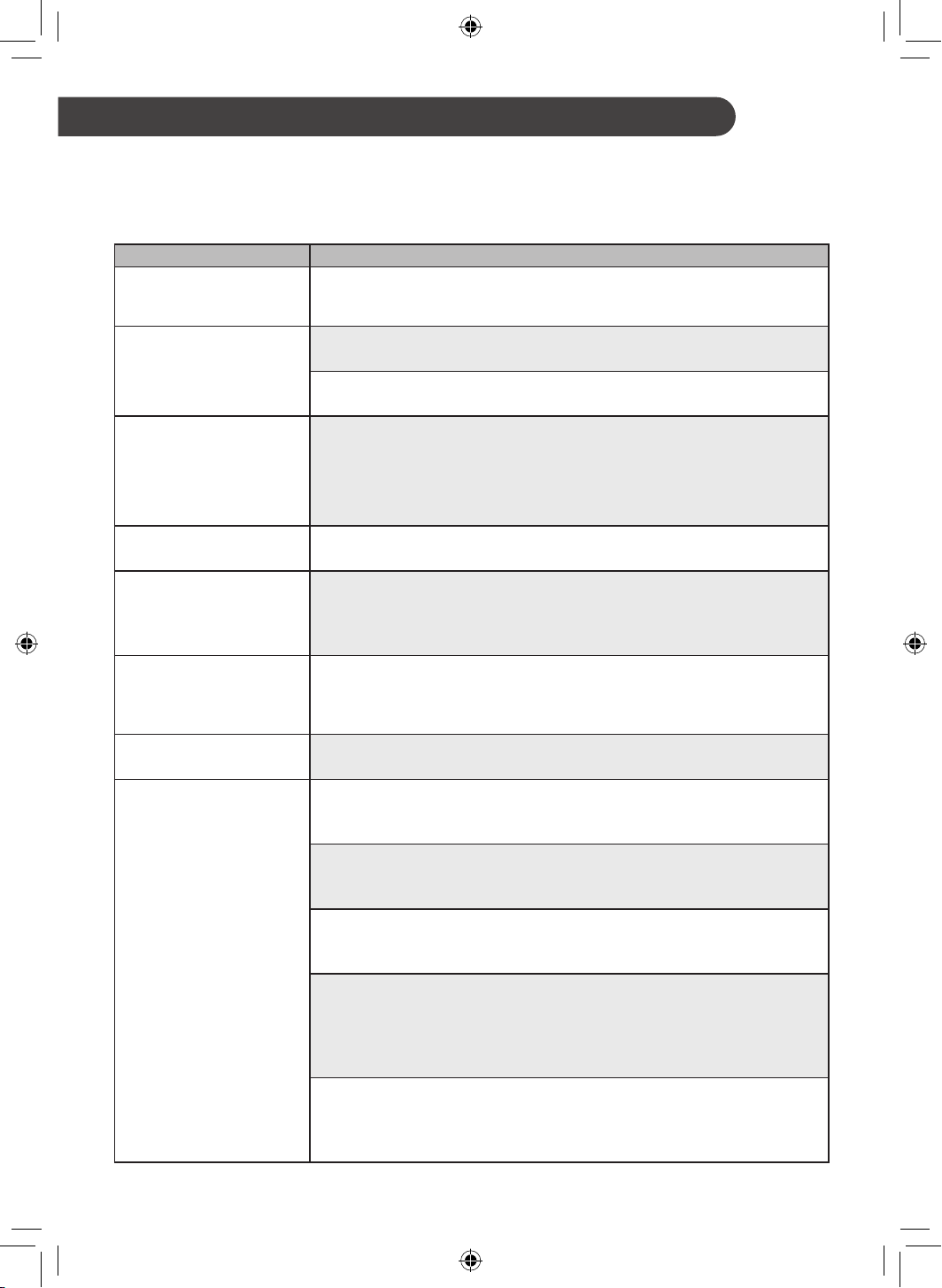
DÉPANNAGE
Avant d'appeler le service
Avant de contacter le centre de service, veuillez vérifier les points suivants. Si le problème persiste,
contactez votre centre de service local.
Problème Causes possibles et solution
Lorsque l'électricité est
alimentée mais pas sous
tension, le bip est inaudible.
Électricité non alimentée.
• Activer l’interrupteur électrique.
L'appareil fait du bruit.
L'emplacement d'installation est trop proche du mur ou du plafond.
• Vérifier la distance et le réinstaller au bon endroit.
L'installation n'est pas bonne.
• Vérifier que chaque pièce soit correcte et bien serrée.
Le voyant de veille
s’allume en continu.
Le ventilateur est verrouillé.
• Utiliser un régulateur pour le mettre hors tension et le mettre sous tension
une minute plus tard.
• Si le même problème se produit, le mettre hors tension et appeler le centre
de service.
Le ventilateur de plafond
ne fonctionne pas.
Les conditions de tension sont instables.
• Vérifier l'état de la tension. Si elle est instable, contacter un électricien local.
Le ventilateur de plafond
se met soudainement
hors puis sous tension.
L'environnement d’installation est très venteux.
• Il s’agit du processus normal pour trouver la vitesse du vent adaptée à
votre environnement. Ainsi, le ventilateur peut s’arrêter et se réajuster par
grand vent externe.
Lorsque vous appuyez
sur un bouton de la
télécommande, vous
n'entendez pas le bip.
La télécommande n’est pas alimentée.
• Vérifier l'orientation de la pile de la télécommande ou la changer.
La télécommande ne
fonctionne pas.
Trop loin pour communiquer avec le capteur.
• Se rapprocher de l'appareil et réessayer.
Votre appareil ménager et
votre smartphone ne sont
pas connectés au réseau
Wi-Fi.
Le mot de passe du Wi-Fi auquel vous essayez de vous connecter est incorrect.
• Trouvez le réseau Wi-Fi connecté à votre smartphone et supprimez-le, puis
enregistrez votre appareil sur LG ThinQ.
Les Données mobiles sont activées sur votre smartphone.
• Désactiver les Mobile data de votre smartphone et enregistrer l'appareil à
l'aide du réseau Wi-Fi.
Le nom du réseau sans fil (SSID) est défini de manière incorrecte.
• Le nom du réseau sans fil (SSID) doit être composé d'une combinaison de
chiffres et de lettres anglais. (Les caractères spéciaux ne sont pas autorisés)
La fréquence du routeur n'est pas de 2,4 GHz.
• Seule une fréquence de routeur de 2,4 GHz est prise en charge. Réglez le
routeur sans fil sur 2,4 GHz et connectez l'appareil au routeur sans fil. Pour
vérifier la fréquence du routeur, consultez votre fournisseur de services
Internet ou le fabricant du routeur.
La distance entre l'appareil et le routeur est trop éloignée.
• Si la distance entre l'appareil et le routeur est trop éloignée, le signal
peut être faible et la connexion peut ne pas être configurée correctement.
Déplacez le routeur de manière qu'il soit plus proche de l'appareil.
Exemplaire du client
Nom de l'acheteur ______________________________________________________
N° de facture et date ______________________________________________________
Modèle ______________________________________________________
N° de série ______________________________________________________
Nom et adresse du vendeur (LG /
Revendeur agréé)
______________________________________________________
______________________________________________________
Exemplaire du client
Nom de l'acheteur ______________________________________________________
N° de facture et date ______________________________________________________
Modèle ______________________________________________________
N° de série ______________________________________________________
Nom et adresse du vendeur (LG /
Revendeur agréé)
______________________________________________________
______________________________________________________
-----------------------------------------------------------------------------------------------------------------------------------------------
Note
Note
Note
Note
Note
Note
Note
ةركذم
ةركذم
ةركذم
ةركذم
ةركذم
ةركذم
ةركذم
ليمعلا ةخسن
يرتشملا مسا______________________________________________________
ةروتافلا خيرات & مقر______________________________________________________
زارطلا______________________________________________________
يلسلستلا مقرلا______________________________________________________
)دمتعملا ليكولا / LG( عئابلا ناونع & مسا
______________________________________________________
______________________________________________________
ليمعلا ةخسن
يرتشملا مسا______________________________________________________
ةروتافلا خيرات & مقر______________________________________________________
زارطلا______________________________________________________
يلسلستلا مقرلا______________________________________________________
)دمتعملا ليكولا / LG( عئابلا ناونع & مسا
______________________________________________________
______________________________________________________
-----------------------------------------------------------------------------------------------------------------------------------------------
16
AR
اهحصإو ءاطخا فاشكتسا
ةنايصلاب لاصتا لبق
.ةمدخلا زكرم ىلع لصتأ ،ةلكشملا ترمتسا اذإ .ةمدخلا زكرمب لاصتا لبق يلي امم ققحتلا ىجري
ةلكشملالولحلاو ةلمتحملا بابسا
ريغ هنكلو ءابرهكلاب زاهجلا دادمإ دنع
عامس عيطتست وأ ءابرهكلاب لصتم
.ةيتوصلا ةراشا
.ءابرهكلاب زاهجلا دادمإ نكمي
.ليغشتلا عضو ىلع ةقاطلا حاتفم ردأ
.ءاضوض ردصي زاهجلا
.فقسلا وأ طئاحلا نم برقلاب تيبثتلا ناكم
.بسانملا ناكملا يف تيبثتلا دعأ مث ةفاسملا نم ققحت
.فيعض تيبثت
.ا
ً
مكحم ا
ً
طبر عيمجتلا ءازجأ عيمج طبر نم ققحت
"Sleep" عضو ةءاضإ بذبذت
.رارمتساب
.ةقلغم ةحورملا
.ةقيقد رورم دعب ليغشتلا دعأ مث ةقاطلا قغ رايتلا مظنم مدختسا
.ةمدخلا زكرمب لصتاو زاهجلا قلغأ ،ةلكشملا ترمتسا اذإ
.لمعت فقسلا ةحورم
.ةتباث ريغ رايتلا ةدش طورش
.يلحم ءابرهك ينفب لصتاف ،ةتباث ريغ تناك اذإو رايتلا ةدش طورش نم ققحت
لمعلا نع ةأجف فقسلا ةحورم فقوتت
.ليغشتلل دوعتو
.ةيلاع ءاوه ةعرس تاذ ةئيب ةحورملاب طيحت
لمعلا نع فقوتلا ةحورملل نكمي ىتح ةطيحملا ةئيبلل ةمئملا ءاوهلا ةعرس نع ثحب ءارجإ داتعملا نم
.يجراخ ردصم نم ءاوه دوجو ةلاح يف طبضلا ةداعإو
مكحتلا ةدحو يف رز ىلع طغضلا دنع
توص عامس كنكمي ،دعب نع
.ةرفاصلا
.ةقاطلاب ةدوزم ريغ دعب نع مكحتلا ةدحو
.تايراطبلا لدبتسا وأ دعب نع مكحتلا ةدحو تايراطب باطقأ هاجتا نم ققحت
.لمعت دعب نع مكحتلا ةدحو
.رعشتسملا عم لصاوتلاب حمسي امم ةديعب ةفاسم لصفت
.ةلواحملا دعأو زاهجلا نم برقلاب فق
ريغ يكذلا فتاهلاو يلزنملا كزاهج
.Wi-Fi ةكبشب نيلصتم
.Wi-Fi ةكبشب لاصتل ةحيحص ريغرورم ةملك لخدت
.LG ThinQ قيبطت ىلع كزاهج ليجستب مق مث ،يكذلا فتاهلاب ةلصتملا Wi-Fi ةكبش ءاغلإب مق
.ليغشتلا عضو يف يكذلا كفتاه ىلع يولخلا فتاهلا تانايب
.Wi-Fi ةكبش مادختساب زاهجلا لجسو يكذلا كفتاه ىلع يولخلا فتاهلا تانايب ةقاب ليغشت فقوأ
.ا
ً
ئطاخ ا
ً
طبض طوبضم )SSID( ةيكلسلا ةكبشلا مسا
مدختست ( .ماقراو ةيزيلجنا فورحلا نم طيلخ نم )SSID( ةيكلسلا ةكبشلا مسا فلأتي نأ بجي
.)ةصاخ تامع
.زتره اجيج 2.4 ددرتلل فلاخم رتوارلا زاهج ددرت
دعأو زترهاجيج 2.4 ددرت ىلع يكلسلا رتوارلا طبضا .زترهاجيج 2.4 ددرتب رتوار ىوس معدي
وأ تنرتنا ةمدخ دوزم نم نم ققحت رتوارلا زاهج ددرت نع فشكلل .يكلسلا رتوارلل زاهجلا ليصوت
.هيجوتلا زاهج عنص
ُ
م
.يغبني امم رثكأ هيجوتلا زاهجو زاهجلا نيب ةديعب ةفاسم لصفت
ةئيهت متي دقو ةراشا فعضت دقف يغبني امم رثكأ ةديعب هيجوتلا زاهجو زاهجلا نيب ةفاسملا تناك اذإ
.زاهجلا نم برقلاب نوكيل هيجوتلا زاهج لقنا .ئطاخ لكشب لاصتا
15
AR
هيبنت
.زاهجلا لطع ىلإ كلذ يدؤي دقف
ً
ةرشابم زاهجلا ىلع هايملا شرب مقت
.فيظنتلا ءانثأ ةحورملا ةشير
ِ
نثت
.زاهجلا فيظنتل ةيولقلا تافظنملا مدختست
يدؤي دقف زاهجلا حطس ىلع نوتيسا وأ ةرانا نيسوريك وأ رنتلا لثم ةيوضعلا تابيذملا وأ كيتيربكلا ضمح مدختست وأ تاقصلملا هيلع قصلت
.حطسلا فتإ ىلإ كلذ
.داتعملا فظنملا عم هايمو ةمعان ةفيظن شامق ةعطق مدختسا ةبرتا حسمل
.يقاولا ةلازإ لبق ةقاطلا ردصم نم ةلوصفم فقسلا ةحورم نأ نم دكأت
هب ىصوملا ةنايصلا لودج
ءازجاددرتلا
.ةنس لك ةرم هفيظنتو زاهجلا نع فشكلا
فقسلا ةحورم
.ماع لك لكﺂت وأ فلت يأ دوجو مدع نم ققحت
دومعلا ةعومجم
.ماع لك لكﺂت وأ فلت يأ دوجو مدع نم ققحت
لاكشلا ةعومجم
.ا
ً
يرهش اهيلع فشكلاب كلذو شيرلا ةفاظن ىلع ظافحلا
ةحورملا ش
َ
ير ةعومجم
.ا
ً
يرهش هيلع فشكلاب كلذو ليلدلا ةفاظن ىلع ظافحلا
ليلدلا
ةنايصلا
14
AR
LG ThinQ قيبطت تيبثت
Google Play Store رجتم نم LG ThinQ قيبطت نع ثحبا
تيبثتو ليمحتل تاميلعتلا عبتاو يكذلا فتاهلا ىلع Apple App وأ
.قيبطتلا
ةيلحملا لاصتا ةكبشل ةيطمنلا ةدحولا صئاصخ
ةيكلسلا
زارطلاLCW-003
ددرتلا ىدمزترهاجيم 2472 - 2412
ةيلعفلا ةقاطلا
)ىصقأ دحب(
طاو يليم لبيسيد IEEE 802.11b: 18.37
طاو يليم لبيسيد IEEE 802.11g: 17.67
طاو يليم لبيسيد IEEE 802.11n: 17.67
ردصملا ةحوتفملا جماربلا راعشإ لوح تامولعم
و LGPL و GPL بجومب ردصملا ةيجمربلا تاميلعتلا ىلع لوصحلل
ىجري ،جتنملا اذه اهنمضتي ىرخأ ردصملا ةحوتفم صيخارتو MPL
.http://opensource.lge.com عقوملا ةرايز
صيخرتلا ماكحأ لك رفوتت ،ردصملا ةيجمربلا تاميلعتلا ىلإ ةفاضاب
.ليزنتلل رشنلا قوقح تاراعشإو ةيلوؤسملا ءخإ تاراعشإو
ردصملا ةحوتفملا ةيجمربلا تاميلعتلا
ً
اضيأ LG Electronics رفوتس
عيزوتلا اذهب مايقلا ةفلكت يطغي مسر لباقم CD-ROM صرق ىلع
ربع لسر
ُ
ي بلط ىلع
ً
ءانب )ميلستلاو نحشلاو لقنلا لئاسو ةفلكت لثم(
ضرعلا اذه نإ [email protected] ىلإ ينورتكلا ديربلا
اذه رفوتي .جتنملا اذهل ةريخا نحشلا ةيلمع دعب تاونس ثث ةرتفل
ٍ
راس
.تامولعملا هذه ىقلتي صخش ي ضرعلا
Smart Diagnosis
. وأ ةمعلا لمحت يتلا زرطلا يف طقف ةزيملا هذه رفوتت
ءانثأ كهجاوت يتلا تكشملا صيخشتل ةزيملا هذهب ةناعتسا كنكمي
.اهلحو زاهجلا مادختسا
ةظحم
لاثملا ليبس ىلع ةيجراخ لماوعل دوعي كلذو ةمدخلا هذه لمعت دق
Wi- ةكبشب لاصتا عاطقنا وأ Wi-Fi ةكبش رفوت مدع ،رصحلا
هذهو قيبطتلا رفوت مدع وأ تاقيبطتلا رجتمل ةيلحملا ةسايسلا وأ Fi
.LGE نم ريصقت نع منت بابسأ
اهلكش فلتخي دقو راذنإ قباس نود تاريغتل ةزيملا هذه ضرعتت دق
.اهيف نكست يتلا ةقطنملل ا
ً
قفو
صيخشت ضرغب LG ThinQ قيبطت مادختسا
تكشملا
اهنيحف ،Wi-Fi ةكبشب دوزملا زاهجلا مادختسا ءانثأ ةلكشم تهجاو اذإ
مادختساب يكذ فتاه ىلإ اهحصإو ءاطخا فاشكتسا تانايب لقن نكمي
.LG ThinQ قيبطت
"يكذلا صيخشتلا" ةزيم رتخاو LG ThinQ قيبطت ليغشتب مق
.LG ThinQ قيبطت يف ةدراولا تاميلعتلا عبتا .ةمئاقلا نم
13
LG ThinQ قيبطت
فتاه مادختساب زاهجلا عم لصاوتلاب كل LG ThinQ قيبطت حمسي
.يكذ
LG ThinQ قيبطت ايازم
Smart Diagnosis
ءانثأ كهجاوت ةلكشم يأ صيخشت ىلع يكذلا صيخشتلا ةزيم كدعاست
.زاهجلا مادختسا
تادادعإ
.قيبطتلاو زاهجلا يف ةحاتملا ةددعتملا تارايخلا طبضب كل حمست
ةظحم
ةملك وأ تنرتنا ةمدخ دوزم وأ يكلسلا هيجوتلا زاهج تريغ اذإ
LG ThinQ قيبطت ىلع نم لجس
ُ
ملا زاهجلا حسم وأ ،رورملا
.ىرخأ ةرم هليجست ةداعإو
راطخإ نود زاهجلا نيسحت ضرغب ريغتلل قيبطتلا عضخي
.نيمدختسملا
.زارطلا فتخاب فئاظولا فلتخت دق
LG ThinQ قيبطت مادختسا لبق
.Wi-Fi ةفيظو ةمعلا لمحت يتلا زرطلا يف طقف ةزيملا هذه رفوتت
1
ةكبش( يكلسلا هيجوتلا زاهجو زاهجلا نيب ةفاسملا نم ققحت
.) Wi-Fi
• يكلسلا هيجوتلا زاهجو زاهجلا نيب ةفاسملا تناك اذإ
قرغتسي دقو ،ةفيعض ةراشا ةوق حبصتسف ،ا
ً
دج ةديعب
.تيبثتلا ةيلمع لشفت وأ ةليوط ةرتف زاهجلا طبض
2
فتاهلا تانايب وأ فتاهلا تانايب ةيصاخ ليغشت فاقيإب مق
.يكذلا كفتاه نم يولخلا
3
.يكلسلا رتوارلاب يكذلا كفتاه ليصوتب مق
ةظحم
Wi-Fi زمر نأ دكأت ،Wi-Fi لاصتا ةيحص نم ققحتلل
.مكحتلا ةحول ىلع ءاضم
ةفرعمل .طقف زترهاجيج 2.4 ددرتب Wi-Fi تاكبش زاهجلا معدي
عجار وأ تنرتنا ةمدخ دوزمب لصتا ،كب ةصاخلا ةكبشلا ددرت
.يكلسلا هيجوتلا زاهج ليلد
لاصتاب قلعتت تكشم يأ عوقو ةيلوؤسم LG ThinQ لمحتت
.ةكبشلا لاصتا نع جتنت ءاطخأ وأ لاطعأ وأ ءاطخأ يأ وأ ةكبشلا
ىلإ ببسلا عجري دقف ،Wi-Fi ةكبشب زاهجلا لاصتا رذعت ةلاح يف
ةوق نيسحتلو .هيجوتلا زاهج نم ةديعب ةفاسم ىلع زاهجلا عضو
.)ثبلا عسوم( Wi-Fi ةراشإ رركم ءارشب مق ،Wi-Fi ةراشإ
ةكبشلا ةئيب ىلإ هعاطقنا وأ Wi-Fi لاصتا لشف ببس دوعي دق
.ةيلزنملا
ةمدخلا ىوتسم ىلع
ً
ءانب حيحص لكشب ةكبشلا لاصتا لمعي دق
.تنرتنا ةمدخ رفوم اهمدقي يتلا
ةيكلسلا ةكبشلا ةمدخ فاعضإ ةطيحملا ةيكلسلا ةئيبلل نكمي
.اهليغشت ءطب يف ببستلاو
ةراشا لاسرإب ةقلعتملا تكشملا ببسب زاهجلا طبض نكمي
.ةلواحملا ةداعإ لبق ةقيقد يلاوحل رظتناو زاهجلا لصفا .ةيكلسلا
ليطعتب مقف ،ن
ّ
كم
ُ
م يكلسلا هيجوتلا زاهج يف ةيامحلا رادج ناك اذإ
.هل ءانثتسا فضأ وأ ةيامحلا رادج
نم طيلخ نم )SSID( ةيكلسلا ةكبشلا مسا فلأتي نأ بجي
.)ةصاخ تامع مدختست ( .ماقراو ةيزيلجنا فورحلا
ليغشت ماظنل ا
ً
قفو )UI( يكذلا فتاهلل مدختسملا ةهجاو فلتخي دق
.ةعنصملا ةكرشلاو )OS( فتاهلا
ا
ً
طوبضم هيجوتلا زاهجب صاخلا ناما لوكوتورب ناك اذإ
ىلإ هرييغت ءاجرلا .ةكبشلا دادعإ كيلع رذعتي دقف ،WEP ىلع
ليجست دعأ مث )WPA2 رايتخاب حصن
ُ
ي( رخآ نامأ لوكوتورب
.جتنملا
ةيكذلا فئاظولا
AR
12
AR
ليغشتلا ةقيرط
م 5
°45
°45
هيبنت
.هيلع لامحأ عضو وأ زاهجلا ىلع فوقولاب حمس
ُ
ي
رظح
ُ
ي امك ،ءاملا نم برقلاب همدختست وأ زاهجلا نيزختب مقت
.ةبوطرلا يلاع ناكم يف هعضو
وأ ىطغ
ُ
م ريغ بهل نم برقلاب زاهجلا مادختسا وأ نيزخت رظح
ُ
ي
يف كلذ ببستي دقف إو ،نارفا وأ ئفادملا كلذ يف امب ةئفدت ةزهجأ
.ةيراطبلا راجفنا
ةظحم
ةدحو لاسرإ ةراشإ هيجوتب مق ،دع
ُ
ب نع مكحتلا ةدحو مادختس
.زاهجلا تاراشإ لبقتسم وحن دع
ُ
ب نع مكحتلا
ىلع ةجرد 45و م 5 قاطن لخاد لضفأ لكشب مكحتلا ةدحو لمعت
.زاهجلل ةيماما ةهجلا ىلع دوجوملا رعشتسملا نيمي وأ راسي
لمع ليطعت يف تقولا سفن يف رارزأ ةدع ىلع طغضلا ببستي دق
.دع
ُ
ب نع مكحتلا ةدحو
ءوض دوجو ةلاح يف حيحص لكشب دع
ُ
ب نع مكحتلا ةدحو لمعت دق
.نوين ةبمل وأ 3 يجوم لوطب تنسيرولف حابصم لثم ديدش
نم ةديدج ةدحو ءارش كنكمي ،دع
ُ
ب نع مكحتلا ةدحو نادقف ةلاح يف
.ةمدح زكرم برقأ
ةيفاضا ةفيظولا مادختسا
"Sleep" عضولا
ةءاضإ ليغشت فاقيإو ا
ً
تماص توصلا لعجل "sleep" عضو مدختسا
.ضرعلا ةشاش
1
. فقوت/ءدب رز ىلع طغضا
2
."sleep" عضو رايتخ Sleep رز ىلع طغضا
ةظحم
ىلإ لصتل ا
ً
يئاقلت ةحورملا ةعرس لقتس ،عضولا اذه دادعإ طبض دعب
.ةياهنلا يف 1 ةعرسلا ىوتسم
نع ا
ً
يودي ةحورملا ةعرس ليدعت كنكمي ،"sleep" عضو يف
.Speed رز مادختسا قيرط
ةرم هيلع طغضلا متي ىتح ليغشتلا ديق "sleep" عضو ىقبيس
.هفاقي ىرخأ
11
AR
دع
ُ
ب نع مكحتلا ةدحو ايازم
1
2
3
4
5
1
فقوت/ءدب
2
Speed
.ةحورملا تاعرس طبض يف ةزيملا هذه مكحتت
3
Display
.ضرعلا ةشاش ةءاضإ فاقيإ/ليغشت يف ةزيملا هذه مكحتت
4
Timer
.ليغشتلا فاقيإ تقو طبض ةزيملا هذه مكحتت
5
Sleep
."sleep" عضو فاقيإ/ليغشت يف ةزيملا هذه مكحتت
راد
ُ
تف ،1 ةعرسلا ىوتسم ىلع طغضلا ةلاح يف امأ .ةعاس لك ةدحاو ةجردب ءاوهلا ةعرس لقت ،"sleep" عضو ىلع ةحورملا طبض دنع
.ةعرسلا سفن ىلع ةحورملا
Wi-Fi
.نارتقا عضو فاقي
ٍ
ناوث 3 ةدمل طغضلا دعأ وأ ،
ٍ
ناوث 3 ةدمل رزلا اذه ىلع طغضا ،نارتقا عضو طيشنتل
Wi-Fi ليغشت فاقيإ
− دعبو .
ٍ
ناوث 3 نم رثك تقولا سفن يف Wi-Fi رز ىلعو فقوت/ءدب رز ىلع رارمتسا عم طغضا ، Wi-Fi ليغشت فاقي
ةدحاو ةرمل
ٍ
ناوث 3 نم رثك Wi-Fi رز ىلع رارمتسا عم طغضا ،فاقيا ديق Wi-Fi نوكي امدنعو جتنملا طبض نم ءاهتنا
.لجس
ُ
ملا يكذلا فتاهلا قيرط نع جتنملا يف مكحتلاو Wi-Fi ليغشت لجأ نم
ةظحم
.)ىصقأ دحب( طقف تاوطخ 5 ىلع مظنملا طبض بجيف ،ةحورملا ليغشت دنع
.طئاحلا يف تبث
ُ
ملا فاقيإ/ليغشت حاتفم ةطساوب ةحورملا ليغشت كنكميف ،دعب نع مكحتلا ةدحو نادقف ةلاح يف
.زارطلا بسح اهتفيظو وأ دع
ُ
ب نع مكحتلا ةدحول يجراخلا لكشلا فلتخي دق
ةدحاو ةرمفاقيإ/ليغشت ىلع طغضلا لبق ةقباسلا ةوطخلا ىلإ كعجرت
نيترم1 ةعرسلا ىوتسم
تارم 32 ةعرسلا ىوتسم
تارم 43 ةعرسلا ىوتسم
تارم 54 ةعرسلا ىوتسم
10
AR
دعب نع مكحتلا ةدحو
ةيراطبلا لاخدإ
1
هيجوتب مق دع
ُ
ب نع مكحتلا ةدحو نم ةيراطبلا ةبلع ةلاز
.ىلعأ ىلإ دع
ُ
ب نع مكحتلا ةدحو نم يفلخلا بناجلا
2
صصخملا ةبلعلا ناكم يف زاهجلاب ةقفرملا ةيراطبلا ل
ِ
خدأ
.اهل
ةيراطبلل )+( يئابرهكلا بطقلا نوكي نأ بجيو
.ىلع ا
ً
هجوم
3
.دع
ُ
ب نع مكحتلا ةدحو يف ةيراطبلا ةبلع لاخدإب مق
ةظحم
ةيراطبب اهلدبتساف ،دافنلا ىلع ةيراطبلل يضارتفا رمعلا كشوأ اذإ
.)CR2025( ةئف ةديدج
لواحف ،عقوتم وه امبسح لمعلا يف دع
ُ
ب نع مكحتلا ةدحو تقفخأ اذإ
امأ .)- ،+( ةيراطبلا يبطق ةمس نم ققحت وأ ةيراطبلا لادبتسا
.ةمدخلا زكرمب لصتاف ،ةلكشملا رارمتسا ةلاح يف
.ةلمعتسملا ةيراطبلا نم صلختلا ءانثأ ةيئيبلا طباوضلا عبتا
9
AR
ةلاحلا ضرع ةشاش ةحول
1
2
5
3
4
يرايتخا :) ( عطقتملا طخلا*
ليغشتلا
1
دعب نع مكحتلا ةدحو تاراشإ لبقتسم
.لبقتسملا هلخ نم دعب نع ةرداصلا تاراشا رمت ىتح ،تاراشا لبقتسم ةيحان دعب نع مكحتلا ةدحو ه
ِ
ّ
جو
2
)يرايتخا( Wi-Fi
.ضرعلا ةشاش ىلع
ةنوقيا رهظت ،Wi-Fi ةكبشب
ً
صتم زاهجلا نوكي امدنع
3
"Sleep" عضولا
.
ٍ
ناوث 3 ةدمل
ةنوقيا ضرع دعب كلذو ادع ام تانوقيا عيمج يفتخت ،"sleep" عضولا رايتخا دنع
4
ةحورملا ةعرس
.ةحورملا ةعرس رييغت متيس ،دعب نع مكحتلا ةدحو ىلع دوجوملا )
( "Speed"رز ىلع طغضلا مت املك
(Speed 4)(Speed 3)(Speed 2)(Speed 1)
5
Timer
.تقولا تادادعإ طبض رييغت متيس ،دعب نع مكحتلا ةدحو ىلع دوجوملا )
( "Timer"رز ىلع طغضلا مت املك
2hr 4hr 6hr 8hr Off
ةظحم
.فئاظولا ليغشت ءانثأ إ ضرعلا ةشاش ءاض
ُ
ت
.زارطلا بسح هفئاظو وأ جتنملل يجراخلا لكشلا فلتخي دق
8
جتنملا لوح ةماع ةرظن
AR
اهتافصاومو جتنملا ءازجأ
يجراخلا ءزجلا
تافصاوملا
تاملع
َ
ملاميقلا
لاخدا دهجØ 1 تلوف 240-220 ددرتم رايت
ردقملا ددرتلازتره 50
دادتمامم 1200
ةيداعلا لاخدا ةقاطتاو 30
ةعرسلا يف محتلاةقاطلا حاتفمو دعب نع مكحتلا زاهج ربع
دعب نع مكحتلا زاهج ةيراطبتلوف 3 CR2025
نزولا)يفاصلا( مجك 3.7
ةظحم
.يقيقحلا نزولا نع روكذملا نزولا فلتخي دق
7
ةنايصلا
.عدصتلا وأ رسكلل تضرعت لاح يف ةحورملا ش
َ
ير لدبتسا
ةعطق مدختسا لب ،ا
ً
قلطم لوعفملا ةيوق تابيذملا وأ تافظنملا مدختست ،زاهجلا فيظنت دنع
.ةمعان شامق
ا
ً
يسرك مدختسا ،اهحصإ وأ اهتنايص وأ ،عافترا ىلع ةعوضوملا فقسلا ةحورم فيظنت دنع
.ا
ً
ملس وأ ا
ً
نيتم
ةيراطبلا
.ا
ً
يئاوشع ةيراطبلا ىلع تيدعت لخدت
.راجفنا ثودح ىلإ يدؤت دق حيحص ريغ لكشب ةعوضوملا ةيراطبلا
.اهلصفت وأ ةيراطبلا نحش دع
ُ
ت
.ةرارحلا نم برقلاب اهكرتت وأ اهنم صلختت ىتح بهللا يف ةيراطبلا
ِ
قلت
ةدمل دعب نع مكحتلا ةدحو مدختست
ّ
أ يونت تنك اذإ نمآ ناكم يف اهب ظفتحاو ةيراطبلا جرخأ
.ةليوط
AR
6
هيبنت
مادختسا دنع تاكلتمملا وأ جتنملا يف فلت وأ لطع ثودح وأ تاباصإ عوقو رطاخم ليلقتل
:يلي ام اهيف امب ،ةيساسا ةمسلا تاطايتحا عابتا بجي ،جتنملا
بيكرتلا
وأ ةبوطرلا وأ ةرارحلا ةجرد اهيف ديزت ىرخأ وأ ةبطر ةقطنم يف زاهجلا بيكرت بنجت
.حايرلا اهيف دتشت نكامأ وأ زازتها
.دمجت ةجرد تحت زاهجلا بيكرت بنجت
ةرارحلا ةجيتن اهنول ريغت وأ فلتلل تضرعت دق ءايشأ نم برقلاب وأ قوف زاهجلا بيكرت بنجت
.ةبوطرلا وأ
.رئاتسلا نم برقلاب زاهجلا بيكرت بنجت
ثودح ىلإ كلذ يدؤي ذإ ،ويريتس زاهج وأ زافلتلا نم دحاو رتم دعب ىلع زاهجلا بيكرت بنجت
.شيوشت
.ةدشب زتهي هنأ دكأت ،زاهجلا بيكرت نم يهتنت امدعب
ليغشتلا
.زاهجلل يضارتفا رمعلا ليلقت ىلإ كلذ يدؤي ذإ ،ةيوهت ةحتف هب ناكم يف زاهجلا مدختست
لمعلا نع زاهجلا فقوتي دقف ،رقتسم ريغ يئابرهك دهج تاذ ةقطنم يف زاهجلا ليغشت بنجت
.هتانوكم ةيامحل ا
ً
يئاقلت
بجيو طقف ةيلخادلا تامادختساو يلزنملا مادختسا يف زاهجلا اذه ميمصت نم ضرغلا نمكي
.ةيراجت ضارغ مدختس
ُ
ي
ّ
أ
AR
5
AR
ةيئايميكلا داوملا وأ لوحكلا وأ نيزنبلا وأ رثيا( قارتحا وأ لاعتشل ةلباق داوم مدختست
ةيئاوهلا تارطعملا وأ يرشحلا ديبملا وأ قارتحل ةلباقلا تاشرملا وأ لاسملا يطفنلا زاغلا وأ
.زاهجلا نم برقلاب اهنزخت وأ )اهريغو ليمجتلا قيحاسم وأ
زاهجلا سملت ف ،)هريغو يعيبطلا زاغلا وأ نابوربلا وأ نيتويبوسيأ( زاغ برست تظح اذإ
.روفلا ىلع ناكملا ةيوهتب مقو ةقاطلا حاتفم وأ
.ا
ً
ناخد وأ
ً
ةحئار وأ ءاضوض زاهجلا ردصأ اذإ ةقاطلا ردصم لصفا
.رطملا وأ هايملا تاشاشرل زاهجلا ضرعت
.ةلتبم كديو هحلصت وأ هلغشت وأ زاهجلا سملت
ةكرشل ةعباتلا ءمعلا ةمدخ زكرم عم لصاوتو ةقاطلا ردصم لصفا ،تاناضيفلا تاح يف
.LG Electronics
نع ا
ً
ديعب )نيلفلا عطقو ةيكيتسبلا سايكا لثم( ةفاك فيلغتلاو ةئبعتلا داوم نم صلخت
.قانتخا ثودح يف فيلغتلاو ةئبعتلا داوم ببستت ذإ .لافطا لوانتم
ةنايصلا
ةشير فقوتت نأ ىلإ رظتناو ةقاطلا ردصم لصفا ،هتنايص وأ زاهجلا فيظنت ةرشابم لبق
.نارودلا نع ةحورملا
.زاهجلا فيظنتل ةيندعم ةاشرف وأ ةرفنص ةجنفسإ وأ شامق مدختست
ةيراطبلا
اذإ .زاهجلاب ةصاخلا دعب نع مكحتلا ةدحو يف ةيندعم ةلمع/رز لكش ىلع ةيراطب مدختس
ُ
ت
مل اذإ .ئراوطلا جع مسق ىلإ لاح
ُ
تل ا
ً
روف بيبطلا ىلإ أجلاف ،دصق نود ةيراطبلا تعلتبا
ءاضعأ ضرعتت دق اهنيحف ،ةيراطبلا عتبا نم نيتعاس لخ ةيلوا تافاعسل عضخت
.اهنم سوؤيملا تاحلا يف كلذو توملل ضرعتت وأ فلتلل ةيلخادلا كدسج
.ةيراطبلا عتبا بنجت
نع هدعبأو ا
ً
روف زاهجلا مادختسا فقوأ اهنيحف ،ماكحإب ةتبثم ريغ ةيراطبلا ةبلع تناك اذإ
.لافطا لوانتم
نوكت نأ ىلع دعب نع مكحتلا ةدحو يف ةدوجوملا تايراطبلا عيمجب ةديدجلا تايراطبلا لدبتسا
.ةفلتخملا تايراطبلا عاونأ و ةديدجلاب ةميدقلا تايراطبلا طلخت .هسفن عونلا نم
4
AR
بيكرتلا
.نيلهؤملا ةمدخلا يمدقم دحأ ةطساوب بيكرتلا تايلمع وأ ةيئابرهكلا لامعا ذفن
ُ
ت
فظوم وأ ةعنصملا ةكرشلا ةطساوب ةحورملا قيلعتل نامأ ماظنب دوزملا زاهجلا ءازجأ لدبتس
ُ
ت
.كلذل نيلهؤملا ةمدخلا يمدقم وأ اهل عباتلا ةمدخلا
طئاحلا نيبو م 2.5 نع زاهجلاو ضرا نيب ةفاسملا لقت
ّ
أ بجي ،زاهجلا بيكرتب أدبت امدنع
.م 1 نع ةحورملا ش
َ
يرو
ىلع ةرداق ةحورملا قيلعتل نامأ ماظنب ةدوزملا ىرخا ةزهجا وأ فقسلا فاطخ نأ دكأت
.زاهجلا نزو نع تارم 10 ديزي نزو لمحت
.لاكشلاو كرحملا دومع يف ماكحإب تبثم ةحورملا دومع نأ دكأت
.ةحورملا ش
َ
ير يغارب تيبثتل
ٍ
غارب كفم مدختسا
نيلوزاجلا لثم لاعتشل ةلباقلا تازاغلا وأ لئاوسلا ظفح
ُ
ت ثيح زاهجلا بيكرت بنجت
.اهريغو كيتسبلا بيذت تابكرمو نابوربلاو
.ةرشابملا سمشلا ةعش هيف ضرعتي دق ناكم يف زاهجلا بيكرت بنجت
.يندعم رابغ وأ موحش وأ قارتحل لباق زاغ برستل ضرع
ُ
م ناكم يف زاهجلا بيكرت بنجت
لوؤسم وأ عينصتلا ةهج ةطساوب هلادبتسا متي نأ بجي ،ةقاطلاب دادما كلس فلت ةلاح يف
.رطاخملا عوقو بنجت لجأ نم ةنايصلا
ليغشتلا
ةحول ىلع نيعوبطملاو نيردقملا ددرتلاو يئابرهكلا دهجلا بسح زاهجلا اذه ليصوتب مق
.مسا
.ةلتبم كديو ةقاطلا حاتفم سملت
.هليدعت وأ هحصإ وأ هئازجأ كفب مقت ،زاهجلا لمعي امنيب
.زاهجلا لخاد رخآ ءيش يأ وأ كيدي لخدت
.زاهجلا حطس ىلع ءيش يأ عضت
3
ةمسلا تاداشرإ
AR
وأ ةعقوتملا ريغ رطاخملا عوقو نود ةلوليحلا يف ةيلاتلا ةمسلا تاداشرإ نم ضرغلا لثمتي
.جتنملل حيحصلا ريغ وأ نما ريغ ليغشتلا نع ةمجانلا رارضا
.هاندأ حضوملا وحنلا ىلع "هيبنت"و "ريذحت" ىلإ تاداشرا ميسقت متي
ببست نأ نكمي يتلا ليغشتلا تايلمعو روما ىلإ ةراشل زمرلا اذه ضرع متي
بنجتل تاداشرا عبتاو ةيانعب زمرلا اذه لمحي يذلا ءزجلا ةءارق ىلع صرحاف ،رطاخم
.رطاخملا
ريذحت
.ةافولا وأ ةريطخ ةباصإ عوقو ببسي دق تاداشرا عابتا مدع نأ ىلإ اذه ريشي
هيبنت
.جتنملا فلت وأ ةفيفط ةباصإ عوقو يف ببستي دق تاداشرا عابتا مدع نأ ىلإ اذه ريشي
ةماهلا ةمسلا تاداشرإ
ريذحت
،ةيبرهك ةمدصل ضرعتلا وأ ،ةافو ثودح وأ ،قيرح بوشن وأ ،راجفنا عوقو رطاخم ليلقتل
ةمسلا تاطايتحا عابتا بجي ،جتنملا مادختسا دنع صاخشل قورح وأ ،ةباصإ ثودح وأ
:يلي ام اهيف امب ،ةيساسا
لزنملاب لافطا
يف صقن نم نوناعي نيذلا )لافطا كلذ يف امب( دارفا مادختس صصخم ريغ زاهجلا اذه
وأ مهيلع فارشا متي مل ام ،ةفرعمو ةربخ مهيدل سيل وأ ،ةيلقعلا وأ ةيسحلا وأ ةيندبلا مهتاردق
بجي كلذك ،مهتمس نع لوؤسم صخش لبق نم زاهجلا مادختساب ةقلعتملا تاداشرا مهل مدقت
.زاهجلاب مهثبع مدع نم دكأتلل لافطا ىلع فارشا
عم لصاوتو ا
ً
روف فقسلا ةحورم مادختسا نع فقوتف ،ةيعيبط ريغ حجرأت ةكرح يأ تظح اذإ
.نيلهؤملا صاخشا وأ ةمدخلا ليكو وأ ةعنصملا ةهجلا
تايوتحملا لودج
يذلا زارطلا نع فلتخي ىوتحم وأ ا
ً
روص ليلدلا اذه نمضتي دق
.هتيرتشا
ةكرشلا اهرشابت يتلا ليدعتلا تاءارج ليلدلا اذه عضخي
.ةعنصملا
3 .................................................... ةمسلا تاداشرإ
3 .......................................................ةماهلا ةمسلا تاداشرإ
8 ............................................. جتنملا لوح ةماع ةرظن
8 ..................................................... اهتافصاومو جتنملا ءازجأ
9 ...............................................................ليغشتلا
9 .....................................................ةلاحلا ضرع ةشاش ةحول
10 .........................................................دعب نع مكحتلا ةدحو
12 ...................................................ةيفاضا ةفيظولا مادختسا
13 .................................................... ةيكذلا فئاظولا
13 ........................................................ LG ThinQ قيبطت
14 ..................................................... Smart Diagnosis
15 .............................................................ةنايصلا
15 ..................................................هب ىصوملا ةنايصلا لودج
16 .................................... اهحصإو ءاطخا فاشكتسا
www.lg.com
كلاملا ليلد
فقسلا ةحورم
عوجرلل ديلا لوانتم يف هب ظافتحاو زاهجلا ليغشت لبق لماكلاب اذه كلاملا ليلد ةءارق ىجري
.تاقوا عيمج يف هيلإ
فقس ةحورم :جتنملا عون
)****FC48G( * LCF12 : زارطلا
ARةيبرعلاFRFRANÇAISARةيبرعلا
ةظوفحم قوقحلا لك .تاينورتكلل يج لإ 2020 رشنلا قوقح