
USB DAC HiBy FD3 HiBy FD3 User Manual
HiBy FD3 User Manual
1. Product introduction
HIBY FD3 IS A PORTABLE USB HIGH-DEFINITION LOSSLESS AUDIO DECODER
1. Based on HiBy's self-developed USB audio system
2. Adopt dual AK4493 decoding architecture, up to support DSD512 and PCM 768kHz
decoding
3. Supports PhoneOut(PO) and Balance analog audio output
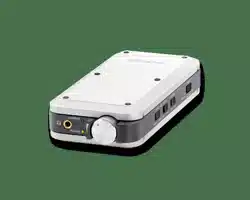
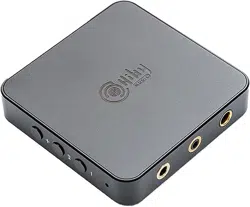
APPEARANCE INTRODUCTION
Take the front view of the decoder as a reference:
1. From top to bottom on the right are: Power button, LED indicator, Previous song,
Playback pause, Next song
2. The bottom is from left to right: PO, Type-C, BAL
2. Key usage instructions
KEY DISTRIBUTION
Take the front view of the decoder as a reference:
1. From top to bottom on the right are: Power button, LED indicator, Previous song,
Playback pause, Next song
Welcome to use HiBy's products

2. The bottom is from left to right: PO, Type-C, BAL
Key Function
Power button Long press: power on and off; short press: switch screen
Previous song Short note: Previous song
Next song Short button: Next song
Play Pause Short button: Play Pause
3. Interface usage instructions
INTERFACE DISTRIBUTION
The following introduction is the front view of the player screen as reference:
1. The bottom is from left to right: PO, Type-C, BAL
Audio output interface
AUDIO OUTPUT INTERFACE
The audio output interface can be provided to different audio devices for use, such as:
headphones with 3.5mm interface, headphones with 4.4mm balanced interface, line of
3.5mm interface, balanced input amplifier with 4.4mm interface and other devices.
1. PO: 3.5mm single-ended interface headphone output
2. BAL: 2.5mm balanced interface headphone output
USB port
The physical interface used by the USB interface is the Type-C interface.
4. Instructions for use
Connecting the device
AUDIO OUTPUT INTERFACE
Please connect the decoder and host device using a wire with at least one end of Type-C. The
host device can be a player, a mobile phone, a computer, a tablet, or a dedicated digital
broadcast device.
WARNING
Some devices may have compatibility issues due to differences in players, phones, tablet
systems and hardware. In addition, some phones may need to manually turn on the OTG
function to be used normally.
Windows Computer
For detailed instructions, please refer to USB DAC User Manual.
Windows computer, Windows system
Win7/Win8/Win10 versions earlier than 1703
The
UAC2.0 protocol does not support it, so the driver needs to be installed.
WIN7/WIN8/WIN10 1703 PREVIOUS VERSION
because
Win7/Win8/Win10 versions earlier than 1703
The UAC2.0 protocol does not
support, so please refer to this to install the driver [TBD] for a better experience.
WIN10 1703 LATER VERSION
The later version of Win10 1703 already has a driver, so you can use it by directly connecting
to USB. You can use it with the problem of using it.HereCheck. Drivers can also be installed in
later versions of Win10 1703, so that ASIO drivers can be used to achieve a better
experience. For the installation of the driver, please refer to [TBD].
Android player, mobile phone or tablet

Android players, mobile phones or tablets can be divided into exclusive and non-exclusive
methods. You can also use them.HereCheck.
ANDROID NON-EXCLUSIVE
Just plug the USB decoder into the USB port of your phone to use. If you plug in, you can go
to the system settings to see if there is an OTG option and turn on the OTG support of the
phone. In addition, you can also download HiBy Music and try the exclusive mode of HiBy
Music. Otherwise, the phone will not support it. Please contact the mobile phone
manufacturer to confirm.
ANDROID EXCLUSIVE USE
Download and install HiBy Music (HiByMusic
)
Enter HiBy Music -> Swipe right to open the settings options -> Settings -> Click HiBy Music
exclusive USB output, open the exclusive output Plug the USB decoder directly into the
phone "Allow HiBy Music Use to access HiBy FD3" to pop up on your phone, click Allow
iPhone or iPad tablet
Both iPhone or iPad tablets are iOS.
IOS
iOS itself already has a driver, and you can use it by directly connecting to USB. You can use it
by using it.HereCheck.
Apple Computer
The operating system of Apple computer is MacOS.
MACOS
MacOS itself already has a driver, and you can use it by directly connecting to USB. You can
use it with the problem of using it.HereCheck.

Linux distribution
LINUX DISTRIBUTION
Linux's USB DAC support is determined by the kernel. Whether the kernel of different
distributions is turned on USB sound card functions is uncertain. For Linux distributions of
unsupported USB DACs, you can compile the kernel to implement USB sound card functions
by yourself. Or find a third-party app to support USB DAC functionality.
Detailed description
For detailed instructions, please refer to USB DAC User Manual.
5. Frequently Asked Questions
FAQs can be foundHere
6. Things to note
This product is powered by USB, so it consumes power from the host device (mobile phone,
tablet or computer);
Since the equipment uses a high-performance decoding chip, it will cause a certain amount of
heat during use, which is a normal phenomenon;
Before plugging and unplugging the headphones, it is recommended not to wear them to
avoid possible instantaneous impact sounds;
Before listening to music, it is recommended to adjust the volume of the device to the
appropriate position to avoid excessive volume damaging hearing;