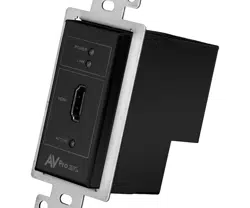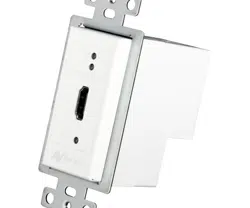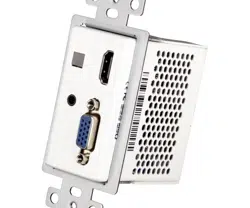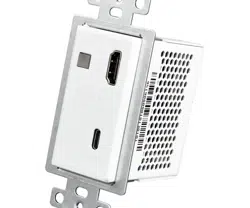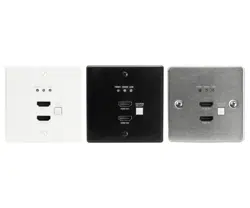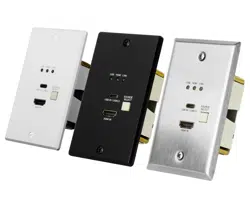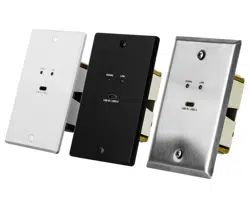

AC-CXWP-LP Series Wall Plates
User manual
ConferX Low-profile wall plates

Page 2 of 21
AC-CXWP-LP Wall Plates User Manual
Contents
Important Safety Instructions ..................................................................................................................................................... 4
Safety Classifications in this Document ................................................................................................................................. 4
Electrical Shock Prevention ..................................................................................................................................................... 4
Weight Injury Prevention ......................................................................................................................................................... 4
Safety Statements .................................................................................................................................................................... 5
Introduction .................................................................................................................................................................................. 6
Features ..................................................................................................................................................................................... 6
Product Overview – AC-CXWP-LPU-T ......................................................................................................................................... 7
Box Contents ............................................................................................................................................................................ 7
Technical Specifications – ........................................................................................................................................................ 7
Front and Rear Panel Overview – ........................................................................................................................................... 8
Product Overview – AC-CXWP-LPH-T ......................................................................................................................................... 9
Box Contents ............................................................................................................................................................................ 9
Technical Specifications – ........................................................................................................................................................ 9
Front and Rear Panel Overview – ........................................................................................................................................ 10
Product Overview – AC-CXWP-LPDH-T .................................................................................................................................... 11
Box Contents ......................................................................................................................................................................... 11
Technical Specifications – ..................................................................................................................................................... 11
Front and Rear Panel Overview – ........................................................................................................................................ 12
Product Overview – AC-CXWP-LPDHU-T ................................................................................................................................. 13
Box Contents ......................................................................................................................................................................... 13
Technical Specifications – ..................................................................................................................................................... 13
Front and Rear Panel Overview – ........................................................................................................................................ 14
EDID Dial ..................................................................................................................................................................................... 15
HDCP DIP Switch ....................................................................................................................................................................... 15
Compatible Products ................................................................................................................................................................ 16
Installation .................................................................................................................................................................................. 16
Powering the Wall Plate ........................................................................................................................................................ 16
Wiring and Connections ........................................................................................................................................................... 17
HDMI Cables .......................................................................................................................................................................... 17
USB Ports ............................................................................................................................................................................... 17
HDBaseT Link Wiring ............................................................................................................................................................ 17
RS-232 Control ....................................................................................................................................................................... 18
Maintenance .............................................................................................................................................................................. 19

Page 3 of 21
AC-CXWP-LP Wall Plates User Manual
Damage Requiring Service ....................................................................................................................................................... 19
Support ....................................................................................................................................................................................... 19
Warranty ..................................................................................................................................................................................... 20
The Basics ............................................................................................................................................................................... 20
Coverage Details ................................................................................................................................................................... 20
Red Tape ................................................................................................................................................................................. 20
Obtaining an RMA ................................................................................................................................................................. 21
Shipping .................................................................................................................................................................................. 21
Limitation on Liability ........................................................................................................................................................... 21
Exclusive Remedy .................................................................................................................................................................. 21
Page 4 of 21
AC-CXWP-LP Wall Plates User Manual
Important Safety Instructions
Before installing, configuring, and operating the devices and other vendor equipment, AVPro Edge strongly
recommends that each dealer, integrator, installer, and all other necessary personnel access and read all the
required technical documentation, which can be located by visiting AVProEdge.com.
Read and understand all safety instructions, cautions, and warnings in this document and the labels on the
equipment.
Safety Classifications in this Document
Note:
Provides special information for installing, configuring, and operating the devices and
equipment.
Tip:
Provides suggestions and considerations for installing, configuring, and operating the
devices and equipment.
Important:
Provides special information that is critical for installing, configuring, and operating
the devices and equipment.
Cau1on:
Provides special information for avoiding situations that may cause damage to the
devices and equipment.
Warning:
Provides special information for avoiding situations that may cause physical danger to
the installer, end user, etc.
Electrical Shock Prevention
Electric Shock:
Provides special information that is critical for installing, configuring, and operating
the devices and equipment.
Electrical Disconnect:
Provides special information for avoiding situations that may cause damage to the
devices and equipment.
Weight Injury Prevention
Weight Injury:
Installing some of the devices and equipment requires two installers to ensure safe
handling during installation. Failure to use two installers may result in injury.

Page 5 of 21
AC-CXWP-LP Wall Plates User Manual
Safety Statements
Follow all the safety instructions listed below and apply them accordingly. Additional safety information will be
included where applicable.
1 Read and keep these instructions.
2 Heed and follow all warnings.
3 Clean devices and equipment only with a dry cloth.
4 Do not use the devices near water or expose them to rain and moisture.
5 Do not block any ventilation openings.
6 The devices and their accessories should never be exposed to open flames or excessive heat.
7 Only use attachments and accessories specified by the manufacturer.
8 Install in accordance with the manufacturer’s instructions.
9 Do not install near any heat sources, such as radiators, heat registers, stoves, or other apparatus that
produce heat.
10 Do not defeat the safety purpose of the polarized / grounding-type plug. A polarized plug has two blades
with one wider than the other. A grounding-type plug has two blades and a third grounding prong. The
wide blade, or third prong, are provided for your safety.
11 Protect the power cord from being walked on or pinched, particularly at plugs, convenience receptacles,
and the point where they exit from the devices.
12 Unplug the devices during lightning storms or when unused for long periods of time.
13 To reduce the risk of electrical shock or damage to the devices and their operators, never handle or
touch the devices and power cord with damp or wet hands.
14 To reduce the risk of injury, some of the devices and equipment may require two installers to ensure
safe handling during installation. Failure to use two installers may result in injury.
15 Refer all servicing to qualified service personnel. Servicing is required when the devices have been
damaged in any way, such as the power cord or plug is damaged, liquid has been spilled, objects have
fallen into the devices, the devices have been exposed to rain or moisture, do not operate normally, or
have been dropped.
Page 6 of 21
AC-CXWP-LP Wall Plates User Manual
Introduction
The AVPro Edge ConferX Low-Profile Wall Plates are designed to deliver professional-grade AV connectivity in a
compact and aesthetically flexible form factor. With a depth of only 30 mm, these wall plates are ideal for
installations where space behind the wall is limited, yet uncompromising performance is expected. Whether it's a
conference room, classroom, luxury home, or medical facility, these wall plates offer seamless HDBaseT
transmission of HDMI and USB signals with resolutions up to 4K/60Hz, 4:4:4.
Each model in the lineup supports a range of use cases with single or dual HDMI inputs, USB-C input options, and
simple push-button switching. Combined with advanced features such as EDID management, HDCP control, and
link/activity LEDs, the ConferX Low-Profile series provides integrators with an adaptable, high-performance solution
for modern AV system designs.
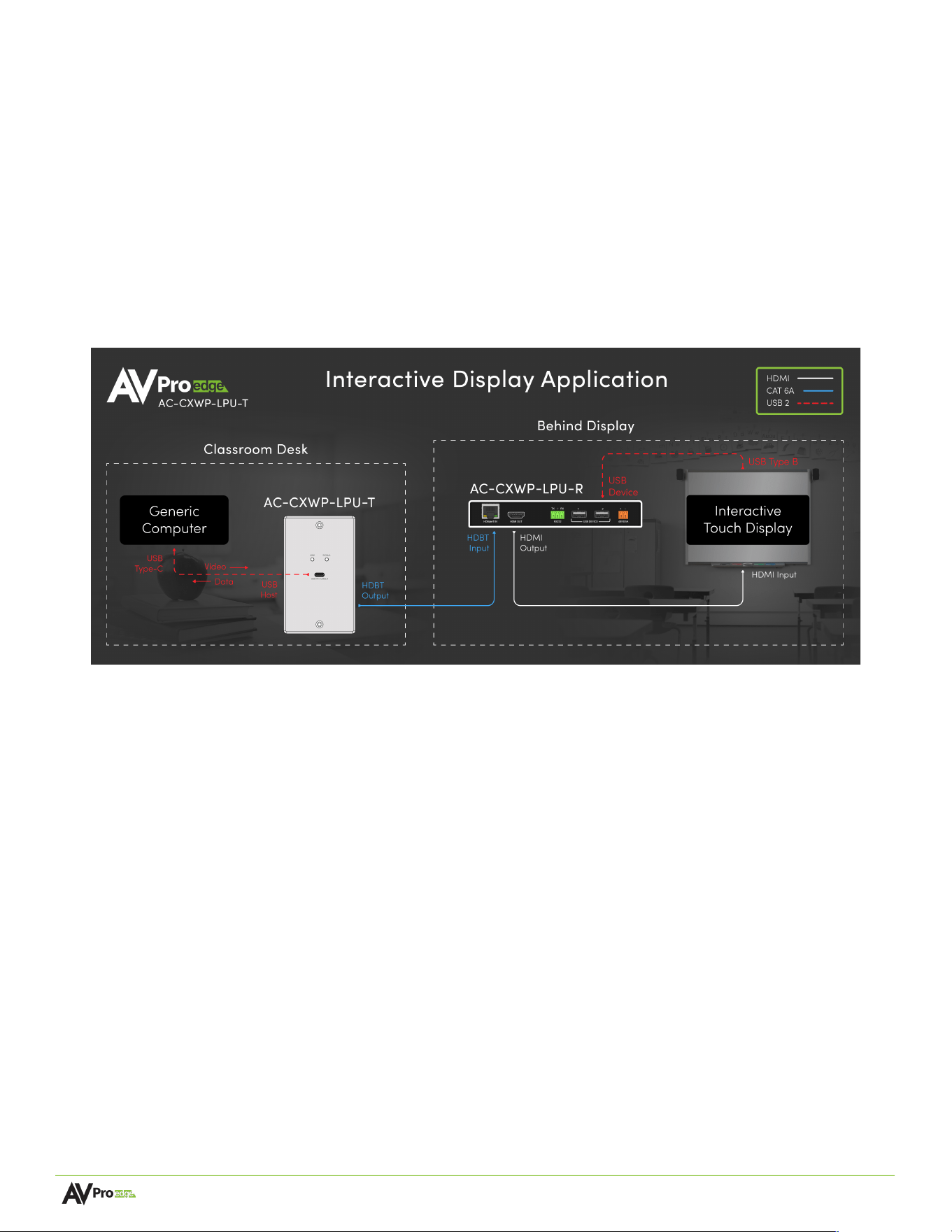
The diagram below demonstrates the wall plates in a typical conference room or education application:
Features
•
Ultra-slim 30 mm depth for tight wall box installations
•
HDMI 2.0 support for resolutions up to 4K/60Hz, 4:4:4
•
USB Type-C input with DisplayPort Alt Mode and USB 2.0 data
•
HDBaseT transmission of video, audio, and USB over a single cable
•
Push-button input switching on multi-input models
•
EDID dial for reliable signal negotiation
•
DIP switch for HDCP management and compatibility control
•
LED indicators for active input and receiver link status
•
North American and International (DIN503 / BS4662) versions
•
Swappable faceplates in white (standard), black, and stainless steel for design flexibility

Page 7 of 21
AC-CXWP-LP Wall Plates User Manual
Product Overview – AC-CXWP-LPU-T
Box Contents
(1x) ConferX Low-Profile HDMI Wall Plate Transmitter via HDBaseT (AC-CXWP-LPU-T)
(1x) White Faceplate
(1x) 3-Pin Euroblock Connector
(2x) Mounting Screws
Technical Specifications –
Video
Video Resolutions
Up to 4K/60 Hz, 4:2:0
VESA Resolutions
Up to DCI 4K (4096x2160)
HDR Formats
Dolby Vision, HDR10, HDR10+, HLG
Color Space
YUV (Component), RGB
(CSC: ITU-R BT.601, ITU-R BT.709, ITU-R BT.2020, DCI-P3 D65)
Chroma Subsampling
4:2:0
Color Bit Depth
Up to 16-bit (1080p), Up to 12-bit (4K)
Audio
Audio Formats Supported
PCM 2.0-Ch, LPCM 5.1 & 7.1, Dolby Digital, DTS 5.1, Dolby Digital
Plus, Dolby TrueHD, Dolby Atmos, DTS-HD Master Audio, DTS:X
USB
Version
USB 2.0, up to 290 Mbps
Ports
USB Type-C (HOST)
Consumed USB Tiers
1 Tier – The device adds one tier to the USB chain due to its
embedded USB hub.
Distance
HDBaseT (CAT) Distance (4K)
100 m / 328 feet (Cat 6A)
HDBaseT (CAT) Distance (1080p)
100 m/ 328 feet (Cat 6A)
Other
HDCP
HDCP 2.3 and Earlier
Control
Rear Panel
RS-232, HDCP Dip Switch, EDID Dial
Ports
HDBaseT (Output to Receiver)
RJ45
USB
USB Type-C (HOST)
RS-232
3-pin Euroblock
Environmental
Operating Temperature
23° to 125°F (-5° to 51° C)
Storage Temperature
-4° to 140°F (-20° to 60° C)
Humidity Range
5% to 90% RH (No Condensation)
Power
Power Consumption (Total)
12 W Maximum
Power Supply - Receiver
Input: 100-240 VAC ~ 50/60 Hz
Output: 48 VDC, 0.5 A
Physical / Dimensions
Page 8 of 21
AC-CXWP-LP Wall Plates User Manual
Dimensions without faceplate
(Unit Only Length/Width/Height)
mm: 31.75 x 49.28 x 106
in: 1.25 x 1.94 x 4.17
Dimensions without faceplate
(EU Unit Only Length/Width/Height)
mm: 31.75 x 79 x 79
in: 1.25 x 3.11 x 3.11
Wall space
Single-gang
Compatible Box Types
Mud Rings, EU Boxes, Stud Mount, Clamp Mount, Metal & Plastic
Boxes, LV Boxes
Dimensions (Packaged Length/Width/Height)
mm: 159 x 137 x 89
in: 6.25 x 5.375 x 3.5
Weight (Unit)
0.51 lbs. (0.230 kg)
Weight (EU Unit)
0.46 lbs. (0.208 kg)
Weight (Packaged)
0.66 lbs. (0.300 kg)
Weight (EU Packaged)
0.61 lbs. (0.278 kg)
*Specifications subject to change without notice. Mass & dimensions are approximate
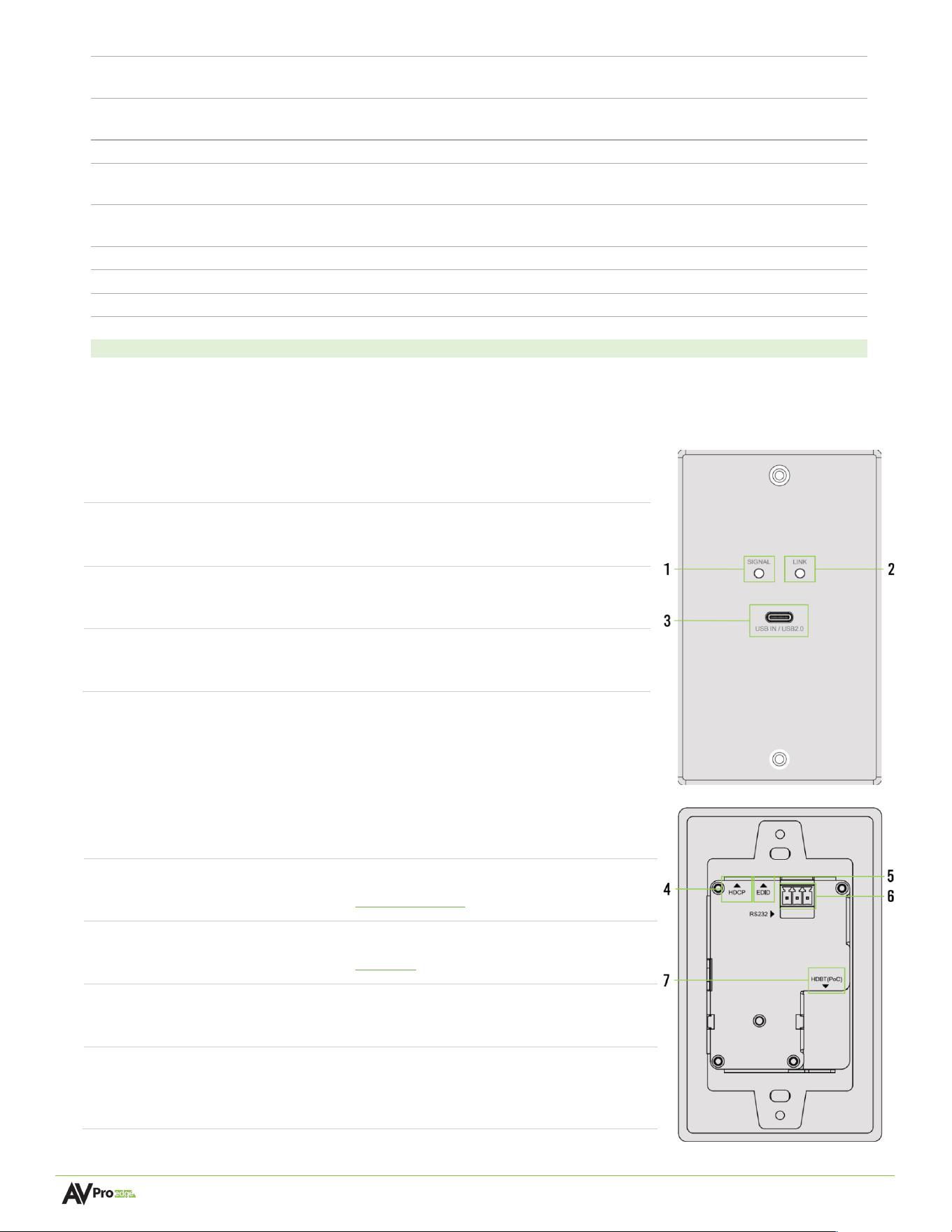
Front and Rear Panel Overview –
Front Panel
1
SIGNAL Status LED
• Blue LED status indicator light
• Solid blue indicates USB signal is present
2
LINK Status LED
• Green LED status indicator light
• Solid green indicates connection to receiver
3
USB IN
! USB 2.0 Type-C, up to 290 Mbps
• USB input connector
Rear Panel
4
HDCP Dip Switch
• 2x 2-position Dip Switches to set HDCP Mode
• See HDCP Dip Switch settings section for details
5
EDID Dial
• 16x position dial for configuring EDID
• See EDID Dial section for details
6
RS-232
! 3-pin Euroblock connector port
! Serial RS-232 control port
7
HDBT (PoC)
• 8-pin RJ45 female connector
• HDBaseT output port to receiver
• Power over cable from receiver

Page 9 of 21
AC-CXWP-LP Wall Plates User Manual
Product Overview – AC-CXWP-LPH-T
Box Contents
(1x) ConferX Low-Profile USB-C Wall Plate Transmitter via HDBaseT (AC-CXWP-LPH-T)
(1x) White Faceplate
(1x) 3-Pin Euroblock Connector
(2x) Mounting Screws
Technical Specifications –
Video
Video Resolutions
Up to 4K/60 Hz, 4:4:4
VESA Resolutions
Up to DCI 4K (4096x2160)
HDR Formats
Dolby Vision, HDR10, HDR10+, HLG
Color Space
YUV (Component), RGB
(CSC: ITU-R BT.601, ITU-R BT.709, ITU-R BT.2020, DCI-P3 D65)
Chroma Subsampling
4:4:4, 4:2:2, 4:2:0
Color Bit Depth
Up to 16-bit (1080p), Up to 12-bit (4K)
Audio
Audio Formats Supported HDMI
PCM 2.0-Ch, LPCM 5.1 & 7.1, Dolby Digital, DTS 5.1, Dolby Digital
Plus, Dolby TrueHD, Dolby Atmos, DTS-HD Master Audio, DTS:X
Distance
HDBaseT (CAT) Distance (4K)
100 m / 328 feet (Cat 6A)
HDBaseT (CAT) Distance (1080p)
100 m / 328 feet (Cat 6A)
HDMI In/Out
Up to 50 ft (Using Bullet Train HDMI)
HDMI In/Out (W/ AOC Cable)
Up to 130 ft (Using Bullet Train AOC)
Other
Bandwidth
18 Gbps (w/ ICT)
CEC
Yes
HDCP
HDCP 2.3 and Earlier
Control
Rear Panel
RS-232, HDCP Dip Switch, EDID Dial
Ports
HDMI
HDMI Type A 19-pin, female
HDBaseT (Output to Receiver)
RJ45
RS-232
3-pin Euroblock
Environmental
Operating Temperature
23° to 125° F (-5° to 51° C)
Storage Temperature
-4° to 140° F (-20° to 60° C)
Humidity Range
5% to 90% RH (No Condensation)
Power
Power Consumption (Total)
12 W Maximum
Power Supply - Receiver
Input: 100-240 VAC ~ 50/60 Hz
Output: 48 VDC, 0.5 A
Physical / Dimensions
Dimensions without faceplate
(Unit Only Length/Width/Height)
mm: 31.75 x 49.28 x 106
in: 1.25 x 1.94 x 4.17
Page 10 of 21
AC-CXWP-LP Wall Plates User Manual
Dimensions without faceplate
(EU Unit Only Length/Width/Height)
mm: 31.75 x 79 x 79
in: 1.25 x 3.11 x 3.11
Wall space
Single-gang
Compatible Box Types
Mud Rings, EU Boxes, Stud Mount, Clamp Mount, Metal & Plastic
Boxes, LV Boxes
Dimensions (Packaged Length/Width/Height)
mm: 159 x 137 x 89
in: 6.25 x 5.375 x 3.5
Weight (Unit)
0.51 lbs. (0.232 kg)
Weight (EU Unit)
0.54 lbs. (0.244 kg)
Weight (Packaged)
0.67 lbs. (0.304 kg)
Weight (EU Packaged)
0.70 lbs. (0.314 kg)
*Specifications subject to change without notice. Mass & dimensions are approximate
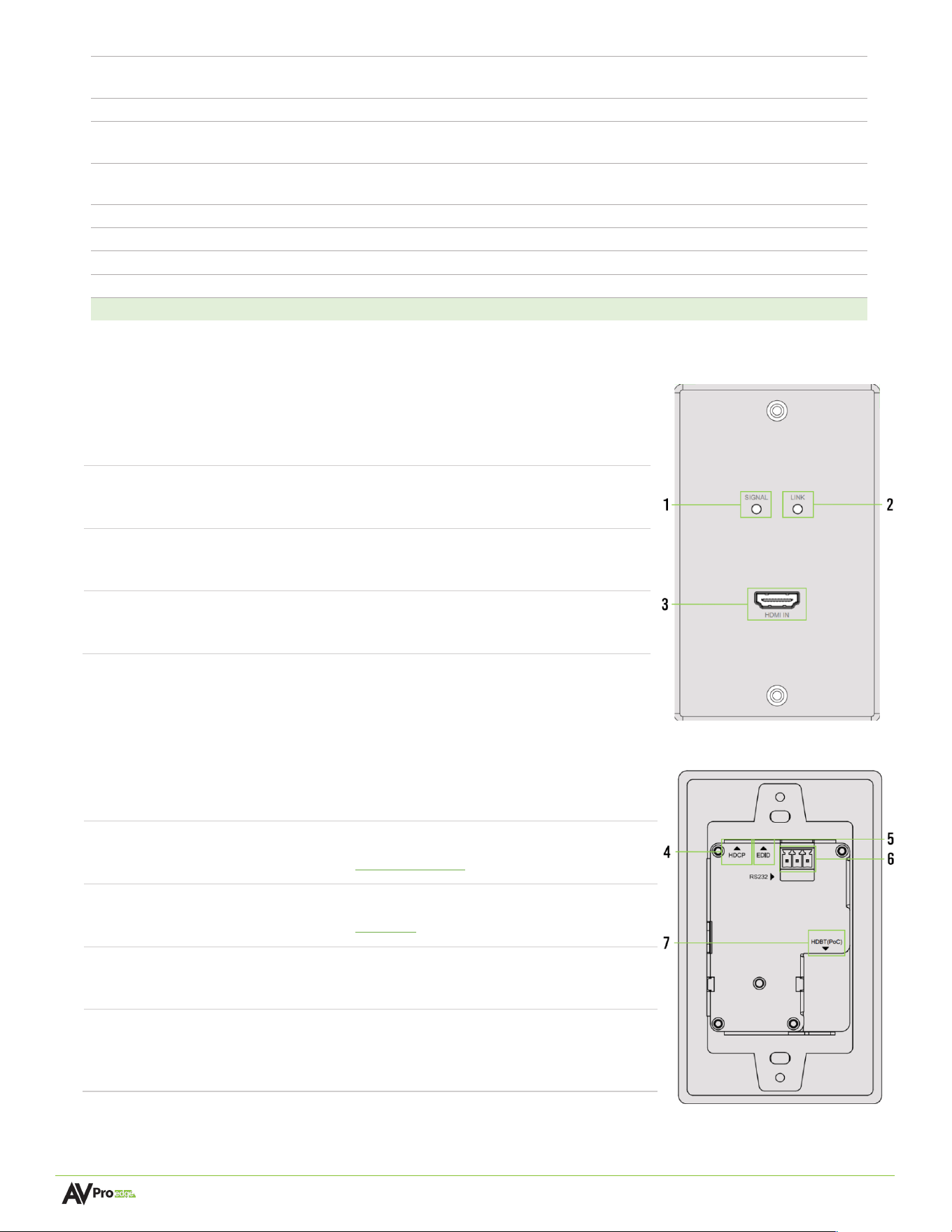
Front and Rear Panel Overview –
Front Panel
1
SIGNAL Status LED
• Blue LED status indicator light
• Solid blue indicates HDMI signal is present
2
LINK Status LED
• Green LED status indicator light
• Solid green indicates connection to receiver
3
HDMI IN
• HDMI Type A 19-pin, female
• Source input for HDMI connection
Rear Panel
4
HDCP Dip Switch
• 2x 2-position Dip Switches to set HDCP Mode
• See HDCP Dip Switch settings section for details
5
EDID Dial
• 16x position dial for configuring EDID
• See EDID Dial section for details
6
RS232
! 3-pin Euroblock connector port
! Serial RS-232 control port
7
HDBT (PoC)
• 8-pin RJ45 female connector
• HDBaseT output port to receiver
• Power over cable from receiver

Page 11 of 21
AC-CXWP-LP Wall Plates User Manual
Product Overview – AC-CXWP-LPDH-T
Box Contents
(1x) ConferX Low-Profile Dual HDMI Wall Plate Transmitter via HDBaseT (AC-CXWP-LPDH-T)
(1x) White Faceplate
(1x) 3-Pin Euroblock Connector
(2x) Mounting Screws
Technical Specifications –
Video
Video Resolutions
Up to 4K/60 Hz, 4:4:4
VESA Resolutions
Up to DCI 4K (4096x2160)
HDR Formats
Dolby Vision, HDR10, HDR10+, HLG
Color Space
YUV (Component), RGB
(CSC: ITU-R BT.601, ITU-R BT.709, ITU-R BT.2020, DCI-P3
D65)
Chroma Subsampling
4:4:4, 4:2:2, 4:2:0
Color Bit Depth
Up to 16-bit (1080p), Up to 12-bit (4K)
Audio
Audio Formats Supported HDMI
PCM 2.0-Ch, LPCM 5.1 & 7.1, Dolby Digital, DTS 5.1, Dolby
Digital Plus, Dolby TrueHD, Dolby Atmos, DTS-HD Master
Audio, DTS:X,
Distance
HDBaseT (CAT) Distance (4K)
100 m / 328 feet (Cat 6A)
HDBaseT (CAT) Distance (1080p)
100 m / 328 feet (Cat 6A)
HDMI In/Out
Up to 50 ft (Using Bullet Train HDMI)
HDMI In/Out (W/ AOC Cable)
Up to 130 ft (Using Bullet Train AOC)
Other
Bandwidth
18 Gbps (w/ ICT)
CEC
Yes
HDCP
HDCP 2.3 and Earlier
Control
Front Panel
1x push button to switch input
Rear Panel
RS-232, HDCP Dip Switch, EDID Dial
Ports
HDMI
2x HDMI Type A 19-pin, female
HDBaseT (Output to Receiver)
RJ45
RS232
3-pin Euroblock
Environmental
Operating Temperature
23
°
to 125°F (-5
°
to 51° C)
Storage Temperature
-4
°
to 140°F (-20
°
to 60° C)
Humidity Range
5
%
to 9
0% RH (No Condensation)
Power
Power Consumption (Total)
12 W Maximum
Power Supply - Receiver
Input: 100-240 VAC ~ 50/60 Hz
Output: 48 VDC, 0.5 A
Page 12 of 21
AC-CXWP-LP Wall Plates User Manual
Physical / Dimensions
Dimensions without faceplate
(Unit Only Length/Width/Height)
mm: 31.75 x 49.28 x 106
in: 1.25 x 1.94 x 4.17
Dimensions without faceplate
(EU Unit Only Length/Width/Height)
mm: 31.75 x 79 x 79
in: 1.25 x 3.11 x 3.11
Wall space
Single-gang
Compatible Box Types
Mud Rings, EU Boxes, Stud Mount, Clamp Mount, Metal &
Plastic Boxes, LV Boxes
Dimensions (Packaged Length/Width/Height)
mm: 159 x 137 x 89
in: 6.25 x 5.375 x 3.5
Weight (Unit)
0.65 lbs. (0.294 kg)
Weight (EU Unit)
0.52 lbs. (0.240 kg)
Weight (Packaged)
0.81 lbs. (0.368 kg)
Weight (EU Packaged)
0.69 lbs. (0.312 kg)
*Specifications subject to change without notice. Mass & dimensions are approximate
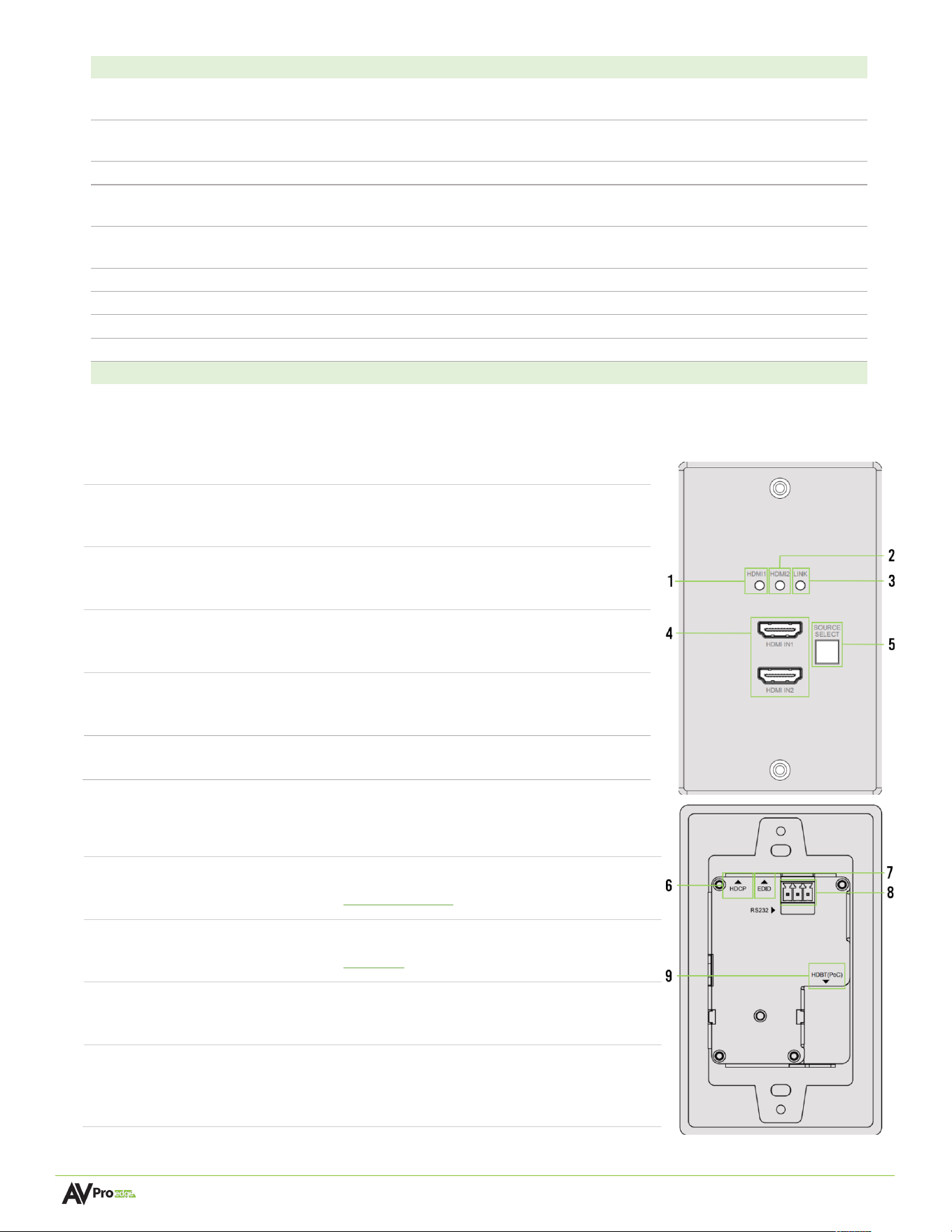
Front and Rear Panel Overview –
Front Panel
1
HDMI 1 Status LED
• Blue LED status indicator light
• Solid blue indicates HDMI signal is active
2
HDMI 2 Status LED
• Blue LED status indicator light
• Solid blue indicates HDMI signal is active
3
LINK Status LED
• Green LED status indicator light
• Solid green indicates connection to receiver
4
HDMI IN1
HDMI IN2
• 2x HDMI Type A 19-pin, female
• Source inputs for HDMI connections
5
SOURCE SELECT
• Push button for selecting active HDMI input
Rear Panel
6
HDCP Dip Switch
• 2x 2-position Dip Switches to set HDCP Mode
• See HDCP Dip Switch settings section for details
7
EDID Dial
• 16x position dial for configuring EDID
• See EDID Dial section for details
8
RS232
! 3-pin Euroblock connector port
! Serial RS-232 control port
9
HDBT (PoC)
• 8-pin RJ45 female connector
• HDBaseT output port to receiver
• Power over cable from receiver

Page 13 of 21
AC-CXWP-LP Wall Plates User Manual
Product Overview – AC-CXWP-LPDHU-T
Box Contents
(1x) ConferX Low-Profile HDMI/USB-C Wall Plate Transmitter via HDBaseT (AC-CXWP-LPDHU-T)
(1x) White Faceplate
(1x) 3-Pin Euroblock Connector
(2x) Mounting Screws
Technical Specifications –
Video
Video Resolutions
HDMI: Up to 4K/60 Hz, 4:4:4
USB Type-C: Up to 4K/60Hz 4:2:0
VESA Resolutions
Up to DCI 4K (4096x2160)
HDR Formats
Dolby Vision, HDR10, HDR10+, HLG
Color Space
YUV (Component), RGB
(CSC: ITU-R BT.601, ITU-R BT.709, ITU-R BT.2020, DCI-P3 D65)
Chroma Subsampling
4:4:4, 4:2:2, 4:2:0
Color Bit Depth
Up to 16-bit (1080p), Up to 12-bit (4K)
Audio
Audio Formats Supported
PCM 2.0-Ch, LPCM 5.1 & 7.1, Dolby Digital, DTS 5.1, Dolby Digital
Plus, Dolby TrueHD, Dolby Atmos, DTS-HD Master Audio, DTS:X
USB
Version
USB 2.0, up to 290 Mbps
Ports
USB Type-C (HOST)
Consumed USB Tiers
1 Tier – The device adds one tier to the USB chain due to its
embedded USB hub.
Distance
HDBaseT (CAT) Distance (4K)
100 m / 328 feet (Cat 6a)
HDBaseT (CAT) Distance (1080p)
100 m/ 328 feet (Cat 6a)
HDMI In/Out
Up to 50 ft (Using Bullet Train HDMI)
HDMI In/Out (W/ AOC Cable)
Up to 130 ft (Using Bullet Train AOC)
Other
Bandwidth
18 Gbps (w/ ICT)
CEC
Yes
HDCP
HDCP 2.3 and Earlier
Control
Front Panel
1x push button to switch input
Rear Panel
RS-232, HDCP Dip Switch, EDID Dial
Ports
HDMI
HDMI Type A 19-pin, female
HDBaseT (Output to Receiver)
RJ45
USB
USB Type-C (HOST)
RS-232
3-pin Euroblock
Environmental
Operating Temperature
23° to 125°F (-5° to 51° C)
Storage Temperature
-4 to 140°F (-20° to 60° C)
Humidity Range
5% to 90% RH (No Condensation)
Power
Page 14 of 21
AC-CXWP-LP Wall Plates User Manual
Power Consumption (Total)
12 W Maximum
Power Supply - Receiver
Input: 100-240 VAC ~ 50/60 Hz
Output: 48 VDC, 0.5 A
Physical / Dimensions
Dimensions without faceplate
(Unit Only Length/Width/Height)
mm: 31.75 x 49.28 x 106
in: 1.25 x 1.94 x 4.17
Dimensions without faceplate
(EU Unit Only Length/Width/Height)
mm: 31.75 x 79 x 79
in: 1.25 x 3.11 x 3.11
Wall space
Single-gang
Compatible Box Types
Mud Rings, EU Boxes, Stud Mount, Clamp Mount, Metal & Plastic
Boxes, LV Boxes
Dimensions (Packaged Length/Width/Height)
mm: 159 x 137 x 89
in: 6.25 x 5.375 x 3.5
Weight (Unit)
0.51 lbs. (0.232 kg)
Weight (EU Unit)
0.53 lbs. (0.240 kg)
Weight (Packaged)
0.67 lbs. (0.306 kg)
Weight (EU Packaged)
0.69 lbs. (0.312 kg)
*Specifications subject to change without notice. Mass & dimensions are approximate
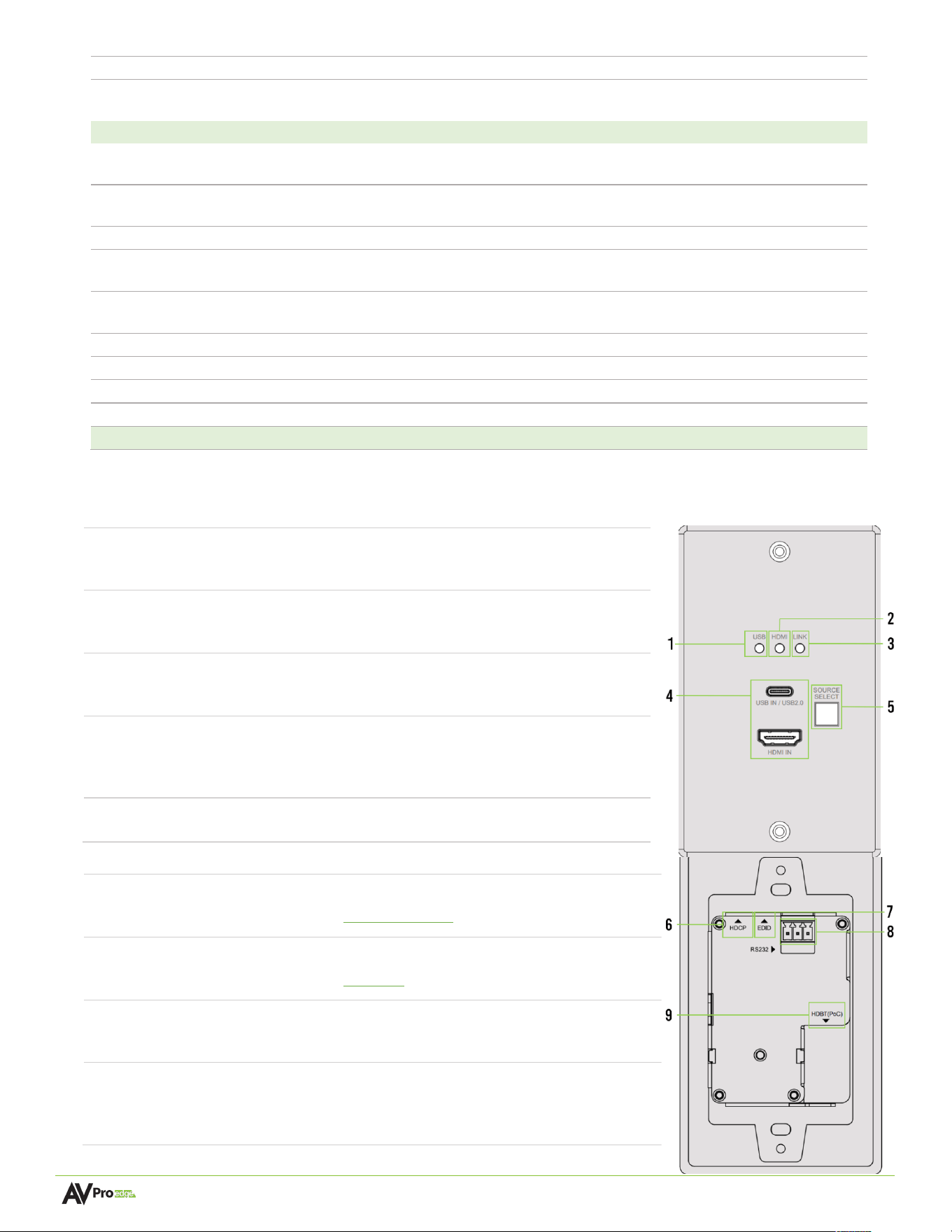
Front and Rear Panel Overview –
Front Panel
1
USB Status LED
• Blue LED status indicator light
• Solid blue indicates USB signal is active
2
HDMI Status LED
• Blue LED status indicator light
• Solid blue indicates HDMI signal is active
3
LINK Status LED
• Green LED status indicator light
• Solid green indicates connection to receiver
4
USB IN
HDMI IN
• USB 2.0 Type-C, up to 290 Mbps
• HDMI Type A 19-pin, female
• Source inputs for HDMI and USB connections
5
SOURCE SELECT
• Push button for selecting active input
Rear Panel
6
HDCP Dip Switch
• 2x 2-position Dip Switches to set HDCP Mode
• See HDCP Dip Switch settings section for details
7
EDID Dial
• 16x position dial for configuring EDID
• See EDID Dial section for details
8
RS-232
! 3-pin Euroblock connector port
! Serial RS-232 control port
9
HDBT (PoC)
• 8-pin RJ45 female connector
• HDBaseT output port to receiver
• Power over cable from receiver
Page 15 of 21
AC-CXWP-LP Wall Plates User Manual
EDID Dial
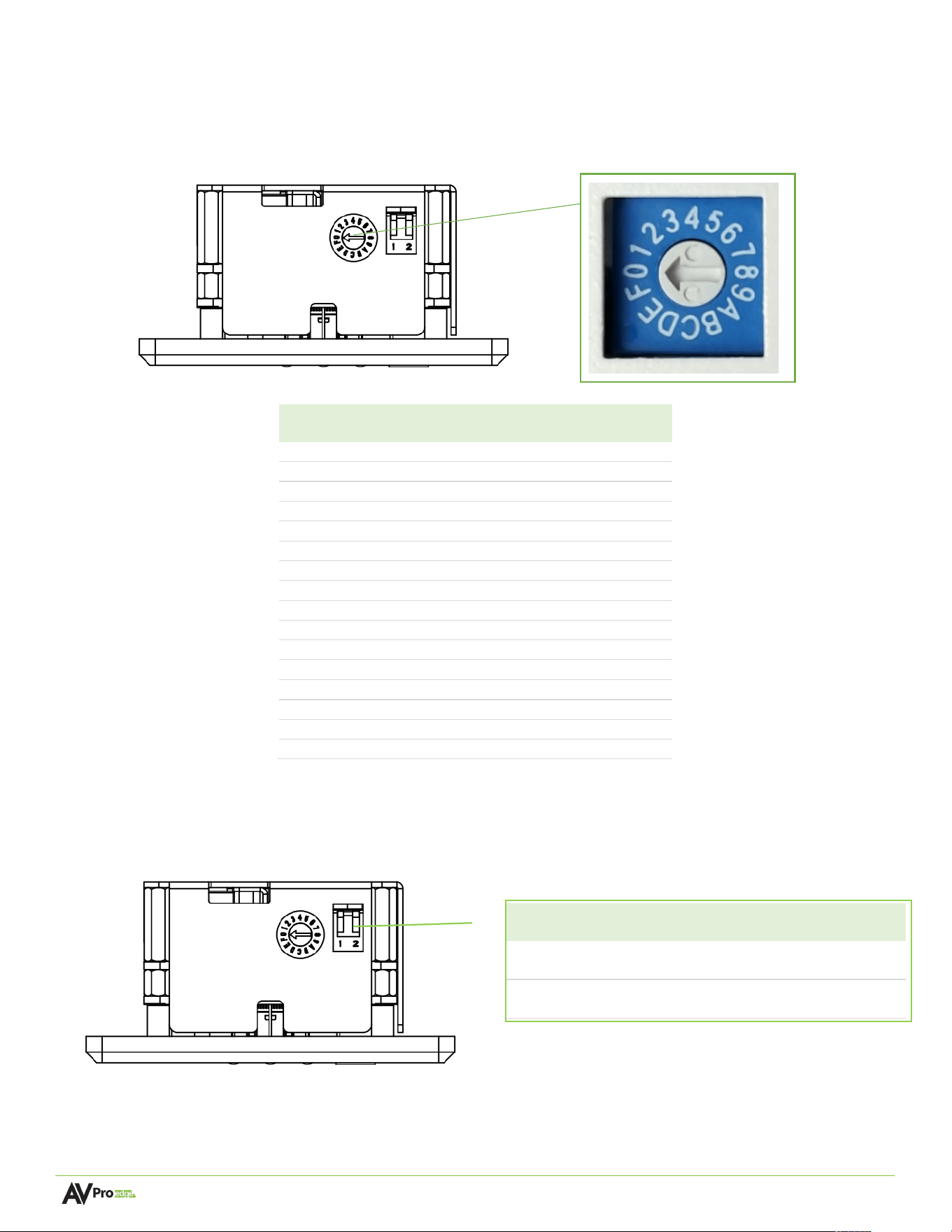
Each AC-CXWP-LP series wall plate features an EDID dial for manually configuring the EDID value. Simply turn the
dial to one of the sixteen available settings to select the desired EDID. The EDID dial is located on the top side of the
wall plate.
Dial
Position
EDID
0
BYPASS (DEFAULT)
1
1920x1200 2CH
2
1920x1200 DVI
3
1080P60 2CH
4
1080P60 8CH
5
4K60HZ 420 3D 2CH
6
4K60HZ 420 3D 8CH
7
4K60HZ 444 3D 2CH
8
4K60HZ 444 3D 8CH
9
USER EDID
A
4K30HZ 420 3D 2CH Downscaled to 1080P
B
4K30HZ 420 3D 8CH Downscaled to 1080P
C
4K60HZ 444 3D 2CH Downscaled to 1080P
D
4K60HZ 444 3D 8CH Downscaled to 1080P
E
USER EDID Downscaled to 1080P
F
1080P60 TEST PATTERN
HDCP DIP Switch
Each AC-CXWP-LP series wall plate features an HDCP DIP switch for manually configuring HDCP. Each DIP Switch has
two switches. The down position or the position closest to the front of the wall plate is ON.
Switch 1
HDCP (Source)
Switch
2
HDCP
(SINK)
OFF
Request HDCP
(Default)
OFF
Request HDCP
(Default)
ON
Do Not
Request HDCP
ON
Do not
Request HDCP
Page 16 of 21
AC-CXWP-LP Wall Plates User Manual
Compatible Products
The AC-CXWP-LP Low-Profile series of wall plates are compatible with several receiving devices in the AVPro Edge
line up. Depending on the model of the wall plate being used, certain extenders and conferencing switchers should
be used to take advantage of all available features.
• AC-CXWP-LPU-T & AC-CXWP-LPDHU-T
o AC-CXWP-LPH-R
o AC-CX-2112
o AC-EX100-444-R3
• AC-CXWP-LPH-T & AC-CXWP-LPDH-T
o AC-EX70-444-RNE
o AC-CX-85, AC-CX-62-AUHD, AC-CX-42-AUHD
§ Supports up to 10.2 Gbps
Installation
Powering the Wall Plate
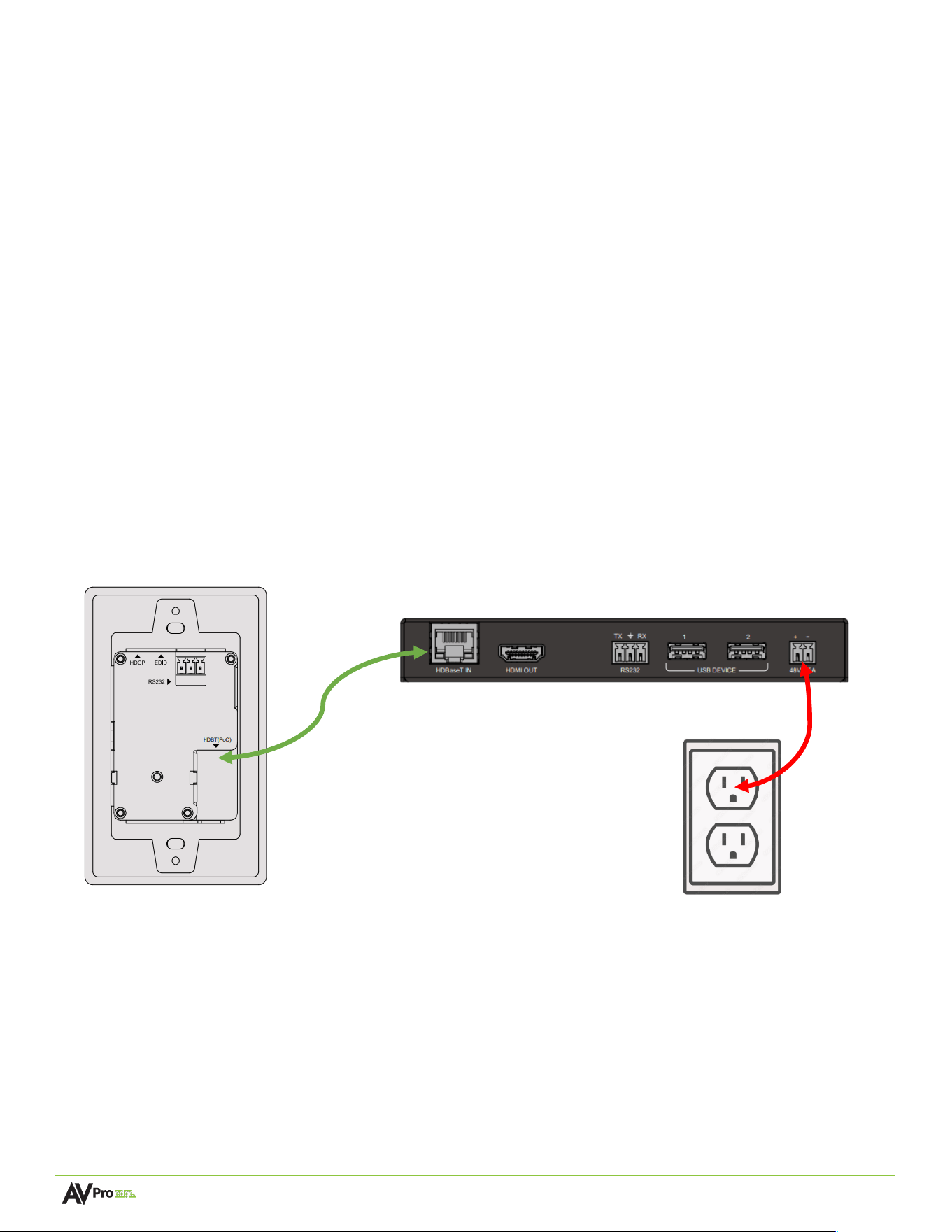
The AC-CXWP-LP series wall plates are powered over PoC (Power over Cable) from the receiving device. Be sure
the receiving device is powered by a power supply. In the example below, an AC-CXWP-LP wall plate is
connected to the AC-CXWP-LPH-R receiver. The Receiver is powered by its supplied PSU and the wall plate is
powered via PoC.
Page 17 of 21
AC-CXWP-LP Wall Plates User Manual
Wiring and Connections
HDMI Cables
The AC-CXWP-LP series wall plates with HDMI inputs use the standard 19-pin HDMI female connector.
Some important things to consider when planning or installing this device:
• Ensure all HDMI cables and devices can support the signal being sent. For most 4K and below use cases,
a High-Speed HDMI cable with Ethernet rated for 18 Gbps will be more than sufficient to satisfy signal
transport if every device in the system can handle the signal.
• Ensure your HDMI cable is the correct length. The current HDMI specification calls for cables to be
between 2 to 10 meters (6.6 to 33 feet) for 4K and below signals. Smaller wire cables may be unable to
transmit higher bandwidth signals.
USB Ports
AC-CXWP-LP series wall plates with USB inputs use a USB Type-C female connector. These connectors are
capable of USB 2.0 speeds up to 290 Mbps.
HDBaseT Link Wiring
The HDBaseT output port on the wall features PoC (Power over Cable) for supplying power to the wall plate
from the receiver. For maximum performance, the recommended cabling is Category 6A or Category 7 STP, all
other performances cannot be guaranteed.
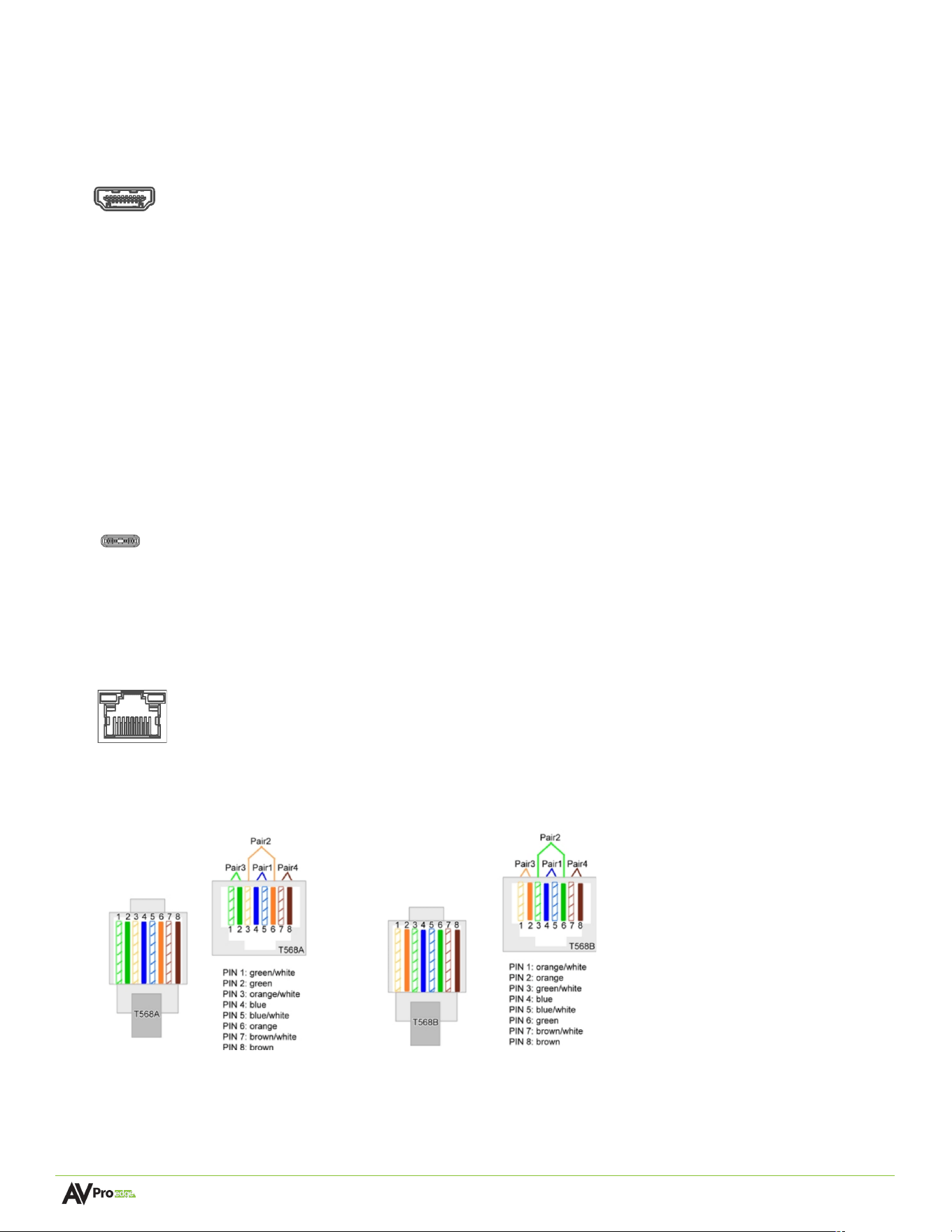
The recommended termination is based on the TIA/EIA T568A or T568B standards for the wiring of the twisted
pair cables. For TCP/IP control, commands use Telnet port 23.
Type C
T568A T568B
Page 18 of 21
AC-CXWP-LP Wall Plates User Manual
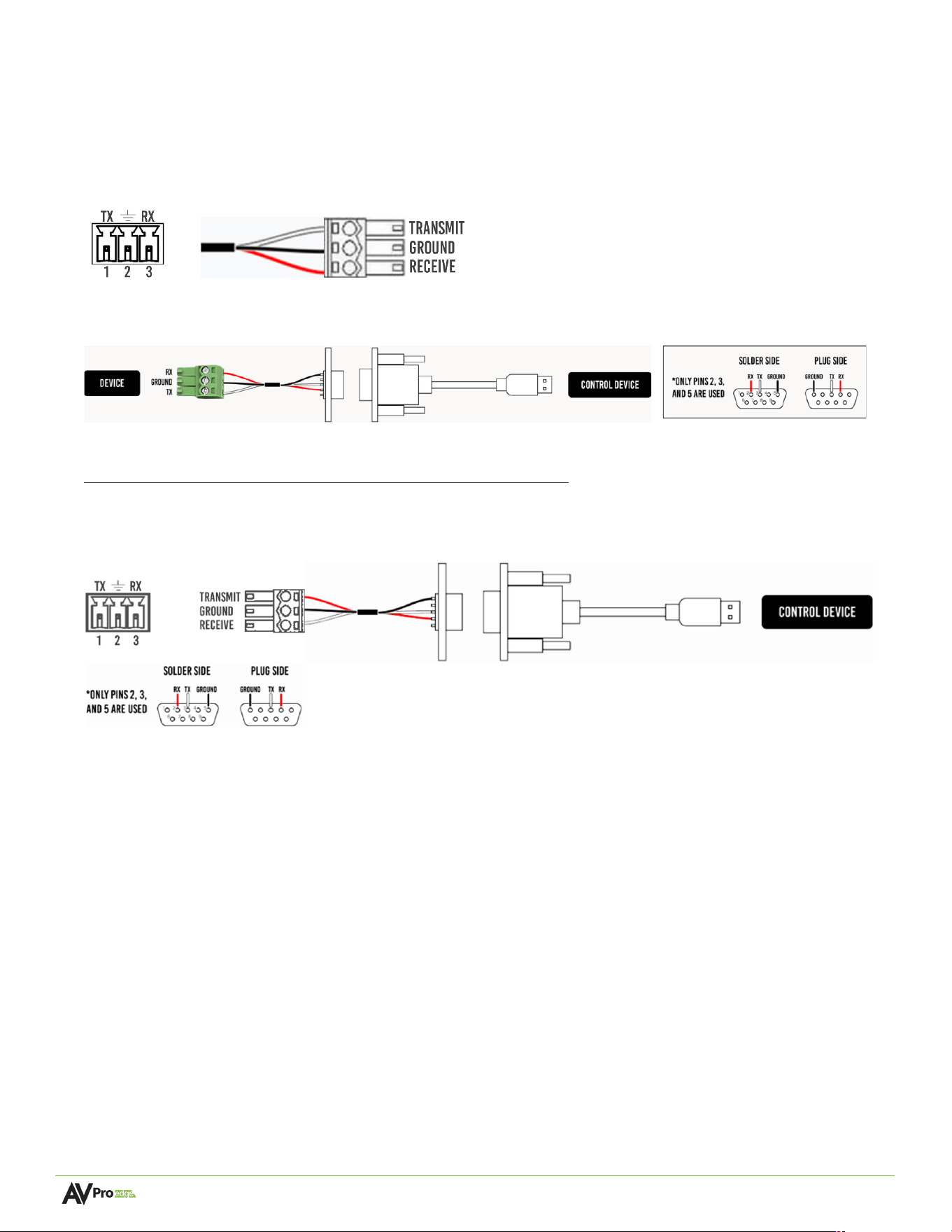
RS-232 Control
The RS-232 control port located on the rear panel is used to communicate with the wall plate via a computer or
third-party control system.
Serial control connections are made using the provided 3-pin terminal block connector. The wire slips into the
hole and locks with a screw located at the top of the connector.
Wiring for this port uses a 3-pin terminal block connector to DB-9, where only pins 2, 3, and 5 are used. If the
control devices do not have a DB-9 port, a USB to DB9 adapter may be required.
For RS-232 control, use a null modem serial cable adapter and set the serial communications to:
Baud: 57600, no parity, 8 data bits, 1 stop bit, with no handshaking.
Add a carriage return (Enter key) after each command when using direct commands. The unified command list
(ASCII) can be located here.

Page 19 of 21
AC-CXWP-LP Wall Plates User Manual
Maintenance
To ensure reliable operation of this product as well as protecting the safety of any person using or
• Handling this device while powered, please observe the following instructions.
• Use the power supplies provided. If an alternate supply is required, check voltage, polarity and that it has
sufficient power to supply the device it is connected to.
• Do not operate these products outside the specified temperature and humidity range given in the above
specifications.
• Ensure there is adequate ventilation to allow this product to operate efficiently.
• Repair of the equipment should only be carried out by qualified professionals as these products contain
sensitive components that may be damaged by any mistreatment.
• Only use this product in a dry environment. Do not allow any liquids or harmful chemicals to come into
contact with these products.
• Clean this unit with a soft, dry cloth. Never use alcohol, paint thinner or benzene to clean this unit.
Damage Requiring Service
The unit should be serviced by qualified service personnel if:
• The DC power supply cord or AC adapter has been damaged
• Objects or liquids have gotten into the unit
• The unit has been exposed to rain
• The unit does not operate normally or exhibits a marked change in performance
• The unit has been dropped or the housing damaged
Support
Should you experience any problems while using this product, first, refer to the Troubleshooting section of this
manual before contacting Technical Support. When calling, the following information should be provided:
• Product name and model number
• Product serial number
• Details of the issue and any conditions under which the issue is occurring
• Clean this unit with a soft, dry cloth. Never use alcohol, paint thinner or benzene to clean this unit.

Page 20 of 21
AC-CXWP-LP Wall Plates User Manual
Warranty
The Basics
AVPro Edge warranties its products that are purchased from all Authorized AVPro Edge Resellers or direct
purchases. Products are guaranteed to be free from manufacturing defects and of sound physical and
electronic condition.
AVPro Edge has developed a warranty that anyone can get behind. We really wanted to take all the “red tape”
out of a warranty and just make is simple. Our 10 YEAR NO BS warranty hinges on 3 elements.
• If you are having trouble, call us. We will attempt to troubleshoot your issue over the phone.
• If it’s broken, we will replace it in advance on our dime and we’ll also cover the return shipping. Repair is
an option too, but it’s YOUR call.
• We know you know what you are doing. We will not make you go through unnecessary steps to
troubleshoot an extender…
Coverage Details
AVPro Edge will replace or repair (at customer choice) the defective product. If the product is out of stock or on
backorder it can either be replaced with a comparable product of equal value/feature set (if available) or
repaired.
Your warranty begins at receipt of product (as confirmed by shipping firm tracking). If tracking information is
unavailable for any reason, the warranty will commence 30 ARO (After Receipt of Order). The coverage
continues for 10 years.
Red Tape
AVPro Edge is not responsible for untraceable purchases or those that were made outside of an authorized
channel.
If we conclude that a product or serial number has been tampered with as identified by warranty seal or
physical examination the warranty will be void. Additionally, excessive physical damage (beyond normal wear &
tear) the warranty may be voided or prorated based on the extent of the damage as examined by an AVPro
Edge representative.
Damage caused by “acts of God” are not covered. They can include natural disasters, power surges, storms,
earthquakes, tornadoes, sink holes, typhoons, tidal waves, hurricanes, or any other uncontrollable event related
to nature.
Damage caused by incorrect installation will not be covered. Incorrect power supply, inadequate cooling,
improper cabling, inadequate protection, static discharge are examples of this.
Products installed or sold by a third party to AVPro Edge will be serviced by the Authorized AVPro Edge Reseller.
Accessories (IR Cables, RS-232, Power Supplies, etc.) are not included in the warranty. We will make acceptable
efforts to source and supply replacements for defective accessories at a discounted rate as needed.

Page 21 of 21
AC-CXWP-LP Wall Plates User Manual
Obtaining an RMA
Dealers, Re-sellers, and Installers can request an RMA from AVPro Edge Tech Support Rep or their Sales
Engineer.
You may also email [email protected] or fill out the general contact form at avproedge.com/contact
End users may not request an RMA directly from AVPro Edge and will be referred back to the Dealer, Re-seller,
or Installer.
Shipping
For USA (not including Alaska and Hawaii). Shipping is covered on advanced replacements for FedEx Ground
(some expressed exceptions may apply). Defective product return shipping is covered by AVPro Edge using an
emailed return label. Items must be returned within 30 days of receipt of the replacement product, after 30
days, the customer will be billed. Other return shipping methods will not be covered.
For International (and Alaska and Hawaii) return shipping costs will be the responsibility of the returnee. Once
the unit is scanned for return shipping AVPro Edge will ship the new unit for replacement.
Limitation on Liability
The maximum liability of AVPro Global Holdings LLC under this limited warranty shall not exceed the actual
purchase price paid for the product. AVPro Global Holdings LLC is not responsible for direct, special, incidental,
or consequential damages resulting from any breach of warranty or condition, or under any other legal theory
to the maximum extent permitted by law. Taxes, Duties, VAT, and freight forwarding service charges are not
covered or paid for by this warranty.
Obsolescence or incompatibility with newly invented technologies (after manufacture of product) is not covered
by this warranty.
Obsolescence is defined as:
“Peripherals are rendered obsolete when current technology does not support product repair or re-
manufacture. Obsolete products cannot be re-manufactured because advanced technologies supersede original
product manufacturer capabilities. Because of performance, price and functionality issues, product
redevelopment is not an option.”
Discontinued or out of production items will be credited at fair market value towards a current product of equal
or comparable capabilities and cost. Fair market value is determined by AVPro Edge.
Exclusive Remedy
To the maximum extent permitted by law, this limited warranty and the remedies set forth above are exclusive
and in lieu of all other warranties, remedies, and conditions, whether oral or written, express or implied. To the
maximum extent permitted by law, AVPro Global Holdings LLC specifically disclaims any and all implied
warranties, including, without limitation, warranties of merchantability and fitness for a particular purpose. If
AVPro Global Holdings LLC cannot lawfully disclaim or exclude implied warranties under applicable law, then all
implied warranties covering this product, including warranties of merchantability and fitness for a particular
purpose, shall apply to this product as provided under applicable law.
This warranty supersedes all other warranties, remedies, and conditions, whether oral or written, express or
implied.