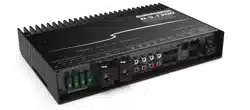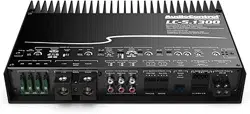
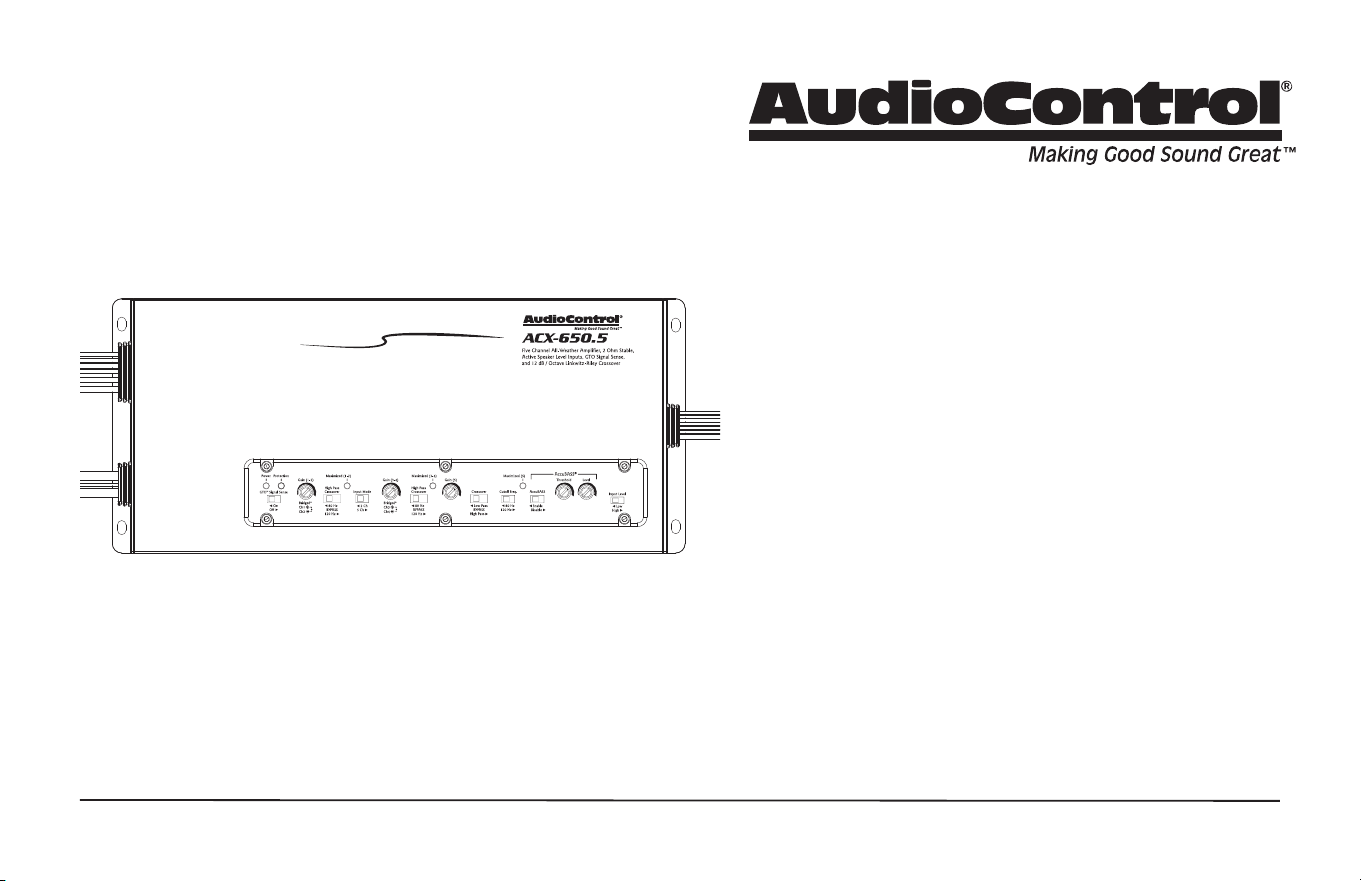
COMPACT HIGH POWER ALL-WEATHER 5-CHANNEL AMPLIFIER
Features
• Compact High Power 5-Channel Amplier
• High Current Design
• 4 x 50 Watts @ 4 Ohms, 1 x 200 Watts @ 4 Ohms
• 4 x 75 Watts @ 2 Ohms, 1 x 350 Watts @ 2 Ohms
• 2 x 150 Watts @ 4 Ohms, Bridged Mono
• 12 dB/Octave Linkwitz-Riley Alignment Crossover
• GTO™ Signal Sense (Great Turn On)
• 6 Speaker-level/ Line-Level RCA Inputs
• All-weather IPX6 rated!
• Filled with home-grown audio goodness
ACX-650.5
Quick Start Guide
2
ACX-650.5
Quick Start Guide
1. Read these instructions.
2. Keep these instructions.
3. Heed all warnings.
4. Follow all instructions.
5. Do not use this apparatus near water.
6. Clean only with a dry cloth.
7. Do not block any ventilation openings. Install in accordance with the
manufacturer’s instructions.
8. Do not install near any heat sources such as muers, silencers, exhaust
pipes, or other apparatus (including ampliers) that produce heat.
9. WARNING: Improper installation may lead to permanent injury or death.
Installation of the apparatus must be done with great care by qualied
personnel, to prevent damage to fuel lines, power and other electrical
wiring, hydraulic brake lines, and other systems, that might compromise
vehicle safety.
10. Provide +12V and Ground wiring of sucient size to ensure adequate
current to the amplier. For the ACX-650.5 this means 8 gauge wire or
thicker.
11. Use rubber grommets to protect wiring whenever passing wires through
metal openings or bulkheads.
12. Only use attachments/accessories specied by the manufacturer.
13. Refer all servicing to qualied service personnel. Servicing is required
when the apparatus has been damaged in any way, such as the power
input terminals are damaged or objects have fallen into the apparatus,
does not operate normally, or has been dropped.
14. Fuses shall be replaced only with the correct type and fuse value, and
only when the apparatus is powered o.
15. Exposure to high sound pressure levels may lead to permanent hearing
loss. Take every precaution to protect your hearing.
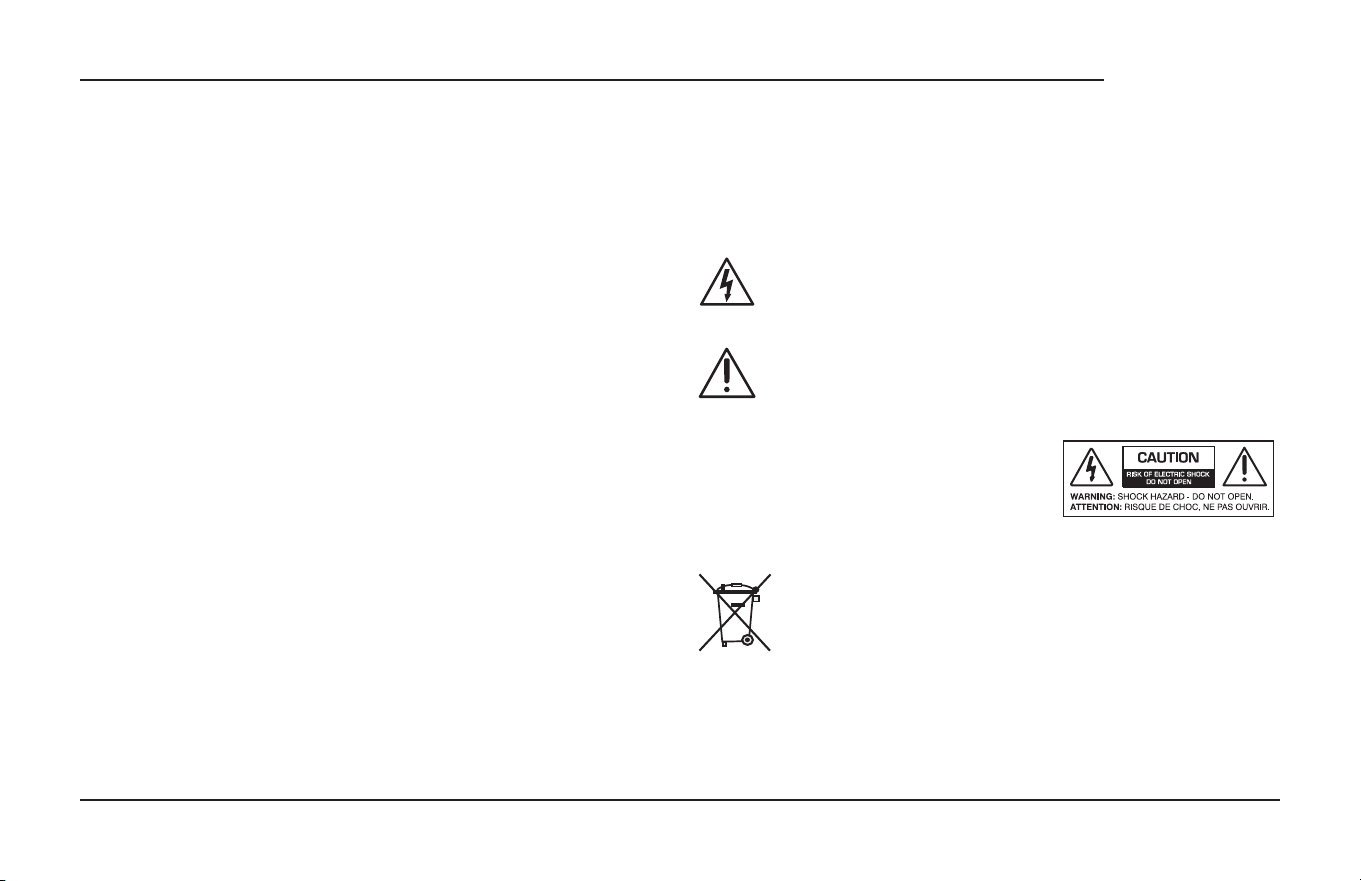
The lightning ash with arrowhead symbol within an equilateral
triangle is intended to alert the user to the presence of uninsulated
“dangerous voltage” within the product’s enclosure, that may be of
sucient magnitude to constitute a risk of electric shock to persons.
The exclamation point within an equilateral triangle is intended to
alert the user of the presence of important operating and mainte-
nance (servicing) instructions in the literature accompanying the
appliance.
Caution: to reduce the risk of electric shock, do
not disassemble the apparatus, other than to
remove the top panel to access the controls.
There are no user-serviceable parts inside.
Refer servicing to qualied personnel.
Recycling notice: If the time comes and this apparatus has fullled
its destiny, do not throw it out into the trash. It has to be carefully
recycled for the good of mankind, by a facility specially equipped
for the safe recycling of electronic apparatii. Please contact your
local or state recycling leaders for assistance in locating a suitable
nearby recycling facility. Or, contact us and we might be able to
repair it for you.
Important Safety Instructions
3
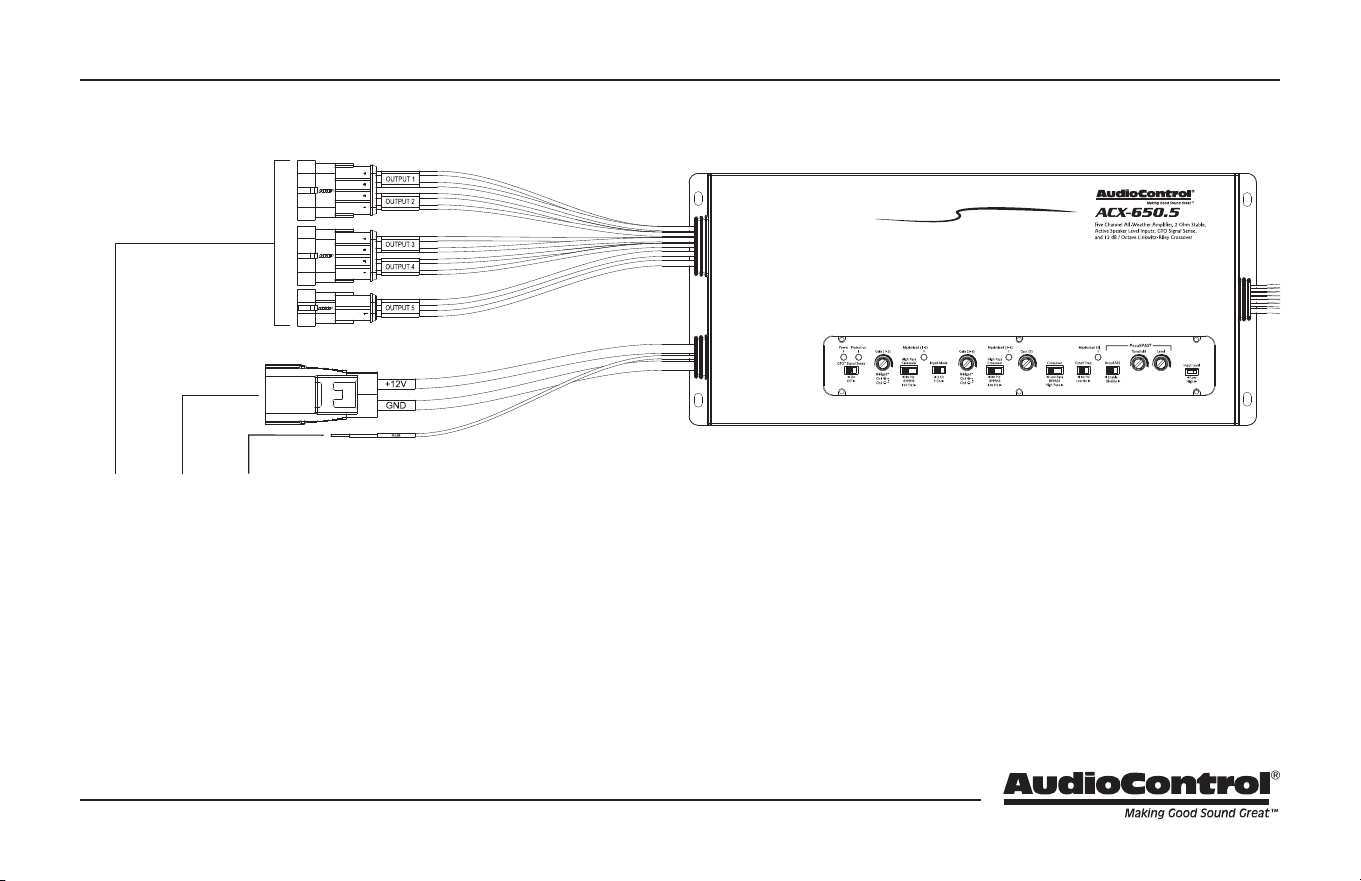
1. Speaker Outputs –
In Stereo operation, connect one loudspeaker to each channel as
shown. The minimum impedance is 2 Ohms per channel.
In Bridged Mono operation, connect one loudspeaker to the
outer 2 wires - White(+) and Grey/Black(-) for output 1/2, and
Green(+) and Purple/Black(-) for output 3/4. The mono loudspeak-
er will be powered by each channel, and both input channels
must be fed a signal. The minimum impedance is 4 Ohms.
2. Power Input Terminal +12V & Ground – Connect these wires
to the +12V and Negative binding posts of the vehicle battery
via one of two included harness options. You may use either the
included water resistant harness, or the included harness kit to
terminate your own custom-length water-resistant harness. Use
quality insulated wiring of the recommended wire gauge, such as
wire gauge 8 or thicker.
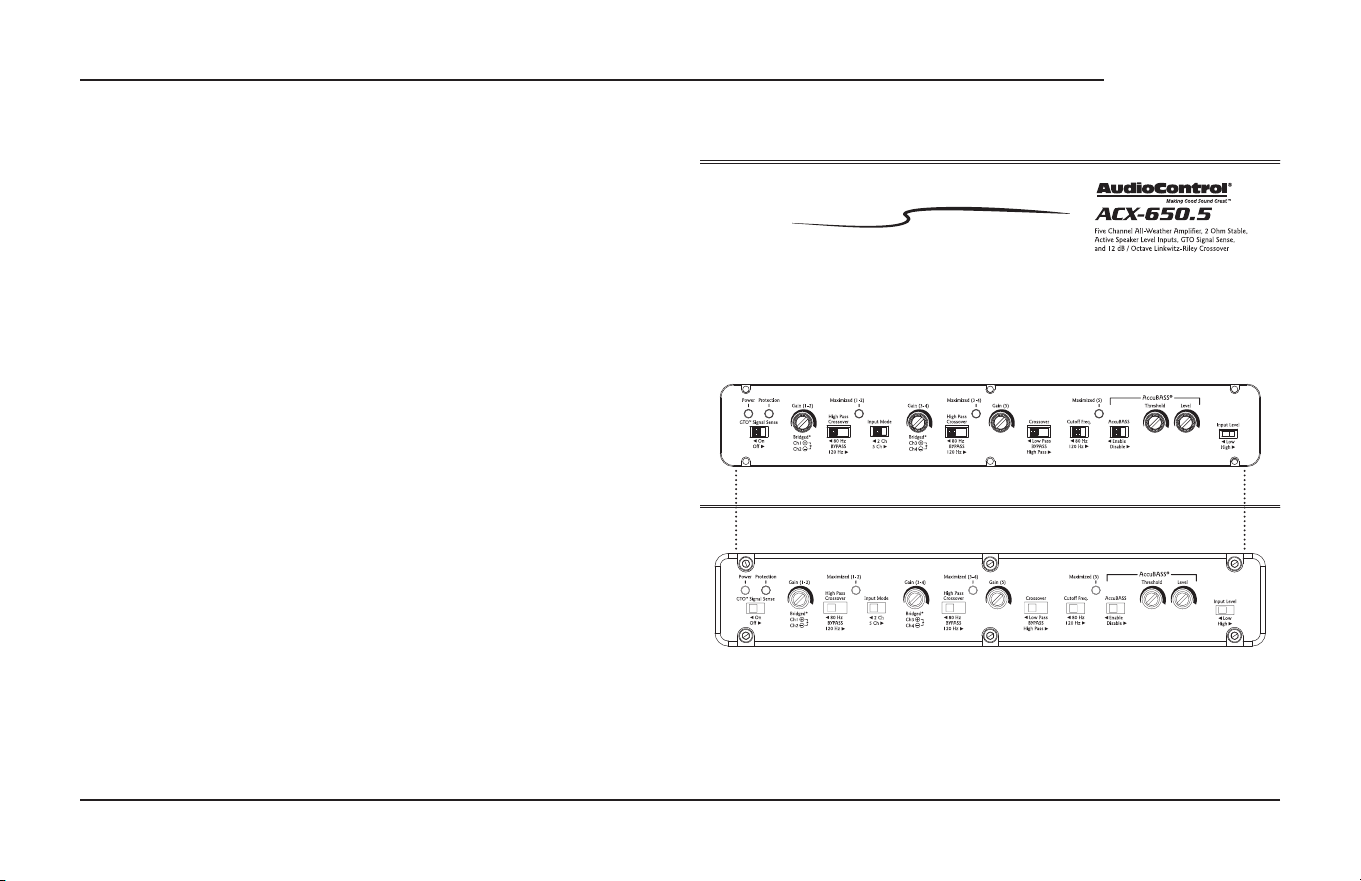
1 2 3
Connections & Control Panel Features
4
ACX-650.5
Quick Start Guide
3. Remote Power Input Wire – This wire connects to the 12V remote
trigger output of some head units and controls the on/o state of
the amplier. Alternatively, you can use the GTO™ feature of the
amplier so it will turn on when an speaker level signal is detected
at the RCA inputs.
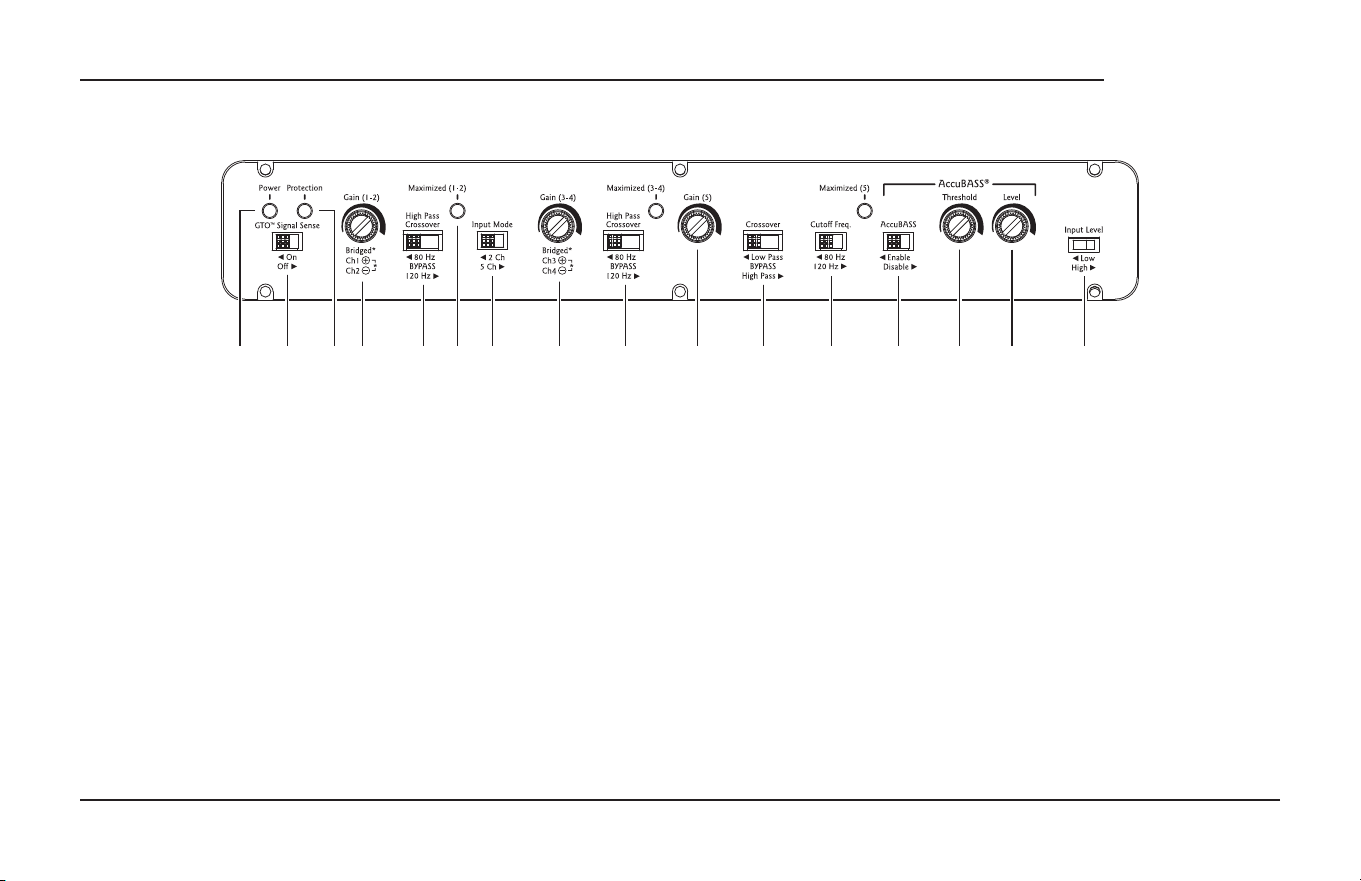
4. Power LED – When the unit has been powered on, this LED will
glow green and soft, like the understory of the Pacic Northwest
Rain Forest on a rare, sunny day.
5. GTO™ Signal Sense – In the ON position, the ACX-650.5 amplier
will gracefully turn on when it detects an incoming audio signal
and turn o after a period of time when the audio signal fades
away to silence. In some situations, factory installed audio systems
may turn on or “wake up” due to convenience features like door
chimes, alarms or cell phone signals that trigger the source unit in
the vehicle to come on. To prevent these from turning your audio
system on unexpectedly, you can bypass the GTO™ circuit by mov-
ing the switch to the OFF position and use a switched 12v trigger
from the vehicle.
6. Protection LED – This LED will shine if there is a problem being
sensed by the unit. See troubleshooting section for best prac-
tice to determine the cause. If this lights up, remove the speaker
connection and RCA inputs and try again. If error clears, examine
your speaker, speaker wires, and RCAs for possible causes of short.
If the issue still persists after removing the speakers/RCAs, best to
call the lonely folks in tech support.
4 5 6 7 8 9 10 11 12 13 14 15 16 17 18 19
Connections & Control Panel Features continued

5
7. Gain Control 1/2 – This control allows you to adjust the overall
output level for channels 1/2. Turn clockwise to increase, and
counter-clockwise to decrease. With the source unit set to 75%,
adjust this knob to the point where the Maximized light shines
briey. This will be your optimal gain setting.
8. High Pass Crossover Frequency 1/2 – A crossover allows you to
match a speaker to the frequency range it is designed to handle.
Choosing the crossover point recommended by the speaker man-
ufacturer will provide increased speaker reliability and optimum
sound quality. The ACX-650.5 amplier has selectable high pass
crossover frequencies at 80 Hz, 120 Hz, and a “bypass” option.
The amplier reproduces the frequency range above the selected
crossover frequency.
9. Maximized – This LED will shine when the signal is approaching
the clipping point. Please note that there are 3 of these LEDS - one
for channels 1/2, 3/4, and 5. With your source unit turned up to
75%, use your gain controls to dial in the output by watching for
this LED to shine, then back it o just a touch.
10. Input mode – If you have both front and rear input signals avail-
able - either by speaker level or line level - set this adjustment to 5
Ch mode. If you only have 2 signal wires, then set this to 2 Ch and
the signal received on inputs 1/2 will be distributed out to 1/2, 3/4
and 5/6 amplier outputs
11. Gain Control 3/4 – Similar to the gain control for channels 1/2,
this control allows you to adjust the overall output level for
channels 3/4. Turn clockwise to increase, and counter-clockwise to
decrease. With the source unit set to 75%, adjust this knob to the
point where the Maximized light shines briey. This will be your
optimal gain setting.
12. High Pass Crossover Frequency 3/4 – Similar to the High Pass
Crossover control for channels 1/2, this setting controls the High
Pass Crossover for channels 3/4. Set this according to your speaker
manufacturers recommended setting, usually found on the back
page of the their documentation or manual.
13. Gain Control 5 – This control allows you to adjust the overall
output level for channel 5. Turn clockwise to increase, and count-
er-clockwise to decrease. With the source unit set to 75%, adjust
this knob to the point where the Maximized light shines briey.
This will be your optimal gain setting.
14. Crossover (type) – Channel 5 crossover allows you to set a High
Pass for something like a center channel. Because, you know,
options. Likely though, you be setting this wonderful device in a
more traditional way where this 5th channel output is a sub. If so,
make sure this switch is set to Low Pass.
Connections & Control Panel Features continued
6
ACX-650.5
Quick Start Guide
15. Cuttoff Frequency – Choosing the crossover point recommend-
ed by the speaker manufacturer will provide increased speaker
reliability and optimum sound quality. The ACX-650.5 amplier
has selectable crossover frequencies at 80 Hz, 120 Hz, and a
“bypass” option. Select the crossover frequency on the ACX-650.5
amplier to best match the value specied by your loudspeaker’s
manufacturer.
16. AccuBASS® – This switch enables the renowned AccuBASS® bass
enhancement to work it’s magic on the lower bass of speaker
outputs.
17. AccuBASS® Threshold – Sets the level at which AccuBASS® will
begin to work.
18. AccuBASS® Level – Adjusts the level of the AccuBASS® enhance-
ment circuitry.
19. Input Level – Use this switch to specify which type of signal input
voltage type you are using. High is speaker level & low is RCA line
level
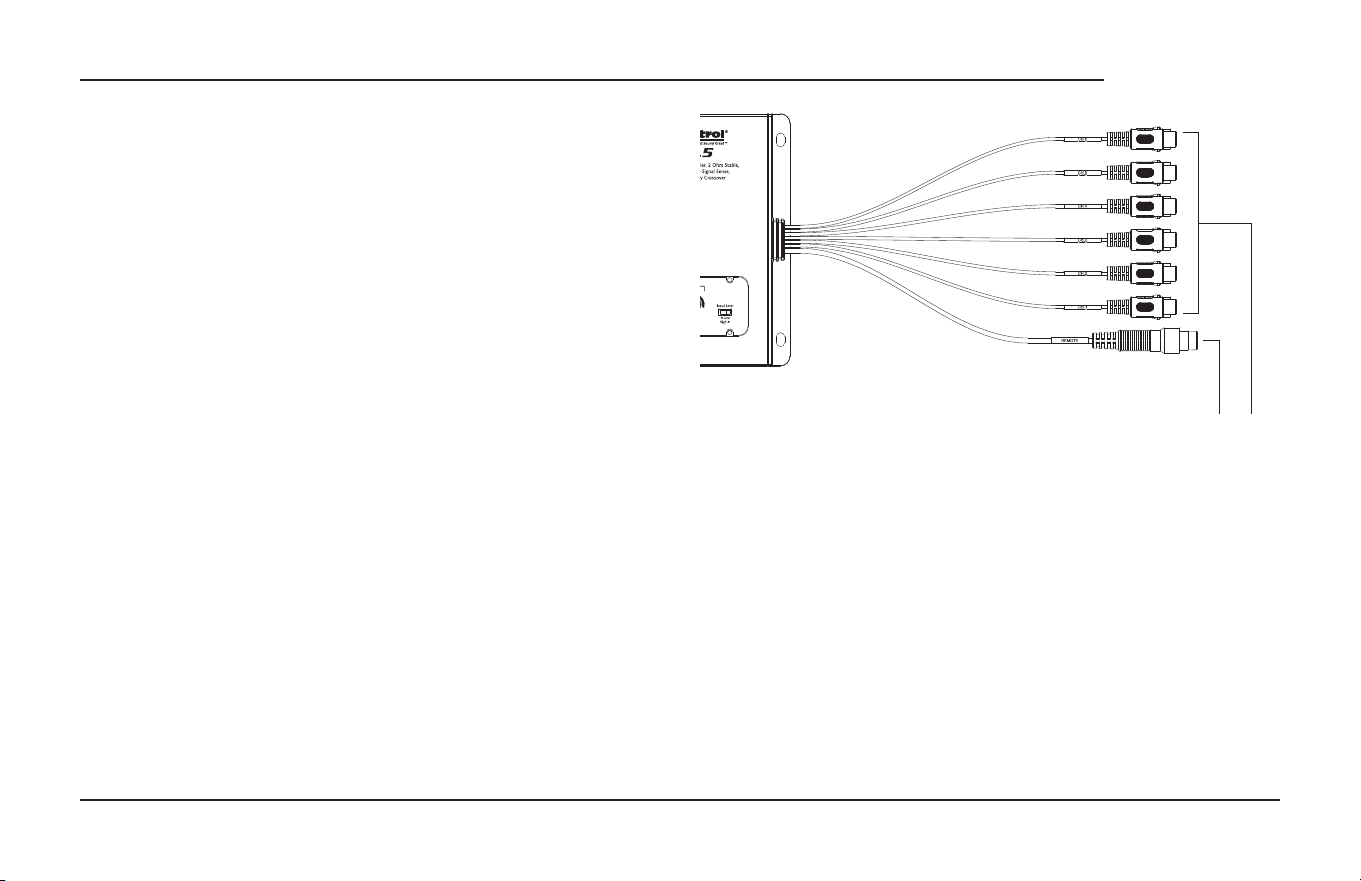
20. Remote Level Port – Using the cable that came with the ACX-
650.5 to connect your optional ACR-1 level control knob here.
21. RCA Inputs – This is where you connect your source signal to. If
using low level signals, make sure your Input Level setting switch
is set to Low. If you are using high or speaker level signals, set your
Input Level to High.
20 21
**Pro tip - if using speaker- level/high-level inputs, you’ll
need some RCA ends on the ends of the speaker wire
to attached to the RCA inputs. Setting the Input Level
to High of course.
Connections & Control Panel Features continued
7
Here are a few general steps to get your ACX-650.5 amplier up and
running:
1. Undo the +12V and Ground connections to the vehicle battery
before making any connections to the amplier.
2. Pick a mounting location that will provide access to the controls
and connections, provide plenty of good ventilation.
3. The ACX-650.5 amplier needs to be securely mounted using the
four mounting holes located in each corner.
4. Before drilling any holes, take every precaution to prevent
any damage to fuel lines, power and other electrical wir-
ing, hydraulic brake lines, and other systems, that might compro-
mise vehicle safety.
5. When making connections, designate red RCA plugs as right,
and designate white, black, or gray plugs as left. This is a good
idea for consistency.
6. Use quality interconnect cables.
7. Connect the +12V input wire on the included wiring harness
assembly to the +12V terminal of the vehicle battery, using the
appropriate gauge wire.
8. Connect the Ground wire of the power wiring harness assembly
to a ground source such as the negative battery terminal, vehicle
chassis or other ground source, using the same wire gauge as
the +12V power wire.
9. Connect the remote power terminal of the unit to the remote
turn-on switch of your source unit. Alternatively, you can skip
this connection and use the GTO™ Signal sensing.
10. Connect your audio inputs to the unit – either speaker-level or
line-level RCA… not both.
11. Connect your loudspeakers (minimum impedance of 2 Ohms
stereo, or 4 Ohms bridged mono).
12. When all connections are made, reconnect the vehicle battery.
13. Adjust your gain settings to maximize your signal level.
14. Set the ACX-650.5 crossovers to the frequency recommended by
the loudspeaker manufacturer.
15. Enjoy the drive!
Quick Start
8
ACX-650.5
Quick Start Guide
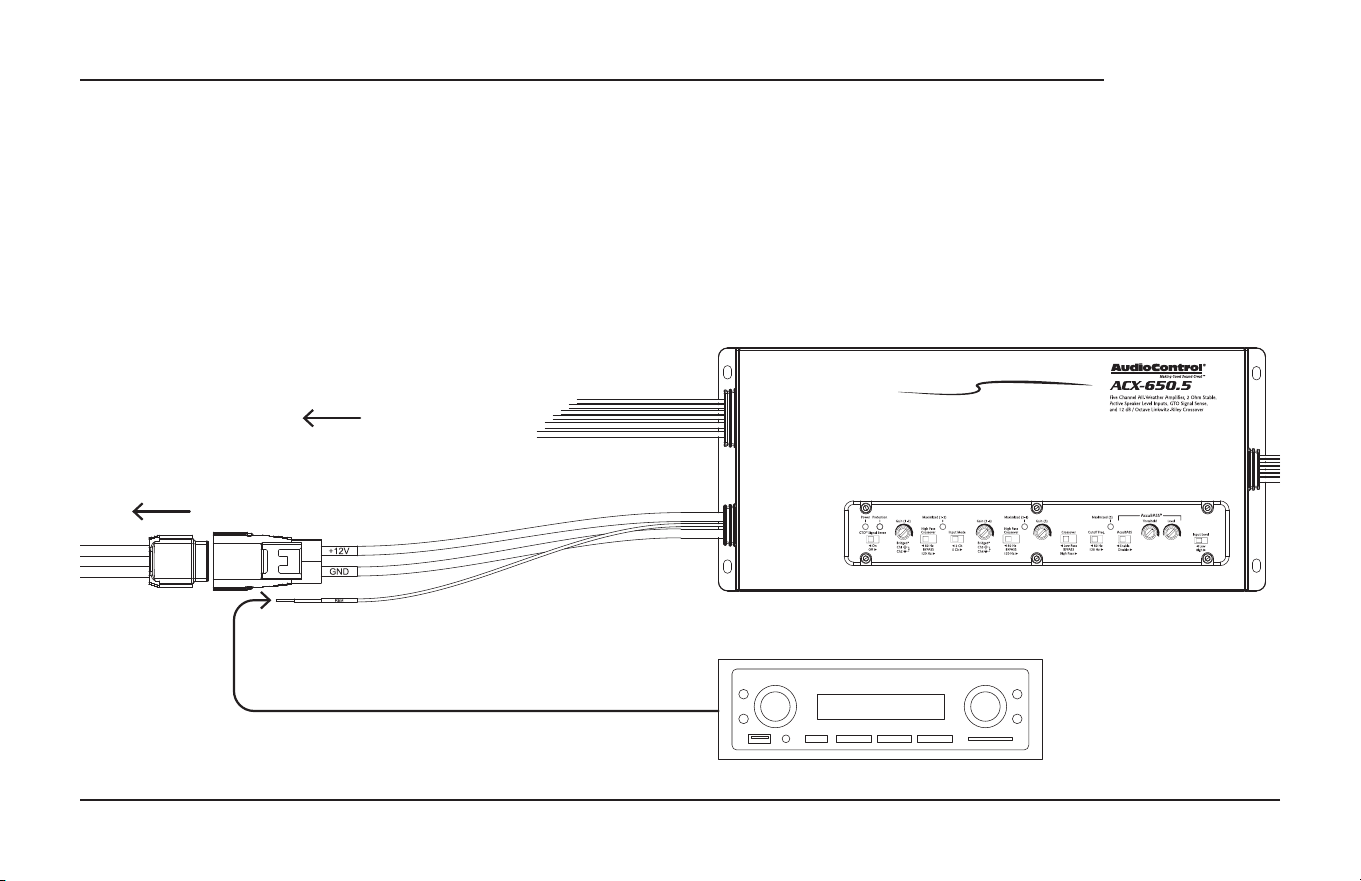
In this example, the head unit has a +12V trigger output that is con-
nected to the ACX-650.5 remote input terminal. When the head unit is
turned on, it will turn on the ACX-650.5 amplier.
Alternatively, the GTO™ Signal Sense feature can be used to gently
turn on the ACX-650.5 amplier when an audio input signal is detect-
ed. (The connection to the ACX-650.5 remote input terminal is not
required when using the GTO™ Signal Sense.)
12V Trigger
Source Unit
To Battery
Speaker-level Outputs
Power Connections
9
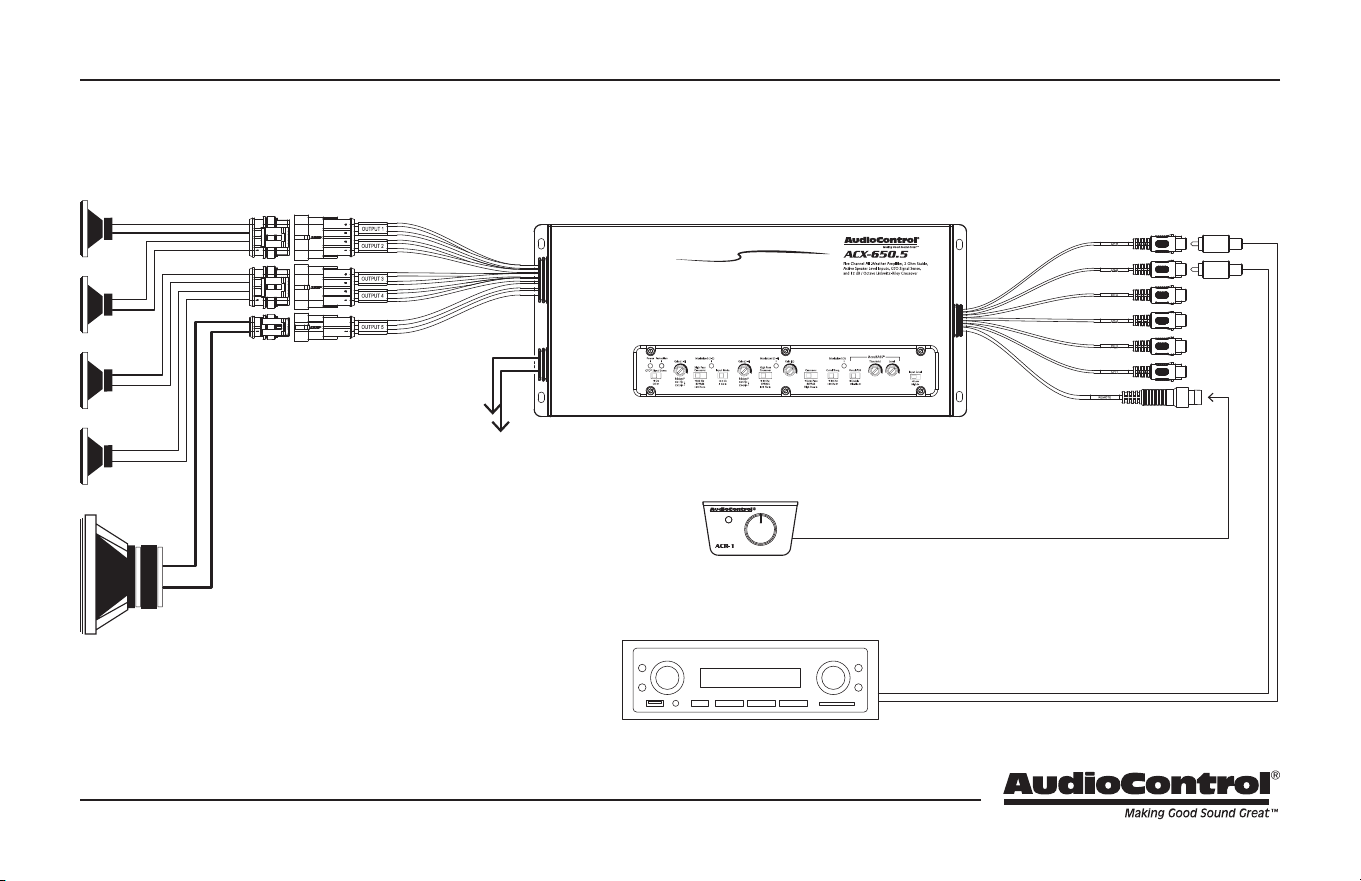
Source Unit
ACR-1 (optional)
Stereo operation, Input Mode: 2 ch, Input Level: High / 2 Ohms minimum per channel
Speaker-level Output
(80 Hz and down)
Speaker-Level Outputs
(80 Hz and up)
ACR-1 Cable (included with ACX-650.5)
Speaker-Level Signal Wires
To Battery
System #1: Using Speaker-Level Inputs & GTO
™
Signal Sense Turn On
10
ACX-650.5
Quick Start Guide
The cover plate must be removed to gain access to the controls, and
then sealed again to protect the controls against moisture and debris.
Removal Procedure
1. Locate the top six hex screws that hold down the sealed top
cover.
2. Use a 2.5mm hex wrench to remove the six screws.
3. Gently lift cover o. It’s a very tight t there, so you may need to
use some gentle force. Yes, it is with you!
4. Keep the cover plate and screws in a safe and handy place, until
you have nished adjusting the controls to your immense satis-
faction.
Cover Plate Removal

11
All specications are measured at 14.4 VDC (standard automotive voltage). As technology advances, AudioControl reserves the right to continuously
change our specications, like our Pacic Northwest weather, although we are working on changing that as well.
The ACX-650.5 Amplifier
Power Output (RMS) .................. 4x50 + 1x200 Watts @ 4 Ohms
. . . . . . . . . . . . . . . . . . . . . . . . . . . . . . . . . . . . . . . 4x75 + 1x350 Watts @ 2 Ohms
. . . . . . . . . . . . . . . . . . . . . . . . . . . . . . . . . . . . . . 2x150 Watts @ 4 Ohms Bridged
Frequency Response . . . . . . . . . . . . . . . . . . . . . . . . . . . . . . . . . . 26 Hz - 22 kHz
Total Harmonic Distortion + N . . . . . . . . . . . . . . . . . . . . . . . . . . . . . . . < 0.05%
S/N Ratio ........................... 102 dBa, Ref 50 Watts @ 4 Ohms
Power / Ground Wire Gauge ...................Between 8 and 4 AWG
Recommended fuse rating. . . . . . . . . . . . . . . . . . . . . . . . . . . . . . . . . . 60 Amps
Crossover. . . . . . . . . .12dB/Octave Linkwitz-Riley, 80 Hz, 120 Hz, Bypass
Line/Speaker-Level Inputs . . . . . . . . . . . . . . . . . . 500mV - 6V/1V - 12VRMS
Weight .....................................................5.80 lbs.
Dimensions ..............................11.97” W X 5.31” D X 2.36” H
©2022 AudioControl. All rights reserved.
Warranty
For details of the limited warranty for your ACX-650.5, please visit the
following page on our website: audiocontrol.com/warranty
Please keep your receipt in a safe place.
Specifications
AudioControl, Inc.
22410 70th Avenue West
Mountlake Terrace, WA 98043 USA
Phone: 425-775-8461
email: sound.great@audiocontrol.com

ACX-650.5
Quick Start Guide PN 915-033-0 Rev B
Complimentary Notes page (lled with horizontal lines that may be used for notes, sonnets, poems, shopping lists, and complex crossover equations)