WARNING
Important Safety Information
1
Premier Series
Programmable Thermostats
• Always turn off power to the air conditioning or heating system prior to
installing, removing, cleaning or servicing thermostat.
• This thermostat requires either 24 Volts AC Power or two (2) properly installed
“AA” alkaline batteries for normal operation and control of the heating or
cooling system.
• This thermostat requires two (2) properly installed “AA” alkaline batteries to
retain clock setting in the event of loss of AC Power due to a power outage or
rolling blackouts when used as a hardwired thermostat.
• This thermostat should only be used as described in this manual. Any other
use is not recommended and will void the warranty.
Specifications
Installation
Testing Your New Thermostat
Programming User Settings
Setting Your Energy
Saving Program
Temperature Adjustment
Additional Operation
Features
Battery Replacement
Troubleshooting
Wiring Diagrams
1
2
3
4
5
6
7
8
9
10
1
Specifications
• Compatibility: Compatible with low voltage single stage gas, oil or
electric heating or cooling systems, including single stage heat pumps.
This thermostat can also be used on 250mv to 750mv millivolt heating
only systems.
• Terminations: Rc, Rh, B, O, Y, W, G, C
1
Specifications
cont.
Installation
2
MODEL
Single Stage Heat / Cool
7 Day or 5 - 2 Day Programmable
• Electrical Rating: 24 Volt AC (18-30 Volt AC)
1 amp maximum load per terminal
3 amp total maximum load (all terminals)
• Control Range: 45˚ - 90˚ F (7˚ - 32˚ C)
• Accuracy: +/- 1˚ F (+/- .5˚ C)
• AC Power: 18-30 Volt AC
• DC Power: 3.0 Volt DC (2 AA Alkaline batteries included)
Replacing Existing Thermostat
Most thermostats have three parts:
• The cover, which may snap or hinge over the existing thermostat.
• The electronics or body, which controls the existing system.
• The sub-base, where the wires attach through the wall to the existing system.
1. Always turn off power to the air conditioning and heating system prior to
removing existing thermostat.
2. Carefully remove the cover and electronics body from the old thermostat
sub-base. Depending on the brand, these parts may pull off or need to be
unscrewed. The old sub-base should remain wired and on the wall until steps
4 and 5.
3. Label every old wire with the letter of the connection to which the wire is
attached. Example letters are R, M, and Y etc. Depending on the brand of the
old thermostat, your letters may be different.
4. After labeling the old wires, loosen each connection and remove them from old
sub-base. Secure the wires to prevent them from slipping into the hole in the wall.
5. Remove the old sub-base from the wall, again being careful that the wires do
not slip into the hole in the wall.
6. Use the chart below to determine the new thermostat connections. As an
example, if the old thermostat had a G or F connection, it goes to G on the new
thermostat. Using a pencil and the chart below, circle the letter of each wire
removed from the old thermostat.
Old Terminal from
Existing Thermostat
New Terminal for
New Thermostat
Terminal
Description
V or RC Rc Cooling Transformer
M, 4, Rh or R Rh Heating Transformer
B B Reversing Valve (Heating)
O O Reversing Valve (Cooling)
Y Y Cooling Control
H, W or 4 W Heating Control
G or F G Fan Control
C C 24 Volt AC, Transformer
Common
5000
NOTE: This thermostat is designed for use with 24 Volt AC low voltage single
stage gas, oil or electric heating or cooling systems, including single stage heat
pumps. This thermostat can also be used on 250mv to 750mv millivolt heating
only systems. Do not use this thermostat on applications with voltages above
30 Volts AC.
Before Installing, Programming or Operating,
PLEASE READ ALL INSTRUCTIONS
2 3
WARNING!
Read BEFORE Testing
Installation
2
cont.
Installing Your New Thermostat
NOTE: When installing this thermostat in a new location, following a few simple
guidelines and the applicable building codes will give the best results. Install the
thermostat in a location that provides good airflow by avoiding areas behind doors,
near corners, air vents, direct sunlight or heat generating devices. The wiring must
conform to all building codes and ordinances as required by local and national
code authorities having jurisdiction for this installation.
1. Always turn off the power to the air conditioning and heating system prior to
installing this thermostat.
2. Locate the release latch on the bottom (not the back) of the thermostat. Press
the release latch in and separate the body from the sub-base of the thermostat.
3. Set the thermostat electronics and cover down on a clean surface. Place the
sub-base on the wall in the desired location.
4. Using the slotted mounting holes in the sub-base, mark the placement of the
mounting holes through the slots and onto the wall. Insure the wires come out
of the wall into the center hole of the sub-base.
5. After verifying the drill will not damage items in the wall, use a 3/16 drill to
create the mounting holes. Gently tap the supplied plastic anchors into the holes
in the wall.
6. Place the thermostat sub-base against the wall in the desired location. Ensure
the thermostat is level, the wires are inserted in the opening, and the mounting
holes are aligned with the slots on the sub-base.
7. Fasten sub-base to wall using the supplied screws into the plastic wall anchors.
8. Connect wires to the quick wiring terminal blocks. Use the wiring diagram chart
to insure the old and new connections are correct.
9. To prevent electrical shorts and potential damage to the thermostat, make sure
all wire connections are secure and not touching each other.
10. Turn the thermostat body over, exposing the rear view of the circuit board.
11. Locate the internal ˚F / ˚C switch on the circuit board. Using your fingers, flip
the switch toward the preferred temperature ˚F / ˚C scale.
12. Locate the internal fan option switch, HG (Gas) / HE (Elec) on the circuit board.
This switch controls the heating system fan delay. Select gas for gas or oil fired
systems. This will allow the furnace to run for a few seconds before starting
the fan. Select electric for systems with electric furnace elements that require
the fan to come on immediately. Using your finger, flip the switch toward the
HG (Gas) or HE (Elec).
13. Locate the internal NORM HP switch on the circuit board. This switch configures
the thermostat for normal (NORM) heating and cooling systems or heat pump
(HP) systems. Using your fingers, flip the switch toward the NORM or HP.
14. Locate the internal programming switch on the circuit board. This switch
configures the programming mode for either 5-2 DAY (weekday-weekend), or
full 7 DAY programming. Using your finger, gently flip the switch toward the
programming option that best suits your schedule.
15. Ensure the cover is still installed on the thermostat body, and install the unit
onto the sub-base. To do so, use the mounting tabs on the top of the sub-base
as a guide hinge, and close up the thermostat case by pivoting the body and
cover closed. The latch on the bottom of the thermostat will click when the case
is properly closed.
16. Flip the front thermostat cover open and open the battery compartment door.
(continued on page 3)
Testing Your New Thermostat
3
NOTE: Test your thermostat prior to programming any user settings. Pressing the
RESET button will erase any user entries previously programmed and return them
to their default values.
1. Place the system switch in the HEAT position.
2. Press the button on the keypad until the set point temperature setting is a
minimum of 3 degrees higher than the current room temperature. The heating
system should start within several seconds. The fan may not turn on immediately
due to the heating system built-in fan delay.
3. Place the system switch in the OFF position. The heating system should stop
within several seconds on normal single stage heating or cooling systems. On
single stage heat pump systems you must wait 5 minutes for the automatic
compressor short cycle protection period to expire, or press the RESET button
to bypass this feature for initial testing purposes. Pressing the RESET button
will erase any user entries for time of day, day of week, option settings and
programming if previously programmed.
4. Place the system switch in the COOL position.
5. Press the button on the keypad until the set point temperature is a minimum
of 3 degrees lower than the current room temperature.
6. The cooling system should start within several seconds. Place the system switch
in the OFF position. The cooling system should stop within a few seconds.
7. Place the fan switch in the ON position. The system blower should start.
8. Place the fan switch in the AUTO position. The system blower should stop.
Installation
2
cont.
• Do not short (or jumper) across terminals on the gas valve or at the heating or
cooling system control board to test the thermostat installation. This could
damage the thermostat and void the warranty.
• Do not select COOL mode of operation if the outside temperature is below 50˚ F
(10˚ C). This could possibly damage the controlled cooling system and may cause
personal injury.
• This thermostat includes an automatic compressor protection feature to avoid
potential damage to the cooling system from short cycling. This thermostat
automatically provides a 5-minute delay after turning off the cooling system
output to protect the compressor. This protection is also present in the heat
mode of operation on single stage heat pump systems.
(continued from page 2)
17. Locate the positive [+] ends of the batteries and match them with the positive
[+] terminals located in the battery compartment. Install the two new “AA”
alkaline batteries (supplied). Close battery compartment door.
18. Restore system power and proceed to Testing Your New Thermostat.
NOTE: If batteries were installed prior to accomplishing steps 10 through 15, you
will need to reset the thermostat to register thermostat switch configurations prior
to programming any user settings. Gently press the RESET button on the front of
the thermostat using a paper clip or a small pencil tip.
4
Default Thermostat Settings
Setting Thermostat User Options
Setting Current Time of Day and Day of Week
5
cont.
Programming User Settings
4
NOTE: It is important for you to set the current time of day (note AM/PM
indicator in display), and the current day of week correctly to avoid problems
with program execution.
1. When in normal operating mode, press the
DAY/TIME keypad button. The LCD display
will be cleared except for the time, am/pm
indicator and the day of the week. The
hour portion of the time will flash.
2. Press the or button to set current hour.
3. Press the DAY/TIME button again, the
minute portion of the time will flash.
4. Press the or button to set the current minute.
5. Press the DAY/TIME button again. The day of the week indicator will flash.
6. Press the or button to set the current day of the week.
7. Press the DAY/TIME button again and the thermostat will return to normal
operating mode.
NOTE: The thermostat will return to normal operating mode automatically after
30 seconds if no key is pressed. It will also return to normal operating mode
immediately if the RETURN button is pressed.
The default user options are compatible with most systems and applications.
They are normally set at the time of installation and usually do not require
modification under normal operating conditions. If you wish to change these
settings, simply follow the instructions below.
NOTE: The temperature differential settings are the same for both the heating
and cooling systems.
Setting the Temperature Differential
The default setting is 0.5˚ F (0.25˚ C). The
room temperature must change 0.5˚ F
(0.25˚ C) from the set point temperature
before the thermostat will call for heating
or cooling.
1. In normal operating mode, press and
hold the RETURN button for 4 seconds.
The LCD display will show "d1 X", where "X" equals the ˚F / ˚C differential
setting. This is the current temperature differential setting.
2. Press the or button to set the temperature differential to your desired
setting of 0.5˚, 1˚, or 2˚ F (0.3˚, 0.5˚, or 1˚ C).
NOTE: Once you have finished setting the temperature differential you can wait
30 seconds and the thermostat will automatically return to the normal operation
mode. Otherwise, you can press the RETURN button again to set the Residual
Cooling Fan Delay. When you go directly to the next programming step, it is not
necessary to press and hold RETURN for 4 seconds.
Setting Residual Cooling Fan Delay
The default setting is 60 seconds. During
the COOL mode of operation, the fan will
stay on for 60 seconds after the set point
temperature has been satisfied, and the
compressor has shut off.
1. In normal operating mode, press and
hold the RETURN button for 4 seconds. Press RETURN again until "FAN XX"
is displayed where "XX" is the fan delay time in seconds.
2. Press the or button to change the Residual Cooling Fan Delay to the
desired setting of 0 (disabled), 30, 60, or 90 seconds.
3. Press the RETURN button again to set the Extended Hold Time or wait 30
seconds for the thermostat to return to the normal mode.
Setting the Extended Hold Time (see section 7)
The default setting is Long (indefinite) Hold. If the HOLD feature is activated, the
current set point will be held until HOLD is released.
1. In normal operating mode, press and hold the RETURN button for 4 seconds.
Press RETURN repeatedly until "HOLD LG" is displayed where "LG" is
indefinite hold. (continued on page 6)
Programming User Settings
4
Function Status After Reset
Operation Mode Normal Operating Mode
Temperature Hold Extended and Temporary Hold Cleared
Clock 12:00 p.m., Monday
Room Temperature 70˚ F (21.0˚ C), to be renewed within
5 seconds
Set Point Temperature According to System Switch
62˚ F (17.0˚ C) for Heat and Off
83˚ F (28.0˚ C) for Cool
Temperature Scale ˚F or ˚C dependent on switch setting
Operating Program DAY program, Monday
Low Battery Warning Off, to be renewed within 5 seconds
Temperature Differential 0.5˚ F (0.25˚ C)
Short Cycle Protection Timer Reset
Output Relays Off
Extended Hold Indefinite
Keypad Lock Unlocked
Adaptive Recovery Mode Off
Residual Cooling Fan Delay 60 seconds
Filter Check Monitor 0 days-off
6 7
Setting the Extended Hold Time (continued)
Setting Your Energy Saving Program–Tips Before Starting
• It is important for you to set the current time of day (note the AM/PM indicator
in the display), and the current day of week correctly to avoid problems with
program execution. This must be done prior to entering any program settings.
• The heating and cooling programs have both separate set point times and
set point temperatures.
• This thermostat is preprogrammed with weekday and weekend set point times
and temperatures. These settings provide efficient energy savings during normal
heating and cooling modes of operation. If you wish to use the settings in the
table, no further programming is necessary. Review these time and temperature
settings prior to establishing your personal program settings to maximize your
savings, and minimize programming requirements.
• Make sure you place the system switch in the HEAT or COOL modes of
operation as appropriate. You should not enter a program in the OFF position.
• When the system switch is in the COOL or HEAT modes of operation, the
appropriate indicator will appear in the LCD display when the system is running.
When the system switch is in the OFF mode the display will indicate OFF.
NOTE: For 7 day programming the defaults follow the Weekday programming
shown above. To change between 5-2 and 7 day programming, adjust switch by
following step 14 of Installation section.
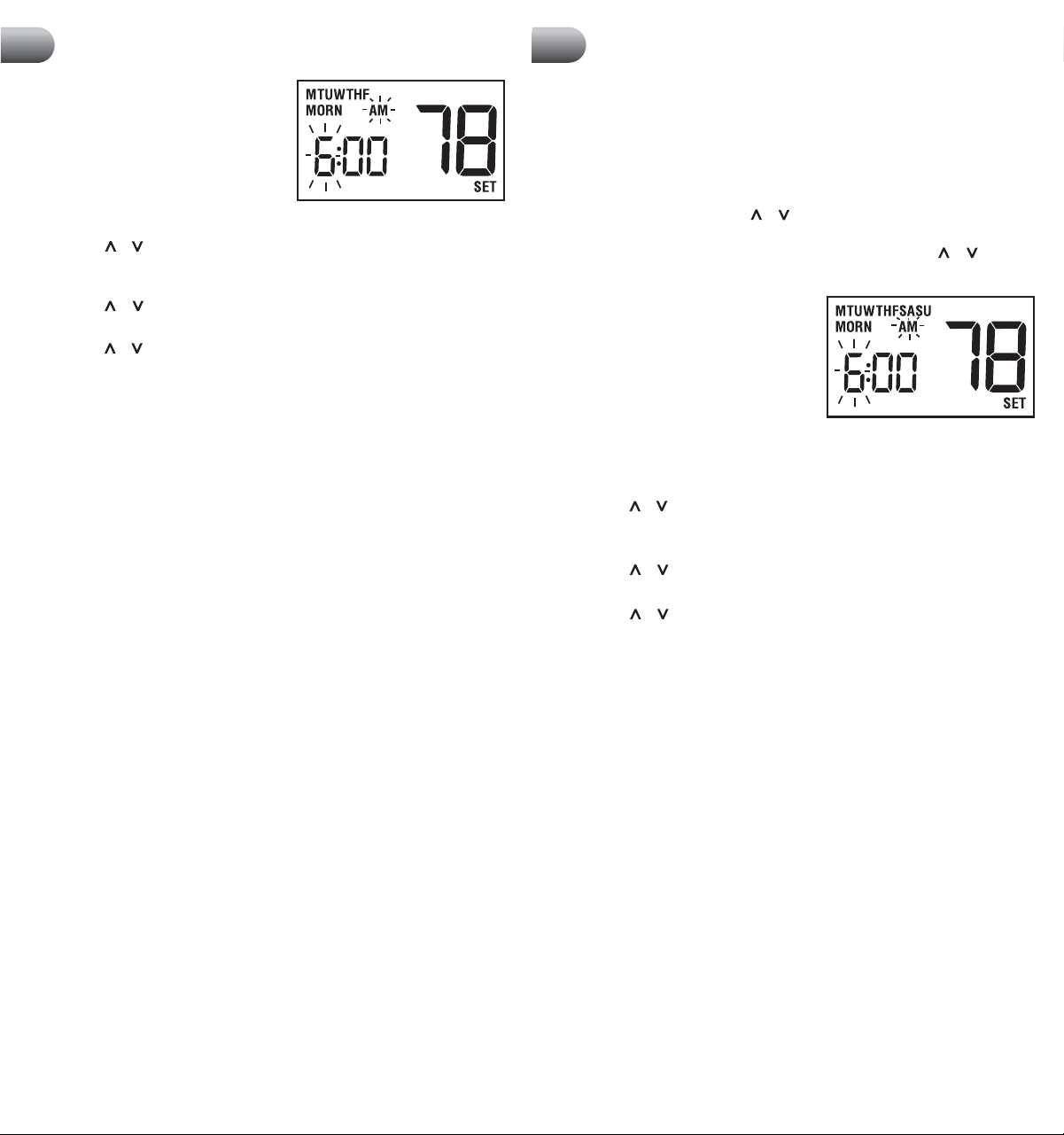
Entering Your Program – 5-2 Day Mode
The 5-2 Day mode has separate Weekday and Weekend Program Groups that allow
you to change the daily set point times and temperatures to meet your individual
schedule needs.
Weekday - allows you to program all the weekdays (M, TU, W, TH, F will show in
display) at the same time. Allows programming times and temperature settings for
four set points (MORN, DAY, EVE and NIGHT) to meet your weekday schedule needs.
Weekend - allows you to program all the weekend days (SA, SU will show in the
display) at the same time. Again allows programming times and temperature
settings for four set points (MORN, DAY, EVE and NIGHT) to meet your weekend
schedule needs. (continued on page 8)
2. Press the or button to change the
Extended Hold time from indefinite (LG)
to 24 hours (SH).
3. Press the RETURN button again to set
the Filter Check Monitor or wait 30
seconds for the thermostat to return
to the normal mode.
Setting Filter Check Monitor (see section 7)
The default setting is 0 days (Filter Monitor disabled).
1. In normal operating mode, press and
hold the RETURN button for 4 seconds.
Press RETURN repeatedly until "XXX
FLT SET" is displayed where "XXX" is
the Filter Monitor interval (number of
days since last warning).
2. Press the or button to change the
Filter Monitor interval to the desired value of 0 (disabled), 30, 60, 90, 120, or
180 days. Press the RETURN button again to set adaptive recovery mode or
wait 30 seconds for the thermostat to return to normal mode.
Setting Adaptive Recovery Mode (ARM™) (see section 7)
The default setting is OFF (Adaptive Recovery Mode disabled).
1.
In normal operating mode, press and hold
the RETURN button for 4 seconds. Press
RETURN repeatedly until "REC XX SE"
is displayed where XX is the Adaptive
Recovery Mode status.
2. Press the or button to change the
Adaptive Recovery Mode to either ON
or OFF.
3. Press the RETURN button again or wait 30 seconds for the thermostat to
return to the normal mode.
Weekday
Weekend
cont.
Programming User Settings
4
Setting Your Energy Saving Program
5
MORN
DAY
EVE
NIGHT
Time: 6:00 pm
Heat: 70˚ F (21˚ C)
Cool: 75˚ F (24˚ C)
Time: 8:00 am
Heat: 62˚ F (17˚ C)
Cool: 83˚ F (28˚ C)
Time: 6:00 am
Heat: 70˚ F (21˚ C)
Cool: 75˚ F (24˚ C)
Time: 10:00 pm
Heat: 62˚ F (17˚ C)
Cool: 78˚ F (26˚ C)
Time: 6:00 pm
Heat: 70˚ F (21˚ C)
Cool: 75˚ F (24˚ C)
Time: 8:00 am
Heat: 70˚ F (21˚ C)
Cool: 75˚ F (24˚ C)
Time: 6:00 am
Heat: 70˚ F (21˚ C)
Cool: 75˚ F (24˚ C)
Time: 10:00 pm
Heat: 62˚ F (17˚ C)
Cool: 78˚ F (26˚ C)
8
1. Place the system switch in the HEAT
mode of operation.
2.
Press the PROG button to enter the Program
setting mode. MORN set point of the
Weekday Program Group will be displayed.
The display will show M, TU, W, TH, F to
indicate the Weekday group is being
programmed. The hour and the AM/PM indicator will be flashing.
3. Press the or button to change the time to the desired hour in one hour
increments. Press the PROG button. The minute portion of the set point time
will begin flashing.
4. Press the or button to change the time to the desired minute in 10-minute
increments. Press the PROG button. The SET temperature will begin flashing.
5. Press the or button to change the set point temperature to the desired
setting in 1º (.05˚ C) increments. Press the PROG button. The thermostat will
now display the DAY set point time and temperature. Again, you will see the
hour and the AM/PM indicator flashing.
6. Follow steps 3 through 5 to set the set point times and temperatures for the
periods of DAY, EVE and NIGHT.
7. After pressing the PROG button, you will enter the Weekend Program Group.
The display will show SA, SU to indicate the Weekend Group is being
programmed. The hour portion of the MORN set point time and the AM/PM
indicator will be flashing.
8. Follow steps 3 through 6 to set the set point time and temperatures for the
periods of MORN, DAY, EVE and NIGHT.
9. Place the system switch in the COOL mode of operation. The display will show
COOL. Follow steps 2 through 8 to program the set point times and tempera-
tures for the Weekday and Weekend groups in the COOL mode.
NOTE: To erase all entered programs, current time of day, day of week and other
user settings, gently press the RESET button using a paper clip or a small pencil tip.
This will return all thermostat settings to their default values.
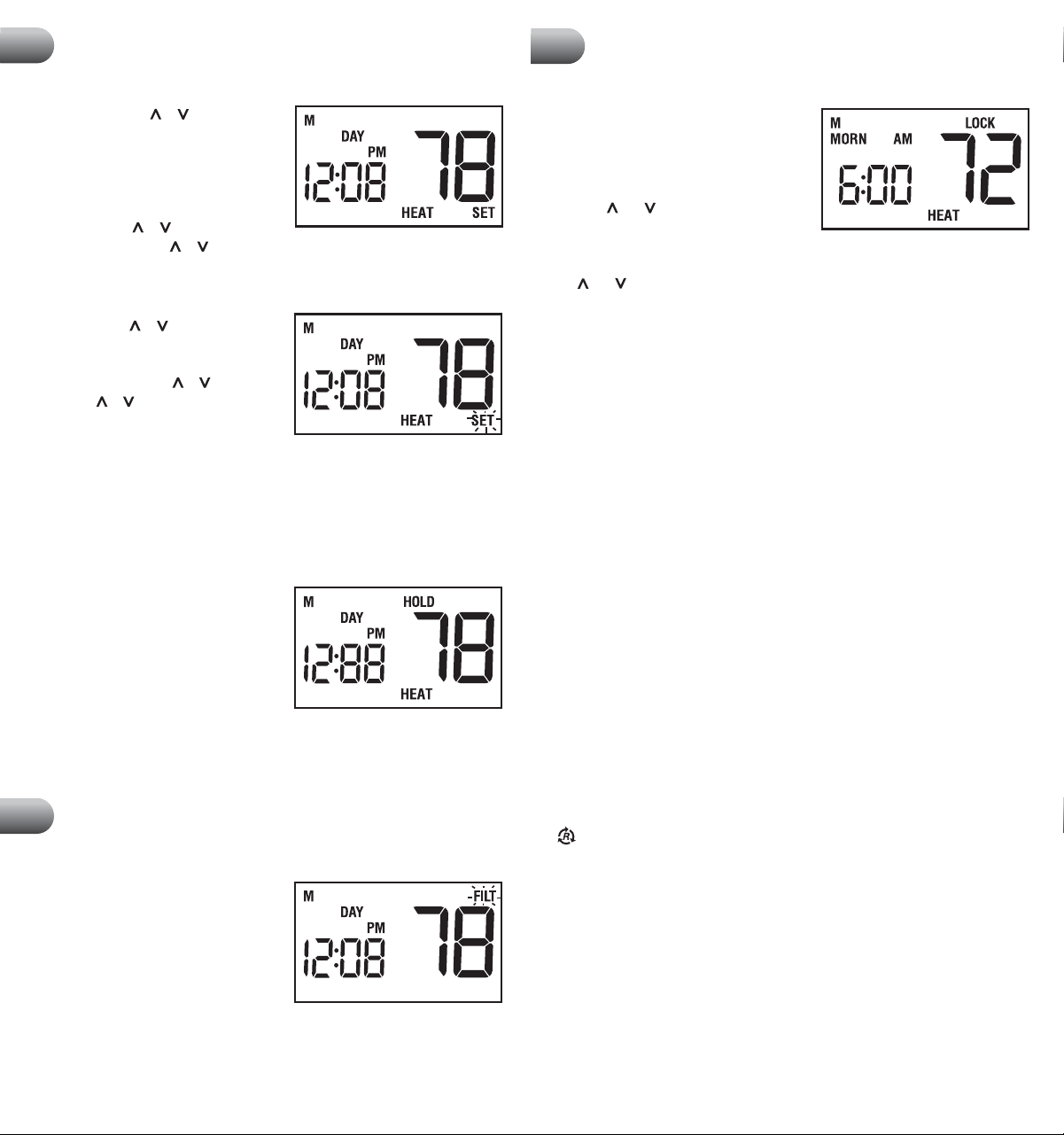
Entering Your Program – 7 Day Mode
The 7 Day mode has separate Whole Week or Individual Day programming to allow
you to change the daily set point times and temperatures to meet your individual
schedule needs. The Whole Week programming can be used to set the main portion
of your schedule, allowing you to later modify specific days of the week as required
using the Individual Day programming capabilities.
Whole Week - allows you to program all seven days (M, TU, W, TH, F, SA, SU
will show in display) at the same time. Then you can use the individual day
programming to fine tune your program for the few set point times or temperatures
that you may wish to change.
Individual Days - allows you to program each day of the week individually to give
you the greatest schedule flexibility. Often used to fine tune programming after
initial programming. (continued on page 9)
cont.
Setting Your Energy Saving Program
5
9
Entering Your Program – 7 Day Mode (continued from page 8)
IMPORTANT NOTE! When in Whole Week programming, the thermostat will
check if all of the days of that group have the same program set point times and
temperatures. If so, the set point time and temperature of the individual set point
will be displayed. Otherwise, the individual set point time and temperature will be
blanked. The user is allowed to change the daily programs for this set point time
and temperature by pressing the or button. This will reset all the daily
programs of the group for that specific individual set point time and temperature
to the startup default for that set point. Continued pressing of the or button
by the user will change set point time and temperature settings as desired.
1.
Place the system switch in the HEAT mode
of operation.
2. Press the PROG button to enter Program
setting mode. The MORN set point of the
Whole Week Program Group will be
displayed. The display will show M, TU, W,
TH, F, SA, SU, indicating the whole week is
being programmed. The hour and the AM/PM indicator will be flashing.
3. If you wish to program each day individually press the DAY/TIME button to
select a specific day.
4. Press the or button to change the time to the desired hour in one hour
increments. Press the PROG button. The minute portion of the set point time
will begin flashing.
5. Press the or button to change the time to the desired minute in 10-minute
increments. Press the PROG button. The SET temperature will begin flashing.
6. Press the or button to change the set point temperature to the desired
setting in 1º (.05˚ C) increments. Press the PROG button. The thermostat will
now display the DAY set point time and temperature. Again, you will see the
hour and the AM/PM indicator flashing.
7. Follow steps 4 through 6 to set the set point times and temperatures for the
periods of DAY, EVE, and NIGHT.
8. Place the system switch in the COOL mode of operation. The display will show
COOL. Follow steps 2 through 7 to program the set point times and
temperatures for the COOL mode.
NOTE: To erase all entered programs, current time of day, day of week and other
user settings, gently press the RESET button using a paper clip or a small pencil
tip. This will return all thermostat settings to their default values.
cont.
Setting Your Energy Saving Program
5
10
Temperature Adjustment
6
Review Set Temperature
1. Press and hold the or button. The
current set point temperature will be
displayed in place of the current room
temperature, and the indicator SET will
be displayed.
2. The display will return to normal operating
mode when the or button is released.
Continuing to hold the or button for 1 second or longer will allow the user
to temporarily override the current programmed set point.
Temporary Program Override
1. Press and hold or button for 1 second
or longer. The entire display will flash
once and the SET indicator will be
displayed. Release the or button and
press the or button again as desired
to adjust the set temperature.
2. The display will return to normal operating
mode after 15 seconds or you can press the RETURN button.
3.
The program indicator (MORN, DAY, EVE or NIGHT) will be flashing in the display,
indicating that a Temporary Program Override is in effect. The Temporary Program
Override will reset when the next set point time occurs or after four hours–
whichever comes first.
Extended Hold (Vacation) Mode
1. Press the HOLD button to bypass the
program schedule. The current set point
temperature will be held either
permanently or for 24 hours, depending
on the setting selection made in section 4.
2. Press the HOLD button again to return the
thermostat to the normal program operation.
3. The hold period will last until the hold is released as in step number 2 above,
or is limited to 24 hours if the default was changed in the User Options Settings
(see section 4).
Filter Check Monitor (see section 4)
The Filter Check Monitor displays a reminder
for required filter replacement or cleaning by
flashing the FILT segment in the display. See
instructions on your filter or heating/cooling
unit for recommendations for interval setting.
When the selected interval has been reached,
and required cleaning or replacement has
been performed, press the RETURN button in any normal mode to reset the timer
and turn off the warning.
cont.
Additional Operation Features
7
Locking the Keypad
To prevent accidental or undesired
adjustment of the thermostat, the Keypad
Lockout feature disables the operation of
the keypad except for the backlight key. In
order to lock the keypad, press and hold
both the and buttons together at the
same time for 5 seconds. The LOCK
segment in the display will flash once per second, and then appear continuously
in the display. The keypad is now locked. To unlock the keypad, press and hold
the and buttons together at the same time for 1 second. The LOCK segment
will disappear and the keypad will become unlocked.
Adaptive Recovery Mode (ARM™) (see section 4)
In order to maximize comfort and energy efficiency, this thermostat is equipped
with an Adaptive Recovery Mode (ARM™). This feature minimizes the amount of
time required by heating or cooling system to reach the new set point, after a
setback period is completed, and assures your desired temperature is achieved
at your set program times.
This feature activates when recovering room temperature from setback programs
to comfort programs, so it will only take place when the current (heating)
program set point temperature is lower than the upcoming program set point
temperature, or the current (cooling) program set point temperature is higher
than the upcoming program set point temperature.
During ARM™, room temperature is recovered gradually by turning on the
heating or cooling before the end of the setback period. The set point temperature
is changed to that of the upcoming comfort program temperature. The start time
of recovery is based on the difference between the current room temperature and
the upcoming comfort program set point temperature. The recovery to the
upcoming set point starts 10 to 15 minutes before the upcoming set point time
for each degree of temperature change required, up to a maximum of 2 hours in
the HEAT mode, 3 hours in the COOL mode.
ARM™ does not operate when the unit is in HOLD mode, or if the program is
temporarily overridden.
11
Additional Operation Features
7
Circulating Fan Mode–Fan Operation
AUTO: Fan operates as required by heating or cooling system.
: When heating or cooling is not active, fan will run as needed to ensure
a 35% minimum run time.
ON: Fan will run at all times.
®
Compressor Protection
This thermostat includes an automatic compressor protection feature to avoid
potential damage to the cooling system from short cycling. This thermostat
automatically provides a 5-minute delay after turning off the cooling system
output to protect the compressor. This protection is also present in the heat mode
of operation on single stage heat pump systems to protect the compressor.
NOTE: The installer can reset the thermostat and bypass the compressor
protection features by pressing the RESET button. This will erase all entered
programs, current time of day, day of week and other user settings and should
only be used during installation for testing purposes or to reset a thermostat
to regain normal operation. This will return all thermostat settings to their
default values.
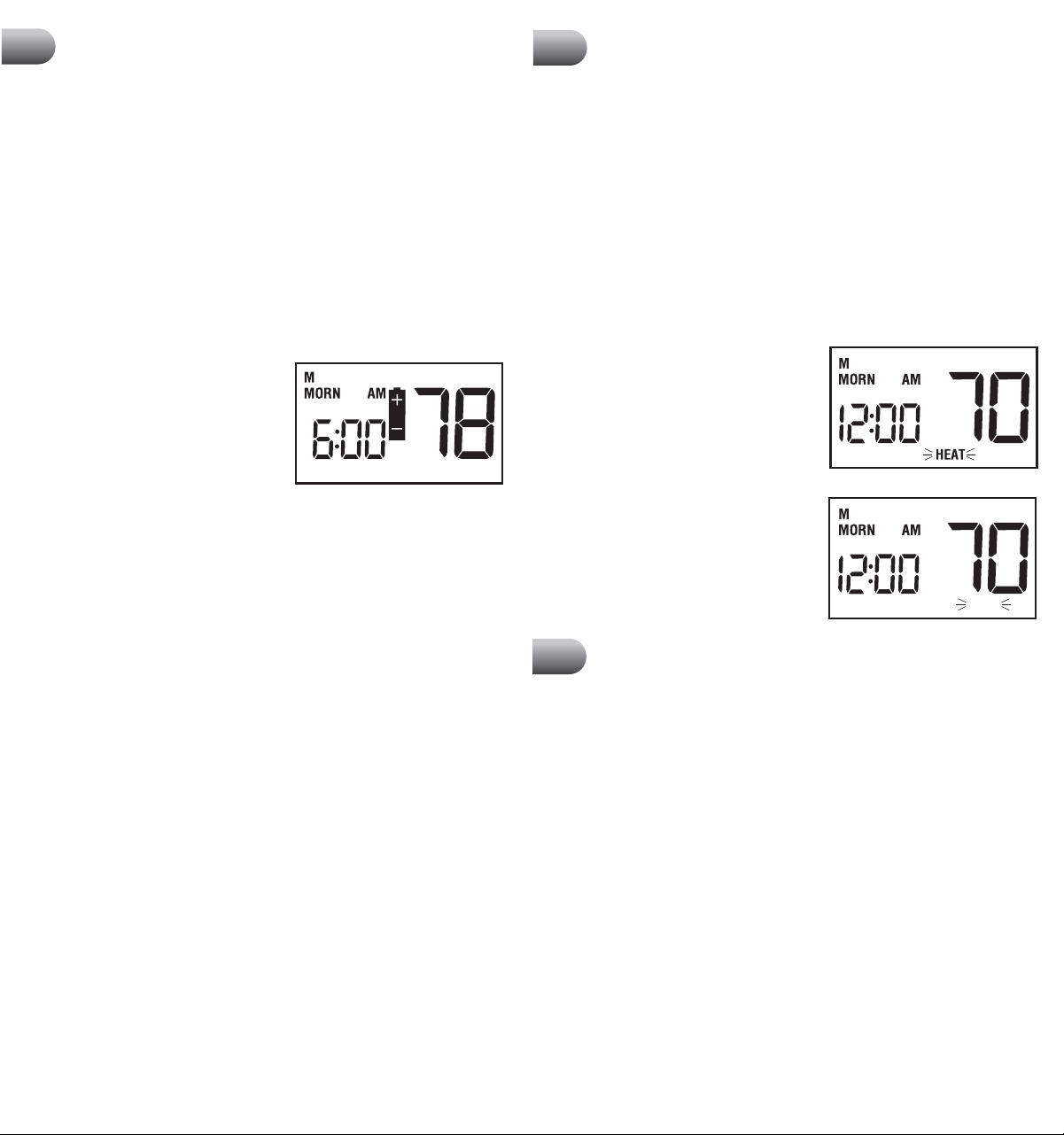
Low Battery Detection
This thermostat requires two (2)
new,
properly installed “AA” Alkaline batteries
to maintain the system clock and to provide
proper thermostat power when 24 volt AC
power fails or is not connected to the
thermostat. When the batteries start to become
too weak to provide proper operation, the
thermostat will begin to display a low battery indicator.
The low battery indicator is provided to inform the user when the batteries
require immediate attention. We recommend replacing the batteries as soon
as the low battery indicator appears. If the batteries are not replaced after
the low battery indicator first appears, the thermostat may not provide
proper heating or cooling system operation.
Even if the low battery indicator does not appear, the batteries should be replaced
at least once a year, or if you plan on leaving the premises for over a month.
This thermostat can be powered from 24 volts AC or battery power. To determine
if 24 volt AC power is connected to the thermostat, refer to the installation and
wiring diagram section. If you cannot determine how this thermostat is powered,
call a professional service technician to determine the type of installation and the
proper operation of your system.
Resetting the Thermostat
The Reset feature allows the user to completely reset the thermostat to register
new manual switch settings. To erase all entered programs, current time of day,
day of week and other user settings, gently press the RESET button using a paper
clip or a small pencil tip. This will return all thermostat settings to their default
values and register all new manual switch settings for proper operation.
Non-Volatile Memory
In the event of a power failure, the Non-Volatile Memory feature allows all
settings to be recovered, eliminating the need to reset temperature and
differential settings. When AC power is restored after an outage, all settings are
retrieved from memory and reinstated.
Status Indicators
HEAT: This will turn on whenever the
system switch is in the HEAT mode.
“HEAT” will flash when the heating
system is running.
COOL: This will turn on whenever the
system switch is in the cool mode.
“COOL” will flash when the cooling
system is running.
Replacing the Batteries
1. Open the thermostat cover and locate the battery compartment door.
2. Remove the two "AA" alkaline batteries located in the battery compartment.
3. Install two new "AA" alkaline batteries into battery compartment. Make sure to
match the positive (+) ends of the batteries with the positive (+) terminals
located in the battery compartment.
4. Close battery compartment and verify that the low battery indicator does not
appear in the display.
cont.
Additional Operation Features
7
cont.
Additional Operation Features
7
COOL
Battery Replacement
8
12 13
Troubleshooting
9
Troubleshooting
9
cont.
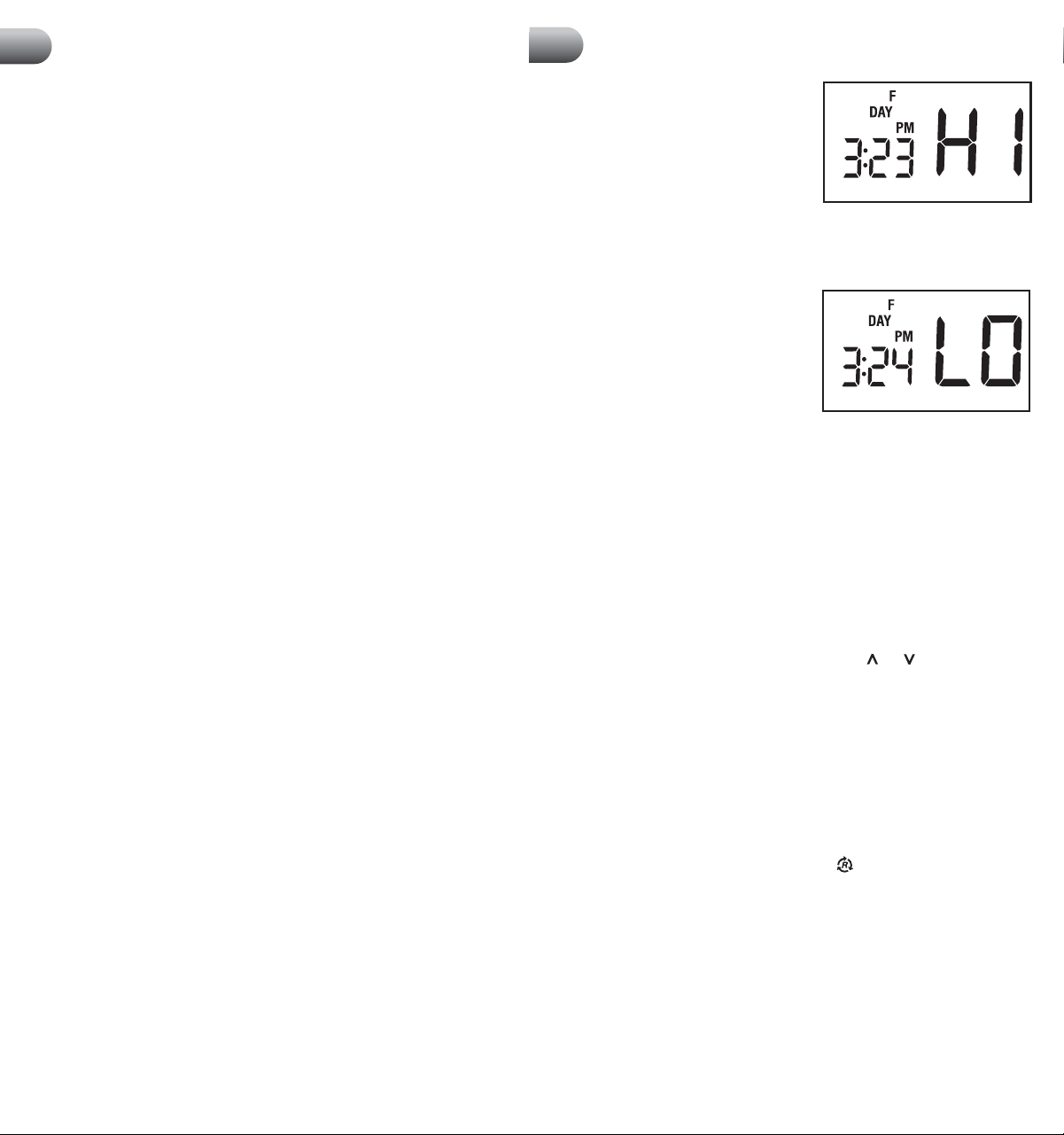
Symptom: HI is shown in the thermostat
display where the room temperature is
normally displayed.
Potential Solutions: The temperature
sensed by the thermostat is higher than the
99˚ F (37˚ C) upper limit of the thermostat’s
display range. The display will return to
normal after the sensed temperature lowers within the 40˚ to 99˚ F (4˚ to 37˚ C)
display range. Turn on the cooling system or use other methods to lower
the temperature.
Symptom: LO is shown in the thermostat
display where the room temperature is
normally displayed.
Potential Solutions: The temperature
sensed by the thermostat is lower than the
40˚ F (4˚ C) lower limit of the thermostat’s
display range. The display will return to
normal after the sensed temperature rises within the 40˚ to 99˚ F (4˚ to 37˚ C)
display range. Turn on the heating system to raise the temperature as needed for
comfort within the room.
Symptom: Cannot program a set point temperature higher than 90˚ F (32˚ C).
Potential Solution: This is above the normal thermostat temperature setting
range of 45˚ to 90˚ F (7˚ to 32˚ C).
Symptom: Cannot program a set point temperature lower than 45˚ F (7˚ C).
Potential Solution: This is below the normal thermostat temperature setting
range of 45˚ to 90˚ F (7˚ to 32˚ C).
Symptom: Thermostat will not allow set point changes.
Potential Solution: The Keypad is locked. Press the and key together at the
same time for one second to unlock. See section 7.
Symptom: Fan continues to run all the time whether the system is on or off.
Potential Solution: Check that the fan control switch is in the AUTO position.
This will allow the fan to run only when the heating or cooling system is turned on
and running.
Check thermostat wiring to make sure that the fan control wiring is connected to
the correct terminals on the wiring terminal block. See section 10.
Symptom: Fan Runs intermittently or when system is OFF.
Potential Solution: Fan switch is in Circulate ( ) Mode. See section 4.
Symptom: The room is too warm or too cold.
Potential Solution: See section 4 of this manual to verify the current set point
and make any modifications that are necessary.
Symptom: System turns on prior to the end of a setback period.
Potential Solution: Thermostat is in Adaptive Recovery Mode. See sections 4
and 7.
®
Symptom: The word HEAT or COOL is flashing in the thermostat display.
Potential Solution: This indicates that the heating or cooling system is currently
running. When these systems are not running, HEAT or COOL will not flash.
Symptom: HEAT or COOL is flashing but the system is not running.
Potential Solution: The thermostat is telling the heating or cooling system to run,
but the system is not responding. You may need to call your local heating and air
conditioning contractor.
Symptom: Thermostat does not turn on heating or cooling system.
Potential Solutions: Check to see if OFF is shown in display. This indicates that
the system is turned off at the thermostat. Move the system selector switch to
the HEAT or COOL position. After the compressor short cycle protection 5-minute
period expires the system should start.
Compressor protection feature may be in effect due to compressor short cycle
conditions. See section 7.
Heating or cooling system may be malfunctioning.
Call a professional service technician immediately to verify system operation.
Symptom: Thermostat turns on heating instead of cooling or cooling instead
of heating.
Potential Solution: Check thermostat wiring to make sure that the heating and
cooling stages are connected to the correct terminals on the wiring terminal
block. See section 10.
Symptom: Thermostat will not follow program set points.
Potential Solutions: Check current time of day, day of week program settings.
Make sure to verify AM/PM indicator is accurately displaying desired time
settings. See section 5.
Check to see if OFF is shown in display. This indicates that the system is turned
off at the thermostat. Move the system selector switch to the HEAT or COOL
position. After the compressor short cycle protection period expires the system
should start within several seconds.
Thermostat program is in Extended Hold (Vacation) Mode and HOLD is showing in
display. Press HOLD or RETURN button to release permanent hold and return the
thermostat to normal program operation.
Symptom: Thermostat turns heating or cooling system on too often or not
often enough.
Potential Solution: Increase or decrease first stage temperature differential
setting as appropriate to provide the desired performance level. See section 4.
Symptom: Low battery indicator is shown in thermostat display.
Potential Solution: Replace batteries immediately to maintain proper system
operation. See section 8.
15
14
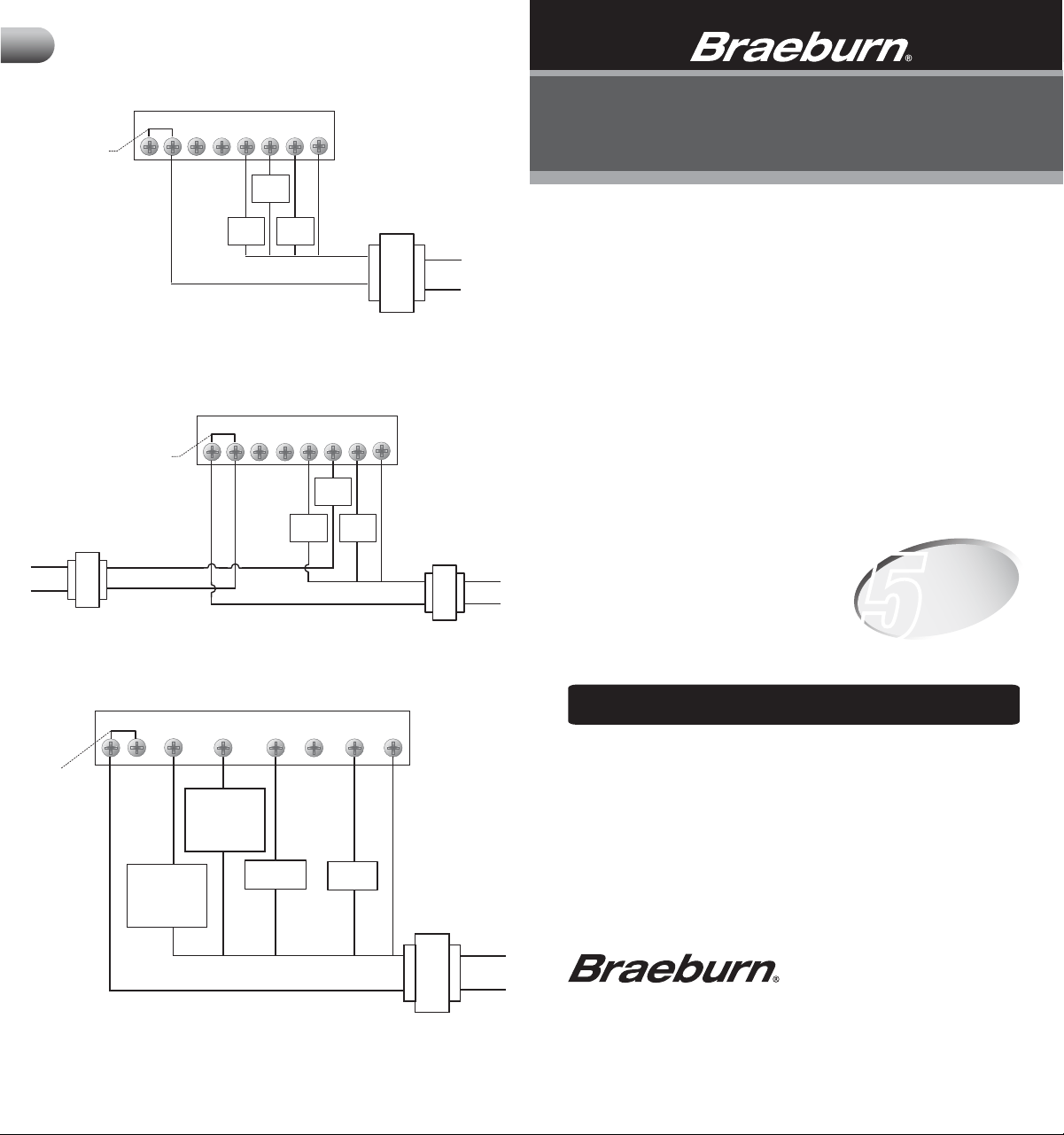
Single Stage Conventional Systems (Dual Transformer)
16
Wiring Diagrams
10
Single Stage Conventional Systems (Single Transformer)
Rc Rh B
Factory Installed
Jumper
O Y W G
Heat
Control
Cool
Control
Fan
Control
C
Transformer Common
(See NOTE 1)
120 VAC
24 VAC
Neutral
Hot
24 VAC
120 VAC
Neutral
Hot
Cooling
Heating
120 VAC
Neutral
Hot
24 VAC
C
Rc Rh B
Remove
Factory Installed
Jumper
O Y W G
Heat
Control
Cool
Control
Fan
Control
Transformer Common
(See NOTE)
NOTE: Transformer Common not required for battery-only operation of thermostat.
NOTE: 1. Transformer Common not required for battery-only operation of
thermostat. 2. For heating or cooling only system, ignore opposite connection.
3. For 2-wire 24 Volt AC or 250mV - 750mV millivolt heating systems, ignore
cooling connection and fan control.
Single Stage Heat Pump System
NOTE: 1. Transformer Common not required for battery-only operation of thermostat.
2. For units requiring reversing valve to be energized during heating, connect reversing valve
to B terminal. For units requiring reversing valve to be energized during cooling, connect
reversing valve to 0 terminal.
Compressor
Control
Transformer Common
(See NOTE 1)
B
Reversing
Valve (Active in
Cooling - See
NOTE 2)
O W
C
24 VAC
Reversing
Valve (Active in
Heating - See
NOTE 2)
Y G
Rc Rh
Factory Installed
Jumper
Fan
Control
Neutral
120 VAC
Hot
©2011 Braeburn Systems LLC • All Rights Reserved • Made in China
•
5000-100-009
Braeburn Systems LLC warrants each new Braeburn thermostat against any defects that are
due to faulty material or workmanship for a period of five years after the original date of
purchase by a professional service technician. This warranty and our liability does not apply to
batteries, nor does it include damage to merchandise or the thermostat resulting from
accident, alteration, neglect, misuse, improper installation or any other failure to follow
Braeburn installation and operating instructions.
Braeburn Systems LLC agrees to repair
or replace at its option any Braeburn thermostat
under warranty provided it is returned postage prepaid to our warranty facility in a padded
carton within the warranty period, with proof of the original date of purchase and a brief
description of the malfunction. This limited warranty does not include the cost of removal or
re-installation.
This warranty gives you specific legal rights and you may also have other rights that vary from
state to state or province to province. Answers to any questions regarding our limited warranty
may be obtained by writing our corporate offices.
Braeburn Systems LLC
2215 Cornell Avenue • Montgomery, IL 60538
Technical Assistance: www.braeburnonline.co
m
Call us toll-free: 866-268-5599 (U.S.)
630-844-1968 (Outside the U.S.)
WARRANTY FACILITY: Braeburn Systems LLC
Attn: Warranty Department
2215 Cornell Avenue
Montgomery, IL 60538
Premier Series
Programmable Thermostats
Store this manual for future reference.
LIMITED WARRANTY
5
YEAR
WARRANTY
LIMITED